#networking
1 messages · Page 290 of 1
 sullen elm
 hollow marlin
Im not guessing. But 10.10 is typically standard /24s. Don't say /8
hollow marlin
same answer
hollow marlin
well the subnet would be 10.10.0.0/30. 255.255.255.252 is the mask
sullen elm
exactly
I made it short
if you were to assign a device the ip 10.20.0.2 you should put 255.255.255.252 as a mask
the same applies for changing the ip pool on a DHCP server
hollow marlin
/30s are for P2P interfaces. You can assign which ever subnets you like
sullen elm
for a local netwrok
on the DHCP config page. In order to change the IP pool from something else to 10.20.0.X you will have to put 255.255.255.252 as the mask
hollow marlin
Im not sure what vendor that is but that is most definitely not standard
 rare matrix
the entire 10 network is freely assignable for anyone since it's a non routable network, there is absolutely no way to tell what subnetting was used to construct this network, the only exception is that if you're using a consumer device the mask will almost definitely be a /24
 uneven moon
Is it possible to reuse a mikrotik router as a plain switch?
 thick minnow
yeah
uneven moon
Do I have to do any configuration or do I just factory reset it and plug things into it?
uneven moon
Okay, thank you
thick minnow
does anyone know if apple is planning on making networking devices again
really liked the airport and time capsules
 tame carbon
wat
@thick minnow you just assumed I was online?
I just got out of bed and am still drinking coffee trying to wake up
@uneven moon just set up all your ports on the same bridge
if you do not configure any firewall rules
it will switch be switching packets
uneven moon
I'll try that, thank you
thick minnow
tame carbon
<@456226577798135808> you just assumed I was online?
nononono
thought you'd read it later
tame carbon
@uneven moon Bridge -> Ports
make sure you disable dhcp if you already have one on your network
@uneven moon another way, maybe even easier
reset the device to factory settings
and during setup, use QuickSet to setup a bridge configuration
that should configure it as a switch
 uneven moon
I have many mode choices, for bridge there's PTP Bridge AP and PTP Bridge CPE, which one should I pick?
 uneven moon
 thick minnow
What the defense between the LAN and WAN

 ruby bramble
For noobs wan is where you connect an cable from your fibre to copper converter and lan is where you plug in device like a pc or laptop
Yup
thick minnow
So if I’m using this as a modem I need to contact my router to wan?
Ok th u
But if it’s modem so nothing will connect there right?
Look I bought mikrotik router and i bought this device to make at as britch
So it a modem for me I should only contact the blue one to mikro and the rest live right?
No
rare matrix
thick minnow
What the defense between the LAN and WAN
we need to see more of the setup to guide you
what is your internet uplink, what other infrastructure devices do you have
then we can tell you what to do
ruby bramble
I did it wooo I now have 500up and 500down for like $25
tame carbon
@thick minnow for consumer routers, those colorings on the port merely refer to the firewall configuration
though some routers allow for changing this
ruby bramble
Quick question does pi hole work at 500mb speeds
thick minnow
Ok when I will get the route could u help me?
tame carbon
@thick minnow what'd you buy?
thick minnow
Hac ac2
thick minnow
D link
tame carbon
@thick minnow yeah but do you have a standalone modem?
or a one-in-all box from your ISP?
this will be important when we go to configuring the router

From Friends on Mushrooms, Vol. 2
Originally 320 kbps, compressed to 192 kbps by YouTube.
Visuals downloaded from: http://www.youtube.com/user/indu111
Link to image: http://fear-sas.deviantart.com/art/Infected-mushroom-album-cover-380814599
iTunes: https://itunes.apple.com/us/album/friends-on-mushrooms-vol.-2/id666324174
Official store: http://...
thick minnow
From what I understand its a modem and router but I will config it to a bridge
tame carbon
perfect
All that matters is that the ISP's device forwards all traffic of your public IP
so you can plug your own gear in :D
 peak cloak
?
From what I seen the ISP one is a modem/router
the hap ac2 is just a wireless router
tame carbon
ISPs that don't provide a router are the best ISPs
because it means they provide just a modem, and 0 bs
peak cloak
Yeah, but some don't even give you that option unless you call
optimum now has fiber, huh..
instead of coax we used to have
coax is higher latency and copper which is annoying
anyway, now both ISPs here have Fiber
I just want ipv6 support...
neither have it
wdym?
oh yeah
most costumers don't care if it's NATed or not
also this is stupid, there is no option to not use their stupid gateway unless you probobly call

smart wifi
because there won't be
I'm actually curious what optimum uses
because fios uses GPON
there is no way you can use your own fiber ONT
I bet optimum also does GPON
although I could be wrong
yep it's GPON
and it seems they hookup the fiber to a stupid atlice box
which can't be bypassed


fios they either put this outside your house
or they give you as desktop one
and you just plug it into your router, no bs
yep the green cable is the fiber going in

connects to this
which is a splice box to the black fiber going in
tame carbon
https://cdn.discordapp.com/attachments/776722183119699988/777646103775674368/IMG-20200922-WA0001.jpg
 peak cloak
probobly plastic tbh
tame carbon
single mode fiber optics here ^
peak cloak
the most no bs setup would be, here's your SFP module
tame carbon
^
That's what I have in that image yeah
the left most fiber is from the ISP
the one spooled up in the middle is locally here 10G
internet service itself is just DHCP on a VLAN
peak cloak
oh yeah cat6a is like 118 bucks
yep

FS
FS offers 1m LC-LC duplex OS2 single mode fiber patch cable for 1G/10G/40G/100G/400G fiber cablings that can transport data up to 10km at 1310nm and 40km at 1550nm.
you can enter a custom length
tame carbon
@long arrow self terminating of fibers is not feasible as a consumer
so you only buy pre-fabbed patch fibers
peak cloak
I mean, you can
tame carbon
You need the equipment & training
peak cloak
just not worth it
tame carbon
fiber splicer costs 10-15k
 alpine basalt
 tame carbon
I have a 250M fiber uplink
the other fiber internally is just for a highspeed NAS
and providing a 1 cable backbone
so I can use vlans instead of running 10 cables
 waxen scroll
alpine basalt
waxen scroll
alpine basalt
Sorry I fail to understand your question?
 chrome flower
@alpine basalt you ain't got nothing on one of my work locations.
 alpine basalt
waxen scroll
Sorry I fail to understand your question?
alpine basalt
waxen scroll
Sorry I fail to understand your question?
its not its a flex

 thick minnow
Is going from 300/20 to 1000/35 worth the extra 20$ a month?
chrome flower
@waxen scroll sorry, I know that speed is embarrassing everyone. Best internet of all time
And @thick minnow what do you use your internet for?
thick minnow
My mom streams on wifi and I use my series x on ethernet gaming and streaming .
chrome flower
Do you have speed issues as it is? And what router are you using?
peak cloak
tbh you don't really need gigiabit
thick minnow
The comcast factory one and sometimes she has connection issues with sling
chrome flower
I'd first try upgrading your router
And convince your to get a TV service that uses IGMP multicasting. Sling can have congestion issues
thick minnow
And the cost of buying a new router and modem would be way too expensive. I only pay 14$ a month and most modems I see are over a hundred and the routers are over 150$ so it would take about 14months to payoff. Which they would likely declare it eol.by then.
peak cloak
router and modem EOL?
chrome flower
What routers you looking?
peak cloak
i've had my modem for over 6 years
chrome flower
*looking at
peak cloak
you can get a good router for around 100
thick minnow
Netgear nighthawk.and the modem is the other part. Comcast is who I have.
chrome flower
That's what I thought
If your willing to learn you can get some nice retired data center gear, I use to run a cisco 3800. Got it for 80bucks
thick minnow
I don't need more hardware. I just like plug and go
Ya girls room has too many wires running around as it stands.
But for 20$ is it a noticeable difference in speeds I'll find with downloads and streaming quality?
chrome flower
I think router is more of a bottleneck
thick minnow
The router is rated for gigabit
chrome flower
You could get a edgerouter x
It means the interface on the router is rated for gigabit
But that dosent mean it will do that throughout
*throughput
peak cloak
chrome flower
You could get a edgerouter x
edgerouter I wouldn't reccomend for plug and go
in default config it can't do gigabit
you need to enable HWNAT
tame carbon
my mikrotik just has igmp as a package
snooping is available by default, but the proxy you can install
@thick minnow mikrotik is also nice and cheap
and has lots and lots of options
though slightly less intuitive
the default configuration that ships on them, is what most people would have for a home wifi router
thick minnow
Yeah I have no idea what any of that means.
I just wanted. To know if I should or shouldn't triple my internet speed for 20$
tame carbon
@thick minnow do you have the option to run some cables?
could just buy a hAP ac2 and call it a day
or ac3 is you prefer more coverage

MikroTik is a Latvian company which was founded in 1996 to develop routers and wireless ISP systems. MikroTik now provides hardware and software for Internet connectivity in most of the countries around the world.
can route ~2gbit/s
it has 5x 1G ports
thick minnow
Just me and my mom in my house, no I can't run cables in the other rooms of the apartment. And I don't know about any of that stuff.
tame carbon
hw acceleration for VPN
thick minnow
My speed right now is 300/20 and for 20$ more I could have 1000/35.
tame carbon
that's overkill
 little schooner
Even better lol
thick minnow
35mbps is overkill?
tame carbon
@thick minnow nevermind the 1000
if you are streaming
you want upload.
like, if you are a streamer
not if ur watching netflix, that's just download
little schooner
@tame carbon I was told my neighbor isn't profitable for them to run fiber
thick minnow
I stream occasionally on twitch. But I mean I am digital only on my series x and I play only 2 games on my pc. I guess I'll just stay with my speed I guess .
tame carbon
800 would be 167 euros/month, instead of 72/month for 250
little schooner
People want cheap junk and that makes me sad
tame carbon
@thick minnow such a mikrotik router, gets to enjoy software updates for at least 5 years
 oak night
I'm getting 1000 down 300 up for 28€
tame carbon
@thick minnow and they support many features, such as adding more wifi access points to it at a later point
thick minnow
What are you saying crystal. I don't understand what your talking about.
tame carbon
and then setting up one single wifi network with them
thick minnow
Literally all that you said.. is jiberish. I guess I'll just leave the chanel.
 lapis kestrel
Do you get spare power adaptor for TP-Link WiFi routers?
oak night
When you have no pictures on the covid vaccine
tame carbon
@peak cloak I think the internet has made the world collectively insane
honestly
they should make the internet like driving
where you have to get your license
teach people about clickbait, malware
etc
xD
oak night
It would be cool
tame carbon
yeah
peak cloak
nah
tame carbon
and next, they require you to use your ID when using the internet, no thank you
its just, idiots with internet that's too fast.
peak cloak
learn by doing
tame carbon
@peak cloak overwhelming majority of people have no clue about technology
to them smartphones are magic in a box
 dusty osprey
fastcomet doesn't even name their stuff nodexxxxx.fastcomet.
afaik, its location then number than fcomet
I remember this as I used fastcomet as my Hosting provider for like a year
ah yes cPanel
 scenic igloo
Is there a way to have something like Ubuntu server on Virtualbox open to my actual network? I want to test out some self-hosted services because I don't have the actual hardware yet
peak cloak
scenic igloo
Is there a way to have something like Ubuntu server on Virtualbox open to my act...
wdym
to not have it NATed?
scenic igloo
peak cloak
to not have it NATed?
trying to be able to access something like portainer through my browser on the host machine
peak cloak
scenic igloo
trying to be able to access something like portainer through my browser on the h...
windows machine?
scenic igloo
yes
peak cloak
oof
on linux, I use proxmox for VM's on a dedicated machine and it used something called macvtap
 final mirage
bridged mode with a hosts entry?
peak cloak
basically what it does is manipulates the mac addresses of the packets
so each VM has it's own mac
so the network sees it as a seperate machine
let me check if there is something similar for windows
scenic igloo
I tried in the past, didn't get it to work but I could ssh, I did also see the vm as its own device on my router's page
peak cloak
scenic igloo
I tried in the past, didn't get it to work but I could ssh, I did also see the v...
probobly firewall issue then
windows is not good for this at all
final mirage
have you tried the win10 store ubuntu virtual machine? I'm pretty sure if you just spin up something like an apache server on that, it automagically will pass through to your host if you're just testing on your machine
scenic igloo
ill try it out
final mirage
just enable Windows Subsystem for Linux in your Windows Features and give her a reboot before you launch it or it'll complain
hollow marlin
@waxen scroll Trying to un-f this portion of the network which I found has a single point of failure for multiple customers. L2 of course


 rocky badge
Was it ever?

 little schooner
oh
Ok so how about this: if I reset the user's password from Azure AD manually, when they login to onprem domain, they can be prompted to reset password?
little schooner
@rocky badge Guess its not free once I enabled password writeback
 rocky badge
Rip
 lean pebble
What ? Lol
 cunning galleon
Tp link ax6000 kicked all my 2.4ghz devices of the network and i cant get them back online
cunning galleon
And thats fair and if my asus router hadnt died and my google wifi units hadnt been super flack i might never have gotten 1 but it had good reviews from tech tubers and i wanted wifi 6 for the spec and to see if it was as aweome as people seemed to imply.
 bitter flint
uh honestly it's kinda weird cuz in canada the way we get internet into our house is still through like
cable coax
unless you have wireless broadband a la starlink or FttH/FttP
 eager veldt
little schooner
ughhhhh
eager veldt
little schooner
ughhhhh
I can't seem to get it enabled at work even though I've followed all the steps in the docs to make it work.
peak cloak
bitter flint
cable coax
that's normal in the US as well
although in my area now both ISPs, verizon and optimum have fivber
little schooner
@eager veldt the service account for AD connect Sync on-prem needs to have certain permissions at the domain level to handle password write back. I found a document that described the process here: https://docs.microsoft.com/en-us/azure/active-directory/authentication/tutorial-enable-sspr-writeback

In this tutorial, you learn how to enable Azure AD self-service password reset writeback using Azure AD Connect to synchronize changes back to an on-premises Active Directory Domain Services environment.
Make sure you added your custom domains in Azure ad
But I never got passed this part bc money
eager veldt
Pretty sure the password policy thing I haven't done yet. The option to turn on password writeback is greyed out probably because of that.
little schooner
Mine was not defined at the time, so possibly, yeah
thick minnow
Halp, I'm almost done setting up a Pi Hole on my server and I'm stuck on this last part. I can't figure out how to set the DNS Server on my router. It's a netgear Nighthaw C7800.
Not sure what I'm doing wrong.
peak cloak
thick minnow
Halp, I'm almost done setting up a Pi Hole on my server and I'm stuck on this la...
ok there are 2 ways of doing this:
- The router is the primary DNS server and it forwards requests to the pihole
- The pihole is the DNS server bypassing the router completly
thick minnow
I want the first option I believe
peak cloak
For the 1st option you need to find something along the lines of DNS Forwarding
 waxen saddle
- pihole is the primary dns and forwards to the router
peak cloak
true
thick minnow
Aight one sec...
I see these things in the tab "Internet Setup" under advanced options. I checked the "Use these DNS Servers" along with entering in the IP address(s) of the pi hole
 peak cloak
It may be pushing out requests out of WAN only
peak cloak
waxen saddle
3) pihole is the primary dns and forwards to the router
tbh this is the best way
that's what I did
thick minnow
Hmm, okay...
waxen saddle
Same. No weird loop backs
peak cloak
peak cloak
tbh this is the best way
so for this, you need to find DHCP server settings and change the DNS option there
thick minnow
How do I make that happen? I've got the R-Pi plugged in via ethernet to the router.
I'll look one sec...
peak cloak
in my router it looks like this shared-network-name LAN2 { authoritative enable subnet 10.0.10.0/24 { default-router 10.0.10.1 dns-server 10.0.10.1 lease 86400 start 10.0.10.38 { stop 10.0.10.243 } } }
waxen saddle
That’s perfect. Basically, the dns chain is: your computer > pihole > router > ISP or other external DNS. Just need to configure things as PresentMonkey guides you
peak cloak
I'm not using pihole right now
So i just point DNS to my router
Basically what this does it tell the client devices what DNS server to use
But it's not authoritarian
So some apps or smart devices may choose to completely ignore it
thick minnow
I see this. Is this what I'm looking for?
 peak cloak
huh
thick minnow
I'll be completely honest, I don't know much about networking. I don't know what DHCP is or any of these acronyms
peak cloak
DHCP is what is used to automatically give IP addresses to clients
waxen saddle
Is there an advanced area or advanced lan configuration? Advanced dhcp config?
DHCP is also what tells your devices what DNS server they can use.
thick minnow
The only place I even see DHCP mentioned is "Use Router as DHCP Server"
peak cloak
it is possible that your router doesn't allow configuring it
thick minnow
Ah, nuts.
peak cloak
gtg, I may be back
waxen saddle
Which is nuts. What router manufacturer and model do you have? I’d be impressed if it really does t have it
thick minnow
Its a freaking NETGEAR! Like, one of the biggest brands in, the world maybe?
headdesk
lean pebble
What model
waxen saddle
Lol. What is the model number?
waxen saddle
Impressive. It actually has no way to configure DNS settings for DHCP.
thick minnow
LOL! Wow... Manufacturers think we're dumb or something
waxen saddle
You have 2 options:
- Configre every device manually to use the pihole.
- Disable DHCP on your router and enable DHCP on the pihole. (Point the pihole gateway to your routers LAN IP. Set the upstream DNS to the same IP as your routers LAN IP.)
thick minnow
Does the second option bottleneck me in anyway?
Maybe I'll just use the first option. Safer I suppose.
waxen saddle
No bottlenecks at all.
thick minnow
Ahhh I'm not sure. Haha. I'll just try the second one then. I think I can figure out how to do that.
waxen saddle
Sweet. If you are nervous, you can always try the first option before committing to the 2nd
Just know that with the 2nd option, if the pihole goes down, you’ll need to manually set your IP on your computer and connect to the router to re-enable DHCP.
I encourage you to test and grow your familiarity with all this. Have fun! Enjoy less ads and tracking!
thick minnow
God I can't stand ads... lol
Yeah its has been a fun little evening project. I enjoy clicking things and being like, "Oooo whats this gonna do?"
Oh! It works! The only thing is it only works on my 2.4g network and not my 5g haha.
waxen saddle
Uhh.. LOL. Not sure what to say about that one.
thick minnow
Okay so now there's a dilemma. It seems like the R-Pi, it can connect wired, but if I do that, I can't connect to the Pi Hole interface
 static knoll
thick minnow
Okay so now there's a dilemma. It seems like the R-Pi, it can connect wired, but...
static knoll
thick minnow
Okay so now there's a dilemma. It seems like the R-Pi, it can connect wired, but...
Networking all day every day
thick minnow
Hi can I pls get help to making router dome (I mean to bridge it and making it only a modem)
It’s a d link dls router
thick minnow
My Note 3 running LineageOS is randomly dropping my WiFi Signal, can someone help me with this?
thick minnow
And how are 2nd hand servers so cheap?
ruby bramble
Idk i have a 56 core server with 12tb of hdd storage and 4tb old ssd storage with watercooling and dual 2070 supers and 512gb of ram for like $2000
And rgb lol
 stone kite
So I installed Teracopy to queue up things to be transfered from my computer to my nas over my gigabit network. In getting speeds faster than 125MBps. (like 140-160)
How is this possible?
thick minnow
Can someone help bridge DLink DSL router?
peak cloak
thick minnow
And how are 2nd hand servers so cheap?
a good one isn't
thick minnow
peak cloak
a good one isn't
So what would a good server be (2nd hand ie.)
peak cloak
most cheap ones are old, power hungry, and noisy
depends on what you need
if dell, at least an Rx20
or if HP at least a Gen 8
Although I've looked at some cheaper Gen9 servers
 carmine moss
The lowest you could get are westmere xeons the x5650 or higher but they are power hungry
thick minnow
I followed a guide from isp to bridge my router and I contact the bridge router to the mikrotik router
And it’s still dosent work
 worldly imp
i would blur some stuff if i was you
little schooner
@waxen scroll how common is it for meetings to turn political? The one my supervisor told me to join is getting like that. "we are not being heard" "there's no equity in this decision being made" etc etc
They are getting muted
I just want to focus on my scripting stuff
I don't like meetings
waxen scroll
if its a team meeting of your own team it can
if its multiple teams, the people doing it need to be told to take it offline ;p
 little schooner
waxen scroll
how was it being used
little schooner
waxen scroll
how was it being used
Used because Administrators are making all the decisions for budget without considering input from teachers and other staff.
I guess no equal opportunity to try to change the final decision
@thick minnow 2nd hand is cheap enough to get a home lab started
hollow marlin
little schooner
<@186123993412141057> how common is it for meetings to turn political? The one m...
Within the team, not as common. Between the teams, happens constantly. Just the nature of each team being assigned their task and when multiple teams need to coordinate to get something accomplished things can get spicy
waxen scroll
i mean in respect to keeping it to yourself
in your own team everyones gonna complain about other teams
rarely does it spill over into meetings with said other team
hollow marlin
It could even just be my region, remember these are NYers. In every place I have worked as well as some pretty aggressive stories from friends, meetings between teams tend to become political fairly often.
waxen scroll
you should try working with native germans as a US based person
oooooh boy
very. blunt.
if they dont like you lol
hollow marlin
Thats a majority of the stories I have heard. Their head quarters are in Germany and their smaller HQ is here.
Very blunt is pretty much accurate
waxen scroll
my first networking job had germany as one of the NOC centers
 glossy crystal
Anyone got starlink?
peak cloak
glossy crystal
Anyone got starlink?
not me, but I know many who do
glossy crystal
What do they think of it?
peak cloak
It's good
glossy crystal
Currently debating if to put my order in just wanted to see peoples opinion on it
peak cloak
glossy crystal
Currently debating if to put my order in just wanted to see peoples opinion on i...
do you have bad internet right now?
like dsl levels
glossy crystal
25mbps down 3 up
peak cloak
yeah it's more for areas without any high speed internet
little schooner
I got an invite too but its too expensive rn
thick minnow
 oak night
Ahahahha
thick minnow
yeahhh
waxen scroll
its so cute~~
 thorny vector
@waxen scroll if starlink came down to 50$ a month, I’d consider it as a backup wan solution for the home
little schooner
$50 sounds good. I would install one for my grandmother, she lives in very remote area
Dial up is the best connection
peak cloak
right now the dish is 499, even when subsidized
it actually costs around 2000 to manufacture
 cedar igloo
i give up... warship keeps deleting messages 😦
peak cloak
cedar igloo
i give up... warship keeps deleting messages 😦
deleting what? put it in pastebin
cedar igloo
anyone here installed ubuntu server using a cloud config file before? if so, can somebody help with my ssh section:
https://pastebin.com/Nx1Q6EWc
getting an ssh authentication error when using HashiCorp Packer and dont know why (Ubuntu Server 20.04)
Pastebin
Pastebin.com is the number one paste tool since 2002. Pastebin is a website where you can store text online for a set period of time.
both the username and passwords should be "ubuntu" (the password seen in the pastebin is using sha512) but i'm not sure if the encryption is wrong, or its looking for key pair authentication
 peak cloak
never seen that type of outlet
 tall pagoda
Despite I had no experience nor certificate to install at all.
peak cloak
yeah you don't
I've wired multiple
it's easy
blue goes to blue
green goes to green
crimping is harder
tall pagoda
I had lying around somewhere, bought it couple of years ago and I began thinking of trying to wire some Ethernet cables
peak cloak
your in Europe?
tall pagoda
I crimped also some normal contacts successfully
tall pagoda
peak cloak
your in Europe?
Yes. I’m Dutch but I am for a week now in Sweden
I have a home there also
peak cloak
yeah the outlets are a lot more square
tall pagoda
tall pagoda
Yes. I’m Dutch but I am for a week now in Sweden
For work
peak cloak
have you thought of putting ethernet in the wall itself
tall pagoda
I may not drill some holes from my father which is the home owner
And I mounted on the old part of the house (from ~1940) where the wall outlets is also mounted on the wall and not in the wall
peak cloak
ah
 peak cloak
waxen scroll
i know what that is
peak cloak
waxen scroll
i know what that is
token ring?
waxen scroll
bingo
but its adapted to use RJ-45 and the max speed is 100mb
you sometimes see it at super old companies but most if not all have since replaced it so they can gig
hollow marlin
I know zip about token ring as it pre-dates me. Don't care to waste brain cells learning it either based off reactions alone when its mentioned
 mighty wind
I was wondering who would make a connector that big then realized IBM so yeah
thorny vector
@hollow marlin I’ve yet to encounter token ring. The worst we’ve had a customer is a 10base-t network.
Never again.
 thorn crescent
Where could VPN discussion go? I'd like some help choosing a VPN company
 onyx star
ExpressVPN
thorn crescent
onyx star
ExpressVPN
I like their offering the best, but I found their price was a bit steep. There are many within the $2-4 range if you buy a multi-year plan which I don't mind doing, but $6.67 seems like a lot for a 15 month commitment
If they had a sale for like $4.50 I'd be sold
onyx star
thorn crescent
I like their offering the best, but I found their price was a bit steep. There a...
Nord vpn
thorn crescent
onyx star
Nord vpn
How's their UI? The screenshots look concerning
onyx star
thorn crescent
How's their UI? The screenshots look concerning
Seems pretty clean and simple to me
thick minnow
thorn crescent
Where could VPN discussion go? I'd like some help choosing a VPN company
Why don't you try making your own VPN, cloud service providers like Vultr cost like 2 USD for their smallest VPS, which is actually plenty enough
https://github.com/Nyr/wireguard-install, this is a simple to use script to get you started
but follow the pre install steps in this guide : https://notthebe.ee/Creating-your-own-OpenVPN-server.html (remember preinstall)
thorn crescent
thick minnow
Why don't you try making your own VPN, cloud service providers like Vultr cost l...
Thanks for the help, but I ended up going with Nord for $3.15/mo. I'm not opposed to self-hosting, but I've tried it in the past and it feels like my traffic has been flagged more than using a more "traditional" VPN. I also like that multiple users use a VPN IP address to help further anonymize the traffic. Also, for Vultr in particular, the company is US based and for privacy reasons I don't prefer that
 light field
hey guys this is oddly specific, but I'm looking for a cheapish 1U Colocation in Seattle or the PNW... anyone know where I should start looking? Subreddits/recommendations/etc are welcome
tame carbon
@thick minnow setting up your own VPN server won't be as anonymous as a centralized VPN would be
and most people dont even need a VPN :P
its just snakeoil to most

 tame carbon
Nice
 desert briar
Heck yeah. The NIC is behaving really weirdly though. Needed to do a pass-through to a VM in order for it to work. It wont work in vmware as is, it just stays on the "disconnected" status.
tame carbon
@desert briar I set mine up differently. I use 8021q kernel module to create virtual interfaces ontop
And then give those to a vm
desert briar
I mean I guess I could do this with it too, its rather old though. Dunno. I got it for 60 GBP on bargainhardware, im just happy it works
tame carbon
Yeah, but you can leave the interface unconfigured
And then just assign vlans and use those
I couldn't get dhcp to work over that fiber for some reason
So I used vlans, which did work
 glossy sorrel
I've got a question about getting a specific subnet mask form an ip. Anyone who can help me?
peak cloak
glossy sorrel
I've got a question about getting a specific subnet mask form an ip. Anyone who ...
yeah, just ask
glossy sorrel
The host's IP address is 10.133.133.133, and that the host portion of the IP address is 12 bits.
How can I calculate the subnet mask?
peak cloak
you don't calculate a subnet mask from an IP
that's not how it works
a subnet mask compliments an IP
the more modern version is to use CIDR's not subnet masks
so for example 255.255.255.0 would be /24
so you would write out lets say an IP 192.168.1.1 that has the subnet mask of 255.255.255.0 as 192.168.1.1/24
tame carbon
@glossy sorrel /20 ?

CIDR notation is more common
255.255.240.0 is the mask for a /20 subnet
 muted gate
Anyone know what to put in for the internal host when port forwarding?
tame carbon
@muted gate that's the local IP of your computer, that you are port forwarding to
you are translating public IP + port --> local ip + port
muted gate
@tame carbon Thank you!
tame carbon
@muted gate it might be useful to make sure the computer gets a static address
otherwise, when it reconnects to your network, and obtains a new address, your port forward rule will be invalid
using a static DHCP lease, (sometimes called MAC binding), will make sure the computer always gets the same IP
muted gate
Would I do that through this screen?
 tame carbon
@muted gate if you are using DHCP on your network, you should do this in your router
you can just reserve an IP address for a specific MAC
muted gate
Ahhh, gotcha.
tame carbon
@muted gate if you did it manually in windows, chances are that the router gives out that address to another device, thinking its available
and two devices with same IP on same network = issues.
either use a static DHCP lease (address reservation).
Or. use a portion of address space that is outside of DHCP
like, on my network the first 50 addresses are not given out by DHCP
allowing me to statically assign those
 glossy sorrel
tame carbon
`255.255.240.0` is the mask for a /20 subnet
glossy sorrel
tame carbon
`255.255.240.0` is the mask for a /20 subnet
Yeah, thanks!
PresentMonkey helped me in a private!
desert briar
the hero we have, but dont deserve
lean pebble
tame carbon
either use a static DHCP lease (address reservation).
Or. use a portion of addre...
I just had this problem last night I guess
Because I connected my living room mesh unit via cable by mistake and it interfere with the connection to my wifi to cable convertor 😆
My old fortigate now used only as wifi to cable converter.
 pale latch
idk if this channel is for networking stuff but i have this problem: i really want to connect to my docker containers via vpn and i don't really know how (even linking to correct resources straight from google is good enough for me)
 peak cloak
pale latch
idk if this channel is for networking stuff but i have this problem: i really wa...
peak cloak
pale latch
idk if this channel is for networking stuff but i have this problem: i really wa...
idk much about docker, but you would want to create a docker network and have all 3 containers in that network
pale latch
peak cloak
idk much about docker, but you would want to create a docker network and have al...
The trouble is, i'm using macvlan because of conflicting ports, and i cannot use a normal docker network. I also tried getting wireguard on docker but i couldn't find a good image that's easy to configure for me.
pale latch
ye that's the trouble for me
peak cloak
basically have the wireguard vpn be on the same subnet/vlan that the containers are on
pale latch
i think it is in the same subnet

also maybe it will be easier: can a docker container have multiple macvlan networks "connected"?
peak cloak
pale latch
i think it is in the same subnet
if it's on the same subnet what's the problem exactly?
you should be able to connect to the services the containers are running
pale latch
btw i found this blog post from someone and i now i'm reassured that host-macvlan wont work, i don't really like the soultion from this blog post cuz it's a realy weird workaround
 pale latch
peak cloak
you should be able to connect to the services the containers are running
pale latch
peak cloak
you should be able to connect to the services the containers are running
but i'm not able to
 peak cloak
pale latch
but i'm not able to
peak cloak
pale latch
but i'm not able to
wireguard is on the hostmachine?
pale latch
yes
pale latch
so there is no workaround for it and it won't work at all even if i try?
peak cloak
there probobly is a way
pale latch
thanks for help btw :) i'm done for today maybe i will get around doing this eventually
lean pebble
Vms are just better
peak cloak
not in all cases
lean pebble
In most cases
tame carbon
@pale latch I used vlans, and then macvtap on those vlans
each vm shows up as an interface in my router
and I just use dhcp to assign an address
pale latch
lean pebble
Vms are just better
good luck spinning up 2+ vms on raspberry pi lmao
pale latch
tame carbon
<@!273872466936463362> I used vlans, and then macvtap on those vlans
can you link me any docs? i can't find any info about macvtap or how to configure it
tame carbon
@pale latch I actually use qemu/kvm
pale latch
oh
tame carbon
so its just an option in the virtual nic
but most hypervisors would support this
vlan is a virtual network interface on the host
and then you pass this to the guest with macvtap
or do a direct vlan passthrough
@pale latch are you using linux then?
pale latch
yes i'm using linux
tame carbon
I can show you the interfaces config for vlans
crystal@servomat:~$ cat /etc/network/interfaces
# This file describes the network interfaces available on your system
# and how to activate them. For more information, see interfaces(5).

source /etc/network/interfaces.d/*

# The loopback network interface
auto lo
iface lo inet loopback

# The primary network interface
allow-hotplug enp9s0
iface enp9s0 inet dhcp

# 10G
auto enp10s0f0
iface enp10s0f0 inet manual

# VLAN 503
auto vlan503
iface vlan503 inet manual
  vlan-raw-device enp10s0f0
enp10s0f0 is a fiber interface to the router
pale latch
wait so for clarification you're using macvtap as an interface right?
tame carbon
second..
pale latch
and you can connect to macvtap via host machine right?
tame carbon
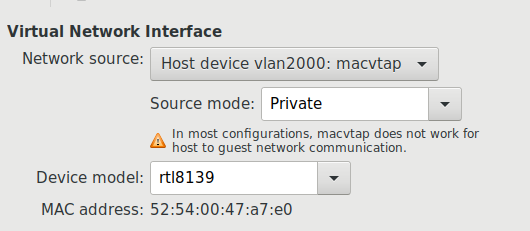 pale latch
hm okay thx
tame carbon
@pale latch macvtap basically modifies the mac address of the origin of the packet
you can use multiple virtual machines on the same vlan with different mac addresses
but the problem is that you can't have guest-host communication
pale latch
from what i can find macvtap is based on macvlan so i would have to switch docker networking to macvtap and i don't think that it is possible
pale latch
tame carbon
but the problem is that you can't have guest-host communication
and that's what im looking for
thanks anyway
tame carbon
@pale latch you need a network bridge
if you want guest-host communication
the host would use NAT for the guest to go out on the rest of the network
it would have an internal IP that's local to your machine only
pale latch
yeah i think i will just use bridge networking in docker then because it makes the most sense now that you have said it
 dusky flame
you guys know if a passthrough setup will allow ALL voice traffic to go through? I know some modem/router has SIP ALG enabled by default and some doesn't even have that option anywhere in the settings
pale latch
tame carbon
and that's where my knowledge ends
thanks again :)
tame carbon
@dusky flame most routers its a configuration option
though some consumer routers don't have support for it
dusky flame
yeah, that's a problem with some of the consumer one. can't tell people to replace their ISP/box because their VoIP isn't working
tame carbon
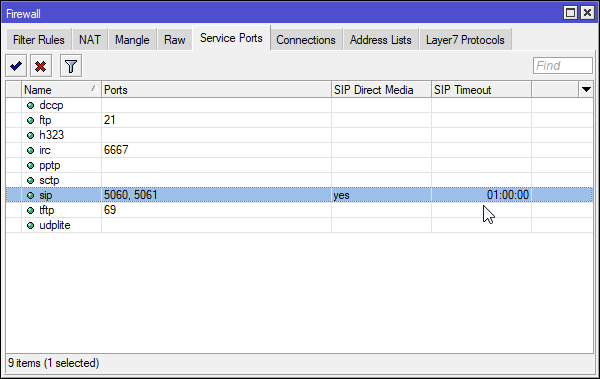
on my mikrotik ^
its just part of the firewall
I would only buy routers where I know how to configure such a thing
dusky flame
that's only if the ISP allow their router to be replaced or budget fit. dang
tame carbon
if the isp router/modem supports bridge mode
dusky flame
disabling the modem/router firewall and setting it up for passthrough wouldn't fix it right?
tame carbon
you can use PPP on the router you connect to it
in this case, the device will function as a pure modem
provides an ethernet network, for which you can then set up a tunnel with
most consumer DSL internet uses some variant of this
The Point-to-Point Protocol over Ethernet (PPPoE) is a network protocol for encapsulating Point-to-Point Protocol (PPP) frames inside Ethernet frames. It appeared in 1999, in the context of the boom of DSL as the solution for tunneling packets over the DSL connection to the ISP's IP network, and from there to the rest of the Internet. A 2005 net...
dusky flame
I guess that's worth trying. thanks
tame carbon
@dusky flame if its just twisted pair copper dsl, you can in theory grab any modem that supports the specification of the dslam
and then use your own router
though if you use IPTV and some other specific services, not every ISP is as keen on sharing information
dusky flame
ah
tame carbon
you need to configure your router for those things also
but if its just internet
or you have an ISP that just gives you a printout
or login info
then its dead easy :P
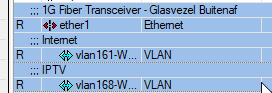
for me its just some vlans
but pppoe behaves much like that, its a tunnel which presents itself as an interface
except pppoe can do authentication, encryption and compression
eager veldt
Engenius EWS357AP arrives tomorrow - so exited
rocky badge
@clear igloo Meeee wants when it comes out of EA https://store.ui.com/collections/unifi-network-access-points/products/unifi-ap6-professional-beta

Ubiquiti Inc.
Indoor WiFi 6 AP with 5.3Gbps throughput and a 300+ client capacity
A focal point of the UniFi 6 line, the U6-Pro is a dual-band WiFi 6 (802.11ax) access point that represents the next generation of competitively priced, prosumer wireless technology for home and enterprise users. Delivering blazing throughput speeds of up to 5.3 Gbps over its ...
 eternal monolith
pale latch
yeah i think i will just use bridge networking in docker then because it makes t...
eternal monolith
pale latch
yeah i think i will just use bridge networking in docker then because it makes t...
you can use ipvlan networking with bridge set to give containers their own IP address
rocky badge
4x4 WiFi 6, $149
 clear igloo
Nice! @rocky badge
rocky badge
Retrofits into the old UAP-AC-Pro mount
So its just a drop in and replace
From the performance of the 2x2 WiFi 6, U6 Lite & LR....they perform really well
~600-800Mbps on the $99 one 
peak cloak
eternal monolith
you can use ipvlan networking with bridge set to give containers their own IP ad...
he's already doing that
just that macvlan doesn't allow host <-> container communication
eager veldt
IDK if my U6-Lite is defective or not, but it's been a disappointing unit @rocky badge
eager veldt
scheduling didn't work out of the box with mine, on a fresh controller install at that
 eager veldt
Got that solved finally with making a new site, but still have latency issues and WPA auth problems. Speeds are great though.
rocky badge

eager veldt
Yeah, it's puzzling
IDK what I'm gonna do with it once I get the Engenius AP up tomorrow night. RMA it or just return it.
rocky badge
Try RMAing it
Ubiquiti Direct has a 20%(?) restocking fee
might've dropped to 15% when they changed some stuff


 rocky badge
oop


All of mine is shitty IoT
So I don't care about tcp latency for them
Although, iirc, incorrect WPA passwords count as WPA Auth Failure?
eager veldt
It's mainly the WPA auth issue that is the biggest problem. Connection just pauses for 15s-2min for devices. Sometimes says it can't connect and have to restart device to connect.
Nothing special is setup. 4 SSIDs. 2.4 an 5ghz split into their own networks. Ran the same simple setup for 2.5 yrs on a AC-LR. No issues
eternal monolith
peak cloak
he's already doing that
macvlan and ipvlan aren't the same thing
macvlan required a route installed on the default gateway to point to the macvaln routed subnet
macvlan is a routed network, ipvlan can be a bridge to the actual physical network with a real ip on the network
i use ipvlan and all my containers have a seperate IP on the network bridged across a separate network interface
peak cloak
eternal monolith
macvlan is a routed network, ipvlan *can be* a bridge to the actual physical net...
he does get real ips on the network though
thick minnow
Ayy I just set up my pihole and I'm having some trouble. Seems like its not blocking a lot of ads. Is it now defunct on YouTube ads or something?
I tried making the pihole the DHCP instead of my router to no avail
thick minnow
waxen saddle
You have 2 options:
- Configre every device manually to use the pihole.
- Disab...
Hey @waxen saddle , what did you mean by Point the pihole gateway to your routers LAN IP. Set the upstream DNS to the same IP as your routers LAN IP?
waxen saddle
Yep.
desert briar
You cant really block youtube ads with pihole. Pihole works with list of domains/subdomains to blacklist
Youtube is smart and they constantly serve ads through new domains / subdomains
waxen saddle
PiHole is supposed to keep fairly up to date with that. Just update it regularly and understand that some ads will always get through, depending on how up to date it is, and how the ad is being served.
rocky badge
YouTube ads don't come from another domain
desert briar
Then subdomain, I just know they are smart about it. My bad
rocky badge
pre roll & mid roll ads are under googlevideo
desert briar
Speaking of which
rocky badge
if you block googlevideo, you block all of YT
desert briar
Im blacklisting blob.rocks as we speak 
rocky badge
Lol
thick minnow
Yeah its weird. I have the pi wired to my router now. DHCP is on for the pi, disabled on the router. Doesn't seem to be blocking ads though. Not even banner ads
Like, I'm not sure if I should be forwarding something from my router to the pi or vice versa or what?
I'm a networking n00b.
desert briar
Do you have a secondary dns server setup on your machine? Did you flush your dns cache?
thick minnow
Flushed it just now.
waxen saddle
On your windows computer, open CMD and type in "ipconfig /flushdns" This will flush the DNS cache and force it to look to your configured DNS server. Also, clear out your browser cache. Sometimes it just throws up the ads because you have already downloaded it - no DNS lookup needed.
Sorry, I'm a bit laggy. lol.
thick minnow
Aight did that
waxen saddle
Unfortunately, I have to run to another job, but I'll probably be back later this evening.
thick minnow
Just get adblockplus
peak cloak
uBlock origin works for the most part with yt ads
thick minnow
Yeah that's what I use on my PC browser. Was trying to find a way to block ads in applications on devices like smartphones
peak cloak
on firefox there is ublock
thick minnow
Just tinkering with it now, feels like I'm making some progress in understanding how the pieces fit together.
Obviously. lol
peak cloak
yeah on mobile
thick minnow
I'm stuck on what a DNS is
peak cloak
thick minnow
I'm stuck on what a DNS is
on what DNS is?
thick minnow
Yeah. Now I'm trying to manually add each device, starting with my phone. I added in the IP address but I feel as though I need to add some kind of DNS code too?
Don't know where I'd find the pi DNS, or if I'm even on the right track there
peak cloak
On your phone, there should be these options at least:
   IP
  Subnet Mask (or CIDR)
  DNS Server
  Default Gateway
DNS Server is where you put in the Pihole IP
@thick minnow
IP Is the actual IP that you want the device to have, you can't have two of the same IPs
Default Gateway is the IP of your router
Subnet mask is usually 255.255.255.0 or in CIDR form 24
thick minnow
Oh okay so in the advanced settings of my phone, in the static IP thing, I'm assigning an IP address myself for this device
Nope, that wasn't it. Grr...
peak cloak
thick minnow
Oh okay so in the advanced settings of my phone, in the static IP thing, I'm ass...
yes
thick minnow
Or maybe it was... hmm...
peak cloak
why ,what's the issue?
thick minnow
Alright here's how I set things up:
Example:
Pi IP Address: 345.678.0.34
Phone settings:
IP Address - (Address of phone listed on my router)
Gateway - 345.678.0.1
DNS1 - 345.678.0.24
peak cloak
thick minnow
Example:
Pi IP Address: 345.678.0.34
Phone settings:
IP Address - (Address of p...
umm, are those the actual ips
thick minnow
Nope
peak cloak
they are just local so no need to hide them
not public
anything 192.168.x.x
or 10.x.x.x
among a couple others
thick minnow
I don't know anything about networking sooo 🙃
peak cloak
thick minnow
Example:
Pi IP Address: 345.678.0.34
Phone settings:
IP Address - (Address of p...
wdym byAddress of phone listed on my router
thick minnow
Alright so then it would be this:
Phone IP - 192.168.0.14
Pi IP - 192.168.0.24
Router IP - 192.168.0.1
peak cloak
seems correct
thick minnow
So I'm plugging in phone IP in the "IP Address" field of my phone when I connect to my home wifi. Gateway is router IP. DNS is Pi IP?
peak cloak
thick minnow
So I'm plugging in phone IP in the "IP Address" field of my phone when I connect...
yeah
thick minnow
Alrighty, so I did everything correctly. It should be working. Maybe it's just that the pi isn't good at filtering ads or anything.
 tribal ferry
I don't live in Indiana, but I saw the link of MetroNet somewhere and it seemed like some smaller non-wisp fiber ISP. Do most of these companies own their own and lay their own fiber lines or do they somehow rent them from larger providers?
Seems like a small company to own their own lines that would costs tens of thousands of dollars.
peak cloak
thick minnow
Alrighty, so I did everything correctly. It should be working. Maybe it's just t...
are you on android
there is this terminal emulator called termux
you can use linux tools like dig to check if it works by digging a domain you know is blocked
it should return 0.0.0.0
thorny vector
tribal ferry
I don't live in Indiana, but I saw the link of MetroNet somewhere and it seemed ...
A little of A, a little of B. Generally it depends on their ability to be subsidized by the local government.
tribal ferry
Anti-monopoly laws I would assume?
thorny vector
More along the lines of developing it as a privately owned utility
Company A promises to wire County B if County B pays 75% of laying costs
tribal ferry
Ah alright
 uncut plume
Is there any advantage to using a wired router separately than the one that is built into a Wi-Fi router?
peak cloak
wdym by wired router?
uncut plume
Like to use a wired router to handle the routing and just bridge to my Wi-Fi hardware?
peak cloak
yeah of course, I myself have the ER-X router
depends on what you need
if you want to fiddle with settings then it's great
vlans, dhcp, dns, etc.
uncut plume
I have a TP-LINK TL-R600VPN router sitting around and was wondering if it would improve my home network at all by using it instead of the built in routing in my Linksys Velop Wi-Fi system.
peak cloak
by just general imporvement I doubt it would do anything
also depends on what your defention of improve is
uncut plume
Yeah I kinda figured unless the wired router had features I needed that the Linksys didnt have
peak cloak
like what features
uncut plume
I'm just saying in general
The wired router doesnt really have anything I need but I was just wondering if it would somehow improve the wifi to move the work to a different device
peak cloak
uncut plume
The wired router doesnt really have anything I need but I was just wondering if ...
yeah it won't improve wifi
unless you want specific features
uncut plume
Yeah I had a feeling just wanted to check
 coarse storm
ok so we’re getting new internet this month will i be able to play games while someone is watching netflix? on my current internet when someone is on netflix you can barely use the internet
 peak cloak
coarse storm
ok so we’re getting new internet this month will i be able to play games while s...
peak cloak
coarse storm
ok so we’re getting new internet this month will i be able to play games while s...
yeah you should
streaming doesn't take up that much bandwidth
also
do you live somewhere rural because that's expensive
coarse storm
peak cloak
do you live somewhere rural because that's expensive
yes i do i live in butt fuck no where virginia
these are my current speeds
 peak cloak
coarse storm
these are my current speeds
peak cloak
coarse storm
these are my current speeds
yeah that explains it
SLOW
also look at starlink
coarse storm
we did
peak cloak
kinda competivive
coarse storm
but it’s really expensive for the equipment
peak cloak
yeah
it's actually 2500
spacex subsidizes it
so 500 for end consumer
some expensive tech inside the dish
coarse storm
see this new isp is also satellite and the install fee is $500 and 200 for the equipment
peak cloak
coarse storm
see this new isp is also satellite and the install fee is $500 and 200 for the e...
huh, starlink is cheaper then
499 for eqipment
100 a month
but starlink is in beta rn
coarse storm
with getting star link we’d have to wait until mid this year and with my mom going back to online collage and me doing online school at the same time our internet is struggling
also it goes out often
peak cloak
coarse storm
also it goes out often
yeah because of beta
 primal ice
ds; sucks
peak cloak
once it releases it'll be good
primal ice
dsl*
coarse storm
peak cloak
yeah because of beta
no our current internet does
coarse storm
atleast once if not twice a day
peak cloak
dsl?
coarse storm
yes
coarse storm
it sucks ass
my neighbor has this package he’s paying for the 150 but gets around 200-250 on ethernet so i’m hoping i get higher speeds then what we’re actually paying for
 peak cloak
coarse storm
my neighbor has this package he’s paying for the 150 but gets around 200-250 on ...
peak cloak
coarse storm
my neighbor has this package he’s paying for the 150 but gets around 200-250 on ...
huh that's good, always benchmark on ethernet, wifi means nothing
primal ice
always had problems when I had dsl even the like 25mb down and 3mb up. the up would get congested which would slow down the down.
peak cloak
never had to experience dsl
since I remember using the internet it was DOCISS and now Fiber
coarse storm
there’s another isp that offers a gig option for 110 a month but they don’t offer it in my tiny area but offer it in the rest of my county
my county has a population of about 3,000
peak cloak
coarse storm
there’s another isp that offers a gig option for 110 a month but they don’t offe...
probobly fiber, no sat provider is gigabit yet
coarse storm
it is fiber
coarse storm
they offer over a gig by the military base
peak cloak
of course
coarse storm
we looked at a house by the military base too before we moved here pain.
holy shit they lowered the cost of gig down to $60 a month 
if they ever offer it in my area were probably gonna get that
 primal ice
promotional probably - that is what it is here then goes to 89ish after taxes and fees and what not.
coarse storm
primal ice
promotional probably - that is what it is here then goes to 89ish after taxes an...
that’s what we pay now for 2 down
verizon is so over priced but they were the only option we could get at this house when we moved in 7 years ago
primal ice
what is funny is the 250mb and 500mb plans here end up at the same cost when the promotional stuff ends. so its just as expensive as 1 gigabit.
coarse storm
idk how i can even play games tbh i have to play when everyone goes to bed or if no ones home because as soon as someone connects to the wifi it goes from 30 ping to 600
coarse storm
primal ice
what is funny is the 250mb and 500mb plans here end up at the same cost when the...
jesus people in city’s are lucky with internet
primal ice
its your upload getting congested - the same thing that happened to me on DSL.
coarse storm
i just want to know what it’s like not having to wait a week for 21 gb to download
coarse storm
primal ice
its your upload getting congested - the same thing that happened to me on DSL.
how do i clear it?
i’d do anything for faster internet rn i’m waiting on cod to update
peak cloak
coarse storm
verizon is so over priced but they were the only option we could get at this hou...
I have fios rn
they have competition from optimum so it's fine
coarse storm
what are the speeds like
peak cloak
well as advertized
I could go for gig that's overkill
nice ping
although
no ipv6 support
which SUCKS
optimum doesn't have ipv6 either
I have 300/300 rn
also optimum fiber setup I heard sucks
they have their all in one box that you can't use a dedicated ONT
we had optimum cable before
primal ice
you can set up a qos on your upload so no one gets more than like 30kb/s - will cause queueing but its what I did to alleviate some of issue.
coarse storm
hm my grandma lives the next county over and has fios she gets about 70mbps down she might be on a lower plan
peak cloak
coarse storm
hm my grandma lives the next county over and has fios she gets about 70mbps down...
the lowest plan here is 300/300
coarse storm
primal ice
you can set up a qos on your upload so no one gets more than like 30kb/s - will ...
i can’t really do that though because i need to upload files for school work and stuff and so does my mom
peak cloak
some person I know in the DC area says the lowest plan there is 500/500
coarse storm
peak cloak
the lowest plan here is 300/300
lucky af i’m on the highest verizon dsl plan and get 3 mbps on ethernet
 tacit mantle
bruh
coarse storm
for $80 a month
tacit mantle
i connected my pc to an ethernet and my ping in game is like 60but the ping seems to be spiking sometimes
any idaes?
peak cloak
tacit mantle
i connected my pc to an ethernet and my ping in game is like 60but the ping seem...
ping your router
what's the ping
tacit mantle
this is to my local server
 coarse storm
i’ve dealt with it for 5 ish years now they didn’t even offer internet here when i moved in lol
peak cloak
could be peering congestion
tacit mantle
how do i find out what server my game is in
coarse storm
peak cloak
some person I know in the DC area says the lowest plan there is 500/500
same here i’ve stayed with friends in dc and most of them have gig
tacit mantle
im pretty sure we im playing in OCE
peak cloak
wireshark
coarse storm
@tacit mantle what game?
tacit mantle
no, there isnt a server option for my game
tacit mantle
coarse storm
<@456287331645915139> what game?
dead by daylight
primal ice
connect to the game see what address it connects to with resource monitor network tab
tacit mantle
good idea
do i need to be playing the game or can i just be in the lobby, find the address and leave the lobby
coarse storm
@tacit mantle when i get random ping spikes, not connecting to server ect ect i always check down detector.com to see if servers are having issues
primal ice
then open a command prompt and tracert to the game address.
tacit mantle
because a whole game takes like 15mins and it gets really annoying with the ping spikes and the rubberbanding
coarse storm
yeah it’s probably not a problem on your end check down detector
it’ll also tell you if others are having issues
it’s a life saver for me and saves quite a bit of frustration having to restart your pc and router
primal ice
if its an EA game just expect it to suck. all of EA's pairing partners are crap and over congested. you would need to use a vpn or like WTFast to change your routing to their servers.
coarse storm
does anyone know why i’m not even getting a mbps while updating cod on battle.net?
i’m at 200kbps
primal ice
their server for your area is being hit hard, or your traffic is being limited by their server or your ISP.\
coarse storm
@tacit mantle if i lived in a city how much would i be paying for 100 down
coarse storm
primal ice
their server for your area is being hit hard, or your traffic is being limited b...
it does this every time i need to update. steam is fine i get a mbps or 2 on there it’s only battle.bet
primal ice
they probably don't have a cache server for your area then 😒
coarse storm
will i be getting the same speeds with my new internet?
primal ice
you will get higher speeds, but its all about the pairing -the stuff between you and the server you are connecting to.
dsl is generally a different internal equipment(network) than fiber.
coarse storm
idk how any of that works tbh
coarse storm
primal ice
dsl is generally a different internal equipment(network) than fiber.
my new internet isn’t fiber though it’s satillite if that makes a difference
primal ice
satellite is more like wifi than anything. more latency more signal collision.
coarse storm
but either way having 100 down is gonna make such a difference. my grades in online school are pretty low right now because i either can’t connect to class or my assignment won’t submit
i’m not 100% sure it’s satillite i know one of the isps in my area is i was just going off them. i’ll have to check what this one is
@primal ice it is fiber i was wrong
 peak cloak
if it's fiber you're good
although if it's a small ISP it may not have the strongest peerings
coarse storm
peak cloak
if it's fiber you're good
i’ve never had fiber what should i be expecting
peak cloak
coarse storm
i’ve never had fiber what should i be expecting
good latency
as for setup idk
it's a smaller ISP so they actually may not have PON like fios or optimum
which is good
dedicated fiber is nice
primal ice
it all depends on the equipment they use -- but your network should not really change if you are using wifi you should still be able to use wifi.
peak cloak
everything in my network terminate here


so it doesn't matter what ISP I have
all my wifi, router, switches, etc stay
just the WAN connection changes
coarse storm
my friends mom got these new routers keep in mind they are in the county over and they pay for 500/500 before they got 150-200 down and then they got new routers 1 for the main room and one for the living room and now they have 500/500
tacit mantle
so i looked at the server and it is being pinged to an australian server which makes sense, like i said, my in game server would be in OCE
i did a ping test in cmd and it seems to be stable with a few spikes but not too big
download speed and upload speed is really good so idk what the issue is
primal ice
dropped packets is what you are kind of looking for and high spikes in latency.
tacit mantle
i tried a network bridge using my laptop and connected it to my pc with a ethernet cable and it seems to be sharing the connected, but isnt the whole point of a network bridge is to feed the device its connected to the wifi
i just did a packet loss test and so far it hasnt dropped by any
primal ice
do if you are getting 20ms 21ms responce times then all of sudden 80ms ++++ that shows congestion same with like a responce then dropped then responce .
tacit mantle
yea but there are only 10 devices connected to my router
4of them is connected to an orbi but that doesnt affect anything
primal ice
  1    <1 ms    <1 ms    <1 ms
  2     1 ms     1 ms     1 ms
  3     1 ms     2 ms     6 ms
  4     3 ms     4 ms     3 ms  ae3---0.cor02.sttl.wa.frontiernet.net [50.46.176.18]
  5     4 ms     3 ms     3 ms  ae1---0.cbr01.sttl.wa.frontiernet.net [50.46.176.43]
  6     5 ms     3 ms     3 ms  six.zayo.com [206.81.80.19]
  7    68 ms    73 ms    81 ms  ae27.cs1.sea1.us.eth.zayo.com [64.125.29.0]
  8     *        *       67 ms  ae2.cs3.ord2.us.eth.zayo.com [64.125.29.27]
  9    68 ms     *       72 ms  ae3.cs1.lga5.us.eth.zayo.com [64.125.29.208]
 10    65 ms    90 ms     *     ae4.cs1.dca2.us.eth.zayo.com [64.125.29.203]
 11    67 ms    68 ms    68 ms  ae27.cr1.dca2.us.zip.zayo.com [64.125.30.247]
 12    67 ms    67 ms   187 ms  ae22.er2.iad10.us.zip.zayo.com [64.125.29.121]
 13    65 ms    65 ms    65 ms  64.125.199.190.t00673-02.above.net [64.125.199.190]
 14    66 ms    68 ms    66 ms  159.153.92.98
 15    68 ms    68 ms    69 ms  159.153.92.86
 16    68 ms    65 ms    65 ms  159.153.65.233

Trace complete.
that is what I am talking about. all the zayo.com crap is just over congested. and causes lots of problems for me.
tacit mantle
i can try that out
tacit mantle
@primal ice how do i do that
primal ice
command prompt tracert xxx.xxx.xxx.xxx <- server address
hollow marlin
primal ice
that is what I am talking about. all the zayo.com crap is just over congested. a...
I actually just sent out a peering request to them last week because their crap congestion that is affecting some out our bigger customers
tacit mantle
1 <1 ms * <1 ms Laptop.mshome.net
2 * * * Request timed out.
3 1 ms 1 ms 1 ms 192.168.0.1
4 5 ms 5 ms 5 ms v2.cpchn-hn-bng1.tranzpeer.net [101.98.0.121]
5 14 ms 12 ms 10 ms as9790.akl.ix.nz [43.243.21.79]
6 8 ms 8 ms 8 ms as4826.akl.ix.nz [43.243.21.27]
7 8 ms 8 ms 8 ms 119.161.91.163
Trace complete.
primal ice
well that looks really good.
primal ice
what is the second hope device is that your bridge to your computer or what?
tacit mantle
yes
primal ice
does look like your wifi dropped a packet though. you might be getting signal interference . laptop to computer.
tacit mantle
its connected using ethernet cable and they are literally side by side
primal ice
still can have signal interference. which would cause the laptop to send re requests for those packets. which could cause latency spikes as it tries to get that information.
tacit mantle
how can i reduce the interferance
primal ice
think of it like this it request packets 1 2 3 4 it gets packets 1 2 4 but drops 3 then it tries to get 3 and until it gets 3 its sitting there not doing anything. mean while packet 5 6 7 8 come in but its still waiting for 3.. you would need to get a wifi signal analyzer and see how congested your air ways are. normally can be found for free in a app store for your phone.
tacit mantle
we did that and we moved my internet to a channel far from the others
primal ice
🤷 sadly that is problem with wifi . you have apparently done the best you can do.
what laptop?
tacit mantle
lenovo l440
primal ice
there might be an upgrade for the wifi card in the laptop.
tacit mantle
im doing bridge because it is hard to get ethernet for my pc in my room
like pcie wifi cards?
i refunded my wifi adapter because it was overheating and it drops my connection
i just want good wifi for my pc
primal ice
https://www.ebay.com/itm/401055790882 as an example.

eBay
Only For Models That Are NGFF (Next Generation Form Factor) Compatible / M.2 slot! Bluetooth 4.0. Dual Band AC card. Here is a link to my wireless card installation guide for installation instructions and driver links.
primal ice
for the desktop I would suggest https://www.tp-link.com/us/home-networking/pci-adapter/archer-tx3000e/
Utilizing the Wi-Fi 6 foundation, Archer TX3000E, is designed to liberate your gaming from cables and fully optimize your gameplay.
 fresh gale
I just reformatted and i use to get 400down 30up now i’m only getting 10 down 17 up. any ideas?
ethernet
primal ice
chipset drivers then networking drivers from your motherboard (system builder if prebuilt) manufacturers site.
tacit mantle
can i somehow remove my wifi adapter from my laptop and get it working with my pc?
fresh gale
@primal ice just did both, now i’m getting around 80mbps
primal ice
fresh gale
<@276416749363134474> just did both, now i’m getting around 80mbps
if you have another ethernet cable try that possible a wire broke so you are only getting half the connection. and double check the adapter setting making sure its in full duplex mode.
lean pebble
Hello
thick minnow
Hello
tame carbon
wat
desert briar
I spent 4 hours troubleshooting why Im not getting 10gbit transfers on my dev network. Turns out I just forgot to disable traffic shaping on the distributed virtual switch in vmware 🙂
 azure jacinth
ah yes. the one mistake that makes you go bald because humans are stupid
desert briar
I dont wanna say im fuming but .
tame carbon
wow
cant even post an arstechnica article
because it has the name of the US president in it xD
tame carbon
wat
 spiral anchor
Hi I need some help setting up my router. My main router is my ISP's router and my speed is gigabit. I tested the speed via LAN already (using cat6e). I bought a second router since the wifi on the free one sucks. I bought the TP-LINK Archer AX20, AX1800 model which has gigabit WAN port and 4 gigabit LAN port. I routed the LAN cable (from which I tested 1 gigabit) to the WAN port of my Archer router but I'm getting only 100Mbps out of that one. What's the problem here? I set the router to be DHCP, default Mac address.
I'm resetting the Archer router and trying to set it up again right now
I am very, very confused. Please note that I can't just replace the router since they didn't give us a media converter. The fiber cable runs straight into their router
peak cloak
spiral anchor
Hi I need some help setting up my router. My main router is my ISP's router and ...
cable
spiral anchor
It's the same cable I tested and got 1 gigabit with
peak cloak
when a speed is limited to 100mbps that's usually a cable issue
spiral anchor
I thought it was the cable as well
peak cloak
in the router, check what speeds it negotiating
spiral anchor
How do I check that?
peak cloak
depends, let me look it up for yours
peak cloak
you have the Archer AX20 right?
spiral anchor
peak cloak
you have the Archer AX20 right?
Yes
I tried both wireless router mode and AP mode. AP mode just won't let me configure the router. Goes straight to the isp's settings page instead of its own
peak cloak
spiral anchor
I tried both wireless router mode and AP mode. AP mode just won't let me configu...
yeah
you want to be in AP mode though
you need to go to a different IP