#networking
1 messages · Page 281 of 1
 tame carbon
but you can use it for telemetry, logging and remote site communication

LoRa (Long Range) is a low-power wide-area network modulation technique. It is based on spread spectrum modulation techniques derived from chirp spread spectrum (CSS) technology. It was developed by Cycleo of Grenoble, France and acquired by Semtech, the founding member of the LoRa Alliance.
like 10km range

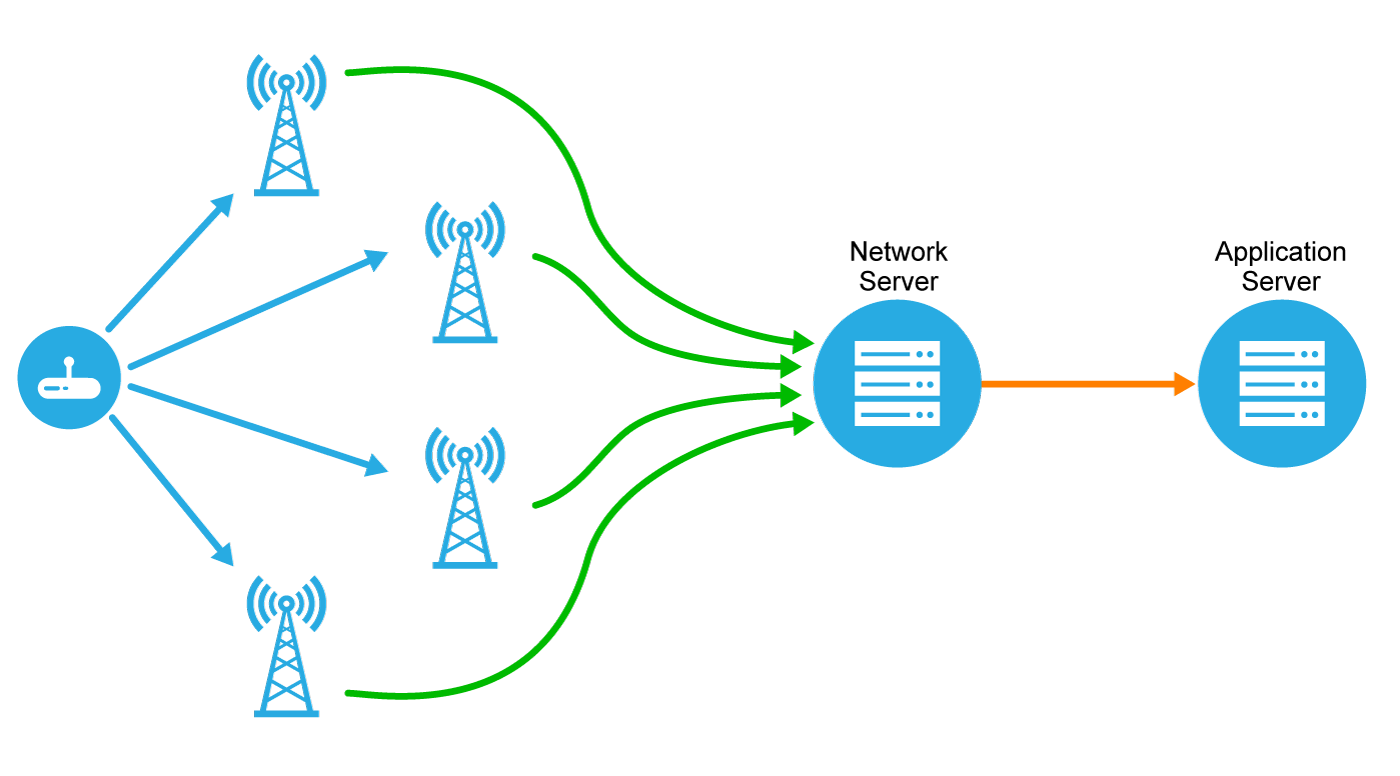
This is kinda the idea ^ You have your own, or public gateways
each gateway handles message passing, to some internet service, on which your application runs
typical to run this with MQTT
 smoky estuary
Just had to factory reset my raspberry pi because raspbian became corrupted after running pi-hole for a year and a half straight with a few occassional restarts (that were intentional)
 peak cloak
sounds like a bad sd card
 waxen saddle
This is why I disable a lot of the logging on my PiHole. It wears on the SD card.
tame carbon
@smoky estuary you should disable write caching on your pi, that prevents random corruptions like that
power cycling without a shutdown can cause corruptions
ideally the filesystem would be readonly.
 little schooner
Wish my IoT devices supported more than WPA2 psk and 2GHz
tame carbon
@little schooner no PEAP?
little schooner
It's terrible
tame carbon
only acceptable solution for me
little schooner
When it's off wifi long enough it refuses to reconnect
little schooner
More reliable than I got for sure
tame carbon
artnet is kinda designed for this
ment for controlling lights and such in your home or on stage
peak cloak
I just want a simple ethernet contolled outlet
you can make a wifi outlet but you can't make a cheap ethernet outlet
tame carbon
@peak cloak well, would be cool to have a system that uses dlan
so instead of using it to tunnel ethernet
we could use it to control other devices on the same power grid
 plucky crescent
So is the mikrotik hex not capable of high speed queue routing? Why would my speeds tank to 50mbps when I disable fast track?
 hollow marlin
Because its now hitting the CPU. I think the hex is a lowered clock single core
tame carbon
@plucky crescent 50mbit sounds a bit low
my RB4011 pushes 10gbit regardless
routed between two subnets on a vlan
plucky crescent
That is the tough time I am having. With fast track off, my bandwidth dies. With it on, the queue doesn't work.
tame carbon
though way different cpu architecture
@plucky crescent yep.
you can't use queues with fastpath
You'd need a more powerful router
plucky crescent
So I cannot Qos my internet without choking the life out of it?
tame carbon
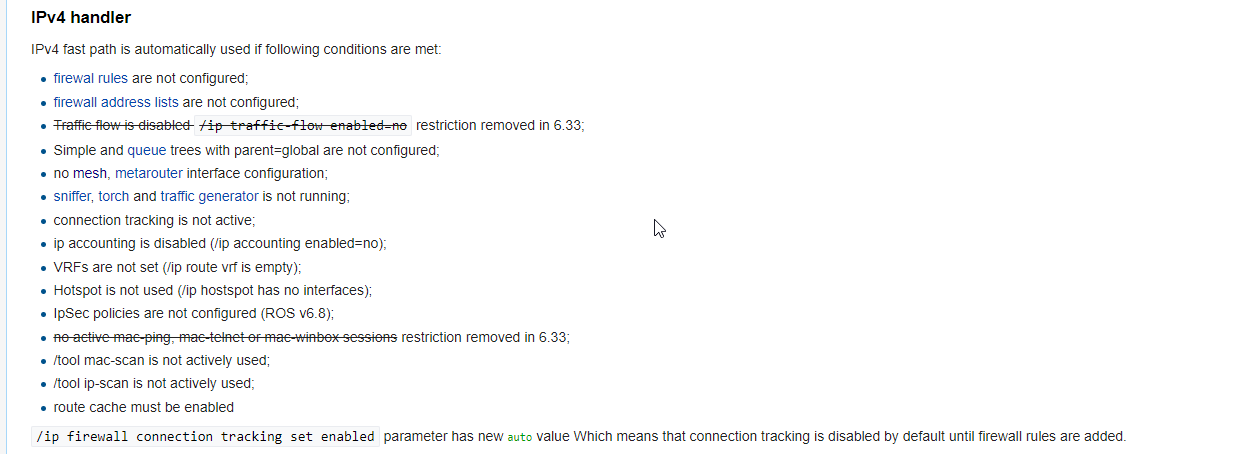 plucky crescent
So what is the difference between fast path, and fast track?
tame carbon
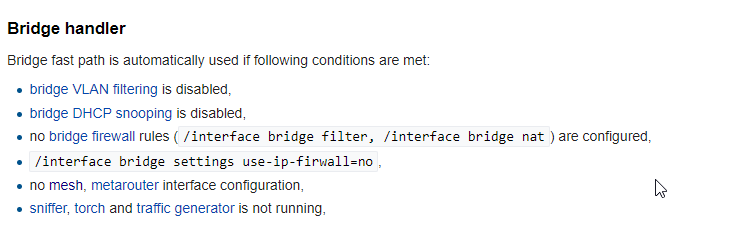
@hollow marlin here was the specifics on bridge ^
@plucky crescent #networking message
wait
@plucky crescent queues use bandwidth shaping
hollow marlin
tame carbon
<@!462711605063450628> here was the specifics on bridge ^
I know whats required, its the forwarding aspects. Such as this:
Of how its handling the bridge fast path with say two bridges at L2
hollow marlin
plucky crescent
That is the tough time I am having. With fast track off, my bandwidth dies. With...
What is your config? It can easily be a configuration issue too.
plucky crescent
so if I have a queue running, will it just fastpath single tcp connections for dumps, but still manage the traffic with the queue? I'd be fine with that if that were the case.
tame carbon
Its just simple queues and global queues
hollow marlin
No, once queuing is enable, fastpath is disabled
tame carbon
@hollow marlin entirely?
hollow marlin
Yep
tame carbon
Yeah, kinda makes sense
since the whole idea of fastpath, is to avoid the cpu
but queue, uses system memory as buffer
plucky crescent
I gotta go to a meeting, will brb tho. I would really like to get this sorted if there's something I need to change.
hollow marlin
You can though use fasttrack with certain traffic and simple queues for other traffic. But that is only specific to fasttrack if im not mistaken
tame carbon
wait
can't you just mark individual firewall packets
and force them to use fastpath?
hollow marlin
You can, thats what I am referring to
tame carbon
@hollow marlin https://i.imgur.com/jGys2Bt.png
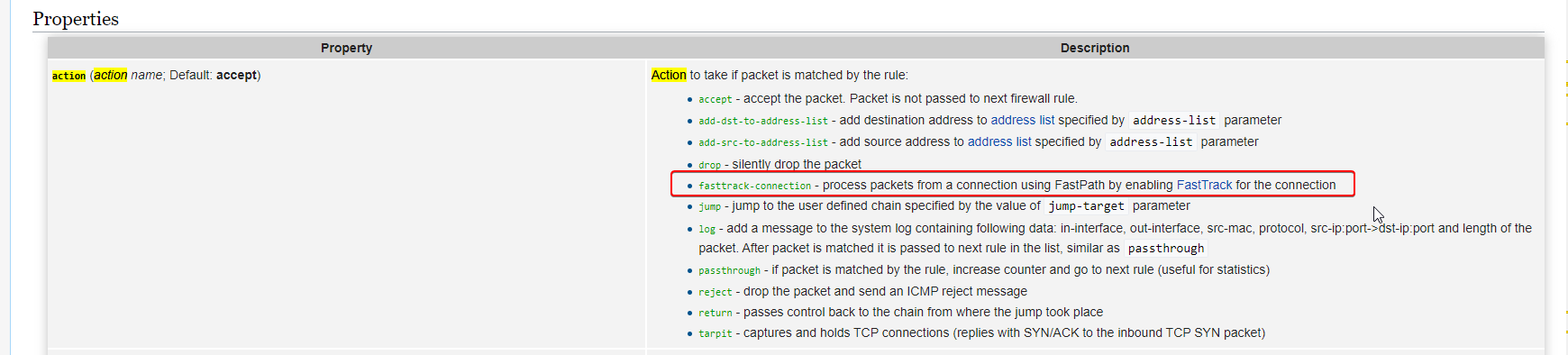
@hollow marlin guess I could optimize my stuff even more lol
hollow marlin
Yeah, thats how the default FW rules are setup, but the fasttrack is setup as a catch all
tame carbon
I must have removed those rules
still only 3% cpu usage @ 250mbit/s traffic ¯_(ツ)_/¯
@hollow marlin can't you set up queues for the service you are attemping to limit? and then fasttrack anything that doesnt match the filter rule?
or is that how you do it xD
hollow marlin
tame carbon
<@!462711605063450628> can't you set up queues for the service you are attemping...
Yesm that is is what I am say xD
Since fasttrack does not kick in until the connection is successful, its all CPU for the first 2 packets, so queuing can be done on certain traffic and fasttrack on others
peak cloak
FTP means foil?
 feral ridge
U is unshielded twisted pair
feral ridge
depends on your use case, what are you using it fdor
 oak night
10 gig home network
feral ridge
shielded cables are normally used when there is a high chance of cross talk with lots of other cables, or if you need some sort of fire rating for running in walls
for the majority of use cases utp is just fine
oak night
Well it runs in the wall
peak cloak
If you don't want to worry about powerlines being in the way then get shielded
peak cloak
with unshilded you don't want to run it parallel to power less than 3 inches I think
like there should be at least 3 inches space
feral ridge
yeah if it is going to be run next to the electrical wiring (more than likely will be) best to go with stp
oak night
Ok
hollow marlin
Having tested UTP next to our incoming grid power, unless you are planing on running the lines in a power station, shielding really is not a factor for at home use
hollow marlin
Shielded is 100% more expensive
tame carbon
I only need that for ur mom
plucky crescent
hollow marlin
Since fasttrack does not kick in until the connection is successful, its all CPU...
How do I make that happen? Is it super complicated? I have literally zero experience in RouterOS and have only just done a read-thru of a networking book, so dunno much.
 pseudo isle
Hey guys, I'm planning to upgrade my home network from 100Mb network to 10Gbe one. When doing so, I'd get 1Gb internet. The 10Gbe network cards aren't expensive, the cat 6/7 cables aren't bad either, but I'm struggling to find switch with at least 410Gb RJ45 which isn't rack mounted motherfcker at 3080's MSRP. Do you think I should go with RJ45 or is better to go for sfp+ for those speeds?
peak cloak
pseudo isle
Hey guys, I'm planning to upgrade my home network from 100Mb network to 10Gbe on...
at those speeds I think you could use copper or you might as well just go fiber sfp+. Copper sfp+ modules are expensive, although the pcie sfp+ cards are pretty expensive (like 90 bucks)
and fiber itself isn't that expensive
pseudo isle
Rj 45 cables are quite cheap even for 10gig
As i said, my problem is finding the switch
peak cloak
sfp+ switches are cheaper than just copper
oak night
pseudo isle
Hey guys, I'm planning to upgrade my home network from 100Mb network to 10Gbe on...
I'm doing the same thing
peak cloak
although copper sfp+ modules get hot
and use more power
and are expensive
if I got 10G I'll use fiber
pseudo isle
I'll think about the glass then
peak cloak
I'm not an expert in fiber but I know the gist of it
pseudo isle
There are some transceivers needed for sfp+, right?
peak cloak
wdym?
sfp+ is just a standard kinda like rj45
although there is a module between the sfp+ interface and the fiber/rj45 interface
peak cloak
there is also DAC
Direct attached copper, but that's for short distance in a rack
idk how they will be able to push > 10 gig over copper
at some point you just gotta switch to fiber
hollow marlin
plucky crescent
How do I make that happen? Is it super complicated? I have literally zero experi...
First, you should post your queue configuration. Jut looking at official test, HEX should be able to hit far above 50mpbs without fast track
pseudo isle
peak cloak
cat 8 is like the MAX
tame carbon

peak cloak
it's over short distances
tame carbon
@pseudo isle you know fiber is cheaper right?
oak night
Why?
 solar spoke
?
peak cloak
solar spoke
But wait can't cat8 get to 40Gbps
at that point just do fiber
solar spoke
That is true
peak cloak
you are in qsfp+ territory
solar spoke
But isn't it cheap?
peak cloak
fiber itself
yes
hell, even a 150m 40G qsfp+ module is 40 bucks
which is cheap
but like why
that's DC and ISP stuff
but qsfp+ pcie cards are expensive
hollow marlin
peak cloak
cat 8 is like the MAX
Cat7/8 don't exist and never will in the eyes of many engineers. 10gig is the end for copper, anything above it is and will be fiber
peak cloak
yeah
 lean pebble
peak cloak
hell, even a 150m 40G qsfp+ module is 40 bucks
lean pebble
peak cloak
hell, even a 150m 40G qsfp+ module is 40 bucks
We all need 40Gbps at home
Best gaming experience
But only if it comes with arbor (ddos protection)
tame carbon
@solar spoke at high speeds, copper doesnt make sense anymore
fiber optics can carry much higher bandwidths, at much longer distances
lean pebble
At must cheaper costs
tame carbon
copper just has limits
peak cloak
lean pebble
But only if it comes with arbor (ddos protection)
Arbor?
lean pebble
Like my ISP
lean pebble
peak cloak
Arbor?
peak cloak
why arbor specifically
lean pebble
It's one of the best in the market
I know that one of the ISPs here uses it as last resort
They first have the regular enterprise gear and at the end arbor
plucky crescent
hollow marlin
First, you should post your queue configuration. Jut looking at official test, H...
is this enough?
I don't know why there are 2 instances of bridge in the target, it keeps adding it.
lean pebble
Someone familiar with docker ?
peak cloak
lean pebble
Someone familiar with docker ?
yeah
lean pebble
I need help with installing it with this shitty panel pterodactyl for my friend, he keep saying he wants it.
😩
lean pebble
You know that ?
peak cloak
pterodactyl panel
lean pebble
I installed the panel and docker sperated now trying to understand how to connect them both
Well I prefer normal virtualization
peak cloak
what are you using docker for?
lean pebble
He uses
peak cloak
wdym
peak cloak
yeah, but wouldn't you want to install pterodactyl in docker as well
lean pebble
I'll try now again on centos 8
peak cloak
and the database in it's own docker container as well
lean pebble
He installed it at the beginning then I killed it because it didn't worked
I configured everything with redis and mariadb
But I still hate this panel
I think make the db on different server not docker
hollow marlin
plucky crescent
is this enough?
While you are using the web gui, can you go to the Terminal on the left hand side, type in export hide-sensitive post the output? BTW you can press tab as you are typing to auto complete
plucky crescent
is this what you need?
lean pebble
peak cloak
and the database in it's own docker container as well
The only problem I had with this panel was the networking
It just couldn't connect to the internet for some reason
hollow marlin
plucky crescent
is this what you need?
Yep but copy and paste for easier reading. Just make sure you paste as a code block
plucky crescent
uhhh... I'm not sure what that means, paste as code block.
plucky crescent
It's telling me it's too large
peak cloak
put in hastebin or pastebin
tame carbon
garbagebin
hollow marlin
NVM then, I just hate reading config in images but Ill look over it that way
plucky crescent
I'm sorry guys, I don't do this kind of communication on the regular
plucky crescent
https://pastebin.com/RYafnddg ok did that work?
Pastebin
Pastebin.com is the number one paste tool since 2002. Pastebin is a website where you can store text online for a set period of time.
Sorry I'm in and out, I'm trying to paint some speakers as well as help my kiddos in their schools
hollow marlin
plucky crescent
https://pastebin.com/RYafnddg ok did that work?
Well you queue is set to 50/10mbps, thats why you are getting 50mbps silly
add dst=ether1 limit-at=10M/50M max-limit=10M/50M name="all data" queue=pcq-upload-default/pcq-download-default target=bridge,bridge
tame carbon
@hollow marlin lol, that makes a tonn of sense
see, I thought 50mbit wihtout fastpath couldnt be right
plucky crescent
but I thought it is 50M, not 50m?
I'm getting 50mb
when fiddling with the numbers, it has acted as though it treats those like megabyte
tame carbon
@plucky crescent I assume you are using winbox?
plucky crescent
if by winbox you mean windows 10, yes.
tame carbon
thats just the commandline representation of whatever you set in the GUI
no winbox, the utility for routerOS
tame carbon
easier
peak cloak
winbox doesn't need a L3(IP) connection to the router, it can work on L2 among other benifits
plucky crescent
cool beans, I'll give it a shot.
tame carbon
@plucky crescent you can even use winbox without an assigned IP address, using its MAC
hollow marlin
tame carbon
its all bits
networking is measured in bit, except when talking about packet size or flags its bytes, but also with shaping queues are done in bits, except the token buckets overflow are in bytes. I mean its pretty straight forward 
plucky crescent
that's handy dandy
 clear igloo
hollow marlin
networking is measured in bit, except when talking about packet size or flags it...
clear igloo
hollow marlin
networking is measured in bit, except when talking about packet size or flags it...
It's more of a guideline than a rule 😄
plucky crescent
I got myself all twisted about bits/bytes because I kept making changes, and the results didn't make sense to me, so I thought I must be misunderstanding the units.
tame carbon
when you have 10 meganibbles/second
plucky crescent
OK, having upped my limit to 400mbps, now I get 300+ easily, which is all I really need. Thank you guys.
clear igloo
2 nibbles per byte 😄
hollow marlin
clear igloo
It's more of a guideline than a rule 😄
I will never understand what went through the IETF's mind when it came to shaping. I get the bits/bytes really to do with packet depth in the queue, but man the first run around getting depth with QoS is rough mashing the two up
tame carbon
reconfigure a router to use that as a unit
and then in the motd, include a conversion chart
and then ofcourse
the customers be like: 100megabytes internet
a nibble would be meeting halfway
a fair compromise.
tame carbon
burst allows you to overshoot your limit, so the average is your limit
hollow marlin
Without understanding QoS, I would avoid it and leave it as default
plucky crescent
ok I will leave it. Thank you.
tame carbon
I have a 250M plan, but when I start a download, it bursts for like 0.5 seconds
plucky crescent
My main goal in all this was to smooth out my network traffic so games and such have less "wtf" moments in them.
 hollow marlin
@tame carbon This is a screenshot of the QoS diagram I made for training. Once a month the engineers spend and hour or so teaching a topic
QoS is a lot more than people throw out there
tame carbon
I don't both with QoS on my network tbh
its never congested
I only use two queues for downstream routers
I don't want them sucking up all my bandwidth
hollow marlin
More bandwidth is the true solution, QoS is a band aid and tends to break more than it fixes
tame carbon
xD
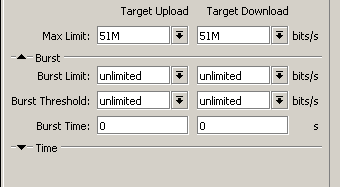
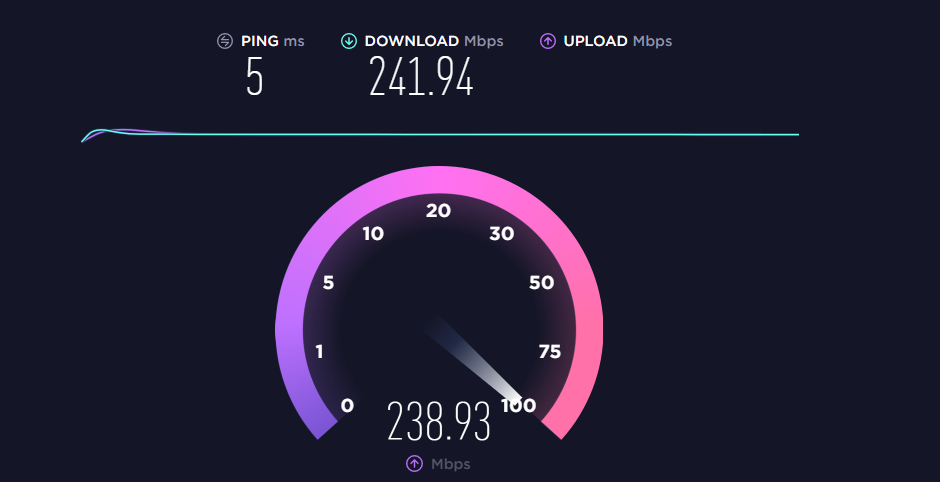
51M, so speedtest shows a perfect 50M
no risk of being accused of faul play
lel
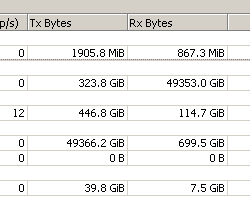
@hollow marlin total downlink last month: 5TB
140GB up
IPTV is like a constant 14M feed
plucky crescent
I'm using Comcast, and it seems like I get bufferbloat any time I approach my connection's tier, and using QoS seems to stop that from happening. Is there some other solution I could be going after?

 plucky crescent
I see some interesting MTUs in there, why do you modify MTU?
tame carbon
ethernet is 1500
if you add a protocol like a PPPoE tunnel to your network stack
you may want to adjust for that
Its the 'maximum' transfer unit
amount of bytes you can put in a single frame
plucky crescent
I also see some that are adjusted a bit, why would you up your MTU?
plucky crescent
do you just test to see how much can fit in one frame, and try to max it out?
tame carbon
it should automatically adjust for this
@plucky crescent 1500 is what you should use
you dont need to change it
plucky crescent
rogers.
tame carbon
defaults are correct
@plucky crescent if you were to for example set up PPPoE over a 1500 MTU link
you need to adjust for the headers of the PPPoE protocol
@plucky crescent this has to do with packet fragmentation
and efficientry transfering packets of a certain size over networks that transmit variable length packets
With certain highspeed network applications ,you may want a higher MTU
sometimes called 'Jumbo Frames'
In computer networking, jumbo frames are Ethernet frames with more than 1500 bytes of payload, the limit set by the IEEE 802.3 standard. Commonly, jumbo frames can carry up to 9000 bytes of payload, but smaller and larger variations exist and some care must be taken using the term. Many Gigabit Ethernet switches and Gigabit Ethernet network inte...
if you hook a 9000 byte line and switch packets to a 1500 bytes link. you need to fragment the packet
creating overhead
your ISP internally may use much higher MTU
but 1500 is what you should end up receiving
peak cloak
plucky crescent
I'm using Comcast, and it seems like I get bufferbloat any time I approach my co...
mynameisjuan said that bufferbloat is an ISP problem
I don't really think there is another solution
plucky crescent
Isn't it just Comcast being lazy about how they clamp my speed?
waxen saddle
Turn it back on
 thick minnow
did you already try unplugging it for a few minutes?
 grizzled plover
I did that already
thick minnow
it may have an automatic shut-off when overheating, is it dusty?
grizzled plover
Nope
thick minnow
can you connect to the routers settings menu?
and does the outlet work
like have you tried it with other stuff
grizzled plover
Like through the gateway address
hollow marlin
peak cloak
mynameisjuan said that bufferbloat is an ISP problem
That correct. Bufferbloat is to too deep of queue, well past what consumer chips can handle. Sometime engineers will attempts to fix congestion and packet loss by increasing queues, some reaching up to a 1s worth of traffic. This makes the problem worse and why they should police instead of shape. At the customer port, bufferbloat is not a problem because it would consume way too many resources so its a problem further in the network.
What @plucky crescent is seeing is as you reach your speed cap, its a cap, they are either going to police (hard drop packets) or shape (queue/buffer packets) to keep speeds within scope. You can setup a queue in Mikrotik that mimics a policer to alleviate some of the problems.
tame carbon
"Visual studio has encountered an unrecoverable error"
"Please save your work and restart"
hollow marlin
tame carbon
your ISP internally may use much higher MTU
Standard place in ISPs to have L2 MTU at the highest available. VLAN, QinQ, MPLS, etc. Usually well over 9k
tame carbon
ffs, VS. at least crash with dignity.
waxen saddle
TCP is supposed to detect packet drops and adjust it's speed automatically.
hollow marlin
waxen saddle
TCP is supposed to detect packet drops and adjust it's speed automatically.
Yep, thats why policing is preferred for 99% of cases
peak cloak
grizzled plover
Do routers turn off on their own?
they shouldn't, if it does it's usually overheating
gn
plucky crescent
hollow marlin
That correct. Bufferbloat is to too deep of queue, well past what consumer chips...
Is that different from the queue that I did set up? Like, is there something specific to a policer queue that I should do?
hollow marlin
Id have to look it up but I think I remember it being along the lines in the simple queue to set it to a depth of just 1 packet
plucky crescent
If you happen accross a mention of it could you ping me? Its the whole reason I'm even going thru this
hollow marlin
Sure can
 waxen scroll
👀
thick minnow
hello, ive made minecraft server but i dont think ive done the port forwarding correctly on my router anyone help?
peak cloak
thick minnow
hello, ive made minecraft server but i dont think ive done the port forwarding c...
- Can you connect locally?
- Are you under CGNAT?
thick minnow
I can connect locally and no i dont know what that is @peak cloak
 coarse storm
does anyone know why i’m only getting 200kbps on my pc on wifi vs the 4 i get on my xbox on wifi?
peak cloak
slowest DSL connections are around 10–20 Mbps
thick minnow
peak cloak
show port forwarding settings
coarse storm
*mbps
 static knoll
The bit rate of consumer DSL services typically ranges from 256 kbit/s to over 100 Mbit/s in the direction to the customer (downstream), depending on DSL technology, line conditions, and service-level implementation.
coarse storm
peak cloak
where are you?
basically
static knoll
thick minnow
any server errors, i.e. double nat or anything?
peak cloak
thick minnow
ok so look for WAN ip somewhere
it should be on the main menu maybe?
example:
and show the first 2 octets
coarse storm
 ocean pivot
coarse storm
ocean pivot
coarse storm
i waited almost a week for cod to download non stop
peak cloak
maybe you could have a use case for starlink
peak cloak
where do you live?
coarse storm
virginia
thick minnow
@peak cloak yeah i found it
peak cloak
ah
peak cloak
coarse storm
virginia
virginia is in Starlinks range
coarse storm
i’m failing school because half the time my assignments WILL NOT GO THROUHJ
peak cloak
peak cloak
thick minnow
<@!222482269829332992> yeah i found it
send what the ip is, you can block out the last 2 octects
I need to check the first 2
just to make sure you are not under cgnat
@coarse storm starlink can do >100mbps
or even more
thick minnow
Ipv4?
peak cloak
yeah
coarse storm
i doubt my parents are gonna want to pay for it
peak cloak
I mean it's that much more expensive
coarse storm
it’ll be in my area mid to late 2021
thick minnow
peak cloak
users for $99 a month, plus $499 for a setup kit
coarse storm
yeah they don’t wanna pay for the $499
peak cloak
coarse storm
yeah they don’t wanna pay for the $499
that's subsidized to
the dish actually cost MUCH more
I think it's like 2000
thick minnow
i have to be on a cgnat for it to work?
peak cloak
thick minnow
i have to be on a cgnat for it to work?
no
what are you running the server on
thick minnow
My pc?
peak cloak
windows?
thick minnow
yeah
peak cloak
oh ok, perfect
so you obviously know the IP of the PC and that it works, must be the router then
static knoll
shitty routers kinda suck
peak cloak
Bedrock or Java @thick minnow
thick minnow
Java
peak cloak
@static knoll confused by WAN connection list
static knoll
hmm
peak cloak
mob posted this before
static knoll
shouldn't there be more connections
peak cloak
@thick minnow what other options are under internet WAN conenction list?
peak cloak
static knoll
shouldn't there be more connections
no that's port forwarding menu
static knoll
there should be at least 1 from the brother's pc, and several from other devices
peak cloak
look at the top left
static knoll
yeah this is the port forwarding menu
thick minnow
static knoll
connection mode maybe? dunno what that's referring to
thick minnow
This is in WAN status
peak cloak
@static knoll suprised to see VLAN there
thick minnow
Nothing
static knoll
Eh, some have it
thick minnow
its just that option
static knoll
Nothing?
peak cloak
hmm
static knoll
wait, don't you haave to add the LAN port to allow for connections
TCP is correct to my knowledge, you can connect on that
but if you don't put in the LAN port it wouldn't know what device
peak cloak
static knoll
wait, don't you haave to add the LAN port to allow for connections
that's correct, in the image the html form isn't filled in but look below that's the actual rule
peak cloak
MC is 25565 by default
static knoll
is the internal client the local server?
idk there should generally be a setting for the PC's info
peak cloak
static knoll
is the internal client the local server?
it works locally
they said
on a different LAN device
static knoll
hmm
usually the server logs have something to say if outside connections can't connect
depends on the build tho
this router could be behind another one
lean pebble
Good night fellas
peak cloak
gn
static knoll
Gn
thick minnow
Good night
lean pebble
I think I Need to start go sleep earlier 😆
static knoll
Up to you
lean pebble
And not at 4am
peak cloak
I should do HW
static knoll
lean pebble
I think I Need to start go sleep earlier 😆
Ah
peak cloak
lean pebble
I think I Need to start go sleep earlier 😆
yes
thick minnow
wait
peak cloak
I go at 11
static knoll
lol
lean pebble
Hahaha
thick minnow
xD
peak cloak
mine is 130.81.189.138
static knoll
too many connections on the same iPV4
static knoll
peak cloak
no more NAT
would solve all of my problems
i think the ISP has to provide addresses though
isn't it expensive to incorporate iPv6
static knoll
yeah honestly I would have a running MC server rn if it wasn't for stupid NAT
all my homies hate NAT
peak cloak
static knoll
yeah honestly I would have a running MC server rn if it wasn't for stupid NAT
you under cgnat?
static knoll
double nat
lean pebble
static knoll
That's a DNS
Before it was cloudflare it was intel or cisco I'm not sure which one owned it but 100% that was one of them.
static knoll
so I've mentioned this before, there's two routers
I need 2 routers, one for wifi 6 and one for coax
peak cloak
I forget
static knoll
obviously i'm connected thrrough Enet
peak cloak
static knoll
I need 2 routers, one for wifi 6 and one for coax
oh you are the person I told about the moca adapters
your on fios?
static knoll
issue is, I can't set the damn verizon router to brridge mode since i don't have coax on the nighthawk
lean pebble
I hate moca
lean pebble
Just use rj45
static knoll
tv
waxen saddle
Make your own IPTV
static knoll
uncle wants TV
peak cloak
@static knoll TV box can connect directly to moca, just use a spliiter and get a moca adapter
lean pebble
My tv have rj45
peak cloak
make sure it's a moca splitter
static knoll
peak cloak
<@!456908160008060928> TV box can connect directly to moca, just use a spliiter ...
Yeah, issue is that I can't do anything physical (over 10k miles away)
peak cloak
oh
lean pebble
I just removed the mocas from my tvs
static knoll
Everything would have to be on software
i have access to the networks
would need to search for the info but I do
peak cloak
in college?
waxen saddle
Make your own IPTV using OTA tv: https://github.com/fishscene/TV2MultiCast

GitHub
Over the Air TV to MultiCast. Contribute to fishscene/TV2MultiCast development by creating an account on GitHub.
peak cloak
why that far?
static knoll
was bored of living in the same place for all of my life
wanted to move and honestly was getting drained of life
going back for college tho lol
peak cloak
static knoll
highschool
same
thick minnow
Hey guys, I'm Mob's friend. first of all thanks for the help, What would you recommend us to do now?
lean pebble
I love my house I wish I could move it to another country
static knoll
thick minnow
Hey guys, I'm Mob's friend. first of all thanks for the help, What would you rec...
Well, you never mentioned if there are 1 or 2 routers.
peak cloak
thick minnow
Hey guys, I'm Mob's friend. first of all thanks for the help, What would you rec...
I honestly don't know what could be the issue except the router
peak cloak
@thick minnow what's the error it gives you
thick minnow
there's this drop down list in "portforwarding" that shows a number of apps like, "skype" "call of duty" and things like " remote desktop"
peak cloak
when you try to connect
lean pebble
static knoll
horriblee UI
Ya
peak cloak
thick minnow
there's this drop down list in "portforwarding" that shows a number of apps like...
yeah ignore that
lean pebble
Like my ISP
peak cloak
just need to work on my ipv6 certification
lean pebble
But I don't want nat
thick minnow
@static knoll it's 1 router with 2 wifi connections, a 2.4ghz 5ghz
static knoll
Oh
lean pebble
I have ipv6 /48 from he tunnelbear
static knoll
I thought it was 2
peak cloak
thick minnow
<@!456908160008060928> it's 1 router with 2 wifi connections, a 2.4ghz 5ghz
what's the error when you try to connect
peak cloak
static knoll
I thought it was 2
you can have seperate SSID's for 5ghz and 2.4ghz
I have them on the same ssid
peak cloak
yeah
static knoll
ethernet is life
lean pebble
My wifi pretty stable and good
static knoll
$3 pluggy boi
static knoll
lean pebble
My wifi pretty stable and good
No wifi is more stable than ethernet
lean pebble
static knoll
No wifi is more stable than ethernet
Hell no
peak cloak
ethernet > wifi
static knoll
Pluggy Boi > Air Internet
peak cloak
@thick minnow let me know the error when you try to connect
lean pebble
But it more stable than my teacher in college / academy 😆
peak cloak
hmm timed out
thick minnow
peak cloak
@thick minnow if you can run an nmap scan we can check if the port is actually blocked
peak cloak
static knoll
oftenly it says its open
often it says filtered
lean pebble
Filtered is good
static knoll
Filtered is good, but not when troublshooting
thick minnow
enable mapping ?
static knoll
When you want something to work, its bad
static knoll

Inside Out Security
Nmap is a powerful, and fast network mapping tool. In this guide, we’ll explain how to install and use Nmap, and show you how to protect your networks.
nmap
lean pebble
Filtered is nice opened automatically only when you use it when not using it it's filtered
static knoll
lean pebble
Filtered is nice opened automatically only when you use it when not using it it'...
See, what if you lag too much and filter says no? Then its an issue
lean pebble
Nope
static knoll
oh its happened alright
lean pebble
Because it's never filtered if you use it
thick minnow
Ok, we'll download the nmap scan and do it
static knoll
lean pebble
Because it's never filtered if you use it
when your ping is over 2000ms to a server, the filter closes by the time you can connect
lean pebble
thick minnow
Ok, we'll download the nmap scan and do it
Do you run windows and antivirus?
static knoll
that or connection timed out
lean pebble
static knoll
when your ping is over 2000ms to a server, the filter closes by the time you can...
So?
static knoll
Means you can't connect lol
thick minnow
Yeah we run windows firewall @lean pebble
lean pebble
static knoll
Means you can't connect lol
It's mean you shouldn't play I agree with this logic
lean pebble
thick minnow
Yeah we run windows firewall <@!109801863771074560>
Maybe windows firewall messing with you
static knoll
lean pebble
It's mean you shouldn't play I agree with this logic
Well obviously, but im just saying having a filter ain't too good in some cases
lean pebble
Can you disable it?
static knoll
lean pebble
Maybe windows firewall messing with you
Don't disable it, allow incoming/outcoming 25565 connections
lean pebble
static knoll
Don't disable it, allow incoming/outcoming 25565 connections
Problem
Not all servers use that port
static knoll
All minecraft servers use it
lean pebble
Disable only for the test
static knoll
from context im assuming 25565 is that they're using
lean pebble
Blocked or open ?
thick minnow
open
lean pebble
Ok
Because minecraft uses only tcp can you try open all tcp port for the test ?
Just change the rule from specific to all
thick minnow
Ok
we went to the router's website
to find the TCP spell
but we couldn
what other form of black networking magic can we try ?
lean pebble
lean pebble
Because minecraft uses only tcp can you try open all tcp port for the test ?
.
Even that I don't think this is the issue
thick minnow
Yeah...
I have a feeling we just need to port forward something
and use the ip we get
but we don't know how to do it
because either
- this router is garbage
- we don't know how to use this router
peak cloak
minecraft is just 25565/tcp
lean pebble
The timeout you get while login or joining a server?
peak cloak
must the router then
lean pebble
So only one server not working?
lean pebble
Have fun 😆
 peak cloak

FCC ID
GPON ONU User manual details for FCC ID 2ADZRG240W-C made by Nokia Shanghai Bell Co. Ltd.. Document Includes User Manual 7368 ISAM ONT G-240W-B Product Guide
lean pebble
Body is tied brain is fully awaken
lean pebble
My window only show me the neighbors house
peak cloak
just to make sure it's the correct local ip?
thick minnow
what if I'm your neighbhor
have you thought about that
yeah cause my brother joined
lean pebble
thick minnow
have you thought about that
Interesting...
I know my neighbors
Can you send the IP of the server?
static knoll
Lol
lean pebble
Is it local server ?
static knoll
lean pebble
Can you send the IP of the server?
well even if you did know you wouldn't be able to connect
lean pebble
static knoll
well even if you did know you wouldn't be able to connect
I can do anything
thick minnow
they are lying to do @lean pebble you might be able to connect
what if you're computer was MEANT TO BE connected to my computer
static knoll
lol
lean pebble
Lol
thick minnow
you know what they say, 2 computers are destined for each other
static knoll
lean pebble
The beast and the bast
beauty (my PC) and the beast (your stinky PC)
hehe
lean pebble
Lol
 static knoll
thick minnow
i just want to play some minecraft guys
static knoll
thick minnow
i just want to play some minecraft guys
I know, we're a bit at loss
lean pebble
Well you need to connect to his external IP for playing on his server
And he need to open port 25565/tcp
In his router
thick minnow
I know what an rtx 3090 is
lean pebble
Do port forwarding
static knoll
lean pebble
And he need to open port 25565/tcp
@thick minnow you might need to open it on your end as well
thick minnow
what you're talking about is above my paygrade
oh
i think we found the TCP
1 sec
static knoll
On the server computer, search for "what is my IP address"
lean pebble
Only the server host need to open it
static knoll
should give you the external
thick minnow
The tcp and udp is active
lean pebble
Dnx
thick minnow
or should i make the tcp only
lean pebble
Do you want some coax ?
thick minnow
theyre both active
lean pebble
Minecraft only tcp
thick minnow
but i dont know if i put the correct info for LAN and WAN correctly
static knoll
NO coax
static knoll
thick minnow
but i dont know if i put the correct info for LAN and WAN correctly
Well, can you connect using the external IP?
static knoll
@thick minnow if you give @thick minnow the internal IP, he won't be able to connect
thick minnow
Which one is that exactly
lean pebble
From one side of the world to your side
 static knoll
thick minnow
Which one is that exactly
static knoll
thick minnow
Which one is that exactly
Search on the server's google chrome "what is my IP address"
lean pebble
Both can be in and ext
static knoll
thick minnow
ipv6 is external ipv4 is internal right
No, those are interchangable
lean pebble
Whatismyip

See your real public IPv4 and IPv6 address. Get details like city, state, or country for any IP address using our free IP tools.
static knoll
Can you connect?
thick minnow
I got " failed to verify username" that means that I am on cracked and he is on premium
static knoll
thick minnow
I got " failed to verify username" that means that I am on cracked and he is on ...
Oh that means it works
lean pebble
I want to host minecraft server on 1.1.1.1
static knoll
He can just turn off online mode so you can connect @thick minnow
I might connect, what's the IP?
lean pebble
And on 8.8.4.4
lean pebble
thick minnow
I got " failed to verify username" that means that I am on cracked and he is on ...
Buy the sexy game
lean pebble
Good
thick minnow
come
he killed me
with a strength potion
its working!!!!!!!
in creative mode
thank you guys
lean pebble
Wanna be my builder ?
lean pebble
When
thick minnow
I'll be your builder 😉
lean pebble
Dnx do my hw
static knoll
What version @thick minnow
static knoll
lean pebble
Dnx do my hw
no.
lean pebble
Why
lean pebble
Full stuck project
static knoll
Ok will do in a bit
static knoll
Gn
 opaque mesa
i need a router that is capable for both zoom meeting and gaming. I bought about 3 different routers and they all worked fine until a month later and i start to experience issues. My sister does zoom calls for her work and my zoom calls for school. i recently bought this router called "Eero" and it came with three routers i guess you can say. worked fine for about 2 months and now its really bad. i have an Ethernet cable connected to one of the three routers it came with so i have one in my room, other one in my sisters, and the final connected to the modem in the living room. Her and I both depend on the WiFi for entertainment and work/school so if anyone can help that would be much appreciated
static knoll
opaque mesa
i need a router that is capable for both zoom meeting and gaming. I bought about...
Does it have to be a mesh network or can it be one router? How much is your budget?
opaque mesa
static knoll
Does it have to be a mesh network or can it be one router? How much is your budg...
i dont know much about those so im not sure just whichever is better i guess and i would say my buget would be around $100-250
static knoll
Mesh would be one main router and several different "extenders" around the house, while normal routers would be just one main device.
How large would you say the coverage has to be, several thousand sqft?
opaque mesa
my house is 1,300 sqft
static knoll
1300 sqft should be fine with a single router, I'll take a look
opaque mesa
i bought the NETGEAR - AC1750 Dual-Band Wi-Fi 5 Router and it worked fine but then it started to act up
static knoll
Yeah, I'll try and look for a good wifi 6 router
opaque mesa
alright ty
the asus router linus reviewed looked fine but i just wanted other options and advice before i buy another one
 paper valve
how fast is your broadband plan though
no point getting a fancy wifi 6 router when your internet cant even saturate half of its capabilities
static knoll
paper valve
no point getting a fancy wifi 6 router when your internet cant even saturate hal...
Wifi 6 isn't just speed but sure go off
Still busy so I haven't had the chance to find a router for him yet
 rare echo
Was gonna comment but i only know basics of networking



 primal ice
guessing - plug rj45 jack in to rj45 port - done.
tame carbon
thats the problem with these fancy consumer routers
they look shiny and new when they are in the box
tame carbon
opaque mesa
i bought the NETGEAR - AC1750 Dual-Band Wi-Fi 5 Router and it worked fine but th...
and then they act up
@opaque mesa is it just the wireless?
little schooner
paper valve
no point getting a fancy wifi 6 router when your internet cant even saturate hal...
It saturates my local network when I copy to NAS
primal ice
what speeds? my nas doesn't saturate my 1Gb comes close to though. 114MB/s
static knoll
LOL
tame carbon
wrong ping, and wrong message derp
little schooner
600 mbps
static knoll
derp
primal ice
oh right wifi.. okay.
little schooner
Yes. I did away with my cable
static knoll
@thick minnow Is that server of yours still on?
thick minnow
static knoll
<@456226577798135808> Is that server of yours still on?
It's on but there aren't players now to my knowledge unfortunately
And I'm not on
thick minnow
Unfortunately I can't
static knoll
Ah that's a shame
peak cloak
vif 10 {
            address 2001:___:_:5c2::1/64
            address 10.0.10.1/24
            description "IPv-6 Test"
            ipv6 {
                router-advert {
                    name-server 2001:___:20::2
                    prefix 2001:___:_:5c2::/64 {
                    }
                    radvd-options "RDNSS 2001:___:_:5c2::1 {};"
                }
            }
}```@tame carbon
tame carbon
@peak cloak mh. I'm afraid I dont know enough about the gear you are using
peak cloak
yeah you know what, I'll just put my pi on the ipv6 vlan
it's not prod anyway so meh
just want to get the cert
peak cloak
wtf
why
and on the router
either slow routing or the switch
might as well try to run a websever
tame carbon
@peak cloak HE wont give you full bandwidth unless you complete certification
~30-50mbit is about the most you will get
peak cloak
tame carbon
<@!222482269829332992> HE wont give you full bandwidth unless you complete certi...
ik, but it's kilobytes currently
top is on my pi
bottom is router
so something is wrong on my end
ok, so webserver worked
time to setup email
this is going to be a pain
primal ice
err what cert are you doing I did not have to set up a web server or email.
hollow marlin
Looks more like a connectivity issue that bandwidth
peak cloak
primal ice
err what cert are you doing I did not have to set up a web server or email.
he ipv6
peak cloak
hollow marlin
Looks more like a connectivity issue that bandwidth
wdym? yeah it's an issue on my end. Anything I could try to do to troubleshoot it
primal ice
packet inspection
hollow marlin
tcpdump
hollow marlin
Going off the retries then complete silence indicates its being dropped at some point
primal ice
Okay guess I'm only an explorer. and yeah it looks like they added stuff 🤷
peak cloak
hmm it says 51 packets dropped by kernel
Pastebin
Pastebin.com is the number one paste tool since 2002. Pastebin is a website where you can store text online for a set period of time.
@hollow marlin I don't see any apparent issues
 cedar igloo
Is running VMs over gigabit ethernet going to be much slower than locally? I know the speeds won't be as fast. I'm trying to decide whether to run VMs off ESXi with local SAS storage, or using NAS storage with SSDs
primal ice
nas with ssd's would be slower than local with sas .
cedar igloo
where would the bottleneck lie? would it be the ethernet speed between the two machines or something else?
primal ice
yeah the ethernet
 frosty hawk
any suggestions for gigabit 24port POE switch (with SFP)
 dry dove
frosty hawk
any suggestions for gigabit 24port POE switch (with SFP)
dry dove
frosty hawk
any suggestions for gigabit 24port POE switch (with SFP)
depends on what you are running in your environment.
and budget 🙂
dry dove
frosty hawk
any suggestions for gigabit 24port POE switch (with SFP)
Personally i use Unifi at home, Cisco at work (i don't have to pay for it 🙂 ) if you want something simple, get the TP-LINK 24, or the Cisco SG110-24hp, then if you are looking to run something with a high power budget you may want to take that into a consideration.
tame carbon
@frosty hawk https://mikrotik.com/product/crs328_24p_4s_rm

MikroTik is a Latvian company which was founded in 1996 to develop routers and wireless ISP systems. MikroTik now provides hardware and software for Internet connectivity in most of the countries around the world.
$379
Total PoE power of like 500 watts
@peak cloak https://cdn.discordapp.com/attachments/808724377986269214/808748968363294730/20210209_224936.jpg


Just helped someone diagnose their ram.
Verdict: test successful, patient deceased.
peak cloak
currently trying mailcow
tame carbon
install a VM?
peak cloak
eh
tame carbon
@peak cloak https://mailu.io/1.7/
peak cloak
if it works it works
tame carbon
all too fat to get off the couch?
peak cloak
for mailcow:
ERROR: no matching manifest for unknown in the manifest list entries
when doing docker-compose up
tame carbon

Jacob Salmela
Step-by-step InstructionsEdit the Postfix Config FileLuckily, OS X is essentially a server operation system, but by default the server-like features are disabled. We have already enabled the Web server and now it is time to turn on the mail server. To do this, you will need to adjust some settings
if all else fails
here's a step by step with postfix.
thick minnow
how do i get ethernet in my house without breaking the walls and adding ethernet jacks in
cedar igloo
powerline?
tame carbon
@thick minnow the short answer: you don't
thick minnow
what
peak cloak
tame carbon
<@!222482269829332992> https://jacobsalmela.com/2013/11/03/ipv6-certification-wa...
never head of postfix
waxen scroll
wireless to wired adapter ;p
thick minnow
waxen scroll
wireless to wired adapter ;p
not vvery reliable
peak cloak
All the other things are so overkill for this
thick minnow
ive heard of powerline
tame carbon
@peak cloak its a mailserver
@thick minnow powerline ethernet has suboptimal bandwidht
you're lucky if you get >50mbit/s over it
peak cloak
tame carbon
<@!222482269829332992> its a mailserver
yeah now I know
peak cloak
nope
tame carbon
its like the defacto oldschool standard for mail on linux
thick minnow
would a rasperry pi work as a good NAS?
peak cloak
depends on your defenition of a good NAS
 unborn sluice
thick minnow
w
unborn sluice
thick minnow
w
w
thick minnow
alr
peak cloak
bruh, Unable to find MX for domain
tame carbon
@thick minnow as a cheap network fileshare, its alright
not as reliable as say a propper NAS would be
thick minnow
well yeah
tame carbon
@thick minnow its at least fast enough to saturate a usb harddrive
new pi 4 gets like 800mbit/s over the network
and its no longer bottlenecked by the usb controller bus
so you can use both
thick minnow
i only need it because my printer hates my macbook
tame carbon
the CPU itself, has about 4GB/s memory bandwidth
thick minnow
ah
tame carbon
@thick minnow by comparison
my duo core i7 (with hyperthreading) does about 21.7GB/s
and my old i7 2700k @ 4.2GHz did 34GB/s
thick minnow
oh
tame carbon
Yeah but its RISC vs CISC
 drowsy sand
Guys I am looking for a case with a lot of 3.5" drive bays. So far I have found a Chieftec case with four bays (Chieftec HQ-01B). Any other reccomendations?
tame carbon
@drowsy sand have you checked 45 drives?
drowsy sand
nah
drowsy sand
Well, it should be 40€ max.
primal ice
peak cloak
bruh google dig for mx shows I have an mx record but HE says I don't
and I'm using dns.he.net
drowsy sand
I am looking for a normal ATX case for my homeserver.
tame carbon
@drowsy sand you'll want to look for a used fulltower
drowsy sand
I am
tame carbon
yeah, try ebay?
tame carbon
@drowsy sand like, what number of drives do you expect to jam in there
 mossy badge
Guys can anyone help me figuring out how can I achieve RDP my PC while using a VPN? So far my laptop can connect to my PC externally using a DDNS, but the moment I turn my IPSec VPN I can’t access it :(, this is my “topology”
tame carbon
@drowsy sand instead of a case, you may want to look for just 5.25" drive enclosures
drowsy sand
Whatever is the most. but 4 for a minimum.