#networking
1 messages · Page 280 of 1
 tame carbon
 static knoll
tame carbon
And took 5-10 mins to start
static knoll
tame carbon
And took 5-10 mins to start
i mean, any modpack with over 100 mods will do tht
tame carbon
320 mods
static knoll
Well yeah its all the mods lool
Imagine if someone made a 1000 mod modpack
The build time in forge would be insane
tame carbon
ATM customized their entire mod arsenal
To make sure that every resource worked with every mod
@static knoll ever played technic?
static knoll
No
tame carbon
Beta 1.7
static knoll
Only 3 I've played have been PO3, POL, and RLCraft
tame carbon
First time some made a pack with buildcraft and industrial craft
That pack, ushered in the era of power, fluids and item pipes
And gave us the hopper in vanilla
static knoll
Ah
tame carbon
Pistons were also a mod at one timd
static knoll
I am going to start a modded SMP sometime soon
tame carbon
Until they were added to vanilla
static knoll
Likely next weekend
tame carbon
What pack?
I have like couple old ftb instances on my server
Always looking for people who want to waste time together
static knoll
tame carbon
What pack?
Dunno yet
tame carbon
NuclearCraft is crazy
static knoll
Maybe POL
tame carbon
I love tech mods
static knoll
POL probably, seeing that its only 130 or so mods
tame carbon
Pol?
static knoll
If I go above 150 (above 100 is already cutting it) my friends cn't join
static knoll
Mybe
tame carbon
I had a base once completely powered by bees xd
static knoll
I took a break about a week ago to focus on studying
static knoll
tame carbon
I had a base once completely powered by bees xd
How????
tame carbon
Binnie's mods, extra bees, adds 100 species of bees
And its. Careful painful breeding
static knoll
Fair point
tame carbon
And you can scale up and up
static knoll
Issue with organics is that you can easily kill them
Like I've killed several of my cows
static knoll
Yeah it has botania
Last I logged on I was working on a bit of mana
2GB of server ram is barely playable, but it works alright
tame carbon
I hate mana generation with botania
tame carbon
I always build a timer contraption with a lava placer around thermalilys
That way its automatic
Anyways im off slto sleep
static knoll
Gn
 digital zenith
what is the current recomdation for a good vpn?
know a lot of the ones in the past have had a few issues...
 plucky crescent
I have routerOS questions, is anyone around to help with that?
I'm trying to smooth out my traffic, but the queue I made doesn't seem to be working properly, just hoped someone could help me with a few parameters.
this is my configuration
these are the results I get.
plucky crescent
I think I'm just not getting the target/destination right. It doesn't seem to be using the queue the same amount as I am downloading
plucky crescent
Yeah, it seems like if I have fasttrack enabled, it bypasses the queue, but if I have it turned off, it chokes my traffic way too low.
static knoll
plucky crescent
I have routerOS questions, is anyone around to help with that?
Maybe @tame carbon can help later, he/she is good at this
plucky crescent
thanks, the weirdest part is that it seemed like it was working properly for like a day
plucky crescent
seems that way.
 oblique marlin
anyone wanna run my payload
i wanna see if i can listen to connections coming outside of my network
 lean pebble
you can by using nat if you're on home network
oblique marlin
lean pebble
you can by using nat if you're on home network
i have to download windows 7 on virtual box
 desert briar
Download a windows 10 iso, make a VM. It takes 20 minutes to set up. No one is gonna run your malicious reverse shells, lol @oblique marlin
oblique marlin
desert briar
Download a windows 10 iso, make a VM. It takes 20 minutes to set up. No one is g...
 desert briar
 granite bridge
Restart it (Says every IT professional)
lean pebble
Nope
But fix it
I need to put 2 network cables from the room behind it to the bridge near my tv
desert briar
tbh from my experience I had more luck with wifi on TVs
lean pebble
nah its for the tv reciver
static knoll
TV internet sucks
desert briar
both TVs I worked with had only 100mbit ports. Making wifi much faster
lean pebble
he doesn't support wifi
static knoll
Terrible UI most of the time
desert briar
well, easy solution. You either drill a hole
lean pebble
the internet pretty good on wifi and cables
desert briar
you said you want to connect 2 rooms together
then you can use some adapters
MOCA I think
desert briar
know they are a thing, never used them myself
desert briar
yeah wireless bridge is a good way to go. Some people have more luck with powerlines, it depends. Have to try and see what works.
lean pebble
I juce have 1 more tv that I need to do it for and I'm disconnecting the last moca I have
it works pretty good
desert briar
Well, seems like you have it figured out then
lean pebble
finally a good vod downloading speed
come help me cabling xD
the only thing I hate is to make the end of the cable
desert briar
im fine, thanks 
yeah, it can get tedious. You'll manage 😄
crimping cables is a good skill to have
lean pebble
I usually use female connector because the male one annoying
oblique marlin
lean pebble
I usually use female connector because the male one annoying
sexist
lean pebble
but then I need 4 more cable that I don't have
oblique marlin

 supple hare
Shall I try that now ?
 peak cloak
lean pebble
I usually use female connector because the male one annoying
peak cloak
lean pebble
I usually use female connector because the male one annoying
Best practice is to punchdown not crimp cables in the wall apparently
tame carbon
@supple hare wat
@supple hare what have you done since?, sorry I just joined the chat '
and oh, my. Everything is white outside :o
we got snow :D
@supple hare yeah, I was curious on how that bbox gets its IP address from that fiber modem
there's various ways this can be done
@plucky crescent suh
lean pebble
peak cloak
Best practice is to punchdown not crimp cables in the wall apparently
I'm using female connectors shielded keystones but then I'll need another 4 cables. 2 for each cable
lean pebble
I tried at least 15 times to make the regular male connector and failed
tame carbon
really?
lean pebble
ya idk why
tame carbon
@lean pebble lol that picture of my network rack that I keep posting
those RJ45 patch leads, I cut myself xD
tame carbon
I had a box of 5 meter network cable pieces
so I just started cutting, and terminating
like one afternoon
static knoll
Heyo crystal is here
tame carbon
@lean pebble if you want easy installation of rj45, the trick is: remove more plastic than you need
then, pull the wires in order, straighten em out
static knoll
plucky crescent
I have routerOS questions, is anyone around to help with that?
@tame carbon can you help this person out
tame carbon
and then, just before you put the rj45 header on, you cut the wires flush, to length
and slide in, and crimp
the outer plastic should be fully inside the jack
lean pebble
tame carbon
<@!109801863771074560> if you want easy installation of rj45, the trick is: remo...
Thats what I always do
I have modular rj45 to
xD
tame carbon
lean pebble
Just the problems is the color types xD
tame carbon
@lean pebble color blind?
lean pebble
ya thats my modular keystone
tame carbon
@lean pebble thats punchdown lol ^
tame carbon
you basically put the wire in
and the punchdown tool, pushes the wire into the blade
lean pebble
Ik I have it
tame carbon
and then it has a tiny knife on the front
which cuts off excess wire
@lean pebble I originally got those punchdown tools for DSL lines xD
tame carbon
DSL lines in the netherlands are terminated in a demarcation point
looks like this ^
that's telephone wires ^
static knoll
That's a lot of cable
lean pebble
Ya
tame carbon
@static knoll when you start laying cable, such a roll is empty quickly
running ethernet for IP cameras here
I went through 200 meters
lean pebble
Crystal can you put a cable from netherlands to Israel ? 😆
static knoll
Ah
tame carbon
@lean pebble lol we can use direct satellite uplink? xD
lean pebble
Maybe
Soon
Ask Elon musk
There is a fiber cable that already goes from Germany frankfort to Israel
static knoll
lean pebble
There is a fiber cable that already goes from Germany frankfort to Israel
I want a fiber cable directly from the US to Indonesia but I know for sure that's not going to happen
lean pebble
I want from Israel to all europe and us
static knoll
Israel has a bunch of tech startups no
tame carbon

https://www.submarinecablemap.com/
A comprehensive and regularly updated interactive map of the world's major submarine cable systems and landing stations.
lean pebble
Yes but the internet sucks
static knoll
That's more likely than US to Indonesia
lean pebble
That's why they keep moving to US
static knoll
Fair point
lean pebble
Land is expensive af here and Internet sucks
tame carbon
EU is quite nice for internet
esp central europe
since thats one of the densest points in the internet
static knoll
Zoom zoom
tame carbon
Frankfurt, Amsterdam, London
tame carbon
That's not true
static knoll
Then what was that whole thing about illegal memes
tame carbon
Article 11 and 13
tame carbon
but I think it is article 13 that made headlines
static knoll
Article 13 is what I was referring to
lean pebble
2.5m ILS is 760097.9006 USD and that the cost for basic 250 meters house in Israel or even less than 250 meters
tame carbon
@static knoll law was passed by EU parliament, but its up to member states to implement them
but so far, nobody has done so
lean pebble
lol
lean pebble
I feel like I'm the only one here what have adsl
tame carbon
@static knoll like, brussels can vote on laws. But if they are so impractical, nobody will implement them
Like, link taxation, forget it
static knoll
lean pebble
I feel like I'm the only one here what have adsl
No, my uncle's house has ADSL
tame carbon
not gonna happen
tame carbon
:3
static knoll
Bare minimum should be 5mbps
static knoll
tame carbon
everyone should have 1gbit/s
In some countries 5mbps is exorbitantly costed
static knoll
5mbps is enough for education
tame carbon
no it isnt
tame carbon
HD youtube stream needs at least 8 mbit/s
static knoll
g classroom assignments
lean pebble
tame carbon
everyone should have 1gbit/s
up/down
static knoll
lean pebble
up/down
1gbit up and 100 down must suck huh
static knoll
tame carbon
HD youtube stream needs at least 8 mbit/s
Ok fine, 10mbps per person then
that's a bare minimum
usually it should probably be 20
Getting internet access to the wilderness is hard
tame carbon
EU's digital agenda for 2020 was 30mbit/s for every European broadband connection
static knoll
That, plus stability
static knoll
tame carbon
EU's digital agenda for 2020 was 30mbit/s for every European broadband connectio...
EU is already relatively advanced no? In comparison to other countries
tame carbon
'relatively advanced'
we're ahead in all major fields, more freedom more democracy xD
static knoll
Yes exactly
That's why I said 10 minimum, avg 20
30 is what some people call "fast"
lean pebble
In Israel the Agenda is something else
tame carbon
Amsterdam supposed to have 1gbit/s for all households by end of 2025
after that, the rest of the country
lean pebble
specific building should get fiber and the rest shouldn't
tame carbon
@static knoll solving the bandwidth issue has to start by running fiber optics.
Many ISPs still rely on their copper network
and do not invest into their network
lean pebble
all the rest ADSL
static knoll
Its the future (so far)
tame carbon
That's what they did here, they literally dug a trench to every house
and ran fiber optics
static knoll
ADSL is copper isn't it?
lean pebble
especially private houses
tame carbon
@static knoll ye
tame carbon
copper is more expensive
the only reason it appears 'cheaper' is because its already in the ground
static knoll
Yes, that's what I mean
Actually ripping it out and replacing it makes it "cheaper"
tame carbon
the cables themselves are a joke
its the fact that you need to pay wages to people who operate the excavator and shovels
tame carbon
ye
@static knoll lol it was really odd
the contractor here was a dutch guy
but the people doing the gruntwork
were all from the Balkans
static knoll
Lol
supple hare
tame carbon
<@!309306402860433409> what have you done since?, sorry I just joined the chat '
Nothing at all except hoping for changes xD
supple hare
tame carbon
<@!309306402860433409> yeah, I was curious on how that bbox gets its IP address ...
How can I check that
tame carbon
@supple hare go to the router settings page
it should be located somewhere, the thing is.. yours is in french, so idk xD
can you somehow make it Anglais xD
My french is only as good as when I left highschool: abysmal
You're looking for 'WAN' settings
supple hare
ok ok I'll look for it xD
My pc even disappears from the list of connect devices with Ethernet. Didn't find WAN but ONT is checked
supple hare
tame carbon
You're looking for 'WAN' settings
Can't find it, nor a way to put everything in english
peak cloak
supple hare
Idk if that's useful
anything below that?
supple hare
There's nothing
There's a category "ip" but idk if I can send it here
(yep I'm a noob with everything related to internet)
 waxen saddle
Can you click on the orange WAN port?
peak cloak
block the last 2 or 3 octetes
let me show you an example
this is mine for example
peak cloak
hide the last 2 octetes of the first IP
peak cloak
wait, so crystal wanted to see your WAN page?
supple hare
yeah
supple hare
Ethernet connection keeps disconnecting, that's all I know
That's what he wanted to see
tame carbon
@peak cloak layer 2 conflicts
@peak cloak But I was looking for what kind of tunnel technique they use for their internet
so I could recommend a replacement router
peak cloak
Ah
tame carbon
@supple hare Yeah, that screenshot is close. I am not looking for the obtained address, but how it obtains the address
DHCP, PPPoE, PPTP,
peak cloak
ah that's local
local DHCP settings
what we are looking is how the WAN ip is received
supple hare
Not in there ?
peak cloak
if anything it would be under WAN
supple hare
There isn't anything saying wan
lean pebble
can someone tell me why in 2021 and browser stopped support autoplay for audio in websites ?
 little schooner
supple hare
peak cloak
what we are looking is how the WAN ip is received
little schooner
supple hare
peak cloak
what we are looking is how the WAN ip is received
What is it supposed to look like ?
peak cloak
supple hare
What is it supposed to look like ?
each router is different
if I wanted to use PPPoE I would add a PPPoE interface instead
mine's a bit advanced so I don't expect yours to be anywhere similar
tame carbon
@peak cloak you think this is just DHCP?
could plug the laptop directly in the ONT
and see what happens
peak cloak
might as well
tame carbon
@supple hare plug your PC directly on the fiber box, and see if windows can obtain an IP address
if its DHCP, you can just use whatever router you wish
 hollow marlin
If his original picture is to go off, it's PPPoE because it's a /32
tame carbon
@hollow marlin which one?
hollow marlin
supple hare
This one
tame carbon
@hollow marlin can it not obtain a /32 over dhcp?
hollow marlin
Yes but you would need a secondary for routing
peak cloak
the router
tame carbon
Yeah, but I think it is just a bridge in the modem, and that the PPPoE stuff is already handled
hollow marlin
You still need a secondary, a /32 will island him off. There is no ethernet standard other than P2P or PPPoE that would allow that to work properly
tame carbon
He did mention he already replaced his router multiple times
how does the configuration even get passed ?
hollow marlin
Also given the settings of his BBox, MTU is 1440 supporting that it's PPPoE
tame carbon
afaik PPPoE doesnt have autoconfig, does it?
hollow marlin
No it doesn't, but you can use no authentication which beats the whole purpose of using it as an ISP
tame carbon
oh
so no auth = whatever is on that line, we give an address?
@hollow marlin those DSL modems I used to have, did configure themselves
hollow marlin
If setup that way, yes
tame carbon
but that's TR-069 I believe
hollow marlin
Yeah, best way to manage the end points
 full comet
what causes Jitter?
tame carbon
Congestion, packet loss, retransmits
tame carbon
the horror.
tame carbon
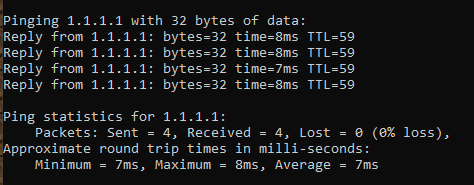
jitter is just the standard deviation from the average
so if you send 10 packets, average 10ms
full comet
see, i used to get 0ms
full comet
tame carbon
because you get 9ms, 10ms and 12ms
ahhh
so its the average difference in latency
peak cloak
yep
 full comet
gotcha
tame carbon
1ms jitter ^
hollow marlin
Yes, when running speed test, you are introducing congestion so that little is of no concern
full comet
i know its of no concern lmao, i was just asking why it happens
tame carbon
if your jitter is more than half of your ping, then you might ask yourself: whats wrong
full comet
tame carbon
if your jitter is more than half of your ping, then you might ask yourself: what...
i meann, it is half of my ping
my ping is 2ms and jitter is 1ms
supple hare
peak cloak
bbox is the router, 99.9% sure
yep, that's right, at least I think
full comet
tame carbon
but jitter on wifi and mobile internet is more considerable
this is on wifi
ethernet is the same tho
full comet
there is no difference between my wifi and ethernet
tame carbon
@peak cloak I get 1ms extra latency from my wireless :P
peak cloak
I get + 9 ms on wifi
full comet
i get no speed difference and no ping difference
so i just dont bother running a ethernet cable to my pc
to be fair i have the router in the same room
peak cloak
Ethernet still better than wifi, more reliable
supple hare
tame carbon
<@!309306402860433409> plug your PC directly on the fiber box, and see if window...
Where can I see the address when doing this ?
peak cloak
in cmd: ipconfig /all
full comet
peak cloak
Ethernet still better than wifi, more reliable
i mean this is reliable too, ive never had a problem yet
supple hare
ok ty
hollow marlin
peak cloak
in cmd: `ipconfig /all`
I haven't gone back through the comments, what issue is Tom trying to resolve?
peak cloak
hollow marlin
I haven't gone back through the comments, what issue is Tom trying to resolve?
L2 conflicts
let me find it
crystal knows more
tame carbon
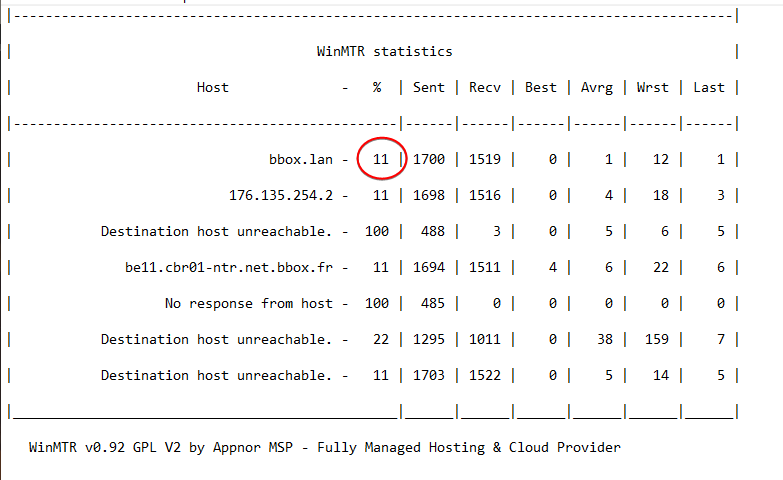
@hollow marlin his router reported a layer 2 device with an IP conflict
giving 20% packet loss
to 1.1.1.1
I had him remove all the devices from his router
full comet
tbh it could also be the isps fault
peak cloak
full comet
tbh it could also be the isps fault
nah we checked on traceroute
full comet
oh
peak cloak
it's to the router
tame carbon
let me pull the trace back up
@hollow marlin ^
@full comet packet loss on the first hop, either means: router shit, or cable shit
full comet
tame carbon
<@!395884871479853057> packet loss on the first hop, either means: router shit, ...
gotcha
tame carbon
100% just means server ignores pings
but the 11% is across the board
@peak cloak you know what I hate? https://i.imgur.com/JD1Wqb6.png

websites that just, make you wait 5 seconds for a stupid download
instead of just giving me a direct url from a cdn
full comet
nah im much more patient
full comet
maybe cuz i had 8/0.5 internet for the longest time
tame carbon
they always come a few seconds after the page loads
so its while ur in the middle of reading
Do yUo WaNt cOoKieS?
tame carbon
see this is what I expect a decent internet connection to return in a trace
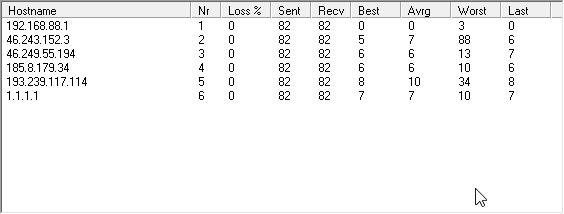
none of that, cannot resolve router
hollow marlin
tame carbon
<@!395884871479853057> packet loss on the first hop, either means: router shit, ...
Probably a bad cable, have you had him try a constant ping to the second hop only? Rule out any screening shenanigans?
hollow marlin
169.254 /16
supple hare
which means ?
tame carbon
@supple hare computer gives itself an address when there is no DHCP, it just means that @hollow marlin was right
and that your router gets its internet connection from the fiber box, probably with PPPoE
Point-To-Point Procotocol over Ethernet
tame carbon
information
hollow marlin
@supple hare is there a page on your ONT that shows any login information?
supple hare
x)
tame carbon
if you can get your hands on the login details
you can just use any router that supports PPPoE
can windows do pppoe?
hollow marlin
You can also login right in windows with PPPoE
supple hare
hollow marlin
<@309306402860433409> is there a page on your ONT that shows any login informati...
on the ont itself ?
hollow marlin
Correct
supple hare
I'll check
tame carbon
@hollow marlin I think thats the router here
he has two devices
one is fiber to ethernet from PON
tame carbon
here its just plain ethernet over fiber
tame carbon
@peak cloak no, but I am just confused
by the unnessesary level of complexity
that comes out of PON
peak cloak
less individual runs needed?
tame carbon
but the whole network stack
hollow marlin
Well which ever one he has the screenshot of the public. That's what he will need to login
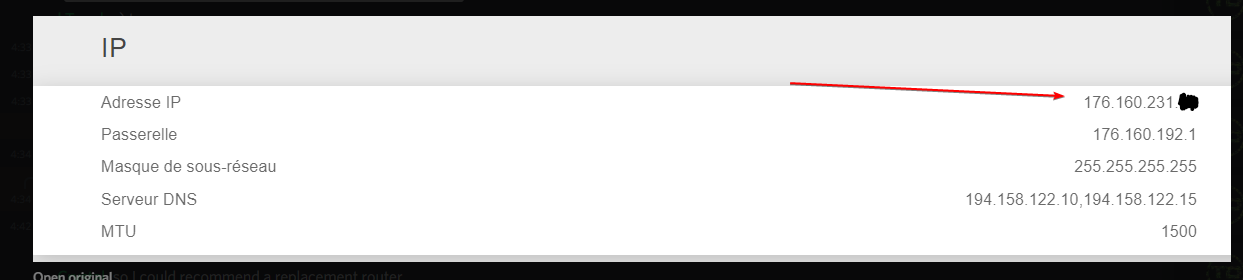 tame carbon
can you show the menu
supple hare
the sticker ?
tame carbon
no in the router, you've only shown us detail views
but can you send us a screenshot of the menu options
supple hare
Yeah ok
supple hare
Wait just to be sure, you wanted a screenshot of the page that I get when connected to the router right ?
supple hare
supple hare
tame carbon
<@!309306402860433409> oh, are you using their telephone btw?
No xD
tame carbon
ok, good
cus setting that up, is hell
xD
are there no settings or things you can change?
no configuration fields?
tame carbon
most limited router I've ever seen
@supple hare you should call your ISP, and ask them for the PPPoE login and configuration details
supple hare
There's also this useless crap
tame carbon
@supple hare you can get your own router and just configure a PPPoE client
as long as you know the login information
supple hare
Okk thanks
tame carbon
but i'd call the ISP first and ask
supple hare
But how would that solve the problem if getting another of their router wouldn't work ?
supple hare
xD very accurate tbh
supple hare
ok tysm !
supple hare
any specific one ?
tame carbon
I use only mikrotiks here at home
european company makes those
they get software updates for like at least 5 years after purchase
and are very affordable, and can basically do it all
tame carbon
@supple hare what network speed do you have
so I can recommend a specific one
and also, do you need wireless on it
supple hare
Yes wireless too, I used to have 550mb/s with the router that I have rn
tame carbon

MikroTik is a Latvian company which was founded in 1996 to develop routers and wireless ISP systems. MikroTik now provides hardware and software for Internet connectivity in most of the countries around the world.
this is the king among home wifi routers in their lineup
since you have fiber optics, need a router that can at least push gigabit speeds
this one is brand new, came out a few months ago
I have this one: https://mikrotik.com/product/hap_ac2
MikroTik is a Latvian company which was founded in 1996 to develop routers and wireless ISP systems. MikroTik now provides hardware and software for Internet connectivity in most of the countries around the world.
Its smaller, but just as powerful, except its wireless coverage isnt as good as external antennas
And in their software, you can just configure a new client https://i.imgur.com/HedHJIY.png
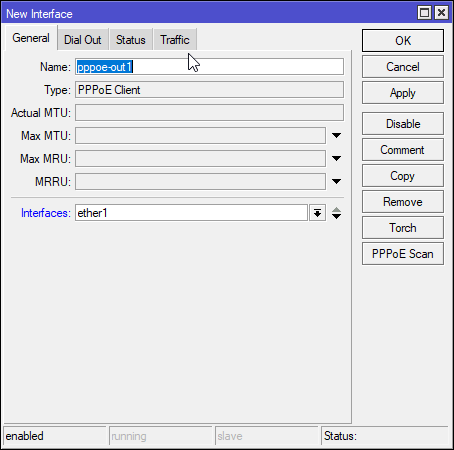
we can help you set it up
but, we need that login info, or we got nowhere. so plan this out
supple hare
tame carbon
but, we need that login info, or we got nowhere. so plan this out
yep, definitely will
Thanks !
tame carbon
@supple hare I think that hAP ac2 and ac3 are both capable of routing something like 2gbit/s xD
which is not bad for a 60 euro router
 clear igloo
Amazon?
 waxen scroll
kek
 oak night
clear igloo
Amazon?
oak night
clear igloo
Amazon?
Can't find
I need like 300m(1000ft) of cable
And cant find it
Anywhere
clear igloo
https://www.fs.com/de/products/58727.html
https://intellinetnetwork.eu/collections/bulk-cable/products/intellinet-en-cat6a-sftp-bulk-cable-solid-23-awg-705035

FS Deutschland
Kaufen Sie Cat6a Verlegekabel, geschirmtes und Foiled(SFTP) Solid PVC Netzwerkkabel 305m /Rolle Blau RJ45 Stecker beim Cat6a RJ45 LAN Kabel Hersteller mit bestem Preis.

Intellinet Europe
Cat6a S/FTP Bulk Cable, Solid, 23 AWG, LSZH, 305 m Drum (1,000 ft.), CPR-Dca Rated, Gray
oak night
Ok thanks
supple hare
tame carbon
<@!309306402860433409> I think that hAP ac2 and ac3 are both capable of routing ...
omg 😮 what is the next thing bottle necking such speeds ? Cables ?
 simple rapids
How can i configure the dns of easy.box
 robust plinth
waxen saddle
robust plinth
waxen saddle
You can get 10gigabit over CAT6A.
 pale mantle
remember tho the pinouit for 6a and 6 are the same
peak cloak
always is
it's just shielding
make sure you actually connect the shielding to a shielded port and connector or else it's useless
for the shielding to work it needs to be grounded
tame carbon
@supple hare network interface itself, is only 1gbit. so you wont ever be bottlenecked by the router
 tacit mantle
i dont understand, what do i need to change
mine should be Wi-Fi but im not sure what i need to do
nvm i got it
lean pebble
Guys what do you think on this drive ? https://www.amazon.com/dp/B07H289S79/ref=cm_sw_r_cp_apa_fabc_NJKA77YHEY5PZJZA1632?psc=1
For my nas configuration
static knoll
lean pebble
Guys what do you think on this drive ? https://www.amazon.com/dp/B07H289S79/ref=...
5900RPM? Surely a NAS drive should be at least 7200
lean pebble
Ya should be
static knoll
I mean it is 4tb for only $110 but regardless
 ocean pivot
lean pebble
Guys what do you think on this drive ? https://www.amazon.com/dp/B07H289S79/ref=...
ocean pivot
lean pebble
Guys what do you think on this drive ? https://www.amazon.com/dp/B07H289S79/ref=...
What are you using the nas for?
lean pebble
Shipping included
Backup my pc and plex server
I already have the plex server just I need storage for it
lean pebble
I have an old SSD that I can use
static knoll
It is slow tho
lean pebble
And ssd is cheap I'll use it for acceleration
lean pebble
2 expensive
ocean pivot
static knoll
It is slow tho
Unless you're doing 10g the network is going to be the bottleneck anyway
static knoll
Ehhhhhh I guess
ocean pivot
10k rpm drives are usually server drives now a days, they used to be a good boot before ssds were widely available
lean pebble
I'm jobless so need to cut on specific parts
ocean pivot
I did shucking for my first drives for my nas
static knoll
Hoo boy
lean pebble
I have a bunch of 300/600gb sas to
static knoll
Do I smite this kid who hasn't been paying attention or talk to him firmly
static knoll
Do I smite this mans or no???
lean pebble
With raid controller but I don't know it I can take it out from the old server and use it in different computer
Full tower server
ocean pivot
static knoll
Do I smite this mans or no???
smite who?
lean pebble
Old hp G6 server that making a noise or 10 airplanes combined
static knoll
My friend, who said:
ya ima stop mining, its taking too much time
i need to draw
He didn't pay attention, so obviously he didn't find out that he made ETH from his mining...
ocean pivot
lol
lean pebble
Lol
static knoll
Like, am I responsible for letting him know? I pinged everyone in the server lol
So the question is, do I smite him or what
Not actual smite with fire lol
lean pebble
Take his eth
static knoll
See that would be wrong of me, but I want it
lean pebble
😆
I mined on my dedicated server in Germany on CPU and my server cpu got fried out at some point
static knoll
Its my duty to pay people right, but he didn't pay one bit of attention while the others did
At an impasse rn
lean pebble
Lol
static knoll
lean pebble
Ask where he mined and mine by yourself
No, I know what he's owed, I manage everything
lean pebble
Oh
static knoll
Yeah, I probably shouldn't smite him seeing that the more miners we have the better lol
static knoll
I should just talk nice to him
static knoll
lean pebble
I want to join but I have nowhere to mine
You can mine ETH with us
lean pebble
But the program should run on my pc
static knoll
Everyone is welcome (assuming they pay attention and are respectful)
Yes it should run on your PC
MInimum 5GB VRAM, recommended 8
lean pebble
You see I can't do that
static knoll
How much vram do you have?
lean pebble
Electricity is too expensive here
lean pebble
I have my beast pc
lean pebble
Let me check but everything here is expensive
static knoll
If its from 0.1-0.2 dollars per should be ok
Less is even better, more is a bit ehh
lean pebble
I hope this is update and accurate
How much kwh a month this needed
And I really don't want to kill my GPU
@static knoll
lean pebble
Ya
static knoll
What GPU?
lean pebble
GTX 1060 founders edition and RTX 2070 super advanced
static knoll
Hmm
Should be ok
@lean pebble you would have to do a bit of undervolting but should still be profitable
Maximum I'd say for mining is 20 cents to the kWh
lean pebble
For how much mining?
lean pebble
The profit
static knoll
Oh
I have to calculate that, gimme a bit
@lean pebble 1060 will net you about 1.50-1.70 a day, 2070S 3.00-3.20 daily
lean pebble
1.5-1.7 bitcoins or ethereum I lost you 😅
lean pebble
Now I can't 😅
static knoll
?
lean pebble
Maybe after I'll finish my studies
static knoll
You can let it run while you sleep yk
lean pebble
Or I'll do it on the nas I'm planning
static knoll
Alright
lean pebble
Gpu is pretty cheap
static knoll
I'll invite you to the discord then, so you caan take a look
static knoll
well yes
lean pebble
Well I'm off to bed cya tomorrow
static knoll
Cya
plucky crescent
@tame carbon are you still in here?
static knoll
@tame carbon is idle i think
plucky crescent
I was not around when they addressed me....
static knoll
Ah
plucky crescent
I just need to understand how to make a simple queue and fasttrack work together. It may be that they already are, since my guess is that the speed test just opens one TCP stream? I have no idea what I'm talking about though, just throwing out guesses.
waxen saddle
What is fasttrack?
hollow marlin
plucky crescent
I just need to understand how to make a simple queue and fasttrack work together...
Fasttrack and simple queues cannot work on the same traffic. Fasttrack marks a flow and all subsequent packets bypass the CPU, which includes the firewall and simple queues. Simple queues requires CPU processing, which is why Fasttrack is meant to eliminate
hollow marlin
waxen saddle
What is fasttrack?
In some linux based OSes like RouterOS and Junos, Fasttrack is used to reduce the CPU usage on firewalls by "marking" a connection (source/destination IP and port) on the first 2 packets. The 3rd packet that comes in now instead of going through 10-20 processing steps is accepted in the first/second processing step.
Here in Junos for example
waxen saddle
Is that software processing? Or hardware? Or both?
It sounds a lot like flow processing instead of per-packet processing
hollow marlin
Mikrotik it is indeed software
waxen saddle
Ah ok. Thanks for explaining. I heard a few rumors of flow-based routing, and it made sense to me. I just never saw any products that used it or really heard about it for years up until this very moment.
hollow marlin
Flow based routing is used with equal cost routes (ECMP). Not to save resources but per-packet routing over equal cost routes can lead to out of order packets. You can configure Juniper/Cisco to do per-packet routing but there is more downsides than benefits. Fasttrack is really used on firewalls, its short for fastpath connection-tracking
Firewall services really cannot be done in ASICs (not entirely true) hence need to process via CPU to do what a firewall does best.
 dusty osprey
hollow marlin
dusty osprey
hollow marlin
Yeah, thats why I mentioned not entirely true. There are FPGA switch chips able to handle it
oblique marlin
@tame carbon
i am not able to recieve connections
on my port 8080
i have set port range from 8080 to 8080
but still i am not able to listen
hollow marlin
If you are referring to port forward 8080, you are going to break a ton of things
 molten storm
How many MB/s do you guys get?
 thick minnow
MB orMbit?
tame carbon
@oblique marlin check firewall, local IP
@hollow marlin though fastpath and fasttrack are two different things, right?
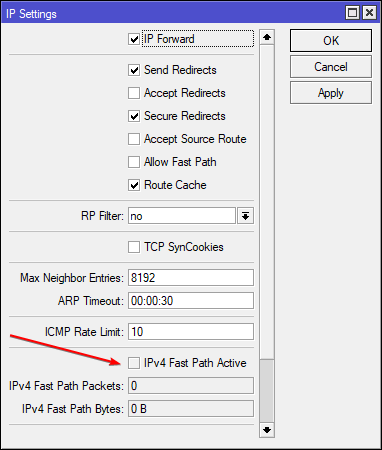
I have this disabled because I use queues, and the RB4011 can easily route 10gbit/s without fastpath
fasttrack you can just mark in firewall https://i.imgur.com/8biN1dJ.png
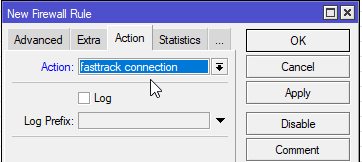 lean pebble
Good morning to all the crazy doctors out there that have more than 20tb storage in their house and log the log of the log.
And good morning to the other normal ppl that just want nas and talking here about everything xd
granite bridge
lean pebble
Good morning to all the crazy doctors out there that have more than 20tb storage...
Good morning!
lean pebble
🙂
 thick minnow
wasn't aware of that channel lol
tame carbon
@thick minnow here be dragons
thick minnow
i suck so much in networking that that can be true
i found a product that maybe can work
tame carbon
@thick minnow You have an ADSL connection?
tame carbon
Did you get anything from your ISP, a modem or router?
thick minnow
it's not for me tbh
it's for a small office, but i usually don't follow networking stuff
but he need it, it's an old client, so
well, long story short, he have a fiber connection and an adsl connection
5 or 6 pc
and he need to connect everything together
:E
thick minnow
i can for sure, but he want both
tame carbon
wat xD ok
thick minnow
he think it's like an hospital, dunno
it's just a small office, if internet go down for an hour or two it's nothing
but well, he pay two bills and he's happy, so be it
tame carbon
@thick minnow yeah my point being, you can't really use two internet links like that in paralel
unless you set up some kind failover, but that seems a bit over the top
thick minnow
no it's ok with a load balancer
 ancient basin
Use the adsl as backup maybe
thick minnow
yep
tame carbon
so, failover.
thick minnow
i found that tplink above that it's a load balancer
and COULD be ok, but really dunno
tame carbon
Load balancing is for the other way around
incoming -> two or more machines
You'd use fiber optics as primary internet, and ADSL as failover
updating internal routing tables if one link goes down
thick minnow
that should be surely enough
tame carbon
I really doubt tplink in being capable of doing this
and failover configuration isnt exactly easy
thick minnow
hum, i'll go for the easiest way
ancient basin
You need some way to detect when the primary line is down
tame carbon
@ancient basin on mikrotiks I do this with a script
script pings the gateway, and if it times out, it switches over
@thick minnow easiest way is not bothering with failover. Getting a regular router
and then just plugging ADSL in, when fiber goes down
xD
tame carbon
thick minnow
if it's not a failover it's ok, i mean
tame carbon
thick minnow
if it's more a trouble than other
tame carbon
The way this works
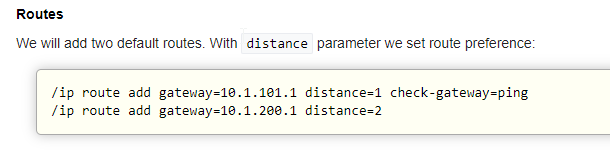
You define two routes to the internet
and set the primary with a shorter distance, and a gateway check
thick minnow
well, the theory behind it it's simple (i think)
tame carbon
@thick minnow its all been abstracted away, so on paper its quite simple
its just a bit finecky dialing in the specifics
thick minnow
no well, i think i'll go for something more plug and play :E (the more i can)
tame carbon
@thick minnow plug and play with networking, is a fantasy
thick minnow
if i need to script things too, who know what i can get
lol, please tell me that there is a load balancer with dhcp
like, i plug the two adsl in a router, plug an access point in it and the thing is over
😦
tame carbon
Mikrotiks come with sensible default configuration
with a DHCP client on port 1, and LAN on the other ports
and a default firewall
you can just configure failover, as per their guide on their wiki
but its advanced configuration, for which you'd be able to ask us for tips
@thick minnow the situation you have, is that you have two WANs
and routing between two WANs, is a bit more complicated
thick minnow
yes, that for sure :<


 thick minnow
i'm still lagging about this, like: what i need to connect the two wans?
tame carbon
@thick minnow any router, that is at least more capable than consumer routers
thick minnow
the script is ok, but on what hardware?
so, even one of the router used by ISP?
or a new one?
tame carbon
MikroTik is a Latvian company which was founded in 1996 to develop routers and wireless ISP systems. MikroTik now provides hardware and software for Internet connectivity in most of the countries around the world.
I'm only knowledgeable in one brand right now
so if others here have a suggestion, they may chip in.
thick minnow
to be honest i know nothing (more than others!) about microtik, are they good?
tame carbon
@thick minnow I'm a big fan, 5 years software updates after purchase
and they have enterprise features, for a consumer price
@thick minnow what speeds are we looking at on the fiber?
MikroTik is a Latvian company which was founded in 1996 to develop routers and wireless ISP systems. MikroTik now provides hardware and software for Internet connectivity in most of the countries around the world.
This is a pretty solid ethernet router
you can pair it with a switch, to connect more computers
thick minnow
i think it's like 100mbps
tame carbon
@thick minnow all the mikrotiks run the same software, so that guide applies to all
thick minnow
and adsl is 20mbps
tame carbon
^ that one comes with SFP, for fiber
There's also a variant without SFP
you can ignore the markings on the box about 'internet' and 'LAN'
that's just default, you can remap the ports to your liking.
You'd plug both internet connections into that box, and then configure the firewall and router accordingly
Wireless, you can also manage with this
MikroTik is a Latvian company which was founded in 1996 to develop routers and wireless ISP systems. MikroTik now provides hardware and software for Internet connectivity in most of the countries around the world.
You can buy standalone wireless access points, connect them to the router
and then you can manage them from the router directly
thick minnow
hum, if i read that it sound quite simple
but i'm sure i'll do something stupid
is there a guide, like, for children?
an anti-idiotic step to step guide
you don't know me, but i do, and i don't trust myself in nothing that it's about routing/cables/internet
ancient basin
The tp-link you linked might work looking at the spec sheet quickly. No idea how the load balancing actually works on that
thick minnow
about the quality, i have no particular needs; i mean, the two adsl doesn't even have problems lol
it's just a paranoid think, but usually the connections are stable
tame carbon
@thick minnow as a company, you'd hire a contractor to do this for you
so no, there's not really a children's guide to do failover
@thick minnow You dont have any special needs, if you only use a single connection
but just plugging two modems into a router, doesnt automagically work.
tame carbon
@thick minnow if you get one of those mikrotiks, I can help you set it up
That guide doesnt look to complicated, I'm sure we can replicate their setup
thick minnow
i'll tell him about this
need to check this stuff in euros
then i can tell him the price
tame carbon
hex S is like 60 euros
those access points cost about the same
and for a company, that's a laughable amount of money
hollow marlin
tame carbon
<@!462711605063450628> though fastpath and fasttrack are two different things, r...
They are different but related. Fastpath can speed up bridge/routing/mpls at the hardware level, but the bridging is really unclear to me if you look in the packet flow of where its being sped up. Fasttrack relies on fastpath and connection tracking (aka FastTrack) to speed up the firewall processing. Fasttrack makes sense, fastpath in bridging does not to me
tame carbon
@hollow marlin I learned about this the hard way lol
I was setting up a queue, to limit bandwidth to a downstream router
and it didnt work..
so I was like testing and debugging trying to figure out why it wasnt working
and in doing so, I had Torch running in the background
and then mysteriously, the queue worked...
so I was like: cool, job done
so I closed everything
and then the queue was not working xD
Turns out, when you run torch. (it even says this in documentation), that routing behaves differently
because it disables fastpath while torch is running xD
and you cannot have queues and fastpath enabled
oak night
Is a Buffalo terastation worth 20 euros with no drives?
tame carbon
20 bucks for a computer
oak night
Sorry for my English
tame carbon
100M switches suck. Though if it has 1G uplink ports, it may still be of some use
oak night
I saw this used package of thing and bought is for 20 bucks
oak night
tame carbon
100M switches suck. Though if it has 1G uplink ports, it may still be of some us...
Ok how much can I sell it for ?
tame carbon
idunno
I wouldnt buy it
I just know, I wouldn't throw it away either
since you never know when a lan party happens
 thorny vector
The terastation alone is worth it. I wouldn't bother trying to sell that switch. Keep it around as a backup, is my suggestion
peak cloak
parties
tame carbon
last time I partied was 2019
I remember it like yesterday though xD
@thorny vector I got a box of 3com switches I saved from the garbage bin
3x 48 port (with 4x 1G uplink)
My plan for them was to hold onto them, until the day that I plan on doing my own home automation
48x 100M for IoT is great
waxen scroll
i just bought my first wifi IoTs
shelly
never done MQTT or any of that yet
im gonna migrate off zwave where I can
not happy that zwave devices cost double wifi and the protocol is kinda temperamental
they're not here yet so IDK, but im hoping the reaction of wifi ones are just as fast
peak cloak
I'm not a fan of wifi IOT as can't someone just crack the wifi and have access to everything iot
unless you go WPA-Enterprise
idk if IOT supports that though
waxen scroll
im not concerned much
even if i had a wifi lock, i have a security layer that the automation stuff cant disable but can read
peak cloak
huh
tame carbon
and even exists as a public network :D