#networking
1 messages · Page 277 of 1
 tame carbon
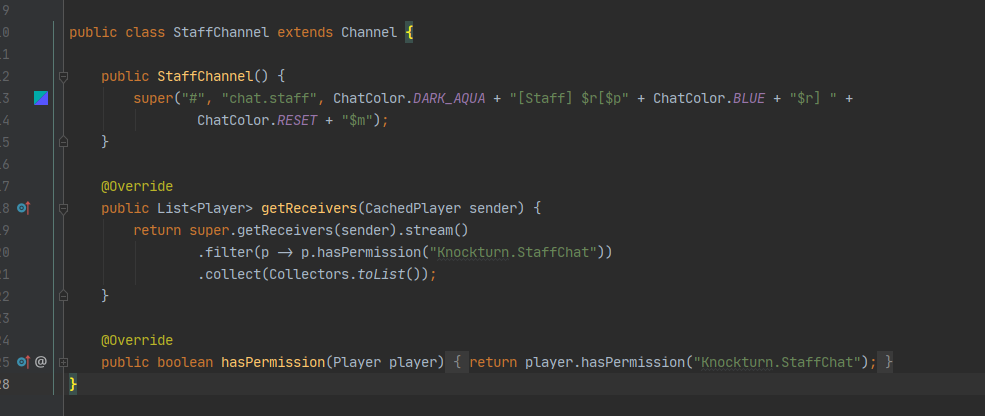
@lean pebble btw, that chat system was quite easy https://redis.io/topics/pubsub
we had our various channels, like local and global
but also, staff and house (people from their 4 houses in hogwarts)
could all talk in various channels, and with redis this was quite simple
you'd send a message on the channel chat.global
and every server listens to chat.*
and the receiving server, checks to what players this message would apply to
 lean pebble
I thought about making channels via countries
 honest trail
@tame carbon mate, that doesn't answer my question, I have a 16Gb SSD as my cache rn, and I don't believe that it's enough.
lean pebble
regions
tame carbon
@lean pebble yeah the chat system I came up with designed with a networked model
local chat is ignored by other servers
lean pebble
I mean channels that each country can talk in their own lang
tame carbon
@lean pebble https://i.imgur.com/TkB3sMO.png
 lean pebble
and global chat of english only
tame carbon
the way I set it up, you can just make it however you like :)
lean pebble
here its 2:32am
tame carbon
local chat uses a range calculation xD
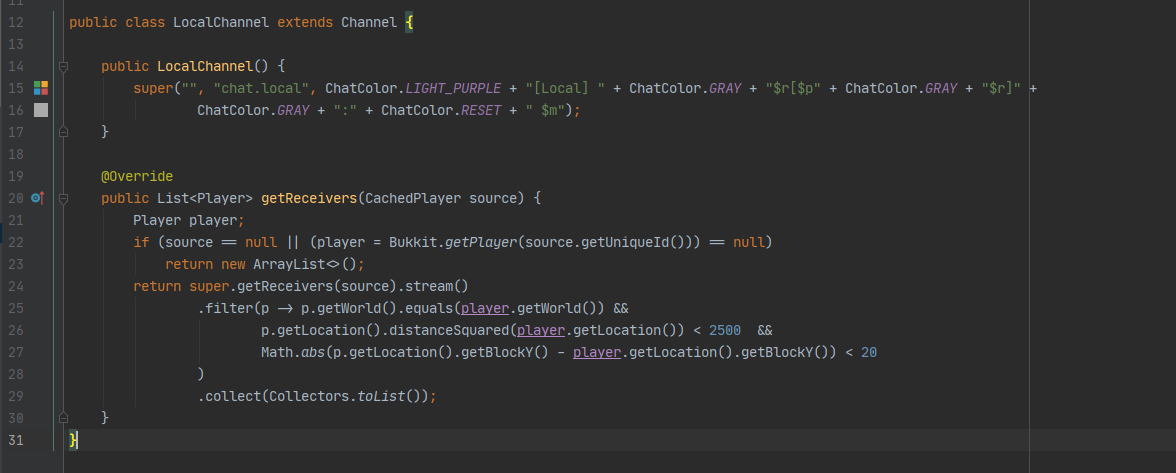
local chat only propegates, if the sender is on the same sever
hence that empty array it returns otherwise
lean pebble
you talk with me on this while I have aproblem with my for loop in java xD
tame carbon
@lean pebble you gotta start somewhere with learning :)
I've been at this for a good 9 years now
Java is just my favorite development platform
lean pebble
I don't know yet what is my fav platform
I used to work with python alot
I liked it because no semicoloms
but I used to work with java alot to
tame carbon
you should try kotlin then
 peak cloak
so far I hate the syntax with python
tame carbon
@lean pebble https://kotlinlang.org/#why-kotlin
Kotlin
 lean pebble
Java is for my studies can't switch
tame carbon
This is java
lean pebble
maybe after I'll finish with my studies
lean pebble
I used to work in java 10 years ago
when I was 14
for maplestory private servers
Just never liked it
 sick grotto
Reinstalling the OS solved it, but now I have to go back through and reinstall all my junk and put in a million passwords

 little schooner
@sick grotto if windows, yes, that's generally the process
sick grotto
And now as I have to reinstall everything, the house's internet died
I'm gonna go rethink my life now

 next roost
I'm about to buy a server rack. What would you all buy for around 300?
 tacit mantle
would anyone know why my internet is bad on my pc but fine on every other device
ive changed the wifi adapter twice and its still messing up
 unborn sluice
Your computer doesn't want good internet
sick grotto
tacit mantle
would anyone know why my internet is bad on my pc but fine on every other device
Almost sounds like you have a download going
 vestal smelt
Check drivers?
If there is ones availlable
Therr might not be
At least on my laptop therr isn't
 glass glacier
I need help.
My PC's NAT type is strict, and i need to make it open.
Any ideas how without changing something to the router?
All of the devices I own have it moderate, except this one, that i use for gaming.
If you can help please DM me, i'm a bit busy rn.
unborn sluice
without
No
 static knoll
honestly having router control is LIT
You can do whatever you want, even block that annoying person in your household from using it
 hushed iron
Can anybody confirm if this is correct from my understanding
But with it , there is a way, right?
And changing something in it, won't affect it's performance?
Then i am in it.
Xbox console companion results:
The troubleshooter says this...
And in a specific game [ For Honor & FH4 [ games that need a better NAT type than STRICT ] says the same,
NAT type Strict.
static knoll
You need the router settings to actually fix this, you cannot do anything much from the devices themselves
Thats just how it works
tame carbon
@glass glacier it requires you to set up a port forward in your router
@glass glacier games that use peer to peer lobbying/matchmaking, requires individual clients to be reachable from their public IP
in normal home scenarios, this public IP points to the router, not the Console/PC
That's why you have to tell the router, to forward specific port numbers, to your PC/Console
which would yield you an 'Open NAT'
the act of translating IP:port to a localIP:port is called NAT
or: network address translation
NAT is kinda shit tbh, it violates the end-to-end principle, so you have to do stupid stuff like port forwarding
glass glacier
tame carbon
<@!507502240508936193> it requires you to set up a port forward in your router
How do i do that, i have 0 % knowledge?
tame carbon
@glass glacier I can run you through it
@glass glacier usually when you port forward, you just have a list of ports and protocols
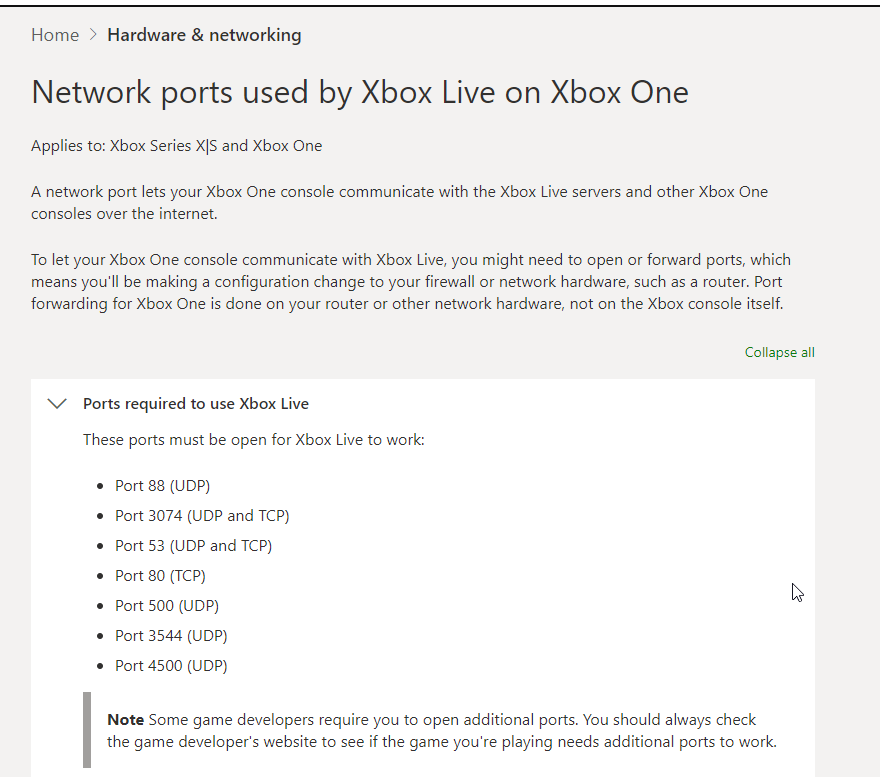
for Xbox Live ^
tame carbon
@glass glacier look what it says underneath.
you only really have to port forward for specific games
glass glacier
I tryed in the past with a lot of youtube tutorials but it only moved from BLOCKED to STRICT
tame carbon
@glass glacier these ports will work regardless of xbox or pc
since its xbox live.
do you know how to access your router's settings?
glass glacier
So, how to I check / open the ports?
glass glacier
tame carbon
do you know how to access your router's settings?
No.
glass glacier
admin?
tame carbon
nah
glass glacier
oki
tame carbon
Look for the 'Default Gateway' on your primary network adapter
glass glacier
done
tame carbon
Its a 4 octet number (IP address)
thats the address of your router
you put that number into your webbrowser
glass glacier
At TUNNEL adapter TEREDO Tunneling Pseudo-Interface
tame carbon
@glass glacier that doesnt seem to be right
tame carbon
26.0.0.1? wat
tame carbon
@glass glacier well, ok, try putting that into your webbrowser
I just got up, and im here all day
 glass glacier
Yea once i tryed that
tame carbon
See, if you punch that IP in, it opens router settings page, whichever brand you have
glass glacier
Oh, well i will try it later, now i got a bit of work
tame carbon
sure
lean pebble
Morning
glass glacier
So, coming back for the NAT type of thing
 waxen saddle
NATurally
glass glacier
command prompt,
type that you gave me,
find default gateway
type in chrome the thing
I tryed in the past with the 192.168.88.1 but it asked me a password adn username / admin name
The thing won't work
glass glacier
glass glacier
I tryed in the past with the `192.168.88.1` but it asked me a password adn usern...
here we go again
waxen saddle
Did you get to the router page?
glass glacier
glass glacier
that is the response from the page of the router lol
Same
I tryed now BOTH of them, nothing
waxen saddle
What’s the gateway IP of your network adapter? Having a .88. in it is a bit unusual for a home router
glass glacier
O
192.168.50.1
this one it gave me
Here i was stuck the last time too
i have 5 tryes each 5 or 10 mins
Username should be...
The Wi-Fi name?
waxen saddle
No
glass glacier
and pass the wifi pass?
waxen saddle
I’m unsure if this is a crappy cloud account or local
waxen saddle
It has nothing to do with WiFi
glass glacier
oh ok
waxen saddle
Assuming it is local and hasn’t been changed, is the login underneath the router on a sticker?
waxen saddle
Don’t post it here
glass glacier
In DM ?
waxen saddle
Or anywhere
waxen saddle
No. Don’t give that out. Just enter the username/password if it’s there
glass glacier
asus computer: [a code with 4 letters ]
waxen saddle
Try it on the router page. Lol
peak cloak
glass glacier
I tryed in the past with the `192.168.88.1` but it asked me a password adn usern...
usually it's on the back of the router or somewhere
or try admin admin
peak cloak
what's your router?
glass glacier
RT-AC65P
glass glacier
peak cloak
or try admin admin
nope, i tryed it rn
4 tryes left until a waiting time of 5 to 10 mins
Sign In
RT-AC65P
Sign in with your ASUS router account
[username]
[password]
peak cloak
default is admin admin apparently
so
someone must have changed it?
or
try
admin, password
glass glacier
well i found on the bacc of the router,
SSID : number and letters but not random
SSID[5G]: number and letters but not random and with 5G at the end
glass glacier
I found a PIN
and MAC: [numbers]
and i found now
HW ver:
FW ver: and like it is a IP or smh
and something
SN: XXXXXXXXXXXXXXXXXXX [numbers, letters]
and a qr code next to all of these
SSID : number and letters but not random
SSID[5G]: number and letters but not random and with 5G at the end
PIN
MAC: [numbers]
HW ver:
FW ver: and like it is a IP or smh
SN: XXXXXXXXXXXXXXXXXXX [numbers, letters]
next to them a QR code
That is all it is
unborn sluice
no no
glass glacier
The FW is firmware version
unborn sluice
wifi password is not the webui password
the webui is usually admin/admin
or something
glass glacier
unborn sluice
or something
It has a QR code
 glass glacier
Well when we bought it and it was installed by my internet company i use,
they said we can change some settings to the router
The problem is we have 2 routers
and not even i don't know at what router i am now connected because i got the cable trough the wall
unborn sluice
what's a router
unborn sluice
that's not a router
peak cloak
technically router doesn't give wifi
glass glacier
Hold on,
They said [they = asus tutorial webpage] to type in 192.168.1.1
But that redirects me to the login page of... ZTE [ my old one ]
peak cloak
router just routes between different ip subnets
unborn sluice
glass glacier
Hold on,
They said [they = asus tutorial webpage] to type in `192.168.1.1`
But t...
but you get the asus weblogin
glass glacier
Nooooooooop
192.168.1.1 give me to the OLD router's login page
and i was supposed to give me on asus one
unborn sluice
so the asus router is on a different ip address
glass glacier
ye
not 192.168.1.1 [the one that is supposed to be]
it is
192.168.88.1
i have 2 networks rn.
The one on cable,
The HAMACHI one [ that created another one, virtually for LAN gaming]
waxen saddle
Let's not get petty... it sounds like he has an all-in-one unit that combines wifi, switch, and routing capabilities. "Router" for short.
glass glacier
Network 4 is hamachi
now it is OFF
and even on it is no internet acess
maybe that one is the problem and keeps the same IP from the old router...?
unborn sluice
waxen saddle
Let's not get petty... it sounds like he has an all-in-one unit that combines wi...
Yea, router is fine. Idk why people want technical terms in everyday conversationn
glass glacier
waxen saddle
It can help clarify the setup, but looking up the model would answer that question too. 🙂
glass glacier
I did that but it says it is wrong
unborn sluice
glass glacier
maybe that one is the problem and keeps the same IP from the old router...?
Your router shouldn't care about hamachi
the router hamchin't
glass glacier
i know
they said :
If you do not see the page, you can manually go to http://192.168.1.1 using your PC internet browser.
But that redirects me
Here
To the OLD router's login page
i try here ADMIN and ADMIN,
nop
unborn sluice
cause that's not asus weblogin??
soo why use asus weblogin credentials

top 10 questions, scientists can't answer
static knoll
this is why one does not have 2 different routers/systems
unless you have a dedicated IT guy
then go for it lol
static knoll
no like when it gets to this guy's level of confusion
but like most of the time its fine
 waxen scroll
hello, dedicated IT guy here. I have about 1000s of network equipments
unborn sluice
waxen scroll
hello, dedicated IT guy here. I have about 1000s of network equipments
thank you, can you save the daay
my patch cable doesn't work
static knoll
oh voila we have a dedicated IT guy
lol
anyone know how to turn off double NAT on fios?
waxen saddle
Open CMD, run "ipconfig /all" and post a picture here of your physical network adapters. That might help sort out what's what.
waxen scroll
sorry you'll need to contact helpdesk
waxen scroll
i havent talked to a user directly in like.... 6 years
peak cloak
one router behind the other?
static knoll
I have double NAT
waxen saddle
It's starting to sound like it. We need to do a bit of netmapping
glass glacier
now i got it BLOCKED again
static knoll
I have double nat and idk how to fix it lol
peak cloak
static knoll
anyone know how to turn off double NAT on fios?
They don't have a modem, just don't use their router
glass glacier
Sometimes it works, sometime won't
static knoll
peak cloak
They don't have a modem, just don't use their router
Issue is that my uncle watches cable TV through the package
peak cloak
urgh
peak cloak
I think you can get a moca adapter
static knoll
doesn't fios have IPTV now
static knoll
peak cloak
don't watch tv
He enjoys watching cable
I want to host servers on my PC at home
I have 0 physical access lol
waxen saddle
Switch on your single network cable is all you need ^
peak cloak
@static knoll how is the current tv setup
glass glacier
Hard-Reseting will do something bad to my router?
HArd-Resetting will reset the router's username & pass
peak cloak
does it hook into the router or just splits off the coax
 static knoll
peak cloak
<@!456908160008060928> how is the current tv setup
static knoll
peak cloak
<@!456908160008060928> how is the current tv setup
i think its from the wall-fios actiontec router-cable box?-tv
something like that
glass glacier
I ... want to the PC not the xbox what-
static knoll
the internet is wall-fios actiontec router-netgear nighthawk AX4-PC via ethernet or something like that
unborn sluice
glass glacier
I ... want to the PC not the xbox what-
checkmate?
static knoll
note that I have essentially 0 control of the physical connections
peak cloak
because what you can do I think:
ONT-> Coax -> Splitter -> Moca Adapter -> Eth Router
                        \> TV Box
oh
static knoll
actually
i have limited access
i could theoretically ask my uncle there, but he's pissed over an ethernet cable on a floor that i can't do anything about...
static knoll
peak cloak
because what you can do I think:
```
ONT-> Coax -> Splitter -> Moca Adapter -> ...
You can get splitters/moca adapters for that?
peak cloak
I think
static knoll
peak cloak
because what you can do I think:
```
ONT-> Coax -> Splitter -> Moca Adapter -> ...
Idk, I can't do much about this until I go home this summer
For now I guess paid servers are what I have to deal with
static knoll
?
static knoll
Tbh I think the main issue was that I couldn't get bridge mode on the Actiontec
i stupidly set my home internet to no IP address through teamviewer lol
using the pc connected to the internet
i also found this @peak cloak
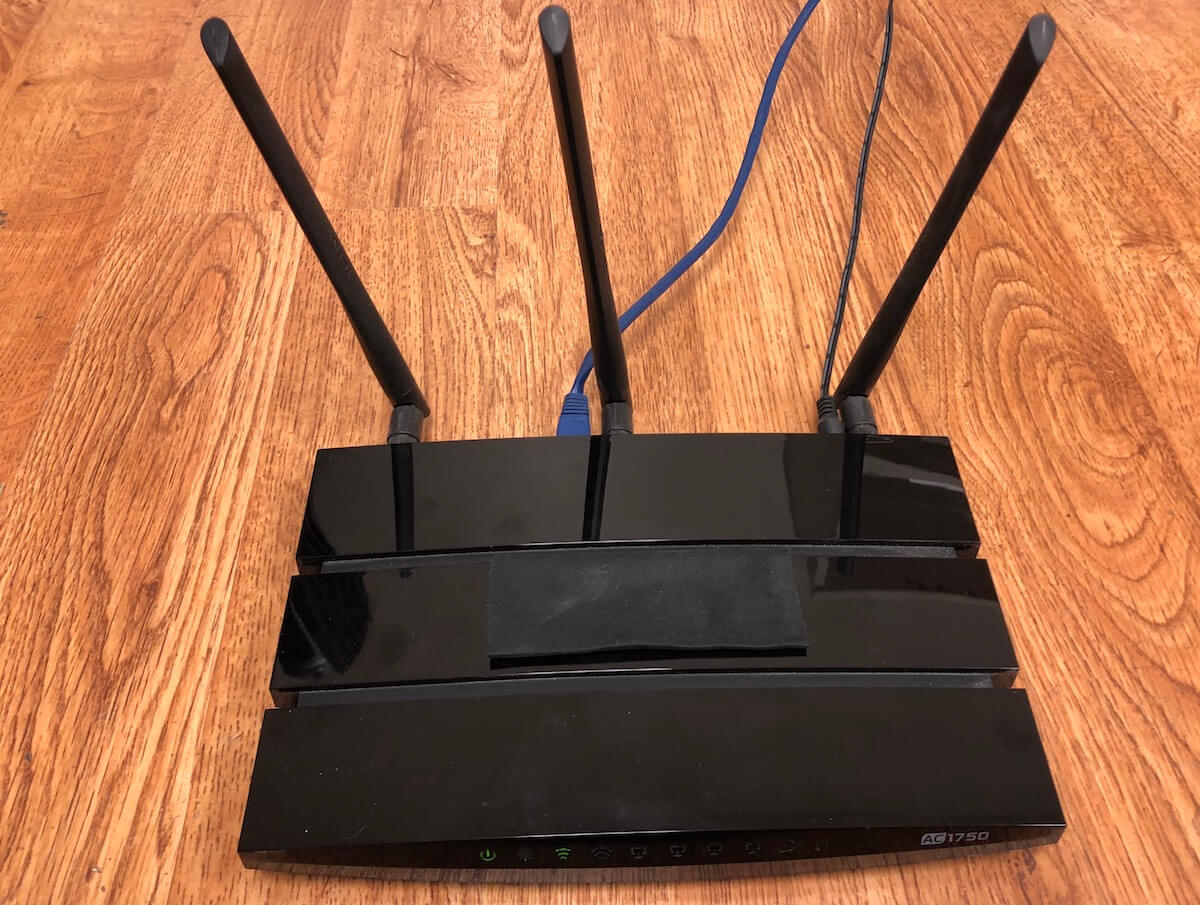
Grounded Reason
Want to use your own router with FiOS internet? This is how to activate the FiOS ONT Ethernet port and stop paying for Verizon's router.
Doesn't exactly fix MoCa but something else
peak cloak
static knoll
https://www.groundedreason.com/use-router-fios-internet/#:~:text=ONT%20stands%20...
that's just switching from coax to ethernet, you won't have tv
static knoll
Yes
Honestly TV is the problem here
It comes with the package, so my Uncle naturally wants to use it
Issue is the damn Double NAT
peak cloak
yeah, worst case when you want to port forward you do it on both routers
static knoll
peak cloak
yeah, worst case when you want to port forward you do it on both routers
Still doesn't fix double NAT lol
I tried it back then
Doubt it has changed
peak cloak
static knoll
Still doesn't fix double NAT lol
it doesn't but it allows you to port forward
static knoll
eh, the only reason I need to port forward is to host servers
and spigot doesn't work if Double NAT is still in effect
static knoll
no, it said double nat error
regardless, I need to fix double NAT eventually
and i don't wanna go back into the annoyance of router settings
peak cloak
so what you do is on the fios router port forward to the ip of your router and then from your router port forward to your server
it's a dirty fix but it should work
static knoll
peak cloak
so what you do is on the fios router port forward to the ip of your router and t...
I barely know what the physical connections look like lol
Idk what's connected to what
All i have are general ideas of what the network looks like
I would know more, but I moved for HS 6 days before we got Gigabit installed
waxen scroll
unborn sluice
Plug your modem directly into the XBOX
BIG brains only
glass glacier
Yep, there are 2 ways to retrive the info for the login,
Hard-Reset
or
call they guy that set-up the router
static knoll
glass glacier
Yep, there are 2 ways to retrive the info for the login,
Hard-Reset
or
call they...
calling the guy is annoying, they come at a specific time and somehow its always inconvenient
glass glacier
Ik
I still search to see if there are any different ways to ... get back the username and pass.
glass glacier
It will delete the wifi custom name and custom pass
And those are set up in the webpage for the setup
glass glacier
glass glacier
And those are set up in the webpage for the setup
:I
static knoll
honestly if you can call the guy do it, if not just hard reset
if not just don't play those games lol
lean pebble
Any hex-s masters?
 loud forum
does anybody have any recommendations on a wireless card for my desktop?
 supple hare
Hi, my internet connection (on ethernet) keeps disconnecting, where could the problem come from ? I tested different cables, pcs, ports and even changed the router, still having the same problem...
supple hare
Ethernet, optical fiber
tame carbon
@supple hare can you look in the modem itself, see what it reports?
if the fiber link goes down, you'd have to call your ISP
peak cloak
is it just the pc or other devices as well
supple hare
tame carbon
<@!309306402860433409> can you look in the modem itself, see what it reports?
How do I do that ? Ok ty they told me to replace it again, I just want to make sure the problem isn't from my side
tame carbon
enter the ip address of your gateway into your browser, reported by ipconfig /all
peak cloak
@supple hare is this fios? just curious
supple hare
No, I'm in France, it's Bouygues x)
peak cloak
ah
peak cloak
it's friday
tame carbon
fwouhrtweenty
supple hare
When I copy the link in my browser it takes forever to load
And eventually says that the website can't be reached
tame carbon
what did you enter?
supple hare
one of the ip address
supple hare
192.168.1.254
peak cloak
that's the default gateway?
supple hare
Yeah
tame carbon
@supple hare just to be sure, please see if http://192.168.1.1/ is anything
supple hare
can't be reached
peak cloak
try https://192.168.1.254 @supple hare
tame carbon
@peak cloak I swear, we should invoice every single ISP who can't fix their own customer's problems
supple hare
Btw rn I am sharing the wifi that my phone gets with an usb cable. Should I try without ?
supple hare
ok
tame carbon
@supple hare plug in your laptop directly.
with a cable
when debugging, you want all the wifi crap out of the way
so you can isolate the issue
lean pebble
tame carbon
<@!109801863771074560> waddup
how are you today?
tame carbon
@lean pebble doing good
lean pebble
I think I fixed this weird bridge loop
tame carbon
about to give a tasting to these 'groceries'
lean pebble
bon a petit
tame carbon
@lean pebble oh, it resolved itsself?
supple hare
ok ok
btw the wifi works fine
I can't send message on disc but I receive them...
Same problem
lean pebble
just still something is weird here
My living room mesh unit not connected now via cable to the switch but get a full connection to the main and the basements units
idk what the hell is going on with this mesh units xD
tame carbon
@peak cloak now I am confuse, this smells like DNS
peak cloak
@lean pebble I am always confused by your setup, https://app.diagrams.net/
tame carbon
@supple hare can you download winmtr for me? https://sourceforge.net/projects/winmtr/
SourceForge
Download WinMTR for free. WinMTR is a free MS Windows visual application that combines the functionality of the traceroute and ping in a single network diagnostic tool.
lean pebble
I'm confused to
supple hare
ok
lean pebble
only the mesh is the problem here
tame carbon
@supple hare enter 1.1.1.1 as target, and hit start. Just leave it running in the background
lean pebble
all the rest works good
supple hare
ok
lean pebble
I got 2 switches mesh and modem + mtik
tame carbon
@supple hare after about 2-5 minutes, make a screenshot and send that
should give us some diagnostic information on the line itself
you reporting that you can receive, but not send
makes me think this is a DNS issue, instead of a network issue
supple hare
Ok, I'll leave it working while eating
lean pebble
for some reason my switches made a loop on the bridge connection in my hex-s
I had to reboot them and disable and re enable the stp there
tame carbon
@lean pebbleloops like that would be on layer 2
lean pebble
ya
tame carbon
you can configure bridges to isolate layer 2 messaging
tame carbon
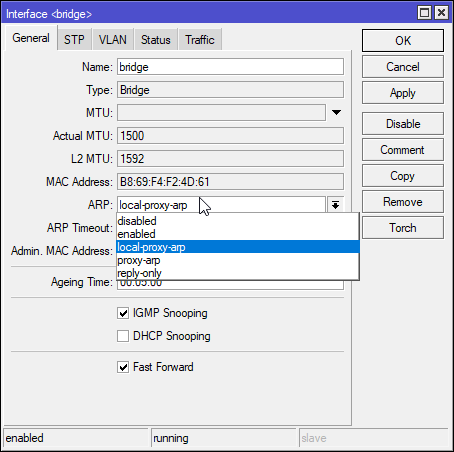 lean pebble
after I fixed it
waxen scroll

tame carbon
With local-proxy-arp enabled, the router will respond to all client hosts with the router's own interface MAC address instead of the other host's MAC address.
or VLANs
I forgot lol
lean pebble
I'll look into this option later now lets keep my net working xd
long time since it worked that good
I'm downloading a test game on epic and using discord + surfing the internet at the same time thats a good progress
Last time I tried after 2 minutes the download and my internet crashed
tame carbon
odd
lean pebble
odd yes surprised no
 hollow marlin
Avoid proxy-arp whenever possible. Really only needed in poorly designed networks
tame carbon
@hollow marlin I only have that on my LAN bridge
that part of the network is a mess
@hollow marlin I know it makes you vulnerable to ARP poisoning
@hollow marlin only network that I run proxy-arp on is my VPN bridge itself
lean pebble
yam yam arp poisoning
tame carbon
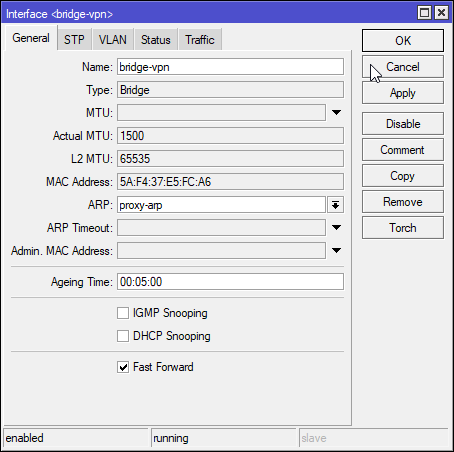 lean pebble
I did it 3/4 times
tame carbon
my LAN has local-proxy-arp, which only takes LAN devices, my WAN interface is ignored
I have to enable that, otherwise I don't get transport between two different VLANs that share the same subnet
or at least, I haven't found a more intelligent way to do this
hollow marlin
tame carbon
I have to enable that, otherwise I don't get transport between two different VLA...
Hence my statement. Why sharing the same subnet?
tame carbon
@hollow marlin oh, this was me testing something with the 8021q module in the kernel of my vm host
assigning vlans directly to vms, letting the host tag them
my LAN is on vlan1
which, I should change, really.
tame carbon
@lean pebble check cpu usages on the different devices
may have a bunk configuration somewhere
lean pebble
nah all basic configuration
tame carbon
System -> Resources
No, do it anyways.
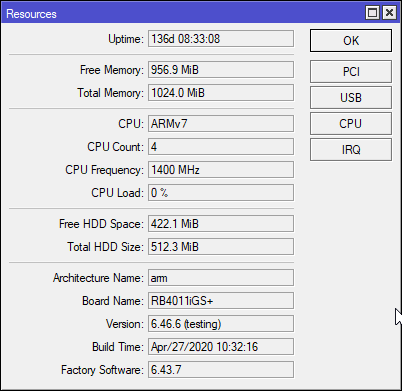
I had a poor configuration once
and made it have like 60% cpu with 100mbit traffic
lean pebble
the slowness comes from the limition of the internet infrastructures

 desert briar
Mikrotik gang where u at
desert briar
holding
tame carbon
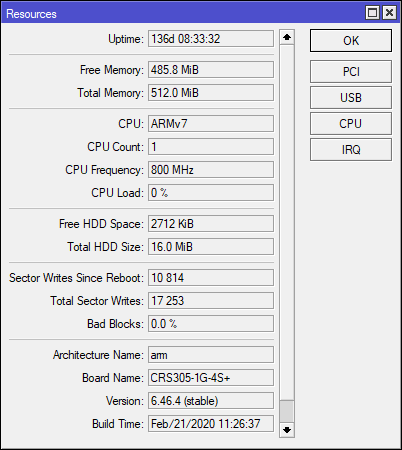 tame carbon
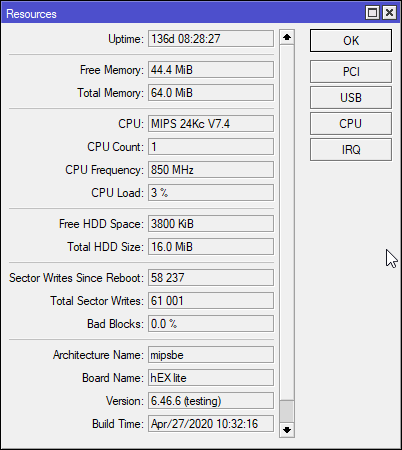 desert briar
tame carbon
desert briar
tame carbon
xD
desert briar

tame carbon
@desert briar its just for my NAS + Router
since the RB4011 only has a single 10G port
desert briar
I got a 24port 10gbit switch only to use 2 ports 
tame carbon
and its nice to then go onto a 48 port switch
lean pebble
I won
desert briar
reminds me of
tame carbon
and the 4th and last one: https://i.imgur.com/WEQoN6R.png
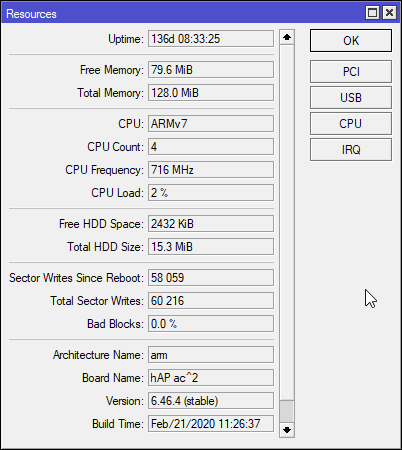 lean pebble
tame carbon
lean pebble
tame carbon
lemme see how good signal I have, I'm like 2 rooms away from the hAP
I have unlimited 4G
so I usually work off mobile data with VPN
more reliable when walking outside or on the toilet xD
ok so phone on desk 2 rooms away, 4/5 bars
(we have brick walls)
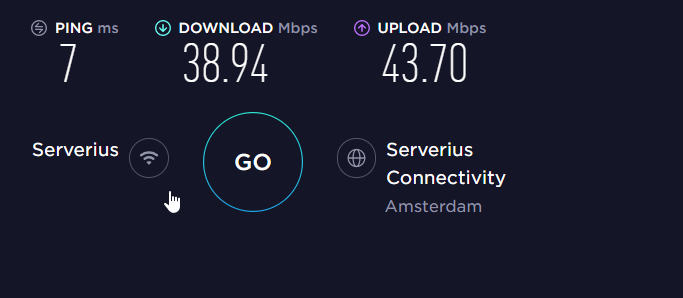 desert briar
I wish I had faster upload, but my ISP only does 1000/100
not complaining, but well
over wifi, dont have a cable (or maybe I do, but I just cant seem to terminate it properly )
🥲
lean pebble
desert briar
after <@!109801863771074560>finally fixes his internet after 2 months
😆
My ISP only gives 40mbps
desert briar
well, it can always be worse
desert briar
Had really horrible internet for the past 10 years, they dug in fiber just recently
I was living on 10/2
lean pebble
The fiber outside of my house for 10 years
And the other ISP put his fiber behind my house 2 years ago
But no one want to connect my house 🏘️
desert briar
well, same here, sort of
we needed to make a path for the fiber in our own property ourselves
like, actually dig with shoves and what not, that was fun haha
supple hare
@tame carbon I don't understand anything of it
It's weird sometimes it works well for a few seconds/minutes/hours but most of the time it doesn't at all
lean pebble
I just need to bring my own fiber and put it in the wall and then tell them to connect it to their infrastructure
But I'm pretty sure that they'll never do it
supple hare
pc ?
tame carbon
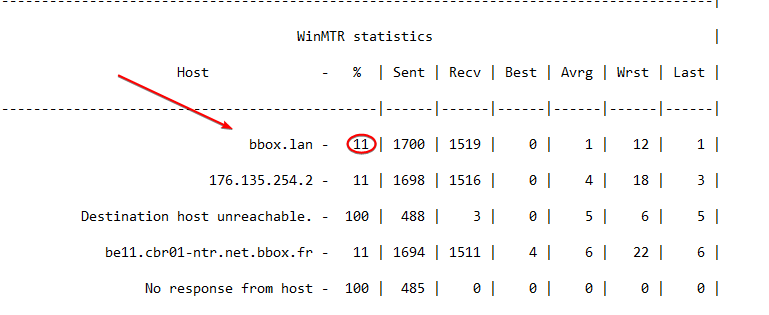
connection between your PC and router
has 11% loss
that should be 0%.
and anything above is unacceptable
lean pebble
My current internet infrastructure already told me to put my own cable to their rack in my neighborhood
supple hare
:/
The thing is that the cable doesn't look damaged bc I tried with another pc and 2 different cables on different ports, just next to the box...
lean pebble
I told them that I agree but they should dig
supple hare
@tame carbon It can't be the router ?
tame carbon
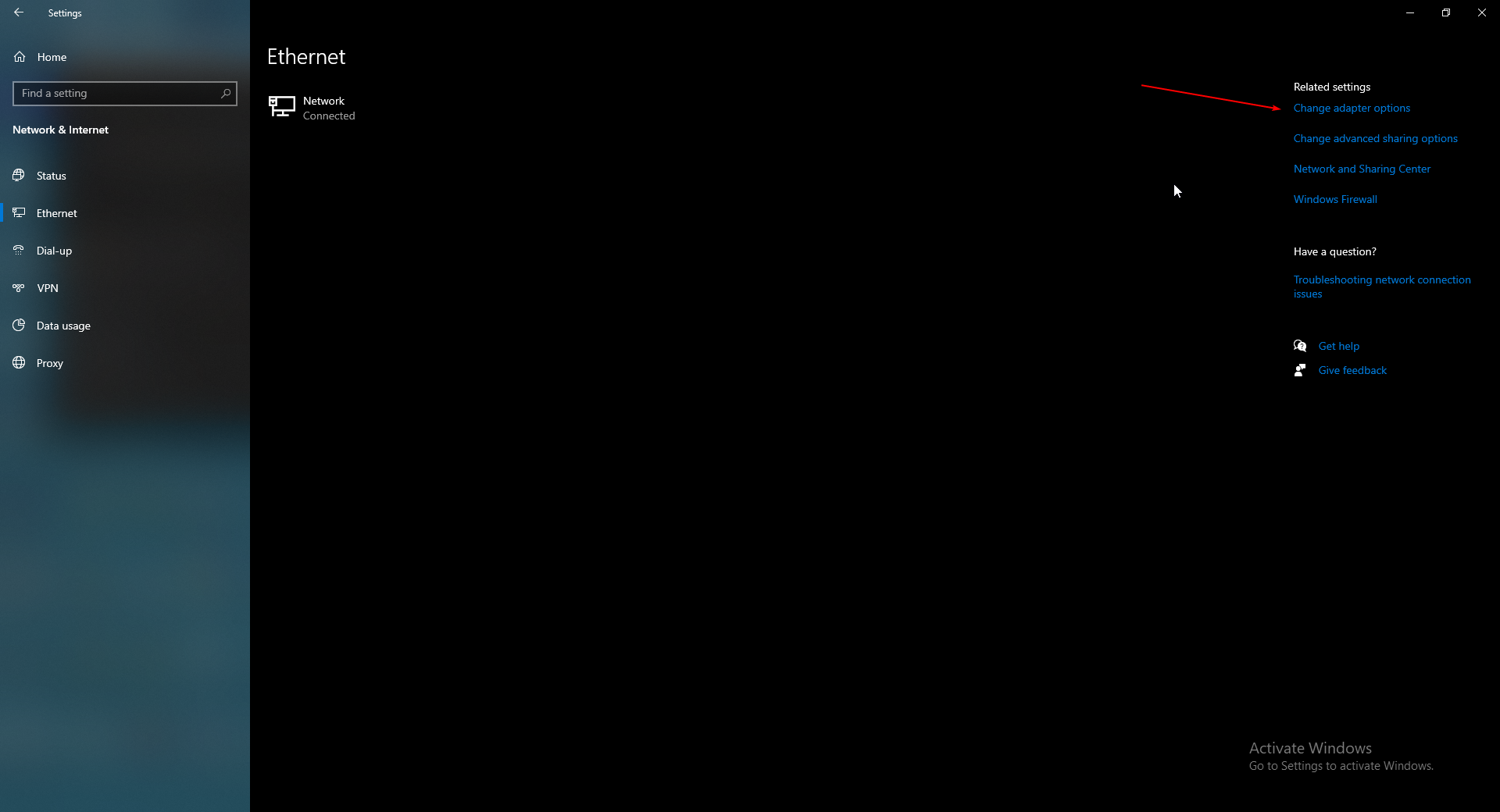
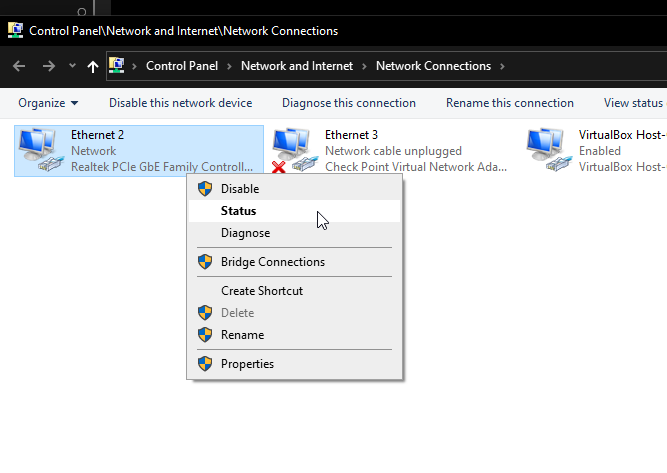
@supple hare can you go to network settings in windows
and go to the adapter status
 lean pebble
Well here is an update the game fully downloaded without any crash xD
lean pebble
static knoll
https://www.groundedreason.com/use-router-fios-internet/#:~:text=ONT%20stands%20...
tplink archer wr400
lean pebble
peak cloak
because what you can do I think:
```
ONT-> Coax -> Splitter -> Moca Adapter -> ...
Mocas usually limited to 100Mbps
Moca don't have nat option and can't be accessed
peak cloak
lean pebble
Mocas usually limited to 100Mbps
moca 2.0 is gigabit
lean pebble
I have it
still limited to 100
well I see now it look different from the mocas I have
peak cloak
are you sure you have a 2.0 adapter
 thick minnow
has anyone here EVER need ethernet over hdmi? xD
lean pebble
Thats sound promising xD
lean pebble
trying to make my old fortigate as wireless bridge
lean pebble
I don't have fiber here and I can't put the cable in the wall
xD
If I could put the cable in the wall all was good
do you remember how to connect to console from linux ?
peak cloak
lean pebble
no dhcp on my fortiwifi and I don't remember the IP I gave him xD
wait so over L2?
or like pysically?
lean pebble
ya
peak cloak
via a console cable
peak cloak
you are currently connected?
lean pebble
ya
peak cloak
from what I see online they say to install screen and do screen /dev/tty* * being number
check devices by doing ls /dev/tty*
lean pebble
nvrm thanks xD apparently his dhcp was on
 thorny vector
It is good day. Convinced my team we need to use a homebrewed tool instead of security onion.
peak cloak
nice
thorny vector
Now I can burn all my SO installs in a fire!
 rare echo
If someone wanted to run an at home minecraft server would a proxy be the way to conceal actual ip
peak cloak
rare echo
If someone wanted to run an at home minecraft server would a proxy be the way to...
A reverse proxy yeah
Has to be a TCP proxy
rare echo
Ok thanks
thorny vector
desert briar
aka Moloch
Maybe. For now we’re focusing on metadata, so zeek and snort3. Centered around a splunk forwarder. Pcap retention comes next.
desert briar
Have a similar setup going for me at home, at least trying to
port mirror on my switch to a ubuntu server VM with surricata & packetbeat. Stripping TLS before inspection. Sending logs to ELK
thorny vector
Want a link to my GitHub? Building a repo there for it. Although I’m staying away from anything elastic because of their license change.
desert briar
what license change?
and sure, you can DM it to me
but splunk is out of bounds for me, dont have a license for it. Not even a dev one
desert briar
Meh, I dont know anyone who even remotely is associated with that company, so I cant get my hands on it
just use free ELK
🤷♂️
supple hare
@tame carbon Actually, I'm able to access the website of my router
tame carbon
@supple hare alright
@supple hare you still here? I know its a bit late
@supple hare you should try alternate ports on the router, because that 11% packet loss to bbox.lan is the reason why your internet is so finecky
replace the cable
and see if the packet loss persists
If its on all the ports, then the router is crap
packet loss is the worst thing that can happen, it just means that data gets lost in transmission
and this makes games, and streaming very glitchy
TCP can somewhat survive from this
supple hare
Already tested all of that a few days ago and yeah, all the ports have the same problem. Rn I'm looking at the diagnostic on the router's page, it warns that a device is using the ip adress of the box making instabilities
tame carbon
@supple hare have you tried using a different computer and cable?
make sure its not the network card on your system
or the cable
supple hare
Yeah unfortunately it doesn't seem to be the pc as I tested with 3 laptops, 2 cables and on 3 different ports
tame carbon
wait
what
@supple hare Rn I'm looking at the diagnostic on the router's page, it warns that a device is using the ip adress of the box making instabilities
do you have address conflicts??
@supple hare can you send me a screenshot of this information?
supple hare
Sorry, it's in French
"The IP address of Bbox is used by device..." (the 2nd, red warning)
tame carbon
@supple hare can you right click and press translate to english
@supple hare you need to do a network scan here
because you have conflicts in your mac addresses
@supple hare do you have other devices on this network?
can you unplug them all, except the computer you are using
supple hare
The 2 errors are
"The Philips-hue-Tom device 00:17:88:2a:4c:1d with the IP address "169.254.4.103" is not in the correct subnet."
The device will not work properly with the Bbox.
The IP address of the Bbox is used by the device 2c:79:d7:35:99:6c.
The local network will be subject to large instabilities and will operate intermittently. Check that your Bbox's network is not connected to another network via PLCs or repeaters.
Check that all equipment is yours.
Please change the IP address of the equipment usurping the IP address of your Bbox.
supple hare
Ok
tame carbon
@supple hare do you have other network equipment in your home?
because you have an ill configured network setup
supple hare
The Philips Hue bridge uses Ethernet, other than that just the box that came with the router for the tv and my pc
tame carbon
@supple hare can you disconnect the tv please
and also remove the hue
just unplug them at the router
either something fishy is going on
can you also show me the output of ipconfig /all
supple hare
Maybe I could do that tomorrow and I'll @ you when needed, or do I have to do it now that it works ? Ngl I need to rest 😄
tame carbon
ok
supple hare
Ty anyways, I'll give updates tomorrow
lean pebble
Hello
thorny vector
Hiii
 vestal lotus
lean pebble
vestal lotus
lean pebble
How are you doing tonight?
thorny vector
Good night. Devving and gaming
thorny vector
Making a lightweight network sensor
lean pebble
Nice
thorny vector
Something that plugs and plays easy with splunk
lean pebble
I'm trying to figure out how to make my old fortigate pass the network via WiFi to the lan ports
thorny vector
what fortigate is it?
lean pebble
Fortiwifi 60c
thorny vector
What does it do now, have a wan port, and nat to the lan?
lean pebble
Nothing 😆
Just started to reconfigure it
Now it gets my current wifi just need to add the wifi interface to his lan interface
But I did a little mistake
I cancelled his internal dhcp before I configured it to work togther with the wifi
I lost access to his web interface
thorny vector
This is why a dedicated dhcp server is a must
lean pebble
Nah
😆
I already have one dhcp
Just the fortiwifi not connected via cable to the main router
 lean pebble
Do I need one? 🤔
thorny vector
Not really. And it’s painful to setup.
lean pebble
Just need to connect it to my Main-Switch for get ip by dhcp for get access to it again
I did the same mistake twice
Today and two years ago
I disabled the http / https / ssh access to it via WiFi
lean pebble
😆
peak cloak
Probably
lean pebble
So how much google owns?
peak cloak
AWS is big
lean pebble
Google to
I want to find the company that owns 45% or 65% of all ipv4 public addresses
@thorny vector now I have access to my fg
 lethal charm
tbf its probably well distributed
you could go through ASN listings and see who has the most registered
im not rly sure how that works tho
im no pro
lethal charm
Well yeah you'd have to do some script to grab all of each companies
Since im just ctrl+f searching on some website and theres google, youtube, another google, etc.
lethal charm
whats this
peak cloak
you can browse bgp information about your ISP and other's such as peering information and prefixes announced
lethal charm
hmmm
yeah im no pro i dont understand a lot of this
one of my friend uses a gigantic asn list to do a little diy vpn check for his game servers
peak cloak
lethal charm
yeah im no pro i dont understand a lot of this
me neither
but basically to announce BGP you need an AS number
peak cloak
but the main end result of good peering is that to most ips it's good bandwitch and latency
my ISP (verizon) peers with HE.net which means I get pretty good latency <9ms to HE's network
at least to HE's ny servers
lethal charm
hm
peak cloak
lethal charm
one of my friend uses a gigantic asn list to do a little diy vpn check for his g...
yeah I guess that's a way to check for vpn's
lethal charm
It's not perfect but for the past while hes had it it works pretty well
lean pebble
any fortigate guru?
hollow marlin
@lean pebble you know you can just ask
peak cloak
setting up vlans on my AP proved to be mainless 👍
lean pebble
I configured my fortiwifi 60c as wireless client but I can't make it pass the network over lan ports idk why
lean pebble
When I'm connecting via cable then no internet no dhcp nothing
peak cloak
act like a switch?
lean pebble
Yap
peak cloak
no clue? try see what wireshark packets say
maybe arp issue
I don't know much about arp
lean pebble
The lan ports just not get the access to my wifi network on this fortiwifi
The wifi works
peak cloak
wait so you are trying to use it as a wireless bridge "client"
peak cloak
I had such an issue when first setting up vlans. There were just a bunch of arp requests, eventually it just worked, idk why exactly. Thanks for mynameisjuan before
static knoll
Hello
peak cloak
hi
static knoll
So MoCa is only limited to 100?
lean pebble
Depends on your tv provider hardware
peak cloak
how old is your ONT?
lean pebble
If you have moca v2.0 so 1gbps Supported if moca 1.0 100mbps
lean pebble
The problem in my fw is lan and wifi doesn't see each other I'm trying to understand how to connect between them
hollow marlin
A quick google showed under SSID, is the a traffic mode selection
hollow marlin
Mhmm, and you need to bridge the interfaces together. The traffic mode option has a selection to bridge it to the LAN interfaces
lean pebble
I don't have it 😅
hollow marlin
Take a screen shot on the configuration page
peak cloak
over coax rn?
static knoll
I assume 2.0?
static knoll
peak cloak
over coax rn?
yes
peak cloak
oh then you should be fine
lean pebble
hollow marlin
Take a screen shot on the configuration page
Of the wifi or the interfaces?
hollow marlin
Preferably both
lean pebble
Well the SSID not important here because it's not using it
It get all the wifi details from my mesh system by wifi client / bridge
This is the interfaces page
hollow marlin
Well it was showing the local-bridge setting under SSID. Could you at least post the settings for the wireless bridge?
Or actually what is under wifi controller?
hollow marlin
go to managed fortinet aps
hollow marlin
Ok well you had to set it up as a client somewhere
lean pebble
Ya in fortiap profile
My bad
In local wifi radio
Because I need it to act as client
hollow marlin
so what do the settings look like there, are there any bridge or transport settings
 plucky crescent
Anybody here a routeros whiz?
peak cloak
plucky crescent
Anybody here a routeros whiz?
yes crystal here is
but I think he's asleep
why? what's your issue
plucky crescent
I'm trying to set up QOS to try to stop bufferbloat, and it's not making sense.
I have a 400+mbps cable cobnection, but when I speed test, I get buffer bloat, which I want to get rid of. Every thing I've seen says to enable some QOS to fix buffer bloat
lean pebble
Damn it's already 5am here
peak cloak
@hollow marlin isn't bufferbloat some sort of buzzword? Enabling certain QOS settings just limits bandwidth right?
I remember talking about it once
plucky crescent
There are so many parameters that I don't know how to set properly, like bucket size and such.
hollow marlin
Bufferbloat is a thing but not on the customer end.
Bufferbloat is when you queues are too deep, due to poorly configured qos
plucky crescent
so limiting my router to a little under my max speed won't help me at all?
well, would zero qos be a problem?
as soon as I tried implementing one single rule, without even adding bandwidth restriciton of any sort, my download went from 450+mbps to ~150
lean pebble
Gn guys:)
hollow marlin
See ya dude
plucky crescent
my plan is only for 400mpbs, but it will easily download 480 pretty much any time, so I have no problem policing it down, I just want it to be smoothly trafficked.
hollow marlin
plucky crescent
so limiting my router to a little under my max speed won't help me at all?
Just setup a policer at 395 from the bridge to the WAN interface
If you go QOS you are no longer using fastpath and hence it's all CPU. Also you are now adding another queue, making the situation worse.
plucky crescent
the youtube video I was trying to follow said to turn off fastpath, as it would work against the QOS rules
it's also using an older version of routerOS, so may not even apply.
hollow marlin
Yeah you don't have to explicitly disable it, one you add the queues its automatically done
 buoyant shell
So if I replace my current router that was provided by the ISP I could get better ping or is that just based on the internet plan?
thick minnow
I wanna buy a gaming router, but I'm not sure how to configure everything with all the modem/routers stuff i already have from my internet provider
can someone help
static knoll
thick minnow
I wanna buy a gaming router, but I'm not sure how to configure everything with a...
Depends on what specific connections you have, so there is no defacto guide
If you have FIOS, it will be different than AT&T
thick minnow
I have gigablast
static knoll
That doesn't exactly say much, but you should have a general idea of the modems, routers, connections, and settings that are currently in place
Like what is connected to what, what needs what to run
thick minnow
New server up and running. I say new, I mean new to me. She is a second hand server, but still useful and still loved. I'm glad to add her to my collection so far
 ocean pivot
I love unraid
thick minnow
yup yup
supple hare
@tame carbon Ok so, I disconnect everything and then I screenshot ipconfig /all ?
static knoll
Can a router be turned off automatically by the ISP?
Or is it the local admin's control
 unborn plinth
They can't turn off the router but they can cut services to the router like internet
 oblique marlin
does anyone know how to setup port forwarding in router's setting???
tame carbon
@supple hare yeah, there's a conflict in your addresses on your local network. according to that notification in your bbox
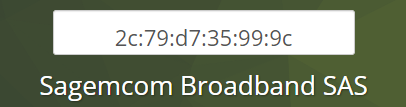
That's the vendor name of the conflicting device (or the vendor name of it's network card)
@oblique marlin You do this by configuring the router. You can access its settings by entering the IP address of your router in your webbrowser
@oblique marlin you can find out what IP it is by running ipconfig /all as a windows command. It will be listed under 'Default Gateway'
supple hare
@tame carbon by searching on the internet a bit it looks like my router (model : Bouygues Fast5330b-r1) has a Sagemcom network card. That means the router is the problem right ?
supple hare
ok
tame carbon
@supple hare I was actually going to make you run zenmap yesterday
though I am not so sure it will help us out
zenmap allows us to scan for connected devices
Its a network scanner
@supple hare but briefly explaining, what I think is going on
There's a 2nd device with the same IP address of your router
or a network loop :P
Only way to test, is removing all devices from the network, seeing what it reports
@supple hare do you have any additional wifi adapters/repeaters?
static knoll
unborn plinth
They can't turn off the router but they can cut services to the router like inte...
ah ok
stupid network cut means my friends can't crypto mine 24/7
 static knoll
tame carbon
crypto mining is bad for environment anyways
static knoll
tame carbon
crypto mining is bad for environment anyways
eh its like 1 GPU lol
tame carbon
lel
thats not even worth it
@static knoll I remember people mining dogecoin in computerclass
tame carbon
everyone's laptop taking off, while teacher was presenting
static knoll
tame carbon
<@!456908160008060928> I remember people mining dogecoin in computerclass
Dogecoin is terrible, everyone knows that
ETH now is niceeeeee
tame carbon
I made 100 bucks with dogecoin
what are you talking about xD
I had some dogecoin left over from when I mined it, a couple years ago
mining difficulty was very low back then
static knoll
back then ofc
static knoll
nowadays? most profitable coin is ETH for mining
tame carbon
We're less than 15 years before we permanently fuck this planet
and meanwhile, we burn carbon to mine virtual currency
static knoll
tame carbon
and meanwhile, we burn carbon to mine virtual currency
Might as well enjoy our lives ey
static knoll
nah, more like might as well mine ETH
Regardless of what we do not much is going to change
tame carbon
yeah, not with that attitude you won't ^^
supple hare
@tame carbon I removed all the other Ethernet cables, nothing worked
supple hare
tame carbon
<@!309306402860433409> I was actually going to make you run zenmap yesterday
Is it useful since I can see everything on my router's page ?
supple hare
tame carbon
<@!309306402860433409> do you have any additional wifi adapters/repeaters?
Yeah, a CPL for my Hue devices
tame carbon
@supple hare remove that also
CPL, what does that stand for exactly?
HotHardware
The Raspberry Pi OS (formerly Raspbian) has been around for several years, but a recent update is pushing some users away.

Fuck you microsoft. If I want visual studio code, I will MANUALLY add the repository to my sources.list
 static knoll
tame carbon
Fuck you microsoft. If I want visual studio code, I will **MANUALLY** add the re...
static knoll
tame carbon
Fuck you microsoft. If I want visual studio code, I will **MANUALLY** add the re...
I just deleted visual studio lol
tame carbon
@static knoll read the article lol
it adds the microsoft repository to your sources
which means, everytime you run apt update microsoft will know.
and this is the default
static knoll
yeah that's not cool
tame carbon
I hate microsoft lol, they put their greasy fingers in everything
and only make it worse
tame carbon
Minecraft was the other one that made me angry last year
Mojang accounts -> Microsoft accounts
I bought this game 10 years ago for 5 quid
now I have to sign up for microsoft again
Github has been taken over
@static knoll the thing that just wonders me
static knoll
I hate microsoft
tame carbon
why does microsoft get preferential treatment, when it comes to installing a repository
tame carbon
like, every other third party developer
static knoll
tame carbon
why does microsoft get preferential treatment, when it comes to installing a rep...
they own visual studio do they not?
tame carbon
@static knoll this is about visual studio code
a lightweight editor
but, there's soo many other projects out there, that don't have their repository in raspbian by default
why should microsoft be treated any different
peak cloak
Oof
static knoll
tame carbon
I bought this game 10 years ago for 5 quid
5 quid? It has been $27 ever since 1.8.9 or so
tame carbon
You could say, I'm a veteran
tame carbon
I've developed dozens of plugins throughout the years xD
static knoll
Before he had 50k
static knoll
tame carbon
I've developed dozens of plugins throughout the years xD
niceeee
static knoll
yes, i like spigot because it uses bukkit
tame carbon

hMod was what was used to modify alpha
that's where world edit and world guard originate from
static knoll
That's very old huh
tame carbon
They were later ported to bukkit
@peak cloak I can feel your fury
your rage
let it out
 static knoll
 peak cloak
Also, I found an open wifi network today that's new. Looks to be a chrome cast wifi network? Like all the ports of the supposedly dhcp gateway are just what other people describe to be. It has no internet, but still. Idk what neighbor it is but the worst someone can do is take control of the chromecast
static knoll
peak cloak
Also, I found an open wifi network today that's new. Looks to be a chrome cast w...
Free wifi? Why not
Just don't do anything requiring security
peak cloak
static knoll
Free wifi? Why not
It has no internet
tame carbon
way to blueball someone
peak cloak
It's just chromecast
static knoll
f...
tame carbon
I was expecting some foaming in chat
peak cloak
Nah
static knoll
peak cloak
It's just chromecast
I mean funny for putting linus memes on there
static knoll
tame carbon
I was expecting some foaming in chat
me too
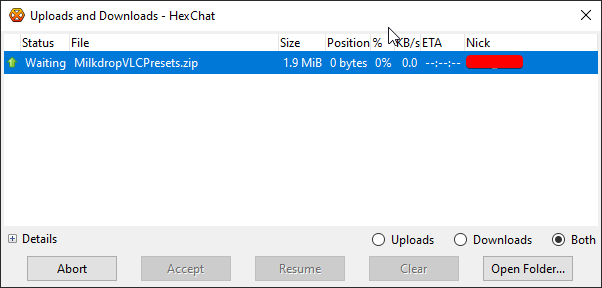
 meanwhile, I'm sharing files over IRC >_>


 peak cloak
There was an attack once that scanned the internet for open chromecasts and played pewdiepie vids
tame carbon
I used to use that to pirate before torrents were a thing
@peak cloak Lol I remember that
they used a printer exploit didnt they?
printing pewdiepie memes
tame carbon
This was all in the feud with T-Series and pdp?