#networking
1 messages · Page 274 of 1
 tepid trail
Crystal, i see.. no Wifi 6 in their segment?
 peak cloak
I mean unifi is eh
 rocky badge
Going pretty strong https://blob.rocks/RvOvDgXM8y.png
 peak cloak
I have one unifi device and it's a pain
 tame carbon
@tepid trail not yet, maybe with RouterOS v7
tepid trail
On my phone i have poor 5ghz wifi signal in my kitchen and it isnt very far from the router/ap. So i want that fixed somehow.
rocky badge
Get an AP and stick it in the kitchen
peak cloak
isn't wifi 6 not that big of an improvement in range
tame carbon
@rocky badge they may already ship hardware capable of wifi 6, its just not supported by the operating system yet
rocky badge
And do they?
rocky badge
peak cloak
isn't wifi 6 not that big of an improvement in range
Its more or less the same
peak cloak
yeah that's what I thought
rocky badge
but for high density and high performance
peak cloak
wifi 6 won't fix range
rocky badge
its a game changer lol
peak cloak
yep
tame carbon
@tepid trail you can just get a couple of cAP ac's
put them wherever you need coverage
either wall or ceiling mounted
or behind the couch lol
rocky badge
ceiling mount >
 peak cloak
I have mine wall mounted
tame carbon
knock out one of the plates
peak cloak
that's alot of APs
tepid trail
Help me here.. RB4011 + CRS326 + cAP ac..
peak cloak
oh lol
tame carbon
what about that?
tepid trail
Crystal, i good combination for me and my "needs"
rocky badge
👌
tame carbon
@tepid trail though you only have a single spare 10G port now
tepid trail
i might have missunderstood
tame carbon
@rocky badge I just have an mAP mounted to the underside of my desk :3
rocky badge

tame carbon
 tepid trail
my request was 4-5 10gig port switch
rocky badge
Lol
That AP has 3 phones on it rn, laptop, 2 ipads, and iot
Pulling 270Mbps on my laptop and 200Mbps on my phone at the same time 😂
peak cloak
I just have one AP for everything
smallish wooden house
even have descent connection outside
peak cloak
might put one in the basement though when finished although tbh that's not really needed since I'll just ethernet the basement well
tame carbon
@tepid trail I guess you'd get one of these: https://i.mt.lv/cdn/rb_images/1493_l.jpg


MikroTik is a Latvian company which was founded in 1996 to develop routers and wireless ISP systems. MikroTik now provides hardware and software for Internet connectivity in most of the countries around the world.
rocky badge
Because with all 3 at normal, roaming isn't that great lol
tame carbon
@tepid trail this way you wont need PoE injectors
rocky badge
The only reason why there's an AP in the basement/garage is because of the Tesla and its right below the living room
So it helps in both spots lol
peak cloak
Tesla connects to wifi?
rocky badge
Yea
rocky badge
?
peak cloak
https://www.pentestpartners.com/security-blog/reverse-engineering-the-tesla-firmware-update-process/
TL;DR How does the Tesla Model S update its firmware? What did we find when reverse engineering the display and instrument cluster? Here’s the result of a couple of weeks […]
rocky badge
For keyless entry on the Model S/X iirc
tame carbon
@tepid trail it is slightly more expensive, but it has a lot more ports, and is roughly capable of switching around 64gbit/s
also has PoE
rocky badge
but they released a patch for that in a week
Although all Teslas now proxy through hermes for updates and such
tame carbon
@tepid trail CRS328 with an RB4011, and then however many APs you want
as for the 10G links
if they are short distance get yourself a $22 DAC cable with SFP+
longer distances, it might be easier to just buy a singlemode fiber optic module

FS Germany
Check Generic 10G Passive Direct Attach Copper Twinax Cable data sheet (DAC Cable, SFP+ to SFP+, 0.5m, 30AWG) data sheet and price list on FS.COM, buy it now!
rocky badge
@peak cloak the wireless (in a model 3) is actually kinda decent lol
~130Mbps for IoT
tame carbon
@rocky badge lol I have 3 48 port 100M (4x SFP uplink) switches in boxes somewhere
rocky badge

tame carbon
for the eventual day I play on automating my own home
because I have many, slow interfaces
a toaster doesnt need more than 100M
rocky badge
4 10/100 https://blob.rocks/L54wsIoDE3.png
 peak cloak
I have 2 100M devices, the Roku and Rasp Pi
rocky badge
lol yea
tame carbon
@tepid trail when you buy from FS.com, the modules you buy make sure you get ones that are either rated for "Mikrotik" or "Generic"
tame carbon
mikrotik is not that picky with SFP+
rocky badge
fuck that
rocky badge

eBay
Original CISCO SFP-10G-SR V03 10-2415-03 850nm 10GBASE-SR SFP+ Multi mode Module. The Cisco 10GBASE-SR Module supports a link length of 26m on standard Fiber Distributed Data Interface (FDDI)-grade Multimode Fiber (MMF).
$9
ezzzzz
And then I get SFP+ nics from ebay for $30-90
tame carbon
yeah but I dont want to deal with multimode
rocky badge
OM3 fiber is cheap too
rocky badge
10 gig upgrade https://blob.rocks/hKk1MYbUFP.png
 tame carbon
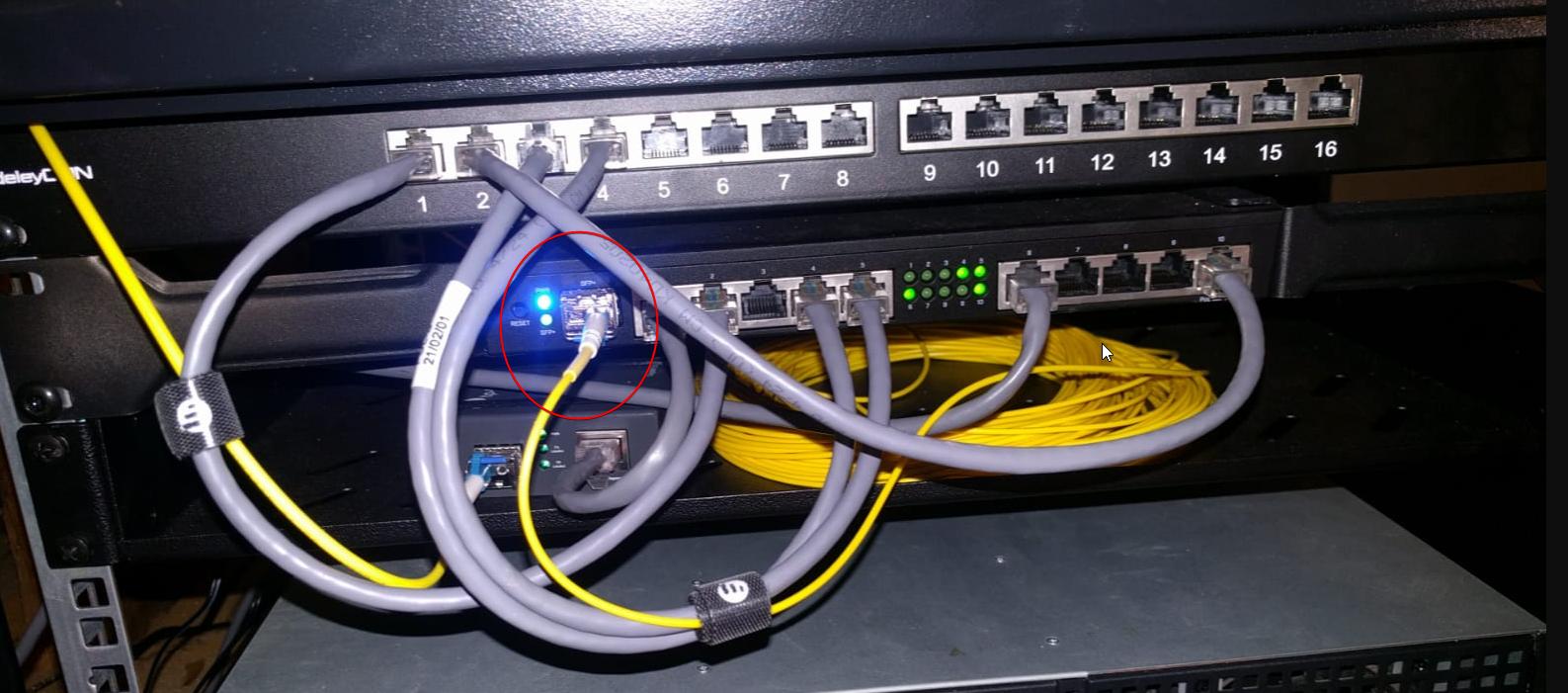
this one goes to my switch on other side of building
duplex fibers are a bit cheaper when considering the module cost
tame carbon
@rocky badge yeah all I know about multimode is that reflections are an issue
and that was something I didnt want to deal with
rocky badge
¯_(ツ)_/¯
rocky badge
the only fiber I have outside of the basement is going to my room
tame carbon
@rocky badge the way they ran the fiber here is quite interesting
they have a loop in two circles
and each house has 2 lines
rocky badge
lol
tame carbon
so if you have a fibercut
rocky badge
tame carbon
they just plug you over so it goes, say from clockwise to counterclockwise
rocky badge
The lines they pull have 3 lines
tame carbon
in my case its a tiny plastic box with a spool like that as well
rocky badge
tame carbon
but the whole assembly is much smaller
rocky badge
Yeah, the splice tray
tame carbon
it has two slots on the underside where you plug in the patch cable
which has one of those green connectors you have there, and the other side was an LC connector
like 2 meter patch fiber
tame carbon
you vlanning that stuff?
rocky badge
ONT -> Switch -> Router -> Switch
Yes
Anything on VLAN 69 gets a direct connection to the internet

 tame carbon
oh
 tame carbon
@rocky badge yeah I just have a public ip pool, where I configure static leases
and I just copy the MACs from the VM
and those vms have virtual interfaces the host just tags the traffic
tepid trail
stuff 🙂
rocky badge
 tame carbon
@tepid trail VLANs are powerful and managed switches allow you to set up compact, secure yet complicated networks
@rocky badge ahh yes
lol
holdo n
rocky badge
So the actual physical host only has 2 adapters
a dedicated Gigabit ESXi management interface and a 10 Gig interface
tame carbon
# The primary network interface
allow-hotplug enp9s0
iface enp9s0 inet dhcp

# 10G
auto enp10s0f0
iface enp10s0f0 inet manual

# VLAN 503
auto vlan503
iface vlan503 inet manual
  vlan-raw-device enp10s0f0

# VLAN 501 - LAN
auto vlan501
iface vlan501 inet manual
  vlan-raw-device enp10s0f0

# VLAN 2000 - Motioneye
auto vlan2000
iface vlan2000 inet manual
  vlan-raw-device enp10s0f0

# VLAN 504 - Temp Server
#auto vlan504
#iface vlan2000 inet manual
#  vlan-raw-device enp10s0f0
Going into port 49 https://blob.rocks/6qvbWFU3rF.png

 tame carbon
@rocky badge lol I've set up inter-host routing before on vmware
it consisted of a /etc/hosts hack
and a local subnet
tepid trail
Yeah, i want to setup a couple of VM's but i have not decided what software to use for it.
rocky badge
They're on the management VLAN anyways
The only private connections between hosts is vMotion between some hosts with dedicated 10 gig
tame carbon
@tepid trail if you run a webserver or anything that is internet facing, you'll want to use a VM
in case it gets exploited
they can't take over everything
tepid trail
and you dont want that 😄
rocky badge
Just setup a VLAN and firewall stuff off
tame carbon
once you realize how little overhead a VM has
you start using them to an insane level
then you get a container-high
and gasm over docker and shit
rocky badge
little overhead
VM
tame carbon
until you finally arrive at microVMs
tame carbon
@rocky badge I trim my kernels, remove all the shit I don't need
most kernel images are way bigger than they need to be
rocky badge
it's still overhead
tame carbon
debian kernel is like what, 16MB passively
tepid trail
was thinking of webserver, ftp-server, caching proxy, maybe mail-server with SSL and anti-spam, DNS-server, NAS?, and maybe some test VM's
tame carbon
once you have your services its about 80-100MB
rocky badge
And with docker I can just use the same kernel and only run what I need to in the container 👌
tepid trail
blob, give me some useful examples then?
rocky badge
DNS, web server, NAS, network management & monitoring, etc
but I'd never host email at home
tepid trail
SQL-server for database maybe? PHP?
tame carbon
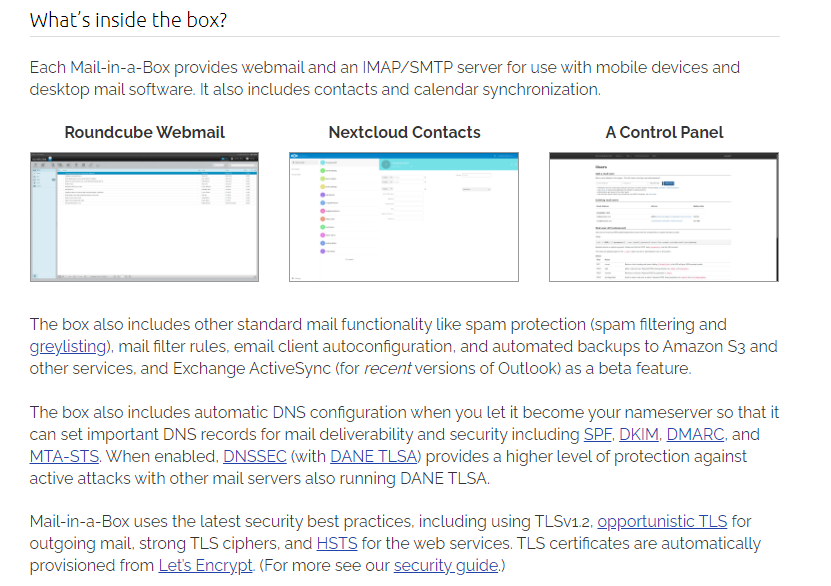
I might give this a try soon https://mailinabox.email/
Mail-in-a-Box
Take back control of your email with this easy-to-deploy mail server in a box.
its suppoed to be an all in one, click to install solution for a mailserver
rocky badge
I just use G Suite for email
tame carbon
with SSL and such
tepid trail
ive been using mailserver and webmail for some years but.. not any more.
rocky badge
I know emails will be deliverable
tame carbon
@tepid trail the problem with setting up your own mailservers
rocky badge
and the IP won't be in a DNSBL
tame carbon
is that companies like google and microsoft will start rejecting your emails for no good reason
peak cloak
thinking of getting protonmail
tame carbon
and even if you get in touch them, they still block you
rocky badge
"for no good reason"
lmao
Mainly because there's no IP reputation or a shitty one
since its a residential connection
tepid trail
blob, yeah.. that was some good examples what i want.
tame carbon
which is a medium size peer in europe
tepid trail
spam and shit will be an issue
tame carbon
@rocky badge mailinbox suppodly can integrate with nextcloud
and all those other kind of things you can use to de-google yourself
rocky badge
cool
tame carbon
has a calendar
rocky badge
I'm not going to take some integration over actual mail delivery
 rocky badge
DNSBL
tame carbon
you can get yourself cleared from those
rocky badge
Also, can you control rdns for the IP range you're wanting to send emails from?
tame carbon
@rocky badge I can
rocky badge
cool
tame carbon
@rocky badge i've yet to assign them
rocky badge
Because that's an important thing 🙂
tame carbon
but my ISP asked me to send them an email if I wish to do so
right now its just fiber.by.weserve.nl
tepid trail
i might want to setup some kind of remote login and AD. VPN. If i am at a local cafe.. then i want to use my own dns from home instead of a unknown public dns and other stuff they use. I also want to remotely connect to my home PC for example. Maybe with VNC or other.. remote desktop or just a terminal. If i am at a friends apartment i want to be able to login to my home and open a web browser.. or such.
tepid trail
i hope i made me somewhat understandable 😄
tame carbon
@tepid trail L2TP is easiest on the mikrotiks
rocky badge
guacamole guacamole guacamole
tepid trail
english isnt my main language 😄
tame carbon
@tepid trail https://wiki.mikrotik.com/wiki/Manual:Interface/L2TP
tepid trail
guacamole sounds like something i have on a taco 🙂
rocky badge
EW L2TP
tame carbon
@tepid trail the RB4011 has an accelerator chip onboard for IPsec for about 2gbit/s encrypted traffic
tame carbon
@rocky badge there's no wireguard support for rOS yet
 tame carbon
thats coming in v7
rocky badge
lmao
tepid trail
when i was running my linux server i was using ssh and forwarded x11.. i started x11 apps with just a command and it was forwarded to my session on a remote display/host.
tame carbon
@tepid trail benefit with l2tp in the immediate, is that you can just configure it easily on windows, android, iOS without the need for an additional client
tepid trail
Crystal, all i mentioned am i able to do that with the RB4011?
tepid trail
What servers/VM's do i need?
rocky badge
not like "extra client" is hard
rocky badge
Plus Windows L2TP behind NAT is a pita
rocky badge
Have you even tried Wireguard
tame carbon
@rocky badge I will check it out when router os v7 comes out
rocky badge
tame carbon
@rocky badge my laptop runs kernel 4.4
rocky badge
want to add a tunnel? import file
tepid trail
Active Directory would need a Windows Server i guess? Otherwise Samba 4 as a Domain Master/Controller
tame carbon
so I wont be using wireguard any time soon
rocky badge
tepid trail
Active Directory would need a Windows Server i guess? Otherwise Samba 4 as a Dom...
Samba as a domain controller
Run Windows Server for that
rocky badge
Says the Mikrotik shill
peak cloak
wireguard is nice
rocky badge
What have you even suggested to anyone besides Mikrotik
tame carbon
@rocky badge it beats the ludacris pricing of unifi
rocky badge
And? I never said I was all unifi kek
Did you notice I'm not using a UniFi router
Their switches and APs are fine
tame carbon
@rocky badge beyond that, there aren't many consumer options, besides pfSense
tame carbon
I consider those all in one asus and tplink routers to be useless
or at least, useless for anything more complicated than a simple NAT and WAN
tepid trail
I am not a big fan of having a VM with windows server for just a AD. I was hoping for some linux based alternatives or something
rocky badge
I want to use a Microsoft product without using Microsoft's OS
tepid trail
a domain login with centralized accounts and passwords is something i want.. so i dont have all kinds of accounts and password for all my devices and computers.
rocky badge
if you want "AD" without Windows, run LDAP
tepid trail
its annoying
rocky badge
The Open Source for LDAP software and information. Home of OpenLDAP.
LemonLDAP::NG is a free software to provide WebSSO, Access Management and Identity Federation
tepid trail
Yeah, and Samba supports LDAP
rocky badge
I'd rather use OpenLDAP than Samba for LDAP
😂 😂
Active Directory is just Microsoft's LDAP with extra AD services like GPO, ADCS, ADFS, etc
tame carbon
@tepid trail one of your options might be OpenLDAP with https://directory.apache.org/studio/
mikrotik has Radius integration so you can just hook that up
and have EAP auth on your wifi
rocky badge
you're being so opinionated go back to unifi land
continues to constantly talk about Mikrotik
tepid trail
Crystal, ah.. thank you didnt know that
rocky badge
But getting AD experience can be helpful if your job is like traditional IT and using AD
Although if they're using ANY cloud
tame carbon
@rocky badge I'm offering solutions within a context of choices he's already made
rocky badge
Azure AD and G Suite is good to learn
rocky badge
tame carbon
<@!236237361703288842> I'm offering solutions within a context of choices he's a...
that you suggested
tame carbon
ok, and?
rocky badge
YoUr'E bEiNg OpInIonAteD
tame carbon
All you've done is say things are crap, you raise an alternative that doesn't work with what we were dealing with
in what way am I being opinionated
I'm willing to help him out, with configuring this all the way
rocky badge
weren't you the one that even suggested Mikrotik to him lol
tame carbon
I cannot do the same for other brands I have not used before
rocky badge
wow there are other people in this discord too
that are willing to help
Lurick, PresentMonkey, juan, etc
tame carbon
@clear igloo @peak cloak @hollow marlin
peak cloak
yes?
rocky badge
And, if they're wanting to setup VMs anyways
you could run Wireguard on that
So its not out of the question to run wireguard
tame carbon
@rocky badge or just wait a couple months and do it on the router directly
rocky badge
A router isn't always a vpn concentrator
tame carbon
its on beta right now, and very promising
hAP ac2's get just under 1gbit/s according to juan
l2tp only 600mbit/s
@tepid trail this is for a home setup right?
tame carbon
rocky badge
A router isn't always a vpn concentrator
that's the whole idea of the RB4011, its a stupidly fast desktop router
with optional rack mounting
perfect for entry level 10G
tepid trail
Crystal, yes it is. Im curious about Mikrotik. I have been using D-Link and Netgear stuff for years but im willing to try something new. Have not found any intresting products from Netgear that also is price worthy. Also been running my own linux based routers/servers.
tame carbon
You can always run your services on a vm like blob suggested
tepid trail
Crystal, yes i know
tame carbon
I just like mikrotik since they offer wide range of choice in products, without having to relearn everything xD
since its all rOS
I thought about doing a pfsense router for a while
tepid trail
Im willing to try it out.
tame carbon
but then realized the power inefficiency
tepid trail
Yep, me too
tepid trail
My router that ISP provided that i have is a Technicolcor TG799vacXTREAM and its really limited.
 reef gazelle
Much any ISP router will be heavily limited
tame carbon
its much worse if you have DSL
because they usually provide their modem as an all in one
reef gazelle
They have a tendency to pack Router+AP+Modem into one box on one SoC
peak cloak
It's true for cable too
peak cloak
Why dhcp over vlan?
tame carbon
@peak cloak thats how I obtain my WAN IP
they have me email my MAC address
and write that into their systems
no idea why
when I switched it on the phone
they just said they can just update the mac from their side
without asking me to email
 odd pier
thankfully I don't need to provide a mac address at my ISP. DHCP via VLAN works out of the box
tame carbon
yeah
it did here too
but when I switched mac addresses, for some reason it didnt work anymore
peak cloak
Yeah, but what's the advantage of that over just dhcp over vlan 1
tame carbon
maybe some protection on their end
@peak cloak I have one vlan for internet
and another for iptv
odd pier
peak cloak
Yeah, but what's the advantage of that over just dhcp over vlan 1
if you run pFSense on a VM in ESXi / vCenter you can assign the network adapter with the VLAN ID to just that
tame carbon
the iptv vlan was quite simple, there was a NAT translator for the TV catalog server
and a multicast group for the streams
@odd pier I just used the 8021q kernel module to create virtual network interfaces
works quite well too
and then just pass those to a vm
odd pier
hmm yeah that would work. My next step is to use a dedicated 40G QSFP card for my connection. migrating pFSense off a VM onto a small 2U or 3U server case with an ITX board inside
tame carbon
@odd pier don't you run into serious throughput issues with pfsense?
odd pier
not really, it's all a matter of how much RAM and CPU you have available.
tame carbon
yeah but dedicated hardware would beat a general purpose system
odd pier
they had a bug a few years back but they fixed it afaik
reef gazelle
I mean sure, but you lose flexibility
ASICs will always win
As far as performance per given resource metric
odd pier
tbf I already have the hardware laying around. I just need a casing and that's it.
tepid trail
I have a IP-TV box too that doesnt worked behind a NAT it required to be open to WAN directly and that could be done on this router with VLAN. Just hit "bridge" on the correct port its connected too. But that wasnt required after a while. So they must have changed something. Now it works without that bridging.
odd pier
and I want to be independent. Because if I reboot the ESXi host for maintenance or whatever, my pFSense VM will be down too which means no WAN connectivity. And frankly I don't do a vCenter HA cluster, it's just a home lab anyway with no 24/7 HA requirements despite the fact that it runs 24/7 because the UPS is always online if something happens with the power
tame carbon
my router has like 120 days uptime at this point
and with PoE, even the APs are on the UPS :D
its only enough for 20-30 mins
but it has a USB interface and a program on the host that shutsdown gracefully when power is critical
when power is restored, the router will send a WoL to the server
odd pier
my UPS can power the things for 4-6 hours. So I have plenty of time to decide if I power off. If the UPS has only 20% power left it will automatically tell all stuff to shutdown anyway.
tame carbon
We have pretty reliable power here
havent had an outage years
its just for those oopsie moments you poke screwdriver in the wrong place
and trip a breaker
since this is is all behind an RCD
odd pier
last outage was last year or so, lasted 3 hours. But besides there is never ever anything lol
tame carbon
you can still cause outages at home
if you plug in faulty appliances
can knock the whole house offline
dont want that to damage my infra
 hollow marlin
tepid trail
I have a IP-TV box too that doesnt worked behind a NAT it required to be open to...
hollow marlin
tepid trail
I have a IP-TV box too that doesnt worked behind a NAT it required to be open to...
Was the IP-TV box part of the provider's service? Cable for example. Just curious on what it was to need its own WAN address
hollow marlin
Did they give you the specific VLAN required or did you just burn a public address?
 tribal ferry
Don't mean to butt into this conversation, forgive me, but how bad would it be to have servers in an environment like this with the door off?
in terms of cooling
reef gazelle
Got models?
tribal ferry
Don't have any yet, going to be some HP DL or some R7 something or R6 something from Dell.
Traditional homelab servers
reef gazelle
Door off shouldn't be too terrible
tame carbon
@tribal ferry depends on how much power they use
reef gazelle
Just give some rear clearance
tame carbon
@tribal ferry below 100 watts total, and minor airflow should be fine
tame carbon
@tribal ferry its like a space heater thats always running
tribal ferry
hm alright
so let's say i had two r620's in there
and the udmp and usw48
how bad would that be?
we don't keep the basement very hot in the winter, it's 50-55 f usually
reef gazelle
I have a 42U at home with the following
tribal ferry
according to nest it's 55 down there at the moment
tepid trail
Arris VIP2853
reef gazelle
2 PE R330
1 1U Hyve Zeus Supermicro Ivy Bridge server
HP Z620 Workstation
11 HP ProDesk 400 G2 DeskMinis
3 HP EliteDesk 800 G1
2x Unifi US-24
Also 3 APC UPSes
The back corner is rather warm in my office
tribal ferry
Alright
My concern is the heat getting trapped in that closet area due to it being blown out the back
Would it be smart or required to put a fan in there running 24/7?
reef gazelle
@tribal ferry I'd recommend getting a fan from AC-Infinity
tribal ferry
Looks expensive
reef gazelle
You can craft something together yourself, but they're purpose built.
reef gazelle
Are you putting a rack in the closet?
reef gazelle
Open frame, close frame, RU height?
reef gazelle
Another option
tribal ferry
Not really too keen on covering the rack up with flat panels tbh
reef gazelle
Top off the top of the frame and use 2U to jury rig some 120mm fans
Could use plywood for the first part.
tribal ferry
Simpler - what if I just put one of these in the back facing the door?
or really any fan
reef gazelle
That'll do.
tribal ferry
Thought so lol
reef gazelle
So long as it isn't too loud, if that's even a concern
I'm getting an R620 in on Monday
reef gazelle
Yeah
Barebones
I had the rest of the kit on hand
Loading 2667 v2's into it
I think anyhow
tribal ferry
2667 v2's are nice
reef gazelle
Might pull the 2650 v2's from my Z620 and swap them
tribal ferry
Did you get it from a server refurbisher?
tribal ferry
I'll get my rack first then start looking for servers
reef gazelle
I need to vMotion my VCSAto the R620 once that's squared away
tribal ferry
I switched from ESXi to Proxmox
tepid trail
@tame carbon @rocky badge thanks for tonights suggestions and talk. Time for bed for me. 02:54 here in Sweden 🙂 talk to you soon.
reef gazelle
I'm going for a 3 cluster vCenter for now
tribal ferry
Ah alright
Haven't used ProxMox in a more than 1 server setup
If it's not too good I may switch back
reef gazelle
Only uncertainty is if I'm ditching my Hyper-V server
It hosts a DC and a couple of other windows hosts
tribal ferry
Datacenter?
reef gazelle
Domain Controller
tribal ferry
oh ok
reef gazelle
I have mixed CPU generations in my lab
 lean pebble
I have enterprise license of vsphere 6.7
lean pebble
Ya but mine is private not work
lean pebble
My private is licensed with enterprise
reef gazelle
14 R740xd vSAN Ready Node servers to start
lean pebble
My old work place using xenserver / xcp
lean pebble
Lol
odd pier
running 7.1 ESXi with vCenter. I used Proxomox I think 4 years back, never had any problems with ESXi to move back
tribal ferry
vSphere pricing?
reef gazelle
expensive
reef gazelle
For home with VMUG?
lean pebble
You can get from eBay cheap
reef gazelle
$200 a la carte
odd pier
ebay sounds risky lol
lean pebble
For work you'll prefer the real license
tribal ferry
what's your reasoning for going with it over a open source solution?
reef gazelle
^^
lean pebble
odd pier
ebay sounds risky lol
But works really good
lean pebble
Easier to install
odd pier
idk, I'm used to VMWare products also mainly because we use them at work and because they work very well
lean pebble
Downside that you need to look what CPU supported by esxi
odd pier
Proxmox wasn't that bad tbf, but I also liked the vSphere interface more
lean pebble
There are alot of CPUs that doesn't support the esxi os
reef gazelle
Proxmox is kind of a type 1.5 since it does use KVM
odd pier
ah
lean pebble
I was installing my esxi remotely over kvm console was hell but works great
odd pier
depends on the kvm console used lol
reef gazelle
I have avocent
lean pebble
😆
reef gazelle
Both for KVM and console
lean pebble
Slow af
lean pebble
I got disconnected 5 times while installing esxi
lean pebble
Because my shitty network
tribal ferry
is there some special port?
reef gazelle
@lean pebble imagine using Java WebStart for remote access
odd pier
hahaha
reef gazelle
@tribal ferry there's Interface Adapters that connect to the standard VGA and USB/PS2 ports
Then the IA passes the traffic over an ethernet based interface
lean pebble
KVM Console lantronix spider
reef gazelle
That connects to the KVM appliance
lean pebble
Did ever tried html5 kvm?
reef gazelle
Does idrac 8 Enterprise count?
lean pebble
Don't try it
Nope
That's fucking hell the slowest option I have ever tried
Because my stupid friend switched the console option after the kvm was stuck
tribal ferry
reef gazelle
<@517852052563427329> there's Interface Adapters that connect to the standard VG...
So you just plug in your VGA ports and it sends USB over it?
reef gazelle
tribal ferry
So you just plug in your VGA ports and it sends USB over it?
In the case of that KVM, the connector uses unneeded vga pins to transmit the other data needed
There's a special cable used in the orange ports
lean pebble
This was fast but my upload speed was hell
tribal ferry
reef gazelle
In the case of that KVM, the connector uses unneeded vga pins to transmit the ot...
Was VGA designed with that in mind?
Seems odd they would build that into the port
reef gazelle
No but it works lol
Actually that one uses an 18 pin connector
Had to zoom in. There are others that use the undesignated pins
lean pebble
The SpiderDuo provides secure local access with the flexibility of KVM-over-IP remote network management in a single integrated soltuion.
That's work great
lean pebble
Well gn guys:) see you soon
reef gazelle
It's 9:24 where I'm from
reef gazelle
I didn't speak clearly lol
lean pebble
😂
reef gazelle
Florida tho btw
odd pier
3:25am here lol
lean pebble
I was in Orlando 6 years ago
lean pebble
odd pier
3:25am here lol
Europe ?
odd pier
yup
lean pebble
Uk?
odd pier
Classified
lean pebble
Lol
You know there are not many places with almost the same time zone
Probably germany 🤠
odd pier
hard to hit all points at once /s
lean pebble
Well gn
odd pier
gn
 obtuse oxide
 sweet flame
 royal onyx
Can someone help me change this link speed to 150
royal onyx
Can someone help me change this link speed to 150
whats your router model number
royal onyx
Tenda f6
It supports upto 300mbps on wifi
I have no issue with the router the same router has connection speed of 150mbps on other device
I want to change the Connection speed on the phone itself
sweet flame
What phone is it
sweet flame
And that’s the actual speed cap? does a speed test confirm this?
royal onyx
Yes
sweet flame
tried resetting network settings and router, latest software on both?
royal onyx
Yes
sweet flame
Damn well there’s definitely no setting for that
How long ago did the most recent update for your phone come out
royal onyx
More then half year
Are you sure that Link speed/ connection speed could change on a update?
Cuz i contacted Xiaomi and they told me there's and upcoming update on May
sweet flame
Well if there’s a bug in the software yeah that could happen
Can you separate the 2.4ghz/5ghz wifi networks on your router?
tame carbon
@sweet flame they are two seperate networks
its just common, that both have the same SSID
tame carbon
should be able to
sweet flame
If so can you connect to both of them fine
tame carbon
since 2.4 and 5GHz are individual radios
sweet flame
Who knows software on that router might be absolutely useless
sweet flame
I’ve seen some access points that don’t do that lol
tame carbon
probably consumer crap
sweet flame
For sure
tame carbon
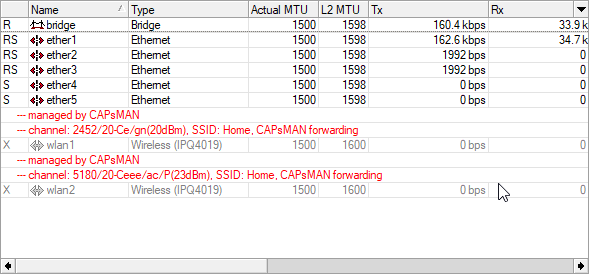
On my AP/router in the living room https://i.imgur.com/MmVeH1n.png
 sweet flame
Yeah of course consumer. Gotta assume the router in this scenario is probably consumer
tame carbon
two interfaces one for each band
sweet flame
😂 Yeah i would assume your can assign separate ssids on that
tame carbon
well in this case
you can send out multiple SSIDs per radio if you wanted
for things like a guest network or so
sweet flame
I have an ap that does that
tame carbon
yeah its just software trickery
@sweet flame lol do you like my SSID though? :D
"Home" 
I live in a rural area, there's no stray wifi signals here like in a city
so I can squat on "Home"
sweet flame
😂
yeah i have quite a few around me but i’m not in a dense apartment building or anything
tame carbon
@sweet flame for some reason the samsung smart TV also sends out wifi
sweet flame
And they’re all on channel 1 🌚
tame carbon
idk why
sweet flame
For real?
tame carbon
yeah
sweet flame
Does it have a dhcp server?
tame carbon
I don't know, its password protected
tame carbon
no
sweet flame
Interesting
tame carbon
TV has ethernet in the back for netflix
not sure why it sends out its own network
@sweet flame could it be some kind of casting mechanism?
for streaming content to the device?
sweet flame
I’m really not sure 🤔
tame carbon
@sweet flame I actually don't know the channel config
I was under the assumption that CAPsMAN manages that for me
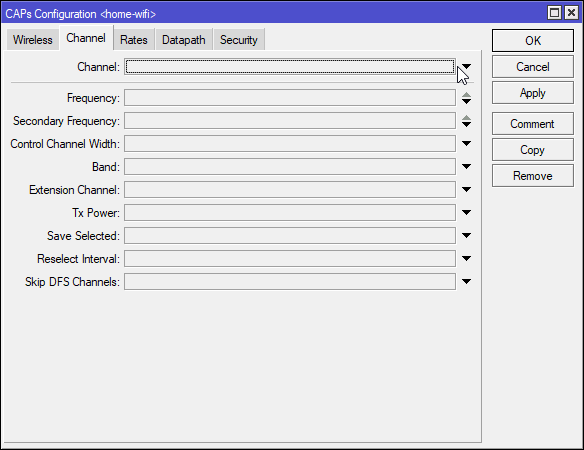
Its blank, so I assume it autoconfigures
sweet flame
Can you scan channels with it?
royal onyx
Can someone tell if I can turn off the 5Ghz band on my mobile phone so that my mobile phone uses only the range from 2000mhz to 2400mhz
lean pebble
mtik
tame carbon
@sweet flame should be able to
sweet flame
Oh and i googled it, samsung has a feature called “wi-fi direct” where you can connect your phone to the tv and stream media without a router. or something
royal onyx
sweet flame
Can you separate the 2.4ghz/5ghz wifi networks on your router?
There won't be a speed issue if that was possible for my router
tame carbon
@sweet flame https://i.imgur.com/oKlHOPq.png
 sweet flame
Can’t do it on your router?
tame carbon
@sweet flame you can remotely scan from an AP
royal onyx
sweet flame
Can’t do it on your router?
You talking to me?
sweet flame
hm might do it auto and yeah i’ll use reply next time lol
sweet flame
tame carbon
<@!263114953802776576> yeah, so its a streaming solution.
yeah exactly
sweet flame
royal onyx
You talking to me?
Yeah, can you not assign an ssid to each frequency?
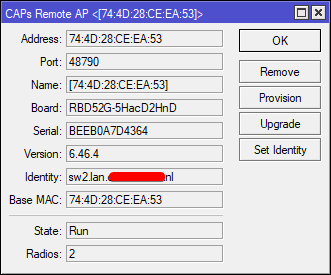 sweet flame
Nice. Still in my parents house... And they still want to keep the ISP provided combo junk unit. Definitely junk and a bottleneck with one access point
But i have a few of my own scattered around the house. They just love that thing for some reason, even though it’s junk 😂
tame carbon
@sweet flame same lol
sweet flame
royal onyx
Dude my router is single band😂
and yeah idk how to fix that sounds like a software bug to me. Have you always had this problem?
tame carbon
Except I have my own area of the house to myself
sweet flame
Well i’m not like settled in here too much i just live here because i’m not 18 yet
sweet flame
Ah yeah if we had one of those i would probably stay
tame carbon
I have all the things I need here, and I don't feel any pressure to move out right now
even though its long overdue
25 years old lol
tame carbon
I cook dinner once or twice a week
sweet flame
You’d still catch me like buying property down the street though if it was me
How’s property prices around where you’re at?
tame carbon
its nearly impossible as a student to get a house right now
Renting is also impossible due to housing shortage and AirBNB ruining city housing options
sweet flame
Oh you’re a student? Rip never mind property is not in question right now
lean pebble
Here its impossible to get my own house too expensive and renting became too expensive to
sweet flame
yeah it’s super expensive here too
tame carbon
@sweet flame well, I am almost finished, I'll have my degree in a few months
I already delivered my dissertation and finished up my internship
All I have left is an assigment from last year
that got pushed back due to corona
sweet flame
which is one of the reasons i wanna yeet out of here. and do you have any debt if you don’t mind me asking
tame carbon
@sweet flame nah, money is not the immediate problem
and debt is not an issue for me
since I'm in the old system before 2015
sweet flame
Oh sweet. yeah my sister has been lucky in that regard so far too
tame carbon
if I finish my degree, all my student loan dept is voided
as a 'gift' to those who get a degree
sweet flame
Oh sweet
tame carbon
that was a dutch educational policy until 2015
lean pebble
nice
tame carbon
because they wanted more highly educated people
idk why they stopped doing that
because there's still a 30k shortage on just software developers
I don't have to worry about getting a job, ever.
tame carbon
In the netherlands its quite the opposite
lean pebble
What are you studying ?
tame carbon
you need a degree to get a good job
in dutch we say that we have a "Kennis economie"
which means Knowledge economy
lean pebble
Here to but its not guarantee that you'll ever get a job
tame carbon
lean pebble
What are you studying ?
Bachelor Software Development
lean pebble
Nice good luck
tame carbon
 royal onyx
Can someone help me https://wifi-settings.com/wireless-routers/wifi-network-link-speed-150-mbps-instead-of-300-mbps-72-instead-of-150/

Facebook0Tweet0Pin0 The Question – How to Make a Wi-Fi Module Work in Full Duplex? I use 300 Mbps Wi-Fi adapter on my Windows 10 PC but in connection properties it shows only 150 Mbps instead of 300 Mbps link speed. I also have another Wireless USB adapter. There is a “High-gain 150 Mbps” label on ... Read moreWi-Fi Network Link Speed Is 150 Mbp...
How do i change the string code as the website says to do
Please check the lower part of the article
tame carbon
@royal onyx do you know how to visit the router settings page?
lean pebble
tame carbon
you *need* a degree to get a good job
In Israel alot of ppl with degree and not getting a job
So they move to other countries
or working on different jobs
tame carbon
@lean pebble problem in the netherlands is that a lot of people choose arts & sports over science these days
royal onyx
tame carbon
<@!488989233688870912> do you know how to visit the router settings page?
Dude there is not problem with the router
It's my phone's problem
tame carbon
which for us here, has caused a shortage in skilled people
royal onyx
Can anyone tell me how to edit strings on my android's files?
royal onyx
@tame carbon please read the last part of the article https://wifi-settings.com/wireless-routers/wifi-network-link-speed-150-mbps-instead-of-300-mbps-72-instead-of-150/
Facebook0Tweet0Pin0 The Question – How to Make a Wi-Fi Module Work in Full Duplex? I use 300 Mbps Wi-Fi adapter on my Windows 10 PC but in connection properties it shows only 150 Mbps instead of 300 Mbps link speed. I also have another Wireless USB adapter. There is a “High-gain 150 Mbps” label on ... Read moreWi-Fi Network Link Speed Is 150 Mbp...
lean pebble
tame carbon
<@!109801863771074560> problem in the netherlands is that a lot of people choose...
Here they firing alot of well skilled ppl because they want high salary so then you find stupid bugs in basic programs xD
tame carbon
@royal onyx you need a rooted android phone to do that
lean pebble
stupid kind of bugs
tame carbon
These are linux kernel settings https://i.imgur.com/7PeVRuC.png
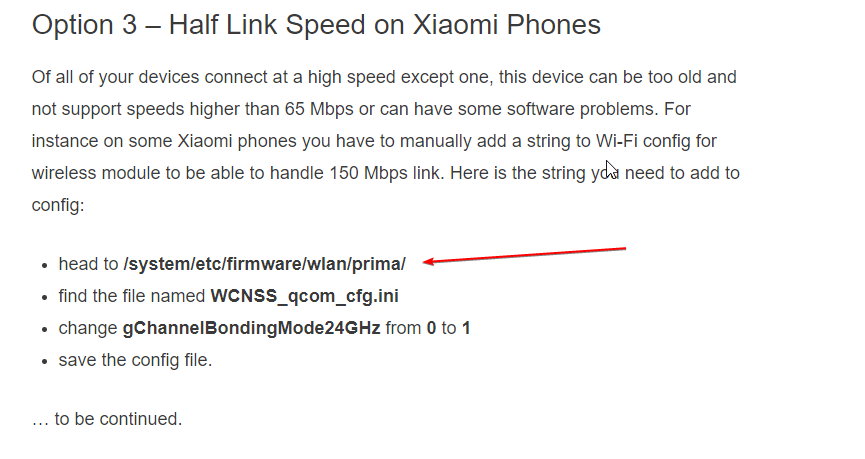
Without a rooted phone, you wont be able to touch these
 glad sparrow
things you like to see
tame carbon
@glad sparrow oof https://i.imgur.com/EYSyJ1X.png
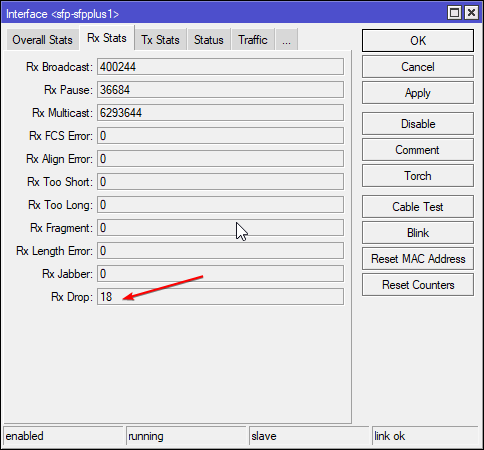
18 dropped frames
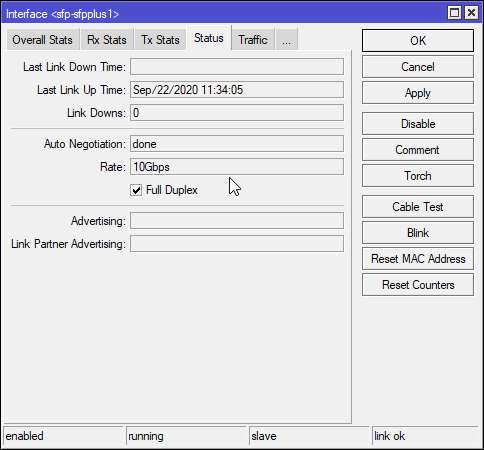
Since september 2020
lean pebble
I got 0 RX drops
That looks legit someone from Hurricane Electric in CA tried to access my ipsec today at 2:40am O_o
tame carbon
@royal onyx those strings are just config files in a system directory on your phone
without root access you cannot modify those files
 burnt coral
I have a asus dsl-n55u and just got 1 gig fiber internet. the router is limiting the internet speed to under 300 mbps. is the router even capable of 1 gig internet or should I look into getting a new one? If so what is a good router for gigabit internet? Thanks
 thick minnow
@burnt coral your isp didn't give you a gigabit compatible router?
burnt coral
It is a old router we had before 1 gig internet
 clear igloo
Is that under 300Mbps wired or wireless?
clear igloo
straight into what?
burnt coral
Modem I guess, I'm not good with network stuff. The thing where the router is plugged into
clear igloo
Okay, so the box your ISP provides
burnt coral
Yes
clear igloo
Who is your ISP if you don't mind my asking?
If their box is acting as a router as well then I could see double nat coming into play, it shouldn't impact throughput performance but would cause other issues
burnt coral
Telia, I'm pretty sure, I live in finland
clear igloo
Yah, I'd suspect the router then since it's a DSL box too for WAN so it could have other issues. Nobody really seems to have any throughput numbers aside Asus directly which I don't trust
burnt coral
The box doesn't have any firewalls or anything, just a on off I'm pretty sure
I tried to find any info on wired speeds on the router, but didn't find anything
clear igloo
I'd look for something like the Netgear R7000 or Linksys EA9300
burnt coral
only thing I can think of is that the 600 mbps speed being split when dual band is on kinda makes sense.. but it's for wireless?
clear igloo
Yah, that's for wireless and best case + combined (2.4Ghz + 5Ghz) speeds
burnt coral
Will check those out! Are there any things I should look for and things to avoid in routers? Do different routers effect latency?
clear igloo
Features enabled can impact latency and throughput such as various firewall features and certain packet counter features on some brands too
If you want to go all out something with WiFi6 would be ideal but WiFi 5 (802.11ac) is fine for the next several years
burnt coral
Are the 2 routers you mentioned above capable of doing 1 gig wired?
clear igloo
WAN to LAN throughput was measured at like 940Mbps for both which is basically gigabit with overhead of TCP
burnt coral
Alright, thank you!
clear igloo
Yah, if you find one you like I would google "(model) WAN to LAN throughput" and see if anyone has tested it
burnt coral
I see, thanks.
thick minnow
Someone was saying u need min 5 drives for zfs
can u not do zfs on a 4 drive system then?
How do u expand drive slots on something like a RS812 or r420
peak cloak
thick minnow
Someone was saying u need min 5 drives for zfs

45drives.com
you can
with 4 drives
but it's kinda useless
since you would have 2 vdevs with 2 drives each
in zfs mirror
zfs doesn't do everything for you, you need to design your storage architecture
rocky badge
@clear igloo networking is fucking cool
lmao
I'm remotely controlling a PC with video, audio, keyboard, mouse, and USB passthrough
lean pebble
I had no idea that it entered to my country
clear igloo
Nice!
 waxen saddle
@rocky badge What are you using?
 thick minnow
is there a newer version than g7?
peak cloak
yes g = generation
thick minnow
because i like the fact i wouldn't then need to get a das
peak cloak
latest gen is 10 I think
thick minnow
how often do they refresh?
peak cloak
g8 is bare min I think
thick minnow
peak cloak
r240?
dell r420 i meant
thick minnow
someone is also selling a Synology RS812 at a decent price but isn't messaging back (assuming 450 quid with 4 x3TB drives is a good price.)
problem is the pricing on this stuff is so clouded its hard to tell if something is a good price or not
one guy sells a g8 at 99 quid each, other guy selling one for 250.
peak cloak
thick minnow
one guy sells a g8 at 99 quid each, other guy selling one for 250.
show?
because one may be barebones?
thick minnow
i lost it now im just looking randomly at loads of listings
peak cloak
and the other may have a better cou
or more ram
there are many factors
look at the specs as well
thick minnow
A DL360 Gen8 Server 2x E5-2667 3.5Ghz 12 Core 24T 32GB is sold for £220
PowerEdge R420 2 x Quad Core Intel(R) Xeon(R) CPU E5-2407 @ 2.20GHz 64GB (1 x 1tb and 1 x 2tb drives which may be scrap) is also 220
im assuming that 360 is a much better deal in this case
Proliant DL360p Gen8 Server 2x E5-2667 2.9G 12 Core 16GB is 150 that seems even better because 16gb of ram dont cost 70 quid (or does it??)
 desert briar
DL360 is thinner (1U), therefore it cant hold as many drivers. thats why its cheaper
also, fans are smaller -> need to push through more air -> more high pitched noise
rocky badge
All of those servers are 1U


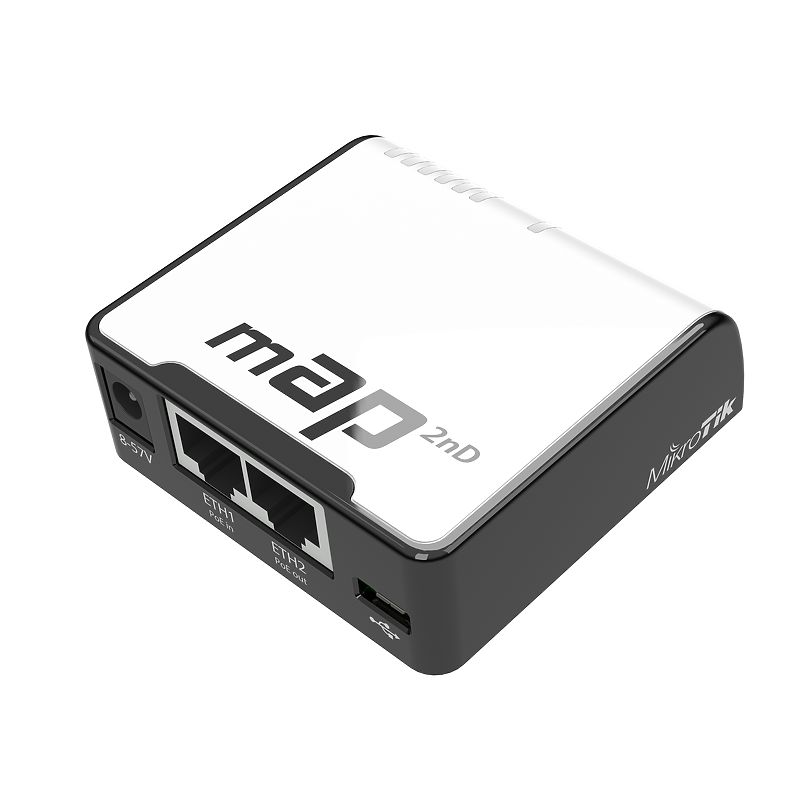
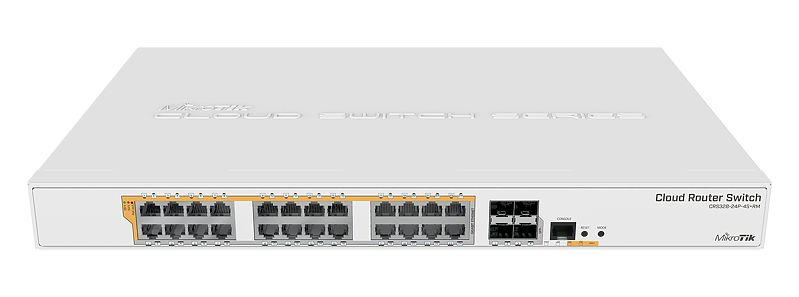


 thick minnow
desert briar
Oh, i thought i read 380 somewhere
thick minnow
desert briar
Oh, i thought i read 380 somewhere
is a 380 also 2.5?
peak cloak
depends on model
desert briar
depends
thick minnow
HP Proliant DL380E G8 Server Intel Xeon E5-2420V2 @ 2.4GHz 16GB is 70 quid
peak cloak
thick minnow
HP Proliant DL380E G8 Server Intel Xeon E5-2420V2 @ 2.4GHz 16GB is 70 quid
seems descent,
thick minnow
is it better than the 360's?
peak cloak
380s are 2U iirc
desert briar
can fit more disks
thick minnow
problem is it says its only had a post test so if it hardly works im screwed
desert briar
also, the e models are a bit meh, id look for 380p
peak cloak
if it has a post test it should work for the most part
desert briar
up to you though
thick minnow
desert briar
also, the e models are a bit meh, id look for 380p
whats the difference?
desert briar
p is the later model. Performance
e is the first "entry" model, the way I understand it
you have better upgrade path & gear for the p version
thick minnow
i mean i literally need it as a nas and printer server so i guess i dont need any more performance
desert briar
e it is
thick minnow
it seems a bit too cheap compared to the other stuff ive been looking at so is abit strange
desert briar
just letting you know, these servers are loud
thick minnow
uh oh that might not be very good
desert briar

Skip to 3:30 to hear the fans start ramping down.
peak cloak
well with hp it depends
desert briar
the boot is like a jet engine (takes 3-4mins usually), then its manageable
peak cloak
it has that weird drive fan issue
desert briar
but it can still be a problem for some
peak cloak
desert briar
the boot is like a jet engine (takes 3-4mins usually), then its manageable
yep, I booted a r710 at school, that was loud
burnt coral
I read that the netgear r7000 is the best wan to lan router out there, but I also read that the wan to lan throughput is around 600 mbps with nat. Other charts say total throughput to be a lot more. What is a realistic throughput for a R7000 or a EA9300 AC4000 on a 1 gig internet?
peak cloak
tbh I don't know, do they publish routing performance?
rocky badge
My DL360p G8 doesn't really get loud...even during boot lol
burnt coral
Okay, maybe the question is confusing, because I'm confused. here: I need a new router, old one isn't good enough. Thinking about R7000 or EA9300, but read somewhere that you get 600 mbps realistically. Is that true?
peak cloak
burnt coral
Okay, maybe the question is confusing, because I'm confused. here: I need a new ...
with one device you prob get gig
peak cloak
mu-mimo allows the wifi radio to serve multiple devices at a time
burnt coral
also reading things about the EA9300 AC4000 and apparrently you can get aggregated 2gig throughput? Does this mean I would need another internet connection to "combine" them or?
peak cloak
that's just throughput, so like max bandwidth routed through the router
so like if you have a server on lan
burnt coral
So just 2gig throughput?
peak cloak
i think
burnt coral
so if I had a 2gig internet connection somehow, it could work?
peak cloak
no
burnt coral
oh
peak cloak
because ethernet is max 1 gig
burnt coral
ah I see
clear igloo
He could aggregate them, it would be 2x1G lines so a total of 2Gbps for 2+ clients
peak cloak
I guess, but I doubt it supports that
clear igloo
but yes, without an mGig or 10Gig port you'll not see over 1Gbps on a single client if you had 2Gbps internet
burnt coral
I see, what is tri-band?
clear igloo
So if you've ever looked at phone specs, they'll say like 1x1 or 2x2 wifi that's send/receive antennas so tri-band could support a client with 3x3 antennas for higher bandwidth on the single client or multiple 1x1 or a 1x1 and 2x2 client at the same time. So think of it like 3 dedicated antennas, it's usually 1x1 for 2.4GHz band and then a 2x2 for the 5GHz band
It doesn't limit you to 3 wireless clients, just the max radio combination it can handle in a given moment. WiFi is a shared medium and there are other parts that go into sharing air time and whatnot
burnt coral
I see, I was quite confused about what the third one was :D
I looked into the routers you suggested and I read quite a few good things about the EA9300 AC4000, do you think it's a good option?
clear igloo
I would say so, I can't speak from experience with it directly but I saw good things about it too when I did some searching
burnt coral
Thank you for all the help!
burnt coral
I can't find any being sold? And linksys doesn't seem to even have them on their own website?
In fact I can't seem to find any linksys ea9000-series routers? At least in finland... And I hear R7000 and R7000P having some problems...
Is the R7000P still a good option with all the problems i read about it?
clear igloo
What issues are you seeing online?
Can you find the Synology RT2600AC in your area? That's another good one
burnt coral
When I search for it I see a lot of threads talking about limited speed, I guess I compare it to the ea9300 not much anything when I searched for it :D
Seems like the rt2600ac is available pretty much everywhere here
clear igloo
Yah, I saw a few people mention it on the forums as being really good
burnt coral
Need to look into that one as well, I wonder what happened to linksys, I saw a finnish article from 2019 that talked about a security risk thing that "the manufacturer wont fix" but might just be clickbait
clear igloo
Well there is stuff with WPA2 that most won't fix for older models
burnt coral
I see
I guess they just aren't that popular in finland
From a quick glance the RT2600AC looks promising.
I see from test results that IPS reduces speed, that's a firewall I guess? Is it neccessary or recommended?
clear igloo
Yah, IPS is intrustion prevention system so basically a firewall
I'd see how it performs if you get it and toggle it on and off and see if there is a big difference
clear igloo
I doubt it cuts throughput down by 90%
burnt coral
Is it something that should be kept on?
clear igloo
Ah! I see
https://blog.synology.com/building-an-intrusion-prevention-system-for-small-businesses-and-homes
This explains it well but that was their original version, it's been enhanced since then and is updateable

How a once enterprise-only technology was brought to Wi-Fi routers – and what challenges we have tackled. Once upon a...
With their 1.2 version it's near gigabit with it on 🙂
burnt coral
Ah
clear igloo
Yah, I was curious and I guess it originally did kill throughput that much
clear igloo
Yah, I think the update was in 2018 to 1.2 so you should be fine to leave it on now
burnt coral
january 15 2017
Aight
From what I see the R7000 maybe has some troubles, EA9300 is nowhere to be found and the RT2600AC seems like a solid choice.
clear igloo
and the fact the RT2600AC is still getting updates is really good imo, most places will stop supporting a router after like 1-2 years
burnt coral
I also see it getting good overall reviews and performance seems good
Thank you for all the help!
clear igloo
Yah 🙂
 glossy crystal
Has anyone ever utilised OBS SRT Protocol? If so, how did you get the latency down?
waxen saddle
^What even is that?
glossy crystal
Like RTMP but better
glossy crystal
Just trying to get the 7 second delay down with no luck
tame carbon
reduce buffer size?
glossy crystal
currently set to 0MB
waxen saddle
Sometimes programs read "0" as an "automatic". Try setting it to 1MB or something.
tame carbon
@waxen saddle that might not be enough for a single frame
waxen saddle
...or something more than "0"
tame carbon
@glossy crystal have you checked the manual from OBS for any caveats?
some gotches are sometimes outlined
glossy crystal
Yeah I have, tried different methods but it crashes obs or the stream can not connect
tame carbon
what OS are you using?
and you mentioned 7 seconds
that sounds like a serious delay
glossy crystal
@tame carbon Windows 10, the protocol was compiled on windows
tame carbon
@glossy crystal what sort of bandwidth are you throwing at it?