#networking
1 messages · Page 257 of 1
 peak cloak
 thick minnow
so what do i need for a ap
peak cloak
someway to run ethernet to it
there are wireless bridges, but that won't solve the problem because wifi is already weak
thick minnow
hold on i want to see if this is what your talking about one sec get in a call for a bit i cant talk tho
peak cloak
I can't talk either rn
peak cloak
take a pic
thick minnow
i cant
peak cloak
well you need a way to get ethernet from your room to where router?
thick minnow
wont work tried
 storm seal
Is wifi 6 a good upgrade to think about from wifi 5?
 little schooner
Most of the improvements are for dense environments
storm seal
Dense as in tons of floors? So, say that I live in a 3 floor townhome?
little schooner
You probably won't notice a difference
Dense as in like 100 connected devices, etc
storm seal
Ah
little schooner
100+
storm seal
Oh yeah I barely even hit 12 devices in the house
little schooner
Yeah
If your current wifi is working for you now
Probably better to save and stick with that for now
Maybe wifi 6E is better because it has 6ghz
6ghz will make differences
storm seal
Ok thanks @little schooner ! Do you have any recommendations on multi floor mesh setup? I currently have 1 on each floor - but regardless i put it, it doesn't seem to make a difference
little schooner
Say if 5ghz is already full in apartments and stuff
storm seal
Not sure what else i can do
storm seal
Hey no worries man
 tribal ferry
Just a quick question while I do some research, is it possible to still have VLANs work if you have Ubiquiti and MicroTik wired devices mixed?
I run a UDM-Pro and I’m planning to 10 gig my house in the future, and the MicroTik things are so cheaper.
I don’t really think I need all my switching to be UniFi
I do use VLANs quite extensively, though. Would it be possible to mix this hardware and still have control over which port is assigned to which VLAN without just tagging the entire switch as only one VLAN?
tribal ferry
Would it just auto detect what VLANs exist and what don’t?
I thought so as well, I just don’t know what I would need to do to get it to work.
peak cloak
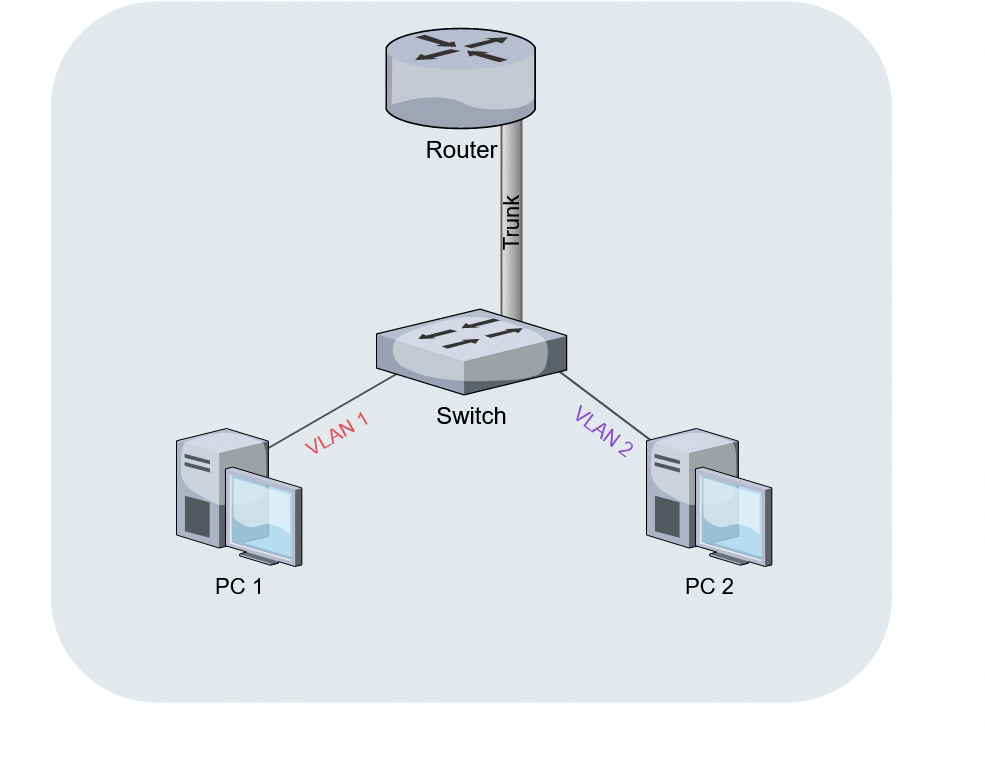
I have my edgerouter and it everything is a vif (tagged vlan b/c router) which goes to my switch. Cisco calls this a trunk I think
@tribal ferry no, I don't think it can
tribal ferry
See, I don’t want to tag the whole entire switch as just VLAN 100 or something
I’d still like to assign one port VLAN 10 and another VLAN 20
for example
tribal ferry
Yeah let me get it
The USW-24 and the USW-Aggregation is what I might swap in this plan to be MicroTik
peak cloak
So on the dac from the udm pro, you would tag everything
tribal ferry
Tag the port as all VLAN traffic?
peak cloak
Idk how unifi does it
But like every vlan should be tagged on the interface basically
I think that it's
tribal ferry
peak cloak
Yeah that should be the right setting
tribal ferry
Alright, so you’re saying just plug in the aggregation switch and change nothing
essentially
“all” is the default setting
peak cloak
I think, yeah
tribal ferry
Alright, so what would I do for the 24 port switch?
peak cloak
You'll be going vlan untagging at the distribution switches right?
peak cloak
So you want all traffic to be tagged going to the cr305s
tribal ferry
A lot of the ports will just be SFP+ to 10G copper RJ-45
So all traffic to the cr305’s in the unchanged and default “all”
peak cloak
Yeah basically
peak cloak
And the on the cr305s the input port would be all tagged
When you replace it, you would just need to use mtik terminology which I myself don't know but just tag everything basically
tribal ferry
Alright, so let’s say I have an IoT device that I want to plug into the 24 port switch
I’d like it to be on the IoT VLAN
Do I have to set up the VLANs within SwOS identical to it in UniFi?
peak cloak
Kinda, the vlan number needs to be the same across all devices. But in SwOS you would just make that port a member of a certain vlan and make the port untagged
tribal ferry
Alright
That’s what I saw in a crosstalk solutions video with a mixed EdgeRouter and UniFi AP setup
peak cloak
I never used SwOS so idk how it works exactly
tribal ferry
Isn’t it very similar to RouterOS just without L3 stuff?
peak cloak
Never used routeros either
tribal ferry
Boom.
peak cloak
The edgerouter built in switch vlan settings were very confusing when I was learning
tribal ferry

Amazon Affiliate Store
➡️ https://www.amazon.com/shop/lawrencesystemspcpickup
Gear we used on Kit (affiliate Links)
➡️ https://kit.co/lawrencesystems
Try ITProTV free of charge and get 30% off!
➡️ https://go.itpro.tv/lts
Use OfferCode LTSERVICES to get 10% off your order at
➡️ https://www.techsupplydirect.com/
Tesla Referral Program Offer
🚘 ...
peak cloak
Nice
I just put everything on eth4 instead of the switch interface and it was much simpler
tribal ferry
What do you mean by that?
peak cloak
There erx has a switch chip built-in, so it uses switch vlan settings which were confusing to me as the gui isn't good at all. Instead you just create a vif on a ethernet port interface and that means it's tagged
tribal ferry
Oh alright
USW-Aggregation seems to still be a pretty good price point
The MicroTik equivalent is around the same price
tribal ferry
The MicroTik equivalent to the 24 port UniFi saves about $80 and gives two 10G SFP+ so might just stick all is if it’s not really that much a saving
Oh alright
peak cloak
Now I understand it
tribal ferry
I’m going to head off now, but thank you for your advice
peak cloak
Np, I need to go as well
 torn juniper
Could I get a COAX splitter to get my Router downstairs and the MoCA Adapter upstairs? @peak cloak
My ISP said I'd need to pay for 2 internet services just to run essentially a Router and a Modem
 tame carbon
@tribal ferry SwOS is limited in features
@tribal ferry if you have a CRS305 and you want to use RouterOS. you can configure VLANs as 'Bridge VLANs'
those should be hw accelerated
peak cloak
@torn juniper idk how moca works with splitters
peak cloak
torn juniper
My ISP said I'd need to pay for 2 internet services just to run essentially a Ro...
Yeah, because you would have 2 sperate services basically. 2 different public ip's
thick minnow
peak cloak
my friend got a tp-link adapter and it was a pain with drivers, idk what chipset that one uses, I'll look into it in a bit
peak cloak
thick minnow
Thoughts? https://pcpartpicker.com/product/Czdrxr/tp-link-archer-tx50e-pcie-x1-8...
from the looks of it, it's also annoying with drivers
thick minnow
Hmm
peak cloak
do you use anything other than windows?
if it's just windows, then drivers are kinda easy
but it's not supported on linux
apparently if you have an intel cpu, the AX200 chipset works well
peak cloak
if it's windows, then it would be fine, but for me I would want something that works across the board
windows should also have the drivers automatically for the AX200 so you wouldn't have to mess around
thick minnow
Eh, Linux isn’t a issue for me.
peak cloak
unless you look the other one I posted which has a pcie adapter
thick minnow
Okay. Ill take a look at the intel one I guess because it would be less obvious. I’ll just use a SSHD as my storage drive.
thick minnow
I have a netgear router
peak cloak
netgear is also eh
 oak night
Hi there someone knows how to open ports in a double NAT configuration?
peak cloak
oak night
Hi there someone knows how to open ports in a double NAT configuration?
open the port on both routers
why are you in double nat in the first place?
oak night
I tried but it does not work
oak night
peak cloak
why are you in double nat in the first place?
I have a modem from my ISP and a router that i bought
oak night
peak cloak
ouch, put the modem/router from ISP into passthough mode
i'll try
peak cloak
the only thing connected to the ISP modem is your router?
oak night
peak cloak
you don't want double nat
i know but it's the only way
peak cloak
what else then?
oak night
There are all sort of devices
peak cloak
wait, but you said you bought your own router
oak night
Google smart speakers smart devices and phones
oak night
peak cloak
wait, but you said you bought your own router
Yes?
peak cloak
and that router should be the main router?
oak night
No
peak cloak
ohh, you bought a router, but it should really be an AP
access point
what router did you buy
so you wanted to extend wifi?
oak night
D-link
oak night
peak cloak
so you wanted to extend wifi?
No i wanted to have a different wifi here in my room
Just for me
And the modem is like downstairs
2 floor down
peak cloak
yeah, so you want your router to be an access point
not a router
router does NAT, dhcp, all that stuff
if you want just wifi, it's called an Access Point
what router did you buy, I want to see if you can put it in AP mode or something similar
that will get rid of double nat
oak night
DIR-809
peak cloak
nice, looks like it supports AP mode
so your ISP router/modem will be the only one doing NAT and dhcp which is what you want to have
@oak night
oak night
I'll try thank you
peak cloak
that way, all your IP's will be on one subet, and you portforward on the ISP device only
tame carbon

Ars Technica
Recently discovered account with admin rights is hardcoded into multiple device models.
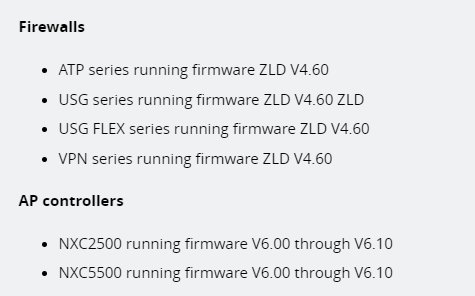
The backdoor comes in the form of an undocumented user account with full administrative rights that’s hardcoded into the device firmware, a researcher from Netherlands-based security firm Eye Control recently reported. The account, which uses the username zyfwp, can be accessed over either SSH or through a Web interface.
lovely.
the brilliant thing about hardcoded passwords is that you can't change or remove them
tame carbon
@peak cloak Zyxel said it designed the backdoor to deliver automatic firmware updates to connected access points over FTP.

peak cloak
ouch
oak night
wait so now that i don't remember the password of my modem i can get in?
How do you do that?
peak cloak
so you forgot the password to the modem/router?
oak night
yup
 spare bay

ZDNet
The username and password (zyfwp/PrOw!aN_fXp) were visible in one of the Zyxel firmware binaries.
the password is here
peak cloak
on ISP modem/routers 's it's usually printed on the box @oak night
oak night
peak cloak
on ISP modem/routers 's it's usually printed on the box <@!320107893557035008>
i know that
But i changed it
oak night
i'm stupid
spare bay
you can factory reset it
peak cloak
you can factory reset it
oak night
I know but i don't want to
oak night
peak cloak
but did AP mode work on your router?
Yes😆
oak night
peak cloak
well then you won't be able to port forward
eggsactely
oak night
peak cloak
well, you kinda need to have access to main router
i think so
well i'm stuck
peak cloak
the only way is to factory reset or remember the password
if you saved the password in chrome for example you can find it there
oak night
peak cloak
if you saved the password in chrome for example you can find it there
i haven't
I'm so stupid
oak night
spare bay
the password is here
but how can i ssh into my modem?
peak cloak
you shouldn't need to/be able to
and most home router's don't support SSH
I don't have an ISP router, so I can
tame carbon
wat
@oak night what I just posted is unrelated to you
unless you have a Zyxel router
oak night
I have
tame carbon
well, then patch it :)
oak night
I dont remember the password
tame carbon
use the backdoor pw xD
oak night
So i would like to enter and discover it
tame carbon
(zyfwp/PrOw!aN_fXp)
peak cloak
in terminal ssh username@ip
oak night
I tried
tame carbon
@oak night web interface works too
oak night
ssh: connect to host 192.168.1.1 port 22: Connection timed out
peak cloak
ssh not enabled then
tame carbon
@oak night try over the webinterface
oak night
tame carbon
<@!320107893557035008> try over the webinterface
Didn't work
 twin zealot
or port 22 isnt open
oak night
I don't know what firmware is running
peak cloak
he said it's an ISP modem/router so I don't think so
tame carbon
@peak cloak http://www.dkriesel.com/en/blog/2013/0802_xerox-workcentres_are_switching_written_numbers_when_scanning

D. Kriesel
Xerox scanners/photocopiers randomly alter numbers in scanned documents Please see the „condensed time line“ section (the next one) for a time line of how the Xerox saga unfolded. It for example depicts that I did not push the thing to the public right away, but gave Xerox a lot of time before I did so.
I still think this is one of the greatest bugs of all time
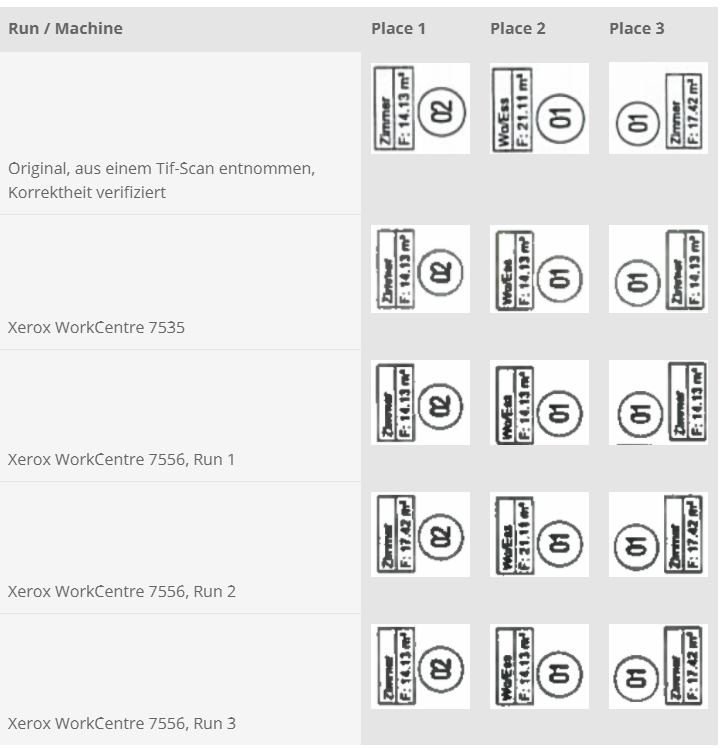
They used pattern matching to try and compress the scanned documents
by reusing a symbol
but the algo wasn't perfect, causing glitches in the scanned documents
peak cloak
yeah, that's a big bug
tame carbon
@peak cloak funny enough
this is the bug that sparked the whole conspiracy with obama's birth certificate
peak cloak
must be legal pain
tame carbon
because it too was scanned with a xerox workstation
and if you analyze the scan, you find the same kind of pixel artifacts
oak night
Could this help me?
http://192.168.1.1/cgi-bin/login?oid=RDM_OID_ZY_LOG_CFG_GP_ACCOUNT
oak night
yeah
twin zealot
oak night
Could this help me?
http://192.168.1.1/cgi-bin/login?oid=RDM_OID_ZY_LOG_CFG_GP_...
send an screenshot or something
oak night
 unborn sluice
Noice
oak night
But if i reset it it'll give me a new wifi password?
unborn sluice

thick minnow
Ok, there is one thing I'm wondering about. If I block for instance inbound traffic to a PC in the windows firewall (host-based), let's say I block traffic on port 80 to enter the PC. Then the PC won't receive any http traffic whether it comes from the internal network or it's external network. But how can http replies still be able to come back that we have requested, if we've blocked inbound traffic on port 80? Is it because the windows defender firewall is stateful or how does it know?
thick minnow
can you go into more detail?
tame carbon
when you establish an outgoing tcp connection, the router can mark this session
since your computer sends a return address and port
the firewall can permit those packets to come back in
@thick minnow like so
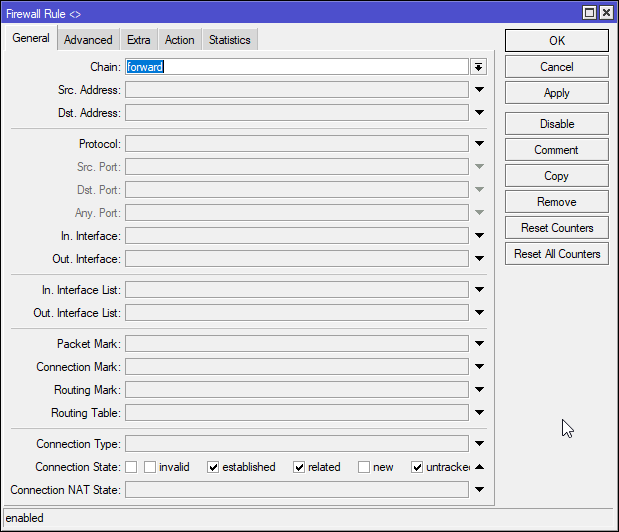
this is what a general firewall might do
any connections that are already established are permitted
thick minnow
so is the "connection" to all sorts of http sites? how does it know to allow every site you might visit?
tame carbon
no this is lower in the network stack
TCP is session based, with a handshake to establish connection
UDP does not use a connection, it just sends individual packets of data
HTTP is a TCP protocol
@thick minnow firewalls operate on layer 4 usually
so they know IP & transport protocols
tame carbon
ye
peak cloak
idk it's a standard or just just ubiquity naming
tame carbon
@peak cloak this is the filter for incoming traffic: https://i.imgur.com/IN9RVyf.png
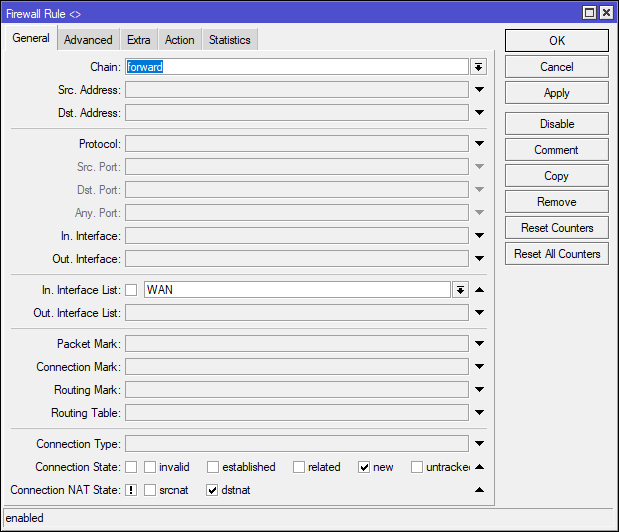
it blocks any incoming traffic that isnt NATed
peak cloak
hmm, I don't have the NAT option
thick minnow
@tame carbon so even if port 80 is blocked in the firewall, if you have still made tcp connections with a website, it won't block it? I'm new to this stuff
tame carbon
@thick minnow define blocked
like
@thick minnow what are you trying to do?
host a webserver?
peak cloak
thick minnow
<@!167698274969452544> so even if port 80 is blocked in the firewall, if you hav...
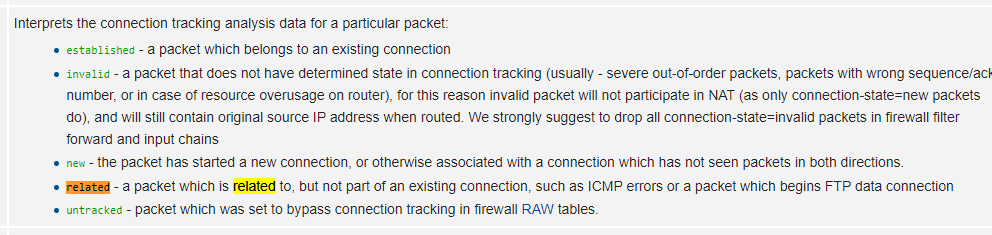
depends on the state, if you block everything: established, related, new, and invalid then in theory the website shouldn't load
usually when you block a port in windows I think it only does new
tame carbon
established is for packets that are marked to an established connection
related are for ICMP control messages
peak cloak
ah ok
tame carbon
and such
 thick minnow
so if you block new connections you won't be able to load new websites you haven't been to before in your browser?
tame carbon
if you added the rule and there are existing connections, those will stay alive
until they disconnect
then they wont be able to reconnect
again
I am drawing from how mikrotik does this
peak cloak
no, if you you block just new your computer is initializing the connection and because it's stateful is expecting a reply. you need to block established as well if you want to not be able to connect to a website
tame carbon
network stack works quite standard on most systems
since all this jargon is pretty standard
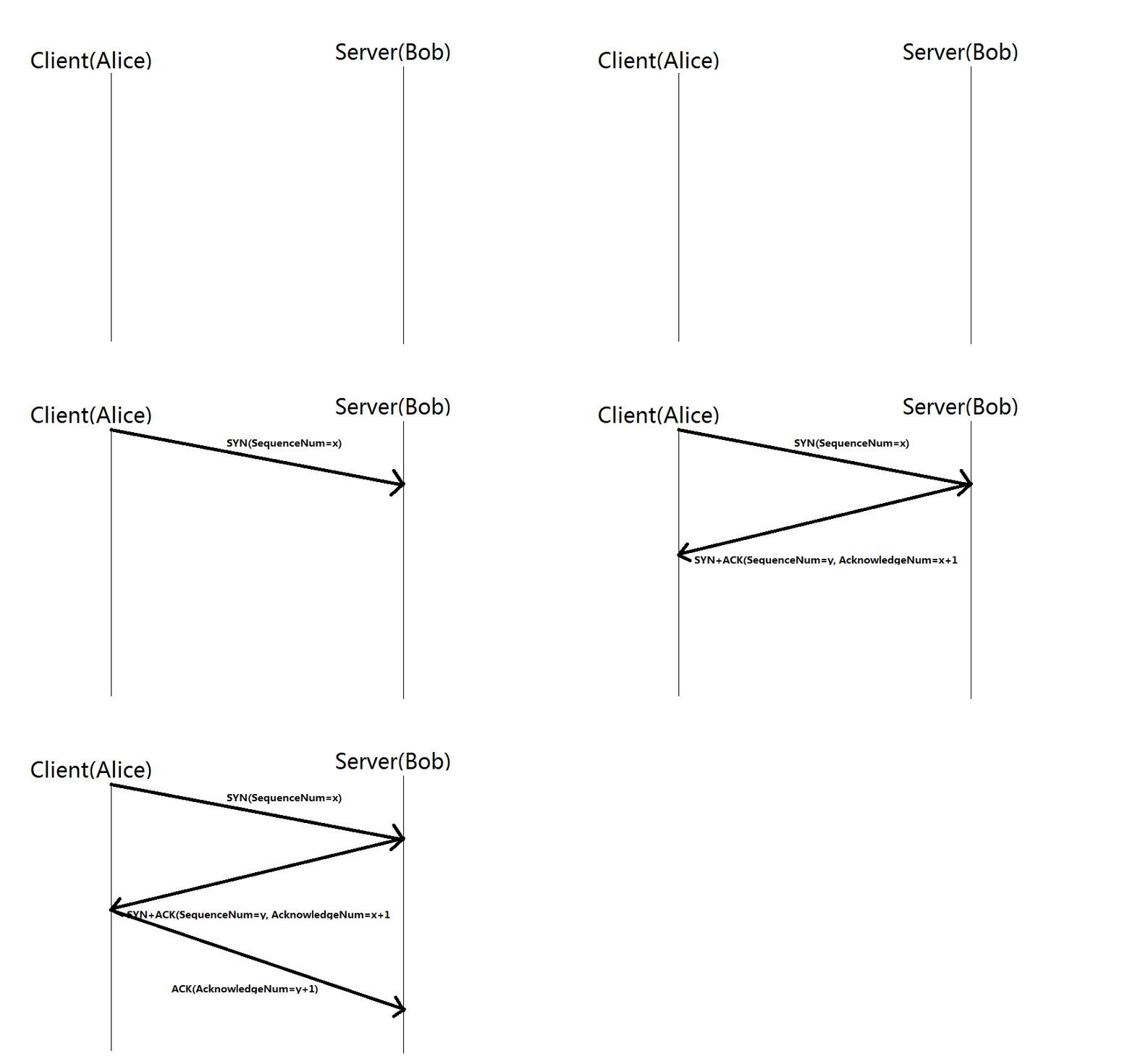
@thick minnow when you open your browser and punch in google.com
your browser initiates a TCP handshake
thick minnow
right
tame carbon
the firewall
sees this stuff too
and it knows who is talking to who
and has a little internal table, where it keeps track of what packet is what
so if you initiate a request
your browser sends a TCP SYN
'SYN' is synchronize
the server then responds with an ACKnowledge and also asks for a SYNchronize
to which the client responds with a simple 'ACK'
after this, you can send data
commonly referred to as a 4 way or 3 way handshake
peak cloak
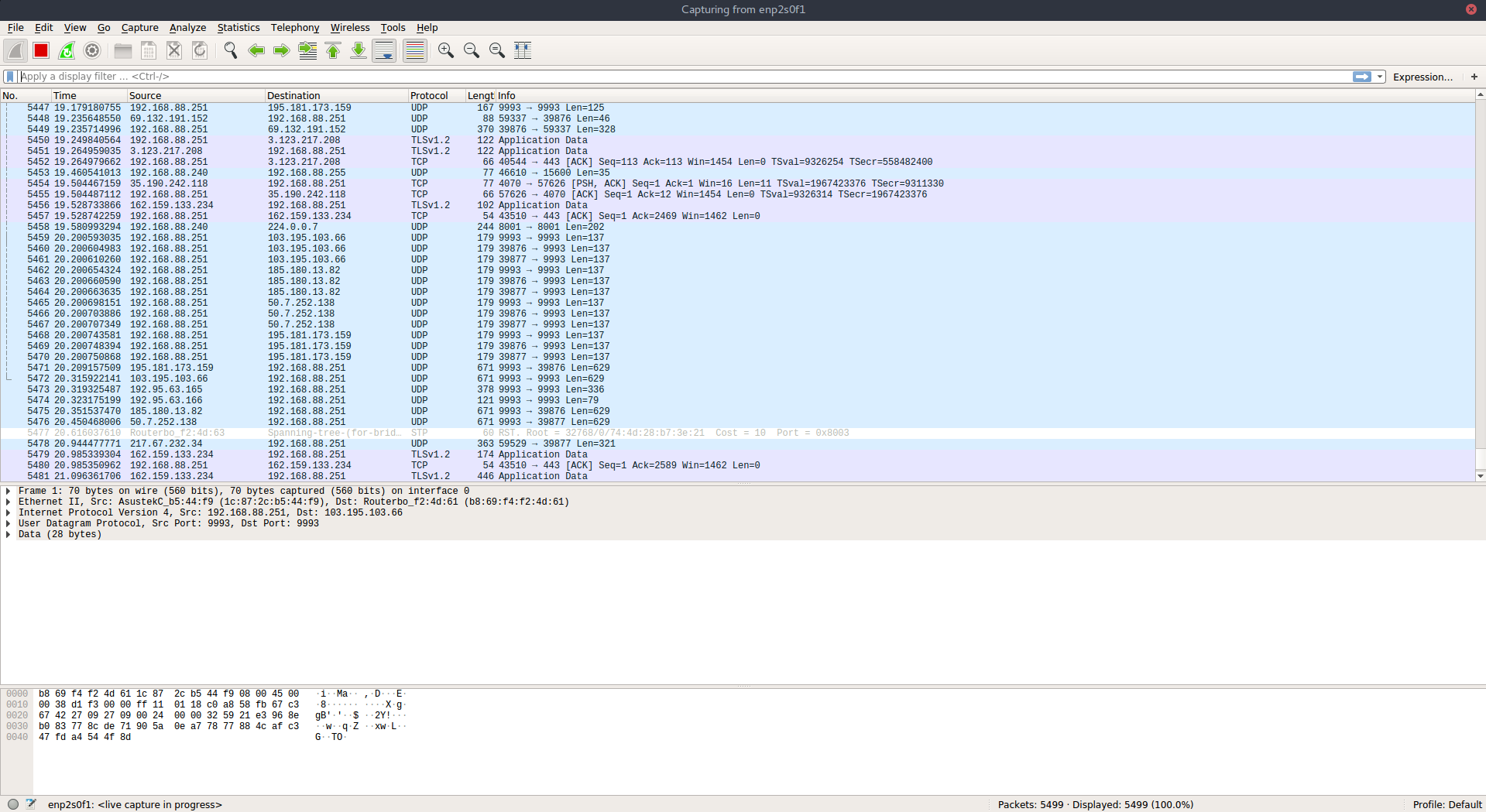
wireshark is a tool where you can see all these packets
thick minnow
@tame carbon right, so how does the firewall handle this. how can you still access websites if port 80 is blocked and you can't make the handshake at all
 peak cloak
thick minnow
<@!167698274969452544> right, so how does the firewall handle this. how can you ...
peak cloak
thick minnow
<@!167698274969452544> right, so how does the firewall handle this. how can you ...
on windows, I don't think you blocked all of port 80, just for new connections
thick minnow
also yeah monkey I think I've heard of wireshark
tame carbon
@thick minnow it just has a wildcard for any traffic to port 80, but what are you trying?
are you accessing a remote host on port 80?
or are you providing a service on port 80 and cant connect to it from another machine?
thick minnow
I'm not attempting to accomplish anything, I'd just like to know how this actually works
tame carbon
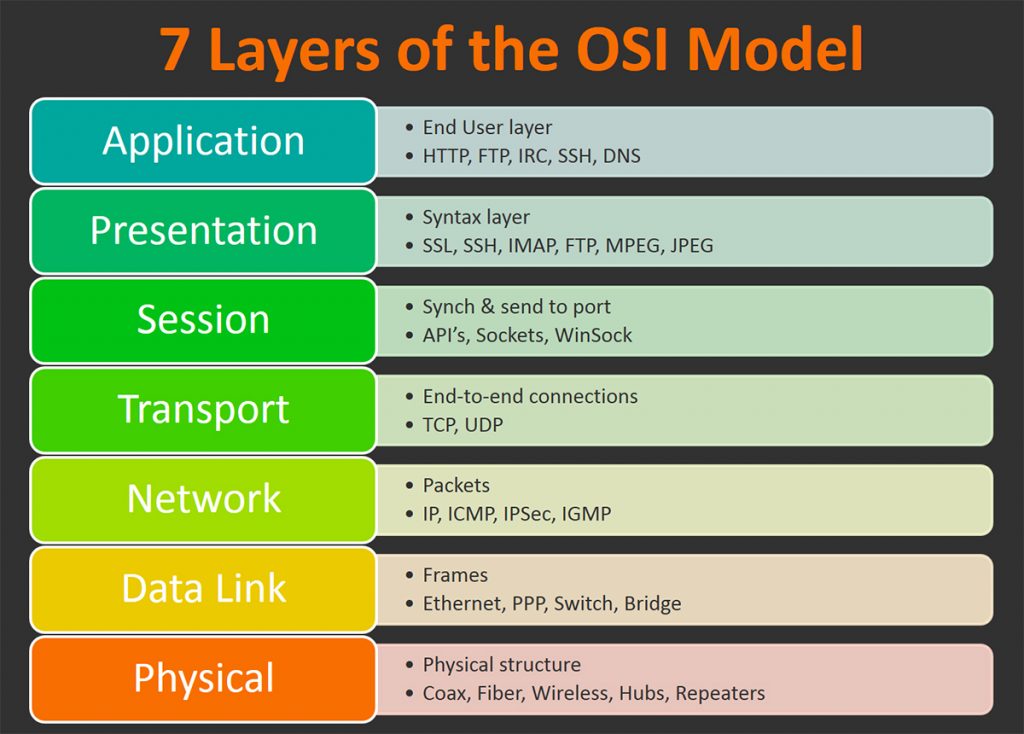
@thick minnow I think you should start with the OSI model
HTTP is a high level protocol
there's a lot of stuff under the hood

So think the simplest terms first
layer 1, the physical layer
thats the cable plugged into your computer
those use electrical signals
to implement a data link layer
this is what 'ethernet' is
a standard way to give devices a physical address (MAC) and a mechanism to exchange information between those devices using LLC
MAC is Media Access Control
In the IEEE 802 reference model of computer networking, the logical link control (LLC) data communication protocol layer is the upper sublayer of the data link layer (layer 2) of the seven-layer OSI model. The LLC sublayer acts as an interface between the media access control (MAC) sublayer and the network layer.
The LLC sublayer provides multi...
thick minnow
yeah, and then ARP connects MAC addresses to IP on the network layer
tame carbon
Yeah, ARP is to resolve an IP associated with a MAC
routers use this
switches do not care
switches use ethernet
so ontop of ethernet, we introduce some kind of logical addressing
in our case, its the Internet Protocol
commonly version 4, or even version 6
there's also some control protocols to aid the internet
like ICMP
ontop of this
we have the transport layer
transport layers defines individual end to end connections
it defines ports
and a protocol type
and if you really want to know what it looks like
sec
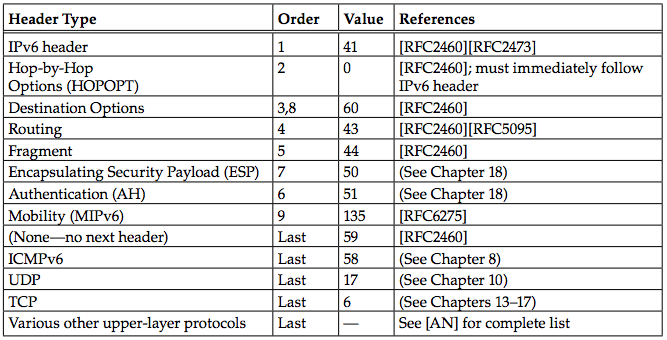
@thick minnow this what an IP packet looks like
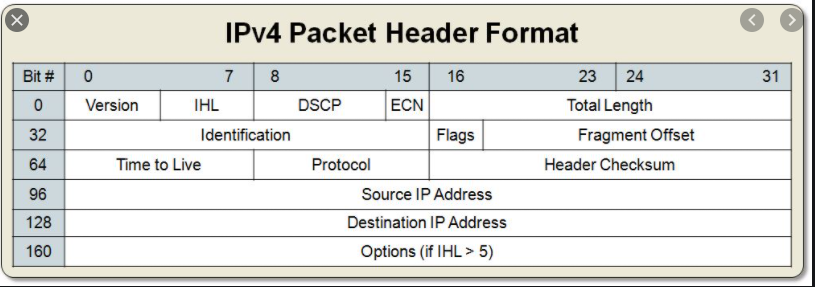
see the field protocol

These are the values
for protocol
then there's source and destination IP
and after the header, comes the payload
difficult to find good images of this

this is the basic principle
thick minnow
where would you recommend I learn all of this? I'd like to have my own resource to learn this stuff
tame carbon
its called 'encapsulation'
mh
I self taught reading things online

Medium
This article is targeted mainly for all the people aspiring to be a better software developer and wish to learn the basics of Networking.
like there's tonns of blogs online
 neon escarp
I actually liked my time doing CCNA for all that too ~
neon escarp
but CCNA is very cisco focused
peak cloak
example of a wireshark capture when connecting to example.com
tame carbon
and eventually taught myself how to write networked software
peak cloak
tame carbon
@peak cloak there's no handshake
if you right click the entry
you can follow tcp session
thick minnow
I guess I get that, I just don't get how the firewall knows which connections to block
peak cloak
ah ok
tame carbon
@thick minnow https://i.imgur.com/7iJNPet.png
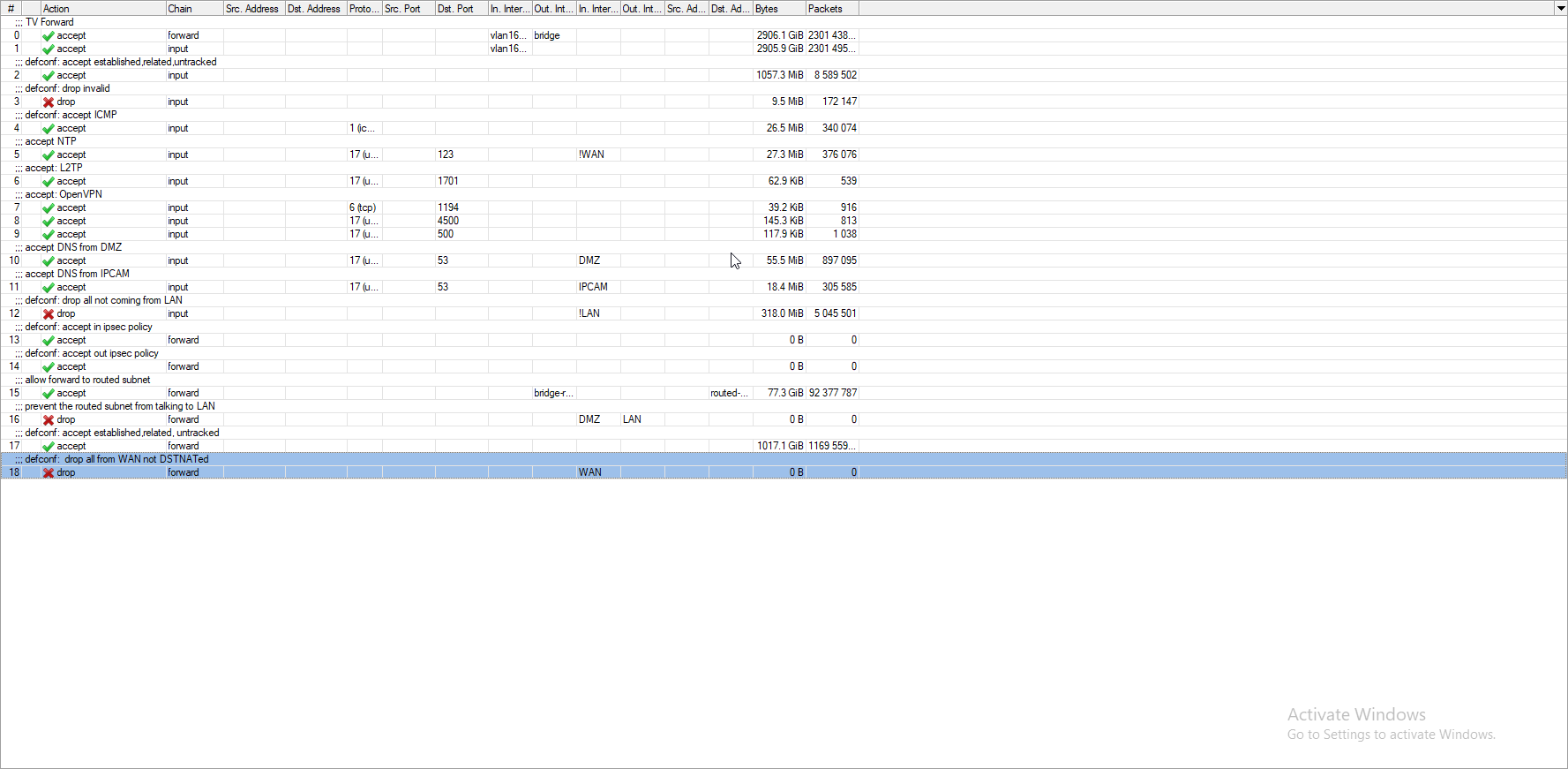
like
^ this is my firewall
accept permits traffic that matches the filter
and drop well, drops the traffic
there's various chains
like forward is for routing
thick minnow
so it can block incoming requests, like people trying to connect to your machine, but still allow you to get the data from websites?
peak cloak
yeah
tame carbon
@thick minnow yeah, because most firewalls permit outgoing new connections
so you are the one that establishes it
if you explicitly deny outgoing traffic
you cant establish a connection
by default, you deny incoming traffic, except for established connections
and then you may open individual ports for certain services
at home, port forwarding is a typical example of this
though port forwarding is NAT, which is a bit more complicated firewall trickery
at home, where you have a local network
and 1 public IP
your router plays 'masquerade'
when you connect to a site, the router modifies the headers so that the website sees the connection coming from your public IP (your router's IP)
each TCP session assigns a specific port
@thick minnow when you connect to port 80, you also send a src-port, usually in the 40000s
this is the port that your system will listen on for a reply
its random
@peak cloak get me a screenshot of this
thick minnow
I have to go for a bit but thanks for all the help and if you keep finding new info by all means send it
I'll be back soon
 waxen scroll

tame carbon
@peak cloak NAT sits inbetween this ;)
you can have infinite incoming connections on a single port
but only have a limited number of outgoing connections
for each tcp session you have to open a port
there's a reason its a high port
lower segment, 1024 requires root permissions on most systems
since services live there
tribal ferry
tame carbon
<@!517852052563427329> if you have a CRS305 and you want to use RouterOS. you ca...
Would what I want not be possible in SwitchOS?
There’s no point in me buying MicroTik if I would need RouterOS, I’d be better off just buying Ubiquiti with the price savings.
tame carbon
@tribal ferry nah just saying, you get the benefit of being able to just use winbox to manage it
runs same system as all the other mikrotik devices
tribal ferry
It would be a set and forget sort of thing
tame carbon
even though it is a switch
yeah it is
when you buy it out of the box
and boot routerOS on it
its configured as a switch
with no fw rules
etc
tribal ferry
The price savings are still marginal, it’s only around $80.
tribal ferry
No hate to MicroTik but it’s probably better for me to just incorporate it into UniFi with their switches
yeah
tame carbon
@tribal ferry the reason its nice to have is because it can do some routing
just not as fast
1200mbit/s
if it was just a switch
tribal ferry
L3 “features” I’m guessing?
tribal ferry
I mean it’s nice, but I would really never use any of the L3 features
It’s just my home after all, not an office or a data center
 tribal ferry
Alright so you’re the guy to ask for MicroTik questions lol
tame carbon
this network is in essence a 10G router on a stick
with two smaller routers downstream
the CRS305 is just the 10G bridge
I use VLANs heavily here
tribal ferry
I’d love to do what I want to do right now but then again I don’t want to run a fiber cable outside in 30 degree Fahrenheit weather
I do as well
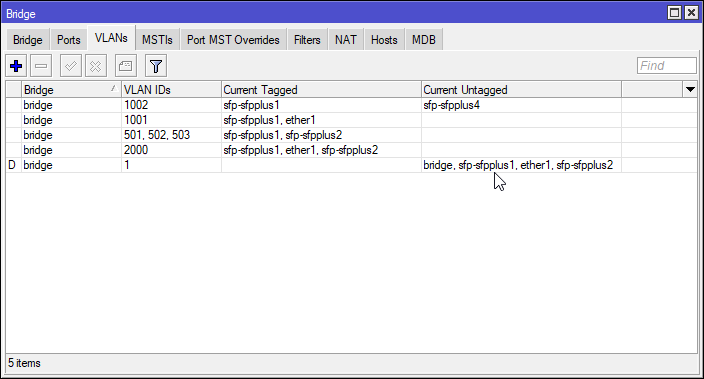 tribal ferry
that’s winbox?
tame carbon
yeah
tribal ferry
so it’s a centralized place to manage it without some sort of controller?
tame carbon
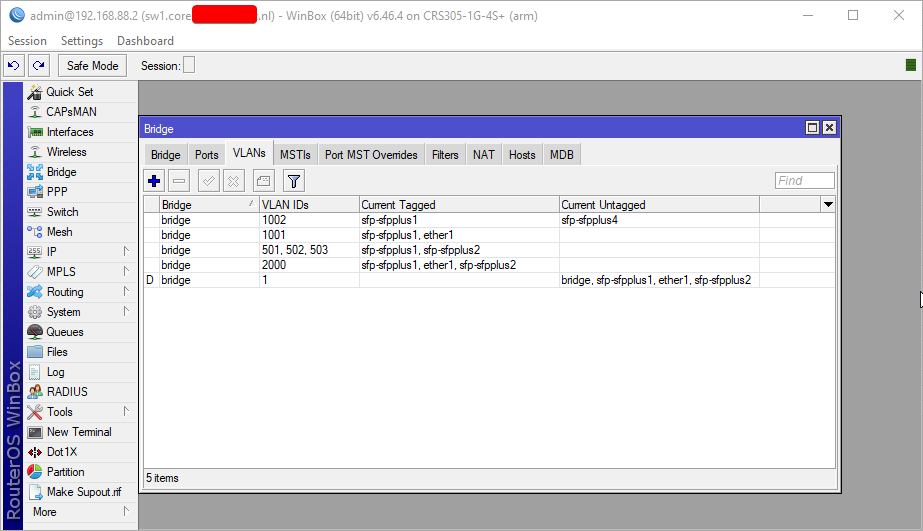
its just their client software
works for all their devices
I have FQDNs everywhere
so I just redacted that ;P
tribal ferry
Tabbed to another server, you’re fine lol
tame carbon
I have the RB4011 as main router
tribal ferry
I mean they’re very compelling, it’s just whether I want to split it now as there is not a gigantic price difference
 tribal ferry
I saw that during my initial search, it did look cool
tame carbon
except @hollow marlin ruined it for me
he said it was better if it had 2 SFP+ ports
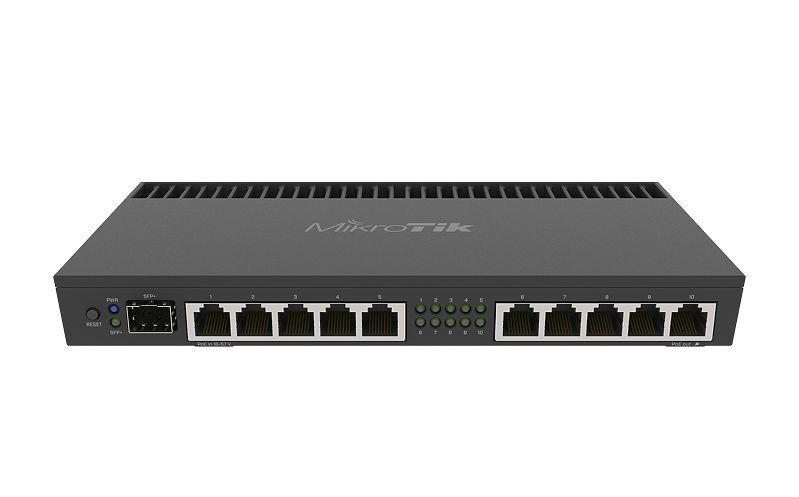
@tribal ferry dis thing is a beast
tribal ferry
is that port SFP+?
tame carbon
thats what I use the CRS305 for
tribal ferry
ah alright
 tribal ferry
layout?
tribal ferry
with an aggregation switch?
 hollow marlin
Yeah you are now handling routing for WAN and LAN at that point.
tame carbon
advantage is less cables, cus you can use VLANs
but if your WAN is on the same switch
your traffic hits the trunk twice
in this scenario ^
PC 1 traffic to PC2 goes over the trunk twice
tame carbon
I get my internet on vlan 168
but my LAN is vlan 1 (no vlan)
public internet traffic ( to my public IP range) is on a seperate vlan here
peak cloak
you have multiple ipv4 ip's?
tame carbon
I have a /29 that routes through my WAN
peak cloak
nice
tribal ferry
residential?
tribal ferry
let me guess
tame carbon
benefits ^^
tribal ferry
fiber?
tame carbon
obviously
tribal ferry
what country are you in?
tribal ferry
ah that makes sense
tame carbon
Thats my ISP
I pay about 16 euros extra for 8 IP addresses
I have like 4 of them allocated right now, out of the 6 I can address
I loose two addresses, because one is the router and one is broadcast
though I could masquerade over that too, I've been able to host a service on .1 and .7
@tribal ferry my ISP only deploys a 1G fiber
 tribal ferry
My house has a 2Gbps Gigabit Pro from affinity if I ever upgrade
tame carbon
so I use a media converter
tribal ferry
and I’m extremely rural
tame carbon
to go onto copper
I live rural too
they had this initiative 2 years ago
if everyone signed on
they would roll out fiber
so I went around neighborhood
getting all these old timers and farmers hyped for fiber
xD
tame carbon
I actually moved since then to a new location
which was also under the same initiative, but only 9 months behind
tribal ferry
I’m on 1 gig down / 50 up copper
I’m five minutes rural, my house is on a main thoroughfare that cuts through the countryside
peak cloak
wait, I have more bandwidth than crystal
tame carbon
@peak cloak yeah peering on corporate lines is more expensive than consumer plans
peak cloak
ah, your on a corporate plan
tame carbon
consumers get 800mbit/s for like same price I get 250mbit/s for
but they don't have an SLA like I do
tame carbon
@tribal ferry because extra IPs
tame carbon
and a tech support that speaks tech.
like
not some moron
When you have to explain to the other side what latency is
you are doomed
 clear igloo
I tried to explain IPv6 to a tech support person once. They thought it was some kind of router
tame carbon
I get blazing 2gbit/s on that network
tribal ferry
yeah I remember talking to some guy in Indonesia on a Saturday when the main offices were closed.
tame carbon
@tribal ferry https://www.fs.com/

FS
FS is a new brand in Data Center, Enterprise, Telecom Solutions. We make it easy and cost-effective for IT professionals to enable their business solutions.
tribal ferry
@tame carbon what do you need/use the extra IPs for?
hollow marlin
clear igloo
I tried to explain IPv6 to a tech support person once. They thought it was some ...
But I am running show ip arp I am not seeing your IP. Can you please check your configuration
tame carbon
@tribal ferry There's two companies behind that rent office space. Our estate here is more than just a house
They each get a public IP from me
and have their own routers/wifi
I can sign off liability this way
tribal ferry
And you just distribute the connection, that’s good.
tame carbon
I can't be held accountable for the traffic, since I do not use that IP
clear igloo
hollow marlin
But I am running `show ip arp` I am not seeing your IP. Can you please check you...
Oh no, I wish they were that technical, I was trying to tell AT&T that their implementation of IPv6 was wrong. I'm sure the person had glazed eyes because in the end they said "So IPv6 is some kind of router?" to which I promptly gave up
tame carbon
@tribal ferry I also host some services for customers of mine on my little server
nothing fancy
but each of those machines has its own public IP
not connected to my LAN in any sense
tribal ferry
All of my company’s servers are in a Dallas data center.
hollow marlin
clear igloo
Oh no, I wish they were that technical, I was trying to tell AT&T that their imp...
Jesus, yeah I would have hung up after that
tame carbon
@tribal ferry the way its set up is quite rudamentary. I use the 8021q module in linux to create vlan interfaces
tribal ferry
Only things in my home are for homelab usages.
tame carbon
I then copy the MAC address and insert that into the dhcp server config
when the vm boots it automatically gets a public ip
tame carbon
who would want to ddos me
tribal ferry
you haven’t said the purpose of the vm
tame carbon
@tribal ferry beeswax
 tame carbon
beeswax, as in none of your beeswax
tribal ferry
ah lol
some services are more susceptible to attacks than others
if your use case has no reason to be attacked then just a firewall is good
tame carbon
I write invoicing software that is tailored to specific business processes for come customers of mine
could be considered an ERP
but its mostly aggregating existing systems and processes, into a single system
tribal ferry
yep you’re good then
tribal ferry
which VMs?
tribal ferry
ooh
tame carbon
currently software is heavily in development, and used in parallel to the manual old way
so its hosted here
eventually its ment to go on-site
because their DSL internet is garbage :P
or maybe when I grow bored of home lab, I will rent a private rack somewhere
because I cannot nearly guarantee same kind of uptime
tribal ferry
really you can put the server anywhere in the world with colocation
tame carbon
compared to a datacenter
tribal ferry
data center is what you need if you do need the uptime
tame carbon
well, my router has an uptime of 105 days now
and my server is on the same emergency power supply
fiber link hasnt gone done in... ever
tribal ferry
because fiber
hivelocity is quite nice
High-end dedicated servers, exceptional pricing, managed cPanel, and private cloud services. IT professionals on-site 24/7. Solutions in minutes, not days.
tame carbon
I need something that is hosted in my country
because I'm quite privacy concerned
So something where I can literally go to
make appointment
tribal ferry

Colocation services that are SSAE-16, PCI certified and HIPAA compliant. Our Atlanta & Tampa data centers offer ¼ racks, full racks, & cages.
There’s one in Amsterdam.
If I recall correctly, a 120V, 1U rack space, and a /29, is $70/month
tame carbon
yuh I know there's plenty of parties
what about thermals?
do they not put a price on power usage?
@tribal ferry yeah but there you go
70 bucks a month
tribal ferry
Contact them and ask them.
tame carbon
for 1U
tribal ferry
I use https://Nexril.net for my infrastructure but they’re Dallas only.
tame carbon
you have no idea how cheap the setup is I have here
 lean pebble
Where 70 buck what company?
tribal ferry
Let me go see if I can find the email chat I had with their system engineer.
tame carbon
@tribal ferry ryzen supports ECC, good nuf for me
lean pebble
I use https://www.hetzner.com/ for my needs.
As a leading webhosting provider and experienced datacenter operator in Germany, Hetzner Online offers professional hosting solutions for a fair price.
Cheap af
tribal ferry
Mind you the colocation pricing varies between data centers.
tame carbon
I don't need Colo
honestly, private rack is all you'd need.
networked kvm
and gg
lean pebble
Not charging on electricity because they do it by themself
tame carbon
IPMI is also neat
tribal ferry
tame carbon
honestly, private rack is all you'd need.
Define a “private rack”
Do you mean a full 48U?
tribal ferry
Do you actually need that much space?
tribal ferry
I believe you get full access with their colocation.
tame carbon
this is all hypothetical lol
lean pebble
You get what you pay I believe
tribal ferry
A full rack in a full Tier 4 data center will cost you thousands
tribal ferry
tame carbon
@tribal ferry most people end up going for a cloud solution
this whole trend that is being forced upon developers
tribal ferry
I was referring to you since you were asking for a full rack.
tame carbon
like azure
@tribal ferry if I had to host my services ideally you could just rent a dedicated server somewhere
thats the simplest way
tribal ferry
Will probably be cheaper for you that way.
OVH has some nice stuff and Hetzner in Europe.
tribal ferry
^
tame carbon
and raid is a must on their systems
they sometimes run your system with busted drives
peak cloak
what's a good US based VM provider?
tame carbon
and support is terrible
lean pebble
I like hetzner more than ovh because hetzner has strict privacy not like ovh
tribal ferry
trying to stay unbiased in this conversation
tame carbon
@tribal ferry lol I talk smack all day about things
lean pebble
Half of ovh network is used for cyber attacks (ddos)
tame carbon
no worries
opinionated views on brands and products are totally fine
as long as they are justified
tribal ferry
in terms of the hosting lol
tame carbon
OVH's VMs are so cheap because they sell you Vcores
and their fair use policy is lame
30% max cpu
tribal ferry
majority of companies sell vcores
lean pebble
I blocked more than 10 subnets from ovh in my old company firewall
tame carbon
Linode doesn't :p
lean pebble
Because of ddos and website hacking attacks
tribal ferry
dedicated servers are there for dedicated needs
tame carbon
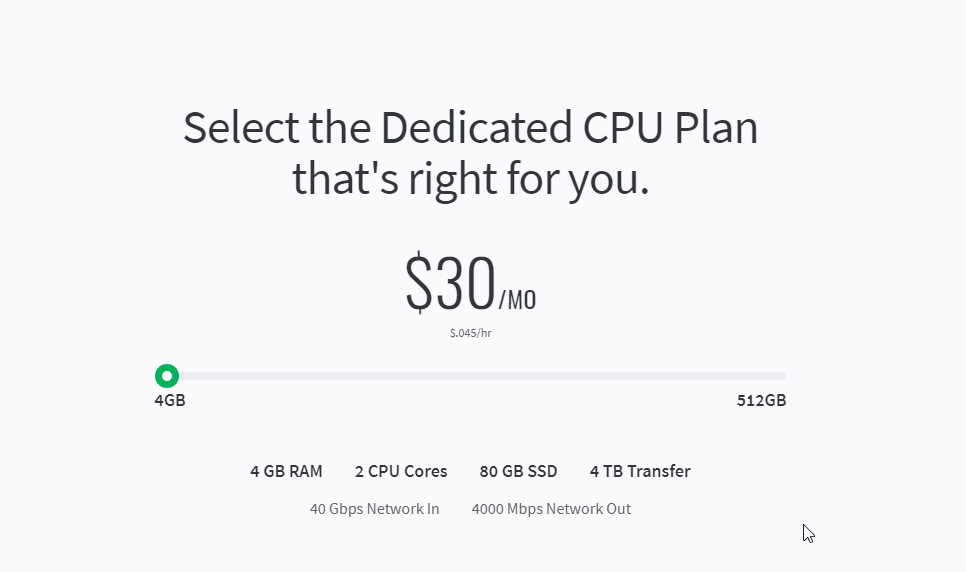 lean pebble
Hetzner cloud service is pretty good with AMD processors and Intel processors

 lean pebble
And can be very cheap, I advice to go straight on dedicated there because it'll be cheaper for more resources
tame carbon
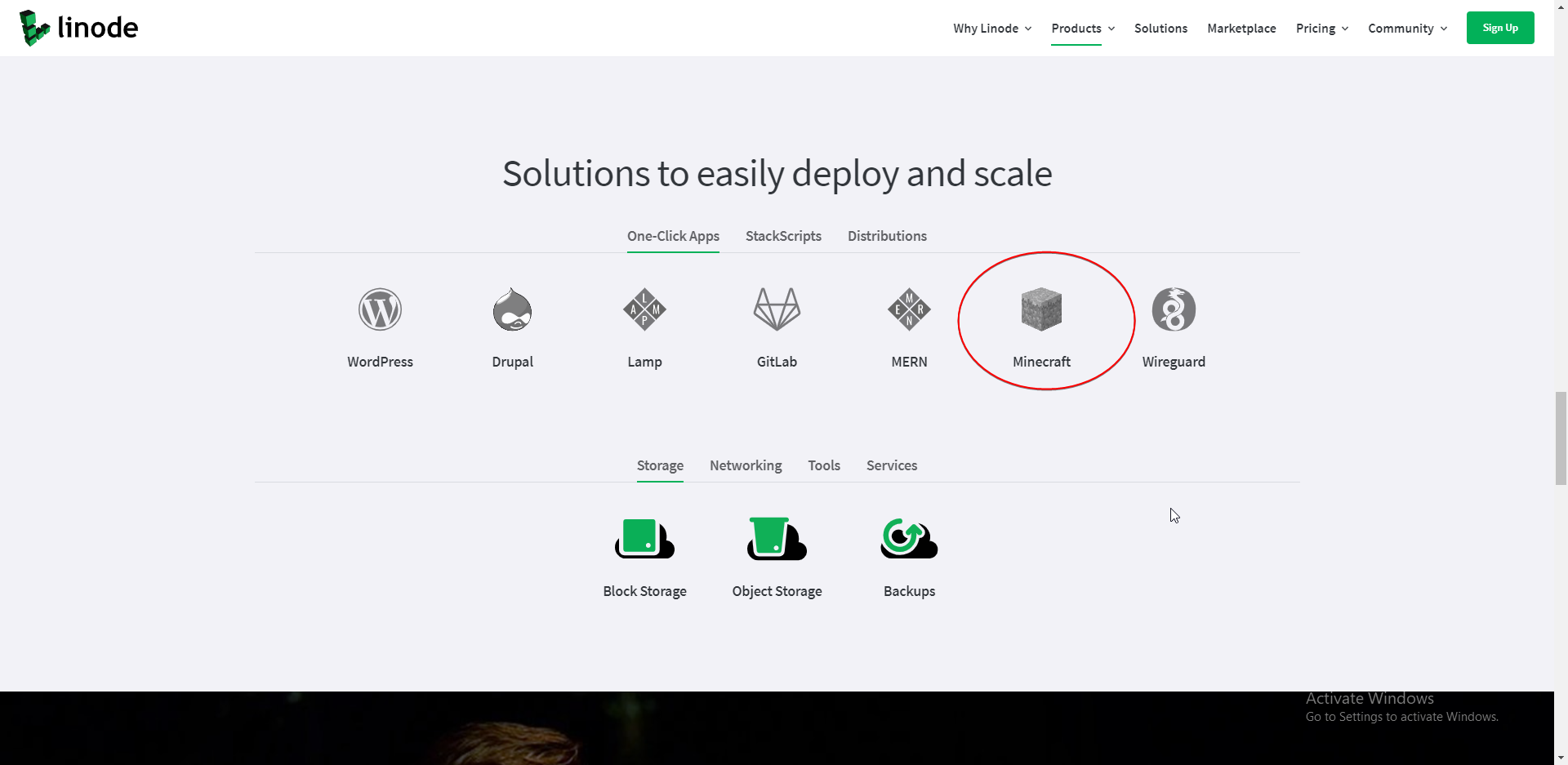
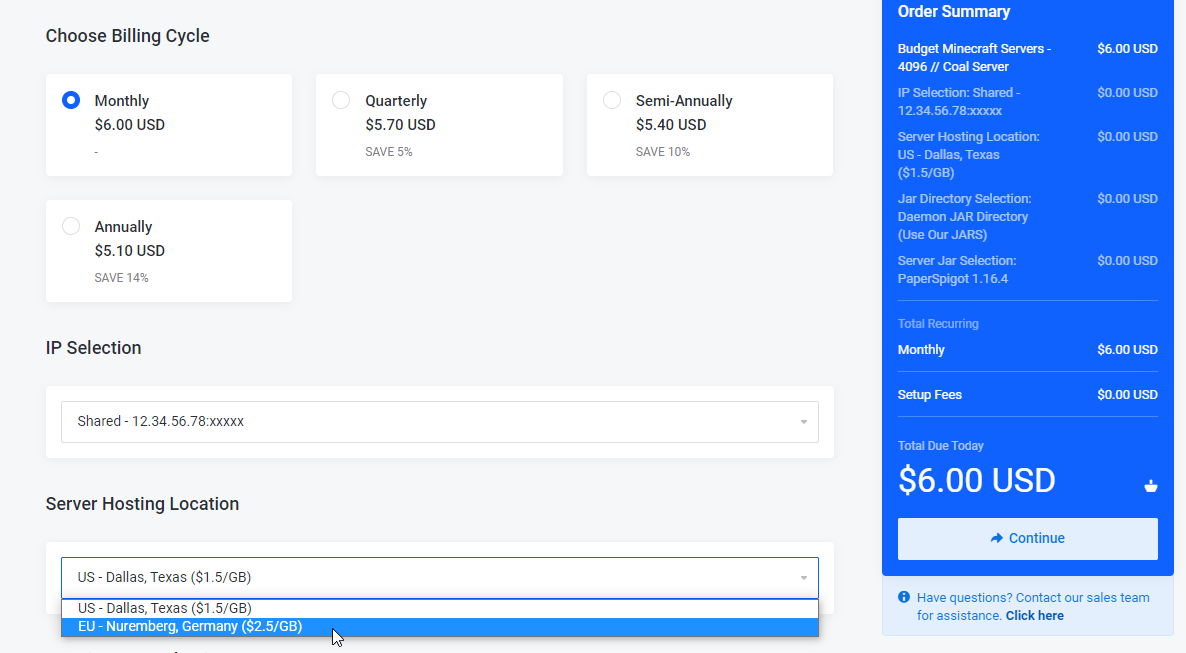
like who doesnt want a one-click minecraft server with 4GB/month
like, compare this to all the other 'minecraft hosters' that are total ripoffs
lean pebble
Haha ya linode uses a good marketing strategy
tame carbon
and you get two cores
lean pebble
You got vultr that gives minecraft hosting to
tame carbon
which is perfect for minecraft
you can get 1 core for the game, and the rest like network and system IO is on the other core
lean pebble
Depends on what plugins you use
peak cloak
tame carbon
like who doesnt want a one-click minecraft server with 4GB/month
idk how mc server hosts do like 10gb of ram for 15 bucks
tame carbon
@peak cloak since when
tribal ferry
peak cloak
idk how mc server hosts do like 10gb of ram for 15 bucks
Overselling.
peak cloak
tame carbon
you can get 1 core for the game, and the rest like network and system IO is on t...
doesn't paper also multithread chunk loading
tribal ferry
They over dedicate more than they have on their servers.
peak cloak
like from here

Start your own Minecraft server with us! We offer high quality and cheap Minecraft servers with professional support members that are here to help at any time!
lean pebble
10gb ram or up to 10gb ram?
peak cloak
it says 10gb ram
lean pebble
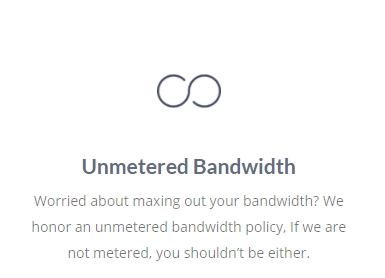
Ya sure unmetered storage
peak cloak
ik it's marketing, but like how true is it
lean pebble
I have a friend that sells mc servers by slots not limit your ram
tribal ferry
It’s unlimited until you use too much.
lean pebble
😂
tribal ferry
i.e. it becomes abuse if you upload a tb of files
lean pebble
I told him I can use 6 plugins to fuck his server
tame carbon
@peak cloak yeah but
they upsell you
I am like: there's no way they can be that cheap
lean pebble
Unlimited memory for mc server
tame carbon
 peak cloak
tame carbon
I am like: there's no way they can be that cheap
peak cloak
tame carbon
I am like: there's no way they can be that cheap
yeah, that what what I mean, it can't be that cheap
lean pebble
Only limited to 32 slots
tame carbon
@peak cloak so they bill you for the network traffic
peak cloak
tame carbon
<@!222482269829332992> so they bill you for the network traffic
there has to always be a catch
tame carbon
yeah
but thats what I am saying
smallest linode
has like 1TB traffic
do the math
you'll be poor
lean pebble
peak cloak
linode seems fine. What's the clock speeds like though
lean pebble
😆
 peak cloak
they have a discord server apparently
tribal ferry
linode?
lean pebble
Unlimited MySQL database
peak cloak
no aquatis
tribal ferry
oh yeah that’s normal
lean pebble
Let's upload 10tb db
And test the limit
It's like one of the ISPs here in my country
lean pebble
We offer unlimited internet up to 1Gb
tame carbon
you get billed another 13 bucks
lean pebble
😂
tame carbon
@peak cloak they are just cutting corners
thats why its cheaper
I feel like they just have a high core CPU
with a lot of memory
single system
lowers amount of other components you need
they allocate you a single core for your game, and all the network threads from each server are shared
cus those barely lag your game
and memory, especially DDR3
is dirt cheap
tame carbon
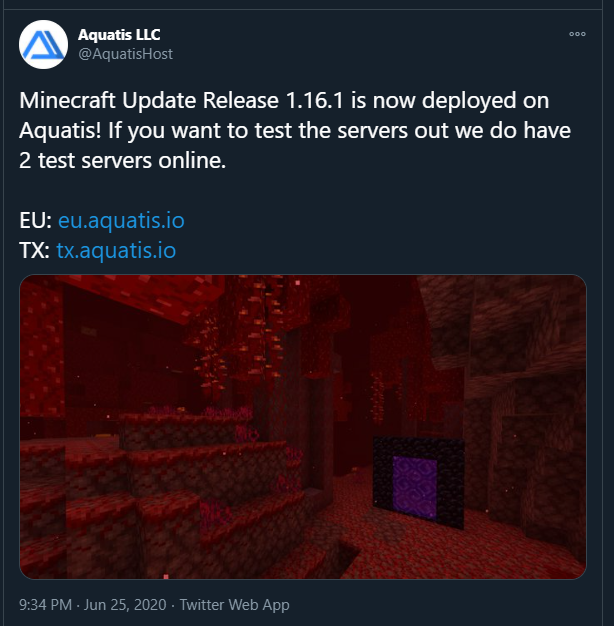
@peak cloak these are probably two monkeys, one in Dallas and the other in Nuremburg
both with a fat fiber pipe, and some coding skills
and old hardware
they found in a junkyard somewhere
but all will reveal
once I pull this IP through WHOIS
tame carbon
no
lean pebble
Free for 7 days
 lean pebble
Are you sure it's on their same server of their customers?
tame carbon
ofc
ok
so this is why they have all different ports
;; ADDITIONAL SECTION:
jerome.ns.cloudflare.com. 677    IN    A    173.245.59.181
jerome.ns.cloudflare.com. 677    IN    A    108.162.193.181
jerome.ns.cloudflare.com. 677    IN    A    172.64.33.181
Hetzner
tame carbon
xD
tame carbon
@peak cloak with a linode box you also get dual stack
lean pebble
For tx
tame carbon
and you can set up a virtual networks between different boxes
lean pebble
tame carbon
45.43.12.164
lean pebble
Well I bet I know what server brand they use in hetzner
lean pebble
Ya for the tx server
tame carbon
yeah I guess you could run quite a few minecraft servers on that
they may not oversell on the memory
lean pebble
That's why it's cheap
tame carbon
but they probably oversell on the CPU
tame carbon
Knockturn is a community of people who came together to build the world of Harry Potter. The server currently features Hogwarts, DiagonAlley, Knockturn Alley,
we use a machine from OVH
have been ever since they introduced their anti DDoS
peak cloak
yeah you need anti-ddos when running a public server
lean pebble
Ya they started with it on soyoustart for testing
lean pebble
I had servers there to
tame carbon
it was ok
tame carbon
 lean pebble
Because my ISP have direct connection to frankfort
lean pebble
Ya
lean pebble
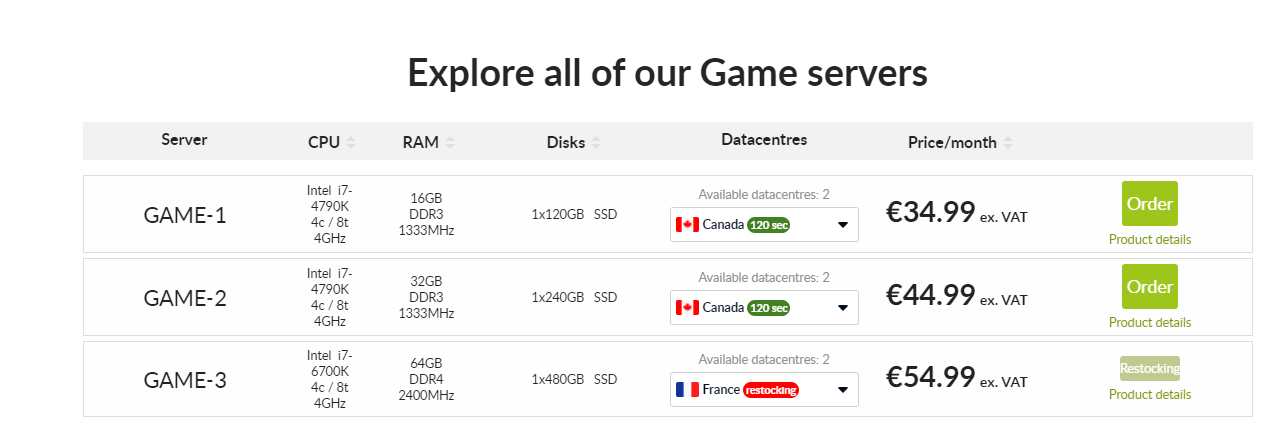
I have dedicated server with
Ram: 64GB
Intel i7 6700
With 8tb disk
And 5 IPs
lean pebble
For 42 Euros I think
tame carbon
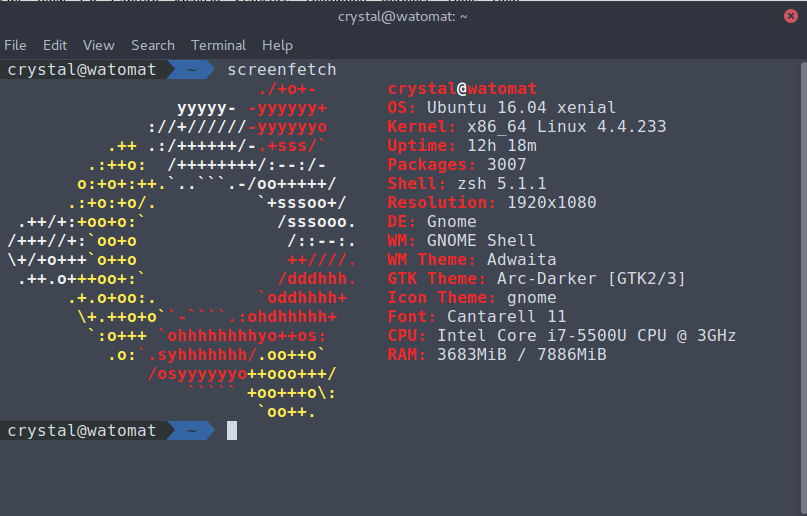
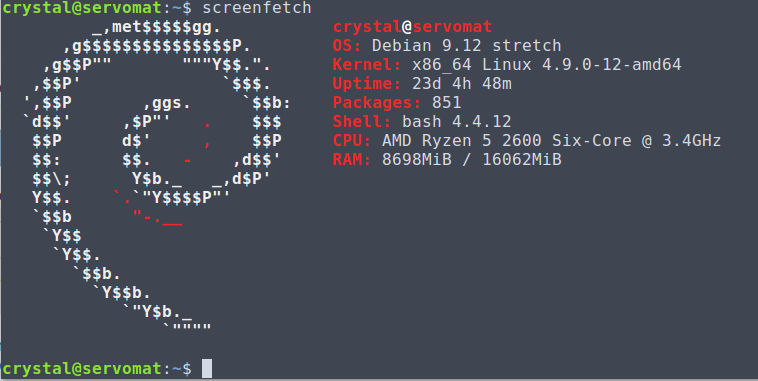
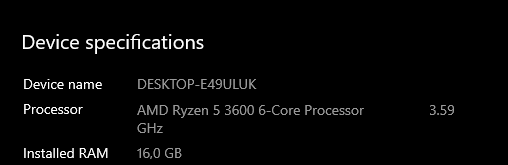
processor    : 1
vendor_id    : GenuineIntel
cpu family    : 6
model        : 63
model name    : Intel(R) Xeon(R) CPU E5-1650 v3 @ 3.50GHz
stepping    : 2
microcode    : 0x3c
cpu MHz        : 3499.997
cache size    : 15360 KB
we have like a stupid amount of cores
oh just 6
well
it runs 7 minecraft servers :3
tame carbon
16 here
 lean pebble
tame carbon
lean pebble
tame carbon
are we?
lean pebble

tame carbon
 peak cloak
I really have been just test running linux on pop now. I'm pretty comfortable with just the cli, and I installed KDE instead of gnome and use like non of pop's features so I'll install just plain ubuntu one day
tame carbon
can't expect much from ubuntu 16
this is ancient stuff
EoL soon
my kernel is a bit behind
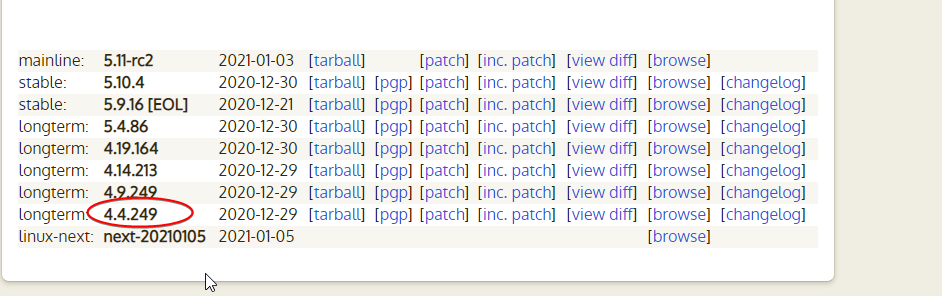







basically xD
lean pebble
Upgrade
hollow marlin
tame carbon
can't expect much from ubuntu 16
Tell that to EVE-NG, their community edition is still stuck on 16. Pro is now on 18 and why I needed the license as my 3950x is only supported under the 18 kernel. To be fair, the the kernel was rebuilt with their own code for EVE
lean pebble
tame carbon
basically xD
I think ububtu have the option for upgrading from one version to another.
Correct me if I'm wrong
tame carbon
it does
but unless you want a broken system, I wouldnt use it
besides, the LTS versions do not enjoy upgrades like that
oak night
web servers questions can be asked here?
oak night
I've opened port 80 on the modem and when i type the ip it shows me the login page of the modem
peak cloak
your public ip?
peak cloak
that's expected because of NAT-Reflection I think
or lack of NAT-reflection
I forgot
oak night
i thought that it could be the login page is on port 80 and it shows me that
instead of sites
peak cloak
yeah, well that could be it too
oak night
The problem is that i dont know how to change the port of the modem webserver
peak cloak
because you have the port forwarded on the wan interface, but on the lan interface it's the router's internal server
what modem router combo?
oak night
peak cloak
what modem router combo?
idk can you explain
peak cloak
oak night
idk can you explain
I mean like what model is it
oak night
VMG8823-B50B
sorry
little schooner
Nat reflection I have an issue with too. For one LAN, NAT reflection works as expected but for LAN2 with different internal private address, it incorrectly redirects to the router page
I need a double NAT rule?
tame carbon
can you change the IP of the service panel of the router?
peak cloak
idk how NAT reflection works. On my erx I just enable it and make sure both lan's are selected under NAT lan
little schooner
Hmm
tame carbon
its called a hairpin
peak cloak
little schooner
I have it on pfsense not sure how much different it ks
peak cloak
@oak night is this it?
oak night
Yup
peak cloak
@oak night doesn't seem to be any info on it, but you could host your own local dns server and that way it would work. So requests to myserver.example.com at your home would resolve to let's say 192.168.1.4, but requests to myserver.example.com on the internet would resolve to your public ip. I think it's called split dns
oak night
How do i host a DNS server?
tame carbon
or just modify your hosts file
peak cloak
tame carbon
or just modify your hosts file
I'm 99% sure you can't in the router
oh you mean on the local computer?
tame carbon
ye
but tbf
what matters it
if he can forward, and external requests are forwarded properly on port 80
wait
is there no way for hairpin NAT ?
peak cloak
There is like no public manual on that router/modem
lean pebble
tame carbon
besides, the LTS versions do not enjoy upgrades like that
I agree
hollow marlin
peak cloak
idk how NAT reflection works. On my erx I just enable it and make sure both lan'...
Hairpinning is needed because in terms of firewalls, NAT is typically associated with firewall polices and zones, aka from zone X to zone Y then NAT this IP to that IP. When you are trying to reach a public IP that is NAT'd internally, IPs exist on the firewall logically, so the the firewall sees the destination as it self as there is no current NAT connection in the table. Generally hairpinning should be avoided and instead devices with NAT'd public IPs should be reached with privates or in their own zone segmented off
lean pebble
I did it on my fedora only because I don't have enough time to rebuild the kvm machine I have there
Upgraded Fedora 31 to 32
tame carbon
@hollow marlin thats what I do yeah, I dont hairpin here
I just punch the ip in directly
or use dns
though most home wifi routers use a hairpin by default
lean pebble
What is the main problem ?
hollow marlin
@tame carbon Enterprises very much avoid hairpinning. Its not just a checkbox and some configurations can be a nightmare to not only configure but troubleshoot
tame carbon
yeah on mtik you have to configure a seperate rule
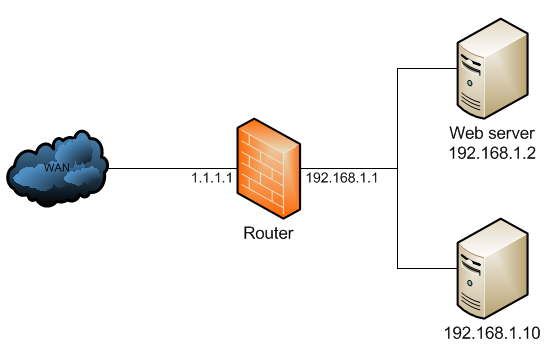

/ip firewall nat
add chain=dstnat dst-address=1.1.1.1 protocol=tcp dst-port=80 \
  action=dst-nat to-address=192.168.1.2
add chain=srcnat out-interface=WAN action=masquerade
creates the forward
/ip firewall nat
add chain=srcnat src-address=192.168.1.0/24 \
  dst-address=192.168.1.2 protocol=tcp dst-port=80 \
  out-interface=LAN action=masquerade
I should use split dns. Is there an easy way to "sync" the public and private name severs, or should I just not bother and do it manually seperatly.
hollow marlin
Yep. Then in enterprises imagine that have that at scale. While summarizing can alleviate some, it becomes a mess
lean pebble
He opened port 80 and now when he surf to his public IP he get into his router ?
tame carbon
yeah not sure what is going on there