#networking
1 messages · Page 243 of 1
 tribal kraken
 tame carbon
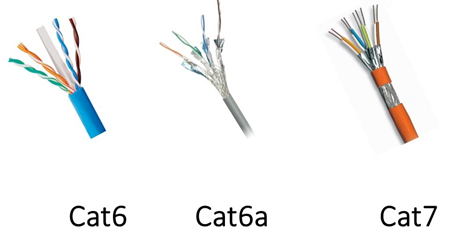
Those are shielded ethernet cables, so you can run them through the same duct where there is electrical wires
tribal kraken
ok noted
tame carbon
Cat6 is fine generally
but if you do permanent house wiring, cat7 is preffered
because it has shielding/grounding
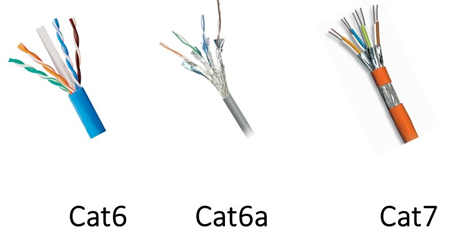
cat6a is fine too
tribal kraken
Maybe I will go for cat7 in the living room and in the main rooms and cat6 for garage
and stuff
 peak cloak
old house, I bet it will demolished if we ever sell it
tame carbon
@tribal kraken when we renovated this place I live in now, we ran ethernet to most rooms, and 10G fiber optics xD
tribal kraken
oo nice
tame carbon
most computers have 1G here
except the one in my office
I got the full 10G to my NAS
tribal kraken
there are only 3 pc's atm but we're putting in some smart devices too
tribal kraken
also planning on getting a nas server probably 2.5
tame carbon
The termination panel at the top is all the sockets in the house
@tribal kraken skip 2.5G and go straight for 10G
There's almost no networking equipment that does 2.5G
 hollow marlin
tribal kraken
Maybe I will go for cat7 in the living room and in the main rooms and cat6 for g...
hollow marlin
tribal kraken
Maybe I will go for cat7 in the living room and in the main rooms and cat6 for g...
Just go Cat6a. No reason to spend the extra cost
tame carbon
@hollow marlin would you recommend cat7 for outdoor only then?
tribal kraken
10G is pretty expensive rn
hollow marlin
Nope, anything above Cat6a is moot in my eyes
tame carbon
@tribal kraken define expensive
tribal kraken
10G addin cards are going for upwards of $500
tame carbon
That's overpriced
peak cloak
sfp+?
tribal kraken
at least that's the case here
peak cloak
or copper 10G
tribal kraken
I live in India so the stuff that's $100 in the US is usaually 160-170 here
hollow marlin
peak cloak
cat7 isn't a TIA standard
Its not but its recognized in some other org. But 6a vs 7 means nothing specially if you plan on using SFP+ which has 30m limits anyway
peak cloak
yep
tame carbon
@tribal kraken I'll just repeat myself, I still think you'll have a hard time finding any other networking equipment to play ball with 2.5G
I've not seen many devices support it
in the upper segment of networking, its either 1G or 10G
2.5G is a joke
hollow marlin
tame carbon
2.5G is a joke
You should look at the current Juniper/Cisco/Arista lineup 
tame carbon
@hollow marlin RouterOS has 2.5G support too
idk of any mikrotiks that have 2.5G ports
unless you rig up SFP+
but that defeats the point, why not just use 10G right away
peak cloak
10G is more expensive than 2.5G
hollow marlin
Yeah its being pushed hard in enterprise, not much in the prosumer space
tame carbon
@peak cloak not by much
tame carbon
Once you are done upgrading your switch and networking gear to 2.5G
you'll have spent almost equal amount of money
than just using 10G as a backbone, and for fast network access
while leaving the rest on regular 1G
That +20% increase in price I'd say is worth it
and its futureproof, I don't see SFP+ falling out of support any time soon
@tribal kraken 10G LAN is a luxury, not a requirement :)
but if you want a NAS, and some highspeed networking
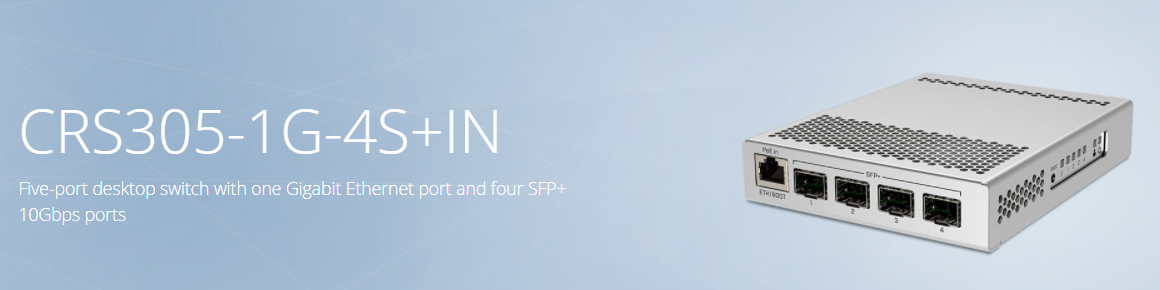
This is the safest bet
tribal kraken
Ok I will look into 10G.
tame carbon
Its just a switch, you can plug the 'slow' part of your network like your modem into the left most port
and have 10G switching between the other 4 ports
tame carbon
I actually have that CRS305 in my office :)
Paired with this router: https://i.imgur.com/IUm9FaG.png
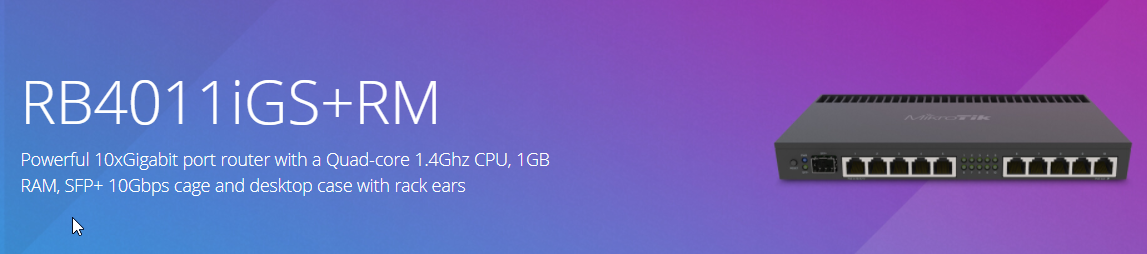
was the cheapest I could go for entry level 10G
tribal kraken
I don't need a lot of 10G ports just 1G will be fine for iot
tame carbon
@tribal kraken yeah, the only purpose or reason for even having 10G, for me, was a NAS
1gbit for a NAS is slow
tribal kraken
i am on 1G nas atm
tame carbon
You can either serve single 10gbit clients, or multiple 1G clients at the same time
tribal kraken
can I do multiple 10G?
tame carbon
@tribal kraken you're always bottlenecked by the slowest link
so if the NAS is connected to the network at 10G, but are accessing it from a computer with 1G, you'll be limited to that 1G
tribal kraken
got it
tame carbon
most sata drives can do more than 1gbit/s
tribal kraken
Thanks for the help @tame carbon . I gotta go
tame carbon
@hollow marlin reading this ISO 11801
I gotta say, in those last 40 years
we went from a cable in a hole, to
Generic cabling for customer premises specifies general-purpose telecommunication cabling systems
for when people ask what kind of cable that is
so why is coaxial capable of way higher datarates?
and why aren't we using that ?
Pretty sure some of those digital camera protocols used by highspeed and 4K are on coaxial
The first Ethernet standard, known as 10BASE5 (ThickNet) in the family of IEEE 802.3, specified baseband operation over 50 ohm coaxial cable, which remained the principal medium into the 1980s, when 10BASE2 (ThinNet) coax replaced it in deployments in the 1980s; both being replaced in the 1990s when thinner, cheaper twisted pair cabling came to dominate the market. The use of coaxial cable for Ethernet has been deprecated by 2011.
ThiccNet
hollow marlin
The shielding and power requirements are why COAX is not used
tame carbon
twisted pair takes care of noise just as well?
and doesnt have a carrier voltage I assume?
hollow marlin
It does but due to the high voltage the skin effect decreases the cross talk
tame carbon
so longer distance = more voltage
hollow marlin
Yeah twisted pair for voice is like 90-100v, cannot remember exactly
tame carbon
is more noise is lower speed
because you have attenuation
so what is regular ethernet now?
in voltage
on RJ45
hollow marlin
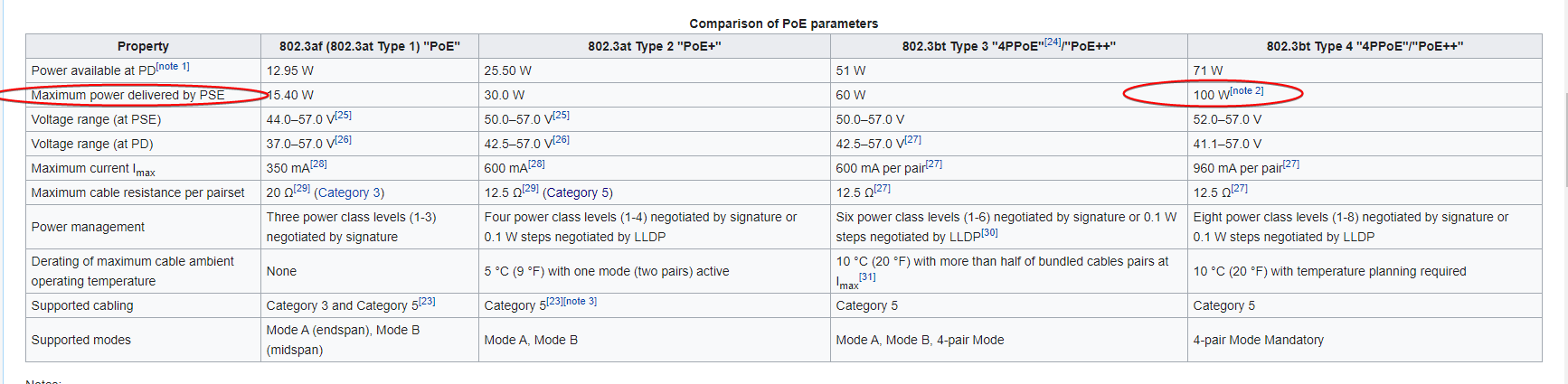
Honestly not sure. I mean PoE+ goes to like what 60v?
tame carbon
I've never seen ethernet on a scope
hollow marlin
A basic connection I cannot see more than a few volts
tame carbon
1000BASE-T uses all four pairs bi-directionally using hybrid circuits and cancellers.[11] Data is encoded using 4D-PAM5; four dimensions using PAM (pulse amplitude modulation) with five voltages, −2 V, −1 V, 0 V, +1 V, and +2 V.[12] While +2 V to −2 V may appear at the pins of the line driver, the voltage on the cable is nominally +1 V, +0.5 V, 0 V, −0.5 V and −1 V.
wat
1V
I wouldnt buy a network card that isnt optically isolated anyways
one lightning strike
hollow marlin
I think that is fluctuation on the mean. I would say its something like 5v for a basic connection
hollow marlin
tame carbon
one lightning strike
I have heard of a story where when the switch was hit it went through the SFP which in nanoseconds before it failed put enough power to burn out the optic on the other end
hollow marlin
tame carbon
so PoE just increases the voltage
Basically. Amps are pretty low. But since its DC its easy to modulate data over the power pair
tame carbon
what happens if you suddenly have a voltage drop?
hollow marlin
Lol it I am sure it only made it to 10s of watts but that is enough to crank out some power.
Im not that deep into electronics of ethernet to give even an educated guess. I would say it would stay up if its very very brief as when PoE devices are plugged in there is a module that powers on over base voltage in which it can tell the end devices the power it requires
 hollow marlin
Just go PoFO
tame carbon
lol I think
we should set the limit at 50W
we're data dpt, not utilities, power bill is high enough as is
AC and all that stuff you need
instead, just put more transformers in the offices, and turn the heat down
saves money
hollow marlin
Power over fiber optic, two types where power lines are ran along the fiber and one which is in development which the SFP has a photoreceptor for like 1w of power
tame carbon
neat
we need a hotpluggable connector
as a consumer standard
can't we do 10G or more on multimode?
some kind of network card, with like a tiny internal compressor
hollow marlin
Yeah thats essential what CWDM is
tame carbon
that blows on the jack just before it goes in
hollow marlin
Wait I think I read that wrong
Scrap that, yeah you can do 40g on MM, never looked into what its limits are
tame carbon
would be nice
to just ditch
all that thunderbolt crap
and just plug in some kind of etherfiber
one cable for any speed, you can have different cables for different power types you need (its a jacket around the core)
and then you have options
speed dunt matter
100 meters ez
hollow marlin
Thats why we went all SM, not more MM bs
hollow marlin
Not really. Fiber is actually pretty robust
 eager vale
anybody have any ideas on how to get gigabit connection to a pc without running an ethernet cable? i have gigabit service, and an old netgear orbi system throughout the house. Then my pc is plugged into one of the orbis with ethernet, but I only have 130-140 mbps
peak cloak
very hard, you would need almost ideal 5 ghz wifi conditions
eager vale
i believe everything is on a 5ghz network
i have a switch in the basement with the modem and router, then the mesh thing is connected to that
idk if i'd be able to get a faster connection with a better mesh. other areas in the house i was able to get 500mpbs, when the orbi was closer to the main router
i don't need gigabit on my pc, but at least 500 would be nice
peak cloak
mesh in general isn't that great
 hard pasture
Could someone please recommend an inexpensive managed wireless AP that can do VLANs?
peak cloak
EAP225?
mtik CAPac?

MikroTik is a Latvian company which was founded in 1996 to develop routers and wireless ISP systems. MikroTik now provides hardware and software for Internet connectivity in most of the countries around the world.
AC1350 Wireless MU-MIMO Gigabit Ceiling Mount Access Point
tame carbon
@hard pasture mikrotik is pretty solid
you can use one or multiple multiple types of their APs together one a single SSID or multiple SSIDs
and set up all kinds of routing configurations on them
vlans and stuff
they also do some enterprise authentication features
well, almost all
Dot1X
EAP, and its derivatives
Radius and all
MikroTik is a Latvian company which was founded in 1996 to develop routers and wireless ISP systems. MikroTik now provides hardware and software for Internet connectivity in most of the countries around the world.
These are quite good
but you may also need a router to connect them all to
if you want cheap
you get limited to 100mbit/s
MikroTik is a Latvian company which was founded in 1996 to develop routers and wireless ISP systems. MikroTik now provides hardware and software for Internet connectivity in most of the countries around the world.
since these are fast ethernet input, you'll be limited to 100mbit/s on the wifi
both the hAP lite and the cAP ac run the same software
eager vale
peak cloak
mesh in general isn't that great
oh, any better options other than ethernet?
 gloomy plover
Hey so I’m having some issues with pretty crappy internet. I have the latest router from my ISP and use an ethernet cable. My NAT type is moderate and UPnP is enabled by default.
What should I do? Is UPnP safe to use? Should I try a new ethernet cable?
gloomy plover
But how will my devices connect to the router?
peak cloak
normally
gloomy plover
Swear if you disable it you have to do it all manually
Like weird port forward stuff
peak cloak
upnp is really only for multiplayer stuff
gloomy plover
What is the alternative?
peak cloak
basically it allows devices on your network to request ports to open
manual port forwarding
ok, so network fundamentals. You get one ipv4 ip from your ISP usually. Your router then preforms NAT (network address translation). NAT breaks the end-to-end principal of the internet, but it was nessacary as every single device in your home couldn't have a public ipv4 address. Now ipv6 solves this however adoption has been slow. With NAT, the router tracks active connections and forwards responses to the appropirate device. Whenever you want to run a service, you need to be able to receive requests which is what port forwarding is. Basically it forwards requests to your public ip to a specific internal device. With upnp, the process is automated which makes a security risk since if a malicious software is installed that can open a port and then initlize requests to your internal pc. Normal internet use does not require the use of upnp or port forwarding, however some multiplayer gaming systems need to have a end-to-end connection without NAT. Devices connect to the wifi normally, when they connect your router's DHCP server gives them a private ip (10.x.x.x, 172.16.x.x, or 192.168.x.x) and other network settings. Then let's say you want to go to google.com (I'm gonna simplify a bit), your phone would make a request to the gateway (router ip usually, usually 192.168.0.1) which would change some ip headers and make the request to google. It will track the connection and when google.com responds back with the website the router will forward the packets back to you
gloomy plover
was that last bit with or without uPnP?
gloomy plover
So if I was to just go into my router settings rn and disable uPnP, what would change?
peak cloak
some game multiplayer would not work
gloomy plover
Would my family’s devices still function and connect correctly?
peak cloak
yep
gloomy plover
So only I, the lone gamer of the house, would have to mess with port forwarding manually?
peak cloak
yep
gloomy plover
How does it work? Is it a one time thing or must I port forward every game I want to play?
If I port forward steam will it apply to every game launched via steam?
gloomy plover
I don’t really im sorry
peak cloak
you port forward specific ports
basically on the router if it gets any new requests right now it would just block it
with port forwarding it will open a port and forward requests on a specific device to a device on your network (ex: your pc)
so lets say the xbox server has a new request with multiplayer info on a specific port, the router would forward that request to your pc which would read it
multiplayer, voice, and chat systems that don't need port forwarding are more complicated as you need to setup a network socket or some other keep alive connection
gloomy plover
I see.
I’ve watched a few videos and know a tiny bit about how to make rules and where to find my IPV4, but how do I know what to make the actual port?
like the number you put into it
peak cloak
you need to find it online, I found this for xbox live https://support.xbox.com/en-US/help/hardware-network/connect-network/network-ports-used-xbox-live
but let's say I'm running a web server, I would need to port forward port 80 and 443 to allow clients to connect
 little schooner
For NAT problems, I've found that making the source port static on translation was enough to get online games working fine
peak cloak
port 80 is the standard http port
gloomy plover
I see.
Is port forwarding something done by literally every gamer then if uPnP is such a risk?
peak cloak
@little schooner yeah idk the specifics of why some services need port forwarding like xbox live
legacy systems?
little schooner
Amd by that, I mean static source port when a connection is made. So if one connection starts with src port 20100, connections to the same destination will continue to use port 20100 they stop communication
Though I'm not exactly sure I understand it for udp connections
Somehow it makes it better than doing nothing at all
Maybe it is by ip
I'm using OPNsense
Perfect NAT would be like port forwarding directly to the internal ip of said system
Dangerous
little schooner
Which part
gloomy plover
just all of it
I sort of get it but I’m just getting confused
Is uPnP really such a risk to my security? Would’ve thought literally millions of people have it enabled without knowing what it even is
peak cloak
if there is no malware on any of your devices that it's fine, the problem is that you won't know
and recently a new vulnerability was discovered called CallStranger
although that's when the upnp endpoint is internet facing
which it never should
you could run this against your public ip (you need to use a remote server, not internally)to check for vulnerability to the new attack: https://github.com/yunuscadirci/CallStranger

GitHub
Vulnerability checker for Callstranger (CVE-2020-12695) - yunuscadirci/CallStranger
gloomy plover
It’s just I don’t get it. uPnP is made to seem like the fucking bane of our existence by some of these websites and yet surely tens of millions of people have uPnP on without knowing since, as those same websites say, most routers come with uPnP enabled as default
My router has uPnP as default, and another setting called uPnP Enhanced Security as default
peak cloak
it's the fact that any device internally can open a port without authentication
in the grand scheme of things, is it that big of a deal, idk
I'm not a security researcher
gloomy plover
hmm
i just can’t believe it to possibly be as bad as some of these sites make it out to be. surely there would be a global pandemic of routers being exploited
peak cloak
it's not as big of a flaw as some people make it to be
you first need to get malware onto a user pc first
upnp is just a another way the malware can communicate
gloomy plover
what type of malware are we talking about? like something as little as PUPs or full on trojans?
 spiral pond
I don't think a PUP would be doing something that extensive
 serene willow
is this normal for a wireless gigabit connection t
peak cloak
wifi?
gloomy plover
woah
serene willow
yea
gloomy plover
that’s nice
peak cloak
yep, very hard to get gigabit over wifi
serene willow
just upgraded today
peak cloak
you need 5ghz close to ideal conditions with no interference
use ethernet for gigabit
serene willow
yee i am on 5 ghz rn
peak cloak
that's with a public upnp endpoint
gloomy plover
Will I have that?
peak cloak
no you shouldn't
serene willow
but me and my brother and i are thinking about running cat 6 to our rooms
gloomy plover
How may I make sure?
gloomy plover
It says it’s being blocked and that that’s a good thing
gloomy plover
Am I waiting for the little red rectangle to fill the entire length of the blue lines it is in between?
gloomy plover
Browser reload supressed?
gloomy plover
Tried it twice. Same result.
gloomy plover
bruh i just covered my Ip address for it to show somewhere else on the page lmfao
alrighty good to hear
peak cloak
oh lol, mine too
gloomy plover
So. say the test gave me a bad result, what would my course of action be?
Because it says you should check that regularly
peak cloak
you don't really need to
gloomy plover
ah ok
peak cloak
but you would want to update your firmware
gloomy plover
Got it.
peak cloak
I have a more advanced router so I can create a upnp end point on any interface
but I have it disabled
gloomy plover
Back to router stuff. When connected to my PC, apparently I am using whatever 2.4 Ghz is while other devices are using 5 Ghz
wat mean?
Also, my new router has IPV6. Does my PC even use this or just IPV4?
peak cloak
2.5ghz wifi has longer range but slower speeds, the wavelength is bigger so it can penetrate better, 5ghz can carry more info but has shorter wavelengths which means it can't penetrate things like walls as well
windows has had support for ipv6 for a while already
since the whole point of ipv6 is to not use NAT, your ISP needs to support ipv6 or you would need to setup an ipv6 tunnel from some service like tunnelbroker( what I use)
peak cloak
kinda, idk if xbox live supports ipv6. You would also need to open the firewall
gloomy plover
I only use PC
peak cloak
when you port forward you change some NAT rules AND open the firewall
gloomy plover
btw
peak cloak
with ipv6 you need to just open the firewall
gloomy plover
Surely opening the firewall is, in itself, a risk to security too?
peak cloak
well, yeah of course, everything you open is a bigger risk
gloomy plover
So it’s riskier to use IPV6?
gloomy plover
Is it better than IPV4?
 lean pebble
Yo, ipv6 is not in use yet in some places
peak cloak
but if anything it's more secure
ipv6 > ipv4
@lean pebble can you get a tunnel broker /64
gloomy plover
My new router gives me both an IPV4 and 6 but I don’t know really the functional difference between the two or how to choose between
gloomy plover
Does it do that for me?
peak cloak
yeah probobly
gloomy plover
Like when I look up my IP it shows both
peak cloak
for ipv6 you need your whole route and the end webserver to support ipv6
@gloomy plover where are you looking?
google?
gloomy plover
yea
lean pebble
I know that hosting company in germany uses it, and I know only 1 country that have it for customers use to.
I think it's Finland, my friends are living there they got 1Gbps up/down for free for 2 years
I wish I had it to
peak cloak
because for example in windows everyone has an link-local ipv6 which is only for local communications, not in the internet
gloomy plover
Actually it shows my IPV6 (if that’s the one with colons in it and shit) when I just google “my ip”
like the longer more complex looking one
lean pebble
peak cloak
<@!109801863771074560> can you get a tunnel broker /64
Why do you need it ?
gloomy plover
So how can I switch my connection between my router and PC to 5ghz? Would that perhaps improve my wifi quality when gaming?
lean pebble
I know I can get I have it somewhere but lazy to configure it on my fortigate
lean pebble
I can demand from my ISP ipv6 but it's useless
peak cloak
@gloomy plover depends on how it's setup, I for example just have one SSID with both 2.5ghz and 5ghz. You could have two SSID's, one being just 2.5ghz and the other one being 5ghz, like mywifi-2.5ghz and mywifi-5ghz
 primal ice
ipv6 is great specially when its a tunneled over ipv4. it acts as an ad blocker since most of the ad sites don't use ipv6 yet.
lean pebble
I have 1 wifi SSID to, but my mesh only enable 2.5ghz when there is device that doesn't support 5ghz
peak cloak
@lean pebble https://ipv6.he.net/certification/
lean pebble
I know I got ipv6 from them 😬 for making a tunnel
peak cloak
oh, does it work
lean pebble
Never used it
peak cloak
I still haven't gotten mine to work
lean pebble
Too lazy to configure my fortigate with it
gloomy plover
afraid I don’t understand what that means @peak cloak
lean pebble
I tried once but didn't work
peak cloak
@gloomy plover what don't you understand exactly?
gloomy plover
What is an SSID?
lean pebble
The name of your wifi network
Example .
Example 1 - wifi 2.4ghz
Example 2 - wifi 5ghz
I have both of them as example 1 for both networks (SSIDs)
lean pebble
peak cloak
oh, does it work
I can't manage to take down my internet while studying
peak cloak
oh, well how would it mess it up exactly ipv6 runs separately from ipv4
lean pebble
Ya but need to refresh your router for it
After you add it
Btw tunnelbroker it's basically he.net
gloomy plover
So am I free to change the 2.4 to a 5?
peak cloak
@gloomy plover in what context, just changing the name wouldn't do it
peak cloak
oh so you have two wifi names from your router?
lean pebble
I got 2 ipv6 subnets from them
gloomy plover
uh
not entirely sure, will check tomorrow as on phone rn
I guess remember seeing some devices connected to the router as 2.4 and others as 5
just* not guess
lean pebble
Present I got /64 and /48 from them
peak cloak
ah ok, you can do it on your phone too
gloomy plover
No there’s only one connection thingy
peak cloak
oh ok, so your end device chooses what freqency to connect one
gloomy plover
Ah okay. Sort of thought that. Why can my PC only seem to get 2.4ghz tho?
primal ice
lean pebble
Present I got /64 and /48 from them
that is normal its going to actually be the /64 for your network. the other thing to realize is the ipv6 address they give you is the gateway.
peak cloak
yep, no NAT but that /64 will be more than enough
lean pebble
primal ice
that is normal its going to actually be the /64 for your network. the other thin...
Ya I know
First time after 6month I logged into he.net
primal ice
so if you are setting up your internal network and they gave you 560:342🅰️::1 you want to set up your dhcp to be 560:342🅱️::1
lean pebble
(tunnelbroker)
They have guide for fortigate on example configuration in my user but I'm 2 busy for making changes
peak cloak
well technically you normally wouldn't want to use dhcp for ipv6
lean pebble
Cant risk my unstable network
peak cloak
I still don't understand SLAAC and RA
lean pebble
Actually it's just a tunnel from tunnelbroker servers nothing else
gloomy plover
Wait. If I have uPnP shouldn’t my NAT type be open?
primal ice
they are just automatic dhcp .
peak cloak
I can ping ipv6 servers just fine from my router, but I can't get ipv6 to my devices
peak cloak
@gloomy plover there is no such thing as NAT type in the networking world, probably just some weird lingo the manufacturer is using
lean pebble
My local network have ipv6 but my external doesn't
peak cloak
I mean techincally there is, but there is no such option as open
gloomy plover
Do I need to make my pc’s IP static or something?
lean pebble
Firewall
peak cloak
in the networking world you have source and desitnation nat
@gloomy plover yeah you would want to
create a static dhcp lease
gloomy plover
no clue what that is brother
peak cloak
what router?
gloomy plover
Their latest model
lean pebble
I used dmz once for fixing issues like this
gloomy plover
somehow with worse connectivity than my old hub that was 7 years outdated
peak cloak
@gloomy plover can't find a manual online for it that talks about specifics like that
gloomy plover
🙂
lean pebble
Present does your fiber arrived or 48 to 72 hours untill installation?
peak cloak
no, we scheduled in advance, so like in 15 days
it's not self install as they need to run it from the poles
plus no ONT already on the house
we want to have it installed like a week before optimum's billing ends
 zinc verge
i was finally able to portforward a miencraft server and i fell good about myself, i know its not to much but i was unable to figure it out for years(my router is a weird arris router)
peak cloak
nice
 waxen saddle
GJ. 🙂
peak cloak
just remember just because something works it may not be best practice or secure in many cases
 thick minnow
Hi all, just trying to get my head round networking, am I right in thinking that if I plug 4 computers into a 1Gb switch {for argument sake} and the 5th is going off to the 1Gb router port, then the speed of the 4 computers is 1Gb/4? or is there some extra access to resources I'm not getting
Ive been avoiding networking since the 90s and now its caught up with me, study first then planning layout stage
primal ice
your internal network will be 1gb for each device depending on usage
peak cloak
Well the speed from one pc to another all on the same switch will be 1gb
If it goes through the router with other connection ongoing it could be bottlenecked
primal ice
your internet speeds will be what ever plan you have from your ISP
peak cloak
Yeah, so if you have gigabit internet and all the computers are running a speed test you won't get a gigabit result
 hybrid brook
i'd say it's above average
 olive pine
oh aight
 unborn sluice
mornin'
lean pebble
Morning
 limpid copper
olive pine
is this good for an indian wifi connection?
limpid copper
olive pine
is this good for an indian wifi connection?
yup
r u on Airtedl Fibernet?
i get exact reults at times
limpid copper
hybrid brook
i'd say it's above average
it is possibly the lowest fiber plan in India
olive pine
limpid copper
r u on Airtedl Fibernet?
no im on asianet
limpid copper
olive pine
no im on asianet
oh
 quiet delta
olive pine
is this good for an indian wifi connection?
quiet delta
olive pine
is this good for an indian wifi connection?
im in australia
and happy about a 50 mpb downn
and 20 up
gloomy plover
any reason why I still have moderate NAT even when using uPnP by default?
I don't tinker with anything network related, but I've been looking into it and found that if I have uPnP on I should have an open NAT.
I don't port forward so I'm not double NATting (as xbox puts it)
I haven't done any IP related, but read that giving my PC a static IP would likely make my NAT type open. But isn't NAT type something that applies to the router as a whole, not just a single device? And also, if I give myself a static IP doesn't that mean it's easier to be attacked or something?
 maiden widget
and i laugh with 8 mbps down/0.70 mbps upload
unborn sluice
moderate NAT
drink moderately
gloomy plover
:/
tame carbon
UPnP is very unreliable
gloomy plover
idk what to do
gloomy plover
What do I port forward? Just my device?
tame carbon
@gloomy plover depends on the game & platform
unborn sluice
port forwarding your router
tame carbon
@gloomy plover it forwards traffic to certain ports to your console
by default the router doesnt know where the traffic goes
this is for incoming connections, outgoing does not require port forward, since NAT takes care of that
gloomy plover
People have explained it to me but I just don't get what tf it all means
tame carbon
@gloomy plover multiplayer games require a peer to peer connection most of the time
one player is a host, others connect to it
but the IP address they connect to, points to your router, not your Xbox
gloomy plover
got it
tame carbon
by port forwarding, you tell the router that certain traffic is ment not for the router, but the xbox
unborn sluice
You can nat but they can not connect
gloomy plover
So I would be telling the router than certain traffic is meant for my PC?
tame carbon
@gloomy plover let me put it this way, with an example
if you wanted to host a minecraft server
you port forward port 25565 on your router, to your PC
gloomy plover
let me just ask,
tame carbon
so when people try to connect to your public IP, the router forwards this traffic to your PC
gloomy plover
people have given me examples before like that. But I don't get how they know the number
gloomy plover
Oh right.
tame carbon
minecraft uses 25565
gloomy plover
Only one port?
tame carbon
webservers use port 80 or 443 (for HTTPS)
gloomy plover
ahhh
tame carbon
etc
gloomy plover
Okay.
tame carbon
there's 65565 ports in total
gloomy plover
And you're basically just specifying what ones you want to connect to through your console/PC, not the router as a whole?
Like only your forwarded device has that port connection
tame carbon
when you connect to a website like: www.google.com
what you are really connecting to is www.google.com:80
@gloomy plover so for xbox, you'd have to look at the game specifically
xbox has a set of default ports that xbox live uses
but some games require additional ports
gloomy plover
I see.
gloomy plover
That's for the Steam service as a whole? Or all their hosted games?
tame carbon
yeah if you wanted to host a lobby
for games that don't use centralized matchmaking
@gloomy plover even matchmade games, may use peer to peer
games like CoD
you kinda have to port forward for if you wanted to host matches and have host advantage with ping
360 noscopes
with 0ms ping
gloomy plover
Aye. I play a lot of Destiny 2 and I'm having a load of connection issues with it. It's apparently like a hybrid P2P system.
tame carbon
@gloomy plover oh shit yeah
destiny 2 I played that too
I have the listings for that
lemme pull my config
gloomy plover
Alrighty I'd appreciate it. Just ping me the stuff in my DMs so I don't lose track of it here
tame carbon
or was that divinity
gloomy plover
So I would have to do this for every single multiplayer game I play?
or at least, every one that doesn't have dedicated servers?
tame carbon
ohh so
I did play destiny 2
but I never had to port forward for it afaik
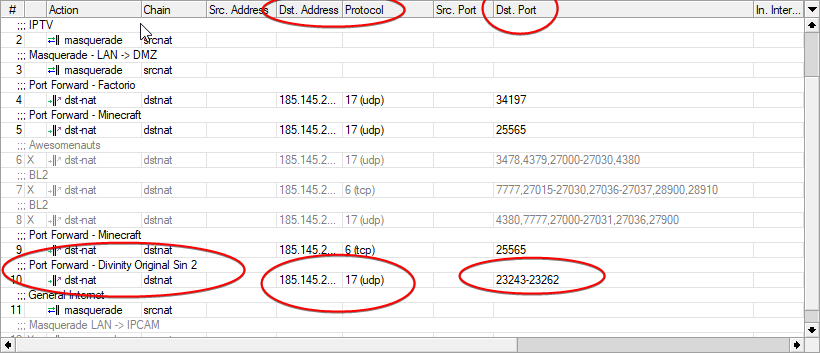
this is kinda what you tell your router ^
each router has this differntly
but what you need to know to do this is the following:
- You need to know what ports and what protocols each port needs
- You need to know the IP address of your local computer, usually starts with
192.168.*.*or10.*.*.*
so usually internet says when you google
port 25262 udp/tcp (just making it up)
that means it needs that port, on both udp and tcp forwarding, and you can usually find this in the router
gloomy plover
Do I need to make my computer's IP static?
tame carbon
@gloomy plover thats useful yeah, or if your DHCP server can do mac binding
makes it a bit easier
called static dhcp
gloomy plover
Okay.
tame carbon
where dhcp server always gives same IP for that mac address
peak cloak
yep, if doing static ip on the computer itself make sure it's not in the dhcp range
tame carbon
yeah ^
gloomy plover
what is dhcp?
tame carbon
@gloomy plover its a network protocol that your computer uses to get an IP address and DNS information from the router
gloomy plover
Ah right
tame carbon
its like a way to 'connect' to the network by automatically obtaining network configuration
its really simple
the device broadcasts to all devices "Hey I am here, looking for network configuration"
and the DHCP server responds with an offer
gloomy plover
Got it.
tame carbon
@gloomy plover try and find the port forwarding configuration in your router
and screenshot it
you were on xbox or PC ?
gloomy plover
I'm using PC.
tame carbon
with steam or not?
gloomy plover
Steam yes
 gloomy plover
Basically all my games are played through steam, excluding Modern Warfare which is Battlenet launcher and GTA5 which is Rockstar Games Launcher
Wait so am I disabling uPnP?
and then port forwarding that?
tame carbon
yes
upnp is a security risk too
it allows any program to open a port to listen on
ehh
you have no idea how many public IP cameras are connected to the public internet
because they use UPNP
Insecam.com - the world biggest directory of online surveillance security IP cameras. Watch live street, traffic, parking, office, road, beach, earth online webcams.
.
@gloomy plover just saying, this kind of shit happens with smart home devices
Take a look at that website
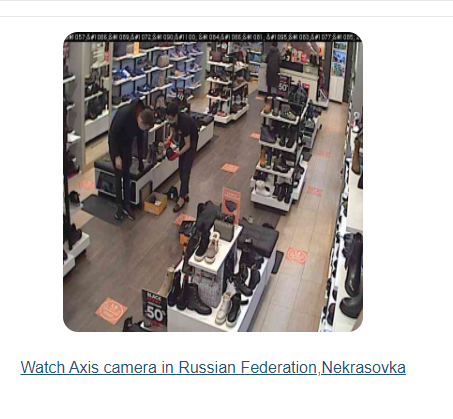 gloomy plover
what tf
tame carbon
There's a whole bunch of cameras in some kind of russian factory
gloomy plover
is this all real time?
gloomy plover
Or any smart devices.
tame carbon
it basically opens a port
and if it has default password
it stops nobody from just scanning every single IP and port
for a repsonse
peak cloak
there are many many bots just scanning the internet for anything open
tame carbon
yeah
internet background noise
I have it ok, I have around 200kbit/s noise
at home
my server is lot worse
peak cloak
oh yeah on my public azure server (when I had a free trial for students) you could see the many many failed ssh logins
that's why you use keys and fail2ban
tame carbon
lol
I just use keys
fail2ban effort
fail2ban just reduces load
keys are secure enough
tame carbon
its so much easier
let me give you the magic command
ssh-copy-id user@host
prompts you with a password
and then copies your public key and disconnects
then you can disable password login
peak cloak
oh, it also copies the key?
tame carbon
yeah if you have done ssh-keygen
it just copies ~/.ssh/id_rsa.pub
into the ~/.ssh/authorized_keys
peak cloak
also, quick question how do I permantly modify resolv.conf on ubuntu. I've looked online and nothing worked
tame carbon
eeeeeee
apt install resolvconf
modify /etc/resolvconf/resolv.conf.d/head
and then restart the daemon
service resolvconf restart
in that file you modify
nameserver 8.8.4.4
nameserver 8.8.8.8
this fashion
peak cloak
well, I can't resolve ubuntu servers so I can't apt install
guess I need to manually download and transfer the package
never did that
gloomy plover
Do I need to concern myself with any of the above?
peak cloak
no
gloomy plover
Alrighty
tame carbon
@peak cloak you wat
@peak cloak you can manually modify the resolv
update packages
peak cloak
nevermind I manually edited resolv.conf
tame carbon
dont make a frankendebian
peak cloak
yeah
lean pebble
peak cloak
well, I can't resolve ubuntu servers so I can't `apt install`
Common issue while using networ-manager service
You need to edit your dns from network-manager if it's GUI if not I always prefer editing the network card and add DNS1=1.1.1.1
DNS2=1.0.0.1
Then restart the network-manager service
peak cloak
idk if rasp pi imager has centos
peak cloak
I used ubuntu vs raspbian because I don't have a moniter hooked up, plus I have the lite version so no desktop installed
ubuntu server has ssh on by default
raspbian doesn't
lean pebble
Oh

The DNS nameservers (resolvers) are servers which are used by other devices to perform DNS lookup for a requested domain. In this guide, we’ll explain how to configure the DNS nameservers (resolvers) on Ubuntu 18.04.
unborn sluice
peak cloak
raspbian doesn't
You can config it while installing
peak cloak
no, I just want to pop the sd card in, boot and ssh into it
unborn sluice
That can work
peak cloak
really? how
 peak cloak
oh one google search and I found it
For headless setup, SSH can be enabled by placing a file named 'ssh', without any extension, onto the boot partition of the SD card
unborn sluice
You can make it connect to WiFi using the wpa supplicant then add ssh file.
So pretty much pop it then it would configure itself while installing
peak cloak
I have ethernet so that's not an issue
unborn sluice
int 10h
lean pebble
Not yet 😅
unborn sluice

peak cloak
lean pebble
Pi3?
I think, let me check
lean pebble
Need write an answer to my homework 😑
peak cloak
Raspberry Pi 3 Model B Rev 1.2
lean pebble
Assembly is nice but headache
peak cloak
never used assembly
lean pebble
It's not a typical programing language 😅
peak cloak
I watched some ben eater videos on it
lean pebble
It's command language
peak cloak
yeah I saw
 lean pebble
I'm wondering who is the person who willing to make a game in tho language
😆
I heard about ppl the destroyed their pcs with it
lean pebble
I'm at the beginning
unborn sluice
lean pebble
I heard about ppl the destroyed their pcs with it
You can destroy your pc on anything
It's jus that assembly is for more lax and you're on your own
lean pebble
I need a robot that will give my dog 🐶 food 😂
unborn sluice
Arduino
peak cloak
arduino makes microcontrollers easy
lean pebble
unborn sluice
You can destroy your pc on anything
They change the first bytes of the disk and screen
When you click on the screen power cd-rom open and when you click on cd-rom button the screen turned on
unborn sluice

lean pebble
😂
lean pebble
unborn sluice
Arduino
It'll take my dog 🐶 for a walk?
lean pebble
unborn sluice
<:monkaHmm:709290071869882398>
So make my homework in assembly
tame carbon
When you first boot a pi
just run raspi-config

@peak cloak touch ssh yeah
you can also do it in the /boot/config.txt
there's a flag you can set
peak cloak
yeah i've done raspi-config before
just that I don't feel like hooking up a moniter to it
I'll change my os to raspbian and do that ssh thing
tame carbon
but yeah just drop a file in the /boot
called ssh
its just a small kernel module that does that
after boot it looks in the /boot/ directory and checks if that file is there, enables ssh
I rarely use pi's for video output anyways
Its easier for me to get 'video' output on a headless switch or router
now I need one of those RJ45 to DB-25 adapters
for real oldschool stuff
peak cloak
I have an rj45 to de-9
tame carbon
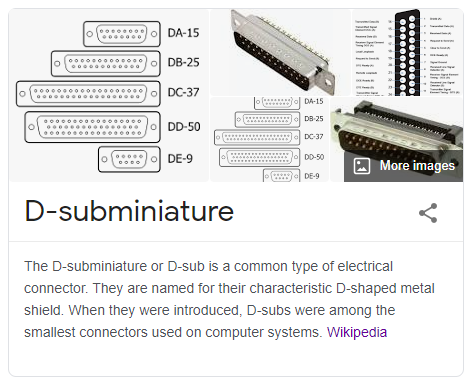
thats most you ever get out of that
old terminals had bunch of other pins
@peak cloak see https://i.imgur.com/jHPQMvA.png
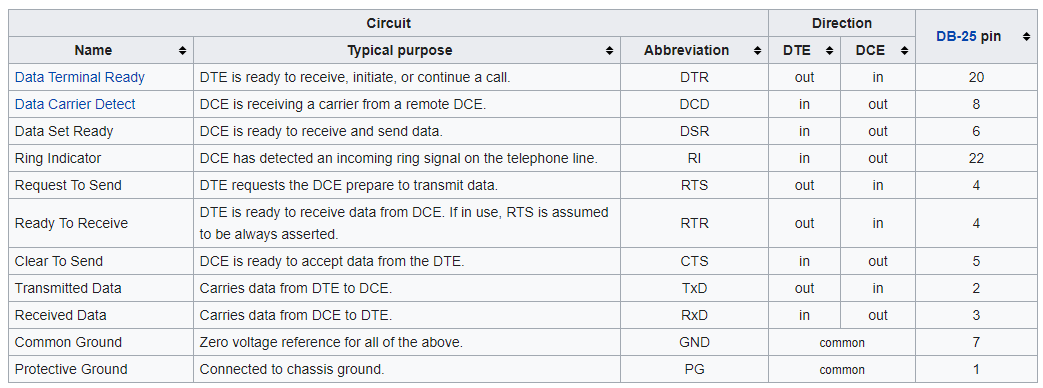
DB-25 is full spec
for all of RS232
 peak cloak
also while I'm here, anyone know of a way to turn a chromebook into an ip cam
peak cloak
VLC runs on chromebooks?
peak cloak
nevermind, you can get it for chrome
tame carbon
even the android version can do it
peak cloak
because my brother wants to use his school chromebook as a webcam
he got minecraft to run
very badly though
peak cloak
he doesn't have a phone
tame carbon
rip
peak cloak
still young
peak cloak
yep
tame carbon
all these noob streamers can set this up somehow
peak cloak
it's a plugin
tame carbon
couldnt be hard
peak cloak
OBS Forums
NOTE: The horizontal flip option is bugged and will likely cause crashes. Please do not use it. If you need to flip your video, either flip the sources in OBS itself, or flip on the receiving end (i.e. in Zoom, Skype, etc.)
This plugin provides...
peak cloak
oh yeah vlc is powerful
tame carbon
and can do hardware accelerated processing
in realtime
@peak cloak a personal favorite of mine
Music Player Daemon is a flexible, powerful, server-side application for playing music.
it has an API clients can connect to, to manage playlists, and search the library
and you can set the output to go either to a speaker with pulse
or
you set up your own sink
and pipe it into icecast2 :)
so you can stream your music
peak cloak
I have some good bose speakers in the living room I want to IOT
tame carbon
icecast2 locally, if you crank up the quality
you can stream 320kbit
with 100ms or less latency
depends on how small you can make the buffer
internet radio, lower quality, higher buffer, (1-2 seconds)
@peak cloak many hifi systems have a LAN port on the back these days
they can stream internet radio directly

This is a fork of MPD
which unifies multiple music platforms into a single experience
like Soundcloud, Spotify, but still be able to have your own local files
There's mpd clients for every operating system and phone

MPDroid allows you to control a MPD server (Music Player Daemon) and stream from it (MPD >= 0.15 required)
Known bugs :
http://github.com/abarisain/dmix/issues
MPDroid's icon uses a modified icon from the Material Design Icon pack, licensed under Creative Commons' Attribution 4.0 License.
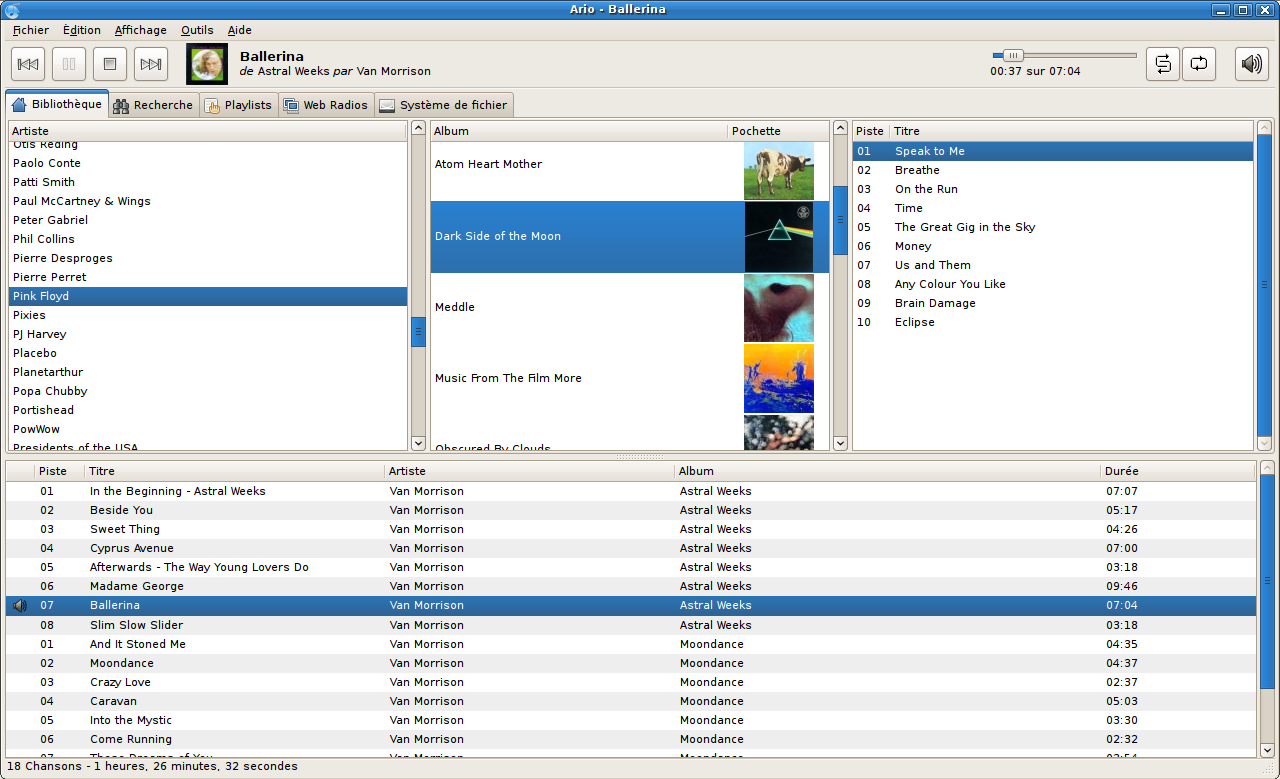
I use Ario-player on my laptop
its another mpd client
@peak cloak the nice thing with these is, that many old smart home speakers can be hacked with this
if you can get root access
you can reinstall the kernel image and set up your own software on it that just streams from lan to the speaker
no need for spotify connect
peak cloak
oh nice
tame carbon
its just a network stream
and icecast2 just uses http
@peak cloak pretty sure that even vlc can directly stream to icecast
icecast is a radio server
peak cloak
let me find the exact bose model
tame carbon
it basically multiplexes the connection
oh cool
they have windows support now for the noobs
@peak cloak this is one of the technologies that streamers use if they stream on both yt and twitch
they basically set up their system to stream to icecast
and then have 2 or more viewers that forward the stream to the content networks like yt or twitch
peak cloak
ah ok
these are the speakers
bose wave radio IV
it has some sort of bose connect thing
I wonder if you can exploit it
tame carbon
@peak cloak screw that noise
get a pi zero, plug a usb soundcard into it
and use the aux input
tame carbon
is it the W variant?
@peak cloak I'm not that certain how well hubs work on them
you may need another usb port for a network controller
but we're not streaming 4k video here
just 320kbit audio
so probably fine
peak cloak
yes it's the Zero W v1.1
tame carbon
@peak cloak so either wifi or cable
peak cloak
one usb port
tame carbon
and then just plug any ol usb soundcard in
peak cloak
gpio could be used for ethernet?
tame carbon
drivers are in kernel anyways
@peak cloak in theory yes
10M
at the most
but i think even that is pushing it
tame carbon

Small breakout board for the PIC Microchip ENC28J60. Contains all the necessary hardware to implement an Ethernet interface including the isolation transfo
peak cloak
and ethernet
peak cloak
really
tame carbon
well, I'd use a regular pi
lean pebble
I have zero Pi's
tame carbon
in this case
full size usb ports
and network adapter
if you want to stream, best as little latency as possible
@peak cloak was cool at this houseparty of friend of mine
he has similair setup
except, backyard, living room, and the adhoc arcade we built upstairs all had same music
and eveyrone could add song wishes to the playlist on their phone via wifi
low latency, music was same everywhere
peak cloak
oh that's cool
tame carbon
@peak cloak could use bluetooth, or something else, or a phone that connects to the stream
and then has 3.5mm output
peak cloak
do you know what software he used
tame carbon
mpd, samba for network shares (to add mp3 files) and icecast
same setup I did
he ran this on his nas
and everything else just used local network to sync up
icecast protocol is widely supported
the piping from mpd to icecast was with pulseaudio
tame carbon
@peak cloak so MPD has a web API

ok this is in russian, but you get the idea
xD
 peak cloak
ah ok, so you can write a custom app for it
tame carbon
its all opensource
this is Ario-player ^
when you first open it
it asks for IP address of the mpd server
and a pw optionally
then it shows all your files
mopidy also uses MPD, and is also supported by mpd clients
but it has support for spotify connect
so it can act as a spotify speaker
so you can use stream spotify through mpd

GitHub
A modern MPD Client for Android. Contribute to abarisain/dmix development by creating an account on GitHub.
Take a look at these screenshots
there's some amazing clients out there
peak cloak
oh that's cool
tame carbon
@peak cloak if you have a well maintained music library
this is a pleasure to use
the way you manage the files
is just through a network share
so it presents it self as a nas
but its in reality just a local directory
its just, mpd music library is the same as the samba share
or
you have a server with this
and then just mount your own NAS as a folder in linux
and then tell mpd to use that one instead
though mounted networkshares are sometimes annoying, because the host OS cannot do filewatching in the same manner
causing issues when new files are added, the client doesnt get notified
they probably have a workaround for this
can probably set a lower timeout
sshfs is preffered, its just amazing
its secure and incredibly ez to setup
it just taxes your hardware a bit
peak cloak
interesting
tame carbon
sshfs is a FUSE filesystem driver
peak cloak
I just want to be able to play music on the speaker though my phone
tame carbon
Filesystem-in-user-space
and its backed by a network driver, that just implements a data pipe over SSH
ssh can do more than terminal
you can forward ports, or set up file datastreams
lemme see here
what that library I used can do
 peak cloak
@tame carbon apparently vlc can't stream on the chrome version
tame carbon
bollocks
tame carbon
I usually google
and try the github results
@peak cloak the trick with acurate google search results
is to install a search filter browser extension
to get rid of all the noise from quora and other stupid sites where normies ask and normies answer
 dry moth
can someone please send me an infinite budget best pc parts list that is a ryzen build if so pls dm me the list
tame carbon
wrong place bro
 coral stump
boo this man
hollow marlin
##networking where its 95% server and 5% networking
waxen saddle
To be fair, it's hard to have a server without networking.
peak cloak
We use networks to connect to servers
 waxen scroll
@hollow marlin low effort
waxen scroll

tame carbon
0% windows



 unborn sluice
but why
next thing I would hear is intellij building their own os for developers
but rn, it's not that surprising

lean pebble
I love ssh
lean pebble
tame carbon
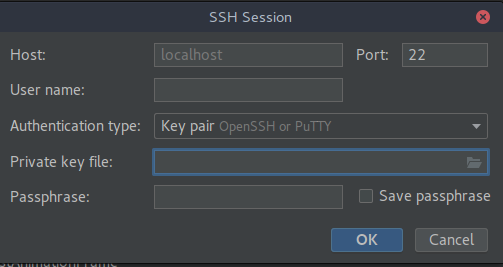
intelliJ now has a built in SSH client
Good option
lean pebble
unborn sluice
but why
They added it for working on code that you have on your server.
Like vscode that you connect via ssh to your server and directly program it there instead upload everytime.
lean pebble
Faster man
tame carbon
sshfs is easier
lean pebble
Nah
lean pebble
Ide is faster because you're working directly on your server
unborn sluice
lean pebble
They added it for working on code that you have on your server.
Like vscode that...
tbf I like vscode better for this remote development
unborn sluice
lean pebble
Ide is faster because you're working directly on your server
wait what

lean pebble
I just started to use vscode had some trouble with it
I'm working directly on my server without mounting anything in my pc
tame carbon
my personal gameserver:
crystal@watomat ~ mkdir server
crystal@watomat ~ sshfs crystal@192.168.88.249:/home/crystal server/
crystal@watomat ~ ls server
basic-install.sh btest-opensource docker-compose.yml Downloads eternal factorio factorio_vanilla_september.zip gitea minecraft MODDED MADNESS.zip mod-settings.dat mods.tar.gz piholepw
check this out ^
mounts a remote directory into a local one
lean pebble
I don't like it.
I have shitty network so no use for me man.
My LTE is much faster than my home network
lean pebble
Are you sure ?
Because I don't see any mount to my server on my pc
It's more like rsync
tame carbon
rsync is something else
@lean pebble sshfs creates a virtual filesystem, that is backed by SSH
so you can access files as though they were local
lean pebble
But it's not mounting anything so and not doing rsync.
Working on the directory remotely
tame carbon
rsync is just a copy/synchronization tool
cannot be compared to sshfs
sshfs is a filesystem driver
lean pebble
I use only for studies web development, usually I'm just working directly on my server via ssh
lean pebble
tame carbon
sshfs is a filesystem driver
I know
I just don't think vscode use it or rsync