#networking
1 messages · Page 202 of 1
 sinful musk
 little schooner
@sinful musk yes, PTP antennas like unifi nanobeam
@sinful musk https://www.ui.com/airmax/litebeam-ac-gen2/ and

The LiteBeam® AC is an ultra-lightweight airMAX ac CPE device with incredible range and disruptive pricing.

Incorporating innovative industrial design with proprietary airMAX® ac technology, the NanoBeam® AC is ideal for CPE deployments requiring maximum performance from the smallest possible footprint.
sinful musk
@little schooner I was thinking a bit smaller and cheaper
sinful musk
It's too far for mesh to work well, and too short for the nanobeam stuff
But thanks anyway @little schooner
little schooner
Np
 spare bay
ethernet cable between the windows lol
little schooner
Wireless copper runs
spare bay
low latency smoke signals
 thick minnow
colour-coded flares
 hollow marlin
@sinful musk Cheaper that $65 (2) for a 1km+ PTP wireless link? Mikrotik SXTsq 5 ac are $10 cheaper but I am not sure what expectation you had on getting a signal over a km away
hollow marlin
Oh if its only 20m thats nothing for nanobeams
sinful musk
I know, i was wondering if there was anything that looked like for example the google nest cameras.
 sinful musk
What???
 honest wharf
I know, i was wondering if there was anything that looked like for example the google nest cameras.
@sinful musk The smallest you are going to get is probably nanostations
Loco
sinful musk
Thanks, I'll check it out
Is that plug and play or do you have to set up firmware and stuff? @honest wharf
 peak ibex
does anyone know how to change the mac adress of a usb to ethernet adapter for a raspberry pi? ( two adapters have the same mac adress basically so bothered devices get assigned the same ip adress)
both*
honest wharf
@sinful musk no you have to set it up but there are plenty of videos online eg crosstalk solutions

In this video, I create a point to point wireless bridge between a Ubiquiti LightBeam AC and a NanoBeam AC using only the UMobile app on my iPhone.
Amazon affiliate links to the products used in this demonstration:
LightBeam AC: http://amzn.to/2meRxx3
NanoBeam AC: http://am...
sinful musk
Oh, thanks
honest wharf
Feel free to PM me if you have any questions and I will do my best to answer them
peak ibex
does anyone know how to change the mac address of a usb to ethernet adapter for a raspberry pi? ( two adapters have the same mac address basically so both devices get assigned the same ip adress)
sinful musk
Is there any smaller alternatives than the nanobeam?
little schooner
@sinful musk okay
How about the AC mesh wireless access point?
Point the antenna over in the direction of a 2nd ac mesh
sinful musk
Thank you, I will take a look at that
@little schooner How do you point a thing with antennas?
Nvm
 charred meadow
Could you put a cable in the ground?
sinful musk
I think that is more expensive
And then we'll have to lay a cable around the whole house
 vapid dune
o.o
what are you trying to connect?
a long cable is certainly cheaper than any decent AP
sinful musk
Its a lot easier though
vapid dune
and less reliable than a cable
sinful musk
I'm trying to connect the main house and a smaller one
sinful musk
No
vapid dune
how does the smaller place get power?
vapid dune
o.O
sinful musk
I have some planning to do
vapid dune
lol
you were just going to beam power over?
what is this like a treehouse you want to put a computer in
sinful musk
Probably
vapid dune
(it's not possible to beam power yet)
sinful musk
Havent you seen the ltt video
I think its him
I can find it

Buy the Thermaltake View 37 case on Amazon at http://geni.us/0HJ69
Learn more about the Thermaltake View 37 case at http://geni.us/3tAR6a3
Check out CableMod's Global Configurator at http://geni.us/7acBzPm
Check out CableMod's EU Configurator at http://geni.us/7qMLnpe
Learn ...
vapid dune
lol. good luck with that
sinful musk
Haha, ortal alpert
thick minnow
G'day guys, I just started using powerline networking to replace my shitty wifi, i'm wondering what type of test I should run to look for errors in the connection
Curious to see if when the house is under load, how to affects the network
Just connecting the one PC to the router through it right now, no heavy data transfers or anything
 autumn drum
Hey there everyone, folks on tech-chat recommended this channel
I'm looking for a WiFi repeater that supports 5 GHz and manually choosing a specific channel instead of blindly following the host router's channel. Any suggestions? I searched for a bit on Amazon and I went through multiple recommendation lists online but I can't find anything that fits this category.
 wise bluff
Does anyone know how rail compatibility works with server chassis?
I'm trying to find something to mount this (because I don't think you can do it by just the ears?). Other chassis I own had specific rails for them.
https://www.skycomp.com.au/image-eye4807-19-4u-rack-chassis-7-bay1515-463508.html
 autumn drum
@vapid dune I don't really need a whole new router, so a repeater works fine for me
I can also get an access point but the extra repeater functionality would be amazing
vapid dune
I would get a wired access point over repeater any day
autumn drum
@vapid dune Do you have a recommendation for a good 5 GHz one?
vapid dune
if you aren't looking for the top performance, try the ubiquiti ap-ac-lite
autumn drum
@vapid dune This looks good, but I'm not sure how does PoE work. If it requires support from my original router, I doubt that it will work. Can I somehow use a power adapter for this thing?
vapid dune
some of them come with the PoE injector so no problem there
it should say if it does
ah looks like the 1 pack does come with one: https://store.ui.com/collections/unifi-network-access-points/products/unifi-ac-lite
the 5 pack is the one that doesn't have any
autumn drum
I'm looking at this right now actually: https://www.amazon.com/Ubiquiti-UAP-AC-LITE-802-11ac-Gigabit-Dual-Radio/dp/B01DRM6MLI/ref=sr_1_2?dchild=1&keywords=ubiquiti+ap-ac-lite&qid=1595259384&sr=8-2
I'm not based in North America so my shipping options are a tad limited
Reviews say that this one comes with a PoE injector. Just checked a setup guide on youtube, looks amazing for my use case
Just one more thing to figure out: does this require a specific ethernet cable version?
spare bay
those aren't repeaters
autumn drum
Looks like it needs CAT6. Also, PoE should work with 220V, but I can find one that works for 220 if the one that comes with it doesn't work
@spare bay Yep, that's an AP, but it should work for me as well
spare bay
actually maybe it has a repeater mode
no it doesnt
If you have the budget, you'd probably be best off grabbing two, and replacing the AP of your router too
autumn drum
Actually I just checked something, I can just get myself a 5 GHz router for a cheaper price
spare bay
what are the chances you have a relatively recent tplink router?
spare bay
Well, if you do they have a cool mesh feature which all manufactures should add
vapid dune
I mean depends which router but my experience with consumer ones is that the wifi dies out within a year or two
...mesh? why mesh
just use wired.
autumn drum
It's a small apartment, I don't really need mesh
vapid dune
mesh has limited applications
spare bay
presumably it allows for a wired backhaul
spare bay
but there's nothing wrong with mesh for people who can't run wires, better than nothing
vapid dune
that's just a shotgun of APs
autumn drum
single story, brick
vapid dune
interior walls also brick?
spare bay
I mean mesh in the sense of only having one wifi network
autumn drum
yep
vapid dune
ah no wonder you're having problems
autumn drum
4 stories building tho
(hence the interference)
I have like 15 wifis in my vicinity, it sucks
autumn drum
I keep manually changing channels, hence me wanting to move to 5 GHz
vapid dune
oh I see you don't have any 5Ghz?
vapid dune
ah I see
autumn drum
3rd world countries
spare bay
It seems like you want to disable the wifi radio on your current router and just use a proper AP
autumn drum
So I'm basically looking for the cheapest and most accessible 5 GHz option
Yep, all my devices support it
vapid dune
however. 5Ghz is lower penetrating power
autumn drum
@spare bay That's what I was thinking, but I can just grab a new router for even cheaper
vapid dune
so you'd have to try it out to see how it is
I have 1 AP for my entire place. it's 2 stories but wood framed
autumn drum
@vapid dune I figured, 5 GHz hotspot on my phone and such, but yea, we'll see I guess
vapid dune
I mean that's not even close to a real AP
autumn drum
Yep, that's true
spare bay
archer c7 is the cheapest I'd spend on a wifi router
autumn drum
(BTW, quick question, are router WAN ports standardised?)
vapid dune
I don't know what you mean by that
 spare bay
you'll be better off with a dedicated AP though
autumn drum
@spare bay Hmmm, I don't think I need that much power
I mean, my internet's connection is 30 Mbps anyway
so there's no point behind getting something so expensive it just won't work
spare bay
it's more about reliability and not having it shut off every week for random reasons
spare bay
It will be more reliable
with the downside of being more of a setup
It's not the best option for everyone
autumn drum
(Also, checked the port, I need a DSL router, which is different ._. )
spare bay
So you'll probably want to put your ISP box into bridge mode
and then just plug a new router into it
if you go with a router
or you can disable the wifi and plug in an AP
looks like theres consumer focused APs as well
autumn drum
Yep, I found this while googling
spare bay
might be a better option than ubiquiti for someone who doesn't know as much
but I know nothing about them
APs often require a controller
a router is probably the easiest option, an archer c7/equivalent is my recommendation as I said earlier
autumn drum
"Controller"?
I mean, you only need DHCP and a WiFi broadcaster. DHCP from the router, and that's it
(AFAIK)
spare bay
Ubiquiti APs either need software running on a computer or a cloud key that runs the software
vapid dune
the ap-lite doesn't necessarily need a controller
you can use the phone app for setup.
vapid dune
or you can use the controller once to setup on a computer, and then shut it down after
it doesn't need to be running if it's a simple ap
autumn drum
Are you talking SDN controller?
Because that'd be... interesting
I'm a networks guy but I very rarely mess with hardware
Okay I think I'll pull the trigger on the TP Link one
Just one last question (I promise) how do I know that a specific ethernet cable supports PoE?
 quartz tusk
shouldn't they all support it?
autumn drum
I'm not sure, I have no idea, that's why I'm asking 😦
spare bay
any standard cable should
 distant wedge
 shell dove
hello, i know close to nothing about networking, but my internet is slow and it should be better, f.e. whwn starting a steam download it starts at 3,5mb\s and then declines to 1,3mb\s. was just wondering if somebody knows if its a symptom for something thats easily fixable
little schooner
@spare bay even a dsl cable?
spare bay
you mean a phone cable?
little schooner
Yes
spare bay
it wouldnt really be PoE since it's not ethernet
spare bay
there might be a standard for power over phone cables though
shell dove
he says he pays for 35mb\s internet
which should translate to 4,3mb\s download speed
but ive also heard that internet speed overall in whole village has been slow during covid
 latent badger
Please know the diffrence between mb, mB, Mb and MB.
Did you mean millibits? Because thats what you wrote. Mb and MB is diffrent by the magnetude of 8 (1 byte = 8 bits)
Everytime someone writes millibits, a packet gets dropped and TCP handshake fails. 😂
 waxen scroll
MB is MegaBursts... the network interface actually bursts signals about once per second so the device on the other side of the link can talk near the same time without collisions
obviously you want a card that supports high megabursts
thick minnow
Hey, so my Ethernet card might arrive tomorrow, thing is I don't know how to install it. )
Is it as simple as replacing a GPU, where you just take out the old one and plug in the new one?
 primal ice
yes - power off the machine match the ports up (pci or pci-e) plug in the card secure it with the screw and then power on the machine.
thick minnow
Alright, cheers!
 kind sky
can someone plz tell me if im the dumb one or these ips scammers sometimes
had shit internet for months tried top figure out why and finally went to my cables traced it through walls etc the guy cut an old phone line tied it with the ethernet cable to an old phone box we had from a while ago like is this a normal practice or what
little schooner
@waxen scroll idk who asked, but I believe this was the programming part in my digital circuits class
waxen scroll
cute
 latent jacinth
Does anyone know if a router connected to a repeater (wirelessly) can intefere with it? Might be a stupid question, idk
 paper plaza
@latent jacinth interfere with the repeater? in which way? like, as a router, it shouldn't interfere with routing other than the tables dictate, but wirelessly, I would think it shouldn't be interfering unless the repeater is using the same rf channels?
latent jacinth
They use the same channels
They're on channel 1
The blue one is my repeater and the green one my router
@paper plaza do they interfere or am I wrong?
paper plaza
They shouldn't but it will cut a portion of your bw, I'm just searching for a good wording
reddit
2 votes and 11 comments so far on Reddit
latent jacinth
Thank you very much! I was looking for something like this but didn't know how to write it
I'm working on a small document to prove my parents that LAN is better for me. Sounds ridiculous I know
paper plaza
Well, I can tell you that a wired connection is always preferable (while not always practical) to a wireless connection if you're dealing with fixed locations
vapid dune
a document o.O
little schooner
@vapid dune might as well just show ping times wired vs wireless on a nice graph and parents will see "ahhh, yeah it is lower. Well son/hon, I'm sorry if I ever doubted you"
 unkempt sinew
Is there a way to make my phone always have fast wifi when i am on my 5g internet it keeps going from 60mbps to 0.1mbps is there a way to fix that problem
shell dove
i know the difference between bites and bits, im sorry, i thought its gonna be obvious my download speed isnt litteraly 1,3milibytes\second
little schooner
@unkempt sinew 5g is very narrow band and doesn't like obstruction. It will be hard to guarantee its fast speed all the time
little schooner
I don't know if I am google searching for the right thing, but, is it possible to VLAN tag a WiFi adapter that is connected to a WiFi Network that is already being tagged at the AP?
similar to how wired network connection can tag multiple vlans on a single cable
hollow marlin
@little schooner Without having a new SSID you cannot single out a MAC to be tagged differently then other clients. If you pass it through the AP untagged there is some wack-ass configuration you can do to let the switch handle that
 nova ferry
is it possible for the power supply of a router to stop supplying sufficient power??
vapid dune
@little schooner if you use a radius server you can with ubiquiti APs at least. I use mac assigned vlans for my wifi. not the best but better than nothing
thick minnow
Hey, so I installed the PCI-e, updated the drivers did it all, and I'm still getting shady internet.
..Now what?
thick minnow
Teehee, but yeah, really bad internet.
Supposed to get 2.5MBps, getting around 1-100kbps.
vapid dune
have you tried connecting directly to the router/modem?
thick minnow
Yeah, I've always had my computer connected directly to them.
thick minnow
I've basically all of that, none worked.
vapid dune
yeah I'd phone the ISP at that point
thick minnow
The ISP says it's fine, I've switched like 3 cables, I've got a new router/modem..
vapid dune
what do you mean, did they come out to test it?
my ISP sends out a guy and they want to see a speed test result lol
like performed live
thick minnow
They confirmed that we're getting the 2.5MBps that we should be- I've been over this before in other convos, you can probably find them by using the search bar )
thick minnow
But y'know, everything else says otherwise. )
I don't know, and that's why I'm here.
thick minnow
Nothing.
vapid dune
???
thick minnow
Came back from vacation and it's like this.
vapid dune
are you downloading something?
watching a video?
how are you measuring the speed?
...then how do you know it's slow
I mean if it only became slower after you got back. I'd phone your ISP to ask
thick minnow
I know it's slow because it takes 6 minutes to boot discord.
Sometimes I can't even connect to the Steam friends network.
Spotify doesn't count me as online.
It takes 3 minutes to open any new webpage.
charred meadow
Are the other devices on your network getting the same speed?
thick minnow
They're getting worse than usual, but not as bad, no.
charred meadow
Do any other devices have an ethernet jack?
thick minnow
Not afaik, I have the only desktop in the house.
charred meadow
What you could do to test the connection speed of the desktop is to run an iPerf test. Which would test the connection speed to an other local device.
thick minnow
Alright, what would that tell me?
charred meadow
It would help you find where the bottleneck is.
It's like running a speedtest but it's local.
Here's a tutorial on how to use it. https://openmaniak.com/iperf.php
vapid dune
it's probably on the ISP side
thick minnow
I've already talked to the ISP.
vapid dune
charred meadow
He said some other devices are getting better speeds.
vapid dune
like full speed?
thick minnow
Maybe, but the vertical "connection bars" aren't at max.
I haven't noticed any issue with my phone, to be honest.
vapid dune
o.O you're testing on wireless??
vapid dune
wired vs wireless?
charred meadow
Is the desktop maybe using wireless by mistake?
thick minnow
My computer's hooked up to the router / modem
I've never considered that.
How do I check?
Alright, control panel says it isn't wireless.
Or rather, that wireless isn't currently enabled. )
I don't know what exactly it could be, we went on a vacation and when we came home my computer was like this.
charred meadow
What link speed is being reported for ethernet?
thick minnow
I'm not too techy, in laymans terms please?
little schooner
@vapid dune @hollow marlin thanks for your feedback
Yeah I think I'm sticking with whatever vlan tag the Ssid provides
I could always just make another one and enable temporarily
charred meadow
The speed that is reported under network apdater status in control panel. At least I think that's where it is.
It's the speed the computer negotiated with the device the ethernet is plugged in to. It does not mean that the network connection will be that speed but if it's low it could be a cable issue or with one of devices connected to the cable.
thick minnow
Well.. I recently got a new router, and new cables, so it's my computer, then?
vapid dune
I mean even if it negotiated 10 mbit. his connection is even slower than that isn't it
thick minnow
I barely get like 10kbps when downloading stuff via steam, yeah.
vapid dune
curious question, have you made sure you're not downloading (and other people aren't downloading) anything while you test the speed?
thick minnow
The speedtest on Ookla says I'm getting 2.5MBps, which is the funny thing.
At least it did last time I checked.. One moment
Says I'm getting around 2.2 - 2.5 MBps, yeah.
Impressively stable compared to how much my "actual" internet fluctuates.
thick minnow
Hm, so the War Thunder updater still gives me a solid 2.5MBps when the game's updating.
I really don't know what's up with that.
Everything else can be at barely 10kbps while the War Thunder updater just powers through installing an update at 2.5MBps.
hollow marlin
@thick minnow were you able to rollback windows update from the last time?
thick minnow
Oh, I actually wasn't able to.
vapid dune
oh yeah that windows thing that kills internet
thick minnow
How would I go about doing that again?
It might very well have updated while I was gone.
unkempt sinew
thanks @little schooner
vapid dune
@little schooner mac assigned VLAN isn't terrible ;p
I kinda wish it were WPA enterprise but not all my devices support it
hollow marlin
@thick minnow Look at a few youtube videos on entering recovery mode in Windows 10. You can enter system restore from there and an option to rollback updates
thick minnow
Aha, I guess I'll have to get Windows 10 first, then.
hollow marlin
Oh, not Windows 10?
thick minnow
I'll be heading off for the night, I've been awake for a bit over 26 hours now, sleep schedule's funky.
Yeah, I've stuck to 7 all my life.
hollow marlin
Oh if 7 I don't have an answer for you. Windows 10 update 2004 had a network issue for many people but it you are not on 10 then it doesnt matter
vapid dune
lol
little schooner
@vapid dune oh yeah Mac assigned vlan with WPA ent is an option I'd use too
But I'd have to set it up
vapid dune
it's pretty easy to do with freeradius on docker
little schooner
I'm trying to figure out how to prevent windows from sending any .localdomain DNS queries out to the internet
Something keeps trying to do that and i don't know how to disable it lol
like wth is this
Whatever that is doing, it's causing my files to experience a loading delay
I can't figure it out lol
vapid dune
that looks like Chrome
it tests random domains
try closing and opening up chrome again
if you see a flood more of them then it's that
little schooner
@vapid dune hmm okay. Yeah I did have chrome open
Is there a reason it tests random domains?
Oh that's probably how it knows to auto refresh the browser page when it detects your online again I suppose?
But then... It's testing for one's ending in .localdomain...
Hmm
 tropic sail
I was literally about to pull the trigger on a ring video doorbell this week when i decided to scroll through Ubiquitis website again since I have a few of their cameras

Ubiquiti Inc.
UniFi Protect G4 Doorbell is a Wi-Fi video doorbell with a built-in display and real-time two-way audio communication. The camera features a high-quality 5MP sensor with enhanced night vision. Image streams can be viewed in up to 1600x1200 (2MP) HD at 30 FPS. UniFi Protect G4 ...
Super excited they actually made one. That and a G4 Bullet where you can get 4k without the pro model. and only $200.
kind sky
Hey
need some quick help
do ethernet wall plates female to female slow down connection?
 clear igloo
not unless you broke a pin or something
kind sky
kk thank you
little schooner
I wouldn't support ring doorbell they don't take security seriously
 rocky badge
We have a nest lol
 steady berry
can we create a computer domain(WORKgroup) via windows 10 Pro??
 ornate jungle
No, you need a Windows Server OS to create and host a domain. You can join domains with Windows 10 Pro though.
rocky badge
workgroups are dead
vapid dune
Home group! lol I'm joking
 frigid sphinx
samba 😄

 mental topaz
Yo, so, I've got a first gen ROG Phone
Since this thing has WiGig, I'm considering a WiGig router or two, lol
What would be good options in your eyes?
waxen scroll
@rocky badge are they now?
what do you call that?
😘
@steady berry yes you can create workgroups in win10 pro
waxen scroll
homegroup isnt workgroup
rocky badge
Wait nvm he said workgroup
waxen scroll
idk why they'd remove it. easier to keep it in if you kept it in pro
rename it workgroup again
little schooner
@waxen scroll why is it that human relationships like dates are harder to get the ball rolling for but for computer networking equipment, they just plug into each other and hit it off for the rest of time?
Don't answer seriously lol
waxen scroll
....
its a very simple answer
protocols.
@hollow marlin what if juniper was a democrat and Cisco was a republican?
they wouldnt date
 stable warren
Question, what would you use if you had the option? 3 x Ruckus R510 or 3 x Unifi AP-AC Lite + Edgerouter Lite 3? (For home)
About 15 devices ranging from phones/tablets to laptops and such (later some lights).
The Ruckus stuff is just immensely powerful and has amazing coverage, about 200 devices per AP.
The Unifi/Ubiquity stuff has some really slick tools
 swift hornet
someone requested an $800 pc from me and i nailed it i guess- https://pcpartpicker.com/list/Gr3Ntp
waxen scroll
i turn those requests down
i need $2k+ budget from friends before i get out of bed
👀
waxen scroll
2080 Ti or no deal
thick minnow
anyone know of an alternative to openmediavault for a raspberry pi 4b nas
waxen scroll
Local storage
 thorny vector
@thick minnow Building your own. I know pydio can do aarch64, and local file shares are easy with samba and nfs
thick minnow
ok
thorny vector
@thick minnow If you're comfortable with sql, you can swap pydio for nextcloud
thick minnow
can pydio do encryption?
thorny vector
pretty sure it does. Or you can just do a full disk encrypt
thick minnow
ok
little schooner
@stable warren I liked the idea of using rukus aps it's just I didn't have the bank to afford them
And they already have wifi 6 access points for sale
When will ubnt do the same?
vapid dune
is there a great point in the wifi 6 ones at this point?
wouldn't it be better to wait for 6e?
 strange cypress
Is this network troubleshootinf
waxen scroll
also is networking a use it or lose it skill @little schooner ?
why?
nope, its a network topic channel
#tech-support does all troubleshoot
little schooner
@waxen scroll not for me because I can implement it at home and it serves a purpose for me.
Maybe the extreme technicality stuff, sure, but we shouldn't be shamed for looking into the docs for a refresher
Like I kinda forget how to tune eigrp
waxen scroll
@little schooner gonna need you to work at a place big enough to use BGP and modify metrics on it
little schooner
@waxen scroll yeah because the businesses I helped out at really only used NAT and router like pfsense or Cisco asa
No bgp stuff ever
Cisco only had a few exercises on bgp
little schooner
@waxen scroll yeah. Nothing in netacad on vrf
I'm missing out lol
Could just be that it's regulated to the higher levels of certs
waxen scroll
im not sure. probably in CCIE but i havent seen the new CCNPs yet
little schooner
I know that editing bgp in a malicious way can block internet access for an entire continent
waxen scroll
cloudflare.
waxen scroll
they did a basic edit to BGP and took down half the net
waxen scroll
and r/sysadmin is apologizing for them. ugh. users.
little schooner
Just until the next outage happens, yeah
@waxen scroll I finished my digital circuits class. I did all the calculations and it looks like i have enough points for a C or C-. I'm in the clear 😅
waxen scroll
wow.
little schooner
No more of that stuff
@waxen scroll the digital circuits prof said that this class was mandated for networking majors because it stimulates students to think more analytically and work out problems methodically. Not so much that it will be related to the field of networking
She did say some will end up repeating it
waxen scroll
and do you think that?
little schooner
I warmed up to the idea and sure enough, I see her point
At first I was blind to that
waxen scroll
all you need for networking is not to be stupid and use the OSI model as the troubleshooting logic
😄
idk about the whole circuits thing
little schooner
@waxen scroll x100 that
waxen scroll
before i even do a wireshark for performance issues i go to basics
little schooner
@waxen scroll like, I think it was yesterday, but I had an issue in File Explorer where every time I tried to play music files from the Onedrive folder, it was making DNS queries to fs1.localdomain for reasons unknown. I saw that because I used Wireshark
waxen scroll
link in the path flapping? interface errors? output drops?
little schooner
Hmm interface errors..
I'd have to check the netgear switch at site 2. I think it has some transmit problems
One time the whole unit lit up like Christmas light
Like it was softlocked
It feels too slow to be normal
I never really investigated it further. I just know that I dislike netgears HW quality
Even the dlink switch is made a lot cheaper and it never fails
@waxen scroll they do teach those troubleshooting steps stuff in netacad
Though on the netgear switch it takes forever to load
Just to see the dang stats
waxen scroll
  Last clearing of "show interface" counters never
  Input queue: 0/75/0/0 (size/max/drops/flushes); Total output drops: 0
     0 input errors, 0 CRC, 0 frame, 0 overrun, 0 ignored
     0 output errors, 0 collisions, 1 interface resets
     0 unknown protocol drops
basics.
little schooner
Oh that works on real HW only I think
Only one pipe if I remember
Referring to packet tracer limitations
little schooner
@waxen scroll I haven't had a need to simulate networking ever since I finished the class
hollow marlin
@little schooner Keep learning and lab with EVE, get that experience up
little schooner
@hollow marlin do you use the free version or the pro version?
hollow marlin
I have the free, about to pull the bullet for the pro. Some features in my larger labs that are just quality of life improvement
Free is more than enough
stable warren
@little schooner the Ruckus is nice but the 'controller' is rather minimal compared to the Unifi controller, and since i don't wanna pay monthly for this Ruckus is flashed with Unleashed. I have both here, 3 x Unifi and 3 x Ruckus R510, the Ruckus however has that FlexBeam stuff which works nicely.
But i also like that i could use the Unifi (USG) with the Edgerouter so i get complete insight to my network etc. maybe i just run both :P
little schooner
@hollow marlin alright
waxen scroll
@little schooner your next project is to make 4x IOS XR routers, turn MPLS on, then make 4 offices and make it so two offices belong to company A and two for B
hollow marlin
Don't forget RSVP LSPs over VPLS with each customer site tunnel L2 to each other with 4 stacked VLAN tags to cap it off
waxen scroll
triggered
hollow marlin

 valid sluice
waxen scroll
valid sluice
waxen scroll
y
swift hornet
isnt it a bit outdated
little schooner
Generic has a lot of things going for it
 ember phoenix
Hellu
I was going to change my ISP, any tips?? Like any questions i should ask them before i subscribe to them?
I only know the basic stuff about internet 😔
vapid dune
Just understand what kind of technology, how much you'll pay, what you'll get, and how much bandwidth
 jaunty talon
That's a very broad question also! :D Depends so much on where you live (City, Country etc)
 kind plinth
 somber granite
Any know of any modems/ Wifi AX routers that have 2.5gbit ports for LAN ?
otherwise I got my eye on something like this https://www.pccasegear.com/products/48567/asus-rt-ax3000-dual-band-wifi-6-wireless-router as I have yet to see a modem router with wifi six

PC Case Gear
ASUS RT-AX3000 Dual Band WiFi 6 Wireless Router available to buy online from PC Case Gear – Australia’s Premier Online PC Store.
at least not where I been looking, and I can just turn off al routing for the current router we have and use only its DSL port and WAN and let another router do the main job of traffic control such as this one
Other issue is if I replace the modem It needs VOIP lol
vapid dune
https://hackaday.com/2020/07/24/tinypilot-provides-kvm-over-ip-with-low-cost-and-even-lower-latency/
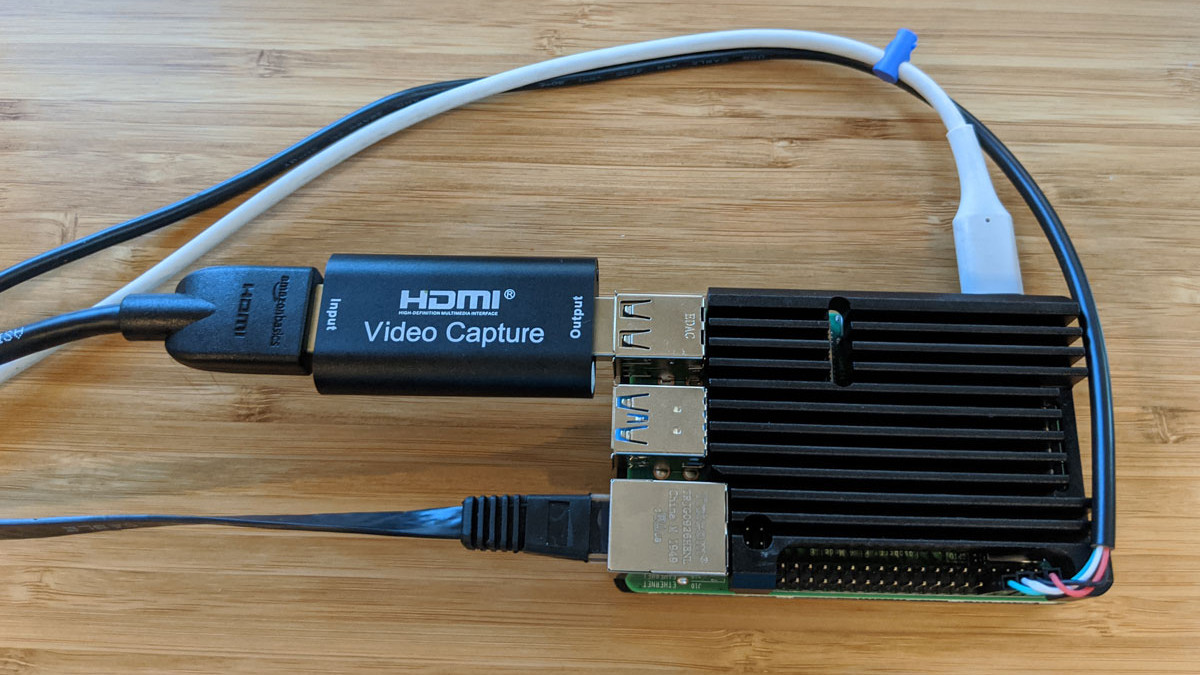
Remote access is great, but if the machine stops booting, ceases to connect to the network, or needs low-level interaction like BIOS settings or boot management, remote access is worthless because …
 minor rain
Heyo, so since the Cloudflare crash on friday, my internet has gone funky and cuts my discord calls and online gaming session in and out. Video streaming, downloading, and browsing aren't a problem. Internet access is still there, but the speed has been pausing and jumping when doing a speed test. Restarting the router and modem are only a temporary fix, if possible, a suggestion would be greatly appreciated.
vapid dune
o.O that's weird. it should be back to normal already
minor rain
I know
Restarting it has fixed it but only for a few hours, then again my set up is funky too
Also, anyone else have a PI-hole setup?
minor rain
I have mine in a Raspberry PI Zero w
How do you setup a false positive whitelisting for it?
vapid dune
lol
little schooner
@minor rain by being a programmer and writing an AI that can detect it for you.
Or do what I do and manually whitelist false positives and use lists that are conservative at blocking
minor rain
I've checked Firebog's list and some on reddit, I still have my daily functionality on my PC and phone. But Also wonder if that's what's causing my wifi issue.
little schooner
@minor rain temporarily disable pi hole and see if it corrects itself
Also pi zero w is extremely slow, I wouldn't be surprised
little schooner
Yes
minor rain
Ok, will do that.
little schooner
@vapid dune I vow never to buy an Intel machine again until they get their act together
There aren't as many ryzen mini pcs
I wish more existed
vapid dune
build your own? lol
little schooner
@vapid dune have a case the size of a nuc?
vapid dune
oh no not a NUC. I went with a Fractal Node 202
I mean there are some smaller cases if you look on aliexpress
little schooner
That's huge
Like this but Not like this https://www.bhphotovideo.com/c/product/1542360-REG/intel_bxnuc10i3fnk1_frost_canyon_i3_slim.html/?ap=y&gclid=Cj0KCQjwjer4BRCZARIsABK4QeUMNXjLf_IR0Fbi2wMa0e7E-1y0f-phq0jo8sm7uNSP89pITd8O2mUaAoyWEALw_wcB&lsft=BI%3A514&smp=y

Buy Intel NUC 10 NUC10i3FNK Performance Kit featuring 2.1 GHz Intel Core i3-10110U Dual-Core, 2 x DDR4-2666 SO-DIMM Slots (Up to 64GB), 1 x M.2 2280 Slot, Integrated Intel UHD Graphics, SDXC Media Card Reader, 1 x Gigabit Ethernet RJ45 LAN Jack, Wi-Fi 6 (802.11ax) | Bluetooth,...
waxen scroll
@rocky badge i almost bought a NUC for hass but they made it really freaking good with performance in the last month or so
little schooner
Its a good thing this server isn't directly exposed to the internet
somber granite
Nobody have an advice for what I could get for a Modem router or router combo
waxen scroll
@little schooner you're not supposed to in the first place
thats what a DMZ subnet is for
little schooner
@waxen scroll prof made a minor mistake and did not spec out at least 3 network ports to have a DMZ option
I want to buy the right one but we need grant money again
waxen scroll
you never got paid either
kind sky
welp outta options
guy tied my ethernet to phone box years ago a guy just camed to drill through wall fish cable and mad ea massive hole cable not in
no clue how to get ethernet to my room now the right way
and my moca not working idk why
vapid dune
o.O
can you say that in english?
who's drunk and moving this channel up and down lol
 stable iceBOT
Discord bugged up. My bad.
kind sky
@vapid dune i wanna die rn
i had atnt for years
but the guy took an old phone cable spliced it with ethernet and hooked it to a phone box
vapid dune
lol, it's okay the network channel is now higher than it once was @stable ice 😄
kind sky
so bascially I had a guy come out to fix this
but he made massive holes in the home and didnt do anything
vapid dune
oh I see. yeah he stole some pairs to do the cabling
kind sky
so now I have holes and no decent internet
I only have 1 coax in this room tha tneeds internet
I have xfinity now
I tried a moca it does not work idk why
little schooner
@waxen scroll covid messed everything up
@kind sky MoCA never worked for me it was all a lie with Comcast
@kind sky hopefully you didn't pay the guy right?
kind sky
@little schooner of course not
and their gonna pay for my walls
but here I am a donkey with no internet holes in my walls;(
little schooner
A comma, the word and, and a space before the face should do it
vapid dune
lol
little schooner
@waxen scroll I'll have to work on my motivation first before I start the real job
vapid dune

On Thursday long-time Slashdot reader PuceBaboon wrote: Ars Technica is reporting a new attack on unprotected databases which, to date, has deleted all content from over 1,000 ElasticSearch and MongoDB databases across the 'net, leaving the calling-card "meow" in its place. M...
little schooner
@vapid dune I guess they never learned their lesson
 wooden aspen
Longer better
thick minnow
tech tip: there is no tech tip
 prisma imp
Tech tip is expensive
 blazing solar
You can use a router as a switch right?
or well
daisy chaining routers
can you do it
somber granite
@blazing solar Yeah, not ideal but yeah.
You can also use a Modem Router, as just the Modem and disable the routing and LAN functions to pass thru the internet side via WAN into Router/ Wifi Router WAN port too.
To do the daisy chain you would have one router do the DCHP LAN and routing, turn that off on the rest and they should behave like a switch but modern routers and ones not too old may have a bridge mode of some kind to behave just like a switch so check for that first.
Newer stuff can behave in an AiMesh where it just becomes an extension of your existing network with compatible equipment.
blazing solar
yeah im gonna try to decrypt that
somber granite
Yeah I know they could just buy a switch but they asked how to do it with multiple routers.. which is fiddly to some extent not complicated but it does require prep work.
Personally I would have just gone with some extenders or switches
Nobody bothered to give me Router advice either for like 2 days now lol
So I jut got a TP-Link Archer AX6000
and going to use the exisiting Modem just for VDSL2 and turn off every other part of it, and use its WAN port to do what it is intended for, and to send the WAN over to a dedicated Router aka the AX6000
blazing solar
i mean I'm trying to use a retired wifi router to make the wireless network more stable ya know
the idiots who drew this house put the network stuff behind like two concrete walls
vapid dune
yeah more APs would help with that. I suggest you try to figure out where and how (wired preferably)
somber granite
@blazing solar If you own your home, I would suggest asking a buddy who knows how to install data to run some data for you.. Might be worthwhile later, then you can just throw a switch in wherever you need it, or at very least get straight up ethernet connection for Wi-Fi access points in areas of home which would otherwise repeat a low a signal strength.
really depends on use case..
I mean if all you the other access points for is to get wifi and cable connection into some other room because of poor signal strength..
and the purpose is only too watch video on smart TV's and maybe some web browsing. I would just go with ethernet/wifi over power with something like this - https://www.tp-link.com/au/home-networking/powerline/tl-pa8033p-kit/
AV1300 3-Port Gigabit Passthrough Powerline Starter Kit
I used one of these, recently because our house power got a full re-wire to current standards so it runs about as good as it ever will, pretty useful as it can just be moved to wherever it needs to be for whatever reason.
You can get them in various speeds, if you prefer faster WIFI.
I used this one specifically https://www.tp-link.com/au/home-networking/powerline/tl-wpa4220kit/
300Mbps AV600 Wi-Fi Powerline Extender Starter Kit
because it was fairly cheap.. and its only use case was a smart TV for netflix and a PC that really is only ever used for youtube and some facebook stuff.
Though I would go with the giagabit version if I could turn clock back
Though it does its job fine.. Since a Wifi repeater is just going to re-broadcast what ever singnal strength it can get.. these take a ethernet connection straight over too another location and generate a clean full strength wifi AP and provide ethernet.
In my situation running cable is not ideal as I cannot drop down walls and put nice tidy ethernet plates.. otherwise I 100% would have just done that and added a cheap AC wifi AP..
So these do what I need them to do if I want ethernet in other rooms.
vapid dune
Huh then what's the problem
Just buy good APs and scatter them where you need coverage
And use wired as much as you can
blazing solar
yea thing is im not trying to buy stuff you know
somber granite
Well then I guess you're going to have to turn a router into a switch it's not hard..
You just turn off the dhcp Lan stuff and it will get all your the local network info from what ever is ther router you plug that into
I've done this plenty of times in past
You just have to disable all the fluff until it just does basic LAN no firewall or routing or serving of Lan Ip addresses, like I previously said depending on age it might have a quick and easy toggle to do just that and be a switch.
blazing solar
yehaw
vapid dune
just google it
 ornate token
maybe somebody can help me here, i'm running a local server and local network at my office, and sometimes the wifi connection says Connected but no internet with asterisk symbol on it. Everytime that happen i need to repeatedly open up command prompt and typing ipconfig /release than /renew to get it to work. Any idea what the problem might be? thank you
waxen scroll
you'll need to capture the output of ipconfig /all when it doesnt work as well as when it works
without that we cant begin to find the issue
ornate token
okay, i will take a screenshot when it happens again
ornate jungle
shivers and cries in hearing "JIRA" mentioned outside of the workplace
vapid dune
Haha
thick minnow
I am net working
waxen scroll
@little schooner i changed my mind, assigned "INC348131 - No internet access" to you
if retr0 doesnt like you we'll escalate to @clear igloo at level 3
clear igloo
lol
 autumn basin
Hi Everyone
Nighthawk R7000P alternatives suggestions please
Needs it for general purpose use
Basic streaming office work and max 8-10 device connected at any time
vapid dune
what's wrong with the current one
thick minnow

waxen scroll
this is a networking channel, please visit #tech-chat-1 for server talk
 severe wigeon
Boi
 normal stump
i love my udm pro and the 24port poe+ switch from ubiquti
little schooner
@waxen scroll Windows makes it IMPOSSIBLE to track down wth is causing this query to repeat over and over again after right-clicking on the desktop. I wish I could figure it out. Not even procmon, procexp, or wireshark can identify the process that's doing this. It falls under the generic svchost.exe
little schooner
ugh this is so stupid. The problem was that the desktop background picture I had set was referencing an old network location every time I right-click on the desktop 🤦♂️ 🤦♂️.
But somehow it was still showing?
waxen scroll
Never heard of that happening
little schooner
@waxen scroll its a "Feature" of windows i suppose
im so happy it stopped
it was constantly going out
next problem I have to solve is why HyperV interfaces keep reappearing on reboot after removing them from device manager.
vapid dune
LOL
vapid dune
I had some trouble installing the SSD
⠀⠀⠀⠀⠀⠀⠀⠀⠀
#systemsengineer # #devops #itsecurity #coding #itsupport #programmers #softwaredeveloper #softwereengineer #coder #coderlife #programmer #worldcode #devlife #datascence #csharp #php #javascript #linux #mysql #server #sysadmins #...

 Instagram
waxen scroll
Instagram
waxen scroll
none of those obnoxious hashtags have network in it... take it to #build-a-pc
vapid dune
wut
 young apex
@severe wigeon in what sense are servers included in Networking? they are totally separate things
 abstract magnet
is the cm1000v2 a good modem?
and is the tp-link archer ax-3000 a good router?
and if so are they a good combo
vapid dune
in the sense you can't have a network without servers 😄
little schooner
@waxen scroll I learned a disgusting fact about google drive cloud storage. About 63% into my upload of a 13GB virtual disk file, my PC restarted automatically due to a pending update trying to install for the past few days. When i signed in again to check status of the upload, its back to 1%...................
whyyyyyyyy does drive not use block storage??
@vapid dune the router is technically a server to clients wanting to get online, true
and yes the websites that are hosted and other stuff
I'd like to see computers develop a real personality and learn by it self just like humans
ai still doesn't cut it
waxen scroll
👺
 frigid prism
So networking/wifi isnt my cup og te and i have a q. So we have a TP-link Mesh setup for our wifi at my Home and i have one of the Satellite i Think they are called in my room so my q is that Will i get Better speed and connect on my pc if i use Ethernet cabel from the sat to my pc or Will there be no difference Snice the connect is already “broke”
I am useing a normal wireless wifi apdater atm in my pc
vapid dune
why don't you just try it o.O
little schooner
@frigid prism I did get more latency over wifi in my apt compared to my desktop being wired at home. With satellite, the wire will be better always
I can get away with wifi at my place and pull 600 mbps if I wanted
frigid prism
ill give it a shot then
 ruby charm
charred meadow
ruby charm
charred meadow
That's some Fast Ethernet.
ruby charm
yeee xD
 shell patio
wowie
 pearl beacon
yo i have a question im moving into a new place and my router wont arrive by the time i move but my modem will can i connect to the internet directly through the modem and if so can is use a switch to connect multiple devices over ethernet
vapid dune
I would highly recommend you do not do that
I mean you can get access yes, but you will need a good firewall or else be exploited
a switch may work if your ISP gives you multiple addresses but ymmv
 short relic
Hope I can ask this here. One of my co-workers just built her first PC. She is in windows, has ethernet connected (confirmed working cable using old PC), but no internet nor network. I had her check device manager & the Intel 2.5 GbE NIC is enabled & functioning properly, according to Windows. She also ran the Windows 10 networking troubleshooter with no results. Anyone got any ideas for next steps? She's also reinstalled network drives from Gigabyte's support page.
vapid dune
which mobo is it?
short relic
Gigabyte Vision D Z490
vapid dune
you might get more responses on the support channel since this chanel isn't exactly high traffic by comparison
short relic
Yeah, I figured maybe the network nerds might have something up their sleeves
vapid dune
try the gigabit port instead
rocky badge
First batch of Z490s have faulty 2.5Gbps NICs
vapid dune
it has 2.5 and just a regular gigabit port
short relic
So she doesn't have a GbE port
vapid dune
???
short relic
Its only 2.5
vapid dune

GIGABYTE
Intel® Z490 Creators Motherboard with Direct 12+1 Phases Power Design, Direct Touch Heatpipe, Thunderbolt™ 3, Intel® Wi-Fi 6 802.11ax, Intel® 2.5GbE + GbE D...
rocky badge
Well, idk how many batches, but one of the first few
rocky badge

HotHardware
A leaked slide suggests upcoming Intel Z490 motherboards may have a minor performance hiccup related to the onboard 2.5Gbps Ethernet controller.
vapid dune
oh maybe it's a vision G
rocky badge
only fix for the 2.5Gbps port is returning the board
rocky badge
yeah, it's a known issue with Z490
short relic
she might have model # wrong to me
vapid dune

GIGABYTE
Intel® Z490 Creator Motherboard with Direct 12+1 Phases Power Design, Direct Touch Heatpipe II /w Micro-Block Heatsink, Intel® 2.5GbE with cFosSpeed, 2-Way ...
rocky badge
Return it
vapid dune
yeah looks like G
rocky badge
or start an RMA
short relic
Presumably she can check a batch # or something to see if it was an early batch?
vapid dune
I mean that's just performance I think @rocky badge
short relic
oh shit she bought it in like june, it was one of her first components to arrive
rocky badge
is it a I225-V
Last month, a report emerged that the controller had a built-in flaw that led to packet loss and reduced network performance in the range of 1-10 Mb/s.
short relic
bruh
rocky badge
Intel officially responded to us on the matter, claiming that the latest production version of the Foxville silicon known as 'V2' was already in production which has been integrated on several Z490 motherboards now shipping in retail channels. This new B2 stepping has indeed been featured on several Z490 motherboards however, as I mentioned above, our sources seem to indicate that the issue isn't fully resolved.
big rip
vapid dune
reddit
17 votes and 43 comments so far on Reddit
rocky badge
A lot of Z490 2.5Gbps (i225-v) is weird lol
short relic
i feel like something networking should be in this tab
this seems off
Should be an Intel 2.5GbE I225-V
short relic
Er yes
But yeah the link should be connected. It's definitely plugged in with a working cable
rocky badge
oh, wait yeah disconnected, it's probably the issue they're having
waxen scroll
yeah we dont do server in here anyway
try #tech-chat-1 next time you have questions
vapid dune
maybe we should get a rename to networking-and-servers
is there a discord feedback channel
hollow marlin
or, a crazy idea, a server channel
thick minnow
hey you networking genius I have a strange request
I am now upgrading my home workflow on lightroom
BUT lightroom doest allow to use catalogs on sharedrives (network)
is there anyway to "mimic" a local drive/virtually mount it, anything
?
thick minnow
yes
waxen scroll
@hollow marlin i'd prefer a server channel because its its own thing and popular to talk about unlike #folding-and-boinc , #crypto-currency , #virtual-reality
thick minnow
 waxen scroll
based on the error it sounds like you're better off cause the performance will be so bad (which is why the error is there)
but no, i havent heard of any other way
waxen scroll

Server Fault
Is there a way to mount a network location so that it appears as a local physical disk? e.g. \computer\share as D: (not a network drive)
for the LOLs you could try the symlink suggested
mklink /D C:\LinkName \\NetworkLocation\LocationName
vapid dune
I mean are network shares really networking?
waxen scroll
grey area
its better than <Drive by post of generic picture of BIOS screen>
while we're on the topic of drive bys
i'd like to ban the posting of speed tests that aren't for diagnostic reasons
clear igloo
but my complaints in bad internet
waxen scroll
wb
hollow marlin
waxen scroll
have you been posting on the forum lately? any lols?
hollow marlin
Fight me
waxen scroll
@vapid dune if dooley was here there would be a fiteeee
vapid dune
who's that
little schooner
@vapid dune someone that I forgive
waxen scroll
@stable ice we forgive you. come back
waxen scroll
pls no\
ive been advocating to drop crypto for a while now
do a replacement
the real enthusiasts trade far OTM call/put options
you know, things of real value
 undone bramble
I found out that there is a big patch panel behind my house and I am planning on setting it up tomorrow.
All of the copper straight through cables are already connected to ports on it but the patch panel itself is unplugged for some reason
thick minnow
thats awesome
 hushed geyser
hello guys i have a few questions about my internet
- is packet loss and internet speed related?
- if i have the internet on full load i.e. i m using full available bandwidth will packet loss occur on another device or same
3)is it necessary that i will have packet loss over wireless connection rather than wired.
- if i get loss on wireless what kind of loss will that be (packet loss or speed loss or something else )??
please mention me if anyone answers so that i wont miss the answer
waxen scroll
- yes
- yes, but generally its when upload is being used 100% when you notice
- wireless will always have more packet loss than wired but if your internet is overloaded you'll have it regardless of connection type
- packet loss/speed loss, same as wired. unlike wired you have interference loss as well. if the frequency is noisy it could drown out other signals and so thats considered a loss
@hushed geyser
hushed geyser
@waxen scroll thanks for the information
kind sky
How do I get Ethernet via coax
I have a modem/router combined I am unable to get a cable to this one room its impossible and I tried another modem xfinioty giving me hassle about it
vapid dune
do you want to move the modem or do you want to just move the ethernet connection via coax?
little schooner
@kind sky if you want another modem, I was told that you need to pay an additional fee for it
One guy said I needed a business account while customer service said I would need to pay for another plan again
kind sky
@vapid dune @little schooner I just want 2 ethernet connections
1 downstairs 1 upstairs but I only have coax in walls so
waxen scroll
@hollow marlin is there a delay in BGP going down w/o BFD if you shut links? I never really thought about it.
kinda hard to test virtually, as you know how that goes
hollow marlin
@waxen scroll fast external fallover handles links that go down, physically or shut, immediately and will tear down the session and converge.
Its triggered when the subnet or next-hop (multihop) is lost
It should be in the realm of nano seconds and just however long it takes BGP to converge
But that's for ebgp only. iBGP you need to enable manually
waxen scroll
In my case its a static route that needs to die
That's what bgp is using to peer with
Also ibgp
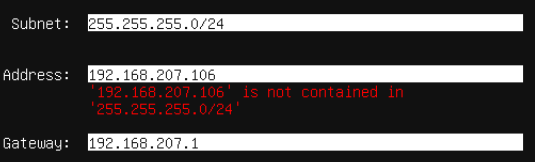
 nocturne harness
What's your confusion?
Your subnet is wrong
you want 192.168.206.0/24
255.255.255.0 is the subnet mask for /24
 crimson trench
You got to be kidding me :x
vapid dune
either you want the mask 255.255.255.0 or the range 192.168.207.0/24
crimson trench
I clearly suck at networking 😂
god danged, now I'll need to reinstall it xD
I did set the thing to dhcp
little schooner
Reinstall it?
Just fix the issue in config with netplan
sudo nano /etc/netplan/01-ens33-static
Then follow yaml syntax and use Ubuntu docs to configure static ip
Followed by a sudo netplan apply to make changes take effect
vapid dune
what do you mean moca not working?
kind sky
plugged my moca in wont work xfinity disables them in their settings
vapid dune
??? what?
kind sky
its funny cuz i got 2 modems/routers to work on my network its unstable though
im gonna try power ethernet
vapid dune
I am confused what you're trying to do
I thought you just needed A to B point to point ethernet over coax
kind sky
2 ethernet in 2 different rooms 1 has modem
yea correct
one room has a modem/router
just need the second room with ethernet but it has power/coax only
vapid dune
modem -> ethernet to computer 1
-> ethernet to moca adapter -> coax -> moca adapter -> ethernet -> computer 2
same concept with powerline
vapid dune
I mean assuming you only have 1 coax connection to the room with the router you'd also need to split it
I haven't used it myself, I just know about the tech
kind sky
@vapid dune hey I think you just saved me a tona time and hassle so real quick
regarding the powerline ethernet if the rooms are on different circuits will it still work? The hole house has one box but each room different circuits does it run through whole house or just a circuit?
hollow marlin
@little schooner pop quiz, how would a switch handle the following frame
hollow marlin
Outer most tag is only processed unless the inner tag is specified
 plain siren
Mmm encapsulated VLANs... IPv6 no less
@kind sky no, Powerline communication has a maximum distance and would never get past the breaker box and back up the line
 halcyon pumice
I have managed to set up my own VPN thanks to a forum post from y'all, I feel safer already
I've had privacy concerns lately so this really helped
I also used Vultr to rent a VPS and Pritunl as my VPN
plain siren
Lemme alleviate some of them. I worked at AWS and had seen some of the shit done at other big T1's. You data gets chewed up in a shredder then ran through this ever changing algorithm to give a high level view of just about everything. You either need to be a child predator, terrorist, potential security threat, holding some dangerous information, or otherwise loudmouthy to gain any detailed attention. The real thing to avoid is Cloud Connected Surveillance equipment (Ring). The kinda shit on there is insane
And to top it all of, you pretty much never have to worry about your data getting into gov't hands from a private company thats in the service field as they would rather spend every one of their $'s sticking it up the gov'ts ass as much as they can.
vapid dune
I mean being spied on passively by your ISP is usually less of an issue if you're using your own home connection. being spied on by the companies you're connecting to, however, is something that does happen. and a VPN won't help you there
I guess a VPN could help you with being tracked via your home IP address, but in reality there's more than one way to skin a cat
halcyon pumice
Well I'm in a dormitory so...
And I don't download "Linux ISOs" as much as I did back in the day, but I thought of masking my IP from the ISP just because I feel like it
Idk though
I'm aware I can never be completely anonymous and all that
vapid dune
oh I mean sure if you're using internet you didn't pay for
VPN is great for that
just pick a trustworthy one
(or wanting to hide your traffic for downloading linux ISOs)
halcyon pumice
I used Windscribe for a bit but I've heard that you pay for free VPNs with your data so...
little schooner
At my previous 2 yr college, they had open network initially and then switched to 802.1x WPA2 enterprise
There was a disclaimer page because it was open network that you could have your stuff stolen from
Or attacked
That disclaimer is nonexistent on the WPA2 version
halcyon pumice
Yeah :((
 icy vessel
@rotund cloak h
waxen scroll
spam in OUR network chat???
halcyon pumice
Nani???
ruby charm
hey network people rate my home network super hightech diagram
the square things are these
vapid dune
that dlink switch is like nostalgic
vapid dune
poor 100 megabit
ruby charm
uwu
I get a whole 5mbps yo
Go online with speed! Surf, email, and chat all you want with unlimited usage. And do it all with fast download speeds with High Speed Basic.
waxen scroll
its not much, but its mine
waxen scroll
top of it
lol
what you did is how i started when i was a kid
switches hanging off of switches, etc
whoever bought that house must be wtf when they traced it
ruby charm
xD
I have 2 lines that both do 5mbps
im to lazy to get another DSL router
using the second one
for some reason
oh if i plug another router in ill have 2 wifi networks
im getting this
so I have wifi upstairs
vapid dune
I mean if you have ethernet running around the house
an AP placed centrally is better
 misty terrace
with thick walls sometimes it's impossible
misty terrace
@waxen scroll no really, i have 60 years old brick walls, no 5ghz through those, barely any 2.4ghz, all at max tx power
ruby charm
my walls have metal in them
oh and lots of that fluffy pink insulation stuff
the basement is wood and concrete lol
misty terrace
metal is a complete signal killer
ruby charm
oh gees
that's why the wifi is so bad
the thing giving me wifi is in the basement
i get 1mbps instead of 5mbps
I am upgrading to 100mbps COAX soon
I cant take 5mbps dsl anymore turning into a chimpanzee over here
I can probably get rid of my switches if that wifi router works good enough
I am ok with wifi even though eugh ping
 little schooner
It makes a lot of sense to get a combo like that.
@waxen scroll prof was telling me again that the supervisor at the school really doesn't want our equipment in their datacenter. It's extremely likely that he will have to move out everything before the end of August. He also told me that they hired a new networking person that doesn't know how to troubleshoot or work with blade servers or racks. So, the supervisor doesn't want to get caught in the middle when a catastrophe in the datacenter happens. The supervisor rather have my prof move all the stuff out so the supervisor doesn't have to deal with the problem, since the new networking person won't know what to do.
severe wigeon
@little schooner Yeah it is a great combo, The CRS328 has four SFP+ cages and 24 poe gigabit ports for like $379.
This combo has 24 non-poe gigabit ports and 10 sfp+ cages total. I might just setup the CSS326's two cages as a trunk to the 309 too. Haven't fully decided though
thick minnow
Hello tech frens, i have a really dumb question, so, when my ISP gave me my modem, it was a cheap / crappy one, (no 5GHz support, and no customization in general, DNS, port forwarding, etc...) recently i asked them to replace it with a newer one, but i got ignored an banned from the support chat, so, i want to do it myself and buy new equipment, but, here's where my question comes in,
My router has an optic fiber plug, but i cant find any router / modem that has one,
Do you guys know any good modem / router with optic fiber connection or i'll be forced to buy a fiber to rj45 converter and then a proper modem / router?
 lethal marlin
fiber optic? really?
dont they cost like thousands of dollars and are meant for large businesses?
just get a modem/router combo thingy, then you dont need two things
thick minnow
problem is, i cant find any modem/router combo that supports fiber optic
severe wigeon
@thick minnow Who's your provider?
thick minnow
Mexican ISP TotalPlay
clear igloo
lol
waxen scroll
RIP during card failure
waxen scroll
@vapid dune i'd hit that ban hammer
stable iceBOT
waxen scroll
thx ❤️
 cedar igloo
would you lot trust 6 year old refurbished hardware in a datacentre?
 toxic pond


 waxen scroll
nope. want all new
also want 3hr support
6 year might also get you in trouble with some software
VMware has been phasing out CPUs which are about that old from being supported in esxi
cedar igloo
I'm more thinking in terms of safety. As you probably know, refurbished stuff can be 10x cheaper than new. ESXi 6 is compatible with the server I am looking at, but am not wanting components to die out or the PSU to burst into flames, destroying everything in the DC 'pod'
little schooner
@cedar igloo unless it's new or directly refurbished from manufacturer, its impossible to have any guarantees since it's use history is unknown
Used stuff is always a risk
But how great of a risk? That varies wildy
It could be minimal or major
I've only bought used smartphones and I've been lucky that each one has lasted through its life cycle for me
But a used smartphone could develop battery problems and seller may not advertise that or other issues
Issues that weren't important to them that may be important to someone else to take note
stable warren
Depends on the use case, i bought a dual node x5660 system and it's running ESXI/Vsphere 7(Vcenter7) with a small install tweak even though cpu's aren't supported. Runs great. I just run a bunch of VM's. It's just for home use and trying out stuff.
 woven jay
I have a friend that is having issues connecting to services like Discord Steam Origin and Epic Games he can watch youtube on his browser but he can't get any of the aforementioned services to load
waxen scroll
home network? corporate? school? public wifi?
little schooner
@waxen scroll my prof didn't request rails for the new NAS and now he said he has to mount it on a black spacer
waxen scroll
ur IT dept gonna kick him out for sure now