#networking
1 messages · Page 89 of 1
 mellow hemlock
That's good then. It'll be nice to deprecate the use of a Bluetooth Dongle and save another I/O slot
depri-
What's the word?
 random siren
deprecate?
 hoary wigeon
i have no clue
mellow hemlock
That's what I thought it was but then it sounded weird
hoary wigeon
depreciate is the antonym of appreciate (...i think)
mellow hemlock
That'd make sense as well
I mostly meant to say, to no longer require/use it
Ty two for the input
 twin pier
maybe "retire"
mellow hemlock
That definitely also works
twin pier
hoary wigeon
depreciate is the antonym of appreciate (...i think)
deprecate is when you make something obsolete
depreciate is when something loses value as it gets older
 nova glacier
Afaik, even the worst of WiFi vulns still required your device to have at least have one known network that an attacker could spoof to exploit it. You could disable WiFi in the firmware to stop such a hypothetical vulnerability though.
twin pier
Just get better neighbors at that point tbh
 opal pagoda
Maybe you can disable pcie lanes in bios to the m.2 wifi card, Bluetooth should still work as it uses usb
mellow hemlock
opal pagoda
Maybe you can disable pcie lanes in bios to the m.2 wifi card, Bluetooth should ...
The antenna take PCIe lanes? That might be a small issue since I plan on using all of the lanes
If disabling it is possible while still allowing for Bluetooth, then that's awesome
 pastel monolith
twin pier
deprecate is when you make something obsolete
depreciate is when something loses...
pastel monolith
twin pier
deprecate is when you make something obsolete
depreciate is when something loses...
Couldn't tell ya how many times I see people mix up these words
Tbf deprecation only a thing you really encounter with tech and depreciation a word I think most people are at least vaguely familiar with but is just kinda funny how often it happens
nova glacier
mellow hemlock
The antenna take PCIe lanes? That might be a small issue since I plan on using a...
The lane it uses is neither physically shared nor is it switched. Even if it's freed up you won't be able to use it unless you make physical modifications to the m.2 connector.

 silent flax
nova glacier
The lane it uses is neither physically shared nor is it switched. Even if it's f...
silent flax
nova glacier
The lane it uses is neither physically shared nor is it switched. Even if it's f...
unless it is a CNVi (which is only on N100-300 based systems i think), then it is just an M.2 key A/E on every single board. Often hidden by metal shielding, but A/E key M.2 none the less
nova glacier
silent flax
unless it is a CNVi (which is only on N100-300 based systems i think), then it i...
It's an x570, it's not cnvi
silent flax

literally a M.2 key A/E connector under the shield under the VRM heatsink near the dua 8-pin power
(going to be a problem to route it away from under the VRM heatsink, but not my problem)
nova glacier
It's always literally an m.2 a+e key. They still want to use the ax200 plugged into it for Bluetooth. They had thought they might get some pcie lanes if they disabled the wifi
silent flax
remove the 2 screws at the bottom of motherboard, remove module, vertical M.2 key A/E slot for free /s
 mellow hemlock
That may be a problem then. I had thought it was fine.
32 lanes, 8 cpu 24 chipset, all 3 m.2 drive slots in use (x12, 2 nvme's and an x4 to sata adaptor), 2 gpus (x8/8; 16; 28 lanes) and my x4 capture card (32)
Only board that I've seen that is exactly what I'd need for my setup
silent flax
time to get a threadripper
nova glacier
mellow hemlock
That may be a problem then. I had thought it was fine.
32 lanes, 8 cpu 24 chips...
At the end of the day there's really only 24 actual lanes on am4. 16x to 1 or split to 2 pcie slots, 4x for the first nvme m.2, and the remaining 4x being shared between everything else through the PCH (with the exception of 2x USB 3.2 gen1, 2x 3.2 gen 2 ports, and the audio).
If you switch to USB Bluetooth and unplug the ax200 from it's m.2 connector, you can hypothetically get that single extra physical pcie lane from the PCH but it sounds like you've already got your physical lane needs met.
mellow hemlock
nova glacier
At the end of the day there's really only 24 actual lanes on am4. 16x to 1 or sp...
By shared, do you mean that the single lane the wifi/bluetooth take wont disable or malfunction the other 32 in use?
And at worst will just maybe slow one of the lanes down?
Er, 24 rather since its just the chipset
nova glacier
mellow hemlock
And at worst will just maybe slow one of the lanes down?
It won't affect anything even if it's still enabled. The only physically shared lane on that board is between PCIE_2 and PCIE_4
mellow hemlock
And those are the x1's if I recall?
nova glacier
Yes
mellow hemlock
I am a bit confused I admit. If it were to be enabled, wouldn't that essentially mean I am running 25 out of 24 chipset lanes?
Wait did I get the cpu and chipset lanes confused? Which was 8 and which was 24?
silent flax
CPU has 20 (16+4) + 4 dedicated for to the chipset. Any other lanes then come from chipset
nova glacier
mellow hemlock
I am a bit confused I admit. If it were to be enabled, wouldn't that essentially...
No, it's connected through the PCH so it doesn't use a CPU lane. AM4+X570 officially supports 36 physical lanes. 24 are available on the CPU and 20 on the PCH, though 4 on both sides aren't considered available
silent flax
mellow hemlock
I am a bit confused I admit. If it were to be enabled, wouldn't that essentially...

16+4 on CPU, 8+4 on chipset. plus the itnerconnect between them which you should consider
normally i would say get Threadripper or at least this, but you would have to get creative. Two GPUs, one SSD on the board, one M.2 SATA adapter on board. Put the capture card to an U.2 to M.2 to PCIe x4 adapter, and use the bottom slot for dual M.2 adapter 🤷♂️

i mean soemthing like this 🙂

but not sure 10x SATA is enough
nova glacier
silent flax
16+4 on CPU, 8+4 on chipset. plus the itnerconnect between them which you should...
The chipset is 12 flexible (sata/pcie/usb), 4 pcie only, and 4 to the CPU
mellow hemlock
silent flax
normally i would say get Threadripper or at least this, but you would have to ge...
The Unify board also claims to support something that I have not seen on any other board as well. Its memory vendor claims that it can run 4x32Gb of Crucial's ddr4-3600 cl16. I have 2x so far.
silent flax
i ran DDR4-3600 CL18 4x32GB on nearly any AM4 board
maybe not officially, but i had no issues with it. At worst i had to bumb up SOC voltage to 1.1V
mellow hemlock
I can believe cl18, but this one goes to cl16. My understanding is that Crucial's ddr4 gaming ram is among the best there is for ddr4. Shame they stopped producing them
mellow hemlock
nova glacier
No, it's connected through the PCH so it doesn't use a CPU lane. AM4+X570 offici...
For this, does this mean that those unavailable lanes are lanes used for other things? Would the wifi be one of those?
silent flax
ALL DDR4 is stopped being produced. That is why price skyrocketed, and unless you got already existing parts, don't build on AM4
silent flax
mellow hemlock
For this, does this mean that those unavailable lanes are lanes used for other t...
unavailable = they are used to connect the CPU to chipset. you need them to be used for that
nova glacier
mellow hemlock
For this, does this mean that those unavailable lanes are lanes used for other t...
The wifi uses one of the 4 pcie-only lanes on the PCH, it's considered "available". Another one of that group is your PCIE_2/PCIE_4 lanes. I assume the third in that group went to the 2.5GbE. where the fourth went, idk (USB probably)
mellow hemlock
So the cpu has 20 lanes, and the chipset 16, excluding the 4 from each needed to communicate to eachother?
I wonder why I thought they had 32 usable lanes in total.. but it's 36?
nova glacier
mellow hemlock
So the cpu has 20 lanes, and the chipset 16, excluding the 4 from each needed to...
Yes
silent flax
mellow hemlock
So the cpu has 20 lanes, and the chipset 16, excluding the 4 from each needed to...
look at the block diagram picture i posted above and read it, please
no board is going to be without any SATA, so usually it is 32 which is distributed, because 4 are sacrificed for 4x SATA
mellow hemlock
I feel like that makes sense actually.
So I have been seeing 32 usable lanes excluding the 4 already used for sata?
I feel less silly about it now
mellow hemlock
silent flax
I am trying to read it but I am struggling to connect what goes where. The chipset has 8 pcie lanes according to the top right panel wheras the cpu has 20 split into 16 for the two initial x16 slots, then 4 for the chipset downlink
nova glacier
mellow hemlock
I am trying to read it but I am struggling to connect what goes where. The chips...
It's a bit confusing tbh. The x570 actually has 4 dedicated SATA lanes, 4 dedicated cpu-pch pcie lanes, 8 pcie-only lanes, and 8 pcie/SATA lanes.
mellow hemlock
When you say pcie only lanes, what does that mean? Ie, lanes that can only go to pcie devices such as the x4 pcie slot and x4 m.2 slot?
nova glacier
Both of your PCH m.2 slots are using the flex lanes, so you could plug a SATA drive into them (though ofc don't waste an m.2 like that :p)
silent flax
mellow hemlock
I am trying to read it but I am struggling to connect what goes where. The chips...
the one i marked yellow are usually fixed (i have yet to see a board which the CPU x4 lanes uses for anything but NVMe M.2 slot).
The orange ones are pick one or another, and usually they pick one box as 4xSATA for boards with 8 SATA ports and the rest in "what layout our board needs", often as M.2 slot

so usually you get 16 via CPie from CPU, 4 as M.2 from CPU, then 8 as various PCIe slots, 4 as various devices (networking etc), 4 as SATA for 8 total SATA. Complicated i know 😄
opal pagoda
mellow hemlock
If disabling it is possible while still allowing for Bluetooth, then that's awes...
on all cards that dont use CNVio2 wifi part uses pcie and bt uses usb
 mellow hemlock
silent flax
so usually you get 16 via CPie from CPU, 4 as M.2 from CPU, then 8 as various PC...
mellow hemlock
silent flax
so usually you get 16 via CPie from CPU, 4 as M.2 from CPU, then 8 as various PC...
So for boards that only have 4 sata slots, you have more room for customization?
silent flax
mellow hemlock
So for boards that only have 4 sata slots, you have more room for customization?
mellow hemlock
I dont think that would be too viable for the case. I already do have most of the parts (I dont have the m.2 to sata x6 adapter yet for the third m.2 slot).
Just trying to think.. 36 lanes, 4 dedicated to 4 sata slots, leaving 32.. all pcie slots in use would equal 20 lanes (8/8/4), the three m.2's being 12(32), I'm struggling to wrap my head around it.
I must still not understand well enough how this all works cause I feel like it is implied that all of these devices would be fine even with the additional use of the x1 wifi antenna. Am I misunderstanding anything?
silent flax
alternatively just switch to USB grabber 🤷♂️
silent flax
mellow hemlock
Just trying to think.. 36 lanes, 4 dedicated to 4 sata slots, leaving 32.. all p...
you are missing the integrated devices. Network interface requires a x1 lane too for example
so two lanes on that unify board goes just to the networking interfaces
mellow hemlock
Jeez. Am I gonna have to sacrifice a thing or two to fit it all in?
nova glacier
No
silent flax
you can do grabbing via USB for example, that frees up 4 lanes right there
mellow hemlock
I admit, I am not certain what USB grabbing is
(Im gonna shower, I will return soon)
silent flax
mellow hemlock
I admit, I am not certain what USB grabbing is
literally an USB version of your HDMI grabber card

AVerMedia
HDMI 2.1 USB capture card. Up to 4K144 capture and passthrough, ultrawide resolutions support and RGB sync. For streaming and recording next-gen console games or action-packed PC games.
so instead of this

you use something like this
 nova glacier
mellow hemlock
Jeez. Am I gonna have to sacrifice a thing or two to fit it all in?
nova glacier
mellow hemlock
Jeez. Am I gonna have to sacrifice a thing or two to fit it all in?
You will be able to fit everything, but you'll be using 13/16 PCH pcie lanes (unused are PCIE_2/4, the wifi lane, and 1 other lane that's probably just not connected).
That's all being squeezed through the x4 link to the CPU, so it might experience some bottlenecks depending on total bandwidth usage of the nvme, SATA, and capture card.
I also second getting a USB capture card, that way it can use USB port that's direct to the CPU and saves a little bit of PCH bandwidth. I can't really speak to whether there's good USB capture cards vs pcie ones though
These 4 are your USB 3 ports that come from the CPU
 mellow hemlock
nova glacier
These 4 are your USB 3 ports that come from the CPU
mellow hemlock
nova glacier
These 4 are your USB 3 ports that come from the CPU
You gave me an idea
Do USB-C Capture Cards exist? I already have uses for those three specific CPU-Controlled USB-A's, but not for the C
opal pagoda
mellow hemlock
You gave me an idea
Do USB-C Capture Cards exist? I already have uses for those ...
Adapters for c to a are avalibile for couple of bucks
alternativly get a hub
mellow hemlock
I'll send a photo that I just made earlier showcasing my current USB Planning (It's before this convo so it still utilizes the PCIe Capture Card)

(It's incomplete)
For context, the Chipset USB Controllers would be passed into a VM, so only the CPU Controlled ones remain on the host. Hence why there's two KVM Inputs (one for each controller when the VM is active)
I am probably getting ahead of myself, I'll take a few mins to absorb everything said so far properly
opal pagoda
mellow hemlock
I'll send a photo that I just made earlier showcasing my current USB Planning (I...
you can also break out internal ports
mellow hemlock
Maybe, though I'm not sure where I'd put them
Well, if I use a USB Capture Card, I could make space for the botton expansion slots I suppose
I'll see what I can find. Preferably, I'd really like to find one that lets me stream/record 1440p 60fps
I know some capture cards like to say they support certain Operating Systems, but is that really a consideration, or are all capture cards likely to be fine on Linux?
 pearl drum
Whats faster motherboard ethernet or a pcie Ethernet card?
mellow hemlock
I suppose that depends, I'm not knowledgable persay but it appears that some boards have varying speeds (1gbit, 2.5gbit, up to 10gbit) just as some PCIe cards do
pearl drum
Yeah i guess u only really need a pcie card if ur internet is faster than ur ethernet port
mellow hemlock
That as well
pearl drum
Or ur just using ridiculously fast shit
mellow hemlock
Well not even - If your router plan gives you speeds faster than your motherboards ethernet port goes to, then I'd consider getting a PCIe Card of the speed you need
Or a board that naturally has that speed
pearl drum
Also should i get wifi 7 or 6e or just 6 for a wifi mesh system
Because im still unsure
opal pagoda
pearl drum
Whats faster motherboard ethernet or a pcie Ethernet card?
you cannot compare them like that
you can buy network cards of various speeds from 100mbps to >400gbps
built in motherboard ethernet is either gigabit, 2.5g or 10gbps depending on the model

 opal pagoda
pearl drum
Also should i get wifi 7 or 6e or just 6 for a wifi mesh system
opal pagoda
pearl drum
Also should i get wifi 7 or 6e or just 6 for a wifi mesh system
depends on the model
wifi 7 and 6 both have lots of optional features, for instance 6ghz and even 5ghz is optional for both but it isnt optional for 6e
silent flax
pearl drum
Whats faster motherboard ethernet or a pcie Ethernet card?
if it is same spec, they perform the same, as motherboard network cards are just the same chip soldered to motherboard instead of a PCIe card. The motherboard NIC is still connected through a PCIe connection, just as a dedicated card. The only difference is that PCIe connection is hardwired and impossible to replace. And motherboard NICs usually cap out at 10 gigabit
mellow hemlock
mellow hemlock
I know some capture cards like to say they support certain Operating Systems, bu...
So uh, yeah
https://www.amazon.com/WAVLINK-2560x1440-passthrough-Ultra-Low-Compatible/dp/B0DDK73NYL
I think I'll be getting a USB Capture Card lmao

And that should free up any potential for lane bottlenecking
 lone crane
opal pagoda
you cannot compare them like that
you can buy network cards of various speeds fr...
lone crane
opal pagoda
you cannot compare them like that
you can buy network cards of various speeds fr...
800
connectx-8 my beloved

 clear igloo
800>400 yes
lone crane
i just saw 400 and went for it
but anyhow i see the actual question and wow
like YES it does not matter but also like the ethernet chips on some boards should never have been made
imagine paying 1000$ for a board only to have unstable ethernet while gaming
clear igloo
eww, oh yah some of those chips suck or they have that "lan qos" garbage software included that tanks performance without people realizing why
These days the chips aren't usually an issue but I remember years ago that was a concern a lot of the time
lone crane
know of any cheap rj45 NICs on ali?
clear igloo
I've not really looked in a long time unfortunately
lone crane
dam welp ama give it a yolo
i should also grab some 10 gig switch
bit sad my UCG fiber only got 1 rj45 10 gig port
clear igloo
rip
clear igloo
ewww, yah RJ45 10g SFP+ modules suck
lone crane
i got a 4 2.5 rj45 and 2 sfp+ port little unmanaged switch for like 30$ while a rj45 sfp+ thingy is like 50$ cheapest
clear igloo
yup, that too, haha
the copper optics are $$$
meanwhile you can get some MM optics for like the cost of a pack of ramen it seems
10g of course
lone crane
yup
you can do full 10 gig internet ethernet whatever for like 130$
i know since i did
2 connectx-3 cards with the little switch and 4 of the same sr sfp+ modual with some cheap as fiber cables
considering i closed the door on the ones i have i feel like it might be plastic
NSFN
 opal pagoda
lone crane
i got a 4 2.5 rj45 and 2 sfp+ port little unmanaged switch for like 30$ while a ...
opal pagoda
lone crane
i got a 4 2.5 rj45 and 2 sfp+ port little unmanaged switch for like 30$ while a ...
i have like 10+ of them in the office
they have so many usage limitations its crazy
lone crane
usage limitations?
opal pagoda
lone crane
usage limitations?
yep
 lone crane
this is about the rj45 sfp stuff i was talking about right
lone crane
opal pagoda
yep
wait this is a full fat enterprise switch that does not even have enough power to power all of its ports
 opal pagoda
lone crane
wait this is a full fat enterprise switch that does not even have enough power t...
opal pagoda
lone crane
wait this is a full fat enterprise switch that does not even have enough power t...
it has fkn 2x750w psu's
i believe it is more bc of cooling
lone crane
yeeeaaa that unmanaged switch i was talking about should not be used with any rj45 sfp+ stuff
5v 1a
and no real cooling
opal pagoda
half of power budget just for sfp+ transciever
lone crane
rj45 is so sad
sfp+ is so much cheaper to implement from my understanding even
i so badly want motherboards to come with sfp+ at least and it being built in
opal pagoda
lone crane
sfp+ is so much cheaper to implement from my understanding even
yea, you offload everything to transciever itself
opal pagoda
or just use fiber and get flexibility
lone crane
plastic fiber yea
lone crane
well toslink is also MASSIVE
lone crane
lone crane
NSFN
it claims to be fiber but i have a hard time believing that considering im still getting good speeds
 lone crane
well i can see the fiber
opal pagoda
and even if it breaks it is mm so it just hops over the air gap
lone crane
i wanna see what speeds im getting now
opal pagoda
can you take less blurry photo
 opal pagoda
you can use vfl to see if it is actually broken

 opal pagoda
if transcievers have DOM functionality you can look at fiber light loss
lone crane
it has DOM but i got no clue how to use it

 short lance
why do people put noggins in the wall 
lone crane
like this?
 opal pagoda
lone crane
it has DOM but i got no clue how to use it
opal pagoda
lone crane
it has DOM but i got no clue how to use it
show interfaces transceiver 
lone crane
something is defaulting to 2.5 by the look of it
 opal pagoda
no clue on how to do that on ubiquiti as i have never used it
lone crane
this is as much info i get

welp im getting my 5m cable tommorow
well ok i can ssh into it and do some stuff so i can kinda see it but well yea no im not gonna bother
 frosty stone
lone crane
NSFN
frosty stone
lone crane
NSFN
Pfft, that's nothing. The fiber going into my ONT is snapped and only works in certain positions, discovered it's been like that since it was installed in 2020 when we moved it last year
opal pagoda
frosty stone
Pfft, that's nothing. The fiber going into my ONT is snapped and only works in c...
Thats just called angle dependant attenuator
frosty stone

 pseudo blade
opal pagoda
Thats just called angle dependant attenuator
pseudo blade
opal pagoda
Thats just called angle dependant attenuator
Man these air fibers suck
 coral marlin
Anyone have an actual written guide ( outside of the documentation) for checkmk raw SMTP setup with an on-prem exchange ? Official docs are confusing and my knowledge of SMTP is limited. I know it's for emails but brah...That documentation cannot be any more vague and confusing...
 topaz patrol
coral marlin
Anyone have an actual written guide ( outside of the documentation) for checkmk ...
topaz patrol
coral marlin
Anyone have an actual written guide ( outside of the documentation) for checkmk ...
Why are you using exchange for that?
coral marlin
topaz patrol
Why are you using exchange for that?
Because my boss is too old to rely on cloud solutions...
 ornate jungle
coral marlin
Anyone have an actual written guide ( outside of the documentation) for checkmk ...
ornate jungle
coral marlin
Anyone have an actual written guide ( outside of the documentation) for checkmk ...
I would not recommend relying on Email for IT-related alerts. Neither would Checkmk...
https://docs.checkmk.com/latest/en/notifications.html#:~:text=delivery per SMTP-,6.1. Email is not reliable,-Monitoring is only

Checkmk Docs
There are basic concepts and control options for configuring notifications, which are explained in this article.
ornate jungle
coral marlin
Anyone have an actual written guide ( outside of the documentation) for checkmk ...
Anywho, it looks like Checkmk supports sending emails using a properly configured SMTP relay server. We finally did away with our on-prem Exchange this year and now run a Postfix instance for internal emails.
https://docs.checkmk.com/latest/en/notification_rules.html#smtp
Checkmk Docs
Simple notifications can be sent by email, more complex notifications are controlled via rules. Learn here how to implement your requirements in Checkmk.
 dreamy sonnet
Hello. Unfortunately im moving to a place without fiber, and have to resolve to a 5G router with limited signal. I can see the ground tower, but the router itself would have to go through a house. The provider i will be trying out does NOT include an external antenna, and the others use a flat box antennas like the zyxel nr7302. I thought of putting one on the roof, and since it from the roof would have near perfect line to the tower (1 km away), i thought of maybe doing a dish antenna. Now, heard about ubiquiti and thought of their airMAX 5GHz 30 DBi RocketDish. Is it ok? Any better or equal which are cheaper?
lone crane
look what my isp was so nice in doing

 pseudo blade
lone crane
look what my isp was so nice in doing
pseudo blade
lone crane
look what my isp was so nice in doing
Don't use ISP DNS then lol
lone crane
pseudo blade
Don't use ISP DNS then lol
it was the first thing i tried
pseudo blade
8.8.8.8
8.8.4.4
1.1.1.1
1.0.0.1
<DoH equivalents>
lone crane
iophyoiujewghfoigusargho
pseudo blade
lone crane
it was the first thing i tried
Well you've done it wrong then
lone crane
i have cloudflare first then google
 pseudo blade
Use DoH
random siren
been using DoT instead of DoH. any advantage of using DoH?

 mild whale
dreamy sonnet
Hello. Unfortunately im moving to a place without fiber, and have to resolve to ...
mild whale
dreamy sonnet
Hello. Unfortunately im moving to a place without fiber, and have to resolve to ...
That dish is like $109, idk that you'll do much better.
I would probably suggest that precision alignment kit though.
opal pagoda
dreamy sonnet
Hello. Unfortunately im moving to a place without fiber, and have to resolve to ...
Are you signing up for a wisp service or 4g/5g?
that dish is only compatabile with 5ghz tipically used by 802.11a or 802.11ac wifi
mild whale
opal pagoda
Are you signing up for a wisp service or 4g/5g?
that dish is only compatabile wi...
Oh I see that now
Good catch lmao
opal pagoda
mild whale
Good catch lmao
First try using it without external antennas, if you get bad signal then look at directional 4g/5g antennas with appropriate mimo count, tipically 2x2 (2x sma) or 4x4 (4x sma)
mild whale
Yeah, you need an antenna compatible with the frequency band that you are looking to receive.
mild whale
opal pagoda
First try using it without external antennas, if you get bad signal then look at...
Sorry, wasn't me asking i just pulled up the datasheet and completely overlooked it
I pulled the rookie helping mistake ):
opal pagoda
Ah yes @dreamy sonnet is who i am reffering to
mild whale
I was somewhat puzzling the reflector since you dont normally need those for cellular
Now that dish makes me want to see how far I can get wifi
 sly compass
I currently running 10gbe over rj45. How would i make something similar with fiber? Are there outlets for lc?
 clear igloo
sly compass
I currently running 10gbe over rj45. How would i make something similar with fib...
clear igloo
sly compass
I currently running 10gbe over rj45. How would i make something similar with fib...
lc keystone jacks definitely exist, yes
opal pagoda
mild whale
I was somewhat puzzling the reflector since you dont normally need those for cel...
you can use all kinds of antenna designs to recieve any radio signal
commercial dish for 4g: https://mikrotik.com/product/lhg_lte18

Great distances, even greater speed – with the power of the ultra fast LTE Category 18 modem. Speeds up to one Gbps! Last-mile-internet solution for the most remote areas.
most cheap omni antennas are dipole tho
sly compass
clear igloo
lc keystone jacks definitely exist, yes
I just realised that keystone is a standard and it even exists usb, hdmi and more
clear igloo
sly compass
I just realised that keystone is a standard and it even exists usb, hdmi and mor...
Welcome to the future 😄
Keystones for everything!
They really are amazing too, take a 4 or 6 port wall plate and you can do just about anything with it 😄
sly compass
Not that i have a use case for that, but i think about the future, an rj45 10gbe jack and next to it an lc fiber jack. 100gbe and basically future proof forever
I mean that cable should easily manage millions of gigabytes per second if you have the hardware
clear igloo
Single mode, yup 🙂
sly compass
Sucks that it doesn’t have any power
There should be a new standard with three coppar wires in one plug
clear igloo
Don't make the mistake of going multimode, unless you want to run MPO cables and that's a whole other ball of wax
sly compass
Yea i looked at that
So messy
I guess multimode is basically only for datacenters?
clear igloo
multimode is low distance, generally within a row
mild whale
opal pagoda
commercial dish for 4g: https://mikrotik.com/product/lhg_lte18
Ye, like I said, uncommon. An antenna design like the airmax for LTE would be very weird, as its not a typical setup. You're in microwave territory with wifi.
clear igloo
top of rack switch to end of row kind of thing but even then single mode is basically the same price and you don't need to rip and replace every time you need a new standard. OS2 and you're basically set for the future with singlemode
opal pagoda
sly compass
I guess multimode is basically only for datacenters?
rack to rack, within same row
intra-rack dac cables are tipically used
pseudo blade
sly compass
I currently running 10gbe over rj45. How would i make something similar with fib...
You can get LC keystones yes
Damn it Discord didn't scroll and my response was redundant
 thick minnow
What is this use of this cable?

 coral marlin
ornate jungle
Anywho, it looks like Checkmk supports sending emails using a _properly configur...
coral marlin
ornate jungle
Anywho, it looks like Checkmk supports sending emails using a _properly configur...
I tried setting up Postfix as well. But for some dumb reason it's not sending e-mails 🙁
lone crane
thick minnow
What is this use of this cable?
wrong answer only?
thick minnow
lone crane
wrong answer only?
No, real answer please
I asked my supervisor and he had no idea
lone crane
what
thick minnow
Im serious
lone crane
how are schools not teaching this
thick minnow
Its a Y-splinter, for ethernet? How does that work
lone crane
there are 4 pairs in there, probs 4 pairs for one thing and 4 for something else
thick minnow
VoIP?
thick minnow
No i know its a UTP cable
lone crane
How many of the pairs of wire available are used depends on the protocol used for the physical layer which will determine your transfer speeds. 100BaseT will only use 2 of the 4 and in theory you could certainly split it off on both ends and have 2 100Mbit full duplex cables to your router, but you'd still need 2 ports on the router for this, as you'd essentially be making 2 half cables out of one that will only support 100BaseT on each "cable."
thick minnow
I mean, cat3 used RJ11 because it only needed 2 pairs
lone crane
but yea no that stuff is insane and not used for modern networks
 lone crane
hey look even LTT made a vid https://www.youtube.com/watch?v=QgrVVyIzecM

Get a free 30-day trial with AutoDS at: https://platform.autods.com/register?ref=NDAxMTY5&utm_source=youtube&utm_medium=aff&utm_campaign=linus
Ethernet splitters are all over the internet, but aren’t they just a scam to steal from the uninformed? Well, mostly. But with a little knowledge of the history of networking, you really CAN run two de...
thick minnow
This building is old, like 1960s old, theres still Coax and the token ring type 1 connectors
 lone crane
xd
lone crane
thick minnow
What is this use of this cable?
but this looks to be what that cable might be doing
 thick minnow
I see
Thanks for helping
Also, school do absolutely NOT teach kids what a UTP cable is
I’ve heard it being called a WiFi cable
opal pagoda
thick minnow
What is this use of this cable?
Might be wireshark tap
lone crane
aaaaaaa yea true
opal pagoda
but it is impossible to tell without mapping it out with a cable tester
 red oracle
Could just be a hub where the same signal is sent through both cables
If it is, that would be really dumb to use vs a simple switch.
 stuck grove
red oracle
Could just be a hub where the same signal is sent through both cables
stuck grove
red oracle
Could just be a hub where the same signal is sent through both cables
wouldn’t function
red oracle
I see no reason why not. That's how hub devices work.
There's a reason we don't use them anymore though. Switching is easy these days and much less stupid.
stuck grove
Hub devices don’t function for ethernet at all, LTT literally made a video about this exact topic
red oracle
Hmm, the Cisco material I learned from only really glanced over the topic of hubs so maybe I'm wrong? I didn't think so though...
twin pier
stuck grove
Hub devices don’t function for ethernet at all, LTT literally made a video about...
not at full speed, but they certainly exist
stuck grove
You’d have to split the cables into 2 twisted pairs instead of 4, which would be cat4 speeds
red oracle
This type of device.

https://study-ccna.com/network-hubs-explained/ I no longer have access to the NetAcad pages I read on the topic, but this covers it decently well
twin pier
what makes 4 pairs not work
stuck grove
twin pier
what makes 4 pairs not work
i mean a, it would work just only at cat4 speed as previously stated, b, that’s not the scenario that was stated earlier
Could just be a hub where the same signal is sent through both cables
is the claim being discussed
twin pier
All I saw was a cable split it half. Maybe I missed some context
red oracle
Anyway, I do not know what the cable does for certain, but some sort of weird wiring like a hub doesn't seem too farfetched to me.
mild whale
thick minnow
What is this use of this cable?
I've seen these around PLC's. It is a splitter for 10/100 Ethernet/IO. Uses two twisted pair sets instead of 4.
You can reuse the cable for one long cable run instead of using two. You'll see them in control cabinets sometimes.
Pretty obsolete now though.
lone crane
like 5$ for a gig switch
opal pagoda
lone crane
like 5$ for a gig switch
profinet fuckery walks in
i was so confused when i was asked to configure voip for a plc port
mild whale
lone crane
like 5$ for a gig switch
lmao


you aren't using a $5 switch in industrial automation. if you are, quit that company because it'll be 1am when you get a call saying the whole factory line is down
mild whale
opal pagoda
profinet fuckery walks in
gotta love profinet
it's Ethernet but not
spicy ethernet.
opal pagoda
mild whale
cheaper industrial switches for less critical applications exist too
this one is 55 euros
 opal pagoda
mild whale
*spicy* ethernet.
opal pagoda
mild whale
*spicy* ethernet.
Its just wierd qos things, otherwise it is compatible with regular Ethernet
mild whale
A lot of the time it depends on what you're allowed to use. if you need something that's guaranteed to work with whatever it is you're using, you might just be spending the money.
as the integrator I'd always make sure to spec the best possible so long as they're willing to pay for it. saves a ton of money down the line.
lone crane
mild whale
i do kinda wonder what makes it so spensive
opal pagoda
lone crane
i do kinda wonder what makes it so spensive
temperature rating, possible radiation hardening, and lots and lots of certifications and long term testing
various aprovals for enviromental conditions
 lone crane
i was thinking it somehow was more like every port was redundant somehow
opal pagoda
at the end this switch might end up in either of these conditions
- a electrical cabinet with built in air conditioning
- random ass electrical box without cooling in a 50c ambient temp and heavy dust in the air
opal pagoda
lone crane
i was thinking it somehow was more like every port was redundant somehow
nope, you are paying for enviromental resistance and for someone to stand behind that enviromental resistance
 royal kite
ive been having dns issues all morning i flush the dns cache it works until i restart the pc again then i have to do that again normally the next day i have static dns for 8.8.8.8 googles servers i did it with 1.1.1.1 cloudfare what could be affecting this? its sudden no new apps nothing have been installed
sly compass
Any suggestions for software that i can self-host and is free with a gui that can do remote execution like puppet, salt and chef. Im currently trying theforeman with katello. Feels like docs could be better but working on implementing it. Any other suggestions?
mild whale
lone crane
i was thinking it somehow was more like every port was redundant somehow
Yeah, its the rating for industrial environments.
Manufacturing is dirty, smelly, and will break most sensitive electronics very quickly
Stuff is hopefully made to last those conditions with very little maintenance required.
I did a steel mill once, and that absolutely would destroy anything consumer grade
 peak cloak
mild whale
I did a steel mill once, and that absolutely would destroy anything consumer gra...
peak cloak
mild whale
I did a steel mill once, and that absolutely would destroy anything consumer gra...
I'm working at a recycling paper mill, everything on the fiber side (turning raw old paper) into fiber is wet and full of paper stalactites
Meanwhile on the paper machine, it's also wet and dusty
opal pagoda
peak cloak
I'm working at a recycling paper mill, everything on the fiber side (turning raw...
Water and humidity is the worst
I am lucky that i don't have to worry abt it since it is not used in our production except quality control
lone crane
opal pagoda
Water and humidity is the worst
I am lucky that i don't have to worry abt it sin...
i know the best fix for it
buckets and buckets of epoxy
 hushed sandal
just picked up a cisco sg350x-mp. the 10g ports will only connect at either 1g or 10g, which apparently is common. my computer is will do 2.5, if I buy a SFP+ module off aliexpress that supports 2.5g, will i get the full 2.5g on my computer or will the switch force the module to 1g like it does on the rj45 plug when I try to do 2.5g?
ornate jungle
hushed sandal
just picked up a cisco sg350x-mp. the 10g ports will only connect at either 1g o...
Depends on how the switch handles the SFP+ module. The switch documentation should say this somewhere. It should also list SFP+ modules that are compatible with it. (Not all modules work in all vendors gear.)
clear igloo
ornate jungle
Depends on how the switch handles the SFP+ module. The switch documentation shou...
Some SFP modules that do nbase-t will also mask themselves as 10g and do some thing to support 2.5g on the client side but they're pretty iffy
opal pagoda
hushed sandal
just picked up a cisco sg350x-mp. the 10g ports will only connect at either 1g o...
just get 10g card for your pc and use cisco or cisco coded transcievers on the switch side
if you use rando transcievers it will not work by default
hushed sandal
opal pagoda
just get 10g card for your pc and use cisco or cisco coded transcievers on the s...
that is a much better idea, a 10g nic should work no issue, but a rando transcevier is going to be questionable. i should of thought of that too, was so fixed on getting the switch side to work, didn't think about the PC.
hushed sandal
clear igloo
Some SFP modules that do nbase-t will also mask themselves as 10g and do some th...
reading the cisco dumentation (can find any mention of supporting 2.5g modules), i do need a transceiver that would do exactly as you say, but you are right, it would be iffy, probalby end up buying 3 or 4 before i found one that worked... 🙁
clear igloo
hushed sandal
reading the cisco dumentation (can find any mention of supporting 2.5g modules),...
I've had some, they show up but throughput was wonky
hushed sandal
clear igloo
I've had some, they show up but throughput was wonky
As martin suggested, I think im better off being in the market for a 10g nic 🙂 even faster...
clear igloo
yup 🙂
faster and probably just as much in the end with time factored in that you'll save with hassle
hushed sandal
exactly
opal pagoda
hushed sandal
As martin suggested, I think im better off being in the market for a 10g nic 🙂...
Also if you dont absolutely need to go through rj45 get a dac if under 5m or 2x 10g sc transceivers and appropriate length om3 patch cable
Sfp+ 10g base t are very power hungry and run hot af
lone crane
if possible always try to go SFP+ if its a homelab
 gusty dove
Is it worth using Wi-Fi over Ethernet when the router is literally <5 feet away for a "cleaner" setup with less wires?
 amber urchin
wifi is for portable devices IMO
gusty dove
I mean, the distance seems too short for almost any sort of interference.
silent flax
gusty dove
I mean, the distance seems too short for almost any sort of interference.
others can cause interference with anything wireless, cable is always better if you can do it
amber urchin
It's not just interference it's the topology. wifi is sorta like having every device on the same wire. This leads to higher and inconsistent latencies.
Is it significant? Not usually. But it's also something that is so easy to fix by using a cable.
opal pagoda
gusty dove
Is it worth using Wi-Fi over Ethernet when the router is literally <5 feet away ...
No, wifi is using shared medium with phones, tv, iot crap, etc which all use airtime, Ethernet has no such issues
lone crane
my rule is, if it can use ethernet, use ethernet
ornate jungle
gusty dove
Is it worth using Wi-Fi over Ethernet when the router is literally <5 feet away ...
Not really - if you can hardwire something, you should. The more devices sharing the airwaves, the more chances for collisions, or rather, the harder your devices must work to avoid collisions.
lone crane
wifi as a backup on a pc is smart
i got 10 gig but due to some issues with the wires in the wall it is unstable at times but i have wifi on so when it cuts out i do not get kicked out of a game
 shell remnant
wrong thing whoopies

#shorts #learning #tutorial #tiktok #review
their guys be educational sutf ^
opal pagoda
shell remnant
https://youtu.be/Bke5liQaEHE?si=r_ZGYVktKqwHD8C8
last week i had a access control reader malfunction
reason: bad IP stack and it was sending routed packets to individual HSRP member mac instead of HSRP virtual mac address
wireshark <3
dreamy sonnet
So much talk since i wrote so imma try again. Im unfortunately moving from a location with fiber, to one without. Having to resolve to 5G router. Now, i found out the router the ISP i chose doesn't support external antenna, I perhaps have to look for a router myself. I need recommendations for a router and possibly an external antenna (dish antenna) that support 5g sim.
I have also been recommended Starlink. I would like to know how Starlink usually is with latency. Their map says 30-50ms, also reported by some in my country. But i also read about often spiking due to satellite changes. Thoughts?
opal pagoda
whats your budget?
mild whale
dreamy sonnet
So much talk since i wrote so imma try again. Im unfortunately moving from a loc...
why a dish?
it doesn't really work that way. MIMO would require multiple dishes, not just one.
log-periodic array, they're cheap and work well.
https://www.waveform.com/collections/antennas/5g-antennas
something like thse.

Waveform
See our full range of 5G NR cellular antennas. Use them standalone, or alongside a cell phone signal booster for blazing fast 5G data rates.
they do have a "dish," but that, too, is just a log-periodic with a parabolic reflector; it's overkill if you're only a kilometer away lol
this antenna looks pretty good. https://www.waveform.com/products/dualplus
Waveform
Turbocharge your 4G LTE and 5G Home Internet with the all-new Waveform DualPlus. This ultra-directional 2x2 MIMO log periodic antenna is engineered to pinpoint towers and provide unmatched signal enhancement. Designed with thoughtful considerations to make outdoor installation easy, the DualPlus provides up to 8.9 dBi of gain and is extremely di...


 opal pagoda
dreamy sonnet
So much talk since i wrote so imma try again. Im unfortunately moving from a loc...
opal pagoda
dreamy sonnet
So much talk since i wrote so imma try again. Im unfortunately moving from a loc...
https://mikrotik.com/product/atl_5g_r16
Get this if you can afford it
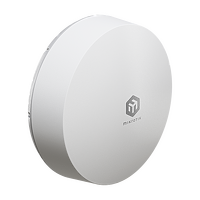
Our first outdoor 5G device with built-in eSIM support, powerful directional antennas, and a cutting-edge Release 16 modem – ideal for rural, urban, and IoT deployments.
With Gigabit Ethernet, PoE-in, and instant MikroTik connectivity out of the box, it’s the smart, rugged choice for fast and flexible internet anywhere. IP66 certified.
People often overlook attention in the coax cables to the antenna
This is especially the case with thin ones that often get included with cheapo 4g 5g antennas
mild whale
opal pagoda
People often overlook attention in the coax cables to the antenna
also worth it to know what coax cable they use.
different impedance can cause issues, which my guess is where a lot of people have connectivity/signal issues
A lot of what he should pick depends on how bad the reception really is
"5G" covers a large amount of the frequency spectrum nowadays, so it really depends on what the area is receiving. could be anywhere from 800MHz all the way to 4000MHz.
royal kite
is anyone really good at 3d modeling? i am making a server but instead of spending money for a rack mount i want to connect them with an adapter so i can just 3d print it
 opal pagoda
royal kite
is anyone really good at 3d modeling? i am making a server but instead of spendi...
opal pagoda
royal kite
is anyone really good at 3d modeling? i am making a server but instead of spendi...
just get a piece of angled steel and drill holes every 0.625"
 peak cloak
Or learn cad isn't not too difficult
Onshape or fusion have food functionally for personal use
Or freecad which is not as easy or intuitive for a beginner
 shut geyser
ok, fellow geeks. I am relatively new at networking and am trying to optimize my wifi signal to my home office.
I am using wavemon to get a view of the connection quality and sig strength.
I notice that my signal level bounces between -46 dBM and -37 dBM
My quality Link Sits consistenetly at 100%.
My router is on the main floor and I have an extender just outside of my office.
Any advice on what I can do to stabilize the signal level? I am trying to ultimately get it at -37 or better consistently.
 nova glacier
shut geyser
ok, fellow geeks. I am relatively new at networking and am trying to optimize my...
nova glacier
shut geyser
ok, fellow geeks. I am relatively new at networking and am trying to optimize my...
the signal level here is a red herring. It is your strength to the extender, not the wifi router. It's also already HE-MCS 11 (1200Mb/s), the signal can't get any better than that without hardware upgrades.
That's not to say there aren't steps you can take to optimize the network, but you'll need a different tool called iperf to assess the changes you make. You'll need to have a device connected by ethernet cable to the wifi router to run an iperf server. From the PC in the home office you'll use iperf as client to connect to that server. Then you can move the extender to new positions and rerun the test to observe the true network performance. I recommend also testing with the extender unplugged, because there are conditions where an extender actually reduces performance despite the "excellent" link quality you might see on the PC.
pseudo blade
WiFi range extenders are often a curse in disguise
Almost all are not equipped with two 5ghz radios and must do all communications on a single channel
shut geyser
nova glacier
the signal level here is a red herring. It is your strength to the extender, not...
ah. I was thinking that my link quality was the signal strength to the extender. So, that is very insightful. I will do what you said and try removing the extender to get a better understanding on whether it is helping or hurting my connection. And I'll look into the iperf. I am not familiar with that, but you've pointed me down a road. Much appreciated!
shut geyser
pseudo blade
Almost all are not equipped with two 5ghz radios and must do all communications ...
does it matter if the extender is set up as part of a mesh network?
pseudo blade
Not especially, it's the hardware and signal quality that matter
Mesh network devices do usually offer better support for switching between access points
nova glacier
the extender's capabilities are just what they are, whether used as a mesh or standalone
but yeah, at least a mesh is more seamless in user experience
nova glacier
shut geyser
ah. I was thinking that my link quality was the signal strength to the extender....
it's fairly easy to do. You'll just need to open port 5201 on the server that you run iperf3 --server on if it's got a firewall enabled. Then on the client you run iperf3 x.x.x.x replacing x.x.x.x with the local IP of the server
 cunning lion
sighs yeah this isn't right

Yeah paying for 1GB connection but getting less than 10%
twin pier
bad ethernet cable linking at 100base-t?
cunning lion
Cable that came with it
peak cloak
cunning lion
Cable that came with it
in windows check what the link speed is
cunning lion
I am on my phone and that Speed is what is happening between the modem and the router so has nothing to do with my personally devices
@peak cloak
Also all the devices in my house are connected via wifi to the router while the router is hardwired to the modem
cunning lion
peak cloak
check the WAN link speed in the router
There is no way to do that with the "app"(just a web page) to do that
Spectrum gives us honestly zero info and zero control over either device
peak cloak
if it's a spectrum router then yeah complain to them
cunning lion
Restarting the modem itself seems to have fixed the issue

First one is between moden and router second is to my phone
mild whale
Is that the Wifi 7 toilet bowl thing they've been shipping?
cunning lion
mild whale
Is that the Wifi 7 toilet bowl thing they've been shipping?
Ours is 6E
mild whale
cunning lion
And router https://d15yx0mnc9teae.cloudfront.net/sites/default/files/2023-06/202...
looks like an air freshener
I've got spectrum too, and I don't use the included router they gave
I have a linksys one that's been pretty rock solid for like two years now
when they upgraded us to 1 gig, they gave the same modem
i just swapped the modem for the new one and everything just worked, so
 carmine matrix
I’m looking to mess around with packet sniffing and intercepting 4 way hand shakes and other things that come up on learning security. I use an Apple M4 MacBook and want an adapter that has all the best features. What’s the best usb WiFi adapter I can get for this?
shell remnant
spoted out in public

 sharp oak
Is there any router that could cover roughly 6500 SQ ft as a single unit? Preferably a outdoor ready unit as I wanna put it on a pole outside
I don't think it's possible but Poe would be a NICE bonus cus then I don't gotta pull wire through the conduit
sharp oak
cunning lion
Use the spectrum app to do a speed test NOT a website it's still a ookla speed test but it's tested on your modem instead of the router
stuck grove
sharp oak
Is there any router that could cover roughly 6500 SQ ft as a single unit? Prefer...
only 2.4ghz spectrum could even imagine doing that
sharp oak
stuck grove
only 2.4ghz spectrum could even imagine doing that
Idc about speed if it's at least 100mbit
frosty stone
sharp oak
Is there any router that could cover roughly 6500 SQ ft as a single unit? Prefer...
Even this massive thing is only rated for 5000 https://store.ui.com/us/en/category/all-wifi/products/uwb-xg

Ubiquiti Store
Tri-radio WiFi 5 AP with 12 spatial streams and a selectable beamforming antenna, designed for high-density applications at large venues.
sharp oak
frosty stone
Even this massive thing is only rated for 5000 https://store.ui.com/us/en/catego...
Might have to go with this
I've got a 12ft antenna pole with a cat 6 connection run to it from the server room I wanna put a wide range router or access point on
Gonna run 1080P security cameras so bandwidth isn't a big concern
random siren
if you wanna run security cams on that wifi, why not run poe cables to them instead of just power? or if there is power already there, why not run powerline over it and then a more closer accesspoint or just ethernet to the cam?
nova glacier
sharp oak
Might have to go with this
That's a 90° directional 5GHz-only AP for wifi at stadiums and such. It's intended for obstruction free scenarios. Anything with 5000+ sqft is going to be directional. Omni directional maxes out more around 2000sqft. Considering you were about to spend $1500 on an AP, why not just get 3 or more U7 (Pro) Outdoor units?
https://store.ui.com/us/en/products/u7-outdoor

Ubiquiti Store
All-weather WiFi 7 AP with 4 spatial streams, an integrated directional super antenna, and versatile mounting options.
sharp oak
nova glacier
That's a 90° directional 5GHz-only AP for wifi at stadiums and such. It's intend...
I'd have to trench, run conduit, and cat cable
and if its not POE then I also gotta run romex or sc
nova glacier
I think you replied to the wrong person
sharp oak
u replied to me 😭
sharp oak
sharp oak
I'd have to trench, run conduit, and cat cable
this isnt on a building its a pole 300ft away from the building 😭
nova glacier
Why would you need to trench to put up multiple APs. You can just put them all on one pole pointed in 4 directions. You'll need to do that for that $1500 unit too, it's a 90° 5GHz directional. The u7 (pro) outdoor is a 90° 2.4GHz and 45° 5GHz directional
sharp oak
nova glacier
Why would you need to trench to put up multiple APs. You can just put them all o...
oh I thought you where saying get normal shorter range APs
would trees interupt the range because the pole is in a 19x19 ft clearing in the forest lol
I've had people burning shit in my woods
(and my buisness is really close by)
nova glacier
sharp oak
would trees interupt the range because the pole is in a 19x19 ft clearing in the...
Yes. The 5GHz would unusuable in a tree filled forest. 2.4GHz would function better, although it will still be reduced range.
sharp oak
I think it'd be easier to just put up a bunch of cheap RTSP solar cameras than run hundreds of yards of cat cable underground
I've got some 5" timberlok security screws I was gonna put them on trees n shit and then put the solar panels up around the top (I've got a 4x4 man lift so its not hard)
(corded cameras are using cat cable 😭)
nova glacier
Would the cameras would be in all directions from the pole?
sharp oak
nova glacier
Would the cameras would be in all directions from the pole?
oh I've got a good 3 square miles to try and cover 😭
wayyy further away than the pole I was gonna put them on trees
back in the 1990s this building had a satelite pole and we pulled the bnc cable out to put a cat 6 double shielded cable in last year but the current AP (poe) doesn't have enough range to run stuff more then like 150ft away
nova glacier
then yeah, probably 4 u7 outdoors on that pole. You could maybe try 3, if some gaps would be okay due to the positioning of the cameras
sharp oak
prob could get away with 3 since the building cameras can see like 20 ft before that pole so
I've got a box of mabye 30 or so LTS LTC cameras I was gonna use
worst case I shell out $750 x 20 for their mesh wifi routers for those cameras since they're solar capable too
nova glacier
ubiquiti can mesh too. the u7 outdoor needs only 19W max at 48V (42.5-57V) so it can be powered from a solar battery bank easily. It's hard to guess without knowing the terrain and tree cover, but I'd bet you'll only need a 1-4 remote nodes to get complete coverage (if you need any at all)
sharp oak
nova glacier
ubiquiti can mesh too. the u7 outdoor needs only 19W max at 48V (42.5-57V) so it...
its mostly basswoods and champions so I can just knick off a few branches at the top where you cant see them and put a solar pannel in lol as long as 2-3 hours of direct sun is enough for full charges
I've already done this in a few places 8-9 years ago its only now getting to the point I need to get my chainsaw and go up there and take 6 or 7 branches off again
and its not massive (the ones I have up there are like 15x12 iirc)
just run a 20-30 foot cable up the tree and tack it down every 2 ft with screw in clamps and 2 inch deck screws is what I did personally lol
pastel monolith
Know you already said have cameras and whatnot but this could be a good use case for practical quadcopter too and might be simpler than maintaining network in the woods for bunch of cameras. Your probably want something with infrared camera which is gonna be basically commercial quadcopters (like some of the more industrial DJI stuff) or diy (iNav, pixhawk, or ardupilot are all more open platforms with some advanced support and companies that build custom solutions for commercial things around em). Effectively if have open field area can just take it straight up and scan around from the top to see where there's smoke/fire. Navigating trees isn't easy but can work for just getting top down view of things for quite a distance.
pseudo blade
sharp oak
would trees interupt the range because the pole is in a 19x19 ft clearing in the...
Significantly, trees are dense and mostly water, which absorbs signals.
You have to get clear line of sight by either going taller or finding different angles.
sharp oak
pastel monolith
Know you already said have cameras and whatnot but this could be a good use case...
my NVR urns for more inputs
pseudo blade
That said, the radius you're asking is like 45 feet?
sharp oak
(I bought 3 56 channel NVRs and only have 48 cameras across the same property)
sharp oak
pseudo blade
That said, the radius you're asking is like 45 feet?
300 ft, but I wanna inevitably cover the whole property
would it be more worth it to just put up like 60 APs across the property inside concrete boxes in the ground?
pseudo blade
300 ft radius is much, much more than 6500 sq.ft
sharp oak
grah
would it be better to just get cheaper APs and put them in water proof meter boxes in the ground every 60 or so ft?
pseudo blade
282,000 sq.ft
sharp oak
sharp oak
would it be better to just get cheaper APs and put them in water proof meter box...
that'd only require 2800 sq ft APs right?
pseudo blade
I can do that radius just about on a single device with a 4db antenna with no obstructions
And very easily on a good omnidirectional antemna
The problem is your obstructions
sharp oak
probably better to just trench out conduit and run APs everywhere then?
pseudo blade
Oh, not necessarily
sharp oak
cost is a major factor I've litterally got thousands of feet of 2inch PVC conduit 😭
pseudo blade
It just needs you to go and do some observations of line-of-sight from where your NVR is to the middle tower point, to where your cameras are
sharp oak
I could probably buy like 20 cheap 2800sq ft APs for the same price ngl
pseudo blade
Then wherever you don't have line of sight, you have to move stuff until it does, or get more height
cunning lion
sharp oak
Use the spectrum app to do a speed test NOT a website it's still a ookla speed t...
That was the My Spectrum apps speedtest
sharp oak
the cameras just run on the normal network with their own subnet (192.168.19.x)
sharp oak
pseudo blade
Then wherever you don't have line of sight, you have to move stuff until it does...
I don't think I can get more height above 60ft tall trees at the shortest
cunning lion
the app itself is just a crappy webpage
pseudo blade
sharp oak
I don't think I can get more height above 60ft tall trees at the shortest
You have to work around them then
sharp oak
pseudo blade
You have to work around them then
yeah thats why I think a bunch of APs might be the best option tbh
sharp oak
pseudo blade
How many cameras, first?
20 or so now but I intend to add like 90 down the line 😭
pseudo blade
You just need it in specific spots
sharp oak
- eventually we're gonna cut down trees here anyways and pave it for expanding the vehicle yard
pseudo blade
90 cameras in that radius is nuts and adds significant bandwidth requirements
sharp oak
pseudo blade
90 cameras in that radius is nuts and adds significant bandwidth requirements
1080P signal only takes like 12mbps iirc?
nova glacier
directionals in strategic locations would be sufficient. You could have directionals point towards remote optimally placed omni-directional(s)
pseudo blade
12mbps*90...
sharp oak
thats 1080
pseudo blade
I'd hate to imagine the NVR setup for that too
sharp oak
I've got cat 6a run rn so at that 300ft from building to the pole (the wire length is 319ft)
pseudo blade
Most setups I see are much lower bandwidth
sharp oak
sharp oak
I've got cat 6a run rn so at that 300ft from building to the pole (the wire leng...
iirc you can run 10 gig on this?
sharp oak
pseudo blade
Most setups I see are much lower bandwidth
I've got 3 56 channel NVRs that have a 5 gig uplink each
and they're conected into 10 gig switches so there is a choke for sure
pseudo blade
Tbh if you're talking 90 cameras get a consultant to survey your grounds for you
At this point they may actually save you money
sharp oak
I know how to run everything and where I wanna put everything I was just wondering if an AP that can do that exists
pseudo blade
Yes but you don't know outdoor wireless site design and it's very scenario dependent
sharp oak
ill probably just run 8/2 romex and cat6a in conduits every 60ft and put APs in for now since eventually this area is getting paved anyways and ill need the 8/2 for the light poles
pseudo blade
Make up diagrams of what you want using a map of the location and ask someone to design a network for you
sharp oak
I went to school for building network design 😭
I know how to do it I'm just trying to get ideas rn I haven't done networking in a decade
pseudo blade
When I did this for big farms for my old job I was very insistent on having a ton of pictures and diagrams
Because there's factors (like wanting 90 cameras) which play in big
sharp oak
pseudo blade
Because there's factors (like wanting 90 cameras) which play in big
10G is overkill for that
everything involved with this besides the NVRs is 10G
pseudo blade
You're exceeding gigabit
nova glacier
https://store.ui.com/us/en/category/wifi-bridging
ubiquity does also have these for linking up longer gaps between areas, if necessary.
 sharp oak
pseudo blade
You're exceeding gigabit
sharp oak
pseudo blade
You're exceeding gigabit
10 gigabit is overkill 😭
pseudo blade
I don't know what has you thinking the WiFi parts to your cameras have anything to do with 10 gigabit
sharp oak
its barely exceeding gigabit you'd typically use a 5 gig connection for this at the most I just used cat 6a at the time because I've got a 2500ft spool in the storage building rn
sharp oak
pseudo blade
I don't know what has you thinking the WiFi parts to your cameras have anything ...
I'm saying theres a 10G line?
pseudo blade
Cool
sharp oak
I could easily use a 2.5G AP without issue
pseudo blade
Not relevant
sharp oak
wdym not relevant a 2.5G AP is more than enough for that
pseudo blade
What type of radio does your cameras have
sharp oak
checking the manual rn
pseudo blade
Is it by chance 2.4ghz WiFi 4
sharp oak
Wifi 6
pseudo blade
What does peak density of cameras look like and how far will they be from your tower?
pseudo blade
sharp oak
Wifi 6
You're not getting 2.5gbps
sharp oak
between 25 ft and 250 ft
sharp oak
pseudo blade
You're *not* getting 2.5gbps
why would a single camera need 2.5G?
pseudo blade
You're missing that they'd be sharing airtime
sharp oak
also wifi 6 has a max speed of 9.6G 😭
pseudo blade
Not for you it doesn't
sharp oak
real world it maxes out at like 2.8G iirc
nova glacier
1x1 80MHz is just 600Mbps, which is what I would bet the cameras are
sharp oak
the manual says wifi 6 with legacy support for wifi 4
pseudo blade
nova glacier
1x1 80MHz is just 600Mbps, which is what I would bet the cameras are
And that's more than real world speeds even under near ideal conditions, much less one like this
pseudo blade
You know what? You clearly know what you're talking about and don't need our input
Why don't you run off and go implement whatever you think is best
sharp oak
asks about a AP that I don't know if it exists beacuse everything is really consistent about it
completely unrelated conversation
nova glacier
sharp oak
that is like 12-18 mbit
you'd also be using 3 or more APs in any case, so it's just 32 cams per AP. It should actually be viable from a bandwidth perspective imo, though terrain and trees is an x-factor that could make it non-viable
sharp oak
yeah I'm probably just gonna end up talking with my general contractor about the possibility of running conduit and stubs for the light poles that will end up needing run anyways in 3-5 years and just do that now if possible and put APs onto them
cus eventually a good 1/8th of this area is becoming a parking lot anyways
the rest I could probably just do the same with our general build/expansion plan guidelines
less work (logistically) and simplier to just add on 15-20 APs
nova glacier
sharp oak
yeah I'm probably just gonna end up talking with my general contractor about the...
Just don't overdo it. You don't need a ton of overlapping APs. 20 APs is highly likely extremely overkill
sharp oak
the general building plan would call for 55ft spacing between poles so 2600sqft APs shouldn't overlap right?
pseudo blade
Nah leave them to it, it's just 12mbps lol
sharp oak
actually no I'm stupid that would uhh
twin pier
what the heck are you doing to want 20 aps for
sharp oak
twin pier
what the heck are you doing to want 20 aps for
I have a 96 acre property 😭
sharp oak
its got my house, 2 commercial buildings, run a 60 vehicle and 25 vehicle parking lot, the barn, 2 storage buildings
nova glacier
sharp oak
the general building plan would call for 55ft spacing between poles so 2600sqft ...
a directional 90° 2.4GHz outdoor AP can reach 600+ft in front of it without obstructions
sharp oak
nova glacier
a directional 90° 2.4GHz outdoor AP can reach 600+ft in front of it without obst...
yeah but I'm tryna factor for works NOW not in 2-3 years
nova glacier
you're still going to be getting several hundred ft easily
sharp oak
i could get all that trenching work for the conduit done with 2-3 people in a few weeks
I'd probably just mount APs to the photocell slot on each light pole in the future and just use like a 8ft stub for the time being ngl
the photocell slot is just a standard single gang juntion box
wonder if anything exists like this for outdoor ubiquiti hardware?
 twin pier
it looks like the main way to mount is these clamps that it comes with, that go around a pole
ive never had any outdoor hardware
sharp oak
I dobut they'd go around a 28 inch diameter pole lol
twin pier
probably not
sharp oak
and light poles have 2 good places to mount things directly anyways
nova glacier
sharp oak
wonder if anything exists like this for outdoor ubiquiti hardware?
looks 3d printed, so I'm sure someone could adjust it for the u7 outdoor
sharp oak
defo will have to look into that
 dreamy sonnet
mild whale
why a dish?
dreamy sonnet
mild whale
why a dish?
Why a dish. Idk. Higher DBi. I have almost a clear path to the ground antenna from my roof. I would be above the house sitting in between. Only a tree where the branches stretch out between. I don’t think i was gonna go for MIMO(?) thats multiple antennas right? But between my house and the antenna is an another house. Thats why i would like to use an external antenna instead of the router. + i’m gaming so delay is huge deal
dreamy sonnet
mild whale
this antenna looks pretty good. https://www.waveform.com/products/dualplus
Quite expensive.. too much for me unfortunately. How would frequency work? Says here the 5G in my country runs between 700MHz and 3400, is it just specific frequencies or is it the whole range?
dreamy sonnet
So you recommend a LPDA antennas? Can you explain why? The DBi is similar to Emcom Xpol-2 which is used by one of the ISP’s here
opal pagoda
dreamy sonnet
Quite expensive.. too much for me unfortunately. How would frequency work? Says ...
Go to cellmapper and see which band tower uses
opal pagoda
dreamy sonnet
So you recommend a LPDA antennas? Can you explain why? The DBi is similar to Emc...
I have used mimo lpda antenna mimo pair, ended up installing it at a friend's house and his connection improved soo much
mild whale
dreamy sonnet
Why a dish. Idk. Higher DBi. I have almost a clear path to the ground antenna fr...
A dish is tuned for a very specific frequency, not an entire range. 5G spans between that range in different channels, so if you are pointing a dish at the wrong panel, you may not get very good signal due to hand-off or load balancing between transmitters. This is due to a Dish's very narrow beam width.
Most 5G base stations are 2x2 or 4x4 MIMO. This increases speed and reliability. You need one antenna per, so for 2x2 you need two dishes. Both aimed properly.
Lastly, a dish eliminates most reflections. Believe it or not, your device can use those reflections to reconstruct the signal. This can reduce the reliability of your 5G connection.
Even the "dish" liked above has a log periodic feed.
A log-periodic antenna gives you good antenna gain over the entire range of 5G.
This is why you dont see true reflector dishes used for cellular.
They do use microwave dishes to talk between towers, though, especially in rural areas.
mild whale
dreamy sonnet
So you recommend a LPDA antennas? Can you explain why? The DBi is similar to Emc...
Sure, looking at the XPOL-2-V2. You can see it states "...Is a full dual-polarized full LTE band antenna..."
So, in MIMO setups you use two antennas mounted at ±45° to match the towers polarization. (Yes, wave polarization is a thing). Each LPDA is linerally polarized along its elements, preserving the isolation between channels.
I think from here if you want me to go full maxwell's equations we should carry it elsewhere, but if you're curious I happily yap about my best friend James Clark Maxwell.
 velvet jolt
Does anybody know about this? Our internet is using MPLS to a different location. I made a separate VLAN for guests. For NAT, I assume we would point towards the other location, but if we want it to be separate, do you need to change settings on the other location?
opal pagoda
velvet jolt
Does anybody know about this? Our internet is using MPLS to a different location...
mpls is just a service for L2 transit between sites, sometimes it is used to transit all trafic over to hq where central fw is, sometimes it is just s2s traffic
without knowing what is configured it is very hard to answer this
dreamy sonnet
opal pagoda
Go to cellmapper and see which band tower uses
Hmm theres a tower i can physically see, but not appear on map
opal pagoda
dreamy sonnet
Hmm theres a tower i can physically see, but not appear on map
have you selected correct provider and 4g?
actual 5g SA towers are rare af
dreamy sonnet
opal pagoda
I have used mimo lpda antenna mimo pair, ended up installing it at a friend's ho...
I havent specified anything. Theres towers in green and towers in red. Show up as Macro type, LTE towers
opal pagoda
you need to select provider as it is not a given that that tower is for your provider
dreamy sonnet
I chose the 3 providers we have. None of them show the tower. From what ive heard, its a new tower i believe. I do believe its finished. I checked the coverage map of the most plausible owner of the tower and its stated the area has very good 5g coverage
Whats the cell stuff? What its supposed to cover or something?
 opal pagoda
yes, those are the areas that are covered with a cell, if they overlap they serve to increse bandwitdh by utilising mimo, in this case it would be 2x2 mimo
dreamy sonnet
opal pagoda
yes, those are the areas that are covered with a cell, if they overlap they serv...
This cell goes right outside the house, following the road right outside.
 opal pagoda
you can install cellmapper on your phone to improve accuracy in your area
it is a community mapping project
dreamy sonnet
These 2 are also right outside lol


Oh i can do that 🙂
Tower is i guess 10 km away.
opal pagoda
tnx mods
dreamy sonnet
@opal pagodaidk seems maybe easier to try starlink now lol. Hear both good and bad things about it
opal pagoda
try using 4g/5g router without any external antenna and see what you get
maybe isp has trail period that you can use
dreamy sonnet
I will tomorrow. I have 2 weeks trial. Received it yesterday 🙂 The 2 biggest ISP's apparently couldn't deliver in the beginning, but both state max strength 5G data around the area. One of them suddently could deliver but the other could not. Strange lol. The ISP i chose shows less strength for 5G, even though they use the biggest ISP's towers as well as their own. Should in that case be full strength too lol. Just a bunch of joke sites really
opal pagoda
dreamy sonnet
I will tomorrow. I have 2 weeks trial. Received it yesterday 🙂 The 2 biggest IS...
in this 2 weeks try it in various positions in the house including outdoor in order to evaluate if outdoor antenna will be of any benafit
mild whale
dreamy sonnet
These 2 are also right outside lol
draw attention to the uplink and downlink frequencies
shell remnant
@stuck grove @frosty stone yall both reacted to this image, ive goten told that its is a 2.5g ap a unkbown brand #networking message orignal message
 frosty stone
shell remnant
<@507308613061050378> <@971991529319190559> yall both reacted to this image, i...
frosty stone
shell remnant
<@507308613061050378> <@971991529319190559> yall both reacted to this image, i...
That wasn't why we reacted
shell remnant
why did yall react
 open scroll
Is this shot on a iPhone or smthn
shell remnant
shot on a low quality andriod 😭
frosty stone
We reacted because it's kinda weird to just randomly post photos of random APs you found in public
opal pagoda
Yep
open scroll
frosty stone
We reacted because it's kinda weird to just randomly post photos of random APs y...
Leave the man and his passion alone. Or woman
I support u Random ap man
 copper cedar
Alr guys. I need your help. Does anyone have any experience with Windows Always On VPN and configuring Trusted Network Detection to not connect on a corporate network
cunning lion
I am going to assume that packet loss is why my internet is hitching a lot on trying to load anything. Instead of loading right away it takes a few seconds to do anything before things stop popping up on screen
 pastel monolith
1-2% shouldn't be a huge deal can check chrome or other browser networking tab and see timings to get better idea of what it's spending time doing
Pihole as local DNS cache can help (browser and OS both typically have DNS caches as well though)
copper cedar
copper cedar
Alr guys. I need your help. Does anyone have any experience with Windows Always ...
Holy just figured it out!!!
 obsidian pilot
idk if this is the right place for it but I am looking to build a better NAS for plex and storage, I kinda want a rack mount case like the 45drives AV15 but without any included hardware and only around 150$ if anyone has any suggestions? I cant find anything that has a sata backplane like that where I can just drop drives in with no tools
amber urchin
Netapp DS4243 or DS4246 from ebay and an external SAS card. If you want to use SATA drives you need the interposers. You will not for SAS. If you want to use 10k or 15k drives you will need 4 PSUs, if not 2 PSUs is sufficient. Ensure that you have no open holes in the back from missing PSUs or I/O Modules otherwise the thing will scream like crazy.
I'm running a 9305-16E HBA with four 8436 to 8644 half meter cables to my DS2246 and DS4243 (with IOM6 for 6Gbps - tho not all 4243 play well with the upgrade).
You're also lookin at likely around $200 for shelf. Mine was $213 with tax loaded with PSUs, IOMs and the 24 drive bays. It also came with some interposers I wasn't expecting.
 obsidian pilot
I should have specified only around 15 hard drives and atx lol
maybe someday on the "disk shelf"
ty tho!! im tryna put my i7 7700k in there on my atx board and a graphics card for video encode and captions
amber urchin
Trust me when I say, disk shelf now
Yes, you can manage to get a case that supports 16 drives. But how are you going to power those drives? Particularly if you want to use SSDs that use entirely 5V instead of 5V and 12V?
Even huge honkin 1600W PSUs only provide like 120W combined over 3.3 and 5 volt rails.
Although - with the 4U shelf, you'd need to get the 3.5 to 2.5 adapter per SSD and that adds up quite a lot. I had sixteen HDDs in an old Thermaltake case. I wanted to add some SSDs to use as a L2ARC only to find out that I be significantly over the limit on my 5V rail by adding the ten SSDs. That's when I kinda lost it and went on ebay to get an external HBA, the 2U and 4U shelf as well as the cables. Ironically, it did not cost all that much more than I spent on the case and new power supply since the 620W I was using wasn't enough for the 16 HDDs on their own.
obsidian pilot
hmmmmmmm
maybe I dont need that many drives
i could just do 6 with better density
opal pagoda
obsidian pilot
i could just do 6 with better density
Jonsbo n4 or n5 then
silent flax
but he wants rackmount 🤷♂️
opal pagoda
obsidian pilot
idk if this is the right place for it but I am looking to build a better NAS for...
do you already have a rack bought?
what is its depth?
opal pagoda
amber urchin
I'm running a 9305-16E HBA with four 8436 to 8644 half meter cables to my DS2246...
what is the idile power utilisation of those shelfs
amber urchin
opal pagoda
what is the idile power utilisation of those shelfs
I cannot say at this time as I do not have a meter.
If you check, I have seen it in youtube videos before.
clear igloo

 glass anvil
I'm preparing to deploy OM4 fiber in my home.
obsidian pilot
opal pagoda
do you already have a rack bought?
I dont but I am going to get a full size one, about 7 ft tall and standard depth
obsidian pilot
yknow what I am just going to use my monster HP Proliant Dl580 G7 I have
put a gpu in it and should be off to the races
I wanted to use something a tad bit more modern and something that doesnt use 4 ancient processors but oh well lol
and plus then I have to use laptop hard drives buttttt I guess if I get a bunch of 2tb drives I can raid em together
 gleaming dome
Paging relay :3
 pseudo blade
obsidian pilot
yknow what I am just going to use my monster HP Proliant Dl580 G7 I have
pseudo blade
obsidian pilot
yknow what I am just going to use my monster HP Proliant Dl580 G7 I have
Power usage might change your mind lol
mild whale
I would like to set up a thing where Tailscale is installed on the OS, and uses nordVPN as a VPN service.
Would proxmox be a good solution for this?
The goal is to use tailscale as an exit node, where the OS uses nordVPN.
amber urchin
initial thought would be a vm with tailscale and a vm with opnsense router using nordvpn, but being able to reach the tailscale and also not leak anything would require some fancy firewall rules.
lone crane
 lone crane
amber urchin
initial thought would be a vm with tailscale and a vm with opnsense router using...
lone crane
amber urchin
initial thought would be a vm with tailscale and a vm with opnsense router using...
or you know mullvad
amber urchin
Mullvad is a solid vpn choice
mild whale
lone crane
Im aware of this, and I have it; just trying to find a use for the rest of my nordvpn sub lmao
lone crane
GL
glass anvil
obsidian pilot
yknow what I am just going to use my monster HP Proliant Dl580 G7 I have
I would replace that. I have a DL360P G8 with 2 12-core Ivy Bridge CPUs. HPE requires subscriptions to use the integrated console and advanced management features. Dell and Lenovo are permanent licensure.
opal pagoda
glass anvil
I would replace that. I have a DL360P G8 with 2 12-core Ivy Bridge CPUs. HPE req...
Do you mean ilo?
glass anvil
opal pagoda
Do you mean ilo?
Yep.
Plus the firmware date on that management card is going to be ANCIENT and may not even be compatible with modern browsers.
twin pier
There was a way to activate it without paying, I forgot how

 full storm
10G network cards are cheaper than gigabit network cards  who'd have thought now i just need a bunch of SFP cables that work with these cards that i know nothing about because they're in a server that i haven't gotten yet then i can see if they're gonna be some proprietary bs cards that i need a special SFP male head thingy for or not xD
stuck grove
that's the real problem, SFP cables are quite a bit more expensive
though SFP cables are usually universal
unless you get a real asshole of a switch that's super picky
silent flax
full storm
10G network cards are cheaper than gigabit network cards <a:kekwarpexplode:13728...
https://www.aliexpress.com/item/1005006057769662.html but on other side pure SFP+ 8x10G switches are much, much cheaper than 8x10G RJ45 switches
full storm
silent flax
https://www.aliexpress.com/item/1005006057769662.html but on other side pure SFP...
yeah, I already have a 26 port gigabit switch and for now I'll only need 2 things to be 10g aka my pc and my nas SO i was thinking about just direct attaching it for now and getting a switch later
full storm
stuck grove
*that's the real problem, SFP cables are quite a bit more expensive*
haha yeah
lone crane
silent flax
https://www.aliexpress.com/item/1005006057769662.html but on other side pure SFP...
i would 100% get that if i did not have like 10 NUCs
 silent flax
full storm
yeah, I already have a 26 port gigabit switch and for now I'll only need 2 thing...
silent flax
full storm
yeah, I already have a 26 port gigabit switch and for now I'll only need 2 thing...
get one of the 4x2.5 + 2x10 SFP+ switches for like $30. You can use the 2x10 for connecting the 10G links, and one of the 2.5 ports for the other switch. That way you don't need to deal with all the DHCP/IP crap
i mean direct link usually means you have to set static IPs, have to deal with correct routing etc. If you use one of those cheapo switches, it will all just work on it's own
lone crane
unmanaged switches just work
silent flax
i mean compared to direct link, it is less of an hassle to set up 10G link between two PCs
with direct link you have to configure networking, with switch on your network they just inherit the normal DHCP settings, and outside of one more hop it works the same way
full storm
all i'm hearing is you guys are giving me a reason to buy more gear
i could make use of a 10G switch for so many things ||i'm lying|| so i'll just get one xD
nova glacier
silent flax
i mean direct link usually means you have to set static IPs, have to deal with c...
not if you use ipv6. Neighbor discovery protocol allows the link-local ipv6 addresses (fe80::/10) to be discovered and used without any configuration
silent flax
nova glacier
not if you use ipv6. Neighbor discovery protocol allows the link-local ipv6 addr...
still, $30 for having just one network connection, while still using it to connect to the whole network, while at same time having a direct link is just worth it for the convenience. But that might be just me
nova glacier
They said "direct attaching it for now and getting a switch later", so it was always their plan to get one anyways. Direct attaching just isn't that much of a hassle for a temp solution if IPv6 is acceptable. Not that static configuring ipv4 is that much of a hassle either
lone crane
30$ for a dual 10gig and quad 2.5 gig aint half bad anyways
obsidian pilot
what does the cisco 4451 even do bro 😭 I got one from work for free and I have no idea what its used for
assuming it can be used as a firewall
 pseudo blade
obsidian pilot
what does the cisco 4451 even do bro 😭 I got one from work for free and I have ...
pseudo blade
obsidian pilot
what does the cisco 4451 even do bro 😭 I got one from work for free and I have ...
It's a router.
obsidian pilot
I have to reset everything lol they were going to just throw it in the recycle bin without resetting it
pseudo blade
It's a highly-modular router with a bunch of enterprise features, though some require special licensing for stupid reasons
pseudo blade
Yes it can do firewall stuff though Cisco would like you to buy a proper appliance
Yours is not equipped with any modules so you've got gigabit ethernet only, in RJ45 or SFP
obsidian pilot
womp womp
pseudo blade
TBH... it's not an especially sensible device in that configuration except to learn Cisco
obsidian pilot
might just rob the ssd out of it an sell it pfft
pseudo blade
My Cisco nerd coworker would love one but yeah, not very efficient
obsidian pilot
lmao if he pays shipping he can have it pfft
obsidian pilot
OOF
pseudo blade
Is that a G7 proliant below it?
obsidian pilot
yupppppp
pseudo blade
Probably a lot of CPU cores, if electricity is free to you
obsidian pilot
I am going to set up solar for literally just my homelab
pseudo blade
Not very fast ones but that's what a decade plus does to you
obsidian pilot
pseudo blade
Not very fast ones but that's what a decade plus does to you
I used it for that folding at home thing during covid
pseudo blade
lol some of our customers still run hardware that old and aren't rushing to upgrade
Today's major case was a customer with > 10,000 2012 R2 VMs on relatively old hardware
They pay for ESUs. Why? How? Surely allocating engineers to upgrade stuff is much cheaper.
obsidian pilot
LOL
ok now on to figuring how to configure my cisco 2960-x to do full home ethernet
pseudo blade
That's like $60 million USD retail in ESUs this year. Perhaps they get a good volume discount but I doubt Microsoft makes it that cheap
Their fleet is 100% 2012 R2
obsidian pilot
Jesus christ
pseudo blade
In 2025
obsidian pilot
I will take that 60 mil from them and say here is linux glhf
pseudo blade
I suspect that if they were that tolerant of change they'd have done that


 native kettle
Had this issue and it fixed it self but now it is back and is still frustrating me. The problem is that I am loosing internet connection to my main pc. Now matter what I do. I have to tried different cables, network adapter, different ports and even a different router and switch. Something is pointing towards a windows problem or maybe a motherboard problem. I even tried a using a different ssd as a boot drive with no success. I hoping someone has some idea of what is going on before I resort to buying a motherboard off of eBay.
 native kettle
Yes. I tried using a 5Gb usb network card. And cheap 1G usb network card.
 karmic marten
obsidian pilot
what do YOU MEAN
karmic marten
obsidian pilot
what do YOU MEAN
typo. you put an m in switchport.
karmic marten
plus you're not in port mode
obsidian pilot
whar
obsidian pilot
yep
karmic marten
mybad then, you were in the interface. I'm used to Arista
Arista shows the interface name ur in

like this
obsidian pilot
ohhh
obsidian pilot
;DDDD
karmic marten
Good to have cisco knowledge, though.. Many providers are switching to Arista, Juniper, or Mellanox
Cisco is just a powersucker
obsidian pilot
I wanted to really try and set up my whole house for gigabit ethernet lmao, and do ethernet runs everywhere
would love to set this thing up as a "dumb switch" where it just lets the router (eero pro6e) do dhcp and give out ips
karmic marten
Setting it out as a dumb switch is really easy
obsidian pilot
well im really dumb XD
karmic marten
:p
You basically have to disable routing on it. And enable all ports + put them in vlan 1 and assign an ip to vlan 1
(don't neccessarily need to assign an IP, only if you want a "half dumb" switch") - if you're doing L2, you shouldn't do this
obsidian pilot
should I just factory reset it from what ive done?
obsidian pilot
karmic marten
(don't neccessarily need to assign an IP, only if you want a "half dumb" switch"...
I want this thing full dumb, all 48 ports completely unmanaged lmao
karmic marten
so just the first part
karmic marten
obsidian pilot
should I just factory reset it from what ive done?
If you want to. Not really neccessary. But cleaner that way
opal pagoda
obsidian pilot
what do YOU MEAN
Well you fucked up the syntax
obsidian pilot
ignore that
opal pagoda
obsidian pilot
I want this thing full dumb, all 48 ports completely unmanaged lmao
Configure terminal
Interface range gi0/1-48
Switchport mode access vlan 10
No shutdown
karmic marten
opal pagoda
Configure terminal
Interface range gi0/1-48
Switchport mode access vlan 10
No sh...
and preferably set portfast
But there is a reason I didn't give the commands to him
or her*
obsidian pilot
karmic marten
or her*
:3
opal pagoda
karmic marten
and preferably set portfast
Idk if there will be a upstream switch
karmic marten
opal pagoda
Idk if there will be a upstream switch
doesn't really matter, does it? If it's just an L2 switch is all fine
which it would be
obsidian pilot
opal pagoda
Configure terminal
Interface range gi0/1-48
Switchport mode access vlan 10
No sh...
can I do that interface range command all in one shot?
karmic marten
Yes
obsidian pilot
because im getting a syntax error at gi0
karmic marten
that's why it has "range" in it
karmic marten
obsidian pilot
because im getting a syntax error at gi0
uh
does the switch have a gigabit ethernet port?
obsidian pilot
48 of them
karmic marten
are you 100% sure it's not 10/100?
show ip interface brief
pls
not in conf mode, just enable
obsidian pilot
 karmic marten
ahh
obsidian pilot
WAIT
karmic marten
cisco fucking syntax
obsidian pilot
its 2 not 0
karmic marten
well
it is 2/0/x
You know why I say now that people started switching to other brands 😄
obsidian pilot
 obsidian pilot
karmic marten
You know why I say now that people started switching to other brands 😄
obsidian pilot
karmic marten
You know why I say now that people started switching to other brands 😄
oh im feelin it now mr krabs

karmic marten
@opal pagoda come here, you go ahead and have a bit of the headache as well
 karmic marten
you need vlan 1
and not like that
switchport mode access
switchport access vlan 1
opal pagoda
karmic marten
doesn't really matter, does it? If it's just an L2 switch is all fine
If portfast is enabled you may get fucked by bpduguard
karmic marten
opal pagoda
If portfast is enabled you may get fucked by bpduguard
that's why you disable bpd :p
opal pagoda
obsidian pilot
Define vlan 10
karmic marten
opal pagoda
Define vlan 10
She needs a dumb switch
obsidian pilot
ok we might be goated now?
obsidian pilot
I did vlan 1 :D
karmic marten
and then you need these
obsidian pilot
and no shutdown doessss what?
twin pier
isn't vlan 1 just untagged
karmic marten
obsidian pilot
and no shutdown doessss what?
it reverse shutdowns
opal pagoda
karmic marten
She needs vlan 1
I always blackhole vlan 1
karmic marten
it starts the port.
autistic describing
karmic marten
opal pagoda
I always blackhole vlan 1
fair.
no shutdown
spanning-tree portfast
spanning-tree bpduguard disable
obsidian pilot
done :D
karmic marten
You should have yourself now a fully dumb switch
hell, maybe even as dumb as the orange racoonman
obsidian pilot
LETS GO
I was concerned as to why my speed was so low only 250mbps instead of 600mbps, cat 5 cable I grabbed first
karmic marten
and then you realize how much power it sucks
opal pagoda
obsidian pilot
gonna get power meters and stuff
Thats available poe power
 karmic marten
obsidian pilot
ah yes tons of info
karmic marten
obsidian pilot
ah yes tons of info
ooh lmao
obsidian pilot
show power worked
karmic marten
obsidian pilot
28 watts rn
hmm that's not that bad. Wait till u connect all the ports lulz
obsidian pilot
im probably not going to have more than 10 hooked up
karmic marten
28 watts is like mikrotik levels
 shut valve
hot garbage?
https://www.facebook.com/marketplace/item/1241826114030395/?ref=search&referral_code=null&referral_story_type=post
See posts, photos and more on Facebook.
(59usd for both)
think ill offer them 5 bucks and half a pie
frosty stone
shut valve
hot garbage?
https://www.facebook.com/marketplace/item/1241826114030395/?ref=sea...
Very garbage
shut valve
thought so, couldn't even read the model number
frosty stone
And the most useless photos ever
The dl320 is e-waste, the other probably is too but there's no number anywhere
shut valve
used hardware in NZ is all shit honestly
frosty stone
Yep
 ebon sierra
Any suggestions for CCNA Courses?
pseudo blade
ebon sierra
Any suggestions for CCNA Courses?
The Netacad ones?
I don't really know where you're starting from
Do you have network equipment knowledge? Knowledge of application protocols? Any previous experience?
ebon sierra
I have watched all of the network+ videos from Prof. Messer. I am also graduating this fall with a Computer Science BS with emphasis in Cybersecurity.
I am starting CCNA to help with the memorization of all the Net+ stuff while starting to learn Cisco, as I am hopefully getting a contract job while I finish up college (I have "interviewed" for it, but a Coke plant explosion set some things back)
I am leaning towards the Niel Diamond course (His website not Udemy) as it has videos, as well as quizzes for every section, and a lot of labs
The IT director I met with wanted me to start doing some of the CCNA stuff so I have a better understanding of the hardware that they use
pseudo blade
ebon sierra
I am leaning towards the Niel Diamond course (His website not Udemy) as it has v...
I am now imagining you getting computer networking lessons from an 84 year old singer-songwriter...
 waxen scroll
pseudo blade
*I am now imagining you getting computer networking lessons from an 84 year old ...
waxen scroll
pseudo blade
*I am now imagining you getting computer networking lessons from an 84 year old ...
Pass the CCST IT Support exam and launch a career in help-desk, desktop, or IT support with practical, customer-focused training. In todays always-connected workplace, organizations depend on support professionals who can diagnose issues quickly, communicate clearly with end users, and keep critical systems running.
just learned this was a thing. they were probably jelly of google IT cert
lone crane
i tend to just do the physical things
coral marlin
Hello everyone! Any open source network monitoring tools that don't need SNMP or an agent install ?
The problem is that the systems me and my team are responsible for are extremely sensitive .
What I tried so far in terms of tools are : nagios ( huge fail because the open source version makes you hard "code" each host...I've got about 3000+ devices. screw that) and I also tried LibreNMS and Checkmk. Also fails.
Anyone got anything else I could try ?
opal pagoda
" that don't need SNMP"
wdym, you will have no device data or traps just ping
coral marlin
opal pagoda
" that don't need SNMP"
wdym, you will have no device data or traps just ping
Not interested in stuff like : how much ram this process or that process or how much traffic that computer has. I'm more or less interested in having more of a "raw" oversight of the network with being notified about things like intermittent network disconnects at specific points in our 14 locations and more or less just check if certain critical computers are online or not.
opal pagoda
uptime kuma
coral marlin
can I boot this up separately in to a VM without docker ? kinda hate it xD
opal pagoda
all you need is node afaik
Download and install Uptime Kuma for Linux. A fancy free self-hosted monitoring tool that works on most Linux distributions.
coral marlin
oh I can boot this on to a windows server as well. Pog good to know. Gonna be more appealing to my older collegues that are not so familliar with linux hehe 😄
Would the topic of open source ticketing system also be apropriate here ? or do I need to go in to the #linux channel ?
opal pagoda
i am not familiar with any 
coral marlin
I ugh .... powered through GLPI ......But they uhm ....pay-wall locked SSO....xDDDDDDDD
Like, I love all the features it has but bruh .....putting SSo behind a PayWall...No regard for security in the open source world ...
Doesn't even have an auto update feature xD like if you wanna update .....90% chance you'll break your setup kekw
According to a dev : the only way to auto update is through docker..bruh...lame
 pseudo karma
So i have had this issue with ethernet, it randomly disconnects, first it forced it to 100mbps and never disconnect again (i have 1gbps) but since installing newest LAN drivers it worked for a day and a half and it disconnected but keeps it at 1gbps so here are things ive tried:
Installing newest drivers
tried different ports on router
new router from ISP
new ethernet cable (yes its cat6)
Reset network
Turned off all power saving things in the settings
i just did a flush dns to see if that helps and if it doesn't i will try and get a usb 3 to ethernet adapter to see if its the physical port even tho i doubt it since it works for over a day.
if someone has any other options/solutions to this issue please tell me.
opal pagoda
L1 issue
if you have cable tester then test your cables
maybe look inside rj45 port to see if there are any bent pins
pseudo karma
opal pagoda
maybe look inside rj45 port to see if there are any bent pins
I looked and no bend pins, i think my uncle has a cable tester so i will go pick it up somewhere this week
Might be a dumb question but i use it on the connector thats directly in the router right?
I have a cable that goes from router thru the wall to my room in a wall adapter and from there a cat6 cable to pc
opal pagoda
with cable tester test end to end connectivity
could also be that cable inside the wall is broken
pseudo karma
i tried with multiple cables from wall port to pc and all same problem, i doubt its that so if its a cable issue its def the cable in the wall
Maybe after all these years the cable in the connector got loose, so first ill try to cut it shorter and redo the connector, if the issue is still there i will have to run a new cable thru the wall
pseudo karma
opal pagoda
with cable tester test end to end connectivity
got it, makes sense
@opal pagoda so the cable that runs from the router thru the wall is connected to a wall jack like this, how would i test it with the cable tester if i have to test it end to end, will i be able to plug a good ethernet cable in the wall jack and plug that in one end and it will show if something bad only on the side where the one that goes directly in the router is connected too?
 twin pier
am i crazy or is that a phone jack
pseudo karma
idk i typed in wall jack ethernet and that came up 😂
but its something similar to that is my point
twin pier
oh i thought you meant that was yours
pseudo karma
there is no end to end connectors
pseudo karma
twin pier
oh i thought you meant that was yours
no mine looks something like this

so im confused on how i can test that with the cable tester if its end to end
do i plug a cable in that and THAT in the tester and it will only show a bad connection on the connector from the cable in the wall or?
twin pier
itll tell you if there's any bad connection anywhere between the two ends of the tester
pseudo karma
got it, thanks
nova glacier
test the patch cables on each side first. Once those are known-good you can test the in wall cabling (and the jacks)
pseudo karma
nova glacier
test the patch cables on each side first. Once those are known-good you can test...
okay
cunning lion
cable on either end of the run basically. Aka each end of the tester in different rooms basically
lone crane
Look what I got


 opal pagoda
lone crane
Look what I got
opal pagoda
lone crane
Look what I got
how much $?
lone crane
0
lone crane
opal pagoda
how much $?
 lone crane
If I manage to get a splicer for free somehow probs not gonna be possible but a man can dream I could almost start making custom fiber cables or some shit or do office fiber installs
opal pagoda
if you ever wonder how much does a 6kw CRAC costs
 opal pagoda
lone crane
If I manage to get a splicer for free somehow probs not gonna be possible but a ...
opal pagoda
lone crane
If I manage to get a splicer for free somehow probs not gonna be possible but a ...
making cables does not require a fusion splicer but it is more time intensive
you need connectors, fiber cleaver, fiber polishing tool and resin
with fusion splicer you almost always need a splice box with splice tray inside
lone crane
Ye
pseudo karma
nova glacier
test the patch cables on each side first. Once those are known-good you can test...
i did it and the tester showed it had good connection
both the cable in the wall and my ethernet cable from wall to pc
nova glacier
pseudo karma
i did it and the tester showed it had good connection
wiggle the cable around each jack while it is testing. intermittent issues with connectors may not show up without some exacerbation.
pseudo karma
nova glacier
wiggle the cable around each jack while it is testing. intermittent issues with ...
Alright, ill do that tomorrow after work, thanks fir the tip, when i picked up the tester earlier it did stop halfway and restarted , idk if thats something
nova glacier
what kind of tester? A disconnect certainly isn't a good sign
pseudo karma
nova glacier
what kind of tester? A disconnect certainly isn't a good sign
One with the 8 lights

Really bad pic
But its just one that does the 8 lights
nova glacier
oh, just a continuity tester. That's all I have too, but those are a bit tougher to use to detect an intermittent issue. an advanced tester would've flagged a disconnect as a failure condition
pseudo karma
I see, this is all i have unfortunately
nova glacier
you can still observe a disconnect visually with it at least
pseudo karma
Yep i also have a tool for cutting and terminating connectors and the connectors themselves do maybe its smart to just cut a bit off and redo the connector
nova glacier
could be one of the keystones on the wallplates too. that would be my assumption, but yeah any of the connectors could be a culprit
pseudo karma
I could do both to be safe
 minor girder
I'm having a bit of trouble accessing my nas... I've basically done a complete rewire of the whole house and fear I've done probably a noob mistake 😅
Here is a pic of roughly my network setup
 peak cloak
minor girder
I'm having a bit of trouble accessing my nas... I've basically done a complete r...
peak cloak
minor girder
I'm having a bit of trouble accessing my nas... I've basically done a complete r...
Everything should be on one lan
Right now you have a double nat situation
minor girder
Ok... so how do I make it not so 🤔
Is it the ip address of the router causing issues?. I've set dhcp to disable and put it in a hot-spot mode
peak cloak
minor girder
Is it the ip address of the router causing issues?. I've set dhcp to disable and...
If it's in ap mode the IP of the PC should be on the same subnet as the modem
In that case the modem is being a modem/router
And your wifi router is just an AP
minor girder
So the modem is what was given to us by our isp. Its crap so I connected a WiFi router to get better coverage and speed given its wired directly into it.
peak cloak
Another option is to wire everything to your router
minor girder
The pc currently is and the router is wired to the modem
peak cloak
Yes but not the nas
In theory if you put some static routing rules you can have the PC connect to the nas but it gets messy
peak cloak
peak cloak
Another option is to wire everything to your router
And put ISP modem into passthrough mode if possible so it's just a modem and doesn't do any routing or NAT
minor girder
The nas is incremental backup storage so speed really isn't an issue. So currently the isp modem is doing all of the dhcp stuff,
Would setting a manual io address of the router to one similar to the modem, (192.168.0.21) work?
peak cloak
minor girder
The nas is incremental backup storage so speed really isn't an issue. So current...
It's not about speed, it's about network topology
And no that wouldn't
Make sure DHCP is disabled on your wifi router
and instead of connecting to the WAN port, try to the LAN port instead.
What's the router model, it may have an access point mode
minor girder
Ok so I'm setting the modem to modem mode, was set to router mode
Got it
. Its a tp link ax1500
karmic marten
lone crane
Look what I got
Look what WE got
lone crane
wait what
karmic marten
 lone crane
o that way
pseudo karma
nova glacier
wiggle the cable around each jack while it is testing. intermittent issues with ...
I wiggled it around pretty rough and it didnt give a disconnect
I also checked the wall jack for any damaged or loose pins and no visual damage to be seen
nova glacier
around every connection? A LinkIQ or similar tester would be necessary to get a proper signal integrity test. Continuity testing doesn't tell you much about whether the system is capable of 1Gb vs 100Mb. Even the older CableIQ on the second hand market is still quite expensive though. It might be possible to trigger the issue by running iperf between two PCs on each side, as an alternative. Without something to trigger the issue it'll be hard to narrow down where in the system the actual issue is.
pseudo karma
Right, i wiggled it thru 5 full cycles of the tester and it didnt disconnect once, for the system its been running 1gbps for like 2-3 years without issue, its not a new pc just a new problem, i havent been on my pc since i tested so i cant say the issue is gone/better or anything
But it hasnt been capping it at 100mbps at all despite being on auto negotiation
nova glacier
also if you replace the keystones, go for the higher rated ones like 6a. Replacing the in-wall cabling might not be feasible, but you can still at least use keystones with improved signal loss characteristics. That should help give more headroom for the signal
pseudo karma
What i will prob do is tomorrow leave my pc running youtube autoplay while im at work and thru the night for a few days to see if it still disconnects at any time, havent been on my pc long enough since my final attempts to fix it to see if its still there and if it is, i can replace the wall jack since they are fairly cheap and if that doesnt work i might consider buying or borrowing or whatever one of those CableIQ things
pseudo karma
nova glacier
also if you replace the keystones, go for the higher rated ones like 6a. Replaci...
Thats fair, now that i think about it, the keystone has 2 ports but only 1 is wired i think so i could just swap it to the unused one

And see if the one im using rn is faulty
nova glacier
pseudo karma
What i will prob do is tomorrow leave my pc running youtube autoplay while im at...
youtube isn't very heavy, even with it being bursty I doubt it'll ever reach more than 100Mbps. An issue in signal integrity will be triggered more reliably if you can run a bidirectional iperf test through it to another pc on the LAN, which will 100% the link constantly.
pseudo karma
Right but i dont think it needs that since before this issue also happened when i was just watching youtube and nothing else
So i dont think its traffic overload
nova glacier
A signal integrity issue causing the link to downgrade doesn't require the link to maxed out, but maxing the link out is the most reliable way to cause it to happen
pseudo karma
I think best plan is to first let my pc run 24/7 for a few days and see if it still disconnects and then see what i already tried and the remaining options because im anything but tech savy when it comes to this type of thing.
But at least i know more then before now
Also the fact its 12:30 am and im not even on my pc rn isnt helping
 proud geyser
https://discord.com/channels/375436620578684930/1408215583635538092 perhaps some of the networking gurus here can help me, basically I have a supermicro server that I cant get to connect to the network at all, I'm a massive noob
opal pagoda
proud geyser
https://discord.com/channels/375436620578684930/1408215583635538092 perhaps some...
Ill take a look tomorrow
 mellow karma
Does anyone know of a network adapter with both Wi-Fi and Bluetooth that supports Linux and Windows operating systems for an old PC?
nova glacier
mellow karma
Does anyone know of a network adapter with both Wi-Fi and Bluetooth that support...
What's the motherboard's model number? You may able to find it in msinfo32, but if not it's always printed on the motherboard somewhere
mellow karma
System Manufacturer BIOSTAR Group
System Model H61MLV3
System Type x64-based PC
System SKU None
Processor Intel(R) Core(TM) i3-3220 CPU @ 3.30GHz, 3300 Mhz, 2 Core(s), 4 Logical Processor(s)
BIOS Version/Date American Megatrends Inc. 4.6.5, 25-07/Jul-13
SMBIOS Version 2.7
Embedded Controller Version 255.255
BIOS Mode Legacy
BaseBoard Manufacturer BIOSTAR Group
BaseBoard Product H61MLV3
BaseBoard Version 7.0
nova glacier
mellow karma
System Manufacturer BIOSTAR Group
System Model H61MLV3
System Type...
is a pcie slot and a usb header available? if so, you can get a an AX210. pcie 2.0 x1 (4Gbps) wouldn't be sufficient for the newer WiFi 7 (5.8Gbps) chipsets, but it can handle wifi 6e (2.4Gbps).
Something like this:
https://www.amazon.com/OKN-2974Mbps-Bluetooth-802-11AX-Wireless/dp/B07X462KRK/

Follow the "Quick Installation Guide" to install the hardware and drivers, just as easy as ABC.
This 11ax WiFi card uses AX210 chipset, supports 2x2 WiFi 6E technology, 6GHz 2402Mbps 5GHz 2402Mbps and 2.4GHz 574Mbps and other new functions, including UL and DL OFDMA and 1024QAM, 160MHz...
 subtle wing
Anybody know of a 2.5gb poe switch that's managed, somewhat small and ideally fan less? I know im likely asking for a unicorn but
opal pagoda
subtle wing
Anybody know of a 2.5gb poe switch that's managed, somewhat small and ideally fa...
how many ports, what is your budget
pseudo karma
@nova glacier so far 8 hours no disconnect at 1gbps on auto negotiation
nova glacier
pseudo karma
<@157685200917233664> so far 8 hours no disconnect at 1gbps on auto negotiation
If this is still just with a yt video, it could take a very long before rare conditions cause a downgrade. The cable will be active for less than 2-3% of that 8 hours. A possible interfering signal that causes the signal to go out of spec would have to hit while it's active. I hope this is a better explanation as to why maxing the cable out is necessary to test this in a reasonable amount of time.
pseudo karma
nova glacier
If this is still just with a yt video, it could take a very long before rare con...
Fair but before i just left it on overnight with absolutely nothing playing and it disconnected after like 2 hours
But ill just see what happens
nova glacier
There's plenty of background tasks in windows that will use the network, but I am not at all implying the cable needs to be saturated for it to downgrade. Testing is just much faster by maximizing the chances.
pseudo karma
nova glacier
There's plenty of background tasks in windows that will use the network, but I a...
Good point but ive been working 8-12 hour shifts so setting all the stuff up i dont even have the slightest clue on what it is, i just dont feel like doing and ill just leave the pc on overnight