#networking
1 messages · Page 79 of 1
 clear igloo
 fleet field
U think I could do it myself?
fleet field
U think I could do it myself?
It's possible if you know how to deal with drywall and have a good drill and bits
fleet field
My neighbor is an electrician so he probobly would be able to help me
clear igloo
Yah, definitely would be cheaper then 🙂
 lavish barn
Hello is there anyway to host / port forward behind CGNAT? I'm looking to host some website and maybe game server
 topaz patrol
lavish barn
Hello is there anyway to host / port forward behind CGNAT? I'm looking to host s...
topaz patrol
lavish barn
Hello is there anyway to host / port forward behind CGNAT? I'm looking to host s...

Cloudflare Docs
Cloudflare Tunnel provides you with a secure way to connect your resources to Cloudflare without a publicly routable IP address. With Tunnel, you do not send traffic to an external IP — instead, a lightweight daemon in your infrastructure (cloudflared) creates outbound-only connections to Cloudflare's global network. Cloudflare Tunnel can connec...
Gameserver? With IPv6, yes
 ornate jungle
lavish barn
Hello is there anyway to host / port forward behind CGNAT? I'm looking to host s...
ornate jungle
lavish barn
Hello is there anyway to host / port forward behind CGNAT? I'm looking to host s...
Not really. Your only option is something like Tailscale / another tunnel service, like the above. ^^^
topaz patrol
Or pay for a routable IPv4 address
 pseudo blade
lavish barn
Hello is there anyway to host / port forward behind CGNAT? I'm looking to host s...
pseudo blade
lavish barn
Hello is there anyway to host / port forward behind CGNAT? I'm looking to host s...
IPv6 might be an option for you
lavish barn
topaz patrol
Website/s? Yes.
https://developers.cloudflare.com/cloudflare-one/connections/con...
Does it have like a bandwidth limit?
topaz patrol
NatSki is a very fitting name
topaz patrol
lavish barn
Does it have like a bandwidth limit?
Doesn't matter for a website
ornate jungle
lavish barn
Hello is there anyway to host / port forward behind CGNAT? I'm looking to host s...
I also believe playit.gg supports proxying behind CGNAT connections.
topaz patrol
If you want to use it to transfer large files, that's a no-no
pseudo blade
I don't think you can tunnel game servers with cf tunnels
topaz patrol
pseudo blade
I don't think you can tunnel game servers with cf tunnels
Never said you could
pseudo blade
It was in the ask
ornate jungle
topaz patrol
If you want to use it to transfer large files, that's a no-no
Same with hosting media content. Serving videos / audio streams on Cloudflare's free plans violates their ToS, and even their paid / Enterprise plans have limitations. (because you should be using a CDN for media files.)
lavish barn
topaz patrol
If you want to use it to transfer large files, that's a no-no
Hmm so it's a no for like Immich
topaz patrol
lavish barn
Hmm so it's a no for like Immich
Correct
If it's immich, you're better off using something like tailscale
pseudo blade
I personally dealt with this issue using a small VPS when I had it
Had a wireguard tunnel to it
Set up NAT from it to my server
ornate jungle
pseudo blade
I personally dealt with this issue using a small VPS when I had it
I'm this close to converting my el-cheapo VPS into a glorified reverse proxy machine, given Cloudflare's restrictions. (I understand why the restrictions exist. Just saying.)
pseudo blade
It worked great for me
There are offerings with plenty of bandwidth and Wireguard's easy on CPU
 lavish barn
Thanks for the info guys, this CGNAT sucks lol
topaz patrol
topaz patrol
An el-cheapo OVH VPS would probably work well. I often see deals on them
But also at that point it’d probably just be cheaper to pay your ISP
And a hell of a lot easier
ornate jungle
topaz patrol
https://tenor.com/bzntu.gif
Look, this just means the servers are extremely performant. Why else would they be so hot?
topaz patrol
ornate jungle
Look, this just means the servers are extremely performant. Why else would they ...
Hot deals

 low pond
Happy and surprised to see alive sbg2 memes, thought only I kept it on
 opal pagoda
lavish barn
Thanks for the info guys, this CGNAT sucks lol
opal pagoda
lavish barn
Thanks for the info guys, this CGNAT sucks lol
you can often call the isp and they will remove you from cgnat
this is regulatory requirement in my country and might be the case for you as well
you wont get static ip but a dynamic one but you could use ddns
 forest yoke
Will using a Cloudflare tunnel hurt the performance of my web server, which needs to handle 200 concurrent users, compared to port forwarding with a static IP, especially given that obtaining a static IP here is very expensive?
pseudo blade
forest yoke
Will using a Cloudflare tunnel hurt the performance of my web server, which need...
What's "expensive", what do the users need as far as bandwidth goes and what are your users worth to you?
I'm guessing "not much" by default for all three based on the static IP comment honestly but I'll take other information if given
forest yoke
pseudo blade
I'm guessing "not much" by default for all three based on the static IP comment ...
Each user will consume like 500MB per day
pseudo blade
What are they doing?
forest yoke
Also yup I need a smooth website
pseudo blade
Might violate Cloudflare's ToS if it's content serving
forest yoke
pseudo blade
What are they doing?
Downloading images and sometimes videos it will be a type of chat app
pseudo blade
Yep can't do that
forest yoke
pseudo blade
Might violate Cloudflare's ToS if it's content serving
Oh ok
forest yoke
pseudo blade
Yep can't do that
So static IP is the only option right
forest yoke
Yup is there any option to expose my ports without port forwarding for cheap?
pseudo blade
Tell me what it'd cost to just get a static IP so I know to bother lol
If your budget's $5 my answer's different
forest yoke
It’s like 100 dollars per month
forest yoke
pseudo blade
If your budget's $5 my answer's different
Nope mine is anything below 100
forest yoke
Ok
forest yoke
pseudo blade
It's going to cost you that or more anyways, sorry
So what was u thinking ? The other option?
pseudo blade
I'd have recommended a CDN as an alternative for caching all the attachments, or different hosting options
forest yoke
I mean 3TB data transfer in AWS cost a lot
pseudo blade
You'd be paying $60 minimum for bandwidth alone, if not more
pseudo blade
So... guess you have to put up with it
forest yoke
pseudo blade
So... guess you have to put up with it
Ok
Btw did u do something like these earlier @pseudo blade ?
pseudo blade
Not exactly but I'm plenty familiar with what's needed
<can I DM you> I'm sure the good folks here would try to help if you ask nicely, plenty of talented people. Here and #development
I've already got a lot on my plate
opal pagoda
forest yoke
Each user will consume like 500MB per day
what are you doing for storage?
 tame estuary
any networking gurus that are good with lancache?
 tame estuary
Ok, well I have had Lancache, lancache prefill, and lancache DNS set up on my Unraid server for probably 4-5 months with no issues. Well I have been troubleshooting for the past two days. I can ping to the lancache server as well as the DNS. I have reinstalled the DNS, I have configured the DNS in Unifi network as well as on the local machine to route to the Lancache DNS but every time I try to ping out to lancache.steamcontent.com it returns with the Steam server and not my lancache
I have also flushed the DNS in windows 4-5 times
opal pagoda
tame estuary
I have also flushed the DNS in windows 4-5 times
are clients actually using your own dns?
run ipconfig /all in cmd and verify
tame estuary
I have two nics, both are set and showing the Lancache-DNS
one is a local link only (for WoL). The other is the network connection and is a mellanox ConnectX-4lx
 silent flax
do you have IPv6 networking? IPv6 DNS has priority over IPv4 in Windows
opal pagoda
either way resolve the domain name with nslookup and see what the output is
tame estuary
it should give me no ipv6 addresses in the nslookup right? Because it is even though I have disabled ipv6 on all network adaptors within windows and done a reboot
opal pagoda
this is what i get
if you have set local dns for it it should have returned local ip address of lancache
 tame estuary
its not. It used to but its not currently. its showing the steam servers
opal pagoda
it is always dns
tame estuary
I thought it was an issue with my pihole instance. But I have completely removed that from the equation and I have done a fresh install of Lancache-DNS
it still pings to the steam server
silent flax
try to disable ipv6 on the network adapter, if it works with ipv4, then you got an ipv6 dns problem, which i can't help with 😄
tame estuary
its disabled on everything
I only have ipv4 enabled. I have disabled ipv6 disabled on all VLANs as well as the network adaptors
as well as disabled ipv6 on the WAN
hmm it seems the Lancache-DNS is going to the steam server and not the cache
opal pagoda
did anyone try to use dell md1200 for homelab storage
i have found awesome local deal for it
50euros for just the jbod, 150euros filled with 4tb drives

 random siren
150€ filled with drives is worth it just for the drives if they dont fail within a year
opal pagoda
ill call the guy tommorow
ornate jungle
forest yoke
It’s like 100 dollars per month
For $100/month you can get a half-decent VPS (with Block Storage or a CDN setup) from somewhere like https://www.vultr.com/pricing
 karmic marten
pseudo blade
Might violate Cloudflare's ToS if it's content serving
karmic marten
pseudo blade
Might violate Cloudflare's ToS if it's content serving
LOL! I used to watch jellyfin through cloudflare tunnel hahah
forest yoke
opal pagoda
what are you doing for storage?
NAS with 10TB of HDD
forest yoke
ornate jungle
For $100/month you can get a half-decent VPS (with Block Storage or a CDN setup)...
I need somewhere around 6TB of storage and there will be lot of read and write
opal pagoda
forest yoke
NAS with 10TB of HDD
are you currently behind cgnat?
forest yoke
opal pagoda
are you currently behind cgnat?
Yup
opal pagoda
forest yoke
Yup
do you have ipv6?
forest yoke
opal pagoda
do you have ipv6?
Yup
opal pagoda
well then
use ipv6
forest yoke
opal pagoda
well then
use ipv6
But I tried routing using ipv6 but the isp blocked any type of port forwarding
ornate jungle
forest yoke
I need somewhere around 6TB of storage and there will be lot of read and write
Gotcha. What speed internet package are you paying for? Download and upload?
forest yoke
ornate jungle
Gotcha. What speed internet package are you paying for? Download and upload?
1gig downloade and 800mbps uploade
ornate jungle
forest yoke
1gig downloade and 800mbps uploade
Righto those are fine for a small web project like this, though if you've no way to port forward, your only option is some kind of proxy tunnel service. And this assumes hosting a web server / service doesn't violate your ISPs terms of use.
clear igloo
forest yoke
But I tried routing using ipv6 but the isp blocked any type of port forwarding
You don't really port forward IPv6 unless you're doing something like NAT66
 stuck grove
Ubiquiti dream machine special edition comes tomorrow!
 valid chasm
is there any community dedicated for networking/cybersec?
topaz patrol
valid chasm
is there any community dedicated for networking/cybersec?
Many lol
 thorny idol
Figured it'd be best to ask here but my brother's girlfriend has an uncle who passed and brother was given this and was wondering about how much it's worth. I don't really get to much into networking or home labs myself so I figured I'd ask those who know best

 amber urchin
best I can suggest would be to search ebay and filter sold listings with the advanced search tool.
thorny idol
That's what I figured I'd have to do, but I do appreciate the help nonetheless
 high bronze
the 10gig sfp+ ones are around 35€ new, can't make out the other ones, but think they're 1gig so maybe 10 bucks new Cables not much. but yes check how much they go for on your local used market


 stuck grove
so sexy
 hearty kayak
An IT Haiku:
I hate all printers
Trying to connect them up
"PC Load Letter"
stuck grove
all printers can burn in hell
 woven scaffold
thorny idol
<@235788731980840961>
woven scaffold
thorny idol
<@235788731980840961>
Im not sure how you couls market these. The main thing i can see as a issue is that transceivers usually need a vendor specific firmware on them. I dont have any expirience with the brands here but i know some brands have fairly "universal" firmwares, others only have one firmware for each vendor that you get delivered, others have a tool so you can flash them yourself and you just buy them without firmware.
So the compatibility of those plays a huge role in selling. You might wanna look at the hardware where these vould have been used in and then you can probably assume they fit that vendor.
But the price also depends on where you live, i can only speak for the central EU, here the 1G copper transceiver cost between 10 and 50 € and the 10G about 40 to 80 € on ebay.
I hope i could be a bit of help
 half meteor
 opal pagoda
half meteor
opal pagoda
half meteor
100k ez
 paper valve
half meteor
paper valve
half meteor
Is this your new obsession dexi
 thin hedge
thin hedge
thin hedge
thin hedge
thin hedge
Forwarding this; it was more relevant here, would this work?
 peak cloak
thin hedge
peak cloak
thin hedge
you can send video over rf
thin hedge
peak cloak
you can send video over rf
Dang
thin hedge
peak cloak
you can send video over rf
Well Ofc
You can send data
But it’s a bit different, but if it works it’s very cool
ornate jungle
hearty kayak
An IT Haiku:
I hate all printers
Trying to connect them up
"PC Load Letter"
This is why I just tell my users: "NO PRINTING FOR YOU."
 nimble sable
On wifi, is like 70% of PHY speed the best i can hope for, even in ideal conditions?
ornate jungle
nimble sable
On wifi, is like 70% of PHY speed the best i can hope for, even in ideal conditi...
Expect throughput anywhere from 60% to 80% of PHY speed. So use 70% ±10% as a fair estimate.
nimble sable
ornate jungle
> Expect throughput anywhere from 60% to 80% of PHY speed. So use 70% ±10% as a ...
Oh thanks, that's what i was experiencing, so great!
pseudo blade
thin hedge
Distance and signal integrity losses have a negative impact on performance.
You'll also be compressing and decompressing the video because otherwise you'd need an impractical amount of bandwidth and that adds latency.
Other than that no reason at all, you've basically discovered Parsec
No special GPUs needed, just use Parsec
topaz patrol
pseudo blade
Distance and signal integrity losses have a negative impact on performance.
You...
RDP :p
pseudo blade
RDP's not so crash hot for graphics
Or security
Beats VNC on performance but still no awards won
topaz patrol
pseudo blade
Or security

pseudo blade
topaz patrol
<:what:717978897932746792>
You're kidding right? It's notorious for security problems. Doesn't help that it's such a hot target of course but nonetheless.
topaz patrol
Half joking
When done properly it's fine
MFA (Duo or Entra) + VPN + (maybe) RD Gateway
pseudo blade
topaz patrol
When done properly it's fine
"Done properly" is not exposing it lol
telnet is secure under the same conditions
Just encapsulate it in something decent for transport security and do something external for auth :P
topaz patrol
pseudo blade
Just encapsulate it in something decent for transport security and do something ...
As I said 🤷♂️
opal pagoda
thin hedge
that uses hdbase t and not ethernet
it cannot be switched or sent through p2p link
thin hedge
opal pagoda
that uses hdbase t and not ethernet
it cannot be switched or sent through p2p li...
K
opal pagoda
https://moonlight-stream.org/
you can send video using other protocol tho
Moonlight allows you to play your PC games remotely on almost any device.
no need for special gpu with ethernet ports
 glad latch
Hello kind people. I'm finally looking into improving the networking in my home. Is there any general-user-grade benefits to splitting and running my coax and adding another modem to a new room rather than running ethernet from my existing modem/router to the new room? And for the sake of a gaming/general use computer is the bandwidth difference between Cat 5e and Cat 6a worth the extra investment?
opal pagoda
glad latch
Hello kind people. I'm finally looking into improving the networking in my home....
run ethernet from your existing modem/router to the new room
as for cables cat6 is all you need (10g up to 55m) ,watch out for cheap CCA (copper clad aluminium) cables as they dont conform to standards and often break since aluminium is brittile
glad latch
And since I'm running through the attic (Northern California so HOT summers) I should probably go for a plenum-rated cable? Finally, since I'll be coupling it into a wall plate at both ends, are the metal-shielded connectors worth it?
opal pagoda
if you can find plenum rated cable go for it, shielded connectors are worth it if you have cable with shielding, otherwise they are useless
run 2 cables as it is same amount of work
stuck grove
run 1 ethernet 1 fiber?
opal pagoda
stuck grove
*run 1 ethernet 1 fiber?*
no
glad latch
opal pagoda
run 2 cables as it is same amount of work
That's what I was thinking, But I'm looking at $53 per run, so I was thinking about maybe just doing one cable and one pull cord for the future. Thoughts?
opal pagoda
yea that is fine too
glad latch
Many thanks!
 compact flint
Is TP-Link Archer AX1500 a good router?
I found it for half price used and now considering buying it
 sleek patio
opal pagoda
that uses hdbase t and not ethernet
it cannot be switched or sent through p2p li...
sleek patio
opal pagoda
that uses hdbase t and not ethernet
it cannot be switched or sent through p2p li...
HdbaseT? This is the first I have heard of it outside the Professional AVL World.
It can send RF signals? I have heard of it sending video and control but RF signals?
 wooden patrol
Excited to replace the Orbi I inherited from my parents 🤣
 stuck grove
it’s here!
 stuck grove
dream machine special edition, 3m enterprise outdoor cable, 12 cat6 keystones, and 24 rj45 dust covers
 long scarab
stuck grove
it’s here!
long scarab
stuck grove
it’s here!
give me have it
stuck grove
no
stuck grove
it's quite nice
no blades needed, just satisfying pull tabs that pull all the way like they're supposed to
none of those crap tabs that fall apart halfway through opening
long scarab
i wish every box was like that
stuck grove
fr
long scarab
i don't like this water tape or whatever, im literally destroying the box for some paper or something
 analog pasture

#Season2 #FortniteCheats #epicpartner
✅Cheat used: https://solaris.sellhub.cx/
Discord: https://discord.gg/solaris
Today I used Real Cheats in Fortnite Chapter 6 Season 2 LAWLESS! This season just came out and i already have a undetected fortnite cheat. Does this cheat already work in season 2? Lets find out how good the cheats really are in s...
 fallen tree
hey ive been trying to port forward for a week now
it worked yesterday my friends joined and today we had a blackout
then my port isnt open anymore

HostTracker
HostTracker is a website monitoring service. We can keep an eye on any web resource: catch its downtimes, collect statistics and compile detailed reports about performance of a site over the time. If your site goes down - we'll notify you immediately, 24x7.
this is what ive been using to check it
idk what else to do
the ports are open in the router
opal pagoda
call your isp
you might have been automaticaly assigned under cgnat
opal pagoda
yea, atleast they can check
fallen tree
what if its that?
opal pagoda
they remove you from cgnat and port forwarding will work again
fallen tree
gotcha thanks im calling em now
opal pagoda
there is some methods but for gameserver only way would be to have a vps proxy connected via vpn
webserver is easiest to do as you can do it with cloudflare tunnel
another method if it is just you and your friend is to use tailscale on both of your pc's and server if it is separate
fallen tree
what im trying to do is to give the ip to the guys whenever it changes
tailscale? is it an app?
opal pagoda
yea it is a application that makes vpn tunnels between you and your friends with little configuration
fallen tree
im trying to keep it as silmple as it gets dynamic ips changing and the guys joining
opal pagoda
if you are under cgnat ddns wont help you
opal pagoda
fallen tree
so either static ip
dynamic ip isnt that big of a deal if you can get it instead of cgnat
you will just need to setup ddns
fallen tree
lemme look up ddns
opal pagoda
most likely there is settings for setuping ddns in your router
even cheap isp trash routers have them
fallen tree
hmmm
thank you so much on the cgnet thing u told me
i contacted the isp and i have to wait till they can get back to me
is it okay if i screenshare something for you i have a few questions
wait ltt dosent have a voice chat?
opal pagoda
you can just send screenshots here
fallen tree
it takes a while explaining these
but ill just typeit then so im using an iranian router and its a knockoff of DLink if im correct
its got a butt ton of settings im wondering if it has the right settings to run the server
even with CGnet
its got NAT Forwarding
and some more
i just dont know what would be the right settings for it
opal pagoda
it might looks something like this
 opal pagoda
do you see anything regarding dynamic dns on the router configuration?
fallen tree
 opal pagoda
so click on dropdown of ddns provider
you will have to make a account on one of those services
then you will input username and password they give you in your router
fallen tree
okay and it will work even though i have CGNet?
opal pagoda
with cgnat you dont have publicly accessable ip address on your router so it doesent work
fallen tree
well shite
also both TZO and DynDns didnt work
since im in iran they areblocked
however
i did manage to portforward and got my friends to play
but after the ip changed they couldnt so im wondering if i can catch a break until tmrw
so i can get a static ip
also how do i keep my ip safe if i am going to invite a couple of more people
like is there a thing that i can do to instead of xxx.xxx.xxx.xx they just use a word or something
even the ip would be fine if i know how to keep it safe on my firewall
ik these are a lotta questions but im still greatful that you gave me the heads up
opal pagoda
fallen tree
like is there a thing that i can do to instead of xxx.xxx.xxx.xx they just use a...
yes this is exactly what ddns is for
you get
someword.ddnsprovider.com
and people can just connect to that
fallen tree
is there a way not to be stuck with only 2 ddns providers?
opal pagoda
you can run a ddns updater software on your pc if you would like
stuck grove
finally got around to tidying my rack
 sleek patio
stuck grove
finally got around to tidying my rack
sleek patio
stuck grove
finally got around to tidying my rack
I don’t think I have seen a rack with a number label for each RU is this meant for like mapping in large settings? So you can say equipment in rack 15 2-3 RU needs to be replaced or whatever?
 tight pecan
sleek patio
I don’t think I have seen a rack with a number label for each RU is this meant f...
tight pecan
sleek patio
I don’t think I have seen a rack with a number label for each RU is this meant f...
Yep. Easier to tell someone the rack + ru #
topaz patrol
sleek patio
I don’t think I have seen a rack with a number label for each RU is this meant f...
Also easier for installing rails quickly
 normal tundra
 lone crane
how are we feeling about it
lone crane
how are we feeling about it
Feeling pissed I'm just outside the return window on my Cloud Gateway Max 🤦🏽♂️
I agonized last month about whether to get a UDM SE (ruled out early), UDM Pro with an SFP adapter for input, or the Cloud Gateway Max. Upgraded to 3gbps symmetrical service, so I needed more than my old gigabit stuff would support. My only hesitation with the UCG Max was the 1.5gbps IPS throughput rating - but I was happy when I set it up and it was doing 2.3gbps consistently! I got the Flex 2.5 PoE as my core switch in the wall box with it, and 2.5 Minis where needed to replace the old unmanaged gigabit connections elsewhere. It's nice getting 1200-1800mbps up and down on WiFi!
But now the Fiber. Had this been out, it would've been a no brainer for my situation. The new ONT does 10gb RJ45, so it makes it easy. And the Flex 2.5 has an SFP, so I can run a DAC between them. And the 5gbps IPS throughput means when I'm due for a new ISP contract again in a couple years, I can get the 5gbps down when they give it to me for the same price 🫣
I was mad at myself for not seeing they were being sold yesterday on Ubiquiti's site while I was scouring for reviews and information. When I went to order it, it sold out while I was looking for the DAC & 210W power adapter for my Switch - the PoE I'm running it on now is enough, but I think I'll need more when the WiFi 7 swap time comes.
topaz patrol
Fixed-term contracts? In 2025? 🤮
ornate jungle
topaz patrol
Fixed-term contracts? In 2025? 🤮
For many of us, it's the only way to get "deals" (aka what the service is actually worth) compared to off-contract monthly pricing. Some ISPs operate entirely on this premise - they'd rather pay for the labor to have you request a cancellation, after which they have an entire team dedicated to "saving" you from leaving.
opal pagoda
sleek patio
I don’t think I have seen a rack with a number label for each RU is this meant f...
Wdym most good racks have it labeled
fallen tree
cuz in iran its probably blocked
fallen tree
thin hedge
Why doesn’t dyndns work
I
stuck grove
sleek patio
I don’t think I have seen a rack with a number label for each RU is this meant f...
makes install easier
that way i can match cage nuts to the number
 mystic latch
fallen tree
since im in iran they areblocked
mystic latch
fallen tree
since im in iran they areblocked
If you have access to a VPS service, you can get one of their cheapest VMs and set up a wireguard VPN between it and your home, it bypasses the CGNAT. Then you set up whatever DDNS on the VPS box and a reverse proxy.
This is an example of that setup:
https://blog.fuzzymistborn.com/vps-reverse-proxy-tunnel/
Random Musings
In my last post, I discussed how I was moving off of Cloudflare and also moving to Caddy. After about a month of completing that switchover, I’m sticking to it. Still have a few issues with the way Caddy does things but overall it works.\nIn this post I want to discuss my Caddy setup, particular how I am not directly exposing my homelab/server t...
normal tundra
topaz patrol
Fixed-term contracts? In 2025? 🤮
One of the pitfalls to Canada being spread out. Expensive telecoms, relatively speaking.
topaz patrol
normal tundra
One of the pitfalls to Canada being spread out. Expensive telecoms, relatively ...
Government funded open access network 😉
 crisp geyser
Heya guys, sorry if this isn't the place to put this - but didn't think tech-support was the place.
I have an issue with the ISP provided modem/router. Right now, it's mixed-band, where 2.4 and 5 are on the same SSID. However, very often - the 5G band will disconnect ALL users connected to it, and then every device is exiled to 2.4ghz speed/band.
Does anyone know anything about this who could point me in the right direction? I do have another router that I can try, I'm using it as a repeater right now but it's an Asus AX-82U. Would this help?
Sorry again if this isn't the right place to put this - I can put this in Tech Support if that did turn out to be the place.
tight pecan
crisp geyser
Heya guys, sorry if this isn't the place to put this - but didn't think tech-sup...
I usually have the same issue with a lot of ISP provided router/access point combos (Netgear sucks lmao). Maybe try plugging the ax-82u into the router and put it in AP mode, then disable the SSIDs on the main router
pseudo blade
crisp geyser
Heya guys, sorry if this isn't the place to put this - but didn't think tech-sup...
If there's some sort of bug or defect causing it there's likely no fix bar upgrading firmware or getting rid of it, and most ISPs with firmware upgrades to install do their own upgrades automatically nowadays
So call them and complain for a replacement, or buy one
crisp geyser
@tight pecan @pseudo blade thank you guys, I'd rather not deal with the ISP because they're....well by the time I get to a real person who can get me a replacement, WiFi 10 will be out and we'll have Neurolink in our brains.
I'll try out the router I have, and separate the bands. Hopefully it's a router issue instead of a Modem/ISP issue.
tight pecan
crisp geyser
<@144291471682568203> <@191872034706292737> thank you guys, I'd rather not deal ...
Good luck o7
crisp geyser
tight pecan
Good luck o7
Thank you 🫡 - one last question if you have some time, is there a huge difference between a PCI-E network card and a USB dongle if they're rated for the same speed/WiFi standards (WiFi 6, etc)?
I mean in terms of stability, range, etc. I'm not usually a network kinda guy lmao, I know barely enough to get me by for setting stuff up at home xD
tight pecan
USB dongle shares data lanes with whatever else is connected to the usb controller
If you don't have that many high speed devices on your usb ports, it's probably fine
PCIe is generally more stable though
crisp geyser
Well, price isn't really an issue when it comes to reliability for me haha - so I'm looking for the best if that sense.
Thanks for the tips! Much appreciated ❤️
May both sides of you guys' pillow be cold.
tight pecan
PCIe is definitely your best bet for stability 👍 Hopefully your wifi issues get resolved
And also, keep in mind that drivers are the most important part for any connected device. Stick to more established brands with known good support
pseudo blade
crisp geyser
Thank you 🫡 - one last question if you have some time, is there a huge differen...
In theory not much but in practice I've never encountered a USB WiFi adapter that wasn't mediocre and Intel's AX210 is both inexpensive and capable.
 green meadow
Hey does anyone have experience with setting up opnsense to host a private network for my home lab inside a proxmox VM. Cuz I've hit a roadblock after installing and setting up DHCP for my WAN. Where I plug my PC into a LAN designated port and can't connect to the webgui. Does anyone know what I might be doing wrong?
DM me if you have and advice or need any extra info.
mystic latch
green meadow
Hey does anyone have experience with setting up opnsense to host a private netwo...
Did you set that port as LAN in the setup?
green meadow
mystic latch
Did you set that port as LAN in the setup?
Yeah
mystic latch
green meadow
Yeah
Is OPN a proxmox VM?
green meadow
mystic latch
Is OPN a proxmox VM?
Yes, I'm planning on hosting multiple other VMs and didn't want to spend on additional hardware
mystic latch
Ah then sorry, I'm unfamiliar with the specifics of doing it in proxmox.
But! If you have any old PC laying around you can do OPNsense on it.
Probably have to get a USB ethernet adapter though
green meadow
mystic latch
But! If you have any old PC laying around you can do OPNsense on it.
Well it needs to be a server
Also can I call you up later cuz I'm out of the house rn. I've got a feeling I'm doing something wrong with the opn software it self
mystic latch
I can try
 coarse rapids
using 2.5Gbit integrated NIC on my mobo (B650 Aorus Elite AX) for connection to my quest 3 dedicated 6Ghz router, and 5Gbit USB NIC to connect to the internet/my NAS, both at the same time, possible on both mobo and windows?
green meadow
So I got opnsense set up and I cant connect to its webui but when I'm on its network I can't acces the internet
 mossy stump
Yea that's possible ut you will need to potentially define routs and have distinct gateways otherwise nic teaming might work.
 compact void
Goodmorning I have a atem from blackmagic but I can’t. Connect to it
 high needle
pseudo blade
In theory not much but in practice I've never encountered a USB WiFi adapter tha...
high needle
pseudo blade
In theory not much but in practice I've never encountered a USB WiFi adapter tha...
+1 for ax2xx series, have a 210 in my personal laptop and work laptop as a 201 and I'm often connecting to extremely weak site WiFi from the car park to quickly check calendar etc and I'm often surprised how far away it actually manages to get a connection
Difference is intel stuff is often used in corporate environments, most cheap usb dongles use realtek etc which aren't as much
And are a budget chip provider
green meadow
mossy stump
Yea that's possible ut you will need to potentially define routs and have disti...
I got it working, my gateway wasn't configured. Also I factory reset the it meanwhile
green meadow
Umm I got a wierd problem now, the router and connection works fine rn. But when I reboot the vm or proxmox, it like gonks out and I have to log in to proxmox and reload all services. After that I works normally
 arctic aurora
Recently my wifi has been acting weird and some of my devices get an incorrect password message when using the correct password, can anyone help?
topaz patrol
green meadow
Umm I got a wierd problem now, the router and connection works fine rn. But when...
A virtualised router at home sounds like an absolute fucking nightmare
green meadow
I'm running it at home only for setup and testing
alter I'll be moving it to a rack
topaz patrol
So still ultimately at home?
green meadow
No in a private rack at a local datacenter
topaz patrol
Ah, colocation
If you’re only getting a couple RUs networking should be sorted for you
green meadow
nope
we got an entire rack and anly power and a simetrical 1gbe connection
all the rest we need to do our selfs
And a router is needed cuz we'll need to assign opned ports to multiple servers
topaz patrol
Is this just for fun?
green meadow
no
topaz patrol
Pay for a managed firewall and more than just one IPv4 address
green meadow
Honestly I'm done f------ with ppl that manage the whole networking infrastructure there, it takes like a week for them to open a couple of ports. And we're constantly spinning up and down vms that need fron 3-4 ports
topaz patrol
You can swear…
green meadow
and those vms dosn't use that much bandwitch to justify getting multiple connections, even 10mb ones
opal pagoda
green meadow
And a router is needed cuz we'll need to assign opned ports to multiple servers
get your own fortigate and be done with it
topaz patrol
Virtualising this is just going to be a PITA
opal pagoda
yup
topaz patrol
green meadow
and those vms dosn't use that much bandwitch to justify getting multiple connect...
Never suggested that lol
green meadow
topaz patrol
Never suggested that lol
nwm
no offence, don't that much left burning a whole in my wallet
opal pagoda
green meadow
no offence, don't that much left burning a whole in my wallet
surely you got atleast 370$
 green meadow
nope
topaz patrol
green meadow
no offence, don't that much left burning a whole in my wallet
So this is just a fun personal project?
green meadow
+- yea
opal pagoda
you can just run opnsense on bare metal
green meadow
opal pagoda
you can just run opnsense on bare metal
Also tho good idea, bare matel is kinda expensive
green meadow
on a student budget? Thats a lot
topaz patrol
If you're on a student budget and can't afford a $200 router, I'd suggest not "wasting" money on colo
opal pagoda
green meadow
on a student budget? Thats a lot
https://www.youtube.com/watch?v=8QTdW0Q8U3E
this explains how to setup virtualised pfsense/opnsense

For 21 FREE meals with HelloFresh plus free shipping, use code HARDWAREHAVEN21 at https://bit.ly/3WdgdSU!
FAQ and Concerns:
-
Why didn’t I use OPNSense?
I just don’t have much experience with it, but I will try it out later, maybe even before I set this up in my home! -
PFSense can do basically all of those things with other packages; why not ...
green meadow
the rack space is free, a deal from a friend 🙂
opal pagoda
green meadow
the rack space is free, a deal from a friend 🙂
you can also look at vswitch in proxmox and do your networking there
topaz patrol
green meadow
the rack space is free, a deal from a friend 🙂
That would explain the long support wait times :p
green meadow
topaz patrol
That would explain the long support wait times :p
yeah
green meadow
opal pagoda
you can also look at vswitch in proxmox and do your networking there
Like its already set up, and I'm connected to it rn. Its just when I reboot the vm or proxmox I need to get into opnsense console and reload all services to connect to the internet and webui
topaz patrol
I just think you're going to have constant issues like this
opal pagoda
topaz patrol
That would explain the long support wait times :p
that "colo" might be a random IDF in basement 
 green meadow
 topaz patrol
No hearing protection :(
opal pagoda
topaz patrol
just like i colo this industrial pc

 topaz patrol
opal pagoda
is this your "U"
topaz patrol
opal pagoda
is this your "U"
"⸦"
green meadow
opal pagoda
side of the rack edition
Mate, this pic is from 2y ago
green meadow
topaz patrol
"⸦"
XD
 rocky badge
@waxen scroll I went back to UniFi 

 waxen scroll
When is it Arista time?
rocky badge
waxen scroll
When is it Arista time?
quiettttt
I like it being quiet

around that 6pm is when I changed everything over LOL
opal pagoda
rocky badge
what is the power consumption diffrence?
rocky badge
opal pagoda
what is the power consumption diffrence?
5A to 3A lol so 240W
opal pagoda
does that include servers?
rocky badge
yes
mossy stump
So what you're dealing with it sounds like your proxmox isn't actually saving out your settings just doing them in memory. When you reboot wipe and start over. Some free versions tend to do that. You might want to investigate how to store your settings for restoration on reboot or shut down.
Please note this is just a guess based on 30 years of IT expoerience. I have never used this tool.
green meadow
mossy stump
So what you're dealing with it sounds like your proxmox isn't actually saving ou...
Well I instealled a older version of opnsense it works perfectley, even after rebooting it just works
 lean palm
rocky badge
<@186123993412141057> I went back to UniFi <:HAhaa:430065691463254016>
lean palm
rocky badge
<@186123993412141057> I went back to UniFi <:HAhaa:430065691463254016>
I’m sorry
I’ve been using Extreme Networks stuff lately and its been okay
lone crane
going to be exciting to see how much my 6 HDDs can give once i upgrade to 10GbE, already maxing out 1GbE by a lot from the look of it.
 tight pecan
lone crane
going to be exciting to see how much my 6 HDDs can give once i upgrade to 10GbE,...
tight pecan
lone crane
going to be exciting to see how much my 6 HDDs can give once i upgrade to 10GbE,...
If you're reading from the array, it's pretty much just 100MB/s * 6
tight pecan
Are you reading the same file often?
lone crane
its in a strange way as i did 3 in a raidz1 then another raidz1
lone crane
tight pecan
Are you reading the same file often?
na it was just newly uploaded
so i would imagine it got priority as i do have a read cache
tight pecan
Upgrading to 10GbE will def help though, regardless of whether it's cached or not. Not going to matter as much for smaller files, but large files that maximize sequential reads/writes will get that big boost
lone crane
well considering i have recorded at hevc and since i got it working well enough now yeah it will be big files
pseudo blade
lone crane
going to be exciting to see how much my 6 HDDs can give once i upgrade to 10GbE,...
You can max out gigabit with one hard drive for sequential IO, so I'd say that's a non-drive IO limit for sure
It's lower than gigabit's typical maximum but that could be SMB overhead/issues
Should be easy to identify what's what if you get 10 gigabit interfaces and switching
thin hedge
rocky badge
Blob
 ashen fern
For Unifi can you run/how many can you power cameras off flex mini that itself is via cat 6a connected back to a Pro Switch ?
I have a detached garage I want to put cameras on but only want to run 1 line if I can
stuck grove
depends on the camera
the flex switch has 46w of poe availability across 4 poe+ ports
though that's with poe++ in
ashen fern
Does it merely come down to how much PoE the small switch can provide? There's not a data bottleneck issue either?
My plan was to power the switch of an outlet that's already there for a garage door opener
opal pagoda
ashen fern
Does it merely come down to how much PoE the small switch can provide? There's n...
yes
at gigabit speeds you can run lots of cameras

 tawny solar
my pc keeps randomly disconnecting from the network and I tried a bunch of different things that I could find on the internet. so far i tried disabling fast startup, i tried uninstalling the driver but it gets stuck in an infinite loop and I try shutting it down by my pc doesnt shut off so i force shutdown, i tried network reset, i tried going into command prompt and netsh winsock reset, all my drivers were updated and so was windows, and then since nothing worked i tried factory reseting, which worked for around 2 weeks and it started happening again
at first it kept disconnecting every 30 minutes but then started to disconnect every 5 minutes and restarting the pc would fix it temporarily and it is not my router since it has been happening to me at 2 different locations. the internet works for every device in my home it just doesnt work on my pc when it happens and im connected by ethernet and I tried using wifi but it shows me the wifi options but doesnt let me connect to them
lone crane
GOD DAMIT FKN DAMIT
 stuck grove
ubiquiti is allergic to launching with proper stock
waxen scroll
So is Nvidia
stuck grove
never seen them have issues with NIC stock
topaz patrol
stuck grove
ubiquiti is allergic to launching with proper stock
Ever having adequate stock*
 bronze cypress
tawny solar
my pc keeps randomly disconnecting from the network and I tried a bunch of diffe...
bronze cypress
tawny solar
my pc keeps randomly disconnecting from the network and I tried a bunch of diffe...
Do you have any means to check if problem persists on liveusb of some linux distro? We could check if it is the hardware or software problem that we are looking for.
Also just noticed but probably not the best channel to ask technical questions, check description 🙂
lone crane
lone crane
GOD DAMIT FKN DAMIT
should be getting 900$ tomorrow but i cant evne buy it anymore, this was meant to be the end all for like 1-2 years
 void loom
guys how do I fix this ethernet ...

its actually so bad idk why I have good internet but when it comes to my computer its butt
 stiff herald
void loom
guys how do I fix this ethernet ...
stiff herald
void loom
guys how do I fix this ethernet ...
Mb bro.
Jokes aside, try with a different speed test.
Restart your router, then try again. What's the speeds you are paying for?

 twin pier
void loom
guys how do I fix this ethernet ...
twin pier
void loom
guys how do I fix this ethernet ...
Is that WiFi (wireless) or Ethernet (with a cable)?
void loom
twin pier
Is that WiFi (wireless) or Ethernet (with a cable)?
It is a ethernet cable
void loom
stiff herald
Mb bro.
Jokes aside, try with a different speed test.
Restart your router, then...
I am paying for a 800 Download 150 Upload and I have it connected to a xFi pod with an ethernet cord
topaz patrol
void loom
I am paying for a 800 Download 150 Upload and I have it connected to a xFi pod w...
Have you tried a different cable
void loom
I redid my test and it went back up to 150 download but I am not getting my maximum input?
stiff herald
Try another service like speedtest.net, some servers i find can be unreliable at times.
Are you on wifi or hardwired with ethernet?
void loom
topaz patrol
Have you tried a different cable
No, Ill send a dm of what I have currently
topaz patrol
You can send it here mate
void loom

Each shielding of Cat8 is made of best material. Compared with other Ethernet cable the additional shielding of Cat8 reduces the signal interference of crosstalk, noise, and other interference that degrades the signal quality. Give you THE BEST network connection and rapid data transmission eve...
topaz patrol
Try a different cable
void loom
The website says a tiny better it says 188 download 82 upload
void loom
topaz patrol
Try a different cable
I need to buy one I have no other ethenet cords what do you recommend I should get?
topaz patrol
And what are your speeds over wifi
void loom
let me switch to wifi, btw my motherboard does not have integrated wifi I have a thing hooked to my computer for it
topaz patrol
Then test wifi on another device
void loom

Arm Your PC with Next-Gen WiFi 6E Technology
AXE5400 Wi-Fi 6E Bluetooth 5.3 PCIe Adapter
Next-Level Gaming
The very latest Wi-Fi 6E standard provides faster speeds, ultra-low latency, and uninterrupted connectivity. Utilizing the Wi-Fi 6E foundation, Archer TXE75E is designed to liberate your ga...
on my phone it says 99 download 53 upload
topaz patrol
Contact your ISP
ornate jungle
void loom
I am paying for a 800 Download 150 Upload and I have it connected to a xFi pod w...
Oh, so it's technically a Wireless connection then. Connect your PC directly the modem / router, then re-run multiple speedtests.
topaz patrol
Oh lol
ornate jungle
Temporarily relocate your PC if you have to - this is literally just to rule out issues with the Pod.
void loom
if you're talking about the xFi pod than yes you are correct
topaz patrol
xFI pod sounds like shitty branding for a modem/router combo box
void loom
it's a wifi extender with an ethernet cord to plug into it
ornate jungle
topaz patrol
xFI pod sounds like shitty branding for a modem/router combo box
They're literally Plume's Mesh Pods.... rebadged for Comcast's X1 system. They're better than stand alone WiFi Extenders, but often cause more issues than they solve. Don't ask how I know...
void loom
so the Pod is terrible none the less
topaz patrol
Well, not necessarily
ornate jungle
void loom
so the Pod is terrible none the less
As with all things subject to the laws of physics: "It depends."
- When a Mesh network functions well, it can both extend range and deliver decently realiable speeds. https://www.wiisfi.com/#mesh
- When a Mesh network functions poorly, you may as well have just bought super cheap WiFi extenders instead. https://www.wiisfi.com/#extenders
void loom
so I do have a router I could use but would it have to be directly connected to the modem?
ornate jungle
Thes best way to ensure good WiFi coverage with reliable speeds / connectivity is by connecting just enough access points to the source router / modem device using wired ethernet. This is known as wired backhaul, and ensuring each access point has a solid signal it then broadcasts its WiFi network with.
void loom
it just sucks cs I spent 200 dollars on this X pod
ornate jungle
To make effective suggestions, we would need to know the following:
- the layout of your home and materials it's built with (inside walls, outside walls)
- location of your modem / router in your home (should be as central as possible)
- the places in your home where WiFi devices are used most often / permanently
WiFi is subject to so many things (distance between router / modem and client devices, your home's building materials, the number of WiFi devices within range of each other, etc.) that it can be really hard to troubleshoot.
ornate jungle
void loom
I redid my test and it went back up to 150 download but I am not getting my maxi...
You won't - that's how the Plume Pods work. They were never designed to provide the same speeds as a wired ethernet connection. They're designed for convenience. But I'd wager a guess the ISP salesperson didn't explain this? 😦
void loom
ornate jungle
You won't - that's how the Plume Pods work. They were _never_ designed to provid...
noooope
All I was told is that it could be used as an accesspoint with highspeeds
to dumb down what he actually said
ornate jungle
Most ISPs have a 30 day return policy on the Plume Pods. If you're within that timeframe you may want to take advantage of this. https://www.xfinity.com/support/articles/return-exchange-xfi-pods
Xfinity Help & Support
Find ways to return your Xfinity WiFi Boost Pods or Storm-Ready WiFi and Battery Backup for a refund or warranty replacement.
void loom
nope its been a year 😂
if I do what I want to actually do it would take me getting a new coaxil cable
ornate jungle
Righto, then it's on the ISP to troubleshoot their xFi pod that they sold you. Otherwise, I'm sure that we (the #networking channel) could make suggestions if you provide the details I noted above: #networking message
ornate jungle
void loom
if I do what I want to actually do it would take me getting a new coaxil cable
I presume the modem / router is currently installed in a ... not so central place in your home?
void loom
ornate jungle
I presume the modem / router is currently installed in a ... not so central plac...
more like the only Coaxil cable in the house is in the living room behind my tv
ornate jungle
Gotcha - I can understand how that makes things annoyingly difficult, cause it limits where you could move your modem / router to.
void loom
yeah let alone my whole pc setup 😞
Thank you for the help though I suppose the best I could do is install a new coaxial cable
ornate jungle
One thing you could try is relocating things even ever so slightly. For example, if the modem / router is close to the floor inside your TV stand, even just moving it out from the TV stand on top of say a 4ft tall bookshelf beside the TV (closer to the side in the direction of your computer) can help. Same goes for repositioning the antenna from the WiFi card in your PC.
(I understand you may not have the modem / router inside your TV stand right now - just apply the same logic with however your's is setup.) Someone I've helped troubleshoot speeds for found out that moving their modem even just 2ft away from their filing cabinet helped because surprise surprise... filing cabinets are made of metal, and WiFi hates metal objects! 😄
void loom
Alright I will try my best thank you for everything
ornate jungle
void loom
Alright I will try my best thank you for everything
Most welcome! Feel free to make a #1027757333117415424 thread with the details I asked for (#networking message), including anything you've tried (and the results) since talking here in the #networking channel. You may still be limited by your environment, but it's never bad to get a second opinion on things.
lone crane
ornate jungle
**To make effective suggestions, we would need to know the following:**
- the la...
i feel like this would be nice to pin
 wide shadow
dunno if correct place to ask but here i go
want to build NAS dunno what parts to use
min specs:
speed 50Mbps (connected via LAN)
storage 120TB (speed doesn't matter)
rest of specs is basically "whatever necesary to achive previous two"
idealy with some way to expand/upgrade it later on while being silent
looks does not matter, i am just on budget so want to avoid any extra spending
plan is for initial storage to be maybe 10TB and then slowly expand it up to 120TB
opal pagoda
wide shadow
want to build NAS dunno what parts to use
min specs:
speed 50Mbps (connected via...
define a clear budget in numbers
also do you want it rack mounted?
wide shadow
opal pagoda
define a clear budget in numbers
also do you want it rack mounted?
without storage, about 800€ or less and wanna be able to place it on a shelf, i don't have rack to put it
opal pagoda
do you own a 3d printer?
any already owned hardware that you are willing to use for this?
wide shadow
opal pagoda
do you own a 3d printer?
any already owned hardware that you are willing to use ...
friend does have 3d printer but no parts i can utilize for this
only old 32bit ntb that got revived recently
but 99% sure that no magic can utilize it for this
wide shadow
wide shadow
without storage, about 800€ or less and wanna be able to place it on a shelf, i ...
800€ is unfortunatelly a hard limit tho
opal pagoda
wide shadow
800€ is unfortunatelly a hard limit tho
your requirements are quite low and preatty much any hardware will able to fulfill 50mbps just get a motherboard with as much pcie slots possible and a 2.5g or higher network port
ram: 32 should be fine, more is always nice, take advantage of cheap ddr4 atm
case: this is most drive slots per $ https://de.pcpartpicker.com/product/x2RnTW/aerocool-cipher-atx-mid-tower-case-cipher-s-bk-v1
for more storage in the future build this as a "expansion" and use a lsi HBA with external port for connecting it to headserver
https://www.thingiverse.com/thing:5515370

Aerocool Cipher ATX Mid Tower Case (Cipher-S-BK-v1)

Thingiverse
If you have an old ATX computer case and power supply lying around, why not use it to expand the storage of your main PC? Turn it into a DAS! (Direct-Attached Storage)This design mounts 4 disk racks in the space that would normally be occupied by the motherboard, with each rack supporting 4x 3.5" disks, for a total of 16 disks. SFF-8088 cables (...
wide shadow
opal pagoda
your requirements are quite low and preatty much any hardware will able to fulfi...
okay, and what cpu and mb would you reccomend?
opal pagoda
https://de.pcpartpicker.com/product/kYwypg/asrock-z690-pg-riptide-atx-lga1700-motherboard-z690-pg-riptide
and for cpu any i5 or higher that fit in lga 1700 with a igpu so you dont have to take up a pcie slot for a gpu

ASRock Z690 PG Riptide ATX LGA1700 Motherboard (Z690 PG Riptide)
i belive some of the cpus also support ecc if you want to go that route
wide shadow
opal pagoda
i belive some of the cpus also support ecc if you want to go that route
Part List - Intel Core i5-14400, Aerocool Cipher ATX Mid Tower
so far i have this
any suggestions for improvement?
it's missing the storage for now
opal pagoda
If you switch to a german pcpp mobo and case are 80 euros cheaper each
wide shadow
not what i meant...
 fervent brook
 amber urchin
opal pagoda
your requirements are quite low and preatty much any hardware will able to fulfi...
amber urchin
opal pagoda
your requirements are quite low and preatty much any hardware will able to fulfi...
I get that I've no experience with 3dprinting but I'd be terrified of my drives being mounted to plastic.
Also - if only that case had two 5.25 bays in the bottom like the fractal pop. I need 12 HDD and 2 ODD for my my naslab rebuild.
peak cloak
amber urchin
I get that I've no experience with 3dprinting but I'd be terrified of my drives ...
why? plenty non 3dprinted drive holders use plastic
amber urchin
peak cloak
why? plenty non 3dprinted drive holders use plastic
trays that slot into metal rails
peak cloak
amber urchin
trays that slot into metal rails
some yeah, but what's inherently wrong with plastic?
amber urchin
Hard drives are heavy when you stack 'em up.
peak cloak
amber urchin
Hard drives are heavy when you stack 'em up.
i mean yeah, but plastic can be pretty tough and strong
 coarse rapids
I added a 10Gbit network card to my windows NAS which does not support WoL so I plugged a network cable into my mobos NIC to keep using WoL. How do I make sure that transferring data from my primary desktop goes via the 10Gbit NIC?
fervent brook
coarse rapids
I added a 10Gbit network card to my windows NAS which does not support WoL so I ...
Is this a prank?
have you tried using the 10 Gb NIC?
peak cloak
coarse rapids
I added a 10Gbit network card to my windows NAS which does not support WoL so I ...
each interface has it's own IP address, use the 10gig interface IP
coarse rapids
fervent brook
Is this a prank?
No? I have network cables going to both NIC's
fervent brook
What are your IP addresses?
coarse rapids
one ends on .14 and the other on .25
amber urchin
coarse rapids
one ends on .14 and the other on .25
What he means - is when you map the network drive or in general access the device - do so with the IP associated to the higher performance card.
In my case, I set my pair of 25 gig NICs up with a DAC between the two and simply manually supplied 192.168.0.1/30 and 192.168.0.2 255.255.255.252. My main network uses a different IP range and the /30 (...252) subnet has a range of 2 addresses since there are only two machines on that network. My NAS being 0.1 and PC being 0.2 with my mapped drive being \192.168.0.1\folder.
It's probably not the only way (maybe not even the best way) - but it's the way I did mine.
Other devices not on the 10gig link / or in your case with other clients all using the 10gig link you'd just go with DHCP and in the DHCP host (most likely router) manually assign both network interfaces static IPs. Then use the IP of the gigabit for wake on lan and the IP of the 10 gigabit for everything else.
topaz patrol
coarse rapids
I added a 10Gbit network card to my windows NAS which does not support WoL so I ...
If you're lazy, you can just disable the NIC you don't want to use in Windows
netsh interface set interface "<interface>" disable
opal pagoda
coarse rapids
I added a 10Gbit network card to my windows NAS which does not support WoL so I ...

Windows Central
If you use multiple network adapters on your Windows 10 PC, in this guide, we'll show you the steps to prioritize each one in two different ways.
 slow plover
Am I allowed to @ jakkuh_t to ask a question?
I want to know what UI he's using for lancache in this video https://www.youtube.com/watch?v=QGcYUtNIrRw


Thanks to Ubiquiti for sponsoring this video and making this happen! Check out all their networking gear today at https://ui.social/LTT
Buy a Ubiquiti UDM-SE: https://ui.social/3NppFAH
Buy a Ubiquiti Switch XG: https://ui.social/3Ryng9s
Buy a Ubiquiti USW-EnterpriseXG-24: https://ui.social/3RzFpn4
Buy a Ubiquiti USW-Pro-Aggregation: https://ui....
topaz patrol
slow plover
I want to know what UI he's using for lancache in this video https://www.youtube...
It's most likely grafana.
tight pecan
It is definitely grafana
 native flower
Hello, I'm looking to get away from my fee happy ISP and their $15/mo wifi charge. I'm looking for Wi-Fi 6 or better mesh router recommendations under $250 for a pair, I have been eyeing the Asus ZenWiFi line. What drew me to those were they don't appear to have features hidden behind a paywall.
 tepid trail
Searching for compatible SFP transceiver for Cisco C1300 switches. having issues finding. Anyone who knows?
topaz patrol
tepid trail
Searching for compatible SFP transceiver for Cisco C1300 switches. having issues...

FS.com
Buy Cisco GLC-TA Compatible 10/100/1000BASE-T SFP transceiver module(100m, RJ45 connector),MSA-compliant Gigabit Ethernet SFP manufacturer, Best price!
tepid trail
Thank you!
 grim basalt
My opnsense router is not working, the gateway will not establish a connection. Any ideas? It's a fresh install with mostly default settings (block list and DNS is set to Quad9 and clowdflare)
mystic latch
grim basalt
My opnsense router is not working, the gateway will not establish a connection. ...
How do you have the box connected to the internet in general?
amber urchin
mystic latch
How do you have the box connected to the internet in general?
I mean discord runs on phones that don't need wifi if you pay the bills.
amber urchin
grim basalt
My opnsense router is not working, the gateway will not establish a connection. ...
Internal network functional, just the router cannot connect to the internet? What did the opensense replace?
pseudo blade
grim basalt
My opnsense router is not working, the gateway will not establish a connection. ...
"Not working" covers so many possible issues.
Perhaps you should ask in #1027757333117415424 ?
grim basalt
amber urchin
Internal network functional, just the router cannot connect to the internet? Wh...
A consumer linksys router
grim basalt
pseudo blade
"Not working" covers so many possible issues.
Perhaps you should ask in <#102775...
The opnsense box is connected, and the cable is good, the ISP can see the device and the device picked up the ip from the ONT. It will not maintain a connection with the wan_gw I either have 60%+ packet loss or it just doesn't even show the ip.
pseudo blade
Could be:
- Network address scheme is incorrect
- Network/System Hardware issues
- Driver issues
- Improper DHCP config
- Improper/no NAT config
- Improper bridge config e.g spanning-tree problems or no binding
- Improbable network subsystem kernel bug
With the provided context I couldn't know
Hence #1027757333117415424
grim basalt
Neither do I, tech support it is. I just thought about running it by the network guys first. Typing on phones is sucky by the way.
mystic latch
grim basalt
Yeah
I asked how lol.
But start a thread in support and I'll see if I can help
 swift eagle
I’m setting up a Jellyfin server. Do I put it in my room where I get speeds of 200/200 or do I set it up in my router 3 floors beneath me, but it’d get Ethernet and 800/800 but also we have 2 routers one up heart and the other one that’s down in the nasement
peak cloak
swift eagle
I’m setting up a Jellyfin server. Do I put it in my room where I get speeds of 2...
ethernet to main router
also you should only have one router and second one should be in AP mode
peak cloak
well yeah if your server has bad wifi, that's not good
unless you will be only one using it, and only in your room
swift eagle
Or at least my phone gets 270 down
peak cloak
generally you always want to setup servers with ethernet
swift eagle
So my router would get 1gig up and down
But my phone would be further and only getting 270 down idk if that’s how it works but 🤷
peak cloak
that's enough for streaming
swift eagle
peak cloak
also you should only have one router and second one should be in AP mode
We have a router and then another one connected by coax but my parents set it up so idk
peak cloak
you are probobly using moca
swift eagle
peak cloak
well yeah if your server has bad wifi, that's not good
Well ye but I’d be further from it physically is that a factor
peak cloak
swift eagle
Well ye but I’d be further from it physically is that a factor
it's about connection, not distance
swift eagle
It is only 200 up but it’s also 3 feet away from my bed
swift eagle
peak cloak
it's about connection, not distance
Really?
peak cloak
get another access point to improve your wifi coverage
swift eagle
Wdym
You know what, I have a Ethernet cable in my wall somewhere in the mid floor
I might just use that tbh it’s the best of both worlds right? Or is direct still better
peak cloak
wdym by direct?
swift eagle
peak cloak
it's about connection, not distance
Is Ethernet better for remote then I’d assume
peak cloak
if you have ethernet from router to room, you can but an access point in your room and have great wifi
swift eagle
peak cloak
wdym by direct?
Direct is direct, wall is a random socket in my wall
peak cloak
swift eagle
Direct is direct, wall is a random socket in my wall
direct to what?
swift eagle
Directly into my router
peak cloak
yeah perfect for adding an access point
and you'll have good wifi, and put server next to rotuer
swift eagle
So you think I should add another WiFi extender in the mid floor
So that’s not happening cause I’m broke and won’t buy a router cause they expensive
swift eagle
Ok whatever a think, that’s besides the point.
I’m broke and buying a router is expensive
peak cloak
an access point, put ethernet in and get wifi
swift eagle
Is the Ethernet socket in the wall an access point
It’s like a power outlet but Ethernet (rj 45)
peak cloak
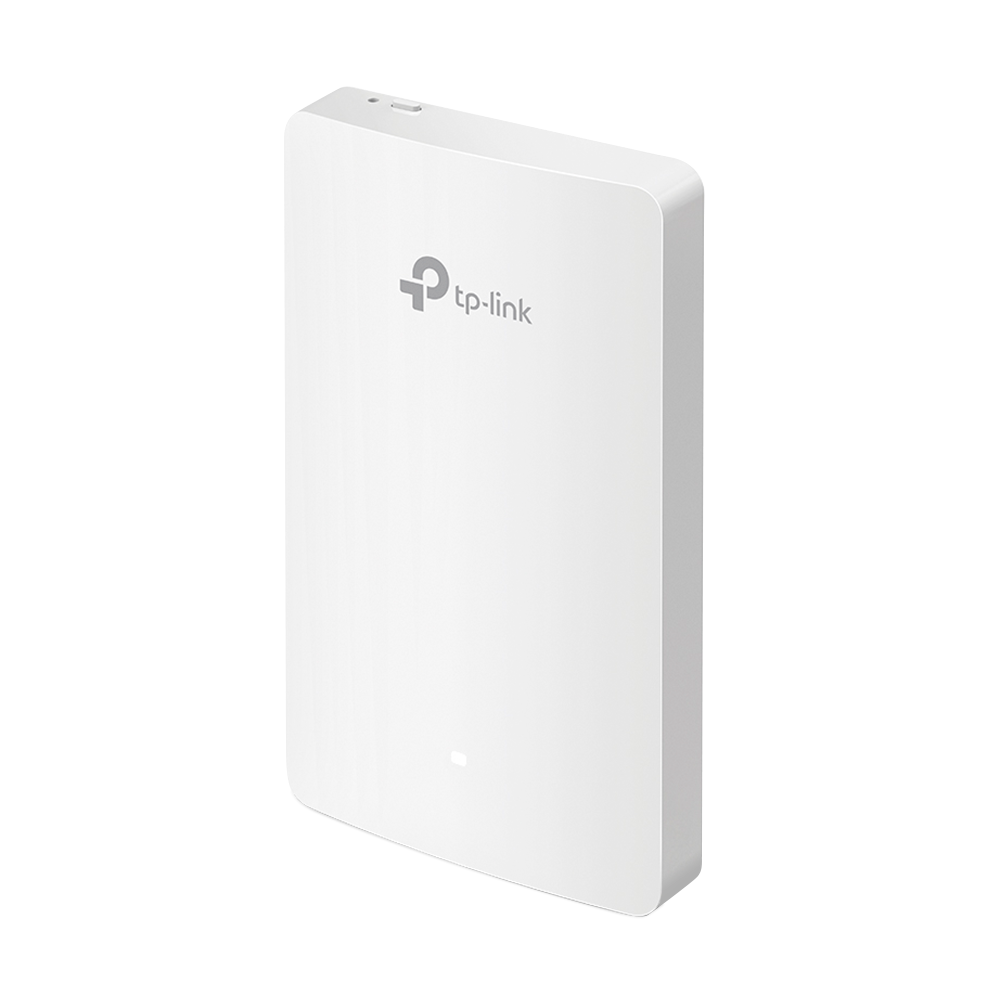
Omada AC1200 Wireless Gigabit Wall-Plate Access Point EAP235-Wall provides dual-band Wi-Fi of up to 1200 Mbps, also 4 Gigabit Ethernet ports for bridging (1× uplink + 1× downlink), with one downlink port supporting PoE pass-through to provide power for wired device. Ideal for the use in hotel rooms, hospital, offices, dormitories and any other e...
this would be perfect
swift eagle

I got this take it or leave it, that’s besides thing looks expensive and switches are also expensive iirc
peak cloak
it's like 60 bucks with an integrated switch
swift eagle
I thought 20 bucks for my usb c to ether net + cable was expensive lmao
peak cloak
switches are cheap, you can get one for like 15 bucks
swift eagle
Can I just plug the Ethernet into the wall socket that already exists though
Cause I mean my internet is fine for everything else
peak cloak
yes
but I thought your issue was wifi
here's a cheap access point https://www.amazon.com/TP-Link-Wireless-Beamforming-Multi-SSID-TL-WA1201/dp/B08SBXVSF3

TP-Link AC1200 Wireless Access Point.
swift eagle
It is, but that’s not gonna fix it upstairs
Cause upstairs my devices connect to the second wifi thing
I’m just saying plug my laptop into the Ethernet from the middle floor
But I guess that still routes to the basement so it probably doesn’t matter anyway
peak cloak
I'm confused, if you want more of my advice you'd need to draw a network diagram
showing locations, etc.
 ornate jungle
peak cloak
I'm confused, if you want more of my advice you'd need to draw a network diagram
ornate jungle
peak cloak
I'm confused, if you want more of my advice you'd need to draw a network diagram
Readable network diagrams (overlaid onto a floor plan) are love, are life. ❤️
swift eagle
On the middle floor is a Ethernet plug into wall that gets sent to the router in the basement
The box is the main ether net eouter
My thing is I think my laptop can send the info to my device from 3 feet or it can utilizate my shit routers
I think idk how it works Thu
I’ve been informed I can’t use the Ethernet on the second router btw
Apparently running a cable through the hallway is bad idk
swift eagle
ornate jungle
_Readable_ network diagrams (overlaid onto a floor plan) are love, are life. ❤️
Is that readable
ornate jungle
IMO not really. It doesn't need to be perfect, but I can't really make that out. I use these:
- https://app.smartdraw.com/?nsu=1
- https://online.visual-paradigm.com/app/diagrams/#diagram:proj=0&type=FloorPlan&width=11&height=8.5&unit=inch
- https://www.drawio.com/
The first 2 are freemium, the last one is free-free, but packs less features.
SmartDraw is the best way to make diagrams like flowcharts, org charts, floor plans, and more. SmartDraw offers a way for teams to use diagrams to capture and share information and collaborate on projects and initiatives of all sizes.
swift eagle
Eh I’m just gonna Ethernet that jawn
Especially since I figured out how to ssh legal torrent files onto it it’s not that big of a deal
But I wonder if I should set up a vpn and pihole
I think I fucked up my Linux downloading pihole cause it said network.services wasn’t found and I had to reinstall lmao
swift eagle
For the server the only thing that matters is the router right?
So if I’m in Vermont and there’s a good router but shit internet it’ll still be good right
peak cloak
swift eagle
So if I’m in Vermont and there’s a good router but shit internet it’ll still be ...
good for what?
swift eagle
Running a Jellyfin server
swift eagle
peak cloak
no
Really? I thought u could create a lan or something
Then all decide Connect to that but if idrk how it works
peak cloak
all router does is route, if you have bad internet then you'll have long downloads. If you will be trying to stream remotly outside your local network you'll also have a bad time if you have bad internet
if you connected via ethernet to the router that's the best since you have basically have the best connection possible without any other bottlnecks
peak cloak
I guess you could, but at that point just download it to your local drive
swift eagle
I want to stream it on the car ride
I was planning to create lan on my laptop where there’s no actual internet but it’s still possible to runt eh server
peak cloak
why jellyfin then
just download your files to your computer and watch on it
KISS (keep is simple stupid)
swift eagle
I like mobility of my phone
Also Jellyfin has a good ui
File manager ui is not my def of good
peak cloak
ah yes, the mobility of having to carry a dedicated server around
even if it's a a laptop
swift eagle
I mean just plug it into my car
peak cloak
if you want phone, download on phone. You're creating a problem when there's a simple solution
swift eagle
Then I get to squirm around and move how ever I want to in my seat
swift eagle
peak cloak
if you want phone, download on phone. You're creating a problem when there's a s...
But… I don’t have 100+ gigs on my phone
Never the less 2 terabytes
Unless lighting to usb a adapters exist
peak cloak
don't need that much for car ride, download what you want. You can even probolby use an external drive
swift eagle
Ye but their fat and probably take a lot of piwer
- my battery health is already cooked
peak cloak
less than a dedicated server laptop
swift eagle
And it reduces mobility which was my original want
swift eagle
peak cloak
less than a dedicated server laptop
Only like 50 watts + it runs off the car not my phone
peak cloak
plug phone into car...
swift eagle
You can’t if ur using an external drive….
peak cloak
swift eagle
You can’t if ur using an external drive….
I'm sure you can
swift eagle
1-1 =0
0-1 =-1, how are we using -1 porte
I guess theirs probably lightning to usb a 3.2 splitter ports
But I’d question their function
ornate jungle
swift eagle
I guess theirs probably lightning to usb a 3.2 splitter ports

Apple (CA)
The Belkin Lightning Audio + Charge RockStar offers dual functionality for charging and listening to your iPhone or iPad. Buy online now at apple.com.
But also... when you get a phone with USB-C this will be less of a problem.
You'll likely run into the larger problem of video playback compatibility on iOS.
swift eagle
The laptop does transcoding
stuck grove
swift eagle
I guess theirs probably lightning to usb a 3.2 splitter ports
lightning connector is only usb2
swift eagle
So no issue there, plus a lot of anime is already h264 which I think we use or it’s hevc which I also think apple uses
ornate jungle
stuck grove
lightning connector is only usb2
This. Except for like... a couple models of iPad Pro, lightning is indeed only USB 2.0 last I checked.
swift eagle
Could be wrong of course I’m just an idiot :)
swift eagle
ornate jungle
This. Except for like... a couple models of iPad Pro, lightning is indeed only U...
Damn.
That’s fine though tbh we don’t need anything more than like 60Mbps?
stuck grove
60MB/s
swift eagle
60mbps
stuck grove
60MB/s, or 480mbps
swift eagle
No, I mean we don’t need more than 60mbps for video play probably
ornate jungle
swift eagle
But… I don’t have 100+ gigs on my phone
Plug this into the Belkin Lightning splitter and bam! Problem solved for way less than a laptop.
https://www.apple.com/ca/shop/product/HNTZ2ZM/B/sandisk-256gb-ixpand-flash-drive-go

Apple (CA)
With its convenient keyring hole, the SanDisk iXpand Flash Drive Go travels anywhere to easily free up memory on your iPhone. Buy online now at apple.com.
swift eagle
ornate jungle
Plug this into the Belkin Lightning splitter and bam! Problem solved for way les...
Very cool
60 bucks seems reasonable too actually
But idk the running price for those drives
Are they faster than m.2 nvme
Gen 4
ornate jungle
swift eagle
Are they faster than m.2 nvme
Not at all - they're limited to the connection standard. When plugged into most iOS devices via Lightning, that's USB 2.0 speeds. When plugged into a computer using the USB-A port, that'll be USB 3.0 speeds, assuming the computer also has a USB 3.0 port.
stuck grove
ornate jungle
This. Except for like... a couple models of iPad Pro, lightning is indeed only U...
Yeah, just the first gen ipad pro 12.9in and the second gen ipad pro have usb3 lightning
swift eagle
That’s kinda crazy though
So if their plugged into thunderbolt their thunderbolt speeds
stuck grove
no, it'll be usb3
swift eagle
Isn’t that like 10 gig a second, mine is only 7 (allegedly)
stuck grove
USB3 is rated for 10gbps
swift eagle
Ok but still
stuck grove
thunderbolt speed depends on generation
swift eagle
That’s faster than most nvme drives, no?
Isn’t the average one like 7-9 gigs a second
stuck grove
something like the crucial P3 plus can do 5000/4200MB/s Read/Write
or about 40gbps read, and 33.6gbps write
stuck grove
stuck grove
thunderbolt speed depends on generation
(thunderbolt 4 is 40gbps, thunderbolt 5 is 80gbps)
stuck grove
swift eagle
Or dp I guess
the USB protocol is ill suited for HDMI and DP
swift eagle
Oh shit so if it was connected to thunderbolt 5 were hitting that or no?
stuck grove
swift eagle
Oh shit so if it was connected to thunderbolt 5 were hitting that or no?
no, with that drive you'd only ever get usb3 speeds
swift eagle
So thumb drives max is typically around usb3?
stuck grove
depends on the drive, but usually, yes
swift eagle
Of course I assume theirs some steroid thing that does 70gbps but ok
10gbps still not to be slept on
That’s a 60GB game in a minute
Lil less
stuck grove
you'd need a pcie 5.0 nvme drive to get anywhere near that
peak cloak
swift eagle
That’s fine though tbh we don’t need anything more than like 60Mbps?
I'm playing a video right now and it's no more than 7 Mbps
 stuck grove
something like the crucial T700 can do about 100gbps
swift eagle
Isn’t that insane
swift eagle
stuck grove
something like the crucial T700 can do about 100gbps
Damn
stuck grove
(real world applications will be a bit less than that)
and that's only in sequential
swift eagle
Well parallel in video would be weird, no?
stuck grove
huh
ornate jungle
swift eagle
Isn’t that insane
For raw speeds? Sure. For real world consumer use-cases? Not really - few consumer applications need that kind of speed. Even the crazy speeds of Gen 4 or Gen 5 NVMe drives goes largely unused in consumer PCs...
stuck grove
video would be sequential, not random, i think that's what you're asking
swift eagle
Oh never mind. I thought y meant u only needed 1.4 mbps for the video in sequential
Idk why I thought u were inferring playing the video in parallel
stuck grove
for HD video you're looking at about 5mbps
for 4k UHD you're looking at about 25mbps
swift eagle
ornate jungle
For raw speeds? Sure. For real world _consumer_ use-cases? Not really - few cons...
No I meant the dudes video, mine plays at like 284kbps
swift eagle
stuck grove
for HD video you're looking at about 5mbps
We need more hd in anime
swift eagle
stuck grove
most anime is HD
My downloads suggest otherwise
stuck grove
even old anime is at least 720p
 naive nest
It's annoying that my Ubiquiti APs demand 802.3af when they use a stated maximum of 10 watts of power which is easily covered by standard 802.3at PoE
 violet spear
violet spear
violet spear
Essentially 100.0/24 can give an icmp hello reply when 19.1 Pings it.
But 100.0/24 can't send a packets to 19.1 directly
opal pagoda
violet spear
how is the routing done here?
 violet spear
default via 192.168.18.1
100.0/24 via 100.1
 crystal shale
thin hedge
pro tip; send everything in one message
crystal shale
thin hedge
pro tip; send everything in one message
i wanted to, forgot to shift xD
thin hedge
crystal shale
i wanted to, forgot to shift xD
hehe
crystal shale
hey networking guys, im trying to setup a OPNSense virtualized on my Proxmox host.
I have a FritzBox on the Network 192.168.178.0 and its gateway is 192.168.178.1
The Proxmox is on 192.168.178.10 and the OPNSense on 192.168.178.11 (WAN Interface as far as i understand)
The LAN Side of the OPNSense is 192.168.188.0, and is gonna be used to pipe all the VM through it.
I want the following: Devices in the FritzBox Network shall be allowed to access ssh, samba and everything else on the VM network. The VM network shall not be allowed to access the devices on the fritzbox network. the VM network shall be allowed to access the internet, and i want to be able to "allow"/"port forward" singular ports, so that the fritzbox isnt the only firewall inbetween the internet and the vms. Some extras i have would be PCP (aka that the OPNSense asks the fritzbox to portforward the ports it allows through to the internet) and perhaps a wireguard vpn that allows me to access my devices in the fritzbox, vm network and the internet (although i think i can set that up in the fritzbox.. although i think this could be suboptimal as i think the fritzbox can only do one wg tunnel)
Right now, the OPNSense kind of does the opposite of what i want, it allows the vms to go into the internet, and ping my fritzbox devices, but i cant ping the devices on the VM network
i have set a static route on my fritzbox, to route traffic for 192.168.188.0 to 192.168.178.11
crystal shale
thin hedge
pro tip; send everything in one message
not perfectly in one message, but the "have and want" is in one, and the "have done this stuff" in underneath
crystal shale
i did it i think
that was very unnessesarly stupid
although pings are still blocked
something with icmp or whaterver
hm. cant seem to get pings to work
thats kinda annoying.. broadcast probably is also not working then
 novel gust
does anybody know a no cable access point system?
I have looked at this and it looks decent, just wanted to get your opinions on this
 opal pagoda
novel gust
https://amzn.eu/d/cu7XOvv
opal pagoda
novel gust
https://amzn.eu/d/cu7XOvv
dont buy mesh systems that arent tri band
novel gust
opal pagoda
dont buy mesh systems that arent tri band
do you know any good ones that support 6 or 6e as well?
opal pagoda
what is your budget and how many units do you want?
novel gust
opal pagoda
what is your budget and how many units do you want?
Dont rlly have a budget, maybe say 6, one which will connect to router then 5 around the house
opal pagoda
how many floors does your house have?
and what m2 per floor
6 could very well be way too many
novel gust
opal pagoda
how many floors does your house have?
and what m2 per floor
2 and not sure
Ill just stick with the 3 then
ornate jungle
novel gust
do you know any good ones that support 6 or 6e as well?
Dong Knows Tech
Tri-band refers to Wi-Fi broadcasters with three bands using three radios of different frequencies or two radios with one split in two, often 2.4GHz + 5GHz + 6GHz or 2.4GHz + 5GHz-1 + 5GHz-2.
novel gust
ornate jungle
https://dongknows.com/tag/tri-band/
thank you
 viscid flicker
Hi, did anyone setup ZeroNSD server? I am trying to follow documentation https://docs.zerotier.com/dns but it does not work. When I am trying to ping like in Verify functionality section all my pings fails with error Name or service not known.
ZeroNSD - DNS on your ZeroTier network
coarse rapids
received my 5Gbit USB NIC, got 180Mbit max. Tested multiple USB ports; multiple network cables, 1 getting me my ~930Mbit fiber connection and one getting me 280MB/s to my NAS, tried manually adjusting the speed in device manager, uninstalling drivers and reconnecting, updating driver in device manager, still won't work. Anything else I should test before requesting a refund?
opal pagoda
coarse rapids
received my 5Gbit USB NIC, got 180Mbit max. Tested multiple USB ports; multiple ...
what is the reported link speed?
to me it smells like it negotiated to 2.5g
is the other end 5g capable?
coarse rapids
opal pagoda
what is the reported link speed?
don't know where to see that
I tried setting it to 2.5Gbit and I'm still only getting 150Mbit down but somehow I am getting 500Mbit up
which is my ISP provided maximum
opal pagoda
go to network settings and click status on your adapter
 coarse rapids
it lists 2.5Gbit there which is what I manually set it to
opal pagoda
coarse rapids
it lists 2.5Gbit there which is what I manually set it to
is the other side 5g capable?
coarse rapids
10gbit switch and NAS with 10Gbit network card
opal pagoda
which switch?
as 5g is wierd standard it is sometimes not implemented
opal pagoda
try setting 5g manualy on both nic side and switch side
coarse rapids
I'll be going offline for a bit then because I need to set my PC to a specific IP to access to access my switch
amber urchin
2.5 and 5 are weird things that aren't always supported by other hardware. Your 10gb switch could be incapable of 2.5 and or 5. It could also be a USB bottleneck.
opal pagoda
amber urchin
2.5 and 5 are weird things that aren't always supported by other hardware. Your...
it is compatabile

but yea 5gbps usb could very well be a bottleneck
coarse rapids
I set my switch and my PC to 2.5Gbit and still same issue
amber urchin
Then maybe it is because you're drive limited
coarse rapids
180Mbit download but 500Mbit upload
amber urchin
Or as mentioned, limited by the usb port / usb root hub / chipset the root hub is connected to / link between the chipset and cpu
coarse rapids
I see. I will test it on my NAS then
no USB connected, just a 3.0 x8 device and 3.0 x1 device, B760 board
amber urchin
what is the cable situation?
coarse rapids
cat6 to wall socket to cat7
but keep in mind I'm using the same cable that gives me 280MegaBytes per second to my NAS and has no issues hitting my ~930Mbit internet connection, so getting ~180Mbit on that cable is all wrong
amber urchin
ok, but have you had a device on that socket run at full speed? Maybe there is an issue with the run in wall
coarse rapids
I reach 90% of my 2.5Gbit connection, this new USB NIC was going to be the first test to see if I can exceed that
208Mbit down on my NAS and then disconnected from network
so I think it's just a faulty device?
opal pagoda
coarse rapids
I set my switch and my PC to 2.5Gbit and still same issue
if you have a spare pcie port i highly recommend just buying a 10g network card
coarse rapids
unfortunately that's at least 3.0 x2 or 4.0x1 and while both my additional slots are 16 slots they are only 3.0 x1 lanes
Unless that could still work just limited to 1GBps?
opal pagoda
coarse rapids
unfortunately that's at least 3.0 x2 or 4.0x1 and while both my additional slots...
what motherboard do you have?
coarse rapids
Gigabyte B650 Aorus Elite AX
opal pagoda
coarse rapids
Gigabyte B650 Aorus Elite AX
you can use m.2 slot to put 10g card in
coarse rapids
I'll have to get rid of one of my SSD's then
peak cloak
opal pagoda
you can use m.2 slot to put 10g card in
iirc that won't work
it's differently keyed
coarse rapids
I live in Europe, guaranteed return window, I can always try a network card on my limited lanes and see the result
opal pagoda
peak cloak
it's differently keyed
they make those that fit in various slots (*wifi m.2 slot is limited to pcie x1 most of the time) nvme slot is x4 which will provide sufficient bandwidth
 quaint siren
Someone explain this to me since I skipped few networking classes during my IT course:
I have internet speed of 200Mbps down and 25Mbps up, this is through 5G which my router pings between 2 cell towers.
Every site seems to load slowly as if I have 2Mbps speed instead.
Tested the speeds with Fast.com and speedtest
opal pagoda
quaint siren
Someone explain this to me since I skipped *few* networking classes during my IT...
https://speed.cloudflare.com/
test it here
it shows speeds for small files as well

Test your Internet connection. Check your network performance with our Internet speed test. Powered by Cloudflare's global edge network.
amber urchin
peak cloak
it's differently keyed
SATA only is keyed differently. PCIE M.2 is just 4 lanes of PCIE. Sometimes it can also work with SATA too.
twin pier
yeah make sure to do a good speed test like cloudflare
Remember the internet is a web and not just a set of peer-to-peer links to everything in the world, so sometimes the bottleneck can be a server in the middle. But if every website is having trouble, what I just mentioned wouldn't be the cause
silent flax
amber urchin
SATA only is keyed differently. PCIE M.2 is just 4 lanes of PCIE. Sometimes it...
technically there is no such thing as "SATA only" M.2 slot from spec perspective. But boards can decide not to wire up everything.
Both key B and M has SATA and M.2; difference is that key B was limited to PCI-E x2, while key M has PCi-E x4. On other side key B could have had all other crazy interfaces, even audio (LOL)

 pseudo tinsel
I just moved from a regular consumer tplink router to a firewall minipc with opnsense, and I'm having issues figuring out portforwarding (mah, consumer hardware really made it easy huh). I went into Firewall>NAT>Port Forward, made rules for each port I needed (source *, destination wan-address, NAT server-address) and none of it works from the outside. Tried adding NAT reflection, disabling webGUI redirect rule on opnsense's webgui settings and changing its port, nothing.
Am I missing something fundamentally dumb or how would I go about diagnosing this?
pseudo blade
silent flax
technically there is no such thing as "SATA only" M.2 slot from spec perspective...
Yeah I wouldn't count on every vendor having included that PCIe or a number of the other fun interfaces on their B-key slots
-especially SBCs and the older motherboards often shipped with them
silent flax
yea, key E is often now just CNVi and nothing else
anyway, i don't think i seen much of key B SATA only slots on AM5 or AM4 either, so the intended use case (10Gbe NIC via M.2 slot) on a B650 board s reasonable thing to expect
pseudo blade
Most of those I've seen ship with E-keying
Would suck to buy one and find out your system indeed only offers CNVi
 pseudo blade
I do not, I've seen E-keyed wired NICs
pseudo blade
10GBe is also possible on E-key but it's harder
PCIe 4.0 or later only, probably rules out some chipsets
E-key is 2x1 PCIe and not 1x2
I'm looking now and it seems basically everything wants B+M, probably so it can run at full speed on PCIe 3.0
opal pagoda
pseudo blade
E-key is 2x1 PCIe and not 1x2
And sometimes they don't even wire up pcie and it is just glorified usb interface
pseudo blade
Yep, I mentioned that earlier. Can suck when trying to get the most out of some systems
It's the default assumption on my non-x86 router boards, expect the advertised functionality and nothing more
Mikrotik has some fun ones where if you use the USB port on the device you no longer get a USB interface on the mPCIe slot and can kiss any affordable LTE functionality goodbye
-unless you're cool with a USB3 port that can't do USB2, which is very challenging for many products due to USB2 dependency and considering VIA's patent on USB3 transaction translators they have just sat on since USB3 came out and charged $150/pop for
peak cloak
pseudo tinsel
Am I missing something fundamentally dumb or how would I go about diagnosing thi...
double check you have firewall rules to allow it

 hybrid jetty
my new build sems to have a lot of internet problems, and idk if its just my internet or if its the pc can anyone here help?
stuck grove
pseudo tinsel
peak cloak
double check you have firewall rules to allow it
Ye I ended up fixing it by enabling Reflection for port forwards and Automatic outbound NAT for Reflection
lone crane
kinda funny how much i preach 3 2 1 without actually doing it on my computers, tbf it has been a small nightmare

pro tip windows is stupid
 haughty pecan
anybody here familiar with SFTP?
mystic latch
Just ask your question
 wintry pike
lone crane
kinda funny how much i preach 3 2 1 without actually doing it on my computers, t...
wintry pike
lone crane
kinda funny how much i preach 3 2 1 without actually doing it on my computers, t...
What's this software?
haughty pecan
troubleshooting an issue with very slow downloads over SFTP
1Gb symmetrical fiber and files are downloading over SFTP at ~3000 kBps (SS#1)
TCP window size on our windows FTP server is set to "normal" (SS#2)
TCP Window size on their windows server is also set to "normal"
however.... in the packet capture, the TCP window size for the packets we are sending to the destination is 64815 bytes (SS#3)
and the TCP window coming back is 1024 bytes (SS#4)
this seems like the smoking gun to me, but im uncertain as to what could adjust that TCP windows size if not the FTP client on their side


 opal pagoda
haughty pecan
troubleshooting an issue with very slow downloads over SFTP
1Gb symmetrical fibe...
opal pagoda
haughty pecan
troubleshooting an issue with very slow downloads over SFTP
1Gb symmetrical fibe...
Yes your assumption is correct, i always adjust window size when i upload new firmware to my switches as otherwise it takes 15-20 minutes for transfer to complete
fervent brook
https://media.discordapp.net/attachments/1228348112158855248/1349458602670161920/20250312_120547.jpg

Just gotta hope my NAS supports TFTP
lean palm
Hell yeah VOIP
fervent brook
lean palm
Hell yeah VOIP
I only have one...so it's kinda useless. Also. I live by myself... There's nobody to call
fervent brook
I think i saw some of those at goodwill in the past month. I wasn't sure of the brand, so i passed
Do they have a con line?
opal pagoda
fervent brook
I only have one...so it's kinda useless. Also. I live by myself... There's nobod...
cucm my nemesis
fervent brook
opal pagoda
cucm my nemesis
Cisco is the most/only formal network education I've ever had...so it's what I'm most familiar with
I gotta buy a 6p6c cable so i can make a console cable
opal pagoda
it uses 6p6c?
fervent brook
This model? Im not sure
opal pagoda
cisco console cable is usualy 8p8c
fervent brook
But the last cisco "voip" phone i had used the rj11 port for console
fervent brook
opal pagoda
cisco console cable is usualy 8p8c
Yes
opal pagoda
i have a ups that uses 2.5mm trs for console lmao
fervent brook
If you read the manual for the one i used to have, it doesn't mention a console port.
But the rj11 port says "rs232"
So, all you gotta do is know which wires go where and make an adapter
opal pagoda
apc just has to be fkn special snowflake
2.5mm here
rj50 somewhere else
rj11 on older stuff
 fervent brook
A female rj45 coupler works best, but you have to move the pins
Ive never seen rj50
opal pagoda
it is just 10 pin verison of regular rj45
fervent brook
What can you do with it? Must be magical
opal pagoda
probably for configuration and monitoring if smart slot card is not installed
fervent brook
I meant the rj50... Not the con line
opal pagoda
idk wierd industrial things as per usual
opal pagoda
this thing?
 lone crane
my NAS is having a "great" time
 fervent brook
opal pagoda
this thing?
fervent brook
opal pagoda
this thing?
Wow...
 fiery elbow
Have a Unifi EFG with an OpenVPN and WireGuard VPN server setup. These previously worked without issue. They have now been down for about 2 weeks. No config changes on the server side or client side. Ports for VPNs show filtered when scanned externally. The auto-created Zone based firewall rules are in place. Modem is in IP Passthrough mode to the EFG. Any ideas what might be blocking it?
fervent brook
opal pagoda
this thing?

Hopefully the pins cisco uses for the console are the 4 middle ones
If not. Maybe i can use the splitter to change the eire posotions, since that's 6c
topaz patrol
opal pagoda
apc just has to be fkn special snowflake
2.5mm here
rj50 somewhere else
rj11 on ...
And when they use 8p8c it’s some random fucking pinout
fervent brook
inb4 6p8c
ornate jungle
topaz patrol
And when they use 8p8c it’s some random fucking pinout
Me: "Oi, networking vendor - you could've just used the standard 8p8c to serial pinout!"
Vendor: "Why yes, yes we could have." 😏
topaz patrol
ornate jungle
Me: "Oi, networking vendor - you could've just used the standard 8p8c to serial ...
I’m pretty sure if you try and use a standard pinout the UPS turns off too!
fervent brook
ornate jungle
Me: "Oi, networking vendor - you could've just used the standard 8p8c to serial ...
How many word does serial need? 4?
topaz patrol
topaz patrol
I’m pretty sure if you try and use a standard pinout the UPS turns off too!
Yep!

Always use genuine APC Serial Cables 🤣
fervent brook
topaz patrol
*Always use genuine APC Serial Cables* 🤣
And on the other side of the spectrum is Garmin
https://www8.garmin.com/specs/pcwiring.pdf
charges 40 dollars for a cable
Tells you how to make your own cable for "free"
topaz patrol
fervent brook
>charges 40 dollars for a cable
>Tells you how to make your own cable for "free"
$40 is pretty reasonable
 eager bison
need better wifi signal ideas. i have two connections but both are downstairs and wifi repeaters are ass. running an ethernet from there is gonna be really long
 glad glacier
So the only way to connect my PSP to the internet is by having a "801.11b Wi-Fi standard" can I run that on my router alongside my regular bandwidth internet?
glad glacier
fervent brook
>charges 40 dollars for a cable
>Tells you how to make your own cable for "free"
You mean this cable

this is a cable for an old Garmin GPS
That is definitely proprietary
fervent brook
glad glacier
That is definitely proprietary
can't tell unless i can see the pins
glad glacier
fervent brook
can't tell unless i can see the pins

I think I already threw the cable away but maybe not
It's just a flat surface and then with just a few pins sticking out in a line
fervent brook
i wonder if you could make a new one by taping a ZIF connector to a business card...
glad glacier
fervent brook
i wonder if you could make a new one by taping a ZIF connector to a business car...
No idea
glad glacier
glad glacier
So the only way to connect my PSP to the internet is by having a "801.11b Wi-Fi ...
Well maybe
Anything I can do with just this router?
 topaz patrol
glad glacier
So the only way to connect my PSP to the internet is by having a "801.11b Wi-Fi ...
topaz patrol
glad glacier
So the only way to connect my PSP to the internet is by having a "801.11b Wi-Fi ...
Wifi is backwards compatible by design
glad glacier
topaz patrol
Wifi is backwards compatible by design
Let me show you what it shows me
topaz patrol
topaz patrol
Wifi is backwards compatible by design
Other than some features like 802.11r
glad glacier
topaz patrol
Other than some features like 802.11r
 topaz patrol
Oh it probably doesn’t support WPA 2.0
glad glacier
Yeah
Is there any way to put it on there with memory stick
I Have a micro extension
topaz patrol
That’s not really a question for this channel
fervent brook
glad glacier
Is there any way to put it on there with memory stick
No. you cannot upgrade your system's wifi protocols with a file on your memory stick
fervent brook
topaz patrol
That’s not really a question for this channel
the networking channel...
topaz patrol
fervent brook
No. you cannot upgrade your system's wifi protocols with a file on your memory s...
Well, I’m sure somebody has done a mod lol
fervent brook
glad glacier
Anything I can do with just this router?
Put it in the microwave?
topaz patrol
fervent brook
the networking channel...
It turned into PSP modding, so, not really the right channel, no :)
fervent brook
glad glacier
So the only way to connect my PSP to the internet is by having a "801.11b Wi-Fi ...
What country are you in?
glad glacier
fervent brook
What country are you in?
Us
topaz patrol
WPA2PSP Plugin
glad glacier
K
fervent brook
Are you willing to spend 10 dollars?
topaz patrol

Reddit
Explore this post and more from the psphacks community
glad glacier
F*** it I guess
fervent brook
glad glacier
F*** it I guess
buy a router from Goodwill
topaz patrol
Or just create an open guest network
topaz patrol
fervent brook
buy a router from Goodwill
No that’s silly
fervent brook
silly, but it works
topaz patrol
Option 1. Create an open guest network
Option 2. WPA2 plugin
glad glacier
fervent brook
buy a router from Goodwill
Hell yeah and then I can do all kinds of wacky s*** with it
I thought that part was the router I think I'm just a little tarted
Haha gb
fervent brook
glad glacier
Haha gb
goodbye?
 lethal charm
Huh sooooo I forwarded port 80 on my router to a random dead ip. Can explain why if necessary. Now I can't access my router's web portal  . Did not expect the router to just redirect all traffic on port 80 to the dead ip, including internal traffic attempting to connect to the web portal .......
Do I just have to factory reset my router?
lethal charm
Yeah i just factory reset it. Btw my AX3200 by default exposes my admin panel to the internet
topaz patrol
lethal charm
Yeah i just factory reset it. Btw my AX3200 by default exposes my admin panel to...
There are 10s of routers marketed as AX3200
topaz patrol
Ah


 radiant sail
 keen urchin
damn thats impressive
keen urchin
Also hilarious, because I get almost no benefit from it, but because I have 10gb stuff I feel compelled to make sure it works and use it
 high wren
Is there any manual for migration from eap ms-chapv2 to eap tls?
opal pagoda
keen urchin
I upgraded to 10gb months ago, first time I actually tested it.
Is it symmetric?
topaz patrol
opal pagoda
Is it symmetric?
It’s on the LAN, so yes :)
I highly doubt Bob is paying over $1500/month for 10G EE
peak cloak
lethal charm
Huh sooooo I forwarded port 80 on my router to a random dead ip. Can explain why...
it's probably because it has NAT reflection on by default
if that wasn't on, that wouldn't have happened
peak cloak
topaz patrol
I highly doubt Bob is paying over $1500/month for 10G EE
it's kinda insane how where my parents live they can get 8 gig for 280 /month
while we're still on the 300/300 plan and it works just fine
crystal shale
crystal shale
hm. cant seem to get pings to work
Imma bump this again. I still haven't found a solution thats satisfactory.. it somewhat works, but its more "barely" than "well" id appreciate if a person that knows opnsense would read this and suggest some stuff or ask me to provide needed informations incase i haven't put them here yet.
Its especially confusing me, that RDP and such work through this setup, but anything relying on pings or broadcasts seem to not work at all. Thus stuff like SMB/CIFS dont work apparently.
Im assuming i need to disable a lot of the predefined autogenerated rules in opnsense that lockdown anything coming from wan into lan, but dont see any options regarding that.
opal pagoda
Look at logs and see what is blocked with source and destination ip filters
 velvet jolt
What is a good home router? I see $130 Asus WiFi 7 router? Most WiFi 7 I see are $300 so I’m confused why it’s so cheap. Would it be better to just get a WiFi 6 but higher end one for same price?
crystal shale
opal pagoda
Look at logs and see what is blocked with source and destination ip filters
Ive tried this but i aint getting anything much.. i can try again but itl just be icmp (ping) and igmp again
It looks like it goes through, and the machines on the lan answer and the opnsense lets it through, but all i get is "timed out"
opal pagoda
crystal shale
Ive tried this but i aint getting anything much.. i can try again but itl just b...
i dont really know how opnsense collects traffic logs as i mainly use fortinet firewall enviroment with analyzer so everything is neetly displayed
crystal shale
I mean, i essentially just need a router + firewall combo thats free, virtualizeable, and fairly simple to configure.. i used to use VyOS but its cumbersone and i dont really like it..
opnsense is almost perfect, if it wasnt for it seemingly blocking stuff without any way to disable it..
opal pagoda
crystal shale
opnsense is almost perfect, if it wasnt for it seemingly blocking stuff without ...
i am sure there is a way to disable everything, just look at logs and see where the issue originates from
opal pagoda
velvet jolt
What is a good home router? I see $130 Asus WiFi 7 router? Most WiFi 7 I see are...
RT-BE58U if i assume correctly
remarks on it:
no 6ghz band which is needed to get really fast wifi speeds
single 2.5g network port and others are gigabit
velvet jolt
opal pagoda
RT-BE58U if i assume correctly
remarks on it:
no 6ghz band which is needed to ge...
Would you buy that or just get WiFi 6 rt ax3000 for $30 less?
crystal shale
opal pagoda
i am sure there is a way to disable everything, just look at logs and see where ...
Some online posts say to go and delete lines in the config files via the CLI.. i really doubt this is a option in the GUI. And the issue seems to originate from the default auto generated and unremovable rules for the wan interface.. "default deny rule" and so on
opal pagoda
crystal shale
Some online posts say to go and delete lines in the config files via the CLI.. i...
that default rule is implicit and all firewalls have it
fervent brook
fervent brook
Ok. I got the 6p4c wires punched into an 8p8c keystone jack. Now I just have to find one of my three console cables to plug into the jack. This making a console cable for my phone
crystal shale
Yeah sure, but why does my "allow any from wan to lan" not work then?
Or only work for rdp, but not ping/icmp
If you want me to do specific things, please tell me
fervent brook
crystal shale
Yeah sure, but why does my "allow any from wan to lan" not work then?
is it conflicted by an earlier statement?
crystal shale
Ive tried everything i know of, and am completely stuck
fervent brook
if you block something, then say it's allowed later...it's still gonna get blocked...i think,,,
crystal shale
fervent brook
is it conflicted by an earlier statement?
There aint any others, its the only rule, except the autogenerated rules that i cant delete, where there is a "block any wan to lan"..
Which makes 0 sense, cuz rdp still works.
fervent brook
crystal shale
There aint any others, its the only rule, except the autogenerated rules that i ...
that would probably block all wan traffic to your lan...
crystal shale
fervent brook
that would probably block all wan traffic to your lan...
Yeah its what ive been saying..
fervent brook
i dont use RDP, sorry
crystal shale
fervent brook
i dont use RDP, sorry
Well, id assume http and such also work
fervent brook
does RDP use http?
crystal shale
Just ping/icmp/igmp/broadcast dont seem to work
Which seems to trip up cifs/smb
Ping gets timed out
If i allow any lan to wan, then ping from lan to wan, everything works..
Iirc, wan to lan still is broken though.
But i can try that again, because why not
opal pagoda
crystal shale
Yeah sure, but why does my "allow any from wan to lan" not work then?
could you post all firewall rules you have?
in order that they are configured
crystal shale
opal pagoda
could you post all firewall rules you have?
Will do, lemme boot up my server
(could take a bit(
crystal shale
okay thats done
@opal pagoda My Rules on LAN side

Autogenerated Rules on LAN Side that are collapsed there

Did discord seriously just die..
thats it from lan side
and wan side looks like this
my rules wan

autogenerated rules wan
 opal pagoda
from where to where do you want to ping?