#networking
1 messages · Page 55 of 1
 random cobalt
 elder flume
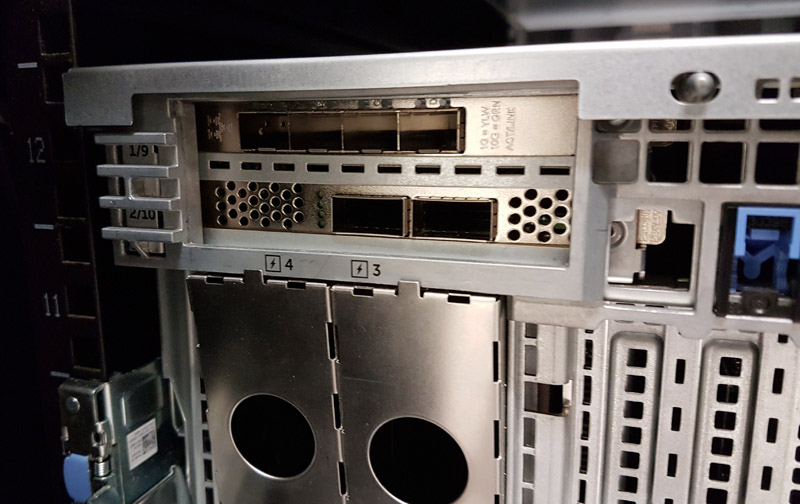
Just recived 3 dell xxv710-da2 for home network, kinda new to this But tempature whise should i put a fan on or do they just throttle when they get too hot? Sadly the one in my personal rig sits right up against my GPU so it might get abit hotter than the 55c it says on the data sheet is that a problem?
 opal pagoda
elder flume
Just recived 3 dell xxv710-da2 for home network, kinda new to this But tempature...
opal pagoda
elder flume
Just recived 3 dell xxv710-da2 for home network, kinda new to this But tempature...
strap a fan on them, they were designed with server airflow in mind
elder flume
opal pagoda
strap a fan on them, they were designed with server airflow in mind
alrighty ill see if i can find any that fits :p
 silent flax
shielded makes sense, if you are running your ethernet cables literally in the same cable duct as your power cables, or very near and parallel to them. Otherwise yeah, waste of time for home use.
or you know, just buy a domain for few dollars a year, set the DNS to cloudflare and then use the dynamic DNS client to update DNS at them. firstname@lastna.me (or firstname@lastname.tld) looks even cooler. But that's me, i mean most domains are in the $10/year price range.
silent flax
elder flume
Just recived 3 dell xxv710-da2 for home network, kinda new to this But tempature...
yeah, just blast some air towards them, If a single fan blasting air in general direction of a 17W X540-T2 is enough, your X710 will be fine with their 5W 🙂 https://www.servethehome.com/qsfp-v-sfp-v-10gbase-t-testing-power-consumption-differences/
We test QSFP+, SFP+ and 10Gbase-T networking options (40GbE and 10GbE) to see the differences in absolute power consumption and power consumption per Gbps
i mean there is a high chance it will not require active cooling unless you plug in some 10+gbps RJ45 DAC in those SFP ports, but if you can point a fan in the direction of card, it won't hurt
elder flume
silent flax
i mean there is a high chance it will not require active cooling unless you plug...
Will be running a SFP28 3m cable so iguess that makes the power draw go up?
silent flax
it won't reach X540-T2 tho 😄
i mean max power consumption listed is 14.1W for X710 as far as i can see
so the worst case scenario is still few watts better than normal X540-T2 operation
opal pagoda
silent flax
or you know, just buy a domain for few dollars a year, set the DNS to cloudflare...
i bought 5 year of .eu domain for 13 euro
elder flume
silent flax
i mean max power consumption listed is 14.1W for X710 as far as i can see
Cool cool! Cant wait to get it up and running waiting on components for the server now
silent flax
meanwhile i was thinking about downsizing, but it is not really economically viable to replace my old parts with something newer with lower power usage due resale value of my old parts
i mean sure, i could find buyers internationally for somewhat reasonable value, but i would have to get lucky
like 2950x sells from anything like $300-$350 on it's own (but also often bellow $300), and boards do not command much of a premium. And for $500, i can't really buy that much, plus peak power usage isn't that much better either with new Intel CPUs, and Ryzen would be expensive
so i guess i keep my 2950x server with 10Gbe and wait for my main system upgrade for server replacement (maybe)
 minor finch
did you build this rack ?
 obtuse cypress
Nothing quite like a red ground wire 😛
 prisma edge
silent flax
shielded makes sense, if you are running your ethernet cables literally in the s...
prisma edge
silent flax
shielded makes sense, if you are running your ethernet cables literally in the s...
Well I ended up doing so being they were shielded... but I could've easily separated them
prisma edge
minor finch
did you build this rack ?
It was actually my father. He kinda just surprised me with a diy rack one night and I loved it
minor finch
oh cool, thats really neat
prisma edge
obtuse cypress
Nothing quite like a red ground wire 😛
Yeah...
I grabbed an old cable during Robotics from the "cable box", a bin filled with messy and short cables that will most likely never get used. I was fortunate enough to find a single cable that had a nice gauge and length.
obtuse cypress
prisma edge
Yeah...
I grabbed an old cable during Robotics from the "cable box", a bin fill...
Haha yeah - its a little... anxiety inducing... for bonding you don't need much.... 18 gauge is more than enough
prisma edge
minor finch
oh cool, thats really neat
Thanks!
silent flax
obtuse cypress
Haha yeah - its a little... anxiety inducing... for bonding you don't need much....
what is anxiety inducing for me is the fact that it is not terminated into actual plug
obtuse cypress
silent flax
what is anxiety inducing for me is the fact that it is not terminated into actua...
It's probably tied to the box
prisma edge
obtuse cypress
Haha yeah - its a little... anxiety inducing... for bonding you don't need much....
Yeah ofc, I was just worried about resistance from being a longer cable.
And there's only like three gauges we ever use. 22 wasn't gonna cut it.
obtuse cypress
prisma edge
Yeah ofc, I was just worried about resistance from being a longer cable.
And th...
Its just for noise suppression, no ampacity will be going thru it
silent flax
obtuse cypress
It's probably tied to the box
i just meant it is not tied into an actual plug, but just "tied" to something on plug side
prisma edge
obtuse cypress
It's probably tied to the box
Okay, I'm not familiar with too many terms so pardon me for asking. What's that mean?
obtuse cypress
silent flax
i just meant it is not tied into an actual plug, but just "tied" to something on...
well yeah that's not atypical, its not part of a power circuit
obtuse cypress
prisma edge
Okay, I'm not familiar with too many terms so pardon me for asking. What's that ...
What is the wire connected to?
silent flax
obtuse cypress
well yeah that's not atypical, its not part of a power circuit
if an electric company would see that, they would disconnect you on spot here 🙂
prisma edge
obtuse cypress
What is the wire connected to?
It is currently connected to the faceplate screw
obtuse cypress
prisma edge
It is currently connected to the faceplate screw
Yep, totally acceptable
silent flax
like here you literally have a grounding plug you put your grounding cable into, which you can then plug into the normal socket
 obtuse cypress
silent flax
if an electric company would see that, they would disconnect you on spot here 🙂
obtuse cypress
silent flax
if an electric company would see that, they would disconnect you on spot here 🙂
Believe it or not, unlikely. Dunno where they are, but many times bonding wires are borrowed from plumbing
 prisma edge
Made sure to test the outlet, too. Apparently it wasn't properly grounded for who knows how long, but my dad was able to fix that up
obtuse cypress
silent flax
like here you literally have a grounding plug you put your grounding cable into,...
Yeah that may be a EU thing, we don't ahve those. In the US grounding to the box (via faceplate) is acceptable.
silent flax
obtuse cypress
Believe it or not, unlikely. Dunno where they are, but many times bonding wires...
that is impossible due most piping being plastic these days and most likely illegal here
obtuse cypress
silent flax
that is impossible due most piping being plastic these days and most likely ille...
Obviously you cannot ground to plastic
Grounding to copper pipe that is bonded is 100% within NEC code
prisma edge
obtuse cypress
Believe it or not, unlikely. Dunno where they are, but many times bonding wires...
Okay, that's an interesting fact I had not known beforehand.
Neat.
obtuse cypress
prisma edge
Okay, that's an interesting fact I had not known beforehand.
Neat.
I would personally rather see that wire come off of a screw/pigtail inside the box itself (assuming metal box), but so long as its grounded its grounded. You're also not grounding that device, you're bonding it for shield. Much different purpose.
Also @prisma edge is there another side of that patch panel? Only bond one side to shield
silent flax
https://www.amazon.com/Adapter-Universal-Connection-Control-Unbreakable/dp/B07Q1DJVNT something like this (or a full plug version) would make me feel much safer than a random wire which could slip off/contact live wiring
obtuse cypress
silent flax
<https://www.amazon.com/Adapter-Universal-Connection-Control-Unbreakable/dp/B07Q...
There's nothing preventing that from slipping out either, those are not UL listed
prisma edge
obtuse cypress
I would personally rather see that wire come off of a screw/pigtail inside the b...
Yeahhh I was considering that but it was just easier to crimp the cable and secure it in there with the screw.
And sorry for not being familiar with electrical terms, I'm still learning and the stuff's complex.
obtuse cypress
Banana jacks are not permitted in a US electrical system, they are not UL listed and just as dangerous if not more so as a simply trip on that will yank it out
prisma edge
obtuse cypress
Also <@291317048246665226> is there another side of that patch panel? Only bond...
Wdym another side?
obtuse cypress
prisma edge
Yeahhh I was considering that but it was just easier to crimp the cable and secu...
Did you make sure to not ground the other end of the cable(s)?
obtuse cypress
prisma edge
Wdym another side?
Wherever those white cables go, that side should be floating
silent flax
anyway, smart home parts are such a minefield, i hate how bad it is
(and i am only looking at stuff like smart plugs and thermal sensors for now LOL)
prisma edge
obtuse cypress
Did you make sure to not ground the other end of the cable(s)?
I made sure not to
obtuse cypress
prisma edge
I made sure not to
OK cool - if you shield both sides of a cable you A) create a ground loop B) are probably grounding from two different grounds/circuits. They surely go back to the same service panel, but it can be fucky with ground sourcing from one circuit and the other, on each end
prisma edge
obtuse cypress
Wherever those white cables go, that side should be floating
Ohh. They're routed through some drilled holes and stuffed between the attic floor and the insulation beneath.
prisma edge
obtuse cypress
OK cool - if you shield both sides of a cable you A) create a ground loop B) are...
Yeahh I read about avoiding that
obtuse cypress
prisma edge
Yeahh I read about avoiding that
Truth is the shielding is completely unnecessary but it sounds like you know this
prisma edge
obtuse cypress
Truth is the shielding is completely unnecessary but it sounds like you know thi...
Oh yeah, I regret choosing shielding 🙂
But it's fine.
I only know some of this stuff after hours of reading articles, tutorials, and headaches
Electricity is so complex, man 
My internship is requiring me to learn it for chip design and it confuses me so much at times.
obtuse cypress
prisma edge
Oh yeah, I regret choosing shielding 🙂
But it's fine.
I only know some of thi...
Yeah it really only becomes necessary in especially noisy environments and quite frankly usually when trying to run 10 gbps over ethernet for longer runs. 1 Gbps and 2.5 Gbps is fine over standard CAT6.
obtuse cypress
prisma edge
Electricity is so complex, man <:chip:915002968024154132>
My internship is req...
Well unfortunately this work won't make it much clearer because its AC lol... DC is a whole 'nother thing
prisma edge
obtuse cypress
Yeah it really only becomes necessary in especially noisy environments and quite...
Yeah, as someone told me before the project, unless I have a nuclear reactor in my basement, just go unshielded. My anxiety got the best of me and I went for shielded anyways.
prisma edge
obtuse cypress
Well unfortunately this work won't make it much clearer because its AC lol... DC...

obtuse cypress
prisma edge
Yeah, as someone told me before the project, unless I have a nuclear reactor in ...
Haha yeah - microwaves, etc. But truthfully yeah its more like RF and EMI type shit. I see it in datacenter a lot - 3 phase power environments with tons and tons of transforming and high current draw, etc. Its why I will never run 10GbaseT in a datacenter environment.
opal pagoda
prisma edge
Yeah, as someone told me before the project, unless I have a nuclear reactor in ...
dont let IEEE know but some ethernet runs that we have are over 100m and they work fine
its ran with cat7 s/ftp
prisma edge
obtuse cypress
Haha yeah - microwaves, etc. But truthfully yeah its more like RF and EMI type ...
Yup
prisma edge
opal pagoda
dont let IEEE know but some ethernet runs that we have are over 100m and they wo...
Okay that's pretty hilarious
obtuse cypress
opal pagoda
dont let IEEE know but some ethernet runs that we have are over 100m and they wo...
100M is 1 gbbps Cat6/A UTP territory
CAT6/A and CAT7 have the same length limits
opal pagoda
obtuse cypress
100M is 1 gbbps Cat6/A UTP territory
its just some ap-s that are like that
so poe+ is also ran trough the cable
opal pagoda
obtuse cypress
100M is 1 gbbps Cat6/A UTP territory
i belive they still passed certification so no worries
obtuse cypress
opal pagoda
i belive they still passed certification so no worries
Word - over 100M I just run fiber
fiber with media converter is cheaper than running cable a second time
opal pagoda
obtuse cypress
fiber with media converter is cheaper than running cable a second time
they experimented with ap-s that just took in sfp module but found its not needed
obtuse cypress
Yeah then they also need power
silent flax
opal pagoda
dont let IEEE know but some ethernet runs that we have are over 100m and they wo...
same with how 10gbps is Cat6 by spec... but people run it just fine on Cat5e. Sure, shorter runs, but you can do it 😄
but with Cat5e it is mostly down how was the cable made, some might not work, others might be up to Cat6 spec
opal pagoda
cca cables are the bane of everybodys existance
silent flax
https://www.youtube.com/watch?v=JuvVtStinyQ like this is even with those horrible couplers
 opal pagoda
silent flax
https://www.youtube.com/watch?v=JuvVtStinyQ like this is even with those horribl...
opal pagoda
silent flax
https://www.youtube.com/watch?v=JuvVtStinyQ like this is even with those horribl...
you have 2 kinds of people.
the pedantic ones that worry about how much they untwist the pairs before terminating
and the ones that run cat5e at 10g
silent flax
i just wish RJ45 10gbe switches weren't that expensive, but sadly i suspect metalic wiring is dead and sooner or later i will have to replace the wiring in my walls, if i want more than 2.5gbps
as 2.5gbps switches might slowly reach reasonable pricing (<50 euros for 8-port)
opal pagoda
silent flax
i just wish RJ45 10gbe switches weren't that expensive, but sadly i suspect meta...
wdym dead?
are you switching to fiber?
silent flax
opal pagoda
wdym dead?
are you switching to fiber?
nothing above 10gbps uses metalic cables anymore, it is all optical. While yes, Cat8 can do 40bps ethernet, there is no actual networking equipment for that
opal pagoda
for backhoul fiber is great but i dont see endpoints using it anytime soon
silent flax
well for homes, 2.5gbps will take another 3-5 years for gear to become norm (my cable modem came with a whole ONE 2.5gbe port, and three gigabit ones). Switches might drop to 40-50 euros for 8-port units by that time, and devices might be also be with 2.5gbe adapters on motherboards
5gbe and 10gbe is in very far future, which also means the price decreases are going to be very slow, if any. And right now something like 8-port RJ45 10gbe switch is absurdly expensive
(i think they are like 300-400 euros?)
so ironically one can buy an all SFP+ 8-port 10gbe switch from ali for like 100-120 euros, add 8 RJ45 adapters for 35 euros a piece and have same price or cheaper than all RJ45 switch
opal pagoda
silent flax
(i think they are like 300-400 euros?)
lmao that is the price for old-er nexus with 48 sfp+ and 6 qsfp ports
silent flax
opal pagoda
lmao that is the price for old-er nexus with 48 sfp+ and 6 qsfp ports

8-Port 10G Multi-Gigabit Desktop/Rackmount Switch
$400
 thorny osprey
What do I need to establish a cloud storage service business? (At home. Do not ask why)
silent flax
thorny osprey
What do I need to establish a cloud storage service business? (At home. Do not a...
cloud & at-home doesn't compute
point of cloud is that you have multiple failover locations
opal pagoda
silent flax
https://www.amazon.com/TP-Link-TL-SX1008-Multi-Gig-Protection-Auto-Negotiation/d...

We show an insane and popular 48-port 2.5GbE switch with 25GbE. Designed at under $400 this switch is powering hotels and e-Sports cafes
silent flax
thorny osprey
What do I need to establish a cloud storage service business? (At home. Do not a...
but if you just mean hosting at home, then computers and internet with good upload with ISP who won't kick you out
thorny osprey
silent flax
but if you just mean hosting at home, then computers and internet with good uplo...
Yes I mean hosting at home
Okay I got the computer with debian (with casaos) but I have no idea what to do next
opal pagoda
thorny osprey
What do I need to establish a cloud storage service business? (At home. Do not a...
2x locations with connections to iex minimum
practise 3 2 1 backup strategy
have roboust access controll in place
thorny osprey
Surely I need to a website for interaction
silent flax
thorny osprey
Yes I mean hosting at home
well usually you do business internet order from your ISP, ideally with symmetrical internet (or as much upload as you can get), and then computers with software
silent flax
thorny osprey
Okay I got the computer with debian (with casaos) but I have no idea what to do ...
wait, you have zero knowledge of server hardware & software, virtualization etc ?
thorny osprey
silent flax
wait, you have zero knowledge of server hardware & software, virtualization etc ...
you are obsolutely correct
I don't know much about networking
opal pagoda
then just dont
thorny osprey
where do I start to learn
opal pagoda
networking? pass ccna or get a job in networking
thorny osprey
nvm
opal pagoda
it is easier to sell compute rather than storage
thorny osprey
Ion think my intel i5 3210M can do that
okay I can atleast try personal cloud storage
how do I setup HTTPS on debian i'm confused
 opal pagoda
thorny osprey
okay I can atleast try personal cloud storage
how do I setup HTTPS on debian i'...
opal pagoda
thorny osprey
okay I can atleast try personal cloud storage
how do I setup HTTPS on debian i'...
you need ssl certificate, it can be self signed (error abt self signed will be present) or you can get/buy ssl cert from certificate authority
thorny osprey
opal pagoda
you need ssl certificate, it can be self signed (error abt self signed will be p...
how do I self sign
opal pagoda
thorny osprey
also can I connect to the nextcloud server from outside? like different router
opal pagoda
thorny osprey
also can I connect to the nextcloud server from outside? like different router
easiest would be connecting them with tailscale
thorny osprey
opal pagoda
easiest would be connecting them with tailscale
tailscale has to be open in the device I want to connect from?
thorny osprey
 opal pagoda
sudo in front
thorny osprey
 opal pagoda
sudo
thorny osprey
 opal pagoda
just switch to root with su root, you are only running first line as sudo
thorny osprey
so?
su root mkdir -p /etc/ssl/localcerts openssl req -new -x509 -days 365 -noenc -out /etc/ssl/localcerts/apache.pem -keyout /etc/ssl/localcerts/apache.key chmod 600 /etc/ssl/localcerts/apache*
opal pagoda
su root then enter
input password
then run all of the commands
opal pagoda
you really need to use a guide of some sorts and not ask infinite numbers of questions about simple things also this has evolved into something much different than the channel description above, please use #linux
prisma edge
silent flax
same with how 10gbps is Cat6 by spec... but people run it just fine on Cat5e. Su...
I gotta love the ethernet spec
Unlike USB advertising "You can transfer up to 5 Gigabit!" while referring to raw data transfer, ethernet will provide extra capability to comfortably say "yeah, you'll achieve 1 gigabit with just about any cat5e cable up to 100m." It just opens up room for much faster speed if you have a shorter higher quality cable... it's pretty neat
silent flax
in case of ethernet cat cables it is down to "we say your cables must meet tests for this category". It doesn't mean better built cables do not meet specs of higher categories
prisma edge
yep
silent flax
HDMI is worst in this, as the cables usually od not have info about their spec written on them
btw LOL HDMI, anyone remembers the most useless part of HDMI spec ?
aka Ethernet over HDMI 😄
does anything ever supported that ?
but to be fair, manufacturers screw up even basic things like audio return channel and HDMI-CEC from HDMI spec. so expecting Ethernet over HDMI to every catch traction was a wishful thinking
(also it was only 100 megabit)
prisma edge
silent flax
aka Ethernet over HDMI 😄
It's genuinely hilarious, 100megabit on specific few TVs that supported it
opal pagoda
silent flax
HDMI is worst in this, as the cables usually od not have info about their spec w...
HDbaseT is awesome doe
i have reciever and transmitter at work, 0 lag. works just as if display was connected directly
prisma edge
And yet it's still plastered on cables to this day
silent flax
opal pagoda
HDbaseT is awesome doe
i have reciever and transmitter at work, 0 lag. works jus...
not HDMI over ethernet, i talk about Ethernet over HDMI
aka 100 megabit Cat5 in HDMI cable
opal pagoda
silent flax
not HDMI over ethernet, i talk about Ethernet over HDMI
yes i know, i am proposing move to hdbaset for everything 
 rocky badge
opal pagoda
yes i know, i am proposing move to hdbaset for everything <:LUL:6678627015606927...
rocky badge
opal pagoda
yes i know, i am proposing move to hdbaset for everything <:LUL:6678627015606927...
I don't like hdbaset anymore lol
I'd rather do HDMI over IP
WIth something like Crestron NVX or similar
thorny osprey
opal pagoda
yes i know, i am proposing move to hdbaset for everything <:LUL:6678627015606927...
when I try to connect to nextcloud using tailscale's ip it shows untrusted domain
 rose flare
I got a quick question, Ive set up my first proper NAS server using truenas, runs great, wondering if there is a nice easy was of accessing the smb remotely (WAN) offsite without to much hassle. Cheers
 peak cloak
rose flare
I got a quick question, Ive set up my first proper NAS server using truenas, run...
peak cloak
rose flare
I got a quick question, Ive set up my first proper NAS server using truenas, run...
probobly tailscale vpn
if you want something more local, can setup your own wireguard or openvpn
rose flare
peak cloak
if you want something more local, can setup your own wireguard or openvpn
Ok cool ill look into it
 hearty crescent
Dear All I am going to upgrade my router I need to equipped with 1gb ram and WiFi 6e
 meager ginkgo
silent flax
aka Ethernet over HDMI 😄
meager ginkgo
silent flax
aka Ethernet over HDMI 😄
It really is useless lol. I had a few hdmi cables that had it and was always curious how to use it, turns out no one actually implemented it 
silent flax
meager ginkgo
It really is useless lol. I had a few hdmi cables that had it and was always cur...
my favorite Ugreen HDMI cable package 🙂

(they did it on both sides)
 meager ginkgo
silent flax
my favorite Ugreen HDMI cable package 🙂
meager ginkgo
silent flax
my favorite Ugreen HDMI cable package 🙂
lol, we had a big bulky hdmi running through the wall (in a conduit) up to our fireplace and it had hdmi over Ethernet
overpriced lmao
 silent flax
meager ginkgo
It really is useless lol. I had a few hdmi cables that had it and was always cur...
silent flax
meager ginkgo
It really is useless lol. I had a few hdmi cables that had it and was always cur...
The physical layer of the Ethernet implementation uses a hybrid to simultaneously send and receive attenuated 100BASE-TX-type signals through a single twisted pair.
🤷♂️
it was Pin 14 & Pin 19, same pins used for Audio Return Channel
meager ginkgo
silent flax
> The physical layer of the Ethernet implementation uses a hybrid to simultaneou...
Interesting how it’s only one twisted pair
silent flax
well, it's a dead feature anyway, it is chopped
silent flax
meager ginkgo
Interesting how it’s only one twisted pair
https://research.nccgroup.com/wp-content/uploads/2020/07/44con_hdmi_ethernet_channel_andy_davis_ncc_group_wp.pdf see page 15 and further, seems like they are doing some weirdo stuff, no wonder no one implemented it
 vast temple
Question: i'm out of sata plugs on my mobo (Gigabyte GA-880gma-ud2h short for AM3+) operating my NAS, I know an HBA is the proper thing to stuff into it but can i use a multiport sata add-in card to take the place of my few ports on the mobo to provide the extra room to add additional drives?
prisma edge
silent flax
uhm...
I'm a pretty big ugreen fan, but it kinda hurts to find so many spelling mistakes from them sometimes. At least they're reliable.
And in this case they go as far as to advertise a feature pretty much all modern hdmi cables support, wow!
silent flax
well this was from like 2016 😄
and well, at least it is not an english manual from chinese writers 🙂
prisma edge
silent flax
well this was from like 2016 😄
Well... hdmi 1.4 was released in 2009 so...
prisma edge
silent flax
and well, at least it is not an english manual from chinese writers 🙂
Yeahh true
silent flax
like this chinese KVM manual
 prisma edge
silent flax
like this chinese KVM manual
prisma edge
silent flax
like this chinese KVM manual
Go ahead. Go to the official website to download the USB and
silent flax
prisma edge
Go ahead. Go to the official website to download the USB and
next page
 prisma edge
...replace your whole keyboard and mouse
"Yes!!" kvm got some enthusiasm in there lol
opal pagoda
silent flax
next page
domain name is very human
 silent flax
opal pagoda
domain name is very human
silent flax
opal pagoda
domain name is very human
NetEase 🤷♂️
NetEase's official website address is 163.com. This was attributed to the past when Chinese internet users had to dial "163" to connect to the internet, before the availability of broadband internet.
so pretty much same as our yahoo.com, hotmail.com 😄
opal pagoda
idk i cant reach it

 opal pagoda
silent flax
<https://www.163.com/>
opal pagoda
silent flax
<https://www.163.com/>
ah, the site is so old that without www it doesent work
even tho its just dns config issue
as www.163 is subdomain of 163
silent flax
by the way today i finally found out why some of my battery powered Tuya thermometers never got a DHCP lease:
- they are BT + Wifi Dual mode, so if i have my phone with the Smart Life app, it will communicate with the app directly via BT and never does WiFi (found out this after i started looking at BLE signals and seen two devices with TY name, which had their Mac address with +1 added at the last digit)
- when i disabled BT in my phone, i found the devices on network for very short period of time with their listed mac address.
Anyway, i will have to find myself some zigbee ones and call it a day, and drop these into the ewaste bin i think 😄
oh, it also didn't do DHCP lease for those addresses, it just used what it got assigned last time. Very not nice, unless they checked if the IP is used, but i doubt that.
silent flax
this is arriving tomorrow with an SFP+ RJ45 10gbe module, let's hope they bundled the EU adapter, or i will have to find a compatible one 😄

 sudden flare
Nice
silent flax

It is time to check out what might be the smallest system with 8 cores, 4x 2.5GbE and WiFi networking options, and NVMe storage.
STH Main Site Article: https://www.servethehome.com/ikoolcore-r2-review-huge-leap-for-the-small-system-intel/
STH Top 5 Weekly Newsletter: https://eepurl.com/dryM09
---------------------------------------------------...
N300, 4x2.5gbe
obtuse cypress
OK
opal pagoda
silent flax
LOL https://www.youtube.com/watch?v=LNEmRaMC7qo
haha use that as replacement for that unmanaged gigabit switch
 true raptor
silent flax
this is arriving tomorrow with an SFP+ RJ45 10gbe module, let's hope they bundle...
true raptor
silent flax
this is arriving tomorrow with an SFP+ RJ45 10gbe module, let's hope they bundle...
lol they didn't even know how to write Enthernet
 silent flax
opal pagoda
haha use that as replacement for that unmanaged gigabit switch
silent flax
opal pagoda
haha use that as replacement for that unmanaged gigabit switch
it would cook itself
 sweet sentinel
opal pagoda
ah, the site is so old that without www it doesent work
sweet sentinel
opal pagoda
ah, the site is so old that without www it doesent work
You have to type www for some old websites?!
true raptor
sweet sentinel
You have to type www for some old websites?!
that should only be a problem if there is something else running on port 80 or 443 on that server that is not a website
silent flax
sweet sentinel
You have to type www for some old websites?!
back in old times, we had to type http:// as well (or https://)
 mild tendon
i remember having to tell everyone not to pick up the phone lol
and im only 21
we had dial up for a long time
silent flax
@mystic latch #networking message for context
opal pagoda
i have noticed this warning, what laws does it break if used in p2p rather than p2mp?
 thorny osprey
what's wrong
 silent flax
10 gbps to server, 2.5gbps do desktop, close enough 😛
 silent flax
so uhm... either ISP has a better day, or switching to a 2.5gbps switch (so 1gbps between ISP router and my router and then 2.5gbps between my own router and desktop) meant my internet speed has jumped from ~850Mbps to 912Mbps. closer to gigabit i guess 🤷♂️
random cobalt
Multiple routers isn't ideal
silent flax
random cobalt
Multiple routers isn't ideal
ISP router is so limited i got no choice
no DNS configuration, no DHCP configuration outside of starting number and lease reservation, some IPv6 firewall routes, WiFi settings (i don't use their WiFi) and that's abou tit
random cobalt
Eliminate their router or put it in "bridge" mode at least
silent flax
so it might not be ideal, bt i have to use OpenWRT to get features like OpenVPN, dnsmasq etc
silent flax
random cobalt
Eliminate their router or put it in "bridge" mode at least
impossible, for non-business use they don't allow it to be put in IPv4 mode (bridge/modem mode), and it's a cable modem, so there is no way around it (we got no rules prohibiting ISPs from blocking 3rd party modems)
random cobalt
Gross
silent flax
but then again i pay 23.9 euros for the 1000/50 cable internet itself, so i can live with it. plus it's IPv6 DS-Lite for IPv4 anyway, so NAT behind NAT behind CG-NAT vs NAT behind CG-NAT, not much difference 😄
thorny osprey
ion reading all that
And I have already searched the internet im too dumb to find the correct one
random cobalt
@thorny osprey bro, they want you to ask a real question and explain what you are trying to do, not just show a context-less screenshot
thorny osprey
thorny osprey
what's wrong
Uh trying to go to nextcloud from casaos on my remote ubuntu laptop
clicking on that leads me here


 steel grove
What possible reason could an ISP have for changing its customers’ IP addresses every 24 hours? And why would they ever change a customer’s IP address before the DHCP lease expires?
opal pagoda
steel grove
What possible reason could an ISP have for changing its customers’ IP addresses ...
cuz they can 😈
 thorn delta
steel grove
What possible reason could an ISP have for changing its customers’ IP addresses ...
thorn delta
steel grove
What possible reason could an ISP have for changing its customers’ IP addresses ...
yeah that seems a bit odd, it should just renew the lease if it's active
 clear igloo
true raptor
lol they didn't even know how to write Enthernet
clear igloo
true raptor
lol they didn't even know how to write Enthernet
Because you spelt it wrong
Ethernet is correct, not Enthernet
 night lark
Hello, i am having issues with my ethernet. I have a cat6 cable, but my pc only recieves 20Mbps, and network utilization is only 2%. Ive tried changing my ethernet adapter settings and nothing seems to work
silent flax
clear igloo
Because you spelt it wrong
Ethernet is correct, not Enthernet
context again #networking message
 quick sapphire
Well fuck. Any ideas how to update my router firmware because hitron doesn't have it on their support page

for the record fast.com still loads
and i contacted my ISP there is no issues on their end
which means it has to be the hardware right?
unless anyone else is having google outages?
quick sapphire
sooooo i did some investigation
firmware updates are locked behind a technician account
those bastards
i have to wait 2 days for a dude to update my fucking modem
clear igloo
silent flax
context again https://discord.com/channels/375436620578684930/387022787480387605...
AH! I stand corrected 😄
 barren remnant
silent flax
this is arriving tomorrow with an SFP+ RJ45 10gbe module, let's hope they bundle...
barren remnant
silent flax
this is arriving tomorrow with an SFP+ RJ45 10gbe module, let's hope they bundle...
ooh I'll need something like that soon
Do CNAME records need to have a hostname?
like a subdomain? can't it be @
silent flax
barren remnant
Do CNAME records need to have a hostname?
what would be the point ? * A record is what you are after, no ?
or you want to "rename" the whole domain, to not have A record ?
silent flax
barren remnant
Do CNAME records need to have a hostname?

Server Fault
I know it's valid to have a DNS A record that's a wildcard (e.g. *.mysite.com). Is it possible/valid/advised to have a wildcard CNAME record?
so answer is yes, it works, except when it doesn't with certain providers
 pseudo blade
quick sapphire
Well fuck. Any ideas how to update my router firmware because hitron doesn't hav...
pseudo blade
quick sapphire
Well fuck. Any ideas how to update my router firmware because hitron doesn't hav...
I'm immediately reminded of Telstra routers with an injection vulnerability you could use to run shell commands (they just used the ping and traceroute commands from Busybox behind the scenes)
It was something like :: & dropbear
Ha, I was exploiting that to gain root on my home routers in like 2018 and there's a CVE from 2023 for exactly the same bug in their newer ones?
Tenable®
A researcher at Tenable has discovered multiple vulnerabilities in a Telstra device which could result in unauthenticated remote code execution. CVE-2023-43477: Post-Auth Command Injection in ping_from parameter of ping_tracerte.cgi CVSS:3.1/AV:A/AC:L/PR:H/UI:N/S:U/C:H/I:H/A:H The ping_from parameter in the ping/traceroute diagnostic commands se...
 waxen scroll
@rocky badge wifi 7? I dont even have wifi 6 yet
waxen scroll
im slow to upgrade wireless because I dont buy 3 new devices a year, theres no point 😛
pseudo blade
WiFi 5 is sufficient for my Australian internet connectivity and home needs
I get like 400mbps to my hypervisor from upstairs
rocky badge
2.4GHz 🥰
 waxen scroll
my big campus at work isnt even running wifi 6 lol
rocky badge
university is all wifi 6 here
waxen scroll
we're getting AP refresh next year I think
rocky badge
on catalyst aps 9100
waxen scroll
I think we're switching to aruba
quick sapphire
lmao man it's almost like it's a network device and receives updates over the air and i just wasted 3 hours

 flat blade
Not sure if this is the right place. But does anyone know where I could find/make a wireless thumb drive so I can sync my files locally and not use Internet service because I live in the middle of nowhere? 😒
meager ginkgo
flat blade
Not sure if this is the right place. But does anyone know where I could find/mak...
You’d be better off hosting a NAS on your network
A thumb drive is just asking for trouble
flat blade
@meager ginkgo Sorry, forgot to mention that I want to transfer files from different locations. Portable is better.
meager ginkgo
flat blade
<@390856614942474241> Sorry, forgot to mention that I want to transfer files fro...
Like from somewhere else to it?
or you want to bring it to each location.
flat blade
meager ginkgo
Like from somewhere else to it?
Each location. I write alooot and love to write with a keyboard. At home I have to connect the USB to the laptop and update the documents, when I'm at work I would like to just open it on my work computer and not put my USB on every device I have.
I was thinking of syncing, but of course, you need Internet for that.
At home, no signal, no service, no Internet. At work I do of course.
barren remnant
silent flax
but https://serverfault.com/a/44635
What I am trying to do is redirect example.com to example.co.uk using the CNAME
but the registrar says the CNAME must have a hostname so it allows redirecting www.example.com to www.example.co.uk (or example.co.uk) but not the root domain
Just trying to save the webserver from having to do the redirect
pseudo blade
flat blade
Each location. I write alooot and love to write with a keyboard. At home I have ...
I presume you workplace doesn't permit you to bring random devices to work and connect them to their network? If so you'll just have to deal with using a USB or get home internet I'm afraid.
barren remnant
flat blade
Each location. I write alooot and love to write with a keyboard. At home I have ...
In Windows 95 - WIndows 7 you could use Briefcase so that when you connect your USB the files sync automatically - there are probably modern replacements.
pseudo blade
Briefcase solutions still require you to plug the USB stick in
barren remnant
flat blade
Each location. I write alooot and love to write with a keyboard. At home I have ...
Otherwise like Meagus said take the laptop to work
barren remnant
pseudo blade
Briefcase solutions still require you to plug the USB stick in
true
pseudo blade
If work requires you to do stuff at home they should pay for home internet anyways IMO
barren remnant
pseudo blade
WiFi 5 is sufficient for my Australian internet connectivity and home needs
meanwhile theres me sad that my devices are too old to use my full 3gbps speed
barren remnant
pseudo blade
If work requires you to do stuff at home they should pay for home internet anywa...
I think it was personal writing he wanted to do if I understood correctly
but if there is literally no internet in his area it wouldn't help
 full cairn
anyone know of good celluar attennas
pseudo blade
Depends on your goal really. Can you use a directional one?
silent flax
barren remnant
Just trying to save the webserver from having to do the redirect
officially, it is not allowed, but you can switch to cloudflare for example and they allow it ? https://www.basezap.com/setup-cname-root-domain-cloudflare/
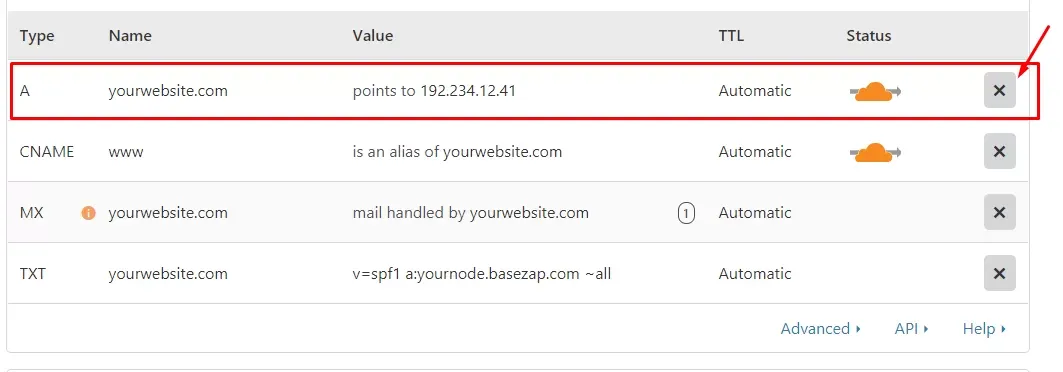
This guide will explain how to add CNAME for root domains i.e. yourwebsite.com if your domain registrar does not allow this setup.
barren remnant
silent flax
officially, it is not allowed, but you can switch to cloudflare for example and ...
Hmm switching registrar's is more hassle than doing the apache redirect but thanks
silent flax
registrar ? who said anything about registrar. you just enable DNS for your domain at cloudflare, then redirect the nameservers to the ones cloudflare says you to set
flat blade
pseudo blade
I presume you workplace doesn't permit you to bring random devices to work and c...
Yes you are correct, this company is a lil strict when it comes to personal devices. They have a bunch of cameras here, can't just whip up my laptop out. I just decided to use a USB stick for now and make the app portable or something. I wish there was a way to connect a USB via Bluetooth and sync files like that, although that would probably be a hassle. 😔
Don't have admin access either, sigh.
night lark
bro i get 5Mbps on fast.com but on steam i only get 2.3Mbps peak. my pc network utilization is only 2%, what should i try to fix? (PS: ive tried changing my ethernet adapter settings, i have cat6 cable and the router is like a few metres away)


 sage crow
Looking to put a 10gb nic card in my nas server does this look like a counterfeit card or no? I’ve seen a few that seem very iffy.

eBay
Supermicro Servers. UnixsurplusCom - Supermicro System Configs. Bracket: Low Profile. Interface: RJ-45. Compatible Port: PCIe x8. Unixsurplusnet is a division of UNIXSurplus, a large Server dealer in Silicon Valley, California.
This one does as well seeing as its $30
sage crow
night lark
bro i get 5Mbps on fast.com but on steam i only get 2.3Mbps peak. my pc network ...
Could be your isp throttling your speed
sage crow
night lark
but how to explain the fast.com speed test got 5Mbps and steam gets 2.3?
My isp does the same thing with steam unless I use a vpn
Either way seems excruciating. I couldn’t deal with those speeds at all I feel for you
 low pond
night lark
bro i get 5Mbps on fast.com but on steam i only get 2.3Mbps peak. my pc network ...
low pond
night lark
bro i get 5Mbps on fast.com but on steam i only get 2.3Mbps peak. my pc network ...
They are not the same measurement units
2.3MB/s actually is even around 18.4Mbit
night lark
sage crow
Either way seems excruciating. I couldn’t deal with those speeds at all I feel f...
yeah, downloading gta5 twice cuz i cleared download cache really is a pain in my behind
sage crow
low pond
2.3MB/s actually is even around 18.4Mbit
Yea forgot about this. But he could switch it from bytes to bits and see what he’s getting on steam
night lark
low pond
2.3MB/s actually is even around 18.4Mbit
oh in deed you are right, on fast.com i got 17Mbps now. i mightve just been stupid haha
sage crow
All good happens to the best of us
night lark
sage crow
Yea forgot about this. But he could switch it from bytes to bits and see what he...
i did do it, 18.8Mbps peak now
silent flax
sage crow
Looking to put a 10gb nic card in my nas server does this look like a counterfei...
nah, it's just super old. AOC-STG-i2T is Intel X540, which is a NIC from 2012, has a higher power consumption and doesn't support 2.5gbps or 5gbps speeds
silent flax
sage crow
Looking to put a 10gb nic card in my nas server does this look like a counterfei...
same card with worse heatsinks sells on Aliexpress for ~15 euros or so
silent flax
sage crow
Looking to put a 10gb nic card in my nas server does this look like a counterfei...
also keep in mind that is an RJ45 card, so you will need either a RJ45 10gbe switch or a switch with SFP+ port and then add a 10gbe RJ45 SFP+ module (which is like 35-40 euros)
sage crow
silent flax
same card with worse heatsinks sells on Aliexpress for ~15 euros or so
Awesome any links ?
sage crow
silent flax
also keep in mind that is an RJ45 card, so you will need either a RJ45 10gbe swi...
Yea I’ve got a 10 gig switch
silent flax
sage crow
Awesome any links ?
just search for X540-T2, the one i got was INSPUR
just keep in mind these need at least some airflow directed at that heatsink, or they will overheat
sage crow
It’ll be going in a z840 workstation so it has plenty of air flow
You said these don’t actually support 10 gig networking?
opal pagoda
sage crow
You said these don’t actually support 10 gig networking?
they support 10
silent flax
sage crow
Yea I’ve got a 10 gig switch
10g SFP+ or 10g RJ45 ?
silent flax
sage crow
You said these don’t actually support 10 gig networking?
srry, i meant to say 5gbps
sage crow
10g rj45
opal pagoda
but they do not support 5g and 2.5g
silent flax
(this is what happens when your brain races ahead of your typing LOL)
sage crow
I’m looking to increase bandwidth to and from my nas it’s used for plex and file offload and is super slow with a 1 gig port
silent flax
X540-T2 does 100/1000/10000. Doesn't do 2500/5000
opal pagoda
sage crow
It’ll be going in a z840 workstation so it has plenty of air flow
i would still get a fan and point it at it
silent flax
sage crow
I’m looking to increase bandwidth to and from my nas it’s used for plex and file...
i put one of these from Ali in my server, 2.5 i226-v in my desktop, peak copy speed was
 sage crow
opal pagoda
i would still get a fan and point it at it
sage crow
opal pagoda
i would still get a fan and point it at it
Will do!
silent flax


this is from that Inspur card i linked above
but if you can get supermicro for 30 euros/dollars faster than aliexpress, i would go that route
silent flax
sage crow
Will do!
but in general, price comes out around 17-18 euros from ali, cause cheaper ones have shipping fees 😄
sage crow
silent flax
but in general, price comes out around 17-18 euros from ali, cause cheaper ones ...
Sweet I’ll check them out when I get home thanks!
 shy wolf
Random question for y’all, do you use one WiFi name or separate the 2.4/5/6 ghz? Just curious on what people do and what is generally preferred. Currently I have them separated myself
silent flax
one. i only do separate names when it using same is blocked by UI
thorn delta
shy wolf
Random question for y’all, do you use one WiFi name or separate the 2.4/5/6 ghz?...
One is perfered, mobile devices will prefer the 5GHz band and switch automatically to 2.4GHz when signal conditions worsen
It will generally work if it's separated too, but you need to connect to both SSIDs and that can get confusing for people besides yourself. They'll connect only to the 2.4GHz SSID and complain that it's slow, or connect to the 5GHz only SSID and complain the coverage is bad.
random cobalt
yeah. separating them is just weird. combine them all and let the devices choose the band based on conditions.
 plucky crescent
Is there a well respected site for reviews of consumer networking gear?
Rtings doesn't do networking, and I don't really trust the likes of newegg for objective product information
random cobalt
all consumer network switches are fine and all consumer network routers are terrible
plucky crescent
Exactly, I feel like it is oddly hard to find decent routers without jumping to enterprise grade and learning how to use it properly
random cobalt
^
shy wolf
random cobalt
yeah. separating them is just weird. combine them all and let the devices choose...
I might end up swapping to one network soon then, ive been meaning to change my wifi name and password anyways
sage crow
silent flax
but in general, price comes out around 17-18 euros from ali, cause cheaper ones ...
Sorry to bother against but do you know of any 10 gig nics that are less then $100 that will actually do 10 gig networking
pseudo blade
Yeah basically - Used market's your best bet
Do be aware that some of them run rather hot and may need you to bodge a fan on if you're not putting them in a rackmount server
 faint saffron
Is there a way to use phone lines for home networking. Did some youtube but no concrete answers,
random cobalt
if you mean straight 2 or 4-wire phone line. not so much.
there are "powerline" adapters to use the power cables (but they are often terrible, but sometimes okay). and there are "MoCA" adapters for coaxial cable.
 fallow wing
faint saffron
Is there a way to use phone lines for home networking. Did some youtube but no c...
fallow wing
faint saffron
Is there a way to use phone lines for home networking. Did some youtube but no c...
do you maybe mean RJ-11 cables ?
pseudo blade
faint saffron
Is there a way to use phone lines for home networking. Did some youtube but no c...
Yes. You can run VDSL over a single copper pair but it's pricy
You can buy purpose-build SFP modems and boxes to do it from Proscend (Metanoia chips)
silent flax
sage crow
Sorry to bother against but do you know of any 10 gig nics that are less then $1...
the X540-T2 does 10 gigabit over copper (RJ45). It doesn't do 2.5/5g, sorry if i confused you by my first statement
silent flax
sage crow
Sorry to bother against but do you know of any 10 gig nics that are less then $1...
i already shown you what X540 looks like from ethtool (which is in the supermicro card you asked about too)
 sage crow
silent flax
the X540-T2 does 10 gigabit over copper (RJ45). It doesn't do 2.5/5g, sorry if i...
sage crow
silent flax
the X540-T2 does 10 gigabit over copper (RJ45). It doesn't do 2.5/5g, sorry if i...
Ohhhh I see yea was a bit confused thanks
true raptor
clear igloo
Because you spelt it wrong
Ethernet is correct, not Enthernet
Thanks Sherlock, it was a joke, did you read the chat before that?
Humour is dead
silent flax
well damn, after some cleanup of how i wired the house and arrival of the new 10g/2.5g switch now i got one old Linksys router, two 8-port TPLink and one 5 port TPLink switch in "unused network gear" category 😄
sage crow
oof
My house wasn’t built with Ethernet in mind but I’ve got a full sized basement so I just drill holes I the floor with rubber grommets and it still works okay
silent flax
i had ethernet connectors on walls, but i mean one connector and 4 devices (TV, AVR, whatever else at one spot for example) meant a switch was needed there
and now that i reorganized/put in new wires to some spots, replaced some older bigger 5-port switch with a very small one, i am left with three gigabit switches i will probably never use again at my home
but selling it is also a waste of time, who would buy a 10 year old gigabit switch 😄
 cunning iris
I'm desperatly looking for a LTT video I'm pretty sure that exists. It features Linus and Emily explaining all the cool stuff you can do with ethernet cables. Can anybody help me?
silent flax
cunning iris
I'm desperatly looking for a LTT video I'm pretty sure that exists. It features ...
can't help you with specific video, but in general, you can push other protocols/interfaces through the ethernet cables, or even TCP/IP. So there is HDMI or USB over CAT cables, or same through IP (that is in normal network packets)
sage crow
Went ahead and ordered one of those cards along with a 40mm noctua fan to throw on it.
cunning iris
silent flax
can't help you with specific video, but in general, you can push other protocols...
Thank you for your answer, I have no concrete project (yet) but really wanted to see that video agein
 leaden minnow
Question.
I have Omada stuff. I have a rp4 that's running some docker stuff, I want it on my IoT network.
My IoT network isn't allowed to talk to anything else...I just want this IP to be able to talk back and forth...I'm assuming if I add a rule to let 192.168.10.10/32 to talk to the "main network"...but deny everything else...that should do it?
Doesn't look like Omada will allow it
deny IoT -> LAN
permit device IP that's on IoT <-> LAN
leaden minnow
Ahh ok.
The UI is stupid and doesn’t allow CLI so I had to find through trial and error, you can move the rules around.
silent flax
can't decide if i should grab another 2.5gbps switch considering none of my remaining devices are 2.5gbps and the central switch is 1gbps anyway due size constraints 😄
but then those china switches are down to 61 euros 😛 (not exactly the model i bough first time, but i suspect they are all the same internally)
also aliexpress stores 😄
do you want the switch from Keeplink store in limited deal for 53+7 euros ?

or the same item for 63.5+7 euros in Superdeals... from same store ? 😄

 frosty oasis
yeah, its def possible. is what i did.
i setup a vulnerable windows instance on i think a nano/micro instance. then setup azure an azure log analytics workbook. and have it monitor a log file on the vm. back on windoes, letup logging of what u want to that file. run fir a while. finish erex to parse ur log file. lastly pipe to sentinel to splunk through files
then u can do stuff liek alerting for successful login attempts from new ips
then do forensics on liek powershell that was run and do post infection remediation
:3
lol, only almost a year late 
 rose flare
Hi all networking and server question, Ive just updated my truenas and main pc with 10gb cards and connected them to each other, both also have a 1gb connection to lan/wan how would you make it so transfering between the pc and nas is done over the 10gb connection not the 1gb. Cheers
opal pagoda
rose flare
Hi all networking and server question, Ive just updated my truenas and main pc w...

Sponsor message: Use AIAIAI's TMA-2 Configurator and create your own headset today: http://geni.us/WjhFJ
Get a lightning fast local network speed for less than $100!
Check out Ibuypower & MSI’s laptops featuring Intel's 7th Generation Core i7 7700K processor on Amazon: http://geni.us/SQO3f
Check out Jake's guide: https://linustechtips.com/mai...
silent flax
opal pagoda
https://youtu.be/NAks6qM9jlM?t=241
those Cougar PSU cables in that video 😄
also i would personally hate to do this, i would hate to deal with separate IP range and/or mapping the drives permanently. but that's me
rose flare
silent flax
also i would personally hate to do this, i would hate to deal with separate IP r...
yeah its a not long term thing
silent flax
it's RJ45 or fiber connection ? cause if it is fiber, it might be worth it to get those cheapo 4x2.5Gbe RJ45 + 2x SFP+ 10Gbe switches and connect them via SFP+ on that switch
i mean on ali those are like 40 euros ?
rose flare
its rj45
silent flax
RJ45 makes it expensive with switches, nevermind then
rose flare
yeah why im holding out for a switch a little longer
silent flax
10Gbe RJ45 SFP+ modules are like 35-40 euros. and let's not talk about native 10Gbe RJ45 switches
 obsidian cedar
how many powerline adaptors can be used in one house
im assuming its a per breaker thing?
random cobalt
obsidian cedar
how many powerline adaptors can be used in one house
it depends on the particular model, but the answer is: more than you could possibly want
 fervent brook
Is it weird if my Modem's logs stopped at the 23rd, and the page that shows the startup progress says the modem is offline and nothing is active? And I's currently online and watching youtube...
i'll reboot the modem after my phone is done updating
 fervent brook
now the indicators are as they should be. I didnt really fix anything, but i feel better now
fallow wing
currently looking for a solution online but I might as well ask here too :
why would teamviewer see the device I'm trying to reach, attempt to connect, but never open the session, sticking to the loading screen ?
pseudo blade
Access prompt on the remote side?
(App, UAC)
silent flax
fallow wing
currently looking for a solution online but I might as well ask here too :
why w...
also are you sure you aren't getting that stupid "commercial usage detected" thing ? once i got that, even short term connection failed
fallow wing
silent flax
also are you sure you aren't getting that stupid "commercial usage detected" thi...
nah
fallow wing
pseudo blade
Access prompt on the remote side?
(App, UAC)
no, I left TV open before leaving this morning
pseudo blade
That means little
fallow wing
pseudo blade
That means little
both sides have records of the connection attempts, I tried to solve this all week
pseudo blade
Test it when you're next to the target machine
fallow wing
pseudo blade
Test it when you're next to the target machine
yeah
it might be my firewall although I don't see why the rules I've set would block it, I don't see any block records
 slender nest
hiii, I'm trying to host a server for a game on a older pc in my local network, connection works locally, but even with port-forwarding I can't get it to be reachable from the outside, I assume it has to do something with my ISP using cgnat or smth like that so I don't have a "own" ipv4, any ideas what I can do?
pseudo blade
If they use CGNAT, you can use something like Hamachi (I built my own using Wireguard and AWS Lightsail because I hate their service) and have very few other options
On the bright side: If you do tunnel your game traffic from a cloud server to your network, you can get away with pretty much the lowest specs available from the cloud provider/free tiers
slender nest
ahh, yea I was looking at wireguard, how hard is that to set up?
pseudo blade
slender nest
ahh, yea I was looking at wireguard, how hard is that to set up?
Like 5 minutes for me now, it's deliberately simple with basically no configuration options
First time I did it with wg-quick, didn't quite understand AllowedIPs and that took longer
It has a few downsides - no IP pools, everything's static, this...

If I'm insane for wanting the ability to adjust client addressing then I'd hate to see what sane people look like
slender nest
i see
pseudo blade
It's still a great protocol for getting an encrypted tunnel up, I'd prefer it over ipsec for not being frustrating to configure and overly complex, or for smaller networks where manually updating configs on clients is a nonissue
slender nest
sounds good, i´ll get a cheap vps then, you said you used aws right?
pseudo blade
I used AWS Lightsail because it has bundled bandwidth and works out cheap for me because of it (+costs are very predictable unlike EC2, similar to DigitalOcean etc. Entire setup costs $3.50/mo, always), if you don't need more than 100GB/month of bandwidth you could set up a t3.micro for free for a year with AWS
slender nest
pseudo blade
I used AWS Lightsail because it has bundled bandwidth and works out cheap for me...
bandwith shouldnt be to high, its gonna be a gameserver, but i dont know what ill be using it with in the future
this one ?

1tb should be more than enough
pseudo blade
I use it
slender nest
kk
pseudo blade
Wireguard runs in the kernel and needs basically no resources
slender nest
ah, okii, only thing i dont really understand are the config files, i only ever used wireguard once but that install had a gui
is there a tool to generate them or any guide you could recommend
pseudo blade
Not really, grab an example config, pick a subnet for your Wireguard network, specify the IP of the server side from your client, just needs to be specified on one end. Ensure the Wireguard port's exposec on the server...
slender nest
pseudo blade
Not really, grab an example config, pick a subnet for your Wireguard network, sp...
ah kk, will try
i got them to connect but cant find anything how to forward specific ports from the server to my local machine
(if it is important the local machine is running windows?)
pseudo blade
Yep, you have to look up instructions for doing so for your linux distro you picked
You'll forward to the local system's Wireguard IP
slender nest
okiii
 alpine lodge
Hello I have an totolink ax1800 wifi extender which I use to connect a lan cable to my pc and I was setting it up today and it wasn’t being able to find 5G networks but was only able to detect 4G I need help
silent flax
wifi extender doesn't amplify mobile signals
alpine lodge
silent flax
wifi extender doesn't amplify mobile signals
It isn’t a mobile signal
It is extending a router
silent flax
Well you said 5g and 4g. There is no 4g with wifi
thorn delta
I had too many Mikrotik devices on my desk at work, thankfully Mikrotik also makes a rack lol
 silent flax
alpine lodge
It isn’t a mobile signal
silent flax
alpine lodge
It isn’t a mobile signal
it's a different model, but did you go through the configuration interface like it shows in left side of this PDF ? https://www.totolink.net/data/upload/20210408/cc0322a7b54ea63ea6a75c0f1a45bd44.pdf
alpine lodge
silent flax
it's a different model, but did you go through the configuration interface like ...
yes
on pc and mobile
silent flax
and you mean in these steps you pick 5GHz and got no networks detected ?

then it could possibly just not see the network ? have you tried to set it up next to your router ? Does your router actually provide 5Ghz signal ?
 umbral dove
is it possible to connect a secondary router to a main router wirelessly and plug the second router into my pc with ethernet to have a wired connection or no?
alpine lodge
Yes i dont find a 5ghz network , yes it doesnt see it , i did try that , yes my router does
alpine lodge
umbral dove
is it possible to connect a secondary router to a main router wirelessly and plu...
am using the extender for that
i dont have an extra router
umbral dove
i have an extender aswell but i tested the speeds on it and it's terrible and i have a second router so i wanna see if i can use that instead
alpine lodge
the 5ghz speed on my extender was really good but 4ghz is terrible
i get around 160mb on 5ghz and less than 10mb on 4ghz
i cant even load into sites
umbral dove
yea mine was capped at 50mbps
 nimble shadow
look to get a pretty decent server that will be mainly used to run game servers any suggestions on one i can pick up off ebay or anywhere else?
or should i just look at getting a nuc ?
OR
I have a 2 pc setup for streaming the 2nd pc running windows 11 and its pretty good specs can i setup something where i can run a game service off that pc (id like to run pterodactyl)
random cobalt
you can use whatever computer you want as long as the specs are adequate.
 hearty wasp
Anyone know of any places selling used Unifi AP's in Canada?
random cobalt
ebay
silent flax
hearty wasp
Anyone know of any places selling used Unifi AP's in Canada?
or just buy it from their web store ?
 alpine lodge
Hello I have an totolink EX1800T wifi extender which I use to connect a lan cable to my pc and I was setting it up today and it wasn’t being able to find 5Ghz networks but was only able to detect 2.4Ghz I need help
 sturdy light
quick question, is about $1pp cheap for shielded rj45 connectors?
pseudo blade
Not really. But it depends on how many you're looking to buy.
sturdy light
pseudo blade
Not really. But it depends on how many you're looking to buy.
For a 50pack it’s 60AUD so about 40USD
50 is way too many though but it’s the best price price I can find where I am
 thick minnow
is this good
 alpine lodge
I want to buy a wifi card for my pc any suggestions
silent flax
alpine lodge
I want to buy a wifi card for my pc any suggestions
most PCIe WiFi cards on market are just repackaged/built to PCIe slot Intel wifi cards. So pick one which fits what your router offers, most likely just buy whatever AX210 card you will find on maket (WiFi 6E), unless you somehow got a WiFi 7 AP (which are just starting to show up on market)
like all cards are same chip, just different antena/heatsink
 polar timber
Hi! I noticed that my NAS uses my HDDs every 5 second even when I'm not doing anything on it, and no apps running on that also. I read that one reason for that is the "System Dataset Pool" being set to the pool on HDDs. I didn't get a very clear answer on the internet whether it makes sense to keep the System Dataset Pool on HDD disks or move it to boot SSD. I also couldn't find a clear answer to whether it's bad for the lifetime of my HDD disks that they start for about a second every five seconds continuously.
Would someone be able to clarify for me, does writing to the HDD disks every five seconds negatively affect the lifetime of the disks and should I move the System Dataset Pool to my boot SSD (or do something else to get rid of those five-second writes on HDD disks.)?
alpine lodge
I got an old router an TPLink Archer C60 and I wanna use it as a repeater can someone help?
sturdy light
can I use connectors rated for 23awg cable with higher gauge cable eg 26awg or 28awg
 wanton relic
Hey I'm new here but
Is it okay to put a wifi card in a pcie x16 slot?
My gpu is covering the x1 slots on the motherboard that I have
sturdy light
wanton relic
Hey I'm new here but
Is it okay to put a wifi card in a pcie x16 slot?
My gpu i...
yes, you can put a x1 device in a x16 slot
 west vortex
I'm in need of some help. I'm a rack noob. I am starting a rack homelab soon, and the wallmount rack I want to use to start with doesn't list ear size. Is that normal? I ask, because I want to buy some of the rack studs on the LTT site but there are two different types and idk which one I would need.
thick minnow
where is the lan port in my erro is it the right or left port
 lucid flame
Question, using ROMMON to access the Cisco 100g switch (N9K). I cannot get the vLans to take. Is there a GUI I can do instead of CLI?
clear igloo
lucid flame
Question, using ROMMON to access the Cisco 100g switch (N9K). I cannot get the v...
N9K doesn't have a GUI
You don't use rommon to access the switch, console or SSH is for access. ROMMON is when it doesn't boot
conf t
vlan x
that's all you need
clear igloo
west vortex
I'm in need of some help. I'm a rack noob. I am starting a rack homelab soon, an...
Ears come with the devices, not the rack itself
Do they mean hole sizes on the racks itself?
lucid flame
clear igloo
N9K doesn't have a GUI
You don't use rommon to access the switch, console or SSH...
Thanks. New to this side of the DevOps field so trying to learn.
clear igloo
lucid flame
Thanks. New to this side of the DevOps field so trying to learn.
All good, if you need an SVI (vlan interface) then you need to do "feature interface-vlan" first under config mode
Just remember:
Exec mode: Router>
Priv mode: Router#
Config mode: Router(config)#
 clear igloo
west vortex
clear igloo
west vortex
Then it makes no sense
These are rack ears and they come with the equipment or can be ordered separately if your gear doesn't have them for some reason but they vary because gear width plays a huge role
 silent flax
clear igloo
Then it makes no sense
These are rack ears and they come with the equipment or c...
silent flax
clear igloo
Then it makes no sense
These are rack ears and they come with the equipment or c...
talk about rack ears reminded me of the most absurd HTPC case... from Lian Li. At first sight, it looks normal, right ?

but you could get rails for those screw holes at sides... and handles at front

boom, rack case 😄
 slender torrent
this might be a dumb question but i am not as smart if it comes to networking but i have 100mb/s ethernet speed and a 100mb/s subscription but is there something where i can put 2 cables together so i can have 200mb/s without increasing my ping by a lot? thank you so much to the one who can help me out a simple yes or no could be a answer but if it`s yes how and with what would be nice.
pseudo blade
slender torrent
this might be a dumb question but i am not as smart if it comes to networking bu...
Yes but no, get a faster network card as it'll cost you several dollars if your computer is indeed 15+ years old and doesn't have gigabit, or if it's the router replace it.
slender torrent
i have a 2.5 gigabyte ethernet port
silent flax
slender torrent
this might be a dumb question but i am not as smart if it comes to networking bu...
if your question was if you can combine two internet connections, then the answer is "it's complicated". There are solutions for that, but they don't come cheap.
slender torrent
silent flax
if your question was if you can combine two internet connections, then the answe...
ok thanks a lot
silent flax
in general it's simpler to switch to faster internet option if it is available
opal pagoda
Speedify is "cheap" solution but you still have to buy 2nd internet connection and also pay a speedify subscription
If its possible its better to have 1 faster link than 2 slower ones (except if you want failover)
silent flax
alternative is routers with dual WAN load balancing, but it doesn't combine the internet speeds, it just distributes them. So one connection will go through internet connection 1, and next one goes through internet connection 2
slender torrent
ok thanks y'all i appriciate it
waxen scroll
clear igloo
All good, if you need an SVI (vlan interface) then you need to do "feature inter...
A what?
west vortex
clear igloo
Then it makes no sense
These are rack ears and they come with the equipment or c...
I see, ty for clarifying that. I had a feeling this was the case. So, is it safe to assume then that the heavier the gear, they will likely have bigger ear holes to support the weight?
 mellow heart
Anyone here with a FiOS router (CR1000A) gotten this error before?
Domain Name: Name may not contain spaces. Only letters, digits and the special characters dash (-), underscore (_) and dot (.) may be used. These special characters may not appear at the beginning or at the end of a name. The maximum length of a label (text between two dots) is 63.
random cobalt
are you having an actual problem, or just some random log entry?
peak cloak
mellow heart
Anyone here with a FiOS router (CR1000A) gotten this error before?
> Domain Name...
what are you trying to do
mellow heart
peak cloak
what are you trying to do
Literally nothing... I was originally trying to change my default password, but now realize that I get it matter what I try to change. Even just changing the admin name to admin1 or something causes the same issue. Even not changing anything causes it
clear igloo
west vortex
I see, ty for clarifying that. I had a feeling this was the case. So, is it safe...
Negative, there will be more RU of ear but the holes are pretty much standard-ish in terms of height at least
clear igloo
waxen scroll
A what?
Switched Virtual Interface 😛
opal pagoda
clear igloo
Negative, there will be more RU of ear but the holes are pretty much standard-is...
i have ran into something that m6 screw couldnt fit in, i forgot what exact thing it was. had to use m5 cage nuts/screws with that equipment
waxen scroll
clear igloo
Switched Virtual Interface 😛
you mean a router?
clear igloo
waxen scroll
you mean a router?
Yes, but on a switch, it's wild 😛
waxen scroll
oh so like netgear
clear igloo
opal pagoda
i have ran into something that m6 screw couldnt fit in, i forgot what exact thin...
Yah, there are always exceptions to the rule, haha
clear igloo
waxen scroll
oh so like netgear
Exactly!!
opal pagoda
clear igloo
Yah, there are always exceptions to the rule, haha
i belive it was cable manager, it defo wasnt active piece of equipment
clear igloo
opal pagoda
i belive it was cable manager, it defo wasnt active piece of equipment
Ah, interesting, yah that might explain it
opal pagoda
i also had installer f up a rack install
basically they incorrectly assembled the rack and now its has a bit wider spacing and its pain to put anything in it
west vortex
clear igloo
Negative, there will be more RU of ear but the holes are pretty much standard-is...
So should I just buy the "smaller" sized studs and not worry about it?
clear igloo
west vortex
So should I just buy the "smaller" sized studs and not worry about it?
Hard to say, I would almost say wait for the rack to get there and triple check
Smaller should be fine but I'd hate to say that on the off chance it shows up with larger holes
west vortex
Gotcha, make's sense. I'll have the rack before any other parts anyway, so I'll do that. Thank you for the advice
 fierce jay
One message removed from a suspended account.
One message removed from a suspended account.
 wicked oyster
Wanted to ask a question, I just got 5g internet, plugged in to my ethernet, and my ping isnt improving, any ideas why?
 hexed plaza
who here can i bug about a new ubiquity setup for a daycare? am an electrician tasked with setup of a camera/networking system, so i chose ubiquity(same as my home network) but i need help picking out proper stufffor the application, since i doubt a single dream machine has the bandwidth for ~40 ish cams that my customer wants inside and outside the building
peak cloak
hexed plaza
who here can i bug about a new ubiquity setup for a daycare? am an electrician t...
You can get an NVR
hexed plaza
For storage I'll be getting 2 unvr pros, but i mean throughput since all the cams and at least 4 ap's will be used,or is there a better option than the udm pro
peak cloak
hexed plaza
For storage I'll be getting 2 unvr pros, but i mean throughput since all the cam...
what cameras are you getting?
and what resolution are you planning on recording?
hexed plaza
Not sure, but customer probably will use about 15 g3 flex cams indoors, along with about 8 g5 bullets and maybe 4 g5 pros
Plus some others likely
Maybe even the keycard thingy, they want to be able to record a month worth of footage, so its getting decked out with 8tb drives
peak cloak
hexed plaza
Not sure, but customer probably will use about 15 g3 flex cams indoors, along wi...
so at 1080p, high quality, h264 encoding you will be at about 480 mpbs
 hexed plaza
Ok then that should be fine hopefully
peak cloak
hexed plaza
Ok then that should be fine hopefully
If I were you I would put it on a seperate switch
hexed plaza
its all getting a seperate 48 port poe switch
since its getting a regular udm not a udmse
peak cloak
cameras and NVR on same subnet, no camera traffic will be going through router
hexed plaza
k, can be done
now, question is, how many hdd's needed for the month long recording time they want
peak cloak
160tb storage needed... so alot
IMO it's not worth it
it's not some super secure facility
weeks worth of storage is only around 40tb which is more manageable
hexed plaza
well, 3 nvrp's and 8tb drives
not that bad, will fit in the rack
they are also wanting a 2 day ups lol
peak cloak
yeah, honestly superised a daycare has this type of money to spend on IT...
can't imagine it being cheap
hexed plaza
new construction
peak cloak
still
hexed plaza
ups will be a large eton one with remote controll to a deisel genset with a 5 day? tank
whatver i can get from my dealer
eaton*
@peak cloak the viewport, is it able to be used across multiple displays? Was thinking of setting up like a 2x2 grid of somemdecent computer monitors to view all the cams, could i do one into a hdmi splitter or something then to all the displays
Or is a high def tv a better option
Or should i just get them one of thoes little intel PCs
 tribal sequoia
480 mbps if the devices are all on the same switch is NOTHING
peak cloak
hexed plaza
<@222482269829332992> the viewport, is it able to be used across multiple displa...
honestly no clue
tribal sequoia
most switches have 100-500 gigabit backplane communication
tribal sequoia
what is the cheapest?
is it the 500w or is there only that 750w one
they have a 195w 48port poe for 500ish, i'm assuming that one?
hexed plaza
Yeah
195
Unless i find a non ubiquity switch for cheap again
Like my personal 30w per port 24 port switch for $50
hexed plaza
Theres a netgear one on Craigslist rn for $100
thorn delta
hexed plaza
who here can i bug about a new ubiquity setup for a daycare? am an electrician t...
There's a capacity calculator on their site
 hexed plaza
thorn delta
There's a capacity calculator on their site
hexed plaza
thorn delta
There's a capacity calculator on their site
Yeah just saw that a few mins ago
thorn delta
I was going to say more, then scrolled down and basically everything I was going to say already was said. perfect lol
hexed plaza
lol
yeahim prolly going to get thoes 48 port poe netgear switches, why not
$100ea cant beat it
 shadow mauve
Has anyone tried these new sub-$100 2.5Gbps managed MC-LAG aliexpress switches? https://www.aliexpress.com/item/1005006470259900.html
silent flax
i only have the unmanaged one, worked just fine
silent flax
shadow mauve
Has anyone tried these new sub-$100 2.5Gbps managed MC-LAG aliexpress switches? ...
99% it is going to be same as https://www.servethehome.com/mokerlink-2g05210gsm-web-managed-5-port-2-5gbe-and-10gbe-switch-review/ like every other product on ali is internally the same thing

In our MokerLink 2G05210GSM review, we see what this 5-port 2.5GbE and 2-port 10GbE SFP+ web managed switch offers in a low cost form factor
 queen salmon
can you run poe on regular rj45 cables or do you require special ones
peak cloak
queen salmon
can you run poe on regular rj45 cables or do you require special ones
regular ones
queen salmon
thanks
shadow mauve
Thanks @silent flax
silent flax
shadow mauve
Thanks <@216257714416910337>
i mean most of these chinese switches are copies of each other, with very minor differences, they use the same Realtek chips. So most likely the difference between the two different managed 2.5gbe switches is going to be different CSS style on top of the Realtek UI 😄
steel grove
What does 10/100/1000 Ethernet mean? Are those the speeds the device is able to send and receive data at using Ethernet? Or does it have something to do with the quality of the cable?
 raw timber
Lol we just had out network go down because of this

 mossy slate
if anyone could help me find a fix i'd be grateful since microsoft support did nothing. the last couple days my ethernet is not working any idea why?

if i were to run the diagnose option i would be greeted with " Ethernet doesnt have a valid IP config "
so i talk to my internet provider?
yup let me open it
what am i looking for?

?
ah nope then
under properties there is just info about it
link-local IPv6 address or IPv6 DNS servers
nope
i have but no luck
silent flax
steel grove
What does 10/100/1000 Ethernet mean? Are those the speeds the device is able to ...
yes, it is the speeds the device is able to negotiate. Prety much everything can do 10/100/1000 these days (with exception of some older 802.11n access points which only do 10/100). But speeds above that, some devices only do 10/100/1000/10000, while newer ones do 10/100/1000/2500 or 10/100/1000/2500/10000 Mbps.
steel grove
silent flax
yes, it is the speeds the device is able to negotiate. Prety much everything can...
What do you mean by older 802.11n access points? Does this apply to WiFi too, not only Ethernet?
silent flax
steel grove
What do you mean by older 802.11n access points? Does this apply to WiFi too, no...
i mean access points have an ethernet port through which they get their internet. And some have only 100mbit port

300Mbps Wireless N Access Point
 steel grove
That makes sense. Thank you for the explanation
silent flax
and what i meant is that some older 10 gigabit network cards for example don't support 2.5 gigabit

and on windows gigabit NIC

vs 2.5 gigabit (there are gigabit options when scrolled upwards)


so auto negotiation picks whatever both sides can agree on, and every device has list of modes it supports. So if you have a device which can do 100/1000/2500 and on other side a device which can do 100/1000/10000, then they will settle on 1000Mbps => 1 Gigabit
so the list is important to figure out at what speed two devices will talk to each other. Of course you can fix that speed difference by using switches, where switch can communicate 100 Mbps with one device and 1000Mbps with another
steel grove
silent flax
What's half duplex?
silent flax
 steel grove
This only applies to old devices, correct? All modern devices are full-duplex?
silent flax
normally yes, but stuff has to support weird stuff too
steel grove
Okay. Thanks again for the clear explanation
steel grove
What does Jake mean when he says that every uplink device is connected to both switches? Does every device have two NICs and is physically connected to both switches, or does one switch automatically connect the devices to the other switch when it goes down? https://m.youtube.com/watch?si=FlrgKAneI4O6aUp3&v=t78p50s32HY&t=21m34s

Can you save money & still get reliable phone service? The answer is YES with Tello Mobile! You get top-notch coverage, no contracts, and no hidden fees. Plus, you can build your own phone plan just the way you like it. All under $25/mo. Switch to Tello & start saving now!: https://lmg.gg/tello
We have a TON of infrastructure and networking upg...
 twin patrol
If I am using a shared Ziply fiber is there a reason I would not be able to to get an ipv6 address? Ziply wants to upgrade me for ¢200 more per no for dedicated fiber.
I know it will got the same dmarc in the building shared with Ziply.
I need ipv6 because VPN does not support v6 to v4 conversions for VPN.
waxen scroll
steel grove
What does Jake mean when he says that every uplink device is connected to both s...
it's not bigger than mine but OK
@rocky badge muh port-channel
nimble shadow
If I’m building a server what’s a good cpu I should go for under around $200 for the cpu
rocky badge
steel grove
What does Jake mean when he says that every uplink device is connected to both s...
If they are stupid
It’s STP based where STP will block an uplink and STP blocking will unblock if an uplink goes down
But that does not work well in a stacking config
So it’s maybe some sort of MC-LAG
Since the dells would support MC-LAG and ubiquitis would see a single device doing MC-LAG
But iirc they stack so it would be a single control plane so maybe just regular LACP
Honestly I would MC-LAG and not stack
Usually stacking will takedown the whole stack if you firmware upgrade which they mentioned was a pro
Even though they then show the dell switch clearly stating “2” as the system ID
clear igloo
It's MC-LAG but they probably have priority on the pair so setting a 1 and 2 can help
rocky badge
Ah
clear igloo
I haven't looked at the Dell stuff but maybe it's auto set 1 and 2 depending on who's active too, so in the event of a failover 2 becomes 1 on the display which would be nice
 hollow marlin
clear igloo
It's MC-LAG but they probably have priority on the pair so setting a 1 and 2 can...
hollow marlin
clear igloo
It's MC-LAG but they probably have priority on the pair so setting a 1 and 2 can...
Yeah, I saw AJ on the reddit mention it would be MLAG
hollow marlin
rocky badge
Honestly I would MC-LAG and not stack
I've only implemented MLAG in a lab, but if most the complaints with MLAG are as common as they seem, it may not be as preferred. I'd prefer MLAG over a stack though
rocky badge
clear igloo
I haven't looked at the Dell stuff but maybe it's auto set 1 and 2 depending on ...
Oh that makes sense
Usually I see ID on the switch and assume it means system ID and it’s in stacking
silent flax
nimble shadow
If I’m building a server what’s a good cpu I should go for under around $200 for...
it all depends on what you expect from the 'server'. I mean for NAS you can go as low as dualcore ARM CPUs or cheap Atoms. On other end you can go as high as Threadrippers/Intel HEDT or dual socket boards (if we ignore prebuilt servers)
 fleet briar
hehehehehehe I love wired router connections...
 meager ginkgo
 worthy gyro
https://www.walmart.com/ip/TP-Link-Mesh-WiFi-Router-System-Upgrade-Home-Coverage...
worthy gyro
https://www.walmart.com/ip/TP-Link-Mesh-WiFi-Router-System-Upgrade-Home-Coverage...
Depends on your internet speed. If you only have 200-300mbps internet it should be fine
I’d probably spend some more though to get something WiFi 6 atleast
Avoid Eero and Google Nest
worthy gyro
meager ginkgo
Depends on your internet speed. If you only have 200-300mbps internet it should ...
i get 470mbps download
so im guessingthat isnt worth
meager ginkgo
Not if you want more than 200ish Mbps on WiFi
200ish is a high end for that spec
AC1200 is pretty low end nowadays lol
worthy gyro
o
worthy gyro
meager ginkgo
Not if you want more than 200ish Mbps on WiFi
man budget stuff is so trash
worthy gyro
meager ginkgo
Depends on your internet speed. If you only have 200-300mbps internet it should ...

This pre-owned or refurbished product has been professionally inspected and tested to work and look like new. How a product becomes part of Amazon Renewed, your destination for pre-owned, refurbished products: A customer buys a new product and returns it or trades it in for a newer or different m...
 opal pagoda
steel grove
What does Jake mean when he says that every uplink device is connected to both s...
opal pagoda
steel grove
What does Jake mean when he says that every uplink device is connected to both s...
They were talking about dual links from core/aggregation layer to access switch, it is just port channel
 main tartan
 vagrant zinc
Hey everyone! Anyone know how to change to EA on a UCK? No option 😦
vagrant zinc
Hey everyone! Anyone know how to change to EA on a UCK? No option 😦

There's a checkbox there that you must activate first
https://unifi.ui.com/consoles/[YOUR_ID_HERE]/network/default/settings/system
 valid harness
I’m having an issue with my Netgear gs108 and anytime I connect the Ethernet cable and I try to connect i get someting it having no ip config. If you can help dm me please 
vagrant zinc
Light giggle
 silent flax
wishing Ali selles would save a bit on width of a device, this is close to ideal in size, the whole section for SFP kills the size gains tho 😛


2cm shorter on each side (ignoring height) and it would be ideal
not much space to save tho
 pseudo blade
silent flax
not much space to save tho
pseudo blade
silent flax
not much space to save tho
Yeah looks like there's no room to route everything smaller unless they add board layers and those cost money.
They could go integrated magnetics if they sell them in the right spec but... expense
I think it's pretty obvious we're looking at something built for a sweet spot cost (and it's pretty small anyways tbh)
I'm a little... interested in those promised backplane speeds considering it's obviously two switch chips but I guess if it's 10gbps full-duplex between them it's wirespeed anyways
silent flax
pseudo blade
I think it's pretty obvious we're looking at something built for a sweet spot co...
sadly my space constraints are crazy, the 5-port gigabit switch i have there with size of 3.5 × 2.8 × 0.9 in. (90 × 72 × 23 mm) is about the right size 🙂
so adding 3cm to width and depth is asking for a lot
pseudo blade
So is 2.5gbe in that formfactor by looks
silent flax
the one with SFP+ is 8x2.5gbe/1x10gbe yes
pseudo blade
It's possible to build one but I had a look and nobody seems to
silent flax
the small one i have now is a gigabit
i know about one small 5x2.5gbe, but price is insane

D-Link
x5 2.5Gbps Ethernet ports 25 Gbps switching capacity IGMP Snooping QoS & Flow Control Durable metal housing Energy efficient, fanless Plug & play installation Ideal for Wi-Fi 6
pseudo blade
Price, size and performance? Yeah good luck :P
silent flax
which is a double i paid for 8x2.5 + 1x10 SFP switch
silent flax
well for now i keep the rest of home at gigabit, not like i have 2.5gbe in those systems anyway (unless i buy PCIe cards for 15 euros a piece)
pseudo blade
I'm running everything off WiFi 5 still and probably won't change that unless I suddenly end up with gigabit
fallow wing
silent flax
https://eu.dlink.com/en/products/dms-105-5-port-2_5g-multi-gigabit-desktop-switc...
WHAT
fallow wing
silent flax
which is a double i paid for 8x2.5 + 1x10 SFP switch
MokerLink ?
fallow wing
pseudo blade
I'm running everything off WiFi 5 still and probably won't change that unless I ...
I am positively salivating at the idea of violently throwing money at my screen when looking at that one 6E access point I've spotted today

one day
one day I'll get one of those expensive pieces of hardware for myself

silent flax
fallow wing
MokerLink ?
ONTi, but its just anitger china brand
fallow wing
silent flax
ONTi, but its just anitger china brand
managed ?
silent flax
No
fallow wing
damn
silent flax
But it was 68 euros minus coupons
fallow wing
MokerLink is also "yet another chinese brand" but they have a pretty darn good 8x2.5 1x10 managed switch
for 140 and pixie dust or something
silent flax
some sellers have weird measuring tapes tho, or they have gigantic RJ45's 😄
i mean here it says 123mm width

this one says 160mm ?

while this one says 140mm ?
 silent flax
fallow wing
MokerLink is also "yet another chinese brand" but they have a pretty darn good 8...
silent flax
fallow wing
MokerLink is also "yet another chinese brand" but they have a pretty darn good 8...
and this one is actually very tempting even if i don't have devices for it 😄

51.23 euros from tomorrow with free shipping
or 32.82 euros for 4+2
 fallow wing
silent flax
and this one is actually very tempting even if i don't have devices for it 😄
fallow wing
silent flax
and this one is actually very tempting even if i don't have devices for it 😄
I'm looking at something that has an extra zero and seriously considering to pull the trigger on it as I'd avoid having to buy 4 different devices that replaces it

silent flax
extra zero ?
fallow wing
On the price
silent flax
would love this, but around half the price maximum https://www.aliexpress.com/item/1005005242712800.html 😄
fallow wing
It would replace my current switch plus the PoE switch I intended to buy and has a metric fuckload of features that would be very cool to mess around with
fallow wing
silent flax
would love this, but around half the price maximum https://www.aliexpress.com/it...
Sheesh
steel grove
Are all layer 2 switches unmanaged?
low pond
steel grove
Are all layer 2 switches unmanaged?
No
You definitely have managed once as well
tribal sequoia
There are "VLAN support" switches as well
There's tons of layer 2 managed switches.
 neon dragon
does anyone know how i can fix this?
 rocky badge
@clear igloo university wifi being shit

 twin slate
damn, my 4g in the country side is more stable than this
Anyone here running a Ruckus based network? I got my hands on a R340 access point and 3 R500's. Any tips or tricks running a network on them or is it set and forget for eternity.
clear igloo
twin slate
Anyone here running a Ruckus based network? I got my hands on a R340 access poin...
Aren't those all controller based? idk if they run in a local mode or have the ability to act as a controller
twin slate
clear igloo
Aren't those all controller based? idk if they run in a local mode or have the a...
They do, and they do run locally just fine. I got the r340 first and it has been running for moths now.
500's are next for install
clear igloo
twin slate
They do, and they do run locally just fine. I got the r340 first and it has been...
Ah, nice, well in that case they should be fine
twin slate
Do need to buy to two outdoor boxes to stick them into tho, cause outdoor AP's by themselves are 3x the price 🙂
now the big question is: do I need a dedicated PoE router. Do have a Mikrotik ATL LTE18 kit that right now runs as a router, the R340 runs as an AP by itself with a PoE injector. So I'm gonna be adding the 3 R500's to that mix, one on the inside and 2 on the outside to have a 360 wi-fi around the house. Either just add PoE injectors with a basic switch (i have a simple 1gbit dlink), or go full fancy with a Mikrotik L009UiGS-RM and put the 4g antenna into a pass-through mode
clear igloo
I would get a PoE+ switch if possible, maybe a 5 or 8 port one
twin slate
https://mikrotik.com/product/RB960PGS this one seems like a good and cheap option 🙂

5x Gigabit Ethernet with PoE output for four ports, SFP, USB, 800MHz CPU, 128MB RAM, RouterOS L4
I don't need more ports cause this thing will go in the attic, one of the cables will run to the 1st floor and will run into a switch where I will wire up downstairs as needed
(i'd go for 10 gig, but those are kind'a not cheap)
clear igloo
Nice, yah that looks perfect
thorn delta
twin slate
https://mikrotik.com/product/RB960PGS this one seems like a good and cheap optio...
Just keep in mind that you need to buy a separate 48 to 56V power brick, it only comes with a 24V brick
twin slate
thorn delta
Just keep in mind that you need to buy a separate 48 to 56V power brick, it only...
should not be a problem 🙂 Home country for this stuff
we have this stuff literally everywhere
thorn delta
twin slate
should not be a problem 🙂 Home country for this stuff
Latvia?
It's not super common outside of small ISPs here, but being in a small ISP I have shitloads of it
twin slate
thorn delta
Latvia?
yep
twin slate
thorn delta
It's not super common outside of small ISPs here, but being in a small ISP I hav...
their LTE stuff is really good tho, so many people use
thorn delta
twin slate
their LTE stuff is really good tho, so many people use
Oh for sure, I got some of that stuff deployed in a few places and it works quite nicely. Got a setup on the camp property that just barely pulls in a couple megabits when phones can't even send a text

In the spring I'll be running 600ft of fiber and cheap copper landscape wire up the hill behind the building, with a GPEN21 at the end, then I could move the LTE modem to a tree that has near LOS to the cell tower, where I'll get closer to 50-70 Mbps instead of a sketchy 2 Mbps
twin slate
i have some interference on mine, either a neighboring tower from the city or idk what, cause tower is LOS with no obstacles at 1.6 km (1 mile)
but the speeds ain't as great, only a 50/50 when speed testing roughly
though I do pull up to 10 MB/sec on torrents 😄
kind'a been thinking maybe I should have 2 antennas to two different towers and do that bonded thing
tribal sequoia
clear igloo
Aren't those all controller based? idk if they run in a local mode or have the a...
they should have unleashed os and zonedirector i think?
maybe they don't have unleashed idk
yep r500's have unleashed, so you can run them in that mode and elect a controller
twin slate
yup, both models have unleashed on them
pseudo blade
twin slate
https://mikrotik.com/product/RB960PGS this one seems like a good and cheap optio...
Do be aware that the hEX PoE's CPU's not great past 100mbps without Fast Path+Track enabled for NAT (good for maybe half a gigabit with, depending on setup?), you'd be better off leaving your routing duties on the ATL
The other gotcha is that it can't do af/at PoE unless you switch the included PSU for a 48V one.
pseudo blade
thorn delta
Just keep in mind that you need to buy a separate 48 to 56V power brick, it only...
Oh I got beaten to it
pseudo blade
twin slate
but the speeds ain't as great, only a 50/50 when speed testing roughly
Ehh so it's fine for your real-world speeds (but not ideal if you get better service later)
I'd go for the hAP AX^2/AX^3 for the PoE and better platform even if you have your own WiFi setup if your only PoE device is the ATL
twin slate
pseudo blade
I'd go for the hAP AX^2/AX^3 for the PoE and better platform even if you have yo...
the 4 access points are gonna be PoE powered, since they will be in places where a power brick can't be used
fallow wing
rocky badge
<@291198741862416384> university wifi being shit
4 seconds of ping ? wtf ?
twin slate
so I do need a proper PoE switch or router, I would prefer to have at least a few 10 gig ports though for trunk line running between floors
doesn't have to be a cheap thing one too like the HeX/hAP
twin slate
pseudo blade
Do be aware that the hEX PoE's CPU's not great past 100mbps without Fast Path+Tr...
yeah okay, that's a no-go, I do need proper gigabit speeds for video streaming around home network in 4k full quality, at times multiple streams even
 fallow wing
silent flax
me and my bad business decisions 😛
fallow wing
silent flax
me and my bad business decisions 😛
I love the logic behind that
you've got 20G in copper ? let's give you 10G of fiber
you've got 10G in copper ? let's give you 20G of fiber
silent flax
that is more down to capabilities of the chip itself
fallow wing
it can't be 8+2 and 4+1
silent flax
i mean 4x2.5 = 10 + 20 = 30. 8x2.5=20 + 10 = 30 🤷♂️
the odd ones out are the 5+1 versions which are just 22.5 Mbps
fallow wing
silent flax
that is more down to capabilities of the chip itself
you can't make me believe that since the first commercialisation of those, no one ever thought "hey, let's make chips that have balanced switching capabilities for the ports we put on them"
silent flax
The switch appears to be using the RTL8373-CG and the RTL8224-CG switch chips just like the earlier models. It is using a 10G uplink from the RTL8224-CG to the RTL8373-CG. Each has four 2.5GbE links downstream and the latter has a 10G SFP+ link as well.
like they are all literally the same thing
fallow wing
silent flax
like they are all literally the same thing
by balanced, I meant the equivalent copper AND fiber bandwidth
silent flax
but again, it is about what are capabilities of those chips. clearly it is 4x2.5 and then the other chip provides either 2x10gbe or 1x10gbe + 4x2.5, and it is "choose one or another" 🙂
so like sure, they could add another extra chip or whatever, but that would make them more expensive
to be honest, most people who buy these switches are either ignoring the SFP+ port altogether, or use the SFP+ as uplink to the server with 10gbe, and then multiple clients can "hammer" the server with their 2.5gbe speed limits, so it can handle 4 at once no problem
fallow wing
silent flax
but again, it is about what are capabilities of those chips. clearly it is 4x2.5...
I mean, it would probably leagues more practical for literally everyone involved to have 20G and 40G capable chips
vendors would have a wider array of products to market and users would have stuff sized to their needs
plus it wouldn't keep triggering my 'tism to see either twice or half the fiber to the copper
 long pecan
Just downloaded a proper ssh client cos I’m tired of using terminal. This isn’t gonna get confusing 🤣
 silent flax
and i thought i seen everything crazy in Aliexpress... Today's finds

(they pretty much put the USB ethernet chip to the USB connector instead of doing it as adapter)
also RJ45 Cat6 cable which can rotate ?

 gusty storm
wow i can finally ditch my electric toothbrush and use this instead
fallow wing
silent flax
also RJ45 Cat6 cable which can rotate ?
I- huh
if this actually works, I could see a few use cases where this could come in handy
fallow wing
silent flax
(they pretty much put the USB ethernet chip to the USB connector instead of doin...
I wonder how well it works
I'm guessing the casing could get hot
silent flax
fallow wing
I wonder how well it works
I'm guessing the casing could get hot


later

they can't make up their mind LOL
fallow wing
silent flax
"watching movies is not jammed" well I sure damn hope it wouldn't jam Shrek when All Stars is about to start, I'd be pissed otherwise

fallow wing
silent flax
they can't make up their mind LOL
they never can, it's AE after all
not that Amazon does any better in that aspect either
silent flax
fallow wing
they never can, it's AE after all
not that Amazon does any better in that aspect...

 lucid hawk
Hi everyone, I’m looking to bring WiFi to my boat with an LTE router and possible an antenna to hook up to the router, does anyone have any recommendations for antennas? And possible LTE routers? Antenna doesn’t have to be high end or anything, currently I loose my phone signal, mostly 2 bars. Mainly I’m looking for consistent connection and somewhat decent (1/1 or something).
fallow wing
chinese products are a literal russian roulette, you can have very decent product with a matching description or an absolutely awful mess that has the same stat reported but every iteration of it has a different value
fallow wing
lucid hawk
Hi everyone, I’m looking to bring WiFi to my boat with an LTE router and possibl...
lake type boat ?
silent flax
lucid hawk
Hi everyone, I’m looking to bring WiFi to my boat with an LTE router and possibl...
does cell network even have connectivity there ? i mean if you are looking at ocean/sea/big lakes, you most likely have zero coverage
in that case your best solution is starlink
(the one where you pay extra for being able to move it)
fallow wing
that, and if your phone gets two bars, I don't expect an LTE router to fare much better either
lucid hawk
We don’t go far off land, far enough to loose visual on land, but phone cell cuts out sometimes
So it’s either starlink or nothing?
fallow wing
lucid hawk
We don’t go far off land, far enough to loose visual on land, but phone cell cut...
if you lose visual on land, there's not much that can be done about that, you're essentially far enough that earth's curve becomes the problem
fallow wing
lucid hawk
So it’s either starlink or nothing?
considering your description of what your boat trips entails, yes
satellite or nothing
unless you go at large every day, I don't think a subscription (especially with how expensive they can get) are worth your time
 edgy pasture
Forgot starlink for boat is like 10k
lucid hawk
Okay then if I stay closer to land?
edgy pasture
Just get sat internet. Dont say its for boat
fallow wing
lucid hawk
Okay then if I stay closer to land?
then it just depends on where the relays are and how far inland they are
edgy pasture
Cell tower range is like 5 mile
fallow wing
edgy pasture
Cell tower range is like 5 mile
I believe it is much more than that
you lose network before looking cellular signal
well
you can receive signal but not transmit it I guess
ah the joy and wonders of long range UHF
fallow wing
lucid hawk
Okay then if I stay closer to land?
I'm no radio operator but if you want to keep some sort of cell signal, my best guess would be that you stay within half the distance of the coast being BVR
(Beyond Visual Range)
you should have some signal remaining
but it really depends on a BUNCH of factors
silent flax
or just don't expect internet on the sea 🤷♂️
fallow wing
and at that distance, signal quality can get influenced by atmospheric factors too
if a cloud is too big, you ain't getting no netflix above bikini bottom
lucid hawk
Fuck it, I’ll just buy a bulk Ethernet cable and let em float in the water
fallow wing
(I'm mostly fishing from the knowledge I've gleaned around my dad, he's a HAM radio operator)
 fallow wing
lucid hawk
Fuck it, I’ll just buy a bulk Ethernet cable and let em float in the water
fallow wing
lucid hawk
Fuck it, I’ll just buy a bulk Ethernet cable and let em float in the water
actually no
 lucid hawk
not float but
fallow wing
buy fiber
and get those 10km transceivers
silent flax
 lucid hawk
Jesus Christ
fallow wing
huh
fallow wing
lucid hawk
Jesus Christ
well, you are asking for quality internet
and there's only so many ways to get it

lucid hawk
I’ll just host my own god damn www on a server on the boat
Genius
yeah I guess, but basically only reason for the stable connection would be for my partners work, although a homelab on the boat doesn’t sound to bad, I mean am already in debt so why not add to it 
fallow wing
lucid hawk
yeah I guess, but basically only reason for the stable connection would be for m...
your partners' work ? how much does it rely on having internet ?
lucid hawk
Very low in terms of actual bandwidth, more on just a connection to be able to update and read messages etc
fallow wing
lucid hawk
Very low in terms of actual bandwidth, more on just a connection to be able to u...
hmmmmm there might be solutions but they're a fair bit technical
allows for a much longer range and low bandwidth for the kind of application you're asking about but I know nothing of the hardware and details, just that they exist
plus you need an operating licence like any other radio operator and whatnot
sorry mate, can't help you much more than that
reached the limitation of my knowledge
silent flax
Ali sellers manage to fail product pictures even when doing copy-paste
 fallow wing
silent flax
Ali sellers manage to fail product pictures even when doing copy-paste
fallow wing
silent flax
Ali sellers manage to fail product pictures even when doing copy-paste
fail product pictures ?
which part ?

lucid hawk
fallow wing
sorry mate, can't help you much more than that
All good, thanks for all the info, really appreciate it  :)
:)
fallow wing
lucid hawk
All good, thanks for all the info, really appreciate it <:pepoJuice:670049444539...
good luck in your networked boat endeavors

silent flax
fallow wing
which part ?
have you heard of MANAGER switch ? I only heard about MANAGED switches so far
fallow wing
silent flax
have you heard of MANAGER switch ? I only heard about MANAGED switches so far
OH
you meant that part
it's just a bad translation
OMG FLOATPLANE IRL ??? (gone wrong) (gone sexual)

pseudo blade
silent flax
have you heard of MANAGER switch ? I only heard about MANAGED switches so far
It's just for management
The plebsregular employees only get gigabit
:P
 hollow fable
Got a couple of questions about Powerline adaptors if anyone has got the time. Firstly, would you recommend them and secondly, and I know it effects performance, but how does it affect latency?
silent flax
hollow fable
Got a couple of questions about Powerline adaptors if anyone has got the time. ...
if you can do actual ethernet, go for ethernet. Powerline might still be preferable to wifi, but. See this for hints about what to look for https://micoolpaul.com/2023/07/10/how-to-actually-increase-powerline-adapter-throughput/

I’ve been tinkering with my Powerline adapters recently, on a mission to improve the bandwidth available to my office. I’ve been familiar with Powerline adapters for a long time, having started wit…
hollow fable
silent flax
if you can do actual ethernet, go for ethernet. Powerline might still be prefera...
Thank you for that info. From what I have read, I am guessing you are saying that whatever latency increase there is will be minimal?
silent flax
hollow fable
Thank you for that info. From what I have read, I am guessing you are saying th...
i wouldn't say minimal, but at least in my experience usually what got lost was bandwidth with distance. So ping was fine, but speed was impacted (but we talk about like 15m of wiring or so, in probably old house wiring)
i mean it is not good, but most likely it is better than wifi, as there is less interference
hollow fable
silent flax
i wouldn't say minimal, but at least in my experience usually what got lost was ...
Understood. It's just that there is so much crap about powerlines and, most if not a certain block of people, will recommend a PtP bridge but then again, who would do such a thing in a typical family home with rooms.
silent flax
do you have coaxial cable runs ?
cause if you do, you might consider MoCa instead

MoCA uses your home’s coaxial cable network to provide a high-speed reliable Ethernet connection using existing coax cable between your router and a device with an Ethernet port. This device can be an HDTV, computer, game station, wireless extender, or other device, even if it’s far away from you...
hollow fable
No, at least i dont think so. I will have to look into that
silent flax
i mean in that second servethehome review, in '50s house

vs wifi

mesh wifi is an alternative too, but that is going to be costly
 north basalt
Does someone here use WAN failover with PfSense? I am interested in the delay when switching between WANs. How long does it take?
hollow fable
silent flax
i mean in that second servethehome review, in '50s house
Thank you Sir. You have answered my questions and my concerns. Much appreciated.
silent flax
hollow fable
Thank you Sir. You have answered my questions and my concerns. Much appreciated...
ideally buy them from somewhere where you can return them, test them out and return if they don't work for you. Or buy one where you don't mind the expense if it won't work out for you
hollow fable
silent flax
ideally buy them from somewhere where you can return them, test them out and ret...
Thanks for that. I will take your advice. And yes, I have more than enough computer related gear to fit a large room most of which I never needed lol.
tribal sequoia
north basalt
Does someone here use WAN failover with PfSense? I am interested in the delay wh...
could be nothing if it has forward error correction
and no dropped packets
but i know shit about pfsense so maybe i shouldn't have even answered 😄
clear igloo
FEC is more intended for links at high transmission speeds by adding extra bits so the decoder on the other side of the link can detect/correrct errors in transmission, not really for correcting for completely lost/dropped packets
TCP Retransmit might make a failover more seamless but generally failover between two interfaces will take some hit, even if it's sub-second
clear igloo
north basalt
Does someone here use WAN failover with PfSense? I am interested in the delay wh...
It highly depends on the detection mechanism used and the delay timers, I've not set it up myself but it could be several seconds to sub-second depending on what the failure is (upstream, link failure, etc) and how you monitor
tribal sequoia
use it with sdwan to avoid voip streams dying
so uh, works fine idk
used it on advpn setups as well for uh... similar things hah
hollow marlin
clear igloo
It highly depends on the detection mechanism used and the delay timers, I've not...
Yep. Routers best case is 50ms if configured properly in the right scenario. Firewalls on the other hand (specifically with multia-AS WANs) are much longer and should be. An interface going down can be sub-second but for proper failure detection further upstream, there should be implicit delays (in seconds) in the probes to reduce false positives. Typically there will be much longer delays on the client side as the sessions need to be rebuilt.
hollow marlin
tribal sequoia
use it with sdwan to avoid voip streams dying
multi-WAN failover != active/active tunnels (which SDWAN would be using)
tribal sequoia
and that is why i never use multi wan failovfer
it's been replaced as far as i'm concerned
generally it would failover as fast as you set the sla tbh no?
5-10 failures is what i've usually had set in the past
hollow marlin
No, its still widely used
hollow marlin
tribal sequoia
generally it would failover as fast as you set the sla tbh no?
It would yes. However, there should be multiple SLAs and conditions to ensure there is not a false positive
clear igloo
tribal sequoia
use it with sdwan to avoid voip streams dying
Apparently I learned there is two types of FEC
- Used in the DC for high speed links which uses bits in a parity packet, this is what I'm familiar with
- Used on SD-WAN to send duplicate copies of packets in case of packet drops
tribal sequoia
velocloud (or vmware whatever the fuck it is now) tout it quite a lot
clear igloo
broadcom cloud 😛
hollow marlin
tribal sequoia
1 to the isp gateway and one to 8.8.8.8 or something
The config I build for our deployments include 4 probes to cover directly connected and transit failures
hollow marlin
clear igloo
Apparently I learned there is two types of FEC
1) Used in the DC for high speed ...
Leave it to SD-WAN vendors to reuse a well known acronym
tribal sequoia
clear igloo
Apparently I learned there is two types of FEC
1) Used in the DC for high speed ...
fortinet is 100% the latter
hollow marlin
In the MPLS world thankfully they kept with active-stanby for packet replication for FRR
tribal sequoia
i was about to ask if you have mpls talking about direct connected routes dying
hollow marlin
Nah, when I mention directly connected routes, that is interface failures which is what signals the routes to be removed and all the other processes
tribal sequoia
use loopback?
hollow marlin
I am mainly referring to our Juniper SRX multi-WAN deployments. No loopbacks required.
Of course in our core (Juniper MXes), yes
Or are you referring to OAM loopbacks?
tribal sequoia
nah just running everything through an always on int
worthy gyro
yall got fast inetner
thick minnow
Hey LTT Discord, Im trying to port forward my router and i logged in but for the serial number verification it doesnt let me type the full serial number
pseudo blade
thick minnow
Hey LTT Discord, Im trying to port forward my router and i logged in but for the...
You want #1027757333117415424
thick minnow
pseudo blade
You want <#1027757333117415424>
im trying everywhere
pseudo blade
This channel isn't for basic tech support. You'll need to wait for a response in #1027757333117415424
 hollow totem
Hey fellas. Just a quick question
Is there a way to use a usb connected hdd / ssd / m.2 dock that I use for my old drives as a Network drive acting as a shared storage / file movearound between my PC's?
I know nothing about networking apart from very basics
tribal sequoia
share it from one of the pc's you plug it into across your network
 silent spruce
Heya fellas, i wanna set up Networkboot for a PC i Overclock probably a last time (idk how long it is gona stay alive), so since i don't really have a drive that i can use i wanted to Network boot
And i was gonna networkboot Windows
well, i think it is already dead
Best i can do is that i test each Memory stick
nnvm, RAM
silent spruce
nvm, there was no dedicated GPU
 tribal sequoia
Those all qsfp28 +ports?
Guess it better be for 16.2m dollars
How many terabits of traffic does it say it can route
hollow marlin
That's not even the correct image, that's a 160c, not 80c
hollow marlin
tribal sequoia
How many terabits of traffic does it say it can route
8/16tbps for the 80c/160c
The PTX series is their transport focused series. Not a flexible as MX but primarily for port density
They finally released the replacement which was just announced: PTX10002-36QDD. Wipes the floor with the 80c/160c and 2RU instead of 3RU


 dire moss
Hello, I have a question that has had me curious for quite some time. My question is how does (lets just say Host A) send out data to Host B through an internet connection and know which device to send it to in the external network. If I am to understand this correctly Host A sends out a packet to Host B and when it arrives at the last router it uses NAT and PAT to decide which device(private IP) on the assigned public IP(Router and ISP based IP) network receives the packet; However if this is correct, then what would happen if two devices on Host Bs network had two of the same ports open?
lucid hawk
nimble shadow
okay but how much is the license for that thing…?
clear igloo
Which license?
lucid hawk
I assume they have a software license for it?
fallow wing
lucid hawk
I assume they have a software license for it?
Just put OPNsense in this bad boy
 sage prism
Hey everyone! I saw some recommended very cheap aliexpress 2.5G switches in here, any recommendations of a good and cheap one?
fallow wing
sage prism
Hey everyone! I saw some recommended very cheap aliexpress 2.5G switches in here...
How much are we talking about here
sage prism
I'm not sure, i saw some aliexpress links for 2.5G switches in the past so i was just wondering which of them could be recommended right now
fallow wing
sage prism
I'm not sure, i saw some aliexpress links for 2.5G switches in the past so i was...
Welp, it's hard to recommend products from AE, since most of the brands are unheard of here
Not impossible of course but it requires a fair amount of reviews so I guess you should look around for client actual testing of the panels
 uncut holly
nimble shadow
uncut holly
nimble shadow
That's bonkers
nimble shadow
does anyone have any ubiquiti discount codes
fallow wing
nimble shadow
does anyone have any ubiquiti discount codes
Pretty sure that if anyone had any, we'd be keeping them for ourselves
nimble shadow
😂
nimble shadow
fallow wing
Pretty sure that if anyone had any, we'd be keeping them for ourselves
I just wasn’t sure if there was a yter that did a sponsored vid or some recently
 gilded ingot
I was able to get my GPON Code and sip credentials, what else do I need to get other ONT working ?
I got the VLAN's as well
<VLANTerminations element-count="4" new-id="5">
    <VLANTermination uid="1">
        <Enable>true</Enable>
        <Alias>VLAN_DATA</Alias>
        <LowerLayers>Device/Ethernet/Links/Link[GPON_DATA]</LowerLayers>
        <VLANID>11</VLANID>
        <EgressPriorityMappings>11111111</EgressPriorityMappings>
    </VLANTermination>
    <VLANTermination uid="2">
        <Enable>true</Enable>
        <Alias>VLAN_VOIP</Alias>
        <LowerLayers>Device/Ethernet/Links/Link[GPON_VOIP]</LowerLayers>
        <VLANID>12</VLANID>
        <EgressPriorityMappings>55555555</EgressPriorityMappings>
    </VLANTermination>
    <VLANTermination uid="3">
        <Enable>true</Enable>
        <Alias>VLAN_IPTV</Alias>
        <LowerLayers>Device/Ethernet/Links/Link[GPON_TV]</LowerLayers>
        <VLANID>13</VLANID>
        <EgressPriorityMappings>33333333</EgressPriorityMappings>
    </VLANTermination>
    <VLANTermination uid="4">
        <Enable>true</Enable>
        <Alias>VLAN_SOFT_BRIDGE</Alias>
        <LowerLayers>Device/Ethernet/Links/Link[MNGT_SOFT_BRIDGE]</LowerLayers>
        <VLANID>111</VLANID>
        <EgressPriorityMappings>11111111</EgressPriorityMappings>
    </VLANTermination>
</VLANTerminations>
Would I even need anything else to setup other ONT (someone else on a forum said that they were able to do it but don't seem to respond, so I know that is possible to use other ONT at least with my ISP)
 errant verge
hi, For custom email domain, should i have different provider NS or keep the registrar's unchanged ?
gilded ingot
I heard that if you are doing a personal email server, the reverse ip lookup(rDNS) has to point to your domain or else most of the time all your mail sent to other people gets sent straight to spam, and it has to bee all configured correctly, but 99% times not even worth it.
That and proper DMARC setup is like essential
 scenic ridge
would usb to ethernet adapters work in pfsense?
 autumn ether
Can I get a sanity check on my planned network upgrade (in stages)?
Some context:
- all the runs inside the house are CAT6E/CAT7 (yes I know it's not an official standard), terminated to RJ45
- during the first 2 upgrades, the ubiquiti switches will run in unmanaged "dumb" mode. I contacted ubiquiti, and they support that. Worst case I'll run a controller on one of the Pis.
autumn ether
gilded ingot
I heard that if you are doing a personal email server, the reverse ip lookup(rDN...
I tried running my own, but even with perfect scores, I still ended up in spam. There was a long ranty (but fun to read) blogpost about it years ago with the TLDR being that it's not worth it, and that despite email being an open standard, only the big guys get to really play.
edit: found the blogpost: https://cfenollosa.com/blog/after-self-hosting-my-email-for-twenty-three-years-i-have-thrown-in-the-towel-the-oligopoly-has-won.html it's definitely worth a read, explains all the issues with running your own mailserver well.
pseudo blade
scenic ridge
would usb to ethernet adapters work in pfsense?
Sure, if there's a driver for it. Best to check for the specific ones you want to buy or use.
I've heard of people who do this and it works for them
It's worth keeping in mind that some of these USB NICs are unreliable garbage
silent flax
holy hell, took Tuya some time, but finally they might actually not be horribly useless

damn, it actually worked
 thorn delta
autumn ether
Can I get a sanity check on my planned network upgrade (in stages)?
Some contex...
thorn delta
autumn ether
Can I get a sanity check on my planned network upgrade (in stages)?
Some contex...
Do you already have the 7 google WiFi pucks? And last I checked they didn't support PoE unless you used a third party dongle. For what all that google stuff costs, I'd probably just suggest getting some Unifi U6 Lite APs if you're already looking to get into that ecosystem, then upgrade later once lower cost WiFi 7 comes out in a few years.
For your main switch I'd just recommend getting one with gigabit PoE ports and 4 SFP+. Run gigabit to all the APs, the office, and brother's PC, put the NASes (with SFP+ cards, you don't want too many of those 10G RJ45 adapters crowded together) and your 10G switch into those SFP+ ports.
tribal sequoia
i was not a fan of my u6 lite
imo the performance is too garbage compared to even stuff around the same price
opal pagoda
silent flax
holy hell, took Tuya some time, but finally they might actually not be horribly ...
very nice, i had to go trough samsung smart things before
silent flax
opal pagoda
very nice, i had to go trough samsung smart things before
it's not perfect, for now my smart plugs do not report voltage/current/power to HA yet, but that is a "business decision" in the integration for now, might change, who knows
https://github.com/tuya/tuya-smart-life/issues/47 the issue was closed without doing what was asked for, but they might fix it later ? who knows

GitHub
First of all, thanks for this new integration which is MUCH easier than https://github.com/tuya/tuya-home-assistant 👏 I just tried it because I was missing some power metrics in my circuit breakers...
but the main fuctionality is there. obviously goes through cloud, but on other side it is an official integration, no need to play around with local keys anymore and so on
opal pagoda
silent flax
but the main fuctionality is there. obviously goes through cloud, but on other s...
yea makes tuya much more usable
silent flax
it's literally just "add user code from the app to HA, then scan the QR code from HA in the Smart Life app, confirm login, done". Then i guess HA just does requests to the Tuya servers with that login (didn't read the code)
autumn ether
thorn delta
Do you already have the 7 google WiFi pucks? And last I checked they didn't supp...
I already have the pucks, currently in mesh mode, hence their use. Poe to typeC adapters are 20$ each, much cheaper than the 200$ ubiquiti APs & Controllers 😛
autumn ether
thorn delta
For your main switch I'd just recommend getting one with gigabit PoE ports and 4...
But I want 10G at the office/my room/brother's room to have fast access to the NASes.
- the future Wifi7 APs are multi-gigabit as well, so they'll saturate the 1G connections
..
I was more asking whether it'll work, not whether it's a cost effective solution 😛 I know I can get cheaper stuff elsewhere, I just like the shiny things
thorn delta
Ah fair enough lol, I'd just avoid using those SFP+ 10G adapters where possible, and with WiFi 7 being fairly new I'd definitely wait a bit, and WiFi 7 may push forward some newer, interesting 2.5G / 10G options for switching
Even that version 1 would do well, though 7 APs is quite a lot so add them slowly and make sure you actually need them all, too many could cause some self interference