#networking
1 messages · Page 54 of 1
 hollow marlin
 rocky badge
@hollow marlin @meager ginkgo

This is what happens when you have 4 comp sci majors behind one router with 2x 1g internet connections
 meager ginkgo
lmao
 obsidian cedar
I want gigabit in my area so bad
Why in the uk can my friend who is like a 10-15 minute drive away get gigabit and I can’t
Sucks fr
 silent flax
those tuya devices literally press the power or reset button. Even when fully powered off (as long as there is power to motherboard). WoL doesn't wake systems which are powered off to my knowledge.
 peak cloak
silent flax
those tuya devices literally press the power or reset button. Even when fully po...
peak cloak
silent flax
those tuya devices literally press the power or reset button. Even when fully po...
No, I believe WOL still works when shutdown
Ah nevermind
Only s3 and s4
silent flax
yeah, with that tuya device and smart life app, i can press the power and reset button even from other end of the world, as it hooks itself between the physical button and motherboard power/reset button headers

 gusty storm
S4 is pretty normal for Windows unless you disabled fast startup
silent flax
so far so good, with gigabit speed (as i am still waiting for the new switch) and a slim 12 cm fan blowing air in general direction of the network card the X540-T2 i got for 20 euros is yet to overheat/drop out of the system
 silent flax
gusty storm
S4 is pretty normal for Windows unless you disabled fast startup
silent flax
gusty storm
S4 is pretty normal for Windows unless you disabled fast startup
not for shutdown, that drops it to s5
(at least as far as i know and how it looks to me, i could never wake a system which i shut down via menu in Windows)
gusty storm
Fast startup by default makes shutdown S4, but Windows itself doesn't arm the network adapters for WOL according to https://learn.microsoft.com/en-us/troubleshoot/windows-client/deployment/wake-on-lan-feature

Describes the different behaviors of the Wake on LAN (WOL) technology in Windows 7 and Windows 10.
For me it does work though, might be the BIOS configuration handling it
silent flax
i had a similar device from Silverstone which used ewelink protocol, but sadly that one caused my X399 Taichi not to post (with it inserted into USB header, it stopped boot with 00 code, with it removed posted just fine)
peak cloak
silent flax
(at least as far as i know and how it looks to me, i could never wake a system w...
Apparently some hardware supports wol from s5
silent flax
well, whatever, this is reliable enough and i need it only for emergency cases, like "visiting mom, emergency call from work, they need something from me which i only have on my main desktop, let's power it on from 150km away and remote in" 😄
it's just that it is sad they only make this device for tuya. well there is more expensive ewelink version and they shown some zigbee 3.0 device, but it seems it requires a tuya hub to work, so it is some weird "not realy zigbee" device
peak cloak
Yeah makes sense, I wanted to get a pikvm which can do similar + more
gusty storm
It definitely is more reliable, WOL kinda needs you to have a clean shutdown every time, at least in my experience
not great when you have power outages every so often
silent flax
like it is not really zigbee i suspect 😄

how can they call it zigbee 3.0, when it requires a tuya hub and doesn't do Zigbee2mqtt ?
 thick minnow
is the msi radix axe 6600 good for the 360 euro's price ?
 cold swift
why my ONT router is blocking my access to firewall settings & WAN?
is it because of my ISP?
 red dirge
thick minnow
is the msi radix axe 6600 good for the 360 euro's price ?
red dirge
thick minnow
is the msi radix axe 6600 good for the 360 euro's price ?
no, that’s almost as much as 6700 xt
buy 6700 xt
thick minnow
red dirge
no, that’s almost as much as 6700 xt
its a wifi router
i was taking about a wifi router
 opal pagoda
silent flax
those tuya devices literally press the power or reset button. Even when fully po...
opal pagoda
silent flax
those tuya devices literally press the power or reset button. Even when fully po...
I have one tuya wifi sensor and i have integrated home assistant to it via smart things, works pretty well but i dont like that it relies on cloud
red dirge
thick minnow
i was taking about a wifi router
ohhhhhhhhhh
red dirge
thick minnow
i was taking about a wifi router
i mean, it’s kinda overkill/overpriced
personally i’d not pay that much for a router but, if you do have the budget maybe?
look for some reviews, i’m not router p/p expert tbh
 cunning violet
Have we talked about the u7 pro yet? I've got a bunch of u6 enterprise APs trying to figure out if it is really going to be a hit going to 2x2 from 4x4.
hollow marlin
@clear igloo @waxen scroll Forums are not taking the possibility of the Juniper acquisition lightly
rocky badge
Juniper a Hewlett Packard Enterprise company
 waxen scroll
rocky badge
Juniper a Hewlett Packard Enterprise company
waxen scroll
rocky badge
Juniper a Hewlett Packard Enterprise company
mynameisjuan, certified aruba expert.
I like it.
silent flax
opal pagoda
I have one tuya wifi sensor and i have integrated home assistant to it via smart...
can't log in tuya/smart life to smart things integration, gave up for now
opal pagoda
silent flax
can't log in tuya/smart life to smart things integration, gave up for now
you also need to setup a webhook on HA
silent flax
opal pagoda
you also need to setup a webhook on HA
i failed at even connecting Smart Life to SmartThings, HA is so far away from that 😄
opal pagoda
TIL that sfp+ dac cables arent backward compatabile with sfp and they put the port into err-disabled state
silent flax
opal pagoda
TIL that sfp+ dac cables arent backward compatabile with sfp and they put the po...
talking about SFP+, i just hope that china brand switch with SFP+ port will work with SFP+ RJ45 module they sell 😄
opal pagoda
silent flax
talking about SFP+, i just hope that china brand switch with SFP+ port will work...
the box of goodies
 silent flax
i am waiting for lots of stuff... two 2.5gbe NIC, a RJ45 10gbe SFP+ module plus this switch

and the X540-T2 has yet to overheat it seems, but i run it at 1gigabit only for now
opal pagoda
silent flax
and the X540-T2 has yet to overheat it seems, but i run it at 1gigabit only for ...
just put a fan on it and dont worry abt it
silent flax
so how is it btw ? it is fine ?
opal pagoda
silent flax
and the X540-T2 has yet to overheat it seems, but i run it at 1gigabit only for ...
also
that nic might not support 2.5g
silent flax
opal pagoda
just put a fan on it and dont worry abt it
can't be bothered to buy an NF-A4x10 for now, so i aimed a 12cm slim fan in general direction of it
silent flax
opal pagoda
also
that nic might not support 2.5g
which is why i connect it to the 10 gigabit SFP+ port on that switch 🙂
10 gigabit from server to switch, then rest of devices will do 2.5 gigabit
opal pagoda
why dont you buy a connectx 3 card then
silent flax
i don't want to deal with point to point wiring, an full 10gbe SFP+ switches are like twice the cost.
opal pagoda
silent flax
i don't want to deal with point to point wiring, an full 10gbe SFP+ switches are...
no no, just a link between your pc and that single port
 silent flax
cause i already had the X540-T2 at home ? the final cost would be same or more now - getting a a SFP+ cable with SFP+ adapters on both ends, plus one card
yeah, the SFP+ RJ45 adapter was 35 euros without the coupon
so final cost would have been same or more with replacing the 10gbe card
opal pagoda
transcievers on ebay are 5-10$
and then you just connect them with multimode fiber
silent flax
but those small charges add up 🙂
i mean sure, if i was buying now, i might buy something else, but when i bought it, the RJ45 model was like 20 euros and seemed like a good deal
 opal pagoda
understandable
it was always tradeoff, cheap devices + expensive cables or expensive devices+ cheap cables
now they are kinda at price parity
rocky badge
@waxen scroll @hollow marlin  This switch is putting its trunk port in the IGMP group and the switch on the other end of the trunk is putting all of the ports are on up on it in the group
silent flax
opal pagoda
understandable
it was always tradeoff, cheap devices + expensive cables or expen...
realistically i would still need two 6-port 2.5gbe switches to have my whole network 2.5gbe capable, plus 2.5gbe network cards on most of devices, but for most of my devices there is no point in upgrading. It's mostly the switches, path between my router (which also acts as download server) to my desktop & server (NAS). rest of devices would not gain much from 2.5gbe
but for now, the main corner between server & desktop will be solved this way
my 2018 mac mini could also gain from 10 gigabit ethernet, but i barely use that anyway, so 2.5gbe will be more than enough 😄 (i mean i powered it on like a half year ago last time?)
wish thunderbolt 3 devices weren't that expensive, could make it into a nice linux server (i5-8500B, 16GB RAM with possible upgrade to 64GB) now that next year it probably won't get a macOS update
opal pagoda
silent flax
realistically i would still need two 6-port 2.5gbe switches to have my whole net...
its really funny
we have 100g between core and distribution layer
that link averages at 3.4g 
 clear igloo
opal pagoda
its really funny
we have 100g between core and distribution layer
that link aver...
clear igloo
opal pagoda
its really funny
we have 100g between core and distribution layer
that link aver...
Sounds like you need to upgrade to 400Gb links 😄
just to be on the safe side
silent flax
designing over capacity, typical. like my ivy bridge router having this as CPU usage 😄

poor i5-3470 is getting bored in that router
opal pagoda
clear igloo
Sounds like you need to upgrade to 400Gb links 😄
considering nexus is at end of support... so bout 2 years until eol
anything is possible
opal pagoda
silent flax
poor i5-3470 is getting bored in that router
throw some vpn in it
silent flax
opal pagoda
throw some vpn in it
it's 24/7 OpenVPN to work
opal pagoda
silent flax
it's 24/7 OpenVPN to work
then do some deep packet inspection ips on it
clear igloo
opal pagoda
considering nexus is at end of support... so bout 2 years until eol
anything is ...
7K or 9K?
opal pagoda
9k
clear igloo
EX I assume? or 9500?
silent flax
opal pagoda
then do some deep packet inspection ips on it
i am alone in the network (or at least i hope) 😄
opal pagoda
clear igloo
EX I assume? or 9500?
i belive its 92160YC-X
9500 is aggr switch
clear igloo
opal pagoda
i belive its 92160YC-X
9500 is aggr switch
ah, yah 9200s are on the way out 😦
opal pagoda
i belive exact model of aggr sw is C9500-48Y4C
clear igloo
oh, that's a cat 9500 then
opal pagoda
clear igloo
oh, that's a cat 9500 then
yea
i dont even know why we use such high performance switches
none of the access switches connect with 25g links to aggr
 fallow wing
silent flax
so how is it btw ? it is fine ?
fallow wing
silent flax
so how is it btw ? it is fine ?
I got injured and had to make a trip to the hospital so I haven't got the time to unbox it and get it up and running
Even if I had it, I have to prep the machine (put the RAM, NVMe in, replace the thermal paste, make sure the BIOS is up to date, flash OPNsense on it, make sure it is config'd properly, etc...)
Once all of that is done, I'll have to rewire my entire network to pass through this new machine too so that'll take a while
But I'll be sure to notify you of my experience with it if you're interested in the results
fallow wing
silent flax
i am waiting for lots of stuff... two 2.5gbe NIC, a RJ45 10gbe SFP+ module plus ...
Is it manageable ?
fallow wing
opal pagoda
I'll have to get one of those eventually
silent flax
fallow wing
Is it manageable ?
no, it is just a dumb switch. but i don't need the managed feature set, and it was like 64 euros when adding the savings via ali coupons/coins
for 8x2.5+1x10 switch that is fine. i paid same for 16-port gigabit switch some time ago
fallow wing
silent flax
no, it is just a dumb switch. but i don't need the managed feature set, and it w...
Nice
silent flax
3 years ago to be precise, for https://us.dlink.com/en/products/dgs-1016s-16-port-gigabit-desktop-switch 🙂

16 Gigabit Ethernet ports for high-speed wired connections
Plug-and-play for effo...
 mystic latch
OpenWRT apparently plans on releasing their own hardware
https://lwn.net/ml/openwrt-devel/a8aaa495-da0b-4ddc-8c4f-3e1192d8b012@phrozen.org/
silent flax

WTF! Why is my LG Washing Machine using 3.6GB of data/day?
silent flax
mystic latch
OpenWRT apparently plans on releasing their own hardware
https://lwn.net/ml/open...
bellow $100 ? i will believe it when i see it
silent flax
https://www.youtube.com/watch?v=d3j4aEAZR7w too bad minisforums ships from China for EU
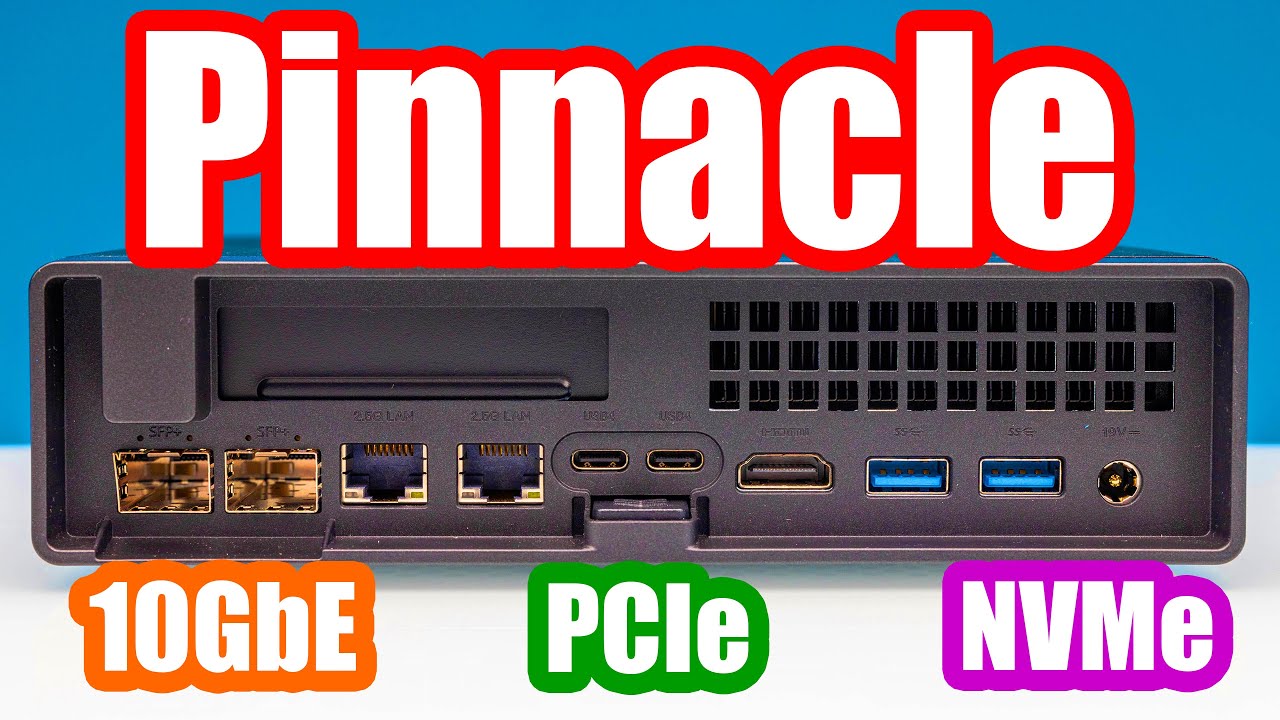
We review the most anticipated Core i9 mini PC of the year the Minisforum MS-01 with SFP+ 10GbE networking, a PCIe slot, and 3x M.2 slots. This has almost everything for the Windows, Proxmox VE, Ubuntu, and Linux users. VMware users may take pause. We tested a ton of cards in this system as well to see how it would work in a homelab.
STH Main S...
 thorn delta
silent flax
IoT things https://fxtwitter.com/Johnie/status/1744556503183585471
thorn delta
silent flax
IoT things https://fxtwitter.com/Johnie/status/1744556503183585471
Dang, imagine the cloud storage cost for every washing machine doing that. Someone messed up haha
fallow wing
silent flax
https://www.youtube.com/watch?v=d3j4aEAZR7w too bad minisforums ships from China...
do they ?
last I checked their website they didn't
that or I missed something, idk
silent flax
Expected to ship from Hong Kong at the end of January
Right there at store page
delivery address is in the EU, you can choose "Free Shipping" regardless of the warehouse. If the order is shipped from a warehouse in Hong Kong, the goods will first be sent to a German warehouse and then forwarded to you, all costs are already covered by the seller.
So while no nedd to deal with customs, still going to take some time cause HK warehouse for newer items
 south blade
802.11ah what devices can connect to this?

 peak cloak
 hollow willow
What version of CAT are these cables?
hollow willow
What version of CAT are these cables?
should say on the cable itself
thick minnow
I am looking at getting an Ethernet vpn router and was wondering if I need more than gigabit speeds. Is 2.5 or ten gig worth it if it is only for 2-3 devices?
meager ginkgo
thick minnow
I am looking at getting an Ethernet vpn router and was wondering if I need more ...
What do you plan on doing with the router?
Most routers on the market are gigabit. I’d only get 2.5Gig or above if you need the LAN speed or you have over gigabit internet.
thick minnow
Thank you!
thorn delta
south blade
802.11ah what devices can connect to this?
Other specific 802.11ah devices, right now, nothing general purpose
Mainly weird cameras, intercoms and WiFi bridges
I made the YouTube video on 802.11ah that's been going around right now, and it sounds like the chipset vendors are trying to convince other companies to put them in more stuff since it's pretty niche right now
south blade
thorn delta
Mainly weird cameras, intercoms and WiFi bridges
Not something my Wyze cameras could connect to?
thorn delta
south blade
Not something my Wyze cameras could connect to?
Nope, unless you use a product that will receive the 802.11ah signal and spit out regular 2.4 or 5ghz 802.11n/ac wifi
There are special cameras made that use 802.11ah internally and then have a "base station" that you can plug into ethernet
 finite phoenix
what is the issue if the wifi of the laptop is not working even if all of the drivers are installed?.
silent flax
at first look the cards looks nice, of course i need to plug them into a PC first, but i have work to do first 😛

 wispy hawk
is the syncon axe5400 good for a cheap pcie card?
: https://www.amazon.com.au/gp/product/B0BWWM7LVP/ref=ewc_pr_img_2?smid=A1MAKXNTAOSK07&th=1

Model: AXE5400 Item: Wireless Adapter Chipest: Intel AX210 chipset; New Wi-Fi with Bluetooth 5.3; Standard IEEE: 802.11ax/ac/a/b/g/n; Tri-band: 2.4Ghz-574Mbps/5Ghz-2400Mbps/6Ghz-2400Mbps; Note: The speed can reach 2400Mbps (the router must support 802.11ax, 160Mhz); Operating system: only support...
silent flax
well, for now it works, getting an i226v driver was a bit of a pain in the... but managed to do it. For now at 1gigabit until i get my 2.5 gigabit switch
it's AX210, so it will do fine
@wispy hawk ^
silent flax

says it right there on biggest picture
"AX210NGW" - that is Intel AX210 wifi adapter
wispy hawk
i was looking at axe5400 💀
silent flax
just be aware that you need to plug an USB cable to the side for Bluetooth to work
wispy hawk
yea i would prob not use bluetooth but if i do i will prob need to buy a splitter
gusty storm
silent flax
at first look the cards looks nice, of course i need to plug them into a PC firs...
looks nice when it's all blacked out
silent flax
gusty storm
looks nice when it's all blacked out
other side is nice too 🙂
 fallow wing
thick minnow
I am looking at getting an Ethernet vpn router and was wondering if I need more ...
fallow wing
thick minnow
I am looking at getting an Ethernet vpn router and was wondering if I need more ...
Honestly, seeing how things are going, there is probably worth into getting a 2.5G router, just in case you have a shot at a better carrier plan, that is IF you have the need for it, like, you have an activity that requires large downloads often and/or having sizeable data streams
10G is really only is you have pro, even some "industrial" grade needs, like hosting services to a bunch of users at the same time
gusty storm
silent flax
other side is nice too 🙂
budget carbon fibre finish haha
silent flax
wispy hawk
yea i would prob not use bluetooth but if i do i will prob need to buy a splitte...
no USB2 headers remaining ? then you might want an internal USB hub
https://www.amazon.com.au/NZXT-Internal-USB-Hub-AC-IUSBH-M3-4/dp/B08L8VJS3Z/ for professional looks

Expand your system's connectivity to the latest all-in-one liquid coolers, fan controllers, and lighting accessories. The Internal USB Hub enables you to connect an additional four USB 2.0 devices and designed to be tucked away and installed quickly with a magnetic body and 3M dual lock tapes. Ge...
or stuff like this for budget looks (at amazon it costs same as NZXT tho 😄 )
 wispy hawk
👍👍
clear igloo
hollow marlin
<@291198741862416384> <@186123993412141057> Forums are not taking the possibilit...
It's confirmed
silent flax
clear igloo
It's confirmed
i ignore HPE in everything since they had that stupid "BIOS behind paywall" idea
silent flax
clear igloo
It's confirmed
also it can't be worse than vmware @ broadcom 🙂
clear igloo
This is very true, hopefully 🙂
silent flax
talking about network security companies, i wonder if the Nasdaq ticker of F5 Inc is some kind of joke 😄
Because the ticker of F5 Inc is... FFIV 😄
but it is most likely F Inc 5, not FF 4 😄
fallow wing
silent flax
or stuff like this for budget looks (at amazon it costs same as NZXT tho 😄 )
Oh my god
It makes me want to try daisy chaining these and then try plugging as many devices as possible

silent flax
fallow wing
Oh my god
It makes me want to try daisy chaining these and then try plugging as ...
it's an USB hub. it has same limitations as normal USB hubs
it is just a version which connects to USB 2.0 header and provides USB 2.0 headers instead of USB-A to USB-A
silent flax
gusty storm
budget carbon fibre finish haha
sometimes i wonder about how they come up with the product listings tho
 gusty storm
silent flax
sometimes i wonder about how they come up with the product listings tho
gusty storm
silent flax
sometimes i wonder about how they come up with the product listings tho
probably ran out of other things to say
i mean that just sounds like they're saying "it's strong"
fallow wing
silent flax
it's an USB hub. it has same limitations as normal USB hubs
I know ? That wasn't my point ?
silent flax
fallow wing
I know ? That wasn't my point ?
well i just meant that you are limited to 5 levels, that is a known fact.
there is no need to experiment to find that out
fallow wing
silent flax
there is no need to experiment to find that out
I know
but
daisy chaining USB interfaces
funny

brain go haha
fallow wing
silent flax
well i just meant that you are limited to 5 levels, that is a known fact.
Plus with that many levels, then suddenly hitting all ports with something, the bandwidth limit would be grinded to a halt so damn fast lmao
hollow marlin
clear igloo
It's confirmed
Yep, I saw that last night
 calm vapor
hi guys, so i want to fix my wifi speed for my pc. i have my pc in my sleeping room on thirth floor. i want to buy a wifi extender but my mom doesnt want anyting that makes wireless internet faster only wired do you guys have ideas for that. i already use a powrline and i get 30 mb max but i can get up to 400. and sadly powerline has a max of 100 mb i heard. ps my powerline thing is from i believe 2009
 ebon wasp
Powerline can be faster than 100mbps. So the easiest way is to upgrade the Powerline adapters. I can't really advise one, because I don't use Powerline.
However there's a chance that powerlines in the house prevent higher speeds.
Other solution is to just lay down some ethernet cables
Thus creating new holes.
fallow wing
silent flax
so how is it btw ? it is fine ?


Magical hotbox has been finally acquired

Currently cracking it up to put NVMe and RAM


Uhhhhh
Guys ?
Will it be OK to secure the NVMe this way ?
mystic latch
lmao yea probably, but that makes me cringe so much
opal pagoda
fallow wing
Just mount it properly with a standoff
fallow wing
@mystic latch @opal pagoda
It wasn't a thumb screw bruh
It was a small ass screw in a small ass standoff

I fixed it
opal pagoda
Good

 silent flax
fallow wing
Will it be OK to secure the NVMe this way ?
silent flax
fallow wing
Will it be OK to secure the NVMe this way ?
why would you ?
silent flax
fallow wing
<@369312159257198593> <@203950587471986688>
It wasn't a thumb screw bruh
It was...
first M.2 drive ?
fallow wing
silent flax
why would you ?
I didn't see it was NOT a thumb screw, look the next pic, I fixed it
silent flax
what i mean that most M.2 slots look like that, that is why i asked if it was your first M.2 drive install
anyway the packaging looks a lot better than your usual aliexpress product
the VESA mount is a strange addition tho
fallow wing
silent flax
anyway the packaging looks a lot better than your usual aliexpress product
Straight off the OEM's factory
fallow wing
silent flax
what i mean that most M.2 slots look like that, that is why i asked if it was yo...
Most M.2s look bent like that ?

silent flax
fallow wing
Most M.2s look bent like that ?
no, most M.2 have small screw in small standoff
fallow wing
silent flax
no, most M.2 have small screw in small standoff
Yeah, a built-in standoff directly on the mobo, just like here, my PS5, my laptop, etc...
Never had to deal with extra screwed in stand offs for M.2 slots before

Done with the "modding"
fallow wing
@silent flax

We are in BIOS ladies and gentlemen !
won't need to update BIOS, has been flashed with lastest rev from factory !
silent flax
did you really only instaall 4GB of RAM only ? 😛
but maybe that's all you need, who am i to talk.
fallow wing
silent flax
did you really only instaall 4GB of RAM only ? 😛
I mean, it's a router, does it really need more ? my OPNsense VM that's been routing my network so far only has 1GB and one core from a 4th gen i7
this mini PC got 8c/8t, I think 4GB is already quite ample, and if really need be, I can throw one or two sticks of 8GB instead
silent flax
but it has ports and performance to be more than just a router
i mean you could also add a NAS VM/docker stuff on it
fallow wing
I mean
sure ?
but I don't plan to use it for anything else, I already have a TrueNAS PC and a ProxMox PC for those if I really want to, I believe those are much more adapted for that kind of use
fallow wing
silent flax
i mean you could also add a NAS VM/docker stuff on it
I know what it does but I already had other machines operating those functions, I ain't gonna scrap them because this one can
 hallow junco
what kind of label makers are people using to label network cables?
fallow wing
hallow junco
what kind of label makers are people using to label network cables?
do you mean label ?
hallow junco
what label maker do you use
hallow junco
fallow wing
do you mean label ?
yeah
fallow wing
hallow junco
what label maker do you use
I don't
hallow junco
fallow wing
I don't
OH GREAT!
fallow wing
hallow junco
yeah
you mean the markings on cables saying what grade they are ? that's a laser marker from factory where they got made
hallow junco
so you have nothing to contribute but pointing out spelling errors. wonderful.
silent flax
hallow junco
what kind of label makers are people using to label network cables?
most label makers print on thermo paper, which means it is useless after few months/years. I would be interested in some options which do not cost arm & leg too
fallow wing
hallow junco
so you have nothing to contribute but pointing out spelling errors. wonderful.
I asked if you meant label because I didn't know if you meant something else by mistake DUH
don't get mad at me because no one laser labels their cables when fucking stickers exist
opal pagoda
hallow junco
what kind of label makers are people using to label network cables?
just write on the cable itself
thorn delta
silent flax
most label makers print on thermo paper, which means it is useless after few mon...
A lot of the nicer label makers with the cartridges will transfer ink from a ribbon to the paper and then put a protective clear layer on top
silent flax
thorn delta
A lot of the nicer label makers with the cartridges will transfer ink from a rib...
i suspect those cost more than my normal laser printer tho 😄
thorn delta
I think Dymo makes a cheaper USB version that takes the same carts as the expensive, handheld industrial ones
opal pagoda
thorn delta
A lot of the nicer label makers with the cartridges will transfer ink from a rib...
our brother label maker wastes 3cm of paper with each print
1.5cm on each side
dumb af
thorn delta
And you can get knockoff carts
fallow wing
hallow junco
OH GREAT!
.1% people laser labels their cables, I really don't get what warranted this reaction to me replying I do the same than 99.9% others
thorn delta
opal pagoda
our brother label maker wastes 3cm of paper with each print
1.5cm on each side
Yeah that's annoying but there's some goofiness with the location of the head and the cutter or something
silent flax
looking at amazon, thermal transfer printers are like $150 for no brand, $300 to $1k for Zebra 😄
opal pagoda
thorn delta
Yeah that's annoying but there's some goofiness with the location of the head an...
i dont care, i want a nice edge to edge margin so i dont have to use scissors and cut out each label
silent flax
opal pagoda
i dont care, i want a nice edge to edge margin so i dont have to use scissors an...
what i wanted to point out that direct thermal printers will fade out after few months. Thermal transfer lasts, but those cost more than a normal cheap laser printer.
opal pagoda
tbh these label makers are op
they emboss rather than print
 thorn delta
the durability of those transfer/polyester labels is nice, I pulled off antennas put on cell towers like 12 years ago and the labels were still perfectly readable after over a decade of UV and weather
 hallow junco
fallow wing
I asked if you meant label because I didn't know if you meant something else by ...
hallow junco
fallow wing
I asked if you meant label because I didn't know if you meant something else by ...
no I believe products are made to label cables such as... https://www.bradycanada.ca/label-printers/portable/m210-handheld-label-maker-pid-152260
but other brands exist, and I was hoping to get feedback from people with experiance using a product.
sorry, but it's really rude to point out selling errors and have no productive input on the question. that's just being nitpicking. imo, and rather rude.

Take on your toughest on-site labeling challenges with the M210 Label Printer. Create fast, reliable and pre-sized labels with more material options. Simply drop in a cartridge, type and print.
opal pagoda
get one with querty layout
thorn delta
This is the one I use: https://www.brother.ca/en/p/PTE500VP
Brother Canada
Perfect for commercial datacom and electrical projects, the PT-E500VP handheld industrial labeller includes design software so you can print professional laminated labels and heat shrink tubes up to 24 mm wide with or without a PC.
fallow wing
hallow junco
no I believe products are made to label cables such as... https://www.bradycanad...
my guy, I had to ask to make sure you actually meant label and not something else, how did you manage to perceive this as rude of all things ???
didn't you notice how YOUR reaction was rude ???? I just told you I didn't have experience with that and you got mad at me for not being what you expected ??
thorn delta
It also has some iffy windows software that can design labels or batches of labels
opal pagoda
thorn delta
This is the one I use: https://www.brother.ca/en/p/PTE500VP
we have this one
 silent flax
thorn delta
This is the one I use: https://www.brother.ca/en/p/PTE500VP
silent flax
thorn delta
This is the one I use: https://www.brother.ca/en/p/PTE500VP
yeah, RIP, costs few euros more than my normal laser printer. sadly i don't label enough to justify the cost
hallow junco
thorn delta
This is the one I use: https://www.brother.ca/en/p/PTE500VP
Cool, thank you very much BenJ!
thorn delta
silent flax
yeah, RIP, costs few euros more than my normal laser printer. sadly i don't labe...
Work bought it haha, at home I used the cheapest Dymo thing with knockoff label carts
silent flax
hm, Brother PT-E110VP is 50 euros, that might be reasonable-ish, still thermal transfer
 fallow wing
hallow junco
no I believe products are made to label cables such as... https://www.bradycanad...
fallow wing
hallow junco
no I believe products are made to label cables such as... https://www.bradycanad...
plus, this is a sticker label printer, I asked if you meant an actual laser label device, like the factory markings, you simply didn't answer and accused me of not contributing in a productive manner
silent flax
thorn delta
Work bought it haha, at home I used the cheapest Dymo thing with knockoff label ...
i usually went the cheap homemade way - that is print out a label on normal paper, then use see-through self-adhesive tape 😄
thorn delta
fallow wing
plus, this is a sticker label printer, I asked if you meant an actual laser labe...
Who would be lasering cables themselves? lol
fallow wing
thorn delta
Who would be lasering cables themselves? lol
my point exactly, hence why I asked if that was the type of label he was looking for
thorn delta
I'm not agreeing with you, unless they're a factory, someone asking for a label maker would be looking for something like we've been talking about already, assuming otherwise would be odd
hallow junco
bro I asked "what kind of label makers are people using to label network cables? (edited) and you just pointed out the spelling mistake and started talking about lasers, and I tuned you out.
thorn delta
That said, it would be funny to laser on the entire bee movie script onto a spool of cat6
now that I think about it, I've had the cable markings wear off before, so maybe it's ink
🤷♂️
fallow wing
hallow junco
bro I asked "what kind of label makers are people using to label network cables?...
for the 3rd iteration, I asked if you did intent to mean label instead of something else because I wanted to make sure you intended to mean label, I didn't say "um akcshually, it's written L A B E L"
fucking hell
hallow junco
dont swear please
fallow wing

thorn delta
also, if you don't need portable, these work alright, had a couple of these kicking around
https://www.amazon.ca/DYMO-LabelManager-Label-Maker-1768960/dp/B00464E5P2

"With the DYMO LabelManager PnP label maker, there’s no software to install – just plug it into your PC or Mac* and you’re ready to create great-looking labels as fast as you can type. This label maker’s built-in software pops up on your computer screen so you can instantly print clear, professio...
fallow wing
at this point I fully believe you WANT me to be rude
thorn delta
jeeze guys, move on, go label something
hallow junco
fallow wing
for the 3rd iteration, I asked if you did intent to mean label instead of someth...
What else would I mean? I why would you then think it was something to do with laser?
Anyways, i'm done with the troll, I got some answers. Thanks.
hallow junco
fallow wing
at this point I fully believe you WANT me to be rude
No, I want civilized discourse with intelligent people. And when people don't have the answers, silence is perfectly acceptable.
fallow wing
hallow junco
What else would I mean? I why would you then think it was something to do with ...
because I thought you wanted to label a cable like the factory markings you can find showing the cable's grade, brand etc...
laser etcheing/labelling/printing is a thing, as it turns out, which is why I asked if that was what you were after
well I'm fucking sorry for asking and trying to figure out what you wanted with the intent to help
two answers in the convo : "OH GREAT, not productive, points out spelling mistakes"
now that's sure to be productive

Finished my OS install, turned it off, swapped the RAM
1Rx8 instead of 1Rx16 now
Twice the capacity
An extra 800MHz (although useless since that CPU caps out memory at 2400MHz)
silent flax
fallow wing
not as useless as me running DDR4-3600 at DDR4-2133 (and briefly at DDR-1866). Xeon v3 RAM speeds yay
fallow wing
silent flax
not as useless as me running DDR4-3600 at DDR4-2133 (and briefly at DDR-1866). X...
lel
silent flax
but at least i am using one of my E5-2699v3's via tdarr now. too bad my switch will arrive probably by the time all the transcoding via network will be done, the 2.5gbe networking would be helpfull here
(possibly, not sure how much does it transfer back and forth)
fallow wing
Urgh
I forgot how to configure OPNsense
I remember spending nights on the damn thing 8 months ago
I gotta figure out how the hell do I get it to run as intended
I can't access the web GUI for some reason
mystic latch
You can reload the gui from cli with configctl webgui restart
I find I have to sometimes do that for my bro's that I have connected via tailscale
thick minnow
Hello, i bought an msi radix axe 6600 but it wont connect with the wifi and my phone app account
mystic latch
silent flax
uh, so this is where all those "not supported anymore" Intel + Vega chips went :D. Also 8x i226V

also "NAS motherboard" with a single SATA port, interesting idea
but yeah, 8x 2.5gbe, i don't think i can imagine a use case where i would need that NICs in one system, not even for a router like device
opal pagoda
silent flax
uh, so this is where all those "not supported anymore" Intel + Vega chips went :...
giv link
opal pagoda
kinda pricy
 shut stag
hey guys new to networking but im putting my old mesh system into AP mode and connecting it to my router
so in AP mode is the login and password still for the "AP's" or is it just for the router
clear igloo
password to login to the GUI would stay the same regardless
shut stag
no i mean for devices on the network
because what is now an AP was previously a main network in my house
clear igloo
Still would stay the same on the APs unless you change it to match something else
shut stag
got it thanks
 mental crystal
Can I see in the network log who did what in their email/docs/slides and on what time they did it?
mystic latch
Not in pure network logs, no.
mental crystal
Can you see to what email (the actual address) someone singed in to or only that someone opened email (email.com)?
Thanks for the help, appreciated
fallow wing
mental crystal
Can you see to what email (the actual address) someone singed in to or only that...
No, network logs are just showing the origin and destination (and some more additional details) of a data packet, not it's content
You can't block emails from someone with a firewall for example
south blade
My WiFi adapter died, I have a router gathering dust I thought the LAN ports would work when doing WDS bridging but they don't seem to. Any ideas?
mental crystal
fallow wing
You can't block emails from someone with a firewall for example
Np, I just wondered if my school/work can see the content of my emails
fallow wing
mental crystal
Np, I just wondered if my school/work can see the content of my emails
No they can't
They legally can't
There are technical ways to do that but it's illegal
 swift creek
wanted to get some opinions for redoing my home network.
objective is bettter wifi in and out of the house with minial amounts of drilling new holes between floors.
using standard comcast router in the basement under the stairs. there is a drop from the basement to the attic.
opt1: move the router to the second floor coax and drop Cat6 back to the basement
opt2: disable comcast wifi and run cat6 to a wireless access point in the second floor
opt3: get fancy new 3rd party router and see how it worky and potential move it if it doesnt perform much better
this may include getting a modum and running an old pc with opnsense if i really wanna get fancy but thats a side quest
fallow wing
swift creek
wanted to get some opinions for redoing my home network.
objective is bettter w...
option two sounds like a good idea, get a good, wide coverage AP, that should do the trick
1 sounds inefficient and 3 too much work for the objective to achieve

why would anyone do this ?
ever ?

silent flax
freedom units
fallow wing
silent flax
freedom units
you mean fake units
 forest vale


Google Docs
Join us on January 16th at 4:30 PM for an inspiring webinar that empowers girls to thrive in the world of technology.
Unleash your inner coder and discover:
Secrets to success from a Google Software Engineer: Hear firsthand insights on navigating the tech industry, overcoming challenges, and building a fulfilling career.
Exclusive tips for girls...
mental crystal
fallow wing
There are technical ways to do that but it's illegal
No problem, thanks 🙂
mystic latch
mental crystal
Np, I just wondered if my school/work can see the content of my emails
Are you using an email address that belongs to the school? If not, then they cannot. But whatever service you use can. Email is an inherently insecure medium.
 digital tulip
Hi, can someone help me?
We have cable (Coaxial) internet, and keep getting bufferbloat and/or pingspikes.
 vagrant merlin
what length run you have and how many connections it has?
digital tulip
We get 250 DOWN//20 UP.
There are 2 smart tv's running (my parent's)
Also smartphones, and my high end 3080 gamepc running online games.
When I run speedtest, the unloaded latency is fine, but loaded is terrible, mostly around 60ms, but spikes upto 290-300ms. That make crash my games and stuff.
digital tulip
vagrant merlin
what length run you have and how many connections it has?
most of the stuff is connected via ethernet, except phones, and our modem is a DOCSIS 3.0 one.
vagrant merlin
it happens absolutely randomly or in specific circumstances
digital tulip
vagrant merlin
it happens absolutely randomly or in specific circumstances
it keeps happening, mostly during "Peak" hours when everyone is "online".
vagrant merlin
then it is isp issue
also i would check router logs if connection is timing out and for signal strength for a good measure
digital tulip
vagrant merlin
then it is isp issue
also i would check router logs if connection is timing out ...
it's a locked down home gateway/modem. We can't get into settings/logs.
It's like an edge router if you know what that is. only our provider can get access to the internal logs. I hate this so much!
vagrant merlin
probably they don't update it as well
so their shitty router throttling you
digital tulip
vagrant merlin
probably they don't update it as well
so their shitty router throttling you
The motherboard of the modem is a SAGECOM F3896LG (from 2022 iirc) but it has propriatary software from again, Liberty Global.
vagrant merlin
yikes
silent flax
digital tulip
The motherboard of the modem is a SAGECOM F3896LG (from 2022 iirc) but it has pr...
welcome to my world. we got Compal CH7465LG from UPC Slovakia (which is few of the remaining EU markets of Liberty Global). The worst part is that it gets huge IPv6 range, but gives out only /64
"P/N: 1417465200000" and "MODEL: CH7465CE" is silkscreened on the board (OEM: Arcadyan)
(and yes, it is Puma 6)
digital tulip
silent flax
welcome to my world. we got Compal CH7465LG from UPC Slovakia (which is few of t...
you also have the bufferbloat probs?
silent flax
digital tulip
you also have the bufferbloat probs?
no idea, i have weird hangups once every few hours
digital tulip
that's indeed that same problem.
silent flax
the Sagecom above should be Broadcom 3390
sadly i am unable to decide if i should just switch to that newer modem or switch to the other ISP
i mean i could have 1000/50 + TV for ~44 euros at my current ISP, which i don't mind that much to be honest, except these weird issues which you say might be down to the modem.
Alternatively i could have 1000/300 without TV for 22 euros a month or 100/500 for 32 euros a month, or with fixed IP 40.03 euros a month, but then i would have to figure out how to get TV, which would bring it to 55-60 euros i suspect.
But realistically i need neither of the speeds 😛
digital tulip
silent flax
i mean i could have 1000/50 + TV for ~44 euros at my current ISP, which i don't ...
what? 1000/300 for 22€????
We pay 65€ for 250/20 in Belgium with telenet.
silent flax
digital tulip
what? 1000/300 for 22€????
We pay 65€ for 250/20 in Belgium with telenet.
it's optical from Orange
but that is literally just internet, nothing else
digital tulip
silent flax
but that is literally just internet, nothing else
the 65€ is also "just internet"
silent flax
the issue is that with orange, i can either have fixed IPv4, or IPv6, but not both
silent flax
digital tulip
the 65€ is also "just internet"

and let me click through with nothing else added to see real final price

and the bonus features

so 1000/500 would be 32 euros a month
but again, i would have to switch ISPs and deal with replacing my TV setup etc
the alternative just for internet is

or with 24 month commitmen t

the last two pictures are UPC Slovakia, which belongs to... Liberty Global 😄
but really the only reason we are still with Liberty Global is because Vodafone had zero interest buying into our country, as they had operations in Germany, Hungary, Czechia and Romania; but they had literally zero presence in Slovakia.
digital tulip
silent flax
but really the only reason we are still with Liberty Global is because Vodafone ...
BELGIAN Prices
#expensiveashell
 silent flax
ironically, under the UPC brand, Slovakia is only remaining part https://en.wikipedia.org/wiki/Liberty_Global#Operations_and_shareholdings
to be fair, you either have to buy a 140 euro router from them or pay monthly rentail of 2-3 euros.
same with TV, you either rent or buy one of their boxes, or rent/buy their CA modules for TV's which do DVB-C
so yeah, i will have to visit them i think and upgrade to Internet 1000 with a 24 month commitment, pay 140 euros and call it a day. While Orange would be nice, i can't be bothered to deal with it for now
digital tulip
But how can Internet be 21,90 for Gigabit in your country via UPC, under liberty global... When the same liberty global asks 76,99 in Belgium for the same
silent flax
digital tulip
But how can Internet be 21,90 for Gigabit in your country via UPC, under liberty...
"regional pricing"
internet is priced as a service, which is often relative to purchase power of each country
average salary before taxes in my country is only 1304 euros, which is way bellow the Belgian minimum wage and quarter of average monthly salary in Belgium
at least that is what internet says ?
ok, these guys say 3886 euros a month is average in Belgium, which sounds more reasonable, but it is still like 3 times the average in my country. So yeah, your interrnet prices being 3 times higher as well come down to internet being a "service industry product"
silent flax
digital tulip
But how can Internet be 21,90 for Gigabit in your country via UPC, under liberty...
btw not same. ours is 1000/50, yours is 1000/40 🙂
silent flax
digital tulip
The motherboard of the modem is a SAGECOM F3896LG (from 2022 iirc) but it has pr...
btw are you sure you don't have other reason for that issue ? I mean did you ask the ISP if they don't have actual physical issues on their network in your region ?
swift creek
What would you guys recommend for a wireless Access point? Needs to be at least 6E and have a usable gui for set up. Doesn’t need to be pretty but doesn’t need to be stuck in 2004.
peak cloak
swift creek
What would you guys recommend for a wireless Access point? Needs to be at least ...
tplink omada?
6E is expensive though
6 is basically almost 4 times cheaper

AXE11000 Ceiling Mount Quad-Band Wi-Fi 6E Access Point
swift creek
Didnt tplink have security issues?
But thanks for recommending I’ll take a look. I guess 6E isn’t that important. But brands/models to look at are good
thorn delta
The Omada stuff has been pretty nice to work with, they'll also work standalone if you only need one AP
 agile frigate
 peak cloak
swift creek
Didnt tplink have security issues?
peak cloak
swift creek
Didnt tplink have security issues?
maybe the consumer stuff, havn't heard of any omada issues
mental crystal
mystic latch
Are you using an email address that belongs to the school? If not, then they can...
I used my own email but on school's network & pc (on google incognito)
 sudden urchin
Anyone with experince adding lte modems to either windows or linux can help here? https://discord.com/channels/375436620578684930/1191171432479207495
On windows it seems its missing some driver for it to detect it as a LTE modem but I can't find any driver software for this modem
silent flax
sudden urchin
Anyone with experince adding lte modems to either windows or linux can help here...
what is the hardware ID of the device ?
silent flax
sudden urchin
Anyone with experince adding lte modems to either windows or linux can help here...
i mean this

ah nevermind, i see the topic
 fringe saddle
Hello. Is it normal for a small network switch to cut your speeds more than half? It’s such a huge difference for me that I don’t want to sacrifice my speeds
It’s like 300Mbps difference.
With it I’m getting 99Mbps and 477Mbps without the switch
fallow wing
digital tulip
what? 1000/300 for 22€????
We pay 65€ for 250/20 in Belgium with telenet.
up to 5Gbps down, 700mbps up for 40€/month in France
fallow wing
silent flax
it's optical from Orange
Orange ? which country ?
silent flax
fallow wing
Orange ? which country ?
Slovakia
 silent flax
fallow wing
huh, didn't know they operated in eastern europe
silent flax
fallow wing
huh, didn't know they operated in eastern europe
people here hate when you call this eastern europe
 fallow wing
silent flax
people here hate when you call this eastern europe
fallow wing
silent flax
people here hate when you call this eastern europe
as far as I'm concerned, everything right of the line that goes from Denmark to Greece is Eastern Europe

also who tf calls spain, france, belgium and luxembourg eastern europe ???
silent flax
fallow wing
as far as I'm concerned, everything right of the line that goes from Denmark to ...
so Austria is Eastern Europe ? And half of Germany ?
fallow wing
silent flax
so Austria is Eastern Europe ? And half of Germany ?
ah shit denmark is placed a little further west than I thought
silent flax
(cause that is the most hilarious part - Austria is "western europe", but Slovenia, which is more to the west than the eastern border of Austria is "eastern europe" 😄
silent flax
but yeah, whatever. it is mostly the negative association of the term "eastern europe", so most countries here call it "central europe"
so anyway, Orange yes operates here, it is the leading mobile operator, also does TV & optical internet
(and DSL, but that is through Telekom's phone lines)
(yes, Telekom as in subsidiary of Deutsche Telekom)
fallow wing
silent flax
but yeah, whatever. it is mostly the negative association of the term "eastern e...
I don't call eastern europe 'eastern europe' with a negative intent, I call it that because it's the eastern half of europe

simple as
silent flax
btw i love the hilariousness of that cable modem Pandae talked about
it's a cable modem with a SINGLE 2.5gbps ethernet port. on a modem, which is connected to a 1000/50 internet

so like, what's the point ?
unless one connects a "server" to that port and hopefully rest of the network to the gigabit ports, but it's still kinda stupid
like it got me thinking maybe i should upgrade the NIC on my router (yes, sadly i have to do double NAT as these are very dumbed down routers, but then who cares, it is already behind a CGNAT, or rahter IPv6 DS-Lite, one more router doesn't hurt), but then i realized, it will still give me only gigabit internet, so no need to fix up my WAN port from gigabit
fallow wing
silent flax
like it got me thinking maybe i should upgrade the NIC on my router (yes, sadly ...
bro, my setup is double NAT
my ISP router has a fiber port for WAN and I've pulled a cable from the 2.5G port to my room
and then my network unfolds from there
my newly acquired router for example
silent flax
cable modem -> one cable to WAN port my "router" (which is a OpenWRT PC) -> one cable to the nearest gigabit switch, which then goes to few local devices (TV, AVR) and into the wall ethernet socket. That brings it to the wall hole near electricity/networking distribution holes, which then distribute it via another gigabit switch there to rest of the wall mounted holes. One of those then goes to another gigabit switch which is near my desktop & server

that last switch is getting replaced by the 8x 2.5 + 1x 10 gigabit switch
after i get that one working, i will then have to replace the remaining two switches with other 2.5 gigabit switches, but first i will have to make a head count of how many ports i actually need 😄
i know this one in the wall needs 6, which is a weird number, cause nobody makes 6x2.5 gigabit RJ45 switches, so most likely i will have to pay extra for 8 port one
fallow wing
@silent flax sorry but I understood nothing
maybe it's because I am cooked the hell out of my mind and gotta sleep '-_-
eh see ya later
silent flax
reread it at morning. or maybe you want a drawing 😄
digital tulip
fallow wing
up to 5Gbps down, 700mbps up for 40€/month in France
😭
 low pond
25Gbps, 75eur, swissland
(not me I'm not from there, but I think one of my homelabbing friends might get a 10G soon)
silent flax
these options are usually very regionally limited
like i could get 10gbps symetrical for 18 euros - if i lived in few specific spots in 4 specific cities 🙂
silent flax
change them
fallow wing
silent flax
reread it at morning. or maybe you want a drawing 😄
I'd like that yes
 brisk belfry
yes and make sure to not reuse passwords. Consider using a password manager
silent flax
fallow wing
I'd like that yes
a very bad drawing 😄

so right now i am replacing only the rightmost switch, but i need to replace 2 more switches too later 😛
fallow wing
silent flax
a very bad drawing 😄
I'd be serving the PCs/servers first instead of putting them at the tail end of the switching chain after everything else cut into the bandwidth that's not a whole lot already
silent flax
fallow wing
I'd be serving the PCs/servers first instead of putting them at the tail end of ...
- none of the other ports have something demanding. The first switch after router is literally just TV, AVR and some 99.9999% offline servers. Second switch is literally just "we got 6 ethernet cables wired into the wall, connect them at the central location" switch.
- at best, i could move the 5x1G switch behind the first 8x1G switch, as there are 2 ethernet connectors at the wall there. But all it would do for that one switch for signal to circle around the house for like 10 meters and back 😄
fallow wing
Hmmm fair enough I guess
I wouldn't have done it like that but more by obsession for my own peace of mind than anything else really
silent flax
So you would have cables along the wall instead of cat6 cables and sockets already in the wall?
 turbid yarrow
Hello i have an internet connection of 3gbs but my rog strix x570-f gaming motherboard only supports connection up to 1gbs what would be the solution to access the 3gbs network a new more potent motherboard?
fallow wing
turbid yarrow
Hello i have an internet connection of 3gbs but my rog strix x570-f gaming mothe...
You can get a 2.5G network interface card for super cheap, you could get higher bandwidth cards but it's pretty pointless for what you got (5G cards are expensive and finicky, 10G cards are way overblown for your needs and cost drastically more) and do you even know if your router got a 2.5G port in the first place ? Because that's pointless to get a better NIC for your PC if your router can't deliver it to you
silent flax
Yeah, as geek said, i226v cards are like 10-15 euros on aliexpress. And router part is also true, it needs a 2.5g port
turbid yarrow
@fallow wing yes the router does have
mystic latch
Bitwarden. Tis free.
fallow wing
turbid yarrow
<@279990077906616322> yes the router does have
then you can just pick up a 2.5G NIC off amazon for 25€ or something, put it in your PC if you got a PCIe slot free and there you go
turbid yarrow
@fallow wing thanks for your help
 turbid yarrow
@fallow wing i got a 2.5 adapter but now my pc just wont connect to the ethernet... plugged in the 3gb router socket
fallow wing
turbid yarrow
<@279990077906616322> i got a 2.5 adapter but now my pc just wont connect to the...
There's no such thing, it's 2.5G or 1G or a square/rectangle slot that's for fiber
turbid yarrow
whatever 2.5 sorry
fallow wing
If you didn't touch the port in which internet comes to your router, your network card either needs a driver to be installed, settings to be configured, or both
turbid yarrow
no i did not touch anything
my provider sent me a google multi gig router i dont know how good they are hahaha but it is meant to have a slot for speeds bigger then 1gb i pluged my cable in there but mu pc wont connect to internet all the 1 gb are working fine
fallow wing
turbid yarrow
no i did not touch anything
Then the answer falls back to the options I've listed
turbid yarrow
would you be able to run me through what settings i should look at ?
fallow wing
Wait a minute
How did you get a 2.5G card delivered and installed in your PC so quickly ?
turbid yarrow
i didnt get a card someone grabbed one of those small adapters
testing it on a laptop
fallow wing
Oh the USB ones ? That's what I'm running to get 2.5G speed on my laptop
turbid yarrow
yes those ones
fallow wing
Good
Well, these should be plug and play but try connecting your 1G port to run windows update so it'll fetch whatever drivers your USB thingy needs
 wise surge
Not sure if this is an applicable place to ask... I have a pretty decent pc (i9, 3090, 64gb, etc.) with internet speeds of 900+ mbps up and down, and every website is blazing fast except YouTube? Videos buffer, comments take a long time to load in, trying to type is awful, etc.
turbid yarrow
@fallow wing ok i will try
wise surge
So seems to be exclusively a youtube issue, but not seeing anything online about this specifically
fallow wing
wise surge
Not sure if this is an applicable place to ask... I have a pretty decent pc (i9,...
That's just youtube mate
They're being a bitch recently
wise surge
Got it, so not just me
fallow wing
With adblocks and non-chrome users
wise surge
Yea, I heard they were being scummy for non-chrome users, but I was on chrome which made it weird
But the adblock one, forgot they just implemented that garbage, I still have adblocks up
wise surge
nah, think you hit it on the head, makes sense they're just being scummy with adblocks
fallow wing
wise surge
nah, think you hit it on the head, makes sense they're just being scummy with ad...
Didn't review the details of that matter too much but I had a feeling that would be it
silent flax
wise surge
Not sure if this is an applicable place to ask... I have a pretty decent pc (i9,...

How-To Geek
The 5-second delay is not exclusive to Firefox users, says Google.
 sage prism
hey everyone, i hope i am in the correct channel.
I am looking for some kind of cat 10 (or higher) lte modem for mobile use (either usb stick or wifi hotspot) but i can't seem to find ANY. most are just cat 4. does anyone by any chance know of a product?
thorn delta
sage prism
hey everyone, i hope i am in the correct channel.
I am looking for some kind o...
Netgear makes a few wifi hotspot ones that are decent. I think Inseego is another one
Depending on how jank you want, a lot of the m.2 LTE modems will work just fine in a USB enclosure
sage prism
thorn delta
Depending on how jank you want, a lot of the m.2 LTE modems will work just fine ...
It can be very junk but has to work with linux
i also have an m2 m-key slot available (but almost all modems require B or A-Key  )
)
fallow wing
@silent flax HEY MATE

MY PS5 IS LAGG'D IN WOOOOOOO
router <===> switch <---> PS5
the process to aggregate links between my router and switch was weirdly painless
I am fully expecting to butt heads with a beast of a hurdle any time soon

silent flax
i have to wait till next tuesday for the new ISP plan & new router, hopefully this one will be bufferbloat free 😄
thorn delta
sage prism
It can be very junk but has to work with linux
A lot of the modems work pretty well with Linux
I don't remember the specific models off hand, but there's a few options I think from sierra wireless that were popular in business laptops, and after those laptops got parted out the modems ended up on ebay for $20-40, then you just add a $30 USB enclosure that has antennas and a SIM card slot
sage prism
thorn delta
I don't remember the specific models off hand, but there's a few options I think...
If you find some time, doesn't need to be right now, could you maybe find out which ones?
I found one very nice one but the customer support told me it would only work with lenovo laptops. in particular it's this chip https://www.quectel.com/product/lte-a-em120r-gl
But with that one https://www.ebay.com/itm/275190030531 they say it would only work with lenovo.. which for me makes no sense. the product details say (see attached image)
And then there's one last problem: this module is B-Key and i only have an M-Key slot


The EM120R-GL is an LTE-A category 12 IoT module in an M.2 form factor designed in accordance with the 3GPP Release 14 specification
thorn delta
sage prism
If you find some time, doesn't need to be right now, could you maybe find out wh...
It's kind of hit or miss sometimes. Often, laptops will have a BIOS whitelist for specific cards for RF regulatory reasons
So a "Lenovo" card might not work in a Dell
sometimes the "lenovo" card might actually have specific product IDs that the generic drivers don't work with
Though I know on some sierra wireless cards, that can be changed by sending the modem card some commands
sage prism
Yeah because locking up hardware is fun.. right Lenovo? 
Reminds me of old times where phones had a sim lock
thorn delta
I think I was using the Sierra Wireless EM7455 which is CAT6, but they have a EM7565 which is CAT12, and those are well documented here
https://github.com/danielewood/sierra-wireless-modems

GitHub
EM7565/EM7455/MC7455 - Modem Configuration. Contribute to danielewood/sierra-wireless-modems development by creating an account on GitHub.
and appear to be as cheap as $12 on ebay
sage prism
They are around 80 - 150€ on my german ebay
..but there are some used ones for around 15€ 
thorn delta
Quectel makes some very good cards too, but getting drivers for them is sometimes a bit harder
sage prism
Now my last/biggest problem would be that those are always B-Key while i only have an M-Key slot (or a E-Key, but that one only has very limited space)
silent flax
sage prism
Yeah because locking up hardware is fun.. right Lenovo? <:LUL:402014752706134017...
Lenovo mostly has allow lists in their laptops instead. Outside of those Threadrippers
thorn delta
sage prism
Now my last/biggest problem would be that those are always B-Key while i only ha...
So you'd probably want an external USB enclosure then
The cards often just use USB internally in the slot anyway, so you're not going to lose any speed
sage prism
thorn delta
So you'd probably want an external USB enclosure then
stuff like this?

 silent flax
sage prism
stuff like this?
silent flax
sage prism
stuff like this?
no, that is for SATA SSDs only. For mobile, you need WWAN adapters
cause they also usually have the antenna HW too
fallow wing
sage prism
stuff like this?

ORICO Boîtier SSD M.2 NVMe Aluminium Adaptateur, 10Gbps USB3.2 USB-C Lecteur M2 pour SSD M.2 PCIe NVMe M-Key 2230/2242/2260/2280, Support Thunderbolt 3, Sans Outil Boîtier Externe avec UASP- BM2G2
that stuff works really well
fallow wing
silent flax
cause they also usually have the antenna HW too
wait he wants them in wifi ?
sage prism
fallow wing
https://amzn.eu/d/hen8co9
But that's just M-Key again, i need a B-Key for wwan
thorn delta
Something like this https://www.amazon.com/dp/B0CHB3NR6Z/

NGFF(M.2) to USB 2.0(TYPE C) Adapter With SIM card Slot and Auxiliary Power Interface for WWAN/LTE Module. Description. This adapter does not include NGFF(M.2) module and SIM Card. The NGFF(M.2) Key B to USB adapter is designed for desktop/Laptop PCs that convert wireless M.2 Card to USB port.. Y...
sage prism
Something like that?
 silent flax
fallow wing
wait he wants them in wifi ?
silent flax
fallow wing
wait he wants them in wifi ?
no, cell network. As in 4G, 5G. That also needs antenae and SIM card slot from the adapter
also Broadcom is rolling hard https://www.techradar.com/pro/broadcom-kills-off-vmware-cloud-service-providers

TechRadar
Cloud Service Providers left in the lurch
fallow wing
silent flax
no, cell network. As in 4G, 5G. That also needs antenae and SIM card slot from t...
damn, yeah, that's a whole nother can of worms, he's better off with one of those sim APs
sage prism
shouldn't somethink like that also work using an m2 m-key?
theoretical an m-key is just 2 pcie lanes which can have anything attache das long as there's a controller of course.. but there's just no adapters available sadly
silent flax
sage prism
shouldn't somethink like that also work using an m2 m-key?
theoretical an m-ke...
sure. but how will you solve the SIM card problem and will you make an own adapter ?
fallow wing
sage prism
shouldn't somethink like that also work using an m2 m-key?
theoretical an m-ke...
at the speeds 4G/5G goes, he can stay on USB 3

Hotspot 4G E5576-320
silent flax
man, these little 2.5G switches are really starting to get nice in price

too bad i need 6 ports 😄
fallow wing
something like this
*keyword being "like", not specifically that one
silent flax
(and a 2.5G RJ45 SFP+ adapter will cost at least half of that)
fallow wing
silent flax
(and a 2.5G RJ45 SFP+ adapter will cost at least half of that)
you mean an RJ-45 SFP+ transceiver ?
silent flax
yeah
fallow wing
I've been looking those up all past week, you won't find them cheaper than 40€
silent flax
10G RJ45 is easy
silent flax
35
fallow wing
still
silent flax
and yeah, 19 euros for SFP+ 2.5G 😄
 fallow wing
silent flax
35
fallow wing
silent flax
35
I rounded up cuz the ones I found had a shipping fee
silent flax
vs 28e for the whole switch LOL
fallow wing
silent flax
and yeah, 19 euros for SFP+ 2.5G 😄
those are 2.5G transceivers, I was looking for 10G ones
silent flax
as i said, i paid 35 euros or so for mine, without coupons
fallow wing
as long as you are satisfied
I just felt the need to point these notes to make sure you were informed, beyond that you do what you gotta do mate
opal pagoda
silent flax
man, these little 2.5G switches are really starting to get nice in price
Send link, might buy that
silent flax
opal pagoda
Send link, might buy that
https://www.aliexpress.com/item/1005005890926981.html shipping is 6 euros, still kinda cheap
opal pagoda
https://a.aliexpress.com/_mLBz11i this one is also interesting, dual 10g sfp
silent flax
opal pagoda
https://a.aliexpress.com/_mLBz11i this one is also interesting, dual 10g sfp
or a managed one https://www.aliexpress.com/item/1005006278753506.html
opal pagoda
silent flax
https://www.aliexpress.com/item/1005005890926981.html shipping is 6 euros, still...
For me price is 46€ lmao
silent flax
opal pagoda
For me price is 46€ lmao
go through the super deals page
i mean on ali home page click on Super deals and it should be there
but it makes no sense for me to buy 2.5G switches now outside of this corner of the house - the internet is only gigabit, every other device connected to the network has only gigabit port, so the 8-port switch i ordered for the server and 2-3 devices here is more than enough for now 😛
sage prism
@fallow wing
https://www.delock.de/produkt/63166/merkmale.html?setLanguage=en that one should also work, right?
silent flax
as long as it is USB based B/M key module. sure
sage prism
I just can't find a lot of B-Key options in my country shops...
fallow wing
sage prism
<@279990077906616322>
https://www.delock.de/produkt/63166/merkmale.html?setLangu...
sure would
fair warning, I'm not well versed into the specific domain of those modules but as coincidence would have it, I have been looking at these quite recently and from the knowledge I've parsed through recently, it does look like it should be working as intended
opal pagoda
silent flax
but it makes no sense for me to buy 2.5G switches now outside of this corner of ...
yea i know but i mostly want 10g link between server and main pc and then couple gig or 2.5g ports to connect to rest of the network
silent flax
yeah, i just mean i could spend money on 2.5G switches, but there is really no point to replace the rest of my network
like i shown at picture above, i got:
ISP router currently at 500Mbps download, 1Gbps next week (new router will have 2.5gbps LAN port, but as internet is only gigabit, thus there is no point
TV, AVR, access point, HTPC at bedroom, old X99 and Sandy/Ivy Bridge system all have 1 gigabit and they don't really have a need for 2.5 gigabit cards and switches.
Only the final corner where my server is (has a 10 gigabit RJ45 X540-T2 card), mac mini 2018 with 10 gigabit RJ45 and my desktop is with 2.5 gigabit I226V is where a 2.5G/10G switch makes sense
So i am replacing only the switch in that corner and rest will be done when prices drop more and when i will actually upgrade my computers, but even then it will mostly be pointless
it could actually make sense for one spot (the wall socket central location) to copy fast from my disk in the OpenWRT router to my server, but that one requires a 6 port switch in the first place (which makes it expensive, above 60 euros), and then it really doesn't matter if i grab that few downloads few seconds/minutes faster
fallow wing
opal pagoda
yea i know but i mostly want 10g link between server and main pc and then couple...
what does your server do ?
opal pagoda
fallow wing
what does your server do ?
nas duties are the most bandwidth consuming ones
others are just home assistant, pihole, etc
fallow wing
opal pagoda
nas duties are the most bandwidth consuming ones
others are just home assistant,...
ah yeah but like, do you have hardware that pushes data over 2.5G ? is it really interesting to get that much hardware or did you go for the overkill because big number funny ?

I'm not judging, all my equipment is overkill for what I make of it
opal pagoda
fallow wing
ah yeah but like, do you have hardware that pushes data over 2.5G ? is it really...
not yet but it saturates 1g link
opal pagoda
2.5g isnt that much of bandwidth as single sata 3 can saturate that
silent flax
opal pagoda
2.5g isnt that much of bandwidth as single sata 3 can saturate that
SSD is not cheap enough to use as mass storage
opal pagoda
silent flax
SSD is not cheap enough to use as mass storage
its currently double the price at size of 4tb
silent flax
opal pagoda
its currently double the price at size of 4tb
who buys 4TB for storage
i am buying 16 and 18TB spinning drives 😄
opal pagoda
well then use tiered storage
opal pagoda
silent flax
i am buying 16 and 18TB spinning drives 😄
dont those use SMR?
silent flax
opal pagoda
dont those use SMR?
no ? Exos X16 and WD Ultrastar are helium PMR drives
fallow wing
my NAS is made of 4TB ironwolfs
currently 3 of those, planning to expand to 6 (because I already have them)
silent flax
the Ultrastar was like 330 euros when i bought them, Exos X16 was betwen 250 and 300 euros depending on when i bought them
opal pagoda
silent flax
the Ultrastar was like 330 euros when i bought them, Exos X16 was betwen 250 and...
one small issue
i dont have enough data to fill em
currently 8tb array is staying at 5tb free
fallow wing
Tonight, I'd like to say a word in the honor of my second computer project and first IT project, my ProxMox node/OPNsense VM.
After giving me many sleepless nights, an unfathomable amount of frustration and countless nasty headaches, the success and results coming out of this gave me pride in my work and helped me understand the inner working of these systems and their finicky settings.
Due to the auditory discomfort caused by the host machine's fans and future planning requiring expansion paths that simply wasn't available due to the limitations of the hardware I had on hand, I have prepared and successfully deployed the successor system to this OPNsense VM.
After operating virtually flawlessly since the start of August 2023 and suffering from a broken boot process due to unknown circumstances that made me rely on a unique working snapshot, I have just shutdown my entire ProxMox node.
This VM will be switched on again for data retrieval and the machine will operate again in a future project with renewed objective but tonight, it turns off.
The fan hum disappeared, the silence is back, the NICs' lights are off, the power consumption is zero.
Rest in peace for you have served me well.

silent flax
fallow wing
Tonight, I'd like to say a word in the honor of my second computer project and f...
i need to redo my proxmox, because it is pretty much impossible to remove drive from the LVM in proxmox
i hope all i need to do is to create backups of VMs, drop LVM, redo partitions and reimport VMs, but i am preparing mentally for full reinstall
fallow wing
silent flax
i need to redo my proxmox, because it is pretty much impossible to remove drive ...
To be quite honest with you, I set up proxmox, got a couple VMs on it and did not touch it ONCE since
I understood nothing about drive management lmao
The LM/LVM stuff ? No idea how it works out
silent flax
that will also free up a 4xM.2 PCI-E 4.0 adapter (for which i won't have use) and four sad older PCI-E 3.0 Samsung NVMe drives, each 250GB
fallow wing
silent flax
i hope all i need to do is to create backups of VMs, drop LVM, redo partitions a...
I am planning for a full reinstall, clean slate all over, new ProxMox, fully updated, new VMs
I'll just retrieve data from what's on there but it'll be all new once I'll be done with it
I wonder if I can't get my hands on some new hardware, cuz that thing is still in DDR3
opal pagoda
fallow wing
I wonder if I can't get my hands on some new hardware, cuz that thing is still i...
what are you looking for? and what budget
fallow wing
opal pagoda
what are you looking for? and what budget
Something with more than 4 cores and in DDR4 but budget is really fuckin' low so I'll just look around on second hand/refurbished market, see if something interesting pops up
fallow wing
opal pagoda
what are you looking for? and what budget
Current setup is an i7-4790 with 24GB (2x8 + 2x4) of RAM
It works really damn well for what I make of it but with what I wanna do later on, it's gonna be on the slow side...
I'm not planning on doing an upgrade right away, I still got quite the roadmap to chew through before getting there so that's an upgrade planned for a much later time
 nimble shadow
any good suggestions for pc cases that fit in server racks
silent flax
nimble shadow
any good suggestions for pc cases that fit in server racks
silverstone ?
but you might go straight with rackmount case ?
alternatively you can use a rack tray and put a PC on it on it's side, or get a HTPC case
it's a daily deal and it's realtek, but LOL

9.5 euros for 2.5gbe NIC
fallow wing
silent flax
it's a daily deal and it's realtek, but LOL
realtek good
fallow wing
silent flax
9.5 euros for 2.5gbe NIC
damn
silent flax
but it's not like it is that big of a deal
i mean in non-deal prices it is 12-15 euros normally
or stuff like https://www.aliexpress.com/item/1005006404428783.html

sure, it has 2 euro shipping (if you order one), but still sub-10 euros
 copper fiber
does someone can help me with my nextcloud server
i have the 413 error but even after i change the php.ini
it doesn't work
silent flax
what is the server in front of it ? you could be hitting size limits of the request on HTTP server side ?
for example nginx has client_max_body_size directive (default 1MB)
silent flax
phew, seems like i was able to remove the lvm-thin from proxmox via backup of VMs, removal of vms, moving data away from pvs, removal of pvs (drives) from the vgs. then powered off the system, removed the drives, powered on, reformatted the one remaining ssd to ext4, mounted it, set it at vm drive, and started restoring systems from backups
now what i do with four 250GB PM981's, which is pretty much a OEM Samsung 980 (non-Evo, non-Pro)
fallow wing
silent flax
phew, seems like i was able to remove the lvm-thin from proxmox via backup of VM...
I gotta figure out how drives/partitions work on proxmox man
Having snapshots saves lives
silent flax
it's rather simple
on a node, you have the disks section, LVM and LVM-Thin is for LVM storage (i prefer not to use LVM-Thin, as it allocated all the space on LVM, thus later you can't remove a drive from LVM when you want to drop some of them). Directory is for mounted directories, like EXT4 or Btrfs drives. ZFS is for ZFS drives, obviously.

then on datacenter level you have the storage section, where you can add various types of storage, some from your nodes, some from elsewhere

and when you add an item in this storage section, you just set what content it contains

of course some of the types of storage are portable between multiple nodes (proxmox servers), some are not. Locally mounted folders via fstab will obviously work only on that specific machine. But the remote storage options (SMB, NFS, iSCSI etc) can migrate between nodes if you move a VM to other node
and yes, you can set multiple types of content for one storage config

in short - node (server) specific configuration of filesystems is in either disks section for that node or you deal with it manually (fstab etc).
Then the actual content definition happens on the datacenter > Storage menu section.
 burnt dagger
idk if this is a good place to ask about security camera setup.
right now i have one smart life camera and it kind of stinks it only links to one phone and can't hook up to the tv or a website.
I'm looking for a 4 camera setup that can be hooked up to the tv and can be access online.
any recommendations ?
please @ me
opal pagoda
burnt dagger
idk if this is a good place to ask about security camera setup.
right now i have...
do you want local storage or cloud
burnt dagger
i think storage because then you have to rely on cloud servers and subscriptions
opal pagoda
what is your budget?
opal pagoda
reolink has deacent options that are aroud your price point
ofc if you dont want to build your own nvr and use their
burnt dagger
yeah totally didn't sell a pc that could of done this lol
it would be nice if smart life camera would have had a better app and controlls becase the camera is nice
opal pagoda
burnt dagger
it would be nice if smart life camera would have had a better app and controlls ...
you might be able to connect to it via RTMP directly
burnt dagger
ill see if i can
burnt dagger
lol talking to my parents they want 5 cameras they need to have good night visibility.
going to put motion sensor lights out the front.
i think prob 2000aud would be the limit or so unless there is this next price range that's just work perfect.
idk if wired or wireless would be better
it needs to be able to be checked on the phones and have some sort of storage
 lunar ridge
Hello people
I cannot wrap my head around tcp ack and seq numbers
On the left we see the time sequence of the segments in the middle their size and on the left I have completed the table. It is given that for B1 SEQ= 110 and ACK = 300 and for A1 just SEQ= 300

Is the rest of my table correct?
 sweet sentinel
is it possible to have my own proxy running in the background of my computer while i use it? or do i have to have a whole other system just to be a proxy?
silent flax
it all depends on what you mean by proxy
also why is the price difference between 5+1 port and 8+1 port switch so low 😦
 agile frigate
id like to see linus do a vid on a aliexpress firewall at some point
silent flax
agile frigate
id like to see linus do a vid on a aliexpress firewall at some point
you mean those mini PCs ? Many were reviewed by servethehome
opal pagoda
silent flax
also why is the price difference between 5+1 port and 8+1 port switch so low 😦
I belive they all use the same switch chip
configurations that i have seen is
8x 2.5g 1x 10g
4x 2.5g 2x 10g
5x 2.5g 1x 10g
silent flax
opal pagoda
I belive they all use the same switch chip
configurations that i have seen is
8x...
well yeah, but i need 5 and 6 port switches for remaining locations, and at this price difference, i will just pay the extra 15 euros and 'future proof' it with few extra ethernet ports
opal pagoda
for me most interesting option is 4x2.5g 2x 10g
silent flax
i mean i need one for this spot where all the RJ45's from the wall sockets end up, SFP+ there do not make sense (unless i switch to the ISP with FFTH and they want to put their router there (if it fits)

so that is 6 RJ45's minimum required there
that rules out the 4+2 and 5+1 models (unless i pay for SFP+ 2.5G RJ45 module, which will make it more expensive than an 8+1 switch)
opal pagoda
yea just get the 8+1 port one
silent flax
the other location near TV's etc could be done with 5+1 and possibly even with 4+2 model, but then at 15 euros extra...
opal pagoda
in future you could run a fiber uplink to that switch if you need it
it could possbly fit in the existing conduits
silent flax
well for now i will wait the one i ordered for the server/desktop corner. Rest of infrastructure i will wait for better deals i think. For now i stay at my current ISP, so the internet will be 'only' 1000 down anyway, so 2.5G net is really needed only for server <--> desktop and maybe router <--> server routes (as i download stuff on my router via docker containers to a dedicated 1TB SSD)
 tranquil plover
i want fiber so much
 silent flax
tranquil plover
i want fiber so much
silent flax
tranquil plover
i want fiber so much
for download, fiber is not that required, you can do gigabit down even with cable
upload is where often fiber brings difference
silent flax
1000/50 via cable vs 1000/500 via FFTH in my apartment
burnt dagger
is this a good ?
i think i want cameras like these i watch
https://www.youtube.com/watch?v=Aj5Yy0kwUPs
and they seemed good.


The Reolink TrackMix Wifi Security Camera Unboxing and Review.
The Reolink TrackMix Wifi is packed with features: Dual Lenses (wide angle and telephoto, Dual Night Vision options, Pan/Tilt Capabilities and sophisticated AI Detection that detects People, Vehicles and Pets.
Chapters:
00:00 - Preview
00:34 - Intro
01:43 - Unboxing The Reolink T...
fallow wing
I'm sorry but
maximize home security
Wifi camera
Yeaaaah... no.
opal pagoda
burnt dagger
is this a good ?
i think i want cameras like these i watch
https://www.youtube....
is this for 4 cameras?
also they make same camera as poe version, i would get that
burnt dagger
Yeah
Probably best too.
I think 5 camera is what I need.
I added one of there box record
2tb HDD might be enough or I might see if I can get there empty box from somewhere and get so HDDs
nimble shadow
For the unifi smarty’s planning on getting better WiFi through out my house for my family and I’m not sure what to fully look for not sure the difference between the U7 pro and U6 pro and that type of stuff
Like idk buy really
 frosty stone
burnt dagger
is this a good ?
i think i want cameras like these i watch
https://www.youtube....
frosty stone
burnt dagger
is this a good ?
i think i want cameras like these i watch
https://www.youtube....
I absolutely do not recommend reolink
frosty stone
nimble shadow
For the unifi smarty’s planning on getting better WiFi through out my house for ...
I mean, the pretty clear difference is that one is wifi 6 and one is wifi 7
burnt dagger
frosty stone
I absolutely do not recommend reolink
what would you recommend ?
nimble shadow
frosty stone
I mean, the pretty clear difference is that one is wifi 6 and one is wifi 7
do you think it would be worth to just spend the extra $20 or so to have the wifi 7 for future proof
honestly i would prob only need like 3-4 at most so another $80 isnt all that bad
frosty stone
nimble shadow
do you think it would be worth to just spend the extra $20 or so to have the wif...
do you have any wifi 7 devices, or plan on getting any anytime soon?
frosty stone
nimble shadow
honestly i would prob only need like 3-4 at most so another $80 isnt all that ba...
then just do it lol
 nimble shadow
ya i didnt rmb the price dif i just knew it was like 20 or so
only saw it for a sec
frosty stone
ah
nimble shadow
but ya 30
rocky badge
@hollow marlin Oh no...looking at CWDM stuff for work
burnt dagger
Reolink TrackMix PoE do i need to buy my own cables ? for poe ?
burnt dagger
i just contaced someone near my area to see how much they charge to do installation to see the price and what they offer because there is 0 chance im getting on the roof or putting cables down lol not well enough
thick minnow
I am going insane,i can't find a perfect portable wifi router that comes with a eithernet cable
plz help me
 pseudo blade
frosty stone
pseudo blade
frosty stone
As long as they don't axe the WiFi 6 one it doesn't bother me much
Paying more for more is OK, I just hate the industry's current approach of less-for-same price or more-price,same-thing... or more for more, no cheaper option
opal pagoda
thick minnow
I am going insane,i can't find a perfect portable wifi router that comes with a ...

Find the most suitable hardware for your home, office or facility.
pseudo blade
thick minnow
I am going insane,i can't find a perfect portable wifi router that comes with a ...
Just buy a separate ethernet cable, it will cost several dollars maybe
pseudo blade
thick minnow
I am going insane,i can't find a perfect portable wifi router that comes with a ...
What does perfect look like? https://i.mt.lv/cdn/rb_images/1238_hi_res.png

(GL.inet stuff is pretty neat)
silent flax
finally got my zigbee stick, now i just need to buy actually zigbee devices instead of tuya 😛
cause zigbee on aliexpress is a minefield, half of them are "oh, this zigbee device works only with zigbee to tuya hub and only with tuya app" 😄
thorn delta
burnt dagger
Reolink TrackMix PoE do i need to buy my own cables ? for poe ?
You buy either premade outdoor-rated cables, or preferably buy a spool of bulk outdoor rated cat5e / cat6 and crimp on your own RJ45 connectors. Making cables isn't that difficult and the tools aren't expensive, but you'd definitely want to practice. Plan out your cable runs, I very much doubt you'd need to get on the roof. If you have attic access, that can help. Or you could run cables down and have them go into a crawlspace/basement to where your NVR or PoE switch is. Having them professionally installed won't be cheap
Keep in mind that WiFi cameras will still need to be powered somehow. You can get little solar panels but having them connected to wall power is going to be preferable for reliability, so if you have to run power from inside you might as well just do PoE.
hollow marlin
rocky badge
<@462711605063450628> Oh no...looking at CWDM stuff for work
Really..... What use will they get with CWDM?
rocky badge
hollow marlin
Really..... What use will they get with CWDM?
Probably fs stuff
hollow marlin
rocky badge
Probably fs stuff
FS stuff?
hollow marlin
Oh I mean what are they planning to use it for?
silent flax
my favorite feature on my business grade access point ;D
 rocky badge
hollow marlin
Oh I mean what are they planning to use it for?
rocky badge
hollow marlin
Oh I mean what are they planning to use it for?
Net, sdi, etc
rocky badge
hollow marlin
Oh I mean what are they planning to use it for?
We run at least 2 10g connections from back of house to FOH, the console needs 2 Ethernet connections to make a ring from the control surface to the DSP, and future SDI over fiber, and backup connections
thick minnow
i'm going to jailbreak my phone to turn it into a wifi router what programs to you recomend
(btw my phone is an iphone 6 and the ios is 15.8)
burnt dagger
thorn delta
You buy either premade outdoor-rated cables, or preferably buy a spool of bulk o...
Ty for the info
 timid folio
Are network switches transparent? Switches aren’t allowed in my dorm but the WiFi router is in my room and takes up the port, would they be able to tell there’s a switch connected?
peak cloak
wdym by wifi router?
your's or the uni's
could be an Access Point
and yes, they possibly can
timid folio
peak cloak
your's or the uni's
The uni, and it doesn’t work anyways my switch isn’t POE and the access point is POE only
thorn delta
timid folio
Are network switches transparent? Switches aren’t allowed in my dorm but the WiF...
They likely won't be able to tell that there's a switch there with one device connected, but there's a common port security feature on enterprise switches that could send IT admins a notification or shut down the port if there's more than one MAC address detected on a port, which could indicate a switch/AP connected
pseudo blade
Solution: NAT
But likely if there's an AP on the wall you can't just pull that off and plug your own shit in
So uh... Either use the AP, or bridge to it from a router and NAT that if you can find a way to convince upstream the router's authorized
silent flax

We test the IOCrest 6x 2.5GbE NIC to see how they fit so many NICs onto a single PCIe x4 card and what the performance is like
thick minnow
i'm getting fucked up i don't wanna contact atnt to enable hotspot i'm sturggling with jailbreaking my phone to turn it into a hotspot help me
 carmine trench
is there a way to have clients on a home network all automatically sync and update the folder that i have shared on the server? Like we're talking a basic folder being shared on windows
peak cloak
carmine trench
is there a way to have clients on a home network all automatically sync and upda...
what do you mean exactly?
- Have the client access storage on server?
- Have clent storage be synced with server?
carmine trench
peak cloak
what do you mean exactly?
1) Have the client access storage on server?
2) Have ...
should have been more specific; more like option 2. I have a folder on my desktop that i have shared on my network and O want my laptop to automatically sync to a local folder whenever I connect to the network on my laptop
 barren remnant
Is there such a thing as Thunderbolt 1 to 2.5GBASE-T or 5GBASE-T
barren remnant
carmine trench
should have been more specific; more like option 2. I have a folder on my deskto...
Let me get this straight. You want one folder on the network to appear on each computer connected to the network, in real time, so if you add a file you'll see it on every machine, if you delete it you'll no longer see it on each machine? Are all the machines Windows?
peak cloak
barren remnant
Let me get this straight. You want one folder on the network to appear on each ...
You can do that easily, but it will be more like 1
Just set up a samba share
silent flax
digital tulip
The motherboard of the modem is a SAGECOM F3896LG (from 2022 iirc) but it has pr...
so while it might not be your case, i would recommend calling a support hotline and ask them if they can send a technician to check your line out.
I had a technician here today, he measured the line for my upgrade to 1000/50, told him the minor issues i had and he was like "how was this even working for you at the level you described ?" Aparently the signal was way too strong and he had to add an attenuator for the modem to be fine. So you might be hitting the same thing - your modem crapping out due the signal.
digital tulip
silent flax
so while it might not be your case, i would recommend calling a support hotline ...
Also Liberty Global/Coax?
silent flax
digital tulip
Also Liberty Global/Coax?
yes, as we talked, UPC Slovakia -> Liberty Global. They have optical to the apartment house, then coax inside the apartment house
and it might even have happened over time, as more or less people were on the local hub, so while it could have been fine before, now it signal might be stronger which overwhelms the modem, at least that is what the technician told me
that when the signal is too strong on a channel, modem restarts that channel or whatever it needs to restart, which causes short outages. In my case it was usually few seconds of "oh damn, the stream stopped again... and it's back" situations
but on other side never had issue with things like online games, as usually it kept the existing connections, it just screwed up when something was making a new one (like browser doing new requests vs existing permanent connection between a game and it's server)
will report back in few days if it fixed it for me, but in any case, i just wanted to let you know that it might be worth asking for tech support to check your line. Had to pay 10 euro installation fee here, not sure if it is also paid or not at your location
btw hilariously i was paying 41.24 euros for 500/30 internet + cable TV with 2 addon packages i pretty much never used.
Now i will pay 38.3 euros for 1000/50 with most of channels same minus those premium channels, even with 3.5 euros paid for channels in hungarian language i mostly just bought so my mom can watch them in archive via the web interface from her home far away 😄
(technically i will pay 9 euros on top of that for a month or two till those addon packages are removed, but whatever)
digital tulip
Exactly like here. So, I Will ask 😉
 kind pivot
Hello,
I'm expanding my self hosted server applications and i'm starting to have quite a bit of ports number to remember by application
So I want to setup a nginx reverse proxy with subdomains to simplify stuff
I want something like :
vaultwarden.servername/ => serverIP:vaultwarden port number
homeassistant.servername/ => serverIP:HA port number
So the nginx part is okay
But I need a self hosted DNS ? So that every device will know what is "vaultwarden.servername/" right ?
But then I'd need to set this custom DNS in every device ... ?
mystic latch
kind pivot
Hello,
I'm expanding my self hosted server applications and i'm starting to have...
Yes. Pihole or AdGuard Home could do this for you. Set one of those up and you can create DNS entries for your hosts pointing to nginx, then you'd go into your router DHCP section and change the DNS to your pihole/AGH.
Though that's dependent on your router. Some are shit and don't let you change DHCP stuff
kind pivot
Oh yeah it's the "router DHCP section to change DNS" that I didn't have
it's litteraly the only thing I can change lmao
I got a starlink router
So, in the adguard conf i'll have my rules and it will still fallback on a more normal dns server like cloudflare after going through my rules right ?
mystic latch
Yep!
In AGH you'd add them in your custom filtering rules.
192.168.1.1 app1.servername app2.servername
clear igloo
RIP vmware 😦
https://kb.vmware.com/s/article/96168
kind pivot
mystic latch
In AGH you'd add them in your custom filtering rules.
`192.168.1.1 app1.serverna...
Thanks
When installing adguard I tried so set up a static ip on the server (the same the dhcp gave me ...)
And now I lost the connexion to the server and I get a "no route to host" 😦
Is it because I created a static/dhcp conflict ?
mystic latch
kind pivot
When installing adguard I tried so set up a static ip on the server (the same th...
With how limited the starlink router is, I'd look into putting it in like bridge mode or whatever it is that basically just turns it into a modem only and have a separate router box with like opnsense or openwrt on it. Gives you proper management capabilities.
mystic latch
kind pivot
Is it because I created a static/dhcp conflict ?
Do you have the ability to do a static lease in the starlink router?
kind pivot
mystic latch
With how limited the starlink router is, I'd look into putting it in like bridge...
Starlink is a temporary (as in 1 year) solution, I'll get another FAI sooner or later (new house) and this FAI gives one of the best router imo
(40eur/month unlimited, 10Gbps with a sfp+ out and basically the possibility to do whatever we want for a somewhat normal infra, even a nas or some vm on the router)
kind pivot
mystic latch
Do you have the ability to do a static lease in the starlink router?
I don't have control over the dhcp
mystic latch
Yea not sure what to tell you. Seems like it's a conflict though
kind pivot
Will the conflict disappear if I wait for the dhcp lease to expire ?
mystic latch
Maybe? lol. These people are pretty much saying to use a dedicated separate router
https://old.reddit.com/r/Starlink/comments/11ljam3/how_do_i_get_a_static_ip_for_a_server_on_my_lan/
 kind pivot
"all you can do is manually set the IP of the HOST, really high up in the list and hope it never gets allocated.."
okay yeah and since i'm dumb and set a static IP that is the same than the dhcp one it did this ...
guess i'll need to find a way to connect to the server another way
Oh but I forgot I was using the best OS ever made
Which is Nixos
I can just reboot and it will load up automagically the previous nix config and let's go 🙂
I have access again to the server yay
silent flax
btw sad moment, had to order a gigabit switch... in 2023 😦
with the new ISP modem/router, they put it in the wall box where my original switch was. but now both do not fit. So i had to order one of those very small gigabit switches

90 × 72 × 23 mm
3.5 × 2.8 × 0.9 in.
The old one is not even listed on TP-Link website anymore, that one was 165 x 108 x 28 mm 🙂
silent flax
also i need to figure out how to crimp a Cat6 ethernet cable (didn't need to do it myself in previous 43 years of life). one of the cables in the wall is broken on wire 1, and i hope it is just at the end and not somewhere in middle of the cable... in any case, i need to figure it out, otherwise i can't use that once cable (which could be ok, but i have to rearange my networking then)
mystic latch
Fuck yea. Finally got around to using an ONT-on-a-stick to bypass AT&T's shitty fiber gateway and things are working nicely. Now the gateway can go in a closet 🎉
opal pagoda
silent flax
with the new ISP modem/router, they put it in the wall box where my original swi...
i have recently found out cisco makes these lmao
 silent flax
opal pagoda
i have recently found out cisco makes these lmao
silent flax
opal pagoda
i have recently found out cisco makes these lmao
that is still rather gigantic compared to that tplink
opal pagoda
yea i know
silent flax
wish tehre was such small 2.5gbps switch, but oh well, i will have to live with this one for the rest of the network
(and will need to figure out how/where to move my gear if i can't fix that broken ethernet cable)
opal pagoda
silent flax
wish tehre was such small 2.5gbps switch, but oh well, i will have to live with ...
4 port aliexpress one looks tiny
 opal pagoda
silent flax
(and will need to figure out how/where to move my gear if i can't fix that broke...
opal pagoda
silent flax
(and will need to figure out how/where to move my gear if i can't fix that broke...
i am sure you will figure it out, if you cant crimp you can install keystone and they are much easier to install
 astral holly
Can somebody help me out with my caddy config? I currently have a bunch of local sites that i want to reverse proxy.
Here is my caddy file
vaultwarden.lan {
  tls internal
  reverse_proxy vaultwarden:8080
}

it-tools.lan {
  tls internal
  reverse_proxy it-tools:8082
}

jellyfin.lan {
  tls internal
  reverse_proxy jellyfin:8096
}

dashdot.lan {
  tls internal
  reverse_proxy dashdot:83
}

adguardhome.lan {
  tls internal
  reverse_proxy adguardhome:8081
}
problem is that i have adguardhome too. and this is all going through a docker instance. All of the sites and adguard home and caddy. I am unsure how to proceed.
opal pagoda
astral holly
Can somebody help me out with my caddy config? I currently have a bunch of local...
what is caddy?
silent flax
opal pagoda
what is caddy?
http server
opal pagoda
like nginx?
astral holly
Reverse proxy stuff (making http https)
astral holly
opal pagoda
like nginx?
yep
astral holly
i switched to caddy from nginx proxy manager because it decided to just stop working out of nowhere
 quiet garden
Hi,
I've set up a reverse proxy for my web servers on my local network. I can reach these web servers using their subdomains server1.mydomain.com, server2.mydomain.com etc. But only if I'm on the same local network.
If I try to reach them from the internet over NAT it wont work. I have pointed the A-records to my public IP and forwarded all traffic on port 80 from my router to my proxy. What could I be missing?
kind pivot
Why does my android device keeps reverting to google DNS (in wifi/lan) instead of using the one my router is set up to use (which works on a linux desktop) ?
 arctic snow
Getting a disconnect and few seconds later it's back to normal. Happens every hour multiple times. Unable to game online with this happening.
Using ISP provided modem&router FRITZ!Box 6660 Cable on 2Gb/100Mb connection to provider. The modem/router is usually really decent compared to some other ISP provided garbage but this weird issue that happens only on it's single 2.5Gb port makes me question if I should even upgrade to a B550 motherboard with a 2.5Gb nick or is it router related. Could that be the reason it's disconnecting, is there some speed negotiation between router and 1Gb port on the MoBo? I've conducted few prolonged tests by pinging Google's DNS (8.8.8.8) I'll test out soon with other devices if the issue is present there as well, but so far it's not happening on other 4 Gigabit ports nor WLAN. Currently using MSI B450 Gaming Pro Carbon AC with updated Intel network driver. Can use 1Gb port until the issue is resolved but then I'm losing half the download rate I'm paying for.
pseudo blade
arctic snow
Getting a disconnect and few seconds later it's back to normal. Happens every ho...
Check for driver crashes on the affected system
silent flax
quiet garden
Hi,
I've set up a reverse proxy for my web servers on my local network. I can r...
do you actually have a public IP, sure you are not behind carrier grade NAT, like IPv6 DS-Lite and such ?
silent flax
arctic snow
Getting a disconnect and few seconds later it's back to normal. Happens every ho...
- i had my cable modem getting hangups, when i upgraded to new modem and speed, the technician told me that my hangups were caused by having signal too strong (out of spec), so the cable modem was crapping itself once in a while due that. But it should happen on network side
- if it is i225-v on your client side, those might have known issues and i think they are partially fixable by disabling some power saving features.
quiet garden
silent flax
do you actually have a public IP, sure you are not behind carrier grade NAT, lik...
yep Im sure
silent flax
make a telnet request against port 80 of your public IP from outside and see if it goes through or not. If yes, then the issue is at DNS side, if not, then it's your router actually still blocking the requests. Or your ISP, some do that
quiet garden
silent flax
make a telnet request against port 80 of your public IP from outside and see if ...
Doing that I get a "400 Bad request" from the nginx server
silent flax
telnet stackoverflow.com 80
GET /questions HTTP/1.0
Host: stackoverflow.com
Then 2x enter
change hostnames, ports and URL
and possibly say HTTP/1.1 instead
but if it was the nginx your server runs on, then you got through the router and possible issues are in nginx then ?
arctic snow
silent flax
1) i had my cable modem getting hangups, when i upgraded to new modem and speed,...
i can see fritzbox logs but nothing there regarding the hiccups
there was a mention it might be due to signal on coax infrastructure as last modem had simmilar issue but there entire WAN IP address would be lost for a longer period of time, so completely no internet on all devices
silent flax
ther is usually nothing in the logs, at least there was nothing in my Compal router
i only discovered it when the technician came to check my line for the new speed and he said "way too much power" 😄
mystic latch
kind pivot
Why does my android device keeps reverting to google DNS (in wifi/lan) instead o...
Did you set private dns to be off in Network & Internet?
kind pivot
mystic latch
Did you set private dns to be off in Network & Internet?
yes I did and it apparently doesn't do a lot ...
mystic latch
Does the wifi network show the right dns server in its details?
 midnight sentinel
Finally going to get off wireless on my desktop. Climbed in the attic and ran lines up from the basement and down into the walls of my second floor


 kind pivot
mystic latch
Does the wifi network show the right dns server in its details?
kind pivot
mystic latch
Does the wifi network show the right dns server in its details?
it's not visible on miui 14, at least I don't know how to see this
I either try to load the page I want or try a nslookup with termux
mystic latch
Fuckin miui
silent flax
man, i have too many switches (and PC's, but that is another topic)... But it is better to do one cable run and have a switch than to do 2-4 cable runs :D. I could actually get rid of the switch in the bedroom, but that is just one 😛

(and the one 2.5G switch drawn there is a future thing i ordered, but have yet to receive, but i put it in it's location in the drawing already)
silent flax
arctic snow
i can see fritzbox logs but nothing there regarding the hiccups
there was a men...
i had hiccups for like 5-10 seconds, but not on everything. When it happened, i would mostly notice it on "new connections". So my online games would not drop me, my SSH connections would live - but twitch streams would hang for few seconds, NPM installs would break due request failures, DNS resolving would hang for few seconds.
This was either my old modem (which now i doubt) or the too strong signal causing hardware issues in the modem, like possibly some self protection causing it to drop packets for some time?
quiet garden
silent flax
but if it was the nginx your server runs on, then you got through the router and...
Okay so I've gotten so far that I can see that I am ending up at the correct destination IP and port number when I try to access my subdomain. But I am now getting a ERR_CONNECTION_TIMED_OUT
silent flax
quiet garden
Okay so I've gotten so far that I can see that I am ending up at the correct des...
possibly allow that port through the firewall on the router, if it is an actual public IP and not CGNAT as i mentioned before ? Anything in logs of the router ?
quiet garden
No CGNAT can confirm. I've been running just only one web server before with just regular port forwarding. But now that I have multiple servers I need the reverse proxy. I'll check logs and see if there is anything
thick minnow
Rate my install?
 silent flax
thick minnow
Rate my install?
silent flax
thick minnow
Rate my install?
10/10 concussion when it drops on someone's head (let's hope the wall and wall mount can handle the lever force you are doing) 😄
thick minnow
silent flax
10/10 concussion when it drops on someone's head (let's hope the wall and wall m...
That's the hope
 tall dome
Does anyone know how to set a UDM-Pro up with Sky FTTP in Ireland
 random cobalt
it should be no different than any other ISP? plug the UDM-Pro's WAN into your ONT or whatever.
opal pagoda
thick minnow
Rate my install?
should have used solidworks to simulate this
 silent flax
i wonder if i should try to put a 2.5G NIC towards the 2.5G port of the ISP router, while i only have 1G internet (nothing else will be connected to the ISP router)
#networking message image for reference 😛
random cobalt
silent flax
i wonder if i should try to put a 2.5G NIC towards the 2.5G port of the ISP rout...
I suppose it's possible that the "1G internet" is at the IP layer and 2.5G Ethernet would work around the ~5% 1G Ethernet overhead
silent flax
but only makes sense once i will have the 2.5G switch anyway, as otherwise it would be still a 1G switch behind it (in a place where you see 2.5G switch on the picture)
but yeah, i guess i will do it, even if it means i will lose the top cover of the ITX case
silent flax
random cobalt
I suppose it's possible that the "1G internet" is at the IP layer and 2.5G Ether...
like i doubt because speedtest gave me only around 880-900Mbps on my 1G internet, but whatever, good enough
random cobalt
yeh
 scenic vigil
steam download go brrrrrrr
 silent flax
scenic vigil
steam download go brrrrrrr
silent flax
scenic vigil
steam download go brrrrrrr
well, that is about the only thing which gives boost with higher speeds 😛
 leaden minnow
Anyone know if you can do static IP + local domain name with Omada appliances or pi-hole?
thick minnow
ahould i even get the gl.inet beryl or get a asus gaming router
 shrewd robin
scenic vigil
steam download go brrrrrrr
shrewd robin
scenic vigil
steam download go brrrrrrr
That's about the half full speed of gigabit holyshit
pseudo blade
thick minnow
Rate my install?
My coworkers say: Good airflow
I say: looks like it would have been tricky to support while mounting it
Also the budget wouldn't scale for a half-decent wallmount rack?
 analog ice
thick minnow
Rate my install?
analog ice
thick minnow
Rate my install?
if it works it works
silent flax
well ventilated ISP router after few years of usage ( if not obvious, this is /s )
 analog ice
sunburnt router
silent flax
scenic vigil
steam download go brrrrrrr
sadly my gigabit internet doesn't go full gigabit, but there is still some headroom above your result
 analog ice
I would test mine if they ever fixed the Ethernet in my dorm room
silent flax
hehe, just got the small gigabit switch i ordered for the limited space for networking gear (just a small hole in the wall with a door)... the difference in size is gigantic vs the old 5 port 😄

 scenic vigil
silent flax
sadly my gigabit internet doesn't go full gigabit, but there is still some headr...
scenic vigil
silent flax
sadly my gigabit internet doesn't go full gigabit, but there is still some headr...
Oh. I also wasnt using ethernet so mb if i did it would go faster

 dawn temple
Different ISP
silent flax
 tender nymph
stop using cable internet and switch to ISP with FFTH (optical)
clear igloo
Pay $$$
tender nymph
silent flax
stop using cable internet and switch to ISP with FFTH (optical)
Wym
Is that fiber

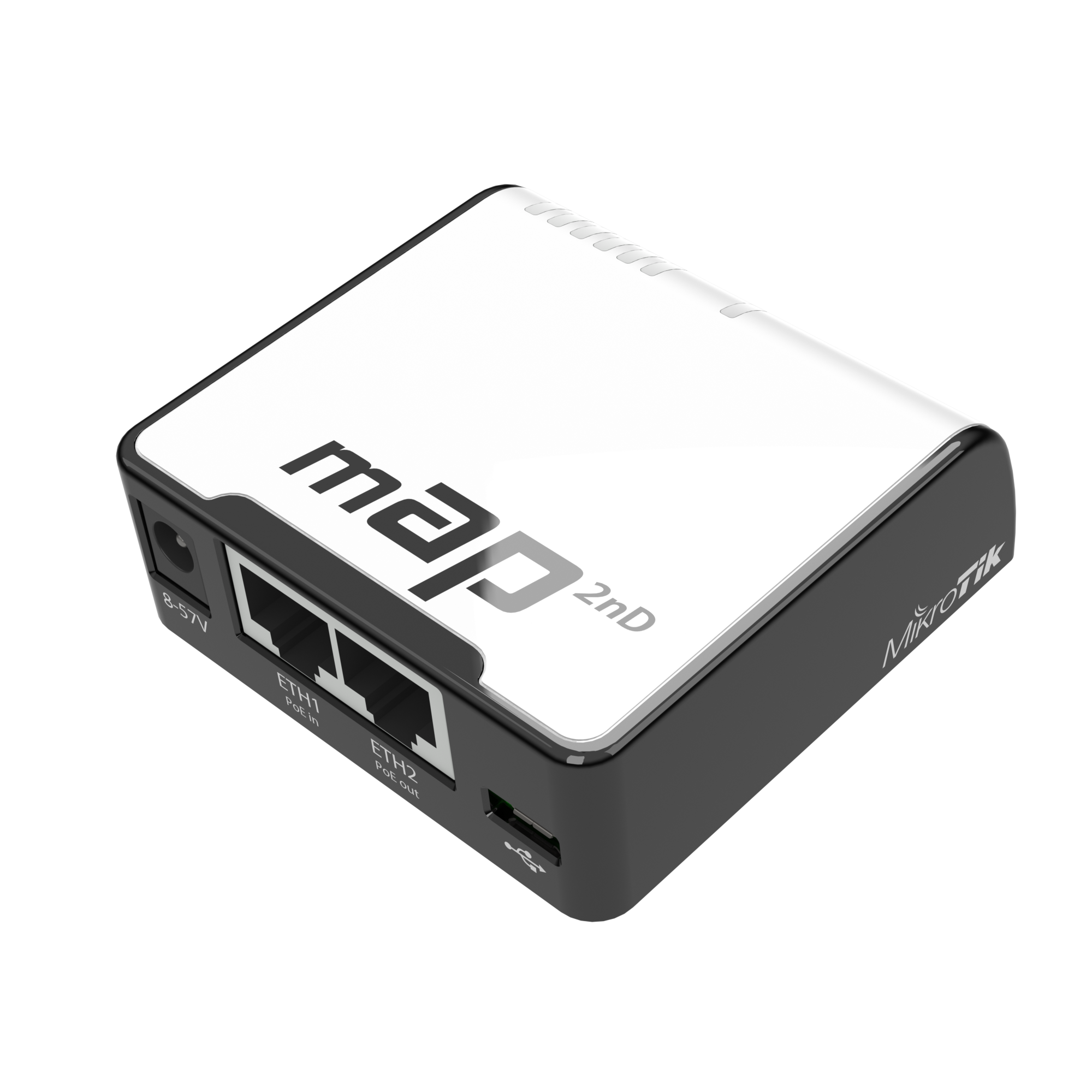 silent flax
coax is most of the time FTTB or FTTC these days, but because they have to also push TV and downloads on the same coax, they sacrifice upload speeds, giving it fewer channels.
 visual tangle
silent flax
man, i have too many switches (and PC's, but that is another topic)... But it is...
visual tangle
silent flax
man, i have too many switches (and PC's, but that is another topic)... But it is...
What is being used to draw this?
 prisma edge
thick minnow
Rate my install?
prisma edge
thick minnow
Rate my install?

prisma edge
silent flax
hehe, just got the small gigabit switch i ordered for the limited space for netw...
Where you can you buy this? Genuinely curious
silent flax
prisma edge
Where you can you buy this? Genuinely curious
TP-Link LiteWave LS1005G, normal computer eshop
silent flax
visual tangle
What is being used to draw this?
draw.io, free web diagram tool
prisma edge
silent flax
TP-Link LiteWave LS1005G, normal computer eshop
Cool, thanks!
visual tangle
silent flax
draw.io, free web diagram tool
Derp.
I use this all the time at work for software flowcharts...
It has a very nice network set built in...
silent flax
prisma edge
Cool, thanks!
I mean 2.5g would be nicer, but i take what i can fit in a very limited space most of which is taken by cable router
prisma edge
silent flax
I mean 2.5g would be nicer, but i take what i can fit in a very limited space mo...
That's fair
silent flax
Also most of devices at other locations are 1g and 100m anyway
meager ginkgo
tender nymph
You need to switch to Fiber optic internet to get higher.. or wait until DOCSIS 4.0 hopefully boosts cable upload speeds
silent flax
prisma edge
Cool, thanks!
on amazon they got an 8-port version too, but i really needed just 5 ports there (as the 6th goes to the cable modem)
tender nymph
meager ginkgo
You need to switch to Fiber optic internet to get higher.. or wait until DOCSIS ...
My seea doest accept
Area
silent flax
here we go https://www.servethehome.com/vmware-end-of-availability-on-many-vmware-vsphere-editions-broadcom/

VMware announced the end of availability of many VMware vSphere editions effective immediately which will cause churn for small customers
 potent herald
silent flax
I mean 2.5g would be nicer, but i take what i can fit in a very limited space mo...
potent herald
silent flax
I mean 2.5g would be nicer, but i take what i can fit in a very limited space mo...
Also have the LS1005G at home but currently not using. Basically replaced by QNAP QSW-2104-2T, probably one of the cheapest (but ofc way more expensive than TP-Link LS1005G) 10G/2.5G capable Switches that doesn't just have one "strong" uplink.
prisma edge
silent flax
on amazon they got an 8-port version too, but i really needed just 5 ports there...
Mhm, I see
Thanks for letting me know
silent flax
potent herald
Also have the LS1005G at home but currently not using. Basically replaced by QNA...
keep in mind the size difference, that is the reason i bought this one
TP-Link is 23 x 90 × 72 mm
QNAP is 34 x 180 x145 mm
at spot i put this one, every single centimenter was worth a gold 🙂
potent herald
fair enough. Also the QNAP gives more heat so even less optimal in a space constraint place
silent flax
random cobalt
I suppose it's possible that the "1G internet" is at the IP layer and 2.5G Ether...
had to drop the idea for now. Just plugging in the NIC to the PCIe slot via riser causes the whole system to lock up after few minutes. It's either the riser or the system having issues with the i226-v card (like the PSU not being enough or something), but in the end, it doesn't matter. Maybe sometime later
nimble shadow
Any network geeks, for someone who is interested into the networking aspect of technology learning how to do stuff like home labs or just small house hold things to turn a house into a smart home what’s some entry level things I should learn about or where to even start anything about networking
I’m wanting to get some stuff for my family like a nas a game server and just random other things that a smart home would have but I’m coming into this blind any advice or suggestions to get me started
peak cloak
nimble shadow
Any network geeks, for someone who is interested into the networking aspect of t...
to get some understanding of networking this blog helped me alot https://www.dlford.io/computer-networking-binary-hex-explained/

dlford.io
A beginner friendly explanation of networking and IP addressing fundamentals.
the exact defails of binary aren't needed to remember, but keep in mind that's just how it works under the abstrations
silent flax
nimble shadow
Any network geeks, for someone who is interested into the networking aspect of t...
smart home:
- you need to pick a platform/integration for your base smart components, the most open option is Home Assistant + Zigbee & Matter. For Zigbee you need a radio module https://www.home-assistant.io/integrations/zha/#compatible-hardware and then ideally pick from list of supported devices https://www.zigbee2mqtt.io/supported-devices/ (other Zigbee devices will probably work, but these are guaranteed to work). I recommend avoiding Tuya completely. You can check list of integrations and see what you can use https://www.home-assistant.io/integrations/ or various third party community repositories for less tested stuff.
- NAS/game server - main question is you want to build a PC for this or want an off-the-shelf prebuilt part
silent flax
nimble shadow
Any network geeks, for someone who is interested into the networking aspect of t...
a followup to smart home part - most "smart home" solutions are cloud dependent, that means they need internet to function. That is why Zigbee is a recommended solution, because that is fully local
thick minnow
do i even need to plug my router to my modem
nimble shadow
Yes I think so
 covert glen
Yo! I just upgraded from 300MB/s to 1GB/s fiber and i am using EERO 6's, but i'm only getting 223mb/s download, and that was right next to the router and the eero connected to the router. How can I improve my speeds?
silent flax
and what is the limitation of the actual client device? keep in mind that most of the higher wifi speeds happen when client devices can use more and more channels
covert glen
The device I was using the speedtest on is a late 2020 macbook air (a2337)
idk the limit
silent flax
so you need an 802.11ax with 80MHz channels and using MCS index 1 with 2 MIMO streams, that is where it can go full speed
 covert glen
ok so it's a specific set of things that need to be happening for it to go speed max
silent flax
and also 5GHz channels
covert glen
yeah
silent flax
so depending on what is actually available/how much interference you get/how crowsded the wifi range is, you can be limited
covert glen
yeah, makes sense
silent flax
and her is the table for 802.11ax

so first check if you got 802.11ax (Wifi 6), or worse case 802.11ac (Wifi 5) and check the size of your channels in settings. If you got less than 80 or 160MHz channels, that heavily limits your speeds
considering eero itself says "up to 500Mbs" speed, i sduspect it is doing 80Mhz channels at most
Eero 6 => AX1800, 500Mbps
Eero 6+ => AX3000, 1Gbps

eero Help Center
When the new Wi-Fi 6 standard was approved in 2019, the use of the 160 MHz channel bandwidth for wifi was one of the key features added. The data rate of a wireless signal is heavily influenced by ...
With the technology improvements made since 2020, eero now offers support for the 160 MHz channel bandwidth on both the eero 6+, eero PoE 6 and the eero Pro 6E.
eero Help Center
160MHz Channel Support (eero 6+, eero PoE6 eero Pro 6E)
160MHz is the highest bandwidth available on 5GHz routers. With double the throughput compared to 80MHz channels, it can achieve data rates u...
hope it answers some of your questions
covert glen
silent flax
so first check if you got 802.11ax (Wifi 6), or worse case 802.11ac (Wifi 5) and...
we have 802.11ax
silent flax
yeah, see above. But for example bare Eero 6 is limited to 80MHz channel, so 567/600.5Mbps max right at best situation
if you drop to 40Mhz channel, your PHY rate is down to 271/286.8Mbps
and keep in mind, that is PHY rate, actual rate is somewhat less depending on other factors, as WiFi needs more management data than Ethernet
covert glen
in the eero app, where would i find the channels(80,160)
silent flax
🤷♂️
looking at internet, it might not be an option, but it could be limited by respecting other wifi networks in neighborhood
try to look at it with https://play.google.com/store/apps/details?id=net.techet.netanalyzerlite.an if you got Android

Wifi scanner, signal meter, ping, traceroute, whois, DNS query & other net tools
you can see the channel width

those 20MHz are the channel width
so for example my wifi says it is 80MHz, but it goes only to 802.11ac & 433Mbps, even tho it says 802.11a 54MBps, 802.11n 450Mbps (with 3 channels), 802.11ac 1300Mbps (with 3 channels) => phone i suspect has only one channel, so 433Mbps.
When i run speedtest with it, i get 310Mbps download speed with that phy rate.
silent flax
covert glen
in the eero app, where would i find the channels(80,160)
and for Mac:
If you're using a Mac, you can see the dBm level of your Wi-Fi network with a simple shortcut. Simply press and hold the option key while clicking the Wi-Fi icon in the menu bar to see the signal strength in decibels.

so you will see Tx Rate, PHY mode and MCS Index right there
covert glen
tx is 1200, phy is 802.11ax, mcs is 11
what do those mean(besides phy)
i assume tx is transfer?
silent flax
see the table above. So yeah, you have physical layer speed of 1200Mbps, no idea why you only get <250Mbps then via wifi, the wifi connection itself should handle more
covert glen
so it's the eero's problem
 limpid turtle
whats the program called, that lets a ups communicate with your machine (linux) it has a website with a long list of supported ups's.... i cant remember
i figure this is prob the most chances i have to find it
dude
freaking legend
thank you SO much
silent flax
limpid turtle
whats the program called, that lets a ups communicate with your machine (linux) ...
networkupstools is the long name 🙂
there is also apcupsd for some APC UPS which are not supported by NUT (is there any such UPS remaining?)
limpid turtle
yup, my ups isnt supported
cyberpower st625u
but they have their own linux software
silent flax
i had a cyberpower unit configured, but that one was USB
limpid turtle
yeah this one is just type B
i have another apc one thats compatible too, just gotta find a cable that works with it lol
i wish there was a way to do auto turn on (opposite of auto shutdown)
silent flax
are you sure it is not supported ? you could just try to configure it via usbhid-ups driver and auto port and see if it is recognized or not
limpid turtle
alright.. ill look into that, i literally have never touched NUT so itll take me a hot minute lol.
silent flax
well, choice is yours https://wiki.archlinux.org/title/CyberPower_UPS
limpid turtle
would this work for ubuntu server?
silent flax
NUT is probably better suited for networking setups (that is, you can react to the UPS event on multiple computers)
limpid turtle
idk why, but its so cool to watch stuff automatically shut off lol
silent flax
meanwhile my UPS with relatively new batteries (probably needs a restart of UPS as i seen on internet, but i am not in a mood to shut down my server)
 limpid turtle
what am i supposed to be looking at? the battery voltage too low?
silent flax
yep
limpid turtle
if you dont mind me asking about another topic (actually kinda related to networking)
this should be working to attach pbs to pve right? or should i put this in #linux ?

it says both servers are online in tailscale dash
silent flax
never used proxmox backup server, so i leave this to others
limpid turtle
i think i just put the wrong password
yeah https://cdn.discordapp.com/emojis/932361216884621395.webp?size=48&name=facepalm&quality=lossless


 polar osprey
I have an old gaming pc i wanna turn into a nas and plex server. I want it to be as easy to use as possible, both to set up and to use in daily life.
Access from outside the house without port forwarding is a major plus.
Any suggestions?
Also, server is muted, pls tag upon reply.
opal pagoda
polar osprey
I have an old gaming pc i wanna turn into a nas and plex server. I want it to be...
here is what i use and it is extremely efficient with resources (currently its a celeron 4 core + 4gb of ram)
debian 11 base os, casaos on top of it.
install whatever you want inside casaos containers, on debian install tailscale and cloudflared
tailscale will allow you to access it from anywhere with same level of access like you have on lan
cloudflare for the webui and if you want to expose some services to wan like homeassistant
if nas is priority i would do this https://youtu.be/UWlrodHF1EE for more roboust raid options as currently casaos doesent support raid

Head to https://squarespace.com/hardwarehaven to save 10% off your first purchase of a website or domain using code hardwarehaven
Things I Used In This Video (Affiliate Links):
► ZimaBoard - https://amzn.to/3BnhPRO
► 2.5" 2TB WD Drives - https://amzn.to/41nDlkE
Music (in order):
"CRENSHAW VI...
thick minnow
limpid turtle
alright.. ill look into that, i literally have never touched NUT so itll take me...
Did I walk into the wrong convo-?
@silent flax I got muted permanently on Dawids server
Daddy Dawid's henchmen didn't like me saying N1gga:(
silent flax
prisma edge
Mhm, I see
i suspect this is the smallest 5x2.5gbps option, but i ain't paying 140 euros for 2.5gbps switch https://eu.dlink.com/en/products/dms-105-5-port-2_5g-multi-gigabit-desktop-switch

D-Link
x5 2.5Gbps Ethernet ports 25 Gbps switching capacity IGMP Snooping QoS & Flow Control Durable metal housing Energy efficient, fanless Plug & play installation Ideal for Wi-Fi 6
100.5 x 82 x 28 mm
 radiant vale
Not sure if this is the right chat to ask. If I had a proxmox cluster of lenovo mini pcs, what is the best option for me to add a gpu element to that server, without having to have another dedicated server?
 gilded kite
does someone here have experience with setting up DNS forwarding in OPNsense? I'm trying to set it up, so I can access my home server over a domain name instead of the IP via UnboundDNS but I can't find a helpful guide on how to set it up
 meager agate
Rate my network setup 😁
 opal pagoda
meager agate
Rate my network setup 😁
opal pagoda
meager agate
Rate my network setup 😁
put a piece of furniture in front of that and conceal that
meager agate
It is in a cleaning closet
prisma edge
silent flax
i suspect this is the smallest 5x2.5gbps option, but i ain't paying 140 euros fo...
lol, fair.
silent flax
radiant vale
Not sure if this is the right chat to ask. If I had a proxmox cluster of lenovo ...
what do you mean by "gpu element" ? proxmox cluster is just collection of whatever capabilities your systems have. So you add a system with dedicated GPU or add GPU to one of your systems. But then that VM can't migrate elsewhere, as it will have that PCIe device passed through
prisma edge
meager agate
Rate my network setup 😁
What cable type did ya run?
meager agate
prisma edge
What cable type did ya run?
CAT 7
prisma edge
meager agate
CAT 7
Nice.
silent flax
prisma edge
lol, fair.
i mean, i didn't had ANY 2.5gbe capable devices in my home. Now i have one 10gbe capable and one 2.5gbe capable device thanks to PCIe cards, plus got one spare 2.5gbe PCIe NIC. So pushing for 2.5Gbe at rest of my network would mean buying switches and PCIe cards for every PC, which makes no sense, considering outside of one more PC most are just old systems i am too lazy to move or are unsellable
so those are fine with 1gbe
prisma edge
meager agate
Rate my network setup 😁
It's not bad at all, though the switch is a bit small. You always wanna keep some extra ports in handy. Otherwise, pretty cool.
meager agate
prisma edge
Nice.
It is kinda pointless because ~50Mbit/s is the fastest Internet I can get here but who knows if they ever lay fibre here.
At most I put a NAS in there. I have 2 ethernet ports in every room all running to that switch
prisma edge
silent flax
i mean, i didn't had ANY 2.5gbe capable devices in my home. Now i have one 10gbe...
Yeahh no point in spending 140 like that
silent flax
meager agate
It is kinda pointless because ~50Mbit/s is the fastest Internet I can get here b...
you can still have 10gbe to copy from one PC to another inside your network at 1GB/s speed 🙂
radiant vale
silent flax
what do you mean by "gpu element" ? proxmox cluster is just collection of whatev...
Trying to see if it is worth getting a small server with a gpu or if I can make do with what I have and somehow have something like an external gpu
prisma edge
meager agate
It is kinda pointless because ~50Mbit/s is the fastest Internet I can get here b...
nah, it's good future-proofing. I helped run cat6a in my house about a month ago and we're still relying on coaxial.
It's pretty neat.
silent flax
radiant vale
Trying to see if it is worth getting a small server with a gpu or if I can make ...
what is the reason you need a "GPU system". As that GPU will be dedicated to a single VM anyway
radiant vale
Was going to set up folding@home on it
But if it is too much work to do that then I shall have to reconsider
prisma edge
prisma edge
nah, it's good future-proofing. I helped run cat6a in my house about a month ago...
This is my setup
(I made the mistake of choosing shielded in a residential building)

 opal pagoda
prisma edge
This is my setup
(I made the mistake of choosing shielded in a residential buil...
opal pagoda
prisma edge
This is my setup
(I made the mistake of choosing shielded in a residential buil...
why do you consider running shielded cables in residential building a mistake?
 marsh dagger
How does one fix this?
 polar osprey
opal pagoda
here is what i use and it is extremely efficient with resources (currently its a...
polar osprey
opal pagoda
here is what i use and it is extremely efficient with resources (currently its a...
Ill look into it!
wispy hawk
Is this : https://www.amazon.com.au/Adapter-300Mbps-Computer-Networking-Expansion/dp/B0CCXZRPPC/ref=sr_1_16?crid=WZHDLBCNFK1U&keywords=wifi+6e+pcie+card&qid=1705797183&sprefix=wifi+6e+pcie+car%2Caps%2C249&sr=8-16 And this : https://www.amazon.com.au/gp/product/B0BWWM7LVP/ref=ewc_pr_img_1?smid=A1MAKXNTAOSK07&th=1 the same thing?

- 5374MBPS: The WiFi card supports a maximum transmission speed of 5374Mbps, providing excellent wireless connection performance for high speed downloads and large bandwidth demanding application scenarios. 2. 3 BAND: The card adapter supports 2.4GHz, 5GHz and 6GHz bands, which can support more ...

Model: AXE5400 Item: Wireless Adapter Chipest: Intel AX210 chipset; New Wi-Fi with Bluetooth 5.3; Standard IEEE: 802.11ax/ac/a/b/g/n; Tri-band: 2.4Ghz-574Mbps/5Ghz-2400Mbps/6Ghz-2400Mbps; Note: The speed can reach 2400Mbps (the router must support 802.11ax, 160Mhz); Operating system: only support...
silent flax
man, i am halfway between raging and going insane with Tuya
i figured out how to manually add the devices via localtuya and help of some API calls on tuya IOT website without a trial account... but some devices are pure WTF, and i have no idea how do they work. I mean i have a temperature/humidity sensor. Which somehow updates the values, while it has no record in DHCP or AP client list. No idea how.
Unless the devices talk between themselves outside wifi and they screw me over LOL
silent flax
ok, outside of temperature sensors it seems rest was just in weird state where they weren't on wifi, but delivered data somehow, localtuya works surprisingly well
prisma edge
opal pagoda
why do you consider running shielded cables in residential building a mistake?
-More expensive
-Useless in this case. Signal integrity is not of utmost priority here and it can take a bit of interference just fine.
-Thicker and harder to work with.
-I was a complete newbie starting this.
-It took several hours for me to find legitimate tutorials for specifically CAT6A S/FTP cables. Way too long.
-Could've saved many headaches
I genuinely considered shielded and unshielded and decided shielded was worth it "despite the difficulties"... yeah no 
low pond
wispy hawk
Is this : https://www.amazon.com.au/Adapter-300Mbps-Computer-Networking-Expansio...
Yes, they use the same card. Just different vendors supplying it
 jaunty fable
marsh dagger
How does one fix this?
jaunty fable
marsh dagger
How does one fix this?
I've ran into this problem. a restart of the wireless router does the trick for me
wispy hawk
Tysm
 unique forge
hai, im currently trying to run a nextcloud server with duckdns for a project. the nextcloud is running fine but the duckdns keeps poping error, the error was "unable to reach duckdns.org". i've done some searching but no result. im currently using windows 10 for the server with docker and nextcloud aio
random cobalt
unique forge
hai, im currently trying to run a nextcloud server with duckdns for a project. t...
not sure what duckdns and nextcloud have to do with each other in this case? are you just having a duck dns error and this has nothing to do with nextcloud?
unique forge
yes i think
random cobalt
also, fyi, afraid.org has way cooler domains than duckdns