#networking
1 messages · Page 18 of 1
 half turtle
 thick minnow
static IP
 peak cloak
You don't need a static IP
thick minnow
and its only for phone tho
peak cloak
Plus the ipv6 tunnel from HE requires your ipv4 IP pretty sure
thick minnow
my isp does not even provide static ip for my connection
thick minnow
peak cloak
Plus the ipv6 tunnel from HE requires your ipv4 IP pretty sure
i have dynamic ip but it changed like half a year ago idk we dont restart router often
thick minnow
peak cloak
What type of website is it
html if you ask for this
example
or idk game server anything
thick minnow
go with php
peak cloak
Pterodactyl?
thick minnow
iam just curious if i can use ipv6 on DSL
peak cloak
You can but ISP will need to set it up
They need to setup routing, peering, etc.
It's not a trivial task to deploy ipv6
thick minnow
they will most probably charge for it i guess but anyways some technic will come and redo our bridge i will ask him around this stuff
peak cloak
Dsl is just a transport method
thick minnow
peak cloak
It's not a trivial task to deploy ipv6
wdym its kind of needed to switch to ipv6 its just harder to remember if able
if we have almost no ipv4 left
and cause of that we do charge people money
what is different between ipv4 equipment and ipv6 equipment at ISPs ?
peak cloak
The equipment needs to support it, it's dual stack
thick minnow
something like encoding and decoding ?
peak cloak
thick minnow
if we have almost no ipv4 left
There still is ips left, just not at a IANA level
And they are traded and sold
thick minnow
too complicated words 😄
thick minnow
peak cloak
There still is ips left, just not at a IANA level
yes there are but how many
if milions..
peak cloak
thick minnow
too complicated words 😄
IANA is the global organization that assigns ips to organizations to use
peak cloak
thick minnow
yes there are but how many
Hard to say, Africa has tons free
thick minnow
just read europe has zero
peak cloak
You can buy ipv4 blocks from others
thick minnow
well i live in central EU :/
thick minnow
i have that
yes i exactly know that weird "NAT" networking
its using subnets right ?
thick minnow
NAT
peak cloak
NAT translates a public IP(s) to an internal one(s)
thick minnow
cgNAT is just that it is ISP thing if i remember correctly
thick minnow
peak cloak
NAT translates a public IP(s) to an internal one(s)
router does that
thick minnow
and the reason is because of ipv4
peak cloak

Hopefully with v6 we can get rid of nat all together, but that's not happening for a while
thick minnow
if we used ipv6 from beginning nothing would exist like NAT
thick minnow

this part is the "dynamic" changing part right ?
where isp sets your ip
your "public" ip
peak cloak
Well you have a cgnat IP, can't port forward at all
thick minnow
so in final your public ip is yours ip of isp edge router
peak cloak
Yes, kinda
thick minnow
peak cloak
Well you have a cgnat IP, can't port forward at all
i know that for like 3 years now on 😄
peak cloak
Just clarifying, because you can have a dynamic public IP as well
thick minnow
so that dynamic ip adress chnges only on bridge disconnect from my router right ? as the router tries to connect again ISP provides me a new one
peak cloak
Wdym by bridge
thick minnow
idk its in router w8 sec
peak cloak
And usually yes, it's on disconnect but it's not always
thick minnow
 peak cloak
Most ISPS use DHCP
peak cloak
Yours uses PPPoE
thick minnow
 peak cloak
A bridge in network terms is basically the functionaly of a switch
A switch is a bridge basically
thick minnow
hmm so they use some PPPoE servers right ?
peak cloak
Yes
thick minnow
wow so complicated for no reason
thick minnow
and PPPoE is the stuff that some random techic has to come and set it all for us
thick minnow
i have them
i mean when i set it up
for myself i just put some random ones and internet works fine from then 😄 working like this 2 years i guess 😄
peak cloak
For my ISP for first time setup you just go to their activation website, then login, which actives your line
Actual IP assignment to my router is just DHCP
 thick minnow
yes ik how dhcp works
peak cloak
But your router can also be a DHCP client, to get wan IP
thick minnow
peak cloak
But your router can also be a DHCP client, to get wan IP
what cant be dhcp client ?
peak cloak
Your ISP uses PPPoE
It all depends on their network architecture
The design of networks is a whole profession
thick minnow
dhcp works on something like they exchange MAC adresses with router and provide IP address to client so other clients and routing all requests are easier for the router right ?
 hollow marlin
peak cloak
It's not a trivial task to deploy ipv6
hollow marlin
peak cloak
It's not a trivial task to deploy ipv6
That's putting it lightly
thick minnow
i mean if they have milions of customers and they are supposed to enable ipv6 in one moment to everybody i guess it will put some load
peak cloak
thick minnow
dhcp works on something like they exchange MAC adresses with router and provide ...
Kinda? It just assigns IP and gives client some other info like gateway
It doesn't make routing easier
peak cloak
thick minnow
i mean if they have milions of customers and they are supposed to enable ipv6 in...
That's not really the problem
It's not a simple switch they can flip
Mynameisjuan knows a lot more but peering needs to be arranged, all core infrastructure has to be assigned v6s, firewalls, etc. It's a lot
thick minnow
and what is the biggest slow down on deploying v6
 rocky badge
I kinda want to setup SPAN
 sleek oar
yo can someone help me port forward my minecraft server? I've followed countless guides, and I think I have everything done correctly, but I'm still unable to connect to my external IP. Anyone knowledgeable on this?
I've even tried the process on two different versions of the minecraft servers. (vanilla and spigot), both work fine in terms of running the server locally, but no external ip connections are successful.


 hollow marlin
thick minnow
and what is the biggest slow down on deploying v6
hollow marlin
thick minnow
and what is the biggest slow down on deploying v6
Biggest reason for the delay is labor cost. Employee time spent just designing and deploying v6 is time not spent on other projects that have a direct impact on revenue. That's just how it is.
But as Present said, deploying v6 is not just a checkbox. Initial design take a significant portion of the time because it needs to be implemented correctly. Sure you may read "there's nearly unlimited IPv6 addresses", but that's the farthest from the truth.
When a design is proposed, then is farting around with various implementation of different vendors. v6 is over engineered which is good and bad. But because the standards include so many extensions each with their own interpretation, IPv6 is broken in many ways but still generally "works". Interop is the largest hurdle.
Then it's working on tying it all into internal systems (ex. billing, accounting, etc). When that mess is done, implementing the addressing and routing is simple.
There is a way more to it than that, but as someone who has implemented it in a provider network, I can say for certain that it's not as simple as people make it seem
peak cloak
sleek oar
I've even tried the process on two different versions of the minecraft servers. ...
You are trying to connect to your server from LAN using your WAN IP?
sleek oar
no, I'm trying to connect to my server from my external IP, so my friends can join it.
I've done it years ago
peak cloak
sleek oar
no, I'm trying to connect to my server from my external IP, so my friends can jo...
Yes but from what you are saying it seems like you are using your external IP, but you are connected to your network
sleek oar
but I can't seem to figure it out now, I have a feeling it might be a setting in my router I'm missing
sleek oar
any idea where I may find that in my router?
peak cloak
Some routers don't support it
You can just use lan server IP to connect
And give wan IP to others
sleek oar
that works?
peak cloak
It may be a feature in your router, but again, it depends
peak cloak
sleek oar
that works?
Yes
sleek oar
ok so what steps do I take
peak cloak
None? Just use the LAN IP of server to connect
sleek oar
right, but none of my friends can connect to it yet?
peak cloak
If you port forwarded they should be able to
peak cloak
Oh they can't connect?
sleek oar
nope
peak cloak
Oh, my bad I read it wrong thought the port checker said it was open
@sleek oar in your router look for something called wan IP or internet IP
What are the first 2 octets
 full monolith
 rocky badge
@waxen scroll @peak cloak https://i.ryois.me/hp8bQOEW8u.png

I want to shutdown this VM and redeploy it but that uptime
rocky badge
 waxen scroll
There's a warning for a reason
waxen scroll
There's a warning for a reason
This VM isn't even doing anything lol
It's just sitting there
 pseudo blade
All the more reason to patch and halt/reboot
rocky badge
I'm gonna end up deleting it anyways
Welcome to Ubuntu 16.04.7 LTS (GNU/Linux 4.15.0-1057-azure x86_64)
pseudo blade
Bleh
Encountered a Nagios install on CentOS from 2014 yesterday that hasn't been patched since the day it was built
I asked, and the IT person said it was how they learned Linux and that it's unhackable
Can't have learned too much if you can't update packages
rocky badge

 earnest orchid
can i add drives to a existing raid 5 array?
pseudo blade
earnest orchid
can i add drives to a existing raid 5 array?
Usually, but it depends on what raid controller you are using.
 warped shoal
Anyone mind giving me an opinion, some ppl seems to be confused by my setup, but i dont see anything wrong here and it also works correctly are there anything thats really wrong here ? (I havent put back the cable manager cover so ignore that
 thick minnow
warped shoal
Anyone mind giving me an opinion, some ppl seems to be confused by my setup, but...
thick minnow
warped shoal
Anyone mind giving me an opinion, some ppl seems to be confused by my setup, but...
a bit dusty
Sorry for that ping, android discord is weird
warped shoal
thick minnow
a bit dusty
Yeah im aware of that dust thanks, but aside feom that everything seems to be correct ?
thick minnow
I think so
warped shoal
Thanks, so its just them
 faint bronze
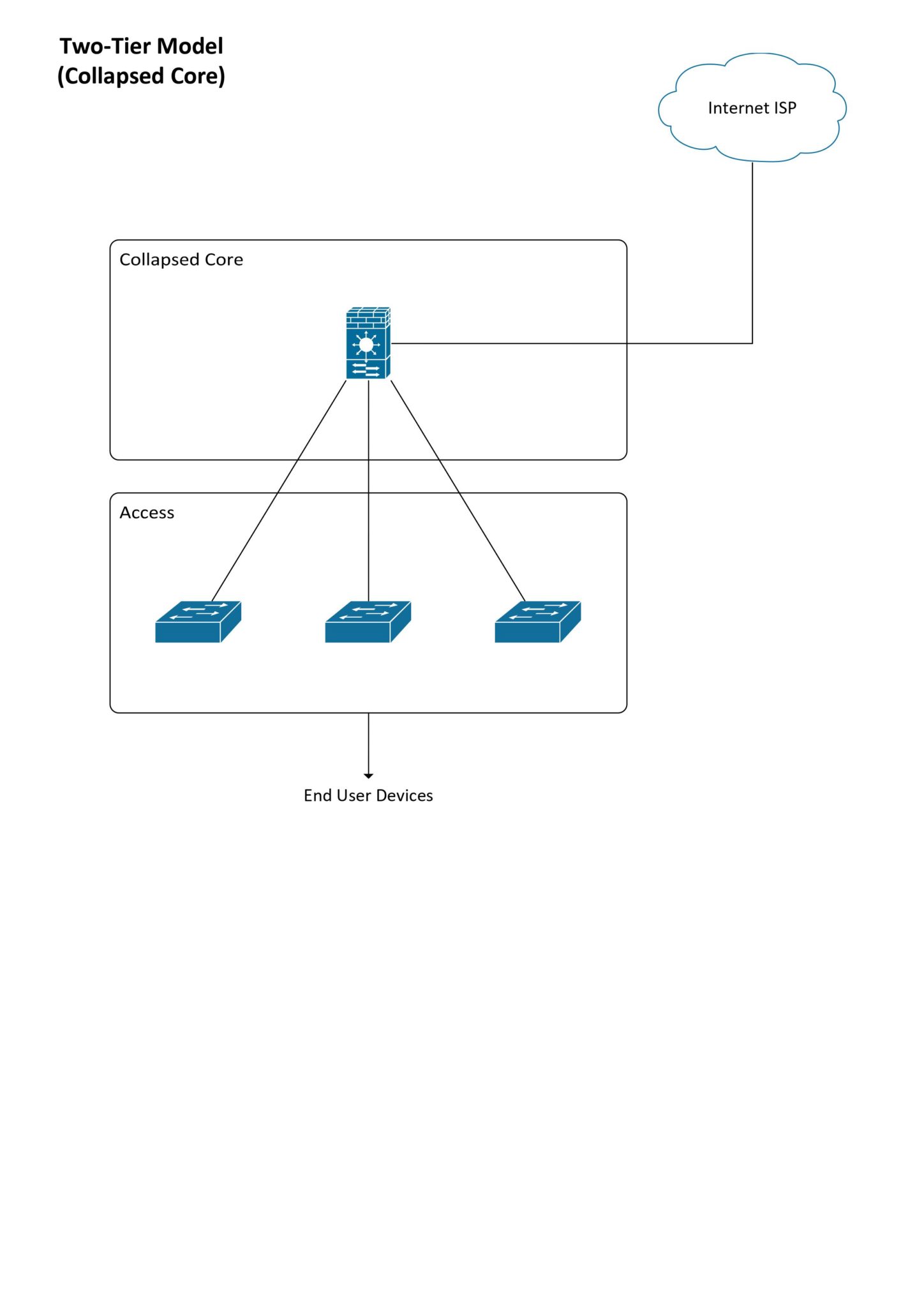
https://www.eiresystems.com/wp-content/uploads/0002-scaled.jpg
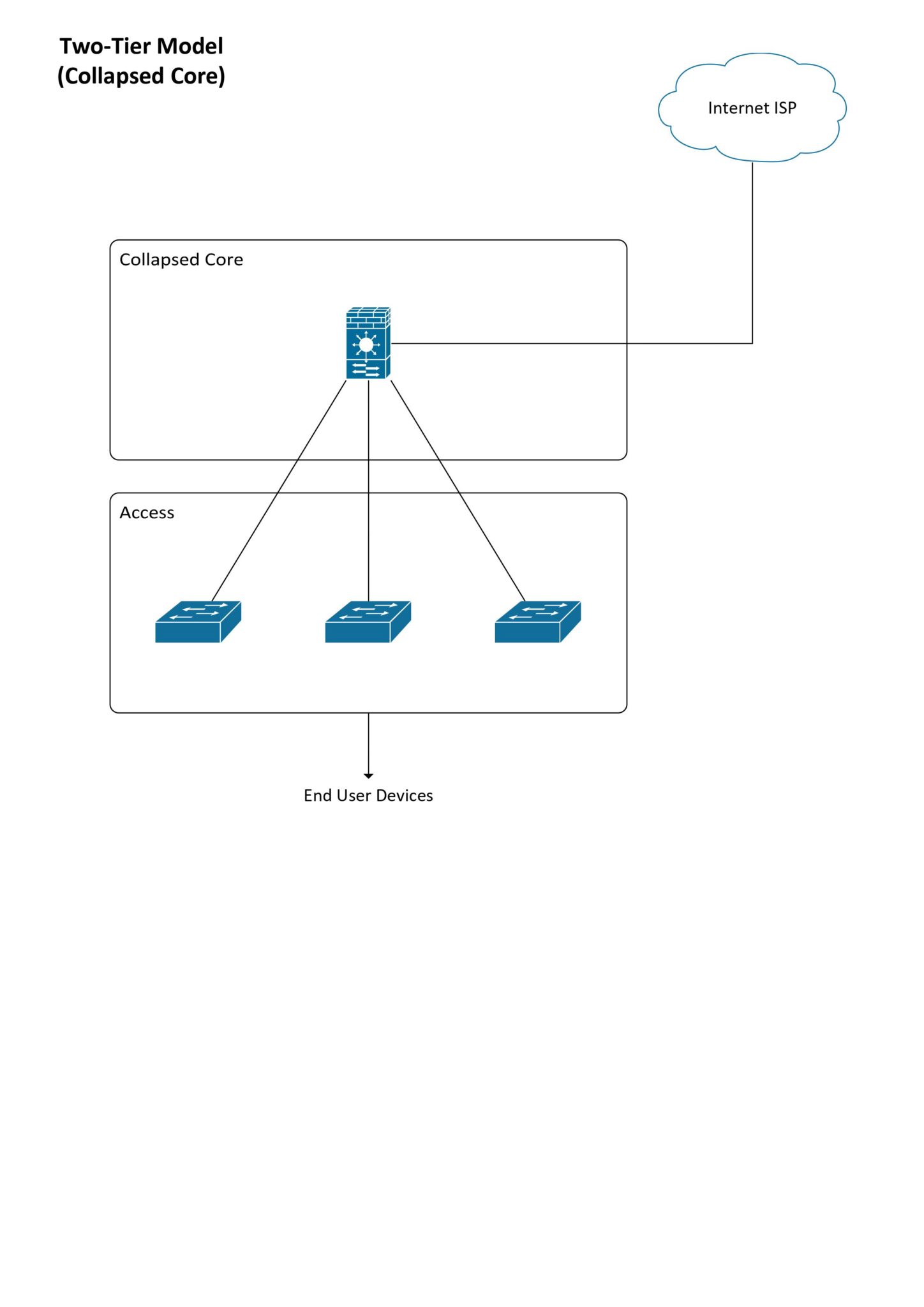
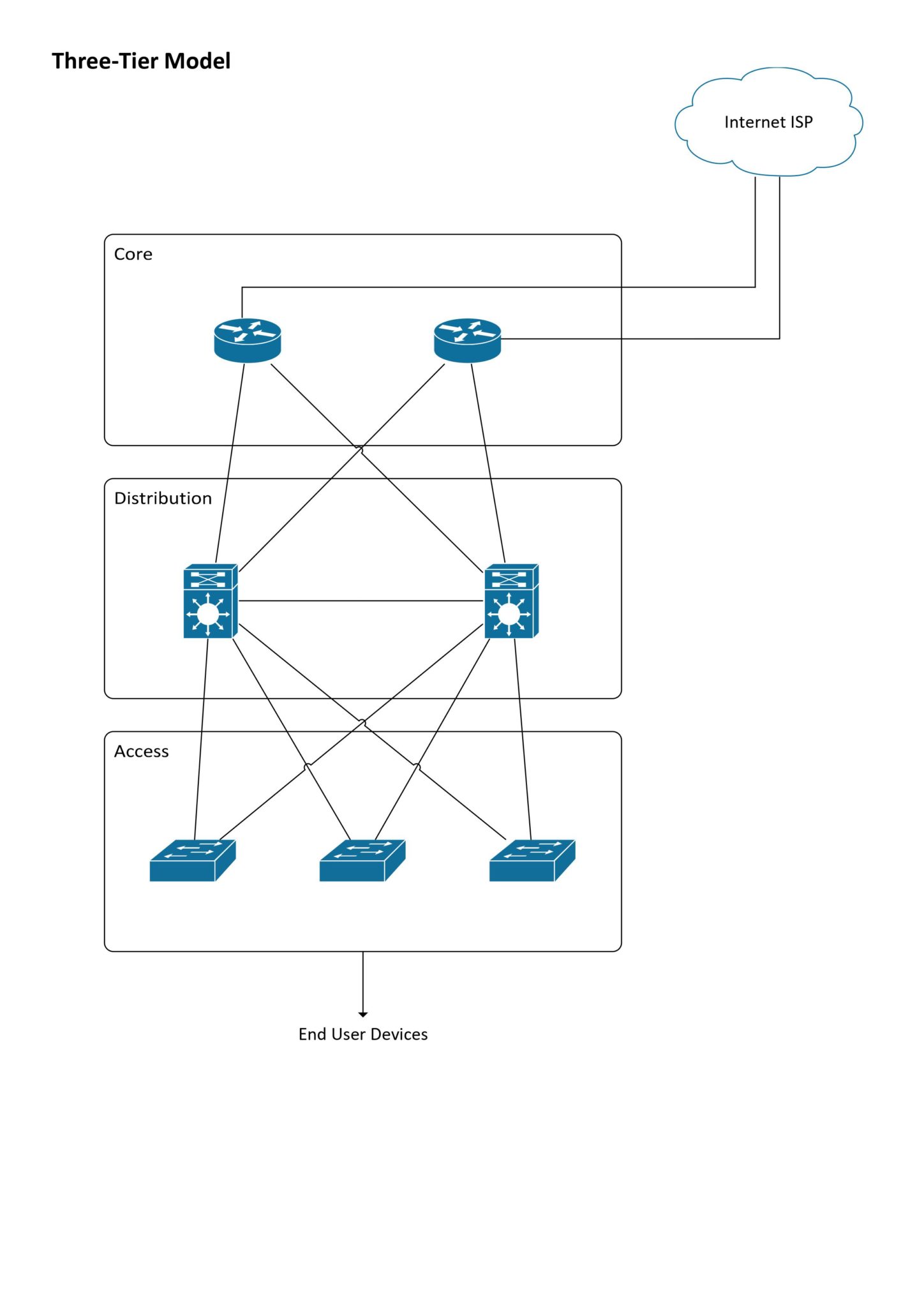
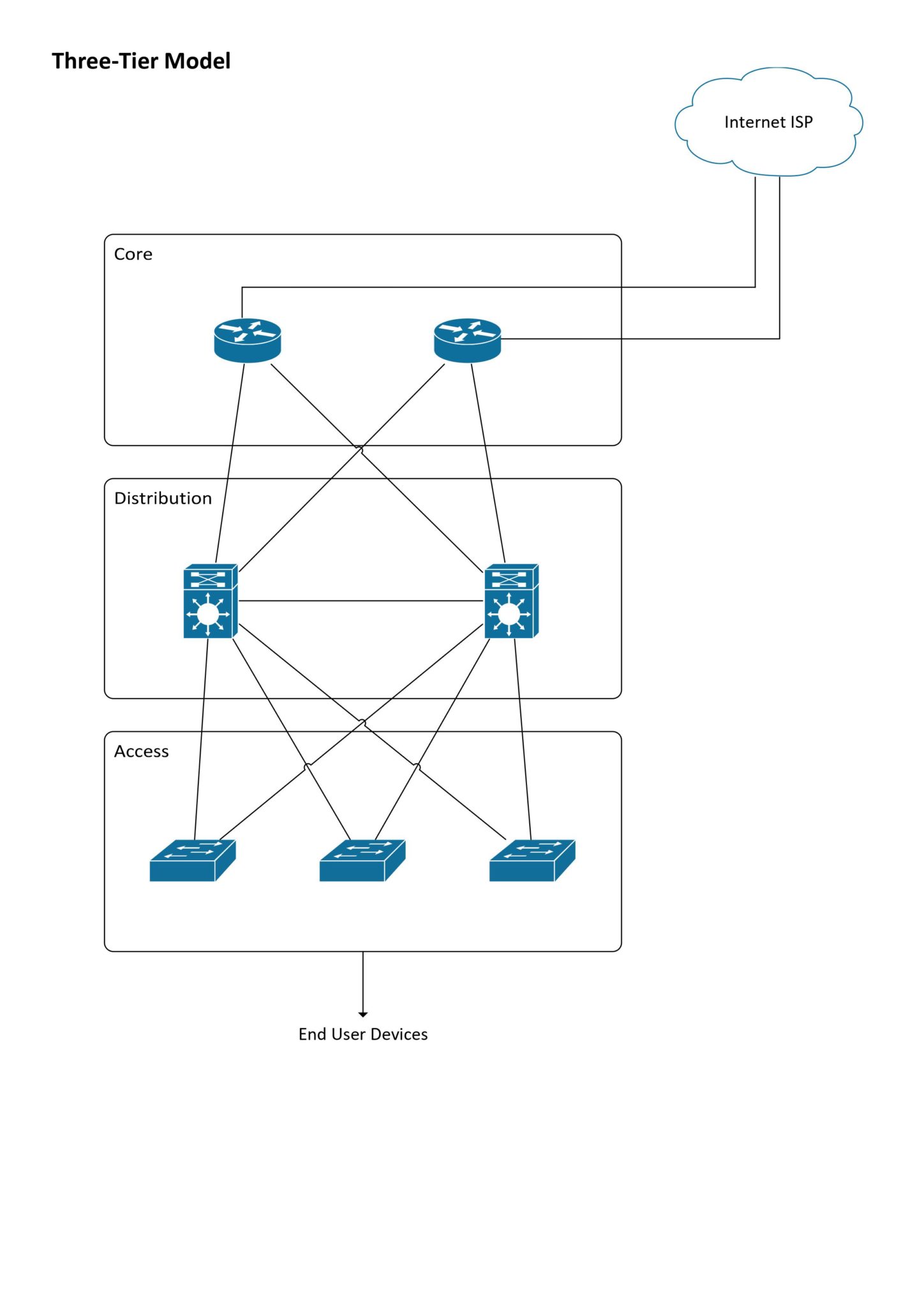
That is a collapsed core design and that is what you are probably using. No redundancy, but that isn't a worry because this isn't designed for a network fault. Not too many people want to go for a proper core design at home and for good reason. A proper core design is more for corporate networks and the like where you need that high uptime and can spend the money to have a core layout. In that design you have two internet connections routed two different ways with two different ISPs so that if someone accidentally breaks a cable that provides you internet you still have internet.
https://www.eiresystems.com/what-is-a-collapsed-core-network/#
Core pic
https://www.eiresystems.com/wp-content/uploads/0001-scaled.jpg
 thick minnow
full monolith
thick minnow
full monolith
Lol, is this at your house?
My school has similar APs, made by Aruba. But they've got so many of them, I doubt it switches networks properly.
Like here is one right outside the classroom, and in the classroom
Then one in the hallway too
 waxen saddle
What structure is between the classroom and hallway?
 opal pagoda
thick minnow
My school has similar APs, made by Aruba. But they've got so many of them, I dou...
opal pagoda
thick minnow
My school has similar APs, made by Aruba. But they've got so many of them, I dou...
we have cisco meraki-s in every single classroom (pretty sure they are mr52 but don't know for sure)
thick minnow
waxen saddle
What structure is between the classroom and hallway?
Brick wall, but there is still good signal inside
With the AP right outside the door
full monolith
thick minnow
Lol, is this at your house?
nah lmao i would never be able to put screws like that in my ceiling
thick minnow
Lmao
full monolith
i wasnt even able to get a 6mm hole in there with a big ass machine
so much steal and shit in there
for now this is ok

untill i saved up for some beefy hardware
full monolith
this router was released in like 2013 or 2014 and still gets beta updates and new firmware releases

yea 2013
 gusty dove
I just discovered something with some of those CenturyLink Modem/Router combos. If you have one with the gray LAN/WAN RJ45 port and you switch to a cable ISP you can still use it as a router (assuming you also buy your own modem) using that port.
Just tested it with my C2000T and I accidentally discovered that with my C3000Z too.
thick minnow
how a wireless access point doesnt have default gateway ? how can i configure it am i supposed to connect it with that "console" named connector which looks like s-video conector ?
 peak cloak
thick minnow
how a wireless access point doesnt have default gateway ? how can i configure it...
peak cloak
thick minnow
how a wireless access point doesnt have default gateway ? how can i configure it...
wdym? a wireless access point just allows you to connect to wifi
it does not assign an IP address
or send a default gateway
that's the job of the dhcp server (usually on router)
gusty dove
If you turn off the DHCP server on any normal router (and any modem/router combo) and don't plug that "Router/AP" into another router with a DHCP server you will get the same result.
All an access point does is allow a device to connect to a connection that's already being routed through an ISP. The DHCP server is needed in order to have a base IP set for all the devices on the network to communicate along.
My explanation was probably bad but that's pretty much what I understand.
peak cloak
gusty dove
If you turn off the DHCP server on any normal router (and any modem/router combo...
yeah kinda, just you need plug into LAN port instead WAN, since WAN -> LAN is natted
thick minnow
full monolith
this router was released in like 2013 or 2014 and still gets beta updates and ne...
LMAO
But their stuff is all so basic
Overpriced too
full monolith
but atleast it works
you can littearly put one on a dsl or cable line now and it wil lstill work like now in 8 years
some people still have fritzboxes from 2009-2012 in use and they still go hard
 carmine moss
fritzboxes sell quite well and last so they have a use consumers don't need more
full monolith
yea. sure people that use enterprise stuff or build all from scratch will miss things but you have so many features on that and normal people just dont need more.
and here in germany its littearly normal that every second or third person has a fritzbox
i even have my cable tv channels on there accessable over local network
thats something cool tho so tvs that support that dont even need a reciever or sat cable. just wifi and thats it
like 3 years ago i used a fritzbox 4020 that only has 2.4ghz for wifi in my school. there was times where over 150 people where using this wifi at the same time and it was working so fine
rocky badge
@clear igloo @peak cloak https://www.reddit.com/r/3CX/comments/zriszg/no_more_free_3cx_on_premise_self_hosted_4sc_free
reddit
9 votes and 11 comments so far on Reddit
Really...
thick minnow
carmine moss
fritzboxes sell quite well and last so they have a use consumers don't need more
Also Fritz: wifi 6 for 30mbps DSL routers
Europe is stuck in 2000
peak cloak
rocky badge
<@291198741862416384> <@222482269829332992> https://www.reddit.com/r/3CX/comment...
rip
also
literally getting paid right now to do research on NFTs...
rocky badge
loll
peak cloak
had a meeting with a client, wants to make some website to mint NFTs...
thick minnow
peak cloak
wdym? a wireless access point just allows you to connect to wifi
well i have some random zyxel access point modem ? and i cant connect to it it makes the eth wire just Zyxel wifi with no password and no way how to config it
iam used to default gateway or some IP
thick minnow
full monolith
like 3 years ago i used a fritzbox 4020 that only has 2.4ghz for wifi in my scho...
Lte?
peak cloak
thick minnow
well i have some random zyxel access point modem ? and i cant connect to it it m...
the default gateway for IP only works for routers since their IP is also the IP that traffic gets forwarded to, not the case with APs
look at the docs, there will be a default IP mentioned
thick minnow
i cant find any docs to this model
peak cloak
or hook it up to a router, it should try to get a IP from DHCP
then look in router's DHCP clients list to find it's IP
thick minnow
peak cloak
or hook it up to a router, it should try to get a IP from DHCP
can i hook it up to my second eth connector of my MB(pc) ?
peak cloak
thick minnow
can i hook it up to my second eth connector of my MB(pc) ?
yes and no
have you tried 192.168.1.2
peak cloak
you also have to set the computer's IP and subnet to be within the APs subnet
thick minnow
okay w8 sec ill connect the zyxel to switch
btw does matter which connector on the switch i use there are 3 priority section (HIGH) (MEDIUM) and (NONE)

does this matter ?
peak cloak
wdym, that's just a status page, no?
thick minnow
its
that i adress reserved for .1.2 my AP
so will it interfere with the zyxel
default gateway ?
okay after reboot
w8 ? how there can be nothing in DHCP client when more then 3 devices are connected 😄 router is sloow 😄

well it took around 6 minutes to load 😄

well gg 192.168.1.2
rocky badge
@peak cloak if I had money...I would move my entire homelab to the cloud
rocky badge

I can move everything except net-services
Unless I wanna move DNS to the cloud too
peak cloak
But rn all my homelab is, is jellyfin, occasional mc server, and nvr
rocky badge
Cloud would remove the need for vCenter
A lot of my services are directly on docker now
So its a matter of moving data and copying docker-compose to the cloud
peak cloak
I'm probably going to replace my er-x with the TP-Link omada router
It's DHCP server has been crashing
thick minnow
alr i managed to configure that zyxel AP so its working with my wifi network, thanks Present
rocky badge
@peak cloak @clear igloo https://i.ryois.me/CEkF2cxS1s.png

Why isn't this enabled by default
 clear igloo
Ummmm, because yes?
rocky badge
 peak cloak
not a fan of push messages
at the same time putting in a code is phisable
if only there was more support for webauth


 full monolith
thick minnow
Lte?
full monolith
thick minnow
Lte?
No we used lan from the school
peak cloak
I mean duo has the whole call option
I'm suprised how many people still use the calling
rocky badge

 static moat
I thought 2 devices can't have the same mac adress? The 'unknown' are device connected to Coredy-WN300 which is a repeater connected to the main router that this interface is from
 peak cloak
answer -> press 1
rocky badge
IT doesn't allow security key logins though
peak cloak
rocky badge
IT doesn't allow security key logins though
my local community college did, but whenever I used it I couldn't sign in into the college self service
rocky badge
rip
static moat
 rocky badge
@peak cloak https://i.ryois.me/Ql6afjLH3j.png

I can reset my O365 MFA from our selfserv
which is interesting
I have to 2FA via phone to get into it anyways
I guess they setup app passwords to manage your account???
peak cloak
our college uses oracle sso
rocky badge
 peak cloak
self hosted I think
rocky badge
peak cloak
our college uses oracle sso
My uni uses Azure AD wherever possible
peak cloak
oracle access manager
they use oracle people soft which is basically the core of the uni's systems
rocky badge
rip
 clear igloo
RIP, okta was hacked again the other day from what I heard
clear igloo
yup
rocky badge
@peak cloak https://www.etsu.edu/its/news/default.php

ETSU - Information Technology Services - Communications
See past ITS project information and announcements.
oh
the ERP is Oracle

and $800k/year
@clear igloo @peak cloak BRUH https://i.ryois.me/JaRz9d6tcL.png

A neighboring university lost ALL ON PREM
clear igloo
RIP!!
rocky badge
The university had 16 Windows 7 ESU licenses in 2021
waxen scroll
Wot
waxen scroll
@rocky badge when are you going to visit Ramsey solutions
rocky badge
lol
rocky badge
@meager ginkgo https://www.ebay.com/itm/285030197099

eBay
Find many great new & used options and get the best deals for Cisco Catalyst WS-C3850-48P-L 48 Port Gigabit PoE LANBASE 715WAC Network Switch at the best online prices at eBay! Free shipping for many products!
How stupid is this
 meager ginkgo
What's wrong with it? 😂
meager ginkgo
You're replacing Ubiquiti?
rocky badge
I really want to
rocky badge
The unifi controller is pissing me off for switching
meager ginkgo
Have you looked into Omada
rocky badge
I don't want to
meager ginkgo
Fair.
rocky badge
Decent Cisco WiFi 6 APs are $360
meager ginkgo
don't you have to pay for a cisco license though
meager ginkgo
👀
meager ginkgo
That doesn't manage switches or anything I assume though right
rocky badge
Nope
meager ginkgo
Hmm
meager ginkgo
What's the performance like on the Cisco APs
rocky badge
Although FortiSwitches and FortiAPs are an option if wanted

More than my current WiFi 5 stuff
meager ginkgo
that's pretty good. wow
Yeah i've considered switching my UniFi APs out honestly
Was looking at Omada but their interface is kind of clunky
rocky badge
Yeah
rocky badge
Catalyst 9105AXI
● 1x 10/100/1000 Base-T (Ethernet) Uplink Interface
● Management console port (RJ-45)
posted the wrong one lol
if I wanted wall mounted it's 2.5GbE with the 3 1GbE ports
meager ginkgo
rocky badge
Catalyst 9105AXI
● 1x 10/100/1000 Base-T (Ethernet) Uplink Interface
● Manage...
Seems like a good deal
no 2.5 gig port though
rocky badge
The next step up is $690 with 2.5GbE with 4x4
meager ginkgo
these things are massive
 rocky badge
Yeah
meager ginkgo
I can't imagine those on my ceiling 💀
one of them probably wouldn't even fit and end up hitting the wall in my upstairs hallway
💀
 rocky badge
LMAO
meager ginkgo
looks like a thick laptop holder
rocky badge
I am looking for a quote with 1x C9105AXI-B, 1x C9115AXI-B, 1x C9124AXI-B for not for resale internal lab usage.

I wonder what WLC my university has
waxen saddle
Ruckus seemed appealing to me in the past - at least for its handling of multicast.
 sonic notch
Does the Flex Mini have PoE out?
And why are PoE injectors/switches so freaking expensive
rocky badge
Flex Mini doesn't have PoE out
sonic notch
Rip, guess I'll have to stock up on injectors lol
thick minnow
full monolith
No we used lan from the school
You should've downloaded 1TB files smh. I always download 1TB files when I'm using the school computers
Gotta make sure their ISP gets mad 👍
 ocean pivot
thick minnow
You should've downloaded 1TB files smh. I always download 1TB files when I'm usi...
ocean pivot
thick minnow
You should've downloaded 1TB files smh. I always download 1TB files when I'm usi...
I used to download over 6tb per month and my ISP didn't even care lol
thick minnow
Mine may slow me down temporarily if I use more than 5TB, because it's LTE and it has a fair use policy [its not enforced]
I've tried it before
But usually I use 2TB/month
 ocean pivot
Mine is fiber, I work with remote teams for video editing, so sometimes it gets up there
thick minnow
ocean pivot
Mine is fiber, I work with remote teams for video editing, so sometimes it gets ...
Which fiber provider is it?
ocean pivot
Frontier
ocean pivot
yeah 2g
thick minnow
Great
ocean pivot
I get up to like 2500 down and usually like 1800 up
thick minnow
Nice. Is it capable of 10G?
 subtle estuary
thick minnow
But usually I use 2TB/month
subtle estuary
thick minnow
But usually I use 2TB/month
How we use like 500-700gb/month on a family of 4 but this doesn't count ethernet use for some reason so maybe closer to 1tb/month with all of our ehternet devices.
 thick minnow
subtle estuary
How we use like 500-700gb/month on a family of 4 but this doesn't count ethernet...
thick minnow
subtle estuary
How we use like 500-700gb/month on a family of 4 but this doesn't count ethernet...
I'm the only one using my internet. My parents use a separate internet plan and router
So i use more than them combined😁
thick minnow
subtle estuary
How we use like 500-700gb/month on a family of 4 but this doesn't count ethernet...
What kind of router is this?
subtle estuary
thick minnow
I'm the only one using my internet. My parents use a separate internet plan and ...
Why do you have 2 different internet plans ?
subtle estuary
thick minnow
What kind of router is this?
It's a deco m5 mech system nothing special but it works for a 3 storey house.
thick minnow
subtle estuary
Why do you have 2 different internet plans ?
I want to have my own
thick minnow
subtle estuary
It's a deco m5 mech system nothing special but it works for a 3 storey house.
Yes
subtle estuary
subtle estuary
How we use like 500-700gb/month on a family of 4 but this doesn't count ethernet...
Not even sure what that android 2 device is that consumed over 200gb data is.
full monolith
Old coax house transfer point


 thick minnow
full monolith
Old coax house transfer point
thick minnow
full monolith
Old coax house transfer point
Breitbandanschluß😳😳😳😳😳😳😳😳
thick minnow
full monolith
Old coax house transfer point
Translate pls
 tribal flax
Hey guys, so next year I was planning on starting my own homelab since I'm moving out and I have made a list of things I want. I found two servers: HP ProLiant DL380 G6 Server with Xeon E5520, 32GB of RAM and 1x300GB + 2x460GB storage config, ideally this would be the game + extras server. Then I found a similar ProLiant but it's a DL380 G7 with two Xeon X5670's and 120GB of RAM but no storage (but I was thinking of putting 32TB in it - Seagate IronWolf 4TB each). However since this second server will be Plex + Storage + Web Host / staging maybe I don't need that much RAM so I'm thinking that if I can transfer the RAM so it's 96GB on the game one and leave this one with 64GB. Would this be optimal setup, I want to unRAID both of them to make my life simpler (even tho i've never touched unRAID  ). Plus I will have gigabit fiber and I'll use Ubiquiti equipment (Switch 8 + Cloud Key gen2). The software I was thinking of using is Plex, Minecraft Server, Terraria Server, TF2 Server, Web Server (Nginx, PHP, MySQL), Discord Bot with Node.js and maybe Home Assistant??
Is this a generally good homelab? I want to go all in, and it isn't gonna be cheap 
carmine moss
tribal flax
Hey guys, so next year I was planning on starting my own homelab since I'm movin...
Get at least Xeon e5 v1/v2 servers they should not be a lot more money but save on your power bill if you really want to get something better get Xeon e5 v3/v4 those are the first generation ddr4 servers also recommend using proxmox on them and for Nas use truenas you want to get if you get an e5 v1/v2 system you want to use the e5 2667v2 for a game server as it's the highest clocked CPU with 8 cores it's a close to first gen ryzen
tribal flax
there is a fujitsu RX300 S8 one with a xeon e5-2620v2 16gb of ram and a 4x1tb + 2x146gb config
carmine moss
Also hp is bad as you can't update the bios on their old servers pre the g9 as need to pay money
tribal flax
for the media stuff I just want smooth 4K
tribal flax
carmine moss
Also hp is bad as you can't update the bios on their old servers pre the g9 as n...
do i need to update the bios?
yeah there aren't many e5 v3 or v4 servers on the market
and if they are they are wayyyyyyy out of the budget
carmine moss
You should if you get a system update it to the latest bios as it has security fixes
tribal flax
tbh im not super hooked on security, it'll mostly be served in house
carmine moss
As servers have an ipmi for management tho all brands use different names for management
tribal flax
also no e5-2667v2 on the market 
carmine moss
You buy those from eBay or AliExpress they are like 70 a cpu
tribal flax
im not looking for like enterprise extreme grade hardware, right now i have an i5-6400 computer that is used as a server and it's sluggish (hard drive is 10 years old lmao)
so these two would be a nice upgrade imo
carmine moss
It's just the g6 and g7 of hp aren't worthwhile they use too much power for what they are and miss features on the CPU's
tribal flax
eh electricity isn't super expensive here
carmine moss
They get destroyed even at refurbishment places the g6 and g7 systems
peak cloak
tribal flax
Hey guys, so next year I was planning on starting my own homelab since I'm movin...
Both servers are too old
G8 at oldest to be worth it
Ideally g9
Also unRAID 
carmine moss
The Fujitsu system you said is a better buy tho depends on the price of it
tribal flax
well here are the prices so you tell me
G6: 150 euros
G7: 500 euros (no drives)
the fujitsu is 250 euros
also power is cheap 
 carmine moss
It's just you should upgrade the ram and the CPU in it as the 2620v2 can't run game servers
tribal flax
carmine moss
It's just you should upgrade the ram and the CPU in it as the 2620v2 can't run g...
can't?
carmine moss
Get the Fujitsu buy a 2667v2 and some more ram should be better and cheaper then the g7
It can just not recommend as slow clock speeds
peak cloak
@tribal flax why not just buy a older business desktop like an optiplex
carmine moss
Most games want high single core speeds for sure Minecraft for servers but also other games
peak cloak
That's what I use
tribal flax
peak cloak
<@842859202329837619> why not just buy a older business desktop like an optiplex

peak cloak
?
clear igloo
R630 or R640 are nice if you want 2.5" drives
R730 should be good for 3.5" drives
tribal flax
 clear igloo
plus you can manually control the fan speeds on those dell servers, idk about the HP ones
tribal flax
tribal flax
what the hell
carmine moss
Yeah don't get that at all that's not useful at all
carmine moss
I would say dell and supermicro are the 2 best brands to get then Lenovo/Fujitsu
tribal flax
wow hp bad?
carmine moss
Hp is good for g9 and newer but old stuff is nah
carmine moss
Yeah no bios updates and if you want them pay them 1000 for a support contact
tribal flax
damn these g8 and g9s are expensive yIKES
peak cloak
Not really
clear igloo
Yah, the Dell stuff is available without a support contract
peak cloak
1000 isn't that much
tribal flax
peak cloak
Not really
well here they really are and there are so few of them
tribal flax
peak cloak
1000 isn't that much
1.3k used referbd
clear igloo
peak cloak
1000 isn't that much
in homelab context it is for the support contract alone
waxen saddle
The tricky part with server-class hardware is that it’s a realm of specialized computing. The moment you want to expand or try something you didn’t plan for, it’s trickier to do.
For me, I have a $300 desktop computer and I didn’t plan for this, but decided to do real-time video encoding for Jellyfin. Bought a $200 NVIDIA GPU and I was good to go. That GPU won’t fit in a 2u chassis though.
tribal flax
jesus christ the entire market is dominated by hp
peak cloak
waxen saddle
The tricky part with server-class hardware is that it’s a realm of specialized c...
^
peak cloak
tribal flax
there is a poweredge r710 with two x5670 xeons and 128gb ram
Too old
Rx20 at least
clear igloo
Yup, the x20 and up are great 🙂
carmine moss
Bargain hardware if you don't have import tax from the UK Even with tax it's not bad tho upgrade it yourself with CPU's and ram from eBay. AliExpress is also fine for cpu's
tribal flax
 THE PRICES OUCH
there's like 1 supermicro server, that's it and it's like 8k
;-; i might have to hp it
ok but fr why are the G6 and G7 💩
like the processors score nicely on passmark and have nice core count
plus they seem to have nice speeds
peak cloak
tribal flax
ok but fr why are the G6 and G7 💩
Old af
tribal flax
so? i mean that shouldn't hurt the performance too much right?
carmine moss
They are junk for the power
Even a ryzen first generation is better then that Xeon generation
tribal flax
like slow performance or too much electricity?
carmine moss
Both it just not worth it too much electricity for the performance
And missing CPU features
for a 24/7 server they are not worth it they are only good for a toy 8 hours with in the weekend systems now
thick minnow
tribal flax
also power is cheap <:kekdog:718066453982609468>
Bc poor country
earnest orchid
can i replace the router modem combo sent by isp?
earnest orchid
earnest orchid
can i replace the router modem combo sent by isp?
isp is pccw btw
earnest orchid
fiber
waxen scroll
waxen saddle
The tricky part with server-class hardware is that it’s a realm of specialized c...
Why should I switch from plex
 sudden kayak
earnest orchid
can i replace the router modem combo sent by isp?
sudden kayak
earnest orchid
can i replace the router modem combo sent by isp?
depends on the setup. if the actual fiber goes directly into the combo modem/router, probably not. if you have some kind of ONT and then ethernet into your router you should be able to
waxen scroll
@rocky badge are you on Plex?
sudden kayak
isn't plex the one that's self hosted but you still have to pay a subscription for a cloud component that keeps having security issues?
waxen scroll
Yep but mine works fine with no sub
sudden kayak
hmm personally just the fact that that's their business model would make me look for an alternative
but if that doesn't bother you i don't have any other big reasons to switch lol
fwiw i use jellyfin and it's awesome
but i haven't compared first hand with plex
waxen saddle
waxen scroll
Why should I switch from plex
Well, I wasn’t necessarily suggesting that. What I was going for was that in a home-lab environment, flexibility is a key factor. If you’re running “production” services, don’t treat it like a home lab.
waxen scroll
I know. I changed the subject
waxen saddle
Oh gotchya.
Love Jellyfin by the way. I run it in a docker container and keep my media on a separate NAS. NVIDIA card can transcode up to 16 streams in near real-time. It’s lacking a true AppleTV app, and though you can get the beta app, “swiftfin” through TestFlight (which I have), apparently they keep maxing out their developer-allowed installations.
full monolith
thick minnow
Breitbandanschluß😳😳😳😳😳😳😳😳
Its still capsble of the 1000/50 we get max here
full monolith
thick minnow
Translate pls
 pseudo blade
tribal flax
Hey guys, so next year I was planning on starting my own homelab since I'm movin...
pseudo blade
tribal flax
Hey guys, so next year I was planning on starting my own homelab since I'm movin...
I owned a DL380 G5 and G6 and they were space heaters more than computers 5 years ago, they were awful for home use - get a set of SSDs for your i5 and you'll get a machine that's cooler, quieter and less temperamental. For my last job I was using an 12th gen i7 optiplex with nvme to run a lab with a DC, ELK, redundant app and DB servers and it just sipped power, literally a tenth of what you'd waste idling older server hardware
thick minnow
full monolith
Its still capsble of the 1000/50 we get max here
Yeah
pseudo blade
I have a ML350 Gen9 sitting under my breakfast bar I simply can't justify powering up because my other systems offer enough brawn for less power/I need more bandwidth than I can get in my house anyways
thick minnow
My European shithole country doesn't even have real fiber in 99% of places
carmine moss
You can't complain if you have seen the EU fiber chart legit so low fiber is were I live not even 15% is fiber
pseudo blade
I got it free so I don't feel too bad about it
thick minnow
carmine moss
You can't complain if you have seen the EU fiber chart legit so low fiber is wer...
South Africa has more fiber than Austria.
pseudo blade
Try Australia
thick minnow
Australia is just as much of a joke as Austria
clear igloo
My home lab has more fiber than Australia 😛
thick minnow
Still, Australian 5G speeds are faster than any crap we have in Austria
pseudo blade
 pseudo blade
No, it's unrepresentative
carmine moss
Last report had Australia at 35% for home installed fiber
thick minnow
 thick minnow
pseudo blade
35.5% FTTN
thick minnow
pseudo blade
35.5% FTTN
FTTN is ass
clear igloo
It's ALWAYS FTTN 
thick minnow
https://tyler-will.shutoffyourinter.net/📸/g1i20d4x.png Here is the failed WEF puppet state

A1 has a speed cap of 300mbps on all their 5G plans. A1 Bulgaria is capable of gigabit.
carmine moss
Still better then 12% tho most people here pay for packages with a 250gb datacap even for like 50 euro
thick minnow
https://tyler-will.shutoffyourinter.net/📸/e5o30b0p.png and of course, the German company Magenta is the slowest
 pseudo blade
I can tell you that a good portion of my country can neither obtain (FTTN drops speed fast) or afford (100mbps plans here are pricy AF) high speed internet
thick minnow
carmine moss
Still better then 12% tho most people here pay for packages with a 250gb datacap...
LMAO, what country
thick minnow
pseudo blade
I can tell you that a good portion of my country can neither obtain (FTTN drops ...
Damn, that sucks
carmine moss
Belgium it's really expensive internet here
pseudo blade
And a few kids on 10 gigabit at universities will not change this
thick minnow
carmine moss
Belgium it's really expensive internet here
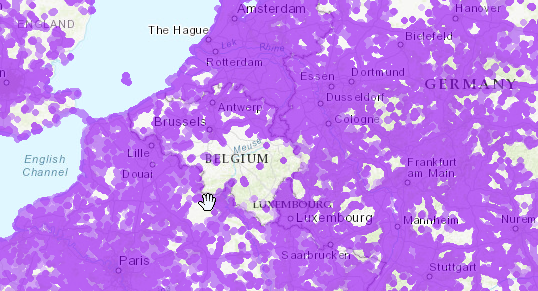
Belgium has the lowest 5G coverage in Europe, and the slowest speeds too.
Belgium can't do anything right though, so I'm not surprised.
 pseudo blade
clear igloo
It's ALWAYS FTTN <:kekw:881231355592212490>
pseudo blade
clear igloo
It's ALWAYS FTTN <:kekw:881231355592212490>
For as long as they don't get sued for blatantly misleading advertising they will keep doing it
full monolith
thick minnow
https://tyler-will.shutoffyourinter.net/📸/lai0kbpm.png
bruh what the fuck
thick minnow
In Austria they sell DOCSIS 3.1 as Fiber
pseudo blade
The word "fiber" does not go anywhere near VDSL
carmine moss
If you want good speeds here your on doxis also marked as fiber in the past but now that there is a bit of real fiber they don't
pseudo blade
At least DOCSIS can hit gigabit
thick minnow
pseudo blade
At least DOCSIS can hit gigabit
And it's not guaranteed
pseudo blade
It never is
thick minnow
It depends on the usage of ppl around you.
full monolith
juat calculate how many people to put on a line to hit the gigabit or faster and its good
docsis suffers just from too many people using the same line
and if this would get fixed it could be way faster
carmine moss
It's stupid a phone provided sells VDSL as fiber and they use the modem of another isp that has been here for years with a sticker over the logo
thick minnow
I swear, I will rip all their DSL shit out one day
and will rip LTE b20 off of all cell towers
If they keep being lazy.
carmine moss
In the past they had the other isp logo in their marketing they are trying to disrupt the market but can't
pseudo blade
The local cell with 10k people on it stopped being able to handle calls 1km from the cell this week
It was barely holding on as it was but adding on people showing up for Christmas was too much
full monolith
i really need to iunstall docsis load monitor before christmas and new year
carmine moss
Also as a business you need to use bridge mode on the biggest isp as no modem only units exist anymore
full monolith
so i can monitor our docsis load on the whole line
thick minnow
I can just slow down all budget plan users on my cell tower 
So I don't care about the load on it
I will slow down everyone else anyway.
Unless someone does the same thing that I'm doing.
full monolith
idc about it because i have fear of it beeing to much used whatever i just wanna see how much traffic people do
full monolith
never that low
would be weird af
idk how many people there are on my line but its prob alot

GitHub
CLI tool to monitor downstream load on DOCSIS cable networks - GitHub - sp4rkie/docsis-cable-load-monitor: CLI tool to monitor downstream load on DOCSIS cable networks
thick minnow
I live like 100km away from any docsis
The government buildings have 1gbps fiber but I will show them soon what they (wont) have if they continue like this.
full monolith
you cant do anything anyways lmao
thick minnow
I mean people will riot anyway when the power goes out.
So it will go unnoticed if I do a bit of government trolling.
 sacred moon
Is there any sort of recommended tier lists for modems?
I bought a new router to get away from the comcast provided xfi gateway thing, but trying to hook it up was a doozy. Couldn't end up getting it to work and even when I set the comcast modem to bridge mode it continued to put out the wifi signal from before (which I thought would go away). May as well cut my losses and replace it altogether and no longer have to rent the damn thing.
or is this question better suited for a different channel?
full monolith
sacred moon
Is there any sort of recommended tier lists for modems?
I bought a new router t...
is your internet cable?
like fiber, dsl or cable
cause if its cable and your at a gig speed or less i would get a technicolor tc4400
if its fiber idk and if its dsl i would get a vigor167
sacred moon
no sweat, thanks anyways
its gig speed anyways so maybe that technicolor one would work
full monolith
thats cable modem doesnt has fiber
i just looked up a fiber modem some local german fiber isps use where i live and that is prob a good one:
https://www.qnap.com/de-de/product/qhora-301w

QNAP Systems, Inc. - Network Attached Storage (NAS)
Fernarbeit ist mittlerweile zu einer neuen Normalität geworden und damit Unternehmen diese umsetzen können, müssen sie sowohl ein Remote VPN einsetzen, auf das Benutzer an mehreren Standorten schnell zugreifen können, als auch eine High-Speed Lösung vor Ort, die kabelgebundene und drahtlose Verbindungen abdeckt. Der QHora-301W unterstützt High-S...
it also has 10g for future proofing
if it ever gets faster
you prob have to change the website to english
sacred moon
isn't that a 2 in 1?
I got an asus RT-AX86U router, i just need the modem half
or maybe what you linked is just a router
sacred moon
no sweat
i actually snagged this gundam model one lmao

(no gundam figure included)
$180, while the lowest i could find the regular edition was $200. Apparently it had a price increase from $250 to $280
 thick minnow
This is very German
 thick minnow
sacred moon
i actually snagged this gundam model one lmao
thick minnow
sacred moon
i actually snagged this gundam model one lmao
Is that a "gaming" router
meager ginkgo
sacred moon
i've got fiber currently
Comcast only has 6gbps fiber not 1.2gbps fiber
you are on cable

The ARRIS SURFboard S33 is a DOCSIS 3.1 Cable Modem that delivers the fastest speeds and the latest technology. With a 2.5 Gigabit and a 1 Gigabit Ethernet port, the S33 enables a multi-gig experience for things like online gaming, 4K video streaming and more. It’s best for cable internet speed p...
I'd recommend this modem- you can find it cheaper used
sacred moon
is there some nomenclature difference where fiber doesn't actually mean fiber?
sacred moon
thick minnow
Is that a "gaming" router
thats how it pitches itself, its a pretty highly rated router though
sacred moon
I don't know what either of those are
sacred moon
meager ginkgo
I'd recommend this modem- you can find it cheaper used
is there a fundamental difference between fiber and cable modems? guessing it's a connection difference
meager ginkgo
sacred moon
is there a fundamental difference between fiber and cable modems? guessing it's ...
Yes, fiber usually connects with well fiber. Cable uses a coax connection.
An optical network terminal converts the fiber to a ethernet connection- that is basically the equivalent of a cable modem. Usually the ISP provides the ONT and it can't be changed.
if you have this going into your modem you have a coax/cable connection
 sacred moon
Maybe i just assumed it was because of the speed. I'll be moving in about a month so maybe I'll hold out until then and see what internet I'll have there.
meager ginkgo
sacred moon
Maybe i just assumed it was because of the speed. I'll be moving in about a mont...
Yeah that's probably best. Look at https://highspeedinternet.com/ and see what shows up for the zip code

HighSpeedInternet.com
Compare internet service providers in your area. Find speeds, prices, customer satisfaction scores, and reviews for ISPs near you.
then you can go to their websites and enter the address and see what plans are available
sacred moon
i had centurylink fiber before but had to switch after they dropped the ball on installation
that one im reasonably certain was fiber lol
meager ginkgo
sacred moon
i had centurylink fiber before but had to switch after they dropped the ball on ...
Oof. What did they do that you left? lol
sacred moon
I moved two years ago and myself and the others in the house were all working from home, so before I moved I was like "I need the internet ready to go on this date at this location" and then when I moved they said "actually it'll be like 2-3 weeks" so I went with what would give me internet sooner, and that was comcast.
sure enough lol

i actually really liked centurylink's fiber, very stable and consistent. Comcast was decent for the first year but since then it has been an intermittent connection that drops 1-2 times per day for a few minutes at a time. Sure sucks when you're in a call/meeting and your internet shits the bed.
maybe comcast being cable is why it feels so much less reliable
i do remember my past house having a white box outside, that must be the ONT you mentioned
or part of it or something
which is also stupid because centurylink fiber was cheaper!

 thick minnow
full monolith
https://tenor.com/view/tmobile-logo-telecom-carrier-provider-gif-12541183
thick minnow
full monolith
https://tenor.com/view/tmobile-logo-telecom-carrier-provider-gif-12541183
Nahh
thick minnow
O2
meager ginkgo
sacred moon
which is also stupid because centurylink fiber was cheaper!
Oh yeah. If you can wait for the install, fiber is the way to go..
sacred moon
meager ginkgo
Oh yeah. If you can wait for the install, fiber is the way to go..
thanks for making me realize I didn't have it all this time lmao, I'll definitely switch back to fiber when I move. Guess I saw the speed was 1 gig and assumed it was, does explain the coax.
meager ginkgo
sacred moon
thanks for making me realize I didn't have it all this time lmao, I'll definitel...
Yeah, no problem lol. You'll enjoy the higher upload and lower ping 😛
 plucky quarry
Today i got this notification on my deco units is it something I should be worried about or just ignore it
 waxen scroll
Yeah because your upload is shot
full monolith
@thick minnow this served wifi for half of my old school lmao
 sudden kayak
sacred moon
i actually really liked centurylink's fiber, very stable and consistent. Comcast...
sudden kayak
sacred moon
i actually really liked centurylink's fiber, very stable and consistent. Comcast...
that is not at all normal... they should fix that asap for no charge if you let them know
DM me pls and I can try to help
sacred moon
sudden kayak
that is not at all normal... they should fix that asap for no charge if you let ...
I've talked to them a few times, as I say elsewhere though I'm moving in about a month so it's all under the bridge at this point. Appreciate the offer though!
sudden kayak
weird. it's possible whoever they sent out just couldn't track down the problem, but if everything worked as intended, they really should have just kept escalating until somebody could fix it. if you're moving then hopefully you'll have better luck at the next spot
rocky badge
full monolith
<@456226577798135808> this served wifi for half of my old school lmao
At my old high school we would have APs in every room because the entire building was cinder block. A typical phone hotspot wouldn't penetrate multiple rooms. A phone hotspot in the room over would be like -70dBm. The APs did better jobs of penetrating the walls but they also purposefully turned down the power on the APs so you were basically on the AP in the specific room.
And they finally upgraded to WiFi 6 so it's way better now as well, especially for 2.4
sudden kayak
i mean if you really have an AP in every single room that's the ideal situation
rocky badge
Roaming was really good
sudden kayak
but if you don't then... oof
rocky badge
sudden kayak
i mean if you _really_ have an AP in every single room that's the ideal situatio...
The way the high school was laid out it was perfect for an AP in every room
sudden kayak
yeah mine was pretty similar
rocky badge
Then APs every so often in the hallways

Actual classrooms were in the "pods"
2 floors
Each pod had 6 classrooms
sudden kayak
for a while it was pretty terrible but when they realized laptops & wifi were the future of educational technology, they stopped trying to save money and just did APs in every room
mine was a very similar layout actually lol
rocky badge
So each pod had 12 APs per floor for a total of 24 APs per pod
sudden kayak
you wouldn't believe the shit i found in those drop ceilings
sudden kayak
sometimes literal shit. from mice.
sudden kayak
you learn very quickly how to lift a ceiling tile so the detritus falls away from your face
rocky badge
Plus electrical in more conduits
sudden kayak
y'all had fiber?!!
sudden kayak
yeah we had fiber trunk lines but all the individual wings & classroom areas were copper iirc
granted this was like 8-10 years ago?
hopefully they've modernized since
rocky badge

Switch stack feeding fine arts wing
That fiber media converter on top with orange fiber is for the fiber to the football stadium
And that old enterasys switch 2nd from the top (silver and black) has been upgraded to Extreme
There are no more Enterasys switches in the network, only Extreme now.
@sudden kayak Each school comes back to the high school via fiber into a 10G switch
full monolith
rocky badge
my school littearly is at wifi ac 20mhz channel width
and they wonder why the wifi is dying so much when they use one channel for littearly the entire school
rocky badge
Yeah they limit 2.4 and 5 GHz at 20mhz
But that's because they have all 5ghz spread across all channels
full monolith
yea that makes sense
but my school is littarly 100% on channel 36
nothing else only 36
and we dont even need to start talking about 2.4ghz lol
rocky badge
My university is overkill/planned well on wireless though
full monolith
i live in germany so wifi in schools is like they found out about wifi last week
rocky badge
@full monolith
full monolith
nice
my school slowly starts using unifi aps but they still dont change wifi settings...
idk what those people are that do this bullshit
full monolith
nice
rocky badge
Cisco Catalyst WiFi 6
full monolith
my school be like: 30 people using the wifi on one ap= wifi is dead
rocky badge
With tons of clients and people in the area I can still get like 300Mbps
full monolith
this is awsome
the problem is
my school is build so you dont have any mobile signal inside
so you littearly need to use the wifi because you would not even have mobile internet then
rocky badge
rip
full monolith
outside the school i get like 500-700mbps 5G NSA but littearly 1m inside the school you have 0 bars
the only thing that gets signal is my mobile netgear m1 router that i put to the window and get around 50mbits download
so my class even gets a bit of usable internet
rocky badge
The only part of uni I don't cellular is in the underground portions lol
full monolith
Even the window glass is build so no signal can enter the building lmao
I littearly get like 2bars of 4g+ directly on the window on 1800mhz
You dont even want to know the ping and jitter
 lone sun
🤔 Got a question about MOCA. So I know my modem can do Moca, but what else do I need to connect my ethernet cable to coax for this device in the link? Do I just plug the two cables into it or are splitters and such required?
https://www.amazon.com/Actiontec-ScreenBeam-Network-Adapter-Ethernet/dp/B08ML1TSXC/ref=sr_1_2_sspa?keywords=moca+adapter&qid=1671763356&sprefix=moca+ad%2Caps%2C105&sr=8-2-spons&psc=1&spLa=ZW5jcnlwdGVkUXVhbGlmaWVyPUEyVVFKOE0xT1hXRU42JmVuY3J5cHRlZElkPUEwNDI4MzUyM0VRTzFSRjdCOEFFRSZlbmNyeXB0ZWRBZElkPUEwOTY4NjI0M0hRS1pFVzgyNkVZTiZ3aWRnZXROYW1lPXNwX2F0ZiZhY3Rpb249Y2xpY2tSZWRpcmVjdCZkb05vdExvZ0NsaWNrPXRydWU=

ScreenBeam ECB7250 Bonded MoCA 2.5 Network Adapter Kit features a 2.5 Gigabit Ethernet port, delivering up to 2.5 Gbps In and 2.5 Gbps Out capabilities, giving you all the extreme high-speed bandwidth you need for flawless streaming of HD video, pristine online gaming, and all of your other deman...
rocky badge
@clear igloo @waxen scroll I did a stupid and setup duo https://i.ryois.me/2NC4m6aiNw.png lol
 sonic notch
Does anyone have a stupid easy and cheap Omada system they can recommend? I've only used Unifi
Need 2 APs with Wi-Fi 5 + I don't have a Raspberry or anything to act as a controller
sudden kayak
i mean it's kinda one system already
sonic notch
Also, is Omada as easy to use as Unifi to set up and whatnot?
sudden kayak
ER605, their controller box, they have maybe two or three price points of APs
sonic notch
sudden kayak
i mean it's kinda one system already
Yee but what I mean are AP/controller recs
What's the AC/U6-Lite or NanoHD equivalent
sudden kayak
that's what i mean, there are like 3 models in the system & just buy the one that meets your requirements
probably EAP620
sonic notch
sudden kayak
ER605, their controller box, they have maybe two or three price points of APs
Is the 605 a switch+router+firewall?
+controller?
peak cloak
sonic notch
Is the 605 a switch+router+firewall?
Just a router with firewall, I guess yes there's a switch in there too technically
peak cloak
Probably going to pick up the 605 myself
sonic notch
605 is kinda expensive tbh for what I need these for
peak cloak
Er-x is crashing sometimes and I just need something that works
Isn't it like 60 bucks?
What do you need it for
sudden kayak
i set up my parents' place with the ER605, SG2008P (8 port switch, i think 4 port PoE), and 3 of the EAP620s
i ran the controller on an old raspi which i kinda regret, not worth it once you account for a power supply, case, etc unless you already have it lying around
sonic notch
peak cloak
What do you need it for
Basically my goal is to fix my friend's Wi-Fi coverage issues for as cheap as possible
Same with my sister's
peak cloak
sonic notch
Basically my goal is to fix my friend's Wi-Fi coverage issues for as cheap as po...
Don't need the 605 then
sudden kayak
oh yeah hmm
peak cloak
Just APs
sudden kayak
if you're just fixing up the wifi, just use their existing router combo box and turn off its wifi radio
and grab the omada APs
you don't need a controller for that
peak cloak
Not even controller is strictly needed
sonic notch
sudden kayak
you don't need a controller for that
How would I change bands and whatnot tho
peak cloak
On the AP
sonic notch
WHAT
sudden kayak
the APs still have just a web interface
peak cloak
Unlike unifi, the APs have a web interface
peak cloak
That's what I use for the 1 ap I have
sonic notch
In case I need to do that
sudden kayak
the controller is just if you want a single dashboard to do fancy software defined networking where you can change the network topology and see usage across the whole thing like for a small business
hmm I'm not sure the omada APs actually do mesh natively
peak cloak
sonic notch
What about meshing
What you think of meshing isn't meshing, it's roaming I think
sonic notch
Nono I mean actual wireless meshing
peak cloak
Like having 1 SSID with multiple APs?
sonic notch
Like having an AP act as a middleman between a client and a wired AP
sudden kayak
if you mean wireless backhaul with an AP you can't wire in.. the honest answer is that it probably won't actually help speed very much
better than nothing but if you know you'll have a spot where you absolutely can't hardwire it... maybe just go for one centrally located AP
peak cloak
Yeah, depending on the placement it can help a little but it's far from optimal. Meshing can be done only with controller
sudden kayak
like the EAP660 or something (kinda like their equivalent of the unifi long range APs)
sonic notch
Ye hopefully I can but the house I'm working with has a high ceiling
So I might just have to mount an AP to a wall or something
sudden kayak
wall mount should be fine
peak cloak
You can just put it on a table or cabinet as well
sudden kayak
also go with PoE then you just have one cable
looks a lot cleaner for a wall or ceiling mount
peak cloak
Yeah
sonic notch
Oh you gave me an idea
I can wall mount both on the same wall but on different floors
Is that gonna cause issues with too much overlap?
I'm looking at the EAP 225 and 245s rn, those good?
rocky badge
@peak cloak Would it be extreme to VLAN off my PKI network
thick minnow
full monolith
<@456226577798135808> this served wifi for half of my old school lmao
Haha, nice
How much did that thing cost you back then?
thick minnow
https://www.speedtest.net/my-result/a/8930659808 5G UC already exists in Europe [5G Ultra Congestion]
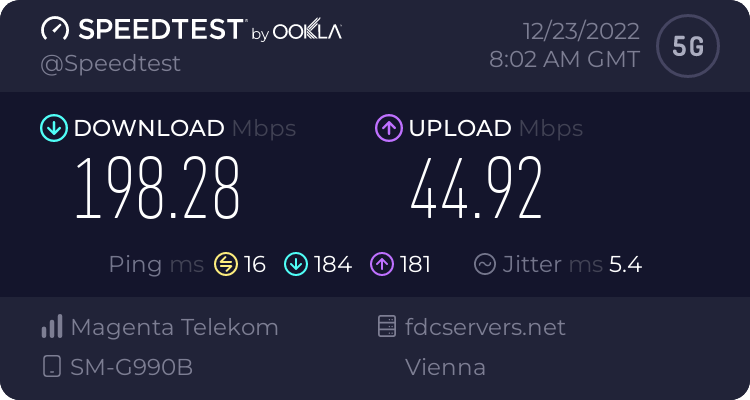
Speedtest.net
Use Speedtest on all your devices with our free desktop and mobile apps.
full monolith
thick minnow
How much did that thing cost you back then?
Like 40 or 50€ lmao
thick minnow
full monolith
Its such a bad deal but i swear it was saving us all from suffering lol
Even the teachers used it because it was better then the wifi they used where we had no access
thick minnow
full monolith
Its such a bad deal but i swear it was saving us all from suffering lol
Did the school have no LTE indoors?
 hushed star
thick minnow
hushed star
thick minnow
My high school has that issue on one carrier that avoids low band lte
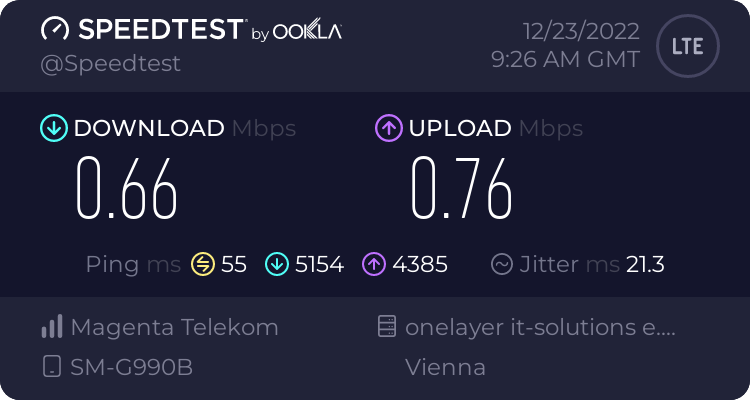
Speedtest.net
Use Speedtest on all your devices with our free desktop and mobile apps.
full monolith
thick minnow
Did the school have no LTE indoors?
They had but in 7. Grade or smth you dont have unlimited date or shit else so littearly no one could use lte lmao
I littearly had like 2.5gb mobile data back then
thick minnow
Damn bruh. I had like 2GB on A1 when I was 9 or 10
A stupid pre paid sim card
3G data but my town only has 2G
full monolith
for us it wasnt even that bad. we had already like 100mbps download on lte but my sim card wasnt supporting lte yet so i was chillin on 3g with like 18mbps
thick minnow
full monolith
for us it wasnt even that bad. we had already like 100mbps download on lte but m...
I live in a rural area so it was bad until 2015. If I went to the larger town I could get LTE, 3G and 2G. Lte speeds were around 150mbps
I had an iPhone 4 though. It didn't support 4G LTE
full monolith
its actually crazy how good my city was doing lte tho
like my city is not even 4k people
and now we have 4 cell towers with the latest one going online in a bout 2 months
n78 tho
full monolith
best ping i had so far
 thick minnow
Wow
full monolith
our cmts is like less then 80m cable lenght from my house entrance
so yea not even 100m coax then fiber
 full monolith
wtf did i do there lmao
 thick minnow

Incompetent European ISP failing to provide N78 all over Austria after 3 years.
Meanwhile 3AT (100% owned by CK hutchison holdings, Hong Kong): N78 SA + NR CA all over Austria
Wait till they realize people don't want useless n28 20mhz that is barely faster than the 3CA LTE towers it requires to work in the first place.
 thick minnow
full monolith
Be happy what u have lol imagine living in belgium
thick minnow
full monolith
Be happy what u have lol imagine living in belgium
Thank god I'm not anywhere near Belgium 🙏. I'm very thankful for that.
full monolith
Lmao same hahahahaha
thick minnow
full monolith
Lmao same hahahahaha
https://tyler-will.shutoffyourinter.net/📸/13gl2ia2.png Something Europeans will never see on their phones because they avoid mmWave at all costs.

Italy apparently has mmWave but I've never seen anyone talk about it, or use it. Italian phones don't have mmWave bands.
hollow marlin
@clear igloo @waxen scroll Troubleshooting a Cisco ME3400 buffers, I am reminded how much I despise IOS' QoS configuration format 🤮
waxen scroll
Try doing COPP
hollow marlin
I never actually got around to working with it in IOS. I would hope it's less of a PITA
thick minnow
Hey guys! I'm new to Networking. Can y'all suggest me some tutorials where I can learn about networking?
thick minnow
thick minnow
This is very German
German network is so strong that Russia may not be able to break it down
thick minnow
thick minnow
Hey guys! I'm new to Networking. Can y'all suggest me some tutorials where I can...
What exactly about networking?
😅
clear igloo
hollow marlin
<@291198741862416384> <@186123993412141057> Troubleshooting a Cisco ME3400 buffe...
lol, nested QoS ftw!
thick minnow
thick minnow
What exactly about networking?
I wanna learn networking.
I can tell you a LOT about networking on phones
hollow marlin
clear igloo
lol, nested QoS ftw!
Juniper CoS - "Every interface gets 100-125ms of buffer. Want more? Deep buffers are bad, deal with it".
Makes the configuration and tshooting so much simpler.
While I just gave up on Cisco docs on ME3400s and how best to allocate bufferspace on their pathetic queue depths
clear igloo
hollow marlin
Juniper CoS - "Every interface gets 100-125ms of buffer. Want more? Deep buffers...
lol, queue is fun /s
thick minnow
So fancy they got 4.5G 😳😱😱
 hollow marlin
clear igloo
lol, queue is fun /s
hollow marlin
clear igloo
lol, queue is fun /s
Granted these are ancient and on IOS 12.
Has configuration improved much on recent XE/NXOS versions?
clear igloo
hollow marlin
Granted these are ancient and on IOS 12.
Has configuration improved much on rec...
Oh wow, yah that's ancient, it's improved a good bit
full monolith
thick minnow
So fancy they got 4.5G 😳😱😱
wtf
rocky badge
@clear igloo @waxen scroll https://www.reddit.com/r/Ubiquiti/comments/zt67af/this_is_why_i_recommend_ubiquiti_routers_to/?utm_source=share&utm_medium=ios_app&utm_name=iossmf

reddit
119 votes and 151 comments so far on Reddit
🤣 the comments
waxen scroll
lmao

 dim delta
rocky badge
https://i.ryois.me/0mpJMszCz3.png
dim delta
rocky badge
https://i.ryois.me/0mpJMszCz3.png
every 6 months ≠ THREE YEARS
sonic notch
thick minnow
This is weird considering how T-Mobile US is the only carrier here with usable 5G
rocky badge
Verizon has very usable 5G
sonic notch
Wait since when
rocky badge
Since 2020 at least ¯_(ツ)_/¯
sonic notch
No shot
 dire osprey
at&t's 5g is a joke lol
sonic notch
rocky badge
Since 2020 at least ¯\_(ツ)_/¯
By usable I mean good mid-band coverage
rocky badge
Yes
sonic notch
I thought Verizon didn't have enough midband until the most recent auction??
rocky badge
5G has been fine and I've been getting mid band in a lot of places ¯_(ツ)_/¯
sonic notch
I've been getting mid-band outside of major cities
rocky badge
Meanwhile T-Mo isn't that great according to friends who are on T-Mo here  which is funny
sonic notch
T-Mo is great when it isn't complete garbage lol
rocky badge
no service indoors, no mid band, no mmwave, slow speeds, high latency
sonic notch
They got mid-band now
rocky badge
in the same spot I can get good service from verizon
sonic notch
Before 5G/Sprint merger it was barely useable
Idk now I get p good service except for this one spot in my city where signal drops completely
Oh yeah where's a good place to get good cheap patch cables
Amazon seems ehh
rocky badge
I buy all of mine through fs.com
(Mostly all fs.com cables)

the black cables with non clear boots aren't fs cables
dire osprey
this is AT&T’s midband in most of Manhattan, basically discount 4g
 sonic notch
Oof $2.50 is kinda steep
sonic notch
dire osprey
this is AT&T’s midband in most of Manhattan, basically discount 4g
this is better than t-mo's lte lol
dire osprey
loving the short cable runs tho 
rocky badge
 sonic notch
Yee are those 6 in or 1 ft
rocky badge
6 inches
sonic notch
That's what I thought
Idk if I should go for 6 or 1 ft
I don't have a rack so it's just gonna be an unmanaged switch taped onto a wall
rocky badge

I wish I got 12 1ft and 12 6in here
And those aren't fs cables, that was before I used fs
The cables get messy half way through the patch panel because they are too long
full monolith
Why yall always have ups
rocky badge
because
full monolith
Ok
rocky badge
nice to have
full monolith
I have a small one but dont use it
 full monolith
In my whole life i only got a power outage once lmao
full monolith
rocky badge
That UPS runs for 1hr 13min on battery
Thats good
sonic notch
full monolith
In my whole life i only got a power outage once lmao
How
full monolith
Germany 🤝
full monolith
Never lol
Like 95% of cables are underground and the lines that come in the city are like from all 4 sides and some are underground tho
So even if 2 break theres still power
sonic notch
In my state a ton of generators went out all at once because of frozen gas pipelines and windmills
¯_(ツ)_/¯
 vivid belfry
my cottage is in the middle of the woods, 5-10hr power outages during/after storms is normal
full monolith
Ours cant freeze and isnunderground anyways
We never have it that cold that a gas pipe in 1m deep could freeze
Man my english bad today
vivid belfry
full monolith
We never have it that cold that a gas pipe in 1m deep could freeze
about 8ft down is our frost line
or where it freezes
sonic notch
full monolith
Man my english bad today
Bro half of the people who talk about their bad English speak it better than native speakers lol
full monolith
Depends
My grammar is just bad
And i sometimes just randomly forget how to spell a word correct
Or type it ig
sonic notch
I mean if I can understand you it's good enough
full monolith
True tho
vivid belfry
grammer is over-rated, there's too many complex rules.
thick minnow
sonic notch
This is weird considering how T-Mobile US is the only carrier here with usable 5...
Tmobile isn't the only one
sonic notch
English is overrated; there's too many complex rules.
thick minnow
Wait till you see german.
sonic notch
thick minnow
Tmobile isn't the only one
I just learned about Verizon lol
Didn't know they had nationwide mid-band
thick minnow
Verizon is great, AT&T is great.
sonic notch
Since 2020 either
thick minnow
Every carrier in America is great.
sonic notch
thick minnow
Verizon is great, AT&T is great.
AT&T 5G suxx
vivid belfry
did the americans rebrand 4g as 5g like they did up here in canada?
thick minnow
No.
full monolith
vivid belfry
did the americans rebrand 4g as 5g like they did up here in canada?
They do here in germany
They just added a bonded frequency to 4g and call it 5g dss
thick minnow
5Ge, on AT&T is 3-5CA LTE with 4x4 at least.
sonic notch
vivid belfry
did the americans rebrand 4g as 5g like they did up here in canada?
AT&T did for a bit, but I think the FCC told them to stop
thick minnow
sonic notch
AT&T did for a bit, but I think the FCC told them to stop
They didn't. It had standards. It wasn't just rebranded.
vivid belfry
5G here is now 5G+ or some branding like that
full monolith
We can hit 950mbps on lte but that fake 5g csnt even give 100 many times
thick minnow
vivid belfry
5G here is now 5G+ or some branding like that
That's mid band and mmWave.
5G low band has the standard 5G icon.
vivid belfry
Both Telus and Rogers have 4g bands on the 5g network... not sure about bell
sonic notch
thick minnow
5Ge, on AT&T is 3-5CA LTE with 4x4 at least.
Is this not just better LTE
thick minnow
sonic notch
Is this not just better LTE
It's better lte.
But it's not shown as 5G, it's shown as 5Ge to the customer.
full monolith
For us in germany theres no different 5g icons
sonic notch
That's still nothing more than a rebrand of something different
full monolith
Its just 5G thats it
thick minnow
full monolith
Its just 5G thats it
It'll probably change with NR CA




 thick minnow
Do you have NR CA in Germany?
It's the same as LTE CA, when multiple bands are combined.
sonic notch
If I'm putting a switch between my UDM and one of my APs, can I use a PoE injector before the switch or do I need to place it after the switch?

The orange box is a normal unmanaged switch
rocky badge
After
sonic notch
How annoying is it to make my own ethernet cables
subtle estuary
thick minnow
5G low band has the standard 5G icon.
On my s21 it looks like this the first one is low band and second picture is high band.

 peak cloak
sonic notch
How annoying is it to make my own ethernet cables
peak cloak
sonic notch
How annoying is it to make my own ethernet cables
It's not too bad but it's kinda annoying
Terminating in wall cabling isn't too bad since it's punch down
But terminating in connectors is annoying
sonic notch
peak cloak
But terminating in connectors is annoying
Am I gonna need an rj-45 specific crimper?
Or will any crimping tool work
peak cloak
sonic notch
Or will any crimping tool work
Wdym by this
Yes it has to be one for rj45
Or that can do it
vivid belfry
sonic notch
Or will any crimping tool work
theres a difference between a punch down termination and putting a connecter on a cable
sonic notch
vivid belfry
theres a difference between a punch down termination and putting a connecter on ...
Yee ik I was talking about one of those tools that help you flatten wires/cables
vivid belfry
i see. a $40 crimper has a jacket stripper and cable cutter for both rj-11 and rj-45
along with the crimper
rocky badge
Klien Tools!

Premium, long lasting tool cuts, strips and crimps CAT3, CAT5e and CAT6/6A cable using RJ11/RJ12 standard and RJ45 Pass-Thru connectors. Pass-Thru technology significantly reduces prep work time; wiring diagram on the tool helps eliminate rework and wasted materials. Compact, non-slip comfort gri...

Exclusive Klein-designed Pass-Thru modular plugs for fast, reliable connector installations for and data applications. Cable easily passes through connector for consistent and secure termination. Saves time, trims flush to end face when used with Klein Tools Pass-Thru Modular Crimper VDV226-110, ...
Best purchases
So easy
sonic notch
I would but they're p expensive
full monolith
Real thick boy of a lan cable
 rocky badge
unnecessary!
sonic notch
Should I get one of these automatic strippers:
https://smile.amazon.com/gp/product/B09D8H87Z4/ref=ppx_yo_dt_b_asin_title_o03_s00?ie=UTF8&psc=1
Or are these more than enough:
https://smile.amazon.com/Mr-Stripper-Stripping-Crimping-Electrical/dp/B086V5M1B4/ref=sr_1_12?crid=IJD9SOVR75IW&keywords=wire+stripper&qid=1671840639&sprefix=wire+stripper%2Caps%2C124&sr=8-12

Efficient and convenient is the label of the self-adjusting wire stripper. The automatic wire stripping tool that integrates three functions: cutting, stripping and crimping. It has easy-going personality and high compatibility. The stripping range is 10-24AWG and the crimping range is 4-22AWG. W...

Mr. Pen- Wire Stripper, 8 inch, Wire Cutter, Wire Stripper Crimper, Wire Stripping Tool, Cable Stripper, Wiring Tools, Wire Crimping Tool
I'm gonna be using it for more than just ethernet but I'm only gonna use them for one-off projects
vivid belfry
no those are for electrical connections
sonic notch
I need one specifically for ethernet?
peak cloak
sonic notch
I need one specifically for ethernet?
You don't strip the wires with Ethernet
full monolith
i guess i get into using linux more then i normaly like to
