#futurerestore-help
1 messages · Page 230 of 1
 crystal oak
crystal oak
crystal oak
but im on a13
 valid adder
then clearly not without an exploit
crystal oak
I cant change on unc0ver because when I click the settings icon. It will not open
 celest basalt
crystal oak
I cant change on unc0ver because when I click the settings icon. It will not ope...
celest basalt
crystal oak
I cant change on unc0ver because when I click the settings icon. It will not ope...
of course it won't open on unsupported versions
setting nonce requires the same exploit as a jailbreak
crystal oak
Can I use pwndfu and use setnonce for it to work without setting the nonce on my iPhone
valid adder
@upbeat stirrup Yes you are
"i think that windows will not work well with this version" this is the lie
v194 worked because your device doesn't support iOS 15
 upbeat stirrup
valid adder
v194 worked because your device doesn't support iOS 15
upbeat stirrup
valid adder
v194 worked because your device doesn't support iOS 15
my phone is iphone 6s
 faint abyss
I got error : ERROR: Unable to place device in recovery mode
upbeat stirrup
faint abyss
I got error : ERROR: Unable to place device in recovery mode
place your device in recovery mode
faint abyss
LEt me try from recovery mode.
valid adder
what os
upbeat stirrup
place your device in recovery mode and try again
faint abyss
upbeat stirrup
place your device in recovery mode and try again
TRying that. Went past the error. Checking hashes ....
Thanks
crystal oak
what does -set nonce in -pwndfu do
faint abyss
faint abyss
TRying that. Went past the error. Checking hashes ....
Got iBEC error. There is a solution available for windows host. Trying out the solution...
upbeat stirrup
remove apple recovery driver, plug in your device and try again
crystal oak
can someone answer please?
upbeat stirrup
crystal oak
can someone answer please?
i dont know
upbeat stirrup
faint abyss
Got iBEC error. There is a solution available for windows host. Trying out the s...
have you fixed it yet?
faint abyss
upbeat stirrup
have you fixed it yet?
yes. Thanks. Now stuck at : Extracting batterycharging0@3x~iphone.im4p.
I guess I have to be patient.
Yes, going ahead. The progress bar is darkening.
faint abyss
crystal oak
can someone answer please?
I think it just sets the nonce and stops. Doesn't do anything else.
crystal oak
faint abyss
I think it just sets the nonce and stops. Doesn't do anything else.
stops the restore
 fathom gust
so yeah this happened
and now I restored to 15.1
without a jailbreak, I can't go back to 14.5.1 can I?
crystal oak
fathom gust
without a jailbreak, I can't go back to 14.5.1 can I?
HOW DID YOU DO IT WITHOUT A JAILBREAK! THAT WHAT I WANTED TO DO!!!!
crystal oak
oh sorry
fathom gust
I was on 13.7 (jailbroken) trying to futurerestore to 14.5.1 and it failed
and now I restored using iTunes to 15.1 because iOS was messed up, corrupted
upbeat stirrup
#checkm8 #nonce #checkra1n #ios #downgrade
In this video I am going to show you how to set nonce without jailbreak and essentially in return downgrade iOS without jailbreak using Futurerestore windows or Futurerestore mac. This works without checkra1n on checkm8 devices which are supported by this tool.
- For devices documented in the video: ...
try it
celest basalt
!t yt
 mystic axleBOT
celest basalt
!t yt
mystic axleBOT
celest basalt
!t yt
yt
YouTube is typically a very poor source of information and should be avoided. Many jailbreak YouTubers promote piracy, outdated tweaks, or just flat out fake jailbreaks. Reliable sources: iOS Guide, r/jailbreak Wiki, Complete Jailbreak Chart and The iPhone Wiki.
Added by toilet cat#8018 | Used 1083 times
·
faint abyss
faint abyss
Yes, going ahead. The progress bar is darkening.
Rstore successful.. I need to setup the phone now.
upbeat stirrup
congrats
faint abyss
Thanks.
crystal oak
now jailbreak using unc0ver and you can sleep\
faint abyss
I am an ignorent at best and stupid at worst. But I am lucky! 
faint abyss
crystal oak
now jailbreak using unc0ver and you can sleep\
Yes. LEt me see how it goes. Hope I am not stuck at setup screen.
crystal oak
Turn off OTA so it will not auto update to (15.x)
faint abyss
Yes. Would do that. Thanks.
faint abyss
faint abyss
Rstore successful.. I need to setup the phone now.
FR-GUI says restore successful and stopped. Now phone says press home to upgrade. What's that?
crystal oak
picture plz
faint abyss
Some kind of OOB experience?
crystal oak
is it a white screen with press home to upgrade on the bottom of the screen
upbeat stirrup
do a clean restore
faint abyss
Yaay. Success.
 upbeat stirrup
yeah congrats
faint abyss
crystal oak
is it a white screen with press home to upgrade on the bottom of the screen
Just did that. It worked. Thanks.
celest basalt
faint abyss
FR-GUI says restore successful and stopped. Now phone says press home to upgrade...
that's fine, upgrade doesn't mean it will update iOS
ah you already got past it
faint abyss
Put in recovery mode and it worked. Successfully restored my iPh6SP from iOS 15.0.2 to iOS 14.3. Thank you for the tip. Thanks to @valid adder and the whole team for your incessant efforts. I know you are doing a thankless job. You do it because you like it. I appreciate your community spirit.
You guys @celest basalt , @zealous bridge , CoolFroggy, ( list incomplete) are legends.
Can't thank you enough!
And there are non legends who are willing to help. Thanks to them too.
BTW, where are the FR-GUI logs stored on windows? I copied from the app window. But a file would be nice .
 pallid roost
if im updating to 14.5.1 from 14.3 what options do i use
my device is currently in a bootloop
i am on linux using the beta
celest basalt
pallid roost
if im updating to 14.5.1 from 14.3 what options do i use
what device
pallid roost
iphone 7
pallid roost
celest basalt
what device
im the one that bootlooped with taurine
celest basalt
oh
well depends, if your nonce is set then nothing special, just latest SEP/BB
if it isn't then follow pinned guide from downgrading from iOS 15 (also works in your case) to set nonce
pallid roost
i am trying to use checkm8 nonce setter
celest basalt
try just using the set nonce option in futurerestore beta
pallid roost
celest basalt
<https://gist.github.com/nyuszika7h/aac55c97f7925cddcf5ec3167f85dfe8#a10x>
wait i can use futurerestore gui?
 cloud yarrow
anyone tried restoring from ios 14 to 15.0.2 with futurerestore?
I mean is 15.0.2 SEP compatible with 15.1
valid adder
obviously it works...
its been done many times
including with a15...
it makes zero sense that you would think it would be incompat already
 blissful mesa
Hello i'm having trouble at the end of my attempt to use future restore to update my iphone XS Max from 13.5 to 14.5.1 it seemed to work but in the end i had this error :
Checkpoint 1608 complete with code 0
Cleaning up...
[exception]:
what=ERROR: Unable to restore device
code=105840657
line=1615
file=futurerestore.cpp
commit count=262:
commit sha =a9b77f4d92b7f3b6599e090b3d267b81ed288dbe:
Done: restoring failed!
FutureRestore process ended.
Can someone help me please 🙏 ? because i am now stuck in recovery mode and don't know what to do
valid adder
@blissful mesa full log bozo
blissful mesa
valid adder
@blissful mesa just exit recovery with futurerestore like a normal person would
crystal oak
i can not change nonce generator so can I use ap nonce colision
if I cant change nonce
valid adder
@crystal oak yes but you will be waiting 300000 centuries
That’s not what collision is for
It won’t collide at all
crystal oak
but it keeps saying the same apnonce
valid adder
Show me
crystal oak
 valid adder
Because your nonce is frozen
Stop using nonce collision it was patched in iOS 10… also it was only very specific nonces that collided bro not the one you have
crystal oak
how do i restore without change nonce then
valid adder
You don’t?
crystal oak
I changed the nonce via taurine and it still gave me a apnonce error
even if taurine shows the nonce i put in
 low summit
just jb and use dimentio
crystal oak
i cant jailbreak on ios 15
low summit
bruh then how u using taurine
crystal oak
it has a bullt in nonce changer
crystal oak
can you change nonce on pc
crystal oak
any other way i can change nonce on a13 and without a jailbreak
low summit
no
crystal oak
can you use pwndfu and setnonce to use future restore without changing generator
crystal oak
is there a jailbreak for ios 15
low summit
no
crystal oak
how can you downgrade ios without jailbreak and checkm8
pallid roost
celest basalt
though you still need to run ipwndfu and remove sigchecks with Fugu first
Traceback (most recent call last):
File "./ipwndfu", line 6, in <module>
import dfu, nor, utilities
ImportError: No module named dfu
pallid roost
lmfao
celest basalt
pallid roost
Traceback (most recent call last):
File "./ipwndfu", line 6, in <module>
i...
you need to download the whole thing, not just one file
low summit
lol
pallid roost
celest basalt
you need to download the whole thing, not just one file
*** checkm8 exploit by axi0mX ***
Found: CPID:8010 CPRV:11 CPFM:03 SCEP:01 BDID:0C ECID:000C5162182B003A IBFL:3C SRTG:[iBoot-2696.0.0.1.33]
Traceback (most recent call last):
File "./ipwndfu", line 73, in <module>
checkm8.exploit()
File "/home/marshallpieri/ipwndfu-master/checkm8.py", line 510, in exploit
if 'PWND:[checkm8]' not in device.serial_number:
File "/home/marshallpieri/ipwndfu-master/usb/core.py", line 830, in serial_number
self._serial_number = util.get_string(self, self.iSerialNumber)
File "/home/marshallpieri/ipwndfu-master/usb/util.py", line 314, in get_string
raise ValueError("The device has no langid")
ValueError: The device has no langid
 waxen moon
Can I use this to update my iphone 8 from ios 13 to 14?
low summit
if u have blobs yea
pallid roost
wait when i run ./ipwndfu -p again it says this
*** checkm8 exploit by axi0mX ***
Found: CPID:8010 CPRV:11 CPFM:03 SCEP:01 BDID:0C ECID:000C5162182B003A IBFL:3C SRTG:[iBoot-2696.0.0.1.33] PWND:[checkm8]
Device is already in pwned DFU Mode. Not executing exploit.
@celest basalt
does that mean im done with this step?
celest basalt
yes
pallid roost
ok
pallid roost
celest basalt
yes
bash: ./Fugu: cannot execute binary file: Exec format error
pallid roost
celest basalt
need macOS
do i have any other options to do it on linux or do i need a mac
celest basalt
hold on
GitHub
open-source jailbreaking tool for many iOS devices - GitHub - LinusHenze/ipwndfu_public: open-source jailbreaking tool for many iOS devices
python2 rmsigchks.py
pallid roost
celest basalt
`python2 rmsigchks.py`
*** SecureROM Signature check remover by Linus Henze ***
Found: CPID:8010 CPRV:11 CPFM:03 SCEP:01 BDID:0C ECID:000C5162182B003A IBFL:3C SRTG:[iBoot-2696.0.0.1.33] PWND:[checkm8]
ERROR: This is not a compatible device. Exiting.
Right now, only the iPhone 5s is compatible.
celest basalt
oh
pallid roost
celest basalt
oh
what can i do?
could i maybe do this part on a mac vm and boot into linux and do the rest on linux?
 frosty marlin
pallid roost
could i maybe do this part on a mac vm and boot into linux and do the rest on li...
frosty marlin
pallid roost
could i maybe do this part on a mac vm and boot into linux and do the rest on li...
You can, i tried it once, i got close
But didn’t succeed cuz of my Pci ports
faint abyss
Hi, I have iPh6SP successfully FRed from 15.0.2 to 14.3 today . I preserved my userland. Aparently this froze my nonce. Hence I could dg to 14.3 without problem. Now I get weired errors while jailbreaking with Taurine and u0 both. I think I should erase while FRing. If I do so, will I lose my nonce?
pallid roost
frosty marlin
You can, i tried it once, i got close
oh i already have a mac vm setup with working imessage, facetime and wifi
frosty marlin
pallid roost
oh i already have a mac vm setup with working imessage, facetime and wifi
You can try that
pallid roost
celest basalt
<https://github.com/nyuszika7h/ipwndfu_public/tree/t8010>
im going to try this first
faint abyss
pallid roost
oh i already have a mac vm setup with working imessage, facetime and wifi
Interesting. Which host and what VM package?
pallid roost
im using vmware
frosty marlin
pallid roost
im going to try this first
Idk how you pass through USB-s but you will need a KVM
pallid roost
its only catalina but i think i can update it
frosty marlin
Because you have pass through the PCI controllers
faint abyss
pallid roost
im using vmware
VMware on linux or windows ?
pallid roost
windows
faint abyss
pallid roost
oh i already have a mac vm setup with working imessage, facetime and wifi
I am looking for iMessage and FT, but my VM is not icloud compatible.
faint abyss
pallid roost
windows
Great. Where did you get the Mac parameters from?
Did you follow the VMware tutorial to change Mac parameters ?
pallid roost
dm me
pallid roost
celest basalt
<https://github.com/nyuszika7h/ipwndfu_public/tree/t8010>
i need to get into pwned dfu mode again
when i try this shows
*** checkm8 exploit by axi0mX ***
Found: CPID:8010 CPRV:11 CPFM:03 SCEP:01 BDID:0C ECID:000C5162182B003A IBFL:3C SRTG:[iBoot-2696.0.0.1.33]
ERROR: Exploit failed. Device did not enter pwned DFU Mode.
 grim wren
The exploit failed 
frosty marlin
pallid roost
*** checkm8 exploit by axi0mX ***
Found: CPID:8010 CPRV:11 CPFM:03 SCEP:01 BDID:...
Keep trying
grim wren
Re-enter dfu mode and try again
frosty marlin
It fails
pallid roost
*** SecureROM Signature check remover by Linus Henze ***
Found: CPID:8010 CPRV:11 CPFM:03 SCEP:01 BDID:0C ECID:000C5162182B003A IBFL:3C SRTG:[iBoot-2696.0.0.1.33] PWND:[checkm8]
Applying patches...
Traceback (most recent call last):
File "rmsigchks.py", line 100, in <module>
main()
File "rmsigchks.py", line 87, in main
pdev.write_memory(k, config.patches[k])
File "/home/marshallpieri/ipwndfu_public-t8010/usbexec.py", line 44, in write_memory
def write_memory(self, address, data): self.command(self.cmd_memcpy(address, self.cmd_data_address(3), len(data)) + data, 0)
File "/home/marshallpieri/ipwndfu_public-t8010/usbexec.py", line 106, in command
response = device.ctrl_transfer(0xA1, 2, 0xFFFF, 0, response_length + 1, CMD_TIMEOUT).tostring()[1:]
File "/home/marshallpieri/ipwndfu_public-t8010/usb/core.py", line 1043, in ctrl_transfer
self.__get_timeout(timeout))
File "/home/marshallpieri/ipwndfu_public-t8010/usb/backend/libusb1.py", line 883, in ctrl_transfer
timeout))
File "/home/marshallpieri/ipwndfu_public-t8010/usb/backend/libusb1.py", line 595, in _check
raise USBError(_strerror(ret), ret, _libusb_errno[ret])
usb.core.USBError: [Errno 5] Input/Output Error
@celest basalt
celest basalt
pallid roost
*** SecureROM Signature check remover by Linus Henze ***
Found: CPID:8010 CPRV:1...
use ramiel. https://ramiel.app

An open-source, multipurpose macOS utility for checkm8-vulnerable iOS/iPadOS devices
pallid roost
celest basalt
use ramiel. https://ramiel.app
linux
celest basalt
😩
faint abyss
faint abyss
Hi, I have iPh6SP successfully FRed from 15.0.2 to 14.3 today . I preserved my u...
Kept on rebooting and retrying. Eventually I could jailbreak with Taurine. So, the FR-GUI update was worth taking the risk. A GIGANTIC THANK YOU to our team.
pallid roost
i just want my phone back :(
im about to update to the latest version i think
WAIT...
if i restore with itunes
can i use my 14.3 blobs to downgrade?
faint abyss
pallid roost
can i use my 14.3 blobs to downgrade?
I just did that. But mine is iPh6SP. Which is your model?
pallid roost
7
faint abyss
Maybe you can... Not sure. I suggest you put your device in recovery mode and run 'irecovery -q' from Windows ( even Mac VM will do). This will print nonce. If printed nonce is matching with your 14.3 blobs then go ahead.
faint abyss
As nonces are not matching you will need a nonce setter, I am afraid.
pallid roost
yup
thats the issue right now
wait
i have an idea
does checkra1n support 14.6?
!t checkra1n
mystic axleBOT
pallid roost
!t checkra1n
checkra1n
checkra1n supports A7 - A11 devices (iPhone 5S - iPhone 8/X) on iOS 12.0 - 14.8. checkra1n also requires macOS or Linux - for Windows, see Odysseyn1x.
If you have an A9X device (iPad Pro 9.7-inch 2016 or 12.9-inch 2015), read [this](#common-issues message).
A11 devices on 14.0 - 14.8 cannot use a passcode, Face ID/Touch ID or Apple Pay when in a jailbroken state (see: !t nosep).
It's recommended to use checkra1n in conjunction with Odysseyra1n for benefits such as speed, battery life and security.
Added by kitty.#0001 | Used 1093 times
·
pallid roost
i have 14.6 blobs with matching nonce
i can fr to 14.6
jailbreak with checkra1n
change my nonce to match my 14.5.1 blobs
and downgrade to 14.5.1
would that work?
faint abyss
Yes, that is a possible path.
Try it out.No harm in that. My 'irecovery -q' nonce matched with ios 14.3 blob nonce. I had a successful FR to 14.3 in a single step. For you there are more than 1 steps.
faint abyss
faint abyss
Try it out.No harm in that. My 'irecovery -q' nonce matched with ios 14.3 blob n...
I would suggest FR update option and not erase option.
 twilit hinge
pallid roost
would that work?
twilit hinge
pallid roost
would that work?
what device?
twilit hinge
with 7 you should have no problem with FR, only faceid device have problem with ios 15 sep
so theorically you could do it, but wait for confirm from some genius or ppl who know more about it
faint abyss
twilit hinge
so theorically you could do it, but wait for confirm from some genius or ppl who...
Very correct.
pallid roost
twilit hinge
so theorically you could do it, but wait for confirm from some genius or ppl who...
what is there to lose?
i dont have any other options
worse thing is id have to go to 15.0.2
twilit hinge
you have nothing to lose i think
grim wren
Not even 15.0.2 if you don’t have blobs
pallid roost
i have blobs for every version 14+
twilit hinge
checkrain is not working on ios 15 or im wrong?
grim wren
Yes
twilit hinge
i dont follow it
pallid roost
does it have to be for me to downgrade?
grim wren
Checkra1n isn’t working on iOS 15
twilit hinge
you can set nonce with broken checkra<in?
grim wren
What
twilit hinge
i mean how do you set nonce on ios 15?
pallid roost
would i have to?
twilit hinge
i dont know?
twilit hinge
hm
pallid roost
when i update will my nonce change?
twilit hinge
i dont know how that work tbh
grim wren
twilit hinge
i mean how do you set nonce on ios 15?
pwndfu + futurerestore if you have a checkm8 compatible device
It has a nonce setter
twilit hinge
then you are good
pallid roost
oh so id be good either way
twilit hinge
^
pallid roost
yeah imma go to 14.6
wish me luck pls
my phone is already bootlooped not much worse can happen ig
 unkempt sedge
My iPhone 8 was on 14.3 and it suddenly turned off and then on again and stuck on apple logo. then after some time it was off and again on and same thing happening from past 1 hour. I was on taurine and now i tried to watch the futurerestore video but it says i have to be jailbroken to set up the nonce setter.
like, what should i dp
I am not sure why this even happened.
unkempt sedge
grim wren
thats 2 people that have bootlooped with taurine after their phone died
my phone was not dead. it was on 10%.
grim wren
was your battery health okay
unkempt sedge
grim wren
was your battery health okay
nope. It is at 80 around lol.
grim wren
thats
not a very good battery health
apple recommends you replace your battery at 85 
unkempt sedge
grim wren
not a very good battery health
i agrreeee. and my device was at full capacity too. 64gb was filled.
grim wren
probably shutdown from low power
unkempt sedge
grim wren
probably shutdown from low power
So what's the solution now? I am restoring to 15.1 i think. i have all the blobs. should i downgrade or continue with checkra1n? and downgrade when fugu14 untethered gets released with checkra1n?
unkempt sedge
grim wren
also replace that battery boye
gonna do that by this week. should i get original battery or just replace by my own?
unkempt sedge
grim wren
personally id get an apple battery just because
ok.
unkempt sedge
grim wren
most likely i guess
iphone could not be restored an unknown error occurred 9
valid adder
Screenshot please
unkempt sedge
valid adder
Screenshot please
took from google images. but same message in my macbook air. i am updating now instead of restore. hopefully that will help.
 valid adder
Yah we only know how to use non apple software for help here
Use idevicerestore or futurerestore please
celest basalt
unkempt sedge
iphone could not be restored an unknown error occurred 9
Leave it some time in charge and try again in DFU mode
unkempt sedge
valid adder
Use idevicerestore or futurerestore please
but the device needs to be in jailbroken right?
unkempt sedge
valid adder
Yah you can’t restore in lowpower precharge state…
ahhh maybe that's why.
unkempt sedge
celest basalt
Leave it some time in charge and try again in DFU mode
ok.
valid adder
It’s kinda common sense lol
unkempt sedge
valid adder
It’s kinda common sense lol
hmm
celest basalt
grim wren
not a very good battery health
they recommend to replace it at 79% afaik
at least iOS does
that's when it starts saying "Your battery health is significantly degraded"
grim wren
Idk I swear I’ve heard like 85% somewhere before
 vestal kindle
is it still possible to restore to older un signed ios versions?
grim wren
Yes with blobs
upbeat stirrup
grim wren
Yes with blobs
and latest baseband and sep compatible with your device
valid adder
Let the people who know what they are talking about talk
upbeat stirrup
yeah
 elfin cove
So if i upgrade to IOS 15.1, from IOS 13.5, then DOWNGRADE to ios 15.1 beta 3, will my SEP be compatible?
elfin cove
ok lol the whole faceID not working scares me lmao
celest basalt
I want go from ios 15.02 to ios 14
elfin cove
I've been on 13.5 for a whileeeeee so its ab time for an upgrade
celest basalt
Not do an upgrade the phone cant jailbreak ios 15
elfin cove
i know im waiting for the 15.0-15.1 beta 3 jailbreak to come out
i know it will be a while but i'm looking forward to using the newest jailbreak at the time
pallid roost
i need help with checkm8 nonce setter
 pallid roost
grim wren
instead
pallid roost
grim wren
instead
how do i set nonce in futurerestore?
grim wren
you have to check use-pwndfu and put your phone in pwndfu mode
pallid roost
how do i put my phone in pwndfu mode
grim wren
what phone
pallid roost
7
grim wren

GitHub
open-source jailbreaking tool for many iOS devices - GitHub - axi0mX/ipwndfu: open-source jailbreaking tool for many iOS devices
pallid roost
im on linux @grim wren
grim wren
doesnt ipwndfu work on linux anyway
grim wren
ipwndfu -p
pallid roost
grim wren
ipwndfu -p
ipwndfu: command not found
grim wren
 ./ipwndfu -p
pallid roost
ERROR: No Apple device in DFU Mode 0x1227 detected after 5.00 second timeout. Exiting.
grim wren
now try run futurerestore with --set-nonce and --use-pwndfu
pallid roost
i was trying that before my i restored my phone and it wouldnt work
grim wren
weirdchamp
pallid roost
Finished downloading the latest firmware components!
Found device in DFU mode
requesting to get into pwnRecovery later
Found device in DFU mode
Identified device as d101ap, iPhone9,3
Extracting BuildManifest from iPSW
Product version: 14.5.1
Product build: 18E212 Major: 18
Device supports Image4: true
Cleaning up...
[exception]:
what=signing ticket file does not contain generator. But a generator is required for 64-bit pwnDFU restore
code=81395729
line=1242
file=futurerestore.cpp
commit count=262:
commit sha =a9b77f4d92b7f3b6599e090b3d267b81ed288dbe:
Done: restoring failed!
FutureRestore process ended.
are my blobs broken?
grim wren
send blob
pallid roost
pallid roost
oh no
 pallid roost
should i try the cli fr
grim wren
yeah
pallid roost
!t futurerestore
mystic axleBOT
pallid roost
!t futurerestore
futurerestore
futurerestore allows you to upgrade/downgrade/restore to unsigned iOS versions if you meet certain requirements.
Tutorials:
Tutorial
Video Tutorial
Links:
FutureRestore GUI
Latest stable version (194)
Latest beta version
There are currently no pre-compiled beta builds for Windows.
Added by Capt Inc#0001 | Used 338 times
·
pallid roost
how do i use the cli one? @grim wren
grim wren
./(name of futurerestore file) -t (blob) --use-pwndfu --set-nonce --latest-sep --latest-baseband (ipsw)
pallid roost
can i drag and drop my blob into the terminal window and will that work?
pallid roost
iBoot64Patch: Patches applied!
Repacking patched bootloaders as IMG4
Sending iBSS (522505 bytes)...
Cleaning up...
[exception]:
what=ERROR: Unable to send iBSS component: Unable to upload data to device
code=38141969
line=582
file=futurerestore.cpp
commit count=262:
commit sha =a9b77f4d92b7f3b6599e090b3d267b81ed288dbe:
Done: restoring failed!
@grim wren
upbeat stirrup
check your usb cable
pallid roost
using a different cable this happens
pallid roost
upbeat stirrup
check your usb cable
what=assure failed
code=5570578
line=85
file=ASN1DERElement.cpp
commit count=197:
commit sha =aca6cf005c94caf135023263cbb5c61a0081804f:
Done: restoring failed!
upbeat stirrup
check your shsh2, sep and bbfw. or move to macos i think it will be a solution
pallid roost
Version: v2.0.0-test(a9b77f4d92b7f3b6599e090b3d267b81ed288dbe-262)
img4tool version: 0.197-aca6cf005c94caf135023263cbb5c61a0081804f-RELEASE
libipatcher version: 0.88-1e855d70c84419014e363bdbcaead7b145fe3e1f-RELEASE
Odysseus for 32-bit support: yes
Odysseus for 64-bit support: yes
[INFO] 32-bit device detected
futurerestore init done
[Error] --set-nonce not supported on 32bit devices.
futurerestore: failed with exception:
[exception]:
what=Error: failed to load signing ticket file /home/marshallpieri/Downloads/3467181474644026_iPhone9,3_d101ap_14.5.1-18E212_27325c8258be46e69d9ee57fa9a8fbc28b873df434e5e702a8b27999551138ae.shsh2
code=26869777
line=410
file=futurerestore.cpp
commit count=262:
commit sha =a9b77f4d92b7f3b6599e090b3d267b81ed288dbe:
iphone 7 is not a 32-bit device?
pallid roost
upbeat stirrup
check your shsh2, sep and bbfw. or move to macos i think it will be a solution
i dont have a mac and no one i know owns one
upbeat stirrup
pallid roost
Version: v2.0.0-test(a9b77f4d92b7f3b6599e090b3d267b81ed288dbe-262)
img4tool vers...
i think there is an error with your shsh2
grim wren
Their shsh2 is a strange 40kb
grim wren
(Mine are usually 67kb)
Okay nah there’s something wrong with that 14.3 blob if it’s 9kb
Surely
elfin cove
how do i downgrade from ios 15.1 to ios 15.1 beta 3 with my blobs using futurerestore
pallid roost
grim wren
elfin cove
how do i downgrade from ios 15.1 to ios 15.1 beta 3 with my blobs using futurere...
What device
elfin cove
iphone 11 pro max
grim wren
pallid roost
I’ll verify it myself in a sec
grim wren
elfin cove
iphone 11 pro max
You don’t
elfin cove
why not
pallid roost
no jb
grim wren
Your nonce won’t be set
pallid roost
and your not a11 or below
elfin cove
why wont my nonce be set
pallid roost
because how will you set it
you need a checkm8 compatible device (a11 or lower) or a jailbreak to set your nonce
grim wren
^
elfin cove
i was jailbroken when i saved my blobs if that helped but idk never used futurerestore
grim wren
A12+ is a weird and wacky place
elfin cove
oh okay
pallid roost
^
elfin cove
thats fine, i know it will be a while but at least i can look forward to the new exploit that Brightiup found
MAYBE
pallid roost
grim wren
I’ll verify it myself in a sec
did you yet
pallid roost
whats the difference between OTA blobs and normal blobs?
grim wren
I personally don’t know the technical different all too well
But what I do know
Is that you need pwndfu to use OTA blobs
pallid roost
are OTA blobs usually smaller?
pallid roost
im pretty sure my 14.5.1 and 14.3 blobs are ota
pallid roost
grim wren
Usually by a lot
i just noticed something
all my blobs from u0 are on shsh.host
all my taurine blobs are on tssaver
grim wren
u0 usually uploads to tsssaver I thought
pallid roost
no
grim wren
Maybe you were using systeminfo
pallid roost
tsssaver uploads regular blobs and ota blobs differently
like this
actually
i cant take a screenshot
i have no clue how to take a screenshot on linux
but most of my OTA blobs on tsssaver are exactly 16.1kb
and my 14.5.1 shsh.host blobs are 16.1 kb
wait
nvm
they are 42kb
im going to futurerestore to 14.6 real fast
once im on 14.6 i will need to futurerestore to 14.5.1
or ill stay 14.6 until the untether comes
upbeat stirrup
pallid roost
wait
choose regular blobs
 pallid roost
upbeat stirrup
choose regular blobs
pallid roost
upbeat stirrup
choose regular blobs
there is no option on shsh.host
upbeat stirrup
try tsssaver
mystic axleBOT
pallid roost
ITS BEEN 12 HOURS
i just want my phone to be on a jailbreakable version
FUCK FR
why wont it work
i am so mad
crystal oak
Can you use idevicerestore to Downgrade iOS without blobs?
pallid roost
no
crystal oak
But it uses a custom ap ticket from a file
pallid roost
i dont think it would work
valid adder
@crystal oak can you like stop fucking ignoring everything we tell you
the answer is no, NO, N O, learn to accept it, if you still deny reality please keep it to yourself...
crystal oak
ok
pallid roost
i really would enjoy jumping off a bridge at this moment
why is futurerestore so hard to use on linux
valid adder
because you didn't pair your device and use latest limd/usbmuxd from source
stock linux won't support entering recovery above 14.4
pallid roost
Reading package lists... Done
Building dependency tree... Done
Reading state information... Done
usbmuxd is already the newest version (1.1.1-2build1).
usbmuxd set to manually installed.
0 upgraded, 0 newly installed, 0 to remove and 0 not upgraded.
Reading package lists... Done
Building dependency tree... Done
Reading state information... Done
E: Unable to locate package limd
@valid adder
Sending iBSS (538890 bytes)...
[==================================================] 100.0%
Booting iBSS, waiting for device to disconnect...
Cleaning up...
[exception]:
what=Device did not disconnect. Possibly invalid iBSS. Reset device and try again
code=38469649
line=587
file=futurerestore.cpp
commit count=262:
commit sha =a9b77f4d92b7f3b6599e090b3d267b81ed288dbe:
Done: restoring failed!
 valid adder
everyone knows what limd is
pallid roost
oh
valid adder
im not telling you
pallid roost
pallid roost
Sending iBSS (538890 bytes)...
[================================================...
what does this mean
valid adder
curl -L https://cdn.discordapp.com/attachments/688124783400845336/901168861779488788/usbmuxd.tar.xz -o ~/usbmuxd.tar.xz
sudo tar xvf ~/usbmuxd.tar.xz -C /usr/sbin/
sudo systemctl restart usbmuxd
give me your restore context
pallid roost
valid adder
give me your restore context
im on 15.1 iphone 7 trying to use 14.6 blobs
valid adder
no I want the restore command...
but I have mostly what I need with the log
iBSS will only fail with progress bar if rom isn't patched
pallid roost
like the command i used at first?
 mortal tree
Im on ios 13.3 jb iphone x, i have shsh blobs can restored again same 13.3 or 13.3.1?
valid adder
pallid roost
like the command i used at first?
wym
pallid roost
valid adder
wym
/home/marshallpieri/futurerestore-v2.0.0-test -t /home/marshallpieri/Downloads/3467181474644026_iPhone9,3_d101ap_14.6-18F72_27325c8258be46e69d9ee57fa9a8fbc28b873df434e5e702a8b27999551138ae.shsh2 --use-pwndfu --set-nonce --latest-sep --latest-baseband /home/marshallpieri/Downloads/iPhone_4.7_P3_14.6_18F72_Restore.ipsw
that is what i typed into terminal to run fr
is that what you wanted?
valid adder
bro you need to patch bootrom
pallid roost
how
valid adder
nah
try this
git clone https://github.com/LinusHenze/ipwndfu_public.git
cd ipwndfu_public
curl -sLO https://patch-diff.githubusercontent.com/raw/LinusHenze/ipwndfu_public/pull/3.patch
git apply 3.patch
marshallpieri@Marshall-PC:~/ipwndfu_public$ git apply 3.patch
3.patch:54: trailing whitespace.
}
error: patch failed: checkm8.py:318
error: checkm8.py: patch does not apply
error: patch failed: rmsigchks.py:30
error: rmsigchks.py: patch does not apply
error: patch failed: Makefile:46
error: Makefile: patch does not apply
error: bin/t8015_shellcode_arm64.bin: already exists in working directory
error: patch failed: checkm8.py:494
error: checkm8.py: patch does not apply
error: patch failed: ipwndfu:16
error: ipwndfu: patch does not apply
error: src/t8015_shellcode_arm64.S: already exists in working directory
error: patch failed: usbexec.py:25
error: usbexec.py: patch does not apply
thats when i run git apply 3.patch
@valid adder
valid adder
That doesn’t make any sense
grim wren
Epic patch fail?
valid adder
@pallid roost you either are bad at life or didn't follow directions

maybe you already ran the patch?
unkempt sedge
valid adder
That doesn’t make any sense
Hey! Remember me?
unkempt sedge
I am on 15.1 now!!! 🥺🥺 the charging method worked but i have to update unfortunately. I am on 15.1
valid adder
why did you have to update
unkempt sedge
valid adder
why did you have to update
Now i have to future restore! 😔
Because it was then got stuck on the permanent recovery mode, like it was stuck on apple logo.
unkempt sedge
valid adder
why did you have to update
Noww which guide should i follow for a successful restore?
valid adder
why did you have to update
you didn't have to update
you were supposed to try to exit recovery before you restore
unkempt sedge
valid adder
you didn't have to update
I did know that. But it was genuinely stuck on apple logo even after 1 hour of complete charging. Then I finally decided to restore via connecting with my mac. That failed. And then it got stuck on recovery mode. Couldn’t get out of it!
Believe me i tried everything!
unkempt sedge
valid adder
you were supposed to try to exit recovery before you restore
It’s all right. I don’t mind updating and restoring to the old version. I have restored the device before too. Now which guide should i follow? I have to go back to iOS14.3 so taurine can implement the fugu14 soon and I can jailbreak untethered.
valid adder
unkempt sedge
I did know that. But it was genuinely stuck on apple logo even after 1 hour of c...
false you set nonce in dfu with checkm8 then downgrade via recovery mode
you never had to restore
because you could have restored directly to 14.3 with blobs
unkempt sedge
valid adder
false you set nonce in dfu with checkm8 then downgrade via recovery mode
Okay. 😟😟😟
unkempt sedge
valid adder
because you could have restored directly to 14.3 with blobs
And now what’s the right guide or video to go back to 14.3?
celest basalt
yeah but that's the exact same as my fork of ipwndfu_public I posted yesterday with Cryptic's patch applied
is this Ryzen 
weird, then it shouldn't be so problematic
valid adder
I will fucking murder you
grim wren
Stop
Using
Checkm8 nonce setter
future
re
store

Oh patches
Yeah but if you don’t stop using checkm8 nonce setter this instant you’re probably going to be personally executed by cryptic
faint abyss
FYI : I successfully FRed my iPh6SP yesterday from iOS 15.0.2 to iOS 14.3. I FRed with --update option so as to preserve the user data. This option is not recommended in the sticky. But it worked for me and in the end it was worth the risk.
Jailbreaking was problematic. But repeated attempts eventually led me to Taurine jailbreak.
However, I then faced lot of cache corruption problems for various app. I used a tweak AppData ( repo : http://apt.fouadraheb.com/ ) to clear caches.
Moral of the story : If you preserve data in FR, be prepared to face a lot corrupt caches both system and app.
Thank you.
celest basalt
faint abyss
FYI : I successfully FRed my iPh6SP yesterday from iOS 15.0.2 to iOS 14.3. I FRe...
I'm surprised going to 14.3 with -u even worked without ending in a recovery loop
going to anything below 14.5 with -u (unless you're already below 14.5) tends to cause recovery loop
and yeah either way -u can also cause battery drain due to such corruption
like healthd refusing database downgrade that opa334 had
better to make a backup and restore it by editing Info.plist, though that's unlikely to work for 14.5+ to 14.4.2- too
faint abyss
celest basalt
better to make a backup and restore it by editing Info.plist, though that's unli...
Yes, I am taking backups both restored rootfs and jailbroken. BTW What happens in a recovery loop? I had that when I tried to restore from iTunes backup in jailbroken state. This led me to abandon iOS 14.3 and move to the then signed iOS 15.0.2.
celest basalt
recovery loop means you're stuck in recovery mode and if you try to exit it (with irecovery -n or futurerestore --exit-recovery) it just goes right back to recovery again
basically happens due to corruption or invalid image
(if you simply force reboot with hardware keys and it goes back to recovery that's not necessarily a recovery loop, you need a computer to set auto-boot to true sometimes using one of the above commands)
faint abyss
celest basalt
recovery loop means you're stuck in recovery mode and if you try to exit it (wit...
I guess someone decides that the image is corrupt. Isn’t there any workaround for that? ( disclaimer: I don’t know what I am talking)
celest basalt
with checkm8 maybe it's patchable, I don't know... but since it works without -u every time there's not a huge need to do it since there's other ways to back up stuff
faint abyss
celest basalt
with checkm8 maybe it's patchable, I don't know... but since it works without `-...
Got it. Will remember the advice. Thank you! 🙂🙏
 low lake
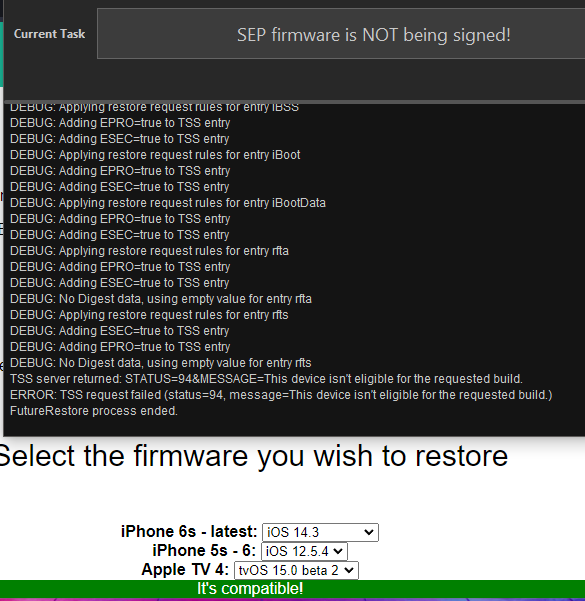
any idea why it would say its not signed ? https://i.imgur.com/Pv1jWl9.png
 celest basalt
low lake
any idea why it would say its not signed ? https://i.imgur.com/Pv1jWl9.png
celest basalt
low lake
any idea why it would say its not signed ? https://i.imgur.com/Pv1jWl9.png
(1) you need to use the beta version of futurerestore (enable it in settings and then click download futurerestore)
(2) that checker is outdated
!t sepbb
mystic axleBOT
celest basalt
!t sepbb
sepbb
Currently you can restore to the following versions with the latest SEP and baseband for your device:
Devices that only support up to iOS 12 (most A7 and A8 devices excluding iPad5,1 - iPad5,4): 11.3-12.5.5
A9 and A10: 14.0-15.1
A11 devices:
- iPhone 8/8 Plus: 14.3-15.1
- iPhone X: 15.0-15.1 (restoring to 14.3-14.8.1 will break Face ID)
A12 devices and newer:
- iPhone SE (2020): 14.0-15.1
- Other devices: 15.0-15.1 (restoring to 14.0-14.8.1 will break Face ID)
For restores on devices that support iOS 15 you currently must use the latest beta version of FutureRestore, see !t futurerestore for a link.
Added by Tanbeer#4750 | Used 316 times
·
low lake
!t futurerestore
mystic axleBOT
low lake
!t futurerestore
futurerestore
futurerestore allows you to upgrade/downgrade/restore to unsigned iOS versions if you meet certain requirements.
Tutorials:
Tutorial
Video Tutorial
Links:
FutureRestore GUI
Latest stable version (194)
Latest beta version
There are currently no pre-compiled beta builds for Windows.
Added by Capt Inc#0001 | Used 339 times
·
 wise flower
i need help with downgrading a non jailbroken phone
it says the ipsw does not match the blob file

 celest basalt
wise flower
celest basalt
wise flower
you are trying to use iOS 15.1 blobs to restore to iOS 14.4... that's not how it works
wise flower
celest basalt
you are trying to use iOS 15.1 blobs to restore to iOS 14.4... that's not how it...
ok so
what do i need to do?
do i need a new blob file?
celest basalt
you can't get one for anything older than 15.1 now if you didn't save it earlier
wise flower
celest basalt
you can't get one for anything older than 15.1 now if you didn't save it earlier
i forgot to link the ipsw i was trying to use
i think that's the issue
this is my first time
because i have a phone with a new flex cable and i gotta program in face id
celest basalt
wise flower
i forgot to link the ipsw i was trying to use
why are you using futurerestore for 15.1, it's signed
wise flower
no
i need to downgrade
to 14.4
that's the thing
i'm not trying to restore to 15.1
i need to go back to 14.4 so i can use my jailbreak device with checkrain
then do the face id repair
celest basalt
do you have blobs for 14.4 though?
wise flower
how do i get them?
the phone was on 15.1 once i recieved it
and i need to downgrade it
celest basalt
then you can't downgrade
wise flower
what do you mean
celest basalt
unless the previous user was a jailbreaker and saved blobs
wise flower
i need to be able to jailbreak the device on 14.4
and if i can';t downgrade then i can't fix face id
celest basalt
is this a new or used phone?
wise flower
used
i refurbish phones
i literally have to be able to use 14.4 somehow
for checkrain
celest basalt
you can check on tsssaver.1conan.com and shsh.host if it has blobs
the problem is, downgrading to iOS 14 will break the Face ID firmware due to SEP incompatibility, so what you're trying to do isn't gonna work
celest basalt
I mean you can try to do the "repair" and then go back to iOS 15 and hope it works but...
wise flower
so therfore i have to use some machines i have to reprogram face id back in
 humble musk
in #jailbreak they were trying to restore to fix face id
wise flower
you downgrade and jailbreak the phone then i program in the jcid flex cable
and then it fixes face id
it's a new method from rewa tech
celest basalt
I doubt a software modification is going to fix your Face ID hardware
even if it somehow miraculously worked, you'd have to go back to iOS 15 after you "fixed" it, because of the firmware incompatibility when using futurerestore
wise flower
i know thats the point
i only gotta downgrade to fix it then i can go back to 15
i will link the video for you
wise flower
celest basalt
I doubt a software modification is going to fix your Face ID hardware

Face ID will not be available and True Tone will disappear if the earpiece flex cable of models after the iPhone XS is damaged. The problem couldn’t be fixed before. But a new repair tool that can bind the new earpiece flex cable and repair the Face ID has come to the market. Let’s check it out!
For more details, please visit our blog: https://...
 lucid latch
The thing is broken Face ID caused by SEP incompatibility (software) is different from hardware issue
wise flower
lucid latch
The thing is broken Face ID caused by SEP incompatibility (software) is differen...
yes but i am replacing a cable as in the video
 marsh hinge
Has anyone been able to upgrade from 13.5 to 14.5 using FutureRestore Beta?
celest basalt
iam on 13.2.3 is there any way to upgrade
celest basalt
celest basalt
iam on 13.2.3 is there any way to upgrade
what device and what blobs do you have
iphone 11 pro max
and i dont have blobs 😄
faint abyss
wise flower
https://youtu.be/woXytA19PsY
Interesting. What I understand from the video is you will have to wait for iOS 15 checkra1n jailbreak. At the moment you can’t downgrade to iOS 14.* because you don’t have blobs. The only way out is jailbreaking your device on its current os which is iOS 15.
faint abyss
celest basalt
even if it somehow miraculously worked, you'd have to go back to iOS 15 after yo...
Saw the video. They are not fixing software. They are correcting some settings and for that they need a jailbroken device. Makes sense, isn’t it!
celest basalt
faint abyss
Saw the video. They are not fixing software. They are correcting some settings a...
I'll check the video but I don't quite get it because I would think Face ID should be functional after a clean DFU restore with untouched rootfs from update and no user data (/var)
but it's possible there's something modified on the rootfs during a restore before it's sealed, which is why there are reports of restore rootfs breaking Face ID after a screen replacement
celest basalt
celest basalt
and i dont have blobs 😄
then the lowest you can go to is 14.7.1 which means no JB for a few months
still better than updating to 15.x though
faint abyss
celest basalt
I'll check the video but I don't quite get it because I would think Face ID shou...
That is for the original cable. For a replacement cable they need to match the iOS data to the one in new cable. For that they need a jailbreak.
celest basalt
you could probably just boot a ramdisk with checkm8 to do it
I don't understand how that data will persist through restores after, say, an official Apple repair though
similar to activation lock I guess but then it makes no sense how you can mess with Face ID files but not that
faint abyss
celest basalt
similar to activation lock I guess but then it makes no sense how you can mess w...
Last week I changed my iPhone 6sp’s battery. The tutorial says after changing the battery if it isn’t recognised by iOS, try erasing the phone. I saw some comments verifying this solution. I guess iOS just accepts some hardware data as it is when reset to the factory settings.
 cinder shale
Just double checking, I have an iPhone 6 that's currently on 12.5.5 and I have the shsh blob from 10.3, according to this thread https://www.reddit.com/r/jailbreak/comments/o3zp64/tutorial_the_guide_to_actually_end_all_other/ I can't downgrade below 11.3 even if I have the blob right?

reddit
584 votes and 77 comments so far on Reddit
celest basalt
yes, SEP/BB is incompatible below that
cinder shale
celest basalt
yes, SEP/BB is incompatible below that
thanks for the quick reply
wise flower
faint abyss
Interesting. What I understand from the video is you will have to wait for iOS 1...
ill wait looks like one is near for 15.0.1
pallid roost
wait iphone 7 is a10 right
pallid roost
yeah i was just making sure
there is something new on here

Gist
How to downgrade from iOS 15 to iOS 14. GitHub Gist: instantly share code, notes, and snippets.
it says for linux
pallid roost
valid adder
```bash
git clone https://github.com/LinusHenze/ipwndfu_public.git
cd ipwndfu_pu...
ok so i did this and this time it worked
i installed Ubuntu because my Lubuntu installation broke
valid adder
that wasn't even my question
pallid roost
what was
valid adder
ok so it should work(except the a10 exploit is garbage)
pallid roost
i thought it didnt patch because it said
3.patch:54: trailing whitespace.
}
warning: 1 line adds whitespace errors.
so i ran it again and got
valid adder
warnings are warnings errors are error
pallid roost
3.patch:54: trailing whitespace.
}
error: patch failed: checkm8.py:318
error: checkm8.py: patch does not apply
error: patch failed: rmsigchks.py:30
error: rmsigchks.py: patch does not apply
error: patch failed: Makefile:46
error: Makefile: patch does not apply
error: bin/t8015_shellcode_arm64.bin: already exists in working directory
error: patch failed: checkm8.py:494
error: checkm8.py: patch does not apply
error: patch failed: ipwndfu:16
error: ipwndfu: patch does not apply
error: src/t8015_shellcode_arm64.S: already exists in working directory
error: patch failed: usbexec.py:25
error: usbexec.py: patch does not apply
valid adder
no output always = success in unix
pallid roost
ok so i patched it right
valid adder
warnings you can ignore
yes its already patched
now you wait and pray the pwn works
pallid roost
so what do i do now
i patched and installed that
do i open a terminal window in the folder?
valid adder
cd to the folder yes
valid adder
yes
pallid roost
bash: ./ipwndfu: /usr/bin/python: bad interpreter: No such file or directory
i think i need to run
python2 ipwndfu -p
valid adder
you need to install python2 on modern linux
valid adder
replace ipwndfu with ./ipwndfu
pallid roost
*** checkm8 exploit by axi0mX ***
*** modified version by Linus Henze ***
Found: CPID:8010 CPRV:11 CPFM:03 SCEP:01 BDID:0C ECID:000C5162182B003A IBFL:3C SRTG:[iBoot-2696.0.0.1.33]
ERROR: Exploit failed. Device did not enter pwned DFU Mode.
valid adder
yep the long pain process of a10
pallid roost
reboot and keep trying?
valid adder
fugu was the only one that seemed to work
pallid roost
so do i need to reboot?
valid adder
keep trying if it never panics its not actually exploiting
you can check sudo dmesg for usb log
pallid roost
so just keep running the command
pallid roost
no
pallid roost
pallid roost
*** checkm8 exploit by axi0mX ***
*** modified version by Linus Henze ***
Found:...
i just keep getting this
pallid roost
valid adder
you can check sudo dmesg for usb log
check the txt file i sent
pallid roost
sudo python2 ./ipwndfu -p
?
*** checkm8 exploit by axi0mX ***
*** modified version by Linus Henze ***
Found: CPID:8010 CPRV:11 CPFM:03 SCEP:01 BDID:0C ECID:000C5162182B003A IBFL:3C SRTG:[iBoot-2696.0.0.1.33]
ERROR: Exploit failed. Device did not enter pwned DFU Mode.
valid adder
does python still not claim tho
pallid roost
pallid roost
valid adder
does python still not claim tho
idk
i sent a log again
@valid adder what can i even do at this point
valid adder
we know for certain the kernel isn't letting python access the usb
pallid roost
why not
valid adder
@celest basalt would you happen to know why linux kernel isn't allowing pyusb/libusb to access the interface?
celest basalt

celest basalt
if this is Ubuntu it may be trying to handle shit on its own (like pairing/trusting the device) and somehow get stuck, though it shouldn't in DFU and I never had it continue to fail for me after a reboot and 4-5 tries at most 🤔
frn1x eta wen
valid adder
@pallid roost I gtg but what cpu do you have
pallid roost
valid adder
<@!283406293681700874> I gtg but what cpu do you have
i5 2400
pallid roost
celest basalt
if this is Ubuntu it may be trying to handle shit on its own (like pairing/trust...
it is
should i get a different distro?
celest basalt
idk, you can try, even though it worked for me
 topaz agate
i have blobs saved how do i restore with them?
grim wren
What device
topaz agate
iphone xr
pallid roost
you cant
grim wren
You need a jailbreak to use the blobs on A12 and above
I’m half tempted to make just an auto response bot for this channel
topaz agate
i have just used shsh blobs to restore my device without jailbreak?
topaz agate
Ye well if u want a tutorial then I’ll gladly send it
 zinc kite
So I have blobs saved for 15.1r3 for my ipad pro. I used blob saver to obtain them. Since the device is jailed atm am I able to restart and still use this blob later when I'm jailbroken? Or will the generator for the nonce not work even when personally set when jailbroken?
 zealous bridge
You can restart
But make sure you don’t update/restore
And make sure you dont use blobsaver again to generate a new nonce
celest basalt
yeah you can keep using blobsaver just don't plug in your device for it anymore (or at least don't click read from device for apnonce)
celest basalt
celest basalt
then the lowest you can go to is 14.7.1 which means no JB for a few months
can u tell me how
!t delayota
mystic axleBOT
celest basalt
!t delayota
delayota
You can update (not downgrade) to unsigned iOS versions without blobs for up to 90 days by supervising your device and downloading the appropriate profile from https://dhinakg.github.io/delayed-otas.
On jailbroken devices, you can install SupervisedEnabler. If unjailbroken, you'll have to use Apple Configurator 2 or iMazing.
Added by nyuszika7h#0001 | Used 243 times
·
 untold cloak
lol so futurerestore isnt detecting any devices in recovery
upbeat stirrup
untold cloak
lol so futurerestore isnt detecting any devices in recovery
check your usb cable
untold cloak
nor are any libimobiledevice utilities
untold cloak
upbeat stirrup
check your usb cable
lsusb shows the device as well
normal mode works too
untold cloak
i'm on linux
valid adder
Because of udev you sadly may need root
upbeat stirrup
im not familiar with linux
valid adder
Idk why
untold cloak
valid adder
Because of udev you sadly may need root
segfaults when I do that
i'm using m1sta's futurerestore if it has anything to do with this
valid adder
That’s the correct one
That’s the one I made
I’ve never tested on Linux
So I don’t know the intricacies
untold cloak
idk why it segfaults
valid adder
It usually seg faults because of permission errors but that doesn’t make sense with root
Gtg
untold cloak
aight thanks
untold cloak
fuck it im using windows now and it works
 rocky kraken
i need help
im trying to downgrade my ipad 5 wifi
to ios 14.3 RC
from 14.6
but i keep getting unable to place device in recovery mode and when i do it says cant downgrade with this apticket
?
upbeat stirrup
try other shsh2
upbeat stirrup
where did you get the shsh2
valid adder
b!tss help
 bleak birchBOT
valid adder
b!tss help
bleak birchBOT
valid adder
b!tss help
Hey!
AutoTSS can only be used in #bot-commands.
 Cryptic
valid adder
Cryptic
valid adder
@rocky kraken use autotss in #bot-commands
 sick grove
can i upgrade to ios 14.4.2 from ios 13.3 on an iphone xr
valid adder
Not without blobs
sick grove
i have the blob for ios 14 i just want to make sure it’s possible before i try
celest basalt
I’m jailbroken on 14.4.1. With blobs can I update to 14.8? Even if I lose jailbreak can I still update
celest basalt
celest basalt
I’m jailbroken on 14.4.1. With blobs can I update to 14.8? Even if I lose jail...
yes, you can update even without blobs (which is the better choice if you're on a Face ID device and don't want to break Face ID)
!t delayota
mystic axleBOT
celest basalt
!t delayota
delayota
You can update (not downgrade) to unsigned iOS versions without blobs for up to 90 days by supervising your device and downloading the appropriate profile from https://dhinakg.github.io/delayed-otas.
On jailbroken devices, you can install SupervisedEnabler. If unjailbroken, you'll have to use Apple Configurator 2 or iMazing.
Added by nyuszika7h#0001 | Used 246 times
·
celest basalt
just restore rootfs first
celest basalt
sick grove
can i upgrade to ios 14.4.2 from ios 13.3 on an iphone xr
if you have blobs yes, but it will break Face ID
iOS 15.2 SEP/BB is compatible down to 14.0 (14.3 on A11), but on Face ID devices it breaks Face ID, rootfs snapshot and OTA updates when restoring to 14.x. No issues on Touch ID devices.
celest basalt
celest basalt
iOS 15.2 SEP/BB is compatible down to 14.0 (14.3 on A11), but on Face ID devices...
sick grove
oh damn so should i go to 15.0.2 instead or would it do that too
celest basalt
no 15.x wouldn't
but better to delay OTA to 14.7.1 if you really want to update
that won't break Face ID
but JB will come sooner than 15.x
if you do want to go to 15, go to 15.0/15.0.1 or 15.1b1-b3 because 15.2 and 15.1b4/RC/final patched a vulnerability that could be used for a JB
Thanks
 torpid coral
Isn’t iOS 15.1 beta 3 stop signing ?
celest basalt
yes but if you have blobs you can still upgrade to it
torpid coral
Damn it couldn’t save my blobs in time ahhh
celest basalt
I mean if you're trying to upgrade rather than downgrade you can still go to 15.0 or 15.0.1 via delayed OTA (not 15.1 beta though as they don't have delay OTA for betas)
sick grove
sameee i only have blobs for 14.4, 15.0.2, and 15.1
 dark cliff
anyone know how to restore an ipad without updating to latest ios
it’s disabled and connect to itunes
celest basalt
what model?
and what iOS version
if it supports checkra1n there's a few things you could try, A12+ options are more limited
celest basalt
celest basalt
!t delayota
How exactly is this done? I understand installing the profile but how do you update to the preferred iOS?
upbeat stirrup
celest basalt
How exactly is this done? I understand installing the profile but how do you upd...
what ios version?
 forest dagger
celest basalt
How exactly is this done? I understand installing the profile but how do you upd...
forest dagger
celest basalt
How exactly is this done? I understand installing the profile but how do you upd...
Through the Software Updates menu
Once you got supervision enabled and the appropriate delayota installed
It should show up in the Software Updates menu
Just like how you update iOS normally
 rocky light
celest basalt
if it supports checkra1n there's a few things you could try, A12+ options are mo...
rocky light
celest basalt
if it supports checkra1n there's a few things you could try, A12+ options are mo...
can't he just use succession?
celest basalt
rocky light
can't he just use succession?
depends, can't exactly use GUI if it's disabled
and SuccessionCLI only works on iOS 13 and below
rocky light
there's succession beta, wdym disabled?
celest basalt
and if A12+ and no SSH or already rebooted to unjailbroken state then they're fucked unless their current generator matches a blob
rocky light
there was a friend who restored an iphone xs max last week
celest basalt
rocky light
there's succession beta, wdym disabled?
I know, but only Succession GUI was updated in the beta, CLI wasn't
celest basalt
rocky light
there's succession beta, wdym disabled?
they literally said:
it’s disabled and connect to itunes
rocky light
celest basalt
I know, but only Succession GUI was updated in the beta, CLI wasn't
then he can use the gui, can't he?
celest basalt
bruh, you cannot use GUI if the iPhone is disabled, you cannot do anything on the screen at all
rocky light
ohh disbaled, you mean locked?
celest basalt
locked out for too many wrong passcode attempts
rocky light
yeah i get it now, i didn't read what the other guy said
celest basalt
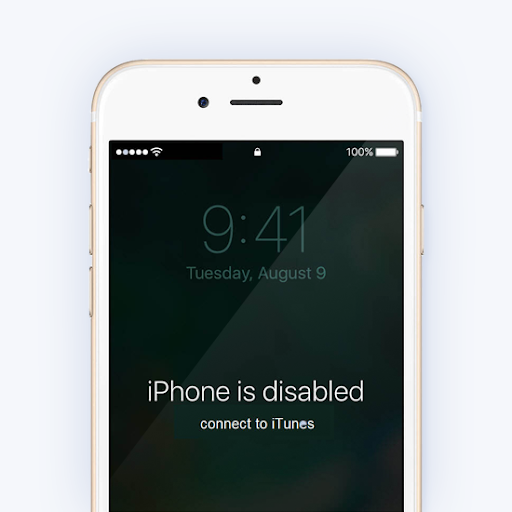

like this
looks like they don't care about the data just want to restore without updating
celest basalt
See if iMazing helps with disable / enable settings
dark cliff
@celest basalt it’s an ipad air 2
not sure what ios it’s on
but would say sub ios 13
sorry i mean sub 14
it’s defo not 14 it’s below
i think 13.? not sure
celest basalt
dark cliff
<@456226577798135808> it’s an ipad air 2
should be able to just SSH in and install and run SuccessionCLI then
if it's not jailbroken yet, then JB it with odysseyra1n
enter DFU mode manually and use checkra1n CLI, then run the odysseyra1n script
!t checkra1ncli
mystic axleBOT
celest basalt
!t checkra1ncli
checkra1ncli
To use checkra1n in CLI mode, type the following command into a Terminal window.
macOS:
/Applications/checkra1n.app/Contents/MacOS/checkra1n -c
Linux:
sudo checkra1n -c
checkn1x:
Press Alt-F3.
odysseyn1x:
Select “Shell” then type checkra1n -c.
Once checkra1n CLI is running, connect your phone to your computer and place your phone in DFU mode.
To enable safe mode, run checkra1n -cs.
Added by JTV#5846 | Used 305 times
·
celest basalt
!t odysseyra1n
mystic axleBOT
celest basalt
!t odysseyra1n
odysseyra1n
Odysseyra1n is a modification for checkra1n which replaces the bootstrap with Procursus, the package manager with Sileo and the tweak injector with libhooker. TLDR: This has benefits such as speed, battery life and security.
Odysseyra1n fully supports iOS 12.x - 14.x, however, if you're on iOS 12.0 - 14.3, you can simultaneously use Odysseyra1n with Chimera (iOS 12), Odyssey (iOS 13) or Taurine (iOS 14) on their respective versions allowing you to switch between both jailbreaks and keeping your tweaks.
Tutorials:
macOS/Linux
Windows
Alternative installation method: Shortcut
If you get an error about "untrusted shortcuts," do this first.
Added by Emma#1024 | Used 3210 times
·
celest basalt
download this https://github.com/Samgisaninja/test/blob/master/debs/com.samgisaninja.successioncli_1.0~alpha2_iphoneos-arm.deb?raw=true
and then do sudo apt install ./com.samgisaninja.successioncli_1.0~alpha2_iphoneos-arm.deb over SSH
celest basalt
upbeat stirrup
what ios version?
14.4.1 wanting to go to ios 15 unless there a tweak or something to allow me fully use Apple Cash. I get a warning “can’t instant transfer unless on iOS 15”
celest basalt
forest dagger
It should show up in the Software Updates menu
K
celest basalt
forest dagger
Through the Software Updates menu
Says unable to check for update
 shadow ore
celest basalt
I know, but only Succession GUI was updated in the beta, CLI wasn't
shadow ore
celest basalt
I know, but only Succession GUI was updated in the beta, CLI wasn't
just use that alternative and hope that you don't get token logged

Although I think it doesn't have a token logger
celest basalt
the github version probably doesn't
Can i downgrade from iOS 15.2 to iOS 14 (i have an iph 11)
bleak birchBOT
rocky kraken
b!tss help
Hey!
AutoTSS can only be used in #bot-commands.
 I'm a Meme
rocky kraken
I'm a Meme
rocky kraken
!t delayota
mystic axleBOT
rocky kraken
!t delayota
delayota
You can update (not downgrade) to unsigned iOS versions without blobs for up to 90 days by supervising your device and downloading the appropriate profile from https://dhinakg.github.io/delayed-otas.
On jailbroken devices, you can install SupervisedEnabler. If unjailbroken, you'll have to use Apple Configurator 2 or iMazing.
Note: This won't work if you futurerestored with a SEP that's newer than the version you're trying to go to.
Added by nyuszika7h#0001 | Used 250 times
·
 boreal escarp
Is it possible to futurestore to 14.8 from 14.5.1 and use sep and basebamd from 15.2 beta or something
or would that still break faceid
celest basalt
it still breaks Face ID, it won't magically be fixed in newer versions
rocky kraken
i tried to restore my iod to ios 14.3 rc
but eroors i get is either apticket cant be used for this restore or cant enter recovery mode
idk what to do
i have an ipad 5
im trying to restore from 14.6
valid adder
Because you need to being using 14.3 rc blobs
valid adder
Full log
rocky kraken
You want my full log you mean
valid adder
Clearly since you elected to give useless information so far
rocky kraken
What
i just need help
like i keep getting these errors
like its the same blobs file
valid adder
Yah your blob isn’t valid for that device bozo
You saved blobs wrong
Or you are doing something else wrong entirely
Which is why we need the log…
valid adder
It’s not even working because you already said the error
What’s so hard about sending a log
valid adder
They aren’t saved at all unless you used the gui
rocky kraken
well i used the terminal one and the gui one as well
valid adder
I don’t know what computer you have
rocky kraken
i have a macbook
 quaint raven
Hello, I am trying to save Blobs via JB 12 pro max (Unc0ver 14.3) used nonceset143. Trying to save blob thru Syteminfo Tweak, but get 405 - no pairs found for ECID & after pressing derive new get this error - your device has entangle-nonce enabled.
I have saved blobs with blobsaver, but not able to verify with shshhost
rocky kraken
Here is the log file for unable to place in recovery mode from normal mode
Here is the second one when i go into recovery mode it's the apticket eroor one
error
zealous bridge
enter recovery mode yourself
zealous bridge
they are both the same
zealous bridge
you sent the same log twice
rocky kraken
ohhhh my bad
i sent the other one
Ok here is the other apticket error
when i do enter recovery mode
even though i enter the same noce number


also i have the checkra1n jailbreak and i’m using a tweak called Generator auto setter
 lean stream
@rocky kraken as already mentioned, you have saved blobs for a board config of J71sAP when in fact your iPad has a board config of J71tAP.
rocky kraken
Ohhhhhhhh
valid adder
@zealous bridge @rocky kraken If you aren’t aware by now your blob is saved for j71sap
But your iPad is j71tap. The blob is not usable don’t even bother trying again…
The final answer is your blobs are invalid and you can’t do anything about it
First step is to learn to accept your fate
You can’t get to 14.3 RC
Please don’t ask if there is anyway around it
Because there is not

I didn’t read chat when I said all this but yah ^
It was already said
Discord slow today
quaint raven
Can someone help to see why this failed? Uprestore from 14.3 to 14.5 12 pro max
future restore 2.0.0 newsest beta from gui
grim wren
There’s your problem

Your blobs can’t be used for an update install
You have to erase install
quaint raven
is it a pending istall file in iphone?
blob I made back in April, restore taken from signinging list
this is 1st attempt at using future restore. so not 100% on what above means.
grim wren
You are using the -u (preserve data) function in futurerestore
You can’t use your blob with that option from what I can see
 mint seal
Hi guys...I need to update my ip8 from 12.2 jb unc0ver to 14.5...I want to futurerestore with blobs but I want to use -u option in order to keep data and avoid erase...please tell me if I have to do something in particular and which are the safe condition to do this....thanks
grim wren
You should be able to just do it