#futurerestore-help
1 messages · Page 211 of 1
 gloomy ore
 lilac wren
I recommend now
gloomy ore
ok thx i do that
 low summit
!t futurerestore
 mystic axleBOT
low summit
!t futurerestore
mystic axleBOT
low summit
!t futurerestore
futurerestore
futurerestore allows you to upgrade/downgrade/restore to unsigned iOS versions if you meet certain requirements.
Tutorials:
Tutorial
Video Tutorial
Links:
FutureRestore GUI
Latest stable version (194)
Latest beta version
There are currently no pre-compiled beta builds for Windows.
Added by Capt Inc#0001 | Used 145 times
·
gloomy ore
i have another question, in this page i verify the shsh2 file and is valid but the page don't show any generator


What generator do I put in?
 zealous bridge
@gloomy ore what device
gloomy ore
6s
zealous bridge
Show the ApNonce field
 viscid furnace

zealous bridge
Should say ApNonce and then a string after it, just screenshot it @gloomy ore
gloomy ore
zealous bridge
Show the ApNonce field
 zealous bridge
Hmm
viscid furnace
But you didn’t save blobs from iOS 12.3.1 to 14.7 
gloomy ore
its a shsh2 for ios 14.3
viscid furnace
Also what is santi2 doing rn
gloomy ore
viscid furnace
Also what is santi2 doing rn
i have that account for the free nitro xd
zealous bridge
Copy paste the apnonce here
zealous bridge
Nah it isnt a known nonce
If theres no generator in the blob then you might be screwed
Check your other blobs
viscid furnace
zealous bridge
If theres no generator in the blob then you might be screwed
What does this exactly mean
gloomy ore
ok...
viscid furnace
That the blob is invalid?
gloomy ore
the page say this xd
 zealous bridge
Well you can’t recreate the apnonce without the generator so they’re not invalid but you cant use them
viscid furnace
True
gloomy ore
hmm
viscid furnace
Tess checker should just say it’s invalid, it would do us a huge favor
gloomy ore
the shsh of ios 14.2 don't have a generator
 zealous bridge
What did you use to save blobs
gloomy ore
i was using this program to save the blobs
 gloomy ore
?
zealous bridge
blobsaver v2 is old and doesnt save generator
viscid furnace
Humongous rip
zealous bridge
it should be using 0x111… as generator but apparently not
gloomy ore
no
well thanks for the help in all the ways, do you know any convenient way to save the files and that they work with generator and everything?
zealous bridge
!t blobs
mystic axleBOT
zealous bridge
!t blobs
blobs
[[shshd]] is preinstalled on Chimera, Odyssey(ra1n) and Taurine which will automatically save your blobs weekly. Run sudo shshd in a terminal (such as NewTerm 2) to manually save your blobs and get a download link.
Added by nyuszika7h#0001 | Used 897 times
·
zealous bridge
Literally any one of them will do everything
gloomy ore
that tweak
gloomy ore
zealous bridge
Literally any one of them will do everything
ok thx
zealous bridge
Also use @bleak birch in #bot-commands if you want to set it and forget it
gloomy ore
ok thx bro, the next time i will have the files
but the latest version of blobsaver saves the generator ?
or do you recommend me use the tweak TSS Saver ?
zealous bridge
Yes, if you’re on a Procursus jailbreak you should also have shshd
gloomy ore
zealous bridge
Yes, if you’re on a Procursus jailbreak you should also have shshd
whats that ? jajaja
zealous bridge
[[shshd]]
mystic axleBOT

shshd
SHSH blob saving daemon
 shshd • Page 1/1
·
zealous bridge
shshd • Page 1/1
·
zealous bridge
Procursus jailbreak is Odyssey, Taurine, Odysseyra1n anything made by CoolStar really
viscid furnace

 viscid furnace
don’t tell them I’m planning to use u0 the second it gets updated
 shadow ore
zealous bridge
Procursus jailbreak is Odyssey, Taurine, Odysseyra1n anything made by CoolStar r...
shadow ore
zealous bridge
Procursus jailbreak is Odyssey, Taurine, Odysseyra1n anything made by CoolStar r...
Electra 
subcursus 
 shadow ore
Subcursus still work just not as good as Odysseyra1n
viscid furnace

 queen halo
hey sorry for super late follow up, ive been trying again and still can't get it to work. it seems idevicerestore can't seem to connect to the device when it's in pwned dfu mode. i wonder if there are other ways to patch iboot and manually boot into that dualboot
also: when looking into inferius it says these tools can be used to boot:
Ramiel
checkra1n
PyBoot
ra1nsn0w
i can't get checkra1n to work with adding rd=disk1s0s2 or whatever as boot args as it says usbmuxd connection denied and the device just boots into 14.4.2
lilac wren
You're on Mac right
lilac wren
big sur?
queen halo
the big problem seems to simply be that irecovery can't connect to the device while in pwned dfu mode.
lilac wren
what was the idevice
queen halo
6s
lilac wren
is it in fake dfu where the screen is still on
lilac wren
that should be real dfu
queen halo
yeah
lilac wren
latest irecovery version?
queen halo
i installed irecovery from brew i believe? not sure if that makes a difference

should i use --HEAD
lilac wren
try it
 lilac wren
lol how
lilac wren
oh
queen halo
hm.
lilac wren
but irecovery detects it now?
queen halo
 lilac wren
ooh nice
queen halo
it got verbose for a little then uh
recovery
huh somehow eclipsa is being super reliable now 
ahhhh nooo unable to connect to device
lilac wren
aww what
 lilac wren
🤞
queen halo
uhh
it gets 3 bars done then dies
yeah now it cant connect
seems to be unreliable
the first time i got the boot logo correct
lilac wren
welp
the big yoshi?

queen halo
yeah
i think if it fails once it fails until you reboot
also
in divise it shows 2 partitions, which to use with -d?
lilac wren
it should have given you one right after the install
I could rejailbreak and let you know but it'd take a bit
queen halo
i gotta work on this tomorrow anyways :)
thanks, if you could look that would help a lot :D
lilac wren
np
lilac wren
I kinda miss when m1sta would drop random phrases here and seem like a bot
 valid adder
I ain't talkin religion but baby I'm a god
 rustic blaze
Is Fr supported on Mac OS high sierra
viscid furnace
the page says high sierra but I've heard from multiple people including me saying it works on sierra

viscid furnace
everyone liked that
 toxic lotus
everyone liked your mother’s sex
low summit
Sex as in gender?
valid adder

 vagrant badge
can I use futurestore and shsh to install a custom ipsw on an iPhone ?
 plain mist
vagrant badge
can I use futurestore and shsh to install a custom ipsw on an iPhone ?
plain mist
vagrant badge
can I use futurestore and shsh to install a custom ipsw on an iPhone ?
No
vagrant badge
Okay ty
viscid furnace
@vagrant badge define custom ipsw
lilac wren
how to get 'd 101 ^
plain mist
viscid furnace
<@!636217706210656276> define custom ipsw
#ifndef CUSTOM_IPSW
#define CUSTOM_IPSW
#endif
valid adder

vagrant badge
viscid furnace
<@!636217706210656276> define custom ipsw
An ipsw that I edited previously (I have an iPhone iCloud locked so I want to use an ipsw without the iCloud activation/registration in the config.app)
But I also wonder for an unsigned ipsw
lilac wren
vagrant badge
An ipsw that I edited previously (I have an iPhone iCloud locked so I want to us...
Have you tried just turning off iCloud lock normally
viscid furnace
vagrant badge
An ipsw that I edited previously (I have an iPhone iCloud locked so I want to us...
viscid furnace
lilac wren
...
I got 'd by the nicest guy here

 shy magnet
vagrant badge
An ipsw that I edited previously (I have an iPhone iCloud locked so I want to us...
shy magnet
vagrant badge
An ipsw that I edited previously (I have an iPhone iCloud locked so I want to us...
lmao you know mods don’t check this channel when this messages been up for an hour
viscid furnace
shy magnet
lmao you know mods don’t check this channel when this messages been up for an ho...
unnesesary ping time
!t icloudbypass someone had to do it
mystic axleBOT
viscid furnace
!t icloudbypass someone had to do it
icloudbypass
Discussion of iCloud/Activation Lock/passcode bypass, asking how to do it, or posting about it is not allowed. No, it doesn't matter if the phone is yours or not. We will not help you with it.
How to remove Activation Lock - Apple Support
If you forgot the passcode on your iPhone, or your iPhone is disabled - Apple Support
Added by JTV#5846 | Used 133 times
·
viscid furnace
vagrant badge
An ipsw that I edited previously (I have an iPhone iCloud locked so I want to us...
yes for the unsigned iPSW part
vagrant badge
viscid furnace
yes for the unsigned iPSW part
Okay ty
vagrant badge
lilac wren
Have you tried just turning off iCloud lock normally
I tried to dm the seller but he doesn't answer
plain mist
Just to make sure  @valid adder
also gotta tell him that the new ipwndfu seg faults 
Even tho it worked for him on A9

low summit
Yea
plain mist
iBoot64Patch: Patches applied!
Sending iBSS (522377 bytes)...
[==================================================] 100.0%
Booting iBSS, waiting for device to disconnect...
irecv_event_cb: device 000c3850002b003a (udid: N/A) disconnected
Booting iBSS, waiting for device to reconnect...
irecv_event_cb: device 000c3850002b003a (udid: N/A) connected in Recovery mode
Sending iBEC (522377 bytes)...
[==================================================] 100.0%
Booting iBEC, waiting for device to disconnect...
zsh: segmentation fault /Users/urmom/Desktop/FutureRestore/futurerestore-x86_64-v2.0.0-test -t```I could’ve sworn to god we had issues before with it freezing at sending iBEC
viscid furnace

plain mist
valid adder
Yah then it’s not fixed above a9
Woe
But why would it seg fault for diff chipsets
valid adder
@celest basalt haven’t been to 13 since 14.2 sep although fr could also just need fixes for 13 but it fails on fdr trust seal request to apple also fails on baseband fdr trust request
valid adder
plain mist
But why would it seg fault for diff chipsets
Trying to execute a recovery call in dfu or vise versa
The entire think should be rewritten
plain mist
Without baseband? Is the only thing you did --no-baseband?
I'm not sure tbh but I don't think that's enough
@valid adder what did you do to sacrifice bb
valid adder
Tried it but stupid fdr apple denied request
14.0 -> 13.7 no baseband 6s
Failed with fdr request to apple
The downgrade homies call it fucking device restore because it’s fucking annoying
Seems to be a local proxy of some sort that also handles trust request to apple
I can send the fail log probably
plain mist
Just remove FDR from the iPSW 💯
 verbal moat
Hiya, is there futurerestore for windows? Need to restore my SE 1st gen
I have the blobs
I found futurerestoreGUI while searching the subreddit
I'll give it a shot
valid adder
Use beta nightly with the gui if possible
verbal moat
Ok
Btw I'm restoring to iOS 14.4.2
With latest sep and BB
Followed this guide https://ios.cfw.guide/futurerestore
iOS Guide
Guide to using FutureRestore to restore your device
Let's GOO! RESTORE FINISHED
lilac wren
Congrats
verbal moat
Thx lol
lilac wren
Haha love the flair change already
verbal moat
Wait if I'm correct, you're the dev of futurerestoreGUI right?
low summit
Froggy is yes
verbal moat
Damn!! Big ups to Froggy
The GUI makes it tons easy
Well thanks a lot to everyone!! Time to jailbreak my iPhone once again!!
valid adder
I’m the maintainer of futurerestore @verbal moat 
verbal moat
Ooo that's great!! Thanks to you bud for maintaining futurerestore!!
Little question, what would happen, if flash an incompatible sep and BB of a future iOS version? Does futurerestore have any protection to protect the user from doing such a thing?
plain mist
verbal moat
Little question, what would happen, if flash an incompatible sep and BB of a fut...
@zealous bridge
zealous bridge
verbal moat
Little question, what would happen, if flash an incompatible sep and BB of a fut...
You will get an FDR loop/abort
zealous bridge
If it’s SEP it’ll most likely be non-fatal, while BB would likely be fatal
verbal moat
Hmm if incompatible BB was flashed would the device be usable?
zealous bridge
You would need to restore to latest iOS most likely
verbal moat
Oh big oof
I thought incompatible BB would hard brick the device, like do some hardware damage
verbal moat
Ok, thanks mate
plain mist
zealous bridge
Nah thats impossible
the iphone wiki disagre-
 verbal moat
plain mist
the info is based off 3gs info
verbal moat
plain mist
the info is based off 3gs info
Oh yeah, I just checked, no reference there to any modern device
Someone should apparently update that ig
viscid furnace
@plain mist haha L I just saved your blobs
toxic lotus
hahahaha L
low summit
L
valid adder
?
plain mist
rustic blaze
got a iphone 8 on ios 14.7 how fortunate iam
Wdym
 celest basalt
rustic blaze
got a iphone 8 on ios 14.7 how fortunate iam
celest basalt
rustic blaze
got a iphone 8 on ios 14.7 how fortunate iam
Your decent
 ornate spire
rustic blaze
got a iphone 8 on ios 14.7 how fortunate iam
ornate spire
rustic blaze
got a iphone 8 on ios 14.7 how fortunate iam
no?
verbal moat
So when futurerestore uses the latest baseband and sep, does it take it from an iOS beta version (or from the ipsw file which I have loaded?) or the latest available compatible bb and sep for the device and iOS version
I'm very curious about that part of it
lilac wren
Nope
verbal moat
Hmm
lilac wren
You could easily fail if it's incompatible
lilac wren
Np
verbal moat
Oo so I saw, when it was downloading the sep and bb it took it from iOS 14.7.1
zealous bridge
verbal moat
Oo so I saw, when it was downloading the sep and bb it took it from iOS 14.7.1
Yes because nothing else is signed so it has to take it from that version
verbal moat
Oh ok thanks man
plain mist
Why not make it so that fr has to be updated every time a version is unsigned tbh /s
 plain mist
 celest basalt
can we still downgrade fro ios 14.7.1 to ios 14.6?
plain mist
as long as u got dem blobs yea
valid adder
!t sepbb
mystic axleBOT
valid adder
!t sepbb
sepbb
Currently you can restore to the following versions with the latest SEP and baseband for your device:
Devices that only support up to iOS 12 (most A7 and A8 devices excluding iPad5,1 - iPad5,4): 11.3-12.5.4
A9 and A10: 14.0-14.7.1
A11 devices: 14.3-14.7.1
A12 devices and newer: 14.0-14.7.1
Added by Tanbeer#4750 | Used 62 times
·
celest basalt
hm okay thanks
valid adder
@celest basalt not sure why you thought it would change all of a sudden
celest basalt
@valid adder im just on ios 15 rn and thinking about trying out the manticore jb whenever it drops
i wanna go back to ios 14.3 so i can use unc0ver
celest basalt
ah alright
celest basalt
honeslty im not sure whats been going on i havent been active sooo thats kinda new
plain mist
celest basalt
honeslty im not sure whats been going on i havent been active sooo thats kinda n...
Basically
Manticore is not real
It's not dropping
That's why it's as real as the game that's never coming out
Downgrade to 14.7.1
What device are you using
celest basalt
iphone 8
plain mist
There's already a jb
Checkra1n
Only for iOS 14
No passcode, Apple Pay, or touchID tho
valid adder
@celest basalt I mean that it can be expected to be released because they have never released a jailbreak before
toxic lotus
plain mist
manticore is literally as real as half life 3
me and the manticore team will prove you wrong 
plain mist
toxic lotus
me and the manticore team will prove you wrong <:vexxedtomato:810341852007628802...
Shiver my timber's
valid adder
@plain mist check dev
plain mist
 half burrow
Hello its me again I'm trying to restore an iPad Air 4 Wifi. My command is futurerestore-v2.0.0-test --apticket "/home/shorty/Downloads/5480893695131678_iPad13,1_j307ap_14.5-18E199_c7cc27f4fa8e29176d21b9028fb3460a892ab179ca88ead156a21fc5f3fe47b2.shsh2" -d --latest-sep --no-baseband "/home/shorty/Downloads/iPad_Fall_2020_14.5_18E199_Restore.ipsw". It gets stuck at Got ApNonce from device:
We did some debugging previously and it we think we figured out where it got stuck (see: #futurerestore-help message)
If anyone had any more info that might help or is willing to take some time to help me debug more that would be lovely. Thanks
zealous bridge
half burrow
Hello its me again I'm trying to restore an iPad Air 4 Wifi. My command is `futu...
its a bug with entering recovery we confirmed
half burrow
I'm in recovery already
zealous bridge
basically libirecovery in latest futurerestore is built with a macos specific dependency, so it breaks everytime you use it on Linux
zealous bridge
macos should work with latest
zealous bridge
Should work
half burrow
I'll see if I can find it
verbal moat
He’s using v2.0.0 won’t an older version fix the issue?
Or older versions too contain the problem?
half burrow
👀
 zealous bridge
verbal moat
Or older versions too contain the problem?
zealous bridge
verbal moat
Or older versions too contain the problem?
Not sure which exact commit breaks it, but you do need a new enough version so that the wifi only ipad fix is included
verbal moat
Oh ok
lilac wren
half burrow
👀
Take viteman E
valid adder
bozo using lightmode terminal
half burrow
valid adder
bozo using lightmode terminal
in my defence I rarely use the device and idk how to change it
 stable fossil
Hello! I’m currently on 14.7 and I have my 14.3 shsh blob - can I still downgrade to 14.3 using future restore?
 lost crane
half burrow
I'll see if I can find it
lost crane
half burrow
I'll see if I can find it
Try to use GUI from https://github.com/CoocooFroggy/FutureRestore-GUI/releases/tag/v1.91

GitHub
What's new:
No SEP option for devices without SEP
Bug fixes:
GitHub version can be prefixed with v for consistency
--just-boot="v" arg actually works now
Fixed GUI not representing...
lilac wren
stable fossil
Hello! I’m currently on 14.7 and I have my 14.3 shsh blob - can I still downgrad...
yes if you can jailbreak
stable fossil
lilac wren
...
Omg I forgot I need to be jailbroken to downgrade… so no it’s a XR but thanks for the reply
low summit
Xr hmmm sounds like froggy
plain mist
@valid adder why did fr start using iokit libirecovery
plain mist
just asking
plain mist
valid adder
because libusb is broken
Oh
valid adder
its more so libirecovery is broken when using libusb
valid adder
idk yet
half burrow
lost crane
Try to use GUI from https://github.com/CoocooFroggy/FutureRestore-GUI/releases/t...
how would that help?
plain mist
It wouldn't
 wary marsh
Wait, I can’t restore my Iphone 12 even tho i have blobs?
zealous bridge
You need a jailbreak to downgrade
zealous bridge
Whoever told you that is stupid
However there is a way to do it without jailbreaking
But you probably need to know the method at the time you saved blobs
And you needed to have used the python script or blobsaver v3
wary marsh
Wdym by that, I saved 14.6 and 14.7 blobs like a day or two after the release of 14.7
zealous bridge
what version are you on now
wary marsh
I was on 14.7.1 and yesterday i upgraded to 15 beta 5
zealous bridge
Yeah double rip
If you want to maybe downgrade unjailbroken you need to stay on the version you saved blobs on
plain mist
zealous bridge
Whoever told you that is stupid
Rule 1
dumb ass tanbeer violating rule 1
zealous bridge
Sue me
 brittle olive
Is it doable to upgrade from 14.3 to 14.7 for A14 with Blobs saved ?
plain mist
Yes but why??
brittle olive
brittle olive
https://discord.com/channels/349243932447604736/688124783400845336/8699781279783...
Is it that one ?
plain mist
Yes
low summit
.
low summit
are u dumb
viscid furnace

plain mist

bruh i fucked my librecovery
gmake  all-recursive
gmake[1]: Entering directory '/Users/urmom/libirecovery'
Making all in src
gmake[2]: Entering directory '/Users/urmom/libirecovery/src'
gmake[2]: *** No rule to make target 'libirecovery.c', needed by 'libirecovery_1_0_la-libirecovery.lo'.  Stop.
gmake[2]: Leaving directory '/Users/urmom/libirecovery/src'
gmake[1]: *** [Makefile:425: all-recursive] Error 1
gmake[1]: Leaving directory '/Users/urmom/libirecovery'
gmake: *** [Makefile:357: all] Error 2```
 dusk salmon
My xr need to be upgrade to 14.7.1 to fix some errors, can I downgrade to 14.3 with FR? I have shsh2
low summit
No
dusk salmon
low summit
No
Why?
low summit
U need a jailbreak
dusk salmon
Set nonce?
low summit
Yes
dusk salmon
No tools can set nonce without jailbreak?
low summit
no
lilac wren
checkm8 nonce setter
dusk salmon
lilac wren
...
Can use on my XR?
lilac wren
no
dusk salmon
So now is no way to downgrade my XR?
lilac wren
no
low summit
Froggy lmao
dusk salmon
lilac wren
...
Need to wait for 14.7.1 jb?
lilac wren
yes
 rough pollen
GitHub
A cross-platform interface for FutureRestore, written in Java with Swing - CoocooFroggy/FutureRestore-GUI
valid adder
!t futurerestore
mystic axleBOT
valid adder
!t futurerestore
futurerestore
futurerestore allows you to upgrade/downgrade/restore to unsigned iOS versions if you meet certain requirements.
Tutorials:
Tutorial
Video Tutorial
Links:
FutureRestore GUI
Latest stable version (194)
Latest beta version
There are currently no pre-compiled beta builds for Windows.
Added by Capt Inc#0001 | Used 151 times
·
viscid furnace
rough pollen
https://github.com/CoocooFroggy/FutureRestore-GUI/releases this is good?
Wow, I wonder. Totally can't ping the dev tho, right?
 lilac wren
oh that program
is bad
dev is stupid
plain mist
lilac wren
...
It bricked my phone
smh
 swift notch
can some-one help me
img4tool is somehow messing up
i have matching blobs and nonce but still not working
lilac wren
swift notch
img4tool is somehow messing up
what's the issue
swift notch
i just just fixed it
lilac wren
ok
swift notch
thanks for reacting
when i downloaded the latest non gui it didnt work but in the gui it did
 covert lily
There's a GUI for img4tool?
zealous bridge
Don’t think so…?
valid adder
covert lily
There's a GUI for img4tool?
Would be cringe ngl
celest basalt
is it possible to upgrade from 14.4 to 14.6 (i have 14.6 blobs)
zealous bridge
If you can jailbreak then yes
celest basalt
wait so i have to be jailbroken for that to be possible
zealous bridge
yes so you need to be on iPhone X or older
If you saved blobs with blobsaver v3 and havent updated/restored since then you should also be able to @celest basalt
celest basalt
rip cuz i have an A14 device
yea i saved thru blobsaver
and i have 14.6 blobs and im still on 14.4
zealous bridge
did you save blobs while you were on 14.4?
And did you use the Unjailbroken button


 zealous bridge
celest basalt
zealous bridge
celest basalt
Yeah your blobs are invalid lol
If thats the preset
You shouldve saved it with v3.0.1 “Read from device” feature
celest basalt
tbh a blob checker could incorporate something like this
if A12+ and your apnonce is one of the common ones
then warn that it’s like 99% chance it’s invalid
zealous bridge
celest basalt
then warn that it’s like 99% chance it’s invalid
no its 18,446,744,073,709,551,998 in 18,446,744,073,709,552,000 chance its invalid
plain mist
celest basalt
tbh a blob checker could incorporate something like this
I wish img4tool would check if the APNonce/generator combination for a12+ matches
zealous bridge
lol just steal aes key
plain mist
@zealous bridge would it be possible for img4tool to check the combination
zealous bridge
A standalone program could be made to grab aes key and check pair validity
celest basalt
just set the generator with dimentio and compare 
plain mist
celest basalt
just set the generator with dimentio and compare <:troll:794397046706667530>

printer cat
celest basalt
cute
valid adder
 lilac wren
valid adder
lilac wren
valid adder
Are they yours
valid adder
Yah that’s my dog
lilac wren
Are they a labradoodle
valid adder
Multipo
lilac wren
They look super cute and squishy
valid adder
valid adder
Multipo
@lilac wren
valid adder
It’s the breed yes
 strange marten
Good evening everyone,
I have never dealt with FutureRestore!
But now that I have the possibility to use a jailbreak for MantiCore, I would like to downgrade my iPhone 11 Pro Max with 14.7 to 14.6 because I have this version as a blob. Can someone help me and explain how I do this?
But unfortunately I do not have a Mac.
Thank you
zealous bridge
strange marten
Good evening everyone,
I have never dealt with FutureRestore!
But now that I hav...
You need a jailbreak to use futurerestore
So no
strange marten
So now I have no way to use the jailbreak or downgrade? 😦 @zealous bridge
zealous bridge
Nope
strange marten
Fu*# 😦
viscid furnace
plain mist
It bricked my phone
months ago when I was a whitename You were literally arguing with me about whether a soft brick exists
lilac wren
strange marten
Good evening everyone,
I have never dealt with FutureRestore!
But now that I hav...
Did you save blobs with blobsaver 3.0
 coarse igloo
jkaw
celest basalt
joe
 pastel nest
viscid furnace
<:fr:712506651520925698>
pastel nest
viscid furnace
<:fr:712506651520925698>
im whitename :|
i usually read chats but i chat myself rarely
strange marten
lilac wren
Did you save blobs with blobsaver 3.0
Yes :0
lilac wren
Then you can try FutureRestore
strange marten
lilac wren
Then you can try FutureRestore
Will it work safely?
I don't want to have to update to 14.7.1 if it doesn't work because the jailbreak won't work here from MantiCore.
lilac wren
What version are you on right now
strange marten
lilac wren
What version are you on right now
To 14.7. I wrote to the developer last night, he said that he currently only supports 14.6 at most, but they are working on supporting 14.7 as well, but this will take time. So wanted to 14.6 to finally after ages again to use a jailbreak with my new iPhone.
zealous bridge
@strange marten did you update since saving blobs
lilac wren
but what version are you on right now
strange marten
zealous bridge
<@466547353952714752> did you update since saving blobs
I had to update to 14.7 yes. But the blob for 14.6 I have through blobsaver
lilac wren
Oh I see
zealous bridge
@lilac wren so wyoa
strange marten
lilac wren
but what version are you on right now
14.7
 zealous bridge
lilac wren
Then you can try FutureRestore
zealous bridge
lilac wren
Then you can try FutureRestore
what do you mean by this
zealous bridge
lilac wren
I don't speak British
r u stupid
lilac wren
zealous bridge
what do you mean by this
That he should try FutureRestore
lilac wren
The easiest way to check if your nonce matches is by checking if your nonce matches
lilac wren
zealous bridge
it wont work after updating
At least I'm not the one saying it requires a jailbreak lol
lilac wren
Not on a11
strange marten
lilac wren
The easiest way to check if your nonce matches is by checking if your nonce matc...
How do I do it?
lilac wren
You do not need a jailbreak to use FutureRestore, you do not need a jailbreak to downgrade to an unsigned version
zealous bridge
You do if you update
lilac wren
Only if you keep your nonce safe
zealous bridge
Which he did
strange marten
lilac wren
You do not need a jailbreak to use FutureRestore, you do not need a jailbreak to...
and how do i check the noce?
As I said, I have never dealt with the subject
zealous bridge
Easiest way to check nonce is to use futurerestore
But it wont match since you updated
strange marten
zealous bridge
Easiest way to check nonce is to use futurerestore
So all I can do is stay on 14.7 and hope that MantiCore will eventually work on it.
zealous bridge
Wait till any jailbreak comes out, then you can downgrade all you want
lilac wren
strange marten
So all I can do is stay on 14.7 and hope that MantiCore will eventually work on ...
Start saving blobs with new nonce
strange marten
zealous bridge
Wait till any jailbreak comes out, then you can downgrade all you want
Okay thanks !
zealous bridge
np
strange marten
lilac wren
Start saving blobs with new nonce
Thank you
Then I just hope that my iPhone 11 Pro Max with 512 GB gets a jailbreak. I got myself the "luxury" device xD
Thank you guys, now it is further be patient
 proud basin
I’m using iPhone 7 iOS 14.7.1. Possible to downgrade to iOS 14.3 I don’t have the shsh blobs!!!
zealous bridge
no
proud basin
Can u advice me
proud basin
low summit
advise u what
Thank u
 pine epoch
I am currently jailbroken with checkra1n on iOS 13.7. Is it possible for me to future restore to 14.5 without screwing up my Face ID? I’m on an iPhone X and I do have blobs
14.5.1*
toxic lotus
nah
toxic lotus
pine epoch
Cool cool I figured
yea but if you jailbreak you won’t be able to use face id
i thought that’s what you were asking about
pine epoch
Well that only applies to checkra1n
Pwnmy shouldn’t have that issue because it doesn’t need to bypass SEP
viscid furnace
pastel nest
i usually read chats but i chat myself rarely
rarely
pathetic
toxic lotus
who said pwnmy is gonna release 😹
plain mist
toxic lotus
who said pwnmy is gonna release 😹
it literally won't
low summit
manticore is a joke at this point
viscid furnace
this tbh
low summit
who still waiting for that shit?
viscid furnace
uhh
plain mist
rpawnage always making excuses
toxic lotus
depending on stability
low summit
u better off waiting for some other shit
plain mist
toxic lotus
me
he just got a 14.4 on a13 LOL
viscid furnace
why are you waiting for a jb for a version that has already been jben
viscid furnace
maybe immense jb detection ngl
viscid furnace
 viscid furnace

plain mist

viscid furnace

viscid furnace
FINALLY
 viscid furnace

plain mist
its "very rare" to see people have it every day
literally seen days where 5+ would have it
at the same day
but sure, how rare
low summit
iboot guy said someone got a mem leak
plain mist
low summit
iboot guy said someone got a mem leak
its not useful
low summit
of course it aint
low summit
we dont really need a14 tbh
plain mist
lol
low summit
i have a12
plain mist
yea but that means a whole new generation wont be getting checkm8 if a memory leak comes out
it could be a14+ instead of a12+ now
low summit
checkm8 is like 100 percent patched in a14 ngl
plain mist

 viscid furnace
plain mist

viscid furnace
this whole chat is one big nfr
plain mist
.
viscid furnace
wen eta a12/a13/a14 checkm8 support
plain mist
viscid furnace

plain mist
low summit
viscid furnace
wen eta a12/a13/a14 checkm8 support
a14 never
plain mist

 low summit
go ahead
plain mist

low summit
apple is legit changing bootrom every year now
viscid furnace
viscid furnace
low summit
apple is legit changing bootrom every year now
they're scared of another checkm8
plain mist
low summit
apple is legit changing bootrom every year now
yea thats normal ?
low summit
means a bootrom exploit is only gonna be chip specific
viscid furnace
low summit
means a bootrom exploit is only gonna be chip specific
the iPhone 7 was released in 2016
the iPad 7/iPod Touch 7 was released in 2019
viscid furnace
viscid furnace
the iPad 7/iPod Touch 7 was released in 2019
also the iPad 6 was released in 2018
 quiet lagoon
Someone there can help problem device have banned dont linked?
<@&355145545242902548>
zealous bridge
quiet lagoon
Im still waiting reply messenger support 36hrs on email and twitter, nobody reply me
celest basalt
quiet lagoon

quiet lagoon
celest basalt
<:frcoal:784338955759517696>
You can help me bro?
celest basalt
quiet lagoon
You can help me bro?
What you want
quiet lagoon
I buy cputool and i cant linked device because have banned from Packix, idn why
You can help me unban or support me how to unban
celest basalt
I have no idea what that is
toxic lotus
bro tell this mf aaron to help you
viscid furnace
quiet lagoon
<@&355145545242902548>
 rocky light
hey, can I upgrade from 14.4 to 14.7 (iphone 6s +)?
mystic axleBOT
low summit
!t delayota
delayota
You can update (not downgrade) to unsigned iOS versions without blobs for up to 90 days by installing SupervisedEnabler and downloading the appropriate profile from https://dhinakg.github.io/delayed-otas.html.
Added by nyuszika7h#0001 | Used 68 times
·
 cinder citrus
Is there any method to update from 13.3 to 14.3? Blobs are not available for 14.3
 mystic axleBOT
viscid furnace
!t sepbb
mystic axleBOT
viscid furnace
!t sepbb
sepbb
Currently you can restore to the following versions with the latest SEP and baseband for your device:
Devices that only support up to iOS 12 (most A7 and A8 devices excluding iPad5,1 - iPad5,4): 11.3-12.5.4
A9 and A10: 14.0-14.7.1
A11 devices: 14.3-14.7.1
A12 devices and newer: 14.0-14.7.1
Added by Tanbeer#4750 | Used 65 times
·
toxic lotus
wtf do you be saying bro
 plain mist
@viscid furnace what the actual fuck are you talking abt
It doesn’t matter your current version except for like
The a11 14.0-14.2 exception
I could be on fucking iOS 6 but if I had iOS 14.3 blobs the restore WILL work
viscid furnace
toxic lotus
viscid furnace
literally what's odd about what I said
it only wouldn’t work if he was downgrading
cinder citrus
mystic axle
My device is iphone 11 pro max so i guess i cant use this method?
plain mist
cinder citrus
My device is iphone 11 pro max so i guess i cant use this method?
Yes you can
!t futurerestore
mystic axleBOT
plain mist
!t futurerestore
futurerestore
futurerestore allows you to upgrade/downgrade/restore to unsigned iOS versions if you meet certain requirements.
Tutorials:
Tutorial
Video Tutorial
Links:
FutureRestore GUI
Latest stable version (194)
Latest beta version
There are currently no pre-compiled beta builds for Windows.
Added by Capt Inc#0001 | Used 161 times
·
cinder citrus
plain mist
Yes you can
I've watched those tutorials the only blobs that are available are the signed ones. Those are: 14.7.1/14.7.1-ota/. There are no older blobs available for a lower ios version eg 14.3
plain mist
cinder citrus
I've watched those tutorials the only blobs that are available are the signed on...
Wait so
You don’t have 14.3 blobs?
cinder citrus
No I never saved those
and 14.3 is not signed anymore so there is no way to get them i think
plain mist
Nah so you can’t upgrade
cinder citrus
I just found out all about blobs, I wish I knew earlier to save older ones and futureproof
viscid furnace
time machine time
viscid furnace
plain mist
I could be on fucking iOS 6 but if I had iOS 14.3 blobs the restore WILL work
FUTURERESTORE ERROR: failed to peform restore due to:
iOS 6 is king and iOS 14 is crap
viscid furnace
strange marten
So all I can do is stay on 14.7 and hope that MantiCore will eventually work on ...
manticore can but it'll take longer(because you think manticore is pwnmy ) but pwnmy literally can't ever work on it
 high smelt
What can iphone x downgrade too?
zealous bridge
14.3+
high smelt
Oh sickk
zealous bridge
need blobs ofc tho
high smelt
Turns out im missing 14.3 :/
zealous bridge
 high smelt
OKay Im ready to flash. You dont need latest signed ios?

 zealous bridge
Yes
 zealous bridge
Np gg
 zealous bridge
I will commit a hate crime
viscid furnace
viscid furnace
someone deleted /var yet?
viscid furnace
read my name
 zealous bridge
what device
celest basalt
iphone 12 pro
celest basalt
 zealous bridge
and tick "futurerestore beta"
celest basalt
kk
zealous bridge
then download futurerestore again
plain mist
@zealous bridge bro
celest basalt
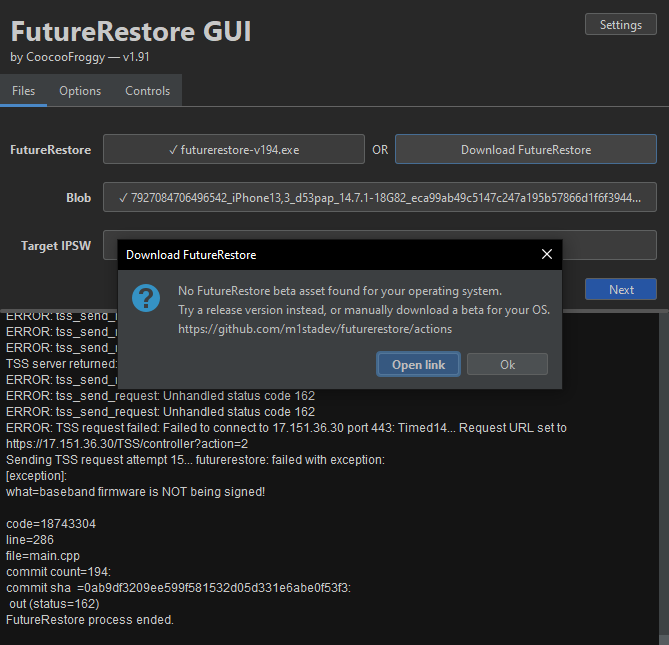 plain mist
this is a windows mf
zealous bridge
boot linux
celest basalt
where do i get that
zealous bridge
you cant
celest basalt
how do i use 14.3 blobs then
zealous bridge
sad
 viscid furnace
plain mist
why are you fring to 14.7.2
viscid furnace
plain mist
why are you fring to 14.7.2
as if that's a real iOS version
 stiff hazel
zealous bridge
which was back in march
stiff hazel
zealous bridge
which was back in march
no it was more like early February. 14.4 released on January 26th, 2021 and 14.3 RC1 didn’t get unsigned until February 9th, 2021
plain mist
@stiff hazel 14.4+ has been the longest version to ever wait for a jb on a12+
218 days AND COUNTING
 lethal carbon
uhhh guys can i future restore if i havent saved any blobs, im on 14.6. i dont even know what a blob is
plain mist
no
lethal carbon
frick, im trying to jailbreak my ipad on checkra1n but it wont let me jailbreak on 14.6
ornate spire
lethal carbon
frick, im trying to jailbreak my ipad on checkra1n but it wont let me jailbreak ...
enable untested versions in options
 gray tangle
ipad air 2019 on 13.5 u0. have blobs for everything including desired target 14.3. before i begin, I want to double check with you. 1) where to run FR on to have the fewest errors? i have linux, mac, windows. 2) i want to update, not restore. can I do this again? done it before: save tweaks, backup phone, double check the nonce, restore rootfs with u0 (with something else?), FR, jb, restore tweaks.
blobs with shsh.host from system info tweak
zealous bridge
- mac
- you can update yes
gray tangle
any particular macos to avoid or prefer?
gray tangle
i have bigsur mojave monterey
zealous bridge
dont really matter
plain mist
this man has the entire no 32bit squad
 ocean vine
mojave has 32 bit support
plain mist
hush
shadow ore
catalina has 32 bit support in kernel disabled by default and no userspace 32 bit support
And can create 32 bit code segments in 64 bit process
plain mist
HUSH
viscid furnace
plain mist
<@!305546263578017793> 14.4+ has been the longest version to ever wait for a jb ...
iPhoneOS 1.1
I mean a12+ didn’t support it so

gray tangle
wtf did just happen? https://0bin.net/paste/7gvZh52o#PGclK7Xg-l20zYfaPsBsQwRg4qykESfmkLBy6D0SApl
blob was ok, but why FR failed?
zealous bridge
what device
zealous bridge
to what version
gray tangle
used this FR https://nightly.link/m1stadev/futurerestore/workflows/ci/test from this tutorial https://idevicecentral.com/ios-downgrade/how-to-use-futurerestore-to-downgrade-or-upgrade-to-unsigned-ios-versions/ on macos bigsur
13.5 to 14.3
zealous bridge
gray tangle
wtf did just happen? https://0bin.net/paste/7gvZh52o#PGclK7Xg-l20zYfaPsBsQwRg4qy...
@valid adder a12 fdr abort to 14.3 on 234
gray tangle
what are my options at this stage? right now for a brief moment it rebooted to apple logo, then returned after a few seconds to connect to itunes scree.
zealous bridge
exit recovery in futurerestore gui
gray tangle
-e in cli is okay? i don't have fr gui
zealous bridge
yes its the same thing
gray tangle
as a last step before FR i did restore rootfs in u0. i remember u0 saying something like it didnt find the snapshot name to be named orig-fs but something else
could that be a cause?
zealous bridge
no this error is SEP-related
zealous bridge
gray tangle
as a last step before FR i did restore rootfs in u0. i remember u0 saying someth...
this error is likely a result of you updating without restoring rootfs
you shouldnt use --update in that case
gray tangle
is this something that no longer works? i did it every time before, ios 9 to 10, 10 to 12 (iphone), 12 to 13 (this ipad)
zealous bridge
its an issue that has no fix or workaround yet
gray tangle
does this mean i have a weird snapshot?
or that update does not work for anyone from 13.5 to 14.3?
or is my rootfs altered?
gray tangle
ah so it has nothing to do with my root fs or snapshots, correct?
it's the sep
is there any way to get in touch with developers to have a look?
gray tangle
oh, I see in github there's a dedicated FR server
for support
I've joined there as well
 abstract briar
Hey guys, trying to restore my iPhone X from iOS 15 beta to 14.3, but I keep getting the following error:
Verified APTicket to be valid for this restore
[TSSR] Checking BuildIdentity 0
[TSSR] Selected BuildIdentity for request
Variant: Customer Erase Install (IPSW)
This restore will erase your device data.
Cleaning up...
[exception]:
what=getting keys failed with error: 13697039 (failed to get FirmwareJson from Server). Are keys publicly available?
code=30015505
line=458
file=futurerestore.cpp
commit count=194:
commit sha  =0ab9df3209ee599f581532d05d331e6abe0f53f3:
Done: restoring failed!
Any idea what I should do?
The command is ./futurerestore-v194 --use-pwndfu -t 14.3.shsh2 --latest-baseband --latest-sep iPhone10\,3\,iPhone10\,6_14.3_18C66_Restore.ipsw
abstract briar
valid adder
pwndfu is fixed in beta
Where do I download the beta?
valid adder
!t fwjson
mystic axleBOT
valid adder
!t fwjson
fwjson
Download this file from a browser: https://api.ipsw.me/v2.1/firmwares.json/condensed (right-click, Save as), rename it from condensed.json to firmwares.json, then put it in C:\Users\USERNAME\AppData\Local\Temp\ (Windows) or /tmp/futurerestore/ (macOS/Linux).
By: Tanbeer#4750
Added by Cryptic#6293 | Used 48 times
·
valid adder
try this first
abstract briar
valid adder
try this first
Still fails
valid adder
nvm I misread
@abstract briar beta ^

GitHub
Python tools of varying usefulness related to iOS jailbreaking. - GitHub - m1stadev/ios-tools: Python tools of varying usefulness related to iOS jailbreaking.
you also need this running for pwndfu to work ^
abstract briar
valid adder
https://github.com/m1stadev/futurerestore/actions
You meant for this version? that's the one I'm already using
https://github.com/m1stadev/futurerestore/releases/tag/194
GitHub
v194 static binaries for macOS, Windows, and Linux.
macOS 10.13 High Sierra and up is supported for macOS build.
Windows 7 64-bit and up supported for Windows build. 32-bit Windows is not supported...
valid adder
no thats not beta
abstract briar
valid adder
you also need this running for pwndfu to work ^
It is in pwndfu
rustic blaze
is pwndfu fixed for A11
valid adder
You need to run the iOS tools proxy for pwndfu
rustic blaze
i have on device blob for iX
abstract briar
valid adder
no thats not beta
So where should I download it from? the link you sent is just GitHub Actions
rustic blaze
where can i download the pwndfu fork
valid adder
click the latest commit in actions, scroll down to artifacts @abstract briar
@rustic blaze do what I told him
abstract briar
valid adder
click the latest commit in actions, scroll down to artifacts <@!4322357269611151...
it's not downloadable
valid adder
you need to sign into github
abstract briar
oops, my bad
 abstract briar
valid adder
click the latest commit in actions, scroll down to artifacts <@!4322357269611151...
abstract briar
valid adder
click the latest commit in actions, scroll down to artifacts <@!4322357269611151...
Still getting the same error using that version
valid adder
you need wiki proxy
wikiproxy needs to be running in the background while you run futurerestore
abstract briar
Here's what I'm doing once the device is in DFU mode:
./ipwndfu -p
./ipwndfu --patch
./futurerestore-v194 --use-pwndfu -t 14.3.shsh2 --latest-baseband --latest-sep iPhone10\,3\,iPhone10\,6_14.3_18C66_Restore.ipsw
ipwndfu is from this fork: https://github.com/m1stadev/ipwndfu-8015

GitHub
Mirror of akayn's ipwndfu fork, adding t8015 support. - GitHub - m1stadev/ipwndfu-8015: Mirror of akayn's ipwndfu fork, adding t8015 support.
valid adder
so read my messages...
you need to send a valid file with irecovery after --patch for usb stack to be reset @abstract briar
rustic blaze
sorry but can some body make a tutorial for it
valid adder
I don't have time to
so the other guys should
I just explained how to do it
not sure whats hard lol
rustic blaze
its complex though
abstract briar
valid adder
I just explained how to do it
Now I'm getting the following:
[WARNING] BUG WORKAROUND recompressing images with bvx2 makes them not boot for some reason. Skipping compression
Repacking patched bootloaders as IMG4
Sending iBSS (1471244 bytes)...
Cleaning up...
[exception]:
what=ERROR: Unable to send iBSS component: Unable to upload data to device

code=34013201
line=519
file=futurerestore.cpp
commit count=235:
commit sha  =6c5c0a6211aa0e634c5c8b78db7484dafa10d3d3:
Done: restoring failed!
which file
rustic blaze
cant we merge this in any fork of fr
valid adder
for example
valid adder
rustic blaze
cant we merge this in any fork of fr
I don't know what you mean
explain
rustic blaze
the wiki proxy part in any fr
valid adder
not the proxy but yes
eventually we will be hosting all the keys
then futurerestore will access them
abstract briar
valid adder
irecovery -f taxes.txt
Ok so doing that results in this:
Finished downloading the latest firmware components!
Found device in DFU mode
requesting to get into pwnRecovery later
Cleaning up...
[exception]:
what=Unable to discover device mode. Please make sure a device is attached.

code=72417297
line=1105
file=futurerestore.cpp
commit count=235:
commit sha  =6c5c0a6211aa0e634c5c8b78db7484dafa10d3d3:
Done: restoring failed!
And the device just boots.
valid adder
reboot and try again
ipwndfu -p
ipwndfu --patch
irecovery -f file.txt
futurerestore de22ydu2dyoud2wuyi2d3hpud2hudhud2
abstract briar
valid adder
reboot and try again
Now it consistently fails with:
Recovery Mode Environment:
iBoot build-version=iBoot-6723.62.3
iBoot build-style=RELEASE
Sending RestoreLogo...
Extracting applelogo@3x~iphone.im4p (Firmware/all_flash/applelogo@3x~iphone.im4p)...
Personalizing IMG4 component RestoreLogo...
Sending RestoreLogo (20514 bytes)...
ramdisk-size=0x20000000
Extracting 038-83284-083.dmg (038-83284-083.dmg)...
Personalizing IMG4 component RestoreRamDisk...
Sending RestoreRamDisk (104124545 bytes)...
Extracting adc-nike-d22.im4p (Firmware/isp_bni/adc-nike-d22.im4p)...
Personalizing IMG4 component ISP...
Sending ISP (13269822 bytes)...
Extracting 038-83284-083.dmg.trustcache (Firmware/038-83284-083.dmg.trustcache)...
Personalizing IMG4 component RestoreTrustCache...
Sending RestoreTrustCache (12089 bytes)...
Extracting DeviceTree.d221ap.im4p (Firmware/all_flash/DeviceTree.d221ap.im4p)...
Personalizing IMG4 component RestoreDeviceTree...
Sending RestoreDeviceTree (40539 bytes)...
Extracting kernelcache.release.iphone10b (kernelcache.release.iphone10b)...
Personalizing IMG4 component RestoreKernelCache...
Sending RestoreKernelCache (14242091 bytes)...
ERROR: Failed to place device in restore mode
Cleaning up...
[exception]:
what=ERROR: Unable to place device into restore mode

code=98041873
line=1496
file=futurerestore.cpp
commit count=235:
commit sha  =6c5c0a6211aa0e634c5c8b78db7484dafa10d3d3:
Done: restoring failed!
without booting the device
valid adder
attempting fix
happens for me too
@abstract briar the fix is building
build is up
try now
@abstract briar
abstract briar
My device got stuck in a recovery mode loop for some reason
I'm restoring with iTunes and I'll try again after that
valid adder
its not in a recovery loop
just reset auto-boot
lol
irecovery -n
completely waste of a restore
abstract briar
valid adder
just reset auto-boot
Finished downloading the latest firmware components!
Found device in DFU mode
futurerestore: failed with exception:
[exception]:
what=unsupported device mode, please put device in recovery or normal mode

code=11862033
line=181
file=futurerestore.cpp
commit count=236:
commit sha  =90d0747ed74845481c06bd992237cc54ccbff738:
works for me
abstract briar
It consistently gives me that error. just tried multiple times
valid adder
this is after patching?
abstract briar
yes
valid adder
show command u ran
abstract briar
./ipwndfu -p
./ipwndfu --patch
irecovery -f LICENSE
python3 ios-tools-master/wiki-proxy.py
./futurerestore -t 14.3.shsh2 --latest-baseband --latest-sep iPhone10\,3\,iPhone10\,6_14.3_18C66_Restore.ipsw
you forgot --use-pwndfu?
abstract briar
valid adder
you forgot --use-pwndfu?
with --use-pwndfu:
[TSSR] Checking BuildIdentity 0
[TSSR] Selected BuildIdentity for request
Finished downloading the latest firmware components!
Found device in DFU mode
requesting to get into pwnRecovery later
Cleaning up...
[exception]:
what=Device is in unexpected mode detected!
code=74055697
line=1130
file=futurerestore.cpp
commit count=236:
commit sha  =90d0747ed74845481c06bd992237cc54ccbff738:
Done: restoring failed!
ok so after a lot of retries, it started the restore process and suddenly got an error in the middle...
Personalizing IMG4 component RecoveryMode...
Extracting iBoot.d22.RELEASE.im4p (Firmware/all_flash/iBoot.d22.RELEASE.im4p)...
Personalizing IMG4 component iBoot...
Personalizing IMG4 component RestoreSEP...
Personalizing IMG4 component SEP...
Sending NORData now...
Done sending NORData
Unmounting filesystems (29)
Unmounting filesystems (29)
Unmounting filesystems (29)
Unmounting filesystems (29)
Unmounting filesystems (29)
Unmounting filesystems (29)
About to send FDR Trust data...
Sending FDR Trust data now...
Done sending FDR Trust Data
Checking for uncollected logs (44)
Checking for uncollected logs (44)
ERROR: Unable to receive message from FDR 0x7ffb19aec070 (-2). 0/2 bytes
ERROR: Could not read data (-256). Aborting.
Cleaning up...
[exception]:
what=ERROR: Unable to restore device

code=100466705
line=1533
file=futurerestore.cpp
commit count=236:
commit sha  =90d0747ed74845481c06bd992237cc54ccbff738:
Done: restoring failed!
Just happened again, so... waiting for you response
zealous bridge
@abstract briar 'tis a SEP panic
abstract briar
And can I do anything to prevent that from happening?
zealous bridge
nah this is just a bug that needs to be fixed
abstract briar
So there's no way for me to futurerestore?
plain mist
what's happening
abstract briar
Basically I can't futurerestore my iPhone X, although it did work in the past to the same version
plain mist
REST IN PIECE TO THIS BOZO!
abstract briar
./ipwndfu -p
./ipwndfu --patch
irecovery -f LICENSE
python3 ios-tools-master/wiki-proxy.py
./futurerestore --use-pwndfu -t 14.3.shsh2 --latest-baseband --latest-sep iPhone10\,3\,iPhone10\,6_14.3_18C66_Restore.ipsw
That's what I'm running now
abstract briar
macOS Catalina
plain mist
why are you doing all the ./ipwndfu -p and resetting usb by irecovery -f hassle
literally just use fugu
but thats not the point
zealous bridge
fugu supports iPhone X?
plain mist
fruhhh
i think so
it has files for a10 and 11
as tanbeer said the error seems to be sep panic
ion think u can restore


 plain mist
stfu
zealous bridge
complete and utter bozo
zealous bridge
ik what im talimg at
zealous bridge
shush
abstract briar
abstract briar
```
Personalizing IMG4 component RecoveryMode...
Extracting iBoot.d22.RELEASE.im...
Anyway, is that fixable?
zealous bridge
probably fixable code wise
plain mist
i think