#futurerestore-help
1 messages · Page 18 of 1
 rustic blaze
rustic blaze
rustic blaze
???
rustic blaze
Does 14.3 break Face ID
On a11
After updating to 14.3 my face id is broken
Any body having similar issues
 full osprey
Update using itunes
 drifting steeple
Ngl one of the worst implementations as well
The fact that almost any other app can detect your device
But finder shows nothing

 modest smelt
i'm trying to futurestore to 14.1 from 13.5 iphone 11, i have blobs saved as well, does futurerestore support a13?
 vivid nova
still broken afaik
rustic blaze
even restored with itunes but no face id
had a screen replacement
recently
is that the issue
 dusty coral
When will a11 downgrades be able to work again?
rustic blaze
depends
 celest basalt
rustic blaze
had a screen replacement
celest basalt
rustic blaze
had a screen replacement
if you restore rootfs after a screen replacement it breaks it afaik
(if the rootfs snapshot is from before the screen replacement)
celest basalt
pretty sure this was mentioned on the sub before
 subtle cosmos
celest basalt
pretty sure this was mentioned on the sub before
subtle cosmos
celest basalt
pretty sure this was mentioned on the sub before
After you have mentioned this, I mean have read this on reddit also.
 sharp latch
@rustic blaze testing A11, i get the fdr err with 14.3 sep and 14.1 destination IPSW but with 14.3 destination IPSW it works so maybe the sep isnt compatible?
rustic blaze
Sep is compatible
I have tested my iPhone se it downgraded smoothly
Please copy paste ur command in future restore
It will be helpful
Anyways 14.4 is going to release today
Hope it’s sep and BB will be compatible
 stiff hazel
rustic blaze
Anyways 14.4 is going to release today
stiff hazel
rustic blaze
Anyways 14.4 is going to release today
who said 14.4 was going to release today 
full osprey
bruh
 dull swallow
rustic blaze
Hope it’s sep and BB will be compatible
dull swallow
rustic blaze
Hope it’s sep and BB will be compatible
14.3 is still signed
celest basalt
stiff hazel
who said 14.4 was going to release today <:thonk:356460944135684096>
The limited-edition Apple Watch is complemented by the new "Unity" watch face in watchOS 7.3, which Apple confirmed will be released later today.
that means probably iOS 14.4 too
stiff hazel
@celest basalt I figured that out later
celest basalt
dull swallow
14.3 is still signed
yeah but no app-based JB in sight so far so for people who are still holding out on 13.x...
dull swallow
celest basalt
yeah but no app-based JB in sight so far so for people who are still holding out...
yeah i know but it takes apple like 2 weeks to unsign and 14.4 still probably gonna be compatible
celest basalt
dull swallow
yeah i know but it takes apple like 2 weeks to unsign and 14.4 still probably go...
probably 1 week if they're gonna go back to the previous schedule after 14.2 was signed for like 25 days because of the holidays
dull swallow
celest basalt
probably 1 week if they're gonna go back to the previous schedule after 14.2 was...
again 14.4 is still going to be sep compatible most likely
so it won’t really affect us that much
rustic blaze
I meant 14.3 sep is compatible with A9
But had problems with A11
Hope when 14.4 releases its sep and BB would be compatible for downgrading
celest basalt
Hi I want to downgrade my iPhone X from iOS 14.3 to 14.2 but not too sure how to use futurerestore I do have my shsh2 blob
 mystic axleBOT
futurerestore
futurerestore allows you to upgrade/downgrade/restore to unsigned iOS versions if you meet certain requirements
[Tutorial](#futurerestore-help message)
Added by Capt Inc#4247 | Used 11 times
·
subtle cosmos
No bot. Click on "Tutorial".
But look at the pinned posts. You can't downgrade A11 at this time.
@celest basalt
celest basalt
Ah, ok just saw the pinned comment  el_malto
subtle cosmos
iOS 14.4 SEP and baseband is compatible with iOS 14.0-14.3
https://www.reddit.com/r/jailbreak/comments/l5lwmt/news_ios_144_sep_and_baseband_is_compatible_with/
reddit
0 votes and 0 comments so far on Reddit
vivid nova
@subtle cosmos that's already confirmed
subtle cosmos
Have not seen any post so far 🤷♂️
vivid nova
bruh the sep checker
subtle cosmos
Ah ok, have nothing become over rss. But anyway, not everybody know your site. Maybe it helps someone.
subtle cosmos
Really?😍
vivid nova
Yeah..
It's because Apple patched nvram
Or it hasn't been completely patched in checkra1n
Yeah, it's nothing we can solve on our own..
And has nothing to do with fr
I've checkra1ned Apple tv on 14.3/14.4 with 12.2 and even with valid blobs.. I still get fdr
But it was because i used nvram to set the nonce
Which is what i believe deminito does too..
Yes, but i believe apple patched it once again in 14.3/14.4
Tis okay, what's patched can be unlocked
Also, checkra1n isn't fully released yet.. So
Downgrading is entirely possible.. Save. Your. Blobs
celest basalt
Does anyone know if anyone is working on a downgrade tool, because I would love to downgrade my iPhone X even if it’s a tethered downgrade
mystic axleBOT
futurerestore
futurerestore allows you to upgrade/downgrade/restore to unsigned iOS versions if you meet certain requirements
[Tutorial](#futurerestore-help message)
Added by Capt Inc#4247 | Used 12 times
·
celest basalt
To 13
subtle cosmos
vivid nova
Also, checkra1n isn't fully released yet.. So
Someone have "connections" to the checkra1n team an can maybe ask or give a hint to them about that? I think they have also A11 devices to test.
vivid nova
subtle cosmos
Someone have "connections" to the checkra1n team an can maybe ask or give a hint...
I think that if you do it with a nonce setter (via decrypted ibss) it may work more effectively
rustic blaze
some one tested future restore on 14.3 from 14.3
can that be elaborated '
testing A11, i get the fdr err with 14.3 sep and 14.1 destination IPSW but with 14.3 destination IPSW it works so maybe the sep isnt compatible?
subtle cosmos
vivid nova
I think that if you do it with a nonce setter (via decrypted ibss) it may work m...
My X is my main device on iOS 13.5 and I don't want to risk.
And I don't know how to set the nonce via ibss.
vivid nova
subtle cosmos
My X is my main device on iOS 13.5 and I don't want to risk.
And I don't know ho...

GitHub
A nonce setter for devices compatible with checkm8 - MatthewPierson/checkm8-nonce-setter
it should support iphone x
vivid nova
i'd mention emac... but that'll be more difficult..
subtle cosmos
You mean ema*d?😅
I think it would be more efficient if we pooled money and got a X.
vivid nova
you could donate it to me and i'll buy one 😛
subtle cosmos
If I crack my X, you can have it, promised😜
sharp latch
subtle cosmos
If I crack my X, you can have it, promised😜
I’ve tested on my iPhone 8. I’ve descyrped ibss. Used irecovery shell with NVRAM unlocked to set nonce and same issue. Or were you talking about Something different?
subtle cosmos
Yeah I talking about something different.
I mean with "if I crack my X" that if I kick it on the ground or something like that I will give it to him. Not if I crack my X like I hacked it with some stuff or something like that.
celest basalt
I have the X on 14.3 I don’t mind testing shit on it
rustic blaze
Me also
subtle cosmos
Then try the checkm8-nonce-setter from above and report back.
@celest basalt @rustic blaze
celest basalt
Ok let me first figure out how to set up futurerestore 
Does anyone have the compiled version of futurerestore for mac? I am getting errors when I compile it using the script 
What u mean @AVICII
subtle cosmos
@celest basalt maybe @rustic blaze can teach you.
He enjoyed the apprenticeship from @storm apex , @vivid nova and many more people for over two weeks . He must be a pro in compiling futurerestore.
celest basalt
Yes please
celest basalt
So can u help @rustic blaze
vivid nova
sharp latch
I’ve tested on my iPhone 8. I’ve descyrped ibss. Used irecovery shell with NVRAM...
If you're getting that issue still, try the nonce setter
sharp latch
I’ll try it rn but I know Moski personally, all that does is download and pwn ibss and ibec, unlock nvram, set nonce with ireocvery and reboot with auto-boot false so I’ve done all that and it didn’t work but I’ll legit try it rn
sharp latch
ok so it doesnt support the 10,4 iphone8 i have, modified it to support it but same issue ""racting iBoot.d20.RELEASE.im4p...
Personalizing IMG4 component iBoot...
Personalizing IMG4 component RestoreSEP...
Personalizing IMG4 component SEP...
Sending NORData now...
Done sending NORData
ERROR: Unable to receive message from FDR 0x7fe157079c70 (-2). 0/2 bytes
ERROR: Could not read data (-256). Aborting.
Cleaning up...
[exception]:
what=ERROR: Unable to restore device
""
at this point im pretty sure the sep istelf or s SEP mitigation in place by apple is the problem. FDR is FactoryDataRestore btw
It’s also could be the fact the APFS Superblock has different bit flags after 14.1 so that may contribute? Not 100% sure
celest basalt
Apple being a dick as usual
sharp latch
Ima just keep the ipsw Incase it randomly gets signed 
 fathom zodiac
Can I use future restore on my iPad mini 2 with ota 10.3.3 still being signed?
Searching for a way to downgrade my A7 without blobs on the subreddit, seems like there’s only methods on Mac or Linux and not windows
vivid nova
@fathom zodiac bring back those lost ships
rustic blaze
@celest basalt what errors did u experience while compiling
sharp latch
fathom zodiac
Searching for a way to downgrade my A7 without blobs on the subreddit, seems lik...
There are many ways but yes Mac or Linux is needed.
But booting live USB on windows for Linux is hella easy and will work
fathom zodiac
I think my best bet is to try that and use StableA7 for Linux maybe?
The iPad is just too damn slow on iOS 12 lol
I’ve never done Linux but if you say it’s easy I’ll try to find a YouTube guide. Thanks @sharp latch
sharp latch
Also did some testing. Trying to boot a 14.1 file system with 14.3 sep gets stuck at MKB_INIT. This is the keybag deamon starting but it’s not moving, shortly after it panics so I’m about 90% sure the sep isn’t compatible
vivid nova
what vers of FR are you using @sharp latch
sharp latch
The iOS 14 one v190
sharp latch
rustic blaze
for A11 devices
I don’t think your understanding that there isn’t an issue with FR. the sep of 14.3 isn’t compatible for 14.1. I’ve tested this in more ways than 1. I’ve booted an Ssh ramdisk and ran newfs_apfs on all 7 partitions. This leaves absolutely nothing but the recovery images left. So if it was anything on the system stopping it, it would be gone. And the FDR err still comes up. Therefore the firmware being flashed isn’t compatible with the destination (14.1) iOS/NOR data
I haven’t tried restring iOS 13 yet (to corrupt the system) but I don’t think that will matter
celest basalt
@rustic blaze did you get a chance to read my DM?
celest basalt
iPhone X
rustic blaze
A11 devices have fdr error in downgrading
celest basalt
Dam, ok 
vivid nova
sharp latch
I don’t think your understanding that there isn’t an issue with FR. the sep of 1...
It wouldn't be SEP incompatibility, but nvram not fully patched to accept the sent data being read and flashed
And using any type of external method to set the nonce at this point would be futile; seeing as they use checkm8 which is the same exploitation that's failed to unlock nvram
So, time will tell...
dusty coral
Would a checkra1n update fix it
subtle cosmos
If it is how @vivid nova supposed it, maybe a fix which fully unlocked the nvram can fix it. But nobody knows if it is possible or if the checkra1n team working on it even if they know the "problem".
vivid nova
Well afaik, checkra1n isn't even fully updated yet
subtle cosmos
I hope so. Would be good if they push hugh updates in the future so we can use this nice jailbreak further.
sharp latch
vivid nova
It wouldn't be SEP incompatibility, but nvram not fully patched to accept the se...
I asked Siguza about that. He said nvram is either patched or it’s not. If it reads the generator and extracts the FS from the ipsw then it’s set correctly.
full osprey
Do be true
vivid nova
Okay, then ask him why it's possible to downgrade on tvOS 10.2.2 with nvram, but not checkra1n
sharp latch
vivid nova
Okay, then ask him why it's possible to downgrade on tvOS 10.2.2 with nvram, but...
The sep firmware is different I can only assume but I will ask him yes
I actually have an idea that may work but I can’t get into pwn recovery with a specific nonce to use a custom IPSW
I know how with the latest SHSH. You can pwndfu, get nonce, get blobs with that noncre, sign boot chain and get into pwnrecovery but your then restoring with non matching blobs and that works but you end up in DFU unless you pull some llb and iboot tricks
Is there any apnonce generator? I can get a nonce from a generator or vise versa?
vivid nova
sharp latch
The sep firmware is different I can only assume but I will ask him yes
the sep firmware can't be different if you're using the same signed 14.4 sep to downgrade to 13.4
Although.. I do have an idea
sharp latch
If you md5 hash the sep firmware for the ATV and the iPhone 8 is it the same? I legit don’t know.
sharp latch
vivid nova
Although.. I do have an idea
What’s your idea man?
vivid nova
@sharp latch also, its been confirmed by a third-party https://twitter.com/rA9_baris/status/1354134994692829184

iOS 14.4 baseband and SEP are compatible with 14.1. This is good news for dualbooting as the 14.1 is the last iOS 14 release that can boot iOS 13.x. Other versions cause APFS filesystem dirty error.
Likes
139

 Twitter
·
vivid nova
Twitter
·
vivid nova
indeed
sharp latch
This is just a11. And I know how to get around the file system dirty now as well.
You just need to swap the apfs.fs from 14x to the 13.x Dualboot and it works
sharp latch
Ah nice man
full osprey
Went back to 14.1
sharp latch
Good place to be. Can get a normal jb no computer soon. And dual boot 13.x if you wanted
full osprey
Wait what
sharp latch
14.1 is my main OS
This is the 13.5 dualboot I’m writing this from. You can tell@cuz var is /disk0s1s9
full osprey
I meant dual booting using what
sharp latch
[[Divise]] on dynastic and a Mac to boot with
celest basalt

Divisé
arm64 Dualboots/Tethered Downgrades on device! — Divisé is a Coolbooter-esque app which is capable of arm64 Dualboots and Tethered Downgrades, all from within the app! Checkm8 is used to tether boot the second OS, after dualbooting/tether d
Author
moski
Version
1.0.3.1
Price
Free
Section
Utilities
Repo
Bundle ID
com.moski.Divise
Dra1n
Unknown
More Info

 Dynastic Repo - Page 1/1
·
full osprey
Dynastic Repo - Page 1/1
·
full osprey
I didn’t know that worked
sharp latch
Works well if your on 13. Have to help it along with 14 until Moski pushes as update he is working on now
dusty coral
Ive been known a11 downgrades on 14.3 and up wouldnt work when i downgraded to 14.1 i used the 14.2 bb/sep when it was still signed and that was the only way it would work
I think 14.1 is probably the best firmware to be on right now the new media player broke tweaks like sylph and flow
sharp latch
vivid nova
is matty still working on divice?
Just recently he started up again. I gave him some advice and it moved things a bit
vivid nova
terrible font
sharp latch
dusty coral
Ive been known a11 downgrades on 14.3 and up wouldnt work when i downgraded to 1...
So when 14.3 and 14.2 were signed you used 14.3 sep and bb and it gave FDR err but it worked with 14.2 sep and bb?
sharp latch
vivid nova
terrible font
So odd as fuck. If you patch and pwn the shit outta this it will actually restore to 14.1. But it’s tethered at the moment
vivid nova
What are you using to patch/pwn?
vivid nova
sharp latch
If you md5 hash the sep firmware for the ATV and the iPhone 8 is it the same? I ...
I can guarantee you they're different. But, the logic is the same. IOS has corresponded with tvOS for years.. Just without baseband
sharp latch
vivid nova
What are you using to patch/pwn?
Bruh it’s complicated. You boot pnwrecovery, save new blob with current apnonce, and use a custom 14.1 ipsw that has 14.3 llb iboot and a patched 14.1 kernel/ibss/ibec and replace the ramdisk from 14.1 with 14.3.
My theory is that the FUD data partition flags have also changed so using an old ramdisk Causes the FUD error but if you use 14.3 ramdisk it will work. My theory was correct but only way to switch the ramdisk is to follow all the steps and patch the ipsw correctly.
So if I could get my apnonce in pwnrecobeey mode to be what I have in my 14.1 shsh I could use it, but haven’t been able to get that to be what I need
 sharp latch
$6
Lol jk
But I can, let me make sure this restores and stuff first
It is right now but I wanna make sure it finishes and if so, I can boot the unit and not brick anything (again) first
God dam it, I gotta patch ASR -__- man it’s 1 am I’m too tired for IDA rn
vivid nova
Ha, i could make one via pyboot
I just need to add support to the script
Seeing as it already supports a8
sharp latch
I just do it in IDA (if your talking about patching ASR) but here’s two SS. One of my command and the other of the failure on ASR lol. That’s easy to fix tho
vivid nova

sharp latch
Ok one more time and then if it works great, if not I’m going to bed till tomorrow lmao
sharp latch
ASR STATUS: verify
ASR: asr: Failed to read the stream: Unknown error: 88368
ASR: Could not restore - error 88368
ASR STATUS: fail
i think my patch is just faulty but im getting closer anyway. ill keep you posted tommorow
vivid nova
ha ok
sharp latch
It’s a fault patch the pointy thingy in IDA doesn’t point where I need it to pointy point so I’ll try again tomm
 jade skiff
Hello everyone. Is 14.1 SEP compatible with 14.4? Meaning we can still downgarade to 14.1 if 14.3 stops being signed?
on A12+
full osprey
How
celest basalt
jade skiff
Hello everyone. Is 14.1 SEP compatible with 14.4? Meaning we can still downgarad...
on A12+ no until there's a jailbreak for the version you're on
jade skiff
celest basalt
on A12+ no until there's a jailbreak for the version you're on
I am on A13 13.5 and jailbroken. Just wonna know if I can futurerestore to 14.1 even after 14.3 stops being signed
celest basalt
you said "downgrade", that part made me think you're on 14
but 14.4 is compatible yes, scroll up a bit
 fierce carbon
Hello guys , quick question I have been saving blobs since iOS 11 . My X is at the moment in 13.5 , is it possible to downgrade to iOS 12 ?
celest basalt
fierce carbon
Hello guys , quick question I have been saving blobs since iOS 11 . My X is at t...
no, the SEP is incompatible with anything below 13.4 (and current signed baseband is only compatible with 14.0 and up)
fierce carbon
celest basalt
no, the SEP is incompatible with anything below 13.4 (and current signed baseban...
Thanks for the info !
subtle cosmos
@celest basalt @jade skiff I don't know if on A12 and up also the FDR problematic exist. So it could be that if a jailbreak comes out and people try futurerestore that they also run into this error. Don't know if someone have test it with a jailbroken A12 or up.
sharp latch
@vivid nova I patched ASR and it gets about 3/4ths the way some the restore but after it verifies restore and mounts the New filesyatems it goes back to an FDR err. And what’s even more odd is I can’t even restore to 14.3 with 14.3 sep and bb? It does the same thing and FDR about 3/4ths of the way
vivid nova
seems to be a connection issue with Proxy connect request to gg.apple.com:443
sharp latch
right and my inrnet is kinda iffy but itunes restores just fine and im wrirting this on my laptop
vivid nova
are you using a vpn? or hotspot?
sharp latch
nah just regualr old wifi and i tried to hardwire as well
vivid nova
@sharp latch this is what sep incompatibility looks like: ```Flashing firmware (18)
[==================================================] 100.0%
Requesting FUD data (36)
Found IsFUDFirmware component RestoreTrustCache
Found IsFUDFirmware component StaticTrustCache
Sending IsFUDFirmware image list
Extracting 038-13365-049.dmg.trustcache...
Personalizing IMG4 component RestoreTrustCache...
Sending IsFUDFirmware for RestoreTrustCache...
Extracting 038-13375-047.dmg.trustcache...
Personalizing IMG4 component StaticTrustCache...
Sending IsFUDFirmware for StaticTrustCache...
Updating gas gauge software (47)
Updating IR MCU firmware (51)
Updating Stockholm (55)
Got status message
Unhandled status message (66)
common.c:supressed printing 96426 bytes plist...
Log is available:
[19:25:46]{3>5} CHECKPOINT NOTICE: Image4 device: AP nonce clearable
entering ramrod_clear_ap_nonce
[19:25:46]{3>5} CHECKPOINT NOTICE: AP nonce consumed
[19:25:46]{3>5} CHECKPOINT NOTICE: Pre-existing NVRAM variable: auto-boot=false
[19:25:46]{3>5} CHECKPOINT NOTICE: Pre-existing NVRAM variable: restore-outcome=initial_monitor_no_return
[19:25:46]{3>5} CHECKPOINT PROGRESS: START (unknown) -> (initial_engine_no_return)
[19:25:46]{3>5} CHECKPOINT NOTICE: NVRAM access available on initial check
restore-outcome = initial_engine_no_return
executing /usr/sbin/nvram restore-outcome=initial_engine_no_return
[19:25:46]{3>5} CHECKPOINT BEGIN: MAIN:[0x0400] umask
restore-step-ids = {0x11030400:1}
restore-step-names = {0x11030400:umask}
restore-step-uptime = 0
restore-step-user-progress = -1
[19:25:46]{3>5} CHECKPOINT END: MAIN:[0x0400] umask
restore-step-ids = {}
Ohh ok that make senseZ its past where I’m getting to.
sharp latch
@vivid nova omg it finally wokred
all i had to do was visit gg.apple.com in safari and type in my admin pw
sharp latch
Gunna try the Rsync method to see if it will boot , ghat way I known if it’s my IPSW or not
vivid nova
celest basalt
And hacked iphone
huh?
vivid nova
so... update @sharp latch: FDR with latest sep/bb trying to downgrade from 14.4 - 14.x
FDR with 14.3 sep/bb downgrading from 14.4 - 14.x
But...
restore to 14.3 and 14.4 sep/bb is compat with 14.x
Apple def patched nvram to some degree...
celest basalt
 atomic plank
umm i'm trying to save shsh blobs for my iPhone 12 mini
atomic plank
umm i'm trying to save shsh blobs for my iPhone 12 mini
the short answer is: you can't without jailbreak
long answer: without a jailbreak you cannot set a generator to get a fixed apnonce, so if you save blobs like this, a number of things can reset your apnonce and invalidate your blobs (checking for updates or restoring your device)
and then the blobs will be useless even after there's a jailbreak because you won't be able to guess/bruteforce the generator value
- even if you manage not to reset your nonce, the blobs will be one use only as you can see restoring is one of the things that resets it
atomic plank
so i can't save shsh blobs on iPhone 12 mini
sharp latch
vivid nova
so... update <@!394706109560127491>: FDR with latest sep/bb trying to downgrade ...
Yea I had the same thing where if I used 14.4 it would FDR right away.
 shadow ore
celest basalt
long answer: without a jailbreak you cannot set a generator to get a fixed apnon...
shadow ore
celest basalt
long answer: without a jailbreak you cannot set a generator to get a fixed apnon...
... won't be able to guess in a reasonable amount of time
shadow ore
100 years
celest basalt
oh well that's still pretty unattainable
if you even live that long
your device will probably break or at least become very obsolete by then
shadow ore
yeah
in fact a million years is so long that it will be faster to wait for someone crack the algorith lol
 patent mortar
In a million years, all humans will probably be dead haha
Great to see J the Apple TV and AppleTech working hard on solving the FDR issue. Thanks guys! :)
I check here every once in a while, since I'm on 14.3 A11 dying to get back on 14.1 (i didn't know that it was incompatible >.<).. if you could, please ping me if and when you get a major breakthrough!
rustic blaze
@vivid nova what do you mean by restore is possible and downgrade is not possible
Both the firmware’s are being signed as off now
So we can restore easily
vivid nova
patent mortar
In a million years, all humans will probably be dead haha
I doubt it, (setting aside the joke) in the 1800's people sought extinction before 2000... But I think our cause of death will be the overflow of memes
patent mortar
idk man
a million years is a long time at the human scale
funny how its not even a blink of the eye at the universe scale
vivid nova
Well, if we stop with the pandemics... 😝
 twilit hatch
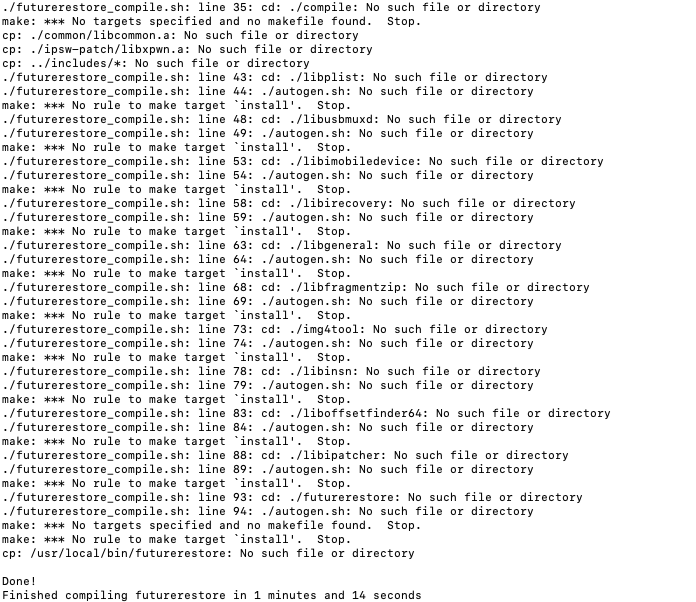
Trying to complie futurerestore, i get these errors using the futurerestore_compile.sh https://i.imgur.com/fJCMOFn.png
 olive oasis
hello
i have an ipad mini 3(wifi)
shsh blob has generator other than 0x1111111111111111
can i downgrade?
celest basalt
olive oasis
can i downgrade?
if you set the generator to the one the blobs have then yes
olive oasis
If i set my generator to the one in the shsh im good to go ?
dusty coral
Yeah
olive oasis
What tweak should i use?
celest basalt

dimentio
PoC tool for setting/getting nonce without triggering KPP/KTRR/PAC. (requires tfp0)
 1Conan - Page 1/5
·
olive oasis
1Conan - Page 1/5
·
olive oasis
Thanks everyone
rustic blaze
Updated my iPhone SE from iOS 14.0.1 to 14.1 using 14.4 sep and BB
@fast thistlerestore
celest basalt
@fast thistle
 fast thistle
oof
olive oasis
hi
tried to restore ios 12 to 10.3.1
ERROR: Unable to receive message from FDR 0000000004048C80 (-2). 0/2 bytes
kinda stuck here 😅
celest basalt
olive oasis
ERROR: Unable to receive message from FDR 0000000004048C80 (-2). 0/2 bytes
SEP is incompatible
I think
celest basalt
you can't downgrade because the Secure Enclave firmware is not compatible with iOS 10
might be eventually possible if we're able to set sepnonce with the blackbird exploit
olive oasis
so for now i cant downgrade?
ok
how can i safely reset my device
im in restore mode
celest basalt
I think you can do futurerestore --exit-recovery
or irecovery -n
not sure if at that point you can boot back into iOS or have to restore, but you can try
olive oasis
btw while downgrading it displayed the loading animation
damn i have to update to 12.5.1
celest basalt
olive oasis
damn i have to update to 12.5.1
you can go at least down to 12.4 if you have blobs rn
celest basalt
oh well, you can still use checkra1n and Chimera on 12.5.1
stiff hazel
@olive oasis another thing though, because you’re on A7, unless you have a Mac yeah uh good luck with checkra1n
celest basalt
bootra1n is outdated, but even with checkn1x, the latest versions have trouble on Linux
I think you need to use 0.10.1 or so
olive oasis
so boot linux then use checkra1n?
celest basalt
checkn1x is basically a bootable Linux that includes checkra1n
like bootra1n but that's outdated
although it might still work for 12.5.1
hmm, can't find 0.10.1 for checkn1x
and odysseyn1x's first release was 0.10.2 too...
I guess https://github.com/foxlet/bootra1n/releases/tag/0.10.1 will work

GitHub
Update to checkra1n 0.10.1
Update to Kernel 5.4.30
Add USB Safe and Graphics Safe options
Redirect users to /r/Jailbreak Discord for help
(choose x86_64 if you have a 64-bit computer)
olive oasis
thanks
stiff hazel
Reminder 0.10.1 will still require that unplug replug finicking thing
 sleek whale
ye 10.1 works cool with a7 and unplug replug trick tried it yesterday
subtle cosmos
@olive oasis look at the pinned posts.
- A7 (iPhone 5s): 10.1-10.3.2 (tethered without blobs, untethered with blobs) with inferius
10.3.3 (untethered without blobs) with inferius and/or LeetDown
Check the tools.
GitHub
an OTA Downgrade Tool for A7 Devices. Contribute to rA9stuff/LeetDown development by creating an account on GitHub.
GitHub
Create & Restore 64-bit custom IPSWs. Contribute to marijuanARM/Inferius development by creating an account on GitHub.
olive oasis
subtle cosmos
<@!670395778925199423> look at the pinned posts.
* A7 (iPhone 5s): 10.1-10.3.2 (...
is the ipad mini 3 supported?
 uneven saddle
is there a way i can use futurerestore to restore a ipad mini 5th gen to 13.7 with shsh2 blobs
?
olive oasis
subtle cosmos
<@!670395778925199423> look at the pinned posts.
* A7 (iPhone 5s): 10.1-10.3.2 (...
I was referring to these tools
subtle cosmos
olive oasis
I was referring to these tools
Ah ok, I don't know.
But you can test it. When you are already on 12.5.1, you have nothing to lose...
subtle cosmos
uneven saddle
is there a way i can use futurerestore to restore a ipad mini 5th gen to 13.7 wi...
Latest tests have shown that only AppleTVs can downgrade <iOS 14. All other wifi only devices not work.
stiff hazel
olive oasis
is the ipad mini 3 supported?
No it is not
It doesn’t support OTA downgrades to 10.3.3
Same is true with the China version of the Mini 2
vivid nova
subtle cosmos
But you can test it. When you are already on 12.5.1, you have nothing to lose...
5s can go as low as 11.3 with latest sep/bb
subtle cosmos
vivid nova
5s can go as low as 11.3 with latest sep/bb
He is talking about iPad mini 5th gen.
celest basalt
pissin
 modern thunder
@tall siren @tall siren @tall siren @tall siren @tall siren @tall siren @tall siren @tall siren @tall siren @tall siren @tall siren @tall siren @tall siren @tall siren @tall siren @tall siren @tall siren @tall siren @tall siren @tall siren @tall siren @tall siren @tall siren @tall siren @tall siren @tall siren @tall siren @tall siren @tall siren @tall siren @tall siren @tall siren @tall siren @tall siren @tall siren @tall siren
 tall siren
true
subtle cosmos
stiff hazel
He's referring to an iPad Mini 3rd Gen
is there a way i can use futurerestore to restore a ipad mini 5th gen to 13.7 with shsh2 blobs
stiff hazel
olive oasis
On ipsw.me all a7 have ota update to ios 10 except ipad mini 3
@subtle cosmos this is who you seemed to reply to
subtle cosmos
No, read above.
stiff hazel
@subtle cosmos JTV's reply was to the 12.5.1 one, which is relevant only to the Mini 3
subtle cosmos
@stiff hazel just read who have reply to what messages...
stiff hazel
@subtle cosmos
subtle cosmos
Yeah, and read my message to what I have reply it.
Ah I am wrong, I see. Thinking have reply to the other one.
vivid nova
 subtle cosmos
To many replys to different people😆
olive oasis
Can i downgrade iphone 6s from 13.3.1 to 11.2.6 ?
vivid nova
@olive oasis 
vivid nova
you /could/ dual boot
olive oasis
no downgrade?
olive oasis
dang

Is there a chart or something to tell me if i can downgrade or not?
No need to keep asking the same question for every device
vivid nova
!t sep
mystic axleBOT
vivid nova
!t sep
sep
How to check if the latest iOS version's SEP is compatible with a target iOS version: https://joshblah555.github.io/JoshTV/SEPCheckr.html
Added by eric#1997 | Used 17 times
·
olive oasis
Thanks homie
 floral vale
just wondering how much work/difficult is it to use futurerestore on windows 10
dusty coral
Wondering if a11 downgrades will be fixed before sep/bb is incompatible
vivid nova
floral vale
just wondering how much work/difficult is it to use futurerestore on windows 10
Not a whole lot if you boot into Linux
floral vale
Hmm okay but I think I'm gonna update to 14.3 while it's still easy and use checkra1n without sep
 frigid jolt
Hey, I'm trying to downgrade my 6s to 10.1.1 and this is what I'm getting. So does that mean I can do it or I can't?
I've never restored iPhone with shsh, this is my first time
full osprey
Firstly it appears you’re using a unsupported tool, secondly you will need a signed compatible SEP/BB to downgrade
As I said, a unsupported tool
This is futurerestore
frigid jolt
Yes I just remember it had shsh checker that's why I used it, just to check if I have older shsh
 brittle olive
guys, do i have to install Xcode in order to use Futurerestore?
Thanks
Requirements
- A Mac
- Xcode from the Mac App Store
- Homebrew from https://brew.sh/
This is why I asked
celest basalt
that's for compiling it I think
brittle olive
i will do the compiling, otherwise I won't be able to Futurerestore
vivid nova
brittle olive
Requirements
- A Mac
- Xcode from the Mac App Store
- Homebrew from https://brew...
the Xcode requirement is a tad misleading. It's essentially highlighting the necessary components for the command-line tools that come with Xcode upon installation. However, you may just run the xcode-select --install command to install without the full app
brittle olive
vivid nova
the Xcode requirement is a tad misleading. It's essentially highlighting the nec...
I proceeded without entering the above command
let's see how it works, downgrading from 14.3 to 13.7
iPad 5 wifi
vivid nova
brittle olive
let's see how it works, downgrading from 14.3 to 13.7
good luck.. what vers of futurerestore do you have?
brittle olive
ERROR: FDR 0x7fcf635456e0 receiving proxy payload failed: Operation now in progress
FDR 0x7fcf635456e0 waiting for message...
FDR 0x7fcf63545610 timeout waiting for command
FDR 0x7fcf63545610 waiting for message...
FDR 0x7fcf635456e0 timeout waiting for command
FDR 0x7fcf635456e0 waiting for message...
No data to read (timeout)
it stocked, and looping
brittle olive
vivid nova
good luck.. what vers of futurerestore do you have?
The one in the Pin
code=67829777
line=1035
file=futurerestore.cpp
commit count=190:
commit sha =e4a81783769e6800a4efe69a4bab3478069df20e:
Done: restoring failed!
vivid nova
The one in the Pin
that doesn't tell me anything
brittle olive
Steps
-
On your Mac's Desktop, create a new folder named "restore"
-
Compile futurerestore and place it inside the "restore" folder. #futurerestore-help message
Steps
- Download this shell script: https://captinc.me/tutorials/futurerestore_compile.sh
then i did all the step for compiling
brittle olive
how ?
vivid nova
you're telling me you JUST used futurerestore, and yet you don't know how to use it?
the version number is at the top when you use it
brittle olive
Version: e4a81783769e6800a4efe69a4bab3478069df20e - 190
vivid nova
okay, so 190
brittle olive
yes
vivid nova
i'd retry it
vivid nova
@flint apex you're fine
 flint apex
i know in terms of jailbreaking i’m good
but i want 14.3 shortcuts too
worst case scenario i have blobs saved for 14.3
vivid nova
What device?
flint apex
could i ask why specifically
vivid nova
It's not worth risking to update to a 14.3 (beta) when you're on a stable version that's soon-to-be jailbreakable
flint apex
okay :/
vivid nova
14.3 downgrade mention is more or less for those stuck on 14.4 or 14.5
flint apex
i know
i just really want the Set Wallpaper function in shortcuts lol
oh well
maybe someone will port it
 graceful palm
sharp latch
vivid nova
so... update <@!394706109560127491>: FDR with latest sep/bb trying to downgrade ...
graceful palm
sharp latch
vivid nova
so... update <@!394706109560127491>: FDR with latest sep/bb trying to downgrade ...
Can you elaborate?
vivid nova
wdym
dull swallow
whats the latest future restore for windows
 mystic hazel
Hi, i'm on iOS 14.1 right know and i want to downgrade to a specific version. To which version could I downgrade? Device: iPad 7 Generation
vivid nova
mystic hazel
Hi, i'm on iOS 14.1 right know and i want to downgrade to a specific version. To...
stay where you are
mystic hazel
Ok
sharp latch
vivid nova
wdym
What sep did you try? I mean
vivid nova
Exactly as stated @sharp latch
 spare reef
does futurerestore work for A13?
vivid nova
Yes
spare reef
can I get some help upgrading my A13 ios13 jailbroken device with blobs to ios 14?
vivid nova
You do realize that in doing so will result you in being unjailbroken
spare reef
I heard the new jailbreak is coming out soon?
mystic hazel
Could I downgrade to iOS 13 from iOS 14
vivid nova
No
spare reef
lol ok but I'll always have the option to update to an unsigned version of ios 14 right?
vivid nova
Possibly.. You can always look at the sep checker
vivid nova
Bruh, if you value your jailbreak, you will stay
spare reef
yeah but a 14.3 jailbreak is coming out soon and ios 14 is so much better than 13
vivid nova

 sage briar
How do you know that 14.3 jb is coming soon?
vivid nova
Ok. I'm done. Do what you want
spare reef
coolstar said so on his server
vivid nova
FTR: 13 is better than 14
sage briar
libhooker is working
vivid nova
Tweaks will be more compatible on 13 anyways
 bright crystal
spare reef
he just ordered a new ipad to test it and said its working on his devices rn
bright crystal
spare reef
he just ordered a new ipad to test it and said its working on his devices rn
Good news, but this can still take some time
vivid nova
I'll give it a month
sage briar
Hope you are right
vivid nova
First week to test the waters, second week to fix bugs, third week to test again fourth week stability increases
sage briar
only with blobs
sage briar
then use futurerestore
sage briar
I found on reddit that futurerestore is not compatible with A13
but I dont know if it is true
subtle cosmos
brittle olive
let's see how it works, downgrading from 14.3 to 13.7
Look at the pinned posts. Downgrading wifi only devices only works on AppleTVs.
 thin mulch
I’m on ios13.5 iphone11. Is there any way for me to go to 14.2?
thin mulch
thin mulch
I’m on ios13.5 iphone11. Is there any way for me to go to 14.2?
Jailbroken and shsh saved
 pale star
think you can upgrade to 14.4 and then use fr to downgrade? with blobs ofc
tell me if i am wrong
 maiden citrus
no on a12+ you can only use FR if you are currently jailbroken due to the nonce
brittle olive
subtle cosmos
Look at the pinned posts. Downgrading wifi only devices only works on AppleTVs.
Yeah, faced FDR Error, so my downgrade attempts are failed
pale star
what about a11 on ios 12? thinking about upgrading to 14.4 and then downgrading to 14.2 (have blobs) using windows
possible?
celest basalt
pale star
what about a11 on ios 12? thinking about upgrading to 14.4 and then downgrading ...
there's no need to upgrade to 14.4 first, but you'll still need macOS (or maybe Linux works) atm until someone compiles a working version of the new futurerestore for Windows
pale star
mhm not need to upgrade to 14.4 first? you mean to do it directly to 14.2 right?
subtle cosmos
Yes directly. But with A11 devices, there is actually the FDR problem with futurerestore. So regardless if someone can compile it for windows, you can't use FR on A11 at this time.
subtle cosmos
pale star
need to find some pc with linux guess 🤷♂️
No, need to find someone to fix the FDR problem for your A11 first😜
pale star
oh so its even impossible on mac/lin?
subtle cosmos
Yes, regardless which OS.
vivid nova
@thin mulch no, stay
subtle cosmos
vivid nova
<@676249910999515148> no, stay
I agree with you to stay. But it is true that he can't update? Know you if FR works with A12? Or have A12 also the FDR problem? Just asking, no offence.
vivid nova
A12 is finicky with nonce entanglement and with these fdr issues.. It's no joke
The risk is too high
 frank wren
is there a good guide to upgrading from 12.1 to 14+ on a12? I have a mac, or pc I just want to know the best way to do it. I have blobs saved correctly, and I have to upgrade now since a lot of the apps I use do not work on 12 anymore
thanks
subtle cosmos
vivid nova
The risk is too high
Are there feedbacks if A12 works? I mean if FR in theroy works with A12 and if A12 have also FDR error?
vivid nova
frank wren
is there a good guide to upgrading from 12.1 to 14+ on a12? I have a mac, or pc ...
Nah, Sep is finicky. Stay away
vivid nova
subtle cosmos
Are there feedbacks if A12 works? I mean if FR in theroy works with A12 and if A...
No reports yet, but Apple's updating lots of stuff
frank wren
vivid nova
Nah, Sep is finicky. Stay away
So I have absolutely no way to upgrade now that 14.3 is unsigned? It's either stay with jailbreak or update for the apps?
vivid nova
You could /try/ 14.3 RC
frank wren
honestly I'll take any risks or whatever work I need to do to upgrade, even if its a lot I need to do. I just need a guide I can work with
frank wren
vivid nova
You could /try/ 14.3 RC
I thought its unsigned now
subtle cosmos
It were an interesting try if it works. So we have maybe feedback How A12 and FR works. If you have nothing to lose you can try it. Look at the pinned posts, there are tutorials how to compile and use.
vivid nova
14.3 is unsigned, but RC isn't
frank wren
vivid nova
14.3 is unsigned, but RC isn't
Where would I find the RC download?
frank wren
If its still being signed cant I just shift, update on itunes? If i dont need to lose my data that would be great
subtle cosmos
Yeah, but it was interesting if it works with futurerestore. Maybe you can make a backup with itunes first and if futurerestore not works, you can install it with itunes an restore your backup.
Or backups from so different versions not work?
frank wren
not sure
brittle olive
FututeRestore doesn’t work, FDR Error for all devices unfortunately
Tried it many times yesterday, always facing FDR Error even with iPad wifi which has no Baseband needed
frank wren
how come it was working at some point before?
brittle olive
Do NOT use FutureRestore for now, it will stuck while restoring which you will end up restoring to the latest IOS version
brittle olive
frank wren
how come it was working at some point before?
Not really sure, but don’t use it for now till any further updates
brittle olive
subtle cosmos
Or backups from so different versions not work?
Doesn’t work
subtle cosmos
brittle olive
Do NOT use FutureRestore for now, it will stuck while restoring which you will e...
That is not correct. You have trying to downgrade to 13.7 when ich remember correctly. And downgrading <14 works only with AppleTVs rigt now. Look at the pinned posts. There is all you need.
On A10 FR works normally.
Depends on SEP/bb compatiblity.
brittle olive
subtle cosmos
That is not correct. You have trying to downgrade to 13.7 when ich remember corr...
We are talking about IOS and iPadOS bruh
subtle cosmos
Yes I know.
brittle olive
Doesn’t work for now due to FDR Error
Go try it, good luck restoring to the latest IOS version
14.4
subtle cosmos
I have already test it on my iPhone 7 and iPad Air 2. SEP/bb iOS 14.4 is compatible with 14.X
brittle olive
subtle cosmos
I have already test it on my iPhone 7 and iPad Air 2. SEP/bb iOS 14.4 is compati...
Don’t you faced FDR Error ?
subtle cosmos
You have wirte above that you hav tried to downgrad your iPad to 13.7 and this is not working.
celest basalt
frank wren
If its still being signed cant I just shift, update on itunes? If i dont need to...
Shift+Update got me stuck in recovery loop, although I was downgrading from 14.5... make an iTunes backup first just in case and if update fails then Shift+Restore and use the backup
stiff hazel
brittle olive
Don’t you faced FDR Error ?
FDR error stuff is A11 iirc
subtle cosmos
stiff hazel
FDR error stuff is A11 iirc
Correct. And if you try a wifi only device <14.
brittle olive
stiff hazel
FDR error stuff is A11 iirc
Faced it while downgrading from 14.3 to 13.7 A9
subtle cosmos
Expact AppleTvs.
subtle cosmos
brittle olive
Faced it while downgrading from 14.3 to 13.7 A9
Bruh, read the pinned posts!
brittle olive
subtle cosmos
Bruh, read the pinned posts!
Already did
subtle cosmos
There is all you must know!
brittle olive
And I got it
stiff hazel
brittle olive
Faced it while downgrading from 14.3 to 13.7 A9
What device and if iPad is it a non cellular model
brittle olive
stiff hazel
What device and if iPad is it a non cellular model
iPad 5 wifi
subtle cosmos
Yeah, you have tried to downgrade to 13.7. What stands about wifi only devices in the pinned posts?
If you try downgrade to 14.X you see that it works.
 violet lotus
Iam on ios 13.5 unc0ver and saved my 14.2 and 14.3 shsh blobs
How can i update from 13.5 to 14.3
Iphone 11pro
brittle olive
Downgrading is NOT possible for now due to FDR Error, that what’s written in the Pin for wifi devices
brittle olive
subtle cosmos
If you try downgrade to 14.X you see that it works.
You are correct
Told you my goal is to downgrade to 13.7
According to the Pin any downgrade will be faced FDR Error even on IOS 14
subtle cosmos
brittle olive
Downgrading is NOT possible for now due to FDR Error, that what’s written in the...
Ah now I see. People can thing downgrade is not possible. But it refers to <14. So I must edit it.
Yeah I correct it that people can not confuse.
brittle olive
Yes, you will have no problem updating, but NOT downgrading
violet lotus
@brittle olive Iam on ios 13.5 unc0ver and saved my 14.2 and 14.3 shsh blobs
How can i update from 13.5 to 14.3
Iphone 11pro
brittle olive
brittle olive
Yes, you will have no problem updating, but NOT downgrading
IOS 13 and 14 included
violet lotus
Is it possible to update from jailbroken ios 13.5 to 14.3 ?!
subtle cosmos
brittle olive
Yes, you will have no problem updating, but NOT downgrading
Have update the pinned post. Now it is correct. You can downgrade to 14.X.
subtle cosmos
violet lotus
<@614542640557326337> Iam on ios 13.5 unc0ver and saved my 14.2 and 14.3 shsh b...
A12 devices are not tested if they works with futurerestore. You can risk it but if it not works you must restore to 14.4 or 14.3 RC.
brittle olive
subtle cosmos
Have update the pinned post. Now it is correct. You can downgrade to 14.X.
Now it’s clear, thank you
subtle cosmos
No problem. Thanks for the hint.
violet lotus
Iam a13 11pro
brittle olive
subtle cosmos
No problem. Thanks for the hint.
No problem
subtle cosmos
violet lotus
Iam a13 *11pro*
A12 and up are not tested.
violet lotus
Ahaa so i will not update from saved blobs now right ?!
brittle olive
violet lotus
Ahaa so i will not update from saved blobs now right ?!
It should be working, if you apply all the steps correctly, but it’s up to you
subtle cosmos
There are no feedback or tests if A12 and up work with FR or not. If you have nothing to lose you can try it.
brittle olive
Pin
violet lotus
Okaay
brittle olive
Do NOT forget to set the nonce
violet lotus
If my device down then i will flash 14.4 right ?!
brittle olive
If it failed, then you will have to stay on 14.4
Stay away from 14.3 Beta
Not really stable enough thou
brittle olive
Make sure the compiling step you do it right
brittle olive
brittle olive
Make sure the compiling step you do it right
All depend on that step
You have to set the nonce then re-jailbreak to make it works
violet lotus
Ahaa
brittle olive
brittle olive
You have to set the nonce then re-jailbreak to make it works
If you set it using U0
From the app itself
Or you can use the way that already pinned
violet lotus
brittle olive
You have 2 ways of setting the nonce
subtle cosmos
If I may say someting... Are you sure you have save yourblobs correct? You have a A12 device with nonce entanglement. If you not know if you have set your nonce you have maybe not check your nonce before you have save your blobs...
 ionic fern
So I'm fairly new to futurerestore and I've got an error here I cant seem to find much info about clearly something with ECID I'm using mac futurerestore version 180 this has actually happened on 2 devices I tried to restore same exact error with the ECID
`Found device in DFU mode
requesting to get into pwnRecovery later
Found device in DFU mode
Identified device as n94ap, iPhone4,1
Extracting BuildManifest from iPSW
Product version: 5.1.1
Product build: 9B206 Major: 9
Device supports Image4: false
checking APTicket to be valid for this restore...
[Error] ECID inside APTicket does not match device ECID
APTicket is valid for 9943116--------------- (dec) but device is 9891------- (dec)
Cleaning up...
[exception]:
what=APTicket can't be used for restoring this device
code=46858257
line=715
file=futurerestore.cpp
commit count=29:
commit sha =2994651a10d8176a298b31e7706b4b6af97975d1:
Done: restoring failed!`
sharp latch
ionic fern
So I'm fairly new to futurerestore and I've got an error here I cant seem to fin...
So you’ve been saving blobs for the wrong ECID. I would figure out the correct one and start saving valid blobs ASAP. All the ones you have now are invalid and won’t even work
ionic fern
I'm pretty sure im using the correct ECID this is the ECID that pops up in ITunes and in the USB information.. even downloading new blobs from tsschecker I get the same error though I will recheck my ECID im pretty sure Im using the correct one as this is happening across multiple devices I own that I have blobs for
ionic fern
Im 99.9% sure I have the correct ECID trying on another device I just re-saved blobs for I get this
`Identified device as n78ap, iPod5,1
Extracting BuildManifest from iPSW
Product version: 8.4.1
Product build: 12H321 Major: 12
Device supports Image4: false
checking APTicket to be valid for this restore...
[Error] ECID inside APTicket does not match device ECID
APTicket is valid for 1219492--------------- (dec) but device is 2740---------- (dec)
Cleaning up...
[exception]:
what=APTicket can't be used for restoring this device
code=46858257
line=715
file=futurerestore.cpp
commit count=29:
commit sha =2994651a10d8176a298b31e7706b4b6af97975d1:
Done: restoring failed!`
 night harbor
ionic fern
I'm pretty sure im using the correct ECID this is the ECID that pops up in ITune...
night harbor
ionic fern
I'm pretty sure im using the correct ECID this is the ECID that pops up in ITune...
futurerestore 180 has broken ECID reading for 32-bit iOS devices.. Use futurerestore s0uthwest 245 instead (or use iOS-OTA-Downgrader with the "use SHSH blobs" option)
sharp latch
hmmm
Personalizing IMG4 component RecoveryMode... Extracting iBoot.d20.RELEASE.im4p... Personalizing IMG4 component iBoot... Personalizing IMG4 component RestoreSEP... Personalizing IMG4 component SEP... Sending NORData now... Done sending NORData Unmounting filesystems (29) Unmounting filesystems (29) Unmounting filesystems (29) Unmounting filesystems (29)
ionic fern
night harbor
futurerestore 180 has broken ECID reading for 32-bit iOS devices.. Use futureres...
Took your advice thanks 🙂 got this now
iBoot32Patch: Quitting... Sending iBSS (78044 bytes)... [==================================================] 100.0% Sending iBEC (282844 bytes)... [==================================================] 100.0% [Error] ERROR: Unable to connect to recovery device Done: restoring failed. Failed with errorcode=-94
night harbor
ionic fern
Took your advice thanks 🙂 got this now
`iBoot32Patch: Quitting...
Sending iBSS...
Is your device in kDFU mode? You need to enter kDFU before restoring
ionic fern
Yes I put it into kDFU before I connected it and it does connect detected as in DFU mode
night harbor
Not sure what the problem is then..
ionic fern
I guess I could try the other device to see if I get the same error
ionic fern
`[Log] Extracting IPSW...
unzip: cannot find or open iOS-OTA-Downgrader-master, iOS-OTA-Downgrader-master.zip or iOS-OTA-Downgrader-master.ZIP.
[Log] Proceeding to futurerestore...
Version: b99eb8140d8e6c23f34e950102bb79e61c72384d - 152
Libipatcher Version: f32e41d850f51448bd6c588ead9c7d6455733f3c - 44
Odysseus Support: yes
[Error] argument parsing failed! agrc=12 optind=8
[Log] Restoring done!
[Log] Downgrade script done!`
vivid nova
ionic fern
Yes I put it into kDFU before I connected it and it does connect detected as in ...
what device?
ionic fern
vivid nova
what device?
That would be my iPod touch 5 the one I posted last was a different device
rustic blaze
Sep 14.5 Dev Beta1 compatible 14.1 and above
vivid nova
already been confirmed
rustic blaze
but it was told beta firmwares sep and bb cannot be used to downgrade
celest basalt
rustic blaze
Sep 14.5 Dev Beta1 compatible 14.1 and above
what happened to 14.0
pale star
sharp latch
So you’ve been saving blobs for the wrong ECID. I would figure out the correct o...
is if even possible? i just use tsssaver to save it and ecid and generator are the same as in u0
@ionic fern lin or mac?
 hushed mist
Sorry if it has been asked 1 million times now, but is it possible to update my iPhone XR on 13.4.1 to 14.1?
Which fork of future restore do I use?
!t futurerestore
mystic axleBOT
hushed mist
!t futurerestore
futurerestore
futurerestore allows you to upgrade/downgrade/restore to unsigned iOS versions if you meet certain requirements
[Tutorial](#futurerestore-help message)
Added by Capt Inc#4247 | Used 15 times
·
ionic fern
pale star
<@698423653360074822> lin or mac?
Mac
hushed mist
The tutorial just says to compile it, but which version?
Nvm, I got it, my apologies
subtle cosmos
hushed mist
Sorry if it has been asked 1 million times now, but is it possible to update my ...
Be aware, futurerestore was not tested on A12 and up. Maybe you are running in the same FDR error as A11 devices.
hushed mist
I heard that was mainly an issue if you were downgrading though
subtle cosmos
It doesn't matter if you down- or upgrade.
subtle cosmos
There are no feedbacks till now for >A12 and FDR error. So maybe you can also run into it.
Was only a hint (:
 rapid creek
hushed mist
Sorry if it has been asked 1 million times now, but is it possible to update my ...
rapid creek
hushed mist
Sorry if it has been asked 1 million times now, but is it possible to update my ...
No futurerestore is not update to work on a11+ have error fdr
sharp latch
@vivid nova
This is the err produced when you hit the FDR err at the begging of FR. It’s a sep panic.
You can tell by the RSEP tag
rustic blaze
So do you mean sep is. Not compatible
vivid nova
but how would you get the panic log if you bootloop?
sharp latch
vivid nova
but how would you get the panic log if you bootloop?
You don’t boot loop. You just end in recovery mode, irecovery -n will kick it out and it’s fine
sharp latch
rustic blaze
So do you mean sep is. Not compatible
I’m 90% sure it’s not so much to do with the sep but more to do with the apfs.fs changes. If you swap that Filesystem you can restore to 14.1. With 14.3 RC SEP. It just won’t get all the way booted. Gets stuck on mount-phase-2. Again to do with the apfs.fs. (Located in System/Library/Filesystems/)
If you try any tricks with 14.4 sep it won’t restore at all.
This apfs.fs goes deep. From the size of the ramdisk to the mount behaviors on boot. As far as I can tell it’s not possible to update FR for this, it’s a separate issue. You can also restore to 14.4 with 14.3 RC sep just fine so again FR works on a11+ there’s just some odd shit happening with SEP and apfs.fs. What this does mean is that if your not already on 14.1 with a11+ you CANNOT get there anymore :/
I’m super pissed reason I know all this and have been trying this hard is I bootlooped 13.5.1 and have been trying to get to 14.1 so I could at least Dualboot 13 but alas it’s not possible :/
rustic blaze
so are you saying downgrading to 14.1 is impossible on A11
stiff hazel
sharp latch
This apfs.fs goes deep. From the size of the ramdisk to the mount behaviors on b...
@vivid nova hi if you’re available could you look into this?
vivid nova
into what
stiff hazel
What I replied to
vivid nova
it doesn't make sense how the sep works for apple tv, * < iPhone 8 but not X
stiff hazel
vivid nova
it doesn't make sense how the sep works for apple tv, * < iPhone 8 but not X
Does it even work on the iPhone 8 series (downgrading from 14.4 to 14.1)?
stiff hazel
i7 is A10, i8 and iX are A11
What’s the chance they implemented another mitigation for A11+
rustic blaze
@stiff hazel i8 is also experiencing fdr errors
vivid nova
dull swallow
does A12+ get fdr errors?
sharp latch
vivid nova
i don't think they separated the sep, but updated the kernel
Essentially yes 100%
celest basalt
Anyone got a futurerestore binary for macOS, seem to have a problem with things being older versions so can't compile it, also don't really know which version I should use
Seems to be libfragmentzip having trouble
celest basalt
Errors when compiling it, currently have version 43 but needs 47
celest basalt
@storm apex https://pastebin.com/DxLcH4C0
Pastebin
Pastebin.com is the number one paste tool since 2002. Pastebin is a website where you can store text online for a set period of time.
I tried the script at first and it got through it all but seemed to have the problem at libfragmentzip, and that makes futurerestore not compile, as it said it needed v47 or libfragmentzip but I currently had 43 installed
So I tried going through the script manually and then I get those errors I'd linked during compiling libfragmentzip
I had tried uninstalling with brew, or was there a better way
hmm yeah and using brew didn't seem to uninstall the v43 I had anyway
How should I uninstall 43
Will try see
yeah it's in my Cellar folder
I'll try that
Running the big script again
Requested 'libfragmentzip >= 47' but version of libfragmentzip is 43

Consider adjusting the PKG_CONFIG_PATH environment variable if you
installed software in a non-standard prefix.

Alternatively, you may set the environment variables libfragmentzip_CFLAGS
and libfragmentzip_LIBS to avoid the need to call pkg-config.
See the pkg-config man page for more details.
make: *** No targets specified and no makefile found.  Stop.
make: *** No rule to make target `install'.  Stop.
cp: /usr/local/bin/futurerestore: No such file or directory```Seem to get the same errors with libfragmentzip along the way as well not sure why I have 43
celest basalt
Sorted it all, and managed to compile it all now, thank you
Hi, guys. Right now I'm in iOS 13.7. I want to upgrade to iOS 14.0.
When using futurerestore, do I need to use and indicate SEP and Baseband files from a currently signed IPSW (in this case iOS 14.4)?
vivid nova
@celest basalt what device?
celest basalt
iPhone 7 (9,1)
vivid nova
you should be fine to go to 14.x
you just need to do --latest-sep and --latest-baseband
that should work for restoring
celest basalt
I got this errorcode using SEP and Baseband from IPSW iOS 14.0:
Found device iPhone9,1 d10ap [TSSC] opening C:\Users\Z40\Downloads\futurerestore_win64_v245\BuildManifest.pli st [TSSR] User specified not to request a baseband ticket. Request URL set to https://gs.apple.com/TSS/controller?action=2 Sending TSS request attempt 1... TSS server returned: STATUS=94&MESSAGE=This dev ice isn't eligible for the requested build. ERROR: TSS request failed (status=94, message=This device isn't eligible for the requested build.) [Error] SEP firmware isn't signed Failed with errorcode=-3
vivid nova
can i see the full log?
celest basalt
`C:\Users\Z40\Downloads\futurerestore_win64_v245>C:\Users\Z40\Downloads\futureres
tore_win64_v245\futurerestore.exe -t C:\Users\Z40\Downloads\futurerestore_win64_
v245\6251437244917030_iPhone9,1_14.0-18A373_27325c8258be46e69d9ee57fa9a8fbc28b87
3df434e5e702a8b27999551138ae.shsh2 -s C:\Users\Z40\Downloads\futurerestore_win64
v245\sep-firmware.d10.RELEASE.im4p -b C:\Users\Z40\Downloads\futurerestore_win6
4_v245\Mav16-8.02.01.Release.bbfw -p C:\Users\Z40\Downloads\futurerestore_win64
v245\BuildManifest.plist -m C:\Users\Z40\Downloads\futurerestore_win64_v245\Buil
dManifest.plist C:\Users\Z40\Downloads\futurerestore_win64_v245\iPhone_4.7_P3_14
.0_18A373_Restore.ipsw
Version: 81b98e0425e17250cc83d5badaf9a8cc6399f481 - 245
Odysseus support: no
[INFO] 64-bit device detected
futurerestore init done
reading signing ticket C:\Users\Z40\Downloads\futurerestore_win64_v245\625143724
4917030_iPhone9,1_14.0-18A373_27325c8258be46e69d9ee57fa9a8fbc28b873df434e5e702a8
b27999551138ae.shsh2 is done
Found device iPhone9,1 d10ap
[TSSC] opening C:\Users\Z40\Downloads\futurerestore_win64_v245\BuildManifest.pli
st
[TSSR] User specified not to request a baseband ticket.
Request URL set to https://gs.apple.com/TSS/controller?action=2
Sending TSS request attempt 1... TSS server returned: STATUS=94&MESSAGE=This dev
ice isn't eligible for the requested build.
ERROR: TSS request failed (status=94, message=This device isn't eligible for the
requested build.)
[Error] SEP firmware isn't signed
Failed with errorcode=-3
C:\Users\Z40\Downloads\futurerestore_win64_v245>`
I used the "Manually specifying SEP and Baseband" method
vivid nova
C:\Users\Z40\Downloads\futurerestore_win64_v245>C:\Users\Z40\Downloads\futurerestore_win64_v245\futurerestore.exe -t C:\Users\Z40\Downloads\futurerestore_win64_v245\6251437244917030_iPhone9,1_4.0-18A373_27325c8258be46e69d9ee57fa9a8fbc28b873df434e5e702a8b27999551138ae.shsh2 --latest-sep --latest-baseband C:\Users\Z40\Downloads\futurerestore_win64_v245\iPhone_4.7_P3_14.0_18A373_Restore.ipsw
celest basalt
Edit:
I'm getting this:
`C:\futurerestore>futurerestore.exe -t C:\futurerestore\my.shsh2 --latest-sep --l
atest-baseband C:\futurerestore\iPhone_4.7_P3_14.0_18A373_Restore.ipsw
Version: 81b98e0425e17250cc83d5badaf9a8cc6399f481 - 245
Odysseus support: no
[INFO] 64-bit device detected
futurerestore init done
reading signing ticket C:\futurerestore\my.shsh2 is done
Found device iPhone9,1 d10ap
user specified to use latest signed SEP (WARNING, THIS CAN CAUSE A NON-WORKING R
ESTORE)
[TSSC] opening firmware.json
[DOWN] downloading file https://api.ipsw.me/v2.1/firmwares.json/condensed
[TSSC] selecting latest iOS: 14.4
[TSSC] got firmware URL for iOS 14.4 build 18D52
[TSSC] opening Buildmanifest for iPhone9,1_14.4
PK♣️♠️ N N ▲! [Error] [LFZP] failed to open URL
[Error] couldn't get buildmanifest of latest firmware
[Error] Fail code=-22
Failed with errorcode=-22
C:\futurerestore>`
celest basalt
@vivid nova now is about some own network issue right?
vivid nova
yeah, could be your firewall/vpn/antivirus
just try again
although vers 245 is pretty old
so you might wanna boot up linux and use the latest
or get a mac
celest basalt
Gotcha J, thank you again
celest basalt
any thoughts why is this happening?
Unknown operation (80) Unknown data request 'PersonalizedData' received
stuck at ~50%
subtle cosmos
What version of FR you are using now?
And show the full command you use.
sharp latch
celest basalt
any thoughts why is this happening?
`Unknown operation (80)
Unknown data request...
@celest basalt Yes I got this over and over until I built OpenSSL from source. #futurerestore-help message
rapid creek
celest basalt
stuck at ~50%
Do a hard reboot and try again
Hope then a new update will fix this error
Need tihmstat
 gaunt atlas
Does anyone succeeded to restore to iOS 14 on A11+ devices?
subtle cosmos
No.
 mossy wind
EDIT: I have xs max and im on 12.1.1 unc0ver, i wanted to futurerestore to 13.5 (i have blobs) is it possible to futurerestore?
rustic blaze
no
mossy wind
rustic blaze
no
Why?
celest basalt
mossy wind
Why?
because only 14.x is signed and the baseband is incompatible with 13.x and lower
mossy wind
celest basalt
because only 14.x is signed and the baseband is incompatible with 13.x and lower
What version can i futurerestore?
celest basalt
14.0 or higher
mossy wind
I have blobs for 14 too
celest basalt
no JB for 14 yet but one might be coming for 14.3 and lower eventually
mossy wind
Yah i see! Im tired of ios 12
sage briar
update to 14.3 and wait for jb
mossy wind
sage briar
update to 14.3 and wait for jb
Its a pain! While im waiting 😫
What if i save blobs for 14 and when jailbreak came update to 14?
celest basalt
you can for 14.3 RC
subtle cosmos
celest basalt
14.0 or higher
Beware of FDR error. There is no feedback if A12 and up also running into it. So maybe the restore fail.
celest basalt
true
I would test it since I'm on 14 anyway but cba to set up a macOS VM and compile it
sharp latch
gaunt atlas
Does anyone succeeded to restore to iOS 14 on A11+ devices?
Actually yes. You can restore to 14.4 with 14.5 beta sep just fine, as well as 14.4 with 14.3 RC sep , so FR works it’s a different issue at hand when going to anything below 14.4
 autumn axle
I'm on 13.5 iPhone X. Can? 13.5 -> iTunes 14.4 -> Checkra1n 14.4 set nonce -> FR 190 to 14.1 without FDR error ??
vivid nova
autumn axle
I'm on 13.5 iPhone X. Can? 13.5 -> iTunes 14.4 -> Checkra1n 14.4 set nonce -> FR...
No
I'd stay
If not, get to 14.3 RC1
rapid creek
gaunt atlas
Does anyone succeeded to restore to iOS 14 on A11+ devices?
Have error FDR on A11+ how some can succeeded lol
 safe mantle
Hello guys. I have an iPad 6th gen with 14.4. I have saved blobs for the version 13.3(via the windows app blobsaver). Is it possible for me to downgrade? Thanks in advance
vivid nova
safe mantle
Hello guys. I have an iPad 6th gen with 14.4. I have saved blobs for the version...
No
stiff hazel
@safe mantle for 13.3 no (if Wifi, still not yet)
safe mantle
Does it make sense to keep saving blobs?
safe mantle
So should i stay at 14.4 as long as i can? my goal is to jailbreak as fast as i can
the last 2 times i tried to jb with checkrain, it stuck my iPad to the restore screen and i had to restore via the itunes(upgrading in the proccess)
violet lotus
Iam on 13.5 unc0ver and saved all my blobs hope this make any sense in future
stiff hazel
@safe mantle I would suggest downgrading to 14.3RC1 and waiting, but regardless that issue shouldn't be happening with checkra1n
safe mantle
can i request support in some specific channel?
stiff hazel
violet lotus
Iam on 13.5 unc0ver and saved all my blobs hope this make any sense in future
Yeah saving blobs in general makes sense although using u0 doesn't
violet lotus
Although using unc0ver ?!
stiff hazel
safe mantle
can i request support in some specific channel?
For downgrading see pins in #jailbreak
violet lotus
I didn't get it
My device A13 so it will take alot of time to get futurerestore to one of my saved blobs (fr errors and alot of bugs) so i was thinking to update to last ios version
Until now there's no way to futurerestore a12+
stiff hazel
violet lotus
Although using unc0ver ?!
using u0 to jailbreak doesn't make sense
 rustic wedge
14.4 is a hell for jailbreak ....I think jailbreak future will not be as good as before...no news about unc0ver , checkra1n stucked with older devices and coolstar is the only one taking steps
violet lotus
@stiff hazel why my device so stable with it
stiff hazel
violet lotus
<@!305546263578017793> why my device so stable with it
because better exists, anyways this isn't the right channel so
violet lotus
@stiff hazel okaay i was talking about futurerestore anyway
stiff hazel
Yeah fair
violet lotus
@rustic wedge agree
celest basalt
violet lotus
My device A13 so it will take alot of time to get futurerestore to one of my sav...
Stay where you are, forget the IOS 14.x A12 / + jailbreak we are screwed.
iPhone12,5 IOS 13.5 I'm fine so I will update when IOS 15 is available ✅
 hazy nova
celest basalt
iPhone12,5 IOS 13.5 I'm fine so I will update when IOS 15 is available ✅
hazy nova
celest basalt
iPhone12,5 IOS 13.5 I'm fine so I will update when IOS 15 is available ✅
Why wait ios 15 ?
violet lotus
@celest basalt i think your right we will wait ios 15
vivid nova
@rustic blaze yes
vivid nova
@sharp latch i think i may know the fix to the FDR issue
try this: reset all contents and settings... and set up cleanly. But make sure you don't sign in with your Apple ID
so basically; a completely unlocked device. No passcode/Face ID and no Apple ID/iCloud/FMI
sharp latch
vivid nova
<@!394706109560127491> i think i may know the fix to the FDR issue
Ahah your funny man. I have tried that as well as running apfs_deletefs on all the partitions so it’s been wiped clean and same sep panic at the start
vivid nova
or.. maybe with futurerestore 245?
sharp latch
Tied tHat the one difference is that the new one uploads and sends RSEP at the start of restore and one doesn’t. They still fail, but one says FDR the other says failed to load SEP and panics
sharp latch
This guy used old version. Has not had the update for rsep within idevicerestore.
brittle olive
rustic wedge
14.4 is a hell for jailbreak ....I think jailbreak future will not be as good as...
If you remember on IOS 13.5, Unc0ver just came up and asked everyone to update to 13.5 (Signed IPSW), it was a huge surprise that NO one was believed it
I think Pwn may surprise us with IOS 14, I like his silence thou
mossy wind
Can i futurerestore to ios 14 when jailbreak came? Im on 12.1.1 unc0ver with blobs
sage briar
mossy wind
Can i futurerestore to ios 14 when jailbreak came? Im on 12.1.1 unc0ver with blo...
yes
mossy wind
sage briar
yes
I forgot to mention, i have xs max!
sage briar
mossy wind
I forgot to mention, i have xs max!
read pins
But you should be able if you saved blobs in jailbroken state
mossy wind
sage briar
But you should be able if you saved blobs in jailbroken state
No feedbacks! For a12
sage briar
I see
sage briar
I am not sure but you have to have saved blobs while you were jailbroken
that is the main fact
mossy wind
I did saved blobs! Should be jailbroken to futurerestore?
celest basalt
mossy wind
I did saved blobs! Should be jailbroken to futurerestore?
yes
celest basalt
that only happened with like 12.2
vivid nova
Wasn't that the fortnite bug?
 dry shadow
Is 14.5 SEP and BB compatible with 14.1-14.4?
 deft cradle
So just to check, can I upgrade from 13.5 to 14.2 with blobs?
 cyan lark
Do I need to set an apnonce generator before saving blobs on blobsaver? I'm on iPhone 12 mini
celest basalt
cyan lark
Do I need to set an apnonce generator before saving blobs on blobsaver? I'm on i...
yes, and you can't do that without a jailbreak
if you don't set a generator it will save them with an unknown generator, and whenever your nonce resets (when iOS checks for updates, or you restore your device, etc.) the blobs will become useless
cyan lark
Damn
Is it possible to save a blob and know what generator that uses? Then once the jailbreak come out. Set the nonce and then use the blob?
celest basalt
the algorithm that pairs apnonce and generator is unknown, you would need hundreds or thousands of years to brute force it
cyan lark
Thank for explaining that
rapid creek
mossy wind
Can i futurerestore to ios 14 when jailbreak came? Im on 12.1.1 unc0ver with blo...
No A11+ is not update for now have error fdr
sharp latch
mossy wind
So we are not 100% sure?
No you won’t be able to
sharp latch
rapid creek
No A11+ is not update for now have error fdr
It’s not that FR needs updated. Apple changed shit with 14.4 sep so it won’t restore. SEP panic at the start. So if your not on 14.x you can’t get there unles you restore to latest iOS
stiff hazel
sharp latch
It’s not that FR needs updated. Apple changed shit with 14.4 sep so it won’t res...
small correction: you can get from 13.x -> 14.3RC1 still
sharp latch
stiff hazel
small correction: you can get from 13.x -> 14.3RC1 still
Facts
See tag. Sep panic. 14.4 sep. 14.1. is the file system trying to be sent. Panic right at the FDR err
rapid creek
sharp latch
It’s not that FR needs updated. Apple changed shit with 14.4 sep so it won’t res...
Yes like i say that error is name FDR about sep need to fix this first and hope this will be done because if a new Jailbreak out want to move it
sharp latch
How can you fix it when it’s not the program
vivid nova
sharp latch
How can you fix it when it’s not the program
Ask Apple to allow us to downgrade
sharp latch
vivid nova
Ask Apple to allow us to downgrade
Change.org time
sage briar
dry shadow
Is 14.5 SEP and BB compatible with 14.1-14.4?
I suppose that yes
subtle cosmos
@solar dove no offence, but can you maybe edit your post about the futurerestore part?
#668928257428815892 message
Look at the pinned posts here or a few posts above. It is not clear if A12+ can use futurerestore or if the restore fail.
 drifting echo
I am using tsssaver.1conan. After I get the link to the blob files, there was 3 presented to me
Parent directory/
14.3-RC/
14.4/
14.4-ota
I downloaded both the 14.3 RC and 14.4, then I went to tsssaver.1conan’s blob check. When I selected the 14.4 file, it immediately detected the phone model, and the software version for the blob. And it tells me SHSH2 is valid.
However, when I tried using the 14.3 RC file, it did not detect the specific software version(only detected it was iOS 14). After I made it 14.3, it told me SHSH2 is invalid. So how am I supposed to save blobs for iOS 14.3 RC?
celest basalt
drifting echo
I am using tsssaver.1conan. After I get the link to the blob files, there was 3 ...
14.3 RC (18C65) is a different build than 14.3 (18C66), so of course it would say invalid if you modify it
the beta blob saving was probably added quickly and the blob checker wasn't updated to recognize it
celest basalt
your blobs are still valid, don't worry
celest basalt
Would 14.3 RC1’s sep and baseband work to futurerestore to 14.3 RC2 on A12, as RC1 is signed, 14.4 sep might have issues and I have blobs, and I’m on 13.5 currently, so just wondering, as I don’t want to miss iOS 14 in case RC1 gets unsigned, so futurerestore may not work (because 14.4 sep), and then I would be stuck on 13.5. At the same time also don’t want to be on non jailbroken iOS 14 for a while so it’s tricky tricky hmm
 velvet estuary
https://github.com/airsquared/blobsaver
If I use that, are there any extra steps I need to do? or is the file generated by it alright
celest basalt
velvet estuary
https://github.com/airsquared/blobsaver
If I use that, are there any extra steps...
if you're jailbroken and made sure to read apnonce from device (or entered it manually) then it should be fine
however if you use Odyssey I think the nonce setter may be broken, so either use [[dimentio]] to set the nonce and then retry blobsaver, or just use [[TSS Saver]] on-device
dimentio
PoC tool for setting/getting nonce without triggering KPP/KTRR/PAC. (requires tfp0)
1Conan - Page 1/5
·

TSS Saver
An awesome application!
1Conan - Page 2/3
·
velvet estuary
ah cool, thank you very much!
violet lotus
@celest basalt iam in the same situation !!
But i decide to stay on 13.5 until everything become clear
 fading lichen
 tired venture
velvet estuary
violet lotus
<@456226577798135808> iam in the same situation !!
But i decide to stay on 13.5 ...
tired venture
velvet estuary
violet lotus
<@456226577798135808> iam in the same situation !!
But i decide to stay on 13.5 ...
Yeah I'm just on 13.5 but saved blobs for 14.3RC
violet lotus
Me too
I saved all my 14.x blobs
And iam hope there is a clear way without any bug for futurerestore to them
rapid creek
celest basalt
Would 14.3 RC1’s sep and baseband work to futurerestore to 14.3 RC2 on A12, as R...
Non futurerestore don’t work on a11 have problem with error fdr with new sep apple add is broken need a update to fix that for work
rapid creek
violet lotus
Me too
Hope to but since the problem with sep is not fixed this will be dificult to update ir
subtle cosmos
The problem is, if you use a signed SEP/BB for A11 it works. So futurerestore works generally and it is not clear where the problem is or if this can be fixed with futurerestore.
 covert lily
I am currently trying to downgrade my iPad Pro (9.7 inch cellular A9X) down to 14.2 (I accidentally went up to 14.4)
Now on FutureRestore (S0uthwest's fork downloaded from AUR (Arch Linux)), I am stuck in a loop of the following:
No data to read
FDR 0x55ee12b25200 timeout waiting for command```If you didn’t save blobs you can’t
covert lily
stiff hazel
If you didn’t save blobs you can’t
I am already using my blobs
stiff hazel
hmm ok then
covert lily
I saved my blobs when 14.2 was still signed
celest basalt
covert lily
Now on FutureRestore (S0uthwest's fork downloaded from AUR (Arch Linux)), I am s...
s0uthwest's is outdated, it won't work
covert lily
Using latest SEP and Baseband, and the BuildManifest that came w the IPSW
covert lily
celest basalt
s0uthwest's is outdated, it won't work
Which one do I use?
celest basalt
GitHub
A hacked up idevicerestore wrapper, which allows specifying SEP and Baseband for restoring - marijuanARM/futurerestore
covert lily
That should work on Arch, right?
celest basalt
the last commit is "fix building on linux", so probably
if not you might need macOS
covert lily
And I don't have a Mac or a PC I'm willing to hackintosh
celest basalt
you don't have a PC? what are you running Arch on then? a raspberry pi or something?
covert lily
I have a PC
Just not one I can easily hackintosh
make  all-recursive
make[1]: Entering directory '/home/adam/Downloads/futurerestore-master'
Making all in external/idevicerestore
make[2]: Entering directory '/home/adam/Downloads/futurerestore-master/external/idevicerestore'
make[2]: *** No rule to make target 'all'.  Stop.
make[2]: Leaving directory '/home/adam/Downloads/futurerestore-master/external/idevicerestore'
make[1]: *** [Makefile:428: all-recursive] Error 1
make[1]: Leaving directory '/home/adam/Downloads/futurerestore-master'
make: *** [Makefile:360: all] Error 2
[adam@Adam-Arch futurerestore-master]$
idk what I did wrong
Nvm all I had to do was install it from AUR
 hearty gate
I need some help compiling futurerestore for windows. Does anyone know a guide I can follow?
maiden citrus
you can't compile for windows yet @hearty gate
hearty gate
oh ok
gaunt atlas
After FDR error occurred, can I exit recovery mode?
Or force update to latest version?
rapid creek
subtle cosmos
The problem is, if you use a signed SEP/BB for A11 it works. So futurerestore wo...
Bro if u don’t know don’t talk is not about that sep and bb of last iOS and version u want is same but the problem is that error FDR on A11 try it u will see then this not work have a good day
rapid creek
gaunt atlas
After FDR error occurred, can I exit recovery mode?
Yes u can only use reiboot to exit recovery mode
rustic blaze
So shall I try both
sage briar
you can
rustic blaze
Ok
 shy magnet
covert lily
shy magnet
covert lily
So now I have the latest FutureRestore as downloaded from the AUR (marijuanARM's fork) for Arch, but now I have this:
Entering recovery mode...
DEBUG: Waiting for device to disconnect...
ERROR: Failed to place device in recovery mode
futurerestore: failed with exception:
[exception]:
what=Unable to place device into recovery mode from Normal mode

code=8978449
line=137
file=futurerestore.cpp
commit count=190:
commit sha  =e4a81783769e6800a4efe69a4bab3478069df20e:
[root@Adam-Arch adam]# ```@covert lily set it to DFU
covert lily
So I need to manually DFU it?
k...
iPad is in DFU mode and still suck on DEBUG: Waiting for device to disconnect
Oh I got it I needed to start FutureRestore to start the restore while iPad is in Recovery Mode
Not from Normal
It's sending the file system now
subtle cosmos
rapid creek
Bro if u don’t know don’t talk is not about that sep and bb of last iOS and vers...
Don't know what you are talking about.
Look these posts:
#futurerestore-help message
#futurerestore-help message
#futurerestore-help message
Look the tests from @sharp latch . He already reply to you and told you that FR works.
So maybe you don't know what you are talking about...
covert lily
covert lily
It's sending the file system now
it worked!
Status: Restore Finished
idevice_event_cb: device 0015094004f82226 (udid: ffffffffffffffffffffffffffffffff00000001) disconnected
FDR 0x55d7dbb6cb80 timeout waiting for command
FDR 0x55d7dbb6cb80 terminating...
Cleaning up...
Done: restoring succeeded!
[adam@Adam-Arch ~]$

I downgraded to 14.2
Latest SEP and BaseBand works
vivid nova
@covert lily what device?
vivid nova
Ah
covert lily
sleek whale
a9 always worked
rustic blaze
It should work
covert lily
It did...
subtle cosmos
Read pinned posts.
 agile veldt

 light basin
hey so I just saved blobs for the first time in a while, and my 14.3 RC blob in tss saver only has one file in it
but my old blobs from ios 13 have the app nonce and the noapnonce files
did I screw something up or did they change the way blobs are saved
<@&355177530061357057> ^
vivid nova
They changed
light basin
vivid nova
They changed
okay thanks, so my ios 14 blobs should just have one file then right?
vivid nova
Depends on what device
light basin
like a number, then iphone model, then os version
light basin
vivid nova
Depends on what device
I have an iphone xr
vivid nova
Some of which have a apnonce
light basin
yeah it's an a12 device so I had to specify
vivid nova
Yup
sharp latch
vivid nova
Yup
A9x iPad. 13.5. No baseband. Think restoring to 13.x would work?
vivid nova
@sharp latch no
sharp latch
vivid nova
<@394706109560127491> no
Oh really? Glad I didn’t try. I thought the sep was compatible but B.B. wasn’t
vivid nova
In theory it might work.. But too risky when you can't get back
sharp latch
Yea tru. I don’t think a9 will get 15 so may as well keep it there. Sucks you can’t dualboot 14 on 13 but it works the other way around
sharp latch
Nobody on a11+ can restore to anything besides 14.4 now. No if’s ands or buts. I’ve tried (even tethered) now that 14.3 rc sep is off the table it’s legit STAY WHERE YOU ARE PPL
hushed mist
👆
 solar carbon
Hi, my iPad Pro 10.5 (2017) is on iOS 10, can I “upgrade” to iOS 12.x?
stiff hazel
@solar carbon no you cannot (even if you saved blobs, as SEP), you can only update to iOS 14.4.
If you care about leaving on lower firmware than latest, keep it on 10, else, update to 14.
solar carbon
Thanks
rustic blaze
Can I downgrade with on device saved blobs
If yes how
where can i find pwned iBSS file
iphone 5 ios 8.4.1
sage briar
you want to dowgrade even from 8.4.1?
rustic blaze
No my iPhone 5 is on iOS 10.3.3
I want to downgrade to iOS 8.4.1
I have valid blobs
rustic blaze
Can we convert a .der file to valid shsh2
vivid nova
rustic blaze
Can we convert a .der file to valid shsh2
Don't need to
Plus, converting that makes no difference seeing as there's no generator
I've got a tool to save on-device blobs for both iOS and tvOS (even if it's unsigned) but it requires Procursus
rustic blaze
Can u share please
There is a generator in my file

There is a generator in this shsh2
Can I restore
 valid adder
Cringe
 gusty iris
Is there any info if 14.4 SEP/Baseband is compatible with 14.3?
 green onyx
guys
if i use checkra1n WITH disabled sep
can i use it to set generator and USE BLOBS TO DOWNGRADE WITH SEP?
celest basalt
green onyx
can i use it to set generator and USE BLOBS TO DOWNGRADE WITH SEP?
baseband is incompatible
celest basalt
that would work in theory but I think it won't on A11 because of FDR error atm
celest basalt
no it's not about recognizing the device, it just errors out at the end of the restore
green onyx
celest basalt
no it's not about recognizing the device, it just errors out at the end of the r...
oh fuck
gusty iris
damn, is there any known cause for FDR error?
celest basalt
did you do chmod +x
violet lotus
We need a solution for fdr error iam on 13.5 and the jailbreak will release soon 😞😞😞
 covert ibex
fix it then
violet lotus
We need a superhero come with method to futurerestore on a11+
 normal geyser
celest basalt
did you do `chmod +x`
normal geyser
celest basalt
did you do `chmod +x`