#technical-support
1 messages · Page 181 of 1
 hard niche
 quick vine
How do I factory reset my streamlabs OBS? I want a completely clean slate
feel free to tag me
 gritty isle
quick vine
How do I factory reset my streamlabs OBS? I want a completely clean slate
gritty isle
quick vine
How do I factory reset my streamlabs OBS? I want a completely clean slate
For settings: Settings > (either General or Support) > Delete cache and restart
For Scene Collections, click the down arrow next to the Scene Collection name, click Manage Scene Collections and from there you can delete Scene Collections.
quick vine
gritty isle
For settings: Settings > (either General or Support) > Delete cache and restart...
theres no delete cache and restart button
gritty isle
quick vine
theres no delete cache and restart button
Streamlabs Desktop, correct?
quick vine
im trying to do this because every time I close and reopen streamlabs it resets my secens and settings. Also yes im on desktop
gritty isle
quick vine
im trying to do this because every time I close and reopen streamlabs it resets ...
Streamlabs Desktop launching as if it is a fresh/like it's the first time using it?
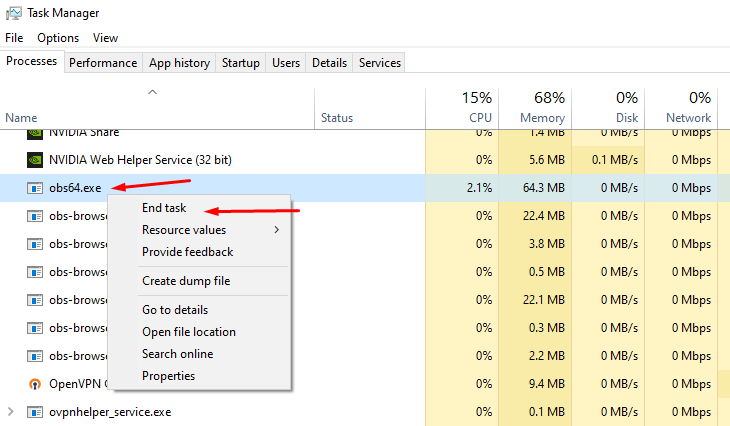
The "acting like it's a fresh restart" is due to certain background processes not closing properly. First, please close Streamlabs Desktop.
Then open your task manager. Please press "Ctrl + Shift + Esc" on your keyboard to bring up your Task Manager.
Please select "More Details" at the bottom if you don't see the percentages of resources used.
Check for any running programs called "Streamlabs," "Electron," or "Obs64". If you find either of these processes running, please right-click and end the process. https://gyazo.com/d6b9babb076875ee5889983b532948e1
Then, reopen Streamlabs Desktop. This should resolve it but if it doesn't please submit a ticket at https://support.streamlabs.com/hc/en-us/requests/new and our team would be able to assist you further.
 quick vine
still didn't work. I'll submit a ticket
quick vine
gritty isle
**Streamlabs Desktop launching as if it is a fresh/like it's the first time usin...
I would still like to try and reset my cache, but the button isn't there in streamlabs
gritty isle
quick vine
I would still like to try and reset my cache, but the button isn't there in stre...
If you’ve submitted a ticket it’s best to wait on a response there. The staff has asked the volunteers not to work tickets in parallel here to avoid duplicate troubleshooting steps or conflicting information.
 abstract plazaBOT
 Having trouble? Want to see if anyone else is having the same problem?
Check out our #known-issues channel! We do our best to keep this channel as current as possible with new bugs and progress updates!
If you can't find what you need please submit a ticket at: https://support.streamlabs.com/hc/en-us/requests/new
abstract plazaBOT
Are you knowledgeable about Streamlabs products?
 Get rewarded for helping the Streamlabs Community here in Discord!
👉 Apply to be a part of the Streamlabs Support Volunteer Program!
Application Link:
https://forms.gle/eKS29zWfFjGEzaRp7
For details, see our post in
#announcements message
Do you have a Streamlabs Ultra membership? Are you part of the Streamlabs All-Stars program?
Get your Discord roles by going to this page here: https://streamlabs.com/dashboard#/settings/integrations and clicking "Link" next to Discord! Ultra members and higher tier All-Stars members will have access to private channels for support!
Interested in Ultra? Check it out here: https://streamlabs.com/ultra?refl=discord
 violet rapids
Hi, i have set a custom tip goal but when i copy the url and paste it on obs studio it dont appear on it?
abstract plazaBOT
Having trouble? Want to see if anyone else is having the same problem?
Check out our #known-issues channel! We do our best to keep this channel as current as possible with new bugs and progress updates!
If you can't find what you need please submit a ticket at: https://support.streamlabs.com/hc/en-us/requests/new
 ancient girder
hi so my friend gave me mod access to his dashboard using an invite but seems like when i access from my browser it shows unauthorized ?
abstract plazaBOT
Do you have a Streamlabs Ultra membership? Are you part of the Streamlabs All-Stars program?
Get your Discord roles by going to this page here: https://streamlabs.com/dashboard#/settings/integrations and clicking "Link" next to Discord! Ultra members and higher tier All-Stars members will have access to private channels for support!
Interested in Ultra? Check it out here: https://streamlabs.com/ultra?refl=discord
Are you knowledgeable about Streamlabs products?
Get rewarded for helping the Streamlabs Community here in Discord!
👉 Apply to be a part of the Streamlabs Support Volunteer Program!
Application Link:
https://forms.gle/eKS29zWfFjGEzaRp7
For details, see our post in
#announcements message
 rose berry
Anyone know why when streaming a game, it is echoing the game audio? Not my spoken mic audio, just game
 indigo sage
was trying to use streamlabs mobile but it would not show me my chat even though my scene had it?
 orchid quest
The "Reset Streamlabels" button in General doesn't reset the session
abstract plazaBOT
Having trouble? Want to see if anyone else is having the same problem?
Check out our #known-issues channel! We do our best to keep this channel as current as possible with new bugs and progress updates!
If you can't find what you need please submit a ticket at: https://support.streamlabs.com/hc/en-us/requests/new
 signal violet
Hey guys, I need some help with Streamlabs tip alert variations. I’m trying to make different sounds play depending on the tip amount, for example one sound for 1-5$, another for 5-20$, etc. I made the variations with “tip amount is at least”, enabled them, uploaded different sounds and saved everything, but only the default alert sound plays. If I remove the default sound, then no sound plays at all. I’m using Streamlabs Desktop and this is for Tips, not YouTube Super Chats. Does anyone know what could be causing this?
 stoic perch
 abstract plazaBOT
Having trouble? Want to see if anyone else is having the same problem?
Check out our #known-issues channel! We do our best to keep this channel as current as possible with new bugs and progress updates!
If you can't find what you need please submit a ticket at: https://support.streamlabs.com/hc/en-us/requests/new
 icy bronze
How do i stream to tiktok using streamlabs I need help
abstract plazaBOT
Do you have a Streamlabs Ultra membership? Are you part of the Streamlabs All-Stars program?
Get your Discord roles by going to this page here: https://streamlabs.com/dashboard#/settings/integrations and clicking "Link" next to Discord! Ultra members and higher tier All-Stars members will have access to private channels for support!
Interested in Ultra? Check it out here: https://streamlabs.com/ultra?refl=discord
Are you knowledgeable about Streamlabs products?
Get rewarded for helping the Streamlabs Community here in Discord!
👉 Apply to be a part of the Streamlabs Support Volunteer Program!
Application Link:
https://forms.gle/eKS29zWfFjGEzaRp7
For details, see our post in
#announcements message
 near plinth
Can somebody help me setup my streamlabs please? it says 100% skipped frames etc.
 gusty umbra
near plinth
Can somebody help me setup my streamlabs please? it says 100% skipped frames etc...
gusty umbra
near plinth
Can somebody help me setup my streamlabs please? it says 100% skipped frames etc...
Slipped frames are usually your CPU overloaded. We have this nice article to help with frame issues. https://streamlabs.com/content-hub/post/dropped-frames-cpugpu-issues-and-improving-stream-quality
 limpid arrow
Hi, where do I change my email to my student ID email for the 50% off sub price. I cannot find the email settings 
near plinth
gusty umbra
Slipped frames are usually your CPU overloaded. We have this nice article to hel...
Oh so that explains why I have lag overall
gusty umbra
near plinth
Oh so that explains why I have lag overall
Yes.
 robust geode
quick question how do I blur some parts of screen on capture card source.
 worthy chasm
I use to use OBS but I want to give StreamLabs a Chance an I need help I know Ctrl F & R is for the game to not make it over lap in OBS what is the Key's for Streamlabs to do the Same?
 alpine thistle
anyone know how to fix the issue where alerts arnt triggering? and multichat for tiktok isnt working
abstract plazaBOT
Do you have a Streamlabs Ultra membership? Are you part of the Streamlabs All-Stars program?
Get your Discord roles by going to this page here: https://streamlabs.com/dashboard#/settings/integrations and clicking "Link" next to Discord! Ultra members and higher tier All-Stars members will have access to private channels for support!
Interested in Ultra? Check it out here: https://streamlabs.com/ultra?refl=discord
Are you knowledgeable about Streamlabs products?
Get rewarded for helping the Streamlabs Community here in Discord!
👉 Apply to be a part of the Streamlabs Support Volunteer Program!
Application Link:
https://forms.gle/eKS29zWfFjGEzaRp7
For details, see our post in
#announcements message
 severe dragon
does anyone know how to fix the streamer error?
gusty umbra
severe dragon
does anyone know how to fix the streamer error?
My discord to brain wireless upload must not be working... it’s early still. Can you provide and image of the error?
 remote portal
hi sorry if this ion the wrong place but am trying to swap from obs to slobs but my profile wont import from obs to slobs what one should it be as it says the same on all


 oak cloud
remote portal
hi sorry if this ion the wrong place but am trying to swap from obs to slobs but...
oak cloud
remote portal
hi sorry if this ion the wrong place but am trying to swap from obs to slobs but...
there may be something corrupt which is why it can't import
remote portal
oak cloud
there may be something corrupt which is why it can't import
ok no worries so am goign to have to manually redo them all
oak cloud
you could try skipping that on the onboarding. Then go to Streamlabs Desktop settings > obs import and see if it works there (just in case there is something weird going on with onboarding)
remote portal
ok will that
oak cloud
unless that's where you were doing it from in the first place
what's weird to me is that i'm not getting the option to select profiles to import like you are 
remote portal
oak cloud
unless that's where you were doing it from in the first place
thats when i fisrt install it
oak cloud
ok yeah, i would go through the rest of the onboarding and then try it after that just in case
remote portal
oak cloud
ok yeah, i would go through the rest of the onboarding and then try it after tha...
is that on the main site or the streamsoftware its self
oak cloud
but normally if that is happening it means that there is a file that is being "wonky" like maybe the save location changed, etc and so it's reading it as corrupted
remote portal
oak cloud
but normally if that is happening it means that there is a file that is being "w...
where can i find the import?
oak cloud
You can go to obs studio > scene collections > export and then save that somewhere. But otherwise Streamlabs Desktop is grabbing it from your obs studio roaming folder
remote portal
oak cloud
You can go to obs studio > scene collections > export and then save that somewhe...
think iv found now thanks 🙂
severe dragon
gusty umbra
My discord to brain wireless upload must not be working... it’s early still. Ca...
 gritty isle
severe dragon
gritty isle
severe dragon
In Streamlabs Desktop, log out, wait a minute, log back in, wait a minute, go to Settings > Network, set the Bind to IP selection to Default, save the settings, and then try again to go live.
If you still have issues, go to Settings > Network, set the Bind to IP selection to the IP address for your computer, usually starts with 192.168 or 10.10, and then try again.
If the problem persist and you are streaming to Twitch, run the Twitch Test.
Please download and run the Twitch Test, see next post.
Select Medium or Long Duration.
Select all the ingests in your region.
Let the test finish completely then screen shot the whole results window without cropping.
If you need help finding your Twitch stream key: https://streamlabs.com/content-hub/post/where-to-find-your-twitch-stream-key
 wispy latchBOT
@severe dragon 🌐 Finding Your Best Twitch Server
To ensure the most stable and high-quality stream to Twitch, we recommend using a Twitch test tool to find the optimal server for your location and internet connection.
📋 How to Use the Twitch Test Tool:
- Access the tool here: Twitch Test Tool
- Run the test using either the Medium or Long duration. Short tests may not provide the most accurate results.
- Select your specific region from the listed options. If your exact region is not available, choose 5 to 6 servers closest to you.
- Aim for a quality score of at least 84. This indicates a strong and stable connection.
🛠️ Applying Your Settings in Streamlabs Desktop:
- Once you've identified a good server, navigate to your Streamlabs Desktop settings:
Settings>Stream>Stream to custom ingest. - From there, you can manually select your preferred server based on your test results.
severe dragon
gritty isle
In Streamlabs Desktop, log out, wait a minute, log back in, wait a minute, go to...
Done all that and I stream to Rumble
gritty isle
severe dragon
Done all that and I stream to Rumble
On Rumble, log out, wait a minute, log back in, refresh/reset your stream key on Rumble and the paste the new stream key in Streamlabs Desktop.
severe dragon
gritty isle
On Rumble, log out, wait a minute, log back in, refresh/reset your stream key on...
got thank you
 cosmic shadow
I'm not sure if this is a technical-support question, under sponsorships HelloFresh is on there and it says audience threshold met, but when I apply a timed pop-up come up that says Failed to apply campaign creator is not eligible for this campaign. I'm not finding anything on why? Any advice?
gritty isle
severe dragon
got thank you
You're welcome.
gritty isle
cosmic shadow
I'm not sure if this is a technical-support question, under sponsorships HelloFr...
We won't be able to answer that here. Please submit a ticket here https://support.streamlabs.com/hc/en-us/requests/new.
abstract plazaBOT
Having trouble? Want to see if anyone else is having the same problem?
Check out our #known-issues channel! We do our best to keep this channel as current as possible with new bugs and progress updates!
If you can't find what you need please submit a ticket at: https://support.streamlabs.com/hc/en-us/requests/new
abstract plazaBOT
Do you have a Streamlabs Ultra membership? Are you part of the Streamlabs All-Stars program?
Get your Discord roles by going to this page here: https://streamlabs.com/dashboard#/settings/integrations and clicking "Link" next to Discord! Ultra members and higher tier All-Stars members will have access to private channels for support!
Interested in Ultra? Check it out here: https://streamlabs.com/ultra?refl=discord
Are you knowledgeable about Streamlabs products?
Get rewarded for helping the Streamlabs Community here in Discord!
👉 Apply to be a part of the Streamlabs Support Volunteer Program!
Application Link:
https://forms.gle/eKS29zWfFjGEzaRp7
For details, see our post in
#announcements message
Are you knowledgeable about Streamlabs products?
Get rewarded for helping the Streamlabs Community here in Discord!
👉 Apply to be a part of the Streamlabs Support Volunteer Program!
Application Link:
https://forms.gle/eKS29zWfFjGEzaRp7
For details, see our post in
#announcements message
 harsh hatch
Hello and I apologize if this has been asked already. I stream to TikTok vertical and Twitch horizontal. How do I play regular music that can be excluded from the vods? I have been searching for a correct way to do this and am ending up not finding a solution. Any help would be great. Thank you
gritty isle
harsh hatch
Hello and I apologize if this has been asked already. I stream to TikTok vertica...
For Twitch, you can split your audio https://streamlabs.com/content-hub/post/how-to-use-application-audio-capture and the Twitch VOD Track https://streamlabs.com/content-hub/post/how-to-use-twitch-vod-track-in-streamlabs-desktop. TikTok though doesn't have a VOD Track option so your best method is only to play music you have a license or right to use.
harsh hatch
@gritty isle this will disable the vertical veiw though for my stream though correct?
gritty isle
harsh hatch
<@301571565840236564> this will disable the vertical veiw though for my stream t...
No. It only limits the audio sources that are recorded in the VOD on Twitch.
harsh hatch
@gritty isle would I have to uncheck selective audio for the vertical window to show up again?
gritty isle
harsh hatch
<@301571565840236564> would I have to uncheck selective audio for the vertical w...
Did you turn off Dual Output?
"To enable and configure Twitch VOD, you must first ensure that your selected platform is correctly set to Twitch, or if you're using Dual Output, ensure that one of your destinations is set to Twitch. The Twitch VOD feature is not currently available for multistream."
harsh hatch
Ok sounds good. I will most likely have to stream on streamlabs just for twitch then and TikTok live for TikTok in order for it to work
 gritty isle
 latent plaza
For assistance with OBS Studio, please ask over in their Discord in the Windows Support channel: https://obsproject.com/discord
Discord
Official hub for Open Broadcaster Software (OBS). OBS Studio is free and open source for recording and live streaming. | 248874 members
latent plaza
I mean I use streamlabs not obs. Unless you mean yall just don’t handle that part lmao
gritty isle
latent plaza
I mean I use streamlabs not obs. Unless you mean yall just don’t handle that par...
That screen specificall mentions OBS Studio.
If you are indeed using Streamlabs Desktop:
This might help:
First, please delete your game capture source and quit Streamlabs Desktop.
Then go to the search in windows (🔎) and search this file path: C:\ProgramData\obs-studio-hook and then click on the folder that pops up.
Once you have done that you will see a bunch of files. If you can ignore those for a second and click on the program data folder.
Then you should see the obs-studio-hook folder there and highlighted.
Go ahead and delete the folder.
 gritty isle
latent plaza
Obs studio is not even installed on my computer
gritty isle
latent plaza
Obs studio is not even installed on my computer
Odd that Warframe specifically mentions OBS Studio.
latent plaza
I had it in the past but after constant issues I switched to streamlabs and deleted obs I would think completely but 🤷♂️ idek. It’s def not on or running at least

I feel like I missed a step. Found this after my pc struggled forever lmao. But program data? Haven’t seen anything labeled that
latent plaza
gritty isle
That screen specificall mentions OBS Studio.
If you are indeed using Streamlabs...
Also the more I stare at this message the more I’m unsure if you wanted me to delete the program data folder, or the obs hook folder.
The text reads like it’s the obs hook folder, but then the picture has program highlighted in red lol.
Like if it’s the obs hook folder I found it. If it’s the program data one then idek
gritty isle
latent plaza
Also the more I stare at this message the more I’m unsure if you wanted me to de...
Delete the entire obs-studio-hook folder.
Don't delete anything else!
latent plaza
Ok I have to let it struggle to search again but then I can delete that
Okie now what
Just restarts streamlabs or sum?
gritty isle
latent plaza
Just restarts streamlabs or sum?
Launch Streamlabs Desktop and add Game Capture back and see how it goes.
latent plaza
Okie. I’ve been having what feels like a memory leak when I play warframe. So after that pop up I’m hoping that was what the issue was. Fingers crossed 🤞
abstract plazaBOT
Having trouble? Want to see if anyone else is having the same problem?
Check out our #known-issues channel! We do our best to keep this channel as current as possible with new bugs and progress updates!
If you can't find what you need please submit a ticket at: https://support.streamlabs.com/hc/en-us/requests/new
 versed night
When dealing with the ChatBox, how do I make it so large amounts of text doesn't just exit the source while also keeping to a small box. AKA, text continues just on the following line
abstract plazaBOT
Having trouble? Want to see if anyone else is having the same problem?
Check out our #known-issues channel! We do our best to keep this channel as current as possible with new bugs and progress updates!
If you can't find what you need please submit a ticket at: https://support.streamlabs.com/hc/en-us/requests/new
abstract plazaBOT
Are you knowledgeable about Streamlabs products?
Get rewarded for helping the Streamlabs Community here in Discord!
👉 Apply to be a part of the Streamlabs Support Volunteer Program!
Application Link:
https://forms.gle/eKS29zWfFjGEzaRp7
For details, see our post in
#announcements message
Do you have a Streamlabs Ultra membership? Are you part of the Streamlabs All-Stars program?
Get your Discord roles by going to this page here: https://streamlabs.com/dashboard#/settings/integrations and clicking "Link" next to Discord! Ultra members and higher tier All-Stars members will have access to private channels for support!
Interested in Ultra? Check it out here: https://streamlabs.com/ultra?refl=discord
Do you have a Streamlabs Ultra membership? Are you part of the Streamlabs All-Stars program?
Get your Discord roles by going to this page here: https://streamlabs.com/dashboard#/settings/integrations and clicking "Link" next to Discord! Ultra members and higher tier All-Stars members will have access to private channels for support!
Interested in Ultra? Check it out here: https://streamlabs.com/ultra?refl=discord
 acoustic rover
my cloudbot alerts are not respond in my yt channel. I always turn on the active cloudbot tick and streamlabs channel always a moderator of my yt channel
gritty isle
acoustic rover
my cloudbot alerts are not respond in my yt channel. I always turn on the active...
Standard Moderator? Managing Moderator won't work.
acoustic rover
oh thankss
gritty isle
acoustic rover
oh thankss
You're welcome.
 signal elbow
Why alt-tabbing when in League bugs the entire capture and it becomes like im using Display Capture although I am using Game Capture?

 brisk fulcrum
Hi everyone,
I’ve been streaming on YouTube regularly using Streamlabs Desktop for the past few months. Streaming itself works perfectly fine, but I’m facing an issue with the built-in YouTube chat dock.
Whenever I start streaming, the YouTube chat panel appears on the right side, but it shows a “Sign In” button. When I click it, Streamlabs opens my browser and lets me access/chat through the browser, but the chat still doesn’t work directly inside the Streamlabs application.
I previously used OBS Studio but had recurring “No Data” issues, so I switched to Streamlabs and everything else has been stable since then.
Has anyone faced this issue before? Is there any workaround or fix so I can use YouTube chat seamlessly within Streamlabs itself instead of relying on the browser?
Thanks in advance!
gritty isle
brisk fulcrum
Hi everyone,
I’ve been streaming on YouTube regularly using Streamlabs Desktop ...
Sadly, that' the correct behavior.
brisk fulcrum
Got it, thanks for confirming.
So just to clarify, is the built-in YouTube chat in Streamlabs currently designed to authenticate through the browser only, and there’s no way to actively chat directly inside the Streamlabs dock itself?
I just wanted to make sure I wasn’t missing any setting or workaround. Thanks again!
gritty isle
brisk fulcrum
Got it, thanks for confirming.
So just to clarify, is the built-in YouTube chat...
Correct. The embedded chat dock when used with YouTube in read only.
brisk fulcrum
Thanks for clarifying.
In that case, what would you recommend as the best alternative/workflow for interacting with YouTube chat while streaming through Streamlabs?
Would using a custom dock with YouTube popout chat be the preferred method, or is there another smoother solution most creators use?
gritty isle
brisk fulcrum
Thanks for clarifying.
In that case, what would you recommend as the best alter...
Opening the stream chat in a web browser is the best method.
 sharp pulsar
I have had trouble multi streaming for a while now. It will work for a good amount of time just fine then randomly out of no where it will drop one of the platforms mid stream. Either the twitch or YouTube stream will just stop and stopping and starting the stream again never fixes this issue I simply am forced to stream to one platform when this comes up
gritty isle
sharp pulsar
I have had trouble multi streaming for a while now. It will work for a good amou...
Multistreaming with a Streamlabs Ultra subscription or using Dual Output for free (Twitch and YouTube Shorts)?
sharp pulsar
I pay for the service
brisk fulcrum
gritty isle
Opening the stream chat in a web browser is the best method.
Understood, thank you for the help and clarification. I’ll use the browser popout chat workflow going forward. Appreciate the quick response!
gritty isle
sharp pulsar
I pay for the service
Thank you for being a Streamlabs Ultra subscriber!
Please link your discord and gain access to the VIP Support channel and ask again there.
wispy latchBOT
 Streamlabs Ultra & All-Stars Discord Access
@brisk fulcrum, are you a Streamlabs Ultra Subscriber or an All-Stars member? If so, you can link your Discord account to gain access to exclusive Ultra/VIP roles and private chat channels here in our Discord server!
🔗 How To Get Your Ultra/All-Stars Discord Role:
Link your Discord account under your Streamlabs integrations settings: Streamlabs Integrations Dashboard
Not Yet an Ultra Member?
You can learn more about Ultra and upgrade your membership here: Upgrade to Streamlabs Ultra
gritty isle
brisk fulcrum
Understood, thank you for the help and clarification. I’ll use the browser popou...
You're welcome!
abstract plazaBOT
Having trouble? Want to see if anyone else is having the same problem?
Check out our #known-issues channel! We do our best to keep this channel as current as possible with new bugs and progress updates!
If you can't find what you need please submit a ticket at: https://support.streamlabs.com/hc/en-us/requests/new
 sand trench
hello everyone! I have a few problems with my streamlabs software! I would like some help in 1 on 1 if possible, a lot easier to explain my problems and maybe finding a fix.
would appreciate a lot!
gusty umbra
sand trench
hello everyone! I have a few problems with my streamlabs software! I would like ...
Hey there. We’re not allowed to help via video calls or private messages. All support must be done in these channels. You’re more than welcome to post your issues and include relevant screenshots. If you’re a streamlabs ultra subscriber, you get streamlabs staff support via our #vip-support channel.
sand trench
unfortunately I don't have access on the channel you just tagged
abstract plazaBOT
Do you have a Streamlabs Ultra membership? Are you part of the Streamlabs All-Stars program?
Get your Discord roles by going to this page here: https://streamlabs.com/dashboard#/settings/integrations and clicking "Link" next to Discord! Ultra members and higher tier All-Stars members will have access to private channels for support!
Interested in Ultra? Check it out here: https://streamlabs.com/ultra?refl=discord
Are you knowledgeable about Streamlabs products?
Get rewarded for helping the Streamlabs Community here in Discord!
👉 Apply to be a part of the Streamlabs Support Volunteer Program!
Application Link:
https://forms.gle/eKS29zWfFjGEzaRp7
For details, see our post in
#announcements message
gusty umbra
sand trench
unfortunately I don't have access on the channel you just tagged
You won’t unless you’re a streamlabs ultra subscriber. It was just and example of one of the methods of assistance we offer.
There is also our #1173605643484139591 it’s got a bunch of new videos and articles chai just posted. https://discord.com/channels/346751285514469388/1504192944834609254
 rare stratus
Hi i need help making a ticket to my streamlabs account. My gmail was hacked and have no access to it, im trying to change my gmail to the new one and it wont let me. So i tried to submit a ticket and says i can't do that unless i verify my old Gmail(which i have no access to). So that's why I'm here and seeing if someone can help! plz
 marble wind
signal elbow
Why alt-tabbing when in League bugs the entire capture and it becomes like im us...
marble wind
signal elbow
Why alt-tabbing when in League bugs the entire capture and it becomes like im us...
i had the same issue exactly once, a game hung and obs-studio somehow started capturing dwm, weird stuff
gritty isle
rare stratus
Hi i need help making a ticket to my streamlabs account. My gmail was hacked and...
That's something only the staff can assist with via a ticket but as I see that isn't going to work for you, please send an email to support@streamlabs.com
rare stratus
gritty isle
That's something only the staff can assist with via a ticket but as I see that i...
My new gmail or the one that is with the account?
nvm i get it send them an email right
gritty isle
rare stratus
My new gmail or the one that is with the account?
The new one as it seem you don't have access to the old one, right? There will likely be some verification to be done as well during the email exchange.
abstract plazaBOT
Having trouble? Want to see if anyone else is having the same problem?
Check out our #known-issues channel! We do our best to keep this channel as current as possible with new bugs and progress updates!
If you can't find what you need please submit a ticket at: https://support.streamlabs.com/hc/en-us/requests/new
 hybrid holly

I keep getting this error but as u see I can’t select a vertical or horizontal. What can I do
sand trench
gusty umbra
You won’t unless you’re a streamlabs ultra subscriber. It was just and example o...
I am a streamlabs ultra subscriber tho
gusty umbra
sand trench
I am a streamlabs ultra subscriber tho
Easy fix. Link your Streamlabs to your discord via this link. https://streamlabs.com/dashboard#/settings/integrations then you will see the #vip-support channel
gritty isle
hybrid holly
 hybrid holly
gritty isle
hybrid holly
gritty isle
i feel so slow, thank you bro i appreciate it 🤣
gritty isle
hybrid holly
i feel so slow, thank you bro i appreciate it 🤣
You're welcome.
hybrid holly
u have a great daY MY MAN
gritty isle
hybrid holly
u have a great daY MY MAN
You too! 
 modern fox
I got a question. Why does my camera keep crashing on twitch every time I edit my stremlabs and then doesnt come back up after several restarts and attempts to get it working?
 magic halo
So i've got a problem. Every alert in the alert box is working except for bits. they don't show in my recent events either. what do i do?
abstract plazaBOT
Having trouble? Want to see if anyone else is having the same problem?
Check out our #known-issues channel! We do our best to keep this channel as current as possible with new bugs and progress updates!
If you can't find what you need please submit a ticket at: https://support.streamlabs.com/hc/en-us/requests/new
abstract plazaBOT
Do you have a Streamlabs Ultra membership? Are you part of the Streamlabs All-Stars program?
Get your Discord roles by going to this page here: https://streamlabs.com/dashboard#/settings/integrations and clicking "Link" next to Discord! Ultra members and higher tier All-Stars members will have access to private channels for support!
Interested in Ultra? Check it out here: https://streamlabs.com/ultra?refl=discord
Are you knowledgeable about Streamlabs products?
Get rewarded for helping the Streamlabs Community here in Discord!
👉 Apply to be a part of the Streamlabs Support Volunteer Program!
Application Link:
https://forms.gle/eKS29zWfFjGEzaRp7
For details, see our post in
#announcements message
signal elbow
Guys, will someone help me, same issue? My game capture is buggy while in League Of Legends and it becomes as Display Capture?
 gritty isle
signal elbow
Guys, will someone help me, same issue? My game capture is buggy while in League...
gritty isle
signal elbow
Guys, will someone help me, same issue? My game capture is buggy while in League...
This might help:
First, please delete your game capture source and quit Streamlabs Desktop.
Then go to the search in windows (🔎) and search this file path: C:\ProgramData\obs-studio-hook and then click on the folder that pops up.
Once you have done that you will see a bunch of files. If you can ignore those for a second and click on the program data folder.
Then you should see the obs-studio-hook folder there and highlighted.
Go ahead and delete the folder.
Then launch Streamlabs Desktop and add the Game Capture source back.
signal elbow
gritty isle
This might help:
First, please delete your game capture source and quit Streaml...
Its working for now, thanks.
gritty isle
signal elbow
Its working for now, thanks.
You're welcome.
signal elbow
Any idea when sometimes it locks the game on 108 fps?
gritty isle
signal elbow
Any idea when sometimes it locks the game on 108 fps?
What is "it"? If you're live streaming, it is a best practice not to have uncapped or high FPS in games.
signal elbow
I cap it at 144 but sometimes when I alt-tab the game goes on 108 fps maximum 😉
gritty isle
signal elbow
I cap it at 144 but sometimes when I alt-tab the game goes on 108 fps maximum 😉
Avoid tabbing out of the game. Game Capture can have issues if you tab out frequently. That's because when you tab out of a full screen game, it stop producing frames and that causes Game Capture to lose the hook into the video stream. If you're tabbing out to control your stream, consider setting hot keys in Streamlabs Desktop to control things.
gusty umbra
I fully support a 2nd monitor for stream control (and general quality of life on a PC). Walmart (at least in our area) had some Samsung 144hz 1ms 27” monitors for sub $50
magic halo
So i've got a problem. Every alert in the alert box is working except for bits. they don't show in my recent events either. what do i do?
 pulsar pendant
hey guys very new to stream labs just seeing if someone could help me set up my settings so when i stream, my discord voice channel doesn't broadcast in my stream so my views cant hear my friends any help would be great
any help would be sick ty
 celest swift
Hey how do i activate the wheel im adding a wheel widget on stream so if some1 tips for it how can i make it spin
wispy latchBOT
@magic halo ⛓️💥 Disconnecting Your Streaming Service
If you need to disconnect your streaming service (like Twitch, YouTube, or others) from your Streamlabs account, please follow these clear steps:
- Log out of Streamlabs.com (you can use this link to force a logout and any Streamlabs software such as Streamlabs Desktop (you can do so from the bottom left 👤)
- Follow this guide to disconnect the specific streaming service from Streamlabs
- Once you're done, please log back Streamlabs Desktop or streamlabs.com with the account disconnected
Note: If you are doing this step for fixing your alerts, you may need to reload your widgets. You can do this by going to your Live Actions Tab of the Recent Events > Scroll all the way and click Reload Widgets
gritty isle
pulsar pendant
hey guys very new to stream labs just seeing if someone could help me set up my ...
If you want your stream to be able to hear Discord, make sure the exact device is selected at Settings > Audio > Desktop Audio device.
gritty isle
celest swift
Hey how do i activate the wheel im adding a wheel widget on stream so if some1 ...
You spin the wheel by clicking the Spin Wheel button on Live Actions.
 celest swift
gritty isle
You spin the wheel by clicking the *Spin Wheel* button on Live Actions.
<https:...
celest swift
gritty isle
You spin the wheel by clicking the *Spin Wheel* button on Live Actions.
<https:...
is there a way to spin it without goin to browser
magic halo
for some reason it won't work. i see all the follows, subs and stuff but no bits. it won't even show in the eventlist
gritty isle
celest swift
is there a way to spin it without goin to browser
There is not.
magic halo
 celest swift
gritty isle
There is not.
celest swift
gritty isle
There is not.
thank u boss
gritty isle
magic halo
for some reason it won't work. i see all the follows, subs and stuff but no bits...
What won't work?
 gritty isle
celest swift
thank u boss
gritty isle
celest swift
thank u boss
You're welcome.
magic halo
gritty isle
What won't work?
Well someone sent me bits yesterday. i had no alert. it showed on twitch but it's not on the event list in streamlabs. so it didn't recognize the event. therefore no alert
gritty isle
magic halo
Well someone sent me bits yesterday. i had no alert. it showed on twitch but it'...
I understand. Please follow the Disconnect Service steps that the bot posted to you above. And remember, this will not go back in time and capture events that were missed. It will capture events going forward from the time you log back in. And don't forget to click the Reload Widgets button.
magic halo
gritty isle
I understand. Please follow the Disconnect Service steps that the bot posted to...
i did try that but nothing happened. still the same problem.

 gritty isle
magic halo
i did try that but nothing happened. still the same problem.
gritty isle
magic halo
i did try that but nothing happened. still the same problem.
When did you perform the disconnect service guide?
magic halo
5 minutes ago
gritty isle
magic halo
5 minutes ago
Remember, this will not go back in time and capture events that were missed. It will capture events going forward from the time you log back in
magic halo
gritty isle
*Remember, this will not go back in time and capture events that were missed. I...
okay thank you
gritty isle
magic halo
okay thank you
You're welcome.
abstract plazaBOT
Having trouble? Want to see if anyone else is having the same problem?
Check out our #known-issues channel! We do our best to keep this channel as current as possible with new bugs and progress updates!
If you can't find what you need please submit a ticket at: https://support.streamlabs.com/hc/en-us/requests/new
 dull harness
Hello. I am setting up my IRL Stream. I am just wondering how can I setup if I lose conection on my phone, the Streamlabs change to a scene where says smth like "conection will be back soon" and don't get the stream down. Is there some video that anyone recommends?
gritty isle
dull harness
Hello. I am setting up my IRL Stream. I am just wondering how can I setup if I l...

Streamlabs
Use Streamlabs Mobile Disconnect Protection to keep streams running through connection drops.
NOTE: This disconnect protection is an Ultra only feature.
dull harness
one question. For example I have a LiveU Solo, I connect to my obs. I need to have my pc always on with internet for in case my conection while on the street fails, it change automatically for other scene in the pc?
gritty isle
dull harness
one question. For example I have a LiveU Solo, I connect to my obs. I need to ha...
There's nothing in Streamlabs Desktop that will do that. The only thing is the disconnect protection feature I mentioned above with a Streamlabs Ultra subscription.
 gritty isle
 crystal fable
why did they remove the chat for tiktok stream
crystal fable
why did they remove the chat for tiktok stream
We've never had support for chat with TikTok.
crystal fable
it was working
gritty isle
crystal fable
it was working
It may have worked before but due to changes by TikTok, it is no longer available.
abstract plazaBOT
Do you have a Streamlabs Ultra membership? Are you part of the Streamlabs All-Stars program?
Get your Discord roles by going to this page here: https://streamlabs.com/dashboard#/settings/integrations and clicking "Link" next to Discord! Ultra members and higher tier All-Stars members will have access to private channels for support!
Interested in Ultra? Check it out here: https://streamlabs.com/ultra?refl=discord
Are you knowledgeable about Streamlabs products?
Get rewarded for helping the Streamlabs Community here in Discord!
👉 Apply to be a part of the Streamlabs Support Volunteer Program!
Application Link:
https://forms.gle/eKS29zWfFjGEzaRp7
For details, see our post in
#announcements message
 unreal forge
my youtube alert box not working how can i fix this please help
gritty isle
unreal forge
my youtube alert box not working how can i fix this please help
Not working how?
unreal forge
gritty isle
Not working how?
if someone subscribe my there no alert coming in streamlabs OBS software
gritty isle
unreal forge
if someone subscribe my there no alert coming in streamlabs OBS software
Some YouTube subscriptions won't show due to privacy settings on the viewer's channel.
When someone makes an account on YouTube, the subscribed channels are private by default. When the person subscribing to you is set to private, Streamlabs cannot see the subscription.
The viewer would need to set their subscriptions to public in YouTube's privacy settings https://www.youtube.com/account_privacy BEFORE clicking the subscribe button.
This setting on the your channel doesn't matter.
Share your videos with friends, family, and the world.
abstract plazaBOT
Having trouble? Want to see if anyone else is having the same problem?
Check out our #known-issues channel! We do our best to keep this channel as current as possible with new bugs and progress updates!
If you can't find what you need please submit a ticket at: https://support.streamlabs.com/hc/en-us/requests/new
 lunar lynx
I need help with the app I just got it and don’t know how to get my camera off and connected to my ps
And just get it setup in general
gusty umbra
lunar lynx
I need help with the app I just got it and don’t know how to get my camera off a...
Streamlabs doesn’t natively support PlayStation. I’m assuming you’re using a capture card to get the PlayStation to a PC to stream it. Plug that camera into the streaming PC.
 copper moat
Anybody know a solution for this error when trying to link Tiltify?
 gritty isle
copper moat
Anybody know a solution for this error when trying to link Tiltify?
gritty isle
copper moat
Anybody know a solution for this error when trying to link Tiltify?
Yes, there's an issue with your intergration with Tiltify. In order to resolve this, please submit a ticket: https://support.streamlabs.com/hc/en-us/requests/new and please be sure to include that screen shot.
There is no way from your end to resolve this.
copper moat
gritty isle
Yes, there's an issue with your intergration with Tiltify. In order to resolve ...
Unfortunate. Been about 48 hours since I submitted. Thanks, though.
gritty isle
copper moat
Unfortunate. Been about 48 hours since I submitted. Thanks, though.
Tickets are answered in the order they are received. Please be patient and they will get to you. Us Volunteers don't have access to that ticket system so I can't see the status of any particular ticket.
copper moat
gritty isle
Tickets are answered in the order they are received. Please be patient and they...
Understood. Thank you.
gritty isle
copper moat
Understood. Thank you.
You're welcome.
lunar lynx
gusty umbra
Streamlabs doesn’t natively support PlayStation. I’m assuming you’re using a cap...
I’m on my phone but that sucks man
lunar lynx
gusty umbra
Streamlabs doesn’t natively support PlayStation. I’m assuming you’re using a cap...
Nah I just want my stream to look like good and not boring to. But I can’t do that if ps don’t support it
@gusty umbra
abstract plazaBOT
Having trouble? Want to see if anyone else is having the same problem?
Check out our #known-issues channel! We do our best to keep this channel as current as possible with new bugs and progress updates!
If you can't find what you need please submit a ticket at: https://support.streamlabs.com/hc/en-us/requests/new
 onyx oxide
why when I change my name on twitch does streamlabs wipe everything I had for the past 8 years ?
All my alerts, my merch store, everything. Nothing saved, nothing backed up ?
 normal bronze
hi!! im currently trying to import my streamelements overlays to streamlabs but the importer only recognized 3 out of the few dozen i have in streamelements, any clue why that is??
gritty isle
onyx oxide
why when I change my name on twitch does streamlabs wipe everything I had for th...
Log out of everything Streamlabs: the Streamlabs web site, Streamlabs Desktop, Streamlabs Mobile, Streamlabs Console, Streamlabels.
The log in with your new Twitch name.
gusty umbra
normal bronze
hi!! im currently trying to import my streamelements overlays to streamlabs but ...
Hey there. I’m not exactly sure, the guide for Streamlabs import from stream elements was updated today. It may have a reason as to why. https://streamlabs.com/content-hub/post/how-to-move-streamelements-to-streamlabs if not, can you submit a ticket, please. https://support.streamlabs.com/hc/en-us/requests/new
Streamlabs
Move your StreamElements setup to Streamlabs with our importer. Learn how to transfer overlays, Cloudbot settings, loyalty points, tip settings, and more.
onyx oxide
gritty isle
Log out of everything Streamlabs: the Streamlabs web site, Streamlabs Desktop, ...
You think I didn't log out and log in with my new name, I even logged in with twitch which I have never done & I have nothing.
gritty isle
onyx oxide
You think I didn't log out and log in with my new name, I even logged in with tw...
You didn’t specifically say. Did you log back in by clicking the Twitch button or the Streamlabs ID button?
onyx oxide
gritty isle
You didn’t specifically say. Did you log back in by clicking the Twitch button ...
I've tried both ways, I have default alerts for everything,.
gritty isle
onyx oxide
I've tried both ways, I have default alerts for everything,.
If you log in the Streamlabs web site and go here https://streamlabs.com/dashboard#/settings/account-settings/platforms, does it show your new Twitch channel name?
onyx oxide
gritty isle
If you log in the Streamlabs web site and go here <https://streamlabs.com/dashbo...
Yes it does
gritty isle
onyx oxide
Yes it does
Interesting. And in Streamlabs Desktop, if you click the down arrow next to the Scene Collection name, do you see your Scene Collections there?
onyx oxide
gritty isle
Interesting. And in Streamlabs Desktop, if you click the down arrow next to the...
Yes I do
gritty isle
onyx oxide
Yes I do
Okay, that’s good. Does your Recent Events page look okay? https://streamlabs.com/dashboard#/recentevents
onyx oxide
gritty isle
Okay, that’s good. Does your Recent Events page look okay? <https://streamlabs...
Yes it does
I have no donation ticker or recent donor working on the overlay too
gritty isle
onyx oxide
Yes it does
Okay. You mentioned your Merch Store was affected? https://streamlabs.com/dashboard#/merchadmin
Do any items show up there?
onyx oxide
gritty isle
Do any items show up there?
nothing it's all reset

I thought all this was saved to a cloud
gritty isle
onyx oxide
nothing it's all reset
Hmmm. Dang. Obviously that shouldn’t have happened and I can’t tell you what happened as us Volunteers don’t have access to the systems.
I understand your frustration and that it’s upsetting.
Please submit a ticket on this issue https://support.streamlabs.com/hc/en-us/requests/new. Be sure to include your old Twitch name and your new Twitch name.
onyx oxide
I now know nothing is saved to a cloud,even all my media uploads for alerts are not there
onyx oxide
gritty isle
Hmmm. Dang. Obviously that shouldn’t have happened and I can’t tell you what ha...
to what end ?
gritty isle
onyx oxide
I now know nothing is saved to a cloud,even all my media uploads for alerts are ...
Yeah, something is definitely up but I can’t say what. I’d definitely not try to recover it on your own. Just go ahead and submit the ticket.
gritty isle
onyx oxide
to what end ?
The staff should be able to figure out what happened.
onyx oxide
I think it would be pointless as it looks to me like it can't be recovered if I don't have anything there.

I had sound effects and images uploaded for 8 years
A simple name change wiped it all
gritty isle
onyx oxide
I think it would be pointless as it looks to me like it can't be recovered if I ...
Submit the ticket please. There’s nothing further I can do for this issue. I just don’t have any access since I do not work for Streamlabs.
onyx oxide
Like where's the cloud saves ?
gritty isle
onyx oxide
Like where's the cloud saves ?
Your data is tied to the primary account, meaning the first platform you ever log into Streamlabs with OR your Streamlabs ID.
Normally just changing your name on Twitch and logging out and back work as you expect.
You said your scene collections and recent events are okay so your data is there but some is not available. I could speculate but it would serve no purpose. Please, please submit the ticket.
onyx oxide
gritty isle
Your data is tied to the primary account, meaning the first platform you ever lo...
Ok, thx for your time
gritty isle
onyx oxide
Ok, thx for your time
You’re welcome. 🤞🏻
abstract plazaBOT
Having trouble? Want to see if anyone else is having the same problem?
Check out our #known-issues channel! We do our best to keep this channel as current as possible with new bugs and progress updates!
If you can't find what you need please submit a ticket at: https://support.streamlabs.com/hc/en-us/requests/new
abstract plazaBOT
Do you have a Streamlabs Ultra membership? Are you part of the Streamlabs All-Stars program?
Get your Discord roles by going to this page here: https://streamlabs.com/dashboard#/settings/integrations and clicking "Link" next to Discord! Ultra members and higher tier All-Stars members will have access to private channels for support!
Interested in Ultra? Check it out here: https://streamlabs.com/ultra?refl=discord
Are you knowledgeable about Streamlabs products?
Get rewarded for helping the Streamlabs Community here in Discord!
👉 Apply to be a part of the Streamlabs Support Volunteer Program!
Application Link:
https://forms.gle/eKS29zWfFjGEzaRp7
For details, see our post in
#announcements message
 sharp peak
Hey team, My twitch channel changed from itsnickky to Nickky but hasn't reflect on Streamlabs for a while now. Any tips?
gritty isle
sharp peak
Hey team, My twitch channel changed from itsnickky to Nickky but hasn't reflect ...
Log out of everything Streamlabs: the Streamlabs web site, Streamlabs Desktop, Streamlabs Mobile, Streamlabs Console, Streamlabels. Also, be sure to log out of the Streamlabs web site and Streamlabs Console web site on all devices you access them with.
The log in at the Streamlabs web site with your new Twitch name. This will update your account with your new Twitch name.
sharp peak
gritty isle
Log out of everything Streamlabs: the Streamlabs web site, Streamlabs Desktop, ...
Sadly, Not working I only use the website and It wont let me update links or anything like
 gritty isle
sharp peak
Sadly, Not working I only use the website and It wont let me update links or any...
gritty isle
sharp peak
Sadly, Not working I only use the website and It wont let me update links or any...
Do you have an active Streamlabs Ultra subscription?
sharp peak
gritty isle
Do you have an active Streamlabs Ultra subscription?
No, But shouldnt everything get updated with my current name? Im lucky enough name is quite similiar
gritty isle
Your new Twitch name should appear here https://streamlabs.com/dashboard#/settings/account-settings/platforms
Items like your custom site, won't automatically update.
gritty isle
sharp peak
No, But shouldnt everything get updated with my current name? Im lucky enough na...
You'll need to manually update your custom site.
sharp peak
gritty isle
You'll need to manually update your custom site.
Been trying wont allow me
gritty isle
sharp peak
Been trying wont allow me
Does the new name appear in the Primary site URL drop down?
 gritty isle
sharp peak
Nope shows itsnickky still
gritty isle
sharp peak
Nope shows itsnickky still
Okay, Please create a ticket here https://support.streamlabs.com/hc/en-us/requests/new about this and as soon as you get it, let me know the ticket number.
 smoky juniper
someone plz help, i just got a pc, my mic is on and active but when selected in the mic output isnt even showing, its only showing its name
 gritty isle
smoky juniper
someone plz help, i just got a pc, my mic is on and active but when selected in ...
gritty isle
smoky juniper
someone plz help, i just got a pc, my mic is on and active but when selected in ...
Make sure you've selected the correct device at Settings > Audio.


 gritty isle
smoky juniper
it is selected
gritty isle
smoky juniper
it is selected
And in the Sound Settings Properties for that device, it is not muted?
 smoky juniper
nope, and its picking up my audio

it works for other apps, just not streamlabs for some reason
gritty isle
smoky juniper
nope, and its picking up my audio
Hmmmmm, interesting.
smoky juniper
nor is it working with obs tho... doesnt streamlabs run on obs?
 gritty isle
smoky juniper
nor is it working with obs tho... doesnt streamlabs run on obs?
gritty isle
smoky juniper
nor is it working with obs tho... doesnt streamlabs run on obs?
Streamlabs Desktop is built from the OBS Studio open source code. That's an interesting data point.
smoky juniper
i got it and i am stupid..
gritty isle
smoky juniper
i got it and i am stupid..
Oh? What was the fix?
smoky juniper
the permissions for the mic on desktop apps was set to off by default

still configuring to my settings lmao, i am sorry to have wasted your time
gritty isle
smoky juniper
the permissions for the mic on desktop apps was set to off by default
Oh whoops! Good find!
gritty isle
smoky juniper
still configuring to my settings lmao, i am sorry to have wasted your time
No worries! Glad you got it sorted.
smoky juniper
Thank you!! Have a nice day!
gritty isle
smoky juniper
Thank you!! Have a nice day!
You too!
 slender flax
Hey guys!
I tested out streamlabs multistream yesterday, and the stream went offline after 1h without me noticing for 20 minutes for some reason.
I streamed to Twitch, kick and youtube, bitrate 6k.
Do you have any idea what I am doing wrong ?
Another question, I cant seem to get my overlay to pick up notifications such as last follower, from kick. It is picking up that information from twitch but not from kick, any advice ? I have connected all accounts
gritty isle
slender flax
Hey guys!
I tested out streamlabs multistream yesterday, and the stream went off...
Thank you for being a Streamlabs Ultra subscriber!
No way to tell really, but you are welcome to troubleshoot with the staff.
Please link your discord and ask again over in the VIP Support channel, which is one of your subscriber benefits.
wispy latchBOT
Streamlabs Ultra & All-Stars Discord Access
@slender flax, are you a Streamlabs Ultra Subscriber or an All-Stars member? If so, you can link your Discord account to gain access to exclusive Ultra/VIP roles and private chat channels here in our Discord server!
🔗 How To Get Your Ultra/All-Stars Discord Role:
Link your Discord account under your Streamlabs integrations settings: Streamlabs Integrations Dashboard
Not Yet an Ultra Member?
You can learn more about Ultra and upgrade your membership here: Upgrade to Streamlabs Ultra
slender flax
wispy latch
<a:KevFireworks:837452571220246539> **Streamlabs Ultra & All-Stars Discord Acces...
I am ultra subscriber, i bought a whole year stupid me before getting this to work :/
so where do I link it and poist my discord account name ?
oh now i see, brb fixing

 slender flax
ok so now it should be linked ?
gritty isle
slender flax
ok so now it should be linked ?
Looking good! Now just hop over to #vip-support!
 placid locust
Hi. I just DL the last Nvidia update during my stream. The update made streamlabs crash. So i re-open it, but all my scene are deleted.
(i already reopen it with clear cache / Redownload streamlabs / has an administrator / Restarting PC)
Btw when i click on "Import from OBS or Twitch" nothing happend, so i cannot import the JSON doc scene
Can u help me ? (Windows 10)
gritty isle
placid locust
Hi. I just DL the last Nvidia update during my stream. The update made streamlab...
Try logging out in Streamlabs Desktop, wait a minute, quit Streamlabs Desktop, wait a minute, launch Streamlabs Desktop as administrator, wait a minute, log back in with the same platform/channel, wait a minute, and then see what happens. You might also click the down arrow next to the Scene Collection name in the Scene Selector panel and see if your scene collections are there.
And remember, always avoid updating your Nvidia drivers while you are live. 😉
Only update your Nvidia drivers after quitting all applicattions. And always reboot after installing an updated driver.
placid locust
gritty isle
Try logging out in Streamlabs Desktop, wait a minute, quit Streamlabs Desktop, w...
Done. The Scene isn't here. The down arrow next to the scene just show me 1 empty scene. Clicking on "import" does nothing
gritty isle
placid locust
Done. The Scene isn't here. The down arrow next to the scene just show me 1 empt...
Please submit a ticket here https://support.streamlabs.com/hc/en-us/requests/new for scene collection restoration. Pleaser include the scene collection name(s) and the last date and time they were active.
placid locust
gritty isle
Please submit a ticket here <https://support.streamlabs.com/hc/en-us/requests/ne...
Do you know how much time that can take to have an answer with a ticket ?
gritty isle
placid locust
Do you know how much time that can take to have an answer with a ticket ?
Sorry, we can't give an ETA. Tickets are answered in the order they are received. Be patient and they will get to you.
Just do not click any of the "helpful links", if any, from the emails as that will close your ticket.
 swift vigil
Subject: Having trouble streaming from console via Streamlabs – Stream won't start
"Hey everyone, I’m having a bit of a headache trying to get my stream started on Streamlabs using my console. I’ve tried pretty much everything I can think of, but for some reason, the stream just won't go live.
I’ve already ruled out YouTube and TikTok as the cause because I have those turned off/disconnected. Does anyone have any tips or has anyone dealt with this specific issue before? I’m completely out of ideas at this point. Any help would be much appreciated!"
 rose drum
if i upgraded to ultra does anyone know if its instant or does it take some time to activate ?
gritty isle
swift vigil
Subject: Having trouble streaming from console via Streamlabs – Stream won't sta...
Make sure the destination on your Xbox is set to Streamlabs.
Restart your Xbox.
Make sure you have an active Streamlabs Console subscription and that you've logged in the Streamlabs Console web site by clicking the Twitch button.
gritty isle
rose drum
if i upgraded to ultra does anyone know if its instant or does it take some time...
Might take a bit for the payment to complete.
rose drum
ok ty
gritty isle
rose drum
ok ty
If you've received an email welcoming you to Ultra, please try logging out and logging back in with the same platform and channel you purchased Ultra with.
rose drum
ill check
i paid through paypal and got the confirmation there but i dont see the email so it just might be delayed then
gritty isle
rose drum
i paid through paypal and got the confirmation there but i dont see the email so...
Possible. Check your PayPal and see if the transaction is pending or completed.
rose drum
i see the charge on my cc that is tied to my paypal, it says completed
gritty isle
rose drum
i see the charge on my cc that is tied to my paypal, it says completed
Logout and log back in.
rose drum
still says i can upgrade to ultra and im on free version
gritty isle
rose drum
still says i can upgrade to ultra and im on free version
Hmmmmm, puzzling. Not much else I can do as a volunteer. If you still seem to be on the free plan by tomorrow, please submit a ticket here https://support.streamlabs.com/hc/en-us/requests/new and the payments team can investigate.
rose drum
ok no worries appreciate it
gritty isle
rose drum
ok no worries appreciate it
You're welcome. 🤞
swift vigil
gritty isle
Make sure the destination on your Xbox is set to Streamlabs.
Restart your Xbox.
...
Okay, thank you
abstract plazaBOT
Having trouble? Want to see if anyone else is having the same problem?
Check out our #known-issues channel! We do our best to keep this channel as current as possible with new bugs and progress updates!
If you can't find what you need please submit a ticket at: https://support.streamlabs.com/hc/en-us/requests/new
 humble plank
Anyone know why I can’t stream to TikTok from stream labs console? I got acesss to it on TikTok and everything but when I press go live it just says something went wrong
gritty isle
humble plank
Anyone know why I can’t stream to TikTok from stream labs console? I got acesss ...
On the Streamlabs Console web site, make sure you're logged in by clicking the Twitch button.
Then click your profile photo and choose Account Settings.
Then on TikTok, click Edit and then click Reauthenticate.
Then try again.
humble plank
gritty isle
On the Streamlabs Console web site, make sure you're logged in by clicking the T...
Did that same problem mate
I’ve unlinked it all and relinked it up aswell
gritty isle
humble plank
Did that same problem mate
You sure your access was granted? You can check here https://www.tiktok.com/falcon/live_g/live_access_pc_apply/result/index.html?id=GL6399433079641606942&lang=en-US
humble plank
Yea says approved
gritty isle
humble plank
Yea says approved
And you logged in the Streamlabs Console web site by clicking the Twitch button and not by clicking the Streamlabs ID button?
humble plank
That the part where it says my streamlabs id?
 humble plank
Says my twitch is linked at the minute or am I supposed to log out and do it that way?
I got twitch kick and tiktok linked but only twitch and kick work for streaming
gritty isle
humble plank
Says my twitch is linked at the minute or am I supposed to log out and do it tha...
Log out and then log back by by clicking the Twitch button (red arrow). Don't log in with your Streamlabs ID.
gritty isle
Still says "Something went wrong"?
humble plank
I’ll try it
humble plank
gritty isle
Still says "Something went wrong"?
Still says it
gritty isle
humble plank
Still says it
Weird. Go ahead and send a ticket: https://support.streamlabs.com/hc/en-us/requests/new
humble plank
I have just waiting game now haha
gritty isle
humble plank
I have just waiting game now haha
Right. Be patient and they will get to you. Don't click any of the "helpful links" in the emails as that closes your ticket.
humble plank
gritty isle
Right. Be patient and they will get to you. Don't click any of the "helpful li...
Okay mate thankyou
gritty isle
humble plank
Okay mate thankyou
You're welcome.
abstract plazaBOT
Do you have a Streamlabs Ultra membership? Are you part of the Streamlabs All-Stars program?
Get your Discord roles by going to this page here: https://streamlabs.com/dashboard#/settings/integrations and clicking "Link" next to Discord! Ultra members and higher tier All-Stars members will have access to private channels for support!
Interested in Ultra? Check it out here: https://streamlabs.com/ultra?refl=discord
Are you knowledgeable about Streamlabs products?
Get rewarded for helping the Streamlabs Community here in Discord!
👉 Apply to be a part of the Streamlabs Support Volunteer Program!
Application Link:
https://forms.gle/eKS29zWfFjGEzaRp7
For details, see our post in
#announcements message
gritty isle
 wide dew
can you help me
wide dew
can you help me
With?
wide dew

I will playing in BHRM5 running 2V2"s and also I will be talking to my friends, join in and listen.
gritty isle
wide dew
idk how to get my screen show
What are you using Streamlabs Desktop, Streamlabs Mobile, or Streamlabs Console?
wide dew
look, its just a black screen idk how to get my robloxto show up
wide dew
gritty isle
What are you using Streamlabs Desktop, Streamlabs Mobile, or Streamlabs Console?
the desktop, can we call or no?
gritty isle
wide dew
look, its just a black screen idk how to get my robloxto show up
If you're using Game Capture, that won't work as a few years ago Roblox implemented an anti-cheat feature which broke Game Capture's ability to hook into the game.
As a workaround, please use Window Capture instead:
add a new Window Capture source
select Roblox from the window list
change the Capture Method to "Windows 10"
On Windows 10, you will see a yellow border around the game which cannot be disabled. This is not visible in your stream and can be ignored.
gritty isle
- Add a Window Capture source.
- Choose Roblox in the Window drop down menu.
- In the Capture Method drop down menu, choose Windows 10.


Then click Done.
If you have a Game Capture source, delete that Game Capture source as it won't work.
 regal ingot
gritty isle
If you have a Game Capture source, delete that Game Capture source as it won't w...
regal ingot
gritty isle
If you have a Game Capture source, delete that Game Capture source as it won't w...
Hi, with Jake rn
He doesn’t understand what you mean
wide dew
im crashing out rn
gritty isle
regal ingot
Hi, with Jake rn
Follow the steps I posted here 👉 #technical-support message
gritty isle
wide dew
im crashing out rn
Take a break and try again later if you need to.
wide dew
can you call
gritty isle
wide dew
can you call
For moderation purposes, we can only provide support in this channel.
Just read my post here #technical-support message
It has what you need.
wide dew
nvm moms home and she doesnt know about filming so cant today
 heady lodge
notifications aren't working in streamlabs today... none of my alerts are popping up .. no sounds, no visuals,... i see the events in the mini feed but nothing else
gritty isle
If you go here https://streamlabs.com/dashboard#/alertbox on the Streamlabs web site, click General Settings, do you have "Unlimited Alert Moderation Delay" disabled?
Also go here https://streamlabs.com/dashboard#/recentevents and make sure your alerts are not paused. If this icon is a play button, your alerts were paused.
https://cdn.discordapp.com/attachments/962371235789025360/1147374507238101072/IMG_1019.png


The most popular streaming platform for Twitch, YouTube and Facebook. Cloud-based and used by 70% of Twitch. Grow with Streamlabs Desktop, alerts, 1000+ overlays, analytics, chatbot, tipping, merch and more.
heady lodge
gritty isle
If you go here <https://streamlabs.com/dashboard#/alertbox> on the Streamlabs we...
- yes unlimited alert moderation delay is toggled off
- and recent events are NOT paused.
not sure what's going on with my alerts... the alerts for streamlabs tips, youtube memberships/superchats, kick subs/coins... none of them are working today

 gritty isle
heady lodge
- yes unlimited alert moderation delay is toggled off
- and recent events are NO...
gritty isle
heady lodge
- yes unlimited alert moderation delay is toggled off
- and recent events are NO...
Does the Recent Events page update?
heady lodge
gritty isle
Does the Recent Events page update?
yes it's updating but the alerts are not coming through... they were working fine until today. and i haven't made any changes
gritty isle
heady lodge
yes it's updating but the alerts are not coming through... they were working fin...
If you replay an alert from the Recent Events page, does the alert present?
heady lodge
gritty isle
If you replay an alert from the Recent Events page, does the alert present?
weird... i clicked the hide/unhide button on the alert box source... hid then unhid... and it's working now...
thank you for the quick response as always my friend!
gritty isle
heady lodge
weird... i clicked the hide/unhide button on the alert box source... hid then un...
Interesting. Glad its working now!
@heady lodge I'd suggest checking this option on your Alert Box Widgets. Might help and certainly won't hurt.
 abstract plazaBOT
Having trouble? Want to see if anyone else is having the same problem?
Check out our #known-issues channel! We do our best to keep this channel as current as possible with new bugs and progress updates!
If you can't find what you need please submit a ticket at: https://support.streamlabs.com/hc/en-us/requests/new
 candid rivet
hey hellooo PLEASE someone help me with this i sent out a ticket already but nothing yet, i am trying to rest my password but for some reason the password reset link isnt being sent to my EMAIL at all for some reason
gritty isle
candid rivet
hey hellooo PLEASE someone help me with this i sent out a ticket already but not...
You will have to wait for a response on the ticket. Us volunteers don’t ave access to their systems since we are not Streamlabs employees. Only a Streamlabs staff member can assist you via the ticket.
abstract plazaBOT
Having trouble? Want to see if anyone else is having the same problem?
Check out our #known-issues channel! We do our best to keep this channel as current as possible with new bugs and progress updates!
If you can't find what you need please submit a ticket at: https://support.streamlabs.com/hc/en-us/requests/new
abstract plazaBOT
Do you have a Streamlabs Ultra membership? Are you part of the Streamlabs All-Stars program?
Get your Discord roles by going to this page here: https://streamlabs.com/dashboard#/settings/integrations and clicking "Link" next to Discord! Ultra members and higher tier All-Stars members will have access to private channels for support!
Interested in Ultra? Check it out here: https://streamlabs.com/ultra?refl=discord
Are you knowledgeable about Streamlabs products?
Get rewarded for helping the Streamlabs Community here in Discord!
👉 Apply to be a part of the Streamlabs Support Volunteer Program!
Application Link:
https://forms.gle/eKS29zWfFjGEzaRp7
For details, see our post in
#announcements message
 devout isle
does anyone have issues with making folders in the sources area or is it just me?
 torpid sleet
IM TRYING TO GO LIVE FOR TIKTOK ON IPHONE MOBILE BUT I CANT DAMN FIND MY STREAM KEY AND I DONT WANT TO USE DESKTOP I WANT TO USE MY MOBILE PHONE
gritty isle
torpid sleet
IM TRYING TO GO LIVE FOR TIKTOK ON IPHONE MOBILE BUT I CANT DAMN FIND MY STREAM ...
The integration for TikTok in Streamlabs Mobile is sadly broken right now.
Yes, it likely asks for your stream key but TikTok would send you one if indeed you have met their requirements.
For now, you won’t be able to use Streamlabs Mobile with TikTok.
Supposedly there is a new integration ready but it has not been approved by TikTok.
torpid sleet
HUH
gritty isle
torpid sleet
HUH
Sorry about that.
abstract plazaBOT
Having trouble? Want to see if anyone else is having the same problem?
Check out our #known-issues channel! We do our best to keep this channel as current as possible with new bugs and progress updates!
If you can't find what you need please submit a ticket at: https://support.streamlabs.com/hc/en-us/requests/new
 cunning marlin
is there a way to make the alert_box widget output its own audio?
cause I want everything to have its own audio volume instead of using Desktop audio
 pine solstice
hello! im working with stream Labels right now to make a sub goal, i have the basics figured out, but i want to make it so the goal is always just my current subcount +1 and increases at the same rate as the sub count
so like Sub Goal: 10/11
then 11/12
the basic thing seems to be {count}/{count} for the same number, but how to i make it an increasing variable related to {count} in stream labels (if im even able to)
oak cloud
cunning marlin
cause I want everything to have its own audio volume instead of using Desktop au...
double click the alertbox > tick control audio via Streamlabs Desktop
oak cloud
pine solstice
the basic thing seems to be {count}/{count} for the same number, but how to i m...
So this is really interesting idea. there isn't any way that you can do this natively with streamlabels. You probably can code something to add a +1 to it so it would end up looking like streamlabel/ txt source with "read from file (the second half being a text source with code in it). Not sure how to code that though
pine solstice
oak cloud
So this is really interesting idea. there isn't any way that you can do this nat...
ty goat ill be sure to give this a try
pine solstice
oak cloud
So this is really interesting idea. there isn't any way that you can do this nat...
Do you know if this works either way stream elements itself ? Or if I can do this in python
oak cloud
you probably can do it with python. basically the python script would read the streamlabel txt file - > you have the script add one -> have it spit out the actual total in a different file
abstract plazaBOT
Do you have a Streamlabs Ultra membership? Are you part of the Streamlabs All-Stars program?
Get your Discord roles by going to this page here: https://streamlabs.com/dashboard#/settings/integrations and clicking "Link" next to Discord! Ultra members and higher tier All-Stars members will have access to private channels for support!
Interested in Ultra? Check it out here: https://streamlabs.com/ultra?refl=discord
Are you knowledgeable about Streamlabs products?
Get rewarded for helping the Streamlabs Community here in Discord!
👉 Apply to be a part of the Streamlabs Support Volunteer Program!
Application Link:
https://forms.gle/eKS29zWfFjGEzaRp7
For details, see our post in
#announcements message
pine solstice
oak cloud
you probably can do it with python. basically the python script would read the s...
Oh I’ll def check this out Ty again
abstract plazaBOT
Having trouble? Want to see if anyone else is having the same problem?
Check out our #known-issues channel! We do our best to keep this channel as current as possible with new bugs and progress updates!
If you can't find what you need please submit a ticket at: https://support.streamlabs.com/hc/en-us/requests/new
 proper quarry
Hello, I'm currently experiencing an issue where i can't use TikTok chat on streamlabs anymore, i first got a notification saying TikTok chat wasn't support and now it doesn't even come up as and option when trying to go live, i would appreciate any solutions or fixes to this
 stoic coral
hi hi~ just wondering if anyone might be able to help me with my alerts? im trying to set up a different, full screen alert for subs but can't figure out how to separate the widgets properly and so it keeps playing 2x alerts at once ;_;
gritty isle
proper quarry
Hello, I'm currently experiencing an issue where i can't use TikTok chat on stre...
TikTok broke chat again so it’s not available any more.
gritty isle
stoic coral
hi hi~ just wondering if anyone might be able to help me with my alerts? im tryi...
Sounds like you want different Alert Box sources for different alerts.
You can do this with multiple Browser Sources:
- Go to the Alert Box page on the Streamlabs website: https://streamlabs.com/dashboard#/alertbox
- Click Filter Events. Uncheck everything except for Follow (for example).
- Copy the Widget URL and add a Browser Source and paste in that URL.
- Go back to the Filter Events button, uncheck Follow and check everything else.
- Copy the Widget URL and add a new Browser Source (don't reuse the existing one 😉 ) and paste in that URL.
- Viola!

The most popular streaming platform for Twitch, YouTube and Facebook. Cloud-based and used by 70% of Twitch. Grow with Streamlabs Desktop, alerts, 1000+ overlays, analytics, chatbot, tipping, merch and more.
 undone zodiac
My shi hella laggy bru like everything else is fine but my frames are awful for the stream
gusty umbra
undone zodiac
My shi hella laggy bru like everything else is fine but my frames are awful for ...
Are you getting dropped, lagged, or skipped frames?
undone zodiac
Frames dropped only for stream
gritty isle
undone zodiac
Frames dropped only for stream
Dropped Frames are a network issue between you and the ingest. Are you streaming Twitch or somewhere else?
undone zodiac
Twitch😭
gritty isle
undone zodiac
Twitch😭
Thanks for confirming that.
Please download and install the Twitch Test, see the next post.
Select Medium or Long duration.
Select all the ingests in your region.
When the test is fully completed, screen shot the results. Don't crop the screen shot.
wispy latchBOT
@undone zodiac 🌐 Finding Your Best Twitch Server
To ensure the most stable and high-quality stream to Twitch, we recommend using a Twitch test tool to find the optimal server for your location and internet connection.
📋 How to Use the Twitch Test Tool:
- Access the tool here: Twitch Test Tool
- Run the test using either the Medium or Long duration. Short tests may not provide the most accurate results.
- Select your specific region from the listed options. If your exact region is not available, choose 5 to 6 servers closest to you.
- Aim for a quality score of at least 84. This indicates a strong and stable connection.
🛠️ Applying Your Settings in Streamlabs Desktop:
- Once you've identified a good server, navigate to your Streamlabs Desktop settings:
Settings>Stream>Stream to custom ingest. - From there, you can manually select your preferred server based on your test results.
undone zodiac
Alright ty
gritty isle
undone zodiac
Alright ty
You're welcome.
I'm fixing to head out for a bit but I'll check back here when I can.
 twin plinth
Hi, I've linked my YouTube account on Streamlabs' website and I've enabled YouTube chat to show up in the chat box but when anyone types a message in my chat I don't see it on the stream. Any ideas? (Twitch chat works just fine though.)
gritty isle
twin plinth
Hi, I've linked my YouTube account on Streamlabs' website and I've enabled YouTu...
Make sure the YouTube steam is Public. Chatbox won’t work with Unlisted or Private.
abstract plazaBOT
Having trouble? Want to see if anyone else is having the same problem?
Check out our #known-issues channel! We do our best to keep this channel as current as possible with new bugs and progress updates!
If you can't find what you need please submit a ticket at: https://support.streamlabs.com/hc/en-us/requests/new
 sturdy dove
hey why are my websites and tips page all saying 404 not found
i connected my paypal then went to go to the link to see if it was working and i am now getting the 404 message still
 ancient ledge
Hello, I purchased ultra and i'm using the multistream option. When i go live, i get the streamlabs default audio notification for each instance (in my case, 5 different platforms, so 5 of the same audio notification blasts my ears). Any idea how to stop this? it happens consistently every time i go live. I've tried troubleshooting, turning off notifications in streamlabs itself and on the website too, and i still get the sound. Is this just a new feature i wasnt aware of?
gritty isle
sturdy dove
hey why are my websites and tips page all saying 404 not found
Please submit a ticket on that please: https://support.streamlabs.com/hc/en-us/requests/new
gritty isle
ancient ledge
Hello, I purchased ultra and i'm using the multistream option. When i go live, i...
Thank you for being a Streamlabs Ultra subscriber!
Please link your discord per the tagged instructions below and gain access to the VIP Support channel which is one of your subscriber benefits. Then ask again there.
wispy latchBOT
Streamlabs Ultra & All-Stars Discord Access
@ancient ledge, are you a Streamlabs Ultra Subscriber or an All-Stars member? If so, you can link your Discord account to gain access to exclusive Ultra/VIP roles and private chat channels here in our Discord server!
🔗 How To Get Your Ultra/All-Stars Discord Role:
Link your Discord account under your Streamlabs integrations settings: Streamlabs Integrations Dashboard
Not Yet an Ultra Member?
You can learn more about Ultra and upgrade your membership here: Upgrade to Streamlabs Ultra
abstract plazaBOT
Having trouble? Want to see if anyone else is having the same problem?
Check out our #known-issues channel! We do our best to keep this channel as current as possible with new bugs and progress updates!
If you can't find what you need please submit a ticket at: https://support.streamlabs.com/hc/en-us/requests/new
abstract plazaBOT
Do you have a Streamlabs Ultra membership? Are you part of the Streamlabs All-Stars program?
Get your Discord roles by going to this page here: https://streamlabs.com/dashboard#/settings/integrations and clicking "Link" next to Discord! Ultra members and higher tier All-Stars members will have access to private channels for support!
Interested in Ultra? Check it out here: https://streamlabs.com/ultra?refl=discord
Are you knowledgeable about Streamlabs products?
Get rewarded for helping the Streamlabs Community here in Discord!
👉 Apply to be a part of the Streamlabs Support Volunteer Program!
Application Link:
https://forms.gle/eKS29zWfFjGEzaRp7
For details, see our post in
#announcements message
 lunar canopy
So, if I stream for an hour or so before I get a message, Cloudbot will sometimes just never post the message I tell it to post, I have it set to wait for only 1 message every 30 minutes to post its message, but even after someone posts their message, it will simply refuse most of the time to put out its automated message, how can I fix this?
abstract plazaBOT
Having trouble? Want to see if anyone else is having the same problem?
Check out our #known-issues channel! We do our best to keep this channel as current as possible with new bugs and progress updates!
If you can't find what you need please submit a ticket at: https://support.streamlabs.com/hc/en-us/requests/new
Are you knowledgeable about Streamlabs products?
Get rewarded for helping the Streamlabs Community here in Discord!
👉 Apply to be a part of the Streamlabs Support Volunteer Program!
Application Link:
https://forms.gle/eKS29zWfFjGEzaRp7
For details, see our post in
#announcements message
Do you have a Streamlabs Ultra membership? Are you part of the Streamlabs All-Stars program?
Get your Discord roles by going to this page here: https://streamlabs.com/dashboard#/settings/integrations and clicking "Link" next to Discord! Ultra members and higher tier All-Stars members will have access to private channels for support!
Interested in Ultra? Check it out here: https://streamlabs.com/ultra?refl=discord
 leaden burrow
Hey, is there any reason why obs64 from streamlabs is eating up soooo much memory recently.
abstract plazaBOT
Having trouble? Want to see if anyone else is having the same problem?
Check out our #known-issues channel! We do our best to keep this channel as current as possible with new bugs and progress updates!
If you can't find what you need please submit a ticket at: https://support.streamlabs.com/hc/en-us/requests/new
 peak ledge
Why wont my account enable my streamlabs ultra after Ive already redeemed a code for it?
gritty isle
peak ledge
Why wont my account enable my streamlabs ultra after Ive already redeemed a code...
No way for us Volunteers to answer that, sorry. Please submit a ticket: https://support.streamlabs.com/hc/en-us/requests/new
peak ledge
thank you.
gritty isle
peak ledge
thank you.
You’re welcome.
 stark adder
Hey guys, is this the chat we use to get some live support?
 brisk cobalt
abstract plazaBOT
brisk cobalt
abstract plazaBOT
Do you have a Streamlabs Ultra membership? Are you part of the Streamlabs All-Stars program?
Get your Discord roles by going to this page here: https://streamlabs.com/dashboard#/settings/integrations and clicking "Link" next to Discord! Ultra members and higher tier All-Stars members will have access to private channels for support!
Interested in Ultra? Check it out here: https://streamlabs.com/ultra?refl=discord
Are you knowledgeable about Streamlabs products?
Get rewarded for helping the Streamlabs Community here in Discord!
👉 Apply to be a part of the Streamlabs Support Volunteer Program!
Application Link:
https://forms.gle/eKS29zWfFjGEzaRp7
For details, see our post in
#announcements message
 trail raft
i need help
i have the plugin to use on obs but the alert for the plugin is not working. it shows the alert but no sound. when i test it on the website it works but the plugin dosent
gritty isle
trail raft
i have the plugin to use on obs but the alert for the plugin is not working. it ...
Go to your Recent Events page https://streamlabs.com/dashboard#/recentevents on the Streamlabs web site and check here to make sure that your alerts are not muted.
If that icon is red speaker with a slash, your alerts are muted. Click it to umute them.
Another thing to check is to make sure your Master Alert Volume is not too low, or zero.

 trail raft
i did that and not muted and volume is good
gritty isle
trail raft
i did that and not muted and volume is good
You added the Alert Box Widget to your scene via a Browser Source?
trail raft
yes
gritty isle
trail raft
yes
Do the bars in the Mixer for Desktop Audio move when an alert is presented?
trail raft
nope
gritty isle
trail raft
nope
Does any audio make the bars in the Mixer move for Desktop Audio?
trail raft
yes everything else does
gritty isle
trail raft
yes everything else does
And you've assigned sounds for each of your alerts?
trail raft
yes
 trail raft
yes
gritty isle
trail raft
yes
Then in the Advanced Audio Settings for the Browser Source, you need to see the audio monitoring to "Monitor & Output".
trail raft
i did that as well. in my vods i can hear the alers but not when im testing or live
gritty isle
trail raft
i did that as well. in my vods i can hear the alers but not when im testing or l...
- Go to Settings > Audio and set your monitoring device to something other than what it is now. Press Apply.
- Restart OBS.
- Go to Settings > Audio and set your monitoring device to the correct one. Press Apply.
trail raft
that worked thank you that was weird
gritty isle
trail raft
that worked thank you that was weird
You're welcome.
trail raft
ive been trying to figure that out for weeks and it was so simple to fix
trail raft

abstract plazaBOT
Having trouble? Want to see if anyone else is having the same problem?
Check out our #known-issues channel! We do our best to keep this channel as current as possible with new bugs and progress updates!
If you can't find what you need please submit a ticket at: https://support.streamlabs.com/hc/en-us/requests/new
 coral lake
Hi i have a question about TikTok Livesstreams
 cloud granite
hi i have a feature request, twitch had some update where in the chat, there is a rotating label that says "cheer your way to the top" and another that says "gift a subscription", so something in the chat is constantly moving. the problem is that streamlabs OBS embeds the chat in an iframe so the label moves all the time within SLOBS too. this is distracting because it makes me think someone sent a chat message, but it's just the moving label most of the time. if i desensitize myself against this "movement" over time than i might miss actual chat messages on my second screen. if possible, it would be great if SLOBS could get an update that makes the chat static instead, without the rotating label. many thanks
 misty mauve
Hello! I have a question. I'm trying to make clips for TikTok, and so I'm trying to make the most of the limited screen real estate that I can. What I wanna do, is capture a game on one part of my screen, while capturing a portion of the same game on another part. So for example, I wanna use the crop/pad filter on the game to only capture the map, or spells, and place that at the top of the stream, while the majority of the game is on the bottom.
The issue im having is any filters I apply to one instance of game capture, applies to ALL of them. So I can't have two of the same sources, one with no filters, and one with the crop/pad filter, or else it applies the filter to all of them. Any way to avoid this?
abstract plazaBOT
Having trouble? Want to see if anyone else is having the same problem?
Check out our #known-issues channel! We do our best to keep this channel as current as possible with new bugs and progress updates!
If you can't find what you need please submit a ticket at: https://support.streamlabs.com/hc/en-us/requests/new
heady lodge
Hey does anyone know if streamlabs is working to implement this new change to YouTube livestreaming? "duel stream ingest across formats"
- Like dual output but with two different stream keys
- One unified chat between the horizontal stream & vertical stream
I just want to know if streamlabs will be ready for it. Thank you!
Here's the YouTube Creator Insider video explaining it: https://youtu.be/yk04fpbKmW4?si=fJ3bPG80RZ31kHHQ

Rolling out soon! With dual ingestion, live streamers will be able to create two custom canvases in our software of choice and, with two stream keys, live stream across formats - vertical and horizontal - with a unified chat room and link, and the best viewer experience possible from phone to TV
abstract plazaBOT
Having trouble? Want to see if anyone else is having the same problem?
Check out our #known-issues channel! We do our best to keep this channel as current as possible with new bugs and progress updates!
If you can't find what you need please submit a ticket at: https://support.streamlabs.com/hc/en-us/requests/new
abstract plazaBOT
Are you knowledgeable about Streamlabs products?
Get rewarded for helping the Streamlabs Community here in Discord!
👉 Apply to be a part of the Streamlabs Support Volunteer Program!
Application Link:
https://forms.gle/eKS29zWfFjGEzaRp7
For details, see our post in
#announcements message
Do you have a Streamlabs Ultra membership? Are you part of the Streamlabs All-Stars program?
Get your Discord roles by going to this page here: https://streamlabs.com/dashboard#/settings/integrations and clicking "Link" next to Discord! Ultra members and higher tier All-Stars members will have access to private channels for support!
Interested in Ultra? Check it out here: https://streamlabs.com/ultra?refl=discord
 weak palm
The real-time alertbox doesn't work.
gritty isle
weak palm
The real-time alertbox doesn't work.
What platform, Twitch, YouTube, Facebook, Trovo, or Kick?
weak palm
gritty isle
What platform, Twitch, YouTube, Facebook, Trovo, or Kick?
twitch
gritty isle
weak palm
twitch
All alerts or just one or some alerts?
weak palm
gritty isle
All alerts or just one or some alerts?
i checked follow
gritty isle
weak palm
i checked follow
If you go here https://streamlabs.com/dashboard#/alertbox on the Streamlabs web site, click General Settings, do you have "Unlimited Alert Moderation Delay" disabled?
Also go here https://streamlabs.com/dashboard#/recentevents and make sure your alerts are not paused. If this icon is a play button, your alerts were paused.
https://cdn.discordapp.com/attachments/962371235789025360/1147374507238101072/IMG_1019.png
weak palm
delay disabled, not paused

 gritty isle
weak palm
delay disabled, not paused
gritty isle
weak palm
delay disabled, not paused
If you are not currently live, please follow the Disconnect Service steps in the next post.
If you are currently live, wait until your stream ends.
And remember, this will not go back and capture events that were missed. All events going forward from the time you log back in will be captured. I can test with you if like.
wispy latchBOT
@weak palm ⛓️💥 Disconnecting Your Streaming Service
If you need to disconnect your streaming service (like Twitch, YouTube, or others) from your Streamlabs account, please follow these clear steps:
- Log out of Streamlabs.com (you can use this link to force a logout and any Streamlabs software such as Streamlabs Desktop (you can do so from the bottom left 👤)
- Follow this guide to disconnect the specific streaming service from Streamlabs
- Once you're done, please log back Streamlabs Desktop or streamlabs.com with the account disconnected
Note: If you are doing this step for fixing your alerts, you may need to reload your widgets. You can do this by going to your Live Actions Tab of the Recent Events > Scroll all the way and click Reload Widgets
weak palm
- end stream
- log out of streamlabs
- follow guide
its right?
gritty isle
weak palm
1. end stream
2. log out of streamlabs
3. follow guide
its right?
Yes. Log out everywhere! The Streamlabs web site on any device you access it, Streamlabs Desktop, Streamlabs Console, Streamlabs Moble, and Streamlabels.
And be sure to click that Reload Widgets button (the note at the end).
weak palm
im end now, and disconnected. also log out complete.
should i again connect, right?
gritty isle
weak palm
im end now, and disconnected. also log out complete.
should i again connect, rig...
Go to the Streamlabs web site and log in by clicking the Twitch button. Don't click the Streamlabs ID button. Once you're logged in, let me know so we can check things.
weak palm
i log in now, use twitch button
gritty isle

 gritty isle
Okay, great! Now please go here https://www.twitch.tv/settings/connections, scroll down to Other Connections, and screen shot the Streamlabs connection. It should say something like "Connect x seconds ago" or "Connected less than a minute ago".
weak palm
 weak palm
use obs studio
weak palm
weak palm
delay disabled, not paused
but same now
 gritty isle
weak palm
use obs studio
gritty isle
weak palm
use obs studio
Okay, great! Go ahead and launch OBS Studio but don't go live. Instead, just go to the scene where you have the Alert Box and also open your Recent Events page by clicking here https://streamlabs.com/dashboard#/recentevents.
weak palm
ok opened
gritty isle
weak palm
ok opened
On your Discord profile, you have two Twitch channels. Which one is the one you have setup in Streamlabs?
 weak palm
nakanotsumugi
gritty isle
weak palm
nakanotsumugi
Okay, great! I'm going to follow your channel as a test. It might be delayed a few seconds but you should see the alert presented in the preview window in OBS Studio and your Recent Events page should update.
weak palm
same ..
 gritty isle
weak palm
nakanotsumugi
gritty isle
weak palm
nakanotsumugi
Okay, I followed. Did you see the alert and did the Recent Events page update?
gritty isle
weak palm
same ..
Bummer. Thanks for letting me know that it wasn't detected.
Just to confirm, you did go from Recent Events to Live Actions and click the Reload Widgets button?
 weak palm
gritty isle
Bummer. Thanks for letting me know that it wasn't detected.
Just to confirm,...
weak palm
gritty isle
Bummer. Thanks for letting me know that it wasn't detected.
Just to confirm,...
i click reload widgets button now
gritty isle
weak palm
i click reload widgets button now
Okay, since my follow wasn't detected, I'm going to unfollow and follow you back. Leave OBS Studio and the Recent Events page open please.
weak palm
 weak palm
thank you!!!!
gritty isle
weak palm
thank you!!!!
You're welcome!
 royal eagle
Hey so someone I know donated to my stream labs yesterday but I didn't get anything
Not on my PayPal or stream labs I don't see any trace of it and he showed me screenshots that the money was taken
gritty isle
royal eagle
Not on my PayPal or stream labs I don't see any trace of it and he showed me scr...
We can't assist with issues involving money here in Discord. Please submit a ticket for this issue: https://support.streamlabs.com/hc/en-us/requests/new
royal eagle
gritty isle
We can't assist with issues involving money here in Discord. Please submit a ti...
Thank you I submitted it
gritty isle
royal eagle
Thank you I submitted it
You're welcome.
abstract plazaBOT
Having trouble? Want to see if anyone else is having the same problem?
Check out our #known-issues channel! We do our best to keep this channel as current as possible with new bugs and progress updates!
If you can't find what you need please submit a ticket at: https://support.streamlabs.com/hc/en-us/requests/new
 dull pelican
Hi I have been trying to add the highlight chat widget to my source in stream labs I follow the instructions and it never shows up. Idk what to do
gritty isle
dull pelican
Hi I have been trying to add the highlight chat widget to my source in stream la...
We have a guide that might help: https://streamlabs.com/content-hub/post/introducing-the-streamlabs-chat-highlight-widget
Note that the Chat Highlight Widget only works with Twitch.

Streamlabs
Setting up the Streamlabs Chat Highlight widget can help you build a stronger connection with your community. Keep reading to learn more!
gritty isle
Ah, interesting, I see Chat Highlight Widget now works with Twitch & YouTube.


 gritty isle
 trim mica
Why is this only recording 3 tracks (mix, 2, 3)
trim mica
Why is this only recording 3 tracks (mix, 2, 3)
Not sure of your intention based on these images. This guide might have some insight https://streamlabs.com/content-hub/post/how-to-use-multi-track-recording-in-streamlabs-desktop.
If you're wanting to make sure your seperate tracks are indeed there, I'd suggest using VLC for that. That standard media player in Windows only plays track 1 and won't show or play other tracks in the recording.
trim mica
Im using davinci which handles multiple tracks. I've tried following that guide and thats why I'm here wondering why its only giving 3 outputs?
To clarify Im trying to make four tracks 1 mix, 2 mic, 3 desktop audio, 4 discord
abstract plazaBOT
Are you knowledgeable about Streamlabs products?
Get rewarded for helping the Streamlabs Community here in Discord!
👉 Apply to be a part of the Streamlabs Support Volunteer Program!
Application Link:
https://forms.gle/eKS29zWfFjGEzaRp7
For details, see our post in
#announcements message
Do you have a Streamlabs Ultra membership? Are you part of the Streamlabs All-Stars program?
Get your Discord roles by going to this page here: https://streamlabs.com/dashboard#/settings/integrations and clicking "Link" next to Discord! Ultra members and higher tier All-Stars members will have access to private channels for support!
Interested in Ultra? Check it out here: https://streamlabs.com/ultra?refl=discord
gritty isle
trim mica
Im using davinci which handles multiple tracks. I've tried following that guide ...
Besides the default track 1, you are recording on three other tracks, 2, 3, and 4.
trim mica
Im trying to get 4 tracks. Im only getting 1 2 3 which are mix, mic, desktop audio. Im missing the fourth which should be discord
gritty isle
trim mica
Im trying to get 4 tracks. Im only getting 1 2 3 which are mix, mic, desktop aud...
You'll need to split your audio for that: https://streamlabs.com/content-hub/post/how-to-use-application-audio-capture
trim mica
I have, with voicemeter banana... I have confirmed they're working with the test audio feature in each. when put into DaVinci I get 3 audio tracks not 4. the issue is not having the fourth track...
gritty isle
trim mica
I have, with voicemeter banana... I have confirmed they're working with the test...
This is your Discord source? Uncheck track 1 here and see if that helps.
 trim mica
that doesnt fix it.
gritty isle
trim mica
that doesnt fix it.
What source is "Mike"?
trim mica
Mike source is the discord. its going through voicemeeter banana to be split. When he makes sound it shows up in the mixer. if I monitor it (through streamlabs source settings) I can hear its split correctly and connected to discord. Desktop audio records fine.
the microphone source (samsung something) is my actual microphone which is also recording fine
Lmao now I have readded everything ONLY discord audio track is showing in the recording.
I got the discord audio to finally show up by adding it via the audio tab in setting (not output audio section) adding the rest of the devices is this fashion finally gets all audio devices into a track. Recording however still does not produce a track 2-4
gritty isle
Weird.
trim mica
gritty isle
Weird.
at this point im just glad you think so too
gritty isle
I'm wondering if this is an issue with Discord. 🤔
I'm not setup at the moment where I can try and duplicate.
Send a ticket and include all the screen shots you've shared here https://support.streamlabs.com/hc/en-us/requests/new
trim mica
gritty isle
I'm wondering if this is an issue with Discord. 🤔
we tried looking at discord settings but couldn't find something besides maybe the clips setting in data and privacy.
will do thank you Rufus
gritty isle
trim mica
will do thank you Rufus
You're welcome.
 tight turret
Just used the SE import tool on my streamers account (remoted into his PC) and everything mostly seems good except for the Tip/Bit Varitions didn't pull all get copied properly 🤔
gritty isle
tight turret
Just used the SE import tool on my streamers account (remoted into his PC) and e...
Could be an issue with those variations at SE. Please submit a ticket on this: https://support.streamlabs.com/hc/en-us/requests/new
tight turret
Sounds good, submitted. Thank you!
gritty isle
tight turret
Sounds good, submitted. Thank you!
You're welcome!
 strong jasper
Hello, is there currently an outage or a general issue with the Streamlabs servers? I'm getting a connection error on the website and all widgets. When is it expected to be fixed?
gritty isle
strong jasper
Hello, is there currently an outage or a general issue with the Streamlabs serve...
None that I'm aware of...
strong jasper
gritty isle
None that I'm aware of...
Here is a screenshot of the error. It's appearing inside my OBS browser sources for Tips and Follows, and also when I try to open the Streamlabs website on my PC. It says: 'The web server is not returning a connection.' What could be causing this source connection issue?
 strong jasper
gritty isle
None that I'm aware of...
strong jasper
gritty isle
None that I'm aware of...
It turned out to be a problem with my internet connection, and it’s fixed now.
Thanks
gritty isle
strong jasper
Here is a screenshot of the error. It's appearing inside my OBS browser sources ...
Sounds like there is a routing issue or DNS issue between you and Streamlabs.
Ah, nice. The fire alarm went off here and we had to leave te building. Glad you got it resolved.
abstract plazaBOT
Having trouble? Want to see if anyone else is having the same problem?
Check out our #known-issues channel! We do our best to keep this channel as current as possible with new bugs and progress updates!
If you can't find what you need please submit a ticket at: https://support.streamlabs.com/hc/en-us/requests/new
 forest lagoon
Could you guys come look at my stream an give an honest review?
 mossy gulch
I created my Streamlabs ID before setting up a separate streaming account with Gmail. How do I change the email associated with my Streamlabs ID? Please dont make me start over lol, setting up all this took forever.
 daring canyon
hello, its possible to dissable the auto swap of this:
? tyvm

 gritty isle
daring canyon
hello, its possible to dissable the auto swap of this:
? tyvm
gritty isle
daring canyon
hello, its possible to dissable the auto swap of this:
? tyvm
That would be a question for Twitch since the embedded chat comes directly from them.
daring canyon
gritty isle
That would be a question for Twitch since the embedded chat comes directly from ...
its on streamlabs
gritty isle
But I don’t believe there is a way to turn that off.
daring canyon
gritty isle
But I don’t believe there is a way to turn that off.
its really frustrating
gritty isle
daring canyon
its on streamlabs
The embedded chat dock comes directly from the platform. We don’t modify it in any way and can’t.
daring canyon
gritty isle
The embedded chat dock comes directly from the platform. We don’t modify it in ...
ok, ty anyway
gritty isle
mossy gulch
I created my Streamlabs ID before setting up a separate streaming account with G...
We have steps for that: https://streamlabs.com/content-hub/post/how-to-manage-account-settings-streamlabs#streamlabs-ID

Streamlabs
Learn how to manage your account settings via your Streamlabs Dashboard.
gritty isle
daring canyon
ok, ty anyway
You’re welcome.
abstract plazaBOT
Having trouble? Want to see if anyone else is having the same problem?
Check out our #known-issues channel! We do our best to keep this channel as current as possible with new bugs and progress updates!
If you can't find what you need please submit a ticket at: https://support.streamlabs.com/hc/en-us/requests/new
heady lodge
gritty isle
You’re welcome.
Hey man did you see my question from above? I sent it last night
heady lodge
heady lodge
Hey does anyone know if streamlabs is working to implement this new change to Yo...
here
Also, Can we only go live on 1 vertical and 1 horizontal at the same time with the free version? or can we do multiple verticals?
I want to stream on:
- KICK - horizontal
- TikTok - veritical
- YouTube - vertical
Thanks in advance!
 hollow echo
gritty isle
Could be an issue with those variations at SE. Please submit a ticket on this: ...
hollow echo
gritty isle
Could be an issue with those variations at SE. Please submit a ticket on this: ...
Hi need to speak with a mod
Mb didn't mean to reply to ur text
gritty isle
heady lodge
Also, Can we only go live on 1 vertical and 1 horizontal at the same time with t...
Dual Output is only one horizontal and one vertical.
gritty isle
heady lodge
Hey man did you see my question from above? I sent it last night
As far as I know, that is in the works but I have no updated information on that.
gritty isle
hollow echo
Hi need to speak with a mod
What’s up?
heady lodge
gritty isle
As far as I know, that is in the works but I have no updated information on that...
ok perfect thank you!
heady lodge
gritty isle
Dual Output is only one horizontal and one vertical.
so to do two verticals i would need to upgrade? is that even possible though? to do kick horizontal at the same time as tiktok vertical and youtube vertical?
gritty isle
heady lodge
so to do two verticals i would need to upgrade? is that even possible though? to...
For three platforms, you’d have to upgrade to Ultra.
hollow echo
gritty isle
What’s up?
I tried to dm u but it wouldn't let me
gritty isle
hollow echo
I tried to dm u but it wouldn't let me
I have DMs turned off. What do you need?
heady lodge
gritty isle
For three platforms, you’d have to upgrade to Ultra.
Thank you!
hollow echo
To report a potential scamer 2 of them
gritty isle
heady lodge
Thank you!
You’re welcome!
gritty isle
hollow echo
To report a potential scamer 2 of them
Click the Report a user button here: #rules message
gritty isle
Good night! 🥱
 topaz jay
I hope someone can help me I have looked everywhere. In Streamlabs: Recent Events all the events are blurred out and i need to hit Click to Reveal to see them, is there a way to have it default show me the events?
abstract plazaBOT
Having trouble? Want to see if anyone else is having the same problem?
Check out our #known-issues channel! We do our best to keep this channel as current as possible with new bugs and progress updates!
If you can't find what you need please submit a ticket at: https://support.streamlabs.com/hc/en-us/requests/new
abstract plazaBOT
Do you have a Streamlabs Ultra membership? Are you part of the Streamlabs All-Stars program?
Get your Discord roles by going to this page here: https://streamlabs.com/dashboard#/settings/integrations and clicking "Link" next to Discord! Ultra members and higher tier All-Stars members will have access to private channels for support!
Interested in Ultra? Check it out here: https://streamlabs.com/ultra?refl=discord
Are you knowledgeable about Streamlabs products?
Get rewarded for helping the Streamlabs Community here in Discord!
👉 Apply to be a part of the Streamlabs Support Volunteer Program!
Application Link:
https://forms.gle/eKS29zWfFjGEzaRp7
For details, see our post in
#announcements message
gritty isle
topaz jay
I hope someone can help me I have looked everywhere. In Streamlabs: Recent Event...
Go here https://streamlabs.com/dashboard#/alertbox and turn off Censor Recent Events. You might have to enable Unlimited Alert Moderation Delay to see the setting. Be sure to disable Unlimited Alert Moderation after.
topaz jay
gritty isle
Go here <https://streamlabs.com/dashboard#/alertbox> and turn off *Censor Recen...
Thank you so much you were a big help.
gritty isle
topaz jay
Thank you so much you were a big help.
You're welcome.
 tender glen
Hey hoping someone can advise, but I've got a moderator role on another streamers streamlabs dash, but when I'm going to try upload a new gif / image on an alert, when i try search local files it doesnt load, i just get the 3 lines in the middle of the page like its loading.
I tried this on my own page and seems fine, any idea what is causing this on the page im moderating for?
wispy latchBOT
📣 Alert Customization Guidelines
@tender glen, when customizing your alerts, here are the recommended formats and sizes for your media files:
🖼️ Image Files
- File Size: Images should be between 200 KB and 45 MB.
- File Types: We support MP4, GIF, JPEG, PNG, and WEBM formats.
🔊 Audio Files
- File Size: Audio files should also be between 200 KB and 45 MB.
- File Types: We support MP3, OGG, and WAV formats.
- Heads up: Some mobile devices may have trouble reading certain audio files. We recommend using WAV format for the best compatibility.
tender glen
this is all im getting
 gritty isle
tender glen
this is all im getting
gritty isle
tender glen
this is all im getting
Log out of the Streamlabs web site. Clear the cache in your web browser for all time. Completely restart the whole web browser. Then try again and see how it goes.
tender glen
gritty isle
Log out of the Streamlabs web site. Clear the cache in your web browser for all...
Okay cool will try that once im home. Doing that i won't need another invite link for the streamers dashboard will i? It'll just carry on as usual? Will try when home, thankyou for your reply
gritty isle
tender glen
Okay cool will try that once im home. Doing that i won't need another invite lin...
You shouldn't need another invite link.
abstract plazaBOT
Having trouble? Want to see if anyone else is having the same problem?
Check out our #known-issues channel! We do our best to keep this channel as current as possible with new bugs and progress updates!
If you can't find what you need please submit a ticket at: https://support.streamlabs.com/hc/en-us/requests/new
tender glen
gritty isle
Log out of the Streamlabs web site. Clear the cache in your web browser for all...
Unfortunately this didnt work, still getting that same image as above whenever i try uploading anything for an alert
oh wait, am i correct in thinking as a moderator with shared access to a streamers dashboard, I cant actually create new alerts?
abstract plazaBOT
Do you have a Streamlabs Ultra membership? Are you part of the Streamlabs All-Stars program?
Get your Discord roles by going to this page here: https://streamlabs.com/dashboard#/settings/integrations and clicking "Link" next to Discord! Ultra members and higher tier All-Stars members will have access to private channels for support!
Interested in Ultra? Check it out here: https://streamlabs.com/ultra?refl=discord
Are you knowledgeable about Streamlabs products?
Get rewarded for helping the Streamlabs Community here in Discord!
👉 Apply to be a part of the Streamlabs Support Volunteer Program!
Application Link:
https://forms.gle/eKS29zWfFjGEzaRp7
For details, see our post in
#announcements message
 mossy basalt
Hi, i ran into a problem when developing a Browser Source plugin, why does my url dont display the transperancy like in obs, pictures are same browser source in obs and Streamlabs


any devs here? How can i fix that, it doesnt look good like this
gritty isle
tender glen
oh wait, am i correct in thinking as a moderator with shared access to a streame...
Depends on what level of access was granted to you.
 brazen pond
hi, i have a problem, i dont listen the program but my viewers do i've checked the audio configuration and everything is okay
tender glen
gritty isle
Depends on what level of access was granted to you.
I've got recent events, widgets, cloudbot and media share
brazen pond
can someone help me?
gritty isle
tender glen
I've got recent events, widgets, cloudbot and media share
You should then be able to modify alerts. If you're using Google Chrome or Opera, try with another browser like Microsoft Edge or Firefox.
gritty isle
brazen pond
can someone help me?
What exactly is the issue?
brazen pond
i dont recieve sound from streamlabs
i listen everything on my pc but not in streamlabs
mossy basalt
mossy basalt
Hi, i ran into a problem when developing a Browser Source plugin, why does my ur...
if anyone wanna know, i fixed it. Disable Hardware Acceleration in Settings
 gritty isle
In the in the Advanced Audio Settings for the source, you need to see the audio monitoring to "Monitor & Output".
If you stll have issues, reset the Audio Monitoring device:
Go to Streamlabs Desktop Settings > Advanced > Audio and change your audio monitoring device to "default"?
Then close Streamlabs Desktop, re-launch it as admin (right-click the desktop icon, run as admin)
Then go back into the same settings area and change your audio monitoring device back to the device you'd like to hear audio.
brazen pond
gritty isle
In the in the Advanced Audio Settings for the source, you need to see the audio...
it is in monitor & output
and i cant listen
tender glen
gritty isle
You should then be able to modify alerts. If you're using Google Chrome or Oper...
Just tried on box firefox and edge, still the exact same thing 🙁
brazen pond
i did what you said and still the same
gritty isle
brazen pond
i did what you said and still the same
Make sure the source is not muted in the Mixer.
brazen pond
is not
gritty isle
tender glen
Just tried on box firefox and edge, still the exact same thing 🙁
Huh, that's weird. Any other issues with your access?
tender glen
gritty isle
Huh, that's weird. Any other issues with your access?
Nah everything else is fine, and all the features work fine on my own account/dashboard. I looked up on google and there's stuff on there saying moderators with shared access cant creat new alerts, only manage alerts coming through the feed such as pausing, skipping etc
gritty isle
tender glen
Nah everything else is fine, and all the features work fine on my own account/da...
And the files are with the specs the bot gave you earlier?
brazen pond
?
gritty isle
brazen pond
?
Are you currently live?
brazen pond
i had to finish the stream i got mad cause the program wasnt working
tender glen
gritty isle
And the files are with the specs the bot gave you earlier?
Sorry what do mean?
gritty isle
brazen pond
i had to finish the stream i got mad cause the program wasnt working
Reboot your PC and see how it goes after that.
wispy latchBOT
📣 Alert Customization Guidelines
{1}, when customizing your alerts, here are the recommended formats and sizes for your media files:
🖼️ Image Files
- File Size: Images should be between 200 KB and 45 MB.
- File Types: We support MP4, GIF, JPEG, PNG, and WEBM formats.
🔊 Audio Files
- File Size: Audio files should also be between 200 KB and 45 MB.
- File Types: We support MP3, OGG, and WAV formats.
- Heads up: Some mobile devices may have trouble reading certain audio files. We recommend using WAV format for the best compatibility.
gritty isle
@tender glen ☝️
tender glen
gritty isle
<@820770949095751681> ☝️
oh i see, well i cant even select files to get to that stage. you know on the upload tabs, you have the URL icon, then delete icon, then the media gallery...its when i click media gallery icon, it loads nothing, just that image i posted earlier. But on my own dashboard, it loads fine
gritty isle
tender glen
oh i see, well i cant even select files to get to that stage. you know on the up...
Interesting. Go ahead and send a ticket: https://support.streamlabs.com/hc/en-us/requests/new
tender glen
gritty isle
Interesting. Go ahead and send a ticket: https://support.streamlabs.com/hc/en-...
okay will do thanks
gritty isle
tender glen
okay will do thanks
You're welcome.
oak cloud
@brazen pond I hear your alerts just fine if i have it launched in a browser. So there would be something else that is making it so you can't hear it (like your monitoring device isn't your desktop audio device, etc.)
tender glen
gritty isle
You're welcome.
reading up on it now, i THINK i may need admin access not just moderator access, at least that appears to be what google is telling me so how true not sure haha
gritty isle
tender glen
reading up on it now, i THINK i may need admin access not just moderator access,...
Oh yes! Have the stream go through this guide: https://streamlabs.com/content-hub/post/streamlabs-unveils-new-mod-access-tools-for-live-streamers
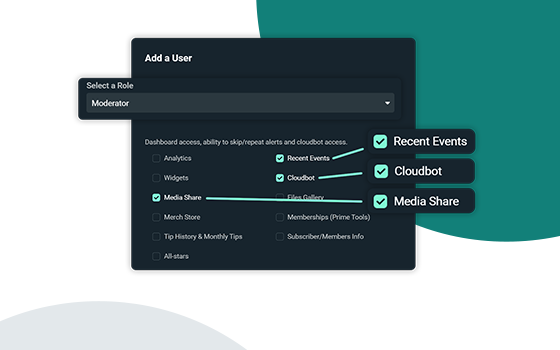
Streamlabs
Streamlabs is announcing improved shared access mod tools to help live streamers manage their mods and viewers.
tender glen
gritty isle
Oh yes! Have the stream go through this guide: https://streamlabs.com/content-...
ah okay so it must be that then
abstract plazaBOT
Having trouble? Want to see if anyone else is having the same problem?
Check out our #known-issues channel! We do our best to keep this channel as current as possible with new bugs and progress updates!
If you can't find what you need please submit a ticket at: https://support.streamlabs.com/hc/en-us/requests/new
 late wedge
Am I missing something?
https://streamlabs.com/stream-widgets/chat-box
That widget is advertised as multiplatform, but it only allows me to select Twitch

Make it easier for viewers to follow the conversation and add context to VODs when you show your Twitch, YouTube, Facebook, Kick, Trovo, and X (Twitter) chat on your stream.
Does streamlabs have a chat overlay that combines twitch kick youtube?
gritty isle
late wedge
Does streamlabs have a chat overlay that combines twitch kick youtube?
Yes, the very same Chat Box Widget. Have you merged your YouTube and Kick channels into your Streamlabs account?
gritty isle
late wedge
Oh wait, that requires a sub
No, it does not.
Sounds like you’re adding a destination in Streamlabs Desktop which does require Ultra subscription.
Instead you should go to the Streamlabs web site here https://streamlabs.com/dashboard#/settings/account-settings/platforms and log in by clicking the Twitch button and then merge your YouTube and Kick channels there.
The most popular streaming platform for Twitch, YouTube and Facebook. Cloud-based and used by 70% of Twitch. Grow with Streamlabs Desktop, alerts, 1000+ overlays, analytics, chatbot, tipping, merch and more.
late wedge
Oh damn
Appreciate ya
That works, though only twitch chat has 7tv emotes

Then again, I read something about kick updating too much and thats why 7tv cant keep up or something
late wedge
should work right?
 gritty isle
Looks good to me.
late wedge
Yeah same here, but the emotes dont appear for kick chat
Which is a bit odd because I dont think any settings are currently wrong.
gritty isle
late wedge
Which is a bit odd because I dont think any settings are currently wrong.
Do you have Custom HTML/CSS disabled on your Chatbox Widget?
The most popular streaming platform for Twitch, YouTube and Facebook. Cloud-based and used by 70% of Twitch. Grow with Streamlabs Desktop, alerts, 1000+ overlays, analytics, chatbot, tipping, merch and more.
late wedge
I do now
gritty isle
late wedge
I do now
And save the settings and does that help with the emotes and Kick?
late wedge
no luck
 late wedge
gritty isle
Do you have Custom HTML/CSS disabled on your Chatbox Widget?
late wedge
gritty isle
Do you have Custom HTML/CSS disabled on your Chatbox Widget?
I had it disabled, now enabled
But nothing changes either way
gritty isle
late wedge
I had it disabled, now enabled
You want it disabled.
late wedge
Now disabled, saved, relaunched everything, still nope
gritty isle
I ask around and see if there’s any issues with the widget, 7tv emotes, and Kick that I’m not aware of…
late wedge
Appreciate you ^^
gritty isle
late wedge
Appreciate you ^^
You’re welcome. I’ll let you know if I hear anything.
late wedge
If you get an answer, feel free to DM instead of replying here to prevent clutter
gritty isle
late wedge
If you get an answer, feel free to DM instead of replying here to prevent clutte...
7tv emotes are known broken with Kick. We raised this Kick back in February but have heard nothing. No idea if or when it might get resolved. Sorry about that! The staff say they’ll check on this again.
late wedge
The emotes work fine for kick chat, but the overlay not showing them is a kick issue?
gritty isle
late wedge
The emotes work fine for kick chat, but the overlay not showing them is a kick i...
Either Kick or 7tv, unclear which is the broken end. Could be an issue with the API we have with Kick. I have no way of knowing the source of the issue, sorry.
late wedge
Well, at least I know I did everything correctly with your help then, for now 🙂 That's something at least.
gritty isle
late wedge
Well, at least I know I did everything correctly with your help then, for now 🙂...
You’re welcome!
late wedge

 hollow halo
any idea if something is going on with the desktop app? I was just using it earlier, now its acting like its my first time launching, after multiple attempts and logging me out each time.
gritty isle
hollow halo
any idea if something is going on with the desktop app? I was just using it earl...
Streamlabs Desktop launching as if it is a fresh/like it's the first time using it?
The "acting like it's a fresh restart" is due to certain background processes not closing properly. First, please close Streamlabs Desktop.
Then open your task manager. Please press "Ctrl + Shift + Esc" on your keyboard to bring up your Task Manager.
Please select "More Details" at the bottom if you don't see the percentages of resources used.
Check for any running programs called "Streamlabs," "Electron," or "Obs64". If you find either of these processes running, please right-click and end the process. https://gyazo.com/d6b9babb076875ee5889983b532948e1
Then, reopen Streamlabs Desktop. This should resolve it but if it doesn't please submit a ticket at https://support.streamlabs.com/hc/en-us/requests/new and our team would be able to assist you further.
 abstract plazaBOT
Having trouble? Want to see if anyone else is having the same problem?
Check out our #known-issues channel! We do our best to keep this channel as current as possible with new bugs and progress updates!
If you can't find what you need please submit a ticket at: https://support.streamlabs.com/hc/en-us/requests/new
 silver elm
Why does collab post keep getting deleted?
gritty isle
silver elm
Why does collab post keep getting deleted?
It was more self promotion rather than a request for collaboration. Please follow the guidelines of Collab Corner here https://discord.com/channels/346751285514469388/1420469246693212172 and double check the #rules if needed.
silver elm
I'm trying promote, but I do want showcase my why people should collaborate (i,e social proof)
So links at all?
gritty isle
silver elm
I'm trying promote, but I do want showcase my why people should collaborate (i,e...
Follow the posted guidelines for Collab Corner.
late wedge
Did they remove the Twitch Vod Track checkbox? How am I going to seperate Spotify from stream and VOD now? 🙁

I remember it looking like this:
 gritty isle
late wedge
Did they remove the Twitch Vod Track checkbox? How am I going to seperate Spotif...
gritty isle
late wedge
Did they remove the Twitch Vod Track checkbox? How am I going to seperate Spotif...
What platform did you connect in OBS Studio? Twitch VOD Track is only available if you connect your Twitch channel.
Twitch VOD Track is not available when multistreaming.
late wedge
That is very unfortunate
Are there any plugins that show youtube/kick tracks to disable?
gritty isle
That's one of the drawbacks of multistreaming. Only Twitch has support for VOD Track. Other platforms have no such support for it. There might be a plugin for OBS Studio that you could use, Atium, I believe. Make one canvas for Twitch and the other canvas for multistreaming. The peeps over at the OBS Studio Discord might have some more exact recommendations. I believe there also is an Atium Discord although I don't have their invite link handy.
late wedge
Ill have a look
gritty isle
late wedge
Ill have a look
Note that that will use more bandwidth as you're sending out two streams. So just be aware of that.
late wedge
gritty isle
Note that that will use more bandwidth as you're sending out two streams. So ju...
Removed the plugin for multistreaming, but the option has not returned. Any ideas? 👀
gritty isle
late wedge
Removed the plugin for multistreaming, but the option has not returned. Any idea...
What account is connected at Settings > Stream?
Or did you connect with RTMP URL and Stream Key?
late wedge
gritty isle
Or did you connect with RTMP URL and Stream Key?
that one
gritty isle
late wedge
that one
Try clicking "Connect Account" then connect your Twitch. IIRC, Twitch VOD Track will only appear if you connect your account. It won't appear if you connect via stream key.
late wedge
It is visible now yes.
gritty isle
late wedge
It is visible now yes.
Woo Hoo!
late wedge
Thank you!
gritty isle
late wedge
Thank you!
You're welcome!
late wedge
gritty isle
You're welcome!
Because I had to relog, my chat dock had to relog, and is now missing 7tv emotes. Now i know how to get those back usually, by going to non mod settings, and going into the 7tv menu, but that one is gone.
Any idea how to get that back?
Nevermind, it also yeeted the 7tv stuff from settings in general......
gritty isle
Getting things setup is sometime an exercise in frustration.
late wedge
Quite right. Case in point. Relaunched OBS, and the twitch vod track is gone again 
it swapped back to custom instead of just twitch
gritty isle
Oh Lordy.
late wedge
yeaa all good now though
gritty isle
Whew!
Remember with OBS Studio you can have different profiles for easy swapping between configurations.
abstract plazaBOT
Having trouble? Want to see if anyone else is having the same problem?
Check out our #known-issues channel! We do our best to keep this channel as current as possible with new bugs and progress updates!
If you can't find what you need please submit a ticket at: https://support.streamlabs.com/hc/en-us/requests/new
abstract plazaBOT
Do you have a Streamlabs Ultra membership? Are you part of the Streamlabs All-Stars program?
Get your Discord roles by going to this page here: https://streamlabs.com/dashboard#/settings/integrations and clicking "Link" next to Discord! Ultra members and higher tier All-Stars members will have access to private channels for support!
Interested in Ultra? Check it out here: https://streamlabs.com/ultra?refl=discord
Are you knowledgeable about Streamlabs products?
Get rewarded for helping the Streamlabs Community here in Discord!
👉 Apply to be a part of the Streamlabs Support Volunteer Program!
Application Link:
https://forms.gle/eKS29zWfFjGEzaRp7
For details, see our post in
#announcements message
 tranquil ferry
So I’m trying to use stream labs console with my Xbox but every time I start streaming my stream randomly cuts off the feed to twitch and my Xbox will still say I’m live and so will streamlabs but my twitch will just be offline after successfully being able to stream for 15 minutes to an hour. Why is that?
 tribal stone
I've just tried to import my SE to SL with the JWT Token but it's only pulled 4 overlays out of all of the overlays I have. It's also not pulled my alerts either. I've tried this twice and it still hasn't pulled over everything. Can someone help me
gritty isle
tribal stone
I've just tried to import my SE to SL with the JWT Token but it's only pulled 4 ...
Hey there! Welcome to Streamlabs! Please hop over to the id:customize and click Yes. This will then unlock the #sl-setup-help channel and a Streamlabs Staff member should be along shortly to assist.
 gritty isle
tribal stone
I've just tried to import my SE to SL with the JWT Token but it's only pulled 4 ...
gritty isle
tribal stone
I've just tried to import my SE to SL with the JWT Token but it's only pulled 4 ...
Also, give it some time to migrate. Then log out of Streamlabs and then log back in and see how things look. If there is still an issue, send us a ticket https://support.streamlabs.com/hc/en-us/requests/new
 vital hull
why when I bring people on mid stream the software freezes sometimes
 pseudo elm
Hey so apparently I've been flagged as a bot acc? I have one of those gimmick accounts where I follow streamers and they see my name calling them short. A couple days ago I stopped appearing as a follower alert. saw online that I might be flagged as a bot account and I'm getting filtered by the alert provider
gritty isle
pseudo elm
Hey so apparently I've been flagged as a bot acc? I have one of those gimmick ac...
This might be an issue with Twitch. I can give you the Disconnect Service steps (see below) but that only refreshes the connection between Streamlabs and Twitch for your account. If you're being flagged somewhere as a bot account, the disconnect service steps won't resolve that. I'd suggest reaching out to Twitch as well https://help.twitch.tv/s/contactsupport
wispy latchBOT
@pseudo elm ⛓️💥 Disconnecting Your Streaming Service
If you need to disconnect your streaming service (like Twitch, YouTube, or others) from your Streamlabs account, please follow these clear steps:
- Log out of Streamlabs.com (you can use this link to force a logout and any Streamlabs software such as Streamlabs Desktop (you can do so from the bottom left 👤)
- Follow this guide to disconnect the specific streaming service from Streamlabs
- Once you're done, please log back Streamlabs Desktop or streamlabs.com with the account disconnected
Note: If you are doing this step for fixing your alerts, you may need to reload your widgets. You can do this by going to your Live Actions Tab of the Recent Events > Scroll all the way and click Reload Widgets
pseudo elm
Thx I'll try and get in touch with twitch
gritty isle
pseudo elm
Thx I'll try and get in touch with twitch
You're welcome.
gusty umbra
pseudo elm
Thx I'll try and get in touch with twitch
Here is the twitch support link. It’s buried a bit on the site. https://help.twitch.tv/s/contactsupport
 tulip hemlock
Hello, I just started up OBS Streamlabs and it deleted all my scenes from the Scene collection
Is there any where to restore this? I have a livestream in 1 hour and need this to work, dont have time to set the whole thing up again right now >.<
gritty isle
tulip hemlock
Hello, I just started up OBS Streamlabs and it deleted all my scenes from the Sc...
OBS Studio or Streamlabs Desktop?
tulip hemlock
Desktop
gritty isle
tulip hemlock
Desktop
Streamlabs Desktop launching as if it is a fresh/like it's the first time using it?
The "acting like it's a fresh restart" is due to certain background processes not closing properly. First, please close Streamlabs Desktop.
Then open your task manager. Please press "Ctrl + Shift + Esc" on your keyboard to bring up your Task Manager.
Please select "More Details" at the bottom if you don't see the percentages of resources used.
Check for any running programs called "Streamlabs," "Electron," or "Obs64". If you find either of these processes running, please right-click and end the process. https://gyazo.com/d6b9babb076875ee5889983b532948e1
Then, reopen Streamlabs Desktop. This should resolve it but if it doesn't please submit a ticket at https://support.streamlabs.com/hc/en-us/requests/new and our team would be able to assist you further.
tulip hemlock
It replaced it with one Scene that is empty
tulip hemlock
gritty isle
**Streamlabs Desktop launching as if it is a fresh/like it's the first time usin...
I dont see any of these processes running
Is there no way to get back those scenes? Or any backup?
abstract plazaBOT
Having trouble? Want to see if anyone else is having the same problem?
Check out our #known-issues channel! We do our best to keep this channel as current as possible with new bugs and progress updates!
If you can't find what you need please submit a ticket at: https://support.streamlabs.com/hc/en-us/requests/new
pseudo elm
Hey is there a mod I can talk to? wanna report smth
tranquil ferry
Why does streamlabs console suck and twitch keeps killing my feed but other software’s like streamlabs console doesn’t have this problem
gusty umbra
pseudo elm
Hey is there a mod I can talk to? wanna report smth
If you’re reporting somebody, there are directions in the #rules channel on how to report.
 earnest stone
I’m gonna start streaming I got a caption card for my PlayStation 5 to my pc I got a working, but I just can’t get audio from my caption card to my stream labs. Everything else is working
tranquil ferry
Using a capture card I think you need to manually put in an audio source in your obs software
earnest stone
But would it be in streams? Labs software or something.
tranquil ferry
Not sure but I think streamlabs might be the epitome of worthlessness at this point
abstract plazaBOT
Do you have a Streamlabs Ultra membership? Are you part of the Streamlabs All-Stars program?
Get your Discord roles by going to this page here: https://streamlabs.com/dashboard#/settings/integrations and clicking "Link" next to Discord! Ultra members and higher tier All-Stars members will have access to private channels for support!
Interested in Ultra? Check it out here: https://streamlabs.com/ultra?refl=discord
Are you knowledgeable about Streamlabs products?
Get rewarded for helping the Streamlabs Community here in Discord!
👉 Apply to be a part of the Streamlabs Support Volunteer Program!
Application Link:
https://forms.gle/eKS29zWfFjGEzaRp7
For details, see our post in
#announcements message
gritty isle
tranquil ferry
Not sure but I think streamlabs might be the epitome of worthlessness at this po...
Us Volunteers are not always available.
This guide has some common issues for audio and some suggestions that might help: https://streamlabs.com/content-hub/post/streamlabs-desktop-capture-card-issues-solutions
Also consult the manual or setup guide that came with your capture card.
Personally I don't have that kind of setup and therefore I'm not good as other are at troubleshooting issues with capture cards.
 sweet wraith
Help - use to use streamlabs 5 years ago, i had a website setup then (apparently i had 4?) unable to edit them so i bought a website from SL and a Ultra membership. the website wont go live (confirmed identity etc) but the new site wont appear in the "creator site -> Link setting" section and i get a dead page on the website ;,) its been setup for over 24 hrs already
anyone has any idea how to fix this or went through the same issues?
gritty isle
sweet wraith
Help - use to use streamlabs 5 years ago, i had a website setup then (apparently...
You have an active Streamlabs Ultra subscription?
 rotund sorrel
I want to build a custom integration with "NowPayments" for custom alerts.
It seems to be incredibly hard with integrating something so simple.
NowPayments sends data to my webhook which should send it to streamlabs, but somehow there always is an authentication issue.
any solution? normally an api key is enough to fix smt so simple?
I am not planning to make the app open, it is simply for 1 streamer - custom for him. not for the community
gritty isle
rotund sorrel
I want to build a custom integration with "NowPayments" for custom alerts.
It s...
The API is outside the scope of support here in Discord. Please submit a ticket: https://support.streamlabs.com/hc/en-us/requests/new
gritty isle
sweet wraith
Help - use to use streamlabs 5 years ago, i had a website setup then (apparently...
If you have an active Streamlabs Ultra subscription and needs assistance with your creator site domain, please link your disord (see the tagged post below) or use the chat bubble on the Streamlabs web site for VIP assistance. Us volunteers cannot assist with custom domain issues.
wispy latchBOT
Streamlabs Ultra & All-Stars Discord Access
@sweet wraith, are you a Streamlabs Ultra Subscriber or an All-Stars member? If so, you can link your Discord account to gain access to exclusive Ultra/VIP roles and private chat channels here in our Discord server!
🔗 How To Get Your Ultra/All-Stars Discord Role:
Link your Discord account under your Streamlabs integrations settings: Streamlabs Integrations Dashboard
Not Yet an Ultra Member?
You can learn more about Ultra and upgrade your membership here: Upgrade to Streamlabs Ultra
rotund sorrel
instant leaving streamlabs developer hell lol, switching to streamelements. c y
 mild pulsar
Hello there, anyone having troubles with ColabCam?
abstract plazaBOT
Having trouble? Want to see if anyone else is having the same problem?
Check out our #known-issues channel! We do our best to keep this channel as current as possible with new bugs and progress updates!
If you can't find what you need please submit a ticket at: https://support.streamlabs.com/hc/en-us/requests/new
 pine scroll
Hey, I'm so sorry I feel dumb... I am trying to activate LABS+ but it keeps taking me to the download site and I already have it downloaded. Then it takes me to the Sounds+, Creator, Creator+ screen. I am not seeing where I activate LABS+ subscription. I already have the Creator thinking it included LABS+.
gritty isle
pine scroll
Hey, I'm so sorry I feel dumb... I am trying to activate LABS+ but it keeps taki...
You purchased a Streamlabs Ultra subscription?
pine scroll
gritty isle
You purchased a Streamlabs Ultra subscription?
I'm not sure :D I am currently talking to the chat bot trying to get help and they keep telling me to go to https://labs.spitfireaudio.com/ but it's just the download site. When I try and log out and log back in, it keeps taking me to the Sounds+, Creator, Creator+ screen. I'm not sure exactly where I purchase the LABS+ that's really what I wanted. I got the Creator subscription.
Splice
Splice INSTRUMENT is a free virtual instrument plugin that brings high-quality, multi-sampled sounds into any DAW. Download now to access hundreds of free presets.
gritty isle
pine scroll
I'm not sure :D I am currently talking to the chat bot trying to get help and th...
That's not a Streamlabs product.
pine scroll
Oh my bad :D
gritty isle
pine scroll
Oh my bad :D
No worries. They have a help section https://support.splice.com/en/
pine scroll
Yeah the Splice server is literally right above this one lol
I was getting confused. Thank you so much, Rufus. Sorry for wasting your time!
gritty isle
pine scroll
I was getting confused. Thank you so much, Rufus. Sorry for wasting your time!
No worries! Good luck!
 unreal sapphire
does anyone know why it is not letting me hit the sign up buttom to create a stream labs ID
i filled i nthe required information and I meet all the requirements to create one
gritty isle
unreal sapphire
does anyone know why it is not letting me hit the sign up buttom to create a str...
Do you get an error message?
unreal sapphire
no
when i hover over thesign up button a little red circle with a line through it is at the top right of my cursor
like the generic symbol that means u cant do something
gritty isle
unreal sapphire
no
Interesting. 🤨
Not sure what might be causing that. Please submit a ticket on this here https://support.streamlabs.com/hc/en-us/requests/new and include a screen shot with the form filled out. The staff should be able to troubleshoot.
unreal sapphire
honestly its fine i can just use like capcut to edit
abstract plazaBOT
Having trouble? Want to see if anyone else is having the same problem?
Check out our #known-issues channel! We do our best to keep this channel as current as possible with new bugs and progress updates!
If you can't find what you need please submit a ticket at: https://support.streamlabs.com/hc/en-us/requests/new
 sharp wing
curious
Is anyone having issues with patreon talking to streamlabs now?
my alerts no longer work and the website wont even let me turn them on anymore...also trying to test the new stream to patreon feature and it wont work...
to be transparent the patreon pledge alerts stopped working a long time ago and Ive just delt with it...but I really wanna offer this new feature to my patreons so might as well fix both
(Yes I have submitted a ticket)
thanks yall! xoxo
 finite marsh
Is there a way to switch YT account I want in my platform without losing my Scene Collection?
when I try to switch to another account, the UI is different and acting like I don't have an account
sharp wing
Patreon has no idea why this is happening either lol
gritty isle
finite marsh
Is there a way to switch YT account I want in my platform without losing my Scen...
Settings > Stream > scroll all the way down! > Stream to custom ingest
Then setup your other YouTube channel and paste in your stream key.
To return to the original, click the red Use Recommended Settings button.
gritty isle
sharp wing
Patreon has no idea why this is happening either lol
And I have no idea either! I got the announcement email a few hours ago. Be patient and wait on your ticket.
sharp wing
gritty isle
And I have no idea either! I got the announcement email a few hours ago. Be ...
I know its prob not a common thing since Im not a "streamer" of traditional sorts, I do a show every friday, do you know why exactly I cant turn on patreon alerts in the alert box widget? I click "save settings" and it turns it off lol...
every other alert works, tips, superchats, ect ect ect
just not patreon lol
2 years ago it worked just fine and dandy lol
gritty isle
sharp wing
I know its prob not a common thing since Im not a "streamer" of traditional sort...
No idea, sorry! Like I said I got the announcement email a few hours ago and I don’t have a Patreon account setup to where I could stream to it so I have no way of duplicating and troubleshooting.
sharp wing
fair enough
for example
it would be like if you went to the widget and turned "super chat" alerts to "on" click save and then when you do that it turns the slider to "off"
when I try and make a new patreon alt it says "the text box must be populated" (the name of the new alt alert) its filled in just fine XD, WHY DOES STREAMLABS HATE PATREON SO MUCH XD
gritty isle
sharp wing
just not patreon lol
Probably an API issue. But can’t say for sure. Us volunteers are not Streamlabs employees so we have no access to their systems so we’re in the dark so to speak. I might know more tomorrow during business hours when the day shift is up.
sharp wing
gritty isle
Probably an API issue. But can’t say for sure. Us volunteers are not Streamlab...
aight word hey thanks for your time man, if you do remember @ me if ya get any hot info off the presses, hopefully my ticket can be resolved, when I tried to fix the alerts issue over a year ago all I got was basically turn it off and on again (link and unlink) and that sadly did not fix the issue, I feel like It could be some windows nonsense too...
gritty isle
sharp wing
aight word hey thanks for your time man, if you do remember @ me if ya get any h...
I’m sure they’ll respond to your ticket when whatever is resolved.
sharp wing
or .... API for sure, I am but just a Humble Pro Fpv freestyle pilot and rc nerd youtuber I aint that fancy with the matrix bits just the electronics bits XD
gritty isle

 south ruin
Heya! I hope this is the right channel to contact. It said there was an update for streamlabs so I updated. Now my volume in streamlabds isn't changing. I turn it up and down and even to 0 and the volume isn't changing. How to fix? update broke it.
gritty isle
south ruin
Heya! I hope this is the right channel to contact. It said there was an update f...
Make sue the correct desktop audio and microphone devices are selected.
If they are, charge both to something else. Log out in Streamlabs Desktop. Wait a minute or two. Restart Streamlabs Desktop, log back in, set the audio devices back to what they were and test again.
And I’m about to fall asleep. Been a long day. If I don’t reply again, I’m out! 🥱
gritty isle
sharp wing
or .... API for sure, I am but just a Humble Pro Fpv freestyle pilot and rc nerd...
I can’t see or work tickets, but what is your ticket number?
sharp wing
gritty isle
I can’t see or work tickets, but what is your ticket number?
I dont see any ticket number just the old email verification email
sharp wing
south ruin
Heya! I hope this is the right channel to contact. It said there was an update f...
sometimes windows does this too, it changes all the sources to windows defaults, just go back into sources and set them back to what they were (annoying I know...just windows things lol)
abstract plazaBOT
Having trouble? Want to see if anyone else is having the same problem?
Check out our #known-issues channel! We do our best to keep this channel as current as possible with new bugs and progress updates!
If you can't find what you need please submit a ticket at: https://support.streamlabs.com/hc/en-us/requests/new
abstract plazaBOT
Do you have a Streamlabs Ultra membership? Are you part of the Streamlabs All-Stars program?
Get your Discord roles by going to this page here: https://streamlabs.com/dashboard#/settings/integrations and clicking "Link" next to Discord! Ultra members and higher tier All-Stars members will have access to private channels for support!
Interested in Ultra? Check it out here: https://streamlabs.com/ultra?refl=discord
Are you knowledgeable about Streamlabs products?
Get rewarded for helping the Streamlabs Community here in Discord!
👉 Apply to be a part of the Streamlabs Support Volunteer Program!
Application Link:
https://forms.gle/eKS29zWfFjGEzaRp7
For details, see our post in
#announcements message
 mortal epoch
I've never had this problem prior to updating today, but I also haven't used streamlabs in 4 months. My microphone is detected by both my PC and Streamlabs (shows input in the mixer section) and works fine for discord etc. When I try testing the mic or recording through streamlabs I can't hear myself, but I can hear my mouse clicking and if I tap the mic that's detected too and audible. If I speak absurdly close to the mic that also gets played back to me but very quietly. It's like a supression filter has been added but I haven't done that and I've tried deleting and re-adding my audio input. I've also tested both adding it as a Mic/Auxillary device in settings and creating it as a new source. Can't find anything on Reddit or Quora so thought I'd try here :)
 mystic blaze
Can someone help me, this display has changed from the bigger version, to what looks like a TikTok display, how do I change it back please.
 abstract plazaBOT
Having trouble? Want to see if anyone else is having the same problem?
Check out our #known-issues channel! We do our best to keep this channel as current as possible with new bugs and progress updates!
If you can't find what you need please submit a ticket at: https://support.streamlabs.com/hc/en-us/requests/new
gritty isle
mystic blaze
Can someone help me, this display has changed from the bigger version, to what l...
Settings > Video > Output Resolution.
Swap tha values. Foe example, if it is set to 1080x1920, change it to 1920x1080.
abstract plazaBOT
Are you knowledgeable about Streamlabs products?
Get rewarded for helping the Streamlabs Community here in Discord!
👉 Apply to be a part of the Streamlabs Support Volunteer Program!
Application Link:
https://forms.gle/eKS29zWfFjGEzaRp7
For details, see our post in
#announcements message
 woven stag
 rapid brook
Having trouble verifying my YouTube account to go live. I have done everything on the YouTube side of things but Streamlabs keeps telling me to verify to chose that for stream output. Can anyone help ?
abstract plazaBOT
Having trouble? Want to see if anyone else is having the same problem?
Check out our #known-issues channel! We do our best to keep this channel as current as possible with new bugs and progress updates!
If you can't find what you need please submit a ticket at: https://support.streamlabs.com/hc/en-us/requests/new
 knotty dew
I have a domain in Streamlabs for my website trying to transfer it out to my Squarespace, but it’s not letting me?
sweet wraith
gritty isle
If you have an active Streamlabs Ultra subscription and needs assistance with yo...
I have the lower tier subscription and the both is just giving me an infinite loop or “thinking bubble” when I progress further in the help page 🥲
gritty isle
knotty dew
I have a domain in Streamlabs for my website trying to transfer it out to my Squ...
You have an active Streamlabs Ultra subscription?
gritty isle
sweet wraith
I have the lower tier subscription and the both is just giving me an infinite lo...
You either have Ultra or not.
gritty isle
rapid brook
Having trouble verifying my YouTube account to go live. I have done everything o...
Make sure you connected the correct YouTube channel.
If the correct channel is merged, make sure you have verified your email address and phone number and have setup 2FA on your YouTube channel.
If you go to YouTube Studio https://studio.youtube.com/, click Settings (lower left), then Channel, then Feature eligibility, are at least the first two sections Enabled?
Also, what version of Windows do you have?
Share your videos with friends, family, and the world.

 zinc agate
I’m trying to live stream on mobile from an Apple device, which I’ve done previously, but the app says that I’m live but when I try to check on YouTube, it still says waiting for streamer. I tried screen casting, using the camera, attempting on a second device (iPad and iPhone), creating a new broadcast / attempting to start an upcoming event, trying to stream using the custom YouTube RTMP url, removing Streamlabs as a linked app and linking it again, but nothing seems to work. Streamlabs has the proper permissions, and it can clearly view all the correct upcoming streams. When I click on the button to stop broadcasting when beginning the session but then selecting the “End Live session” button to stop, I get an “Invalid transition (403)” error but not selecting the option allows me to “end” the stream despite it never going live to begin with. I have streaming capabilities and have logged out and logged back in multiple times. I also tried viewing on the YouTube live online dashboard and it says no data being received. Nothing works and it’s weird because when I used to use Streamlabs years ago, it would work instantly with no problems.
abstract plazaBOT
Having trouble? Want to see if anyone else is having the same problem?
Check out our #known-issues channel! We do our best to keep this channel as current as possible with new bugs and progress updates!
If you can't find what you need please submit a ticket at: https://support.streamlabs.com/hc/en-us/requests/new
 stuck sedge
Could someone help me. When someone donos it wont show as an alert. Only shows in the mini feed :c
abstract plazaBOT
Having trouble? Want to see if anyone else is having the same problem?
Check out our #known-issues channel! We do our best to keep this channel as current as possible with new bugs and progress updates!
If you can't find what you need please submit a ticket at: https://support.streamlabs.com/hc/en-us/requests/new
abstract plazaBOT
Are you knowledgeable about Streamlabs products?
Get rewarded for helping the Streamlabs Community here in Discord!
👉 Apply to be a part of the Streamlabs Support Volunteer Program!
Application Link:
https://forms.gle/eKS29zWfFjGEzaRp7
For details, see our post in
#announcements message
abstract plazaBOT
Do you have a Streamlabs Ultra membership? Are you part of the Streamlabs All-Stars program?
Get your Discord roles by going to this page here: https://streamlabs.com/dashboard#/settings/integrations and clicking "Link" next to Discord! Ultra members and higher tier All-Stars members will have access to private channels for support!
Interested in Ultra? Check it out here: https://streamlabs.com/ultra?refl=discord
 harsh kelp
I’m trying to cancel my free-trial but it’s telling me I’m using the free subscription. But it tried to charge me and likely still is. I don’t want to pay and it won’t let me get to the subscriptions to cancel it
gritty isle
harsh kelp
I’m trying to cancel my free-trial but it’s telling me I’m using the free subscr...
Ultra or Console?
harsh kelp
Ive been using it for console
gritty isle
harsh kelp
Ive been using it for console
You should be able to cancel here https://streamlabs.com/dashboard#/membership
The most popular streaming platform for Twitch, YouTube and Facebook. Cloud-based and used by 70% of Twitch. Grow with Streamlabs Desktop, alerts, 1000+ overlays, analytics, chatbot, tipping, merch and more.
harsh kelp
I had this website open already. It’s only giving me the option to upgrade my subscription. But not a way to cancel one that I have already
 empty skiff
Still having this issue with android and atreamlabs I need this to be fixed immediately bc i can't even stream anymore because the app is broken, please fix this devs, im begging you

 shrewd finch
updated streamlabs, now im getting an error saying "unknown error occured, Recording isn't an Advanced Object" or something to that effect whenever i go live + record at the same time. I have double checked to make sure my streaming & recording outputs are both on advanced and both set to the same enconder (NVIDIA NVENC H.264 (new) ) I can record as normal by hitting just Rec. and can stream as normal by streaming, it just won't record WHILE streaming
gritty isle
harsh kelp
I had this website open already. It’s only giving me the option to upgrade my su...
Dang. Please submit a ticket as soon as possible to cancel: https://support.streamlabs.com/hc/en-us/requests/new
gusty umbra
empty skiff
Still having this issue with android and atreamlabs I need this to be fixed imme...
Hey there. Can you submit a ticket on this please, so it can be looked into. Please include exactly what’s happening and other info like your phone and OS version. https://support.streamlabs.com/hc/en-us/requests/new
gritty isle
shrewd finch
updated streamlabs, now im getting an error saying "unknown error occured, Recor...
Can you screen shot the error message. Curious to see if it gives any indication where the error is coming from.
shrewd finch
 gritty isle
shrewd finch
gritty isle
shrewd finch
That’s really interesting. From Streamlabs Desktop settings, screen shot:
Video
Output > Streaming
Output > Recording
 quiet saddle
Its A brand in streamlabs desktop app trying to get Sponsored by but i don't know why its not letting me select it.
Been live Streaming for months and really don't know how the Sponsorship works in streamlabs desktop. I Ended Up Not Messing with it since it was giving a hard time before
oak cloud
quiet saddle
Its A brand in streamlabs desktop app trying to get Sponsored by but i don't kno...
If you're having issues with sponsorships, we suggest reaching out in tickets at https://streamlabs.com/support. The team there is specialized in sponsorships unlike the team here, so they would be able to troubleshoot it with you.
shrewd finch
I had swapped of the (new) version to see if it fixed it, it did not but i get the issue on both new and not new versions of NVENC

 gritty isle
shrewd finch
I had swapped of the (new) version to see if it fixed it, it did not but i get t...
gritty isle
shrewd finch
I had swapped of the (new) version to see if it fixed it, it did not but i get t...
Need a screen shot of Settings > Video.
gritty isle
shrewd finch
I had swapped of the (new) version to see if it fixed it, it did not but i get t...
Please screen shot the whole Streamlabs Desktop window, uncropped, with Settings > Output open.
I have an idea but need to see these other screenshots first.
shrewd finch
i believe this is what youre asking for with that 2nd request

 gritty isle
shrewd finch
i believe this is what youre asking for with that 2nd request
gritty isle
shrewd finch
i believe this is what youre asking for with that 2nd request
I see you are currently live. When was the last time this worked?
shrewd finch
yesterday before i updated streamlabs
marble wind
cool, new bugs
i suspect settings migration failed, i'd suggest making a new profile but sld lacks this feature
gritty isle
shrewd finch
yesterday before i updated streamlabs
When you end your stream, please do this:
At Settings > Output, change the Output Mode to Simple and save the settings. Then wait a minute, log out, wait a minute, quit Streamlabs Desktop, wait a minute, launch Streamlabs Desktop, wait a minute, log back in, wait a minute, go to Settings > Output and change the Output Mode back to Advanced and save the settings. Then please screen shot Settings > Video, Settings > Output > Streaming, and Settings > Output > Recording. And don’t drop those screen shots please.
shrewd finch
will do, and what do you mean dont drop those screenshots?
gritty isle
shrewd finch
will do, and what do you mean dont drop those screenshots?
Damn autocorrect! Don’t crop.
shrewd finch
ah ok, is what i provided in my outputs screenshot enough info, or do you need whats scrolled down as well
gritty isle
shrewd finch
ah ok, is what i provided in my outputs screenshot enough info, or do you need w...
Drag the Settings window vertically tall so you can get as much as you can in one screen shot. If it does not all fit, take more than one screen shot.
Just please post one or two screen shots per post otherwise you will run afoul of the anti spam settings of the Discord bot. 🤖
 nova finch
Hello 👋
Does anyone know how to set the desktop back to default settings? I linked it to Restream, and now that I'm not using Restream I don't remember what settings I changed and just want to reset the desktop app.
gritty isle
nova finch
Hello 👋
Does anyone know how to set the desktop back to default settings? I li...
Sounds like you used a custom destination for that. Go to Settings > Stream. Is there a big red button at the top that says “Use recommended settings”? If so, then click that.
nova finch
gritty isle
Sounds like you used a custom destination for that. Go to Settings > Stream. I...
No big red button on mine.
abstract plazaBOT
Having trouble? Want to see if anyone else is having the same problem?
Check out our #known-issues channel! We do our best to keep this channel as current as possible with new bugs and progress updates!
If you can't find what you need please submit a ticket at: https://support.streamlabs.com/hc/en-us/requests/new
nova finch
@gritty isle I found something similar in the "Stream to custom ingest" link, then I clicked a gray button that said "Use recommended settings".
I'll follow the file path instructions you just sent me as well.
Okay, it created a new "slobs-client" folder as expected, but most of my settings are intact. I guess the only way to find out now is to run a stream and make sure it all functions properly. Thank you for your help, I'll reach out if I still need it.
gritty isle
nova finch
Okay, it created a new "slobs-client" folder as expected, but most of my setting...
You’re welcome! We’re here if you need further assistance.
 dapper lake
Does anybody know how to fix this
When I live stream my screen freezes on the live stream can someone help me out please?
 cyan dust
I need help in a voice chat to figure out how to setup a used Valve Index I just bought. I previously played Quest 3 and my PC doesn't want to register a wired headset when I recently used a wireless one.
Google is not much help...
abstract plazaBOT
Do you have a Streamlabs Ultra membership? Are you part of the Streamlabs All-Stars program?
Get your Discord roles by going to this page here: https://streamlabs.com/dashboard#/settings/integrations and clicking "Link" next to Discord! Ultra members and higher tier All-Stars members will have access to private channels for support!
Interested in Ultra? Check it out here: https://streamlabs.com/ultra?refl=discord
Are you knowledgeable about Streamlabs products?
Get rewarded for helping the Streamlabs Community here in Discord!
👉 Apply to be a part of the Streamlabs Support Volunteer Program!
Application Link:
https://forms.gle/eKS29zWfFjGEzaRp7
For details, see our post in
#announcements message
 dim estuary
how can i turn off discord audio when going live?i muted it butpeople can still hear it
abstract plazaBOT
Having trouble? Want to see if anyone else is having the same problem?
Check out our #known-issues channel! We do our best to keep this channel as current as possible with new bugs and progress updates!
If you can't find what you need please submit a ticket at: https://support.streamlabs.com/hc/en-us/requests/new
Are you knowledgeable about Streamlabs products?
Get rewarded for helping the Streamlabs Community here in Discord!
👉 Apply to be a part of the Streamlabs Support Volunteer Program!
Application Link:
https://forms.gle/eKS29zWfFjGEzaRp7
For details, see our post in
#announcements message
Do you have a Streamlabs Ultra membership? Are you part of the Streamlabs All-Stars program?
Get your Discord roles by going to this page here: https://streamlabs.com/dashboard#/settings/integrations and clicking "Link" next to Discord! Ultra members and higher tier All-Stars members will have access to private channels for support!
Interested in Ultra? Check it out here: https://streamlabs.com/ultra?refl=discord
dim estuary
dim estuary
how can i turn off discord audio when going live?i muted it butpeople can still ...
@gritty isle
abstract plazaBOT
Having trouble? Want to see if anyone else is having the same problem?
Check out our #known-issues channel! We do our best to keep this channel as current as possible with new bugs and progress updates!
If you can't find what you need please submit a ticket at: https://support.streamlabs.com/hc/en-us/requests/new
gritty isle
dim estuary
<@301571565840236564>
Split your audio and then set track 1 off for the audio source for discord.
wispy latchBOT
{1} 🎵 Want to split your audio?
Maybe you’d prefer the stream doesn’t hear your Discord, music, or other apps? You can do this within Streamlabs Desktop using Streamlabs Application Audio, or you could use a software like MIXLINE for more advanced audio control.
📚 Check out these guides:
dim estuary
can u teach me again while screen sharing?
gritty isle
dim estuary
can u teach me again while screen sharing?
Sorry, for moderation purposes we can only provide support here in this channel. The guide is pretty good.
 gritty isle
dim estuary
what do i choose here
gritty isle
dim estuary
what do i choose here
Choose the app you want that source to be connected.
dim estuary
gritty isle
Choose the app you want that source to be connected.
so its the tgame
gritty isle
dim estuary
so its the tgame
Yes.
 fallow pier
Does anyone know why, on Streamlabs console, when uploading images for use in an overlay, it says that it's "not allowed"?
Images are all 1080p, under 2mb, and pngs same as the others I've uploaded previously
gritty isle
fallow pier
Does anyone know why, on Streamlabs console, when uploading images for use in an...
Check the upper right corner of the Media Gallery. Have you used all your allocated space?
 fallow pier
I don't see an option to see allocated space, but if it's 10gb there's no way in hell I've uploaded 10 gigs of overlay images. They're all below 2mb and there's 40 at an absolute maximum
gritty isle
fallow pier
I don't see an option to see allocated space, but if it's 10gb there's no way in...
Interesting. Log out of the Streamlabs Console web store, clear the cache only for all time in your web browser, completely restart the whole web browser, and try again after logging back in. Let me know how it goes.
abstract plazaBOT
Having trouble? Want to see if anyone else is having the same problem?
Check out our #known-issues channel! We do our best to keep this channel as current as possible with new bugs and progress updates!
If you can't find what you need please submit a ticket at: https://support.streamlabs.com/hc/en-us/requests/new
 inner night
Everytime I stream my mouse input gets a delay and it takes forever for me to see my mouse move to other side of screen it was fine 2 weeks ago but I took a week break and now its doing this anytime I go live and it will stay like that until I close stream labs and once thats closed my mouse will work like normal but this has never been an issue I keep my pc and gpu all up to date can anyone tell me a potential fix I cannot stream with my mouse taking 3 days to move across a screen. also its only the mouse on fps games everything is smooth but the moment the mouse shows for a buy menu or building in RTS games its super laggy and unplayable/streamable
 gaunt barn
Hi there 👋
I'm having trouble linking my TikTok account. This happens when I click "Go Live".
I've tried the steps of going to Account Settings on Streamlabs website to try re-linking by removing it from my account & adding it back. I've tried logging out of Streamlabs desktop but I just get stuck on a loading screen when I try this. I tried logging out of Streamlabs website, and even redownloading the Streamlabs client.
Any help would be greatly appreciated, thank you in advance. ❤️

 dim estuary
@gritty isle I TRIED YOUR INSTRUCTION BUT NOW I CAN HEAR THE GAME AUDIO
abstract plazaBOT
Having trouble? Want to see if anyone else is having the same problem?
Check out our #known-issues channel! We do our best to keep this channel as current as possible with new bugs and progress updates!
If you can't find what you need please submit a ticket at: https://support.streamlabs.com/hc/en-us/requests/new
Do you have a Streamlabs Ultra membership? Are you part of the Streamlabs All-Stars program?
Get your Discord roles by going to this page here: https://streamlabs.com/dashboard#/settings/integrations and clicking "Link" next to Discord! Ultra members and higher tier All-Stars members will have access to private channels for support!
Interested in Ultra? Check it out here: https://streamlabs.com/ultra?refl=discord
Are you knowledgeable about Streamlabs products?
Get rewarded for helping the Streamlabs Community here in Discord!
👉 Apply to be a part of the Streamlabs Support Volunteer Program!
Application Link:
https://forms.gle/eKS29zWfFjGEzaRp7
For details, see our post in
#announcements message
dim estuary
@gritty isle I TRIED YOUR INSTRUCTION BUT NOW I CANT HEAR THE GAME AUDIO
gritty isle
dim estuary
<@301571565840236564> I TRIED YOUR INSTRUCTION BUT NOW I CANT HEAR THE GAME AU...
Okay. If you don’t want to hear that audio source, set it’s audio monitoring to monitor off.
dim estuary
no i mean i need to hear the game sound and just mute discord
dim estuary
gritty isle
Okay. If you don’t want to hear that audio source, set it’s audio monitoring to...
can i dm u directly?
gritty isle
dim estuary
no i mean i need to hear the game sound and just mute discord
You already hear the game as it’s running locally. To mute discord, in the advanced audio properties for the discord source, uncheck track 1.
For game audio source, set the audio monitoring to monitor off.
dim estuary
gritty isle
You already hear the game as it’s running locally. To mute discord, in the adva...
nah if u check my live the game dont have sound
gritty isle
dim estuary
nah if u check my live the game dont have sound
Then make sure that audio source for the game audio has track 1 checked.
gritty isle

Streamlabs
Control exactly what your stream hears in this quick and easy guide.
dim estuary
oh i see so now how can i just hear the game audio and only my voice in my live

this one?
 gritty isle

Streamlabs
Record multiple audio tracks for microphones, desktop audio and more
gritty isle
dim estuary
oh i see so now how can i just hear the game audio and only my voice in my live
Here, enable all the 6 tracks.
gritty isle
dim estuary
this one?
Yes
dim estuary
i did now but i can still hear discord
gritty isle
dim estuary
i did now but i can still hear discord
You need to go to settings > audio and set desktop audio 1 to disabled.
dim estuary
yeah its off
gritty isle
dim estuary
yeah its off
Then Desktop Audio should no longer appear in the Mixer.

 gritty isle
dim estuary
-yea
gritty isle
dim estuary
-yea
Unmute the war zone source
abstract plazaBOT
Having trouble? Want to see if anyone else is having the same problem?
Check out our #known-issues channel! We do our best to keep this channel as current as possible with new bugs and progress updates!
If you can't find what you need please submit a ticket at: https://support.streamlabs.com/hc/en-us/requests/new
dim estuary
gritty isle
dim estuary
warzone is an alert only
Where is the audio source for the game then?
dim estuary
the game im playing right now is this gta RP
 gritty isle
dim estuary
the game im playing right now is this gta RP
gritty isle
dim estuary
the game im playing right now is this gta RP
Check track 1 and unmute this source.

 gritty isle
dim estuary
gritty isle
dim estuary
Don’t worry about audio monitoring. Setting audio monitoring to monitor and output make the audio play locally which might cause and echo.
dim estuary
monitor only?
gritty isle
Now I see you have a discord source with track 1 checked. I thought you did not want discord to be heard on stream.
gritty isle
dim estuary
monitor only?
Monitor Off
gritty isle
dim estuary
i think we fixed it
Yay!
dim estuary
i wana make sure any chance we can go to a chanel here and u speak?
gritty isle
There are no voice channels here.
gritty isle
dim estuary
thank you
You’re welcome.
abstract plazaBOT
Having trouble? Want to see if anyone else is having the same problem?
Check out our #known-issues channel! We do our best to keep this channel as current as possible with new bugs and progress updates!
If you can't find what you need please submit a ticket at: https://support.streamlabs.com/hc/en-us/requests/new
dim estuary
@gritty isle i have other problem now\
so i was live for an hour and im playing spotify and i cant hear it on live
dim estuary
can u help me again?
abstract plazaBOT
Having trouble? Want to see if anyone else is having the same problem?
Check out our #known-issues channel! We do our best to keep this channel as current as possible with new bugs and progress updates!
If you can't find what you need please submit a ticket at: https://support.streamlabs.com/hc/en-us/requests/new
abstract plazaBOT
Are you knowledgeable about Streamlabs products?
Get rewarded for helping the Streamlabs Community here in Discord!
👉 Apply to be a part of the Streamlabs Support Volunteer Program!
Application Link:
https://forms.gle/eKS29zWfFjGEzaRp7
For details, see our post in
#announcements message
Do you have a Streamlabs Ultra membership? Are you part of the Streamlabs All-Stars program?
Get your Discord roles by going to this page here: https://streamlabs.com/dashboard#/settings/integrations and clicking "Link" next to Discord! Ultra members and higher tier All-Stars members will have access to private channels for support!
Interested in Ultra? Check it out here: https://streamlabs.com/ultra?refl=discord
 hallow herald
hello there can some body help me with creating events for youtube am curently signed in as youtube and unable to create any event


 ocean roost
 normal prism
hello, why im dont have multichat twitch and youtube ?
normal prism
hello, why im dont have multichat twitch and youtube ?
Is the stream live? There's no offline chat for YouTube
normal prism
right now im streram
ocean roost
normal prism
right now im streram
Link your Discord account on the Streamlabs website -> Account Settings -> Integrations (Direct link here and you will be able to access the vip-support channel here and we can help you out
abstract plazaBOT
Having trouble? Want to see if anyone else is having the same problem?
Check out our #known-issues channel! We do our best to keep this channel as current as possible with new bugs and progress updates!
If you can't find what you need please submit a ticket at: https://support.streamlabs.com/hc/en-us/requests/new
abstract plazaBOT
Are you knowledgeable about Streamlabs products?
Get rewarded for helping the Streamlabs Community here in Discord!
👉 Apply to be a part of the Streamlabs Support Volunteer Program!
Application Link:
https://forms.gle/eKS29zWfFjGEzaRp7
For details, see our post in
#announcements message
Do you have a Streamlabs Ultra membership? Are you part of the Streamlabs All-Stars program?
Get your Discord roles by going to this page here: https://streamlabs.com/dashboard#/settings/integrations and clicking "Link" next to Discord! Ultra members and higher tier All-Stars members will have access to private channels for support!
Interested in Ultra? Check it out here: https://streamlabs.com/ultra?refl=discord
 atomic dew
Hello. So im having an issue with VOD audio.
I have my stream music separated. But after changing my mic (kinda) my VODs for twitch are now only recording my music
I have everything going through stream channel 1. And the only thing separate and not selected for channel 2 is music. But as I said its now the only audio thats on the vods
abstract plazaBOT
Having trouble? Want to see if anyone else is having the same problem?
Check out our #known-issues channel! We do our best to keep this channel as current as possible with new bugs and progress updates!
If you can't find what you need please submit a ticket at: https://support.streamlabs.com/hc/en-us/requests/new
 steep crow
hello how do i connect to my xbox
everytime i try to hit "go live" it doesnt work i have set the destination to streamlabs on my xbox
gritty isle
steep crow
everytime i try to hit "go live" it doesnt work i have set the destination to st...
Do you have an active Streamlabs Console subscription?
 jagged cliff
Hello. I have been streaming on twitch for a while now and some games stream fine while others struggle. The games themselves are fine but the stream picks everything up incredibly choppy.
My hardware should not be a issue i feel like its something else going on.
Specs:
CPU:Ryzen 7 9800X3d 8-Core 4.7 GHz
32GB DDR5 Ram
NVidia RTX 5070 TI (16GB)
StreamLabs Settings:
Encoder: Nvidia Nvenc H.264 (new)
Constant Bitrate: 6000
Keyframe 2
P5: Slow
Tuning High Quality
Two Passes
B Frames: 2
Output 1920x1080
60 FPS
My load is not bad in task manager, everything stays at a safe number. I can play Rust and it run fine on stream but LEGO Star Wars has a problem apparently. Heres a clip i took in Lego star wars, game on my end ran fine but stream freaks out in Streamlabs.
 regal slate
Hi y'all! I just logged into Streamlabs to start stream and ALL of my Scenes and Sources are gone. There's nothing there. My mixer only has my Desktop and Mic, too. I've tried a few Google troubleshooting options. (logged out and back in = didn't work. re-downloaded streamlabs = didn't work. Looked at the sources dropdown menu = didn't work.) I've submitted a ticket through Streamlabs website, but friends are telling me they never respond. I'm a fulltime streamer and rely on this for my income. I'd REALLY appreciate any help here. Is there some kind of backup I can do? I'd hate to start from scratch, as it's been 3+ years of tweaking things to my liking. AHHHH please help!!
did your issue ever get resolved after you submitted a ticket? I'm having the same thing happen to me.
gritty isle
regal slate
Hi y'all! I just logged into Streamlabs to start stream and ALL of my Scenes and...
Oh they do respond to tickets. Be patient and they will get to you. There are backup in the cloud
abstract plazaBOT
Having trouble? Want to see if anyone else is having the same problem?
Check out our #known-issues channel! We do our best to keep this channel as current as possible with new bugs and progress updates!
If you can't find what you need please submit a ticket at: https://support.streamlabs.com/hc/en-us/requests/new
gritty isle
dim estuary
<@301571565840236564>
Sorry, I’m not available right now. Big storm coming in…
dim estuary
gritty isle
Sorry, I’m not available right now. Big storm coming in…
TAKE CARE
abstract plazaBOT
Having trouble? Want to see if anyone else is having the same problem?
Check out our #known-issues channel! We do our best to keep this channel as current as possible with new bugs and progress updates!
If you can't find what you need please submit a ticket at: https://support.streamlabs.com/hc/en-us/requests/new
abstract plazaBOT
Are you knowledgeable about Streamlabs products?
Get rewarded for helping the Streamlabs Community here in Discord!
👉 Apply to be a part of the Streamlabs Support Volunteer Program!
Application Link:
https://forms.gle/eKS29zWfFjGEzaRp7
For details, see our post in
#announcements message
 raw wagon
can anyone help me because I have a problem my game capture black screen
 shrewd finch
Hi @raw wagon please reach out in #community-support-old if you need assistance
 exotic arrow
amogus
 rustic prawn
I need some help
gritty isle
exotic arrow
amogus
GIF's don't resolve.
gritty isle
rustic prawn
I need some help
For technical assistance, please post over in #community-support-old. Thanks!
exotic arrow
sorry i thought it was a gif not a link
i deleted it
why is it not showing as a gif but instead a link
gritty isle
Ah, I was replying to someone else and they deleted the post right before I clicked Reply and I ended up replying to you.
exotic arrow
oh okay
gritty isle
exotic arrow
why is it not showing as a gif but instead a link
Because they channel permissions are set that way.
gritty isle
exotic arrow
but is links allowed anyway?
Per the #rules, no unrequested links. 😉
exotic arrow
gritty isle
Because they channel permissions are set that way.
but sometimes when im chatting with my friend and we use gifs it shows the gif without link and sometimes its just the link and remember its a dm we only use 1
exotic arrow
gritty isle
Per the <#411292620032311296>, no unrequested links. 😉
hm i see
shrewd finch
@median root Please be respectful. this channel is not for that type of discussion, thank you.
If you want to submit your feedback you can do so here https://support.streamlabs.com/hc/en-us/requests/new
@median root This is not the place for this type of discussion, please check #rules
If you want to submit your feedback/suggestion you can do so with the ticket above, thank you!
oak cloud
We want this channel to be a place where people can come and chat about stuff. In terms of topics the channel is exactly the same as it was before. Everyone is allowed to their own opinions as long as it's respectful and mindful of everyone in the server.
If you have any questions or concerns about the rules, or about what I said above let me know and I can open my DMs to have further discussion on it.
 clever carbon
guys i know this isnt streamlabs but when u go to the steam.com website does it appear w the actual steam home? mine is just a white backroung with steam menu text
gritty isle
clever carbon
guys i know this isnt streamlabs but when u go to the steam.com website does it ...
Try clearing the cache in your web browser, restart the web browser, and try again.