#technical-support
1 messages · Page 180 of 1
 oak cloud
 thorn matrix
Hi, I''m having an issue where some of my alerts have stopped working, either stopped showing up on stream or playing sound. The test alerts seem to work, however. If there is any way to fix the issue or redirect to someone that knows how, please let me know TY
 abstract plazaBOT
 Having trouble? Want to see if anyone else is having the same problem?
Check out our #known-issues channel! We do our best to keep this channel as current as possible with new bugs and progress updates!
If you can't find what you need please submit a ticket at: https://support.streamlabs.com/hc/en-us/requests/new
 gusty blade
where or how did you find the short live stream? i dont see mine
@oak cloud i only see the normal live wahhhh
I dont get this at all
So am i doing this wrong? both say excellent connection but only one appears live on my channel. Vertical shorts stream is nowhere to be found
 gusty blade
wont even go live now when im using "create new event" rip...
 random crown
I'm needing help for streamkey fot tiktok its some how not let me continue after doing all steps
 gusty umbra
random crown
I'm needing help for streamkey fot tiktok its some how not let me continue after...
gusty umbra
random crown
I'm needing help for streamkey fot tiktok its some how not let me continue after...
For Tiktok: You have to apply for permission to use Live with Streamlabs. You can do that at here: https://www.tiktok.com/falcon/live_g/live_access_pc_apply/result/index.html?id=GL6399433079641606942&lang=en-US
More information about our TikTok integration is here: https://streamlabs.com/content-hub/post/streamlabs-announces-integration-with-tiktok
Please note, TikTok alone decides who gets access, Streamlabs has no insight into that system.
random crown
gusty umbra
For Tiktok: You have to apply for permission to use Live with Streamlabs. You ...
i tried and still doesnt work. for some reason it wont let me apply
gusty umbra
random crown
i tried and still doesnt work. for some reason it wont let me apply
That’s a TikTok issue.
 tall root
My twitch and streamlabs aren't working together like they use to before last week? Did something happen that I missed out please help? I also can't use my emotes from twitch either
abstract plazaBOT
Having trouble? Want to see if anyone else is having the same problem?
Check out our #known-issues channel! We do our best to keep this channel as current as possible with new bugs and progress updates!
If you can't find what you need please submit a ticket at: https://support.streamlabs.com/hc/en-us/requests/new
abstract plazaBOT
Having trouble? Want to see if anyone else is having the same problem?
Check out our #known-issues channel! We do our best to keep this channel as current as possible with new bugs and progress updates!
If you can't find what you need please submit a ticket at: https://support.streamlabs.com/hc/en-us/requests/new
abstract plazaBOT
 Do you have a Streamlabs Ultra membership? Are you part of the Streamlabs All-Stars program?
Get your Discord roles by going to this page here: https://streamlabs.com/dashboard#/settings/integrations and clicking "Link" next to Discord! Ultra members and higher tier All-Stars members will have access to private channels for support!
Interested in Ultra? Check it out here: https://streamlabs.com/ultra?refl=discord
Are you knowledgeable about Streamlabs products?
Get rewarded for helping the Streamlabs Community here in Discord!
👉 Apply to be a part of the Streamlabs Support Volunteer Program!
Application Link:
https://forms.gle/eKS29zWfFjGEzaRp7
For details, see our post in
#announcements message
 oblique rampart
"start streaming flow" doesn't exist in my OBS
 marble wind
@oblique rampart are you using streamlabs desktop or the streamlabs plugin for obs-studio?
 echo lagoon
Is this the wrong place to look to for someone who’s willing to help my stupid butt fix my laggy stream issues? I have a pretty much top tier computer and great internet so it HAS to be a messed up setting! Hit me up please !
marble wind
@echo lagoon does streamlabs report dropped frames?
 fickle mica
Hello, does Streamlabs support some sort of bookmark / chapter mark etc.. that I could add while streaming / recording so that I can then easily come back to specific moments during the video e.g. if I want to make clips from my stream etc.?
OBS seems to have Chapter Markers which allow highlighting on the go. And I believe the OBS markers are then visible when editing in Davinci Resolve, so it makes the life super easy. I haven't found anything like this in Streamlabs. Am I just blind? 😄
marble wind
@fickle mica in obs-studio this feature is only available with the hybrid mp4 nuxer, has streamlabs yet to port these two features?
abstract plazaBOT
Having trouble? Want to see if anyone else is having the same problem?
Check out our #known-issues channel! We do our best to keep this channel as current as possible with new bugs and progress updates!
If you can't find what you need please submit a ticket at: https://support.streamlabs.com/hc/en-us/requests/new
gusty blade
Seems like the entire internet has given up on trying to duel stream on youtube live and shorts (portrait) because im getting nowhere with this. My streamlabs just spins at me when i hit go live and duel stream turned on. Trying to do both vertical and horizontal on youtube only.
echo lagoon
marble wind
<@285148591134081024> does streamlabs report dropped frames?
To be honest I haven’t been looking my last 2 streams but I’m sure it is saying that why?
marble wind
@echo lagoon "i'm sure" is not the same as seeing the dropped frames popup, stream and confirm it appears, or confirm that it doesn't
abstract plazaBOT
Are you knowledgeable about Streamlabs products?
Get rewarded for helping the Streamlabs Community here in Discord!
👉 Apply to be a part of the Streamlabs Support Volunteer Program!
Application Link:
https://forms.gle/eKS29zWfFjGEzaRp7
For details, see our post in
#announcements message
Do you have a Streamlabs Ultra membership? Are you part of the Streamlabs All-Stars program?
Get your Discord roles by going to this page here: https://streamlabs.com/dashboard#/settings/integrations and clicking "Link" next to Discord! Ultra members and higher tier All-Stars members will have access to private channels for support!
Interested in Ultra? Check it out here: https://streamlabs.com/ultra?refl=discord
echo lagoon
marble wind
<@285148591134081024> "i'm sure" is not the same as seeing the dropped frames po...
Apologies didn’t mean to come off rude or anything. I can confirm later when I’m off of work. I appreciate it!
abstract plazaBOT
Having trouble? Want to see if anyone else is having the same problem?
Check out our #known-issues channel! We do our best to keep this channel as current as possible with new bugs and progress updates!
If you can't find what you need please submit a ticket at: https://support.streamlabs.com/hc/en-us/requests/new
 bold yarrow
how do i get my nintendo switch 2 sound to actually go into streamlabs?
 hollow flare
hi i have problem i dont know for what.
 abstract plazaBOT
Having trouble? Want to see if anyone else is having the same problem?
Check out our #known-issues channel! We do our best to keep this channel as current as possible with new bugs and progress updates!
If you can't find what you need please submit a ticket at: https://support.streamlabs.com/hc/en-us/requests/new
abstract plazaBOT
Are you knowledgeable about Streamlabs products?
Get rewarded for helping the Streamlabs Community here in Discord!
👉 Apply to be a part of the Streamlabs Support Volunteer Program!
Application Link:
https://forms.gle/eKS29zWfFjGEzaRp7
For details, see our post in
#announcements message
Do you have a Streamlabs Ultra membership? Are you part of the Streamlabs All-Stars program?
Get your Discord roles by going to this page here: https://streamlabs.com/dashboard#/settings/integrations and clicking "Link" next to Discord! Ultra members and higher tier All-Stars members will have access to private channels for support!
Interested in Ultra? Check it out here: https://streamlabs.com/ultra?refl=discord
 prime surge
HI, im having issues with the alert box not working as intended with gifted subs from people, and it is showing that the GIFTER subscribed to my channel, and not showing that They have GIFTED a sub to the person that recieved it. (i have it all set up correctly for singular gifted subs, it was working a while ago and has now all of a sudden broken. anybody know how to fix this issue, i have also, got screenshots from when it happend if needing proof of how its breaking many thanks.
gusty blade
@oak cloud Hey thanks for all the help with the duel streaming side of things, so I got duel stream to work by creating a custom destination and using that for vertical and youtube for horizontal. Just copy and pasted the URL and stream key into the vertical destination I created. BUT youtube didnt use the vertical scene i created in streamlabs it just took the middle third of the horizontal stream... still not sure why it wont stream both vert and horizontal from just the youtube destination. I assume thats why it didnt use the scene i made.
Youtube just ignored the Vertical scene i made basically
 gritty isle
gusty blade
<@115226547694206983> Hey thanks for all the help with the duel streaming side o...
gritty isle
gusty blade
<@115226547694206983> Hey thanks for all the help with the duel streaming side o...
Seems like you may Dual Stream enabled in YouTube. Go into YouTube Studio and disable it and then try Dual Stream again: https://streamlabs.com/content-hub/post/how-to-multistream-youtube-vertical-horizontal#youtube-multistream-windows-instructions. If you still have issues, please submit a ticket here https://support.streamlabs.com/hc/en-us/requests/new.
And please don't ping the staff as they are not always available. Thanks!
gritty isle
prime surge
HI, im having issues with the alert box not working as intended with gifted subs...
For Twitch Subs, make sure you're using the correct message parameter:
Twitch Subscription Alert
{name} - Shows the name of the subscriber or the receiver of a gifted sub.
{months} - Shows the number of consecutive months the subscriptions is running for.
{gifter} - Shows the name of the person that gifted the sub to someone else.
prime surge
gritty isle
For Twitch Subs, make sure you're using the correct message parameter:
Twitch S...
it is set using the paremeters set on the website when selecting the action. but it breaks
gritty isle
prime surge
it is set using the paremeters set on the website when selecting the action. but...
Show how you have the variation setup please.
prime surge
this is how i have it set for singular gifted subs
 prime surge
gritty isle
Show how you have the variation setup please.
prime surge
gritty isle
Show how you have the variation setup please.
but also, when iget gifted more than one sub, it works fine, i.e. 5, 10 ect ect
gritty isle
prime surge
this is how i have it set for singular gifted subs
Is this your only variation for Gifted Subs for Twitch?
prime surge
no i also have another variation for multiple gifted subs, as i didnt want the singular gifted subs repeated over and over again for say 25 different people recieving the subs
which is set up like so

 vivid canopy
opened my streamlabs today and it prompted me to log in. i have never been logged out before. then it shows me this screen. i have no idea which one to click that will make it give me all of my scenes back.
 gritty isle
vivid canopy
opened my streamlabs today and it prompted me to log in. i have never been logge...
gritty isle
vivid canopy
opened my streamlabs today and it prompted me to log in. i have never been logge...
Those seem Streamlabs Desktop launching as if it is a fresh/like it's the first time using it?
The "acting like it's a fresh restart" is due to certain background processes not closing properly. First, please close Streamlabs Desktop.
Then open your task manager. Please press "Ctrl + Shift + Esc" on your keyboard to bring up your Task Manager.
Please select "More Details" at the bottom if you don't see the percentages of resources used.
Check for any running programs called "Streamlabs," "Electron," or "Obs64". If you find either of these processes running, please right-click and end the process. https://gyazo.com/d6b9babb076875ee5889983b532948e1
Then, reopen Streamlabs Desktop. This should resolve it but if it doesn't please submit a ticket at https://support.streamlabs.com/hc/en-us/requests/new and our team would be able to assist you further.
 gritty isle
prime surge
gritty isle
prime surge
Those seem okay. Not sure why your experincing that. Let's refresh the connection between Streamlabs and Twitch. Please follow all the steps from the bot below, in order. After you log back in, go to the scene with the Alert Box and replay some recent gifted sub alerts and see how it behaves.
 wispy latchBOT
@prime surge ⛓️💥 Disconnecting Your Streaming Service
If you need to disconnect your streaming service (like Twitch, YouTube, or others) from your Streamlabs account, please follow these clear steps:
- Log out of Streamlabs.com (you can use this link to force a logout and any Streamlabs software such as Streamlabs Desktop (you can do so from the bottom left 👤)
- Follow this guide to disconnect the specific streaming service from Streamlabs
- Once you're done, please log back Streamlabs Desktop or streamlabs.com with the account disconnected
Note: If you are doing this step for fixing your alerts, you may need to reload your widgets. You can do this by going to your Live Actions Tab of the Recent Events > Scroll all the way and click Reload Widgets
prime surge
roger ill have to do that after stream then as im live right now which is when ive noticed it be broken, many thanks in advance
vivid canopy
gritty isle
Those seem **Streamlabs Desktop launching as if it is a fresh/like it's the firs...
thank you!!!! literally was panicking this worked.
gritty isle
prime surge
roger ill have to do that after stream then as im live right now which is when i...
Sounds good. Definitely don't follow that while you are live.
gritty isle
vivid canopy
thank you!!!! literally was panicking this worked.
You're welcome!
 abstract plazaBOT
Having trouble? Want to see if anyone else is having the same problem?
Check out our #known-issues channel! We do our best to keep this channel as current as possible with new bugs and progress updates!
If you can't find what you need please submit a ticket at: https://support.streamlabs.com/hc/en-us/requests/new
 junior compass
I have a probleme my old streamlabs account (and all my account who was linked to the same mail adresse) got hacked and I want to continue my streaming because its my job... And when a want to link my Youtube AND Twitch account to my new streamlabs account I can't it tell me it's already link to another streamlabs account... can someone help me !
gritty isle
junior compass
I have a probleme my old streamlabs account (and all my account who was linked t...
Since you probably have lost access to the old Streamlabs account, you'll need to put in a ticket for assistance: https://support.streamlabs.com/hc/en-us/requests/new. This won't be anything we can resolve here in Discord
gusty blade
gritty isle
Seems like you may Dual Stream enabled in YouTube. Go into YouTube Studio and d...
Oh i thought i HAD to enable it in youtube so now that i have ultra streamlabs will just do both for me?
I think i get it but its confusing
i can use the same url and stream key from my horizontal right? like just duplicate streams?
gritty isle
gusty blade
Oh i thought i HAD to enable it in youtube so now that i have ultra streamlabs w...
No, you'd have to turn on Dual Output in Streamlabs Desktop, and then on your YouTube, click the Both button. It's all detailed in the guide: https://streamlabs.com/content-hub/post/how-to-multistream-youtube-vertical-horizontal#youtube-multistream-windows-instructions

 gusty blade
gritty isle
gusty blade
gritty isle
mine wont go live and just spins at me when i try this.. i have to make a seperate vertical destination with the same url and stream key from youtube... thats the only way ive got it to work
is 1.20.9 the most recent streamlabs because i dont see a BOTH button like that
gritty isle
gusty blade
is 1.20.9 the most recent streamlabs because i dont see a BOTH button like that
Are you sure you enabled Dual Output at Settings > Video?
 gusty blade
Yes, but ill add i was enabling the duel streaming option in youtube also, which i think you just said is not needed?
i have both my canvas setup and then made a seperate vertical destination AND enabled it both in streamlabs and on youtube
gritty isle
gusty blade
Yes, but ill add i was enabling the duel streaming option in youtube also, which...
No, you don't need to enable Dual Streaming in YouTube Studio. Having that and Dual Output enabled will cause unexpected results.
gusty blade
gritty isle
No, you don't need to enable Dual Streaming in YouTube Studio. Having that and ...
ok ok i think im following you now and im testing in about an hour or so
abstract plazaBOT
Are you knowledgeable about Streamlabs products?
Get rewarded for helping the Streamlabs Community here in Discord!
👉 Apply to be a part of the Streamlabs Support Volunteer Program!
Application Link:
https://forms.gle/eKS29zWfFjGEzaRp7
For details, see our post in
#announcements message
Do you have a Streamlabs Ultra membership? Are you part of the Streamlabs All-Stars program?
Get your Discord roles by going to this page here: https://streamlabs.com/dashboard#/settings/integrations and clicking "Link" next to Discord! Ultra members and higher tier All-Stars members will have access to private channels for support!
Interested in Ultra? Check it out here: https://streamlabs.com/ultra?refl=discord
 heavy meadow
Hello, I have set up 4 follower alerts and 5 subscriber alerts in Streamlabs, but they aren’t working. There are no issues with the links, and everything was set up correctly, but they suddenly stopped working. There were no problems before, but now they aren’t working.
gusty blade
gritty isle
No, you don't need to enable Dual Streaming in YouTube Studio. Having that and ...
Now only the vertical aspect ratio shows up and not the horizontal lol
youtube says send one to the back up ingest url going to try that
idkkkk now it will ONLY show the vertical even though horizontal is youtube and created new destination for the vertical with same url and stream key...........
abstract plazaBOT
Having trouble? Want to see if anyone else is having the same problem?
Check out our #known-issues channel! We do our best to keep this channel as current as possible with new bugs and progress updates!
If you can't find what you need please submit a ticket at: https://support.streamlabs.com/hc/en-us/requests/new
heavy meadow
heavy meadow
Hello, I have set up 4 follower alerts and 5 subscriber alerts in Streamlabs, bu...
yarım edebilecek birisi yokmu
heavy meadow
heavy meadow
Hello, I have set up 4 follower alerts and 5 subscriber alerts in Streamlabs, bu...
Is there no one to help?
marble wind
@hollow flare if you chose advanced output mode and gpu index is set to something other than 0, set it back to 0
abstract plazaBOT
Having trouble? Want to see if anyone else is having the same problem?
Check out our #known-issues channel! We do our best to keep this channel as current as possible with new bugs and progress updates!
If you can't find what you need please submit a ticket at: https://support.streamlabs.com/hc/en-us/requests/new
 lilac escarp
Having an issue where my elgato camera flashes black every 1-2min on only one scene. Every other scene it’s great. On a Mac Studio with A M2 chip. Any insight?
abstract plazaBOT
Having trouble? Want to see if anyone else is having the same problem?
Check out our #known-issues channel! We do our best to keep this channel as current as possible with new bugs and progress updates!
If you can't find what you need please submit a ticket at: https://support.streamlabs.com/hc/en-us/requests/new
abstract plazaBOT
Are you knowledgeable about Streamlabs products?
Get rewarded for helping the Streamlabs Community here in Discord!
👉 Apply to be a part of the Streamlabs Support Volunteer Program!
Application Link:
https://forms.gle/eKS29zWfFjGEzaRp7
For details, see our post in
#announcements message
Do you have a Streamlabs Ultra membership? Are you part of the Streamlabs All-Stars program?
Get your Discord roles by going to this page here: https://streamlabs.com/dashboard#/settings/integrations and clicking "Link" next to Discord! Ultra members and higher tier All-Stars members will have access to private channels for support!
Interested in Ultra? Check it out here: https://streamlabs.com/ultra?refl=discord
 crude galleon
Subject: Inquery about Viewer Count API v5 and multi-platform support (YouTube Shorts/Kick)
Hi everyone! I'm currently using the Streamlabs Viewer Count widget, but I’m looking for a way to fetch raw data via a direct API rather than embedding the widget's frontend.
The reasons are:
Custom UI: I want to build my own dashboard/overlay that fits my stream’s aesthetic better than the default widget.
YouTube Shorts support: Currently, it seems the widget only tracks "horizontal" (standard) YouTube live viewers. Is there a way to include Shorts (vertical) stream analytics?
Custom Platforms: I’m looking to integrate my own scripts (like Kick or TikTok) into a unified data flow and want to know if there's an official endpoint for this in API v5.
Technical question:
Is there a documented REST or WebSocket endpoint where I can get a JSON response with the current viewer count for all connected platforms (TW/YT/Kick) using my widget token, without running a headless browser to intercept traffic?
Thanks in advance for any pointers!
gritty isle
crude galleon
Subject: Inquery about Viewer Count API v5 and multi-platform support (YouTube S...
Submit a ticket with those questions: https://support.streamlabs.com/hc/en-us/requests/new
 chrome anvil
Hello! I can't tell what I might be doing wrong, I'm trying to set up an alert box variant for a fund raising stream I'm about to do soon but I can never get the variation to work. The preview fails every time I try to test it. I can get other alert box variants outside of the Twitch Charity Donations to work just fine, it's only this one that fails. Is there anything I can do to trouble shoot this? Been trying to find any info online for this specific problem but I can't find anything.

 forest turret
Hello, im having problem with streaming, i update latest drivers to my GPU RTX 4070 TI Super i have latest version Streamlabs and i try to reinstall the GPU drivers and Streamlabs but it doesnt fix the issue. Issue is that i can't stream on Youtube with Nvidia NVENC AV1 encoder, can u please tell me how to fix this issue i want to stream with better picture quality or can u update the software and fix this bug. Regards.
marble wind
@forest turret does it throw an error message?
forest turret
yes
marble wind
@forest turret could you post a screenshot of it?
forest turret
 marble wind
@forest turret post a screenshot of settings>output>streaming
forest turret
 marble wind
@forest turret youtube accepts up to 51 Mbps, why'd you stream at 8?
forest turret
because of my internet
marble wind
@forest turret at this point i'd ask for a log file but streamlabs staff asked me not to, so i can't troubleshoot further
forest turret
So the problem can't be solved ?
marble wind
@forest turret streamlabs said they'll implement log sharing at some point, dunno when (or if) that will happen, can't help you until then, try asking again later and/or try obs-studio
forest turret
ok I'll have to look for another solution for now (application), anyway thanks for the help
 hybrid fossil
how to fix guys
 marble wind
@hybrid fossil what platform are you trying to stream to?
hybrid fossil
twitch
marble wind
@hybrid fossil have you signed in when streamlabs prompted you to sign in during first-time setup? if not, you should be able to sign in in settings>stream, or specify a stream key
abstract plazaBOT
Having trouble? Want to see if anyone else is having the same problem?
Check out our #known-issues channel! We do our best to keep this channel as current as possible with new bugs and progress updates!
If you can't find what you need please submit a ticket at: https://support.streamlabs.com/hc/en-us/requests/new
 hybrid nymph
Hi, I’ve been running into a wall with this issue for a whole 12 hours now. I came to stream last night and suddenly my CPU was revving up like crazy cause of StreamLabs. I uninstalled and reinstalled it and I’ve been doing this over and over again as I’ve been trying to get this Visual C++ attribute from the x32 bit version and still run into this message upon reinstall. I updated my drivers, tried modifying and repairing and still, I can’t get StreamLabs to run normally without nearly crashing everything. I can’t even back up my scene collection at the moment and even my scenes are all messed up, got everything shrunken together now, it’s a whole thing. Super upset so I’ll take any advice at this point

Btw I’m working with both current versions of StreamLabs and Windows 11
 lethal needle
Hello is it possible for me to not have discord sounds when using stream labs I dont have a mixer though
 sonic kraken
obs is starting to not work with some games when im live and it just closes?
any clues how to fix this?
abstract plazaBOT
Are you knowledgeable about Streamlabs products?
Get rewarded for helping the Streamlabs Community here in Discord!
👉 Apply to be a part of the Streamlabs Support Volunteer Program!
Application Link:
https://forms.gle/eKS29zWfFjGEzaRp7
For details, see our post in
#announcements message
Do you have a Streamlabs Ultra membership? Are you part of the Streamlabs All-Stars program?
Get your Discord roles by going to this page here: https://streamlabs.com/dashboard#/settings/integrations and clicking "Link" next to Discord! Ultra members and higher tier All-Stars members will have access to private channels for support!
Interested in Ultra? Check it out here: https://streamlabs.com/ultra?refl=discord
 proper summit
I’m trying to get game audio from my Xbox through an elgato but it’s not coming through on streamlabs on Mac
heavy meadow
Hello, I have set up 4 follower alerts and 5 subscriber alerts in Streamlabs, but they aren’t working. There are no issues with the links, and everything was set up correctly, but they suddenly stopped working. There were no problems before, but now they aren’t working.
abstract plazaBOT
Having trouble? Want to see if anyone else is having the same problem?
Check out our #known-issues channel! We do our best to keep this channel as current as possible with new bugs and progress updates!
If you can't find what you need please submit a ticket at: https://support.streamlabs.com/hc/en-us/requests/new
 uneven bobcat
im trying to stream on twitch but it wont let me i keep getting this screen and buffers and never stops buffering

can you help
 waxen grotto
I have a problem with streamlabs monitoring game audio back to me. The problem started 2 or 3 updates back and since then whenever I am capturing ps5 gameplay (razer ripsaw hd) the game audio plays back to me. The gameplay is the only audio that repeats back to me, and it is captured through desktop audio source along with discord
For referance i have my headset hooked into the front of the capture card to prevent audio latency while playing games.
There is no audio set to be monitored and I have tried to isolate the issue by changing the monitoring device, to another source, however it continues to play back through the capture card. I also tried uninstalling and reinstalling to no avail.
I have also tried regular obs and the problem is solely on streamlabs. However id like to stay on the streamlabs version for the integrated widgets. Any help would be appreciated.
Also the doubled audio is not played into the stream
gritty isle
uneven bobcat
im trying to stream on twitch but it wont let me i keep getting this screen and ...
On the Confirm & Go Live screen, uncheck the Enhance Broadcast option.
 verbal peak
where can i find like a factory restart i think i messesd with some settings that broke my streamlabs and idk how to fix it
uneven bobcat
gritty isle
On the Confirm & Go Live screen, *uncheck* the **Enhance Broadcast** option.
Thank you very much that worked wonders
gritty isle
uneven bobcat
Thank you very much that worked wonders
You’re welcome!
gritty isle
verbal peak
where can i find like a factory restart i think i messesd with some settings tha...
Settings > (either General or Support) > Delete cache and restart
abstract plazaBOT
Having trouble? Want to see if anyone else is having the same problem?
Check out our #known-issues channel! We do our best to keep this channel as current as possible with new bugs and progress updates!
If you can't find what you need please submit a ticket at: https://support.streamlabs.com/hc/en-us/requests/new
 patent igloo
 abstract plazaBOT
Are you knowledgeable about Streamlabs products?
Get rewarded for helping the Streamlabs Community here in Discord!
👉 Apply to be a part of the Streamlabs Support Volunteer Program!
Application Link:
https://forms.gle/eKS29zWfFjGEzaRp7
For details, see our post in
#announcements message
Do you have a Streamlabs Ultra membership? Are you part of the Streamlabs All-Stars program?
Get your Discord roles by going to this page here: https://streamlabs.com/dashboard#/settings/integrations and clicking "Link" next to Discord! Ultra members and higher tier All-Stars members will have access to private channels for support!
Interested in Ultra? Check it out here: https://streamlabs.com/ultra?refl=discord
 lethal belfry
Need help my stream labs is only doing 720 p and I’m trying to have it stream 1080 p I’ve tried everything
abstract plazaBOT
Do you have a Streamlabs Ultra membership? Are you part of the Streamlabs All-Stars program?
Get your Discord roles by going to this page here: https://streamlabs.com/dashboard#/settings/integrations and clicking "Link" next to Discord! Ultra members and higher tier All-Stars members will have access to private channels for support!
Interested in Ultra? Check it out here: https://streamlabs.com/ultra?refl=discord
gusty umbra
lethal belfry
Need help my stream labs is only doing 720 p and I’m trying to have it stream 10...
Is it set to 1080p in the streamlabs settings? Where are you seeing it in 720p?
gusty umbra
lethal belfry
When I stream I go to change resolution and it stops at 720p
In twitch itself?
lethal belfry
Yes
gritty isle
lethal belfry
Yes
You mean if you click the gear icon in the Twitch player and click Quality, it says something like 720p (Source)? In this example, the source is at 1080p. This is what you want? If so, then uncheck this setting at Settings > Output.

 lethal belfry
Ok I’ll check if not I’ll get back to you
 wicked nacelle
hI everyone I'm new to streaming and I am trying to get streamlabs program on my PC hooked up to my xbox can some one help figure out what I'm doing wrong
gritty isle
wicked nacelle
hI everyone I'm new to streaming and I am trying to get streamlabs program on my...
Do you have a capture card?
wicked nacelle
what is that
gritty isle
wicked nacelle
what is that
A capture card is a hardware device that records and transmits high-quality audio/video signals from an external source (like a gaming console or DSLR camera) to a computer for streaming or recording.
wicked nacelle
idon't have one of those youtbe and web site says use streamlabs consle but I also have it downloaded to my PC the audio was going to my PC but not video
gritty isle
wicked nacelle
idon't have one of those youtbe and web site says use streamlabs consle but I al...
Streamlabs Desktop and Streamlabs Console are seperate products. Streamlabs Desktop allows you to live stream directly from your computer. Streamlabs Console allows you to live stream directly from your Xbox using Streamlabs.
While Streamlabs Desktop is free and based on the open source OBS Project, Streamlabs Console is a subscription based service.
With Streamlabs Console, you using any web browser to configure your stream.
Here's some information about Streamlabs Console:
https://streamlabs.com/content-hub/post/how-to-get-started-using-streamlabs-console
https://streamlabs.com/content-hub/post/streamlabs-console-faq
https://streamlabs.com/content-hub/post/console-subscription-and-billing
Some general information about consoles and Streamlabs:
https://streamlabs.com/content-hub/post/using-streamlabs-with-consoles-ps4xbox
https://streamlabs.com/content-hub/post/streamlabs-desktop-vs-streamlabs-console
wicked nacelle
ok thats why it ain't working so the program I downloaded on my PC is useless for streaming on xbox
gritty isle
wicked nacelle
ok thats why it ain't working so the program I downloaded on my PC is useless fo...
You're welcome, and yes, without a capture card, Streamlabs Desktop is not a good solution at this time for your current setup. Nothing wrong with that, it is what it is.
If you're not ready to commit to a subscription, you can always use the built-in live streaming capabilities of your Xbox: https://support.xbox.com/en-US/help/friends-social-activity/live-streaming/how-to-stream-on-xbox. You won't be able to use Streamlabs services that way but it will get you live on Twitch or YouTube at least.
wicked nacelle
im tryin to get so I can record It before it goes on utube and thank u
gritty isle
wicked nacelle
im tryin to get so I can record It before it goes on utube and thank u
You're welcome.
May not be the solution you need right now, but its something.
 wicked nacelle
i need it to be able record for at least an hour but thank u ill check steam lab consle
gritty isle
wicked nacelle
i need it to be able record for at least an hour but thank u ill check steam lab...
You're welcome.
abstract plazaBOT
Having trouble? Want to see if anyone else is having the same problem?
Check out our #known-issues channel! We do our best to keep this channel as current as possible with new bugs and progress updates!
If you can't find what you need please submit a ticket at: https://support.streamlabs.com/hc/en-us/requests/new
 marsh flame
has any one had this before when using quick scence import or stream labs over lays from store if im adding any thing to it on vertical its even if its at the top off the sources its being pushed behind
please ignore the confussion on my face
 gritty isle
marsh flame
has any one had this before when using quick scence import or stream labs over l...
gritty isle
marsh flame
has any one had this before when using quick scence import or stream labs over l...
Probably due to the limited size of the vertical canvas and the size of the asset. Hop over to the #vip-support channel for some guidance.
 sacred orchid
Question. Can the Streamlabs plugin for OBS multstream to Youtube vertical and horizontal and Twirch?
if so, how do I set it up?
abstract plazaBOT
Having trouble? Want to see if anyone else is having the same problem?
Check out our #known-issues channel! We do our best to keep this channel as current as possible with new bugs and progress updates!
If you can't find what you need please submit a ticket at: https://support.streamlabs.com/hc/en-us/requests/new
abstract plazaBOT
Are you knowledgeable about Streamlabs products?
Get rewarded for helping the Streamlabs Community here in Discord!
👉 Apply to be a part of the Streamlabs Support Volunteer Program!
Application Link:
https://forms.gle/eKS29zWfFjGEzaRp7
For details, see our post in
#announcements message
Do you have a Streamlabs Ultra membership? Are you part of the Streamlabs All-Stars program?
Get your Discord roles by going to this page here: https://streamlabs.com/dashboard#/settings/integrations and clicking "Link" next to Discord! Ultra members and higher tier All-Stars members will have access to private channels for support!
Interested in Ultra? Check it out here: https://streamlabs.com/ultra?refl=discord
 clever jasper
ive been charged again for the yearly cost for streamlabs console but i already cancelled it before it went thru how do i get a refund
abstract plazaBOT
Having trouble? Want to see if anyone else is having the same problem?
Check out our #known-issues channel! We do our best to keep this channel as current as possible with new bugs and progress updates!
If you can't find what you need please submit a ticket at: https://support.streamlabs.com/hc/en-us/requests/new
Are you knowledgeable about Streamlabs products?
Get rewarded for helping the Streamlabs Community here in Discord!
👉 Apply to be a part of the Streamlabs Support Volunteer Program!
Application Link:
https://forms.gle/eKS29zWfFjGEzaRp7
For details, see our post in
#announcements message
Do you have a Streamlabs Ultra membership? Are you part of the Streamlabs All-Stars program?
Get your Discord roles by going to this page here: https://streamlabs.com/dashboard#/settings/integrations and clicking "Link" next to Discord! Ultra members and higher tier All-Stars members will have access to private channels for support!
Interested in Ultra? Check it out here: https://streamlabs.com/ultra?refl=discord
abstract plazaBOT
Having trouble? Want to see if anyone else is having the same problem?
Check out our #known-issues channel! We do our best to keep this channel as current as possible with new bugs and progress updates!
If you can't find what you need please submit a ticket at: https://support.streamlabs.com/hc/en-us/requests/new
 frosty widget
So sorry for the horrible photos but why are my alerts popping up together? I tried to change the "filter events" section but it made the alert break


So when I hit test follow. Both come up as follow. Vice versa for sub
PLEASE PING IF YOU ANSWER
gusty umbra
clever jasper
ive been charged again for the yearly cost for streamlabs console but i already ...
You will need to create a ticket for that. We don’t have access to payment information and stuff here on this server. https://support.streamlabs.com/hc/en-us/requests/new
abstract plazaBOT
Having trouble? Want to see if anyone else is having the same problem?
Check out our #known-issues channel! We do our best to keep this channel as current as possible with new bugs and progress updates!
If you can't find what you need please submit a ticket at: https://support.streamlabs.com/hc/en-us/requests/new
abstract plazaBOT
Are you knowledgeable about Streamlabs products?
Get rewarded for helping the Streamlabs Community here in Discord!
👉 Apply to be a part of the Streamlabs Support Volunteer Program!
Application Link:
https://forms.gle/eKS29zWfFjGEzaRp7
For details, see our post in
#announcements message
Do you have a Streamlabs Ultra membership? Are you part of the Streamlabs All-Stars program?
Get your Discord roles by going to this page here: https://streamlabs.com/dashboard#/settings/integrations and clicking "Link" next to Discord! Ultra members and higher tier All-Stars members will have access to private channels for support!
Interested in Ultra? Check it out here: https://streamlabs.com/ultra?refl=discord
 wise widget
Bonjour, y a t'il des français qui pourrait m'aider pour des réglages sur mon obs ?
Car j'ai tenter de live Ground Zero et le live faisais que lag alors que 'jai une 5060 et un I7 14700KF
abstract plazaBOT
Having trouble? Want to see if anyone else is having the same problem?
Check out our #known-issues channel! We do our best to keep this channel as current as possible with new bugs and progress updates!
If you can't find what you need please submit a ticket at: https://support.streamlabs.com/hc/en-us/requests/new
abstract plazaBOT
Are you knowledgeable about Streamlabs products?
Get rewarded for helping the Streamlabs Community here in Discord!
👉 Apply to be a part of the Streamlabs Support Volunteer Program!
Application Link:
https://forms.gle/eKS29zWfFjGEzaRp7
For details, see our post in
#announcements message
Do you have a Streamlabs Ultra membership? Are you part of the Streamlabs All-Stars program?
Get your Discord roles by going to this page here: https://streamlabs.com/dashboard#/settings/integrations and clicking "Link" next to Discord! Ultra members and higher tier All-Stars members will have access to private channels for support!
Interested in Ultra? Check it out here: https://streamlabs.com/ultra?refl=discord
 proud mantle
in stream labs console how can add a source for my laptop mic i understand i can use the one connected to my xbox but my headset only works on my pc
 spring matrix
When attempting to log in to my Talk Studio account, the system prompts me to enter a verification code. However, the code is never delivered — I have checked my inbox, spam/junk folder, and all other mail categories, but the email does not arrive.
gritty isle
spring matrix
When attempting to log in to my Talk Studio account, the system prompts me to en...
2FA code would be generated by your 2FA app, like Authy.
gritty isle
proud mantle
in stream labs console how can add a source for my laptop mic i understand i can...
Streamlabs Console only supports a headset with an integrated mic plugged directly into your controller.
proud mantle
gritty isle
Streamlabs Console only supports a headset with an integrated mic plugged direct...
it would be good to add this? do you have a process for suggesting features
use case would be even having a headset for audio on xbox then wanting to use a more premium mic connected to the pc
gritty isle
proud mantle
it would be good to add this? do you have a process for suggesting features
Click the Product Feedback button here #welcome message
abstract plazaBOT
Having trouble? Want to see if anyone else is having the same problem?
Check out our #known-issues channel! We do our best to keep this channel as current as possible with new bugs and progress updates!
If you can't find what you need please submit a ticket at: https://support.streamlabs.com/hc/en-us/requests/new
 pure shard
my streamlabs issus a warning but when i want to go live it doesnt
gusty umbra
pure shard
my streamlabs issus a warning but when i want to go live it doesnt
You’re going to have to elaborate a bit. What warning? Can you go live? Screenshots if you need them.
 weary bramble
hELLO NEED SOME HELP PLEASE
Just bought a new 4kx captyure card el gato for some reason my stream keeps on freezing dont know if my settings are different or what?
1776732354-b5df7d48-1403-4cb2-b076-a9b5437628f1
diAGNOSTIC REPORT
abstract plazaBOT
Having trouble? Want to see if anyone else is having the same problem?
Check out our #known-issues channel! We do our best to keep this channel as current as possible with new bugs and progress updates!
If you can't find what you need please submit a ticket at: https://support.streamlabs.com/hc/en-us/requests/new
abstract plazaBOT
Are you knowledgeable about Streamlabs products?
Get rewarded for helping the Streamlabs Community here in Discord!
👉 Apply to be a part of the Streamlabs Support Volunteer Program!
Application Link:
https://forms.gle/eKS29zWfFjGEzaRp7
For details, see our post in
#announcements message
Do you have a Streamlabs Ultra membership? Are you part of the Streamlabs All-Stars program?
Get your Discord roles by going to this page here: https://streamlabs.com/dashboard#/settings/integrations and clicking "Link" next to Discord! Ultra members and higher tier All-Stars members will have access to private channels for support!
Interested in Ultra? Check it out here: https://streamlabs.com/ultra?refl=discord
 heady lodge
Is there a way to stop the Streamlabs store and all that extra stuff from running in the background to help lighten up the load? I’ve been using Streamlabs for years now, but I’m considering other streaming software that claim to be much lighter … like OBS and Meld
But I would much rather stick with Streamlabs since I’ve been using it for so long.
Thank you!
marble wind
@heady lodge try suspending them with system informer or resmon
failing that, try reducing their CPU priority, though windows' cpu scheduler should already be doing that without telling you
 gleaming epoch
I'm trying to install streamlabs overlays but for some reason theyre not installing?
abstract plazaBOT
Having trouble? Want to see if anyone else is having the same problem?
Check out our #known-issues channel! We do our best to keep this channel as current as possible with new bugs and progress updates!
If you can't find what you need please submit a ticket at: https://support.streamlabs.com/hc/en-us/requests/new
 vague oak
Hi everyone, I’m failing to stream on mobile through my YouTube account. I keep getting insufficient authentication scopes 403 error message 😫
abstract plazaBOT
Are you knowledgeable about Streamlabs products?
Get rewarded for helping the Streamlabs Community here in Discord!
👉 Apply to be a part of the Streamlabs Support Volunteer Program!
Application Link:
https://forms.gle/eKS29zWfFjGEzaRp7
For details, see our post in
#announcements message
Do you have a Streamlabs Ultra membership? Are you part of the Streamlabs All-Stars program?
Get your Discord roles by going to this page here: https://streamlabs.com/dashboard#/settings/integrations and clicking "Link" next to Discord! Ultra members and higher tier All-Stars members will have access to private channels for support!
Interested in Ultra? Check it out here: https://streamlabs.com/ultra?refl=discord
 pallid harness
Not recieving new alerts/doesnt register them on site or streamlabels either
 ocean ore
need help linking my twitch and youtube account for multistreaming
abstract plazaBOT
Having trouble? Want to see if anyone else is having the same problem?
Check out our #known-issues channel! We do our best to keep this channel as current as possible with new bugs and progress updates!
If you can't find what you need please submit a ticket at: https://support.streamlabs.com/hc/en-us/requests/new
 odd latch
pallid harness
Not recieving new alerts/doesnt register them on site or streamlabels either
odd latch
pallid harness
Not recieving new alerts/doesnt register them on site or streamlabels either
Having that same issue. Recent Events are not updating.
 amber sandal
Same^ plus alerts not showing up
pallid harness
Yea sadly if u dont pay streamlabs plus you can be waiting for hours and nothing lol, anyway, hope they fix it soon.
 dire sparrow
i have linked and unlinked my youtube account multiple times and i still do not get new subscriber/follower notifications, i checked to make sure nothing is muted or held, but the problem is that streamlabs doesnt even pick up "new subscibers" on youtube, i tried by making fresh accounts and having my friends who have older accounts try and subscribe to my channel but streamlabs does not even get the new subsciber notification in the event list,
i stream on youtube in both vertical and horizontal format and they do have two different chats if that information makes a difference, but none of my my new subs from either work or even from my page "savagestringer"
i use the streamlabs url to OBS studio but again its not that they are not playing its that they are not even in the event list at all
gusty umbra
dire sparrow
i have linked and unlinked my youtube account multiple times and i still do not ...
Some YouTube subscriptions won't show due to privacy settings on the viewer's channel.
When someone makes an account on YouTube, the subscribed channels are private by default. When the person subscribing to you is set to private, Streamlabs cannot see the subscription.
The viewer would need to set their subscriptions to public in YouTube's privacy settings https://www.youtube.com/account_privacy BEFORE clicking the subscribe button.
This setting on the your channel doesn't matter.
 storm jacinth
Request 915850 - Re: Stuck on an infinite loading screen when opening Streamlabs

Like I said earlier, I've been having trouble launching Streamlabs Desktop App. I'm still getting an infinite loading screen when launching the app, and it's driving me nuts. Even clearing the scene collections still doesn't do anything!
abstract plazaBOT
Having trouble? Want to see if anyone else is having the same problem?
Check out our #known-issues channel! We do our best to keep this channel as current as possible with new bugs and progress updates!
If you can't find what you need please submit a ticket at: https://support.streamlabs.com/hc/en-us/requests/new
storm jacinth
abstract plaza
<:QuestionKev:1031991692775137350> Having trouble? Want to see if anyone else i...
I already submitted the ticket and ~~ the ~~my request number is 915850
amber sandal
Subs are now showing up in activity feed and working for alerts but not follows
 pallid mason
Oh good, another day of broken sub alerts. At least this is getting acknowledged
 tawny viper
robokev is NOT working, I just wanna setup a tip panel on twitch, but my link I keep getting 404 error to my personal link, idk what im doing wrong, I need help
not to mention, cloud bot is not working either?
weary bramble
hi can anyone help me with streamlabs?
keeps on freezing my stream video which cuts my mic and stream audio as well
pallid mason
Also, just as an FYI, after posting here I got hit with four different bot accounts (all of them mutiuals in this server)
weary bramble
hi can anyone help me with streamlabs?
keeps on freezing my stream video which cuts my mic and stream audio as well
 tender tulip
Hello I have a question in regards to when I play CS and I'm not finding any solutions that have worked thus far.
When CS is open the stream lags if I am tabbed in but not tabbed out but my computer doesn't lag at all whether tabbed in or out. Its just Slobs
abstract plazaBOT
Having trouble? Want to see if anyone else is having the same problem?
Check out our #known-issues channel! We do our best to keep this channel as current as possible with new bugs and progress updates!
If you can't find what you need please submit a ticket at: https://support.streamlabs.com/hc/en-us/requests/new
abstract plazaBOT
Do you have a Streamlabs Ultra membership? Are you part of the Streamlabs All-Stars program?
Get your Discord roles by going to this page here: https://streamlabs.com/dashboard#/settings/integrations and clicking "Link" next to Discord! Ultra members and higher tier All-Stars members will have access to private channels for support!
Interested in Ultra? Check it out here: https://streamlabs.com/ultra?refl=discord
Are you knowledgeable about Streamlabs products?
Get rewarded for helping the Streamlabs Community here in Discord!
👉 Apply to be a part of the Streamlabs Support Volunteer Program!
Application Link:
https://forms.gle/eKS29zWfFjGEzaRp7
For details, see our post in
#announcements message
weary bramble
hi can anyone help me with streamlabs?
hi can anyone help me with streamlabs?
keeps on freezing my stream video which cuts my mic and stream audio as well
 versed axle
Last night, I was using talk studio and the signal continuously kept freezing. It wasn’t YouTube or my bandwidth. Do you know of any issues that was happening
weary bramble
hi can anyone help me with streamlabs?
keeps on freezing my stream video which cuts my mic and stream audio as well
Can anybody guide me in the right direction? I’ve been having problems with my streamlabs. I’m paying for Support. Nobody gets back to me.
I’ve submitted several tickets. Nobody gets back to me. Don’t know where to go.
 gleaming urchin
I’m experiencing an issue during streaming where the application randomly shuts down without any clear reason. Sometimes it happens after an hour, and sometimes after just 10 minutes. It closes without showing any error — the program window simply disappears.
weary bramble
Good luck getting answer back.
I’ve been submitting tickets and sending messages for a week
gleaming urchin
Maybe no one is listening to us
 drifting nacelle
autoplay isn't working, disabled and renabled widget, logged out and logged in but still song gets stuck in queued media
abstract plazaBOT
Having trouble? Want to see if anyone else is having the same problem?
Check out our #known-issues channel! We do our best to keep this channel as current as possible with new bugs and progress updates!
If you can't find what you need please submit a ticket at: https://support.streamlabs.com/hc/en-us/requests/new
 open solar
Activity feed broke.
I reset/relogged everywhere, figured it was my end but after reading here it's def. Streamlabs' end.
abstract plazaBOT
Are you knowledgeable about Streamlabs products?
Get rewarded for helping the Streamlabs Community here in Discord!
👉 Apply to be a part of the Streamlabs Support Volunteer Program!
Application Link:
https://forms.gle/eKS29zWfFjGEzaRp7
For details, see our post in
#announcements message
Do you have a Streamlabs Ultra membership? Are you part of the Streamlabs All-Stars program?
Get your Discord roles by going to this page here: https://streamlabs.com/dashboard#/settings/integrations and clicking "Link" next to Discord! Ultra members and higher tier All-Stars members will have access to private channels for support!
Interested in Ultra? Check it out here: https://streamlabs.com/ultra?refl=discord
crude galleon
Hello, can you tell me, I downloaded the StreamLabs plugin for obs, but after running tiktok, the horizontal scene is being broadcast, I have a vertical scene in the Obs program, is there any way to make the vertical scene broadcast in tiktok?

 zenith relic
So, for the last few days, my mic has been switching off in streamlabs. Just all of a sudden gone, no input whatsoever
works just fine with other apps
not streamlabs
 undone grotto
Hello, I have a problem with Streamlabs Charity. My friend created a fundraising campaign and a team. She also designed the donation bar. We joined her team, but we can't see the donation bar she designed. When we click on “Donation Goal Bar,” it takes us to Streamlabs, but without the design my friend created. As far as she's concerned, everything is working fine on her end. Why is that? Thanks for your help 😉
 abstract plazaBOT
Having trouble? Want to see if anyone else is having the same problem?
Check out our #known-issues channel! We do our best to keep this channel as current as possible with new bugs and progress updates!
If you can't find what you need please submit a ticket at: https://support.streamlabs.com/hc/en-us/requests/new
gusty blade
How come the "Give points" command is the only command i can not get to work, gambling works, i have redeems that work, but when people try to give each other points it fails every time?
 jolly lantern
Streamlabs Console should be a FREE service due to the amount of issues and lack of solving them. No patch notes released in years, what's going on with Streamlabs? I've been back and forth with console.streamlabs almost 2 years now and not a single thing has changed. Image uploads don't work, custom html and css doesn't work, whether they are advanced or basic/minimal coding for custom widget NOTHING WORKS. When going into console settings, and back into your game while streaming, your audio becomes robotic/echos. You provide widgets that DO NOT WORK even your built-in. When using the built-in basic widgets it impacts the stream negatively. You basically have to stream with only the camera and game capture widget to have a 100% stable stream. I have 2 gigs of internet using ethernet, I've switched to another streaming platform for consoles in the meantime. I speak for 100 other streamer friends on Tiktok and Twitch who feel robbed for paying for a service that does not work. It's clear and disappointing that Streamlabs favor PC streamers more than console. It's exhausting to consistently reach for support, and receiving the same, "We've been working on that" response. FOR OVER A YEAR, ALMOST 2 YEARS?! What are ya'll doing over there?! Hire some freelancers or an agency and give us the help/services we paid for and deserve. Console streamers pay more than PC users for the bare minimum. I'm going to be vocal about this in every stream moving forward until something changes.
 dusk parrot
Hey guys, I have a support ticket open but I figured id ask all you professionals for your input as well while I wait for the support ticket. My ticket is:
When I enable the toggle to live stream to the apps, twitch and kick work, but youtube says "Unable to Enable Connection". I have unlinked and relinked everthing, deleted the permissions and reset it all through google, and youtube connects the link, but wont activate the toggle. It stills ays "Unable to Enable Destination". It was working just fine yesterday.
All my accounts are properly merged and linked. I have already deleted the third party authentication on my Google settings and relinked them. There isnt much I haven't tried. Youtube just will not connect anymore.
Attached is the error message I get when I try to slide the tab on youtube
 abstract plazaBOT
Having trouble? Want to see if anyone else is having the same problem?
Check out our #known-issues channel! We do our best to keep this channel as current as possible with new bugs and progress updates!
If you can't find what you need please submit a ticket at: https://support.streamlabs.com/hc/en-us/requests/new
abstract plazaBOT
Are you knowledgeable about Streamlabs products?
Get rewarded for helping the Streamlabs Community here in Discord!
👉 Apply to be a part of the Streamlabs Support Volunteer Program!
Application Link:
https://forms.gle/eKS29zWfFjGEzaRp7
For details, see our post in
#announcements message
Do you have a Streamlabs Ultra membership? Are you part of the Streamlabs All-Stars program?
Get your Discord roles by going to this page here: https://streamlabs.com/dashboard#/settings/integrations and clicking "Link" next to Discord! Ultra members and higher tier All-Stars members will have access to private channels for support!
Interested in Ultra? Check it out here: https://streamlabs.com/ultra?refl=discord
 south cradle
I'm running into an Issue when I try to go live with Youtube dual streaming (Vertical and Horizontal). I can stream to twitch (horizontal) and youtube (horizontal) with no issues. As soon as I try to go live to Youtube (Dual) And Twitch (horizontal) I just sit at the loading screen for preparing stream. It verifies Twitch and sits on setting up Youtube. I've tried unlinking Youtube and Relinking and it has not solved the problem. I do have Streamlabs Ultra.
 gloomy tangle
Hi everyone, can someone help me? My minifeet isn't updating. Also, Streamlabs isn't recognizing new followers on Twitch even though everything is connected.
 candid smelt
is AV1 on 9700XT gonna be supported for streaming on youtube?
oak cloud
jolly lantern
Streamlabs Console should be a FREE service due to the amount of issues and lack...
Feedback so that way the team actually sees it needs to go here: #welcome message
Additionally, if you're having issues and you don't have a ticket/report yet, please submit one at https://support.streamlabs.com/hc/en-us/requests/new. If you do, then I would suggest following up with the ticket.
 fallow pier
Yeah Streamlabs Console is completely broken right now and isn't working with YouTube. I've spoken with support via email but the issue is still persisting. If I didn't have an annual subscription I'd be seriously thinking about swapping to lightstream
oak cloud
fallow pier
Yeah Streamlabs Console is completely broken right now and isn't working with Yo...
I would follow up on your ticket just in case. The team would let you know if it was reported or if there was any additional troubleshooting to do
dusk parrot
fallow pier
Yeah Streamlabs Console is completely broken right now and isn't working with Yo...
I dont know why anyone didnt tell me this in the 2 days of having my ticket open...
Luckily I was on my free trial. I have since canceled it and moved to lightstreams.
fallow pier
oak cloud
I would follow up on your ticket just in case. The team would let you know if it...
We've emailed back and forth a couple times, last night they suggested filling out the new "edit stream info" section which should allow the stream to go to YouTube... Nope. Didn't work. Not to mention that the edit stream info button is also broken on mobile and only functions using a desktop browser. It's two days now without being able to multi stream
oak cloud
fallow pier
We've emailed back and forth a couple times, last night they suggested filling o...
you should follow back up with that new information in the ticket. they may have other suggestions or will need to report it.
fallow pier
Yep I did that last night 😅 Waiting for a response from them, but honestly I'd rather they just fix it and then get back to me. Multi streaming is one of the main things advertised as a feature of Streamlabs console, I can deal with the lack of browser source, the glitchy scenes, all of that, but multi streaming is like.... the very reason I use it
 glacial zinc
Hi does anybody know of the mobile app version not working on iOS 26.5? I have two devices neither of which it will work. It keeps creating a event and not going live even if I go back into the application I can’t even select the event that it’s created. I really don’t know what’s going on with it. Can somebody reach out and let me know please?
gritty isle
glacial zinc
Hi does anybody know of the mobile app version not working on iOS 26.5? I have t...
iOS 26.5 hasn't been publicly released so Streamlabs Mobile might not be compatible. I'd submit a ticket here: https://support.streamlabs.com/hc/en-us/requests/new
glacial zinc
gritty isle
iOS 26.5 hasn't been publicly released so Streamlabs Mobile might not be compati...
The link does not work lol
gritty isle
glacial zinc
The link does not work lol
Sorry, about that, I had an extra character at the end which I have now removed. They link works now.
glacial zinc
gritty isle
Sorry, about that, I had an extra character at the end which I have now removed....
Thank you I have submitted a request which all the correct information
abstract plazaBOT
Having trouble? Want to see if anyone else is having the same problem?
Check out our #known-issues channel! We do our best to keep this channel as current as possible with new bugs and progress updates!
If you can't find what you need please submit a ticket at: https://support.streamlabs.com/hc/en-us/requests/new
 red terrace
Hi, is the student discount still not available? When I try to use my edu account it gives an error code, 1103
gusty umbra
red terrace
Hi, is the student discount still not available? When I try to use my edu accoun...
Hey there. Can you submit a ticket for that. We can’t handle account issues here. https://support.streamlabs.com/hc/en-us/requests/new
 cyan echo
Please someone help me. I do not understand why this won't work. When I test an alert from Streamlabs for a follow/sub/bits alert, it plays in OBS Studio. However when an actual follow or sub comes through, nothing actually plays. Why would this be? It's driving me crazy
 devout robin
Hello, im having trouble with getting alerts to work through streamlabs, it used to work and now it stopped working. Recent activity feed on streamlabs or any 3rd party platform doesnt update at all. Ive done everything ive seen online and even the guide on the streamlabs website. Does anyone know how to fix this?
I have also submitted a ticket to fix this but its taking a bit to hear back so hoping someone can help in here!
gritty isle
cyan echo
Please someone help me. I do not understand why this won't work. When I test an ...
Does your Recent Events page https://streamlabs.com/dashboard#/recentevents update?
cyan echo
gritty isle
Does your Recent Events page <https://streamlabs.com/dashboard#/recentevents> up...
"Twitch connection has expired"
Now that I've reconnected it, it should work now right? Any chance you could follow real quick to see if it works?
gritty isle
cyan echo
"Twitch connection has expired"
If you are not live, please follow the Disconnect Service guide, see the tagged post below.
Note that this will not go back and capture events that were missed. Please follow all the steps in order, don't skip steps or perform them out of order.
 strange bison
I have 5mb of upload speed and want to multi stream (preferable through streamlabs obs) is that possible with atleast 720p or even 1080p? or do i have to use cloud multistreaming? or am i stuck with just one platform
wispy latchBOT
@cyan echo ⛓️💥 Disconnecting Your Streaming Service
If you need to disconnect your streaming service (like Twitch, YouTube, or others) from your Streamlabs account, please follow these clear steps:
- Log out of Streamlabs.com (you can use this link to force a logout and any Streamlabs software such as Streamlabs Desktop (you can do so from the bottom left 👤)
- Follow this guide to disconnect the specific streaming service from Streamlabs
- Once you're done, please log back Streamlabs Desktop or streamlabs.com with the account disconnected
Note: If you are doing this step for fixing your alerts, you may need to reload your widgets. You can do this by going to your Live Actions Tab of the Recent Events > Scroll all the way and click Reload Widgets
cyan echo
gritty isle
Does your Recent Events page <https://streamlabs.com/dashboard#/recentevents> up...
could you give me a follow and see if the alert works now possibly?
gritty isle
strange bison
I have 5mb of upload speed and want to multi stream (preferable through streamla...
5Mb is considered the minimum upload speed for live streaming. You never want to use more than 80% of your upload speed. 720p at a bitrate of 3500 to 4000 might not be the best experience.
strange bison
gritty isle
5Mb is considered the minimum upload speed for live streaming. You never want t...
Does multistreaming take more upload speed then streaming on one platform
gritty isle
cyan echo
could you give me a follow and see if the alert works now possibly?
I just posted the Disconnect Service guide. You've already completed all those steps?
gritty isle
strange bison
Does multistreaming take more upload speed then streaming on one platform
No.
cyan echo
gritty isle
I just posted the Disconnect Service guide. You've already completed all those ...
Yes
gritty isle
cyan echo
Yes
Please go here https://www.twitch.tv/settings/connections, scroll down to Other Connections, and screen shot the Streamlabs connection please.
strange bison
gritty isle
No.
Ahh okay, chatgpt said it did but i wanted human brains
cyan echo
gritty isle
Please go here <https://www.twitch.tv/settings/connections>, scroll down to Othe...
 gritty isle
strange bison
Ahh okay, chatgpt said it did but i wanted human brains
gritty isle
strange bison
Ahh okay, chatgpt said it did but i wanted human brains
One of many things AI gets wrong.
strange bison
gritty isle
No.
For now, I stream well using my current settings on tiktok live studio. I may try to multistream on streamlabs and see how it goes. Thanks for the help!
gritty isle
cyan echo
That's your Extensions Connections. Scroll further down to Other Connections. There shoould be another Streamlabs connection there.
gritty isle
strange bison
For now, I stream well using my current settings on tiktok live studio. I may tr...
You're welcome.
cyan echo
gritty isle
That's your **Extensions Connections**. Scroll further down to **Other Connecti...
 cyan echo
gritty isle
Thanks. That looks good.
And you clicked the *Reload Widgets* button?
cyan echo
gritty isle
Thanks. That looks good.
And you clicked the *Reload Widgets* button?
Yeah could you test it possibly?
gritty isle
cyan echo
Yeah could you test it possibly?
I don't see Twitch linked on your Discord profile. Please post a link to your Twitch channel.
gritty isle
cyan echo
https://twitch.tv/willydrama
I followed. Did you see it?
cyan echo
gritty isle
I followed. Did you see it?
No. I see it in the Twitch Activity Feed in the OBS Studio but it didn't play anything
gritty isle
cyan echo
No. I see it in the Twitch Activity Feed in the OBS Studio but it didn't play an...
Did the Streamlabs Recent Events page update? https://streamlabs.com/dashboard#/recentevents
cyan echo
gritty isle
Did the Streamlabs Recent Events page update? <https://streamlabs.com/dashboard...
Nope
gritty isle
cyan echo
Nope
Dang. I'll ask the staff to check your Alert Box. You may see some test alerts. May I ping or reply to you in a bit once that is completed?
cyan echo
gritty isle
Dang. I'll ask the staff to check your Alert Box. You may see some test alerts...
Yes of course. Thank you so much!
gritty isle
cyan echo
Yes of course. Thank you so much!
Please log out of the Streamlabs web site by clicking your Profile Picture in the upper right and choose Log out.
Then log in with your YouTube channel.
Then go here https://streamlabs.com/dashboard#/settings/account-settings/platforms, unmerge and merge back your Twitch channel.
Then we can test again.
cyan echo
gritty isle
Please log out of the Streamlabs web site by clicking your Profile Picture in th...
Done!
gritty isle
cyan echo
Done!
Thanks! So, your Twitch shows as merged here https://streamlabs.com/dashboard#/settings/account-settings/platforms? Meaning, the button now says Unmerge (again).
cyan echo
correct
gritty isle
cyan echo
correct
Perfect. Hang on.
cyan echo
That worked!
gritty isle
cyan echo
That worked!
YAY!!! You should be good going forward from here. Missed events won't be picked up.
cyan echo
okay outstanding! Thanks for your help!
gritty isle
cyan echo
okay outstanding! Thanks for your help!
You're most welcome!
gritty isle
devout robin
Hello, im having trouble with getting alerts to work through streamlabs, it used...
What platform, Twitch, YouTube, Facebook, Trovo, or Kick are your alerts not working?
abstract plazaBOT
Do you have a Streamlabs Ultra membership? Are you part of the Streamlabs All-Stars program?
Get your Discord roles by going to this page here: https://streamlabs.com/dashboard#/settings/integrations and clicking "Link" next to Discord! Ultra members and higher tier All-Stars members will have access to private channels for support!
Interested in Ultra? Check it out here: https://streamlabs.com/ultra?refl=discord
Are you knowledgeable about Streamlabs products?
Get rewarded for helping the Streamlabs Community here in Discord!
👉 Apply to be a part of the Streamlabs Support Volunteer Program!
Application Link:
https://forms.gle/eKS29zWfFjGEzaRp7
For details, see our post in
#announcements message
devout robin
gritty isle
What platform, Twitch, YouTube, Facebook, Trovo, or Kick are your alerts not wor...
Twitch, the alerts are working in my twitch activity feed, but not on 3rd party platforms like streamlabs.
gritty isle
devout robin
Twitch, the alerts are working in my twitch activity feed, but not on 3rd party ...
Are you live right now?
devout robin
yes i am
gritty isle
devout robin
yes i am
When you end your live stream, please follow the Disconnect Service guide; see the tagged post below from the bot.
wispy latchBOT
@devout robin ⛓️💥 Disconnecting Your Streaming Service
If you need to disconnect your streaming service (like Twitch, YouTube, or others) from your Streamlabs account, please follow these clear steps:
- Log out of Streamlabs.com (you can use this link to force a logout and any Streamlabs software such as Streamlabs Desktop (you can do so from the bottom left 👤)
- Follow this guide to disconnect the specific streaming service from Streamlabs
- Once you're done, please log back Streamlabs Desktop or streamlabs.com with the account disconnected
Note: If you are doing this step for fixing your alerts, you may need to reload your widgets. You can do this by going to your Live Actions Tab of the Recent Events > Scroll all the way and click Reload Widgets
 long radish
Is there any update on Ticket ID 917104
gritty isle
long radish
Is there any update on Ticket ID 917104
It would be in your email. Us volunteers don't have access to the ticket system so we can't give updates.
long radish
Gotcha, sorry. Maybe I can explain my issue and see if you can share knowledge on a solution?
gritty isle
long radish
Gotcha, sorry. Maybe I can explain my issue and see if you can share knowledge o...
The staff prefers we don't work in parallel with tickets so as not to give duplicate troubleshooting or conflicting information.
When did you open the ticket?
long radish
Submitted yesterday, open while I was asleep, haven’t heard anything back yet.
Roughly 14hours
gritty isle
long radish
Submitted yesterday, open while I was asleep, haven’t heard anything back yet.
Be patient and they will get to you. Tickets are worked in the order they are received. Just don't click any of the "helpful" links in the email as that will close your ticket.
 rotund mulch
Helllo, I watched a video the other day about splitting audio. LIke making it to where discord, spotify and such arent picked up on stream and I did what the person on the live said but discord and spotify are still being picked up. Can someone please help me figure this out?
gritty isle
rotund mulch
Helllo, I watched a video the other day about splitting audio. LIke making it to...
We have a guide for that: https://streamlabs.com/content-hub/post/how-to-use-application-audio-capture
long radish
Alright, thank you. Im just being impatient because I entered card info and I dont want to be charged if features wont work with the setup I have.
rotund mulch
Thank you @gritty isle I need my music and my stream not to hear my people who dont know how to watch they mouth lol
gritty isle
rotund mulch
Thank you <@301571565840236564> I need my music and my stream not to hear my peo...
Twitch or another platform?
gritty isle
rotund mulch
yt
Ah, that makes it more difficult as YouTube doesn't have the infratstructure like Twitch.
rotund mulch
what do u mean
gritty isle
rotund mulch
what do u mean
With Twitch, you can use the Twitch VOD Track to keep certain audio out of your VOD's. YouTube doesn't have that capability.
rotund mulch
oh I dont know anything about that lol. but Im working on the instructions from that link.
abstract plazaBOT
Having trouble? Want to see if anyone else is having the same problem?
Check out our #known-issues channel! We do our best to keep this channel as current as possible with new bugs and progress updates!
If you can't find what you need please submit a ticket at: https://support.streamlabs.com/hc/en-us/requests/new
 fickle token
Hey, trying to track Warzone wins using Streamlabs AI in a custom widget.
I’m listening to onEventReceived, but I’m not getting any events when a “Victory” highlight shows.
Code I’m using:
let winCount = 0;

window.addEventListener('onEventReceived', function (obj) {
    console.log(obj); // check this in debugger

    if (JSON.stringify(obj).toLowerCase().includes("victory")) {
        winCount++;
        document.getElementById('win-count').innerText = winCount;
    }
});
I win a game, Streamlabs shows “Victory”, but nothing logs in the console and the widget does not update.
gritty isle
fickle token
Hey, trying to track Warzone wins using Streamlabs AI in a custom widget.
I’m l...
Custom code is outside the scope of support for the discord. You can submit a ticket but not sure if they'll have a solution for you: https://support.streamlabs.com/hc/en-us/requests/new
fickle token
gritty isle
Custom code is outside the scope of support for the discord. You can submit a t...
No worries thanks bud. Just a quick question do you know how the Reactive Overlays are created?
gritty isle
fickle token
No worries thanks bud. Just a quick question do you know how the Reactive Overla...
I don't have any information how those are created, sorry. All I have is the guide https://streamlabs.com/content-hub/post/how-to-set-up-reactive-overlays-streamlabs.
 supple axle
hey how do i am reenable the webcam on streamlabs on my pc how do i do that what happened is i click deactivate in the webcam settings and i am trying to activate it
 rich kettle
Hello, I need help. I ran into a problem where my screen keeps duplicating behind itself. Here's a ss. Please help me.
 fallow pier
Multi-stream is still completely busted on Console Streamlabs btw
supple axle
never mind i figured it out
gusty umbra
rich kettle
Hello, I need help. I ran into a problem where my screen keeps duplicating behin...
That will happen when you’re capturing the entire screen that Streamlabs is open on.
gusty umbra
fallow pier
Multi-stream is still completely busted on Console Streamlabs btw
I’ve not heard of it being broken, nor do I see an open known issue. Can you elaborate?
abstract plazaBOT
Having trouble? Want to see if anyone else is having the same problem?
Check out our #known-issues channel! We do our best to keep this channel as current as possible with new bugs and progress updates!
If you can't find what you need please submit a ticket at: https://support.streamlabs.com/hc/en-us/requests/new
fallow pier
gusty umbra
I’ve not heard of it being broken, nor do I see an open known issue. Can you ela...
Since the update which added "edit stream info", multi-streaming to YouTube hasn't worked. The most I've been able to get is a scheduled stream, that says it's waiting for my to start, but now I can't even get that to work. Been emailing with support the last 3 days and they've already fixed the edit stream info button to make it work on mobile, so I'm hopeful it'll get sorted soon
rich kettle
gusty umbra
That will happen when you’re capturing the entire screen that Streamlabs is open...
Wdym
I've tried it to where it's not full screen
gusty umbra
rich kettle
Wdym
The "Infinite Mirror" Effect: This occurs when you capture your screen while simultaneously viewing that same capture software on the screen.
rich kettle
gusty umbra
The "Infinite Mirror" Effect: This occurs when you capture your screen while sim...
Is there a way to get rid of it?
gusty umbra
rich kettle
Is there a way to get rid of it?
Just minimize streamlabs once you go live, or if you absolutely must monitor your stream, invest in a 2nd monitor or check your stream on your phone. It will look fine.
open solar
Event list is still not updating, 3d now.
rich kettle
gusty umbra
Just minimize streamlabs once you go live, or if you absolutely must monitor you...
Oh so it actually isn't affective? Only I can see it when customizing my stream?
gritty isle
open solar
Event list is still not updating, 3d now.
If you are not live, follow the steps from the bot below. Do not skip steps or perform them out of order.
This will not go back and capture events that were missed so don’t just comment “didn’t work”. After completing the steps, including click the Reload Widgets button, you will need a follow from someone who has never ever followed you before.
wispy latchBOT
@open solar ⛓️💥 Disconnecting Your Streaming Service
If you need to disconnect your streaming service (like Twitch, YouTube, or others) from your Streamlabs account, please follow these clear steps:
- Log out of Streamlabs.com (you can use this link to force a logout and any Streamlabs software such as Streamlabs Desktop (you can do so from the bottom left 👤)
- Follow this guide to disconnect the specific streaming service from Streamlabs
- Once you're done, please log back Streamlabs Desktop or streamlabs.com with the account disconnected
Note: If you are doing this step for fixing your alerts, you may need to reload your widgets. You can do this by going to your Live Actions Tab of the Recent Events > Scroll all the way and click Reload Widgets
open solar
gritty isle
If you are not live, follow the steps from the bot below. Do not skip steps or ...
I did do all that yesterday however, I have not had an alert since as of today, so I'll try that rn
open solar
gritty isle
If you are not live, follow the steps from the bot below. Do not skip steps or ...
Thanks muchh, User error I thought it would've recovered the ones missed my bad. Thank you for the info.
gritty isle
open solar
Thanks muchh, User error I thought it would've recovered the ones missed my bad....
You’re welcome.
gritty isle
open solar
I did do all that yesterday however, I have not had an alert since as of today, ...
Have you completed all the steps?
open solar
Yes yes, it works I just hadn't had an alert pop since I did those steps
gritty isle
open solar
Yes yes, it works I just hadn't had an alert pop since I did those steps
I can follow you as a test if you like. I’d want to double check something first. Want to do that?
open solar
I had one friend try it just a moment ago and it worked.
gritty isle
open solar
I had one friend try it just a moment ago and it worked.
Perfect! You’re good! 👍🏻
open solar
Thank you much 💚
gritty isle
open solar
Thank you much 💚
You’re welcome!
abstract plazaBOT
Having trouble? Want to see if anyone else is having the same problem?
Check out our #known-issues channel! We do our best to keep this channel as current as possible with new bugs and progress updates!
If you can't find what you need please submit a ticket at: https://support.streamlabs.com/hc/en-us/requests/new
abstract plazaBOT
Do you have a Streamlabs Ultra membership? Are you part of the Streamlabs All-Stars program?
Get your Discord roles by going to this page here: https://streamlabs.com/dashboard#/settings/integrations and clicking "Link" next to Discord! Ultra members and higher tier All-Stars members will have access to private channels for support!
Interested in Ultra? Check it out here: https://streamlabs.com/ultra?refl=discord
Are you knowledgeable about Streamlabs products?
Get rewarded for helping the Streamlabs Community here in Discord!
👉 Apply to be a part of the Streamlabs Support Volunteer Program!
Application Link:
https://forms.gle/eKS29zWfFjGEzaRp7
For details, see our post in
#announcements message
 austere seal
Hey there. During my last stream, I figured out that my event list is not properly updating. Bits were shown, but not subs, follows and raid. I did not change anything with my settings
gritty isle
austere seal
Hey there. During my last stream, I figured out that my event list is not proper...
If you are not live, please follow the steps from the bot below.
Do not skip steps or perform them out of order. This will not go back and capture events that were missed. Events going forward from the time you log back in will be captured.
wispy latchBOT
@austere seal ⛓️💥 Disconnecting Your Streaming Service
If you need to disconnect your streaming service (like Twitch, YouTube, or others) from your Streamlabs account, please follow these clear steps:
- Log out of Streamlabs.com (you can use this link to force a logout and any Streamlabs software such as Streamlabs Desktop (you can do so from the bottom left 👤)
- Follow this guide to disconnect the specific streaming service from Streamlabs
- Once you're done, please log back Streamlabs Desktop or streamlabs.com with the account disconnected
Note: If you are doing this step for fixing your alerts, you may need to reload your widgets. You can do this by going to your Live Actions Tab of the Recent Events > Scroll all the way and click Reload Widgets
fickle token
Hey guys, I’m having an issue upgrading from the 7-day trial to the full Ultra package.
When I select an overlay I’d like to use, I get a prompt saying “Not available during free trial.” When I click “Go Ultra,” it then says there was an issue and asks me to try again later.
Any advice would be greatly appreciated 🙂
gritty isle
fickle token
Hey guys, I’m having an issue upgrading from the 7-day trial to the full Ultra p...
That is the correct behavior. Overlays will be available once the trial period ends. If you've already entered your billing details, then you've started the free trial period and therefore cannot subscribe again. If you need clarification, please submit a ticket: https://support.streamlabs.com/hc/en-us/requests/new
fickle token
gritty isle
That is the correct behavior. Overlays will be available once the trial period ...
I'm slightly confused, if you can't leave the trail to go to Ultra why do they have a button to say you can? that is slightly misleading.
gritty isle
fickle token
I'm slightly confused, if you can't leave the trail to go to Ultra why do they h...
I can't answer that. I didn't design the site. Submit a ticket if you need further clarification.
 ornate sorrel
Hi, I just downloaded streamlabs for some reason the scene display is formatted like if I want to cast to youtube shorts or something, any way to fix that?
 gritty isle
ornate sorrel
gritty isle
ornate sorrel
Settings > Video > Output Resolution.
Swap tha values. Foe example, if it is set to 1080x1920, change it to 1920x1080.
ornate sorrel
Will try, thank you
fallow pier
Streamlabs Console still isn't working, going onto day 4 now
 severe eagle
yooo
marble wind
@fallow pier do you have a paid subscription?
fallow pier
marble wind
<@284496664541265920> do you have a paid subscription?
Yes, I have an annual subscription
marble wind
@fallow pier link your discorfd account and try asking in the paid support channel
 queen hare
Hallo Zusammen 👋
Ich bräuchte mal Hilfe bei etwas.:
Ich habe 2 PC´s und wollte nun NDI einrichten.
Auf beiden PC´s habe ich das NDI Tool Installiert...
doch nun weis ich nicht weiter...
kann mir da jemand bei helfen ?
 marble wind
@queen hare if you want to use ndi, you have to install the ndi runtime https://github.com/DistroAV/DistroAV/wiki/1.-Installation#required-components---ndi-runtime

GitHub
DistroAV (formerly OBS-NDI): NDI integration for OBS Studio - DistroAV/DistroAV
queen hare
marble wind
<@248181724230582273> if you want to use ndi, you have to install the ndi runtim...
is this for OBS ?
i only use SLOBS, not OBS
marble wind
@queen hare streamlabs desktop ships with the same obs-ndi/distroav plugin as obs-studio, and requires the ndi runtime to be installed
queen hare
marble wind
<@248181724230582273> streamlabs desktop ships with the same obs-ndi/distroav pl...
ahhh, ok,... its for OBS and SLOBS ???
marble wind
@queen hare quit streamlabs desktop, install the ndi runtime, run streamlabs desktop, see if you can find ndi or distroav in the list of source types you can add
queen hare
marble wind
<@248181724230582273> quit streamlabs desktop, install the ndi runtime, run stre...
Okay, I'll install it on both PCs, then restart them and see if it works. If it doesn't work, I'll come back. 👍
queen hare
marble wind
<@248181724230582273> quit streamlabs desktop, install the ndi runtime, run stre...
ok, i have found die NDI on my streaming PC

Where can I find the NDI settings on my gaming PC?
marble wind
@queen hare could you describe what you're trying to accomplish? send video from the first PC to the second?
queen hare
marble wind
<@248181724230582273> could you describe what you're trying to accomplish? send ...
I want to send a scene from my gaming PC to the streaming PC via NDI.
queen hare
marble wind
<@248181724230582273> could you describe what you're trying to accomplish? send ...
I want to send this scene from my gaming PC to the streaming PC via NDI.
 marble wind
@queen hare do you have the ndi runtime installed on both PCs? if yes:
right-click the scene, choose Filters, are you able to add a "dedicated NDI(tm) output" filter?
queen hare
marble wind
<@248181724230582273> do you have the ndi runtime installed on both PCs? if yes:...
right?
 marble wind
@queen hare yes, click here, see if you can add a "dedicated NDI(tm) output" filter
queen hare
marble wind
<@248181724230582273> yes, click here, see if you can add a "dedicated NDI(tm) o...
????
 marble wind
@queen hare does this pc have the ndi runtime installed? see if streamlabs desktop lets you add a ndi source
queen hare
marble wind
<@248181724230582273> does this pc have the ndi runtime installed? see if stream...
 marble wind
@queen hare have you restarted streamlabs desktop after installing?
queen hare
I installed NDI on both PCs and restarted both PCs.
SLOBS asked me on both PCs if it could access the network after I restarted it. I confirmed with "yes".
marble wind
@queen hare do you have obs-studio installed on this PC?
queen hare
marble wind
<@248181724230582273> do you have obs-studio installed on this PC?
SLOBS, i dont use OBS
marble wind
@queen hare at this point i'd ask for a log file, but streamlabs staff asked me not to do that, so i can't troubleshoot streamlabs desktop further, install obs-studio https://obsproject.com/ and the distroav plugin for obs-studio https://github.com/DistroAV/DistroAV/releases
OBS (Open Broadcaster Software) is free and open source software for video recording and live streaming. Stream to Twitch, YouTube and many other providers or record your own videos with high quality H264 / AAC encoding.
GitHub
DistroAV (formerly OBS-NDI): NDI integration for OBS Studio - DistroAV/DistroAV
queen hare
marble wind
<@248181724230582273> at this point i'd ask for a log file, but streamlabs staff...
Can I send an NDI signal from SLOBS?
marble wind
@queen hare at this point, the distroav plugin for streamlabs desktop is not loading, and to troubleshoot that i'd need a log, but i'm not allowed to ask for them, so i can't tell you why the plugin won't load; i can help set up obs-studio, it has the same features with better performance, and i can read its log files to troubleshoot quickly
queen hare
i dont use OBS
queen hare
marble wind
<@248181724230582273> at this point, the distroav plugin for streamlabs desktop ...
Does that mean I can't use NDI?
marble wind
@queen hare try using obs-studio on the first PC, you'll be able to receive the feed in streamlabs desktop on the second PC
queen hare
marble wind
<@248181724230582273> try using obs-studio on the first PC, you'll be able to re...
I DONT USE OBS !!!!
marble wind
@queen hare like i said, i can't troubleshoot further with streamlabs desktop because that would require a log file, which i'm not allowed to ask for, so that's as far as i can take you;
you can try asking again later and/or asking with a support ticket https://support.streamlabs.com/hc/en-us/requests/new
gritty isle
You can't use Streamlabs Desktop on both ends. You can receive NDI with Streamlabs Desktop https://streamlabs.com/content-hub/post/ndi-receiving-setup-in-streamlabs-desktop but to initiate the NDI on the second PC, you'd need to use OBS Studio https://streamlabs.com/content-hub/post/create-ndi-stream-output-with-obs-studio.
abstract plazaBOT
Having trouble? Want to see if anyone else is having the same problem?
Check out our #known-issues channel! We do our best to keep this channel as current as possible with new bugs and progress updates!
If you can't find what you need please submit a ticket at: https://support.streamlabs.com/hc/en-us/requests/new
marble wind
@gritty isle as far as i can tell, the obs-ndi/distroav plugin doesn't load on the first pc
if it was able to load, would it be possible to create a dedicated ndi output filter on a scene, or does streamlabs desktop remove that feature?
gritty isle
marble wind
<@301571565840236564> as far as i can tell, the obs-ndi/distroav plugin doesn't ...
That I'm not sure of. I've never had a 2 PC setup and have never played around with NDI.
Is there any error message presented or just simply doesn't work?
queen hare
i cant install OBS
 marble wind
@gritty isle from what i understood, after installing the ndi runtime on both PCs, the ndi source option only appeared on the 2nd pc #technical-support message
at this point i'd check if distroav.dll is being loaded or not, but i can't
 bold belfry
Hey folks, where should I write if I need a proof of a transfer I made to a streamer through StreamLabs?
marble wind
@queen hare quit streamlabs desktop and all games you tried to use game capture with, then click Retry
gritty isle
queen hare
i cant install OBS
If you have Streamlabs Desktop running, quit Streamlabs Desktop.
gritty isle
bold belfry
Hey folks, where should I write if I need a proof of a transfer I made to a stre...
You should have received an email of that from PayPal.
bold belfry
None arrived 😞
marble wind
obligatory "check your spam folder"
gritty isle
marble wind
<@301571565840236564> from what i understood, after installing the ndi runtime o...
As far as I understand, that the correct behavior. I'm not sure if Streamlabs Desktop can be used at both ends for NDI. I've never seen a guide for that.
bold belfry
marble wind
obligatory "check your spam folder"
As well, none
queen hare
I have no Games open, i dont have SLOBS open or other Programms,.. i cant install OBS
 gritty isle
bold belfry
None arrived 😞
gritty isle
bold belfry
None arrived 😞
Log into the bank or card that you used to pay and see if the transaction is listed there.
bold belfry
gritty isle
Log into the bank or card that you used to pay and see if the transaction is lis...
There is
marble wind
@gritty isle you should at least see the ndi source option if the plugin loaded correctly, so that would mean it didn't
gritty isle
queen hare
I have no Games open, i dont have SLOBS open or other Programms,.. i cant instal...
Reboot that PC.
gritty isle
marble wind
<@301571565840236564> you should at least see the ndi source option if the plugi...
Is that not the desired NDI source?
 queen hare
gritty isle
Reboot that PC.
queen hare
gritty isle
Reboot that PC.
how often?
10x
20x
100x ????
I've restarted the PC again and the same problem persists.
marble wind
@gritty isle this is correct
queen hare
gritty isle
Is that not the desired NDI source?
i want send a NDI Signal from SLOBS from my Gaming PC to my Streaming PC
gritty isle
queen hare
how often?
10x
20x
100x ????
I've restarted the PC again and the same problem...
This might help:
First, please delete your game capture source and quit Streamlabs Desktop.
Then go to the search in windows (🔎) and search this file path: C:\ProgramData\obs-studio-hook and then click on the folder that pops up.
Once you have done that you will see a bunch of files. If you can ignore those for a second and click on the program data folder.
Then you should see the obs-studio-hook folder there and highlighted.
Go ahead and delete the folder.
 bold belfry
gritty isle
Log into the bank or card that you used to pay and see if the transaction is lis...
bold belfry
gritty isle
Log into the bank or card that you used to pay and see if the transaction is lis...
So what can I do now? There is that transaction
gritty isle
bold belfry
So what can I do now? There is that transaction
What are you looking for? Confirmation that the streamer received the tip?
bold belfry
No, confirmation for me that I did it, the other option fine as well
gritty isle
bold belfry
No, confirmation for me that I did it, the other option fine as well
If you see the transaction in your bank or card, is that not enough? There's nothing really I can assist with as we can't deal with issues involving money here in Discord. You'll need to submit a ticket: https://support.streamlabs.com/hc/en-us/requests/new
bold belfry
gritty isle
If you see the transaction in your bank or card, is that not enough? There's no...
Thanks, that's fair answer - thanks in advance if it'll work. Cheers
gritty isle
bold belfry
Thanks, that's fair answer - thanks in advance if it'll work. Cheers
You're welcome.

 marble wind
@queen hare install the distroav plugin for obs-studio if you haven't already https://obsproject.com/forum/resources/distroav-network-audio-video-in-obs-studio-using-ndi®-technology.528/
after that, import scenes from streamlabs desktop using the Scene collection (szenensammlung) menu, then right-click the scene you need to send, choose Filters, add a "dedicated ndi(tm) output" filter, type a name for it, click Apple, then add a NDI source on the second PC
OBS Forums
This plugin adds simple audio/video input and output over IP using NDI® technology.
Three integrations are currently available:
- NDI Source: add NDI Sources into OBS like any traditional source
- NDI Output: transmit the main program view over...
queen hare
marble wind
<@248181724230582273> install the distroav plugin for obs-studio if you haven't ...
i have
what must i do in OBS ????
 marble wind
@queen hare click Docks > Reset docks
 marble wind
@queen hare docks zurucksetzen
this will bring back the Sources and Scene dock
have you already imported scenes from streamlabs desktop?
queen hare
marble wind
<@248181724230582273> docks zurucksetzen
this will bring back the Sources and Sc...
How ?
marble wind
@queen hare click scene collection > import, see if it detects scenes from streamlabs desktop
queen hare
marble wind
<@248181724230582273> click scene collection > import, see if it detects scenes ...
I have it open now, but where can I find my scenes from SLOBS?
marble wind
@queen hare what did you intend to send to the second PC?
queen hare
marble wind
<@248181724230582273> what did you intend to send to the second PC?
The scene with all content from SLOBS
 marble wind
@queen hare you might have to recreate that in obs-studio if it fails to import
 marble wind
@queen hare click importieren, then open the scene collection dropdown and select "scenes"
 queen hare
marble wind
<@248181724230582273> click importieren, then open the scene collection dropdown...
queen hare
marble wind
<@248181724230582273> click importieren, then open the scene collection dropdown...
Nothing happens
marble wind
after that: right-click the scene you'd like to send in the Scenes dock, choose Filters, add a dedicated ndi(tm) output filter, type a name for it, click Apply changes
queen hare
marble wind
<@248181724230582273> click importieren, then open the scene collection dropdown...
i have select , import,... nothing happens

 marble wind
@queen harenow click here
 queen hare
marble wind
<@248181724230582273>now click here
queen hare
marble wind
<@248181724230582273>now click here
ok, that works


i must select Dark Mode
marble wind
@queen hare now add a ndi output filter
queen hare
marble wind
<@248181724230582273> now add a ndi output filter
idk....
 marble wind
@queen hare post logs (help > log files > upload current log, paste the link here)
queen hare
marble wind
<@248181724230582273> post logs (help > log files > upload current log, paste th...
how ?
u mean this ?
 marble wind
marble wind
marble wind
@queen hare the distroav plugin is not installed, install it https://github.com/DistroAV/DistroAV/releases/download/6.2.1/distroav-6.2.1-windows-x64-Installer.exe
queen hare
is installed
 marble wind
@queen hare that's the ndi runtime, you also need the distroav plugin for obs-studio
queen hare
marble wind
<@248181724230582273> that's the ndi runtime, you also need the distroav plugin ...
must i restart my PC ?
marble wind
@queen hare not necessary, only need to restart obs-studio
queen hare
marble wind
<@248181724230582273> not necessary, only need to restart obs-studio
oh,.. look
 marble wind
@queen hare okay, now do this to a scene you'd like to send: #technical-support message
queen hare
marble wind
<@248181724230582273> okay, now do this to a scene you'd like to send: https://d...
i have this open, what must i do ??
 marble wind
@queen hare if you want to send a specific scene, you have to use a filter, not this, this is if you want to send what's in the preview
ornate sorrel
gritty isle
Settings > Video > Output Resolution.
Swap tha values. Foe example, if it is s...
Turns out it was the Base (Canvas) Resolution i had to change, but i have to pick between 1680x1050, 1280x720, 1920x1080 or i can customize it? By chance would you know what would be the best setting for twitch?
queen hare
marble wind
<@248181724230582273> if you want to send a specific scene, you have to use a fi...
this ?
 marble wind
@queen hare yes, now add a ndi source on the second PC and open the dropdown, see if this shows up
gritty isle
ornate sorrel
Turns out it was the Base (Canvas) Resolution i had to change, but i have to pic...
Base Canvas should be the same resolution your monitor is set.
queen hare
marble wind
<@248181724230582273> yes, now add a ndi source on the second PC and open the dr...
ok 😄 the Screen in SLOBS... the NDI is black
marble wind
@queen hare post a screenshot of the ndi source dropdown list on the second PC
 ornate sorrel
gritty isle
Base Canvas should be the same resolution your monitor is set.
ornate sorrel
gritty isle
Base Canvas should be the same resolution your monitor is set.
Ok so that just effects what I see on the dashboard, but the output if im not mistaken I want to have the same settings as the input quality? Thank you again very much for your help
gritty isle
ornate sorrel
Ok so that just effects what I see on the dashboard, but the output if im not mi...
If you want to stream in the same quality as your monitor on Twitch, set the Output Resolution to the same value.
queen hare
marble wind
<@248181724230582273> post a screenshot of the ndi source dropdown list on the s...
 marble wind
@queen hareclick here, then click fertig, see if it shows up
 queen hare
marble wind
<@248181724230582273>click here, then click fertig, see if it shows up
queen hare
marble wind
<@248181724230582273>click here, then click fertig, see if it shows up
Black
 marble wind
@queen hare this is the part where everything should be working
queen hare
marble wind
<@248181724230582273> this is the part where everything should be working
I'll see if I can allow NDI through my firewall.
I'll take a quick look at it.
queen hare
marble wind
<@248181724230582273> this is the part where everything should be working
So, I finally got it working...
I had to select and activate both options!

 marble wind
@queen harei thought the goal was to send video between PCs, no? this looks like you sent video from obs-studio to streamlabs desktop on the same PC
queen hare
In Germany we say:
Meine Fresse, was eine komplizierte Geburt !
queen hare
marble wind
<@248181724230582273>i thought the goal was to send video between PCs, no? this ...
I wanted to send a specific scene from SLOB to another PC via NDI to relieve the gaming PC I use for playing games while streaming.
I play my games in 5120x1440 at 240Hz.
Streaming and playing on the Same PC with 240hz dont work
not with this resolution
 hard niche
Hi, i have created a scene with various sources saved on cloud on a windows pc and would like to use it on a mac. Do I really have to recreate everything one by one or is there any other way? thank you!
gritty isle
hard niche
Hi, i have created a scene with various sources saved on cloud on a windows pc a...
You'll manually have to recreate them as the data cannot be shared from a Windows PC to Mac.
queen hare
marble wind
<@248181724230582273>i thought the goal was to send video between PCs, no? this ...
ok, next Problem... NDI have no Sound
 marble wind
@queen hare on the sending PC, right-click an audio source, choose Filters, add a dedicated ndi output filter, add a ndi source on the receiving PC
queen hare
marble wind
<@248181724230582273> on the sending PC, right-click an audio source, choose Fil...
i dont understand
marble wind
@queen hare in the audio mixer dock, find the audio source you need to send and add a ndi output filter to it
queen hare
marble wind
<@248181724230582273> in the audio mixer dock, find the audio source you need to...
Do I have to do this for every single audio source?
marble wind
@queen hare yes
queen hare
marble wind
<@248181724230582273> yes
Good to know.
I have another question:
If I turn down the volume on my gaming PC, will it also turn down the volume on my streaming PC?
queen hare
marble wind
<@248181724230582273> yes
ok 😄
When I lower the volume in OBS, it does not affect the audio volume of the signal I send via NDI.
 marble wind
@queen hare this is intentional, place a Gain filter above the ndi output filter if you need to change volume on the sender
abstract plazaBOT
Do you have a Streamlabs Ultra membership? Are you part of the Streamlabs All-Stars program?
Get your Discord roles by going to this page here: https://streamlabs.com/dashboard#/settings/integrations and clicking "Link" next to Discord! Ultra members and higher tier All-Stars members will have access to private channels for support!
Interested in Ultra? Check it out here: https://streamlabs.com/ultra?refl=discord
Are you knowledgeable about Streamlabs products?
Get rewarded for helping the Streamlabs Community here in Discord!
👉 Apply to be a part of the Streamlabs Support Volunteer Program!
Application Link:
https://forms.gle/eKS29zWfFjGEzaRp7
For details, see our post in
#announcements message
austere seal
gritty isle
If you are not live, please follow the steps from the bot below.
Do not skip st...
Hi there! I did all the steps and it's unfortunately still not working. I'm currently live streaming and got a follow, but it's still not in my event list.
gritty isle
austere seal
Hi there! I did all the steps and it's unfortunately still not working. I'm curr...
So the new follow was from someone who never followed you before?
austere seal
gritty isle
So the new follow was from someone who never followed you before?
Yes, new chatter!
gritty isle
austere seal
Yes, new chatter!
Okay, I see you're live right now so next steps will have to wait until you end your stream.
-
Please log out of the Streamlabs web site by clicking your Profile Picture in the upper right and choose Log out.
-
If you have another platform merged in your Streamlabs account, like YouTube, then log in with your YouTube channel.
If you only have Twitch mergeed in you Stremlabs acocunt, log in with your Streamlabs ID.
-
Go here https://streamlabs.com/dashboard#/settings/account-settings/platforms, unmerge and merge back your Twitch channel.
lethal belfry
Hey so I stream on TikTok and twitch but it doesn’t show that I’m live but it’s live how do I fix that
gritty isle
lethal belfry
Hey so I stream on TikTok and twitch but it doesn’t show that I’m live but it’s ...
Doesn't show on TikTok or Twitch or both?
gritty isle
lethal belfry
just tik tok
Interesting. Have you applied for access?
lethal belfry
@gritty isle yes i got it but it just the live aint up on my name and my followers cant see it like im live but you have to slide around the live to find me idk if you ever used tik tok
gritty isle
lethal belfry
<@301571565840236564> yes i got it but it just the live aint up on my name and m...
I've never used TikTok. So your live stream doesn't appear on your TikTok channel or their feed but if they search for it, they can find it?
lethal belfry
@gritty isle yes it does not appear on my channel but if they look around they might find it
gritty isle
lethal belfry
<@301571565840236564> yes it does not appear on my channel but if they look arou...
I'd probably reach out to TikTok about that which I understand reaching a human at TikTok is very difficult. Otherwise, I'd submit a ticket here https://support.streamlabs.com/hc/en-us/requests/new but it doesn't sound like an issue with Streamlabs.
lethal belfry
ok thanks
abstract plazaBOT
Having trouble? Want to see if anyone else is having the same problem?
Check out our #known-issues channel! We do our best to keep this channel as current as possible with new bugs and progress updates!
If you can't find what you need please submit a ticket at: https://support.streamlabs.com/hc/en-us/requests/new
austere seal
gritty isle
Okay, I see you're live right now so next steps will have to wait until you end ...
Heya Rufus. Just finished my stream. You said: If you only have Twitch mergeed in you Stremlabs acocunt, log in with your Streamlabs ID.
I don't have a Streamlabs ID. Always used my login over my Twitch account?
Should I do this step here?
 gritty isle
austere seal
Heya Rufus. Just finished my stream. You said: *If you only have Twitch mergeed ...
gritty isle
austere seal
Heya Rufus. Just finished my stream. You said: *If you only have Twitch mergeed ...
Okay, you will need to create a Streamlabs ID https://streamlabs.com/content-hub/post/how-to-set-up-your-streamlabs-id then log in with that Streamlabs ID and then unmerge and merge back your Twitch.
Streamlabs ID uses 2FA so you’ll need a 2FA app on your phone or tablet, I suggest Authy.
Then after unmerging and merging back your Twitch, in Streamlabs Desktop, log out and log back in.
austere seal
gritty isle
Okay, you will need to create a Streamlabs ID <https://streamlabs.com/content-hu...
Is this just a normal sign up? So it'll merge and keep my settings and all stuff?
gritty isle
austere seal
Is this just a normal sign up? So it'll merge and keep my settings and all stuff...
Correct. Your Streamlabs ID will be come the primary account and then you can safely unmerge and merge back platforms.
austere seal
Alright, unmerged and merged again. Is there a way to test it now? I'm having a big day tomorrow during my stream and it would be so nice if everything is working as usual again :<
gritty isle
austere seal
Alright, unmerged and merged again. Is there a way to test it now? I'm having a ...
We can test now. I can follow your channel.
You’ve got Streamlabs Desktop running? If so, go to the scene with the Alert Box and also open up your Recent Events page https://streamlabs.com/dashboard#/recentevents
You don’t need to be live. Let me know once you are ready.
austere seal
gritty isle
We can test now. I can follow your channel.
You’ve got Streamlabs Desktop runn...
Alright, everything is set and I'm ready. I really hope it's working now :>
gritty isle
austere seal
Alright, everything is set and I'm ready. I really hope it's working now :>
Perfect. The Twitch channel linked on your Discord profile is the correct channel?
austere seal
gritty isle
Perfect. The Twitch channel linked on your Discord profile is the correct chann...
Yes, that's the right one!
gritty isle
austere seal
Yes, that's the right one!
Cool, just a second while I tap links…
austere seal
gritty isle
Cool, just a second while I tap links…
Omg, it worked!!
austere seal
gritty isle
You are good from here forward.
You are absolutely amazing and an angel with so much patience! Thank you for taking your time ❤️ I'm so sorry for bothering you with this. So grateful for your help!
gritty isle
austere seal
You are absolutely amazing and an angel with so much patience! Thank you for tak...
You’re most welcome and no bother. We’ve been tracking this issue lately so more data helps track down what’s causing this. And no bother. Have a great rest of your day and have a fantastic next stream!
austere seal
Maybe it'll help others with this as well then! Thank you so much! ❤️ 😊
gritty isle
austere seal
Maybe it'll help others with this as well then! Thank you so much! ❤️ 😊
🤞🏻
You’re welcome!
abstract plazaBOT
Having trouble? Want to see if anyone else is having the same problem?
Check out our #known-issues channel! We do our best to keep this channel as current as possible with new bugs and progress updates!
If you can't find what you need please submit a ticket at: https://support.streamlabs.com/hc/en-us/requests/new
 raven badge
I looked at this, and actually jewels now show up. How do we turn them OFF or change them? There is no setting in the Alerts menu for them but they still appear..
Pretty annoying. :c
fallow pier
Just letting you know here as well as in the support ticket convo over email, but multi-streaming to YouTube is still broken on Streamlabs console
 atomic vapor
Does anyone know why this is coming up on my partners stream with Streamlabs, but my stream does not?
 abstract plazaBOT
Having trouble? Want to see if anyone else is having the same problem?
Check out our #known-issues channel! We do our best to keep this channel as current as possible with new bugs and progress updates!
If you can't find what you need please submit a ticket at: https://support.streamlabs.com/hc/en-us/requests/new
abstract plazaBOT
Are you knowledgeable about Streamlabs products?
Get rewarded for helping the Streamlabs Community here in Discord!
👉 Apply to be a part of the Streamlabs Support Volunteer Program!
Application Link:
https://forms.gle/eKS29zWfFjGEzaRp7
For details, see our post in
#announcements message
Do you have a Streamlabs Ultra membership? Are you part of the Streamlabs All-Stars program?
Get your Discord roles by going to this page here: https://streamlabs.com/dashboard#/settings/integrations and clicking "Link" next to Discord! Ultra members and higher tier All-Stars members will have access to private channels for support!
Interested in Ultra? Check it out here: https://streamlabs.com/ultra?refl=discord
ornate sorrel
No reall support needed for this question, I was just wondering if I got the streamlabs console subscription would it count on raguler streamlabs or are they 2 different subscription needing to be purchased separately?
gritty isle
ornate sorrel
No reall support needed for this question, I was just wondering if I got the str...
What do you mean by regular Streamlabs?
gusty umbra
gritty isle
What do you mean by regular Streamlabs?
Ultra maybe?
gritty isle
gusty umbra
Ultra maybe?
Maybe. Streamlabs Console is included in Streamlabs Ultra.
Streamlabs Desktop itself and all of our widgets are free to use. They can be extended by Ultra but that’s not required.
If they only have a Xbox, a Streamlabs Console subscription would be fine.
gusty umbra
gritty isle
Maybe. Streamlabs Console is included in Streamlabs Ultra.
Streamlabs Desktop ...
This is all true.
ornate sorrel
gritty isle
Maybe. Streamlabs Console is included in Streamlabs Ultra.
Streamlabs Desktop ...
Thank you, sorry I guess i wasnt very clear, I was just wondering if streamlabs and streamlabs console share a payment or if they are purchased separately
gritty isle
ornate sorrel
Thank you, sorry I guess i wasnt very clear, I was just wondering if streamlabs ...
Do you mean Streamlabs Desktop versus Streamlabs Console?
ornate sorrel
gritty isle
Do you mean Streamlabs Desktop versus Streamlabs Console?
Yes! Thank you. I am on Xbox seriesX and have a MacBook at the moment
gritty isle
ornate sorrel
Yes! Thank you. I am on Xbox seriesX and have a MacBook at the moment
Streamlabs Desktop for Mac is free. 🆓
You can extend the capabilities of some features with Streamlabs Ultra but that’s not required.
Streamlabs Ultra does include Streamlabs Console so there is no need to subscribe to both.
ornate sorrel
gritty isle
Streamlabs Desktop for Mac is free. 🆓
You can extend the capabilities of some...
Thank you very much i greatly appreciate the support in understanding this properly you have been a big help
gritty isle
ornate sorrel
Thank you very much i greatly appreciate the support in understanding this prope...
You’re welcome.
fallow pier
ornate sorrel
Yes! Thank you. I am on Xbox seriesX and have a MacBook at the moment
Just fyi, right now console streamlabs is broken and doesn't work with YouTube. So keep that in mind before paying!
ornate sorrel
fallow pier
Just fyi, right now console streamlabs is broken and doesn't work with YouTube. ...
Thats unfortunate but not the end of the world, is it having any issues with other platforms or just yourtube?
gusty umbra
fallow pier
Just fyi, right now console streamlabs is broken and doesn't work with YouTube. ...
Hey there. Can you do me a favor and follow this disconnect/reconnect guide. https://streamlabs.com/content-hub/post/how-to-disconnect-your-streamlabs-account . If that doesn’t work, can you submit a ticket https://support.streamlabs.com/hc/en-us/requests/new so the staff can look at it
abstract plazaBOT
Having trouble? Want to see if anyone else is having the same problem?
Check out our #known-issues channel! We do our best to keep this channel as current as possible with new bugs and progress updates!
If you can't find what you need please submit a ticket at: https://support.streamlabs.com/hc/en-us/requests/new
 paper badger
forest turret
Hello, im having problem with streaming, i update latest drivers to my GPU RTX 4...
paper badger
forest turret
Hello, im having problem with streaming, i update latest drivers to my GPU RTX 4...
Same, you have found solution ?
fallow pier
gusty umbra
Hey there. Can you do me a favor and follow this disconnect/reconnect guide. ht...
I submitted a ticket four days ago now, I've had sporadic replies but the issue is still happening
gritty isle
paper badger
Same, you have found solution ?
Best to submit a ticket: https://support.streamlabs.com/hc/en-us/requests/new
Please be sure to include the Diagnostic Report code in your ticket:
Go to Settings ⚙️ > Get Support > and press Upload Diagnostic.
https://gyazo.com/fe600c14d97f3d02827c8a522a4e0964
I’d try and assist but AV1 is not available on my old 2070 RTX Super.
https://www.nvidia.com/en-us/geforce/graphics-cards/compare/


NVIDIA
Learn what’s changed with the last four RTX and GTX Graphics Cards Series.
abstract plazaBOT
Are you knowledgeable about Streamlabs products?
Get rewarded for helping the Streamlabs Community here in Discord!
👉 Apply to be a part of the Streamlabs Support Volunteer Program!
Application Link:
https://forms.gle/eKS29zWfFjGEzaRp7
For details, see our post in
#announcements message
Do you have a Streamlabs Ultra membership? Are you part of the Streamlabs All-Stars program?
Get your Discord roles by going to this page here: https://streamlabs.com/dashboard#/settings/integrations and clicking "Link" next to Discord! Ultra members and higher tier All-Stars members will have access to private channels for support!
Interested in Ultra? Check it out here: https://streamlabs.com/ultra?refl=discord
strange bison
I have a weird thing where I have 16 second stream delay on tiktok but none on youtube. I have adjusted the stream delay settings in streamlabs obs. Is there anything else I can do to decrease this delay to tiktok?
gritty isle
strange bison
I have a weird thing where I have 16 second stream delay on tiktok but none on y...
Enabling that setting adds to the existing delay. It does not set the stream delay. 16 seconds isn’t that bad. Remember the -packets have to be encoded, transmitted over the internet to the ingest, reassembled and finally delivered to the viewer.
abstract plazaBOT
Having trouble? Want to see if anyone else is having the same problem?
Check out our #known-issues channel! We do our best to keep this channel as current as possible with new bugs and progress updates!
If you can't find what you need please submit a ticket at: https://support.streamlabs.com/hc/en-us/requests/new
storm jacinth
storm jacinth
I already submitted the ticket and ~~ the ~~my request number is 915850
Regarding the infinite loop I've been having when launching the Streamlabs Desktop App, it's still not working for me. To give a breakdown...
- I submitted my ticket on Apr 11th.
- I renamed the folder from "slobs-client" to "_slobs-client" under AppData\Roaming to clear Streamlabs Desktop Cache, then I launched the app as Administrator, only to encounter the infinite loop screen. NOTHING.
- I manually ended the process of the Streamlabs Desktop App in my task manager. NOTHING.
- I have been restarting my Windows 10 laptop. NOTHING.
- Cleared the scene collection data from Streamlabs Help Center's end. NOTHING.
- My Windows 10 and the drivers are fully up to date, which is Version 22H2 for x64-based Systems (KB5082200)
- I updated my NVIDIA GeForce Game Ready Driver to version 596.21. Still NOTHING.
- Re-installed Streamlabs Desktop App as Administrator, even reinstalled both x64-bit & x32-bit Microsoft Visual C++ 2015-2022 redistributable. NOTHING.
- Changed the network profile from Public to Private under Windows settings. NOTHING.
- Added Streamlabs with Windows Defender Firewall, checked both the Private and Public checkboxes. NOTHING.
- I do not have any IPv6 issues.
- And the DirectX End-User Runtime Web Installer is installed. STILL NOTHING!
I do not get why it's still not working on my end, especially when this infinite loop issue when launching Streamlabs is currently not listed under #known-issues, so if anyone has any other ideas to fix this problem, that would be appreciated right now. Thanks!
gritty isle
storm jacinth
Regarding the infinite loop I've been having when launching the Streamlabs Deskt...
You’ve tried everything I can think of. I’d wait for a response to your ticket.
 worn heart
I've done everything I possibly could and this error I keep getting. It says I'm streaming elsewhere which I'm not but I force close and this message comes up.
 abstract plazaBOT
Having trouble? Want to see if anyone else is having the same problem?
Check out our #known-issues channel! We do our best to keep this channel as current as possible with new bugs and progress updates!
If you can't find what you need please submit a ticket at: https://support.streamlabs.com/hc/en-us/requests/new
 violet solstice
hey guys i was hoping to get some help from someone with a dual pc set up i just got a laptop for my streaming set up and have my desktop for my gaming set up... i have everything set up with my elgato HD60s and my GoXLR the problem im running into is my streaming laptop is not receiving any audio from my gaming desktop or my mic just video... please help 🙁
gritty isle
worn heart
I've done everything I possibly could and this error I keep getting. It says I'm...
In Streamlabs Desktop, log out, wait a minute, log back in, wait a minute, go to Settings > Network, set the Bind to IP selection to Default, save the settings, and then try again to go live.
If you still have issues, go to Settings > Network, set the Bind to IP selection to the IP address for your computer, usually starts with 192.168 or 10.10, and then try again.
If the problem persist and you are streaming to Twitch, run the Twitch Test.
Please download and run the Twitch Test, see next post.
Select Medium or Long Duration.
Select all the ingests in your region.
Let the test finish completely then screen shot the whole results window without cropping.
If you need help finding your Twitch stream key: https://streamlabs.com/content-hub/post/where-to-find-your-twitch-stream-key
wispy latchBOT
@worn heart 🌐 Finding Your Best Twitch Server
To ensure the most stable and high-quality stream to Twitch, we recommend using a Twitch test tool to find the optimal server for your location and internet connection.
📋 How to Use the Twitch Test Tool:
- Access the tool here: Twitch Test Tool
- Run the test using either the Medium or Long duration. Short tests may not provide the most accurate results.
- Select your specific region from the listed options. If your exact region is not available, choose 5 to 6 servers closest to you.
- Aim for a quality score of at least 84. This indicates a strong and stable connection.
🛠️ Applying Your Settings in Streamlabs Desktop:
- Once you've identified a good server, navigate to your Streamlabs Desktop settings:
Settings>Stream>Stream to custom ingest. - From there, you can manually select your preferred server based on your test results.
 lone wharf
I just signed up for StreamLabs. When I linked my Google/YouTube account it chose another channel that I do not want to use with StreamLabs. Can I get it associated with another channel I have on the YouTube account?
abstract plazaBOT
Having trouble? Want to see if anyone else is having the same problem?
Check out our #known-issues channel! We do our best to keep this channel as current as possible with new bugs and progress updates!
If you can't find what you need please submit a ticket at: https://support.streamlabs.com/hc/en-us/requests/new
abstract plazaBOT
Are you knowledgeable about Streamlabs products?
Get rewarded for helping the Streamlabs Community here in Discord!
👉 Apply to be a part of the Streamlabs Support Volunteer Program!
Application Link:
https://forms.gle/eKS29zWfFjGEzaRp7
For details, see our post in
#announcements message
Do you have a Streamlabs Ultra membership? Are you part of the Streamlabs All-Stars program?
Get your Discord roles by going to this page here: https://streamlabs.com/dashboard#/settings/integrations and clicking "Link" next to Discord! Ultra members and higher tier All-Stars members will have access to private channels for support!
Interested in Ultra? Check it out here: https://streamlabs.com/ultra?refl=discord
 keen nexus
having an issue getting the in game overlay to work. for some reason neither the chat or recent activity is working.
I have tried:
- restarting streamlabs in admin mode
- disabling hardware acceleration
- game is running in window borderless
unsure why it's not working v.v
abstract plazaBOT
Do you have a Streamlabs Ultra membership? Are you part of the Streamlabs All-Stars program?
Get your Discord roles by going to this page here: https://streamlabs.com/dashboard#/settings/integrations and clicking "Link" next to Discord! Ultra members and higher tier All-Stars members will have access to private channels for support!
Interested in Ultra? Check it out here: https://streamlabs.com/ultra?refl=discord
Are you knowledgeable about Streamlabs products?
Get rewarded for helping the Streamlabs Community here in Discord!
👉 Apply to be a part of the Streamlabs Support Volunteer Program!
Application Link:
https://forms.gle/eKS29zWfFjGEzaRp7
For details, see our post in
#announcements message
Having trouble? Want to see if anyone else is having the same problem?
Check out our #known-issues channel! We do our best to keep this channel as current as possible with new bugs and progress updates!
If you can't find what you need please submit a ticket at: https://support.streamlabs.com/hc/en-us/requests/new
abstract plazaBOT
Having trouble? Want to see if anyone else is having the same problem?
Check out our #known-issues channel! We do our best to keep this channel as current as possible with new bugs and progress updates!
If you can't find what you need please submit a ticket at: https://support.streamlabs.com/hc/en-us/requests/new
abstract plazaBOT
Do you have a Streamlabs Ultra membership? Are you part of the Streamlabs All-Stars program?
Get your Discord roles by going to this page here: https://streamlabs.com/dashboard#/settings/integrations and clicking "Link" next to Discord! Ultra members and higher tier All-Stars members will have access to private channels for support!
Interested in Ultra? Check it out here: https://streamlabs.com/ultra?refl=discord
Are you knowledgeable about Streamlabs products?
Get rewarded for helping the Streamlabs Community here in Discord!
👉 Apply to be a part of the Streamlabs Support Volunteer Program!
Application Link:
https://forms.gle/eKS29zWfFjGEzaRp7
For details, see our post in
#announcements message
 dull fox
Hi everyone, I’m facing a major browser source quality issue in Streamlabs Desktop on macOS.
Problem:
• The same custom browser overlay URL renders perfectly sharp in OBS Studio
• In Streamlabs Desktop, the overlay becomes blurry/pixelated
• Even Streamlabs’ own fallback browser source and simple pages like Google.com or high-resolution PNGs appear degraded
• I imported the same OBS settings into Streamlabs, but the issue still persists
What I’ve already tested:
• Matching canvas/output resolution (1920x1080)
• Exact browser source dimensions
• Reset transform + Fit to Screen
• Hardware acceleration ON/OFF
• Cache clearing
• Different overlay URLs
• Static PNGs / Google.com / fallback browser source
Since all browser sources appear pixelated only inside Streamlabs, this seems more like an internal rendering, Chromium, GPU, or macOS Retina/DPI scaling issue rather than an overlay code issue.
Questions:
• Is this a known Streamlabs macOS browser source quality bug?
• Are there any hidden settings to force higher browser source rendering quality?
• Does Streamlabs currently have Retina/DPI scaling limitations on macOS?
• Any fixes related to GPU settings, browser engine flags, or source rendering?
Any help would be greatly appreciated because OBS works perfectly while Streamlabs quality is significantly degraded.
abstract plazaBOT
Are you knowledgeable about Streamlabs products?
Get rewarded for helping the Streamlabs Community here in Discord!
👉 Apply to be a part of the Streamlabs Support Volunteer Program!
Application Link:
https://forms.gle/eKS29zWfFjGEzaRp7
For details, see our post in
#announcements message
Do you have a Streamlabs Ultra membership? Are you part of the Streamlabs All-Stars program?
Get your Discord roles by going to this page here: https://streamlabs.com/dashboard#/settings/integrations and clicking "Link" next to Discord! Ultra members and higher tier All-Stars members will have access to private channels for support!
Interested in Ultra? Check it out here: https://streamlabs.com/ultra?refl=discord
 timid mason
Question: Trying to get Streamlabs Game Pulse up and running, and have now added/done all it says i need to add/do, but when i test it in Dashbord Test trigger the sound from the trigger is working fine, but the animation does not show in Stramlabs Desktop and in stream! anyone know why?
abstract plazaBOT
Having trouble? Want to see if anyone else is having the same problem?
Check out our #known-issues channel! We do our best to keep this channel as current as possible with new bugs and progress updates!
If you can't find what you need please submit a ticket at: https://support.streamlabs.com/hc/en-us/requests/new
 edgy owl
how to I get seperate my gifted subs and my normal sub alert? I cant find it
 merry thistle
Guys, can someone help me? im using streamlabs OBS and i simply wanna be able to use my streamdeck to change scenes>
Ive downloaded what i believe is the correct plugin, but i still dont see the streamlabs scenes option. can anyone help me?
im a bit of a PC noob, i had things working years ago, but i moved over to regular OBS studio, after coming back to stream labs OBS i cant see to get it working
im happy to screenshare with someone if theyre happy to help if it makes things easier
if anyone is available? please tag me, ive got srream deck open and ive tried to make a new scene, and it says.....
fetching scene collections....
Streamlabs not running!
streamlabs IS running, this is driving me wild
gritty isle
merry thistle
streamlabs IS running, this is driving me wild
You have to run both Stream Deck AND Streamlabs Desktop as administrator or a normal (not administrator). Running one or the other will cause that.
merry thistle
ok ill try that @gritty isle ive just noticed my streamdeck is not updated, and when i click update it fails to do it
gritty isle
merry thistle
ok ill try that <@301571565840236564> ive just noticed my streamdeck is not upd...
Download the latest installer from Elgato's web site and run that. Prior version to V7.1 had a self updater broken.
merry thistle
running both in admin worked thanks!! so i know streamlabs automaticlly opens up in admin, how can i make streamdeck open in admin? ive forgot, sorry im a noob and sorry for the silly questions @gritty isle
gritty isle
merry thistle
running both in admin worked thanks!! so i know streamlabs automaticlly opens up...
You can do that the same way as making Streamlabs Desktop run as administrator.
Right click on the shortcut, Compatibility tab, tick Run as administrator.
merry thistle
streamlabs AUTOMATICLLY opens as admin, i had to right click on streamdeck and click open in admin, is there not a way i can set it to do that?
got it, thanks
abstract plazaBOT
Are you knowledgeable about Streamlabs products?
Get rewarded for helping the Streamlabs Community here in Discord!
👉 Apply to be a part of the Streamlabs Support Volunteer Program!
Application Link:
https://forms.gle/eKS29zWfFjGEzaRp7
For details, see our post in
#announcements message
Do you have a Streamlabs Ultra membership? Are you part of the Streamlabs All-Stars program?
Get your Discord roles by going to this page here: https://streamlabs.com/dashboard#/settings/integrations and clicking "Link" next to Discord! Ultra members and higher tier All-Stars members will have access to private channels for support!
Interested in Ultra? Check it out here: https://streamlabs.com/ultra?refl=discord
 rich turret
i need help
gritty isle
rich turret
i need help
With?
abstract plazaBOT
Having trouble? Want to see if anyone else is having the same problem?
Check out our #known-issues channel! We do our best to keep this channel as current as possible with new bugs and progress updates!
If you can't find what you need please submit a ticket at: https://support.streamlabs.com/hc/en-us/requests/new
 lone coral
Streamlabs logged me out an my scenes are gone
 wooden dust
Good evening, I have a new system and I cannot change my lian li lights how do I do this
lone coral
lone coral
Streamlabs logged me out an my scenes are gone
anyone able to help
wooden dust
I have tried the connect app and msi mistic app and nothing is working
 prime ferry
i need help with my chat box overlay, it WAS working 2 days ago and then it js stopped
justa a black screen (im using obs and im trying to fix my chat overlay, its just all black atm)
 worthy crown
can someone help me make these fit the the screens please

 marsh valley
When I try and sign up for the Streamlabs Sponsorship, it says I'm not eligible to use it yet.
abstract plazaBOT
Having trouble? Want to see if anyone else is having the same problem?
Check out our #known-issues channel! We do our best to keep this channel as current as possible with new bugs and progress updates!
If you can't find what you need please submit a ticket at: https://support.streamlabs.com/hc/en-us/requests/new
gusty umbra
marsh valley
When I try and sign up for the Streamlabs Sponsorship, it says I'm not eligible ...
It’s a silly question, but do you meet all the requirements? If you’re absolutely sure you do, please fill out a ticket, we can’t help with those sponsorship issues on this server. https://support.streamlabs.com/hc/en-us/requests/new
marsh valley
gusty umbra
It’s a silly question, but do you meet all the requirements? If you’re absolute...
Very sorry, I am new to this streaming thing so I'm trying to get used to it. Where am I able to find the requirements?
gusty umbra
marsh valley
Very sorry, I am new to this streaming thing so I'm trying to get used to it. Wh...
You find them once you get the sponsorships app in streamlabs. If you can’t get that far, you may be country locked. Are you located in the US?
marsh valley
gusty umbra
You find them once you get the sponsorships app in streamlabs. If you can’t get ...
I am located in Canada. I have the Sponsourship App in streamlabs, but it says this.
 gusty umbra
marsh valley
I am located in Canada. I have the Sponsourship App in streamlabs, but it says t...
gusty umbra
marsh valley
I am located in Canada. I have the Sponsourship App in streamlabs, but it says t...
It’s US only at the moment.
I will let the Streamlabs staff know it should give a reason.
marsh valley
gusty umbra
It’s US only at the moment.
Ahhhhh, so I need to wait until it is compatible with Canada?
gusty umbra
marsh valley
Ahhhhh, so I need to wait until it is compatible with Canada?
Correct.
marsh valley
gusty umbra
Correct.
Gotcha, thanks for the help!
gusty umbra
marsh valley
Gotcha, thanks for the help!
No worries.
abstract plazaBOT
Having trouble? Want to see if anyone else is having the same problem?
Check out our #known-issues channel! We do our best to keep this channel as current as possible with new bugs and progress updates!
If you can't find what you need please submit a ticket at: https://support.streamlabs.com/hc/en-us/requests/new
abstract plazaBOT
Do you have a Streamlabs Ultra membership? Are you part of the Streamlabs All-Stars program?
Get your Discord roles by going to this page here: https://streamlabs.com/dashboard#/settings/integrations and clicking "Link" next to Discord! Ultra members and higher tier All-Stars members will have access to private channels for support!
Interested in Ultra? Check it out here: https://streamlabs.com/ultra?refl=discord
Are you knowledgeable about Streamlabs products?
Get rewarded for helping the Streamlabs Community here in Discord!
👉 Apply to be a part of the Streamlabs Support Volunteer Program!
Application Link:
https://forms.gle/eKS29zWfFjGEzaRp7
For details, see our post in
#announcements message
fickle token
Hi,
What are the best Game Capture and output settings for streaming to Twitch on a 3440×1440 ultrawide monitor to minimize or eliminate black bars for viewers?
I’m using Streamlabs Desktop and want the cleanest possible full-screen viewing experience on Twitch.
Thanks!
gritty isle
fickle token
Hi,
What are the best Game Capture and output settings for streaming to Twitch o...
Set your output resolution to 1920x1080 and your bitrate to 6000.
Your monitor’s aspect ratio is 21;9 which isn’t supported by Twitch.
fickle token
gritty isle
Set your output resolution to 1920x1080 and your bitrate to 6000.
Your monitor’...
Thank you, a quick question. Now i changed my setting to this, each time i import new overlays, they all all look squashed to the left corner?
I attached a screenshot for an example.
 gritty isle
fickle token
Thank you, a quick question. Now i changed my setting to this, each time i impor...
gritty isle
fickle token
Thank you, a quick question. Now i changed my setting to this, each time i impor...
You’ll have to adjust them manually since the output resolution is now smaller than before.
 stiff bough
Is anyone else having issues where Streamlabs Web is not recognizing that YouTube is live? Worked the start of April but stopped around the 13th. Because it doesn't see me as love cloudbot commands and other features of course don't work. I've signed out with YouTube, disconnected and reconnected, no changes. After the stream the dashboard eventually shows the stream as done.
gritty isle
stiff bough
Is anyone else having issues where Streamlabs Web is not recognizing that YouTub...
Make sure Cloudbot is toggled on https://streamlabs.com/dashboard#/cloudbot/mod-tools and that Streamlabs is a Standard Moderator on your channel; Managing Moderator won't work.
If this does not help, please reset your Cloudbot using these steps:
- Unmod streamlabs
- Toggle Cloudbot off
- Wait for at least 10 minutes
- Toggle Cloudbot back on
- Mod streamlabs
- Wait 10 minutes before trying commands

The most popular streaming platform for Twitch, YouTube and Facebook. Cloud-based and used by 70% of Twitch. Grow with Streamlabs Desktop, alerts, 1000+ overlays, analytics, chatbot, tipping, merch and more.
 ionic cargo
YouTube not working for me at all
Didn't change any settings, just suddenly broke today

Multi-stream and single stream


Tried disconnecting and reconnecting, reinstalling Streamlabs, rebooting my computer – nothing
gritty isle
ionic cargo
YouTube not working for me at all
Didn't change any settings, just suddenly bro...
Let's refresh the connection between Streamlabs and YouTube.
-
Log out of the Streamlabs web site on every device you access it: Click your PFP and choose Log out.
-
If you use the standalone Streamlabels application, log out of that.
-
Follow this guide: https://streamlabs.com/content-hub/post/how-to-disconnect-your-streamlabs-account. Just follow the section for YouTube.
-
Log out in Streamlabs Desktop and Streamlabs Mobile.
-
Navigate back to the Streamlabs web site and log in with your YouTube. This re-establishes the connection.
-
👉 IMPORTANT: Once you have completed the guide, go back to the Streamlabs web site https://streamlabs.com/dashboard#/recentevents, click the Live Actions tab, scroll all the way to the bottom and click the Reload Widgets button. PLEASE Don't skip this step!
-
Log back in to all the other Streamlabs products you use.
It's not obvious when you log in, but one of the interstitials will say something like Streamlabs has access to x of 6 services. Click there and make sure that all 6 of the boxes are checked and then proceed through the rest of the log in process.
👇 👇 👇 👇

The most popular streaming platform for Twitch, YouTube and Facebook. Cloud-based and used by 70% of Twitch. Grow with Streamlabs Desktop, alerts, 1000+ overlays, analytics, chatbot, tipping, merch and more.
If you still need assistance after that, @ionic cargo, please link your Discord per the tagged instructions below and ask in the VIP Support channel.
wispy latchBOT
 Streamlabs Ultra & All-Stars Discord Access
@ionic cargo, are you a Streamlabs Ultra Subscriber or an All-Stars member? If so, you can link your Discord account to gain access to exclusive Ultra/VIP roles and private chat channels here in our Discord server!
🔗 How To Get Your Ultra/All-Stars Discord Role:
Link your Discord account under your Streamlabs integrations settings: Streamlabs Integrations Dashboard
Not Yet an Ultra Member?
You can learn more about Ultra and upgrade your membership here: Upgrade to Streamlabs Ultra
ionic cargo
gritty isle
If you still need assistance after that, <@743499342094139392>, please link your...
I tried the above already, like I said
Just so I have this right, I need to pay to be a VIP just to get tech support?
gritty isle
ionic cargo
I tried the above already, like I said
Just so I have this right, I need to pay...
You do have an active Streamlabs Ultra subscription?
ionic cargo
Looks like I'm not the only user with this issue
 gritty isle
ionic cargo
Looks like I'm not the only user with this issue
gritty isle
ionic cargo
Looks like I'm not the only user with this issue
Well, if you're using Dual Output, that fine. I'd still suggest you go through the disconnect service guide for YouTube based on your screen shots.
wispy latchBOT
@ionic cargo ⛓️💥 Disconnecting Your Streaming Service
If you need to disconnect your streaming service (like Twitch, YouTube, or others) from your Streamlabs account, please follow these clear steps:
- Log out of Streamlabs.com (you can use this link to force a logout and any Streamlabs software such as Streamlabs Desktop (you can do so from the bottom left 👤)
- Follow this guide to disconnect the specific streaming service from Streamlabs
- Once you're done, please log back Streamlabs Desktop or streamlabs.com with the account disconnected
Note: If you are doing this step for fixing your alerts, you may need to reload your widgets. You can do this by going to your Live Actions Tab of the Recent Events > Scroll all the way and click Reload Widgets
ionic cargo
gritty isle
Well, if you're using Dual Output, that fine. I'd still suggest you go through ...
I tried that already, didn't work
gritty isle
ionic cargo
I tried that already, didn't work
Then please submit a ticket here: https://support.streamlabs.com/hc/en-us/requests/new
 bronze sigil
can anyone help me rq with the sounds in streamlabs bc my spotify is very quiet and its 100%
 bronze minnow
Right now I’m having an issue when streaming games through OBS Streamlabs.
There are random moments where the stream suddenly stutters and my entire PC freezes completely. It happens very often.
I’ve already tried many different fixes and troubleshooting methods, but I still can’t find the cause.
My CPU usage stays around 20% and GPU usage is also around 20%.
My PC specs are:
Intel i9 12th Gen
64GB RAM
RTX 3080
I already tried basic fixes such as reinstalling or changing GPU drivers and other common solutions, but the problem still persists.
 ivory pier
ionic cargo
Looks like I'm not the only user with this issue
ivory pier
ionic cargo
Looks like I'm not the only user with this issue
Same thing is happening to me, does this sometimes, the streamlabs servers can be very inefficient sometimes.
stiff bough
gritty isle
Make sure Cloudbot is toggled on https://streamlabs.com/dashboard#/cloudbot/mod-...
Yes that's all done as I mentioned as worked for years, example I'm live right now and the dashboard doesn't say I'm live
stiff bough
I now ended my stream and as I mentioned above Streamlabs dashboard now shows that stream, something seems off with the web hook or listener
abstract plazaBOT
Having trouble? Want to see if anyone else is having the same problem?
Check out our #known-issues channel! We do our best to keep this channel as current as possible with new bugs and progress updates!
If you can't find what you need please submit a ticket at: https://support.streamlabs.com/hc/en-us/requests/new
bronze sigil
can anyone help me rq
abstract plazaBOT
Are you knowledgeable about Streamlabs products?
Get rewarded for helping the Streamlabs Community here in Discord!
👉 Apply to be a part of the Streamlabs Support Volunteer Program!
Application Link:
https://forms.gle/eKS29zWfFjGEzaRp7
For details, see our post in
#announcements message
Do you have a Streamlabs Ultra membership? Are you part of the Streamlabs All-Stars program?
Get your Discord roles by going to this page here: https://streamlabs.com/dashboard#/settings/integrations and clicking "Link" next to Discord! Ultra members and higher tier All-Stars members will have access to private channels for support!
Interested in Ultra? Check it out here: https://streamlabs.com/ultra?refl=discord
abstract plazaBOT
Having trouble? Want to see if anyone else is having the same problem?
Check out our #known-issues channel! We do our best to keep this channel as current as possible with new bugs and progress updates!
If you can't find what you need please submit a ticket at: https://support.streamlabs.com/hc/en-us/requests/new
 unborn urchin
hello
i have a problem with my alert box on obs from streamlabs
it was fine dwo days ago and i thought that this is a technical problem but today i find out that all of my alerts are gone on streamlabs site and none of alerts ale showing on my obs when i click preview on site
ionic cargo
ivory pier
Same thing is happening to me, does this sometimes, the streamlabs servers can b...
So what’s the solution lol
unborn urchin
even if i refreshed all links and downloaded again ''streamlabs stream labels'
 tall sable
Hi, I submitted a ticket (#917966). My access was previously approved and I was able to stream before, but now it shows “under review” for over a week. Could someone please check what happened?
abstract plazaBOT
Having trouble? Want to see if anyone else is having the same problem?
Check out our #known-issues channel! We do our best to keep this channel as current as possible with new bugs and progress updates!
If you can't find what you need please submit a ticket at: https://support.streamlabs.com/hc/en-us/requests/new
gritty isle
tall sable
Hi, I submitted a ticket (#917966). My access was previously approved and I was ...
TikTok? You would need to reach out to TikTok which I understand is an exercise is frustrating.
TikTok alone approves, denies, revokes, or suspends access. They don’t allow Streamlabs any insight into their decisions and we cannot inflict those decisions.
 vital walrus
Anyone on to help diagnose my event list? It's not updating in realtime on the SL website
I just submitted a ticket but I'm limitted on time tonight
abstract plazaBOT
Having trouble? Want to see if anyone else is having the same problem?
Check out our #known-issues channel! We do our best to keep this channel as current as possible with new bugs and progress updates!
If you can't find what you need please submit a ticket at: https://support.streamlabs.com/hc/en-us/requests/new
abstract plazaBOT
Are you knowledgeable about Streamlabs products?
Get rewarded for helping the Streamlabs Community here in Discord!
👉 Apply to be a part of the Streamlabs Support Volunteer Program!
Application Link:
https://forms.gle/eKS29zWfFjGEzaRp7
For details, see our post in
#announcements message
Do you have a Streamlabs Ultra membership? Are you part of the Streamlabs All-Stars program?
Get your Discord roles by going to this page here: https://streamlabs.com/dashboard#/settings/integrations and clicking "Link" next to Discord! Ultra members and higher tier All-Stars members will have access to private channels for support!
Interested in Ultra? Check it out here: https://streamlabs.com/ultra?refl=discord
ivory pier
ionic cargo
So what’s the solution lol
There isn't as far as I'm aware apart from waiting for Streamlabs to fix their servers.
abstract plazaBOT
Having trouble? Want to see if anyone else is having the same problem?
Check out our #known-issues channel! We do our best to keep this channel as current as possible with new bugs and progress updates!
If you can't find what you need please submit a ticket at: https://support.streamlabs.com/hc/en-us/requests/new
 brittle dove
gritty isle
brittle dove
brittle dove
gritty isle
brittle dove
Typically this occurs when one of the Streamlabs Desktop processes doesn't properly exit and gets "stuck". If you've upgraded your GPU, this shouldn't happen as you would have shut down and powered off your PC.
I would quit Streamlabs Desktop then follow this...
Streamlabs Desktop launching as if it is a fresh/like it's the first time using it?
The "acting like it's a fresh restart" is due to certain background processes not closing properly.
Then open your task manager. Please press "Ctrl + Shift + Esc" on your keyboard to bring up your Task Manager.
Please select "More Details" at the bottom if you don't see the percentages of resources used.
Check for any running programs called "Streamlabs," "Electron," or "Obs64". If you find either of these processes running, please right-click and end the process. https://gyazo.com/d6b9babb076875ee5889983b532948e1
Then, reopen Streamlabs Desktop. This should resolve it but if it doesn't please submit a ticket at https://support.streamlabs.com/hc/en-us/requests/new and our team would be able to assist you further.
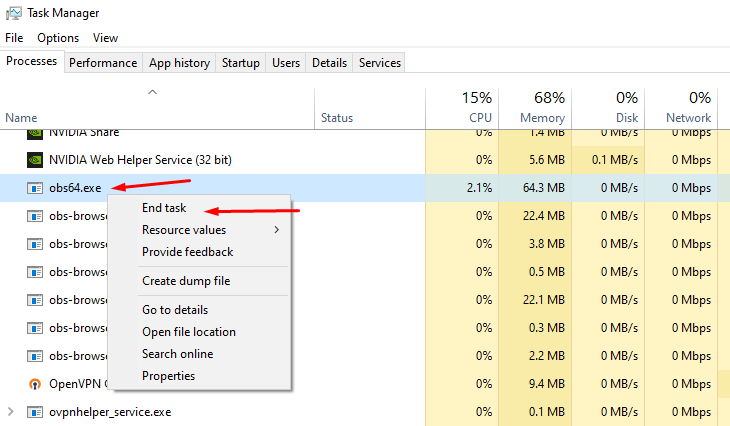

 brittle dove
i deleted cache and it fixed it
but now I can't fix my audio seperation from my vods and recordings, even though I think I've set it up properly it still records music...
gritty isle
brittle dove
i deleted cache and it fixed it
All righty. Be sure to go back through and reconfigure your settings like Output Resolution, Bitrate, Audio Devices, etc.
brittle dove
did it delete all of those..
wispy latchBOT
@brittle dove 🎵 Want to split your audio?
Maybe you’d prefer the stream doesn’t hear your Discord, music, or other apps? You can do this within Streamlabs Desktop using Streamlabs Application Audio, or you could use a software like MIXLINE for more advanced audio control.
📚 Check out these guides:
@brittle dove  Twitch VOD Track: Managing VOD Audio
The Twitch VOD Track is a powerful feature in Streamlabs Desktop designed to help you exclude specific audio from your Twitch Video On Demand (VOD) recordings. This is particularly useful for avoiding DMCA or copyrighted music in your VODs.
⚙️ How to Configure & Use It:
- Go to
Settings>Output. - If you are using Simple Output Mode, please enable "advanced encoder settings" first.
- Enable the "Twitch VOD Track (Uses Track 2)" option. If you prefer to utilize a different audio track for your VODs, you will need to switch to Advanced Output Mode at the top of your Output settings.
- Next, open your
Advanced Audio Optionsby clicking the settings wheel icon next to your Streamlabs Desktop audio mixer. - On the right-hand side, you will see tracks 1 through 6. Your selected Twitch VOD track (default is Track 2) determines which audio sources will be included in your VOD.
📝 NOTE: Only enable the Twitch VOD track for audio sources that you want to appear in your VOD. To exclude an audio source from your VOD, ensure that the configured VOD track is not enabled for that specific source.
brittle dove
I think I've set it up, I hope this works, cause I'm sick of voicemeter banana... Can this also work on youtube streaming, or just for twitch?
abstract plazaBOT
Are you knowledgeable about Streamlabs products?
Get rewarded for helping the Streamlabs Community here in Discord!
👉 Apply to be a part of the Streamlabs Support Volunteer Program!
Application Link:
https://forms.gle/eKS29zWfFjGEzaRp7
For details, see our post in
#announcements message
Do you have a Streamlabs Ultra membership? Are you part of the Streamlabs All-Stars program?
Get your Discord roles by going to this page here: https://streamlabs.com/dashboard#/settings/integrations and clicking "Link" next to Discord! Ultra members and higher tier All-Stars members will have access to private channels for support!
Interested in Ultra? Check it out here: https://streamlabs.com/ultra?refl=discord
ornate sorrel
Hi, Im having a situation where my video isnt casting from streamlabs console, just set up my subscription but it says denied in red at the top right of the screen
ornate sorrel
 abstract plazaBOT
Having trouble? Want to see if anyone else is having the same problem?
Check out our #known-issues channel! We do our best to keep this channel as current as possible with new bugs and progress updates!
If you can't find what you need please submit a ticket at: https://support.streamlabs.com/hc/en-us/requests/new
 sleek vortex
i just baught the premium pass on streamlabs trying to build a website but it keeps bringing me to the tipping page instead?
i just deleted my tipping page now my site pulls up how do i fix this?
i added my tipping page and its now doing it again omfg
gritty isle
sleek vortex
i just baught the premium pass on streamlabs trying to build a website but it ke...
Have you actually published your page after you've designed it? If you don't want your Tip Page to appear, you can toggle that off.


The most popular streaming platform for Twitch, YouTube and Facebook. Cloud-based and used by 70% of Twitch. Grow with Streamlabs Desktop, alerts, 1000+ overlays, analytics, chatbot, tipping, merch and more.
If you need more assistance with your custom site, please link your Discord and gain access to the VIP Support channel, one of your subscriber benefits.
wispy latchBOT
Streamlabs Ultra & All-Stars Discord Access
@sleek vortex, are you a Streamlabs Ultra Subscriber or an All-Stars member? If so, you can link your Discord account to gain access to exclusive Ultra/VIP roles and private chat channels here in our Discord server!
🔗 How To Get Your Ultra/All-Stars Discord Role:
Link your Discord account under your Streamlabs integrations settings: Streamlabs Integrations Dashboard
Not Yet an Ultra Member?
You can learn more about Ultra and upgrade your membership here: Upgrade to Streamlabs Ultra
sleek vortex
gritty isle
Have you actually published your page after you've designed it? If you don't wa...
i did that
abstract plazaBOT
Having trouble? Want to see if anyone else is having the same problem?
Check out our #known-issues channel! We do our best to keep this channel as current as possible with new bugs and progress updates!
If you can't find what you need please submit a ticket at: https://support.streamlabs.com/hc/en-us/requests/new
 dusk field
I am unable to link a Tiltify campaign to Streamlabs. My Streamlabs account was previously linked with my Tiltify account, and now going to the "Integrations" page in my account settings gives an oauth error. This is also preventing me from linking any other accounts to Streamlabs, Discord included. I have tried different browsers and devices, incognito mode, etc. however the issue persists. I have revoked Streamlabs as a connected service in Tiltify and tried to re-connect, but that did not work either. Any assistance with this is appreciated.

 normal beacon
Do we know if the newest version of obs is working correctly this time with streamlabs?
32.1.2 Hot fix
 rose notch
Now when I open Streamlabs I choose my webcam but there is just a black screen, my webcam is active but it shows nothing had this problem yesterday.
abstract plazaBOT
Having trouble? Want to see if anyone else is having the same problem?
Check out our #known-issues channel! We do our best to keep this channel as current as possible with new bugs and progress updates!
If you can't find what you need please submit a ticket at: https://support.streamlabs.com/hc/en-us/requests/new
abstract plazaBOT
Are you knowledgeable about Streamlabs products?
Get rewarded for helping the Streamlabs Community here in Discord!
👉 Apply to be a part of the Streamlabs Support Volunteer Program!
Application Link:
https://forms.gle/eKS29zWfFjGEzaRp7
For details, see our post in
#announcements message
Do you have a Streamlabs Ultra membership? Are you part of the Streamlabs All-Stars program?
Get your Discord roles by going to this page here: https://streamlabs.com/dashboard#/settings/integrations and clicking "Link" next to Discord! Ultra members and higher tier All-Stars members will have access to private channels for support!
Interested in Ultra? Check it out here: https://streamlabs.com/ultra?refl=discord
 chilly steeple
hey, i wanted to ask if there is a way to get watchtime/points etc of a viewer in my channel trough the api. I want to implement an api call into my private project.
Is there a way to do this or is there any documentation about this?
Greetings
abstract plazaBOT
Having trouble? Want to see if anyone else is having the same problem?
Check out our #known-issues channel! We do our best to keep this channel as current as possible with new bugs and progress updates!
If you can't find what you need please submit a ticket at: https://support.streamlabs.com/hc/en-us/requests/new
gritty isle
chilly steeple
hey, i wanted to ask if there is a way to get watchtime/points etc of a viewer i...
Yes, the number of loyalty points are accessible through our API.
https://dev.streamlabs.com/
https://dev.streamlabs.com/reference/points
chilly steeple
gritty isle
Yes, the number of loyalty points are accessible through our API.
<https://dev.s...
but not the watchtime right?
gritty isle
chilly steeple
but not the watchtime right?
No, only the loyalty points are available. The watch time is not available.

This one mentions watch time so it might be possible https://dev.streamlabs.com/reference/pointsuser_points
 deep moon
I have two questions.
Does streamlabs have an option to seperately push different audio to twitch VOD and the live track?
Does streamlabs have an option send audio to one stream and not the other when multistreaming?
Example:
I want my background music to play during twitch live, but not on recorded vod, and not on youtube multistream
 sharp forge
So, did my first multi-stream the other day... When I ended stream however, noticed a major issue.
Twitch and YouTube horizontal both ended stream when i clicked "end stream", however, YouTube vertical continued to stream and record, even after exiting the program. Had to restart my PC to end it... I did not have this issue when only pushing dual output to YouTube.
Anyone else have this issue? If so, how did you resolve it? Don't want to cut out vertical streams to YouTube as it would cut out a lot of potential traffic.
abstract plazaBOT
Do you have a Streamlabs Ultra membership? Are you part of the Streamlabs All-Stars program?
Get your Discord roles by going to this page here: https://streamlabs.com/dashboard#/settings/integrations and clicking "Link" next to Discord! Ultra members and higher tier All-Stars members will have access to private channels for support!
Interested in Ultra? Check it out here: https://streamlabs.com/ultra?refl=discord
Are you knowledgeable about Streamlabs products?
Get rewarded for helping the Streamlabs Community here in Discord!
👉 Apply to be a part of the Streamlabs Support Volunteer Program!
Application Link:
https://forms.gle/eKS29zWfFjGEzaRp7
For details, see our post in
#announcements message
abstract plazaBOT
Having trouble? Want to see if anyone else is having the same problem?
Check out our #known-issues channel! We do our best to keep this channel as current as possible with new bugs and progress updates!
If you can't find what you need please submit a ticket at: https://support.streamlabs.com/hc/en-us/requests/new
 swift pasture
Hello, I am trying to setup a stream where i do media share but it says i need to verify my account to receive credit card payments
 neat steeple
I stream dbd mostly on my computer and it has been great! But lately when I try to scream it lags and freezes up like crazy, i've lowered the graphics and it still lags. I'm still new to streaming so I'm not used to changing up things in my streamlabs. Any other game I stream runs perfectly fine, does anyone know what it could be?
ornate sorrel
Hi, I'm having a situation, I set up a streamlabs console account, should be using the 7 day free trial, but when I go to enable multistreaming it keeps bring me to a subscription page, but ive already done that. Please help
Bringing*
abstract plazaBOT
Having trouble? Want to see if anyone else is having the same problem?
Check out our #known-issues channel! We do our best to keep this channel as current as possible with new bugs and progress updates!
If you can't find what you need please submit a ticket at: https://support.streamlabs.com/hc/en-us/requests/new
 abstract wren
Hello,
I think this question has already been asked, so I hope to get an answer.
I use alert systems for my streams, and when someone offers subscriptions, instead of playing a single alert—the one I specifically prepared for this situation—Streamelement plays the basic subscription alert as many times as there are subscriptions offered, and only then plays the correct alert.
What setting did I get wrong?
Help!
 candid silo
Hello, I am having issues starting my stream on Twitch. I've streamed a few times before but tried to yesterday and i am stuck on "starting video transmission". I have updated my drivers, logged in and out, refreshed my stream code on twitch dashboard, restarted my pc, i can stream to youtube just fine. Why not twich? TIA
abstract plazaBOT
Having trouble? Want to see if anyone else is having the same problem?
Check out our #known-issues channel! We do our best to keep this channel as current as possible with new bugs and progress updates!
If you can't find what you need please submit a ticket at: https://support.streamlabs.com/hc/en-us/requests/new
abstract plazaBOT
Are you knowledgeable about Streamlabs products?
Get rewarded for helping the Streamlabs Community here in Discord!
👉 Apply to be a part of the Streamlabs Support Volunteer Program!
Application Link:
https://forms.gle/eKS29zWfFjGEzaRp7
For details, see our post in
#announcements message
Do you have a Streamlabs Ultra membership? Are you part of the Streamlabs All-Stars program?
Get your Discord roles by going to this page here: https://streamlabs.com/dashboard#/settings/integrations and clicking "Link" next to Discord! Ultra members and higher tier All-Stars members will have access to private channels for support!
Interested in Ultra? Check it out here: https://streamlabs.com/ultra?refl=discord
 manic carbon
hey so my chat isn't connecting to twitch
abstract plazaBOT
Having trouble? Want to see if anyone else is having the same problem?
Check out our #known-issues channel! We do our best to keep this channel as current as possible with new bugs and progress updates!
If you can't find what you need please submit a ticket at: https://support.streamlabs.com/hc/en-us/requests/new
abstract plazaBOT
Are you knowledgeable about Streamlabs products?
Get rewarded for helping the Streamlabs Community here in Discord!
👉 Apply to be a part of the Streamlabs Support Volunteer Program!
Application Link:
https://forms.gle/eKS29zWfFjGEzaRp7
For details, see our post in
#announcements message
Do you have a Streamlabs Ultra membership? Are you part of the Streamlabs All-Stars program?
Get your Discord roles by going to this page here: https://streamlabs.com/dashboard#/settings/integrations and clicking "Link" next to Discord! Ultra members and higher tier All-Stars members will have access to private channels for support!
Interested in Ultra? Check it out here: https://streamlabs.com/ultra?refl=discord
gritty isle
manic carbon
hey so my chat isn't connecting to twitch
If you are live, click the Refresh Chat button at the top of the embedded chat dock.
If that does not work, either end your stream *or after you end your stream, log out in Streamlabs Desktop, wait a minute, and the log back in.
 serene condor
could someone help me with picking up my audio in streamlabs??
it works in my other scene collection but i made a new one i dont hear it
 kindred widget
How do I record my live stream? And use my audio?
ornate sorrel
Just wondering, cuz its been 2 days now that ive been emailing this BOT support names Alyssa, where is the real person to fix my subscription issue, stream labs console isnt mutistreaming and when I go into settings to turn mutistreaming on im redirected to a subscription page but im already subscribed with console. If I get another bot saying im on the trial and should have access to everything when clearly I don't and ive done all the suggested troubleshooting and more ill just start blasting social media with the runaround bot emails ive been getting that havent solved anything! Please fix my subscription before I start telling everyone to use lightstream insted cuz it actually works with console
 snow widget
The link to setup a bot account in streamlabs dashboard is broken and doesn't work.
https://passport.twitch.tv/signup/new?client_id=kimne78kx3ncx6brgo4mv6wki5h1ko&embed=
This passport.twitch.tv page can’t be found
No webpage was found for the web address: https://passport.twitch.tv/signup/new?client_id=kimne78kx3ncx6brgo4mv6wki5h1ko&embed=
HTTP ERROR 404
snow widget
kindred widget
How do I record my live stream? And use my audio?
Click the Record button at the bottom next to GO Live. So long as you have a mic source setup should work fine.
snow widget
manic carbon
hey so my chat isn't connecting to twitch
Login and log out in Streamlabs
kindred widget
@snow widget I am streaming from my phone so will a bluetooth mic work?
snow widget
kindred widget
<@769938297744916500> I am streaming from my phone so will a bluetooth mic work?
Are you streaming directly from the phone to streamlabs and using a bluetooth microphone linked to the phone? I think that should work as long as the mic source is setup in streamlabs. I don't know much about live streaming from a phone.
kindred widget
I am streaming from streamlabs on my phone yes
so how do I set up the mic source on streamlabs? I apologize but I am a new streamer and I am just trying to figure it all out
snow widget
kindred widget
I am streaming from streamlabs on my phone yes
Just make sure the mic you are using or the audio source is setup in streamlabs. If it's the phone then choose that for audio source under audio settings. Go into settings and select Audio then you will see Devices for Input and Output. See if there is a drop down box next to Mic Device to select phone or bluetooth device.
kindred widget
ok thank you for your help
snow widget
kindred widget
ok thank you for your help
No problem. Sorry I have never streamed from my phone but I'd assume you have Settings like Streamlabs on PC where you can select Audio and then select the device you wish to use for the allocated audio device in settings.
kindred widget
I do have it on my PC I am going to do that right now
snow widget
kindred widget
I do have it on my PC I am going to do that right now
Is your feed for the live from the phone but you are streaming from the pc? If so the device used would have to be linked to the pc I believe. Otherwise your phone audio would be the device used for the cam/mic.
kindred widget
It is streaming from my PC but the live feed is coming from my phone
snow widget
kindred widget
It is streaming from my PC but the live feed is coming from my phone
I don't think it works like that. If you stream from your phone you need to stream from the mobile app.
abstract plazaBOT
Having trouble? Want to see if anyone else is having the same problem?
Check out our #known-issues channel! We do our best to keep this channel as current as possible with new bugs and progress updates!
If you can't find what you need please submit a ticket at: https://support.streamlabs.com/hc/en-us/requests/new
snow widget
kindred widget
It is streaming from my PC but the live feed is coming from my phone
I think the PC application would just look for sources connected to the PC. Not sure you can stream live from the Phone to your PC via streamlabs desktop.
kindred widget
I stream from streamlabs on my phone and it connects to my twitch
snow widget
kindred widget
I stream from streamlabs on my phone and it connects to my twitch
Yes I understand that. That is the way you need to stream from your phone I believe. I don't think you can stream from the Streamlabs desktop from your phone.
kindred widget
oh no I apologize I mis-understood
snow widget
kindred widget
I stream from streamlabs on my phone and it connects to my twitch
What I am saying is I don't think the desktop app is going to pic up your bluetooth connected to your phone. As it is PC based so things would have to be connected to the PC to stream or choose devices.
snow widget
kindred widget
oh no I apologize I mis-understood
You will need to set things up on the Phone App to stream directly from the phone with Streamlabs.
kindred widget
oh ok so I have a headset with a usb could I plug that into my pc?
snow widget
kindred widget
oh ok so I have a headset with a usb could I plug that into my pc?
Only if you are streaming from your pc.
kindred widget
oh ok I understand now
snow widget
kindred widget
oh ok I understand now
You can't run two simultaneous versions of streamlabs at the same time. (IE) to pull audio from streamlabs desktop (PC) and from the phone as your video feed. They are two diff applications. One is phone and one is desktop.
kindred widget
oh ok but I can use it on my phone to go live on twitch right?
snow widget
kindred widget
oh ok I understand now
What are you trying to stream? Phone cam as a face cam source or what?
snow widget
kindred widget
oh ok but I can use it on my phone to go live on twitch right?
Yes download the streamlabs mobile app
kindred widget
no I use streamlabs on my phone when I play on my tv and it seems to work on my twitch
that is why I asked
I stream fortnite
snow widget
kindred widget
no I use streamlabs on my phone when I play on my tv and it seems to work on my ...
I have no idea how that setup works via mobile. I don't quite understand how you are streaming exactly. If you are using a console that is something entirely different. Not sure how you get a TV feed to stream through the phone too.
random crown
I’m still having troubles with stream labs connecting my TikTok too. For some reason it’s still doesn’t allow me to sign in to receive a stream key. I’ve tried everything. Still nothing
ornate sorrel
Streamlabs is just broken rn across all its platforms, kinda happens when you make desktop, console and mobile all different subscriptions but try to run them off one platform, the platform freaks out and doesn't know what's what anymore so it just rejects everything
ornate sorrel
Ive got streamlabs console, any time I try to make any real edits (alert box settings) I get pulled to streamlabs dashboard and it doesn't recognize my subscription and from there everything breaks down because if I want to multistream I now need a Desktop Subscription to go along with the Console Subscription I already STARTED! and your issue with console to youtube is being caused by that! How I know! I was using lightstream before to multistream but your platform seemed to be a better looking more user-friendly setup, so I switched, got stramlabs consol, set my overlays and went live to both my twitch and YouTube! Only issue was the video wasnt being "caught" by streamlabs so it wasnt casting video to twitch or YouTube, so I went into settings and that pulled me from streamlabs console to streamlabs dashboard and since that moment when it decided "Oh I Don't Recognize Your Subscription To Streamlabs Console So Multistream Permissions Revoked Until You Get A New Subscription Here On Dashboard" that is when my streamlabs console broke connection with YouTube because my profile isnt allowed to multistream
manic carbon
snow widget
Login and log out in Streamlabs
It worked thx
gusty umbra
random crown
I’m still having troubles with stream labs connecting my TikTok too. For some re...
TikTok doesn’t use stream keys anymore. You need to apply and be approved to stream via streamlabs by TikTok. You can do that here. https://www.tiktok.com/falcon/live_g/live_access_pc_apply/result/index.html?id=GL6399433079641606942&lang=en-US
random crown
gusty umbra
TikTok doesn’t use stream keys anymore. You need to apply and be approved to str...
ive tried applying and havent had anything in 2 months
would i need ultra for tiktok or do mutiple streams
gusty umbra
ornate sorrel
Ive got streamlabs console, any time I try to make any real edits (alert box set...
There is a lot going on right there. There isn’t any issues going on that we’re aware of that “everything on Streamlabs is down” I’m unsure what exactly your problem is. Streamlabs console has its own dashboard, not the main Streamlabs one. Once you’re logged into that, you can modify your console stream. The Streamlabs ultra subscription (which includes console) is required to multistream. I’m sure I missed a question. Please repeat anything you need answered still.
gusty umbra
random crown
ive tried applying and havent had anything in 2 months
Approvals are done via TikTok alone. You may just need to reapply. You don’t need ultra to stream to TikTok. You can use dual output (included in free version) to stream to 1 horsetail platform, and 1 vertical platform (usually TikTok).
 ancient turret
Im struggling to start the free trail or make a payment for a month
ornate sorrel
gusty umbra
There is a lot going on right there. There isn’t any issues going on that we’re ...
For the last two days I've been emailing back and forth with a support bot Alyssa, I started a streamlabs console subscription a couple days ago, trile ends soon, and since starting its been broken, as I said, was streaming to youtube and twitch but no video, so I did the support troubleshooting and got the video, but only to twitch, and since than any time im brought away from streamlabs console im told I don't have a subscription and the damn support bot keeps telling me im wrong and theres no issue, but I wouldn't be having this conversation if that was the actual situation at hand here
random crown
gusty umbra
Approvals are done via TikTok alone. You may just need to reapply. You don’t n...
it wont allow me to summit for some reason
 torpid tide
Streamlabs gave me a prompt to login and now after logging in all the overlays are gone not even in drop down
 devout gull
My streamlabs logged me out for no clear reason and when I logged back in it had undone about three years of customization.
torpid tide
devout gull
My streamlabs logged me out for no clear reason and when I logged back in it had...
any fixes?
devout gull
Nope. Literally came here to see if other people were having this problem.
ornate sorrel
Look up in chat, streamlabs is broken
ancient turret
Ive just had it working and not now lol
Just going to assume its down with people saying
ornate sorrel
ancient turret
Just going to assume its down with people saying
According to traysurfer there aren't any issues
devout gull
Well that's clearly untrue
ornate sorrel
He even confirmed streamlabs consol is different yet when I try to go to console dashboard I'm brought to main dashboard
ancient turret
Anyone know whrn i press go live on xbox it doesnt actually go live on tiktok or twitch
 opal horizon
im trying to go live on tiktok on my xbox but its only going to twitch and I have ultra
ancient turret
opal horizon
im trying to go live on tiktok on my xbox but its only going to twitch and I hav...
Have you changed desination to streamlabs?
opal horizon
yes
ancient turret
It makes you go live on twitch has it pushes though that
ornate sorrel
If you look up in chat guys you will see streamlabs consol is broken because the console dashboard doesn't exist and it pulls you to the desktop version breaking your console subscription
ancient turret
So were just playing a waiting game
ornate sorrel
Use lightstream. It might not have all the things available, but it works
ancient turret
But does that multi platform streaming
ornate sorrel
Yes, just free lightstream has a logo that you can't remove, but the bigger the screen you view it on the smaller you can make it
abstract wren
abstract wren
Hello,
I think this question has already been asked, so I hope to get an answer...
Does anyone have the answer?
 granite plinth
Can't stream on mobile only -doesnt show gameplay
abstract plazaBOT
Having trouble? Want to see if anyone else is having the same problem?
Check out our #known-issues channel! We do our best to keep this channel as current as possible with new bugs and progress updates!
If you can't find what you need please submit a ticket at: https://support.streamlabs.com/hc/en-us/requests/new
opal horizon
my stream arent going anywhere but twitch for my streamlabs mobile
 prisma smelt
When I run Streamlabs, my PC's Bluetooth disconnects by itself, what could it be?
abstract plazaBOT
Having trouble? Want to see if anyone else is having the same problem?
Check out our #known-issues channel! We do our best to keep this channel as current as possible with new bugs and progress updates!
If you can't find what you need please submit a ticket at: https://support.streamlabs.com/hc/en-us/requests/new
abstract plazaBOT
Do you have a Streamlabs Ultra membership? Are you part of the Streamlabs All-Stars program?
Get your Discord roles by going to this page here: https://streamlabs.com/dashboard#/settings/integrations and clicking "Link" next to Discord! Ultra members and higher tier All-Stars members will have access to private channels for support!
Interested in Ultra? Check it out here: https://streamlabs.com/ultra?refl=discord
Are you knowledgeable about Streamlabs products?
Get rewarded for helping the Streamlabs Community here in Discord!
👉 Apply to be a part of the Streamlabs Support Volunteer Program!
Application Link:
https://forms.gle/eKS29zWfFjGEzaRp7
For details, see our post in
#announcements message
snow widget
@wispy latch Ya'll need to add filtering to accounts joining the server. I get friend requests daily from the server from bot accounts with no business adding me. Please do better.
abstract plazaBOT
Are you knowledgeable about Streamlabs products?
Get rewarded for helping the Streamlabs Community here in Discord!
👉 Apply to be a part of the Streamlabs Support Volunteer Program!
Application Link:
https://forms.gle/eKS29zWfFjGEzaRp7
For details, see our post in
#announcements message
Having trouble? Want to see if anyone else is having the same problem?
Check out our #known-issues channel! We do our best to keep this channel as current as possible with new bugs and progress updates!
If you can't find what you need please submit a ticket at: https://support.streamlabs.com/hc/en-us/requests/new
Do you have a Streamlabs Ultra membership? Are you part of the Streamlabs All-Stars program?
Get your Discord roles by going to this page here: https://streamlabs.com/dashboard#/settings/integrations and clicking "Link" next to Discord! Ultra members and higher tier All-Stars members will have access to private channels for support!
Interested in Ultra? Check it out here: https://streamlabs.com/ultra?refl=discord
devout gull
So have they announced anything about a fix yet?
wispy latchBOT
@snow widget 🔒 Managing Discord DMs & Friend Requests
To help reduce or eliminate unwanted Direct Messages and friend requests from users in this server, you can adjust your Discord privacy settings specifically for this community.
📝 Follow These Steps:
- Go to your Discord User Settings.
- Select the
Content and Socialtab (orPrivacy & Safetyin older Discord versions). - In the dropdown menu, choose
Streamlabs. - Toggle off the option for
Direct Messages. - Toggle off
Friend Requestsfor bothEveryoneandServer Members.
(Screenshot here)

After completing these steps, users from this server will no longer be able to send you direct messages or friend requests.
If you prefer not to adjust these settings, or if you encounter any users violating our rules, you can always report them in using the form in #rules message and our team will investigate.

 muted pine
For the past couple of times I've recorded with streamlabs recently the mic isnt picking up like the sound. The bar shows as moving and it has the correct mic, it isn't muted as well. Is it a bug that the sound isn't picking up in video? Is there a way to fix or do I keep on switching the mic 10 times till it lets me have mic sound
abstract plazaBOT
Having trouble? Want to see if anyone else is having the same problem?
Check out our #known-issues channel! We do our best to keep this channel as current as possible with new bugs and progress updates!
If you can't find what you need please submit a ticket at: https://support.streamlabs.com/hc/en-us/requests/new
abstract plazaBOT
Are you knowledgeable about Streamlabs products?
Get rewarded for helping the Streamlabs Community here in Discord!
👉 Apply to be a part of the Streamlabs Support Volunteer Program!
Application Link:
https://forms.gle/eKS29zWfFjGEzaRp7
For details, see our post in
#announcements message
Do you have a Streamlabs Ultra membership? Are you part of the Streamlabs All-Stars program?
Get your Discord roles by going to this page here: https://streamlabs.com/dashboard#/settings/integrations and clicking "Link" next to Discord! Ultra members and higher tier All-Stars members will have access to private channels for support!
Interested in Ultra? Check it out here: https://streamlabs.com/ultra?refl=discord
 keen steppe
it says error when i try to link my kick account
abstract plazaBOT
Having trouble? Want to see if anyone else is having the same problem?
Check out our #known-issues channel! We do our best to keep this channel as current as possible with new bugs and progress updates!
If you can't find what you need please submit a ticket at: https://support.streamlabs.com/hc/en-us/requests/new
Do you have a Streamlabs Ultra membership? Are you part of the Streamlabs All-Stars program?
Get your Discord roles by going to this page here: https://streamlabs.com/dashboard#/settings/integrations and clicking "Link" next to Discord! Ultra members and higher tier All-Stars members will have access to private channels for support!
Interested in Ultra? Check it out here: https://streamlabs.com/ultra?refl=discord
Are you knowledgeable about Streamlabs products?
Get rewarded for helping the Streamlabs Community here in Discord!
👉 Apply to be a part of the Streamlabs Support Volunteer Program!
Application Link:
https://forms.gle/eKS29zWfFjGEzaRp7
For details, see our post in
#announcements message
 proper nova
I have been unsuccessfully searching for hours on both Streamlabs and Google for how to remove one of these two options below the word Loyalty on my Streamlabs website home page. Please guide me where to control those.
gritty isle
proper nova
I have been unsuccessfully searching for hours on both Streamlabs and Google for...
That appears to be the Streamlabs Loyalty extension. You can configure your rewards here: https://streamlabs.com/dashboard#/loyalty
proper nova
gritty isle
That appears to be the Streamlabs Loyalty extension. You can configure your rew...
Yes! That was it! Thank you very much @gritty isle !! Every time I selected the Loyalty menu I was not getting to this page. Thanks again!
 lament forge
hello! im trying to stream to rumble using streamlabs mobile with samsung. getting an error "failed to insert targets" anyone help please?
streamlabs works when i multistream using youtube, twitch, and kick. no luck with rumble tho
 cunning marlin
all of My stream alerts are playing twice for some reason. This issue isn't replicated through testing
and all the audio file length matches the duration of the alert
 sterile vigil
Hello I have a question about streamlabs console the 11.99 version it's not allowing me to add images anymore
gritty isle
proper nova
Yes! That was it! Thank you very much <@301571565840236564> !! Every time I sele...
You’re welcome!
 silk knot
Hey! Im trying to stream with a dual output and record the virtical output only so that i can turn the stream into short form content.
Is there a way to record vertical while doing dual output? This is something I really need
gusty umbra
silk knot
Hey! Im trying to stream with a dual output and record the virtical output only ...
Sorry, you can’t record vertical content like that at this time.
silk knot
Is this something you guys are working on?
I bought ultra thinking i could make the switch from Restream obs as you guys offer way more in terms of general features, but this specific feature is essential to my content
 sand carbon
Hi everyone
I need help with my YouTube
Who can help me please
abstract plazaBOT
Having trouble? Want to see if anyone else is having the same problem?
Check out our #known-issues channel! We do our best to keep this channel as current as possible with new bugs and progress updates!
If you can't find what you need please submit a ticket at: https://support.streamlabs.com/hc/en-us/requests/new
 torn hazel
Can anyone point me towards a layman's terms (I'm in my late 50's) how to integrate overlays for chat, follows, subs etc... I'm so confused I just close it within 5 minutes of trying to figure it out...
I don't have the time and I've run out of patience to scroll through all the known issues... I'm a look n learn type of person
Thanks in advance
cunning marlin
all of My stream alerts are playing twice for some reason. This issue isn't replicated through testing
and all the audio file length matches the duration of the alert
abstract plazaBOT
Having trouble? Want to see if anyone else is having the same problem?
Check out our #known-issues channel! We do our best to keep this channel as current as possible with new bugs and progress updates!
If you can't find what you need please submit a ticket at: https://support.streamlabs.com/hc/en-us/requests/new
abstract plazaBOT
Do you have a Streamlabs Ultra membership? Are you part of the Streamlabs All-Stars program?
Get your Discord roles by going to this page here: https://streamlabs.com/dashboard#/settings/integrations and clicking "Link" next to Discord! Ultra members and higher tier All-Stars members will have access to private channels for support!
Interested in Ultra? Check it out here: https://streamlabs.com/ultra?refl=discord
Are you knowledgeable about Streamlabs products?
Get rewarded for helping the Streamlabs Community here in Discord!
👉 Apply to be a part of the Streamlabs Support Volunteer Program!
Application Link:
https://forms.gle/eKS29zWfFjGEzaRp7
For details, see our post in
#announcements message
 feral portal
Hi folks.
Is there a way to get the calendar (represented in the Schedule Stream panel on desktop) to out an iCal to something like Google Calendar?
 midnight kindle
hello, can anyone explain me how to make my chat appear on my screen using xbox? i configured streamlabs console but the chat doesn't show
gusty umbra
midnight kindle
hello, can anyone explain me how to make my chat appear on my screen using xbox?...
You should be able to add an overlay or widget that shows chat. Do that from the Streamlabs console website.
midnight kindle
gusty umbra
You should be able to add an overlay or widget that shows chat. Do that from the...
yes i already did that but nothing shows, not even notifcation sounds nor xhats nothing shows on my screen
and via streamlabs pc iif i launch the remote play on xbox pc i cant see the screen, i add the source for gameplay and i can connect to xbox app but i cant see video
if i try with other sources the xbox app is not shown
cunning marlin
all of My stream alerts are playing twice for some reason. This issue isn't replicated through testing
and all the audio file length matches the duration of the alert
 quaint coyote
Hello Streamlabs discord fam. I was just streaming yesterday. Now today it says I "cannot connect to the sever" even though I have internet runing upload speeds over 100mbps. I'm connected via ethernet to my modem. I've unistalled the desktop app and reinstalled it. Tried wifi. Logged out of Streamlabs. Reset my passkey. I don't know what else to do.... Please help. Has anyone gone through this and found a solution?
gusty umbra
midnight kindle
yes i already did that but nothing shows, not even notifcation sounds nor xhats ...
Wait. Are you using your PC to stream Xbox via remote play, or do you have an active streamlabs console subscription and are streaming directly from your Xbox?
midnight kindle
I have the trial of streamlabs console
And I already configured it, even when I'm live I can see the chat on my dashboard on pc but on my TV while playing on Xbox no I see nothing
abstract plazaBOT
Having trouble? Want to see if anyone else is having the same problem?
Check out our #known-issues channel! We do our best to keep this channel as current as possible with new bugs and progress updates!
If you can't find what you need please submit a ticket at: https://support.streamlabs.com/hc/en-us/requests/new
gritty isle
midnight kindle
And I already configured it, even when I'm live I can see the chat on my dashboa...
Tha is the Chatbox Widget which makes the chat appear on stream, not local on your display. If you need to watch chat, you'd need to bring up the stream, mute the web browser, and view chat that way.
midnight kindle
gritty isle
Tha is the Chatbox Widget which makes the chat appear *on stream*, not local on ...
Ok understood
bronze sigil
gritty isle
Tha is the Chatbox Widget which makes the chat appear *on stream*, not local on ...
Can u help me in dm because i have a big Issue with Streamlabs i tried everything.
gritty isle
bronze sigil
Can u help me in dm because i have a big Issue with Streamlabs i tried everythin...
Due to moderation rules, we can only provide support here in this channel.
cunning marlin
cunning marlin
all of My stream alerts are playing twice for some reason. This issue isn't repl...
I'm still having this issue
gritty isle
cunning marlin
I'm still having this issue
Screen shot the whole Streamlabs Desktop window with the scene selected where this happens.
cunning marlin
gritty isle
Screen shot the whole Streamlabs Desktop window with the scene selected where th...
I'm using OBS studio with browser source
gritty isle
cunning marlin
I'm using OBS studio with browser source
Screen shot the whole OBS Studio window with the scene selected where this happens.
cunning marlin
gritty isle
Screen shot the whole OBS Studio window with the scene selected where this happe...
it only happens when someone actually trigger the alert
The test alert does not replicate the issue
 gritty isle
cunning marlin
it only happens when someone actually trigger the alert
**The test alert does n...
gritty isle
cunning marlin
it only happens when someone actually trigger the alert
**The test alert does n...
Scroll down in the Scene Selector panel and screen shot again and open the Buckshot folder and screen shot what is in there as well.
cunning marlin
gritty isle
Scroll down in the Scene Selector panel and screen shot again and open the Bucks...
 gritty isle
cunning marlin
gritty isle
cunning marlin
And the URL for the browser source for your Alertbox2 source starts with https://streamlabs.com/alert-box/v3/?
It contains private data so don't post or screen shot the URL you have.
cunning marlin
gritty isle
And the URL for the browser source for your Alertbox2 source starts with `https:...
yeah it starts with that
gritty isle
I do see multiple Game Capture sources, that is not recommended.
cunning marlin
but Window Capture doesn't offer transpancy does it?
I sadly need it
gritty isle
cunning marlin
yeah it starts with that
-Remove the Browser Source you have for the Alertbox Widget from every scene where you have it
-Quit OBS Studio
-Hit windows key + R
-Paste this and hit enter %appdata%\obs-studio\plugin_config\obs-browser
-Delete the cache folder only
-Start up OBS Studio again
-Add the Browser Source for the AlertboxWidget in only one scene and set the following circled options in the Browser Source.

 abstract plazaBOT
Are you knowledgeable about Streamlabs products?
Get rewarded for helping the Streamlabs Community here in Discord!
👉 Apply to be a part of the Streamlabs Support Volunteer Program!
Application Link:
https://forms.gle/eKS29zWfFjGEzaRp7
For details, see our post in
#announcements message
Do you have a Streamlabs Ultra membership? Are you part of the Streamlabs All-Stars program?
Get your Discord roles by going to this page here: https://streamlabs.com/dashboard#/settings/integrations and clicking "Link" next to Discord! Ultra members and higher tier All-Stars members will have access to private channels for support!
Interested in Ultra? Check it out here: https://streamlabs.com/ultra?refl=discord
 bold dagger
a question why dosen't game capuer work i have the setings right in game on borderless windowed and settings correckt on the stream program caputer specific window and then the game, it's manly when i try to send Delta force
abstract plazaBOT
Having trouble? Want to see if anyone else is having the same problem?
Check out our #known-issues channel! We do our best to keep this channel as current as possible with new bugs and progress updates!
If you can't find what you need please submit a ticket at: https://support.streamlabs.com/hc/en-us/requests/new
gusty umbra
bold dagger
a question why dosen't game capuer work i have the setings right in game on bord...
Some games don’t allow direct game capture (generally due to their anti-cheat systems). The list changes on an almost daily basis, so I’m unsure about Delta Force. Those games, you just have to work around them with window or screen capture.
gusty blade
!give (@username) points is literally the only command that doesnt work for me and im raging out lol.... please help
!gamble works fine and checking points too but viewers cant give points to each other...
gritty isle
gusty blade
!give (@username) points is literally the only command that doesnt work for me a...
Please reset Cloudbot and see if that helps.
👉 IMPORTANT: Do not skip or shorten the waits.
- Unmod streamlabs
- Toggle Cloudbot off
- Wait for at least 10 minutes
- Toggle Cloudbot back on
- Mod streamlabs
- Wait 10 minutes before trying commands
abstract plazaBOT
Having trouble? Want to see if anyone else is having the same problem?
Check out our #known-issues channel! We do our best to keep this channel as current as possible with new bugs and progress updates!
If you can't find what you need please submit a ticket at: https://support.streamlabs.com/hc/en-us/requests/new
abstract plazaBOT
Do you have a Streamlabs Ultra membership? Are you part of the Streamlabs All-Stars program?
Get your Discord roles by going to this page here: https://streamlabs.com/dashboard#/settings/integrations and clicking "Link" next to Discord! Ultra members and higher tier All-Stars members will have access to private channels for support!
Interested in Ultra? Check it out here: https://streamlabs.com/ultra?refl=discord
Are you knowledgeable about Streamlabs products?
Get rewarded for helping the Streamlabs Community here in Discord!
👉 Apply to be a part of the Streamlabs Support Volunteer Program!
Application Link:
https://forms.gle/eKS29zWfFjGEzaRp7
For details, see our post in
#announcements message
brittle dove
is there a way to lock in the sound sources, it feels like they keep changing each time I open stream labs with the new sound capture beta
 languid osprey
i just did a little train strem and its was running only at 720p nad i hade HUGE mic delay through out idk how to fix it
 strange mason
Hello guys brand new here only started using streamlabs this morning. Getting a notification that says “failed to determine content classification” or something along them lines not currently at my laptop. Streaming with streamlabs console also. Tried adding all content classifications, tried taking them all off bar adult language because I can’t uncheck that one. Any help would be most appreciated. Thank you
abstract plazaBOT
Having trouble? Want to see if anyone else is having the same problem?
Check out our #known-issues channel! We do our best to keep this channel as current as possible with new bugs and progress updates!
If you can't find what you need please submit a ticket at: https://support.streamlabs.com/hc/en-us/requests/new
gritty isle
strange mason
Hello guys brand new here only started using streamlabs this morning. Getting a ...
You're going to have to screen shot what you see.
strange mason
gritty isle
You're going to have to screen shot what you see.
Legend will do when I get home ✊🏻
abstract plazaBOT
Are you knowledgeable about Streamlabs products?
Get rewarded for helping the Streamlabs Community here in Discord!
👉 Apply to be a part of the Streamlabs Support Volunteer Program!
Application Link:
https://forms.gle/eKS29zWfFjGEzaRp7
For details, see our post in
#announcements message
Do you have a Streamlabs Ultra membership? Are you part of the Streamlabs All-Stars program?
Get your Discord roles by going to this page here: https://streamlabs.com/dashboard#/settings/integrations and clicking "Link" next to Discord! Ultra members and higher tier All-Stars members will have access to private channels for support!
Interested in Ultra? Check it out here: https://streamlabs.com/ultra?refl=discord
abstract plazaBOT
Having trouble? Want to see if anyone else is having the same problem?
Check out our #known-issues channel! We do our best to keep this channel as current as possible with new bugs and progress updates!
If you can't find what you need please submit a ticket at: https://support.streamlabs.com/hc/en-us/requests/new
 random hare
why can't i select my main monitor when selecting display capture? it automatically sets it to my other monitor. and whenever i try to click on my main one it won't work
 brittle oar
I am not interested in talking to an AI chatbot. is there anyway I can get actual help regarding integrations and streamlabs??
 daring isle
right so, i am quite annoyed right now. i was loading up streamlabs and my gpu had a stroke and it couldn't load all the elements, it then wiped my entire theme and replaced it with a blank one and i have no idea how to recover my theme
abstract plazaBOT
Having trouble? Want to see if anyone else is having the same problem?
Check out our #known-issues channel! We do our best to keep this channel as current as possible with new bugs and progress updates!
If you can't find what you need please submit a ticket at: https://support.streamlabs.com/hc/en-us/requests/new
 severe pumice
Hey so, my alertbox isnt working at all. Just sent a ticket on sunday to support but got no response yet. If someone knows how to help I would be very grateful.
 heady thicket
yeah my alerts stopped working about 8 hours ago, no alerts work and dont show in recent events
when I try to go to integration it gives this error: Client error: POST https://v5api.tiltify.com/oauth/token resulted in a 400 Bad Request response: {"error":"invalid_request","error_description":"The request is missing a required parameter, includes an unsupported par (truncated...)
severe pumice
Help please trying to stream w/o alerts is torture :(
heady thicket
I think that its a streamlabs problem and not your fault
severe pumice
Ik, its fine its just inconvenient
daring isle
daring isle
right so, i am quite annoyed right now. i was loading up streamlabs and my gpu h...
i want my theme back... this is honestly ridiculous... why and how does one error message wipe the entire scene collection... so much hard work gone...

 rich barn
Not sure where to ask this to be honest, but when I am multistreaming. Its way louder on tiktok so when I adjust audio for tiktok it gets way quieter on twitch, any fix ?
abstract plazaBOT
Having trouble? Want to see if anyone else is having the same problem?
Check out our #known-issues channel! We do our best to keep this channel as current as possible with new bugs and progress updates!
If you can't find what you need please submit a ticket at: https://support.streamlabs.com/hc/en-us/requests/new
abstract plazaBOT
Are you knowledgeable about Streamlabs products?
Get rewarded for helping the Streamlabs Community here in Discord!
👉 Apply to be a part of the Streamlabs Support Volunteer Program!
Application Link:
https://forms.gle/eKS29zWfFjGEzaRp7
For details, see our post in
#announcements message
Do you have a Streamlabs Ultra membership? Are you part of the Streamlabs All-Stars program?
Get your Discord roles by going to this page here: https://streamlabs.com/dashboard#/settings/integrations and clicking "Link" next to Discord! Ultra members and higher tier All-Stars members will have access to private channels for support!
Interested in Ultra? Check it out here: https://streamlabs.com/ultra?refl=discord
 neon summit
Hello,
I have a charity stream planned for tomorrow and i'm having problems connecting to either tiltify or streamlabs charity.
I used to have my streamlabs linked to Tiltify, but now whenever i go to the integrations page i see this error and all integrations shows as not linked.
If i try to link my streamlabs charity, when i'm redirected back to streamlabs it still shows as unlinked.
Has anyone faced this issue?
 gritty isle
neon summit
Hello,
I have a charity stream planned for tomorrow and i'm having problems conn...
gritty isle
neon summit
Hello,
I have a charity stream planned for tomorrow and i'm having problems conn...
This sounds like the integration is in a bad state. I understand your urgency for charity event tomorrow.
Due to the short lead time, please tell me the streaming platform (Twitch, YouTube, Facebook, Trovo, Kick) and your channel name and I'll see if I can get the staff to check your integration.
neon summit
Twitch, tibolacan
Thanks a lot Rufus
gritty isle
neon summit
Twitch, tibolacan
Thanks a lot Rufus
You're welcome. Hang on a few minutes please.
 gritty cypress
guys how do i separate my alerts in obs i wanna adjust every alert by itself
i made my alerts using streamlabs but i cant just separate them in obs its all in one alert box for some reason and i tried adding them separately it because duplicated
gritty isle
gritty cypress
guys how do i separate my alerts in obs i wanna adjust every alert by itself
i ...
Sounds like you want different Alert Box sources for different alerts.
You can do this with multiple Browser Sources:
- Go to the Alert Box page on the Streamlabs website: https://streamlabs.com/dashboard#/alertbox
- Click Filter Events. Uncheck everything except for Follow (for example).
- Copy the Widget URL and add a Browser Source and paste in that URL.
- Go back to the Filter Events button, uncheck Follow and check everything else.
- Copy the Widget URL and add a new Browser Source (don't reuse the existing one 😉 ) and paste in that URL.
- Viola!

gritty isle
neon summit
Twitch, tibolacan
Thanks a lot Rufus
The staff unlinked your Tiltify integration. Please try and link it again and let me know how it goes.
neon summit
gritty isle
The staff unlinked your Tiltify integration. Please try and link it again and l...
it's working! thanks a lot! you saved the day, here's a beer 🍺
gritty isle
neon summit
it's working! thanks a lot! you saved the day, here's a beer 🍺
YAY!!! You're welcome! 🍻
gritty cypress
gritty isle
Sounds like you want different Alert Box sources for different alerts.
You can ...
thank you so much!!
gritty isle
gritty cypress
thank you so much!!
You're welcome!
gritty cypress
gritty isle
You're welcome!
it worked but the donations one doesnt...
gritty isle
gritty cypress
it worked but the donations one doesnt...
In the Event Filters, did you unselect everything except for Donations, copy the Widget URL, and paste that into the Browser Source?
gritty cypress
gritty isle
In the Event Filters, did you *unselect* everything except for Donations, copy t...
yes i did that but sadly it doesn't work i filtered everything but the tipping
i have like 5 different variations of tips but no one work
gritty isle
gritty cypress
i have like 5 different variations of tips but no one work
The variations don't work or the seperate alert box for Donations doesn't work?
gritty cypress
gritty isle
The variations don't work or the seperate alert box for Donations doesn't work?
both of them
gritty isle
gritty cypress
both of them
And you've setup your Tipping (Donation) method here https://streamlabs.com/dashboard#/tipping/methods?
gritty cypress
thank you now it worked
gritty isle
gritty cypress
thank you now it worked
You're welcome.
rich barn
rich barn
Not sure where to ask this to be honest, but when I am multistreaming. Its way l...
^^^
gritty isle
rich barn
^^^
Please submit a ticket on this https://support.streamlabs.com/hc/en-us/requests/new so the staff can troubleshoot this with you directly.
gusty blade
gritty isle
Please reset Cloudbot and see if that helps.
👉 IMPORTANT: Do not skip or sho...
Unfortunately this failed to fix the !give command not working
gritty isle
gusty blade
Unfortunately this failed to fix the !give command not working
You have the give command enabled?
https://streamlabs.com/dashboard#/cloudbot/commands/default
And you've enabled the Loyalty system?

 abstract plazaBOT
Having trouble? Want to see if anyone else is having the same problem?
Check out our #known-issues channel! We do our best to keep this channel as current as possible with new bugs and progress updates!
If you can't find what you need please submit a ticket at: https://support.streamlabs.com/hc/en-us/requests/new
abstract plazaBOT
Are you knowledgeable about Streamlabs products?
Get rewarded for helping the Streamlabs Community here in Discord!
👉 Apply to be a part of the Streamlabs Support Volunteer Program!
Application Link:
https://forms.gle/eKS29zWfFjGEzaRp7
For details, see our post in
#announcements message
Do you have a Streamlabs Ultra membership? Are you part of the Streamlabs All-Stars program?
Get your Discord roles by going to this page here: https://streamlabs.com/dashboard#/settings/integrations and clicking "Link" next to Discord! Ultra members and higher tier All-Stars members will have access to private channels for support!
Interested in Ultra? Check it out here: https://streamlabs.com/ultra?refl=discord
gusty blade
gritty isle
You have the `give` command enabled?
<https://streamlabs.com/dashboard#/cloudbo...
I do have it enabled and loyalty system enabled as well. Viewers use the !redeem to trigger sounds and !gamble with no issues. Seems that the !give is the only one messing up and gives the failed response every time.
gritty isle
gusty blade
I do have it enabled and loyalty system enabled as well. Viewers use the !redeem...
Can you screen shot what happens the next time you are live? Include in the screen shot the command and the response.
gusty blade
its !give @username (amount of points) right?
gritty isle
gusty blade
its !give @username (amount of points) right?
Correct.
gusty blade
gritty isle
Can you screen shot what happens the next time you are live? Include in the scr...
 gritty isle
gusty blade
gritty isle
gusty blade
And thestanleys3657 is a user in your Loyalty DB? And your account has sufficient points to give 1000?
gusty blade
gritty isle
And `thestanleys3657` is a user in your Loyalty DB? And your account has suffi...
Correct
pretty much the only command not working at this time haha
gritty isle
gusty blade
Correct
Okay, thanks for confirming that. Please go ahead and submit a ticket on this https://support.streamlabs.com/hc/en-us/requests/new. I had this issue myself a few years ago and it had to be resolved via a ticket. Please include that screen you shared above and also for your account and for thestanleys3657, execute the !points command and screen shot that too.
 fiery latch
Hi, can anybody help please with the chat? We have the OBS plug in and I’ve connected the Twitch account (says primary) then tik tok says (unmerge) the Twitch stream is showing but tik tik is not showing at all
 devout isle
Hi everyone - just installed streamlabs desktop today and I wanted to create a folder to organise some elements, but it doesn't make one - searching shows me this has been an issue for a while or am I wrong?
abstract plazaBOT
Having trouble? Want to see if anyone else is having the same problem?
Check out our #known-issues channel! We do our best to keep this channel as current as possible with new bugs and progress updates!
If you can't find what you need please submit a ticket at: https://support.streamlabs.com/hc/en-us/requests/new
 earnest osprey
Why cant i fix my connections on the mobile app?
 dense torrent
im having an issue adding a administrator to my account he gets. the invite but once he tries logging in through the app hes getting unauthurized user
any suggestions
he gets on through the web but once he trys the app it say unathurized user
please help
abstract plazaBOT
Having trouble? Want to see if anyone else is having the same problem?
Check out our #known-issues channel! We do our best to keep this channel as current as possible with new bugs and progress updates!
If you can't find what you need please submit a ticket at: https://support.streamlabs.com/hc/en-us/requests/new
abstract plazaBOT
Having trouble? Want to see if anyone else is having the same problem?
Check out our #known-issues channel! We do our best to keep this channel as current as possible with new bugs and progress updates!
If you can't find what you need please submit a ticket at: https://support.streamlabs.com/hc/en-us/requests/new
abstract plazaBOT
Do you have a Streamlabs Ultra membership? Are you part of the Streamlabs All-Stars program?
Get your Discord roles by going to this page here: https://streamlabs.com/dashboard#/settings/integrations and clicking "Link" next to Discord! Ultra members and higher tier All-Stars members will have access to private channels for support!
Interested in Ultra? Check it out here: https://streamlabs.com/ultra?refl=discord
Are you knowledgeable about Streamlabs products?
Get rewarded for helping the Streamlabs Community here in Discord!
👉 Apply to be a part of the Streamlabs Support Volunteer Program!
Application Link:
https://forms.gle/eKS29zWfFjGEzaRp7
For details, see our post in
#announcements message
ivory pier
Streamlabs, why are you so consistantly inconsistant? 😂
 gritty isle
ivory pier
Streamlabs, why are you so consistantly inconsistant? 😂
gritty isle
ivory pier
Streamlabs, why are you so consistantly inconsistant? 😂
Click Show details and screen shot again. Also, can you try and go live just to YouTube and let me know what happens?
 midnight veldt
Hey how long need to wait for support if i write a ticket?
gritty isle
midnight veldt
Hey how long need to wait for support if i write a ticket?
We can't offer an ETA on any response top a ticket. Us Volunteers don't work tickets nor do we have access to that system as we are not Streamlabs employees. Just be patient and they will get to you. Ticket times do fluctuate now and then and with summer approaching, there will be more people streaming and possibly a longer ticket queue.
midnight veldt
gritty isle
We can't offer an ETA on any response top a ticket. Us Volunteers don't work ti...
thank you! is it possible to change stream labs login ID? becouse i want to move my youtube channel to different email adress
gritty isle
midnight veldt
thank you! is it possible to change stream labs login ID? becouse i want to move...
You mean your Streamlabs ID?
midnight veldt
gritty isle
You mean your Streamlabs ID?
Yes steam labs ID. i created steam labs ID with my old google email. so i want to move my old youtube channels to new google account. and i need to change streeam labs ID login to new email
gritty isle
midnight veldt
Yes steam labs ID. i created steam labs ID with my old google email. so i want ...
Gotcha. There currently isn't a way to change your Streamlabs ID, sadly. Please submit a ticket here https://support.streamlabs.com/hc/en-us/requests/new and the staff can work with you. Basically you have to make a new account and then the staff can assist with the transition from the old account to the new account.
ivory pier
gritty isle
Click *Show details* and screen shot again. Also, can you try and go live just ...
Signed out then signed back in but it's ridiculous I have to go through all this every week.
midnight veldt
gritty isle
Gotcha. There currently isn't a way to change your Streamlabs ID, sadly. Pleas...
oh ok!
gritty isle
ivory pier
Signed out then signed back in but it's ridiculous I have to go through all this...
Well, that doesn't give me what I asked for so I'm still not sure what you are experiencing with Dual Output. If you'd rather not troubleshoot here, I'd suggest submitting a ticket here https://support.streamlabs.com/hc/en-us/requests/new and I would suggest doing that so the staff can troubleshoot and thus gather data and perhaps identify the issue and get it fixed.
abstract plazaBOT
Having trouble? Want to see if anyone else is having the same problem?
Check out our #known-issues channel! We do our best to keep this channel as current as possible with new bugs and progress updates!
If you can't find what you need please submit a ticket at: https://support.streamlabs.com/hc/en-us/requests/new
 near plinth
how do i turn off stream delay?
gritty isle
near plinth
how do i turn off stream delay?
You can't.
There will always be stream delay. It takes time for your computer to encode the packets, transmit them over the internet to the ingest, for the ingest to decode and reassemble them and deliver them to the viewer.
And that setting you may be thinking about in Streamlabs Desktop does not set the stream delay, it adds to the existing stream delay.
The only true way would be on the same physical network segment as the ingest but that's impossible as they won't let you in the data center.
 low prairie
i only have 1 screen and nothing else how can i see the chat on my screen
gritty isle
low prairie
i only have 1 screen and nothing else how can i see the chat on my screen
If you're on a Windows PC or laptop using Streamlabs Desktop, you can try out the Game Overlay: https://streamlabs.com/content-hub/post/streamlabs-game-overlay-for-single-monitors
Game Overlay is not available on the Mac version of Streamlabs Desktop.
low prairie
tyy
gritty isle
low prairie
tyy
yw
low prairie
what do ido now
 gritty isle
low prairie
what do ido now
gritty isle
low prairie
what do ido now
Position it where you want it on screen.
Game overlay works best in borderless window mode.
 abstract plazaBOT
Do you have a Streamlabs Ultra membership? Are you part of the Streamlabs All-Stars program?
Get your Discord roles by going to this page here: https://streamlabs.com/dashboard#/settings/integrations and clicking "Link" next to Discord! Ultra members and higher tier All-Stars members will have access to private channels for support!
Interested in Ultra? Check it out here: https://streamlabs.com/ultra?refl=discord
Are you knowledgeable about Streamlabs products?
Get rewarded for helping the Streamlabs Community here in Discord!
👉 Apply to be a part of the Streamlabs Support Volunteer Program!
Application Link:
https://forms.gle/eKS29zWfFjGEzaRp7
For details, see our post in
#announcements message
abstract plazaBOT
Having trouble? Want to see if anyone else is having the same problem?
Check out our #known-issues channel! We do our best to keep this channel as current as possible with new bugs and progress updates!
If you can't find what you need please submit a ticket at: https://support.streamlabs.com/hc/en-us/requests/new