#technical-support
1 messages · Page 177 of 1
 tough pasture
 proud canopy
anyone know how to connect my streamlabs to my ps5 if i’m streaming on twitch to receive tips and stuff like that?
through my phone aswell
 gritty isle
proud canopy
anyone know how to connect my streamlabs to my ps5 if i’m streaming on twitch to...
gritty isle
proud canopy
anyone know how to connect my streamlabs to my ps5 if i’m streaming on twitch to...
You'd have to have a PC or a Mac with a capture card in order to do that.
proud canopy
it do be tellin me i can do it on my phone i just don’t know how
 remote lotus
Hi guys I just joined today and tried adding my TikTok and it says account is in use already but I have tried removing it from TikTok multiple times and can’t find a solution any help is appreciated
 abstract plazaBOT
 Having trouble? Want to see if anyone else is having the same problem?
Check out our #known-issues channel! We do our best to keep this channel as current as possible with new bugs and progress updates!
If you can't find what you need please submit a ticket at: https://support.streamlabs.com/hc/en-us/requests/new
 gentle basin
There is no function for Impersonation.
gritty isle
gentle basin
There is no function for Impersonation.
Then use option 1. Or just report them to Discord.
gentle basin
I would just like to point out that Impersonation is against discords own terms of service discord com/safety/identity-authenticity-policy-explainer So im VERY surprised this server is not more proactive on it once they have been pointed out.
the users have already been reported to discord. Im just letting you know you are still providing them a platform.
gritty isle
gentle basin
I would just like to point out that Impersonation is against discords own terms ...
Then report them via the form please.
 rugged panther
hi im trying to stream osu on twitch and when i do, the colors turn out darker on stream. In the preview in streamlabs the colors look just fine though
 gentle basin
gritty isle
Then report them via the form please.
gentle basin
gritty isle
Then report them via the form please.
Done, Only for those three though, I have to admit this is one of the worst moderation ethics I've seen in a while, I'm in 200 servers and normally see a lot of bots or impersonators like this, Normally all it takes is for me to point them out, has been that way for years.
Not only This way am I forced to copy/paste many ID's which needs developer mode enabled so I've had to go through a browser (no developer mode for my OS) But I've then had to take multiple screenshots to upload of each because its a REQUIRED field.
I do hope this gets improved in future because I am very disappointed..
Lets make it hard for people to report on others who use this server to flout TOS. great idea -_-
gentle basin
rugged panther
hi im trying to stream osu on twitch and when i do, the colors turn out darker o...
Do you have HDR enabled?
rugged panther
gentle basin
Do you have HDR enabled?
no
gentle basin
Do you have a twitch clip I can check?
(remove the . com portion else it gets auto removed)
 jolly panther
hi, recently got a webcam for my pc but stream labs doesnt seem to recognize it, cam works fine in discord tho
gentle basin
jolly panther
hi, recently got a webcam for my pc but stream labs doesnt seem to recognize it,...
When using windows 10 and 11 close discord first, then make sure it works in streamlabs (make sure discord is closed from the system tray, Ive had this issue a few times before thats how I fixed it)
its to do with windows only being able to use one capture source but discord can override that, Slobs cant.
jolly panther
ill try it now
gentle basin

rugged panther
omg ofc i magically fix it, sorry lol
gentle basin
rugged panther
omg ofc i magically fix it, sorry lol
lmao. not a problem
 winter pike
hey guys i have an issue where my pc storage was full and it logged me out of everywhere, it happened to me before and logged me out of streamlabs obs too but last time it did it all my presets and everything came back but this time it didnt i dont know why, can anyone help me and help me get my presets back this is my last hope
gentle basin
winter pike
hey guys i have an issue where my pc storage was full and it logged me out of ev...
Do you have your presets saved to a file? If not you may need to email the actual official support.
This server is not an official support server
winter pike
yea i understand its not a official support server just wanted to see my luck, but nah i dont have it saved
gentle basin
yeah you are gonna need to put in a ticket for that one im afraid bro
https://support.streamlabs.com/hc/en-us/requests/new
(well. at least the streamlabs links work lmao)
winter pike
where can i find if i have a backup maybe its in my localfiles but i just dont know how to look
gentle basin
Only you know where you saved your backups bro.
 fluid cradle
Heyyy wassup chat
abstract plazaBOT
Having trouble? Want to see if anyone else is having the same problem?
Check out our #known-issues channel! We do our best to keep this channel as current as possible with new bugs and progress updates!
If you can't find what you need please submit a ticket at: https://support.streamlabs.com/hc/en-us/requests/new
abstract plazaBOT
 Do you have a Streamlabs Ultra membership? Are you part of the Streamlabs All-Stars program?
Get your Discord roles by going to this page here: https://streamlabs.com/dashboard#/settings/integrations and clicking "Link" next to Discord! Ultra members and higher tier All-Stars members will have access to private channels for support!
Interested in Ultra? Check it out here: https://streamlabs.com/ultra?refl=discord
Are you knowledgeable about Streamlabs products?
Get rewarded for helping the Streamlabs Community here in Discord!
👉 Apply to be a part of the Streamlabs Support Volunteer Program!
Application Link:
https://forms.gle/eKS29zWfFjGEzaRp7
For details, see our post in
#announcements message
 cunning warren
hi could someone help how to setup tts for every texy in the chat? i benn trying to do this but everything i find is different
gritty isle
cunning warren
hi could someone help how to setup tts for every texy in the chat? i benn trying...
Streamlabs Desktop doesn't have that capability.
cunning warren
oh i always saw that it has
 ivory pier
"Multistream server is unavailable at the moment using dual output" Will there ever be a day when everything is working?
 oak cloud
cunning warren
oh i always saw that it has
oak cloud
cunning warren
oh i always saw that it has
you can't do tts in Streamlabs Desktop but you can do a chat alert (so it dings whenever you get a new chat)
oak cloud
ivory pier
"Multistream server is unavailable at the moment using dual output" Will there e...
First, I would suggest linking your Discord so you can get access to the #vip-support channel.
However, we were made aware a spike of high congestion to our servers about 15-20 minutes ago, but it since has been fixed. (I am not 100% sure when the spike started, but I would suggest trying again)
 wispy latchBOT
 Streamlabs Ultra & All-Stars Discord Access
{1}, are you a Streamlabs Ultra Subscriber or an All-Stars member? If so, you can link your Discord account to gain access to exclusive Ultra/VIP roles and private chat channels here in our Discord server!
🔗 How To Get Your Ultra/All-Stars Discord Role:
Link your Discord account under your Streamlabs integrations settings: Streamlabs Integrations Dashboard
Not Yet an Ultra Member?
You can learn more about Ultra and upgrade your membership here: Upgrade to Streamlabs Ultra
 bleak kestrel
Hey I'm new to streaming, the thing I'm have a problem with is in the users in chat, i have seen some that are using Streamlabs chatbot in there users in chat have there own group like Bot, mods and then viewers, I have looked time and time again but i have not a clue how to do it can anyone help with this.
gritty isle
bleak kestrel
Hey I'm new to streaming, the thing I'm have a problem with is in the users in c...
Are you asking about Discord roles?
bleak kestrel
no
gritty isle
bleak kestrel
no
Then what exactly are you asking about?
bleak kestrel
this on the chatbot i just don't know how to do this i have looked on youtube and i cannot find anything about how to do it
 gritty isle
bleak kestrel
this on the chatbot i just don't know how to do this i have looked on youtube an...
gritty isle
bleak kestrel
this on the chatbot i just don't know how to do this i have looked on youtube an...
That's the Viewer List in Streamlabs Chatbot.
Streamlabs Chatbot Documentation for Twitch: https://cdn.streamlabs.com/chatbot/Documentation_Twitch.pdf
Streamlabs Chatbot Documentation for YouTube: https://cdn.streamlabs.com/chatbot/Documentation_Youtube.pdf
You can download Streamlabs Chatbot here https://streamlabs.com/desktop-chatbot
If you need assistance with Streamlabs Chatbot, ask over in the Chatbot Discord https://discord.gg/xFcsxft
bleak kestrel
ok thank you
gritty isle
bleak kestrel
ok thank you
You're welcome.
abstract plazaBOT
Having trouble? Want to see if anyone else is having the same problem?
Check out our #known-issues channel! We do our best to keep this channel as current as possible with new bugs and progress updates!
If you can't find what you need please submit a ticket at: https://support.streamlabs.com/hc/en-us/requests/new
 edgy ore
hi can someone please help I uninstalled streamlabs re installed it
same minecraft cursor issue only when on streamlabs when I exit streamlabs minecraft cursor shows
 wild coral
What do i do is my labtop monitor is 2560x1600 but streaming in 1080 i have screen tearing in live stream or recording only not in game, ivedownscaeld and etc but nothing seems to fix it any ideas how to get rid o fimage tearing so i can stream the game the game is Arc Raiders and is the only game that does it for more
gritty isle
wild coral
What do i do is my labtop monitor is 2560x1600 but streaming in 1080 i have scre...
Turn on V Sync in the game.
edgy ore
Hey so I'm getting this issue now trying to reinstall it
 gritty isle
edgy ore
Hey so I'm getting this issue now trying to reinstall it
gritty isle
edgy ore
Hey so I'm getting this issue now trying to reinstall it
If you get a setup failed error, please go to windows apps and find the newest c++ entries (usually bottom of the list) and click on each one. Choose to modify then repair and restart after repairing both of them

Streamlabs
Streamlabs Desktop and Streamlabs Chatbot require some additional files to be installed on your system before using the software, or you may run into...
abstract plazaBOT
Do you have a Streamlabs Ultra membership? Are you part of the Streamlabs All-Stars program?
Get your Discord roles by going to this page here: https://streamlabs.com/dashboard#/settings/integrations and clicking "Link" next to Discord! Ultra members and higher tier All-Stars members will have access to private channels for support!
Interested in Ultra? Check it out here: https://streamlabs.com/ultra?refl=discord
Are you knowledgeable about Streamlabs products?
Get rewarded for helping the Streamlabs Community here in Discord!
👉 Apply to be a part of the Streamlabs Support Volunteer Program!
Application Link:
https://forms.gle/eKS29zWfFjGEzaRp7
For details, see our post in
#announcements message
wild coral
gritty isle
Turn on V Sync in the game.
doesnt help, makes it worse
abstract plazaBOT
Having trouble? Want to see if anyone else is having the same problem?
Check out our #known-issues channel! We do our best to keep this channel as current as possible with new bugs and progress updates!
If you can't find what you need please submit a ticket at: https://support.streamlabs.com/hc/en-us/requests/new
 elfin mural
Hello. Can someone help me with Streamlabs OBS Chat Box not appearing on my studio mode in OBS? I am using facebook as streaming platform. I'm pretty sure I did the right stuff to connect the Chat Box but It never appears when I go testing.
 eternal wharf
can someone tell why my video didnt upload to twitch
 honest ember
Hello! does anyone know how to fix an alert box issue? I'm unable to select the one I want and when i copy the proper alert box itsan entirely different theme.
abstract plazaBOT
Having trouble? Want to see if anyone else is having the same problem?
Check out our #known-issues channel! We do our best to keep this channel as current as possible with new bugs and progress updates!
If you can't find what you need please submit a ticket at: https://support.streamlabs.com/hc/en-us/requests/new
 quasi cargo
issue after update, audio isnt synced to cam anymore
 misty falcon
yea i keep getting vst plugin erorr saying marvle-pedq or what ever wont start
i cant get anything to show up on my screen
 stray garnet
I have a very specific question that I am hoping to get some help with. I was wondering if Streamlabs OBS allows for us, while streaming to Twitch, to toggle on our YouTube stream and be able to start it without interrupting our Twitch stream. Any help with this question would be appreciated ❤️
abstract plazaBOT
Having trouble? Want to see if anyone else is having the same problem?
Check out our #known-issues channel! We do our best to keep this channel as current as possible with new bugs and progress updates!
If you can't find what you need please submit a ticket at: https://support.streamlabs.com/hc/en-us/requests/new
abstract plazaBOT
Do you have a Streamlabs Ultra membership? Are you part of the Streamlabs All-Stars program?
Get your Discord roles by going to this page here: https://streamlabs.com/dashboard#/settings/integrations and clicking "Link" next to Discord! Ultra members and higher tier All-Stars members will have access to private channels for support!
Interested in Ultra? Check it out here: https://streamlabs.com/ultra?refl=discord
Are you knowledgeable about Streamlabs products?
Get rewarded for helping the Streamlabs Community here in Discord!
👉 Apply to be a part of the Streamlabs Support Volunteer Program!
Application Link:
https://forms.gle/eKS29zWfFjGEzaRp7
For details, see our post in
#announcements message
 rain raven
Hi guys, i'm encountering a bad issue here. I got ultra to multistream again, did it in the past with no issues but now when i start my livestream on multiple platforms, they all crash or get canceled, any idea why this is happening ?
 limber spear
hello im having a similar issue as the above comment im streaming to youtube,twitch,kick and tiktok and every so often youtube and or twitch crashes or then stream stops on those platforms but tiktok and kick are still live and no interruptions ive checked my internet no iussues there and im not getting any frame drops either or any error messages its very frustrating ive even tried adjusting some settings but nothing is working please help thank you in advance 🙂
abstract plazaBOT
Do you have a Streamlabs Ultra membership? Are you part of the Streamlabs All-Stars program?
Get your Discord roles by going to this page here: https://streamlabs.com/dashboard#/settings/integrations and clicking "Link" next to Discord! Ultra members and higher tier All-Stars members will have access to private channels for support!
Interested in Ultra? Check it out here: https://streamlabs.com/ultra?refl=discord
Having trouble? Want to see if anyone else is having the same problem?
Check out our #known-issues channel! We do our best to keep this channel as current as possible with new bugs and progress updates!
If you can't find what you need please submit a ticket at: https://support.streamlabs.com/hc/en-us/requests/new
Are you knowledgeable about Streamlabs products?
Get rewarded for helping the Streamlabs Community here in Discord!
👉 Apply to be a part of the Streamlabs Support Volunteer Program!
Application Link:
https://forms.gle/eKS29zWfFjGEzaRp7
For details, see our post in
#announcements message
 obtuse dust
New bug report duplicating a text file just put the program in a soft lock and required me to reset my computrrr and stream
abstract plazaBOT
Having trouble? Want to see if anyone else is having the same problem?
Check out our #known-issues channel! We do our best to keep this channel as current as possible with new bugs and progress updates!
If you can't find what you need please submit a ticket at: https://support.streamlabs.com/hc/en-us/requests/new
 random tide
at a 6000 bitrate could the replay buffer make audio cut to static or have a cam freeze??
I have since turned off the replay buffer and upped the bitrate to 9000 for my 1080p 60 FPS stream.
 bronze sand
Hello, I'm a very new streamer and I use a MAC (yes! I know) 🙁
I want to start streaming with what I have but i keep running into millions of problems and one such is..
I'm not able to find the VST plugin option to add a filter to my MIC. I have several plugins in my mac tbh coz I produce music but still i added the TAL reverb as everyone suggested in the youtube videos.. after installing i have turned off and on the MAC fully but still no option. What am i doing wrong?

 olive berry
I’m really struggling to set up stream labs console
bronze sand
olive berry
I’m really struggling to set up stream labs console
i feel you.. the setting up phase has been going on for weeks
olive berry
Are you able to help me set it up?
bronze sand
olive berry
Are you able to help me set it up?
I could try.. hopefully! I'm very new to this
wats the trouble?
olive berry
I just don’t know how to connect it to my stream I’ve put like a chat overlay but it’s not showing on my stream
bronze sand
olive berry
I just don’t know how to connect it to my stream I’ve put like a chat overlay bu...
are you following the layer method.. or burger
 gusty umbra
olive berry
I just don’t know how to connect it to my stream I’ve put like a chat overlay bu...
gusty umbra
olive berry
I just don’t know how to connect it to my stream I’ve put like a chat overlay bu...
Are you using the console website to customize your stream? You can’t customize your stream in streamlabs desktop, it won’t cross over.
olive berry
Imma be honest I don’t know what that it
olive berry
gusty umbra
Are you using the console website to customize your stream? You can’t customize...
Yeah I’m using the website as I don’t have a laptop
bronze sand
make sure that its not under anything in your sources.. then try testing it with the chat option
 olive berry
bronze sand
make sure that its not under anything in your sources.. then try testing it wit...
olive berry
bronze sand
make sure that its not under anything in your sources.. then try testing it wit...
Are you able to vc and I’ll share my screen
bronze sand
olive berry
Yeah I’m using the website as I don’t have a laptop
you haven't downloaded and installed steamlabs software?
olive berry
I’m on xbox so I don’t think I can
I thought streamlabs console was so you could stream on xbox without needing a laptop
bronze sand
oh that might be something i don't know.. I'm using steam labs desktop not the console ... but let me check it out once
bronze sand
olive berry
Are you able to vc and I’ll share my screen
sure.. i just saw a small tutorial..
but actually the chat doesn't show up until someone is texts
bronze sand
oh, the tutorial seemed quite easy.. don't know why its causing so much trouble
olive berry
I’m slow that’s why 😭
abstract plazaBOT
Having trouble? Want to see if anyone else is having the same problem?
Check out our #known-issues channel! We do our best to keep this channel as current as possible with new bugs and progress updates!
If you can't find what you need please submit a ticket at: https://support.streamlabs.com/hc/en-us/requests/new
 neat talon
hey guys, im using an overlay for my streams and it doesnt seem to be updating my latest followers. do you know what i should do?
 wise flame
Hello. I'm using the Streamlabs mobile app on my Android phone, and I'm trying to use the YouTube stream. I am able to login, however, when I press "Go live" it says that the user is blocked from livestreaming, but I am able to go on desktop and setup a livestream, and in the YouTube app I am allowed to livestream
Can anyone help me? I could use the rtmp source, but then I can't start up new livestreams from Streamlabs like I want to
I just have to connect to one that's already setup on a computer or something if I do that.
abstract plazaBOT
Do you have a Streamlabs Ultra membership? Are you part of the Streamlabs All-Stars program?
Get your Discord roles by going to this page here: https://streamlabs.com/dashboard#/settings/integrations and clicking "Link" next to Discord! Ultra members and higher tier All-Stars members will have access to private channels for support!
Interested in Ultra? Check it out here: https://streamlabs.com/ultra?refl=discord
Are you knowledgeable about Streamlabs products?
Get rewarded for helping the Streamlabs Community here in Discord!
👉 Apply to be a part of the Streamlabs Support Volunteer Program!
Application Link:
https://forms.gle/eKS29zWfFjGEzaRp7
For details, see our post in
#announcements message
Having trouble? Want to see if anyone else is having the same problem?
Check out our #known-issues channel! We do our best to keep this channel as current as possible with new bugs and progress updates!
If you can't find what you need please submit a ticket at: https://support.streamlabs.com/hc/en-us/requests/new
 pallid zealot
i got 7 buys i didnt get my ships nor my items please can you return my buys bought 3 corvettes teryed to reload all that it just dissapear they not ther and 4 expedition items like idont know why they not there
?//
gritty isle
pallid zealot
i got 7 buys i didnt get my ships nor my items please can you return my buys bou...
This seemingly isn't anything concerning Streamlabs.
 high wharf
Hey! I'm having issues with my game and other audio being captured within SLOBS. I haven't streamed in forever cause I just got a new PC after years of not having one. But when I tried to stream, i realized none of my audio was being captured, except for my microphone. I also have 2 different desktop audios. I followed the steps listed in a guide on the site for changing the default device, but that didn't work. I'm kinda lost. I also disabled items that I am not using via Window Settings.
abstract plazaBOT
Having trouble? Want to see if anyone else is having the same problem?
Check out our #known-issues channel! We do our best to keep this channel as current as possible with new bugs and progress updates!
If you can't find what you need please submit a ticket at: https://support.streamlabs.com/hc/en-us/requests/new
 boreal parrot
I have the chat box set up and visible on screen, but no text appears while playing.
The only things that work are the game and the video camera.
I have the same setup as Edge shows, except for mp4, Headlines, and horizontal socials. The rest I do. I just cant seem to get the texts to show up onn screen
Also, it won't load up to YouTube either.
limber spear
hey so i am still having isssues with multistream i stream to kick, tiktok, twitch and youtube but the pass coupel days for some reason randomly on youtube and twitch it stops straming but continues perfectly fine on tiktok and kick and its very annyoing to the viewers and myself because then i have to restart the stream to get twitch and youtube back up i have 0 drapped frames i have trouble shooted my internet and theres no issues can i please get some help thanks in advnace
obtuse dust
dang 2 days in a row stream labs OBS crashing when changing some layers
 shut saffron
my friend streams on his console because he doesn't have a desk/laptop. and im trying to manage his stream making it more view interactive etc. is there anyway to get his game screen onto my desktop? idk if i worded it correctly
 vagrant delta
limber spear
hey so i am still having isssues with multistream i stream to kick, tiktok, twit...
vagrant delta
limber spear
hey so i am still having isssues with multistream i stream to kick, tiktok, twit...
I have same issue on kick today again - dropped 26 frames and stopoped working! 🙁
 quiet saddle
Need help audio is not playing for some reason on twitch
After I uninstalled obs then reinstalled it its been acting weird
Last stream it only played my desktop audio
 orchid vortex
How do I make it so after the stream is done the whole vod will got to storage? Currently I have the vod enabled in twitch, but it is not consistant and it sometimes doesn't release it at all.
abstract plazaBOT
Having trouble? Want to see if anyone else is having the same problem?
Check out our #known-issues channel! We do our best to keep this channel as current as possible with new bugs and progress updates!
If you can't find what you need please submit a ticket at: https://support.streamlabs.com/hc/en-us/requests/new
gritty isle
orchid vortex
How do I make it so after the stream is done the whole vod will got to storage? ...
I've noticed lately my streams are being stored but not published. Please check your Video Producer on your Twitch channel. Your VODs may be there, just unpublished.
 small sinew
hello i was told to ask here for help im getting this error the video download was cancelled. please try again. (error #1000) on twitch and i google search it and i see what google is saying but idk whats the issue is on my end
gritty isle
small sinew
hello i was told to ask here for help im getting this error ```the video downloa...
This can be due to a number of things.
- For the streamer: Ensure your bitrate is not exceeding 6000. That is the maximum bitrate that Twitch will accept.
- Ask the viewer if they have an ad blockers running and ask that they turn them off or add an exception for Twitch.
- Ask the viewer to clear the cache for all time in their web browser, completely restart the whole web browse, and try again.
- Ask the viewer log out of the Twitch web site and clear all cookies for Twitch only, completely restart the whole web browser, log back in at Twitch, and try again.
If this continues, please change your Output Resolution to 1280x720, make sure your bitrate is 6000, and try again.
small sinew
gritty isle
This can be due to a number of things.
1) For the streamer: Ensure your bitr...
my bitrate is at 2500 and my res is at 1920x1080 and when i pop my tab up it dose that error and when i load the app on my phone it says the content no longer there or no longer avalable
i even see the same error when in the content manager in twitch webpage
gritty isle
small sinew
my bitrate is at 2500 and my res is at 1920x1080 and when i pop my tab up it dos...
2500 is way too low for 1080p.
small sinew
was never an issue before it just started doing this today
gritty isle
small sinew
was never an issue before it just started doing this today
What is your advertised upload bandwidth?
small sinew
i dont fully know off hand
gritty isle
small sinew
i dont fully know off hand
Make sure you're not downloading or uploading any thing. Go to https://speedtest.net and click Go. Screen shot the results.

Speedtest.net
Use Speedtest on all your devices with our free desktop and mobile apps.
small sinew
gritty isle
Make sure you're not downloading or uploading any thing. Go to https://speedtes...
 gritty isle
small sinew
gritty isle
small sinew
Thanks! Set your Output Resolution to 1280x720, your bitrate to 6000, and try again.
 mossy pilot
Hey I am trying to find the perfect settings for stream labs to record if someone could help me out I have:
GPU: Gefroce RTX 3070
CPU: i7-12700kf
Ram: 16 GB
WIFI:
 gritty isle
mossy pilot
Hey I am trying to find the perfect settings for stream labs to record if someon...
gritty isle
mossy pilot
Hey I am trying to find the perfect settings for stream labs to record if someon...
There's no set 'best settings'. Each person has different hardware and different internet access. Check out the recommendations below. 👇
wispy latchBOT
 Optimizing Your Stream: Recommended Bitrate Settings
@mossy pilot, getting your bitrate right is essential for a clear stream. Bitrate indicates the data rate of your video, and if too low for your chosen resolution and frame rate, it can lead to pixelation.
📋Recommended Bitrate Ranges for Resolution & FPS
- 1280x720 at 30 FPS: 2,200 to 2,800 kbps
- 1280x720 at 60 FPS: 3,800 to 5,600 kbps
- 1920x1080 at 30 FPS: 4,400 to 6,200 kbps
- 1920x1080 at 60 FPS: 8,700 to 12,500 kbps (a minimum of 6,000 kbps is generally recommended for good quality)
- 1600x900 or 1536x864 at 60 FPS: At least 6,000 kbps, up to 8,600 kbps
If you notice pixelation or blockiness on your stream, it often means your bitrate isn't high enough to properly encode your video for the content you're showing. Consider increasing it within these recommended ranges!
📚 For more detailed guidelines and platform-specific recommendations, check out these official resources:
small sinew
gritty isle
There's no set 'best settings'. Each person has different hardware and differen...
it was going fine for like a min and then this pop up There was a network error. Please try again. (Error #2000)
wait i just refresh it seems to fix it self for now
 tribal adder
can someone help me with streamlabs mobile app issue?
gritty isle
small sinew
it was going fine for like a min and then this pop up ```There was a network err...
That sounds like a network issue from what I can google. Did Streamlabs Desktop report dropped frames or did the stream disconnect unexpected?
small sinew
gritty isle
That sounds like a network issue from what I can google. Did Streamlabs Desktop...
no i was in the stream manger then it did but then i refresh it looks like its working again and looks like its working just fine atm
gritty isle
tribal adder
can someone help me with streamlabs mobile app issue?
Perhaps. What's up with Streamlabs Mobile?
tribal adder
gritty isle
Perhaps. What's up with Streamlabs Mobile?
I had tested out the streamlabs mobile app today for my mobile gaming and when I ended my stream on my mobile app the stream has still been going on my twich for 5 hours now. I have reset the key made sure everything was disconnested and Still my stream Wont end
gritty isle
tribal adder
I had tested out the streamlabs mobile app today for my mobile gaming and when I...
And you clicked Stop and then on the pop up confirmed the stop?


I just tried that and it worked for me. Twitch was a little slow on actually ending the stream though.
tribal adder
gritty isle
And you clicked Stop and then on the pop up confirmed the stop?
yes but mine did not look like that on my phone. I ended the live 5 hours ago.

 gritty isle
tribal adder
yes but mine did not look like that on my phone. I ended the live 5 hours ago.
gritty isle
tribal adder
yes but mine did not look like that on my phone. I ended the live 5 hours ago.
Mine's a iPhone. Is your mobile device Android based?
tribal adder
gritty isle
Mine's a iPhone. Is your mobile device Android based?
yes
gritty isle
tribal adder
yes
Thanks for confirming that!
I'd reach out to Twitch https://help.twitch.tv/s/contactsupport and see if they can end the stream from their end and also submit a ticket to Streamlabs https://support.streamlabs.com/hc/en-us/requests/new. I've not heard of this happening until your report.
tribal adder
Thank you. I just finished submiting my ticket. Thanks for trying to help. Ya'll have a good night.
gritty isle
tribal adder
Thank you. I just finished submiting my ticket. Thanks for trying to help. Ya'll...
You're welcome. Have a good night yourself! 👋
abstract plazaBOT
Having trouble? Want to see if anyone else is having the same problem?
Check out our #known-issues channel! We do our best to keep this channel as current as possible with new bugs and progress updates!
If you can't find what you need please submit a ticket at: https://support.streamlabs.com/hc/en-us/requests/new
wispy latchBOT
@jagged sedge
🚫 Advertising and self-promotion are not permitted in any of our channels or in direct messages with server members. For more information on our server guidelines, please refer to #rules. Thank you!
abstract plazaBOT
Are you knowledgeable about Streamlabs products?
Get rewarded for helping the Streamlabs Community here in Discord!
👉 Apply to be a part of the Streamlabs Support Volunteer Program!
Application Link:
https://forms.gle/eKS29zWfFjGEzaRp7
For details, see our post in
#announcements message
Do you have a Streamlabs Ultra membership? Are you part of the Streamlabs All-Stars program?
Get your Discord roles by going to this page here: https://streamlabs.com/dashboard#/settings/integrations and clicking "Link" next to Discord! Ultra members and higher tier All-Stars members will have access to private channels for support!
Interested in Ultra? Check it out here: https://streamlabs.com/ultra?refl=discord
 honest spindle
Hello, I've set up my alarmbox but I can't seem to adjust the sound volume. It's too high to the desired level. How can I adjust it?
 tranquil radish
honest spindle
Hello, I've set up my alarmbox but I can't seem to adjust the sound volume. It's...
tranquil radish
honest spindle
Hello, I've set up my alarmbox but I can't seem to adjust the sound volume. It's...
dashboard, alert box, use the toggle to lower it
orchid vortex
gritty isle
I've noticed lately my streams are being stored but not published. Please check...
Got it
 fringe falcon
Hi. I use the Streamlabs plugin on OBS studio. Is there a way I can look at the Streamlabs health report for my stream?
gritty isle
fringe falcon
Hi. I use the Streamlabs plugin on OBS studio. Is there a way I can look at the ...
You can do that on your Streamlabs Dashboard https://streamlabs.com/dashboard#/stats.
fringe falcon
gritty isle
You can do that on your Streamlabs Dashboard <https://streamlabs.com/dashboard#/...
this only gives my avg viewers and such
My OBS studio from which I run the streamlabs plugin kept disconnecting my stream
gritty isle
fringe falcon
My OBS studio from which I run the streamlabs plugin kept disconnecting my strea...
What platform are you streaming to?
fringe falcon
I wanted to know why so I could fix the issue, so that's why I wanted a health diagnostic of it to see what was wrong. I saw someone else show me a report that gets emailed to them that had dropped frames, CPU usage, and other technical things on there
fringe falcon
gritty isle
What platform are you streaming to?
multistream - Youtube, Twitch, TikTok, and Kick
gritty isle
fringe falcon
multistream - Youtube, Twitch, TikTok, and Kick
With Streamlabs Ultra or via another OBS Studio plugin?
fringe falcon
I use the streamlabs plugin with streamlabs ultra service on OBS studio
gritty isle
fringe falcon
I use the streamlabs plugin with streamlabs ultra service on OBS studio
Thank you for being a Streamlabs Ultra subscriber!
Please link your discord per the tagged instructions below and ask again in the VIP Support channel, which is one of you subscriber benefits.
wispy latchBOT
Streamlabs Ultra & All-Stars Discord Access
@fringe falcon, are you a Streamlabs Ultra Subscriber or an All-Stars member? If so, you can link your Discord account to gain access to exclusive Ultra/VIP roles and private chat channels here in our Discord server!
🔗 How To Get Your Ultra/All-Stars Discord Role:
Link your Discord account under your Streamlabs integrations settings: Streamlabs Integrations Dashboard
Not Yet an Ultra Member?
You can learn more about Ultra and upgrade your membership here: Upgrade to Streamlabs Ultra
 normal sapphire
I have to use StreamLabs Console and annoyingly there doesn't seem to be a goal source in the list of options when designing my stream. It does have the option of a custom widget where you can enter HTML/CSS so I thought I could pull in streamelements widgets. Error came back saying iframes are blocked so no bueno. So try creating one manually in HTML and get it all happy using basic code and get a generic error "not allowed". Am I missing something obvious or is Streamlabs making my life difficult whilst offering no option to do it using their native options?!
abstract plazaBOT
Having trouble? Want to see if anyone else is having the same problem?
Check out our #known-issues channel! We do our best to keep this channel as current as possible with new bugs and progress updates!
If you can't find what you need please submit a ticket at: https://support.streamlabs.com/hc/en-us/requests/new
wispy latchBOT
@normal sapphire 💻 Custom Code & Streamlabs Dev API Support
While we do not provide direct support for custom HTML, CSS, or JavaScript within your alerts and widgets, or for the Streamlabs Dev API, we can point you to some helpful resources.
📖 Learning & Examples:
- For those interested in advanced customizations, we highly recommend taking time to learn how HTML, CSS, and JavaScript work.
- A great resource for learning web development basics is W3Schools CSS Tutorials.
- Please Note: The provided YouTube link for video tutorials appears invalid. Please ensure you have a valid link to share for video resources.
- Many of the Widget Themes available in the Themes Tab of Streamlabs Desktop utilize custom code. You can install these themes and browse through their code to learn by example.
🔗 Streamlabs Dev API:
- If you're looking for information about the Streamlabs Dev API, you can find our comprehensive API Documentation here: Streamlabs Dev API Documentation
 frank prawn
Hi, I have a bit of an 'emergency' situation. I just tried to stream but my stream output is abysmally garbage. Like, 0.1 FPS garbage.
I'm connected to frankfurt server (which is 10ms according to SLOBS), and my bitrate has been lowered to 2000 while it used to be 4500 before on my old pc.
I've got 800 mbps upload too so internet speed shouldn't be a problem.
I'm genuinely having no clue why this is
 gritty isle
frank prawn
I'm genuinely having no clue why this is
gritty isle
frank prawn
I'm genuinely having no clue why this is
Dropped Frames is a network issue between you and the platform ingest. Are you streaming to Twitch?
frank prawn
Yeah
gritty isle
frank prawn
Yeah
Please download and run the Twitch Test, see the next post.
- Use Medium or Long Duration.
- Select all the ingests in your region.
- Screen shot the results once the test is fully completed. Please don't crop the scree shot.
To find your Twitch stream key: https://streamlabs.com/content-hub/post/where-to-find-your-twitch-stream-key
 wispy latchBOT
@frank prawn 🌐 Finding Your Best Twitch Server
To ensure the most stable and high-quality stream to Twitch, we recommend using a Twitch test tool to find the optimal server for your location and internet connection.
📋 How to Use the Twitch Test Tool:
- Access the tool here: Twitch Test Tool
- Run the test using either the Medium or Long duration. Short tests may not provide the most accurate results.
- Select your specific region from the listed options. If your exact region is not available, choose 5 to 6 servers closest to you.
- Aim for a quality score of at least 84. This indicates a strong and stable connection.
🛠️ Applying Your Settings in Streamlabs Desktop:
- Once you've identified a good server, navigate to your Streamlabs Desktop settings:
Settings>Stream>Stream to custom ingest. - From there, you can manually select your preferred server based on your test results.
frank prawn
SLOBS says I have 10ms connection to Frankfurt. 🤷
rain raven
Hi guys, i'm encountering a bad issue here. I got ultra to multistream again, did it in the past with no issues but now when i start my livestream on multiple platforms, they all crash or get canceled, any idea why this is happening ?
frank prawn
gritty isle
Please download and run the Twitch Test, see the next post.
1) Use Medium or L...

sorry, uncropped version
 gritty isle
frank prawn
sorry, uncropped version
gritty isle
frank prawn
sorry, uncropped version
Wait for it to finish please.
frank prawn
 gritty isle
rain raven
Hi guys, i'm encountering a bad issue here. I got ultra to multistream again, di...
gritty isle
rain raven
Hi guys, i'm encountering a bad issue here. I got ultra to multistream again, di...
Thank you for being a Streamlabs Ultra subscriber!
Please link your discord per the tagged instructions below and ask again in the VIP Support channel, which is one of you subscriber benefits.
wispy latchBOT
Streamlabs Ultra & All-Stars Discord Access
@rain raven, are you a Streamlabs Ultra Subscriber or an All-Stars member? If so, you can link your Discord account to gain access to exclusive Ultra/VIP roles and private chat channels here in our Discord server!
🔗 How To Get Your Ultra/All-Stars Discord Role:
Link your Discord account under your Streamlabs integrations settings: Streamlabs Integrations Dashboard
Not Yet an Ultra Member?
You can learn more about Ultra and upgrade your membership here: Upgrade to Streamlabs Ultra
frank prawn
It's finished, @gritty isle. It's only 3 servers in europe region for me
gritty isle
frank prawn
It's finished, <@301571565840236564>. It's only 3 servers in europe region for m...
Those zero quality scores are the issue. They should be 100. Please call your ISP and tell them you're trying to live stream to Twitch and are getting disconnected.
frank prawn
Huh, but what are they supposed to be able to do with this? I literally streamed just fine earlier, what's there they could have to do with this suddenly being bad
gritty isle
frank prawn
Huh, but what are they supposed to be able to do with this? I literally streamed...
Things change on the part of the internet that is not under your control.
frank prawn
wait, let me try something; changing/resetting the Stream Key
gritty isle
frank prawn
wait, let me try something; changing/resetting the Stream Key
That may not help.
frank prawn
Oh, I was googling for any reports with my ISP and also being unable to stream to twitch and it was a solution that popped up. Can't hurt to try ig
gritty isle
frank prawn
Oh, I was googling for any reports with my ISP and also being unable to stream t...
Okay, let me know how it goes.
frank prawn
Nope, alas
gritty isle
frank prawn
Nope, alas
Okay, I do see you have a Killer Ethernet card.
Killer's Software Suite is known for its poor performance and issues when trying to stream.
Please download the package from https://www.intel.com/content/www/us/en/download/19779/intel-killer-performance-suite.html, completely uninstall all Killer NIC items and run the installer, choosing to only install the Hardware Drivers.

Intel
Download new and previously released drivers including support software, bios, utilities, firmware and patches for Intel products.
frank prawn
gritty isle
Okay, I do see you have a Killer Ethernet card.
Killer's Software Suite is know...
what exactly am I downloading/installing?
limber spear
this is day 3 or 4 ive lost track at this point twitch and youtube still randomly stops streaming while kick and ticktok are just fine its getting to be very annyoing ive submitted a ticket however the person im emailing keeps asking me for the same thing even though ive provided it 2 or 3 times to them can i please get some help here again multi streaming to kick, tiktok, youtube and twitch and youtube and twitch stream will stop 0 dropped frames now internet issues or pc issues and im running streamlabs as admin as well
gritty isle
frank prawn
what exactly am I downloading/installing?
Killer Networking also includes software that can monitor and "shape" your network traffic by controlling how much data gets sent where. This can interfer with live streaming. You need to uninstall all Killer software and then only install the Hardware Drivers for your Killer E5000B ethernet card.
Then run the Twitch test again.
frank prawn
gritty isle
Killer Networking also includes software that can monitor and "shape" your netwo...
It's 100 now!
 gritty isle
frank prawn
It's 100 now!
gritty isle
frank prawn
It's 100 now!
Okay, that's good news. Let it finish then try and go live.
gritty isle
limber spear
this is day 3 or 4 ive lost track at this point twitch and youtube still randoml...
Dropped Frames are a network issue. Do you have an open ticket with Streamlabs?
 spice crystal
Hi guys, i'm encountering a bad issue here. I got ultra to multistream again, did it in the past with no issues but now when i start my livestream on multiple platforms, they all crash or get canceled, any idea why this is happening ?
this has been happening for a few days in a row now, then it doesnt record my stream and I can't use AI highlighter
limber spear
gritty isle
Dropped Frames are a *network* issue. Do you have an open ticket with Streamlab...
I dont have any dropped frames is what im saying
gritty isle
limber spear
I dont have any dropped frames is what im saying
Okay. Do you have a ticket open with Streamlabs?
gritty isle
spice crystal
Hi guys, i'm encountering a bad issue here. I got ultra to multistream again, di...
Thank you for being a Streamlabs Ultra subscriber!
Please link your discord per the tagged instructions below and ask again in the VIP Support channel, which is one of you subscriber benefits.
wispy latchBOT
Streamlabs Ultra & All-Stars Discord Access
@spice crystal, are you a Streamlabs Ultra Subscriber or an All-Stars member? If so, you can link your Discord account to gain access to exclusive Ultra/VIP roles and private chat channels here in our Discord server!
🔗 How To Get Your Ultra/All-Stars Discord Role:
Link your Discord account under your Streamlabs integrations settings: Streamlabs Integrations Dashboard
Not Yet an Ultra Member?
You can learn more about Ultra and upgrade your membership here: Upgrade to Streamlabs Ultra
 weary moat
hello i have issue with 2-Factor Authentication i lost it and i can't get to my account i did send ticket but no respwond for now
gritty isle
weary moat
hello i have issue with 2-Factor Authentication i lost it and i can't get to my ...
You'll have to submit a ticket for that: https://support.streamlabs.com/hc/en-us/requests/new. We cannot assist with 2FA issues in Discord.
weary moat
i did send it the ticket but no respond for last 2 days
gritty isle
weary moat
i did send it the ticket but no respond for last 2 days
Tickets are answered in the order they are received. We cannot offer an ETA on any ticket response. Be patient and they will get to you.
weary moat
thanks bro
gritty isle
weary moat
thanks bro
You're welcome.
abstract plazaBOT
Are you knowledgeable about Streamlabs products?
Get rewarded for helping the Streamlabs Community here in Discord!
👉 Apply to be a part of the Streamlabs Support Volunteer Program!
Application Link:
https://forms.gle/eKS29zWfFjGEzaRp7
For details, see our post in
#announcements message
Do you have a Streamlabs Ultra membership? Are you part of the Streamlabs All-Stars program?
Get your Discord roles by going to this page here: https://streamlabs.com/dashboard#/settings/integrations and clicking "Link" next to Discord! Ultra members and higher tier All-Stars members will have access to private channels for support!
Interested in Ultra? Check it out here: https://streamlabs.com/ultra?refl=discord
 heavy schooner
not really a technical question but can I recieve tips when I'm offline and will I be able to read the message they send
gritty isle
heavy schooner
not really a technical question but can I recieve tips when I'm offline and will...
Yes. You can replay the alert.
 manic phoenix
Hello, I have just switched scenes during a livestream and upon switching back a whole folder full of tricky to setup sources has just disappeared! Is there a backup system to restore them?
 abstract plazaBOT
Having trouble? Want to see if anyone else is having the same problem?
Check out our #known-issues channel! We do our best to keep this channel as current as possible with new bugs and progress updates!
If you can't find what you need please submit a ticket at: https://support.streamlabs.com/hc/en-us/requests/new
obtuse dust
third stream in a row where doing nearly anything with layers crashes stream labs OBS
ever since the update the other day
normal sapphire
wispy latch
<@1452977123814936636> 💻 **Custom Code & Streamlabs Dev API Support**
While we ...
This is only relevant to the desktop version. I need help with the console version if anyone can?
 hybrid patrol
So im having issues with 7 day free trial. Im looking to sign up to it but when i do it says i will be charged full amount today instead of 7 days from now, it doesnt matter if i choose annually or monthly it still wont give me a free trial
hybrid patrol
…
abstract plazaBOT
Having trouble? Want to see if anyone else is having the same problem?
Check out our #known-issues channel! We do our best to keep this channel as current as possible with new bugs and progress updates!
If you can't find what you need please submit a ticket at: https://support.streamlabs.com/hc/en-us/requests/new
abstract plazaBOT
Are you knowledgeable about Streamlabs products?
Get rewarded for helping the Streamlabs Community here in Discord!
👉 Apply to be a part of the Streamlabs Support Volunteer Program!
Application Link:
https://forms.gle/eKS29zWfFjGEzaRp7
For details, see our post in
#announcements message
Do you have a Streamlabs Ultra membership? Are you part of the Streamlabs All-Stars program?
Get your Discord roles by going to this page here: https://streamlabs.com/dashboard#/settings/integrations and clicking "Link" next to Discord! Ultra members and higher tier All-Stars members will have access to private channels for support!
Interested in Ultra? Check it out here: https://streamlabs.com/ultra?refl=discord
 delicate crater
Hoe can I get additional discord audio on my streamlabs
I play on console but some of my friends are chat banned
 muted vortex
My twitch stream is not showing on my Streamlabs Charity page. I did stream a short bit last night, using Streamlabs desktop for Windows, and nothing is showing on the charity page. The campaign is showing in twitch. Can anyone help me figure this out?
Https://streamlabscharity.com/@muted vortex/shards-of-hope
gritty isle
delicate crater
Hoe can I get additional discord audio on my streamlabs
Streamlabs Console is not capable of capturing Discord audio.
 final elm
Hello! I’m an ultra member.
When I go live on TikTok WITHOUT Streamlabs it works fine, and I’m not suspended and I am live but when I try to go live with Streamlabs it says:
Access status
Streamlabs
Couldn't apply because your LIVE access is suspended. Try again in 7 days.
Your TikTok LIVE access has expired. You can apply again.
gritty isle
final elm
Hello! I’m an ultra member.
When I go live on TikTok WITHOUT Streamlabs it work...
You would need to reach out to TikTok on that. Sounds like your Live with Streamlabs access has been suspended by TikTok. Be aware that TikTok may only look at your Live with (TikTok) Studio access and tell you all is fine.
final elm
gritty isle
You would need to reach out to TikTok on that. Sounds like your Live with Strea...
Ok, Thank you. I will follow up with TikTok
 swift laurel
Can someone help me?
gritty isle
final elm
Ok, Thank you. I will follow up with TikTok
You're welcome. You can check you Live wih Streamlabs access here: https://www.tiktok.com/falcon/live_g/live_access_pc_apply/result/index.html?id=GL6399433079641606942&lang=en-US
gusty umbra
swift laurel
Can someone help me?
We can sure try! We will, however, need your question. Include any relevant screenshots if it helps.
swift laurel
My problem is the following: I use a capture card to send the image to the PC for the live stream, but it’s arriving there looking kind of blurry. I’ve already checked the resolution, and that’s not the issue.
swift laurel
gusty umbra
We can sure try! We will, however, need your question. Include any relevant sc...
I really don't know what it is
 hearty prairie
Hello, I'm a streamer, I have a problem with your sponsorship, where can I find an email address to contact for help please?
gritty isle
hearty prairie
Hello, I'm a streamer, I have a problem with your sponsorship, where can I find ...
Please submit a ticket here: https://support.streamlabs.com/hc/en-us/requests/new
gritty isle
swift laurel
My problem is the following: I use a capture card to send the image to the PC fo...
Please screen shot:
- The properties of the video capture source
- Settings > Video
- Settings > Output
 gritty isle
swift laurel
The letters look blurry
gritty isle
swift laurel
The letters look blurry
Are you using a capture device for the game that is playing on the same pc as Streamlabs Desktop?
swift laurel
gritty isle
Are you using a capture device for the game that is playing on the same pc as St...
The gaming PC only runs the game.
The streaming PC is the one that has Streamlabs.
gritty isle
swift laurel
The gaming PC only runs the game.
The streaming PC is the one that has Streamlab...
Then why are you capturing the Desktop from the gaming PC? Is the gaming PC running at the same resolution of the capture card?
swift laurel
gritty isle
Then why are you capturing the Desktop from the gaming PC? Is the gaming PC run...
Yes, it sends the same resolution and you can't put the game directly because the signal is sent through a capture card
gritty isle
swift laurel
Yes, it sends the same resolution and you can't put the game directly because th...
Not sure what you mean by that. I don't have this type of setup. Please read this guide. It might have some suggestions for you https://streamlabs.com/content-hub/post/streamlabs-desktop-capture-card-issues-solutions
muted vortex
I think my question was missed. Should I repeat it or could you refer back to the above?
gritty isle
muted vortex
I think my question was missed. Should I repeat it or could you refer back to th...
Did you have the campaign selected here https://streamlabs.com/dashboard#/settings/integrations?

 quasi igloo
Hello I'm a streamer and i'm having issues going live to Youtube. I've tried unlinking and relinking but it's still not working?
gritty isle
quasi igloo
Hello I'm a streamer and i'm having issues going live to Youtube. I've tried unl...
What is the issue?
quasi igloo
This? I don't know what settings its referring to
 gritty isle
quasi igloo
This? I don't know what settings its referring to
gritty isle
quasi igloo
This? I don't know what settings its referring to
Let's refresh the connection between Streamlabs and YouTube.
-
Log out of the Streamlabs web site on every device you access it: Click your PFP and choose Log out.
-
If you use the standalone Streamlabels application, log out of that.
-
Follow this guide: https://streamlabs.com/content-hub/post/how-to-disconnect-your-streamlabs-account. Just follow the section for YouTube.
-
Log out in Streamlabs Desktop and Streamlabs Mobile.
-
Navigate back to the Streamlabs web site and log in with your YouTube. This re-establishes the connection.
-
👉 IMPORTANT: Once you have completed the guide, go back to the Streamlabs web site https://streamlabs.com/dashboard#/recentevents, click the Live Actions tab, scroll all the way to the bottom and click the Reload Widgets button. PLEASE Don't skip this step!
-
Log back in to all the other Streamlabs products you use.
It's not obvious when you log in, but one of the interstitials will say something like Streamlabs has access to x of 6 services. Click there and make sure that all 6 of the boxes are checked and then proceed through the rest of the log in process.
👇 👇 👇 👇
muted vortex
gritty isle
Did you have the campaign selected here <https://streamlabs.com/dashboard#/setti...
Yes, I do
 gritty isle
muted vortex
Yes, I do
gritty isle
muted vortex
Yes, I do
Then please submit a ticket https://support.streamlabs.com/hc/en-us/requests/new. I'm not sure how that all works and there's no troubleshooting I have for this.
muted vortex
Ok
quasi igloo
gritty isle
Let's refresh the connection between Streamlabs and YouTube.
1) Log out of th...
by login with my youtube does that mean login in to the website then link up the youtube?
 soft urchin
hello, I have problem with audio alerts after updating stream program, I cannot hear alerts but twitch followers can hear it, what can I do? I tried the guides but not working
gritty isle
quasi igloo
by login with my youtube does that mean login in to the website then link up the...
When you log in at the Streamlabs web site (step 7) and go through the step, that re-establishes the connection.
gritty isle
soft urchin
hello, I have problem with audio alerts after updating stream program, I cannot ...
Can you go into your Streamlabs Desktop Settings > Advanced > Audio and change your audio monitoring device to "default"?
Then close Streamlabs Desktop, re-launch it as admin (right-click the desktop icon, run as admin)
Then go back into the same settings area and change your audio monitoring device back to the device you'd like to hear audio.
gritty isle
soft urchin
it's working!! thank you, you saved my day
You're welcome!
soft urchin
gritty isle
You're welcome!
now I can hear myself, how this to fix it XD ?
gritty isle
soft urchin
now I can hear myself, how this to fix it XD ?
Set the Audio Monitoring on the Microphone to Monitor Off. There's never a need to hear your own microphone locally.
soft urchin
would followers hear me?
quasi igloo
had to do it a few times but everythings working now. thanks so much!
gritty isle
soft urchin
would followers hear me?
Yes.
gritty isle
quasi igloo
had to do it a few times but everythings working now. thanks so much!
You're welcome!
soft urchin
gritty isle
Yes.
ok, I'll check it tomorrow and tell you
 violet sorrel
How does one fix their Creator Site Link as it just goes to an Error 400 "Bad Request" Message


 unborn lily
Um. I just started using the app. I want to sign up and it said it'll send a verification email. I've resent it 10 times and still no email. And I make sure my storage isn't full cause I can receive other emails including me about stream labs but 0 code
gritty isle
violet sorrel
How does one fix their Creator Site Link as it just goes to an Error 400 "Bad Re...
Do you have an active Streamlabs Ultra subscription?
gritty isle
unborn lily
Um. I just started using the app. I want to sign up and it said it'll send a ver...
And you've checked your Spam/Junk folder?
violet sorrel
gritty isle
Do you have an active Streamlabs Ultra subscription?
I do have an Ultra....it keeps saying update payment method, which I've done 3 times. Still doesn't show a "renewal" date or anything and I can't change the domain
disregard that, looks like next charge is on March 14th, 2026
I've signed out, signed in, etc...just can't get that base URL to change
gritty isle
violet sorrel
I do have an Ultra....it keeps saying update payment method, which I've done 3 t...
Thank you for being a Streamlabs Ultra subscriber!
Please link your discord and then ask in the VIP Support channel. Only the Streamlabs staff can assist with domain issues.
wispy latchBOT
Streamlabs Ultra & All-Stars Discord Access
@violet sorrel, are you a Streamlabs Ultra Subscriber or an All-Stars member? If so, you can link your Discord account to gain access to exclusive Ultra/VIP roles and private chat channels here in our Discord server!
🔗 How To Get Your Ultra/All-Stars Discord Role:
Link your Discord account under your Streamlabs integrations settings: Streamlabs Integrations Dashboard
Not Yet an Ultra Member?
You can learn more about Ultra and upgrade your membership here: Upgrade to Streamlabs Ultra
abstract plazaBOT
Having trouble? Want to see if anyone else is having the same problem?
Check out our #known-issues channel! We do our best to keep this channel as current as possible with new bugs and progress updates!
If you can't find what you need please submit a ticket at: https://support.streamlabs.com/hc/en-us/requests/new
wispy latchBOT
@jagged sedge
🚫 Advertising and self-promotion are not permitted in any of our channels or in direct messages with server members. For more information on our server guidelines, please refer to #rules. Thank you!
 keen jacinth
Attempting to game capture isnt working and only shows black screen, it will work for one stream and the next day it wont work, id this a device issue, settings issue or some type of bug?
abstract plazaBOT
Do you have a Streamlabs Ultra membership? Are you part of the Streamlabs All-Stars program?
Get your Discord roles by going to this page here: https://streamlabs.com/dashboard#/settings/integrations and clicking "Link" next to Discord! Ultra members and higher tier All-Stars members will have access to private channels for support!
Interested in Ultra? Check it out here: https://streamlabs.com/ultra?refl=discord
Are you knowledgeable about Streamlabs products?
Get rewarded for helping the Streamlabs Community here in Discord!
👉 Apply to be a part of the Streamlabs Support Volunteer Program!
Application Link:
https://forms.gle/eKS29zWfFjGEzaRp7
For details, see our post in
#announcements message
 severe lion
Whats the cause issue why i cant go live on tiktok from xbox console services through stream labs you know the services you have to acrually pay for on stream labs
gritty isle
severe lion
Whats the cause issue why i cant go live on tiktok from xbox console services th...
For Tiktok: You have to apply for permission to use Live with Streamlabs. You can do that at here: https://www.tiktok.com/falcon/live_g/live_access_pc_apply/result/index.html?id=GL6399433079641606942&lang=en-US
More information about our TikTok integration is here: https://streamlabs.com/content-hub/post/streamlabs-announces-integration-with-tiktok
More information about Dual Output is here https://streamlabs.com/content-hub/post/streamlabs-desktop-dual-output-how-to, and here https://streamlabs.com/content-hub/post/how-set-up-dual-output-streamlabs-tiktok-streams.

Streamlabs
Streamlabs now enables creators to go live on TikTok, customize their streams, and monetize their content – all from one convenient place.
gritty isle
keen jacinth
Attempting to game capture isnt working and only shows black screen, it will wor...
This might help:
First, please delete your game capture source and quit Streamlabs Desktop.
Then go to the search in windows (🔎) and search this file path: C:\ProgramData\obs-studio-hook and then click on the folder that pops up.
Once you have done that you will see a bunch of files. If you can ignore those for a second and click on the program data folder.
Then you should see the obs-studio-hook folder there and highlighted.
Go ahead and delete the folder.
Now go ahead restart your PC and then right click Streamlabs Desktop and run as administrator.
Then add a new game capture and see if that works for you.
 abstract plazaBOT
Having trouble? Want to see if anyone else is having the same problem?
Check out our #known-issues channel! We do our best to keep this channel as current as possible with new bugs and progress updates!
If you can't find what you need please submit a ticket at: https://support.streamlabs.com/hc/en-us/requests/new
 fluid flicker
im getting super choppy audio when streaming from my console
high wharf
Still having an issue where Streamlabs OBS and even just regular OBS do not pick up my desktop audio. I've followed the short, unhelpful guide on the website. I tried changingt he default device to my headphones. I've reinstalled microsoft visual c++ x64 and x86. All my drivers are updated, whether its my GPU, CPU, Audio Drivers or whatever else. I try running SLOBS as admin, nothing. The only sound it picks up is my mic when I'm talking. No game sound, music sound, nothing. I submitted a ticket and have yet to hear a response. Asked in the chat a couple days ago and never got a response. Anyone got any ideas what my issue could be?
 proper steppe
Hey, I made a webpage to display various stats, it seems like streamlabs browser source doesn't display my webpage correct, are there any known issues with multiple websocket connections? Are there any logs specific to brwoser source debugging ?
abstract plazaBOT
Having trouble? Want to see if anyone else is having the same problem?
Check out our #known-issues channel! We do our best to keep this channel as current as possible with new bugs and progress updates!
If you can't find what you need please submit a ticket at: https://support.streamlabs.com/hc/en-us/requests/new
abstract plazaBOT
Do you have a Streamlabs Ultra membership? Are you part of the Streamlabs All-Stars program?
Get your Discord roles by going to this page here: https://streamlabs.com/dashboard#/settings/integrations and clicking "Link" next to Discord! Ultra members and higher tier All-Stars members will have access to private channels for support!
Interested in Ultra? Check it out here: https://streamlabs.com/ultra?refl=discord
Are you knowledgeable about Streamlabs products?
Get rewarded for helping the Streamlabs Community here in Discord!
👉 Apply to be a part of the Streamlabs Support Volunteer Program!
Application Link:
https://forms.gle/eKS29zWfFjGEzaRp7
For details, see our post in
#announcements message
 prisma pawn
hi streamlabs, where can I find the patch notes for the latest newest updates?
 deep moon
I am trying to sort out a custom domain. I press live chat option and the chat never opens. I have logged a ticket 2 days ago and had no response. Any advice?
gritty isle
deep moon
I am trying to sort out a custom domain. I press live chat option and the chat n...
You have an active Streamlabs Ultra subscription?
gritty isle
deep moon
Yes
Thank you for being a Streamlabs Ultra subscriber!
Please link your discord per the tagged instructions below and gain access to the VIP Support channel.
The Streamlabs staff there can assist with your domain issue.
wispy latchBOT
Streamlabs Ultra & All-Stars Discord Access
@deep moon, are you a Streamlabs Ultra Subscriber or an All-Stars member? If so, you can link your Discord account to gain access to exclusive Ultra/VIP roles and private chat channels here in our Discord server!
🔗 How To Get Your Ultra/All-Stars Discord Role:
Link your Discord account under your Streamlabs integrations settings: Streamlabs Integrations Dashboard
Not Yet an Ultra Member?
You can learn more about Ultra and upgrade your membership here: Upgrade to Streamlabs Ultra
 boreal steeple
Hi, I set up a poll but it won't go away! I can't find where to end it
gritty isle
boreal steeple
Hi, I set up a poll but it won't go away! I can't find where to end it
If you go here https://streamlabs.com/dashboard#/cloudbot/polls/profiles, click on the Active Poll, then click the Close Poll button.
 boreal steeple
gritty isle
If you go here <https://streamlabs.com/dashboard#/cloudbot/polls/profiles>, clic...
boreal steeple
gritty isle
If you go here <https://streamlabs.com/dashboard#/cloudbot/polls/profiles>, clic...
The poll isn't even there though
All I have is "Add Poll Profile"
gritty isle
boreal steeple
The poll isn't even there though
Are you sure you used Cloudbot for the poll?
gritty isle
boreal steeple
I believe so
Then there would be an active poll shown there.
boreal steeple
Okay, but if it was through something else then where would that be? I'm trying to stream to YouTube
gritty isle
boreal steeple
Okay, but if it was through something else then where would that be? I'm trying ...
Are you using Streamlabs Chatbot?
 boreal steeple
No, is that on the browser?
gritty isle
boreal steeple
No, is that on the browser?
Nope, it is a separate application you have to download, install, and configure.
boreal steeple
Okay just downloading it now
gritty isle
boreal steeple
Okay just downloading it now
I'm mean, I'm not telling you that need to use it. If you're downloading it to look for this mysterious poll, it won't be Chatbot if you've never used it before.
Plus you need a second YouTube channel to use as the Bot.
boreal steeple
Oh right, well I don't think I can do that as this is through my employer rather than personal
I think I must have set it up with Cloudbot, then disabled Cloudbot when it didn't seem to be working, and it seems to have vanished
gritty isle
boreal steeple
I think I must have set it up with Cloudbot, then disabled Cloudbot when it didn...
Possible but I have no way to confirm that.
Does the poll show up in your YouTube chat when you're live?
gritty isle
boreal steeple
No
Then there's not much to do. 😉
boreal steeple
gritty isle
Then there's not much to do. 😉
So I'm just stuck with a poll that'll never end?
Is there a way to refresh the Poll Widget URL so that it can be fixed in Streamlabs?
gritty isle
boreal steeple
So I'm just stuck with a poll that'll never end?
Ah, Poll Widget!
boreal steeple
Yes I did it via Poll Widget (I am so sorry if I'm running you round in circles here, we're not experienced with streaming)
If I click to launch the widget the poll comes up, but I can't find any way to edit or end it
gritty isle
boreal steeple
Yes I did it via Poll Widget (I am so sorry if I'm running you round in circles ...
What do you have selected in Poll Type?
 boreal steeple
Currently it's set to YouTube but I was sure it was set to Cloudbot before
It defaulted to YouTube when I opened the page though
gritty isle
boreal steeple
Currently it's set to YouTube but I was sure it was set to Cloudbot before
Show it shows an Active Poll in the Poll Widget but nothing configured in Cloudbot Polls, correct?
boreal steeple
Yes, seemingly
If I click launch, that exact poll opens up in a new window
Yeah nothing in Cloudbot Polls
gritty isle
boreal steeple
Yes, seemingly
Okay, I've never used the Poll Widget but have used polls in Cloudbot. In my Poll Widget I do see an active poll but none of the polls in my Cloudbot are active.
Seems like there is an issue perhaps with the Poll Widget.
Please submit a ticket on this: https://support.streamlabs.com/hc/en-us/requests/new
It'll be something the staff and/or developers will need to investigate.
boreal steeple
Thank you, I will give that a try now. thanks for all your help
gritty isle
boreal steeple
Thank you, I will give that a try now. thanks for all your help
You're welcome.
abstract plazaBOT
Having trouble? Want to see if anyone else is having the same problem?
Check out our #known-issues channel! We do our best to keep this channel as current as possible with new bugs and progress updates!
If you can't find what you need please submit a ticket at: https://support.streamlabs.com/hc/en-us/requests/new
limber spear
@gritty isle to answer you question from a couple days ago if i submitted a ticket i sure have i have a rep that keeps asking me for the same info that i have provide and is telling me its a network issue on myside however i have trouble shot it its is 100% not a network issue cus then tiktok and kick would also go down when twitch and youtube does and then dont the are perfectly fine its still giving me issues and has been since the latest update has gone out ( ive asked for a different rep as well cus i keep getting the same response from this person ive asking for a differnt rep and was told i cant get one)
gritty isle
limber spear
<@301571565840236564> to answer you question from a couple days ago if i submitt...
Reply to last email on the ticket and keep working with them.
limber spear
gritty isle
Reply to last email on the ticket and keep working with them.
we are 12 replies deep with this rep they are in fact not helping and its very very frustrating
 dim birch
Hello there !
I just tried to set up the virtual camera to use it on tiktok live studio, but when I install it, it always choose the first option (If I select "scene" it automatically choose my first scene and when I change it it's not saved. And then on tiktok live studio I can see "streamlabs desktop virtual camera" but nothing is displayed.
If someone have an idea of how to fix it 
Thanks !
oak cloud
limber spear
we are 12 replies deep with this rep they are in fact not helping and its very v...
i just checked on your ticket. you're not providing what the agent has requested (like the long ping test) so they can read what the results are going to our servers
limber spear
oak cloud
i just checked on your ticket. you're not providing what the agent has requested...
they replied to the ping test saying 50 was a hair high?
oak cloud
it is a hair high
Depending on your location
But we would need to see the WHOLE ping test to get a better idea of what is happening
but you're just copying the summary, not attaching the whole test
oak cloud
but yes, how your network is travelling to our server can be completely different than it travelling directly to the platform. Additionally, different platforms have different connection rates. So one platform may reconnect right away, while another one does not because it has timed out
limber spear
they dont recconet they arent dropping at all i have my mods watching theres not problems at all and there is zero dropped frames during this time as well
oak cloud
so it could be taht once your network hits an area that is different it's having issues. OR it could be the handoff from your network to our servers that is the problem, etc. but the ping would show us the consistency (or inconsistencies).
but the full ping would rule out a lot. the agent gave you a bunch of things because they could only go off of the information that they were provided
limber spear
again tyvm for replying i would like to say i didnt have this problem at all before the newest streamlabs update
oak cloud
we can't say that it's the update until we can rule out other things. which multistream in itself has had a BUNCH of updates on the backend to alleviate these issues
limber spear
im running the cmd right now ill be sending it here very soon
oak cloud
sounds good. But once that is done follow up with your email and then that way we can look into it further. I also see that they reported this internally as well to get ahead of things, so it is in general being looked at
limber spear
that sounds great i again really appericate it this would have been much better than the other emails i got 🙂
limber spear
oak cloud
sounds good. But once that is done follow up with your email and then that way w...
is copying and pasting the cmd in the email ok?
 wide lava
does the streamlabs plugin not have the twitch vod check mark to easily separate audio? i added it to obs but cant seem to find it i could just be really blind
oak cloud
limber spear
is copying and pasting the cmd in the email ok?
a lot of things are done on the back end of tickets that aren't necessarily communicated to you. I can share that with their manager.
If you can fit it in the email, but doing a text file upload would probably be easier.
oak cloud
wide lava
does the streamlabs plugin not have the twitch vod check mark to easily separate...
the twitch vod check would be specifically in OBS Studio (not the plugin). But if you're multistreaming it won't work 🙁
wide lava
oak cloud
the twitch vod check would be specifically in OBS Studio (not the plugin). But i...
just in output right?
limber spear
oak cloud
the twitch vod check would be specifically in OBS Studio (not the plugin). But i...
just sent the email thanks again for all the info 🙂
oak cloud
wide lava
just in output right?
yeah. are you streaming just to twitch? and in settings > stream is it showing twitch or is it showing a custom URL?

 oak cloud
what do you see in Settings > Stream?
wide lava
it was linked to twitch but on custom, changed it to twitch and its fixed. thank you so much for the help!
severe lion
gritty isle
For Tiktok: You have to apply for permission to use Live with Streamlabs. You ...
Does this really take 3 full days and why? Cant I get a sooner reply? This decision will decide if i actually buy streamlabs services
 gritty isle
severe lion
Does this really take 3 full days and why? Cant I get a sooner reply? This decis...
gritty isle
severe lion
Does this really take 3 full days and why? Cant I get a sooner reply? This decis...
It's all up to TikTok. Streamlabs has no input on their decisons.
abstract plazaBOT
Do you have a Streamlabs Ultra membership? Are you part of the Streamlabs All-Stars program?
Get your Discord roles by going to this page here: https://streamlabs.com/dashboard#/settings/integrations and clicking "Link" next to Discord! Ultra members and higher tier All-Stars members will have access to private channels for support!
Interested in Ultra? Check it out here: https://streamlabs.com/ultra?refl=discord
Are you knowledgeable about Streamlabs products?
Get rewarded for helping the Streamlabs Community here in Discord!
👉 Apply to be a part of the Streamlabs Support Volunteer Program!
Application Link:
https://forms.gle/eKS29zWfFjGEzaRp7
For details, see our post in
#announcements message
limber spear
@oak cloud while waiting for the email back about the ping is there any settings I can make sure are correct just in case that could be causing the issue?
 summer ferry
anyone here use the reactive overlays yet? i installed the scenes with them and they dont work, does the webacm and other sources gotta be in a certain area in the screen? and whats with the a.i thing saying i need to choose a source and game but even when i do that it still dont work. also can i have the reactive sources on my orginal scenes, i dont like the look of the scenes that come with the package
deep moon
gritty isle
Thank you for being a Streamlabs Ultra subscriber! <:ultra:1047482406770311208>...
Hi - ive done this now. still getting the same domain issue
gritty isle
summer ferry
anyone here use the reactive overlays yet? i installed the scenes with them and ...
Hop over to #vip-support for assistance.
gritty isle
deep moon
Hi - ive done this now. still getting the same domain issue
Did you ask over in #vip-support? Us volunteers can't assist with custom domains as we're not Streamlabs employees and thus we don't have access to their systems.
abstract plazaBOT
Having trouble? Want to see if anyone else is having the same problem?
Check out our #known-issues channel! We do our best to keep this channel as current as possible with new bugs and progress updates!
If you can't find what you need please submit a ticket at: https://support.streamlabs.com/hc/en-us/requests/new
abstract plazaBOT
Having trouble? Want to see if anyone else is having the same problem?
Check out our #known-issues channel! We do our best to keep this channel as current as possible with new bugs and progress updates!
If you can't find what you need please submit a ticket at: https://support.streamlabs.com/hc/en-us/requests/new
 fair jackal
can someone help me with my streamlabs settings my stream keeps lagging and i have some recording quality issues as well im pretty new to this and need some guidence
 toxic tide
I have a very strange issue. StreamLabels is open, but I can not see it unless I press F11 to toggle Fullscreen mode. I moved the PC and went from 2 monitors to 1. I think StreamLabels is stuck open on my old second monitors that is no longer being used. I am have already tried uninstalling and reinstalling. Any suggestions?
toxic tide
Fixed it by going into AppData > Roaming > StreamLabels and deleting the window-state.json file. Make sure you close StreamLabels in Task Manager first.
 grim socket
Today’s update or most recent update is definitely bugged. I’ve never had stream quality issues. The software updated and upon going live, the picture quality will be semi clear then start to pixelate severely. It never stopped or returned back to a clear picture. Prior to this update, my streaming quality was exceptional. Base resolution is 4K and I would output to 1080.
abstract plazaBOT
Having trouble? Want to see if anyone else is having the same problem?
Check out our #known-issues channel! We do our best to keep this channel as current as possible with new bugs and progress updates!
If you can't find what you need please submit a ticket at: https://support.streamlabs.com/hc/en-us/requests/new
abstract plazaBOT
Do you have a Streamlabs Ultra membership? Are you part of the Streamlabs All-Stars program?
Get your Discord roles by going to this page here: https://streamlabs.com/dashboard#/settings/integrations and clicking "Link" next to Discord! Ultra members and higher tier All-Stars members will have access to private channels for support!
Interested in Ultra? Check it out here: https://streamlabs.com/ultra?refl=discord
Are you knowledgeable about Streamlabs products?
Get rewarded for helping the Streamlabs Community here in Discord!
👉 Apply to be a part of the Streamlabs Support Volunteer Program!
Application Link:
https://forms.gle/eKS29zWfFjGEzaRp7
For details, see our post in
#announcements message
wispy latchBOT
@cobalt sorrel ⛓️💥 Disconnecting Your Streaming Service
If you need to disconnect your streaming service (like Twitch, YouTube, or others) from your Streamlabs account, please follow these clear steps:
- Log out of Streamlabs.com (you can use this link to force a logout and any Streamlabs software such as Streamlabs Desktop (you can do so from the bottom left 👤)
- Follow this guide to disconnect the specific streaming service from Streamlabs
- Once you're done, please log back Streamlabs Desktop or streamlabs.com with the account disconnected
Note: If you are doing this step for fixing your alerts, you may need to reload your widgets. You can do this by going to your Live Actions Tab of the Recent Events > Scroll all the way and click Reload Widgets
gritty isle
@cobalt sorrel Please follow the above ☝️
NOTE this will not go back and capture events that were missed. Events going forward from the time you log back in to re-establish the connection will be captured. An unfollow/refollow also will not generate a new event; that is done to prevent someone from spamming alerts.
 cobalt sorrel
ookay that didnt update the boxes at all
gritty isle
cobalt sorrel
ookay that didnt update the boxes at all
Please go here https://www.twitch.tv/settings/connections, scroll down to Other Connections, and screen shot the Streamlabs connection.
 whole fjord
I am attempting to update my payment information for streamlabs. I can't seem to find where to update as the settings menu/subscription menu has changed.
gritty isle
whole fjord
I am attempting to update my payment information for streamlabs. I can't seem to...
You should be able to do that here: https://streamlabs.com/dashboard#/membership. If you can't find it here, hop over to #vip-support for assistance.
whole fjord
gritty isle
You *should* be able to do that here: <https://streamlabs.com/dashboard#/member...
Yea, I go there and all I can see is cancel membership and payment history.
cobalt sorrel
 gritty isle
cobalt sorrel
gritty isle
cobalt sorrel
And you received a new, never ever followed you before follow after you re-established the connection?
cobalt sorrel
yeah and replayed an old follow too and it isnt showing up in the box for new followers
gritty isle
cobalt sorrel
yeah and replayed an old follow too and it isnt showing up in the box for new fo...
You replayed an old follow and that didn't appear in the Alert Box?
cobalt sorrel
i replayed an old follow which is the most recent one too and it didnt update
gritty isle
cobalt sorrel
i replayed an old follow which is the most recent one too and it didnt update
I need to be clear here. Replaying an old alert won't update a Stream label.
I need to know, when you replayed the old alert, did you see that in the Alert Box?
You should see it in the Alert Box. You don't need to be live to see even replays.
Here's an old raid alert from my event list.
 cobalt sorrel
so my alerts show up but they dont update in the boxes
so i have boxes for the follows cheers donations and subscriptions
gritty isle
cobalt sorrel
so my alerts show up but they dont update in the boxes
Okay, please post a link to your Twitch channel. I don't see it linked on your Discord profile.
gritty isle
cobalt sorrel
so i have boxes for the follows cheers donations and subscriptions
Are you using Streamlabs Desktop or OBS Studio?
cobalt sorrel
i cant link it from phone and im using obs studio but my twitch is fhdisrrpt
gritty isle
cobalt sorrel
i cant link it from phone and im using obs studio but my twitch is fhdisrrpt
This is correct?
 cobalt sorrel
yes that's correct
gritty isle
cobalt sorrel
yes that's correct
Great, thank you for confirming! Are you are your computer now? I'd like to follow you as a test.
boreal steeple
Is there a way to set up multiple goals on Streamlabs? On the dashboard there doesn't seem to be the option to create another without deleting the first one.
gritty isle
boreal steeple
Is there a way to set up multiple goals on Streamlabs? On the dashboard there do...
One of each type of goal. Sorry about that.
boreal steeple
No problem, thank you. We'll have someone on had to create updated goals when/if we hit them.
Still never got to the bottom of that mysterious missing poll that kept running forever btw 😂
gritty isle
You're welcome.
gritty isle
boreal steeple
Still never got to the bottom of that mysterious missing poll that kept running ...
You submitted a ticket?
cobalt sorrel
im not at my computer right now as i just had to nip out to get my haircut
boreal steeple
gritty isle
You submitted a ticket?
Yes, when you advised me to but no reply yet. Guess it's just a waiting game for now
gritty isle
cobalt sorrel
im not at my computer right now as i just had to nip out to get my haircut
Okay, I'll be out after 10am Central US.
gritty isle
boreal steeple
Yes, when you advised me to but no reply yet. Guess it's just a waiting game for...
Yeah, just be patient and they'll get to you.
cobalt sorrel
IM AT MY Pc now
gritty isle
cobalt sorrel
IM AT MY Pc now
Okay, hang on. The staff are checking some things in the background for your account.
cobalt sorrel


so thats what im dealing with right now
thank you for helping i appreciate your time
gritty isle
cobalt sorrel
so thats what im dealing with right now
The staff would like for you to remove the Text Sources you have for the Streamlabels, log out in Streamlabels, restart Streamlables, log back in in Streamlabels, and finally add the text sources back.
Then I'd like to follow you as a test.
cobalt sorrel
okay so how do i do that just remove the text source?
gritty isle
cobalt sorrel
okay so how do i do that just remove the text source?
Screen shot the properties of each just in case then left click on each text source that's a Streamlabel and click the Trash Can icon. (yes, my example shows a Game Capture).
 cobalt sorrel
okay ive done that logged out and back in through the streamlables do i just put directory too obs plugins ?
as its asking for A directory output
gritty isle
cobalt sorrel
as its asking for A directory output
Choose the directory you were using before. Where ever you stored the label files.
cobalt sorrel
then just add the text sources back
how do i add the text sources back through the streamlables
gritty isle
cobalt sorrel
how do i add the text sources back through the streamlables
In OBS Studio, click the + and choose Text (GDI+).
Then give it a name, like Most Recent Follower.
Check the box Read from file and click the Browse button and navigate to that file in the Streamlabels directory.
Click OK.
NOTE: You might need to move the source back to where it was.


Then repeat that process for the other, if any, Streamlabels source you had.
cobalt sorrel
would it be easier if i screenshared and you helped me do it because its still not working
gritty isle
cobalt sorrel
would it be easier if i screenshared and you helped me do it because its still n...
For moderation purposes, we are only allowed to provide support here in this channel.
Did you add the sources back? Or are you having issues add them back.
I understand the problem but let's not get ahead of ourselves.
cobalt sorrel
the issues adding them back is the problem
gritty isle
cobalt sorrel
the issues adding them back is the problem
Where are you stuck in that process?
cobalt sorrel
i cant seem to find the streamlables directory in the user app data and i click on the text file and read from file and it doesnt appear none of the names do
gritty isle
cobalt sorrel
i cant seem to find the streamlables directory in the user app data and i click ...
The Streamlabels directory is likely not in AppData, in fact I recommend using a folder inside your Documents folder so you can always find it.
So I'd log out in Streamlabels and quit Streamlabels. Create a folder in your Documents folder named Streamlabels. Launch Streamlabels, log in, navigate to your Documents folder and select the Streamlabels folder. Then adjust the Text sources by clicking on the Browse button.
 cobalt sorrel
ive done that but the names still arent updating in the boxes
gritty isle
cobalt sorrel
ive done that but the names still arent updating in the boxes
Yes, I understand that. We're troubleshooting that.
 dusty shale
Hello, can I get a payment support person here, please? I am at the end of my wits at this point. Ive been going back and forth in the ticket system (ultra was paid) and I have gotten 0 help with repeated closed tickets. As I want to avoid further escalation from our companies legal team, can someone please get in touch with me directly instead of the tickets?
gritty isle
dusty shale
Hello, can I get a payment support person here, please? I am at the end of my wi...
The payments team is not here on discord. We're just technical support. I understand your frustration with the ticketing system but you'll need to keep using it to work with the payments team.
gritty isle
cobalt sorrel
ive done that but the names still arent updating in the boxes
So, you've gotten the Streamlabels text sources added back in OBS Studio, correct?
cobalt sorrel
the follower goal is updating but the names arent in any boxes and okay thank you
and yes i do
 gritty isle
cobalt sorrel
and yes i do
gritty isle
cobalt sorrel
and yes i do
Thanks for confirming that. I'm going to go ahead and follow you now. I'd like you to keep OBS Studio running and in that scene. Also click here https://streamlabs.com/dashboard#/recentevents and open your Streamlabs Recent Events page.
Let me know once you have your Recent Events page up. Leave it up as well, don't close it.
cobalt sorrel
i have it up on obs studio
gritty isle
cobalt sorrel
i have it up on obs studio
And the Recent Events page is open in a web browser?
cobalt sorrel
its up only on my obs studio
gritty isle
cobalt sorrel
its up only on my obs studio
ALSO click here: https://streamlabs.com/dashboard#/recentevents
cobalt sorrel
okay its up on web browser too
gritty isle
Perfect!
cobalt sorrel
its making follower goal go up and the alert box but the names arent changing at all
gritty isle
cobalt sorrel
its making follower goal go up and the alert box but the names arent changing at...
Okay, thank you. Just a moment while I check with the staff. Leave everyting as-is for right now.
cobalt sorrel
okay no worries thank you for your time so far 🙂
gritty isle
cobalt sorrel
okay no worries thank you for your time so far 🙂
You're welcome.
@cobalt sorrel The staff see the Alert Box and Event List updating but not your Streamlabels and they're not sure why.
They would like for you to submit a ticket here https://support.streamlabs.com/hc/en-us/requests/new
Please be sure to include the version of Streamlabels you have installed. You can find that on the title bar of the application.
If you're not running V0.6.2, please go here https://streamlabs.com/dashboard#/widgets/streamlabels and download a fresh installer, quit Streamlabels, and run the installer to update your installation.
 cobalt sorrel
im running that version already of labels so ill create a ticket thank you
gritty isle
As a work around, for now, for the most recent follower, use the session_most_recent_follower file.
gritty isle
cobalt sorrel
im running that version already of labels so ill create a ticket thank you
You're welcome.
cobalt sorrel
ah okay thank you appreciate that
would i use session most recent for donations etc as its working now
the names are changing now with that if you wanted to run a test again
okay it stopped working again it isnt updating anymore
gritty isle
cobalt sorrel
the names are changing now with that if you wanted to run a test again
Once I follow a channel, that's it. An unfollow/refollow won't trigger a change. That's done tyo prevent someone from spamming your alerts by unfollowing and refollowing over and over.
gritty isle
cobalt sorrel
okay it stopped working again it isnt updating anymore
Yeah, go ahead and submit the ticket. This issue is going to be reported to the developers. There's an issue somewhere beyond what we can see and troubleshoot.
cobalt sorrel
okay ill create a ticket thank you will it get sorted ?
gritty isle
cobalt sorrel
okay ill create a ticket thank you will it get sorted ?
Tickets are answered in the order that they are received. Tickets are worked over email.
The first email you get after submitting the ticket may contain helpful links the system thinks might resolve your poblem. PLEASE DO NOT click any of those links - that closes your ticket. None of those will help anyway.
Just be patient and they will get to you. Be aware that it may take a bit to research and resolve so just be patient.
I understand that that method of support is long and frustrating. I've used it before myself so I get it.
But it does work!
Us Volunteers don't work those tickets as we're not Streamlabs employees. We just volunteer our free time to help out here.
cobalt sorrel
okay thank you ive submitted a ticket for the issue 🙂
gritty isle
cobalt sorrel
okay thank you ive submitted a ticket for the issue 🙂
You're welcome!
boreal steeple
Hi, here with another question. I am trying to set up Streamlabs Controller on my Android to control scene changes while streaming. Unfortunately it just says "Connecting..." for a long time and then throws up the error "You have been disconnected from Desktop."
I think the reason for this is that my phone is not able to connect to the secured WiFi that the PC is on, but is there another workaround?
limber spear
Hey so I havent heard from the technical support rep in a couple days even after I sent yhe cmd ping email yesterday early in the day
 naive dove
Streamlabs is not letting me go live. I click the “Go Live” button and literally NOTHING happens…. This is the first time it has ever happened to me. I’ve already googled solutions but none of them work. I contacted support and waited 24 hours for a reply before resorting to joining the discord. I also just tried it again and the same result
 mellow lava
how long does it take to get my refund for streamlabs ultra. i refunded a few days ago
pls help me
abstract plazaBOT
Having trouble? Want to see if anyone else is having the same problem?
Check out our #known-issues channel! We do our best to keep this channel as current as possible with new bugs and progress updates!
If you can't find what you need please submit a ticket at: https://support.streamlabs.com/hc/en-us/requests/new
boreal steeple
Hi, is anyone at from Streamlabs Crew able to help with a problem that I can't seem to get resolved? I raised a ticket over 24 hours ago but so far have had no response.
 chilly gale
I submitted a ticket last night no response yet
oak cloud
chilly gale
I submitted a ticket last night no response yet
what is your ticket number?
chilly gale
ID: 908918
naive dove
I submitted a ticket yesterday
oak cloud
chilly gale
ID: 908918
your email that you sent in isn't attached to your Ultra subscription. Did you log in when you submitted the ticket? (also you can go into #vip-support to get help since you have Ultra too)
oak cloud
naive dove
I submitted a ticket yesterday
Ultra users get priority support, that is why I was asking them. However if you submitted it yesterday and aren't an Ultra member, we should be getting around to your ticket soon. If you are an Ultra member, then you would need to share the information I asked them ^^
chilly gale
I created streamlabs with my personal email then attached my youtube account to it
oak cloud
chilly gale
I created streamlabs with my personal email then attached my youtube account to ...
right but when you go to https://support.streamlabs.com/hc/en-us/requests/new did you log in?
chilly gale
Nope prolly not didnt even check the corner
oak cloud
That's strange because it is your SL ID email address, so that should have triggered even then. We can take this out of here though and if you want to hop over into #vip-support we can work with you on your issue while I try to look into the email thing too
chilly gale
I'll hop in soon when i get home in like 2 hours
abstract plazaBOT
Do you have a Streamlabs Ultra membership? Are you part of the Streamlabs All-Stars program?
Get your Discord roles by going to this page here: https://streamlabs.com/dashboard#/settings/integrations and clicking "Link" next to Discord! Ultra members and higher tier All-Stars members will have access to private channels for support!
Interested in Ultra? Check it out here: https://streamlabs.com/ultra?refl=discord
Are you knowledgeable about Streamlabs products?
Get rewarded for helping the Streamlabs Community here in Discord!
👉 Apply to be a part of the Streamlabs Support Volunteer Program!
Application Link:
https://forms.gle/eKS29zWfFjGEzaRp7
For details, see our post in
#announcements message
cobalt sorrel
i just need help with the boxes not updating automatically after each interaction on my stream other than that im good to go
even all of the volunteers and staff on here dont know why its happening
oak cloud
cobalt sorrel
even all of the volunteers and staff on here dont know why its happening
you were to have submitted a ticket for the devs to review to see what is going on. In the meantime you can use session_most_recent_follower and it will work
it's just that most_recent_follower isn't' working for you
cobalt sorrel
it doesnt even update on session most recent follower
oak cloud
cobalt sorrel
it doesnt even update on session most recent follower
i checked that one earlier today and it does. If you cleared yoru session data, then it would be empty
cobalt sorrel
ive created a ticket though already done that just waiting on reply
oak cloud
which you did, because I screenshot this earlier for rufus when i had followed to check

that is why i suggested that you submit a ticket, so we could report that to the devs. I saw rufus's follow there too after they did it.
Now it is empty, because if you hit "reset streamlabels" that would do that
cobalt sorrel
i reset it to see if it'd update but it didn't it's okay i appreciate the help from you guy's and ill wait for a reply
abstract plazaBOT
Having trouble? Want to see if anyone else is having the same problem?
Check out our #known-issues channel! We do our best to keep this channel as current as possible with new bugs and progress updates!
If you can't find what you need please submit a ticket at: https://support.streamlabs.com/hc/en-us/requests/new
fair jackal
can someone help me with my streamlabs settings my stream keeps lagging and i have some recording quality issues as well im pretty new to this and need some guidence
 full flax
After the latest update streamlabs decided to make the resolution like a TikTok but I'm trying to stream to Twitch. This was caused by the latest update
 gusty umbra
full flax
After the latest update streamlabs decided to make the resolution like a TikTok ...
gusty umbra
full flax
After the latest update streamlabs decided to make the resolution like a TikTok ...
Your output resolution is probably reversed. Swap them and you should be god to go.
full flax
gusty umbra
Your output resolution is probably reversed. Swap them and you should be god to...
It worked thank you
fair jackal
can someone please help me
gusty umbra
full flax
It worked thank you
No problem! Stream on!
gusty umbra
fair jackal
can someone please help me
You’re going to need to post your question. We unfortunately can’t read people’s minds (just yet).
fair jackal
fair jackal
can someone help me with my streamlabs settings my stream keeps lagging and i ha...
^
gusty umbra
fair jackal
^
Dropped, slow, or skipped frames?
fair jackal
skipped frames
and my recordings have low frames and bad quality
so all my footage from the last week is toast because i hadn’t noticed till yesterday
gusty umbra
fair jackal
skipped frames
Give this guide a whirl, it’s got a section on skipped frames. https://streamlabs.com/content-hub/post/dropped-frames-cpugpu-issues-and-improving-stream-quality

Streamlabs
First, check out this video that breaks down this topic in 3 parts:https://www.youtube.com/watch?v=WnRhaZaQ2nsBefore we discuss fixes, there are the 3...
fair jackal
gusty umbra
Give this guide a whirl, it’s got a section on skipped frames. https://streamlab...
i changed my encoding to my gpu last night but still got some notifications about frame skipping
fair jackal
is there a reason my 12 minute vod is 5 gigs
abstract plazaBOT
Having trouble? Want to see if anyone else is having the same problem?
Check out our #known-issues channel! We do our best to keep this channel as current as possible with new bugs and progress updates!
If you can't find what you need please submit a ticket at: https://support.streamlabs.com/hc/en-us/requests/new
 narrow wyvern
Asking here to see if anyone can help. I am attempting to go live, it updates my settings for Twitch and stays stuck on this. Will not actually start the video transmission. I did every single step on the FAQ page and nothing's worked. I'm considering a fresh install of Streamlabs OBS, but I don't want to lose all of my stuff. Any help would be appreciated.
Update: I exported my overlay file just in case, and fully uninstalled and reinstalled Streamlabs OBS, same issue. Still refuses to start the video transmission.

 half trellis
Hello everyone, Trying to work out an issue i have utilizing the chat box within OBS studio . I cant seem to change the chat box to black (or dark grey to match obs) ive tried everything with in the custom html, css, js area. I have worked with Html/css for years but nothing i know seems to work here. Maybe someone else has a solution. Any help is appreciated. and to be clear i mean the custom html area , within the chat box tab, on the stream labs website. hopefully i posted this in the correct area. Thanks.

 visual tendon
Hi I’m just upgraded to ultra and I’m having trouble getting my theme widgets and alerts from my mobile app to show on my twitch stream when I stream on my ps5 plz help
abstract plazaBOT
Having trouble? Want to see if anyone else is having the same problem?
Check out our #known-issues channel! We do our best to keep this channel as current as possible with new bugs and progress updates!
If you can't find what you need please submit a ticket at: https://support.streamlabs.com/hc/en-us/requests/new
abstract plazaBOT
Do you have a Streamlabs Ultra membership? Are you part of the Streamlabs All-Stars program?
Get your Discord roles by going to this page here: https://streamlabs.com/dashboard#/settings/integrations and clicking "Link" next to Discord! Ultra members and higher tier All-Stars members will have access to private channels for support!
Interested in Ultra? Check it out here: https://streamlabs.com/ultra?refl=discord
Are you knowledgeable about Streamlabs products?
Get rewarded for helping the Streamlabs Community here in Discord!
👉 Apply to be a part of the Streamlabs Support Volunteer Program!
Application Link:
https://forms.gle/eKS29zWfFjGEzaRp7
For details, see our post in
#announcements message
severe lion
Now that I bought ultra I have downloaded some overlays but it seems that I can't find them while using xbox console only while using obs.... Am I doing something wrong? First time using this feature as a ultra and first time ultra member

 fallow fossil
Dropped Frames Issue (25%) While Streaming on TikTok and KICK via Streamlabs
I am experiencing a persistent issue with dropped frames while streaming using Streamlabs.
During my live stream, the Troubleshooter shows Dropped Frames detected: around 25% over the last few minutes. This happens consistently, and the warning indicates that some frames are not being uploaded due to a network-related issue.
Important details:
- I am streaming to TikTok and KICK.
- Streaming is done via Streamlabs Desktop.
- I am using a wired LAN connection, not Wi-Fi.
- My output settings are:
Resolution: 1280x720
FPS: 60
Encoder: NVENC (new)
Bitrate: 3200 kbps
I would appreciate your help.
 limber spear
@oak cloud im sorry to bother but I have not been contacted back since ive sent that cmd ping test from the rep to let me know if that was the problem or not just thought id let someone know thanks again
gritty isle
fallow fossil
Dropped Frames Issue (25%) While Streaming on TikTok and KICK via Streamlabs
I a...
There aren’t any tools like the Twitch Test for Kick or TikTok. Dropped frames are an issue between you and the ingest.
Are you multistreaming with an Ultra subscription or are you using our free Dual Output?
fallow fossil
gritty isle
There aren’t any tools like the Twitch Test for Kick or TikTok. Dropped frames ...
I'm Using The Free Dual Output
gritty isle
fallow fossil
I'm Using The Free Dual Output
The issue is then between you and the ingests for Kick and TikTok.
I would at least try this first: Shutdown your computer. Then pull the power cable from your cable modem and leave it unplugged for at least 5 minutes and then plug it back in. Once the cable modem is fully back up, boot the computer and try to stream again.
If you still experience dropped frames, please reach out to your Internet Service Provider. Tell them you are live streaming and are getting disconnected.
fallow fossil
So It's Internet Problem?
gritty isle
fallow fossil
So It's Internet Problem?
Correct.
abstract plazaBOT
Having trouble? Want to see if anyone else is having the same problem?
Check out our #known-issues channel! We do our best to keep this channel as current as possible with new bugs and progress updates!
If you can't find what you need please submit a ticket at: https://support.streamlabs.com/hc/en-us/requests/new
cobalt sorrel
i messaged about the boxes not updating with alert's and ive still had nothing back
abstract plazaBOT
Do you have a Streamlabs Ultra membership? Are you part of the Streamlabs All-Stars program?
Get your Discord roles by going to this page here: https://streamlabs.com/dashboard#/settings/integrations and clicking "Link" next to Discord! Ultra members and higher tier All-Stars members will have access to private channels for support!
Interested in Ultra? Check it out here: https://streamlabs.com/ultra?refl=discord
Are you knowledgeable about Streamlabs products?
Get rewarded for helping the Streamlabs Community here in Discord!
👉 Apply to be a part of the Streamlabs Support Volunteer Program!
Application Link:
https://forms.gle/eKS29zWfFjGEzaRp7
For details, see our post in
#announcements message
visual tendon
Am I able to customize my twitch stream from just Streamlabs app on my phone ? I haven’t been able to get all my overlays and widgets/alerts to transfer over to my stream when I stream off my PlayStation. Any way to help? Plz
 azure haven
after this last update, when i try to go live on twitch, i get stuck on this screen. Any ideas on what i could be doing wrong?

like it will go round and round trying to start video transmission for like 10 mins
pls @ me when responding. TIA
gusty umbra
visual tendon
Am I able to customize my twitch stream from just Streamlabs app on my phone ? I...
PlayStation doesn’t have a native Streamlabs app. How are you streaming from it? Capture card into a PC? If so, use the desktop app on that PC to customize.
gusty umbra
azure haven
like it will go round and round trying to start video transmission for like 10 m...
In Streamlabs Desktop, log out, wait a minute, log back in, wait a minute, go to Settings > Network, set the Bind to IP selection to Default, save the settings, and then try again to go live.
azure haven
thanks
abstract plazaBOT
Having trouble? Want to see if anyone else is having the same problem?
Check out our #known-issues channel! We do our best to keep this channel as current as possible with new bugs and progress updates!
If you can't find what you need please submit a ticket at: https://support.streamlabs.com/hc/en-us/requests/new
 honest rose
Hello, I set up my own domain via namecheap and it is not showing on the link settings in Streamlabs wondering if anyone can help
 gritty isle
honest rose
Hello, I set up my own domain via namecheap and it is not showing on the link se...
gritty isle
honest rose
Hello, I set up my own domain via namecheap and it is not showing on the link se...
Hop over to #vip-support for support with that.
 tidal swan
I a need surport one of the imgae dont show upcan some help i just update de streamlabs app.
 visual tendon
gusty umbra
PlayStation doesn’t have a native Streamlabs app. How are you streaming from it?...
visual tendon
gusty umbra
PlayStation doesn’t have a native Streamlabs app. How are you streaming from it?...
Thanks that’s probably why then. I am streaming off the PlayStation.
tidal swan
tidal swan
I a need surport one of the imgae dont show upcan some help i just update de st...
i s done i just delet thee cache all good thx for the help
fair jackal
can someone help me my streamlabs wont capture my modded minecraft and i cant fix it
abstract plazaBOT
Having trouble? Want to see if anyone else is having the same problem?
Check out our #known-issues channel! We do our best to keep this channel as current as possible with new bugs and progress updates!
If you can't find what you need please submit a ticket at: https://support.streamlabs.com/hc/en-us/requests/new
limber spear
im going on day 4 now of no contact from the tech rep i was emailing back and forth ive seent a couple messages since @oak cloud talked to me here about the ping thing that could be the problem but i have not heard back from the rep and im still having the same issue is there anyone that could help me please and thank you
half trellis
half trellis
Hello everyone, Trying to work out an issue i have utilizing the chat box withi...
so no one has a possible answer?
 ashen field
half trellis
half trellis
Hello everyone, Trying to work out an issue i have utilizing the chat box withi...
ashen field
half trellis
half trellis
Hello everyone, Trying to work out an issue i have utilizing the chat box withi...
Figured it out. Thanks to me , cause im so great, thank you , me.
high wharf
Going on a week of no response to my inquiry, whether via Discord or Support Ticket. Y'all got some bad customer support lmao
abstract plazaBOT
Having trouble? Want to see if anyone else is having the same problem?
Check out our #known-issues channel! We do our best to keep this channel as current as possible with new bugs and progress updates!
If you can't find what you need please submit a ticket at: https://support.streamlabs.com/hc/en-us/requests/new
abstract plazaBOT
Do you have a Streamlabs Ultra membership? Are you part of the Streamlabs All-Stars program?
Get your Discord roles by going to this page here: https://streamlabs.com/dashboard#/settings/integrations and clicking "Link" next to Discord! Ultra members and higher tier All-Stars members will have access to private channels for support!
Interested in Ultra? Check it out here: https://streamlabs.com/ultra?refl=discord
Are you knowledgeable about Streamlabs products?
Get rewarded for helping the Streamlabs Community here in Discord!
👉 Apply to be a part of the Streamlabs Support Volunteer Program!
Application Link:
https://forms.gle/eKS29zWfFjGEzaRp7
For details, see our post in
#announcements message
proper steppe
hey, I getting a reported version: Chrome 103.0.5060.134 from a browser source. Is this the newest version, or did I miss something ?
abstract plazaBOT
Having trouble? Want to see if anyone else is having the same problem?
Check out our #known-issues channel! We do our best to keep this channel as current as possible with new bugs and progress updates!
If you can't find what you need please submit a ticket at: https://support.streamlabs.com/hc/en-us/requests/new
abstract plazaBOT
Do you have a Streamlabs Ultra membership? Are you part of the Streamlabs All-Stars program?
Get your Discord roles by going to this page here: https://streamlabs.com/dashboard#/settings/integrations and clicking "Link" next to Discord! Ultra members and higher tier All-Stars members will have access to private channels for support!
Interested in Ultra? Check it out here: https://streamlabs.com/ultra?refl=discord
Are you knowledgeable about Streamlabs products?
Get rewarded for helping the Streamlabs Community here in Discord!
👉 Apply to be a part of the Streamlabs Support Volunteer Program!
Application Link:
https://forms.gle/eKS29zWfFjGEzaRp7
For details, see our post in
#announcements message
 paper marten
The app is not picking up my headset mic anymore.
 bleak fog
hey developpers i sent ide for streamlabs API integrational qortal infrastruction
abstract plazaBOT
Having trouble? Want to see if anyone else is having the same problem?
Check out our #known-issues channel! We do our best to keep this channel as current as possible with new bugs and progress updates!
If you can't find what you need please submit a ticket at: https://support.streamlabs.com/hc/en-us/requests/new
 halcyon current
How do i get tipping link (i linked paypal with streamlabs but i dont get link)
Nevermind i figure it out
 heady lodge
If I purchase ULTRA, how many platforms (horizontal & vertical) can I stream on at one time?
- KICK is just horizontal
- YouTube is dual (horizontal & vertical)
- Twitch is dual (horizontal & vertical beta)
- TikTok is just vertical
- X is ???
- Rumble is ???
narrow wyvern
azure haven
after this last update, when i try to go live on twitch, i get stuck on this scr...
Same issue for me. Video transmission does not start.
narrow wyvern
gusty umbra
In Streamlabs Desktop, log out, wait a minute, log back in, wait a minute, go to...
I tried this, did not work. I also cannot save the file under “get support”. It fails to save.
 pallid radish
Hi. I'm trying to merge my YouTube account with my Twitch account on Streamlabs so I can multi stream, and it is saying that "This account is already linked to andother Streamlabs Account. Please use a different account." Which I do as I was streaming on YT before Twitch, so how do I resolve this? Thanks!
gritty isle
pallid radish
Hi. I'm trying to merge my YouTube account with my Twitch account on Streamlabs ...
That means that YouTube channel is already merged in another Streamlabs account.
- Log out of the Streamlabs web site by clicking your Profile Picture and choose Log out.
- Log in at the Streamlabs website with your YouTube. That logs you into the Streamlabs account that has that YouTube channel.
- Go here https://streamlabs.com/dashboard#/settings/account-settings/platforms and unmerge the YouTube channel.
- If it successfully unmerges, skip ahead to step 7.
- If it won't unmerge, go here https://streamlabs.com/dashboard#/settings/account-settings/slIDSettingsPage and see if there is a Streamlabs ID for this account.
- If there is a Streamlabs ID shown, log out of the Streamlabs web site and log in with that Streamlabs ID and then unmerge the YouTube channel.
- Log out of the Streamlabs web site.
- Log in the Streamlabs web site with your Twitch.
- Go here https://streamlabs.com/dashboard#/settings/account-settings/platforms and merge your YouTube.
pallid radish
Thanks! I'll try that and report back.
gritty isle
narrow wyvern
Same issue for me. Video transmission does not start.
On the Confirm & Go Live screen, uncheck Enhanced Broadcast*.
@azure haven This should work for you as well.
gritty isle
pallid radish
Thanks! I'll try that and report back.
Fixing to make dinner so I may not respond right way.
narrow wyvern
gritty isle
On the Confirm & Go Live screen, *uncheck* Enhanced Broadcast*.
<@86324442313...
Will try this soon, little busy atm.
gritty isle
narrow wyvern
Will try this soon, little busy atm.
No worries. When you can.
azure haven
gritty isle
On the Confirm & Go Live screen, *uncheck* Enhanced Broadcast*.
<@86324442313...
Thank you so MUCH
That worked
gritty isle
azure haven
Thank you so MUCH
You’re welcome!
abstract plazaBOT
Having trouble? Want to see if anyone else is having the same problem?
Check out our #known-issues channel! We do our best to keep this channel as current as possible with new bugs and progress updates!
If you can't find what you need please submit a ticket at: https://support.streamlabs.com/hc/en-us/requests/new
heady lodge
gritty isle
You’re welcome! <a:KevJAM:837452571845197855>
Yooo Rufus! How’s it going man?
I created a Streamlabs ID and I think I’m ready to upgrade to ULTRA. But I have a few questions.
-
how many platforms can I stream to simultaneously?
-
can I see a preview of the library of widgets and overlays I’ll have access to?
-
do I get priority support?
-
do I get a unified chat for all the platforms? And what about cloudbot?
Thank you!
gritty isle
heady lodge
Yooo Rufus! How’s it going man?
I created a Streamlabs ID and I think I’m ready...
-
One channel per platform we have integration with plus 3 custom destinations.
-
Basically it would be everything you see in the Theme Store.
-
Yes! Link your discord and get access to the VIP Support channel here in Discord plus the Priority Support chat on the Streamlabs web site.
-
Yes! There is multistream chat available and Cloudbot is only available for Twitch, YouTube, Trovo, and Kick.
heady lodge
gritty isle
1) One channel per platform we have integration with plus 3 custom destinations....
Thank you for the quick response.
So can I stream to the following all at once:
- KICK
- YouTube (horizontal & vertical)
- Twitch (horizontal & vertical)
- TikTok
- Twitter / X
Or is that too many? Does the YouTube horizontal & vertical count as 2 or 1?
 delicate crypt
need some help.... have a stream going live in the morning and ALL OF A SUDDEN.... my streamlabs desktop 1.20.19 ( i think -- it's the most recent update) is having problems launching... and when it does launch after a restart of the computer it is showing all my scenes but just not visually showing them up above and i can't click on studio anymore... no response.
 waxen hill
Hello. I downloaded the 2 latest updates. I usually multistream to X, youtube, twitch and tiktok. Tonight my stream kept crashing. First it dropped on youtube. Then it crashed completely. I restarted and youtube never came back up so I streamed on twitch and the rest of the platforms. Then about 20 mins in twitch crashed completely.
gritty isle
heady lodge
Thank you for the quick response.
So can I stream to the following all at once...
Not sure about Twitch vertical. That as far as I know is still in Beta and not yet publicly available. YouTube horizontal and vertical, not sure how that “counts”. And for TikTok you have to apply for access. It’s not automatically granted.
heady lodge
gritty isle
Not sure about Twitch vertical. That as far as I know is still in Beta and not ...
I do have access for TikTok. And for now let’s take Twitch vertical out of it just in case I do need to apply.
Can I stream to the following simultaneously once I purchase ultra:
- KICK
- YouTube (H & V)
- Twitch
- TikTok
- Rumble
I guess I’m trying to understand if there is a limit to how many platforms I stream to at once.
naive dove
How long does support usually take
It’s been 4 days since I’ve submitted a ticket. I haven’t been able to stream since then
abstract plazaBOT
Having trouble? Want to see if anyone else is having the same problem?
Check out our #known-issues channel! We do our best to keep this channel as current as possible with new bugs and progress updates!
If you can't find what you need please submit a ticket at: https://support.streamlabs.com/hc/en-us/requests/new
abstract plazaBOT
Do you have a Streamlabs Ultra membership? Are you part of the Streamlabs All-Stars program?
Get your Discord roles by going to this page here: https://streamlabs.com/dashboard#/settings/integrations and clicking "Link" next to Discord! Ultra members and higher tier All-Stars members will have access to private channels for support!
Interested in Ultra? Check it out here: https://streamlabs.com/ultra?refl=discord
Are you knowledgeable about Streamlabs products?
Get rewarded for helping the Streamlabs Community here in Discord!
👉 Apply to be a part of the Streamlabs Support Volunteer Program!
Application Link:
https://forms.gle/eKS29zWfFjGEzaRp7
For details, see our post in
#announcements message
gritty isle
heady lodge
I do have access for TikTok. And for now let’s take Twitch vertical out of it ju...
Yes.
heady lodge
gritty isle
Yes.
For real? All 6 platforms at one time???
Ok I’ll be purchasing it today. I’ll msg you guys later if I need any help with the setup.
Thank you!
gritty isle
naive dove
It’s been 4 days since I’ve submitted a ticket. I haven’t been able to stream si...
Tickets are answered in the order they are received.
We can’t offer an ETA on any response to a ticket.
Be patient and they will get to you. Please check your Spam/Junk folder.
abstract plazaBOT
Having trouble? Want to see if anyone else is having the same problem?
Check out our #known-issues channel! We do our best to keep this channel as current as possible with new bugs and progress updates!
If you can't find what you need please submit a ticket at: https://support.streamlabs.com/hc/en-us/requests/new
abstract plazaBOT
Do you have a Streamlabs Ultra membership? Are you part of the Streamlabs All-Stars program?
Get your Discord roles by going to this page here: https://streamlabs.com/dashboard#/settings/integrations and clicking "Link" next to Discord! Ultra members and higher tier All-Stars members will have access to private channels for support!
Interested in Ultra? Check it out here: https://streamlabs.com/ultra?refl=discord
Are you knowledgeable about Streamlabs products?
Get rewarded for helping the Streamlabs Community here in Discord!
👉 Apply to be a part of the Streamlabs Support Volunteer Program!
Application Link:
https://forms.gle/eKS29zWfFjGEzaRp7
For details, see our post in
#announcements message
wispy latchBOT
@fierce steppe
🚫 Advertising and self-promotion are not permitted in any of our channels or in direct messages with server members. For more information on our server guidelines, please refer to #rules. Thank you!
heady lodge
btw... ultra has been purchased and everything looks set up for the multistream... i just don't know about the unifed chat
gritty isle
heady lodge
btw... ultra has been purchased and everything looks set up for the multistream....
There's an option at the top of the embedded chat dock that should say Multistream Chat.
Also... 👇
wispy latchBOT
Streamlabs Ultra & All-Stars Discord Access
@heady lodge, are you a Streamlabs Ultra Subscriber or an All-Stars member? If so, you can link your Discord account to gain access to exclusive Ultra/VIP roles and private chat channels here in our Discord server!
🔗 How To Get Your Ultra/All-Stars Discord Role:
Link your Discord account under your Streamlabs integrations settings: Streamlabs Integrations Dashboard
Not Yet an Ultra Member?
You can learn more about Ultra and upgrade your membership here: Upgrade to Streamlabs Ultra
heady lodge
gritty isle
There's an option at the top of the embedded chat dock that should say *Multistr...
I do this once I go live? I don't see it (but I'm also not live yet)
gritty isle
heady lodge
I do this once I go live? I don't see it (but I'm also not live yet)
Might only show up once your live.
heady lodge
wispy latch
<a:KevFireworks:837452571220246539> **Streamlabs Ultra & All-Stars Discord Acces...
do i click the "link" button next to discord bot?
@gritty isle
 gritty isle
heady lodge
do i click the "link" button next to discord bot?
gritty isle
heady lodge
do i click the "link" button next to discord bot?
No, the next one.
 heady lodge
got it!
gritty isle
If you have dual monitors and can't see the Multistream Chat in the embedded chat dock, you can use this https://streamlabs.com/multichat
gritty isle
heady lodge
got it!
Looking good!
heady lodge
gritty isle
Looking good! <:ultra:1047482406770311208>
the only one that doesn't work with it is tiktok chat right? everything else does? (kick, yt, twitch)
gritty isle
heady lodge
the only one that doesn't work with it is tiktok chat right? everything else doe...
Correct.
heady lodge
gritty isle
Correct.
thanks brotha!
gritty isle
heady lodge
thanks brotha!
You're welcome! Remember now you have access to #vip-support.
heady lodge
gritty isle
You're welcome! Remember now you have access to <#606591508623392788>.
Yes sirrrr!
abstract plazaBOT
Having trouble? Want to see if anyone else is having the same problem?
Check out our #known-issues channel! We do our best to keep this channel as current as possible with new bugs and progress updates!
If you can't find what you need please submit a ticket at: https://support.streamlabs.com/hc/en-us/requests/new
 violet venture
Hi All,
Just recognized that my recent Follow is not working. I have followed all the suggested steps (disconnecting account, clearing cookies and cache) but still nothing 🙁 Could you please support here me? There should be some alerts from today.
Thx,
Dawid

 gritty isle
violet venture
Hi All,
Just recognized that my recent Follow is not working. I have followed a...
gritty isle
violet venture
Hi All,
Just recognized that my recent Follow is not working. I have followed a...
Please follow the Disconnect Service guide (see the tagged post below). Note this will not go back and capture events that were missed and DO NOT perform this if you are live.
wispy latchBOT
@violet venture ⛓️💥 Disconnecting Your Streaming Service
If you need to disconnect your streaming service (like Twitch, YouTube, or others) from your Streamlabs account, please follow these clear steps:
- Log out of Streamlabs.com (you can use this link to force a logout and any Streamlabs software such as Streamlabs Desktop (you can do so from the bottom left 👤)
- Follow this guide to disconnect the specific streaming service from Streamlabs
- Once you're done, please log back Streamlabs Desktop or streamlabs.com with the account disconnected
Note: If you are doing this step for fixing your alerts, you may need to reload your widgets. You can do this by going to your Live Actions Tab of the Recent Events > Scroll all the way and click Reload Widgets
 final scroll
Hello, i have a question. I have the streamlabs Chat box widget on my stream. Once every 10 or 15 mins it somehow refreshes on its own and shows the last 20 chats or so. it's set to hide the last messages after 10 seconds. How can i fix this? I tried to attach screenshots but it's not letting me upload.
 split shard
I need to figure out why SLOBs drops my Live Stream and still shows me as live when I am not. I multistream and I am a Ultra member. I have tickets and Diagnostic information uploaded to tickets with NOT one person to help me. Is this what $27.00 a month looks lsike
violet venture
gritty isle
Please follow the Disconnect Service guide (see the tagged post below). Note th...
Done it just now.
Would be possible to send test follow on my Twitch account?
gritty isle
split shard
I need to figure out why SLOBs drops my Live Stream and still shows me as live w...
Hop over to #vip-support for assistance with that.
split shard
Okay
gritty isle
violet venture
Done it just now.
Would be possible to send test follow on my Twitch account?
Let's check a few things real quick first!
Please go here https://www.twitch.tv/settings/connections and screen shot the Streamlabs connection.
violet venture
gritty isle
Let's check a few things real quick first!
Please go here <https://www.twitch.t...
Please check attached
 gritty isle
violet venture
Please check attached
gritty isle
violet venture
Please check attached
Thanks! And you clicked the Reload Widgets button?
violet venture
gritty isle
Thanks! And you clicked the Reload Widgets button?
Yes, all done 🙂
gritty isle
violet venture
Yes, all done 🙂
Great! Go ahead and launch Streamlabs Desktop and log in with your Twitch if you haven't already. If you're using OBS Studio, launch OBS Studio.
Then go to the scene with the Alert Box and open your Recent Events page here https://streamlabs.com/dashboard#/recentevents
You don't need to be live.
Let me know when you're ready.
violet venture
gritty isle
Great! Go ahead and launch Streamlabs Desktop and log in with your Twitch if yo...
Ready 🙂
gritty isle
violet venture
Ready 🙂
Great! Finally please post the link to your Twitch channel as I don't see it linked on your Discord profile.
violet venture
gritty isle
Great! Finally please post the link to your Twitch channel as I don't see it li...
Sorry, there is a link
 gritty isle
violet venture
Sorry, there is a link
https://www.twitch.tv/vofoxenesport
gritty isle
violet venture
Sorry, there is a link
https://www.twitch.tv/vofoxenesport
Okay, I followed! Did you see it?
violet venture
gritty isle
Okay, I followed! Did you see it?
Nothing 🙁
 gritty isle
violet venture
Nothing 🙁
gritty isle
violet venture
Nothing 🙁
Dang. May I ask the staff to check your Alert Box? Might take a bit as they are sort staffed today.
violet venture
gritty isle
Dang. May I ask the staff to check your Alert Box? Might take a bit as they ar...
Sure, no worries 🙂 I't no rush for me but wanted to fix it
@gritty isle it's working now 🙂
Thanks a lot for support!
 gritty isle
violet venture
Sure, no worries 🙂 I't no rush for me but wanted to fix it
gritty isle
violet venture
Sure, no worries 🙂 I't no rush for me but wanted to fix it
The staff refreshed your Alert Box in the back end and sent a follow. You should see it now.
gritty isle
violet venture
<@301571565840236564> it's working now 🙂
Thanks a lot for support!
YAY!!! You're welcome!
 hearty zenith
ok I hope this is the right place for this. i use obs to stream and i have streamlabs alert box as one of my browser sources. I have a fourthwall shop that got linked to my streamlabs. I did a test merch purchase but the alert that came up in obs is not what i set up. the sound is different the message text is different. i verified my setting in streamlabs and when i do test alert it shows up in obs like i set. but fourthwall merch alert is differnt i need to change it somehow
gritty isle
hearty zenith
ok I hope this is the right place for this. i use obs to stream and i have strea...
That's an integration from FourthWall. You'd have to edit that alert on their site.
hearty zenith
they dont have site settings. it says to change my settings in streamlabs
gritty isle
hearty zenith
they dont have site settings. it says to change my settings in streamlabs
Streamlabs doesn't have an alert for FourthWall. You need to edit it on their site.

 hearty zenith
that image you posted says do it on streamlabs it says from your account go to essentials and then alertbox
gritty isle
hearty zenith
that image you posted says do it on streamlabs it says from your account go to e...
Show me the alerts you have then like I posted above.
hearty zenith
these settings?
 gritty isle
hearty zenith
these settings?
gritty isle
hearty zenith
these settings?
No, it seem FourthWall uses your Tip Alert.

So you'd need to check and/or modify your Tip Alert.
 hearty zenith
tip alert is not what happends either
 gritty isle
hearty zenith
tip alert is not what happends either
gritty isle
hearty zenith
tip alert is not what happends either
Then you'd need to reach out to FourthWall. From their documentation, they are using the Streamlabs Tip alert. If that has changed, they've not updated their documentation.
hearty zenith
yeah thanks a bunch for the help i emailed their support center i was not able to get help in their discord server. just gotta wait till i hear back from them my site isnt launching till the first i hope its fixed by then
gritty isle
hearty zenith
yeah thanks a bunch for the help i emailed their support center i was not able t...
You're welcome! I searched here and last there were issues with FourthWall was back in May 2025 then previously back in 2024.
Both seemed to have been an issue with their API.
heady lodge
gritty isle
You're welcome! I searched here and last there were issues with FourthWall was ...
how do i pop out the multichat from streamlabs to drag to another monitor??
gritty isle
heady lodge
how do i pop out the multichat from streamlabs to drag to another monitor??
The embedded chat you can’t do that. Use the other link I gave you, it opens in a web browsers
heady lodge
gritty isle
The embedded chat you can’t do that. Use the other link I gave you, it opens in...
it's not working... no chat is showing on that
gritty isle
heady lodge
it's not working... no chat is showing on that
Hop over to #vip-support for assistance. I’m fixing to leave work and traffic is awful so it will be a while before I get home.
heady lodge
gritty isle
Hop over to <#606591508623392788> for assistance. I’m fixing to leave work and ...
all of my chats are telling me that it's lagging really bad!
final scroll
final scroll
Hello, i have a question. I have the streamlabs Chat box widget on my stream. On...
any help with this?
final scroll
Hello
 wintry kettle
Hello, I could use some help with an issue I'm having when I try to donate to a streamer.
I only get this issue with one streamer I watch. I go to donate through Streamlabs, but when I do, I cannot change my username, and its says "required to tip as", followed by a string of letters and numbers.
Is this an issue on my side, or could it be something this streamer is using?
 quasi adder
When selecting the Game before going Live I noticed that the actual game is now gone and the AI Highlighter will no longer work...?
I am trying to Stream to Twitch and TikTok, the Game I am stremaing is "Tom Clancy's Rainbow Six Siege X" this game shows up in the Tiktok Category but not the Twitch Category. I was using the AI Highlighter but not the Game no Longer shows up and I cant use the Highlighter anymore
abstract plazaBOT
Having trouble? Want to see if anyone else is having the same problem?
Check out our #known-issues channel! We do our best to keep this channel as current as possible with new bugs and progress updates!
If you can't find what you need please submit a ticket at: https://support.streamlabs.com/hc/en-us/requests/new
 deep prism
My stream labs keeps saying that my TikTok doesn’t have live but I do. I can go live fine on the app. So I don’t know if this is a Streamlabs problem? It was connecting two weeks ago just fine
abstract plazaBOT
Having trouble? Want to see if anyone else is having the same problem?
Check out our #known-issues channel! We do our best to keep this channel as current as possible with new bugs and progress updates!
If you can't find what you need please submit a ticket at: https://support.streamlabs.com/hc/en-us/requests/new
abstract plazaBOT
Do you have a Streamlabs Ultra membership? Are you part of the Streamlabs All-Stars program?
Get your Discord roles by going to this page here: https://streamlabs.com/dashboard#/settings/integrations and clicking "Link" next to Discord! Ultra members and higher tier All-Stars members will have access to private channels for support!
Interested in Ultra? Check it out here: https://streamlabs.com/ultra?refl=discord
Are you knowledgeable about Streamlabs products?
Get rewarded for helping the Streamlabs Community here in Discord!
👉 Apply to be a part of the Streamlabs Support Volunteer Program!
Application Link:
https://forms.gle/eKS29zWfFjGEzaRp7
For details, see our post in
#announcements message
 waxen locust
If I want to do multi stream, TikTok, YouTube, Twitch, kick.
All I have to do is upgrading?
 abstract glen
@gritty isle I multistream to twitch and YouTube and Twitch always crashes. I tried to switch up to test stream to Twitch and kick and both crashed. I’m not sure what’s causing it? I have my bitrate at 7000. Do you have any suggestions? Thank in advance!
heady lodge
Good morning, I purchased Ultra yesterday for the purpose of multistreaming. I normally use the free version of streamlabs to stream to KICK (horizontal) and YouTube (vertical).
So yesterday, with Ultra, I tried streaming to KICK, YouTube, Twitch, and TikTok. And it was a disaster. The stream was lagging badly on all the platforms and kept disconnecting. It completely ruined my show for the evening.
This never happens when using the free version to stream to my normal 2 destinations. I was hoping to get it resolved but I am not getting the help needed, so I requested a refund.
Can someone please reach out to me? Thank you!
gritty isle
abstract glen
<@301571565840236564> I multistream to twitch and YouTube and Twitch always cras...
Please don’t tag me if I’m not actively assisting you. I’m trying to get out the door to get to work.
The maximum bitrate for Twitch is 6000 and the maximum bitrate for Kick is 3500.
I would suggest running the Twitch Test in Medium Duration and select all the ingests in your region and once the test is fully completed, post an unscripted screen shot of the results.
I may not be able to respond right away as, again, I’m getting ready to leave for work.
gritty isle
heady lodge
Good morning, I purchased Ultra yesterday for the purpose of multistreaming. I n...
Sorry for the bad experience. Do you want more assistance? If so, hop over to #vip-support
if you’re wanting to just cancel a nd get a refund, you’ll need to submit a ticket for that. Those are processed by the Payments team and they are not here on Discord.
wispy latchBOT
@abstract glen 🌐 Finding Your Best Twitch Server
To ensure the most stable and high-quality stream to Twitch, we recommend using a Twitch test tool to find the optimal server for your location and internet connection.
📋 How to Use the Twitch Test Tool:
- Access the tool here: Twitch Test Tool
- Run the test using either the Medium or Long duration. Short tests may not provide the most accurate results.
- Select your specific region from the listed options. If your exact region is not available, choose 5 to 6 servers closest to you.
- Aim for a quality score of at least 84. This indicates a strong and stable connection.
🛠️ Applying Your Settings in Streamlabs Desktop:
- Once you've identified a good server, navigate to your Streamlabs Desktop settings:
Settings>Stream>Stream to custom ingest. - From there, you can manually select your preferred server based on your test results.
@heady lodge  Need More Help? Contact Support!
We understand that sometimes, even with our extensive resources, you might still have unanswered questions or specific issues.
If you've already checked the following resources and haven't found a solution:
- Our #1173605643484139591 channel
- Our self-help articles on the Creator Resource Hub
Then please submit a support ticket, and our dedicated team will be happy to assist you directly: Submit a Support Ticket Here
abstract glen
gritty isle
Please don’t tag me if I’m not actively assisting you. I’m trying to get out th...
Sorry, my fault!
gritty isle
abstract glen
Sorry, my fault!
No worries. Have you run the Twitch Test yet?
 echo falcon
Having an issue with GTAV and FiveM, Seems to have choppy framing in streamlabs when tabbed in, then when tabbed out its smooth. I am on NVDA processing at 6000kbps, latest drivers, game capture, 3060OC + i7 12k
And its not chopping in game, only choppy on the stream, and my gpu or cpu isnt being used at all so I don't see why its bugging out.
 tacit hull
Hey, how are you guys? Can someone help me? I connected Streamlabs to YouTube and when I test the alerts everything works fine, but when someone subscribes, the alert doesn’t show up.
 cinder talon
Hello, I received an update for my SLOBS desktop and for some reason my audio is choppy and cutting out. It was working before. Can I please get some assistance?
tacit hull
can someone please assist me and help me with this issue?
gritty isle
tacit hull
Hey, how are you guys? Can someone help me? I connected Streamlabs to YouTube an...
Some YouTube subscriptions won't show due to privacy settings on the viewer's account.
When someone makes an account on YouTube, the subscribed channels are private by default. When the person subscribing to you is set to private, Streamlabs cannot see the subscription.
The viewer would need to set their subscriptions to public in YouTube's privacy settings https://www.youtube.com/account_privacy BEFORE clicking the subscribe button.
This setting on the streamer's account doesn't matter.
echo falcon
Is there a free trial for streamlabs ultra?
gritty isle
echo falcon
Is there a free trial for streamlabs ultra?
Sorry, there is not.
gritty isle
I'm going to delete this image so as not to leak your email address and masked card number.
echo falcon
gritty isle
I'm going to delete this image so as not to leak your email address and masked c...
Thank you Rufus you saved me there!!
gritty isle
echo falcon
Thank you Rufus you saved me there!!
You're welcome!

 gritty isle
echo falcon
Actually one question-
It has been enabled on youtube for years now
gritty isle
echo falcon
Actually one question-
It has been enabled on youtube for years now
Are you sure you merged the correct channel?
gritty isle
echo falcon
how do i un merge it?
You logged in the Streamlabs web site with that YouTube?
echo falcon
No.
gritty isle
echo falcon
No.
So the incorrect YouTube channel is merged?
echo falcon
I am unsuire. It says its correct but its clearly not the right one. I am attempted to un merge and re merge
gritty isle
echo falcon
I am unsuire. It says its correct but its clearly not the right one. I am attemp...
If you're logged in with that YouTube channel, that may not work. Let me know how it goes.
echo falcon
I am only logged in with twitch at the moment
gritty isle
echo falcon
I am only logged in with twitch at the moment
Then you should be able to unmerge that YouTube channel and then merge the desired YouTube channel.
gritty isle
echo falcon
it just says "connected"
Go here https://streamlabs.com/dashboard#/settings/account-settings/platforms on the Streamlabs web site and click Unmerge on the YouTube line,
echo falcon
Worked 😉 thank you!
gritty isle
echo falcon
Worked 😉 thank you!
You're welcome!
echo falcon
@gritty isle i am trying to live stream right now, and it says its waiting for me to go live, and kick isnt live either even though i have both selected
its just scheduling things
 gritty isle
echo falcon
<@301571565840236564> i am trying to live stream right now, and it says its wait...
gritty isle
echo falcon
<@301571565840236564> i am trying to live stream right now, and it says its wait...
Are you looking in YouTube Studio or checking your channel's page for the stream?
And for Kick, they have really low bitrate maximum. For Kick, we recommend 1280x720 at a bitrate not over 3500.
echo falcon
 gritty isle
echo falcon
gritty isle
echo falcon
Looks like you're clicking the schedule button (looks like a calendar) and not the Confirm & Go Live button. In YouTube Studio, please delete all those Upcoming Live Streams before trying again.
echo falcon
i am clicking "go live"
gritty isle
 echo falcon
yes
gritty isle
Screen shot the Confirm & Go Live screen. And make sure to delete those Upcoming lice streams in YouTube Studio please.

 gritty isle
echo falcon
gritty isle
echo falcon
Yeah, you're scheduling a live stream there, If you just want to go live now, you don't need to schedule that.
echo falcon
No I know, I clicked confirm and go live.
gritty isle
Click here and then you can see the settings for each platform.
 gritty isle
echo falcon
No I know, I clicked confirm and go live.
gritty isle
echo falcon
No I know, I clicked confirm and go live.
Then how did you get into the schedule here?
 gritty isle
echo falcon
I don't know.
gritty isle
echo falcon
I don't know.
Restart Streamlabs Desktop. Click Go Live. Don't edit anything and screen shot what you see.
echo falcon
ok
restart worked
idk what was screwed up. Sorry bout that
Thank you!! @gritty isle
gritty isle
echo falcon
Thank you!! <@301571565840236564>
You're welcome! Have an awesome stream!
echo falcon
Thanks!!
abstract glen
gritty isle
No worries. Have you run the Twitch Test yet?
Sorry again about this morning! And I have not had a chance to test yet. Been a crazy day!!
 pale ridge
Im new to streaming and trying to set it up. when i go live on twitch. the chat just keeps loading and saying "connecting to chat" anyone know how to fix this?
gritty isle
pale ridge
Im new to streaming and trying to set it up. when i go live on twitch. the chat ...
Click the Refresh Chat button at the top of the embedded chat dock. If that does not work, log out in Streamlabs Desktop, wait a minute, and the log back in.
pale ridge
gritty isle
Click the Refresh Chat button at the top of the embedded chat dock. If that doe...
Its still just spinning trying to load the chat
gritty isle
pale ridge
Its still just spinning trying to load the chat
Did you log out and back in?
pale ridge
Yes
gritty isle
pale ridge
Yes
Were you live when you did that?
pale ridge
No i stopped the stream
gritty isle
pale ridge
No i stopped the stream
Log out again, wait a minute, quit Streamlabs Desktop, wait a minute, launch Streamlabs Desktop, wait a minute, log back in, and see how it goes.
pale ridge
gritty isle
Log out again, wait a minute, quit Streamlabs Desktop, wait a minute, launch Str...
still just standing like this

Connecting to chat
gritty isle
pale ridge
still just standing like this
Weird. Do the steps below. 👇
wispy latchBOT
@pale ridge ⛓️💥 Disconnecting Your Streaming Service
If you need to disconnect your streaming service (like Twitch, YouTube, or others) from your Streamlabs account, please follow these clear steps:
- Log out of Streamlabs.com (you can use this link to force a logout and any Streamlabs software such as Streamlabs Desktop (you can do so from the bottom left 👤)
- Follow this guide to disconnect the specific streaming service from Streamlabs
- Once you're done, please log back Streamlabs Desktop or streamlabs.com with the account disconnected
Note: If you are doing this step for fixing your alerts, you may need to reload your widgets. You can do this by going to your Live Actions Tab of the Recent Events > Scroll all the way and click Reload Widgets
pale ridge
gritty isle
Weird. Do the steps below. 👇
ive disconnected my Twitch and logged out of steamlabs. but when i log in its connected to twitch even though it says im logged out.
gritty isle
pale ridge
ive disconnected my Twitch and logged out of steamlabs. but when i log in its co...
Did you follow all the steps exactly and not skip or perform the steps out of order?
 normal wedge
Streamlabs connection with youtube is not doing well. . . please help twice disconnected while streaming. . .
refund with this or nah?
pale ridge
gritty isle
Did you follow all the steps exactly and not skip or perform the steps out of or...
Yes. Logged out of steamlabs, closed it. when to twitch and removed steamlabs from the connections, logged back in
also when i log in with Streamlabs ID, it adds the twitch icon next to the log tab
 ionic violet
How does one send links of stream that isnt Twitter/X?
gritty isle
pale ridge
Yes. Logged out of steamlabs, closed it. when to twitch and removed steamlabs f...
That’s the problem, don’t log in with your Streamlabs ID!
The instructions say to log in with the account you disconnected so you need to log out and log in by clicking the Twitch button.
I understand that your Streamlabs OD contains your Twitch button your Streamlabs ID is not a streaming platform and that’s not what you disconnected.
gritty isle
ionic violet
How does one send links of stream that isnt Twitter/X?
You’d have to manually do that.
gritty isle
normal wedge
refund with this or nah?
Are you multistreaming with an active Streamlabs Ultra subscription?
ionic violet
gritty isle
You’d have to manually do that.
thank you
gritty isle
ionic violet
thank you
You’re welcome.
ionic violet
Do you also happen to know how to have chat as a layer on stream?
or source i would imagine is the proper phrase
or do you recommend setting up a second monitor?
gritty isle
ionic violet
Do you also happen to know how to have chat as a layer on stream?
Add the Chatbox Widget.
gritty isle
ionic violet
or do you recommend setting up a second monitor?
Are you asking to have chat shown on stream or just see it locally but you only have one monitor?
ionic violet
gritty isle
Are you asking to have chat shown on stream or just see it locally but you only ...
yeah i want it to come across stream so chat can see it
gritty isle
ionic violet
oh i use youtube. is that a specific one?
Chatbox works with any platform we have integration with except for X and TikTok.
ionic violet
but i think im just gonna have a tablet or my phone nearby to see it on youtube
ionic violet
gritty isle
Chatbox works with any platform we have integration with except for X and TikTok...
gracias
gritty isle
ionic violet
yeah i want it to come across stream so chat can see it
Yes, then add the Chatbox Widget to the scene.
gritty isle
ionic violet
gracias
You’re welcome.
ionic violet
thank you
 small onyx
Hi, no matter what I have tried I keep randomly getting this pop up. I stream almost daily and have never had this. Tried a fresh install and nothing. Could use some help. I tried the advanced settings ip trick too to no avail
 pale ridge
gritty isle
That’s the problem, don’t log in with your Streamlabs ID!
The instructions say ...
pale ridge
gritty isle
That’s the problem, don’t log in with your Streamlabs ID!
The instructions say ...
Thank you. it works... 😄
gritty isle
pale ridge
Thank you. it works... 😄
You’re welcome!
gritty isle
small onyx
Hi, no matter what I have tried I keep randomly getting this pop up. I stream al...
In Streamlabs Desktop, log out, wait a minute, log back in, wait a minute, go to Settings > Network, set the Bind to IP selection to Default, save the settings, and then try again to go live.
small onyx
Just tried that and still getting the same message
gritty isle
small onyx
Just tried that and still getting the same message
Download and run the Twitch Test, see next post.
Select Medium or Long duration.
Select all of the ingests in your region.
Once the test is fully completed, screen shot the results. Don't crop the screen shot.
wispy latchBOT
@small onyx 🌐 Finding Your Best Twitch Server
To ensure the most stable and high-quality stream to Twitch, we recommend using a Twitch test tool to find the optimal server for your location and internet connection.
📋 How to Use the Twitch Test Tool:
- Access the tool here: Twitch Test Tool
- Run the test using either the Medium or Long duration. Short tests may not provide the most accurate results.
- Select your specific region from the listed options. If your exact region is not available, choose 5 to 6 servers closest to you.
- Aim for a quality score of at least 84. This indicates a strong and stable connection.
🛠️ Applying Your Settings in Streamlabs Desktop:
- Once you've identified a good server, navigate to your Streamlabs Desktop settings:
Settings>Stream>Stream to custom ingest. - From there, you can manually select your preferred server based on your test results.
small onyx
Says failed but I am connected to the internet, hard wired everything on my pc working fine besides this.

And I just streamed last night
gritty isle
small onyx
Says failed but I am connected to the internet, hard wired everything on my pc w...
I can’t read that. Does not look like you selected all the servers in your region.
But if the one is showing failed, they all will likely do that.
This is an issue between you and the ingest. You need to call your internet service provider and tell them you are trying to live stream to twitch and are being disconnected.
Most of your “internet” is completely outside your control. Anything outside your cable modem, you don’t control and that path can change and fail at any time.
normal wedge
gritty isle
Are you multistreaming with an active Streamlabs Ultra subscription?
yes I am
small onyx
gritty isle
I can’t read that. Does not look like you selected all the servers in your reg...
Okay ill give them a call and see thank you
gritty isle
normal wedge
yes I am
And just YouTube disconnects?
small onyx
Is it common for internet to work but still not be able to stream? I just posted a YouTube video
gritty isle
small onyx
Okay ill give them a call and see thank you
You’re welcome and be patient, this is one of the most annoying issue as it’s hard to find and correct.
gritty isle
small onyx
Is it common for internet to work but still not be able to stream? I just posted...
Yes.
 rotund verge
Is there a way to test individual alerts, like a specific variation?
Also, can I turn off TTS reading the message for one specific variation?
pallid radish
gritty isle
That means that YouTube channel is already merged in another Streamlabs account....
I just got around to trying this and it worked! Thanks so much!!!
gritty isle
pallid radish
I just got around to trying this and it worked! Thanks so much!!!
You’re welcome!
cobalt sorrel
@gritty isle do you know how to add a game pulse widget to obs because you cant copy the widget url on streamlabs into obs
im trying to add that to obs but it doesnt work
gritty isle
cobalt sorrel
<@301571565840236564> do you know how to add a game pulse widget to obs because ...
I'm not aware of that widget to be honest but looking at it, it seems that it is only available when used with Streamlabs Desktop. It won't work with OBS Studio.
 cobalt sorrel
it says you can add it as a source
but then when you go to copy url widget link it doesnt work because you cant
gritty isle
cobalt sorrel
it says you can add it as a source
Yes, it does say that but it only works with Streamlabs Desktop. The Game Pulse widget will not work with OBS Studio.
cobalt sorrel
okay is there anyway i can get a widget to react with kills on obs studio from streamlabs
 terse fern
Hi all, I have been doing vertical livestreams on YouTube for the past month, and have seen substantial growth up until yesterday, where I am now getting 0 viewers. It appears that my streams are no longer being put on the YouTube Shorts feed. How would I go about resolving this issue?
gritty isle
cobalt sorrel
okay is there anyway i can get a widget to react with kills on obs studio from s...
Not that I'm aware of at the moment.
gritty isle
terse fern
Hi all, I have been doing vertical livestreams on YouTube for the past month, an...
You would need to reach out to YouTube on that. YouTube controls that feed, not Streamlabs.
terse fern
gritty isle
You would need to reach out to YouTube on that. YouTube controls that feed, not...
That makes sense. I wasn't sure if there was a new software side implementation. Thanks for your reply.
gritty isle
terse fern
That makes sense. I wasn't sure if there was a new software side implementation....
You're welcome.
 halcyon bolt
Today when i start stream and play League of legends and get into a game the stream and game crashes can anyone help?
gritty isle
halcyon bolt
Today when i start stream and play League of legends and get into a game the str...
You'd need to reach out to support for League of Legends to see why the game is crashing, but...
This might help:
For League of Legends, we advise the following setup.
Client & Pre-game lobby should utilize a Window capture source https://i.imgur.com/poIYSr8.png
Make sure the League Client window is selected in the Properties of the Capture Source.
In-game should utilize a Game Capture source https://i.imgur.com/CFvruTn.jpeg
Finally, I would also suggest running League of Legends in Borderless Windowed Mode.

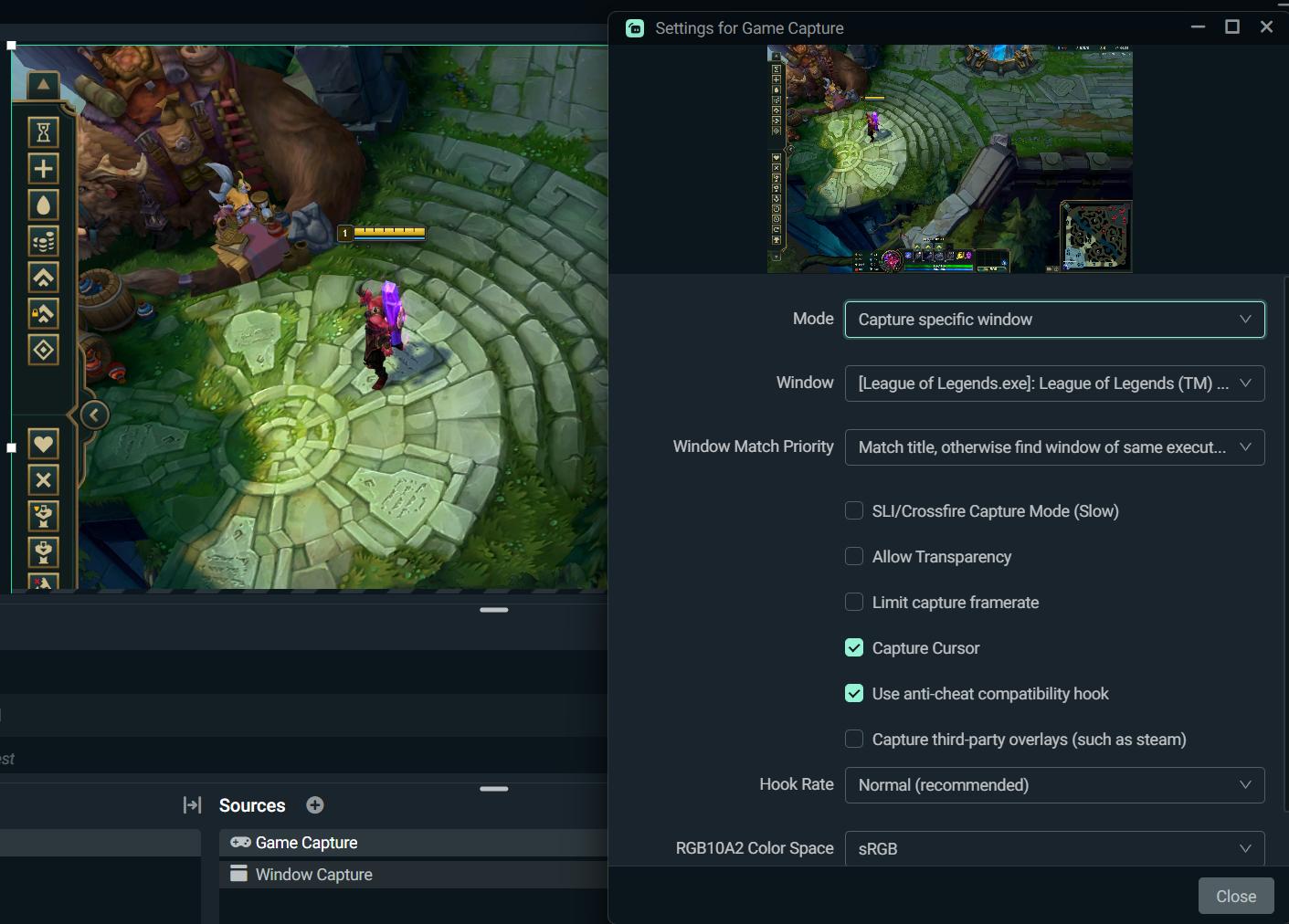 halcyon bolt
gritty isle
You'd need to reach out to support for League of Legends to see why the game is ...
halcyon bolt
gritty isle
You'd need to reach out to support for League of Legends to see why the game is ...
Thank u so much I’ll try to do this
 fluid sentinel
I am attempting to create a live stream and having issues getting my IP cam to show up in streamlabs, I think I am missing a dedicated app? I am new to all this, I tried to connect just using the IP and that is not working properly. Is this the right place to ask this question?
gritty isle
fluid sentinel
I am attempting to create a live stream and having issues getting my IP cam to s...
You want to use the Media File source. In the properties, uncheck Local File and in in the Input box, put the URL for the IP camera.
 fluid sentinel
I actually have tried that and the camera view does not come through
I apologize, I know very elemantary but so new to all this lol
gritty isle
fluid sentinel
I actually have tried that and the camera view does not come through
Specify the correct input format; you'll probably find supported formats in the camera's documentation, otherwise try all of: rtp, mpegts, rtsp, rtmp, udp
gritty isle
 faint lynx
Mam mały problem z botem
faint lynx
Mam mały problem z botem
Which bot, Cloudbot, Chatbot, or Discord Bot?
 gritty isle
faint lynx
Taki miałem problem ale już jest ok
gritty isle
faint lynx
Taki miałem problem ale już jest ok
Glad you got it sorted out!
faint lynx
😅
 frail ginkgo
My SLOBS goes blank randomly and I have to minimize and maximize to get it back to normal... this a known issue?
 runic skiff
My stream randomly cuts out when I use multi stream which never happened until I bought streamlabs premium.
 tacit wave
anybody know what could be causing the highlighter in streamlabs obs exporting with no audio?
like i hear the audio when editing the clips it highlights but when exporting no audio
 verbal kettle
anyone else experiencing issues with the v2 API? I set up a donation tracker last year to periodically read donations using the GET /api/v2.0/donations endpoint and it was working fine, just tried to boot it back up and it's giving me an internal server error. The OAuth endpoint to grab the refresh token is also excrutiatingly slow..
 primal arch
where do i find the 2-fa code?
 deft gazelle
So I'm trying to use 2 different audio tracks for my recording in streamlabs. I've followed multiple youtube videos on using track 2 and 3 for desktop audio, and microphone audio. But when I try to record using these settings, one of the tracks fails to record, and when I bring them into my editting software(Filmora), the tracks are all combined onto the video instead of the multi-tracks they were suppose to be. I'm also getting an error message that my microphone is connected, but there is no signal from it. Anyone have an answer for this issue?
 tribal silo
My loyalty system stopped working; my subscribers can no longer see their points or buy raffle tickets. How do I fix this? I've already deactivated and activated it, and logged back in, but it doesn't work. It even stopped working mid-live. The normal commands and the commands I customized are working fine, but only the loyalty commands aren't. Can you help me?
 rain hornet
Bro, i was doing overlay for my friend in streamlabs obs with plans that once its done, im gonna use export import overlay feature, i did it he imported that .overlay file but for some reason, literally half stuff is missing, why is that
 willow summit
hey question why my stream some times just stop workin, if i have like 1 hour in stream all the sudden stops the stream in my apps
willow summit
runic skiff
My stream randomly cuts out when I use multi stream which never happened until I...
i been having the same troubles with the app
runic skiff
willow summit
i been having the same troubles with the app
It’s a really weird issue
 cloud escarp
Is there anyway to keep the chat sized like this i have to resize everytime I stream

 tardy lichen
Anyone know how to fix the issue where none of the events populate for streamlabs after reaching affiliate?
Ive logged out multiple times, redownloaded streamlabs, cleared browser caches, disconnected and reconnected my twitch literally done anything possible
 opaque frigate
Anybody know how to get access to a stream key?
wispy latchBOT
@tardy lichen ⛓️💥 Disconnecting Your Streaming Service
If you need to disconnect your streaming service (like Twitch, YouTube, or others) from your Streamlabs account, please follow these clear steps:
- Log out of Streamlabs.com (you can use this link to force a logout and any Streamlabs software such as Streamlabs Desktop (you can do so from the bottom left 👤)
- Follow this guide to disconnect the specific streaming service from Streamlabs
- Once you're done, please log back Streamlabs Desktop or streamlabs.com with the account disconnected
Note: If you are doing this step for fixing your alerts, you may need to reload your widgets. You can do this by going to your Live Actions Tab of the Recent Events > Scroll all the way and click Reload Widgets
gritty isle
opaque frigate
Anybody know how to get access to a stream key?
For what platform?
tardy lichen
wispy latch
<@828631076163289098> ⛓️💥 **Disconnecting Your Streaming Service**
If you need...
dawg i said i already did this
opaque frigate
gritty isle
For what platform?
I’m trying to get it for Tik tok
gritty isle
tardy lichen
dawg i said i already did this
Go here https://www.twitch.tv/settings/connections and screen shot the Streamlabs connection please.
tardy lichen
gritty isle
Go here <https://www.twitch.tv/settings/connections> and screen shot the Streaml...
disconnected it minimum 5 times big dawg
 gritty isle
opaque frigate
I’m trying to get it for Tik tok
gritty isle
opaque frigate
I’m trying to get it for Tik tok
For Tiktok: You have to apply for permission to use Live with Streamlabs. You can do that at here: https://www.tiktok.com/falcon/live_g/live_access_pc_apply/result/index.html?id=GL6399433079641606942&lang=en-US
More information about our TikTok integration is here: https://streamlabs.com/content-hub/post/streamlabs-announces-integration-with-tiktok
More information about Dual Output is here https://streamlabs.com/content-hub/post/streamlabs-desktop-dual-output-how-to, and here https://streamlabs.com/content-hub/post/how-set-up-dual-output-streamlabs-tiktok-streams.
NOTE: This works for Streamlabs Desktop and Streamlabs Console. The integration for TiokTok is Streamlabs Mobile is currently broken and thus not usable.
Streamlabs
Streamlabs now enables creators to go live on TikTok, customize their streams, and monetize their content – all from one convenient place.
gritty isle
tardy lichen
disconnected it minimum 5 times big dawg
Did you do this while you were live?
tardy lichen
gritty isle
Did you do this while you were live?
...........
no why would i do it while live
gritty isle
tardy lichen
...........
I don't know what that means.
gritty isle
tardy lichen
no why would i do it while live
Some people have done so in the past so I have to ask.
tardy lichen
disconnecting again
 gritty isle
tardy lichen
disconnecting again
gritty isle
tardy lichen
disconnecting again
Make sure you log out out everywhere! Streamlabs web site, Streamlabs Desktop, Streamlabs Console, Streamlabs Mobile, and Streamlabels.
tardy lichen
even disconnected on streamlabs website dashboard
gritty isle
tardy lichen
even disconnected on streamlabs website dashboard
That you don't need to do.
tardy lichen
i even tried streaming on the custom thing with the new streamkey
tardy lichen
gritty isle
That you don't need to do.
apparently i do cuz none of these fixes work for me
gritty isle
tardy lichen
apparently i do cuz none of these fixes work for me
This is the correct Twitch channel?
tardy lichen
yup completely cleared my streamlabs so if ts doesnt work now idk what to say
gotta completely reset up my streamlabs this bug is ridiculously bad
gritty isle
tardy lichen
yup completely cleared my streamlabs so if ts doesnt work now idk what to say
Not sure what all that entails. Please repeat the steps one more time, don't skip steps and don't perform them out of order.
AND especially perform this: You need to reload your widgets. You can do this by going to your Live Actions Tab of the Recent Events > Scroll all the way and click Reload Widgets
Also keep your Recent Events web page open.
tardy lichen
dawg ion have anymore recent events my sl is back to default
gritty isle
Please screen shot the Streamlabs connection again when you're done with the process.
opaque frigate
gritty isle
For Tiktok: You have to apply for permission to use Live with Streamlabs. You ...
It’s not letting me put my profile link in for Tik tok and it says other?
 gritty isle
opaque frigate
It’s not letting me put my profile link in for Tik tok and it says other?
gritty isle
opaque frigate
It’s not letting me put my profile link in for Tik tok and it says other?
They want a streaming platform that is NOT TikTok.
gritty isle
tardy lichen
dawg ion have anymore recent events my sl is back to default
PLEASE just follow the steps.
opaque frigate
gritty isle
They want a streaming platform that is **NOT** TikTok.
Ohh so put my twitch in?
gritty isle
opaque frigate
Ohh so put my twitch in?
Correct.
opaque frigate
gritty isle
Correct.
Sorry I had a slow moment
cloud escarp
cloud escarp
Is there anyway to keep the chat sized like this i have to resize everytime I st...
Any help would be great
gritty isle
cloud escarp
Any help would be great
Looks like you hace Streamlabs Desktop full screened on that display. How are you expecting to show?
cloud escarp
I have it full screen yes but when I load stream labs it looks like this

Just wonder if there is a setting that can keep the chat like i have it in the first Pic or will I just have to resize each stream
gritty isle
cloud escarp
Try the steps below to see if it helps?
Make sure to quit Streamlabs Desktop before starting this process.
- Copy and paste %appdata% into your browser window.
- Find the slobs-client folder and open it.
- From there you should be able to find the "window state" json file. Delete this file.
- Re-open Streamlabs Desktop and it should be fixed
Let me know how these steps work for you
cloud escarp
Ill do that later after im done streaming
opaque frigate
gritty isle
Correct.
Okay it’s submitted. Now how would I know if it’s been accepted or not
gritty isle
opaque frigate
Okay it’s submitted. Now how would I know if it’s been accepted or not
TikTok should notify you.
 civic trellis
Hello, im having an issue with dropped frames (60%), streaming on twitch; internet speeds are fine (even checked provider no issues and even restarted modem/router), did every performance test of my equipment that I could and even using PC Monitoring in order to watch live.
opaque frigate
gritty isle
TikTok should notify you.
Approved in minutes. Thank you for the help!
gritty isle
opaque frigate
Approved in minutes. Thank you for the help!
You’re welcome!
gritty isle
civic trellis
Hello, im having an issue with dropped frames (60%), streaming on twitch; intern...
Download and run the Twitch Test, see next post.
Select Medium or Long duration.
Select all of the ingests in your region.
Once the test is fully completed, screen shot the results. Don't crop the screen shot.
wispy latchBOT
@civic trellis 🌐 Finding Your Best Twitch Server
To ensure the most stable and high-quality stream to Twitch, we recommend using a Twitch test tool to find the optimal server for your location and internet connection.
📋 How to Use the Twitch Test Tool:
- Access the tool here: Twitch Test Tool
- Run the test using either the Medium or Long duration. Short tests may not provide the most accurate results.
- Select your specific region from the listed options. If your exact region is not available, choose 5 to 6 servers closest to you.
- Aim for a quality score of at least 84. This indicates a strong and stable connection.
🛠️ Applying Your Settings in Streamlabs Desktop:
- Once you've identified a good server, navigate to your Streamlabs Desktop settings:
Settings>Stream>Stream to custom ingest. - From there, you can manually select your preferred server based on your test results.
 spare zodiac
I have the capture card. How do I get game audio? I’m streaming arc raiders but it won’t pick up game chat audio.
 young apex
hello i have probleme with game pulse
I play valorant and i have reactive overlay but is not working
and gamepulse same i have config the pluggin but is not working someone can help me
 tawny oriole
currently on xbox webcam keeps dissapearing
final scroll
Hello, i need some help. I have the streamlabs Chat box widget on my stream. Once every 10 or 15 mins it somehow refreshes on its own and shows the last 20 chats or so. it's set to hide the last messages after 10 seconds. How can i fix this? I tried to attach screenshots but it's not letting me upload.
naive dove
naive dove
Streamlabs is not letting me go live. I click the “Go Live” button and literally...
It's been a week now. I hope you don’t mind me saying, but I haven't been able to stream for a week. I understand support times can vary, but I was hoping to hear back by now. I haven't received any emails, not even in the spam folder, and I check daily... I really hope to hear a reply soon
gusty umbra
naive dove
It's been a week now. I hope you don’t mind me saying, but I haven't been able t...
Tickets are answered in the order received. We don’t have an eta on the ticket queue. Did you accidentally close your ticket by clicking one of the links in it? In the meantime. Where are you trying to go live?
deft gazelle
I'm having trouble with SLOBS not recording audio tracks right. I want to record track 2 and 3 for easier editing purposes (The game audio being recorded on a different track than microphone audio) and I've run into the issue where only 1 track is being recorded. I also get the error message "Your mircrophone is unmutes but has no signal" sometimes. I have tried this on OBS Studios, and want to get this working on SLOBS. Anyone able to help with this issue?
naive dove
gusty umbra
Tickets are answered in the order received. We don’t have an eta on the ticket q...
Thank you for responding. I haven’t clicked any links. I’ve been trying to go live on Streamlabs desktop. I checked and it says my ticket is still open
oak cloud
naive dove
Thank you for responding. I haven’t clicked any links. I’ve been trying to go li...
Did you click on it? Someone responded to it today (tickets will show as open unless you click on them OR check the email address associated with the ticket)
oak cloud
deft gazelle
I'm having trouble with SLOBS not recording audio tracks right. I want to record...
do you see all the tracks on Streamlabs Desktop? can you screenshot what it looks like here?
 deft gazelle
oak cloud
do you see all the tracks on Streamlabs Desktop? can you screenshot what it look...
deft gazelle
oak cloud
do you see all the tracks on Streamlabs Desktop? can you screenshot what it look...

 oak cloud
Can you share a recording with me that you used for this? (can attach it here or send it as a google drive)
deft gazelle
oak cloud
Can you share a recording with me that you used for this? (can attach it here or...
Sure, just give me a few mins to make one.
You can see my microphone is being picked up during the recording, but it's not being recorded on the actual recording.
oak cloud
i hear them both just fine on separate tracks. if you use VLC player, you can swap between the two audio tracks and they are separated. so opening this in a video editing software that supports multiple audio tracks would show both
 deft gazelle
oak cloud
i hear them both just fine on separate tracks. if you use VLC player, you can sw...
deft gazelle
oak cloud
i hear them both just fine on separate tracks. if you use VLC player, you can sw...
Ah, I see it. Just had to poke around VLC a bit to find the audio tracks. Thanks a lot. Nothing was wrong, I just wasn't sure where to look. Appreciate it, man.
oak cloud
no problem!
gritty isle
The default Media Player in Windows can't handle multiple audio tracks. It will only play track 1.
deft gazelle
I get that now. Thanks a ton guys. o7 Yall are life savers.
 hushed pumice
can the subscription version of streamlabs still multistream to tiktok? or do u have to do it thro the new tiktok studio app with a virtual camera?
rotund verge
Anyone able to help me with my alert box
 sleek osprey
For whatever reason I can NOT purchase Streamlabs Ultra
It just doesn’t load or do anything when I press join ultra lol I’ve been trying for months now not sure why this is happening
I’ve missed out on yearly discounts because of this matter
 quaint lion
Hi there -- when I upload multiple tracks using "Share Background Music" the tracks upload and play fine, but they don't show in the queue. I just see the one track that is playing but can't see what's coming up next. Any suggestions?
gritty isle
hushed pumice
can the subscription version of streamlabs still multistream to tiktok? or do u ...
Yes, you can include TikTok in multistreaming with Ultra.
gritty isle
quaint lion
Hi there -- when I upload multiple tracks using "Share Background Music" the tra...
The default web browser, especially Chrome and Opera, can sometime cause this.
- Press the Windows key on your keyboard or go bottom left and click the Windows logo.
- Search for "default apps". It may be different in Windows 10 and Windows 11.
- Find the default apps section and close Streamlabs Desktop
- Change your default browser to a new browser. For example, if you're currently on Chrome, you'll want to change it to Edge or Firefox. (Screenshot for reference: https://prnt.sc/48ZdLCQCgi8D)
- Once you've changed this, please try the purchase again once you've logged in the Streamlabs web site.
quaint lion
gritty isle
The default web browser, especially Chrome and Opera, can sometime cause this.
...
I'm on a Mac. I'm using Chrome, but I can try Safari.
 quaint lion
gritty isle
<a:KevThumbsUP:839567144454062100>
quaint lion
gritty isle
<a:KevThumbsUP:839567144454062100>
No, no I can't. When I try to open the page in Safari, I get a message that says "This page works best in Chrome" -- which you're telling me isn't the case...
I guess I can try Firefox.
quaint lion
I am not on a VPN. I have an ad blocker but it's disabled for TalkStudio
Nope. Everything says 'use Chrome' -- which you say is buggy. Super. I can see why this is so much less expensive than Streamyard
 hushed pumice
gritty isle
Yes, you can include TikTok in multistreaming with Ultra.
hushed pumice
gritty isle
Yes, you can include TikTok in multistreaming with Ultra.
is it a simple, straight to tiktok or do i have to make it work alongside the tiktok studio. Im having this issue with other streaming softwares
gritty isle
quaint lion
Nope. Everything says 'use Chrome' -- which you say is buggy. Super. I can se...
My sincere apologies. I meant to reply to someone else and not you. Please try what you were doing with Chrome.
gritty isle
hushed pumice
is it a simple, straight to tiktok or do i have to make it work alongside the ti...
You have to apply for Live with Streamlabs and if approved, all you have to do is go live.
https://streamlabs.com/content-hub/post/streamlabs-announces-integration-with-tiktok
Streamlabs
Streamlabs now enables creators to go live on TikTok, customize their streams, and monetize their content – all from one convenient place.
gritty isle
sleek osprey
It just doesn’t load or do anything when I press join ultra lol I’ve been trying...
Please try with a different web browser, like Microsoft Edge, Firefox, or Safari.
That reply was for the person I originally meant to reply to.
 quaint lion
gritty isle
You have to apply for Live with Streamlabs and if approved, all you have to do i...
quaint lion
gritty isle
You have to apply for Live with Streamlabs and if approved, all you have to do i...
I started with Chrome -- which is how I ended up here 😉 I can see a single track, but the queue doesn't display. The next song willl play automatically, however.
gritty isle
quaint lion
I started with Chrome -- which is how I ended up here 😉 I can *see* a single tr...
Please logging out of Talk Studio, clearing the cache only for all time in Chrome, completely restarting Chrome, and try again. I'm on a PC here at work and sadly don't have any music tracks I can experiment with. That would have to wait until I get home from work later this evening.
quaint lion
OK -- did all that. Still no queue. I've tried using both .mp3s and .wavs; I've used 2 songs, 5 souns, and 10 songs -- so it's not like I'm overloading some limit. Thanks for the try, though. I appreciate it
 gritty isle
quaint lion
OK -- did all that. Still no queue. I've tried using both .mp3s and .wavs; I'v...
gritty isle
quaint lion
OK -- did all that. Still no queue. I've tried using both .mp3s and .wavs; I'v...
And you've clicked the down arrow on the right?
 quaint lion
Yes, several times. Nothing happens.
gritty isle
quaint lion
Yes, several times. Nothing happens.
Hmmmmmmm. It's going to be after 7pm US Central time before I can test from home. I've reached out to the staff for suggestions for you.
quaint lion
gritty isle
Hmmmmmmm. It's going to be after 7pm US Central time before I can test from hom...
Thanks. I'm going live at 2:30PM EST tomorrow, so I have a little while.
gritty isle
@quaint lion The staff suggest submitting a ticket for that issue: https://support.streamlabs.com/hc/en-us/requests/new
quaint lion
gritty isle
<@797512060639379476> The staff suggest submitting a ticket for that issue: <ht...
OK, thanks, I did
gritty isle
quaint lion
OK, thanks, I did
Thank you! PLEASE just don't click any of the "helpful" links in the emails as that closes the ticket.
 vestal totem
Hey I have an issue with my SLOBS that I've had for some time now I was just wondering if there is a way that I could get some help.
 marble wind
@vestal totem describe the issue here
vestal totem
I have tried for the past month trying to troubleshoot but nothing, and I mean nothing is helping with the issue. The audio is perfectly picked up when my chatlink cable isn't attached, but when the mic is attached the audio is all jarbled when it is coming from my Xbox. I am using an Elgato 4k. Please if anyone has any advice that would be awesome, I would love to start streaming again.
I have applied it onto the reddit and submitted a ticket
And I saw that the discord could help so I'm just trying my best I've looked for tons of solutions online and none really seem to help
marble wind
@vestal totem ask elgato about this, either at https://help.elgato.com/hc/en-us/ or at
 vestal totem
So is this an elegato issue?
 fair cairn

 opal trellis
I purchased the multi stream from the rewards section in streamlabs mobile but I didn't got it and my points are also used. What am I supposed to do
And is there any way to read chats on the screen while doing live
 hybrid ermine
same
hybrid ermine
hybrid ermine
same
anyone knows?
 tall anchor
hi idk if this is the right channel i cant use #1173605643484139591 but a few months ago i changed my youtube name and streamlabs still shows my old one i logged out logged back in cleared cache and restarted and nothing worked?
gritty isle
tall anchor
hi idk if this is the right channel i cant use <#1173605643484139591> but a few ...
The #1173605643484139591 is read only like a library.
With YouTube, u[dating your channel name won’t change it in Streamlabs. The capability just doesn’t exist in the API. Only Twitch is capable of that.
There is no work around or fix.
What you can try is log in the Streamlabs web site using your Streamlabs ID, then unmerge and merge back your YouTube channel. I can’t guarantee that will work but you can try.
It’s not an issue with Streamlabs Desktop or its application data.
tall anchor
ohhh
well i dont currently have a streamlabs id i just log in with my youtube account
gritty isle
tall anchor
well i dont currently have a streamlabs id i just log in with my youtube account
Setup your Streamlabs ID: https://streamlabs.com/content-hub/post/how-to-set-up-your-streamlabs-id
Managing accounts with your Streamlabs ID: https://streamlabs.com/content-hub/post/how-to-manage-account-settings-streamlabs
Basically your Streamlabs ID takes over as the “primary” platform for your Streamlabs account.
Still though, in Streamlabs Desktop, always log in with the specific platform. In your case, YouTube.
tall anchor
ohhh ok
so theres just no way to update my channel name on streamlabs? the way it is now is just how it is now?
gritty isle
tall anchor
so theres just no way to update my channel name on streamlabs? the way it is now...
There’s no way. Only Twitch has that capability.
tall anchor
ah
 lapis radish
Where can I find patch notes for the streamlabs? The last patch note update is old ( April 2025 ) was the last update
gritty isle
lapis radish
Where can I find patch notes for the streamlabs? The last patch note update is o...
They don’t always publish those release notes. Sometime the updates for SLD are for back end updates or changes to something not user facing.
You can hit up the #vip-support of you need more information.
lapis radish
gritty isle
They don’t always publish those release notes. Sometime the updates for SLD are...
thanks
gritty isle
lapis radish
thanks
You’re welcome.
 plain oracle
Hello, I'm trying to sign up for Impact. I put all the info in, went to finish, and it said I need a verified e-mail or phone number. I see no option to verify. I asked for help, but they said I need an account ID, which I don't have. If it's Impact, I'm still registering on Streamlabs I dont know where to find please help
gritty isle
plain oracle
Hello, I'm trying to sign up for Impact. I put all the info in, went to finish, ...
Hop over to #vip-support for assistance.
 nimble plume
I need urgent help please as i have wasted 3 hours an 17 minutes trying to get a visual controller URL link to Streamlabs console website as im on xbox series x and i only manage my stream from my tablet chrome browser, google is no help and all youtubers only show for pc or mobile and i SPECIFICALLY need instructions or help with chrome on tablet
nimble plume
nimble plume
I need urgent help please as i have wasted 3 hours an 17 minutes trying to get a...
Google keeps saying go to Sources and tap Add Sources and look for [Browser or components but i dont have any of those options,]
gritty isle
nimble plume
Google keeps saying go to Sources and tap Add Sources and look for [Browser or c...
Streamlabs Console doesn't have browser sources.
nimble plume
Is there a source i can use on my tablet browser or an app on my tablet to get around this?,.. iv already bought the console pro plan and i dont have a pc to use as a middle man
gritty isle
Doesn't matter how you access the Streamlabs Console web site, Streamlabs Console doesn't have Browser Sources.
nimble plume
Well i only have a tablet to work with and i need a overlay for my contoller button pressing for my viewers...if streamlabs console cant be used for what is claimed them please take it down
gritty isle
nimble plume
Well i only have a tablet to work with and i need a overlay for my contoller but...
You can submit feed back by clickiung the Product Feedback button here: #welcome message


 heady lodge
mini feed in streamlabs isn't showing any of my events
