#technical-support
1 messages · Page 175 of 1
 marble wind
 lament viper
marble wind
many overlay apps (rtss, dxtory, overwolf, discord) can conflict with each other...
lament viper
marble wind
many overlay apps (rtss, dxtory, overwolf, discord) can conflict with each other...
But why does this happen now? i've always streamed and alot of people always stream with Outplayed/other overlays open, i'll try when i get home but i'd really like to still get my games recorded, i'll try this see if it works and then play with GPU/CPU functions and ig if not i'll just go to obs
 abstract plazaBOT
 Having trouble? Want to see if anyone else is having the same problem?
Check out our #known-issues channel! We do our best to keep this channel as current as possible with new bugs and progress updates!
If you can't find what you need please submit a ticket at: https://support.streamlabs.com/hc/en-us/requests/new
 severe lion
Do you need to pay for monthly service when it comes to streamlabs console for Xbox? Is there a free version I'm having the hardest time connecting to my xbox I'm a twitch affiliate but make no money yet so really can afford monthly service
 gritty isle
severe lion
Do you need to pay for monthly service when it comes to streamlabs console for X...
gritty isle
severe lion
Do you need to pay for monthly service when it comes to streamlabs console for X...
Yes, Streamlabs Console is a subscription service. There isn't free version.
severe lion
gritty isle
Yes, Streamlabs Console is a subscription service. There isn't free version.
upsetting since everthing else on streamlabs is free.
gritty isle
severe lion
upsetting since everthing else on streamlabs is free.
Sorry about that. Streamlabs Console is a custom built service and is not made with the open source code from OBS Studio.
 digital acorn
that crash guide did not help and problay my fault to meation that my decive is a mac
abstract plazaBOT
 Do you have a Streamlabs Ultra membership? Are you part of the Streamlabs All-Stars program?
Get your Discord roles by going to this page here: https://streamlabs.com/dashboard#/settings/integrations and clicking "Link" next to Discord! Ultra members and higher tier All-Stars members will have access to private channels for support!
Interested in Ultra? Check it out here: https://streamlabs.com/ultra?refl=discord
Are you knowledgeable about Streamlabs products?
Get rewarded for helping the Streamlabs Community here in Discord!
👉 Apply to be a part of the Streamlabs Support Volunteer Program!
Application Link:
https://forms.gle/eKS29zWfFjGEzaRp7
For details, see our post in
#announcements message
digital acorn
digital acorn
that crash guide did not help and problay my fault to meation that my decive is ...
welp it was nice time to have streamlabs but i guess sadly have to switch thanks you so much help. even if it didn't get fix. Hope you have bubbly day! unless you guys have a way to do crash stuff on mac.
 lunar mantle
digital acorn
welp it was nice time to have streamlabs but i guess sadly have to switch thanks...
lunar mantle
digital acorn
welp it was nice time to have streamlabs but i guess sadly have to switch thanks...
If you send us a ticket via https://support.streamlabs.com/hc/en-us/requests/new our Team could help you out, however it does take some time to get to tickets
digital acorn
lunar mantle
If you send us a ticket via https://support.streamlabs.com/hc/en-us/requests/new...
i will try one last time. i did last time and but i didn't really anything.
digital acorn
lunar mantle
If you send us a ticket via https://support.streamlabs.com/hc/en-us/requests/new...
done. and yeah.
abstract plazaBOT
Having trouble? Want to see if anyone else is having the same problem?
Check out our #known-issues channel! We do our best to keep this channel as current as possible with new bugs and progress updates!
If you can't find what you need please submit a ticket at: https://support.streamlabs.com/hc/en-us/requests/new
 gilded kite
 ripe shard
all scenes are gone.. all I did was close the app I just streamed today
abstract plazaBOT
Having trouble? Want to see if anyone else is having the same problem?
Check out our #known-issues channel! We do our best to keep this channel as current as possible with new bugs and progress updates!
If you can't find what you need please submit a ticket at: https://support.streamlabs.com/hc/en-us/requests/new
ripe shard
ripe shard
all scenes are gone.. all I did was close the app I just streamed today
please id love some insight
 grim anvil
How do i get my scenes to work on xbox after i bought console pro, everytime i put on the scene it doesnt work and doesnt change anything
gritty isle
ripe shard
all scenes are gone.. all I did was close the app I just streamed today
Streamlabs Desktop launching as if it is a fresh/like it's the first time using it?
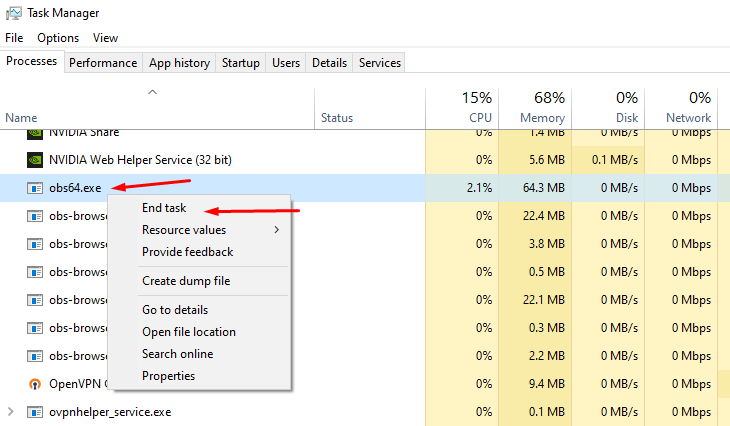
The "acting like it's a fresh restart" is due to certain background processes not closing properly. First, please close Streamlabs Desktop.
Then open your task manager. Please press "Ctrl + Shift + Esc" on your keyboard to bring up your Task Manager.
Please select "More Details" at the bottom if you don't see the percentages of resources used.
Check for any running programs called "Streamlabs," "Electron," or "Obs64". If you find either of these processes running, please right-click and end the process. https://gyazo.com/d6b9babb076875ee5889983b532948e1
Then, reopen Streamlabs Desktop. This should resolve it but if it doesn't please submit a ticket at https://support.streamlabs.com/hc/en-us/requests/new and our team would be able to assist you further.
 carmine pilot
I am having an issue with going live if I have dual output enabled and I try to stream to YouTube in both formats. I also check known issues. I've done a clean reinstall and disconnecting YouTube clearing streamlabs and reading it. Thanks.
abstract plazaBOT
Having trouble? Want to see if anyone else is having the same problem?
Check out our #known-issues channel! We do our best to keep this channel as current as possible with new bugs and progress updates!
If you can't find what you need please submit a ticket at: https://support.streamlabs.com/hc/en-us/requests/new
abstract plazaBOT
Do you have a Streamlabs Ultra membership? Are you part of the Streamlabs All-Stars program?
Get your Discord roles by going to this page here: https://streamlabs.com/dashboard#/settings/integrations and clicking "Link" next to Discord! Ultra members and higher tier All-Stars members will have access to private channels for support!
Interested in Ultra? Check it out here: https://streamlabs.com/ultra?refl=discord
Are you knowledgeable about Streamlabs products?
Get rewarded for helping the Streamlabs Community here in Discord!
👉 Apply to be a part of the Streamlabs Support Volunteer Program!
Application Link:
https://forms.gle/eKS29zWfFjGEzaRp7
For details, see our post in
#announcements message
 mint nexus
Streamlaps OBS told me theres an update. so I updated and now I cant record anymore. I've been going through my settings and can't find anything wrong
 gritty isle
mint nexus
Streamlaps OBS told me theres an update. so I updated and now I cant record anym...
gritty isle
mint nexus
Streamlaps OBS told me theres an update. so I updated and now I cant record anym...
Go to Settings > Stream. Change the Encoder to something else and save the settings. Restart Streamlabs Desktop, go back to Settings > Stream and set the Encoder back to what it was and try again.
mint nexus
gritty isle
Go to Settings > Stream. Change the Encoder to something else and save the sett...
perhaps you ment the Output setting and not the stream settings since the stream setting only leads to stream destinations

and it worked. thank you
gritty isle
mint nexus
perhaps you ment the Output setting and not the stream settings since the stream...
Ah, yes, and good!
 quiet bronze
Blue Screening everytime I change camera settings. Program not picking up my main Camera Source have to make new which leads to a blue screen again for live streaming anyone else deal with this
quiet bronze
@gritty isle have you seen this problem before? Decided to completely uninstall everything now to try to fix it but when i reinstall all my old overlays come back
gritty isle
quiet bronze
<@301571565840236564> have you seen this problem before? Decided to completely u...
I've not seen that before. While I don't believe Streamlabs Desktop is the cause of the blue screen, I would suggest doing the following:
- Launch Streamlabs Desktop and remove the Video Capture Source for the camera in evry scene it exists.
- Wait a minute.
- Quit Streamlabs Desktop.
- Go to DeviceManager and remove the Camera device by right clicking on it and choose Uninstall Device.
- Unplug the camera from the PC.
- Shutdown your PC so that it powers off.
- Leave the PC off for a few minutes.
- Power on the PC.
- Once the PC is fully back up, plug in the Camera, let Windows detect the camera and then set it up.
- Launch Streamlabs Desktop as administrator.
- Add the Video Capture Source back in one scene only.
- Wait a minute.
- Try again to change the camera settings.
quiet bronze
gritty isle
I've not seen that before. While I don't believe Streamlabs Desktop is the caus...
Yeah thats where it gets tricky when i remove the scene that's when I bluescreen
gritty isle
quiet bronze
Yeah thats where it gets tricky when i remove the scene that's when I bluescreen
You don't need to remove the whole scene, just the single Video Capture Source. But please try this: Create a new Scene Collection, not just a new scene, and try the same thing in the new Scene Collection.
quiet bronze
Sorry yes I emant the single source, I'm guessing maybe my video capture source is having an issue thats the cause of the issues, then tried adding even a overlay and bluescreened
doing a full reset to see if it changes anything now
gritty isle
quiet bronze
doing a full reset to see if it changes anything now
What do you mean full reset?
Please try with a new Scene Collection.
quiet bronze
uninstalled i exported my overlays just in case and doing a fresh install
gritty isle
quiet bronze
uninstalled i exported my overlays just in case and doing a fresh install
That likely won't help. It is not a Streamlabs Desktop issue. It's likely an issue with the driver for the camera.
Please try this:
- Go to Device Manager and remove the Camera device by right clicking on it and choose Uninstall Device.
- Unplug the camera from the PC.
- Shutdown your PC so that it powers off.
- Leave the PC off for a few minutes.
- Power on the PC.
- Once the PC is fully back up, plug in the Camera, let Windows detect the camera and then set it up.
- Launch Streamlabs Desktop as administrator.
- See if problem exists or has cleared.
quiet bronze
gritty isle
That likely won't help. It is not a Streamlabs Desktop issue. It's likely an i...
I use an Elgato Game Capture to connect to my Sony A6400 you're saying delete and remove that within the deivce manager and reinstall?
gritty isle
quiet bronze
I use an Elgato Game Capture to connect to my Sony A6400 you're saying delete an...
Yes. Uninstall the device from Device Manager, unplug the camera, shut down (power off), leave off for a few minutes, power on, once PC is fully back up, plug in the camera, let Windows detect the device and set it up.
abstract plazaBOT
Having trouble? Want to see if anyone else is having the same problem?
Check out our #known-issues channel! We do our best to keep this channel as current as possible with new bugs and progress updates!
If you can't find what you need please submit a ticket at: https://support.streamlabs.com/hc/en-us/requests/new
quiet bronze
gritty isle
Yes. Uninstall the device from Device Manager, unplug the camera, shut down (po...
I think this may have fixed everything. Reinstalled reloaded all my overlays and it looks good thank you!
gritty isle
quiet bronze
I think this may have fixed everything. Reinstalled reloaded all my overlays and...
You're welcome!
abstract plazaBOT
Do you have a Streamlabs Ultra membership? Are you part of the Streamlabs All-Stars program?
Get your Discord roles by going to this page here: https://streamlabs.com/dashboard#/settings/integrations and clicking "Link" next to Discord! Ultra members and higher tier All-Stars members will have access to private channels for support!
Interested in Ultra? Check it out here: https://streamlabs.com/ultra?refl=discord
Are you knowledgeable about Streamlabs products?
Get rewarded for helping the Streamlabs Community here in Discord!
👉 Apply to be a part of the Streamlabs Support Volunteer Program!
Application Link:
https://forms.gle/eKS29zWfFjGEzaRp7
For details, see our post in
#announcements message
 trim adder
where do i download streamlabs desktop?
gritty isle
trim adder
where do i download streamlabs desktop?
From the Streamlabs web site: https://streamlabs.com/
 gritty isle
trim adder
so how? 🥹
gritty isle
trim adder
so how? 🥹
That's the only place you can download Streamlabs Desktop. I just tried and it downloads for me. What region are you located?
gritty isle
trim adder
nvm private browser fixed it
Weird, but okay.
 wispy mountain
is streaming from xbox to tiktok free?
gritty isle
wispy mountain
is streaming from xbox to tiktok free?
You would need a Streamlabs Console subscription in order to do that plus you'd have to apply for and get granted access by TikTok.
wispy mountain
gritty isle
You would need a Streamlabs Console subscription in order to do that plus you'd ...
How much is the subscription?
gritty isle
wispy mountain
How much is the subscription?

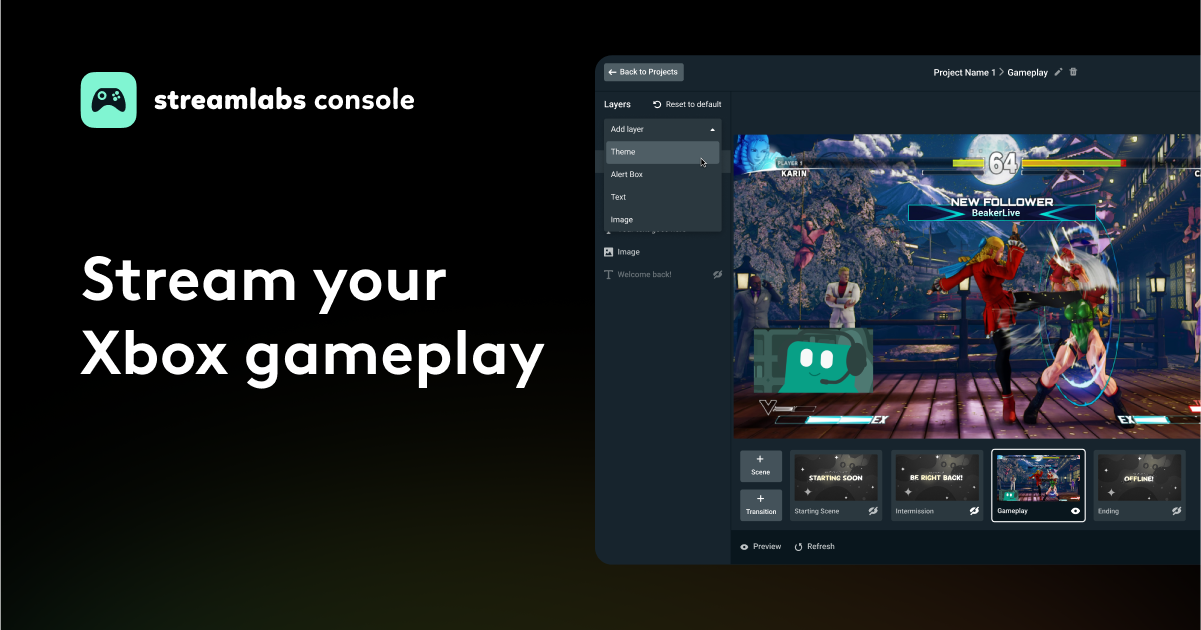
Stream from your Xbox to Twitch with overlays, alerts, and widgets with Streamlabs Console. No PC or capture card required!
wispy mountain
Cheers
gritty isle
wispy mountain
Cheers
You're welcome.
gritty isle
It will show something upon the next follower. It will be blank until then.
This happens to everyone. Have you received a new, never ever followed you before follow since you added the Streamlabel?
It will update when you get your next follower.
 neat root
gritty isle
It will update when you get your next follower.
neat root
gritty isle
It will update when you get your next follower.
So i want to use SLOBS to cast/stream a DND Map to a television/another monitor. Im not sure what feature would be used and a nudge in the right direction would help wonders! Any suggestions
gritty isle
neat root
So i want to use SLOBS to cast/stream a DND Map to a television/another monitor....
You mean just locally there in your house?
neat root
That wasn't supposed to be a reply. I appologize
gritty isle
And that has nothing to do with Twitch Followers.
neat root
gritty isle
You mean just locally there in your house?
Yes
gritty isle
neat root
Yes
Not a way to that just locally. You'd could, live stream it to YouTube as an unlisted stream and then play the stream on a device hooked up to the other display.
neat root
Okay. Thanks sir!
gritty isle
neat root
Okay. Thanks sir!
You're welcome.
abstract plazaBOT
Having trouble? Want to see if anyone else is having the same problem?
Check out our #known-issues channel! We do our best to keep this channel as current as possible with new bugs and progress updates!
If you can't find what you need please submit a ticket at: https://support.streamlabs.com/hc/en-us/requests/new
 warm oriole
Good Night ppl, someone can help me? My streamlabs keep loading infinitely and doesn't start, staying forever in this, anyone knows the issue?
 gritty isle
warm oriole
Good Night ppl, someone can help me? My streamlabs keep loading infinitely and d...
gritty isle
warm oriole
Good Night ppl, someone can help me? My streamlabs keep loading infinitely and d...
Please submit a ticket for this: https://support.streamlabs.com/hc/en-us/requests/new
warm oriole
gritty isle
Please submit a ticket for this: <https://support.streamlabs.com/hc/en-us/reque...
ok Thanks
abstract plazaBOT
Having trouble? Want to see if anyone else is having the same problem?
Check out our #known-issues channel! We do our best to keep this channel as current as possible with new bugs and progress updates!
If you can't find what you need please submit a ticket at: https://support.streamlabs.com/hc/en-us/requests/new
 hollow harbor
Not working for my Xbox I just want my money back thanks
I payed 26$ for this in it won't go live from my Xbox 😞
If y'all fixed this refund me my money back please thanks
 tall charm
Im trying to mute Spotify from my stream but idk how and non of the videos are helping
abstract plazaBOT
Having trouble? Want to see if anyone else is having the same problem?
Check out our #known-issues channel! We do our best to keep this channel as current as possible with new bugs and progress updates!
If you can't find what you need please submit a ticket at: https://support.streamlabs.com/hc/en-us/requests/new
 hoary wolf
Hey everyone. I wanted to get into streaming so I set up streamlab for league of legends.
Everything is working fine except on one single thing. If I stream the league in game in Full screen my mouse is invisible in the game. Not the stream but in my game. Also the stream is lagging then with like 30 fps or something.
This does not happen if I don't use full screen and go with borderless or windowed instead.
Problem is. I play on a kinda strange resolution. Because of that if I used windowed or borderless I don't have the game on a full screen and a smaller window instead. I also don't plan on changing the resolution cuz I'm played with that for 13 years and it would destroy my eye mouse coordination and also it kinda feels really awkward on my eyes. Any ideas to fix the issue differently?
abstract plazaBOT
Do you have a Streamlabs Ultra membership? Are you part of the Streamlabs All-Stars program?
Get your Discord roles by going to this page here: https://streamlabs.com/dashboard#/settings/integrations and clicking "Link" next to Discord! Ultra members and higher tier All-Stars members will have access to private channels for support!
Interested in Ultra? Check it out here: https://streamlabs.com/ultra?refl=discord
Are you knowledgeable about Streamlabs products?
Get rewarded for helping the Streamlabs Community here in Discord!
👉 Apply to be a part of the Streamlabs Support Volunteer Program!
Application Link:
https://forms.gle/eKS29zWfFjGEzaRp7
For details, see our post in
#announcements message
lament viper
If anyone has this problem, i just reinstalled streamlabs and its fine, didn't need a clean uninstall,just uninstall, keep scene, reinstall, everything works fine, unbelivble how the app broke itself like that tho
marble wind
neat root
So i want to use SLOBS to cast/stream a DND Map to a television/another monitor....
use obs-studio, capture the map using any capture mode, right-click the source and choose "open preview projector" > pick which display to project to, or choose "new window" if you want a windowed projector
 nimble notch
Hey guys, could somebody give me a hand?
It's been a week aproximately since I have not been receiving any events on my Activity Feed, people follow me and I do not get the notification (they do work, because if I do a test they pop up, but when I go to my activity feed on streamlabs they just do not show up).
I have tried disconnecting Streamlabs from Twitch the way that it is said on a streamlabs article, but nothing happened.
As additional information, I handle all my alerts through Streamlabs but I use OBS
gritty isle
nimble notch
Hey guys, could somebody give me a hand?
It's been a week aproximately since I ...
Follow the guide below, even if you have performed the steps already.
REMEMBER This does not go back and capture events that were missed so please don't expect missed events to appear.
ALSO remember to click the Reload Widgets button.
Once you log back in, please go to https://www.twitch.tv/settings/connections, scroll down to Other Connections, and screen shot the Streamlabs connections.
I can follow you as test. You don't need to be live!
If you'd like that, after logging back in the Streamlabs web site, launch OBS Studio, go to the scene with the browser source for the Alert Box, and keep your Recent Events https://streamlabs.com/dashboard#/recentevents page open as well.
Let me know once you're ready and I can follow you. You should see the alert in the Preview Window in OBS Studio and the Recent Events page should update.
 wispy latchBOT
@nimble notch ⛓️💥 Disconnecting Your Streaming Service
If you need to disconnect your streaming service (like Twitch, YouTube, or others) from your Streamlabs account, please follow these clear steps:
- Log out of Streamlabs.com (you can use this link to force a logout and any Streamlabs software such as Streamlabs Desktop (you can do so from the bottom left 👤)
- Follow this guide to disconnect the specific streaming service from Streamlabs
- Once you're done, please log back Streamlabs Desktop or streamlabs.com with the account disconnected
Note: If you are doing this step for fixing your alerts, you may need to reload your widgets. You can do this by going to your Live Actions Tab of the Recent Events > Scroll all the way and click Reload Widgets
nimble notch
I did almost eveything, the only thing I do not find is the 'reload widgets' button
gritty isle

 nimble notch
excellent, I've clicked that as well, would you like to try now?

Twitch
Una persona como cualquier otra con mis gustos y hobbies, suelo pasar mi tiempo jugando diferentes juegos, escuchando y escribiendo música. Ojalá les guste mi contenido.
gritty isle
Please don't forget to screen shot the Streamlab connection on your Twitch channel. Need to see that first.
 gritty isle
nimble notch
gritty isle
nimble notch
Great! Thanks!
You have OBS Studio open and in the scene with the Alert Box and you have the Recent Events page https://streamlabs.com/dashboard#/recentevents open?
nimble notch
I do
gritty isle
nimble notch
I do
I followed. Did you see it?
nimble notch
great, thank you! it did pop up, my alerts are not the ones I was using but I'm assuming I have to redo them after the 'reset widgets' button, right?
gritty isle
nimble notch
great, thank you! it did pop up, my alerts are not the ones I was using but I'm ...
You shouldn't need to redo anything. The key is the disconnect service, logging back in, clicking Reload Widgets, and keeping the Recent Events page open for a few minutes.
You should be go to go from here.
Reload Widgets doesn't reset any of your Alert Box settings.
It's like a shutdown and power on of your PC.
nimble notch
Well.. you did show up on my OBS alertbox, but it did not appear on streamlabs:
 gritty isle
nimble notch
Well.. you did show up on my OBS alertbox, but it did not appear on streamlabs:
gritty isle
nimble notch
Well.. you did show up on my OBS alertbox, but it did not appear on streamlabs:
Are you using the Streamlabs Alert Box or Twitch Alerts?
nimble notch
I think I might have an issue here, I downloaded streamelements to use one plugin but it looks like when you followed you appeared on my activity feed from streamelements, I do not want to use their alerts, I want to keep mine from streamlabs, perhaps i messed something up when installing the plugin
and regarding your question, i've always used streamlabs for my alerts, I'm assuming I use those

that's the URL on my OBS
gritty isle
nimble notch
Okay, thanks for confirming that.
May I ask the staff to check your alert box? No settings will be changed or removed. You might see some test follows.
nimble notch
of course, let me know If I have to do something
gritty isle
nimble notch
of course, let me know If I have to do something
Thanks! I'll get back to you in a bit.
gritty isle
nimble notch
of course, let me know If I have to do something
The staff reset your Recent Events. You should be go to go from here. The next event from Twitch will be detected by Streamlabs.
nimble notch
I do not know how they did it, but it worked! Thank you all!
gritty isle
nimble notch
I do not know how they did it, but it worked! Thank you all!
YAY!!! You're welcome!
quiet bronze
@gritty isle another issue that i know has to be super simple but I can not get my Youtube live chat to show after reinstalling everything. No Blue Screen today so fixed that issues but in my layouts its not even an option to see my live stream chat
gritty isle
quiet bronze
<@301571565840236564> another issue that i know has to be super simple but I can...
You mean the embedded chat dock or on stream chat with the ChatBox Widget?
quiet bronze
gritty isle
You mean the embedded chat dock or on stream chat with the ChatBox Widget?
Embedded chat dock that just shows my live stream chat with youtube
typically it just autopulls up when I go live but didnt see it
gritty isle
quiet bronze
Embedded chat dock that just shows my live stream chat with youtube
And you're live with a Public stream? The embedded chat dock won't work with a Private or Unlisted stream.
quiet bronze
gritty isle
And you're live with a Public stream? The embedded chat dock won't work with a ...
Public went live this AM and it didnt show up
not sure if I need to adjust my layouts
 hollow fern
hi
gritty isle
quiet bronze
not sure if I need to adjust my layouts
Go into the Layout Editor in Streamlabs Desktop. Screen shot the whole Streamlabs Desktop window please, don't crop.
hollow fern
Let me explain. I'm a moderator on a YouTube channel with 1000 subscribers, and we have a points system. When we use the command, it doesn't work. I tried testing it by going live on my own channel, and when I try to activate Cloudbot, I get a server error.
gritty isle
hollow fern
Let me explain. I'm a moderator on a YouTube channel with 1000 subscribers, and ...
Please screen shot the error you see.
quiet bronze
gritty isle
Go into the Layout Editor in Streamlabs Desktop. Screen shot the whole Streamla...
 gritty isle
quiet bronze
gritty isle
quiet bronze
Okay, thanks. You can close that Layout Editor and then screen shot the whole Streamlabs Desktop window again.
quiet bronze
This is all it looks kind of werid honestly
 gritty isle
quiet bronze
This is all it looks kind of werid honestly
gritty isle
quiet bronze
This is all it looks kind of werid honestly
In order for the Streamlabs Desktop embedded chat dock to appear, Streamlabs Desktop application window must be 1100 pixels wide. Please make the window wider and see if that helps.
quiet bronze
gritty isle
In order for the Streamlabs Desktop embedded chat dock to appear, Streamlabs Des...
I feel like its all changed. I use to have my Overlays and Sources on bottom, mini Feed on left and chat on right. The layout editor doesn't allow customiziation on the desktop it seems other than the set layouts they have
gritty isle
quiet bronze
I feel like its all changed. I use to have my Overlays and Sources on bottom, mi...
I bet the problem is this Website element in your Layout. It doesn't look like you have it configured with a URL. Remove the Website element and see if that helps.

That's is what's causing the big blank space on the right side.
quiet bronze
Removed and updated to this layout will see if it works next time im live
 hollow fern
@wispy latch
gritty isle
hollow fern
<@986719246065234021>
That's a bot that doesn't respond interactively.
hollow fern
@gritty isle my problem is very good
gritty isle
hollow fern
<@301571565840236564> my problem is very good
Resolved?
gritty isle
hollow fern
yes
Glad it's working!
hollow fern
i have other problem
gritty isle
hollow fern
i have other problem
Which is?
hollow fern
Streamlabs is not responding to commands on the live streams of YouTuber Alpha Corp YT, who has 11,000 subscribers (I'm a moderator there).
cloudbot is activated for information
gritty isle
hollow fern
Streamlabs is not responding to commands on the live streams of YouTuber Alpha C...
Custom Commands, Default Commands, or all commands?
hollow fern
yes
gritty isle
hollow fern
yes
The streamer would need to do this:
Make sure Cloudbot is toggled on https://streamlabs.com/dashboard#/cloudbot/mod-tools and that Streamlabs is a Standard Moderator on your channel; Managing Moderator won't work.
If this does not help, please reset your Cloudbot using these steps:
- Unmod streamlabs
- Toggle Cloudbot off
- Wait for at least 10 minutes
- Toggle Cloudbot back on
- Mod streamlabs
- Wait 10 minutes before trying commands
hollow fern
ok
abstract plazaBOT
Having trouble? Want to see if anyone else is having the same problem?
Check out our #known-issues channel! We do our best to keep this channel as current as possible with new bugs and progress updates!
If you can't find what you need please submit a ticket at: https://support.streamlabs.com/hc/en-us/requests/new
 fresh basin
Hi. I have issue connected with stream labels. I am creating stream label. But after that I cannot choose type of label.. 🙁 what can I do? I am logged on streaming platform etc
 swift stream
#technical-support Having issues with streamlabs console to xbox relaying audio clearly into twitch stream, any advice for this issue?
abstract plazaBOT
Do you have a Streamlabs Ultra membership? Are you part of the Streamlabs All-Stars program?
Get your Discord roles by going to this page here: https://streamlabs.com/dashboard#/settings/integrations and clicking "Link" next to Discord! Ultra members and higher tier All-Stars members will have access to private channels for support!
Interested in Ultra? Check it out here: https://streamlabs.com/ultra?refl=discord
Are you knowledgeable about Streamlabs products?
Get rewarded for helping the Streamlabs Community here in Discord!
👉 Apply to be a part of the Streamlabs Support Volunteer Program!
Application Link:
https://forms.gle/eKS29zWfFjGEzaRp7
For details, see our post in
#announcements message
 small ridge
im not able to export an overlay file. can anyone help? It is EXTREMELY URGENT
gritty isle
small ridge
im not able to export an overlay file. can anyone help? It is EXTREMELY URGENT
Not able how?
 elfin oracle
Does anybody know an easy way to adjust an audio sources left/right slider for Streamlabs that wont cost me money?
small ridge
gritty isle
Not able how?
I have been attempting to export an overlay file, however, it has been stuck exporting for several hours and hasn't exported anything.
gritty isle
small ridge
I have been attempting to export an overlay file, however, it has been stuck exp...
Reboot your PC, start Streamlabs Desktop as administrator, and try again.
small ridge
I have done that and the circle next to the export button just keeps spinning.
gritty isle
small ridge
I have done that and the circle next to the export button just keeps spinning.
Could be a corrupted scene or source. Do you have another scene collection to try and export?
small ridge
I have a lot of video files in the scene collection, I was able to export before I added those files in. Do you think it could be that the file size is really big?
gritty isle
small ridge
I have a lot of video files in the scene collection, I was able to export before...
Could be.
 umbral spindle
Is this correct mic settings
 abstract plazaBOT
Having trouble? Want to see if anyone else is having the same problem?
Check out our #known-issues channel! We do our best to keep this channel as current as possible with new bugs and progress updates!
If you can't find what you need please submit a ticket at: https://support.streamlabs.com/hc/en-us/requests/new
umbral spindle

 tepid temple
Hello, I encountered a problem today. My sound alerts aren't showing up in the stream. Likewise, my new subscribers aren't appearing. I've already disconnected and reconnected. I received four new subscribers today, but the last one showing up is from a month ago. I would appreciate any help.
gritty isle
tepid temple
Hello, I encountered a problem today. My sound alerts aren't showing up in the s...
Twitch or YouTube?
umbral spindle
@gritty isle is that ok for mic setting
tepid temple
gritty isle
Twitch or YouTube?
Twitch
wispy latchBOT
@tepid temple ⛓️💥 Disconnecting Your Streaming Service
If you need to disconnect your streaming service (like Twitch, YouTube, or others) from your Streamlabs account, please follow these clear steps:
- Log out of Streamlabs.com (you can use this link to force a logout and any Streamlabs software such as Streamlabs Desktop (you can do so from the bottom left 👤)
- Follow this guide to disconnect the specific streaming service from Streamlabs
- Once you're done, please log back Streamlabs Desktop or streamlabs.com with the account disconnected
Note: If you are doing this step for fixing your alerts, you may need to reload your widgets. You can do this by going to your Live Actions Tab of the Recent Events > Scroll all the way and click Reload Widgets
gritty isle
umbral spindle
<@301571565840236564> is that ok for mic setting
No way to tell from just a screen shot. Are you having audio issues?
tepid temple
wispy latch
<@170102036338049024> ⛓️💥 **Disconnecting Your Streaming Service**
If you need...
I did exactly the same thing. Unfortunately, it's still not working... last time (about 2 years ago), the problem was with Streamlabs. They deactivated everything on their end. After that, everything worked again.
gritty isle
tepid temple
I did exactly the same thing. Unfortunately, it's still not working... last time...
This won't go back and capture events that were missed. It will capture events going forward from the time you logged back in.
severe lion
Question when I use stream labs bots and I put in my twitch chat
!discord shouldn't it spit out my discord link?
umbral spindle
gritty isle
No way to tell from just a screen shot. Are you having audio issues?
Yesh I can’t hear my microphone
 snow laurel
Question: I am trying to remove Twitter from my donation page but can't seem to do it. When I started X wasn't merged on the platform page. So I merged and unmerged in the hope it would remove it and it didn't. I also checked it isn't connected on the X Side. Any recommendations?
warm oriole
gritty isle
Please submit a ticket for this: <https://support.streamlabs.com/hc/en-us/reque...
I had no response
gritty isle
snow laurel
Question: I am trying to remove Twitter from my donation page but can't seem to ...
I don't see any option anywhere to have X on my Tip page. Can you screen shot what you see?
gritty isle
warm oriole
I had no response
Tickets are answered in the order they are received. We cannot offer an ETA on any response to a ticket.
gritty isle
severe lion
Question when I use stream labs bots and I put in my twitch chat
!discord should...
Chatbot or Cloudbot? Screen shot how you have the command setup please.
warm oriole
gritty isle
Tickets are answered in the order they are received. We cannot offer an ETA on ...
thats ok, thanks
gritty isle
umbral spindle
Yesh I can’t hear my microphone
Make sure the microphone is not muted in the Audio Mixer (first image) and in Windows Sound settings make sure its not muted there (second image).
I also see three audio sources seemingly using the same device? (third image)


 abstract plazaBOT
Having trouble? Want to see if anyone else is having the same problem?
Check out our #known-issues channel! We do our best to keep this channel as current as possible with new bugs and progress updates!
If you can't find what you need please submit a ticket at: https://support.streamlabs.com/hc/en-us/requests/new
 pseudo topaz
when trying to launch dual YT horizontal and vertical streams it just gets stuck "Updating settings for youtube" but if i launch only a horizontal stream it works fine, any thoughts?
snow laurel
gritty isle
I don't see any option anywhere to have X on my Tip page. Can you screen shot w...
it's on the top
 gritty isle
snow laurel
it's on the top
gritty isle
snow laurel
it's on the top
Go here https://streamlabs.com/dashboard#/creator-sites and remove the link for X then click Save Changes.
snow laurel
gritty isle
Go here <https://streamlabs.com/dashboard#/creator-sites> and remove the link fo...
woooo! thank you!!!
gritty isle
snow laurel
woooo! thank you!!!
You're welcome!
abstract plazaBOT
Having trouble? Want to see if anyone else is having the same problem?
Check out our #known-issues channel! We do our best to keep this channel as current as possible with new bugs and progress updates!
If you can't find what you need please submit a ticket at: https://support.streamlabs.com/hc/en-us/requests/new
abstract plazaBOT
Do you have a Streamlabs Ultra membership? Are you part of the Streamlabs All-Stars program?
Get your Discord roles by going to this page here: https://streamlabs.com/dashboard#/settings/integrations and clicking "Link" next to Discord! Ultra members and higher tier All-Stars members will have access to private channels for support!
Interested in Ultra? Check it out here: https://streamlabs.com/ultra?refl=discord
Are you knowledgeable about Streamlabs products?
Get rewarded for helping the Streamlabs Community here in Discord!
👉 Apply to be a part of the Streamlabs Support Volunteer Program!
Application Link:
https://forms.gle/eKS29zWfFjGEzaRp7
For details, see our post in
#announcements message
 nova bough
hopefully this is the correct place to ask - i'm trying to disable audio compression on loud mediashares, and allow age-restricted content to be shared through said feature. where are the settings for this?
 vernal trellis
Hello Streamlabs Support Team,
I hope you’re doing well. I would like to report an issue I encountered after the latest Streamlabs Desktop update.
I am using the newest version of Streamlabs Desktop, and since the most recent update the software no longer correctly recognizes my cameras. I have two Logitech C920 cameras connected. Before the update, both cameras were detected and worked independently without any issues.
After the update, Streamlabs still lists both cameras, but one of them always shows a black screen with no image. When switching a source from one camera to the other, it seems as if Streamlabs can no longer distinguish between the two devices. It behaves as if both entries refer to the same camera, even though two separate C920 units are connected.
Both cameras work correctly in Logitech LogiTune and in other applications. The issue occurs only in Streamlabs Desktop.
I have already uninstalled and reinstalled both cameras and their drivers, but the problem persists.
This issue did not exist before the update.
Thank you in advance for looking into this.
gritty isle
vernal trellis
Hello Streamlabs Support Team,
I hope you’re doing well. I would like to report ...
- Remove all the video capture sources for the cameras in every scene where they appear.
- Wait a minute or two.
- Quit Streamlabs Desktop.
- Wait a minute or two.
- Launch Streamlabs Desktop.
- In one scene only add a video capture source for one of the cameras and then add a new (don't use existing) video capture source for the other camera.
- If both are visible as expected, add them back to the other scenes.
gritty isle
nova bough
hopefully this is the correct place to ask - i'm trying to disable audio compres...
Not sure about the audio compression part. But to change the protection level for Media Share, you can do that here: https://streamlabs.com/dashboard#/cloudbot/modules/media-share
 nova bough
gritty isle
Not sure about the audio compression part. But to change the protection level f...
nova bough
gritty isle
Not sure about the audio compression part. But to change the protection level f...
Yeah, I've got it turned off. Unfortunately the issue persists
gritty isle
nova bough
Yeah, I've got it turned off. Unfortunately the issue persists
Perform a reset of Media Share:
- Turn off Cloudbot.
- Disable Media Share Widget https://streamlabs.com/dashboard#/cloudbot/modules.
- Remove Media Share Browser source.
- Wait 5 minutes.
- Turn on Cloudbot.
- Enable Media Share Widget.
- Add Media Share Browser source back.
nova bough
gritty isle
Perform a reset of Media Share:
1. Turn off Cloudbot.
2. Disable Media Share W...
Enabling and disabling hasn't resolved the issue in the past. Unless there was an update as recent as Sunday, I don't imagine it would help now
gritty isle
nova bough
Enabling and disabling hasn't resolved the issue in the past. Unless there was a...
There's more steps. Follow them in order and don't skip steps.
nova bough
gritty isle
There's more steps. Follow them in order and don't skip steps.
I don't utilize Cloudbot. But I will still go through the steps.
gritty isle
nova bough
I don't utilize Cloudbot. But I will still go through the steps.
So your using Media Share via your Tip Page then?
nova bough
gritty isle
So your using Media Share via your Tip Page then?
i control the mediashare through the tip page, and browser source in OBS studio. the issue specifically removes "age restricted" content from the queue even after a moderator verifies it
gritty isle
nova bough
i control the mediashare through the tip page, and browser source in OBS studio....
Hmmmmm, not sure on that then. I'd submit a ticket on that: https://support.streamlabs.com/hc/en-us
nova bough
gritty isle
Hmmmmm, not sure on that then. I'd submit a ticket on that: <https://support.s...
thanks
gritty isle
nova bough
thanks
You're welcome.
vernal trellis
gritty isle
1) Remove all the video capture sources for the cameras in every scene where the...
Hello again,
thank you for your previous instructions. I followed all the steps exactly as described.
However, I noticed something important during step 6:
- When I add the first Logitech C920 as a new video capture source, the preview appears normally.
- When I add the second C920 as a completely new video capture source, no preview is shown at all.
- Even though the preview is missing, I can still select the second camera.
- After restarting Streamlabs Desktop, both video sources switch to the same physical camera.
Which camera they switch to depends on which one I added first.
So Streamlabs Desktop still seems unable to correctly distinguish between the two Logitech C920 devices.
Both cameras work perfectly in LogiTune and in all other applications, so the issue appears to be specific to Streamlabs Desktop.
Do you have any further suggestions or troubleshooting steps?
Kind regards
gritty isle
vernal trellis
Hello again,
thank you for your previous instructions. I followed all the steps ...
And you added the secone video capture source a new source, meaning the 'Use existing source' was toggled off?
vernal trellis
I deleted all existing video capture sources in every scene and then added two completely new sources
 unique burrow
Hi, I am using the Stream Labs Console on desktop. its not letting me connect the streamlabs widgets so my chat boxes arent appearing?
gritty isle
vernal trellis
I deleted all existing video capture sources in every scene and then added two c...
Strange. I'd send a a ticket on that and include your diagnostic code.
https://support.streamlabs.com/hc/en-us/requests/new
To get the Diagnostic Code: In Streamlabs Desktop, go to Settings ⚙️ > Get Support > and press Upload Diagnostic. Then, can you copy the code and paste it in the ticket.
vernal trellis
gritty isle
unique burrow
Hi, I am using the Stream Labs Console on desktop. its not letting me connect th...
You mean you're using a web browser on a desktop PC to set up your Streamlabs Console scene?
unique burrow
gritty isle
You mean you're using a web browser on a desktop PC to set up your Streamlabs Co...
yes
gritty isle
unique burrow
yes
So, you added Chat?

 proven silo
Every-time i screen Share in the Streamlabs app the images come out blurry on MacBook OS I have tried changing the bitrate settings and watched multiple videos and asked Ai nothing changes it what can I do. I tried changing bitrate i tried changing base resolutionn setting to match my macbook pro...
somebody please help its so annoying i really wanna use stream labsss
 gritty isle
proven silo
gritty isle
proven silo
From Streamlabs Desktop, please screen shot Settings > Video.
proven silo
 gritty isle
proven silo
gritty isle
proven silo
For the horizontal output, keep the Output Resolution the same as your Base Resolution. Are you just streaming the browser window itself?
proven silo
yes
gritty isle
proven silo
yes
😉 Try the above for the horizontal output.
proven silo
gritty isle
For the horizontal output, keep the Output Resolution the same as your Base Reso...
ive tried nothing changes
 gritty isle
proven silo
gritty isle
proven silo
No. Please set both the Base and Output Resolution on the horizontal output to 2880x1800.
proven silo
still didnt work sigh im trying everything man im telling you! I Really appreaicate it but it didnt work

it even tried adjusting the output
and the lanczos and fps and frame type i dont know what the issue could be I tried on two diffrent macbooks even its sad idk whats happening
i tried encoder settings its software x264
bitrated i tried at every number between 3,000 up to 6,000
i tried adjusting the cpu usage preset and didnt change anything
gritty isle
proven silo
still didnt work sigh im trying everything man im telling you! I Really appreaic...
Open this drop down menu and screen shot all the options.
 proven silo
 gritty isle
proven silo
gritty isle
proven silo
Thanks. And what does MacOS say the resolution of your monitor is set?
proven silo
 gritty isle
proven silo
gritty isle
proven silo
Thanks! Set both of these to 2880x1800.
 proven silo
nothing changed
 gritty isle
proven silo
nothing changed
gritty isle
proven silo
nothing changed
Make the browser window full screen. The green button on the top left of the browser window.
proven silo
nothing changed if i had the same problem on two diffrent macbooks im surpised this isnt a more common issue
gritty isle
proven silo
nothing changed if i had the same problem on two diffrent macbooks im surpised t...
Try Display Capture instead of Window Capture. Just be aware Display Capture captures everything. 😉
proven silo
nothingggggggggg
😭 nothing changes i dont understand what im missing streamlabs seems so good but i dont understand
do you think it looks blurry or is that my eyes? should i try to stream on youtube and see how it looks cause i really dont know
gritty isle
proven silo
do you think it looks blurry or is that my eyes? should i try to stream on youtu...
It seems to be an issue with MacOS and not a Streamlabs Desktop issue.
abstract plazaBOT
Having trouble? Want to see if anyone else is having the same problem?
Check out our #known-issues channel! We do our best to keep this channel as current as possible with new bugs and progress updates!
If you can't find what you need please submit a ticket at: https://support.streamlabs.com/hc/en-us/requests/new
proven silo
well thank you for telling me that ill try it on my pc when i get it fixed
 candid heart
when i make it game capture the overlay wont show it all just goes under the main
 gritty isle
candid heart
when i make it game capture the overlay wont show it all just goes under the mai...
gritty isle
candid heart
when i make it game capture the overlay wont show it all just goes under the mai...
Move the Game Capture source to the bottom of the Source list.
candid heart
needed that
 gritty isle
 fading frigate
im trying to do this sponsorship whats does below audience threshold mean
fading frigate
im trying to do this sponsorship whats does below audience threshold mean
Submit a ticket for that: https://support.streamlabs.com/hc/en-us/requests/new
 rain vault
hi uhm i think the streamlabs update erased all my recordings? they are not in my streamlabs videos folder, nor somewhere under "videos" or even the bin, I don't know where else to check.
 zinc thicket
so idk why but i havent been able to stream for a bit my stream keeps dropping frames im not sure what to fix anymore
 gritty isle
rain vault
hi uhm i think the streamlabs update erased all my recordings? they are not in m...
gritty isle
rain vault
hi uhm i think the streamlabs update erased all my recordings? they are not in m...
An update to Streamlabs Desktop would not remove your recordings.
gritty isle
zinc thicket
so idk why but i havent been able to stream for a bit my stream keeps dropping f...
Dropped Frames are a network issue between you can the platform ingest. Are you streaming to Twitch?
abstract plazaBOT
Do you have a Streamlabs Ultra membership? Are you part of the Streamlabs All-Stars program?
Get your Discord roles by going to this page here: https://streamlabs.com/dashboard#/settings/integrations and clicking "Link" next to Discord! Ultra members and higher tier All-Stars members will have access to private channels for support!
Interested in Ultra? Check it out here: https://streamlabs.com/ultra?refl=discord
Are you knowledgeable about Streamlabs products?
Get rewarded for helping the Streamlabs Community here in Discord!
👉 Apply to be a part of the Streamlabs Support Volunteer Program!
Application Link:
https://forms.gle/eKS29zWfFjGEzaRp7
For details, see our post in
#announcements message
zinc thicket
yeah to twitch
gritty isle
zinc thicket
yeah to twitch
Please run the Twitch Test, see the next post.
Use Medium or Long Duration and select all the ingest in your region.
Screen shot the results once the test is fully finished.
👇
Hello bot!!! 👂
wispy latchBOT
{1} 🌐 Finding Your Best Twitch Server
To ensure the most stable and high-quality stream to Twitch, we recommend using a Twitch test tool to find the optimal server for your location and internet connection.
📋 How to Use the Twitch Test Tool:
- Access the tool here: Twitch Test Tool
- Run the test using either the Medium or Long duration. Short tests may not provide the most accurate results.
- Select your specific region from the listed options. If your exact region is not available, choose 5 to 6 servers closest to you.
- Aim for a quality score of at least 84. This indicates a strong and stable connection.
🛠️ Applying Your Settings in Streamlabs Desktop:
- Once you've identified a good server, navigate to your Streamlabs Desktop settings:
Settings>Stream>Stream to custom ingest. - From there, you can manually select your preferred server based on your test results.
@zinc thicket 🌐 Finding Your Best Twitch Server
To ensure the most stable and high-quality stream to Twitch, we recommend using a Twitch test tool to find the optimal server for your location and internet connection.
📋 How to Use the Twitch Test Tool:
- Access the tool here: Twitch Test Tool
- Run the test using either the Medium or Long duration. Short tests may not provide the most accurate results.
- Select your specific region from the listed options. If your exact region is not available, choose 5 to 6 servers closest to you.
- Aim for a quality score of at least 84. This indicates a strong and stable connection.
🛠️ Applying Your Settings in Streamlabs Desktop:
- Once you've identified a good server, navigate to your Streamlabs Desktop settings:
Settings>Stream>Stream to custom ingest. - From there, you can manually select your preferred server based on your test results.
gritty isle
Finally!
zinc thicket
everything is locked on that page i cant do anything other then download the test thing
gritty isle
zinc thicket
everything is locked on that page i cant do anything other then download the tes...
Yes, that's correct. Download and run the Twitch Test.

You also will need your Twitch stream key: https://streamlabs.com/content-hub/post/where-to-find-your-twitch-stream-key
 gritty isle
zinc thicket
gritty isle
zinc thicket
Interesting. Good test results. Can you please screen shot the whole Twitch Test window?
zinc thicket
i switched it to ohio in streamlabs imma test it rq

i streamed for 30 secs no issues then back to bs
and my pc started having a stroke i couldnt even type in discord
gritty isle
zinc thicket
i streamed for 30 secs no issues then back to bs
Definitely reach out to your Internet Service Provider.
 hasty wing
just installed slobs got stuck on an infinite load screen when launching end task go to uninstall and slobs uninstaller says slobs is still running check task manager again nothing no electron no streamlabs desktop no slobs no obs go to program files delete slobs folder cannot do this bevcause its open in another task how do i get this damn thing to work and why is it so god awful
gritty isle
hasty wing
just installed slobs got stuck on an infinite load screen when launching end tas...
Reboot your PC and try again please.
 haughty knoll
anyone know why its doing this fine streaming to twitch but on dual output to tiktok its keeps disconecting as soon as i start
 gritty isle
hasty wing
thnkss
gritty isle
hasty wing
thnkss
You're welcome.
gritty isle
haughty knoll
anyone know why its doing this fine streaming to twitch but on dual output to ti...
Likely something is up with the connection between you and TikTok.
haughty knoll
Just looked in the known issues its in there awaiting third party any ideas when it will be resolved?
gritty isle
haughty knoll
Just looked in the known issues its in there awaiting third party any ideas when...
The known issue is when your Live with Streamlabs access is revoked or suspended not when the stream to TikTok disconnects. Can you turn off Dual Output and stream only to Twitch and let me know how it goes?
haughty knoll
gritty isle
The known issue is when your Live with Streamlabs access is revoked or suspended...
yeah works fine to twitch
gritty isle
haughty knoll
yeah works fine to twitch
Only thing I can suggest is, if you're he only one using your cable modem and you have physical access to the modem:
- Shut down you PC
- Pull the power cable from the cable modem
- Leave it unplugged for at least 5 minutes
- Plug the power cable back into the cable modem
- Let the cable modem come fully up
- Power on the PC and try again
 uneven granite
I've been trying to delete my streamlabs account for a week now - Every time I get the message 'streamlabs support is reviewing your request' but nothing happens
gritty isle
uneven granite
I've been trying to delete my streamlabs account for a week now - Every time I g...
Did you submit a ticket for this?
uneven granite
gritty isle
Did you submit a ticket for this?
yes
gritty isle
uneven granite
yes
What's your ticket number?
uneven granite
there doesn't seem to be a ticket number anywhere, just an email from zendesk with instructions to delete the account. This seems to be an infinite loop
it just gives me instructions to the deletion page, and when I attempt to process an account deletion again I get the same message
gritty isle
uneven granite
there doesn't seem to be a ticket number anywhere, just an email from zendesk wi...
There's not a six digit number in the email subject?
uneven granite
@gritty isle this is the subject line; [2]2 messages in conversation[Streamlabs Help Center] Re: Account deletion
looking at the body and footer there doesn't appear to be a ticket number there either
gritty isle
uneven granite
<@301571565840236564> this is the subject line; [2]2 messages in conversation[St...
Huh, okay, if you're trying this with Google Chrome or Opera, try with Microdoft Edge or Firefox. Make sure you don't have a VPN running and if you are running an Ad Blocker, turn that off when you try again.
uneven granite
@gritty isle appreciate your help, I have already tried using chrome, firefox, and standard safari with no extensions or plugins
gritty isle
uneven granite
<@301571565840236564> appreciate your help, I have already tried using chrome, f...
What's the email address the message came from?
@uneven granite Reply to that email and let them know the issues you've run into and see what suggestions they have.
uneven granite
I have responded to that email
rain vault
gritty isle
An update to Streamlabs Desktop would not remove your recordings.
it sadly did and now i have a strong suspicion why: i had my "Videos" folder inside the "Streamlabs OBS" parent folder and by updating it it probably wiped the Streamlabs folder and installed the new version without consideration of other folders.
gritty isle
rain vault
it sadly did and now i have a strong suspicion why: i had my "Videos" folder ins...
Oh, dang. Yeah, I'd use your Videos folder that Windows provides. Never store data or documents in application folders.
abstract plazaBOT
Having trouble? Want to see if anyone else is having the same problem?
Check out our #known-issues channel! We do our best to keep this channel as current as possible with new bugs and progress updates!
If you can't find what you need please submit a ticket at: https://support.streamlabs.com/hc/en-us/requests/new
 delicate kernel
Good evening, how are you? I'm having a problem after the update. My Streamlabs asked me to update to version 1.20.4, I think, and after the update, during streaming or recorded video, it doesn't pick up any sound from my microphone. I've already tried reinstalling Streamlabs, restarting my PC, messing with the settings, but it just doesn't work. I can't even hear microphone feedback when I test it in the microphone mixer. My microphone works fine in the mixer and in the stream; it's just the audio that doesn't come through in the stream. Can anyone help me?
Another thing, when I clicked to update to version 1.20.4, it asked me to update Microsoft Visual C++.
 crystal fable
mine still at 1.19.6 i dont even know how to update
delicate kernel
I don't recommend you update, mine bugged out like that.
crystal fable
only stream to TikToks but i got randomly suspend 2 times scarred to go live rn 
delicate kernel
i dont know what to do...
 devout isle
i'm trying to make a custom widget, but I can't seem to pull the data from the custom fields using js, does anyone know of an example I can pull from?
 ancient forge
I just wanted to double check if "multistreaming/multistreaming servers" through streamlabs is down? Dont see a known issue ticket for it, I ususally multistream to kick tiktok and twitch and for some reason it keeps disconnecting and reconnecting and drop frames error messages but when I trialed and errored everything if I individually stream to any of those platforms it works fine? as soon as i start a multistream they bug out and sometimes streamlabs will say im live for whatever amount of time with no errors but im not live on any of the three platforms when i go check the sites?
abstract plazaBOT
Having trouble? Want to see if anyone else is having the same problem?
Check out our #known-issues channel! We do our best to keep this channel as current as possible with new bugs and progress updates!
If you can't find what you need please submit a ticket at: https://support.streamlabs.com/hc/en-us/requests/new
abstract plazaBOT
Having trouble? Want to see if anyone else is having the same problem?
Check out our #known-issues channel! We do our best to keep this channel as current as possible with new bugs and progress updates!
If you can't find what you need please submit a ticket at: https://support.streamlabs.com/hc/en-us/requests/new
abstract plazaBOT
Do you have a Streamlabs Ultra membership? Are you part of the Streamlabs All-Stars program?
Get your Discord roles by going to this page here: https://streamlabs.com/dashboard#/settings/integrations and clicking "Link" next to Discord! Ultra members and higher tier All-Stars members will have access to private channels for support!
Interested in Ultra? Check it out here: https://streamlabs.com/ultra?refl=discord
Are you knowledgeable about Streamlabs products?
Get rewarded for helping the Streamlabs Community here in Discord!
👉 Apply to be a part of the Streamlabs Support Volunteer Program!
Application Link:
https://forms.gle/eKS29zWfFjGEzaRp7
For details, see our post in
#announcements message
rain vault
gritty isle
Oh, dang. Yeah, I'd use your Videos folder that Windows provides. Never store ...
yeah i am new to this stuff and didn't know that. so are my recordings cooked without chance of restoration?
gritty isle
rain vault
yeah i am new to this stuff and didn't know that. so are my recordings cooked wi...
Sadly yes. Local recordings are not saved to the cloud. If you don't have a copy of them locally, they're gone. Please be sure to update the Recording Path to a folder like your Documents or Videos.
 rain vault
okay, unfortunate. yes i will definitely change the path. thanks
gritty isle
rain vault
okay, unfortunate. yes i will definitely change the path. thanks
You're welcome.
 urban ferry
I have a problem. Alert box does not work either in the test or in the preview
gritty isle
urban ferry
I have a problem. Alert box does not work either in the test or in the preview
Make sure you have Custom HTML/CSS disabled. I've checked and the Alert Box ia working for me.
 urban ferry
gritty isle
Make sure you have Custom HTML/CSS disabled. I've checked and the Alert Box ia ...
urban ferry
gritty isle
Make sure you have Custom HTML/CSS disabled. I've checked and the Alert Box ia ...
Custom HTML/CSS is disabled
gritty isle
urban ferry
Custom HTML/CSS is disabled
Show me please.
gritty isle
urban ferry
You don't need to make a recording. A screen shot would suffice.
What is the link to your Twitch channel? I don't see it linked on your Discord profile?
urban ferry
gritty isle
You don't need to make a recording. A screen shot would suffice.
What is the l...
1 sec
urban ferry
gritty isle
You don't need to make a recording. A screen shot would suffice.
What is the l...
 gritty isle
urban ferry
https://www.twitch.tv/poduma1te
gritty isle
urban ferry
https://www.twitch.tv/poduma1te
Thanks! Asking the staff to check your alert box.
urban ferry
okay thx
gritty isle
urban ferry
okay thx
Please go here https://streamlabs.com/dashboard#/tipping/methods and paste here Your Tip Page.
 urban ferry

sl_id_3f1bb5f8-18bd-3afe-8baf-bb4b8b3ea9f0's official website powered by Streamlabs
gritty isle
urban ferry
https://streamlabs.com/sl_id_3f1bb5f8-18bd-3afe-8baf-bb4b8b3ea9f0/tip
We don't see that that Twitch channel is merged in your Streamlabs account. Please go here https://streamlabs.com/dashboard#/settings/account-settings/platforms and click Merge on Twitch.
If there is already a Twitch channel merged there, did you rename your Twitch channel recently?
urban ferry
gritty isle
We don't see that that Twitch channel is merged in your Streamlabs account. Ple...
yes I rename my channel
gritty isle
urban ferry
yes I rename my channel
Okay, go through the steps below from the bot. When you log in, please be sure log in with your new Twitch channel name. And be sure to click the Reload Widgets button.
wispy latchBOT
@urban ferry ⛓️💥 Disconnecting Your Streaming Service
If you need to disconnect your streaming service (like Twitch, YouTube, or others) from your Streamlabs account, please follow these clear steps:
- Log out of Streamlabs.com (you can use this link to force a logout and any Streamlabs software such as Streamlabs Desktop (you can do so from the bottom left 👤)
- Follow this guide to disconnect the specific streaming service from Streamlabs
- Once you're done, please log back Streamlabs Desktop or streamlabs.com with the account disconnected
Note: If you are doing this step for fixing your alerts, you may need to reload your widgets. You can do this by going to your Live Actions Tab of the Recent Events > Scroll all the way and click Reload Widgets
urban ferry
gritty isle
Okay, go through the steps below from the bot. When you log in, please be sure ...
where is reload widgets button?
gritty isle

 gritty isle
urban ferry
It didn't help
gritty isle
urban ferry
It didn't help
Is the correct Twitch channel now shown here: https://streamlabs.com/dashboard#/settings/account-settings/platforms
 oak cloud
worked fine for me?
 oak cloud
gritty isle
Is the correct Twitch channel now shown here: https://streamlabs.com/dashboard#...
oak cloud
gritty isle
Is the correct Twitch channel now shown here: https://streamlabs.com/dashboard#...
I checked this  but ty rufus ❤️
Are you in Russia @urban ferry ?
urban ferry
oak cloud
Are you in Russia <@449660984144035841> ?
yes
oak cloud
are you using a VPN to access streamlabs?
urban ferry
oak cloud
worked fine for me?
yes
oak cloud
because otherwise russia blocks our alerts. IDK why
urban ferry
oak cloud
are you using a VPN to access streamlabs?
i use zapret
oak cloud
ok, then doing the test if you're on a vpn should work. so when you press test it doesn't work?
 urban ferry
oak cloud
ok, then doing the test if you're on a vpn should work. so when you press test i...
urban ferry
oak cloud
ok, then doing the test if you're on a vpn should work. so when you press test i...
it work!!!
thanks
gritty isle
YAY!!!
oak cloud
Great! Thanks @gritty isle for reaching out about it when it was wonky 
urban ferry
I thought zapret was distributed to streamlabs too, as well as youtube and discord, but I was wrong.
And I didn't even realize that streamlabs was banned in Russia.
 lyric rune
Hello,
I’m having a major issue with Streamlabs Desktop. My 'Most Recent Follower' label and my Activity Feed have been stuck on the same name for 7 days. I have had new followers since then, but they don't show up at all.
I have already tried the following:
Contacted support (no answer yet).
Completely uninstalled and reinstalled the software.
Deleted the cache folders in %appdata%.
Ran the app as Administrator.
Tried changing the output directory for text files.
The web dashboard seems to show the right info, but the desktop software remains stuck or shows 'No followers'. It seems like an API sync issue with my account. Could you please help me force a refresh of my account data on your end?
Thank you!"
wispy latchBOT
@lyric rune ⛓️💥 Disconnecting Your Streaming Service
If you need to disconnect your streaming service (like Twitch, YouTube, or others) from your Streamlabs account, please follow these clear steps:
- Log out of Streamlabs.com (you can use this link to force a logout and any Streamlabs software such as Streamlabs Desktop (you can do so from the bottom left 👤)
- Follow this guide to disconnect the specific streaming service from Streamlabs
- Once you're done, please log back Streamlabs Desktop or streamlabs.com with the account disconnected
Note: If you are doing this step for fixing your alerts, you may need to reload your widgets. You can do this by going to your Live Actions Tab of the Recent Events > Scroll all the way and click Reload Widgets
abstract plazaBOT
Having trouble? Want to see if anyone else is having the same problem?
Check out our #known-issues channel! We do our best to keep this channel as current as possible with new bugs and progress updates!
If you can't find what you need please submit a ticket at: https://support.streamlabs.com/hc/en-us/requests/new
lyric rune
I've already contacted them, but I haven't received a response in 10 days.
Is this a bug or not?
gritty isle
lyric rune
I've already contacted them, but I haven't received a response in 10 days.
Is t...
What is your ticket number?
This is not a bug.
lyric rune
gritty isle
What is your ticket number?
This is not a bug.
I just submitted another ticket.
The followers aren't showing up in the Streamlabs software, so they're not showing up in the "Not Most Recent" block.
I just submitted a new ticket.
oak cloud
lyric rune
I just submitted another ticket.
The followers aren't showing up in the Streaml...
First, your twitch account linked in your discord doesn't exist. So if you renamed your account and didn't relog into streamlabs with your Twitch, then it's not going to show up correctly.
Second, we did reply to you on January 9th. You never responded back.
Your other tickets submitted on monday and 10 mintues ago you marked as solved.
So this isn't us ignoring your tickets.
And it's working fine after i have your recent events open. so you need to ensure that your recent events are open. If they are not, then it won't register the event. Second, if you have any antivirus software running on your computer (since it worked fine for me) then this would mean that is interferring, so you should turn it off while streaming or ensure that streamlabs is whitelisted
 lyric rune
oak cloud
First, your twitch account linked in your discord doesn't exist. So if you renam...
lyric rune
oak cloud
First, your twitch account linked in your discord doesn't exist. So if you renam...
It just occurred to me that 10 days ago Twitch banned me and I had to set a new password because it was a Twitch error.
Now I've logged out of Streamlabs and logged back in via Twitch, but it hasn't changed anything.
oak cloud
What I screenshot is me following your account and it updating streamlabels. If you are still not seeing that, delete the streamlabel and re-add it
if it's still not updating, you should see if you have an antivirus software on your computer and if you do durn it off and then replay the event.
lyric rune
oak cloud
if it's still not updating, you should see if you have an antivirus software on ...
No antivirus software other than Windows 11
oak cloud
Did you delete and re-add the streamlabel?
lyric rune
I'm going to disassemble it and reassociate it with Streamlabs.
lyric rune
oak cloud
Did you delete and re-add the streamlabel?
It starts updating except for the most recent subscribers file.
oak cloud
You don't have any new subscribers in your recent events list. So it's not going to update there until a new one appears here
 lyric rune
Okay, I deleted the files in my label folder again and replaced them, and now it's working. We'll see about the next follower (if it appears correctly).
Anyway, thank you and sorry again, because I forgot the small detail that Twitch had banned me by mistake, and I thought Streamlabs had realized the account had been recovered.
But if it happens again, I'll just unlink and relink it.
Thanks again.
oak cloud
lyric rune
Okay, I deleted the files in my label folder again and replaced them, and now it...
All good! It happens to the best of us. I always try to find a ticket based on the twitch username in a discord profile. so that's why i was like "well, that could be the problem"
lyric rune
I hadn't thought that being banned by mistake would crash the software. If that happens, I don't think it will. If Twitch bans me, I'll try unlinking Twitch and relinking it.
And if that doesn't work, I'll contact you again.
FYI, you're only showing the last 10 followers, and if that's all correct...
oak cloud
that is a screenshot by being logged into your account on streamlabs.com. your recent events list only would show the twitch events that were captured. so those other followers that you got weren't captured by us. so those people that don't appear on the list could technically unfollow and refollow you again so it shows up in streamlabs.
but once they're on that list, if they unfollow/refollow nothing will update (so like if i unfollow, rufus followed, and then i refollowed, your labels wouldn't update with my name and would stay with "rufus").
abstract plazaBOT
Are you knowledgeable about Streamlabs products?
Get rewarded for helping the Streamlabs Community here in Discord!
👉 Apply to be a part of the Streamlabs Support Volunteer Program!
Application Link:
https://forms.gle/eKS29zWfFjGEzaRp7
For details, see our post in
#announcements message
Do you have a Streamlabs Ultra membership? Are you part of the Streamlabs All-Stars program?
Get your Discord roles by going to this page here: https://streamlabs.com/dashboard#/settings/integrations and clicking "Link" next to Discord! Ultra members and higher tier All-Stars members will have access to private channels for support!
Interested in Ultra? Check it out here: https://streamlabs.com/ultra?refl=discord
abstract plazaBOT
Having trouble? Want to see if anyone else is having the same problem?
Check out our #known-issues channel! We do our best to keep this channel as current as possible with new bugs and progress updates!
If you can't find what you need please submit a ticket at: https://support.streamlabs.com/hc/en-us/requests/new
 tacit fractal
Cloudbot is not sending any videos on mediashare. I put the security on minimum and it says the rating is too low. This is with every video
 abstract plazaBOT
Having trouble? Want to see if anyone else is having the same problem?
Check out our #known-issues channel! We do our best to keep this channel as current as possible with new bugs and progress updates!
If you can't find what you need please submit a ticket at: https://support.streamlabs.com/hc/en-us/requests/new
 heady lodge
Does anyone know if there's a way to do a filter/vtube model that works with streamlabs? I'd like to do a skit from time to time as a character on stream but I don't know where to begin!
Any help would be greatly appreciated!
 halcyon swan
is anyone free to help with a streamlabs not going live?
abstract plazaBOT
Having trouble? Want to see if anyone else is having the same problem?
Check out our #known-issues channel! We do our best to keep this channel as current as possible with new bugs and progress updates!
If you can't find what you need please submit a ticket at: https://support.streamlabs.com/hc/en-us/requests/new
abstract plazaBOT
Are you knowledgeable about Streamlabs products?
Get rewarded for helping the Streamlabs Community here in Discord!
👉 Apply to be a part of the Streamlabs Support Volunteer Program!
Application Link:
https://forms.gle/eKS29zWfFjGEzaRp7
For details, see our post in
#announcements message
Do you have a Streamlabs Ultra membership? Are you part of the Streamlabs All-Stars program?
Get your Discord roles by going to this page here: https://streamlabs.com/dashboard#/settings/integrations and clicking "Link" next to Discord! Ultra members and higher tier All-Stars members will have access to private channels for support!
Interested in Ultra? Check it out here: https://streamlabs.com/ultra?refl=discord
 little fossil

 lethal canopy
im approved to stream but dont see my streamer key for tiktok streaming
gritty isle
lethal canopy
im approved to stream but dont see my streamer key for tiktok streaming
Are you using Streamlabs Desktop, Streamlabs Console, or Streamlabs Mobile?
lethal canopy
gritty isle
Are you using Streamlabs Desktop, Streamlabs Console, or Streamlabs Mobile?
desktop
gritty isle
lethal canopy
desktop
Have you merged your TikTok chanel here https://streamlabs.com/dashboard#/settings/account-settings/platforms?
lethal canopy
gritty isle
Have you merged your TikTok chanel here <https://streamlabs.com/dashboard#/setti...
Hi thank you for the promot replies I am maerged and I have 1400 followers
gritty isle
lethal canopy
Hi thank you for the promot replies I am maerged and I have 1400 followers
Okay, then all you need to do is log in in Streamlabs Desktop with that same TikTok channel and either configure a single stream in vertical format or use Dual Output to go live to a horizontal platform (Twitch or YouTube) and TikTok.
Once you've logged in with your TikTok, you're good to go as long as you've been approved for Live with Streamlabs.
A stream key is not required.
You can check your Live with Streamlabs approval here: https://www.tiktok.com/falcon/live_g/live_access_pc_apply/result/index.html?id=GL6399433079641606942&lang=en-US
Live with Streamlabs is a completely seperate permission from Live with Studio. Live with Studio does not automatically grant you Live with Streamlabs permission.
How to use Dual Output: https://streamlabs.com/content-hub/post/streamlabs-desktop-dual-output-how-to
Dual Output with TikTok: https://streamlabs.com/content-hub/post/how-set-up-dual-output-streamlabs-tiktok-streams
lethal canopy
gritty isle
Okay, then all you need to do is log in in Streamlabs Desktop with that same Tik...
does this mena I should just wait ?
 gritty isle
lethal canopy
does this mena I should just wait ?
gritty isle
lethal canopy
does this mena I should just wait ?
For some reason, TikTok is unable to approve your application. Wait few days and try again - don't reapply right away.
abstract plazaBOT
Having trouble? Want to see if anyone else is having the same problem?
Check out our #known-issues channel! We do our best to keep this channel as current as possible with new bugs and progress updates!
If you can't find what you need please submit a ticket at: https://support.streamlabs.com/hc/en-us/requests/new
lethal canopy
gritty isle
For some reason, TikTok is unable to approve your application. Wait few days an...
thank you !
gritty isle
lethal canopy
thank you !
You're welcome!
 swift hearth
Is there anyone in here that can help me with streamlabs?
I keep getting this error message when trying to go live

 gloomy kettle
Good morning, I am currently trying to purchase an ultra subscrption but it will not alow me to
ah, I see there are server issues on their end currently. I will try again later.
gloomy kettle
swift hearth
I keep getting this error message when trying to go live
I just noticed when trying to log back in to my account they're currently undergoing server issuesl. Might try again later today
swift hearth
gloomy kettle
I just noticed when trying to log back in to my account they're currently underg...
Ok thank you! I will check back later
abstract plazaBOT
Are you knowledgeable about Streamlabs products?
Get rewarded for helping the Streamlabs Community here in Discord!
👉 Apply to be a part of the Streamlabs Support Volunteer Program!
Application Link:
https://forms.gle/eKS29zWfFjGEzaRp7
For details, see our post in
#announcements message
Do you have a Streamlabs Ultra membership? Are you part of the Streamlabs All-Stars program?
Get your Discord roles by going to this page here: https://streamlabs.com/dashboard#/settings/integrations and clicking "Link" next to Discord! Ultra members and higher tier All-Stars members will have access to private channels for support!
Interested in Ultra? Check it out here: https://streamlabs.com/ultra?refl=discord
 fierce forum
hi - i just did live stream / recording using streamlabs website 1) it didn't connect with youtube so the live stream didn't work, but that's fine but 2) the recording itself doesn't seem to have worked. when i try to download it it says 0seconds ... there is a message about taking time to upload to the cloud, but never seen that before and it's been about an hour since i finsihed recording. please advise
gritty isle
fierce forum
hi - i just did live stream / recording using streamlabs website 1) it didn't co...
Which Streamlabs web site did you use?
fierce forum
gritty isle
fierce forum
talkstudio.streamlabs.com/
If you're using Chrome or Opera, try downloading with Microsoft Edge or Firefox if you're on a Windows based computer. For a Mac, try Safari or Firefox.
fierce forum
I have EDGE - will look. Feels like it didn't record to cloud or delays?
Just used EDGE and still recording says 0 seconds
abstract plazaBOT
Having trouble? Want to see if anyone else is having the same problem?
Check out our #known-issues channel! We do our best to keep this channel as current as possible with new bugs and progress updates!
If you can't find what you need please submit a ticket at: https://support.streamlabs.com/hc/en-us/requests/new
gritty isle
fierce forum
Just used EDGE and still recording says 0 seconds
After downloading?
or during downloading?
fierce forum
just now to check if it made a difference to what was shing as far as my recordings re concerned. did the whole record in chrome
 true imp
Hi 👋
I’m using Streamlabs and want to stream to TikTok and Twitch at the same time, but TikTok doesn’t work from Streamlabs.
I can go live on TikTok from my phone, and Twitch works fine from Streamlabs.
Do I need special access or a stream key to go live on TikTok via Streamlabs, or is it only for selected users?
Thanks! 🙏

Can someone help me ?
 fresh nexus
ive got a couple games ive been streaming regularly start giveing me issues with seeing the game window.
in the setting window for the game capture is says attempting to hook process.
ive tried to run as admin, disable my vpn, and i made sure my graphic drivers were up to date but no change. the other main game ive been streaming is 5m

auto and capture any full screen window does nothing

window cature seems to be working but id like to know why game capture wont
 mint ermine
Hi, after streaming yesterday, for some reason, my Twitch channel keeps going live on its own periodically. I'm not sure what's going on or how it's happening, but I streamed for maybe 4-5 hours yesterday. When I go to look at my stats, it's now showing 1 day and 5 hours because of my channel randomly going live for 5-8 minutes at a time every few minutes. I only ever use Streamlabs to go live so I'm guessing it's some sort of issue with it. Any help would be appreciated.
No VODs are being captured. I've caught it live once and it just showed the No Video Detected screen.
I did just reset my streamkey so I'm hoping that fixes the issue, but are there any other steps I can take to make sure this doesn't happen again?
abstract plazaBOT
Having trouble? Want to see if anyone else is having the same problem?
Check out our #known-issues channel! We do our best to keep this channel as current as possible with new bugs and progress updates!
If you can't find what you need please submit a ticket at: https://support.streamlabs.com/hc/en-us/requests/new
 zealous arrow
I have an interesting issue, I used to stream league of legends fine with no issues.
Starting to try to stream league now, and whenever I have game capture on league on streamlabs my FPS on league drops down to like 1 fps, and freezes etc
I've looked at ingame settings, SL settings, nothing i do seems to work, the TRUE mystifier is that my GPU and CPU never go above 20% 🙃
 safe harness
help help bindydtrai98@gmail.com

 viscid wasp
Tenn Jonny jet
gritty isle
safe harness
help help bindydtrai98@gmail.com
Help with?
abstract plazaBOT
Having trouble? Want to see if anyone else is having the same problem?
Check out our #known-issues channel! We do our best to keep this channel as current as possible with new bugs and progress updates!
If you can't find what you need please submit a ticket at: https://support.streamlabs.com/hc/en-us/requests/new
zealous arrow
zealous arrow
I have an interesting issue, I used to stream league of legends fine with no iss...
Solved
Wrong version of OBS installed on my machine (had the Cert issue with Vanguard) was causing this
abstract plazaBOT
Are you knowledgeable about Streamlabs products?
Get rewarded for helping the Streamlabs Community here in Discord!
👉 Apply to be a part of the Streamlabs Support Volunteer Program!
Application Link:
https://forms.gle/eKS29zWfFjGEzaRp7
For details, see our post in
#announcements message
Do you have a Streamlabs Ultra membership? Are you part of the Streamlabs All-Stars program?
Get your Discord roles by going to this page here: https://streamlabs.com/dashboard#/settings/integrations and clicking "Link" next to Discord! Ultra members and higher tier All-Stars members will have access to private channels for support!
Interested in Ultra? Check it out here: https://streamlabs.com/ultra?refl=discord
 viral crag
getting a connection failed message not sure what to do can someone help me please?
im getting an error occured with the output not sure what that means
 solemn mantle
so im going live on my desktop and the platforms arent showing im live ! what do i do to fix this?
abstract plazaBOT
Having trouble? Want to see if anyone else is having the same problem?
Check out our #known-issues channel! We do our best to keep this channel as current as possible with new bugs and progress updates!
If you can't find what you need please submit a ticket at: https://support.streamlabs.com/hc/en-us/requests/new
 desert steeple
i cant get my gameplay to load into the actual live stream when i fianlly get the gamepl;ay on it from trying a whole different setting the game doesnt wanna go full screen anybody can help be greatly helpful! trying to start streaming
solemn mantle
im trying to stream aswel but cant due to it not showing on any platforms
abstract plazaBOT
Having trouble? Want to see if anyone else is having the same problem?
Check out our #known-issues channel! We do our best to keep this channel as current as possible with new bugs and progress updates!
If you can't find what you need please submit a ticket at: https://support.streamlabs.com/hc/en-us/requests/new
 cobalt karma
Is anyone knowledgeable on audio issues when streaming from PS5 to slobs? I am having trouble hearing the audio in my headphones while also having it streamed.
 ripe sky
Hi guys, is there any of you have some issue like mine?
I'm about to stream using slobs from my tab (Legion Y500 8 Elite).
But, it can't do the stream direct to fb.
I do the alternative way, by using RTMP. But, right at the middle area on my tab can't respond any touches.
abstract plazaBOT
Having trouble? Want to see if anyone else is having the same problem?
Check out our #known-issues channel! We do our best to keep this channel as current as possible with new bugs and progress updates!
If you can't find what you need please submit a ticket at: https://support.streamlabs.com/hc/en-us/requests/new
abstract plazaBOT
Are you knowledgeable about Streamlabs products?
Get rewarded for helping the Streamlabs Community here in Discord!
👉 Apply to be a part of the Streamlabs Support Volunteer Program!
Application Link:
https://forms.gle/eKS29zWfFjGEzaRp7
For details, see our post in
#announcements message
Do you have a Streamlabs Ultra membership? Are you part of the Streamlabs All-Stars program?
Get your Discord roles by going to this page here: https://streamlabs.com/dashboard#/settings/integrations and clicking "Link" next to Discord! Ultra members and higher tier All-Stars members will have access to private channels for support!
Interested in Ultra? Check it out here: https://streamlabs.com/ultra?refl=discord
 normal python
My livestream overlay chat box wasn’t seeming to display my chat from Twitch. I’m using stream labs console. Is anyone else running into this issue?
abstract plazaBOT
Having trouble? Want to see if anyone else is having the same problem?
Check out our #known-issues channel! We do our best to keep this channel as current as possible with new bugs and progress updates!
If you can't find what you need please submit a ticket at: https://support.streamlabs.com/hc/en-us/requests/new
abstract plazaBOT
Are you knowledgeable about Streamlabs products?
Get rewarded for helping the Streamlabs Community here in Discord!
👉 Apply to be a part of the Streamlabs Support Volunteer Program!
Application Link:
https://forms.gle/eKS29zWfFjGEzaRp7
For details, see our post in
#announcements message
Do you have a Streamlabs Ultra membership? Are you part of the Streamlabs All-Stars program?
Get your Discord roles by going to this page here: https://streamlabs.com/dashboard#/settings/integrations and clicking "Link" next to Discord! Ultra members and higher tier All-Stars members will have access to private channels for support!
Interested in Ultra? Check it out here: https://streamlabs.com/ultra?refl=discord
 delicate rivet
whats the latest version mines 1.19.6
abstract plazaBOT
Having trouble? Want to see if anyone else is having the same problem?
Check out our #known-issues channel! We do our best to keep this channel as current as possible with new bugs and progress updates!
If you can't find what you need please submit a ticket at: https://support.streamlabs.com/hc/en-us/requests/new
 stone void
To steam minecraft
I need it not working
Not working on screen capture or game capture
solemn mantle
so the people that are paying for ultra to multistream is their going to be a discount for all the issues we are having with streaming? i cant stream to anything because of these issues
solemn mantle
solemn mantle
so the people that are paying for ultra to multistream is their going to be a di...
only thing i can stream to is kick and thats using OBS but if i use Streamlabs it doesnt stream to anywhere
 rich hemlock
Hello Good Evening and I know it has been awhile but i need some major help with my labs is there anyone able to VC me
is there no more staff for labs
 ivory cradle
Hello, I am extremely colorblind and when subscribing to the ultra I meant for the montly but it instead charged me for the full year. Is there any way to get this refunded so I can subscribe for the monthly instead?
gritty isle
ivory cradle
Hello, I am extremely colorblind and when subscribing to the ultra I meant for t...
You’ll have to submit a ticket for that: https://support.streamlabs.com/hc/en-us/requests/new
abstract plazaBOT
Having trouble? Want to see if anyone else is having the same problem?
Check out our #known-issues channel! We do our best to keep this channel as current as possible with new bugs and progress updates!
If you can't find what you need please submit a ticket at: https://support.streamlabs.com/hc/en-us/requests/new
 past prawn
Have there been any reports for the latest windows desktop version with recording being broken?
I'm not sure what version I was on prior but I launched it today, performed the update, changed no settings, tried stream + recording and I get this error.
I changed the save location and that doesn't make a difference, nothing different setting wise either just updated and now recording won't save.
 zinc thicket
im getting this one outta the blue ... i got like 350 -400 down and 40-80 up any quick fixes i can try

 dim nacelle
I am trying to get good output quality for streaming on YouTube, but the final output once the stream starts is very bad. I have tried connecting a LAN cable and checking all other available sources, but I think the problem is completely in the settings because even when I use the ‘Start Recording’ option, I still face the same issue. The final video quality is very poor. I am using a MacBook M2 Air. Can someone please help me with this? I am trying to stream PS5 gameplay and already have a 4K capture card.
marble wind
@dim nacelle are you streaming at 4k?
 rich estuary
does anyone else have a problem with audio Hiccuping whenever streamlabs is open
 serene wharf
hey im having trouble getting my elements to be actually reactive to gameplay how to fix and i tried that ai thing it said to go to but didnt work dont know what i did wrong
 fading bane
Anybody else experiencing a bug where gdi text size resets to a certain size and the text itself isn't visible every time you start up streamlabs? I can work around it by changing the font.
 abstract plazaBOT
Having trouble? Want to see if anyone else is having the same problem?
Check out our #known-issues channel! We do our best to keep this channel as current as possible with new bugs and progress updates!
If you can't find what you need please submit a ticket at: https://support.streamlabs.com/hc/en-us/requests/new
abstract plazaBOT
Are you knowledgeable about Streamlabs products?
Get rewarded for helping the Streamlabs Community here in Discord!
👉 Apply to be a part of the Streamlabs Support Volunteer Program!
Application Link:
https://forms.gle/eKS29zWfFjGEzaRp7
For details, see our post in
#announcements message
Do you have a Streamlabs Ultra membership? Are you part of the Streamlabs All-Stars program?
Get your Discord roles by going to this page here: https://streamlabs.com/dashboard#/settings/integrations and clicking "Link" next to Discord! Ultra members and higher tier All-Stars members will have access to private channels for support!
Interested in Ultra? Check it out here: https://streamlabs.com/ultra?refl=discord
 frozen coral
Is there a way to make alerts a SPECIFIC time length for example 9.5?
gritty isle
frozen coral
Is there a way to make alerts a SPECIFIC time length for example 9.5?
The Duration is set via the slider which increments only in whole integers. So fractions of minutes are not possible,
 desert briar
My desktop audio, I can hear it but chat can't and it's the same for recording.

@agile owl@gritty isle Please.
gritty isle
desert briar
<@201456214972825601><@301571565840236564> Please.
I'm about to be unavailable for much of the rest of the day. Do the bars in the Mixer move when there is audio or when you speak into the microphone?
desert briar
gritty isle
I'm about to be unavailable for much of the rest of the day. Do the bars in the...
Yes but it doesn't for desktop audio.
I've tried clear cashe, changing my settings and it still doesn't move for desktop audio.
gritty isle
desert briar
I've tried clear cashe, changing my settings and it still doesn't move for deskt...
Make sure your Windows System sound isn't muted.

 gritty isle
Also in thie section, makre sure Streamlabs Desktop isn't muted.

( I don't have it installed on this system so I can't make an arrow )
desert briar
All of them are max vol.
gritty isle
desert briar
All of them are max vol.
Then make sure you have the correct devices set in Streamlabs Desktop.
Settings > Audio
desert briar
gritty isle
Then make sure you have the correct devices set in Streamlabs Desktop.
It is. I'm so confused because it was fine a few days ago and now all of the sudden my desktop audio isn't hearable in recording or when live.
gritty isle
desert briar
It is. I'm so confused because it was fine a few days ago and now all of the sud...
Screen shot the whole Streamlabs Desktop window, don't crop it. Also from Streamlabs Desktop, screen shot Settings > Audio, again, don't crop.

 gritty isle
desert briar
gritty isle
desert briar
That looks fine. Reboot your PC and try again.
desert briar
It's grayed out now.
 gritty isle
Yeah, that's the problem.
Reboot and try again.
 desert briar
gritty isle
Yeah, that's the problem.
Reboot and try again.
desert briar
gritty isle
Yeah, that's the problem.
Reboot and try again.
Done and it's on 100% and not picking it up still.
gritty isle
desert briar
Done and it's on 100% and not picking it up still.
Check the Volume Mixer again for obs64
desert briar
100%?
 gritty isle
desert briar
100%?
gritty isle
desert briar
100%?
Now screen shot the whole Streamlabs Desktop window.
 gritty isle
desert briar
Could we VC?
gritty isle
desert briar
Could we VC?
No, for moderation purposes all support has to take place here in Discord.
Please go here https://streamlabs.com/dashboard#/recentevents on the Streamlabs web site. Screen shot the top of the page like this:


 gritty isle
desert briar
When I change scenes it appears for a moment then the bar disappears.
gritty isle
desert briar
When I change scenes it appears for a moment then the bar disappears.
Iis this BlackShark device turned on?
 gritty isle
desert briar
gritty isle
desert briar
Click here and screen shot the whole Streamlabs Desktop window. I also need to see a screen shot of Settings > Audio (not the Advanced Audio Settings).
 desert briar

 gritty isle
desert briar
gritty isle
desert briar
Set your Desktop Audio and Microphone device to Disable and save the settings.
Log out in Streamlabs Desktop.
Wait a minute.
Quit Streamlabs Desktop.
Wait a minute.
Launch Streamlabs Desktop as administrator.
Wait a minute.
Log back in in Streamlabs Desktop.
Wait a minute.
At Settings > Audio, set back your Desktop Audio and Microphone devices and test.
desert briar
gritty isle
Set your Desktop Audio and Microphone device to Disable and save the settings.
L...
I don't know why this randomly happened tho.
gritty isle
desert briar
I don't know why this randomly happened tho.
I'm not sure either.
desert briar
gritty isle
I'm not sure either.
Didn't work. It appeared for a moment then went back to this.
 gritty isle
desert briar
Didn't work. It appeared for a moment then went back to this.
gritty isle
desert briar
Didn't work. It appeared for a moment then went back to this.
Did you set Desktop Audio and Microphone back to their appropriate BlackShark devices?
desert briar
gritty isle
Did you set Desktop Audio and Microphone back to their appropriate BlackShark de...
Yeah.
gritty isle
desert briar
Yeah.
? Should say BlackShark something here then.
 desert briar
gritty isle
? Should say BlackShark something here then.
desert briar
gritty isle
? Should say BlackShark something here then.
I was testing both. It does appear for a moment then goes again.
gritty isle
 gritty isle
desert briar
I was testing both. It does appear for a moment then goes again.
gritty isle
desert briar
I was testing both. It does appear for a moment then goes again.
Are you streaming to Twitch?
desert briar
gritty isle
Are you streaming to Twitch?
Yes.
gritty isle
desert briar
Yes.
Did you perhaps enable Twitch VOD Track?
desert briar
gritty isle
Did you perhaps enable Twitch VOD Track?
I have it on.
gritty isle
desert briar
I have it on.
Turn that off as it doesn't look like you've split your audio. After turning that off, restart Streamlabs Desktop and test again.
desert briar
gritty isle
Turn that off as it doesn't look like you've split your audio. After turning th...
Still not there. It appeared for a split second.
gritty isle
desert briar
Still not there. It appeared for a split second.
Create a new Scene Collection and test in the new Scene Collection. Don't create a new scene. Need to test with a new Scene Collection.
desert briar
Try removing these except THX?
 gritty isle
desert briar
Try removing these except THX?
gritty isle
desert briar
Try removing these except THX?
Don't worry about those for right now please.
desert briar
gritty isle
Create a new *Scene Collection* and test in the new Scene Collection. Don't cre...
It's still broken.
 gritty isle
desert briar
gritty isle
desert briar
Those aren't the BlackShark devices. 😉
 gritty isle
I'm not sure what happened or what else to suggest at this point, but I have some other duties I have to attend to. Please submit a ticket here https://support.streamlabs.com/hc/en-us/requests/new
desert briar
gritty isle
I'm not sure what happened or what else to suggest at this point, but I have som...
I made one. It's just I need it fixed ASAP.
 exotic meadow
hello I made a new streamlabs account but i can seem to unlink my tiktok from my old account or switch it to another platform to unlink it as the primary
gritty isle
exotic meadow
hello I made a new streamlabs account but i can seem to unlink my tiktok from m...
Thank you for being a Streamlabs Ultra subscriber. Hop over to #vip-support for assistance with that.
desert briar
gritty isle
I'm not sure what happened or what else to suggest at this point, but I have som...
It appears and dissapears when changing scenes. I think it's because I have them audio drives.
gritty isle
desert briar
It appears and dissapears when changing scenes. I think it's because I have them...
See if there is an updated driver.
 silk briar
@gritty isle
gritty isle
silk briar
<@301571565840236564>
@silk briar I'm not available right now.
silk briar
wym your not available rn?
desert briar
gritty isle
See if there is an updated driver.
None.
gritty isle
silk briar
wym your not available rn?
I saw you post and saw you deleted it and then you pinged me without any context. I can only guess you're guiding me into assisting you.
gritty isle
desert briar
None.
Wait on your ticket then.
desert briar
gritty isle
Wait on your ticket then.
WAIT
silk briar
gritty isle
I saw you post and saw you deleted it and then you pinged me without any context...
I mean yes but only because I cant understand what the heck this means
desert briar
It fixed as soon as I uninstalled this.
 gritty isle
desert briar
It fixed as soon as I uninstalled this.
gritty isle
desert briar
It fixed as soon as I uninstalled this.
Make sure you close your ticket.
silk briar
what does this mean
 gritty isle
silk briar
what does this mean
gritty isle
silk briar
what does this mean
That's a very cropped image. I have no idea what it means as I don't know the context in which it is appearing. Did you perhaps change the Color Space?
desert briar
gritty isle
Make sure you close your ticket.
Nevermind. It doesn't work through my headset if it's default.
abstract plazaBOT
Having trouble? Want to see if anyone else is having the same problem?
Check out our #known-issues channel! We do our best to keep this channel as current as possible with new bugs and progress updates!
If you can't find what you need please submit a ticket at: https://support.streamlabs.com/hc/en-us/requests/new
silk briar
gritty isle
That's a very cropped image. I have no idea what it means as I don't know the c...
 gritty isle
silk briar
gritty isle
silk briar
That's just an informational message. It seems that if you're using HDR, those changes won't be seen in the recording or on stream.
desert briar
desert briar
Nevermind. It doesn't work through my headset if it's default.
It's not picking up spotify
 silk briar
gritty isle
That's just an informational message. It seems that if you're using HDR, those ...
silk briar
gritty isle
That's just an informational message. It seems that if you're using HDR, those ...
so how do i switch it to sdr
gritty isle
silk briar
so how do i switch it to sdr
Set Color Format set to NV12, set the YUV Color Space set to Rec. 709, and set the YUV Color Range set to Limited.
silk briar
gritty isle
Set Color Format set to NV12, set the YUV Color Space set to Rec. 709, and set t...
where
gritty isle
silk briar
where
Settings > Advanced
silk briar
gritty isle
Settings > Advanced
I did that now what
wispy latchBOT
{1} 🔉 Disabling Exclusive Control for Audio Devices
Disabling exclusive control for your audio devices in Windows can help prevent other applications from monopolizing them. This often resolves various audio-related issues you might encounter in Streamlabs Desktop.
📋 Follow These Steps in Windows:
- Click your Windows Start Menu, type "Change system sounds", and press Enter.
- In the Sound window that opens, navigate to the
Playbacktab. - Right-click your primary headphones or speakers and select
Properties. - Go to the
Advancedtab. - Under "Exclusive Mode," uncheck the box next to
Allow applications to take exclusive control of this device. ClickApply, thenOK. - Repeat steps 3-5 for any other relevant playback devices you use for streaming.
- Now, switch to the
Recordingtab in the same Sound window. - Right-click your microphone, select
Properties, go to theAdvancedtab, and uncheckAllow applications to take exclusive control of this device. ClickApply, thenOK. - Repeat steps 7-8 for any other relevant recording devices you use.
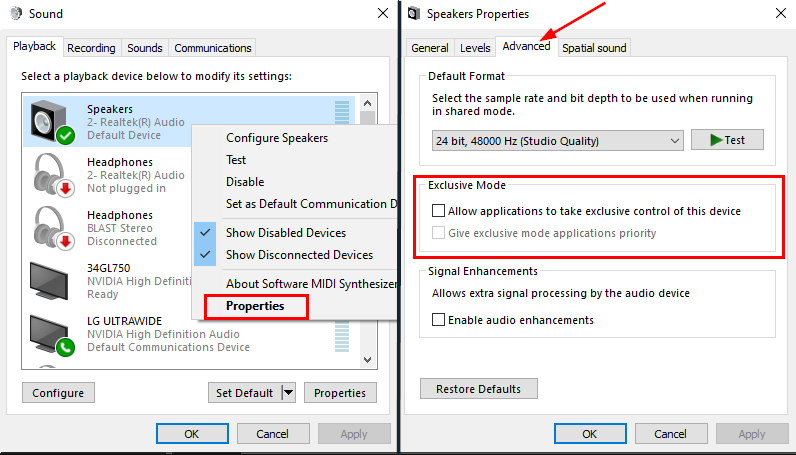 gritty isle
silk briar
I did that now what
gritty isle
silk briar
I did that now what
Do what you were doing before when you encountered that message.
silk briar
fixed it
silk briar
gritty isle
Do what you were doing before when you encountered that message.
is there a way I can get it not have the same filter over to a new scene
gritty isle
silk briar
is there a way I can get it not have the same filter over to a new scene
If you add a source of that same type, toggle off the 'Use existing source' thing when you add a source.
desert briar
It's gone again.
silk briar
gritty isle
If you add a source of that same type, toggle off the 'Use existing source' thin...
I did it but its showing up as just a black screen
desert briar
desert briar
It's gone again.
This is so silly. Why is it broken…
gritty isle
desert briar
This is so silly. Why is it broken…
I don't know. Wait on your ticket.
gritty isle
silk briar
I did it but its showing up as just a black screen
If the same device, then that would be expected.
desert briar
gritty isle
I don't know. Wait on your ticket.
So they’ve fixed it. I had audio enhancements on.
gritty isle
Yeah, that will break audio.


 long sandal
Does anyone know how, if I schedule two streams for vertical and horizontal on YouTube, to ensure the streamlabs bot always is in the horizontal streams chat and not the vertical please?
gritty isle
long sandal
Does anyone know how, if I schedule two streams for vertical and horizontal on Y...
That's not possible, sorry. Cloudbot and Chatbot will only connect to the first stream they see over the API which is usually the horizontal one.
 modern raptor
Hello! I'm trying to stream on twitch via stream labs, and I'm having troubles with my mic audio. It won't pick up a headset with mic, wireless earbuds with mic, and just my computer mic. I've tried all different combos and nothings working and what is the testing auido button supposed to do?
 violet karma
Hi. I used to stream for free to YouTube for a long time with no issues at all. bought the Ultra subscription and started streaming to YouTube and Twitch - and now I have streams that die off mid stream for no reason all the time. I haven't changed any settings and there's nothing wrong with my network or ISP (steady 600+ mbps). What is going on?
abstract plazaBOT
Do you have a Streamlabs Ultra membership? Are you part of the Streamlabs All-Stars program?
Get your Discord roles by going to this page here: https://streamlabs.com/dashboard#/settings/integrations and clicking "Link" next to Discord! Ultra members and higher tier All-Stars members will have access to private channels for support!
Interested in Ultra? Check it out here: https://streamlabs.com/ultra?refl=discord
Are you knowledgeable about Streamlabs products?
Get rewarded for helping the Streamlabs Community here in Discord!
👉 Apply to be a part of the Streamlabs Support Volunteer Program!
Application Link:
https://forms.gle/eKS29zWfFjGEzaRp7
For details, see our post in
#announcements message
modern raptor
wow that took the bot a minuet i expected it immeadietly lol
violet karma
I guess the bot is about as reliable and fast as their other services...
violet karma
Yeah... and I can't get a refund because it's "not policy"... I guess it's also not policy to actually deliver the service they sold me. I guess they don't care about customer relations much?
 gusty umbra
violet karma
Yeah... and I can't get a refund because it's "not policy"... I guess it's also ...
gusty umbra
violet karma
Yeah... and I can't get a refund because it's "not policy"... I guess it's also ...
If you’re an ultra subscriber. Link your Streamlabs and discord here. https://streamlabs.com/dashboard#/settings/integrations that gives you access to the #vip-support channel for instant answers to your questions. If you want to cancel your ultra (insert sad face here), you will need to create a ticket. The tech support side of things can’t assist with that. https://support.streamlabs.com/hc/en-us/requests/new
gusty umbra
modern raptor
Hello! I'm trying to stream on twitch via stream labs, and I'm having troubles w...
What does your windows audio mixer show for microphones. You may have to enable the one you want and disable all others. Then start up Streamlabs.
 rose river
What's the problem here?
 cursive delta
Quick question.. With 'Streamlabs Desktop', do you still need to use the Streamlabs' website to get an 'Alert Box' as when using OBS?
Or is that more local?
gritty isle
cursive delta
Quick question.. With 'Streamlabs Desktop', do you still need to use the Streaml...
You can use the Alertbox Widget source in Streamlabs Desktop. Or if you prefer, you can add it as a Browser Source using the AlertBox Widget URL.
modern raptor
gusty umbra
What does your windows audio mixer show for microphones. You may have to enable ...
I went into my laptop settings and set the mic input through my headset still nothing on streamlabs
cursive delta
gritty isle
You can use the Alertbox Widget source in Streamlabs Desktop. Or if you prefer,...
Perfect. Helping a friend, so I can't look in the program, lol.
Thanks!
 fair jasper
I am trying to make the Streamlabs: Recent Events page in OBS Studio more like it is in Streamlabs desktop, is there a way to do that? Right now its not in dark mode, had a bunch of icons that wastes space and visibility

the feed is much more condensed in SL Desktop

All the sudden after two weeks it suddenly updated to dark mode without me doing anything, so I guess that's fixed at least
abstract plazaBOT
Having trouble? Want to see if anyone else is having the same problem?
Check out our #known-issues channel! We do our best to keep this channel as current as possible with new bugs and progress updates!
If you can't find what you need please submit a ticket at: https://support.streamlabs.com/hc/en-us/requests/new
fair jasper
Though It's not perfect (still taking up so much room with icons and formatting), I found you can adjust the zoom using ctrl - and plus for that window
 main carbon
I have a question about my club setup. I plug my Elgato Facecam in and when I go into SLOBS it takes a while to see it. I go to its source and hit the gear icon. I hit deactivate then activate about 4 or 5 times then it will finally turn it on. That was until this past weekend. Now the camera shows powered but it won’t deactivate/activate and the camera light just turns off. This is only when I use it at the club. I tried using it at home and it worked fine. So I’m not sure if the port is going bad and is just finicky?
Also I just use it straight with SLOBS, I don’t use it through the Elgato virtual camera software.
I did order the newer version today in case the camera is going bad (it’s 4 years old).
 languid garden
Hi everyone. Is there anyone who knows how to fix the c ++ error im receiving? i just got a new pc and windows support had to uninstall and reinstall c ++ bc i was receiving that error and couldnt play any games. Now that its fixed i can no longer use streamlabs. Ive tried to install it myself and it still isnt working and im too scared to delete what i have and install new c ++.
thats the error when downloading it and what it looks like after downloading completed.

 wispy latchBOT
⚠️ Streamlabs Desktop Crash Troubleshooting
@languid garden, if you're experiencing crashes with Streamlabs Desktop, this guide provides a comprehensive troubleshooting walkthrough to help you resolve the issue: Streamlabs Desktop Crash Troubleshooting Guide
abstract plazaBOT
Having trouble? Want to see if anyone else is having the same problem?
Check out our #known-issues channel! We do our best to keep this channel as current as possible with new bugs and progress updates!
If you can't find what you need please submit a ticket at: https://support.streamlabs.com/hc/en-us/requests/new
abstract plazaBOT
Do you have a Streamlabs Ultra membership? Are you part of the Streamlabs All-Stars program?
Get your Discord roles by going to this page here: https://streamlabs.com/dashboard#/settings/integrations and clicking "Link" next to Discord! Ultra members and higher tier All-Stars members will have access to private channels for support!
Interested in Ultra? Check it out here: https://streamlabs.com/ultra?refl=discord
Are you knowledgeable about Streamlabs products?
Get rewarded for helping the Streamlabs Community here in Discord!
👉 Apply to be a part of the Streamlabs Support Volunteer Program!
Application Link:
https://forms.gle/eKS29zWfFjGEzaRp7
For details, see our post in
#announcements message
 spark marten
Hi to everyone. I hope someone can help me to know how to fix this problem. I have big issues with Collab cam. When we start the meeting, sometimes the people is expulsed or their cams get stopped. Could someone help me? thank u so much
abstract plazaBOT
Having trouble? Want to see if anyone else is having the same problem?
Check out our #known-issues channel! We do our best to keep this channel as current as possible with new bugs and progress updates!
If you can't find what you need please submit a ticket at: https://support.streamlabs.com/hc/en-us/requests/new
abstract plazaBOT
Do you have a Streamlabs Ultra membership? Are you part of the Streamlabs All-Stars program?
Get your Discord roles by going to this page here: https://streamlabs.com/dashboard#/settings/integrations and clicking "Link" next to Discord! Ultra members and higher tier All-Stars members will have access to private channels for support!
Interested in Ultra? Check it out here: https://streamlabs.com/ultra?refl=discord
Are you knowledgeable about Streamlabs products?
Get rewarded for helping the Streamlabs Community here in Discord!
👉 Apply to be a part of the Streamlabs Support Volunteer Program!
Application Link:
https://forms.gle/eKS29zWfFjGEzaRp7
For details, see our post in
#announcements message
 pallid harness
Hello, did you guys add a way to separate gifted subs only in the alerts?
abstract plazaBOT
Having trouble? Want to see if anyone else is having the same problem?
Check out our #known-issues channel! We do our best to keep this channel as current as possible with new bugs and progress updates!
If you can't find what you need please submit a ticket at: https://support.streamlabs.com/hc/en-us/requests/new
main carbon
main carbon
I have a question about my club setup. I plug my Elgato Facecam in and when I go...
Any help in regards to the above question I have? Thanks!
 full flax
Only one of my webcams are turning on in Streamlabs OBS following the update. Dont know why the other one isnt turning on
 magic dock
For the past few months Ive been using Streamlabs, 240fps, no lag, no frame skipping, good quality. For some reason I downloaded an update today of 1.20.4 and whenever I try to record I keep having frames skipped, I haven't changed any settings, haven't changed encoder, quality, or any settings. What did the update even do?
 willow vigil
if anyone could assist me, im having audio issues, i had audio until i switched to a newer PC, have tried everything to my knowledge. all my audio devices are set accordingly for desktop audio and mic audio but im not getting any audio on stream
 charred nova
Yo, how do my Mods give Loyalty Points for all Viewers who are currently in Chat, !addpoints all 100 doesn´t work and im super close before going crashout
 quasi adder
My Gamecapture is bugged with this new update
abstract plazaBOT
Having trouble? Want to see if anyone else is having the same problem?
Check out our #known-issues channel! We do our best to keep this channel as current as possible with new bugs and progress updates!
If you can't find what you need please submit a ticket at: https://support.streamlabs.com/hc/en-us/requests/new
 shy crystal
full flax
Only one of my webcams are turning on in Streamlabs OBS following the update. Do...
shy crystal
full flax
Only one of my webcams are turning on in Streamlabs OBS following the update. Do...
I am having the same issue. Multiple cameras appear in the list but only one will activate even if I select the other's entry in the list (same model), I need to unplug the active one to get it to switch cameras at all. Have submitted a ticket.
quasi adder
Why wont my Full Screened Game get Captured by the Game Capture even though its on Full Screen
 quasi violet
Hi, I am a Streamlabs Console Pro member and I have been having some trouble with my streams lately. I have a few scenes set up that I would like to change back and forth between throughout my stream. Routinely some form of malfunction occurs during my stream and it seems to be happening when I change scenes. For some reason my webcam loses touch with streamlabs console and refuses to cooperate until several minor tweaks scene resaves and some refreshing of the scene. Beginning to get frustrated that I pay money for this service and I futz around for 20 mins + during a stream trying to get things functional again. Please help.
abstract plazaBOT
Having trouble? Want to see if anyone else is having the same problem?
Check out our #known-issues channel! We do our best to keep this channel as current as possible with new bugs and progress updates!
If you can't find what you need please submit a ticket at: https://support.streamlabs.com/hc/en-us/requests/new
abstract plazaBOT
Do you have a Streamlabs Ultra membership? Are you part of the Streamlabs All-Stars program?
Get your Discord roles by going to this page here: https://streamlabs.com/dashboard#/settings/integrations and clicking "Link" next to Discord! Ultra members and higher tier All-Stars members will have access to private channels for support!
Interested in Ultra? Check it out here: https://streamlabs.com/ultra?refl=discord
Are you knowledgeable about Streamlabs products?
Get rewarded for helping the Streamlabs Community here in Discord!
👉 Apply to be a part of the Streamlabs Support Volunteer Program!
Application Link:
https://forms.gle/eKS29zWfFjGEzaRp7
For details, see our post in
#announcements message
 gritty isle
 junior mountain
In Streamlabs Desktop, log out, wait a minute, quit Streamlabs Desktop, wait a minute, launch Streamlabs Desktop, wait a minute, log in in Streamlabs Desktop, wait a minute, and then try again.
 native venture
my Facebook and YouTube is not multi streaming Why
gritty isle
native venture
my Facebook and YouTube is not multi streaming Why
What exactly happens? There's not enough information in your post to give you an answer.
 swift swallow
Getting a green vertical line on right side of screen when streaming to YouTube. Anyone know a fix?
 native venture

 sturdy wave
I have managed to stream using streamlabs console, with my USB webcam connected to my laptop before. Now, when I open the browser, it attempts to start using the webcam, but a notification saying "permission denied by system" keeps popping up and stopping me.
I've tried everything i can think of to fix the issue, checked all permissions i can find on my laptop and web browser, deleted the source and tried adding it again, I've cleared caches, logged in and out, unlinked and re-linked. Please help me!
gritty isle
native venture
I would perform the disconnect service (see the tagged post below) for Facebook first and then see how it goes. If you still have issues, please link your discord (other tagged post) and ask in the VIP Support channel.
wispy latchBOT
@native venture ⛓️💥 Disconnecting Your Streaming Service
If you need to disconnect your streaming service (like Twitch, YouTube, or others) from your Streamlabs account, please follow these clear steps:
- Log out of Streamlabs.com (you can use this link to force a logout and any Streamlabs software such as Streamlabs Desktop (you can do so from the bottom left 👤)
- Follow this guide to disconnect the specific streaming service from Streamlabs
- Once you're done, please log back Streamlabs Desktop or streamlabs.com with the account disconnected
Note: If you are doing this step for fixing your alerts, you may need to reload your widgets. You can do this by going to your Live Actions Tab of the Recent Events > Scroll all the way and click Reload Widgets
 Streamlabs Ultra & All-Stars Discord Access
@native venture, are you a Streamlabs Ultra Subscriber or an All-Stars member? If so, you can link your Discord account to gain access to exclusive Ultra/VIP roles and private chat channels here in our Discord server!
🔗 How To Get Your Ultra/All-Stars Discord Role:
Link your Discord account under your Streamlabs integrations settings: Streamlabs Integrations Dashboard
Not Yet an Ultra Member?
You can learn more about Ultra and upgrade your membership here: Upgrade to Streamlabs Ultra
gritty isle
sturdy wave
I have managed to stream using streamlabs console, with my USB webcam connected ...
Please submit a ticket on that: https://support.streamlabs.com/hc/en-us/requests/new
gritty isle
swift swallow
Getting a green vertical line on right side of screen when streaming to YouTube....
Do you see this green line in the preview window in Streamlabs Desktop? If so, I would select the capture source, right click, choose Transform, and then choose Fit to Screen and see fit at resolves the issue.
swift swallow
gritty isle
Do you see this green line in the preview window in Streamlabs Desktop? If so, ...
No that green line does not show up in the preview window. I tried resizing the capture window too and still shows no matter what size the window is. However, I just tried switching from AMD AV1 encoding to AMD HVEC and the green line is gone. Seems to be an issue with AV1...
gritty isle
swift swallow
No that green line does not show up in the preview window. I tried resizing the ...
That’s really weird! Stick with HVEC!
swift swallow
Yeah that's what I'll have to do I suppose. I'm new to trying to stream from my PC with OBS so I was confused. Seems to be an AMD GPU issue with AV1. Thanks for replying!
native venture
thanks a lot it worked 💪🏿
gritty isle
native venture
thanks a lot it worked 💪🏿
You’re welcome! Don’t forget to link your discord! That gets you access to the VIP Support channel, which is one of your subscriber benefits.
native venture
okay
 inner crest
if I send u some vod and my spec/config in slobs can bring me some light? retail wow pixels a lot when I move fast!
inner crest
inner crest
if I send u some vod and my spec/config in slobs can bring me some light? retail...
https://www.twitch.tv/videos/2676868863
game capture
1080p 48 frames (i see in another streamer)
cbr 6000 bitrate keyframe 2 p7 slowest tunnin highqualioty two passes full res prifle high b frames 2

Twitch
2jimbo went live on Twitch. Catch up on their World of Warcraft VOD now.
thanks in advance!
abstract plazaBOT
Having trouble? Want to see if anyone else is having the same problem?
Check out our #known-issues channel! We do our best to keep this channel as current as possible with new bugs and progress updates!
If you can't find what you need please submit a ticket at: https://support.streamlabs.com/hc/en-us/requests/new
 hearty orbit
I set my rescale output in the streaming tab to 1920x1080p yet when I start stream it's 1440p and 1080p isn't even an option, how
Had 0 issues until the new update. Had these settings forever
severe lion
Streanlabs since I am onnsole I want to give your freetrial a go for console because light stream seems to complicated do you have a longer free trial like 2 weeks you could offer me here I am a new streamer on twitch and dont make a lot of money yet and so it cost money to use your services to connect console to youtube and you can DM if you like even if you cant extend the free trial thank you anyways .=)
 abstract kayak
abstract plazaBOT
abstract kayak
abstract plazaBOT
Do you have a Streamlabs Ultra membership? Are you part of the Streamlabs All-Stars program?
Get your Discord roles by going to this page here: https://streamlabs.com/dashboard#/settings/integrations and clicking "Link" next to Discord! Ultra members and higher tier All-Stars members will have access to private channels for support!
Interested in Ultra? Check it out here: https://streamlabs.com/ultra?refl=discord
Are you knowledgeable about Streamlabs products?
Get rewarded for helping the Streamlabs Community here in Discord!
👉 Apply to be a part of the Streamlabs Support Volunteer Program!
Application Link:
https://forms.gle/eKS29zWfFjGEzaRp7
For details, see our post in
#announcements message
 somber acorn
anyone else having an issue when they try and go live on tiktok the stream ends straight away ?
 tardy rampart
Hi I have the vertical output set to Tik tok but on the stream it shows it horizontal.. any help?
 smoky mesa
@somber acorn theres a known issue with TT, streamlabs have put a post out about it. its a TT issue
smoky mesa
shy crystal
I am having the same issue. Multiple cameras appear in the list but only one wil...
same here, i use 2 of the same cameras and have done for years, but since this update i cant. just logged a ticket
smoky mesa
full flax
Only one of my webcams are turning on in Streamlabs OBS following the update. Do...
see my comment to another post above, looks like the latest update has bugs with multiple cameras and game captures too
quasi violet
sturdy wave
I have managed to stream using streamlabs console, with my USB webcam connected ...
I have not run into this problem myself. I'm currently using SLC running on Chrome. I did some research today and it says to try using a different browser but I don't understand how that will change things for me.
sturdy wave
quasi violet
I have not run into this problem myself. I'm currently using SLC running on Chro...
I'm running it on chrome too, i tried incognito and on edge and still nothing. I've even tried it on my mobile and the same thing happens. It was all working fine 3 days ago and I haven't changed anything since then! I'm convinced its coming from SL's end
quasi violet
sturdy wave
I'm running it on chrome too, i tried incognito and on edge and still nothing. I...
I've been having issues changing scenes where my webcam widget will just straight up not be there. Other times it will be a black box. If I delete the widget and put it back in the scene it sometimes comes back but occasionally it will take 4 or 5 instances of me trying that before something sticks. As a pro member of the software I'm starting to get upset that I'm paying 11.99/mo and the service works as poorly as it does!
I also have a scene that I call my "lobby" scene where if I'm in a lobby screen my webcam is the full screen thing you view rather than the game lobby and me in the top right etc. Most times when I load that scene it will just be my game cap and nothing else. Again I have to refresh or adjust the layout and re-save the scene.
sturdy wave
quasi violet
I've been having issues changing scenes where my webcam widget will just straigh...
When it worked the other day, I had to delete the cam source multiple times before it was right also. I just thought it was me being dumb 😅 apparently its just buggy AF!
I'm sorry you're having trouble too!
I'm really disappointed in it, same as you. You don't expect to be paying for something that doesn't work!
quasi violet
sometimes multiple times albeit
I submitted a ticket because I want to speak to someone who actually works for streamlabs customer support
sturdy wave
quasi violet
I submitted a ticket because I want to speak to someone who actually works for s...
I've also submitted a ticket, here's hoping they get their act together and actually fix it for us! 🤞🏻
quasi violet
the other thing I would like to see supported is being able to connect my discord via web browser to SLC
the banter back and forth between me and my friends IS the entertainment aspect of my stream and that part is being missed right now. one sided converstations are never fun to listen to. Might as well watch someone play video games while they talk on the phone to someone else.
abstract plazaBOT
Having trouble? Want to see if anyone else is having the same problem?
Check out our #known-issues channel! We do our best to keep this channel as current as possible with new bugs and progress updates!
If you can't find what you need please submit a ticket at: https://support.streamlabs.com/hc/en-us/requests/new
gusty umbra
quasi violet
the banter back and forth between me and my friends IS the entertainment aspect ...
You can split audio sources (discord app) and play them on stream. https://streamlabs.com/content-hub/post/how-to-use-application-audio-capture

Streamlabs
Hear your friends or mods in Discord without your stream hearing them. We'll tell you how in this easy guide!
quasi violet
gusty umbra
You can split audio sources (discord app) and play them on stream. https://stre...
again not using the desktop version I'm using Streamlabs Console
 rare stone
I can't seem to get any thing for my layout with out it telling me i need ultra. do i need ultra to get the free stuff?
tardy rampart
Why is it like this?


 narrow patrol
vernal trellis
Hello again,
thank you for your previous instructions. I followed all the steps ...
narrow patrol
vernal trellis
Hello again,
thank you for your previous instructions. I followed all the steps ...
I am having this exact same issue as Rico, any update on how to fix this? Worked fine unil latest update
narrow patrol
vernal trellis
Hello Streamlabs Support Team,
I hope you’re doing well. I would like to report ...
I can confirm I have the exact same issue as @vernal trellis
I am using the newest version of Streamlabs Desktop and since the most recent update Streamlabs no longer correctly recognizes my two Logitech C922 cameras . Prior to the update both cameras were detected and worked independently without any issues and has been the case since I started using two identical cameras last year
Streamlabs still lists both cameras, but one of them always shows a black screen with no image. Nor does it appear on the stream preview for you to edit/adjust even though it’s an active source. When switching source from one camera to the other, it seems as if Streamlabs can no longer distinguish between the two devices and only detects one camera.
Both cameras work correctly in all other apps (Logitech Software/Microsoft Camera App)
I have also applied all of the suggested fixes given to Nico but to no avail. Seeing more than one person has reported this issue something has changed since the latest update. Any fix would be greatly appreciated.
gritty isle
rare stone
I can't seem to get any thing for my layout with out it telling me i need ultra....
Enter Free in the search box.
@vernal trellis @narrow patrol #known-issues message
rare stone
gritty isle
Enter *Free* in the search box.
and that worked! 😄
gritty isle
rare stone
and that worked! 😄
Word. 
abstract plazaBOT
Having trouble? Want to see if anyone else is having the same problem?
Check out our #known-issues channel! We do our best to keep this channel as current as possible with new bugs and progress updates!
If you can't find what you need please submit a ticket at: https://support.streamlabs.com/hc/en-us/requests/new
abstract plazaBOT
Do you have a Streamlabs Ultra membership? Are you part of the Streamlabs All-Stars program?
Get your Discord roles by going to this page here: https://streamlabs.com/dashboard#/settings/integrations and clicking "Link" next to Discord! Ultra members and higher tier All-Stars members will have access to private channels for support!
Interested in Ultra? Check it out here: https://streamlabs.com/ultra?refl=discord
Are you knowledgeable about Streamlabs products?
Get rewarded for helping the Streamlabs Community here in Discord!
👉 Apply to be a part of the Streamlabs Support Volunteer Program!
Application Link:
https://forms.gle/eKS29zWfFjGEzaRp7
For details, see our post in
#announcements message
zinc thicket
obs studio works but streamlabs says this
 gritty isle
zinc thicket
obs studio works but streamlabs says this
gritty isle
zinc thicket
obs studio works but streamlabs says this
In Streamlabs Desktop:
Then go to Settings > Advanced > Network > Bind to IP.
If the drop-down menu is set to an IP address, change that setting to Default.
If the drop-down menu is set to Default, change it to the IP address of your computer, usually starts with 192.168 or 10.10.
After that, click Done to save the settings and then restart Streamlabs Desktop and see if you can go live.
zinc thicket
that worked thanks !!
gritty isle
 lusty grove
How do i get the chat in obs back
lusty grove
How do i get the chat in obs back
OBS Studio?
lusty grove
gritty isle
OBS Studio?
yeah
like when i first launched it, it showed me a live chat and i accidently closed it
gritty isle
lusty grove
yeah
The Docks menu.
 lusty grove
gritty isle
The Docks menu.
lusty grove
gritty isle
The Docks menu.
thanks im lowkey a dumbass
 fleet river
I signed up for stream labs console paid for the subscription but it still says offline I logged out logged back in nothing is working
gritty isle
lusty grove
thanks im lowkey a dumbass
You're welcome and no you're not.
gritty isle
fleet river
I signed up for stream labs console paid for the subscription but it still says ...
For the Streamlabs Console subscription, make sure you're signing in the Streamlabs Console web site by clicking the Twitch button and not the Streamlabs ID button. Also, in your Xbox, make sure you've set the destination to Streamlabs.
https://streamlabs.com/content-hub/post/how-to-get-started-using-streamlabs-console

Streamlabs
Go live straight from your Xbox - no extra apps, cables, or PC required - with Streamlabs Console!
fleet river
I got it fixed thank u so much
gritty isle
fleet river
I got it fixed thank u so much
YAY!!! You're welcome!
 lofty prairie
I'm on Streamlabs Desktop and nothing has changed since i last streamed but I'm stuck on this.

 vapid current
lofty prairie
I'm on Streamlabs Desktop and nothing has changed since i last streamed but I'm ...
vapid current
lofty prairie
I'm on Streamlabs Desktop and nothing has changed since i last streamed but I'm ...
when u stream on twitch the max is 60FPS
lofty prairie
My FPS value is set at 60.
 karmic lark
gritty isle
lofty prairie
I'm on Streamlabs Desktop and nothing has changed since i last streamed but I'm ...
karmic lark
gritty isle
lofty prairie
I'm on Streamlabs Desktop and nothing has changed since i last streamed but I'm ...
On the Confirm & Go Live box, uncheck Enhanced Broadcast.
gritty isle
karmic lark
You can only use the methods that are shown. Other methods include credit cards https://streamlabs.com/content-hub/post/setting-up-credit-card-donations.
gritty isle
vapid current
when u stream on twitch the max is 60FPS
It's not a FPS issue.
karmic lark
gritty isle
You can only use the methods that are shown. Other methods include credit cards...
yeah but credit cards are only usable if you use paypall

those are the only options
gritty isle
karmic lark
yeah but credit cards are only usable if you use paypall
Sorry about that. That means only PayPal is available to you in your region.
karmic lark
ah its a regional thing, thanks
gritty isle
karmic lark
ah its a regional thing, thanks
You're welcome.
abstract plazaBOT
Having trouble? Want to see if anyone else is having the same problem?
Check out our #known-issues channel! We do our best to keep this channel as current as possible with new bugs and progress updates!
If you can't find what you need please submit a ticket at: https://support.streamlabs.com/hc/en-us/requests/new
 mossy crown
This update cooked my Streamlabs I used to be able to run it fine now I’m constantly skipping frames I didn’t touch any settings and I think other people are reporting the same thing has this issue been acknowledged
Is there a way for me to somehow downgrade the app to an older version
gritty isle
mossy crown
Is there a way for me to somehow downgrade the app to an older version
There's not a way to downgrade.
Not guaranteed, but you can try downloading a fresh installer and run that. It could be and I can't guarantee the installer hasn't been updated yet. If prompted, don't update until you feel comfortable.
 mossy crown
Ok ty, do you know if this is a known issue though?
gritty isle
Ah, nope. Looks like the installer on the web site has been updated to 1.20.4.
gritty isle
mossy crown
Ok ty, do you know if this is a known issue though?
Not to my knowledge.
https://streamlabs.com/content-hub/post/dropped-frames-cpugpu-issues-and-improving-stream-quality

Streamlabs
First, check out this video that breaks down this topic in 3 parts:https://www.youtube.com/watch?v=WnRhaZaQ2nsBefore we discuss fixes, there are the 3...
hearty orbit
why does rescale output in the streaming tab just NOT work after new update
 peak inlet
Hi! I need help 🙂 i had alerts on twitch, and after i connected to streamlabs, ( i made chatbox sound alerts) my twitch alerts not showing
gritty isle
hearty orbit
why does rescale output in the streaming tab just NOT work after new update
The streaming encoder has to be different than the recording encoder; so double check that. If the recording encoder is set to 'Same as streaming', choose a different encoder.
hearty orbit
They are different, as mentioned I have had these settings for a literal year with no issues, until the new update last night and now nothing works.
gritty isle
peak inlet
Hi! I need help 🙂 i had alerts on twitch, and after i connected to streamlabs, ...
Alert's from Twitch or from Streamlabs?
peak inlet
now, i deleted and re added browser source from twitch, and its double alert ( song ) but not visible, so i deleted again. but even so the song is playing when i send test but the animation not showing. if somebody follow me, its not showing, even the song is not playing
gritty isle
hearty orbit
They are different, as mentioned I have had these settings for a literal year wi...
Try logging out in Streamlabs Desktop, wait a minute, quit Streamlabs Desktop, wait a minute, launch Streamlabs Desktop, wait a minute, log back in in Streamlabs Desktop, wait a minute and see if that helps or not.
gritty isle
peak inlet
now, i deleted and re added browser source from twitch, and its double alert ( s...
Are you using the Streamlabs Alert Box? If so, make sure Custom HTML/CSS is disabled.
peak inlet
gritty isle
Alert's from Twitch or from Streamlabs?
first was twitch, everything was set, and after i connected to sl , the twitch alerts not working
hearty orbit
I tried that yesterday as well, as well as completely uninstalling and reinstalling, sadly nothing like that has worked..
peak inlet
i wanted the sl only for chatbox alerts, so i deactivated all sl alerts manually in sl alerts settings
gritty isle
hearty orbit
I tried that yesterday as well, as well as completely uninstalling and reinstall...
Hmmmmm. Gimme a minute.
gritty isle
peak inlet
first was twitch, everything was set, and after i connected to sl , the twitch a...
Okay, you'll have to reach out to Twitch for help with their alerts. Also make sure that the source for the Twitch Alerts is at the top of the source list otherwise it will be 'hidden' underneath the sources above it in the list.
hearty orbit
I run my setup on 1440 base and output, so recordings come out in 1440 for videos.
In my recording tab I use NVENC H.264 and never had any issues (still don't)
In my streaming tab I use NVENC H.264(new) which allows rescale output so I can stream in 1080p instead of 1440p, which has worked for ages, until the new update yesterday.
gritty isle
hearty orbit
I run my setup on 1440 base and output, so recordings come out in 1440 for video...
Try setting the streaming encoder to NVIDIA NVENC H.264 and the recording encoder to something else. That works for me.

 hearty orbit
I don't even get the option for rescale output when I don't use (new) that's main reason I've been using it
oak cloud
hearty orbit
I don't even get the option for rescale output when I don't use (new) that's mai...
If you were using it with new, it was not intended. "new" since it's inception has never had the functionality to rescale output
rescale output in the settings > encoder area is specifically based on whether the encoder allows you to do it or not. NVIDIA shared when "new" was released with the 20 series cards that this encoder would not have that functionality. So anyone that still wanted to use it, would need to use regular NVENC
 loud sail
Can someone help me fix my Streamlabs so I'm not DC'ing every 2 seconds?
It's really irritating\
gritty isle
loud sail
Can someone help me fix my Streamlabs so I'm not DC'ing every 2 seconds?
Streaming to Twitch?
gritty isle
loud sail
It's *really* irritating\
I bet!
loud sail
Yes. And I only ever have this problem with Streamlabs
gritty isle
loud sail
Yes. And I *only* ever have this problem with Streamlabs
Is Streamlabs Desktop reporting dropped frames as well?
loud sail
No. Only disconnects
hearty orbit
All I know is that these have been my settings for well over a year, and until yesterdays update they stopped working so idk what to do
And if I try to use NVENC without new on streaming tab I do not get the option to rescale output

 loud sail
I've adjusted my bitrate, framerates, everything like 50 times and it's still doing it so I'm really po'd at the moment for lack of better terminology
oak cloud
hearty orbit
All I know is that these have been my settings for well over a year, and until y...
the rescale output has never existed with nvenc (new). If you want to google this, you will find that as well. I just know because i was here doing support when this was released.
So most likely that is a visual error and that your encoder was actually regular NVENC.
hearty orbit
I hear you and whether or not it's new or not new doesn't change the fact it's not working lmao
oak cloud
even with "old" it's not working (so regular NVENC)?
gritty isle
loud sail
I've adjusted my bitrate, framerates, everything like 50 times and it's *still* ...
Please download and run the Twitch Test; see the tagged post below.
Select Medium or Long Duration - DON'T use Short Duration as it will get inconsistent results.
AND
Select all the ingests in your region. Once the test is fully complete, screen shot the results here and don't crop the screen shot please.
wispy latchBOT
@loud sail 🌐 Finding Your Best Twitch Server
To ensure the most stable and high-quality stream to Twitch, we recommend using a Twitch test tool to find the optimal server for your location and internet connection.
📋 How to Use the Twitch Test Tool:
- Access the tool here: Twitch Test Tool
- Run the test using either the Medium or Long duration. Short tests may not provide the most accurate results.
- Select your specific region from the listed options. If your exact region is not available, choose 5 to 6 servers closest to you.
- Aim for a quality score of at least 84. This indicates a strong and stable connection.
🛠️ Applying Your Settings in Streamlabs Desktop:
- Once you've identified a good server, navigate to your Streamlabs Desktop settings:
Settings>Stream>Stream to custom ingest. - From there, you can manually select your preferred server based on your test results.
hearty orbit
only the one called new (on my SLOBS) allows the rescale output.
which in theory is great as it's what I am wanting, but once I start stream (without the twitch enhanced mode) my stream source is visible on twitch at 1440p and 1080p is not even an option.
If i do use the twitch enchanced mode everything works as intented, but I simply cant do that as I multi stream and it's not an option there.


And with Kick only allowing streams at 1080p and my rescale output not working after the new slobs update my kick stream wont work, and my twithc stream is eating resources off my pc as its recording and streaming at 1440p instead of 1080p like its supposed to
oak cloud
hearty orbit
only the one called new (on my SLOBS) allows the rescale output.
which in theor...
well that is definitely a bug then unless NVIDIA put out a change. I think it's a bug on our part though, so I would suggest submittinag at ticket at https://support.streamlabs.com/hc/en-us/requests/new and then if you want to share the ticket number I can add it ot the report (because this looks like the settings were flip flopped because I see this too now)
which would make sense why it's not working if that was the case
hearty orbit
Yeah I do assume it’s on SLOBS and as I’ve had these exact steam settings since I switched over to 1440p last year and until I updated to newest version yesterday it simply stopped working..
I did submit a ticket so give me a second and I’ll get you the ticket ID
904618
I assume there's no way to downgrade to previous version? at least temporarily, I've looked online but seems impossible to find previous SLOBS versions
oak cloud
i'll make sure that we get in touch with you soon about that once we make a report on our end.
You could try the preview version to see if the same issue is present there (you can sign up here #welcome message)
hearty orbit
oak cloud
You could try the preview version to see if the same issue is present there (you...
I got the windows role if that's what you are referring to
oak cloud
yeah, so in the #preview-releases channel there should be a download there for the preview version
hearty orbit
I see it, will try that now!
loud sail
gritty isle
Please download and run the Twitch Test; see the tagged post below.
Select *Med...
Running now, just gonna get some lunch started and I’ll let you know how it goes
gritty isle
Oh yeah! Lunch! Good idea! 🥪
loud sail


 hearty orbit
Getting this error now while installing, not sure why
 gritty isle
loud sail
How's that?
gritty isle
loud sail
How's that?
That seems good but it's possible there's an issue in the network path between you and what ever ingest is selected, likely its on Auto.
I'd manually setup and try either the Ashburn or Ohio ingests and see how it goes.
loud sail
How do I do that?
gritty isle
loud sail
How do I do that?


 gritty isle
hearty orbit
Getting this error now while installing, not sure why
gritty isle
hearty orbit
Getting this error now while installing, not sure why
This is when you install the Preview version?
abstract plazaBOT
Do you have a Streamlabs Ultra membership? Are you part of the Streamlabs All-Stars program?
Get your Discord roles by going to this page here: https://streamlabs.com/dashboard#/settings/integrations and clicking "Link" next to Discord! Ultra members and higher tier All-Stars members will have access to private channels for support!
Interested in Ultra? Check it out here: https://streamlabs.com/ultra?refl=discord
Are you knowledgeable about Streamlabs products?
Get rewarded for helping the Streamlabs Community here in Discord!
👉 Apply to be a part of the Streamlabs Support Volunteer Program!
Application Link:
https://forms.gle/eKS29zWfFjGEzaRp7
For details, see our post in
#announcements message
hearty orbit
gritty isle
This is when you install the Preview version?
yes
gritty isle
hearty orbit
yes
Okay, I'd ask over in #vip-support and see what they staff suggest. They're in a meeting right now so they might not respond right away.
loud sail
@gritty isle Immediate dc
gritty isle
loud sail
<@301571565840236564> **Immediate** dc
Dang! Try a different ingest.
loud sail
Like what?
It's admittedly a lot more stable but still dc'ing so I might just work with it
gritty isle
loud sail
Like what?
Like if you tried the Ohio ingest, try the Ashburn ingest.
gritty isle
😉
loud sail
Similar result
gritty isle
loud sail
Similar result
Poo. Try the Portland ingest.
loud sail
That's Oregon?
hearty orbit
Yeah my rescale output in preview version is also not effective, not sure what's going on tbh.
gritty isle
loud sail
That's **Oregon**?
Yup.
gritty isle
hearty orbit
Yeah my rescale output in preview version is also not effective, not sure what's...
You got a ticket in, right?
hearty orbit
The NVENC seems to be looking correct now, but once on stream its not working, but yeah I got a ticket now so I'll hopefully get some more information there too.
 loud sail
gritty isle
Yup.
loud sail
gritty isle
Yup.
Doubtful if I'm in NY
gritty isle
loud sail
Doubtful if I'm in NY
Give it a whirl. Can't physically hurt you. 😉
hearty orbit
I managed to make it work by using softwarex264 as streaming encoder with the rescale output I guess. But hopefully there can be a fix for this asap so I won't have to murder my CPU while working, lol.
gritty isle
hearty orbit
I managed to make it work by using softwarex264 as streaming encoder with the re...
The staff will investigate and go from there. For the preview installation issue, hit that up in #vip-support.
loud sail
Welp
I stand corrected
Considering It's been 2m and I haven't dc'd yet? That's the most stable I'm gonna get
gritty isle
loud sail
Welp
I stand corrected
Could be an Twitch US East issue perhaps.
loud sail
Maybe. Either way? Bloody well done, Rufus.
gritty isle
loud sail
Maybe. Either way? Bloody well done, Rufus.
You're welcome! Try it this way for a few days and see how it goes.
oak cloud
hearty orbit
I managed to make it work by using softwarex264 as streaming encoder with the re...
the c++ means that you probably need to repair your windows redistributables (you can do that by following the guide here: https://streamlabs.com/content-hub/post/microsoft-visual-c-redistributables-2022-needed-for-streamlabs-desktop)
I was going to reply to your ticket momentarily, but the issue is fixed in preview
loud sail
Just had a dc but again, super stable so at this point I think it's the best course
gritty isle
loud sail
Just had a dc but again, super stable so at this point I think it's the best cou...
Is there a way you can connect via wired ethernet or is the router/modem too far way to effectively run a cable?
loud sail
Nah I can't do that sadly
gritty isle
😉
hearty orbit
oak cloud
the c++ means that you probably need to repair your windows redistributables (yo...
Well not fixed as I have to use softwarex264 which is awful, but I guess temporarily I'll try make it work lol, but yeah we'll see how the ticket goes, I solved the c++ issue at least.
gritty isle
loud sail
Nah I can't do that sadly
Do you happen to have a another platform like YouTube, Facebook, or Trovo you could try and stream to?
hearty orbit
But rescale output does not work in either preview or normal streamlabs as of now, not sure why. @oak cloud
loud sail
gritty isle
Do you happen to have a another platform like YouTube, Facebook, or Trovo you co...
Yeah but I'm tryin' to grow the Twitch a bit
gritty isle
loud sail
Yeah but I'm tryin' to grow the Twitch a bit
I'd try a steam to one of those and see how it goes. Wondering if its a path to Twitch or a general connectivity issue.
oak cloud
hearty orbit
But rescale output does not work in either preview or normal streamlabs as of no...
I'm testing it now and it's streaming at 1080p while recording at 4k (for the preview version). Are you on 1.20.5-preview.1?
hearty orbit
I will try it again later tonight and I'll let you know, I am just going to stream using softwareX for now so it doesn't get to late lol. Thank you for the help and I'll just @ once I try it again later tonight!
oak cloud
let us know in your email (i'll email you momentarily so it's in your inbox and link this conversation)
abstract plazaBOT
Having trouble? Want to see if anyone else is having the same problem?
Check out our #known-issues channel! We do our best to keep this channel as current as possible with new bugs and progress updates!
If you can't find what you need please submit a ticket at: https://support.streamlabs.com/hc/en-us/requests/new
desert briar
i press stream to streamlabns and it doesnt even interact
gritty isle
desert briar
i press stream to streamlabns and it doesnt even interact
Which Streamlabs?
 dense bough
has anyone had any trouble with the echo in streamlabs with desktop audio, im having that issue
 summer ferry
anyone else multistream with kick and instagram? i got over a 6 sec delay with my video compared to comments being posted, any ideas on how to fix this
wispy latchBOT
@dense bough 🔊 Echoes: Common Causes & Solutions
- Audio Monitoring: Ensure all audio sources in your Streamlabs Desktop mixer are set to
Monitor Off. If audio monitoring is enabled for any source, it can create an echo loop. (See example image) - Video Capture Device Audio: Check the properties of your video capture device. Echoes can occur if a custom audio device is selected within its settings. Ensure no custom audio device is chosen there. (See example image)
- Open Stream in Browser: Confirm that you do not have your own stream open (and unmuted) in another browser tab or window. This is a very common cause of immediate echoes.
- Windows Audio Device Monitoring: Make sure you are not actively listening to a recording device (like your microphone) from within your Windows audio settings. Be sure to turn off this "listen" option for your recording devices. (See example image)


 gritty isle
summer ferry
anyone else multistream with kick and instagram? i got over a 6 sec delay with m...
gritty isle
summer ferry
anyone else multistream with kick and instagram? i got over a 6 sec delay with m...
6 seconds isn't bad. Live streaming has an delay as it takes time for the packets to go from you to the ingest, for the packets to be reassembled, encoded, and delivered to the viewer.
Only real way would be move physically closer to the ingest but alas, that's not possible.
summer ferry
gritty isle
6 seconds isn't bad. Live streaming has an delay as it takes time for the packe...
ok thanks
dense bough
wispy latch
<@617373246312153139> 🔊 **Echoes: Common Causes & Solutions**
* **Audio Monitor...
i tried all that still nothing
 visual rain
I feel silly asking this, and I tried checking the Tipping page on the site, but I’m getting back into streaming and wanted to make sure if I needed to remove the Tipping link on my stream channel since I don’t have Ultra at the moment. Can we get tips without having the Ultra subscription?
summer ferry
dense bough
i tried all that still nothing
best thing is remove all sources and start over
gritty isle
visual rain
I feel silly asking this, and I tried checking the Tipping page on the site, but...
Yes! The Tip Page is available to everyone for free.
visual rain
gritty isle
Yes! The Tip Page is available to everyone for free.
Thank you!!!
gritty isle
visual rain
Thank you!!!
You're welcome.
hearty orbit
oak cloud
I'm testing it now and it's streaming at 1080p while recording at 4k (for the pr...
Am I supposed to upgrade it to the 1.20.5-preview.1? I tried that earlier and had same issues, will try reinstalling fully now and see what happens though then send info in the ticket.
 lapis radish
Is there a way I can add the new encoders to streamlabs like OBS has?
my 5090 using NVENC 264 (New) doesnt look good even at max settings 1440p 60fps
gritty isle
lapis radish
Is there a way I can add the new encoders to streamlabs like OBS has?
That will happen in the future when Streamlabs OBS is updated with later versions of OBS Studio. You yourself can't force that.
quasi adder
Why is Game Capture Still not working
gritty isle
quasi adder
Why is Game Capture Still not working
For anything but Roblox or CSGO?
lapis radish
I cant find the the patch notes for 1.20.4 anywhere, can anyone help me out? Thanks
gritty isle
lapis radish
I cant find the the patch notes for 1.20.4 anywhere, can anyone help me out? Tha...
Ask over in #vip-support. Sometimes they pop up in Streamlabs Desktop, sometimes they post them here in Discord, anmd sometimes they are in the Creator Resource site. Personally I've not seen anything for 1.20.4. 🥺
quasi adder
gritty isle
For anything but Roblox or CSGO?
I havent been able to get it to work for any game since that update on Monday or Tuesday
lapis radish
gritty isle
Ask over in <#606591508623392788>. Sometimes they pop up in Streamlabs Desktop,...
Thanks
gritty isle
quasi adder
I havent been able to get it to work for any game since that update on Monday or...
This might help:
First, please delete your game capture source and quit Streamlabs Desktop.
Then go to the search in windows (🔎) and search this file path: C:\ProgramData\obs-studio-hook and then click on the folder that pops up.
Once you have done that you will see a bunch of files. If you can ignore those for a second and click on the program data folder.
Then you should see the obs-studio-hook folder there and highlighted.
Go ahead and delete the folder.
Now go ahead restart your PC and then right click Streamlabs Desktop and run as administrator.
Then add a new game capture and see if that works for you.

 quasi adder
Do I delete the Full OBS-Studio-Hook Folder? @gritty isle ??
gritty isle
quasi adder
Do I delete the Full OBS-Studio-Hook Folder? <@301571565840236564> ??
Yeah, delete the whole folder.
Make sure you quit Streamlabs Desktop first!
It will get re-created.
quasi adder
Yes , I checked my system Tray and even Task manager
I will delete and restart then let you know
 civic rivet
is there a way to fix alerts that arent working all of a sudden?.. ive tried everything in the help areas, including disconnecting from all sources clearing cache/cookies, refreshing api tokens etc... events just not making it to the mini feed all of a sudden
gritty isle
I gotta run the dog out in the cold rain. Sigh. Back in a bit folks.
wispy latchBOT
@civic rivet ⛓️💥 Disconnecting Your Streaming Service
If you need to disconnect your streaming service (like Twitch, YouTube, or others) from your Streamlabs account, please follow these clear steps:
- Log out of Streamlabs.com (you can use this link to force a logout and any Streamlabs software such as Streamlabs Desktop (you can do so from the bottom left 👤)
- Follow this guide to disconnect the specific streaming service from Streamlabs
- Once you're done, please log back Streamlabs Desktop or streamlabs.com with the account disconnected
Note: If you are doing this step for fixing your alerts, you may need to reload your widgets. You can do this by going to your Live Actions Tab of the Recent Events > Scroll all the way and click Reload Widgets
quasi adder
Seems like it will not let me Delete as it says it is still opened somewhere else...
@rufus what would be running "graphics-hook32.ll?
abstract plazaBOT
Having trouble? Want to see if anyone else is having the same problem?
Check out our #known-issues channel! We do our best to keep this channel as current as possible with new bugs and progress updates!
If you can't find what you need please submit a ticket at: https://support.streamlabs.com/hc/en-us/requests/new
gritty isle
quasi adder
@rufus what would be running "graphics-hook32.ll?
OBS Studio, Nvidia Shadow Play, Meld. Try rebooting and after it comes up, don't launch anything.
true imp
Hello can i get help i am using streamlabs desktop but i cant stream to tiktok i get this error? The link you provided couldnt be accessed or does not verify your streaming history on a mainstream platform.
gritty isle
true imp
Hello can i get help i am using streamlabs desktop but i cant stream to tiktok i...
You'd need to reach out to TikTok but it sounds like the channel you provided to show your streaming history outside of TikTok wasn't valid or didn't provide enough history. There's nothing Streamlabs can do about that. TikTok alone makes these decisions. Streamlabs has no input and cannot see why any particular decision is made.
true imp
oh okay but i have some past lives and videos
can check it there i have some
and i dont know how to reach how tiktok i tryed they say i need report problem on the app on mobile but its not working ..
but i can use tiktok live studio on pc thats working
gritty isle
true imp
can check it there i have some
Not up to me or Streamlabs to verify your streaming history. TikTok makes it very difficult to reach them on purpose. They give this URL to give out: https://www.tiktok.com/contact?lang=en
gritty isle
true imp
but i can use tiktok live studio on pc thats working
My two cents: That's what they do. They want you to use their software so you will stay on their platform. They really don't want people using 3rd party software to stream to TikTok.
 jade pilot
Having an issue where Marvel Rivals black screens in Streamlabs when I go in-game, anybody know how to fix that? Ive already tried running streamlabs as admin, and restarting both apps
abstract plazaBOT
Having trouble? Want to see if anyone else is having the same problem?
Check out our #known-issues channel! We do our best to keep this channel as current as possible with new bugs and progress updates!
If you can't find what you need please submit a ticket at: https://support.streamlabs.com/hc/en-us/requests/new
abstract plazaBOT
Do you have a Streamlabs Ultra membership? Are you part of the Streamlabs All-Stars program?
Get your Discord roles by going to this page here: https://streamlabs.com/dashboard#/settings/integrations and clicking "Link" next to Discord! Ultra members and higher tier All-Stars members will have access to private channels for support!
Interested in Ultra? Check it out here: https://streamlabs.com/ultra?refl=discord
Are you knowledgeable about Streamlabs products?
Get rewarded for helping the Streamlabs Community here in Discord!
👉 Apply to be a part of the Streamlabs Support Volunteer Program!
Application Link:
https://forms.gle/eKS29zWfFjGEzaRp7
For details, see our post in
#announcements message
 whole apex
@gritty isle yo, plz don't go tho. I've had this problem for like a year
robokev was no help
gritty isle
whole apex
<@301571565840236564> yo, plz don't go tho. I've had this problem for like a yea...
A year?1
whole apex
ya, i never submitted a ticket till now tho Idk what i'm doing wrong it's such a simple problem
the alert box works but not chat
gritty isle
whole apex
robokev was no help
Sorry about that. I see you're using OBS Studio with YouTube. Is you're live stream Public, Private or Unlisted?
gritty isle
whole apex
I'm not streaming rn, i'm testing the chat in obs
YouTube Chat is not always active like Twitch. YouTube Chat is only active when your are live. And the Streamlabs Chatbox Widget only works with Public streams.
Let's double check settings though.
Please go here https://streamlabs.com/dashboard#/widgets/chat-box and screen shot all the settings for the Chatbot Wiget.
whole apex
Oh ok that answers my issue though
whole apex
gritty isle
YouTube Chat is not always active like Twitch. YouTube Chat is only active when...
so unlike twitch, the chat widget only pops up when the stream is live?
gritty isle
whole apex
Oh ok that answers my issue though
🆒
gritty isle
whole apex
so unlike twitch, the chat widget only pops up when the stream is live?
Correct.
whole apex
I noticed it used to work sometimes but i never knew why, thank u bro
gritty isle
And make sure that the browser source for the Chatbox Widget is higher in the souce list than any capture method (meaning game capture, window capture, display capture). Otherwise it will be 'hidden' underneath that capture source.
whole apex
ofc
gritty isle
whole apex
I noticed it used to work sometimes but i never knew why, thank u bro
You're welcome.
whole apex
it's above my elgato in the layers of sources yes
gritty isle
Also make sure you have this setting Disabled in the Chatbox Widget.
 whole apex
ye, got u. I think it's all gonna work now 👍
gritty isle
whole apex
ye, got u. I think it's all gonna work now 👍
w00T!!!
abstract plazaBOT
Having trouble? Want to see if anyone else is having the same problem?
Check out our #known-issues channel! We do our best to keep this channel as current as possible with new bugs and progress updates!
If you can't find what you need please submit a ticket at: https://support.streamlabs.com/hc/en-us/requests/new
abstract plazaBOT
Do you have a Streamlabs Ultra membership? Are you part of the Streamlabs All-Stars program?
Get your Discord roles by going to this page here: https://streamlabs.com/dashboard#/settings/integrations and clicking "Link" next to Discord! Ultra members and higher tier All-Stars members will have access to private channels for support!
Interested in Ultra? Check it out here: https://streamlabs.com/ultra?refl=discord
Are you knowledgeable about Streamlabs products?
Get rewarded for helping the Streamlabs Community here in Discord!
👉 Apply to be a part of the Streamlabs Support Volunteer Program!
Application Link:
https://forms.gle/eKS29zWfFjGEzaRp7
For details, see our post in
#announcements message
 full linden
did i permanly break this?
 abstract plazaBOT
Having trouble? Want to see if anyone else is having the same problem?
Check out our #known-issues channel! We do our best to keep this channel as current as possible with new bugs and progress updates!
If you can't find what you need please submit a ticket at: https://support.streamlabs.com/hc/en-us/requests/new
gritty isle
full linden
did i permanly break this?
What is that anyway?
full linden
the loyalty thing
gritty isle
full linden
the loyalty thing
The Twitch extension?
full linden
i do belive so
gritty isle
full linden
i do belive so
You’re going through the setup and configuration?
full linden
i got done with it but the thing said NaN
gritty isle
I don’t recall seeing that option. Is it causing an issue or are you just concerned?
full linden
concerned
gritty isle
full linden
concerned
Are you using Chrome or Opera?
full linden
opera
gritty isle
full linden
opera
Try with Microsoft Edge or Firefox please.
full linden
why exactly?
gritty isle
Chrome and Opera often have issues with our web sites. Otherwise I wouldn’t worry about it.
full linden
ooh
 oblique stream
Good evening to all!! Does anyone know why Fallout 1 from gamepass wont game capture on streams?
summer ferry
is there a way to get a reactive widget for my current scenes?
abstract plazaBOT
Having trouble? Want to see if anyone else is having the same problem?
Check out our #known-issues channel! We do our best to keep this channel as current as possible with new bugs and progress updates!
If you can't find what you need please submit a ticket at: https://support.streamlabs.com/hc/en-us/requests/new
abstract plazaBOT
Having trouble? Want to see if anyone else is having the same problem?
Check out our #known-issues channel! We do our best to keep this channel as current as possible with new bugs and progress updates!
If you can't find what you need please submit a ticket at: https://support.streamlabs.com/hc/en-us/requests/new
abstract plazaBOT
Do you have a Streamlabs Ultra membership? Are you part of the Streamlabs All-Stars program?
Get your Discord roles by going to this page here: https://streamlabs.com/dashboard#/settings/integrations and clicking "Link" next to Discord! Ultra members and higher tier All-Stars members will have access to private channels for support!
Interested in Ultra? Check it out here: https://streamlabs.com/ultra?refl=discord
Are you knowledgeable about Streamlabs products?
Get rewarded for helping the Streamlabs Community here in Discord!
👉 Apply to be a part of the Streamlabs Support Volunteer Program!
Application Link:
https://forms.gle/eKS29zWfFjGEzaRp7
For details, see our post in
#announcements message
quasi adder
Still expeiencing the Game Capture Bug it will work 1 Stream and then the nex tit stops
abstract plazaBOT
Are you knowledgeable about Streamlabs products?
Get rewarded for helping the Streamlabs Community here in Discord!
👉 Apply to be a part of the Streamlabs Support Volunteer Program!
Application Link:
https://forms.gle/eKS29zWfFjGEzaRp7
For details, see our post in
#announcements message
Having trouble? Want to see if anyone else is having the same problem?
Check out our #known-issues channel! We do our best to keep this channel as current as possible with new bugs and progress updates!
If you can't find what you need please submit a ticket at: https://support.streamlabs.com/hc/en-us/requests/new
Do you have a Streamlabs Ultra membership? Are you part of the Streamlabs All-Stars program?
Get your Discord roles by going to this page here: https://streamlabs.com/dashboard#/settings/integrations and clicking "Link" next to Discord! Ultra members and higher tier All-Stars members will have access to private channels for support!
Interested in Ultra? Check it out here: https://streamlabs.com/ultra?refl=discord
 sullen rock
Hi I have very little tech knowledge and would like some help with streamlabs.
I am having issues connecting to a schedule
 steep bone
Yes
 muted remnant
Why is streamlabs no longer giving me the option for Adult Content under the TikTok tab?
I just stream games, but I click that for language
 real widget
yo guys
how the heck do i go live, i put my encoder and stuff in here, and it doesnt work

@muted remnant@steep bone@sullen rock
am i putting my encoder in the wrong place or something
 muted remnant
Im not support buddy and in the middle of hosting a server. Ill try to help in between games buddy
real widget
muted remnant
Im not support buddy and in the middle of hosting a server. Ill try to help in ...
bro please help, if you can go live, it's an easy issue for sure
muted remnant
your trying to go live on youtube? Why dont you just use the youtube switch instead of a custom stream destination?
real widget
muted remnant
your trying to go live on youtube? Why dont you just use the youtube switch ins...
it doesnt work when i js do yt
muted remnant
there should be a youtube section in the multi streaming on the website
ya, i wouldnt do it custom, use the built in youtube settings buddy
real widget
muted remnant
ya, i wouldnt do it custom, use the built in youtube settings buddy
okay, so where do i put my stream key in


@muted remnant i just needa know where to put this stuff in
 muted remnant
Youtube doesnt show connected
ill have to look at mine, but it should show something different then logged in. When you go to go live there should be a Youtube section where you put your screenshot and stuff if you want
You dont use a stream key with youtube, you link it, and then just click go live, and scroll to the YouTube section
real widget
muted remnant
You dont use a stream key with youtube, you link it, and then just click go live...
yea but where would i link it
muted remnant
I dont wanna stop my stream and restart it (im on 6 platforms and it takes a few minutes) but basically link your youtube, click go live, and in the go live screen scroll to the youtube section that shows on the screen
 agile owl
real widget
yea but where would i link it
agile owl
real widget
yea but where would i link it
You already did while logging in on streamlabs desktop
muted remnant

In this quick guide I walk you through step by step on how to stream to YouTube as well as providing you the best settings for livestreaming using Streamlabs OBS.
Want to learn how to set up your Audio? Watch this video next: https://youtu.be/6d1_92LEUJQ?si=I8ziimQ8gsLaonfz
Speedtest: https://www.speedtest.net
OBS Studio Installer: https://obs...
real widget
agile owl
You already did while logging in on streamlabs desktop
Okay, now my screen isnt showing up
 agile owl
what game are you trying to capture
real widget
agile owl
what game are you trying to capture
Roblox
agile owl
ooh that would need Display capture since Gamecapture doesn't play nice with Robloxs anti-cheat
real widget
agile owl
ooh that would need Display capture since Gamecapture doesn't play nice with Rob...
okay
IT WORKED
TYSM
agile owl
no problem
muted remnant
See, we aint too shabby @real widget Glad it worked brother.
Thanks for your help as well @agile owl. @real widget Im telling you bro, StreamLabs OBS Ultra is worth the money man. I highly recommend it. The support is better than my electric company and cable company combined lol
muted remnant
So does anyone know if they changed something at StreamLabs OBS? When I go live, usually there is an adult radio button to click. It stops me from getting suspended due to language quite a bit I think, because without it im usually blocked within a few minutes of my "starting" screen because its a playback of someone saying "what the hell was that" but with the adult content radio button it seems to handle a little bit more of foul language.
abstract plazaBOT
Having trouble? Want to see if anyone else is having the same problem?
Check out our #known-issues channel! We do our best to keep this channel as current as possible with new bugs and progress updates!
If you can't find what you need please submit a ticket at: https://support.streamlabs.com/hc/en-us/requests/new
 rough grail
i have an issue. i just want to go hortizontal
muted remnant
rough grail
i have an issue. i just want to go hortizontal
Are you using Duel Streaming?
 tropic ice
Running into an issue with TalkStudio for three weeks now.
I join and everything is fine. My two guests join and they give permission for their microphones, they have their microphones set, they can test audio and that works… but I can’t hear them at all. They refresh the page dozens of times and sometimes it randomly works.
Any solutions?
muted remnant
Or dual Output rather?
muted remnant
tropic ice
Running into an issue with TalkStudio for three weeks now.
I join and everythi...
That I have no idea about bro
tropic ice
Only thing I can think of is I’m on MacOS and they’re on Windows. I’ve had other guests before on MacOS and no issues so that’s the only reason I’ve considered this.
muted remnant
As long as you have Streamlabs OBS connected correctly you shouldn't have an issue as long as you didnt mess around with the Dual Output settings
abstract plazaBOT
Having trouble? Want to see if anyone else is having the same problem?
Check out our #known-issues channel! We do our best to keep this channel as current as possible with new bugs and progress updates!
If you can't find what you need please submit a ticket at: https://support.streamlabs.com/hc/en-us/requests/new
abstract plazaBOT
Do you have a Streamlabs Ultra membership? Are you part of the Streamlabs All-Stars program?
Get your Discord roles by going to this page here: https://streamlabs.com/dashboard#/settings/integrations and clicking "Link" next to Discord! Ultra members and higher tier All-Stars members will have access to private channels for support!
Interested in Ultra? Check it out here: https://streamlabs.com/ultra?refl=discord
Are you knowledgeable about Streamlabs products?
Get rewarded for helping the Streamlabs Community here in Discord!
👉 Apply to be a part of the Streamlabs Support Volunteer Program!
Application Link:
https://forms.gle/eKS29zWfFjGEzaRp7
For details, see our post in
#announcements message
 lone plume
Not sure what happened as I could do it before - but I no longer have the option to 'Show Mod Icons' on chat settings on streamlabs desktop. I've enabled it on Twitch, but just dont have the option on streamlabs desktop>?
 jolly pollen
im trying to stream val on twitch but when i go live i get 15% packet loss, i've tweaked network settings and stuff but nothing works
 vestal frigate
I just updated to 1.20.4 and am now completely screwed. I know this is a known issue, but I have multiple cameras that are the same, and it is now only seeing one of each.
I have a live stream in 90 mins and there is no undo feature or revert to previous version.
This is ridiculous and I've no idea what to do.
vestal frigate
I've been meaning to swtich to OBS for a few months now. For various reasons. This is the final nail in the coffin. How this update got through QA testing I don't know.
Unfortunately, I've never used OBS, so learning it in the next hour, whilst also setting up for my stream is not feasible.
I've uninstalled 1.20.4 and managed to find a 1.19.5 online somewhere, downloaded that and it seems to be working.
gritty isle
vestal frigate
I just updated to 1.20.4 and am now completely screwed. I know this is a known i...
Known Issue > #known-issues message
abstract plazaBOT
Having trouble? Want to see if anyone else is having the same problem?
Check out our #known-issues channel! We do our best to keep this channel as current as possible with new bugs and progress updates!
If you can't find what you need please submit a ticket at: https://support.streamlabs.com/hc/en-us/requests/new
vestal frigate
gritty isle
Known Issue > https://discord.com/channels/346751285514469388/565232871955234846...
Yes, I know it is a known issue. I came here asking for help in what I could do. Appreciate the suggestions.
I uninstalled 1.20.4 and found a 3rd party website with 1.19.5
But I lost a lot of settings.
lapis radish
So im assuming NVENC (NEW) is still broken for 1.20.4 and I can see the workaround post, the issue is when Installing it it asks me to update again, do I do that?
gritty isle
lapis radish
So im assuming NVENC (NEW) is still broken for 1.20.4 and I can see the workarou...
If you're dependent on the rescale output, I'd avoid updating for now. You can hit upo #vip-support for clarification if needed.
lapis radish
gritty isle
If you're dependent on the rescale output, I'd avoid updating for now. You can...
I play using 3840x2160 and stream at 2560x1440 but I do the setting manually in video settings, I dont use the "rescale" option where the NVENC section is. Im assuming its the same thing?
gritty isle
lapis radish
I play using 3840x2160 and stream at 2560x1440 but I do the setting manually in ...
No, that is not the rescale output mentioned.
This is Rescale Output...
 lapis radish
gritty isle
No, that is not the rescale output mentioned.
This is Rescale Output...
lapis radish
gritty isle
No, that is not the rescale output mentioned.
This is Rescale Output...
Yea I dont use that and I still get the same issue
gritty isle
You're just outputting a different resolution here...
 lapis radish
gritty isle
You're just outputting a different resolution here...
lapis radish
gritty isle
You're just outputting a different resolution here...
yea thats what I use with the RTX 5090 NVENC H264(NEW)
gritty isle
lapis radish
Yea I dont use that and I still get the same issue
I'm not sure I follow you. If you're not using the Rescale Output option, then this specific issue won't affect you.

Ah @lapis radish , you post had 3 attachments which the bot doesn't like. I saw your deleted post and I'm glad you sorted out your issue.
abstract plazaBOT
Do you have a Streamlabs Ultra membership? Are you part of the Streamlabs All-Stars program?
Get your Discord roles by going to this page here: https://streamlabs.com/dashboard#/settings/integrations and clicking "Link" next to Discord! Ultra members and higher tier All-Stars members will have access to private channels for support!
Interested in Ultra? Check it out here: https://streamlabs.com/ultra?refl=discord
Are you knowledgeable about Streamlabs products?
Get rewarded for helping the Streamlabs Community here in Discord!
👉 Apply to be a part of the Streamlabs Support Volunteer Program!
Application Link:
https://forms.gle/eKS29zWfFjGEzaRp7
For details, see our post in
#announcements message
 vague niche
gritty isle
<:PES_UghPing:667743314191319101>
vague niche
gritty isle
<:PES_UghPing:667743314191319101>
@gritty isle
How do i turn off the downscale filter if both my output and base resolutions are the same?
the downscale filter doesnt go away even if they are equal resolutions
 obsidian palm
2nd time this month where SLOBS just sits in an infinite loading screen. Any ideas what could be the cause?
