#technical-support
1 messages · Page 171 of 1
 rancid vine
 gritty isle
rancid vine
How do I apply for a refund, I haven’t streamed in over a month as I got a job b...
gritty isle
rancid vine
How do I apply for a refund, I haven’t streamed in over a month as I got a job b...
Submit a ticket for that: https://support.streamlabs.com/hc/en-us/requests/new
 summer ferry
Trying to get streamlabs console to work? Do I need a subscription for it to work on kick
gritty isle
summer ferry
Trying to get streamlabs console to work? Do I need a subscription for it to wor...
Yes, Streamalabs Console requires a paid subscription.
summer ferry
Ok got the 7 day trial, did everything they showed online and youtube vid but still can't live stream from xbox
gritty isle
summer ferry
Ok got the 7 day trial, did everything they showed online and youtube vid but st...
Did you enter your billing details and choose the monthly or annual plan?
summer ferry
Monthly
gritty isle
summer ferry
Monthly
Then you need to login the Streamlabs Console web site by clicking the Twitch button and the setup your scene.
summer ferry
Got that all done
gritty isle
summer ferry
Got that all done
And the destination in the XBox is Streamlabs? https://console.streamlabs.com/account#/stream-destinations
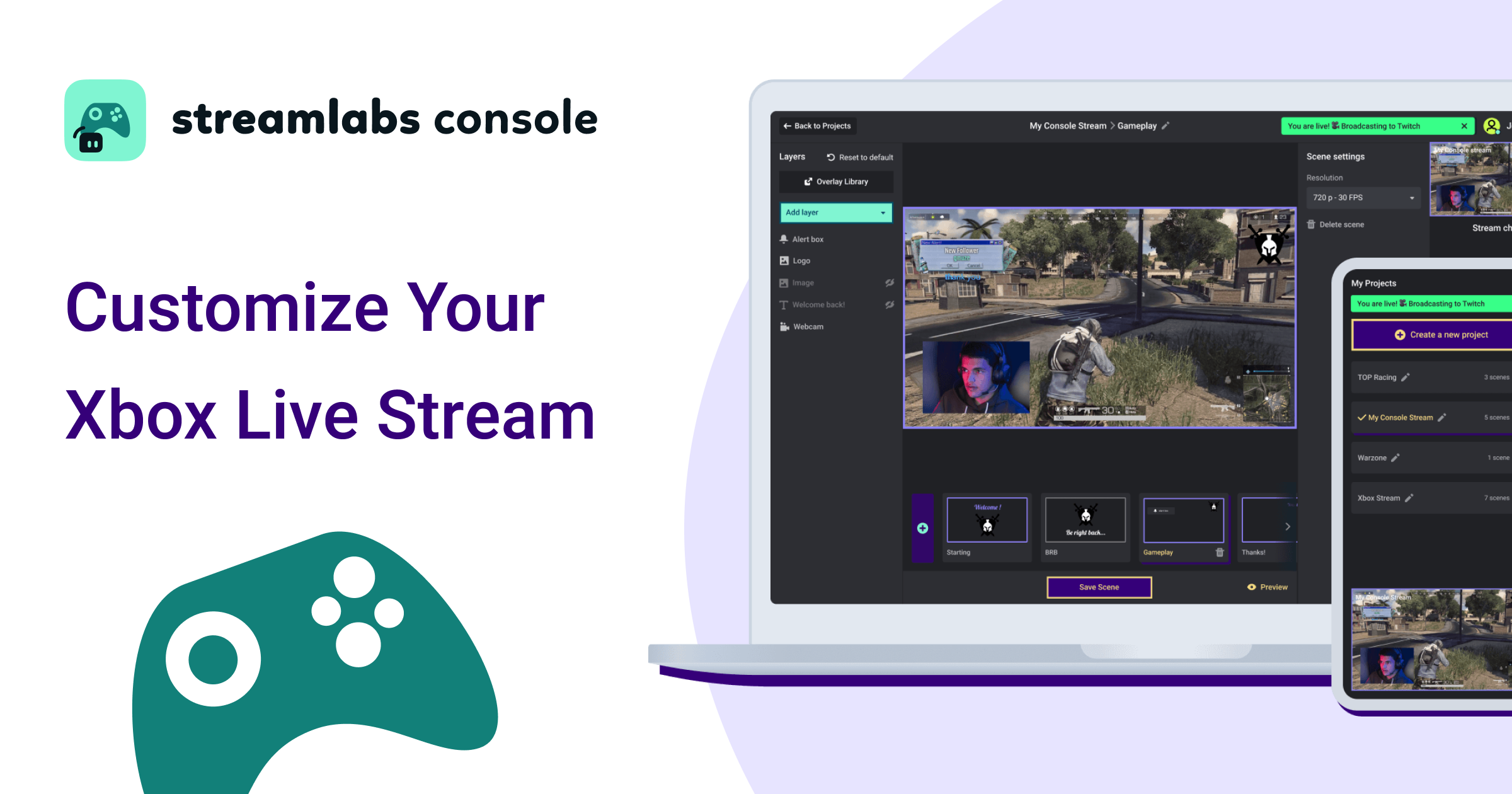
Get started with Streamlabs Console today and stream from your Xbox to Twitch with overlays, alerts, and widgets all without needing a PC or capture card.
summer ferry
Yea and when I click go live nothing happens. Restarted xbox a few times now
Im trying to stream to kick not twitch
gritty isle
summer ferry
Im trying to stream to kick not twitch
You have to go live at least to Twitch. You can’t only stream to Kick.
summer ferry
ok , how do i control the steam using a cell or tablet/
gritty isle
summer ferry
ok , how do i control the steam using a cell or tablet/
You control it via the Streamlabs Cosnole web site which you can access on either of those devices if they have internet access.
There’s not much to it. Pretty simple.
summer ferry
no app?
gritty isle
Nope.
 dusty comet
any known issues with twitch server connections today?
 abstract plazaBOT
 Having trouble? Want to see if anyone else is having the same problem?
Check out our #known-issues channel! We do our best to keep this channel as current as possible with new bugs and progress updates!
If you can't find what you need please submit a ticket at: https://support.streamlabs.com/hc/en-us/requests/new
gritty isle
dusty comet
any known issues with twitch server connections today?
Noting widespread if that’s what you’re asking.
 wispy latchBOT
@dusty comet 🌐 Finding Your Best Twitch Server
To ensure the most stable and high-quality stream to Twitch, we recommend using a Twitch test tool to find the optimal server for your location and internet connection.
📋 How to Use the Twitch Test Tool:
- Access the tool here: Twitch Test Tool
- Run the test using either the Medium or Long duration. Short tests may not provide the most accurate results.
- Select your specific region from the listed options. If your exact region is not available, choose 5 to 6 servers closest to you.
- Aim for a quality score of at least 84. This indicates a strong and stable connection.
🛠️ Applying Your Settings in Streamlabs Desktop:
- Once you've identified a good server, navigate to your Streamlabs Desktop settings:
Settings>Stream>Stream to custom ingest. - From there, you can manually select your preferred server based on your test results.
dusty comet
I was seeing if it was widespread thanks. Ironically twitch inspector is showing my bit rate fine im just losing alot specifically in SLOBS which I havent had that issue with yet and ive been using it forever.
gritty isle
Down Detector showing a lot of reports in the last hour or so for Twitch.
Seems like it’s not a Streamlabs issues. Seeing people report similar issues on the Elgato and OBS discords.
dusty comet
I saw a small uptick but nothing major and I wasnt sure how common that was for twitch down detector so figured id come to the source to make sure.
gritty isle
 wary tundra
Hello,
I am experiencing a preview performance issue in Streamlabs that started recently, even though my setup worked perfectly for many months. I constantly use Dual Output (16:9 + 9:16 for TikTok). The issue appeared only a few weeks ago, despite this configuration working without any problems before.
My setup: RTX 3090, Ryzen 9 5950X, 32 GB RAM, Windows 11, 165 Hz monitor.
The problem:
When a game is focused, the Streamlabs preview becomes very choppy, even though the game itself runs smoothly.
If I ALT+TAB and the game loses focus, the preview instantly becomes smooth. When I return to the game, the stuttering returns.
Dual Output is always enabled, and it worked perfectly in the past.
The biggest issue is canvas FPS:
– at 60 FPS the preview renders at about 3–5 FPS,
– at 120–160 FPS the preview runs at around 30–40 FPS,
– about five months ago, 60 FPS produced a fully smooth 60 FPS preview.
Streamlabs logs show zero dropped or lagged frames. CPU usage is only 3–4%, and GPU is not overloaded.
This appears to be a preview rendering or GPU scheduling issue introduced by a recent Streamlabs or Windows 11 update.
My questions:
– Is this preview stuttering issue at 60 FPS with Dual Output a known problem?
– Are any fixes planned for preview performance?
Thank you for your assistance.
 round turret
Hello, When i try to change scenes from my pc to xbox on streamlabs, it completey crashes streamlab. It closes the whole thing out.
abstract plazaBOT
Having trouble? Want to see if anyone else is having the same problem?
Check out our #known-issues channel! We do our best to keep this channel as current as possible with new bugs and progress updates!
If you can't find what you need please submit a ticket at: https://support.streamlabs.com/hc/en-us/requests/new
abstract plazaBOT
 Do you have a Streamlabs Ultra membership? Are you part of the Streamlabs All-Stars program?
Get your Discord roles by going to this page here: https://streamlabs.com/dashboard#/settings/integrations and clicking "Link" next to Discord! Ultra members and higher tier All-Stars members will have access to private channels for support!
Interested in Ultra? Check it out here: https://streamlabs.com/ultra?refl=discord
Are you knowledgeable about Streamlabs products?
Get rewarded for helping the Streamlabs Community here in Discord!
👉 Apply to be a part of the Streamlabs Support Volunteer Program!
Application Link:
https://forms.gle/eKS29zWfFjGEzaRp7
For details, see our post in
#announcements message
 granite plank
Hello, good morning. I made the purchase of the paid version, and the amount has already been charged to my credit card, but access to the paid version of my account has not been granted. What should I do?
granite plank
granite plank
Hello, good morning. I made the purchase of the paid version, and the amount has...

 gritty isle
granite plank
gritty isle
granite plank
You will need to submit a ticket for that as it appears there may have been an issue processing your payment. To submit a ticket, click here; https://support.streamlabs.com/hc/en-us/requests/new.
We cannot assist with issues involving money on Discord.
granite plank
gritty isle
You will need to submit a ticket for that as it *appears* there may have been an...
thankyou bro
abstract plazaBOT
Having trouble? Want to see if anyone else is having the same problem?
Check out our #known-issues channel! We do our best to keep this channel as current as possible with new bugs and progress updates!
If you can't find what you need please submit a ticket at: https://support.streamlabs.com/hc/en-us/requests/new
 worldly stag
Any response to my post a few days ago?
abstract plazaBOT
Do you have a Streamlabs Ultra membership? Are you part of the Streamlabs All-Stars program?
Get your Discord roles by going to this page here: https://streamlabs.com/dashboard#/settings/integrations and clicking "Link" next to Discord! Ultra members and higher tier All-Stars members will have access to private channels for support!
Interested in Ultra? Check it out here: https://streamlabs.com/ultra?refl=discord
Are you knowledgeable about Streamlabs products?
Get rewarded for helping the Streamlabs Community here in Discord!
👉 Apply to be a part of the Streamlabs Support Volunteer Program!
Application Link:
https://forms.gle/eKS29zWfFjGEzaRp7
For details, see our post in
#announcements message
 sonic sable
How long does replies take for streamlabs to respond via e-mail , due to the fact I cannot use the program properly right now but the person who recovered my scenes last time this happened was called emily
 tired epoch
I have problems with multi streaming on our Stream Team Twitch account . People are not able to stream on their personal twitch and on the team Twitch channel at the same time we were able to do it before but now there’s issues can I get some assistance?
wary tundra
Can u help me?
abstract plazaBOT
Having trouble? Want to see if anyone else is having the same problem?
Check out our #known-issues channel! We do our best to keep this channel as current as possible with new bugs and progress updates!
If you can't find what you need please submit a ticket at: https://support.streamlabs.com/hc/en-us/requests/new
 delicate dew
Hi having trouble with connecting, streamlabs console with twitch and tiktok.
It says they are already linked to another user
I have tried logging out everywhere… and then i go to twitch and it will say its connected
gritty isle
delicate dew
Hi having trouble with connecting, streamlabs console with twitch and tiktok.
It...
Sounds like you already have those connected in or, or perhaps two, other Streamlabs accounts.
If you login the Streamlabs Console web site by clicking the Twitch button, that should automatically connect that Twitch channel.
Then connect your TikTok. If you get the same message, go to the main Streamlabs website https://streamlabs.com/, log in with your TikTok and then go here https://streamlabs.com/dashboard#/settings/account-settings/platforms and you should be able to unmerge your TikTok and then [ IMPORTANT ], log out of the Streamlabs web site by clicking your profile pictrure and choose Log out.
Then back on the Streamlabs Console web site, you should be able to merge your TikTok.
 delicate dew
Thank you, that helped. But now the console subscription i started doesn’t show up on the streamlabs acct that i signed up with and i can’t find where to even access it
gritty isle
delicate dew
Thank you, that helped. But now the console subscription i started doesn’t show...
What Twitch channel did you log in with before your purchased the subscription? Was it a different one than the one above?
delicate dew
Same twitch
gritty isle
delicate dew
Same twitch
And the subscription does or doesn't show here https://console.streamlabs.com/account#/general in the Subscription plan box.
delicate dew
No, okay i just saw that i do have another acct for streamlabs not the console one though
So it’s a different email for both
Do they connect somehow?
gritty isle
delicate dew
No, okay i just saw that i do have another acct for streamlabs not the console o...
And if you log in the other account, on the main Streamlabs web site, do you see the subscription here https://streamlabs.com/dashboard#/membership or not?
delicate dew
It says free membership for the first email trying to check the other one
The second acct same
I signed up for a trial of streamlabs console
abstract plazaBOT
Having trouble? Want to see if anyone else is having the same problem?
Check out our #known-issues channel! We do our best to keep this channel as current as possible with new bugs and progress updates!
If you can't find what you need please submit a ticket at: https://support.streamlabs.com/hc/en-us/requests/new
gritty isle
delicate dew
I signed up for a trial of streamlabs console
That means you had to have entered your billing details and selected the monthly or annual plan. You should have then received an email as a confirmation.
delicate dew
Yeah i did, where can i see the details for the membership?
gritty isle
delicate dew
Yeah i did, where can i see the details for the membership?
It should show here https://streamlabs.com/dashboard#/membership
 ornate raft
anyone else having issues with alerts? My alertbox still shows everything but there is zero audio for me or stream...
abstract plazaBOT
Do you have a Streamlabs Ultra membership? Are you part of the Streamlabs All-Stars program?
Get your Discord roles by going to this page here: https://streamlabs.com/dashboard#/settings/integrations and clicking "Link" next to Discord! Ultra members and higher tier All-Stars members will have access to private channels for support!
Interested in Ultra? Check it out here: https://streamlabs.com/ultra?refl=discord
Are you knowledgeable about Streamlabs products?
Get rewarded for helping the Streamlabs Community here in Discord!
👉 Apply to be a part of the Streamlabs Support Volunteer Program!
Application Link:
https://forms.gle/eKS29zWfFjGEzaRp7
For details, see our post in
#announcements message
wary tundra
Can u help me?
abstract plazaBOT
Are you knowledgeable about Streamlabs products?
Get rewarded for helping the Streamlabs Community here in Discord!
👉 Apply to be a part of the Streamlabs Support Volunteer Program!
Application Link:
https://forms.gle/eKS29zWfFjGEzaRp7
For details, see our post in
#announcements message
wary tundra
Hello,
I am experiencing a preview performance issue in Streamlabs that started recently, even though my setup worked perfectly for many months. I constantly use Dual Output (16:9 + 9:16 for TikTok). The issue appeared only a few weeks ago, despite this configuration working without any problems before.
The problem:
When a game is focused, the Streamlabs preview becomes very choppy, even though the game itself runs smoothly.
If I ALT+TAB and the game loses focus, the preview instantly becomes smooth again. When I return to the game, the stuttering returns.
Dual Output is always enabled, and it worked perfectly in the past.
abstract plazaBOT
Do you have a Streamlabs Ultra membership? Are you part of the Streamlabs All-Stars program?
Get your Discord roles by going to this page here: https://streamlabs.com/dashboard#/settings/integrations and clicking "Link" next to Discord! Ultra members and higher tier All-Stars members will have access to private channels for support!
Interested in Ultra? Check it out here: https://streamlabs.com/ultra?refl=discord
Having trouble? Want to see if anyone else is having the same problem?
Check out our #known-issues channel! We do our best to keep this channel as current as possible with new bugs and progress updates!
If you can't find what you need please submit a ticket at: https://support.streamlabs.com/hc/en-us/requests/new
wary tundra
Update:
When switching canvas FPS, the actual stream performance (not just the preview) changes drastically:
– At 60 FPS the stream runs at about 3–4 FPS
– At 120 FPS the stream improves slightly but stays around ~25 FPS
– At 160 FPS it reaches up to ~40 FPS max, but stuttering is still present at all settings
A few months ago, 60 FPS resulted in a fully smooth stream with zero issues. There are still no dropped frames in the logs, and CPU usage stays at 3–4%, just like before.
I would really appreciate help restoring the smooth 60 FPS stream performance that I previously had.
abstract plazaBOT
Having trouble? Want to see if anyone else is having the same problem?
Check out our #known-issues channel! We do our best to keep this channel as current as possible with new bugs and progress updates!
If you can't find what you need please submit a ticket at: https://support.streamlabs.com/hc/en-us/requests/new
abstract plazaBOT
Having trouble? Want to see if anyone else is having the same problem?
Check out our #known-issues channel! We do our best to keep this channel as current as possible with new bugs and progress updates!
If you can't find what you need please submit a ticket at: https://support.streamlabs.com/hc/en-us/requests/new
summer ferry
Is streamlabs controller still working on android? Tries to download and won't install
abstract plazaBOT
Having trouble? Want to see if anyone else is having the same problem?
Check out our #known-issues channel! We do our best to keep this channel as current as possible with new bugs and progress updates!
If you can't find what you need please submit a ticket at: https://support.streamlabs.com/hc/en-us/requests/new
abstract plazaBOT
Do you have a Streamlabs Ultra membership? Are you part of the Streamlabs All-Stars program?
Get your Discord roles by going to this page here: https://streamlabs.com/dashboard#/settings/integrations and clicking "Link" next to Discord! Ultra members and higher tier All-Stars members will have access to private channels for support!
Interested in Ultra? Check it out here: https://streamlabs.com/ultra?refl=discord
Are you knowledgeable about Streamlabs products?
Get rewarded for helping the Streamlabs Community here in Discord!
👉 Apply to be a part of the Streamlabs Support Volunteer Program!
Application Link:
https://forms.gle/eKS29zWfFjGEzaRp7
For details, see our post in
#announcements message
 grim panther
Hey my Streamlabs will frequently log me out of my account while I am live and force me to completely start over the entire process of logging in and setting up. It also no longer tells me when the stream has disconnected or not. the blackout protection has stopped working entirely. It also will not work with the wifi in my house and know it’s the program and not the device because prism works. Everything is updated and it’s a brand new phone, I’m not sure why there’s always significant issues
 shrewd rock
Anyone aware that the streamlabs controller app won't install on Google play
abstract plazaBOT
Having trouble? Want to see if anyone else is having the same problem?
Check out our #known-issues channel! We do our best to keep this channel as current as possible with new bugs and progress updates!
If you can't find what you need please submit a ticket at: https://support.streamlabs.com/hc/en-us/requests/new
abstract plazaBOT
Are you knowledgeable about Streamlabs products?
Get rewarded for helping the Streamlabs Community here in Discord!
👉 Apply to be a part of the Streamlabs Support Volunteer Program!
Application Link:
https://forms.gle/eKS29zWfFjGEzaRp7
For details, see our post in
#announcements message
Do you have a Streamlabs Ultra membership? Are you part of the Streamlabs All-Stars program?
Get your Discord roles by going to this page here: https://streamlabs.com/dashboard#/settings/integrations and clicking "Link" next to Discord! Ultra members and higher tier All-Stars members will have access to private channels for support!
Interested in Ultra? Check it out here: https://streamlabs.com/ultra?refl=discord
abstract plazaBOT
Having trouble? Want to see if anyone else is having the same problem?
Check out our #known-issues channel! We do our best to keep this channel as current as possible with new bugs and progress updates!
If you can't find what you need please submit a ticket at: https://support.streamlabs.com/hc/en-us/requests/new
 glacial kindle
I have dual output enabled but how do I record vertical and horizontal
summer ferry
shrewd rock
Anyone aware that the streamlabs controller app won't install on Google play
Same issue here! Been trying for days
 abstract briar
I need help, I tried to install the Streamlabs plugin for OBS and for some reason it doesn't install properly, what do I do?
For some reason, the installer doesn't work properly and I don't know how to fix it
Can someone help me with that, please?
 muted pine
can streamlabs still record my browser or really any window or no because I removed the window capture thing off my streamlabs. I still have game capture but thats targeted on another thing so it cant show my browser and whole pc right?
 agile owl
if its game capture no it will not capture your desktop/browser pages
muted pine
its on this
 agile owl
then it would only capture LimbusCompany
you could put your browser in front of the game and the capture would stay on the game
abstract briar
I have been asking for assistance on my issue with Streamlabs plugin for OBS, can someone help me?
wispy latchBOT
{1}  Need More Help? Contact Support!
We understand that sometimes, even with our extensive resources, you might still have unanswered questions or specific issues.
If you've already checked the following resources and haven't found a solution:
- Our #1173605643484139591 channel
- Our self-help articles on the Creator Resource Hub
Then please submit a support ticket, and our dedicated team will be happy to assist you directly: Submit a Support Ticket Here
muted pine
agile owl
you could put your browser in front of the game and the capture would stay on th...
ok ty
 thick axle
anyone else having a with going Live tonight? It says im transmitting but not LIVE on FB or YouTube.
 dim wave
can't go live on YouTube, says it's starting soon, on twitch via direct not connect is fine
thick axle
This Sucks! It says im live but not live where im suppose to be.
agile owl
Well the top nerds are working on it
thick axle
good thing i record my streams too
muted pine
is there a reason why the window part doesnt show your browser? isnt that full screen window?
 abstract plazaBOT
Having trouble? Want to see if anyone else is having the same problem?
Check out our #known-issues channel! We do our best to keep this channel as current as possible with new bugs and progress updates!
If you can't find what you need please submit a ticket at: https://support.streamlabs.com/hc/en-us/requests/new
muted pine
agile owl
it's just not a game
huh ok, funny it shows spofity and streamlabs itself lol. so it wont stream anything when i not in the game
agile owl
muted pine
huh ok, funny it shows spofity and streamlabs itself lol. so it wont stream anyt...
nope it will only focus on the game
 thick sparrow
Is there a known issue with streamlabs desktop pluggin for elgato stream deck desktop? It says "streamlabs is not running" when it is not. I have tried everything I can think of to resolve the issue
muted pine
alr ty
gritty isle
thick sparrow
Is there a known issue with streamlabs desktop pluggin for elgato stream deck de...
Make sure you have the latest version of Steam Deck, and then either:
Run both Streamlabs Desktop and Stream Deck as administrator
OR
Run both Streamlabs Desktop and Stream Deck as normal (not administrator).
thick sparrow
gritty isle
Make sure you have the latest version of Steam Deck, and then either:
Run both ...
Thank You, I am new to Stream Deck
gritty isle
thick sparrow
Thank You, I am new to Stream Deck
You’re welcome.
 placid prism
Quick question for anyone that can help.
So previously a couple months ago when i would use the dual output feature it would automatically have tiktok as my primary source no matter what so when i would stream using dual output to both tiktok and twitch it would only stream to tiktok but not twitch. Is this still the case or is there a way to fix it?
 gusty umbra
placid prism
Quick question for anyone that can help.
So previously a couple months ago when...
gusty umbra
placid prism
Quick question for anyone that can help.
So previously a couple months ago when...
Usually if it’s not streaming to Twitch, your Bitrate is too high, 6k is twitch max.
 patent jay
Can anyone hop in a call to help get Rumble to Stream labs?
 cobalt marsh
hello so i am trying to get my chatbot reconnect and i generating token but when i click on connect it gives me invaild token detected please try generating a new one. is there a way to make a new token
abstract plazaBOT
Having trouble? Want to see if anyone else is having the same problem?
Check out our #known-issues channel! We do our best to keep this channel as current as possible with new bugs and progress updates!
If you can't find what you need please submit a ticket at: https://support.streamlabs.com/hc/en-us/requests/new
abstract plazaBOT
Are you knowledgeable about Streamlabs products?
Get rewarded for helping the Streamlabs Community here in Discord!
👉 Apply to be a part of the Streamlabs Support Volunteer Program!
Application Link:
https://forms.gle/eKS29zWfFjGEzaRp7
For details, see our post in
#announcements message
Do you have a Streamlabs Ultra membership? Are you part of the Streamlabs All-Stars program?
Get your Discord roles by going to this page here: https://streamlabs.com/dashboard#/settings/integrations and clicking "Link" next to Discord! Ultra members and higher tier All-Stars members will have access to private channels for support!
Interested in Ultra? Check it out here: https://streamlabs.com/ultra?refl=discord
 tame flume
Hello there! So I’m not sure why but when I stream using streamlabs on YouTube, TikTok and twitch, only twitch has black screen. My bitrate at 8000 and my upload speed is at 50mb. Can anyone help me find out root of this cause, please?
 nocturne copper
Hello, I'm pretty sure there used to be a tab for giveaways in the desktop app. I could set up the giveaway myself in the desktop app. That has disappeared and now I can only do it via the dashboard on the website. Is that right?
gritty isle
nocturne copper
Hello, I'm pretty sure there used to be a tab for giveaways in the desktop app. ...
That is correct.
gritty isle
tame flume
Hello there! So I’m not sure why but when I stream using streamlabs on YouTube, ...
The maximum bitrate that Twitch allows is 6000. Reduce your bitrate to 6000.
 gusty rampart
Hi I told by my listener that some of them can"t watch my twitch stream in iOS app. only iOS app but they can see browser and pc. so it seems there is no trouble in they account and twitch setting. I think my video setting have some trouble. If someone know the issue like me , please tell me how to fix. thank you.
gritty isle
gusty rampart
Hi I told by my listener that some of them can"t watch my twitch stream in iOS a...
Well, which iOS app are they using to start off with?
gusty rampart
I think they use Twitch app.
gritty isle
gusty rampart
I think they use Twitch app.
If that's the only place that viewers can't watch your live streams. you should reach out to Twitch since that's their app. Streamlabs is not the publisher of the Twitch app.
gusty rampart
gritty isle
If that's the only place that viewers can't watch your live streams. you should ...
I see.thank you
gritty isle
gusty rampart
I see.thank you
You're welcome.
 tall storm
I keep getting a message when I go live on my phone - Request has insufficient Authentication scopes.
What does that mean
gritty isle
tall storm
I keep getting a message when I go live on my phone - Request has insufficient A...
You're trying to go live to YouTube?
tall storm
Yes and Facebook.
gritty isle
tall storm
Yes and Facebook.
Refreshing the connection between Streamlabs and YouTube should resolve this.
-
Log out of the Streamlabs web site on every device you access it: Click your PFP and choose Log out.
-
If you use the standalone Streamlabels application, log out of that.
-
Follow this guide: https://streamlabs.com/content-hub/post/how-to-disconnect-your-streamlabs-account. Just follow the section for YouTube.
-
Log out in Streamlabs Desktop and Streamlabs Mobile.
-
Navigate back to the Streamlabs web site and log in with your YouTube. This re-establishes the connection.
-
👉 IMPORTANT: Once you have completed the guide, go back to the Streamlabs web site https://streamlabs.com/dashboard#/recentevents, click the Live Actions tab, scroll all the way to the bottom and click the Reload Widgets button. PLEASE Don't skip this step!
-
Log back in to all the other Streamlabs products you use.
It's not obvious when you log in, but one of the interstitials will say something like Streamlabs has access to x of 6 scopes. Click there and make sure that all 6 of the boxes are checked and then proceed through the rest of the log in process.
👇 👇 👇 👇
tall storm
Thank you, is there a way of linking Instagram live on streamlabs
gritty isle
tall storm
Thank you, is there a way of linking Instagram live on streamlabs
We don't have any integration with Instagram at this time.
You can go live to Instagram from Streamlabs Desktop (not sure if this works for Streamlabs Mobile): https://streamlabs.com/content-hub/post/how-to-stream-instagram-live-producer-with-streamlabs-desktop
tall storm
Its still not working after follow the information above
gritty isle
tall storm
Its still not working after follow the information above
Did you do this part?
It's not obvious when you log in, but one of the interstitials will say something like Streamlabs has access to x of 6 scopes. Click there and make sure that all 6 of the boxes are checked and then proceed through the rest of the log in process.
If not, you'll need to go through all the steps again.

 ruby heart
hey guys looking for advice trying to steam minecraft but stream labs won't even pick it up in game capture my scrreen just stays black and my game crashes
gritty isle
ruby heart
hey guys looking for advice trying to steam minecraft but stream labs won't even...
This guide might be of some assistance: https://obsproject.com/kb/minecraft-java-edition-troubleshooting. It is geared for OBS Studio but the same concepts apply in Streamlabs Desktop.
OBS Knowledge Base. Set OBS and Minecraft to run on the same GPU for compatibility with Game Capture
 hot magnet
hey can anyone help me with this. i logged in and out reset my stream key and everything its to do with twitch specifically
 ruby heart
gritty isle
This guide might be of some assistance: https://obsproject.com/kb/minecraft-jav...
ruby heart
gritty isle
This guide might be of some assistance: https://obsproject.com/kb/minecraft-jav...
i shall give it a go thank you
gritty isle
hot magnet
hey can anyone help me with this. i logged in and out reset my stream key and ev...
Looks like you have Dual Output enabled. Please select Horizontal for Twitch.
Also, go to Settings > Advanced > Network > Bind to IP.
If the drop-down menu is set to an IP address, change that setting to Default.
If the drop-down menu is set to Default, change it to the IP address of your computer, usually starts with 192.168 or 10.10.
After that, click Done to save the settings and then restart Streamlabs Desktop and see if you can go live.
hot magnet
it worked thanks
ruby heart
ruby heart
i shall give it a go thank you
thank you i tried it but the game still crashed and its still not showing on streamlabs
gritty isle
hot magnet
it worked thanks
You're welcome.
gritty isle
ruby heart
thank you i tried it but the game still crashed and its still not showing on str...
Can you cap the FPS in Minecraft? If so, limit the FPS to 60 or 120.
ruby heart
i can i shall try now


That’s the message I got capping fps didn’t work this is the same message I get when it crashes normally
gritty isle
ruby heart
That’s the message I got capping fps didn’t work this is the same message I get ...
Probably need to reach out to Microsoft then so see why the game is crashing. That Exit Code might help then troubleshoot.
ruby heart
ill try thank you
 finite oriole
Is anyone else having an issue where they multistream, then at the 4-hour mark Streamlabs shuts down the Twitch and TikTok, but not the YT stream? It’s happened to me twice in the past 2 days
If I close and restart the stream, it won’t restart the Twitch, and is 50/50 on TikTok
gritty isle
finite oriole
Is anyone else having an issue where they multistream, then at the 4-hour mark S...
You multistreaming with a Streamlabs Ultra subscription?
 torn berry
Unable to stream on TikTok even with the base subscription, it will go live on twitch but not TikTok. I was told it would automatically go live on both once I’m approved and I have my console set to Streamlabs and everything connected
finite oriole
gritty isle
You multistreaming with a Streamlabs Ultra subscription?
I am!
gritty isle
finite oriole
I am!
Thank you being a Streamlabs Ultra subscriber!
Please link your discord per the tagged instructions below and ask again in the VIP Support channel, which is one of your subscriber benefits.
wispy latchBOT
 Streamlabs Ultra & All-Stars Discord Access
@finite oriole, are you a Streamlabs Ultra Subscriber or an All-Stars member? If so, you can link your Discord account to gain access to exclusive Ultra/VIP roles and private chat channels here in our Discord server!
🔗 How To Get Your Ultra/All-Stars Discord Role:
Link your Discord account under your Streamlabs integrations settings: Streamlabs Integrations Dashboard
Not Yet an Ultra Member?
You can learn more about Ultra and upgrade your membership here: Upgrade to Streamlabs Ultra
finite oriole
Thanks! I’ll do that as soon as I’m off stream
gritty isle
torn berry
Unable to stream on TikTok even with the base subscription, it will go live on t...
You can check on you application here: https://www.tiktok.com/falcon/live_g/live_access_pc_apply/result/index.html?id=GL6399433079641606942&lang=en-US
torn berry
gritty isle
You can check on you application here: https://www.tiktok.com/falcon/live_g/liv...
I’m approved
Nothing should be wrong but something is wrong
gritty isle
torn berry
I’m approved
You're trying from your Xbox console with your Streamlabs Console subscription?
torn berry
Yeah
I’ve been approved, have the subscription, have my destination set as Streamlabs
gritty isle
torn berry
I’ve been approved, have the subscription, have my destination set as Streamlabs
Then go through the guide please: https://support.streamlabs.com/hc/en-us/articles/35259691237147-TikTok-Live-Streaming-Access-Revoked-No-Violations
Streamlabs
Date Reported: 3/19/2025Status: Awaiting Third Party
Important Note: Starting July 7,
2025, TikTok creators must stream at least 50% gaming content to keep
access to TikTok LIVE.  If...
Having trouble? Want to see if anyone else is having the same problem?
Check out our #known-issues channel! We do our best to keep this channel as current as possible with new bugs and progress updates!
If you can't find what you need please submit a ticket at: https://support.streamlabs.com/hc/en-us/requests/new
 vital robin
i cant get my screen to pop up on console streamlabs help>
 sudden idol
I need help with my Ultra subscription payment.
tame flume
gritty isle
The maximum bitrate that Twitch allows is 6000. Reduce your bitrate to 6000.
I have been streaming before 8000 though? I am streaming 1440p
sudden idol
sudden idol
I need help with my Ultra subscription payment.
I was in the VIP Support channel previously, but they kicked me out when my subscription renewal did not process and I did not know it. I am trying to get that paid and LINK is not working. Can someone at Streamlabs help please?
abstract plazaBOT
Are you knowledgeable about Streamlabs products?
Get rewarded for helping the Streamlabs Community here in Discord!
👉 Apply to be a part of the Streamlabs Support Volunteer Program!
Application Link:
https://forms.gle/eKS29zWfFjGEzaRp7
For details, see our post in
#announcements message
Do you have a Streamlabs Ultra membership? Are you part of the Streamlabs All-Stars program?
Get your Discord roles by going to this page here: https://streamlabs.com/dashboard#/settings/integrations and clicking "Link" next to Discord! Ultra members and higher tier All-Stars members will have access to private channels for support!
Interested in Ultra? Check it out here: https://streamlabs.com/ultra?refl=discord
 fierce scarab
I have issues on my Streamlab
 jade grove
is anyone still getthing the error 500 when trying to access their streamlabs accounts my wife's account is error 500 when logging into it via twitch but my account via twitch logs in fine. only hers seems to be affected? can anyone provide any assistance for this? i've tried on multiple networks cleared all cache on multiple devices but from all i can see it's streamlabs side causing the issue.
actually now even my account is showing Unauthorized error
 agile dagger
I'm having issues with activating streamlabs game overlay
I've enabled the hotkeys and did everything I saw online to set it up
The toggle overlay positioning hotkey works but the toggle overlay on/off doesn't work
 heady lodge
My main platfrom is KICK... but yesterday I flipped the switch on TikTok to multistream... is there a way to END tiktok's broadcast and still keep going on KICK?
 river crest
One message removed from a suspended account.
gusty umbra
heady lodge
My main platfrom is KICK... but yesterday I flipped the switch on TikTok to mult...
You cannot at this time.
gritty isle
tame flume
I have been streaming before 8000 though? I am streaming 1440p
Anything above 6000 s not always guaranteed unless you are a Twitch Partner.
 cinder wind
trying to link my accounts but it says my Youtube and tik tok are linked to a different account. I only have this one account
gritty isle
cinder wind
trying to link my accounts but it says my Youtube and tik tok are linked to a di...
If you're getting that message, those platforms are already connected to another Streamlabs account.
Would suggest you log in with YouTube and TikTok specifically and then unmerge them and then merge them into this other Streamlabs account.
cinder wind
how do I do that with each account? like the directions specifically?
Got tik tok unmerged but when I reconnect it says it's linked to another account
gritty isle
cinder wind
how do I do that with each account? like the directions specifically?
When you go log in, for example, click the YouTube button, and then log in with YouTube channel you are trying to merge. That gets you into the Streamlabs account where that YouTube channel is merged. Then click unmerge. If YouTube is the Primary, you'd have to log to that Streamlabs account with its Streamlabs ID (click the Streamlabs ID button this time) and then unmerge YouTube.
Same procedure with TikTok.
Problem is that per email address, you can only have one Streamlabs ID. If you have access to multiple email addresses, you could make multiple Streamlabs IDs in order to manage all this.
jade grove
jade grove
is anyone still getthing the error 500 when trying to access their streamlabs ac...
any advice for this? i still can't get into either of our accounts....
gritty isle
jade grove
any advice for this? i still can't get into either of our accounts....
That means there is a problem with that Streamlabs account. You won't be able to resolve that on your end. Please submit a ticket on that: https://support.streamlabs.com/hc/en-us/requests/new. Inlcude the Streamlabs ID for that account, if you have a Streamlabs ID, or a platform and channel that is merged in that account, Twitch/MyTwitchChannel for example so the staff can locate the account.
jade grove
gritty isle
That means there is a problem with that Streamlabs account. You won't be able t...
I did, i got a reference but no email confirmation
gritty isle
jade grove
I did, i got a reference but no email confirmation
Depending on when you submitted the ticket, it could still be processing, which sometimes takes longer than expected. Be sure to check your Junk/Spam folder.
I'd suggest logging into the Supprot Site first so you can track your ticket better but with the 500 issue, that's not possible sadly.
jade grove
gritty isle
Depending on when you submitted the ticket, it could still be processing, which ...
yeah can't even login to the zendesk webapp
gritty isle
jade grove
yeah can't even login to the zendesk webapp
Yup. Something with your account is broke and only the staff will be able to fix it. Do you happen to have the ticket number? It should have shown that on the screen after you submitted the form.
heady lodge
gusty umbra
You cannot at this time.
ok thank you..
now, why isn't tiktok chat showing? i only see the kick chat?
gritty isle
heady lodge
ok thank you..
now, why isn't tiktok chat showing? i only see the kick chat?
The TikTok integration we have doesn't include chat or alerts. Just the ability to go live and nothing else.
cinder wind
Okay I got them all merged but my Ultra is on the "other" account but it's the same email
gritty isle
cinder wind
Okay I got them all merged but my Ultra is on the "other" account but it's the s...
Submit a ticket on that please: https://support.streamlabs.com/hc/en-us/requests/new. I think they are able to move the Ultra subscription to another account.
cinder wind
perfect thank you
gritty isle
That's not something you can fix from your end.
gritty isle
cinder wind
perfect thank you
You're welcome.
@rotund depot In Streamlabs Desktop, please log out, wait a minute, and then log back in.
Then go to Settings > Advanced > Network > Bind to IP.
If the drop-down menu is set to an IP address, change that setting to Default.
If the drop-down menu is set to Default, change it to the IP address of your computer, usually starts with 192.168 or 10.10.
After that, click Done to save the settings and then restart Streamlabs Desktop and see if you can go live.
 rotund depot
I’ll keep u updated
abstract plazaBOT
Having trouble? Want to see if anyone else is having the same problem?
Check out our #known-issues channel! We do our best to keep this channel as current as possible with new bugs and progress updates!
If you can't find what you need please submit a ticket at: https://support.streamlabs.com/hc/en-us/requests/new
jade grove
gritty isle
Yup. Something with your account is broke and only the staff will be able to fi...
891315
 dusty mist
Does anyone know why streamlabs decided to suddenly reboot and start from scratch? all my scenes + recording and streaming settings have been removed and its telling me to start from scratch even when i log into my account. Might i add it worked perfectly fine this morning
gritty isle
jade grove
891315
When did you submit the ticket?
gritty isle
dusty mist
Does anyone know why streamlabs decided to suddenly reboot and start from scratc...
Streamlabs Desktop launching as if it is a fresh/like it's the first time using it?
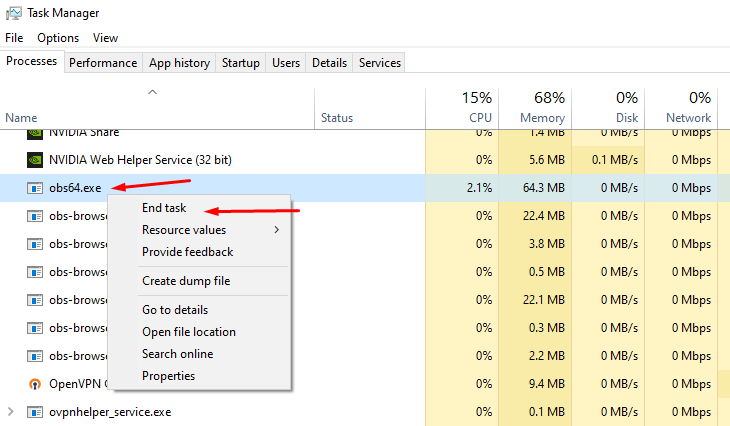
The "acting like it's a fresh restart" is due to certain background processes not closing properly. First, please close Streamlabs Desktop.
Then open your task manager. Please press "Ctrl + Shift + Esc" on your keyboard to bring up your Task Manager.
Please select "More Details" at the bottom if you don't see the percentages of resources used.
Check for any running programs called "Streamlabs," "Electron," or "Obs64". If you find either of these processes running, please right-click and end the process. https://gyazo.com/d6b9babb076875ee5889983b532948e1
Then, reopen Streamlabs Desktop. This should resolve it but if it doesn't please submit a ticket at https://support.streamlabs.com/hc/en-us/requests/new and our team would be able to assist you further.
 jade grove
gritty isle
When did you submit the ticket?
jade grove
gritty isle
When did you submit the ticket?
today as i was trying to stream today and can't access anything on stream labs for the shared access or myself on both our accounts. i assume the turn around time is a few days.
gritty isle
jade grove
today as i was trying to stream today and can't access anything on stream labs f...
Ah, yes, tickets are answered in the order they are received. Be patient and they will get to you.
Tickets are answered in the order they are received. We cannot offer an ETA on any response to a ticket. Be patient and they will get to you.
rotund depot
@gritty isle same issue
gritty isle
rotund depot
<@301571565840236564> same issue
Twitch?
rotund depot
Yeah
wispy latchBOT
@rotund depot 🌐 Finding Your Best Twitch Server
To ensure the most stable and high-quality stream to Twitch, we recommend using a Twitch test tool to find the optimal server for your location and internet connection.
📋 How to Use the Twitch Test Tool:
- Access the tool here: Twitch Test Tool
- Run the test using either the Medium or Long duration. Short tests may not provide the most accurate results.
- Select your specific region from the listed options. If your exact region is not available, choose 5 to 6 servers closest to you.
- Aim for a quality score of at least 84. This indicates a strong and stable connection.
🛠️ Applying Your Settings in Streamlabs Desktop:
- Once you've identified a good server, navigate to your Streamlabs Desktop settings:
Settings>Stream>Stream to custom ingest. - From there, you can manually select your preferred server based on your test results.
rotund depot
If I go into a vc and show u can u help that way
gritty isle
rotund depot
If I go into a vc and show u can u help that way
For moderations purposes, all support has to be done in this channel. I understand the issue. Run the Twitch Test as decribed by the bot above and screen shot the results once it is fully finished.
rotund depot
my pc wont lemme run it
gritty isle
rotund depot
my pc wont lemme run it
Add an exception for it. It's not malware.
gritty isle
And my work day is done - I gotta go play in evening traffic If you get the Twitch Test running, post the results once its done. Remember to select all the ingests in your region and Medium or Long duration - do not use Short duration.
 stray tide
Hello all, how long does it usually take for a ticket to be responded to? I raised one a week ago and still no response. Ticket ID: 890452
gritty isle
stray tide
Hello all, how long does it usually take for a ticket to be responded to? I rais...
Tickets are answered in the order they are received. We cannot offer an ETA on any response to a ticket. Be patient and they will get to you.
tame flume
gritty isle
Anything above 6000 s not always guaranteed *unless* you are a Twitch Partner.
How can I mixed to have 6000 for twitch and 8000 for YouTube?
gritty isle
tame flume
How can I mixed to have 6000 for twitch and 8000 for YouTube?
That’s not possible, sorry. One bitrate for all and you are limited by the platform with almost the lowest accepted bitrate.
tame flume
gritty isle
That’s not possible, sorry. One bitrate for all and you are limited by the plat...
Got it! If I choose 6000 for all platforms, would it be still 1440p? Thanks for your help btw ❤️
gritty isle
tame flume
Got it! If I choose 6000 for all platforms, would it be still 1440p? Thanks for ...
For Twitch, 6000 isn’t enough bitrate for 1440p. Best to go 720p60.
tame flume
Got it! Thank you 🙏🏼
gritty isle
tame flume
Got it! Thank you 🙏🏼
You’re welcome!
 sly sun
some reason subs/followers arent getting shown on activity feed, ive tried log and and re login couple times and yet still didnt fix it
abstract plazaBOT
Having trouble? Want to see if anyone else is having the same problem?
Check out our #known-issues channel! We do our best to keep this channel as current as possible with new bugs and progress updates!
If you can't find what you need please submit a ticket at: https://support.streamlabs.com/hc/en-us/requests/new
abstract plazaBOT
Having trouble? Want to see if anyone else is having the same problem?
Check out our #known-issues channel! We do our best to keep this channel as current as possible with new bugs and progress updates!
If you can't find what you need please submit a ticket at: https://support.streamlabs.com/hc/en-us/requests/new
stray tide
gritty isle
Tickets are answered in the order they are received. We cannot offer an ETA on ...
I thought waiting a week was being patient, but okay 😂
My letters to santa get quicker responses and he has 7 billion people speaking to him
abstract plazaBOT
Are you knowledgeable about Streamlabs products?
Get rewarded for helping the Streamlabs Community here in Discord!
👉 Apply to be a part of the Streamlabs Support Volunteer Program!
Application Link:
https://forms.gle/eKS29zWfFjGEzaRp7
For details, see our post in
#announcements message
Do you have a Streamlabs Ultra membership? Are you part of the Streamlabs All-Stars program?
Get your Discord roles by going to this page here: https://streamlabs.com/dashboard#/settings/integrations and clicking "Link" next to Discord! Ultra members and higher tier All-Stars members will have access to private channels for support!
Interested in Ultra? Check it out here: https://streamlabs.com/ultra?refl=discord
 spring marsh
dose anyone know how to fix my subscriber notifications only sometimes working
 frozen robin
hello guys, for some reason when i do export scenes, stay loading idk why
 tall storm
It seems to be glitchy when I stream on android phone, any advice?
wary tundra
wary tundra
Hello,
I am experiencing a preview performance issue in Streamlabs that started ...
FIX - REINSTALL WINDOWS 😉
 meager falcon
Hi all, when I startup my streamlabs on my windows computer it just provides me with a plain grey screen, and I'm not able to access streamlabs. I've deleted and reinstalled streamlabs, I've restarted my computer but nothing is working. Would appreciate any help I could get?
 gray terrace
how do i see my chat over roblox ?
gritty isle
meager falcon
Hi all, when I startup my streamlabs on my windows computer it just provides me ...
Please submit a ticket on that please: https://support.streamlabs.com/hc/en-us/requests/new
gritty isle
gray terrace
how do i see my chat over roblox ?
Add the Chatbox Widget and also move the Chatbox Widget source to the top of the source list.
 undone flint
Heyyy
gusty umbra
undone flint
Heyyy
Hey there. We have a #lounge if you’re just interested in chat. This is for tech support for Streamlabs.
abstract plazaBOT
Having trouble? Want to see if anyone else is having the same problem?
Check out our #known-issues channel! We do our best to keep this channel as current as possible with new bugs and progress updates!
If you can't find what you need please submit a ticket at: https://support.streamlabs.com/hc/en-us/requests/new
abstract plazaBOT
Are you knowledgeable about Streamlabs products?
Get rewarded for helping the Streamlabs Community here in Discord!
👉 Apply to be a part of the Streamlabs Support Volunteer Program!
Application Link:
https://forms.gle/eKS29zWfFjGEzaRp7
For details, see our post in
#announcements message
Do you have a Streamlabs Ultra membership? Are you part of the Streamlabs All-Stars program?
Get your Discord roles by going to this page here: https://streamlabs.com/dashboard#/settings/integrations and clicking "Link" next to Discord! Ultra members and higher tier All-Stars members will have access to private channels for support!
Interested in Ultra? Check it out here: https://streamlabs.com/ultra?refl=discord
 drowsy quartz
I'm trying to stream in 4k on youtube and was wondering what settings do I need to enable?
is there an enhanced streaming mode like in OBS or do I just have to increse my bit rate and just change the streaming output??
abstract plazaBOT
Having trouble? Want to see if anyone else is having the same problem?
Check out our #known-issues channel! We do our best to keep this channel as current as possible with new bugs and progress updates!
If you can't find what you need please submit a ticket at: https://support.streamlabs.com/hc/en-us/requests/new
 silver sandal
Hey guys. I'm trying to set TTS for donations for the first time in awhile, and simply just need one single donation variation for TTS.
The individual variations do not have TTS options as it did in the past. When I go to general settings, I can add TTS and a minimum amount, but that does not seem to work.
I'm sure i'm missing something extremely simple. But yeah, for the life of me cannot get a TTS donation to work when I run a recent donation through my streamlabels as a test.
More context. When I select "tips" in my theme, it has TTS enabled for 15 minimum. With the volume on. When I then click my "Donation Alert" variation which is the only one enabled, there is no TTS customations to select in there. Anytime I run a test donation there is no TTS. I'm very confused.
gritty isle
drowsy quartz
is there an enhanced streaming mode like in OBS or do I just have to increse my ...
For YouTube, you just need sufficient upload bandwidth and high bit rate. YouTube will accept a bitrate of up to 510000.
wispy latchBOT
 Optimizing Your Stream: Recommended Bitrate Settings
@drowsy quartz, getting your bitrate right is essential for a clear stream. Bitrate indicates the data rate of your video, and if too low for your chosen resolution and frame rate, it can lead to pixelation.
📋Recommended Bitrate Ranges for Resolution & FPS
- 1280x720 at 30 FPS: 2,200 to 2,800 kbps
- 1280x720 at 60 FPS: 3,800 to 5,600 kbps
- 1920x1080 at 30 FPS: 4,400 to 6,200 kbps
- 1920x1080 at 60 FPS: 8,700 to 12,500 kbps (a minimum of 6,000 kbps is generally recommended for good quality)
- 1600x900 or 1536x864 at 60 FPS: At least 6,000 kbps, up to 8,600 kbps
If you notice pixelation or blockiness on your stream, it often means your bitrate isn't high enough to properly encode your video for the content you're showing. Consider increasing it within these recommended ranges!
📚 For more detailed guidelines and platform-specific recommendations, check out these official resources:
 olive dove
hello! im sorry iof here isn't where to ask, but for some reason my streamlabs deskot stop to have desktop sound and i can't fix it. someone knows what can i do? i already tried lots of solutions but i couldn't fix it. thanks
 autumn rock
This is a issue I’m having, I’ve messed the settings but the same outcome
I’m activating and deactivating the capture card every time I activate it, it shows the game for a split second.
abstract plazaBOT
Having trouble? Want to see if anyone else is having the same problem?
Check out our #known-issues channel! We do our best to keep this channel as current as possible with new bugs and progress updates!
If you can't find what you need please submit a ticket at: https://support.streamlabs.com/hc/en-us/requests/new
 sweet fog
how do I get access to the streamlabs ultra support? I am facing an issue please help!
 potent socket
Hello is there a way on apple to monitor the built in screens desktop 2,3 or 4? the ones you find if u swipe up with 3 fingers on the trackpad lol
abstract plazaBOT
Having trouble? Want to see if anyone else is having the same problem?
Check out our #known-issues channel! We do our best to keep this channel as current as possible with new bugs and progress updates!
If you can't find what you need please submit a ticket at: https://support.streamlabs.com/hc/en-us/requests/new
abstract plazaBOT
Do you have a Streamlabs Ultra membership? Are you part of the Streamlabs All-Stars program?
Get your Discord roles by going to this page here: https://streamlabs.com/dashboard#/settings/integrations and clicking "Link" next to Discord! Ultra members and higher tier All-Stars members will have access to private channels for support!
Interested in Ultra? Check it out here: https://streamlabs.com/ultra?refl=discord
Are you knowledgeable about Streamlabs products?
Get rewarded for helping the Streamlabs Community here in Discord!
👉 Apply to be a part of the Streamlabs Support Volunteer Program!
Application Link:
https://forms.gle/eKS29zWfFjGEzaRp7
For details, see our post in
#announcements message
 fathom jewel
Hello everyone, so I have a problem with Streamlabs
gritty isle
fathom jewel
Hello everyone, so I have a problem with Streamlabs
The Streamlabs website, a Streamlabs subscription, Streamlabs Desktop, Streamlabs Chatbot, Streamlabs Console, or Streamlabels?
gusty umbra
I would like to vote answer number Q : All of the above
 magic nexus
I paid for streamlabs console, did all the connecting and it won't show my gameplay
 final scroll
Hello, recently i reinstalled windows and obs. ever since i imported my old settings, whenever there is a membership/superchat alert on stream it's clip's audio keeps repeating on stream (not the video just audio). anyway to fix this?
 old wraith
having issues connecting streamlabs mobile to youtube and getting stream to show up. Can anyone help?
gritty isle
magic nexus
I paid for streamlabs console, did all the connecting and it won't show my gamep...
Make sure you're logging in the Streamlabs Console web site by clicking the Twitch button and not by clicking the Streamlabs ID button. Make sure the destination in your Xbox is set to Streamlabs.
https://streamlabs.com/content-hub/post/streamlabs-console-update
gritty isle
final scroll
Hello, recently i reinstalled windows and obs. ever since i imported my old sett...
Make sure the alert duration is set to the length of the audio. If the length is longer than the duration of the audio, the audio will play multiple times to fill that duration.
gritty isle
old wraith
having issues connecting streamlabs mobile to youtube and getting stream to show...
What issues exactly?
old wraith
gritty isle
What issues exactly?
I am signed in on streamlabs with my youtube account, I have more than 50 subscribers, I try to go live on streamlabs connected to youtube and no video shows up on youtube
using the streamlabs mobile ap on my phone
gritty isle
old wraith
I am signed in on streamlabs with my youtube account, I have more than 50 subscr...
Are you screen sharing or using your phone's camera?
gritty isle
old wraith
trying to stream an unlisted stream
Please go through this guide https://support.google.com/youtube/answer/2474026?hl=en&ref_topic=9257984&sjid=5273238916733945710-NC
 fickle ore
Hi. I see that on streams not all comments apper in streamlabs, just on overlay. Is it Youtube glitch or streamlabs problem?
gritty isle
fickle ore
Hi. I see that on streams not all comments apper in streamlabs, just on overlay....
Chatbox only works on YouTube with Public streams that are set to Not for Kids. If your stream is Private or Unlisted or set For Kids, you won't see any chat.
 candid bay
Hello Guys, im using streamlabs Ultra to multistream on Youtube and on Twitch. Since im doing this, my stream stops from time to time without any notification. It once happened on Youtube but like 12 times on Twitch. The Stream stops and and all my viewers get a black screen or an Encoder Error and after around 1-2 mins its back. Im Streaming with 7k Bitrate but got 35K Upload. What could it be?
My PC Specs should be alright. Brand new Pc.
🖥️ Case: be quiet! PURE BASE 501 DX Tower
🧠 Mainboard: ASUS ROG Strix Z790-H Gaming
⚙️ CPU: Intel® Core™ i9-14900K
💾 SSD: SAMSUNG 990 PRO 4 TB x2
🧩 RAM: Corsair Vengeance 64 GB DDR5-6600 (2×32 GB)
💧 Cooling: Corsair NAUTILUS 360 RS
🔌 PSU: Corsair RM850e
🎮 GPU: ASUS ROG Strix GeForce RTX 5070 Ti OC Edition
https://www.twitch.tv/videos/2616501887?t=02h51m15s Vod when the last crash happened
 fickle ore
gritty isle
Chatbox only works on YouTube with Public streams that are set to Not for Kids. ...
fickle ore
gritty isle
Chatbox only works on YouTube with Public streams that are set to Not for Kids. ...
its public and not for kids 🙂 but sometimes not loading comments to streamlabs window
gritty isle
candid bay
Hello Guys, im using streamlabs Ultra to multistream on Youtube and on Twitch. S...
Thank you for being a Streamlabs Ultra subscriber!
Please link your discord per the tagged instructions below and ask again in the VIP Support channel, which is one of your subscriber benefits.
wispy latchBOT
Streamlabs Ultra & All-Stars Discord Access
@candid bay, are you a Streamlabs Ultra Subscriber or an All-Stars member? If so, you can link your Discord account to gain access to exclusive Ultra/VIP roles and private chat channels here in our Discord server!
🔗 How To Get Your Ultra/All-Stars Discord Role:
Link your Discord account under your Streamlabs integrations settings: Streamlabs Integrations Dashboard
Not Yet an Ultra Member?
You can learn more about Ultra and upgrade your membership here: Upgrade to Streamlabs Ultra
gritty isle
fickle ore
its public and not for kids 🙂 but sometimes not loading comments to streamlabs ...
Let's refresh the connection between Streamlabs and YouTube.
-
Log out of the Streamlabs web site on every device you access it: Click your PFP and choose Log out.
-
If you use the standalone Streamlabels application, log out of that.
-
Follow this guide: https://streamlabs.com/content-hub/post/how-to-disconnect-your-streamlabs-account. Just follow the section for YouTube.
-
Log out in Streamlabs Desktop and Streamlabs Mobile.
-
Navigate back to the Streamlabs web site and log in with your YouTube. This re-establishes the connection.
-
👉 IMPORTANT: Once you have completed the guide, go back to the Streamlabs web site https://streamlabs.com/dashboard#/recentevents, click the Live Actions tab, scroll all the way to the bottom and click the Reload Widgets button. PLEASE Don't skip this step!
-
Log back in to all the other Streamlabs products you use.
It's not obvious when you log in, but one of the interstitials will say something like Streamlabs has access to x of 6 scopes. Click there and make sure that all 6 of the boxes are checked and then proceed through the rest of the log in process.
👇 👇 👇 👇
old wraith
@gritty isle I got it. I had to change the key over to streamlabs through youtube.
abstract plazaBOT
Having trouble? Want to see if anyone else is having the same problem?
Check out our #known-issues channel! We do our best to keep this channel as current as possible with new bugs and progress updates!
If you can't find what you need please submit a ticket at: https://support.streamlabs.com/hc/en-us/requests/new
abstract plazaBOT
Do you have a Streamlabs Ultra membership? Are you part of the Streamlabs All-Stars program?
Get your Discord roles by going to this page here: https://streamlabs.com/dashboard#/settings/integrations and clicking "Link" next to Discord! Ultra members and higher tier All-Stars members will have access to private channels for support!
Interested in Ultra? Check it out here: https://streamlabs.com/ultra?refl=discord
Are you knowledgeable about Streamlabs products?
Get rewarded for helping the Streamlabs Community here in Discord!
👉 Apply to be a part of the Streamlabs Support Volunteer Program!
Application Link:
https://forms.gle/eKS29zWfFjGEzaRp7
For details, see our post in
#announcements message
 gusty glade
Downloaded streamlabs on my new computer. And any time I try to open it I just get stuck on endless loading screens. Never had this issue before. I have already tried reinstalling and running as an admin
 gritty isle
gusty glade
Downloaded streamlabs on my new computer. And any time I try to open it I just g...
gritty isle
gusty glade
Downloaded streamlabs on my new computer. And any time I try to open it I just g...
Try clearing the Streamlabs Desktop cache.
- Quit Streamlabs Desktop.
- Reboot your computer.
- Copy: " %appdata% " then Press the Windows Key on your keyboard, Press CTRL + V then Press Enter.
- This will put you into your roaming folder, scroll down until you see " slobs-client ".
- Rename it to " _slobs-client ".
- Restart Streamlabs Desktop as Administrator when launching.
 fringe fern
is it not possible to use my desktop setup on streamlabs console?
gritty isle
fringe fern
is it not possible to use my desktop setup on streamlabs console?
No. Streamlabs Console is a separate product, and it cannot use anything you have setup in Streamlabs Desktop.
fringe fern
so i can't use custom animations?
gritty isle
fringe fern
so i can't use custom animations?
You can use those items that are on the Streamlabs Console web site.
 abstract plazaBOT
Having trouble? Want to see if anyone else is having the same problem?
Check out our #known-issues channel! We do our best to keep this channel as current as possible with new bugs and progress updates!
If you can't find what you need please submit a ticket at: https://support.streamlabs.com/hc/en-us/requests/new
 hybrid aurora
Hello!
I have a issue with streamlabs, that came a couple of days ago.
Usually when i'v been streaming, the CPU usage have been around 2-3 % ish, but now it goes to 10-16%, and im streaming using Nvidia Nvenc. It's been working fine for years, but from nowhere its using alot of my CPU.
Tried downloading OBS studios, just to check if it did the same, so i used the same settings etc, and it only uses 1-3% of cpu.
I'v checked my settings, and can't really find anything and right now im just starring myself blind. Anyone got any ideas?
 dreamy jetty
Hello, I have recently set up a twitch account and stream overlay with obs and am having problems with streamlabs alerts.
I originally set up a browser source tied to my twitch alerts page and it worked perfectly fine, but I wanted to use streamlabs. I set up some basic alerts for follows, subs, etc. and found that they appeared just fine in obs when sending test alerts, but when it came time to stream, and a few of my friends followed, I wouldn't receive any alert. What's also strange is that the follows DO come up in my recent events tab
WAIT
I MIGHT BE STUPID
 golden vector
Quick questions, I am noticing that my SLOBS is getting irregular:
-
Sometimes I get the infinite recording ring of death. Meaning when I try to stop recording somehow it takes forever to save and the footage is lost not even a corrupted file is generated.
-
My audio is connected to a rode podmic and the audio is captured through the rode caster pro2. Though the mixer shows that the rode caster pro 2 main stereo is connected, when I go to audio settings there is nothing linked in the mics. This give very bad quality audio.
It is getting super frustrating to use SLOBS when the settings should be fixed but the software decides otherwise. Any tips will help!! Thanks a lot
 thick ferry
any time i try to go and purchase console pro it says subscription is being processed, any idea?
abstract plazaBOT
Having trouble? Want to see if anyone else is having the same problem?
Check out our #known-issues channel! We do our best to keep this channel as current as possible with new bugs and progress updates!
If you can't find what you need please submit a ticket at: https://support.streamlabs.com/hc/en-us/requests/new
thick ferry
got it i just did it on mobile
 exotic wagon
ok so my streaming dosent work even though i did what the tutorial said
gusty umbra
exotic wagon
ok so my streaming dosent work even though i did what the tutorial said
What exactly is not working? Streamlabs desktop, console, mobile?
 frozen loom
i have a issue with going live on tiktok using streamlabs desktop ivwe submitted tickets to tiktok and they give me the run around saying my account isnt banned and i have access to go live but then i tried to apply again to live and said they would review and let me know in 1 day i check again and now im suspended again and have to try again in 7 days.... i was carving a pumpkin on stream... seriously


 visual rivet
Hello -
I have a strange issue: I usually dual-stream to both YouTube and Twitch. The stream will go fine until some random point when my input and output audio will no longer be heard only on twitch. The audio would be fine on YouTube (excluding today's stream for a few moments).
This has happened ~ 2-3 streams in a row.
Things I've tried:
- Making sure everything goes to the same audio track (1).
- Making sure Twitch VoD is on track 1.
- Making sure Streamlabs Desktop has my Yeti Microphone as the input source and the headphones as the output source.
- Making sure windows does not use any other audio input or output devices - it can only use these devices.
- Making sure my audio encoder wasnt too high nor the bitrate
- Making sure the input & output audio wasnt set to "monitor and mute output".
Eventually, it resolves itself excluding today - where it went on for an extended period of time and affected YouTube as well for a time -- to be fair, I was streaming for around 6 hours today. But, it seems to happen around 2.5-3.5 hours into a stream consistently.
Any help would be appreciated - I'm still fairly new so I'm not confident I've tried absolutely everything.
If it's relevant --
** My Hardware:**
Windows 11 OS
Nvidia GeForce 3060 RTX 12 GB
Intel i7-11700k Core
4 TB Samsung EVO SSD
Internet is connected via ethernet cable.
abstract plazaBOT
Having trouble? Want to see if anyone else is having the same problem?
Check out our #known-issues channel! We do our best to keep this channel as current as possible with new bugs and progress updates!
If you can't find what you need please submit a ticket at: https://support.streamlabs.com/hc/en-us/requests/new
abstract plazaBOT
Do you have a Streamlabs Ultra membership? Are you part of the Streamlabs All-Stars program?
Get your Discord roles by going to this page here: https://streamlabs.com/dashboard#/settings/integrations and clicking "Link" next to Discord! Ultra members and higher tier All-Stars members will have access to private channels for support!
Interested in Ultra? Check it out here: https://streamlabs.com/ultra?refl=discord
Are you knowledgeable about Streamlabs products?
Get rewarded for helping the Streamlabs Community here in Discord!
👉 Apply to be a part of the Streamlabs Support Volunteer Program!
Application Link:
https://forms.gle/eKS29zWfFjGEzaRp7
For details, see our post in
#announcements message
 plucky basalt
frozen loom
i have a issue with going live on tiktok using streamlabs desktop ivwe submitte...
plucky basalt
frozen loom
i have a issue with going live on tiktok using streamlabs desktop ivwe submitte...
Does anyone uses Tiktok as one of the platform for Streaming?
If does, can i ask for the knowledge on how to submit evidence that I'm the owner of my channel?
gritty isle
plucky basalt
Does anyone uses Tiktok as one of the platform for Streaming?
If does, can i as...
Hop over to #vip-support for assistance with that. I don't do TikTok so I'm not sure what exactly they would want.
gritty isle
@fresh musk Just change your Base Resolution and Output Resolution to the vertical orientation.
For example, if you're streaming to YouTube at 1920x1080, for the vertical orientation, set both to 1080x1920.
 mortal raven
how do i get my tip jar to look like one of the cups and not like a moon?
gritty isle
mortal raven
how do i get my tip jar to look like one of the cups and not like a moon?
Go here https://streamlabs.com/dashboard#/widgets/jar on the Streamlabs web site and choose the image you want and then click Save Settings at the bottom of the page.
 mortal raven
gritty isle
Go here <https://streamlabs.com/dashboard#/widgets/jar> on the Streamlabs web si...
mortal raven
gritty isle
Go here <https://streamlabs.com/dashboard#/widgets/jar> on the Streamlabs web si...
yeah i picked one but it shows like a moon its gliched
gritty isle
mortal raven
yeah i picked one but it shows like a moon its gliched
If you're using Streamlabs Desktop, double click on the Tip Jar Widget to bring up the properties then go to the Source tab, check the option Refresh browser source when scene becomes active AND click the Refresh cache of current page button.
If you're using OBS Studio, it is the same process but you would double click on the browser source. The option and button are the same in OBS Studio.
 mortal raven
gritty isle
Go here <https://streamlabs.com/dashboard#/widgets/jar> on the Streamlabs web si...
mortal raven
gritty isle
Go here <https://streamlabs.com/dashboard#/widgets/jar> on the Streamlabs web si...
no that did not do anything
gritty isle
mortal raven
no that did not do anything
Make sure Custom HTML/CSS is disabled
 mortal raven
does the game widget work on kick?
gritty isle
mortal raven
does the game widget work on kick?
It should. I've not not tried it on Kick but I don't see why it wouldn't.
mortal raven
ok thanks
gritty isle
mortal raven
ok thanks
You're welcome.
 pallid zinc
Hello ! So, I have a little problem : when someone follow, the alert and alert sound plays but not the gif attached to the alert, and I don't understand why. Can someone help me please ? Sorry if it wasn't very clear I tried not to make it too long.
gritty isle
pallid zinc
Hello ! So, I have a little problem : when someone follow, the alert and alert s...
Make sure that the Alert Box Widget is at the top of the Source list.
Then make sure the Alert Animation has a Fade In and Fade Out option selected.
Then make sure that Custom HTML/CSS is disabled.
 pallid zinc
the fact that it wasn't at the top of the source list can disable the gif ?
gritty isle
pallid zinc
the fact that it wasn't at the top of the source list can disable the gif ?
No. it means that that source is 'hidden' underneath another source and thus is not visible.
Think of the Source list as layers. Always put the capture source at the bottom of the list and then other sources higher in the list; 'on top' of the source at the bottom of the list.
pallid zinc
yes but like, when someones follows, the little "thanks for the follow" does appear but not the gif
gritty isle
pallid zinc
yes but like, when someones follows, the little "thanks for the follow" does app...
Screen shot all the settings you have for the Follow alert. Like I did mine above.
pallid zinc

when i click on preview it works, but when i'm streaming it doesn't and I don't understand why
gritty isle
pallid zinc
That looks okay.
gritty isle
pallid zinc
when i click on preview it works, but when i'm streaming it doesn't and I don't ...
Oh, that's interesting. If you have Streamlabs Desktop open, go to the scene with the Alert Box and then click the Test button > Twitch > Follow and let me know what happens.
You don't need to be live; the Test Alert should appear in the Preview Window.

Same for OBS Studio, just go to the scene with the Browser Source for your Alert Box and then Test > Twitch > Follow and the test alert should appear in the Preview Window.

 pallid zinc
gritty isle
Same for OBS Studio, just go to the scene with the Browser Source for your Alert...
pallid zinc
gritty isle
Same for OBS Studio, just go to the scene with the Browser Source for your Alert...
it worked on streamlabs desktop, but sorry where is the test button on obs ?
pallid zinc
gritty isle
worked here too
gritty isle
pallid zinc
it worked on streamlabs desktop, but sorry where is the test button on obs ?
There's not a test button built into OBS Studio. Use the Test button on the Alert Box web page.
pallid zinc
oooh ok mb
gritty isle
pallid zinc
oooh ok mb
No worries.
pallid zinc
the gif still doesn't appear on obs
gritty isle
So it sounds like it should work.
 gritty isle
pallid zinc
the gif still doesn't appear on obs
gritty isle
pallid zinc
the gif still doesn't appear on obs
Okay, let's change a setting for that browser source in OBS Studio.
Double click on it to bring up the properties and then check the box for the option Refresh browser when scene becomes active and also click the Refresh cache of current page button and then click OK to save.
Then Test the Follow alert again from the Alert Box web page and let me know how it goes in OBS Studio.
 pallid zinc
the gif still doesn't appear...
I may do something wrong I don't know
ah btw I have multiple variations, do u think it could be the problem here ?
 gritty isle
pallid zinc
ah btw I have multiple variations, do u think it could be the problem here ?
gritty isle
pallid zinc
ah btw I have multiple variations, do u think it could be the problem here ?
No that should not be an issue.
In OBS Studio, go to Settings > Advanced > Sources and uncheck this option: Enable Browser Source Hardware Acceleration and then click OK to save the settings, restart OBS Studio, and then test the Follow alert again.
pallid zinc
nop it still doesn't appear
 velvet swan
hi i have a problem with streaming ets2 and have been able to do it in 1080p on twitch. i lose fps and have tried a lot of things but can't solve it
gritty isle
Interesting. Can you upload that GIF here please. I'd like to test it with my account.
pallid zinc
 gritty isle
Thanks. Gimme a bit.
pallid zinc
using this one but I have others I can try one that I have on my variations maybe ?
pallid zinc
gritty isle
Thanks. Gimme a bit.
thanks to you bro you are the one giving you a hard time to help me
gritty isle
pallid zinc
thanks to you bro you are the one giving you a hard time to help me
Interesting. Its working for me.
Let's try this next:
-Remove the Browser Source you have for the Alert Box Widget from every scene where you have it
-Quit OBS Studio
-Hit windows key + R
-Paste this and hit enter %appdata%\obs-studio\plugin_config\obs-browser
-Delete the cache folder
-Start up OBS Studio again
-Add the Browser Source for the Alert Box Widget in only one scene and set the following circled options in the Browser Source.

 gritty isle
velvet swan
hi i have a problem with streaming ets2 and have been able to do it in 1080p on ...
gritty isle
velvet swan
hi i have a problem with streaming ets2 and have been able to do it in 1080p on ...
Is this just something you're seeing or is Streamlabs Desktop reporting dropped frames?
velvet swan
yes i do
gritty isle
pallid zinc
thanks to you bro you are the one giving you a hard time to help me
And make sure the size of the new Browser Source is 800x600.
 pallid zinc
gritty isle
Interesting. Its working for me.
Let's try this next:
-Remove the Browser Sou...
pallid zinc
gritty isle
Interesting. Its working for me.
Let's try this next:
-Remove the Browser Sou...
this one right ? sorry silly question I just want to make sure I don't delete a wrong folder
 gritty isle
velvet swan
yes i do
gritty isle
velvet swan
yes i do
Yes its just something you're seeing or yes streamlabs desktop is reporting dropped frames?
velvet swan
I see how the image lags in streamlabs and that the fps drops
gritty isle
pallid zinc
this one right ? sorry silly question I just want to make sure I don't delete a ...
Correct. ONLY DELETE THE Cache folder.
gritty isle
velvet swan
I see how the image lags in streamlabs and that the fps drops
To fix lagged frames:
- Try lowering the quality of the game so Streamlabs Desktop has some breathing room to compose the frames of the encoder. You can also limit the FPS or use V-sync.
- Lock your settings in your game to 120FPS and 120Hz, as this nicely divides for 60FPS and 30FPS streaming.
pallid zinc
Youhouuuuu you are the goat my friend thank you sooooooo much
gritty isle
pallid zinc
Youhouuuuu you are the goat my friend thank you sooooooo much
YAY!!! You're welcome!
pallid zinc
wait if make the window smaller will the gif disapear again ?
 west saddle
hi, can i change my email adress?
gritty isle
pallid zinc
wait if make the window smaller will the gif disapear again ?
Yes, it might.
gritty isle
west saddle
hi, can i change my email adress?
Here's the steps to follow:
- Use this link: https://id.streamlabs.com/security/email
- Log in to authenticate your original email
- Then, input your new email, and we will send a security code to the new email for you to verify.
frozen loom
I asked a question last night and no one was able to get to me about it. i have a issue with going live on tiktok using streamlabs desktop ivwe submitted tickets to tiktok and they give me the run around saying my account isnt banned and i have access to go live but then i tried to apply again to live and said they would review and let me know in 1 day i check again and now im suspended again and have to try again in 7 days.... i was carving a pumpkin on stream...

 pallid zinc
gritty isle
Yes, it might.
pallid zinc
gritty isle
Yes, it might.
soooo if it happens again I'll have to do what u just told me to ?
gritty isle
pallid zinc
soooo if it happens again I'll have to do what u just told me to ?
Just don't resize the window for the browser source smaller than 800x600.
pallid zinc
ok ok thanks again my friend
gritty isle
frozen loom
I asked a question last night and no one was able to get to me about it. i have...
Please go through this guide: https://support.streamlabs.com/hc/en-us/articles/35259691237147-TikTok-Live-Streaming-Access-Revoked-No-Violations.
Streamlabs cannot see what TikTok grants, revokes, suspends, or bans access to Live with Streamlabs. We also have no input into their decisions.
Remember 50% of your content via Live with Streamlabs has to be gaming content.
gritty isle
pallid zinc
ok ok thanks again my friend
You're welcome!
west saddle
gritty isle
Here's the steps to follow:
- Use this link: https://id.streamlabs.com/security...
thank you
gritty isle
west saddle
thank you
You're welcome.
velvet swan
gritty isle
To fix lagged frames:
1. Try lowering the quality of the game so Streamlabs ...
are these the correct settings for twitch 1080p 60fps and i have a nividia rtx 4070 internetspeed 250mbs

 frozen loom
gritty isle
Please go through this guide: <https://support.streamlabs.com/hc/en-us/articles...
frozen loom
gritty isle
Please go through this guide: <https://support.streamlabs.com/hc/en-us/articles...
Account Ban/suspension isn’t an option for the report.
gritty isle
velvet swan
are these the correct settings for twitch 1080p 60fps and i have a nividia rtx 4...
That bitrate of 8500 is too high for Twitch. The maximum bitrate Twitch will allow is 6000. Sometime, and not always, they will allow 8000 but nothing over 8000.
Ideally there's not enough bitrate to handle 1440p streaming on Twitch. But go ahead and reduce your bitrate to 8000 and see how it goes. If you still have issues, drop it down to 6000.
gritty isle
frozen loom
Account Ban/suspension isn’t an option for the report.
Then you'll need to reach back out to TikTok then.
velvet swan
are somting else wrong
gritty isle
velvet swan
are somting else wrong
Likely its your bitrate.
velvet swan
are somthing wrong there
 gritty isle
velvet swan
are somthing wrong there
gritty isle
velvet swan
are somthing wrong there
That's 1080p. More ideally, make your Output Resolution 1280x720 and set your bitrate to 6000.
exotic wagon
Console
abstract plazaBOT
Having trouble? Want to see if anyone else is having the same problem?
Check out our #known-issues channel! We do our best to keep this channel as current as possible with new bugs and progress updates!
If you can't find what you need please submit a ticket at: https://support.streamlabs.com/hc/en-us/requests/new
 odd finch
my window capture window keeps stopping whenever i'm not on it, how do I keep it going because I put it there for my spotify?
abstract plazaBOT
Do you have a Streamlabs Ultra membership? Are you part of the Streamlabs All-Stars program?
Get your Discord roles by going to this page here: https://streamlabs.com/dashboard#/settings/integrations and clicking "Link" next to Discord! Ultra members and higher tier All-Stars members will have access to private channels for support!
Interested in Ultra? Check it out here: https://streamlabs.com/ultra?refl=discord
Are you knowledgeable about Streamlabs products?
Get rewarded for helping the Streamlabs Community here in Discord!
👉 Apply to be a part of the Streamlabs Support Volunteer Program!
Application Link:
https://forms.gle/eKS29zWfFjGEzaRp7
For details, see our post in
#announcements message
frozen loom
gritty isle
Then you'll need to reach back out to TikTok then.
They say nothing is wrong but when I select TikTok in stream labs and hit the radio button to apply for access it still says I’m restricted so I don’t know what to do. Clearly something is wrong somewhere?

And when I go to reply to them they already closed the ticket.
gritty isle
frozen loom
They say nothing is wrong but when I select TikTok in stream labs and hit the ra...
That is likely because they are looking at your Live with Studio permission which is completely separate from the Live with Streamlabs permission.
One can be done and the other can be in a completely different state.
TikTok is good at not checking the Live with Streamlabs permission.
frozen loom
gritty isle
That is likely because they are looking at your Live with Studio permission *whi...
So how do I go about addressing that? Open another ticket?
gritty isle
frozen loom
So how do I go about addressing that? Open another ticket?
That would be the only way, sadly. Frustrating for sure.
abstract plazaBOT
Having trouble? Want to see if anyone else is having the same problem?
Check out our #known-issues channel! We do our best to keep this channel as current as possible with new bugs and progress updates!
If you can't find what you need please submit a ticket at: https://support.streamlabs.com/hc/en-us/requests/new
 stuck wharf
Has anyone found a fix or any new info for the "TikTok Live access being revoked" problem? My issue is very similar to @frozen loom and I have had this issue for over 2 weeks now but still haven't heard anything from TikTok even after MANY reports. I never received a notification or warning from TikTok about this happening. I am still able to go live through their "live studio" but it is genuinely terrible and hard to use compared to Streamlabs desktop. I just want to stream like normal all through Streamlabs again!!!
 old spindle
stuck wharf
Has anyone found a fix or any new info for the "TikTok Live access being revoked...
old spindle
stuck wharf
Has anyone found a fix or any new info for the "TikTok Live access being revoked...
Nope, I’m convinced they just want us to use TikTok live studio at this point. I’m on my 3rd cycle of it being revoked and having to apply again with still no violations or restrictions. Support on both sides is a dud. I’ve just accepted it at this point no matter how hard I tried with their outdated guide. Streamlabs Guide doesn’t guarantee a fix no matter how precisely you follow it and there’s yet to be any reports on its success of fixing anything through that route by anybody so that’s self explanatory.
frozen loom
I have access to live but my access to use TikTok like through streamlabs is what’s been revoked. I’m not banned. Something happened on their end when TikTok determined I wasn’t gaming and had my streaming revoked.. this was 2 weeks ago… happened on November 1st so. 🤷🏻♂️ instead of TikTok fixing their issue I have to use more pc resources running their programs and streamlabs if I want to go live in both places. Seems redundant to me at this point because clearly TikTok doesn’t care lol.
 brisk quartz
Hi 😄 If my stream goes black when I go live, do you think clearing cache on the app would help?
wispy latchBOT
🖥️ Troubleshooting Black Screens in Streamlabs Desktop
@brisk quartz, if Streamlabs Desktop is showing a black screen instead of capturing your game, here are some common solutions to try:
- Ensure your game is the active window. After adding your game capture source, interact with the game for about 5 to 20 seconds. This often helps Streamlabs Desktop detect and capture it.
- Run Streamlabs Desktop as an administrator.
- Change your Game Capture mode from "Auto" to "Capture Specific Window" and then select your game from the list.
- Please note: Some games may not be compatible with Game Capture. If the above steps don't work, try using Window Capture or Display Capture instead.
Still experiencing issues? For more in-depth troubleshooting, please see these detailed guides:
gritty isle
stuck wharf
Has anyone found a fix or any new info for the "TikTok Live access being revoked...
Please go through this guide: https://support.streamlabs.com/hc/en-us/articles/35259691237147-TikTok-Live-Streaming-Access-Revoked-No-Violations.
Streamlabs cannot see what TikTok grants, revokes, suspends, or bans access to Live with Streamlabs. We also have no input into their decisions.
Remember 50% of your content via Live with Streamlabs has to be gaming content.
gritty isle
old spindle
Nope, I’m convinced they just want us to use TikTok live studio at this point. I...
Please go through this guide: https://support.streamlabs.com/hc/en-us/articles/35259691237147-TikTok-Live-Streaming-Access-Revoked-No-Violations.
Streamlabs cannot see what TikTok grants, revokes, suspends, or bans access to Live with Streamlabs. We also have no input into their decisions.
Remember 50% of your content via Live with Streamlabs has to be gaming content.
stuck wharf
frozen loom
I have access to live but my access to use TikTok like through streamlabs is wha...
Going through the EXACT same thing rn. I’ve been streaming for over 2 years on TikTok, YouTube, and Twitch through streamlabs with no issues at all and then randomly a couple weeks ago I try to stream and it says I’ve been revoked without any other details… TikTok studio is such a resource hog as well it uses like 10x the amount that streamlabs does even when just idle.🤦♂️
abstract plazaBOT
Having trouble? Want to see if anyone else is having the same problem?
Check out our #known-issues channel! We do our best to keep this channel as current as possible with new bugs and progress updates!
If you can't find what you need please submit a ticket at: https://support.streamlabs.com/hc/en-us/requests/new
 undone wing
Do you guys know how to fix my stream. It keeps disconnecting and reconnecting
 dense swift
I’m trying to stream remote play from Xbox to pc threw Streamlabs. I’ve followed the steps exactly but when I select the windows capture my Xbox doesn’t show up as an option under the drop down window for capture method.
 slate otter
Hey, I have a problem with streamlabs When i open the webcam it freezes the whole app
old spindle
gritty isle
Please go through this guide: <https://support.streamlabs.com/hc/en-us/articles...
Tis the guide I was referring to, pointless. Also I stream vrchat how else is that not labeled gaming content.
 hallow herald
hey everyone good day
a silly question but can someone help me setup my streamlabs for streaming games
i do have the frames ready but not getting good quality my laptop is rtx4080 so its not machine issue
frozen loom
old spindle
Tis the guide I was referring to, pointless. Also I stream vrchat how else is th...
Yea I’m still suspended. If they aren’t letting us use the content and so many people are having issues I don’t know why streamlabs just doesn’t end support with it…. Clearly I’m not banned but TikTok can’t get their head out of their butts to fix the issue 🤷🏻♂️
old spindle
frozen loom
Yea I’m still suspended. If they aren’t letting us use the content and so many p...
Oh yea it’s getting up their to Xbox support standards at this point.
hallow herald
hallow herald
a silly question but can someone help me setup my streamlabs for streaming game...
https://youtu.be/hYxFV3GXuF4?t=2328 this how my videos look like
 abstract plazaBOT
Having trouble? Want to see if anyone else is having the same problem?
Check out our #known-issues channel! We do our best to keep this channel as current as possible with new bugs and progress updates!
If you can't find what you need please submit a ticket at: https://support.streamlabs.com/hc/en-us/requests/new
abstract plazaBOT
Do you have a Streamlabs Ultra membership? Are you part of the Streamlabs All-Stars program?
Get your Discord roles by going to this page here: https://streamlabs.com/dashboard#/settings/integrations and clicking "Link" next to Discord! Ultra members and higher tier All-Stars members will have access to private channels for support!
Interested in Ultra? Check it out here: https://streamlabs.com/ultra?refl=discord
Are you knowledgeable about Streamlabs products?
Get rewarded for helping the Streamlabs Community here in Discord!
👉 Apply to be a part of the Streamlabs Support Volunteer Program!
Application Link:
https://forms.gle/eKS29zWfFjGEzaRp7
For details, see our post in
#announcements message
 hollow matrix
Hi guys, if i am running Dual Output, how do i make my streamlabs record/save replays of the vertical instead of the horizontal default?
gritty isle
hollow matrix
Hi guys, if i am running Dual Output, how do i make my streamlabs record/save re...
There is no way to record the vertical output, sorry. If you’re streaming to YouTube Shorts, you might be able to go to your YouTube Studio and download the VOD.
hollow matrix
Oh okay, no problem
 wooden phoenix
Hello guys, I have this problem that I can't change my delay on stream. In matter of fact I can change it in the setting but it has no effect and the delay is the same. I need 5min delay because of the tournament I'm recently playing. Anyone with any solution?
gritty isle
wooden phoenix
Hello guys, I have this problem that I can't change my delay on stream. In matte...
A delay of 300 seconds is possible if you have enough memory.
Also, you have to set the delay before starting the live stream, it cannot be changed once you are live.
wooden phoenix
All good thanks for reply in the end of the it was ,,Enhanced broadcasting'' enabled so it was changing everything. Works now but thanks for fast reply!
frozen loom
@gritty isle this is getting a little ridiculous 😂😂😂 basically told me to use live studio….
 gritty isle
frozen loom
<@301571565840236564> this is getting a little ridiculous 😂😂😂 basically told ...
gritty isle
frozen loom
<@301571565840236564> this is getting a little ridiculous 😂😂😂 basically told ...
Yeah, that’s truly frustrating for sure.
 quiet blade
How do I fix this?
 quiet blade
When the app opens it looks like this and I can’t touch anything
 sonic sable
How do you remove music from VODS to kick platform?... Used to have options to pick the audio tracks but now only have the source settings not sure why
wispy latchBOT
@sonic sable 🎵 Want to split your audio?
Maybe you’d prefer the stream doesn’t hear your Discord, music, or other apps? You can do this within Streamlabs Desktop using Streamlabs Application Audio, or you could use a software like MIXLINE for more advanced audio control.
📚 Check out these guides:
⚠️ Streamlabs Desktop Crash Troubleshooting
@quiet blade, if you're experiencing crashes with Streamlabs Desktop, this guide provides a comprehensive troubleshooting walkthrough to help you resolve the issue: Streamlabs Desktop Crash Troubleshooting Guide
sonic sable
Well now i'm trying to fix stream delay but I have to question why is it everytime I watch a tutorial to fix something , the settings they show are never there or in the place they show them what's up with that
quiet blade
Thanks
"If you can't open Streamlabs Desktop:
Copy: %appdata% then press the Windows Key on your keyboard, Press CTRL + V, then press Enter.
Find the slobs-client folder and create a new folder named "CrashMemoryDump"
Please try to launch Streamlabs Desktop. It should prompt you with a window asking you to provide additional information to the developers. Click "Yes".
Once you see additional debug information saved successfully, click "Yes" again.
When the progress bar has filled, and it indicates "Successfully uploaded the additional debug information", please highlight the filename and copy it (either right-click > copy or CTRL+C)
Paste the file name into the chat with support
Please note that this process can take several minutes" it didnt work, i tried the settings one but i cant click anything either
 placid tendon
hi is there anyone out there how can tell explaine how to rest the kill death win counters on a recative overlays
 indigo chasm
how do i cancel my ultra subscription?
abstract plazaBOT
Having trouble? Want to see if anyone else is having the same problem?
Check out our #known-issues channel! We do our best to keep this channel as current as possible with new bugs and progress updates!
If you can't find what you need please submit a ticket at: https://support.streamlabs.com/hc/en-us/requests/new
wispy latchBOT
@indigo chasm, we're sorry to see you go! 👋
How to Cancel Your Ultra Subscription
To cancel your Ultra subscription, please visit the first link provided below. You can also find this by clicking the dropdown menu next to your Profile Picture in Streamlabs Desktop and selecting "Memberships." Once on the membership page, scroll down until you see "Manage Subscription."
ℹ️ Important Notes:
- Your subscription will not be billed on its next renewal date.
- You will continue to have access to Ultra features until your current membership period ends.
- If you have further questions or concerns about your subscription, please use the second link to contact our support team.
- We prioritize your privacy. As such, we cannot discuss payment-related questions directly in Discord. For any payment inquiries, please use the second link to reach our support team.
- You can renew your Ultra membership at any time if you decide to come back!
For your convenience, here are key links:
 loud hemlock
Does anyone know why when I try importing my overlay my streamlabs crashes and goes blank screen? Only fix is to reinstall streamlabs, but goes blank if I try to import the file again.

 fair schooner
Does anyone know why my chat window is like this? I have tried many things:
- Re-installed the app
- Logged out and logged in
- Started as admin
 abstract plazaBOT
Do you have a Streamlabs Ultra membership? Are you part of the Streamlabs All-Stars program?
Get your Discord roles by going to this page here: https://streamlabs.com/dashboard#/settings/integrations and clicking "Link" next to Discord! Ultra members and higher tier All-Stars members will have access to private channels for support!
Interested in Ultra? Check it out here: https://streamlabs.com/ultra?refl=discord
Are you knowledgeable about Streamlabs products?
Get rewarded for helping the Streamlabs Community here in Discord!
👉 Apply to be a part of the Streamlabs Support Volunteer Program!
Application Link:
https://forms.gle/eKS29zWfFjGEzaRp7
For details, see our post in
#announcements message
 sweet swan
Is vip support down right now?
gusty umbra
sweet swan
Is vip support down right now?
Looks to be. I would give it a bit, it should open back up.
 radiant summit
my cam is underlaping with my game
I need help
WELL GOD DAMN IT HELP ME
THIS IS THE WORST SUPPORT
gusty umbra
radiant summit
my cam is underlaping with my game
This is community support and there isn’t always somebody around. Anyway, after you shut your caps lock off. In the scene, just move the sources so that the webcam source is how you want it. It’s usually the top layer for most people.
abstract plazaBOT
Having trouble? Want to see if anyone else is having the same problem?
Check out our #known-issues channel! We do our best to keep this channel as current as possible with new bugs and progress updates!
If you can't find what you need please submit a ticket at: https://support.streamlabs.com/hc/en-us/requests/new
radiant summit
wtf what do u mean
 charred fable
Can anyone help me figure out why my streamlabs isn't starting my streams
 ebon trail
 half summit
Question
I am on Streamlabs OBS and none of this Info Appears what do i do/?
I used to be able to view and ban people from this chat

Logged in and out
abstract plazaBOT
Having trouble? Want to see if anyone else is having the same problem?
Check out our #known-issues channel! We do our best to keep this channel as current as possible with new bugs and progress updates!
If you can't find what you need please submit a ticket at: https://support.streamlabs.com/hc/en-us/requests/new
 nova idol
So I need some help. I just got a brand new webcam, works amazing for what I need. Downloaded Nvidia Broadcast to work with my GPU, so I can use it to remove my background and have a nice, clean picture for the stream.
However, when attempting to load Streamlabs, it crashes WITHOUT FAIL on startup if Nvidia Broadcast is open. However, it does NOT crash if Nvidia Broadcast is started after it is started. Does anyone know why?
Only just noticed this after starting both back up again, apparently it also breaks the video source and requires it to be deactivated and reactivated to function properly.
abstract plazaBOT
Having trouble? Want to see if anyone else is having the same problem?
Check out our #known-issues channel! We do our best to keep this channel as current as possible with new bugs and progress updates!
If you can't find what you need please submit a ticket at: https://support.streamlabs.com/hc/en-us/requests/new
abstract plazaBOT
Are you knowledgeable about Streamlabs products?
Get rewarded for helping the Streamlabs Community here in Discord!
👉 Apply to be a part of the Streamlabs Support Volunteer Program!
Application Link:
https://forms.gle/eKS29zWfFjGEzaRp7
For details, see our post in
#announcements message
Do you have a Streamlabs Ultra membership? Are you part of the Streamlabs All-Stars program?
Get your Discord roles by going to this page here: https://streamlabs.com/dashboard#/settings/integrations and clicking "Link" next to Discord! Ultra members and higher tier All-Stars members will have access to private channels for support!
Interested in Ultra? Check it out here: https://streamlabs.com/ultra?refl=discord
 wispy citrus
my latest sub count text is streched out so far
 abstract plazaBOT
Do you have a Streamlabs Ultra membership? Are you part of the Streamlabs All-Stars program?
Get your Discord roles by going to this page here: https://streamlabs.com/dashboard#/settings/integrations and clicking "Link" next to Discord! Ultra members and higher tier All-Stars members will have access to private channels for support!
Interested in Ultra? Check it out here: https://streamlabs.com/ultra?refl=discord
Are you knowledgeable about Streamlabs products?
Get rewarded for helping the Streamlabs Community here in Discord!
👉 Apply to be a part of the Streamlabs Support Volunteer Program!
Application Link:
https://forms.gle/eKS29zWfFjGEzaRp7
For details, see our post in
#announcements message
Having trouble? Want to see if anyone else is having the same problem?
Check out our #known-issues channel! We do our best to keep this channel as current as possible with new bugs and progress updates!
If you can't find what you need please submit a ticket at: https://support.streamlabs.com/hc/en-us/requests/new
wispy citrus
wispy citrus
my latest sub count text is streched out so far
can someone help
abstract plazaBOT
Having trouble? Want to see if anyone else is having the same problem?
Check out our #known-issues channel! We do our best to keep this channel as current as possible with new bugs and progress updates!
If you can't find what you need please submit a ticket at: https://support.streamlabs.com/hc/en-us/requests/new
 random plover
Hey guys, how’s it going?
I’m having an issue with Streamlabs. Whenever I switch from one scene to another, all the audio suddenly cuts out.
I’ve checked my settings and tried a few fixes, but the problem is still happening.
Can you please help me figure out what’s causing this and how to fix it?
Thanks a lot!
abstract plazaBOT
Do you have a Streamlabs Ultra membership? Are you part of the Streamlabs All-Stars program?
Get your Discord roles by going to this page here: https://streamlabs.com/dashboard#/settings/integrations and clicking "Link" next to Discord! Ultra members and higher tier All-Stars members will have access to private channels for support!
Interested in Ultra? Check it out here: https://streamlabs.com/ultra?refl=discord
Are you knowledgeable about Streamlabs products?
Get rewarded for helping the Streamlabs Community here in Discord!
👉 Apply to be a part of the Streamlabs Support Volunteer Program!
Application Link:
https://forms.gle/eKS29zWfFjGEzaRp7
For details, see our post in
#announcements message
 ebon inlet
hello
every time i try to stream on both yt and twitch it wont let me stream on both unless i enable dual output but i dont want to stream vertically, how do i stream horrizontally on both platforms without have to enable dual output?
hallow herald
hello this is my internet speed what quality should i live stream on youtube>?
 hallow herald
ebon inlet
hello
every time i try to stream on both yt and twitch it wont let me stream on ...
hallow herald
ebon inlet
hello
every time i try to stream on both yt and twitch it wont let me stream on ...
u need a subscription
 ornate minnow
Can tips be linked to a method other than PayPal?
 tawny kiln
My kb/s keeps going from 2600 to under 300 on Wifi gaming. I reset the router, clear cookies and even restarted my PC and it STILL does it.
gusty umbra
ebon inlet
hello
every time i try to stream on both yt and twitch it wont let me stream on ...
You need an ultra subscription to multistream like that. Dual output (in our free version) requires one output to be vertical.
ebon inlet
gusty umbra
You need an ultra subscription to multistream like that. Dual output (in our fr...
wait
so theres no way to stream horizontal on bot hplatforms for free i have to get the ultra subscription?
gusty umbra
ebon inlet
so theres no way to stream horizontal on bot hplatforms for free i have to get t...
Correct.
ebon inlet
gusty umbra
Correct.
thank you for you help i think I have an idea of what i will do going forward
abstract plazaBOT
Having trouble? Want to see if anyone else is having the same problem?
Check out our #known-issues channel! We do our best to keep this channel as current as possible with new bugs and progress updates!
If you can't find what you need please submit a ticket at: https://support.streamlabs.com/hc/en-us/requests/new
 quasi goblet
hello everyone , my streamlabs is refusing to open , it just stays green screen after the loading screen it has everytime i start the app , tried uninstalling , restarted pc and everything plz help
gritty isle
quasi goblet
hello everyone , my streamlabs is refusing to open , it just stays green screen ...
Please submit a ticket on that: https://support.streamlabs.com/hc/en-us/requests/new. Include a screen shot of that is happening.
 vapid flame
I need some help. My live access on TIK Tok has been revoked again and I have some questions.
gritty isle
vapid flame
I need some help. My live access on TIK Tok has been revoked again and I have so...
Please go through this guide: https://support.streamlabs.com/hc/en-us/articles/35259691237147-TikTok-Live-Streaming-Access-Revoked-No-Violations.
Streamlabs cannot see what TikTok grants, revokes, suspends, or bans access to Live with Streamlabs. We also have no input into their decisions.
Remember 50% of your content via Live with Streamlabs has to be gaming content.
vapid flame
I read it. It says wait 14 days before reapplying. If I hit the apply button before 14 days will the restart the time I have to wait
 lusty echo
Silly question! We use OBS with Streamlabs alert widgets. Twitch follows and subs are not working but bit cheers are working. I'm going nuts trying to figure out why. Testing them in the Streamlabs dashboard works but not the real subs and follows. The alert bot widget isn't picking up the live followers or subs either. Or raids
vapid flame
If I apply before 14 days will it restart the waiting period?
gritty isle
vapid flame
If I apply before 14 days will it restart the waiting period?
I don't know the answer to that, sorry.
abstract plazaBOT
Do you have a Streamlabs Ultra membership? Are you part of the Streamlabs All-Stars program?
Get your Discord roles by going to this page here: https://streamlabs.com/dashboard#/settings/integrations and clicking "Link" next to Discord! Ultra members and higher tier All-Stars members will have access to private channels for support!
Interested in Ultra? Check it out here: https://streamlabs.com/ultra?refl=discord
Are you knowledgeable about Streamlabs products?
Get rewarded for helping the Streamlabs Community here in Discord!
👉 Apply to be a part of the Streamlabs Support Volunteer Program!
Application Link:
https://forms.gle/eKS29zWfFjGEzaRp7
For details, see our post in
#announcements message
 wet crescent
hi i need help my streamlabs stop uploading my recordings that i have made to youtube for some reason an i don't know why
or says upload already in progress and nothing is happening
abstract plazaBOT
Having trouble? Want to see if anyone else is having the same problem?
Check out our #known-issues channel! We do our best to keep this channel as current as possible with new bugs and progress updates!
If you can't find what you need please submit a ticket at: https://support.streamlabs.com/hc/en-us/requests/new
 viral yacht
Has anyone ever had it where the streamlabs window/interface goes blank apart from the live scene? I have to collapse the window and reopen it again to set it back to normal. I have a screenshot if there's a place to put it.
 merry marlin
My Facebook profile got hacked, how do I change to the new profile?
 crude island
Hi, I am trying to apply a camera mask to one scene but when I add the mask it adds to all the other scenes. Can anyone help me apply to only one scene and not the others
gritty isle
@frozen loom I see the message you sent and then got delete because it had too many attachments. I’m sorry you’re having such a frustrating experience with TikTok. I wish there was something I could do but there is absolutely nothing I can do. Sigh.
frozen loom
They should just remove it at this point 😂😂😂 cause I’m clearly not the only person dealing with said issue that streamlabs didn’t cause. It’s just frustrating that we’re getting nowhere. I’m being told now I don’t meet the criteria to stream on TikTok 😂😂😂 funny I had access before they revoked me so 🤷🏻♂️
abstract plazaBOT
Having trouble? Want to see if anyone else is having the same problem?
Check out our #known-issues channel! We do our best to keep this channel as current as possible with new bugs and progress updates!
If you can't find what you need please submit a ticket at: https://support.streamlabs.com/hc/en-us/requests/new
 worn hatch
I’m an Ultra member but no longer seeing Ultra tech support channels here. I am linked according to the website. What do I need to do for access?
gritty isle
worn hatch
I’m an Ultra member but no longer seeing Ultra tech support channels here. I am ...
I don’t see that you have the ultra role so that’s why. Please re,over the discord integration, log out of Discord and the Streamlabs web site, and the link your discord again.
wispy latchBOT
Streamlabs Ultra & All-Stars Discord Access
@worn hatch, are you a Streamlabs Ultra Subscriber or an All-Stars member? If so, you can link your Discord account to gain access to exclusive Ultra/VIP roles and private chat channels here in our Discord server!
🔗 How To Get Your Ultra/All-Stars Discord Role:
Link your Discord account under your Streamlabs integrations settings: Streamlabs Integrations Dashboard
Not Yet an Ultra Member?
You can learn more about Ultra and upgrade your membership here: Upgrade to Streamlabs Ultra
worn hatch
Will do.
worn hatch
gritty isle
I don’t see that you have the ultra role so that’s why. Please re,over the disc...
That appears to have fixed it. Thanks!
gritty isle
worn hatch
That appears to have fixed it. Thanks!
You’re welcome!
 quaint fractal
Hey everyone, just joined in. I am having trouble getting my game audio into my stream whenever I go live. I’m streaming with a PS5 via an elgato HD60X and have that hooked into my MacBook. This is the only issue I am having as my mic sound is coming through clear but I’m just not getting the game audio to go with it. It’s driving me nuts. Does anyone know why this may be?
crude island
I have my chatbox hide delay set to 2 seconds but messages never dissapear. anyone know how i can fix this so that the messages don't stay forever?
 rose mulch
1763438586-9c631c1f-cff0-429a-843a-bf1d17395ffd
task manager says obs64.exe is using 90% ogf GPU
abstract plazaBOT
Having trouble? Want to see if anyone else is having the same problem?
Check out our #known-issues channel! We do our best to keep this channel as current as possible with new bugs and progress updates!
If you can't find what you need please submit a ticket at: https://support.streamlabs.com/hc/en-us/requests/new
abstract plazaBOT
Do you have a Streamlabs Ultra membership? Are you part of the Streamlabs All-Stars program?
Get your Discord roles by going to this page here: https://streamlabs.com/dashboard#/settings/integrations and clicking "Link" next to Discord! Ultra members and higher tier All-Stars members will have access to private channels for support!
Interested in Ultra? Check it out here: https://streamlabs.com/ultra?refl=discord
Are you knowledgeable about Streamlabs products?
Get rewarded for helping the Streamlabs Community here in Discord!
👉 Apply to be a part of the Streamlabs Support Volunteer Program!
Application Link:
https://forms.gle/eKS29zWfFjGEzaRp7
For details, see our post in
#announcements message
gritty isle
@fallow fossil Please go through this guide: https://support.streamlabs.com/hc/en-us/articles/35259691237147-TikTok-Live-Streaming-Access-Revoked-No-Violations.
Streamlabs cannot see what TikTok grants, revokes, suspends, or bans access to Live with Streamlabs. We also have no input into their decisions.
Remember 50% of your content via Live with Streamlabs has to be gaming content.
abstract plazaBOT
Do you have a Streamlabs Ultra membership? Are you part of the Streamlabs All-Stars program?
Get your Discord roles by going to this page here: https://streamlabs.com/dashboard#/settings/integrations and clicking "Link" next to Discord! Ultra members and higher tier All-Stars members will have access to private channels for support!
Interested in Ultra? Check it out here: https://streamlabs.com/ultra?refl=discord
Are you knowledgeable about Streamlabs products?
Get rewarded for helping the Streamlabs Community here in Discord!
👉 Apply to be a part of the Streamlabs Support Volunteer Program!
Application Link:
https://forms.gle/eKS29zWfFjGEzaRp7
For details, see our post in
#announcements message
Having trouble? Want to see if anyone else is having the same problem?
Check out our #known-issues channel! We do our best to keep this channel as current as possible with new bugs and progress updates!
If you can't find what you need please submit a ticket at: https://support.streamlabs.com/hc/en-us/requests/new
 fallow fossil
في مشكلة في الصوت مع لايفات التيك توك .. لما بنقل من مشهد لمشهد آخر الصوت بيروح تمامًا !! حد قابلته المشكلة دي قبل كده ؟
abstract plazaBOT
Having trouble? Want to see if anyone else is having the same problem?
Check out our #known-issues channel! We do our best to keep this channel as current as possible with new bugs and progress updates!
If you can't find what you need please submit a ticket at: https://support.streamlabs.com/hc/en-us/requests/new
 wooden panther
Hey, it's been almost 4 weeks with no response. iam waiting for approval so we can implement OAuth 2.0 authentication for the donations API.
We specifically need the donations.create scope approved to send donations programmatically. Could you check the status of our application and let us know if anything else is needed for the OAuth verification? Thanks!
gusty umbra
wooden panther
Hey, it's been almost 4 weeks with no response. iam waiting for approval so we c...
You submitted a ticket? What’s the ticket number? While tickets are answered in the order received, I can check if it’s at least in the right place.
abstract plazaBOT
Having trouble? Want to see if anyone else is having the same problem?
Check out our #known-issues channel! We do our best to keep this channel as current as possible with new bugs and progress updates!
If you can't find what you need please submit a ticket at: https://support.streamlabs.com/hc/en-us/requests/new
abstract plazaBOT
Do you have a Streamlabs Ultra membership? Are you part of the Streamlabs All-Stars program?
Get your Discord roles by going to this page here: https://streamlabs.com/dashboard#/settings/integrations and clicking "Link" next to Discord! Ultra members and higher tier All-Stars members will have access to private channels for support!
Interested in Ultra? Check it out here: https://streamlabs.com/ultra?refl=discord
Are you knowledgeable about Streamlabs products?
Get rewarded for helping the Streamlabs Community here in Discord!
👉 Apply to be a part of the Streamlabs Support Volunteer Program!
Application Link:
https://forms.gle/eKS29zWfFjGEzaRp7
For details, see our post in
#announcements message
 indigo sundial
hi, how can I fix my output for youtube? with standard setting my video looks exetremely pixalated

upload speed is 900 mbps and I have a 5070
not sure what the bottle neck is as I've tried a bunch of different settings
 cursive kiln
Hello,
I have an urgent matter concerning Streamlabs Charity. An association has not been approved, and the event is this weekend. Would it be possible to contact someone to resolve this quickly?
Thank you in advance!
gritty isle
cursive kiln
Hello,
I have an urgent matter concerning Streamlabs Charity. An association has...
Please submit a ticket for that: >https://support.streamlabs.com/hc/en-us/requests/new>. Choose Streamlabs Charity in the drop down.
 cursive kiln
gritty isle
Please submit a ticket for that: >https://support.streamlabs.com/hc/en-us/reque...
cursive kiln
gritty isle
Please submit a ticket for that: >https://support.streamlabs.com/hc/en-us/reque...
Thanks a lot! Is the response time usually pretty quick? Thanks in advance.
gritty isle
cursive kiln
Thanks a lot! Is the response time usually pretty quick? Thanks in advance.
You're welcome. We can't guarantee a response to a ticket, sorry. Us Volunteers don't work tickets and we don't have any access to that system.
cursive kiln
No problem I understand !
Thank you !
 rustic totem
@gritty isle my YouTube is verified but streamlabs won’t verify it? I’ve tried reconnecting. Anything else I can do?
gritty isle
rustic totem
<@301571565840236564> my YouTube is verified but streamlabs won’t verify it? I’v...
Hop over to #vip-support for assistance with that. A screen shot of what you see would help.
abstract plazaBOT
Having trouble? Want to see if anyone else is having the same problem?
Check out our #known-issues channel! We do our best to keep this channel as current as possible with new bugs and progress updates!
If you can't find what you need please submit a ticket at: https://support.streamlabs.com/hc/en-us/requests/new
 cinder vortex
Hey - I bought the Ultra a couple of days ago, while I was going through it, I managed to land on a link that allows me to chat with someone for 30 minutes if I need help with anything, I didn't have time to do it then and it was also a bit late. I wanted to know if I can still access that but I can't find the link for it again 🙁 unless it was a one-time thing. Apologies if this is not the right place for this question.
gritty isle
cinder vortex
Hey - I bought the Ultra a couple of days ago, while I was going through it, I m...
Thank you for being a Streamlabs Ultra subscriber!
That's the Chat Bubble on the bottom right of the Streamlabs web site or you can ask here in the #vip-support channel.
 cinder vortex
Hey @gritty isle - thank you for the response - I might be wrong but it wasn't so much an invitation to chat with a bot, the link was a page with two options to join a live session with someone, one for Discord, and one for Zoom?
gritty isle
cinder vortex
Hey <@301571565840236564> - thank you for the response - I might be wrong but i...
Not sure about that, sorry. Ask in #vip-support about that.
cinder vortex
Ok thank you.
 golden terrace
I’m trying to set up my audio but don’t really know what I’m doing. I’m streaming from my ps5 and can’t get my audio to my stream and my headset
abstract plazaBOT
Do you have a Streamlabs Ultra membership? Are you part of the Streamlabs All-Stars program?
Get your Discord roles by going to this page here: https://streamlabs.com/dashboard#/settings/integrations and clicking "Link" next to Discord! Ultra members and higher tier All-Stars members will have access to private channels for support!
Interested in Ultra? Check it out here: https://streamlabs.com/ultra?refl=discord
Are you knowledgeable about Streamlabs products?
Get rewarded for helping the Streamlabs Community here in Discord!
👉 Apply to be a part of the Streamlabs Support Volunteer Program!
Application Link:
https://forms.gle/eKS29zWfFjGEzaRp7
For details, see our post in
#announcements message
 mystic robin
About how long would it take for a refund to go through?
gritty isle
mystic robin
About how long would it take for a refund to go through?
We can't answer that as each case is unique.
golden terrace
Does anyone here stream from a ps5? I need some help
 trim thunder
Can’t log into a different TikTok account on console version
wooden panther
@gusty umbra i have submitted a ticket but, they said to contact apisupport@streamlabs.com
gritty isle
 hard raft
how to start a twitch straem from StreamLabs
hard raft
how to start a twitch straem from StreamLabs
Log in Streamlabs Desktop with your Twitch channel, set up your scenes and sources, go live.
 jagged kelp
Hi There, for some reason Streamlabs is not showing raids and i cannot find anything helpfull online....
but when i test the alert it works. but when it really happends its not, its not even showing up in my events
abstract plazaBOT
Having trouble? Want to see if anyone else is having the same problem?
Check out our #known-issues channel! We do our best to keep this channel as current as possible with new bugs and progress updates!
If you can't find what you need please submit a ticket at: https://support.streamlabs.com/hc/en-us/requests/new
hard raft
or enter the stream key on streamLabs
gusty umbra
hard raft
or enter the stream key on streamLabs
You don’t need to enter stream keys. Once you link your streamlabs to whatever platform you’re streaming to, the key is automatically gathered.
 deep swift
I applied to be able to go live on tiktok which tiktok alone approved but it still says streamlabs is reviewing and it takes 1 business day but its been a week and it still says the same thing. I also can't apply for the streamlabs sponsorship because it says i dont have twitch linked to my account but I literally signed into streamlabs through twitch and it is indeed linked. 🙃
abstract plazaBOT
Having trouble? Want to see if anyone else is having the same problem?
Check out our #known-issues channel! We do our best to keep this channel as current as possible with new bugs and progress updates!
If you can't find what you need please submit a ticket at: https://support.streamlabs.com/hc/en-us/requests/new
abstract plazaBOT
Are you knowledgeable about Streamlabs products?
Get rewarded for helping the Streamlabs Community here in Discord!
👉 Apply to be a part of the Streamlabs Support Volunteer Program!
Application Link:
https://forms.gle/eKS29zWfFjGEzaRp7
For details, see our post in
#announcements message
Do you have a Streamlabs Ultra membership? Are you part of the Streamlabs All-Stars program?
Get your Discord roles by going to this page here: https://streamlabs.com/dashboard#/settings/integrations and clicking "Link" next to Discord! Ultra members and higher tier All-Stars members will have access to private channels for support!
Interested in Ultra? Check it out here: https://streamlabs.com/ultra?refl=discord
indigo sundial
indigo sundial
hi, how can I fix my output for youtube? with standard setting my video looks ex...
I got no reply on this so decided to end my ultra sub after a year of subscribing
 amber lynx
Everytime I start my stream it's extremely zoomed in & I can't figure out how to fix it. I don't want my viewers staring at a stream they can only see 5% of.
I have a stream scheduled for 6:30 pm tonight
So if I could get a quick reply that'd be amazing 👍
 feral eagle
Hi there, registered my charity last week on streamlab but our account is still not verified yet. It's pretty urgent since we're going live tomorrow. any recommandation about this case ? is there any call center ?
 wise sparrow
Hi I cant get into my account it has an auth app on it how do I get that removed so I can get back into my account
abstract plazaBOT
Having trouble? Want to see if anyone else is having the same problem?
Check out our #known-issues channel! We do our best to keep this channel as current as possible with new bugs and progress updates!
If you can't find what you need please submit a ticket at: https://support.streamlabs.com/hc/en-us/requests/new
abstract plazaBOT
Are you knowledgeable about Streamlabs products?
Get rewarded for helping the Streamlabs Community here in Discord!
👉 Apply to be a part of the Streamlabs Support Volunteer Program!
Application Link:
https://forms.gle/eKS29zWfFjGEzaRp7
For details, see our post in
#announcements message
Do you have a Streamlabs Ultra membership? Are you part of the Streamlabs All-Stars program?
Get your Discord roles by going to this page here: https://streamlabs.com/dashboard#/settings/integrations and clicking "Link" next to Discord! Ultra members and higher tier All-Stars members will have access to private channels for support!
Interested in Ultra? Check it out here: https://streamlabs.com/ultra?refl=discord
 desert briar
oh now i can type in here cool
 sharp plume
seeing if someone can help me, when i go to merge my youtube account to stream labs it keeps showing the wrong account i have two youtube accounts tied to the same email and i dont know what to do. there is nothing online when i search the issue at least how im searching for it lol
desert briar
i need some help please, this is what happens when i launch streamlabs
 abstract plazaBOT
Having trouble? Want to see if anyone else is having the same problem?
Check out our #known-issues channel! We do our best to keep this channel as current as possible with new bugs and progress updates!
If you can't find what you need please submit a ticket at: https://support.streamlabs.com/hc/en-us/requests/new
 subtle urchin
Im struggling the last few days with it streaming black screen. Today is a new problem: takes a few minutes to start video transmission THEN only goes live on whichever platforms it chooses. Plz help
 kind vessel
I'm on console and whenever I switch games the audio for the stream become really choppy and on fixes when I turn the stream off and back on. Anyone know how to fix this?
abstract plazaBOT
Having trouble? Want to see if anyone else is having the same problem?
Check out our #known-issues channel! We do our best to keep this channel as current as possible with new bugs and progress updates!
If you can't find what you need please submit a ticket at: https://support.streamlabs.com/hc/en-us/requests/new
 worldly lagoon
gritty isle
Try clearing the Streamlabs Desktop cache.
1. Quit Streamlabs Desktop.
2. Reboo...
worldly lagoon
gritty isle
Try clearing the Streamlabs Desktop cache.
1. Quit Streamlabs Desktop.
2. Reboo...
I am also having this issue. So far I have tried uninstalling/reinstalling, deleting the slobs-client file and starting as administrator. I've also tried various combinations of all three methods. Not sure what else I can do. For additional context, I streamed this morning and, in the middle of the stream, my computer blue-screened and crashed -- then this issue occured afterwards. Streamlabs is the only software that seems to be affected by this crash so I'm not sure what to do. OBS still works fine.
gritty isle
worldly lagoon
I am also having this issue. So far I have tried uninstalling/reinstalling, dele...
While Streamlabs Desktop will not cause a blue screen crash, it sounds like you have a corrupted scene collection.
Create a new scene collection and manually rebuild your scenes and source from scratch.
worldly lagoon
I'll try that, thank you.
worldly lagoon
gritty isle
While Streamlabs Desktop will not cause a blue screen crash, it sounds like you ...
How would I go about this without being able to open the app?
wispy latchBOT
⚠️ Streamlabs Desktop Crash Troubleshooting
{1}, if you're experiencing crashes with Streamlabs Desktop, this guide provides a comprehensive troubleshooting walkthrough to help you resolve the issue: Streamlabs Desktop Crash Troubleshooting Guide
worldly lagoon
I guess I'm using OBS then 😭
 untold stirrup
Using stream lab desktop and its saying its live but the feed to youtube and twitch are degrading beyond acceptable limits
 vague oasis
Stream Shift keeps enabling itself mid stream and goes from 0 to 100 frame drops and crashes my streams. I do not have it enabled, it will enable itself and be checked when my stream crashes and I try to go live again. How do I fix this?! I already tried reaching out to support and they never returned my email...
 viral mural
Hello, is there a way to show TikTok chat on "Chatbox" tool together with YouTube and Twitch?
I'm streaming on three platforms - Twitch, TikTok and YouTube via Streamlabs Ultra. Showing chat on screen so it's easier for every platform user to understand to what comment I'm referring to, but now only Twitch and YouTube shows.
Also, any idea why delay builds either on YouTube or on Twitch? Almost every stream I have viewers complaining from one of the platforms that stream is getting delayed. Very unpleasant experience.
vague oasis
viral mural
Hello, is there a way to show TikTok chat on "Chatbox" tool together with YouTub...
This software has been running like sh*t lately
We need a rollback feature
Just did it again, streamlabs is no longer usable
 abstract plazaBOT
Having trouble? Want to see if anyone else is having the same problem?
Check out our #known-issues channel! We do our best to keep this channel as current as possible with new bugs and progress updates!
If you can't find what you need please submit a ticket at: https://support.streamlabs.com/hc/en-us/requests/new
abstract plazaBOT
Do you have a Streamlabs Ultra membership? Are you part of the Streamlabs All-Stars program?
Get your Discord roles by going to this page here: https://streamlabs.com/dashboard#/settings/integrations and clicking "Link" next to Discord! Ultra members and higher tier All-Stars members will have access to private channels for support!
Interested in Ultra? Check it out here: https://streamlabs.com/ultra?refl=discord
Are you knowledgeable about Streamlabs products?
Get rewarded for helping the Streamlabs Community here in Discord!
👉 Apply to be a part of the Streamlabs Support Volunteer Program!
Application Link:
https://forms.gle/eKS29zWfFjGEzaRp7
For details, see our post in
#announcements message
exotic wagon
Why can't I stream on Xbox with stream labs at all
gritty isle
exotic wagon
Why can't I stream on Xbox with stream labs at all
Streamlabs Desktop with a capture card in your PC or Streamlabs Console?
If Streamlabs Console, make sure your subscription is active and that the destination in your Xbox is set to Streamlabs, and make sure you're logging in the Streamlabs Console web site by clicking the Twitch button; do not click the Streamlabs ID button.
exotic wagon
You have to have a subscription to go live on stream slabs console
gritty isle
exotic wagon
You have to have a subscription to go live on stream slabs console
Yes.
Streamlabs Console is a paid subscription service.
You would need to log into the Streamlabs Console site, click your PFP in the upper right, choose Account Settings, then scroll down and choose either the Monthly or Annual plan.
Streamlabs Console is also included in our Streamlabs Ultra subscription. If you're using Streamlabs Console this way, please make sure you set up your Streamlabs ID then log into the Streamlabs Console with your Streamlabs ID rather than your Twitch.
Either one of those options will start your 7 day free trial; cancel before the end of that 7 day period to avoid getting charged for the first term you select.
https://streamlabs.com/content-hub/post/console-subscription-and-billing
https://streamlabs.com/content-hub/post/streamlabs-console-faq
wooden panther
wooden panther
<@335854051269017600> i have submitted a ticket but, they said to contact apisup...
@gusty umbra can you please let me know.
 uneven tinsel
why do i lose frames when streaming? was fine with bf2042 but bf6 is bad
viral mural
Two people subscribed to my channel on Twitch, and alert didn't pop up.

This is the alert feed, that is empty.
What is happening with your software that I pay for every month for 23 EUR.
gusty umbra
uneven tinsel
why do i lose frames when streaming? was fine with bf2042 but bf6 is bad
Those games have vastly different system requirements.
gusty umbra
viral mural
This is the alert feed, that is empty.
What is happening with your software tha...
Hey there. Thanks for being an ultra subscriber. Link your discord and Streamlabs here. https://streamlabs.com/dashboard#/settings/integrations then head over to #vip-support !
uneven tinsel
gusty umbra
Those games have vastly different system requirements.
I have 9800xd processor and 4070ti
Only goes stuttering when streamlabs run img
 quick heart
Hi I have a weird problem where when I try to start a stream it gives me this error message like 95% of the time, but 5% of the time it just randomly works. I can stream for hours without experiencing a single disconnect, so as soon as I can get it to work it will always work, but the vast majority of the time it just inexplicably doesn't work and I don't know what the difference maker is

I kinda just keep clicking go live until it connects me, fiddle with some settings here and there, but the next time I try it just stops working again even when I don't change any settings
it's really annoying T_T anyone have any idea?
gritty isle
quick heart
Hi I have a weird problem where when I try to start a stream it gives me this er...
In Streamlabs Desktop, please log out, wait a minute, and then log back in.
Then go to Settings > Advanced > Network > Bind to IP.
If the drop-down menu is set to an IP address, change that setting to Default.
If the drop-down menu is set to Default, change it to the IP address of your computer, usually starts with 192.168 or 10.10.
After that, click Done to save the settings and then restart Streamlabs Desktop and see if you can go live.
quick heart
gritty isle
In Streamlabs Desktop, please log out, wait a minute, and then log back in.
The...
didn't work unfortunately
gritty isle
quick heart
didn't work unfortunately
What platform are trying to go live with?
quick heart
twitch
gritty isle
quick heart
twitch
Run the Twitch Test (see next post) using Medium or Long duration and selecting all the ingests in your region. Screen shot the results once its fully complete.
wispy latchBOT
@quick heart 🌐 Finding Your Best Twitch Server
To ensure the most stable and high-quality stream to Twitch, we recommend using a Twitch test tool to find the optimal server for your location and internet connection.
📋 How to Use the Twitch Test Tool:
- Access the tool here: Twitch Test Tool
- Run the test using either the Medium or Long duration. Short tests may not provide the most accurate results.
- Select your specific region from the listed options. If your exact region is not available, choose 5 to 6 servers closest to you.
- Aim for a quality score of at least 84. This indicates a strong and stable connection.
🛠️ Applying Your Settings in Streamlabs Desktop:
- Once you've identified a good server, navigate to your Streamlabs Desktop settings:
Settings>Stream>Stream to custom ingest. - From there, you can manually select your preferred server based on your test results.
quick heart
it gives me this error whenever i try to open it

and after hitting ok there's no server to select
gritty isle
quick heart
it gives me this error whenever i try to open it
Durations needs to be Medium or Long but you do seem to have some issues connecting to Twitch.
Do you have physical access to your cable modem and are you the only one using it?
quick heart
Yes. Well here's some important information, I'm trying to stream from China so there's probably some wacky internet stuff going on that prevents me from reliably connecting every time. But the thing is that as long as I can connect, it will never disconnect me or even drop frames, it's bizarre
so I'm not sure if there's a solution to this but it just seems like as long as I can actually go live, I won't have anything to complain about, but the problem is that I only successfully go live once every twenty attempts
and i know there are chinese streamers that do successfully stream on twitch so i know it's possible
gritty isle
quick heart
so I'm not sure if there's a solution to this but it just seems like as long as ...
Googling, it seems that Twitch is blocked in China. You can try with a VPN but that comes with other risks.
quick heart
am using one, if I didn't have a VPN I'd never be able to go live in the first place
gritty isle
There's not much more I can suggest, sadly.
quick heart
Thanks for your help anyway
gritty isle
quick heart
Thanks for your help anyway
You're welcome.
 leaden mural
Dear Streamlabs Support,
I am extremely frustrated with the issues I’ve been experiencing on your platform. I have repeatedly received reconnecting notifications, framework errors, and similar interruptions during my streams, and nothing seems to be improving.
These problems have forced me to restart or end my lives multiple times, which is unacceptable. I know for certain this is not an issue with my internet connection — I can load content, watch other streams, and game online without any problems. This strongly suggests the issue lies with your servers.
I am paying £300 a year specifically to stream to multiple platforms through Streamlabs, yet your service is clearly failing to provide the reliability I’m paying for. This is incredibly disappointing and disruptive to my work.
Please address this issue urgently, or provide clear instructions on how I can resolve it. At this point I am very dissatisfied, and I need a solution as soon as possible.
Kind regards,
Jamie Simms
gritty isle
leaden mural
Dear Streamlabs Support,
I am extremely frustrated with the issues I’ve been ex...
Please link your discord and ask again in the VIP Support channel.
wispy latchBOT
Streamlabs Ultra & All-Stars Discord Access
@leaden mural, are you a Streamlabs Ultra Subscriber or an All-Stars member? If so, you can link your Discord account to gain access to exclusive Ultra/VIP roles and private chat channels here in our Discord server!
🔗 How To Get Your Ultra/All-Stars Discord Role:
Link your Discord account under your Streamlabs integrations settings: Streamlabs Integrations Dashboard
Not Yet an Ultra Member?
You can learn more about Ultra and upgrade your membership here: Upgrade to Streamlabs Ultra
leaden mural
Ultra
leaden mural
gritty isle
Please link your discord and ask again in the VIP Support channel.
Thank you. Done that 🥰
gritty isle
leaden mural
Thank you. Done that 🥰
You're welcome.
wispy latchBOT
@median oracle ⛓️💥 Disconnecting Your Streaming Service
If you need to disconnect your streaming service (like Twitch, YouTube, or others) from your Streamlabs account, please follow these clear steps:
- Log out of Streamlabs.com (you can use this link to force a logout and any Streamlabs software such as Streamlabs Desktop (you can do so from the bottom left 👤)
- Follow this guide to disconnect the specific streaming service from Streamlabs
- Once you're done, please log back Streamlabs Desktop or streamlabs.com with the account disconnected
 median oracle
i did all that and my recent events is still the same
missing around 15 subs and 3 raids from last night and they dont pop up in notis besides in chat
gritty isle
median oracle
missing around 15 subs and 3 raids from last night and they dont pop up in notis...
This process will not recover events that were missed.
Please go to https://www.twitch.tv/settings/connections and screen shot the Streamlabs connection.
median oracle
 gritty isle
median oracle
gritty isle
median oracle
That looks good. Is the Twitch account on your Discord profile the correct channel?
median oracle
yea
gritty isle
median oracle
yea
I'm going to ask the staff to check your Alert Box. Hang on a few minutes.
median oracle
thanks brother
abstract plazaBOT
Having trouble? Want to see if anyone else is having the same problem?
Check out our #known-issues channel! We do our best to keep this channel as current as possible with new bugs and progress updates!
If you can't find what you need please submit a ticket at: https://support.streamlabs.com/hc/en-us/requests/new
 molten anvil
Dear Streamlabs support,
quick heart
gritty isle
There's not much more I can suggest, sadly.
Hey, so I fiddled with some more settings (on my VPN this time) and after enabling the virtual network adapter option, I can now connect with 100% reliability. I have no idea why that fixed it... but at least it works for now, idk if it'll work come tomorrow though. also adjusting this setting fixed the twitchtest thing, but this is what i got from the results. any clue what's going on here? (again, the stream works..)
 gritty isle
quick heart
Hey, so I fiddled with some more settings (on my VPN this time) and after enabli...
gritty isle
quick heart
Hey, so I fiddled with some more settings (on my VPN this time) and after enabli...
That is your ISP blocking the connection.
quick heart
So then the VPN is the only thing allowing me to bypass that block, am I understanding correctly?
I'm not very tech savvy but I'd still just like to get a better idea of what's going on
gritty isle
quick heart
So then the VPN is the only thing allowing me to bypass that block, am I underst...
Oh, that's with the VPN on? There's not a good solution for that sadly. You can try and reach out to the VPN Support.
@molten anvil I see your deleted message. Don't include all the screen shots in one post. One screen shot per post.
Multiple attachments like that look like bots or compromised accounts.
molten anvil
Dear Streamlabs support, I have been trying to fix the blury stream of mine but with all the tutorials i've whatched nothing changed. I have an rtx 3060ti and a ryzen 5 5600 and 32 gb of ddr4 ram. is there any way you could help me to get a nice looking stream? Thanks
 gritty isle
molten anvil
Dear Streamlabs support, I have been trying to fix the blury stream of mine but ...
gritty isle
molten anvil
Dear Streamlabs support, I have been trying to fix the blury stream of mine but ...
Looks like you're streaming to YouTube. Screen shot Settings > Video please.
molten anvil
here,
 gritty isle
molten anvil
here,
gritty isle
molten anvil
here,
You monitor is set to 1920x1080?
molten anvil
gritty isle
You monitor is set to 1920x1080?
I don't understand the question sorry my english is not perfect
gritty isle
molten anvil
I don't understand the question sorry my english is not perfect
Is the resolution of your monitor set to 1920x1080?
molten anvil
yes i think so, also i bought this monitor 3 days ago
 gritty isle
molten anvil
yes i think so, also i bought this monitor 3 days ago
gritty isle
molten anvil
yes i think so, also i bought this monitor 3 days ago
Okay, you're best bet then is to increase the bitrate. YouTube will accept a bitrate of up to 51000, but you don't want to go over 75% of your upload bandwidth.
median oracle
@gritty isle any update on the staffs response?
gritty isle
median oracle
<@301571565840236564> any update on the staffs response?
Still waiting, sorry. They are short staff today.
median oracle
thats fine just checking
molten anvil
i have tried 25000 bitrate before and chat gpt told me that was even to high
 gritty isle
molten anvil
i have tried 25000 bitrate before and chat gpt told me that was even to high
gritty isle
molten anvil
i have tried 25000 bitrate before and chat gpt told me that was even to high
I wouldn't go that high. Try 21000 and then increase by 1000. If you start getting dropped frames, drop down by 1000.
And don't trust ChatGPT for streaming settings.
molten anvil
Is there any way you could tell me if the other settings are any good for my setup when i want to stream fortnite or apex legends etc.
i mean in streamlabs with the pictures i send you
gritty isle
median oracle
thats fine just checking
They refreshed your widgets and test them and they are working. Should be good for your next stream.
gritty isle
molten anvil
Is there any way you could tell me if the other settings are any good for my se...
You're Output settings look good. With fast motion, there's always going to be some pixleation. The stream is never going to look like what you see on your monitor.
molten anvil
hello i'm back, it has stil not fixed but i want to try to fix on 1080p 30fps but how much bitrate would i need for that?
gritty isle
molten anvil
hello i'm back, it has stil not fixed but i want to try to fix on 1080p 30fps b...
Again, up to 75% of your bandwidth. Starts at 22000 and go from there. And remember, its not going to look exactly what you see on your monitor.
 rare cairn
I really need to talk to an actual person and not some checklist or self automated help yourself stuff. About charges I keep getting charged for.
@gritty isle Please help.
gritty isle
rare cairn
<@301571565840236564> Please help.
We cannot assist with issues involving payments in Discord. You will need to submit a ticket for assistance: https://support.streamlabs.com/hc/en-us/requests/new.
abstract plazaBOT
Do you have a Streamlabs Ultra membership? Are you part of the Streamlabs All-Stars program?
Get your Discord roles by going to this page here: https://streamlabs.com/dashboard#/settings/integrations and clicking "Link" next to Discord! Ultra members and higher tier All-Stars members will have access to private channels for support!
Interested in Ultra? Check it out here: https://streamlabs.com/ultra?refl=discord
Are you knowledgeable about Streamlabs products?
Get rewarded for helping the Streamlabs Community here in Discord!
👉 Apply to be a part of the Streamlabs Support Volunteer Program!
Application Link:
https://forms.gle/eKS29zWfFjGEzaRp7
For details, see our post in
#announcements message
abstract plazaBOT
Having trouble? Want to see if anyone else is having the same problem?
Check out our #known-issues channel! We do our best to keep this channel as current as possible with new bugs and progress updates!
If you can't find what you need please submit a ticket at: https://support.streamlabs.com/hc/en-us/requests/new
 dense pawn
Guys, once a year I get an e-mail saying my streanlabs account will be deleted if I don't confirm via e-mail, but it just directs me to streamlabs's video editor. Is the account mentioned in the letters only my video editor account or everything I have connected to streamlabs?
 soft nimbus
why does my scene appear before the transition? how can i fix that
 craggy idol
so i was asked to put my issue here. I would be streaming for a while but around hour three mark it would magically get overloaded.
i was told to put the output to 1280x720 due to Twitch's limited ingest bitrate of 6000 but i multi on youtube and twitch. rn i run bitrate at 5000
gritty isle
dense pawn
Guys, once a year I get an e-mail saying my streanlabs account will be deleted i...
That pertains only to the video editor.
abstract plazaBOT
Having trouble? Want to see if anyone else is having the same problem?
Check out our #known-issues channel! We do our best to keep this channel as current as possible with new bugs and progress updates!
If you can't find what you need please submit a ticket at: https://support.streamlabs.com/hc/en-us/requests/new
 misty ingot
I have Ultra. I have the OBS Plugins installed. In OBS I have it set up for multiple streams in Twitch, Kick, and Youtube. That works fine. I added the Chatbox widget into OBS and nothing shows up in OBS. This is the chatbox in OBS.
 uneven tinsel
Any ideas why as soon as I start to stream, fps drop and its makes BF6 unplayable? I have a 4070ti and 9800xd
 lofty torrent
How do i get my chat to show on stream? Im using streamlabs console
abstract plazaBOT
Having trouble? Want to see if anyone else is having the same problem?
Check out our #known-issues channel! We do our best to keep this channel as current as possible with new bugs and progress updates!
If you can't find what you need please submit a ticket at: https://support.streamlabs.com/hc/en-us/requests/new
abstract plazaBOT
Do you have a Streamlabs Ultra membership? Are you part of the Streamlabs All-Stars program?
Get your Discord roles by going to this page here: https://streamlabs.com/dashboard#/settings/integrations and clicking "Link" next to Discord! Ultra members and higher tier All-Stars members will have access to private channels for support!
Interested in Ultra? Check it out here: https://streamlabs.com/ultra?refl=discord
Are you knowledgeable about Streamlabs products?
Get rewarded for helping the Streamlabs Community here in Discord!
👉 Apply to be a part of the Streamlabs Support Volunteer Program!
Application Link:
https://forms.gle/eKS29zWfFjGEzaRp7
For details, see our post in
#announcements message
 rapid dawn
Did u find issue for this?
Did u fix it ?
Any1 know how to fix black screen streaming league of legends in game capture ? Tried everything idk what im doing wrong
gritty isle
rapid dawn
Any1 know how to fix black screen streaming league of legends in game capture ? ...
For League of Legends, we advise the following setup.
Client & Pre-game lobby should utilize a Window capture source https://i.imgur.com/poIYSr8.png
Make sure the League Client window is selected in the Properties of the Capture Source.
In-game should utilize a Game Capture source https://i.imgur.com/CFvruTn.jpeg
Finally, I would also suggest running League of Legends in Borderless Windowed Mode.

 fathom grail
Multi chat doesnot show in my obs
rapid dawn
If i have it full scren, i can't see the abilites etc, because it gets "too far" away if u udnerstand what i mean - and do i manually have to change between hiding game caption and window caption for pregame client and ingame cient? @gritty isle

 manic storm
hey all, recently new to streaming on PC, I installed Stream labs but i don't know how to mute the audio from discord
gritty isle
rapid dawn
If i have it full scren, i can't see the abilites etc, because it gets "too far"...
Different scene would be best to avoid capture interference. Use a bit key to switch between scenes.
wispy latchBOT
@manic storm 🎵 Want to split your audio?
Maybe you’d prefer the stream doesn’t hear your Discord, music, or other apps? You can do this within Streamlabs Desktop using Streamlabs Application Audio, or you could use a software like MIXLINE for more advanced audio control.
📚 Check out these guides:
rapid dawn
now i made it full screen, can you see that abilities and some of the map is not visible fully?

My question is, now i made it "fit to screen" but how can i make it full in the black corners?
 gritty isle
rapid dawn
My question is, now i made it "fit to screen" but how can i make it full in the...
gritty isle
rapid dawn
My question is, now i made it "fit to screen" but how can i make it full in the...
Right click on the source, choose Transform; the Fit to Screen.
rapid dawn
This is when i do fit to screen
rapid dawn
rapid dawn
My question is, now i made it "fit to screen" but how can i make it full in the...
This one is fit to screen
idk if i fixed it, it looks fixed in stramlabs? i changed my display resolution to 2048x1152 - and in league of legends game client it's 2048x1280 - Is this a viable solution? at least it's full screen now in the stream

 gritty isle
rapid dawn
idk if i fixed it, it looks fixed in stramlabs? i changed my display resolution...
gritty isle
rapid dawn
idk if i fixed it, it looks fixed in stramlabs? i changed my display resolution...
Your base resolution should be set to the resolution of your monitor. Your output resolution should be what you want the resolution to be in Streamlabs.
 ocean tiger
Hello, does anyone know why all my audio sources cut out for a second during transitions? 🤔
This never used to happen.
Additional: This happens with both fade and stringer transitions.
ocean tiger
ocean tiger
Hello, does anyone know why all my audio sources cut out for a second during tra...
if someone knows the answer, please @ me so i don't miss the reply.
Thanks
 misty pewter
Hello, I'm trying to livestream on the mobile app and I have purchased Ultra with my Twitch account connected however whenever the app says I have gone live I'm not actually live on Twitch. Can somebody help me, this is super frustrating
gritty isle
misty pewter
Hello, I'm trying to livestream on the mobile app and I have purchased Ultra wit...
Thank you for being a Streamlabs Ultra subscriber!
Please link your discord per the tagged instructions below, and then...
For assistance with Streamlabs Mobile, hop over to #vip-support, which is one of your subscriber benefits!
wispy latchBOT
Streamlabs Ultra & All-Stars Discord Access
@misty pewter, are you a Streamlabs Ultra Subscriber or an All-Stars member? If so, you can link your Discord account to gain access to exclusive Ultra/VIP roles and private chat channels here in our Discord server!
🔗 How To Get Your Ultra/All-Stars Discord Role:
Link your Discord account under your Streamlabs integrations settings: Streamlabs Integrations Dashboard
Not Yet an Ultra Member?
You can learn more about Ultra and upgrade your membership here: Upgrade to Streamlabs Ultra
 plain oracle
can someone help me i logged on streamlabs and my computer look like a phone
gritty isle
plain oracle
can someone help me i logged on streamlabs and my computer look like a phone
You're Output Resolution is set for the vertical orientation.
In Streamlabs Desktop, go to Settings > Video > Output Resolution and swap the values.
For example, if the Output Resolution is set for 1080x1920, change it to 1920x1080.
plain oracle
gritty isle
You're Output Resolution is set for the vertical orientation.
In Streamlabs Des...
oh thank you immediate fix also i have the stream ultra can i get the tag too
gritty isle
plain oracle
oh thank you immediate fix also i have the stream ultra can i get the tag too
You're welcome and thank you for being a Streamlabs Ultra subscriber!
Go ahead and link your Discord!
wispy latchBOT
Streamlabs Ultra & All-Stars Discord Access
@plain oracle, are you a Streamlabs Ultra Subscriber or an All-Stars member? If so, you can link your Discord account to gain access to exclusive Ultra/VIP roles and private chat channels here in our Discord server!
🔗 How To Get Your Ultra/All-Stars Discord Role:
Link your Discord account under your Streamlabs integrations settings: Streamlabs Integrations Dashboard
Not Yet an Ultra Member?
You can learn more about Ultra and upgrade your membership here: Upgrade to Streamlabs Ultra
plain oracle
Ok did it
gritty isle
Woo Hoo!!!
plain oracle
gritty isle
Woo Hoo!!!
I happy i pay streamlabs thank you
gritty isle
plain oracle
I happy i pay streamlabs thank you
You're welcome! Thank you for choosing Streamlabs! 
 stiff saffron
Hello, im using streamlabs console and it wont stream to tiktok, ive reauthenticated and unlinked and relinked my account and it isn't working
gritty isle
stiff saffron
Hello, im using streamlabs console and it wont stream to tiktok, ive reauthentic...
Have you applied for and been granted Live with Streamlabs?
Live with Studio is a completely separate permission and doesn’t automatically grant any other permission.
If you are wanting to stream to TikTok from Streamlabs Console, you need to apply for access.
You can do that at here: https://www.tiktok.com/falcon/live_g/live_access_pc_apply/result/index.html?id=GL6399433079641606942&lang=en-US
More information about our TikTok integration is here: https://streamlabs.com/content-hub/post/streamlabs-announces-integration-with-tiktok

Streamlabs
Streamlabs now enables creators to go live on TikTok, customize their streams, and monetize their content – all from one convenient place.
viral mural
gusty umbra
Hey there. Thanks for being an ultra subscriber. Link your discord and Streamlab...
No access.
gritty isle
viral mural
No access.
Do you have an active Streamlabs Ultra subsciption?
viral mural
gritty isle
Do you have an active Streamlabs Ultra subsciption?
Yes
gritty isle
viral mural
Yes
Thank you for being a Streamlabs Ultra subscriber!
Please link your Discord and gain access to the VIP Support channel, one of your subscriber benefits.
👇
wispy latchBOT
Streamlabs Ultra & All-Stars Discord Access
@viral mural, are you a Streamlabs Ultra Subscriber or an All-Stars member? If so, you can link your Discord account to gain access to exclusive Ultra/VIP roles and private chat channels here in our Discord server!
🔗 How To Get Your Ultra/All-Stars Discord Role:
Link your Discord account under your Streamlabs integrations settings: Streamlabs Integrations Dashboard
Not Yet an Ultra Member?
You can learn more about Ultra and upgrade your membership here: Upgrade to Streamlabs Ultra
gritty isle
Otherwise I'd have to catch up on your issue. Plus I have a unexpected work emergency I'm having to deal with so my replies will be slow for a bit.
abstract plazaBOT
Having trouble? Want to see if anyone else is having the same problem?
Check out our #known-issues channel! We do our best to keep this channel as current as possible with new bugs and progress updates!
If you can't find what you need please submit a ticket at: https://support.streamlabs.com/hc/en-us/requests/new
viral mural
gritty isle
Otherwise I'd have to catch up on your issue. Plus I have a unexpected work eme...
I'll do it tomorrow morning
Away from PC during the wekeend
gritty isle
viral mural
I'll do it tomorrow morning
Away from PC during the wekeend
Have a good weekend! 👋
heady lodge
gritty isle
Have a good weekend! 👋
Hey my KICK transmission ended and for some reason I can't reconnect...
gritty isle
heady lodge
Hey my KICK transmission ended and for some reason I can't reconnect...
Sorry, I'm a bit busy with a work thing and my replies are a bit slow today. What exactly happens when you try and start your stream again on Kick?
heady lodge
gritty isle
Sorry, I'm a bit busy with a work thing and my replies are a bit slow today. Wh...
streamlabs is all of a sudden disconnecting and reconnecting... this has never happened before... i've been live for 2 hours and boom it disconnected
 fast niche
can anyone help me with this
i cant get the access to stream on tiktok it have been under review 3-4 days pls help me
I got access to tiktok live studio but i cant get this pls help 😭
 gritty isle
fast niche
can anyone help me with this
i cant get the access to stream on tiktok it have ...
gritty isle
fast niche
can anyone help me with this
i cant get the access to stream on tiktok it have ...
You'll have to wait for TikTok to approve your access to Streamlabs.
Streamlabs has no input on the decision TikTok makes and cannot see why they make a particular decision.
gritty isle
heady lodge
streamlabs is all of a sudden disconnecting and reconnecting... this has never h...
If you try and reconnect right away, that might happen.
Make sure your using NVENC (or AMD equivalent), Kick doesn't support HVEC.
Make sure your Output Resolution doesn't exceed 1920x1080. Ideally it should be 1280x720.
Make sure your bitrate isn't exceeding 3500.
Make sure that you set your Stream Title and Category on Kick before you go live.
Double check your Keyframes are set to 2. Sometimes Kick likes Keyframes to be set to 0 (zero).
heady lodge
gritty isle
If you try and reconnect right away, that might happen.
Make sure your using NV...
I’ve been streaming on kick with my current settings for 2 months… and this morning I was live for 2 hours.
Then all of a sudden it disconnected and is having trouble reconnecting now. And when it does connect, dropped frames makes the kick streamers based go offline again
gritty isle
heady lodge
I’ve been streaming on kick with my current settings for 2 months… and this morn...
Sounds like the path to the ingest has gone bad. Try using the Stream to custom ingest and set up Kick there. If you still have issues with dropped frames, choose the next closest ingest.
For example, if you're in Houston, try Houston, then try Dallas or Chicago.
heady lodge
gritty isle
Sounds like the path to the ingest has gone bad. Try using the Stream to custom...
i don't understand... how do i do that?
gritty isle
heady lodge
i don't understand... how do i do that?
Settings > Stream > scroll all the way down > Stream to custom ingest > Choose Custom Streaming Server in Stream Type. Then plugin the RTMP URL and Stream key.
https://help.kick.com/en/articles/7066931-how-to-stream-on-kick-com


Hmmm, doesn't seems like they have a publically available list of ingests. Figures.
heady lodge
gritty isle
Settings > Stream > *scroll all the way down* > Stream to custom ingest > Choose...
i restarted my pc and everything seems to be working again
gritty isle
heady lodge
i restarted my pc and everything seems to be working again
Oh that's good to hear. Could be your network stack was messed up somehow.
 wheat umbra
Meeting to stream now and it just isn’t going live on twitch. And YouTube is just portrait
Is there any known issue ??? I was live last night no prob.
 thorn gull
i was live last night with no problem, im trying to stream now and twitch is not showing that i am live is there anything i can do?
abstract plazaBOT
Do you have a Streamlabs Ultra membership? Are you part of the Streamlabs All-Stars program?
Get your Discord roles by going to this page here: https://streamlabs.com/dashboard#/settings/integrations and clicking "Link" next to Discord! Ultra members and higher tier All-Stars members will have access to private channels for support!
Interested in Ultra? Check it out here: https://streamlabs.com/ultra?refl=discord
Are you knowledgeable about Streamlabs products?
Get rewarded for helping the Streamlabs Community here in Discord!
👉 Apply to be a part of the Streamlabs Support Volunteer Program!
Application Link:
https://forms.gle/eKS29zWfFjGEzaRp7
For details, see our post in
#announcements message
gritty isle
@wheat umbra @thorn gull Hop over to #vip-support
Hop over to #vip-support. It seems there is a issue with mutlistreaming.
Oh, that post went away.
 rapid wagon
I need help, where can I write... (YouTube text to speech)
gritty isle
rapid wagon
I need help, where can I write... (YouTube text to speech)
In this channel.
rapid wagon
Is it possible to use Streamlebs to make text to speech for YouTube chat?
gritty isle
rapid wagon
Is it possible to use Streamlebs to make text to speech for YouTube chat?
We don't have anything native in Streamlabs for text to speech chat. You'd have to find a third party program to do that. Are you sight challenged or just have one monitor?
If you just have a single monitor and you're on Windows, you might be able to use our Game Overlay: https://streamlabs.com/content-hub/post/streamlabs-game-overlay-for-single-monitors
rapid wagon
I just want someone to read what I wrote for me 🙂
gritty isle
rapid wagon
I just want someone to read what I wrote for me 🙂
Ah, gotcha. Nothing native in Streamlabs for that. Often requested for sure.
rapid wagon
Actually I want to create a Google Cloud file but I get an error in "file". Do you have any information?
 gritty isle
rapid wagon
Actually I want to create a Google Cloud file but I get an error in "file". Do y...
gritty isle
rapid wagon
Actually I want to create a Google Cloud file but I get an error in "file". Do y...
Looks like a permission issue within your Google account.
abstract plazaBOT
Having trouble? Want to see if anyone else is having the same problem?
Check out our #known-issues channel! We do our best to keep this channel as current as possible with new bugs and progress updates!
If you can't find what you need please submit a ticket at: https://support.streamlabs.com/hc/en-us/requests/new
rapid wagon
I think everything is correct... I have repeated the steps many times. I have only been having problems with billing lately.
gritty isle
Yeah, looks like Google Cloud TTS is not completely free.
https://cloud.google.com/text-to-speech#pricing


Google Cloud
Turn text into natural-sounding speech in 220+ voices across 40+ languages and variants with an API powered by Google’s machine learning technology.
rapid wagon
danke
gritty isle
rapid wagon
danke
You're welcome.
 signal umbra
hello, I joined for someone to help me with a problem I am having with stream labs. my mic is fine on discord where I can yell or make a long aaahhhh scream, but on stream labs it cuts my mic and muffle it for a bit whenever I scream or say a long vowel. How do I fix this?
gritty isle
signal umbra
hello, I joined for someone to help me with a problem I am having with stream la...
Try disabling Windows audio ducking by enabling this option.
Settings > Advanced > Audio
 signal umbra
nothing changed, it only spiked for a sec and it went back down, cutting me off and muffling me again.
gritty isle
signal umbra
nothing changed, it only spiked for a sec and it went back down, cutting me off ...
Might then need one of the audio filters. https://streamlabs.com/content-hub/post/how-to-improve-mic-quality-in-streamlabs-desktop
gritty isle
signal umbra
thank you so much, have a happy thanksgiving
You too! 👋 🦃 🥔 🥧
abstract plazaBOT
Having trouble? Want to see if anyone else is having the same problem?
Check out our #known-issues channel! We do our best to keep this channel as current as possible with new bugs and progress updates!
If you can't find what you need please submit a ticket at: https://support.streamlabs.com/hc/en-us/requests/new
 frigid mauve
Could anyone explain to me how I make my viewing screen bigger? It's super small and I can barely see the game I'm playing, I have bad eyesight. When I try to expand it, it just makes the game bigger and all out of line with the box
 abstract plazaBOT
Having trouble? Want to see if anyone else is having the same problem?
Check out our #known-issues channel! We do our best to keep this channel as current as possible with new bugs and progress updates!
If you can't find what you need please submit a ticket at: https://support.streamlabs.com/hc/en-us/requests/new
abstract plazaBOT
Do you have a Streamlabs Ultra membership? Are you part of the Streamlabs All-Stars program?
Get your Discord roles by going to this page here: https://streamlabs.com/dashboard#/settings/integrations and clicking "Link" next to Discord! Ultra members and higher tier All-Stars members will have access to private channels for support!
Interested in Ultra? Check it out here: https://streamlabs.com/ultra?refl=discord
Are you knowledgeable about Streamlabs products?
Get rewarded for helping the Streamlabs Community here in Discord!
👉 Apply to be a part of the Streamlabs Support Volunteer Program!
Application Link:
https://forms.gle/eKS29zWfFjGEzaRp7
For details, see our post in
#announcements message
 stray moss
My audio settings are set to montior and output, but I can here my alerts, but my stream can't. What's up with that?
 vivid ermine
hello, do anyone know the streamlabs discord bot, how we assign it wich roles it should give on subs / follows in discord?
gritty isle
stray moss
My audio settings are set to montior and output, but I can here my alerts, but m...
Can you go into your Streamlabs Desktop Settings > Advanced > Audio and change your audio monitoring device to "default"?
Then close Streamlabs Desktop, re-launch it as admin (right-click the desktop icon, run as admin)
Then go back into the same settings area and change your audio monitoring device back to the device you'd like to hear audio.
 orchid flax
vivid ermine
hello, do anyone know the streamlabs discord bot, how we assign it wich roles it...
orchid flax
vivid ermine
hello, do anyone know the streamlabs discord bot, how we assign it wich roles it...
you just need to link your discord with streamlabs and it should work..
 marsh maple
Hi i'm wondering is anyone can help me, I have YouTube Superchat alerts set up and i'm running into a problem,
I have a specific alert that appears when a user Superchats 6.66, now this only works if the user Superchats in USD, any other form of currency like EUR, GBP, AUD does not trigger the alert when they Superchat 6.66, is there anyway to fix this so all currencies can donate that amount to trigger the alert as it only favours my US audience.
vivid ermine
orchid flax
you just need to link your discord with streamlabs and it should work..
and then it knows wich role the twitch-follower and twitch-subscriber is?
gritty isle
vivid ermine
and then it knows wich role the twitch-follower and twitch-subscriber is?
Your using Streamlabs Chatbot? The Discord Bot is for Chatbot to enable commands to be run in Discord.
I don’t think it can auto assign roles, but I might be mistaken.
If you’re using Chatbot, I’d ask over in the Chatbot discord for the best answer as the Volunteers there are the most knowledgeable about Chatbot.
Chatbot Discord: https://discord.gg/xFcsxft
orchid flax
vivid ermine
and then it knows wich role the twitch-follower and twitch-subscriber is?
Yes, it will have tier 1, 2 & 3 automatically
vivid ermine
thanks guys
abstract plazaBOT
Having trouble? Want to see if anyone else is having the same problem?
Check out our #known-issues channel! We do our best to keep this channel as current as possible with new bugs and progress updates!
If you can't find what you need please submit a ticket at: https://support.streamlabs.com/hc/en-us/requests/new
abstract plazaBOT
Do you have a Streamlabs Ultra membership? Are you part of the Streamlabs All-Stars program?
Get your Discord roles by going to this page here: https://streamlabs.com/dashboard#/settings/integrations and clicking "Link" next to Discord! Ultra members and higher tier All-Stars members will have access to private channels for support!
Interested in Ultra? Check it out here: https://streamlabs.com/ultra?refl=discord
Are you knowledgeable about Streamlabs products?
Get rewarded for helping the Streamlabs Community here in Discord!
👉 Apply to be a part of the Streamlabs Support Volunteer Program!
Application Link:
https://forms.gle/eKS29zWfFjGEzaRp7
For details, see our post in
#announcements message
 lusty lark
I multistream on both Twitch and TikTok. However, the audio on Twitch suddenly cuts out and does not return, including both microphone input and in-game audio. TikTok remains fully functional with no issues.
Could you clarify what might be causing this problem on the Twitch side?
 ionic ferry
Hello I have a question for any that streams on tiktok, if you do please reach out to me.
abstract plazaBOT
Having trouble? Want to see if anyone else is having the same problem?
Check out our #known-issues channel! We do our best to keep this channel as current as possible with new bugs and progress updates!
If you can't find what you need please submit a ticket at: https://support.streamlabs.com/hc/en-us/requests/new
 neon cove
 agile owl
This @neon cove
 neon cove
thanks a lot it now i see name of what screen game
 gusty umbra
neon cove
cannot go live
gusty umbra
neon cove
cannot go live
Disable dual output if you’re not streaming to 2 platforms.
 gritty isle
Seems to have many meanings.
The good life
One meaning is French slang for shut up
🤷♂️
 proud otter
can someone help me set up the game thing i dont understand how to put my game into the screen
abstract plazaBOT
Having trouble? Want to see if anyone else is having the same problem?
Check out our #known-issues channel! We do our best to keep this channel as current as possible with new bugs and progress updates!
If you can't find what you need please submit a ticket at: https://support.streamlabs.com/hc/en-us/requests/new
 karmic pollen
Can someone help with a splitting audio issue I am having? I used the beta audio application to split the game I am playing and Spotify properly, and desktop audio is muted. I have changed the alert box widet to monitor and output but I can not hear the alert. I can see the audio bar moving in the audio properties on the right though. Curious to know what I am missing.
abstract plazaBOT
Do you have a Streamlabs Ultra membership? Are you part of the Streamlabs All-Stars program?
Get your Discord roles by going to this page here: https://streamlabs.com/dashboard#/settings/integrations and clicking "Link" next to Discord! Ultra members and higher tier All-Stars members will have access to private channels for support!
Interested in Ultra? Check it out here: https://streamlabs.com/ultra?refl=discord
Are you knowledgeable about Streamlabs products?
Get rewarded for helping the Streamlabs Community here in Discord!
👉 Apply to be a part of the Streamlabs Support Volunteer Program!
Application Link:
https://forms.gle/eKS29zWfFjGEzaRp7
For details, see our post in
#announcements message
 pale urchin
I have two youtube channels, and i'd like to connect it to one streamlabs account - is that possible?
abstract plazaBOT
Having trouble? Want to see if anyone else is having the same problem?
Check out our #known-issues channel! We do our best to keep this channel as current as possible with new bugs and progress updates!
If you can't find what you need please submit a ticket at: https://support.streamlabs.com/hc/en-us/requests/new
Are you knowledgeable about Streamlabs products?
Get rewarded for helping the Streamlabs Community here in Discord!
👉 Apply to be a part of the Streamlabs Support Volunteer Program!
Application Link:
https://forms.gle/eKS29zWfFjGEzaRp7
For details, see our post in
#announcements message
Do you have a Streamlabs Ultra membership? Are you part of the Streamlabs All-Stars program?
Get your Discord roles by going to this page here: https://streamlabs.com/dashboard#/settings/integrations and clicking "Link" next to Discord! Ultra members and higher tier All-Stars members will have access to private channels for support!
Interested in Ultra? Check it out here: https://streamlabs.com/ultra?refl=discord
 spring loom
I need to know how tipping money Send to paypal? There not showing any option or way to settled to paypal
abstract plazaBOT
Having trouble? Want to see if anyone else is having the same problem?
Check out our #known-issues channel! We do our best to keep this channel as current as possible with new bugs and progress updates!
If you can't find what you need please submit a ticket at: https://support.streamlabs.com/hc/en-us/requests/new
 tidal pulsar
How to fix when your stream lags for better settings on tiktok
heady lodge
my kick stream keeps going offline... it's been happening a couple days now... first time this has happened in the 2 months i've been streaming on kick
 bright haven
Recently came off a three month gaming/streaming break to find that if I enable WTRTI while using Streamlabs Desktop, War Thunder doesn't recognize my keyboard or mouse . . . Using either app individually creates no problem. There was no problem before my break.
Just posting around to see if anybody has any thoughts.
MSI 890 ACE
GEFORCE RTX 4070S
TRIDENT GSKILL 64GB
 abstract plazaBOT
Having trouble? Want to see if anyone else is having the same problem?
Check out our #known-issues channel! We do our best to keep this channel as current as possible with new bugs and progress updates!
If you can't find what you need please submit a ticket at: https://support.streamlabs.com/hc/en-us/requests/new
abstract plazaBOT
Do you have a Streamlabs Ultra membership? Are you part of the Streamlabs All-Stars program?
Get your Discord roles by going to this page here: https://streamlabs.com/dashboard#/settings/integrations and clicking "Link" next to Discord! Ultra members and higher tier All-Stars members will have access to private channels for support!
Interested in Ultra? Check it out here: https://streamlabs.com/ultra?refl=discord
Are you knowledgeable about Streamlabs products?
Get rewarded for helping the Streamlabs Community here in Discord!
👉 Apply to be a part of the Streamlabs Support Volunteer Program!
Application Link:
https://forms.gle/eKS29zWfFjGEzaRp7
For details, see our post in
#announcements message
 runic pine
Hi everyone, I'm getting a little frustrated with not being able to find a solution.
I have 2 problems.
-
The Mini Feed doesn't work.
I have tried to follow a solution in an old Reddit thread, but to avail. I have disconnected and reconnected my Streamlabs from Twitch, cleared my cache, and even reinstalled Streamlabs, but nothing has worked. -
Application Audio doesn't work.
As simple as the tutorial that's provided on the Streamlabs website is, it doesn't seem to work for me.
I run a channel in which I host study/co-working sessions, where I rarely use my microphone and only wish to capture my Spirit City audio. But occasionally, I will want to do something in another tab, which will be heard through my desktop audio output, and I don't want that. Ideally, I only want the alert boxes (Ko-Fi, Throne, and Twitch) to be heard alongside the game.
I've yet to try installing a third-party app to split my audio, but I'd rather avoid that to make streaming with Streamlabs as easy as possible for myself, without having to open more programs.
Are there any known solutions? Thanks in advance.
 spring dust
Are there any kicks goals?
 potent oak
Hello ! I m having issues with Streamlabs today.. My alerts are not working, when I do a widget test via Stremalbas or via my Dashboard it s working but when someone is following or subbing it doesn t work.. Any ideas?
viral mural
Is there going to be an official announcement on the amount of issues reacurring?
i.e. alerts not working, disappearing audio, building delay when multistreaming?
If not I and other Lithuanian streamers are concidering quitting the platform. Please address the issues. When should your clients expect a fix?
I had to completely stop multistreaming due to my YouTube / Kick viewers complaining they are minutes behind Twitch.
Also since Twitch is my main platform, I can't continue risking Twitch losing both input and output audio (only fix: restart), which happened in the middle of the tournament event, twice the same day.
Very scuffed, considering the price
Free alternatives offer better service
 formal osprey
Dual Stream setup was working just fine earlier today have my Elgato HD60s connected to my gaming pc and stream pc and it all works well Im not sure what went wrong but my audio is showing on the sound capture on the gaming pc and all settings are correct and not changed on both PCs and I can see my screen on streamlabs its literally JUST the audio not coming through on Streamlabs???
 glacial frigate
so the Mini Feed (Recent Events) aint working for anyone? i tried fixing it for like 2hrs
gusty umbra
viral mural
Is there going to be an official announcement on the amount of issues reacurring...
Hey there. I’m sorry you’re having issues. Thank you for being an ultra subscriber. Head over to #vip-support and they should be able to help you with those issues.
gusty umbra
glacial frigate
so the Mini Feed (Recent Events) aint working for anyone? i tried fixing it for ...
Let's refresh the connection between Streamlabs and Twitch.
Follow these steps in order, even if you already done any one of the steps before. Don't skips steps and don't perform them out out order.
If you're unsure about any of the steps, don't assume anything, ask first before proceeding.
-
Log out of the Streamlabs web site on every device you access it: Click your PFP and choose Log out.
-
If you use Streamlabs Console, log out of the Streamlabs Console web site on every device you access it: Click your PFP and choose Log out.
-
If you use the standalone Streamlabels application, log out of that.
-
Log out in Streamlabs Desktop (see next post on how to do that).
-
Follow this guide: https://streamlabs.com/content-hub/post/how-to-disconnect-your-streamlabs-account. Just follow the section for Twitch.
-
Navigate back to the Streamlabs web site and log in with your Twitch. This re-establishes the connection. You can verify this by going back to https://www.twitch.tv/settings/connections, scrolling down to Other Connections and examine the Streamlabs connection. ** It should say "Connected a few minutes ago" other short period of time. **
-
IMPORTANT: Once you have completed the guide, go back to the Streamlabs web site https://streamlabs.com/dashboard#/recentevents, click the Live Actions tab, scroll all the way to the bottom and click the Reload Widgets button. ** PLEASE Don't skip this step! **
-
Log back in to all the other Streamlabs products you use.
👉 ** REMEMBER, this process will not go back and capture events that were missed. ** 👈
👉 ** REMEMBER, this process will not go back and capture events that were missed. ** 👈
👉 ** REMEMBER, this process will not go back and capture events that were missed. ** 👈
👉 ** REMEMBER, this process will not go back and capture events that were missed. ** 👈
glacial frigate
gusty umbra
Let's refresh the connection between Streamlabs and Twitch.
Follow these steps ...
i did exactly that like 3 times today haha
abstract plazaBOT
Having trouble? Want to see if anyone else is having the same problem?
Check out our #known-issues channel! We do our best to keep this channel as current as possible with new bugs and progress updates!
If you can't find what you need please submit a ticket at: https://support.streamlabs.com/hc/en-us/requests/new
 crimson drift
hey i need help if possible
runic pine
runic pine
Hi everyone, I'm getting a little frustrated with not being able to find a solut...
Huh... suddenly these problems have solved themselves... Strange.
crimson drift
is there a way of changing ur payout method on twitch
 rancid atlas
i bought an overlay and wanted to use it in streamlabs, its got animations and all, such overlays worked in the past just fine, but now when i import the overlay file im stuck in a never ending loading loop, i tried turning hardware acceleration off and on and downloaded all the drivers and systems that go with streamlabs but still it doesnt work. even a friend of mine with the same settings tried it and it worked for him just fine please help
gusty umbra
crimson drift
is there a way of changing ur payout method on twitch
Twitch default is PayPal I believe. If you want to change it to their other approved methods, you will need to login to your Twitch account and manage it there.
wispy latchBOT
@modest wyvern
🚫 Advertising and self-promotion are not permitted in any of our channels or in direct messages with server members. For more information on our server guidelines, please refer to #rules. Thank you!
abstract plazaBOT
Do you have a Streamlabs Ultra membership? Are you part of the Streamlabs All-Stars program?
Get your Discord roles by going to this page here: https://streamlabs.com/dashboard#/settings/integrations and clicking "Link" next to Discord! Ultra members and higher tier All-Stars members will have access to private channels for support!
Interested in Ultra? Check it out here: https://streamlabs.com/ultra?refl=discord
Are you knowledgeable about Streamlabs products?
Get rewarded for helping the Streamlabs Community here in Discord!
👉 Apply to be a part of the Streamlabs Support Volunteer Program!
Application Link:
https://forms.gle/eKS29zWfFjGEzaRp7
For details, see our post in
#announcements message
 placid sun
But I'm bug where you see the small screen how can you fix it? and for weeks it has been doing so and it does not solve.

 silver elm
Hello when I launch StreamLabs Desktop on my MAC (intel) nothing loads it is just a blank screen. I am able to go inside of settings and make adjustments but my Main/Home screen is just blank no matter what I do, from reinstalling to updating. Please help. thanks
viral mural
@oak cloud heya, reopen the case please
I'm streaming right now, and it's the same issues all over again
This time Twitch is crashing a few times
gritty isle
viral mural
<@115226547694206983> heya, reopen the case please
I'm streaming right now, and ...
Please post over in #vip-support. A staff member will re-open your thread.
placid sun
Assyrian that streamlabs mobile does not work anything, everything buggy and nothing works, but when you want to fix sti bugs? and absurd you can not work like this
Alerts that repeat endlessly without clicking anything, everything that you glitch nothing you can do
 vagrant nova
is anyone else having trouble with the mediashare? im trying to request things but they dont get sent to the queue
abstract plazaBOT
Having trouble? Want to see if anyone else is having the same problem?
Check out our #known-issues channel! We do our best to keep this channel as current as possible with new bugs and progress updates!
If you can't find what you need please submit a ticket at: https://support.streamlabs.com/hc/en-us/requests/new
 fluid brook
i just did
abstract plazaBOT
Having trouble? Want to see if anyone else is having the same problem?
Check out our #known-issues channel! We do our best to keep this channel as current as possible with new bugs and progress updates!
If you can't find what you need please submit a ticket at: https://support.streamlabs.com/hc/en-us/requests/new
abstract plazaBOT
Do you have a Streamlabs Ultra membership? Are you part of the Streamlabs All-Stars program?
Get your Discord roles by going to this page here: https://streamlabs.com/dashboard#/settings/integrations and clicking "Link" next to Discord! Ultra members and higher tier All-Stars members will have access to private channels for support!
Interested in Ultra? Check it out here: https://streamlabs.com/ultra?refl=discord
Are you knowledgeable about Streamlabs products?
Get rewarded for helping the Streamlabs Community here in Discord!
👉 Apply to be a part of the Streamlabs Support Volunteer Program!
Application Link:
https://forms.gle/eKS29zWfFjGEzaRp7
For details, see our post in
#announcements message
 languid wing
Ive got an issue that just started today, every time i load up runelite on game capture it instantly closes runelite, bren working for the last year and a half but today it instantly closes my game as soon as i load it into game capture
 cinder panther
Hello,
I have a problem in Streamlabs since some time now: I can't use Ctrl+Z to undo and Ctrl+Y to redo actions. For example when I resize something and want to undo it I need to right-click it and click on the undo thing.
Someone an Idea what might be the problem?
 glad pasture
I have just updated with 1.19.6 and now everytime i close SLOBS and open it i will automatically be logged out and then i will be forced to log back in but in vertical format
gritty isle
glad pasture
I have just updated with 1.19.6 and now everytime i close SLOBS and open it i wi...
Streamlabs Desktop launching as if it is a fresh/like it's the first time using it?
The "acting like it's a fresh restart" is due to certain background processes not closing properly. First, please close Streamlabs Desktop.
Then open your task manager. Please press "Ctrl + Shift + Esc" on your keyboard to bring up your Task Manager.
Please select "More Details" at the bottom if you don't see the percentages of resources used.
Check for any running programs called "Streamlabs," "Electron," or "Obs64". If you find either of these processes running, please right-click and end the process. https://gyazo.com/d6b9babb076875ee5889983b532948e1
Then, reopen Streamlabs Desktop. This should resolve it but if it doesn't please submit a ticket at https://support.streamlabs.com/hc/en-us/requests/new and our team would be able to assist you further.

 lament mesa
So, I'm having a bit of trouble with my Streamlabs Desktop Program. I'm trying to do movie reactions with Streamlabs, and for some reason, it won't display the movie that I am reacting to. I am currently running on Windows 10, don't know if that's a factor, and I am aware that Windows 10 is no longer supported. I can send a screenshot of what it shows when I recorded a video on Streamlabs, if it helps. Is there anyone here who can help me?
 coral jungle
I’m trying to stream to Twitch and Tiktok on the dual output. It’ll say I’m live on twitch and TikTok. But I’m not actually live on TikTok. Is this a stream labs issue or TikTok issue?
coral jungle
lament mesa
So, I'm having a bit of trouble with my Streamlabs Desktop Program. I'm trying t...
I’m no professional, but I’m just gonna guess that is probably a piracy protection thing. So people don’t get to watch the movie for free or something you know? Like for example, if you were to like screen record on an iPhone and go on Netflix, it wouldn’t show the movie your screen recording. It would just be a black screen.
abstract plazaBOT
Having trouble? Want to see if anyone else is having the same problem?
Check out our #known-issues channel! We do our best to keep this channel as current as possible with new bugs and progress updates!
If you can't find what you need please submit a ticket at: https://support.streamlabs.com/hc/en-us/requests/new
 wooden fulcrum
Hey sorry to interrupt but I have my own issue. I tried doing a media share stream on Monday but cloudbot was not working and I know it was cloudbot and not the widget in obs because not only was the confirmation message not showing up in chat there was nothing showing up in the recent event tab. It was as if the command did nothing. I tried other commands and they weren't working either. I also tried going through my tip page to activate media share and I worked there. And yes I tried all of the trouble shooting steps for if cloudbot is unresponsive and none of them worked
gritty isle
coral jungle
I’m trying to stream to Twitch and Tiktok on the dual output. It’ll say I’m live...
Have you applied for and been granted Live with Streamlabs?
Live with Studio is a completely separate permission and doesn’t automatically grant any other permission.
If you are wanting to stream to TikTok from Streamlabs Console, you need to apply for access.
You can do that at here: https://www.tiktok.com/falcon/live_g/live_access_pc_apply/result/index.html?id=GL6399433079641606942&lang=en-US
More information about our TikTok integration is here: https://streamlabs.com/content-hub/post/streamlabs-announces-integration-with-tiktok
Streamlabs
Streamlabs now enables creators to go live on TikTok, customize their streams, and monetize their content – all from one convenient place.
wooden fulcrum
vagrant nova
is anyone else having trouble with the mediashare? im trying to request things b...
Me to but in my experimentation the problem is cloud bot because other commands aren't working and it works if I go through my tip page
wooden fulcrum
Does anyone know what's happened to cloud bot I've tried all the common fixes multiple times but it still doesn't respond to ANY commands
abstract plazaBOT
Are you knowledgeable about Streamlabs products?
Get rewarded for helping the Streamlabs Community here in Discord!
👉 Apply to be a part of the Streamlabs Support Volunteer Program!
Application Link:
https://forms.gle/eKS29zWfFjGEzaRp7
For details, see our post in
#announcements message
Do you have a Streamlabs Ultra membership? Are you part of the Streamlabs All-Stars program?
Get your Discord roles by going to this page here: https://streamlabs.com/dashboard#/settings/integrations and clicking "Link" next to Discord! Ultra members and higher tier All-Stars members will have access to private channels for support!
Interested in Ultra? Check it out here: https://streamlabs.com/ultra?refl=discord
vagrant nova
wooden fulcrum
Me to but in my experimentation the problem is cloud bot because other commands ...
i thought that be the problem, but no one was complaining about it lol i just went back to stream elements im lost
 vale dagger
hii, im setting up a fifine ampligame d6 streamer deck - its asking for client_id and client_secret - is there a way i could get help with this or if u guys have a tutorial setting this up - thank youu
 ivory cove
my friend is trying to join my studio on streamlabs talk studio when he joins his mic isnt working but when he tests his mic in the test audio tab in the studio it works and we cant work out why
abstract plazaBOT
Having trouble? Want to see if anyone else is having the same problem?
Check out our #known-issues channel! We do our best to keep this channel as current as possible with new bugs and progress updates!
If you can't find what you need please submit a ticket at: https://support.streamlabs.com/hc/en-us/requests/new
ocean tiger
I have an issue with all my audio sources cutting out for a second when changing transitions.
This happens with both fades and stingers.
It simply effects the smoothness especially with music or mid conversation.
Any help?
ocean tiger
Bring back the days when SLOBS had dedicated ticket support systems.
gusty umbra
ocean tiger
Bring back the days when SLOBS had dedicated ticket support systems.
I’m sorry, I’m not sure about your issue and I’ve got food in the oven. We do have a few ways to get support. You can use the #🤖ask-robokev channel. It’s pretty good! You can also submit a ticket here https://support.streamlabs.com/hc/en-us/requests/new if you are an ultra subscriber, if you link your streamlabs to your discord, you have access to live staff support, via the #vip-support channel.
fluid brook
Greetings I need help by a real person about my streamlabs
gusty umbra
fluid brook
Greetings I need help by a real person about my streamlabs
We are all real people here. Apart from RoboKev in the #🤖ask-robokev channel. Please post your question.
tame flume
Hello everyone! I have quick question. How can I stream with 6k bitrate on twitch and 15k on YouTube and TikTok with streamlabs?
fluid brook
i have a learning disability and the bot is no help to me sorry
plus my memntal depression and anger issues dont help
mental depression
i cant ask #🤖ask-robokev I need a real person
the bot confuses me
i stream on twitch and kick
 rose snow
i can not get my encoder setting right my streams keep coming out choppy i have a good pc and great internet i need real persons help if possible .
desert briar
where can i change where my recordings go
fluid brook
i need to stream and having problems puitting my twitch and my wow game on streamlabs I got my camera on it but thats it
gritty isle
desert briar
where can i change where my recordings go
Settings > Output > Recording Path
gritty isle
tame flume
Hello everyone! I have quick question. How can I stream with 6k bitrate on twitc...
You can’t. One bitrate for everything. Since you’re including Twitch, the bitrate for you is 6000.
tame flume
So there is no way to do via streamlabs but how about OBS?
I also paying 20$ a month for ultra
gritty isle
tame flume
I also paying 20$ a month for ultra
Link your discord per the tagged instructions below. 👇🏻
wispy latchBOT
Streamlabs Ultra & All-Stars Discord Access
@tame flume, are you a Streamlabs Ultra Subscriber or an All-Stars member? If so, you can link your Discord account to gain access to exclusive Ultra/VIP roles and private chat channels here in our Discord server!
🔗 How To Get Your Ultra/All-Stars Discord Role:
Link your Discord account under your Streamlabs integrations settings: Streamlabs Integrations Dashboard
Not Yet an Ultra Member?
You can learn more about Ultra and upgrade your membership here: Upgrade to Streamlabs Ultra
abstract plazaBOT
Having trouble? Want to see if anyone else is having the same problem?
Check out our #known-issues channel! We do our best to keep this channel as current as possible with new bugs and progress updates!
If you can't find what you need please submit a ticket at: https://support.streamlabs.com/hc/en-us/requests/new
abstract plazaBOT
Are you knowledgeable about Streamlabs products?
Get rewarded for helping the Streamlabs Community here in Discord!
👉 Apply to be a part of the Streamlabs Support Volunteer Program!
Application Link:
https://forms.gle/eKS29zWfFjGEzaRp7
For details, see our post in
#announcements message
Do you have a Streamlabs Ultra membership? Are you part of the Streamlabs All-Stars program?
Get your Discord roles by going to this page here: https://streamlabs.com/dashboard#/settings/integrations and clicking "Link" next to Discord! Ultra members and higher tier All-Stars members will have access to private channels for support!
Interested in Ultra? Check it out here: https://streamlabs.com/ultra?refl=discord
 trail nova
My game capture is showing up as black and when I put it through as window capture TikTok keeps restricting my stream for unoriginal content
gusty umbra
trail nova
My game capture is showing up as black and when I put it through as window captu...
Some games don’t allow game capture. As far as TikTok, you need to appeal with them for unoriginal content.
 uncut quarry
having slid issues tried unlinking re linking from streamlabs console because i dont have a capture card and cant find no work around

 oak cloud
uncut quarry
having slid issues tried unlinking re linking from streamlabs console because i ...
oak cloud
uncut quarry
having slid issues tried unlinking re linking from streamlabs console because i ...
this means that your Twitch account already has an SL ID account linked to it. So you can see what account that is if you log into Streamlabs.com with your Twitch account > click your profile picture > click account settings. Then you would want to log into Streamlabs Console with that SL ID and it should show up with the connections there.
Or you can unlink your Twitch or any other accounts and link them to the new SL ID that you made on console (which is what I think happened). But you could lose any information that was origianlly on your accounts. so the first option is better (to just log in with the SL ID that it is already linked to)
uncut quarry
oak cloud
this means that your Twitch account already has an SL ID account linked to it. S...
thank you ill have a look now
uncut quarry
oak cloud
this means that your Twitch account already has an SL ID account linked to it. S...
that worked thank you
wooden fulcrum
I've been having the issue of cloudbot not responding to commands since Monday and I have tried all of the common fixes multiple times (at least 10 for each) and in multiple combinations. I've even made 2 shell accounts to test if it's just me that has this issue and while it didn't work with the shell accounts cloudbot was working in another streamer's chat, making me think something is wrong with the way it's set up. I was even considering buying ultra just to see if having a custom name would fix it.
ok so I just made a test command and cloudbto did respond so IDK what teh problemis
abstract plazaBOT
Having trouble? Want to see if anyone else is having the same problem?
Check out our #known-issues channel! We do our best to keep this channel as current as possible with new bugs and progress updates!
If you can't find what you need please submit a ticket at: https://support.streamlabs.com/hc/en-us/requests/new
wooden fulcrum
ok so I did some more testing and found out that only default commands are broken custom commands work fine
trail nova
gusty umbra
Some games don’t allow game capture. As far as TikTok, you need to appeal with t...
I’ve appealed every time I stream just disapproves it it’s not because of certain games I was streaming for a while then it randomly just stopped working one day
abstract plazaBOT
Do you have a Streamlabs Ultra membership? Are you part of the Streamlabs All-Stars program?
Get your Discord roles by going to this page here: https://streamlabs.com/dashboard#/settings/integrations and clicking "Link" next to Discord! Ultra members and higher tier All-Stars members will have access to private channels for support!
Interested in Ultra? Check it out here: https://streamlabs.com/ultra?refl=discord
Are you knowledgeable about Streamlabs products?
Get rewarded for helping the Streamlabs Community here in Discord!
👉 Apply to be a part of the Streamlabs Support Volunteer Program!
Application Link:
https://forms.gle/eKS29zWfFjGEzaRp7
For details, see our post in
#announcements message
 drifting nacelle
I added the media source widget URL to OBS and audio wasn't playing, by showing video I saw that it plays on streamlabs but on OBS it says to log in, do I just need to keep youtube in the device signed in?

 random pilot
Hi, I see no option for 4k for my Webcam. It's a Canon r50v
 grim wadi
On my dashboard and my plugin is not showing my recent followers and subscribers, and also is showing that my latest stream was on 11/24/2025 and it was yesterday 11/26/2025, why the widgets is not working?
 fiery kelp
Ok I’m so confused I added the dock chat to my twitch I want sound to play when someone messages me in twitch how do I make that happen??I’ve been struggling to figure it out
abstract plazaBOT
Having trouble? Want to see if anyone else is having the same problem?
Check out our #known-issues channel! We do our best to keep this channel as current as possible with new bugs and progress updates!
If you can't find what you need please submit a ticket at: https://support.streamlabs.com/hc/en-us/requests/new
wooden fulcrum
I'm having a problem with cloudbot where it responds to custom commands but not default commands. I even tried giving aliases for the commands and they didn't work
 main pulsar
Hi Streamlabs Support Team,
I'm reaching out because I'm trying to cancel my Ultra subscription. I had initially subscribed because I wanted to use the multistream feature on my iPhone for a gaming event. Unfortunately, despite having a strong internet connection 5G mobile data and everything the live stream never actually went live on any of the platforms I wanted to multistream to. I tried YouTube, TikTok, Twitch, and Kick, connected all the social media accounts I could and used custom stream keys where needed, but the stream just wouldn't start.
In the end, I had to switch to a different app and buy their subscription to get the multistream to work. So now I'd like to know how to cancel my Ultra subscription with you since it didn't serve the purpose I needed.
Thanks a lot for your help!
wispy latchBOT
@main pulsar, we're sorry to see you go! 👋
How to Cancel Your Ultra Subscription
To cancel your Ultra subscription, please visit the first link provided below. You can also find this by clicking the dropdown menu next to your Profile Picture in Streamlabs Desktop and selecting "Memberships." Once on the membership page, scroll down until you see "Manage Subscription."
ℹ️ Important Notes:
- Your subscription will not be billed on its next renewal date.
- You will continue to have access to Ultra features until your current membership period ends.
- If you have further questions or concerns about your subscription, please use the second link to contact our support team.
- We prioritize your privacy. As such, we cannot discuss payment-related questions directly in Discord. For any payment inquiries, please use the second link to reach our support team.
- You can renew your Ultra membership at any time if you decide to come back!
For your convenience, here are key links:
main pulsar
thank you
 potent prism
hey guys!, i need a help here, my obs don't capture my game, i want to stream league, but obs dont capture, any hint?
abstract plazaBOT
Having trouble? Want to see if anyone else is having the same problem?
Check out our #known-issues channel! We do our best to keep this channel as current as possible with new bugs and progress updates!
If you can't find what you need please submit a ticket at: https://support.streamlabs.com/hc/en-us/requests/new
abstract plazaBOT
Do you have a Streamlabs Ultra membership? Are you part of the Streamlabs All-Stars program?
Get your Discord roles by going to this page here: https://streamlabs.com/dashboard#/settings/integrations and clicking "Link" next to Discord! Ultra members and higher tier All-Stars members will have access to private channels for support!
Interested in Ultra? Check it out here: https://streamlabs.com/ultra?refl=discord
Are you knowledgeable about Streamlabs products?
Get rewarded for helping the Streamlabs Community here in Discord!
👉 Apply to be a part of the Streamlabs Support Volunteer Program!
Application Link:
https://forms.gle/eKS29zWfFjGEzaRp7
For details, see our post in
#announcements message
 latent hedge
I am facing severe audio lagging issue when playing F1 25 over Streamlabs Console. Both Youtube stream and Twitch stream is having issues. Is this a known issue? Any suggestions on workaround/fix?
Tried Forza Horizon - Audio is good with that.
uncut quarry
Anyone know why my console isn’t connecting and going live too stream labs can’t figure out what’s wrong with in after linking and re linking everything
gritty isle
uncut quarry
Anyone know why my console isn’t connecting and going live too stream labs can’t...
Last frames of the video show you don't have an active Streamlabs Console subscription.
Streamlabs Console is a paid subscription service.
You would need to log into the Streamlabs Console site, click your PFP in the upper right, choose Account Settings, then scroll down and choose either the Monthly or Annual plan.
Streamlabs Console is also included in our Streamlabs Ultra subscription. If you're using Streamlabs Console this way, please make sure you set up your Streamlabs ID then log into the Streamlabs Console with your Streamlabs ID rather than your Twitch.
Either one of those options will start your 7 day free trial; cancel before the end of that 7 day period to avoid getting charged for the first term you select.
https://streamlabs.com/content-hub/post/console-subscription-and-billing
https://streamlabs.com/content-hub/post/streamlabs-console-faq
 river dust
Ok this may be dumb but i just installed streamlabs and my mic is attached/locked to my webcam source? I can’t separate it or use my mic independently
uncut quarry
gritty isle
Last frames of the video show you don't have an active Streamlabs Console subscr...
Okay thank you
 haughty eagle
Ayuda con fups card
abstract plazaBOT
Having trouble? Want to see if anyone else is having the same problem?
Check out our #known-issues channel! We do our best to keep this channel as current as possible with new bugs and progress updates!
If you can't find what you need please submit a ticket at: https://support.streamlabs.com/hc/en-us/requests/new
 coarse agate
Hello ^^
I am new with StreamLabs (and french 🇫🇷 )
I try to present an image slide show.
I have this settings.
My issue is :
- The first slide is not the first or the last one of my folder
- Even if I have unselected random (lecture aléatoire), slides are showing randomly after I click sur next (hotkeys/Shortcut)
What the process to start with 1st slide 001/1/smaller number/name and being sure slides goes in the right order ?
Thank you 

 umbral spear
Hello, Im trying to set up streaming through streamlabs using a PS5 for gameplay and a capture card. I can get the visuals in the source but I can't hear the gameplay audio at all. What should I do?
abstract plazaBOT
Are you knowledgeable about Streamlabs products?
Get rewarded for helping the Streamlabs Community here in Discord!
👉 Apply to be a part of the Streamlabs Support Volunteer Program!
Application Link:
https://forms.gle/eKS29zWfFjGEzaRp7
For details, see our post in
#announcements message
Do you have a Streamlabs Ultra membership? Are you part of the Streamlabs All-Stars program?
Get your Discord roles by going to this page here: https://streamlabs.com/dashboard#/settings/integrations and clicking "Link" next to Discord! Ultra members and higher tier All-Stars members will have access to private channels for support!
Interested in Ultra? Check it out here: https://streamlabs.com/ultra?refl=discord
 pale arch
For some reason my chat overlay doesn’t show the full username for my viewers

 clever abyss
Hi i have a question is the issues for multistream clear? So can i buy ultra to use it? 🙂
 gritty scroll
Hi! I have a question — what’s the usual response time from Streamlabs support?
I’m having an issue with 2FA verification and I need it removed because I changed my phone, the old one is no longer accessible, and the authenticator app didn’t transfer my tokens since they were stored locally ;_; I’ve already contacted support about this and I’m wondering how long I’ll have to wait for a reply. I’m short on time because the discount offer for the Ultra plan ends on Monday, and I wanted to take advantage of it.
abstract plazaBOT
Having trouble? Want to see if anyone else is having the same problem?
Check out our #known-issues channel! We do our best to keep this channel as current as possible with new bugs and progress updates!
If you can't find what you need please submit a ticket at: https://support.streamlabs.com/hc/en-us/requests/new
 hallow nexus
i am utilizing adobe fresco on SL Console. Can I utilize adobe fresco and chroma key so i can John Madden my average game play?
gusty umbra
gritty scroll
Hi! I have a question — what’s the usual response time from Streamlabs support?
...
Tickets are answered in the order received. We do not have any sort of ETA here
hallow nexus
Thanks you all. I know it's the day after Thanksgiving. I hope it was a good one.
 neat vigil
Trying to open Desktop application it goes through process to end up blank

 wild grove
how come i can apply for tik tok, get approved, then come back 24 hrs later and not be able to stream to tiktok?
 mellow portal
having bluriness and just ovr bad quality with high, my specs are
CPU: ryzen 7 5800
GPU: Radeon RX 6750 XT
And 32 gigs of ram
 dark storm
Can we not multistream to Twitch/Tiktok anymore? Got a desktop has encountered a critical error twice and sent a report. now getting internet failed to connect to streaming server. please check internet connection. please confrim twitch is horizontal stream. I have internet and stream is Horizontal. Also logged out and logged back into my account
abstract plazaBOT
Having trouble? Want to see if anyone else is having the same problem?
Check out our #known-issues channel! We do our best to keep this channel as current as possible with new bugs and progress updates!
If you can't find what you need please submit a ticket at: https://support.streamlabs.com/hc/en-us/requests/new
hallow herald
hello am trying to capture league of elgends but it shows black screen what to do
 fresh kiln
i cancelled my trial and i paid for a month but for sum reason it says its still on trial
i need this fixed cus i need overlays
 urban latch
hi when i open streamlabs all of my audio becomes distorted/ robotic how do i fix this
abstract plazaBOT
Having trouble? Want to see if anyone else is having the same problem?
Check out our #known-issues channel! We do our best to keep this channel as current as possible with new bugs and progress updates!
If you can't find what you need please submit a ticket at: https://support.streamlabs.com/hc/en-us/requests/new
abstract plazaBOT
Are you knowledgeable about Streamlabs products?
Get rewarded for helping the Streamlabs Community here in Discord!
👉 Apply to be a part of the Streamlabs Support Volunteer Program!
Application Link:
https://forms.gle/eKS29zWfFjGEzaRp7
For details, see our post in
#announcements message
Do you have a Streamlabs Ultra membership? Are you part of the Streamlabs All-Stars program?
Get your Discord roles by going to this page here: https://streamlabs.com/dashboard#/settings/integrations and clicking "Link" next to Discord! Ultra members and higher tier All-Stars members will have access to private channels for support!
Interested in Ultra? Check it out here: https://streamlabs.com/ultra?refl=discord
abstract plazaBOT
Having trouble? Want to see if anyone else is having the same problem?
Check out our #known-issues channel! We do our best to keep this channel as current as possible with new bugs and progress updates!
If you can't find what you need please submit a ticket at: https://support.streamlabs.com/hc/en-us/requests/new
abstract plazaBOT
Are you knowledgeable about Streamlabs products?
Get rewarded for helping the Streamlabs Community here in Discord!
👉 Apply to be a part of the Streamlabs Support Volunteer Program!
Application Link:
https://forms.gle/eKS29zWfFjGEzaRp7
For details, see our post in
#announcements message
Do you have a Streamlabs Ultra membership? Are you part of the Streamlabs All-Stars program?
Get your Discord roles by going to this page here: https://streamlabs.com/dashboard#/settings/integrations and clicking "Link" next to Discord! Ultra members and higher tier All-Stars members will have access to private channels for support!
Interested in Ultra? Check it out here: https://streamlabs.com/ultra?refl=discord
abstract plazaBOT
Having trouble? Want to see if anyone else is having the same problem?
Check out our #known-issues channel! We do our best to keep this channel as current as possible with new bugs and progress updates!
If you can't find what you need please submit a ticket at: https://support.streamlabs.com/hc/en-us/requests/new
 dire kindle
I am trying to find a way to add music to my streamlabs i cant find a way to do it
gusty umbra
dire kindle
I am trying to find a way to add music to my streamlabs i cant find a way to do ...
You can use whatever service you want to play music (read up on copyright licensing on music first). Then use this guide to split audio sources so you can exclude them from vods and stuff. https://streamlabs.com/content-hub/post/how-to-use-application-audio-capture
dire kindle
gusty umbra
You can use whatever service you want to play music (read up on copyright licens...
I dont have the options of app capture, maybe cause im on MAC?
gusty umbra
dire kindle
I dont have the options of app capture, maybe cause im on MAC?
Ahhh. Correct, you do not.
dire kindle
gusty umbra
Ahhh. Correct, you do not.
Owh! What a bummer! Thank you for your help!!
 swift stream
trying to get my 2nd camera back up and going. Windows camera settings shows it fine. stream labs has this like scattered signal issue. i used this camera fine for like forever and its now like this.

well. it keeps not working on the windows side now. probably going dead.
river dust
Hello, why is there no hevc or h.265 option for streaming to youtube?
 chrome sedge
Hello, I’m having trouble streaming on macOS Tahoe using Streamlabs version 1.19.6. The audio cuts off ever few seconds. Tried resetting cache, bitrate/fps, lower audio hz and nothing. Anyone got any ideas?
@agile owl
abstract plazaBOT
Having trouble? Want to see if anyone else is having the same problem?
Check out our #known-issues channel! We do our best to keep this channel as current as possible with new bugs and progress updates!
If you can't find what you need please submit a ticket at: https://support.streamlabs.com/hc/en-us/requests/new
 wintry lichen
Hello guys, for any reason, since few days, new followers, subscribers etc... isn't appearing on streamlabs recent event. Even on my dashboard, all activty stop 3 days ago, nothing new since few days. How can I fix that please ?
abstract plazaBOT
Having trouble? Want to see if anyone else is having the same problem?
Check out our #known-issues channel! We do our best to keep this channel as current as possible with new bugs and progress updates!
If you can't find what you need please submit a ticket at: https://support.streamlabs.com/hc/en-us/requests/new
abstract plazaBOT
Are you knowledgeable about Streamlabs products?
Get rewarded for helping the Streamlabs Community here in Discord!
👉 Apply to be a part of the Streamlabs Support Volunteer Program!
Application Link:
https://forms.gle/eKS29zWfFjGEzaRp7
For details, see our post in
#announcements message
Do you have a Streamlabs Ultra membership? Are you part of the Streamlabs All-Stars program?
Get your Discord roles by going to this page here: https://streamlabs.com/dashboard#/settings/integrations and clicking "Link" next to Discord! Ultra members and higher tier All-Stars members will have access to private channels for support!
Interested in Ultra? Check it out here: https://streamlabs.com/ultra?refl=discord
 vocal storm
urban latch
hi when i open streamlabs all of my audio becomes distorted/ robotic how do i fi...
vocal storm
urban latch
hi when i open streamlabs all of my audio becomes distorted/ robotic how do i fi...
Did you get this fixed? Having same issue
urban latch
vocal storm
Did you get this fixed? Having same issue
so for me what fixed it was going into the desktop audio on streamlabs obs and changing the Input from (default) to the name of my monitor
 frosty reef


 random pilot
Hi, I see no option for 4k for my Webcam. It's a Canon r50v
random pilot
random pilot
Hi, I see no option for 4k for my Webcam. It's a Canon r50v
no one replied...
vocal storm
urban latch
so for me what fixed it was going into the desktop audio on streamlabs obs and c...
Ok will try that today. As soon as i open streamlabs, my computer throttles sown and starts bugging out
abstract plazaBOT
Having trouble? Want to see if anyone else is having the same problem?
Check out our #known-issues channel! We do our best to keep this channel as current as possible with new bugs and progress updates!
If you can't find what you need please submit a ticket at: https://support.streamlabs.com/hc/en-us/requests/new
fluid brook
I need help[[ with streamlabs i want to stream now