#technical-support
1 messages · Page 166 of 1
 gritty isle
 hushed gorge
Well good for you. You're kind of rude as well but whatever. Thanks for the help I guess.
 abstract plazaBOT
 Having trouble? Want to see if anyone else is having the same problem?
Check out our #known-issues channel! We do our best to keep this channel as current as possible with new bugs and progress updates!
If you can't find what you need please submit a ticket at: https://support.streamlabs.com/hc/en-us/requests/new
 west vault
Is anyone having trouble with having PoE2 show up in game capture?
 scenic prism
Hi! I need helpp (Sorry if my ENG aint the best, its not my most used language)
I'm streaming, the way I always did and worked. Someday it begin to disconnect (the live itself) after a few seconds it comes back (but continues to do this, until I'm full of it and end the stream or my viewers don't want to wait more for me to come back). But it isn't my internet and from what i know, not the configs of the apps/games that I'm streaming. I tryied different games, heavy/light ones... fps/cards... all of them have the same problem. It happens to me a few months now and is making me crazy 🤡
 plucky bone
Question: I have 1 notification alert ⚠️ when I start stream it tells me "Microphone is unmuted but has no signal". It doesn't seem to be affecting anything. Just curious why it's saying this everytime I start stream? Any help is appreciated
abstract plazaBOT
Having trouble? Want to see if anyone else is having the same problem?
Check out our #known-issues channel! We do our best to keep this channel as current as possible with new bugs and progress updates!
If you can't find what you need please submit a ticket at: https://support.streamlabs.com/hc/en-us/requests/new
 odd crescent
I’ve submitted a ticket. I unfortunately have to go back to OBS for the moment. Last stream I’m surprised folks stuck around with how choppy it was. Tried 3 different mic’s so pretty sure it’s not a hardware issue.
 charred citrus
i have dropframes in all stream how can fix it
 mortal raven
so i was wondering where can i find the url for my kick?
abstract plazaBOT
Having trouble? Want to see if anyone else is having the same problem?
Check out our #known-issues channel! We do our best to keep this channel as current as possible with new bugs and progress updates!
If you can't find what you need please submit a ticket at: https://support.streamlabs.com/hc/en-us/requests/new
abstract plazaBOT
 Do you have a Streamlabs Ultra membership? Are you part of the Streamlabs All-Stars program?
Get your Discord roles by going to this page here: https://streamlabs.com/dashboard#/settings/integrations and clicking "Link" next to Discord! Ultra members and higher tier All-Stars members will have access to private channels for support!
Interested in Ultra? Check it out here: https://streamlabs.com/ultra?refl=discord
Are you knowledgeable about Streamlabs products?
Get rewarded for helping the Streamlabs Community here in Discord!
👉 Apply to be a part of the Streamlabs Support Volunteer Program!
Application Link:
https://forms.gle/eKS29zWfFjGEzaRp7
For details, see our post in
#announcements message
 marble wind
@halcyon wolfweird, everything looks correct
does your broadcast appear to be at 60 FPS, or less? if less, try obs-studio
 sleek notch
i am also getting my stream being at 24-30fps even though values at 60fps no valeues were changed from previous version also
there seems to be some audio issues its slightly echoing for some reason including mic and gameplay....
 finite garnet
Hello! I Updated streamlabs a few days Ago and since then my streams are laggy and I have mich Issues. Is this a known issue and are there workarounds? Thank you:)
marble wind
@finite garnet@sleek notch wow, 3 in a row with identical issues
it's probably real, then, and since streamlabs doesn't offer downgrades, you may have to use something else
finite garnet
marble wind
<@245620407930060800><@783374444361547816> wow, 3 in a row with identical issues...
Thanks for your quick reply. So at least I am not alone😄
sleek notch
marble wind
<@245620407930060800><@783374444361547816> wow, 3 in a row with identical issues...
You can go to my YouTube or twitch and compare my stream ... (Helldivers one) With your own ... If it's same that would confirm the issue... The setting was set at 60 fps... I reconfirmed it with twitch inspector saying my stream was stable...same on YouTube stats
However even my recording was choppy... something is going on with streamlabs in bg ..started right after 19 th update
Although since 3 ppl agree I think it's a valid issue atm
 left iris
My cloudbot doesn't work


It doesn't give me any respond messages
All the procedures are useless
 eager solar
hi all i need some help my video editor is no working right as its just saying demo project but wont let me do any proper editing to get my stuff to my chanel any advice
 halcyon wolf
marble wind
<@747871809449230378>weird, everything looks correct
does your broadcast appear ...
halcyon wolf
marble wind
<@747871809449230378>weird, everything looks correct
does your broadcast appear ...
It looks like 60fps on YouTube, at least that’s what the resolution says. It does look choppy though so I moved to OBS and just downloaded the streamlab plugin and it runs much smoother
 modern mortar
left iris
My cloudbot doesn't work
modern mortar
left iris
My cloudbot doesn't work
Hello! I'm having a similar issue since last night. The bot was working as intented and then it just stopped fuctioning, hasn't worked since then. I've tried pretty much all of the troubleshooting steps i've been able to find online. Does anyone have a solution to this?
 twin sinew
For some reason streamlabs is not picking up Audio from my consoles. the last time it worked was 11 days ago. the only thing I could think of is maybe a windows 11 update ruined something but do not know how to fix it.
 heady apex
All of my tip variations (dozens) and my widget themes have suddenly disappeared. Is anyone else experiencing this?
 digital wharf
Is the cloud bot dead? Not showing up in channel "msvosch", have disabled and enabled it a couple of times.
 oak cloud
heady apex
All of my tip variations (dozens) and my widget themes have suddenly disappeared...
oak cloud
heady apex
All of my tip variations (dozens) and my widget themes have suddenly disappeared...
you changed your primary. You logged in with tiktok and then merged your twitch into it instead of the other way (logging in with twitch and then merging your tiktok into it). When you don't have a Streamlabs ID whatever platform is set as primary holds the data and hides other data. So that's why you're not seeing your Twitch data.
So you need to log into streamlabs.com with your tiktok account. then unlink your twitch. If you log in with Twitch you should see all of your data again.
before doing anything else I would highly recommend creating a Streamlabs ID and merging into that. A Streamlabs ID becomes your primary account and because it's platform agnostic all data transfers to the Streamlabs ID every time you merge an account into it. That means that if you ever lose access to a platform account you can just unlink it and relink a new account and you lose nothing. How to do that is here: https://streamlabs.com/content-hub/post/how-to-set-up-your-streamlabs-id
If you really don't want to do that, once you are logged in with your Twitch you would then merge your tiktok account into it.
oak cloud
digital wharf
Is the cloud bot dead? Not showing up in channel "msvosch", have disabled and en...
 dusk crag
I'm not getting a Notification. But all is set and I'm not sure why
heady apex
oak cloud
you changed your primary. You logged in with tiktok and then merged your twitch ...
This seemed to work. Thanks!
 brazen flume
Does anyone here that could help me with dropped frames problem everytime i open specific games my stream freezes and i get the dropped frames error, i know its not my pc since i have a 3080 and ryzen 9 32 gb ram and i keep rechecking my internet its not that either it says my upload speed is 30+ pls anyone help
finite garnet
brazen flume
Does anyone here that could help me with dropped frames problem everytime i open...
did you update streamlabs?
brazen flume
finite garnet
did you update streamlabs?
yes i am sure its updated i just redownloaded not too long ago
finite garnet
brazen flume
yes i am sure its updated i just redownloaded not too long ago
For me it was the Update. I have frame drops and mic issues since then. Maybe its the same problem?
brazen flume
finite garnet
For me it was the Update. I have frame drops and mic issues since then. Maybe it...
its up to date i just checked right now, its not that i suddently get dropped frames while playing a game, its when i open a game like for example dead by daylight ive never had issues with the game i can run it smoothly at max graphics but everytime i try opening it now my stream freezes and it says dropped frames i am just looking for someone who i can screenshare and help me find the problem
abstract plazaBOT
Having trouble? Want to see if anyone else is having the same problem?
Check out our #known-issues channel! We do our best to keep this channel as current as possible with new bugs and progress updates!
If you can't find what you need please submit a ticket at: https://support.streamlabs.com/hc/en-us/requests/new
 thorny valley
hiii do anyone know how i can see how it looks on tiktok when i multistream?
abstract plazaBOT
Do you have a Streamlabs Ultra membership? Are you part of the Streamlabs All-Stars program?
Get your Discord roles by going to this page here: https://streamlabs.com/dashboard#/settings/integrations and clicking "Link" next to Discord! Ultra members and higher tier All-Stars members will have access to private channels for support!
Interested in Ultra? Check it out here: https://streamlabs.com/ultra?refl=discord
Are you knowledgeable about Streamlabs products?
Get rewarded for helping the Streamlabs Community here in Discord!
👉 Apply to be a part of the Streamlabs Support Volunteer Program!
Application Link:
https://forms.gle/eKS29zWfFjGEzaRp7
For details, see our post in
#announcements message
 slate ruin
i just downloaded streamlabs. it comes with kick. I want to stream to 2 services, Kick is not one of them. How do I delete the kick one so i can stream to the 2? i keep getting the error "you are allowed only allowed 2 outputs". I don't even have a kick and the toggle is off.
gritty isle
slate ruin
i just downloaded streamlabs. it comes with kick. I want to stream to 2 service...
Are you using Dual Output?
slate ruin
Yes
 cursive steeple
Anyone know why I’m having trouble login
gritty isle
slate ruin
Yes
If you're using dual output, you have to have one horizontal output and one vertical output (TikTok or YouTube Shorts)
gritty isle
cursive steeple
Anyone know why I’m having trouble login
Not sure, sorry. Hop over to #vip-support and they can assist.
slate ruin
I have YouTube and tick tock. The YouTube was in “both” I’ll try it in horizontal
abstract plazaBOT
Having trouble? Want to see if anyone else is having the same problem?
Check out our #known-issues channel! We do our best to keep this channel as current as possible with new bugs and progress updates!
If you can't find what you need please submit a ticket at: https://support.streamlabs.com/hc/en-us/requests/new
brazen flume
brazen flume
Does anyone here that could help me with dropped frames problem everytime i open...
does anyone know a solution for this?
 rotund depot
brazen flume
does anyone know a solution for this?
rotund depot
brazen flume
does anyone know a solution for this?
i think i figured it out
i have same issue ever since new update i just changed my frames in app so its 60 and it works
brazen flume
so i set my fps ingame to 60?
brazen flume
so in streamlabs my fps is set to 30 and i need to change that to 60?
rotund depot
thats what i did
brazen flume
should i set my B-Frames at 1 or 2?
rotund depot
idk
 wild slate
if i add another redirect url to an oauth2 client, does the whole client need to be re-processed, or is the change applied immediately?
 scenic vessel
Well this is day 4 of Streamlabs still freezing up and locking up since the new windows Update. I still have a few people in my community that are having the same issues as well. any word on when this will be fixed?
 tawdry sigil
Anyone know anything about this issue? Happens with any theme chosen to install. Ive done 3+ installs/removals. Ran as admin, etc. https://i.gyazo.com/5eef63783ff573306d74b80a39a86c94.png
" An error occurred while installing the theme. Please try again later. "
abstract plazaBOT
Having trouble? Want to see if anyone else is having the same problem?
Check out our #known-issues channel! We do our best to keep this channel as current as possible with new bugs and progress updates!
If you can't find what you need please submit a ticket at: https://support.streamlabs.com/hc/en-us/requests/new
 gusty umbra
scenic vessel
Well this is day 4 of Streamlabs still freezing up and locking up since the new ...
gusty umbra
scenic vessel
Well this is day 4 of Streamlabs still freezing up and locking up since the new ...
There isn’t a #known-issues about that. The staff are going to need more information. Please have you and all your friends having the issue submit a ticket with detailed information about what is happening. https://support.streamlabs.com/hc/en-us/requests/new


 hot belfry
Hey, I wonder if anyone can help, I have closed my stream but it is still showing as live on Twitch, is there a fix for this?
abstract plazaBOT
Having trouble? Want to see if anyone else is having the same problem?
Check out our #known-issues channel! We do our best to keep this channel as current as possible with new bugs and progress updates!
If you can't find what you need please submit a ticket at: https://support.streamlabs.com/hc/en-us/requests/new
abstract plazaBOT
Do you have a Streamlabs Ultra membership? Are you part of the Streamlabs All-Stars program?
Get your Discord roles by going to this page here: https://streamlabs.com/dashboard#/settings/integrations and clicking "Link" next to Discord! Ultra members and higher tier All-Stars members will have access to private channels for support!
Interested in Ultra? Check it out here: https://streamlabs.com/ultra?refl=discord
Are you knowledgeable about Streamlabs products?
Get rewarded for helping the Streamlabs Community here in Discord!
👉 Apply to be a part of the Streamlabs Support Volunteer Program!
Application Link:
https://forms.gle/eKS29zWfFjGEzaRp7
For details, see our post in
#announcements message
scenic vessel
gusty umbra
There isn’t a <#565232871955234846> about that. The staff are going to need more...
oh we already have the ticket still says open.
 vivid blaze
how do i fix this, i cant see myt stream preview
 gritty isle
vivid blaze
how do i fix this, i cant see myt stream preview
gritty isle
vivid blaze
how do i fix this, i cant see myt stream preview
Go into the Layout Editor. Swap out the Screen Preview for the Editor Display.
gritty isle
vivid blaze
bruh thanks i feel dumb hahaha
You're welcome and no worries.
abstract plazaBOT
Having trouble? Want to see if anyone else is having the same problem?
Check out our #known-issues channel! We do our best to keep this channel as current as possible with new bugs and progress updates!
If you can't find what you need please submit a ticket at: https://support.streamlabs.com/hc/en-us/requests/new
 fresh thorn
Does anyone know how to fix my alert box issue?

 white sleet
Does anyone know how to get streamlabs console to pick up in game audio from xbox
 burnt kindle
my streamlab chatbox theme is unable to be changed, any fix for it?
this image is the situation
is anyone wiling to help
 proud ridge
Hi, I'm having a problem with my Logitech Brio camera. Whenever I upload the camera image to my stream, I immediately experience stuttering (lag) in the game and on the stream itself. Has anyone else had this problem? It's a PC platform.
abstract plazaBOT
Do you have a Streamlabs Ultra membership? Are you part of the Streamlabs All-Stars program?
Get your Discord roles by going to this page here: https://streamlabs.com/dashboard#/settings/integrations and clicking "Link" next to Discord! Ultra members and higher tier All-Stars members will have access to private channels for support!
Interested in Ultra? Check it out here: https://streamlabs.com/ultra?refl=discord
Are you knowledgeable about Streamlabs products?
Get rewarded for helping the Streamlabs Community here in Discord!
👉 Apply to be a part of the Streamlabs Support Volunteer Program!
Application Link:
https://forms.gle/eKS29zWfFjGEzaRp7
For details, see our post in
#announcements message
 outer brook
hi How do i record gameplay and webcam separately while streaming in streamlabs? I want to record the webcam and gameplay during the broadcast, but I want each one to be recorded separately. Is there a solution?
gritty isle
outer brook
hi How do i record gameplay and webcam separately while streaming in streamlabs?...
There's no way to do that in Streamlabs Desktop.
outer brook
ok thanks
gritty isle
outer brook
ok thanks
You're welcome.
 wise sparrow
Can't get in 2 my account need it reset and the other closed for good
gritty isle
wise sparrow
Can't get in 2 my account need it reset and the other closed for good
Hop over to #vip-support for assistance.
wise sparrow
Ty
 drowsy gorge
heey, quick question, what if I cannot subscribe to Ultra? it's just sends me to error message
gritty isle
drowsy gorge
heey, quick question, what if I cannot subscribe to Ultra? it's just sends me to...
Submit a ticket on that: https://support.streamlabs.com/hc/en-us/requests/new. Include a screen shot if you can and detail on what step you get the error message.
drowsy gorge
gritty isle
Submit a ticket on that: <https://support.streamlabs.com/hc/en-us/requests/new>...
okay, i already submited the ticket, but was wondering, if there is something I can do while waiting
gritty isle
drowsy gorge
okay, i already submited the ticket, but was wondering, if there is something I ...
You'll have to wait on the ticket. We can't assist with that issue here in Discord.
drowsy gorge
okay, thanks
gritty isle
drowsy gorge
okay, thanks
You're welcome.
drowsy gorge
another question, is should the confirmation of the ticket come to my email?
is everything ok? I can't log in back to my account now

 mighty turtle
do I need to pay a form of subscription in order to stream on twitch and tiktok at the same time?
abstract plazaBOT
Having trouble? Want to see if anyone else is having the same problem?
Check out our #known-issues channel! We do our best to keep this channel as current as possible with new bugs and progress updates!
If you can't find what you need please submit a ticket at: https://support.streamlabs.com/hc/en-us/requests/new
gusty umbra
mighty turtle
do I need to pay a form of subscription in order to stream on twitch and tiktok ...
You can dual output to twitch (horizontally) and TikTok (vertically) with the free version of streamlabs desktop.
mighty turtle
gusty umbra
You can dual output to twitch (horizontally) and TikTok (vertically) with the f...
last question, is there some form of guide or something that explains the 'presets' and 'profile' in recording?
marble wind
@mighty turtle yes and no and yes, there are like 10 guides, half of them have outdated and/or inaccurate information and it's a mess no one cares to clear up
is there anything specific you want to ask about? (the same settings can mean something different for different encoders, so name the specific encoder you're using
mighty turtle
marble wind
<@1182813535798046801> yes and no and yes, there are like 10 guides, half of the...
I'm just not sure what to run basically, I've been messing with it a little because my clips/replays come out a little choppy/laggy
trying to get the best quality I can while maximizing my performance
yeah replay buffer
marble wind
@mighty turtle go to settings>output>recording, change rate control to cqp, try recording again
mighty turtle
marble wind
<@1182813535798046801> go to settings>output>recording, change rate control to c...
do I change anything in CQ level?
marble wind
@mighty turtle this setting controls compression ratio, higher yields smaller files, every +6 will cut the average bit rate approximately in half, try 15-20 first, valid range is 0 to 51
@mighty turtle no performance issues, try recording a game using replay buffer or regular recording, evaluate video quality
mighty turtle
marble wind
<@1182813535798046801> no performance issues, try recording a game using replay ...
alright, thank you for the help so far
 dim estuary
hi guys i just want back to STLOB i just notice the Label type i missing now?
dim estuary
dim estuary
hi guys i just want back to STLOB i just notice the Label type i missing now?
hi guys can anytone tell me
mighty turtle
marble wind
<@1182813535798046801> no performance issues, try recording a game using replay ...
look good, thank you
 peak sigil
Hello I'm having trouble with streamlabs controller conection. I had it connected and working a couple days ago but uninstalled and reinstalled Streamlabs today and now I can't seem to be able to connect the phone app to my desktop.
I looked up and tried a couple of troubleshoots but Im wondering if the newer version that I downloaded is able to connect to the phone app.
I was having trouble signing into the phone app and when I was able to connect to verify my twitch account I get held on the redirection page. It says "Redirecting you automatically, click here if your browser does not redirect you." and when I click that it sends me to streamlabs desktop and not the app that has access to control streamlabs scenes and such.
If I don't click that im just held at a white screne with that text.
I thought maybe there would be a way to get to the app through there but aside from creating a streamlabs ID to a "access all products from streamlabs with one log in" I don't think it's possible to redirect to the app function.
Very curious to see if it was the tinkering I did earlier today that changed something. I've tried the common log out, log in, uninstall the phone app reinstall, I just reinstalled desktop slobs today so not sure what went wrong.
 rotund wind
hi i need someone to help me on streamlabs i use to stream on tiktok with it but then on tiktok i had the 14 day accses priviously and i upgraded to the 180 day but there was like a 3 min cap in bwtween where i did not have live accses and streamlabs thoguht i got suspended so now i cant stream and it says my live accses is revocked even though i can go live on tiktok studio but i want to use stremlabs
dim estuary
hi guys can you help me
dim estuary
dim estuary
hi guys i just want back to STLOB i just notice the Label type i missing now?
up
 pure atlas
Need help as well
Can't stream on mobile app. Says I'm banned and none of my platform apps are banned. I use galaxy a15
 peak prawn
dim estuary
hey bro label type not showing on mine how you do this
peak prawn
dim estuary
hey bro label type not showing on mine how you do this
When you add a "Stream Label", it should be an option.
 clear kayak
proud ridge
Hi, I'm having a problem with my Logitech Brio camera. Whenever I upload the cam...
clear kayak
proud ridge
Hi, I'm having a problem with my Logitech Brio camera. Whenever I upload the cam...
did you later fix it
dim estuary
peak prawn
When you add a "Stream Label", it should be an option.
its missing on mine bro

can anyone help me
 dusky sparrow
My cloudbot not working in twitch and kick any command i do not working

 wraith jewel
Hello, I'm having an issue trying to use the collab cam where some of my guests get a Failed to Connect error when trying to join through the link, any advice?
It seems like changing browsers helped one of them but it's not completely solved
rotund wind
if anyone knows how to do tiktok studio stuff i need help ill pay $
dim estuary
DID U FIX IT
clear kayak
wraith jewel
Hello, I'm having an issue trying to use the collab cam where some of my guests ...
I have faced this kind of issue before, but later found who helped me
dusky sparrow
modern mortar
Hello! I'm having a similar issue since last night. The bot was working as inten...
did u found a solution? i'm tryng to fix this like 2 hours now
clear kayak
rotund wind
if anyone knows how to do tiktok studio stuff i need help ill pay $
I have an expert who knows about it well, if you don't mind, i can connect you together
rotund wind
clear kayak
I have an expert who knows about it well, if you don't mind, i can connect you t...
dm me
clear kayak
rotund wind
dm me
Accept my friend's request
rotund wind
clear kayak
Accept my friend's request
i did
if anyone knows how to do tiktok studio stuff i need help ill pay $
abstract plazaBOT
Having trouble? Want to see if anyone else is having the same problem?
Check out our #known-issues channel! We do our best to keep this channel as current as possible with new bugs and progress updates!
If you can't find what you need please submit a ticket at: https://support.streamlabs.com/hc/en-us/requests/new
peak sigil
Hello I need help with streamlabs controller If anyone can help. c:
or maybe just point me in the right direction
gusty umbra
rotund wind
if anyone knows how to do tiktok studio stuff i need help ill pay $
We do Streamlabs support here. If you need help with TikTok studio, I believe they have a discord.
rotund wind
gusty umbra
We do Streamlabs support here. If you need help with TikTok studio, I believe th...
Can you send it to me
 mystic pine
rotund wind
Can you send it to me
mystic pine
rotund wind
Can you send it to me
check your inbox @rotund wind
scenic vessel
ok so I have submitted a ticket. But I just want to see who else is dealing with the issue. After the recent windows update about 45 seconds to 2 min after opening streamlabs the entire application freezes and locks up. all of my drivers are up to date. I have uninstalled and reinstalled streamlabs, I have lowered my bit rating to see if that would help (still freezes) , Uninstalled and reinstalled my Capcard ( still freezes). This issue even happens over in OBS studios as well. I dont know if there is a work around to it or if streamlabs need to push out an update. But I'm hoping it gets fixed soon because I kinda miss streaming lol.
mystic pine
rotund wind
Can you send it to me
from streamsavvy0 that want to help you so check your inbox @rotund wind
 short lion
I uninstalled and reinstalled and still cannot log in
I haven't been able to log in since the update
scenic vessel
short lion
I haven't been able to log in since the update
its the windows update
 short lion
scenic vessel
its the windows update
short lion
scenic vessel
its the windows update
So it wont work until windows does another update?
scenic vessel
short lion
So it wont work until windows does another update?
more along the lines of streamlabs needs to update their app
scenic vessel
short lion
So it wont work until windows does another update?
like this update broke both stream labs and OBSstudios
 lost fjord
Im having issues with my stream. I stopped strwmaing for awhile and went to go pick it back up and nothing has changed with my system but now my stream is at like 5 fps
clear kayak
lost fjord
Im having issues with my stream. I stopped strwmaing for awhile and went to go p...
I’d be happy to help you troubleshoot this. It may be related to settings or recent updates let me know if you’d like me to walk you through some fixes.
 ember arch
❤️
lost fjord
clear kayak
I’d be happy to help you troubleshoot this. It may be related to settings or rec...
I'd love the help
abstract plazaBOT
Having trouble? Want to see if anyone else is having the same problem?
Check out our #known-issues channel! We do our best to keep this channel as current as possible with new bugs and progress updates!
If you can't find what you need please submit a ticket at: https://support.streamlabs.com/hc/en-us/requests/new
abstract plazaBOT
Do you have a Streamlabs Ultra membership? Are you part of the Streamlabs All-Stars program?
Get your Discord roles by going to this page here: https://streamlabs.com/dashboard#/settings/integrations and clicking "Link" next to Discord! Ultra members and higher tier All-Stars members will have access to private channels for support!
Interested in Ultra? Check it out here: https://streamlabs.com/ultra?refl=discord
Are you knowledgeable about Streamlabs products?
Get rewarded for helping the Streamlabs Community here in Discord!
👉 Apply to be a part of the Streamlabs Support Volunteer Program!
Application Link:
https://forms.gle/eKS29zWfFjGEzaRp7
For details, see our post in
#announcements message
 icy cove
Hey, smallish streamer here who hasn't been able to stream in months because of the game capture not working.
I have uninstalled, reinstalled and tried every help video and guide that I can find
I'm worried I am making a stupid mistake and would love some help on how to fix this!
If anyone can help please ping me!
scenic vessel
icy cove
Hey, smallish streamer here who hasn't been able to stream in months because of ...
Are you on console?
icy cove
scenic vessel
Are you on console?
no im on pc and i forgot to clarify it is only for certain games in which i didnt change any settings for nor update streamlabs which stopped capturing (sorry that was unclear)
scenic vessel
icy cove
no im on pc and i forgot to clarify it is only for certain games in which i didn...
It might honestly be just a simple mistake. I had it happen to me one time and just turned out my Vtube avatar was pulling from the same feed as my game play so I was just getting a black screen with my avatar. I would say maybe check to see if you have a scene that might be over lapping your game play
icy cove
scenic vessel
It might honestly be just a simple mistake. I had it happen to me one time and j...
how so? Sorry im not quite familiar with too much of the language
 steady atlas
My desktop audio won’t work
 polar trellis
dim estuary
u fix it?
polar trellis
dim estuary
u fix it?
I wrote support, I had to re-sign in to my streamlabs
dim estuary
polar trellis
I wrote support, I had to re-sign in to my streamlabs
and it did>?
polar trellis
dim estuary
and it did>?
Ye it fixed
dim estuary
polar trellis
Ye it fixed
tried re sign in nothing
polar trellis
dim estuary
tried re sign in nothing
Well I signed in with my streamlabs id, so it worked. Otherwise, you have to sign in with the platform that you want the labels to connect to
 short finch
Can anyone please help me?It's been weeks i'm trying to figure this out. I got a new playstation pro.And for some reason now, I cannot capture the game.Audio through my chat like pro, and i'm not sure what to do.It worked fine with my old playstation...any suggestions would be appreciated
dim estuary
is this a thing now?

 dawn spire
Need and Adult LOL! So when i load streamlabs all of my audio for some odd reason slows down and going in and out. But when i exit streamlabs everything goes back to normal.
dim estuary
@gritty isle u there bro
gritty isle
dim estuary
<@301571565840236564> u there bro
I am but I’m recording some in game footage.
If you’re,having trouble with the Streamlabel Widget, log out in Streamlabs desktop, wait a minute, restart Streamlabs Desktop, and then log back in, and finally try again.
short finch
Does anyone have suggestions???
marble wind
@short finch using a capture card?
short finch
marble wind
<@544856800483082242> using a capture card?
Yes it was working fine on my old ps5
 wispy latchBOT
@azure sail
🚫 Advertising and self-promotion are not permitted in any of our channels or in direct messages with server members. For more information on our server guidelines, please refer to #rules. Thank you!
marble wind
@dawn spire nothing obvious, but it could be the combined total load of everything you're trying to do
i see nvidia audio effects, and multiple text sources erroring due to font size being too large for how much text there is, try disabling any nvidia audio suppression filters and fixing text sources
short finch
No clue what that means
 stone surge
hi, im trying to donate for the Zevent, it has been 4 year i can donate but this year this message appears when im tryina donate. Do you know whats going on ?
"This charity is based outside of the US. You may be able to fundraise but not donate to it.
"
short finch
So if I wasn't confused b4 lol
 marble wind
@short finch a new windows explorer window, not a web browser window
stone surge
hi, im trying to donate for the Zevent, it has been 4 year i can donate but this year this message appears when im tryina donate. Do you know whats going on ?
"This charity is based outside of the US. You may be able to fundraise but not donate to it.
short finch
im on mac where do i find this exporer window????
 humble gale
stone surge
hi, im trying to donate for the Zevent, it has been 4 year i can donate but this...
humble gale
stone surge
hi, im trying to donate for the Zevent, it has been 4 year i can donate but this...
From googling it looks like there were changes because of California https://streamlabs.com/content-hub/post/streamlabs-charity-california-assembly-bill-488?srsltid=AfmBOorWIi4r1yMyWiZ6TPnVl8kShFsXIFl6pd5TARJnlK7--Quu2fQd
marble wind
@short finch oh, you're on macos
is the newer console supposed to be playing at a higher resolution and/or frame rate?
short finch
marble wind
<@544856800483082242> oh, you're on macos
is the newer console supposed to be pl...
I have no clue..I just plug n play lol
Im sorry but im new to the whole capture card streaming
stone surge
humble gale
From googling it looks like there were changes because of California https://str...
This is so f ki n g messed up
short finch
marble wind
<@544856800483082242> oh, you're on macos
is the newer console supposed to be pl...
These are the options not sure if this is what you're referring to
 humble gale
stone surge
This is so f ki n g messed up
humble gale
stone surge
This is so f ki n g messed up
🤷 i mean, yeah it's definitely weird
humble gale
dawn spire
Need and Adult LOL! So when i load streamlabs all of my audio for some odd reaso...
from googling it says that if you launch something and your audio gets slower it's either system resource conflict, outdated drivers, or an audio setting that is being improperly prioritized.
I would maybe try downloading a fresh installer of streamlabs. Then running that > right clicking the shortcut > run as admin.
Also IDK but sometimes this helps to turn off exclusive control.
Click your Start Menu in Windows and type "Change system sounds" and hit enter. Click the Playback tab and/or Recording tab and right-click your microphone/headphones and click Properties. Click the Advanced Tab and uncheck the box for "Allow applications to take exclusive control of this device". You should also do this for your microphone/headphones under the respective tab. https://i.imgur.com/UkPogow.png
humble gale
short finch
These are the options not sure if this is what you're referring to
What capture card are you using? And can you right click your capture card source in streamlabs > properties and screenshot that window that pops up?
short finch
humble gale
What capture card are you using? And can you right click your capture card sourc...


 steady olive
Hey, I purchased a Ultra membership while in the middle of a trial and it says on the web browser welcome to Ultra and shows my purchase receipt and the renewal date but on the desktop app it keeps telling me that I have to upgrade while I'm trying to use an overlay. I did put in a ticket, but I'm frustrated because I wanted to stream today. Is there anything that I can do on my end to fix the issue or do I simply wait for the ticket to be replied to>

 humble gale
short finch
humble gale
short finch
Ok. so if it's only an issue with the audio maybe check in your PlayStation Settings > System and make sure that Enable HDCP is turned off?
humble gale
steady olive
Hey, I purchased a Ultra membership while in the middle of a trial and it says o...
try logging out of Streamlabs Desktop and log in with your SL ID. then try downloading it
steady olive
I tried that 🙁 I uninstalled and reinstalled, I restarted my PC, and I also double checked my membership type. Ughhh. 🙁
humble gale
idk then. that's the only thing that i know that fixes it for people 🙁
abstract plazaBOT
Having trouble? Want to see if anyone else is having the same problem?
Check out our #known-issues channel! We do our best to keep this channel as current as possible with new bugs and progress updates!
If you can't find what you need please submit a ticket at: https://support.streamlabs.com/hc/en-us/requests/new
short finch
humble gale
Ok. so if it's only an issue with the audio maybe check in your PlayStation Sett...
okay i did that but nothing am i suppose to use the capture cards as the audio sound or something else ..also im live rn trying to figure it out
humble gale
short finch
okay i did that but nothing am i suppose to use the capture cards as the audio s...
what if you click this. what happens?
 short finch
humble gale
what if you click this. what happens?
short finch
humble gale
what if you click this. what happens?
i tired it again cua i have done this b4 and nothing and i changed the setting on the ps5 also
humble gale
does anything pop up though?
short finch
No

this is so frustrating...i havent streamed in over a week due to this issue and im at a loss have no clue what happened
humble gale
that's weird. what happens if you untick "use preset"
short finch
Okay that brings up a different menu

But as you can see, once I do that, the game doesn't show
humble gale
short finch
can you click on the device and then select the resolutoin and stuff?
short finch
yes it does
humble gale
so it's showing now?
also if you'r e on your mac you shoudl be able to do this to screenshot: https://www.take-a-screenshot.org/mac.html
short finch
i dont have a problem with the game showing up its the audio and it only shows up in preset
if i click anything else theres no video
humble gale
short finch
i dont have a problem with the game showing up its the audio and it only shows u...
right but i was wondering since it went black if it shows up now, and then we could try different things to see if the audio would work in this area
short finch
yes if i change the resoulation it shows up
humble gale
for input format what options do you have?
short finch
humble gale
for input format what options do you have?
I know you're asking for screenshots.I know how to do that.It's just not working right now.And i'm frustrated, so i'm taking pictures
 humble gale
I would think that it should say HDMI there so idk what that other option is
i wonder what happens if you try this
- close that out
- go to sources +
- add an audio input capture
- see if your capture card is an option to select under devices
- in your audio mixer in the bottom right, do you see the audio bars moving for that source?
 topaz sail
Does anyone else have the same problem right now with outages?
short finch
humble gale
I would think that it should say HDMI there so idk what that other option is
So this is actually how I did it last time to get the audio to work. And no.
The bars aren't moving
This time it just doesn't seem to work.I don't know what the difference is
humble gale
short finch
This time it just doesn't seem to work.I don't know what the difference is
idk either. if it still works with the old PlayStation maybe there's a setting on the new one that needs to be set but idk what it is
short finch
humble gale
idk either. if it still works with the old PlayStation maybe there's a setting o...
Okay guess that's that apprecate ur help guess I need to find another way to stream fml
humble gale
you can try reaching out to the official support in #support-info
short finch
humble gale
you can try reaching out to the official support in <#1031985540817490010>
but im not sure what to put in the restmaybe i will but i appreciate u
i dont have permission so there thats guess thats an utlra thing which i actullay was about to sub to but why bother lol if u cant my gameplay whay pay money u know
humble gale
short finch
i dont have permission so there thats guess thats an utlra thing which i actulla...
oh the ticket link for official support is there
 calm oasis
how do i input a display ?
mighty turtle
how can I fix stutters in my recordings/replays? its started happening again and I've been trying to fix it
abstract plazaBOT
Are you knowledgeable about Streamlabs products?
Get rewarded for helping the Streamlabs Community here in Discord!
👉 Apply to be a part of the Streamlabs Support Volunteer Program!
Application Link:
https://forms.gle/eKS29zWfFjGEzaRp7
For details, see our post in
#announcements message
Do you have a Streamlabs Ultra membership? Are you part of the Streamlabs All-Stars program?
Get your Discord roles by going to this page here: https://streamlabs.com/dashboard#/settings/integrations and clicking "Link" next to Discord! Ultra members and higher tier All-Stars members will have access to private channels for support!
Interested in Ultra? Check it out here: https://streamlabs.com/ultra?refl=discord
mighty turtle
sorry stepped away for a bit, ill send it over ina sec
marble wind
@mighty turtle go to settings>output, change recording preset to "high quality" or "indistinguishable quality", go to settings>video, change frame rate to 60, try recording again
mighty turtle
marble wind
<@1182813535798046801> go to settings>output, change recording preset to "high q...
I think its better now, only thing is I'm not sure why audio isnt coming through the clips its completely silent
marble wind
@mighty turtle check settings>audio, is your sound card selected there?
mighty turtle
usually I see more issues when I'm trying to simulatenously stream and use replay buffer, either the stream is laggy or the replays
mighty turtle
marble wind
<@1182813535798046801> check settings>audio, is your sound card selected there?
yeah
marble wind
@mighty turtle perhaps you enabled audio monitoring for it?
mighty turtle
marble wind
<@1182813535798046801> perhaps you enabled audio monitoring for it?
nothing showing up for audio monitoring
its lighting up in streamlabs
 mighty turtle
marble wind
<@1182813535798046801> perhaps you enabled audio monitoring for it?
mighty turtle
marble wind
<@1182813535798046801> perhaps you enabled audio monitoring for it?
found the fix
oak cloud
@marble wind please don't ask people for logs. I understand why you are, but they can inadvertently contain sensitive data.
I have reached out to the team to create something that people can upload their diagnostic code into so that way it's easier for you all to get information while sanitizing sensitive data.
marble wind
@oak cloud i don't envy the current streamlabs management team having to undo all the inane decisions made by the previous team
any ETA on when you're readding the upload current log file button?
oak cloud
marble wind
<@115226547694206983> i don't envy the current streamlabs management team having...
I don't have an ETA, but it's something that I have brought up a few times before and hopefully with some of shifts in priorities we can get that implemented sooner than later
marble wind
without logs, i'll probably have to skip most people asking for help, but i'll see what i can do
@oak cloud
(also, please forward this if you can)
the list of sensitive info that needs redacting is as follows:
~ Windows user names (anything that starts with C:\users\)
~any rtmp:// URLs (some streaming services use the full URL including the "stream key"), twitcasting.tv is one such service
~remote media source URLs (some may include username:password@IP:port strings, e.g. for RTP cameras)
~twitch enhanced broadcasting beta should censor its own credentials, but verify that too anyways if you're implementing it
abstract plazaBOT
Having trouble? Want to see if anyone else is having the same problem?
Check out our #known-issues channel! We do our best to keep this channel as current as possible with new bugs and progress updates!
If you can't find what you need please submit a ticket at: https://support.streamlabs.com/hc/en-us/requests/new
 idle tendon
Its like "We have 57 Subs on the Channel XY" but it's the wrong channel name.. I went to his Twitch Stream. He's not even Affiliate on Twitch. The Ammount of Subs is the right one, but not the channel name. What's wrong? 🙁

 drowsy gorge
hey, quick question, is there a way to make an alert on alert box for follows on YT?
 clever abyss
Hi i stream on Twitch on 2kp60 and have framedrops.But my internet connection ist ok.Can anyone help me?
gusty umbra
drowsy gorge
hey, quick question, is there a way to make an alert on alert box for follows on...
Here is our self help section on widgets. Which should cover alerts. https://discord.com/channels/346751285514469388/1173710279532621895
lost fjord
Im having issues with my stream. I stopped strwmaing for awhile and went to go pick it back up and nothing has changed with my system but now my stream is at like 5 fps
drowsy gorge
gusty umbra
Here is our self help section on widgets. Which should cover alerts. https://dis...
oh, ok
 celest onyx
Hi, I have been having problems with my chat size on streamlabs mobile. I stream from a Samsung Galaxy S25 Ultra and I've had no issues before with my chat. Recently it is showing the usernames correctly but the font size for the message is condensed. I've looked everywhere for a solution, can anyone offer some resolutions? Here is screenshot to show the issue.

 clever kraken
Strange question - not seeing anything mentioning gift gallery but I hope I'm not the first to have this issue. Maybe it's a TikTok thing... does anyone know when streaming from Streamlabs, my TikTok gift gallery is no longer appearing? In the past, it appeared no issue. But within the last two weeks it's now disappeared. I went live directly from TT and it appeared just fine, but just went live from Streamlabs and it is no longer appearing on my live. Send help. I'm just a girl.
Sorry if this is a TikTok question! I'm not finding answers anywhere.
gritty isle
clever kraken
Strange question - not seeing anything mentioning gift gallery but I hope I'm no...
We don’t have support for the Gift Gallery or any other TikTok alerts.
clever kraken
10-4, thank you for the quick response! Strange that it would be there for several weeks, and then poof. Hope I can find answers somewhere.
gritty isle
clever kraken
10-4, thank you for the quick response! Strange that it would be there for sever...
You’re welcome. To my knowledge we never have had support for it. If it did appear in the past when live via Streamlabs and it doesn’t now, I would not know why. Would suggest submitting a ticket for clarification: https://support.streamlabs.com/hc/en-us/requests/new
 quasi cargo
still have the same issue, audio doesnt line up to mic and stream starts and says mic is unmuted but doesnt have signal, even though my mic is a separte input and is working. only way to fix is go to audio off set for the mic, change it to any number and back to 0 and everything lines up again mid stream. any perm fix?
 fallen glade
anyone having trouble with not being able to use the upgrade to ultra button?
abstract plazaBOT
Having trouble? Want to see if anyone else is having the same problem?
Check out our #known-issues channel! We do our best to keep this channel as current as possible with new bugs and progress updates!
If you can't find what you need please submit a ticket at: https://support.streamlabs.com/hc/en-us/requests/new
drowsy gorge
fallen glade
anyone having trouble with not being able to use the upgrade to ultra button?
i had problem while trying to buy it. i recommend you try contacting support and give them short screen video. they will help you
 hearty yew
Hey guys im having trouble with streamlabs controlller
It wont let me continue after allowing with the permissions and is just stuck. My internet is good and have tried refreshing and uninstalling the app on my phone. Anyone know how to fix this issue?
gusty umbra
fallen glade
anyone having trouble with not being able to use the upgrade to ultra button?
Let me be the first to welcome you to an ultra subscription! You will very much love its features I am sad it’s giving you issues. We can’t help with that here. sadly. Can you please submit a ticket so a streamlabs staff can take a peek for you. Be sure to include any error messages you happen to receive.
hearty yew
gusty umbra
Let me be the first to welcome you to an ultra subscription! You will very much...
Do you have a fix for my issue or do I have to submit a ticket?
 rapid niche
anyone know how to see recordings on a different desktop than the one they were streamed on
gusty umbra
hearty yew
Do you have a fix for my issue or do I have to submit a ticket?
I’m going to be honest, I don’t know anything about the Streamlabs controller. There is this self help article that may help. I might recommend disconnecting everything and setting it up again. https://streamlabs.com/content-hub/post/streamlabs-controller-app-remote-control-your-stream
hearty yew
gusty umbra
I’m going to be honest, I don’t know anything about the Streamlabs controller. ...
Alright I also submitted a ticket and hopefully will get an answer
gusty umbra
hearty yew
Alright I also submitted a ticket and hopefully will get an answer
You will 100% will get an answer. They answer tickets in the order received, and I don’t have an eta for you. Just be patient.
hearty yew
gusty umbra
You will 100% will get an answer. They answer tickets in the order received, and...
Alright thanks for your help. Before I go an delete streamlab permissions I will wait for an answer just so nothing gets messed up. Thanks again
gusty umbra
hearty yew
Alright thanks for your help. Before I go an delete streamlab permissions I will...
No worries.
 grim violet
alrighty, so when you first launch Streamlabs you can get the free neow or lide mode ect stuff like scenes and all. i acidnetly skipped it and i want it how do i go back?
i tried deleting my cache info and all that but nothign
abstract plazaBOT
Having trouble? Want to see if anyone else is having the same problem?
Check out our #known-issues channel! We do our best to keep this channel as current as possible with new bugs and progress updates!
If you can't find what you need please submit a ticket at: https://support.streamlabs.com/hc/en-us/requests/new
 vital hound
Is streamline console not available for ps5? I don’t want to use light stream.
abstract plazaBOT
Do you have a Streamlabs Ultra membership? Are you part of the Streamlabs All-Stars program?
Get your Discord roles by going to this page here: https://streamlabs.com/dashboard#/settings/integrations and clicking "Link" next to Discord! Ultra members and higher tier All-Stars members will have access to private channels for support!
Interested in Ultra? Check it out here: https://streamlabs.com/ultra?refl=discord
Are you knowledgeable about Streamlabs products?
Get rewarded for helping the Streamlabs Community here in Discord!
👉 Apply to be a part of the Streamlabs Support Volunteer Program!
Application Link:
https://forms.gle/eKS29zWfFjGEzaRp7
For details, see our post in
#announcements message
 mild marlin
Hi, all of a sudden my desktop stopped capturing a game window
It only captures a display, not a specific window anymore, I changed nothing meanwhile since yesterday.
mild marlin
all it needed was a restart 😄
 urban pier
I suddenly cannot log into streamlabs using my facebook login - was working?
 halcyon breach
what do i add here ive tries so many things
 drowsy gorge
halcyon breach
what do i add here ive tries so many things
drowsy gorge
halcyon breach
what do i add here ive tries so many things
you need to tell what platform for mainstreaming you use
what should i do with this on Desktop app?
 drowsy gorge
halcyon breach
i am a newbe
drowsy gorge
halcyon breach
i am a newbe
apply for multistreaming on tt
drowsy gorge
halcyon breach
sorry i am new to this i usually stream on tt from my iphone
Go to multistream on Streamlabs, connect your Tiktok account and then follow the instructions
halcyon breach
i did and it asked for the link see pic i put above what do i paste in there ?
drowsy gorge
paste link foir your mainstream platform (on which platform u stream mainly) and provide a photo that proves that this is your chanel
halcyon breach
again i tried dont worry i need to find someone who undertsands what im saying x have a good day
drowsy gorge
halcyon breach
again i tried dont worry i need to find someone who undertsands what im saying x...
if they say not approved it's their problem, not Streamlabs
halcyon breach
it doesnt say that
drowsy gorge
then what does it say?
halcyon breach
i said its fine ill find support
 upbeat sparrow
i seperated audio for my stream and i cant hear alert sound. Did everything right but still having problem
drowsy gorge
upbeat sparrow
i seperated audio for my stream and i cant hear alert sound. Did everything righ...
check if the setting "monitoring and output" it fixed for me
drowsy gorge
upbeat sparrow
i seperated audio for my stream and i cant hear alert sound. Did everything righ...
 gusty umbra
halcyon breach
what do i add here ive tries so many things
gusty umbra
halcyon breach
what do i add here ive tries so many things
You have to put in your primary streaming platform to be approved by TikTok. They don’t consider themselves “primary” so you need to put in your channel link for YouTube,
Twitch, or Kick. These are TikTok requirements and don’t have anything to do with Streamlabs.
halcyon breach
ive done that
just live now but no clue how to use the functions and gift gallery isnt showing for viewers
upbeat sparrow
drowsy gorge
check if the setting "monitoring and output" it fixed for me
yes it was set
drowsy gorge
upbeat sparrow
yes it was set
Huh, that's strange.
 loud compass
Hello !
I use Streamlabs Desktop with a Stream Deck.
I have a dedicated scene called “soundboard” that contains all my audio files.
Then, I added this “soundboard” scene into all my main scenes (game, chat, etc.) to keep things organized.
Previously, whenever I pressed a button on my Stream Deck, the sound would play correctly, no matter which scene I was on.
Problem
Since today, it no longer works:
• If I am on the “soundboard” scene, the sound plays fine.
• But if I am on another scene (game, chat…), the Stream Deck shows an error and the sound does not play.
Question
Why is this no longer working? Could it be related to a recent update of Streamlabs or the Stream Deck plugin?
And most importantly, how can I restore the previous behavior (being able to play sounds from the Stream Deck regardless of the active scene)?
Thank you very much!
 ivory hinge
Hi can anyone advise why I’m getting an error message when logging into twitch for share screen please
abstract plazaBOT
Having trouble? Want to see if anyone else is having the same problem?
Check out our #known-issues channel! We do our best to keep this channel as current as possible with new bugs and progress updates!
If you can't find what you need please submit a ticket at: https://support.streamlabs.com/hc/en-us/requests/new
ivory hinge
How do I get the webcam image from my iPad to show on twitch?
drowsy gorge
is there a away to contect support? via bubble for streamlabs ultra bot says everyone is offline 🙁
 rapid laurel
Is there a way to run a giveaway through Streamlabs?
In video's i see an option for giveaway here, but i cant find it myself.
 abstract plazaBOT
Do you have a Streamlabs Ultra membership? Are you part of the Streamlabs All-Stars program?
Get your Discord roles by going to this page here: https://streamlabs.com/dashboard#/settings/integrations and clicking "Link" next to Discord! Ultra members and higher tier All-Stars members will have access to private channels for support!
Interested in Ultra? Check it out here: https://streamlabs.com/ultra?refl=discord
Are you knowledgeable about Streamlabs products?
Get rewarded for helping the Streamlabs Community here in Discord!
👉 Apply to be a part of the Streamlabs Support Volunteer Program!
Application Link:
https://forms.gle/eKS29zWfFjGEzaRp7
For details, see our post in
#announcements message
 random raven
Hello
 fast kestrel
I am new here, so forgive me if I'm doing anything wrong. I am looking at getting Streamlabs Desktop but I have a few questions that are not answered anywhere that I can find. Where can I get some detailed info?
fast kestrel
It doesn't look like there's much actual Streamlabs stuff going on here. Is that correct?
gusty umbra
drowsy gorge
is there a away to contect support? via bubble for streamlabs ultra bot says eve...
Head over to #vip-support there should be somebody there now.
gusty umbra
fast kestrel
It doesn't look like there's much actual Streamlabs stuff going on here. Is that...
It’s Sunday for most of us and we are all volunteers. Feel free to ask your specific questions and we can answer when we are around. Also check out our #1173605643484139591 it has guides on just about everything.
 raven yarrow
Hello! I'm a streaming noob, so forgive me in advance, but I'm trying to get my Chat Box widget to wrap the text. I'm using a Browser Source in Meld Studio. I've cropped the browser window in my scene to fit where the chat needs to be viewed, but if I put in a long text, it just goes off-screen. I'm not sure if I need to do something on the Meld Side or the StreamLabs side. If someone could point me in the right direction, I sure would appreciate it! 🙏🏼
drowsy gorge
raven yarrow
Hello! I'm a streaming noob, so forgive me in advance, but I'm trying to get my ...
wait you managed to put it streamlabs into meld studio? that's interesting
drowsy gorge
raven yarrow
Hello! I'm a streaming noob, so forgive me in advance, but I'm trying to get my ...
but i think you should ask Meld about that
raven yarrow
drowsy gorge
but i think you should ask Meld about that
I did. They said that Meld doesn't currently handle custom CSS so if that is how your chat box works, then I may be in trouble.
raven yarrow
drowsy gorge
wait you managed to put it streamlabs into meld studio? that's interesting
Yes. I just used a Browser source and put in my chatbox url in Meld Studio and it works great. The only problem is if someone puts in long text.
drowsy gorge
ohh, huh. interesting. but i really don't klnow.. sorry
 still kindle
My OBS and streamlabs is freakin out and im live and i dont know how to fix the issue also im trying to Figure out how to stream 21/9 on Twitch. any help is helpful
drowsy gorge
still kindle
My OBS and streamlabs is freakin out and im live and i dont know how to fix the ...
wait your trying 2k resolution? as far as I know twitch doesn't like it
still kindle
2540x1080
its correct for record input to computer but rescaler is hard to get right
still kindle
drowsy gorge
wait your trying 2k resolution? as far as I know twitch doesn't like it
Also Youtube isnt letting streamlabs Start the stream as it did after the last patch
drowsy gorge
still kindle
its correct for record input to computer but rescaler is hard to get right
twitch doesn't like it, you need 1980
drowsy gorge
still kindle
Also Youtube isnt letting streamlabs Start the stream as it did after the last p...
i think you should relogin to youtube
or try reseting the stream key
still kindle
drowsy gorge
twitch doesn't like it, you need 1980
I did that too. but the screen that im using is 32:9 hope that helps as to what may be going on
still kindle
drowsy gorge
i think you should relogin to youtube
ok ill do that!
drowsy gorge
still kindle
I did that too. but the screen that im using is 32:9 hope that helps as to what...
what what... 32:9? how???
abstract plazaBOT
Having trouble? Want to see if anyone else is having the same problem?
Check out our #known-issues channel! We do our best to keep this channel as current as possible with new bugs and progress updates!
If you can't find what you need please submit a ticket at: https://support.streamlabs.com/hc/en-us/requests/new
drowsy gorge
aren't you supposed to have 16:9?
still kindle
drowsy gorge
what what... 32:9? how???
thats my Monitor not what it is
drowsy gorge
oh my god, you scared me haha
still kindle
drowsy gorge
aren't you supposed to have 16:9?
Yes
drowsy gorge
one sec, let me show you what to check (i'm not support, but that mainly my thoughts)
still kindle
drowsy gorge
oh my god, you scared me haha
Was not my Intent lol
drowsy gorge
still kindle
Was not my Intent lol
check this out (if your using sl)
 drowsy gorge
still kindle
Was not my Intent lol
drowsy gorge
still kindle
Was not my Intent lol
obs
 still kindle
drowsy gorge
check this out (if your using sl)
still kindle
drowsy gorge
check this out (if your using sl)
OK so the base i have is for ultra wide Monitors
that could be the issue then i guess
drowsy gorge
i have 0 idea, but try it out. I did it mostly for my setting on my monitor
drowsy gorge
still kindle
that could be the issue then i guess
maybe, it could be hard to 'shrink' it into 1080 mp size, so
still kindle
5120X1440 and output As 16X9 so that could be the Issue with Twitch Or OBS Crushing image to Fit in To 16X9
still kindle
drowsy gorge
maybe, it could be hard to 'shrink' it into 1080 mp size, so
Thats What i assumed
drowsy gorge
still kindle
5120X1440 and output As 16X9 so that could be the Issue with Twitch Or OBS Crush...
oh wow, that's a huge one...
still kindle
drowsy gorge
oh wow, that's a huge one...
I Go All or nothing lol
drowsy gorge
still kindle
5120X1440 and output As 16X9 so that could be the Issue with Twitch Or OBS Crush...
i believe this can be an issue
still kindle
drowsy gorge
i believe this can be an issue
Now you see my Main issue that I cant seem to get right
It seemed To Work On youtube just Fine but was trying to Broaden the Game LAne to multi stream
still kindle
ThIs is going to be a Big Prosses then i thought
drowsy gorge
good luck 🤞
still kindle
drowsy gorge
hmm, idk honestly then
Thanks for the kind help lol! this is Going to Be A Never Ending Thing lol
drowsy gorge
still kindle
Thanks for the kind help lol! this is Going to Be A Never Ending Thing lol
lol, i tried at least :D. but this is one of the reasons why I don't like Ultrawide monitors
still kindle
drowsy gorge
lol, i tried at least :D. but this is one of the reasons why I don't like Ultraw...
I got it For the main everyday stuff but also for Playing in my own time and have 2 Smaller Flat monitors for Music and stream Stuff But i guess its just going to Be Harder To Do then i thought
I thought about using Areana for input then OBS as the out but havent tried that yet
drowsy gorge
Oh, well it is gonna be much harder... 🥲
marble wind
@still kindle if you're using an ultrawide display, like 5120x1440, you'll have to decide how to compromise, either play in 16:9 (2560x1440), or use black bars, or crop, or stretch
drowsy gorge
Btw, does anyone knows how SL bot in discord works?
Or how to set it up at least? Cause I didn't see manual for it
gritty isle
drowsy gorge
Btw, does anyone knows how SL bot in discord works?
The one for Chatbot where discord users can use commands or the one where you can announce when you go live?
drowsy gorge
gritty isle
The one for Chatbot where discord users can use commands or the one where you ca...
The "discord users" one
gritty isle
drowsy gorge
The "discord users" one
drowsy gorge
gritty isle
Follow this guide: <https://streamlabs.com/content-hub/post/connecting-chatbot-...
Oh,okay, thanks!!
gritty isle
And don’t forget the final step, way down at the bottom.
and remember, anyone who wants to use the command will have to follow this guide: https://streamlabs.com/content-hub/post/link-discord-and-twitch-in-chatbot-desktop
gritty isle
drowsy gorge
Oh,okay, thanks!!
You’re welcome!
drowsy gorge
gritty isle
And don’t forget the final step, way down at the bottom.
*and remember*, anyone...
Ohhhh this is gonna be gooooddd.
Thanks again!
gritty isle
drowsy gorge
Thanks again!<:nb37:497549305687703573>
You’re welcome!
If you run into issues with that, hit up,the Chatbot Discord, the Volunteers here are more familiar with that than me: https://discord.gg/xFcsxft
Note that they may not respond right away as they are in other parts of the world than the US.
 agile owl
Oof I was going to delete that then 
drowsy gorge
gritty isle
If you run into issues with that, hit up,the Chatbot Discord, the Volunteers her...
I'm in EU, so this is already painful for me 🤣
gritty isle
agile owl
Oof I was going to delete that then <:dawn_joy:868215039109259305>
Hahahahahaha! I’m watching you! 👀
drowsy gorge
drowsy gorge
I'm in EU, so this is already painful for me 🤣
CEST Prague
gritty isle
drowsy gorge
I'm in EU, so this is already painful for me 🤣
Right, have a good night and get some good sleep.
drowsy gorge
gritty isle
Right, have a good night and get some good sleep.
Thank You, have a wonderful day ahead ^^
gritty isle
drowsy gorge
Thank You, have a wonderful day ahead ^^
You too! Only three work days for me this week and then vacation! Whoop!
drowsy gorge
gritty isle
You too! Only three work days for me this week and then vacation! Whoop!
Aahhh~. Sweet vacation time. I'll have to go to uni this week. Summer holidays are over 🥲🫡
gritty isle
drowsy gorge
Aahhh~. Sweet vacation time. I'll have to go to uni this week. Summer holidays a...
Have a great semester!
drowsy gorge
Thanks!
 mossy thorn
I'm trying to set up stream labs console and I got scene done but it won't let me go live
 dawn folio
has anyone tried streaming a discord video call? whenever I click out of the discord screen the video squares turn black but when i open discord the video will stream
mossy thorn
What do I do
abstract plazaBOT
Having trouble? Want to see if anyone else is having the same problem?
Check out our #known-issues channel! We do our best to keep this channel as current as possible with new bugs and progress updates!
If you can't find what you need please submit a ticket at: https://support.streamlabs.com/hc/en-us/requests/new
 karmic pollen
Trying to crop my health and shield, loadout and map for Fortnite to stream vertically on TikTok. I add display capture as my source and I am cropping correctly and they are showing how I want them to. When I click back into the game though, those display captures are no longer visible in SLOBS but I can see them in the sources section. Any ideas? I tried locking and unlocking the sources but no luck 🙁
karmic pollen
The only thing I could think of is that Fortnite is not full screen when editing since it's a single PC set up with two monitors? Not sure what else could be done.
abstract plazaBOT
Having trouble? Want to see if anyone else is having the same problem?
Check out our #known-issues channel! We do our best to keep this channel as current as possible with new bugs and progress updates!
If you can't find what you need please submit a ticket at: https://support.streamlabs.com/hc/en-us/requests/new
 peak viper
Same issue for me Facebook does not work for multistreaming unless it is the only destination (multistream off) or if I brute force it as a custom destination via URL and stream key instead of the inbuilt streamlabs Facebook connection option and press 'Live' directly on Facebook. this ruins the point since chat will then not display for Facebook.
peak viper
See troubleshooting steps here which might help - worked for me. https://discord.com/channels/346751285514469388/1414481083118129257
abstract plazaBOT
Do you have a Streamlabs Ultra membership? Are you part of the Streamlabs All-Stars program?
Get your Discord roles by going to this page here: https://streamlabs.com/dashboard#/settings/integrations and clicking "Link" next to Discord! Ultra members and higher tier All-Stars members will have access to private channels for support!
Interested in Ultra? Check it out here: https://streamlabs.com/ultra?refl=discord
Are you knowledgeable about Streamlabs products?
Get rewarded for helping the Streamlabs Community here in Discord!
👉 Apply to be a part of the Streamlabs Support Volunteer Program!
Application Link:
https://forms.gle/eKS29zWfFjGEzaRp7
For details, see our post in
#announcements message
 silk viper
Hello! I have some trouble just putting files in general into streamlabs. They dont show up, and when I restart the software, they seem to appear on the first scene I ever was on when I first started the software for the day.
What's that about?
ivory hinge
Can anyone please run me through how to set my stream labs up to my twitch as when screen sharing and going on to twitch the webcam doesn’t come up so if anyone can just add me and please run me through it I would be great full
 lilac pasture
Hello, for some reason timers and commands of cloudbot on Trovo DO NOT WORK, how to solve it ?
gritty isle
lilac pasture
Hello, for some reason timers and commands of cloudbot on Trovo DO NOT WORK, how...
Make sure that Cloudbot is toggled on https://streamlabs.com/dashboard#/cloudbot/mod-tools and that Streamlabs is a moderator on your channel.
 lilac pasture
gritty isle
Make sure that Cloudbot is toggled on <https://streamlabs.com/dashboard#/cloudbo...
lilac pasture
gritty isle
Make sure that Cloudbot is toggled on <https://streamlabs.com/dashboard#/cloudbo...
all done, it works fine on twitch but not at all on trovo
gritty isle
lilac pasture
all done, it works fine on twitch but not at all on trovo
Try the below guide from the bot to refresh the connection between Trovo and Streamlabs.
wispy latchBOT
@lilac pasture ⛓️💥 Disconnecting Your Streaming Service
If you need to disconnect your streaming service (like Twitch, YouTube, or others) from your Streamlabs account, please follow these clear steps:
- Log out of Streamlabs.com (you can use this link to force a logout and any Streamlabs software such as Streamlabs Desktop (you can do so from the bottom left 👤)
- Follow this guide to disconnect the specific streaming service from Streamlabs
- Once you're done, please log back Streamlabs Desktop or streamlabs.com with the account disconnected
abstract plazaBOT
Having trouble? Want to see if anyone else is having the same problem?
Check out our #known-issues channel! We do our best to keep this channel as current as possible with new bugs and progress updates!
If you can't find what you need please submit a ticket at: https://support.streamlabs.com/hc/en-us/requests/new
abstract plazaBOT
Do you have a Streamlabs Ultra membership? Are you part of the Streamlabs All-Stars program?
Get your Discord roles by going to this page here: https://streamlabs.com/dashboard#/settings/integrations and clicking "Link" next to Discord! Ultra members and higher tier All-Stars members will have access to private channels for support!
Interested in Ultra? Check it out here: https://streamlabs.com/ultra?refl=discord
Are you knowledgeable about Streamlabs products?
Get rewarded for helping the Streamlabs Community here in Discord!
👉 Apply to be a part of the Streamlabs Support Volunteer Program!
Application Link:
https://forms.gle/eKS29zWfFjGEzaRp7
For details, see our post in
#announcements message
 naive grail
Hi, can someone help me? I'm trying to add the jar to my livestream, but I need the icons to appear bigger. Is it possible to increase their size?
 winged prawn
I am running into massive issues across streamlabs in browser.
I'm getting "you've sent to many requests" I've tried from a different computer on a VPN and received the same error status on the merch store. Is this a broad problem?
 south wigeon
I am having issues connecting my Twitch account to my streamlabs. Whenever I go to login, I enter my username, my password, and my 2FA, and then it just asks me to login again. I have done so multiple times, on multiple browsers, to no avail. I am able to change my password and login, but then it just takes me to the home page on twitch. Not sure how to proceed, I've done all the normal "restart, re-install" troubleshooting. Is it a Twitch issue?
 muted cove
Hi everyone,
First of all i hope you are well.
Is there any Socket API for Streamlabs Charity instead to do a polling to get donations in live ?
gritty isle
south wigeon
I am having issues connecting my Twitch account to my streamlabs. Whenever I go ...
Twitch is having issues. Nothing you can do on your end.
 unkempt kernel
Hi everyone, I'm having trouble. I set up the alert box.
I send test alerts through the official website, and they arrive in OBS without any problems.
But if someone subscribes on YouTube or follows on Twitch, the alerts don't arrive.
Does anyone know how to fix this?
gritty isle
muted cove
Hi everyone,
First of all i hope you are well.
Is there any Socket API for Str...
Not sure on that, sorry. Send an email to apisupport@streamlabs.com for clarification on that.
 gilded dagger
Hey! I have some bad issues with the studio. My chat is not working and when I open it and click anywhere on my layout, it bugs the whole program (picture on the left)


 keen latch
unkempt kernel
Hi everyone, I'm having trouble. I set up the alert box.
I send test alerts thro...
keen latch
unkempt kernel
Hi everyone, I'm having trouble. I set up the alert box.
I send test alerts thro...
did you find a solution by any chance?:)
 small reef
hello I have an issue where when I go to log into my twitch account and do my 2fa to connect to streamlabs to start my stream, it loops me back to the twitch login, logging me out of twitch and not connecting me at all
abstract plazaBOT
Having trouble? Want to see if anyone else is having the same problem?
Check out our #known-issues channel! We do our best to keep this channel as current as possible with new bugs and progress updates!
If you can't find what you need please submit a ticket at: https://support.streamlabs.com/hc/en-us/requests/new
gritty isle
small reef
hello I have an issue where when I go to log into my twitch account and do my 2f...
Twitch is having issues. Nothing you can do on your end.
 vapid notch
i have this issue where i cant get my game audio to work, it will only be audible when i disable monitoring on my desktop audio but then it echos over and over and i sound like a mouse. if anyone is willing to help i will happily screenshare in a vc
small reef
i got it working
 ivory crag
dealing with a threat actor i underestimated anyone know anyhting about cursor jacking they struck while i was in a bad state of mind im bp2 but ive got packet captures my game clientts running really bad and my udp data was expeiriencing close to total loss having a lot of weird loop back traffic my dhcp server wasnt up and my dns table was being flooded too
need some help not in the best state of mind to handle this i need some help just started hormones dont need the stress just want to relax and work on my stream
vapid notch
im no expert but doesnt cloud flare work with these things? then help stop unwanted traffic
ivory crag
the cursor jacking works offline its soo freaky
just getting back into cyber furthest i went was sec plus class
vapid notch
wth ive never dealt withnthat but sounds like its horrible, im sorry
vapid notch
ivory crag
just getting back into cyber furthest i went was sec plus class
i do copywrite infringement for my city so i work pretty close with our IT guys, ill shoot them a message see if they can help you in any way
ivory crag
on screen keyboard is lauching with certain applications and its linked to ai and cursor jacking and dpi mapping ive got some packet captures too
 twin mural
hey everyone so ive been trying to stream for the last 2 weeks and my video capture hasnt been working also im hearing static when starting streamlabs can anyone help
 sand siren
Streamlabs keeps switching my mic to default and losing my blue yeti. It's the only app thats doing it
 slim idol
where do i ask for a refund i been looking for a hour
 vapid flame
Has anyone had any luck with Tik Tok?
slim idol
wdym
vapid flame
with their access getting revoked out of nowhere
gusty umbra
vapid flame
with their access getting revoked out of nowhere
That’s a TikTok issue. There is contact information for them in this known issue. <@&1310689969374760970>
vapid flame
I haven’t gotta anywhere with them. They said I have no violations but my access won’t get approved
gusty umbra
vapid flame
I haven’t gotta anywhere with them. They said I have no violations but my access...
TikTok alone approves, revokes, or denies access. We at Streamlabs have no control over it.
gritty isle
slim idol
where do i ask for a refund i been looking for a hour
You’ll have to submit a ticket for that; https://support.streamlabs.com/hc/en-us/requests/new
 brave raft
just a heads up to Twitch and Kick streamer, Amazon is in an outage (suprise suprise) as kick uses amazon Web services same as twitch. this may be linked to alot of people not being able to conntect or stream (some people may not be affected)
sand siren
Turns out I'm one of the affected people. At least on the Kick side
 shrewd hatch
yeah same cant merge my kick the 0auth doesnt finish loading off to a bad start today broke 2 monitors too fml
brave raft
amazon did some major changes to the AWS recently, they "condensed" there used to be 3 Australian servers, now there is only 1, so i dare say to "save money *cough and give more to the CEO's) they would of closed other servers around the world too
used to be SYD01, SYD02, SYD03 for australia - now its just AWP, just the one
think last month or month before it all changed, ive seen AWS go down like 3 times so far
yayyyyy, server overloads
shrewd hatch
thats not good news for streaming i hope the kick issue is resolved i guess i can try running twitch with no ads for awhile ppl seem to like kick with no ads but kicks down.. if anyone gets the kick merge thru 0auth working do let me know
 warped totem
Im trying to connect my streamlabs obs account to Kick. It sends me to a kick link to login and authorize the connection however the kick link will not work. ive tried chrome and edge.
oh so im not the only one?
shrewd hatch
warped totem
Im trying to connect my streamlabs obs account to Kick. It sends me to a kick l...
its everyone i believe
warped totem
okay darn thats annoying ty
brave raft
ye alot of people are having the same issue, if in doubt, unlink and relink again
shrewd hatch
its working now for me
warped totem
i was auto unlinked and was having trouble re linking. the login link from kick would take me to a blank screen like the link itself was broken
shrewd hatch
try linking again it worked for me
warped totem
meh i said fuggit and went live on YT instead
 opal forge
Hi! I'm new. Very new. I'm trying to get a specific gif to show up for a Like on FB. I managed to get everything right on follows, and I got audio to work for the like. I've been troubleshooting, and following instructions, but nothing is working. If sharing the gif would help, I need to know where I can share it.
abstract plazaBOT
Having trouble? Want to see if anyone else is having the same problem?
Check out our #known-issues channel! We do our best to keep this channel as current as possible with new bugs and progress updates!
If you can't find what you need please submit a ticket at: https://support.streamlabs.com/hc/en-us/requests/new
 hollow saffron
Does anyone know why this is happening ?
 copper stream
How do i change my email on streamlabs console?
winged prawn
hollow saffron
Does anyone know why this is happening ?
Likely a bad driver.
sand siren
Stream can only hear my mic if I have it set to monitor and mute output or monitor and output
 fickle hemlock
Anyone know why my mini feed isn't showing new followers?

 molten dust
Hey all, I redownloaded Streamlabs and whenever I try to log in it just crashes. I click the "livestream" button, log in, and when I get to the next slide it just crashes. Any help would be appreciated
ivory crag
still dealing with cursor jacking im aggravated and trying to see whats causing it
 frozen plaza
so i have a question. Im running in streamlabs obs and when i play my game i have no audio in streamlabs (scene changes and alerts) When i hit the test alert button or scene change my audio in my game just shoot up to full blast and then goes back down. Ive looked everywhere and i cannot figure this out. any help would be greatly appreciated.
marble wind
@ivory crag you mean the mouse pointer disappears in some games?
twin mural
hey everyone so ive been trying to stream for the last 2 weeks and my video capture hasnt been working also im hearing static when starting streamlabs can anyone help
 slow yoke
hey I’m trying to multistream on Streamlabs mobile iOS and it lets me stream just fine on twitch by itself and it lets me stream to kick by itself just fine but when I try to multistream it just loads forever and never goes live? Anyone know what I’m doing wrong by any chance ? thank u
ivory crag
no my cursor dpi and poathing is being influences by a precalculated trig equation to go to certain things by slowing and speeding up the dpi ive got packet capture of other malicious things this threat actors legit af
abstract plazaBOT
Having trouble? Want to see if anyone else is having the same problem?
Check out our #known-issues channel! We do our best to keep this channel as current as possible with new bugs and progress updates!
If you can't find what you need please submit a ticket at: https://support.streamlabs.com/hc/en-us/requests/new
abstract plazaBOT
Do you have a Streamlabs Ultra membership? Are you part of the Streamlabs All-Stars program?
Get your Discord roles by going to this page here: https://streamlabs.com/dashboard#/settings/integrations and clicking "Link" next to Discord! Ultra members and higher tier All-Stars members will have access to private channels for support!
Interested in Ultra? Check it out here: https://streamlabs.com/ultra?refl=discord
Are you knowledgeable about Streamlabs products?
Get rewarded for helping the Streamlabs Community here in Discord!
👉 Apply to be a part of the Streamlabs Support Volunteer Program!
Application Link:
https://forms.gle/eKS29zWfFjGEzaRp7
For details, see our post in
#announcements message
 ancient crater
Hi All,
Wondered if there is a way to make the Stream Highlighter application use the NVENC encoder when exporting the highlight reel instead of x264 (CPU). Its crushing my 5700x3d and makes it impossible to do anything else, and its terribly slow.
This is when exporting
 ivory hinge
Hi could anyone help me I’ve downloaded stream labs desktop and it’s not allowing me to open the app on my pc
drowsy gorge
gusty umbra
That’s a TikTok issue. There is contact information for them in this known issue...
thanks by the way. I will try another way of connecting tiktok
 trail island
Hello Streamlabs Support,
I’m experiencing an issue with my Streamlabs setup for YouTube. The Recent Events list inside Streamlabs Desktop and on the web dashboard is not updating with new events. It only shows old events from months ago.
Additionally, my YouTube channel name is not updating correctly in Streamlabs. Even after reconnecting my account, the dashboard and Recent Events continue to display outdated information.
I have already tried refreshing, logging out and back in, and even reinstalling, but the problem persists.
Could you please look into this and help me resolve the syncing issue with my YouTube account?
Thank you for your assistance.
 glass bolt
Hello StreamLabs.
So I was streaming Portal and after some time my stream disconnected and it'll never reconnect. And also I have Ethernet but this is still a problem and I didn't disconnect my Ethernet.
Thank you StreamLabs.
gritty isle
glass bolt
Hello StreamLabs.
So I was streaming Portal and after some time my stream disc...
Are you streaming to Twitch?
glass bolt
Yea
gritty isle
trail island
Hello Streamlabs Support,
I’m experiencing an issue with my Streamlabs setup fo...
Refreshing the connection between Streamlabs and YouTube should resolve this.
-
Log out of the Streamlabs web site on every device you access it: Click your PFP and choose Log out.
-
If you use the standalone Streamlabels application, log out of that.
-
Follow this guide: https://streamlabs.com/content-hub/post/how-to-disconnect-your-streamlabs-account. Just follow the section for YouTube.
-
Log out in Streamlabs Desktop and Streamlabs Mobile.
-
Navigate back to the Streamlabs web site and log in with your YouTube. This re-establishes the connection.
-
👉 IMPORTANT: Once you have completed the guide, go back to the Streamlabs web site https://streamlabs.com/dashboard#/recentevents, click the Live Actions tab, scroll all the way to the bottom and click the Reload Widgets button. PLEASE Don't skip this step!
-
Log back in to all the other Streamlabs products you use.
It's not obvious when you log in, but one of the interstitials will say something like Streamlabs has access to x of 6 scopes. Click there and make sure that all 6 of the boxes are checked and then proceed through the rest of the log in process.
👇 👇 👇 👇
wispy latchBOT
@glass bolt 🌐 Finding Your Best Twitch Server
To ensure the most stable and high-quality stream to Twitch, we recommend using a Twitch test tool to find the optimal server for your location and internet connection.
📋 How to Use the Twitch Test Tool:
- Access the tool here: Twitch Test Tool
- Run the test using either the Medium or Long duration. Short tests may not provide the most accurate results.
- Select your specific region from the listed options. If your exact region is not available, choose 5 to 6 servers closest to you.
- Aim for a quality score of at least 84. This indicates a strong and stable connection.
🛠️ Applying Your Settings in Streamlabs Desktop:
- Once you've identified a good server, navigate to your Streamlabs Desktop settings:
Settings>Stream>Stream to custom ingest. - From there, you can manually select your preferred server based on your test results.
trail island
gritty isle
Refreshing the connection between Streamlabs and YouTube should resolve this.
1...
@Rufus ,. hey I have already done the process that you mentioned, I was going through this channel for similar issues and noticed that you had given these steps to other users as well, in my case it is still not working, I have raised a ticket to the streamlabs helpdesk, lets see how long will it take for them to resolve the issue
gritty isle
trail island
@Rufus ,. hey I have already done the process that you mentioned, I was going th...
We can't offer an ETA on any response on ticket, sorry. Volunteers don't have access to that system.
sleek notch
has that issure of 30fps stream resolved?
stream going 30fps een with 6fps setting on?
trail island
gritty isle
We can't offer an ETA on any response on ticket, sorry. Volunteers don't have a...
No im not asking the ETA from you, I think you misunderstood thanks for the response though
I think the issue started from when I change my YT channel name 9 months ago, it has all the events before that but not after it @gritty isle
glass bolt
Don't send these pictures here. This is a technical support channel for streamlabs
drowsy gorge
Okay, stupid question (maybe) but can anyone show me where the dock panel is in SL desktop? I want to play music on stream (I already set everything up) but i can't find the dock panel for the queue
gritty isle
drowsy gorge
Okay, stupid question (maybe) but can anyone show me where the dock panel is in ...
Streamlabs Desktop doesn't have docks.
drowsy gorge
Sorry again, but is there a specific reason why SL desktop "freeze" while I'm in game? I am plating Poppy PlayTime and i noticed that my Vtubing model is frozen and the same happens to SL desktop and chat...
abstract plazaBOT
Having trouble? Want to see if anyone else is having the same problem?
Check out our #known-issues channel! We do our best to keep this channel as current as possible with new bugs and progress updates!
If you can't find what you need please submit a ticket at: https://support.streamlabs.com/hc/en-us/requests/new
gritty isle
drowsy gorge
Sorry again, but is there a specific reason why SL desktop "freeze" while I'm in...
Hop over to #vip-support for assistance.
 serene wolf
hey when i try to stream to facebook it tells me that i have an unknown error but i was streaming yesterday with no problems
can someone plz help
wispy latchBOT
@serene wolf ⛓️💥 Disconnecting Your Streaming Service
If you need to disconnect your streaming service (like Twitch, YouTube, or others) from your Streamlabs account, please follow these clear steps:
- Log out of Streamlabs.com (you can use this link to force a logout and any Streamlabs software such as Streamlabs Desktop (you can do so from the bottom left 👤)
- Follow this guide to disconnect the specific streaming service from Streamlabs
- Once you're done, please log back Streamlabs Desktop or streamlabs.com with the account disconnected
serene wolf
wispy latch
<@1336458878778609786> ⛓️💥 **Disconnecting Your Streaming Service**
If you nee...
I’ve done that I’ve even deleted streamlabs off my computer plus cache and redownloaded and reset it up and still tell me to check my stream and record and output
gritty isle
serene wolf
I’ve done that I’ve even deleted streamlabs off my computer plus cache and redow...
And you have 2FA enabled on your Facebook account?
serene wolf
gritty isle
And you have 2FA enabled on your Facebook account?
No I do not I been streaming to Facebook for the last 3days plus this morning I exit the studio on my way out then tried to start streaming again and it’s been tellin me this
gritty isle
serene wolf
No I do not I been streaming to Facebook for the last 3days plus this morning I ...
In the Confirm & Go Live window, do you get a red error message box?
serene wolf
No it just tells me unknown error check your stream and recording setting and something bout output
gritty isle
serene wolf
Interesting. Please try this: https://streamlabs.com/content-hub/post/clean-install-of-graphics-driver-tutorial
abstract plazaBOT
Do you have a Streamlabs Ultra membership? Are you part of the Streamlabs All-Stars program?
Get your Discord roles by going to this page here: https://streamlabs.com/dashboard#/settings/integrations and clicking "Link" next to Discord! Ultra members and higher tier All-Stars members will have access to private channels for support!
Interested in Ultra? Check it out here: https://streamlabs.com/ultra?refl=discord
Are you knowledgeable about Streamlabs products?
Get rewarded for helping the Streamlabs Community here in Discord!
👉 Apply to be a part of the Streamlabs Support Volunteer Program!
Application Link:
https://forms.gle/eKS29zWfFjGEzaRp7
For details, see our post in
#announcements message
 cinder flicker
When I start a livestream using the app (mobile), the image keeps freezing. I’ve tested it on several phones and it’s exactly the same. Is there any configuration I can adjust to improve this situation?
 cloud osprey
So I am trying to create a streamlabs ID but i keep getting server error
 gritty isle
cloud osprey
So I am trying to create a streamlabs ID but i keep getting server error
gritty isle
cloud osprey
So I am trying to create a streamlabs ID but i keep getting server error
Please submit a ticket on that: https://support.streamlabs.com/hc/en-us/requests/new
 pulsar matrix
Is there any plugin to add a gaussian blur filter to a source yet?
abstract plazaBOT
Having trouble? Want to see if anyone else is having the same problem?
Check out our #known-issues channel! We do our best to keep this channel as current as possible with new bugs and progress updates!
If you can't find what you need please submit a ticket at: https://support.streamlabs.com/hc/en-us/requests/new
 round plank
How do I fix Account does not have live auth permision
drowsy gorge
cloud osprey
So I am trying to create a streamlabs ID but i keep getting server error
it's common, you have to wait around 12 (I waited around 12) hours for it to work.
drowsy gorge
round plank
How do I fix Account does not have live auth permision
is it tiktok?
round plank
drowsy gorge
is it tiktok?
Yes
drowsy gorge
round plank
Yes
try this. I haven't tried the support thing just yet, because I was busy, but you can try
it's frustrating that it doesn't work, but unfortunately it's the tiktok's problem. they put AI almost everywhere and now ppl don't want to work
cloud osprey
drowsy gorge
it's common, you have to wait around 12 (I waited around 12) hours for it to wor...
I've been trying for the past 3 days
drowsy gorge
more tthan a month different services 😂
drowsy gorge
cloud osprey
I've been trying for the past 3 days
let me know if it will work out for you in the end
curious if it works
round plank
drowsy gorge
https://support.streamlabs.com/hc/en-us/articles/35259691237147-TikTok-Live-Stre...
W manssssssssssssss!!!!!!!!!!!!!!!!!!!!!!!
cloud osprey
drowsy gorge
let me know if it will work out for you in the end
I submitted a support request earlier
drowsy gorge
cloud osprey
I submitted a support request earlier
did they tell u anything?
cloud osprey
No I haven't gotten anything yet
drowsy gorge
cloud osprey
No I haven't gotten anything yet
Ok, tell me if they answer
round plank
drowsy gorge
https://support.streamlabs.com/hc/en-us/articles/35259691237147-TikTok-Live-Stre...
wait i did it and it came back
drowsy gorge
round plank
wait i did it and it came back
Wait, you submitted the request to them??
round plank
drowsy gorge
Wait, you submitted the request to them??
u have to email them now to live stream on tiktok??
drowsy gorge
If they accepted you - no
If not - yea
Basically you have to submitt ticket to the support asking about restrictions and they should let you go live
round plank
damn if i would of know that lowkey would of not bought yearly then
drowsy gorge
round plank
damn if i would of know that lowkey would of not bought yearly then
That's for the tiktok btw)
round plank
how long it take to respond back u think ?
drowsy gorge
If you just submitted request to go live it should take like few hours or a day
But if you submitted the ticket I think it could take more that a day, it depends
round plank
umm what the steamlabs url?
drowsy gorge
round plank
umm what the steamlabs url?
?. Why do you need it?
round plank
im doing my app
drowsy gorge
By the way, did anyone had this specific issue with the link? I just don't understand what exactly they want from me
 drowsy gorge
round plank
im doing my app
drowsy gorge
round plank
im doing my app
Oh, you need your mainstream platforms link it's either twitch, kick, YouTube etc
round plank
i just read it mb
drowsy gorge
round plank
i just read it mb
Can you show what is says?
round plank
drowsy gorge
Can you show what is says?
Yes
Wait I’m done how do I know if I get accepted?
drowsy gorge
round plank
Wait I’m done how do I know if I get accepted?
You will have to check the link after like few hours
round plank
It says my twitch has already been used
drowsy gorge
round plank
It says my twitch has already been used
Huh, that's weird. Do you have any other tiktok accounts?
round plank
drowsy gorge
Huh, that's weird. Do you have any other tiktok accounts?
No
My old one got banned
i just used my youtube
drowsy gorge
Hm, that's strange
I think you should contact support about that and ask what is going on. Maybe they will have some info
 golden nova
Hello i just joined the discord im trying to figure out why my streams picks up no audio either from mic orr headset
drowsy gorge
golden nova
Hello i just joined the discord im trying to figure out why my streams picks up ...
I hope that I can help.
First what i recommend is checking if the headset's mic is working. (U can call someone to annoy them by talking)
Second, check if in the audio you picked up the right microphone. In OBS Settings --> audio --> microphone 1 --> check if the right microphone is selected.
SL OBS pretty much the same thing.
Or u can look and audio mixer and press on 3 dots near "mic/AUX" --> preferences --> check if the mic is selected.
golden nova
drowsy gorge
I hope that I can help.
First what i recommend is checking if the headset's mi...
yea ive tried everything and nothing works im genuinly so mad
drowsy gorge
Hmmm.. that's interesting, what headset do u use?
golden nova
drowsy gorge
Hmmm.. that's interesting, what headset do u use?
Astro A30s I also have a Maono boom mic and neither of them work
drowsy gorge
Well, good for u ig?
drowsy gorge
golden nova
Astro A30s I also have a Maono boom mic and neither of them work
Okay, that is interesting. But are they both physically fine? I mean do they even record sound??
golden nova
drowsy gorge
Okay, that is interesting. But are they both physically fine? I mean do they eve...
Yes I use them on my playstation all the time
 desert briar
Hey there, I am a mod for CaptainGee, check this out, when Media Share is disabled, it's actually enabled, for some reason it gives the opposite trigger in this dashboard..

Anyone has any idea how to solve this issue? I already filed a ticket.
drowsy gorge
golden nova
Yes I use them on my playstation all the time
This might sound stupid but are they connected to pc? Not the ps
golden nova
drowsy gorge
This might sound stupid but are they connected to pc? Not the ps
yea they are
drowsy gorge
desert briar
Anyone has any idea how to solve this issue? I already filed a ticket.
Sorry, nope. There tried that
desert briar
drowsy gorge
Sorry, nope. There tried that
Thanks anyways, it's enabled if disabled
drowsy gorge
golden nova
yea they are
Did u tried restarting obs?
golden nova
drowsy gorge
Did u tried restarting obs?
Yes I even downloaded again
drowsy gorge
Hm... and they are not muted?
golden nova
drowsy gorge
Hm... and they are not muted?
nope
drowsy gorge
And not muted in OBS output, right?
golden nova
nope
drowsy gorge
And are you using the same audio track?
golden nova
drowsy gorge
And are you using the same audio track?
yes
drowsy gorge
Okay .... that's interesting then. It should be working then...
You can't hear any audio coming from your vod?
golden nova
drowsy gorge
You can't hear any audio coming from your vod?
Nope
 hardy turret
So H had to do a whole system reboot to fix my graphic card issue I had with streamlabs and now the cam I use for the cpature card has frozen but has audio. help please.
also how do I load my scenes from the cloud?
drowsy gorge
hardy turret
also how do I load my scenes from the cloud?
Oh well... I'm not sure they are in the cloud.
You can try and find the theme that you used and download it again
hardy turret
loevly everything is gone then?
drowsy gorge
hardy turret
loevly everything is gone then?
Wait you did a sustem reboot right?
hardy turret
yeah
drowsy gorge
Oh, so then everything is fine
hardy turret
My whole pc reboot
drowsy gorge
It should be there in scenes list
drowsy gorge
hardy turret
My whole pc reboot
You didn't erase any data, am I right?
hardy turret
nope after the reinstall it's all gone
drowsy gorge
hardy turret
nope after the reinstall it's all gone
Oh, you re-installed...
I thought you just returned ti last synchronized copy
You can try to take the scenes out of the cloud by connecting your account
But i'm not sure if it will help you
hardy turret
yeah signed in and nada
drowsy gorge
I believe that you will need to download everything again manually if you wiped everything from your system
I was lucky a bit and had a copy from yesterday so I just rebooted to that copy and updated everything I needed to
hardy turret
I might somewhere but forgot the file ext for scenes
 civic hill
can someone help me ?
 zinc crag
Hi Streamlabs Support,
I’m experiencing a significant drop in stream quality when going live, especially while streaming Minecraft and other games. Everything looks fine within the Streamlabs app itself — the preview is smooth and clear — but once I go live, the quality drops noticeably.
All my settings are correctly configured based on your recommendations, so I’m not sure what might be causing this. I'd appreciate any help in resolving the issue.
Thanks in advance, (and btw , its not my connection because my webcam is justfine)
 inland forge
Hello Streamlabs support! I am having issues purchasing an item off of the streamlabs store at checkout. I am getting a message that states "too many requests sent, try again after 60 seconds". I've waited days and am still getting that message. I've cleared the cache and reset my modem multiple times and still cannot purchase anything. Is there any work around for this?
 cyan kestrel
Hello Streamlabs support. Hope everything going well. I'm having issues trying to stream to tiktok (logged id) and Restream (Custom RTMP) using dual output. The stream indicator says I'm live and on Tiktok I am, but on Restream I don't get anything. I upgraded to the Ultra suscription and looked around on a few things and still can't do it.
 foggy hound
I am trying to use streamlabs console, but when I go live, it says "Something went wrong". I payed for the service so if it does not work, I want a refund.
desert briar
desert briar
Hey there, I am a mod for CaptainGee, check this out, when Media Share is disabl...
Update, now its back to working normally, it only shows Youtube URL in the tipping page for Media Share when enabled and disables when off..
But, its still broken and showing this when enabled and Media Share doesnt work at all now, checked on two separate devices + networks, cleared cache just incase, didn't solve anything, any solution to this issue? Devs?

 plain mango
Hello, I've been multistreaming on Streamlabs for months, maybe a year, to 4 diff platforms no issue. today i went to go stream and it says i need to be an ultra member now to multistream? what is going on? please help
 modest pewter
trying to get onto my streamlabs dashboard and alerts page did a stream earlier in the day yesterday had no issue with viewing the page while streaming, took a break cam back for a second stream and now i can't access streamlabs dashboard or alerts page any help appreciated, ill pick up response when i wake up tomorrow if anyone has one thanks in advance

never mind issue fixed my internet for some reason was just being difficult..... just had to restart pc
abstract plazaBOT
Having trouble? Want to see if anyone else is having the same problem?
Check out our #known-issues channel! We do our best to keep this channel as current as possible with new bugs and progress updates!
If you can't find what you need please submit a ticket at: https://support.streamlabs.com/hc/en-us/requests/new
 gray stratus
Hello, this is a common issue but for some reason I'm not sure what the solution is. Recently streamed and had to manually upload the vod (fixed that after), and noticed there was no audio in the clip or the stream. Recorded a video inside of Streamlabs and it all works fine. Any suggestions?
 daring vessel
Is it possible to set up a counter in such a way that you can increase it by a specified amount when you use the command? ie: !addcount increases it by 1, but can I do !addcount 5 to increase it by 5?
gritty isle
daring vessel
Is it possible to set up a counter in such a way that you can increase it by a s...
You can do that!
 daring vessel
gritty isle
You can do that!
daring vessel
gritty isle
You can do that!
That's adding +5 to the counter with the command, but what I'm wanting to do is to be able to specify the number when using the command (ie: !wow 10 adds 10 to the counter)
gritty isle
daring vessel
That's adding +5 to the counter with the command, but what I'm wanting to do is ...
You can try using {1}. I just shut down the PC so I can’t test that. I can’t guarantee that it will work that way.
abstract plazaBOT
Having trouble? Want to see if anyone else is having the same problem?
Check out our #known-issues channel! We do our best to keep this channel as current as possible with new bugs and progress updates!
If you can't find what you need please submit a ticket at: https://support.streamlabs.com/hc/en-us/requests/new
abstract plazaBOT
Do you have a Streamlabs Ultra membership? Are you part of the Streamlabs All-Stars program?
Get your Discord roles by going to this page here: https://streamlabs.com/dashboard#/settings/integrations and clicking "Link" next to Discord! Ultra members and higher tier All-Stars members will have access to private channels for support!
Interested in Ultra? Check it out here: https://streamlabs.com/ultra?refl=discord
Are you knowledgeable about Streamlabs products?
Get rewarded for helping the Streamlabs Community here in Discord!
👉 Apply to be a part of the Streamlabs Support Volunteer Program!
Application Link:
https://forms.gle/eKS29zWfFjGEzaRp7
For details, see our post in
#announcements message
cyan kestrel
Hello Streamlabs support. Hope everything going well. I'm having issues trying to stream to tiktok (logged id) and Restream (Custom RTMP) using dual output. The stream indicator says I'm live and on Tiktok I am, but on Restream I don't get anything. I upgraded to the Ultra suscription and looked around on a few things and still can't do it. Thanks in advance
gritty isle
cyan kestrel
Hello Streamlabs support. Hope everything going well. I'm having issues trying t...
Thank you for being a Streamlabs Ultra subscriber!
Please link your discord per the tagged instructions below and gain access to the VIP Support channel and then ask in that channel.
wispy latchBOT
 Streamlabs Ultra & All-Stars Discord Access
@cyan kestrel, are you a Streamlabs Ultra Subscriber or an All-Stars member? If so, you can link your Discord account to gain access to exclusive Ultra/VIP roles and private chat channels here in our Discord server!
🔗 How To Get Your Ultra/All-Stars Discord Role:
Link your Discord account under your Streamlabs integrations settings: Streamlabs Integrations Dashboard
Not Yet an Ultra Member?
You can learn more about Ultra and upgrade your membership here: Upgrade to Streamlabs Ultra
 charred wyvern
Cloud bot not working on youtube
gritty isle
charred wyvern
Cloud bot not working on youtube
Make sure Cloudbot is toggled on https://streamlabs.com/dashboard#/cloudbot/mod-tools and that Streamlabs is a Standard Moderator on your channel; Managing Moderator won't work.
If this does not help, please reset your Cloudbot using these steps:
- Unmod streamlabs
- Toggle Cloudbot off
- Wait for at least 10 minutes
- Toggle Cloudbot back on
- Mod streamlabs
- Wait 10 minutes before trying commands
gritty isle
Follow the steps I posted above.
 manic yacht
How do i access the streamlabs widget? its not showing in my xbox streamlabs project at the top right like i have seen from the video tutorials
 hidden dock
Hello im trying to record a screen but the screen appears extremely blurry. Not sure if i have to change any settings. for this. Please see image below. It appears blurry on streamlabs but on my monitor the image is clear and legible.
 gusty umbra
hidden dock
Hello im trying to record a screen but the screen appears extremely blurry. Not ...
gusty umbra
hidden dock
Hello im trying to record a screen but the screen appears extremely blurry. Not ...
Is that a small picture that is stretched? It’s pixelated everywhere you look.
hidden dock
same image but this is how it looks on my monitor.
 hidden dock
gusty umbra
Is that a small picture that is stretched? It’s pixelated everywhere you look.
hidden dock
gusty umbra
Is that a small picture that is stretched? It’s pixelated everywhere you look.
The image isnt strecthed thats just how it looks on my streamabs. I can provide a full screenshot of it on streamlabs.
abstract plazaBOT
Having trouble? Want to see if anyone else is having the same problem?
Check out our #known-issues channel! We do our best to keep this channel as current as possible with new bugs and progress updates!
If you can't find what you need please submit a ticket at: https://support.streamlabs.com/hc/en-us/requests/new
 mossy ridge

since the latest update i cant stream as i have a black screen- ive tried everything- need help please and thanks
still kindle
Hey So, i reconnected my youtube channel to Streamlabs but its still saying to reconnecet it even when ive done that? can someone help me Trubble shoot this?
 sacred patrol
Hey all, Im trying to log in on mobile, and I've tried it on 2 different iphones now. For sure an app issue, not one with devices. This is in the controller app on mobile. There is no login option with the streamlabs account, so I go to log in with YouTube or Twitch. Both options do not engage the app after logging in. I get the emails saying that the Login was succcessful and a new device has been added, but it just gets stuck on this screen. Is anyone able recreate this?

 kind moat
Anyone else having issues where their stinger transitions only appear for a split second, then the scene just cuts to the new scene?
This JUST started happening in the last 24+ hours and its VERY annoying when my stream uses alot of stinger transitions. Makes the stream look VERY unprofessional.
I have tried removing and re-adding the stinger. It plays fine if I restart SL for about 5 or so transitions and then bam back to jump cutting and only split second of the stinger.
Please fix !
ivory crag
i recorded the cursor jacking did anyone look into it i really need help
sacred patrol
kind moat
Anyone else having issues where their stinger transitions only appear for a spli...
I have this when i click between transitions too fast
abstract plazaBOT
Do you have a Streamlabs Ultra membership? Are you part of the Streamlabs All-Stars program?
Get your Discord roles by going to this page here: https://streamlabs.com/dashboard#/settings/integrations and clicking "Link" next to Discord! Ultra members and higher tier All-Stars members will have access to private channels for support!
Interested in Ultra? Check it out here: https://streamlabs.com/ultra?refl=discord
Are you knowledgeable about Streamlabs products?
Get rewarded for helping the Streamlabs Community here in Discord!
👉 Apply to be a part of the Streamlabs Support Volunteer Program!
Application Link:
https://forms.gle/eKS29zWfFjGEzaRp7
For details, see our post in
#announcements message
 pulsar rampart
anybodys else's collabcam not working?
 terse slate
Hello. For the ios remote controller app, it won’t allow me to get past the permissions screen after logging in. I click “Allow” and the app is basically stuck. Is this something that others are experiencing?
sacred patrol
terse slate
Hello. For the ios remote controller app, it won’t allow me to get past the perm...
Just posted earlier today about this exact thing: #technical-support message
Very frustrating
Tried it on 2 different iphones, to confirm it wasnt on my side
it does appear to be the app...
ALSO, the app doesnt allow for signing in with the actual streamlabs account directly? but the desktop does. And these two things have to be the same in order to use it
terse slate
sacred patrol
it does appear to be the app...
ALSO, the app doesnt allow for signing in with ...
I actually hit “Deny” and it does bring you to a page where logging into streamlabs directly seems possible. Unfortunately a successful login brings you straight to blank white nothingness. Sigh
I’m trying to make college math lessons on a Surface tablet without having to show the record button click on screen. The controller would be extremely helpful but I can’t get in.
abstract plazaBOT
Having trouble? Want to see if anyone else is having the same problem?
Check out our #known-issues channel! We do our best to keep this channel as current as possible with new bugs and progress updates!
If you can't find what you need please submit a ticket at: https://support.streamlabs.com/hc/en-us/requests/new
sacred patrol
terse slate
I actually hit “Deny” and it does bring you to a page where logging into stream...
in the mean time, if its critical, you can use OBS and the app OBS Blade and connect directly there
it relies on internet ports, but at least its something. This one worked for me, but the direct connection isnt a guarantee depending on internet security and where you are. I need to use it for my company, and geting them to open a port for me is extremely unlikely
marble wind
@sacred patrol if you're allowed to install software on your work PC, you can install VPN software and use that to allow direct connections that would normally require port forwarding
sacred patrol
hmmm...Can you port forward within VPN software?
Also, i am livestreaming things through OBS through teams...i guess i would have to route around teams, but VPN with OBS
 random temple
I need some help with getting screen capture on my stream labs
marble wind
sacred patrol
hmmm...Can you port forward within VPN software?
If you connect 2 PCs to the same VPN, you'll get VPN IPs that your apps can use, so you can use things like obs-websocket, NDI, and the like, without the need for port forwarding; try hamachi if you haven't already
dim estuary
is event list down?
Oops, something went wrong!
An error occurred, and Kevin is sad too
An error occurred when loading Event List settings.
Please try again, or reach out to support if the issue persists.
 dim estuary
same with event list
mossy ridge
can someone from technical help me out please *thanks
 signal kernel
thanks for bringing it to our attention guys, it looks global and we're escalating 🙏
signal kernel
should be fixed now 
 split sun
all good on my end, thank you so much!
mossy ridge
since the latest update i cant stream as i have a black screen- ive tried everything- need help please and thanks

 lyric shadow
Hi. I am streaming on dual pc with elgato HD60x. Gaming pcs->elgato->streaming laptop. Everything seems fine except the sound. The mic( HyperX quad cast S) picks up my keyboard and mouse on stream. I am using nvidia broadcast to remove it but I know elgato picks up raw mic feed rather then through nvidia broadcast even thought it is set by default. I tried to install elgato Wave Cast but it stops the installation on 15% and because it using windows installer I cannot open it as administrator. I tried VM Banana it sends the correct feed to streaming laptop but then I don’t have game sound on stream. I tired to change A1 and A2 change default output as per guide but it just doesn’t work together I either get game sound in my head set or stream but then I get my voice and game sound at the same time. So confusing.
Anyone had a same problem and know how to fix it please? Please dm me
plain mango
so to multistream you have to be an ultra member?
abstract plazaBOT
Having trouble? Want to see if anyone else is having the same problem?
Check out our #known-issues channel! We do our best to keep this channel as current as possible with new bugs and progress updates!
If you can't find what you need please submit a ticket at: https://support.streamlabs.com/hc/en-us/requests/new
 stark lance
Hello good evening, I need to know how to cancel my Stremlabs Console subscription! I've tried everything on the website and it hasn't worked. I don't want my bank to be charged.
gusty umbra
plain mango
so to multistream you have to be an ultra member?
Correct. You can dual output with a regular account, but to multistream, you need ultra.
gusty umbra
stark lance
Hello good evening, I need to know how to cancel my Stremlabs Console subscripti...
Hey there. You will need to submit a ticket for that. Wr can’t help with subscription issues on this discord. https://support.streamlabs.com/hc/en-us/requests/new
stark lance
gusty umbra
Hey there. You will need to submit a ticket for that. Wr can’t help with subscri...
Thank you, I just requested it on the website
 tired kindle
My streamlabs won't run at all. I've deleted and reinstalled about 5 times, and all it does is make my laptop freeze, then the app crashes and says that something went wrong, and I can relaunch the app, but when I do that all it does is crash again. Please help me
stark lance
Does anyone know if it's possible to use the multi-streaming option on the Streamlabs console with the standard $11 subscription? Or do I have to switch to the Ultra subscription?
stark lance
tired kindle
My streamlabs won't run at all. I've deleted and reinstalled about 5 times, and ...
So I think it's better to use it through the website! No need to download the app.
Paying $11 here in Brazil to use the Streamlabs console is like paying R$60 per month just to use the basic version.😥
 signal tendon
It says I'm verified on tiktok on streamlabs and I'm able to multistream to it, but when I checked on tiktok I'm not verified to go live at all.
 lavish sequoia
How do i fix so i Can join collabcam
 tired kindle
stark lance
So I think it's better to use it through the website! No need to download the ap...
tired kindle
stark lance
So I think it's better to use it through the website! No need to download the ap...
I'd rather do it on the app tho, it looks cleaner and it's easier to work
 past furnace
Does anyone know how to get the TikTok stream key for Streamlabs Mobile?
 marble wind
@signal tendon@past furnace tiktok requires 2 separate permissions, one to stream through their app and another to stream through othe rstreaming software, the latter is harderto get
past furnace
marble wind
<@297924281936117760><@769565289616244747> tiktok requires 2 separate permission...
I already have the one for Streamlabs Desktop, but I want to do multi IRL streams from my phone. The only thing I can’t do is request the stream key 🙁
abstract plazaBOT
Having trouble? Want to see if anyone else is having the same problem?
Check out our #known-issues channel! We do our best to keep this channel as current as possible with new bugs and progress updates!
If you can't find what you need please submit a ticket at: https://support.streamlabs.com/hc/en-us/requests/new
abstract plazaBOT
Do you have a Streamlabs Ultra membership? Are you part of the Streamlabs All-Stars program?
Get your Discord roles by going to this page here: https://streamlabs.com/dashboard#/settings/integrations and clicking "Link" next to Discord! Ultra members and higher tier All-Stars members will have access to private channels for support!
Interested in Ultra? Check it out here: https://streamlabs.com/ultra?refl=discord
Are you knowledgeable about Streamlabs products?
Get rewarded for helping the Streamlabs Community here in Discord!
👉 Apply to be a part of the Streamlabs Support Volunteer Program!
Application Link:
https://forms.gle/eKS29zWfFjGEzaRp7
For details, see our post in
#announcements message
lyric shadow
Hi. I am streaming on dual pc with elgato HD60x. Gaming pcs->elgato->streaming laptop. Everything seems fine except the sound. The mic( HyperX quad cast S) picks up my keyboard and mouse on stream. I am using nvidia broadcast to remove it but I know elgato picks up raw mic feed rather then through nvidia broadcast even thought it is set by default. I tried to install elgato Wave Cast but it stops the installation on 15% and because it using windows installer I cannot open it as administrator. I tried VM Banana it sends the correct feed to streaming laptop but then I don’t have game sound on stream. I tired to change A1 and A2 change default output as per guide but it just doesn’t work together I either get game sound in my head set or stream but then I get my voice and game sound at the same time. So confusing.
Anyone had a same problem and know how to fix it please? Please dm me
clever abyss
Hi,i use the Beta Mode for Twitch to Stream in 2 k only After 10-20 min i have Frame drops.Did you know about this problem?My PC specs dont change i have the problem only since 1 week.My Internet Connection is ok
I creat a Ticket since 3 days but i have no answer
 unborn trout
the option to change stream label type doesn't appear in the stream label settings. I saw someone having a similar problem a while ago but I didn't found the solution.
mossy ridge
since the latest update i cant stream as i have a black screen- ive tried everything- need help please and thanks

 austere quarry
Hi I want to stream on YouTube bothe vertical and horizontal. I've figured out how but is there a way to refigure the portrait mode so my vtube is seen better or is it all done automatically in the slobs?
humble gale
unborn trout
the option to change stream label type doesn't appear in the stream label settin...
#known-issues message probably this
humble gale
mossy ridge
since the latest update i cant stream as i have a black screen- ive tried everyt...
A quick google shows that PoE2 isn't game capturable. you have to use window capture https://www.reddit.com/r/pathofexile/comments/1lbdpkq/comment/mzf7s5z/?utm_source=share&utm_medium=web3x&utm_name=web3xcss&utm_term=1&utm_content=share_button
humble gale
austere quarry
Hi I want to stream on YouTube bothe vertical and horizontal. I've figured out h...
you should be able to move stuff around on the vertical canvas in Streamlabs Desktop. are you not able to?
unborn trout
humble gale
https://discord.com/channels/346751285514469388/565232871955234846/1413888910697...
isn't this kick only?
humble gale
it says kick but tbh you didn't say what you were streaming to so i made an assumption
humble gale
can you take a screenshot of your stream label properites?
also have you ever logged in with kick? cause that seems to do it too
(so you would need to delete > readd the label if you had)
unborn trout
 humble gale
yeah so it's showing up as a regular text source
so if you add a new one does it do the same thing?
unborn trout
I only logged in with twitter and twitch
and yes, this one is a new one, added after i turned my computer off and on
mossy ridge
@humble gale ive tried that too but i still get nothing -not sure whats going on tbh
austere quarry
humble gale
you should be able to move stuff around on the vertical canvas in Streamlabs Des...
I'm not sure I will try. Do I need to make new sources for the vertical?
humble gale
austere quarry
I'm not sure I will try. Do I need to make new sources for the vertical?
no it should copy the sources over to the vertical and then you just select it on the vertical side and move it around
humble gale
mossy ridge
<@562333101909344332> ive tried that too but i still get nothing -not sure whats...
is PoE in fullscreen exclusive mode? if so, that's why. it would need to be in windowed or borderless
austere quarry
Oh ok. I will take a look. Many thanks
humble gale
unborn trout
I only logged in with twitter and twitch
and yes, this one is a new one, added a...
what are you logged in with currently?
unborn trout
humble gale
what are you logged in with currently?
twitter and twitch, or do you mean like streamlabs ID or smth?
humble gale
unborn trout
twitter and twitch, or do you mean like streamlabs ID or smth?
log out in Streamlabs Desktop. and log in with just twitch (not sl id or twitter). if you were logged in with either of those, that could be why the labels aren't working since neither of them have labels support
unborn trout
holy- it workedddd!! THANK YOUUUUUUU
mossy ridge
@humble gale this is with windows capture but when i press done it goes black screen- whats happening? any ideas?
 humble gale
mossy ridge
<@562333101909344332> this is with windows capture but when i press done it goes...
humble gale
mossy ridge
<@562333101909344332> this is with windows capture but when i press done it goes...
if you click back into poe does it show up on your editor? because if that's case, it's because poe isn't the active window (so it goes black)
mossy ridge
@humble gale how do i fix that? - this has been driving me mad lol
humble gale
click done and click into poe. does it show on Streamlabs Desktop
unborn trout
so another problem popped up
it showed as vertical and there's no working preview of the stream label
humble gale
unborn trout
so another problem popped up
it showed as vertical and there's no working previe...
have you ever gotten that particular event before?
like, if it's for a twitch sub (for example) and i've never gotten a twitch sub before, there's no data to show so it would be the thin tall vertical black box
unborn trout
but shouldn't there be a preview for me to adjust the thing's properties in the settings?
humble gale
the label is trying to grab a preview of what is saved in a file on the streamlabs cloud. so there isn't a preview in general. what i would do is add stuff to the "label template" like TEST or something so that way you can see the text. Then you can make the adjustments and move that specific stuff.
Or use a label that has data (like a recent follower label) make adjustments for what you want there (like font, color whatever) and then swap it back to the label you want.

ok the first option doesn't seem to work after i tried it 🙁 (so use follower labels and then adjust the label type later)
mossy ridge
@humble gale nope 🙁 /cry
humble gale
mossy ridge
<@562333101909344332> nope 🙁 /cry
tbh it looks like it's a common issue in genera (https://webcdn.pathofexile.com/forum/view-thread/3847749). you could use display capture instead but that will capture everything that goes on your screen.
mossy ridge
@humble gale ok i will give it a try - much appreciated for the help
abstract plazaBOT
Having trouble? Want to see if anyone else is having the same problem?
Check out our #known-issues channel! We do our best to keep this channel as current as possible with new bugs and progress updates!
If you can't find what you need please submit a ticket at: https://support.streamlabs.com/hc/en-us/requests/new
 serene vortex
I submitted a support ticket last Friday because my Analytics are not showing factual information on my revenue. I have not heard back from anyone. Is this a normal feedback window? Seems like a long time.
abstract plazaBOT
Do you have a Streamlabs Ultra membership? Are you part of the Streamlabs All-Stars program?
Get your Discord roles by going to this page here: https://streamlabs.com/dashboard#/settings/integrations and clicking "Link" next to Discord! Ultra members and higher tier All-Stars members will have access to private channels for support!
Interested in Ultra? Check it out here: https://streamlabs.com/ultra?refl=discord
Are you knowledgeable about Streamlabs products?
Get rewarded for helping the Streamlabs Community here in Discord!
👉 Apply to be a part of the Streamlabs Support Volunteer Program!
Application Link:
https://forms.gle/eKS29zWfFjGEzaRp7
For details, see our post in
#announcements message
 deep tinsel
i submit a support ticket yesterday, i wanna using back streamkey for tiktok streaming, cause if i using directly live stream its always shown an error
 odd basin
Hey guys, this is less of a technical support question but more of a styling question. I'm trying to make a smaller text box that always still shows the user's full name. Is there any CSS or changes I can make to make that happen?
marble wind
@odd basin you can reduce font size or use narrower letter spacing
odd basin
See the thing is I'm trying to do it so no matter the size of the chatbox (within reason), the name is always fully shown. I feel like minimizing the text only works for specific sizing changes.
marble wind
@odd basin you have a fixed-size placeholder element for names, but names can sometimes be too long and they get trimmed? try changing the max width of the placeholder element
odd basin
theres the .name CSS class but I myself haven't edited it yet. Might start there.
marble wind
that's for the name, it's probably wrapped in some placeholder with a different class, but try
.name{letter-spacing:-0.08rem;}
odd basin
hmm everytime i try to make a change I'm getting "Something went wrong while applying settings"
marble wind
do you know the basic syntax of CSS3?
odd basin
Yup
marble wind
if the save button doesn't work, i can't help with that, you'd have to ask them with a ticket https://support.streamlabs.com/hc/en-us/requests/new
streamlabs does something weird to undo any CSS changes you try to apply through web browser dev tools or through browser source custom CSS, i dunno why they would do that and i want them to stop doing that
odd basin
it seems any change is causing it, i can't even add comments
marble wind
one more thing on the list of many things previous streamlabs management left for the current streamlabs management to fix
deep tinsel
can someone tell me how to set directly live to streamkey live for tiktok livestream?
terse slate
sacred patrol
Just posted earlier today about this exact thing: https://discord.com/channels/3...
Did you submit a support ticket for this?
gritty isle
deep tinsel
can someone tell me how to set directly live to streamkey live for tiktok livest...
There’s no way to do that any more.
deep tinsel
gritty isle
There’s no way to do that any more.
Damn. Its always showing error and in the error box always say i should open tiktok live studio setting but if i open that, just showing approvals live
 tacit flame
So I have an issue I have two twitch accounts under the same email and I deactivated the 2nd one because I got logged out of Streamlabs console it was on the right account originally “FrostyPurp” but now it’s stuck to my “thefrostyfam” account I made for my family and I also have issue with my alerts and event list it be working for a good few days and bam no more notifications on the screen or even the event list 🙁 I love and live for this service so please help me
It’d be huge if anyone could help me
abstract plazaBOT
Having trouble? Want to see if anyone else is having the same problem?
Check out our #known-issues channel! We do our best to keep this channel as current as possible with new bugs and progress updates!
If you can't find what you need please submit a ticket at: https://support.streamlabs.com/hc/en-us/requests/new
sacred patrol
terse slate
Did you submit a support ticket for this?
I did
 crimson drum
whenever i open streamlabs the audio on my pc completely stops, how do i fix that
terse slate
sacred patrol
I did
Is there a place where I can second that or something like that? Sorry if that sends dumb, but I’m a bit of a Discord noob.
 scenic wing
Hello !
Not sure where to post this as it's more related to Streamlabs Charity, but since a month or so there's an issue with donation history of a campaign.
The endpoint sends lots of duplicate events.
As an example with the ZEvent data (ID: 834830628347318649), there are 4 420 315 donation events returned by the service, 3 674 206 of which being just duplicates of other events.
Basically, for this event, 83% of the data are just extra duplicate data.
Also pages are extra slow to load (+10s sometimes), these duplicate definitely don't make things better on this.
I know it's a sort of "unofficial API", although documented (can't post the link without my message getting removed), but it might impact overall performances of the service so I thought it was worth bringing that to attention.
gritty isle
scenic wing
Hello !
Not sure where to post this as it's more related to Streamlabs Charity,...
Please submit a ticket with your information: https://support.streamlabs.com/hc/en-us/requests/new
sacred patrol
terse slate
Is there a place where I can second that or something like that? Sorry if that s...
Not here AFAIK but you can prob find with a google search
 tame idol
Hey, new guy here. Not sure what’s going on but my download and upload speed is usually around 800mb download and 40mb upload but anytime I start streaming on twitch, it says I’m barely pushing 1mb of upload and people say that the stream is buffering a lot. I lowered my output and I lowered the bitrate but issues still occur. Any help would be appreciated
 twin rock
G'day all - Hopefully an easy one... I currently have a Talk Studio subscription, ending late next year. I'm wanting to upgrade to ULTRA and wondering if I can just pay the difference to the yearly subscription I already have or I need to pay for 2 separate subscription even though I won't need or use Talk Studio anymore? #support-info
wispy latchBOT
@tame idol 🌐 Finding Your Best Twitch Server
To ensure the most stable and high-quality stream to Twitch, we recommend using a Twitch test tool to find the optimal server for your location and internet connection.
📋 How to Use the Twitch Test Tool:
- Access the tool here: Twitch Test Tool
- Run the test using either the Medium or Long duration. Short tests may not provide the most accurate results.
- Select your specific region from the listed options. If your exact region is not available, choose 5 to 6 servers closest to you.
- Aim for a quality score of at least 84. This indicates a strong and stable connection.
🛠️ Applying Your Settings in Streamlabs Desktop:
- Once you've identified a good server, navigate to your Streamlabs Desktop settings:
Settings>Stream>Stream to custom ingest. - From there, you can manually select your preferred server based on your test results.
gusty umbra
tame idol
Hey, new guy here. Not sure what’s going on but my download and upload speed is ...
Just tagged you with the bot for the twitch test. You may need to change your ingest server.
tame idol
gusty umbra
Just tagged you with the bot for the twitch test. You may need to change your in...
Thank you. Where do I change my ingest server?
gusty umbra
tame idol
Thank you. Where do I change my ingest server?
🛠️ Applying Your Settings in Streamlabs Desktop:
- Once you've identified a good server, navigate to your Streamlabs Desktop settings:
Settings>Stream>Stream to custom ingest. - From there, you can manually select your preferred server based on your test results.
abstract plazaBOT
Having trouble? Want to see if anyone else is having the same problem?
Check out our #known-issues channel! We do our best to keep this channel as current as possible with new bugs and progress updates!
If you can't find what you need please submit a ticket at: https://support.streamlabs.com/hc/en-us/requests/new
 lucid quartz
I tried searching "editor", but it seems I'm the only one who can't switch editor modes without restarting the app since the last update. Is anyone else having this issue?
 primal light
I have this issue with streamlabs obs if i use it on full screen or window mode my screen start to blink, also it happens if i have a another app on window mode
i have it on video but it looks like this

it only happens when i open streamlabs obs
abstract plazaBOT
Having trouble? Want to see if anyone else is having the same problem?
Check out our #known-issues channel! We do our best to keep this channel as current as possible with new bugs and progress updates!
If you can't find what you need please submit a ticket at: https://support.streamlabs.com/hc/en-us/requests/new
abstract plazaBOT
Do you have a Streamlabs Ultra membership? Are you part of the Streamlabs All-Stars program?
Get your Discord roles by going to this page here: https://streamlabs.com/dashboard#/settings/integrations and clicking "Link" next to Discord! Ultra members and higher tier All-Stars members will have access to private channels for support!
Interested in Ultra? Check it out here: https://streamlabs.com/ultra?refl=discord
Are you knowledgeable about Streamlabs products?
Get rewarded for helping the Streamlabs Community here in Discord!
👉 Apply to be a part of the Streamlabs Support Volunteer Program!
Application Link:
https://forms.gle/eKS29zWfFjGEzaRp7
For details, see our post in
#announcements message
 sudden merlin
Hi, I need some help. I haven't streamed in a while and before everything was fine but the other day I wanted to stream and even tho my mic was detected and like sound thing was moving when I talked, I couldn't be heard in the stream, and i cannot hear myself in audio monitoring. Does anyone knows maybe why ?
 empty gulch
!gamble all isn't working even tho i didn't change anything, anyone can please help me? TIA
abstract plazaBOT
Having trouble? Want to see if anyone else is having the same problem?
Check out our #known-issues channel! We do our best to keep this channel as current as possible with new bugs and progress updates!
If you can't find what you need please submit a ticket at: https://support.streamlabs.com/hc/en-us/requests/new
 drowsy fjord
hi i’m trying to use the dji mic mini with streamlabs mobile on my iphone 14 i cant seem to figure it out, i did a test stream and couldn’t hear audio even though device was plugged in, tested it on blackmagic camera app and audio is working fine please help
wise sparrow
Hi I purchased a sub on sept 6th and now it says I have no sub 2 purchase
wise sparrow
Can anyone give my subscription back here or do I need 2 file a ticket
deep tinsel
can some one tell me why sound from mic is low on live?
gritty isle
wise sparrow
Can anyone give my subscription back here or do I need 2 file a ticket
You will need to submit a ticket for that: https://support.streamlabs.com/hc/en-us/requests/new
wise sparrow
I did ty I updated my phone number but I don't think k that should change the fact I had a sub I don't know what happened but I submitted a ticket hope they can help
 gaunt cloak
Hello, I'm having an issue that persists the last 3-4 days (on streamlabs desktop), I can't transition from EDIT window to LIVE, everytime I open streamlabs it puts me on the same screen as if I'm logging in for the first time, asks me to log in and authorize to Twitch everytime and last but not least after a while it crashes. I've sent reports too.
 wind sapphire
Hey so for some reason I am unable to drag and drop anything into my sources, is there a way to fix this issue?
abstract plazaBOT
Do you have a Streamlabs Ultra membership? Are you part of the Streamlabs All-Stars program?
Get your Discord roles by going to this page here: https://streamlabs.com/dashboard#/settings/integrations and clicking "Link" next to Discord! Ultra members and higher tier All-Stars members will have access to private channels for support!
Interested in Ultra? Check it out here: https://streamlabs.com/ultra?refl=discord
Are you knowledgeable about Streamlabs products?
Get rewarded for helping the Streamlabs Community here in Discord!
👉 Apply to be a part of the Streamlabs Support Volunteer Program!
Application Link:
https://forms.gle/eKS29zWfFjGEzaRp7
For details, see our post in
#announcements message
 maiden narwhal
who to talk to about why this streaming app is charging people for services that do not work?
wind sapphire
wind sapphire
Managed to fix it, restarting the computer seemed to have fixed it
Nope, can confirm it partially fixed it, for some reason now it's letting me drag and drop but anything I do drag into the window the file forces itself into one scene, regardless what scene is selected
 vocal cloud
I'm using Streamlabs Desktop 1.19.3 and Streamdeck 7.0 and I can't get my Streamdeck plugins to recognize Streamlabs Desktop. I have tried both the "OBS Studio" plugin which used to work and when it stopped worked I tried the "Streamlabs Desktop" plugin, but neither recognize that Streamlabs Desktop is ope and running
 gritty isle
vocal cloud
I'm using Streamlabs Desktop 1.19.3 and Streamdeck 7.0 and I can't get my Stream...
gritty isle
vocal cloud
I'm using Streamlabs Desktop 1.19.3 and Streamdeck 7.0 and I can't get my Stream...
You have run both as administrator or run both as normal (not administrator). Run one of them as administrator won’t allow them to function as expected.
vocal cloud
gritty isle
You have run both as administrator or run both as normal (not administrator). R...
they were different. I tried both as admin and it didn't work, but neither as admin did work for the Streamlabs Desktop plugin. thanks
gritty isle
vocal cloud
they were different. I tried both as admin and it didn't work, but neither as a...
You’re welcome. Elgato is aware of this but I don’t know if it will ever be resolved.
 normal kestrel
Can someone help me with my transition Stinger? My Problem is, when i will switch my Scenes it shows for a short time the next scene, then i see the stinger video and then the next season (0,2s). I dont want to see it befor the stinger vid. 🙂 Regards
abstract plazaBOT
Having trouble? Want to see if anyone else is having the same problem?
Check out our #known-issues channel! We do our best to keep this channel as current as possible with new bugs and progress updates!
If you can't find what you need please submit a ticket at: https://support.streamlabs.com/hc/en-us/requests/new
drowsy fjord
hi i’m trying to use the dji mic mini with streamlabs mobile on my iphone 14 i cant seem to figure it out, i did a test stream and couldn’t hear audio even though device was plugged in, tested it on blackmagic camera app and audio is working fine please help
marble wind
@wind sapphireapps running "as admin" will ignore drag-drop events from apps not running "as admin", and explorer can only be launched "as admin" if you use the built-in Administrator account
wind sapphire
marble wind
<@132147846119030784>apps running "as admin" will ignore drag-drop events from a...
I'm not running as admin
Drag and drop does work, it just only works are the scene that I close the application on when I reopen it, even going as far as changing the scene and dragging an image for example it won't apply it to the scene I am on but rather the scene that I previously closed it on.
marble wind
huh, that's odd
wind sapphire
Here's an example @marble wind
Clearing the cache didn't fix it neither
So if I close the program on Test Scene for example, when I drag and drop, no matter the scene I am on all will go to Test Scene, this is reproducible with any scene I close it on
Feels like a bug
mossy ridge
how do i chat to my friends on discord without it coming out on stream
wise sparrow
submitted ticket almost 3 hrs no response
wise sparrow
They marked it solved i still have no script and can't rebuy it
 hexed perch
I'm baffled. Trying to connect my second YouTube account to the streamlabs desktop so I can have my typical stream settings - but I can't find any place to input a second YT channel and key. And if I log out, it automatically wants to connect to my main channel. Is this potentially just not possible?
wise sparrow
OK I need my account fixed pls they keep marking solved it ain't solved
Going over 5 hours now it's not fixed but they keep marking solved I want my sub on faited karma@gmail.com pls
drowsy fjord
hi i’m trying to use the dji mic mini with streamlabs mobile on my iphone 14 i cant seem to figure it out, i did a test stream and couldn’t hear audio even though device was plugged in, tested it on blackmagic camera app and audio is working fine please help
wise sparrow
Just refund my money pls I don't need a headache I been trying to get this solved for over a month I open a new account set it up and it gets canceled and not by me I don't want it on my old accounts so pls just refund my money I will use the free service
I have asked 3 times for a response and not getting them
I don't want 1 waste any more time so pls refund my purchase that paid sept 6 th
wise sparrow
Hello I'm not going 2 pay and sit another month and not be able 2 use service I want a refund I am not getting any responses
I already did that last month and I don't want my service on an old account that wouldn't work why I made the new account so this would not happen again and I just don't want the head ache so pls refund
abstract plazaBOT
Having trouble? Want to see if anyone else is having the same problem?
Check out our #known-issues channel! We do our best to keep this channel as current as possible with new bugs and progress updates!
If you can't find what you need please submit a ticket at: https://support.streamlabs.com/hc/en-us/requests/new
gusty umbra
wise sparrow
I already did that last month and I don't want my service on an old account that...
Hey there. We are unable to handle subscription and refunds on this server. Please submit a ticket for that. https://support.streamlabs.com/hc/en-us/requests/new
 devout wolf
Out of curisoity, For trying to block out Background Sound, It'd be Noise gate I would need to mess with correctly? Because current issue is. If i put it to low i can be heard consistently but background noise gets picked up. However If i Up it, i start cutting out for some reason but no background noise. If someone could please advise on this that'd be majorly appreciated
mossy ridge
How can I chat to my friends on discord without their voices coming into my stream, not sure how to do this , please help thanks
gritty isle
mossy ridge
How can I chat to my friends on discord without their voices coming into my stre...
marble wind
@devout wolf close threshold should be a few dB higher than background noise, open threshold should be a few dB lower than speaking volume
(and since values are negative, -15 is lower than -11)
devout wolf
so currently -40 close and -35 open and the background noise by other people in the house is being picked u
So I should have it like -45 clsoe and -40 open?
abstract plazaBOT
Having trouble? Want to see if anyone else is having the same problem?
Check out our #known-issues channel! We do our best to keep this channel as current as possible with new bugs and progress updates!
If you can't find what you need please submit a ticket at: https://support.streamlabs.com/hc/en-us/requests/new
abstract plazaBOT
Are you knowledgeable about Streamlabs products?
Get rewarded for helping the Streamlabs Community here in Discord!
👉 Apply to be a part of the Streamlabs Support Volunteer Program!
Application Link:
https://forms.gle/eKS29zWfFjGEzaRp7
For details, see our post in
#announcements message
Do you have a Streamlabs Ultra membership? Are you part of the Streamlabs All-Stars program?
Get your Discord roles by going to this page here: https://streamlabs.com/dashboard#/settings/integrations and clicking "Link" next to Discord! Ultra members and higher tier All-Stars members will have access to private channels for support!
Interested in Ultra? Check it out here: https://streamlabs.com/ultra?refl=discord
 midnight veldt
Hey why if i go to my tipping page its shows blank screen

 carmine mirage
Hello,
I just submitted the VOD for my Marvel Strike Force sponsorship campaign and noticed that my campaign was immediately closed and marked as “Ended.” Is it normal for a campaign to be automatically closed right after submitting the VOD, and is there any way to reopen it so that new conversions afterwards can still be counted?
I was not aware that VOD submission would prevent further tracking and participation—thanks for your help!
humble gale
midnight veldt
Hey why if i go to my tipping page its shows blank screen
do you have any payment methods linked? or have you edited your tipping page at all? because that's the home screen in general
humble gale
carmine mirage
Hello,
I just submitted the VOD for my Marvel Strike Force sponsorship campaign ...
I would probably reach out in the official support using the ticket url in here #support-info

 humble gale
midnight veldt
humble gale
midnight veldt
so that's just telling you waht urls you can have and what content to toggle on or not. you have to actually have a payment method set up in the tipping section
if there's no payment method connected, then there's nothing to show 🤷

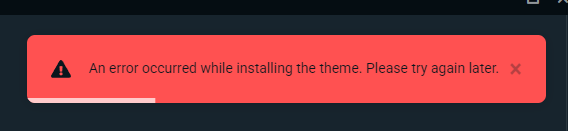

 humble gale
midnight veldt
humble gale
midnight veldt
idk then, i guess you should submit a ticket to official support 🤔
midnight veldt
humble gale
idk then, i guess you should submit a ticket to official support 🤔
ok tnks! can support delete all links?
 humble gale
i don't think so
but no one will see the other links. only the one that you have set up
midnight veldt
i dont know why ia have so many links 😄
humble gale
i think whenever you connect something to streamlabs it creates a link. i have a bunch too
midnight veldt
mayby Dilzze link tip is not working i need to set another link?
mossy ridge
@gritty isle i must be doing something wrong as i can still hear people (on discord) through my stream test- please help - thanks
gritty isle
mossy ridge
<@301571565840236564> i must be doing something wrong as i can still hear people...
Hey, I’m on vacation and can’t assist this weekend.
Make sure you’re following the guide I linked. A common mistake is not setting the Desktop Audio device to Disabled.
abstract plazaBOT
Having trouble? Want to see if anyone else is having the same problem?
Check out our #known-issues channel! We do our best to keep this channel as current as possible with new bugs and progress updates!
If you can't find what you need please submit a ticket at: https://support.streamlabs.com/hc/en-us/requests/new
 noble flax
Hi everyone, I'm super new to streaming and not the most tech savvy. I'm struggling to find current helpful information. I wanted to create a command that triggers a sound that chat can do. I finally found the alert box settings today and have the sound file uploaded but it's asking for like a code or something for messzage template. Do I have to put any code source in or just the command exactly as they would type it?
humble gale
noble flax
Hi everyone, I'm super new to streaming and not the most tech savvy. I'm struggl...
not sure how you're setting this up. are you trying to do it like as a redemption from your store? so basically set it up in the store https://streamlabs.com/dashboard#/cloudbot/store/items
Make it "Sound effect" and add your info there > attach thumbnail image and the audio file > change the keyword for what you would want people to type out. so for this it would be !redeem sound like i have pointed to


 polar panther
my chat in streamlabs is not working its loading the whole time but nothing happens, what can i do ?
abstract plazaBOT
Are you knowledgeable about Streamlabs products?
Get rewarded for helping the Streamlabs Community here in Discord!
👉 Apply to be a part of the Streamlabs Support Volunteer Program!
Application Link:
https://forms.gle/eKS29zWfFjGEzaRp7
For details, see our post in
#announcements message
Do you have a Streamlabs Ultra membership? Are you part of the Streamlabs All-Stars program?
Get your Discord roles by going to this page here: https://streamlabs.com/dashboard#/settings/integrations and clicking "Link" next to Discord! Ultra members and higher tier All-Stars members will have access to private channels for support!
Interested in Ultra? Check it out here: https://streamlabs.com/ultra?refl=discord
gritty isle
polar panther
my chat in streamlabs is not working its loading the whole time but nothing happ...
Click Refresh Chat at the top of the embedded chat dock.
If that doesn’t resolve your issue, Streamlabs Desktop please log out and wait a minute. Then log back in with your Twitch. You have to do that after your streams if you are live right now.
 umbral tusk
gritty isle
You have run both as administrator or run both as normal (not administrator). R...
umbral tusk
gritty isle
You have run both as administrator or run both as normal (not administrator). R...
The same situation has been occurring here since the last Streamlabs update.
A similar situation also exists with Streamlabs' 6.9 update, but that was resolved a few months ago. Now it's recurring – with both Streamlabs 6.9 and 7.0. I doubt it's the old "administrator" issue, because the permissions workaround didn't work last time either, until Streamlabs released a fix (just checked: running both applications in normal - or - as administrator does not work).
mossy ridge
@gritty isle ive followed that link u gave me done everything on it and i can still hear my discord channel on stream
 karmic surge
I'm having trouble getting my mic audio to pick up on stream. Can anyone help me figure it out?
I been at it for like hours at this point. I'm at a complete loss for what the problem is.
also I'm using GOXLR and have a Shure SM7B mic for added information.
oh and that blue cloud condenser box thing too if that is important to know.
anyways any help would be appreciated.
 lime finch
has anyone noticed that that on tiktok the challenges threw that studio does not apply when using streamlabs.
abstract plazaBOT
Having trouble? Want to see if anyone else is having the same problem?
Check out our #known-issues channel! We do our best to keep this channel as current as possible with new bugs and progress updates!
If you can't find what you need please submit a ticket at: https://support.streamlabs.com/hc/en-us/requests/new
karmic surge
no help? well it was worth a try. That's fine, I will just keep streaming with no mic audio.
gritty isle
umbral tusk
The same situation has been occurring here since the last Streamlabs update.
A ...
Then contact Elgato. They made the Streamlabs Desktop plugin. It’s not an issue with Streamlabs Desktop.
gritty isle
mossy ridge
<@301571565840236564> ive followed that link u gave me done everything on it and...
Then please put in a ticket.
I’m on vacation and can’t assist this weekend.
wispy latchBOT
@mossy ridge  Need More Help? Contact Support!
We understand that sometimes, even with our extensive resources, you might still have unanswered questions or specific issues.
If you've already checked the following resources and haven't found a solution:
- Our #1173605643484139591 channel
- Our self-help articles on the Creator Resource Hub
Then please submit a support ticket, and our dedicated team will be happy to assist you directly: Submit a Support Ticket Here
gritty isle
@umbral tusk https://discord.gg/elgato
karmic surge
Are my messages not being sent to everyone else? I don't understand why other people are getting answered but I'm being ignored. Making me start to wonder if anyone can even see my request for help.
marble wind
@karmic surge does the same microphone work in other apps, like audacity or obs-studio?
karmic surge
not sure what audacity is and I don't have obs. All I can say is that I can hear my voice in the headphones when I speak.
Oh I can confirm Veadotube isn't picking up my voice either.
marble wind
@karmic surge oh, right, discord can also access microphones
go to settings> voice & video, select your microphone in the dropdown list above, then use the "let's check" button, see if discord can visualize speaking
 karmic surge
yeah it's not picking up on Discord either. It's really only my headphones recognizing that I am speaking.
umbral tusk
gritty isle
Then contact Elgato. They made the Streamlabs Desktop plugin. It’s not an issu...
By the way, Elgato refers to Streamlabs Support as the author of the plugin.
I contacted the support anyway.
marble wind
@karmic surgeopen the Sound control panel (mmsys.cpl), double-click the microphone; is 'listen to this device' enabled? disable it if it is
 gritty isle
umbral tusk
By the way, Elgato refers to Streamlabs Support as the author of the plugin.
I c...
gritty isle
umbral tusk
By the way, Elgato refers to Streamlabs Support as the author of the plugin.
I c...
I knew that Streamlabs was wanting it back but never heard that that had occurred. I guess it did. Hit up #vip-support for assistance.
karmic surge
yes. it's checked. That was one of the things I did when troubleshooting on my own.
 marble wind
@karmic surge disable 'listen to this device' on all microphones, restart discord (Ctrl+R), see if discord can capture your microphone correctly
karmic surge
well only have one microphone but okay
marble wind
all 3 are microphones, as far as Windows knows
 karmic surge
okay disabled all of them.
marble wind
press 'let's check' in discord, verify that you hear yourself
karmic surge
restarted and tested. No change.
marble wind
when you speak, does any of these light up?
 karmic surge
when I turn listening on yes, otherwise no.
 marble wind
something's not right, this should not be necessary
karmic surge
is it possible because I'm using an audio splitter?
marble wind
perhaps there are settings in the goxlr that affect microphone volume or some such?
another guess is that microphone volume might be too low in the Sound control panel, verify that "levels" here are at 100% or 0 dB
 karmic surge
uh yup they are.

I think this is the section in GOXLR for those settings but I'm not sure.
 marble wind
@karmic surge a microphone shouldn't require this setting, something is incorrectly configured, but i don't know enough about the goxlr to be more specific;
try asking on the tc helicon discord, they might know
karmic surge
well the issue is this entire problem involves both the GoXLR and Streamlabs. I think if I go to that Discord, I will probably be told to go the Streamlabs Discord.
I am pretty sure the solution is here somewhere. Because the audio is being split into different sources. The settings need to matched up to the same source. I just can't figure out what that source is.

 random jewel
How do I capture my screen on iOS streamlabs im tryna stream.
marble wind
@karmic surge no, every correctly-configured microphone will light up in mmsys.cpl when spoken into;
of course, i can't guarantee that you will receive help from tc helicon's discord, but i don't have anything else to suggest, my knowledge on this is depleted
karmic surge
well it was working for years. For further context it stopped working after my dad was messing around with the audio settings on my computer because he was trying to watch a youtube video but he didn't know you can only hear anything with the headphones. I just haven't been able to reverse engineer what he changed in my settings.
marble wind
@karmic surge i don't think asking here will net you any more responses, very few people are proficient with expensive audio hardware;
another thing you could try is remove all tc helicon software and disconnect all their hardware, delete tc helicon's settings folders from %appdata% and %localappdata% (if there are any left) and try to start over, but i imagine their discord would have better answers than what i can give
karmic surge
Well I remember when I set it up the first time all I had to do was match up the sources.
 surreal ingot
Is it possible to add any capture card on chromeos by using Chromebook yes or no Canadian food https://a.co/d/dDZGGl7 ?
 marble wind
ew, advertisers again
@surreal ingot to my knowledge, chromeos can't run any live streaming software, at all
karmic surge
I just matched the sound settings sources on the computer to the sound setting sources on stream labs and I think maybe GOXLR had some kind of source settings too and I matched it all up and it worked. I guess what you are saying is it's more broken than it was when I set it up the first time because it sounds like it's not even behaving correctly... well... I mean assuming the GoXLR isn't playing a part in making it behave differently.
surreal ingot
Yes it can streamlabs supports android
marble wind
@surreal ingot does it run? does it access the built-in chromebook camera?
karmic surge
well I don't know what to do. I'm just going to keep streaming without mic audio for the time being because I'm running out of patience to figure it out. I been trying to fix it all day at this point. I just want to play video games, I don't care if I can't talk on my streams at this point.
is there even any tc helicon software because I can't find it?
surreal ingot
Yes
marble wind
@karmic surge the goxrl software you posted screenshots of is made by tc helicon
@surreal ingothuh, interesting; i doubt it'll accept capture cards, i've yet to see anyone have working chromeos streaming setups, but i could be wrong
surreal ingot
Yes they do it’s tons of videos
karmic surge
actually reinstalling the GOXLR app might fix it. Because the app itself has been acting weird freezing all the time. hmm...
marble wind
@surreal ingot capture cards do work, apparently
try lightstream, then
agile owl
Please stop trying to post gifs
marble wind
are those ads vanishing on their own or you're deleting them? @agile owl
agile owl
marble wind
are those ads vanishing on their own or you're deleting them? <@2014562149728256...
I'm deleting them
marble wind
is there a pingable role i could use to get mods' attention when someone posts ads?
agile owl
marble wind
is there a pingable role i could use to get mods' attention when someone posts a...
There is not sorry
marble wind
what a mess
wispy latchBOT
@halcyon bluff
🚫 Advertising and self-promotion are not permitted in any of our channels or in direct messages with server members. For more information on our server guidelines, please refer to #rules. Thank you!
marble wind
@agile owl how about this: if someone posts something illegal or disturbing, like cp or gore, is there some role or person i could ping?
agile owl
marble wind
<@201456214972825601> how about this: if someone posts something illegal or dist...
anything like that will be insta-deleted
agile owl
Leo has been kicked
marble wind
@halcyon bluff streamlabs is a company that makes live streaming software and hosts services that help facilitate it, try reading https://streamlabs.com/
a live stream, or a live broadcast, is a live video and audio feed, hosted by a person or a company, that can be seen by multiple viewers at the same time
i already answered that
karmic surge
well so far all that reinstalling GoXLR app has done is it's unsplit the audio and I don't remember how to split it again. So I guess the problem is worse than it was before.
marble wind
any luck with tc helicon's discord channels?
karmic surge
probably going to have to watch a GoXLR tutorial now to split the audio sources again.
oh yeah.. uh.. I haven't looked for their discord yet.
marble wind
https://duckduckgo.com/?q=tc+helicon+discord&ia=web i think the first hit is correct, not sure
karmic surge
also mic still isn't picking up when I test on discord. So really all I did was unsplit the audio sources.
going to split the audio first and once I get back to where I just need to worry about the mic, I will check out their discord.
abstract plazaBOT
Having trouble? Want to see if anyone else is having the same problem?
Check out our #known-issues channel! We do our best to keep this channel as current as possible with new bugs and progress updates!
If you can't find what you need please submit a ticket at: https://support.streamlabs.com/hc/en-us/requests/new
karmic surge
trying to follow a guide but not seeing the audio track option. thinking maybe the guide is outdated?

okay well how do I change the audio track now?
marble wind
@karmic surge this only shows in advanced output mode
karmic surge
okay that is set correctly now.
oh my gosh, it's all kinds of messed up after reinstalling. I don't even know what I'm doing... I can't even stream now...
okay I'm going to go find their discord.
surreal ingot
Ok
random jewel
Whenever I start streaming and choose the screen option does it still capture my camera also??
karmic surge
shouldn't there be an option here for a Shure mic since that is the mic I have or is it just going under GOXLR since the mic is going through the GOXLR?

Nobody is replying over on the GOXLR discord either.
not even seeing the mic option here now, so I have nothing to sync up.

the mic is clearly working because it shows it's picking up my voice when I test it on GOXLR. It really just seems like a case of I don't know what source to use. I don't know where GOXLR is sending the mic audio and because I don't know, I can't sync it up in the stream lab or computer settings... though now the computer setting isn't even giving me the mic as an option to sync up to anything.

well at least I got everything back into a state that I can stream and it's still just the mic refusing to be picked up.
 frigid yew
So I have a Custom website but I made a Mistake by resetting my DNS what DNS should I set again
abstract plazaBOT
Do you have a Streamlabs Ultra membership? Are you part of the Streamlabs All-Stars program?
Get your Discord roles by going to this page here: https://streamlabs.com/dashboard#/settings/integrations and clicking "Link" next to Discord! Ultra members and higher tier All-Stars members will have access to private channels for support!
Interested in Ultra? Check it out here: https://streamlabs.com/ultra?refl=discord
Are you knowledgeable about Streamlabs products?
Get rewarded for helping the Streamlabs Community here in Discord!
👉 Apply to be a part of the Streamlabs Support Volunteer Program!
Application Link:
https://forms.gle/eKS29zWfFjGEzaRp7
For details, see our post in
#announcements message
 finite umbra
i paid for streamlabs console and nothin was working....it wasnt showing my game and it kept lagging even while being hardwire straight into the internet. I want my money back
abstract plazaBOT
Having trouble? Want to see if anyone else is having the same problem?
Check out our #known-issues channel! We do our best to keep this channel as current as possible with new bugs and progress updates!
If you can't find what you need please submit a ticket at: https://support.streamlabs.com/hc/en-us/requests/new
gusty umbra
finite umbra
i paid for streamlabs console and nothin was working....it wasnt showing my game...
Sorry about that. Streamlabs console works pretty good. There is a bunch of console guides in #1173605643484139591 that might help. If you’re intent on canceling. You will need to submit a ticket. https://support.streamlabs.com/hc/en-us/requests/new
drowsy gorge
hey, i was talking to @cursive herald about the issue with twitch knock. wanted to follow up (because I didn't see his answer and VIP chanel is closed): no I had control over the sound in SL, yes I tried doing "monitor off" and "monitor and output". it kept going into "monitor only (mute output)" mode
 minor prairie
Wondering is Loyalty points are set up for Kick yet? I can't seem to be able to find how.
gusty umbra
drowsy gorge
hey, i was talking to <@106510092274249728> about the issue with twitch knock. w...
Start a new thread in #vip-support I’m not sure if they are the one in today. But you can reference your old conversation, so whoever answers can catch up.
 gentle grotto
Hi, I have been trying to add an image to my stream screen but it won't let me. There's no option to save my choice and half the screen is missing

I'm using streamlabs console
drowsy gorge
gusty umbra
Start a new thread in <#606591508623392788> I’m not sure if they are the one in ...
but the chanel is closed, I can't do the new one
 abstract plazaBOT
Are you knowledgeable about Streamlabs products?
Get rewarded for helping the Streamlabs Community here in Discord!
👉 Apply to be a part of the Streamlabs Support Volunteer Program!
Application Link:
https://forms.gle/eKS29zWfFjGEzaRp7
For details, see our post in
#announcements message
Do you have a Streamlabs Ultra membership? Are you part of the Streamlabs All-Stars program?
Get your Discord roles by going to this page here: https://streamlabs.com/dashboard#/settings/integrations and clicking "Link" next to Discord! Ultra members and higher tier All-Stars members will have access to private channels for support!
Interested in Ultra? Check it out here: https://streamlabs.com/ultra?refl=discord
 amber fulcrum
hello! how to enable replay stream ?? on obs studio it no need to be changed u can switch back during the stream!!! but here in streamlabs it is disabled... anyone know how to enable it please?
 calm hatch
Hi, so when I specifically open streamlabs my pc starts to lag and stutter affecting everything, even the audio and its making everything stutter. I have never had any issues like this before.
 tawdry pike
hello everyone, i have a strange problem, my game capture source is working randomly depending on the game i play, for example, i am having troubles streamin league of legend right now.
i tried different setups
this morning it was working from time to time