#technical-support
1 messages · Page 165 of 1
 humble gale
 cloud basin
Aww, no more 1080? 🥺
humble gale
but you should reach out to your internet service provider and also make sure you're hard wired in (like using an ethernet cable)
 zealous osprey
I tried them both but didnt work and idk if this is the sample rate of the capture card
 cloud basin
I am hard wired.
humble gale
cloud basin
I am hard wired.
I mean, right now with taht upload speed if you do 1080p at around 4500 it's gonna look like garbage. And if you were able to do it before, then to me that means your ISP is messing you up
cloud basin
humble gale
I mean, right now with taht upload speed if you do 1080p at around 4500 it's gon...
Are you talking about it looking pixelated?
humble gale
cloud basin
Are you talking about it looking pixelated?
yeah
cloud basin
It doesn't look pixelated at all.
humble gale
cloud basin
It doesn't look pixelated at all.
it wouldn't just be pixelation, it would also be dropped frames/disconencts/etc because that's not enough upload to support that resolution
cloud basin
humble gale
it wouldn't just be pixelation, it would also be dropped frames/disconencts/etc ...
I wish I was more tech-savvy lol
humble gale
zealous osprey
I tried them both but didnt work and idk if this is the sample rate of the captu...
that's weird tbh. IDK why it is set to 96 and how you would be able to change it. choppiness is typically a sample rate mismatch, so i would probably submit a ticket at https://support.streamlabs.com/hc/en-us/requests/new
humble gale
cloud basin
I wish I was more tech-savvy lol
i mean, you could try 4500 at 1080p 30 fps. and that would be fine if you play slower games (because the fps doesn't matter as much then). but if you play high movement games, it would be better to stay at 60 fps and lower your resolution
cloud basin
Yea I think I'm gonna try 4000 at 1080p 60 first.
zealous osprey
humble gale
that's weird tbh. IDK why it is set to 96 and how you would be able to change it...
Will do thx for your help
humble gale
cloud basin
Yea I think I'm gonna try 4000 at 1080p 60 first.
YouTube is gonna yell at you for trying that. either swap it to 720p, or change your fps to 30
cloud basin
humble gale
YouTube is gonna yell at you for trying that. either swap it to 720p, or change ...
Alright 😔
Guess I'll have to talk to my ISP about the upload speed. What should I ask them so I don't sound dumb?
humble gale
First, you gotta find what you pay for. Then tell them about the speed tests and how it's not matching what you pay for by a lot. You can also tell them that you are trying to stream **to **twitch/youtube and if they're not sure what that is, ask for a rep that does. Make sure to emphasis to the "to" as they may think you're just trying to stream them like neflix (which isn't using your upload as much). There are reps that will know what you're talking about if you ask for them.
But knowing how much you are supposed to be getting versus what you are getting is the most important part so you can share that with them.
 humble gale
no just the output. otherwise your canvas is gonna look funny 
cloud basin
humble gale
no just the output. otherwise your canvas is gonna look funny <:LUL:869653544897...
Right as I started the test stream
 humble gale
Are you streaming only to youtube?


 gritty isle
cloud basin
gritty isle
cloud basin
You really need to call your Internet Service Provider.
cloud basin
gritty isle
You really need to call your Internet Service Provider.
I'm going to.
 versed axle
Hey everyone I’m new to StreamLabs and I got Ultra. I want to be able to host a two person show using collab cam. It’s not a gaming show but I want my guest to view my screen. How can I make that work properly
cloud basin
gritty isle
You really need to call your Internet Service Provider.
Before I call them, I did one more stream and had more dropped frames. Then I did another speed test and uhh.......

 wispy latchBOT
 Streamlabs Ultra & All-Stars Discord Access
@versed axle, are you a Streamlabs Ultra Subscriber or an All-Stars member? If so, you can link your Discord account to gain access to exclusive Ultra/VIP roles and private chat channels here in our Discord server!
🔗 How To Get Your Ultra/All-Stars Discord Role:
Link your Discord account under your Streamlabs integrations settings: Streamlabs Integrations Dashboard
 Not Yet an Ultra Member?
You can learn more about Ultra and upgrade your membership here: Upgrade to Streamlabs Ultra
cloud basin
It's also storming to be fair.
gritty isle
cloud basin
Before I call them, I did one more stream and had more dropped frames. Then I di...
Ouch.
cloud basin
Yeah. This sucks. I'm hoping they fix whatever needs to be fixed because I can't keep going live thinking there will be no issues only for there to be issues like an hour or so in.
 abstract plazaBOT
 Having trouble? Want to see if anyone else is having the same problem?
Check out our #known-issues channel! We do our best to keep this channel as current as possible with new bugs and progress updates!
If you can't find what you need please submit a ticket at: https://support.streamlabs.com/hc/en-us/requests/new
 elder river
It just shows me I deauthorized it to re add it. But it’s still showing on streamlabs that I have it. But it isn’t showing on discord.
 gritty isle
elder river
It just shows me I deauthorized it to re add it. But it’s still showing on strea...
gritty isle
elder river
It just shows me I deauthorized it to re add it. But it’s still showing on strea...
You have the Ultra role.
 elder river
Ok I removed it re added it fixed it got it added again.
elder river
gritty isle
You have the Ultra role.
Ok I removed it re added it fixed it got it added again.
abstract plazaBOT
Having trouble? Want to see if anyone else is having the same problem?
Check out our #known-issues channel! We do our best to keep this channel as current as possible with new bugs and progress updates!
If you can't find what you need please submit a ticket at: https://support.streamlabs.com/hc/en-us/requests/new
 hot silo
سلام

 celest sparrow
Hey there, I got an issue that is reoccuring quite often and it's really getting to my guts. I primarily stream World of Warcraft, and it so happens that super often when I alt tab from WoW > Streamlabs (or anywhere else) my game freezes and is sorta "re-rendering" as I tab in (only 1 monitor). It happens typically whilst streaming or even just having Streamlabs open.
Is there any1 that may know how I can fix this issue as it's causing a lot of issues and 20+ seconds freezes
 tidal ocean
Trying to get streamlabs to work with apex legends. refreshing the source doesnt work.

Attempted clearing source, restart, resetting apex to full screen, validating version, running as admin etc.
abstract plazaBOT
Are you knowledgeable about Streamlabs products?
Get rewarded for helping the Streamlabs Community here in Discord!
👉 Apply to be a part of the Streamlabs Support Volunteer Program!
Application Link:
https://forms.gle/eKS29zWfFjGEzaRp7
For details, see our post in
#announcements message
Do you have a Streamlabs Ultra membership? Are you part of the Streamlabs All-Stars program?
Get your Discord roles by going to this page here: https://streamlabs.com/dashboard#/settings/integrations and clicking "Link" next to Discord! Ultra members and higher tier All-Stars members will have access to private channels for support!
Interested in Ultra? Check it out here: https://streamlabs.com/ultra?refl=discord
gritty isle
celest sparrow
Hey there, I got an issue that is reoccuring quite often and it's really getting...
That’s common with games that are run full screen. They stop rendering when they are not in foreground. Try to avoid tabbing out of the game. If you are doing to that to control Streamlabs Desktop, consider setting hot keys for those actions that have them.
gritty isle
tidal ocean
Trying to get streamlabs to work with apex legends. refreshing the source doesnt...
This might help:
First, please delete your game capture source and quit Streamlabs Desktop.
Then go to the search in windows (🔎) and search this file path: C:\ProgramData\obs-studio-hook and then click on the folder that pops up.
Once you have done that you will see a bunch of files. If you can ignore those for a second and click on the program data folder.
Then you should see the obs-studio-hook folder there and highlighted.
Go ahead and delete the folder.
Now go ahead restart your PC and then right click Streamlabs Desktop and run as administrator.
Then add a new game capture and see if that works for you.
 hybrid dragon
@gritty isle Can you please help me? I’m trying to upload a 50+ minute video
 celest sparrow
gritty isle
That’s common with games that are run full screen. They stop rendering when the...
celest sparrow
gritty isle
That’s common with games that are run full screen. They stop rendering when the...
Is there somehow else I can improve the issue? Im kinda addicted to alt tabbing to check other streams or reading stuff while waiting on queue times anyways.
Edit: The issue only exist when using streamlabs as well if that makes a difference
gritty isle
celest sparrow
Is there somehow else I can improve the issue? Im kinda addicted to alt tabbing ...
Use a mobile device to do that. Only thing I could suggest is running in full screen window mode border less if possible in that game.
celest sparrow
Is borderless important? The general option is only "full screen windowed", but I believe there's other programs that can add borderless to it
gritty isle
hybrid dragon
<@301571565840236564> Can you please help me? I’m trying to upload a 50+ minute ...
Please don’t ping those not actively assisting you; Castor works overnight and is not available now.
What is the size of the video file you are trying to upload. It has to be 5gb or less.
tidal ocean
gritty isle
This might help:
First, please delete your game capture source and quit Streaml...
no change
gritty isle
celest sparrow
Is borderless important? The general option is only "full screen windowed", but ...
Try full screen windowed then.
gritty isle
tidal ocean
no change
Are you on a laptop?
celest sparrow
I always have full screen windowed on
tidal ocean
gritty isle
Are you on a laptop?
no desktop
gritty isle
celest sparrow
I always have full screen windowed on
Then there not much you can do. Just avoid tabbing out of the game.
wispy latchBOT
🖥️ Troubleshooting Black Screens in Streamlabs Desktop
@tidal ocean, if Streamlabs Desktop is showing a black screen instead of capturing your game, here are some common solutions to try:
- Ensure your game is the active window. After adding your game capture source, interact with the game for about 5 to 20 seconds. This often helps Streamlabs Desktop detect and capture it.
- Run Streamlabs Desktop as an administrator.
- Change your Game Capture mode from "Auto" to "Capture Specific Window" and then select your game from the list.
- Please note: Some games may not be compatible with Game Capture. If the above steps don't work, try using Window Capture or Display Capture instead.
Still experiencing issues? For more in-depth troubleshooting, please see these detailed guides:
tidal ocean
ok i've already done these steps. I will open a ticket.
hybrid dragon
gritty isle
Please don’t ping those not actively assisting you; Castor works overnight and i...
I’m sorry, I was just getting nervous because I’m supposed to go live tomorrow. The top part says 963 KB and somewhere else is 967 KB
gritty isle
hybrid dragon
I’m sorry, I was just getting nervous because I’m supposed to go live tomorrow. ...
That browser is Firefox?
The video file itself is less than 1Mb?
hybrid dragon
gritty isle
That browser is Firefox?
Google chrome
gritty isle
hybrid dragon
Google chrome
Try again from Safari or Firefox.
hybrid dragon
gritty isle
Try again from Safari or Firefox.
It doesn’t let me in the studio on safari and Firefox did the same thing as google chrome
gritty isle
hybrid dragon
It doesn’t let me in the studio on safari and Firefox did the same thing as goog...
What kind of file are you trying to upload?
hybrid dragon
gritty isle
What kind of file are you trying to upload?
mp4
gritty isle
hybrid dragon
mp4
And the size is less than one megabyte?
hybrid dragon
gritty isle
And the size is less than one megabyte?
 gritty isle
hybrid dragon
gritty isle
hybrid dragon
Move the file directly on your desktop so it’s directly on your hard disk. Don’t upload from your iCloud.
And if that doesn’t work, please upload the file here so we can test.
 pale cove
Good evening, I have a problem that I can't use cloudbot on kick in chat, I've tried everything, and absolutely nothing responds. Streamlabs has a mod, but it doesn't show it in chat either
gritty isle
pale cove
Good evening, I have a problem that I can't use cloudbot on kick in chat, I've t...
Make sure it’s toggled on for Kick. I know mine shows inactive but I don’t use Kick.
 pale cove
not working
 gritty isle
pale cove
not working
gritty isle
pale cove
not working
And Streamlabs is a moderator on your channel?
 gritty isle
pale cove
gritty isle
pale cove
Please reset Cloudbot and see if that helps.
👉 IMPORTANT: Do not skip or shorten the waits.
- Unmod streamlabs
- Toggle Cloudbot off
- Wait for at least 10 minutes
- Toggle Cloudbot back on
- Mod streamlabs
- Wait 10 minutes before trying commands
pale cove
follow only can be ON ?
gritty isle
pale cove
follow only can be ON ?
I would turn that off as Streamlabs will never follow you. That could be the issue.
pale cove
not working
 gritty isle
pale cove
not working
gritty isle
pale cove
not working
Strange. Can you screen shot how you have those commands setup?
pale cove
yea sure

 gritty isle
pale cove
yea sure
gritty isle
pale cove
yea sure
Thanks! Can you make a command that just displays the text “Hello!”
And try that command and let me know what happens?
pale cove

 hybrid dragon
gritty isle
And if that doesn’t work, please upload the file here so we can test.
hybrid dragon
gritty isle
And if that doesn’t work, please upload the file here so we can test.
It didn’t work
 gritty isle
hybrid dragon
It didn’t work
gritty isle
hybrid dragon
It didn’t work
Oh wait a second, I see now that screen shot you sent me was a PNG file. Not a video file.
gritty isle
pale cove
Mine are not working either. Are you live?
I’m thinking that Kick Chat is only active if you are live.
pale cove
for now im offline
but I also tried it online and it didn't work,
A friend tried it on his offline stream and it worked for him
gritty isle
pale cove
A friend tried it on his offline stream and it worked for him
Interesting. I’m check more on this.
pale cove
ok thanks but i need sleep for now, i will be hre today in 11:00
gritty isle
hybrid dragon
It didn’t work
Please go ahead and submit a ticket on this issue: https://support.streamlabs.com/hc/en-us/requests/new
gritty isle
pale cove
ok thanks but i need sleep for now, i will be hre today in 11:00
Have a good night.
abstract plazaBOT
Having trouble? Want to see if anyone else is having the same problem?
Check out our #known-issues channel! We do our best to keep this channel as current as possible with new bugs and progress updates!
If you can't find what you need please submit a ticket at: https://support.streamlabs.com/hc/en-us/requests/new
abstract plazaBOT
Are you knowledgeable about Streamlabs products?
Get rewarded for helping the Streamlabs Community here in Discord!
👉 Apply to be a part of the Streamlabs Support Volunteer Program!
Application Link:
https://forms.gle/eKS29zWfFjGEzaRp7
For details, see our post in
#announcements message
Do you have a Streamlabs Ultra membership? Are you part of the Streamlabs All-Stars program?
Get your Discord roles by going to this page here: https://streamlabs.com/dashboard#/settings/integrations and clicking "Link" next to Discord! Ultra members and higher tier All-Stars members will have access to private channels for support!
Interested in Ultra? Check it out here: https://streamlabs.com/ultra?refl=discord
 untold pier
do anyone know how to fix my game capture doing this
 gritty isle
untold pier
do anyone know how to fix my game capture doing this
gritty isle
untold pier
do anyone know how to fix my game capture doing this
Hop over to #vip-support for that and thank you for being a Streamlabs Ultra subscriber!
untold pier
ok thx
abstract plazaBOT
Having trouble? Want to see if anyone else is having the same problem?
Check out our #known-issues channel! We do our best to keep this channel as current as possible with new bugs and progress updates!
If you can't find what you need please submit a ticket at: https://support.streamlabs.com/hc/en-us/requests/new
 noble vigil
hey how do i change this to wide screen?

 subtle wren
You still having this issue? I noticed it two days ago on my stream also! (I am also streaming via Mac!)
Likewise!
 glad ravine
hey i have a issue with chatbox! i just cant get the 7ttv emotes i have the setting enabled etc but it just doesnt work 🙁
i have this all enabled but when i launch it it doesnt show


now it does work zzz
 heady lodge
@gritty isle my viewers are complaining that my tip page isn't working. Is this a known issue right now?
humble gale
heady lodge
<@301571565840236564> my viewers are complaining that my tip page isn't working....
what exactly is happening with your tip page?
humble gale
noble vigil
hey how do i change this to wide screen?
Settings > Video you would change your base canvas if you wanted it as a horizontal orientation
heady lodge
humble gale
what exactly is happening with your tip page?
this is what they're getting
 humble gale
are all of them getting it? or just one person?
heady lodge
everyone
 patent quarry
my cam shows up as black on stream how do i fix
humble gale
heady lodge
everyone
is it with a specific payment provider? like is it with PayPal or Stripe?
humble gale
patent quarry
my cam shows up as black on stream how do i fix
try out the solutions here https://streamlabs.com/content-hub/post/webcam-troubleshooting
noble vigil
humble gale
Settings > Video you would change your base canvas if you wanted it as a horizon...
thank youu
abstract plazaBOT
Having trouble? Want to see if anyone else is having the same problem?
Check out our #known-issues channel! We do our best to keep this channel as current as possible with new bugs and progress updates!
If you can't find what you need please submit a ticket at: https://support.streamlabs.com/hc/en-us/requests/new
 silk sable
If I set my donation condition to "donation amount is at least <amount>", and increase each variation tip amount by 1, will each dollar have a different alert?
 cinder hatch
Streamlabs is stuck on this loading screen, anyway to fix this? i reinstalled but still the same
 pearl storm
مرحبا عندي مشكلة البرنامج لا يحفظ التعديلات عندما اغلقه وافتحه من جديد يذهب كل شيء
 hasty field
My audio for my alerts isn't going through my headset, only the output for the stream. I've tried to fix it several times, and I get the same outcome.
How can I fix this? It's really frustrating.
gritty isle
hasty field
My audio for my alerts isn't going through my headset, only the output for the s...
You enabled Control audio via OBS in the Alert Box?
hasty field
gritty isle
You enabled *Control audio via OBS* in the Alert Box?
I'm looking and not seeing an option there
 modern scroll
i'm new to using stream labs is there a way to edit text inside the scenes?
gritty isle
hasty field
I'm looking and not seeing an option there
It would be in the Source tab in the Alert Box properties. Easy way to tell does the Alert Box appear in the Mixer?
hasty field
gritty isle
It would be in the Source tab in the Alert Box properties. Easy way to tell do...
Yes. and the audio can visially be seen when it's tested in the web dashboard, but not the streamlabs application
 gritty isle
hasty field
Yes. and the audio can visially be seen when it's tested in the web dashboard, b...
gritty isle
hasty field
Yes. and the audio can visially be seen when it's tested in the web dashboard, b...
Can you go into your Streamlabs Desktop Settings > Advanced > Audio and change your audio monitoring device to "default"?
Then close Streamlabs Desktop, re-launch it as admin (right-click the desktop icon, run as admin)
Then go back into the same settings area and change your audio monitoring device back to the device you'd like to hear audio.
gritty isle
modern scroll
i'm new to using stream labs is there a way to edit text inside the scenes?
What text exactly?
hasty field
gritty isle
Can you go into your Streamlabs Desktop Settings > Advanced > Audio and change y...
Thank you! I had it set to my headset, but swapping to default fixed it!
 rich sigil
i bought ultra but it keeps saying i have a free trial when i go to install overlays
 fleet crown
Does anyone here understand how infuriating it is to download some strangers mobile app and for everything to work except for the last part where it doesn't record the audio of the discord call
gritty isle
hasty field
Thank you! I had it set to my headset, but swapping to default fixed it!
You’re welcome!
gritty isle
rich sigil
i bought ultra but it keeps saying i have a free trial when i go to install over...
Log out in Streamlabs desktop. Restart Streamlabs Desktop. Log back in and try again.
modern scroll
gritty isle
What text exactly?
the social media scene it currently just says username
gritty isle
modern scroll
the social media scene it currently just says username
There is probably a Text Source there. Just double click on the Text Source and edit the text.
 limpid hornet
Hi, I wanted to do an IRL stream using Streamlabs Mobile on my phone. The problem is that I don’t know how to use my wide-angle camera (0.6 zoom) to get a wider view on the stream. Does anyone know if there’s a way to do this?
gritty isle
limpid hornet
Hi, I wanted to do an IRL stream using Streamlabs Mobile on my phone. The proble...
If you have this icon, tap it and then you can choose the camera. At least it works this way on my iPhone 12. I would think the Android version is similar.
 limpid hornet
gritty isle
If you have this icon, tap it and then you can choose the camera. At least it w...
limpid hornet
gritty isle
If you have this icon, tap it and then you can choose the camera. At least it w...
Yeah i have android and sadly there is no icon in this place
Found some reddit post sayin it works on iphone but not on android
rich sigil
gritty isle
Log out in Streamlabs desktop. Restart Streamlabs Desktop. Log back in and try...
still saying it
limpid hornet
limpid hornet
Found some reddit post sayin it works on iphone but not on android
Posted 2 years ago so it looks like nothing changed
limpid hornet
gritty isle
If you have this icon, tap it and then you can choose the camera. At least it w...
Thank you for help
gritty isle
rich sigil
still saying it
Hop over to #vip-support for further assistance with that then.
gritty isle
limpid hornet
Thank you for help
Dang, sorry. You’re welcome.
 fringe plank
So cam is blacked out all of sudden
I haven't changed anything. And it seems Everytime I pay the console version. It blacks out cam! Any suggestions? I have already deleted the source and added new webcam
abstract plazaBOT
Having trouble? Want to see if anyone else is having the same problem?
Check out our #known-issues channel! We do our best to keep this channel as current as possible with new bugs and progress updates!
If you can't find what you need please submit a ticket at: https://support.streamlabs.com/hc/en-us/requests/new
 rotund linden
All of a sudden my game capture isn't working for anything, no other application overlays are enabled.
I've uninstalled streamlabs and reinstalled it and it's still not working, what am i missing here? I was actively streaming and everything was working fine, i restarted my pc due to some lag because it had been booted up for days (common issue with my pc) and all of a sudden it's not capturing any game that i launch?
abstract plazaBOT
Do you have a Streamlabs Ultra membership? Are you part of the Streamlabs All-Stars program?
Get your Discord roles by going to this page here: https://streamlabs.com/dashboard#/settings/integrations and clicking "Link" next to Discord! Ultra members and higher tier All-Stars members will have access to private channels for support!
Interested in Ultra? Check it out here: https://streamlabs.com/ultra?refl=discord
Are you knowledgeable about Streamlabs products?
Get rewarded for helping the Streamlabs Community here in Discord!
👉 Apply to be a part of the Streamlabs Support Volunteer Program!
Application Link:
https://forms.gle/eKS29zWfFjGEzaRp7
For details, see our post in
#announcements message
fleet crown
abstract plaza
<:QuestionKev:1031991692775137350> Having trouble? Want to see if anyone else i...
Does anyone here understand how infuriating it is to download some strangers mobile app and for everything to work except for the last part where it doesn't record the audio of the discord call
 wind flame
Can anyone help me add audio to my stream? I have a wireless headphones to my XBOX and HDMI passing through the capture card.
abstract plazaBOT
Do you have a Streamlabs Ultra membership? Are you part of the Streamlabs All-Stars program?
Get your Discord roles by going to this page here: https://streamlabs.com/dashboard#/settings/integrations and clicking "Link" next to Discord! Ultra members and higher tier All-Stars members will have access to private channels for support!
Interested in Ultra? Check it out here: https://streamlabs.com/ultra?refl=discord
abstract plazaBOT
Having trouble? Want to see if anyone else is having the same problem?
Check out our #known-issues channel! We do our best to keep this channel as current as possible with new bugs and progress updates!
If you can't find what you need please submit a ticket at: https://support.streamlabs.com/hc/en-us/requests/new
 distant glacier
Hello, guys. I wanted to ask a question, that i'll hope it's not a driver issue, since i'm having this problem for too long.
When I use a browser url, like for a pngtuber, it goes transparent, like, it doesnt shows what is supposed to. What to do?
 civic urchin
Hello I wanted to start streaming and my game doesnt show on my streaming idk why
I trier searching for why but I cant find anything
civic urchin
Issue resolved
abstract plazaBOT
Having trouble? Want to see if anyone else is having the same problem?
Check out our #known-issues channel! We do our best to keep this channel as current as possible with new bugs and progress updates!
If you can't find what you need please submit a ticket at: https://support.streamlabs.com/hc/en-us/requests/new
 lime summit
Hello, I started using streamlabs console but it didn’t get the people audio so I stopped, I had an annual charge today and I canceled it today, I would like to get a refund and cancel the subscription, it says it ends on 24 aug 2026, the charge was made today to my card and I immediately canceled the subscription, I would like a refund
wispy latchBOT
{1}  Need More Help? Contact Support!
We understand that sometimes, even with our extensive resources, you might still have unanswered questions or specific issues.
If you've already checked the following resources and haven't found a solution:
- Our #1173605643484139591 channel
- Our self-help articles on the Creator Resource Hub
Then please submit a support ticket, and our dedicated team will be happy to assist you directly: Submit a Support Ticket Here
 agile owl
Send a ticket as we cannot handle payment issues o3o
 scenic inlet
Just started using talk studio and I have tested my microphone and it shows it is working I have allowed all the permissions in the browser. Still nothing I may be just over looking something but from what I can tell it is not recording even though the mic test works.
 charred citrus
I have a problem with the drop frame when I open broadcasts, but when I choose servers, it does not come to me. I want a solution to the problem because I need to open more than one platform
 blissful parcel
I have a problem with streaming to YouTube through Streamlabs Mobile it says locked account I tried unlinking it and linking it again but nothing changed is there a way so I can stream to YouTube with streamlabs on mobile?
abstract plazaBOT
Having trouble? Want to see if anyone else is having the same problem?
Check out our #known-issues channel! We do our best to keep this channel as current as possible with new bugs and progress updates!
If you can't find what you need please submit a ticket at: https://support.streamlabs.com/hc/en-us/requests/new
 wise sparrow
I have ultra but the only thing I know how 2 use is the console script .
How do I game from my PC with the overlays ?
Everything i try it closes windows I can't access anything else what do u recommend if I want 2 use it on PC?
How do I know the overlays are working if I can't see them ?
 willow frigate
Hello, I'm on Ultra and trying to stream to multiple sources such as Instagram, Facebook, Twitch and Youtube, all of them work except Facebook and I'm getting the following error when it runs through the "Updating Settings" prior to me confirming to go live. 403 Failed to setup restream. Missing server url or stream key...
I don't see anywhere in the settings prompting me for a stream key for facebook?
 odd crescent
Hello! Excited to move over from OBS and a different 3rd party cloud streaming service. I’m having some difficulty with my audio input. If I am to record a video through the stream, labs interface, the microphone input sounds just fine like when I was using OBS. Unfortunately, when I run my live stream, the microphone audio becomes choppy, like a bad cell phone connection and has some robotic or static noises tied to my voice. I’ve attempted to remove the source and add it back in, and adjusting the gain values on the Mike itself as well as an in stream labs tool. Any ideas on where I can begin troubleshooting would be very helpful. I’ve even tried swapping out cables, but what gets me is that it records fine in stream labs app, and the microphone audio is only bad when it’s during a live stream.
 lapis bobcat
How do i see my Chat and alerts? I have 1 monitor
 lethal iron
Using stream labs has anyone been able to have an audio source only play in certain outputs while multistreaming?Example:Playing music, only plans on the twitch stream, muted on the youtube stream. Thank you, the option for this seems to be greyed out when using stream labs while it is not for just obs
 barren hazel
I am having a video delay when I am streaming through the app on my phone, anyone know why and how to fix this issue? At first its all synced but after a while it gets delayed
sound comes first then video
abstract plazaBOT
Do you have a Streamlabs Ultra membership? Are you part of the Streamlabs All-Stars program?
Get your Discord roles by going to this page here: https://streamlabs.com/dashboard#/settings/integrations and clicking "Link" next to Discord! Ultra members and higher tier All-Stars members will have access to private channels for support!
Interested in Ultra? Check it out here: https://streamlabs.com/ultra?refl=discord
Are you knowledgeable about Streamlabs products?
Get rewarded for helping the Streamlabs Community here in Discord!
👉 Apply to be a part of the Streamlabs Support Volunteer Program!
Application Link:
https://forms.gle/eKS29zWfFjGEzaRp7
For details, see our post in
#announcements message
 old anvil
Haiiii
Sooooo im new and running a 2024 version bc my laptop is so rubbish and i need to get my laptop to be faster whilst streaming bc its slow af and theres a massive delay (im not rlly bothered with the delay but itll help to keep it as live as possible
 gusty swift
hello
after i switched to ultra. my twitch vod settings is gone from advanced. how do i get it back so i can control which track gets recorded.
also im trying to stream to twitch and yt at the same time but i need yt not to stream music (i have everything split) how can i do that
 marble wind
@gusty swift streamlabs' restreaming service can't do that
 surreal geyser
hello i need help i verifyed my youtube on steamlabs console but its still telling me i need to verify
abstract plazaBOT
Do you have a Streamlabs Ultra membership? Are you part of the Streamlabs All-Stars program?
Get your Discord roles by going to this page here: https://streamlabs.com/dashboard#/settings/integrations and clicking "Link" next to Discord! Ultra members and higher tier All-Stars members will have access to private channels for support!
Interested in Ultra? Check it out here: https://streamlabs.com/ultra?refl=discord
Are you knowledgeable about Streamlabs products?
Get rewarded for helping the Streamlabs Community here in Discord!
👉 Apply to be a part of the Streamlabs Support Volunteer Program!
Application Link:
https://forms.gle/eKS29zWfFjGEzaRp7
For details, see our post in
#announcements message
gritty isle
@vapid flame Please go through this guide: https://support.streamlabs.com/hc/en-us/articles/35259691237147-TikTok-Live-Streaming-Access-Revoked-No-Violations
abstract plazaBOT
Having trouble? Want to see if anyone else is having the same problem?
Check out our #known-issues channel! We do our best to keep this channel as current as possible with new bugs and progress updates!
If you can't find what you need please submit a ticket at: https://support.streamlabs.com/hc/en-us/requests/new
abstract plazaBOT
Having trouble? Want to see if anyone else is having the same problem?
Check out our #known-issues channel! We do our best to keep this channel as current as possible with new bugs and progress updates!
If you can't find what you need please submit a ticket at: https://support.streamlabs.com/hc/en-us/requests/new
subtle wren
odd crescent
Hello! Excited to move over from OBS and a different 3rd party cloud streaming s...
I’m having this issue too from streamlabs updated.. have you found a fix yet? ☺️
 weary patio
i cant get dual output to work i click on the button and it does nothing
 foggy folio
hello
 rough garden
i can't see text written in tip
 foggy folio
i cant go live to yt

 gritty isle
 scenic blade
can somone tell me names of free scenes
scenic blade
can somone tell me names of free scenes
Enter Free in the Search Box
scenic blade
i did
foggy folio
any 1 help me
 scenic blade
i cant
scenic blade
gritty isle
Enter *Free* in the Search Box
i guess it hepled i was dumb sorry
foggy folio
rufus
gritty isle
foggy folio
any 1 help me
In Streamlabs Desktop, go to Settings > Output and screen shot your settings.

 gritty isle
foggy folio
gritty isle
foggy folio
Click the Encoder drop down menu and screeen shot all the options it shows.
foggy folio
 gritty isle
foggy folio
gritty isle
foggy folio
Change the Encoder to AMD HW H.264 and then see if you can go live.
gritty isle
foggy folio
rufus?
Now restart Streamlabs Desktop, switch the Encoder back to Software (x264), and try again.
foggy folio
dosent work
gritty isle
foggy folio
dosent work
Okay, now screen shot Settings > Output > Recording, Settings > Output > Audio, and Settings > Output > Replay Buffer.
One screen shot per post please.


 gritty isle
foggy folio
gritty isle
foggy folio
Turn off Replay Buffer, restart Streamlabs Desktop, and try to go live.
foggy folio
nope
gritty isle
foggy folio
nope
In Streamlabs Desktop, please screen shot Settings > Advanced > Video please.
foggy folio
 gritty isle
foggy folio
gritty isle
foggy folio
And what do you have the YUV Color Space set to?
foggy folio
rec 709
gritty isle
And the YUV Color Range?
foggy folio
limited
gritty isle
foggy folio
limited
Screen shot Settings > Video please.
foggy folio
 gritty isle
Any reason for the Custom Output resolution?
foggy folio
idk
gritty isle
foggy folio
idk
Then I'd set the Output Resolution to the same as the Base Resolution. And the Base Resolution should be the resolution of your monitor.
foggy folio
cant got live
gritty isle
foggy folio
cant got live
Are you logged in Streamlabs Desktop with your YouTube, or did you set it up with the RTMP URL and stream key?
foggy folio
youtube
gritty isle
foggy folio
youtube
Log out in Streamlabs Desktop, wait a minute, restart Streamlabs Desktop, log back in, wait a minute, and then try and go live.
foggy folio
nope
gritty isle
foggy folio
nope
Screen shot the Confirm & Go Live screen please.
foggy folio
 gritty isle
foggy folio
gritty isle
foggy folio
What are you putting in for the Stream Title and Description?
gritty isle
foggy folio
yeah i did
What did you put in there?
foggy folio
test
gritty isle
What did you put in the Description?
foggy folio
test
gritty isle
foggy folio
test
Have you ever gone live on your YouTube channel?
foggy folio
ive gone live multiple times it just stopped working today
gritty isle
foggy folio
ive gone live multiple times it just stopped working today
Multiple times today?
foggy folio
past week
gritty isle
foggy folio
past week
Hmmmm. Please screen shot Settings > Advanced > Network.
foggy folio
 gritty isle
foggy folio
gritty isle
foggy folio
That looks okay. At Settings > Output, uncheck this option and try and go live.
 foggy folio
done
gritty isle
foggy folio
done
And you were able to go live?
foggy folio
no
gritty isle
foggy folio
no
Open %appdata%\slobs-client\node-obs\logs in explorer, post the most recent log file here please.
foggy folio
wht?
gritty isle
Copy %appdata%\slobs-client\node-obs\logs
Press Windows-E to open Explorer.
Paste the above test on the address bar.
Upload the most recent log file here.
 gritty isle
foggy folio
?
gritty isle
foggy folio
?
Give me minute, there's a lot of spam in that log.
gritty isle
foggy folio
It looks like your video card drivers maybe the issue.
[000:00:14:17.978.090.100][16392][Warning] obs_encoder_set_video: encoder 'adv_audio_streaming_main' is not a video encoder
[000:00:14:17.978.118.900][16392][Warning] obs_encoder_set_video: encoder 'adv_audio_streaming_main' is not a video encoder
[000:00:14:17.978.135.900][16392][Error] void __cdecl OBS_service::OBS_service_startStreaming(void *,const __int64,const class std::vector<struct ipc::value,class std::allocator<struct ipc::value> > &,class std::vector<struct ipc::value,class std::allocator<struct ipc::value> > &) Failed to start streaming!
I'd suggesting performing a clean install of your GPU drivers: https://streamlabs.com/content-hub/post/clean-install-of-graphics-driver-tutorial
foggy folio
didnt work?
gritty isle
foggy folio
didnt work?
Send the new log.
 junior copper
rough garden
junior copper
rough garden
help me i can't see text written in tip

 dawn anchor
Does anyone know why when i stream any cod i get streamlas obs crashes but all other games work find i also add using display capture not game capture is it because of the anti cheats ingames i turn all my overlays like steam nvidia gamebar all are off sometimes the game works for 1hr but then something weird game like hangs and OBS closes hard and then have to start allover again.
abstract plazaBOT
Having trouble? Want to see if anyone else is having the same problem?
Check out our #known-issues channel! We do our best to keep this channel as current as possible with new bugs and progress updates!
If you can't find what you need please submit a ticket at: https://support.streamlabs.com/hc/en-us/requests/new
 round jackal


 short finch
hi for some reason i can not capture my windos on my mac ..ive tried, using display captrue and i cant even click ok on that one, the window capture shows everything but the actual screen like it will show the toolbar on top but not the window/ steam ?? any suggestions would be appreciated
abstract plazaBOT
Do you have a Streamlabs Ultra membership? Are you part of the Streamlabs All-Stars program?
Get your Discord roles by going to this page here: https://streamlabs.com/dashboard#/settings/integrations and clicking "Link" next to Discord! Ultra members and higher tier All-Stars members will have access to private channels for support!
Interested in Ultra? Check it out here: https://streamlabs.com/ultra?refl=discord
Are you knowledgeable about Streamlabs products?
Get rewarded for helping the Streamlabs Community here in Discord!
👉 Apply to be a part of the Streamlabs Support Volunteer Program!
Application Link:
https://forms.gle/eKS29zWfFjGEzaRp7
For details, see our post in
#announcements message
short finch
So should I ask my question in another channel?
 gusty umbra
short finch
So should I ask my question in another channel?
gusty umbra
short finch
So should I ask my question in another channel?
This is the proper channel to ask questions about streamlabs.
 obtuse kiln
Hello, I've been receiving new followers for the last 8 days on youtube (main account), but streamlabs doesn'1 even recognize them, nor notifies me on stream
[

 lone jetty
Are you guys still looking into what’s going on with Mac’s? Still haven’t got word back from my ticket I submitted and my stream is suffering because of it. Hopefully it gets resolved soon. This new update has been so hard to work through.
abstract plazaBOT
Having trouble? Want to see if anyone else is having the same problem?
Check out our #known-issues channel! We do our best to keep this channel as current as possible with new bugs and progress updates!
If you can't find what you need please submit a ticket at: https://support.streamlabs.com/hc/en-us/requests/new
 native iris
why does having chrome open stop the update its never said that b4

 unreal mantle
I need German Supportß
abstract plazaBOT
Do you have a Streamlabs Ultra membership? Are you part of the Streamlabs All-Stars program?
Get your Discord roles by going to this page here: https://streamlabs.com/dashboard#/settings/integrations and clicking "Link" next to Discord! Ultra members and higher tier All-Stars members will have access to private channels for support!
Interested in Ultra? Check it out here: https://streamlabs.com/ultra?refl=discord
Are you knowledgeable about Streamlabs products?
Get rewarded for helping the Streamlabs Community here in Discord!
👉 Apply to be a part of the Streamlabs Support Volunteer Program!
Application Link:
https://forms.gle/eKS29zWfFjGEzaRp7
For details, see our post in
#announcements message
 snow lichen
I had a issue with kick last night where i had no audio for some users and the stream only went black on my end
abstract plazaBOT
Having trouble? Want to see if anyone else is having the same problem?
Check out our #known-issues channel! We do our best to keep this channel as current as possible with new bugs and progress updates!
If you can't find what you need please submit a ticket at: https://support.streamlabs.com/hc/en-us/requests/new
 tawdry hound
i have an issue with my recent events and my dashboard in web of streamlabs not updating
obtuse kiln
tawdry hound
i have an issue with my recent events and my dashboard in web of streamlabs not ...
just like me
tawdry hound
did you fix it somehow ?
obtuse kiln
youtube main account. The one thing I noticed is that streamlabs just recognizes the email as the name of the main account. it doesnt say the name of my channel, my sub channel it does, but not the main (youtube). It is not accounting any new follow or sub
lone jetty
lone jetty
Are you guys still looking into what’s going on with Mac’s? Still haven’t got wo...
Let me know if someone is having the same thing happen
 quiet blade
why is it doing this? yesterday it worked fine i didnt touch any settings, and whenever i open the app i have to log back in
 gritty isle
quiet blade
why is it doing this? yesterday it worked fine i didnt touch any settings, and w...
gritty isle
quiet blade
why is it doing this? yesterday it worked fine i didnt touch any settings, and w...
What exactly is your issue?
gritty isle
quiet blade
its vertical... its not supposed to be
That's a better explanation rather than just posting a screen shot and saying why is it doing this.
Your Output Resolution is set in the vertical orientation.
In Streamlabs Desktop, go to Settings > Video.
For example, if your Output Resolution is 1080x1920, change it to 1920x1080.
quiet blade
this is with dual output
 quiet blade
gritty isle
That's a better explanation rather than just posting a screen shot and saying wh...
quiet blade
gritty isle
That's a better explanation rather than just posting a screen shot and saying wh...
thanks
idk why it suddenly changed,, i didnt touch anything.. also, everytime i open the app i get logged out
gritty isle
quiet blade
idk why it suddenly changed,, i didnt touch anything.. also, everytime i open th...
Streamlabs Desktop launching as if it is a fresh/like it's the first time using it?
The "acting like it's a fresh restart" is due to certain background processes not closing properly. First, please close Streamlabs Desktop.
Then open your task manager. Please press "Ctrl + Shift + Esc" on your keyboard to bring up your Task Manager.
Please select "More Details" at the bottom if you don't see the percentages of resources used.
Check for any running programs called "Streamlabs," "Electron," or "Obs64". If you find either of these processes running, please right-click and end the process. https://gyazo.com/d6b9babb076875ee5889983b532948e1
Then, reopen Streamlabs Desktop. This should resolve it but if it doesn't please submit a ticket at https://support.streamlabs.com/hc/en-us/requests/new and our team would be able to assist you further.
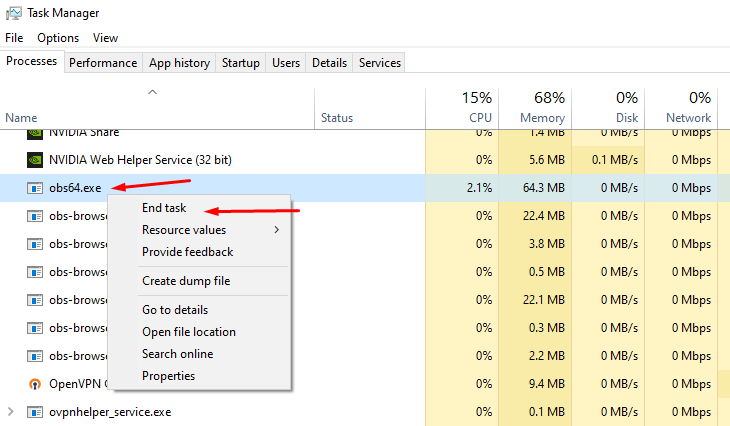 gritty isle
 hushed galleon
WTF This
hushed galleon
WTF This
Hi! This is Streamlabs!
gritty isle
hushed galleon
So how do i do this
What are you looking to accomplish?
cloud basin
I give up. I don't know what more I can do to stop the dropped frames.
gritty isle
cloud basin
I give up. I don't know what more I can do to stop the dropped frames.
Did you contact your ISP?
cloud basin
Yes. They said they refreshed the system. We're supposed to be getting between 75-335 Mbps (which we get around 250-300), and an upload speed between 8-35 Mbps
The download speed isn't the problem, it's the upload speed. It never even hits 8. It gets to like 5-6.
gritty isle
cloud basin
The download speed isn't the problem, it's the upload speed. It never even hits ...
Call them again.
cloud basin
🙃
lone jetty
How long is the turnaround for a ticket response? I put it in last week and no response yet
gritty isle
We can't offer a ETA on tickets, sorry. Us Volunteers don't have access to that system since we're not Streamlabs employees. There is a bit of back log since its summer but that should dwindle now that school is starting up again in most places. Be patient and they will get to you.
 desert briar
I was having an issue. I had two seperate bots for my twitch and youtube streams, but the giveaways weren't working on Twitch, so I discarded one of the bots and I'm currently using just one. However the other bot is heavily bugged, it is sending out random giveaways, and automated messages, the loyalty points are also broken. Any clue how I can fix this?
gritty isle
desert briar
I was having an issue. I had two seperate bots for my twitch and youtube streams...
Are you using Cloudbot or Chatbot?
desert briar
Cloudbot
abstract plazaBOT
Having trouble? Want to see if anyone else is having the same problem?
Check out our #known-issues channel! We do our best to keep this channel as current as possible with new bugs and progress updates!
If you can't find what you need please submit a ticket at: https://support.streamlabs.com/hc/en-us/requests/new
gritty isle
desert briar
Cloudbot
How are the Loyalty Point broken?
lone jetty
gritty isle
We can't offer a ETA on tickets, sorry. Us Volunteers don't have access to that...
Preciate it thanks
desert briar
gritty isle
How are the Loyalty Point broken?
So when viewers use the !points, two messages are sent out, one from the functional bot and one from the dysfunctional bot. So when they try to redeem things, it randomly picks which points to use. So it sometimes they can redeem stuff, and other times they can't. The dysfunctional bot only works on Twitch. AS per it only sends messages on twitch, and not on YouTube.
gritty isle
desert briar
So when viewers use the !points, two messages are sent out, one from the functio...
Can you screen shot this behavior?
desert briar
gritty isle
Can you screen shot this behavior?
It looks something like this.
 gritty isle
Please type /mods in your Twitch chat and screen shot the output from that please.
desert briar
 gritty isle
desert briar
gritty isle
desert briar
Have you changed your Twitch name?
desert briar
No I have not.
gritty isle
desert briar
No I have not.
Please reset Cloudbot and see if that helps.
👉 IMPORTANT: Do not skip or shorten the waits.
- Unmod streamlabs
- Toggle Cloudbot off
- Wait for at least 10 minutes
- Toggle Cloudbot back on
- Mod streamlabs
- Wait 10 minutes before trying commands
desert briar
gritty isle
Please reset Cloudbot and see if that helps.
👉 IMPORTANT: Do not skip or sho...
I will do this and let you know if it stops.
snow lichen
snow lichen
I had a issue with kick last night where i had no audio for some users and the s...
where you able to respond to my issue if so i missed it cause my internet was out
gritty isle
snow lichen
where you able to respond to my issue if so i missed it cause my internet was ou...
That's going to be hard to diagnose but for Kick, I'd make sure your Output Resolution is 1280x720 and your bitrate is 3500.
 indigo dove
Guys, I want to stream poker using Streamlabs ultra and I need to display a screen and constantly switch between them but I can’t fit the screen properly or switch between them. Any recommendations? Thanks in advance
gritty isle
indigo dove
Guys, I want to stream poker using Streamlabs ultra and I need to display a scre...
Thank you for being a Streamlabs Ultra subscriber!
Please link your Discord and then ask over in the VIP Support channel, which is one of your subscriber benefits.
wispy latchBOT
Streamlabs Ultra & All-Stars Discord Access
@indigo dove, are you a Streamlabs Ultra Subscriber or an All-Stars member? If so, you can link your Discord account to gain access to exclusive Ultra/VIP roles and private chat channels here in our Discord server!
🔗 How To Get Your Ultra/All-Stars Discord Role:
Link your Discord account under your Streamlabs integrations settings: Streamlabs Integrations Dashboard
Not Yet an Ultra Member?
You can learn more about Ultra and upgrade your membership here: Upgrade to Streamlabs Ultra
indigo dove
Oh thanks Rufus!! I’ll be linking it 🙏
 crimson prism
Hello I got banned on twithc wanted to switch my plan to new account from old account
gritty isle
crimson prism
Hello I got banned on twithc wanted to switch my plan to new account from old ac...
You'll have to submit a ticket for that: https://support.streamlabs.com/hc/en-us/requests/new
 lapis lake
Hi! I’ve been having an issue where streamlabs uses an absurd amount of CPU. It used to fluctuate between 9-15% while live, now it’s upwards of 40% while live. It’s been like this for MONTHS, and I haven’t changed any settings/setups that I’m aware of. I always run as administrator, I’ve tried uninstalling and reinstalling, logging out/back in, etc. A friend of mine is having the same issue, started roughly around the same time and has persisted throughout the same troubleshooting (he has a laptop, I have a PC). Any insight as to why would be appreciated, it’s causing streams to lag and/or crash periodically.
desert briar
desert briar
I will do this and let you know if it stops.
Followed all the steps and it is still having the duplicate issue. As well as the giveaway problem.
 wet juniper
Hi. I'm new to using Streamlabs Ultra. I have a question: is it possible to bypass the title settings on the multistream/settings page and just have custom settings for platform sites (e.g., YouTube, Kick, or Twitch)? I'd appreciate any help. I'll just add that I'm using the Streamlabs plugin for OBS.
snow lichen
gritty isle
That's going to be hard to diagnose but for Kick, I'd make sure your Output Reso...
So 1080p wont work for kick 😭
abstract plazaBOT
Having trouble? Want to see if anyone else is having the same problem?
Check out our #known-issues channel! We do our best to keep this channel as current as possible with new bugs and progress updates!
If you can't find what you need please submit a ticket at: https://support.streamlabs.com/hc/en-us/requests/new
wet juniper
snow lichen
So 1080p wont work for kick 😭
It works everywhere, on all platforms. For example, I have no problems setting bitrate or resolution. Unfortunately, the problem is that Streamlabs Multistream doesn't have a feature for assigning custom settings to different platforms.
gritty isle
snow lichen
So 1080p wont work for kick 😭
Not reliably.
snow lichen
gritty isle
Not reliably.
okay video workds but no audio on kick but works okay on all other platforms
and for instagram no mater what setting i do its like watching on low bitrate 😛
cloud basin
gritty isle
Call them again.
Found some potential fixes for my problem and wanted to verify if these could work?

 native oxide
Hello:) i am adding videos to my alerts and i was running into the problem of the audio for the video sometimes playing twice.i thought that i had fixed it by turning off my my monitoring off in source settings, but when i moved on to the next widget it started play twice again also at the end of both of my videos in the widgets the video will restart.
abstract plazaBOT
Are you knowledgeable about Streamlabs products?
Get rewarded for helping the Streamlabs Community here in Discord!
👉 Apply to be a part of the Streamlabs Support Volunteer Program!
Application Link:
https://forms.gle/eKS29zWfFjGEzaRp7
For details, see our post in
#announcements message
Do you have a Streamlabs Ultra membership? Are you part of the Streamlabs All-Stars program?
Get your Discord roles by going to this page here: https://streamlabs.com/dashboard#/settings/integrations and clicking "Link" next to Discord! Ultra members and higher tier All-Stars members will have access to private channels for support!
Interested in Ultra? Check it out here: https://streamlabs.com/ultra?refl=discord
snow lichen
snow lichen
okay video workds but no audio on kick but works okay on all other platforms
okay sofar only X and Kick have streaming issues
 zenith harness
My stream has continuously had bad quality/glitching/frequent crashes on streamlabs console when multistreaming to TikTok and Twitch. Not sure what’s going on. When I go live through twitch instead of streamlabs I never have any issues 🥲
 sharp ridge
bro could anyone help me get my chat box working for my stream
 steel oar
Issue in Talk Studio when the designated "Intro" ends one or two guests mics automatically switch to a mic selection that isn't in use. Also having issues with video/audio stability during recording.
 abstract briar
I need serious help with my Streamlabs, for some reason when I connected my Streamlabs to my Twitch the activity feed gets stuck like this and it doesn't pop up the alerts, how do I fix it?

 outer pike
Curious to why I think i lost the ability to stream to tiktok through streamlabs. Any ideas
Jk its back now somehow
 clear kayak
abstract briar
I need serious help with my Streamlabs, for some reason when I connected my Stre...
clear kayak
abstract briar
I need serious help with my Streamlabs, for some reason when I connected my Stre...
Ah man, I had the exact same issue with Streamlabs when I first connected it to Twitch, my alerts and activity feed just froze no matter what I tried. I spent days tweaking settings, reinstalling, and checking permissions, but nothing seemed to work.
I eventually got it sorted out with some help, and honestly, it saved me a lot of stress. If you want, I can share how I fixed mine.
abstract briar
clear kayak
Ah man, I had the exact same issue with Streamlabs when I first connected it to ...
Please tell me
 agile laurel
hi, sorry to bother, when im streaming marvel rivals for some reason my stream hotkeys dont work? specifically my save replay hotkey,
abstract plazaBOT
Having trouble? Want to see if anyone else is having the same problem?
Check out our #known-issues channel! We do our best to keep this channel as current as possible with new bugs and progress updates!
If you can't find what you need please submit a ticket at: https://support.streamlabs.com/hc/en-us/requests/new
abstract plazaBOT
Are you knowledgeable about Streamlabs products?
Get rewarded for helping the Streamlabs Community here in Discord!
👉 Apply to be a part of the Streamlabs Support Volunteer Program!
Application Link:
https://forms.gle/eKS29zWfFjGEzaRp7
For details, see our post in
#announcements message
Do you have a Streamlabs Ultra membership? Are you part of the Streamlabs All-Stars program?
Get your Discord roles by going to this page here: https://streamlabs.com/dashboard#/settings/integrations and clicking "Link" next to Discord! Ultra members and higher tier All-Stars members will have access to private channels for support!
Interested in Ultra? Check it out here: https://streamlabs.com/ultra?refl=discord
obtuse kiln
streamlabs is not notifying new subscribers on recent events nor on obs
clear kayak
abstract briar
Please tell me
You can send me a friend request now
gritty isle
obtuse kiln
streamlabs is not notifying new subscribers on recent events nor on obs
For YouTube or Twitch?
abstract plazaBOT
Having trouble? Want to see if anyone else is having the same problem?
Check out our #known-issues channel! We do our best to keep this channel as current as possible with new bugs and progress updates!
If you can't find what you need please submit a ticket at: https://support.streamlabs.com/hc/en-us/requests/new
obtuse kiln
gritty isle
For YouTube or Twitch?
youtube
gritty isle
obtuse kiln
youtube
YouTube subscriptions are private by default, this is controlled by the person subscribing, not you, and re-subscriptions will not trigger alerts.
gritty isle
obtuse kiln
hmm
That means the person subscribing to you would need to set their subscriptions to be public before subscribing to your channel. Changing it afterwards won't help.
gritty isle
obtuse kiln
i see. thanks!
You're welcome!
desert briar
Hi Rufus, the issue of yesterday still wasn’t solved :(
gritty isle
desert briar
Hi Rufus, the issue of yesterday still wasn’t solved :(
Cloudbot is still responding twice?
desert briar
Yes
gritty isle
desert briar
Yes
Post the link to your channel please. I don't see it linked on your Discord profile.
desert briar
gritty isle
Post the link to your channel please. I don't see it linked on your Discord pro...
I'm actually just a moderator for a streamer helping him resolve the issue, should I share his channel links?
gritty isle
desert briar
I'm actually just a moderator for a streamer helping him resolve the issue, shou...
Oh, wish I had known that yesterday. The reset Cloudbot procedure can only be performed by the streamer. You like reset your Cloudbot and not their Cloudbot.
But yes, please share a link to their channel.
desert briar
I did let him know to follow all the steps for cloudbot yesterday.
gritty isle
desert briar
I did let him know to follow all the steps for cloudbot yesterday.
Ah.
And they did?
desert briar
Yes, without missing any.
desert briar
gritty isle
Oh, wish I had known that yesterday. The reset Cloudbot procedure can only be p...
gritty isle
desert briar
https://www.twitch.tv/thedekureal
Thanks for that. I had to follow their channel since they had Follow Only Mode in chat.
I tested the !points command and it didn't repeat.

 rotund sluice
Anyone nows how to fix this issue?
 gritty isle
rotund sluice
Anyone nows how to fix this issue?
gritty isle
rotund sluice
Anyone nows how to fix this issue?
Thank you for being a Streamlabs Ultra subscriber!
Hop over to the #vip-support channel for assistance with that.
desert briar
Yes, after the reset yesterday, the points fixed. But other commands did not fix.
rotund sluice
gritty isle
Thank you for being a Streamlabs Ultra subscriber! <:ultra:1047482406770311208>...
Hey there! thanks mate, I've asked there I was thinking to ask here because I didn't get a response just yet
nvm got a response my impatience is outbound
gritty isle
rotund sluice
Hey there! thanks mate, I've asked there I was thinking to ask here because I di...
They just started a thread to assist you over there.
gritty isle
desert briar
Yes, after the reset yesterday, the points fixed. But other commands did not fix...
What other commands are still a problem?
desert briar
gritty isle
What other commands are still a problem?
I believe it should be every other custom command.
gritty isle
desert briar
I believe it should be every other custom command.
Do you have access to their dashboard or are you just a chat moderator?
desert briar
I do have access to their dashboard.
gritty isle
desert briar
I do have access to their dashboard.
Screen shot one of the problematic custom commands please.
 unique scaffold
I have a tournament match in a hour and i updated to latest version and now my video feed has change to mobile
gritty isle
unique scaffold
I have a tournament match in a hour and i updated to latest version and now my v...
In Streamlabs Desktop, go to Settings > Video and swap the values in the Output Resloution. For example if it is set to 1080x1920, change it to 1920x1080.
unique scaffold
gritty isle
In Streamlabs Desktop, go to Settings > Video and swap the values in the Output ...
thank you
gritty isle
unique scaffold
thank you
You're welcome.

 gritty isle
desert briar
gritty isle
desert briar
Interesting. That should not do that, obviously.
I think you mentioned Cloudbot Timers yesterday?
desert briar
gritty isle
Interesting. That should not do that, obviously.
I think you mentioned Cloudbo...
The timers sometimes duplicate, other times they don't.
gritty isle
desert briar
The timers sometimes duplicate, other times they don't.
Screen shot all the timers that are setup.
desert briar
gritty isle
Screen shot all the timers that are setup.
 gritty isle
desert briar
gritty isle
desert briar
And that's all the timers?
desert briar
gritty isle
And that's all the timers?
Those are the only two yes.
gritty isle
desert briar
Those are the only two yes.
Interesting. Is the streamer you moderator for a member here in the Streamlabs Discord?
desert briar
gritty isle
Interesting. Is the streamer you moderator for a member here in the Streamlabs ...
I do not think so.
gritty isle
desert briar
I do not think so.
I'd like to have them perform our disconnect service steps and see if that helps or not.
Could you relay these steps to them? These steps can only be performed by the streamer themselves.
desert briar
The steps you provided earlier?
gritty isle
desert briar
The steps you provided earlier?
No, this refreshes the connection between Streamlabs and Twitch and involves removing the connection between the two on the Twitch channel dashboard. No settings or data will be lost.
desert briar
Oh. Okay, any information, I will relay to them.
gritty isle
desert briar
Oh. Okay, any information, I will relay to them.
@desert briar Right click on this post and choose Copy Text and send it to the streamer. They need to perform this when they are not live.
Let's refresh the connection between Streamlabs and Twitch.
Follow these steps in order, even if you already done any one of the steps before. Don't skip steps and don't perform them out of order. If you're unsure about any of the steps, don't assume anything, ask first before proceeding.
-
Log out of the Streamlabs web site on every device you access it: Click your PFP and choose Log out.
-
If you use Streamlabs Console, log out of the Streamlabs Console web site on every device you access it: Click your PFP and choose Log out.
-
If you use the standalone Streamlabels application, log out of that.
-
If you use Streamlabs Desktop or Streamlabs Mobile, log out in those applications.
-
Follow this guide: https://streamlabs.com/content-hub/post/how-to-disconnect-your-streamlabs-account. Just follow the section for Twitch.
-
Navigate back to the Streamlabs web site and log in with your Twitch. This re-establishes the connection. You can verify this by going back to https://www.twitch.tv/settings/connections, scrolling down to Other Connections and examine the Streamlabs connection. ** It should say "Connected a few minutes ago" other short period of time. **
-
IMPORTANT: Once you have completed the guide, go back to the Streamlabs web site https://streamlabs.com/dashboard#/recentevents, click the Live Actions tab, scroll all the way to the bottom and click the Reload Widgets button. ** PLEASE Don't skip this step! **
-
Log back in to all the other Streamlabs products you use.
-
Test Cloudbot.
desert briar
Just to clarify, we should also log out of streamlabs as a moderator right?
gritty isle
desert briar
Just to clarify, we should also log out of streamlabs as a moderator right?
If you're logged into their Streamlabs account (very not recommended), yes. If you have Shared Access to the Dashboard, yes, you will need to log out.
desert briar
Oh, alright. What I was asking was about Shared Access. I should have clarified that lol.
gritty isle
desert briar
Oh, alright. What I was asking was about Shared Access. I should have clarified ...
More details are better. Vagueness leads to many questions.
Let us know how it goes when you can. I'm generally available using normal business hours unless I have IRL jobs duties.
desert briar
gritty isle
Let us know how it goes when you can. I'm generally available using normal busi...
Yes of course. I will let you guys know.
 vapid flame
I’ve submitted a report form twice to Tik Tok about my falsely revoking my live access. I did all the steps and everything. How long does it take for them to get back to you
gritty isle
vapid flame
I’ve submitted a report form twice to Tik Tok about my falsely revoking my live ...
They should respond directly to you, not Streamlabs. And as such, we have no way of offering an ETA on when that will happen.
snow lichen
Still having stream issues for kick ive changed everything as suggested even refreshed the connection still crashing and no audio from app side 😭
gritty isle
snow lichen
Still having stream issues for kick ive changed everything as suggested even ref...
Are you multistreaming with Ultra or only streaming to Kick?
snow lichen
gritty isle
Are you multistreaming with Ultra or only streaming to Kick?
did testing both ways same issue
gritty isle
snow lichen
did testing both ways same issue
Could just be Kick. I would try, in Streamlabs Desktop, go to Settings > Stream > scroll all the way down > Stream to custom ingest. And then put in the Kick RTMP URL and your stream key. If there multiple Kick ingests shown, try choosing those near you, not the exact closest one.
snow lichen
gritty isle
Could just be Kick. I would try, in Streamlabs Desktop, go to Settings > Stream...
that blocked my multi streaming and then crashed the program 😭
gritty isle
snow lichen
that blocked my multi streaming and then crashed the program 😭
No, this only tests Kick.
If you have an Ultra subscription, please link your Discord and continue in the VIP Support channel.
wispy latchBOT
Streamlabs Ultra & All-Stars Discord Access
@snow lichen, are you a Streamlabs Ultra Subscriber or an All-Stars member? If so, you can link your Discord account to gain access to exclusive Ultra/VIP roles and private chat channels here in our Discord server!
🔗 How To Get Your Ultra/All-Stars Discord Role:
Link your Discord account under your Streamlabs integrations settings: Streamlabs Integrations Dashboard
Not Yet an Ultra Member?
You can learn more about Ultra and upgrade your membership here: Upgrade to Streamlabs Ultra
snow lichen
gritty isle
No, this only tests Kick.
If you have an Ultra subscription, please link your D...
in the streamlabs settings?
gritty isle
snow lichen
in the streamlabs settings?
See this: #technical-support message
It's on your Streamlabs Dashboard (the Streamlabs web site).
snow lichen
gritty isle
It's on your Streamlabs Dashboard (the Streamlabs web site).
okay here is the link i think https://streamlabs.com/dashboard#/stats
 blissful nexus
#technical-support I am running on a Mac Mini M1 (with Streamlabs 1.19.3) and over the past week have noticed that when I use Streamlabs, all the songs I load up onto Virtual DJ are coming out warbly, both on my end (in record test) and when live. Is there a fix for this in one of the settings? I have looked through everything (I haven't changed any settings in years) and logged out, and back in. Still having this issue. When I play the music straight from VDJ, it's fine. Could this have to do with one of the recent updates?
 gritty isle
blissful nexus
<#962371235789025360> I am running on a Mac Mini M1 (with Streamlabs 1.19.3) and...
gritty isle
blissful nexus
<#962371235789025360> I am running on a Mac Mini M1 (with Streamlabs 1.19.3) and...
Please submit a ticket on that: https://support.streamlabs.com/hc/en-us/requests/new. I don't have any troubleshooting steps for that, please I don't have a Mac.
snow lichen
gritty isle
No, here: https://streamlabs.com/dashboard#/settings/integrations
my screen dont look like that
 gritty isle
snow lichen
my screen dont look like that
gritty isle
snow lichen
my screen dont look like that
Please use this link like I've been giving you: https://streamlabs.com/dashboard#/settings/integrations.

 gritty isle
snow lichen
yea it wont link just goes to the option once clicked but wont accept it
gritty isle
snow lichen
yea it wont link just goes to the option once clicked but wont accept it
You must have as I now see you have the Ultra role. Now hop over to #vip-support
 tight hinge
i have logged out, ran as admin and logged back in, ive reset my stream key realizing that it uses a login not a stream key, everything was fine up until i wanted to stream today, no settings changed or anything, if i click on "just go live" it hits me with "please check your streaming and recording settings" so i did and nothing seems out of the ordinary. i did recently enable 2fa on twitch but ive done the same on streamlabs and it worked for a few days and now we're here. any help would be appreciated.

here's the other error
 gritty isle
tight hinge
here's the other error
gritty isle
tight hinge
here's the other error
Please screen shot Settings > Output. If you are using Advanced mode, screen shot all the settings for Streaming.
Change the encoder to X.264 ( or something else if you're already using X.264), save the settings, restart Streamlabs Desktop, switch the encoder back to what it was and tweak any of the settings as necessary based on the above screen shot, save the settings, and try and go live again.
If that does not work, toggle the the Replay Buffer off and try again.
tight hinge
should i change the encoder for recording as well to match or leave it just to see
gritty isle
tight hinge
should i change the encoder for recording as well to match or leave it just to s...
Leave Recoding settings alone. The message says a Streaming error. But screen shot the Recording settings as well for safe keeping.
tight hinge
okay
abstract plazaBOT
Having trouble? Want to see if anyone else is having the same problem?
Check out our #known-issues channel! We do our best to keep this channel as current as possible with new bugs and progress updates!
If you can't find what you need please submit a ticket at: https://support.streamlabs.com/hc/en-us/requests/new
tight hinge
that didnt seem to do anything, is it bad ive never had the buffer on in the first place?
gritty isle
tight hinge
that didnt seem to do anything, is it bad ive never had the buffer on in the fir...
Copy %appdata%\slobs-client\node-obs\logs
Press Windows-E to open Explorer.
Paste the above test on the address bar.
Upload the most recent log file here.
tight hinge
i went live on youtube for a second to see if it'd work, and it did, then went back to twitch and it still said the same thing but when i hit just go live it actually did, it just didnt let me change title or any settings. you think it could be on twitch's end?
will do though
gritty isle
tight hinge
i went live on youtube for a second to see if it'd work, and it did, then went b...
On the Confirm & Go Live screen, uncheck Enhanced Broadcast* and try again on Twitch.
On the Confirm & Go Live screen, uncheck Enhanced Broadcast* and try again on Twitch.
tight hinge
 gritty isle
tight hinge
gritty isle
tight hinge
Click Show Details and screen shot again.
tight hinge
just adds the "connection failed" under it
 gritty isle
tight hinge
just adds the "connection failed" under it
gritty isle
tight hinge
just adds the "connection failed" under it
Let's run the Twitch Test then. 👇
wispy latchBOT
@tight hinge 🌐 Finding Your Best Twitch Server
To ensure the most stable and high-quality stream to Twitch, we recommend using a Twitch test tool to find the optimal server for your location and internet connection.
📋 How to Use the Twitch Test Tool:
- Access the tool here: Twitch Test Tool
- Run the test using either the Medium or Long duration. Short tests may not provide the most accurate results.
- Select your specific region from the listed options. If your exact region is not available, choose 5 to 6 servers closest to you.
- Aim for a quality score of at least 84. This indicates a strong and stable connection.
🛠️ Applying Your Settings in Streamlabs Desktop:
- Once you've identified a good server, navigate to your Streamlabs Desktop settings:
Settings>Stream>Stream to custom ingest. - From there, you can manually select your preferred server based on your test results.
tight hinge
halfway through now
so how do i know what url and everything to input
sike nvm
its still doing it, im not sure what it is but it is still letting me "just go live" and i can change the settings for the stream like title and stuff though the app or on the website, im not too worried ab it at this point but thank you for helping me at least get live again it is very much appreciated
gritty isle
tight hinge
its still doing it, im not sure what it is but it is still letting me "just go l...
You're welcome!
 random summit
Anyone here stream with a green screen. I'm struggling with the lighting real bad. Can u post pics of urs?
 flint forge
Anything in the latest patch to Streamlabs OBS (downloaded today) that could cause frame dropping, or is it more likely to be a Twitch issue? Haven't had an issue with this for as long as I can remember.
gritty isle
flint forge
Anything in the latest patch to Streamlabs OBS (downloaded today) that could cau...
Dropped Frames are a network issue between you and the Twitch ingest. See the next post.
wispy latchBOT
@flint forge 🌐 Finding Your Best Twitch Server
To ensure the most stable and high-quality stream to Twitch, we recommend using a Twitch test tool to find the optimal server for your location and internet connection.
📋 How to Use the Twitch Test Tool:
- Access the tool here: Twitch Test Tool
- Run the test using either the Medium or Long duration. Short tests may not provide the most accurate results.
- Select your specific region from the listed options. If your exact region is not available, choose 5 to 6 servers closest to you.
- Aim for a quality score of at least 84. This indicates a strong and stable connection.
🛠️ Applying Your Settings in Streamlabs Desktop:
- Once you've identified a good server, navigate to your Streamlabs Desktop settings:
Settings>Stream>Stream to custom ingest. - From there, you can manually select your preferred server based on your test results.
flint forge
Just running this as we speak. I assume the quality is 0-100? Definitely seems there's something dodgy going on there. I guess I'll let time magically fix the problem or contact my ISP later. Thanks.
desert briar
Everything was completed, however the issue is still there. All steps were followed and completed. But still the duplicate issue.
gritty isle
desert briar
Everything was completed, however the issue is still there. All steps were follo...
 Toggle Cloudbot off here https://streamlabs.com/dashboard#/cloudbot/mod-tools and then perform the disconnect service steps and finally toggle Cloudbot on, wait a few minutes, and test again.
abstract briar
Can someone help me? I can’t fix the issue with my Twitch activity feed freezing like this

I connected my Streamlabs to my Twitch and I authorized it but I don’t know what’s happening
I’m using my OBS, Streamlabs plugin for OBS and I use the Twitch alerts, it should be working fine but I don’t know what’s wrong
gritty isle
abstract briar
I’m using my OBS, Streamlabs plugin for OBS and I use the Twitch alerts, it shou...
So you're not using the Streamlabs Alert Box https://streamlabs.com/dashboard#/alertbox/twitch/follows?
abstract briar
gritty isle
So you're not using the Streamlabs Alert Box <https://streamlabs.com/dashboard#/...
I used to
but for some reason it doesn’t work properly
gritty isle
abstract briar
I used to
Then you will need to reach out to Twitch for assistance with their alerts.
abstract briar
abstract briar
but for some reason it doesn’t work properly
My Streamlabs alerts don’t work properly
desert briar
gritty isle
<:Thonk:667122928717922367> Toggle Cloudbot off here <https://streamlabs.com/d...
Same result. It still duplicates custom commands, another thing I noticed was points pulling from the wrong bot.
abstract briar
abstract briar
My Streamlabs alerts don’t work properly
I don’t know how to fix them
desert briar
desert briar
Same result. It still duplicates custom commands, another thing I noticed was po...

 gritty isle
abstract briar
I don’t know how to fix them
gritty isle
abstract briar
I don’t know how to fix them
What platform?
abstract briar
gritty isle
What platform?
Twitch
gritty isle
abstract briar
Twitch
All alerts or just some of them or just one of them?
abstract briar
gritty isle
All alerts or just some of them or just one of them?
All
I could show you the issue on screen share
gritty isle
abstract briar
All
So do you
Not see the alert
OR
Not hear the alert
OR
Not see and not hear the alert
?
abstract briar
The alerts either don’t show and I have to replay them manually or they show but very laggy
If I could show you it would be easier for me to explain
gritty isle
abstract briar
The alerts either don’t show and I have to replay them manually or they show but...
Do you perhaps have Unlimited Alert Moderation Delay enabled? If so, disable that setting.
Please go here https://streamlabs.com/dashboard#/alertbox and if you have Unlimited Alert Moderation Delay enabled, disabled it then click Save Settings at the bottom of the page.
Also go here https://streamlabs.com/dashboard#/recentevents and make sure your alerts are not paused. If this icon is a play button, your alerts were paused.
https://cdn.discordapp.com/attachments/962371235789025360/1147374507238101072/IMG_1019.png
 gritty isle
abstract briar
If I could show you it would be easier for me to explain
gritty isle
abstract briar
If I could show you it would be easier for me to explain
For moderation purposes, all support has to be done in this channel. We cannot provide support in DM's, Discord calls, or screen sharing.
abstract briar
gritty isle
For moderation purposes, all support has to be done in this channel. We cannot ...
I see, it makes sense
abstract briar
gritty isle
Do you perhaps have Unlimited Alert Moderation Delay enabled? If so, disable th...
I’ll do this then
gritty isle
desert briar
Same result. It still duplicates custom commands, another thing I noticed was po...
I would then have the streamer submit a ticket here: https://support.streamlabs.com/hc/en-us/requests/new
abstract briar
gritty isle
Do you perhaps have Unlimited Alert Moderation Delay enabled? If so, disable th...
Where is that setting?
gritty isle
 abstract briar
It was already off
Like when I do a preview of it
It looks very laggy
The first time I do a preview of it is kinda laggy then after that one is fine supposedly
gritty isle
abstract briar
It was already off
Screenshot your Recent Events page please https://streamlabs.com/dashboard#/recentevents
abstract briar
 gritty isle
abstract briar
gritty isle
abstract briar
Is this up to date or not?
abstract briar
gritty isle
Is this up to date or not?
Yeah
gritty isle
abstract briar
Yeah
Please follow this:
-Remove the Browser Source you have for the Alert Box Widget from every scene where you have it
-Quit OBS Studio
-Hit windows key + R
-Paste this and hit enter %appdata%\obs-studio\plugin_config\obs-browser
-Delete the cache folder
-Start up OBS Studio again
-Add the Browser Source for the Alert Box Widget in only one scene and set the following circled options in the Browser Source.
 abstract briar
The one that says Cache or the one that says GPUCache / CodeCache
gritty isle
abstract briar
The one that says Cache or the one that says GPUCache / CodeCache
Screen shot what you see please.
abstract briar
 gritty isle
abstract briar
gritty isle
abstract briar
Delete just this one folder. Don't delete any other folders.
 abstract briar
The one that says Cache?
gritty isle
abstract briar
The one that says Cache?
Correct.
abstract briar
Do I also check up the Shutdown Source When Not Visible?
Or only the one that's underneath that one
gritty isle
abstract briar
Do I also check up the Shutdown Source When Not Visible?
No. Just the one option I circled.
abstract briar
Okay
I have a question, does having streamlabels and the streamlabs plugin for OBS can cause any trouble?
having both programs open
 pastel musk
need help with a launching bug after the newest update
gritty isle
abstract briar
I have a question, does having streamlabels and the streamlabs plugin for OBS ca...
No that should be fine.
OBS Studio or Streamlabs Desktop?
pastel musk
gritty isle
OBS Studio or Streamlabs Desktop?
SLOBS Desktop
gritty isle
pastel musk
SLOBS Desktop
Streamlabs Desktop What exactly is the issue?
pastel musk
if i launch it gets stuck in the loading screen , so far reinstalled , tried to clean the appdata which ifound online as way , closed all tasks in the task manager already
wispy latchBOT
@obtuse dust 🌐 Finding Your Best Twitch Server
To ensure the most stable and high-quality stream to Twitch, we recommend using a Twitch test tool to find the optimal server for your location and internet connection.
📋 How to Use the Twitch Test Tool:
- Access the tool here: Twitch Test Tool
- Run the test using either the Medium or Long duration. Short tests may not provide the most accurate results.
- Select your specific region from the listed options. If your exact region is not available, choose 5 to 6 servers closest to you.
- Aim for a quality score of at least 84. This indicates a strong and stable connection.
🛠️ Applying Your Settings in Streamlabs Desktop:
- Once you've identified a good server, navigate to your Streamlabs Desktop settings:
Settings>Stream>Stream to custom ingest. - From there, you can manually select your preferred server based on your test results.
⚠️ Streamlabs Desktop Crash Troubleshooting
@pastel musk, if you're experiencing crashes with Streamlabs Desktop, this guide provides a comprehensive troubleshooting walkthrough to help you resolve the issue: Streamlabs Desktop Crash Troubleshooting Guide
unreal mantle
Guys Can i have here German Support?
pastel musk
wispy latch
⚠️ **Streamlabs Desktop Crash Troubleshooting**
<@1022956521119826011>, if you'...
trying the DirectX install , last point i didnt do yet
gritty isle
unreal mantle
Guys Can i have here German Support?
English only. Use Google Translate if you need to.
 obtuse dust
wispy latch
<@321085906029117450> 🌐 **Finding Your Best Twitch Server**
To ensure the most ...
obtuse dust
wispy latch
<@321085906029117450> 🌐 **Finding Your Best Twitch Server**
To ensure the most ...
dont think i have the custom ingest button
gritty isle
obtuse dust
dont think i have the custom ingest button
Settings > Stream > scroll all the way down > Stream to custom ingest
obtuse dust
 gritty isle
obtuse dust
gritty isle
obtuse dust
Not add a destination.
Behind the read box it should say stream to custom ingest
pastel musk
still not working , any idea taking a look at the logs ? after todays update seems like drivers are missing or paths changed
unreal mantle
My dears, I used the Streamlabs Chatbot and would like to insert a command that it searches for a specific name from my file on my PC, i.e. a text file, because I enter a specific type of fish that I have in this text file. What is this command?
obtuse dust
Im just going off the instructions the bot told me... settings stream does not have the button it told me. didn't have any issues until today
gritty isle
pastel musk
still not working , any idea taking a look at the logs ? after todays update see...
Reboot your PC.
Go to the Streamlabs web site and download a fresh installer.
Run the installer as administrator.
At the end of the installer, don't let it launch Streamlabs Desktop but rather just quit the installer.
Reboot your PC again.
Launch Streamlabs Desktop.
gritty isle
obtuse dust
Im just going off the instructions the bot told me... settings stream does not h...
Screen shot Settings > Stream please.
obtuse dust
this is what i've got on that page

 gritty isle
obtuse dust
this is what i've got on that page
gritty isle
obtuse dust
this is what i've got on that page
You seem to be live. End your live stream and then screen shot Settings > Stream again without your mluse being over the Add Destination box.
And don't type custom ingest in the search box in Settings.
Its at the bottom of Settings > Stream. Trust me.
obtuse dust
Ahhh being live making it not show up got it (i was searching for it bcuz you made it sound so ez to find)
gritty isle
obtuse dust
Ahhh being live making it not show up got it (i was searching for it bcuz you ma...
Yes.
unreal mantle
My dears, I used the Streamlabs Chatbot and would like to insert a command that it searches for a specific name from my file on my PC, i.e. a text file, because I enter a specific type of fish that I have in this text file. What is this command?
obtuse dust
well changing the ingest server didn't fix it
had to end my stream due to the choppiness
gritty isle
obtuse dust
well changing the ingest server didn't fix it
Still getting dropped frames?
obtuse dust
Sadly yes, had like 20k dropped frames in 2h which is very high for me, after ingest server changing still getting 200+ frames dropped a second
pastel musk
gritty isle
Reboot your PC.
Go to the Streamlabs web site and download a fresh installer.
Ru...
no success , thanks first of all, apprciate the help
obtuse dust
me and another streamer are thinkign its on twitches end
gritty isle
unreal mantle
My dears, I used the Streamlabs Chatbot and would like to insert a command that ...
The Twitch documentation for Chatbot is here https://cdn.streamlabs.com/chatbot/Documentation_Twitch.pdf. I'd also suggest asking over on the Chatbot Discord https://discord.gg/xFcsxft.
gritty isle
obtuse dust
me and another streamer are thinkign its on twitches end
Could be.
gritty isle
pastel musk
no success , thanks first of all, apprciate the help
I'd then try a clean install of your video card drivers. https://streamlabs.com/content-hub/post/clean-install-of-graphics-driver-tutorial
abstract briar
I have a question
What does Having my Streamlabs account conntected to my Twitch do?

If I try to replay the alerts from here it doesn't appear
(I am using the streamlabs alert box)
 abstract plazaBOT
Having trouble? Want to see if anyone else is having the same problem?
Check out our #known-issues channel! We do our best to keep this channel as current as possible with new bugs and progress updates!
If you can't find what you need please submit a ticket at: https://support.streamlabs.com/hc/en-us/requests/new
gritty isle
abstract briar
(I am using the streamlabs alert box)
What is this? That looks like Twitch's web site. I would think that the replay button there would replay their (Twitch's) alert.
If you want to replay an alert through the Streamlabs Alert Box, you would need to go to your Recent Events page https://streamlabs.com/dashboard#/recentevents.
charred citrus
@gritty isle The stream is always dropping frames on the automatic server. What is the solution?
abstract briar
gritty isle
What is this? That looks like Twitch's web site. I would think that the replay...
understood
gritty isle
charred citrus
<@301571565840236564> The stream is always dropping frames on the automatic ser...
Twitch?
charred citrus
yes
wispy latchBOT
@charred citrus 🌐 Finding Your Best Twitch Server
To ensure the most stable and high-quality stream to Twitch, we recommend using a Twitch test tool to find the optimal server for your location and internet connection.
📋 How to Use the Twitch Test Tool:
- Access the tool here: Twitch Test Tool
- Run the test using either the Medium or Long duration. Short tests may not provide the most accurate results.
- Select your specific region from the listed options. If your exact region is not available, choose 5 to 6 servers closest to you.
- Aim for a quality score of at least 84. This indicates a strong and stable connection.
🛠️ Applying Your Settings in Streamlabs Desktop:
- Once you've identified a good server, navigate to your Streamlabs Desktop settings:
Settings>Stream>Stream to custom ingest. - From there, you can manually select your preferred server based on your test results.
charred citrus
gritty isle
Twitch?
but i wanaa dual output in custom i cant
flint forge
As you guys are more tech savvy than I am, may I ask why would one PC rock the test and the other choke? The one running OBS is stuck at like 6500kbps, 30KB conwnd, 400sndwnd and 800 retrans, while the other PC has bandwidth at 25000+, 4056KB on both windows and 20KB retrans.
gritty isle
charred citrus
but i wanaa dual output in custom i cant
Then you will need to reach out to your Internet Service Provider.
Dropped Frames are a network issue, some where in the internet between your cable modem and the Twitch ingest.
gritty isle
flint forge
As you guys are more tech savvy than I am, may I ask why would one PC rock the t...
Does the other PC have an MSI motherboard with a Killer ethernet interface?
flint forge
Good question. Let me delve in to this. Pretty sure it's an MSI at least.
charred citrus
@gritty isle I had no problems with the Internet. It was streaming without frame drops, but after the last update, problems occurred. I tried streaming through other programs, and there was no problem with the Internet.
gritty isle
flint forge
Good question. Let me delve in to this. Pretty sure it's an MSI at least.
Okay, let me know but for transparency, I'm leaving the office now that my workday is done and there is at least an hour commute. I won't be able to reply until I get home. I don't text and drive.
gritty isle
charred citrus
<@301571565840236564> I had no problems with the Internet. It was streaming with...
Run the Twitch Test. Screen shot the results.
flint forge
gritty isle
Okay, let me know but for transparency, I'm leaving the office now that my workd...
Cool. It's an MSI -370A Pro. Googling what I can. Drive safe. ^^
gritty isle
flint forge
Cool. It's an MSI -370A Pro. Googling what I can. Drive safe. ^^
Killer's Software Suite is known for its poor performance and issues when trying to stream. Please download the package from https://www.intel.com/content/www/us/en/download/19779/intel-killer-performance-suite.html, completely uninstall all Killer NIC items and run the installer, choosing to only install the Hardware Drivers.
Okay, I'm off to play in traffic. Wish me luck! 👋
 flint forge
Click on "more info" and it should let you run it?
Killer thingy didn't find compatible hardware, so that's not gonna work for me. I'll try...something. Dynamite.
charred citrus
@flint forge But the security gave me a warning.
obtuse dust
seems like 3 streamers with the same issue since the update 
flint forge
charred citrus
<@159724739189800960> But the security gave me a warning.
It likes to do that on some programs. I'm not gonna tell you to do it, but I did run it and nothing's on fire yet.
charred citrus
@obtuse dust Yes, there is a problem we do not know about.
obtuse dust
gonna lurk while u guys figure it out lemme know if i can help lol
charred citrus
@flint forge Didn't he give you a warning?
flint forge
charred citrus
<@159724739189800960> Didn't he give you a warning?
It did, but I figured it's safe since it came from the tech support here and seems to do what it's supposed to do. 🤷♂️
charred citrus
obtuse dust
gonna lurk while u guys figure it out lemme know if i can help lol
@flint forge It is a program from Twitch, not from Streamlabs. The problem is with Twitch, and I will not give it the right to know my device.
 mint lintel
hello, are twitch servers down currently? my output is almost like capped at 2000kbs for like 30 minutes now
 obtuse dust
mint lintel
hello, are twitch servers down currently? my output is almost like capped at 200...
obtuse dust
mint lintel
hello, are twitch servers down currently? my output is almost like capped at 200...
welcome to what we been talking about lol
charred citrus
@mint lintel Welcome to the world of modern problems
obtuse dust
yeah im currently of the opinion it's on twitch (even if there was a big update for streamlabs today)
flint forge
I'd otherwise say it's Twitch, but one PC doing way better in the test than the other confuses me a lot.
charred citrus
One solution if you are broadcasting on one platform is the Restream website, which is very excellent.
 wheat hinge
having issues multistreaming to facebook after update triedn resetting my stream code unlinking changing api and still same error codse
abstract plazaBOT
Are you knowledgeable about Streamlabs products?
Get rewarded for helping the Streamlabs Community here in Discord!
👉 Apply to be a part of the Streamlabs Support Volunteer Program!
Application Link:
https://forms.gle/eKS29zWfFjGEzaRp7
For details, see our post in
#announcements message
Do you have a Streamlabs Ultra membership? Are you part of the Streamlabs All-Stars program?
Get your Discord roles by going to this page here: https://streamlabs.com/dashboard#/settings/integrations and clicking "Link" next to Discord! Ultra members and higher tier All-Stars members will have access to private channels for support!
Interested in Ultra? Check it out here: https://streamlabs.com/ultra?refl=discord
gritty isle
 latent token
Is this where I can get assistance with Streamlabs
latent token
Is this where I can get assistance with Streamlabs
The Twitch Test is safe. You be used it and it’s the only thing out there to analyze your connection to Twitch.
 snow steeple
hey guys so I deleted the camera border which I liked it was the neon theme how would I get it back I closed it so Ctrl Z doesnt help
abstract plazaBOT
Having trouble? Want to see if anyone else is having the same problem?
Check out our #known-issues channel! We do our best to keep this channel as current as possible with new bugs and progress updates!
If you can't find what you need please submit a ticket at: https://support.streamlabs.com/hc/en-us/requests/new
 crystal fable
anyone know why is this happening i already restart my pc and tried reinstalling the app its still the same
any sources i touch the app broke
abstract plazaBOT
Are you knowledgeable about Streamlabs products?
Get rewarded for helping the Streamlabs Community here in Discord!
👉 Apply to be a part of the Streamlabs Support Volunteer Program!
Application Link:
https://forms.gle/eKS29zWfFjGEzaRp7
For details, see our post in
#announcements message
 bleak forge
Hey so I have a question. Didn't stream in like a month and wanted to go live now. The thing is I can only stream on twitch now and can't switch to kick. Is it a new thing that I need to get the ultra or is my acc having some issues?
abstract plazaBOT
Do you have a Streamlabs Ultra membership? Are you part of the Streamlabs All-Stars program?
Get your Discord roles by going to this page here: https://streamlabs.com/dashboard#/settings/integrations and clicking "Link" next to Discord! Ultra members and higher tier All-Stars members will have access to private channels for support!
Interested in Ultra? Check it out here: https://streamlabs.com/ultra?refl=discord
crystal fable
crystal fable
anyone know why is this happening i already restart my pc and tried reinstalling...
if someone know the fix for this you can reply with mentions...thx in advance 
update it only break when the chat bar is open.... hope this helps
 tidal canyon
what to do?
 main nacelle
can anyone help me with cloudbot redemption? i think i have set everything well and yet it doesnot work for some reason. i use OBS to stream, and i stream on yt. tia
 lime isle
I have a major problem with my Streamlabs subscription, I've been charged $11 on Sunday but my account has no billing history of it says I have no subscription at all.
 flat quest
This webcam issue needs fixing, we pay a subscription to use these features
When I'm in the editor on my phone I get something went wrong and no cam shows on stream
lime isle
flat quest
This webcam issue needs fixing, we pay a subscription to use these features
It's honestly not worth the trouble, the website barely works at all. I'm going to move over to lightstream and give that a try.
flat quest
Only reason I use stream labs is because the tik tok integration works
humble gale
crystal fable
update it only break when the chat bar is open.... hope this helps
i would try reinstalling Streamlabs Desktop
humble gale
tidal canyon
what to do?
try relogging with tiktok or maybe logging out > disconnecting tiktok from streamlabs (https://streamlabs.com/content-hub/post/how-to-disconnect-your-streamlabs-account_ > relogging again
humble gale
crystal fable
yep did that already
did you try installing it on a different drive? like i have two drives on my computer
crystal fable
only have 1 drive sadly
gritty isle
lime isle
I have a major problem with my Streamlabs subscription, I've been charged $11 on...
You will need to submit a ticket for assistance with that: https://support.streamlabs.com/hc/en-us/requests/new.
humble gale
crystal fable
only have 1 drive sadly
🤔 maybe use the icons here to get the beta tester role, download the preview version and try that? #welcome message
gritty isle
main nacelle
can anyone help me with cloudbot redemption? i think i have set everything well ...
A few things to check:
-
Make sure you have enabled the Cloudbot Loyalty: https://streamlabs.com/dashboard#/cloudbot/loyalty/users
-
On the Cloudbot Redemption Alert, make sure this option is toggled off: https://streamlabs.com/dashboard#/alertbox/general/cloud_bot_redemption>
If neither of these help, please let us know exactly what the issue is so we can better assist you.
 humble gale
flat quest
When I'm in the editor on my phone I get something went wrong and no cam shows o...
humble gale
flat quest
When I'm in the editor on my phone I get something went wrong and no cam shows o...
i would probably submit a ticket if you haven't already https://support.streamlabs.com/hc/en-us/requests/new
abstract plazaBOT
Having trouble? Want to see if anyone else is having the same problem?
Check out our #known-issues channel! We do our best to keep this channel as current as possible with new bugs and progress updates!
If you can't find what you need please submit a ticket at: https://support.streamlabs.com/hc/en-us/requests/new
crystal fable
haha the preview version did the same
😭 im doomed do i have to opt for tt studio....its scuffed
humble gale
crystal fable
haha the preview version did the same
Have you submitted a ticket to the support team? They would probably be able to give you more stuff to do
gusty umbra
crystal fable
they havent reply yet
Be patient with them. Tickets are answered in the order received. You will get a response!
crystal fable
alright thx for the help guys!! streaming is just what i did when i have free time barely any viewer anyway
gritty isle
@fringe ravine In Streamlabs Mobile, you setup your scenes in the settings. In order to screen share your mobile game, you need to add the Screen Share layer.
And I suggest reading our guide: https://streamlabs.com/content-hub/post/mobile-live-streaming-guide
 fringe ravine
Hi. I have that up in safari already. Thanks
I just wanted to see if there was a way to view it as a test from mobile and mark it private on twitch. I honestly wasn’t expecting an answer right away.
Anyway I’m also looking for someone who routinely streams games from their tablet to do a “ talk and walk “ kind of thing either tonight ( 8:30 ish mountain time) or tomorrow ( where I can mess with it earler ). So was putting that thought out to the general community. 😊
Thanks
gritty isle
fringe ravine
I just wanted to see if there was a way to view it as a test from mobile and mar...
You can mark it as unpublished in your Twitch Content Manager.
fringe ravine
gritty isle
You can mark it as unpublished in your Twitch Content Manager.
That’s interesting. I looked it up. That appears to be after you go live though not during. Though that is helpful. The little oops video I did yesterday apperently did not save. Does it need to be a certain length? I may have been live for less the. A minute. 😂
gritty isle
fringe ravine
That’s interesting. I looked it up. That appears to be after you go live though...
If you want Twitch to store your VOD's (Video On Demand), you need to enable that: https://help.twitch.tv/s/article/video-on-demand?language=en_US#enabling>
fringe ravine
I think I may have done that. If not the. Maybe I should keep it off until I figure it out. Thanks for the help.
gritty isle
fringe ravine
I think I may have done that. If not the. Maybe I should keep it off until I fi...
You're welcome.
fringe ravine
Oh while I’m thinking of it. I noticed the “ themes “ all look to be landscape. I’d be streaming in portrait mode only. Is that a problem?
gritty isle
fringe ravine
Oh while I’m thinking of it. I noticed the “ themes “ all look to be landscape. ...
Did you set up the vertical scene?
fringe ravine
Yes
 bronze geyser
Unable to log in to CrossClip. My only way of doing so is through google or streamlabs id and the popup window is in a constant state of loading.
gritty isle
bronze geyser
Unable to log in to CrossClip. My only way of doing so is through google or stre...
Press the Windows key on your keyboard or go bottom left and click the Windows logo.
Search for "default apps". It may be different in Windows 10 and Windows 11.
Find the default apps section and completely exit the web browser.
Change your default browser to a new browser. For example, if you're currently on Chrome, you'll want to change it to Edge or Firefox. (Screenshot for reference: https://prnt.sc/48ZdLCQCgi8D)
Once you've changed this, see if the same issue occurs when attempting to log in.
tidal canyon
humble gale
try relogging with tiktok or maybe logging out > disconnecting tiktok from strea...
doesn't work
abstract plazaBOT
Having trouble? Want to see if anyone else is having the same problem?
Check out our #known-issues channel! We do our best to keep this channel as current as possible with new bugs and progress updates!
If you can't find what you need please submit a ticket at: https://support.streamlabs.com/hc/en-us/requests/new
cloud basin
gritty isle
Press the Windows key on your keyboard or go bottom left and click the Windows l...
So my Internet is hopefully fixed. Here's the speed test I did.
 gritty isle
cloud basin
So my Internet is hopefully fixed. Here's the speed test I did.
gritty isle
cloud basin
So my Internet is hopefully fixed. Here's the speed test I did.
YAY!!! Good luck!
cloud basin
gritty isle
YAY!!! Good luck!
So that's the thing......
I did a stream today. 5 minutes went by, no issues. Then, you'll never guess what happened
gritty isle
cloud basin
I did a stream today. 5 minutes went by, no issues. Then, you'll never guess wha...
You won a toaster?
😛
cloud basin
Dropped frames 😄
gritty isle
cloud basin
Dropped frames 😄
Good grief.
cloud basin
Now I think it has to be Streamlabs settings or something, right?
gritty isle
cloud basin
Now I think it has to be Streamlabs settings or something, right?
Doubtful. What did you set your bitrate to?
gritty isle
cloud basin
2200
I'd check with you ISP again.
cloud basin
Bruh how 😔 Make it make sense
 amber dagger
anyone here from US?
desert briar
Can someone tell me what I have to do to stream on twitch & kick at the same time from my Xbox . I don’t understand this
gritty isle
cloud basin
Bruh how 😔 Make it make sense
I can't. Dropped frames are the hardest things to resolve. Are you connected via wired ethernet or Wifi?
cloud basin
gritty isle
I can't. Dropped frames are the hardest things to resolve. Are you connected v...
Ethernet
desert briar
Yes me , tcgamermom71,
gritty isle
cloud basin
Ethernet
Do you have a spare ethernet cable to can swap with?
cloud basin
gritty isle
Do you have a spare ethernet cable to can swap with?
Yes.
desert briar
amber dagger
anyone here from US?
Yes, I am tcgamermom71
gritty isle
desert briar
Can someone tell me what I have to do to stream on twitch & kick at the same tim...
If you have a Streamlabs Console subscription, at the Streamlabs Console web site, connect your Kick account: https://console.streamlabs.com/account#/stream-destinations.
cloud basin
@gritty isle Can you verify if these would help?
 desert briar
gritty isle
If you have a Streamlabs Console subscription, at the Streamlabs Console web sit...
desert briar
gritty isle
If you have a Streamlabs Console subscription, at the Streamlabs Console web sit...
So I have to set that up through the Google on my console, and it must cost some money, huh? That’s fine. I’ll do that now.
gritty isle
If you're dropping frames, increasing your bitrate may make the issue worse. What is your Output Resolution?
You can try setting the Bind to IP drop down menu to the IP address or your PC. Don't enable those other two options.
cloud basin
gritty isle
If you're dropping frames, increasing your bitrate may make the issue worse. Wh...
1920x1080 is the Output because I've been doing that with no issues before.
gritty isle
cloud basin
1920x1080 is the Output because I've been doing that with no issues before.
Yiu can try setting your bitrate to 6000 and see how it goes.
cloud basin
gritty isle
Yiu can try setting your bitrate to 6000 and see how it goes.
Alright, I'll do some test streams. Appreciate you putting up with me lol
gritty isle
desert briar
So I have to set that up through the Google on my console, and it must cost some...
Google? No. Streamlabs Console is a web site. Log in there with your Twitch and setup your subscription if you don't have one. Then connect your Kick channel.
gritty isle
cloud basin
Alright, I'll do some test streams. Appreciate you putting up with me lol
You're welcome. I've had the dropped frames issue before so I know how utterly frustrating it can be.
desert briar
gritty isle
Google? No. Streamlabs Console is a web site. Log in there with your Twitch a...
Yeah, it’s a website and I need to go through Google Chrome on my Xbox to set it up
gritty isle
desert briar
Yeah, it’s a website and I need to go through Google Chrome on my Xbox to set it...
Ah, that's what you meant.
desert briar
I already have a kick account that I set up on my tablet and the phone. I just need to connect it on my Xbox TV and support.

 bold grove
Query... I went ahead and updated SLOBS 1.19.2 yesterday before my stream. Now, when I try to access the scene that I've always streamed from, it crashes to desktop, and won't let me send in that error report it asks for (Gets halfway and crashes again.) It's just that particular scene (I have three others that function fine and I can use in a pinch, but setting them up with all the bells & whistles will take a bit of effort...) Is this common on the windows machine, or something unique to my set-up?
abstract plazaBOT
Having trouble? Want to see if anyone else is having the same problem?
Check out our #known-issues channel! We do our best to keep this channel as current as possible with new bugs and progress updates!
If you can't find what you need please submit a ticket at: https://support.streamlabs.com/hc/en-us/requests/new
 desert juniper
New Streamlabs Update absolutely cooked my stream, any way to revert back to an older version?
 woeful sleet
Hello Streamlabs Support Team,
I’m experiencing an issue with Streamlabs Console when trying to stream to TikTok. Although my TikTok account has been granted LIVE access and I’ve successfully linked it to Streamlabs, the Console still shows the message: “Account does not have live auth permission.”
I’ve double-checked my TikTok settings and confirmed that LIVE permissions are active. I’ve also attached screenshots showing that my account is authorized for LIVE streaming.
Could you please help me resolve this issue or let me know if there’s an additional step I need to complete?
Thank you in advance for your assistance.
Best regards,
Dayan

 gloomy hawk
I have a question, is this the right place?
How do i setup a hotkey to hide and remove my webcam, preferably on a numkey. i know i used to have it along time ago, but i had to reinstate the instance of my webcam in streamlabs and the hotkey left with it
 white moss
Having an issue creating seperate Follower and Subscriber alerts. I've made 2 seperate sources and put different media files in them but when I test them they both play at the same time


 quaint tree
Im trying to live stream on mobile but this happens how do i fix it

 tiny spear
Having an issues with streaming and recording settings but how do I make work right? I'm new to start streamlabs.

 late salmon
Having issues capturing Valorant when using Streamlabs. Tried disabling anti hook, display capture, screen capture. It happened all of sudden after the recent streamlabs update. When having both open, streamlabs and valorant freezes.
 wheat solar
I'm getting this error on my chat custom JS area.
However, I don't interact with cookies, don't interact with the document location, or run script tags.

I do manually import Socket.IO which might do any of the above, but this is all stuff that runs on client-side inside OBS.
 azure sail
Yo
abstract plazaBOT
Are you knowledgeable about Streamlabs products?
Get rewarded for helping the Streamlabs Community here in Discord!
👉 Apply to be a part of the Streamlabs Support Volunteer Program!
Application Link:
https://forms.gle/eKS29zWfFjGEzaRp7
For details, see our post in
#announcements message
Do you have a Streamlabs Ultra membership? Are you part of the Streamlabs All-Stars program?
Get your Discord roles by going to this page here: https://streamlabs.com/dashboard#/settings/integrations and clicking "Link" next to Discord! Ultra members and higher tier All-Stars members will have access to private channels for support!
Interested in Ultra? Check it out here: https://streamlabs.com/ultra?refl=discord
 fierce topaz
I’m experiencing an issue with Streamlabs Console when trying to stream to TikTok. Although my TikTok account has been granted LIVE access and I’ve successfully linked it to Streamlabs, the Console still shows the message: “Account does not have live auth permission.” I’ve double-checked my TikTok settings and confirmed that LIVE permissions are active. I can authorize it but then it still says I can’t stream there.
 steady elm
fierce topaz
I’m experiencing an issue with Streamlabs Console when trying to stream to TikTo...
steady elm
fierce topaz
I’m experiencing an issue with Streamlabs Console when trying to stream to TikTo...
Me too
 visual snow
Streams bitrate went crazy, internets fine. Closed streamlabs and reopened to a black screen. Idk what is happening but it's super buggy.
abstract plazaBOT
Having trouble? Want to see if anyone else is having the same problem?
Check out our #known-issues channel! We do our best to keep this channel as current as possible with new bugs and progress updates!
If you can't find what you need please submit a ticket at: https://support.streamlabs.com/hc/en-us/requests/new
 timid garden
For weeks this has been happening, while recording or while streaming. I have uninstalled streamlabs and reinstalled it with no change this has happened now 4 times in a matter of 15 minutes. I hae also had a issue of if I am trying to stream gameplay from my PS5 I have no audio in my headset which is connected to my PC.
 wispy latchBOT
⚠️ Streamlabs Desktop Crash Troubleshooting
@timid garden, if you're experiencing crashes with Streamlabs Desktop, this guide provides a comprehensive troubleshooting walkthrough to help you resolve the issue: Streamlabs Desktop Crash Troubleshooting Guide
 arctic harness
Bro
abstract plazaBOT
Are you knowledgeable about Streamlabs products?
Get rewarded for helping the Streamlabs Community here in Discord!
👉 Apply to be a part of the Streamlabs Support Volunteer Program!
Application Link:
https://forms.gle/eKS29zWfFjGEzaRp7
For details, see our post in
#announcements message
Do you have a Streamlabs Ultra membership? Are you part of the Streamlabs All-Stars program?
Get your Discord roles by going to this page here: https://streamlabs.com/dashboard#/settings/integrations and clicking "Link" next to Discord! Ultra members and higher tier All-Stars members will have access to private channels for support!
Interested in Ultra? Check it out here: https://streamlabs.com/ultra?refl=discord
arctic harness
13146915975
fringe ravine
Hello. I was able to get streaming on Twitch using steamlabs from my tablet to work but I have a couple weird problems that I can’t solve. And the AI instructions are not accurate.
The big thing is, I think the stream is streaming itself so as soon as I go live, if I have the screen capture on the screen doubles until infinity.
Like two mirrors. When I initially looked that up, it did call it mirroring, but the instructions talk about a toggle that doesn’t have anything to do with that. The toggle is to mirror your face.
I wanna know how to turn it off so it doesn’t mirror my screen. It’s not like I can put it on a different monitor on my tablet which is the information that I am getting if I Google search it.
There is supposed to be some sort of special flip somewhere, but I can’t find the setting according to what Google AI directs me to. It looks like it was based on a four year-old information.
Can anyone help… With a screenshot on exactly how to fix this?
I even tried to go to twitch on a browser, but it automatically opens my app when I do that so if somehow the setting is only on desktop, then I may be out of luck but to me this is something that should be within the stream labs app itself because it’s meant to be used on a mobile device
Sidenote. I’ve had several people try to friend request me. I’ve come here and I’ve tried to do twitch discord so I don’t know where it comes from but if people friend request me without sending a message I ignore them. You don’t need to send a friend request to message me so if you want to help me out that’s fine that’s great that’s wonderful, but please don’t friend request me. Thank you.
😊
wispy latchBOT
@fringe ravine 🔒 Managing Discord DMs & Friend Requests
To help reduce or eliminate unwanted Direct Messages and friend requests from users in this server, you can adjust your Discord privacy settings specifically for this community.
📝 Follow These Steps:
- Go to your Discord User Settings.
- Select the
Content and Socialtab (orPrivacy & Safetyin older Discord versions). - In the dropdown menu, choose
Streamlabs. - Toggle off the option for
Direct Messages. - Toggle off
Friend Requestsfor bothEveryoneandServer Members.
(Screenshot here)
After completing these steps, users from this server will no longer be able to send you direct messages or friend requests.
If you prefer not to adjust these settings, or if you encounter any users violating our rules, you can always report them in #user-safety-and-reports, and our team will investigate.
 fringe ravine
Oh interesting. I don’t mind the direct messages. Actually I kind of wanted a direct message from somebody that would help me directly, but I don’t like friend request without messages. It’s pointless so if I can turn off friend request but leave messages on that would be helpful. I’ll look into it.
Just in case, however, I do everything and I mean literally everything on my phone. So any settings have to be flowable on the discord app. Thank you.😊
I am going to be going to work soon, so I will check back later.
woeful sleet
Hello Streamlabs Support Team,
I’m experiencing an issue with Streamlabs Console when trying to stream to TikTok. Although my TikTok account has been granted LIVE access and I’ve successfully linked it to Streamlabs, the Console still shows the message: “Account does not have live auth permission.”
I’ve double-checked my TikTok settings and confirmed that LIVE permissions are active. I’ve also attached screenshots showing that my account is authorized for LIVE streaming.
Could you please help me resolve this issue or let me know if there’s an additional step I need to complete?
Thank you in advance for your assistance.
Best regards,
Dayan
 gritty isle
woeful sleet
Hello Streamlabs Support Team,
I’m experiencing an issue with Streamlabs Consol...
gritty isle
woeful sleet
Hello Streamlabs Support Team,
I’m experiencing an issue with Streamlabs Consol...
You can check your Live with Streamlabs access to TikTok here: https://www.tiktok.com/falcon/live_g/live_access_pc_apply/result/index.html?id=GL6399433079641606942&lang=en-US
abstract plazaBOT
Having trouble? Want to see if anyone else is having the same problem?
Check out our #known-issues channel! We do our best to keep this channel as current as possible with new bugs and progress updates!
If you can't find what you need please submit a ticket at: https://support.streamlabs.com/hc/en-us/requests/new
fringe ravine
wispy latch
<@318474037057814538> 🔒 **Managing Discord DMs & Friend Requests**
To help redu...
What it looks like on mobile. I don’t have a toggle for friend requests. Not sure if the “ message request “ is the same.
 gritty isle
fringe ravine
What it looks like on mobile. I don’t have a toggle for friend requests. Not s...
gritty isle
fringe ravine
What it looks like on mobile. I don’t have a toggle for friend requests. Not s...
On Discord Mobile, click the You button (bottom right), then click the ⚙️ button (top right), then Content & Social, then under Server Settings, choose Streamlabs in the drop-down menu.
fringe ravine
Thanks. Though it seems if I change the settings for one it changes for all. Tryed doing different settings for different servers. Maybe a flaw in the app.
 native plume
Can anyone explain to me why streamlabs has a terrible delay when I stream, I turn every setting off for delays, yet it still happens
 brave remnant
can anyone help me it says im streaming on streamlabs but not on twitch.
gritty isle
brave remnant
can anyone help me it says im streaming on streamlabs but not on twitch.
Make sure that your bitrate is not higher than 6000 which is the maximum that Twitch will allow.
 gritty isle
charred citrus
<@301571565840236564> drop frames
gritty isle
charred citrus
<@301571565840236564> drop frames
Use Medium or Long Duration. Short will give you misleading results.
 gritty isle
charred citrus
same
gritty isle
charred citrus
same
Let it finish but you're going to need to reach out to your Internet Service Provider. Tell them you are trying to live stream to Twitch and are getting disconnected.
charred citrus
now loge duration same
 gritty isle
charred citrus
now loge duration same
gritty isle
charred citrus
now loge duration same
Reach out to your Internet Service Provider. Tell them you are trying to live stream to Twitch and are getting disconnected.
 grand wren
I have come to ask you all if there's a way to download older version of streamlabs bcs after the current update arrived, my video records become unbearable to watch ...
I tried for 2-3 hours to change settings in the app but it made 0 difference and honestly idk what to do now ...
-# i did copy and paste from general 🙂
i'm using low spec laptop to be specific it's lenovo idea pad z510 if anyone would need those extra informations (16gb ram instad of default 8)
gritty isle
grand wren
I have come to ask you all if there's a way to download older version of streaml...
Older version of Streamlabs Desktop are not available, sorry.
 acoustic knot
I'm trying to record in multiple tracks so I can record my mic and gameplay seperately, but when I go into recording settings it will only allow me to record in one track. I clicked on the "standard" drop but it isn't showing advanced recording as a option only standard. I need to be able to record both seperatly as my microphone is naturally really quiet so I need to increase it in editing seperate from the rest of the video.
gritty isle
acoustic knot
I'm trying to record in multiple tracks so I can record my mic and gameplay sepe...
 sudden cave
hello, im trying to figure out a way to record the horizontal and vertical version of my stream which i've set up so i can clip them. right now its only recording hortizonal.
gritty isle
sudden cave
hello, im trying to figure out a way to record the horizontal and vertical versi...
Only the horizontal output can be recorded.
sudden cave
is there any plug in that can record a vertical version?
or another software you recommend?
gritty isle
I'm not aware of anything like that. You can always use the tools, if available, on the platform to clip your vertical stream.
 wraith pendant
I stream through streamlabs via my phone and PC, and I don't have VOD saved on twitch, all the save settings are enabled, can you tell me what's the matter?
gritty isle
wraith pendant
I stream through streamlabs via my phone and PC, and I don't have VOD saved on t...
If you have enabled this setting on Twitch https://help.twitch.tv/s/article/video-on-demand?language=en_US#enabling, and your VODs are not being saved, you would need to reach out to Twitch as that is their feature.
acoustic knot
gritty isle
Check out our guide: <https://streamlabs.com/content-hub/post/how-to-use-multi-...
So after checking that out and uninstalling and reinstalling OBS I am still having the same issue.

Not sure if I'm just missing a step some how
gritty isle
acoustic knot
So after checking that out and uninstalling and reinstalling OBS I am still havi...
Enable all the tracks.
 acoustic knot
So when I click on another track the first one that I had selected becomes unselected
Like if I have 1 selected and I click on 4 it turns off 1
I even tried changing my recording format and still no luck.
gritty isle
acoustic knot
So when I click on another track the first one that I had selected becomes unsel...
Right click on the ⚙️ icon on any source in the Mixer to bring up the Advanced Audio Properties. Then under the Globla Settings, you can enable all the tracks.
acoustic knot
Ok that seems to have worked thank you.
gritty isle
acoustic knot
Ok that seems to have worked thank you.
You're welcome.
abstract plazaBOT
Having trouble? Want to see if anyone else is having the same problem?
Check out our #known-issues channel! We do our best to keep this channel as current as possible with new bugs and progress updates!
If you can't find what you need please submit a ticket at: https://support.streamlabs.com/hc/en-us/requests/new
 blazing sonnet
@gritty isle or anyone i need help i dont know what causes it but im getting an audio delay coming thru my desktop audio which is ruining my streams i am unsure to how to fix but its a good 2-3 sec delay i have my ps5 hooked up to a capture card and all the audio comes thru my desktop audio but say im streaming cod for example i will shoot a weapon and the bullet sounds would come after im already unloaded my gun does anyone know how to fix coz it was working fine when i first started streaming
gritty isle
blazing sonnet
<@301571565840236564> or anyone i need help i dont know what causes it but im g...
https://streamlabs.com/content-hub/post/new-streamlabs-desktop-audio-settings-redesign
go to the "global settings" tab and change sync offset for your microphone to 150 ms
this field accepts negative values as well, so you can correct for sources that are lagging behind (not relevant currently)
Adjust the offset until you're satisfied.

Streamlabs
Our goal with this redesign is to consolidate all audio settings into one place so you have fewer windows to open when configuring your microphone and other audio sources.
acoustic knot
Ok I have it set to record multiple tracks, but it still seems to just be combining them when I stop recording instead of saving a separate file for my mic and video. I am making sure I am recording on diffrent tracks.
gritty isle
acoustic knot
Ok I have it set to record multiple tracks, but it still seems to just be combin...
It doesn't record them to separate files but the audio is on different tracks so you can edit them independently in your editing software.
acoustic knot
oh ok I'll just have to figure out how to do that then. Thanks.
gritty isle
acoustic knot
oh ok I'll just have to figure out how to do that then. Thanks.
You're welcome.
 neon bluff
Whenever I try to screen record, its just a grey screen and I tried everything
 golden forge
I need some help from anyone with like a 6Head, not even a 5Head situation.
Issues with webcams + windows in general, causing issues with the result being my webcam now just wont work in SLOBS
 lilac pasture
Hello, for some reason i can give persmission to streamlabs in trovo , i cant find "@wispy latch" to tag him
gritty isle
lilac pasture
Hello, for some reason i can give persmission to streamlabs in trovo , i cant f...
Type /mod Streamlabs in your chat. No @ is needed.
 lilac pasture
gritty isle
Type `/mod Streamlabs` in your chat. No @ is needed.
lilac pasture
gritty isle
Type `/mod Streamlabs` in your chat. No @ is needed.
nothing happens
 abstract plazaBOT
Having trouble? Want to see if anyone else is having the same problem?
Check out our #known-issues channel! We do our best to keep this channel as current as possible with new bugs and progress updates!
If you can't find what you need please submit a ticket at: https://support.streamlabs.com/hc/en-us/requests/new
 gusty nexus
 orchid hill
versed axle
Hey everyone I’m new to StreamLabs and I got Ultra. I want to be able to host a ...
orchid hill
versed axle
Hey everyone I’m new to StreamLabs and I got Ultra. I want to be able to host a ...
hello... did you solve it?? I have the same issue.
 radiant pecan
hello can anyone help me
can anyone help me
i have two problems
can anyone help me
please
anyone
please

please
abstract plazaBOT
Are you knowledgeable about Streamlabs products?
Get rewarded for helping the Streamlabs Community here in Discord!
👉 Apply to be a part of the Streamlabs Support Volunteer Program!
Application Link:
https://forms.gle/eKS29zWfFjGEzaRp7
For details, see our post in
#announcements message
Do you have a Streamlabs Ultra membership? Are you part of the Streamlabs All-Stars program?
Get your Discord roles by going to this page here: https://streamlabs.com/dashboard#/settings/integrations and clicking "Link" next to Discord! Ultra members and higher tier All-Stars members will have access to private channels for support!
Interested in Ultra? Check it out here: https://streamlabs.com/ultra?refl=discord
gloomy hawk
Is anyone able to help me figure out how to setup a hotkey to hide and show my webcam?
wheat solar
wheat solar
I'm getting this error on my chat custom JS area.
However, I don't interact with...
Bump
clear kayak
gloomy hawk
Is anyone able to help me figure out how to setup a hotkey to hide and show my w...
I face this kind of issue, but it has been fixed
abstract plazaBOT
Having trouble? Want to see if anyone else is having the same problem?
Check out our #known-issues channel! We do our best to keep this channel as current as possible with new bugs and progress updates!
If you can't find what you need please submit a ticket at: https://support.streamlabs.com/hc/en-us/requests/new
gloomy hawk
clear kayak
I face this kind of issue, but it has been fixed
where did u find the solution?
radiant pecan
can someone help me
 umbral moss
my alertbox showing the name but not my image i added
 strange creek
hello! does anyone know how to stream one output to two twitch accounts?
 split forge
i'm trying to enable in-game overlay but i literally don't see the setting

i'm on the latest version on mac btw
 fair mortar
Is someone having an issue while logging into their streamlabs account through YouTube? I'm getting an error "unauthorized"
 hardy swallow
Can someone help with this? it's saying my tiktok live access is revoked but I don't have any restrictions for going live at all on there
 vapid flame
hardy swallow
Can someone help with this? it's saying my tiktok live access is revoked but I d...
vapid flame
hardy swallow
Can someone help with this? it's saying my tiktok live access is revoked but I d...
I’m having the same issue. None of the suggested solutions seem to be working. This is totally unfair
abstract plazaBOT
Having trouble? Want to see if anyone else is having the same problem?
Check out our #known-issues channel! We do our best to keep this channel as current as possible with new bugs and progress updates!
If you can't find what you need please submit a ticket at: https://support.streamlabs.com/hc/en-us/requests/new
abstract plazaBOT
Are you knowledgeable about Streamlabs products?
Get rewarded for helping the Streamlabs Community here in Discord!
👉 Apply to be a part of the Streamlabs Support Volunteer Program!
Application Link:
https://forms.gle/eKS29zWfFjGEzaRp7
For details, see our post in
#announcements message
Do you have a Streamlabs Ultra membership? Are you part of the Streamlabs All-Stars program?
Get your Discord roles by going to this page here: https://streamlabs.com/dashboard#/settings/integrations and clicking "Link" next to Discord! Ultra members and higher tier All-Stars members will have access to private channels for support!
Interested in Ultra? Check it out here: https://streamlabs.com/ultra?refl=discord
wispy latchBOT
@cobalt tapir
🚫 Advertising and self-promotion are not permitted in any of our channels or in direct messages with server members. For more information on our server guidelines, please refer to #rules. Thank you!
 high nest
anyone else swapped around their filters and then after removing them they stay there?
 lone magnet
Hi,
Can someone please help me. I'm not getting any alerts on my screen.
I submitted a ticket on streamlabs, but no response 😔.
I getting no connection with my audience, 😞😭🙏🥀.
Help @wispy latch team
radiant pecan
 yo can anyone help me with a stream error@wispy latch team
 junior snow
@wispy latch can someone please help me? I am a console streamer trying to multistream through Streamlabs console to TikTok, and even though I do have live access on TikTok, it shows me that account does not have live auth permissions on Streamlabs console
 misty stag
@wispy latch I’m in the uk and the subscription thingy on console is in dollars, how do I convert, it’s not letting me add my details because of that
 errant mesa
junior snow
<@986719246065234021> can someone please help me? I am a console streamer trying...
errant mesa
junior snow
<@986719246065234021> can someone please help me? I am a console streamer trying...
I'm having this same issue!
errant mesa
hardy swallow
Can someone help with this? it's saying my tiktok live access is revoked but I d...
i'm having the same issues
@wispy latch is not letting me stream to tik tok. It's saying I don't have live access, but I am able to go live from tik tok studio with no issues. can you guys please help me out?
Just unlink your tik tok account from streamlabs then relink it
 wheat umbra
errant mesa
Just unlink your tik tok account from streamlabs then relink it
wheat umbra
errant mesa
Just unlink your tik tok account from streamlabs then relink it
Does this work consistently??
I’m also having the issue where my stream key is revoked from TikTok. No restrictions or strikes and TikTok studio works.
Streamlabs and TikTok support have not replied with a solution.
humble gale
It may just be an authorization token issue (like your authorization is expiring so you need to relink it) but I would suggest if people are still having problems with it to submit a ticket using the link in#support-info
humble gale
misty stag
<@986719246065234021> I’m in the uk and the subscription thingy on console is i...
i would submit a ticket cause their payments team would probably need to help you #support-info
 rancid vine
So just downloaded and set up streamlabs console, but for some reason it never shows as online even when I am live😩
humble gale
rancid vine
So just downloaded and set up streamlabs console, but for some reason it never s...
are you following the directions here? https://streamlabs.com/content-hub/post/streamlabs-console-update
fringe ravine
Hello, I was working on my scenes on the streamlabs app
And suddenly they all disappeared. I saw something that said syncing. I didn’t do anything. what happened and how do I get them back? or more importantly if something I did deleted them on how do I prevent it from happening again?
 summer yarrow
hello can i report link.space phising ?
abstract plazaBOT
Having trouble? Want to see if anyone else is having the same problem?
Check out our #known-issues channel! We do our best to keep this channel as current as possible with new bugs and progress updates!
If you can't find what you need please submit a ticket at: https://support.streamlabs.com/hc/en-us/requests/new
summer yarrow
oke tq broo
fringe ravine
fringe ravine
Hello, I was working on my scenes on the streamlabs app
And suddenly they al...
Replying to myself.

 wide imp
hello sorry to bother you guys but was long tome I wasnt stream on youtube and now iI dont know I cant stream is telling me account youtube no abilitaded but when I go to see is all green
fringe ravine
Please don’t tell me I need an ID because honestly, I figured I could just login with twitch. Why the heck do I need an ID? And now it’s telling me to fix it. I have to log out and log back in. I never had a stream labs ID to begin with. I just started using this like two days ago. It should remember it like on my tablet itself.
Also, I don’t see a way to do anything with a collection. There’s no drop-down list there however a sync button that I can actually manually press even though the AI says that that doesn’t exist. I’m getting tired of this so-called AI stuff because it’s so often very wrong.
humble gale
fringe ravine
Please don’t tell me I need an ID because honestly, I figured I could just login...
Streamlabs ID is pretty good for the fact that it becomes a one spot for all of your data to live. If you link multiple accounts to something like a twitch account, and then you lose access to that twitch account, you lose access to all of your other stuff and can't link a new Twitch account. Streamlabs ID makes it so that circumstance doesn't happen.
But if you're on Streamlabs Desktop, I would just check your scene collections here to make sure they're not chilling there. If you still don't see them, then I would submit a ticket https://support.streamlabs.com/hc/en-us/requests/new because the official support would be able to see if they can restore any backups
 humble gale
wide imp
hello sorry to bother you guys but was long tome I wasnt stream on youtube and n...
humble gale
wide imp
hello sorry to bother you guys but was long tome I wasnt stream on youtube and n...
This is saying that it's probably a graphics card problem https://www.reddit.com/r/youtubegaming/comments/nykwtk/youtube_stream_is_green/. So I would do a "clean" installation of your GPU drivers https://streamlabs.com/content-hub/post/clean-install-of-graphics-driver-tutorial
fringe ravine
humble gale
Streamlabs ID is pretty good for the fact that it becomes a one spot for all of ...
I am not on desktop. At all the whole point was for me to try to stream twitch from my tablet and you know the program might be great on desktop, but I really don’t like it on tablet. It does all this doubling and mirroring and there’s no way to fix that and then now it seems like it synced to a nonexistent ID is what I’m guessing happened.
When I Google search, it says that the stuff is stored on my tablet, but apparently that’s not the case because then it should be bringing it up from my tablet. I never logged out.
I’ll create an ID just to see if I can get the stuff to stick
Can I create it just using like my Google account or do I have to actually sign up make a password, etc.?
humble gale
fringe ravine
I am not on desktop. At all the whole point was for me to try to stream twitch f...
If you're on your tablet using the mobile app and you cleared your app cache then yeah, your overlays would disappear
But otherwise it should be on your phone. but you can try relogging.
If you didn't have one when you created it though, creating one now isn't going to help get your original back afaik
But how to set up a Streamlabs ID is here if you want to look at it https://streamlabs.com/content-hub/post/how-to-set-up-your-streamlabs-id.
 quiet osprey
I'm new here so I don't know where to put this but how do I add on overlays and all that? I bought some badges, an overlay and some animated screens (stream starting soon and stream ending soon) on Etsy but I'm having trouble on trying to actually put it on. Any help will work
fringe ravine
humble gale
If you're on your tablet using the mobile app and you cleared your app cache the...
Yeah, I didn’t clear my catch. It was just acting weird and doubling everything so I actually just swiped. The app closed and reopened it and then all of a sudden it said syncing and my stuff was gone.
Honestly, I don’t think it’s very intuitive
If I don’t want to go live right away and mess around with it, I’d say cancel on the initial thingy that pops up that talks about sharing my screen, but then later on when I go live, it doesn’t share my screen
Also, it seems to permanently have this overlay chat thing, but I can never read the chat and I have no idea how to fix it. It’s. It’s not a chat box. Like the widget, it’s something else.
humble gale
quiet osprey
I'm new here so I don't know where to put this but how do I add on overlays and ...
I am surprised they didn't share how to set it up. but if they're just like mp4s and images you would just add each thing individually as a source (the + sign to the right of "Sources").
So you would choose the image for static images and the media file for videos. Then find the file path of where they're saved.
 humble gale
fringe ravine
Yeah, I didn’t clear my catch. It was just acting weird and doubling everything ...
humble gale
fringe ravine
Yeah, I didn’t clear my catch. It was just acting weird and doubling everything ...
i would submit a ticket anyways tbh. they may be able to know what happened and tell you waht you can do to get stuff back and what not.
rancid vine
humble gale
are you following the directions here? <https://streamlabs.com/content-hub/post/...
All sorted I forgot to switch it to streamlabs on Xbox 🤦🏻♂️🤦🏻♂️
quiet osprey
humble gale
I am surprised they didn't share how to set it up. but if they're just like mp4s...
They're all .zip's though.
fringe ravine
humble gale
i would submit a ticket anyways tbh. they may be able to know what happened and ...
I actually can’t figure out how to do that. I clicked on support and it opened up a tab in chrome on my tablet and I’m not sure I can put a ticket in without actually having an ID if it’s not directly through the app, so that’s why I thought well I’ll give up and just get an ID but I wanted to see if anybody had any other ideas
humble gale
quiet osprey
They're all .zip's though.
so you would need to unzip it first (right click > extract)
quiet osprey
humble gale
so you would need to unzip it first (right click > extract)
ahhh ok and after that?
humble gale
fringe ravine
I actually can’t figure out how to do that. I clicked on support and it opened u...
you should just need to log in with your twitch account or whatever you use to stream. 🤔
humble gale
quiet osprey
ahhh ok and after that?
do the steps that i shared earlier
quiet osprey
okkkk thx for ur help
fringe ravine
Filling out a form. Though honestly, I want to go live later so I’m gonna have to re-create a scene anyway.
Thanks for the reply though
 lusty jetty
Does anyone have any advice for helping with my game lag while streaming? Whenever i have the Streamlabs application open, my game (Warzone) performs SIGNIFICANTLY worse. I understand 20-30 dropped frames is normal but only since the most recent couple of updates its been bad. Streamlabs runs great but my game performance is hindered. Thanks!
 brittle spindle
Good Afternoon, i am having trouble getting my xbox to stream through my streamlabs and i do have a capture card and have tried adding source and my xbox wont allow the stream to start with or without the capture card. yes i have upgraded my subscription.
abstract plazaBOT
Do you have a Streamlabs Ultra membership? Are you part of the Streamlabs All-Stars program?
Get your Discord roles by going to this page here: https://streamlabs.com/dashboard#/settings/integrations and clicking "Link" next to Discord! Ultra members and higher tier All-Stars members will have access to private channels for support!
Interested in Ultra? Check it out here: https://streamlabs.com/ultra?refl=discord
Are you knowledgeable about Streamlabs products?
Get rewarded for helping the Streamlabs Community here in Discord!
👉 Apply to be a part of the Streamlabs Support Volunteer Program!
Application Link:
https://forms.gle/eKS29zWfFjGEzaRp7
For details, see our post in
#announcements message
 mighty crown
brittle spindle
Good Afternoon, i am having trouble getting my xbox to stream through my streaml...
mighty crown
brittle spindle
Good Afternoon, i am having trouble getting my xbox to stream through my streaml...
Following - got the same issues
 tribal meadow
Streamlabs just randomly keeps muting my friend mic.
gusty umbra
brittle spindle
Good Afternoon, i am having trouble getting my xbox to stream through my streaml...
Since you have a streamlabs console subscription, you don’t need a capture card. You can stream directly from your Xbox. Here is a walkthrough of how to do that. https://discord.com/channels/346751285514469388/1176881630099558430 The capture card is if you are connecting your Xbox to your PC and streaming via your PC.
timid garden
the iRacing UI is just a black box in Streamlabs since re-installing the program no matter what I set it to is is just a black box was working fine until unistall and re install.
 abstract plazaBOT
Having trouble? Want to see if anyone else is having the same problem?
Check out our #known-issues channel! We do our best to keep this channel as current as possible with new bugs and progress updates!
If you can't find what you need please submit a ticket at: https://support.streamlabs.com/hc/en-us/requests/new
 sudden oracle
I am using a multichat alert box from Streamlabs OBS, I have copied and pasted the widget URL, everything is where it should be, active, and logged in. I'm using SE live, all of my accounts are connected correctly, and the alertbox works fine on Streamlabs Desktop. For some reason, OBS is not triggering the alerts and I don't know how to fix it. I put in a ticket on the website but I haven't heard anything back. Is there anyone who can help me handle this
 tranquil timber
Hello! Does streamlabs have an option with tts for chat so I can hear what followers are saying
 royal warren
Good evening 👋
Having an issue that i can't find a solution to anywhere....
Years ago i set up my Stream Deck to play gifs (and a sound at the same time) using a Multi-Action button. It worked flawlessly for years.
For info, the method i used to set it up was the same as mentioned here (albeit i added sounds)
https://www.youtube.com/watch?v=gvMnRRQcjtY
However, recently the gifs no longer displaying, only the sound. The gifs still appear when i press the button if i view it directly in my "Gifs" source, but they won't appear in any of my other scenes. It's set up correctly, the files are all linked correctly, i just can't figure out why it won't work anymore. Only thing i can think of, is that maybe when i switch out of the Gifs Source back into one of my main scenes, it's deactivating the gifs.
Any ideas please?
 opal trellis
Hello, I have been trying to stream Minecraft 1.6.4 on streamlabs OBS for a while and I have done it before but now its broken and not working. I am on a laptop with integrated and nvidia graphics cards, I have copied the path of the minecraft instance to my graphics settings and enables the nvidia driver for it. I do not know what else to do. Any help please
 rain dew
Can anyone help me? My streamlabs will not allow me to capture audio from my mic and game/windows at the same time as in i can only have 1 of them activated at once
orchid hill
Guys.. I was streaming now using streamlabs and it was a terrible experience. The app crash 4 times in a row, during the live. We had 6 guests, an big event, and we had to cancel that. @wispy latch
abstract plazaBOT
Having trouble? Want to see if anyone else is having the same problem?
Check out our #known-issues channel! We do our best to keep this channel as current as possible with new bugs and progress updates!
If you can't find what you need please submit a ticket at: https://support.streamlabs.com/hc/en-us/requests/new
abstract plazaBOT
Do you have a Streamlabs Ultra membership? Are you part of the Streamlabs All-Stars program?
Get your Discord roles by going to this page here: https://streamlabs.com/dashboard#/settings/integrations and clicking "Link" next to Discord! Ultra members and higher tier All-Stars members will have access to private channels for support!
Interested in Ultra? Check it out here: https://streamlabs.com/ultra?refl=discord
Are you knowledgeable about Streamlabs products?
Get rewarded for helping the Streamlabs Community here in Discord!
👉 Apply to be a part of the Streamlabs Support Volunteer Program!
Application Link:
https://forms.gle/eKS29zWfFjGEzaRp7
For details, see our post in
#announcements message
 floral crow
I keep getting a notification saying "Your Microphone is unmuted but has no signal". Some times there will be audio being recorded and sometimes not. But it always shows audio when i talk bouncing up and down in the meter below my audio input capture. It will sometimes cut out mid stream or mid recording too. I've tried different USB ports on my computer, I've tried different usb cable, I even bought a new microphone and still the same issue. Only place I can find this talked about is on reddit, with no one ever discussing a solution. I've used streamlabs obs for 5-6 year until this started happening 1-2 months ago. Anyone here of this an know a solution?
abstract plazaBOT
Having trouble? Want to see if anyone else is having the same problem?
Check out our #known-issues channel! We do our best to keep this channel as current as possible with new bugs and progress updates!
If you can't find what you need please submit a ticket at: https://support.streamlabs.com/hc/en-us/requests/new
 obsidian widget
In the console pro membership, am I able to stream to twitch and YouTube at the same time? if so I need help please!
 wispy moss
floral crow
I keep getting a notification saying "Your Microphone is unmuted but has no sign...
wispy moss
floral crow
I keep getting a notification saying "Your Microphone is unmuted but has no sign...
Disconnect it and reconnect it back, if that does that work, go into settings and delete the microphone and then re plug it in
wispy moss
obsidian widget
In the console pro membership, am I able to stream to twitch and YouTube at the ...
Yes, console is the same as pc but just looks differently i believe
abstract plazaBOT
Are you knowledgeable about Streamlabs products?
Get rewarded for helping the Streamlabs Community here in Discord!
👉 Apply to be a part of the Streamlabs Support Volunteer Program!
Application Link:
https://forms.gle/eKS29zWfFjGEzaRp7
For details, see our post in
#announcements message
Do you have a Streamlabs Ultra membership? Are you part of the Streamlabs All-Stars program?
Get your Discord roles by going to this page here: https://streamlabs.com/dashboard#/settings/integrations and clicking "Link" next to Discord! Ultra members and higher tier All-Stars members will have access to private channels for support!
Interested in Ultra? Check it out here: https://streamlabs.com/ultra?refl=discord
floral crow
wispy moss
Disconnect it and reconnect it back, if that does that work, go into settings an...
Yes, I've done those thing already regularly but it doesn't "fix" it. Unplugging it only makes it sometimes work again temporarily. Doesn't always work. have tried 2 different microphones. Just started happening about 1-2 months ago. I deleted the microphone again just now again just to quadruple check again with no change, both of them. blue yeti and fifine k688.
wispy moss
floral crow
Yes, I've done those thing already regularly but it doesn't "fix" it. Unplugging...
Hm okay, have you tried watching YouTube videos
floral crow
wispy moss
Hm okay, have you tried watching YouTube videos
Only thing i could find on the entire internet about it was a reddit thread of people saying a couple months ago they got an update and then this started happening to them. No one ever found a fix. A a moderator from r/streamlabs named sl-ekso responded to it saying "they were looking into the issue and trying to resolve it as soon as possible." but several more people have commented over the last several weeks saying they are having the issue too. No one has ever found a fix that I can see on that thread. There is nothing on youtube about this issue.
 solemn crown
Hello, I connected my YouTube to Streamlabs but I have a problem in Events. I see 1 subscriber out of 20 and I don't have the alerts. Can you help me please (ping me)?
wispy moss
floral crow
Only thing i could find on the entire internet about it was a reddit thread of p...
Hm okay
 final roost
Good Evening,
Currently i'm preparing my PC to reboot and reinstall the System so i of course want my settings and scenes exported and saved somewhere.
I just read something about a cloud everything is save in, so there's nothing to really export for me and everything is save?
I just want to be 100% sure before i reboot everything.
abstract plazaBOT
Having trouble? Want to see if anyone else is having the same problem?
Check out our #known-issues channel! We do our best to keep this channel as current as possible with new bugs and progress updates!
If you can't find what you need please submit a ticket at: https://support.streamlabs.com/hc/en-us/requests/new
 drifting ledge
Im having issue with the delay setting not working when attempting to stream to twitch. Ive tried multiple numbers but none work. When i hit go live, it shows the countdown from the delay in seconds input and then instantly starts the stream, disregarding the delay. Any suggestions on how to fix?
Have submitted a ticket a few days ago with no response.
abstract plazaBOT
Do you have a Streamlabs Ultra membership? Are you part of the Streamlabs All-Stars program?
Get your Discord roles by going to this page here: https://streamlabs.com/dashboard#/settings/integrations and clicking "Link" next to Discord! Ultra members and higher tier All-Stars members will have access to private channels for support!
Interested in Ultra? Check it out here: https://streamlabs.com/ultra?refl=discord
Are you knowledgeable about Streamlabs products?
Get rewarded for helping the Streamlabs Community here in Discord!
👉 Apply to be a part of the Streamlabs Support Volunteer Program!
Application Link:
https://forms.gle/eKS29zWfFjGEzaRp7
For details, see our post in
#announcements message
abstract plazaBOT
Having trouble? Want to see if anyone else is having the same problem?
Check out our #known-issues channel! We do our best to keep this channel as current as possible with new bugs and progress updates!
If you can't find what you need please submit a ticket at: https://support.streamlabs.com/hc/en-us/requests/new
 hazy zealot
anyone having issues with pc audio not getting picked up by streamlabs after it updated?
abstract plazaBOT
Are you knowledgeable about Streamlabs products?
Get rewarded for helping the Streamlabs Community here in Discord!
👉 Apply to be a part of the Streamlabs Support Volunteer Program!
Application Link:
https://forms.gle/eKS29zWfFjGEzaRp7
For details, see our post in
#announcements message
Do you have a Streamlabs Ultra membership? Are you part of the Streamlabs All-Stars program?
Get your Discord roles by going to this page here: https://streamlabs.com/dashboard#/settings/integrations and clicking "Link" next to Discord! Ultra members and higher tier All-Stars members will have access to private channels for support!
Interested in Ultra? Check it out here: https://streamlabs.com/ultra?refl=discord
 summer oyster
Hello people, a doubt, can someone tell me how to change the category to Spanish?
 abstract plazaBOT
Having trouble? Want to see if anyone else is having the same problem?
Check out our #known-issues channel! We do our best to keep this channel as current as possible with new bugs and progress updates!
If you can't find what you need please submit a ticket at: https://support.streamlabs.com/hc/en-us/requests/new
 misty shell
my avatar for the header is showing this blank image. this used to work. Any ideas how to fix?

when opening my avatar in a new tab it says that
 summer oyster
Hello people, a doubt, can someone tell me how to change the category to Spanish...
summer oyster
summer oyster
Hello people, a doubt, can someone tell me how to change the category to Spanish...
??????
gloomy hawk
How do i get a hotkey for disabling and reanabling my video capture device? can somone help, maybe dm me a solution?
 storm tusk
Is there a place to submit bugs or feedback?
misty shell
storm tusk
Is there a place to submit bugs or feedback?
yes i submitted a ticket but wasnt sure if you guys were able to quick fix this or have guidance due to this being an ongoing issue
storm tusk
misty shell
yes i submitted a ticket but wasnt sure if you guys were able to quick fix this ...
Oh I was just asking generally, not in relation to anything you may have posted earlier.
 cursive herald
storm tusk
Is there a place to submit bugs or feedback?
cursive herald
storm tusk
Is there a place to submit bugs or feedback?
Feedback can be submitted here: https://support.streamlabs.com/hc/en-us/requests/new and we'll pass it along to our team!
 rare echo
Hello
Hello, recently turn on direct in my old computer and now that i used my streamlabs in my current computer i lost all my presets and scenes, now my scenes are from my old computer, i dont know how to recover my presets
This is how it looks like in my current computer

 sinful rune
One of destinations might have incomplete permissions. Reconnect the destinations in settings and try again.
400 Failed to setup restream
 ripe obsidian
gusty umbra
rare echo
Hello, recently turn on direct in my old computer and now that i used my streaml...
ripe obsidian
gusty umbra
rare echo
Hello, recently turn on direct in my old computer and now that i used my streaml...
You’re going to need a ticket for that. Be sure to include what date and time you logged into your old computer. They may have a previous backup they can restore for you. https://support.streamlabs.com/hc/en-us/requests/new
 mortal ivy
How do I play music from your xbox game capture to the stream
abstract plazaBOT
Having trouble? Want to see if anyone else is having the same problem?
Check out our #known-issues channel! We do our best to keep this channel as current as possible with new bugs and progress updates!
If you can't find what you need please submit a ticket at: https://support.streamlabs.com/hc/en-us/requests/new
rare echo
gusty umbra
You’re going to need a ticket for that. Be sure to include what date and time yo...
thanks i already sent a message
abstract plazaBOT
Having trouble? Want to see if anyone else is having the same problem?
Check out our #known-issues channel! We do our best to keep this channel as current as possible with new bugs and progress updates!
If you can't find what you need please submit a ticket at: https://support.streamlabs.com/hc/en-us/requests/new
abstract plazaBOT
Do you have a Streamlabs Ultra membership? Are you part of the Streamlabs All-Stars program?
Get your Discord roles by going to this page here: https://streamlabs.com/dashboard#/settings/integrations and clicking "Link" next to Discord! Ultra members and higher tier All-Stars members will have access to private channels for support!
Interested in Ultra? Check it out here: https://streamlabs.com/ultra?refl=discord
Are you knowledgeable about Streamlabs products?
Get rewarded for helping the Streamlabs Community here in Discord!
👉 Apply to be a part of the Streamlabs Support Volunteer Program!
Application Link:
https://forms.gle/eKS29zWfFjGEzaRp7
For details, see our post in
#announcements message
abstract plazaBOT
Having trouble? Want to see if anyone else is having the same problem?
Check out our #known-issues channel! We do our best to keep this channel as current as possible with new bugs and progress updates!
If you can't find what you need please submit a ticket at: https://support.streamlabs.com/hc/en-us/requests/new
wispy latchBOT
@solemn forge
🚫 Advertising and self-promotion are not permitted in any of our channels or in direct messages with server members. For more information on our server guidelines, please refer to #rules. Thank you!
 solemn forge
Noted sorry about that
 grand yoke
Hi, I’d like to know if there’s a way to transfer a scene collection from one Streamlabs account to another. I already have my scenes set up on one account, but I want to move them over to a different account without having to rebuild everything from scratch.
Is there an official method or a recommended workaround for this?
 solemn forge
grand yoke
Hi, I’d like to know if there’s a way to transfer a scene collection from one St...
solemn forge
grand yoke
Hi, I’d like to know if there’s a way to transfer a scene collection from one St...
could you explain what you really want to do
i know there's a way to create a backup then import it into a new account
gritty isle
grand yoke
Hi, I’d like to know if there’s a way to transfer a scene collection from one St...
So here's what you're going to do:
- Click on Settings ⚙️
- Click on Scene Collections
- Click Export scene collection and save it in a place that is safe on your computer. It will generate a .overlay file that Streamlabs Desktop can read again. You will need to do this for every collection you want to do this with.
Importing back
- Go to Settings ⚙️
- Click Scene Collections
- Click Import
- Find the overlay file 🙂


 gritty isle
grand yoke
it looks like it’s going to take a while. Is that expected?
gritty isle
grand yoke
it looks like it’s going to take a while. Is that expected?
It shouldn't take too long. Try restarting Streamlabs Desktop as administrator.
grand yoke
oh.
 grand yoke
gritty isle
It shouldn't take too long. Try restarting Streamlabs Desktop as administrator.
grand yoke
gritty isle
It shouldn't take too long. Try restarting Streamlabs Desktop as administrator.
Thanks a lot, running it with administrator rights solved the problem.
gritty isle
grand yoke
Thanks a lot, running it with administrator rights solved the problem.
You're welcome.
 gritty oasis
Hi guys. I've asked this on reddit but I need to fix my Streamlabs
When I open it crashes. I'm using windows 11
Even if open it just crashes in the task manager lol
Also I've reinstalled it and nothing
wispy latchBOT
⚠️ Streamlabs Desktop Crash Troubleshooting
@gritty oasis, if you're experiencing crashes with Streamlabs Desktop, this guide provides a comprehensive troubleshooting walkthrough to help you resolve the issue: Streamlabs Desktop Crash Troubleshooting Guide
abstract plazaBOT
Do you have a Streamlabs Ultra membership? Are you part of the Streamlabs All-Stars program?
Get your Discord roles by going to this page here: https://streamlabs.com/dashboard#/settings/integrations and clicking "Link" next to Discord! Ultra members and higher tier All-Stars members will have access to private channels for support!
Interested in Ultra? Check it out here: https://streamlabs.com/ultra?refl=discord
Are you knowledgeable about Streamlabs products?
Get rewarded for helping the Streamlabs Community here in Discord!
👉 Apply to be a part of the Streamlabs Support Volunteer Program!
Application Link:
https://forms.gle/eKS29zWfFjGEzaRp7
For details, see our post in
#announcements message
gritty oasis
I update everying and CrashMemoryDump folder it's emphy 🫠
It works fine until 2 weeks ago (sorry for my english)
 neat mantle
When I open Streamlabs it muffles all my desktop audio like I'm in a fishbowl or something
tried uninstalling and reinstalling but it didn't change anything
 burnt kindle
changing the chatbox theme doesn't do anything for me, it seems to get stuck on the default theme
as the image suggest, my theme is on boxed right now, but the chat did not change

 void forge
Any assistance would be appreciated, for about a month or so, my Chatbot Desktop has been freezing on load.
As soon as the splash screen finishes loading and it displays the info box, it freezes and stops responding.
very occasionally, it works normally andI can close the splashscreen box but then it freezes shortly after.
I've tried removing my scripts, adding exceptions to my AV/Anti malware, running as administrator, deleting the cache folder, resinstalling Visual C++.
it also freezes if nothing else streaming related is running (OBS etc)
I also reinstalled from scratch, and restored a backup, that worked for a day and then it started doing it again.
Win 10 x64, Nvidia gfx drivers
 abstract plazaBOT
Having trouble? Want to see if anyone else is having the same problem?
Check out our #known-issues channel! We do our best to keep this channel as current as possible with new bugs and progress updates!
If you can't find what you need please submit a ticket at: https://support.streamlabs.com/hc/en-us/requests/new
 rigid dirge
Hey anyone having a problem multi streaming? The pop up after you hit go live isnt working for me anymore
 dreamy wagon
I cannot seem to connect my StreamLabs account to my Talk Studio account. I have an ultra membership, but I don't have pro for talk studio.
 vale flower
Auto game capture not working for POE 2? or other games. anyone know why?
abstract plazaBOT
Having trouble? Want to see if anyone else is having the same problem?
Check out our #known-issues channel! We do our best to keep this channel as current as possible with new bugs and progress updates!
If you can't find what you need please submit a ticket at: https://support.streamlabs.com/hc/en-us/requests/new
 tame rock
Are view counters going to be added along with comparability for different stream sites?
 sharp valley
Anyone else having issues with their pngtuber since the update? I got it to work on obs but I hate obs ,so i can only assume its a conflict with the latest streamlabs update it no longer picks up in game capture,and when you try to use specific window it no longer allows transparency....[i use veadotube btw][you can DM me for solutions of need be idc]
abstract plazaBOT
Having trouble? Want to see if anyone else is having the same problem?
Check out our #known-issues channel! We do our best to keep this channel as current as possible with new bugs and progress updates!
If you can't find what you need please submit a ticket at: https://support.streamlabs.com/hc/en-us/requests/new
abstract plazaBOT
Do you have a Streamlabs Ultra membership? Are you part of the Streamlabs All-Stars program?
Get your Discord roles by going to this page here: https://streamlabs.com/dashboard#/settings/integrations and clicking "Link" next to Discord! Ultra members and higher tier All-Stars members will have access to private channels for support!
Interested in Ultra? Check it out here: https://streamlabs.com/ultra?refl=discord
Are you knowledgeable about Streamlabs products?
Get rewarded for helping the Streamlabs Community here in Discord!
👉 Apply to be a part of the Streamlabs Support Volunteer Program!
Application Link:
https://forms.gle/eKS29zWfFjGEzaRp7
For details, see our post in
#announcements message
 bronze veldt
I can not withdrawl my tips from streamlabs to paypal, I also get this error when trying to connect to stripe I had an old stripe account I deleted, so I can add my new updated one.
For security reasons, Credit Card donations are only available to verified accounts. Please click anywhere on this message for more details on how to become verified.
 gilded wing
hi, how do i make the recording go horizontally ? it went vertically and i don't know why neither how to make it go back to horizontal
gritty oasis
 spare parrot
nvm fixed
spare parrot
nvm fixed
how do u fixet it?
gritty isle
gilded wing
hi, how do i make the recording go horizontally ? it went vertically and i don't...
In Streamlabs Desktop, go to Settings > Video > Output Resolution and swap the values.
For example, if it reads 1080x1920, change it to 1920x1080.
gritty isle
bronze veldt
I can not withdrawl my tips from streamlabs to paypal, I also get this error whe...
Yes, you must be verified: https://streamlabs.com/content-hub/post/verification-for-tipsdonations-via-credit-card.
bronze veldt
gritty isle
Yes, you must be verified: <https://streamlabs.com/content-hub/post/verificatio...
Not much help there, there, is no way to re add my stripe it wont let me
After I hit connect stripe after deleting the old account https://gyazo.com/54837dfbf3d459e5d498ece92245bcba
Stripe is nothing but problems
gilded wing
gritty isle
In Streamlabs Desktop, go to Settings > Video > Output Resolution and swap the v...
Oh my God that was right before my eyes thank you
gritty isle
bronze veldt
Not much help there, there, is no way to re add my stripe it wont let me
Verification is automatic. You will be notified when you qualify. There is not fix, there is no workaround, there is no shortcut.
If you need clarification, please submit a ticket: https://support.streamlabs.com/hc/en-us/requests/new
gritty isle
gilded wing
Oh my God that was right before my eyes thank you
You're welcome.
bronze veldt
I have submited a ticket, streamlabs needs to stop holding my money
Very scammy if you ask me im pissed
 hushed gorge
My website still isn't working. I was told it should be good to go by last Friday before my show on Saturday. It was not and still isn't.
dreamy wagon
dreamy wagon
I cannot seem to connect my StreamLabs account to my Talk Studio account. I have...
I have submitted a ticket, but I don't see how I can look at the ticket. What kind of response time does StreamLabs have? I have an event scheduled for today that I need Talk Studio Pro for, and if they aren't going to get to a ticket today, I need to start to figure out a solution now. I am not trying to be mean or negative, but I don't want to wait until the last minute. Yes, I should have figured this out sooner, but the event is last minute. I have tried using the AI bot in the StreamLabs Ultra dashboard, but it just tried to create a ticket and failed. It gave me a button to create a ticket, but the link was broken. I did manage to create a ticket.
Also how do you get the cool Ultra Icon by your name? Is that a part of the Ultra membership?
gritty isle
hushed gorge
My website still isn't working. I was told it should be good to go by last Frida...
Please hop over to #vip-support for assistance with your domain issue.
gritty isle
dreamy wagon
I have submitted a ticket, but I don't see how I can look at the ticket. What ki...
Tickets are answered in the order they are received. We cannot offer an ETA on any response on a ticket.
If you are an Ultra subscriber, please link your discord per the tagged instructions below and gain access to the VIP Support channel, which is one of the Ultra benefits.
wispy latchBOT
Streamlabs Ultra & All-Stars Discord Access
@dreamy wagon, are you a Streamlabs Ultra Subscriber or an All-Stars member? If so, you can link your Discord account to gain access to exclusive Ultra/VIP roles and private chat channels here in our Discord server!
🔗 How To Get Your Ultra/All-Stars Discord Role:
Link your Discord account under your Streamlabs integrations settings: Streamlabs Integrations Dashboard
Not Yet an Ultra Member?
You can learn more about Ultra and upgrade your membership here: Upgrade to Streamlabs Ultra
dreamy wagon
gritty isle
Tickets are answered in the order they are received. We cannot offer an ETA on ...
Thank you!
gritty isle
dreamy wagon
Thank you!
You're welcome!
 halcyon wolf
Hey everyone! I have all my settings in SLOBS set to 1920x1080 at 60FPS, but the output at the bottom is still capped at 30FPS, any help?
 frigid sonnet
@everyone why is my minecraft stream AND recording so blurry when I move in game
abstract plazaBOT
Having trouble? Want to see if anyone else is having the same problem?
Check out our #known-issues channel! We do our best to keep this channel as current as possible with new bugs and progress updates!
If you can't find what you need please submit a ticket at: https://support.streamlabs.com/hc/en-us/requests/new
marble wind
@halcyon wolf what platform are you streaming to?
halcyon wolf
It doesn’t seem to be specific to a platform. I’ve tried Facebook and YouTube. I’m using QuickSync AV1 with YouTube and QuickSync H.264 with Facebook. I’ve seen this as an issue on Reddit and they said to sign out of your account, then make the change and sign back in. But even doing that the FPS in the lower left hand corner of SLOBS still shows 30, sometimes 38FPS
Okay I will when I get back to my computer later today
abstract plazaBOT
Are you knowledgeable about Streamlabs products?
Get rewarded for helping the Streamlabs Community here in Discord!
👉 Apply to be a part of the Streamlabs Support Volunteer Program!
Application Link:
https://forms.gle/eKS29zWfFjGEzaRp7
For details, see our post in
#announcements message
Do you have a Streamlabs Ultra membership? Are you part of the Streamlabs All-Stars program?
Get your Discord roles by going to this page here: https://streamlabs.com/dashboard#/settings/integrations and clicking "Link" next to Discord! Ultra members and higher tier All-Stars members will have access to private channels for support!
Interested in Ultra? Check it out here: https://streamlabs.com/ultra?refl=discord
hushed gorge
Yes. I was working with some in here last week and they said I should be good. But it's not.
I was told 24-48 hrs it's been 168hrs I also had to purchase a domain via a company recommended by you guys.
gritty isle
hushed gorge
I was told 24-48 hrs it's been 168hrs I also had to purchase a domain via a comp...
Ask in #vip-support. Only staff have access to assist with domain issues. Volunteers cannot assist with domain issues.
gritty isle
hushed gorge
What are you saying???
I'm saying to ask over in the #vip-support channel for assistance with your domain.
I responded to you this morning when you asked but you never responded.
 hushed gorge
gritty isle
I responded to you this morning when you asked but you never responded.
hushed gorge
gritty isle
I responded to you this morning when you asked but you never responded.
Yeah I have a job
I couldn't at that time.