#technical-support
1 messages · Page 160 of 1
 marble wind
 rigid estuary
marble wind
<@280236974261010432> might need a reboot to disable the integrated graphics, mi...
rigid estuary
marble wind
<@280236974261010432> might need a reboot to disable the integrated graphics, mi...
Yeah already did a reboot uhm its weird cause the display capture works but not the game capture T_T
marble wind
@rigid estuary what games are you trying to capture?
 gritty isle
You can only add those Donation methods you see. To set up a credit card for donations: https://streamlabs.com/content-hub/post/setting-up-credit-card-donations
rigid estuary
marble wind
<@280236974261010432> what games are you trying to capture?
DOOM, it's weird because at some point it worked, but when I tried to fix it to fit screen it stopped working. and when i re-add the scene its just a black screen now no matter what 🤔
marble wind
@rigid estuary Which one, 2016?
rigid estuary
marble wind
<@280236974261010432> Which one, 2016?
Yes sir
marble wind
@rigid estuary got anything from the known conflicts list? https://obsproject.com/kb/known-conflicts
rigid estuary
marble wind
<@280236974261010432> got anything from the known conflicts list? https://obspro...
nope don't seem to have any of those conflicts unless I have some unknown virus 😂
marble wind
@rigid estuary is doom(2016) the only affected game?
 manic fable
desktop audio not working in streamlabs
 restive slate
How can I cancel my Streamlabs Console subscription? Now i have a good PC to use Streamlabs Desktop
 proper totem
restive slate
How can I cancel my Streamlabs Console subscription? Now i have a good PC to use...
proper totem
restive slate
How can I cancel my Streamlabs Console subscription? Now i have a good PC to use...
Congrats on the PC and happy gaming! Feel free to reach out to our team here:
https://support.streamlabs.com/hc/en-us/requests/new
Our Customer Support Team will be happy to assist.
 wicked dust
I have a bit of a stupid question and im not sure as first time ever using streamlabs
I have a capture card set up to my laptop to stream from my xbox Series X, ive figured out how to get game audio but now im not sure what to do aboit my mic as i only have my headset i use for my xbox to talk to friends
 devout quartz
Hi, can someone help me? I’m trying to stream from my Xbox through twitch to my TikTok. I added the account on the console.streamlabs but it says offline even though I’m live on twitch now?
 surreal ingot
https://mail.google.com/mail/u/0/#inbox/FMfcgzQbgJHdldxkkDCKdkbqKbGWFLbZ Hi streamlabs I'm Jameel Perkins asking can this screen share adapter work with my capture card


 abstract plazaBOT
 Having trouble? Want to see if anyone else is having the same problem?
Check out our #known-issues channel! We do our best to keep this channel as current as possible with new bugs and progress updates!
If you can't find what you need please submit a ticket at: https://support.streamlabs.com/hc/en-us/requests/new
 brazen prawn
Can someone help me? I live in Germany and whenever I start my stream, unfortunately, the screen appears black. The VPN is supposedly turned off. When watching from a German Wi-Fi network, the stream shows up fine, but when watching from a Hungarian network, there's no image. What could be the problem?
 sinful quail
 neon wyvern
Anyone know where custom widget documents can be found?
abstract plazaBOT
Are you knowledgeable about Streamlabs products?
 Get rewarded for helping the Streamlabs Community here in Discord!
👉 Apply to be a part of the Streamlabs Support Volunteer Program!
Application Link:
https://forms.gle/eKS29zWfFjGEzaRp7
For details, see our post in
#announcements message
Do you have a Streamlabs Ultra membership? Are you part of the Streamlabs All-Stars program?
Get your Discord roles by going to this page here: https://streamlabs.com/dashboard#/settings/integrations and clicking "Link" next to Discord! Ultra members and higher tier All-Stars members will have access to private channels for support!
Interested in Ultra? Check it out here: https://streamlabs.com/ultra?refl=discord
 silent harbor

I need help with mine being blank going into layout editor and clicking save changes or messing around doesnt help!
nvm I got it working it was cause I tried to import obs settings and it didnt work so it just ended up blank
 serene sky
You guys are scammers, Streamlabs has never ever helped me with ANYTHING over the years. Streamlabs doesn't give a shite.
gritty isle
silent harbor
This has been an issue that has affected a some customers and currently there isn't a fix I can offer. The staff would like you to put in a ticket here https://support.streamlabs.com/hc/en-us/requests/new so they can work with you to gather diagnostic information and hopefully find and fix this issue.
Please include the Diagnostic Code in the body of your ticket.
Please go to Settings ⚙️ > Get Support > and press Upload Diagnostic.
https://gyazo.com/fe600c14d97f3d02827c8a522a4e0964
If you are unable to get a Diagnostic Report to upload, create the ticket without the code.
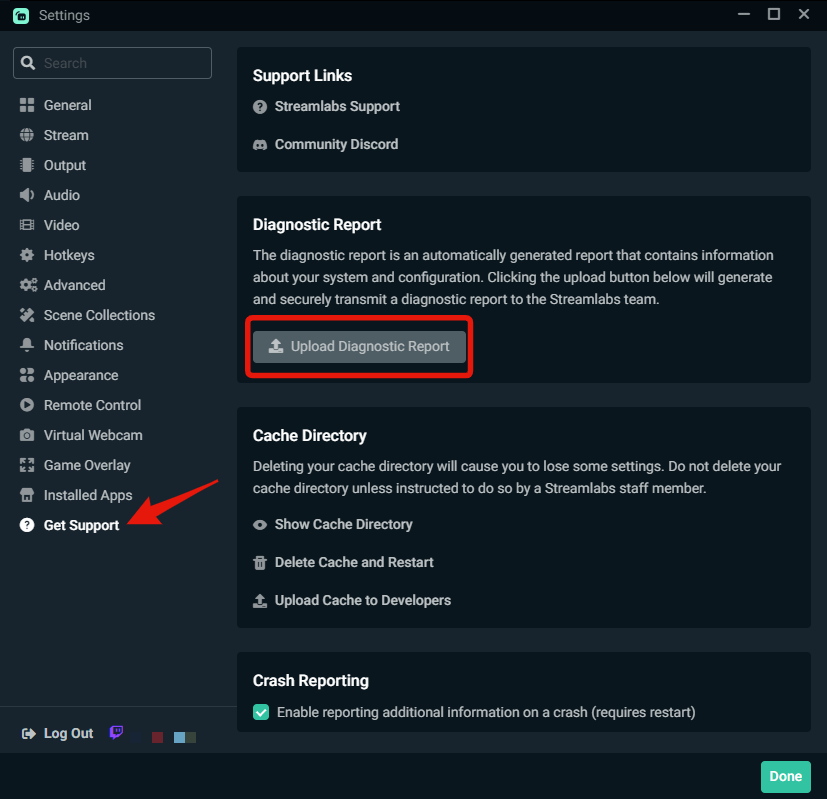
 stoic whale
Hello guys. I need help. I keep getting this error... I check what it says but I find nothing wrong, everything is the same as the last time I did a stream...
 abstract plazaBOT
Having trouble? Want to see if anyone else is having the same problem?
Check out our #known-issues channel! We do our best to keep this channel as current as possible with new bugs and progress updates!
If you can't find what you need please submit a ticket at: https://support.streamlabs.com/hc/en-us/requests/new
gritty isle
stoic whale
Hello guys. I need help. I keep getting this error... I check what it says but I...
In Streamlabs Desktop, please log out, wait a minute, and then log back in.
Then go to Settings > Advanced > Network > Bind to IP.
If the drop-down menu is set to an IP address, change that setting to Default.
If the drop-down menu is set to Default, change it to the IP address of your computer, usually starts with 192.168 or 10.10.
After that, click Done to save the settings and then restart Streamlabs Desktop and see if you can go live.
stoic whale
gritty isle
In Streamlabs Desktop, please log out, wait a minute, and then log back in.
The...
I was able to go one step forward, but now is this... But I'm connected....
 gritty isle
stoic whale
I was able to go one step forward, but now is this... But I'm connected....
gritty isle
stoic whale
I was able to go one step forward, but now is this... But I'm connected....
What platform, Twitch, YouTube, Facebook, Trovo, X, Kick, or TikTok?
stoic whale
gritty isle
What platform, Twitch, YouTube, Facebook, Trovo, X, Kick, or TikTok?
Youtube
gritty isle
stoic whale
Youtube
Did you make a change at the Bind to IP drop down menu? If so, what is it set to now?
stoic whale
gritty isle
Did you make a change at the Bind to IP drop down menu? If so, what is it set t...
To my IP address
gritty isle
stoic whale
To my IP address
Do you have a VPN running?
stoic whale
gritty isle
Do you have a VPN running?
Yes!... Should I try do it all over again without VPN enabled? Is it possible to run a streaming with the VPN also running?
gritty isle
stoic whale
Yes!... Should I try do it all over again without VPN enabled? Is it possible to...
Yes, turn off the VPN and see if that helps.
stoic whale
gritty isle
Yes, turn off the VPN and see if that helps.
Solved!... Thank you!... Is there a way to put a clock and date overlay on my streaming? I can't find how...
gritty isle
stoic whale
Solved!... Thank you!... Is there a way to put a clock and date overlay on my st...
You can use Window Capture and capture the Clock app or a web page that has the date and time.
 honest lintel
Hi guys! im having a little problem here im trying to capture my cs2 gameplay but it only shows black screen..
 distant mist
why i only have these paypal method??

 amber lichen
Good afternoon, there was a problem when launching YouTube and TikTok at the same time, YouTube writes this error Enable live broadcast for your account, wait 24 hours and try to start broadcasting. But yesterday I streamed through OBS and everything worked, I have access to live broadcasts, help me solve the problem
 wispy latchBOT
# Having issues with Streamlabs Desktop not capturing your game and just showing a black screen?
- After you've added your capture source, the "game" may require to be focused before it will be captured - this means you will want to start interacting with the "game" for about 5-20 seconds before it will be detected.
- Try running Streamlabs Desktop as administrator.
- Try changing your "Game Capture" mode from "Auto" to "Capture Specific Window"
> Note: Some games will simply not work with Game Capture and will require the use of Window Capture or Display Capture.

# Still not working? See the guides below:```
:link: Game Capture Troubleshooting for **Desktop** users: <https://streamlabs.com/content-hub/post/black-screen-game-capture-problems>
:link: Game Capture Troubleshooting for **Laptop** users: <https://streamlabs.com/content-hub/post/troubleshooting-capture-source-issues-on-laptops>Because that's all that we can offer in your region.
distant mist
other streamers in my country have paysafe and others....
gritty isle
distant mist
other streamers in my country have paysafe and others....
Then submit a ticket here for further information/clarification: https://support.streamlabs.com/hc/en-us/requests/new
gritty isle
amber lichen
Good afternoon, there was a problem when launching YouTube and TikTok at the sam...
If you are logged in with YouTube, then log out, restart Streamlabs Desktop as administrator, and then log back in with your YouTube.
honest lintel
im trying to stream cs2 guys but only show blackscreen can anyone help me out?
wispy latchBOT
# Having issues with Streamlabs Desktop not capturing your game and just showing a black screen?
- After you've added your capture source, the "game" may require to be focused before it will be captured - this means you will want to start interacting with the "game" for about 5-20 seconds before it will be detected.
- Try running Streamlabs Desktop as administrator.
- Try changing your "Game Capture" mode from "Auto" to "Capture Specific Window"
> Note: Some games will simply not work with Game Capture and will require the use of Window Capture or Display Capture.
# Still not working? See the guides below:```
:link: Game Capture Troubleshooting for **Desktop** users: <https://streamlabs.com/content-hub/post/black-screen-game-capture-problems>
:link: Game Capture Troubleshooting for **Laptop** users: <https://streamlabs.com/content-hub/post/troubleshooting-capture-source-issues-on-laptops> reef spire
Hi, I try to stretch cs2 in streamlabs but instead it just slightly moves the game capture window and doesn't stretch it
 pine aspen
Having issue with my audio looping continuously on stream, not sure how to fix it.
gritty isle
reef spire
Hi, I try to stretch cs2 in streamlabs but instead it just slightly moves the ga...
See if this helps...
- Right clicking the source -> Transform -> reset transform
- Add a scaling filter on the source -> and for the resolution (Settings > Video) use the canvas resolution. Set your resolution as "base canvas resolution".
 pine aspen
I have a built in mic on my webcam and also a mic on my headset but i dont always use my headset
gritty isle
pine aspen
I have a built in mic on my webcam and also a mic on my headset but i dont alway...
If you have both microphones configured at Settings > Audio, you will need to mute the one you're not using. You can do that in the Mixer.
marble wind
surreal ingot
https://mail.google.com/mail/u/0/#inbox/FMfcgzQbgJHdldxkkDCKdkbqKbGWFLbZ Hi stre...
i'd advise against this, most no-name capture cards that cost $50 or less have major issues, the good stuff starts at $100
surreal ingot
Thanks ?
wispy latchBOT
@slow elbow Please no advertising or self promotion in any channels or DMs with server members. Please see #rules for more details on our server guidelines. Thank you!
 slow elbow
Alr my bad.
wispy latchBOT
@slow elbow Please no advertising or self promotion in any channels or DMs with server members. Please see #rules for more details on our server guidelines. Thank you!
gritty isle
Last warning. 😉
slow elbow
Alr damn
 worn osprey
Hellu! I have been having an issue lately where my streamlabs obs keeps stuttering and pausing, my camera, my game, everything. I have updated my graphic drivers, played with output settings (even though this issue happens even when I'm not live or recording), reduced the number of stuff it has to load in the program, etc. I have wracked my brain trying to find a solution for this. Thought I'd stop by for support since I've always had a great experience getting help here. ❤️
Edit: To clarify, it's not just my monitor either, it's showing up in the output when I DO stream or record.
gritty isle
worn osprey
Hellu! I have been having an issue lately where my streamlabs obs keeps stutteri...
Make sure that your monitor's refresh rate, the FPS setting in Streamlabs Desktop, and the FPS setting in the game are all set to a multiple of 60, ideally either 60 or 120. Uncapped FPS in a game will causes issues like this or if your monitor's resolution is not evenly divisible by 60.
worn osprey
gritty isle
Make sure that your monitor's refresh rate, the FPS setting in Streamlabs Deskto...
Yeah that's not the issue either.......All of my settings that way have been fine and are always set to 60. It happens when I don't even have a game running. It's like the whole program freezes. Plus, it started doing this recently..
gritty isle
worn osprey
Yeah that's not the issue either.......All of my settings that way have been fin...
Open the Task Manager and monitor CPU usage when these freezes happen. Sounds like perhaps a source or scene corruption.
worn osprey
gritty isle
Open the Task Manager and monitor CPU usage when these freezes happen. Sounds l...
it goes from 12% to 16% 😅
gritty isle
worn osprey
it goes from 12% to 16% 😅
Well, that's not bad. Does everything freeze?
worn osprey
gritty isle
Well, that's not bad. Does everything freeze?
everything in the obs, yes.
gritty isle
worn osprey
everything in the obs, yes.
And you mean Streamlabs Desktop and not OBS Studio, correct?
gritty isle
worn osprey
yes
What version do you currently have?
worn osprey
gritty isle
What version do you currently have?
1.18.3
 dim birch
cant apply student discord for ultra
gritty isle
worn osprey
1.18.3
Please reboot your PC.
Download a fresh Streamlabs Desktop installer.
Run the installer as administrator. Let it install over your existing installation - no need to uninstall Streamlabs Desktop first.
At the end of the installer, don't let it launch Streamlabs Desktop but rather quit the installer, reboot your PC again and then see how it goes.
gritty isle
dim birch
cant apply student discord for ultra
What happens exactly?
dim birch
 gritty isle
dim birch
gritty isle
dim birch
Please submit a ticket for that and include that screen shot please: https://support.streamlabs.com/hc/en-us/requests/new.
dim birch
k\
worn osprey
gritty isle
Please reboot your PC.
Download a fresh Streamlabs Desktop installer.
Run the ...
Will this mess with my current scenes?
gritty isle
worn osprey
Will this mess with my current scenes?
No, your current data won't be affected.
worn osprey
gritty isle
No, your current data won't be affected.
It's still stuttering
dim birch
gritty isle
Please submit a ticket for that and include that screen shot please: <https://s...
is it only for new people cuz i sub for one month once like a year ago
gritty isle
dim birch
is it only for new people cuz i sub for one month once like a year ago
I can't guarantee that but that is possible. Submit the ticket for clarification.
dim birch
i did was just curious
gritty isle
worn osprey
It's still stuttering
Do you have anything else running that would perform any screen recording or capturing?
worn osprey
gritty isle
Do you have anything else running that would perform any screen recording or cap...
only discord, but I don't use discord when I stream or record. (huge resource hog)
gritty isle
worn osprey
only discord, but I don't use discord when I stream or record. (huge resource ho...
Hmmmmmm. Create a new Scene Collection and in the one Scene, just put Game Capture. See how it goes with that new Scene Collection.
 lavish harness
The issue with the acces revoked by tiktok is getting anoying. Started like 2 weeks ago and when i send in the error and so they say we can't give youa time frame... The odd things, the acces is revoked for 7 days,, had the same things last week could go live with streamlabs one day and now again .. yesterday i applied and had my acces back so i could go live and now t he same issue ... couldn't get on anymore... and i can only use my phone in that case...
gritty isle
lavish harness
The issue with the acces revoked by tiktok is getting anoying. Started like 2 w...
abstract plazaBOT
Having trouble? Want to see if anyone else is having the same problem?
Check out our #known-issues channel! We do our best to keep this channel as current as possible with new bugs and progress updates!
If you can't find what you need please submit a ticket at: https://support.streamlabs.com/hc/en-us/requests/new
lavish harness
gritty isle
Please check this guide: <https://support.streamlabs.com/hc/en-us/articles/3525...
I know but when i send in that email i get like a copy and paste reply
gritty isle
lavish harness
I know but when i send in that email i get like a copy and paste reply
I/we can't make TikTok more responsive, sadly. We have no say so in their decision to grant, restrict, or revoke access.
worn osprey
gritty isle
Hmmmmmm. Create a new *Scene Collection* and in the one Scene, just put Game Ca...
I've always had a ton of gifs and motion files, now I guess I can't? It seems to not stutter when I take my gifs out. But...that's my content and it's never been an issue until now? And I have the box checkmarked to close file when inactive so I don't know why that would be causing the stuttering? what changed?
gritty isle
worn osprey
I've always had a ton of gifs and motion files, now I guess I can't? It seems to...
Trying to figure out if it is something in that scene collection. Try with the new Scene Collection that I detailed above.
worn osprey
gritty isle
Trying to figure out if it is something in that scene collection. Try with the ...
No, I know, I did. And so I started removing stuff from my other scene. Apparently the gifs are an issue?? They never have been before
gritty isle
worn osprey
No, I know, I did. And so I started removing stuff from my other scene. Apparent...
No, don't change the current Scene Collection.
Create a new Scene Collection and just put in Game Capture. See how it goes.
worn osprey
gritty isle
No, don't change the current Scene Collection.
Create a new Scene Collection an...
I'm saying I already did create a new scene collection. I put in just game capture. There was no stuttering. So I went back to my other scenes and the stuttering was there. So I began to take the gifs out and suddenly, no stuttering.
gritty isle
worn osprey
I'm saying I already did create a new scene collection. I put in just game captu...
Okay, gotcha. Add back the GIF's and see how it goes. Could be one of those sources was corrupted.
lavish harness
gritty isle
I/we can't make TikTok more responsive, sadly. We have no say so in their decis...
I still get on with my phone so that's an option ...so have to wait until that issue with the revoking s solved....
gritty isle
lavish harness
I still get on with my phone so that's an option ...so have to wait until that i...
That Live wtih TikTok Studio. A completely separate permission. Having that doesn't guarantee acces to Live with Streamlabs.
lavish harness
I used to have acces and was able to go livei with streamlabs yesteday i am bascily dealing with the issue as described on that page..
lavish harness
lavish harness
I used to have acces and was able to go livei with streamlabs yesteday i am basc...
But if they are forcing me to use their own software i will find a way ....
gritty isle
lavish harness
I used to have acces and was able to go livei with streamlabs yesteday i am basc...
Submit the form as detailed in Step 2: Contact TikTok.
lavish harness
I did so ... 2 times already ... "We are aware of the issue.
Our team is working hard to solve the issue and i would like to ask you to be a little more patience." ....
worn osprey
gritty isle
Okay, gotcha. Add back the GIF's and see how it goes. Could be one of those so...
So it turns out for future reference - the stuttering is caused by gifs that are input as images. Gifs that are input as media files do not seem to cause any stuttering or lag. Took me a while to play around with this and find the issue. I know you're a volunteer, but maybeeee Streamlabs should remove the "gif" option for images, if uploading them onto Streamlabs that way will cause issues later on. Thanks for your guidance leading me to this solution.
gritty isle
worn osprey
So it turns out for future reference - *the stuttering is caused by gifs that ar...
That's good feedback! Would you mind submitting that here https://docs.google.com/forms/d/e/1FAIpQLSd-BaiLLeYrHJQuBRvq8E1cy5vMVhee9KV2WWizqk4cTqU9aA/viewform?
marble wind
@worn osprey does it persist if you disable the preview? i think sld calls it "performance mode"
 orchid wasp
BDS
worn osprey
marble wind
<@412337498392363028> does it persist if you disable the preview? i think sld ca...
in what settings? :p
marble wind
@worn osprey i don't remember where the performance mode button is, try right-clicking the preview
worn osprey
marble wind
<@412337498392363028> i don't remember where the performance mode button is, try...
Just tried performance mode and it closes the whole video feedback? Wild. I've just switched all my gifs over to media files and it's fine now.
marble wind
preview rendering in sld is inefficient, with a single display capture source it costs more resources to draw the preview window than to do the actual composition of the display capture
worn osprey
Yeah the resources wasn't the issue for me, fortunately. It was just the program....
 pliant cloud
@gritty isle idk what to do every thing i try always leads to pixelated stream
gritty isle
pliant cloud
<@301571565840236564> idk what to do every thing i try always leads to pixelated...
You can only do the best on Twitch as it allows. Aim for being entertaining. Noone expects twitch to be pixel perfect for the game. You are the content. The stream is never going to look exactly like what you see on your monitor. We have the best settings for your hardware and platform.
pliant cloud
gritty isle
You can only do the best on Twitch as it allows. Aim for being entertaining. No...
this is the type of quality im looking for https://www.twitch.tv/videos/2508944496
gritty isle
pliant cloud
this is the type of quality im looking for https://www.twitch.tv/videos/25089444...
We have the best settings for your hardware and platform. Comparing your stream to another stream and spending countless hours tweaking settings to try and achieve that can be better spent streaming and acquiring and growing your community. Learning that is one of the hard parts about being a streamer.
pliant cloud
gritty isle
We have the best settings for your hardware and platform. Comparing your stream...
what whats the best settings
i wanna do 1080p
gritty isle
pliant cloud
what whats the best settings
There is no "best settings". The settings we have for your hardware and platform are the best.
gritty isle
The settings we have developed are the best for your hardware and platform. If you'd rather try and tweak out 1080p60 on Twitch, please submit a ticket: https://support.streamlabs.com/hc/en-us/requests/new.
With Twitch's bitrate limit of 6000, it is just not achievable.
pliant cloud
gritty isle
The settings we have developed are the best for your hardware and platform. If ...
is there a way i can see them
gritty isle
pliant cloud
is there a way i can see them
Not with your hardware and platform. Honestly, I would truly advise to just use these settings and get to streaming and build your community.
pliant cloud
gritty isle
Not with your hardware and platform. Honestly, I would truly advise to just use...
im confused which settings
thats the tthing im confused on
gritty isle
pliant cloud
im confused which settings
Settings > Video and Settings > Output
pliant cloud
what do i do after
gritty isle
pliant cloud
what do i do after
What exactly are you asking? We've been through this. Going in circles doesn't help and won't change my recommendation.
pliant cloud
gritty isle
What exactly are you asking? We've been through this. Going in circles doesn't...
best settings that would work for me on 1080p30
gritty isle
pliant cloud
best settings that would work for me on 1080p30
Okay, fine. Set your Output Resolution to 1920x1080 and set your FPS to 30.
pliant cloud
gritty isle
Okay, fine. Set your Output Resolution to 1920x1080 and set your FPS to 30.
alr im js hoping this one works out ima lower my ingame settings also what should i make bitrate
gritty isle
pliant cloud
alr im js hoping this one works out ima lower my ingame settings also what shoul...
6000
gritty isle
pliant cloud
would 4500 or 5000 work
Not for 1080p. You don't want to use more than 75% of your upload bandwidth.
pliant cloud
ok
 stable umbra
Is there anyway to change how the chat appears on mobile. With you click the chat it makes like 75% of the screen in a cloud transparent white thing. Why was this an update?
abstract plazaBOT
Having trouble? Want to see if anyone else is having the same problem?
Check out our #known-issues channel! We do our best to keep this channel as current as possible with new bugs and progress updates!
If you can't find what you need please submit a ticket at: https://support.streamlabs.com/hc/en-us/requests/new
 nova marsh
can anyone help me with stream delay even with it set to 0
gritty isle
nova marsh
can anyone help me with stream delay even with it set to 0
Do you mean Settings > Advanced > Stream Delay?
That option adds stream delay. You cannot use that option to make stream delay zero. Setting that value to zero and enabling the option does nothing.
Stream delay cannot be zero. The only way would be to be in the exact network segment as the ingest and that’s not possible.
It takes time for your computer to encode the packets, your cable modem to transmit them to the ingest, the j vest to receive them, decode them, and finally set them to the viewer which involves send the packets back across the internet.
abstract plazaBOT
Are you knowledgeable about Streamlabs products?
Get rewarded for helping the Streamlabs Community here in Discord!
👉 Apply to be a part of the Streamlabs Support Volunteer Program!
Application Link:
https://forms.gle/eKS29zWfFjGEzaRp7
For details, see our post in
#announcements message
Do you have a Streamlabs Ultra membership? Are you part of the Streamlabs All-Stars program?
Get your Discord roles by going to this page here: https://streamlabs.com/dashboard#/settings/integrations and clicking "Link" next to Discord! Ultra members and higher tier All-Stars members will have access to private channels for support!
Interested in Ultra? Check it out here: https://streamlabs.com/ultra?refl=discord
 full trout
i am approved.still not working.
gritty isle
full trout
i am approved.still not working.
Log out in Streamlabs Desktop and log in with your TikTok.
full trout
gritty isle
Log out in Streamlabs Desktop and log in with your TikTok.
i stream using streamlabs console but ok i just logged out and have tik tok open
gritty isle
full trout
i stream using streamlabs console but ok i just logged out and have tik tok open
Ah. Then make sure you log in at the Streamlabs Console website with your Twitch.
 whole nova
This error appears when I try to start the stream
 gritty isle
whole nova
This error appears when I try to start the stream
gritty isle
whole nova
This error appears when I try to start the stream
In Streamlabs Desktop, please log out, wait a minute, and then log back in.
Then go to Settings > Advanced > Network > Bind to IP.
If the drop-down menu is set to an IP address, change that setting to Default.
If the drop-down menu is set to Default, change it to the IP address of your computer, usually starts with 192.168 or 10.10.
After that, click Done to save the settings and then restart Streamlabs Desktop and see if you can go live.
whole nova
Apparently is only with the multi stream when I just do YouTube it works perfectly
gritty isle
whole nova
Apparently is only with the multi stream when I just do YouTube it works perfect...
You are trying to multistream with an active Streamlabs Ultra subscription?
If so, please link your discord, see the next post, and also visit this guide: https://support.streamlabs.com/hc/en-us/articles/38373880030747-Multistream-Disconnects-Dropped-Frames-and-Platform-Specific-Multistreaming-Challenges
wispy latchBOT
If you are a Streamlabs Ultra Subscriber or All-Stars member
 Link your Discord under integrations for access to our Ultra/VIP roles and private chats
:point_right: https://streamlabs.com/dashboard/#/settings/integrations
:star: Upgrade to Ultra here: https://streamlabs.com/ultra?refl=discord
gritty isle
And I’m off to dinner. No texting and driving. 👋 🍽️
 loud sail
At this point it's been three days can anyone please help me figure out what's going on with my capture card?
marble wind
@loud sail have you tried it with a PC?
loud sail
marble wind
<@1208590943796863059> have you tried it with a PC?
What?
 leaden burrow
hey gang, simple question. I'm trying to use selective recording on a scene, I've gone live after tuning the sources and it seemed to be worked as intended. Though, if it has worked, where has the recording been sent? It's not in my usual folder for recordings. thanks !
loud sail
marble wind
<@1208590943796863059> have you tried it with a PC?
What do you mean?
 terse violet
Has anyone else had trouble changing their profile pic on link space? No matter what type of file or size or anything its just stuck as this default one and I haven't found anything under FAQs or anything else
loud sail
terse violet
Has anyone else had trouble changing their profile pic on link space? No matter ...
Link space?
terse violet
loud sail
Link space?
it was willow until streamlabs acquired it. now its called link space https://link.space/
loud sail
terse violet
it was willow until streamlabs acquired it. now its called link space https://li...
Don't suppose you know anything about capture card audio?
terse violet
not really, sorry :(
kind of stinky that we have to come here with our tech support issues
 gusty umbra
terse violet
Has anyone else had trouble changing their profile pic on link space? No matter ...
gusty umbra
terse violet
Has anyone else had trouble changing their profile pic on link space? No matter ...
Best to create a ticket on this one. We don’t have any insight into linkspace here. https://support.streamlabs.com/hc/en-us/requests/new
marble wind
@loud sail i described the troubleshooting step, try it: https://discord.com/channels/@me/1391822305910325248/1391900335177732267
loud sail
Okay so how do I hook an HDMI to my computer's graphics card? Just plug it into my computer's HDMI port on the back without the capture card or whatever?
marble wind
@loud sail connect the capture card's HDMI input to the graphics card's HDMI output, yes; Windows should register a new display and a new audio output device
loud sail
Should I do this with Streamlabs or OBS open?
Should it be called like, Nvidia High Def audio?
marble wind
@loud sail the exact name will vary, it should be the same as the capture card's model name
after that, run obs-studio or sld, play some audio and verify that the audio mixer lights up appropriately
marble wind
any music, a video from the internet, anything that makes a noise
my capture card source is called gc573, i would look at its entry in the audio mixer dock
 loud sail
Nope. Didn't work.
marble wind
open the Sound control panel (mmsys.cpl), is the capture card's audio device shown there?
loud sail
 marble wind
you may have enabled "performance mode" in sld, which disables audio visualizers, disable it or quit sld and run obs-studio
loud sail
marble wind
open the Sound control panel (mmsys.cpl), is the capture card's audio device sho...
It is
 marble wind
make it the default audio device, then play any audio and see if it gets captured
loud sail
I think that did something?
marble wind
when you play sounds, does the capture card's entry in the audio mixer light up appropriately?
loud sail
It does on everything besides for the mixer I'm trying to get it to go on when I record on my console
marble wind
so, the capture card's audio visualizer doesn't light up, is that correct?
loud sail
Yeah, all of these aside from "Console" which is the one I'm trying to get it to go on
 marble wind
and this is the current "default" audio device, correct?

 opal canopy
Hi can someone help me with streamlab console, everytime i go live on xbox it wont start up.
loud sail
Yeah
marble wind
@loud sail i think i ruled out enough things to pronounce the capture card "faulty", but just to confirm one more time, double-click it in the Sound control panel, go to the Advanced tab, start recording, click "test", stop recording once the "stop" button changes back to "test", switch the default device back to speakers/headphones, play the recording, and if you don't hear the test jingle, try a different capture card
opal canopy
loud sail
Yeah
So i can live stream on my xbox s when the destination is twitch but it wont even allow me to start a stream when the destination is streamlab. How should I proceed? I have already checked that my twitch account is connected through steam labs.
loud sail
opal canopy
So i can live stream on my xbox s when the destination is twitch but it wont eve...
Oh my fault I was saying that in response to Nakajima
opal canopy
oh rip lmao
loud sail
opal canopy
oh rip lmao
I can try to help you but I'm not sure I'm the best person to rely on for help especially when I'm troubleshooting something myself
loud sail
marble wind
<@1208590943796863059> i think i ruled out enough things to pronounce the captur...
I seriously doubt it's both of my capture cards
opal canopy
Its all good. I can be patient. Thank you for the offer.
loud sail
I heard the test jingle
marble wind
@loud sail when playing it, or on the recording?
loud sail
It's on the recording
 vital dove
Hi I have this situation, I tried to stream dual output tik tok and kick from streamlabs dual output… but is blocking and not working well after 30 minutes of strram why ?
marble wind
@loud sail in that case, the next question is how to configure the consoles to correctly output audio via HDMI;
verify that any and all other connectors capable of receiving audio (like 3.5mm) are disconnected, connect the capture card to a console, power it on, try recording video and audio from it
loud sail
marble wind
<@1208590943796863059> in that case, the next question is how to configure the c...
3.5mm would be like, my Headphones?
marble wind
@loud sail yes
gusty umbra
opal canopy
So i can live stream on my xbox s when the destination is twitch but it wont eve...
Do you have an active streamlabs console or ultra subscription?
opal canopy
nope just signed for it today, but I did not buy the subscriptions.
loud sail
marble wind
<@1208590943796863059> yes
loud sail
opal canopy
So i can live stream on my xbox s when the destination is twitch but it wont eve...
Okay so you're saying it won't let you start the stream?
marble wind
@loud sail still no sound from the console? now it doesn't make sense again
i don't know enough about consoles to know how to direct them to output audio via HDMI, maybe it's still trying to output to headphones you had previously connected?
opal canopy
loud sail
Okay so you're saying it won't let you start the stream?
Yup
loud sail
Can you record your Streamlabs and show me what happens maybe?
gusty umbra
opal canopy
nope just signed for it today, but I did not buy the subscriptions.
In order to stream via streamlabs you will need a console or ultra subscription.
loud sail
marble wind
<@1208590943796863059> still no sound from the console? now it doesn't make sens...
I'm honestly not sure what it's doing but I need to figure it out so I can get my video done for the week.
loud sail
gusty umbra
In order to stream via streamlabs you will need a console or ultra subscription.
I don't suppose there's anyway for you to help me figure out what's going on with my capture card?
gusty umbra
Sorry. It’s 2300 here and I’m off to bed. I’m not super familiar with capture cards. There may be some articles in #1173605643484139591 about capture cards and their setup.
loud sail
I haven't found any
I put in a ticket 3 days ago and asked around here a few times but haven't gotten anything
marble wind
i suspect one of the troubleshooting steps was done incorrectly, but i'd need to use remote control software to confirm that
loud sail
The heck does that mean?
marble wind
@loud sail
if i am to assume that the troubleshooting step of figuring out whether the capture card is capable of capturing audio was done correctly, all that's left is to correctly configure the consoles to output audio via HDMI; since i don't own any consoles, i don't know how to do that, but you could try asking in the obs-studio discord and/or on the obsproject.com forums;
if i am to assume this step was done incorrectly, at this point i'd suggest using anydesk or any equivalent of it i'll produce a recording that would capture the capture card's audio, and confirm whether or not audio gets recorded correctly
loud sail
Lovely
That's what, 4h for arguably 0 results?
Forums are just blank
That's the Capture Card
 abstract plazaBOT
Having trouble? Want to see if anyone else is having the same problem?
Check out our #known-issues channel! We do our best to keep this channel as current as possible with new bugs and progress updates!
If you can't find what you need please submit a ticket at: https://support.streamlabs.com/hc/en-us/requests/new
abstract plazaBOT
Are you knowledgeable about Streamlabs products?
Get rewarded for helping the Streamlabs Community here in Discord!
👉 Apply to be a part of the Streamlabs Support Volunteer Program!
Application Link:
https://forms.gle/eKS29zWfFjGEzaRp7
For details, see our post in
#announcements message
Do you have a Streamlabs Ultra membership? Are you part of the Streamlabs All-Stars program?
Get your Discord roles by going to this page here: https://streamlabs.com/dashboard#/settings/integrations and clicking "Link" next to Discord! Ultra members and higher tier All-Stars members will have access to private channels for support!
Interested in Ultra? Check it out here: https://streamlabs.com/ultra?refl=discord
 heady lodge
In streamlabs, is there a way to trigger a specific sound for a specific tip amount?
Example: $5 tip = jumpscare
And can I have few different sounds (variants) for the jumpscare that will play randomly?
I’m new to streaming on Twitch, and I see there’s a sound alerts plugin… do I need to use something like this? Or can I just use Streamlabs to do the jumpscares.
Thank you!
 humble gale
heady lodge
In streamlabs, is there a way to trigger a specific sound for a specific tip amo...
humble gale
heady lodge
In streamlabs, is there a way to trigger a specific sound for a specific tip amo...
Yeah you can do tip variations: https://streamlabs.com/content-hub/post/how-do-alert-box-variations-work
gritty isle
@crimson cave https://streamlabs.com/dashboard#/widgets/chat-box

 crimson cave
thanks dude
also a follow up question
is there any way to make it so they all appear from the left and are like aligned
like kind of push them all to the left
gritty isle
crimson cave
is there any way to make it so they all appear from the left and are like aligne...
Try the Clean style.
 crimson cave
i did but as you see on the test screen to your right the messages arent aligned by username
like now only the messages are aligned but the users and badges arent
gritty isle
crimson cave
like now only the messages are aligned but the users and badges arent
You can try the other styles and see if any of them fit your needs. There are no options that specifically deal with the text alignment. Its all done in the styles.
crimson cave
alright thanks
gritty isle
crimson cave
alright thanks
You're welcome.
abstract plazaBOT
Having trouble? Want to see if anyone else is having the same problem?
Check out our #known-issues channel! We do our best to keep this channel as current as possible with new bugs and progress updates!
If you can't find what you need please submit a ticket at: https://support.streamlabs.com/hc/en-us/requests/new
 ornate reef
I have a question about 2FA! I was having a problem with my PC and i need to reinstall some things but my last hangup is my 2FA codes. I accidentally wiped my authenticator and i need to reset it up but then i realize i dont know where my backup codes are. how can i get them or how can i reset and get new numbers. I am not locked aout of my account but my fear is if i get logged out and i dont have them I will have to reset all my stuff and setup a new account. can some one help me with that. Thanks in advance I asked about this before but i think they may have thought i was already locked but i have full access. i am about to resub to ultimate and i dont want to do that and then get locked out
sorry typing this before next zoom meeting...lol
gritty isle
ornate reef
I have a question about 2FA! I was having a problem with my PC and i need to rei...
For 2FA issues, you will have to submit a ticket: https://support.streamlabs.com/hc/en-us/requests/new.
 chrome light
Hi everyone! I’m using Streamlabs console for the first time and am finding that the tutorial videos aren’t helping. I can’t seem to find all of the Streamlabs console overlays. I added components to a scene but they aren’t pulling through automatically to my stream. Could someone please help me? Frustration tears are imminent.
gritty isle
chrome light
Hi everyone! I’m using Streamlabs console for the first time and am finding that...
Themes are available here.
 chrome light
gritty isle
Themes are available here.
chrome light
gritty isle
Themes are available here.
You have just saved me. Thank you so much.
gritty isle
chrome light
You have just saved me. Thank you so much.
You're welcome.
 coral lotus
i have these to images that i want to change from the up image to the image where my icon is on the key, how do i do this? or is it not possible


 plucky basalt
Just wondering that if I livestream and also recording using Streamlabs, does recording also records my voices?
coral lotus
plucky basalt
Just wondering that if I livestream and also recording using Streamlabs, does re...
it should
 azure edge
what to do when my streamlabs keeps stopping at starting your video transmission
gritty isle
azure edge
what to do when my streamlabs keeps stopping at starting your video transmission
What platform, Twitch, YouTube, Facebook, Trovo, X, Kick, or TikTok?
azure edge
twitch
gritty isle
azure edge
twitch
Please screen shot the Confirm & Go Live screen please.
azure edge
 gritty isle
azure edge
gritty isle
azure edge
Uncheck Enhanced Broadcasting and try again.
azure edge
Yup it worked ?
gritty isle
azure edge
Yup it worked ?
Were you able to go live?
gritty isle
azure edge
Thank you man <@301571565840236564>
You're welcome!
 drifting flax
helllo guys
ive been trying to figure out how do people tip on me
like how
and how does theme work, i cant figure out how to edit them, ive installed a bagillions
gritty isle
drifting flax
ive been trying to figure out how do people tip on me
Have you setup your tip page here? https://streamlabs.com/dashboard#/tipping/methods
drifting flax
yessss, i already did, im trying to figure out how to stream now
gritty isle
drifting flax
yessss, i already did, im trying to figure out how to stream now
So, you don't need more assistance with tipping?
drifting flax
yeahhh, thank you rufus!!
gritty isle
drifting flax
yeahhh, thank you rufus!!
You're welcome!
 wary jewel
Hey! Sorry to bother you but the delay on the stream on twitch is long, but seems to be fine on kick, any insight? TIA
says its a keyframe issue
gritty isle
wary jewel
says its a keyframe issue
Set Keyframe to 2.
wary jewel
gritty isle
Set Keyframe to 2.
I am so sorry but I can't find where to do this
gritty isle
wary jewel
I am so sorry but I can't find where to do this
In Streamlabs Desktop, go to Settings > Output.
wary jewel
gritty isle
In Streamlabs Desktop, go to Settings > Output.
Thank you so much
gritty isle
wary jewel
Thank you so much
You're welcome.
 unborn birch
Hi guys i have a problem with streamlabs, im using push to talk but it cutting my voice too early when i release the button, is there any option like "Push to Talk Release Delay" ?
gritty isle
unborn birch
Hi guys i have a problem with streamlabs, im using push to talk but it cutting m...
Go to Settings > Advanced > Audio and check Disable Windows audio ducking and see if that helps.
unborn birch
gritty isle
Go to Settings > Advanced > Audio and check *Disable Windows audio ducking* and ...
i had it, didnt help at all ;/
abstract plazaBOT
Having trouble? Want to see if anyone else is having the same problem?
Check out our #known-issues channel! We do our best to keep this channel as current as possible with new bugs and progress updates!
If you can't find what you need please submit a ticket at: https://support.streamlabs.com/hc/en-us/requests/new
gritty isle
 raven wasp
<@301571565840236564> could you help
raven wasp
<@301571565840236564> could you help
Sorry, I'm not available right now. I have a pressing issue I'm working on at the moment.
raven wasp
gritty isle
Sorry, I'm not available right now. I have a pressing issue I'm working on at t...
oh okay no worries!
gritty isle
raven wasp
oh okay no worries!
This guide might be of some assistance: https://obsproject.com/kb/minecraft-java-edition-troubleshooting. Its geared for OBS Studio but the same concepts apply in Streamlabs Desktop.
 shy quiver
Hi, So i recently hit affiliate a couple days ago. Streamlabs will not let me go above 6,000 bitrate. I also do not want to use paypal as a form or tipping and have been wondering if i could get help from someone at streamlabs?
gusty umbra
shy quiver
Hi, So i recently hit affiliate a couple days ago. Streamlabs will not let me go...
6000 is top end for twitch unless you’re a high level partner and they allow 8000. For tipping, the options available to you are based on your region. PayPal is excellent for that stuff.
marble wind
@gusty umbra what? no, no one gets that kind of special treatment
 agile owl
partners do
marble wind
@agile owl where'd you get this information?
 raven yarrow
algum brasileiro on?
gusty umbra
Yes. When you bring 500k+ viewers, you get lots of special treatment. What you get is listed on the partner page. You get extra customization (4K streams and 8000 bitrare), extra revenue options, and a dedicated support team.
raven yarrow
help me
gusty umbra
raven yarrow
help me
With? We sadly can’t read minds (yet).
raven yarrow
speak portuguese?
marble wind
@gusty umbra and where'd you get your information? i, too, have hearsay that many people get away with streaming at 8, but only due to inaccuracies in how twitch estimates bit rates
gritty isle
raven yarrow
speak portuguese?
English please. Use Google Translate to translate to English if you need to.
 desert briar
So i just downloaded streamlabs and things are fine so far other than a warning popping up saying my microphone is unmute but has no signal
and it keeps popping up every so often, whenever i click on it it'll just take me to the news
gritty isle
desert briar
So i just downloaded streamlabs and things are fine so far other than a warning ...
Yes, we're aware of that notification and as I understand things, there should be a fix soon for that. I understand that the notification is annoying and may interrupt your work flow but for now you can ignore it.
raven yarrow
gritty isle
English please. Use Google Translate to translate to English if you need to.
ok
 teal portal
does stream deck not work with streamlabs obs any more all my stream deck icons are questions marks that relate to SLOBS
 ornate dome
I need help with someone pretty simple, who can I ask??
gritty isle
teal portal
does stream deck not work with streamlabs obs any more all my stream deck icons ...
The Streamlabs Desktop integration was moved from the main Stream Deck application to a plugin. Go to the Elgato Marketplace via your Stream Deck application, search for Streamlabs Desktop and then install that plugin. Also note that you will need to run both Stream Deck and Streamlabs Desktop as administrator.
ornate dome
P
gritty isle
ornate dome
I need help with someone pretty simple, who can I ask??
Post your question but I'm done for the day! Our other Volunteers can assist.
ornate dome
Ok please! I am about to go live. When i add a display capture its in a vertcial format... even when I do "fit to screen" there is black bars on the sides
gritty isle
ornate dome
Ok please! I am about to go live. When i add a display capture its in a vertcial...
Your Output Resolution is in the vertical format. Go to Settings > Video and if the Output Resolution is 1080x1920, switch it to 1920x1080; in other words, swap the two values.
ornate dome
Its not, it is in the correct values and still isnt working, I looked that up
Can we hop on a call together for a second, Ill pay you, i need this for my work!!
teal portal
gritty isle
The Streamlabs Desktop integration was moved from the main Stream Deck applicati...
Thank you!!
ornate dome

I cant get anything to fit to the proper size, please man, really desperate!
Man??
Can some body please help?! I will paypal you i need this badly!@
 kindred lotus
Hey y'all!!! New to streamlabs! I am in love with the collab cam which is why I'm in deep hopes I can get help with everything, I am having a few different problems as to YouTube is no help...
When I created my layout it really isn't allowing it saying it's on portrat mode and I'm setting it up in landscape really confused on that.
When I try to go live it's either saying I'm live ( nothing showing up on twitch or Facebook) or it says audio isn't set up which it is
I have it set to overlay apps but it's not doing so...
I really need help and would greatly appreciate it,
Also never gave the option to "pick" which I am using for camera or gaming screen play
proper totem
ornate dome
I cant get anything to fit to the proper size, please man, really desperate!
You can right click on that source (in the editor) > transform > fit to screen
proper totem
kindred lotus
Hey y'all!!! New to streamlabs! I am in love with the collab cam which is why I'...
Welcome to Streamlabs! I'm happy to hear you are enjoying Collab Cam!
Due to the amount of questions, I'd recommend you submit a ticket directly to our Support Team so we can help you out with the basics and get your stream up and running (feel free to copy & paste your list above):
https://support.streamlabs.com/hc/en-us/requests/new?ticket_form_id=473667
kindred lotus
proper totem
Welcome to Streamlabs! I'm happy to hear you are enjoying Collab Cam!
Due to t...
Thank you
abstract plazaBOT
Having trouble? Want to see if anyone else is having the same problem?
Check out our #known-issues channel! We do our best to keep this channel as current as possible with new bugs and progress updates!
If you can't find what you need please submit a ticket at: https://support.streamlabs.com/hc/en-us/requests/new
 peak orbit
Quisiera saber si la app de streamlabs mobil por qué no se puede conectar a tik tok
gritty isle
peak orbit
Quisiera saber si la app de streamlabs mobil por qué no se puede conectar a tik ...
That is not possible, sorry.
 shy bloom
gritty isle
shy bloom
gritty isle
We have a great Getting Started with Streamlabs Desktop guide: https://streamlabs.com/content-hub/post/getting-started-with-streamlabs-desktop. Also check our Streamer University: https://streamlabs.com/content-hub/university. And of course the #1173605643484139591
 drifting needle
I don't know where to ask this, but how long does it take a sponsorship application to be approved? Been waiting since June 26th for the Logitech one
 spark linden
Is there a way stream to BOTH horizontal and vertical to TikTok on dual output?
I see you can do both formats for YouTube
abstract plazaBOT
Do you have a Streamlabs Ultra membership? Are you part of the Streamlabs All-Stars program?
Get your Discord roles by going to this page here: https://streamlabs.com/dashboard#/settings/integrations and clicking "Link" next to Discord! Ultra members and higher tier All-Stars members will have access to private channels for support!
Interested in Ultra? Check it out here: https://streamlabs.com/ultra?refl=discord
Are you knowledgeable about Streamlabs products?
Get rewarded for helping the Streamlabs Community here in Discord!
👉 Apply to be a part of the Streamlabs Support Volunteer Program!
Application Link:
https://forms.gle/eKS29zWfFjGEzaRp7
For details, see our post in
#announcements message
 granite anchor
Hello SL Tech support.
I was wondering if there's a paid option to allow someone to setup the layout and design of / on SLOBS? I have had to rebuild my PC a couple times now and I'm tired of messing with all the layout and settings. Is there a way to pay and have one of your techs or reps to be able to remote in and edit the stream layout for me?
gritty isle
granite anchor
Hello SL Tech support.
I was wondering if there's a paid option to allow someon...
We don't offer such a service, sorry.
 silk viper
I need some help. I've noticed that my vods on Twitch say for example 1080p50 and 720p50 instead of 60. I could be imagining things, but the footage also look a bit slower compared to the regular 60.
I have 60 fps enabled since the dawn of time, checked to make sure and it's still 60. So why does the witch vods end up being 1080p50?


 eager copper
hi
can someone help me, i cant get my streaming to work. i have twitch, and i linked my accounts, but every time i click the button to "go live" it gives me a message to try signing out, or that something is wrong with the server, to try again. its been doing this for two days now. please help, thank you!
 hardy kernel
hello! I'm using this as a last resort because i have attempted to troubleshoot for hours. My virtual webcam refuses to work with discord. I have the option to select it, but it doesn't load. when i try and activate the webcam in the streamlabs app, and it lets me click 'install virtual webcam' only to provide me with two popups asking me if i want to allow this to make changes to my device - which i click yes both times - and then nothing happens. I just want to turn my virtual webcam camera on so my friends on discord can view it 💔
i have tried uninstalling it and reinstalling it with current AND old versions an ungodly amount of times, ive tried not updating it, ive tried just waiting, ive tried using base OBS studio instead, ive tried restarting my computer. the weirdest part is i have literally used the virtual webcam with discord perfectly fine on my current and past pc and its only now giving me issues. Help?
 rigid blaze
Hello, i am trying to setup my alerts on the dashboard. i cant see to find a way to move where the text is on the image. ( i want it to be text over image but need to move the text down)
 uncut ice
Can I get some guidance on why when I go live in Streamlabs Console it doesn't push to TikTok as advertised?
wispy latchBOT
If you were unable to find answers to your question(s) in the #1173605643484139591 or our self help articles on Creator Resource Hub https://streamlabs.com/content-hub/support , then please submit a ticket at https://support.streamlabs.com/hc/en-us/requests/new and our team would be able to help you there!
 waxen plinth
can someone help me i cant see my tiktok chat on my vertical monitor
 sinful dragon
Please how can i stream from xbox series x to tiktok directly?
 gilded bluff
I'm having an issue where anyone I try to donate too or anyone who donates to me via stream labs is seeing this message "Your donation cannot be processed at this moment. Please try again later."
Is there something wrong with the service?
abstract plazaBOT
Having trouble? Want to see if anyone else is having the same problem?
Check out our #known-issues channel! We do our best to keep this channel as current as possible with new bugs and progress updates!
If you can't find what you need please submit a ticket at: https://support.streamlabs.com/hc/en-us/requests/new
abstract plazaBOT
Do you have a Streamlabs Ultra membership? Are you part of the Streamlabs All-Stars program?
Get your Discord roles by going to this page here: https://streamlabs.com/dashboard#/settings/integrations and clicking "Link" next to Discord! Ultra members and higher tier All-Stars members will have access to private channels for support!
Interested in Ultra? Check it out here: https://streamlabs.com/ultra?refl=discord
Are you knowledgeable about Streamlabs products?
Get rewarded for helping the Streamlabs Community here in Discord!
👉 Apply to be a part of the Streamlabs Support Volunteer Program!
Application Link:
https://forms.gle/eKS29zWfFjGEzaRp7
For details, see our post in
#announcements message
 fiery lichen
Trying to stream to tiktok whiuch works fine through the Live Studio, but SLOBS just disconnects and reconnects
leaden burrow
hey, I'm using selective recording while live but the recordings aren't going to their usual place - where are they getting sent to?
humble gale
leaden burrow
hey, I'm using selective recording while live but the recordings aren't going to...
You can find the recording path by going to the bottom left of Streamlabs Desktop ⚙️ > output > recording > recording path. then you can open the file explorer (the folder at the bottom of your windows task bar) and then paste that file path at the top
 candid spindle
How do I unlink a primary channel?
 echo tartan
HI im looking for some help with my streamlabs casuing my games to crash and also streams buffering or being stuck on like 1 frame for 30 secs
humble gale
candid spindle
How do I unlink a primary channel?
create a streamlabs ID and attach it. then you can unlink any accounts you want and all your info is saved to the streamlabs ID
wispy latchBOT
@echo tartan
# View our guide for crash troubleshooting here:```
:arrow_right: :link: <https://streamlabs.com/content-hub/post/streamlabs-desktop-crash-troubleshooting-guide>Thanks worked👍
echo tartan
yeah stream labs isnt the thing crashing though, when i open stream labs, it freezes my games
humble gale
the info there still should help because it still is a type of crash, but if you're still needing help i would suggest reaching to official support
echo tartan
humble gale
the info there still should help because it still is a type of crash, but if you...
how would one do that
echo tartan
thank you thank you
 buoyant elm
im having an issue where streamlabs just sits stuck on start video transmission
and ive tried reinstalling and running as admin
wispy latchBOT
@buoyant elm If you're having trouble going live, try checking out the solutions in this guide here:
https://streamlabs.com/content-hub/post/troubleshooting-going-live-issues-in-streamlabs-desktop
abstract plazaBOT
Having trouble? Want to see if anyone else is having the same problem?
Check out our #known-issues channel! We do our best to keep this channel as current as possible with new bugs and progress updates!
If you can't find what you need please submit a ticket at: https://support.streamlabs.com/hc/en-us/requests/new
 soft merlin
My streamabs is having a really weird issue.
So my sources should look something like this

but every time i make a new scene

it should have multiple sources listed as i am able to see the game window, chat box etc in the top stream preview portion.
 shadow saddle
hi i have a little problem, some how my mini-feed and my legacy-events dont updating for twitch. for YT there is no problem. the update problem is on the dashboard and on the desktop app. i have already done a relog and delete cockies and chache and i also new installed the the desktop app. and @ twitch ive checked the box to allow streamlabs to gather the data. so idk how i can fix , please help ps.: i want to add lables for recent follower etc so that dont work too because of the same problem i think#
 quasi sandal
Does anyone know how to capture analog audio using elgado’s capture card in stream labs? I don’t see this option under configure video after hitting properties
shadow saddle
sry for my bad english maybe its not accurat discribed but i try it one more time xD, i have a little problem, some how my mini-feed and my legacy-events dont updating for twitch. for YT there is no problem. the update problem is on the dashboard and on the desktop app. i have already done a relog and delete cockies and chache and i also new installed the the desktop app. and @ twitch ive checked the box to allow streamlabs to gather the data. so idk how i can fix , please help ps.: i want to add lables for recent follower etc so that dont work too because of the same problem i think
 unreal forge
Streamlabs software not showing my Page (only shows my Profile When i'm Going Live)
how can i fix this issue???
updated version user
 pliant cloud
yo @gritty isle Tysm for the help 1080p30 works best for me the stream quality is amazing
gritty isle
shadow saddle
hi i have a little problem, some how my mini-feed and my legacy-events dont upda...
Let's refresh the connection between Streamlabs and Twitch.
Follow these steps in order, even if you already done any one of the steps before. Don't skip steps and don't perform them out of order. If you're unsure about any of the steps, don't assume anything, ask first before proceeding.
-
Log out of the Streamlabs web site on every device you access it: Click your PFP and choose Log out.
-
If you use Streamlabs Console, log out of the Streamlabs Console web site on every device you access it: Click your PFP and choose Log out.
-
If you use the standalone Streamlabels application, log out of that.
-
Log out in Streamlabs Desktop (see next post on how to do that).
-
Follow this guide: https://streamlabs.com/content-hub/post/how-to-disconnect-your-streamlabs-account. Just follow the section for Twitch.
-
Navigate back to the Streamlabs web site and log in with your Twitch. This re-establishes the connection. You can verify this by going back to https://www.twitch.tv/settings/connections, scrolling down to Other Connections and examine the Streamlabs connection. ** It should say "Connected a few minutes ago" other short period of time. **
-
IMPORTANT: Once you have completed the guide, go back to the Streamlabs web site https://streamlabs.com/dashboard#/recentevents, click the Live Actions tab, scroll all the way to the bottom and click the Reload Widgets button. ** PLEASE Don't skip this step! **
-
Log back in to all the other Streamlabs products you use.
👉 ** REMEMBER, this process will not go back and capture events that were missed. ** 👈
👉 ** REMEMBER, this process will not go back and capture events that were missed. ** 👈
👉 ** REMEMBER, this process will not go back and capture events that were missed. ** 👈
👉 ** REMEMBER, this process will not go back and capture events that were missed. ** 👈
gritty isle
unreal forge
Streamlabs software not showing my Page (only shows my Profile When i'm Going Li...
Let's refresh the connection between Streamlabs and Facebook.
Please follow these steps:
-
Log out of the Streamlabs web site on every device you access it: Click your PFP and choose Log out.
-
If you use Streamlabs Console, log out of the Streamlabs Console web site on every device you access it: Click your PFP and choose Log out.
-
If you use the standalone Streamlabels application, log out of that.
-
Log out in Streamlabs Desktop (see next post on how to do that).
-
Follow this guide: https://streamlabs.com/content-hub/post/how-to-disconnect-your-streamlabs-account. Just follow the section for YouTube.
-
Navigate back to the Streamlabs web site and log in with your YouTube. This re-establishes the connection.
-
👉 IMPORTANT: Once you have completed the guide, go back to the Streamlabs web site https://streamlabs.com/dashboard#/recentevents, click the Live Actions tab, scroll all the way to the bottom and click the Reload Widgets button. PLEASE Don't skip this step!
-
Log back in to all the other Streamlabs products you use.
NOTE: After this Facebook may return a Permission Error. This would indicate your Page no longer meets their requirements to go live. https://www.facebook.com/business/help/165076674943644?id=1123223941353904
 fluid perch
Hello everyone! Is there a way to record gameplay and camera to separate video files for editing purposes later?
pliant cloud
wait if i have 120 fps in a game will it affect my stream
 frozen loom
I have a ticket in and still havent heard from someone in regards to my issue im having
proper totem
frozen loom
I have a ticket in and still havent heard from someone in regards to my issue im...
Sorry for the wait. We are working through our ticket queue as quickly as we can, and we answer tickets in the order in which they’re received (and depending on the severity of the issue).
abstract plazaBOT
Having trouble? Want to see if anyone else is having the same problem?
Check out our #known-issues channel! We do our best to keep this channel as current as possible with new bugs and progress updates!
If you can't find what you need please submit a ticket at: https://support.streamlabs.com/hc/en-us/requests/new
frozen loom
proper totem
Sorry for the wait. We are working through our ticket queue as quickly as we can...
i appreciate that i understand i may just be having an isolated issue but hopefully someone gets to it sooner than later
does anyone know how to unmerge tiktok because it just says primary on the website and i cant unlink it from streamlabs
gritty isle
frozen loom
does anyone know how to unmerge tiktok because it just says primary on the websi...
Do you have a Streamlabs ID on that account? If so, then log into that with with your Streamlabs ID and then you should be able to unmerge TikTok.
frozen loom
gritty isle
Do you have a Streamlabs ID on that account? If so, then log into that with wit...
ok that worked can close my ticket now 😅
 winged folio
Hello, im trying to stream on Instagram, to only share my screen on my drawing software. And from the looks of it, it doesn't seem to support instagram? i might be wrong though.
gritty isle
frozen loom
ok that worked can close my ticket now 😅
Be sure to reply to the last email you have on that ticket and request it be closed. 😉
gritty isle
winged folio
Hello, im trying to stream on Instagram, to only share my screen on my drawing s...
We don't have a direct integration with Instagram. If Instagram offers a RTMP URL and stream key, you can set that up in Streamlabs Desktop at Settings > Stream > scroll all the way down > Stream to custom ingest.
 mighty lark
hello i need help. I've set up all the donation options. But when you click on the donation link and fill out everything, you're not redirected to the payment provider. So nothing happens. Does anyone know why?
gritty isle
mighty lark
hello i need help. I've set up all the donation options. But when you click on t...
You set up a payment method here https://streamlabs.com/dashboard#/tipping/methods?
mighty lark
gritty isle
You set up a payment method here <https://streamlabs.com/dashboard#/tipping/meth...
Yes, PayPal is linked, but unfortunately nothing happens when you click Donate. 😦
gritty isle
mighty lark
Yes, PayPal is linked, but unfortunately nothing happens when you click Donate. ...
And you have a Tip Page URL displayed on that page as well?
 mighty lark
gritty isle
And you have a Tip Page URL displayed on that page as well?
mighty lark
gritty isle
And you have a Tip Page URL displayed on that page as well?
yes i have a Tip page URL. i can show u the Link.
gritty isle
mighty lark
yes i have a Tip page URL. i can show u the Link.
And people are clicking on the Tip Page URL and completing the form?
mighty lark
gritty isle
And people are clicking on the Tip Page URL and completing the form?
Yes, they can fill out everything but then they are not forwarded to the payment options
https://streamlabs.com/kadiir722/tip u can try.
gritty isle
mighty lark
Yes, they can fill out everything but then they are not forwarded to the payment...
Yeah, something is weird there. We can't troubleshoot this here in Discord as us Volunteers don't have access since we're not Streamlabs employees.
Please submit a ticket here:m https://support.streamlabs.com/hc/en-us/requests/new
mighty lark
okay i do it. Thank u for ur Help
gritty isle
mighty lark
okay i do it. Thank u for ur Help
You're welcome.
 uneven hornet
So I tried to go live today using the desktop and i am stuck with this

it is infact still just loading
hardy kernel
hello! I'm using this as a last resort because i have attempted to troubleshoot for hours. My virtual webcam refuses to work with discord. I have the option to select it, but it doesn't load. when i try and activate the webcam in the streamlabs app, and it lets me click 'install virtual webcam' only to provide me with two popups asking me if i want to allow this to make changes to my device - which i click yes both times - and then nothing happens. I just want to turn my virtual webcam camera on so my friends on discord can view it 💔
i have tried uninstalling it and reinstalling it with current AND old versions an ungodly amount of times, ive tried not updating it, ive tried just waiting, ive tried using base OBS studio instead, ive tried restarting my computer. the weirdest part is i have literally used the virtual webcam with discord perfectly fine on my current and past pc and its only now giving me issues. Help?
 hexed anvil
I just got accepted into both Twitch's 2k (1440p) beta and Enhanced Broadcasting beta
SLOBs isn't letting me go above 6Mbs though
Twitch's help article here:
https://help.twitch.tv/s/article/stream-quality?language=en_US#how-to-stream
has a heading that says,
"Is Twitch increasing bitrates for 2k?"
Yes, we’ve increased the recommended bitrate from 6Mbps for 1080p to 7.5 Mbps for 2k (1440p) stream. For streamers who configure their own settings to go above the recommended bitrate with AVC, the newer HEVC codec will allow us to deliver higher quality video at 7.5 Mbps than you would get with your existing settings today. So while the increase in bitrates is modest, the impact to your video quality will be meaningful. And, there’s no need to customize bitrate settings manually. Enhanced Broadcasting automatically configures your stream settings for you to ensure that your viewers experience the least buffering and best visual quality possible given your GPU and network.
wispy latchBOT
@frank igloo
🚫 Advertising and self-promotion are not permitted in any of our channels or in direct messages with server members. For more information on our server guidelines, please refer to #rules. Thank you!
abstract plazaBOT
Having trouble? Want to see if anyone else is having the same problem?
Check out our #known-issues channel! We do our best to keep this channel as current as possible with new bugs and progress updates!
If you can't find what you need please submit a ticket at: https://support.streamlabs.com/hc/en-us/requests/new
gritty isle
@fallow depot Streamlabs Desktop launching as if it is a fresh/like it's the first time using it?
The "acting like it's a fresh restart" is due to certain background processes not closing properly. First, please close Streamlabs Desktop.
Then open your task manager. Please press "Ctrl + Shift + Esc" on your keyboard to bring up your Task Manager.
Please select "More Details" at the bottom if you don't see the percentages of resources used.
Check for any running programs called "Streamlabs," "Electron," or "Obs64". If you find either of these processes running, please right-click and end the process. https://gyazo.com/d6b9babb076875ee5889983b532948e1
Then, reopen Streamlabs Desktop. This should resolve it but if it doesn't please submit a ticket at https://support.streamlabs.com/hc/en-us/requests/new and our team would be able to assist you further.

 fallow depot
thank you i will try that now and landscape fixced ::D
just about to try load it now fingers crossed 😄
OMFG Thank you so much ! ! ❤️
gritty isle
fallow depot
OMFG Thank you so much ! ! ❤️
You’re welcome!
 prime gulch
How can I unlink my TikTok that I no longer have access to? (its set as primary)
gritty isle
prime gulch
How can I unlink my TikTok that I no longer have access to? (its set as primary)
Do you have a Streamlabs ID on that account? If so, then log into that with with your Streamlabs ID and then you should be able to unmerge TikTok.
uneven hornet
So I tried to go live today using the desktop and i am stuck with this

 warm flower
I am not getting my 2FA email and cant log int
gritty isle
warm flower
I am not getting my 2FA email and cant log int
For your Streamlabs ID or for another platform, like Twitch?
warm flower
streamlabs ID
gritty isle
uneven hornet
So I tried to go live today using the desktop and i am stuck with this
Log out in Streamlabs Desktop. Wait a minute. Log back in and try again.
uneven hornet
Did that 2x I even unlinked and relinked my twitch
gritty isle
warm flower
streamlabs ID
And you have access to that email account? Of so, check your Spam/Junk folder.
gritty isle
uneven hornet
Did that 2x I even unlinked and relinked my twitch
Please run the Twitch Test, see below. If you need assistance finding your Twitch stream key: https://streamlabs.com/content-hub/post/where-to-find-your-twitch-stream-key
Select Medium or Long Duration.
Select all the ingest in your region.
Screen shot the results.
Please run this twitch test tool to find out the best server (https://r1ch.net/projects/twitchtest). Be sure to run the test for either Medium or Long, as short won't give you the most accurate results and be sure to select your region from the listed options (if the regions are not applicable to you, please select 5-6 servers that are near you). You're looking for at least a quality of 84.
Once you've found a good server go to Settings > Stream > Stream to custom ingest and you can manually select your server.
warm flower
and I have all the back up codes and none work
gritty isle
warm flower
have done that and nothing
Then you will need to submit a ticket for assistance: https://support.streamlabs.com/hc/en-us/requests/new. We can’t assist with 2FA issues in Discord.
warm flower
I have done that and I did not get an email fpr my ticket
uneven hornet
gritty isle
Please run the Twitch Test, see below. If you need assistance finding your Twit...
I'll give this a try
 humble coral
hi there I need some help with a text source not updating on my stream labels dm me I would it would help me out a lot
gritty isle
warm flower
I have done that and I did not get an email fpr my ticket
And you’re sure that you can receive email at that address?
warm flower
Yes i recieve all my emails on this email account
gritty isle
humble coral
hi there I need some help with a text source not updating on my stream labels dm...
Which label on what platform?
gritty isle
warm flower
Yes i recieve all my emails on this email account
Do you still have the support site open or did you close it?
warm flower
I closed it
gritty isle
warm flower
I closed it
Can you give one of the platform and channel name for one of the platforms merged in your account?
warm flower
Twitch Fearl3smstrmnd
gritty isle
warm flower
Twitch Fearl3smstrmnd
I can’t guarantee and resolution or a quick answer but I’ll ask the staff if they can find any tickets for this account.
warm flower
Please do
I am trying to get Ultra and it wont allow me to log in to my account to purcahse it
humble coral
gritty isle
Which label on what platform?
it was the recent follower text source
gritty isle
humble coral
it was the recent follower text source
Let's refresh the connection between Streamlabs and Twitch.
Follow these steps in order, even if you already done any one of the steps before. Don't skip steps and don't perform them out of order. If you're unsure about any of the steps, don't assume anything, ask first before proceeding.
-
Log out of the Streamlabs web site on every device you access it: Click your PFP and choose Log out.
-
If you use Streamlabs Console, log out of the Streamlabs Console web site on every device you access it: Click your PFP and choose Log out.
-
If you use the standalone Streamlabels application, log out of that.
-
Log out in Streamlabs Desktop (see next post on how to do that).
-
Follow this guide: https://streamlabs.com/content-hub/post/how-to-disconnect-your-streamlabs-account. Just follow the section for Twitch.
-
Navigate back to the Streamlabs web site and log in with your Twitch. This re-establishes the connection. You can verify this by going back to https://www.twitch.tv/settings/connections, scrolling down to Other Connections and examine the Streamlabs connection. ** It should say "Connected a few minutes ago" other short period of time. **
-
IMPORTANT: Once you have completed the guide, go back to the Streamlabs web site https://streamlabs.com/dashboard#/recentevents, click the Live Actions tab, scroll all the way to the bottom and click the Reload Widgets button. ** PLEASE Don't skip this step! **
-
Log back in to all the other Streamlabs products you use.
👉 ** REMEMBER, this process will not go back and capture events that were missed. ** 👈
👉 ** REMEMBER, this process will not go back and capture events that were missed. ** 👈
👉 ** REMEMBER, this process will not go back and capture events that were missed. ** 👈
👉 ** REMEMBER, this process will not go back and capture events that were missed. ** 👈
gritty isle
warm flower
I am trying to get Ultra and it wont allow me to log in to my account to purcahs...
Do you happen to know the 6 digit confirmation code for your ticket?
gritty isle
warm flower
I can only tell you my email that I used for the ticket
That might help. I’ll delete it once I relay it to the staff.
warm flower
thank you Rufus
gritty isle
warm flower
thank you Rufus
You’re welcome. Hang on a bit.
warm flower
will do
humble coral
gritty isle
Let's refresh the connection between Streamlabs and Twitch.
Follow these steps ...
still not working
gritty isle
humble coral
still not working
Not working how? Did you receive a fresh follow since completing the steps I posted?
humble coral
will am not streaming right now it just shows the older follower from a past stream
gritty isle
humble coral
will am not streaming right now it just shows the older follower from a past str...
Yes, this is expected. Until you receive a fresh follow from someone who has never followed you before, the label won’t update. Also an unfollow and refollow wont update the label either..
Let’s check the connection real quick.
Please go to https://www.twitch.tv/settings/connections, scroll down to Other Connections, and screen shot the Streamlabs connection.
gritty isle
warm flower
will do
They do have a ticket for you. Be patient and they will get to you.
uneven hornet
@gritty isle DO I TRY THESE MANUAL ONES TILL I FIND ONE IT LOADS ON TO?
sorry for the caps
gritty isle
Too loud, man, too loud!
uneven hornet
lol my bad
gritty isle
uneven hornet
<@301571565840236564> DO I TRY THESE MANUAL ONES TILL I FIND ONE IT LOADS ON TO?
Screen shot the results please.
uneven hornet
ok i still have 2 more it is testing
gritty isle
uneven hornet
ok i still have 2 more it is testing
And you selected Medium or Long Duration?
uneven hornet
long
gritty isle
uneven hornet
long
Perfect.
 gritty isle
uneven hornet
<@301571565840236564>
gritty isle
uneven hornet
<@301571565840236564>
Do you have a Killer network card or WiFi card in your computer?
uneven hornet
i dont believe so
gritty isle
uneven hornet
i dont believe so
It shows at the bottom of the Twitch Test window.
uneven hornet
 gritty isle
Okay thanks for confirming that.
uneven hornet
yuppers
gritty isle
Screen shot the Confirm & Go Live window please.

 gritty isle
uneven hornet
this one?
gritty isle
uneven hornet
this one?
Yes, that one. Uncheck Enhanced Broadcasting and try again.
uneven hornet
that fixed it thank you
gritty isle
uneven hornet
that fixed it thank you
You’re welcome!
Twitch Enhanced Broadcasting is in beta and if your channel isn’t in the beta, you can’t use it.
spark linden
Is there a way stream to BOTH horizontal and vertical to TikTok on dual output?
I see you can do both formats for YouTube
gritty isle
uneven hornet
i just was accepted to the beta today after my stream
Oh interesting. That’s strange. Did you log out and log in Streamlabs Desktop in after getting that acceptance?
gritty isle
spark linden
Is there a way stream to BOTH horizontal and vertical to TikTok on dual output? ...
I don’t think so.
uneven hornet
not right after but just now as we were doing things yes
spark linden
gritty isle
I don’t think so.
Thanks. I appreciate the quick response.
gritty isle
uneven hornet
not right after but just now as we were doing things yes
Any, you might try Enhanced Broadcasting on the next stream and see how it goes.
uneven hornet
i don't have to do that as long as i can use streamlabs im good...lol
gritty isle
spark linden
Thanks. I appreciate the quick response.
You’re welcome. Only YouTube has that capability for now.
uneven hornet
okay
abstract plazaBOT
Do you have a Streamlabs Ultra membership? Are you part of the Streamlabs All-Stars program?
Get your Discord roles by going to this page here: https://streamlabs.com/dashboard#/settings/integrations and clicking "Link" next to Discord! Ultra members and higher tier All-Stars members will have access to private channels for support!
Interested in Ultra? Check it out here: https://streamlabs.com/ultra?refl=discord
Are you knowledgeable about Streamlabs products?
Get rewarded for helping the Streamlabs Community here in Discord!
👉 Apply to be a part of the Streamlabs Support Volunteer Program!
Application Link:
https://forms.gle/eKS29zWfFjGEzaRp7
For details, see our post in
#announcements message
 tall crag
I'm having issues with the streamlabs plugin for OBS, the Stream Chat is locked in the middle of my screen and is no interactable. I've tried resetting application, reinstalling, etc
 thorn scaffold
Ok, who is willing to help me try to save my sanity in understanding why the stream looks blurry out of Streamlabs but crisp out of Meld, with as far as I can tell, the same settings!
 willow delta
Hello Streamlabs support I have a question regarding Streamlabs mobile is there any possible ways to fix the audio delay for twitch and facebook? I stream on both platforms and for some reason my audio on my streams keep being delayed I’ve tried changing the audio settings on the Streamlabs app and so far that didn’t resolve anything
 ruby marlin
Hey all,
I noticed a thread back in 2024 and it didn't seem to get resolved
Does anyone know if there's a websocket server inside stream labs now for setting up streaming to WhatNot now?
 pastel musk
How do i stream because i need more subcribers
marble wind
@ruby marlin no, sld blocks all obs-studio plugins that aren't whitelisted, you'd have to edit the source code and build it yourself to allow it to load
wispy latchBOT
@ornate flower
🚫 Advertising and self-promotion are not permitted in any of our channels or in direct messages with server members. For more information on our server guidelines, please refer to #rules. Thank you!
gritty isle
pastel musk
How do i stream because i need more subcribers
We have a great Getting Started with Streamlabs Desktop guide: https://streamlabs.com/content-hub/post/getting-started-with-streamlabs-desktop. Also check our Streamer University: https://streamlabs.com/content-hub/university. And of course the #1173605643484139591
ruby marlin
marble wind
<@730938118827540540> no, sld blocks all obs-studio plugins that aren't whitelis...
Nothing internally though?
Might just go obs studio with the plugin
wispy latchBOT
If you were unable to find answers to your question(s) in the #1173605643484139591 or our self help articles on Creator Resource Hub https://streamlabs.com/content-hub/support , then please submit a ticket at https://support.streamlabs.com/hc/en-us/requests/new and our team would be able to help you there!
gusty umbra
 civic thunder
yo can some one help me with something
civic thunder
yo can some one help me with something
We probably can, you have to tell us your problem.
leaden burrow
humble gale
You can find the recording path by going to the bottom left of Streamlabs Deskt...
still, it seems to work when recording by itself but not when recording through selective recording while live. odd.
 sonic frost
gilded bluff
sonic frost
gilded bluff
I'm having an issue where anyone I try to donate too or anyone who donates to me via stream labs is seeing this message "Your donation cannot be processed at this moment. Please try again later."
I thought it was a service issue but now its been multiple days. Iv used streamlabs for years so I'm not sure what could be causing it rn
 sacred orchid
plugin with OBS is not initalising, why?
 lethal lark
btw we are really trying to go live right now, I have filled out the form on the tiktok website to upload photos of our other live streams from other platforms as verification we have over 2000 followers no problem there, we have authorized streamlabs, but for some reason we go live it asks for a STREAMKEY and WHAT IS THE URL? please help URGENT! :/ streaming from an iPad
@unreal sluice can you advise please?
where did you find the streamkey I can't find where to generate one?
apparently I need to go through an agency
 hollow portal
How can I record multiple audio tracks in Streamlabs at once? I cannot select more of them in the output settings and if I select more of them in the global settings (as shown in the support website) it doesn't work
 abstract plazaBOT
Having trouble? Want to see if anyone else is having the same problem?
Check out our #known-issues channel! We do our best to keep this channel as current as possible with new bugs and progress updates!
If you can't find what you need please submit a ticket at: https://support.streamlabs.com/hc/en-us/requests/new
lethal lark
does this discord have any support whatsoever from STREAMLABS? 😢
 nocturne spade
Hello I have a question is there a way the export ur scene from stream lab to the console version
 unreal fjord
Yoo
nocturne spade
Hi
unreal fjord
Y'all play clash of clans?
nocturne spade
Bruh
unreal fjord
?
nocturne spade
This a tech support
lethal lark
nocturne spade
This a tech support
not really tech support, I have been asking questions for the last week still no help
lethal lark
Paying money monthly for restream also, gonig to ask for a refund seen as no support, even made tickets and explained my issue, yet automated half assed replies telling me to go to the FAQ and the answers are all outdated. I also noticed they are advertising for people to community support volenteer really? folk are paying monthly for a product and no real support on here, ridiculous.
gusty umbra
lethal lark
Paying money monthly for restream also, gonig to ask for a refund seen as no sup...
The automated is just a bot who posts the same thing on a schedule. This server is community support and it’s the middle of the night for most of us. If you’re paying, that means you have an active ultra subscription? If so, please link your Streamlabs to your discord here https://streamlabs.com/dashboard#/settings/integrations then you will have access to the #vip-support channel for instant support.
 remote flame
Anyone else streaming from Android phone (galaxy s24) and having issues with streamlabs app?
I have so many questions I don't know where to start😅
- I can't send the text I've written in the chat box. Enter gives a new row and "Valmis" (button name in finnish) just goes back to streaming view but doesn't send the message.
- Stream cuts out if phone tilts (orientation lock is off and phone horizontal)
- switching between cameras just glitches the app and simply put, doesn't work.
Anyone else sharing these same issues? I have no idea what to do to improve the situation. 🤷♀️
abstract plazaBOT
Do you have a Streamlabs Ultra membership? Are you part of the Streamlabs All-Stars program?
Get your Discord roles by going to this page here: https://streamlabs.com/dashboard#/settings/integrations and clicking "Link" next to Discord! Ultra members and higher tier All-Stars members will have access to private channels for support!
Interested in Ultra? Check it out here: https://streamlabs.com/ultra?refl=discord
Are you knowledgeable about Streamlabs products?
Get rewarded for helping the Streamlabs Community here in Discord!
👉 Apply to be a part of the Streamlabs Support Volunteer Program!
Application Link:
https://forms.gle/eKS29zWfFjGEzaRp7
For details, see our post in
#announcements message
 buoyant spire
Hey, I am using streamlabels but the session sub count is not my daily sub count. Where do I get the daily sub count from?
 thorn ferry
hello, i am here cuz I am having a trouble with my streams, when I start the program it says this but I know its not a problem of my device cuz I tested in other apps and it works

Is someone having the same issue?
I already reinstalled drivers and installed OBS to check but in OBS had the same problem
abstract plazaBOT
Having trouble? Want to see if anyone else is having the same problem?
Check out our #known-issues channel! We do our best to keep this channel as current as possible with new bugs and progress updates!
If you can't find what you need please submit a ticket at: https://support.streamlabs.com/hc/en-us/requests/new
 gilded tulip
How do i add a stream delay to stremlabs?
gritty isle
thorn ferry
hello, i am here cuz I am having a trouble with my streams, when I start the pro...
Yes, we're aware of that notification and as I understand things, there should be a fix soon for that. I understand that the notification is annoying and may interrupt your work flow but for now you can ignore it.
gritty isle
gilded tulip
How do i add a stream delay to stremlabs?
If you are using Streamlabs Desktop, you can go to Settings > Advanced > Steam Delay.
NOTE: Enabling that option and setting it to zero does not eliminate stream delay. This option only adds stream delay.
 daring cape
How do I delete my account
gritty isle
daring cape
How do I delete my account
Submit a ticket here: https://support.streamlabs.com/hc/en-us/requests/new
stoic whale
Hi!... I'm trying to stram from a browser tab using "Screen Capture" as always... but it seems that it doesn't detect my browser screen... Can't select it. It isn't there..
Looks like it isn't detecting my Chrome browser, because it does detect tabs on Brave or Edge...
No... Now all dissapeared... It doesn't detect none...
 charred vine
Hey, lately I want to do a stream on Kick, and when I add widgets—like chat from Streamlabs—they don’t work. Maybe you know how to fix this?
gusty umbra
charred vine
Hey, lately I want to do a stream on Kick, and when I add widgets—like chat from...
Chat widgets aren’t currently supported on Kick.
charred vine
But even showing how much I’ve received in tips doesn’t work
abstract plazaBOT
Having trouble? Want to see if anyone else is having the same problem?
Check out our #known-issues channel! We do our best to keep this channel as current as possible with new bugs and progress updates!
If you can't find what you need please submit a ticket at: https://support.streamlabs.com/hc/en-us/requests/new
 hoary kindle
Hey guys! I need some help. How do i export all my stream configurations including the widgets? so far i am only able to export my scenes but cant find where to download the witdgets
I already have mine configured but im changing PC's and i just want to get my widgets back
 fierce stump
I keep getting this how do I fix it on mobile.
response status code was unacceptable 401 streamlabs
 wanton owl
Hi, i'm tryng to change my domain name. 2 years since last access. Now we have to pay for it?
 vagrant garden
Hi im trying to go live rn on youtube, i have a new macbook and it keeps giving me a error, no explaination. I restarted everything anyone who can help me?
pliant cloud
yo when. im on stream my stream cant hear my discord
hoary kindle
Thank you guys but i found out how to do it by myself. keep going strong with the lack of help. will never recomend to anyone to come here and ask questions
gusty umbra
wanton owl
Hi, i'm tryng to change my domain name. 2 years since last access. Now we have t...
Correct, it’s part of an ultra subscription now.
gusty umbra
pliant cloud
yo when. im on stream my stream cant hear my discord
This article should help. It goes through adding application audio sources. https://streamlabs.com/content-hub/post/how-to-use-application-audio-capture
abstract plazaBOT
Having trouble? Want to see if anyone else is having the same problem?
Check out our #known-issues channel! We do our best to keep this channel as current as possible with new bugs and progress updates!
If you can't find what you need please submit a ticket at: https://support.streamlabs.com/hc/en-us/requests/new
gusty umbra
vagrant garden
Hi im trying to go live rn on youtube, i have a new macbook and it keeps giving ...
Can you provide a screenshot of that message?
pliant cloud
gusty umbra
This article should help. It goes through adding application audio sources. http...
i dont see that optio n
gusty umbra
pliant cloud
i dont see that optio n
Are you on windows?
 hoary verge
hello my streamlabs has been not connecting to my twitch chat. i have tried restarting, log out and log in, delete and re download. nothing seems to work.
pliant cloud
gusty umbra
Are you on windows?
nope
gusty umbra
pliant cloud
nope
Audio splitting is only available on windows version of streamlabs.
 calm bluff
Hello all!
Wondering if the mobile app supports browser source yet for adding time, weather etc to our scenes while IRL streaming?
Thanks.
pliant cloud
gusty umbra
Audio splitting is only available on windows version of streamlabs.
do u got something that works for mac possibly
 still hemlock
@wispy latch Credit card transactions not working. Tips can not be sent. Help?
Not sure who to ping
gusty umbra
still hemlock
<@986719246065234021> Credit card transactions not working. Tips can not be sent...
That’s a bot and won’t answer. We can’t help with CC or tipping issues here, you will need to submit a ticket. https://support.streamlabs.com/hc/en-us/requests/new
still hemlock
thanks!
abstract plazaBOT
Do you have a Streamlabs Ultra membership? Are you part of the Streamlabs All-Stars program?
Get your Discord roles by going to this page here: https://streamlabs.com/dashboard#/settings/integrations and clicking "Link" next to Discord! Ultra members and higher tier All-Stars members will have access to private channels for support!
Interested in Ultra? Check it out here: https://streamlabs.com/ultra?refl=discord
Are you knowledgeable about Streamlabs products?
Get rewarded for helping the Streamlabs Community here in Discord!
👉 Apply to be a part of the Streamlabs Support Volunteer Program!
Application Link:
https://forms.gle/eKS29zWfFjGEzaRp7
For details, see our post in
#announcements message
kindred lotus
I got all my Livestreams figure out and working but now the problem is my Facebook live won't go public it's only for me and I do not have a right to change it, I tried on web and mobile, I disconnected and did it again, my Facebook switched to professional and now I can't stream because I don't have right following....
Also I redeemed rewards for multistreaming and background and I can't get multi to work....
 gritty isle
 thin notch
Is this on Windows or Mac? Please go into the Layout Editor and screen shot the whole Streamlabs Desktop application window; don’t crop it.
 young epoch
hey, every time I open streamlabs it makes me sign in all over again and redo everything i have, why is this happening?
gritty isle
young epoch
hey, every time I open streamlabs it makes me sign in all over again and redo ev...
Streamlabs Desktop launching as if it is a fresh/like it's the first time using it?
The "acting like it's a fresh restart" is due to certain background processes not closing properly. First, please close Streamlabs Desktop.
Then open your task manager. Please press "Ctrl + Shift + Esc" on your keyboard to bring up your Task Manager.
Please select "More Details" at the bottom if you don't see the percentages of resources used.
Check for any running programs called "Streamlabs," "Electron," or "Obs64". If you find either of these processes running, please right-click and end the process. https://gyazo.com/d6b9babb076875ee5889983b532948e1
Then, reopen Streamlabs Desktop. This should resolve it but if it doesn't please submit a ticket at https://support.streamlabs.com/hc/en-us/requests/new and our team would be able to assist you further.
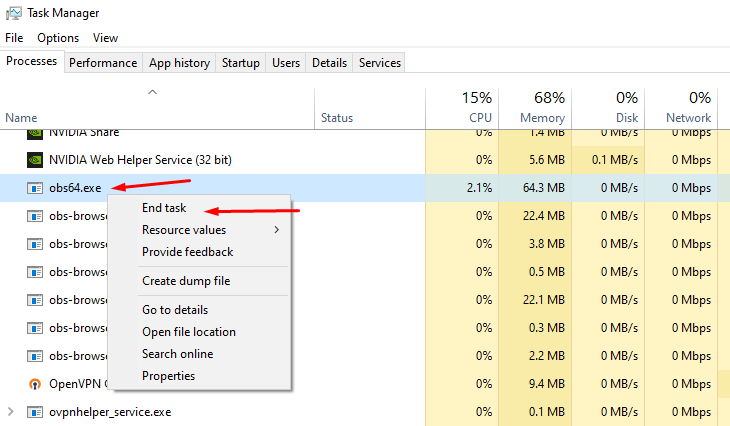 rigid blaze
Hello, i am trying to setup my alerts on the dashboard. i cant see to find a way to move where the text is on the image. ( i want it to be text over image but need to move the text down)
 pearl lagoon
I am having an issue where suddenly my alert box audio is insanely loud and wont show up in my mixer, lowering it in the advance settings does not effect the volume when I test it
I have tried restarting streamlabs multiple times

 wraith marsh
Hello, I am new to obs and streamlabs. new to affiliate and the recent events are only showing raids and follows but no subs. please let me know if anyone has any tips to fix this
 hollow helm
Hello, Everytime I open streamlabs it crashes on me saying critical error I have uninstalled it reinstalled it and still does it
 umbral dawn
Hi, I have a problem. Every time I try to start it directly, it tells me that the multimedia files are being synchronized with the cloud, but it never finishes. So, I don't know how long I have to wait. If someone can help me, thanks.
unreal forge
gritty isle
Let's refresh the connection between Streamlabs and Facebook.
Please follow the...
It's working thanks 😊 😊
abstract plazaBOT
Having trouble? Want to see if anyone else is having the same problem?
Check out our #known-issues channel! We do our best to keep this channel as current as possible with new bugs and progress updates!
If you can't find what you need please submit a ticket at: https://support.streamlabs.com/hc/en-us/requests/new
abstract plazaBOT
Do you have a Streamlabs Ultra membership? Are you part of the Streamlabs All-Stars program?
Get your Discord roles by going to this page here: https://streamlabs.com/dashboard#/settings/integrations and clicking "Link" next to Discord! Ultra members and higher tier All-Stars members will have access to private channels for support!
Interested in Ultra? Check it out here: https://streamlabs.com/ultra?refl=discord
Are you knowledgeable about Streamlabs products?
Get rewarded for helping the Streamlabs Community here in Discord!
👉 Apply to be a part of the Streamlabs Support Volunteer Program!
Application Link:
https://forms.gle/eKS29zWfFjGEzaRp7
For details, see our post in
#announcements message
 sage cipher
Hi, I keep getting the same error while trying to export a part 1 video. I've deleted the same video in all other instances and unsure what to do?
 abstract plazaBOT
Having trouble? Want to see if anyone else is having the same problem?
Check out our #known-issues channel! We do our best to keep this channel as current as possible with new bugs and progress updates!
If you can't find what you need please submit a ticket at: https://support.streamlabs.com/hc/en-us/requests/new
 cloud steppe
hi eveyrone! i am doing tiktok live via steamlab for my real estate sharing, however i get banned everytime i use it once, for 7 days, and have to reapply for tiktok access again. anyone faces this problem as well?
gritty isle
cloud steppe
hi eveyrone! i am doing tiktok live via steamlab for my real estate sharing, how...
Please follow this guide: https://support.streamlabs.com/hc/en-us/articles/35259691237147-TikTok-Live-Streaming-Access-Revoked-No-Violations.
Streamlabs has no insight into or any input to decisions made by TikTok.
TikTok alone grates, revokes, suspend or denies access to Live with Streamlabs.
If this keeps happening, reach out to TikTok.
cloud steppe
thank u so much for the prompt reply.
gritty isle
cloud steppe
thank u so much for the prompt reply.
You're welcome.
 steep axle
I have a question
I can create rtpm with using streamlabs ultra ? I want make live with dji action 5 pro
I want to create a livestream using YouTube and Twitch at the same time! Does Streamlabs Ultra generate a single RTMP key?
pliant cloud
yo rufus can u help me add my discord vc. into my stream
gritty isle
steep axle
I want to create a livestream using YouTube and Twitch at the same time! Does St...
Yes, there's only a single stream key for multistreaming.
pliant cloud
pliant cloud
yo rufus can u help me add my discord vc. into my stream
@gritty isle
wispy latchBOT
# Having trouble with your Desktop Audio on Mac? Try the solutions in the guide below:```
:arrow_right: :link: <https://streamlabs.com/content-hub/post/capturing-desktop-audio-in-streamlabs-desktop-for-mac>ty
sage cipher
sage cipher
Hi, I keep getting the same error while trying to export a part 1 video. I've de...
Don't want this to get buried. Really need help here.
gritty isle
sage cipher
Don't want this to get buried. Really need help here.
Please try this:
Log out of the video editor web site.
Clear the cache in your web browser for all time.
Completely restart the web browser.
Navigate back to the video editor web site and log in.
Try again.
If yo still have issues, try a different web browser.
sage cipher
Thank you!
gritty isle
sage cipher
Thank you!
You're welcome.
steep axle
You can send me some cupom ? Hehe
steep axle
gritty isle
Yes, there's only a single stream key for multistreaming.
Thanks mate
gritty isle
steep axle
You can send me some cupom ? Hehe
I don't have any, sorry.
 agile compass
Hi @gritty isle
steep axle
gritty isle
I don't have any, sorry.
Can I configure Streamlabs using both mobile and computer? Specifically for setting up widgets?
gritty isle
steep axle
Can I configure Streamlabs using both mobile and computer? Specifically for sett...
Sure, you can use a mobile browser on a mobile device. I find that while it is doable, some mobile devices have smaller screens making it difficult to navigate around.
 wintry night
Hello, having trouble upgrading to the latest version. I have space on my drive to install but it won't let me continue.
 gritty isle
wintry night
gritty isle
wintry night
Interesting. Never seen that before. If you have anything sitting in your Recycle Bin, go ahead and empty it and try launching Streamlabs Desktop as administrator.
wintry night
gritty isle
Interesting. Never seen that before. If you have anything sitting in your Recy...
'preciate it, will do
 weak dawn
hey my streamdeck Streamlabs OBS plugin is missing (scene) so i cant change scene on my stream deck all is up to date. is this a Elgato stream deck problem or is this a Streamlabs not working with Elgato
gritty isle
weak dawn
hey my streamdeck Streamlabs OBS plugin is missing (scene) so i cant change scen...
Elgato problem.
If Stream Deck upated to V6.9.1, the Streamlabs Desktop integration has been moved to a plugin. Go to the Elgato Marketplace, search for Streamlabs Desktop, and install that plugin.
Note that you should run both Stream Deck and Streamlabs Desktop as administrator or not as administrator. One or the other as administrator and the other not, will cause Stream Deck not to properly detect that Streamlabs Desktop is running.
weak dawn
thank you so much it help 😄
gritty isle
weak dawn
thank you so much it help 😄
You're welcome!
 gritty osprey
gritty isle
Please follow this guide: <https://support.streamlabs.com/hc/en-us/articles/352...
gritty osprey
gritty isle
Please follow this guide: <https://support.streamlabs.com/hc/en-us/articles/352...
I have the same problem. Been like this for 1 month now
gritty isle
gritty osprey
I have the same problem. Been like this for 1 month now
Follow the guide. But I see you have a Streamlabs Ultra subscription so hop over the #vip-support for assistance.
hollow helm
@gritty isle Hello, Everytime I open streamlabs it crashes on me saying critical error I have uninstalled it reinstalled it and still does it
 meager saddle
media share with cloudbot dosent seen to work properly i dont want people to give a tip i want it to be free
wispy latchBOT
⚠️ Streamlabs Desktop Crash Troubleshooting
@hollow helm, if you're experiencing crashes with Streamlabs Desktop, this guide provides a comprehensive troubleshooting walkthrough to help you resolve the issue: Streamlabs Desktop Crash Troubleshooting Guide
hollow helm
Thank u I will try it
abstract plazaBOT
Having trouble? Want to see if anyone else is having the same problem?
Check out our #known-issues channel! We do our best to keep this channel as current as possible with new bugs and progress updates!
If you can't find what you need please submit a ticket at: https://support.streamlabs.com/hc/en-us/requests/new
willow delta
I have a question regarding Streamlabs mobile how come the audio is delayed when streaming on twitch and Facebook? Is there a way to fix it? I’ve tried looking on yt for a solution but no dice
 crystal pewter
if you create a scene on desktop does it ransfer to mobile or does everything need to be created in the app?
 stray citrus
crystal pewter
if you create a scene on desktop does it ransfer to mobile or does everything ne...
stray citrus
crystal pewter
if you create a scene on desktop does it ransfer to mobile or does everything ne...
Hey there! Scenes unfortunately won't transfer from Desktop > Mobile, so they would have to be created manually. 😦 I'm sorry about that!
wispy latchBOT
@lone coral 🎵 Want to split your audio?
Maybe you’d prefer the stream doesn’t hear your Discord, music, or other apps? You can do this within Streamlabs Desktop using Streamlabs Application Audio, or you could use a software like MIXLINE for more advanced audio control.
📚 Check out these guides:
 turbid valve

Failed to connect to the broadcast server. Check your internet connection. I've tried everything, but it doesn't work
gritty isle
turbid valve
Failed to connect to the broadcast server. Check your internet connection. I've ...
In Streamlabs Desktop, please log out, wait a minute, and then log back in.
Then go to Settings > Advanced > Network > Bind to IP.
If the drop-down menu is set to an IP address, change that setting to Default.
If the drop-down menu is set to Default, change it to the IP address of your computer, usually starts with 192.168 or 10.10.
After that, click Done to save the settings and then restart Streamlabs Desktop and see if you can go live.
turbid valve
same thing
proper totem
turbid valve
same thing
What country are you attempting to stream from?
turbid valve
Russia, it worked six months ago, but now I can't
Is it possible that I need to enable the VPN service?
proper totem
Streamlabs services are not available for use in Russia at the moment.
turbid valve
is the obs studio also? there are errors in both places
proper totem
Correct.
umbral dawn
Hi, I have a problem. Every time I try to start it directly, it tells me that the multimedia files are being synchronized with the cloud, but it never finishes. So, I don't know how long I have to wait. If someone can help me, thanks.🙄
turbid valve
can you recommend something? that will work in my country
gritty isle
umbral dawn
Hi, I have a problem. Every time I try to start it directly, it tells me that th...
In Streamlabs Desktop, log out and quit it.
Reboot your PC.
Launch Streamlabs Desktop as administrator and log in.
Let us know how it goes.
proper totem
turbid valve
can you recommend something? that will work in my country
We cannot offer workarounds for sanctions against the Russian government.
umbral dawn
gritty isle
In Streamlabs Desktop, log out and quit it.
Reboot your PC.
Launch Streamlabs De...
thansk, I'll try I've done everything and nothing works. The live shows are even bad, after I started with that, I can't, I can't broadcast.
gritty isle
umbral dawn
thansk, I'll try I've done everything and nothing works. The live shows are even...
Try the steps I posted and let me know what happens.
calm bluff
calm bluff
Hello all!
Wondering if the mobile app supports browser source yet for adding t...
Bump if anyone is aware! Cheers.
umbral dawn
gritty isle
Try the steps I posted and let me know what happens.
Nothing happened, it still syncs the media files to the cloud, and if I hit broadcast anyway, the live stream is so slow and bad that it can't even be broadcast, and all of this happened from yesterday to today out of nowhere, which I don't understand.
gritty isle
umbral dawn
Nothing happened, it still syncs the media files to the cloud, and if I hit broa...
Please submit a ticket for that: https://support.streamlabs.com/hc/en-us/requests/new
 alpine thicket
My Streamlabs Desktop keeps crashing while trying to start it, I am running Windows 10 and cannot upgrade to Windows 11, Streamlabs was working approximately 3 days ago, I have:
Updated Drivers and Software,
Allowed through firewall,
Ran as administrator
Installed and repaired Microsoft Visual C++ 2022 Redistributable
Installed DirectX
IPv6 Fix and disabled
I've uninstalled and reinstalled as administrator
Restarted my laptop 3 times
Hoped and Prayed
Begged and Pleaded
wispy latchBOT
⚠️ Streamlabs Desktop Crash Troubleshooting
@alpine thicket, if you're experiencing crashes with Streamlabs Desktop, this guide provides a comprehensive troubleshooting walkthrough to help you resolve the issue: Streamlabs Desktop Crash Troubleshooting Guide
alpine thicket
I've unfortunately already followed this guide to no avail
gritty isle
alpine thicket
I've unfortunately already followed this guide to no avail
Please submit a ticket: https://support.streamlabs.com/hc/en-us/requests/new
marble wind
@turbid valve what platform are you trying to stream to?
gritty isle
They are trying to stream to Twitch.
 broken frigate
Anyone have issues with multistream that my twitch is making multiple vlogs over the course of my stream? Nothing else is doing this except twitch. Twitch said its on streamlabs end but ive done what support has considered and it didnt work.
gritty isle
broken frigate
Anyone have issues with multistream that my twitch is making multiple vlogs over...
You have an active Streamlabs Ultra subscription?
broken frigate
Yes. I have for months. And it just started this a couple weeks ago
gritty isle
broken frigate
Yes. I have for months. And it just started this a couple weeks ago
Please link your discord per the instructions below and ask over in the VIP Support channel.
wispy latchBOT
{1}
If you are a Streamlabs Ultra Subscriber or All-Stars member
Link your Discord under integrations for access to our Ultra/VIP roles and private chats
:point_right: https://streamlabs.com/dashboard/#/settings/integrations
:star: Upgrade to Ultra here: https://streamlabs.com/ultra?refl=discord
steep axle
How do I make the desktop settings for mobile too?
I edited on the desktop when I entered the mobile app it was not saved being the same user
gusty umbra
steep axle
I edited on the desktop when I entered the mobile app it was not saved being the...
Streamlabs desktop and mobile don’t sync like that.
 thin berry
Hi! Today i still got these issues #known-issues message
I hope the devs find the solution asap. A ticket was already send.
Do i have the Ultra Role here? I followed all steps to interrogate, but how can i see it here?
wispy latchBOT
{1}
If you are a Streamlabs Ultra Subscriber or All-Stars member
Link your Discord under integrations for access to our Ultra/VIP roles and private chats
:point_right: https://streamlabs.com/dashboard/#/settings/integrations
:star: Upgrade to Ultra here: https://streamlabs.com/ultra?refl=discord
abstract plazaBOT
Having trouble? Want to see if anyone else is having the same problem?
Check out our #known-issues channel! We do our best to keep this channel as current as possible with new bugs and progress updates!
If you can't find what you need please submit a ticket at: https://support.streamlabs.com/hc/en-us/requests/new
abstract plazaBOT
Do you have a Streamlabs Ultra membership? Are you part of the Streamlabs All-Stars program?
Get your Discord roles by going to this page here: https://streamlabs.com/dashboard#/settings/integrations and clicking "Link" next to Discord! Ultra members and higher tier All-Stars members will have access to private channels for support!
Interested in Ultra? Check it out here: https://streamlabs.com/ultra?refl=discord
Are you knowledgeable about Streamlabs products?
Get rewarded for helping the Streamlabs Community here in Discord!
👉 Apply to be a part of the Streamlabs Support Volunteer Program!
Application Link:
https://forms.gle/eKS29zWfFjGEzaRp7
For details, see our post in
#announcements message
silent harbor
Everytime I try to log into the OBS streamlabs plugin twitch chat it gives me this error but I am getting the popup and it is logging in, I've tried on opera GX, Chrome, and edge! I've also already tried deleting the entire contents of my obs-browser folder! PLZ help I need to be able to use twitch chat mod view and typing functions. I also tried changing the default browser while it was closed


 livid tusk
why is my razer headset connecting but then the mic wont work or even show up on the app
steep axle
With streamlabs ultra can I generate an Rtpm key to use on my gopro and make a multstream?
I'm a little confused, I don't see this information on the streamlabs page
 sturdy kestrel
Been stuck here for 20 mins

 bitter dune
Hello
abstract plazaBOT
Having trouble? Want to see if anyone else is having the same problem?
Check out our #known-issues channel! We do our best to keep this channel as current as possible with new bugs and progress updates!
If you can't find what you need please submit a ticket at: https://support.streamlabs.com/hc/en-us/requests/new
abstract plazaBOT
Do you have a Streamlabs Ultra membership? Are you part of the Streamlabs All-Stars program?
Get your Discord roles by going to this page here: https://streamlabs.com/dashboard#/settings/integrations and clicking "Link" next to Discord! Ultra members and higher tier All-Stars members will have access to private channels for support!
Interested in Ultra? Check it out here: https://streamlabs.com/ultra?refl=discord
Are you knowledgeable about Streamlabs products?
Get rewarded for helping the Streamlabs Community here in Discord!
👉 Apply to be a part of the Streamlabs Support Volunteer Program!
Application Link:
https://forms.gle/eKS29zWfFjGEzaRp7
For details, see our post in
#announcements message
steep axle
Can I create a URL and a transmission key with streamlabs ultra?
 twilit pagoda
did anyone else get logged out on streamlabs obs and lose all settings information?
I don't see an option to log in with my twitch account anymore
it only gives me options to log in with streamlabs ID or youtube. Please help
gritty isle
twilit pagoda
did anyone else get logged out on streamlabs obs and lose all settings informati...
If you don’t have a button for Twitch,
You have recording only mode enabled.
Settings > General > Uncheck the "Disable Livestreaming Features" 
twilit pagoda
Now I'm getting a VTS Filter Error and have no way of accessing streamlabs obs cuz of this error
😢
success! Thank you so much
gritty isle
twilit pagoda
Now I'm getting a VTS Filter Error and have no way of accessing streamlabs obs c...
Reinstall the VSTs.
 lavish ridge
For some reason, I can't go live. When I start streaming on either YouTube or Twitch, the stream doesn't send a video signal. On Twitch, it doesn't even go online. On YouTube, it does go online, but the screen stays black. A YouTube warning appears saying it's not receiving enough signal.
I've tried both Streamlabs and OBS Studio, I've tweaked the keyframe, and nothing. I've searched on YouTube and Reddit and found nothing. Does anyone know what it could be?
gritty isle
lavish ridge
For some reason, I can't go live. When I start streaming on either YouTube or Tw...
Probably your bitrate is too low for the resolution you have set. I'll trigger the bot to give you some recommendations.
wispy latchBOT
 Optimizing Your Stream: Recommended Bitrate Settings
@lavish ridge, getting your bitrate right is essential for a clear stream. Bitrate indicates the data rate of your video, and if too low for your chosen resolution and frame rate, it can lead to pixelation.
📋Recommended Bitrate Ranges for Resolution & FPS
- 1280x720 at 30 FPS: 2,200 to 2,800 kbps
- 1280x720 at 60 FPS: 3,800 to 5,600 kbps
- 1920x1080 at 30 FPS: 4,400 to 6,200 kbps
- 1920x1080 at 60 FPS: 8,700 to 12,500 kbps (a minimum of 6,000 kbps is generally recommended for good quality)
- 1600x900 or 1536x864 at 60 FPS: At least 6,000 kbps, up to 8,600 kbps
If you notice pixelation or blockiness on your stream, it often means your bitrate isn't high enough to properly encode your video for the content you're showing. Consider increasing it within these recommended ranges!
📚 For more detailed guidelines and platform-specific recommendations, check out these official resources:
lavish ridge
gritty isle
Probably your bitrate is too low for the resolution you have set. I'll trigger ...
ok I'll try
abstract plazaBOT
Having trouble? Want to see if anyone else is having the same problem?
Check out our #known-issues channel! We do our best to keep this channel as current as possible with new bugs and progress updates!
If you can't find what you need please submit a ticket at: https://support.streamlabs.com/hc/en-us/requests/new
lavish ridge
gritty isle
Probably your bitrate is too low for the resolution you have set. I'll trigger ...
😦
 gritty isle
lavish ridge
😦
gritty isle
lavish ridge
😦
From Streamlabs Desktop, screen shot Settings > Video and Settings > Output.
 broken viper
Can someone help me please, I'm trying to stream through stream labs to Twitch but its forcing a catogary to be chosen
issue is what I'm streaming is game developement nothing at all to do with any other games out there so the catogary thing isn't useful to me, any ideas ?
 gritty isle
broken viper
issue is what I'm streaming is game developement nothing at all to do with any o...
gritty isle
broken viper
issue is what I'm streaming is game developement nothing at all to do with any o...
Go with Just Chatting then.
steep axle
Can I create a URL and a transmission key with streamlabs ultra? Or just with Talk Studio ?
proper totem
steep axle
Can I create a URL and a transmission key with streamlabs ultra? Or just with Ta...
Streamlabs nor Talk Studio generate the URL/Stream Key. You may use either software to broadcast to custom RTMP destinations - More Info 👉 https://streamlabs.com/content-hub/post/how-to-stream-new-platform-custom-ingest
 barren moth
Is the get ultra button broken on the website? tried several browsers and on all of them clicking get ultra does nothing for me.
steep axle
proper totem
Streamlabs nor Talk Studio generate the URL/Stream Key. You may use either softw...
I'm trying to make a broadcast with gopro using a key and putting it on streamlabs. Do you have any idea how I can do it?
proper totem
barren moth
Is the get ultra button broken on the website? tried several browsers and on all...
Can you let me know what page you're on that the button isn't working? (the URL from your address bar)
barren moth
proper totem
Can you let me know what page you're on that the button isn't working? (the URL ...
It will do the little animation when i click on it but thats all that happens
proper totem
barren moth
https://streamlabs.com/ultra?checkout=1&refl=slobs-side-nav&os=windows
https://...
This is working on my end. I'd suggest trying a different browser if possible - it could be a cache issue.
proper totem
steep axle
I'm trying to make a broadcast with gopro using a key and putting it on streamla...
We'll need to gather more info to help out. Please submit a ticket to us:
https://support.streamlabs.com/hc/en-us/requests/new?ticket_form_id=473667
barren moth
proper totem
This is working on my end. I'd suggest trying a different browser if possible - ...
Ive tried Brave Chrome and Edge
proper totem
barren moth
Ive tried Brave Chrome and Edge
Thank you. May I have your channel name for Twitch (or another platform) so I can look into your account?
barren moth
proper totem
Thank you. May I have your channel name for Twitch (or another platform) so I ca...
IgneousLion
gusty umbra
Since the amazing 20seven fixed it. Don’t forget to link your discord to your streamlabs once you finish your purchase to get the role and access to our #vip-support channel! You can link it here. https://streamlabs.com/dashboard#/settings/integrations
steep axle

 mellow night
comment streamer valorant ?
 fossil mantle
Does anyone know how i would get something to show gift subs today like this on streamlabs?
 gusty umbra
steep axle
He is using gopro Live with streamlabs
gusty umbra
steep axle
He is using gopro Live with streamlabs
You should ask them. I would imagine his GoPro is feeding to his phone and he’s using streamlabs mobile.
 vast glade
Hey just wondering if anyone else is running into an error when trying to download streamlabs sponsorships? I get an error when trying to download it and was wondering if there is a work around maybe?
 dusky quest
How to start live on tiktok using streamlab console. I have linked my tiktok account to my streamlab console. But when i start live from the console, it only live for twitch and not tiktok
gritty isle
dusky quest
How to start live on tiktok using streamlab console. I have linked my tiktok acc...
make sure you have been granted Live with Streamlabs.
Check that here: https://www.tiktok.com/falcon/live_g/live_access_pc_apply/result/index.html?id=GL6399433079641606942&lang=en-US
Live with TikTok Studio is a completely separate permission and having that does not automatically grant the other.
dusky quest
gritty isle
make sure you have been granted Live with Streamlabs.
Check that here: <https:...
So for, streamlabs console, do i require a pc/tiktok live studio? And if tiktok approves the link that u gave me, does it mean it will be live on tiktok as soon i start streaming from xbox?
gritty isle
dusky quest
So for, streamlabs console, do i require a pc/tiktok live studio? And if tiktok ...
No, you need to apply for Live with Streamlabs via the link in my post above. Live with TikTok Studio permission only will not allow you go live via Streamlabs.
dusky quest
Thanks. I can live on tiktok now!
abstract plazaBOT
Having trouble? Want to see if anyone else is having the same problem?
Check out our #known-issues channel! We do our best to keep this channel as current as possible with new bugs and progress updates!
If you can't find what you need please submit a ticket at: https://support.streamlabs.com/hc/en-us/requests/new
gritty isle
dusky quest
Thanks. I can live on tiktok now!
You're welcome!
 twilit shadow
anyone know why I cant stream certain games
agile owl
twilit shadow
anyone know why I cant stream certain games
What games you trying to stream?
Could be their anti-cheat messing with the game capture
 low rose
Hi all i cannot get my alerts box to work and show on my streams, i could really do with some help 🥺
 warped fjord
Hey, i’m just wondering what settings I need for TikTok to stream or requirements? It says I can go live on my account, and I relinked it to Streamlabs, but it wont stream. Any reasons to go through?
gritty isle
warped fjord
Hey, i’m just wondering what settings I need for TikTok to stream or requirement...
make sure you have been granted Live with Streamlabs.
Check that here: https://www.tiktok.com/falcon/live_g/live_access_pc_apply/result/index.html?id=GL6399433079641606942&lang=en-US
Live with TikTok Studio is a completely separate permission and having that does not automatically grant the other.
 heady lily
I multi stream on twitch and youtube have been every day for almost 2 years none of my settings or gear has changed. But this past week my stream has totally crashed 4 days in a row sometimes 1 hour in sometimes 5 hours in. Once it crashes I can no longer restart a multi stream only a twitch stream idk what's happening? I've logged out and back in. Tried re giving Auth. Dropped my bit rate a bit and closed other devices using internet and I'm hardwired idk what to do???
gritty isle
heady lily
I multi stream on twitch and youtube have been every day for almost 2 years none...
Are multistreaming with an Streamlabs Ultra subscription (horizontal format to both Twitch and YouTube) or Dual Streaming (horizontal to Twitch and vertical to YouTube Shorts)?
 marsh knoll
i need help if someone could join a chat and with me to where i can screen share would be amazing
abstract plazaBOT
Having trouble? Want to see if anyone else is having the same problem?
Check out our #known-issues channel! We do our best to keep this channel as current as possible with new bugs and progress updates!
If you can't find what you need please submit a ticket at: https://support.streamlabs.com/hc/en-us/requests/new
gritty isle
marsh knoll
i need help if someone could join a chat and with me to where i can screen share...
We can't provide support that way. For moderation purposes, all support has to be done here in this channel.
gritty isle
marsh knoll
that would be awesome
Sorry, I accidently hit Enter before I was finished typing.
I see the message the bot auto deleted to the four letter word.
Are you having a problem with dropped frames?
marsh knoll
im dumb when it comes to tech things man i need help idk what anything means all i know is i drop frames and im getting annoyed
gritty isle
marsh knoll
im dumb when it comes to tech things man i need help idk what anything means all...
Dropped Frames mean that packets being sent are not reaching the platform.
Are you streaming to Twitch?
gritty isle
marsh knoll
i even tried facebook but i cant seem to make it work
Please run the Twitch Test, see below. If you need assistance finding your Twitch stream key: https://streamlabs.com/content-hub/post/where-to-find-your-twitch-stream-key
Select Medium or Long Duration.
Select all the ingest in your region.
Screen shot the results.
Twitch Test download: https://r1ch.net/projects/twitchtest
You're looking for at least a quality of 84.
Once you've found a good server go to Settings > Stream > Stream to custom ingest and you can manually select your server.
marsh knoll
i did that came up as georgia for me but im running it again
gritty isle
marsh knoll
i did that came up as georgia for me but im running it again
Make sure you chose Medium or Long Duration.
Screen shot the results on the test is completely finished.
 gritty isle
marsh knoll
gritty isle
marsh knoll
Killer's Software Suite is known for its poor performance and issues when trying to stream. Please download the package from https://www.intel.com/content/www/us/en/download/19779/intel-killer-performance-suite.html, completely uninstall all Killer NIC items and run the installer, choosing to only install the Hardware Drivers.
I have the Killer E2500 built into my motherboard and had to do the same thing.
You'll want to reboot after al that then run the Twitch Test again.
I'm fixing to leave the office and will be at least an hour in traffic.
🤞
marsh knoll
okay brother let me know when you get back
gritty isle
marsh knoll
okay brother let me know when you get back
Just post the results again when you have them. I'll check once I get home.
gritty isle
marsh knoll
i downloaded it so i dont have to do anything else it restarted it seld
Did you ONLY select the hardware drivers to be installed? DO NOT select the Performance Suite to be installed.

Like that ☝️
gritty isle
marsh knoll
so how do i find it and delete it
Go to Add/Remove Programs via Windows Settings.
Search for Killer.
 gritty isle
Press and hold on the button next to Killer Software and choose This feature will not be installed.
It's okay to install the XTU Supoort Drivers.
marsh knoll
 gritty isle
Just DO NOT install the Killer Software.
gritty isle
marsh knoll
Yes, that's it.
marsh knoll
im downloading it again
gritty isle
Okay I gotta run and play in traffic. 👋
marsh knoll
have fun lol must be in nyc talking like that lol
 harsh trail
Hello I have signed up as a ultra member and im trying to use my domain name. I was directed here to find out the final steps after i put in my registrar and domain name in.
gritty isle
harsh trail
Hello I have signed up as a ultra member and im trying to use my domain name. I ...
Thank you for being a Streamlabs Ultra subscriber!
Please link your discord then go to the VIP Support channel and the staff there can assist with your domain issue.
wispy latchBOT
@harsh trail
If you are a Streamlabs Ultra Subscriber or All-Stars member
Link your Discord under integrations for access to our Ultra/VIP roles and private chats
:point_right: https://streamlabs.com/dashboard/#/settings/integrations
:star: Upgrade to Ultra here: https://streamlabs.com/ultra?refl=discord
marsh knoll

 lime finch
so.. i have been at this for a 3 time. my access gets restored then i can stream a day or two then i lose all my accesses again. and again.


 high summit
i am trying to add my most recent follower to my streamlabs, using the streamlabels source, i have my kick linked to my streamlabs, streamlabels, and on the website and i have the text files installed but it only shows my follower from 4 people ago and its not updating
steep axle
I don't know what to do anymore, I can't find an rtpm and open a live on dji action 5
heady lily
@gritty isle yes streamlabs ultra multi stream both horizontal downgrading from the equivalent 1440 to 1080p on an ultrawide
I'm omw home from work now getting ready to try to start the stream and see sometimes it works longer then others crashes without warning or notifying me why
steep axle
steep axle
I don't know what to do anymore, I can't find an rtpm and open a live on dji act...
Does anyone know?
gritty isle
marsh knoll
That looks way better! Now see if you can go live!
gritty isle
heady lily
<@301571565840236564> yes streamlabs ultra multi stream both horizontal downgrad...
Please link your discord per the instructions below and then hop over to the VIP Support channel.
wispy latchBOT
@heady lily
If you are a Streamlabs Ultra Subscriber or All-Stars member
Link your Discord under integrations for access to our Ultra/VIP roles and private chats
:point_right: https://streamlabs.com/dashboard/#/settings/integrations
:star: Upgrade to Ultra here: https://streamlabs.com/ultra?refl=discord
marsh knoll
thank you!!! so much better
gritty isle
marsh knoll
thank you!!! so much better
You’re welcome!
gritty isle
steep axle
I don't know what to do anymore, I can't find an rtpm and open a live on dji act...
I would go and ask DJI support for their product. We just don’t know. I don’t even have a drone to test with.
gritty isle
high summit
i am trying to add my most recent follower to my streamlabs, using the streamlab...
Kick or Twitch? Kick hasn’t been around that long.
abstract plazaBOT
Do you have a Streamlabs Ultra membership? Are you part of the Streamlabs All-Stars program?
Get your Discord roles by going to this page here: https://streamlabs.com/dashboard#/settings/integrations and clicking "Link" next to Discord! Ultra members and higher tier All-Stars members will have access to private channels for support!
Interested in Ultra? Check it out here: https://streamlabs.com/ultra?refl=discord
Are you knowledgeable about Streamlabs products?
Get rewarded for helping the Streamlabs Community here in Discord!
👉 Apply to be a part of the Streamlabs Support Volunteer Program!
Application Link:
https://forms.gle/eKS29zWfFjGEzaRp7
For details, see our post in
#announcements message
gritty isle
lime finch
so.. i have been at this for a 3 time. my access gets restored then i can stream...
You will need to reach out to TikTok to see h]why they keep suspend his access. Streamlabs has no insight into their decisions and we have no input on their decisions. TikTok alone makes these decisions.
 plucky marten
Hello, I have come to the streamlabs discord in search of wisdom on how to fix my streamlabs, if anyone can help me I would be happy.
gritty isle
plucky marten
Hello, I have come to the streamlabs discord in search of wisdom on how to fix m...
Streamlabs Widgets, Streamlabs account, Streamlabs Chatbot, Streamlabs Cloudbot, Streamlabs Desktop, Streamlabs Mobile, Streamlabs Comsole, Streamlabels, or a payment issue,like paying for a subscription or an issue with tipping?
plucky marten
i cant get any of my scenes to show and dont know what to look at to fix this issue
 gritty isle
plucky marten
i cant get any of my scenes to show and dont know what to look at to fix this is...
gritty isle
plucky marten
i cant get any of my scenes to show and dont know what to look at to fix this is...
Please screen shot the whole Streamlabs Desktop window. Don’t crop it.
plucky marten
does that work
gritty isle
plucky marten
Well, my question is what are you trying to capture?
You have one of every capture method except for video capture.
Having all those in the same scene is not recommended.
plucky marten
i am trying to capture my game but not even my be right back scene works
it shows the be right back screen on twitch when i go live but not on streamlabs
gritty isle
plucky marten
i am trying to capture my game but not even my be right back scene works
What game are you trying to capture?
One thing at a time please.
plucky marten
Cash Cleaner Simulator
gritty isle
plucky marten
Cash Cleaner Simulator
Remove Display Capture, Window Capture, and Screen Capture.
Leave Game Capture.
What is the PNG source for?
plucky marten
The PNG is whenever i am in a discord vc or call it shows my profile picture because i want to be a png tuber
gritty isle
plucky marten
The PNG is whenever i am in a discord vc or call it shows my profile picture bec...
Move the PNG source to the top of the list please.
Do you have one monitor or more than one monitor?
plucky marten
I play on a laptop
gritty isle
plucky marten
I play on a laptop
Are you logged in Streamlabs Desktop with your Twitch?
plucky marten
yes
gritty isle
Okay, try and go live and make sure you stay in the scene Scene. Then start the game.
If all you see on Twitch is a black screen, make sure the bitrate at Settings > Output is not more than 6000 and then, since you’re on a laptop, go through the second link from the bot on the next post. 👇
wispy latchBOT
🖥️ Troubleshooting Black Screens in Streamlabs Desktop
@plucky marten, if Streamlabs Desktop is showing a black screen instead of capturing your game, here are some common solutions to try:
- Ensure your game is the active window. After adding your game capture source, interact with the game for about 5 to 20 seconds. This often helps Streamlabs Desktop detect and capture it.
- Run Streamlabs Desktop as an administrator.
- Change your Game Capture mode from "Auto" to "Capture Specific Window" and then select your game from the list.
- Please note: Some games may not be compatible with Game Capture. If the above steps don't work, try using Window Capture or Display Capture instead.
Still experiencing issues? For more in-depth troubleshooting, please see these detailed guides:
plucky marten
The game shows up on twitch but nothing is appearing on streamlabs it is still a grey box
gritty isle
plucky marten
The game shows up on twitch but nothing is appearing on streamlabs it is still a...
If the game is on stream, don’t worry how it looks in Streamlabs Desktop.
Most games will stop producing output if you tab out of them so what you see in the preview window might be what you are not expecting.
plucky marten
ok thank you for your help
gritty isle
plucky marten
ok thank you for your help
You’re welcome. You can set Hotkeys to move change scenes, that will help with your workflow.
 magic creek
Heya amazing Support i used my own Alerts and any of your Support for some Years here was set it in my Streamlabs correct for Twitch
Can u add my Twitch Alerts to Youtube and Kick exactly the same? so i have no Trouble and iam sure it will work 
gritty isle
magic creek
Heya amazing Support i used my own Alerts and any of your Support for some Years...
That’s not a service we provide, sorry.
magic creek
gritty isle
That’s not a service we provide, sorry.
I know but when i do it it will not work and the last Time it was take i think 10sec? :/
but its okay i try it than more Thanks have a good Day/Night
 timid pivot
I'd love to change the email I use for stream labs and I haven't been able to find any options to do so
magic creek
yeah i use normal OBS need alot Plugins and in Streamlabs OBS Plugins dont work sadly but its easier and makes not so Problems
gritty isle
timid pivot
I'd love to change the email I use for stream labs and I haven't been able to fi...
Here's the steps to follow:
- Use this link: https://id.streamlabs.com/security/email
- Log in to authenticate your original email
- Then, input your new email, and we will send a security code to the new email for you to verify.
 mortal raven
How can i stream in portrait mode on kick on the mobile Stream labs app? With out the black bars on the ends???
 wintry leaf
I’m having trouble finding my stream key through TikTok but everything says I have live access, but it’s saying my access through streamlabs is under review, how can I help this
 zealous patio
So I've been trying to set up the chat box overlay for twitch but it keeps showing as a black box when I open up the source my scene isn't black but I have this issue with other overlays such as Fuji and follower/sub goals (image to show what I mean by scene working but sources not) I have seen my chat work in the side bar so I know it's not a connectivity issue
 wispy latchBOT
If you were unable to find answers to your question(s) in the #1173605643484139591 or our self help articles on Creator Resource Hub https://streamlabs.com/content-hub/support , then please submit a ticket at https://support.streamlabs.com/hc/en-us/requests/new and our team would be able to help you there!
fossil mantle
Anyone know what option we would use for like today's follower count and the number?
 serene sluice
I have a basic question. I am trying to set up 2 hosts while sharing their PC's screen, if desired. I can get the first source (webcam) to come up but can't figure out the second source. I did manage to get my iPhone camera to come up as a second source at one point. But I can't seem to get them formatted and I have watch YouTube videos to try and figure this out, but no luck. They just say, "add your second source". But how? I appreciate any advice and any resources anyone can direct me to.
abstract plazaBOT
Having trouble? Want to see if anyone else is having the same problem?
Check out our #known-issues channel! We do our best to keep this channel as current as possible with new bugs and progress updates!
If you can't find what you need please submit a ticket at: https://support.streamlabs.com/hc/en-us/requests/new
 celest light
why when i press live on mobile streaming it says insufficient authontication scopes
 radiant seal
Someone please help me to get rid of this error "423 locked" "Failed to create a youtube broadcast". I am able to go live on facebook but not on YouTube. I don't know why I tried everything but I can't find what might be the issue.
 celest light
me too
radiant seal
I created a ticket to resolve this issue, even the technical support team don't know what might me the issue
celest light
so its streamlabs side issue
radiant seal
Don't know, I'm looking for answers in this community chat. Let's see if anybody knows
radiant seal
@wispy latch please help for the above mentioned issue
abstract plazaBOT
Do you have a Streamlabs Ultra membership? Are you part of the Streamlabs All-Stars program?
Get your Discord roles by going to this page here: https://streamlabs.com/dashboard#/settings/integrations and clicking "Link" next to Discord! Ultra members and higher tier All-Stars members will have access to private channels for support!
Interested in Ultra? Check it out here: https://streamlabs.com/ultra?refl=discord
Are you knowledgeable about Streamlabs products?
Get rewarded for helping the Streamlabs Community here in Discord!
👉 Apply to be a part of the Streamlabs Support Volunteer Program!
Application Link:
https://forms.gle/eKS29zWfFjGEzaRp7
For details, see our post in
#announcements message
lime finch
gritty isle
You will need to reach out to TikTok to see h]why they keep suspend his access. ...
Yes sir. Its been a consistent issue.
 night drum
Hey guys, I am trying to run a multistream over on Twitch and X at the same time, tried solving the issue for some time now, unlinking the account, logging in and out to see if it will solve it, but nothing I tried worked, can I get some help on this?
 gritty isle
night drum
Hey guys, I am trying to run a multistream over on Twitch and X at the same time...
gritty isle
night drum
Hey guys, I am trying to run a multistream over on Twitch and X at the same time...
You have a Streamlabs Ultra subscription?
night drum
gritty isle
You have a Streamlabs Ultra subscription?
Yes
gritty isle
night drum
Yes
Thank you being a Streamlabs Ultra subscriber!
Please link your discord per the instructions below and ask him ver in the VIP Support channel, one of your subscriber benefits.
wispy latchBOT
@night drum
If you are a Streamlabs Ultra Subscriber or All-Stars member
Link your Discord under integrations for access to our Ultra/VIP roles and private chats
:point_right: https://streamlabs.com/dashboard/#/settings/integrations
:star: Upgrade to Ultra here: https://streamlabs.com/ultra?refl=discord
night drum
gritty isle
Thank you being a Streamlabs Ultra subscriber! <:ultra:1047482406770311208>
P...
Just did, I ask the same question in the #vip-support ?
gritty isle
night drum
Just did, I ask the same question in the <#606591508623392788> ?
Correct.
night drum
gritty isle
Correct.
Thank you for the help!
gritty isle
night drum
Thank you for the help!
You’re welcome!
radiant seal
So the community helps only the ultra users but not to normal users?
stray citrus
radiant seal
So the community helps only the ultra users but not to normal users?
Hey there! No, that isn't the case. Ultra users have a specific channel they can reach out to for "live" support from the Streamlabs support team, but this channel is for any user who may have a question or need assistance. The community can help anyone that they might have answers for. 🙂
gritty isle
radiant seal
So the community helps only the ultra users but not to normal users?
Us Volunteers are around here too. Do you need assistance?
radiant seal
radiant seal
Someone please help me to get rid of this error "423 locked" "Failed to create a...
Yes I need for this
abstract plazaBOT
Having trouble? Want to see if anyone else is having the same problem?
Check out our #known-issues channel! We do our best to keep this channel as current as possible with new bugs and progress updates!
If you can't find what you need please submit a ticket at: https://support.streamlabs.com/hc/en-us/requests/new
gritty isle
radiant seal
Yes I need for this
423 Locked can mean that you've tried to start a live stream and while it appears to you that it failed, YouTube sees it as sucessfully and thus when you try and go live again, the resource is locked.
Please go to your YouTube Studio, click Content on the left side then at the top click Live. If you have any live streams showing as Upcoming, delete all of those. Then, in Streamlabs Mobile, log out, force quit the app, reboot your device, launch Streamlabs Mobile, log back in with your YouTube, and try again.
Also, I see this upcoming change from YouTube:
As of 22 July, we are increasing the minimum age required to live stream to 16 years old. This means that creators will need to be 16 or older to be able to live stream on YouTube. Additionally, live streams featuring 13 to 15-year-olds who are not visibly accompanied by an adult may have their live chat disabled and the account may temporarily lose access to live chat or other features. Please note that, in the future, we plan to take down these live streams and the account may temporarily lose its ability to live stream.
celest light
gritty isle
423 Locked can mean that you've tried to start a live stream and while it appear...
It doesn't work to me
 uncut token
I’m sure there’s other ways (maybe easier) around this issue, other streaming platforms? Resets? Re-linking accounts? Etc.
Prism is a mobile streaming device if anyone wants to look that up, I’m sure there’s similar in your appstores too💪🏼 hopefully
gritty isle
celest light
It doesn't work to me
Okay, I have some other troubleshooting steps for you. Hang on whilst I type it up.
@celest light
Let's refresh the connection between Streamlabs and YouTube.
Follow these steps in order, even if you already done any one of the steps before. Don't skip steps and don't perform them out of order. If you're unsure about any of the steps, don't assume anything, ask first before proceeding.
-
Log out of the Streamlabs web site on every device you access it: Click your PFP and choose Log out.
-
If you use Streamlabs Console, log out of the Streamlabs Console web site on every device you access it: Click your PFP and choose Log out.
-
If you use the standalone Streamlabels application, log out of that.
-
Log out in Streamlabs Desktop (see next post on how to do that).
-
Log out in Streamlabs Mobile as well.
-
Follow this guide: https://streamlabs.com/content-hub/post/how-to-disconnect-your-streamlabs-account. Just follow the section for YouTube.
-
Navigate back to the Streamlabs web site and log in with your YouTube. This re-establishes the connection.
-
IMPORTANT: Once you have completed the guide, go back to the Streamlabs web site https://streamlabs.com/dashboard#/recentevents, click the Live Actions tab, scroll all the way to the bottom and click the Reload Widgets button. ** PLEASE Don't skip this step! **
-
Log back in to all the other Streamlabs products you use.
-
Try and go live.
celest light
gritty isle
<@746749079660527620>
Let's refresh the connection between Streamlabs and YouTu...
Cant find the live section tab on the website
gritty isle
celest light
Cant find the live section tab on the website


It is sometimes hard to find when you're on a mobile web browser.
celest light
gritty isle
Oh yeah that's why I didn't see it thank you
 proper totem
No promos
celest light
gritty isle
It is sometimes hard to find when you're on a mobile web browser.
Btw it worked thx
gritty isle
celest light
Btw it worked thx
YAY!!! You're welcome!
dusky quest
How to connect Streamlabs console with Tiktok live studio (windows)?
gritty isle
dusky quest
How to connect Streamlabs console with Tiktok live studio (windows)?
Make sure you have been granted Live with Streamlabs.
Check that here: https://www.tiktok.com/falcon/live_g/live_access_pc_apply/result/index.html?id=GL6399433079641606942&lang=en-US
Live with TikTok Studio is a completely separate permission and having that does not automatically grant the other.
dusky quest
I clicked on the link, it says approved. And i also got the approval for the one without tiktok live studio. Does it mean i can stream with either one without alway request for approval?
And how to setup tiktok live studio with streamlabs console?
gritty isle
dusky quest
I clicked on the link, it says approved. And i also got the approval for the one...
Streamlabs Console uses your Live with Streamlabs permission. Live wtih TikTok Studio is a completely seperate permission and having just that does not guarantee or grant Live with Streamlabs.
To stream to TikTok from Streamlabs Console, you'd have to connect your TikTok account in Streamlabs Console here: https://console.streamlabs.com/account#/stream-destinations
dusky quest
How can i see the tiktok chat while i stream? I can see only twitch chat inside thd streamlabs console Scene.
gritty isle
dusky quest
How can i see the tiktok chat while i stream? I can see only twitch chat inside ...
Our integration with TikTok doesn't include chat, sorry. You'd need to watch (and mute) the stream in TikTok to monitor chat there.
 carmine parcel
Hi! I have my Twitch connected, with all the alerts and such. I Connected my TikTok, but I'm not seeing anyting for it. Is Streamlabs just going to broadcast to Tiktok and I need to have everything already set up in TikTok studios? I hope this makes sense.
abstract plazaBOT
Having trouble? Want to see if anyone else is having the same problem?
Check out our #known-issues channel! We do our best to keep this channel as current as possible with new bugs and progress updates!
If you can't find what you need please submit a ticket at: https://support.streamlabs.com/hc/en-us/requests/new
gritty isle
carmine parcel
Hi! I have my Twitch connected, with all the alerts and such. I Connected my Tik...
If I understand you, yes. The Streamlabs integration only has the ability of go live. No chat, no alerts, no gifts, etc. For all that, you'd have to monitor the stream in your TikTok Studio.
 rancid shell
My alert box doesn't show who recently followed me same with my mini feed.
 lyric falcon
rancid shell
My alert box doesn't show who recently followed me same with my mini feed.
lyric falcon
rancid shell
My alert box doesn't show who recently followed me same with my mini feed.
Hello
 lean mural
 rancid shell
lyric falcon
Hello
rancid shell
lyric falcon
Hello
Hello!
 acoustic canopy
I just tried to turn my Stream on and it just doesnt start the stream... but the twitch setting got updated
 weak hawk
Hey, I’ve been having a consistent issue across two different PCs after updating Streamlabs to the version that added SRT support. My microphone goes out of sync with the camera, and after a while, it starts to sound distorted like an “alien voice.”
I’ve confirmed this issue happens only with Streamlabs as i have used 2 different computers for streaming, different streamlabs logins and both have been experiencing this audio issue So it seems to me like its a problem, is it possible to revert Streamlabs versions for VLC Source?
SRT Server btw via Twitch and Moblin
I pasted the url in the xspf file and took it into streamlabs
acoustic canopy
acoustic canopy
I just tried to turn my Stream on and it just doesnt start the stream... but the...
This is what it shows the whole time
 marsh knoll
yeo @gritty isle my quality is back down to zero i unistalled and reisntalled it and still at zero
it was running running perfect yesterday
annyone here to help
wispy latchBOT
If you were unable to find answers to your question(s) in the #1173605643484139591 or our self help articles on Creator Resource Hub https://streamlabs.com/content-hub/support , then please submit a ticket at https://support.streamlabs.com/hc/en-us/requests/new and our team would be able to help you there!
gritty isle
acoustic canopy
This is what it shows the whole time
On the Confirm & Go Live screen, uncheck Enhanced Broadcasting, and try again.
gritty isle
marsh knoll
annyone here to help
Run the Twitch Test again please.
 acoustic canopy
gritty isle
On the Confirm & Go Live screen, uncheck *Enhanced Broadcasting*, and try again.
acoustic canopy
gritty isle
On the Confirm & Go Live screen, uncheck *Enhanced Broadcasting*, and try again.
worked ty
gritty isle
acoustic canopy
worked ty
You're welcome!
gritty isle
marsh knoll
Go to Add/Remove Programs, search for Killer, and screen shot what you see.
marsh knoll
 gritty isle
marsh knoll
gritty isle
marsh knoll
That's the Start Menu. Go to the Add/Remove Programs in Windows Settings, search for Killer there and then screen shot.
 marsh knoll

 marsh knoll
Alright dude your a goat bro I was in obs discord and they are zero help with anything
Restarting rn
 gritty isle
marsh knoll
gritty isle
marsh knoll
I don't know what you're doing there. Run the Twitch Test.
gritty isle
It likely left over a shortcut in the Startup folder.
Open your Task Manager, click here for Startup Apps and screen shot what you see there.
 marsh knoll

 gritty isle
marsh knoll
gritty isle
marsh knoll
Nothing from Killer there?
marsh knoll
no non that i see
gritty isle
Use Windows Explorer and search for *killernetworkmanagerlauncher*.*. If any results come up that are shortcuts, delete those shotcuts.
marsh knoll
nothing popped up
gritty isle
marsh knoll
nothing popped up
Interesting.
marsh knoll
I’ll be right back gotta go pick up wifey
Oh, my stream has seemed to not drop frames anymore. I don’t know why it still showing zero quality.
gritty isle
marsh knoll
I’ll be right back gotta go pick up wifey
Drive safe!
willow delta
Question is there ways to mitigate the audio delay on Streamlabs mobile when you stream on the app?
abstract plazaBOT
Having trouble? Want to see if anyone else is having the same problem?
Check out our #known-issues channel! We do our best to keep this channel as current as possible with new bugs and progress updates!
If you can't find what you need please submit a ticket at: https://support.streamlabs.com/hc/en-us/requests/new
marsh knoll
seems to be fine but quality is at zero
abstract plazaBOT
Are you knowledgeable about Streamlabs products?
Get rewarded for helping the Streamlabs Community here in Discord!
👉 Apply to be a part of the Streamlabs Support Volunteer Program!
Application Link:
https://forms.gle/eKS29zWfFjGEzaRp7
For details, see our post in
#announcements message
Do you have a Streamlabs Ultra membership? Are you part of the Streamlabs All-Stars program?
Get your Discord roles by going to this page here: https://streamlabs.com/dashboard#/settings/integrations and clicking "Link" next to Discord! Ultra members and higher tier All-Stars members will have access to private channels for support!
Interested in Ultra? Check it out here: https://streamlabs.com/ultra?refl=discord

 rain sparrow
Like the person above, today when I opened Streamlabs it signed me out and messed with my setting to turn my screen for streams vertical! I also have to sign back in every time I open and close it for some reason and the same issue persists. Has anyone had this problem before or knows a solution?

 quaint quiver
I have an issue, when I solo stream on yt or twitch it seems fine but when I dual stream, twitch just messes up and lags a lot, on yt it’s fine but twitch when dual just puts the stream 30 mins behind the current time
gritty isle
rain sparrow
Like the person above, today when I opened Streamlabs it signed me out and messe...
Streamlabs Desktop launching as if it is a fresh/like it's the first time using it?
The "acting like it's a fresh restart" is due to certain background processes not closing properly. First, please close Streamlabs Desktop.
Then open your task manager. Please press "Ctrl + Shift + Esc" on your keyboard to bring up your Task Manager.
Please select "More Details" at the bottom if you don't see the percentages of resources used.
Check for any running programs called "Streamlabs," "Electron," or "Obs64". If you find either of these processes running, please right-click and end the process. https://gyazo.com/d6b9babb076875ee5889983b532948e1
Then, reopen Streamlabs Desktop. This should resolve it but if it doesn't please submit a ticket at https://support.streamlabs.com/hc/en-us/requests/new and our team would be able to assist you further.
gritty isle
 tall condor
Having issues logging in/the login button is unresponsive?
Your default browser in Windows is causing issues with logging into Streamlabs Desktop. The login popup relies on the default browser set in Windows, so you won't be able to log in if it's blocked. Follow these steps to fix it:
- Press the Windows key on your keyboard or go bottom left and click the Windows logo.
- Search for "default apps". It may be different in Windows 10 and Windows 11.
- Find the default apps section and close Streamlabs Desktop
- Change your default browser to a new browser. For example, if you're currently on Chrome, you'll want to change it to Edge or Firefox. (Screenshot for reference: https://prnt.sc/48ZdLCQCgi8D)
- Once you've changed this, reopen Streamlabs Desktop and see if the same issue occurs when attempting to log in.
 round plank
Every time I try to stream with Streamlabs console it kick me out
gritty isle
round plank
Every time I try to stream with Streamlabs console it kick me out
Streamlabs Console is a paid subscription service.
You would need to log into the Streamlabs Console site, click your PFP in the upper right, choose Account Settings, then scroll down and choose either the Monthly or Annual plan.
Either one of those options will start your 7 day free trial; cancel before the end of that 7 day period to avoid getting charged for the first term you select.
If you have a Streamlabs Console subscription, please make sure you are logging in at the Streamlabs Console web site with your Twitch and not your Streamlabs ID.
Streamlabs Console is also included in our Streamlabs Ultra subscription. If you're using Streamlabs Console this way, please make sure you set up your Streamlabs ID then log into the Streamlabs Console with your Streamlabs ID rather than your Twitch.
If you have a Streamlabs Ultra subscription (includes Streamlabs Console), please make sure you are logging in at the Streamlabs Console web site with your Streamlabs ID and not your Twitch.
round plank
gritty isle
Streamlabs Console is a paid subscription service.
You would need to log into t...
So I have to pay a plan to stream ?
gritty isle
round plank
So I have to pay a plan to stream ?
For Streamlabs Console? Yes.
Streamlabs Console is a paid subscription service.
You would need to log into the Streamlabs Console site, click your PFP in the upper right, choose Account Settings, then scroll down and choose either the Monthly or Annual plan.
Either one of those options will start your 7 day free trial; cancel before the end of that 7 day period to avoid getting charged for the first term you select.
 magic roost
Hello!! My English is not good. I use Google Translate. Sorry.
When I open multi-channel live broadcast and upload 6000 bit rate
Other channels are delayed normally
TWITCH will keep spinning and the audience cannot watch
I can't solve it, so I have to come here to ask for help. Thank you very much
 marble chasm
@gritty isle Is it possible to make a refund?
gritty isle
marble chasm
<@301571565840236564> Is it possible to make a refund?
You would have to submit a ticket for that: https://support.streamlabs.com/hc/en-us/requests/new
magic roost
@gritty isle I'm sorry to bother you, but I have this problem and I can't solve it, so I can only ask for your help.
gritty isle
magic roost
<@301571565840236564> I'm sorry to bother you, but I have this problem and I can...
Do you have a Streamlabs ultra subscription?
magic roost
@gritty isle Yes, I subscribe for one year
gritty isle
magic roost
<@301571565840236564> Yes, I subscribe for one year
Thank you for being a Streamlabs Ultra subscriber!
Please link your discord and then ask again over in the VIP Support channel, which is one of your subscriber benefits.
wispy latchBOT
@magic roost
If you are a Streamlabs Ultra Subscriber or All-Stars member
Link your Discord under integrations for access to our Ultra/VIP roles and private chats
:point_right: https://streamlabs.com/dashboard/#/settings/integrations
:star: Upgrade to Ultra here: https://streamlabs.com/ultra?refl=discord
magic roost

Hello, I don't quite understand how to operate it. I can only ask your professional staff.
gritty isle
magic roost
Now go here #vip-support
marble chasm
gritty isle
You would have to submit a ticket for that: <https://support.streamlabs.com/hc...
Thank you
gritty isle
marble chasm
Thank you
You’re welcome.
abstract plazaBOT
Having trouble? Want to see if anyone else is having the same problem?
Check out our #known-issues channel! We do our best to keep this channel as current as possible with new bugs and progress updates!
If you can't find what you need please submit a ticket at: https://support.streamlabs.com/hc/en-us/requests/new
 strange horizon
what is the reason for this error?

 random basin
strange horizon
what is the reason for this error?
random basin
strange horizon
what is the reason for this error?
Hey there, The "sync point not found" error in Streamlabs usually indicates an issue with the connection between Streamlabs and the streaming platform (like Twitch or YouTube). This can stem from various problems, including authentication issues, outdated software, or network connectivity issues.
Try to recconect your streaming accounts
random basin
strange horizon
what is the reason for this error?
Also this sugests that an issue with the Intel Media SDK installation, so you can try to re-download streamlabs desktop and resinstall it. Also dont forget to reboot your PC once you remove the old installation.
abstract plazaBOT
Are you knowledgeable about Streamlabs products?
Get rewarded for helping the Streamlabs Community here in Discord!
👉 Apply to be a part of the Streamlabs Support Volunteer Program!
Application Link:
https://forms.gle/eKS29zWfFjGEzaRp7
For details, see our post in
#announcements message
Do you have a Streamlabs Ultra membership? Are you part of the Streamlabs All-Stars program?
Get your Discord roles by going to this page here: https://streamlabs.com/dashboard#/settings/integrations and clicking "Link" next to Discord! Ultra members and higher tier All-Stars members will have access to private channels for support!
Interested in Ultra? Check it out here: https://streamlabs.com/ultra?refl=discord
strange horizon
random basin
Hey there, The "sync point not found" error in Streamlabs usually indicates an i...
the YouTube Platform i already did connect just now because i had to switch the channel but fully re install Stream is what i think i will have to try it
random basin
strange horizon
the YouTube Platform i already did connect just now because i had to switch the ...
Please do and let us know if you need extra help.
marble wind
@strange horizon are you using an intel CPU that's about 10 years old?
sage cipher
I submitted a ticket days ago with no answer. I pay for Ultra. WTF?
gritty isle
sage cipher
I submitted a ticket days ago with no answer. I pay for Ultra. WTF?
Tickets are answered in the order they are received. If you like, since you have Ultra, you can always use the Chat Bubble on the Streamlabs web site for priority support or link you discord and gain access to the VIP Support channel here.
wispy latchBOT
@sage cipher
If you are a Streamlabs Ultra Subscriber or All-Stars member
Link your Discord under integrations for access to our Ultra/VIP roles and private chats
:point_right: https://streamlabs.com/dashboard/#/settings/integrations
:star: Upgrade to Ultra here: https://streamlabs.com/ultra?refl=discord
gritty isle
marble wind
<@489809508269424640> are you using an intel CPU that's about 10 years old?
I was wondering the same but didn’t have time to reply before I had to leave for work.
 stark elm
Is there a Websocket Listening Limit for Streamlabs Overlays? Like I try connecting to it and it somehow hides it. Could this be a problem if it is embeded at to many places? Or if I embed it onto my stream via an iframe with blank background?
 storm tusk
Hello 🙂 Can someone direct me where to get support for setting up my streamlabs website custom domain? 'Contact Support' brought me here. Thanks 🙂
abstract plazaBOT
Having trouble? Want to see if anyone else is having the same problem?
Check out our #known-issues channel! We do our best to keep this channel as current as possible with new bugs and progress updates!
If you can't find what you need please submit a ticket at: https://support.streamlabs.com/hc/en-us/requests/new
gusty umbra
storm tusk
Hello 🙂 Can someone direct me where to get support for setting up my streamlabs...
Thanks for being an ultra subscriber! Head over to #vip-support for that!
 light plume
Bonjour, j’ai besoin d’aide je souhaite exprimer sur Xbox et je n’arrive pas à entendre le chat vocal de mes amis qui sont en crosse plate-forme. Comment faire est-ce que Streamlabs peut m’aider à régler ce problème
proper totem
light plume
Bonjour, j’ai besoin d’aide je souhaite exprimer sur Xbox et je n’arrive pas à e...
You may need to update your Xbox settings to send the Voice Chat audio to the stream:
This option should be in Settings > General > Volume & Audio Output > Party Chat Output > Headset & Speakers
light plume
J’ai déjà fait ça, mais ça fonctionne pas
Je sais pas si avec Streamlabs je vais pouvoir récupérer l’audio des vocal warzonne
 ivory hawk
Hello, why the dual chat in my streamlabs desktop not showing up anymore ? It used to provide 2 chats combined in one place, please help, thank you !
gritty isle
 astral saffron
It’s not connecting to my twitch
astral saffron
It’s not connecting to my twitch
Streamlabs Console is a paid subscription service.
You would need to log into the Streamlabs Console site, click your PFP in the upper right, choose Account Settings, then scroll down and choose either the Monthly or Annual plan.
Either one of those options will start your 7 day free trial; cancel before the end of that 7 day period to avoid getting charged for the first term you select.
If you have a Streamlabs Console subscription, please make sure you are logging in at the Streamlabs Console web site with your Twitch and not your Streamlabs ID.
Streamlabs Console is also included in our Streamlabs Ultra subscription. If you're using Streamlabs Console this way, please make sure you set up your Streamlabs ID then log into the Streamlabs Console with your Streamlabs ID rather than your Twitch.
If you have a Streamlabs Ultra subscription (includes Streamlabs Console), please make sure you are logging in at the Streamlabs Console web site with your Streamlabs ID and not your Twitch.
astral saffron
gritty isle
Streamlabs Console is a paid subscription service.
You would need to log into t...
Huhhh this just confused the hell out of me
gritty isle
astral saffron
Huhhh this just confused the hell out of me
Do you have a Streamlaba Console subscription?
astral saffron
I have the ultra
gritty isle
astral saffron
I have the ultra
Thank you for confirming that!
Please make sure you set up your Streamlabs ID then log into the Streamlabs Console with your Streamlabs ID rather than your Twitch.
ALSO, please link your Discord per the tagged instructions below and gain access to the VIP Support channel, one of your subscriber benefits.
wispy latchBOT
@astral saffron
If you are a Streamlabs Ultra Subscriber or All-Stars member
Link your Discord under integrations for access to our Ultra/VIP roles and private chats
:point_right: https://streamlabs.com/dashboard/#/settings/integrations
:star: Upgrade to Ultra here: https://streamlabs.com/ultra?refl=discord
light plume
Bonjour, est-ce qu’avec Streamlabs console on peut entendre les discussions vocales sur Warzone en multiforme
Multiplateforme
 dense pawn
@marble wind
 marble wind
@dense pawn the indistinguishable preset targets a specific compression ratio, it can't guarantee a specific bit rate, bit rate will vary depending on content, resolution and frame rate, this is normal
dense pawn
marble wind
<@798796522950098975> the indistinguishable preset targets a specific compressio...
Then I guess the 30GB is because my old recordings were usually 1h and this time it was 3h 30m. If that's the case, sorry for wasting your time, I just checked.
 chilly raft
I know this issue is currently under investigation “TikTok permission to live stream on stream labs revoked without violations” it’s incredibly frustrating. I get my permissions back for 2 days then they are gone for a week. I’m in my 3rd cycle of this happening. 😭