#technical-support
1 messages · Page 157 of 1
 gritty isle
 inner wolf
gritty isle
This has been an issue that has affected a small group of customers and currentl...
inner wolf
gritty isle
This has been an issue that has affected a small group of customers and currentl...
another thing i noticed is it failed to get my settings from OBS maybe there is a bug with that?
 gritty isle
inner wolf
another thing i noticed is it failed to get my settings from OBS maybe there is ...
gritty isle
inner wolf
another thing i noticed is it failed to get my settings from OBS maybe there is ...
I couldn't say, sorry. It is a frustrating issue for sure.
gritty isle
inner wolf
Dang, so submit the ticket with out the code.
 median owl
Hello
 quick sandal
Go to Settings > Advanced. un-select "force GPU as render device" Then restart SLOBS
inner wolf
@gritty isle Ok so I uninstalled it completely and removed the "slobs plugins" & "slobs client" folders as well. I reinstalled and it works perfectly fine now. I skipped the step where it asked to import OBS settings this time. I bet that had something to do with it.
I just tried to import OBS settings after it was working and now I got the error and bug again so im gonna have to fresh install again. At least i figured out what it was.
 grizzled vortex
did anyone else's streamlabs log out & delete everything? it had the option of importing from obs, twitch studio or start fresh ):
 proper totem
median owl
Hello
proper totem
median owl
Hello
Sorry to hear you can't subscribe to Ultra. Please reach out to our team and include a screenshot of what's happening (error message, etc.)
https://support.streamlabs.com/hc/en-us/requests/new?ticket_form_id=360002960893
median owl
proper totem
Sorry to hear you can't subscribe to Ultra. Please reach out to our team and inc...
Thank you it is kinda weird, it says my card is expired but I called the bank and obviously my card isn't so no idea what is going on.
median owl
proper totem
Sorry to hear you can't subscribe to Ultra. Please reach out to our team and inc...
After following what the bank mentioned it worked now ty.
 dry cosmos
Someone told me to share this into this room instead of the general chat:
I'm trying to find out how many platforms and which ones you can multistream with ultra?
I'm sorry, but I just can't find that information anywhere? I'd really appreciate it if anyone could help. ^^'
 abstract plazaBOT
 Having trouble? Want to see if anyone else is having the same problem?
Check out our #known-issues channel! We do our best to keep this channel as current as possible with new bugs and progress updates!
If you can't find what you need please submit a ticket at: https://support.streamlabs.com/hc/en-us/requests/new
 gusty umbra
dry cosmos
Someone told me to share this into this room instead of the general chat:
I'm t...
gusty umbra
dry cosmos
Someone told me to share this into this room instead of the general chat:
I'm t...
From the website "Multistream to YouTube, TikTok, Kick, Twitch, Facebook, Trovo, and more RTMP connections simultaneously." Basically most of the "major" streaming platforms.
Also add X to that, not sure why it doesn't show it
dry cosmos
gusty umbra
From the website "Multistream to YouTube, TikTok, Kick, Twitch, Facebook, Trovo,...
I'd like more detailed infos when paying for a service, rather than "Oh well, there are some that work... which ones? Well, some. You'll have to find out. And how many at once? Find out once you order!"
I highly doubt for example facebook chat is aggregated in the multichat, since it seems to be hard or not allowed. BUT if it has that, I'd be glad. Would the linkedin chat work too or not, etc.
dry cosmos
gusty umbra
Also add X to that, not sure why it doesn't show it
Well, that's the point. I want legally binding information when I pay for something. Does it support the platforms I need or not, you know?
Not a "well, give us money and you can test for yourself".
gritty isle
dry cosmos
Well, that's the point. I want legally binding information when I pay for someth...
We have formal integration with Twitch, YouTube, Facebook, Trovo, and Kick. We have some integration with X and TikTok, basically those two just allow you to go live. With ultra, you can add custom destinations if you have a RTMP url and a stream key.
gusty umbra
You do also get a 7 day free trial before you're charged for ultra.
dry cosmos
gritty isle
We have formal integration with Twitch, YouTube, Facebook, Trovo, and Kick. We ...
Alright. So video can be shared with any paltform that gives keys and rtmp.
But chat integration only for those few.
You can really aggregrate the facebook chat too?
And my other question was: How many multistreams at once? To how many destinations can I stream at once?
gritty isle
dry cosmos
Alright. So video can be shared with any paltform that gives keys and rtmp.
But ...
Correct.
gritty isle
dry cosmos
You can really aggregrate the facebook chat too?
And my other question was: How...
One to each Twitch, YouTube, Facebook, Trovo, kick, X and TikTok plus your custom destinations.
dry cosmos
As many as I want?
As in, I could multistream to 20 destinations that are custom, all at the same time?
gritty isle
dry cosmos
As in, I could multistream to 20 destinations that are custom, all at the same t...
There is a limit, I just got home and am unloading groceries and the dog is yelling he needs a walk. May I confirm the number of custom destinations and get back to you in a bit?
dry cosmos
gritty isle
There is a limit, I just got home and am unloading groceries and the dog is yell...
Sure, no hurry. It's not a life and death situation 😄
I appreciate the help and look forward to hearing from you
gritty isle
dry cosmos
Sure, no hurry. It's not a life and death situation 😄
I appreciate the help an...
Streamlabs Desktop is limited to three custom destinations, but, you can set up multi streaming on the Streamlabs web site and add as many custom destinations as you like.
dry cosmos
thanks
gritty isle
dry cosmos
thanks
You’re welcome.
gritty isle
grizzled vortex
did anyone else's streamlabs log out & delete everything? it had the option of i...
Streamlabs Desktop launching as if it is a fresh/like it's the first time using it?
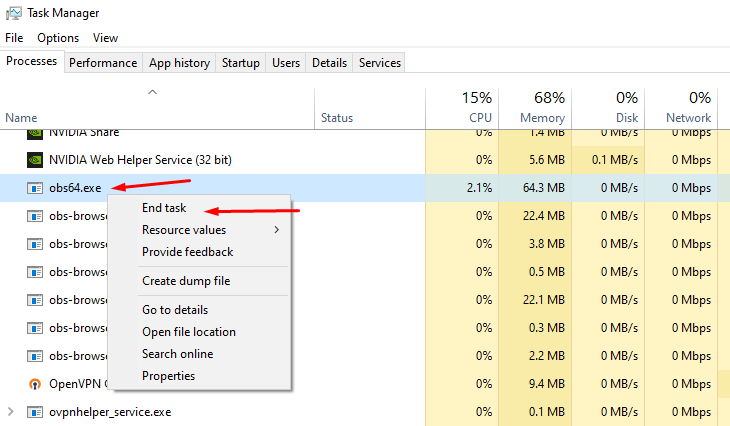
The "acting like it's a fresh restart" is due to certain background processes not closing properly. First, please close Streamlabs Desktop.
Then open your task manager. Please press "Ctrl + Shift + Esc" on your keyboard to bring up your Task Manager.
Please select "More Details" at the bottom if you don't see the percentages of resources used.
Check for any running programs called "Streamlabs," "Electron," or "Obs64". If you find either of these processes running, please right-click and end the process. https://gyazo.com/d6b9babb076875ee5889983b532948e1
Then, reopen Streamlabs Desktop. This should resolve it but if it doesn't please submit a ticket at https://support.streamlabs.com/hc/en-us/requests/new and our team would be able to assist you further.
 spice dust
once again the support team decided to mark my ticket solved even though it is not yet solved. this is the 2nd time already and its been months since my issue has not been solve yet. the fact that people pay for this is insane.
 proper totem
spice dust
once again the support team decided to mark my ticket solved even though it is n...
proper totem
spice dust
once again the support team decided to mark my ticket solved even though it is n...
Hi there,
I'm sorry to hear this. I can confirm there are still no updates on a resolution. I am working with our team to ensure this does not happen again.
abstract plazaBOT
 Do you have a Streamlabs Ultra membership? Are you part of the Streamlabs All-Stars program?
Get your Discord roles by going to this page here: https://streamlabs.com/dashboard#/settings/integrations and clicking "Link" next to Discord! Ultra members and higher tier All-Stars members will have access to private channels for support!
Interested in Ultra? Check it out here: https://streamlabs.com/ultra?refl=discord
Are you knowledgeable about Streamlabs products?
Get rewarded for helping the Streamlabs Community here in Discord!
👉 Apply to be a part of the Streamlabs Support Volunteer Program!
Application Link:
https://forms.gle/eKS29zWfFjGEzaRp7
For details, see our post in
#announcements message
 pulsar matrix
How do i setup my streamlabs obs to have chat mod settings like the pic on the bottom has??
dry cosmos
gritty isle
Streamlabs Desktop is limited to three custom destinations, **but**, you can set...
I got another response from the x accoutn?

 sharp bear
all of a sudden streamlabs does save when i sign in
everytime it boots its like welcome what are you using streamlabs for
and then i gotta sign in
 drifting hull
can anybody tell me why I keep getting Check your Internet connection. Couldn't connect to server I'm not entirely sure why this happens and it's only with TikTok. I think. I can see it connects to My TWITCH because my vods will be 1 min long . It's incredibly annoying and I already tried all the steps in the website and the one mentioned earlier. From another User on here. Yes I set the IP to the one on my computer. It's so finicky and weird. I have an Ethernet cable plugged in as well as 1 gig internet
 formal plank
Is there a way to have multichat integrated into the streamlabs dashboard? Or even a pop-out multichat?
 serene sky
Does anyone here know how I can change my phone number for My Streamlabs. Been trying to get Ultra, and I have No option to change my phone number.
abstract plazaBOT
Having trouble? Want to see if anyone else is having the same problem?
Check out our #known-issues channel! We do our best to keep this channel as current as possible with new bugs and progress updates!
If you can't find what you need please submit a ticket at: https://support.streamlabs.com/hc/en-us/requests/new
abstract plazaBOT
Do you have a Streamlabs Ultra membership? Are you part of the Streamlabs All-Stars program?
Get your Discord roles by going to this page here: https://streamlabs.com/dashboard#/settings/integrations and clicking "Link" next to Discord! Ultra members and higher tier All-Stars members will have access to private channels for support!
Interested in Ultra? Check it out here: https://streamlabs.com/ultra?refl=discord
Are you knowledgeable about Streamlabs products?
Get rewarded for helping the Streamlabs Community here in Discord!
👉 Apply to be a part of the Streamlabs Support Volunteer Program!
Application Link:
https://forms.gle/eKS29zWfFjGEzaRp7
For details, see our post in
#announcements message
 quartz ruin
@quick sandal have you heard anything back
abstract plazaBOT
Having trouble? Want to see if anyone else is having the same problem?
Check out our #known-issues channel! We do our best to keep this channel as current as possible with new bugs and progress updates!
If you can't find what you need please submit a ticket at: https://support.streamlabs.com/hc/en-us/requests/new
median owl
Hello, is it possible to use Stream Overlays after ultra subscription ends?
 idle mica
Hello. I can't get Stream Deck to recognize that Streamlabs Desktop is open and active. I need help please
gritty isle
idle mica
Hello. I can't get Stream Deck to recognize that Streamlabs Desktop is open and...
Don't run Streamlabs Desktop as administrator.
gritty isle
idle mica
That did it thank you <@301571565840236564>
You're welcome.
abstract plazaBOT
Having trouble? Want to see if anyone else is having the same problem?
Check out our #known-issues channel! We do our best to keep this channel as current as possible with new bugs and progress updates!
If you can't find what you need please submit a ticket at: https://support.streamlabs.com/hc/en-us/requests/new
 trim gate
how do i set up chat pop ups in obs with streamlabs?
 sweet moth
why when my series x xbox streams to streamlabs console it automatically pops up as a webcam instead of game capture. so my xbox game view is on webcam (but dont have a webcam) and game capture is just blank it wont let me do anything for the game capture. why? PLEASEEEEEE
 vast nexus
I have an issue involving funds that needs to be solved by June 24th according to the letter I received from Stripe in the mail regarding my Streamlabs Stripe account. I have sent in a ticket, but I’m worried it will not be seen in time in order to solve this. Is there any way to get in touch with someone faster?
 spiral vine
bruh there is a slow mode enabled
can someone please for the love of god tell me how can i have different urls for my alerts in streamlabs widgets cuz they are aall the same i cant change them or anything like I want 1 url for follower 1 for sub etc,,,,,
gritty isle
spiral vine
can someone please for the love of god tell me how can i have different urls for...
Yes! That's possible!
- Go to the Alert Box page on the Streamlabs website: https://streamlabs.com/dashboard#/alertbox
- Click Filter Events. Uncheck everything except for Follow.
- Copy the Widget URL and add a Browser Source and paste in that URL.
- Go back to the Filter Events button, uncheck Follow and check everything else.
- Copy the Widget URL and add a new Browser Source (don't reuse the existing one 😉 ) and paste in that URL.
- Viola!

- Profit!

 idle basalt
HELP!
spiral vine
gritty isle
Yes! That's possible!
1) Go to the Alert Box page on the Streamlabs website: ...
AHHH so i have to this for everything
for every new alert or widget i set up ok thanks
 gleaming tangle
every time i log into streamlabs it says "complete account setup" and makes me enter my birthdate....can y'all fix this?
idle basalt
Y'all are completely useless!
sweet moth
idle basalt
Y'all are completely useless!
YOU AINT NEVER LIED !!
idle basalt
sweet moth
YOU AINT NEVER LIED !!
I tried getting help twice..... ain't never got it!
I had to delete everything and start fresh! Smh!
gleaming tangle
Guys, my alerts are showing up on my stream but i cannot hear them coming through my headphones....I've confirmed i have 'monitor and output' selected in my OBS audio properties....what could be the issue here?
I've also confirmed that my OBS monitoring output is correct
idle basalt
Tbh, Google it or ask friends! These people aren't worth your time!
gleaming tangle
I just noticed that I have a video file uploaded for my 'image' section, but no audio file selected for the same alert...BUT when i preview the alert in the dashboard, the sound still comes through
idle basalt
I'm re-adding all my alerts since I had to factory reset mine.
I use Streamlabs, so I honestly don't know how to get in this situation though!
 neon iron
@gritty isle Thank you for helping me out like a week ago about my stream contantly disconnecting. Apparently the setting on stremlabs has multiple IPs and for some reason there were some that were not good? I changed it to the correct one and streaming to a different server helped me figure out the problem. no more interruptions! Appreciate the help a lot my dude!
idle basalt
You tell them!!
quick sandal
quartz ruin
<@190264404288339969> have you heard anything back
nothing at all, I tried reinstalling SLOBS and every means I could come up with myself. I think SLOBS is just going to be a massive let down till they make Twitch VoD a permanent feature no matter what platform(s) you stream to.
 spring pebble
quick question i got stream labs ultra and every time i click add destination with ultra to add another platform it takes to me google webrowser and tells me to get ultra then the page refreshes and then just doesnt do anything im really frustrated and feel like im in an endless loop cansomeone help me plz
this is so glitch i really dont understan i login with my twitch and then ultra isnt there and then i loging with my streamlabs go to conenct my twitch and i get auto logged off
anyone alive here?
this platform is about to make me commit toaster bath bro
abstract plazaBOT
Having trouble? Want to see if anyone else is having the same problem?
Check out our #known-issues channel! We do our best to keep this channel as current as possible with new bugs and progress updates!
If you can't find what you need please submit a ticket at: https://support.streamlabs.com/hc/en-us/requests/new
gusty umbra
spring pebble
quick question i got stream labs ultra and every time i click add destination wi...
Hey there. Thanks for being ultra! Link your ultra account to your discord here. https://streamlabs.com/dashboard#/settings/integrations then head over to #vip-support
 gritty isle
 twilit flare
why i cant login to kick on macOS???
twilit flare
why i cant login to kick on macOS???
Our Kick integration isn’t yet available on MacOS.
 eternal terrace
where is the channel #AI-game-highlighter-testing
abstract plazaBOT
Are you knowledgeable about Streamlabs products?
Get rewarded for helping the Streamlabs Community here in Discord!
👉 Apply to be a part of the Streamlabs Support Volunteer Program!
Application Link:
https://forms.gle/eKS29zWfFjGEzaRp7
For details, see our post in
#announcements message
Do you have a Streamlabs Ultra membership? Are you part of the Streamlabs All-Stars program?
Get your Discord roles by going to this page here: https://streamlabs.com/dashboard#/settings/integrations and clicking "Link" next to Discord! Ultra members and higher tier All-Stars members will have access to private channels for support!
Interested in Ultra? Check it out here: https://streamlabs.com/ultra?refl=discord
 twin crystal
does anyone know how to fix this? I meet the requirements to stream. I constantly relink my tiktok account and this still pops up

 elder spruce
Hello, good evening. I need your help. Do you know what these following options are for? I was trying to stream Left 4 Dead 2, and when I deselected it, I started seeing this in the game capture. Please.

I deactivated them but I would like to know what they are for, honestly. I speak Spanish so excuse my English.
 oak atlas
My microphone is echoing and I 100% confirmed that streamlab software is the issue.
 solemn vale
can someone help me my stream is like a rectangle lmao

it aint suppposed to be like that i assume

like its only getting 10% of my screen
gritty isle
solemn vale
can someone help me my stream is like a rectangle lmao
Your Output Resolution is set for the vertical format. The Base Resolution should be set to the resolution of your monitor.
If the Output Resolution is set to 1080x1920 then switch it to 1920x1080.
gritty isle
twin crystal
does anyone know how to fix this? I meet the requirements to stream. I constantl...
You applied for and were granted Live with Streamlabs? Live with TikTok Studio is a different permission and having that doesn't automatically give you permission to Live with Streamlabs.
You can check here:
 wispy latchBOT
# Having a problem where an echo is heard on your stream?```
- Echoes usually occur when there is a monitor set in the mixer, ensure they are all set to **`Monitor Off`** <https://i.imgur.com/TMR36co.png>
- They can also occur due to custom audio devices set in your video capture device, ensure you have none selected: <https://i.imgur.com/bbh5oyx.png>
- If none of these resolve the issue, it could also be that you have your stream open *(unmuted)* in another browser window.
- Lastly, make sure that you're not listening to a recording device from within windows. Be sure to mute the stream and turn off this option: <https://i.imgur.com/3xNWNg0.png> spiral dagger
Do I ask for help here if I have an issue with streamlabs?
 calm sorrel
need help? i have went the cheaper way to use a capture card and it showed up and disappeared
gusty umbra
spiral dagger
Do I ask for help here if I have an issue with streamlabs?
You sure do!
 jovial tundra
Would anyone here know why my alerts and chat box don't work when I use OBS Studio, I'm on linux so I cannot use the Streamlabs plugin. If anyone could help it'd be greatly appreciated.
 sacred sky
hi just waiting for a response see if i can find some other opinions. twitch is going to be able to do vertical. and streamlabs has vertical options. however. when i try to go horizontal and vertical. it says All platforms are currently assigned to the vertical display. to use dual output you must stream to one horizontal and one vertical platform. do you want to go live in single output mode with the horizontal display?
its a little confusing can we not go both to one platform?
gusty umbra
sacred sky
hi just waiting for a response see if i can find some other opinions. twitch is ...
Twitch is considered a horizontal platform. So to dual output, you would need to select a vertical platform (TikTok in your case). With an ultra subscription, you will have more options.
sacred sky
thanks traysurfer appreciate I just heard the news that some might be able to stream vertical. also finally googled some more info as well just to confirm it wont go vertical until sometime later this year? so i might be getting ahead of myself and confusing myself.
abstract plazaBOT
Having trouble? Want to see if anyone else is having the same problem?
Check out our #known-issues channel! We do our best to keep this channel as current as possible with new bugs and progress updates!
If you can't find what you need please submit a ticket at: https://support.streamlabs.com/hc/en-us/requests/new
abstract plazaBOT
Do you have a Streamlabs Ultra membership? Are you part of the Streamlabs All-Stars program?
Get your Discord roles by going to this page here: https://streamlabs.com/dashboard#/settings/integrations and clicking "Link" next to Discord! Ultra members and higher tier All-Stars members will have access to private channels for support!
Interested in Ultra? Check it out here: https://streamlabs.com/ultra?refl=discord
 void sigil
Hello everyone
abstract plazaBOT
Having trouble? Want to see if anyone else is having the same problem?
Check out our #known-issues channel! We do our best to keep this channel as current as possible with new bugs and progress updates!
If you can't find what you need please submit a ticket at: https://support.streamlabs.com/hc/en-us/requests/new
gusty umbra
void sigil
Hello everyone
Hello
void sigil
gusty umbra
Hello
How’s it going? I been promoting my channel sharing it lately
 lean canyon
So I’m starting to stream again and make content with my buddies but I’m running into an issue. When I start my stream my frames drop to hell… and then my stream starts getting laggy and for some odd reason more delayed as it goes on. The picture I provided is my capture card using to connect to my laptop and ps5. Anybody know how I can resolve this issue?
 gusty umbra
Are you getting dropped frame notifications in streamlabs?
What are your stream settings? Resolution, fps, bitrate?
 gray adder
when im streaming the stream looks like the game is running slow but its fine when im playing


 low hull
Hello while streaming today my game froze, then in Steamlabs it froze there too, when the game unfroze it was still frozen on Streamlabs, I changed scenes hoping it would get unstuck. It did not. I closed Steamlabs. when I opened it back up it brought me to the page asking if i'll be live streaming or recording, then the login page, etc. How do I get all my old scenes, settings, sources etc back? thanks!
 delicate scarab
Hi there is there any way I can speak with a tech support?
abstract plazaBOT
Having trouble? Want to see if anyone else is having the same problem?
Check out our #known-issues channel! We do our best to keep this channel as current as possible with new bugs and progress updates!
If you can't find what you need please submit a ticket at: https://support.streamlabs.com/hc/en-us/requests/new
gusty umbra
gray adder
when im streaming the stream looks like the game is running slow but its fine wh...
Do you have a dedicated gpu? What’s on the video settings page? Are you trying to stream 1080p60fps?
gusty umbra
delicate scarab
Hi there is there any way I can speak with a tech support?
We are community support here. So you ask your question, and if somebody knows the answer, they can respond. You can also submit a ticket via this link. https://support.streamlabs.com/hc/en-us/requests/new be advised, tickets are answered in the order received and it can be some amount of days before they get back to you. Lastly, if you’re an ultra subscriber, you can link your streamlabs and discord and get access to the #vip-support channel for immediate assistance.
gray adder
gusty umbra
Do you have a dedicated gpu? What’s on the video settings page? Are you trying...
My gpu is a rtx 5060 ti
gray adder
And to stream at 1080p 60fps
gusty umbra
gray adder
My gpu is a rtx 5060 ti
I’d recommend changing your encoder to NVEC so it uses your gpu instead. That should help you out.
gray adder
gusty umbra
I’d recommend changing your encoder to NVEC so it uses your gpu instead. That sh...
I'll try that tomorrow
oak atlas
My mic is echoing and whistling and I tried it on different apps and software and it works fine, so the problem is on streamlabs. I noticed that when I ''test audio'' on streamlabs, the audio monitoring automatically change from ''monitor off'' to ''monitor only(mute output)''.
 heavy frigate
anybody knows why my tiktok permit is revoke everytime i try to go live on tiktok using streamlabs?
 grim mica
Good evening, I encountered delay problems in streaming on Twitch (not on YouTube despite streaming on two platforms with multistreaming). Do you know how I can solve these problems?
 olive hazel
My streamlabs has been disconnecting my streams over the last few days.
i have restarted the program, checked all my setting and checked my network and nothing is working.
it's only started doing this over the last week.
can someone help me
gusty umbra
heavy frigate
anybody knows why my tiktok permit is revoke everytime i try to go live on tikt...
There is a known issue for that. You can look at the details here. #known-issues message follow the instructions inside the details to submit a ticket for it.
gusty umbra
grim mica
Good evening, I encountered delay problems in streaming on Twitch (not on YouTub...
Hey there! If you’re multi streaming, you must be an ultra subscriber. Use this link to connect your discord to your stream and head over to #vip-support for your issue! https://streamlabs.com/dashboard#/settings/integrations
abstract plazaBOT
Having trouble? Want to see if anyone else is having the same problem?
Check out our #known-issues channel! We do our best to keep this channel as current as possible with new bugs and progress updates!
If you can't find what you need please submit a ticket at: https://support.streamlabs.com/hc/en-us/requests/new
 ocean kindle
Hello! Can anybody help me please with Dual streaming adding delay pls? I have dual stream to twitch horizontal and youtube vertical and for some reason, after multiple tries, on horizontal my stream adds delay eventho I have not ticked a single box to it and i dunno what to do. My youtube stream works perfect but on twithc I get a little pause every 5-10 seconds and it buffers then instead of loading up to the stream it adds a little delay. I have checked after an hour or so I got like 8-12 minutes of delay
abstract plazaBOT
Are you knowledgeable about Streamlabs products?
Get rewarded for helping the Streamlabs Community here in Discord!
👉 Apply to be a part of the Streamlabs Support Volunteer Program!
Application Link:
https://forms.gle/eKS29zWfFjGEzaRp7
For details, see our post in
#announcements message
Do you have a Streamlabs Ultra membership? Are you part of the Streamlabs All-Stars program?
Get your Discord roles by going to this page here: https://streamlabs.com/dashboard#/settings/integrations and clicking "Link" next to Discord! Ultra members and higher tier All-Stars members will have access to private channels for support!
Interested in Ultra? Check it out here: https://streamlabs.com/ultra?refl=discord
 stone widget
Hey how do I reset Streamlabs to factory settings?
Ive been googling and it's all stuff that's outdated. I even looked on the website and searched reset
Did you ever get an answer to this? I asked the same thing.
 novel wedge
stone widget
Did you ever get an answer to this? I asked the same thing.
novel wedge
stone widget
Did you ever get an answer to this? I asked the same thing.
No but i do have some options go to dms
 near crystal
i'm having an issue turning on and off a source on my Stream Deck using the Streamlabs OBS command, here's a video showing what I mean
 harsh karma
Streamlabs cloudbot kills any link even though they are whitelisted in the bot?
 tired hazel
Where do I find my log in details? I've lost them and I can't remember which email I used and I can't remember my password but I'm worried if I get logged out 😔
Also, my cloudbot doesn't work (I've tried EVERYTHING to get it to work but it won't work). Please can someone help me. I'm happy to share my screen to show my settings.
Finally, the notifications don't work either 😐 Again I'm happy to share my screen to show my settings.
Any help would be greatly appreciated ☺️
abstract plazaBOT
Do you have a Streamlabs Ultra membership? Are you part of the Streamlabs All-Stars program?
Get your Discord roles by going to this page here: https://streamlabs.com/dashboard#/settings/integrations and clicking "Link" next to Discord! Ultra members and higher tier All-Stars members will have access to private channels for support!
Interested in Ultra? Check it out here: https://streamlabs.com/ultra?refl=discord
tired hazel
Where do I find my log in details? I've lost them and I can't remember which email I used and I can't remember my password but I'm worried if I get logged out 😔
Also, my cloudbot doesn't work (I've tried EVERYTHING to get it to work but it won't work). Please can someone help me. I'm happy to share my screen to show my settings.
Finally, the notifications don't work either 😐 Again I'm happy to share my screen to show my settings.
Any help would be greatly appreciated ☺️
idle basalt
Have you tried forgot password on a different device and put in your email?
gritty isle
tired hazel
Where do I find my log in details? I've lost them and I can't remember which ema...
If you're asking about your Streamlabs ID, you can see that here: https://streamlabs.com/dashboard#/settings/account-settings/slIDSettingsPage. If you need to reset your password, there is a Forgot Password link on the Sign-in screen that you can use.
 knotty lily
Hello, I recently opened my Throne account and added a Streamlabs integration. The alerts and such work, however I have no idea where the alert itself should be updated at. In the integration, it says I can update the alert in my dashboard at Streamlabs, but unless there has been an update to the dashboard which made it not possible to do so at the moment, or completely removed it, I don't know where to find it
Edit: My general settings for alerts are different, then what the Throne alert appears like
 gray adder
gusty umbra
I’d recommend changing your encoder to NVEC so it uses your gpu instead. That sh...
gray adder
gusty umbra
I’d recommend changing your encoder to NVEC so it uses your gpu instead. That sh...
done that but still the same
nvm its only like that for me but if i use another twitch acc its completly fine lol
gritty isle
knotty lily
Hello, I recently opened my Throne account and added a Streamlabs integration. T...
You edit the Throne alerts on the Throne web site directly, not on the Streamlabs web site. Their wording 'StreamLabs Panel' is confusing. https://help.throne.com/en/articles/7258782-throne-stream-alerts-via-browser-source
 knotty lily
Yeah, but that's a browser source editor, not the Streamlabs integration itself
I'm using that right now, since the integration is weird
Just to clarify, the upper left corner is the Sl Alert Box and the bottom right is a browser source
gritty isle
knotty lily
Just to clarify, the upper left corner is the Sl Alert Box and the bottom right ...
From the Throne Support guide I linked above:
- Customize your Stream Alerts until you are happy with the look and displayed message.
- Copy the link to paste into your broadcasting software e.g. OBS.
So, as you're setting up the integration on Throne for Streamlabs, you have the ability to customize the alerts then. There is no way on the Streamlabs web site to edit Throne alerts.
 haughty saffron
hey guys question! i got the new update that allows u to multi stream via obs with the stream labs plugin. i like that there is now a multi chat that i can see in obs but im wondering if anyone knows if there is a way to get it to be on my live stream screen so viewers can see. i currently go through stream labs for my chat and that has been working for twitch. i even got the stream labs subscription to get the multi chat option and both kick and twitch are selected but it still wont show the kick chat messages. if anyone could help that would be appreciated thank you!
knotty lily
gritty isle
From the Throne Support guide I linked above:
1. Customize your Stream Alerts...
Well yeah, but the Sl integration and the setting you are referring me to are two different things. Appreciate your help though. I've made a ticket to get a better understanding
gritty isle
knotty lily
Well yeah, but the Sl integration and the setting you are referring me to are tw...
You're welcome.
gritty isle
haughty saffron
hey guys question! i got the new update that allows u to multi stream via obs wi...
As to you first question, you would use our ChatBox widget to have chat shown on stream. You can configure the Chatbox Widget here: https://streamlabs.com/dashboard#/widgets/chat-box. Include in in your scene in OBS Studio with a Browser Source.
As to your second question, I'm not sure how multistream chat works via the Streamlabs Plugin. Do you have a Streamlabs Ultra subscription?
haughty saffron
gritty isle
As to you first question, you would use our ChatBox widget to have chat shown on...
i already have the chat box widget set up with my stream! i’ve been using it for a while now for twitch only. now that there is a multi stream feature i got the stream labs ultra subscription that allows u to have multiple platforms chats in one but its not working. both platforms are checked in the chat box widget area but its still only allowing twitch chats to come through
gritty isle
haughty saffron
i already have the chat box widget set up with my stream! i’ve been using it for...
Okay, go ahead and link your Discord per the following instructions and ask over in the VIP Support channel, which is one of your subscriber benefits. 👇
wispy latchBOT
If you are a Streamlabs Ultra Subscriber or All-Stars member
 Link your Discord under integrations for access to our Ultra/VIP roles and private chats
:point_right: https://streamlabs.com/dashboard/#/settings/integrations
:star: Upgrade to Ultra here: https://streamlabs.com/ultra?refl=discord
haughty saffron
gritty isle
Okay, go ahead and link your Discord per the following instructions and ask over...
thanks so much! will do once i’m home from work so i can actually have stream labs open lol!
gritty isle
haughty saffron
thanks so much! will do once i’m home from work so i can actually have stream la...
You're welcome!
 mint eagle
Guys, I currently stream dual feed on youtube, but each stream chatbot only seems to work in one of the feeds and I don't how how to choose which one, or if there is a way to make it work it work in both. Any ideas?
gritty isle
mint eagle
Guys, I currently stream dual feed on youtube, but each stream chatbot only seem...
Chatbot and Cloudbot will only connect to the first stream that is seen over the API. There is no way to choose, force it to connect, or change it to a particular stream.
abstract plazaBOT
Having trouble? Want to see if anyone else is having the same problem?
Check out our #known-issues channel! We do our best to keep this channel as current as possible with new bugs and progress updates!
If you can't find what you need please submit a ticket at: https://support.streamlabs.com/hc/en-us/requests/new
 mild prism
When im in a discord call with 2 others i want that people in my live streamw ont hear them
[19:50]
How can I fix this ?
Discord voice call and Live stream separated
gusty umbra
mild prism
When im in a discord call with 2 others i want that people in my live streamw on...
Hey there...I replied in the other channel
 junior moth
my custom code doesn't work. Like, the custom code never does anything no matter what i do. I put in HTML? Doesnt render it. JS function? Doesnt do it. Option fields set up? Doesnt display them. Had to use custom HTML files instead.
Also, my custom playlist player has random issues (only as a browser source) where the audio randomly increases in pitch and gets distorted no matter what i do. The player has visual elements too so unless i find a Custom Code solution (which doesnt work) its the best i can have...
 lime finch
sooo.. i had my issue before and i got my TikTok back and then i get to go on and stream again and then it kicked me again with the no access error! literally today at 6/23/2025 not even 5 days of access?

 gritty isle
lime finch
sooo.. i had my issue before and i got my TikTok back and then i get to go on an...
gritty isle
lime finch
sooo.. i had my issue before and i got my TikTok back and then i get to go on an...
I would reply to that email and let the staff know you're still having issues. There's nothing we can troubleshoot about this here in Discord other than unmerging and remerging your TikTok here https://streamlabs.com/dashboard#/settings/account-settings/platforms
lime finch
gritty isle
I would reply to that email and let the staff know you're still having issues. ...
yes sir. i did that right now. thank you. for being so awesome
gritty isle
lime finch
yes sir. i did that right now. thank you. for being so awesome
You're welcome!
abstract plazaBOT
Having trouble? Want to see if anyone else is having the same problem?
Check out our #known-issues channel! We do our best to keep this channel as current as possible with new bugs and progress updates!
If you can't find what you need please submit a ticket at: https://support.streamlabs.com/hc/en-us/requests/new
 exotic mesa
Hello, I adjusted my stream to 2k but the 2k option is not reflected on my Twitch channel. Could you tell me what the error is and provide a solution, please?
quartz ruin
@quick sandal have you tried again?
 split condor
hi iam a small youtuber and recently have tried improving my quality by using cqp now my buddy shadowfighter pro uses cqp level 1 with the exact same settings i use but when i got to record like 30 seconds to 5 minutes into the recording i get an error that says NEVC Error: get_encoded_packet: nv.nvEncLockBitstream
i have a 4070ti and i checked gpu utilization and it doesnt seem to be using anywhere near 100% and yes i understand cqp quality of 1 is going to make a massive file size but i have fast internet and am trying to get the absolute best quality i can when my friend uses the exact same settings he has no issues
 marble wind
@split condor are you recording to a hard drive / a USB drive?
marble wind
@split condor some nvidia drivers, the ones that came out with the rtx 5000 series GPUs, had this error frequently, install the newest drivers, or drivers that predate the rtx 5000 series GPUs' release
split condor
i tried installing the newest drivers that didnt work so i should roll back to before 5000 series and give it a go?
marble wind
@split condor how exactly it didn't work? it should have worked
split condor
idk i got the same error
updating to the lastest drivers worked fine just got the same recording error
marble wind
@split condor post a screenshot of settings>output>recording and settings>advanced
gritty isle
Interesting error. 👀
abstract plazaBOT
Do you have a Streamlabs Ultra membership? Are you part of the Streamlabs All-Stars program?
Get your Discord roles by going to this page here: https://streamlabs.com/dashboard#/settings/integrations and clicking "Link" next to Discord! Ultra members and higher tier All-Stars members will have access to private channels for support!
Interested in Ultra? Check it out here: https://streamlabs.com/ultra?refl=discord
Are you knowledgeable about Streamlabs products?
Get rewarded for helping the Streamlabs Community here in Discord!
👉 Apply to be a part of the Streamlabs Support Volunteer Program!
Application Link:
https://forms.gle/eKS29zWfFjGEzaRp7
For details, see our post in
#announcements message
 marble wind
@split condor also, is your graphics card factory overclocked / manually overclocked? if yes, you can run msi afterburner and manually reduce GPU clock speed slightly (~200-300 mhz), this was useful for some people with rtx 2000 series cards at some point
split condor
it is factory and manually overclocked
gritty isle
CQ level of 1???
split condor
yes
marble wind
@split condor disable the manual overclock, also change preset from p7 to p2 and multipass mode to single pass, try recording again
gritty isle
split condor
yes
Why?
split condor
because i do not care about file size only quality'
but lowering the preset and changing to single pass will reduce quality
my friends has the exact same settings using a 4090 with no issues
gritty isle
split condor
because i do not care about file size only quality'
I guess you have massive amount of free disk space?
marble wind
split condor
but lowering the preset and changing to single pass will reduce quality
no, in cqp the preset only affects compression efficiency, you'll get larger files of same quality
split condor
iam so confused rn
gritty isle
Have you done a clean install of the Nvidia drivers?
wispy latchBOT
# Perform a clean installation of your GPU drivers:```
:arrow_right: :link: <https://streamlabs.com/content-hub/post/clean-install-of-graphics-driver-tutorial>i can try that
gritty isle
Sounds like a driver setting might be borked…
split condor
i mean it shouldnt be performance related i have 12gb of vram
marble wind
don't skip troubleshooting steps like that, if mine is correct, you'll be on a wild goose chase
gritty isle
Not doubting the performance aspect of the VRAM.
split condor
yeah the only reason iam confused is that my friend is using a 4090 and the same recording settings with zero issues
iam trying a clean install now
do yall have any voice channels in here so i dont have to type
gritty isle
split condor
do yall have any voice channels in here so i dont have to type
Sorry, we don’t. For moderation purposes, all support has to be done here in these channels.
split condor
gotcha
marble wind
@split condor do you have microsoft edge running as well, and/or, are you closing any web browser windows?
split condor
whats weird is when i use a cqp of 10 it doesnt have any issues
i did have chrome opened but it was only using like less than 1% of reasources
gritty isle
I wonder if your system is getting IO bound trying to write to the disk.
split condor
what does that mean
gritty isle
That means the disk controller can’t keep up with the requests being sent to it.
marble wind
gritty isle
I wonder if your system is getting IO bound trying to write to the disk.
nah, i/o bottlenecking would falsely show as "encoding lag" and the video would have either stutters or corruption artifacts
split condor
yeah the video looks fine
gritty isle
Okay
split condor
restarting pc rq one sec
marble wind
my current guesses would be (sorted by confidence):
a) gpu drver crashing from manual OC
b) gpu drver crashing from factory OC
c) p7+2pass
d) corrupt gpu driver install
split condor
well iam gonna give it a go fresh install of gpu drivers and manual oc disabled
gritty isle
Let us know how it goes.
 spice tide
I am switching from lightstream to streamlabs on console. I set everything up, made accounts, logged in and everything, but whrn i try streaming on my xbox and press "go live", it kicks me out. Any tips?
split condor
okay that time it instantly failed
gritty isle
spice tide
I am switching from lightstream to streamlabs on console. I set everything up, m...
Can you elaborate on “kicks you out”?
spice tide
Like it automatically closes the menu without starting a stream
gritty isle
split condor
okay that time it instantly failed
I’d try change the setting detailed here then #technical-support message
gritty isle
spice tide
Like it automatically closes the menu without starting a stream
Streamlabs Console is a paid subscription service.
You would need to log into the Streamlabs Console site, click your PFP in the upper right, choose Account Settings, then scroll down and choose either the Monthly or Annual plan.
Streamlabs Console is also included in our Streamlabs Ultra subscription. If you're using Streamlabs Console this way, please make sure you set up your Streamlabs ID then log into the Streamlabs Console with your Streamlabs ID rather than your Twitch.
Either one of those options will start your 7 day free trial; cancel before the end of that 7 day period to avoid getting charged for the first term you select.
If you have a Streamlabs Console subscription, please make sure you are logging in at the Streamlabs Console web site with your Twitch and not your Streamlabs ID.
If you have a Streamlabs Ultra subscription (includes Streamlabs Console), please make sure you are logging in at the Streamlabs Console web site with your Streamlabs ID and not your Twitch.
spice tide
Ooohh ok thx👍
gritty isle
spice tide
Ooohh ok thx👍
You’re welcome and also check this: https://streamlabs.com/content-hub/post/streamlabs-console-update
split condor
okay so i tried it again this time it made it to 2 mins 40 into the recording then it threw up this again
gritty isle
split condor
okay so i tried it again this time it made it to 2 mins 40 into the recording th...
I sort of suspect the video card maybe failing…. Anything posted in the Windows Event Log?
 gritty isle
split condor
gritty isle
split condor
I’d try setting Keyframe and Max B frames to 2.
gritty isle
split condor
where should i look in the event logs to find the error
Hit the windows button and type event log and it should come up.
 gritty isle
split condor
is it this
gritty isle
split condor
is it this
Yes. Open Windows Log then choose System.
Will be lot of events in there. Might have to look back a bit.
split condor
what exactly am i looking for
 gritty isle
split condor
what exactly am i looking for
gritty isle
split condor
what exactly am i looking for
Look at the Error entries. Could be nothing here. Just curious.
split condor
it says The GameInput Service service terminated unexpectedly. It has done this 6 time(s).
The GameInput Service service terminated with the following error:
The compound file GameInput Service was produced with a newer version of storage.
gritty isle
That one is okay I think. I seem to recall seeing on my system.
split condor
see what i dont get is my friend is using the exact same settings with zero issues just with a 4090 it also seems to be random as it can happen immedietly or 10 mins or 2 mins into a recording
wispy latchBOT
@quaint seal Please no advertising or self promotion in any channels or DMs with server members. Please see #rules for more details on our server guidelines. Thank you!
gritty isle
split condor
see what i dont get is my friend is using the exact same settings with zero issu...
And you’re only recording?
split condor
yes only recording
and i never had any issues even recording at 50k bit rate with cbr
and i imagine even if i recorded at 100k bit rate with cbr i would have no issues
gritty isle
split condor
yes only recording
I have some steps for you to try. Please go through all the Streamlabs settings (click the ⚙️ icon) and screen shot each one or make notes about each setting. The next step will clear the your cache and settings so you'll need those screen shots or notes.
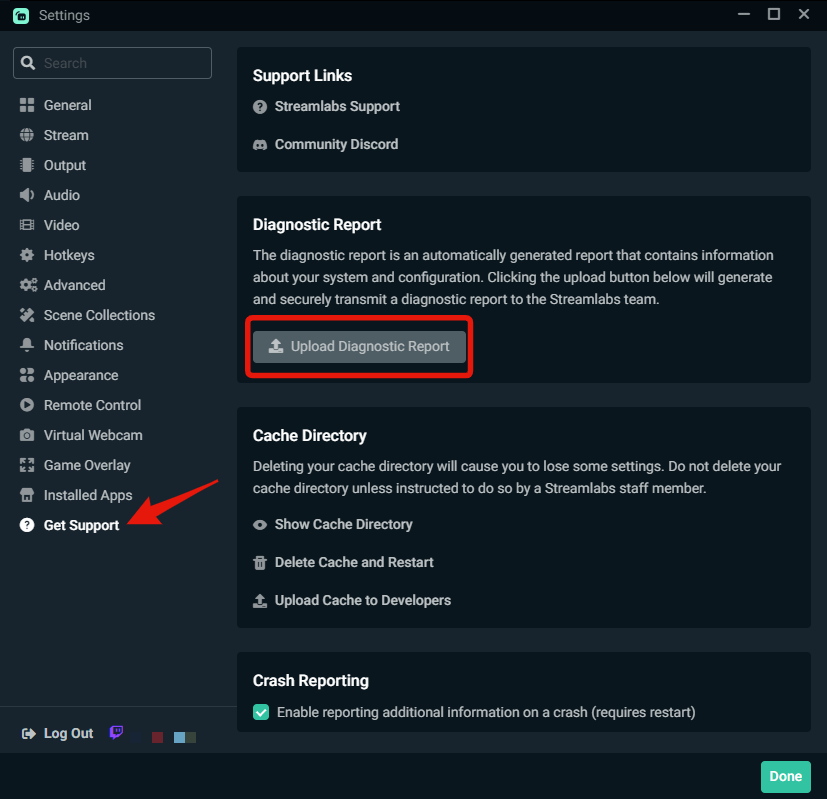
In Streamlabs Desktop, go to Settings > Get Support and click the Delete Cache and Restart button. That will clear the aforementioned cache and settings and restart Streamlabs Desktop.
You won't lose your scenes and sources and widget settings.
You might also need to log back in once Streamlabs Desktop restarts.
Let me know how it goes.
Tip, for those settings pages that are long, you can drag the settings window vertically so you can get it all in one screen shot.
split condor


 gusty moat
how do i remove the streamlabs to obs plugin? i have switched to restream (nothing wrong with streamlabs but its time for me to move on) and now when i go live i cant stream on restream at all. if i find out how to do it before anyone can help me ill let you guys know
split condor
so i cleared the cache logged back in all my scenes are fine what do you want me to do now
the settings ss's are from before clearing cache wasnt sure if i was supposed to do that first
gritty isle
gusty moat
how do i remove the streamlabs to obs plugin? i have switched to restream (nothi...
You should be able to uninstall it via Add/Remove Programs. Make sure you don’t have OBS running.
split condor
rufus should i try to use the same settings again and give it a go
gusty moat
thanks
gritty isle
split condor
rufus should i try to use the same settings again and give it a go
Those setting look okay and these should not affect recording but please don’t check these three options.
 gritty isle
gusty moat
thanks
gritty isle
gusty moat
thanks
You’re welcome.
gritty isle
split condor
rufus should i try to use the same settings again and give it a go
If you’ve cleared the cache and set your settings back, go for it.
split condor
what color format and color range should i be using
gritty isle
split condor
what color format and color range should i be using
Leave them where they are for now.
 gritty isle
split condor
gritty isle
split condor
Well, dang it.
Okay, quit Streamlabs Desktop. Go to the Streamlabs web site and download a fresh Streamlabs Desktop installer.
Run the installer as administrator and let it install over your existing installation. At the end of the installation, don’t let it launch Streamlabs Desktop but rather quit the installer.
Reboot your PC and try again.
gritty isle
split condor
same error again
What exact video card do you have?
split condor
gritty isle
split condor
i have (https://www.amazon.com/MSI-GeForce-RTX-4070-12G/dp/B0BNWBJ8Z6?th=1)
And what driver version do you have installed?
 gritty isle
split condor
the latest
gritty isle
split condor
the latest
All I can find via google is this was an issue for the GTX 1650 gpus last year on the 551.61 driver and you don’t have that card and an even later driver.
split condor
yeah
iam gonna try the drivers before the 50 series came out
maybe we could talk to a dev about it?
gritty isle
split condor
maybe we could talk to a dev about it?
devs aren’t on discord. You can certainly hop over to #vip-support and work with a staff member.
And I’d let them know what all we’ve done here so as not to duplicate efforts.
marble wind
@split condorhave you tried p2 and single pass yet?
marble wind
@split condor at the present, you're not getting a recording at all, do you care? (the answer is no, it won't)
split condor
okay i will try it
and i am getting a recording it just throws up the error after 8 minutes but yes i do care if it isnt at the max quality thats what my channel is all about brother giving people good old fashioned lets play videos at a very high quality
gritty isle
I’d try option and see how it goes.
 gritty isle
split condor
force gpu as render device is already checked
gritty isle
split condor
force gpu as render device is already checked
Uncheck it.
split condor
ok
gritty isle
Sorry I misworded my post.
gritty isle
And it errors with p2 and single pass?
marble wind
@split condorwithout undoing existing troubleshooting steps, try:
a) changing color format from nv12 to i420 in settings>advanced
b) running obs-studio, importing your streamlabs settings, and using nvenc there
split condor
do you want me to try each one separately
marble wind
these aren't mutually exclusive, try both
split condor
okay yeah the first one just made slobs hard crash
marble wind
immediately, or when starting recording?
split condor
immediately
gritty isle
Try CQ level 15. I know it’s not what you want but let’s see what happens.
split condor
well yesterday i did it at 10 and it worked fine no issues
but there was a very noticable degradation of quality
marble wind
i still can't triage this properly, this could be a bad gpu driver, or a bad gpu, or some new bugs in streamlabs desktop
all 3 are plausible
split condor
its not the gpu driver ive tried 3 different drivers
my friend is using the exact same driver and settings just using a 4090 instead of a 4070ti and he has had 0 issues
marble wind
rule out streamlabs desktop, then, record with obs-studio or ffmpeg
gritty isle
Yeah, try OBS. Easy to install and import scene collection.
split condor
yeah i tried it still the exact same error
gritty isle
My bet is your system struggles with CQ level 1.
marble wind
run msi afterburner, set gpu clock speed adjustment to -200 mhz, set power limit to 90%, see if it still crashes
marble wind
@split condor link logs from obs-studio (help > log files > upload current)
split condor
marble wind
@split condor change color format from nv12 to i420 in settings>advanced, see if it still crashes
marble wind
@split condor i'm almost out of things to rule out
run display driver uninstaller https://www.guru3d.com/download/display-driver-uninstaller-download/ , install nvidia drivers again; if you still get the same crash, it's a faulty graphics card, try to get it replaced or repaired
gritty isle
Are you running a “debloated” version of Windows?
split condor
dude its not the graphics card
marble wind
obs-studio's crash log backtrace blames the gpu driver components, and since you already confirmed the gpu driver install is intact, the gpu is the last remaining suspect
your settings are valid, i've done lossless and lossy nvenc in both 420 and 444 and didn't crash
split condor
dude this gpu has had zero issues recording at 50k bit rate on cbr and has had no issues otherwise
i could even crank it to 100k bit rate and it would have no issues
if the gpu was having issues it would have crashed while using cbr
it is most likley a bug with slobs cqp encoder
marble wind
i'm out of ideas and guesses, you can choose to act upon my advice, or do something else, but this is as far as i can take you
gritty isle
My suggestion is to increase the CQ level until you don’t get the error. Since the same error happens in OBS, I can’t blame the encoder.
split condor
what settings do i need to use for display driver uninstaller
marble wind
i think you only need to click "uninstall and reboot"
 desert briar
if you have a ultra you can get help from streamlabs
gritty isle
Streamlabs Desktop is built on the open source of OBS Studio.
marble wind
..i forgot the exact text, should be something like that
split condor
 marble wind
 gritty isle
desert briar
if you have a ultra you can get help from streamlabs
gritty isle
desert briar
if you have a ultra you can get help from streamlabs
Yes, I did mention the #vip-support channel.
desert briar
ok
split condor
okay iam re installing drivers
i can almost guarantee a few others are having the same issue
marble wind
bring them here, then, or to obs-studio support
split condor
i would imagine they all just gave up no one cares about quality as much as i do 😂
marble wind
there is a number of presently unsolved issues i could probably solve if i had more data points, like that super rare webm corruption glitch
gritty isle
split condor
i would imagine they all just gave up no one cares about quality as much as i do...
I’d submit a ticket and include all the trouble shooting we’ve done here so far.
Submit a ticket here: here https://support.streamlabs.com/hc/en-us/requests/new
Please include the Diagnostic Code in the body of your ticket.
Please go to Settings ⚙️ > Get Support > and press Upload Diagnostic.
split condor
yeah still the same issue even after doing what you said @marble wind
gritty isle
My suggestion is to increase the CQ level until you don’t get the error. Since the same error happens in OBS, I can’t blame the encoder.
Or submit that ticket.
marble wind
@split condor contect the graphics card seller or prebuilt pc seller you got this from, see if you can get a replacement
split condor
could it be due to the refresh rate of my monitor
my friend is using 120hz iam using 240hz
gritty isle
split condor
could it be due to the refresh rate of my monitor
Doubtful but try setting your monitor to 120.
split condor
i will try if vip support doesnt work
near crystal
i'm having an issue turning on and off a source on my Stream Deck using the Streamlabs OBS command, here's a video showing what I mean
gritty isle
near crystal
i'm having an issue turning on and off a source on my Stream Deck using the Stre...
Don't run Streamlabs Desktop as administrator. If the probelm remains, delete and add the button back.
The issue is with the Stream Deck app. Support for Streamlabs Desktop used to be bundled in the Stream Deck itself but with the V6.9 update, they moved it to a plugin.
If you've updated your Stream Deck to V6.9, go to the Elgato Marketplace and install the Streamlabs Desktop plug in.
near crystal
gritty isle
Don't run Streamlabs Desktop as administrator. If the probelm remains, delete a...
yeah I've tried refreshing the plugin and removing and remaking the button, didn't do anything. haven't been running as administrator. I have the plugin installed
 blissful gulch
its not letting me put my YouTube account in
gritty isle
near crystal
yeah I've tried refreshing the plugin and removing and remaking the button, didn...
I’d wait until the morning and then ask again over in the stream deck channel at the Elgato discord.
near crystal
gritty isle
I’d wait until the morning and then ask again over in the stream deck channel at...
alright
abstract plazaBOT
Having trouble? Want to see if anyone else is having the same problem?
Check out our #known-issues channel! We do our best to keep this channel as current as possible with new bugs and progress updates!
If you can't find what you need please submit a ticket at: https://support.streamlabs.com/hc/en-us/requests/new
abstract plazaBOT
Do you have a Streamlabs Ultra membership? Are you part of the Streamlabs All-Stars program?
Get your Discord roles by going to this page here: https://streamlabs.com/dashboard#/settings/integrations and clicking "Link" next to Discord! Ultra members and higher tier All-Stars members will have access to private channels for support!
Interested in Ultra? Check it out here: https://streamlabs.com/ultra?refl=discord
Are you knowledgeable about Streamlabs products?
Get rewarded for helping the Streamlabs Community here in Discord!
👉 Apply to be a part of the Streamlabs Support Volunteer Program!
Application Link:
https://forms.gle/eKS29zWfFjGEzaRp7
For details, see our post in
#announcements message
 sweet ivy
Hi, I used multistream and streamed on TikTok. In the first stream I got a strike (for saying I hate germans as a joke, cause Im german. But TikTok moderation robots saw it as hate speech so i got a 7 day break for that). Now after the 7 days I tried again and Im able to stream on TikTok directly, but when i try to do it with multistream via streamlabs - I get a decline for connection to TikTok cause I violate the rules and show me I have to wait 30 days.
So Im free on TikTok, but streamlabs dont see it. What can I do?
 outer pike
Is the highlight available on the app? That would be so convenient
gritty isle
sweet ivy
Hi, I used multistream and streamed on TikTok. In the first stream I got a strik...
Go here and check on your Live with Streamlabs permission - which is completely seperate from Live with TikTok Studio.
If your Live with Streamlabs is still revoked, suspended, or banned, you'll have to reach out to TikTok. TikTok alone grants or revokes permission to Live with Streamlabs. Streamlabs cannot see and does not know why TikTok makes their decisions.
gritty isle
outer pike
Is the highlight available on the app? That would be so convenient
You mean the AI Highlighter? It's not available. Not sure when it will be released.
outer pike
gritty isle
You mean the AI Highlighter? It's not available. Not sure when it will be rele...
Yes sorry and ok gotcha. No problem
lime finch
gritty isle
Go here and check on your Live with Streamlabs permission - which is completely ...
You are correct. It does work you do have to be patient. I got them back and I lost them immediately.
lean canyon
I’m trying to add a follow goal source on stream lab but when I do it I don’t see anything but I can move the box?
I know it says chat box in the vid but it’s the same issue for any source.
gritty isle
lean canyon
I’m trying to add a follow goal source on stream lab but when I do it I don’t se...
Looks like the source you have selected says Chat Box. Is that correct? Depending on what platform you are using, chat is not always available: on Twitch Chat is always available.
lean canyon
gritty isle
Looks like the source you have selected says Chat Box. Is that correct? Depend...
Yeah mb I deleted the follower goal, but it’s the same issue. I can move a box but nothing is visible
gritty isle
lean canyon
Yeah mb I deleted the follower goal, but it’s the same issue. I can move a box b...
Are you streaming to Twitch or another platform?
lean canyon
 lean canyon
gritty isle
Are you streaming to Twitch or another platform?
lean canyon
gritty isle
Are you streaming to Twitch or another platform?
Twitch
gritty isle
lean canyon
In Streamlabs Desktop, go to Settings > Advanced > Source and uncheck 'Enable browser source hardware acceleration', click Done to save the settings, restart Streamlabs Desktop, and test again.
lean canyon
gritty isle
In Streamlabs Desktop, go to Settings > Advanced > Source and uncheck 'Enable br...
Yeah it’s still invisible
gritty isle
lean canyon
Yeah it’s still invisible
Did you add the Follower Goal Widget or did you add it as a Browser Source using the widget URL? Screen shot the settings you have for the Follower Goal Widget https://streamlabs.com/dashboard#/widgets/followergoal
And for transparency, I'm also busy at work so my replies may be slow. Please be patient.
lean canyon
I added it as a widget, and no worries about slow responses,If you would like we can resolve this later as I am not that busy today.
gritty isle
lean canyon
I added it as a widget, and no worries about slow responses,If you would like we...
Screen shot the settings you have for the Follower Goal Widget https://streamlabs.com/dashboard#/widgets/followergoal
lean canyon


Ayyy I started messing with stuff and I got it, thank you for your time. I may have some more questions later. Try and enjoy work!
abstract plazaBOT
Having trouble? Want to see if anyone else is having the same problem?
Check out our #known-issues channel! We do our best to keep this channel as current as possible with new bugs and progress updates!
If you can't find what you need please submit a ticket at: https://support.streamlabs.com/hc/en-us/requests/new
gritty isle
lean canyon
Disable Custom HTML/CSS and save the settings.
 iron anvil
Good morning, i have a problem Trying to stream on xbox series x, i have follow the steps from tutorials, well im go to console , i log in by twich, set up the scene, but when i go to the xbox live streaming menu, more options, destiny stream labs , but when i click on star streaming, the transmision dont work
 cold marsh
Good afternoon, I'm having issues with Streamlabs Ultra.
I recently purchased the Ultra version so I can stream on both YouTube and Twitch, but nothing appears under the Settings > Multistreaming option. No options show up at all.
gritty isle
cold marsh
Good afternoon, I'm having issues with Streamlabs Ultra.
I recently purchased th...
Thank you for being a Streamlabs Ultra subscriber.
Please link your discord via the instructions below and ask again in the VIP Support channel, which is one of your subscriber benefits.
👇
wispy latchBOT
If you are a Streamlabs Ultra Subscriber or All-Stars member
Link your Discord under integrations for access to our Ultra/VIP roles and private chats
:point_right: https://streamlabs.com/dashboard/#/settings/integrations
:star: Upgrade to Ultra here: https://streamlabs.com/ultra?refl=discord
cold marsh
gritty isle
Thank you for being a Streamlabs Ultra subscriber. <:ultra:1047482406770311208>...
Done, thank you!
What channel is?
gusty umbra
cold marsh
What channel is?
#vip-support is where you want to go!
gusty umbra
iron anvil
Good morning, i have a problem Trying to stream on xbox series x, i have follow ...
Do you have an active streamlabs console or ultra subscription?
iron anvil
gusty umbra
Do you have an active streamlabs console or ultra subscription?
Aahh so that is missing , no i dont, thanks for your advice
gusty umbra
iron anvil
Aahh so that is missing , no i dont, thanks for your advice
No worries. If you don’t want to purchase one of those subscription, Xbox has a built in Twitch app that you can stream with for free. It doesn’t have much (any) customizations. But it works. You can also go the capture card route and use streamlabs desktop to stream your Xbox.
 lost gulch
how do i cancel my subscription
gritty isle
lost gulch
how do i cancel my subscription
For Streamlabs Ultra or Streamlabs Pro, you can do that here: https://streamlabs.com/dashboard#/membership.
For Streamlabs Console, you can do that here: https://console.streamlabs.com/account#/general
lost gulch
i dont see a cancel membership button
gritty isle
lost gulch
i dont see a cancel membership button
Which subscription are you trying to cancel?
gritty isle
lost gulch
the email said i can cancel before my free trial ends
Please submit a ticket here to cancel: https://support.streamlabs.com/hc/en-us/requests/new. Please be sure to provide one of the platforms and channels (like Twitch/MyChannelHere or YouTube/MyChannelHere) or Streamlabs ID of your account to assist the staff in finding your subscription so it can be cancelled.
gritty isle
lost gulch
will i get an email about my subscription ending
Tickets are answered in the order they are received. Responses to a ticket will come to your email.
lost gulch
Ok thanks
gritty isle
lost gulch
Ok thanks
You're welcome.
 pale salmon
Hi!
I'm wondering if there's a way for me to separate my alerts into different widget links for OBS.
I want one link for all my usual follow and sub alerts, but I'd like a separate link for Tiltify donations.
Is this possible at all?
gritty isle
pale salmon
Hi!
I'm wondering if there's a way for me to separate my alerts into different w...
Yes! That's possible!
- Go to the Alert Box page on the Streamlabs website: https://streamlabs.com/dashboard#/alertbox
- Click Filter Events. Uncheck everything except for Follow.
- Copy the Widget URL and add a Browser Source and paste in that URL.
- Go back to the Filter Events button, uncheck Follow and check everything else.
- Copy the Widget URL and add a new Browser Source (don't reuse the existing one 😉 ) and paste in that URL.
- Viola!
- Profit!
pale salmon
gritty isle
Yes! That's possible!
1) Go to the Alert Box page on the Streamlabs website: ...
Ill try this right now, thank you!
(I really need to learn to start setting these earlier than the day before VSS lol)
gritty isle
pale salmon
Ill try this right now, thank you!
(I really need to learn to start setting thes...
You're welcome!
abstract plazaBOT
Having trouble? Want to see if anyone else is having the same problem?
Check out our #known-issues channel! We do our best to keep this channel as current as possible with new bugs and progress updates!
If you can't find what you need please submit a ticket at: https://support.streamlabs.com/hc/en-us/requests/new
pale salmon
gritty isle
You're welcome!
IT WORKED! Thanks so much 😄
Now I'm able to fully highlight the donations
gritty isle
pale salmon
IT WORKED! Thanks so much 😄
Now I'm able to fully highlight the donations
You're welcome!
 livid lava
not sure if this is the right place to post but looking for clarity.
for now to stream vert and horizontal to YT i've had a custom stream key that is vertical. Does the "Both" functionality for YT now work?

 snow lichen
how to i update this link name?
 gritty isle
snow lichen
how to i update this link name?
gritty isle
snow lichen
how to i update this link name?
You have an active Streamlabs Ultra subscription?
snow lichen
no...
gritty isle
livid lava
not sure if this is the right place to post but looking for clarity.
for now to ...
It should work on Both, but we're had reports of it not working. Let us know how it goes.
snow lichen
gritty isle
You have an active Streamlabs Ultra subscription?
no...
gritty isle
snow lichen
no...
You should be able to update the domain name but some features to require Ultra. https://streamlabs.com/content-hub/post/creator-sites-the-website-builder-and-commerce-platform-where-live-streamers-can-build-their-brand.
livid lava
gritty isle
It should work on Both, but we're had reports of it not working. Let us know ho...
test stream worked! thanks 👍
gritty isle
livid lava
test stream worked! thanks 👍
YAY!!! You're welcome!
gritty isle
snow lichen
no...
@snow lichen You would need a Streamlabs Ultra subscription in order to change the domain of your creator site.
snow lichen
gritty isle
<@423304797983342594> You would need a Streamlabs Ultra subscription in order to...
okay 😦
 spiral escarp
how do i create streamlabs token
gritty isle
spiral escarp
how do i create streamlabs token
For Streamlabs Chatbot or someting else?
gritty isle
spiral escarp
chatbot
Thank you for confirming that.
Generate new tokens for both your streamer and bot channel and for your Streamlabs account using the links below.
The Copy Token button is broken, so please click to reveal the token then manually copy and paste it into Chatbot.
Recommend using an incognito tab or window for either the streamer or bot account to avoid authentication issues.
Once all three tokens are updated in Chatbot, completely restart Chatbot.
For Twitch, use the links below: 👇
You can use the following links to generate tokens manually!```
💜 Twitch Bot <https://streamlabs.com/desktop-chatbot/bot-auth>

💜 Twitch Streamer <https://streamlabs.com/desktop-chatbot/streamer-auth>

💙 Streamlabs <https://tinyurl.com/StreamlabsOauth>thank you very much
gritty isle
spiral escarp
thank you very much
You're welcome.
 pastel vortex
SLOBS got updated today and all VST plugins that I had (from different developers) had suddenly stopped working. I am getting the same error on all of them.
 gritty isle
pastel vortex
SLOBS got updated today and all VST plugins that I had (from different developer...
gritty isle
pastel vortex
SLOBS got updated today and all VST plugins that I had (from different developer...
Are you launching Streamlabs Desktop as administrator?
pastel vortex
Yes also tried that. Didn't work
gritty isle
pastel vortex
Yes also tried that. Didn't work
What version of Streamlabs Desktop do you have now?
pastel vortex
1.19.0
gritty isle
pastel vortex
1.19.0
Okay, thanks, hang on a minute.
gritty isle
pastel vortex
1.19.0
Submit a ticket here: here https://support.streamlabs.com/hc/en-us/requests/new
Please include the Diagnostic Code in the body of your ticket.
Please go to Settings ⚙️ > Get Support > and press Upload Diagnostic.
https://gyazo.com/fe600c14d97f3d02827c8a522a4e0964
The try and reinstall the plugins and let us know how that goes.
 orchid zinc
I can't get this kick screen off stream labs so I can see live streaming just here the game I've tried everything I can do for hours

I want to see the chat but I can not see the game just here it
gritty isle
orchid zinc
I can't get this kick screen off stream labs so I can see live streaming just he...
What is that source?
gritty isle
orchid zinc
Kick
A browser source I guess for your chat?
orchid zinc
Thank u Okay how do I get that off so I can see the game I just here it and I can see the game if I go to my live but the game is not centered
gritty isle
orchid zinc
Thank u Okay how do I get that off so I can see the game I just here it and I ca...
Are you wanting to live stream a game and have chat displayed on stream?
orchid zinc
Yes I can see my live if go to my stream but I can't see it on stream labs to set the game and set it to fit the screen
gritty isle
orchid zinc
Yes I can see my live if go to my stream but I can't see it on stream labs to se...
The remove what ever source that is from that scene. If you're streaming anything but Roblox, add Game Capture and the Chatbox Widget. Make sure that the Chatbox Widget is at the top of the source list.
orchid zinc
Okay thank u I will try that thank u
gritty isle
orchid zinc
Okay thank u I will try that thank u
You're welcome.
 echo remnant
My stream is crashing every 2-3 min non stop last 2 days I turned off all overlays what is the problem?
gritty isle
echo remnant
My stream is crashing every 2-3 min non stop last 2 days I turned off all overla...
Streamlabs Desktop is crashing or you're getting disconnected from the ingest? Or are you getting dropped frames?
echo remnant
My twitch stream is crashing every 2-3 min for me and my viewers
Game and internet look good no issues
gritty isle
Please run the Twitch Test, see below. If you need assistance finding your Twitch stream key: https://streamlabs.com/content-hub/post/where-to-find-your-twitch-stream-key
Select Medium or Long Duration.
Select all the ingest in your region.
Screen shot the results.
Please run this twitch test tool to find out the best server (https://r1ch.net/projects/twitchtest). Be sure to run the test for either Medium or Long, as short won't give you the most accurate results and be sure to select your region from the listed options (if the regions are not applicable to you, please select 5-6 servers that are near you). You're looking for at least a quality of 84.
Once you've found a good server go to Settings > Stream > Stream to custom ingest and you can manually select your server.
echo remnant
Windows blocked the app from starting says it might put my PC at risk
gritty isle
echo remnant
Windows blocked the app from starting says it might put my PC at risk
Odd. There's nothing malicious about that app.
Try again.
 clear kiln
Any idea how to get Vertical Audio Mixer? OBS has it in just a few clicks
 random basin
clear kiln
Any idea how to get Vertical Audio Mixer? OBS has it in just a few clicks
random basin
clear kiln
Any idea how to get Vertical Audio Mixer? OBS has it in just a few clicks

In this video I do a quick overview of the editor and layout editor. The layout editor allows you to customize the interface of streamlabs desktop.
========================================
SUBSCRIBE TO BOTH MY CHANNELS
▶️ https://tinyurl.com/qssvdn9 (Crevox Channel)
▶️ https://tinyurl.com/yxt8fly6 (My Gaming Channel)
Click the bell! ...
Hope that helps @clear kiln
random basin
clear kiln
Do I have to be logged in?
I am not sure, can you login and see if it appears?
clear kiln
random basin
I am not sure, can you login and see if it appears?
Yeah it worked, that's really stupid
This still isnt what I want. I want a vertical audio mixer, like shown in the image

So turns out that OBS has steam. So I'll just use that instead so I can have 2 OBS open at the same time
Nevermind, it combines the settings so I can't have 2 different instances of OBS open with 2 different settings
I use OBS for general recording and replay buffer with 5 minute clipping, with split audio tracks
I then wanted simple single audio track 2 minute clips so I don't have to edit them down every single time, so I used SLOBS do acheive that. I have a 2nd GPU doing all this work so its not like it affects my actual performance
Also, when changing my layout, all my scenes, sources, and Audio Mixer settings got reset
echo remnant
I have updated server settings, started stream and now its not even live on Twitch?
gusty umbra
echo remnant
I have updated server settings, started stream and now its not even live on Twit...
What is your Bitrate set to? Twitch only does 6000
abstract plazaBOT
Having trouble? Want to see if anyone else is having the same problem?
Check out our #known-issues channel! We do our best to keep this channel as current as possible with new bugs and progress updates!
If you can't find what you need please submit a ticket at: https://support.streamlabs.com/hc/en-us/requests/new
echo remnant
how do I check that?
My stream was fine before started crashing non stop few days ago I don't think its bitrate but how do I check that?
quick sandal
Any word on the Twitch VoD issues? My ticket has yet to be answered since Thursday. Which I already know the ticket system was slow to begin with.
gritty isle
echo remnant
I have updated server settings, started stream and now its not even live on Twit...
I never saw a screen shot of the results from the Twitch Test. Did you get it to run finally? Seeing the results would help troubleshoot. Of the quality scores are all zero the. You would need to reach out to your Internet Service Provider.
gritty isle
quick sandal
Any word on the Twitch VoD issues? My ticket has yet to be answered since Thursd...
None that I have head, sorry.
 misty moon
Since the last update, I've been constantly receiving this notification during streams: Your microphone is unmuted but has no signal. What should I do?
my voice is in compare to my video delayed too
abstract plazaBOT
Are you knowledgeable about Streamlabs products?
Get rewarded for helping the Streamlabs Community here in Discord!
👉 Apply to be a part of the Streamlabs Support Volunteer Program!
Application Link:
https://forms.gle/eKS29zWfFjGEzaRp7
For details, see our post in
#announcements message
Do you have a Streamlabs Ultra membership? Are you part of the Streamlabs All-Stars program?
Get your Discord roles by going to this page here: https://streamlabs.com/dashboard#/settings/integrations and clicking "Link" next to Discord! Ultra members and higher tier All-Stars members will have access to private channels for support!
Interested in Ultra? Check it out here: https://streamlabs.com/ultra?refl=discord
gritty isle
misty moon
Since the last update, I've been constantly receiving this notification during s...
Make sure you have the correct microphone device selected.
 thorn scaffold
Hi there! I am a brand new user, and in fact dabbling with streaming for the first time. I seem to be getting lower quality streams from streamlabs than I am from other software and after poking around, I can't think of a reason why! Is this the best place to ask for help or thoughts on that?
lean canyon
Hello, I was here earlier today and I just have another issue. I’m not completely sure it’s 100% a streamlabs issue but I have a AM8 mic that’s connected to my console and then I have a capture card and a chatlink all connected.
When I try to find my mic in streamlabs I do not see it. Should I plug it in directly to the computer?
And then when I do so will my discord/ ps party hear me?
gusty umbra
The mic should be plugged into your PC if you’re using a capture card. Use discord on your PC for party chat and everything gets picked up from streamlabs desktop.
 carmine path
hi, i can't get cloudbot to connect to my YT livestream. livestream is public... streamlabs is added as mod, I've activated cloudbot on and off, i've logged off/on. Cloudbot just won't connect
 icy sky
Hello there, I attempted to record a Google Chrome window (what I thought was fairly simple), but when I attempt to start the recording I get the following error message: "Specified object/item/sync point not found. (MFX_ERR_NOT_FOUND)". I'm pretty much a complete novice with this sort of thing, so any ideas where I should be looking? The error message also said to check my streaming and recording settings, but I just don't know which ones specifically.
 acoustic sundial
Hello my past 3 streams I have been having trouble with my bitrate and the stream just randomly drops. Then when I try to restart the stream I just get an error saying that it can't connect to twitch or any other platform that I was streaming on.
 sick rock
Hi I can’t seem to login into streamlabs with my main Facebook account , I tried another account and it work just fine, I really need sum help asap
echo remnant
Hey Rufus, I have done the test and it gave me all 97 scores on multiple servers and 98 for vienna and warsaw servers so but when I set everything in streamlabs settings > stream to custom ingest vienna I start stream and my streamlabs are working but my stream is not live
 sacred surge
Is the ability to seperate vod tracks only a premium feature? The option is literally nonexistent in my advanced output settings.
 orchid flax
sacred surge
Is the ability to seperate vod tracks only a premium feature? The option is lite...
orchid flax
sacred surge
Is the ability to seperate vod tracks only a premium feature? The option is lite...
You need to login with Twitch to see that option
orchid flax
echo remnant
Hey Rufus, I have done the test and it gave me all 97 scores on multiple servers...
Try resetting the stream key and check
 fallen radish
hi so im trying to seperate the music im playing on my twitch vod and so far it works but the only problem i have now is that all my twitch are shown but cant be heard on stream because even if i try to add streamlabs as a aplication audio capture id does not capture it can someone maybe help me out
quartz ruin
quick sandal
Any word on the Twitch VoD issues? My ticket has yet to be answered since Thursd...
Let me know if you get any updates I’m gonna work on switching to something else in the meantime
lean canyon
gusty umbra
The mic should be plugged into your PC if you’re using a capture card. Use disc...
Yep i did it and now it detects my voice. Now my issue is I can’t hear my laptop/discord if my headphones plugged into the chatlink, or if I use it in my laptop I can’t hear my game audio. Is there a way to do both?
And also when I stream it doesn’t get my game audio
 supple spire
Hello everyone,
I’m having an issue with my Streamlabs AlertBox in OBS: alerts are showing visually but no sound plays. I’ve enabled “Control audio via OBS,” added the AlertBox as a browser source, and confirmed that the audio mixer in OBS shows no activity during tests. I even copied the AlertBox URL into Chrome and still hear nothing. I’ve double-checked in the Streamlabs dashboard that a sound file is assigned to each alert and the volume is up. Despite all this, the alert sound never plays.
Has anyone encountered this before or can suggest what I might be missing? Thanks in advance!
 fickle ore
Hello. Why I cant stream two horizontal outputs? I am getting messege that I have to stream one vertical...Why is that so?
abstract plazaBOT
Having trouble? Want to see if anyone else is having the same problem?
Check out our #known-issues channel! We do our best to keep this channel as current as possible with new bugs and progress updates!
If you can't find what you need please submit a ticket at: https://support.streamlabs.com/hc/en-us/requests/new
pastel vortex
misty moon
Since the last update, I've been constantly receiving this notification during s...
Same btw. And I had an issue with VST plugins I have mentioned before. I fixed it by installing old version, and not updating it by... Well disconnecting my connection when opening the SLOBS then connecting again.
 hearty vessel
Hello team, Is there any way for me to save my vertical stream as an instant replay? Currently it is only saving in horizontal. Thanks!
gritty isle
hearty vessel
Hello team, Is there any way for me to save my vertical stream as an instant rep...
The vertical output cannot be recorded.
hearty vessel
gritty isle
The vertical output cannot be recorded.
Gotcha, thanks for the quick reply Rufus!
 uneven brook
abstract plazaBOT
uneven brook
abstract plazaBOT
Are you knowledgeable about Streamlabs products?
Get rewarded for helping the Streamlabs Community here in Discord!
👉 Apply to be a part of the Streamlabs Support Volunteer Program!
Application Link:
https://forms.gle/eKS29zWfFjGEzaRp7
For details, see our post in
#announcements message
Do you have a Streamlabs Ultra membership? Are you part of the Streamlabs All-Stars program?
Get your Discord roles by going to this page here: https://streamlabs.com/dashboard#/settings/integrations and clicking "Link" next to Discord! Ultra members and higher tier All-Stars members will have access to private channels for support!
Interested in Ultra? Check it out here: https://streamlabs.com/ultra?refl=discord
 olive spruce
Has anyone else experienced this? I've never had any issue with streaming streamlabs on a discord call with a friend before. I can stream videos from youtube and other sources, and they can hear those just fine! However, I have been trying to stream a game to them and they are unable to hear the game or any audio within streamlabs. I've:
- Restarted my PC
- Restarted Discord
- Restarted Streamlabs
- Checked to see if the inputs and outputs in discord to reflect my mic and speakers
- Gone into the sound settings and toggled "Give Exclusive Mode application priority" on and off
My capture card is properly registering audio, as are my other media sources. It is not picking up; on stream. I even checked discord's settings, and the settings are to use the experimental audio, and I even added Streamlabs Desktop to the games' list. I'm scratching my head on this one >.<
 lavish harness
Hi, my streamlabs acces is restricted, saying that my live acces is suspened, but i can go to on tiktok live trough my phone. Seems the same issue as some months ago.
 native oracle
Hi. I'm new here and wonder if you can help. I had a Pro Melon account, which is now a Pro Talk Studio account, but haven't had a Streamlabs account. I've just set up a free Streamlabs account, but it doesn't include my Pro Talk Studio account. I want to do some livestreaming from my mobile, so I have a couple of questions:
1 - Is there a separate mobile app for Talk Studio?
2 - If I have to use the Streamlab mobile app, is there a way to have my Pro Talk Studio account recognised by the free Streamlabs account I've just set up?
thorn scaffold
Hi there! I am a brand new user, and in fact dabbling with streaming for the first time. I seem to be getting significantly lower quality streams from streamlabs than I am from other software and after poking around, I can't think of a reason why! Is this the best place to ask for help or thoughts on that?
 humble gale
lavish harness
Hi, my streamlabs acces is restricted, saying that my live acces is suspened, b...
humble gale
olive spruce
Has anyone else experienced this? I've never had any issue with streaming strea...
humble gale
lavish harness
Hi, my streamlabs acces is restricted, saying that my live acces is suspened, b...
humble gale
olive spruce
Has anyone else experienced this? I've never had any issue with streaming strea...
maybe see if your output device in discord is the same as your desktop audio device in Streamlabs Desktop? not sure why that would do it but tbh idk
humble gale
 queen tapir
yo im trying to capture portal 1 but it wont capture it
queen tapir
yo im trying to capture portal 1 but it wont capture it
you can try the troubleshooting here: https://streamlabs.com/content-hub/post/black-screen-game-capture-problems but you may need to try doing window capture or screen capture instead
humble gale
native oracle
Hi. I'm new here and wonder if you can help. I had a Pro Melon account, which is...
Talk Studio PRO is a separate subscription. An Ultra subscription includes the mobile app and Talk Studio PRO but is more money in general.
However, you should be able to go to talk studio on your web browser on mobile and use it there afaik.
humble gale
thorn scaffold
Hi there! I am a brand new user, and in fact dabbling with streaming for the fir...
what exactly is wrong with the quality? also, are your settings exactly the same between the different softwares?
thorn scaffold
humble gale
what exactly is wrong with the quality? also, are your settings exactly the same...
Yes they are the same, as far as I am aware unless I am missing something critical. I have the bitrate set to 6000 in both Streamlabs and Meld, and tge Streamlabs stream is significantly more "blurry", I think would best describe it. I could link a couple a/b test vods on twitch, if anyone is interested to see the difference!
humble gale
thorn scaffold
Yes they are the same, as far as I am aware unless I am missing something critic...
could you screenshot your settings > output?
abstract plazaBOT
Having trouble? Want to see if anyone else is having the same problem?
Check out our #known-issues channel! We do our best to keep this channel as current as possible with new bugs and progress updates!
If you can't find what you need please submit a ticket at: https://support.streamlabs.com/hc/en-us/requests/new
thorn scaffold
humble gale
could you screenshot your settings > output?
I think these are the 2 relevant screens?

 humble gale
thorn scaffold
I think these are the 2 relevant screens?
humble gale
thorn scaffold
I think these are the 2 relevant screens?
untick this. that should help
 thorn scaffold
Oh interesting.... ok thank you, I will give it a try!
marble wind
humble gale
untick this. that should help
could you elaborate on how this should help?
 jaunty flint
why is it when i try to start live streaming on my xbox through stream labs it doesnt work
gritty isle
jaunty flint
why is it when i try to start live streaming on my xbox through stream labs it d...
Do you have a Streamlabs Console subcription or a Streamlabs Ultra (includes Streamlabs Console) subscription?
jaunty flint
gritty isle
Do you have a Streamlabs Console subcription or a Streamlabs Ultra (includes Str...
do i need the subscription? Because I just went with the normal version
as in free
gritty isle
jaunty flint
do i need the subscription? Because I just went with the normal version
There's not a free version of Streamlabs Console.
Streamlabs Console is a paid subscription service.
You would need to log into the Streamlabs Console site, click your PFP in the upper right, choose Account Settings, then scroll down and choose either the Monthly or Annual plan.
Either one of those options will start your 7 day free trial; cancel before the end of that 7 day period to avoid getting charged for the first term you select.
Streamlabs Console is also included in our Streamlabs Ultra subscription. If you're using Streamlabs Console this way, please make sure you set up your Streamlabs ID then log into the Streamlabs Console with your Streamlabs ID rather than your Twitch.
If you have a Streamlabs Console subscription, please make sure you are logging in at the Streamlabs Console web site with your Twitch and not your Streamlabs ID.
If you have a Streamlabs Ultra subscription (includes Streamlabs Console), please make sure you are logging in at the Streamlabs Console web site with your Streamlabs ID and not your Twitch.
 agile crane
somebody have this issue??? I'm trying to stop recording but not works... it is continuosly stopping but never happen.

 sonic escarp
i need help i'm stuck on the second step of going live (start video transmission)
 spice jay
why can i stream on tiktok through streamlabs on pc and not on my phone?
 rigid sorrel
I want to translate the Streamllabs OBS Plugin into Japanese. Is there a way to do this?
gritty isle
spice jay
why can i stream on tiktok through streamlabs on pc and not on my phone?
The new integration in Streamlabs Desktop isn't yet available in Streamlabs Mobile. TikTok hasn't approved its use in Streamlabs Mobile.
gritty isle
rigid sorrel
I want to translate the Streamllabs OBS Plugin into Japanese. Is there a way to ...
No idea how to accomplish that sorry. I'd submit a ticket on that: https://support.streamlabs.com/hc/en-us/requests/new
spice jay
gritty isle
The new integration in Streamlabs Desktop isn't yet available in Streamlabs Mobi...
ohhh thanks, do you think i can get a refund if i submit one because in the app it says with multistreaming there are no limits
gritty isle
spice jay
ohhh thanks, do you think i can get a refund if i submit one because in the app ...
I don't have any authority to tell you that a refund would be granted, sorry. You'd have to submit a ticket for that: https://support.streamlabs.com/hc/en-us/requests/new.
rigid sorrel
gritty isle
No idea how to accomplish that sorry. I'd submit a ticket on that: <https://su...
thank you! I'll submit a ticket!
gritty isle
rigid sorrel
thank you! I'll submit a ticket!
You're welcome! And good luck! 🤞
 deft fern
I’m trying to stream screen share from iPhone to a custom RTMP but I notice that the visual tends to have quite a lot of artifacts at sections where there are a lot of movement, other than the quality, frame rate and bitrate, are there any other options to help with this?
Maybe encoder?
I know it’s available on android but I can’t seem to find it on iOS
 steady river
im having problem wit my twitch vod when i stream it disappear and never come back unless i log out and log back in then after when i go live it just disappear again
grizzled vortex
Hello, my vertical output is zoomed in although my canvas and output are both set to 720x1280 in order to stream on TikTok. I've been using this same layout for a year and am not sure what's changed? Does anyone have any insight on how I can have this fitted properly. It was fine yesterday and I haven't changed anything
 wicked sierra
Hello! Any help with the delay between tiktok and twitch/youtube, tiktok is live and tw/yt is 3-4 min behind
 chilly raft
lavish harness
Hi, my streamlabs acces is restricted, saying that my live acces is suspened, b...
chilly raft
lavish harness
Hi, my streamlabs acces is restricted, saying that my live acces is suspened, b...
I'm having the same issue
abstract plazaBOT
Having trouble? Want to see if anyone else is having the same problem?
Check out our #known-issues channel! We do our best to keep this channel as current as possible with new bugs and progress updates!
If you can't find what you need please submit a ticket at: https://support.streamlabs.com/hc/en-us/requests/new
 signal cairn
So I have the multistreaming thing and sometimes, it buffers on all platforms simultaneously. Makes me wonder: do you need the required upload speed on every platform to make it work, or do you just need the necessary upload speed for one platform? Trying to see if StreamLabs takes care of the multistream, or if my isp needs to be the one providing the necessary upload speed to ALL platforms.
gritty isle
signal cairn
So I have the multistreaming thing and sometimes, it buffers on all platforms si...
You are multistreaming with a Streamlabs Ultra subscription?
 undone marlin
Hi, all of a sudden when i am trying to use virtual webcam on the source output type, I am attempting to output my video capture device but when i select it, it automatically will switch back to the default source that was initially set. Does anyone have any idea how to fix it as it was working up until yesterday and I haven't changed anything
echo remnant
I have same issue again, you told me to setup custom ingest stream and after this my stream is not live, resetting streaming key didn't help
 scarlet harbor
Hello, my account was banned but it's still being paid for, how can I cancel subscription while having a banned account?
gritty isle
scarlet harbor
Hello, my account was banned but it's still being paid for, how can I cancel sub...
Submit a ticket for that: https://support.streamlabs.com/hc/en-us/requests/new.
 shell lion
I had it working streaming from my xbox but now I can't get it stream from streamlabs or my xbox. hellpp
gusty umbra
shell lion
I had it working streaming from my xbox but now I can't get it stream from strea...
Do you have an active streamlabs console or ultra subscription?
shell lion
yes. I just purchased ultra and restarted stream labs and now it won't bring mine up. I can go to twitch on the web and my phone and it will pull up but using streamlabs desktop and it won't even connect
keeps telling me I need a stream key or something.
 sturdy locust
hello, i've been streaming for about 8 months in dual output on twitch at 1080p30 and tiktok 720p30 at the same time. all of a sudden, i'm constantly having a red bitrate and live crashes. i discovered it is tiktok that makes me crash, since i tried to stream twitch alone and the bitrate stays stable. have you guys got the same issue? how did you solve that? thank you so much in advance
abstract plazaBOT
Having trouble? Want to see if anyone else is having the same problem?
Check out our #known-issues channel! We do our best to keep this channel as current as possible with new bugs and progress updates!
If you can't find what you need please submit a ticket at: https://support.streamlabs.com/hc/en-us/requests/new
gusty umbra
shell lion
yes. I just purchased ultra and restarted stream labs and now it won't bring min...
Go ahead and unlink your twitch from streamlabs and then reconenct it. Also make sure you log out of streamlabs and log back into it on both your console and PC. That should trigger your ultra showing and then reset that twitch connection.
gusty umbra
shell lion
yes. I just purchased ultra and restarted stream labs and now it won't bring min...
Also, link your streamlabs to discord for access to our #vip-support channel! Use this link to do that. https://streamlabs.com/dashboard#/settings/integrations
shell lion
didn't work
shell lion
I have no idea what I'm doing
 granite stump
around a hr of streaming or a my bit rate is all over the place any help stream runs just fine on obs
 elder plume
why is my horizontal not horizontal
 gritty isle
elder plume
why is my horizontal not horizontal
gritty isle
elder plume
why is my horizontal not horizontal
Make sure the Output Resolution on the horizontal format is set correctly.
For example if it is set to 1080x1920, that’s the vertical format. Change it to 1920x1080.
elder plume
gritty isle
Make sure the Output Resolution on the horizontal format is set correctly.
For ...
thank you so much
gritty isle
elder plume
thank you so much
You’re welcome.
abstract plazaBOT
Are you knowledgeable about Streamlabs products?
Get rewarded for helping the Streamlabs Community here in Discord!
👉 Apply to be a part of the Streamlabs Support Volunteer Program!
Application Link:
https://forms.gle/eKS29zWfFjGEzaRp7
For details, see our post in
#announcements message
Do you have a Streamlabs Ultra membership? Are you part of the Streamlabs All-Stars program?
Get your Discord roles by going to this page here: https://streamlabs.com/dashboard#/settings/integrations and clicking "Link" next to Discord! Ultra members and higher tier All-Stars members will have access to private channels for support!
Interested in Ultra? Check it out here: https://streamlabs.com/ultra?refl=discord
 final hare
I have 6 different follow variations but It's only showing 1 over and over. I have them all set to "as default" but only 1 shows up. any advice?
Condition : Randomly (I cant change it)
all enabled
Frequency : As Default
granite stump
After a hr of streaming my stream wants to crash bit rate goes up and down any help
@gritty isle
gritty isle
granite stump
After a hr of streaming my stream wants to crash bit rate goes up and down any ...
Are you streaming to Twitch?
👀
Knock Knock

lean canyon
So if I am on ps5 and in discord on a laptop and they’re both connected to a capture card with chatlink can I plug my headphone in the capture card to hear both my console gameplay and laptop discord?
 hazy loom
hey, im trying to stream Valorant but every time that i click go live, it gets stuck on loading “start video transmission” and i have absolutely no idea how to fix that because i looked up everything and tried everything i could and still nothing
 muted socket
sturdy locust
hello, i've been streaming for about 8 months in dual output on twitch at 1080p3...
muted socket
sturdy locust
hello, i've been streaming for about 8 months in dual output on twitch at 1080p3...
Text me
I might have a solution for you
 sick compass
hey, i tried setting up tipping on SL and it showed me an error everytime someone tried clicking on paypal (when checking out)

after that i tried disconnecting and reconnecting my paypal and now its this

 placid aurora
Latest patch screwed something up. Microphone is "losing signal" every 5 minutes (but it still works) and my recordings are dropping frames. Everything worked fine before the update and my settings haven't changed.
signal cairn
gritty isle
You are multistreaming with a Streamlabs Ultra subscription?
Yep!
 serene nebula
So when I try and go live on my xbox using streamlabs when I click go live it doesn't start
marble wind
@serene nebula do you have an active paid subscription?
 winter mason
i think i might be locked out of my steam account some how
because i clicked on the same link and now i cant get back in my account on steamvr
 bright moth
Good Morning guys, i have a question. when i switch from a scene to my "main" scene ALL media files, etc. pop up. how can i disable this?
 abstract plazaBOT
Having trouble? Want to see if anyone else is having the same problem?
Check out our #known-issues channel! We do our best to keep this channel as current as possible with new bugs and progress updates!
If you can't find what you need please submit a ticket at: https://support.streamlabs.com/hc/en-us/requests/new
 merry kayak
I am using the logitech stream cam on my MacBook. Why is the Quality so Bad in streamlabs. I tested it in facetime and there the quality was better
 undone marlin
Hi, all of a sudden when i am trying to use virtual webcam on the source output type, I am attempting to output my video capture device but when i select it, it automatically will switch back to the default source that was initially set. Does anyone have any idea how to fix it as it was working up until yesterday and I haven't changed anything
gritty isle
signal cairn
Yep!
Thank you bring a Streamlabs Ultra subscriber!
Please link your discord per the instructions below and ask again in the VIP Support channel, which is one of your subscriber benefits.
wispy latchBOT
If you are a Streamlabs Ultra Subscriber or All-Stars member
Link your Discord under integrations for access to our Ultra/VIP roles and private chats
:point_right: https://streamlabs.com/dashboard/#/settings/integrations
:star: Upgrade to Ultra here: https://streamlabs.com/ultra?refl=discord
echo remnant
Multistreaming on twitch and youtube, again crashing on twitch, tried custom ingest server my stream is not even going live, what is the problem?
 scarlet mica
Does anyone have any idea how i can unlink my tiktok with an old stream labs account
i want to purchace ultra and it keeps failing and i want to unlink my tiktok ive tried logging in with twitch and other platforms but isnt working
abstract plazaBOT
Are you knowledgeable about Streamlabs products?
Get rewarded for helping the Streamlabs Community here in Discord!
👉 Apply to be a part of the Streamlabs Support Volunteer Program!
Application Link:
https://forms.gle/eKS29zWfFjGEzaRp7
For details, see our post in
#announcements message
Do you have a Streamlabs Ultra membership? Are you part of the Streamlabs All-Stars program?
Get your Discord roles by going to this page here: https://streamlabs.com/dashboard#/settings/integrations and clicking "Link" next to Discord! Ultra members and higher tier All-Stars members will have access to private channels for support!
Interested in Ultra? Check it out here: https://streamlabs.com/ultra?refl=discord
 vague haven
i accidently share my alert box link now i wanna change that url how can i do that
gritty isle
vague haven
i accidently share my alert box link now i wanna change that url how can i do th...
- Remove every Streamlabs Widget. they all use the same token.
- Quit Streamlabs Desktop.
- Go here https://streamlabs.com/dashboard#/settings/api-settings and click Refresh.
- Launch Streamlabs Desktop.
- Add back the Streamlabs Widgets in those scenes where you had them.
 vague haven
thanks
gritty isle
vague haven
thanks
You're welcome.
merry kayak
Hi I want to use a Vertical camera but the Quality is bad
 unborn siren
how do i start steeming my steam games
gritty isle
unborn siren
how do i start steeming my steam games
We have a good getting started guide: https://streamlabs.com/content-hub/post/getting-started-with-streamlabs-desktop
abstract plazaBOT
Having trouble? Want to see if anyone else is having the same problem?
Check out our #known-issues channel! We do our best to keep this channel as current as possible with new bugs and progress updates!
If you can't find what you need please submit a ticket at: https://support.streamlabs.com/hc/en-us/requests/new
 heady lodge
Why don’t I see twitch as an option to stream to in streamlabs anymore? I only see YouTube and kick?
gritty isle
heady lodge
Why don’t I see twitch as an option to stream to in streamlabs anymore? I only s...
In Streamlabs Desktop, go to Settings > General. If you have the Disable live streaming features option checked, uncheck it then save the settings.

 hoary falcon
after the update all vst plugins stopped working, how to fix it? thanks
gritty isle
hoary falcon
after the update all vst plugins stopped working, how to fix it? thanks
Please reinstall your VST plugins.
hoary falcon
gritty isle
Please reinstall your VST plugins.
I tried reinstalling plugins and rebooting the computer and running as administrator, everything is the same, although before after updates everything always worked, but now for each plugin it says "vst filter error .dll failed to launch you may restart the application or recreate the filter to try again", version 1.19.0😭
gritty isle
hoary falcon
I tried reinstalling plugins and rebooting the computer and running as administr...
Okay, thanksd for trying that. I've seen other reports of VST Plugins doing this after the 1.19.0 update. Please submit a ticket here: https://support.streamlabs.com/hc/en-us/requests/new
hoary falcon
gritty isle
Okay, thanksd for trying that. I've seen other reports of VST Plugins doing thi...
Ok, for now, can i undo update or something?
gritty isle
hoary falcon
Ok, for now, can i undo update or something?
You can download a fresh installer and run that, but it may auto update again in the future.
heady lodge
gritty isle
In Streamlabs Desktop, go to Settings > General. If you have the *Disable live ...
thank you! also, i have always logged into streamlabs using the platform that i was streaming to.. for instance, i stream to youtube, so i log into streamlabs via youtube...
if i create a streamlabs id to log into streamlabs... will that change any of my stream settings or themes?
gritty isle
heady lodge
thank you! also, i have always logged into streamlabs using the platform that i ...
Logging in with your Streamlabs ID won't change any stream settings or themes.
merry kayak
Why is the preview Quality worse than the Recording Quality and is my Streaming Quality Like the Preview quality or Like the Recording Quality
gritty isle
merry kayak
Why is the preview Quality worse than the Recording Quality and is my Streaming ...
Are you (choose one):
-
Only Streaming
-
Only Recording
-
Streaming and Recording at the same time
-
Streaming but sometimes Recording
merry kayak
gritty isle
Are you (choose one):
1) Only Streaming
2) Only Recording
3) Streaming and Re...
I only want to stream
marble wind
does sld use nearest-neighbor scaling for the preview like obs-studio, or something else?
gritty isle
marble wind
does sld use nearest-neighbor scaling for the preview like obs-studio, or someth...
No idea.
gritty isle
merry kayak
I only want to stream
Screen shot Settings > Video and Settings > Stream please.
marble wind
@gritty isle if you have it running, you can check by looking at the preview while smoothly scrolling a page of text;
if it uses nearest neighbor scaling, there will be a lot of flickering in the preview
gritty isle
marble wind
<@301571565840236564> if you have it running, you can check by looking at the pr...
Sadly, I'm at work and can't install non-approved 3rd party software on my work laptop. I can check once I'm home this evening.
I've never noticed an issue with the Preview window though.


 stuck sage
Hello i have problem to stream in kick. When i do stream says connection lost and go to connect and connection lost again
gritty isle
merry kayak
Is your monitor truly set to 1080x1920? And what platform are you streaming to, Twitch?
marble wind
@stuck sage what's your resolution (settings>video) and target bit rate (settings>output>streaming)?
stuck sage
gave me sec ill chceck
merry kayak
gritty isle
Is your monitor truly set to 1080x1920? And what platform are you streaming to,...
i want to stream on tiktok and instagram
gritty isle
merry kayak
i want to stream on tiktok and instagram
You Base Resolution should be set to the resolution of your monitor. The Output Resolution looks correct for the vertical format.
merry kayak
gritty isle
You Base Resolution should be set to the resolution of your monitor. The Output...
okay thank you
gritty isle
merry kayak
okay thank you
You're welcome.
stuck sage
merry kayak
i have same what is on 1st photo
when i try stream says is striming but after is connection lost for 1-5 second and return to stream live on for 5s and same setuation
marble wind
@stuck sage i don't know if kick.com allows such resolutions, try streaming at 1280x720 at 30 or 60 fps, at 3500 kbps
stuck sage
Its working thanks ❤️
serene nebula
marble wind
<@1011753124354084886> do you have an active paid subscription?
So you can't do it with the free one
gritty isle
serene nebula
So you can't do it with the free one
There's not a free version of Streamlabs Console.
Streamlabs Console is a paid subscription service.
You would need to log into the Streamlabs Console site, click your PFP in the upper right, choose Account Settings, then scroll down and choose either the Monthly or Annual plan.
Either one of those options will start your 7 day free trial; cancel before the end of that 7 day period to avoid getting charged for the first term you select.
Streamlabs Console is also included in our Streamlabs Ultra subscription. If you're using Streamlabs Console this way, please make sure you set up your Streamlabs ID then log into the Streamlabs Console with your Streamlabs ID rather than your Twitch.
If you have a Streamlabs Console subscription, please make sure you are logging in at the Streamlabs Console web site with your Twitch and not your Streamlabs ID.
If you have a Streamlabs Ultra subscription (includes Streamlabs Console), please make sure you are logging in at the Streamlabs Console web site with your Streamlabs ID and not your Twitch.
heady lodge
gritty isle
Logging in with your Streamlabs ID won't change any stream settings or themes.
Thank you for you quick responses!!!
2 more questions:
-
Is the only way to multistream to YouTube & twitch simultaneously is to purchase ultra?
-
When multi streaming, can I have different output settings for each platform? For example I stream at 12500 bitrate on YouTube but I believe 6 or 8k is the max on twitch.
gritty isle
heady lodge
Thank you for you quick responses!!!
2 more questions:
- Is the only way to mu...
You're welcome.
If you want to multistream to two horizontal platforms, in your case Twitch and YouTube, you'd need an Ultra subscription. If you're wanting Twitch (horizontal) and YouTube Shorts (vertical), you can do that for free with Dual Output.
And no, there isn't way to have different output settings per platform
marble wind
@heady lodge try the obs-multi-rtmp plugin for obs-studio, or the aitum multistream plugin for obs-studio, or i heard streamlabs' plugin might also have multistreaming features, but unsure
heady lodge
gritty isle
You're welcome.
If you want to multistream to two horizontal platforms, in your...
Ok great. Thank you
So if I left my settings the way they are for YouTube at 12500 bitrate, and multistreamed to Twitch and YouTube, would it work? Or would it only work for YouTube?
marble wind
iirc the paid restreaming service only sends the video stream as-is, so you're bound by the lowest upper limit, that being twitch's 6 Mbps
gritty isle
heady lodge
Ok great. Thank you
So if I left my settings the way they are for YouTube at 12...
That would only work for YouTube. You can try 8000 but sometimes with Twitch won't allow that so the safe bet 1280x720 at 6000.
marble wind
obs-multi-rtmp can send a 1440p/4k upscale or native 1080p to youtube at up to 51 mbps, while also using the built-in output to stream to twitch, with or without the enhanced broadcasting beta
 void narwhal
Nothings wrong, but I wanted to ask about the sponsorships. I stream on OBS. Can I still apply for the sponsorships?
gritty isle
void narwhal
Nothings wrong, but I wanted to ask about the sponsorships. I stream on OBS. Can...
Looks like you need to stream with Streamlabs Desktop.

 silk ledge
When i use streamlabs console it doesnt give me an option to view the stream while streaming
gritty isle
silk ledge
When i use streamlabs console it doesnt give me an option to view the stream whi...
Just go to your Twitch channel in a web browser or the Twitch app.
 tiny root
need to reset my 100 bit default alert as got rid of the gif it uses and cant find it anywhere
tryna find the 100 bits version of this

 wooden ledge
Hi! Over the last 3 days, my streams have been experiencing severe lags and stuttering. The output settings are standard, my internet connection is stable and fast, the bitrate is normal, and the system isn’t registering any dropped frames. At first, the issue only affected Twitch streams, but now it's also impacting YouTube broadcasts.
Also, invoices are not being generated on my iPhone.
gusty umbra
wooden ledge
Hi! Over the last 3 days, my streams have been experiencing severe lags and stut...
Hey there. Thanks for being an ultra subscriber. Head over to #vip-support for your question!
heady lodge
gritty isle
That would only work for YouTube. You can try 8000 but sometimes with Twitch w...
So what would be the solution if I wanted to keep my YouTube as the primary? I need YouTube to stay as is because it gives me the best quality VODS so I can make clips and videos later.
I want to multi stream to other platforms but I’m unsure how I could do it with my current YouTube output settings (1440p at 12500 bitrate)
desert briar
Can I need a secondary device to read chats ?
gritty isle
heady lodge
So what would be the solution if I wanted to keep my YouTube as the primary? I n...
Twitch is limiting factor. I'd suggest 720p at a bitrate of 6000.
gritty isle
desert briar
Can I need a secondary device to read chats ?
You only have one monitor?
desert briar
gritty isle
You only have one monitor?
Android device
gritty isle
desert briar
Android device
You should be able to add the Chatbox layer. Android is different than iOS. At least on iOS, you can't overlay anything if your screen sharing.
 dark night
hi, im just got the live gamer ultra 2.1 and connected it to my ps5 but when i use windowed projector and share screen on discord, it doesnt share the audio? i am on mac silicone btw
 light bay
@everyone i cant connect my streamlabs to twicth and i have already ultra on my twitch account but i cant connect into my twitch account
gritty isle
light bay
@everyone i cant connect my streamlabs to twicth and i have already ultra on my ...
Can you rephrase that? I don't understand what your asking.
abstract plazaBOT
Having trouble? Want to see if anyone else is having the same problem?
Check out our #known-issues channel! We do our best to keep this channel as current as possible with new bugs and progress updates!
If you can't find what you need please submit a ticket at: https://support.streamlabs.com/hc/en-us/requests/new
light bay
gritty isle
Can you rephrase that? I don't understand what your asking.
I purchased streamlabs ultra thru my twitch account and now i cant connect it
gritty isle
light bay
I purchased streamlabs ultra thru my twitch account and now i cant connect it
You should have already been logged with your Twitch. Go here https://streamlabs.com/dashboard#/settings/account-settings/platforms and screen shot the page please.
light bay
 light bay
yea but but cant open it thru the app
gritty isle
light bay
yea but but cant open it thru the app
Show me what happens.
 gritty isle
light bay
gritty isle
light bay
You're not logged in. Click in the lower left where it says Login. Log in with your Twitch.
 gritty isle
light bay
gritty isle
light bay
In Streamlabs Desktop, go to Settings > General. If you have the Disable live streaming features option checked, uncheck it then save the settings.

 bronze shadow
Any idea why i get unknown error when i try to use Przelewy24 or BLIK as a donation type?
 light bay
gritty isle
In Streamlabs Desktop, go to Settings > General. If you have the Disable live s...
light bay
gritty isle
In Streamlabs Desktop, go to Settings > General. If you have the Disable live s...
thank you so much
gritty isle
light bay
thank you so much
You're welcome.
gritty isle
bronze shadow
Any idea why i get unknown error when i try to use Przelewy24 or BLIK as a dona...
Please submit a ticket for assistance with that: https://support.streamlabs.com/hc/en-us/requests/new. We cannot assist with issues involving money here in discord.
bronze shadow
Any idea if i need to set it up somewhere as a streamer? I have Paypal connectedd
gritty isle
bronze shadow
Any idea if i need to set it up somewhere as a streamer? I have Paypal connected...
You can only use the Tipping Methods displayed here https://streamlabs.com/dashboard#/tipping/methods.
bronze shadow
i can only see paypal here but on donation page its przelewy24 and blik
gritty isle
bronze shadow
i can only see paypal here but on donation page its przelewy24 and blik
Please submit a ticket via the link above for assistance.
 woeful moon
Hello this is the second time Streamlabs in bugging out, as well this one source tab keeps coming back every time I take it away "webcam group" as well this first problem I had I do not remember but I fixed by doing a full restart, This time now one of my browser source is not working and it is the the URL but Streamlabs because I did a test to see so now I will have to do a restart again I am not happy.
hold on
 frosty jetty
Anyone from India
 still meteor
Hi everyone, I received an email with this title Streamlabs Sponsorships are LIVE! .. I think it reached everyone ... could someone help me on how I can get a sponsorship
 lyric iron
I'm trying the new sponsorship thing, and after installing it, and clicking on OPEN, nothing happens lol
It appears to be a dead button
woeful moon
ok very weird I am using Streamlabs and now the browser source URL does not recognize it as Streamlabs but OBS and now I have to put the OBS URL in Streamlabs this is twisted man I am not happy Streamlabs needs update. So I do not now if I should continue like this or do restart?
lyric iron
Haha well I'm glad after reading through this I'm not alone
This looks to be very buggy so far for me as well
heady lodge
marble wind
<@599014817164165131> try the obs-multi-rtmp plugin for obs-studio, or the aitum...
How does this work?
gritty isle
lyric iron
I'm trying the new sponsorship thing, and after installing it, and clicking on O...
If you’re using chrome or opera, try another browser.
gritty isle
woeful moon
ok very weird I am using Streamlabs and now the browser source URL does not reco...
Without displaying API tokens, can you elaborate on this?
still meteor
@gritty isle
can you kindly help me with my message?
lyric iron
gritty isle
If you’re using chrome or opera, try another browser.
Those are the two broswers I use haha
If it can't run on something as universal as Chrome, I dion't think this is iready to roll out
gritty isle
still meteor
<@301571565840236564>
can you kindly help me with my message?
You have to apply. The first campaign is US only.
still meteor
lyric iron
If it can't run on something as universal as Chrome, I dion't think this is irea...
so the sponsorships are only for us ?? and why did I receive this email that I am from Italy
 merry river
THE NIT9RO IS STILL OR NO
gritty isle
still meteor
so the sponsorships are only for us ?? and why did I receive this email that I a...
Future campaigns may be available in other regions. It won’t always be US only.
still meteor
gritty isle
Future campaigns may be available in other regions. It won’t always be US only.
why can't I access the right sponsorships right now?
gritty isle
merry river
THE NIT9RO IS STILL OR NO
You had to have claimed it by March 18th and then redeemed it by April 18th.
gritty isle
still meteor
why can't I access the right sponsorships right now?
What issues are you encountering?
gritty isle
lyric iron
Those are the two broswers I use haha
Clear the cache for all time in your web browser, completely restart the whole web browser, and try again. Turn off ad blockers and VPN.
 oak cloud
@still meteor @lyric iron If you are having issues with sponsorships, please submit an email at https://support.streamlabs.com/hc/en-us/requests/new. That way the sponorships team can answer you directly
still meteor
gritty isle
What issues are you encountering?
Streamlabs Sponsorships are LIVE!
BIG NEWS - Streamlabs Sponsorships are now live in Streamlabs Desktop! Access paid brand campaigns from Logitech G and more. You don’t need insider connections to get sponsored. Every launch campaign includes guaranteed base pay, with no platform fees*, 100% of the payout goes directly to you. this is the email I received
gritty isle
still meteor
Streamlabs Sponsorships are LIVE!
BIG NEWS - Streamlabs Sponsorships are now li...
Yes, I got that too.
still meteor
ok
 outer quail
Guys I got an error saying an error occurred with the output. Please check your streaming and recording setting. An unknown streaming error occurred
 marsh flicker
Hi, how do I unlink my Twitch account from StreamLabs? I'm only streaming on YouTube now.
gritty isle
marsh flicker
Hi, how do I unlink my Twitch account from StreamLabs? I'm only streaming on You...
You don’t need to unmerge it. Just leave it.
outer quail
@gritty isle yo bro do you know the answer to my question
lyric iron
Ok, I finally got to the sponsorship page. Can I ask why a sponsorship for Star Trek Flee Commander has a $50 base pay while StreamElements is giving $410 as we speak with higher conversion rates?
Also, why the heck is Ultra even in the picture here. Making it look like pay for play for sponsorships is not a good look imo
gritty isle
outer quail
Guys I got an error saying an error occurred with the output. Please check your ...
In Streamlabs Desktop, please log out, wait a minute, and then log back in.
Then go to Settings > Advanced > Network > Bind to IP.
If the drop-down menu is set to an IP address, change that setting to Default.
If the drop-down menu is set to Default, change it to the IP address of your computer, usually starts with 192.168 or 10.10.
After that, click Done to save the settings and then restart Streamlabs Desktop and see if you can go live.
outer quail
Ok hold on bro@gritty isle
I got the same error
Again
I tried again now it's telling me the encoder is taking too long to encode @gritty isle
gritty isle
outer quail
Again
What platform are you streaming to, Twitch, YouTube, Facebook, Trovo, X, Kick, etc?
outer quail
Twitch & sometimes Yt. Mostly twitch
gritty isle
outer quail
Twitch & sometimes Yt. Mostly twitch
Screen shot the Confirm & Go Live screen please.
gritty isle
outer quail
https://prnt.sc/w83VCmsHuPgr
Twitch does not have support for AV1. Only YouTube does.
heady lodge
gritty isle
Twitch is limiting factor. I'd suggest 720p at a bitrate of 6000.
Wait, is KICK the same as twitch? Or can I stream at 1440p 12k bitrate on kick like YouTube?
Also, is there a plug-in or any other option I have if I wanna keep YouTube settings and also multistream to twitch?
gritty isle
heady lodge
Wait, is KICK the same as twitch? Or can I stream at 1440p 12k bitrate on kick l...
Kick is quite honestly worse than Twitch. Kick will definitely limit you to 1280x720 at a bitrate of 3500.
outer quail
@gritty isle oh. So I'd have to change that along with the color format and yuv color space as well
gritty isle
outer quail
<@301571565840236564> oh. So I'd have to change that along with the color format...
If you changed those as well, yes.
Honestly just stay with NVENC if you're going to be going back and forth between Twitch and YouTube. Makes life easier.
or the compatiable AMD HW encoder if you're an AMD person.
outer quail
The only encoders they're are x264 aom v1 nd svt-av1
gritty isle
outer quail
The only encoders they're are x264 aom v1 nd svt-av1
Do you have an AMD video card or are you on a Mac?
outer quail
@gritty isle seemed to start working again once I changed the color format nd yuv color space
@gritty isle AMD
gritty isle
outer quail
<@301571565840236564> seemed to start working again once I changed the color for...
Changing those causes all sorts of problems.
outer quail
@gritty isle oohh I didn't know. Thought it would make the streaming quality better
@gritty isle I've also have a problem where the game capture Auto option responds sometimes
gritty isle
outer quail
<@301571565840236564> I've also have a problem where the game capture Auto optio...
Some games can't be captured in the Auto mode, so try the other options there. And some games, like Roblox, can't be captured at all with game capture due to their anti-cheat features.
gritty isle
outer quail
<@301571565840236564> my lives ain't showing on Twitch
Make sure your bitrate isn't larger than 6000.
 naive shadow
hey, i'm really on the struggle bus here. I was using OBS studio for my first stream, worked just fine for twitch. Folks who joined suggested streamlabs because of some of the fancier features, so I switched.
I've set everything up in streamlabs, but when trying to stream now, it gets past "Update Settings for Twitch" with a green check, then the next item, "Start video transmission" remains spinning and dimmed perpetually, never completes.
naive shadow
naive shadow
hey, i'm really on the struggle bus here. I was using OBS studio for my first st...
Any ideas would be immensely appreciated. I've disabled all firewall and windows security systems just to be sure there wasn't interference there.
gritty isle
naive shadow
hey, i'm really on the struggle bus here. I was using OBS studio for my first st...
Please screen shot the Confirm & Go Live screen.
outer quail
@gritty isle I've been using a larger bit rate but it still streamed.
 naive shadow
gritty isle
Please screen shot the Confirm & Go Live screen.
naive shadow
gritty isle
Please screen shot the Confirm & Go Live screen.
you know what, i'm realizing i have not tried disabling enahnced broadcasting.
gritty isle
naive shadow
Uncheck Enhanced Broadcasting and see if that helps.
naive shadow
gritty isle
Uncheck Enhanced Broadcasting and see if that helps.
on it!
gritty isle
outer quail
<@301571565840236564> I've been using a larger bit rate but it still streamed.
Twitch will sometime allow up to 8000 but nothing over that. Anything over 6000 is not guaranteed to always work.
naive shadow
gritty isle
Uncheck Enhanced Broadcasting and see if that helps.
lmao, yeah wow. why is it only after i come to tech support that i see a problem right in front of me. just needed that poke in the right dirction
naive shadow
gritty isle
Twitch will sometime allow up to 8000 but nothing over that. Anything over 6000...
you rock. thank you sir
gritty isle
It happens.
 haughty cave
good evening how does the quest on the edge because I download the stuff that was needed I have 5 campaign mes when I click dessu is nothing that happens help me
gritty isle
naive shadow
you rock. thank you sir
You're welcome!
outer quail
@gritty isle I mean I used to calculator they provided
Hol up though
I THINK ITS WORKING NOW
gritty isle
haughty cave
good evening how does the quest on the edge because I download the stuff that wa...
Is this something for Streamelements perhaps? Our new campaign for sponsorship is Featured Campaign: Logitech G522 Headset.
Announcement: #announcements message
haughty cave
voila mes je peu rien faire d autre
 outer quail
@gritty isle ok so everything's good except for my game capture.. I'm using it to capture a specific window however it's not showing up
gritty isle
haughty cave
voila mes je peu rien faire d autre
Are you in the United States?
 gritty isle
outer quail
<@301571565840236564> ok so everything's good except for my game capture.. I'm u...
gritty isle
outer quail
<@301571565840236564> ok so everything's good except for my game capture.. I'm u...
What game?
outer quail
@gritty isle gta
 tawny escarp
anyone know what setting(s) I can change in Streamlabs to fix like a 30 second stream delay?
gritty isle
outer quail
<@301571565840236564> gta
Game Capture on auto should be able to capture GTA. Please try this:
First, please delete your game capture source and quit Streamlabs Desktop.
Then go to the search in windows (🔎) and search this file path: C:\ProgramData\obs-studio-hook and then click on the folder that pops up.
Once you have done that you will see a bunch of files. If you can ignore those for a second and click on the program data folder.
Then you should see the obs-studio-hook folder there and highlighted.
Go ahead and delete the folder.
Now go ahead restart your PC and then right click Streamlabs Desktop and run as administrator.
Then add a new game capture and see if that works for you.
gritty isle
tawny escarp
anyone know what setting(s) I can change in Streamlabs to fix like a 30 second s...
Best you can do is make sure you have low latency enabled. Should be on the Confirm & Go Live screen.
tawny escarp
Yeah - I do - at least in Twitch settings I do
I didn't see it in Streamlabs b4 I went live
gritty isle
tawny escarp
I didn't see it in Streamlabs b4 I went live
In Streamlabs Desktop, Settings > Advanced > Stream Delay. Make sure that option is not checked. That option ADDS delay.
gritty isle
outer quail
I didn't find a programdata either
Uh, that's really odd. Are you on a Windows based PC or laptop or a Mac?
 outer quail
Windows
gritty isle
outer quail
Windows
Windows 10 or 11?
gritty isle
outer quail
11
Then you should have a C:\ProgramData\ folder. I have it here on my work laptop.
gritty isle
outer quail
Program files
- Copy and paste this:
C:\ProgramData\obs-studio-hook - Press Windows-E
- Paste the string from step 1 into the address bar in Windows Explorer
 outer quail
gritty isle
outer quail
https://prnt.sc/TRviTdY6p2jc
outer quail
gritty isle
outer quail
https://prnt.sc/TRviTdY6p2jc
Click here then delete the entire obs-studio-hook folder.
 outer quail
SO JUST FOLLOW THE ABOVE STEPS NOW @gritty isle
DELETE IT AND, RESTART PC ADD NEW GAME CAPTURE ND RE-TRY?
gritty isle
outer quail
DELETE IT AND, RESTART PC ADD NEW GAME CAPTURE ND RE-TRY?
Yes, and turn off the Cap Lock please.
outer quail
@gritty isle it's failing to del. Says being used by another program but my streamlabs is closed
gritty isle
outer quail
<@301571565840236564> it's failing to del. Says being used by another program bu...
Then reboot and try again. Don't launch anything once you reboot.
gritty isle
And I'm stepping out to the restroom. Back in a bit...
outer quail
@gritty isle ok
@gritty isle it has not picked it up
@gritty isle I'm gonna head to the help center to remember the filters I had on the capture
I had hdr, sharpen and something else
 brisk latch
hello i have warzone on pc by the xbox app ok and i trying to stream my game to twich with streamlabs but idk how
 clever abyss
Hi,i have the Problem since 5 Days that my stream have problems i see frame drops in the app and the stream disconnect.When i do a internet test in the same moment all is fine.I change cable reset router and more.Can anyone Help me ?
 winter bloom
I recorded about 3 hours worth of content, I went to edit it today and it had absolutely no sound. Nothing was muted, everything works when I stream, but none of the videos had sound when I opened them. I'm absolutely devastated, can some one tell me what went wrong or how I can fix it for the future?
 warm hollow
Anyone having the issue where they are having duplicate alerts showing on the feed? and not just on the streamlabs obs app even the streamlabs.com website feed? It's replaying everything twice. It's absolutely busted my whole thing. I purchased OBS Ultra and it started doing this before when I didn't pay $27 a month I'd never had this issue?
junior moth
anyone familiar here with browser source? I'm having a problem with audio rendering...
To explain simply - custom code NEVER works for me, so i made custom HTML files with CSS and JS and everything and they work ok - except OBS is STUPID and fails to render them correctly - there are just moments where the audio desyncs, distorts and stuff, and it's AWEFUL. Nothing seems to work and all points toward OBS being the problem.
gritty isle
clever abyss
Hi,i have the Problem since 5 Days that my stream have problems i see frame drop...
Are you trying to stream to Twitch?
outer quail
Is this a thing where game capture occasionally gives problems
gritty isle
warm hollow
Anyone having the issue where they are having duplicate alerts showing on the fe...
Please link your discord per the instructions below and ask again over in the VIP Support channel.
wispy latchBOT
If you are a Streamlabs Ultra Subscriber or All-Stars member
Link your Discord under integrations for access to our Ultra/VIP roles and private chats
:point_right: https://streamlabs.com/dashboard/#/settings/integrations
:star: Upgrade to Ultra here: https://streamlabs.com/ultra?refl=discord
gritty isle
junior moth
anyone familiar here with browser source? I'm having a problem with audio render...
OBS Studio or Streamlabs Desktop?
junior moth
winter bloom
I recorded about 3 hours worth of content, I went to edit it today and it had ab...
Possible issues are:
- Your audio is set to
Monitor Only, which makes OBS render it in your headphones/speakers but not streams or recordings. You can fix this by changing the setting in the Advanced audio settings, accessed via the ⚙️ above Mixer. - Your audio is muted for the recording track. This can also be fixed in the Advanced audio settings. Make sure that all the number boxes are teal.
 junior moth
gritty isle
OBS Studio or Streamlabs Desktop?
junior moth
gritty isle
OBS Studio or Streamlabs Desktop?
Streamlabs Desktop. And i refuse to change to OBS. I'm too integrated already, and stuff.
 next depot
Hello! im sorry if this isnt technically Tech support, but ive just downloaded the new "streamlabs sponsorhip' app and when opening the app i get the error "Streamlabs authentication failed" and asked to reload, and itll just repeat that when i press reload. is there a fix for this or a known issue? Thank you!
gritty isle
junior moth
Streamlabs Desktop. And i refuse to change to OBS. I'm too integrated already, a...
There's is an issue (fixed in the latest OBS Studio beta) that can cause distorted audio in browser sources if the Streamlabs Desktop or OBS Studio window is minimized or behind another window. Make sure Streamlabs Desktop isn't minimized or is 'behind' another window.
gritty isle
next depot
Hello! im sorry if this isnt technically Tech support, but ive just downloaded t...
Hop over to #vip-support for assistance with that!
clever abyss
gritty isle
Are you trying to stream to Twitch?
Yes but i have the same problem on youtube
junior moth
gritty isle
There's is an issue (fixed in the latest OBS Studio beta) that can cause distort...
thats gonna be difficult... i have only 1 monitor...
gritty isle
clever abyss
Yes but i have the same problem on youtube
Troubleshooting dropped frames with YouTube is more difficult. Are you recording while your a live streaming?
junior moth
gritty isle
There's is an issue (fixed in the latest OBS Studio beta) that can cause distort...
also thats not the case? Its always been maximised...
gritty isle
junior moth
also thats not the case? Its always been maximised...
Just trying to assist. I'd disable the custom code and see if that helps.
clever abyss
gritty isle
Troubleshooting dropped frames with YouTube is more difficult. Are you recordin...
I dont record it.I have the problem since 5 days before all was fine.I dont change anything
junior moth
gritty isle
Just trying to assist. I'd disable the custom code and see if that helps.
There is no custom code - i'm not using it becouse it never works. Never renders HTML, never executes JS, never even creates custom fields.
gritty isle
clever abyss
I dont record it.I have the problem since 5 days before all was fine.I dont chan...
Dropped Frames is a nework issue between your cable modem and the YouTube ingest. While you may not have changed anything, the portion of the Internet you don't control may have change the routing that's now affecting you. I'd hop over to #vip-support for further assistance.
junior moth
Here i managed to capture a near end distortion before it goes back to normal again.
gritty isle
junior moth
Here i managed to capture a near end distortion before it goes back to normal ag...
I can just barely hear something... 👇
wispy latchBOT
Click your Start Menu in Windows and type "Change system sounds" and hit enter. Click the Playback tab and/or Recording tab and right-click your microphone/headphones and click Properties. Click the Advanced Tab and uncheck the box for Allow applications to take exclusive control of this device. You should also do this for your microphone/headphones under the respective tab.
outer quail
Does the game capture regularly gives issues like this
 warped flower
Hi there. When I am working with multiple themes. I have the default theme setup how I want it. I am changing colors in other themes. Everything is fine until I get to the chatbox. When I try to make any changes at all I cant save, it states "The global.theme is not a valid value"
I am using custom fields to change the color as the theme I am using is NerdorDie package. But, even if I change anything like "extra emotes" that is streamlabs I get the same error.
outer quail
Where can I find the info for the list of filters that I want to use on the capture. This should be my last question
granite stump
gritty isle
Are you streaming to Twitch?
i am streaming twitch and yt and after a hr streamlabs crashes but obs runs just fine but i only run twitch on obs
abstract plazaBOT
Having trouble? Want to see if anyone else is having the same problem?
Check out our #known-issues channel! We do our best to keep this channel as current as possible with new bugs and progress updates!
If you can't find what you need please submit a ticket at: https://support.streamlabs.com/hc/en-us/requests/new


 agile owl
Depends on the link
 glacial geode
agile owl
Depends on the link
glacial geode
agile owl
Depends on the link
i for got to add "is that legit?(the photo)"
agile owl
glacial geode
i for got to add "is that legit?(the photo)"
Well I got 1 too so yeah it's legit
 granite stump
i am streaming twitch and yt and after a hr streamlabs crashes but obs runs just fine but i only run twitch on obs
@agile owl
agile owl
granite stump
i am streaming twitch and yt and after a hr streamlabs crashes but obs runs just...
Send a ticket here https://support.streamlabs.com/hc/en-us/requests/new
granite stump
agile owl
Send a ticket here https://support.streamlabs.com/hc/en-us/requests/new
thx
 dire barn
Hello I need help about the Streamlabs Sponsorship App because after installing it shows error on Streamlabs Desktop
 gritty isle
dire barn
Hello I need help about the Streamlabs Sponsorship App because after installing ...
gritty isle
dire barn
Hello I need help about the Streamlabs Sponsorship App because after installing ...
The Streamlabs Sponsorship app works only with Twitch. In Streamlabs Desktop, log out and log in with your Twitch and then try again.
 celest idol
Hey everyone, I stream ti twitch and tik tok via streamlabs and until recently I have had no issues. Now when I use dual output the twitch side of things is horrible just continues to buffer and is delayed by about 90 seconds. Tik tok however is perfect. Any quick fixes? Note: i have not changed any of my settings.
gritty isle
celest idol
Hey everyone, I stream ti twitch and tik tok via streamlabs and until recently I...
Please run the Twitch Test, see below. If you need assistance finding your Twitch stream key: https://streamlabs.com/content-hub/post/where-to-find-your-twitch-stream-key
Select Medium or Long Duration.
Select all the ingest in your region.
Screen shot the results.
Please run this twitch test tool to find out the best server (https://r1ch.net/projects/twitchtest). Be sure to run the test for either Medium or Long, as short won't give you the most accurate results and be sure to select your region from the listed options (if the regions are not applicable to you, please select 5-6 servers that are near you). You're looking for at least a quality of 84.
Once you've found a good server go to Settings > Stream > Stream to custom ingest and you can manually select your server.
abstract plazaBOT
Are you knowledgeable about Streamlabs products?
Get rewarded for helping the Streamlabs Community here in Discord!
👉 Apply to be a part of the Streamlabs Support Volunteer Program!
Application Link:
https://forms.gle/eKS29zWfFjGEzaRp7
For details, see our post in
#announcements message
Do you have a Streamlabs Ultra membership? Are you part of the Streamlabs All-Stars program?
Get your Discord roles by going to this page here: https://streamlabs.com/dashboard#/settings/integrations and clicking "Link" next to Discord! Ultra members and higher tier All-Stars members will have access to private channels for support!
Interested in Ultra? Check it out here: https://streamlabs.com/ultra?refl=discord
 dense slate
I have a annoying issue that has just started with this current version.
When i am streaming it will either pick up game capture fullscren or appointed window. none of which is working now so screen capture is it. i've used this app now for many years and only just geting this issue
Also biggest one started half hour ago. i'll load everything up and then while gaming and streaming it will disappear and only display the chat and the game section of the capture . not scene/source/audio/mini alerts
like most of the stremalabs desktop app disappears . very frustrating and google just tells me to reset my modem hahaha (like a pre scripted "tech" guy from isp provider
celest idol
gritty isle
Please run the Twitch Test, see below. If you need assistance finding your Twit...
Thanks i will give it a shot. Could it be related to the multistream issue posted today?
gritty isle
celest idol
Thanks i will give it a shot. Could it be related to the multistream issue poste...
Are you dual streaming or multi streaming with an active Streamlabs ultra subscription?
celest idol
gritty isle
Are you dual streaming or multi streaming with an active Streamlabs ultra subscr...
Dual streaming using dual output. To twitch and tik tok through streamlabs desktop
gritty isle
celest idol
Dual streaming using dual output. To twitch and tik tok through streamlabs deskt...
Dual streaming would not be affected by the multistreaming known issue.
celest idol
gritty isle
Dual streaming would not be affected by the multistreaming known issue.
Strange cos I never had the issue until the last week or so!
gritty isle
celest idol
Strange cos I never had the issue until the last week or so!
Run the Twitch Test and let’s see the results.
celest idol
Ok will do later today. Thanks
 past nest
Hello, I have an issue with my tipping page - it keeps showing ''not enough tipping data'' and I can no longer see the donation tab. I tested on different browser and it doesn't work anywhere.. Here's a screenshot of what i see on my tipping page:
 gritty isle
past nest
Hello, I have an issue with my tipping page - it keeps showing ''not enough tipp...
gritty isle
past nest
Hello, I have an issue with my tipping page - it keeps showing ''not enough tipp...
Please submit a ticket for that: https://support.streamlabs.com/hc/en-us/requests/new. We can’t troubleshoot Tip Page issues here in Discord. Be sure to include your Tip URL in your ticket.
 dark sail
hello! im on the desktop app. been changing up some stuff for my stream & managing the apps but I can't seem to remember how to get back to my scenes to edit the live/offline/intermission stuff
where do i click to go back to the scenes to edit
gritty isle
dark sail
where do i click to go back to the scenes to edit
Click Editor at the top left.
Should be a camera icon.
dark sail
oh my gosh, thank you
i selected the things under the editor instead of just the editor button

dense slate
dark sail
i selected the things under the editor instead of just the editor button
easily done, I've done it many'a times over the years lol. even tho i know what i did in that split second i'm like "duh" lol
 real oasis
Good Evening Everyone,
I am having issues with my streamlabs widget sound. For some reason when I test it the sound does not output, but on the system itself it shows that it is picking up the sound when I test my widget sound.
gritty isle
real oasis
Good Evening Everyone,
I am having issues with my streamlabs widget sound. For...
May I infer this is the Alert Box and you have the option Control audio via OBS checked?
real oasis
gritty isle
May I infer this is the Alert Box and you have the option *Control audio via OBS...
Yes, i am referring to the alert box. And yes I have the Control audio via OBS checked.
gritty isle
real oasis
Yes, i am referring to the alert box. And yes I have the Control audio via OBS ...
Can you go into your Streamlabs Desktop Settings > Advanced > Audio and change your audio monitoring device to "default"?
Then close Streamlabs Desktop, re-launch it as admin (right-click the desktop icon, run as admin)
Then go back into the same settings area and change your audio monitoring device back to the device you'd like to hear audio.
real oasis
gritty isle
May I infer this is the Alert Box and you have the option *Control audio via OBS...
How do I navigate to find the Control audio via OBS?
gritty isle
real oasis
How do I navigate to find the Control audio via OBS?
Are you using Streamlabs Desktop?
real oasis
gritty isle
Are you using Streamlabs Desktop?
Yes
gritty isle
real oasis
Yes
Double click on the Alert Box widget to bring up the properties then click on the Source tab. But to resolve this, you don’t need to go there. You need to reset the Audio Monitoring device like I detailed above.
 bold pollen
Hi. im trying to stream valorant but my valorant wont run without running as administrator. When i try game capture it just shows a black screen unless i run as an administrator which wont let me play valorant
agile owl
bold pollen
Hi. im trying to stream valorant but my valorant wont run without running as adm...
Valorants anti-cheat messes with game capture
Best to use Screen Capture or Window Capture
real oasis
gritty isle
Double click on the Alert Box widget to bring up the properties then click on th...
It works. thank you.
gritty isle
real oasis
It works. thank you.
You’re welcome.
icy sky
I’ve been trying to either record or start a stream for the last couple days now, and I still keep getting the same errors: either it’s MFX_ERR_NOT_FOUND when trying a recording or “unknown streaming error” when attempting streaming to YouTube.
Is the problem the source I’m trying to capture? Basically I want to record my run of an online survey that’s being accessed through a Google Chrome tab: https://app.opinionx.co/4e039966-9354-4cf2-98c8-b5ac53f6bb80/intro
I’ve tried “fixing” every setting I can think of, every source type (window, url, full screen), getting rid of every other widget to just record the screen, and it still gives me the same errors with no specific direction to look in other than “in the settings”. Please, I’m just a streaming novice dangerously close to banging my head against the wall about this problem.
gritty isle
icy sky
I’ve been trying to either record or start a stream for the last couple days now...
Sounds you might be using the QSV encoder? Try a different encoder.
icy sky
headdesk It was that simple, changed it from the hardware (QSV) to the software encoder: Recording worked on first attempt,
Thank you very much, that was one of the few settings that I hadn't touched.
gritty isle
icy sky
*headdesk* It was that simple, changed it from the hardware (QSV) to the softwar...
You’re welcome.
 narrow bloom
i'm having a issue with my login with my email for StreamLabs login
bold pollen
agile owl
Valorants anti-cheat messes with game capture
thanks pops
 dapper wolf
Why ?
 coarse nacelle
Please optimise Streamlabs to the latest version of Android. Samsung users are suffering
real oasis
How do I change the duration of the sound for my alert box? I have the alert duration set at 2 seconds, but the sound goes over that time frame when the image stops running.
 hollow halo
I saw the new Streamlabs Sponsorships feature in my email, https://streamlabs.com/library/app-store/app/7365 , Is this only on twitch is the icon would indicate? Im only stream on youtube right now, so I just wanted to make sure
 quartz otter
hello is there some body that can help me
near crystal
gritty isle
I’d wait until the morning and then ask again over in the stream deck channel at...
hey there, so I reached out to Elgato, they weren't sure why that was happening, they wanted me to inquire if Streamlabs treats it Scenes and Sources differently than it did in previous versions? like something that would disallow turning off a Source in a non-active Scene
 frozen cipher
Is there a way to stream to fb also in streamlabs console? Or plans of it in the future? I know fb is awful, just wondering. Currently using another service to piggy back to fb and would rather it all be in streamlabs console
gritty isle
near crystal
hey there, so I reached out to Elgato, they weren't sure why that was happening,...
Nope. No change.
gritty isle
frozen cipher
Is there a way to stream to fb also in streamlabs console? Or plans of it in the...
Streaming to Facebook on Streamlabs Console isn’t available and I’m not aware of any plans to add it. But I’d follow Streamlabs on X for any service change notifications.
 stoic socket
My alerts have stopped working, recent events are out of date, I have already received 1 Sub and 2 follows but it doesn't appear in Streamlabs and I don't know what to do anymore, can you solve it?
stoic socket


 thorny moat
so about the streamlabs sponsorships, will it also work with OBS, or do i need Streamlabs?
 hard spade
How can I get access to the loyalty API? I have applied many times but still haven't received it. Please Help
quick sandal
I finally got a reply email from Streamlabs. The one that answered my ticket either doesnt know anything, or does not know the difference between Dual Stream and Multi Stream in their own platform. So hopfully they read my reply to them and they understand.
 thin coral
i need help , im tryna to start my stream but its taking forever to start video transmisson
 jaunty storm
Hello, can someone help me to fix an issue?
Ever since the last update I've been having a serious drop in fps on my streams and recorded videos to the point it's unwatchable, completelly laggy and with cut audio too.
This happens whenever I try to start a game that has 3D graphics or even when is a bit heavier, even with games that were completely fine to stream until last week have been acting this way whenever I try to stream or record, even though my game screen is fine the recordings and streams are very laggy.
Does anyone know how to fix this issue? or if there's a way to go back to an earlier version?
thin coral
thin coral
i need help , im tryna to start my stream but its taking forever to start video ...
nvm i fixed it
placid aurora
jaunty storm
Hello, can someone help me to fix an issue?
Ever since the last update I've been...
I'm having this problem too, along with "Your Microphone is unmuted but has no signal" notifications every 5 minutes.
Ever since the latest update, worked fine before that.
 red sapphire
Are there any updates to the multi-stream disconnecting? Happened 3 times this evening on me.
red sapphire
quartz otter
can some body help me with chat overlay
What do you need help with?
quartz otter
@red sapphire the chat overlay
red sapphire
quartz otter
<@782284714081910815> the chat overlay
what part? creating it, adding it to your scene?
quartz otter
red sapphire
what part? creating it, adding it to your scene?
making it go on my game
red sapphire
have you added a source on the scene that shows your gameplay?
 ocean thicket
I just launched Streamlabs an hour after finishing streaming and it's suddenly acting like a fresh install and all of my stuff is gone?
 ornate umbra
Does anyone have an issue getting on to the new sponsorship app
quick sandal
red sapphire
Are there any updates to the multi-stream disconnecting? Happened 3 times this e...
Apparently my stream died about 5 times and i saw no notifications. Only realized it when someone came back in my channel and said "oh your back live" not sure what is going on with SLOBS, but it has been having constant problems since June 12th
quick sandal
ocean thicket
I just launched Streamlabs an hour after finishing streaming and it's suddenly a...
Log out and log back into it
ocean thicket
quick sandal
Log out and log back into it
it automatically logged me out. When I logged in, everything was gone.
quick sandal
Are you positive you are logged into the correct account on Slobs
New issue with SLOBS. Stream is randomly ending and restarting without a notification. I was live for 7 hours and this is what it looks like The unpublished is not important as that is because SLOBS Twitch VoD is still broken.

 north beacon
I was just looking at my stream alerts today and it look like all my files has been reset back to my old alerts in 2015 I never had this happen before is there a way that you can force a backup
 rotund sluice
Hello, Any tips and recommendations for Streamlabs settings for streaming on Youtube, Kick and Twitch together using Restream.io? in terms of settings, encoders and bitrate? THANKS IN ADVANCE!
 worldly epoch
red sapphire
Are there any updates to the multi-stream disconnecting? Happened 3 times this e...
worldly epoch
red sapphire
Are there any updates to the multi-stream disconnecting? Happened 3 times this e...
Yeap, the same problem here,what is going on with multi-stream disconnecting? in the last few days
abstract plazaBOT
Having trouble? Want to see if anyone else is having the same problem?
Check out our #known-issues channel! We do our best to keep this channel as current as possible with new bugs and progress updates!
If you can't find what you need please submit a ticket at: https://support.streamlabs.com/hc/en-us/requests/new
 rain tendon
??
 marble wind
rotund sluice
Hello, Any tips and recommendations for Streamlabs settings for streaming on You...
marble wind
rotund sluice
Hello, Any tips and recommendations for Streamlabs settings for streaming on You...
restream.io would be expensive if you want best quality on every platform, youtube allows up to 4K up to 51 Mbps, everything else allows up to 1080p up to 6 Mbps, try the obs-multi-rtmp plugin for obs-studio if you haven't already
 umbral spindle
Hey guys I have a question how do I connect eldgsto hd60s To ps5
marble wind
@umbral spindle do you need passthrough?
 surreal jetty
Hello guys, why can't I stream without enabling the Enhanced broadcasting checkbox?
everytime I stream without that enabled my bit rate went to 0 instantly.
Last time I used streamlabs was 1 year ago, was working fine then.
If I enabled the Enhanced broadcasting, the streams were fine(running at 10000kb/s)
marble wind
@surreal jetty are you sure you're using streamlabs desktop and not obs-studio? iirc the enhanced broadcasting feature isn't that old, yet
surreal jetty
marble wind
<@234199793021222912> are you sure you're using streamlabs desktop and not obs-s...
this is the version I'm currently using, updated to this version prolly a week ago

It was working fine 1 year ago (i know its a long time ago lol)
marble wind
@surreal jetty run twitchtest https://r1ch.net/projects/twitchtest , paste your stream key, set test duration to "medium", select your region, start test, then go to settings>stream and manually pick any server that reports 100 "quality"
abstract plazaBOT
Are you knowledgeable about Streamlabs products?
Get rewarded for helping the Streamlabs Community here in Discord!
👉 Apply to be a part of the Streamlabs Support Volunteer Program!
Application Link:
https://forms.gle/eKS29zWfFjGEzaRp7
For details, see our post in
#announcements message
Do you have a Streamlabs Ultra membership? Are you part of the Streamlabs All-Stars program?
Get your Discord roles by going to this page here: https://streamlabs.com/dashboard#/settings/integrations and clicking "Link" next to Discord! Ultra members and higher tier All-Stars members will have access to private channels for support!
Interested in Ultra? Check it out here: https://streamlabs.com/ultra?refl=discord
gritty isle
rain tendon
??
Make sure your logging in with your Twitch. The Streamlabs Sponsor app won't work if you're not logged in with Twitch.
abstract plazaBOT
Having trouble? Want to see if anyone else is having the same problem?
Check out our #known-issues channel! We do our best to keep this channel as current as possible with new bugs and progress updates!
If you can't find what you need please submit a ticket at: https://support.streamlabs.com/hc/en-us/requests/new
 wooden cradle
Hi everyone!
I had BongoCat as my avatar in my stream last week, and it wasn't grayed out! So the transparency worked, but now it suddenly doesn't anymore? It's grayed out now. Does anyone know what's causing this? I haven't changed any of the settings!
 marble wind
@wooden cradle is this a game capture source? if yes, tick "allow transparency" in its properties
wooden cradle
marble wind
<@329413597585473536> is this a game capture source? if yes, tick "allow transpa...
Yes it is and its allowd already. That is also the reason why I do not know how it is grayed out because last week it was still easy
marble wind
@wooden cradle odd, this is supposed to work
does obs-studio exhibit the same issue? (quit streamlabs desktop and restart the cat application you're using before attempting to capture with obs-studio
wooden cradle
marble wind
<@329413597585473536> odd, this is supposed to work
does obs-studio exhibit the ...
No, it has no effect no matter what I open first. If it worked, you wouldn't see any gray at all, and it would already be visible in the preparation before I streamed or recorded. Its on Streamlabs Desktop btw
marble wind
@wooden cradle quit the bongo cat application, quit streamlabs desktop, run obs-studio, run the bongo cat application, capture it with obs-studio's game capture with "allow transparency" on, do you see the same issue?
oak cloud
wooden cradle
No, it has no effect no matter what I open first. If it worked, you wouldn't see...
What version of Streamlabs Desktop are you on?
oak cloud
marble wind
<@329413597585473536> quit the bongo cat application, quit streamlabs desktop, r...
bongo cat is an app on the Streamlabs Desktop app store, not a separate app
marble wind
i thought sld only ever runs the latest version and forces updates, no?
oak cloud
marble wind
i thought sld only ever runs the latest version and forces updates, no?
we currently have a slow rollout of a new version
wooden cradle
oak cloud
bongo cat is an app on the Streamlabs Desktop app store, not a separate app
Version 1.18.3
marble wind
oh, i thought one of the standalone implementations was in use here
wooden cradle
The Thing is last week it worked but sins yesterday not
oak cloud
wooden cradle
Version 1.18.3
Ok, I wasn't sure if this was related to our new rollout that we are doing. I'm not able to reproduce with 1.18.3, but i was using the generic bongo cat which it looks like you have some additional stuff on him so let me customize it like yours
oak cloud
wooden cradle
The Thing is last week it worked but sins yesterday not
I'm not having any issues at the moment with customizing it either.
Could you please go to Settings ⚙️ > Get Support > and press Upload Diagnostic. Then, can you copy the code and paste that here for me?
https://gyazo.com/fe600c14d97f3d02827c8a522a4e0964
wooden cradle
So even if I open it with OBS and add a new source for the BongoCat game it is still grayed out
marble wind
@wooden cradle there are multiple "bongo cat" games/plugins/implementations, where did you get yours?
wooden cradle
marble wind
<@329413597585473536> there are multiple "bongo cat" games/plugins/implementatio...
Just on Steam. https://store.steampowered.com/app/3419430/Bongo_Cat/
wooden cradle
oak cloud
I'm not having any issues at the moment with customizing it either.
Could you p...
Okay i did that 
oak cloud
can you paste the code here?
wooden cradle
oak cloud
can you paste the code here?
1751035890-978edb8b-8144-462d-b78a-19bd0c4d1ba5
oak cloud
there should be a string of text that is copied to your clipboard when you press the "upload diagnostic report"
wooden cradle
oak cloud
there should be a string of text that is copied to your clipboard when you press...
sry didnt read it well 
oak cloud
it's all good!
marble wind
no issues here
