#technical-support
1 messages · Page 153 of 1
 gritty isle
 abstract plazaBOT
 Having trouble? Want to see if anyone else is having the same problem?
Check out our #known-issues channel! We do our best to keep this channel as current as possible with new bugs and progress updates!
If you can't find what you need please submit a ticket at: https://support.streamlabs.com/hc/en-us/requests/new
 torpid wraith
Same thing
gritty isle
torpid wraith
Same thing
Huh. Interesting. Not sure where the fault might be. I'd hop over to the Elgato Discord and ask in the Stream Deck channel and see if they have any suggestions for you. https://discord.gg/elgato
torpid wraith
gritty isle
Huh. Interesting. Not sure where the fault might be. I'd hop over to the Elga...
10-4 ill let you know what the fix is when they find it
gritty isle
torpid wraith
10-4 ill let you know what the fix is when they find it
Thank you and good luck! There are logs for Stream Deck but I can't remember where they are at the moment and I'm at work and PC is at home.
 odd marsh
I was able to resolve this by editing my goal in the webpage and not the app 👍
torpid wraith
gritty isle
Thank you and good luck! There are logs for Stream Deck but I can't remember wh...
My streamlabs was set to run as admin everytime i opened it. I took that setting off and everything worked as it should
 quick sentinel
Twitch & TT
 tropic reef
Has anyone actually successfully setup the Mac work around to stream both horizontally and vertical? My setup doesn't show the option to choose on YouTube.
gritty isle
torpid wraith
My streamlabs was set to run as admin everytime i opened it. I took that setting...
Interesting. I’ll test mine once I get the dog walked and fed.
gritty isle
quick sentinel
Twitch & TT
Are you logged in with Twitch or TikTok?
 gritty isle
 lament bough
I need help with my streamlabs look at what it shows me
lament bough
I need help with my streamlabs look at what it shows me
Click Show Details and screen shot again.
quick sentinel
gritty isle
Are you logged in with Twitch or TikTok?
technically both but i believe twitch first
gritty isle
quick sentinel
technically both but i believe twitch first
I would try and go live only to Twitch, turn off Dual Output. If you have issues, log out, wait a minute or two, log back in and then try just Twitch again. If that’s good, then log out, log in with TikTok and try to go live just to TikTok. Of that’s good, then log out, lo in with Twitch, and try Dual Output again.
abstract plazaBOT
Are you knowledgeable about Streamlabs products?
 Get rewarded for helping the Streamlabs Community here in Discord!
👉 Apply to be a part of the Streamlabs Support Volunteer Program!
Application Link:
https://forms.gle/eKS29zWfFjGEzaRp7
For details, see our post in
#announcements message
Do you have a Streamlabs Ultra membership? Are you part of the Streamlabs All-Stars program?
Get your Discord roles by going to this page here: https://streamlabs.com/dashboard#/settings/integrations and clicking "Link" next to Discord! Ultra members and higher tier All-Stars members will have access to private channels for support!
Interested in Ultra? Check it out here: https://streamlabs.com/ultra?refl=discord
 cerulean willow
I'm testing my alerts and have the volume as loud as they can be in OBS, but they sound too quiet. 😕
The alerts/tts volume is all the way up, as are all of the alerts' volumes.
It sounds fine during previews on the Streamlabs website.
 wet helm
has anyone found a good workaround for skype going away for integrating conf calls into streamlabs desktop?
collab cam isnt working at all for me despite playing with multiple settings etc. Skype was easy, zoom is a pain with admin stuff, and zoom is behind a paywall... Any suggestions?
TIA
wet helm
cerulean willow
It sounds fine during previews on the Streamlabs website.
ie collab cam is presenting no audio from my guest. I can hear it when i join as a guest, but not within streamlabs desktop nor does the audio show on the meter.
cerulean willow
wet helm
ie collab cam is presenting no audio from my guest. I can hear it when i join a...
I'm not doing anything with a guest..? It's the alerts sounding too quiet when they should be louder.
 vernal mica
i need help with something im getting echo when monitoring is turned off for everything
 gusty umbra
vernal mica
i need help with something im getting echo when monitoring is turned off for eve...
gusty umbra
vernal mica
i need help with something im getting echo when monitoring is turned off for eve...
Echo is usually your mic picking up speaker sounds. Echo echo echo echo.
 stiff haven
Mini feed is not updating.
 fringe rock
HYello any one run into the same issue?

so ive tried to stream to twitter, and it keeps saying failed to update platform settings. this is whats showing
 edgy geyser
hey all I'm having issue with Nvidia and GPU error does anyone know how to fix this
 wind jungle
dose anyone know how to make overlay show on stream for streamlab console??
 gleaming moss
Hey fellas 👋
I can’t find the issue on my Macbook Pro M3 dropping randomly to 2 fps. Sometimes it works perfecty fine. CPU is at 10% and Uploadspeed is more than enough (around 40mbit/s).
Only restarting Streamlabs Desktop gets me back to 30fps.
Dynamic Bitrate is off.
Am I missing a special setting?

 pulsar widget
Hello, can someone help me?
I have pixels and blurry stream...
This is my setup: i7 14700KF, Radeon RX7800XT 16Gb GPU, 32 Gb DDR5 RAM and 900 mbit/s upload speed.
I tried everything... These are my advanced settings:

Sure

ChatGPT said i should try the software encoder cuz i have a strong cpu. i tried and its the same 
pulsar widget
yes, and the video settings are the same

for streaming, but the record settings are the same, i gonna make a short clip just a sec 🙂
i see the pixels when i move faster
maybe its too sharp, or i dont know. but its not smooth i think
fringe rock
why cant i stream to twitter? are you guys working on api ?
 pulsar widget
Yes they have the 6k for nonpartner streamers, maybe i will try youtube stream it has better quality, and i can use higher bitrate. Thanks for the help and your time @lean mural 
 loud loom
For some reason, I can't record anything without the video being ~15FPS-ish. I'm using an Elgato HD60 S+, I don't even wanna stream, just record, and I've run out of ideas on how to solve this. I've looked through the settings, put "60 FPS" on everything I could, but still no luck
abstract plazaBOT
Having trouble? Want to see if anyone else is having the same problem?
Check out our #known-issues channel! We do our best to keep this channel as current as possible with new bugs and progress updates!
If you can't find what you need please submit a ticket at: https://support.streamlabs.com/hc/en-us/requests/new
abstract plazaBOT
Are you knowledgeable about Streamlabs products?
Get rewarded for helping the Streamlabs Community here in Discord!
👉 Apply to be a part of the Streamlabs Support Volunteer Program!
Application Link:
https://forms.gle/eKS29zWfFjGEzaRp7
For details, see our post in
#announcements message
Do you have a Streamlabs Ultra membership? Are you part of the Streamlabs All-Stars program?
Get your Discord roles by going to this page here: https://streamlabs.com/dashboard#/settings/integrations and clicking "Link" next to Discord! Ultra members and higher tier All-Stars members will have access to private channels for support!
Interested in Ultra? Check it out here: https://streamlabs.com/ultra?refl=discord
 lilac bridge
Someone send help! I’m trying to set up streamlabs to my ps5-el gato hd60s to my mini pc. But I only get the sound from the capture card. Not the video. So there’s a black screen behind my cam. Please advise on how to fix this. Been at it since yesterday
lament bough
gritty isle
Click *Show Details* and screen shot again.
 gritty isle
lament bough
gritty isle
lament bough
In Streamlabs Desktop, please log out, wait a minute, and then log back in.
Then go to Settings > Advanced > Network > Bind to IP.
If the drop-down menu is set to an IP address, change that setting to Default.
If the drop-down menu is set to Default, change it to the IP address of your computer, usually starts with 192.168 or 10.10.
After that, click Done to save the settings and then restart Streamlabs Desktop and see if you can go live.
abstract plazaBOT
Having trouble? Want to see if anyone else is having the same problem?
Check out our #known-issues channel! We do our best to keep this channel as current as possible with new bugs and progress updates!
If you can't find what you need please submit a ticket at: https://support.streamlabs.com/hc/en-us/requests/new
gritty isle
Leave the defaults. Changing these causes all sort of headaches.
Have you already changed them?
Well, you didn't specifically say you changed the settings. You asked how do I know what to settings to use here. Thus my answer, leave them on default (what they were originally).
Set Color Format set to NV12, set the YUV Color Space set to Rec. 709, and set the YUV Color Range set to Limited.
 marble wind
most modern video players should play partial and full range videos correctly, but web browsers usually only play partial range videos correctly, which is why partial range is recommended unless you "know what you're doing"
 severe phoenix
I’m stuck at importing Streamlabs overlays into se.live and it’s not progressing at lol. Anyone had this issue?

 remote oyster
hi all! I am having issues with my base subscription alert not working. when someone who has never subscribed before, subscribes, the alert for my resub goes off. is there a workaround for that?
gusty umbra
remote oyster
hi all! I am having issues with my base subscription alert not working. when som...
I believe for that you can set a variation in your sub alert. It's probably all just one alert triggering any subs. On your streamlabs desktop, go to "alert box settings". Then under twitch > subscriptions, choose add a variation called "resub" or something and set the condition "months subscribed is at least # months". Then you can modify the alert as you like and change the main sub one for new subs how you like it.
 austere drum
@gritty isle Hi Rufus, do you have a guide on how to set the double live on Youtube vertical and horizontal? I did it by selecting "both" but I think I have to set something else because it gave me an error a little while ago.
remote oyster
gusty umbra
I believe for that you can set a variation in your sub alert. It's probably all...
I have alerts set up for resubs, gifted, etc, it's just when someone initially subscribes for the first time that does not work. I will test it out later tonight! thank you!
 rotund mulch
I have a question.... Why when I wanna go live I have to play hell with streamlabs to pick up the picture for the game and then once it does it black screens the stream after a lil bit of time?
 gilded adder
why is it when i swap scenes in streamlabs its causing red dead redemption to crash? it only does it with that game and i have run the integrity file check on steam and it found no issues
abstract plazaBOT
Having trouble? Want to see if anyone else is having the same problem?
Check out our #known-issues channel! We do our best to keep this channel as current as possible with new bugs and progress updates!
If you can't find what you need please submit a ticket at: https://support.streamlabs.com/hc/en-us/requests/new
 jaunty solar
Hi I’m just trying to use streamlab with my ps5 ,when I’m trying to add source for video capture it says something like I need to reduce output what can I do ?its the first time I’m setting this up
gritty isle
austere drum
<@301571565840236564> Hi Rufus, do you have a guide on how to set the double liv...
I'd have to see the error message in order to troubleshoot that. And note that I'm a bit busy today so my replies will be slow.
 unkempt sphinx
hi how do i get my streamlabs url?
 idle raft
Hi I use streamlabs console to stream and I´ve been wanting to multistream on tiktok and I have already connected my account but when I start my stream it just starts in twitch but not on tiktok
gusty umbra
idle raft
Hi I use streamlabs console to stream and I´ve been wanting to multistream on ti...
Did you go through the approval process for Streamlabs to be able to stream to TikTok.
 desert briar
Hello anyone my valorant crashes every time i open any streaming platform OBS or anything
marble wind
@desert briar open a new explorer window, type %programdata% in the navigation bar, hit Enter; if the obs-studio-hook subfolder exists, delete it, then install obs-studio 30.2.3 and don't update until 31.1 comes out
abstract plazaBOT
Having trouble? Want to see if anyone else is having the same problem?
Check out our #known-issues channel! We do our best to keep this channel as current as possible with new bugs and progress updates!
If you can't find what you need please submit a ticket at: https://support.streamlabs.com/hc/en-us/requests/new
 sharp spade
Hello
Is there a way I can stream and record vertically ?
 hardy palm
my stream keeps buffering and pausing and loading and ive tried all the recommended settings on yt and its still happening
 silver pendant
I'm trying to set up YouTube on streamlabs for console, my account has been verified for over a week and it only gives an error when activating the lie option on YouTube through stream labs, it asks to verify the account.
abstract plazaBOT
Are you knowledgeable about Streamlabs products?
Get rewarded for helping the Streamlabs Community here in Discord!
👉 Apply to be a part of the Streamlabs Support Volunteer Program!
Application Link:
https://forms.gle/eKS29zWfFjGEzaRp7
For details, see our post in
#announcements message
Do you have a Streamlabs Ultra membership? Are you part of the Streamlabs All-Stars program?
Get your Discord roles by going to this page here: https://streamlabs.com/dashboard#/settings/integrations and clicking "Link" next to Discord! Ultra members and higher tier All-Stars members will have access to private channels for support!
Interested in Ultra? Check it out here: https://streamlabs.com/ultra?refl=discord
 lament lake
Hello, I’m new to YouTube and I’ve been trying to set up alerts, but I don’t see anything when someone subscribes to my channel. I’ve tried everything and nothing works. I also watched YouTube tutorials, and the chat works, but the alerts still don’t. If you can help me, I’d really appreciate it. Thank you very much and all my respect.
gusty umbra
lament lake
Hello, I’m new to YouTube and I’ve been trying to set up alerts, but I don’t see...
Some YouTube users have their accounts set to private. So subs won’t always show. It’s something the user enables, you can’t change it on your side.
lament lake
how?
 quiet crest
Trying to multistream but can't find my tiktoks server url & stream key. Was able to get Twitch & YT working but I think I needed to merge my kick account again. Just needing TT info
lament lake
and how do I do it? I have 630 subscribers
 uneven holly
dumb question, is there a way to split the live viewer count on the website to be on 2 different URLs? I'm trying to split my Twitch n YouTube chat n like to add a live viewer count on each chat box overlay.


 broken lintel
kind of late but i am having audio issues where my audio is delayed? any help would be greatly appreciated! (see attached photos and video for context)


not too sure what is causing the delay but its been driving me crazy lol
better video (you can hear the delayed footsteps and damage noises not playing till about half a second later
 manic linden
Hi guys. I'll try to write here 🙂 I bought a subscription, installed the program, and nothing worked, neither the overlay nor the multistream. Then I contacted support and there was no response. After I asked for a refund, in the end there was no refund or subscription 🙂 information about setup and setup. I didn't understand if I was a sucker, or if I couldn't find a support contact : (I'm a novice user, streams are like psychotherapy for me (that's what I am :)) and I want a simple and convenient tool for streaming to multiple platforms and communicating 😦 And there is no response to a request to at least return the subscription and help, or (I only used it for a few days) if the money was not returned, or at least to help ((( Help me find the language with technical support ( Recipient number ch_3RDLxtEvPyzPSpDq1KppwEih
edgy geyser
any solutions for Nvidia GPU error?
manic linden
broken lintel
better video (you can hear the delayed footsteps and damage noises not playing t...
Try to chanche output in a game sittings
try to use virtual outputdevice that you not using
broken lintel
Neither of those worked for me, I changed device to a couple of different ones and the audio either goes completely out or has a delay
cerulean willow
AGAIN I'm testing my alerts and have the volume as loud as they can be in OBS, but they sound too quiet. 😕 The alerts/tts volume is all the way up, as are all of the alerts' volumes.
It sounds fine during previews on the Streamlabs website.
Also, I wanted to set something for the host alert since I was testing old ones to see how they would work, but I don't see that on the dashboard. Like this kind, not a raid:
 gritty isle
cerulean willow
Also, I wanted to set something for the host alert since I was testing old ones ...
gritty isle
cerulean willow
Also, I wanted to set something for the host alert since I was testing old ones ...
Twitch discontinued hosting many years ago and thus there are no more Host alerts on for Twitch.
cerulean willow
gritty isle
Twitch discontinued hosting many years ago and thus there are no more Host alert...
Okay. Ty for the heads up, and the sound issue..?
gritty isle
cerulean willow
Okay. Ty for the heads up, and the sound issue..?
If you have enabled the 'Control audio via OBS' option, that can make the Alert Box sounds quieter than normal. I have never figured out why and never found a fix.
I would go to your Recent Events page on the Streamlabs web site https://streamlabs.com/dashboard#/recentevents, click Live Events, and then check the Alerts Master Volume and the TTS Master Volume.
 cerulean willow
gritty isle
If you have enabled the 'Control audio via OBS' option, that can make the Alert ...
cerulean willow
gritty isle
If you have enabled the 'Control audio via OBS' option, that can make the Alert ...
Ty
...
gritty isle
cerulean willow
Ty
You're welcome. And I'm off to bed, good night folks! I have to be up at 5am for a change action on an important system at work. 🥱
cerulean willow
They're still quiet.
gritty isle
cerulean willow
They're still quiet.
OBS Studio or Streamlabs Desktop?
cerulean willow
gritty isle
OBS Studio or Streamlabs Desktop?
OBS Studio.
gritty isle
cerulean willow
OBS Studio.
Do you have 'Control audio via OBS' checked in the browser source for the Alert Box?
cerulean willow
gritty isle
Do you have 'Control audio via OBS' checked in the browser source for the Alert ...
no
gritty isle
cerulean willow
no
The Alert Box audio would play via whatever device you have set for Desktop Audio. Check the Mixer for that device and move the slider to the right to make it louder.
 cerulean willow
gritty isle
The Alert Box audio would play via whatever device you have set for Desktop Audi...
cerulean willow
gritty isle
The Alert Box audio would play via whatever device you have set for Desktop Audi...
Does it need to be checked? And it's also all the way up, was beforehand.
gritty isle

Then I'd check the Windows Mixer.


Drag the Windows Volume Mixer window wide, horizontally and make sure none of the volumes are low or muted there.
cerulean willow
gritty isle
I can't find that main window. Is that on OBS or something else?
,,,, I found the issue
gritty isle
Which main window? The Windows Volume Mixer?
It's in the System Tray, right click on the Speaker icon.
 cerulean willow
gritty isle
Which main window? The Windows Volume Mixer?
It's in the System Tray, right cl...
cerulean willow
gritty isle
Which main window? The Windows Volume Mixer?
It's in the System Tray, right cl...
I figured out what the problem was. The OBS Browser Page volume was set really low. 😅 I turned it back up.
 gritty isle
That would do it. Glad you got it sorted.
I'm off to bed! Good night! Happy streaming or recording! 👋 🥱
 wanton karma
Can someone help me find out why streamlabs is using so much cpu. It rests at 15% while not streaming, but if i even start opening the settings it goes up to 25%. I have a 10700k
 nova idol
Steam VR is consistently crashing StreamlabsOBS? Some times when opening SteamVR, or always when closing it, Streamlabs closes with it.
 vivid canopy
hi there! this started happening to me a couple days ago with both my follower goal and my sub goal widgets. The number I put into my starting amount is completely ignored and the widget pulls up 1496. It's always 1496 for the follower goal. I've tried refreshing the cache, ending and resetting, completely deleting and adding a brand new goal and nothing has worked to fix it. sometimes the starting amount shows the correct amount (748) for a second and then jumps back to 1496 when I try and reset the counter.

 fringe rock
guys please help ive come here for 2 days now and no one is helping me with this issue. ive tried all the above and its still not wokring whethere if its binding ip or if its redownloading streamlabs.. i paid for ultra and this is only the second day of streaming.
 fringe rock
please help me
edgy geyser
fringe rock
please help me
update you setting on "twitter" X make sure your streamlabs setting are the same
fringe rock
its on comuter , so its web version
edgy geyser
try these steps:
- Reauthorize Twitter:
Go to Streamlabs Dashboard > Settings > Connections.
Disconnect the Twitter/X account.
Reconnect the account and reauthorize all permissions.
- Check Twitter/X API Status:
Go to Twitter API Status to verify if there are any ongoing outages or issues.
- Update Streamlabs:
Ensure that your Streamlabs application is up-to-date.
Go to Settings > About > Check for Updates.
- Clear Cache and Temporary Files:
Close Streamlabs.
Navigate to: C:\Users\YourUsername\AppData\Roaming\Slobs-client.
Delete the Cache folder.
Restart Streamlabs.
- Check Stream Key and Server:
Go to Settings > Stream.
Verify that the stream key for Twitter/X is correct.
Ensure the server settings are accurate.
- Firewall and Antivirus:
Temporarily disable any third-party antivirus or firewall software.
Ensure that Streamlabs is whitelisted.
- Verify Twitter/X Permissions:
Go to your Twitter/X account settings.
Navigate to Security and Account Access > Apps and Sessions.
Remove Streamlabs and then reauthorize it.
- Internet Connection:
Restart your router.
Test your internet speed to ensure stable upload speeds.
- Run as Administrator:
Right-click on the Streamlabs icon and select Run as Administrator.
- Reinstall Streamlabs:
If the above steps don’t resolve the issue, reinstall Streamlabs completely.
edgy geyser
fringe rock
its on comuter , so its web version
do step 1 then try to stream before proceeding
fringe rock
edgy geyser
do step 1 then try to stream before proceeding
does not work
edgy geyser
fringe rock
does not work
procceed with the steps, if none of them work you may need some streamlabs support on this one
 slate steeple
Hello, I updated my Stream Deck and the Streamlabs plugin. My Stream Deck is not recognized, it says "Streamlabs is not running!" What should I do?
edgy geyser
slate steeple
Hello, I updated my Stream Deck and the Streamlabs plugin. My Stream Deck is not...
are you running streamlabs as Administrator is stream deck in desktop mode?
slate steeple
edgy geyser
are you running streamlabs as Administrator is stream deck in desktop mode?
Yes, I still run StreamLabs as an administrator
slate steeple
I removed Streamlabs administrator mode and it works... tsss Before I always did it with administrator mode, never a problem
manic linden
Alyssa (Streamlabs Help Center)
May 12, 2025, 1:04 PM PDT
Greetings,
Thanks for contacting us. My name is Alyssa and I am one of the specialists here at Streamlabs. Our refund policy states that while you may cancel any services at any time, you won't be issued a refund unless requested within 7 days of purchase. As our team was unable to locate any emails from you prior to this one mentioning a refund, your charge is not eligible for a refund. I apologize for the inconvenience. You can view our full terms of service at https://streamlabs.com/terms.
WELL ))))) Thats i anded subcribtion that he see? thats i sended issues to refound doest see ))))) inable to lockate )
I so sad (((
 stark nimbus
Does Streamlabs have a function that when dual output is enabled and you're streaming on TikTok, that those on TikTok can make it go horizontal/landscape and full screen, then it shares the landscape output?
 sullen rapids
i need stream key on tiktok
marble wind
@lean mural most websites only support partial, so it's not like you have a choice
marble wind
@lean mural my info on this could be outdated, youtube previously would incorrectly import sRGB and/or full range videos, they may have fixed that since then
check your color space and color range between the initial recording and the davinci resolve export, did anything change?
> Would they just look weird or different?
you know what your own video is supposed to look like, now compare it to what's on youtube; when i uploaded sRGB to youtube in 2020, i got oversaturated greens
 prisma pawn
what button corresponds to 'go live' on the streamlabs mobile app on a keyboard?
abstract plazaBOT
Having trouble? Want to see if anyone else is having the same problem?
Check out our #known-issues channel! We do our best to keep this channel as current as possible with new bugs and progress updates!
If you can't find what you need please submit a ticket at: https://support.streamlabs.com/hc/en-us/requests/new
abstract plazaBOT
Are you knowledgeable about Streamlabs products?
Get rewarded for helping the Streamlabs Community here in Discord!
👉 Apply to be a part of the Streamlabs Support Volunteer Program!
Application Link:
https://forms.gle/eKS29zWfFjGEzaRp7
For details, see our post in
#announcements message
Do you have a Streamlabs Ultra membership? Are you part of the Streamlabs All-Stars program?
Get your Discord roles by going to this page here: https://streamlabs.com/dashboard#/settings/integrations and clicking "Link" next to Discord! Ultra members and higher tier All-Stars members will have access to private channels for support!
Interested in Ultra? Check it out here: https://streamlabs.com/ultra?refl=discord
 half haven
Has anyone tried the Streamlabs Console with the YouTube vertical streaming feature? And, does it really work?
 lyric canyon
Hey @gritty isle
I hope you’re doing well. I’ve been having some issues streaming CS2 with two monitors, and I could really use some help.
I already have an open ticket with Rachel (ID: 1747321254-340bdf76-e45b-4730-8ab3-342ef0f45e18), but the troubleshooting steps she provided haven’t solved the problem.
Here’s the situation:
I can stream perfectly fine with one monitor, but when I connect the second one, the stream either lags or crashes.
Both monitors are plugged into my GPU, and they have the same refresh rate.
I’ve done a clean install of my GPU drivers, reinstalled Streamlabs Desktop as an administrator, and tried all the standard fixes, but it still doesn’t work.
The same problem happens with OBS Studio, so it seems like a deeper issue.
If you have any other ideas or can provide some guidance, I’d really appreciate it.
gritty isle
lyric canyon
Hey <@301571565840236564>
I hope you’re doing well. I’ve been having some issu...
Please don't ping those not actively assisting you. I'm actually not available this morning as I'm finishing a cut-over on an important system at my company.
The staff prefer those working with them via a ticket to contiue doing that. Asking for the help here on the same issue can lead to Volunteers duplicating troubleshooting steps you've already done or giving conflicting information to you.
Volunteers don't have access to the ticket system or the diagnostic reports. Please keep working with the staff via your ticket. I get it, that method of troubleshooting is not the fastest.
lyric canyon
Hey Rufus,
I’m sorry for the ping I didn’t mean to disrupt your work. I’ll keep working with the support team through my ticket as you suggested.
I appreciate the clarity, and I totally understand that the ticket system is the best way to handle this.
Thanks again for your time, and good luck with the cut over!
And i'm sorry again
 vale thicket
Anyone else having an issue where AV1 and HEVC endcoders are not available for streaming? They were available a while back, but now not showing in my Output Streaming settings. They are still available in my Output Recording settings.
abstract plazaBOT
Having trouble? Want to see if anyone else is having the same problem?
Check out our #known-issues channel! We do our best to keep this channel as current as possible with new bugs and progress updates!
If you can't find what you need please submit a ticket at: https://support.streamlabs.com/hc/en-us/requests/new
 vapid plaza

 wispy latchBOT
# View our guide for crash troubleshooting here:```
:arrow_right: :link: <https://streamlabs.com/content-hub/post/streamlabs-desktop-crash-troubleshooting-guide> Having trouble? Want to see if anyone else is having the same problem?
Check out our #known-issues channel! We do our best to keep this channel as current as possible with new bugs and progress updates!
If you can't find what you need please submit a ticket at: https://support.streamlabs.com/hc/en-us/requests/new
 tawdry nexus
Hi i cant change the stream language to hungarian bc every time i stream its shows to the viewers English
how can i change that?
edgy geyser
anyone know how to fix the crash error for the Nvidia GPU error when streaming fivem?
 young oriole
I multistream. Is there a way to have chat popout of SLOBS to a second screen where I can see all my chats from different platforms at once?
 gilded shard
Hello, my Twitch chat is no longer working on Streamlabs. I've logged out and logged back in, but nothing works. I uninstalled the software and reinstalled it, deleting all the APPDATA files. I also disabled my firewall and antivirus. I updated Streamlabs, but it still doesn't work. Do you have a solution? 🙂
I tested it on OBS, and it works fine!

Good solution found, when I connect with streamlabs IS it doesn't work, but when I connect with Twitch it works.
 sudden skiff
Who would I need to speak with about a technical issue -- the domain we are getting free for one year / still does not work. ?
 somber bramble
need extra help idk what to do anymore stream starts all well than frames start to drop and everything becomes laggy
marble wind
@somber bramble does streamlabs desktop throw any alerts about dropped frames?
somber bramble
marble wind
<@470875809050001419> does streamlabs desktop throw any alerts about dropped fra...
yes about 3 did lower bitrate try the other settings idk anymore
marble wind
@somber bramble call your ISP about this, say you're trying to livestream and your upload speed drops; try to take note of the exact time(s) (hours:minutes) this happens, communicate this to your ISP, or you can use bandwidth test mode to show this issue without appearing live to viewers
somber bramble
its only my side tho tried it on a diff pc in a diff room upload goes to 500mb, its legit only my side sometimes jumps 45 than breaks itself down to 20 abd lower whyile up stays 800-1000
 cedar tusk
Did the variable for {users} change to list users in queue?
The 'Next up: {users}' command is not currently listing people in the queue.
abstract plazaBOT
Having trouble? Want to see if anyone else is having the same problem?
Check out our #known-issues channel! We do our best to keep this channel as current as possible with new bugs and progress updates!
If you can't find what you need please submit a ticket at: https://support.streamlabs.com/hc/en-us/requests/new
gusty umbra
sudden skiff
Who would I need to speak with about a technical issue -- the domain we are gett...
Thanks for being an ultra subscriber! Head on over to #vip-support for that issue.
 rocky parrot
anyone know how to fix this buggy audio? also how to fix the alerts playing automatically? they will only play when i go onto the streamlabs website and replay them
abstract plazaBOT
Are you knowledgeable about Streamlabs products?
Get rewarded for helping the Streamlabs Community here in Discord!
👉 Apply to be a part of the Streamlabs Support Volunteer Program!
Application Link:
https://forms.gle/eKS29zWfFjGEzaRp7
For details, see our post in
#announcements message
Do you have a Streamlabs Ultra membership? Are you part of the Streamlabs All-Stars program?
Get your Discord roles by going to this page here: https://streamlabs.com/dashboard#/settings/integrations and clicking "Link" next to Discord! Ultra members and higher tier All-Stars members will have access to private channels for support!
Interested in Ultra? Check it out here: https://streamlabs.com/ultra?refl=discord
 pulsar badge
I'm not sure if this is the place to ask or if this is a known common issue. But I cant get virtal webcam to update. Even as an administrator, its still just greyed out and does nothing when I click on it

 twilit scarab
Hello, Streamlabs TIP GOAL setting does not allow update, server error, any solution? is this client side?
 lucid goblet
So I'm trying to stream to twitch from streamlabs. According to my streamlabs settings it SHOULD be transmitting sound to twich when I go live but it's not. I have the correct mic settings, and correct desktop audio settings according to my streamlabs studio as well. I test audio and it all seems to be testing correctly. But again, when I actually hit "go live" and i check my stream on another device there is absolutely no sound from the game or from me coming through on twitch. What should I try next?
 sick halo
twilit scarab
Hello, Streamlabs TIP GOAL setting does not allow update, server error, any solu...
sick halo
twilit scarab
Hello, Streamlabs TIP GOAL setting does not allow update, server error, any solu...
Same issue currently
gusty umbra
lucid goblet
So I'm trying to stream to twitch from streamlabs. According to my streamlabs se...
Does your mixer have default as the selection? Windows updates likes to do that and it causes it to not work. Set it manually to the actual device and give it a whirl.
lucid goblet
gusty umbra
Does your mixer have default as the selection? Windows updates likes to do that...
I have already manually selected input and output settings and the mixer is picking up the correct settings. (so if i mute one it stops and when i unmute it shows up again etc for mic, game audio, etc) and its still not working when i go live
I have also taken extra steps like cleaning my cache. But from my end of things the mixer is showing ME anyway that it's correctly picking up from the correct sources and not the defaults and its only when I'm live that the viewer says they hear nothing (not the game and not my mic) yet the mixer is still showing that its picking up the correct sounds from the correct places
I guess I'm starting to wonder if the reason it isn't transmitting any sound to the view is because I dont pay for the subscription to streamlabs ultra? Do I need to subscribe for it to work again because thats the only thing different from when I streamed a couple years ago is that back then I had a paid sub to streamlabs and now I dont
 woeful wolf
I need help adding discord as it's own audio source... If I use "Application Audio Capture", it works for that one voice chat/group chat, but not any other channels. OBS studios has an option where you can select, "match exactly otherwise match title from window".
Reposting because I still need help with this.
broken lintel
@lucid goblet this may not be the exact issue your having but this just helped me out greatly with audio lag issues and I think it can help you with capturing audio
lucid goblet
broken lintel
<@793284574397595669> this may not be the exact issue your having but this just ...
i will give this a shot thank you
broken lintel
Also to anyone having audio lag issues where streamlabs is causing a delay in your audio definitely check that video out‼️ I have been trying to figure it out for days and it solved it in under 2 minutes for me
 sleek oar
Hello I need help with 2fa, my Authy App stopped working and I need to disable 2fa on my account
gritty isle
sleek oar
Hello I need help with 2fa, my Authy App stopped working and I need to disable 2...
You will have to submit a ticket for that: https://support.streamlabs.com/hc/en-us/requests/new. Only the staff can assist with 2FA issues and that has to be performed via a ticket.
sleek oar
Done and done, thank you 🙂
 visual linden
Hey I am trying to setup a overlays for my stream that I just got, when creating a Stream Label the "Label Type" Option to choose new follower etc doesnt appear for me like it does in this youtube tutorial im following.
 rain sierra
hey everyone, i'm having issues trying to setup overlayes with a timer for livestream to then connect to my ps5
 torpid bay
Hi is there any tech support for streamlabs mobile? I want to stream genshin but I can't full screen the share screen can someone help me?

 upper oasis
how do I get the stream to my TikTok account to show up
abstract plazaBOT
Having trouble? Want to see if anyone else is having the same problem?
Check out our #known-issues channel! We do our best to keep this channel as current as possible with new bugs and progress updates!
If you can't find what you need please submit a ticket at: https://support.streamlabs.com/hc/en-us/requests/new
abstract plazaBOT
Are you knowledgeable about Streamlabs products?
Get rewarded for helping the Streamlabs Community here in Discord!
👉 Apply to be a part of the Streamlabs Support Volunteer Program!
Application Link:
https://forms.gle/eKS29zWfFjGEzaRp7
For details, see our post in
#announcements message
Do you have a Streamlabs Ultra membership? Are you part of the Streamlabs All-Stars program?
Get your Discord roles by going to this page here: https://streamlabs.com/dashboard#/settings/integrations and clicking "Link" next to Discord! Ultra members and higher tier All-Stars members will have access to private channels for support!
Interested in Ultra? Check it out here: https://streamlabs.com/ultra?refl=discord
 mild cosmos
Hi, I have a problem, my stream is always pixelated even though I have set everything up correctly. Can someone help me?
abstract plazaBOT
Having trouble? Want to see if anyone else is having the same problem?
Check out our #known-issues channel! We do our best to keep this channel as current as possible with new bugs and progress updates!
If you can't find what you need please submit a ticket at: https://support.streamlabs.com/hc/en-us/requests/new
mild cosmos
mild cosmos
Hi, I have a problem, my stream is always pixelated even though I have set every...

 abstract plazaBOT
Having trouble? Want to see if anyone else is having the same problem?
Check out our #known-issues channel! We do our best to keep this channel as current as possible with new bugs and progress updates!
If you can't find what you need please submit a ticket at: https://support.streamlabs.com/hc/en-us/requests/new
 winged jasper
Hello! Sorry for disturbed, I have a little problem on streamlabs. I want to make chat box with boxes , like this, but when I activate a custom css html and js boxes not working, I mean I know css but when I try to pun border or highlights not working. Please can you help me? Thanks! I want css for custom fonts
 marble wind
mild cosmos
marble wind
mild cosmos
try a lower resolution, such as 1720x720, and 30 fps
 sturdy rain
i cant download speechchat and i dont understand i have it linked ????
 abstract plazaBOT
Having trouble? Want to see if anyone else is having the same problem?
Check out our #known-issues channel! We do our best to keep this channel as current as possible with new bugs and progress updates!
If you can't find what you need please submit a ticket at: https://support.streamlabs.com/hc/en-us/requests/new
 abstract trellis
it wont let me purchase ultra?????
gusty umbra
sturdy rain
i cant download speechchat and i dont understand i have it linked ????
Are you an ultra subscriber?
gusty umbra
abstract trellis
it wont let me purchase ultra?????
Is it giving you an error? We generally can’t help with payment related issues. You will need to submit a ticket. https://support.streamlabs.com/hc/en-us/requests/new
 willow tundra
I need help with streamlabs console and browser sources for sound alerts
gritty isle
willow tundra
I need help with streamlabs console and browser sources for sound alerts
Streamlabs Console doesn’t have browser sources.
willow tundra
so there's no way to be able to link sound alerts and sl-c?
gritty isle
willow tundra
so there's no way to be able to link sound alerts and sl-c?
There is no way to do that with Streamlabs Console.
willow tundra
great thanks
sturdy rain
gusty umbra
Are you an ultra subscriber?
yes
 hasty trail
The streamlabs mobile app was exiting itself, so i deleted it but saved my subscription, how can i re download the phone app noe?
abstract plazaBOT
Are you knowledgeable about Streamlabs products?
Get rewarded for helping the Streamlabs Community here in Discord!
👉 Apply to be a part of the Streamlabs Support Volunteer Program!
Application Link:
https://forms.gle/eKS29zWfFjGEzaRp7
For details, see our post in
#announcements message
Do you have a Streamlabs Ultra membership? Are you part of the Streamlabs All-Stars program?
Get your Discord roles by going to this page here: https://streamlabs.com/dashboard#/settings/integrations and clicking "Link" next to Discord! Ultra members and higher tier All-Stars members will have access to private channels for support!
Interested in Ultra? Check it out here: https://streamlabs.com/ultra?refl=discord
gusty umbra
sturdy rain
yes
Link your discord to your streamlabs here. https://streamlabs.com/dashboard#/settings/integrations then you have access to the #vip-support channel for live support on that.
sturdy rain
gusty umbra
Link your discord to your streamlabs here. https://streamlabs.com/dashboard#/set...
did that
gusty umbra
sturdy rain
did that
Head over to #vip-support and post your issue there.
 surreal ingot
Hi streamlabs im JameelPerkins asking can my screen share mobile adapter work with STREAMLABS MOBILE screen share https://www.amazon.com/dp/B09PC2JY4P?ref=ppx_yo2ov_dt_b_fed_asin_title?


 gusty umbra
surreal ingot
Hi streamlabs im JameelPerkins asking can my screen share mobile adapter work wi...
gusty umbra
surreal ingot
Hi streamlabs im JameelPerkins asking can my screen share mobile adapter work wi...
I’ve never heard of that brand. It’s possible. If it has an app that displays your mobile on a PC, then you could capture the app and stream.
surreal ingot
Ok open the Link
 wooden portal
Anyone know how to fix this? Half my screen is cut off

 ripe obsidian
can someone please dm me and help me with setting up alers it's so confusing please
 hardy portal
I’m using console streamlabs and I’m wondering how to add a custom mp4 into my scene
When I try to add it where you would upload images I get this


 cursive thistle
U guys know about twitch? How do i make it where when i make a command, it replies back as my account
So when i do !watchtime it replies back as my account
 copper dome

 slim python
 slim sparrow
When recording via streamlabs, I get a mixture of stuttering + frame drops alongside with temporary 60 fps smoothness as shown here
this happens witih other games too
 umbral cliff
can someone help me? my streamlabs desktop isn't running, when i open the app it only shows up in the task manager for a split second and then it closes itself, the program isn't even visible on the screen, i tried multiple solutions including updating drivers, deleting the chrome_100/200_percenk.pak, running as administrator, reinstalling the whole app, restarting my pc but none of those worked
abstract plazaBOT
Having trouble? Want to see if anyone else is having the same problem?
Check out our #known-issues channel! We do our best to keep this channel as current as possible with new bugs and progress updates!
If you can't find what you need please submit a ticket at: https://support.streamlabs.com/hc/en-us/requests/new
abstract plazaBOT
Do you have a Streamlabs Ultra membership? Are you part of the Streamlabs All-Stars program?
Get your Discord roles by going to this page here: https://streamlabs.com/dashboard#/settings/integrations and clicking "Link" next to Discord! Ultra members and higher tier All-Stars members will have access to private channels for support!
Interested in Ultra? Check it out here: https://streamlabs.com/ultra?refl=discord
Are you knowledgeable about Streamlabs products?
Get rewarded for helping the Streamlabs Community here in Discord!
👉 Apply to be a part of the Streamlabs Support Volunteer Program!
Application Link:
https://forms.gle/eKS29zWfFjGEzaRp7
For details, see our post in
#announcements message
mild cosmos
marble wind
try a lower resolution, such as 1720x720, and 30 fps
Ok thx
abstract plazaBOT
Having trouble? Want to see if anyone else is having the same problem?
Check out our #known-issues channel! We do our best to keep this channel as current as possible with new bugs and progress updates!
If you can't find what you need please submit a ticket at: https://support.streamlabs.com/hc/en-us/requests/new
 serene abyss
Hello, I’m using talk studio on the iPhone, and am trying to use a rode wireless go 2 microphone. It shows up under microphone selection. But still only pics up my iPhones microphone.
 charred pagoda
I try to pay for ultra, but then it says i have to log in, when i try to log in it does not let me, what do i do?
gritty isle
Forwarding…
@charred pagoda Doesn’t work how? Is there no button for Twitch or do the button for the platforms not respond?
charred pagoda
gritty isle
<@727072149881487361> Doesn’t work how? Is there no button for Twitch or do the...
there is, but when i try to purchase ultra, and i try to click the log in button it just says "contact support"
like i have to log in with gmail when i try to buy something
 trail forge
Anyway anyone could teach me how to use stream laps with a capture card I can’t figure it out
I have watched tons of videos but once I get it to work something else stops working
gritty isle
charred pagoda
there is, but when i try to purchase ultra, and i try to click the log in button...
What platform are you trying to log in with?
charred pagoda
gritty isle
What platform are you trying to log in with?
desktop
gritty isle
charred pagoda
desktop
I meant Twitch, YouTube, Facebook, Trovo, X, or TikTok?
charred pagoda
gritty isle
I meant Twitch, YouTube, Facebook, Trovo, X, or TikTok?
OH, twitch
gritty isle
charred pagoda
OH, twitch
Does the button respond?
charred pagoda
gritty isle
Does the button respond?
it logs me in to my acc, but its when i try to buy streamlabs ultra it dosent work
gritty isle
charred pagoda
it logs me in to my acc, but its when i try to buy streamlabs ultra it dosent wo...
At what point during the flow does this occur?
gritty isle
trail forge
Anyway anyone could teach me how to use stream laps with a capture card I can’t ...
This guide is for elgato captur cards: https://streamlabs.com/content-hub/post/elgato-capture-card-setup-with-streamlabs-desktop. Other brands would work in the same way but their software and interface would,d. e different.
Also there is this guide https://streamlabs.com/content-hub/post/streamlabs-desktop-capture-card-issues-solutions
trail forge
So basically I have it to where it shows what my Xbox sees but all different types of audio stop working
gritty isle
charred pagoda
at the checkout, i have to log in with gmail, i can send pic
Interesting. And you entered the correct password for that Gmail account?
charred pagoda
gritty isle
Interesting. And you entered the correct password for that Gmail account?
yes
gritty isle
charred pagoda
yes
Okay, thanks for confirming. Sorry his is occurring, but I’m not sure why. Please go ahead and submit a ticket and include that screen shot you posted above: https://support.streamlabs.com/hc/en-us/requests/new
gritty isle
trail forge
So basically I have it to where it shows what my Xbox sees but all different typ...
I’d go through the troubleshooting guide: https://streamlabs.com/content-hub/post/streamlabs-desktop-capture-card-issues-solutions
gritty isle
charred pagoda
thx
You’re welcome.
trail forge
gritty isle
I’d go through the troubleshooting guide: <https://streamlabs.com/content-hub/p...
I am going to try once again to see if I can get it to work than I will
trail forge
gritty isle
I’d go through the troubleshooting guide: <https://streamlabs.com/content-hub/p...
What if I am on Xbox all of it is about ps4
gritty isle
trail forge
What if I am on Xbox all of it is about ps4
Same concepts. Have you gone through the installation and setup manual that came with your capture card?
trail forge
Yeah it said I just have to put the hdmi in the output and input which I have done correctly and plug the usb end into my laptop
gritty isle
trail forge
Yeah it said I just have to put the hdmi in the output and input which I have do...
I don’t have this kind of setup so I’m not good at troubleshooting capture cards. Did you add the capture card as a video capture source in Streamlabs Desktop?
trail forge
gritty isle
I don’t have this kind of setup so I’m not good at troubleshooting capture cards...
It is all good and yes I did I see the game from my Xbox but it ends up messing with every audio
gritty isle
I’d make sure that in Streamlabs Desktop, at Settings > Audio, you have selected Stereo and 48Khz.
Also…
wispy latchBOT
Click your Start Menu in Windows and type "Change system sounds" and hit enter. Click the Playback tab and/or Recording tab and right-click your microphone/headphones and click Properties. Click the Advanced Tab and uncheck the box for Allow applications to take exclusive control of this device. You should also do this for your microphone/headphones under the respective tab.
trail forge
gritty isle
I’d make sure that in Streamlabs Desktop, at Settings > Audio, you have selected...
I do
I still can’t get the stream labs to pick up my headset
wooden portal
wooden portal
Anyone know how to fix this? Half my screen is cut off
@gritty isle
gritty isle
wooden portal
<@301571565840236564>
Please don’t ping those not actively assisting you. Your Output Resolution is wrong. Swap the values around.
copper dome
how to fix

 latent flint
Does Cloudbot currently support listening to multiple YouTube streams for chat commands?
gritty isle
trail forge
I still can’t get the stream labs to pick up my headset
The headset connected to your Xbox or the headset connected to your PC? If connected to the xbox…
 gritty isle
latent flint
Does Cloudbot currently support listening to multiple YouTube streams for chat c...
gritty isle
latent flint
Does Cloudbot currently support listening to multiple YouTube streams for chat c...
No. It will only connect tot the first live stream that is visible to Streamlabs.
latent flint
ah okay. ty :)
gritty isle
copper dome
how to fix
Log out, wait a minute, log back in, and try again.
copper dome
like of twitch or
gritty isle
copper dome
like of twitch or
In Streamlabs Desktop.
copper dome
keeps saying this
 gritty isle
copper dome
keeps saying this
gritty isle
copper dome
keeps saying this
In Streamlabs Desktop, please log out, wait a minute, and then log back in.
Then go to Settings > Advanced > Network > Bind to IP.
If the drop-down menu is set to an IP address, change that setting to Default.
If the drop-down menu is set to Default, change it to the IP address of your computer, usually starts with 192.168 or 10.10.
After that, click Done to save the settings and then restart Streamlabs Desktop and see if you can go live.
trail forge
I am does with this I still can’t get it to work
gritty isle
trail forge
I am does with this I still can’t get it to work
Submit a ticket….. https://support.streamlabs.com/hc/en-us/requests/new
trail forge
Nah it’s fine I rather ask 1 of my buddies
charred pagoda
Does streamlabs have a shared multistream chat?
@gritty isle ? pls help
cause ChatGPT says no
gritty isle
charred pagoda
Does streamlabs have a shared multistream chat?
Yes, there is a multistream chat.
copper dome
gritty isle
In Streamlabs Desktop, please log out, wait a minute, and then log back in.
The...
yea i tried ima just make a ticket
charred pagoda
gritty isle
Yes, there is a multistream chat.
okay
gritty isle
charred pagoda
cause ChatGPT says no
It’s wrong.
charred pagoda
gritty isle
It’s wrong.
lol😭
copper dome
when it says username do i put my streamlabs one or my dc one
gritty isle
copper dome
when it says username do i put my streamlabs one or my dc one
Put in your Twitch channel name.
copper dome
ahhh
 drowsy aurora
Hey guys! I am experiencing a strange issue with Streamlabs and going live.
but when you open my stream it says offline https://www.twitch.tv/vitabanica

Updated the version, the key, restarted the stream, the pc, logged out from twitch, logged back in, nothing helped. Tried everything chatgpt suggested and still no result. Any clue?

I was able to stream before, haven't streamed for a while, wanted to stream for a friend to watch me and he told me about this... Been trying to fix it for 2 days with 0 luck...
 static moon
Hey guys, I just joined this discord and tried to scroll through the previous tickets and support forums regarding multistreaming and it sounds like a potential similar issue to @drowsy aurora above. Basically we are streaming to YT and Twitch, and Twitch shows us LIVE but offline on the stream. It actually is starting a video that appears to keep updating? So its not actually live. Here's the link to that video https://www.twitch.tv/videos/2462167276 and our channel is https://www.twitch.tv/thefinalscentral
 stray citrus
@drowsy aurora @static moon Hey, guys! I'm sorry you're having trouble. This is typically a settings issue, but I can take a look for you guys!
If you get a chance, can you upload a diagnostic report code? Please go to Settings ⚙️ > Get Support > and press Upload Diagnostic. Then, can you copy the code and paste that here for me? https://gyazo.com/fe600c14d97f3d02827c8a522a4e0964
drowsy aurora
stray citrus
<@439135071782436866> <@275390960790274049> Hey, guys! I'm sorry you're having t...
1747589480-58c150d5-b5b8-4c19-b77b-2526fd259ab6
static moon
1747589490-cc67b349-cc21-4d32-b4ba-fe24996c3b9b
stray citrus
static moon
1747589490-cc67b349-cc21-4d32-b4ba-fe24996c3b9b
This one was a bit easier to identify - Twitch has a bitrate maximum of 6,000, so when using a bitrate higher than that value, it can cause disruptions with the broadcast itself. If you were to lower your bitrate in your Streamlabs Desktop Settings > Output to 6,000, that should resolve the issue for you.
Please let me know if you have any questions about this!
stray citrus
drowsy aurora
1747589480-58c150d5-b5b8-4c19-b77b-2526fd259ab6
I'm checking into your report now as I don't see one specific thing (just yet). Thank you for your patience!
static moon
stray citrus
This one was a bit easier to identify - Twitch has a bitrate maximum of 6,000, s...
I submitted a feature request but might be worth asking at least, is there a dual output setting for multiple output sources (YT and Twitch)? We run high bitrate due to YouTube being our primary platform since they support higher bitrates and 1440p
We can lower it for the time being at least for this stream
stray citrus
@drowsy aurora Ah, I may have found it after giving it a second look. Twitch only supports up to 1080p (outside of exceptions for select Partners), so that could be causing a disruption. 🤔 Are you able to try going into your Streamlabs Desktop Settings > Video and change your "Output Resolution" to 1920x1080 to see if that helps?
stray citrus
static moon
I submitted a feature request but might be worth asking at least, is there a dua...
At this time, we don't have this feature available, but our team is working to add this option in the future. I'm unable to offer any kind of ETA as I believe it's still in testing - my apologies that I don't have better news at this time. 😦
static moon
stray citrus
At this time, we don't have this feature available, but our team is working to a...
All good! We just onboarded to Ultra last night between streams so we will make due for now! Thanks!
drowsy aurora
stray citrus
<@439135071782436866> Ah, I may have found it after giving it a second look. Twi...
Still black screen
 stray citrus
drowsy aurora
Still black screen
stray citrus
drowsy aurora
Still black screen
It looks like I can see that you're live. 🤔 Is it not showing up on your end?
copper dome
i did send a ticket but could you now why its saying THUS
 drowsy aurora
stray citrus
It looks like I can see that you're live. 🤔 Is it not showing up on your end?
drowsy aurora
stray citrus
It looks like I can see that you're live. 🤔 Is it not showing up on your end?
oh shoot , it didnt at fist
drowsy aurora
stray citrus
<@439135071782436866> Ah, I may have found it after giving it a second look. Twi...
I guess its fixed. No way to fix the resolution to 4k?
stray citrus
drowsy aurora
I guess its fixed. No way to fix the resolution to 4k?
Not at this time, not until Twitch supports 4K for all users. 😦 I'm sorry about that.
drowsy aurora
Is there a way to select a certain part of the screen to be shared, not the whole?
stray citrus
drowsy aurora
Is there a way to select a certain part of the screen to be shared, not the whol...
You should be able to crop down the Screen Capture source by holding the ALT key and dragging the green lines/boxes around the source. 
stray citrus
copper dome
i did send a ticket but could you now why its saying THUS
Hey there - I'm sorry you're having trouble with this. I can take a look and see if any settings stand out - please go to Settings ⚙️ > Get Support > and press Upload Diagnostic. Then, can you copy the code and paste that here for me?
https://gyazo.com/fe600c14d97f3d02827c8a522a4e0964
copper dome
1747590540-48e2bee7-00cd-4fc7-b6ba-fa712bacab04
stray citrus
copper dome
1747590540-48e2bee7-00cd-4fc7-b6ba-fa712bacab04
Thank you! I'm taking a look, and I'll be right back with you.
@copper dome Are you able to try the following troubleshooting steps?
- Log out > log back into Streamlabs Desktop with your Twitch credentials
- In your Streamlabs Desktop Settings > Advanced > Network, bind your IP to "default"
- In your Streamlabs Desktop Settings > Output, raise your bitrate to "6,000"
Please test between each step and let me know if any of these help!
 cedar sapphire
does anyone know how to connect streamlabs to youtube?
copper dome
stray citrus
<@721952660286078996> Are you able to try the following troubleshooting steps?
...
i tired but it didnt work
gritty isle
cedar sapphire
does anyone know how to connect streamlabs to youtube?
When you log in, click the YouTube button.
copper dome
I FIGURED IT OUT, i had enchaced brodacasting on and i guess that made it so i coudnt go live
stray citrus
copper dome
I FIGURED IT OUT, i had enchaced brodacasting on and i guess that made it so i c...
Yay! What did you find?!
I'm sorry if I missed anything on my end!
abstract plazaBOT
Having trouble? Want to see if anyone else is having the same problem?
Check out our #known-issues channel! We do our best to keep this channel as current as possible with new bugs and progress updates!
If you can't find what you need please submit a ticket at: https://support.streamlabs.com/hc/en-us/requests/new
copper dome
copper dome
I FIGURED IT OUT, i had enchaced brodacasting on and i guess that made it so i c...
@stray citrus
stray citrus
copper dome
<@751847406928265348>
Thank you so much for letting me know! This is super helpful in case any other users run into the same issue. 
copper dome
also is there a way to make it so three's like noise suppression or anything
 white herald
Hello I'm having issues connecting my streamlabs chat overlay top my youtube stream, I need some help
cedar sapphire
i don't know how to connect my streamlabs to youtube
i already connected youtube and everything
just don't know where to put my stream key
white herald
I think I have an idea about why the issue is happening, but I genuinely don't know how to fix it. My youtube account has 2 channels in it, but streamlabs connects to just the account directly, doesn't let me choose a channel and I think that is where the issue is happening. But I just don't know how to fix it

 cedar sapphire
where do i put my stream key???
gritty isle
cedar sapphire
where do i put my stream key???
You don’t. When you log in with an integrated platform like YouTube, Streamlabs Desktop automatically reads your Steam key. There is nothing else for you to do.
stray citrus
copper dome
also is there a way to make it so three's like noise suppression or anything
We have a guide here with information about our different mic filters: https://streamlabs.com/content-hub/post/how-to-improve-mic-quality-in-streamlabs-desktop You can always add Noise Suppression or Noise Gate to try and combat background noise.
gritty isle
That’s a screen shot of YouTube Studio.
charred pagoda
Is ultra good for newer and noober streamers?
gritty isle
charred pagoda
Is ultra good for newer and noober streamers?
Check out what Ultra offers and decide for yourself: https://streamlabs.com/content-hub/post/is-streamlabs-ultra-worth-it.
 grave nacelle
can anyone help me what the key is to get ultra wide 1440p into 1080p standard resolution
marble wind
@grave nacelle you're playing at 3440x1440? you can choose 2560x1080, or 1720x720, or 1920x1080 with black bars
 south grail
I was told that streamlabs staff can send a test follow? my cloudbot has been very inconsistent so I just did all the steps to reset and I read somewhere that I can request a test follow to confirm its working?
grave nacelle
marble wind
<@328549708014419978> you're playing at 3440x1440? you can choose 2560x1080, or ...
crop with 1080p would be perfect - just not getting it running
marble wind
@grave nacelle1440/1080 would be 4/3, or 1.33333, so divide width by 4 and multiply by 3: 3440 / 4 x 3 = 2560x1080
or, if you want 1920 x height, you'd do..
3440 / 1080 = 3,18
1920 / 3,18 = 609.79, round up to 610
1920x610, very awkward resolution, would be better to play at 2560x1440 and stream 1080p or 720p
 sick mesa
help!!! my stream is full of lag can anyone help pls!!!
abstract plazaBOT
Having trouble? Want to see if anyone else is having the same problem?
Check out our #known-issues channel! We do our best to keep this channel as current as possible with new bugs and progress updates!
If you can't find what you need please submit a ticket at: https://support.streamlabs.com/hc/en-us/requests/new
 lusty granite
i just resubed, and never had any trouble until today. i get this erreor HELP pls. ¨
marble wind
@lusty granite are you using a rtx 5000 series gpu?
lusty granite
marble wind
<@430711457139654676> are you using a rtx 5000 series gpu?
Enhetsnavn HovedData
Prosessor AMD Ryzen 7 7800X3D 8-Core Processor 4.20 GHz
Installert RAM 32,0 GB (31,2 GB brukbar)
Enhets-ID 9088DA01-0C15-4272-AF6D-463C1497A6B7
Produkt-ID 00342-21149-48248-AAOEM
Systemtype 64-biters operativsystem, x64-basert prosessor
Penn og berøring Ingen penne- og berøringsinndata er tilgjengelige for denne skjermen
marble wind
@lusty granite this does not list your gpu, so my question still stands
lusty granite
whjrere do i find that ? sorry a little rusty
marble wind
@lusty granite try to run "nvidia control panel" from the start menu, then click the home icon, it should show
 lusty granite
marble wind
<@430711457139654676> try to run "nvidia control panel" from the start menu, the...
lusty granite
marble wind
<@430711457139654676> try to run "nvidia control panel" from the start menu, the...
Nvidia Geforse RTX 4070 TI
marble wind
@lusty granite try updating gpu drivers, or reverting to last known-good drivers, i think nvidia introduced this issue around the time rtx 5000 series cards came out
lusty granite
just installeda a new driver, you realy think its that.
marble wind
@lusty granite newest drivers aren't always the best; in context of content creation, they're risky since they're the least tested, stick to known-good driver and software versions unless you have time to troubleshoot whatever comes up
lusty granite
marble wind
<@430711457139654676> newest drivers aren't always the best; in context of conte...
Thanks for respons il see what i can do. if not i gues i need a refund, dont wanne mess around like this, when they advertise, install and plug and play, and have fun, %&"%#"&%&
marble wind
advertisers live in an alternate universe where everyone is happy (and there are no false advertising laws)
lusty granite
marble wind
advertisers live in an alternate universe where everyone is happy (and there are...
still a hustle when you cant get it to work
 languid pier
My husband and I stream together and show my gameplay via my computer and he shares his screen via discord. Last Monday we were able to do this but now his screen share will go grey screen unless it’s the screen in front. So every time I need to change scenes or chat his screen stops showing. How can fix this?
 median heath
I just tried to stream for the first time through twitch, and my stream is constantly buffering when being viewed, I think its due to stream labs using my CPU over my GPU but I am not sure how to change that in the settings. Any tips?
abstract plazaBOT
Are you knowledgeable about Streamlabs products?
Get rewarded for helping the Streamlabs Community here in Discord!
👉 Apply to be a part of the Streamlabs Support Volunteer Program!
Application Link:
https://forms.gle/eKS29zWfFjGEzaRp7
For details, see our post in
#announcements message
Do you have a Streamlabs Ultra membership? Are you part of the Streamlabs All-Stars program?
Get your Discord roles by going to this page here: https://streamlabs.com/dashboard#/settings/integrations and clicking "Link" next to Discord! Ultra members and higher tier All-Stars members will have access to private channels for support!
Interested in Ultra? Check it out here: https://streamlabs.com/ultra?refl=discord
 slim osprey
hey guys. so ive had the issue for a while that when i close streamlabs it does not save any changes made to the layouts or new scenes or anything how do i fix this
 spice blade
I am trying to put my follower goal on stream ? but it always is black and see through on OBS, i'tested it on a chrome tab and it is the widget problem ? pls help
 cyan canopy
does anyone know how to setup something other than paypal for tips because last time i had paypal thye didnt even let me expect my tips i needed to verify or some even everything was verrifed when my nana setup the card im of age now and have my own cards and stuff but i dont wanna use paypal how can i go about setting cashapp or my real card toe recevie tips
 kindred jacinth
when I try to get minecraft Bedrock to capture, it isnt capturing. I have tried what i think would work and nothing has been working
gusty umbra
cyan canopy
does anyone know how to setup something other than paypal for tips because last ...
You can always use a bot and have it post something in your chat to link manually. If you want to do it through streamlabs, you will have to use PayPal.
torpid bay
Hi is there any tech support for streamlabs mobile? I want to stream genshin but I can't full screen the share screen can someone help me?

 zenith harness
Helloo I’m having some issues with streamlabs console.
- When I go live it’s not using my selected overlay, it’s just using the generic twitch overlay, even on TikTok.
- I also am unable to select a game category or title on the TikTok part of the multistream. I can edit my twitch info through Twitch but it doesn’t carry over to TikTok, and I am unable to edit anything on TikTok itself as the stream is not technically through TikTok live, and streamlabs console has no area to input a stream title or game category. I’m stumped
 dawn vortex
hi i am looking to do IRL streaming in my house. but im trying to connect my phone that i have onto streamlabs. with irl pro. how can i make my app on phone irl pro to connect with streamlabs. vlc source isn't showing an add url button. so i don't know how to work with it. but i see on normal obs that this is working. what do i do ?
abstract plazaBOT
Having trouble? Want to see if anyone else is having the same problem?
Check out our #known-issues channel! We do our best to keep this channel as current as possible with new bugs and progress updates!
If you can't find what you need please submit a ticket at: https://support.streamlabs.com/hc/en-us/requests/new
 frozen gyro
Hi everyone ! I am a new SLOBS ultra user ! 🥳 I've been testing for 1 month now i think, and so far so good, Twitch + TikTok.
I see we can create a projector of our output, but it only works on horizontal output (i'm using dual output), I can not choose to project the vertical output. Is there any chance to do so?
 abstract plazaBOT
Are you knowledgeable about Streamlabs products?
Get rewarded for helping the Streamlabs Community here in Discord!
👉 Apply to be a part of the Streamlabs Support Volunteer Program!
Application Link:
https://forms.gle/eKS29zWfFjGEzaRp7
For details, see our post in
#announcements message
Do you have a Streamlabs Ultra membership? Are you part of the Streamlabs All-Stars program?
Get your Discord roles by going to this page here: https://streamlabs.com/dashboard#/settings/integrations and clicking "Link" next to Discord! Ultra members and higher tier All-Stars members will have access to private channels for support!
Interested in Ultra? Check it out here: https://streamlabs.com/ultra?refl=discord
abstract plazaBOT
Having trouble? Want to see if anyone else is having the same problem?
Check out our #known-issues channel! We do our best to keep this channel as current as possible with new bugs and progress updates!
If you can't find what you need please submit a ticket at: https://support.streamlabs.com/hc/en-us/requests/new
 stone gyro
My microphone audio is not showing in my mixer, despite my viewers saying they can still hear me.
This has been an issue for weeks.
My microphone is set to Mono in my system sounds, but Streamlabs keeps setting it to Stereo and my levels stop showing up.
When this happens, I can ctl+shift+esc and End Task on Streamlabs to fix it.
I restart Streamlabs, the issue is fixed, but then once I switch scenes the issue comes back.
Any help is really appreciated, thank you.
 abstract plazaBOT
Having trouble? Want to see if anyone else is having the same problem?
Check out our #known-issues channel! We do our best to keep this channel as current as possible with new bugs and progress updates!
If you can't find what you need please submit a ticket at: https://support.streamlabs.com/hc/en-us/requests/new
 brittle stone
stone gyro
My microphone audio is not showing in my mixer, despite my viewers saying they c...
brittle stone
stone gyro
My microphone audio is not showing in my mixer, despite my viewers saying they c...
it might be part of your desktop audio?
idk why this keeps happening but my chatbox is broken yet again., i have the streamlabs plug in and my alert box works just fine

 stone gyro
brittle stone
it might be part of your desktop audio?
stone gyro
brittle stone
it might be part of your desktop audio?
nope, sadly not the case for me :/
brittle stone
stone gyro
nope, sadly not the case for me :/
ah apologies
 hushed hearth
Hi, I’m a streamlabs ultra member. I submitted a ticket and have yet to get a response about changing my username and email address as well as adding several additional domains to the site to be used as links for the other pages.
gusty umbra
hushed hearth
Hi, I’m a streamlabs ultra member. I submitted a ticket and have yet to get a re...
Hey there! Tickets are answered in the order received, be assured they are not forgotten. Thank you for being an ultra subscriber. You can link your streamlabs and discord to get the ultra role and you will have access to the #vip-support channel for live support. Use this link to connect them. https://streamlabs.com/dashboard#/settings/integrations
 rustic matrix
Hi im using streamlabs for console now. ive already set up all of my alerts and overlays for my stream, but its not allowing me to go live from my console. I have my xbox account, streamlabs account, and twitch account connected. When i press go live now it just exits me out of the menu without going live.
marble wind
@rustic matrix console streaming requires a paid subscription
rustic matrix
marble wind
<@1115094906470420502> console streaming requires a paid subscription
i thought i purchased it already, but i had to do it again. Thank you so much ❤️
 regal tinsel
Hello, I purchased a streamlabs console subscription today & I’m wondering why my chatbox doesn’t work when I add it to my overlay on screen? I need help.

 gloomy egret
Hello, I am looking for a way to recored my gamplay while i am streaming, but not have all of the twicht scenes. just the game and audio to be captured. any ideas.
stone gyro
gloomy egret
Hello, I am looking for a way to recored my gamplay while i am streaming, but no...
Can't do that sadly.
gloomy egret
that sucks. i think obs can, but it is not as stable
marble wind
@gloomy egret the source record plugin for obs-studio has its quirks, but newer versions (after the first year) have been stable, and easy to troubleshoot with the help of their discord
i tried it when it was new, it had some major issues but i learned not to trip them, and now it's almost easy to use
 inland pine
Hi everyone, I could use some help.
After the latest update, my Stream Deck +, as well as the Stream Deck app continue to say that Streamlabs Desktop is not running.
These are specifically the controls under the Streamlabs Desktop plugin. The Streamlabs controls, such as "Test Alert" work perfectly fine. I already uninstalled/reinstalled the respective software, and have ensured that my accounts are linked and updated.
If anyone has any suggestions, I'd love to hear them. Thank you for your time.
 glacial vessel
Having issues with stream labs simply not broadcasting. I went live yesterday with no problems and I tried today, a with no changes to any settings and it says I'm live, but it's not broadcasting to twitch or YouTube.
wispy latchBOT
If you were unable to find answers to your question(s) in the #1173605643484139591 or our self help articles on Creator Resource Hub https://streamlabs.com/content-hub/support , then please submit a ticket at https://support.streamlabs.com/hc/en-us/requests/new and our team would be able to help you there!
glacial vessel
Anyone know why this is happening or how to fix it?
wispy latchBOT
Please no advertising or self promotion in any channels or DMs with server members. Please see #rules for more details on our server guidelines. Thank you!
abstract plazaBOT
Having trouble? Want to see if anyone else is having the same problem?
Check out our #known-issues channel! We do our best to keep this channel as current as possible with new bugs and progress updates!
If you can't find what you need please submit a ticket at: https://support.streamlabs.com/hc/en-us/requests/new
 mental pendant
Hello my mini feed will not update! I have already logged out and logged back in multiple times and still nothing! What can I do?
 trail tide
hello, whenever there are a lot of pixels on screen moving fast my stream looks like this:

however when the stream/game is pretty chill and there's not much movement it looks much much higher quality:
 trail tide
hello, whenever there are a lot of pixels on screen moving fast my stream looks ...
trail tide
trail tide
hello, whenever there are a lot of pixels on screen moving fast my stream looks ...
anyone know how to fix the low quality in games like this? please and thanks
marble wind
@trail tide stream at lower resolutions and/or frame rates; for youtube, do the opposite, stream at 1440p or 4k
 wise ibex
can someone walk me through splitting my audio properly, i had it set up before and i had to reset my computer and now all my audio is set to default. Trying to split my audio during recording so my mic and my game audio are separate and nothing seems to work....
gritty isle
wise ibex
gritty isle
<@126497376222445568> <https://streamlabs.com/content-hub/post/how-to-use-applic...
yea this didn't answer my question when i put my video into my editing software all audio is on one track...
gritty isle
wise ibex
yea this didn't answer my question when i put my video into my editing software ...
Did you assign different track to those audio sources?
wise ibex

yeaps i feel like something wrong with my streamlabs lol
when i put this video into my vid software only 1 audio track is there instead of 4
did this stump you @gritty isle ?
gritty isle
wise ibex
when i put this video into my vid software only 1 audio track is there instead o...
What software? I would download VLC and open your recording and make sure that indeed the file has different audio tracks.
wise ibex
gritty isle
What software? I would download VLC and open your recording and make sure that ...
https://www.videolan.org/vlc/ just regular VLC?
gritty isle
wise ibex
https://www.videolan.org/vlc/ just regular VLC?
Yup
wise ibex
gritty isle
Yup
downloaded how do i tell multiple audio tracks via VLC lol
trail tide
marble wind
<@450746834642534411> stream at lower resolutions and/or frame rates; for youtub...
should i turn it down when i know im gonna stream faster games or should it always be down
gritty isle
wise ibex
downloaded how do i tell multiple audio tracks via VLC lol
When you open the file in VLC there should be an option in one of the menus.
marble wind
@trail tide that is subjective, no single "correct" or "wrong" answer to this
gritty isle
I just got in from walking the dog. You’ll have to give me a bit if you need a specific screen shot.
marble wind
@wise ibex audio > audio track > choose which one to play
wise ibex
gritty isle
I just got in from walking the dog. You’ll have to give me a bit if you need a ...
OH i think you're referencing this.....

so it appears my audio is splitting so its a video editing software issue maybe?
trail tide
marble wind
<@450746834642534411> that is subjective, no single "correct" or "wrong" answer ...
ok, thanks
marble wind
@wise ibex streamlabs desktop allows you to output mutliple audio streams, each containing sources that you choose to put there; this is useful if you want to edit th individual sources' volume later or censor parts of it, you can choose to merge multiple streams into one using video editing software, or do it in streamlabs desktop preemptively
for example, i used to have 5 tracks:
game audio
system sounds + my mic
game audio + discord + my mic
system sounds + discord
system sounds + discord + my mic
that way, i could choose which of the 5 tracks to keep, without having to mix their respective sources manually
wise ibex
OMG hold on i restarted DR and i now have a lot of audio tracks so im wondering if it was my editing software im sorry!
abstract plazaBOT
Are you knowledgeable about Streamlabs products?
Get rewarded for helping the Streamlabs Community here in Discord!
👉 Apply to be a part of the Streamlabs Support Volunteer Program!
Application Link:
https://forms.gle/eKS29zWfFjGEzaRp7
For details, see our post in
#announcements message
Do you have a Streamlabs Ultra membership? Are you part of the Streamlabs All-Stars program?
Get your Discord roles by going to this page here: https://streamlabs.com/dashboard#/settings/integrations and clicking "Link" next to Discord! Ultra members and higher tier All-Stars members will have access to private channels for support!
Interested in Ultra? Check it out here: https://streamlabs.com/ultra?refl=discord
wise ibex
appreciate all the help thank you so much! sucks theres 4 diff audio tracks BUT i'll take that over not having any split audio LOL!
 modest rain
Is this a scam?

 distant oasis
is there a way to tie a layer with the mic input, so when it detects audio, the layer shows / hides?
gritty isle
modest rain
Is this a scam?
No, it is not. I get that email occasionally as well. Just log in to your account to keep it active.
modest rain
I was logged in earlier
gritty isle
modest rain
I was logged in earlier
Logged into the video editor?
modest rain
I was recording
modest rain
gritty isle
Logged into the video editor?
Would it be my video editor account deleted only or my Streamlabs account?
gritty isle
modest rain
Would it be my video editor account deleted only or my Streamlabs account?
Only your video editor account.
modest rain
So I can still record n stuff on Streamlabs?
gritty isle
modest rain
So I can still record n stuff on Streamlabs?
Correct.
modest rain
alr nice ty
gritty isle
modest rain
alr nice ty
You’re welcome.
glacial vessel
Having issues with stream labs simply not broadcasting. I went live yesterday with no problems and I tried today, a with no changes to any settings and it says I'm live, but it's not broadcasting to twitch or YouTube.
 fathom plume
 long jacinth
Yall I can't stream stream labs stays stuck on "start video transmission"
long jacinth
Yall I can't stream stream labs stays stuck on "start video transmission"
did you ever find a solution to this? very frustrated as TikTok Studio works flawlessly but not htis
gritty isle
glacial vessel
Having issues with stream labs simply not broadcasting. I went live yesterday wi...
Sounds like you have a Streamlabs Ultra subscription. I see you have several upcoming live streams on YouTube. Is that by design? If you, I'd go into your YouTube Studio and delete all those upcoming live streams and then log out in Streamlabs Desktop, log in with your YouTube, wait a few minutes, then log out, and log in again with your Twitch and try and go live again. If you still have issues, please link your Discord and ask again in the VIP Support channel.
wispy latchBOT
If you are a Streamlabs Ultra Subscriber or All-Stars member
 Link your Discord under integrations for access to our Ultra/VIP roles and private chats
:point_right: https://streamlabs.com/dashboard/#/settings/integrations
:star: Upgrade to Ultra here: https://streamlabs.com/ultra?refl=discord
fathom plume
im really at a loss, I've tried looking through the self help section and there is zero mention of a "start video transmission" loop whenever i hit the confirm and go live button. I am trying to broadcast to twitch, and im doubly confused because TikTok Live studio has 0 issue when it comes to going live, so it cannot possibly be my connection .
glacial vessel
gritty isle
Sounds like you have a Streamlabs Ultra subscription. I see you have several up...
It won't broadcast on twitch either tho.
gritty isle
glacial vessel
It won't broadcast on twitch either tho.
Link your Discord and ask over in the VIP Support channel.
glacial vessel
Oo ok
gritty isle
fathom plume
im really at a loss, I've tried looking through the self help section and there ...
In Streamlabs Desktop, please log out, wait a minute, and then log back in.
Then go to Settings > Advanced > Network > Bind to IP.
If the drop-down menu is set to an IP address, change that setting to Default.
If the drop-down menu is set to Default, change it to the IP address of your computer, usually starts with 192.168 or 10.10.
After that, click Done to save the settings and then restart Streamlabs Desktop and see if you can go live.
 tulip hull
hola
tulip hull
Hay alguien ahí con vida ?
 ancient compass
hello chat, im trying to multistream to Twitch and Youtube, but im having a few issues i dont understand 1) theres a significant delay on my youtube and im not able to see the chat for both twtich and youtube populate in my streamlabs 2) im not hearning any alert noises when someone joins my stream so that i can greet them. im not very tech savvy so any help is much appreciated
long jacinth
fathom plume
did you ever find a solution to this? very frustrated as TikTok Studio works fla...
yup i just disabled this enhanced broadcasting option and that fixed it for me
 abstract plazaBOT
Having trouble? Want to see if anyone else is having the same problem?
Check out our #known-issues channel! We do our best to keep this channel as current as possible with new bugs and progress updates!
If you can't find what you need please submit a ticket at: https://support.streamlabs.com/hc/en-us/requests/new
 mossy crown
When I change my common fps value to 60 my stream is super delayed it like slows down and speeds up it’s so bugged why does it happen when I set it to 60 but 30 is fine
 prisma cliff
Great i opened streamlabs it was logged out somehow. I logged in then it asked me if i want to stream or record (i do both). I had to choose so i chose streaming. and then it asked me if i want to start fresh or import from obs studio. no option to keep using my settings. i had to choose again... i chose obs studio but now everything is wrong. any ideas
gritty isle
prisma cliff
Great i opened streamlabs it was logged out somehow. I logged in then it asked m...
Streamlabs Desktop launching as if it is a fresh/like it's the first time using it?
The "acting like it's a fresh restart" is due to certain background processes not closing properly. First, please close Streamlabs Desktop.
Then open your task manager. Please press "Ctrl + Shift + Esc" on your keyboard to bring up your Task Manager.
Please select "More Details" at the bottom if you don't see the percentages of resources used.
Check for any running programs called "Streamlabs," "Electron," or "Obs64". If you find either of these processes running, please right-click and end the process. https://gyazo.com/d6b9babb076875ee5889983b532948e1
Then, reopen Streamlabs Desktop. This should resolve it but if it doesn't please submit a ticket at https://support.streamlabs.com/hc/en-us/requests/new and our team would be able to assist you further.

 thorn talon
hello i have a problem with capturing the game in obs streamlabs could someone help me
prisma cliff
gritty isle
**Streamlabs Desktop launching as if it is a fresh/like it's the first time usin...
Thank you. Streamlabs reopened and it imported all old scenes. Now my new scenes arent there. Is there anythign i can do for it or i am doomed and need to remake them?
It actually imported the obs studio ones
gritty isle
prisma cliff
Thank you. Streamlabs reopened and it imported all old scenes. Now my new scenes...
Did you follow the steps I posted or you just launched Streamlabs Desktop?
abstract plazaBOT
Are you knowledgeable about Streamlabs products?
Get rewarded for helping the Streamlabs Community here in Discord!
👉 Apply to be a part of the Streamlabs Support Volunteer Program!
Application Link:
https://forms.gle/eKS29zWfFjGEzaRp7
For details, see our post in
#announcements message
Do you have a Streamlabs Ultra membership? Are you part of the Streamlabs All-Stars program?
Get your Discord roles by going to this page here: https://streamlabs.com/dashboard#/settings/integrations and clicking "Link" next to Discord! Ultra members and higher tier All-Stars members will have access to private channels for support!
Interested in Ultra? Check it out here: https://streamlabs.com/ultra?refl=discord
prisma cliff
gritty isle
Did you follow the steps I posted or you just launched Streamlabs Desktop?
The issue was before your post. It asked me if i want to stream or record (i do both but no option for both) and then asked for fresh scenes or import i checked import but it imported the ones from obs studio which are older and now my new ones are gone
gritty isle
prisma cliff
The issue was before your post. It asked me if i want to stream or record (i do ...
Please follow the steps I posted.
prisma cliff
gritty isle
Please follow the steps I posted.
I did. Issue persists (it has my old scenes loaded)
gritty isle
prisma cliff
I did. Issue persists (it has my old scenes loaded)
Okay thanks for trying. Please submit a ticket <https://support.streamlabs.com/hc/en-us/requests/new > and include the name of your scene collection(s), if you know them. The staff can then restore them for you.
prisma cliff
gritty isle
Okay thanks for trying. Please submit a ticket <https://support.streamlabs.com/...
I opened the ticket thanks alot!
Great i tried connecting to the dashboard to edit the ticket to say the scenes but i get "this site cant be reached". I guess something is very wrong with me haha
Okey i am in. Where can i edit my ticket?
Nvm got it
 wary plank
Hi, while using the chatbot, is it possible to create a custom variable?
I want to create a variable like {announcement} that can be set by some command like "!setannouncement message" and then timer would read that variable and periodically send the "message".
So I don't have to open the cloudbot configuration page all the time to edit the announcement message
abstract plazaBOT
Having trouble? Want to see if anyone else is having the same problem?
Check out our #known-issues channel! We do our best to keep this channel as current as possible with new bugs and progress updates!
If you can't find what you need please submit a ticket at: https://support.streamlabs.com/hc/en-us/requests/new
 lusty pumice
Good day. When I want to stream live, I can only hear the microphone, but for example, Discord or game sound is not working, the desktop audio is not moving.
 mint adder
Trying to import Nightbot to Cloudbot. How long does this usually take?
 lusty pumice
For the first time, I heard an echo, then I fixed it and then everything stopped working.
marble wind
@lusty pumice have you perchance enabled audio monitoring for it?
gritty isle
wary plank
Hi, while using the chatbot, is it possible to create a custom variable?
I want ...
That's not possible. Cloudbot only has counter variables and those cannot contain text.
lusty pumice
i dont know how do I find out
 sacred linden
please can anyone help 0.0 trying to capture LoL and for the life of me it will not show up in the preview. i have tried auto capture and all other options lol , it shows up on the list but not on the screen .. idk if I've done something wrong or..TIA 🙂
 deep sun
i have a pretty specific issue, im new to streamlabs and im trying to help a streamer i watch, ive been trying to use the {arg} variable to allow for peoples position in the queue to also show what slot call they want (he does gambling streams). this what the command looks like. @{user.name}, you have joined the queue with {1} {2} at position #{position}. it works until someone for example types !slot slots, where there is only one word after the command, it stops the bot from showing the command output in the chat, is there any way to resolve this issue other than making sure people type at least two words?
 rugged drift
I'm a newbie and use Streamlabs Console so that I can stream on twitch and TikTok at the same time from my Xbox. I've set everything up, but my TikTok just never goes live. Twitch works fine, TikTok Live just never begins. There isn't any error message, and the vertical scene I've set up all looks fine. Any advice is much appreciated!
slim osprey
Soooo repeating my question from before. My stream labs doesn't save changes to it. I make edits to my scenes or what widgets I have up and nothing saves how do I fix this? Been dealing with this issue a lot and haven't found a plausible answer
abstract plazaBOT
Having trouble? Want to see if anyone else is having the same problem?
Check out our #known-issues channel! We do our best to keep this channel as current as possible with new bugs and progress updates!
If you can't find what you need please submit a ticket at: https://support.streamlabs.com/hc/en-us/requests/new
 onyx gale
try unlinking you profiles then reset
 humble sun
ı cant see run optimizer? pls someone help
vivid canopy
vivid canopy
hi there! this started happening to me a couple days ago with both my follower g...
just bumping this ^^ is there any way to get through to the official tech support? I put in an email 4 days ago and I havent heard anything
gritty isle
vivid canopy
just bumping this ^^ is there any way to get through to the official tech suppor...
Tickets are answered inthe order they are received and there is a bit of a backlog. Please be patient and they will get to you. Please don't submit multiple tickets.
gritty isle
humble sun
ı cant see run optimizer? pls someone help
Auto Optimizer was removed from Streamlabs Desktop about 2 years ago.
humble sun
😦
wispy latchBOT
Please no advertising or self promotion in any channels or DMs with server members. Please see #rules for more details on our server guidelines. Thank you!
 north spire
HOW DO I MAKE IT TO WHERE I CAN SEE CHAT WHEN PLAYING A GAME
vivid canopy
gritty isle
Tickets are answered inthe order they are received and there is a bit of a backl...
Of course! I just sent one to the official support after I posted in here
 grizzled lotus
Hello, I am trying to stream to youtube but keep getting a notification to verify, I have gone ahead and done this but still get the error.
 sour star
Hi, Im need to add a new line in custom command (like enter), its possible to do that ? /n or <hr> not working
 hazy otter
Ok, why is this happening with recent suber?

 clear finch
how do you change your main accoount on stream labs (facebook) to my other gaming account (facebook)?
 rocky notch
lets say i purchase streamlabs ultra just to claim a custom domain or change my tipping link, will i still keep the custom domain after cancelling it? i want to primarily change my " free" domain since it has my old username
 old star
hi, so i had a question for the merch shop. i want to try again with it but i was also wondering... could i sell fan merch? not of myself but of characters I like from a anime or a video game? would that be ok to do for a special or fun little thing? if its ok, i would be doing my own chibi art style as well.
slim osprey
onyx gale
try unlinking you profiles then reset
ive tried that
gritty isle
sour star
Hi, I`m need to add a new line in custom command (like enter), it`s possible to ...
There's no way to do that.
slim osprey
sooo is there no way i can stop my stream labs from erasing my changes?
abstract plazaBOT
Having trouble? Want to see if anyone else is having the same problem?
Check out our #known-issues channel! We do our best to keep this channel as current as possible with new bugs and progress updates!
If you can't find what you need please submit a ticket at: https://support.streamlabs.com/hc/en-us/requests/new
 idle chasm
This is my fanart
 gusty umbra
old star
hi, so i had a question for the merch shop. i want to try again with it but i wa...
gusty umbra
old star
hi, so i had a question for the merch shop. i want to try again with it but i wa...
You can do your own original art. You cannot sell another companies trademarked property without proper licensing.
old star
gusty umbra
You can do your own original art. You cannot sell another companies trademarked ...
I'm saying if I can draw it myself instead of using someone elses work.
but I think I understand now. I won't do that then. :p
marble wind
@old star you'd have to ask a lawyer about this, some companies permit sale of derivative works, some don't
old star
marble wind
<@930545383577387019> you'd have to ask a lawyer about this, some companies perm...
that sounds like too much work ill just stick to my own chara and oc stuff instead ❤️
no worries i wont make and sell fan merch now that i got my answer ❤️
abstract plazaBOT
Are you knowledgeable about Streamlabs products?
Get rewarded for helping the Streamlabs Community here in Discord!
👉 Apply to be a part of the Streamlabs Support Volunteer Program!
Application Link:
https://forms.gle/eKS29zWfFjGEzaRp7
For details, see our post in
#announcements message
Do you have a Streamlabs Ultra membership? Are you part of the Streamlabs All-Stars program?
Get your Discord roles by going to this page here: https://streamlabs.com/dashboard#/settings/integrations and clicking "Link" next to Discord! Ultra members and higher tier All-Stars members will have access to private channels for support!
Interested in Ultra? Check it out here: https://streamlabs.com/ultra?refl=discord
 tired ivy
I recently live streamed on YT, but the audience experience was always stuck. I didn't adjust any parameters, but it didn't happen before, but it has happened in the past few weeks. I don't know how to solve it.
torpid bay
Hi is there any tech support for streamlabs mobile? I want to stream genshin but I can't full screen the share screen can someone help me?

 stone inlet
Hello, I'm having an issue using the stream test option adding "?bandwidthtest=true". it still goes live despite having this on there.
marble wind
@stone inlet are you adding this to your stream key?
 marble wind
@stone inlet is there still a "stream key" field in settings>stream, or streamlabs desktop removes it?
stone inlet
it's still there; i go to settings-stream-stream to custom ingest and then i put my stream key plus that bandwidth at the end
marble wind
odd, that should be working
perhaps twitch broke it?
stone inlet
i'm not sure but it notified my followers all 3 times i tried it...
i have tried it before with success so i'm not sure what is going on now
 graceful stratus
how do i unlink my tiktok account
 solid river
I have a quick question so I am using a MacBook with display capture my gameplay has these blackbars I didn’t have them before but now I do can anyone tell me if I can remove these thanks in advance

 woven sun
why can't I hide that annoying sliding bar in streamlabs
 abstract plazaBOT
Having trouble? Want to see if anyone else is having the same problem?
Check out our #known-issues channel! We do our best to keep this channel as current as possible with new bugs and progress updates!
If you can't find what you need please submit a ticket at: https://support.streamlabs.com/hc/en-us/requests/new
wise ibex
would anyone know why my recorded video would be all pixelated when i record?
rocky notch
i have a question
so lets say i purchase streamlabs ultra just to claim a custom domain or change my tipping link, will i still keep the custom domain after cancelling it? i want to primarily change my " free" domain since it has my old username
gritty isle
rocky notch
so lets say i purchase streamlabs ultra just to claim a custom domain or change ...
I’m not sure if the terms of service or other rules involving the free domain offered with Ultra. Please submit a ticket with that question so you can get an answer from the staff: https://support.streamlabs.com/hc/en-us/requests/new
abstract plazaBOT
Are you knowledgeable about Streamlabs products?
Get rewarded for helping the Streamlabs Community here in Discord!
👉 Apply to be a part of the Streamlabs Support Volunteer Program!
Application Link:
https://forms.gle/eKS29zWfFjGEzaRp7
For details, see our post in
#announcements message
Do you have a Streamlabs Ultra membership? Are you part of the Streamlabs All-Stars program?
Get your Discord roles by going to this page here: https://streamlabs.com/dashboard#/settings/integrations and clicking "Link" next to Discord! Ultra members and higher tier All-Stars members will have access to private channels for support!
Interested in Ultra? Check it out here: https://streamlabs.com/ultra?refl=discord
 rugged lily
I have lost access to my two factor authentication app. Who I have to chat with to get this resolved?
gritty isle
rugged lily
I have lost access to my two factor authentication app. Who I have to chat with ...
You need to submit a ticket: https://support.streamlabs.com/hc/en-us/requests/new. You might ask over in #vip-support but be aware they might tell you the same thing.
 narrow silo
There is a thing i'm trying to use enhanced broadcasting and when i press the Go Live i'm stuck on this
 wise ibex
me again, any recommendations on getting clear video? seems like when i record the play back is all pixelated
 grim spire
i need help. My tablet is 16:10 but Streamlabs OBS twitch started squeezing the image into a 16:9 aspect ratio.

 granite oar
Hi, I have a capture card from my Ps5 all connected to my streamlabs software, I can see the video fine, but there's no sound? With the Audio capture mode, what setting does that need to be on?
abstract plazaBOT
Having trouble? Want to see if anyone else is having the same problem?
Check out our #known-issues channel! We do our best to keep this channel as current as possible with new bugs and progress updates!
If you can't find what you need please submit a ticket at: https://support.streamlabs.com/hc/en-us/requests/new
 wanton sparrow
I can no longs get an audio capture source. I’ve tried adding My Default, I’ve tried used the App Capture but have no luck getting audio. My Mic does work. But I have no audio. I’ve checked all the settings and all sources were indeed in muted and showing in audio panel, but never shows sound.
 umbral maple
I'm running into an issue with my preview window not matching up with what I'm recording. Everything looks great on the preview, but when I record it's very zoomed in.
 radiant viper
Hello everyone, I'm having a problem with my account, when I try to associate streamlabs with TIKTOK it tells me that my access has been revoked, I confirm that before I could do the live correctly and I don't have any kind of active restriction. I opened a ticket but I haven't heard from you for days
gritty isle
radiant viper
Hello everyone, I'm having a problem with my account, when I try to associate st...
You'll have to wait for a response to your ticket. Only the staff can research your issue as only the staff have access to the systems. Us Volunteers can't assist as we're not Streamlabs employees and thus we have no access.
There is a backlog of tickets, mainly due to the TikTok revoked access issue affecting lots of account. Please be patient and the staff will get to your ticket.
wanton sparrow
radiant viper
Hello everyone, I'm having a problem with my account, when I try to associate st...
As a mainly tiktok streamer…I found horrible numbers with the SL integration…I was averaging 7-8k nightly and as soon as I paired my TikTok with SL to make things “easier” my number tanked…I’ve read and have been told that TikTok set stream key streams on the back burner…just fyi
radiant viper
Yes It's absurd, I only have a Mac that I can use, so I can't install Tiktoklive studio. SL It was a salvation for me, but now there are really too many problems
 lament parrot
So im having a issue... Im using the goxlr (large) and like when setting up the music output in streamlabs it cannot be turned up or down via the fader but it used to so idk if ive done something wrong
 fading owl
Hello
how can I completely reset my settings connected with my userID/twitch/email
I clear the local cache but the "cloud" data keeps loading in, really frustrating..
gritty isle
fading owl
Hello
how can I completely reset my settings connected with my userID/twitch/ema...
So you're wanting to delete your cloud backups?
abstract plazaBOT
Having trouble? Want to see if anyone else is having the same problem?
Check out our #known-issues channel! We do our best to keep this channel as current as possible with new bugs and progress updates!
If you can't find what you need please submit a ticket at: https://support.streamlabs.com/hc/en-us/requests/new
umbral maple
I'm running into an issue with my preview window not matching up with what I'm recording. Everything looks great on the preview, but when I record it's zoomed in.
 sonic hound
im having an issue capturing my game audio on streams and recordings. I have tried capturing application audio which is working for discord but not call of duty. I have also tried using desktop audio but again not working
narrow silo
Hello there i'm out here seeking for some help and it is with the encoder (AMD HW H.264) the thing is I can't even use that one earlier i was able but now something happened and as soon as i press go live it drops an error without showing any errors or something to seek for

 limber rock
Hello, how are you?
How can i reset the default scene in streamlabs?
gritty isle
narrow silo
Hello there i'm out here seeking for some help and it is with the encoder (AMD H...
I have some steps for you to try. Please go through all the Streamlabs settings (click the ⚙️ icon) and screen shot each one or make notes about each setting. The next step will clear the your cache and settings so you'll need those screen shots or notes.
In Streamlabs Desktop, go to Settings > Get Support and click the Delete Cache and Restart button. That will clear the aforementioned cache and settings and restart Streamlabs Desktop.
You won't lose your scenes and sources and widget settings.
You might also need to log back in once Streamlabs Desktop restarts.
Let me know how it goes.
Tip, for those settings pages that are long, you can drag the settings window vertically so you can get it all in one screen shot.
gritty isle
limber rock
Hello, how are you?
How can i reset the default scene in streamlabs?
Just create a new Scene Collection.
narrow silo
so the thing is i already done that. reinstalled streamlabs too. the only thing is that it's the amd hw. it has to support it but something happens in there so at the moment im trying to reinstall the drivers
gritty isle
narrow silo
so the thing is i already done that. reinstalled streamlabs too. the only thing ...
If clearing the cache didn't resolve that issue, please submit a ticket: https://support.streamlabs.com/hc/en-us/requests/new.
abstract plazaBOT
Having trouble? Want to see if anyone else is having the same problem?
Check out our #known-issues channel! We do our best to keep this channel as current as possible with new bugs and progress updates!
If you can't find what you need please submit a ticket at: https://support.streamlabs.com/hc/en-us/requests/new
 nimble kestrel
I have my twitch and tik Tok connect to stream labs but on Xbox when I click go live now. It does absolutely nothing.
 oblique stream
Hello! I started streaming today and cant get my game audio to stream live, can someone assist me?
My mic works optimally but its just everything else thats silent
 vivid sail
why is paypal blocking me? trying to setup tipping
 gritty isle
vivid sail
why is paypal blocking me? trying to setup tipping
gritty isle
vivid sail
why is paypal blocking me? trying to setup tipping
You’d have to reach out to PayPal that. Streamlabs is a separate company and we would have no access to their systems. I understand what you’re trying to accomplish but we can’t assist with that block.
vivid sail
ahh okay! Thank you
gritty isle
vivid sail
ahh okay! Thank you
You’re welcome! Good luck!
 hazy zealot
anyone having an issue where streamlabs is not playing audio to stream and only you and its not picking it up even though its set up and ya have to restart pc to fix it
hazy zealot
oblique stream
Hello! I started streaming today and cant get my game audio to stream live, can ...
im having the same issue i have to restart my pc to fix it and its only for that one use when i restart the next day audio is gone again
oblique stream
Yeah unsure
abstract plazaBOT
Do you have a Streamlabs Ultra membership? Are you part of the Streamlabs All-Stars program?
Get your Discord roles by going to this page here: https://streamlabs.com/dashboard#/settings/integrations and clicking "Link" next to Discord! Ultra members and higher tier All-Stars members will have access to private channels for support!
Interested in Ultra? Check it out here: https://streamlabs.com/ultra?refl=discord
Are you knowledgeable about Streamlabs products?
Get rewarded for helping the Streamlabs Community here in Discord!
👉 Apply to be a part of the Streamlabs Support Volunteer Program!
Application Link:
https://forms.gle/eKS29zWfFjGEzaRp7
For details, see our post in
#announcements message
deep sun
i have a pretty specific issue, im new to streamlabs and im trying to help a streamer i watch, ive been trying to use the {arg} variable to allow for peoples position in the queue to also show what slot call they want (he does gambling streams). this what the command looks like. @{user.name}, you have joined the queue with {1} {2} at position #{position}. it works until someone for example types !slot slots, where there is only one word after the command, it stops the bot from showing the command output in the chat, is there any way to resolve this issue other than making sure people type at least two words?
 north granite
trying to stop echoing when streaming I've tried everything i have my mic/auxiliary as my headset mic and desktop on default and it still echo's and i even moved any unnecessary mic from sources and I still echo and I even turned my channels to mono and then back to stero and it still not working. This happened as soon as I got my 180hz monitor with integrated built in speakers before this everything was fine but then it just started acting up out of no where
gusty umbra
north granite
trying to stop echoing when streaming I've tried everything i have my mic/auxili...
Ensure those monitor speakers are disabled and all sound is going through your headset. Or make sure you're not watching your own stream with sound...your mic will pick it up and echo.
 sweet ivy
I had a first time problem with multistreaming. My Twitch stream died, but all other streams (youtube and others) were still online and running fine. Also had no internet issues or other errors. I really dont know what was the problem - Twitch stream died 2 times and then reconnected by itself.
wanton sparrow
oblique stream
Hello! I started streaming today and cant get my game audio to stream live, can ...
same isseu
wanton sparrow
hazy zealot
anyone having an issue where streamlabs is not playing audio to stream and only ...
same
 lunar thistle
I have a bunch of "failed to load module" errors in my chat box when streaming to Twitch, how do I fix that?
lunar thistle
I fixed it by logging out and back in
 celest swift
Ever since the last updat my vertical to Youtube doest work. Tiktok s fine. If I select "both" for YouTube it works, it opens a new window instead f the one I set up, with no thumbnail or metatags. Ive geneerated a new stream key, logged in and out...
lunar thistle
lunar thistle
I have a bunch of "failed to load module" errors in my chat box when streaming t...
How do I fix this?
 silver gorge
How to add watchtime
 ember portal
Yo! Streamlabs Console isn't broadcasting to Tiktok for me but it is going to Twitch
how do I fix that?
silver gorge
How to add watchhour on yt stream
 copper stream
guys can anyone help me how to do both horizontal and vertical live together on streamlabs after the new update
on youtube
abstract plazaBOT
Having trouble? Want to see if anyone else is having the same problem?
Check out our #known-issues channel! We do our best to keep this channel as current as possible with new bugs and progress updates!
If you can't find what you need please submit a ticket at: https://support.streamlabs.com/hc/en-us/requests/new
abstract plazaBOT
Do you have a Streamlabs Ultra membership? Are you part of the Streamlabs All-Stars program?
Get your Discord roles by going to this page here: https://streamlabs.com/dashboard#/settings/integrations and clicking "Link" next to Discord! Ultra members and higher tier All-Stars members will have access to private channels for support!
Interested in Ultra? Check it out here: https://streamlabs.com/ultra?refl=discord
Are you knowledgeable about Streamlabs products?
Get rewarded for helping the Streamlabs Community here in Discord!
👉 Apply to be a part of the Streamlabs Support Volunteer Program!
Application Link:
https://forms.gle/eKS29zWfFjGEzaRp7
For details, see our post in
#announcements message
 unkempt onyx
Hello! I've tried searching everywhere for an answer to this. I just joined twitch today to start streaming and I downloaded Streamlabs. I made a nice overlay and everything, however even though my Twitch account is connected, when I start streaming through Streamlabs, my twitch website shows my stream as just a blackscreen. I'm just trying to stream my webcam and the overlays via Streamlabs. I disabled hardware acceleration, cleared my cache, made sure Twitch had webcam and audio access, nothing seems to be working
abstract plazaBOT
Having trouble? Want to see if anyone else is having the same problem?
Check out our #known-issues channel! We do our best to keep this channel as current as possible with new bugs and progress updates!
If you can't find what you need please submit a ticket at: https://support.streamlabs.com/hc/en-us/requests/new
 humble gale
unkempt onyx
Hello! I've tried searching everywhere for an answer to this. I just joined twit...
humble gale
unkempt onyx
Hello! I've tried searching everywhere for an answer to this. I just joined twit...
So you see everything on streamlabs in the editor but you don't see anything on twitch? a screenshot of what you see on streamlabs versus twitch may help 🤔
 humble gale
oh so it looks like it's not even live (it says offline) although streamlabs is saying you're online. Just to make sure, are you based in korea? I'm not sure if your username is in korean (I think it is but i may be wrong).'
unkempt onyx
i'm living in korea yes
humble gale
Twitch ended service in south korea, so that may be the problem 😦 https://blog.twitch.tv/en/2023/12/05/an-update-on-twitch-in-korea/
unkempt onyx
omg no! well that's probably the problem then...I can try it with my vpn on and see if it works then
humble gale
You could try a vpn or something maybe? idk
unkempt onyx
OMG using the VPN worked! thank you so so much! for your help
unkempt onyx
literally 4 hours later and i just had to turn on the darn VPN...I am now going to sleep I am exhausted and have so much frustration from before. you are a lifesaver though! I can't wait to do my first stream soon! have a great day y'all!
granite oar
Anyone here stream PS5 via capture card on streamlabs? having issues with my sound if anyone could help?
humble gale
 nimble patrol
cant move the resources can someone fckn help me
nimble patrol
cant move the resources can someone fckn help me
i mean, asking that way doesn't really make anyone want to help. also you're trying to skirt around the #rules for language. So maybe if you asked nicely people would want to help.
Most most likely you either have the sources locked in the sources list or you're not using editor display (click the layout editor on the left side and check to see that you're using editor display and not stream/recording view)
humble gale
granite oar
Anyone here stream PS5 via capture card on streamlabs? having issues with my sou...
oh ps5 is weird but i can try to help. are you using a chatlink?
nimble patrol
humble gale
i mean, asking that way doesn't really make anyone want to help. also you're try...
im using the editor display still cant move them and they are not locked
humble gale
nimble patrol
im using the editor display still cant move them and they are not locked
can you share screenshots of your streamlabs? (like the editor in general and your layout editor)
granite oar
humble gale
oh ps5 is weird but i can try to help. are you using a chatlink?
So currently i have a budget capture card... HDMI in from PS5 then HDMI Out to TV and then the USB to laptop
nimble patrol
 humble gale
granite oar
So currently i have a budget capture card... HDMI in from PS5 then HDMI Out to T...
humble gale
granite oar
So currently i have a budget capture card... HDMI in from PS5 then HDMI Out to T...
gotcha. are you trying to use a headset plugged into your controller as you stream (to use like game chat and stuff)?
if you are, ps5 only allows you to route audio like one direction. Xbox allows you to route to two places so that's why you can use a headset for in game chat while also hearing it on the computer
granite oar
humble gale
gotcha. are you trying to use a headset plugged into your controller as you stre...
Currently have nothing else plugged in to my setup, there's the 2 3.5 sockets on the capture card (Headphones and Mic i believe?)
humble gale
nimble patrol
 nimble patrol
if i went there
i cant drag the things in there too so i cant do anything in there too.
 humble gale
granite oar
Currently have nothing else plugged in to my setup, there's the 2 3.5 sockets on...
humble gale
granite oar
Currently have nothing else plugged in to my setup, there's the 2 3.5 sockets on...
so is it that you can't hear your ps5 audio on streamlabs, or is it that the capture card audio bar isn't moving at all when you added the source?
granite oar
humble gale
so is it that you can't hear your ps5 audio on streamlabs, or is it that the cap...
Can't hear any audio from game when on streamlabs or streaming (i've never been too sure with the monitor only etc settings)
charred pagoda
i think my streamlabs account has been deleted since the one i paid for is gone
BRO IDK WHAT HAPPENED, MY ACCOUNT IS JUST GONE
humble gale
nimble patrol
that looks right though. i would close streamlabs and check your task manager to make sure there's no background processes of streamlabs (that includes obs64.exe and electron). I would close anything out that you see there.
Then I would download a fresh installer of streamlabs and run that as administrator (right click and run as admin).
Then before even launching it, I would check Windows C++ https://streamlabs.com/content-hub/post/microsoft-visual-c-redistributables-2022-needed-for-streamlabs-desktop You'll want to either install them or repair them. You'll also need to restart your PC.
Then after your computer boots up try moving stuff in streamlabs again
humble gale
charred pagoda
i think my streamlabs account has been deleted since the one i paid for is gone
you'll need to submit a ticket. no one here can help you with that
charred pagoda
humble gale
you'll need to submit a ticket. no one here can help you with that
okay
humble gale
granite oar
Can't hear any audio from game when on streamlabs or streaming (i've never been ...
in your audio mixer on the bottom right, do you see your capture card there? and if you do, do you see the audio bars moving?
granite oar
humble gale
in your audio mixer on the bottom right, do you see your capture card there? and...
When i was live i seen it was there, but no audio bars moving
granite oar
humble gale
in your audio mixer on the bottom right, do you see your capture card there? and...
 humble gale
this is something for ps4 but maybe also works for ps5?
- In your PlayStation interface, go to Settings
- Choose Devices
- Select Audio Devices
- Under Output Device, change the output to TV or AV Amplifier
Then see if it works?
granite oar
humble gale
this is something for ps4 but maybe also works for ps5?
1. In your PlayStation i...
Thank you, will give it a try again soon!
humble gale
if you see tha audio bars moving, that means it's working. then you just want to make sure it's set to monitor so that way you can hear it too
wispy latchBOT
Please no advertising or self promotion in any channels or DMs with server members. Please see #rules for more details on our server guidelines. Thank you!
 dark hare
Can anyone help me with this? I am trying to gain Live access to tiktok through streamlabs and there is an application. is this familiar to anyone and do you know what screenshots exactly are required?
 gritty isle
dark hare
Can anyone help me with this? I am trying to gain Live access to tiktok through ...
gritty isle
dark hare
Can anyone help me with this? I am trying to gain Live access to tiktok through ...
They are looking for an established channel on another platform like Twitch or YouTube or Facebook. Screen shot that prove your are the channel owner, like the settings that show your email address or phone number.
dark hare
okay thanks, i am going to try that now
 white prism
Hello I try to verify YouTube channel but it says "There was a problem sending a verification code to (phoneNumber). Please enter a different phone number". I didn't ever verify and I didn't find any fix. Does someone know how to fix it?
abstract plazaBOT
Having trouble? Want to see if anyone else is having the same problem?
Check out our #known-issues channel! We do our best to keep this channel as current as possible with new bugs and progress updates!
If you can't find what you need please submit a ticket at: https://support.streamlabs.com/hc/en-us/requests/new
gritty isle
white prism
Hello I try to verify YouTube channel but it says "There was a problem sending a...
You'll have to reach out to YouTube on that.
white prism
gritty isle
You'll have to reach out to YouTube on that.
Ok, thanks.
dark hare
gritty isle
They are looking for an established channel on another platform like Twitch or Y...
the screenshot i sent had both my phone number and my email address in it, any other ideas by chance?
gritty isle
dark hare
the screenshot i sent had both my phone number and my email address in it, any o...
I would think that would be enough to show ownership. And you included the URL to that channel as the form indicated?
dark hare
yep surely did =\
gritty isle
dark hare
yep surely did =\
Good luck!
dark hare
i thank you
gritty isle
dark hare
i thank you
You're welcome.
wispy latchBOT
@slender moon Please no advertising or self promotion in any channels or DMs with server members. Please see #rules for more details on our server guidelines. Thank you!
 near bloom
can someone help me with this ?
 hazy otter
How can i make my chat smaller still using the same, width and height but just smaller messages
rocky parrot
anyone know why my twitch alerts arent working? i have them setup. whenver someone follows, subs etc my alert doesnt play and on the streamlabs website the events also do not update
 balmy fractal
Could be a simple solution, but my Audio and my Video and noy synced
 velvet smelt
My stream is starting on streamlabs but not on yt what do I do, the acc is linked, i tried both new and scheduled events already
abstract plazaBOT
Having trouble? Want to see if anyone else is having the same problem?
Check out our #known-issues channel! We do our best to keep this channel as current as possible with new bugs and progress updates!
If you can't find what you need please submit a ticket at: https://support.streamlabs.com/hc/en-us/requests/new
 placid briar
maybe someone can help me out here...I have switched to streamlabs to multi steam which works fine...think is the virtual camera doesnt work...i have it tuend on under settings, and it DOES work with OBS studio. confused on how to get it to work still hoestly. its just blacked out atm
any help would be appreciated
camera is a cannon EOS 50m and again it works on OBS studio but not streamlabs.
EOS utility also doesnt work
regal tinsel
im having issues with my streamlabs console chatbox
 frosty nexus
I'm trying to do split audio. When I go to "Settings > Output Mode > Advanced" I scroll down to Audio track, & I see 6 boxes starting at 0-5. I can't select more than one at a time. Is this a bug or am I doing something wrong?
Edit: You have to go to the mixer settings > global tab. Then select the audio tracks from there if you want multiple.
mossy crown
Why do I have to restart my pc every time before the software picks up my card
 sturdy patrol
Hi all, is it possible to view TikTok gifts and likes via the StreamLabs app? I'm struggling to view realtime gifts and give thanks to viewers, and TikTok Studio doesn't like it when I'm using StreamLabs to go live
abstract plazaBOT
Do you have a Streamlabs Ultra membership? Are you part of the Streamlabs All-Stars program?
Get your Discord roles by going to this page here: https://streamlabs.com/dashboard#/settings/integrations and clicking "Link" next to Discord! Ultra members and higher tier All-Stars members will have access to private channels for support!
Interested in Ultra? Check it out here: https://streamlabs.com/ultra?refl=discord
Are you knowledgeable about Streamlabs products?
Get rewarded for helping the Streamlabs Community here in Discord!
👉 Apply to be a part of the Streamlabs Support Volunteer Program!
Application Link:
https://forms.gle/eKS29zWfFjGEzaRp7
For details, see our post in
#announcements message
 half terrace
is there a way to control scenes on your desktop while streaming on Ipad using streamlabs?
deep sun
my chatbot is just completely unresponsive, it worked like twice for a test command after trying the command a million times and it not working, did all the steps that it asked to when i looked it up and it just went right back to being unresponsive
im using cloudbot btw
 hoary halo
Is there a way to add products on my Streamlabs merchstore that are not fulfilled by another company? i.e. I fulfill them myself?
abstract plazaBOT
Having trouble? Want to see if anyone else is having the same problem?
Check out our #known-issues channel! We do our best to keep this channel as current as possible with new bugs and progress updates!
If you can't find what you need please submit a ticket at: https://support.streamlabs.com/hc/en-us/requests/new
abstract plazaBOT
Do you have a Streamlabs Ultra membership? Are you part of the Streamlabs All-Stars program?
Get your Discord roles by going to this page here: https://streamlabs.com/dashboard#/settings/integrations and clicking "Link" next to Discord! Ultra members and higher tier All-Stars members will have access to private channels for support!
Interested in Ultra? Check it out here: https://streamlabs.com/ultra?refl=discord
Are you knowledgeable about Streamlabs products?
Get rewarded for helping the Streamlabs Community here in Discord!
👉 Apply to be a part of the Streamlabs Support Volunteer Program!
Application Link:
https://forms.gle/eKS29zWfFjGEzaRp7
For details, see our post in
#announcements message
 junior sinew
Hello guys, im trying to stream my gaming experience and some screen share to my youtube, i currently binded my youtube acount with streamlabs. and when i try to start stream it gives me a error 'An error occured with the output Please check your streaming and recording settings' i searched for fix and changed 'Output' 'Encoder' settings many times, logged out and logged in again. Can someone help me to get over this?
hazy otter
How can i make my chat smaller still using the same, width and height but just smaller messages
 upper furnace
I'm heavily struggling with the chat box. Whenever i try to change any of the settings it pops up with this and reverts the it back to normal instead of keeping the changes. I've already tried deleting and putting a new chat box, restarting streamlabs and restarting my computer and none of it has worked.
 humble gale
upper furnace
I'm heavily struggling with the chat box. Whenever i try to change any of the se...
humble gale
upper furnace
I'm heavily struggling with the chat box. Whenever i try to change any of the se...
i would make the changes on streamlabs.com instead of in the program. it could be a widget theme or something reverting it, but i find that doing it on streamlabs.com is easier and i don't typically have issues with it
humble gale
hazy otter
How can i make my chat smaller still using the same, width and height but just s...
like for the chatbox widget that overlays on your stream? if you're talking about that it's just "font size".
 humble gale
junior sinew
Hello guys, im trying to stream my gaming experience and some screen share to my...
humble gale
junior sinew
Hello guys, im trying to stream my gaming experience and some screen share to my...
in settings > output make your streaming encoder the same as your recording encoder (so if you're using advanced check both tabs). Then try again.
If that doesn't work I would probably try updating your gpu drivers
 summer creek
streamlabs is not loading up none of my scene ect...
gusty umbra
summer creek
streamlabs is not loading up none of my scene ect...
This may help you out. #1173607466068615270 message
summer creek
 abstract plazaBOT
Having trouble? Want to see if anyone else is having the same problem?
Check out our #known-issues channel! We do our best to keep this channel as current as possible with new bugs and progress updates!
If you can't find what you need please submit a ticket at: https://support.streamlabs.com/hc/en-us/requests/new
summer creek
@gusty umbra thank you no it didn't send in ticket
Reinstall see if it works
Reinstall no go 😭
 proven jacinth
Subs are not showing but bits / donos are fine
also gifted subs are not showing ?
proven jacinth
no sub alerts are currently working

 austere sparrow
Dear Team ,
i have few questions please ,,,
today is my 1st day using streamlabs specially for tiktok after their suggestion ,
why i have delay sound and picture on tiktok for 4>5 second ?
exaplpe : if i say hi on microphone , the visitors hear it after few second ?
why i cant accept guests to join me on tiktok ?
surreal ingot
Will these all work on streamlabs 👆?


 austere sparrow
Dear Team ,
i have few questions please ,,,
today is my 1st day using streamlab...
austere sparrow
austere sparrow
Dear Team ,
i have few questions please ,,,
today is my 1st day using streamlab...
?
surreal ingot
Ok
 near pulsar
so i have a question about dual streaming. I want to stream both vertical and horizioinatl at the same time to Youtube. No other platform. Can i do that with streamlabs OBS? I set up the vertical and enabled dual out put but whenever I go live on YT all i ever get is the horizontal layout. Never a second stream in vertical.
Also is there a way to schedule the stream in advance in dual mode? IE Stream scheduled in horizontal and Vertical ahead of time. Hope that makes sense thanks
I should add i do not have ultra, do i need ultra to stream two feeds to youtube?
 wary raptor
near pulsar
I should add i do not have ultra, do i need ultra to stream two feeds to youtube...
wary raptor
near pulsar
I should add i do not have ultra, do i need ultra to stream two feeds to youtube...
Try to enable dual output for the stream or set up the integration
granite oar
Can the streamlabs alert boxes be setup to pop up for gifts etc from tiktok at all?
near pulsar
wary raptor
Try to enable dual output for the stream or set up the integration
its enabled and configured. Just when I go live on YT it only has a live feed of the horizontal stream, no where is the vertical stream seen
abstract plazaBOT
Having trouble? Want to see if anyone else is having the same problem?
Check out our #known-issues channel! We do our best to keep this channel as current as possible with new bugs and progress updates!
If you can't find what you need please submit a ticket at: https://support.streamlabs.com/hc/en-us/requests/new
 signal hedge
Hello im new to streamlabs i have ultra but i try to go live on tiktok but i dont understand how to do it?
on destop
solid river
Hello everyone can anyone help me for some reason I have to reapply for tik tok but it says I violated the guidelines or something but when I go and check there is no violation is this a glitch?
signal hedge
i have no streamkey btw
solid river
signal hedge
i have no streamkey btw
You have to apply to get a streamkey
 gritty birch
has somebody been able to add dynamic svgs to the chatbox widget?
 haughty tulip
So, i have this question that i dont know if anyone has asked before. I want to stream, but it gets muted because i listen to music, how do i keep my music and game audio seperate?
charred pagoda
How long does it get to be contacted back by support after sending ticket, I have waited for over 24 hrs
gritty birch
haughty tulip
So, i have this question that i dont know if anyone has asked before. I want to ...
check your dms
gritty isle
charred pagoda
How long does it get to be contacted back by support after sending ticket, I hav...
Tickets are answered in the order they are received and there is a bit of a backlog. Be patient and they will get to you.
charred pagoda
gritty isle
Tickets are answered in the order they are received and there is a bit of a back...
Okay
haughty tulip
gritty isle
<https://streamlabs.com/content-hub/post/how-to-use-application-audio-capture> <...
thank you
near pulsar
in the meantime then has anyone been successful in getting both vertical and horizontal streams from SLOBs to YT lately? Everyt ime I go live I only get 1 video (horizontal) to actually go live (yes dual output enabled)
abstract plazaBOT
Having trouble? Want to see if anyone else is having the same problem?
Check out our #known-issues channel! We do our best to keep this channel as current as possible with new bugs and progress updates!
If you can't find what you need please submit a ticket at: https://support.streamlabs.com/hc/en-us/requests/new
limber rock
@gritty isleThank you with clear cache it's working good now.
gritty isle
limber rock
<@301571565840236564>Thank you with clear cache it's working good now.
You’re welcome.
limber rock
@gritty isleI don't know why but I had lost all the scenes.
gritty isle
limber rock
<@301571565840236564>I don't know why but I had lost all the scenes.
Check the Scene Collections. Sometimes when you clear your cache, it will create a default scene collection. Also make sure you’re logged in with the platform, Twitch, YouTube, etc, that you were using.
limber rock
@gritty isleI mean I had lost the scene before to cleared the cache.
gritty isle
limber rock
<@301571565840236564>I mean I had lost the scene before to cleared the cache.
But your scene collections are back now?
limber rock
@gritty isleI think it's the default scene right?
 gritty isle
limber rock
<@301571565840236564>I think it's the default scene right?
gritty isle
limber rock
<@301571565840236564>I think it's the default scene right?
I can’t tell, sorry. Volunteers don’t have access to the cloud system. If that’s the scene collection you had before, you’re good to go.
 inland imp
I'm working on a chatbox element and it works quite well
However, when we have a sub user or a mod user or a normal viewer, the chat_element should change depending on their badgesm I want to add or remove css classes
I wanted to do this on JS messageId isn't being populated on the template
Has anyone done something like this before?
 visual hearth
Im struggling with lag (in game) when streaming, ive tried almost everything to fix it, looked up vids, changed the bitrate, changed the encoder, messed with a bunch of setings, only had the game and streamlabs open. nothing works, my fps in game normally is 360, but sometimes when streaming it goes to below 60.
 bright idol
can i get some help with my streamlabs please?
inland imp
This... this is what I want to do
 icy iron
Hello all! Anybody ever have Streamlabs just crap the bed totally. Audio messed up, camera frozen. I unistalled and then reinstalled. Yet, I had a Thanos moment and it brought me right back to the scene.
abstract plazaBOT
Are you knowledgeable about Streamlabs products?
Get rewarded for helping the Streamlabs Community here in Discord!
👉 Apply to be a part of the Streamlabs Support Volunteer Program!
Application Link:
https://forms.gle/eKS29zWfFjGEzaRp7
For details, see our post in
#announcements message
Do you have a Streamlabs Ultra membership? Are you part of the Streamlabs All-Stars program?
Get your Discord roles by going to this page here: https://streamlabs.com/dashboard#/settings/integrations and clicking "Link" next to Discord! Ultra members and higher tier All-Stars members will have access to private channels for support!
Interested in Ultra? Check it out here: https://streamlabs.com/ultra?refl=discord
 shrewd hornet
hey does anyone know whats going on. im very confused by this. i wanted to reset my follower goal since some people unfollowed so it did not refelct correctly. i have 1340 followers so. i put that infomation in and set a goal of 1.4k however no matter what i do. it always changes the follow amount to this exact number shown i have no idea what could cause this

 edgy granite
Been having this strange issue. Any clue how to fix it?

 distant copper
For some reason I am not connecting to my Twitch account and it is giving me an error when I go to stream
 round canopy
Hey so curiousity, are we aware of this issue with Streamlabs OBS? It looks like it got fixed in mainline OBS but someone I know uses Blerps(audio clips in a way) through a browser source and they have had this issue for a month or two that its distorting really bad, remade the sources completey, tried troubleshooting middle man kind of stuff with Blerp itself but I am pretty sure this was the cause and solution since they are on Win 11. https://github.com/obsproject/obs-browser/pull/484
 fervent dock
hi, when i use discord chat and have streamlabs or obs open it lowers the volume of my chat to where i can barely hear anything. this is a new problem and im not sure how to fix it. none of my settings changed
nova idol
How do I capture Ghub's video in Streamlabs?
 unreal lintel
For some reason my Chat doesn't seem to work on the stream. I can chat via steamlabs, but I tried on my phone and now the Chat box just has a circle above it, seeming to get chat to work. Please help, thank
abstract plazaBOT
Having trouble? Want to see if anyone else is having the same problem?
Check out our #known-issues channel! We do our best to keep this channel as current as possible with new bugs and progress updates!
If you can't find what you need please submit a ticket at: https://support.streamlabs.com/hc/en-us/requests/new
abstract plazaBOT
Do you have a Streamlabs Ultra membership? Are you part of the Streamlabs All-Stars program?
Get your Discord roles by going to this page here: https://streamlabs.com/dashboard#/settings/integrations and clicking "Link" next to Discord! Ultra members and higher tier All-Stars members will have access to private channels for support!
Interested in Ultra? Check it out here: https://streamlabs.com/ultra?refl=discord
Are you knowledgeable about Streamlabs products?
Get rewarded for helping the Streamlabs Community here in Discord!
👉 Apply to be a part of the Streamlabs Support Volunteer Program!
Application Link:
https://forms.gle/eKS29zWfFjGEzaRp7
For details, see our post in
#announcements message
 urban parcel
Im multi streaming to facebook and twitch. My twitch notis pop up for everything but when i see someone react to my live stream on facebook theres nothing that pops up. Do i have my multistream setup wrong? i might have to do a voice chat 1 day to get help verbally. Text doesnt work for me if i have to explain what is going on. Im also using obs studios if that matters. Thanks for answering in advance.
gritty isle
urban parcel
Im multi streaming to facebook and twitch. My twitch notis pop up for everything...
Thank you for being a Streamlabs Ultra subscriber. Please link your discord and ask in the VIP Support channel, which is one of your subscriber benefits. 👇
wispy latchBOT
If you are a Streamlabs Ultra Subscriber or All-Stars member
Link your Discord under integrations for access to our Ultra/VIP roles and private chats
:point_right: https://streamlabs.com/dashboard/#/settings/integrations
:star: Upgrade to Ultra here: https://streamlabs.com/ultra?refl=discord
abstract plazaBOT
Having trouble? Want to see if anyone else is having the same problem?
Check out our #known-issues channel! We do our best to keep this channel as current as possible with new bugs and progress updates!
If you can't find what you need please submit a ticket at: https://support.streamlabs.com/hc/en-us/requests/new
 latent anchor
hello i have a problem : when i going to stream in kick i got this warning the connection lost trying to connect again
can anyone help me please? thankyou.
gritty isle
latent anchor
hello i have a problem : when i going to stream in kick i got this warning the c...
In Streamlabs Desktop, please log out, wait a minute, and then log back in.
Then go to Settings > Advanced > Network > Bind to IP.
If the drop-down menu is set to an IP address, change that setting to Default.
If the drop-down menu is set to Default, change it to the IP address of your computer, usually starts with 192.168 or 10.10.
After that, click Done to save the settings and then restart Streamlabs Desktop and see if you can go live.
 wind grotto
Hello I have a problem sometimes when i go live on xbox there's a message that pops up on my screen that says "stream stopped working check your internet connection" but how do I solve this issue? Pls help
gritty isle
wind grotto
Hello I have a problem sometimes when i go live on xbox there's a message that p...
I'd reboot your Xbox.
wind grotto
What if that does not work?
gritty isle
wind grotto
What if that does not work?
I guess based on that question you've already done that?
wind grotto
Yes
gritty isle
wind grotto
Yes
Are you using Streamlabs Console or just streaming directly to Twitch with the built-in Twitch app?
shrewd hornet
hey does anyone know what's going on. im very confused by this. i wanted to reset my follower goal since some people unfollowed so it did not reflect correctly. i have 1340 followers so. i put that infomation in and set a goal of 1.4k however no matter what i do. it always changes the follow amount to this exact number shown i have no idea what could cause this

 violet willow
can someone help me to setup the streamlabs obs?
gritty isle
shrewd hornet
hey does anyone know what's going on. im very confused by this. i wanted to rese...
The Follower Goal has been buggy lately. Please submit a ticket on this please: https://support.streamlabs.com/hc/en-us/requests/new.
gritty isle
violet willow
can someone help me to setup the streamlabs obs?
We have a good Getting Started with Streamlabs Desktop guide: https://streamlabs.com/content-hub/post/getting-started-with-streamlabs-desktop.
shrewd hornet
gritty isle
The Follower Goal has been buggy lately. Please submit a ticket on this please:...
got it
gritty isle
shrewd hornet
got it
You're welcome.
wind grotto
gritty isle
Are you using Streamlabs Console or just streaming directly to Twitch with the b...
Im using stream labs console, however since I connected stream labs console to my twitch account it starts up on twitch as well.
gritty isle
wind grotto
Im using stream labs console, however since I connected stream labs console to m...
I'd submit a ticket on this then: https://support.streamlabs.com/hc/en-us/requests/new.
violet willow
when i go live with the settings i got from you i cant show lol ingame
gritty isle
violet willow
when i go live with the settings i got from you i cant show lol ingame
What game specifically?
gritty isle
violet willow
league of legends
For League of Legends, we advise the following setup.
Client & Pre-game lobby should utilize a Window capture source https://i.imgur.com/poIYSr8.png
Make sure the League Client window is selected in the Properties of the Capture Source.
In-game should utilize a Game Capture source https://i.imgur.com/CFvruTn.jpeg
Finally, I would also suggest running League of Legends in Borderless Windowed Mode.

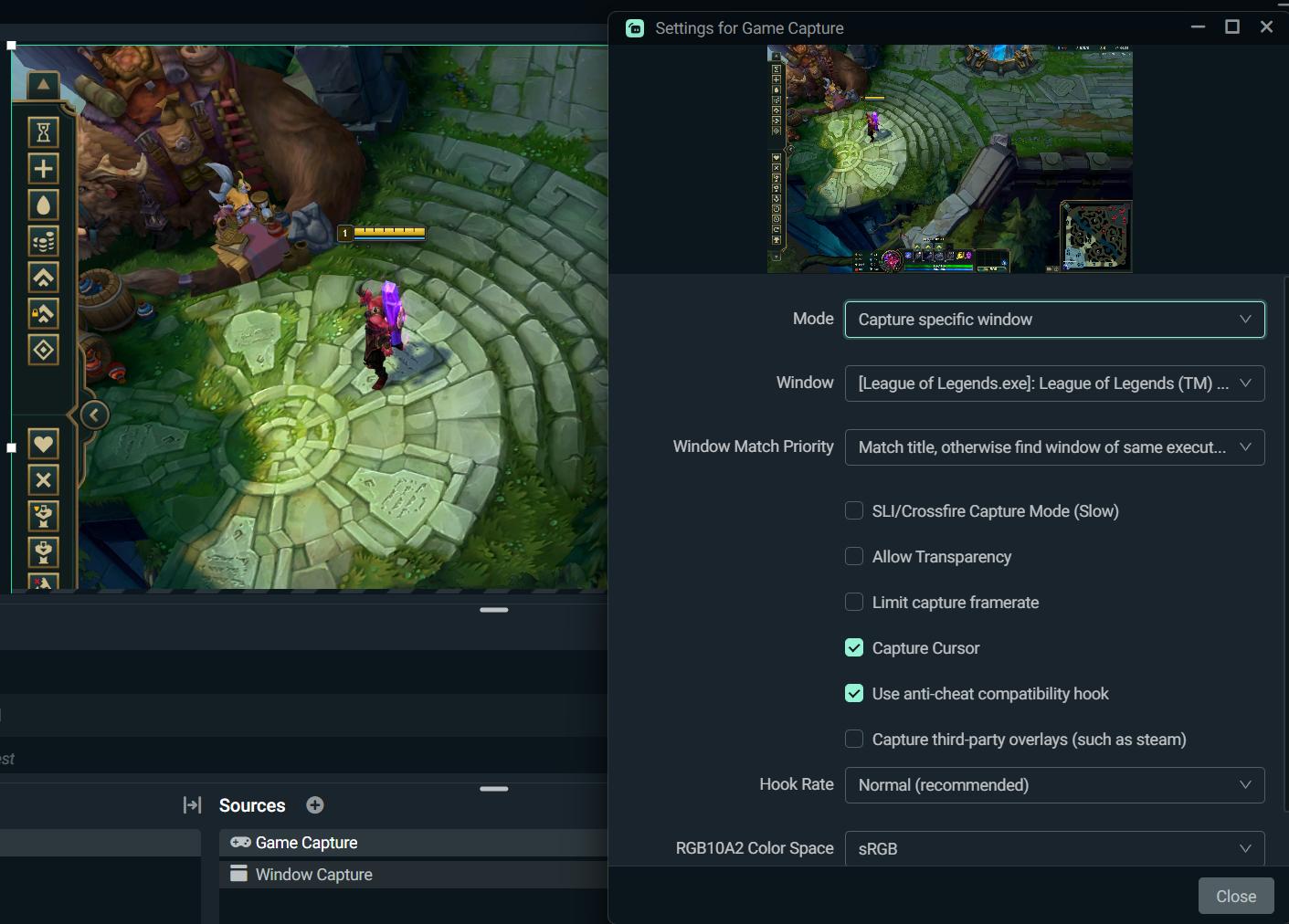
 frank grove
How do I make streamlab alerts show different currencies? I have paypal set up to accept dollars and euros. My alerts DO work when someone donates in dollars, BUT for 1 of my donors he hasnt been getting alerts for his donos and is donating in euros.
violet willow
with game capture doesnt work
abstract plazaBOT
Having trouble? Want to see if anyone else is having the same problem?
Check out our #known-issues channel! We do our best to keep this channel as current as possible with new bugs and progress updates!
If you can't find what you need please submit a ticket at: https://support.streamlabs.com/hc/en-us/requests/new
 vagrant harness
does anyone know what to do if this is just looping

 minor gust
Why will the KICK category not save unless you go live once. I start my stream remotely. I cant set this in advance. I stream IRL so not sitting at a computer. This prevents the stream from working . Also if you change ANY of the stream setting on another platform its wiped out again.
Unless there is a way to adjust this using the remote mobile app I an not seeing
 ripe cedar
day two now of not being able to see my stream in streamlabs, have a support ticket but no response once sending screenshots yesterday. ive deleted the app redownloaded. cleared all scenes and added them back. nothing showing on screen. even went live to see what it looked like and could see myself on stream but nothing in streamlabs. any suggestions? id really like to be able to set up the stream again and go live
 gritty isle
ripe cedar
day two now of not being able to see my stream in streamlabs, have a support tic...
gritty isle
ripe cedar
day two now of not being able to see my stream in streamlabs, have a support tic...
This has been an issue that has affected a small group of customers and currently there isn't a fix I can offer. The staff would like you to put in a ticket here https://support.streamlabs.com/hc/en-us/requests/new so they can work with you to gather diagnostic information and hopefully find and fix this issue.
Please include the Diagnostic Code in the body of your ticket.
Please go to Settings ⚙️ > Get Support > and press Upload Diagnostic.
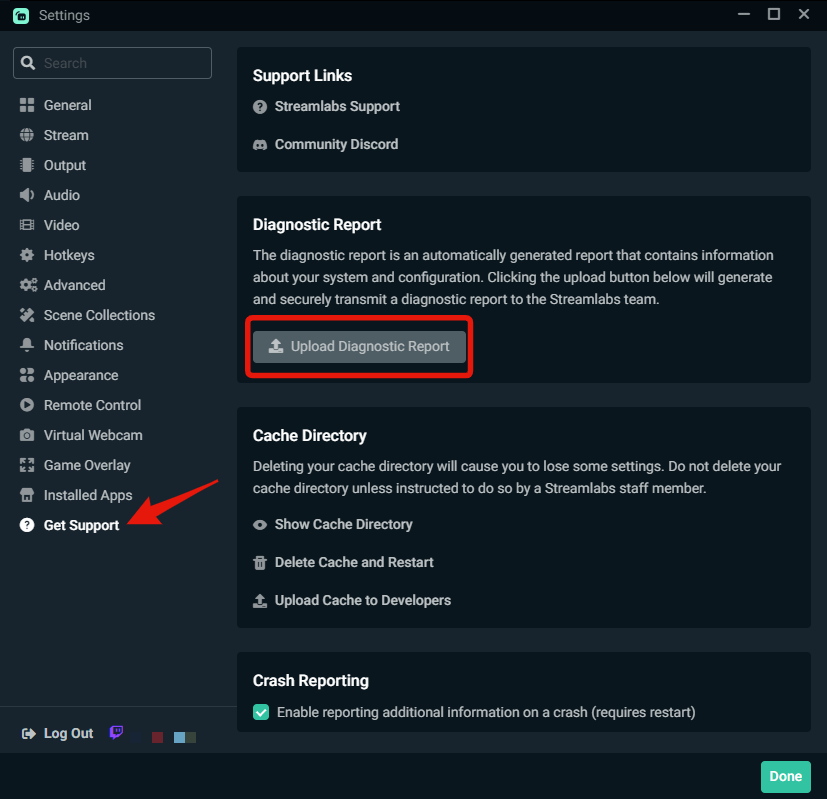 ripe cedar
sent tha in my ticket around 2300 last night no response thats why i came here lol all good ill wait
gritty isle
minor gust
Why will the KICK category not save unless you go live once. I start my stream r...
Hop 0ve to #vip-support for assistance.
gritty isle
ripe cedar
sent tha in my ticket around 2300 last night no response thats why i came here l...
Tickets are answered in the order they are received. Be patient and they will get to you.
abstract plazaBOT
Having trouble? Want to see if anyone else is having the same problem?
Check out our #known-issues channel! We do our best to keep this channel as current as possible with new bugs and progress updates!
If you can't find what you need please submit a ticket at: https://support.streamlabs.com/hc/en-us/requests/new
 edgy citrus
Hey i just want to know
where can i find the supported games for the AI clipper?
 humble marlin
I want to add a green screened video as a bit alert for a specific amount. Green screened so that it will show up on my stream with a transparent background. Can I do this without using SLOBS?
 ashen sun
So I have a question. When I get a new follower on twitch, it shows me that they followed but the alert does not get displayed and it is marked as queued. I go to streamlabs (this is what I am using for my alert notifications) and run a test follow which proceeds to work perfectly fine. I am not sure how to fix this because I feel like I am letting down the people who follow for them to not get recognized even though I mention it.
 graceful bay
Hi I had a problem today, I could not stream via dual output... the vertical one (youtube shorts) never received the flux
I checked twice and the stream keys matched
I don't know why it did it, if someone can help me
gritty isle
ashen sun
So I have a question. When I get a new follower on twitch, it shows me that they...
You have the Follows alert enabled https://streamlabs.com/dashboard#/alertbox/twitch/follows and the Follows alert is not filtered out?

 gritty isle
graceful bay
Hi I had a problem today, I could not stream via dual output... the vertical one...
gritty isle
graceful bay
Hi I had a problem today, I could not stream via dual output... the vertical one...
We do have integration with YouTube. You should not have to enter your stream key.
Do you have your YouTube channel merged in your Streamlabs account https://streamlabs.com/dashboard#/settings/account-settings/platforms?
ashen sun
gritty isle
You have the Follows alert enabled <https://streamlabs.com/dashboard#/alertbox/t...
correct. and it shows as queued on the twitch activity feed on obs
gritty isle
ashen sun
correct. and it shows as queued on the twitch activity feed on obs
And the Follows alert is the only one not working as expected?
ashen sun
gritty isle
And the Follows alert is the only one not working as expected?
to be honest, i have no clue. i only got 4 followers on my last stream earlier today and that is it. Got more on tiktok but that isnt broght in via streamlabs
 mental bramble
Hello, I have added some sources into a folder but I can't seem to expand the folder. Can someone please tell me how I can fix this?
gritty isle
mental bramble
Hello, I have added some sources into a folder but I can't seem to expand the fo...
If you hover over the folder icon, does the folder icon itself change to an open folder icon?
gritty isle
ashen sun
to be honest, i have no clue. i only got 4 followers on my last stream earlier t...
Let's refresh the connection between Streamlabs and Twitch.
NOTE 👉 This disconnect process will not go back and capture events that were missed. Events are sent over the API only once and if they are missed, they are missed forever. Going forward from once you reconnected by logging back in, Streamlabs should capture events from Twitch.
-
Log out of the Streamlabs web site on every device you access it: Click your PFP and choose Log out.
-
If you use Streamlabs Console, log out of the Streamlabs Console web site on every device you access it: Click your PFP and choose Log out.
-
If you use the standalone Streamlabels application, log out of that.
-
Log out in Streamlabs Desktop (see next post on how to do that).
-
Follow this guide: https://streamlabs.com/content-hub/post/how-to-disconnect-your-streamlabs-account. Just follow the section for Twitch.
-
Navigate back to the Streamlabs web site and log in with your Twitch. This re-establishes the connection. You can verify this by going back to https://www.twitch.tv/settings/connections, scrolling down to Other Connections and examine the Streamlabs connection. ** It should say "Connected a few minutes ago" other short period of time. **
-
IMPORTANT: Once you have completed the guide, go back to the Streamlabs web site https://streamlabs.com/dashboard#/recentevents, click the Live Actions tab, scroll all the way to the bottom and click the Reload Widgets button. ** PLEASE Don't skip this step! **
-
Log back in to all the other Streamlabs products you use.
👉 ** REMEMBER, this process will not go back and capture events that were missed. ** 👈
👉 ** REMEMBER, this process will not go back and capture events that were missed. ** 👈
👉 ** REMEMBER, this process will not go back and capture events that were missed. ** 👈
👉 ** REMEMBER, this process will not go back and capture events that were missed. ** 👈
mental bramble
gritty isle
If you hover over the folder icon, does the folder icon itself change to an open...
No it wasnt. I deleted the slobs-client folder then ran as admin and it works now. I don't even know how. 😭 🙏 🥳
gritty isle
mental bramble
No it wasnt. I deleted the slobs-client folder then ran as admin and it works no...
You should not delete the cache unless directed to do so. The fix is to just run it as administrator. Note that if you're a streamer, deleting the cache clears all your settings like encoder, bitrate, audio devices, etc so you'll need to reconfigure those settings.
ashen sun
gritty isle
Let's refresh the connection between Streamlabs and Twitch.
NOTE 👉 This disco...
alright I did that. however, it is still showing "queued" on the twitch activity feed on obs. I don't even think it is an issue with streamlabs since the test works fine but actual follows and such don't work when I am live but I may be wrong. Hence why I am here lol.
gritty isle
ashen sun
alright I did that. however, it is still showing "queued" on the twitch activity...
And the Streamlabs connection here https://www.twitch.tv/settings/connections shows connected "fa few seconds or minutes ago"?
Remember, this will not go back and capture events that were missed. Don't worry about those showing as queued.
ashen sun
gritty isle
And the Streamlabs connection here <https://www.twitch.tv/settings/connections> ...
yeah I understand that, I was just mentioning it because my mind thinks it did nothing lol
gritty isle
ashen sun
yeah I understand that, I was just mentioning it because my mind thinks it did n...
And the Streamlabs connection here https://www.twitch.tv/settings/connections shows connected "fa few seconds or minutes ago"?
ashen sun
gritty isle
And the Streamlabs connection here https://www.twitch.tv/settings/connections sh...
yup
gritty isle
ashen sun
yup
Okay, give me a minute to save my game. I can follow you as a test if you like.
abstract plazaBOT
Are you knowledgeable about Streamlabs products?
Get rewarded for helping the Streamlabs Community here in Discord!
👉 Apply to be a part of the Streamlabs Support Volunteer Program!
Application Link:
https://forms.gle/eKS29zWfFjGEzaRp7
For details, see our post in
#announcements message
Do you have a Streamlabs Ultra membership? Are you part of the Streamlabs All-Stars program?
Get your Discord roles by going to this page here: https://streamlabs.com/dashboard#/settings/integrations and clicking "Link" next to Discord! Ultra members and higher tier All-Stars members will have access to private channels for support!
Interested in Ultra? Check it out here: https://streamlabs.com/ultra?refl=discord
ashen sun
gritty isle
Okay, give me a minute to save my game. I can follow you as a test if you like.
all good, i'm not in a rush. take your time. will it still come through if I am not live?
gritty isle
ashen sun
all good, i'm not in a rush. take your time. will it still come through if I am ...
Correct, you don't need to be live. And another confirmation please, you reloaded your widgets at step 7, correct?
ashen sun
gritty isle
Correct, you don't need to be live. And another confirmation please, you reload...
I did, yes. However, now that I look at it, it isn't showing the follows from twitch I got earlier. Is that part of the "this process will not go back and capture events that were missed"?
in recent events that is
gritty isle
ashen sun
I did, yes. However, now that I look at it, it isn't showing the follows from tw...
If Streamlabs didn't detected them before you went through this process, they will never be detected, and thus won't appear in your Recent Events.
ashen sun
ah okay. I thought for a second it was an issue with twitch sending it over to streamlabs and not streamlabs pulling from twitch
gritty isle
ashen sun
ah okay. I thought for a second it was an issue with twitch sending it over to s...
Is the Twitch channel linked on your Discord profile the correct channel?
ashen sun
gritty isle
Is the Twitch channel linked on your Discord profile the correct channel?
yes it is
gritty isle
ashen sun
yes it is
Okay, thanks. You're using OBS Studio, correct?
ashen sun
gritty isle
Okay, thanks. You're using OBS Studio, correct?
i am
gritty isle
ashen sun
i am
Cool, thanks. Go ahead and launch OBS Studio and go to the scene with the Alert Box. Also go ahead and open your Streamlabs Recent Events page. Let me know when you're set.
I'll then follow your channel. You should see the alert in the preview window in OBS Studio and your Recent Events page should update.
ashen sun
obs is open and recent events are open
gritty isle
ashen sun
obs is open and recent events are open
Let's go!!! 
gritty isle
ashen sun
obs is open and recent events are open
Okay, I followed. Did you see it?
ashen sun
gritty isle
Okay, I followed. Did you see it?
so it came through the twitch activity feed doc again like the others. The alert did not sound or run on screen nor does it show on the recent events
gritty isle
ashen sun
so it came through the twitch activity feed doc again like the others. The alert...
Can you please screen shot the Streamlabs connections from here https://www.twitch.tv/settings/connections please. It's listed under Other Connections.
ashen sun
gritty isle
Can you please screen shot the Streamlabs connections from here <https://www.twi...
 gritty isle
ashen sun
gritty isle
ashen sun
Okay, thanks. I'm going to see if I get the staff to check your Alert Box for issues. It may take a bit since its a long weekend here in the US. May I reply or ping you in a bit?
ashen sun
gritty isle
Okay, thanks. I'm going to see if I get the staff to check your Alert Box for i...
yeah that's fine with me. I'm ready to smoke a brisket and drink some beer for memorial day lol
gritty isle
ashen sun
yeah that's fine with me. I'm ready to smoke a brisket and drink some beer for m...
👀 🤤
ashen sun
gritty isle
👀 🤤
would you be able to sub to my youtube to verify if those notifications come through? that should help rule out if it is actually a twitch or streamlabs issue
gritty isle
@ashen sun
We have reset your connection for Twitch events. For the reset to finalize, please do the following steps:
- Log into streamlabs.com with your Twitch account.,
- Go to https://streamlabs.com/dashboard#/alertbox,
- Click the Launch button beside your Widget URL.,
- Leave the launched window open for a minimum of 3 minutes.,
- Your next follow, sub, or bit should be captured going forward. ,
These steps will not restore missed events but will refresh the connection to capture new ones.
gritty isle
ashen sun
would you be able to sub to my youtube to verify if those notifications come thr...
Sure, but for YouTube, please note the following:
Some YouTube subscriptions won't show due to privacy settings on the viewer's account.
When someone makes an account on YouTube, the subscribed channels are private by default. When the person subscribing to you is set to private, Streamlabs cannot see the subscription.
The viewer would need to set their subscriptions to public in YouTube's privacy settings https://www.youtube.com/account_privacy BEFORE clicking the subscribe button.
The setting on your channel (the streamer) doesn't matter.
Found here: https://imgur.com/4fkxuL0
YouTube does this to comply with privacy laws, like Children Online Privacy Protection Act (COPPA): https://www.ftc.gov/legal-library/browse/rules/childrens-online-privacy-protection-rule-coppa and others.
 ashen sun
gritty isle
Sure, but for YouTube, please note the following:
Some YouTube subscriptions wo...
ashen sun
gritty isle
Sure, but for YouTube, please note the following:
Some YouTube subscriptions wo...
ahh okay
gritty isle
ashen sun
would you be able to sub to my youtube to verify if those notifications come thr...
I don't see your YouTube channel linked on your Discord profile.
ashen sun
i am working through the first message you sent right now
gritty isle
ashen sun
i am working through the first message you sent right now
Thanks!
ashen sun
gritty isle
Thanks!
no problem. im waiting the 3 minutes right now
ashen sun
gritty isle
Thanks!
alright so i have let it sit for 5 minutes. I am okay to close the window it popped up, right?
gritty isle
ashen sun
alright so i have let it sit for 5 minutes. I am okay to close the window it pop...
Please leave it open for now.
ashen sun
alright
 sour dagger
Would anyone happen to know how to get access to the Ultra help section, or is this it? I haven't been here in a long time and need help setting up subathon timer without using streamlabs obs
ashen sun
gritty isle
Please leave it open for now.
it just worked
sour dagger
I think I found it
gritty isle
sour dagger
Would anyone happen to know how to get access to the Ultra help section, or is t...
That would be the #vip-support channel! And thank you for being a Streamlabs Ultra subscriber!
sour dagger
Thank you
gritty isle
ashen sun
it just worked
Excellent!!! You should be good from here forward. Thanks for being patient whilst we troubleshot this issue.
ashen sun
gritty isle
Excellent!!! You should be good from here forward. Thanks for being patient wh...
not a problem. thank you so much. I am able to close that window now? and do i have to keep that open from now on when i stream?
gritty isle
ashen sun
not a problem. thank you so much. I am able to close that window now? and do i h...
You can close the Recent Events window.
Next time you go live, you might open it up in the background just to be safe.
ashen sun
gritty isle
Next time you go live, you might open it up in the background just to be safe.
awesome, thank you again. I don't want to ping missaddykins so if you could give him or her my apprecaiton, I would apprecaite that
gritty isle
ashen sun
awesome, thank you again. I don't want to ping missaddykins so if you could give...
I'll relay that to them! 
 simple pecan
how do i change my membership from anually to monthly?
gritty isle
simple pecan
how do i change my membership from anually to monthly?
For assistance with that, please submit a ticket: https://support.streamlabs.com/hc/en-us/requests/new
 molten vapor
Good day, in streamlabs chatbot I wanted a timer to show a random quote, in the timer command I put $randquote, which shows the quote, but I wanted to show the quote's id too, just like you get when you do the !quote command. Which parameter would I put?
 copper cedar
hey everyone - CloudBot - does $(urlfetch ..) no longer work?
in the custom commands
torpid bay
Hi is there any tech support for streamlabs mobile? I want to stream genshin but I can't full screen the share screen can someone help me?
 graceful bay
gritty isle
We do have integration with YouTube. You should not have to enter your stream k...
graceful bay
gritty isle
We do have integration with YouTube. You should not have to enter your stream k...
Yes I know and it is already connected but if we want to dual output on YouTube we can’t do it with the integration only. And since now it works well
charred pagoda
I paid for streamlabs like 2 weeks ago, but it says i dont have it anymore.
abstract plazaBOT
Having trouble? Want to see if anyone else is having the same problem?
Check out our #known-issues channel! We do our best to keep this channel as current as possible with new bugs and progress updates!
If you can't find what you need please submit a ticket at: https://support.streamlabs.com/hc/en-us/requests/new
 wintry knot
My shop is saying 1 thing is up, even though 8 things are up? wha to do?


Fixed, dont worry
 plucky basalt
Does anyone got a problem for Helldivers 2?
abstract plazaBOT
Having trouble? Want to see if anyone else is having the same problem?
Check out our #known-issues channel! We do our best to keep this channel as current as possible with new bugs and progress updates!
If you can't find what you need please submit a ticket at: https://support.streamlabs.com/hc/en-us/requests/new
 brave loom
abstract plazaBOT
brave loom
abstract plazaBOT
Having trouble? Want to see if anyone else is having the same problem?
Check out our #known-issues channel! We do our best to keep this channel as current as possible with new bugs and progress updates!
If you can't find what you need please submit a ticket at: https://support.streamlabs.com/hc/en-us/requests/new
 pale sonnet
vale thicket
Anyone else having an issue where AV1 and HEVC endcoders are not available for s...
pale sonnet
vale thicket
Anyone else having an issue where AV1 and HEVC endcoders are not available for s...
hi, sorry to bump. i'm having this issue, just posted on reddit here:
https://www.reddit.com/r/streamlabs/comments/1kv6npa/nvenc_av1_encoder_disappeared_in_streamlabs_obs/
, and just sent a ticket because my AV1 went missing on 4070 TI SUPER
if you also have OBS studio installed, can you check that? my normal OBS is showing AV1 available
 thick sorrel
Hello, im having trouble with linking/merging my Youtube account to streamlabs. It gives me a error message saying "This account is already linked to another Streamlabs account." I dont have another streamlabs account and i never linked my youtube account before that i know of, someone please help with this issue.
vale thicket
pale sonnet
hi, sorry to bump. i'm having this issue, just posted on reddit here:
https://ww...
Same. I actually started streaming with OBS. Maybe I'll go back to streamlabs if they fix it.
 tropic widget
I use the Streamlabs plugin for OBS. On my laptop the Streamlabs Chat dock is multichat that supports Twitch, YouTube & Facebook. On my main pc it only shows my Twitch chat. Any suggestions on how to make it show Twitch and YouTube?
gritty isle
thick sorrel
Hello, im having trouble with linking/merging my Youtube account to streamlabs. ...
If you log out and then log in by clicking the YouTube button and log in with the YT channel in question, that will be the account your channel is lined with. From there, you can try and unmerge it. If you can unmerge it, log out and then log into the other account and then merge that YT channel there.`
gritty isle
tropic widget
I use the Streamlabs plugin for OBS. On my laptop the Streamlabs Chat dock is mu...
Are going live with multi streaming with your Ultra in OBS Studio?
tropic widget
gritty isle
Are going live with multi streaming with your Ultra in OBS Studio?
No. My question is: How do I change the "Streamlabs: Chat" dock from Twitch only to YouTube and Twitch
gritty isle
tropic widget
No. My question is: How do I change the "Streamlabs: Chat" dock from Twitch only...
And you have an active Streamlabs Ultra subscription?
tropic widget
gritty isle
And you have an active Streamlabs Ultra subscription?
No.
gritty isle
tropic widget
No.
How are you multi streaming then, with a different OBS plugin?
tropic widget
gritty isle
How are you multi streaming then, with a different OBS plugin?
yes
gritty isle
tropic widget
yes
You might have to see if this other multstreaming plugin offers a combined chat. I’m not entirely sure that the SL chat dock would with another multi streaming plugin.
tropic widget
gritty isle
You might have to see if this other multstreaming plugin offers a combined chat....
the multistream plugin has nothing to do with it. This has to do with the Streamlabs plugin.
gritty isle
tropic widget
the multistream plugin has nothing to do with it. This has to do with the Stream...
Basically, you’d have to use Streamlabs multsistreaming in order for the multi steam chat to work.
desert briar
i wanna horizontal and vertical stream on yt how do i do that
 grand pendant
i need help my live page looks like it was hacked
it goes to some private browser download thing
gusty umbra
desert briar
i wanna horizontal and vertical stream on yt how do i do that
This should get you started! https://streamlabs.com/content-hub/post/how-to-multistream-youtube-vertical-horizontal
Streamlabs
Here’s why you should consider streaming in both vertical and horizontal orientation on YouTube…simultaneously (plus tips to get started).
gritty isle
grand pendant
i need help my live page looks like it was hacked
Can you please screen shot what you see?
grand pendant
gritty isle
Can you please screen shot what you see?
someone hacked my website. redirects to this : d0pp51ghubcc738cd420.quicknetshift.co.in

 abstract plazaBOT
Having trouble? Want to see if anyone else is having the same problem?
Check out our #known-issues channel! We do our best to keep this channel as current as possible with new bugs and progress updates!
If you can't find what you need please submit a ticket at: https://support.streamlabs.com/hc/en-us/requests/new
grand pendant
when i click on "view site"
my homepage off streamlabs i can log into just fine but 404 or 401 for everyone else
gritty isle
grand pendant
someone hacked my website. redirects to this : d0pp51ghubcc738cd420.quicknetshif...
So you have a Streamlabs Ultra subscription, correct?
gritty isle
grand pendant
no
Then you would need to reach out to the Registrar where your domain was purchased from.
grand pendant
??? this isnt a more serious issue? its a known malisious website that somehow hacked my page
https://streamlabs.com/bradleythedragon says "not authorized"
gritty isle
grand pendant
??? this isnt a more serious issue? its a known malisious website that somehow h...
You purchased this domain yourself?
grand pendant
its my tip page off streamlabs? ive had it for years
gritty isle
grand pendant
its my tip page off streamlabs? ive had it for years
Then I would submit a ticket on this issue: https://support.streamlabs.com/hc/en-us/requests/new. We can’t troubleshoot what ever has happened with your account here is discord.
desert briar
gusty umbra
This should get you started! https://streamlabs.com/content-hub/post/how-to-mul...
thanks
 twin spoke
Ok why can't I get guests to be heard off my stream I've asked this like three times and no reply
gritty isle
twin spoke
Ok why can't I get guests to be heard off my stream I've asked this like three t...
I’ve helped you before with Streamlabs Desktop and Collab Cam. I searched back and it seems you’re now using Streamlabs Talk Studio. Is this correct?

 fossil agate
can someone please tell me why i can not disconnect my twitch, or rather. remove it as my primary on my account. it is not a twitch i even have access to anymore (my youtube is also connected but it will not let me change primary)
gritty isle
fossil agate
can someone please tell me why i can not disconnect my twitch, or rather. remove...
The primary account is key that holds all your cloud data, scenes and sources, widget settings, tip/donation settings and history, merch shop items and history, cloudbot settings, cloudbot loyalty database and store.
If you don’t yet have a Streamlabs ID tied to that account, please create your Streamlabs ID: https://streamlabs.com/content-hub/post/how-to-set-up-your-streamlabs-id.
Then log out and log in with your Streamlabs ID and you should be able to unmerge your now inaccessible Twitch channel.
fossil agate
gritty isle
The primary account is key that holds all your cloud data, scenes and sources, w...
(feel stupid for having to ask question) if i do not remember which email i used to create the steamlabs account and i have like 10 emails.. lol can i find it on my desktop app?
gritty isle
fossil agate
(feel stupid for having to ask question) if i do not remember which email i used...
You can find that on the Streamlabs website: https://streamlabs.com/dashboard#/settings/account-settings/slIDSettingsPage.
fossil agate
gritty isle
You can find that on the Streamlabs website: <https://streamlabs.com/dashboard#...
i could be blind, but nowhere in here is it showin that..
 fossil agate
I need to create a steam labs ID, to see anything more than what I have linked

Which is the issue, I do not have the email
twin spoke
gritty isle
I’ve helped you before with Streamlabs Desktop and Collab Cam. I searched back ...
Incorrect I'm using obs because stream labs even though I've paid for it as till won't pick up audio on the talk studio from me and guests. Extremely disappointed in service
gritty isle
fossil agate
I need to create a steam labs ID, to see anything more than what I have linked
gritty isle
twin spoke
Incorrect I'm using obs because stream labs even though I've paid for it as till...
So you’re using OBS Studio?
fossil agate
gritty isle
<https://streamlabs.com/content-hub/post/how-to-set-up-your-streamlabs-id>
That’s simple enough. Yes. But I do not have the email associated with my streamlabs account is what I’m saying, so it is not possible for me to make the ID. I need to find the email associated.
gritty isle
fossil agate
That’s simple enough. Yes. But I do not have the email associated with my stream...
You can find that here: https://id.streamlabs.com/security/email
 gritty isle
fossil agate
?
gritty isle
fossil agate
?
Log in with your YouTube then click the link.
You can use any email address you have access to. You don’t have to use the same email address associated with your Streamlabs account.
 polar crater
Hello is there anyone here that could help me
 signal thunder
Hi! I’m having an issue with Streamlabs. When I open the app, on the main page where the stream preview is shown, I can't see the scenes, audio mixer, or any of the controls below. The stream preview window is way too big and takes up the whole screen. I can resize the chat panel from left to right, but I can’t drag the preview window up to make it smaller. Because of that, I can’t access or edit my scenes or interact with most of the interface. It’s all covered by the preview screen. Any help would be appreciated!
 gritty isle
signal thunder
Hi! I’m having an issue with Streamlabs. When I open the app, on the main page w...
gritty isle
signal thunder
Hi! I’m having an issue with Streamlabs. When I open the app, on the main page w...
This has been an issue that has affected a small group of customers and currently there isn't a fix I can offer. The staff would like you to put in a ticket here https://support.streamlabs.com/hc/en-us/requests/new so they can work with you to gather diagnostic information and hopefully find and fix this issue.
Please include the Diagnostic Code in the body of your ticket.
Please go to Settings ⚙️ > Get Support > and press Upload Diagnostic.
 upper pawn
can someone help me? the screen gets black + when loading the game

 gritty isle
polar crater
Hello is there anyone here that could help me
gritty isle
polar crater
Hello is there anyone here that could help me
Only if you say what your issue actually is as we cannot read your mind.
polar crater
gritty isle
Only if you say what your issue actually is as we cannot read your mind.
so i use to have stream access on tiktok through streamlabs i still can go live on my mobile device through tiktok and i can use the tiktok live studio app on my pc but through streamlabs im no longer aloud i put in a ticket witht the company 4 weeks ago got two response and havent heard back from streamlabs in weeks now
gritty isle
upper pawn
can someone help me? the screen gets black + when loading the game
For League of Legends, we advise the following setup.
Client & Pre-game lobby should utilize a Window capture source https://i.imgur.com/poIYSr8.png
Make sure the League Client window is selected in the Properties of the Capture Source.
In-game should utilize a Game Capture source https://i.imgur.com/CFvruTn.jpeg
Finally, I would also suggest running League of Legends in Borderless Windowed Mode.
gritty isle
polar crater
so i use to have stream access on tiktok through streamlabs i still can go live ...
I would reply to the last email you have that ticket and ask for a status. Us Volunteers don’t have access to that system and thus I can’t give you a status of your ticket. I do know that there have been many tickets like this and the staff are having to work through them as each case is different and thus it’s taking a long while to work through the backlog.
upper pawn
gritty isle
For League of Legends, we advise the following setup.
Client & Pre-game lobby s...
its already this way 😭
gritty isle
upper pawn
its already this way 😭
First, please delete your game capture source and quit Streamlabs Desktop.
Then go to the search in windows (🔎) and search this file path: C:\ProgramData\obs-studio-hook and then click on the folder that pops up.
Once you have done that you will see a bunch of files. If you can ignore those for a second and click on the program data folder.
Then you should see the obs-studio-hook folder there and highlighted.
Go ahead and delete the folder.
Now go ahead restart your PC and then right click Streamlabs Desktop and run as administrator.
Then add a new game capture and see if that works for you.
polar crater
gritty isle
I would reply to the last email you have that ticket and ask for a status. Us ...
yea im just missing out streaming on both ya know especially when you have a good followingn
gritty isle
polar crater
yea im just missing out streaming on both ya know especially when you have a goo...
Yeah, that is indeed unfortunate. Sorry about that. There’s nothing us Volunteers can do with this issue as we just don’t have any access since we’re not employees. We just help out in our free time.
upper pawn
gritty isle
First, please delete your game capture source and quit Streamlabs Desktop.
Then...
unknown.png).
 polar crater
gritty isle
Yeah, that is indeed unfortunate. Sorry about that. There’s nothing us Volunt...
polar crater
gritty isle
Yeah, that is indeed unfortunate. Sorry about that. There’s nothing us Volunt...
man that sucks unfortunately i figured you all had the same access as the main people have you heard of any fixes
or would i have to delete it and make another one?
gritty isle
upper pawn
unknown.png).
 gritty isle
upper pawn
oh
gritty isle
upper pawn
oh
Yeah, sorry about that link in there.
gritty isle
polar crater
man that sucks unfortunately i figured you all had the same access as the main p...
Delete what?
polar crater
gritty isle
Delete what?
my tiktok and make a new or delete my streamlabs and make a new one?
upper pawn
it say that i cant delete bcs its open (its not) can i just delete the content inside?
 gritty isle
polar crater
my tiktok and make a new or delete my streamlabs and make a new one?
gritty isle
polar crater
my tiktok and make a new or delete my streamlabs and make a new one?
I would not go through all that. You’d still have to apply for access to live with Streamlabs with the new account and besides the new TikTok probably would not meet the requirements anyway.
 kindred copper
When I run a giveaway, the winner can enter their information and get the merch without me getting involved. Is there a way I can gift someone a free merch code that way without running a giveaway, ie: offline for someone that did me a favor, without them having to give me their info?
abstract plazaBOT
Are you knowledgeable about Streamlabs products?
Get rewarded for helping the Streamlabs Community here in Discord!
👉 Apply to be a part of the Streamlabs Support Volunteer Program!
Application Link:
https://forms.gle/eKS29zWfFjGEzaRp7
For details, see our post in
#announcements message
polar crater
gritty isle
I would not go through all that. You’d still have to apply for access to live w...
ok thank you
abstract plazaBOT
Do you have a Streamlabs Ultra membership? Are you part of the Streamlabs All-Stars program?
Get your Discord roles by going to this page here: https://streamlabs.com/dashboard#/settings/integrations and clicking "Link" next to Discord! Ultra members and higher tier All-Stars members will have access to private channels for support!
Interested in Ultra? Check it out here: https://streamlabs.com/ultra?refl=discord
gritty isle
upper pawn
it say that i cant delete bcs its open (its not) can i just delete the content i...
Delete the contents then delete the folder itself. If you can’t delete the folder itself, reboot your PC and try again. Make sure you don’t have Streamlabs Desktop or OBS Studio running.
gritty isle
polar crater
ok thank you
You’re welcome.
upper pawn
oh its open on league, need to close
gritty isle
kindred copper
When I run a giveaway, the winner can enter their information and get the merch ...
There’s no way to do that.
kindred copper
I figured. Thanks anyway.
gritty isle
kindred copper
I figured. Thanks anyway.
You’re welcome.
Okay folks, I gotta go walk the dog. 👋
upper pawn
thx rufus
grand pendant
upper pawn
can someone help me? the screen gets black + when loading the game
easiest fix is hiding your full screen game capture and just using two window captures for league. dont actually have to run league in a window.
game capture will lag league very hard
 worn yarrow
Hello, I am having an issue with the exporting function of the streamlabs editor. I have finished editing a video around 2 minutes and 36 seconds long. I went to export the video, and after exporting and reviewing the video before posting, I noticed that the audio would cut out from 1:20 to 1:35. Within the editor, the audio does no such thing and continues to be consistent. Any way I can fix this?
 leaden skiff
hey guys, im about to crash out if im being honest, why has the alert box text not been fixed to where we can move the alert text ???
 cunning marlin
sound alerts are playing double
and sometimes the sound alert plays again after one minute
abstract plazaBOT
Having trouble? Want to see if anyone else is having the same problem?
Check out our #known-issues channel! We do our best to keep this channel as current as possible with new bugs and progress updates!
If you can't find what you need please submit a ticket at: https://support.streamlabs.com/hc/en-us/requests/new
 undone peak
Trying to add my paypal to tipping page getting this message weirdly that it can't be changed at the moment?

 sage bone
can someone help me i cant see the screen preview

 prime gate

 hazy tapir
I’m trying to stream with stream labs console can someone dm me how I get the 7 day trial for ultra , and or pay for it?
 cursive oak
Hello, is there a way I can get a subs list of my Jan-april subs for each month? I needed to take a break from streaming for mental health reasons and now when I go into Twitch to pull the report for the subs from each month, it only pulls subs from the last 30 days.
desert briar
is it possible to transfer scenes from 1 mac to another?
abstract plazaBOT
Having trouble? Want to see if anyone else is having the same problem?
Check out our #known-issues channel! We do our best to keep this channel as current as possible with new bugs and progress updates!
If you can't find what you need please submit a ticket at: https://support.streamlabs.com/hc/en-us/requests/new
 edgy dawn
Issues with live stream starting on TikTok everything linked and accounts connected? What am I doing wrong?
gusty umbra
edgy dawn
Issues with live stream starting on TikTok everything linked and accounts connec...
Is there an error you’re getting?
edgy dawn
No not having one pop up and I’m also using streamlabs console just fyi.
Twitch and kick ran fine.
gusty umbra
hazy tapir
I’m trying to stream with stream labs console can someone dm me how I get the 7 ...
When you initially sign up for Streamlabs, it will prompt you to upgrade to ultra, which includes the 7 day trail. If you’re already a Streamlabs user, it should be under subscriptions on the Streamlabs website.
gusty umbra
edgy dawn
No not having one pop up and I’m also using streamlabs console just fyi.
Twitch ...
First, you'd have to merge your TikTok in your Streamlabs account: https://streamlabs.com/dashboard#/settings/account-settings/platforms
Secondly, have you applied and been granted access to Live with Streamlabs?
You have to apply for Live with Streamlabs by clicking here: https://www.tiktok.com/falcon/live_g/live_access_pc_apply/result/index.html?id=GL6399433079641606942&lang=en-US
If you don't meet the requirements, TikTok likely won't approve your request.
gusty umbra
cursive oak
Hello, is there a way I can get a subs list of my Jan-april subs for each month?...
I’m not sure if Streamlabs stores that. You can submit a ticket so the staff can take a look. We don’t have access to that stuff as volunteers. https://support.streamlabs.com/hc/en-us/requests/new
gusty umbra
desert briar
is it possible to transfer scenes from 1 mac to another?
Most of that stuff is cloud stored, so as long as you login with the same Streamlabs account, it should work. It however will not transfer over audio and video settings. Best to take a screenshot of those.
edgy dawn
gusty umbra
First, you'd have to merge your TikTok in your Streamlabs account: <https://str...
Resubmitted application with TikTok thanks a million for the help
 jovial anvil
Hello! I can not Multistream to YT and FB at the same time, only one or the other. I have had 3 tickets submitted, had my ISP take a look along with Dell support. I "think" it has to do with the bitrate and streamkeys/URLs. Using 9000 for FB as i am a content creator there. Any help is appreciated! I am paralyzed, so typing a chat is very difficult for me. Thanks!
hazy tapir
how do i get stream labs console to work on my xbox
i followed the video, and it's not registering on my twitch i'm streaming
old star
I discovered this thing called cross clip and I'm already doing a monthly sub to ultra so I wanted to know, would I have ultra on cross clip too?
abstract plazaBOT
Having trouble? Want to see if anyone else is having the same problem?
Check out our #known-issues channel! We do our best to keep this channel as current as possible with new bugs and progress updates!
If you can't find what you need please submit a ticket at: https://support.streamlabs.com/hc/en-us/requests/new
 stiff sandal
My streamlabs won't open. It just stays in the manager.
I've already uninstalled and installed it. There are no updates for it or the system.
How can I solve this?
 bitter frost
Is there a good way to show to players gameplay in one? Like splitscreen.
marble wind
@bitter frost try https://vdo.ninja
 open lodge
anyone else having this issue? tried reinstalling and deleting the files in obs from appdata roaming but to no avail
 gritty isle
open lodge
anyone else having this issue? tried reinstalling and deleting the files in obs ...
gritty isle
open lodge
anyone else having this issue? tried reinstalling and deleting the files in obs ...
This has been an issue that has affected a small group of customers and currently there isn't a fix I can offer. The staff would like you to put in a ticket here https://support.streamlabs.com/hc/en-us/requests/new so they can work with you to gather diagnostic information and hopefully find and fix this issue.
Please include the Diagnostic Code in the body of your ticket.
Please go to Settings ⚙️ > Get Support > and press Upload Diagnostic.


 open lodge
streamlabs becomes less and less reliable over the years
old star
since no one answered yet, i just wanted to know if my membership of ultra for streamlabs also applies to the cross clip thing or not.
open lodge
i think thats the only reason people buy ultra
old star
im asking cause it giving me the option to do different subs in cross clip
but not telling me even tho i have it so i wanted to double check
 remote portal
how come recent folower isnt show up on my stream labels but on my twitch events its showing
gritty isle
old star
since no one answered yet, i just wanted to know if my membership of ultra for s...
It will if you log in with the Streamlabs ID associated with the account that has Ultra.