#technical-support
1 messages · Page 152 of 1


 gritty isle
 hallow roost
this is showing
hallow roost
this is showing
And is this the very first time you're using Streamlabs Desktop or have you been streaming with it for a while now?
 mental leaf
Streamlabs Chatbot commands that control Streamlabs Desktop using the SLOBSRemoteParameters script is no longer working. I suspect it might have broken with the latest update to Streamlabs Desktop... anyone have any thoughts or insights? Is there a way to roll back the Streamlabs Desktop to the previous version so I can test my theory? Ticket ID: 856085
gritty isle
 calm fog
uhm hi?
calm fog
uhm hi?
Uh, howdy!
gritty isle
calm fog
i need help
With?
gritty isle
calm fog
uhm hello??
Uh, howdy!
calm fog
so basically i tried to turn on streamlabs but it doesnt turn on i clicked on activate cloudbot button but it doesnt turn on after waiting 2 minutes after clicking activate cloudbot just one time it doesnt run on
and when i clicked it like 20 times simunataneosuly it turned on but turned off after 5 secs
gritty isle
calm fog
so basically i tried to turn on streamlabs but it doesnt turn on i clicked on ac...
Did you ever submit a ticket on that? I know we tried the disconnect services steps and that did not resolve the issue. This is affecting a small number of customers who stream to YouTube. If the disconnect service steps don't work, and you haven't yet, I encourage you to submit a ticket: https://support.streamlabs.com/hc/en-us/requests/new.
calm fog
yes i submitted more than 1tickect
i received a confirmation email saying if my issue was fixed but it still wasnt fixed after that i received no further information
gritty isle
calm fog
yes i submitted more than 1tickect
If you submit more than one ticket, they will close the duplicates and cross reference them to the original ticket you opened. Please post all the ticket numbers you have for this Cloudbot isse and I'll see if I can get a status on them for you.
calm fog
post here?
gritty isle
calm fog
post here?
Yes, otherwise how can I see them?
gritty isle
mental leaf
Streamlabs Chatbot commands that control Streamlabs Desktop using the SLOBSRemot...
There's not a way to roll back versions. I do see you're an Ultra sbscriber  so please hop over to #vip-support for assistance.
Oh, I see VIP Support is temporarily closed. Sigh.
@zinc turtle The promotion with Discord ended March 18, 2025. You had to have claimed it by then and then redeemed it by April 18, 2025.
calm fog
uhm i sent you ticked id
gritty isle
calm fog
uhm i sent you ticked id
Umm, hang on, I'm assisting more than just one customer. Please be patient.
calm fog
ok sorry
hallow roost
gritty isle
And is this the very first time you're using Streamlabs Desktop or have you been...
so look, im not the guy whos streaming but a friend of mine is (the one with this problem) - he's currently using obs as a subsitute - but he has been streaming for a few months now
 fluid birch
im looking for help separating music from my vods so i can play music on my stream and not have my streams taken down. I've tried looking at youtube videos and they haven't helped or worked, anyone know how?
gritty isle
calm fog
ok sorry
The staff show you submitted 5 tickets for this issue and cross referenced them (and closed the duplicates) to ticket number 853260 which was responded back to you on this past Thursday. Please check your email for that message and respond to that email if you need to.
 wispy latchBOT
@fluid birch Want to split your audio? Maybe you don't want the stream to hear your discord, music, etc..? This is possible using Streamlabs Application Audio Capture sources! See the link for various setup guides: https://streamlabs.com/content-hub/post/how-to-use-application-audio-capture
gritty isle
hallow roost
so look, im not the guy whos streaming but a friend of mine is (the one with thi...
All right. So they've been using Streamlabs Desktop for a while? If so, it'd be easier for themselves to come to discord for this issue. Its hard to troubleshoot via 3rd party as the steps I want them to try cannot be done remotely.
hallow roost
gritty isle
All right. So they've been using Streamlabs Desktop for a while? If so, it'd b...
alr he'll be here after stream (i think)
calm fog
oh alright sorry i will chec and tell but my issue is still not solved
gritty isle
hallow roost
alr he'll be here after stream (i think)
Sounds good.
gritty isle
calm fog
oh alright sorry i will chec and tell but my issue is still not solved
Yes, I understand it is not resolved which is why ticket 853260 is still open.
 agile owl
The promotion has ended.
fluid birch
wispy latch
<@691046288908746855> Want to split your audio? Maybe you don't want the stream ...
but do i have to change it in the actual recorded track settings then? like with my audio settings
gritty isle
fluid birch
but do i have to change it in the actual recorded track settings then? like with...
No. You don't have to change the track settings. The guide shows you how to set things up.
fluid birch
gritty isle
No. You don't have to change the track settings. The guide shows you how to se...
ok just wanted to confirm! thank you! and im glad to have joined the server :))
gritty isle
fluid birch
ok just wanted to confirm! thank you! and im glad to have joined the server :))
You're welcome and howdy, welcome to the Streamlabs Discord. 
 full owl
hey can someone help me trouble shoot with my streaming quality. ive been trying for a logn time to make it better quality but it wont work, even thought youtube says 1080p60hd, its still very choppy
 quiet python
is there anyone in here that can actually help me? or does everyone just read the messages
gritty isle
quiet python
is there anyone in here that can actually help me? or does everyone just read th...
You have to specifically match a category that Kick already has; you cannot enter your own category. That's a limitation of Kick, not Streamlabs.
quiet python
does the same thing for twitch too though
quiet python
gritty isle
You have to specifically match a category that Kick already has; you cannot ente...
and irl is a category?
gritty isle
quiet python
and irl is a category?
Checking...
It seems like it is. Not sure why Streamlabs Mobile is behaving that way.
Probably not the answer you're looking for, but I'd submit a ticket on this issue: https://support.streamlabs.com/hc/en-us/requests/new
 quiet python
gritty isle
Checking...
It seems like it is. Not sure why Streamlabs Mobile is behaving th...
quiet python
gritty isle
Checking...
It seems like it is. Not sure why Streamlabs Mobile is behaving th...
sadly i already submitted a ticket been waiting for a response back , i appreciate you though
gritty isle
Twitch also indeed does have an IRL category.
 gritty isle
quiet python
sadly i already submitted a ticket been waiting for a response back , i apprecia...
gritty isle
quiet python
sadly i already submitted a ticket been waiting for a response back , i apprecia...
You're welcome. There's a bit of a backlog in tickets and the staff are working through them. Please be patient and they'll get to your ticket.
quiet python
im gonna reach out to kick and see if there’s anything they can do
full owl
@gritty isle do you know how to fix streaming quality ?
gritty isle
full owl
<@301571565840236564> do you know how to fix streaming quality ?
There's really not a 'fix'. Only get it looking as good as possible with your hardware and internet connection.
Are you only streaming to YouTube?
full owl
yes, youtube says the quality is 1080p60, but i don’t really see the difference .. bit rate in stream labs is set to default i think 2500
gritty isle
full owl
yes, youtube says the quality is 1080p60, but i don’t really see the difference ...
2500 is way too low for 1080p60. What is your Internet upload speed?
full owl
60-80
gritty isle
full owl
60-80
From Streamlabs Desktop, go into Settings ⚙️ , and screen shot the Video and Output settings please.
full owl

 gritty isle
full owl
gritty isle
full owl
Okay, thanks. Those settings looks good, though, please change your bitrate to 15000 and see how it goes on the next stream.
full owl
ok thanks
gritty isle
full owl
ok thanks
You're welcome.
 hollow halo
Hello there, is there any support for youtubes, super sticker feature, in the alert box?
https://support.google.com/youtube/answer/9277801?hl=en (the youtube page on super stickers)
 cyan ibex
Como criar um Vtuber
 drowsy lintel
I'm having the exact same issue from this reddit post. Any advice? https://www.reddit.com/r/Twitch/comments/djj5k2/stream_turned_to_grey_and_pixely/
 solemn ivy
Hello! Can somebody help me with my ingame sound? its kinda bad quality. It sounds a bit quiet with a small echo
gritty isle
@iron hill
Please follow these steps when you are not live:
-
Log out of the Streamlabs web site on every device you access it: Click your PFP and choose Log out.
-
If you use Streamlabs Console, log out of the Streamlabs Console web site on every device you access it: Click your PFP and choose Log out.
-
If you use the standalone Streamlabels application, log out of that.
-
Log out in Streamlabs Desktop (see next post on how to do that).
-
Follow this guide: https://streamlabs.com/content-hub/post/how-to-disconnect-your-streamlabs-account. Just follow the section for YouTube.
-
Navigate back to the Streamlabs web site and log in with your YouTube. This re-establishes the connection.
-
👉 IMPORTANT: Once you have completed the guide, go back to the Streamlabs web site https://streamlabs.com/dashboard#/recentevents, click the Live Actions tab, scroll all the way to the bottom and click the Reload Widgets button. PLEASE Don't skip this step!
-
Log back in to all the other Streamlabs products you use.
** It's not obvious when you log in, but one of the interstitials will say something like Streamlabs has access to x of 6 services. Click there and make sure that all 6 of the boxes are checked and then proceed through the rest of the log in process. **
👇 👇 👇 👇


The most popular streaming platform for Twitch, YouTube and Facebook. Cloud-based and used by 70% of Twitch. Grow with Streamlabs Desktop, alerts, 1000+ overlays, analytics, chatbot, tipping, merch and more.
 abstract plazaBOT
 Having trouble? Want to see if anyone else is having the same problem?
Check out our #known-issues channel! We do our best to keep this channel as current as possible with new bugs and progress updates!
If you can't find what you need please submit a ticket at: https://support.streamlabs.com/hc/en-us/requests/new
 bronze flume
hello. i am running into this while im streaming currently. no idea how to fix this. because it was not doing this yesterday

and have no idea what it is
gritty isle
bronze flume
hello. i am running into this while im streaming currently. no idea how to fix t...
Is Streamlabs Desktop reporting dropped frames?
bronze flume
gritty isle
Is Streamlabs Desktop reporting dropped frames?
yes
gritty isle
bronze flume
yes
And you’re streaming Twitch?
 gritty isle
bronze flume
i have a good pc. not sure why this is happeneing
gritty isle
bronze flume
i have a good pc. not sure why this is happeneing
Are you streaming to Twitch?
bronze flume
gritty isle
Are you streaming to Twitch?
yes
gritty isle
bronze flume
yes
Thanks for confirming that. It’s not your PC. Dropped frames mean that some packets are not completing the path from your PC to the ingest.
Please download and run the Twitch Test, see next post. Please use Medium or Long Duration and choose all the ingests in your region - do not only choose the ingested closest to you. Screen shot the results when the test is done.
wispy latchBOT
@bronze flume
Please run this twitch test tool to find out the best server (https://r1ch.net/projects/twitchtest). Be sure to run the test for either Medium or Long, as short won't give you the most accurate results and be sure to select your region from the listed options (if the regions are not applicable to you, please select 5-6 servers that are near you). You're looking for at least a quality of 84.
Once you've found a good server go to Settings > Stream > Stream to custom ingest and you can manually select your server.
bronze flume
gritty isle
Thanks for confirming that. It’s not your PC. Dropped frames mean that some pa...
its asking for my stream key. im not sure how to find that lmao
gritty isle
bronze flume
its asking for my stream key. im not sure how to find that lmao
This guide will show you where to get your stream key: https://streamlabs.com/content-hub/post/where-to-find-your-twitch-stream-key
Remember your stream key is personal, confidential information. Like your ATM PIN code. Never reveal your stream key to anyone.
bronze flume
gritty isle
This guide will show you where to get your stream key: <https://streamlabs.com/...
im running the twitchtest long
@gritty isle
 gritty isle
bronze flume
<@301571565840236564>
gritty isle
bronze flume
<@301571565840236564>
Interesting. Please try using the Chicago or East New York ingest; not the East NY (50) ingest. In Streamlabs desktop, go to Settings > Stream > scroll all the way down > Stream to custom ingest, choose Twitch and then choose one of those ingests I mentioned above and then go live and see how it goes.
I have a sneaky suspicion that it’s automatically choosing the East NY (50) ingest and the path to that ingest is indeed bad.
bronze flume
gritty isle
Interesting. Please try using the Chicago or East New York ingest; not the East...
ok i selected chicago 56. should i start streaming and see if the issue persists?
gritty isle
bronze flume
ok i selected chicago 56. should i start streaming and see if the issue persists...
Yup!
bronze flume
ok sweet. will let you know if i get that issue again. also these are my internet speeds. should i still be at 6000 bitrate?
 gritty isle
bronze flume
ok sweet. will let you know if i get that issue again. also these are my interne...
gritty isle
bronze flume
ok sweet. will let you know if i get that issue again. also these are my interne...
Yes, no need to change any of the settings you have, except for the ingest. And you’ve done that. Go live and see how it goes.
bronze flume
ok sounds good. i will let you know the results
gritty isle
bronze flume
ok sounds good. i will let you know the results
🤞🏻
 plucky basalt
bronze flume
ok sweet. will let you know if i get that issue again. also these are my interne...
plucky basalt
bronze flume
ok sweet. will let you know if i get that issue again. also these are my interne...
Does US already have CAT 9/10 cable? Here in Indonesia, it's at CAT 8 atm.
 gritty isle
bronze flume
gritty isle
bronze flume
Dang. Try the other East NY ingest.
bronze flume
ok
what do these numbers mean on the side ?

the NY (50) seems to have fixed the issue
gritty isle
bronze flume
the NY (50) seems to have fixed the issue
Those numbers are just part of the ingest name assigned by Twitch.
bronze flume
ok
 ornate path
Is there a way to have a dual steup (one PC is gaming, the other streaming) with Streamlabs without a capture card..
OBS has something like teleprot or NDI plugins, and I cant use OBS on my main PC as its been giving me performance problems while doing nothing...
Can it be done?
abstract plazaBOT
Do you have a Streamlabs Ultra membership? Are you part of the Streamlabs All-Stars program?
Get your Discord roles by going to this page here: https://streamlabs.com/dashboard#/settings/integrations and clicking "Link" next to Discord! Ultra members and higher tier All-Stars members will have access to private channels for support!
Interested in Ultra? Check it out here: https://streamlabs.com/ultra?refl=discord
Are you knowledgeable about Streamlabs products?
Get rewarded for helping the Streamlabs Community here in Discord!
👉 Apply to be a part of the Streamlabs Support Volunteer Program!
Application Link:
https://forms.gle/eKS29zWfFjGEzaRp7
For details, see our post in
#announcements message
 umbral willow
Hello, is there someone that can help me with my twitch alertbox? i have a alert with streamlabs for my followers, sub and bits, but they show twice on my stream and i dont know how to fix it..
i already tried to remove them from all the scenes on my obs and then copy paste them back on every scene, but that didnt help, unfortunately
 hasty sluice
How does one fix this problem

@gritty isle would you be kind enough to assist me? _
_ 
gritty isle
hasty sluice
<@301571565840236564> would you be kind enough to assist me?<:eyel:503922468097...
In a bit…. Middle of making dinner…. 🍽️
hasty sluice
no worry take your time.
gritty isle
hasty sluice
no worry take your time.
Okay, thanks. Belly happy, kitchen messy but that’s fine.
I have some steps for you to try. Please go through all the Streamlabs settings (click the ⚙️ icon) and screen shot each one or make notes about each setting. The next step will clear the your cache and settings so you'll need those screen shots or notes.
In Streamlabs Desktop, go to Settings > Get Support and click the Delete Cache and Restart button. That will clear the aforementioned cache and settings and restart Streamlabs Desktop.
You won't lose your scenes and sources and widget settings.
You might also need to log back in once Streamlabs Desktop restarts.
Let me know how it goes.
Tip, for those settings pages that are long, you can drag the settings window vertically so you can get it all in one screen shot.
gritty isle
@somber egret
Have you applied and been granted access to Live with Streamlabs?
First, you'd have to merge your TikTok in your Streamlabs account: https://streamlabs.com/dashboard#/settings/account-settings/platforms
You have to apply for Live with Streamlabs by clicking here: https://www.tiktok.com/falcon/live_g/live_access_pc_apply/result/index.html?id=GL6399433079641606942&lang=en-US
If you don't meet the requirements, TikTok likely won't approve your request.
 latent flame
Hi! I’m having an issue with dual output on Streamlabs console. It streams to my Twitch account, but it’s not going live on my tik tok account. How can I fix this? My tik tok is linked and stream output is selected
@gritty isle would you be able to assist me?
gritty isle
latent flame
<@301571565840236564> would you be able to assist me?
Have you applied and been granted access to Live with Streamlabs?
First, you'd have to merge your TikTok in your Streamlabs account: https://streamlabs.com/dashboard#/settings/account-settings/platforms
You have to apply for Live with Streamlabs by clicking here: https://www.tiktok.com/falcon/live_g/live_access_pc_apply/result/index.html?id=GL6399433079641606942&lang=en-US
If you don't meet the requirements, TikTok likely won't approve your request.
latent flame
gritty isle
Have you applied and been granted access to Live with Streamlabs?
First, you'd ...
I have tik tok live access. Is this the same thing or are there different requirements?
 cold cobalt
Can somebody please help me with getting Streamlabs OBS to show BOTH kick and twitch chat in the same chatbox on the right side?? i cannot for the life of me figure this out
gritty isle
latent flame
I have tik tok live access. Is this the same thing or are there different requir...
Different. You have to apply for and be granted access to Live with Streamlabs. Follow the TikTok link I posted above.
 minor rivet
How do I make my alerts pop up on my stream
 idle echo
im using lightstream to stream from my console. and i get this error -seems you merged your streamlabs accounts please re add your widget and no matter what i do the url i copy and paste do not work
 steep lava
hello i needed help i accidentally removing my credit card stripe while my sneder sented me on tips and im fricking out don't know where my money is going to go now
 desert briar
can anyone cleary my querry can i stream by streamlabs on mobile entire screen for gaming
if yes then HOW TO DO IT
 solemn magnet
Hello
 stark tapir
Can anyone help me on how to go live on my PC?
I can't go live because when I click it says The request to the platform failed. The request had insufficent Authentication Scopes
abstract plazaBOT
Having trouble? Want to see if anyone else is having the same problem?
Check out our #known-issues channel! We do our best to keep this channel as current as possible with new bugs and progress updates!
If you can't find what you need please submit a ticket at: https://support.streamlabs.com/hc/en-us/requests/new
 winter wigeon
Can someone help me please if possible, I have been looking everywhere even googled, I have been told that I can add text to speech to my Follower alert, however all the guidance keeps telling me that there is a tab to enable tts under the follower alert tab, I am in that current alert and have no tts tab option, I have a custom HTML/CCS tab option but no tts tab am I missing something or is it not possible for Follower alert?
desert briar
Can anyone help me with this Activate Cloudbot button. It's not turning back on. What happened is, I added few Items in Loyalty Store but the product were not visible on stream so I thought let's just turn the cloudbot on and off and hopefully it will work. But once I turned it off, now this button is not moving NO MATTER what.. It's working fine for twitch (meaning I can activate and deactivate it for twitch but cannot do the same for YouTube) Please help. Thank you.
 gritty isle
winter wigeon
Can someone help me please if possible, I have been looking everywhere even goog...
gritty isle
winter wigeon
Can someone help me please if possible, I have been looking everywhere even goog...
Not sure what guidance you found, but the Follow alert definitely does not have TTS.
winter wigeon
gritty isle
Not sure what guidance you found, but the Follow alert definitely does not have ...
Thanks heaps figured as much, maybe thats something that could be suggested to be added. Would be nice for new followers to hear their name called out over stream.
 ripe quiver
Hello. I've set up my alerts and when i test them they are perfectly shown on my stream. But when someone follows nothing happens. Does anynbody know how to fix it? Also mini feed is bugged if that helps you
abstract plazaBOT
Do you have a Streamlabs Ultra membership? Are you part of the Streamlabs All-Stars program?
Get your Discord roles by going to this page here: https://streamlabs.com/dashboard#/settings/integrations and clicking "Link" next to Discord! Ultra members and higher tier All-Stars members will have access to private channels for support!
Interested in Ultra? Check it out here: https://streamlabs.com/ultra?refl=discord
Are you knowledgeable about Streamlabs products?
Get rewarded for helping the Streamlabs Community here in Discord!
👉 Apply to be a part of the Streamlabs Support Volunteer Program!
Application Link:
https://forms.gle/eKS29zWfFjGEzaRp7
For details, see our post in
#announcements message
abstract plazaBOT
Having trouble? Want to see if anyone else is having the same problem?
Check out our #known-issues channel! We do our best to keep this channel as current as possible with new bugs and progress updates!
If you can't find what you need please submit a ticket at: https://support.streamlabs.com/hc/en-us/requests/new
 worldly elbow
hiya all .. looking for some help .. so im trying to set up my stream desk to work with streamlabs .. im getting "Error Occurred
Status Code: 401
Message: User is not whitelisted for this client."
abstract plazaBOT
Having trouble? Want to see if anyone else is having the same problem?
Check out our #known-issues channel! We do our best to keep this channel as current as possible with new bugs and progress updates!
If you can't find what you need please submit a ticket at: https://support.streamlabs.com/hc/en-us/requests/new
 brazen magnet
Anyone know how to prevent Application audio capture from making crackling/static noises randomly throught stream?
 winged bane
hey guys, i used to stream cs2 via game capture normally, and now when i wanna stream with game capture, it is just a black screen, help
 dire oak
I need help trouble shooting my twitch live, as when I try to go live my video transmission wont load whatsoever. if you have any knowledge on how to fix this please lmk!
(have already tried custom ingest, running as admin, and made sure there was no webcam interferences)
 abstract plazaBOT
Having trouble? Want to see if anyone else is having the same problem?
Check out our #known-issues channel! We do our best to keep this channel as current as possible with new bugs and progress updates!
If you can't find what you need please submit a ticket at: https://support.streamlabs.com/hc/en-us/requests/new
abstract plazaBOT
Do you have a Streamlabs Ultra membership? Are you part of the Streamlabs All-Stars program?
Get your Discord roles by going to this page here: https://streamlabs.com/dashboard#/settings/integrations and clicking "Link" next to Discord! Ultra members and higher tier All-Stars members will have access to private channels for support!
Interested in Ultra? Check it out here: https://streamlabs.com/ultra?refl=discord
Are you knowledgeable about Streamlabs products?
Get rewarded for helping the Streamlabs Community here in Discord!
👉 Apply to be a part of the Streamlabs Support Volunteer Program!
Application Link:
https://forms.gle/eKS29zWfFjGEzaRp7
For details, see our post in
#announcements message
 gusty umbra
 lean briar
hey streamlabs wont let me purchase the subscription
lean briar
hey streamlabs wont let me purchase the subscription
Are you getting an error?
 sudden depot
Hello
So I have my tiktok and twitch connected to stream labs and when I go live It won't go live on tiktok
gusty umbra
sudden depot
So I have my tiktok and twitch connected to stream labs and when I go live It wo...
Are you approved to go live on TikTok with Streamlabs?
sudden depot
How do I know?
Bc I ain't approved i wanna get a refund from stream labs bc it's to much of a hassle
gusty umbra
sudden depot
How do I know?
You have to apply for Live with Streamlabs by clicking here: https://www.tiktok.com/falcon/live_g/live_access_pc_apply/result/index.html?id=GL6399433079641606942&lang=en-US
sudden depot
@gusty umbra I stream from my xbox does that make a difference
gusty umbra
sudden depot
<@335854051269017600> I stream from my xbox does that make a difference
Yes. You still need to be approved to stream with Streamlabs. It’s a TikTok requirement.
 runic lark
Hopefully this is the right place to ask this but how do I fix dropped frames? I was going fine for a few minutes then all of a sudden it started lagging heavily on the viewer end. I recently changed one of the equipment for the wifi but it's been working fine for everything else.
sudden depot
@gusty umbra okay sorry to ask alot but how do I get link
For streamlabs am I aloud to post ss?
gusty umbra
Yea. You can post a screenshot.

 zealous star
just wasted an hour recording an interview using collab cam. guest audio wasnt recorded. Can anyone assist for when i have to redo the whole thing over again?
gusty umbra
sudden depot
Yes. TikTok doesn’t count itself as a primary platform. You must also stream on another platform. Use the link there.
sudden depot
Okay so link my twitch link
gusty umbra
sudden depot
Okay so link my twitch link
Yea.
zealous star
zealous star
just wasted an hour recording an interview using collab cam. guest audio wasnt r...
for context, it recorded my audio and both of our videos
sudden depot
@gusty umbra thank you says i have to wait up to 25 hrs
 tawny stream
Hi folks! I'm updating my StreamLabels for YouTube and wanted to add one for YouTube Members but don't see anything matching that in the Labels folder. I see one titled "most_recent_youtube_sponsor.txt", is this used for Members? Thanks in advance!
 misty patio
I just came to ask if their will ever be support for ps5 streaming
gusty umbra
sudden depot
<@335854051269017600> thank you says i have to wait up to 25 hrs
Yea. Thad’s pretty standard
sudden depot
I was trying to connect my YouTube but it's saying I need to do some video but idk how to so it's cool
lean briar
gusty umbra
Are you getting an error?
Yes
 shadow torrent
Trying to multi stream using streamlabs console to twitch and tiktok both connected and linked but tiktok doesn't show anything, can go live on tiktok but can't get a stream to it. Was wondering if anyone knew what to do
Also have tried connecting YouTube but it's constantly needs verification but I go to do that and it's got the 3 green ticks saying I'm good to go
plucky basalt
shadow torrent
Trying to multi stream using streamlabs console to twitch and tiktok both connec...
Did you get ultra?
 ripe obsidian
gritty isle
shadow torrent
Trying to multi stream using streamlabs console to twitch and tiktok both connec...
ripe obsidian
gritty isle
shadow torrent
Trying to multi stream using streamlabs console to twitch and tiktok both connec...
First, you'd have to merge your TikTok in your Streamlabs account: https://streamlabs.com/dashboard#/settings/account-settings/platforms
Secondly, have you applied and been granted access to Live with Streamlabs?
You have to apply for Live with Streamlabs by clicking here: https://www.tiktok.com/falcon/live_g/live_access_pc_apply/result/index.html?id=GL6399433079641606942&lang=en-US
If you don't meet the requirements, TikTok likely won't approve your request.
gritty isle
plucky basalt
Did you get ultra?
Ultra isn't required. A subscription to just Streamlabs Console is sufficient.
 rotund verge
Anyone know what this is referring to? Is it as simple as turning off Replay Buffer which I don't use, or is my encoder going to give me issues elsewhere
 gritty isle
rotund verge
Anyone know what this is referring to? Is it as simple as turning off Replay Buf...
gritty isle
rotund verge
Anyone know what this is referring to? Is it as simple as turning off Replay Buf...
If you're not using the Reply Buffer, yeah, turn it off. I've seen this error before with people tring to stream or record. I'd suggest a clean install of your Nvidia drivers. See the next post from the bot.
wispy latchBOT
@rotund verge
Please perform a clean install of your GPU Drivers. Once you've completed them, you will need to restart your PC.
# NVIDIA Users: https://www.nvidia.com/en-us/geforce/drivers/
- Enter your specs to search for the driver correlating to your graphics card and operating system.
- Download the driver > select "Custom installation" > check "Perform a clean installation"
- NOTE: The NVENC encoder does not support NVIDIA drivers prior to 390.77 (released on Jan 29, 2018)```
```md
# AMD Users: https://www.amd.com/en/support/kb/faq/gpu-601
- After downloading the AMD Cleanup Utility, locate the file and double click on the AMDCleanupUtility.exe
- A notification will populate to ask if you want to run it in safe mode or not. AMD recommends safe mode, but either will function for this purpose.
- The next notification will indicate that it will remove all of your old AMD driver and application components, please press OK.
- NOTE: During the cleanup process, the display may flicker or turn black for a few seconds. This is normal while driver components are being removed.```Defnitely seems like something to do with my upgrade to a 5080
If it's the encoder, should I look into switching over to AV1?
gritty isle
rotund verge
Defnitely seems like something to do with my upgrade to a 5080
If it's the enco...
AV1 is only support by YouTube so if you're a Twitch streamer, that won't help you. I'd stick with NVENC. Nvidia has a a lot of hotfixes for their 5xxx series of video cards lately. The latest driver has all the latest fixes. I'd definitely perform the clean install if you indeed upgraded from a previous Nvidia based video card.
rotund verge
Do you happen to know what resets with a clean install? It mentions profiles, just curious @gritty isle
gritty isle
rotund verge
Do you happen to know what resets with a clean install? It mentions profiles, ju...
All the settings that you can change via the Nvidia Control Panel. So if you've modified any of those settings, I'd screen shot them so you can set them back after the install completes and you reboot.
 tawdry sail
my display capture doesnt pick up , nor does screen capture or video

any fixes ? ://
 zenith harness
can you go live on tiktok from streamlabs console im so confused
gritty isle
zenith harness
can you go live on tiktok from streamlabs console im so confused
First, you'd have to merge your TikTok in your Streamlabs account: https://streamlabs.com/dashboard#/settings/account-settings/platforms
Secondly, have you applied and been granted access to Live with Streamlabs?
You have to apply for Live with Streamlabs by clicking here: https://www.tiktok.com/falcon/live_g/live_access_pc_apply/result/index.html?id=GL6399433079641606942&lang=en-US
If you don't meet the requirements, TikTok likely won't approve your request.
zenith harness
gritty isle
First, you'd have to merge your TikTok in your Streamlabs account: <https://str...
I have been approved to go live on tiktok according to my tiktok account, is approval with streamlabs a different approval?
gritty isle
zenith harness
I have been approved to go live on tiktok according to my tiktok account, is app...
Yes, it is different than Like with TikTok Studio.
zenith harness
gritty isle
Yes, it is different than Like with TikTok Studio.
oh okay thanks i'll try that link
zenith harness
gritty isle
Yes, it is different than Like with TikTok Studio.
and if i get approved by tiktok/streamlabs, i can go live from my console?
gritty isle
zenith harness
and if i get approved by tiktok/streamlabs, i can go live from my console?
TikTok alone approves. Streamlabs has no insight or say so their decision; but yes, if approved you can go live to TikTok from Streamlabs Console.
stark tapir
I can't go live because when I click it says The request to the platform failed. The request had insufficent Authentication Scopes. Can anyone help? @gritty isle
gritty isle
stark tapir
I can't go live because when I click it says The request to the platform failed....
-
Log out of the Streamlabs web site on every device you access it: Click your PFP and choose Log out.
-
If you use Streamlabs Console, log out of the Streamlabs Console web site on every device you access it: Click your PFP and choose Log out.
-
If you use the standalone Streamlabels application, log out of that.
-
Log out in Streamlabs Desktop (see next post on how to do that).
-
Follow this guide: https://streamlabs.com/content-hub/post/how-to-disconnect-your-streamlabs-account. Just follow the section for YouTube.
-
Navigate back to the Streamlabs web site and log in with your YouTube. This re-establishes the connection.
-
👉 IMPORTANT: Once you have completed the guide, go back to the Streamlabs web site https://streamlabs.com/dashboard#/recentevents, click the Live Actions tab, scroll all the way to the bottom and click the Reload Widgets button. PLEASE Don't skip this step!
-
Log back in to all the other Streamlabs products you use.
** It's not obvious when you log in, but one of the interstitials will say something like Streamlabs has access to x of 6 services. Click there and make sure that all 6 of the boxes are checked and then proceed through the rest of the log in process. **
👇 👇 👇 👇
The most popular streaming platform for Twitch, YouTube and Facebook. Cloud-based and used by 70% of Twitch. Grow with Streamlabs Desktop, alerts, 1000+ overlays, analytics, chatbot, tipping, merch and more.
And I’m in bed now, falling asleep, 😴. Good night, folks! 🥱
 spare sedge
Hey I am Facing this Issue from days now This wont Turn on Plz Help me
spare sedge
spare sedge
Hey I am Facing this Issue from days now This wont Turn on Plz Help me
I have submitted a ticket too but no response still..
 tame rock
I was wondering
So I want to stream to TikTok but do I have to use twitch as a main source or could I use kick instead? I just get view bot sellers in my twitch chat lmao
I only have streamlabs console
tame rock
or how does extra sources other than twitch work?
 mortal raven
what would be the reason my mic is always on low even if i have the sound settings on high ? the sound on stream is low
 serene tree
how do i get my streamer key from tiktok? I had it all working fine, then one day it said i was restricted, so i checked. im not.. and when i click on the get key button it just takes me to tiktok live center.. sorry if this has been asked a gazillion times before. can anyone point me to a answer please x x x
umbral willow
umbral willow
Hello, is there someone that can help me with my twitch alertbox? i have a alert...
Hello, is there anyone that can help me with this problem?
 loud wharf
Hi
abstract plazaBOT
Having trouble? Want to see if anyone else is having the same problem?
Check out our #known-issues channel! We do our best to keep this channel as current as possible with new bugs and progress updates!
If you can't find what you need please submit a ticket at: https://support.streamlabs.com/hc/en-us/requests/new
abstract plazaBOT
Do you have a Streamlabs Ultra membership? Are you part of the Streamlabs All-Stars program?
Get your Discord roles by going to this page here: https://streamlabs.com/dashboard#/settings/integrations and clicking "Link" next to Discord! Ultra members and higher tier All-Stars members will have access to private channels for support!
Interested in Ultra? Check it out here: https://streamlabs.com/ultra?refl=discord
 oak verge
I have connected my tiktok to alsteeamlans and my stream is not showing there
 onyx talon
hello, i would like to use my iphone as a second screen on streamlab but don't know how to do...
anybodody there?
 upbeat bison
Would anyone be be able to help with audio issues, and making sure I am on the correct settings for the Audio and video bitrate for streaming On Twitch and Tiktok, Seems as though my audio recently having issues where it gets all static or just crazy and starts dropping frames and and twitch stream is unstable or keeps trying to refresh?
abstract plazaBOT
Having trouble? Want to see if anyone else is having the same problem?
Check out our #known-issues channel! We do our best to keep this channel as current as possible with new bugs and progress updates!
If you can't find what you need please submit a ticket at: https://support.streamlabs.com/hc/en-us/requests/new
 pearl saffron
Hello everyone when i start a steam, on any game, streamlabs crash automaticaly someone can help me?
i deleted and download again but same issue
 manic anvil
Hi everyone, I currently am able to capture the game's sound through Desktrop Audio in the mixer, but not through the Game Capture. Is there any way to have the sound get recorded through Game Capture? Trying to keep the Desktop Audio muted if possible.
I guess the primary issue for me is that I am trying to keep my microphone on monitor, which seems to get output through the Desktop Audio, which significantly distorts the mic sounds
wispy latchBOT
@manic anvil Want to split your audio? Maybe you don't want the stream to hear your discord, music, etc..? This is possible using Streamlabs Application Audio Capture sources! See the link for various setup guides: https://streamlabs.com/content-hub/post/how-to-use-application-audio-capture
gritty isle
pearl saffron
Hello everyone when i start a steam, on any game, streamlabs crash automaticaly ...
If you're using Game Capture, please follow the steps below:
First, please delete your game capture source and quit Streamlabs Desktop.
Then go to the search in windows (🔎) and search this file path: C:\ProgramData\obs-studio-hook and then click on the folder that pops up.
Once you have done that you will see a bunch of files. If you can ignore those for a second and click on the program data folder (link: unknown.png).
Then you should see the obs-studio-hook folder there and highlighted.
Go ahead and delete the folder.
Now go ahead restart your PC and then right click Streamlabs Desktop and run as administrator.
Then add a new game capture and see if that works for you.

 fading basin
I can't seem to find my audio channels anymore so i can hide certain audio from vods. Did they remove it or am i just blind
gusty umbra
fading basin
I can't seem to find my audio channels anymore so i can hide certain audio from ...
It's under settings > output
fading basin
omg thanks, just had to set it to advanced
gusty umbra
fading basin
omg thanks, just had to set it to advanced
woot woot! Glad you found it!
abstract plazaBOT
Having trouble? Want to see if anyone else is having the same problem?
Check out our #known-issues channel! We do our best to keep this channel as current as possible with new bugs and progress updates!
If you can't find what you need please submit a ticket at: https://support.streamlabs.com/hc/en-us/requests/new
 cerulean willow
I use OBS Studio (64-bit) and none of my stream alerts during previous streams show up, but the test alerts have. Idk why.
gritty isle
cerulean willow
I use OBS Studio (64-bit) and none of my stream alerts during previous streams s...
Do you perhaps have Unlimited Alert Moderation Delay enabled? If so, disable that setting.
Please go here https://streamlabs.com/dashboard#/alertbox and if you have Unlimited Alert Moderation Delay enabled, disabled it then click Save Settings at the bottom of the page.
Also go here https://streamlabs.com/dashboard#/recentevents and make sure your alerts are not paused. If this icon is a play button, your alerts were paused.
https://cdn.discordapp.com/attachments/962371235789025360/1147374507238101072/IMG_1019.png
 cerulean willow
gritty isle
Do you perhaps have Unlimited Alert Moderation Delay enabled? If so, disable th...
cerulean willow
gritty isle
Do you perhaps have Unlimited Alert Moderation Delay enabled? If so, disable th...
Where do you find Unlimited Alert Moderation Delay? Also, the alerts weren't paused.
gritty isle
cerulean willow
Where do you find Unlimited Alert Moderation Delay? Also, the alerts weren't pau...
 cerulean willow
gritty isle
<https://streamlabs.com/dashboard#/alertbox>
cerulean willow
gritty isle
<https://streamlabs.com/dashboard#/alertbox>
Nope, it's off, too.
gritty isle
cerulean willow
Nope, it's off, too.
Have you recently changed your Twitch name?
cerulean willow
gritty isle
Have you recently changed your Twitch name?
Nope.
gritty isle
cerulean willow
Nope.
Have you recently become a Twitch Affiliate or Twitch Partner?
cerulean willow
gritty isle
Have you recently become a Twitch Affiliate or Twitch Partner?
I've been an Affiliate since 2020.
gritty isle
cerulean willow
I've been an Affiliate since 2020.
And Twitch is showing recent events like Bits, Subs, Follow, etc, but Streamlabs is not detecting them?
cerulean willow
gritty isle
And Twitch is showing recent events like Bits, Subs, Follow, etc, but Streamlabs...

I try to replay alerts for people that follow but it doesn't play them (the activity is listed on the left), and usually hitting the refresh would have them show again.
gritty isle
cerulean willow
I try to replay alerts for people that follow but it doesn't play them (the acti...
Is the Twitch channel on your Discord profile the same account you're using with Streamlabs?
cerulean willow
gritty isle
Is the Twitch channel on your Discord profile the same account you're using with...
... my Discord has nothing to do with Streamlabs.
My Twitch (ShadowGrrl7) is.

 warm lion
Error
YouTube is not receiving enough video to maintain smooth streaming. As such, viewers will experience buffering.
 gritty isle
cerulean willow
My Twitch (ShadowGrrl7) is.
gritty isle
cerulean willow
My Twitch (ShadowGrrl7) is.
Yeah, we are seeing that too. The staff are on that and we can continue troubleshooting once that is resolved.
gritty isle
warm lion
Error
YouTube is not receiving enough video to maintain smooth streaming. As suc...
That means your bitrate is not high enough for your output resolution. What resolution are you streaming at?
 mossy bridge
Hello ! I have an issue with streamlabs. When I setup a game capture and I want to go back on my game (Valorant) it doesn't work (the game seems to be frozen). It worked fine before. I also read that setting up a window capture instead was a way to solve it but playing in fullscreen windowed mode isn't possible for me. Do you know if there is another way to solve it ? Thank you 🙂
gritty isle
mossy bridge
Hello ! I have an issue with streamlabs. When I setup a game capture and I want ...
No. That's because of their anti-cheat feature in the game. You can try the below steps but I can't guarantee that it will work or that it will stay working.
 tribal meadow
Has Streamlabs just gone down?
warm lion
gritty isle
That means your bitrate is not high enough for your output resolution. What res...
3440x1440 ultrawide 60fps
gritty isle
@mossy bridge First, please delete your game capture source and quit Streamlabs Desktop.
Then go to the search in windows (🔎) and search this file path: C:\ProgramData\obs-studio-hook and then click on the folder that pops up.
Once you have done that you will see a bunch of files. If you can ignore those for a second and click on the program data folder (link: unknown.png).
Then you should see the obs-studio-hook folder there and highlighted.
Go ahead and delete the folder.
Now go ahead restart your PC and then right click Streamlabs Desktop and run as administrator.
Then add a new game capture and see if that works for you.
gritty isle
tribal meadow
Has Streamlabs just gone down?
Yes, the Streamlabs web site is down at the moment. Staff are aware and its being investigated and restored as quickly as possible.
gritty isle
warm lion
3440x1440 ultrawide 60fps
Amd what is your Internet upload speed?
warm lion
gritty isle
Amd what is your Internet upload speed?
10k but now that it's afternoon it's starting to dip wildly
 somber fiber
gritty isle
Yes, the Streamlabs web site is down at the moment. Staff are aware and its bei...
somber fiber
gritty isle
Yes, the Streamlabs web site is down at the moment. Staff are aware and its bei...
i was just about to ask this. thank you
gritty isle
warm lion
10k but now that it's afternoon it's starting to dip wildly
Okay, that's not going to be enough for 1440p60. I'd suggest changing your output resolution to 1920x1080p60 and setting your bitrate to 7000.
warm lion
gritty isle
Okay, that's not going to be enough for 1440p60. I'd suggest changing your outp...
im sure that would help but I dont stream below 1440p
 hoary aurora
Hello everyone, I have the following problem.
I can no longer log in to StreamlabsOBS. When I do, this page appears.
What can I do to make it work again?
 somber fiber
hoary aurora
Hello everyone, I have the following problem.
I can no longer log in to Streamla...
somber fiber
hoary aurora
Hello everyone, I have the following problem.
I can no longer log in to Streamla...
currently down. known issue
gritty isle
warm lion
im sure that would help but I dont stream below 1440p
YouTube will support a bitrate of up to 51000 but you don't have enough upstream bandwidth to support a bitrate over 10000.
 solar zealot
is streamlabs down ?
 stray citrus
solar zealot
is streamlabs down ?
stray citrus
solar zealot
is streamlabs down ?
Yes, our team is working on it. 🫡
hoary aurora
somber fiber
currently down. known issue
Ah okay
Thanks
solar zealot
stray citrus
Yes, our team is working on it. 🫡
okay thank you can you let me know when its up or will there be a ping when its working
warm lion
gritty isle
YouTube will support a bitrate of up to 51000 but you don't have enough upstream...
if I disable multistream and go direct to twitch or youtube I get 10k to them, it's only when I use multistream that it suffers in the afternoon until midnight
hoary aurora
Site ist working 👍 I Can login again... Thanks
stray citrus
solar zealot
okay thank you can you let me know when its up or will there be a ping when its ...
Try refreshing your page now to see - we got a pretty swift response from our dev team on this. 🙂 It may be a little slow while things are coming back up.
gritty isle
stray citrus
Try refreshing your page now to see - we got a pretty swift response from our de...
Mine's back.
solar zealot
stray citrus
Try refreshing your page now to see - we got a pretty swift response from our de...
yesss now i see it and it loaded up fast now
 oak cloud
warm lion
if I disable multistream and go direct to twitch or youtube I get 10k to them, i...
oak cloud
warm lion
if I disable multistream and go direct to twitch or youtube I get 10k to them, i...
Hey! I am aware that you currently have a ticket with our team. If you have anything that you wanted to update please update it in your ticket. Jumping around from place to place to find all the information is going to make it take much longer to help you out.
gritty isle
warm lion
if I disable multistream and go direct to twitch or youtube I get 10k to them, i...
You don't want to use all your upload bandwith as that can cause other issues. You can try 8000-8500 and see how it goes.
gritty isle
oak cloud
Hey! I am aware that you currently have a ticket with our team. If you have anyt...
Oh, thank you Pupper.
Okay @cerulean willow, shall we continue?
cerulean willow
gritty isle
Okay <@408083465867624449>, shall we continue?
Sure.
gritty isle
cerulean willow
Sure.
The staff checked your Alert Box and your Follow alerts are turned off; is that by design?
mossy bridge
gritty isle
<@278951148407357441> First, please delete your game capture source and quit Str...
It worked thank you so much !!
gritty isle
mossy bridge
It worked thank you so much !!
You're welcome!
warm lion
gritty isle
You don't want to use all your upload bandwith as that can cause other issues. ...
lowering it to 6k doesn't help, it still dips as low as 1.5mb, ONLY with multistream and only afternoons
cerulean willow
gritty isle
The staff checked your Alert Box and your Follow alerts are turned off; is that ...
😕??? They shouldn't be.
gritty isle
warm lion
lowering it to 6k doesn't help, it still dips as low as 1.5mb, ONLY with multis...
Since you're working with the staff via a ticket, I'm unable to assist here further with you. The staff prefers those working via tickets to continue that way rather than here as well so we don't duplicate troubleshooting steps or offer conflicting information.
cerulean willow
.... that's weird, I never disabled any of the alerts, I just noticed they were off.
gritty isle
cerulean willow
.... that's weird, I never disabled any of the alerts, I just noticed they were ...
Was just Follow turned off? Can you check the others?
cerulean willow
gritty isle
Was just Follow turned off? Can you check the others?
Doing that now..
warm lion
gritty isle
Since you're working with the staff via a ticket, I'm unable to assist here furt...
this is why I came here
 oak cloud
warm lion
this is why I came here
oak cloud
warm lion
this is why I came here
You have an open ticket with one of the leadership at Streamlabs. They will be responding to your ticket and looking at that live chat. You were creating multiple live chats which makes it very difficult to track where all of your information is
gritty isle
warm lion
this is why I came here
Us Volunteers don't have access to the ticket system so we can't see what all you have been doing in the ticket. Just be patient and keep working via the ticket or Live Chat as Pupper suggests above.
warm lion
oak cloud
You have an open ticket with one of the leadership at Streamlabs. They will be r...
I'm not creating multiple live chats, I have one chat box
it's been an hour with no response...
 oak cloud
warm lion
I'm not creating multiple live chats, I have one chat box
oak cloud
warm lion
I'm not creating multiple live chats, I have one chat box
On our end it creates multiple tickets although it's one chat box for you. (hence why each time you reached out in live chat the ai bot was chatting with you, it's because we ended the chat so it started a new one). that's why we left that chat that you had earlier open and assigned to leadership as what the agent that reported your issue said they would do originally. So if you want to update that chat that is fine, but they will respond to you via email
cerulean willow
gritty isle
Was just Follow turned off? Can you check the others?
It seems like my raids, follows, subs and bit alerts work. Those are generally the only alerts I have on.
I'm gonna be streaming a game tomorrow night, so hopefully it still works by then. Ty @gritty isle. 😄
warm lion
oak cloud
On our end it creates multiple tickets although it's one chat box for you. (henc...
can you tell me which email domain you'll be responding to?
gritty isle
cerulean willow
I'm gonna be streaming a game tomorrow night, so hopefully it still works by the...
If you have a friend who never, ever has followed you before, you can try this:
- Launch OBS Studio or Streamlabs Desktop
- Go to the scene with the Alert Box
- If you're using OBS Studio, also have open your Recent Events page https://streamlabs.com/dashboard#/recentevents.
- Have your friend follow your channel,
- You should see the alert in the preview window and the Recent Events page should update; in Streamlabs Desktop, the Mini Feed should update as well.
You don't need to be live for this test.
 fossil sand
hey quick question when i am doing clips in twitch i san send Clips to YouTube TicTok and Instagram but i cant send it to Kick why is that?
oak cloud
warm lion
can you tell me which email domain you'll be responding to?
you have a gmail and an outlook email attached to your account. if there's a particular email address that you would prefer i can open my dms otherwise you can also add it to your live chat and we can make sure that it's updated as such
cerulean willow
gritty isle
If you have a friend who never, ever has followed you before, you can try this:
...
I did try those when I found out the alerts weren't showing up during my streams. I initially had Xsplit running at the time when I noticed. And I ran OBS to check it and found out it was the same issue. The alerts seem to be working now.
warm lion
oak cloud
you have a gmail and an outlook email attached to your account. if there's a par...
outlook is my primary email account, please send everything there instead of the gmail that I never use
gritty isle
cerulean willow
I did try those when I found out the alerts weren't showing up during my streams...
Okay, that's good! 🤞
gritty isle
fossil sand
hey quick question when i am doing clips in twitch i san send Clips to YouTube T...
Do mean here https://www.twitch.tv/settings/connections? Twitch doesn't have a connection there for Kick.
fossil sand
that explaines it thank you
tame rock
When I stream to Twitch/Tiktok on Xbox after about an hour I’ll get an error and the stream times out / ends
gritty isle
fossil sand
that explaines it thank you
You're welcome.
zenith harness
Helloo, so I successfully multi-streamed from streamlabs console on Xbox, to Twitch and TikTok last night but I cannot figure out how to give my stream a name and choose the game category on the TikTok stream. I was able to edit my stream title and game through Twitch, but couldn’t figure out how to do it through TikTok. It was like the stream was just playing on TikTok but I couldn’t control anything through TikTok. Has anyone had this issue? On the streamlabs console website there was no way to give the stream a title and name, only let me choose a destination which was why I edited the stream details on Twitch (but was unable to on TikTok) I’m sure I’m missing something really simple 🤦♀️
gritty isle
zenith harness
Helloo, so I successfully multi-streamed from streamlabs console on Xbox, to Twi...
I'm checking on this. May I reply to or ping you later if I have some information to share with you?
zenith harness
gritty isle
I'm checking on this. May I reply to or ping you later if I have some informati...
For sure thank you so much!
sudden depot
Hello
So I got approved by tiktok but my stream still isnt going live there when I stream on my xbox??
@gusty umbra
 spring orbit
HI guys, is anything happening today with collab cams?
suddenly I'm not able to add collab cams as a source anymore
alse when i try to multiplatform stream, i get an error message
 fallen bay
I am confused this shows up disconnecting my stream every single day and I am not okay with this. Please fix this.

 vast bridge
shouldnt my chat be appearing in the chat box widget?

i created a live stream that is unlisted so i could test it without bothering subscribers
 vagrant holly
Hello, I need help. I recently suffered a hacking of my emails and I would like to change the email address for my Streamlabs account because they are using one of the emails that suffers from this problem. How can I change it? I would not like my Streamlabs account, which is linked to my streaming accounts, to be compromised.
gritty isle
vagrant holly
Hello, I need help. I recently suffered a hacking of my emails and I would like ...
Do you still have access to the current email address associated with your Streamlabs account?
vagrant holly
yes
gritty isle
vagrant holly
yes
Then this should work for you:
- Use this link: https://id.streamlabs.com/security/email
- Log in to authenticate your original email
- Then, input your new email, and we will send a security code to the new email for you to verify.
gritty isle
vast bridge
shouldnt my chat be appearing in the chat box widget?
Are you live with a public stream? The Chatbox Widget won't work with Private or Unlisted streams.
vast bridge
gritty isle
Are you live with a public stream? The Chatbox Widget won't work with Private o...
damn yeah i am using unlisted
gritty isle
fallen bay
I am confused this shows up disconnecting my stream every single day and I am no...
Please submit a ticket on that: https://support.streamlabs.com/hc/en-us/requests/new.
gritty isle
vast bridge
damn yeah i am using unlisted
oof - that'll do it. The API only sends out chat for Public streams.
vast bridge
i switched back to style 2.0 generator, i figured out how to use my custom font there lol all i needed to do was figure css
vagrant holly
gritty isle
Then this should work for you:
- Use this link: https://id.streamlabs.com/secur...
They ask me for the 2-step code but I don't have access to it, I don't remember it.
gritty isle
If you have a Twitch channel, you can test with that as Twitch Chat is always active.
abstract plazaBOT
Having trouble? Want to see if anyone else is having the same problem?
Check out our #known-issues channel! We do our best to keep this channel as current as possible with new bugs and progress updates!
If you can't find what you need please submit a ticket at: https://support.streamlabs.com/hc/en-us/requests/new
gritty isle
vagrant holly
They ask me for the 2-step code but I don't have access to it, I don't remember ...
Oh dang. You don't have Authy setup on your mobile device for Streamlabs?
vagrant holly
gritty isle
Oh dang. You don't have Authy setup on your mobile device for Streamlabs?
😦 no
fallen bay
gritty isle
Please submit a ticket on that: <https://support.streamlabs.com/hc/en-us/reques...
I submitted a ticket
 forest dagger
hello i have submitted multiple tickets with no response so can anyone here explain or tell me why i cant select my main facebook page to send alerts too and only my gamming and music page? it gives me the option to select it but once the page refreshes it goes back to my gaming page.
gritty isle
vagrant holly
😦 no
Okay, you'll need to submit a ticket for the 2FA issue: https://support.streamlabs.com/hc/en-us/requests/new. Only the staff can assist with that via a ticket.
bronze flume
how do i move the chat box from the right side, to the left side
 gritty isle
bronze flume
how do i move the chat box from the right side, to the left side
gritty isle
bronze flume
how do i move the chat box from the right side, to the left side
In Streamlabs Desktop, go to Settings > Appearance
bronze flume
gritty isle
In Streamlabs Desktop, go to Settings > Appearance
ok
now where do i go
oh. i see it lmao. "show the live dock(chat) on the left side". im dumb lmao
sudden depot
@gritty isle could you help me
It ask for my birthday and I keep putting it in and I keep getting itz wrong
 gusty umbra
sudden depot
gusty umbra
sudden depot
That's odd, even if it were using the DDMMYYYY format, you would still be well over 16. Have you tried a different browser?
gritty isle
I’m in the drive through at the moment. tray can assist you.
sudden depot
@gusty umbra nothing is working im sorry if im bugging or blowing yall up it's just so frustrating
spring orbit
is there anybody from support team here who can help me, please?
abstract plazaBOT
Are you knowledgeable about Streamlabs products?
Get rewarded for helping the Streamlabs Community here in Discord!
👉 Apply to be a part of the Streamlabs Support Volunteer Program!
Application Link:
https://forms.gle/eKS29zWfFjGEzaRp7
For details, see our post in
#announcements message
Do you have a Streamlabs Ultra membership? Are you part of the Streamlabs All-Stars program?
Get your Discord roles by going to this page here: https://streamlabs.com/dashboard#/settings/integrations and clicking "Link" next to Discord! Ultra members and higher tier All-Stars members will have access to private channels for support!
Interested in Ultra? Check it out here: https://streamlabs.com/ultra?refl=discord
gritty isle
sudden depot
<@335854051269017600> nothing is working im sorry if im bugging or blowing yall ...
When you say different devices, do you meant just another phone or have you tried from a desktop PC or Mac?
 chrome leaf
is there anyone familiar with how to crop my screen to fit the killfeed in marvel rivals when im streaming vertically?
sudden depot
gritty isle
When you say different devices, do you meant just another phone or have you trie...
I dont have a pc but I have tried a tablet and other phones
vagrant holly
gritty isle
Okay, you'll need to submit a ticket for the 2FA issue: <https://support.stream...
i send a ticket but they send me to chat with someone but i dont know where
 winter kite
is there a 24 hour wait period I'm getting error messages and can't stream youtube on mobile
abstract plazaBOT
Having trouble? Want to see if anyone else is having the same problem?
Check out our #known-issues channel! We do our best to keep this channel as current as possible with new bugs and progress updates!
If you can't find what you need please submit a ticket at: https://support.streamlabs.com/hc/en-us/requests/new
 marble wind
@winter kite if you never streamed before, you have to click "request" and wait 24 hours before streaming becomes available, this is done on https://studio.youtube.com/channel/UC/livestreaming

 cinder vine
Who’s streaming
abstract plazaBOT
Are you knowledgeable about Streamlabs products?
Get rewarded for helping the Streamlabs Community here in Discord!
👉 Apply to be a part of the Streamlabs Support Volunteer Program!
Application Link:
https://forms.gle/eKS29zWfFjGEzaRp7
For details, see our post in
#announcements message
Do you have a Streamlabs Ultra membership? Are you part of the Streamlabs All-Stars program?
Get your Discord roles by going to this page here: https://streamlabs.com/dashboard#/settings/integrations and clicking "Link" next to Discord! Ultra members and higher tier All-Stars members will have access to private channels for support!
Interested in Ultra? Check it out here: https://streamlabs.com/ultra?refl=discord
marble wind
@cinder vine is that what you wanted to ask, or is there a question/issue you have?
winter kite
marble wind
<@1369568894565744691> if you never streamed before, you have to click "request"...
I do stream.on the youtube app . twitch streams on streamlabs mobile for me but youtubegives me error messages PLS HELP
gusty umbra
winter kite
I do stream.on the youtube app . twitch streams on streamlabs mobile for me but ...
What error?
 tulip edge
I send my support request ticket 2 days ago but still not receive any respond yet, was my request rejected?
winter kite
gusty umbra
What error?
 gusty umbra
tulip edge
I send my support request ticket 2 days ago but still not receive any respond ye...
gusty umbra
tulip edge
I send my support request ticket 2 days ago but still not receive any respond ye...
Tickets are answered in the order received. There is a backlog currently that they are working through. Please be patient.
gusty umbra
winter kite
What does it say when you click that link?
winter kite
 gusty umbra
winter kite
gusty umbra
winter kite
Have you gone through those instructions to enable live streaming to YouTube?
Also. Did you wait the 24h?
winter kite
gusty umbra
Have you gone through those instructions to enable live streaming to YouTube?
I stream already I waited 24 hours a long time ago
wispy latchBOT
@ornate bramble
Please no advertising or self promotion in any channels or DMs with server members. Please see #rules for more details on our server guidelines.
abstract plazaBOT
Having trouble? Want to see if anyone else is having the same problem?
Check out our #known-issues channel! We do our best to keep this channel as current as possible with new bugs and progress updates!
If you can't find what you need please submit a ticket at: https://support.streamlabs.com/hc/en-us/requests/new
 restive latch
hi guys,
Im looking for some help hopefully, its do with streamlabs and my elgato, i cant see to get it to pick up my game?
It says looking for a game to capture but everything is plugged in where it should be (to my knowledge), it works on the 4k Capture app from elgato (pictured below) but i cant get it to work on streamlabs and i also cant seem to work out how to get my headset to work, any help would be greatly appreciated.

 south wolf
I have everything connected correctly and I am unable to get stream labs to record my gameplay audio! I have tried EVERYTHING! Do I need OBS?
gritty isle
south wolf
I have everything connected correctly and I am unable to get stream labs to reco...
Are using a Mac or a Windows PC or laptop?
 gilded temple
hi i need help with 1 think
 sly reef
anyone know how to make my stream like sharper? whenever i move around while streaming its blurry but standing still its fine. im running 1gig internet so i know its not that. also have a i9 and 4080 super
south wolf
gritty isle
Are using a Mac or a Windows PC or laptop?
I’m on pc windows 11
gritty isle
south wolf
I’m on pc windows 11
And you're using Streamlabs Desktop or OBS Studio?
south wolf
gritty isle
And you're using Streamlabs Desktop or OBS Studio?
Streamlabs
 mint shadow
Why is a donation goal showing with a bunch of decimal places?
 winter kite
@gusty umbra I went live on studio and it went live but same error messages on the streamlabs app
gusty umbra
winter kite
<@335854051269017600> I went live on studio and it went live but same error mes...
Do you have any restrictions on your youtube account?
 acoustic path
PLS HELP IM LOSSING MY F MIND BC THIS WINDOWS IS VERTICAL AND NOT HORIZONTAL PLS HELLLLLLLLLLLLLLLLLLLLLLLLLLLLLLLLLLLLLLLLLLLLLLLLLLLLLLLPPPPPPPP

HELPPPPP
HELLLLPPPPP
stray citrus
acoustic path
PLS HELP IM LOSSING MY F MIND BC THIS WINDOWS IS VERTICAL AND NOT HORIZONTAL PLS...
Hey there. Try going into your Streamlabs Desktop Settings > Video and change your output resolution to "1920x1080". You may also need to change your base resolution to "1920x1080", as well.
gritty isle
south wolf
Streamlabs
Sorry for the delay, I had to attend a meeting. In Streamlabs Desktop, go to Settings > Audio and make sure that for Desktop Audio and Microphone, you specifically select the devices - don't leave them on Default. Then make a short recording and see if the audio issue is resolved.
south wolf
Ok I will try it out
 clear mortar
Hi, I made a simple web based gameoverlay to use on stream to track win/loss, rank change, etc, as supervive currently doesn't have any overlays made for it
The overlay is controlled via console commands
I'm currently hosting the webapp locally, and streamlabs opens the websource correctly and displays it, but any changes i make to the overlay (update numbers/rank etc) doesn't get reflected in the displayed websource
Can anyone help?
 low quest
hi i just want to ask if i can get a n!tro from streamlabs
stray citrus
low quest
hi i just want to ask if i can get a n!tro from streamlabs
Hi there. The promotion you're referring to ended on April 18th, so there is no way to currently obtain Nitro through Streamlabs. Sorry about that!
abstract plazaBOT
Having trouble? Want to see if anyone else is having the same problem?
Check out our #known-issues channel! We do our best to keep this channel as current as possible with new bugs and progress updates!
If you can't find what you need please submit a ticket at: https://support.streamlabs.com/hc/en-us/requests/new
low quest
stray citrus
Hi there. The promotion you're referring to ended on April 18th, so there is no ...
thank you
 wary ledge
i have a problem stream labels not showing total sub count and total follower count
 formal ridge
Hello! Please help before I punt these computers to Narnia.
I’m using a dual pc setup for streaming. I upgraded to Windows 11 yesterday, and now every time I swap from a game (Fortnite for example) to my second monitor, my stream gives me the El Gato no signal screen for like 3 seconds before swapping back to the game. Does anyone know a fix for this?
formal ridge
formal ridge
Hello! Please help before I punt these computers to Narnia.
I’m using a dual pc...
For clarification, on my gaming PC I have 2 monitors which are extended, then I’m duplicating my main gaming monitor to my El Gato 4K Pro on the streaming PC.
When I click off the game from my main monitor to the extended monitor (to Spotify for example), that is when the No Signal populates for like 3 seconds before bringing back up the game. Hope this makes sense.
sudden depot
@gusty umbra any update on the dob issue im having?
 twin sage
I am having an issue with hearing the game play sound when I stream! If i have the sound come through my tv then I can hear it but if I switch the sound to my headphones then the game play isnt there anymore and I have no clue how to fix it. I dont wanna play without my headset all the time. Can anyone help?
winter kite
gusty umbra
Do you have any restrictions on your youtube account?
no , I dont
 rain dew
When i stream without a webcam on its perfectly fine but as soon as i turn on my webcam an echo begins, im aware this is most likely due to my webcam capturing audio but i like have 0 clue how to stop it, would anyone know?
 low palm
rain dew
When i stream without a webcam on its perfectly fine but as soon as i turn on my...
low palm
rain dew
When i stream without a webcam on its perfectly fine but as soon as i turn on my...
double output channels
rain dew
low palm
double output channels
how would i disable this?
low palm
or input from webcam getting recieved as mic input
rain dew
low palm
or input from webcam getting recieved as mic input
Thats what i think it is but idk as my main mic is 100% picking up audio aswell
 gray wyvern
i wanted to ask someone is they could help me im trying to set up streamlabs for console and when i try to start a stream it just stops and doesnt start it
low palm
disable mic input in your software
audio echo is without a doubt double recieve or a feedback loop depending on where u hear it
disable all mic's, enable 1 by 1
abstract plazaBOT
Having trouble? Want to see if anyone else is having the same problem?
Check out our #known-issues channel! We do our best to keep this channel as current as possible with new bugs and progress updates!
If you can't find what you need please submit a ticket at: https://support.streamlabs.com/hc/en-us/requests/new
winter kite
gusty umbra
Do you have any restrictions on your youtube account?
my youtbe is connected too , but I try to go live on the streamlabs app while not live on the YouTube app and get those error messages . am I doing that part wrong
south wolf
gritty isle
Sorry for the delay, I had to attend a meeting. In Streamlabs Desktop, go to Se...
Hey I still can’t get it to work
 bleak shuttle
So it looks like the latest stream deck plugin doesn’t allow me to turn a folder in the sources on/off. like if you have a frame and camera groupped in a folder…as a one source
 strange reef
i need help from the mods
gritty isle
bleak shuttle
So it looks like the latest stream deck plugin doesn’t allow me to turn a folder...
Hop over to #vip-support for assistance with that.
gritty isle
strange reef
i need help from the mods
With?
gritty isle
south wolf
Hey I still can’t get it to work
Huh. I literally just pulled up at home. Please screen shot Settings > Audio and let me know if the bars in the Mixer move when there is audio playing.
 latent flint
If I'm streaming on horizontal and vertical YouTube at the same time, does the view count widget show the combined view count or just one of the YouTube streams?
 cursive flower
Running Streamlabs desktop on mac sonoma 14.5. I get no output in the Tip Ticker and the Chat Box widgets. The boxes show and they are set to visible but are empty. Tried disabling the hardware acceleration for the browser option and it made no difference. Other widgets appear to be working ok (e.g. Tip Jar, Superchat Goal) - it's just the Tip Ticker and Chat Box widgets that I get no output at all. Any assistance would be appreciated. Thanks.
abstract plazaBOT
Are you knowledgeable about Streamlabs products?
Get rewarded for helping the Streamlabs Community here in Discord!
👉 Apply to be a part of the Streamlabs Support Volunteer Program!
Application Link:
https://forms.gle/eKS29zWfFjGEzaRp7
For details, see our post in
#announcements message
Do you have a Streamlabs Ultra membership? Are you part of the Streamlabs All-Stars program?
Get your Discord roles by going to this page here: https://streamlabs.com/dashboard#/settings/integrations and clicking "Link" next to Discord! Ultra members and higher tier All-Stars members will have access to private channels for support!
Interested in Ultra? Check it out here: https://streamlabs.com/ultra?refl=discord
clear mortar
Hi, I made a simple web based gameoverlay to use on stream to track win/loss, rank change, etc, as supervive currently doesn't have any overlays made for it
The overlay is controlled via console commands
I'm currently hosting the webapp locally, and streamlabs opens the websource correctly and displays it, but any changes i make to the overlay (update numbers/rank etc) doesn't get reflected in the displayed websource
Can anyone help?
 tiny root
How do i setup a scene? Havent used SOBS in ages and its completely changed
 tiny root
Everythings just blank
 wispy latchBOT
{1} Need Help?
 #known-issues is a great place to check out to see if it's an issue the team is currently working on
Check out our #1173605643484139591 to find guides on how to solve your problem
Creator Resource Hub also has a ton of guides and blogs about getting the most out of streaming at https://streamlabs.com/content-hub
#technical-support for help from the community
Need help specifically for Chatbot? Please reach out in the Chatbot Discord @ https://discord.gg/xFcsxft
If you are an Ultra subscriber or a  VIP link your Streamlabs & Discord at https://streamlabs.com/dashboard/#/settings/integrations to get access to private channels to receive help.
If you can't find what you need please submit a ticket at: https://support.streamlabs.com/hc/en-us/requests/new
marble wind
@lean mural "best" is subjective, not everyone wants mathematically lossless recording (and very few can have it); if you're targeting visually lossless video that'll survive further editing in a video editor program, i'd choose nvenc h264, 0 bframes, no lookahead, no psycho visual tuning, preset p5 (reduce this if encoding lag exceeds 0.0%), then change qp ("cq level") to whatever yields acceptable file sizes without going over your storage device's write speed
i'm currently recording 1440p120 at qp 20, this yields average bit rates of 100 Mbps in most first-person games with spikes to 500-700, my hard drive can sustain around 880 Mbps, so i'm safe in that regard; reducing qp by 6 will yield approximately 2x higher average bit rates (1.5x ~ 3x depending on content), but for some content (desktop recordings) i can do qp 5
nvenc preset controls throughput vs compression efficiency, you can drop it from p5 to p1 and get about 20-35% larger files of the same quality, don't use presets above p5 if gpu usage is already high (>90%)
abstract plazaBOT
Having trouble? Want to see if anyone else is having the same problem?
Check out our #known-issues channel! We do our best to keep this channel as current as possible with new bugs and progress updates!
If you can't find what you need please submit a ticket at: https://support.streamlabs.com/hc/en-us/requests/new
gritty isle
sudden depot
<@335854051269017600> any update on the dob issue im having?
Sorry for the late reply, please submit a ticket on this issue: https://support.streamlabs.com/hc/en-us/requests/new. The staff were not able to reproduce this so they’d like to work with you via ticket to better understand this, find the cause, and get it resolved.
abstract plazaBOT
Are you knowledgeable about Streamlabs products?
Get rewarded for helping the Streamlabs Community here in Discord!
👉 Apply to be a part of the Streamlabs Support Volunteer Program!
Application Link:
https://forms.gle/eKS29zWfFjGEzaRp7
For details, see our post in
#announcements message
Do you have a Streamlabs Ultra membership? Are you part of the Streamlabs All-Stars program?
Get your Discord roles by going to this page here: https://streamlabs.com/dashboard#/settings/integrations and clicking "Link" next to Discord! Ultra members and higher tier All-Stars members will have access to private channels for support!
Interested in Ultra? Check it out here: https://streamlabs.com/ultra?refl=discord
abstract plazaBOT
Having trouble? Want to see if anyone else is having the same problem?
Check out our #known-issues channel! We do our best to keep this channel as current as possible with new bugs and progress updates!
If you can't find what you need please submit a ticket at: https://support.streamlabs.com/hc/en-us/requests/new
acoustic path
stray citrus
Hey there. Try going into your Streamlabs Desktop Settings > Video and change yo...
hey thank you so much
gritty isle
@rancid halo That promotion has ended. You would have to have claimed it by March 18, 2025 and redeemed it by April 18, 2025.
abstract plazaBOT
Having trouble? Want to see if anyone else is having the same problem?
Check out our #known-issues channel! We do our best to keep this channel as current as possible with new bugs and progress updates!
If you can't find what you need please submit a ticket at: https://support.streamlabs.com/hc/en-us/requests/new
 woeful bramble
anyone able to give me a hand i am having isses with webcam hard to explain myself its easier if i can share screen can anyone help
 calm relic
Does anyone know how I can make my interactive images appear on discord?
I did the whole stream labs desktop thing but when I am on a discord call it only shows my profile picture
But it works normally on stream labs
 tiny scarab
NEED HELP: Whenever i try to edit a scene in streamlabs , it's always gives two notifications "Permission Denied" I have no idea what i am getting denied for?
when i try to add a webcam to my scene "Permission Denied" occurs
abstract plazaBOT
Having trouble? Want to see if anyone else is having the same problem?
Check out our #known-issues channel! We do our best to keep this channel as current as possible with new bugs and progress updates!
If you can't find what you need please submit a ticket at: https://support.streamlabs.com/hc/en-us/requests/new
formal ridge
For AMD GPU's, which encoder should I choose for best quality? In previous versions there was an AMD specific selection, but now it's:
Software (x264)
NVIDIA NVENC H.264
NVIDIA NVENC H.264 (new)
AOM AV1
SVT-AV1
Using a Radeon RX 7900 XTX
 grand cedar
hello! i just upgraded to ultra so I can stream youtube in vertical and horizontal but the 'both' option is not appearing for me please help!
 proven echo
hello! my chat box/ alert box isnt showing up on my stream and im confused
on stream labs console
 tight copper
I have an issue with my recording on Streamlabs. Each time I press record, the record error pops up.
I've looked up videos to fix it and nothing has worked yet.
bronze flume
im trying to move the new follower stream label and the new follower to the box on the top right. i forgot how to do that

 kindred haven
i am trying to but everytime i stream on youtube it dosent show my chat on the screen even though i put a chat box widget
bronze flume
nvm it was locked i figured it out

 viscid oracle
My Follower and alert doesn't work it

 manic kite
Hi I have a question about tip methods. If I use PayPal business, will others be able to see my legal name that's tied to my paypal account? Is there no way to simply connect payments to my debt card?
 heavy breach
Yo can someone help StreamLabs isn't picking up desktop or application audio when its set to my RealTek connected to my headphones, however it works when I change the windows output then match it in streamlabs
heavy breach
nvm I cleared cache and did a fresh install we good
abstract plazaBOT
Are you knowledgeable about Streamlabs products?
Get rewarded for helping the Streamlabs Community here in Discord!
👉 Apply to be a part of the Streamlabs Support Volunteer Program!
Application Link:
https://forms.gle/eKS29zWfFjGEzaRp7
For details, see our post in
#announcements message
Do you have a Streamlabs Ultra membership? Are you part of the Streamlabs All-Stars program?
Get your Discord roles by going to this page here: https://streamlabs.com/dashboard#/settings/integrations and clicking "Link" next to Discord! Ultra members and higher tier All-Stars members will have access to private channels for support!
Interested in Ultra? Check it out here: https://streamlabs.com/ultra?refl=discord
gusty umbra
manic kite
Hi I have a question about tip methods. If I use PayPal business, will others be...
You have to use PayPal.
viscid oracle
viscid oracle
My Follower and alert doesn't work it
@gusty umbra pleas help me
 deft trout
can someone help me out with the start video transmission issue anyone have an idea on how to fix this problem?

 echo delta
is there anyone who can help me fix my YouTube channel chat widget? mine and my mod's messages get repeated MULTIPLE times for w/e reason
 jolly heath
how do i fix this? i’ve removed everything from the old account because i had to make a new streamlab account, i disconnected it from tiktok directly as well and it still won’t let me.
 runic lark
So this happened on Monday and thought I had it fixed by restarting my internet and that didn't help this time. I'm dropping frames pretty instantly and no matter what I do it's continuing, anything else I could try? I dropped bitrate, fps, this that and the other thing.
 vivid flare
Would anyone know why streamlabs would be giving me a blank error when I try and stream
 abstract plazaBOT
Are you knowledgeable about Streamlabs products?
Get rewarded for helping the Streamlabs Community here in Discord!
👉 Apply to be a part of the Streamlabs Support Volunteer Program!
Application Link:
https://forms.gle/eKS29zWfFjGEzaRp7
For details, see our post in
#announcements message
Do you have a Streamlabs Ultra membership? Are you part of the Streamlabs All-Stars program?
Get your Discord roles by going to this page here: https://streamlabs.com/dashboard#/settings/integrations and clicking "Link" next to Discord! Ultra members and higher tier All-Stars members will have access to private channels for support!
Interested in Ultra? Check it out here: https://streamlabs.com/ultra?refl=discord
tiny root
Anyone know why my SLOBS is completely blank when I downloaded it, there’s no add scene button etc

 gritty isle
tiny root
Anyone know why my SLOBS is completely blank when I downloaded it, there’s no ad...
gritty isle
tiny root
Anyone know why my SLOBS is completely blank when I downloaded it, there’s no ad...
This has been affecting a small pool of customers and there isn't a fix for it. You cloud data, scenes, sources, widget settings, donation history, is all still there in the cloud. Please submit a ticket for this: https://support.streamlabs.com/hc/en-us/requests/new. The staff would like to work with you via the ticket to gather data from your installation in order to track down what is causing this.
Tickets are answered in the order they are recevied. Please be patient and they will get to you.
 hazy bear
Hello,
I tried using Stream Labels last night and couldn't get it to automatically update my count I set up through cloudbot. I set up a command to track wins, which is working fine through cloudbot. Stream Labels recognized the count and gave me a template to display wins on my stream but it wouldn't update unless I went into the stream label in my sources, clicked in the label sources boxes and did something (like add a space and remove it). I waited for about 10 minutes and it never updated before I tried making it manually update. I deleted the stream label and made it fresh as well. It still would not automatically update with the correct number.
Any help would be appreciated! Thank you!
gritty isle
hazy bear
Hello,
I tried using Stream Labels last night and couldn't get it to automatica...
Checking on this further. I was able to duplicate the behavior your reported. I was able to get the label to update by clicking the Restart Stream Labels* button in Streamlabs Desktop at Settings > General.
I get that's not the desired or expected functionality you want.
 hazy bear
gritty isle
Checking on this further. I was able to duplicate the behavior your reported. ...
hazy bear
gritty isle
Checking on this further. I was able to duplicate the behavior your reported. ...
Thank you for trying it out. If I understand you correctly,
-
The stream label counter is not working properly for you either.
-
The work around you found would be to
a) update the win count by cloudbot command
b) restart stream labels on settings.
gritty isle
hazy bear
Thank you for trying it out. If I understand you correctly,
1. The stream label...
Correct. I've asked the staff to check on this but they're busy at the moment. May I ping you when I have more information on this?
hazy bear
gritty isle
Correct. I've asked the staff to check on this but they're busy at the moment. ...
That would be wonderful. I really appreciate your help. You're great!
abstract plazaBOT
Having trouble? Want to see if anyone else is having the same problem?
Check out our #known-issues channel! We do our best to keep this channel as current as possible with new bugs and progress updates!
If you can't find what you need please submit a ticket at: https://support.streamlabs.com/hc/en-us/requests/new
 half eagle
I just installed Streamlabs. I double click it and nothing happens. It doesn't open. Any solution?
 signal cairn
Is anyone else having issues with the subscription goal widget? Only very recently is it automatically filling in a number, probably a total sub amount of the year (as it's in the thousands), even though my sub goal is 5 per stream day..


At first, it'll "look" like it's okay, but when it's visible on screen or when you open the properties again; it's as the image on the right
refreshed the browser cache already and re-added the widget
Again, this only started very recently
 humble gale
signal cairn
humble gale
signal cairn
I assume you ended the sub goal and restarted it again from 0 and it just popped back up like that again?
tiny root
gritty isle
This has been affecting a small pool of customers and there isn't a fix for it. ...
Right so basically I can’t use SLOBS 😂 I’ve submitted a ticket, thanks!
signal cairn
humble gale
I assume you ended the sub goal and restarted it again from 0 and it just popped...
Yep
It worked perfectly fine all this time, too!
half eagle
half eagle
I just installed Streamlabs. I double click it and nothing happens. It doesn't o...
@gritty isle
humble gale
half eagle
<@301571565840236564>
don't ping people that aren't actually helping you. if they know the answer they'll help out. otherwise you should submit a ticket to their official support
humble gale
signal cairn
Yep
ok i helped someone out about this before and the one way we got it to work was by duplicating their widget theme. You can go to here : https://streamlabs.com/dashboard#/widgetthemes and then click the "arrow". Then go down to the bottom and click "multi". Copy that URL and then paste that URL into your URL bar. when you go to the URL and you'll want to click "create a new widget theme". So basicallly all of your alert settings will be saved (so it's like a copy) but it will make it so it resets
 uncut ravine
Goodmorning. Does anyone know how i can change my vr perspective to the left eye without using openxr?
Or is there a way to change game capture perspective to the left shoulder?
signal cairn
humble gale
ok i helped someone out about this before and the one way we got it to work was ...
Well, thanks to that link; I just reset the goal in streamlabs (browser)
good to know :v thanks for the tip!
gritty isle
@hazy bear Please submit a ticket on the Cloudbot counter stream label issue: https://support.streamlabs.com/hc/en-us/requests/new. We've confirmed that the Cloudbot count label is indeed not auto-refreshing.
@half eagle Please go through this guide: https://streamlabs.com/content-hub/post/streamlabs-desktop-crash-troubleshooting-guide
hazy bear
gritty isle
<@194938516004667392> Please submit a ticket on the Cloudbot counter stream labe...
Thank you @rhuntington
Review: ⭐ ⭐ ⭐ ⭐ ⭐
gritty isle
hazy bear
Thank you @rhuntington
Review: ⭐ ⭐ ⭐ ⭐ ⭐
You're welcome!
runic lark
checking in on here again to ask for help about whatever is happening with dropping frames. My internet thinks it's fine and I'm only having problems I can notice on two things, both I'm blaming the sources themselves right now. Streamlabs drops frames immediately no matter what I'm doing could be facecam, a game or not even being live and since streaming is the only thing I get paid for from the creation end I need to be able to fix it. Would the old uninstall and reinstall help or would that be beating an unalived thing?
marble wind
@runic lark call your isp about this, say you're trying to livestream and upload speed drops
signal cairn
humble gale
ok i helped someone out about this before and the one way we got it to work was ...
Gah, still seems to reset whenever you go back and forth in between scenes, but at least the reset works when you stick to a scene
Does seem to fix when I put it to "refresh browser when scene becomes active"
 cedar notch
hey all! i got a 9950x3d CPU and 4080 Super GPU. Tried streaming since i switched over to team red and was having crazyyy dropped frame rate notification in slobs. Are there any recommended settings for AMD Cpus?
runic lark
marble wind
<@315904560143007756> call your isp about this, say you're trying to livestream ...
It isn't an internet issue, I have a low upload speed when hardwired in general which might be the issue, any advice? The internet company did all the could and this computer is pretty new so there shouldn't be issues unless it's something internal I can't think of
abstract plazaBOT
Having trouble? Want to see if anyone else is having the same problem?
Check out our #known-issues channel! We do our best to keep this channel as current as possible with new bugs and progress updates!
If you can't find what you need please submit a ticket at: https://support.streamlabs.com/hc/en-us/requests/new
gritty isle
 empty verge
<@315904560143007756>
empty verge
<@315904560143007756>
Please don't ping those not actively assisting you.
 frozen void
OBS keeps lowering my windows volume and flstudio and cant make content playing with octapad, even desactivating de option in audio
i bought a secondary sound card and its the same
let me knwo when you can help
 fast folio
My streamdeck scenes have question marks and when I add a scene it says waiting on obs, it was working yesterday
frozen void
submiting a ticket, beacause nobody answer here, 5 year ago i got fix in 5 minutes, i see how lazy people are this days, amazing
fast folio
frozen void
submiting a ticket, beacause nobody answer here, 5 year ago i got fix in 5 minut...
k
gritty isle
fast folio
My streamdeck scenes have question marks and when I add a scene it says waiting ...
Did you upgrade your Stream Deck app to the new version, 6.9? If so, note that Streamlabs Desktop support is no longer built into the Stream Deck and you'll need to visit the Marketplace in the Stream Deck app and install the Streamlabs Desktop plugin.
runic lark
I know I asked my first question not long ago but it's still vital to get the question answered what could be causing a lack of upload speed? My isp helped as much as they could and things still aren't working right so I can only figure it's my computer (expensive and new so wtf) so what can I do?
gritty isle
runic lark
I know I asked my first question not long ago but it's still vital to get the qu...
That would be a question for your ISP. Dropped Frames are network issue between your cable modem and the ingest. Slow upload speed would be an ISP issue. This will likely take several calls to your ISP. They likely heard live streaming and thought you are trying to watch Netflix; which indeed you are not.
gritty isle
fast folio
My streamdeck scenes have question marks and when I add a scene it says waiting ...
And another follow up, is that OBS Studio or Streamlabs Desktop?
runic lark
gritty isle
That would be a question for your ISP. Dropped Frames are network issue between...
If that were the case then wouldn't other devices also have bad upload speed though? My phone is giving me just as much upload as download
fast folio
gritty isle
Did you upgrade your Stream Deck app to the new version, 6.9? If so, note that ...
Dude, that fixed it... this needs to be plastered everywhere because google search doesn't have anything. Thanks.
gritty isle
runic lark
If that were the case then wouldn't other devices also have bad upload speed tho...
Live streaming uses upload differently than just posting a picture to Instagram or posting a status on X.
gritty isle
fast folio
Dude, that fixed it... this needs to be plastered everywhere because google sear...
You're welcome.
gritty isle
fast folio
Dude, that fixed it... this needs to be plastered everywhere because google sear...
(scroll all the way to the bottom)
fast folio
gritty isle
(scroll all the way to the bottom)
oh at the bottom of the patch notes... I didn't think to look there because it always auto updates and I don't see it sometimes. Thank you
gritty isle
fast folio
oh at the bottom of the patch notes... I didn't think to look there because it a...
You're welcome. Glad you're buttons are working again! 
runic lark
gritty isle
Live streaming uses upload differently than just posting a picture to Instagram ...
I know but when running an Internet speed test shouldn't those numbers be closer together? I try to know these things but I'm still kind of a fool to keep pg
frozen void
anyways thx for nothing see ya rufus
gritty isle
runic lark
I know but when running an Internet speed test shouldn't those numbers be closer...
It's up to what ever tier of service you pay for.
gritty isle
frozen void
anyways thx for nothing see ya rufus
You said you were submitting a ticket and while yes, I didn't ask, as I was busy in a meeting for my IRL job, you didn't clarify if you were using OBS Studio or Streamlabs Desktop. Yes, they are pretty much the same.
OBS Studio or Streamlabs Desktop can't lower your volume on their own. Do you see the volume slider in the Mixer active moving to the left?
runic lark
gritty isle
It's up to what ever tier of service you pay for.
I appreciate the thought but it isn't them I can assure, it's either something with the PC so I need advice on what else I can look into or the streamlabs end but with my low upload speed I can only think of the pc. I'm actively streaming on and off to test things and I'm all the way down to 1900 bitrate which might make things choppy and laggy anyway I don't know
gritty isle
Okay, then hop over to #vip-support for assistance since I see you're have a Streamlabs Ultra subscription and they staff can assist you with tracing down the source of your dropped frames.
 tired idol
How can I see chat during a mobile livestream in Streamlabs without it being embeded into the video? I did an unlisted test and the chat icon was selected, but nothing showed up. Thanks
gritty isle
tired idol
How can I see chat during a mobile livestream in Streamlabs without it being emb...
Unlisted... Sounds like YouTube. Chat on YouTube only works with Public stream, it won't work with Private or Unlisted streams. If you're wanting to see your chat outside of the process of live streaming, it would be best to have a second device you can view your chat on by going to your YouTbueb channel and then watching there but keep that audio on the second device muted.
tired idol
gritty isle
Unlisted... Sounds like YouTube. Chat on YouTube only works with Public stream...
yes, youtube 🙂 ok, so the chat will be shown when I do a public stream with streamlabs? I was just testing how it works, planning to switch from prism. Thank you
gritty isle
tired idol
yes, youtube 🙂 ok, so the chat will be shown when I do a public stream with str...
Yes, if you add the Chatbox Widget as a layer, you can see chat on the device you're live streaming from. And with YouTube, your live stream would need to be Public.
 steady scroll
I'm trying to pay for premium but I cant seem to figure it out. It wont allow me to process and it says contact support
tired idol
gritty isle
Yes, if you add the Chatbox Widget as a layer, you can see chat on the device yo...
Will this Chatbox widget be embedded into the video? Can people watching on TV see it overlaid on the screen? I don’t want that—I just want to see the chat myself while walking, without needing another device. Sorry if I’m not explaining it clearly, not sure how to put it in a simpler way.
gritty isle
steady scroll
I'm trying to pay for premium but I cant seem to figure it out. It wont allow me...
Please submit a ticket for assistance with that: https://support.streamlabs.com/hc/en-us/requests/new. If possible, please include screen shots of what happens.
Issues involving money cannot be worked in discord due to the privacy and security of your confidential information.
gritty isle
tired idol
Will this Chatbox widget be embedded into the video? Can people watching on TV s...
Yes, the Chatbox Widget embeds the chat on stream.
If you're wanting to see chat without it being on stream that's not possible with Streamlabs Mobile.
tired idol
gritty isle
Yes, the Chatbox Widget embeds the chat on stream.
If you're wanting to see cha...
Got it! Thank you
gritty isle
tired idol
Got it! Thank you
You're welcome.
steady scroll
gritty isle
Please submit a ticket for assistance with that: <https://support.streamlabs.co...
Submitted
gritty isle
steady scroll
Submitted
Thanks! Tickets are answered in the order they are received. The first email you get may contain 'helpful' links the system thinks might resolve your issue, don't click them as it will close your ticket. Be patient and they will get to you.
frozen void
i need help form another technician that its not rufus he "BUSY" doing IRL xDDDD
 sturdy patrol
Has anyone recieved this message before when applying for TikTok live? I submitted my Twitch URL, dashboard, profile and analytics as pictures.
Rejected: The link you provided couldn't be accessed or does not verify your streaming history on a mainstream platform.
 frozen void
i need help from another technician that its not rufus he "BUSY" doing IRL xD
any tech that its not @gritty isle to help with my issue? he is "busy" working IRL, he answer everybody but me.
 halcyon quiver
Hi, I would like to delete my streamlabs account. How do I do it?
 proper totem
sturdy patrol
Has anyone recieved this message before when applying for TikTok live? I submitt...
proper totem
sturdy patrol
Has anyone recieved this message before when applying for TikTok live? I submitt...
Please send us a ticket and we'll see why you aren't able to stream to TikTok at the moment: https://support.streamlabs.com/hc/en-us/requests/new?ticket_form_id=473667
proper totem
frozen void
i need help from another technician that its not rufus he "BUSY" doing IRL xD
Our Volunteers are all tied up right now, and our team does not usually provide Tech Support in this specific channel. Feel free to reach out to us here and we'd be happy to help with whatever issue you're experiencing: https://support.streamlabs.com/hc/en-us/requests/new?ticket_form_id=473667
proper totem
halcyon quiver
Hi, I would like to delete my streamlabs account. How do I do it?
If you would simply like to delete your Streamlabs account, and do not wish to follow through with a complete data deletion, please follow the instructions below:
• Log in to our website at http://streamlabs.com/ with the streaming service account that you use.
• Then, go to your Account Settings page at https://streamlabs.com/dashboard/#/settings/account-settings
• Click the "General" tab
• Click the "here" text at the end of the paragraph on the page.
Within a few minutes, you will receive a confirmation email at the email address that is tied to the streaming service account that you logged in with, to verify the deletion request. Please follow the instructions in this email.
halcyon quiver
Thanks you
abstract plazaBOT
Having trouble? Want to see if anyone else is having the same problem?
Check out our #known-issues channel! We do our best to keep this channel as current as possible with new bugs and progress updates!
If you can't find what you need please submit a ticket at: https://support.streamlabs.com/hc/en-us/requests/new
 sick crest
Hi, I was trying to find a way to save my settings because i'm going to be moving to a new PC soon and I was wondering how the cloud save system works and how i import it when im on a new PC
sturdy patrol
proper totem
Please send us a ticket and we'll see why you aren't able to stream to TikTok at...
Perfect, thank you. Logged a ticket now
 west viper
I have a question, I got an opportunity to do merch store and I am wondering how does that work and what does it offer?
 prime sparrow
Hello I just started using streamlabs with a captured card. I stream with my xbox connested to the captured card. For some reason my first stream worked great and my stream could hear who I was playing with. But today they can not hear who I was playing with. Idk what settings I need to change or look at. Can anyone help?
abstract plazaBOT
Are you knowledgeable about Streamlabs products?
Get rewarded for helping the Streamlabs Community here in Discord!
👉 Apply to be a part of the Streamlabs Support Volunteer Program!
Application Link:
https://forms.gle/eKS29zWfFjGEzaRp7
For details, see our post in
#announcements message
Do you have a Streamlabs Ultra membership? Are you part of the Streamlabs All-Stars program?
Get your Discord roles by going to this page here: https://streamlabs.com/dashboard#/settings/integrations and clicking "Link" next to Discord! Ultra members and higher tier All-Stars members will have access to private channels for support!
Interested in Ultra? Check it out here: https://streamlabs.com/ultra?refl=discord
 hollow echo
im trying to stream and have both the vertical and horizontal view but it wont let mme

 ruby marlin
why is there no text to speech option
 gritty isle
hollow echo
im trying to stream and have both the vertical and horizontal view but it wont ...
gritty isle
hollow echo
im trying to stream and have both the vertical and horizontal view but it wont ...
Could be a OAuth issue.
If you’re logged in with your Twitch, log out and log in with your YouTube.
And vice versa, if you’re logged in with your YouTube, log out and log in with your Twitch.
gritty isle
ruby marlin
why is there no text to speech option
Is this the properties of the Alert Box Widget from with in Streamlabs Desktop?
ruby marlin
gritty isle
Is this the properties of the Alert Box Widget from with in Streamlabs Desktop?
Yes
gritty isle
I’m out and about and can better assist you in a bit once I’m back home.
Have you fully set up your tipping by connecting a PayPal account?
ruby marlin
 ruby marlin
gritty isle
I’m out and about and can better assist you in a bit once I’m back home.
Have y...
ruby marlin
gritty isle
I’m out and about and can better assist you in a bit once I’m back home.
Have y...
Yea, my donos and bits all show up on screen with the message and everything, Im trying to enable TTS but i dont see it anywhere in here
gritty isle
ruby marlin
Yea, my donos and bits all show up on screen with the message and everything, Im...
If you go to the Tips Alert for the Alert Box on the Streamlabs website https://streamlabs.com/dashboard#/alertbox/general/tipping, log in with your Twitch, is the TTS option there?
ruby marlin
gritty isle
If you go to the Tips Alert for the Alert Box on the Streamlabs website <https:/...
Yea, thank you. I didnt know you could edit it there as well
gritty isle
ruby marlin
Yea, thank you. I didnt know you could edit it there as well
Yes, you can edit the Alert Box in either place. I would also make sure you have your PayPal connected here https://streamlabs.com/dashboard#/tipping/methods.
So you can see the TTS option on the web site?
ruby marlin
I do 😎 My donos work perfect its just i could never find TTS. the TTS isnt on the desktop application but I see it on the website
gritty isle
ruby marlin
I do 😎 My donos work perfect its just i could never find TTS. the TTS isnt on t...
There used to be “simple” version of the Alert Box when you edited it through Streamlabs Desktop. I’m not at my desk so I can’t check right now. May I ping you in a bit once I get home and walk the dog?
ruby marlin
gritty isle
There used to be “simple” version of the Alert Box when you edited it through St...
Sure
hollow echo
gritty isle
Could be a OAuth issue.
If you’re logged in with your Twitch, log out and log i...
i didnt try that but what i found work was having 1 horizontal and the other vertical
another question i got is why when i use the speech chat for tts that it only reads twitch but notyoutube
gritty isle
hollow echo
i didnt try that but what i found work was having 1 horizontal and the other ver...
Yes, dual out is one horizontal and one vertical. You can’t use Dual Output with two horizontal.
gritty isle
hollow echo
another question i got is why when i use the speech chat for tts that it only re...
Speech chat?
gritty isle
@ruby marlin Yes, you're using the simplified Alert Box, which is that way be default. That is not wrong or bad, it just enabled that way by default.
In Streamlabs Desktop, double click the Alert Box Widget to bring up the Properties, click General Settings, then click Click here to go to the old Alert Box settings which does have the TTS option for Tips/Donation.


 keen swift
someone help lol
 gritty isle
keen swift
someone help lol
gritty isle
keen swift
someone help lol
If you click, hold here, and drag lleft what happens?

 gritty isle
keen swift
gritty isle
keen swift
Okay, that's what I thought. This issue has been affecting a few people lately and we're not sure why and there isn't currently a fix or workaround.
You cloud data, scenes, sources, widget settings are all still there in the cloud.
The staff would like for you to submit a ticket here https://support.streamlabs.com/hc/en-us/requests/new so they can work with you to gather information form your installation so they can track down the source of this issue and get it fixed.
Tickets are answered in the order they are received. Be patient and they will get to yo.
In the body of your ticket, please include your Diagnostic Code. To get this, please go to Settings ⚙️ > Get Support > and press Upload Diagnostic. Then, you can copy the code and paste that in the body of your ticket. If you're not able to get the Diagnostic Code, that's okay.
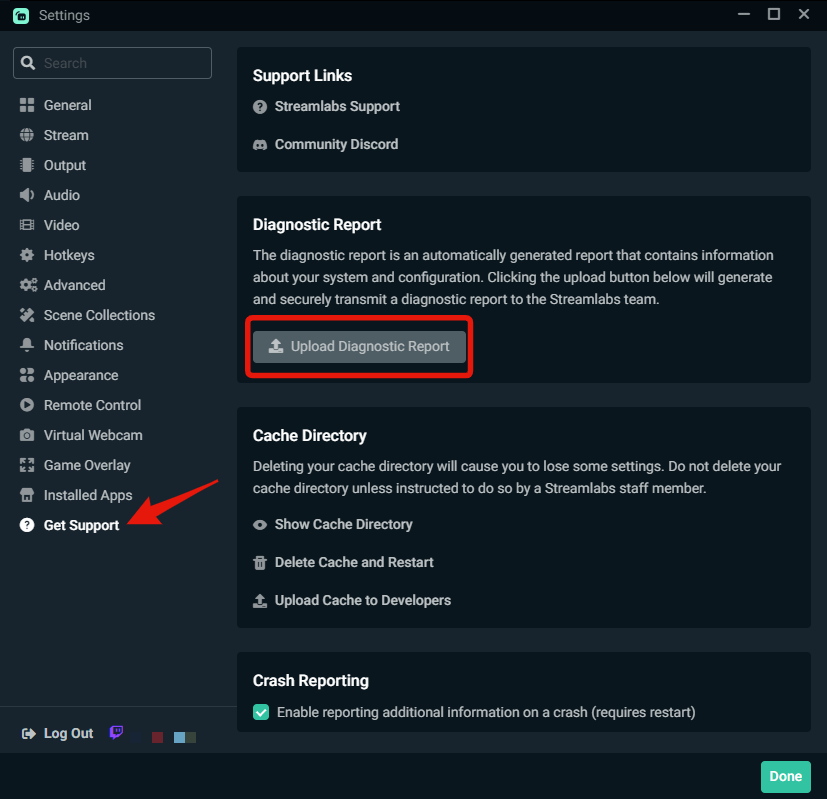 keen swift
oh tru i already sent in a ticket without that
gritty isle
keen swift
oh tru i already sent in a ticket without that
Okay, that's fine. IF you're able to get the Diagnostic Code, go ahead and then just reply to the last email for the ticket and include the Diagnostic Code. That will update your ticket with the code. The staff can look at the code and review information from your installation.
 gritty isle
keen swift
its works now
gritty isle
keen swift
its works now
Oh hello!?!?!
keen swift
ERM 🤣
gritty isle
Did you do anything different other than just randomly launch it now and it just worked?
Like maybe reboot your PC?
keen swift
uh i went to get help and pressed delete cache and restart and it just worked
gritty isle
keen swift
uh i went to get help and pressed delete cache and restart and it just worked
Ah, gotcha. You might go ahead and get the Diagnostic Code and add that to your ticket and also let them know that deleting the cache and restarting Streamlabs Desktop appears to resolve the issue.
gritty isle
keen swift
my overlays got deleted
It may have created a new, blank Scene Collection.
Click here (red circle) and see if your previous Scene Collection(s) are there.
 keen swift
nah it aint there

 hoary wraith
I’m com banned can I still stream on stream labs console
gritty isle
keen swift
nah it aint there
Dang. The data is still in the cloud. I'd go ahead and update your ticket by replying to the last email along with the Diagnostic Code and let them know about what happened with the Delete cache and restart option.
gritty isle
hoary wraith
I’m com banned can I still stream on stream labs console
Banned on Twitch?
hoary wraith
Communication banned on Xbox
gritty isle
hoary wraith
Communication banned on Xbox
Googling reveals that you might be able to stream but not be able to communicate with other players if in a multiplayer game.
I'd probably reach out to Microsoft for more information about your ban.
hoary wraith
Well Ik that but when I click go live it won’t let me
U think I could use Xbox companion app
gritty isle
hoary wraith
U think I could use Xbox companion app
You can try it but I can't guarantee that you can stream that way.
@keen swift If you have your ticket number hand and have the name of your Scene Collection, the staff can restore it for you.
gritty isle
Okay, let me relay that to the staff and see if they can locate that for you. Hang on!
gritty isle
keen swift
theres was two of them
Please close and reopen the Streamlabs Desktop app then check your scene collections again
keen swift
omg thanks so much
gritty isle
keen swift
omg thanks so much
You're welcome! 
Long day and week. I'm off to chill in a video game. Have a good rest of your day, folks! 👋
 formal meadow
Hey guys. I’m new to streaming . I’m having trouble with hearing my teammates on twitch when I’m live. I CAN hear the game itself. just not others on my team , can someone help me out please n thank you
 tough wedge
Hi! It's been a while since I streamed, why is my streamlabs not connecting to the server?
 gusty umbra
tough wedge
Hi! It's been a while since I streamed, why is my streamlabs not connecting to t...
gusty umbra
tough wedge
Hi! It's been a while since I streamed, why is my streamlabs not connecting to t...
Hey there! Thanks for being an ultra subscriber. You should head over to #vip-support
marble wind
runic lark
It isn't an internet issue, I have a low upload speed when hardwired in general ...
i should start counting how many times people say it 'isn't an internet issue' and then they find out it's an internet issue, i'm sure i'm in the upper double digits by now
you can skip the "call your isp" step, the next troubleshooting steps are "try a different isp" and "try a different house with a different isp"
runic lark
marble wind
i should start counting how many times people say it 'isn't an internet issue' a...
Actually it wasn't it was a program issue that seems to be common with Intel products
Though I'll admit the worst part is I think this happened one other time with my old PC, same reason. But since it only happened once I forgot to check that sort of thing
marble wind
@runic lark ah, yes, there's that too, intel "killer networking" network adapters come with software that causes issues, i can't check for that in streamlabs desktop since it hides its full logs and only shows an excerpt for the most common issues
runic lark
marble wind
<@315904560143007756> ah, yes, there's that too, intel "killer networking" netwo...
Precisely that. It's not a frequent enough issue it comes to mind even for people that answer that kind of stuff often. But hopefully ending the task will leave it at bay
marble wind
@runic lark download the driver-only package from https://www.intel.com/content/www/us/en/download/19779/intel-killer-performance-suite.html , uninstall all "killer" software from "add or remove programs", then install what you downloaded
abstract plazaBOT
Having trouble? Want to see if anyone else is having the same problem?
Check out our #known-issues channel! We do our best to keep this channel as current as possible with new bugs and progress updates!
If you can't find what you need please submit a ticket at: https://support.streamlabs.com/hc/en-us/requests/new
abstract plazaBOT
Are you knowledgeable about Streamlabs products?
Get rewarded for helping the Streamlabs Community here in Discord!
👉 Apply to be a part of the Streamlabs Support Volunteer Program!
Application Link:
https://forms.gle/eKS29zWfFjGEzaRp7
For details, see our post in
#announcements message
Do you have a Streamlabs Ultra membership? Are you part of the Streamlabs All-Stars program?
Get your Discord roles by going to this page here: https://streamlabs.com/dashboard#/settings/integrations and clicking "Link" next to Discord! Ultra members and higher tier All-Stars members will have access to private channels for support!
Interested in Ultra? Check it out here: https://streamlabs.com/ultra?refl=discord
 molten willow
Hello all, Long time user of Streamlabs, but all of a sudden, my stream starts disconnecting and reconnecting randomly and my stream restarts from the very beginning. I didnt change any settings, and my ISP didnt change or get worse, so i'm curious as to why? If anyone can help me that would be greatly appreciated
abstract plazaBOT
Having trouble? Want to see if anyone else is having the same problem?
Check out our #known-issues channel! We do our best to keep this channel as current as possible with new bugs and progress updates!
If you can't find what you need please submit a ticket at: https://support.streamlabs.com/hc/en-us/requests/new
marble wind
@molten willow does it report dropped frames?
molten willow
marble wind
<@186310332145336320> does it report dropped frames?
it does not, the entire thing just goes down and then comes back up a few seconds later, happens every minute to five minutes
marble wind
@molten willow twitch?
molten willow
yeah
marble wind
@molten willow run twitchtest, https://r1ch.net/projects/twitchtest past eyour stream key, settest duration to long, pick any ingest server wityh 100 "quality"
molten willow
oh ok, I will try this!
molten willow
marble wind
<@186310332145336320> run twitchtest, https://r1ch.net/projects/twitchtest past ...
what if quality doesnt show
 torn sleet
I’m haveing trouble getting streamlabs to stream to twitch can anyone help?
marble wind
@molten willow does it show "failed to connect"?
molten willow
nothing under quality and so far every server is coming back as failed
marble wind
@torn sleet do you get an error message?
@molten willow call your isp about this
molten willow
marble wind
<@514370387350650890> do you get an error message?
<@186310332145336320> call yo...
grrr, alright
oddly enough, quality is now coming thru when i disconnect my ethernet and use WiFi only lol
I get some high 80s, but no 100s
marble wind
@molten willow call your isp about this, say you're trying to livestream and upload speed drops
 balmy agate
Anyone help me with my audio issue , can’t seem to get to come through streamlabs but can get it through elgato 4k capture utility software
 valid sun
last night my chat disappeared
it looks like this now. Does anyone know how to make it go back to normal?

I tried restarting and that didnt help.
 rigid valve
hello @everyone, im new to this app and when i was trying to stream this pop up came. Is there anyone who knows how to solve this issue please help me. It will be much appreciated. Thank you in advance❤️
 runic lark
marble wind
<@315904560143007756> download the driver-only package from https://www.intel.co...
runic lark
marble wind
<@315904560143007756> download the driver-only package from https://www.intel.co...
seeing this many hours later but does that mean I'm just free to uninstall the thing? Cause I always worry about straight up removing installed by the company stuff lol
marble wind
@runic lark apps are not drivers, you'll not brick the system by removing them
abstract plazaBOT
Having trouble? Want to see if anyone else is having the same problem?
Check out our #known-issues channel! We do our best to keep this channel as current as possible with new bugs and progress updates!
If you can't find what you need please submit a ticket at: https://support.streamlabs.com/hc/en-us/requests/new
 formal jay
We’ve encountered multiple issues with custom commands in StreamLabs, especially surrounding the !editcommand function. The most critical problem is that !editcommand does not work at all — it produces no response or result, regardless of the syntax or user permissions.
Details:
!editcommand is completely non-functional. We've tried standard usage (!editcommand !example new text) as well as variations like !edit command, !commandedit, and others — none of them work.
!addcommand sometimes works, but with noticeable delay or lag, which is not normal behavior compared to other commands.
Even reliable, existing commands like !dc randomly stop working for a short time, then return to normal without explanation.
We have already ruled out common causes:
Cloudbot is fully enabled
User permissions are correctly set (we tested with both Streamer and Moderator roles)
Default commands are enabled in the dashboard
The bot has mod status in chat
No conflict with another bot (we disabled Nightbot and others during testing)
The issue occurs randomly and inconsistently, which makes it hard to reproduce.
Impact:
This makes it difficult to manage commands live during a stream, especially when quick updates are needed via !editcommand. Viewers and mods experience inconsistent behavior, which affects engagement and moderation tools.
Request:
Please investigate the issue with !editcommand and the unstable performance of commands overall. If !editcommand is not officially supported anymore, a clear update in the documentation or command list would be appreciated.
Thank you for your time and support.
formal jay
marble wind
also, is this ai generated?
Translated with ai - i couldnt describe the problem with my English perfectly
marble wind
@formal jay join the streamelements discord if you need help with their services
torn sleet
It said it failed to connect
It says it failed to connect to stream key logout and back in again
 warped thistle
Anyone ever have issues trying to connect two Mevo Start cameras?
I was able to see both cameras in the Mevo app, but could only get one to show up as a camera source. Tried doing one as a USB Webcam and the other an NDI source and both as web cams but could only see the first camera register as a source
 wet jasper
Hello guys i wanted to ask if anyone can help me setup my chatbot i already have some stuff setup and also tried stuff to see if it works but stuff like songrequests dont work for some reason.
 primal gyro
Does anyone know why this is not letting me select my twitch?
I used it before, I don’t have nor want to multi stream.
I logged out and in again.
I closed the app.
It’s still greyed out and I have no idea why
 abstract plazaBOT
Having trouble? Want to see if anyone else is having the same problem?
Check out our #known-issues channel! We do our best to keep this channel as current as possible with new bugs and progress updates!
If you can't find what you need please submit a ticket at: https://support.streamlabs.com/hc/en-us/requests/new
 near crystal
I'm having an issue with the Streamlabs OBS plugin for the Elgato Stream Deck. When I go to turn on a Source within a scene, it will not turn on unless it is the active scene. If I am in a separate scene, it will not turn on the source of the other scene. If try to, it just shows the yellow exclamation point on my stream deck and does nothing. This is preventing me from toggling my effects during streams. I'm on Windows 11. Didn't have this issue previously.
 crystal estuary
how do i stream to both yt and twitch?
gusty umbra
crystal estuary
how do i stream to both yt and twitch?
You would need to be an ultra subscriber and then it gives you access to multi stream.
crystal estuary
gusty umbra
You would need to be an ultra subscriber and then it gives you access to multi s...
oh alr ty
gusty umbra
formal jay
We’ve encountered multiple issues with custom commands in StreamLabs, especially...
I would recommend creating a ticket for this issue. https://support.streamlabs.com/hc/en-us/requests/new
abstract plazaBOT
Are you knowledgeable about Streamlabs products?
Get rewarded for helping the Streamlabs Community here in Discord!
👉 Apply to be a part of the Streamlabs Support Volunteer Program!
Application Link:
https://forms.gle/eKS29zWfFjGEzaRp7
For details, see our post in
#announcements message
Do you have a Streamlabs Ultra membership? Are you part of the Streamlabs All-Stars program?
Get your Discord roles by going to this page here: https://streamlabs.com/dashboard#/settings/integrations and clicking "Link" next to Discord! Ultra members and higher tier All-Stars members will have access to private channels for support!
Interested in Ultra? Check it out here: https://streamlabs.com/ultra?refl=discord
gritty isle
near crystal
I'm having an issue with the Streamlabs OBS plugin for the Elgato Stream Deck. W...
Did you upgrade your Stream Deck app to the new version, 6.9?
If so, note that Streamlabs Desktop support is no longer built into the Stream Deck and you'll need to visit the Marketplace in the Stream Deck app and install the Streamlabs Desktop plugin.
near crystal
gritty isle
Did you upgrade your Stream Deck app to the new version, 6.9?
If so, note tha...
yeah I did, I have before as well and I didn't have this problem
I've tried refreshing, creating a new scene and calling it, but it just won't turn on and off a source unless it's currently in the active scene
gritty isle
near crystal
yeah I did, I have before as well and I didn't have this problem
Did you upgrade to v6.9 of stream deck?
near crystal
I have yes
gritty isle
near crystal
I have yes
And you installed the Streamlabs desktop plugin?
 latent breach
Is there a reason why the Streamlabs Cloud pulled all my sources, but only half are showing up? some image/video sources transferred fine and can be viewed in their 'browse' source, but any that haven't been modified in 1-2+ years are inaccessible
i have tried messing with my firewalls, my file sharing, my network connection, full reinstalls. same problem.
 wooden trellis
Hello, can anyone help me? My PC is working fine, but when I open Streamlabs, all media stops or gets muted, and Spotify, YouTube, etc. won't load videos or music. This also happens with games, how can i fix this?
 dusky bay
Hi, my website llilium.live says that it is live, but its not accessible. the domain says that its live, but is not. even after publishing again, its still inaccessible
 gusty umbra
wooden trellis
Hello, can anyone help me? My PC is working fine, but when I open Streamlabs, al...
gusty umbra
wooden trellis
Hello, can anyone help me? My PC is working fine, but when I open Streamlabs, al...
Check your audio mixer. Recent windows updates changed a lot of settings back to “default device”. Change it to the specific piece of output hardware you’re using.
gusty umbra
dusky bay
Hi, my website llilium.live says that it is live, but its not accessible. the...
We don’t have access to handle domain issues here. Can you submit a ticket please. https://support.streamlabs.com/hc/en-us/requests/new
tight copper
CAN SOMEONE HELP? Its annoying to ask over and over again.
My recording feature in streamlabs doesn't work no matter what video guides I look up. I need to capture clips for my videos.
Originally I set up a new disk drive so I can have space for more videos and it was working fine still.
Now it keeps giving me errors & nothing I do works.

 wooden trellis
gusty umbra
Check your audio mixer. Recent windows updates changed a lot of settings back to...
wooden trellis
gusty umbra
Check your audio mixer. Recent windows updates changed a lot of settings back to...
all outputs are configured correctly, but when I open streamlabs, I can't play any games, I can't play videos, they just won't load, Spotify music just stops, and when I try to play it again, they give me a message that they can't play the music. I was using streamlabs for days, and then yesterday it came up with this "bug".
 cold anvil
Hey, I am brand new and I want to use StreamLabs for my TikTok streaming so I can see who is coming and going, and if people are chatting with me, using my macbook, while using my phone as the camera. It's just for shoppable demos. Is there a really great place for abject newbies to get info to be able to get started with a simple stream?
gritty isle
near crystal
other things within the plugin work, just not this
Have you removed and added back a button in the stream deck for one of these broken actions?
 indigo smelt
Hello, I am unable to multistream through TikTok and twitch using Streamlabs console even though it says I should be able to. I have a subscription and have disconnected and reconnected my TikTok and it still won’t work.
gusty umbra
cold anvil
Hey, I am brand new and I want to use StreamLabs for my TikTok streaming so I ca...
Our #1173605643484139591 has a ton of articles on all aspects of getting a stream setup and running. Check out the desktop section!
cold anvil
gusty umbra
Our <#1173605643484139591> has a ton of articles on all aspects of getting a str...
Thanks! it looks like I have to have permission from TikTok to do this. I'm just starting as a live streamer, so I am pretty sure they are not going to let me use advanced tools like this.
gusty umbra
cold anvil
Thanks! it looks like I have to have permission from TikTok to do this. I'm just...
You can apply through streamlabs to TikTok to see if they will approve you.
cold anvil
Okay, I will try to find that.
 crisp meadow
hello
i used to stream on streamlabs and OBS a lot, and it usually worked fine. I stopped for a couple years and I am trying to do it again. However, now my stream drops like 99% of my frames every time I try.
i ran a speed test to make sure i didnt have crazy low numbers and I also did that server test and didnt find anything abnormal i think


 kindred ivy
Hello, I am looking for a solution for my chat box widget: It's enabled, and worked on my previous stream without issue, but on my stream I ran today, without changing any settings, my chat would not appear in the chat box widget. Any help on this issue would be greatly appreciated
Nevermind, I figured it out
valid sun
kindred ivy
Hello, I am looking for a solution for my chat box widget: It's enabled, and wor...
I am having same issue, how did you solve if you dont mind?
plucky basalt
Just wondering if it's worth to be Monthly or Annual for Ultra package?
 forest solar
Hello, since a few days i don't understand why i can't choose multiple audio track on recording settings ? i didn't change anything, no update,...
ps : i'm on 1.18.3
 kindred ivy
valid sun
I am having same issue, how did you solve if you dont mind?
kindred ivy
valid sun
I am having same issue, how did you solve if you dont mind?
turns out if you change your Twitch username, you need to logout and login to fix iut
marble wind
@forest solar do you have any outputs (ndi, streaming, virtual cam) currently active? if yes, stop all of them, then you can change settings; try also switching from mkv to another format and back
forest solar
marble wind
<@155697066914480128> do you have any outputs (ndi, streaming, virtual cam) curr...
i think it's UI problem not my sources, after many searchs i can choose multiple track only if i go to "global settings" on Mixer but if i want to change on Settings (like my first screenshot), i can't and i don't know why it's begin at 0 to 5 and no 1->6
 marble wind
@forest solar this looks like a labeling inconsistency, tracks have internal indexes that count from 0 to 5, but humans usually count from 1 to 6;
if you record, how many tracks does the recording have?
forest solar
i have my 6 tracks so problem solved 🤔 but on Settings->Output->Recording, still have only 1 track checked and on Global Settings on Mixer i have my 6 audio tracks checked
marble wind
@forest solar i'd report this to streamlabs with a support ticket, https://support.streamlabs.com/hc/en-us/requests/new
abstract plazaBOT
Having trouble? Want to see if anyone else is having the same problem?
Check out our #known-issues channel! We do our best to keep this channel as current as possible with new bugs and progress updates!
If you can't find what you need please submit a ticket at: https://support.streamlabs.com/hc/en-us/requests/new
abstract plazaBOT
Are you knowledgeable about Streamlabs products?
Get rewarded for helping the Streamlabs Community here in Discord!
👉 Apply to be a part of the Streamlabs Support Volunteer Program!
Application Link:
https://forms.gle/eKS29zWfFjGEzaRp7
For details, see our post in
#announcements message
Do you have a Streamlabs Ultra membership? Are you part of the Streamlabs All-Stars program?
Get your Discord roles by going to this page here: https://streamlabs.com/dashboard#/settings/integrations and clicking "Link" next to Discord! Ultra members and higher tier All-Stars members will have access to private channels for support!
Interested in Ultra? Check it out here: https://streamlabs.com/ultra?refl=discord
valid sun
kindred ivy
turns out if you change your Twitch username, you need to logout and login to fi...
did it look like this?
 abstract plazaBOT
Having trouble? Want to see if anyone else is having the same problem?
Check out our #known-issues channel! We do our best to keep this channel as current as possible with new bugs and progress updates!
If you can't find what you need please submit a ticket at: https://support.streamlabs.com/hc/en-us/requests/new
kindred ivy
yeah and kept loading chat without succeeding
valid sun
hmm mine doesnt try to load chat or anything. It just looks like this whether im live or not. I didnt change anything on my twitch.
 odd bone
There seems to be an issue with the Subscription goal widget I've spoken to quite a few streamers and when you create a new sub goal and set your starting amount to zero it's showing thousands of subs
 uncut goblet
Hello i have issue about go live
Normally, it looks like Figure 1, but now it's like Figure2. How can I fix this🥹


 late anvil
Hi
I have a problem
I've more than once to connect my PayPal account and it is always not working
 sharp maple
Bit of a long one here.
Unable to connect streaming tool with Youtube to enable my account to have stream.
So I have done streaming for a long time and I have exhausted all of my options for troubleshooting on my end. I fear the issue is Youtube has some connection problem with my account and linking it to my streaming software but I have no idea why that is or how to fix it.
I use Streamlabs OBS and on my end SLOBS seems to state that my Youtube account is not enabled for livestreaming, so I click the "fix" option on my dashboard. Once I click the fix option, I am linked to my Youtube studio "go live" dashboard seen below.
This page seems to indicate that I am ready to start streaming, but it sits in this infinite loading screen and states that I am waiting for my streaming tool to start feeding it data. However, SLOBS wont give me the option to go live as it tells me my Youtube account needs me to wait 24 hours.
Youtube does not give me the option to wait 24 hours and I made sure that my account is in good standing to live steam. YT confirms this as well within my account, screenshot below.
So far I have tried to disconnect and reconnect my account with YT and SLOBS and reconnect it. I have given SLOBS and YT the access to each other as its been requested.
I have also tried doing a stream key submission but SLOBS will only let me do it as an additional output options and not the main YT chocie.
Let me know if anyone can help with this, I would like to start streaming on my account and avoid having to start my channel from scratch.


 valid brook
I have a issue with my screen capture can someone help
It starts to capture the video I want on youtube for like a second then stops I can see everything else on the page just not the video
I guess nobody responds here
 undone coral
How do I get unbanned from tik tok using stream labs?
gusty umbra
undone coral
How do I get unbanned from tik tok using stream labs?
Streamlabs has no input into TikTok account restrictions. You need to reach out to TikTok to appeal (or wait the specified time in the ban).
 granite oar
Hi, when using streamlabs, is it possible to add your twitch stream and then use that to stream to tiktok?
valid sun
still have same issue, been several days if anyone can help would appreciate it. very annoying bug. #technical-support message
 wintry vine
i am having an issue,subscriber alert not working while every other alert(member,superchat,tipping ) are working on youtube i am fairly new on this
undone coral
gusty umbra
Streamlabs has no input into TikTok account restrictions. You need to reach out ...
But I can live on my phone but not stream
Stream labs*
gusty umbra
undone coral
But I can live on my phone but not stream
You may be part of the #known-issues message can you please submit a ticket. A member of Streamlabs staff can see. https://support.streamlabs.com/hc/en-us/requests/new
abstract plazaBOT
Having trouble? Want to see if anyone else is having the same problem?
Check out our #known-issues channel! We do our best to keep this channel as current as possible with new bugs and progress updates!
If you can't find what you need please submit a ticket at: https://support.streamlabs.com/hc/en-us/requests/new
 mint jackal
I have an issue when streaming Minecraft that it's a black screen. Also what are the "best settings" for streaming Minecraft on twitch with a 2060 and a Ryzen 7 5700?
gusty umbra
mint jackal
I have an issue when streaming Minecraft that it's a black screen. Also what are...
Most variations of Minecraft don’t work with standard game capture. You generally have to capture your entire screen. As for settings. Starting at 1080p30fps is probably a safe bet. See how it looks. If it’s laggy, drop to 720p. If it’s smooth, you can try 60fps.
mint jackal
gusty umbra
Most variations of Minecraft don’t work with standard game capture. You generall...
Thank you!
valid sun
Rufus if you are on sometime today can you help me with my issue plz? my chat has disappeared from stream labs so I cant read or reply.
 sick depot
I can't change the title or information for my stream when I go live, I get an error message that says "failed to update settings for Twitch" is there a fix for this?
 spare jetty
@shrewd finch
 cursive herald
spare jetty
<@123020292489609218>
cursive herald
spare jetty
<@123020292489609218>
As mentioned, please do not @ users who aren't directly assisting you.
abstract plazaBOT
Are you knowledgeable about Streamlabs products?
Get rewarded for helping the Streamlabs Community here in Discord!
👉 Apply to be a part of the Streamlabs Support Volunteer Program!
Application Link:
https://forms.gle/eKS29zWfFjGEzaRp7
For details, see our post in
#announcements message
Do you have a Streamlabs Ultra membership? Are you part of the Streamlabs All-Stars program?
Get your Discord roles by going to this page here: https://streamlabs.com/dashboard#/settings/integrations and clicking "Link" next to Discord! Ultra members and higher tier All-Stars members will have access to private channels for support!
Interested in Ultra? Check it out here: https://streamlabs.com/ultra?refl=discord
 slender spindle
hello, ive been using streamlabs for a year now and its been incredible. since the last windows update i drop frames so bad i cant even stream, even if no game is runing. ive tried every youtube solution out there, is there anyone who can help me
gusty umbra
slender spindle
hello, ive been using streamlabs for a year now and its been incredible. since t...
Are you streaming to Twitch?
slender spindle
gusty umbra
Are you streaming to Twitch?
yes
ive followed every guide, changed all my settings, ive never had a problem until the last windows 10 update and i cant revert to the previous update
gusty umbra
slender spindle
ive followed every guide, changed all my settings, ive never had a problem until...
Dropped is usually isp or network related. Run this twitch test to see if you need to change your ingest server.
wispy latchBOT
Please run this twitch test tool to find out the best server (https://r1ch.net/projects/twitchtest). Be sure to run the test for either Medium or Long, as short won't give you the most accurate results and be sure to select your region from the listed options (if the regions are not applicable to you, please select 5-6 servers that are near you). You're looking for at least a quality of 84.
Once you've found a good server go to Settings > Stream > Stream to custom ingest and you can manually select your server.
slender spindle
i have really solid internet but ill try, thank you
near crystal
gritty isle
Have you removed and added back a button in the stream deck for one of these bro...
I have, I created a fresh button with a new action and it still has the same issue
slender spindle
its crazy cuz on the test most of my quality is zero but i pay for super high speed internet, im not sure why its so bad
the quality is all zero, must be an ISP thing
abstract plazaBOT
Having trouble? Want to see if anyone else is having the same problem?
Check out our #known-issues channel! We do our best to keep this channel as current as possible with new bugs and progress updates!
If you can't find what you need please submit a ticket at: https://support.streamlabs.com/hc/en-us/requests/new
abstract plazaBOT
Are you knowledgeable about Streamlabs products?
Get rewarded for helping the Streamlabs Community here in Discord!
👉 Apply to be a part of the Streamlabs Support Volunteer Program!
Application Link:
https://forms.gle/eKS29zWfFjGEzaRp7
For details, see our post in
#announcements message
Do you have a Streamlabs Ultra membership? Are you part of the Streamlabs All-Stars program?
Get your Discord roles by going to this page here: https://streamlabs.com/dashboard#/settings/integrations and clicking "Link" next to Discord! Ultra members and higher tier All-Stars members will have access to private channels for support!
Interested in Ultra? Check it out here: https://streamlabs.com/ultra?refl=discord
 vestal mica
Can some one help me?
abstract plazaBOT
Having trouble? Want to see if anyone else is having the same problem?
Check out our #known-issues channel! We do our best to keep this channel as current as possible with new bugs and progress updates!
If you can't find what you need please submit a ticket at: https://support.streamlabs.com/hc/en-us/requests/new
gritty isle
vestal mica
Can some one help me?
The issue with the Follower Goal was reported to the developers last night. Please submit a ticket here https://support.streamlabs.com/hc/en-us/requests/new and they'll add you to the report so that you get notified once the issue is fixed.
 jaunty skiff
Does anyone know how to have two seperate event lists? I want one to be white and one to be purple but when I change the theme it changes them all / the link doesn't change! I'd also like to add a somewhat transparent background to my credits so they are readable but don't know if this is possible?
gritty isle
jaunty skiff
Does anyone know how to have two seperate event lists? I want one to be white an...
You could create your own Widget Themes here https://streamlabs.com/dashboard#/widgetthemes and then from each one, copy the link for the Event List by clicking the 🔗 icon then click on the line for Event List and then add a Browser Source with that URL.

 grim pecan
hey quick question why are some subs not shown in the streamlabs mini feed and also dont trigger a sound alert
gritty isle
grim pecan
hey quick question why are some subs not shown in the streamlabs mini feed and a...
YouTube or Twitch?
grim pecan
twitch
gritty isle
grim pecan
twitch
Did you just become a Twitch Affiliate or Twitch Partner?
grim pecan
a while ago and a friend subbed during an add vbreak and its not shown in the minifeed and there was no alert
 stray jackal
hello i need help whenever i use streamlabs for twitch and only twitch it turns my screen verticle i do not have the dual mode thing on and i dont know what to do i looked it up and got nothing i have screen shots if needed\
gritty isle
grim pecan
a while ago and a friend subbed during an add vbreak and its not shown in the mi...
Had the been subscribed before and resubscribed?
grim pecan
yes and it was a prime sub
gritty isle
grim pecan
yes and it was a prime sub
And you have Prime Gaming Subs enabled? https://streamlabs.com/dashboard#/alertbox/twitch/subscriptions
 gritty isle
stray jackal
hello i need help whenever i use streamlabs for twitch and only twitch it turns ...
gritty isle
stray jackal
hello i need help whenever i use streamlabs for twitch and only twitch it turns ...
In Streamlabs Desktop, go to Settings > Video and check the Output Resolution. If it reads something like 1080x1920, change it to 1920x1080.
stray jackal
gritty isle
In Streamlabs Desktop, go to Settings > Video and check the Output Resolution. ...
it is already set to 1920x1080
i cant send the screenshot but it is
 gritty isle
stray jackal
gritty isle
stray jackal
And that's the Output Resolution and not the Base Resolution?
stray jackal
they are both 1920x1080
 grim pecan
gritty isle
And you have Prime Gaming Subs enabled? <https://streamlabs.com/dashboard#/aler...
grim pecan
gritty isle
And you have Prime Gaming Subs enabled? <https://streamlabs.com/dashboard#/aler...
where do i find this window
gritty isle
stray jackal
they are both 1920x1080
Okay, then right click on your source, choose Transform, Reset Transformation. Then right click on the source again, choose Transform, Fit to Screen.
stray jackal
grim pecan
where do i find this window
click the link he sent
gritty isle
And log in with your Twitch.
grim pecan
yes have them enabled
stray jackal
gritty isle
Okay, then right click on your source, choose Transform, Reset Transformation. ...
ok yes that fixed it thank you
gritty isle
grim pecan
yes have them enabled
Interesting. If have Streamlabs Desktop open and in the scene with the Alert Box, and you replay the alert from the Recent Events page https://streamlabs.com/dashboard#/recentevents, do you see and hear the alert in the Preview Window in Streamlabs Desktop?
gritty isle
stray jackal
ok yes that fixed it thank you
You're welcome.
You might have to do that with other sources, if you have more than just the capture source.
grim pecan
maybe i use the twitch alert box but it is enabled there aswell
and it should still be shown in the streamlabs minifeed right?
gritty isle
grim pecan
and it should still be shown in the streamlabs minifeed right?
So it doesn't appear in the Recent Events or Mini Feed?
grim pecan
exactly
gritty isle
grim pecan
exactly
And the only issue is this one resub was detected or all subs not working?
gritty isle
grim pecan
some are shown some arent
And the ones that aren't show are all resubs or just regular subs?
grim pecan
both
gritty isle
grim pecan
both
Let's refresh the connection between Streamlabs and Twitch.
NOTE 👉 This disconnect process will not go back and capture events that were missed. Events are sent over the API only once and if they are missed, they are missed forever. Going forward from once you reconnected by logging back in, Streamlabs should capture events from Twitch.
-
Log out of the Streamlabs web site on every device you access it: Click your PFP and choose Log out.
-
If you use Streamlabs Console, log out of the Streamlabs Console web site on every device you access it: Click your PFP and choose Log out.
-
If you use the standalone Streamlabels application, log out of that.
-
Log out in Streamlabs Desktop (see next post on how to do that).
-
Follow this guide: https://streamlabs.com/content-hub/post/how-to-disconnect-your-streamlabs-account. Just follow the section for Twitch.
-
Navigate back to the Streamlabs web site and log in with your Twitch. This re-establishes the connection. You can verify this by going back to https://www.twitch.tv/settings/connections, scrolling down to Other Connections and examine the Streamlabs connection. ** It should say "Connected a few minutes ago" other short period of time. **
-
IMPORTANT: Once you have completed the guide, go back to the Streamlabs web site https://streamlabs.com/dashboard#/recentevents, click the Live Actions tab, scroll all the way to the bottom and click the Reload Widgets button. ** PLEASE Don't skip this step! **
-
Log back in to all the other Streamlabs products you use.
👉 ** REMEMBER, this process will not go back and capture events that were missed. ** 👈
👉 ** REMEMBER, this process will not go back and capture events that were missed. ** 👈
👉 ** REMEMBER, this process will not go back and capture events that were missed. ** 👈
👉 ** REMEMBER, this process will not go back and capture events that were missed. ** 👈
See how it goes on your next stream.
grim pecan
will do
 thin bear
My Streamlabs works fine when on Wifi - But as soon as I connect my Ethernet Cable - I start dropping frames. i don't have this issue on other streaming platforms - what can I do
gritty isle
@south urchin You had to have claimed it by March 18th and then redeemed it by April 18th.
 jolly niche
I updated my computer and now Streamlabs isn't capturing any audio from VoiceMeeter
abstract plazaBOT
Having trouble? Want to see if anyone else is having the same problem?
Check out our #known-issues channel! We do our best to keep this channel as current as possible with new bugs and progress updates!
If you can't find what you need please submit a ticket at: https://support.streamlabs.com/hc/en-us/requests/new
 latent bramble
Hi
 tropic grotto
Hey how can I Fix the Video Delay on my stream ? And I wanted to switch it from twitch to YouTube but I don’t know how
abstract plazaBOT
Are you knowledgeable about Streamlabs products?
Get rewarded for helping the Streamlabs Community here in Discord!
👉 Apply to be a part of the Streamlabs Support Volunteer Program!
Application Link:
https://forms.gle/eKS29zWfFjGEzaRp7
For details, see our post in
#announcements message
Do you have a Streamlabs Ultra membership? Are you part of the Streamlabs All-Stars program?
Get your Discord roles by going to this page here: https://streamlabs.com/dashboard#/settings/integrations and clicking "Link" next to Discord! Ultra members and higher tier All-Stars members will have access to private channels for support!
Interested in Ultra? Check it out here: https://streamlabs.com/ultra?refl=discord
 raven briar
I found a member doing unsolicited friend requests
agile owl
 low shore
hey y'all, is there any reason why I can't customize this particular panel? every time I click into it a blank page loads. All other panels seem to work okay.

 void forum
hey question! Ive been using the enhanced broadcasting and it seems like around 2 hours it just craps out and goes offline for me, is this is an issue i can fix?
wispy latchBOT
Please run this twitch test tool to find out the best server (https://r1ch.net/projects/twitchtest). Be sure to run the test for either Medium or Long, as short won't give you the most accurate results and be sure to select your region from the listed options (if the regions are not applicable to you, please select 5-6 servers that are near you). You're looking for at least a quality of 84.
Once you've found a good server go to Settings > Stream > Stream to custom ingest and you can manually select your server.
gritty isle
Dropped Frames are indeed a network issue, between your cable modem and the ingest. Once the packet leaves your PC, you have no control over how it routes.
void forum
gritty isle
Dropped Frames are indeed a network issue, between your cable modem and the inge...
so not on auto?
gritty isle
void forum
so not on auto?
That reply wasn’t for you. Someone replied to my reply to someone else then deleted their post.
@void forum Please hop over to #vip-support for assistance.
void forum
gritty isle
<@189215927127113728> Please hop over to <#606591508623392788> for assistance.
kk
 rich dock
While using collab cam my audio from desktop isnt shared. Is this normal?
 dreamy hazel
Can someone let me know why my stream keeps on crashing with the rodecaster pro? I created a diagnostic report where do I paste that info?
abstract plazaBOT
Having trouble? Want to see if anyone else is having the same problem?
Check out our #known-issues channel! We do our best to keep this channel as current as possible with new bugs and progress updates!
If you can't find what you need please submit a ticket at: https://support.streamlabs.com/hc/en-us/requests/new
abstract plazaBOT
Are you knowledgeable about Streamlabs products?
Get rewarded for helping the Streamlabs Community here in Discord!
👉 Apply to be a part of the Streamlabs Support Volunteer Program!
Application Link:
https://forms.gle/eKS29zWfFjGEzaRp7
For details, see our post in
#announcements message
Do you have a Streamlabs Ultra membership? Are you part of the Streamlabs All-Stars program?
Get your Discord roles by going to this page here: https://streamlabs.com/dashboard#/settings/integrations and clicking "Link" next to Discord! Ultra members and higher tier All-Stars members will have access to private channels for support!
Interested in Ultra? Check it out here: https://streamlabs.com/ultra?refl=discord
 slate flare
my stream labs keeps saying to set up my stream when i already have it set up and after this shows up please help me i need to stream soon and need it fix
 humble gale
slate flare
my stream labs keeps saying to set up my stream when i already have it set up an...
slate flare
humble gale
slate flare
my stream labs keeps saying to set up my stream when i already have it set up an...
slate flare
that does not help i uninstall it too wtf
 humble gale
slate flare
that does not help i uninstall it too wtf
humble gale
slate flare
that does not help i uninstall it too wtf
If you read on that is for submitting a ticket. but that's all the info that the volunteers have
idk why the diagnostic report wouldn't work, i just know that's what has been shared by volunteers before
slate flare
can some one Team viwer me in the support team?
humble gale
slate flare
can some one Team viwer me in the support team?
support team only works in tickets. this is for the community to help each other if we know the answers
slate flare
got it i see
 austere drum
Yesterday when I started the stream the dual output service took 30 seconds to connect and then during the hour-long stream it had several disconnections. I have ultra giga fiber so it's not a bandwidth problem, are you having problems?
gritty isle
austere drum
Yesterday when I started the stream the dual output service took 30 seconds to c...
Is one of your destinations Twitch?
abstract plazaBOT
Having trouble? Want to see if anyone else is having the same problem?
Check out our #known-issues channel! We do our best to keep this channel as current as possible with new bugs and progress updates!
If you can't find what you need please submit a ticket at: https://support.streamlabs.com/hc/en-us/requests/new
 echo remnant
My stream is picking up sound from muted microphone, how to fix this?
gusty umbra
echo remnant
My stream is picking up sound from muted microphone, how to fix this?
Disable all other microphones on your machine in windows.
 faint grail
is there a way to remove green screen background live on streamlabs
dreamy hazel
dreamy hazel
Can someone let me know why my stream keeps on crashing with the rodecaster pro?...
gritty isle
dreamy hazel
Honestly, I would go ahead and submit a ticket for that: https://support.streamlabs.com/hc/en-us/requests/new. Please put the diagnostic code in the body of your ticket. Only the staff have access to the diagnostic reports. Us Volunteers don't have access to them.
dreamy hazel
Appreciate you @gritty isle
gritty isle
dreamy hazel
Appreciate you <@301571565840236564>
You're welcome.
 analog yoke
Hi folks. I'm having trouble pulling my iphone into a scene in Streamlabs OBS desktop on windows. Collab Cam doesn't seem to recognize the feed from Camo. Is there a different app I should be using?
echo remnant
How do I disable microphones on windows?
My mixer is set to my gaming headset microphone, and I have muted my microphone, but still somehow it picks up sound on my stream
gusty umbra
echo remnant
My mixer is set to my gaming headset microphone, and I have muted my microphone,...
In win11 it's settings > system > sound and you can see what input and output devices are enabled. Disable anything that isnt your headset for mic (webcam, or built in)
 humble hearth
So I’m trying to IRL stream and I have the mobile app on my phone and anytime someone follows. It should play a sound or even when someone donates I wanna have TTSI enabled all this stuff but yet it won’t play the sound and it doesn’t work. Can someone please help
abstract plazaBOT
Having trouble? Want to see if anyone else is having the same problem?
Check out our #known-issues channel! We do our best to keep this channel as current as possible with new bugs and progress updates!
If you can't find what you need please submit a ticket at: https://support.streamlabs.com/hc/en-us/requests/new
 pale drum
Hey! can someone here please help me my facecam has a greenscreen filter on but i cant find any filters on my cam even if i do the camscene complette from scratch it still removes green :/ any ideas?
 urban totem
Have you tried removing it and trying again?
pale drum
yes even if i make it complettly new
 crimson dock
Hey so I don't know if I had anything to do with this but my StreamLabs will start "streaming" and will even trigger the notifications for my channels but it will not actually be streaming. For Tiktok, it opens everything automatically, it starts counting as if a stream is happening, it sends out notifications, but it doesn't actually stream. What could this be?
pale drum
problem solved-.-
filter was in my scene not in my source how stupid i am omg-.- still thanks
 dry geyser
Can we move Alert text boxes manually / custom vs the 3 layout options?
Struggling to figure out how and it's also doubling up notification when I test ?
urban totem
I think you can move it when you are editing the alerts such as different colours or emojis etc
crimson dock
How do I find my streamlabs username?
urban totem
I think it is just your email
 abstract steeple
Can anyone walk me through Keybinding scenes for a simpler and less messy swap?
gritty isle
crimson dock
How do I find my streamlabs username?
It will be the name on your Tip URL https://streamlabs.com/dashboard#/tipping/methods
https://streamlabs.com/<streamlabs username>/tip
 tender lotus
im needing help so i use stream labs to stream but everytime i stream on twitch my game is enlarged on twitch live in other words im only able to see the corner of my game but if i go to the stream labs page it goes back to normal idk if thats fixable

This is what its doing every time i stream
crimson dock
gritty isle
It will be the name on your Tip URL <https://streamlabs.com/dashboard#/tipping/m...
Ahh ok
marble wind
again, in cqp the main difference between nvenc presets p1~p7 is in file size, not quality
> In terms of SSD Speeds what CQ Level would be good to use?
the valid range is from 0 (lossless) to 51 (max compression), every +6 will cut the average bit rate approximately in half; in streamlabs desktop specifically, the qp range is from 1 to 51, and if you want to use 0, change rate control mode to "lossless"
> Then I use Shutter Encoder to render in H.264 again with 16 CQ for YouTube.
youtube will accept your dnxhr encode as-is, there's no need to reencode further, unless it's over their file size limit (probably 120 or 240 gb per video, i forgot)
i'd recommend recording as close to lossless as you can comfortably manage (maybe try the lossless preset in simple output mode)
marble wind
> Okay so I can use any CQ level without worrying about write speeds with this SSD?
that's a tough one to answer, every SSD's write speed goes down a bit when it heats up, but by how much? i don't know, i never benchmarked this;
> so uploading the DNxHR files would take way too long for me unfortunately
does it allow targa (truevision tga), or qtrle (quicktime rle)?
> Would render with H.264 in DaVinci but it doesn't seem to work very well
i heard there's a paid plugin for resolve, called ... i forgot what it's called, but it exists and adds a variety of new encoders, including probably x264
> What difference would the Simple Lossless Preset be to the Manual/Advanced settings?
simple output mode "lossless" preset uses utvideo, a software lossless encoder; nvenc also has a lossless preset in advanced output mode, might have better performance; i validated both encoders, they are indeed lossless*
> For Advanced Mode would you have a recommendation for Keyframes & Multipass Mode?
higher keyint means smaller files (with the same quality), but also worse performance in most video editing software, so i usually use 1 second or less (less is not possible in streamlabs desktop, only in obs-studio)
> I believe Tuning: High Quality and Profile: High are recommended also?
tuning should always be "high quality", profile can be changed to baseline if you need very high throughput (say, recording at 1080p at over 240 fps)
* "lossless" in context of video encoding is a highly misleading term, one has to be very specific about in what aspect a video, or a video processing operation, is lossless
for example, remuxing from mkv to mp4 is lossless: the video does not degrade in any way, but if it was lossy to begin with, it's going to remain this way, so in this context we're not adding generational loss
newtek ndi(tm) also advertises that it does not add generational loss, but it's lossy
"lossless" video codecs are typically lossless in the sense that whatever bitstream they receive is saved as-is, the decoded bitstream will have a full md5 match with the input stream, but is the input stream lossless? or has it been preprocessed in a lossy manner, say, converted from RGB to NV12, or from sRGB to Rec.709? those are lossy conversions
> Multipass is fine at Two Passes (Full Resolution)?
i have mixed data on this, this choice probably doesn't matter in this context - unless you start having performance issues, in which case switch to quarter res or single-pass
> From what I read previously anything below 20 should be visually lossless?
all quality loss is cumulative; the more detail you destroy, the worse it'll get; first, streamlabs desktop will introduce jpeg-like artifacts, then resolve will add more artifacts with dnxhr encoding, then shutter encoder, then youtube; in an ideal world, you'd have infinite storage space to use lossless encoders every step of the way and upload a lossless h264 encode to youtube, but we're not in that world; don't worry too much about it, obsessing over objective quality can get in the way of subjective quality (making videos that are fun to watch)
> If the SSD is struggling how will I know?
issues caused by slow storage are reported as "encoding lag"; with lossy encoding at cqp 16 at 1080p60, this is completely unheard of, a hard drive can manage these kinds of write speeds
> Does 2560x1440p60 change much?
i'm recording first person games at 1440p at 120 fps, average bit rates are 100 to 300 in most games, spiking to 500 and higher, a hard drive can manage that (7200rpm CMR SATA hard drives manage ~880 Mbps reliably)
> Basically is it worth going below 20 CQ?
that is subjective; if i was doing serious production and high objective quality was deemed important, i'd take the time and effort to do the best possible production with the available hardware, but since i'm mainly producing for myself and select recipients, cqp 20 is adequate, i switch to cqp 5 for low motion footage (desktop recording / visual novel games)
(i'm also doing one such "serious" production, where i do use lossless nvenc)
> Isnt the SLOBS recording now lossless with these settings
again, the term "lossless" is highly contextual
you're doing cqp 16, that's "visually lossless", meaning a human is unlikely to spot quality degradation, but mathematically, the video is different from what you had on your screen, and this will result in accumulating error as you process and reencode it
> DNxHR is also supposed to be lossless?
nope, dnxhr is lossy https://en.wikipedia.org/wiki/DNxHR_codec
@lean mural this is almost an exact replica of simple output mode indistinguishable presets, which once again proves that obs-studio's defaults are adequate
have you been warned about mp4/mov corrupting yet?
gritty isle
Team MKV.
marble wind
don't get sentimental with video containers, mkv can be a piece of work too due to timestamp precision
gritty isle
Eh, at least so far I've never had a problem with it.
marble wind
@lean mural mov and mp4 have to be finalized; if this process gets interrupted by anything at all, the entire file is unusable; there are tools that claim to be able to recover such files, but it's not a guarantee; mkv and flv are safe in this regard
@lean mural no, if streamlabs desktop crashes, or run out of disk space, or the pc reboots, with mkv or flv you still get to keep the video - as much of it as was written to disk, so you lose at most a few seconds, whereas with mov or mp4 you lose the entire recording
 hollow mountain
Quick question regarding billing/auto pay stuff. Not urgent
gritty isle
hollow mountain
Quick question regarding billing/auto pay stuff. Not urgent
Hop over to #vip-support but note that you might be asked to submit a ticket.
hollow mountain
Thank you, Rufus
gritty isle
hollow mountain
Thank you, Rufus
You're welcome.
marble wind
newer versions of resolve (after 2020, i think) can import mkv directly, so this is preferable; flv doesn't support mutliple audio tracks
> or at least very close
it's not lossless, but close enough for most production needs
> should I render with anything else instead of DNxHR HQ in DaVinci to maintain quality?
in an ideal world, maybe, but this is fine
funny, you're putting all this effort into trying to improve your videos, only to learn you're already doing everything fine
 glass harbor
I have no idea how to use stream labs and yes i have looked through some tutorials but now im just more confuzed
gritty isle
glass harbor
I have no idea how to use stream labs and yes i have looked through some tutoria...
I'd suggest the Getting Started with Streamlabs Desktop guide: https://streamlabs.com/content-hub/post/getting-started-with-streamlabs-desktop.
If you have specific questions, ask those.
marble wind
i used to record with shadowplay, which is capped at 50 Mbps for 1080p60, and in very fast motion you can see blocking artifacts in first person games, that's when it occurred to me that i have to switch to obs-classic (and later to obs-studio), the year was probably 2015 or 2016
obs-classic had an upper limit of about 230 Mbps (would fail to start recording with nvenc above that), obs-studio has no practical upper limit
glass harbor
can streamlabs work with on xbox streaming?
gritty isle
glass harbor
can streamlabs work with on xbox streaming?
Streamlabs Console, yes.
Streamlabs Desktop with a capture card, yes.
Streamlabs Desktop without a capture card, no.
marble wind
@lean mural unless your game is running at a native 1600x900, 900p is a bad idea due to how scaling filters work; 936p is usually a net negative compared to 1080p and 720p, and out of the other 2 options, you're choosing between blur and blocking artifacts, both are bad, but which one is worse is subjective
glass harbor
gritty isle
Streamlabs Console, yes.
Streamlabs Desktop with a capture card, yes.
Streamla...
how do I use stream labs to stream on my xbox
gritty isle
glass harbor
how do I use stream labs to stream on my xbox
Do you have a PC or a Mac with a capture card?
glass harbor
im using a omen gaming laptop
I dont fully understand what a capture card is either
i apologize im a big time Newbie
gritty isle
glass harbor
im using a omen gaming laptop
Then I'd suggest Streamlabs Console: https://streamlabs.com/content-hub/post/streamlabs-console-faq.
 acoustic heath
hi
marble wind
@lean mural
i have mixed data on whether 0, 2 or 4 b-frames are preferable for live video; if you lack the means to run your own tests, i'd recommend 2;
if i can assume you're playing at 1440p, downscaling to 720p is preferable over 1080p since it's an integer scale factor;
your choice of scaling filter gets a subjective dislike from me since i don't like ringing artifacts, but some people prefer it to bicubic;
are you streaming and recording at the same time?
gritty isle
marble wind
<@1242564370748149793>
i have mixed data on whether 0, 2 or 4 b-frames are pref...
Nvidia says "Max B-Frames: Set to 4. If you uncheck the Look-ahead option, reduce this to 2 B-Frames." https://www.nvidia.com/en-us/geforce/guides/broadcasting-guide/
marble wind
@gritty isle nvidia says a lot of things, not all of them are true
acoustic heath
I have a problem with my Alert box not being heard in my streams. It can be seen but not heard and it can only be heard in the alert configuration preview
gritty isle
marble wind
<@301571565840236564> nvidia says a lot of things, not all of them are true
Hahahahahahahahaha
gritty isle
acoustic heath
I have a problem with my Alert box not being heard in my streams. It can be seen...
Go to your Recent Events page https://streamlabs.com/dashboard#/recentevents on the Streamlabs web site and check here to make sure that your alerts are not muted.
If that icon is red speaker with a slash, your alerts are muted. Click it to umute them.
Another thing to check is to make sure your Master Alert Volume is not too low, or zero.

 marble wind
@lean mural psycho visual tuning enables spatial aq and temporal aq, this is useful for many types of videos (where important things happen in the center of the screen); lookahead allows b-frames to fluctuate between 0 and the configured value, whether this has benefit or not is difficult to properly evaluate without specialized tools (and even with them, the conclusion usually amounts to "idk lol")
one of my acquaintances has such a specialized tool (elecard streameye) and he was very fascinated with his findings, but didn't discover anything of immediate practical use
p7 is fine if you're not having performance issues with it, expect higher gpu usage compared to p5
acoustic heath
gritty isle
Go to your Recent Events page <https://streamlabs.com/dashboard#/recentevents> o...
i love u
marble wind
i can't use p7 because at 1440p120, it's not realtime (~130 fps at idle load but i can easily dip below that with a game running)
@lean mural
> ^ and Two Pass mode again?
i have very limited data on this, most people lack the skills necessary to create accurate observations on its impact, and out of those who do, only one noted on this, quoting from my memory: "on newer nvenc iterations (rtx 2000 and higher), 2-pass gives minimal benefits, or sometimes a loss in quality"; note that this info may now be outdated, and/or may have been inaccurate to begin with, i lack the means to validate this
> but I did recently start playing in VR which is maybe working the GPU/CPU abit more now. So maybe I could go P6 to give it abit of breathing room?
aim for 90% gpu usage or less; set game resolution to "100%" instead of "automatic"in steamVR settings
valid sun
My chat has disappeared on my stream labs, does anyone know how to fix it?
gritty isle
Have a good stream! 
marble wind
> Did also notice the "Enhanced broadcasting" Beta Option when starting a Stream but idk how much I trust that lol
i consider it a major net positive for twitch and streamers, since it means anyone can have transcoding; currently it's being actively developed, so twitch keeps changing its settings, but it's useful in its current state
gritty isle
valid sun
My chat has disappeared on my stream labs, does anyone know how to fix it?
The embedded chat dock in Streamlabs Desktop (that you see locally) or the Chatbox Widget (chat on the stream)?
valid sun
gritty isle
The embedded chat dock in Streamlabs Desktop (that you see locally) or the Chatb...
#technical-support message it looks like this
wait it seems to have fixed itself. which is wild because it was broken over the entire weekend
I just went live to test it and its working now. I have streamed every day for 4 days and its been broken 😮
gritty isle
valid sun
wait it seems to have fixed itself. which is wild because it was broken over the...
That's great! Next time I would (in Streamlabs Desktop), log out, restart Streamlabs Desktop, and log back in.
valid sun
gritty isle
That's great! Next time I would (in Streamlabs Desktop), log out, restart Strea...
okay ty @gritty isle ty for always helping
gritty isle
valid sun
okay ty <@301571565840236564> ty for always helping
You're welcome.
valid sun
Not sure if the command worked btw
gritty isle
Oh dang, it didn't.
They refreshed the commands recently, maybe that one went away.
You know how to log out/log in?
valid sun
I do 🙂
abstract plazaBOT
Having trouble? Want to see if anyone else is having the same problem?
Check out our #known-issues channel! We do our best to keep this channel as current as possible with new bugs and progress updates!
If you can't find what you need please submit a ticket at: https://support.streamlabs.com/hc/en-us/requests/new
gritty isle
That's it for me, folks! Time to go play in traffic! 👋
 candid grove
I’m having trouble with this error showing up every time I try to screenshare stream from the mobile app to YouTube. I don’t understand what this means

 chrome widget
Is anyone else havign issues with one person's collab cam showing up as a black screen?
 woeful wolf
I need help adding discord as it's own audio source... If I use "Application Audio Capture", it works for that one voice chat/group chat, but not any other channels. OBS studios has an option where you can select, "match exactly otherwise match title from window"
 gilded shard
Hello, my Twitch chat is no longer working on Streamlabs.
I've logged out and logged back in, but nothing works. I've updated Streamlabs, but it's still not working. Do you have any suggestions for a solution? 🙂
 abstract plazaBOT
Are you knowledgeable about Streamlabs products?
Get rewarded for helping the Streamlabs Community here in Discord!
👉 Apply to be a part of the Streamlabs Support Volunteer Program!
Application Link:
https://forms.gle/eKS29zWfFjGEzaRp7
For details, see our post in
#announcements message
Do you have a Streamlabs Ultra membership? Are you part of the Streamlabs All-Stars program?
Get your Discord roles by going to this page here: https://streamlabs.com/dashboard#/settings/integrations and clicking "Link" next to Discord! Ultra members and higher tier All-Stars members will have access to private channels for support!
Interested in Ultra? Check it out here: https://streamlabs.com/ultra?refl=discord
gritty isle
candid grove
I’m having trouble with this error showing up every time I try to screenshare st...
Refreshing the connection between Streamlabs and YouTube will resolve this.
-
Log out of the Streamlabs web site on every device you access it: Click your PFP and choose Log out.
-
If you use Streamlabs Console, log out of the Streamlabs Console web site on every device you access it: Click your PFP and choose Log out.
-
If you use the standalone Streamlabels application, log out of that.
-
Log out in Streamlabs Desktop (see next post on how to do that).
-
Follow this guide: https://streamlabs.com/content-hub/post/how-to-disconnect-your-streamlabs-account. Just follow the section for YouTube.
-
Navigate back to the Streamlabs web site and log in with your YouTube. This re-establishes the connection.
-
👉 IMPORTANT: Once you have completed the guide, go back to the Streamlabs web site https://streamlabs.com/dashboard#/recentevents, click the Live Actions tab, scroll all the way to the bottom and click the Reload Widgets button. PLEASE Don't skip this step!
-
Log back in to all the other Streamlabs products you use.
It's not obvious when you log in, but one of the interstitials will say something like Streamlabs has access to x of 6 scopes. Click there and make sure that all 6 of the boxes are checked and then proceed through the rest of the log in process.
👇 👇 👇 👇
The most popular streaming platform for Twitch, YouTube and Facebook. Cloud-based and used by 70% of Twitch. Grow with Streamlabs Desktop, alerts, 1000+ overlays, analytics, chatbot, tipping, merch and more.
woeful wolf
woeful wolf
I need help adding discord as it's own audio source... If I use "Application Aud...
bumping
 surreal ingot
Hi streamlabs I’m Jameel Perkins asking is it please that I can use my capture card for streamlabs mobile app with my favorite gaming console Nintendo Switch please help me out thank u on iOS https://streamlabs.com/mobile-app?srsltid=AfmBOoodtQ6PYWG3R-WAIyV9Nx80z_i4ymMmcfAWfRly-nTrxCrPKilh


 broken lintel
Hey Support! So this may be a little confusing as I may not use the correct wording but my issue is I am wanting to copy and paste my source (Elgato Capture Card) to my vertical output ONLY and not my horizontal output, Im not sure whats the best process to go about that as when I do copy and paste my video capture card source it displays on both outputs creating multiple "layers" on my horizontal output (not really my main issue as my first source covers the other pastes, just kind of worried about having too much sources from multiple pastes which could potentially cause my stream to lag) The main issue I am having is the "pastes" being linked together via vertical and horizontal and was wondering if there was a way to separate them? possibly have one source set for the vertical outputs and one set for horizontal outputs. even when i try to rename one of the pasted sources, it changes the name of all of them to the exact same name i chose. Another thing, which is quite annoying is how there does'nt seem to be an easy way for me to crop the additional source I add? Is there a keyboard shortcut to cropping a source to whichever part of the source you want to capture without having to type in a bunch of numbers?


And my Paste (duplicate) option is not popping up, not sure if thats the apex of the issues im having but any help would be amazing
 trim canyon
how do i start streeming
 tranquil fulcrum
i need help figuring out how to put my chat on my screen while im playing. is there anyway to do this using steamlabs?
marble wind
@broken lintel drag it off screen on the other canvas
video capture device sources can't be duplicated since a single device can usually only serve video to one recipient, and a second source would count as a second recipient
you could also try the aitum vertical canvas plugin for obs-studio, as well as the source clone plugin for obs-studio
abstract plazaBOT
Having trouble? Want to see if anyone else is having the same problem?
Check out our #known-issues channel! We do our best to keep this channel as current as possible with new bugs and progress updates!
If you can't find what you need please submit a ticket at: https://support.streamlabs.com/hc/en-us/requests/new
abstract plazaBOT
Are you knowledgeable about Streamlabs products?
Get rewarded for helping the Streamlabs Community here in Discord!
👉 Apply to be a part of the Streamlabs Support Volunteer Program!
Application Link:
https://forms.gle/eKS29zWfFjGEzaRp7
For details, see our post in
#announcements message
Do you have a Streamlabs Ultra membership? Are you part of the Streamlabs All-Stars program?
Get your Discord roles by going to this page here: https://streamlabs.com/dashboard#/settings/integrations and clicking "Link" next to Discord! Ultra members and higher tier All-Stars members will have access to private channels for support!
Interested in Ultra? Check it out here: https://streamlabs.com/ultra?refl=discord
 wet trellis
Hello, when im longer not online or in the Streamlabs Interface than the Cloudbot automatically turned off. How Can I turn it on forever? Is there a Solution?
gritty isle
wet trellis
Hello, when im longer not online or in the Streamlabs Interface than the Cloudbo...
To conserve resources, Cloudbot will automatically toggle off if you don’t use it for an extended period of time. There is no fix or workaround or setting or solution. Add to your workflow a step to check Cloudbot.
abstract plazaBOT
Having trouble? Want to see if anyone else is having the same problem?
Check out our #known-issues channel! We do our best to keep this channel as current as possible with new bugs and progress updates!
If you can't find what you need please submit a ticket at: https://support.streamlabs.com/hc/en-us/requests/new
 acoustic gate
hey, asking about the Toggle Overlay to see my Chat while I am playing Games
In Some games it works, but when I try to use it in Marvel Rivals, it doesnt work, same with my keybind to mute myself in Discord
I figured it has to do with its Anti-Cheat, so I wanted to know if there is an easy work around besides tapping out and using my keybinds
 elder merlin
Hey does someone know why mi discord is not making sounds on my stream?
 rare light
I have been racking my brain. My transition sound is broken I cant not hear it. My stream still hears it but I cant hear it. I have Audio Monitoring set to Monitor and Output. I have deleted and created a new one and also made changes and closed SLOBS down and reopen still cant hear it. Anybody know how to fix this?
 solid river
Hello guys I have a quick question for some reason the png images are not working it will show me the picture plus background can someone please help me
 queen vale
Guys im having some issues my game capture isnt working can someone help ? 🙂 its all black
 dusk ingot
Hey when ever I try to add a new source on streamlabs console it doesn’t give me a option to add the overlay or picture

 willow summit


 abstract plazaBOT
Having trouble? Want to see if anyone else is having the same problem?
Check out our #known-issues channel! We do our best to keep this channel as current as possible with new bugs and progress updates!
If you can't find what you need please submit a ticket at: https://support.streamlabs.com/hc/en-us/requests/new
 odd marsh
Anyone have an issue where the Follower Goal settings just shows a blank box and no bar?
low shore
low shore
hey y'all, is there any reason why I can't customize this particular panel? ever...
Is there a separate space I should be asking about this issue?
 abstract abyss
Hi everyone! im new to streaming and i cannot figure out how to share screen with a guest i want to have on my stream
i have collab cam set up but they can only see me and they cant see the 2 scenes i should be able to share with them
 green glen
Hello, im really struggling with setting up the !heist minigame. i have configured it and enabled it on my desktop and stream itself, however it never works. can some one please tell me how to get this function to actually work? theres no videos that show anything on this subject, and its infuriating to not be able to use it. ive been working on it for over a week with no avail. pls help!!!!!!
 slate mural
can i only stream 1080p 30 fps on xbox is there no 60 fps?
abstract abyss
doesnt seem like there really is much support in here
is there another way to get help?
abstract abyss
gritty isle
abstract abyss
is there another way to get help?
You can submit a ticket here: https://support.streamlabs.com/hc/en-us/requests/new. I am very busy with my jobs today and have had no free time to volunteer here today. Sorry!
abstract abyss
gritty isle
You can submit a ticket here: <https://support.streamlabs.com/hc/en-us/requests...
understand, looks like you are just a volunteer seems like there should be dedicated support in here if there is going to be a channel. idk just seems logical to me. i submitted a ticket 10 minutes ago. im sure my issue is easy but stream labs isnt beginner friendly. the custimization is great and far better than streamyard. but streamyard is infinitely more beginner friendly
 quick sentinel
hii i hope everyone is having a good day! I just wanted some tips and advice with some issue i was having last night when i was trying to stream from streamlabs to my dual output. I had everything connected and when i clicked to go live everything but the last portion was loading and it would be stuck in that loop for about 5-10mins until i eventually just closed it out. i checked my internet and it was full bars no issues..
gritty isle
abstract abyss
understand, looks like you are just a volunteer seems like there should be dedi...
This channel is run by the community, meaning that anyone, if they feel comfortable answering, can assist. Ideally its up the volunteers and \we volunteer our free time and today it happens, I had none until just now.
 austere quarry
Hi are the kick subscription alerts all connected? Two didn't show in my slobs mini feed today and no alert
abstract abyss
gritty isle
This channel is run by the community, meaning that anyone, if they feel comforta...
Ahh I thought this was company discord. That makes sense then.
gritty isle
abstract abyss
Ahh I thought this was company discord. That makes sense then.
It is, but the staff don't staff this channel. They provide support to those with a Streamlabs Ultra subscription. I AM NOT SAYING A SUBSCRIPTION IS REQUIRED TO GET SUPPORT!!!
abstract abyss
gritty isle
It is, but the staff don't staff this channel. They provide support to those wi...
oh i have ultra
how do i connect it
gritty isle
abstract abyss
oh i have ultra
The please link your discord per the tagged instructions below and gain access to the VIP Support channel.
wispy latchBOT
If you are a Streamlabs Ultra Subscriber or All-Stars member
Link your Discord under integrations for access to our Ultra/VIP roles and private chats
:point_right: https://streamlabs.com/dashboard/#/settings/integrations
:star: Upgrade to Ultra here: https://streamlabs.com/ultra?refl=discord
abstract abyss
gritty isle
The please link your discord per the tagged instructions below and gain access t...
you are goat
gritty isle
austere quarry
Hi are the kick subscription alerts all connected? Two didn't show in my slobs m...
I'm not aware of any issues with the Alert Box and Kick.
gritty isle
quick sentinel
hii i hope everyone is having a good day! I just wanted some tips and advice wit...
Which two platforms are you using with Dual Output?
 modern kestrel
How can I do both TikTok Studio and Twitch at once?
gritty isle
modern kestrel
How can I do both TikTok Studio and Twitch at once?
We have a guide that will help: https://streamlabs.com/content-hub/post/how-set-up-dual-output-streamlabs-tiktok-streams
 hollow epoch
so im tryna set up my obs to where ill have my webcam in full screen for one scene and then in a 4:3 ratio in another for stream, but i cant remember how to do that
gritty isle
hollow epoch
so im tryna set up my obs to where ill have my webcam in full screen for one sce...
OBS Studio or Streamlabs Desktop?
hollow epoch
obs studio
marble wind
gritty isle
It is, but the staff don't staff this channel. They provide support to those wi...
i'd be curious to see what it looks like, but not enough to pay for it
gritty isle
hollow epoch
obs studio
Sorry for the delay, minor work emergency popped up. Are you using the Streamlabs Plugin for OBS Studio?
hollow epoch
gritty isle
Sorry for the delay, minor work emergency popped up. Are you using the Streamla...
youre fine, i actually figured it out i think, but thank you!
gritty isle
hollow epoch
youre fine, i actually figured it out i think, but thank you!
Sound good! You're welcome!
abstract abyss
gritty isle
Sound good! You're welcome!
if you are free or would you be able to do a discord call to troubleshoot my issue?
gritty isle
abstract abyss
if you are free or would you be able to do a discord call to troubleshoot my iss...
We can't provide support in Discord Direct Message, Discord calls or screen sharing. For moderation purposes, all support has to be done here in this channel.
What's you issue? And for transparency, my workday ends in about 52 minutes.
@abstract abyss I see that a staff member is assisting you in a thread over in VIP Support. Please continue there.
 torpid wraith
Can someone help me with stream deck integration? I updated my streadeck and now its not communicating with streamlabs. I am on the latest version of both. When I try to add my scenes back on the streamdeck it says "Streamlabs is not running!" But they're both running. Any resoluion to this? I have also deleted and reinstalled both applications to try to fix the problem
Streamlabs 1.18.3
Streamdeck 6.9.0
gritty isle
torpid wraith
Can someone help me with stream deck integration? I updated my streadeck and now...
Note that Streamlabs Desktop support is no longer built into the Stream Deck and you'll need to visit the Marketplace in the Stream Deck app and install the Streamlabs Desktop plugin.
torpid wraith
gritty isle
Note that Streamlabs Desktop support is no longer built into the Stream Deck and...
I have that installed already
gritty isle
torpid wraith
I have that installed already
And both are installed on the drive, ideally your C drive?
torpid wraith
gritty isle
And both are installed on the drive, ideally your C drive?
yes both are on the C drive
gritty isle
torpid wraith
yes both are on the C drive
And you've rebooted your PC?
torpid wraith
No, ill try that now. Ill let you know brb
torpid wraith
gritty isle
And you've rebooted your PC?
Same thing
gritty isle
torpid wraith
Same thing
So you're adding Streamlabs Desktop actions to a button and the Stream Deck is saying that Streamlabs Desktop isn't running?
torpid wraith
gritty isle
So you're adding Streamlabs Desktop actions to a button and the Stream Deck is s...
Yeah, it adds it to the buttons. But i put scene and usually it will let me add what scene it will switchto but its saying streamlabs isnt running
