#technical-support
1 messages · Page 151 of 1
 calm fog
 gritty isle
calm fog
well my cloudbot just tuned on but it turned off again when i refreshed it
gritty isle
calm fog
well my cloudbot just tuned on but it turned off again when i refreshed it
And Streamlabs wasn't banned on your channel?
gritty isle
calm fog
uhm?
Sorry, my IRJ job has me busy at the moment. YouTube uses the terminology 'banned' and not 'blocked'.
gritty isle
calm fog
well i dont think streamlabs is blocked
No worries. While not required, do have Streamlabs Ultra?
 carmine lily
Hi im live right now when peopel try to donate me with streamlabs it say cannot donate to yourself they dont get refund back yet
gritty isle
calm fog
no
Okay, thanks for confirming. Post a link to your YouTube channel and I'll see if I can get the staff to check your Streamlabs account to see if there is any issue in the systems that is causing this.
carmine lily
rufus can you help me people cant donate im live right now
calm fog
gritty isle
Okay, thanks for confirming. Post a link to your YouTube channel and I'll see i...
should i post it here
gritty isle
carmine lily
rufus can you help me people cant donate im live right now
Typically Tip/Donation issues have to be handled via a ticket. Are they donating to you using your Streamlabs Tip URL, which you can find here https://streamlabs.com/dashboard#/tipping/methods?
carmine lily
yes
gritty isle
calm fog
should i post it here
Yes please. I know there is a rule against that but the exception is that you can post if we ask in order to troubleshoot.
carmine lily
they donate with that url
gritty isle
carmine lily
they donate with that url
I found your live stream. Do you have your Tip page configured to make people log in first?
carmine lily
about 30minutes it work perfeclty now not working
calm fog
so this is my channel https://youtube.com/@rewan_live?si=R-gbKSNb6nplU-sf
gritty isle
carmine lily
about 30minutes it work perfeclty now not working
Yeah, I tried to donate and got that message. Please definitely submit a ticket here: https://support.streamlabs.com/hc/en-us/requests/new
gritty isle
calm fog
so this is my channel https://youtube.com/@rewan_live?si=R-gbKSNb6nplU-sf
Okay, thanks, hang on a bit and let me see if I can get the staff to check your account.
calm fog
and i just wanted to say incase i forgot when the cloudbot turned on it turned off again when i refreshed it
gritty isle
calm fog
and i just wanted to say incase i forgot when the cloudbot turned on it turned o...
The staff don't see any issues with your Streamlabs account but they would like for you to 'refresh the connection' between Streamlabs and YouTube.
I see that you maybe live. You need to perform these steps when you are not live.
Please follow these steps:
Refreshing the connection between Streamlabs and YouTube will resolve this.
NOTE 👉 This disconnect process will not go back and capture events that were missed. Events are sent over the API only once and if they are missed, they are missed forever. Going forward from once you reconnected by logging back in, Streamlabs should capture events from Twitch.
-
Log out of the Streamlabs web site on every device you access it: Click your PFP and choose Log out.
-
If you use Streamlabs Console, log out of the Streamlabs Console web site on every device you access it: Click your PFP and choose Log out.
-
If you use the standalone Streamlabels application, log out of that.
-
Log out in Streamlabs Desktop (see next post on how to do that).
-
Follow this guide: https://streamlabs.com/content-hub/post/how-to-disconnect-your-streamlabs-account. Just follow the section for YouTube.
-
Navigate back to the Streamlabs web site and log in with your YouTube. This re-establishes the connection.
-
👉 IMPORTANT: Once you have completed the guide, go back to the Streamlabs web site https://streamlabs.com/dashboard#/recentevents, click the Live Actions tab, scroll all the way to the bottom and click the Reload Widgets button. PLEASE Don't skip this step!
-
Log back in to all the other Streamlabs products you use.
It's not obvious when you log in, but one of the interstitials will say something like Streamlabs has access to x of 6 scopes. Click there and make sure that all 6 of the boxes are checked and then proceed through the rest of the log in process.
👇 👇 👇 👇
 wispy latchBOT
@calm fog
Click the :gear: at the bottom left of Streamlabs Desktop. Then the logout button should be at the bottom left of the popup as shown:
https://i.gyazo.com/d85a0f693148ea5b9e4c6b03d7cbf703.png
 calm fog
i use an android and i think i alreqady did this i looged out cleared my cache and browser and i logged in again clicked all boxes
gritty isle
calm fog
i use an android and i think i alreqady did this i looged out cleared my cache a...
And just to confirm, you did not skip steps 5, 6, and 7?
And I see that you are still live. You can try and enable Cloudbot now but if it still won't enable, you will need to end your stream and follow those steps again.
 cloud meadow
hey so my last stream my sub goal didnt move when i got subs dont know why updated after stream was over tho
 pale nova
Everyone trying to donate using my donation link is getting an error message saying that they can't donate to themselves. Nobody is able to donate until this is resolved. I attempted to unlink my Paypal and then link it back, but the issue continues. This might be unrelated, but I also noticed that my bank account info was also removed with no option to add it back.
It appears to be affecting both of my streamlabs accounts.
carmine lily
i send ticket can someone fix this
pale nova
 gritty isle
pale nova
gritty isle
pale nova
Please definitely submit a ticket here: https://support.streamlabs.com/hc/en-us/requests/new
carmine lily
same i submit tikect nothing answer
gritty isle
carmine lily
same i submit tikect nothing answer
It's not an immediate response.
Tickets are answered in the order they are received. We can't offer an ETA on any single response to a ticket.
 marble ginkgo
Same for me
gritty isle
marble ginkgo
Same for me
Please definitely submit a ticket here: https://support.streamlabs.com/hc/en-us/requests/new
 wind jasper
Hello guys, when i try my alert widget with a test, i can see the alert popping up in obs.
But when user subscribe to my twitch, there is no alert in my obs. The url of the widget is fine.
Any clue about this problem please?
gritty isle
wind jasper
Hello guys, when i try my alert widget with a test, i can see the alert popping ...
Did you just become an Affiliate or Partner OR change your Twitch channel name?
wind jasper
no it's been a while since i have streamed, i am not streaming live, and i havent changed my name
gritty isle
wind jasper
no it's been a while since i have streamed, i am not streaming live, and i haven...
Are you currently live?
wind jasper
The test button is working though
no im not live would you like me to go live and test it with you?
gritty isle
wind jasper
The test button is working though
Are only subscribe alerts not working when live or are all alerts not working when live?
gritty isle
wind jasper
no im not live would you like me to go live and test it with you?
No, you don't need to go live.
wind jasper
i think all alert
gritty isle
wind jasper
i think all alert
Do you perhaps have Unlimited Alert Moderation Delay enabled? If so, disable that setting.
Please go here https://streamlabs.com/dashboard#/alertbox and if you have Unlimited Alert Moderation Delay enabled, disabled it then click Save Settings at the bottom of the page.
Also go here https://streamlabs.com/dashboard#/recentevents and make sure your alerts are not paused. If this icon is a play button, your alerts were paused.
https://cdn.discordapp.com/attachments/962371235789025360/1147374507238101072/IMG_1019.png
pale nova
gritty isle
Please definitely submit a ticket here: https://support.streamlabs.com/hc/en-us...
Done. It seems others are having this issue.
My ticket is already is a solved status
gritty isle
pale nova
Done. It seems others are having this issue.
Thank you for submitting the ticket. Yeah, I've seen several people reporting this issue here.
gritty isle
pale nova
My ticket is already is a solved status
Did you click any links in the first email you got from the system on the ticket?
pale nova
No.
wind jasper
this is off ill go check your other suggestion
 gritty isle
pale nova
No.
gritty isle
pale nova
No.
Hmmmmm, okay. What's your ticket number?
pale nova
gritty isle
Hmmmmm, okay. What's your ticket number?
#854102
It says it was assigned to "Marie" and closed a few minutes ago.
gritty isle
I can't guarantee anything and us Volunteers don't have access to tickets since we're not Streamlabs employees. I've asked for a check of your ticket.
wind jasper
3 of my friends just followed me, while offline
and this is my recentevents :
and none showed up in there

 pale nova
same error
gritty isle
wind jasper
3 of my friends just followed me, while offline
and this is my recentevents :
...
And those 3 have never, ever followed you before? An unfollow and refollow will not trigger an alert; that is done to prevent someone from spamming your alerts.
wind jasper
they have not
pale nova
so i guess i need to open a new one
wind jasper
at least 2 of them for sure
gritty isle
pale nova
so i guess i need to open a new one
Hang on a minute and and let me see if the staff respond to my question.
gritty isle
wind jasper
at least 2 of them for sure
Let's refresh the connection between Streamlabs and Twitch.
NOTE 👉 This disconnect process will not go back and capture events that were missed. Events are sent over the API only once and if they are missed, they are missed forever. Going forward from once you reconnected by logging back in, Streamlabs should capture events from Twitch.
-
Log out of the Streamlabs web site on every device you access it: Click your PFP and choose Log out.
-
If you use Streamlabs Console, log out of the Streamlabs Console web site on every device you access it: Click your PFP and choose Log out.
-
If you use the standalone Streamlabels application, log out of that.
-
Log out in Streamlabs Desktop (see next post on how to do that).
-
Follow this guide: https://streamlabs.com/content-hub/post/how-to-disconnect-your-streamlabs-account. Just follow the section for Twitch.
-
Navigate back to the Streamlabs web site and log in with your Twitch. This re-establishes the connection. You can verify this by going back to https://www.twitch.tv/settings/connections, scrolling down to Other Connections and examine the Streamlabs connection. ** It should say "Connected a few minutes ago" other short period of time. **
-
IMPORTANT: Once you have completed the guide, go back to the Streamlabs web site https://streamlabs.com/dashboard#/recentevents, click the Live Actions tab, scroll all the way to the bottom and click the Reload Widgets button. ** PLEASE Don't skip this step! **
-
Log back in to all the other Streamlabs products you use.
👉 ** REMEMBER, this process will not go back and capture events that were missed. ** 👈
👉 ** REMEMBER, this process will not go back and capture events that were missed. ** 👈
👉 ** REMEMBER, this process will not go back and capture events that were missed. ** 👈
👉 ** REMEMBER, this process will not go back and capture events that were missed. ** 👈
pale nova
gritty isle
Hang on a minute and and let me see if the staff respond to my question.
okay
wind jasper
i've done everystep. is that normal that in account seetings i am still connected :
 gritty isle
wind jasper
i've done everystep. is that normal that in account seetings i am still connecte...
gritty isle
wind jasper
i've done everystep. is that normal that in account seetings i am still connecte...
That won't change. You refreshed the 'behind the scenes' connection. I can test follow if you like.
wind jasper
please do https://www.twitch.tv/freakingclowning
gritty isle
pale nova
okay
"That ticket was merged to their original email which is why it shows closed. They should check their spam/junk folder for a response."
gritty isle
wind jasper
please do https://www.twitch.tv/freakingclowning
And to confirm, you're using Streamlabs Desktop?
wind jasper
i was in the past but i am not anymore
gritty isle
wind jasper
i was in the past but i am not anymore
So OBS Studio?
wind jasper
obs indeed
I don't have the other streamlabs software ... i had one other than streasmlabs desktop cant remember the name
for the notification or the chat
gritty isle
wind jasper
obs indeed
Okay, go ahead and launch OBS Studio and go to the scene with the Alert Box; you don't need to be live. Let me know when you're ready.
wind jasper
i am there already
i do have the alert box opened in a windows too (worth nothing but it's done)
I do have the event history opened too
gritty isle
wind jasper
i am there already
I followed. Did you see the alert?
 gritty isle
wind jasper
nope 😦
gritty isle
wind jasper
nope 😦
Please go here https://www.twitch.tv/settings/connections, scroll down to Other Connections, and screen shot the Streamlabs connection. I should have asked this before I followed, sorry.
wind jasper
 gritty isle
wind jasper
gritty isle
wind jasper
Okay, thanks.
pale nova
gritty isle
"That ticket was merged to their original email which is why it shows closed. Th...
I'm not sure which email it was sent to
gritty isle
wind jasper
I'm asking the staff to check your Alert Box.
wind jasper
thank you do you want my alert link in private? or it's fine
gritty isle
pale nova
I'm not sure which email it was sent to
The email address you specified when you submitted the form.
 pale nova
gritty isle
The email address you specified when you submitted the form.
pale nova
gritty isle
The email address you specified when you submitted the form.
I was logged into my streamlabs account that is connected to my youtube
wind jasper
rufus... somebody followed successfly
Can they send cash now $$$? 😛 XD
gritty isle
wind jasper
rufus... somebody followed successfly
Can they send cash now $$$? 😛 XD
Yes, the staff had to reset your alert box in the back end. You should be good from here on out.
wind jasper
I'd like to thank you all 🙂 Have a great day
gritty isle
wind jasper
I'd like to thank you all 🙂 Have a great day
You're welcome!
wind jasper
What is the software appart from OBS or streamlabs desktop to have notification or chat in there?
cant remember what was the name ^^
gritty isle
wind jasper
What is the software appart from OBS or streamlabs desktop to have notification ...
You mean alerts in chat in addition to the Alert Box?
wind jasper
I really cant remember but there was another software i was using, for notification .. it had nothing to do with docks
gritty isle
wind jasper
I really cant remember but there was another software i was using, for notificat...
Alert Servies are not directly through OBS or Streamlabs Desktop, you'd have to use our Alert Box widget or the other service, Streamelements. If you want alerts in chat, you can use our Cloudbot or Chatbot. https://streamlabs.com/dashboard#/cloudbot/modules/chat-alerts
 woeful shore
any admins for this channel online
wind jasper
Thanks alot rufus great support here ! 🙂
gritty isle
wind jasper
Thanks alot rufus great support here ! 🙂
You're welcome!
gritty isle
woeful shore
any admins for this channel online
Do you need technical assistance with a Streamlabs product or service?
 abstract plazaBOT
 Having trouble? Want to see if anyone else is having the same problem?
Check out our #known-issues channel! We do our best to keep this channel as current as possible with new bugs and progress updates!
If you can't find what you need please submit a ticket at: https://support.streamlabs.com/hc/en-us/requests/new
pale nova
gritty isle
The email address you specified when you submitted the form.
So yeah, I didn't enter an email address and strangely enough I checked my profile on support.streamlabs.com and it had @pages.plusgoogle.com email address associated with it and I guess it's related to old Google brand accounts. I tried to change it and now I'm stuck where it says I have an unverififed email and it won't let me verify it
It won't allow me to view my tickets or anything
gritty isle
pale nova
So yeah, I didn't enter an email address and strangely enough I checked my profi...
You can't verify the email address in your Google account or in your Streamlabs account. Google Plus, man that's old! (sorry)
gritty isle
pale nova
so now it's stuck with saying I have an unverified email
In Google?
gritty isle
pale nova
in the support.streamlabs.com site
Do you have a Streamlabs ID? https://streamlabs.com/dashboard#/settings/account-settings/slIDSettingsPage
pale nova
gritty isle
Do you have a Streamlabs ID? <https://streamlabs.com/dashboard#/settings/accoun...
I usually login through youtube.
I don't have an ID I guess
gritty isle
pale nova
I usually login through youtube.
Is that the same email address you used in your YouTube account?
gritty isle
pale nova
yes
Then I'd update that email address in Google to a current email address that you have access to and verify it.
pale nova
I don't think I created a streamlabs id
gritty isle
pale nova
I don't think I created a streamlabs id
Get your Google email address fixed before you create your Streamlabs ID.
pale nova
gritty isle
Then I'd update that email address in Google to a current email address that you...
I'm not sure how to do that
gritty isle
pale nova
I'm not sure how to do that
pale nova
It was for a G+ brand account
gritty isle
pale nova
It was for a G+ brand account
You might need to contact Google for assistance then.
 subtle basalt
Anyone else having issues with Dual Output? Vertical streams aren’t working on YouTube via dual output.
gritty isle
@pale nova The staff report the tip issue has been resolved.
pale nova
Thanks
pale nova
gritty isle
<@200152767778521088> The staff report the tip issue has been resolved.
Is there a way they can remove that email veification error from support.streamlabs.com?
and I can just use it like before?
gritty isle
pale nova
Is there a way they can remove that email veification error from support.streaml...
Not sure, but I doubt that that is doable. I would definitely reach out to Google for assistance with that email address in your account.
pale nova
gritty isle
Not sure, but I doubt that that is doable. I would definitely reach out to Goog...
Well, that is strange because I never input this strange email address and it's on the end of streaamlabs where they won't let me verify any other email address. This is a issue where the signle sign in through brand accounts created this.
I guess I can sign out and file a ticket for it.
gritty isle
pale nova
I guess I can sign out and file a ticket for it.
You'll need to have an email address you can actually work with. I'd just go ahead and create a Gmail account if you don't have one already and then verify and use that address for your Google account.
pale nova
gritty isle
You'll need to have an email address you can actually work with. I'd just go ah...
I have already tried that. This is what happens. It sends me a verification link to that email. Then it tells me to crate a new password, and after I do that, it gives me an error.
 gritty isle
pale nova
I have already tried that. This is what happens. It sends me a verification link...
gritty isle
pale nova
I have already tried that. This is what happens. It sends me a verification link...
Oh geez. Definitely reach out to Google then. That's not something we can fix since its outside Streamlabs.
 gritty isle
pale nova
Not sure what google can do, but okay.
gritty isle
pale nova
Not sure what google can do, but okay.
We can't really assist directly with email addresses in Google since we're not, Google. Streamlabs staff would not have the access necessary to affect your Google account.
 wispy latchBOT
@bleak bough
Please no advertising or self promotion in any channels or DMs with server members. Please see #rules for more details on our server guidelines.
abstract plazaBOT
Are you knowledgeable about Streamlabs products?
 Get rewarded for helping the Streamlabs Community here in Discord!
👉 Apply to be a part of the Streamlabs Support Volunteer Program!
Application Link:
https://forms.gle/eKS29zWfFjGEzaRp7
For details, see our post in
#announcements message
Do you have a Streamlabs Ultra membership? Are you part of the Streamlabs All-Stars program?
Get your Discord roles by going to this page here: https://streamlabs.com/dashboard#/settings/integrations and clicking "Link" next to Discord! Ultra members and higher tier All-Stars members will have access to private channels for support!
Interested in Ultra? Check it out here: https://streamlabs.com/ultra?refl=discord
 minor gust
How do I save the stream titles and description WITHOUT going live. I don't have time to change these after I go live
I start the live using remote and stream IRL
I guess I just have to have a person start the live to save the titles
 stone pewter
I just started having this issue- my audio cuts out when I open stream labs using my bluetooth headphones. Its only when stream labs is open. Is there a setting or something i'm missing?
subtle basalt
Vertical streams arent working on YT
 gentle gyro
my YouTube chancel have not have just 36 SUB
 gentle gyro
cloud meadow
hey so my last stream my sub goal didnt move when i got subs dont know why updat...
gentle gyro
cloud meadow
hey so my last stream my sub goal didnt move when i got subs dont know why updat...
me too still 36 i have 45 now
 subtle basalt
I’ve submitted a ticket. Vertical streams aren’t working unless u select the (both) option on dual output. I wanna revert to the previous version that had no updates.
gentle gyro
subtle basalt
I’ve submitted a ticket. Vertical streams aren’t working unless u select the (bo...
u want the old version?
subtle basalt
I have the most recent version. I tried uninstalling and reinstalling still nope. On my second pc I tried the same on my second channel and it’s the same issue.
@gentle gyro
gentle gyro
subtle basalt
I have the most recent version. I tried uninstalling and reinstalling still nop...
u have to find the old version and download it
gentle gyro
subtle basalt
How do I do that?
Find the apk, but it may be not safe
@subtle basalt or u can want for some reply to your ticket
subtle basalt
Imma wait for the ticket, last week and before never had an issue until yesterday.
gentle gyro
subtle basalt
Imma wait for the ticket, last week and before never had an issue until yesterda...
when u open the ticket
subtle basalt
Few mins ago
gentle gyro
so wait them to reply they are not 24/7
U may have to for wait one day or more
@subtle basalt
subtle basalt
Oh man that sucks. I guess I’m
Gonna have to stream horizontally
gentle gyro
subtle basalt
Oh man that sucks. I guess I’m
Gonna have to stream horizontally
sir wait a mins
gentle gyro
subtle basalt
Oh man that sucks. I guess I’m
Gonna have to stream horizontally
u can chance bro
PC or tablet
subtle basalt
Hopefully it fixed by tomorrow. One of viewers had the same issue.
gentle gyro
subtle basalt
Hopefully it fixed by tomorrow. One of viewers had the same issue.
So it was fixed
Wait for a reply to the ticket. Have you logged in when you made a ticket on the website
subtle basalt
No it hasn’t been fixed. Imma gonna pray by tomorrow that it will be.
I pm’d the info and received a ticket.
 viral wave
im trying to start a stream on streamlabs but i cant get it to work . i know i have decent wifi and i am logged on my twitch account but it wont start a stream anyone know what could be happening
gentle gyro
@if you have logged in, you see your ticket here https://support.streamlabs.com/hc/en-us/requests
 gentle gyro
viral wave
im trying to start a stream on streamlabs but i cant get it to work . i know i h...
gentle gyro
viral wave
im trying to start a stream on streamlabs but i cant get it to work . i know i h...
may be check check setting
viral wave
i checked the settings im not sure what id be looking for
ive never had this issue before
gentle gyro
viral wave
ive never had this issue before
Is it the same stream ket from your Twitch account
viral wave
i think so
 turbid bough
anyone know how to fix streamlabs not going to youtube? streamlabs says i have to start the stream on youtube and youtube is saying it cant find streamlabs?
gentle gyro
turbid bough
anyone know how to fix streamlabs not going to youtube? streamlabs says i have t...
what happen t o u
turbid bough
huh?
gentle gyro
@turbid bough what issue u facing
gentle gyro
viral wave
i checked the settings im not sure what id be looking for
just oen a ticket then
turbid bough
gentle gyro
<@892890919035084810> what issue u facing
i just explained it
gentle gyro
turbid bough
i just explained it
by the way I am going streaming,so can't ans u
turbid bough
okay?
 vivid gyro
So, i attempted to do this, but now i get this when trying to get the Diagnostic Code

 loud imp
Got itr again, windows update bugs out my sound on streamlabs
Seriously there has to be a way to fix this and not waiting for it to fix it self
 near moat
I connected my youtube account to streamlabs but I cannot get it to actually broadcast to my channel. I go to youtube studio and it says its waiting for my broadcast. Only way I can get it to work is by adding an additional destination and manually entering stream url settings...... Is there any way I can get it fixed so I don't have to have the additional destination?
abstract plazaBOT
Having trouble? Want to see if anyone else is having the same problem?
Check out our #known-issues channel! We do our best to keep this channel as current as possible with new bugs and progress updates!
If you can't find what you need please submit a ticket at: https://support.streamlabs.com/hc/en-us/requests/new
subtle basalt
near moat
I connected my youtube account to streamlabs but I cannot get it to actually bro...
I’m having the same problem with streaming vertically. It work horizontally only for me.
calm fog
uhm hi again?
i tried the steps you suggested it doesnt work?
please help me;(
my cloudbot is not turning on .when i click on it nothing happens i only click once i am not spam clicking on it
it turned on once but turned off agaian when i refreshed it
 trim compass
hi, can someone help me give some technical explanations? I can't find any information about various settings.
sdr: reinhard
hrd: maxrgb
sdr: maxrggb
what are the differences, what do higher and lower settings do?
SDR white value
SDR input maximum
SDR output maximum
abstract plazaBOT
Are you knowledgeable about Streamlabs products?
Get rewarded for helping the Streamlabs Community here in Discord!
👉 Apply to be a part of the Streamlabs Support Volunteer Program!
Application Link:
https://forms.gle/eKS29zWfFjGEzaRp7
For details, see our post in
#announcements message
Do you have a Streamlabs Ultra membership? Are you part of the Streamlabs All-Stars program?
Get your Discord roles by going to this page here: https://streamlabs.com/dashboard#/settings/integrations and clicking "Link" next to Discord! Ultra members and higher tier All-Stars members will have access to private channels for support!
Interested in Ultra? Check it out here: https://streamlabs.com/ultra?refl=discord
calm fog
uhm hi again?
i tried the steps you suggested it doesnt work?
please help me;(
my cloudbot is not turning on .when i click on it nothing happens i only click once i am not spam clicking on it
it turned on once but turned off agaian when i refreshed it
 hollow obsidian
hi all, im having trouble with the capture audio thats coming through. its got a static sound which is always there... wasnt there before but has now appeared since a few days ago adn i cant seem to get it out
capture device is elgato s60+ and laptops a macbook m2
abstract plazaBOT
Having trouble? Want to see if anyone else is having the same problem?
Check out our #known-issues channel! We do our best to keep this channel as current as possible with new bugs and progress updates!
If you can't find what you need please submit a ticket at: https://support.streamlabs.com/hc/en-us/requests/new
 slate saffron
Hello! I'm having an issue going live and I went through the steps given in the #1173605643484139591 . Everything else seems to work but it keeps getting stuck at the Start Video Transmission. I was having issues for a moment with a Replay Buffer Error but that seems to have stopped.
 hot kite
I have a question, Whenever I stream on twitch I keep dropping a huge amount of frames and stream looks choppy, the bitrate was very low as well (like 3k average) even though I've set it to 8k, tried 6k bitrate too, but when I tried Enhanced broadcasting it used 9k bitrate and I had 0 dropped frames and the stream looked perfectly fine.
Why is that?
 outer rose
Currently having an audio/video issue with multi stream with TikTok. At the moment when going live from stream labs TikTok is set vertical, twitch is set to horizontal and YouTube is set to vertical as well.
When going live the audio and video feed is fine for both YouTube and twitch.
But when you view the stream on the TikTok app, the audio will work briefly for about 15 seconds then the audio cuts out but the video feed is still active. Which will then eventually stop the video feed but the chat feed is still going. Swiping away then back to the stream temporarily “brings back” the audio and video feed then cuts out again.
Now when you view that same TikTok stream on the web browser there are no cuts or issues.
I’ve confirmed this on multiple devices as well and it’s the same issue.
This was working previously with no issues before and I am stumped.
Streamlabs desktop is updated to version 1.18.3.
I’ve uninstalled and reinstalled streamlabs as well.
Stream bitrate is 2500.
 rapid oasis
If I stream from my iPhone to youtube, what's the easiest way to get the direct link to that youtube video to send to friends?
carmine lily
Again streamlasb donations dont work i cant stream what is happening with your service ???
Yesterday same problem i send ticket and fixed be 2hours again problems then
We find where problem is please fix it people need to be logined to streamlabs to donate
 latent panther
How do I quit streamlabs I want out please
abstract plazaBOT
Having trouble? Want to see if anyone else is having the same problem?
Check out our #known-issues channel! We do our best to keep this channel as current as possible with new bugs and progress updates!
If you can't find what you need please submit a ticket at: https://support.streamlabs.com/hc/en-us/requests/new
hollow obsidian
is there a specific time when mods come online?, doesnt seem like theres any supposrt here...
 mossy crown
Let’s say I am on Streamlabs and I am streaming my capture card while on a discord call but I am also recording at the same time is there a way to make it so that the discord audio is only captured on the recording but the stream can’t hear the discord
loud imp
I need this sound bug fixing
is it better to get obs studios ? i can't keep getting this everytime i get a windows update
 gusty umbra
loud imp
is it better to get obs studios ? i can't keep getting this everytime i get a wi...
gusty umbra
loud imp
is it better to get obs studios ? i can't keep getting this everytime i get a wi...
It seems to happen with most recording/streaming software when a big windows update rolls out, windows seems to mess with audio devices EVERY DARN UPDATE. One way that helps is to disable all other input and ouput devices so that it can't switch on you, then in streamlabs, make sure hte acutal audio device is selected not "default audio device"
loud imp
gusty umbra
It seems to happen with most recording/streaming software when a big windows upd...
Done it all mate, i have to wait for a few days for it to work and it's just weird cause the alerts work fine on two of my scenes. Soon as i swap it to my main or talk the sound cuts off and stops working
Well i know how to fix it
 echo delta
ok, so for my YouTube chat, I have a set list of ignored users which include my name. yet recently my name is still displayed on the streaming overlay? the first message of every YT stream is me sending a test msg to make sure chat is working. but my Ignore User list should void my name's visibility. what's going on?
abstract plazaBOT
Having trouble? Want to see if anyone else is having the same problem?
Check out our #known-issues channel! We do our best to keep this channel as current as possible with new bugs and progress updates!
If you can't find what you need please submit a ticket at: https://support.streamlabs.com/hc/en-us/requests/new
abstract plazaBOT
Are you knowledgeable about Streamlabs products?
Get rewarded for helping the Streamlabs Community here in Discord!
👉 Apply to be a part of the Streamlabs Support Volunteer Program!
Application Link:
https://forms.gle/eKS29zWfFjGEzaRp7
For details, see our post in
#announcements message
Do you have a Streamlabs Ultra membership? Are you part of the Streamlabs All-Stars program?
Get your Discord roles by going to this page here: https://streamlabs.com/dashboard#/settings/integrations and clicking "Link" next to Discord! Ultra members and higher tier All-Stars members will have access to private channels for support!
Interested in Ultra? Check it out here: https://streamlabs.com/ultra?refl=discord
 lost flicker
Hello may i get an ssistent please
turbid bough
near moat
I connected my youtube account to streamlabs but I cannot get it to actually bro...
did you get this fixed?
gusty umbra
lost flicker
Hello may i get an ssistent please
Please ask your question. Whoever is around can try and answer.
 wraith light
Hello Im new to streaming and streamlabs, how can I set yp the automated chatbot for youtube and twitch? thanks
 lapis radish
This is confusing it made me make a new account
abstract plazaBOT
Having trouble? Want to see if anyone else is having the same problem?
Check out our #known-issues channel! We do our best to keep this channel as current as possible with new bugs and progress updates!
If you can't find what you need please submit a ticket at: https://support.streamlabs.com/hc/en-us/requests/new
abstract plazaBOT
Do you have a Streamlabs Ultra membership? Are you part of the Streamlabs All-Stars program?
Get your Discord roles by going to this page here: https://streamlabs.com/dashboard#/settings/integrations and clicking "Link" next to Discord! Ultra members and higher tier All-Stars members will have access to private channels for support!
Interested in Ultra? Check it out here: https://streamlabs.com/ultra?refl=discord
Are you knowledgeable about Streamlabs products?
Get rewarded for helping the Streamlabs Community here in Discord!
👉 Apply to be a part of the Streamlabs Support Volunteer Program!
Application Link:
https://forms.gle/eKS29zWfFjGEzaRp7
For details, see our post in
#announcements message
abstract plazaBOT
Having trouble? Want to see if anyone else is having the same problem?
Check out our #known-issues channel! We do our best to keep this channel as current as possible with new bugs and progress updates!
If you can't find what you need please submit a ticket at: https://support.streamlabs.com/hc/en-us/requests/new
 lucid gorge
Hi! I want to start streaming and I've tried following tutorials to get great quality. My sample rate is 32, and I've tried setting it to P7 (slower, better quality) compared to P1 (lowest quality), but nothing changes.
I have a good connection that's around 900 Mbps and I've set the streaming speed to 10,000.
But when I watch my replays, when I'm frozen in a game, the image stays clear, but as soon as I move quickly or look at a long distance, the quality drops and loses quality. I'm at 60fps for 1080p, with everything in 1920x1080.
If you have any idea what setting I should change, that would help me enormously because I haven't been able to fix the problem for 3 months.
I have videos if needed with the P1 setting and P7.
 long cypress
Hello. I'm having problem with mapping my new domain. Live chat is not working.
 polar stream
Can someone please help me figure out why when people donate, my donation bar doesn't update neither does the amount raised. I keep having to input in manually. My paypal is connected through streamlabs, and I've been receiving them. They appear in my recent events too, but my dono goal is still and doesn't update in real time at all.

 bleak dagger
I have streamlabs ultra but when I go to use cross clips it doesnt show I have access to cross clips pro
 grave lantern
when i launch stream labs my desktop audio dosnt work
 desert briar
hi does anyone know why when i record streamlabs leaves a gap between my audio

 humble gale
polar stream
Can someone please help me figure out why when people donate, my donation bar do...
humble gale
polar stream
Can someone please help me figure out why when people donate, my donation bar do...
maybe try a different widget theme or recreate the goal again?
humble gale
bleak dagger
I have streamlabs ultra but when I go to use cross clips it doesnt show I have a...
sign in with your streamlabs ID instead of twitch. that should work and if it doesn't i would probably reach out to them in tickets
desert briar
humble gale
maybe try a different widget theme or recreate the goal again?
does that even tho i enabled and disabled all my audio
humble gale
desert briar
does that even tho i enabled and disabled all my audio
that respoinse wasn't to you? that was to murda
desert briar
humble gale
that respoinse wasn't to you? that was to murda
ik but ya reacted with an emoji just lettin u know xd
humble gale
grave lantern
when i launch stream labs my desktop audio dosnt work
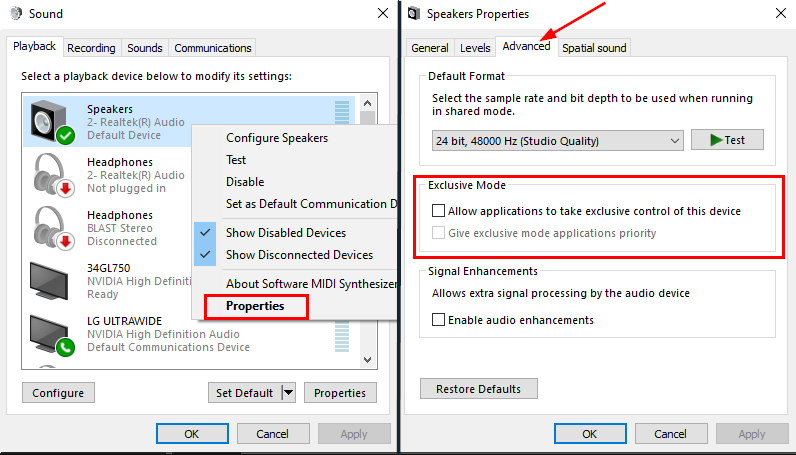
It's probably windows exclusive control. Click your Start Menu in Windows and type "Change system sounds" and hit enter. Click the Playback tab and/or Recording tab and right-click your microphone/headphones and click Properties. Click the Advanced Tab and uncheck the box for "Allow applications to take exclusive control of this device". You should also do this for your microphone/headphones under the respective tab. https://i.imgur.com/UkPogow.png
 humble gale
desert briar
ik but ya reacted with an emoji just lettin u know xd
humble gale
desert briar
ik but ya reacted with an emoji just lettin u know xd
yeah it's the shrug emoji, meaning idk
desert briar
humble gale
yeah it's the shrug emoji, meaning idk
yea sad no one knows how to fix that
and it wasn't like that last month
humble gale
it hasn't been long but i would suggest reaching out to their offiical support line if it wasn't like that before
desert briar
humble gale
it hasn't been long but i would suggest reaching out to their offiical support l...
will do same thing happened in this screenshot

keeps leaving a gap no matter how much i try to fix
abstract plazaBOT
Having trouble? Want to see if anyone else is having the same problem?
Check out our #known-issues channel! We do our best to keep this channel as current as possible with new bugs and progress updates!
If you can't find what you need please submit a ticket at: https://support.streamlabs.com/hc/en-us/requests/new
 restive kettle
yeah so basically i can't do anything, i can't see the error code and if i start the stream it's just all black. Anyone knows why?

 lost surge
anyone else having an issue where trying to change the color of the Twitch Bit Dono goal doesn't work in Streamlabs OBS for Windows?
 tough ridge
I'm not even smart enough to make my own scene let alone the alerts xD
 tough egret
When testing/previewing a donation with a variable amount, the amounts always come back at a random amount. Unlike bits they seem to work properly. Is this intended to work like this?
 charred gulch
Quick question anyone know how to setup stream labels for recent followers for kick? It’s just showing my twitch recent followers….
 silver salmon
Hello, I'm trying to find information on setting up an iPhone as a webcam from Streamlabs. Looking through the history, I see an Elgato app, but that no longer appears to be available. The "Collab cam" seems like a streaming-only solution, and I would like to use the iPhone camera without needing to live stream.
 rich chasm
Friend who volunteers told me to post in VIP help since I have Ultra, but I’m not sure where to put in my discord to verify?
rich chasm
silver salmon
Hello, I'm trying to find information on setting up an iPhone as a webcam from S...
I’ve used iPad mini’s & my phone & webcam all at once
silver salmon
rich chasm
I’ve used iPad mini’s & my phone & webcam all at once
Nice! What software do you need on the iOS devices? I have currently tried Streamlabs Mobile, but it wants me to setup a livestream
rich chasm
I put the in Bluetooth mode
gusty umbra
rich chasm
Friend who volunteers told me to post in VIP help since I have Ultra, but I’m no...
You can link your discord to your streamlabs ultra here. https://streamlabs.com/dashboard#/settings/integrations then you have access to #vip-support
rich chasm
silver salmon
Nice! What software do you need on the iOS devices? I have currently tried Strea...
Are you looking for moving while recording?
silver salmon
rich chasm
Are you looking for moving while recording?
Nope, static camera. I just hate tethering recording to my PC webcam and want to setup a separate space. I have an audio interface and HQ microphone. Just need the camera solution.
rich chasm
silver salmon
Nice! What software do you need on the iOS devices? I have currently tried Strea...
I’ve used an old gen4 iPad Mini ((cannot update any longer stuck on iOS 10 I think)
gusty umbra
The collab cam is the best option for that.
silver salmon
gusty umbra
The collab cam is the best option for that.
Thanks. It looks like collab cam requires a livestream, though?
rich chasm
I’ve used them for sewing so my old phone was a 6 but I’m up to 12 now
gusty umbra
silver salmon
Thanks. It looks like collab cam requires a livestream, though?
Honestly. I’m not sure. I don’t use the collab cam very often. Give it a whirl and see if it does what you want.
silver salmon
gusty umbra
Honestly. I’m not sure. I don’t use the collab cam very often. Give it a whirl a...
Maybe I can host a private stream if necessary. I'd be worried about the video quality though, in that case. I'll see if it is alright.
gusty umbra
silver salmon
Maybe I can host a private stream if necessary. I'd be worried about the video q...
There are a few apps that can broadcast camera images realtime to a PC. Then you can just capture that app into streamlabs.
silver salmon
gusty umbra
There are a few apps that can broadcast camera images realtime to a PC. Then you...
Yep, I was searching for the preferred version of this first, honestly. Requiring a livestream is not going to work for me. It also looks like I need to wait 24 hours for YT streaming approval, even though I've had an account for years. 😐
gusty umbra
silver salmon
Yep, I was searching for the preferred version of this first, honestly. Requirin...
Yea. That is a YouTube restriction that we can’t bypass.
abstract plazaBOT
Having trouble? Want to see if anyone else is having the same problem?
Check out our #known-issues channel! We do our best to keep this channel as current as possible with new bugs and progress updates!
If you can't find what you need please submit a ticket at: https://support.streamlabs.com/hc/en-us/requests/new
charred gulch
Quick question anyone know how to setup stream labels for recent followers for kick? It’s just showing my twitch recent followers….
gritty isle
charred gulch
Quick question anyone know how to setup stream labels for recent followers for k...
Streamlabels doesn't support Kick at this time.
abstract plazaBOT
Are you knowledgeable about Streamlabs products?
Get rewarded for helping the Streamlabs Community here in Discord!
👉 Apply to be a part of the Streamlabs Support Volunteer Program!
Application Link:
https://forms.gle/eKS29zWfFjGEzaRp7
For details, see our post in
#announcements message
Do you have a Streamlabs Ultra membership? Are you part of the Streamlabs All-Stars program?
Get your Discord roles by going to this page here: https://streamlabs.com/dashboard#/settings/integrations and clicking "Link" next to Discord! Ultra members and higher tier All-Stars members will have access to private channels for support!
Interested in Ultra? Check it out here: https://streamlabs.com/ultra?refl=discord
 sweet isle
i need help so i have my music in it's audio capture but it's also playing in my desktop audio and i don't want that.
wispy latchBOT
@sweet isle Want to split your audio? Maybe you don't want the stream to hear your discord, music, etc..? This is possible using Streamlabs Application Audio Capture sources! See the link for various setup guides: https://streamlabs.com/content-hub/post/how-to-use-application-audio-capture
charred gulch
gritty isle
Streamlabels doesn't support Kick at this time.
But my alerts for follows works but the stream labels doesn’t that doesn’t make sense….
gritty isle
charred gulch
But my alerts for follows works but the stream labels doesn’t that doesn’t make ...
Yeah, that is true.
 tall radish
hello....i closed my streamlabs and reopened it. it made me log back in and everything was messed up the stream preview was all scrunched up

help pls
why is the preview screen so tiny
nvm i fixed lol
 wintry mulch
Hello, I would appreciate it if someone could help me. The problem I have is that when I use streamlabs console, and I want to start a stream it doesn't start, and I also have "streamlabs" configured as the recipient, but nothing happens.
(I hope the message is understandable, I use the translator)
 hazy otter
I put my steelseries audios into the global settings and when i started my PC the next day my microphone was broken.
 rose tulip
Good evening, I am having a huge difficulty with Collab cam, and was wondering if there was a possibility of having a two-way collab cam. I have been looking on the internet and the only issues I am seeing is "Audio not connected." If I have to press the "Join with streamlabs" button it is greyed out for me. When I press it is does some glittery effect and then does nothing. Please help. I am desperate to get our co-streaming working.

 plucky venture
Hello, I would like to do live streaming on my Xbox. In this case, is StreamLabs only paid? I saw that there is only a 7-day trial option... the prices are high for me, who is just starting out.
 random slate
tall radish
hello....i closed my streamlabs and reopened it. it made me log back in and ev...
random slate
tall radish
hello....i closed my streamlabs and reopened it. it made me log back in and ev...
how did you fix this? i had the same issue and no help
 sweet copper
Hi, I have an issue that when I Stream a game I can only see the cursor moving around but not the game! I have made sure that Streamlabs and the game are being ran as admin, but now I'm lost!
 solid rose
Hi i would like to delete my account on stream Labs console.
abstract plazaBOT
Having trouble? Want to see if anyone else is having the same problem?
Check out our #known-issues channel! We do our best to keep this channel as current as possible with new bugs and progress updates!
If you can't find what you need please submit a ticket at: https://support.streamlabs.com/hc/en-us/requests/new
 pure knoll
Hi any tips for getting the right bitrate?
 tight edge
Bonjour
abstract plazaBOT
Do you have a Streamlabs Ultra membership? Are you part of the Streamlabs All-Stars program?
Get your Discord roles by going to this page here: https://streamlabs.com/dashboard#/settings/integrations and clicking "Link" next to Discord! Ultra members and higher tier All-Stars members will have access to private channels for support!
Interested in Ultra? Check it out here: https://streamlabs.com/ultra?refl=discord
gusty umbra
pure knoll
Hi any tips for getting the right bitrate?
Recommended bitrate values versus used resolution and FPS.
- For 1280x720 at 30FPS use 2200 up to 2800kbps.
- For 1280x720 at 60FPS use 3800 up to 5600kbps.
- For 1920x1080 at 30FPS use 4400 up to 6200kbps.
- For 1920x1080 at 60FPS use (6000) 8700 up to 12500kbps.
- For 1600x900 or 1536x864 at 60FPS use at least 6000kbps up to 8600kbps.
<Note: These values are based for single-pc streaming setup, using x264 veryfast preset>
Using lower bitrates than listed is possible where allowed by the type of content or when using a better (slower) x264 preset or using RTX NVENC to have 6000kbps for 1080p60.
If you get pixelations on your stream, this would mean there is insufficient bitrate to properly encode the stream for the given content.```
# Streaming Service Limitations
- Twitch recommended and supported maximum bitrate is 6000kbps. [Link 1]
- Facebook allows up to 1280x720 at 30FPS and a max bitrate of 4000kbps. [Link 2]
- Facebook Level program allows 1080p at 60FPS and a max bitrate of 9000kbps [Link 3]
- Youtube recommended settings [Link 4]```
1️⃣ 🔗 <https://help.twitch.tv/s/article/broadcasting-guidelines>
2️⃣ 🔗 <https://www.facebook.com/fbgaminghome/creators/best-practices>
3️⃣ 🔗<https://www.facebook.com/fbgaminghome/creators/levelup>
4️⃣ 🔗 <https://support.google.com/youtube/answer/2853702?hl=en> small hemlock
Greetings, I've set up my alerts on the Streamlabs website. My account is linked to Twitch. I also added the link to OBS. Test alerts go through, but when I try to send real alerts, it just doesn't work. Does anyone know what the problem might be?
gritty isle
small hemlock
Greetings, I've set up my alerts on the Streamlabs website. My account is linked...
Do you perhaps have Unlimited Alert Moderation Delay enabled? If so, disable that setting.
Please go here https://streamlabs.com/dashboard#/alertbox and if you have Unlimited Alert Moderation Delay enabled, disabled it then click Save Settings at the bottom of the page.
Also go here https://streamlabs.com/dashboard#/recentevents and make sure your alerts are not paused. If this icon is a play button, your alerts were paused.
https://cdn.discordapp.com/attachments/962371235789025360/1147374507238101072/IMG_1019.png

 upper glade
Please can u help me ?
small hemlock
gritty isle
Do you perhaps have Unlimited Alert Moderation Delay enabled? If so, disable th...
thank you very much, I'll look into it
upper glade
With Streamslabs can I use as source TWITCH and go streaming with another platform ?
I mean Arena.social
Thanks
abstract plazaBOT
Having trouble? Want to see if anyone else is having the same problem?
Check out our #known-issues channel! We do our best to keep this channel as current as possible with new bugs and progress updates!
If you can't find what you need please submit a ticket at: https://support.streamlabs.com/hc/en-us/requests/new
gritty isle
upper glade
With Streamslabs can I use as source TWITCH and go streaming with another platfo...
Can you rephrase that? Twitch is a platform, not a source.
upper glade
No ... I want to stream that I have my live on TWITCH on another platform called https://arena.social/
A next gen SocialFi app redefining how creators connect, engage, and monetize their content.
That allow for the Streaming
@gritty isle
gritty isle
upper glade
No ... I want to stream that I have my live on TWITCH on another platform called...
Then you'd need a Streamlabs Ultra subscription and you could add Arena as a custom destination.
upper glade
But Arena.social is aallowed DESTINATION for Stream labs ?
@gritty isle
Thanks
gritty isle
upper glade
But Arena.social is aallowed DESTINATION for Stream labs ?
<@30157156584023656...
If Areana offers an RTMP URL and a stream key for your channel, yes.
upper glade
And when I have started my livestreaming from Twitch
Can I to do the transfer live streaming to ARENA.SOCIAL ?
THANKS @gritty isle
@gritty isle yes Arena has the keys
gritty isle
upper glade
And when I have started my livestreaming from Twitch
Can I to do the transfer...
It would be easier to just reply rather than typing a new post each time and pinging.
upper glade
Ok sorry
gritty isle
upper glade
And when I have started my livestreaming from Twitch
Can I to do the transfer...
With Streamlabs Ultra, you send one stream to Streamlabs then we distribute it to the integrated platforms we have, which includes Twitch, and also one stream to each custom destination you have setup and enabled when you go live. So make sure you have sufficient upload bandwidth to handle two live streams.
upper glade
Ok mamy thanks
I will do ULTRA
gritty isle
upper glade
Ok mamy thanks
I will do ULTRA
You're welcome.
upper glade
I have a 200 Mbps is it ok ?
gritty isle
upper glade
I have a 200 Mbps is it ok ?
That should sufficient!
upper glade
Ok many thanks
 twin spoke
Hi! I seem to be having a problem where if I use streamlabs talk studio and try to stream onto youtube it dones't pick up any of my mic or music. cany anyone help please? it's very frustrating.
abstract plazaBOT
Having trouble? Want to see if anyone else is having the same problem?
Check out our #known-issues channel! We do our best to keep this channel as current as possible with new bugs and progress updates!
If you can't find what you need please submit a ticket at: https://support.streamlabs.com/hc/en-us/requests/new
 steady dove
@gritty isle
Anyone have an issue where streamlabs is picking up the audio but I myself can’t hear a thing
Can someone help please
 hazy chasm
I am using stramlabs console for my xbox and have the output on for tiktok and twitch. My stream only shows on twitch and will not show tik tok. How do I get it to show on Tiktok as well. I authenticated my tik tok and have the output selected
steady dove
Bro can someone help I beg them I’ve been waiting for help for like a week now🤣
 livid tree
Hi! I’m having trouble resizing sources on my stream. I’ve updated streamlabs, uninstalled and reinstalled, deleted and re-added everything and double checked everything is unlocked. When I over over a camera or source the arrows to resize do not appear.
 slim cypress
it keeps saying connecting chat and does not connect
 steady dove
Why when I open stream labs my audio disappears but stream labs picks it up. But I can’t hear out ny headphones
mossy crown
Let’s say I am on Streamlabs and I am streaming my capture card while on a discord call but I am also recording at the same time is there a way to make it so that the discord audio is only captured on the recording but the stream can’t hear the discord
 vale thorn
in the past (like last week) i would dual stream, both youtube one shorts one normal, i set it up with its own key in streamlabs, i normally select horizontal and it all works fair. tried today the shorts stream isnt working and now streamlabs is making another live without my thumbnail, no description, not linked to the live i sscheduled on youtube. super annonying and i really need some help
 latent briar
some how my streamlabs wont bring up my old scene settings how do i recover them
 dark meadow
I never actually touch my settings in Streamlabs, I set it once to stream WoW. After the last update of Streamlabs, all the settings changed and I don't know how it was before. When I stream now, my picture looks blurry. When I record something it doesn't record in 2k and I don't understand why. I am posting pictures here so you can see my settings.
Additionally a recording from two weeks ago and one from today, the difference is best recognized by the texts in the bottom right corner. You can see that it was once perfectly adjusted.....

 latent briar
min e all changed too
abstract plazaBOT
Having trouble? Want to see if anyone else is having the same problem?
Check out our #known-issues channel! We do our best to keep this channel as current as possible with new bugs and progress updates!
If you can't find what you need please submit a ticket at: https://support.streamlabs.com/hc/en-us/requests/new
 solar zealot
Hi I have a question not even sure this is a streaming question but when I’m streaming sometimes my mic will not be heard and I got to re set it in streamlabs
abstract plazaBOT
Do you have a Streamlabs Ultra membership? Are you part of the Streamlabs All-Stars program?
Get your Discord roles by going to this page here: https://streamlabs.com/dashboard#/settings/integrations and clicking "Link" next to Discord! Ultra members and higher tier All-Stars members will have access to private channels for support!
Interested in Ultra? Check it out here: https://streamlabs.com/ultra?refl=discord
Are you knowledgeable about Streamlabs products?
Get rewarded for helping the Streamlabs Community here in Discord!
👉 Apply to be a part of the Streamlabs Support Volunteer Program!
Application Link:
https://forms.gle/eKS29zWfFjGEzaRp7
For details, see our post in
#announcements message
 marble wind
dark meadow
I never actually touch my settings in Streamlabs, I set it once to stream WoW. A...
marble wind
dark meadow
I never actually touch my settings in Streamlabs, I set it once to stream WoW. A...
in settings>video, change frame rate to 60 or 30, in settings>output, change output mode to simple, recording preset to "indistinguishable quality", encoder to any hardware encoder
 brittle drift
how do you get I my streams labs to capture my ps5 audio and party chat aduio from my ps5 to my stream labs?
 cedar herald
Hello! I need some help here. I was streaming before, and everything was perfectly fine. But I was messing around with the settings, reading through it, and I accidentally clicked on "OBS Import" on the "General Tab." There were no back buttons, and I had no choice but to press "Start." Of course, it failed to load up, and my Editor is just gone... Can someone know what is happening, so I can fix this?


 shrewd rock
is there somethign wrong with enabling the cloud bot for youtube
 haughty light
currently when i go live everything is working but wheni try to view my own stream i cant i keep getting an error. Even other viewers have told me that my channel cant be opened
 soft tendon
is there a way to use start up parameters like obs? I use this as a replay buffer for my older consoles or switch games that do not support it.
griffincodes, josh407_ , unspotibleshadow nor pathaugen got a conclusive answer
 tired island
Is there a way to find out what the best settings is for my Streamlabs obs for the best quality 🤣
wispy latchBOT
@tired island```md
Recommended bitrate values versus used resolution and FPS.
- For 1280x720 at 30FPS use 2200 up to 2800kbps.
- For 1280x720 at 60FPS use 3800 up to 5600kbps.
- For 1920x1080 at 30FPS use 4400 up to 6200kbps.
- For 1920x1080 at 60FPS use (6000) 8700 up to 12500kbps.
- For 1600x900 or 1536x864 at 60FPS use at least 6000kbps up to 8600kbps.
<Note: These values are based for single-pc streaming setup, using x264 veryfast preset>
Using lower bitrates than listed is possible where allowed by the type of content or when using a better (slower) x264 preset or using RTX NVENC to have 6000kbps for 1080p60.
If you get pixelations on your stream, this would mean there is insufficient bitrate to properly encode the stream for the given content.```
# Streaming Service Limitations
- Twitch recommended and supported maximum bitrate is 6000kbps. [Link 1]
- Facebook allows up to 1280x720 at 30FPS and a max bitrate of 4000kbps. [Link 2]
- Facebook Level program allows 1080p at 60FPS and a max bitrate of 9000kbps [Link 3]
- Youtube recommended settings [Link 4]```
:one: :link: <https://help.twitch.tv/s/article/broadcasting-guidelines>
:two: :link: <https://www.facebook.com/fbgaminghome/creators/best-practices>
:three: :link:<https://www.facebook.com/fbgaminghome/creators/levelup>
:four: :link: <https://support.google.com/youtube/answer/2853702?hl=en>@tired island is this for recording or streaming?
tired island
marble wind
<@709720556190302210> is this for recording or streaming?
Streaming
marble wind
@tired island set your bit rate as high as your streaming platform will let you; for youtube, stream at the highest resolution you can manage (upscaling from 1080p to 1440p or 4k is fine); for all other platforms, 1080p is usually the upper practical limit, you can reduce it to 720p to have fewer blocking artifacts;
kick.com may have an issue where unpopular streamers get disconnected if they stream at more than 3.5 Mbps, not confirmed by kick itself but confirmed by multiple individual users
for frame rates, you can choose to stream at 30 fps to reduce blocking artifacts, but these days most people prefer 60 if they have a choice
tired island
Ooo ok, absolutely legend. I will have to try this
 jolly scroll
hi, i'm trying to open streamlabs desktop for the first time on my 2020 macbook pro (os 11.7.6), but it just keeps crashing and won't actually open. this is my first time downloading it so i'm a bit confused why it's crashing
i saw this post: https://support.streamlabs.com/hc/en-us/articles/30125303695259-Streamlabs-Desktop-Crashing-Not-Opening-on-Mac-15-0-1 but was assuming it's been resolved but still happening to me, also unable to share diagnostic report since crashing on launch and can't reach settings
thanks in advance ❤️
upper glade
Hey @gritty isle .... Please yesterday I forgotten to say u that about twitch and Stream elements I must to do all the work in Android system not with a pc
Is it right for it these Ultra system ?
Thanks
.....
And can I ask u another problem ?
Thanks
abstract plazaBOT
Having trouble? Want to see if anyone else is having the same problem?
Check out our #known-issues channel! We do our best to keep this channel as current as possible with new bugs and progress updates!
If you can't find what you need please submit a ticket at: https://support.streamlabs.com/hc/en-us/requests/new
 uneven citrus
Hallo,
ich kann die Alerts auf verschiedenen Plattformen nicht richtig einstellen. Wenn ich ein Thema wähle, wird nur YouTube übernommen, während KICK und TWITCH auf den Standardwert zurückgesetzt werden. Wie kann ich es so ändern, dass alle Plattformen entweder dasselbe Thema oder jeweils unterschiedliche Themen automatisch übernehmen?
Hi, I can't properly set up alerts on different platforms. When I select a theme, only YouTube applies it, while KICK and TWITCH remain on the default setting. How can I change it so that all platforms either automatically apply the same theme or different themes?
Wenn Sie möchten, kann ich auch meinen Bildschirm übertragen.
Ich kann kein Englisch, nur zu Info, deutsch oder türkisch
abstract plazaBOT
Are you knowledgeable about Streamlabs products?
Get rewarded for helping the Streamlabs Community here in Discord!
👉 Apply to be a part of the Streamlabs Support Volunteer Program!
Application Link:
https://forms.gle/eKS29zWfFjGEzaRp7
For details, see our post in
#announcements message
Do you have a Streamlabs Ultra membership? Are you part of the Streamlabs All-Stars program?
Get your Discord roles by going to this page here: https://streamlabs.com/dashboard#/settings/integrations and clicking "Link" next to Discord! Ultra members and higher tier All-Stars members will have access to private channels for support!
Interested in Ultra? Check it out here: https://streamlabs.com/ultra?refl=discord
upper glade
Please can I ask u another thing ?
 round coral
hi there,i have loaded up streamlabs to find all of my panels ( sources, themes etc) gone and im greated with a blank grey screen and i cannot seem to fix it or bring them back and ive tried everything i can think of! i did email last week and have had no response
 dense pawn
Guys, I have some specific settings in my streamlabs, if I download it on a different device and log in with the same account, will it keep the settings?
 stray citrus
dense pawn
Guys, I have some specific settings in my streamlabs, if I download it on a diff...
stray citrus
dense pawn
Guys, I have some specific settings in my streamlabs, if I download it on a diff...
Hey there! The scenes/sources/graphics will stay there (as they are backed up to the cloud), but the settings themselves are tied to your cache, so if you log in on a separate device, it will likely have "default" settings until you update them. I'm sorry about that!
stray citrus
round coral
hi there,i have loaded up streamlabs to find all of my panels ( sources, themes ...
Hey there - are you able to provide me with a screenshot of what you're seeing on your end? Our ticket queue is a bit backed up, as well, so while a week-long wait isn't typical for us, we are expecting delays at the moment. 😦 I'm sorry about that. I can try and help you here if you send over a screenshot, though!
round coral
stray citrus
Hey there - are you able to provide me with a screenshot of what you're seeing o...

Here you go
I may be being silly but I’ve tried everything I can think of. Being very very new to this sort of thing doesn’t help but I was streaming with my stream preview visible up top with my scenes and themes below for about a week. Loaded it up one day and I’m greeted with this
Hope this helps. Any help or advice is appreciated. I’m very new to this but as far I know I haven’t done anything wrong or anything to trigger this
abstract plazaBOT
Having trouble? Want to see if anyone else is having the same problem?
Check out our #known-issues channel! We do our best to keep this channel as current as possible with new bugs and progress updates!
If you can't find what you need please submit a ticket at: https://support.streamlabs.com/hc/en-us/requests/new
stray citrus
round coral
Hope this helps. Any help or advice is appreciated. I’m very new to this but as ...
I'm taking a look, and I will be back with you soon!
Thank you so much for the screenshot!
round coral
Thank you very much
stray citrus
round coral
Thank you very much
Thank you so much for your patience! It looks like for this issue, there are a few troubleshooting steps that may fix it, but ultimately, it may require you to clear your Streamlabs Desktop cache. This won't clear your scenes/sources, but it will make you re-set up your settings (Output settings, Video settings, etc.)
Here are the steps I would recommend trying first (if you want to try avoiding clearing your cache):
- Perform a clean installation of your graphics drivers: https://streamlabs.com/content-hub/post/clean-install-of-graphics-driver-tutorial
- Try running Streamlabs Desktop as administrator (to do this, right-click Streamlabs Desktop > select "run as administrator")
- In your Streamlabs Desktop Settings > Advanced > try disabling/enabling "force GPU as render device" (to see if this setting makes a difference in what you see on your end)
- Re-install (no need to uninstall beforehand). To do this, go to Streamlabs.com and download from the main page.
If those steps don't seem to help, I would recommend going ahead and clearing your cache. Prior to doing so, you can consider taking screenshots of your settings (in case you want to refer to them later). Once you feel comfortable clearing your cache, you'll want to go into your Streamlabs Desktop Settings > Get Support > Delete Cache and Restart.
Will you let me know how this goes?
round coral
I’ll give it a go! Thank you so much
round coral
It’s fixed!!! Thank you for your help you’re a star
stray citrus
round coral
It’s fixed!!! Thank you for your help you’re a star
I am SO happy to hear that! Thank you so much for joining the Discord so I could help!
If you happen to know your ticket number, I'd be glad to close that out on my end, but no worries if not! 
round coral
I don’t think I have one
stray citrus
@round coral No worries! Just as a follow-up, do you happen to know which specific step resolved it? 👀
 daring blade
can someone help me create new event?
lost surge
the Tip Goal widget refuses to change how it looks at all for me. Has anyone seen this before?

no matter what colors I choose for bar color, or text color, or background color, it stays white on blue.
 vocal storm
can someone show me how to update payment info for streamlabs prime? i follow the instructions but they arent correct
gusty umbra
vocal storm
can someone show me how to update payment info for streamlabs prime? i follow th...
Thanks for being an ultra subscriber! You can link your discord to your streamlabs here https://streamlabs.com/dashboard#/settings/integrationsand get access to #vip-support and they can help you
round coral
stray citrus
<@694559687882047548> No worries! Just as a follow-up, do you happen to know whi...
Clear cache
 marble zealot
hi guys, I wonder if you can help. I set my SL Obs to output 3000kbps bitrate, but it's ignoring that and outputting 6000kbps. I have it set to CBR. thats supposed to make it stay around my set bitrate, no?
marble zealot
marble zealot
hi guys, I wonder if you can help. I set my SL Obs to output 3000kbps bitrate, b...
 abstract plazaBOT
Having trouble? Want to see if anyone else is having the same problem?
Check out our #known-issues channel! We do our best to keep this channel as current as possible with new bugs and progress updates!
If you can't find what you need please submit a ticket at: https://support.streamlabs.com/hc/en-us/requests/new
 mossy adder
Maybe someone has a solution. I am terrible with audio but managed to push audio through my Elgato 4k X. I cannot figure out how to stop the audio coming through the speakers of the pc even with streamlabs closed. Anyone know how to remedy this? It's already set to monitor only in stream labs.
marble wind
@mossy adder perhaps you enabled "listen to this device" in mmsys.cpl?
upper glade
Please I have a problem
I use streamlabs on my android phone but if I change the screen in Horizontal mode the screen remains very small, about 1/6 of the entire screen...
what can I to do?
thanks
desert briar
Hi is there a command that will display all your commands or give a link to all the commands
 tough epoch
i enabled it but i am not getting any audio output in the stream
 queen lintel
Hey 🙂 does anyone know what's going on with my sub goal? It is stuck saying 1172 and I only have like 50 subs. I have re-installed streamlabs and deleted the cache. Not sure what else I can do. Thanks!
For reference

 blissful ermine
Hey guys, trying to use the collab cam feature for podcasting, but my guest can't see me. They can hear me though. I have my sharing device set to my webcam, what am I doing wrong?
abstract plazaBOT
Having trouble? Want to see if anyone else is having the same problem?
Check out our #known-issues channel! We do our best to keep this channel as current as possible with new bugs and progress updates!
If you can't find what you need please submit a ticket at: https://support.streamlabs.com/hc/en-us/requests/new
 magic mango
Hey guys im tryna stream COD on desktop through streamlabs and my twitch stream keeps getting more delayed due to it freezing by the time I finish a game its only like 10 min in on stream
Can someone walk me through their settings n see if they work?
abstract plazaBOT
Are you knowledgeable about Streamlabs products?
Get rewarded for helping the Streamlabs Community here in Discord!
👉 Apply to be a part of the Streamlabs Support Volunteer Program!
Application Link:
https://forms.gle/eKS29zWfFjGEzaRp7
For details, see our post in
#announcements message
Do you have a Streamlabs Ultra membership? Are you part of the Streamlabs All-Stars program?
Get your Discord roles by going to this page here: https://streamlabs.com/dashboard#/settings/integrations and clicking "Link" next to Discord! Ultra members and higher tier All-Stars members will have access to private channels for support!
Interested in Ultra? Check it out here: https://streamlabs.com/ultra?refl=discord
magic mango
Hey guys im tryna stream COD on desktop through streamlabs and my twitch stream keeps getting more delayed due to it freezing by the time I finish a game its only like 10 min in on stream
Can someone walk me through their settings n see if they work?
gusty umbra
magic mango
Hey guys im tryna stream COD on desktop through streamlabs and my twitch stream ...
Settings are very system dependent. It would be best to start out with your PC specs, are you streaming and gaming on the same machine? What are your stream quality and bitrate settings? What’s your internet speed through a speed test? Are you getting notifications in Streamlabs about dropped frames or anything?
 mystic sun
i can't activate my streamlabs cloudbot for youtube, the slider is just not activating even i have added streamlabs as moderator and run a public live stream to make connection, it is not activating for last 48 hours.

 icy elk
Ive got an issue and I cant seem to find any (useful) information with just google: when I go live and streamelements gives its "streamer is now live! Streaming:" comment that goes in chat, it is always using my old account name, like from a billion years ago.
I have no clue how to get it to use my current username, and it is really frustrating.
gritty isle
icy elk
Ive got an issue and I cant seem to find any (useful) information with just goog...
You’ve reached Streamlabs. Sounds like you need to reach out to Streamelements.
icy elk
damn, I thought they were the same thing, im a dumbass, my bad. ty for the correction, sorry for the confusion.
gritty isle
icy elk
damn, I thought they were the same thing, im a dumbass, my bad. ty for the corre...
No worries, we’re different companies.
icy elk
I think ive just been messing with streamlabs too much and the wires got crossed
this is very simple then, I just unmod StreamElements and pretend this isnt an issue anymore, because I dont need it anymore, lmao
mystic sun
@gritty isle can you check my issue too?
gritty isle
mystic sun
<@301571565840236564> can you check my issue too?
Make sure that Streamlabs isn’t banned on your channel and that Streamlabs is a Standard Moderator and not a Managing Moderator.
mystic sun
@rufus it is not banned, alert box is working, cloudbot is just not getting activated
gritty isle
mystic sun
@rufus it is not banned, alert box is working, cloudbot is just not getting acti...
And Streamlabs is a Standard Moderator?
mystic sun
@rufus yes
gritty isle
mystic sun
@rufus yes
Please follow these steps when you are not live:
Refreshing the connection between Streamlabs and YouTube will resolve this.
-
Log out of the Streamlabs web site on every device you access it: Click your PFP and choose Log out.
-
If you use Streamlabs Console, log out of the Streamlabs Console web site on every device you access it: Click your PFP and choose Log out.
-
If you use the standalone Streamlabels application, log out of that.
-
Log out in Streamlabs Desktop (see next post on how to do that).
-
Follow this guide: https://streamlabs.com/content-hub/post/how-to-disconnect-your-streamlabs-account. Just follow the section for YouTube.
-
Navigate back to the Streamlabs web site and log in with your YouTube. This re-establishes the connection.
-
👉 IMPORTANT: Once you have completed the guide, go back to the Streamlabs web site https://streamlabs.com/dashboard#/recentevents, click the Live Actions tab, scroll all the way to the bottom and click the Reload Widgets button. PLEASE Don't skip this step!
-
Log back in to all the other Streamlabs products you use.
It's not obvious when you log in, but one of the interstitials will say something like Streamlabs has access to x of 6 services. Click there and make sure that all 6 of the boxes are checked and then proceed through the rest of the log in process.
👇 👇 👇 👇

The most popular streaming platform for Twitch, YouTube and Facebook. Cloud-based and used by 70% of Twitch. Grow with Streamlabs Desktop, alerts, 1000+ overlays, analytics, chatbot, tipping, merch and more.
mystic sun
@rufus i have tried this already, and submitted a support ticket on email 48 hours ago, and still got no reply
 sage iris
Heyo. I recently got this error with the obs plugin. I can confirm the browser sources added by the plugin are still working.
 gritty isle
mystic sun
@rufus i have tried this already, and submitted a support ticket on email 48 hou...
gritty isle
mystic sun
@rufus i have tried this already, and submitted a support ticket on email 48 hou...
Tickets are answered in the order they are received and there is a bit of a backlog. Keep being patient and they will get to you.
magic mango
@gritty isle can u help me configure my stream it keeps delaying and ends up being 30 mins behind when i finish a match oof cod (if u can add me as a friend)
magic mango
how much kbs should i be getting
 final pond
getting this popup when trying to record. it doesn't say anything, just recording error

 hazy heron
when livestreaming through discord. When using streamlabs for console can you include your party audio so everyone can be heard on the livestream?
echo delta
ok is anyone able to help me with my YouTube chat widget? my name is on the Ignore user list, yet my msgs still show up on stream, multiplied by 4
final pond
final pond
getting this popup when trying to record. it doesn't say anything, just recordin...
clearing cache, signing out and in resolved this problem
gusty umbra
magic mango
<@301571565840236564> can u help me configure my stream it keeps delaying and en...
Please don’t ping those not actively assisting you. I asked some questions to you a few hours ago.
magic mango
n i asked u stuff
 late oriole
When my Collab Cam joins, the volume is reduced for my other sources automatically. When the Collab Cam leaves, the audio returns to normal. Where can I disable this volume adjustment? I would like the volume to remain the same whether the Collab Cam is connected or not.
Here's what my mixer looks like when the Collab cam is not connected:

And this is how much the "Desktop Audio" volume is reduced once the Collab Cam connects:

 quaint portal
And so I'll ask, on average, when can we expect a correction?

And so I will ask, on average when can I mean /duel @nick
And then !accept
 frail sky
Hello just wanted to ask does anyone know how to fix in game overlay being black ? I have connected it to my twitch and hotkeyed it turned it on and yet it is not working, the events part is working but the chat itself is blacked out I have tried contacting streamlabs to get support but no one is responding or giving me help :/ if anyone has ideas shoot
 rugged bolt
I can't delete my account it won't let me buy a monthly subscription back I just want it all deleted and they have my car number saved
Anyone I want my account and card info gone
I want my account deleted now
 honest harbor
 abstract plazaBOT
Having trouble? Want to see if anyone else is having the same problem?
Check out our #known-issues channel! We do our best to keep this channel as current as possible with new bugs and progress updates!
If you can't find what you need please submit a ticket at: https://support.streamlabs.com/hc/en-us/requests/new
 pure gale
I have used streamlabs to livestream on tiktok for about a month. but then my acces was removed. so I am trying to apply for a new acces to the platform with my tiktok account but I am getting rejected every time in the past 30+ days. how can I get back on streaming from streamlabs on my tiktok account. I am just doing math lessons, nothing bad
abstract plazaBOT
Are you knowledgeable about Streamlabs products?
Get rewarded for helping the Streamlabs Community here in Discord!
👉 Apply to be a part of the Streamlabs Support Volunteer Program!
Application Link:
https://forms.gle/eKS29zWfFjGEzaRp7
For details, see our post in
#announcements message
Do you have a Streamlabs Ultra membership? Are you part of the Streamlabs All-Stars program?
Get your Discord roles by going to this page here: https://streamlabs.com/dashboard#/settings/integrations and clicking "Link" next to Discord! Ultra members and higher tier All-Stars members will have access to private channels for support!
Interested in Ultra? Check it out here: https://streamlabs.com/ultra?refl=discord
gusty umbra
pure gale
I have used streamlabs to livestream on tiktok for about a month. but then my ac...
There is a know issue for this. #known-issues message can you please create a ticket so a staff member can look into it. https://support.streamlabs.com/hc/en-us/requests/new
mystic sun

can someone help? my cloudbot youtube is not activating for last 48 hours, everything is fine on my side, i tried everything
wispy latchBOT
@mystic sun We would suggest logging out of Streamlabs and all Streamlabs software that you may be using.
Then please follow this guide to disconnect your streaming service from Streamlabs: https://streamlabs.com/content-hub/post/how-to-disconnect-your-streamlabs-account Once you have done this, please log in again.
humble gale
Once you've done that ^^ then try toggling it on
mystic sun
wispy latch
<@1281166550111617079> **We would suggest logging out of Streamlabs and all Stre...
already tried that, its not working
 empty hatch
I have a problem. I’m using streamlabs and I don’t find a solution to stream on streamlabs twitch and discord at the same time. How is it possible ? I have streamlabs ultra hoping for the multi streaming to work
abstract plazaBOT
Having trouble? Want to see if anyone else is having the same problem?
Check out our #known-issues channel! We do our best to keep this channel as current as possible with new bugs and progress updates!
If you can't find what you need please submit a ticket at: https://support.streamlabs.com/hc/en-us/requests/new
humble gale
mystic sun
already tried that, its not working
this isn't a simple log out and log back in. you gotta do stuff on youtube and then it should work. that's what's been working for everyone else so make sure you log in with Youtube as well (not your streamlabs id)
humble gale
empty hatch
I have a problem. I’m using streamlabs and I don’t find a solution to stream on ...
afaik you can't stream to discord and twitch with the multistream. Instead you could enable virtual webcam to stream to discord (then share your "camera" on discord) and then just stream to twitch. (https://streamlabs.com/content-hub/post/how-to-stream-on-discord)
mystic sun
humble gale
this isn't a simple log out and log back in. you gotta do stuff on youtube and t...
i am doing login with youtube, infact i did sign up with youtube info, i tried deleting connections on my google account and then login again its not working
humble gale
mystic sun
i am doing login with youtube, infact i did sign up with youtube info, i tried d...
Then i would submit a ticket using the link https://support.streamlabs.com/hc/en-us/requests/new
gritty isle
mystic sun
i am doing login with youtube, infact i did sign up with youtube info, i tried d...
You do have a ticket opened on this issue, right?
mystic sun
Alert Box is working but cloudbot is not toggling on
gritty isle
mystic sun
Alert Box is working but cloudbot is not toggling on
Have you opened a ticket on this? We've been through the disconnect steps and that has not resolved the issue.
mystic sun
i have emailed streamlabs support but have not get a reply for last 48 hours
gritty isle
mystic sun
i have emailed streamlabs support but have not get a reply for last 48 hours
Again, there's a high ticket volume. Please be patient. There's an issue that we cannot resolve here in Discord.
gritty isle
mystic sun
i have emailed streamlabs support but have not get a reply for last 48 hours
If you go to, https://myaccount.google.com/permissions, do you see Streamlabs?
 mystic sun
gritty isle
If you go to, <https://myaccount.google.com/permissions>, do you see Streamlabs?
mystic sun
gritty isle
If you go to, <https://myaccount.google.com/permissions>, do you see Streamlabs?
ues ofcourse, that's how i disconnected it
gritty isle
mystic sun
ues ofcourse, that's how i disconnected it
Just wanted to make sure. Sometimes we see where the connection doesn't get re-established when you log back in with the platform.
 granite umbra
i cant stream on tiktok on stream labs console have connected to the console my twitch works but no tiktok
gritty isle
granite umbra
i cant stream on tiktok on stream labs console have connected to the console my ...
Did you apply for and get granted access to Live withh Streamlabs? Being able to stream via TikTok Studio does not automatically grant access to Live with Streamlabs.
granite umbra
ermmmm
where do i look i do have access on tiktok
do i want to be on the stream labs console or the stream labs desktop
i cant stream on twitch or is it a tiktok specific thing
gritty isle
granite umbra
where do i look i do have access on tiktok
You have to apply for Live with Streamlabs by clicking here: https://www.tiktok.com/falcon/live_g/live_access_pc_apply/result/index.html?id=GL6399433079641606942&lang=en-US
gritty isle
granite umbra
i cant stream on twitch or is it a tiktok specific thing
Twitch and TikTok both aren't working or only TikTok isn't working for you with Streamlabs Console?
granite umbra
sorted thankyou
 patent siren
I recently added the XLR dock to my StreamDeck +. When I go into Windows settings I can get the microphone and the headset to work just fine, but when I open StreamLabs and choose the XLR microphone, the mic does not pick up anything in StreamLabs
Any thoughts?
gritty isle
granite umbra
sorted thankyou
You're welcome.
 rugged furnace
I installed a vertical plug in and prior to that I could go live via multistreaming on TIKTOK & Twitch (image 1), since install I can go live on TIKTOK or Twitch but it will not allow me to do multistream I get the message about not able to go live on TIKTOK (image 2), also If I try to go live in the VERTICAL but clicking the icon in the bottom left (image 3) I get the error message in the image about connecting (image 4). I went through my C files and deleted/removed the vertical plug in but it is still installed in my OBS, I've closed, rebooted, and still there. https://obsproject.com/logs/D3mCABMGPilbzmAg I know about the CPU and other issues, just trying to figure out the sudden live issue and how to remove the one plug in since I have removed through my computer. I have reached out in OBS Discord and was told to talk to Streamlabs


 stray citrus
rugged furnace
I installed a vertical plug in and prior to that I could go live via multistream...
stray citrus
rugged furnace
I installed a vertical plug in and prior to that I could go live via multistream...
Hey there - if you're having trouble uninstalling a plugin from OBS Studio (and it isn't the Streamlabs plugin), our team wouldn't be able to offer assistance with how to properly uninstall - my apologies about that. 😦
We can assist with any multi-streaming issues, but I do think it would be a good idea to first find how to completely un-install that plugin to ensure that isn't causing any issues for you.
 thin knot
Can someone help me? I need a way to set up my duel PC setup without duplicating my monitor, I have a capture card and everything but idk how to set up the inputs
rugged furnace
stray citrus
We can assist with any multi-streaming issues, but I do think it would be a good...
Anyway you can check to see that it's uninstalled? Again I'm not seeing the folder ANYWHERE in my C drive since I uninstalled but it is still showing in my docks so I believe it's uninstalled. Could we troubleshoot the multi stream issue?
stray citrus
thin knot
Can someone help me? I need a way to set up my duel PC setup without duplicating...
Hey there! The official Streamlabs Support team wouldn't be able to offer assistance with dual PC set-ups (as there are many variables), but someone from the community may be able to assist. We have a guide here that has information about this set-up: https://streamlabs.com/content-hub/post/dual-pc-setup-with-elgato-capture-card if this might be helpful to get started.
stray citrus
rugged furnace
Anyway you can check to see that it's uninstalled? Again I'm not seeing the fold...
We don't have any way to check the logs for OBS Studio plugins (outside of the Streamlabs plugin) - I'm very sorry about that. If you were multi-streaming successfully before installing the plugin, I believe it's likely that is what's causing the issue. I'd be happy to offer some troubleshooting steps for multi-streaming in general, but if none of those steps help, it's possible that the plugin is interfering with the broadcast.
rugged furnace
That would be great if you could please
stray citrus
rugged furnace
That would be great if you could please
Of course! Additionally, it looks like you have a Streamlabs Ultra subscription, so I wanted to pass along some info in case you wanted to access our "live chat" support channel in this server. To do this, you'll want to go to this page here: https://streamlabs.com/dashboard#/settings/integrations and click "Link" next to Discord. Once your account is linked, you should be able to refresh Discord and see your new roles! This gives you access to #vip-support which will get you faster support.
I'm going to check into this for a bit and perform some testing on my end, as well. I will be right back with you! 🙏
 abstract brook
Hello, why do some of my games have to be screenshots to be displayed on StreamLabs?
thin knot
stray citrus
Hey there! The official Streamlabs Support team wouldn't be able to offer assist...
Oh okay, that way is explaining how to duplicate the monitor output which i could do, i just wasnt sure if there was a way to go off the output that my capture card produced using Streamlabs on both of my computers
rugged furnace
stray citrus
Of course! Additionally, it looks like you have a Streamlabs Ultra subscription,...
Thank you!
humble gale
abstract brook
Hello, why do some of my games have to be screenshots to be displayed on StreamL...
what does that even mean? 🤔
abstract brook
Basically, I have to take a screenshot, not a game capture, for certain games to be displayed in the software.
humble gale
does your screenshot move? like screenshots are just still images so that's why i'm confused
or do you mean that you need to add a display/window capture instead of a game capture source?
abstract brook
Yes, that's right, I'm sorry
humble gale
all good! i was thinking it was a language thing. Some games can't be game captured. what games are you having issues with?
stray citrus
rugged furnace
Thank you!
I'm still testing - the good news is... I don't think it's your plugin causing the issue! I'm running into some trouble on my end.
I'll be back with you soon, just didn't want you to think I forgot!
rugged furnace
stray citrus
I'm still testing - the good news is... I don't think it's your plugin causing t...
👍
stray citrus
rugged furnace
👍
Thanks for your patience! It looks like this error is global and specific to the plugin (Streamlabs Desktop is still working as intended, in case you needed a workaround for the time being). I'm having this reported to my development team for further review now.
In order to update you on this report, would you be able to submit a ticket here? https://support.streamlabs.com/hc/en-us/requests/new This way, I'll have your email and can follow up with you as soon as I have more information on this.
abstract brook
humble gale
all good! i was thinking it was a language thing. Some games can't be game captu...
Driver San Franscicos
rugged furnace
stray citrus
Thanks for your patience! It looks like this error is global and specific to the...
Absolutely thank you
 weak nova
got a qestuion for anyone i got a full amd pc from cpu to the card and its on gen 4 im trying to stream both twich and youtube how can i set diffrint bit rights for them on the stream labs desktop 1.18.3 verson also my screen are 3440x1440p 21:9 at 34' curved
gritty isle
weak nova
got a qestuion for anyone i got a full amd pc from cpu to the card and its on ge...
You can't set different bitrates when multistreaming.
weak nova
hmmm not gona lie thats a bit anoying cus youtube like a higher bit right wich also i do have gigabight internet at home so im when i stream to twich first im i forced to use just 6000?
i think stream labs needs to add a option for when your paying for the ultmit to be able to change bit right for the diffrint plat forms and not just lump it into one out put that seems kinda silly
gritty isle
weak nova
hmmm not gona lie thats a bit anoying cus youtube like a higher bit right wich ...
Yes, beacuse you have to comply with the platform with the lowest bitrate capability and that is Twitch. A better suggestion would be set your Output Resolution to 1280x720 and go with the 6000 bitrate.
weak nova
ok ill try that
humble gale
abstract brook
Driver San Franscicos
sorry i got pulled away for some stuff. it looks like this is an older game so it could be a compatibility issue which is why it's not game captureable (https://www.reddit.com/r/DriverSanFrancisco/comments/1egz5s9/i_need_help/)
abstract plazaBOT
Having trouble? Want to see if anyone else is having the same problem?
Check out our #known-issues channel! We do our best to keep this channel as current as possible with new bugs and progress updates!
If you can't find what you need please submit a ticket at: https://support.streamlabs.com/hc/en-us/requests/new
patent siren
I recently added the XLR dock to my StreamDeck +. When I go into Windows settings I can get the microphone and the headset to work just fine, but when I open StreamLabs and choose the XLR microphone, the mic does not pick up anything in StreamLabs I have tried every option and still no luck. Its the same microphone that I used before just hooked up via XLR instead of USB
Any thoughts?
 humble rose
Hello, i recently enabled Dual output streaming... i have a source which is a vertical overlay - this only appears on the horrizontal output, i cannot figure out how to get it onto my vertical output. every other scene i have the overlay appears on both outputs . Help!??
 abstract temple
Is there any way for my alertbox to trigger for a donation if I have my donation link set through Stream Elements?
 snow pelican
Hello there!
After I got a 1 day suspension on my Twitch channel Streamlabs isn't showing my subs/activating the alert box. Already tried logging in and out and disconnecting Twitch/Streamlabs but it didn't work.
Does anyone know a fix?
gritty isle
abstract temple
Is there any way for my alertbox to trigger for a donation if I have my donation...
There is not.
abstract brook
Is it normal for me to have latency on Bo6 with the software?
humble rose
can anyone tell me the hotkey to capture window in foreground? i cant find it in hotkeys settings either
 covert forge
hey i need to some help i have some new scences i want to be able to use for starting soon ending soon my banner and some other stuff how do i add that
 lethal crane
covert forge
hey i need to some help i have some new scences i want to be able to use for sta...
lethal crane
covert forge
hey i need to some help i have some new scences i want to be able to use for sta...
You should be able to just add a mew scene and add your banner as a source.
 ivory tusk
does console streamlabs only work on xbox?
 crimson hull
Hey quick question! ive been using streamlabs for about a year with no issues, but now its not outputing to youtube anymore. I multistream and my live goes to twitch but theres no live on youtube. ive double checked my stream key and url and no luck. any suggestions? this started happening once i stopped outputting to tiktok. i use vertical on youtube and horizontal on twitch
gritty isle
ivory tusk
does console streamlabs only work on xbox?
Yes.
ivory tusk
gritty isle
Yes.
Oof ok thanks!
 livid matrix
With streamlabs using video capture card and trying to pick up game audio
I need help can someone walk me threw
 proper totem
livid matrix
With streamlabs using video capture card and trying to pick up game audio
proper totem
livid matrix
With streamlabs using video capture card and trying to pick up game audio
We have an article on how to pick up audio via Capture Card here:
https://streamlabs.com/content-hub/post/streamlabs-desktop-capture-card-issues-solutions
If you still have questions after, please send us a ticket and we'll be happy to help:
https://support.streamlabs.com/hc/en-us/requests/new?ticket_form_id=473667
abstract plazaBOT
Having trouble? Want to see if anyone else is having the same problem?
Check out our #known-issues channel! We do our best to keep this channel as current as possible with new bugs and progress updates!
If you can't find what you need please submit a ticket at: https://support.streamlabs.com/hc/en-us/requests/new
 kind ledge
Do you guys have an idea/fix for why my event list wont update correctly on twitch? I just started streaming again and went to set up alerts. The tests work, and I have verified my connection with Twitch to Streamlabs, but it shows all my event history as greyed out. I have been looking for a mute setting, or something I may have hit on accident. It's not even showing the most recent stream. The one it's showing is from 2024.
I reached out to Twitch and they said since it is 3rd party. They cant do anything.
Notes:
It doesnt work on desktop mode, or in popout browser, or original browser.
My event list is also not working on StreamElements, so it is not a streamlabs specific issue.
Chat works..
abstract plazaBOT
Are you knowledgeable about Streamlabs products?
Get rewarded for helping the Streamlabs Community here in Discord!
👉 Apply to be a part of the Streamlabs Support Volunteer Program!
Application Link:
https://forms.gle/eKS29zWfFjGEzaRp7
For details, see our post in
#announcements message
Do you have a Streamlabs Ultra membership? Are you part of the Streamlabs All-Stars program?
Get your Discord roles by going to this page here: https://streamlabs.com/dashboard#/settings/integrations and clicking "Link" next to Discord! Ultra members and higher tier All-Stars members will have access to private channels for support!
Interested in Ultra? Check it out here: https://streamlabs.com/ultra?refl=discord
 uncut minnow
Having issues the past two days. Constant drops and reconnects. Internet is working fine.
 nova idol
I have an issue where my camera gets perpetually laggier unless I reset its software, but only in Streamlabs. I am using Logi Capture, the latest version, and latest version of streamlabs. Anyone know how to fix this?
gusty umbra
uncut minnow
Having issues the past two days. Constant drops and reconnects. Internet is work...
To which platform? What is your speed test not steaming, then run another one while you’re live. Are they vastly different?
uncut minnow
Kick and Twitch. Live and Not live speeds are same
gusty umbra
uncut minnow
Kick and Twitch. Live and Not live speeds are same
That means you’re ultra if you’re multistreaming. Link your Streamlabs to your discord via this link https://streamlabs.com/dashboard#/settings/integrations to get access to the #vip-support channel
The most popular streaming platform for Twitch, YouTube and Facebook. Cloud-based and used by 70% of Twitch. Grow with Streamlabs Desktop, alerts, 1000+ overlays, analytics, chatbot, tipping, merch and more.
uncut minnow
Done
gusty umbra
uncut minnow
Done
Hit up the #vip-support channel
nova idol
I have an issue where my camera gets perpetually laggier unless I reset its software, but only in Streamlabs. I am using Logi Capture, the latest version, and latest version of streamlabs. Anyone know how to fix this?
marble zealot
hi guys, I tried to ask this yesterday, but I guess I picked a bad time where everyone was busy. 😉 I wonder if you can help. I set my SLObs to output 3000kbps bitrate, but it's ignoring that and outputting 6000kbps. I have it set to CBR. thats supposed to make it stay around my set bitrate, no?

 simple wind
 honest spire
as im trying to login with twitch but nothing is happening
honest spire
as im trying to login with twitch but nothing is happening
Im using twitch atm
Is this still the case?
Hoping i can save the trouble with a capture card lol
 green hull
Is anyone else having the iphone streamlabs app just stop working on the regular? It seems to last about an hour and then just close
 wide beacon
hello!! can someone help me?
i have a huge problem with Streamlabs
it always crashes. it doesnt care if its on or off stream.
the software isn't ale to do anything. i can not even edit
i deleted the app and reinstalled. i deleted the cache and resettet but nothing works
i stream on a M1 chip with a macbook air 2020.
can someone help me? maybe reccomend a resultution or settings i can try that fixes the issues?
not fixed till MI 30 aprill 13:00
abstract plazaBOT
Having trouble? Want to see if anyone else is having the same problem?
Check out our #known-issues channel! We do our best to keep this channel as current as possible with new bugs and progress updates!
If you can't find what you need please submit a ticket at: https://support.streamlabs.com/hc/en-us/requests/new
 opal hedge
Hey i dont have any updating from streamlabs + OBS idk i using every solution found into reddit


 opal hedge
Anyhelps should be nice if possible 😦
abstract plazaBOT
Are you knowledgeable about Streamlabs products?
Get rewarded for helping the Streamlabs Community here in Discord!
👉 Apply to be a part of the Streamlabs Support Volunteer Program!
Application Link:
https://forms.gle/eKS29zWfFjGEzaRp7
For details, see our post in
#announcements message
Do you have a Streamlabs Ultra membership? Are you part of the Streamlabs All-Stars program?
Get your Discord roles by going to this page here: https://streamlabs.com/dashboard#/settings/integrations and clicking "Link" next to Discord! Ultra members and higher tier All-Stars members will have access to private channels for support!
Interested in Ultra? Check it out here: https://streamlabs.com/ultra?refl=discord
 compact drift
Good morning @everyone. Anyone have a issue with the cam being pixelated during stream? Mainly on my twitch vod after they are uploaded.
I have a i9 with a 4080 super rtx card and 2gig internet. This is absolutely driving me crazy. I have tested and tested and can't seem to figure it out.
opal hedge
opal hedge
Hey i dont have any updating from streamlabs + OBS idk i using every solution fo...
I already change accounts its same and about other brower lik chrome aswell
abstract plazaBOT
Having trouble? Want to see if anyone else is having the same problem?
Check out our #known-issues channel! We do our best to keep this channel as current as possible with new bugs and progress updates!
If you can't find what you need please submit a ticket at: https://support.streamlabs.com/hc/en-us/requests/new
marble wind
@compact drift video encoders typically favor bright areas, so if you're poorly lit, you can add more lights, or change your camera's exposure setting, or increase gamma with a color correction filter, or darken the game with a color correction filter
if you're using obs-studio, you can also use the obs-roi (region of interest) plugin to assign your camera space as a region of interest https://github.com/derrod/obs-roi-ui/releases
you can also reduce streaming resolution to below 1080p and frame rate to below 60, this reduces blocking artifacts at typical streaming bit rates;
for youtube, do the opposite, stream at 1440p or at 4k at up to 51 Mbps
oh, and if you're using x264, you can add aq-mode=3 to use adaptive quantization with bias to dark areas, but that'll affect the whole image, not just the camera frame
 timber ferry
Hello there, my streamlabels is not updating anymore and when i want to log in with twitch, it says " Invalid code !" anyone have a solution please?
@opal hedge I have the same problem as you 😦
compact drift
@marble wind I'm using stream labs..i could try turning my lights on brighter and test that. Would you mind looking at my vods and tell me what you think please?
marble wind
@compact drift https://www.twitch.tv/videos/2444421934 is this one of them?
i think there's slight A/V desync, audio is ahead by about 150ms, video quality seems adequate to me, but there is some visible blocking/ringing in the purple gradient

Twitch
emptypkts went live on Twitch. Catch up on their Drive Beyond Horizons VOD now.
compact drift
@marble wind yes and especially fortnite stream as well. How do I fix the audio being ahead? Thank you so much for the help. I truly appreciate it
marble wind
re: gradient: this is very tricky to deal with, smooth color gradients usually have visible banding and/or blocking on livestreams, try to put some items in the room, like clothes or a guitar, to distract from this
re: a/v desync: i need to look up where to find streamlabs' equivalent of "advanced audio properties" in obs-studio
@compact drift found it, https://streamlabs.com/content-hub/post/new-streamlabs-desktop-audio-settings-redesign
go to the "global settings" tab and change sync offset for your microphone to 150 ms
this field accepts negative values as well, so you can correct for sources that are lagging behind (not relevant currently)

Streamlabs
Our goal with this redesign is to consolidate all audio settings into one place so you have fewer windows to open when configuring your microphone and other audio sources.
i would describe this level of quality as adequate for live streaming; assuming you're using simple output mode and set nvenc preset to p5, there's no need to overthink it, it's already "watchable", most people won't complain about video quality unless it's outright unwatchable
 marble wind
@compact drift i misspoke before, the correct term for when the color transition points in a gradient become visible is "banding", not "ringing"; "ringing" means there's a visible bright "outline" between a flat bright background and a darker detailed object (say, a human wearing a black shirt with a grey wall in the background), not applicable here
compact drift
@marble wind thank you so very much. I'm in advance mode not simple. If you don't mind i cannot add you as a friend and then share my settings with you after work. If you think that is needed.
marble wind
@compact drift some people have made an effort to analyze what kind of impact different encoding settings have on different video content, but their results vary between games and are usually inconclusive (unless "don't touch the defaults" is a good conclusion for you);
perceptually, to me, it's a slightly different pattern of artifacts, i don't perceive any settings tweaks as appreciably "better" or "worse", with the sole exception of the "low latency" and "ultra low latency" tuning being much worse;
that aside, the defaults (preset = p5, lookahead on, lookahead frames = 8 or 16, spatial aq on, temporal aq on, spatial aq strength = 7 or 8, bframes = 2, b ref mode = none or middle, i forgot) are adequate and most people don't need to change them, every tweak will either make no obvious difference, or introduce a new issue
when i watch live streams, i care more about the contents of the stream than its objective quality, and i know most viewers share this opinion; i also use live video in the form of remote control software (sunshine and parsec); with them, i can choose to use HEVC, which yields appreciably higher quality even with ultra low latency tuning, but using these apps i also get to stream at 12 Mbps (over internet) or 150 Mbps (LAN), which makes a major difference as well
compact drift
marble wind
when i watch live streams, i care more about the contents of the stream than its...
I assume you use HEVC .265? How does one use this? I have have that listed as a encoder in stream labs
marble wind
@compact drift twitch doesn't support streaming HEVC, yet, they seem to be planning it; sunshine and parsec are apps for streaming between your own PCs or select friends, not broadcasting
compact drift
marble wind
<@498585220212064256> twitch doesn't support streaming HEVC, yet, they seem to b...
Well that makes sense now
.haha
abstract plazaBOT
Having trouble? Want to see if anyone else is having the same problem?
Check out our #known-issues channel! We do our best to keep this channel as current as possible with new bugs and progress updates!
If you can't find what you need please submit a ticket at: https://support.streamlabs.com/hc/en-us/requests/new
 muted lynx
My Streamlabs account Cloudbot on youtube activate toggle is not turning on , even after multiple clicks , this issues is only with this account , please help.
humble gale
muted lynx
My Streamlabs account Cloudbot on youtube activate toggle is not turning on , ev...
this has been helpful for most people:
- Log out of Streamlabs.com (you can use this link to force a logout https://streamlabs.com/logout) and any Streamlabs software such as Streamlabs Desktop (you can do so from the bottom left)
- Log into your YouTube account and go to https://myaccount.google.com/permissions.
- Then, click on the connection that says Streamlabs
- Then go to the bottom and click "Delete all connections you have with Streamlabs" https://i.imgur.com/GsRnJ92.png
- Once you have done this, please log in to streamlabs.com with your YouTube account
some people have said they still have issues after this but idk if they had logged out of their stuff or if there was something else. if it doesn't work though you would want to reach out to offical support https://support.streamlabs.com/hc/en-us/requests/new
muted lynx
humble gale
this has been helpful for most people:
1. Log out of Streamlabs.com (you can use...
I've run into a weird issue with Streamlabs Cloudbot on YouTube:
When I try to enable Cloudbot for my older YouTube channel that's already connected to Streamlabs, the Cloudbot toggle won’t turn ON — it just stays off no matter what I do. I’ve already:
Removed and reauthorized all permissions from my Google account
Cleared browser cache and cookies
Tried from a different browser
But here’s the twist:
When I connect a new YouTube channel to Streamlabs, Cloudbot works perfectly — the toggle turns on immediately.
humble gale
Maybe it's something with your account in general if it works fine with a different yt account. IDK what it would be but official support would be better for that question
 brisk isle
im trying to use streamlabs counsle im all signed in on everyting but when i click (go live now) it closes and nothing happens
humble gale
i just know that people who have come in here and had the issue there have been a bunch that say what i shared fixed it 🤷
humble gale
brisk isle
im trying to use streamlabs counsle im all signed in on everyting but when i cli...
like the browser closes?
muted lynx
humble gale
Maybe it's something with your account in general if it works fine with a differ...
my 2 old yt accounts which were connected , thire cloudbot wont turn on , but if i link a new yt channel , the cloudbot turns on
humble gale
muted lynx
my 2 old yt accounts which were connected , thire cloudbot wont turn on , but if...
tbh that sounds like a weird yt permissions issue to me
brisk isle
on xbox where i click go live now it just closes and does not start stream but if i make the destianion twitch it starts no problem
muted lynx
humble gale
i just know that people who have come in here and had the issue there have been ...
tried your method , didnt work.
humble gale
muted lynx
tried your method , didnt work.
it's not my method. it's what i've seen shared by other people. since it didn't work, you should submit a ticket to official support. but i'm just here trying to help out while i'm on a break
humble gale
brisk isle
on xbox where i click go live now it just closes and does not start stream but i...
oh that wasn't for you dae but tbh i'm not really sure what is causing your issue. are you trying to multistream with console? or just regular stream?
brisk isle
multistream let me try just twitch but it seems like it just not connecting to streamlabs consle even tho im all signed in do i have to connect my xbox to streamlabs counsle somehow?
yeah same with just trying to stream to twitch through streamlabs but if i set it up as to go strait to twitch (no overlays or webcam) just game it works fine
humble gale
i assume it doesn't say you're live at all on the website either. it's just like you press the button > the window for xbox disappears > nothing happens?
humble gale
hmmm. if you go into account settings (on the console website) then press reauthenticate and try again, does that work?
humble gale
wait, so you reauthenticated on the streamlabs console website and now it lets you go live through twitch?
brisk isle
no i just reautheacated it on console website said it worked, it will let me go strait to twitch from xbox no problem, its consle where im getting the disruption and it jiust closses like in video when my output is streamlabs
buy if my output is strait to twitch it works fine
resalutions and bitrates match it just seems my stream is not getting to streamlabs console or its getting denied
humble gale
oh i thought you had reauthenticated here (https://console.streamlabs.com/account#/general) by clicking edit account > tried streamlabs again > it was fine
maybe unlinking and relinking instead of reauthenticating?
if that doesn't work then i would probably submit a ticket as well 😦 unless someone else knows something
brisk isle
just did that witch my twitch account connected back up fine logged out of all other mutistreams so i coulod just get twitch going and its same thing
humble gale
yeah idk sorry
brisk isle
thanks for the help anyways where can i make aticket?
humble gale
you can do that here: https://support.streamlabs.com/hc/en-us/requests/new
 tawdry estuary
Please tell me the best settings for streaming TikTok/YouTube/Twitch 1080/60p?
 drowsy lintel
I have multistreamed to Twitch and Youtube for months at this point. Starting this week, every time I stream, the sound will go out on twitch or thengs will go very blocky and pixelated for either twitch or youtube. This happens constantly throughout the stream and it is ruining my ability to amp up an audience. I have tried many different settings and bitrates but it still is happening. Is there any insight on this that someone has found, or a possible solution?
nova idol
I have an issue where my camera gets perpetually laggier unless I reset its software, but only in Streamlabs. I am using Logi Capture, the latest version, and latest version of streamlabs. Anyone know how to fix this?
It will lag further and further behind the longer the stream goes on.
wispy latchBOT
{1} Need Help?
 #known-issues is a great place to check out to see if it's an issue the team is currently working on
Check out our #1173605643484139591 to find guides on how to solve your problem
Creator Resource Hub also has a ton of guides and blogs about getting the most out of streaming at https://streamlabs.com/content-hub
#technical-support for help from the community
Need help specifically for Chatbot? Please reach out in the Chatbot Discord @ https://discord.gg/xFcsxft
If you are an Ultra subscriber or a  VIP link your Streamlabs & Discord at https://streamlabs.com/dashboard/#/settings/integrations to get access to private channels to receive help.
If you can't find what you need please submit a ticket at: https://support.streamlabs.com/hc/en-us/requests/new
abstract plazaBOT
Having trouble? Want to see if anyone else is having the same problem?
Check out our #known-issues channel! We do our best to keep this channel as current as possible with new bugs and progress updates!
If you can't find what you need please submit a ticket at: https://support.streamlabs.com/hc/en-us/requests/new
abstract plazaBOT
Are you knowledgeable about Streamlabs products?
Get rewarded for helping the Streamlabs Community here in Discord!
👉 Apply to be a part of the Streamlabs Support Volunteer Program!
Application Link:
https://forms.gle/eKS29zWfFjGEzaRp7
For details, see our post in
#announcements message
Do you have a Streamlabs Ultra membership? Are you part of the Streamlabs All-Stars program?
Get your Discord roles by going to this page here: https://streamlabs.com/dashboard#/settings/integrations and clicking "Link" next to Discord! Ultra members and higher tier All-Stars members will have access to private channels for support!
Interested in Ultra? Check it out here: https://streamlabs.com/ultra?refl=discord
 novel shuttle
it says my kick account is connected but everytime i try to stream it says i need to connect so i press connect and it takes me to connect it but it already says merged
 lethal edge
is anyone else having issues with stream labs crashing or lagging like crazy lately? I've had 2 other friends with this issue and now I'm having it
 pallid kernel
anybody able to help me ? cant seem to figure it out. when i record the audio bar shows that its hearing the desktop audio but when i play it back no sound
 trail heart
lethal edge
is anyone else having issues with stream labs crashing or lagging like crazy lat...
trail heart
lethal edge
is anyone else having issues with stream labs crashing or lagging like crazy lat...
We just ran a multistream and it was crashing hard. trying to get VIP support but nobody seems to be available.
 cerulean hemlock
Hi, I want to do IRL but my camera on Streamlabs is like this on the Twitch broadcast (Streamlabs is mobile)

help please
jolly scroll
hi, im installing APK version of streamlabs bc google play store is blocked in china, but when it crashes and i can't open it since it's saying i have to enable google play, is there any workaround?
gusty umbra
jolly scroll
hi, im installing APK version of streamlabs bc google play store is blocked in c...
Not that I’m aware of.
 pastel light
 abstract plazaBOT
Having trouble? Want to see if anyone else is having the same problem?
Check out our #known-issues channel! We do our best to keep this channel as current as possible with new bugs and progress updates!
If you can't find what you need please submit a ticket at: https://support.streamlabs.com/hc/en-us/requests/new
 jaunty gorge

 clever delta
Hello ! I have some crash issue with the application since yesterday. It crashed three times in a row when i was on live with an interval of 20m at least and i do not know why. I did the ''Upload Diagnostic'' but don't understand if it helped or not, it just gave me numbers i do not know what it's suppose to mean. If anyone could help me it will be wonderful. Thank you !
abstract plazaBOT
Are you knowledgeable about Streamlabs products?
Get rewarded for helping the Streamlabs Community here in Discord!
👉 Apply to be a part of the Streamlabs Support Volunteer Program!
Application Link:
https://forms.gle/eKS29zWfFjGEzaRp7
For details, see our post in
#announcements message
Do you have a Streamlabs Ultra membership? Are you part of the Streamlabs All-Stars program?
Get your Discord roles by going to this page here: https://streamlabs.com/dashboard#/settings/integrations and clicking "Link" next to Discord! Ultra members and higher tier All-Stars members will have access to private channels for support!
Interested in Ultra? Check it out here: https://streamlabs.com/ultra?refl=discord
gusty umbra
clever delta
Hello ! I have some crash issue with the application since yesterday. It crashed...
That diagnostic code can be entered into your ticket so Streamlabs staff can view your logs.
clever delta
gusty umbra
That diagnostic code can be entered into your ticket so Streamlabs staff can vie...
Where can i open a ticket for this reason? And thank you for your answer
gusty umbra
clever delta
Where can i open a ticket for this reason? And thank you for your answer
I apologize. Here is the ticket link. https://support.streamlabs.com/hc/en-us/requests/new
 tall nymph

hello i've been getting this issue for a few months now and i'm unsure how to have it "fixed" and record??
gritty isle
tall nymph
I have some steps for you to try. Please go through all the Streamlabs settings (click the ⚙️ icon) and screen shot each one or make notes about each setting. The next step will clear the your cache and settings so you'll need those screen shots or notes.
In Streamlabs Desktop, go to Settings > Get Support and click the Delete Cache and Restart button. That will clear the aforementioned cache and settings and restart Streamlabs Desktop.
You won't lose your scenes and sources and widget settings.
You might also need to log back in once Streamlabs Desktop restarts.
Let me know how it goes.
Tip, for those settings pages that are long, you can drag the settings window vertically so you can get it all in one screen shot.
abstract plazaBOT
Having trouble? Want to see if anyone else is having the same problem?
Check out our #known-issues channel! We do our best to keep this channel as current as possible with new bugs and progress updates!
If you can't find what you need please submit a ticket at: https://support.streamlabs.com/hc/en-us/requests/new
 shy star
hi
 native tartan
Hello, im having issue with TIP goal setting up in OBS. When i copy and add link, i always get error "Seems you merged your streamlab account, please relink widgets"
- Other widgets work fine (f.e. follower goal)
- I tried to clean cache for browser
- Tried to unlick my account from stremlab, and login again.
- Tries to delete Browser source in OBS, and set up again
shy star
i am trying too go live on my Xbox for kick what do i do
cerulean hemlock
Hi, I want to do IRL but my camera on Streamlabs is like this on the Twitch broadcast (Streamlabs is mobile)
 gritty isle
native tartan
Hello, im having issue with TIP goal setting up in OBS. When i copy and add link...
gritty isle
native tartan
Hello, im having issue with TIP goal setting up in OBS. When i copy and add link...
Are you using Streamlabs Desktop or OBS Studio?
clever delta
gusty umbra
I apologize. Here is the ticket link. https://support.streamlabs.com/hc/en-us/re...
Thank u ! Can i bother you with a question ? Maybe you can help me answer it. Can a widget make streamlabs crashed ?  Because i had two pop one, even three who were really laggy, i re setup them again and it seems to be ok ? I tried to stream for a bit of time it didn't crashed. Could it be that ?
wispy latchBOT
@carmine vine
Please no advertising or self promotion in any channels or DMs with server members. Please see #rules for more details on our server guidelines.
native tartan
gritty isle
Are you using Streamlabs Desktop or OBS Studio?
Im using OBS studio
 gritty isle
native tartan
Im using OBS studio
gritty isle
native tartan
Im using OBS studio
Okay, thanks for confirming that.
- Please remove the browser source for the Tip Goal Widget from every scene.
- Quit OBS Studio.
- Go to the Streamlabs web site and log out by clicking your profile picture and choose Log out.
- Clear the cache in your web browser for all time and completely restart the whole web browser.
- Go back to the Streamlabs web site and log back in.
- Copy the Widget URL for the Tip Goal Widget.
- Add a new Browser Source in OBS Studio and paste in the Tip Goal Widget URL. Do not use an existing browser source!
Let me know how it goes.
 plucky basalt
This may not be technical, but at least I want to know your opinion.
Do I need to make a new email or a new channel (For YouTube) to accommodate livestream only? (I don't want my main email to get overrun by followers and stuff.)
native tartan
gritty isle
Okay, thanks for confirming that.
- Please remove the browser source for the Ti...
Ok i did that. No changes.
Also adding to my explanation:
Add new browser source in OBS > add link for TIP widget > save Browser source > widget is not visible just blank space > try to edit Browser source > add link again > The mentioned error appears
cerulean hemlock
Hi, I want to do IRL but my camera on Streamlabs is like this on the Twitch broadcast (Streamlabs is mobile)
 stray citrus
plucky basalt
This may not be technical, but at least I want to know your opinion.
Do I need ...
stray citrus
plucky basalt
This may not be technical, but at least I want to know your opinion.
Do I need ...
Personally, I recommend making a new Gmail/Google account > creating a new YT channel from that new email! This way all of your stream stuff goes to that new email (not loading up your main inbox). 😄
plucky basalt
stray citrus
Personally, I recommend making a new Gmail/Google account > creating a new YT ch...
Ooh, thanks. I have already changed my email from Twitch to my new email for livestream.
Now, I just need to prep for Ko-fi, etc @@
 grave flame
Hi I am streaming from a brand new Macbook Air. It has an M4 Chip and is running on Sequoia 15.2. I have 16 GB of ram. It's acting all choppy for audio and video. I was able to stream from my old laptop (also a macbook) that is five years old, but now even when i match the settings it's still choppy. Here are my current upload/download speeds. How do i fix this? Thank you so much in advance!
 plucky basalt
grave flame
Hi I am streaming from a brand new Macbook Air. It has an M4 Chip and is running...
plucky basalt
grave flame
Hi I am streaming from a brand new Macbook Air. It has an M4 Chip and is running...
You're using CAT 8 cable?
gritty isle
native tartan
Ok i did that. No changes.
Also adding to my explanation:
Add new browser sour...
Screen shot all the settings you have for the Tip Goal please (from the Streamlabs web site).
And just to be sure, you're copying the Widget URL from here (red circle) and not copying the URL from the address bar?
 shy star
hey @gritty isle i have a question
does anyone know how I can go live on kick through Xbox with streamlabs
gritty isle
shy star
does anyone know how I can go live on kick through Xbox with streamlabs
Have you gone to the Streamlabs web site, logged in by clicking the Twitch button, and then merged your Kick account https://streamlabs.com/dashboard#/settings/account-settings/platforms?
native tartan
gritty isle
Screen shot all the settings you have for the Tip Goal please (from the Streamla...
Heres my settings.
Yes i copy link from the location you showing, im using otger widgets like that and it works.
In general it should be available for everyone , without twitch affiliate or any requirements to have?
 gritty isle
native tartan
Heres my settings.
Yes i copy link from the location you showing, im using otge...
gritty isle
native tartan
Heres my settings.
Yes i copy link from the location you showing, im using otge...
The Tip Goal widget is available to everyone.
Disable the Custom HTML/CSS option and then click Save Settings'.
 shy star
how do I merge my kick account
gritty isle
shy star
how do I merge my kick account
Like I described above. Click this URL: https://streamlabs.com/dashboard#/settings/account-settings/platforms, log in by clicking the Twitch button, log in with the same Twitch account you're using with Streamlabs Console. Then on the Kick line, click Merge and following the prompts.
native tartan
gritty isle
Tried both with enabled/disabled
always new browser source
 cobalt valve
Hello! Can anyone help me, why can't I see that Twitch subs aren't coming over to streamlabs?
gritty isle
native tartan
Tried both with enabled/disabled
always new browser source
Okay, thanks for trying that. Please submit a ticket for this: https://support.streamlabs.com/hc/en-us/requests/new. Please note there is a bit of a back log in tickets so please be patient.
 gilded sierra
I have just purchased Streamlabs Ultra, and have been trying to find where to cancel Auto-Renewal. I informed a staff member, and instead, she took my entire subscription away. All I want is to cancel Auto-Renewal so I don’t get charged… why is there no simple button to cancel auto-renewal?
cobalt valve
cobalt valve
Hello! Can anyone help me, why can't I see that Twitch subs aren't coming over t...
I cannot see these subs at "Recent Events", Subs alerts does not work also
gritty isle
cobalt valve
I cannot see these subs at "Recent Events", Subs alerts does not work also
Did you just become a Twitch Affiliate or Twitch Partner?
cobalt valve
gritty isle
Did you just become a Twitch Affiliate or Twitch Partner?
Couple days ago, yes
gritty isle
cobalt valve
Couple days ago, yes
Congratulations! 
Becoming a Twitch Affiliate or Twitch Partner, sends over more data over the API so it is a good idea to refresh the connection between Streamlabs and Twitch.
Please only perform this when you are not live!
NOTE 👉 This disconnect process will not go back and capture events that were missed. Events are sent over the API only once and if they are missed, they are missed forever. Going forward from once you reconnected by logging back in, Streamlabs should capture events from Twitch.
-
Log out of the Streamlabs web site on every device you access it: Click your PFP and choose Log out.
-
If you use Streamlabs Console, log out of the Streamlabs Console web site on every device you access it: Click your PFP and choose Log out.
-
If you use the standalone Streamlabels application, log out of that.
-
Log out in Streamlabs Desktop (see next post on how to do that).
-
Follow this guide: https://streamlabs.com/content-hub/post/how-to-disconnect-your-streamlabs-account. Just follow the section for Twitch.
-
Navigate back to the Streamlabs web site and log in with your Twitch. This re-establishes the connection. You can verify this by going back to https://www.twitch.tv/settings/connections, scrolling down to Other Connections and examine the Streamlabs connection. ** It should say "Connected a few minutes ago" other short period of time. **
-
IMPORTANT: Once you have completed the guide, go back to the Streamlabs web site https://streamlabs.com/dashboard#/recentevents, click the Live Actions tab, scroll all the way to the bottom and click the Reload Widgets button. ** PLEASE Don't skip this step! **
-
Log back in to all the other Streamlabs products you use.
👉 ** REMEMBER, this process will not go back and capture events that were missed. ** 👈
👉 ** REMEMBER, this process will not go back and capture events that were missed. ** 👈
👉 ** REMEMBER, this process will not go back and capture events that were missed. ** 👈
👉 ** REMEMBER, this process will not go back and capture events that were missed. ** 👈
 potent elm
Hi there. Is the Multichat supposed to pick up Facebook chat in the window because while I multistreamed to test it all out, the only platform that failed to display comments on a livestream from my chosen ones of Twitch, YouTube, Tiktok, X and Facebook was Facebook.
native tartan
gritty isle
Okay, thanks for trying that. Please submit a ticket for this: <https://suppor...
LOL i found an issue, you must mark end date , only then it appears ..
So pretty much i tried to fill up all the fields and, without changing link in source, and when i filled END date it appeared..
cobalt valve
gritty isle
Congratulations! <a:KevJAM:837452571845197855>
Becoming a Twitch Affiliate or...
Now, i followed this steps but still, no history about these subs I already got, only tips, follows and bits
gritty isle
native tartan
LOL i found an issue, you must mark end date , only then it appears ..
So prett...
Smacks head. I totally didn’t tweak that. Glad you got it sussed!
gritty isle
cobalt valve
Now, i followed this steps but still, no history about these subs I already got,...
The process won’t go back and capture events that were missed!

It will capture them going forward.
gritty isle
cobalt valve
But if it does not work?
Then you'll need to submit a ticket: https://support.streamlabs.com/hc/en-us/requests/new.
 swift pewter
how do i get my game capture to work. i have tried to delete and re add the source. that has not worked
abstract plazaBOT
Having trouble? Want to see if anyone else is having the same problem?
Check out our #known-issues channel! We do our best to keep this channel as current as possible with new bugs and progress updates!
If you can't find what you need please submit a ticket at: https://support.streamlabs.com/hc/en-us/requests/new
 hybrid laurel


 spiral orchid
under LIVE under SOURCES. i deleted the default WEBCAM GROUP. now when i add a new folder WEBCAM GROUP keeps reappearing as a duplicate upon restart even if i delete it
 south silo
Hey, can someone help me find my tiktok stream key please
gritty isle
@south silo
Have you applied and been granted access to Live with Streamlabs?
First, you'd have to merge your TikTok in your Streamlabs account: https://streamlabs.com/dashboard#/settings/account-settings/platforms
You have to apply for Live with Streamlabs by clicking here: https://www.tiktok.com/falcon/live_g/live_access_pc_apply/result/index.html?id=GL6399433079641606942&lang=en-US
If you don't meet the requirements, TikTok likely won't approve your request.
south silo
yes i have, i have already streamed via the tiktok live studio
gritty isle
south silo
yes i have, i have already streamed via the tiktok live studio
That's a seperate permission. Did you apply for and get granted to Live with Streamlabs? Click the link above and screen shot what you see.
south silo
no i have not
gritty isle
south silo
no i have not
Then you'll need to do that.
spiral orchid
spiral orchid
under LIVE under SOURCES. i deleted the default WEBCAM GROUP. now when i add a n...
nvm i fixed it by settings scene collection, and reinstalling streamlabs dark mode. i'm new to this. any advice tips and tricks would help

 mighty root
I filmed nearly an hour and a half of content on Streamlabs for a film, and it didn’t seem to save properly, because the REC icon was spinning for a whole minute and didn’t save my video, so I had to exit out of Streamlabs and forcibly give up all that media
I use the NVENC encoder with my GeForce RTX 3060 just FYI
Any fixes?
gritty isle
mighty root
I filmed nearly an hour and a half of content on Streamlabs for a film, and it d...
Make sure you're starting Streamlabs Desktop as administrator. Make sure you have plenty of free space on the drive where you save your videos, by default that is your C: drive.
 wary ledge
gritty isle
Make sure you're starting Streamlabs Desktop as administrator. Make sure you ha...
wary ledge
gritty isle
Make sure you're starting Streamlabs Desktop as administrator. Make sure you ha...
any idea how open the menu above?
 twilit saffron
Hey guys I have a dual pc setup and my streaming pc is on the lower end i5 10400 and 3050…. I added some new stuff to my overlays and now when I switch scenes I’m getting dropped frames for a second then it fixes… would this be a cpu issue or GPU issue? @gritty isle
shy star
Rufus
gritty isle
wary ledge
any idea how open the menu above?
You'll have to give more context on that. That screen shot is from OBS Studio. While Streamlabs Desktop is built on that open source, there are some differences in how Streamlabs Desktop operates.
shy star
i did what you told me too do once I merge i am all good correct
mighty root
gritty isle
Make sure you're starting Streamlabs Desktop as administrator. Make sure you ha...
Thing is, when I recorded with OBS, it handled a 2 hour recording just fine
But Streamlabs weirdly didn’t
gritty isle
shy star
i did what you told me too do once I merge i am all good correct
You should be able to go live on Kick through Streamlabs Console now.
wary ledge
gritty isle
You'll have to give more context on that. That screen shot is from OBS Studio. ...
ok so i have a game captured already and what i need in to put another camera angle from the same game which i downloaded a plugin for that, i need that texture menu so i would be able to put the camera angle
shy star
on Xbox it says desnation twitch streamlabs do i click on twitch
gritty isle
wary ledge
ok so i have a game captured already and what i need in to put another camera an...
Ah, that's the information I needed. That plugin would not be compatible with Streamlabs Desktop.
wary ledge
uh so i have to switch to obs?
gritty isle
shy star
on Xbox it says desnation twitch streamlabs do i click on twitch
You want the destination to be Streamlabs.
gritty isle
wary ledge
uh so i have to switch to obs?
If you're wanting use that specific plug in, yes.
shy star
nothing is working
mighty root
gritty isle
Make sure you're starting Streamlabs Desktop as administrator. Make sure you ha...
Did I put the wrong codec by chance? Is that what happened? Because when it finished recording it said it was an MP4 but then I was prompted to pay 1$ for a HEVC video extension pack from the Microsoft Store
gritty isle
mighty root
Did I put the wrong codec by chance? Is that what happened? Because when it fini...
No, you didn't choose the wrong encoder. By default, support for playing video with that encoder is not included in Windows - as you found out.
gritty isle
shy star
nothing is working
Ah, sorry, I had you merge it in the wrong place - Please go here and merge your Kick account: https://console.streamlabs.com/account#/stream-destinations.
mighty root
gritty isle
No, you didn't choose the wrong encoder. By default, support for playing video ...
Ah
gritty isle
shy star
its still not letting me go live
What exactly happens?
shy star
i was trying to go live and its not working
gritty isle
shy star
i was trying to go live and its not working
How is it not working? Do you get a message?
shy star
no i am trying to go live on my Xbox and nothing not working
gritty isle
shy star
no i am trying to go live on my Xbox and nothing not working
Do you have a Streamlabs Console subscription or a Streamlabs Ultra subscription?
shy star
No
gritty isle
shy star
No
Streamlabs Console is a paid subscription service.
You would need to log into the Streamlabs Console site, click your PFP in the upper right, choose Account Settings, then scroll down and choose either the Monthly or Annual plan.
Streamlabs Console is also included in our Streamlabs Ultra subscription. If you're using Streamlabs Console this way, please make sure you set up your Streamlabs ID then log into the Streamlabs Console with your Streamlabs ID rather than your Twitch.
Either one of those options will start your 7 day free trial; cancel before the end of that 7 day period to avoid getting charged for the first term you select.
If you have a Streamlabs Console subscription, please make sure you are logging in at the Streamlabs Console web site with your Twitch and not your Streamlabs ID.
If you have a Streamlabs Ultra subscription (includes Streamlabs Console), please make sure you are logging in at the Streamlabs Console web site with your Streamlabs ID and not your Twitch.
spiral orchid
how to not have background showing? just an all black background with the image of me
i have omen gaming hub, and i can disable background, but idk how to on streamlabs
abstract plazaBOT
Having trouble? Want to see if anyone else is having the same problem?
Check out our #known-issues channel! We do our best to keep this channel as current as possible with new bugs and progress updates!
If you can't find what you need please submit a ticket at: https://support.streamlabs.com/hc/en-us/requests/new
 vestal dust
I have a question about Streamlabs Console and using it to stream TikTok
 vivid gulch
Hello everyone I am having an issue with my game showing up on my stream. It worked two days ago and then today with same settings its not bringing up the video. does anyone have any clue how this could be rectified or what to trouble shoot
abstract plazaBOT
Are you knowledgeable about Streamlabs products?
Get rewarded for helping the Streamlabs Community here in Discord!
👉 Apply to be a part of the Streamlabs Support Volunteer Program!
Application Link:
https://forms.gle/eKS29zWfFjGEzaRp7
For details, see our post in
#announcements message
Do you have a Streamlabs Ultra membership? Are you part of the Streamlabs All-Stars program?
Get your Discord roles by going to this page here: https://streamlabs.com/dashboard#/settings/integrations and clicking "Link" next to Discord! Ultra members and higher tier All-Stars members will have access to private channels for support!
Interested in Ultra? Check it out here: https://streamlabs.com/ultra?refl=discord
 indigo dock
i got logged out of my streamlabs for some reason. When i log back in its not letting me edit my display capture at all. i tried deleting the current one i have the getting a new one still doesn't work. It's quite literally not letting me move the whole layer on both of my outputs.
gritty isle
south silo
i got access to streamlabs on tiktok, how do i proceed? (sry for ping)
In Streamlabs Desktop, log out and then log in with your TikTok and go live!
south silo
thanks so much!
gritty isle
south silo
thanks so much!
You're welcome!
desert briar
Trying to subscribe to ultra and keep getting and error and to contact support
marble wind
@desert briar everything money related only goes through tickets, https://support.streamlabs.com/hc/en-us/requests/new
desert briar
yeah gotta submit a ticket, thought there would be live chat support or something
gritty isle
desert briar
yeah gotta submit a ticket, thought there would be live chat support or somethin...
There is, once you have an active subscription. Until then, submit that ticket!
desert briar
ironic
gritty isle
Legit.
tough egret
what is the place holder for the message in a modules for chat alerts?
gritty isle
tough egret
what is the place holder for the message in a modules for chat alerts?
Can you rephrase that? Sounds like you are asking about this https://streamlabs.com/content-hub/post/message-template-parameters-for-alert-box-widget-on-streamlabs-twitch-and-youtube, but I’m not sure if that’s what you’re looking for.
tough egret
ahh i think thats it but..

I want to put the Dono message in the response
I am not seeing a message placeholder
desert briar
Anybody know why the transitions aren't working on streamlab console? i try switching scenes between stream starting soon and gameplay and transitions don't work for me. I have to refresh it and then my gameplay comes on instantly.
gritty isle
tough egret
I am not seeing a message placeholder
Alas, there isn’t one for that. 
tough egret
gritty isle
Alas, there isn’t one for that. <:Sadge:826516984216158251>
ahh okay thank you for letting me know really appreciate it
gritty isle
tough egret
ahh okay thank you for letting me know really appreciate it
You’re welcome.
 wind estuary
is there any way to copy paste all your stream alerts from twitch to youtube? or does it all need to be done manually
 signal kernel
 vagrant oar
need to report a Discord user
vagrant oar
need to report a Discord user
you can reach out via #user-safety-and-reports
 rich hemlock
can someone help me with my audio and bitrate and whatever else its saying streamlabs has wrong
 latent venture
General Help with Streamlabs Desktop
 silver owl
Hey can someone help me with the modules- streamer shoutout . How do I set it up ?
 prime hinge




 versed flax
are there any changes on Facebook live stream? it always gives me error when I try to stream on facebook, even though my account was recently relogged in.
 deep junco
any one that can help me set up my overlay dm me please
abstract plazaBOT
Having trouble? Want to see if anyone else is having the same problem?
Check out our #known-issues channel! We do our best to keep this channel as current as possible with new bugs and progress updates!
If you can't find what you need please submit a ticket at: https://support.streamlabs.com/hc/en-us/requests/new
 left crystal
abstract plaza
<:QuestionKev:1031991692775137350> Having trouble? Want to see if anyone else i...
left crystal
abstract plaza
<:QuestionKev:1031991692775137350> Having trouble? Want to see if anyone else i...
THIS IS ALL YOU CAN COME UP WITH?? send people to page to read 200 lines to find how to get help and watch endless amounts of video to manage to set up their Overlays???
gritty isle
left crystal
THIS IS ALL YOU CAN COME UP WITH?? send people to page to read 200 lines to find...
OVERLAYS usually come with instructions if you purchased them FROM A THIRD PARTY. Overlays are just images sources and/or text sources. Just add the appropriate source and move it where you want it to appear on stream.
left crystal
gritty isle
OVERLAYS usually come with instructions if you purchased them FROM A THIRD PARTY...
Thanks Rufus, I already figured that bit out lol, I am sure by 2030 i will figure out the rest 😂 😂😂😂
gritty isle
left crystal
Thanks Rufus, I already figured that bit out lol, I am sure by 2030 i will figur...
There are times when us Volunteers aren’t available, like late at night and sometimes during business hours as like me, I have a IRL job. You can search the Creator Resource Hub for guides. The #1173605643484139591 has good information as well.
abstract plazaBOT
Are you knowledgeable about Streamlabs products?
Get rewarded for helping the Streamlabs Community here in Discord!
👉 Apply to be a part of the Streamlabs Support Volunteer Program!
Application Link:
https://forms.gle/eKS29zWfFjGEzaRp7
For details, see our post in
#announcements message
Do you have a Streamlabs Ultra membership? Are you part of the Streamlabs All-Stars program?
Get your Discord roles by going to this page here: https://streamlabs.com/dashboard#/settings/integrations and clicking "Link" next to Discord! Ultra members and higher tier All-Stars members will have access to private channels for support!
Interested in Ultra? Check it out here: https://streamlabs.com/ultra?refl=discord
left crystal
gritty isle
There are times when us Volunteers aren’t available, like late at night and some...
In case you can answer this, I would be happy:
Is there a way to sync between OBS Studio and StreamLab so any changes done on Streamlab get auto updated in OBS, or we have to do them manually?
 alpine forum
my sub goal keeps reverting back to a specific number. No matter how many times i edit or save over the file it keeps reverting back. How do i fix this?
 oak cloud
left crystal
In case you can answer this, I would be happy:
Is there a way to sync between O...
oak cloud
left crystal
In case you can answer this, I would be happy:
Is there a way to sync between O...
If you mean you have an overlay on OBS Studio > you update it > want those updates to show on Streamlabs Desktop later, that is not possible.
You could export the overlay on OBS Studio as a file > put the file on the other computer > import it onto Streamlabs Desktop or something of that nature but that's the only way that would work (and vice versa for Streamlabs Desktop to OBS Studio)
oak cloud
alpine forum
my sub goal keeps reverting back to a specific number. No matter how many times ...
Is this the stream label (text)? Or the sub goal widget (that is typically a bar that fills up)?
alpine forum
oak cloud
Is this the stream label (text)? Or the sub goal widget (that is typically a bar...
its the streamlabel text file for total sub goal
oak cloud
are you using Streamlabs Desktop?
alpine forum
I'm using streamlabs streamlabels app, then reading from file from obs. the file is a text file of total subs. it'll update my subs but reverts back to 400. for instance, I'll be 594/600 and ten seconds later it goes 594/400
gritty isle
left crystal
In case you can answer this, I would be happy:
Is there a way to sync between O...
There’s no automatic mechanism in either OBS Studio or Streamlabs Desktop for that. You’d have to manually keep them in sync,
oak cloud
what is the name of the specific label? (total subs, montly, etc)
alpine forum
oak cloud
what is the name of the specific label? (total subs, montly, etc)
total subscriber count
oak cloud
alpine forum
total subscriber count
 yeah right now i'm seeing the same thing on our end so it means that it's not actually getting sent to our backend.
do you have any antivirus software running? 
 alpine forum
oak cloud
<:Thonk:791277678187118623> yeah right now i'm seeing the same thing on our end ...
alpine forum
oak cloud
<:Thonk:791277678187118623> yeah right now i'm seeing the same thing on our end ...
nothing like outside of whatever is base for the computer
alpine forum
alpine forum
nothing like outside of whatever is base for the computer
microsoft defender
oak cloud
To just make sure that all the connections are just refreshed in general and just in case something is catching the streamlabels app/obs I would do this:
- Delete the label
- Close OBS
- Log out of the Streamlabels App
- Close the Streamlabels app
- Right click the shortcut for the Streamlabels app > Run as administrator
- Log back into the Streamlabel app
- Right click the shortcut for OBS > run as administrator
- Readd the label & edit it again
it looks like a lot but it's pretty quick steps
If this works, you don't always need to run the streamlabels app as admin in the future, it just gives it elevated permissions. running OBS as admin is always good cause of encoding reasons in general
alpine forum
oak cloud
To just make sure that all the connections are just refreshed in general and jus...
i think the app is bugged entirely, im going to uninstall and reinstall, i can't even open the winow
oak cloud
Oh  . definitely do that then first.
I am not aware of any updates to the app recently but if you have a version number I can double check it to see if I am on the same version/if there are other reports
alpine forum
oak cloud
I am not aware of any updates to the app recently but if you have a version numb...
i can't figure this out this is so strange, i uninstalled, redownloaded, and i still can't open the app to use it, I can access the text files but the app itself gives me a millisecond of a flash and the window is gone
oak cloud
do you notice if at the top it says v0.6.2 before it disappears? (also are you on a mac, windows, or linux?)
alpine forum
oak cloud
do you notice if at the top it says v0.6.2 before it disappears? (also are you o...
im on windows, its v 0.6.2
oak cloud
alpine forum
im on windows, its v 0.6.2
Can you close the streamlabels app.
Then delete the following folders:
- Delete the folder with the text files that was created (The Streamlabels Output Folder)
- Delete: %appdata%\Roaming\streamlabels
Then reinstall and try again

 alpine forum
oak cloud
Can you close the streamlabels app.
Then delete the following folders:
- Delete...
alpine forum
oak cloud
Can you close the streamlabels app.
Then delete the following folders:
- Delete...
is there a specific thing i should choose for output directory?
oak cloud
wherever you want all the files to live. I typically choose somewhere on my default drive (like in my user documents folder)
left crystal
oak cloud
If you mean you have an overlay on OBS Studio > you update it > want those updat...
Thanks dear, yes already importes them to OBS from StreamLab 👍
alpine forum
oak cloud
wherever you want all the files to live. I typically choose somewhere on my defa...
i thinkkkkkk this fixed it!
im scared its going to revert but so far so good!
oak cloud
alpine forum
im scared its going to revert but so far so good!
if it didn't i would say that you would want to submit a ticket so we can report it to the devs (then we would follow up there). but i'm on that version and mine is working fine on both computers, so that's why I was like "hmmmmmmmmmmmmmmmm"
alpine forum
oak cloud
if it didn't i would say that you would want to submit a ticket so we can report...
its still sitting at 600 so i think we're good!
thank you soooo much for your help! you are incredible!
oak cloud
no problem! glad that it is working now!
 winged kraken
i have been experiencing nonstop buffering for months & streamlabs is significantly decreasing bitrate (down to the 200 to 700) & disconnecting streams?
would anyone be able to help pls? there is not any internet issue confirmed by isp & frequent checking
gritty isle
winged kraken
i have been experiencing nonstop buffering for months & streamlabs is significan...
Streaming to Twitch or another platform?
abstract plazaBOT
Having trouble? Want to see if anyone else is having the same problem?
Check out our #known-issues channel! We do our best to keep this channel as current as possible with new bugs and progress updates!
If you can't find what you need please submit a ticket at: https://support.streamlabs.com/hc/en-us/requests/new
 mellow cedar
Hi, I've a support ticket #854008 that is left unattended for more than a week. Is there anyway to contact the support else where?
gritty isle
mellow cedar
Hi, I've a support ticket #854008 that is left unattended for more than a week. ...
There is a bit of back log on tickets. Tickets are answered in the order they are received. Give me a bit and I'll see if I can get a status of your ticket; I can't guarantee a response or resolution to the ticket.
mellow cedar
gritty isle
There is a bit of back log on tickets. Tickets are answered in the order they ...
Appreciated, a status will be good. First time I encounter such long no responses. Thank you very much.
winged kraken
gritty isle
Streaming to Twitch or another platform?
multicasting & twitch is the only platform experiencing the issue
gritty isle
winged kraken
multicasting & twitch is the only platform experiencing the issue
Do you have a Streamlabs Ultra subscription or are you using another solution to multistream?
gritty isle
mellow cedar
Appreciated, a status will be good. First time I encounter such long no response...
Your ticket is still in the queue and will be worked in turn. Keep being patient.
mellow cedar
gritty isle
Your ticket is still in the queue and will be worked in turn. Keep being patien...
Thank you, just need to know at least it's still in queue and not abandoned.
gritty isle
mellow cedar
Thank you, just need to know at least it's still in queue and not abandoned.
You're welcome.
 pearl portal
Hey, is there a way to clear these from the feed?

Like, just the donation one.
I'm fine with others being showed here, but I just don't want my own order visible here.
gritty isle
pearl portal
I'm fine with others being showed here, but I just don't want my own order visib...
There isn't any method to do that that I'm aware of, but I see you're an Ultra subscriber so hop over to #vip-support and see if the staff can assist.
pearl portal
Quick question regarding Streamlabs and Fourthwall, so I have alerts set up for when users buy merch, does this use their full name, or their name entered into this box?
 gritty isle
pearl portal
Quick question regarding Streamlabs and Fourthwall, so I have alerts set up for ...
gritty isle
pearl portal
Quick question regarding Streamlabs and Fourthwall, so I have alerts set up for ...
I'm not sure how that integration works. I'd ask that in #vip-support as well.
pearl portal
gritty isle
I'm not sure how that integration works. I'd ask that in <#606591508623392788> ...
Alright.
rich hemlock
i need help with my elements it is saying my audio and video bitrate is way to high. How do I lower it I called my internet and we did the test and it is good as heck but it is saying that my bitrate is to high for video and audio please can some help me?
 lunar epoch
I am trying to use StreamLabs Console when I try to set my stream output to youtube it says that I need to verify my account. Everything that comes up is all good but StreamLabs will not verify my account.
abstract plazaBOT
Having trouble? Want to see if anyone else is having the same problem?
Check out our #known-issues channel! We do our best to keep this channel as current as possible with new bugs and progress updates!
If you can't find what you need please submit a ticket at: https://support.streamlabs.com/hc/en-us/requests/new
indigo dock
i still cant move my display capture
and this only happened the other day when i got logged out of my acc and everything is messed up
desert briar
I need help Going Live with Twitch on Desktop.
Every time I attempt to go live by clicking "go live" this pops this screen up and I don't know what to do. the "Start Video transmission" doesn't do anything but keep spinning.
 indigo dock
cant move it at all and its stuck like this.
 desert briar
indigo dock
cant move it at all and its stuck like this.
desert briar
indigo dock
cant move it at all and its stuck like this.
When that happened to me i jst closed and opened the app and it worked again. ^
indigo dock
yeah ive done that like 20 times now still dont work.
desert briar
Task manager "end task"
indigo dock
ima just uninstall if no one knows
 small ridge
hello! sorry to bother. im on a jobsite and need immediate help with monitor issues. anyone available ?
 wet gull
hey, ive recently been trying to separate my audio onto different tracks, and I cant seem to figure out how to get my alertbox audio on its own channel. does anyone know how to do this?
gritty isle
wet gull
hey, ive recently been trying to separate my audio onto different tracks, and I ...
In the properties for the Alert Box Widget (or Browser Source if you're using OBS Studio), click the option Control audio via OBS.
gritty isle
desert briar
I need help Going Live with Twitch on Desktop.
Every time I attempt to go live b...
In Streamlabs Desktop, log out, wait a minute or two, log back in, and try again to go live.
gritty isle
indigo dock
cant move it at all and its stuck like this.
Looks like your Output Resolution is set for the Vertical Format. Go to Settings > Video and correct it there; for example if it says 1080x1920, change it to 1920x1080.
 river lava
hey guys, i need help with OBS
Im streaming on max settings but my steam is still blurry, how to fix it
Youtube stream 1440p60 30k bitrate
PC
Ryzen 9 5950x
RTX 4070
Corsair Vengance 32gb 3600mhz
ASUS B550-A Gaming


 inland girder
Does anyone know why the "Stream Label" text isnt centered inside the box i assigned for it with "Custom Text Extend", even tho i set Alignment to Center
 low plover
Hey! I'm trying to record Minecraft, and whenever I look around or have any sort of screen motion the quality significantly reduces, but whenever I just stare in a specific direction without moving the recording quality goes back to normal. I've messed with a bunch of settings, I tried looking at YouTube tutorials, and nothing seems to work. Could someone help me with this? I have screenshots for reference
(before and after)


 nimble charm
Hey Everyone. Anyway to seperate the docks like, "Chat, Legacy Events, and a Website Dock (TikTok Chat) from the app so I can have better space on monitors to read chat and notifications?
mighty root
Is it possible for me to add sprout to streamlabs OBS? I’m trying to use the stream camera on desktop mode with sprout
Never mind, I found it
gritty isle
nimble charm
Hey Everyone. Anyway to seperate the docks like, "Chat, Legacy Events, and a Web...
There is no way to pop put those items from the Streamlabs Desktop window.
nimble charm
gritty isle
There is no way to pop put those items from the Streamlabs Desktop window.
dang thats crazy, Streamlabs has that Chat Plugin that does a separate window for OBS Studios, but not for it's own?
low plover
low plover
Hey! I'm trying to record Minecraft, and whenever I look around or have any sort...
anyone have a solution for this?
pls 🥺
gritty isle
nimble charm
dang thats crazy, Streamlabs has that Chat Plugin that does a separate window fo...
OBS Studio has the capability for docks whereas Streamlabs Desktop doesn't. 🤷♂️
gritty isle
low plover
anyone have a solution for this?
Blurriness while there is fast movement or if the scene in the game is dark will cause this. What you see on stream is never going to look exactly like what you see on the monitor.
The settings you posted are fine though I would uncheck Enforce streaming service encoder settings but note that just unchecking that option will not 'solve' this.
At some point, you have to be satisfied with your setup and get onto streaming and making content rather than endless tweaking settings and never actually streaming or recording.
low plover
alr!
gritty isle
Like my streams and recordings... I play lots of No Man's Sky and when I move in my space ship or run around on a planet, there is some blockiness. I've learned there's no setting that will fix that and thus it is more fun to just play the game and interact with the views than stress over making it perfect.
desert briar
gritty isle
In Streamlabs Desktop, log out, wait a minute or two, log back in, and try again...
How long am I supposed to wait?
gritty isle
desert briar
How long am I supposed to wait?
A minute or two.
desert briar
gritty isle
A minute or two.
No for the "Start Video transmission" To appear as a check mark
Cuz I just did that and it didn't work It's still spinning.

 fading bramble
How do I sync my kick alert box with the theme from my twitch alerts?
i am using a premium theme and the twitch alerts use it, but the kick alerts are just plain af
abstract plazaBOT
Having trouble? Want to see if anyone else is having the same problem?
Check out our #known-issues channel! We do our best to keep this channel as current as possible with new bugs and progress updates!
If you can't find what you need please submit a ticket at: https://support.streamlabs.com/hc/en-us/requests/new
clever delta
Hello ! I have a quick question. If my hard drive was full, can it be one of the cause of my streamlabs crashs ?
gusty umbra
clever delta
Hello ! I have a quick question. If my hard drive was full, can it be one of the...
Full storage causes all sorts of problems. Streamlabs probably being one of them.
clever delta
Okay thank you very much 🤟
 hoary flume
Hi, I uploaded a video file to stream but I can't get it to play, any advice? Thanks!
abstract plazaBOT
Are you knowledgeable about Streamlabs products?
Get rewarded for helping the Streamlabs Community here in Discord!
👉 Apply to be a part of the Streamlabs Support Volunteer Program!
Application Link:
https://forms.gle/eKS29zWfFjGEzaRp7
For details, see our post in
#announcements message
Do you have a Streamlabs Ultra membership? Are you part of the Streamlabs All-Stars program?
Get your Discord roles by going to this page here: https://streamlabs.com/dashboard#/settings/integrations and clicking "Link" next to Discord! Ultra members and higher tier All-Stars members will have access to private channels for support!
Interested in Ultra? Check it out here: https://streamlabs.com/ultra?refl=discord
 simple ruin
hey everyone. me and a friend have been using collab cam to stream for awhile now but have always just ran off my (the stream host) game audio. how can i get her game audio to come through on the stream i'm running as well?
 dreamy musk
Is there anyone that can help me with mobile app probs?
abstract plazaBOT
Having trouble? Want to see if anyone else is having the same problem?
Check out our #known-issues channel! We do our best to keep this channel as current as possible with new bugs and progress updates!
If you can't find what you need please submit a ticket at: https://support.streamlabs.com/hc/en-us/requests/new
abstract plazaBOT
Are you knowledgeable about Streamlabs products?
Get rewarded for helping the Streamlabs Community here in Discord!
👉 Apply to be a part of the Streamlabs Support Volunteer Program!
Application Link:
https://forms.gle/eKS29zWfFjGEzaRp7
For details, see our post in
#announcements message
Do you have a Streamlabs Ultra membership? Are you part of the Streamlabs All-Stars program?
Get your Discord roles by going to this page here: https://streamlabs.com/dashboard#/settings/integrations and clicking "Link" next to Discord! Ultra members and higher tier All-Stars members will have access to private channels for support!
Interested in Ultra? Check it out here: https://streamlabs.com/ultra?refl=discord
 bleak sage
I'm trying to map my domain to StreamLabs donations, but the 24x7 chat to get help isn't working.
Anyone know anything about this setup?
humble gale
So you're an ultra member?
bleak sage
Yes
humble gale
So you'll want to link your Discord so you can have access to the ultra channels #technical-support message
bleak sage
It is linked. It's how I got in here.
humble gale
if it was linked you would have the ultra role
bleak sage
There - make a difference? Still need a solution.
humble gale
Yeah you should be able to see more channels. ultra members can get help from offiical support cause we wouldn't be able to do anything about that (we're just community members)
bleak sage
Ok. THanks. I'll look
humble gale
 earnest cloak
How can I watch my livestream to Streamlabs console on my phone
earnest cloak
How can I watch my livestream to Streamlabs console on my phone
you could pull up your stream? are you using your phone to control streamlabs console? if so that may not work out well🤔
humble gale
hmm not sure tbh
earnest cloak
I don’t use a pc
humble gale
I guess you could go back and forth between the two
like have your console up when you need it, swap to your live stream. idk i don't have an xbox anymore and haven't really tried xbox console
earnest cloak
Ah ok but I figured it out now lol
 jagged cradle
@gritty isle gaming (roblox)
gritty isle
jagged cradle
<@301571565840236564> gaming (roblox)
If you're using Game Capture, that won't work as a few years ago Roblox implemented an anti-cheat feature which broke Game Capture's ability to hook into the game.
As a workaround, please use Window Capture instead:
add a new Window Capture source
select Roblox from the window list
change the Capture Method to "Windows 10"
On Windows 10, you will see a yellow border around the game which cannot be disabled. This is not visible in your stream and can be ignored.
gritty isle
jagged cradle
I'm on mobile :(
If you're on iOS, choose Screenshare.
If you're on Android, you want to add the Screenshare layer.
jagged cradle
Where is it at
It only shows a Broadcast (camera on I don't want that)
I can't see screen share bro helpppp
gritty isle
jagged cradle
Where is it at
Are you on a iPhone or an Android based phone, like a Samsung Galaxy?
jagged cradle
Yes Samsung galaxy
gritty isle
In your scene, add a layer and choose Screenshare. I don't have an Android based device so I can't post a screen shot.
jagged cradle
Its ok just 1 minute
abstract plazaBOT
Having trouble? Want to see if anyone else is having the same problem?
Check out our #known-issues channel! We do our best to keep this channel as current as possible with new bugs and progress updates!
If you can't find what you need please submit a ticket at: https://support.streamlabs.com/hc/en-us/requests/new
jagged cradle
Help
I did a new scene then I got kicked from my account
Is that normal?
@gritty isle can I dm u
wispy latchBOT
{1} ```md
Streamlabs Discord Server Rules
-
Family friendly Discord server! <No swearing> Please watch your language.
-
No hate speech, racism, drama, political talk, starting flame wars, trolling, or any form of spam.
-
Respect all other discord members.
-
If a mod says something about your behavior, listen and comply.
-
You get a warning, and then get banned; you may be banned without warning if your behavior is severe enough.
-
<No Advertising> OR self promote in any chats or DMs or post any reference links here, unless it contains a guide when asked for.
-
Do not give your login credentials to anyone, and do not let strangers screen-share or remote control.
-
Please try to follow channel topics and read the pinned messages in all channels.
-
No unsolicited DMs to staff or other server members. If a staff member needs to DM you they will do so or ask you to DM them. ``````diff
- Please do not repeat the same question multiple times! If someone is available to help you they will! You can try the bot commands by typing !help
- Remember, there are a lot of members on this server who also need help. Be patient when asking for help and try to find your own answers using the resources we provide. ```
winged kraken
hello there i have a ticket & acnnot seem to see it anymore?
desert briar
403 Forbidden
Attempting a prohibited action


 gritty isle
desert briar
403 Forbidden
Attempting a prohibited action
gritty isle
desert briar
403 Forbidden
Attempting a prohibited action
I know it seems counter-intuitive, but you'll need to submit a ticket for that: https://support.streamlabs.com/hc/en-us/requests/new. We won't be able to assist with password issues here in Discord.
 vale magnet
i have very weird issue
when i live streaming on streamlabs desktop, some games keeps crashing after 10-30 min
for unknown reason. But i record this games, all is fine
i checked task manager
and everthing is fine
 median hollow
i need help with my audio settings on streamlabs console
 glad yacht
Hello there, good day to all. I am hoping to get assistance on an issue that popped up after enabling/disabling Dual Output mode in Streamlabs OBS Desktop. Thank you.
river lava
river lava
hey guys, i need help with OBS
Im streaming on max settings but my steam is stil...
Help me guys 🙂
 broken ridge
Does the streamlabs api work with streamlabs charity?
Intending to make an application, need to figure out if the api does what I need it to do
abstract plazaBOT
Having trouble? Want to see if anyone else is having the same problem?
Check out our #known-issues channel! We do our best to keep this channel as current as possible with new bugs and progress updates!
If you can't find what you need please submit a ticket at: https://support.streamlabs.com/hc/en-us/requests/new
 next forge
Hello. Im having issues with my streamlabs sound capture not capturing any sound using Voicemeter Banana output. On the VB audio program there is sound and audio but on SL its not picking up any sound
 indigo hearth
Hello all! I've written my own custom HTML, CSS & JS code for the Streamlabs Chat Box, and I love how it looks except for 1 thing--the emotes/gifs (those native to twitch and also ones from 7TV/BetterTTV) look blurry and appear at a much lower quality than their native selves.
I suspect Streamlabs may be automatically importing the lowest quality option (28x28 pixels) and upscaling it to fit to the size of my chat. The goal is to have these emotes/gifs show up as crystal clear as they do in the actual twitch chat, which I know is possible because I've seen this in other streamer's chats.
I'm not sure how to go about fixing this, and would really appreciate any help! Thank you!
 nova sparrow
All of a sudden my multistream output isn't working as intended. All of my settings are the same, streaming works to Youtube, but on Twitch it says im offline, though I have a "Live" banner, in the stream manager on Twitch, it says I'm live. Bitrate is stable, 1Gbps Fiber internet, hardwired. No configuration changes to my PC or the software/scenes.
Funny thing is, if I visit my stream on a mobile device, audio is being transmitted. No video though. Attempted on multiple browsers across 3 different PCs, no dice. Cleared cookies, cache, etc.
 willow summit
hey i think im having some issues when im configurate the cloud bot
abstract plazaBOT
Having trouble? Want to see if anyone else is having the same problem?
Check out our #known-issues channel! We do our best to keep this channel as current as possible with new bugs and progress updates!
If you can't find what you need please submit a ticket at: https://support.streamlabs.com/hc/en-us/requests/new
 clever turret
If I already paid for Streamlabs Console can I just pay the difference for Ultra?
abstract plazaBOT
Do you have a Streamlabs Ultra membership? Are you part of the Streamlabs All-Stars program?
Get your Discord roles by going to this page here: https://streamlabs.com/dashboard#/settings/integrations and clicking "Link" next to Discord! Ultra members and higher tier All-Stars members will have access to private channels for support!
Interested in Ultra? Check it out here: https://streamlabs.com/ultra?refl=discord
Are you knowledgeable about Streamlabs products?
Get rewarded for helping the Streamlabs Community here in Discord!
👉 Apply to be a part of the Streamlabs Support Volunteer Program!
Application Link:
https://forms.gle/eKS29zWfFjGEzaRp7
For details, see our post in
#announcements message
dreamy musk
Hello. Looking help on a mobile question
gusty umbra
dreamy musk
Hello. Looking help on a mobile question
Ask away
dreamy musk
Ever since the new update my stream crashes all the time. It resets and goes in to the spinning circle of death. When it does that I have to completely restart the stream is this a known problem and if so is there a fix?
simple wind
simple wind
Is this still the case?
^^^^^^^
gritty isle
simple wind
^^^^^^^
Yes, still the same.
 rustic mauve
Anyone know why my stream from tikto thru streamlabs console isnt outputting onto tiktok? Do i have the start the stream on tiktok first?
dreamy musk
Does anyone know where I can go to get help or even a response?
 wooden pier
I have problems in me Xbox x me streamLabs Lag too much
 merry moon
My Xbox won’t show live on twitch when I’m on Streamlabs only audio
wooden pier
Me too
 quiet python
does anyone know the fix to the category bs?
can’t spark an irl stream without a category but they have no options and typing irl doesn’t work
silver owl
Hi , I wanted to enable cloudbot to my YouTube stream. I've logged in with my YouTube account on the streamlabs but I'm not able to enable cloudbot. Please help me fix this . Thank you

 gusty spade
gritty isle
Yes, still the same.
gusty spade
gritty isle
Yes, still the same.
Can u help
 mortal raven
what are good mic setting i have mine on full blast ,but it still sounds low on stream help asap iml ive
quiet python
does no one else have this issue??
i’ve done irl streams in the past it was abt 2 weeks ago it started doing that
abstract plazaBOT
Having trouble? Want to see if anyone else is having the same problem?
Check out our #known-issues channel! We do our best to keep this channel as current as possible with new bugs and progress updates!
If you can't find what you need please submit a ticket at: https://support.streamlabs.com/hc/en-us/requests/new
abstract plazaBOT
Do you have a Streamlabs Ultra membership? Are you part of the Streamlabs All-Stars program?
Get your Discord roles by going to this page here: https://streamlabs.com/dashboard#/settings/integrations and clicking "Link" next to Discord! Ultra members and higher tier All-Stars members will have access to private channels for support!
Interested in Ultra? Check it out here: https://streamlabs.com/ultra?refl=discord
Are you knowledgeable about Streamlabs products?
Get rewarded for helping the Streamlabs Community here in Discord!
👉 Apply to be a part of the Streamlabs Support Volunteer Program!
Application Link:
https://forms.gle/eKS29zWfFjGEzaRp7
For details, see our post in
#announcements message
 hollow kite
So, we have a donothon tracker. It listens to a streamlabs websocket. Suddenly the websocket has stopped sending messages about bit donations, only subscriptions. ANy clue what this might be?
We can see it sending the messages for twitch subscriptions, but it never send twitch bits messages. So it can't be that, say, streamlabs no longer has a valid twitch token or something.

 idle mica
I have a VIP status account that I can't seem to log into now after I cleared my cache in SL Desktop. It seems I accidentally connected the same email to more than one Streamlabs ID. Can somebody please help me sort this out?
 fallen bay
Every time I stream on my phone, it disconnects when I stream less than 10 minutes. This happens every time and I don’t know why.
 idle echo
Hello all im getting the error that you recently merged accounts and you must read widgets. Ive checked in account settings and unmerging just disconnects me. I cant seem to find too much about an actual fix. I have logged out and logged back in. any help is appreciated.
abstract plazaBOT
Having trouble? Want to see if anyone else is having the same problem?
Check out our #known-issues channel! We do our best to keep this channel as current as possible with new bugs and progress updates!
If you can't find what you need please submit a ticket at: https://support.streamlabs.com/hc/en-us/requests/new
gritty isle
idle echo
Hello all im getting the error that you recently merged accounts and you must re...
- Remove all Streamlabs Wisgets from any scene in which they appear.
- Log out in StreamlbDesktop.
- Quit Streamlabs Desktop.
- Wait a minute or two.
- Launch Streamlabs Desktop.
- Log in in Streamlabs Desktop.
- Add the Streamlabs Widgets back in the scenes where you want them.
idle echo
Thank you I will try that
gritty isle
hollow kite
We can see it sending the messages for twitch subscriptions, but it never send t...
While we can’t provide support for the API itself, it sounds like your OAuth token for your Twitch account has expired, which they do every 30 to 60 days. You should go to the Streamlabs web site, https://streamlabs.com, and log out by clicking your profile picture and choose log out and then log back in.
If you still have this issue, please submit a ticket here https://support.streamlabs.com/hc/en-us/requests/new. Note there is a bit of a backlog on tickets and tickets are answered in the order they are received.
gritty isle
idle mica
I have a VIP status account that I can't seem to log into now after I cleared my...
I don’t think you can have the same email address tied to two different Streamlabs ID’s. I would not try and sort this out on your own and it sounds like something we can’t assist with in Discord.
Please submit a ticket here: https://support.streamlabs.com/hc/en-us/requests/new. Note that there is a bit of a backlog on tickets and tickets are answered in the order they are received.
hollow kite
gritty isle
While we can’t provide support for the API itself, it sounds like your OAuth tok...
Can streamlabs really read subscription events while the oauth token is invalid, while not being able to see twitch bits?
gritty isle
hollow kite
Can streamlabs really read subscription events while the oauth token is invalid,...
It was just a suggestion. I’d submit a ticket on your issue.
hollow kite
Nono, that's fair, to be clear, I appreciate your help very much <3. More of a 'wow, twitch api's can be weird at times'
gritty isle
hollow kite
Nono, that's fair, to be clear, I appreciate your help very much <3. More of a '...
You’re welcome. Platform api can indeed be weird. YouTube especially lately.
silver owl
silver owl
Hi , I wanted to enable cloudbot to my YouTube stream. I've logged in with my Yo...
Anyone ?
gritty isle
silver owl
Anyone ?
This is a been a problem for a small number of users.
Please follow these steps when you are not live:
Refreshing the connection between Streamlabs and YouTube will resolve this.
-
Log out of the Streamlabs web site on every device you access it: Click your PFP and choose Log out.
-
If you use Streamlabs Console, log out of the Streamlabs Console web site on every device you access it: Click your PFP and choose Log out.
-
If you use the standalone Streamlabels application, log out of that.
-
Log out in Streamlabs Desktop (see next post on how to do that).
-
Follow this guide: https://streamlabs.com/content-hub/post/how-to-disconnect-your-streamlabs-account. Just follow the section for YouTube.
-
Navigate back to the Streamlabs web site and log in with your YouTube. This re-establishes the connection.
-
👉 IMPORTANT: Once you have completed the guide, go back to the Streamlabs web site https://streamlabs.com/dashboard#/recentevents, click the Live Actions tab, scroll all the way to the bottom and click the Reload Widgets button. PLEASE Don't skip this step!
-
Log back in to all the other Streamlabs products you use.
It's not obvious when you log in, but one of the interstitials will say something like Streamlabs has access to x of 6 services. Click there and make sure that all 6 of the boxes are checked and then proceed through the rest of the log in process.
👇 👇 👇 👇

The most popular streaming platform for Twitch, YouTube and Facebook. Cloud-based and used by 70% of Twitch. Grow with Streamlabs Desktop, alerts, 1000+ overlays, analytics, chatbot, tipping, merch and more.
wispy latchBOT
@silver owl
Click the :gear: at the bottom left of Streamlabs Desktop. Then the logout button should be at the bottom left of the popup as shown:
https://i.gyazo.com/d85a0f693148ea5b9e4c6b03d7cbf703.png
silver owl
gritty isle
This is a been a problem for a small number of users.
Please follow these steps...
Okay let me check and update you on the same. Thank you
gritty isle
silver owl
Okay let me check and update you on the same. Thank you
You're welcome.
silver owl
gritty isle
You're welcome.
Hey , it is still the same . I followed every step as mentioned above. I'm not able to enable the bot .
gritty isle
silver owl
Hey , it is still the same . I followed every step as mentioned above. I'm not a...
Okay, thanks for trying that and sorry it didn't help. The staff asks for those who that doesn't work to submit a ticket: https://support.streamlabs.com/hc/en-us/requests/new. It's not affect everyone, just a small pool of customers. Hopefully through the ticket they can gather data to find the source of this and get it corrected.
silver owl
gritty isle
Okay, thanks for trying that and sorry it didn't help. The staff asks for those...
Okay , thank you . I'll raise a ticket. Thanks for your support 😊
gritty isle
silver owl
Okay , thank you . I'll raise a ticket. Thanks for your support 😊
You're welcome.
Note that there is a bit of backlog on tickets which are answered in the order they are received. Please be patient and they will get to you.
The first email you get back from the system mainly serves to give you your ticket number. That first email may contain "helpful" links the system thinks may resolve your issue. Don't click any of those links as that closes your ticket and with the nature of this problem, none of them would help.
silver owl
gritty isle
Note that there is a bit of backlog on tickets which are answered in the order t...
Okay got it. I'll wait for them to get back to me . Thanks again 😊
gritty isle
silver owl
Okay got it. I'll wait for them to get back to me . Thanks again 😊
You're welcome!
 blissful topaz
Hi Folks, When I open streamlabs my pc volume will reduced 🔉 drastically, and if I close StreamLabs volume back to normal 🔊 . Can you guys suggest any solution
abstract plazaBOT
Having trouble? Want to see if anyone else is having the same problem?
Check out our #known-issues channel! We do our best to keep this channel as current as possible with new bugs and progress updates!
If you can't find what you need please submit a ticket at: https://support.streamlabs.com/hc/en-us/requests/new