#technical-support
1 messages · Page 135 of 1
 brittle star
 gusty umbra
NVEC encoder option is in settings > video. However that error is that it doesn’t think your connected to the internet.
gusty umbra
brittle star
So I’m trying to stream my Xbox. I’ve gotten to the place on the website for it ...
Are you streaming directly from your Xbox or using a capture card to a PC?
 worn crow
I using playstation two and xbox 360 using program streamlabs obs and obs studio with video capture hdmi
worn crow
gusty umbra
Are you streaming directly from your Xbox or using a capture card to a PC?
the error displayed in obs studio appears in streamlabs obs when I start streaming on twitch only the message changes but it is the same error.
 drowsy crown
Hello, i was wondering when Kick will be added?
 gritty isle
drowsy crown
Hello, i was wondering when Kick will be added?
gritty isle
drowsy crown
Hello, i was wondering when Kick will be added?
Whenever Kick releases their public API.
They haven’t yet. 🤷♂️
drowsy crown
they still havent? i did find a form saying they are expecting it to be done in the next few weeks
not sure how old this form is
 mild trout
I can't access overlays or multi-stream because it says I don't have Streamlabs Ultra in streamlabs, but I do have it and bought it a week ago.
 plucky ravine
Processing multicast Facebook plan, why is the problem?
gritty isle
mild trout
I can't access overlays or multi-stream because it says I don't have Streamlabs ...
You’ll need to submit a ticket so the payments team can trace your payment. We can’t assist with payment issues in Discord. To submit a ticket: https://support.streamlabs.com/hc/en-us/requests/new.
gusty umbra
worn crow
I using playstation two and xbox 360 using program streamlabs obs and obs studio...
So you’re using a capture card to get your ps2 and Xbox gameplay to a PC?
gritty isle
plucky ravine
Processing multicast Facebook plan, why is the problem?
If you have an active Streamlabs Ultra subscription, please link your Discord and then ask again in the VIP Support channel. 👇
 wispy latchBOT
@plucky ravine
If you are a Streamlabs Ultra Subscriber or All-Stars member
 Link your Discord under integrations for access to our Ultra/VIP roles and private chats
:point_right: https://streamlabs.com/dashboard/#/settings/integrations
:star: upgrade to Ultra here: https://streamlabs.com/ultra?refl=discord
 mellow wing
I can't login at all to streamlabs this morning for my live, anyone else having this issue?
gritty isle
mellow wing
I can't login at all to streamlabs this morning for my live, anyone else having ...
Can’t log in how? Do the platform buttons not respond or do you not see the button for Twitch?
mellow wing
gritty isle
Can’t log in how? Do the platform buttons not respond or do you not see the but...
Website is very slow and unresponsive.
mellow wing
gritty isle
Can’t log in how? Do the platform buttons not respond or do you not see the but...
sits at this most the time even after I get the login screen
 gritty isle
mellow wing
sits at this most the time even after I get the login screen
gritty isle
mellow wing
sits at this most the time even after I get the login screen
Are you logging in with your Streamlabs ID or a specific platform?
mellow wing
gritty isle
Are you logging in with your Streamlabs ID or a specific platform?
streamlabs id
finally got logged in
gritty isle
mellow wing
finally got logged in
Okay, could be a regional issue. I was able to log in and didn’t notice any significant delays. If it continues to be an issue for you, please submit a ticket: https://support.streamlabs.com/hc/en-us/requests/new
 inland tendon
Hey can somebody tell me why the most_recent_subscriber file wont update? Streamlabs labels v0.6.2
 runic thunder
gritty isle
Okay, could be a regional issue. I was able to log in and didn’t notice any sig...
runic thunder
gritty isle
Okay, could be a regional issue. I was able to log in and didn’t notice any sig...
I am having the same issue, I submitted a ticket. I also found this ticket https://support.streamlabs.com/hc/en-us/articles/32199360897179-Accounts-Streamlabs-ID-Login-Timing-Out-Ultra-Benefits-Not-Activiating seems like it's marked RESOLVED, it is not
Anyway to get updates on this issue? It's playing havoc with my daily stream
gritty isle
runic thunder
Anyway to get updates on this issue? It's playing havoc with my daily stream
I’m not currently aware of this issue reoccurring.
runic thunder
gritty isle
I’m not currently aware of this issue reoccurring.
Just happened to me this morning (region US).
gritty isle
runic thunder
Just happened to me this morning (region US).
Is the site slow to respond after you log in and if not, what is your experience?
runic thunder
gritty isle
Is the site slow to respond after you log in and if not, what is your experience...
I can log into TalkStudio with email/pass but Streamlabs ID fails on all methods of logging in, directly or using the ID on talkstudio.
Or even using email/pass on Ultra page
 reef stratus
Hello, I have an issue. My follows and subs are no longer updating, so the alerts don’t trigger when I get them. What should I do? Thank you in advance.
runic thunder
gritty isle
Is the site slow to respond after you log in and if not, what is your experience...
The TTL after attempting to log in is very slow
gritty isle
runic thunder
The TTL after attempting to log in is very slow
Okay thank you.
Let me see if I can get a hold of the staff.
gritty isle
runic thunder
The TTL after attempting to log in is very slow
Not seeing any staff available at the moment. Sigh.
runic thunder
gritty isle
Not seeing any staff available at the moment. Sigh.
Thanks for trying. I hope it will be resolved soon.
 sturdy burrow
Reporting the same issue. I cant log in with Streamlabs ID so the desktop doesnt recognize my premium account that allows me to stream to multiple platforms, I can log in with each individual platform, but it will not let me multistream or access premium features when logging in through a platform.
gritty isle
Seems like there are web site issues again. I’m trying to raise the someone.
 desert briar
api down
 spare ingot
This sh*t happens too often......
gritty isle
Website issues being investigated.
Please don’t ping those not actively assisting you. We are aware of issues with the site.
 proper totem
You may not tag team members who are not actively assiting you 👉 #rules
Abusing our Nitro promo results in a kick from our server. Please do not attempt to abuse this awesome promo.
drowsy crown
was about to ask, arent they abusing some kind of feature?
proper totem
They think they are 
desert briar
hackers
 south cedar
I am being double charged and my account was cancelled
gritty isle
south cedar
I am being double charged and my account was cancelled
You’ll need to submit a ticket so the payments team can trace the issue We can’t assist with payment issues in Discord. To submit a ticket: https://support.streamlabs.com/hc/en-us/requests/new.
south cedar
I already have
gritty isle
south cedar
I already have
Perfect. Wait for a response via email.
south cedar
how long will that take? I am already 3 hours late to my normal live stream.
 sinful pivot
heyo
south cedar
2*hours sorry
proper totem
south cedar
how long will that take? I am already 3 hours late to my normal live stream.
We will aim to get you an update today; however, this may also be related to our current Login/Ultra Benefits issue.
 teal python
im unable to login to website, help me please.
teal python
south cedar
how long will that take? I am already 3 hours late to my normal live stream.
same
south cedar
same
sinful pivot
kinemaster 🙂
desert briar
bro someone hacking streamlabs
teal python
desert briar
bro someone hacking streamlabs
is my account safe, should i change password 😭
sinful pivot
so many hackers these days they should close their site unless and until they stop hacking
 worldly horizon
wait so is streamlabs down atm?
sinful pivot
why are there girls in the top role
yes they are getting hacked actually
so you should prevent using it for some days
teal python
💀
proper totem
Just to clarify, our servers nor data are not being hacked - your accounts and data are completely safe.
https://discord.com/channels/346751285514469388/565232871955234846
worldly horizon
well crap there goes my dark souls stream xD
teal python
proper totem
Just to clarify, our servers nor data are not being hacked - your accounts and d...
oh
desert briar
proper totem
Just to clarify, our servers nor data are not being hacked - your accounts and d...
broo , my youtube account is linked with it dude 😭 my channel has 13 subscribers , plsss
teal python
fr
worldly horizon
xD
sinful pivot
proper totem
Just to clarify, our servers nor data are not being hacked - your accounts and d...
hey could you dm me please i wanna a guy named hackerman1337 is doing all these things i wanna report i saw him doing that continiously dm me for his information
gritty isle
sinful pivot
hey could you dm me please i wanna a guy named hackerman1337 is doing all these ...
Report them here #user-safety-and-reports
 limpid plinth
how tf do you talk to someone to get help?
worldly horizon
limpid plinth
how tf do you talk to someone to get help?
just gotta be patient there servers are down
desert briar
proper totem
Just to clarify, our servers nor data are not being hacked - your accounts and d...
😭 first of all your website is getting ddosed by someone if someone does penetration testing and breach our data what would happen?
south cedar
limpid plinth
how tf do you talk to someone to get help?
gotta be patient my dude they are struggling
limpid plinth
this shit with me not being able to unlink my old twitch is getting annoying
sinful pivot
gritty isle
Report them here <#1037329939281756220>
i cant there are many screenshots regarding the hacking thing, which violates discord tos and may lead to ban so any of the technical support guy could dm me ?
worldly horizon
its the lizard squad
proper totem
Can you all try logging in now?
sinful pivot
proper totem
Can you all try logging in now?
its still down sir, also could you dm me for a second ?
 strong stratus
proper totem
Can you all try logging in now?
strong stratus
proper totem
Can you all try logging in now?
i was able to login into the dashboard
proper totem
OK please try again in just a moment
gritty isle
sinful pivot
i cant there are many screenshots regarding the hacking thing, which violates di...
Then please submit a ticket with that information. https://support.streamlabs.com/hc/en-us/requests/new
worldly horizon
proper totem
OK please try again in just a moment
hey thnx got all my stuff back great work as always enjoy ur holidays
sinful pivot
gritty isle
Then please submit a ticket with that information. https://support.streamlabs...
cant we talk in the dm ?
proper totem
no
gritty isle
We can’t provide support that way, sorry. Either #user-safety-and-reports or submit a ticket via the link above.
desert briar
gritty isle
We can’t provide support that way, sorry. Either <#1037329939281756220> or subm...
bro! when will site be up i need to stream my channel , my 13 subscribers are waiting
teal python
so that's why im unable to stream ?
sinful pivot
desert briar
bro! when will site be up i need to stream my channel , my 13 subscribers are wa...
one of my friend said kinemaster is better
desert briar
sinful pivot
one of my friend said kinemaster is better
💀oh , i will switch then
sinful pivot
@@gritty isleone of the hacker ban him please
gritty isle
desert briar
bro! when will site be up i need to stream my channel , my 13 subscribers are wa...
I don’t have an ETA. Best to just to hang out here to keep tabs on the issue. I just volunteer my free time to help out around here. I’m not employed by Streamlabs.
sinful pivot
gritty isle
I don’t have an ETA. Best to just to hang out here to keep tabs on the issue. ...
he always takes down your service using ddos, do you want his information ?
desert briar
gritty isle
I don’t have an ETA. Best to just to hang out here to keep tabs on the issue. ...
but still you seem like a slave
sinful pivot
no he's lying
worldly horizon
proper totem
OK please try again in just a moment
still cant access my ultra stuff but thats fine for now
gritty isle
desert briar
but still you seem like a slave
I can always close Discord and go touch the grass if you don’t like me being here.
desert briar
gritty isle
I can always close Discord and go touch the grass if you don’t like me being her...
get me 100k 3 month promos , i will send u $1000
sinful pivot
gritty isle
I can always close Discord and go touch the grass if you don’t like me being her...
you are a really nice guy for real
gritty isle
desert briar
get me 100k 3 month promos , i will send u $1000
Pfffft, nope.
proper totem
Slow mode has been ramped up to 2 minutes for now.
To report any suspicious activity, please send us a ticket and we'll be happy to investigate:
https://support.streamlabs.com/hc/en-us/requests/new?ticket_form_id=473667
gritty isle
Lots of things are afoot. Do you want the whole list?
strong stratus
why do i feel like most of the account writing here rn are the hackers or some random scammers
desert briar
@proper totem hacker
 livid trellis
hello guys i have problem with stream labs leaderbord extension when i activate on twich they dont show me a bit top donators,how can i fix or do you have some video to help me
 azure wharf
Perfect
desert briar
gritty isle
I can always close Discord and go touch the grass if you don’t like me being her...
Aww
azure wharf
Thank You! Now I can again stream
desert briar
bro why i got ultra for free?
gritty isle
livid trellis
hello guys i have problem with stream labs leaderbord extension when i activate ...
There’s a lot going on today. Please submit a ticket for assistance with your leaderboard: https://support.streamlabs.com/hc/en-us/requests/new
sinful pivot
azure wharf
Thank You! Now I can again stream
Stream nitro promos ? through a websocket and send them to your customers ? hah silly boy stop doing this its illegal
desert briar
@proper totem darkitsme abuses ur platform alot
@gritty isle he is here only @azure wharf
 azure wharf
sinful pivot
Stream nitro promos ? through a websocket and send them to your customers ? hah ...
azure wharf
sinful pivot
Stream nitro promos ? through a websocket and send them to your customers ? hah ...
Who are you sir?
Don't disturb me i am currently working
gritty isle
desert briar
<@540010326125576192> darkitsme abuses ur platform alot
<@301571565840236564> h...
What’s their Discord ID?
azure wharf
gritty isle
What’s their Discord ID?
Sir that's me
sinful pivot
gritty isle
What’s their Discord ID?
its 1262426634158608465 and 1007799188148461729, yes @gritty isle, and the other two accounts are affiliated with it too
gritty isle
azure wharf
Sir that's me
You posted that NITRO token message?
azure wharf
gritty isle
You posted that NITRO token message?
No sir that is Devdream doing all this dm me if you want link of the server
We will show you
desert briar
lol
desert briar
azure wharf
No sir that is Devdream doing all this dm me if you want link of the server
We ...
bro im innocent i dont know anything plsss dont do anything i subscribe ultra pls no me dont know anything
azure wharf
I am innocent
gritty isle
👀 👀
brittle star
gusty umbra
Are you streaming directly from your Xbox or using a capture card to a PC?
Directly from Xbox
 oak cloud
brittle star
Directly from Xbox
oak cloud
brittle star
Directly from Xbox
If you are using Streamlabs Console, then you would create a scene collection for your alerts/overlays. I would suggest reaching out to the team at https://support.streamlabs.com/hc/en-us/requests/new with some screenshots of what you are seeing so they can help you out. You won't be able to respond to my message because the discord is locked down for now, but someone will respond to you as soon as they can
wispy latchBOT
{1} Need Help? 
 #known-issues is a great place to check out to see if it's an issue the team is currently working on
Check out our #1173605643484139591 to find guides on how to solve your problem
Creator Resource Hub also has a ton of guides and blogs about getting the most out of streaming at https://streamlabs.com/content-hub
#technical-support for help from the community
Need help specifically for Chatbot? Please reach out in the Chatbot Discord @ https://discord.gg/xFcsxft
 If you are an Ultra subscriber or a
  VIP link your Streamlabs & Discord at https://streamlabs.com/dashboard/#/settings/integrations to get access to private channels to receive help.
If you can't find what you need please submit a ticket at: https://support.streamlabs.com/hc/en-us/requests/new
proper totem

 slender frost
weird one: me and my wife share a PC and have different stream channels and scenes in steamlabs desktop. midstream (i clipped the moment) suddenly my entire scene collection turned into her scene collection. i submitted a ticket but is there an easy way to go find an old cloud backup with my scenes to import?
 abstract plazaBOT
Having trouble? Want to see if anyone else is having the same problem?
Check out our #known-issues channel! We do our best to keep this channel as current as possible with new bugs and progress updates!
 burnt meteor
yo it says ive already linked my youtube to another streamlabs account how do i fix this?

i made my account on youtube then i made a new one i think and logged on with my twitch how do i merge them so i can stream on both at once
gritty isle
burnt meteor
i made my account on youtube then i made a new one i think and logged on with my...
Its likely merged in another Streamlabs account. 😉
- Log out of the Streamlabs account you're currently using.
- Log in with the YouTube in question. That should log you into the other Streamlabs account where that YouTube is merged.
- Go to the Platforms in Account Settings and try to unmerge it there: https://streamlabs.com/dashboard#/settings/account-settings/platforms
- If it won't let you unmerge it, that's likely because its the Primary account and you can't unmerge the Primary account. So in that case you'd have to submit a ticket to have that Streamlabs account deleted (assuming you don't care about any of the data in it). Then once that deletion is complete, you can merge the desired YouTube into the 'correct' Streamlabs account.
- If it successfully unmerges the YouTube then log out.
- Log in with the Streamlabs account you were in in step 1.
- Merge the YouTube .
- Viola!
- Profit! 😄
burnt meteor
gritty isle
Its likely merged in another Streamlabs account. 😉
1) Log out of the Streamla...
where do i make a tickeket tho?
gritty isle
burnt meteor
where do i make a tickeket tho?
Sorry, here: https://support.streamlabs.com/hc/en-us/requests/new
burnt meteor
tysm man
gritty isle
burnt meteor
tysm man
You’re welcome.
burnt meteor
gritty isle
You’re welcome.
dono how but even tho it was my primary i could just unlink it for sum realson i couldnt like 10 minuts ago tho
gritty isle
 pearl portal
If they’re available as a product. You’d have to search and see.
gritty isle
pearl portal
Just like any other merch store item.
pearl portal
gritty isle
If they’re available as a product. You’d have to search and see.
How can I find that?
I can't find it anywhere.
gritty isle
pearl portal
How can I find that?
In your merch store, create a new item and then search for the available products.
pearl portal
gritty isle
In your merch store, create a new item and then search for the available produc...
Plushies dont't show up as an option, though.
gritty isle
pearl portal
Plushies dont't show up as an option, though.
Then they’re not available.
pearl portal
gritty isle
Then they’re not available.
I see, thanks for the help anyways!
gritty isle
pearl portal
I see, thanks for the help anyways!
You’re welcome!
abstract plazaBOT
Do you have a Streamlabs Ultra membership? Are you part of the Streamlabs All-Stars program?
Get your Discord roles by going to this page here: https://streamlabs.com/dashboard#/settings/integrations and clicking "Link" next to Discord! Ultra members and higher tier All-Stars members will have access to private channels for support!
Interested in Ultra? Check it out here: https://streamlabs.com/ultra?refl=discord
Are you knowledgeable about Streamlabs products?
Get rewarded for helping the Streamlabs Community here in Discord!
👉 Apply to be a part of the Streamlabs Support Volunteer Program!
Application Link:
https://forms.gle/eKS29zWfFjGEzaRp7
For details, see our post in
#announcements message
 frozen flume
why wont it let me stream im new to this and idk what to do to fix it
gusty umbra
frozen flume
why wont it let me stream im new to this and idk what to do to fix it
We will need a bit more information. Are you getting errors? How and where are you streaming? Feel free to post screenshots.
 sweet ivy
Hi, I cant stream anymore on Twitch - Error said "Could not access the specified channel or stream key. Pls log out and back in to refresh your credentials. If the problem persists, there may be problem connecting to the server."
I did relog, but still twitch dont work (youtube works).
gritty isle
sweet ivy
I did relog, but still twitch dont work (youtube works).
In Streamlabs Desktop, please go to Settings > Advanced > Network > Bind to IP.
If the drop down menu is set to an IP address, change that setting to Default.
If the drop down menu is set to Default, change it to the IP address of your computer, usually starts with 192.168 or 10.10.
After that, click Done to save the settings and then restart Streamlabs Desktop and see if you can go live.
If you still have issues going live, please let us know what platform you're trying to use, Twitch, YouTube, Facebook, Trovo, or X.
sweet ivy
gritty isle
In Streamlabs Desktop, please go to Settings > Advanced > Network > Bind to IP.
...
i did change from default to the IP that was shown - it didnt work. Same error.
I was streaming an hour ago, then had (i guess) an internet crash, stream ended and then i tryed to restart the stream but just Twitch is not working. If I do youtube & twitch, there is no error, but stream is only online on yt not twitch. If i only choose twitch, this error come.
I did not change any settings and stream was fine in the past.
gritty isle
sweet ivy
i did change from default to the IP that was shown - it didnt work. Same error.
...
Are you trying to multi stream or go live to just Twitch?
sweet ivy
gritty isle
Are you trying to multi stream or go live to just Twitch?
I was multistreaming all the time. Then i noticed im not back online on twitch. Then i tested without muilti only on twitch and got that error
i reloggt, reconnected multiple times, nothing helped.
gritty isle
sweet ivy
I was multistreaming all the time. Then i noticed im not back online on twitch. ...
And you’ve logged out in Streamlabs Desktop and logged in with your Twitch or did you log in with YouTube? Or for that matter, did you log in with you Streamlabs ID?
sweet ivy
gritty isle
And you’ve logged out in Streamlabs Desktop and logged in with your Twitch or di...
tested both - log in with streamlabs id and log in with twitch
gritty isle
sweet ivy
tested both - log in with streamlabs id and log in with twitch
Okay, try this.
- Log out in Streamlabs Desktop and quote Streamlabs Desktop.
- Go to your Twitch channel and reset your stream key.
- Wait at least 5 minutes.
- Log in Streamlabs Desktop with your Twitch and try and go live.
Let me know what happens.
sweet ivy
gritty isle
Okay, try this.
- Log out in Streamlabs Desktop and quote Streamlabs Desktop....
I try
 fervent grail
Please help!!
Today I was hooking up my webcam and it was working perfectly fine it was easy to set up and use on streamlabs but then I was trying to put a over lay on and accidentally imported a whole zip file instead of the overlay file next thing I know my stream set up was wiped (but it’s easy to put back) my main concern is my webcam is set to only audio and not only video I was wondering how I can fix this I went through trying to figure it out for about a hour before I had to go to work I know when you put in the cam source it has a drop down where you can change it but it’s only giving me audio options and not video even tho my web cam is working perfectly fine on the razor application
If you could please help me resolve this problem it would be very much appreciated
gritty isle
sweet ivy
I try
Last step, I just edited. Log in with your Twitch, don’t log in with your Streamlabs ID.
sweet ivy
gritty isle
Last step, I just edited. Log in with your Twitch, don’t log in with your Stre...
ok
gritty isle
fervent grail
Please help!!
Today I was hooking up my webcam and it was working perfectly fi...
Click the down arrow at the top left of the Scene Selector panel nd see if your other Scene Collections are there and if so, do you see the one you were using?
fervent grail
I am not home currently I don’t get off untill 12 12:30 est but I will look when I get home I saw on the like over lay page there was a couple options with a drop down arrow and I tried I think all of them to see if it would fix something but it didn’t I’m not sure if that’s what you talking if not I will look into this when I get home and let you know what I find out
 glacial gale
So currently having an issue with stream labs opening on mac,
current mac version is at the necessary update for stream labs desktop.
Stream labs is also at version 12.7.2
but its currently stuck on the loading screen, but I cant get passed this,
I have restarted, reinstalled and still can not get passed the initializing page.
Sorry to jump in the middle of this support.
gritty isle
fervent grail
I am not home currently I don’t get off untill 12 12:30 est but I will look when...
I might be asleep by then. If you can’t find the Scene Collection there, it might be available to be restored from your cloud backup. If you know the name of that scene collection, submit a ticket to get it restored: https://support.streamlabs.com/hc/en-us/requests/new
sweet ivy
gritty isle
Okay, try this.
- Log out in Streamlabs Desktop and quote Streamlabs Desktop....
Resetting Twitch key was working. Thanks. Its strange that it was broken after the stream crash. Thanks for the help.
gritty isle
sweet ivy
Resetting Twitch key was working. Thanks. Its strange that it was broken after t...
Yay!!! You’re welcome!
gritty isle
glacial gale
So currently having an issue with stream labs opening on mac,
current mac versi...
Please submit a ticket for that: https://support.streamlabs.com/hc/en-us/requests/new.
 hasty cipher
Hey guys, i've been trawling the web trying to find a fix for my primary monitor going black when dragging SLOBS to my secondary monitor, nothing else seems to cause the issue, Broadcast remains active and no frames or image dropouts, recently updated GFX drivers on my 3060, i've tried the fixes for Game capture issues however I use Display capture and there isnt any image dropouts so its kinda weird, I had a look to see if this was a current issue but couldn't find a topic or thread as such.. any help or guidance would be tops! Cheers
hasty cipher
Resolved, Gysnc was enabled (I don't have a Gsync monitor smh
 prime obsidian
Hi there! I'm setting up Paypal Tipping and after linking my business account, I keep getting "there was an error processing this donation". I've disconnected the connection and re-initiated it. I've confirmed my account on paypal has a linked bank account and is otherwise fully up and running (as best as I can tell). Is there any experience folks have with this?
proper totem
prime obsidian
Hi there! I'm setting up Paypal Tipping and after linking my business account, ...
You’ll need to shoot our Payments Team a ticket here, please:
prime obsidian
proper totem
You’ll need to shoot our Payments Team a ticket here, please:
https://support.s...
got it, thank you!
 tidal drum
I redeemed my points to allow multi stream but I have to use tiktok. I logged in to tiktok cuz I didn't know the follower limit at the time. If I click logout on tiktok in streamlabs mobile it logs me out of stream labs all together. What to do?
 oblique depot
For the love of God can someone here please help me get my desktop audio to Twitch? I have watched 4 youtube videos, asked multiple friends, nothing I do can get my desktop audio to play on Twitch.
 peak prawn
oblique depot
For the love of God can someone here please help me get my desktop audio to Twit...
peak prawn
oblique depot
For the love of God can someone here please help me get my desktop audio to Twit...
Hello @oblique depot, when you add a source to capture your Desktop audio, are you adding the "Audio Output Capture"?
If so, when you select a device, are you selecting your default audio output that is set up in Windows (Start > Settings > System > Sound > "Output" will show you which one is selected)?
peak prawn
tidal drum
I redeemed my points to allow multi stream but I have to use tiktok. I logged in...
Hello Mae. It looks like the Logout button on Streamlabs Mobile is meant to log everything out of Streamlabs Mobile.
If you want to remove TikTok from your Streamlabs account, you will have to do that from the Streamlabs Dashboard website:
https://streamlabs.com/dashboard#/settings/account-settings/platforms
You can also do this from Streamlabs Desktop > Settings > Stream.


 mossy adder
When creating a stream label it no longer has any follower selections. Is there a way to reset the widget or am I going to have to reinstall streamlabs?
peak prawn
mossy adder
When creating a stream label it no longer has any follower selections. Is there ...
Hello Yoshi! You don't see the "Followers" labels in the Label Type field?
 mossy adder
peak prawn
Hello Yoshi! You don't see the "Followers" labels in the **Label Type** field?
mossy adder
peak prawn
Hello Yoshi! You don't see the "Followers" labels in the **Label Type** field?
It removed all the follower options, but I managed to find the cache files and deleted them. Fixed the issue.
 grim cypress
can someone give me list of cmds of cloudbot for youtube live stream? i tried cmds from yt but it doesnt work
peak prawn
grim cypress
can someone give me list of cmds of cloudbot for youtube live stream? i tried cm...
Hello Ded Kira. I'm pretty sure that the Cloudbot commands will work on YouTube Live as well. As long as you add Streamlabs as a moderator in your YouTube Studio.
I found this Streamlabs article that might prove useful:
It also points to a playlist on YouTube on commands:
https://www.youtube.com/playlist?list=PLNqq3_wAj1iBuRhUAX1n2NqDC9hgY2E-R
 rough sand
Hey, I'm new here, I'm unable to use streamlabs on mobile due to my camera always showing a black screen, it worked for a second after i logged out and logged back in, but then i went to settings and it went back to a black screen, is this a common issue? I'm paying for the premium version now and everything i try isn't working, ive been in contact with support but i don't think I'm getting anywhere.
peak prawn
rough sand
Hey, I'm new here, I'm unable to use streamlabs on mobile due to my camera alway...
Hey 4inches!
It's possible you need to give Streamlabs Mobile permission to access your camera and microphone:
Android
Settings > Apps > Streamlabs (if it's not there, select "See all X apps" and select Streamlabs) > Permissions
Select Camera and set it to "Allow only while use the app". Go back.
Select Microphone and set it to "Allow only while use the app".
iPhone
Settings > Privacy & Security > Streamlabs
Make sure that Camera and Microphone are toggled on.
rough sand
peak prawn
Hey 4inches!
It's possible you need to give Streamlabs Mobile permission to acc...
I appreciate your response but that was the very first thing I tried and I still have the same problem, I make sure everyday that I am giving the app permission, I swear I have tried everything and its just not working. I don't know what else to do I have a Samsung s23 plus, i can send screenshots of everything if that helps.
rough sand
peak prawn
Hey 4inches!
It's possible you need to give Streamlabs Mobile permission to acc...
I feel like this is a common issue, is it not?
 untold valley
Anyone knows when does streamlabs ends free discord nitro???
grim cypress
peak prawn
Hello Ded Kira. I'm pretty sure that the Cloudbot commands will work on YouTube ...
Thx buddy
abstract plazaBOT
Having trouble? Want to see if anyone else is having the same problem?
Check out our #known-issues channel! We do our best to keep this channel as current as possible with new bugs and progress updates!
 brittle island
can someone help me
 uncut notch
Hello wondering if someone can help. My streamlabs just launches to the "welcome to streamlabs" screen like its my first time ever logging in. I click live stream, follow the prompts, it brings me online, I sign in successfully, then click launch desktop app and then it brings me right back to the "welcome to streamlabs" screen. And then cycles through same thing again....ugh
 pulsar hollow
 limpid cloak
anyone know how to fix an issue for the reactions in fb live?
reactions except likes and follows are the only ones thats reflected on the "mini feed" .. even on the browsers "recent events"
 storm cloud
A friend of mine streamed on my obs from his twitch account. Now that I swapped everything back the "Recent Events" tabs shows his channels and not my own even tho I'm logged into everything with my own channel. How do I fix this?
abstract plazaBOT
Do you have a Streamlabs Ultra membership? Are you part of the Streamlabs All-Stars program?
Get your Discord roles by going to this page here: https://streamlabs.com/dashboard#/settings/integrations and clicking "Link" next to Discord! Ultra members and higher tier All-Stars members will have access to private channels for support!
Interested in Ultra? Check it out here: https://streamlabs.com/ultra?refl=discord
Are you knowledgeable about Streamlabs products?
Get rewarded for helping the Streamlabs Community here in Discord!
👉 Apply to be a part of the Streamlabs Support Volunteer Program!
Application Link:
https://forms.gle/eKS29zWfFjGEzaRp7
For details, see our post in
#announcements message
abstract plazaBOT
Having trouble? Want to see if anyone else is having the same problem?
Check out our #known-issues channel! We do our best to keep this channel as current as possible with new bugs and progress updates!
 pine elm
how to claim nitro
wispy latchBOT
@pine elm
Thank you for your interest in the Discord Nitro promotion! You can find more information about this promotion here: https://support.discord.com/hc/en-us/articles/28491711475735-Discord-Nitro-Trial-for-Streamlabs-Users
Our team cannot provide support for issues with this promotion in this server - sorry about that! If you need further assistance, please reach out to us via our ticketing system: https://support.streamlabs.com/hc/en-us/requests/new
 wicked axle
If people follow i dont get the notification, if people subscribe or donate i get it. all are set right. The cloudbot dont send a message in chat
gritty isle
Refreshing the connection between Streamlabs and Twitch will resolve this.
NOTE 👉 This disconnect process will not go back and capture events that were missed. Events are sent over the API only once and if they are missed, they are missed forever. Going forward from once you reconnected by logging back in, Streamlabs should capture events from Twitch.
-
Log out of the Streamlabs web site on every device you access it: Click your PFP and choose Log out.
-
If you use Streamlabs Console, log out of the Streamlabs Console web site on every device you access it: Click your PFP and choose Log out.
-
If you use the standalone Streamlabels application, log out of that.
-
Log out in Streamlabs Desktop (see next post on how to do that).
-
Follow this guide: https://streamlabs.com/content-hub/post/how-to-disconnect-your-streamlabs-account. Just follow the section for Twitch.
-
Navigate back to the Streamlabs web site and log in with your Twitch. This re-establishes the connection. You can verify this by going back to https://www.twitch.tv/settings/connections, scrolling down to Other Connections and examine the Streamlabs connection. It should say "Connected a few minutes ago" other short period of time.
-
IMPORTANT: Once you have completed the guide, go back to the Streamlabs web site https://streamlabs.com/dashboard#/recentevents, click the Live Actions tab, scroll all the way to the bottom and click the Reload Widgets button. PLEASE Don't skip this step!
-
Log back in to all the other Streamlabs products you use.
👉 REMEMBER, this process will not go back and capture events that were missed. 👈
 feral wyvern
anyone know why when setting up Cloudbot Shoutouts, you add some in for Twitch, but they also trigger for YouTube as well. I know you can specify which platform the so needs to appear in, but this seems to make little difference. seems a bit flaky to me. any ideas how to solve this, or is this like other cloudbot commands, where they just post everywhere, (like dono alerts) Cheers
 graceful cave
Hello! Hope everyone is having a good day today!
Just want to figure out why my stream drops frames when I go live. I am using an elgato HD60 hooked up to my PS5.
I linked my ps5 & laptop to Ethernet that way my upload speed is 160mbps & download speed is 157mbps changed all my video, output & advanced settings.
Still having the lag/frames dropped issue
abstract plazaBOT
Having trouble? Want to see if anyone else is having the same problem?
Check out our #known-issues channel! We do our best to keep this channel as current as possible with new bugs and progress updates!

 wispy latchBOT
@graceful cave This short 3 minute video here, may help with that issue: https://www.youtube.com/watch?v=WnRhaZaQ2ns
# Are You Having Issues With Performance or Frame Rate Issues?
- Would make sure you have notifications enabled in: Streamlabs Desktop > Settings > Notifications
- Enable all Notifications and set the threshold to about 5% for all 3 notification types
- Once notifications are enabled, start streaming + gaming for about 15 mins or until you get errors/notifications.

# Types of errors/notifications that could be seen while having issues.
- Lagged Frames > Compositor overloaded, commonly high GPU usage.
- Skipped Frames > Encoder overloaded, commonly high CPU usage on x264.
- Dropped Frames > Network issues, try other servers or restart equipment.```:arrow_right: **More Info: <https://streamlabs.com/content-hub/post/dropped-frames-cpugpu-issues-and-improving-stream-quality>**I’m not sure if anyone know about gpu or cpu but if my laptop can handle it let me know if there’s other info I can provide
I seen the video and followed all those steps. I seen loads of videos on this topic but nothing is fixing it. If theres more info I need to provide please let me know. Thanks hopefully someone can help
gusty umbra
graceful cave
I seen the video and followed all those steps. I seen loads of videos on this to...
Dropped frames are network issues. Your original post says you’re connect via Ethernet. The task manager screenshot shows you’re on WiFi with no wired connection. A few other notes that don’t always have to do with dropped frames. But may help performance. Your SSD is in a raid array. Not really necessary and a performance killer. You also have 8 gigs of ram and no dedicated gpu. So you’re going to have to sacrifice some settings to keep your stream as high quality as possible. I’d start by wiring your laptop up via Ethernet and give it a whirl.
 hallow raptor
help when I wanna stream I get this error

 visual hearth
when i start streaming, for some reason my frames drop abnormally, I've used streamlets for a while and its just started happening as of a few days ago. (fo reference my frames are usually 300+)

this is what my frames would normally be

also display capture doesnt work when i try to caoture the game i am trying to play
hallow raptor
hallow raptor
help when I wanna stream I get this error
someone help bruh
 wide grail
hi I've been trying to add a Custom Browser Dock in OBS Studio with the Streamlabs chat Box, but all I get is a white window:
 graceful cave
gusty umbra
Dropped frames are network issues. Your original post says you’re connect via E...
graceful cave
gusty umbra
Dropped frames are network issues. Your original post says you’re connect via E...
Thanks so much for the reply, really appreciated my friend!
graceful cave
gusty umbra
Dropped frames are network issues. Your original post says you’re connect via E...
About the SSD Array, what should I do?
This is with the Ethernet hooked up😁
 gritty isle
wide grail
hi I've been trying to add a Custom Browser Dock in OBS Studio with the Streamla...
gritty isle
wide grail
hi I've been trying to add a Custom Browser Dock in OBS Studio with the Streamla...
That's the correct behavior with the Chatbox. If you're using it with Twitch, go type in your Twitch chat and you should see it there. Twitch chat is always active.
If YouTube, you have to be live with a Public stream. YouTube Chat is only active when you're live.
tidal drum
peak prawn
Hello Mae. It looks like the Logout button on Streamlabs Mobile is meant to log ...
I just did and still get the same message
hallow raptor
help
 gritty isle
tidal drum
I just did and still get the same message
gritty isle
tidal drum
I just did and still get the same message
Do you have a Streamlabs Ultra subscription? Multistreaming requires a Streamlabs Ultra subscription.
gritty isle
hallow raptor
help
Have you follow the provided link?
tidal drum
gritty isle
Do you have a Streamlabs Ultra subscription? Multistreaming requires a Streamla...
I redeemed my points to get multistream
hallow raptor
gritty isle
Have you follow the provided link?
yeah it told me to verify my yt acc I alr did that
Then it told me to go to the streaming page on yt and wait 24 hours
after that I still got the error
gritty isle
hallow raptor
yeah it told me to verify my yt acc I alr did that
Then it told me to go to the ...
You have a verified email address and phone number in your YouTube account?
graceful cave
@gritty isle you are awesome dude! great job at trying to help everyone! Cus everything looks ultra confusing to me haha
hallow raptor
gritty isle
You have a verified email address and phone number in your YouTube account?
yeah
I have all the features needed to stream on yt
gritty isle
hallow raptor
yeah
I have all the features needed to stream on yt
Let's verify that. Do you have access to a desktop computer?
hallow raptor
gritty isle
Let's verify that. Do you have access to a desktop computer?
broken
that's why I used desktop site mode
gritty isle
tidal drum
I redeemed my points to get multistream
Ah, I've never dealt with that. Not sure what to suggest for you. Have you completely logged out in Streamlabs Mobile and logged back in with the same platform & channel you acquired the points with?
tidal drum
gritty isle
Ah, I've never dealt with that. Not sure what to suggest for you. Have you co...
Yeah cuz logging out of tiktok logged me out of everything so i had to sign back in
gritty isle
hallow raptor
broken
that's why I used desktop site mode
I would then go to your YouTube Studio, click Settings, click Channel, click Feature Eligibility. Then make sure at least the first two sections are Enabled.
 hallow raptor
gritty isle
I would then go to your YouTube Studio, click Settings, click Channel, click Fea...
hallow raptor
gritty isle
I would then go to your YouTube Studio, click Settings, click Channel, click Fea...
yeah they are enabled
hallow raptor
gritty isle
You have at least 50 subscribers?
yeah
gritty isle
tidal drum
Yeah cuz logging out of tiktok logged me out of everything so i had to sign back...
I'd log in with either your Twitch or YouTube and try again.
gritty isle
hallow raptor
yeah
And no live streaming restrictions on your channel? https://support.google.com/youtube/answer/2853834?sjid=14739639035389072904-NC
tidal drum
gritty isle
I would then go to your YouTube Studio, click Settings, click Channel, click Fea...
I was having that same issue too so I checked
 hallow raptor
gritty isle
And no live streaming restrictions on your channel? <https://support.google.com...
hallow raptor
gritty isle
And no live streaming restrictions on your channel? <https://support.google.com...
no restrictions
Look see I can stream if I'm on the web yt
 gritty isle
hallow raptor
no restrictions
gritty isle
hallow raptor
no restrictions
Hmmmm, weird. I just tried mine and was able to go live.
Did you create a new event?
hallow raptor
gritty isle
Hmmmm, weird. I just tried mine and was able to go live.
Did you create a new...
yeah
gritty isle
hallow raptor
yeah
Okay, I'd go to your YouTube Studio again, click Content, click Live, and make sure you have no Upcoming live streams. If you do, then delete them and try again.
 tidal drum
Still having both issues. I can only live stream with re stream but I can't use that and discord camera live stream together as for some reason discord only let's me share screen to live stream but not camera. I'm chatting with Support for discord and everything I've tried doesn't work and the last option is to log out and log back in but idk my password and I have no access to the email on my discord account so I can't change my password

 gritty isle
tidal drum
Still having both issues. I can only live stream with re stream but I can't use ...
gritty isle
tidal drum
Still having both issues. I can only live stream with re stream but I can't use ...
I'd go ahead and submit a ticket for your issue: https://support.streamlabs.com/hc/en-us/requests/new Be sure to write in the description that you used points to redeem multistreaming.
hallow raptor
gritty isle
Okay, I'd go to your YouTube Studio again, click Content, click Live, and make s...
 tidal drum
gritty isle
I'd go ahead and submit a ticket for your issue: <https://support.streamlabs.co...
tidal drum
gritty isle
I'd go ahead and submit a ticket for your issue: <https://support.streamlabs.co...
Ok
gritty isle
hallow raptor
Weird. I'd go ahead and submit a ticket for your issue: https://support.streamlabs.com/hc/en-us/requests/new. Not sure what's causing that.
tidal drum
hallow raptor
Tell me what they say when you get a response. I had an upcoming stream I didnt know about so deleted it but still getting the same error on streamlabs
 bleak maple
Hey does anyone know how to claim a partner discount?
It isn't letting me push copy code
hallow raptor
tidal drum
Tell me what they say when you get a response. I had an upcoming stream I didnt ...
im too lazy to write the ticket 🗿🧏
tidal drum
hallow raptor
im too lazy to write the ticket 🗿🧏
Lol i get it
bleak maple
hallow raptor
im too lazy to write the ticket 🗿🧏
want me to hold your hand??
also yeah the partner discount buttons r broken
right??
oh is it for ultra only?
gritty isle
bleak maple
oh is it for ultra only?
You'd have to screen shot what you're seeing.
wispy latchBOT
@bleak maple
# Windows:
- Press the Print Screen key, which may be entitled "PrtSc" or something similar. If your computer has an Fn key on the lower-left side of the keyboard, you might need to press Fn and ⎙ Print Screen at the same time.
- Press the Windows key + Shift + S on your keyboard and then highlight the required area and use CTRL + V, then hit Enter, where you'd like to send your screenshot.

# Mac:
- “shift+command+4” to capture a selected area of the screen, then paste where you'd like to send your screenshot
- Some users will only be able to use “shift+command+3”``` gritty isle
bleak maple
gritty isle
bleak maple
If you're using Chrome or Opera, try a different web browser like Microsoft Edge or Firefox.
Make sure you're not blocking ads, pop up windows/tabs, or cookies.
Make sure you're not on a VPN.
bleak maple
gritty isle
If you're using Chrome or Opera, try a different web browser like Microsoft Edge...
On the top it says unlock all discounts and start saving
idk if u have to be subbed to ultra or not im just confused because it says copy code so it seems like its free??
gritty isle
Post the URL of that page please.
bleak maple
gritty isle
Post the URL of that page please.
gritty isle
They copy fine for me. I don't think they are an Ultra only perk, at least they aren't labelled as such. I'd try a different web browser.
bleak maple
gritty isle
They copy fine for me. I don't think they are an Ultra only perk, at least they...
I tried too it didnt work
i clicked copy and it didnt copy
gritty isle
I'll ask and see if theose codes require membership in Ultra or All Stars. Its not labelled as requiring either and the codes do copy for me. 🤷♂️
bleak maple
gritty isle
I'll ask and see if theose codes require membership in Ultra or All Stars. Its ...
hmm, would u mean giving me a code? u dont have too I don't know why it isn't working for me and if it does require ultra they didn't label it well
gritty isle
Ah, so yes, you'd have to be at least Silver level in the Streamlabs All Stars program in order to copy those codes.
bleak maple
gritty isle
Ah, so yes, you'd have to be at least Silver level in the Streamlabs All Stars p...
Ahh they didn’t label it well enough, they should make the buttons where it says copy code instead a lock symbol and say Unlock With Ultra
gritty isle
bleak maple
hmm, would u mean giving me a code? u dont have too I don't know why it isn't wo...
That I can't do, sorry.
bleak maple
I’m not sure why they labeled it in a confusing way most people won’t see a little text above it
gritty isle
bleak maple
Ahh they didn’t label it well enough, they should make the buttons where it says...
They don't require Ultra!
They are a benefit of reaching the Silver level in the All Stars program.
bleak maple
gritty isle
They don't require Ultra!
They are a benefit of reaching the Silver level in th...
Ooo how do I do that?
bleak maple
gritty isle
<https://streamlabs.com/dashboard#/allstars>
oooo so it is free!
gritty isle
bleak maple
oooo so it is free!
Indeed.
bleak maple
gritty isle
Indeed.
cool! thanks for helping
gritty isle
bleak maple
cool! thanks for helping
You're welcome.
gusty umbra
graceful cave
About the SSD Array, what should I do?
Unsure how you can deal with your SSD being in a raid aray. You’re going to have to google that one and do some research. How is your speed test looking now that you’re using Ethernet? Has your stream stopped dropping frames?

 graceful cave
gusty umbra
Unsure how you can deal with your SSD being in a raid aray. You’re going to have...
graceful cave
gusty umbra
Unsure how you can deal with your SSD being in a raid aray. You’re going to have...
Thanks man I’ll look into it. This is still occurring though
 warm stratus
hello i need someone to answer to a simple question please. Thanks you in advance. I have a project to stream with my cousin on the same room which is a gaming room for both of us. We are playing VALORANT, and we want to be able to switch our POVs ingame with an hotkey on the same twitch account. Is it possible to send 2 POVS to streamlabs, and choose which one to show on twitch ? For example if i die ingame, i switch on his POV with an hotkey
graceful cave
I payed for the ultra edition to multi stream but I’ve been sticking to single site instead but it still continues to skip
graceful cave
warm stratus
hello i need someone to answer to a simple question please. Thanks you in advanc...
Go to your twitch dashboard bro! I was checking this out yesterday
You can get the browser URL off of the twitch website while you are streaming
warm stratus
graceful cave
Go to your twitch dashboard bro! I was checking this out yesterday
Twitch dont care about my problem, they are saying that its coming from the software im using for stream
graceful cave
My bad bro I tried lol someone will help you though
warm stratus
ahha all g thanks tho, ima wait
 barren cosmos
this mightve been asked a 100 times but does anyone know why theres packet loss all the time no matter what game i attempt to stream. ive tried everything i can think of and it still doesnt stream properly, which is odd to me since this a new laptop which is way better than my old one and the old one can stream without a problem
 wary python
Are you over WiFi or ethernet
barren cosmos
wifi, i cant connect through ethernet though where my setup is
wary python
Well using a WiFi would usually cause package loss, there's not much I think you can do over this
barren cosmos
my previous laptop handed it fine though and it was on the same wifi network
wary python
If it's the same setup place as before it could be something very else but I was having package loss issues as well before switching to Ethernet
wide grail
gritty isle
That's the correct behavior with the Chatbox. If you're using it with Twitch, g...
thanks for the response. I see it now, but is there a way to change the white background? i tried setting a different color in streamlabs but it wont change
gritty isle
wide grail
thanks for the response. I see it now, but is there a way to change the white ba...
There’s not a way to change the background color.
wide grail
ok, thank you!
barren cosmos
barren cosmos
my previous laptop handed it fine though and it was on the same wifi network
i think my ISP decided to do something on there end i even tried streaming on a different platform
gusty umbra
graceful cave
Thanks man I’ll look into it. This is still occurring though
You said dropped frames. Your screenshot says skipped. That’s a different route. Your CPU is overloaded. Going to guess it’s because you don’t have a dedicated gpu to encode. What are your broadcast settings. They are under settings > video
abstract plazaBOT
Having trouble? Want to see if anyone else is having the same problem?
Check out our #known-issues channel! We do our best to keep this channel as current as possible with new bugs and progress updates!
gusty umbra
warm stratus
hello i need someone to answer to a simple question please. Thanks you in advanc...
I assume you’re both using different PCs? Are you both streaming to the same twitch channel? While in streamlabs you can broadcast to different twitch accounts via custom ingest, you can’t do it simultaneously. Without a bit more info on your setup I’m going to say your best option is to run capture cards to each of your gaming PCs and then run them to a single streaming PC. Each capture card would be captured in its own scene and you could switch scenes via a stream deck hooked to that streaming PC. There is an NDI option, same concept sans capture cards. https://streamlabs.com/content-hub/post/ndi-receiving-setup-in-streamlabs-desktop . There is also some out of the box options like one person broadcasting video via a discord video channel and having it captured. If you do happen to be broadcasting to two different Twitch channels, Twitch has a feature called “Stream Together” which pretty close to what you’re looking for. It’s pretty neat. It does require you be affiliate with them. Sorry this got a bit long, there are a bunch of ways to do it, you will have to see what works best for your setup.
 frozen swift
Anybody know if there is a reliable way to gather Loyalty Points via API for specific usernames?
 broken reef
Is anyone else having problems with API connections? I am unable to connect to Streamer.bot and Lumia Stream as of today. Last night there were no such problems
 storm estuary
can someone help me i have only paypal in the tippping section and i want to enable tipping though credit cards like visa etc
 frozen swift
Looks like it's possible, but my 'Loyalty Points Access' is disabled so I can't test this.
 warm stratus
gusty umbra
I assume you’re both using different PCs? Are you both streaming to the same tw...
warm stratus
gusty umbra
I assume you’re both using different PCs? Are you both streaming to the same tw...
BRO THANK YOU SO MUCH !!!!!!!!!!!!!!!!!!!!
gusty umbra
storm estuary
can someone help me i have only paypal in the tippping section and i want to ena...
You will need a PayPal business account for that. https://streamlabs.com/content-hub/post/how-to-setup-paypal-tipping-with-streamlabs
graceful cave
gusty umbra
You said dropped frames. Your screenshot says skipped. That’s a different route....
I’m very sorry for not being accurate, thank you for your time and help once again.
Here are my settings for video
 frozen swift
Yeah, just constant 'Unauthorized' when trying to access anything via API. Anybody able to assist?
storm estuary
gusty umbra
You will need a PayPal business account for that. https://streamlabs.com/conte...
is there anyother way?
gusty umbra
storm estuary
is there anyother way?
There is the stripe method. It requires validation though. So it’s not something you have access to today. https://streamlabs.com/content-hub/post/verification-for-tipsdonations-via-credit-card
graceful cave
 gusty umbra
graceful cave
I’m very sorry for not being accurate, thank you for your time and help once aga...
gusty umbra
graceful cave
I’m very sorry for not being accurate, thank you for your time and help once aga...
Such an odd output resolution. Set that to 720p and your fps to 30. Should help unload some of that cpu usage. Also make sure your Bitrate is appropriate for your resolution. In twitch it would be 4500. As well as your cpu usage. Something in the middle.

 tardy dirge
Hello, the link to get 1 free month of nitro on discord is not working for me
I click on the link, the robot scans and returns to the center
wispy latchBOT
@tardy dirge If you were unable to find answers to your question(s) in the #1173605643484139591 or our self help articles on Creator Resource Hub https://streamlabs.com/content-hub/support , then please submit a ticket at https://support.streamlabs.com/hc/en-us/requests/new and our team would be able to help you there!
abstract plazaBOT
Do you have a Streamlabs Ultra membership? Are you part of the Streamlabs All-Stars program?
Get your Discord roles by going to this page here: https://streamlabs.com/dashboard#/settings/integrations and clicking "Link" next to Discord! Ultra members and higher tier All-Stars members will have access to private channels for support!
Interested in Ultra? Check it out here: https://streamlabs.com/ultra?refl=discord
Are you knowledgeable about Streamlabs products?
Get rewarded for helping the Streamlabs Community here in Discord!
👉 Apply to be a part of the Streamlabs Support Volunteer Program!
Application Link:
https://forms.gle/eKS29zWfFjGEzaRp7
For details, see our post in
#announcements message
desert briar
cannot receive the login code
wispy latchBOT
@tardy dirge
Thank you for your interest in the Discord Nitro promotion! You can find more information about this promotion here: https://support.discord.com/hc/en-us/articles/28491711475735-Discord-Nitro-Trial-for-Streamlabs-Users
Our team cannot provide support for issues with this promotion in this server - sorry about that! If you need further assistance, please reach out to us via our ticketing system: https://support.streamlabs.com/hc/en-us/requests/new
 dawn crater
I need help with setting my bitrate. nomatter what i do, my stream is constantly blurry
peak prawn
dawn crater
I need help with setting my bitrate. nomatter what i do, my stream is constantly...
Hey vzepti! This guide helped me when I started off:
https://help.twitch.tv/s/article/broadcasting-guidelines?language=en_US
graceful cave
gusty umbra
Such an odd output resolution. Set that to 720p and your fps to 30. Should help ...
Just want to give you an update on my situation, everything now works as it should, perfect. Thank you!
gusty umbra
graceful cave
Just want to give you an update on my situation, everything now works as it shou...
My pleasure! Stream on! 
gusty umbra
This is better in #1095099104394223768 we try to keep this channel for support issues only.
gritty isle
desert briar
cannot receive the login code
If you mean 2FA code, then you’ll need to submit a ticket: https://support.streamlabs.com/hc/en-us/requests/new. Only the staff can assist with 2FA issues.
 boreal tulip
slobs multichat is freezing after 10-20mins.
twitch + youtube is linked.
i heard this is a on going issue. is there any work arounds to keep this functionality working?
slender frost
another quick check if anybody knows if there are archives of our scene settings on the cloud? mine got mysteriously overwritten by my wife's midstream (weird clip to see) but if there's a snapshot from last week or so that I could access that would save me a bunch of time rebuilding it
gritty isle
slender frost
another quick check if anybody knows if there are archives of our scene settings...
You will need to submit a ticket for that: https://support.streamlabs.com/hc/en-us/requests/new. Only the staff can perform those restores. Be sure to include the Scene Collection name.
slender frost
thank you
gritty isle
boreal tulip
slobs multichat is freezing after 10-20mins.
twitch + youtube is linked.
i heard...
Not aware of this happening currently.if you’re multi steaming, you have a Streamlabs Ultra subscription. Please link your discord per the tagged instructions below and ask agin in the VIP Support channel.
wispy latchBOT
@boreal tulip
If you are a Streamlabs Ultra Subscriber or All-Stars member
Link your Discord under integrations for access to our Ultra/VIP roles and private chats
:point_right: https://streamlabs.com/dashboard/#/settings/integrations
:star: upgrade to Ultra here: https://streamlabs.com/ultra?refl=discord
 crisp herald
im trying to vtube and im stuck trying to link between DSSbodytracker2, VSeeMe, Streamlabs, and I'm just trying to get into a Discord video call


idk why its so saturated on streamlabs, might have to do with the hdr
the streamlabs virtual camera wont show up in settings
warm stratus
gusty umbra
I assume you’re both using different PCs? Are you both streaming to the same tw...
just a last question, i did everything i managed as i wanted so we have 2 different PCs i am sending from NDI my sharing screen (pov ingames) and my webcam is directly plugged on his PC next to me but we have another problem. When he switched POVs from his to mine, dosnt matter which POV he send to twitch from streamlabs but we hear our 2 POVS even if he is showing only mine. There is a way we can hear his sound when he show his POV, and my sound when he show my POV ?
crisp herald
I camt herefor help but im not getting help
 lost light
Hello,i keep trying to put a webcam but it keeps saying Permission denied by system, but i have set everything to allow the webcam to be used
gusty umbra
warm stratus
just a last question, i did everything i managed as i wanted so we have 2 differ...
Honestly, im not sure. Audio mixing isn’t my strong suit. I’m sure there is. I’ve heard good things about the Voicemeter banana virtual audio mixer. Might be a good place to start to see if it can help you split audio.
 frail slate
Hey everyone, so im trying to stream. i have CBR selected, with 6000 bitrate. Twitch is saying im streaming at 6700 bit rate with unstable performance. First time this has happened, no changes made over the last year to my settings. Any thoughts? Stream keeps buffering and then catching up by playing back at 2x speed.
 marble wind
@warm stratus mute the ones you don't need to stream in the audio mixer frame
@frail slate screenshot settings>output>streaming?

 mortal bobcat
hey there, i have imported a media file (video) and when it plays, there is no audio at all, however in the actual file there is audio. how do i fix this?
@blissful laurel
marble wind
@frail slate nothing unusual here
what upload speed does your ISP promise you? try running twitchtest https://r1ch.net/projects/twitchtest to measure actual upload speed and stability to twitch ingest servers near you
 languid moon
I made the purchase but the program does not update the purchase.
mortal bobcat
mortal bobcat
hey there, i have imported a media file (video) and when it plays, there is no a...
@marble wind
marble wind
@mortal bobcat do you want to hear it yourself, or only allow the stream to hear it? does it light up in the audio mixer frame?
@languid moon everything money related goes through support tickets, https://support.streamlabs.com/hc/en-us/requests/new
languid moon
Do you have support?
mortal bobcat
marble wind
<@1197712092006981783> do you want to hear it yourself, or only allow the stream...
Ohhh wait it works tysm
Wait quick thing, how can I play, pause, and stop the video from playing? @marble wind
abstract plazaBOT
Having trouble? Want to see if anyone else is having the same problem?
Check out our #known-issues channel! We do our best to keep this channel as current as possible with new bugs and progress updates!
abstract plazaBOT
Do you have a Streamlabs Ultra membership? Are you part of the Streamlabs All-Stars program?
Get your Discord roles by going to this page here: https://streamlabs.com/dashboard#/settings/integrations and clicking "Link" next to Discord! Ultra members and higher tier All-Stars members will have access to private channels for support!
Interested in Ultra? Check it out here: https://streamlabs.com/ultra?refl=discord
 wind orchid
Ciao a tutti, c'e' qualche italiano ?
 crimson iron
hi it this a scam ?

 abstract plazaBOT
Having trouble? Want to see if anyone else is having the same problem?
Check out our #known-issues channel! We do our best to keep this channel as current as possible with new bugs and progress updates!
gritty isle
crimson iron
hi it this a scam ?
No.
crimson iron
so why there is different price
i prefer to pay 19$ insteed of 27$
gritty isle
crimson iron
so why there is different price
i prefer to pay 19$ insteed of 27$
In the image on the left, you see the monthly cost. There recently was a price increase in Streamlabs Ultra. Try selecting the Annual plan and see if the cost per month is lower. If you need more information, please submit a ticket: https://support.streamlabs.com/hc/en-us/requests/new
crimson iron
ty sir
gritty isle
crimson iron
ty sir
You're welcome.
crimson iron
with that i can multistream as well and do crossclip ?
gritty isle
Yes, with Ultra, you get the Pro version of all the products: https://streamlabs.com/ultra
 wind orchid
Hello guys, i have some issues with audio on my streamlabs.
When i play stuffs like " TANGIA" or "Sound Alerts extension " (text to speech) they are audible in live streaming but i can't hear them in my headphones. I checked all the guide like the image i upload.
can some1 help me ? thanks

 crimson iron
where do you sound goes ? you need to select to audio that pass from your sound alert
i really recommande you tu use wavelink it really simple and easyer
@gritty isle thanks sir i just purchase but i see that my old cross clip without the logo doesnt desepir by it self that so badly 😔
wind orchid
crimson iron
where do you sound goes ? you need to select to audio that pass from your sound ...
thx for the answer, what can i do with wavelink ?
gritty isle
wind orchid
Hello guys, i have some issues with audio on my streamlabs.
When i play stuffs l...
Yes, that is correct, by default the Audio Monitoring is set to Monitor Off, meaning its only heard on stream. If you also want to hear it locally, click the ⚙️ icon for the source in the Mixer and choose Properties. Then change the Audio Monitoring to Monitor and Output.
 wind orchid
ty @gritty isle for the answer.
i already did that as u can see:
 gritty isle
crimson iron
<@301571565840236564> thanks sir i just purchase but i see that my old cross cli...
gritty isle
crimson iron
<@301571565840236564> thanks sir i just purchase but i see that my old cross cli...
Welcome to Streamlabs Ultra! I see you also linked your Discord and got the Ultra role. Also note that you now have access to the #vip-support channel for priority support.
wind orchid
but it still not working
gritty isle
wind orchid
ty <@301571565840236564> for the answer.
i already did that as u can see:
Can you go into your Streamlabs Desktop Settings > Advanced > Audio and change your audio monitoring device to "default"?
Then close Streamlabs Desktop, re-launch it as admin (right-click the desktop icon, run as admin)
Then go back into the same settings area and change your audio monitoring device back to the device you'd like to hear audio.
crimson iron
you guys dont promote wavelink from elgato ? for my it work perfect with streamlabs
it maybe easer for people bad like me 
gritty isle
crimson iron
you guys dont promote wavelink from elgato ? for my it work perfect with streaml...
We're not supposed to promote or recommend other software or hardware.
crimson iron
i see even if stremalabs all ready work with them by side ?
 wind orchid
gritty isle
Can you go into your Streamlabs Desktop Settings > Advanced > Audio and change y...
wind orchid
gritty isle
Can you go into your Streamlabs Desktop Settings > Advanced > Audio and change y...
thx a lot man. i think you have fixed my problem. Thanks and happy new year!
gritty isle
crimson iron
i see even if stremalabs all ready work with them by side ?
Yeah, every streamer is different. I do love my Stream Deck though.
gritty isle
wind orchid
thx a lot man. i think you have fixed my problem. Thanks and happy new year!
You're welcome! Happy new year!
 subtle wraith
cant do anything, cant login, cant access anything. cant stream. please help
 gritty isle
subtle wraith
cant do anything, cant login, cant access anything. cant stream. please help
gritty isle
subtle wraith
cant do anything, cant login, cant access anything. cant stream. please help
I'm not aware of any web site issues and cannot duplicate that. I would clear the cache in your web browser for all time, restart the whole web browser, and try again.
subtle wraith
gritty isle
I'm not aware of any web site issues and cannot duplicate that. I would clear t...
still doesent work, cant login from the streamlabs apps also
gritty isle
subtle wraith
still doesent work, cant login from the streamlabs apps also
Are you in the US, EU, or Asia?
subtle wraith
gritty isle
Are you in the US, EU, or Asia?
asia
 tepid bobcat
Use case, I have a Twitch account for gaming content, and now added one for DJ. I addded a custom destination for the DJ channel on my streamlabs. When I go live I can select the DJ channel, but can't 'unselect" my main twitch as a channel to be streamed to.
Any ideas
 gritty isle
subtle wraith
asia
gritty isle
subtle wraith
asia
There were some issue two days ago, on Friday, but that was resolved later that day. Do you have physical access to your cable modem and are you the only one using it?
subtle wraith
gritty isle
There were some issue two days ago, on Friday, but that was resolved later that ...
im using the ethernet cable from my house modem, should i reset the modem?
gritty isle
tepid bobcat
Use case, I have a Twitch account for gaming content, and now added one for DJ. ...
If you have created your Streamlabs ID, log in with that Streamlabs ID then you should be able to toggle off the main twitch destination.
subtle wraith
i tried to login from my phone with cell data, diffrent wifi and still doesnt work
gritty isle
subtle wraith
im using the ethernet cable from my house modem, should i reset the modem?
Yes, please shut down you computer so that it powers off. Then pull the power cable from the cable modem and leave it unplugged for at least 5 minutes. Then plug it back in. Once the cable modem is fully back up, power on your computer, and try again.
tepid bobcat
gritty isle
If you have created your Streamlabs ID, log in with that Streamlabs ID then you ...
I do, but it toggles itself back on straight away
gritty isle
tepid bobcat
I do, but it toggles itself back on straight away
Okay, drat. Then what you'll need to do for the DJ channel, is go to Settings > Stream > scroll all the way down > Stream to custom ingest > Setup your DJ channel stream key there.
 errant ore
Hi, I can't see the game window in streamlabs (full screen mode), I tried to run it as administrator, but it didn't help. When the game starts, it shows on the recording, but at some point it loses and the picture freezes. When I try to select a window, it is not in the list, and if I select the game capture, it says “this window is not a game). This problem only occurs when launching Overwatch via battle.net, when launching via Steam there is no such problem. However, I have two different accounts and I need to have two different applications of the game.
tepid bobcat
gritty isle
Okay, drat. Then what you'll need to do for the DJ channel, is go to Settings >...
Triedd this yesterday after yr help, just times out
gritty isle
errant ore
Hi, I can't see the game window in streamlabs (full screen mode), I tried to run...
In the Game Capture properties, I would try this option.
If that doesn't work, you might have to use Window Capture instead.
 gritty isle
tepid bobcat
Triedd this yesterday after yr help, just times out
gritty isle
tepid bobcat
Triedd this yesterday after yr help, just times out
Which Server did you choose or did you leave it in Auto?
errant ore
gritty isle
In the Game Capture properties, I would try this option.
If that doesn't work, ...

 gritty isle
errant ore
gritty isle
errant ore
Select battle.net in Windows Capture.
 subtle wraith
still nothing
gritty isle
errant ore
This is not a game
Can you try the steps below to see if they help?
First, please delete your game capture and close Streamlabs Desktop.
Then go to the search in windows (🔎) and search this file path: C:\ProgramData\obs-studio-hook and then click on the folder that pops up.
Once you have done that you will see a bunch of files. If you can ignore those for a second and click on the program data folder (link: unknown.png). Then you should see the obs-studio-hook folder there and highlighted. Go ahead and delete the folder.
Now go ahead restart your PC and then right click Streamlabs Desktop and run as administrator. Then add a new game capture and see if that works for you.
gritty isle
subtle wraith
still nothing
Do you get the same white page with that same message?
subtle wraith
gritty isle
Do you get the same white page with that same message?
yes
errant ore
gritty isle
Can you try the steps below to see if they help?
First, please delete your game...
ty i will try
gritty isle
subtle wraith
yes
Let me check further on this. May I reply back from this post or ping you in a bit?
subtle wraith
gritty isle
Let me check further on this. May I reply back from this post or ping you in a ...
sure, just let me know if there's any info. im contacting from indonesia
Even with my cell data shows the same, not using wifi still cant access
 tepid bobcat
gritty isle
Which *Server* did you choose or did you leave it in *Auto*?
tepid bobcat
gritty isle
Which *Server* did you choose or did you leave it in *Auto*?
Tried leaving it custom streaming server and also changing it to twitch
gritty isle
tepid bobcat
Tried leaving it custom streaming server and also changing it to twitch
Can you screen shot this timeout message please?
gritty isle
subtle wraith
Even with my cell data shows the same, not using wifi still cant access
Interesting. Thanks for that.
tepid bobcat
gritty isle
Can you screen shot this timeout message please?
It says working on your live stream, but is stuck on the video part, then comes up with a "Failed to connect to the streaming server. Please check your internet connection.
gritty isle
tepid bobcat
It says working on your live stream, but is stuck on the video part, then comes ...
In Streamlabs Desktop, please go to Settings > Advanced > Network > Bind to IP.
If the drop down menu is set to an IP address, change that setting to Default.
If the drop down menu is set to Default, change it to the IP address of your computer, usually starts with 192.168 or 10.10.
After that, click Done to save the settings and then restart Streamlabs Desktop and see if you can go live.
errant ore
gritty isle
Can you try the steps below to see if they help?
First, please delete your game...
It says I can't delete the folder because it's open in another program. I tried to close streamlabs through the task manager, but the problem remained
tepid bobcat
gritty isle
In Streamlabs Desktop, please go to Settings > Advanced > Network > Bind to IP.
...
Will try but I can start streams to my main channel just fine
It's on default
gritty isle
errant ore
It says I can't delete the folder because it's open in another program. I tried ...
Make sure you have both Streamlabs Desktop and OBS Studio not running. If you still can't delete the folder, reboot your PC and try again.
gritty isle
tepid bobcat
Will try but I can start streams to my main channel just fine
It's on default
Change it then to the specific IP address of your PC.
errant ore
gritty isle
Make sure you have both Streamlabs Desktop and OBS Studio not running. If you s...
restart pc dont help
tepid bobcat
gritty isle
Change it then to the specific IP address of your PC.
It now starts to stream, but to my main channel and not the alternate, even though I set up the custom ingest
gritty isle
subtle wraith
sure, just let me know if there's any info. im contacting from indonesia
We don't have any other reports of this happening. At least for now, it appears that perhaps your ISP may be the issue. Is your mobile phone provider the same as your ISP or are the different companies?
subtle wraith
gritty isle
We don't have any other reports of this happening. At least for now, it appears...
diffrent company
gritty isle
tepid bobcat
It now starts to stream, but to my main channel and not the alternate, even thou...
And you're sure you copied the stream key for your DJ channel and not your main Twitch channel?
gritty isle
subtle wraith
diffrent company
Thanks for confirming that.
tepid bobcat
gritty isle
And you're sure you copied the stream key for your DJ channel and not your main ...
Yep, logged in on DJ channel and got key from settings there
gritty isle
errant ore
restart pc dont help
Interesting. And you have both Streamlabs Desktop and OBS Studio not running?
subtle wraith
gritty isle
Thanks for confirming that.
i tried using vpn on my phone, it can open, but i cant stream with vpn due to low speed network
gritty isle
subtle wraith
i tried using vpn on my phone, it can open, but i cant stream with vpn due to lo...
Interesting. What region did you choose when you tried via VPN?
subtle wraith
gritty isle
Interesting. What region did you choose when you tried via VPN?
singapore
gritty isle
tepid bobcat
Yep, logged in on DJ channel and got key from settings there
And you're here, correct?
 errant ore
gritty isle
Interesting. And you have both Streamlabs Desktop and OBS Studio not running?
errant ore
gritty isle
Interesting. And you have both Streamlabs Desktop and OBS Studio not running?
Judging by the processes in the task manager, yes, nothing is running
this last conect to window game (the picture is static)
 gritty isle
errant ore
Judging by the processes in the task manager, yes, nothing is running
gritty isle
errant ore
Judging by the processes in the task manager, yes, nothing is running
And you back up to Program Data and then tried to delete the *obs-studio-hook folder itself?
 errant ore
Oh, now window (not game or display) capture works. It sees the window process, but does not realize that it is a game
tepid bobcat
gritty isle
And you're here, correct?
Yes. Does it have anything to do with me logging in to streamlabs via twitch account? SHould I be using streamlabs id?
errant ore
gritty isle
And you back up to *Program Data* and then tried to delete the **obs-studio-hook...
yea
gritty isle
tepid bobcat
Yes. Does it have anything to do with me logging in to streamlabs via twitch ac...
That shouldn't matter when using Stream to custom ingest. It should only stream to that custom ingest. 😉 Odd that its not. I would try again after logging in with your Streamlabs ID.
gritty isle
errant ore
yea
Okay, that's weird but now you say the game is capturing with Window Capture?
tepid bobcat
gritty isle
That shouldn't matter when using Stream to custom ingest. It should only stream...
Just did, nothing, and it still wont let me unselect twitch as an output, I can add other services but it would insist on streaming to twitch as well it seems
gritty isle
tepid bobcat
Just did, nothing, and it still wont let me unselect twitch as an output, I can ...
That's totally weird. I'd definitely submit a ticket on that: https://support.streamlabs.com/hc/en-us/requests/new
errant ore
gritty isle
Okay, that's weird but now you say the game is capturing with Window Capture?
yes
 gritty isle
errant ore
yes
gritty isle
errant ore
yes
YAY!!!
desert briar
hey how do i find my stream labs token?
gritty isle
subtle wraith
singapore
It seemingly Indonesia region related but we have no other reports from that region.
errant ore
gritty isle
YAY!!!
Crutches, but he works. Thank you for trying to help)
gritty isle
errant ore
Crutches, but he works. Thank you for trying to help)
Glad its sorted! You're welcome!
subtle wraith
gritty isle
It seemingly Indonesia region related but we have no other reports from that reg...
yea i dont know how to fix this now, it can login fro the web but it kept loading in the app. still cant do anything
gritty isle
desert briar
hey how do i find my stream labs token?
Here https://streamlabs.com/dashboard#/settings/api-settings
**Make sure to keep this private.
If for some reason it gets into the wrong hands, click the refresh button below to generate a new API Access Token.**
gritty isle
subtle wraith
yea i dont know how to fix this now, it can login fro the web but it kept loadin...
I don't think you can fix it from your end.
desert briar
gritty isle
Here <https://streamlabs.com/dashboard#/settings/api-settings>
**Make sure to ...
i just wanna connect my streamlabs to some thing
mortal bobcat
@gritty isle quick question. How can I play,pause, and stop a media file that I imported?
abstract plazaBOT
Having trouble? Want to see if anyone else is having the same problem?
Check out our #known-issues channel! We do our best to keep this channel as current as possible with new bugs and progress updates!
 orchid glacier
Looking to see if anyone can help me with a stream key and url, I currently stream on tiktok via the studio but want to move to OBS
gritty isle
mortal bobcat
<@301571565840236564> quick question. How can I play,pause, and stop a media fil...
Only real way would be to use a Browser Source and then interact with the Browser Source. There's no way to do those functions with the Media Source.
 delicate shuttle
im having a problem with streamlabs saying my yt isnt ready for streaming an yt saying it is
mortal bobcat
gritty isle
Only real way would be to use a Browser Source and then interact with the Browse...
Oh that sucks
delicate shuttle
ive streamed in the past but u upgraded to windos 11 and now it wont let me
gritty isle
delicate shuttle
ive streamed in the past but u upgraded to windos 11 and now it wont let me
Make sure you're logging into the correct YouTube channel.
delicate shuttle
gritty isle
Make sure you're logging into the correct YouTube channel.
i am
wait nm i wasnt
gritty isle
delicate shuttle
i am
And if you go to YouTube Studio, and check your Feature Eligibility, at least the first two sections are enabled?
And you have no other restrictions on your channel?
 gritty isle
delicate shuttle
wait nm i wasnt
gritty isle
delicate shuttle
wait nm i wasnt
Ah, whoops.
delicate shuttle
gritty isle
Ah, whoops.
thank you
gritty isle
delicate shuttle
thank you
You're welcome.
gritty isle
orchid glacier
Looking to see if anyone can help me with a stream key and url, I currently stre...
OBS Studio?
orchid glacier
gritty isle
OBS Studio?
Yeah
gritty isle
orchid glacier
Yeah
Using the Streamlabs Plug In?
orchid glacier
gritty isle
Using the Streamlabs Plug In?
Neg, new to stream obs, been using tiktok studio for the past year. A fellow streamer has advised using obs
desert briar
orchid glacier
Neg, new to stream obs, been using tiktok studio for the past year. A fellow str...
i advise using stream labs ngl u cant stream verticle on obs unless u have a stream key
gritty isle
orchid glacier
Neg, new to stream obs, been using tiktok studio for the past year. A fellow str...
Okay, cool. You should hop over to the OBS Studio Discord: https://obsproject.com/discord.
orchid glacier
gritty isle
Okay, cool. You should hop over to the OBS Studio Discord: <https://obsproject...
I'll give that a go cheers
 carmine gate
So I’m trying to go live from TikTok but every time I tried to go live it tells me this. Also note this is my first time streaming this app.
gritty isle
orchid glacier
I'll give that a go cheers
You're welcome!
carmine gate
 gritty isle
carmine gate
gritty isle
carmine gate
Follow this link 👇
OR click the Apply link there in Streamlabs Desktop.
If you follow this link and have a button to click "Apply", you can do it there. If not, try logging into Streamlabs Desktop with TikTok > click "Go Live" and there should be a button that takes you directly to the application.
If you're approved for Live with Streamlabs, you would then need to log out and log in again in Streamlabs Desktop with your TikTok account.
carmine gate
It still want let me do anything just keeps asking for url and doesn’t give me a option for TikTok streaming but I linked my account
 neon relic
you guys know why my valorant freeze when i active this option?
 carmine gate
I watched a video that said if I can get a stream key from somewhere it will let me go ahead without using a url
gritty isle
carmine gate
I watched a video that said if I can get a stream key from somewhere it will let...
That's the old integration we use to have with TikTok. They updated things and now you have to request approval. TikTok alone approves and grants access to Live via Streamlabs. Videos out there providing technical support are never updated when things change.

 gentle brook
I already sent an email to the support line, hust curious if anyone here knew a fix. Im trying to add media share to my streamlabs, but when I put the mediashare source/widget on, I just get an infinite loading screen. The Media share is in my source menu, but when I click it, it just re opens the infinite loading screen, anyone know anything about that. thank you
 unreal sable
does anyone know why sometimes when I record a video it'll like turn green and or how to fix said problem?
 dusky vector
anyone else having issues with not being able to access streamlabs ultra? im subscribed, but its saying im not?
 stray citrus
dusky vector
anyone else having issues with not being able to access streamlabs ultra? im sub...
stray citrus
dusky vector
anyone else having issues with not being able to access streamlabs ultra? im sub...
Hey there - it looks like we may be experiencing a server outage at the moment. I will work on getting a post in our #known-issues channel, but this should resolve itself as soon as our dev teams see our report. We appreciate your patience, and we're very sorry for the inconvenience.
dusky vector
stray citrus
Hey there - it looks like we may be experiencing a server outage at the moment. ...
Thanks!! I was worried it messed something up lol
stray citrus
dusky vector
Thanks!! I was worried it messed something up lol
We appreciate you for reaching out! I can send you a ping as soon as this is supposed to be resolved, as well.
 dense magnet
okay so streamlabs ultra is down atm was gonna ask why its not working
stray citrus
dense magnet
okay so streamlabs ultra is down atm was gonna ask why its not working
Yes, it looks like we're having a server outage/glitch, and we're working to have this resolved as soon as possible. So sorry for the inconvenience. 
dense magnet
okay no worries was making sure it wasnt on my end
 midnight herald
does someone know why in the game capture it can´t capture minecraft 1.12.2 with mods ?
dense magnet
not sure I just capture my display
 ivory basin
Need help setting up Stream Labs, anyone able to VC and help me?
dense magnet
i could help ya out
ivory basin
dense magnet
i could help ya out
Betttt
ivory basin
dense magnet
i could help ya out
Where can we VC at
dense magnet
i added you i dont see nothing on here can just call ya on dc
 tall patrol
I want to add sound to my widget when I select the sound there is a check mark but when I want to select it is grayed out
In Browser
abstract plazaBOT
Having trouble? Want to see if anyone else is having the same problem?
Check out our #known-issues channel! We do our best to keep this channel as current as possible with new bugs and progress updates!
gritty isle
@grave crescent Make sure have this option togged off.
 gritty isle
tall patrol
I want to add sound to my widget when I select the sound there is a check mark b...
gritty isle
tall patrol
I want to add sound to my widget when I select the sound there is a check mark b...
Can you screen shot what you're trying to do?
tall patrol
Okay whait
 grave crescent
gritty isle
Can you screen shot what you're trying to do?
grave crescent
gritty isle
Can you screen shot what you're trying to do?
i added you as friend i dont want to spam the chat lol
gritty isle
grave crescent
i added you as friend i dont want to spam the chat lol
No, we can’t provide support via DM’s. Support has to be done in this channel.
grave crescent
oh okay!
gritty isle
tall patrol
Okay whait
Are you trying upload a sound to the media gallery?
tall patrol
wispy latchBOT
@tall patrol```md
Alert customization guidelines
< Image files >
- 200 kb to 45 mb
- MP4, GIF, JPEG, PNG, or WEBM format
< sound files >
- 200 kb to 45 mb maximum
- MP3, OGG, or WAV format
Note: certain audio files are not read easily by different mobile devices. WAV format is recommended
If you are uploading those through Streamlabs Desktop and it fits those requirements but still does not upload, please try to upload it on <https://streamlabs.com/dashboard#/alertbox>.Make sure that MP3 file is at least 200Kb in size.
gritty isle
It has to be at least 200kb. 99kb is smaller than 200Kb.
 desert folio
is there a widget that i can use for a countdown?
 near wedge
Hello
gritty isle
That reply was for someone else.
grave crescent
gritty isle
<@883384132363771914> Make sure have this option togged off.
okay is this good? on my desktop it has enforce streaming service encoder settings toggled on

i toggled off the bitrate limits off on the laptop thats showing 720p
gritty isle
grave crescent
okay is this good? on my desktop it has enforce streaming service encoder settin...
No, uncheck that option.
 upbeat bison
Hi there, I'm having issues with streamlabs alerts. Would this be the right place to inquire about help?
gusty umbra
upbeat bison
Hi there, I'm having issues with streamlabs alerts. Would this be the right plac...
It would. Please ask your question.
 cobalt kernel
Alright i use Streamlabs console and when i stream there is NO AUDIO my mic works fine but all of a sudden i'm having problems idk if anyone can help me out.
upbeat bison
I have two seperate alerts for donations, one for anything below $50 and one specifically for large donations over $50, however, one issue I'm having with the below $50 donation setting is that the audio for the alert will play but nothing visually will show. At first, I thought it was the issue with my stream layers, however, the larger donation notification works. I tried using different gifs too as I thought maybe it's the gif that is causing an issue, but even with different pictures it doesn't display on Streamlabs Desktop nor the preview window of Streamlabs.com
Update: Preview works when I click "preview" now. It doesn't show anywhere else unfortunately. Hmm.
 grave crescent
gritty isle
No, uncheck that option.
grave crescent
gritty isle
No, uncheck that option.
For my desktop but everything’s fine on my desktop it’s showing 1080p 60 when I stream .
 thin swift
umm so i have a problem, when im recording in fullscreen, its either black or freezes, but when im not in fullscreen its working properly? how do i resolve this issue? normally i would just record not in fullscreen but i get way more fps when im fullscreen making the video not laggy
the same issue occurs when im using OBS
abstract plazaBOT
Are you knowledgeable about Streamlabs products?
Get rewarded for helping the Streamlabs Community here in Discord!
👉 Apply to be a part of the Streamlabs Support Volunteer Program!
Application Link:
https://forms.gle/eKS29zWfFjGEzaRp7
For details, see our post in
#announcements message
Do you have a Streamlabs Ultra membership? Are you part of the Streamlabs All-Stars program?
Get your Discord roles by going to this page here: https://streamlabs.com/dashboard#/settings/integrations and clicking "Link" next to Discord! Ultra members and higher tier All-Stars members will have access to private channels for support!
Interested in Ultra? Check it out here: https://streamlabs.com/ultra?refl=discord
 late jungle
hi there i was wondewring why i lose 100 fps when i stream is there a way to fix that
thin swift
when capturing something, you're computer does not only have to run your game but also all the capturing, thats why you're losing fps
late jungle
thin swift
when capturing something, you're computer does not only have to run your game bu...
it usually doesnt lose 100-200 only like 30
thin swift
when im not recording i have about 220 fps and when i start i get 50 xd common issue
 split ruin
Ok so I think I set everything up on the android app and the dashboard (I only have mobile). I try to go live, the after I set everything up (account, location, and title) it takes me back to the og screen and the go live button just keeps loading. If I try to open a game, like brawl stars, the lil symbol is there but I can see chat or bots or no streamelements and what not. I need help, like is it a me fault or what?
 hazy otter
i use obs but i use streamlabs alert box and the sound hasnt been coming through in over a month if someone could help that would b dope
my alerts havent made noise in i dont even know how long if someone could help me with this you would be a savior
 cosmic sluice
Hi, I use Streamlabs solely for recording my screen and over the course of a night it suddenly decided that it was only going to show a black screen when I tried to record. The audio gets recorded just fine, it's just the video that's causing me problems. I tried to find a solution through Google but I'm not particularly well educated when it comes to computer stuff and there were a lot of big words that I didn't understand. I tried uninstalling and reinstalling it but the problem persists which leads me to conclude that it's something on my end. If anyone has some advice I'd be super appreciative.
desert briar
The issue is with getting a promotion link, it shows Something went wrong
wispy latchBOT
{1} Need Help?
#known-issues is a great place to check out to see if it's an issue the team is currently working on
Check out our #1173605643484139591 to find guides on how to solve your problem
Creator Resource Hub also has a ton of guides and blogs about getting the most out of streaming at https://streamlabs.com/content-hub
#technical-support for help from the community
Need help specifically for Chatbot? Please reach out in the Chatbot Discord @ https://discord.gg/xFcsxft
If you are an Ultra subscriber or a VIP link your Streamlabs & Discord at https://streamlabs.com/dashboard/#/settings/integrations to get access to private channels to receive help.
If you can't find what you need please submit a ticket at: https://support.streamlabs.com/hc/en-us/requests/new
cosmic sluice
Nevermind. I figured it out
gusty umbra
 marble comet
how do i get the voices from people in dc to be heard in the stream
marble comet
how do i get the voices from people in dc to be heard in the stream
This article walks through how to split audio and include/exclude audio. https://streamlabs.com/content-hub/post/how-to-use-application-audio-capture
Darn! Too slow by 4 sec. lol
gusty umbra
It’d early still here. Stream on! Just ignore me.
abstract plazaBOT
Having trouble? Want to see if anyone else is having the same problem?
Check out our #known-issues channel! We do our best to keep this channel as current as possible with new bugs and progress updates!
marble comet
wut can be the cause of my stream being blurry when i move ingame
on streamlabs its fine but on twitch its blurry when moving
 slow barn
Hi there..
Today i tried to merge my twitch Account to my Streamlabs (which is login via Youtube primary). But Streamlabs refuses to link the accounts and always states, that Twitch is already linked to a different Streamlabs, which is not the case.
Twitch also confirms that a link to the Streamlabs exists, just Streamlabs does not recognizes it. I also tried to remove the link multiple times now... always same result.
Does one know how to fix that?
stray citrus
marble comet
on streamlabs its fine but on twitch its blurry when moving
This sounds like a bitrate-related issue. Do you know what you have your streaming bitrate set to?
marble comet
il check 1s
stray citrus
slow barn
Hi there..
Today i tried to merge my twitch Account to my Streamlabs (which is ...
Hi there! Thanks so much for reaching out - what is your Twitch username? I can check into this on my end!
slow barn
@blackdevilcreations
 unborn crater
Hey so i was wondering how i could change my stream info cause i went live and today i dont know how to change it
slow barn
and yt is: @_blackdevilcreations
marble comet
2500 for video and 160 for audio
unborn crater
?
stray citrus
unborn crater
?
That response was for a different user - I can reply to your message as soon as I'm free. 
unborn crater
Ah ok lol
stray citrus
marble comet
2500 for video and 160 for audio
Thank you for confirming! Do you know what your network's upload speed is? Depending on your upload speed, you can go up to 6,000 for your bitrate. The higher you go, the better quality you'll have, but Twitch does have a recommended "maximum" cap of "6,000".
stray citrus
unborn crater
Ah ok lol
Oh no, this was my fault, lol! I didn't even realize I clicked the wrong message. So sorry! Going to delete and resend. 
stray citrus
slow barn
and yt is: `@_blackdevilcreations`
Thank you! I see that this is linked to a YouTube channel that's now deleted/no longer exists. Do you want to unlink Twitch from this deleted YouTube channel so you can proceed forward with linking it somewhere else?
unborn crater
stray citrus
Oh no, this was my fault, lol! I didn't even realize I clicked the wrong message...
Yeah i was confused at first but then saw you were talking to someone else
marble comet
20mbps upload
stray citrus
marble comet
20mbps upload
That's great! In that case, you can definitely raise your streaming bitrate to 6,000, and I think you'll see a good bump up in quality after making that change!
@unborn crater Hiiiii, thank you so much for reaching out! You were asking about updating your stream info - are you using Streamlabs Desktop? 🤔
slow barn
stray citrus
Thank you! I see that this is linked to a YouTube channel that's now deleted/no ...
I don't understand.. My YT Channel is existing
unborn crater
stray citrus
<@936837480987119626> Hiiiii, thank you so much for reaching out! You were askin...
Yes i had gone live last night and ended steam and all that. However when going live today i cant change the info for it.
stray citrus
slow barn
I don't understand.. My YT Channel is existing
Yes, you do have an existing YouTube account, but your Twitch account is currently linked to an old YouTube account that no longer exists (which is likely why you're unable to merge your Twitch now). Do you want me to remove Twitch from this account, so you can proceed on your end?
slow barn
stray citrus
Yes, you do have an existing YouTube account, but your Twitch account is current...
would be nice
stray citrus
slow barn
would be nice
I've unlinked your Twitch from that old account - you should be able to log into Streamlabs.com with your YouTube channel (@_blackdevilcreations), then go to this page here: https://streamlabs.com/dashboard#/settings/account-settings/platforms to merge your Twitch channel.
Please let me know if that works for you now!
stray citrus
unborn crater
Yes i had gone live last night and ended steam and all that. However when going ...
Interesting! Usually, you can update the title/description/tags after clicking "Go Live". Which platform are you streaming to (Twitch, YouTube, etc.)?
unborn crater
stray citrus
Interesting! Usually, you can update the title/description/tags after clicking "...
Twitch and Tiktok
It just throws me in there without giving the popup
stray citrus
unborn crater
It just throws me in there without giving the popup
I see, okay! Were you able to see the pop-up last night when you went live? Or did you not see it last night either? 🤔
unborn crater
stray citrus
I see, okay! Were you able to see the pop-up last night when you went live? Or d...
Yes i got it last night but today it just starts without giving the option
stray citrus
unborn crater
Yes i got it last night but today it just starts without giving the option
Got it - thank you so much for all of this information, and I'm sorry this is giving you trouble! I'm going to check into this and see if I can reproduce the same issue. Just one moment, and I'll be right back with you!
slow barn
stray citrus
I've unlinked your Twitch from that old account - you should be able to log into...
Worked like a charm. Thank you very much
unborn crater
stray citrus
Got it - thank you so much for all of this information, and I'm sorry this is gi...
Ok i got it to work
i had to do the following
-
clear my Temp files
-
clear my Streamlab Cache
-
Restart the app
and it worked after all that
stray citrus
slow barn
Worked like a charm. Thank you very much
I'm so glad to hear that worked! Thanks so much for reaching out. If anything else comes up, please don't hesitate to reach back out and let us know,
I hope you have a lovely day!
marble comet
i set it to 6000 but still a slight bit noticable
wispy latchBOT
How was your support experience today? We'd love to hear your thoughts! Please feel free to provide your feedback here: https://forms.gle/y21sHdUmC6JbuoFq6
marble comet
twitch says i got 6085 bitrate
stray citrus
unborn crater
Ok i got it to work
i had to do the following
1) clear my Temp files
2) clear...
I'm so glad to hear this is working for you now! I really appreciate you for letting me know what worked. If this issue continues to pop up, I'll be sure that I pass this info along to my dev team. 😄
Please let me know if I can assist with anything else!
unborn crater
stray citrus
I'm so glad to hear this is working for you now! I really appreciate you for let...
Nope thats it thanks for the help and i hope your not as busy for too long lol.
stray citrus
marble comet
twitch says i got 6085 bitrate
Are you streaming at 1080p, 60FPS? Or something else?
marble comet
100fps 1080
stray citrus
unborn crater
Nope thats it thanks for the help and i hope your not as busy for too long lol.
It's not too bad today!  My day is already good because everyone's issues are getting solved!
unborn crater
Thats nice but thanks for the help im going to go stream now
stray citrus
marble comet
100fps 1080
Ah, that's likely it. 6,000 isn't quite enough bitrate to support a perfect 1080p, especially at 100FPS. Since Twitch recommends no higher than 6,000mbps for your bitrate, we recommend using 1080p, 60FPS at the very highest, potentially even 720p or 30FPS depending on the results of those changes.
Ideally, using a bitrate around 8,000 or higher would probably perform better, but that would only be possible on other platforms (YouTube, for example) due to Twitch's limitations. You can read more about Twitch's recommendations/guidelines here: https://help.twitch.tv/s/article/broadcasting-guidelines?language=en_US
Please let me know if you have any questions!
marble comet
i changed it to 60
 midnight trellis
Would this be where you'd ask questions for technical support using Streamlabs?
 bitter tendon
Is here a place for payment issues ?
stray citrus
midnight trellis
Would this be where you'd ask questions for technical support using Streamlabs?
Yes, this would be the perfect place! 
stray citrus
bitter tendon
Is here a place for payment issues ?
Hey there! Our team isn't able to assist with payment-related questions in this server - I'm so sorry about that! However, if you submit a ticket to our payments team and let me know once you've submitted it, I can have your ticket escalated to our payments team to be answered as soon as possible.
bitter tendon
stray citrus
Hey there! Our team isn't able to assist with payment-related questions in this ...
 stray citrus
bitter tendon
stray citrus
bitter tendon
Got it - thank you so much! I've gone ahead and made sure that this ticket is in a prioritized folder so you can receive assistance as soon as possible. You'll be receiving an email from our payments team, so just keep an eye out in your email. 
midnight trellis
stray citrus
Yes, this would be the perfect place! <a:CS_blob_dance:737496860914221066>
Ok, so I recently started streaming using the "Streamlabs Console" integration and I've been experiencing some intermittent issues streaming in regards to my stream lagging, slowing down dramatically, and just overall not maintaining a consistent viewing experience performance-wise. I've tried messing around with some settings and doing some research, but haven't found the root issue. It'll be fine sometimes, then others, it is borderline unwatchable from a viewer standpoint, like my actual game experience is completely fine. I even tried checking my internet speeds, and everything would seem fine. I have multigig fiber, so I'd assume my internet could handle streaming 1080p at a higher bitrate, no?
 bold robin
hello, i have a problem with my streamlabs. When I´m streaming on twitch, after an hour the audo that I hear on my headsets starts to delay like 3 seconds. For example, i shoot and after 3 secons i hear the shoot. even i had to use -950ms of timing shift, but it only works for a period of time. I have an Asus rog strix g512LI_g512LI with a graphic card GeForce gtx 1650 ti. I only use the laptop to capture the xbox´s image to stream on twitch
stray citrus
@bold robin Hey there. Please do not DM users in this server for technical assistance. If someone is available, they will response to your question in this channel.
abstract plazaBOT
Having trouble? Want to see if anyone else is having the same problem?
Check out our #known-issues channel! We do our best to keep this channel as current as possible with new bugs and progress updates!
 hot lagoon
Hello, thanks in advance for help.
My issue is bitrate when i am streaming over Console Xbox X - Destination Streamlabs. Everything I checked before I came here as my internet upload speed works perfectly fine , but whenever I press to go live on stream my bitrate is horrible, and it happens only on console.
bold robin
hot lagoon
Hello, thanks in advance for help.
My issue is bitrate when i am streaming over...
Me too, i hear like 3 seconds after i shoot a gun on Xbox
cobalt kernel
hot lagoon
Hello, thanks in advance for help.
My issue is bitrate when i am streaming over...
same
i use Streamlabs Console (Xbox One) and my** AUDIO DOESN'T WORK** all of a sudden it worked fine now it's just not working(my mic works fine)
 humble gale
Since it looks like a bunch of you are having issues with Streamlabs Console I would probably use the ticket link in #support-info . I don't realyl know a lot about console tbh so i can't really help
 runic oak
Hello all!
I'm trying to customize an alert box for Youtube gifted memberships
However, the option to customize those settings doesn't appear on the left side. Although, gifted memberships is available to test on the right
Any ideas?

 pliant karma
Hello, is there a way to show my last raid in the stream with streamlabels? like last donation/last follower? 🙂 Thanks
 winter shore
There no place to add/import an Overlay in streamlabs console (I have Ultra). In al the videos it usually says its in the top left corner by "Add Component"
 stray citrus
winter shore
There no place to add/import an Overlay in streamlabs console (I have Ultra). In...
stray citrus
winter shore
There no place to add/import an Overlay in streamlabs console (I have Ultra). In...
Hey there - thanks so much for reaching out! Streamlabs Console does not accept standard overlay files, so it shouldn't be an option. But it hasn't been an option in the past, either, as far as I'm aware. 🤔 Do you have a link to one of the articles/videos that shows this?
split ruin
Ok so I think I set everything up on the android app and the dashboard (I only have mobile). I try to go live, the after I set everything up (account, location, and title) it takes me back to the og screen and the go live button just keeps loading. If I try to open a game, like brawl stars, the lil symbol is there but I can see chat or bots or no streamelements and what not. I need help, like is it a me fault or what?
winter shore
yes, see here: https://www.youtube.com/watch?v=x1hNa1z6bgw
Sorry, second link!
@stray citrus There seems to be a button in the top left in the video from the second link i sent
stray citrus
winter shore
<@751847406928265348> There seems to be a button in the top left in the video fr...
I see, okay! It looks like that has changed a bit, and now it shows "Themes" in the "Add Component" list. This will lead you to the themes library in Stremlabs Console as overlays cannot currently be imported into the program. I'm sorry about that!
 winter shore
@stray citrus Thank you! That did open up the themes page! How do I upload an overlay to my library?
I have one that I created in Streamlabs desktop that I essentialy want to transfer to Streamlabs Console
 viral pond
Hey guys when I click on stream is only live on tiktok and not in twitch. First time this happens to me
stray citrus
winter shore
I have one that I created in Streamlabs desktop that I essentialy want to transf...
It is currently not possible to import overlays or use Streamlabs Desktop overlays in Streamlabs Console. I'm very sorry about that!
runic oak
Does anyone know why gifted memberships aren't available in Alert Box?
 stray citrus
runic oak
Does anyone know why gifted memberships aren't available in Alert Box?
stray citrus
runic oak
Does anyone know why gifted memberships aren't available in Alert Box?
You have to create a variation for it - it's not supposed to be in the testing area, so I'm sorry if that caused any confusion. You can click down to "Members", then create a variation for gifted members.
winter shore
stray citrus
It is currently not possible to import overlays or use Streamlabs Desktop overla...
Darn! So essentially, I'll have to try and recreate it in Streamlabs Console>
pliant karma
is there no way to show my last raid like my last donation? :/
split ruin
stray citrus
You have to create a variation for it - it's not supposed to be in the testing a...
Can u help me. I've been patiently waiting
stray citrus
winter shore
Darn! So essentially, I'll have to try and recreate it in Streamlabs Console>
Yes, you'll have to make use of the built-in components for Streamlabs Console unfortunately - I understand that isn't ideal, and I'm very sorry for the inconvenience there! 😦
 light venture
can someone help me
is there a way i can use streamlabs on mac os version 10.5 soemthing
10.15.7 to be exact
stray citrus
light venture
is there a way i can use streamlabs on mac os version 10.5 soemthing
Hey there! The recommended requirements for Streamlabs Desktop (Mac) is MacOS 12 or higher. If you're having trouble launching the program on an older OS version, our team would not have any alternate versions for you to use unfortunately. I'm very sorry about that!
stray citrus
split ruin
Can u help me. I've been patiently waiting
Hey there - I don't have an Android, so I'm unable to test this on my end to get into troubleshooting. My general recommendations would be:
- Clear the Streamlabs Mobile app cache from your phone's settings
- Un-install the Streamlabs Mobile app
- Restart your mobile device
- Re-install Streamlabs Mobile
If you're still having trouble after following these steps, I would recommend reaching out via our ticketing system here: https://support.streamlabs.com/hc/en-us/requests/new
light venture
stray citrus
Hey there! The recommended requirements for Streamlabs Desktop (Mac) is MacOS 12...
aww man thank you
light venture
stray citrus
Hey there! The recommended requirements for Streamlabs Desktop (Mac) is MacOS 12...
i already have the thing downloaded it just keeps poping up with this error i assumed its the version right?
 stray citrus
light venture
i already have the thing downloaded it just keeps poping up with this error i as...
stray citrus
light venture
i already have the thing downloaded it just keeps poping up with this error i as...
Yes, that's the error you'd receive if the MacOS was out of date - I'm sorry! 😦
split ruin
stray citrus
Hey there - I don't have an Android, so I'm unable to test this on my end to get...
Ok thanks
light venture
stray citrus
Yes, that's the error you'd receive if the MacOS was out of date - I'm sorry! 😦
do you know any other stream platforms i can use?
abstract plazaBOT
Having trouble? Want to see if anyone else is having the same problem?
Check out our #known-issues channel! We do our best to keep this channel as current as possible with new bugs and progress updates!
 fringe flax
So I log into streamlabs with my facebook info. However I had to change my fb password and now I cant "go live" due to the changed password. How do i update it in S.Labs so I can go live again on fb?
gritty isle
fringe flax
So I log into streamlabs with my facebook info. However I had to change my fb pa...
Logout, wait a minute, and log back in.
wispy latchBOT
@fringe flax
Click the :gear: at the bottom left of Streamlabs Desktop. Then the logout button should be at the bottom left of the popup as shown:
https://i.gyazo.com/d85a0f693148ea5b9e4c6b03d7cbf703.png
 abstract plazaBOT
Are you knowledgeable about Streamlabs products?
Get rewarded for helping the Streamlabs Community here in Discord!
👉 Apply to be a part of the Streamlabs Support Volunteer Program!
Application Link:
https://forms.gle/eKS29zWfFjGEzaRp7
For details, see our post in
#announcements message
Do you have a Streamlabs Ultra membership? Are you part of the Streamlabs All-Stars program?
Get your Discord roles by going to this page here: https://streamlabs.com/dashboard#/settings/integrations and clicking "Link" next to Discord! Ultra members and higher tier All-Stars members will have access to private channels for support!
Interested in Ultra? Check it out here: https://streamlabs.com/ultra?refl=discord

 naive ridge
How do I claim the nitro as I already connected a streaming platform but it is saying to connect a streaming platform after I did
 ruby sorrel
Does anyone know, if the Streamlabs Chatbot is still working? Cause every time if I try to generate a new token, it opens the browser and after i authorize it shows me "Invalid Code!". how can I fix that?
gritty isle
ruby sorrel
Does anyone know, if the Streamlabs Chatbot is still working? Cause every time i...
The copy token button is still broken and doesn’t fully copy the token. Please generate another new token, click on the token to reveal it and manually copy the whole token and paste it into Chatbot. After updating all three tokens, completely restart Chatbot.
You can use the following links to generate tokens manually!```
💜 Twitch Bot <https://streamlabs.com/desktop-chatbot/bot-auth>

💜 Twitch Streamer <https://streamlabs.com/desktop-chatbot/streamer-auth>

💙 Streamlabs <https://tinyurl.com/StreamlabsOauth>@naive ridge
Thank you for your interest in the Discord Nitro promotion! You can find more information about this promotion here: https://support.discord.com/hc/en-us/articles/28491711475735-Discord-Nitro-Trial-for-Streamlabs-Users
Our team cannot provide support for issues with this promotion in this server - sorry about that! If you need further assistance, please reach out to us via our ticketing system: https://support.streamlabs.com/hc/en-us/requests/new
@primal sonnet
Thank you for your interest in the Discord Nitro promotion! You can find more information about this promotion here: https://support.discord.com/hc/en-us/articles/28491711475735-Discord-Nitro-Trial-for-Streamlabs-Users
Our team cannot provide support for issues with this promotion in this server - sorry about that! If you need further assistance, please reach out to us via our ticketing system: https://support.streamlabs.com/hc/en-us/requests/new
ruby sorrel
thx @gritty isle it worked ❤️
gritty isle
ruby sorrel
thx <@301571565840236564> it worked ❤️
You’re welcome! 
 primal sonnet
wispy latch
<@321618083112550400>
Thank you for your interest in the Discord Nitro promotio...
primal sonnet
wispy latch
<@321618083112550400>
Thank you for your interest in the Discord Nitro promotio...
seems like I'm not eligible lol
gritty isle
@sharp gate
Streamlabs Console is a paid subscription service.
You would need to log into the Streamlabs Console site, click your PFP in the upper right, choose Account Settings, then scroll down and choose either the Monthly or Annual plan.
Streamlabs Console is also included in our Streamlabs Ultra subscription. If you're using Streamlabs Console this way, please make sure you set up your Streamlabs ID then log into the Streamlabs Console with your Streamlabs ID rather than your Twitch.
Either one of those options will start your 7 day free trial; cancel before the end of that 7 day period to avoid getting charged for the first term you select.
If indeed you have a valid subscription, please log out of the Streamlabs Console web site, clear the cache in your web brower, restart the web brower, and log back in.
If you're sure you a valid subscription but it not being detected, please submit a ticket here: https://support.streamlabs.com/hc/en-us/requests/new
 undone coral
 kindred elm
when i was clicking on claim promo its showing this
 undone coral
Nvm got it ps 5 issue
 sharp gate
my xbox saids this You need to link a subscription to your account to use the selected broadcast destination.
what should I do?
 rough turret
When I connect my Facebook for multi stream, it ask me to pick a Fb page for streaming. But I want to stream only on My main Facebook account, not Facebook page.
Thanks in advance
 scenic cave
chat how can i add my clock into a recording game?
 kindred garnet
Hi I have a really complex and annoying problem which I will just type out below, thank you in advance if you manage to resolve it:
I was having issues tabbing in and out while playing League of Legends, so I switched to borderless. To record this I found that windows capture worked best for me and when using this, I got a yellow border around my screen when using the Windows 10 capture method. Most videos I watched suggested switching to DXGI which is something my Streamlabs does not have (It only has BitBlt and Windows 10). When I switch to automatic, my screen goes black and a lot of videos I viewed said that I should change Streamlabs to either power saving or high performance in graphics settings. Unfortunately this did not fix the black screen issue. So I am wondering how do I solve either of these issues? Either the yellow border or the black screen. Do I just have to live with the yellow border?
P.S. I am on Windows 10 so the 'Screenshot Borders' setting doesn't exist.
 storm pumice
I have an issue with facebook alerts, event lists and viewer count on streamlabs desktop not showing up on actual livestream but works fine when doing a test. I've done all the troubleshooting mentioned here on the server and even youtube guides but still a no. Please help.
 stray jackal
I've lost access to my 2fa code. its been a year. not able to purchase the ultra membership. can anyone help?
abstract plazaBOT
Having trouble? Want to see if anyone else is having the same problem?
Check out our #known-issues channel! We do our best to keep this channel as current as possible with new bugs and progress updates!
 gleaming pewter
when i pick up discord nitro it takes me to streamlabs all the time
rough turret
When I connect my Facebook for multi stream, it ask me to pick a Fb page for streaming. But I want to stream only on My main Facebook account, not Facebook page.
Thanks in advance
 fading sapphire
how do ifix this its behind the screen
 fading sapphire
how do ifix this its behind the screen
fading sapphire
fading sapphire
how do ifix this its behind the screen
Can somebody help
 manic river
Hey
fading sapphire
manic river
Hey
Hi
 native iris
he guy new issue and i dont know why cause i am connected
 abstract plazaBOT
Are you knowledgeable about Streamlabs products?
Get rewarded for helping the Streamlabs Community here in Discord!
👉 Apply to be a part of the Streamlabs Support Volunteer Program!
Application Link:
https://forms.gle/eKS29zWfFjGEzaRp7
For details, see our post in
#announcements message
Do you have a Streamlabs Ultra membership? Are you part of the Streamlabs All-Stars program?
Get your Discord roles by going to this page here: https://streamlabs.com/dashboard#/settings/integrations and clicking "Link" next to Discord! Ultra members and higher tier All-Stars members will have access to private channels for support!
Interested in Ultra? Check it out here: https://streamlabs.com/ultra?refl=discord
 gaunt coral
It s possible to talk with an agent ?
 carmine sigil
Helli
wispy latchBOT
@gaunt coral Need Help?
#known-issues is a great place to check out to see if it's an issue the team is currently working on
Check out our #1173605643484139591 to find guides on how to solve your problem
Creator Resource Hub also has a ton of guides and blogs about getting the most out of streaming at https://streamlabs.com/content-hub
#technical-support for help from the community
Need help specifically for Chatbot? Please reach out in the Chatbot Discord @ https://discord.gg/xFcsxft
If you are an Ultra subscriber or a VIP link your Streamlabs & Discord at https://streamlabs.com/dashboard/#/settings/integrations to get access to private channels to receive help.
If you can't find what you need please submit a ticket at: https://support.streamlabs.com/hc/en-us/requests/new
 slate thicket
so i just went to start my stream, after a month or two of not streaming and it working absolutely fine now im presented with this, nothing has changed

i have the same drivers etc
humble gale
🤔 maybe try a clean install of your drivers. maybe it's reading something wrong? https://streamlabs.com/content-hub/post/clean-install-of-graphics-driver-tutorial
slate thicket
the only issue with that is, my second screen only works on the install disk drivers for my 1050, if i update the graphics drivers the second screen doesnt work, so thats why im trying to avoid doing that
humble gale
idk what you mean by the "install disk drivers". do you mean that you have what was originally given with your 1050 and haven't updated since?
slate thicket
yes otherwise my second screen wont work, and ive streamed like that before as well perfectly fine
humble gale
i mean, it may have worked fine before, but you're just going to have issues in general. There's no reason why your GPU should have issues supporting a second screen just by updating. This would be a "try to figure out why the second monitor isn't showing up" than a "don't ever update gpu drivers".
slate thicket
ive tried to fighure out why and it is the driver update
humble gale
did you do an actual clean install?
slate thicket
no, because my second screen wont work if i do, because it'll install latest
humble gale
no i mean when you tried this last and you had issues with your monitor. or did you do a "normal update"
slate thicket
define "nbormal update"
humble gale
just pressing update and not specifically selecting "clean install"
humble gale
Ok, so when you update your drivers you can just keep pressing continue, or there is a checkmark that you can click that says "perform clean install" for a custom installation. You probably didn't becuase most people don't even know what a clean install is.
Basically a clean install ensures that there aren't any fragments of a driver that would screw around with the install.
This error specifiically means that your drivers are out of date. Out of date drivers cause so many issues. So idk when you tried to update, but there is no reason why your second monitor wouldn't work, unless your connections are plugged in incorrectly (like you're plugging one into your mobo and the other into your gpu, etc)
slate thicket
ones plugged ointpo my pc and other gpu, the one thats in the gpou doesnt work after updates of graphics drivers
humble gale
That doesn't really make sense. is your GPU not in your tower?
slate thicket
it is
humble gale
then how is one plugged "into your pc and other into gpu" they both should be plugged into your gpu
slate thicket
my pc has a hdmi slot
humble gale
 slate thicket
yes but i have two hdmi cables, not one, doing it this way is the only way that'll work
humble gale
Then that's your problem, not your driver. You should buy an adapter
slate thicket
wdym buyy an adapter
humble gale
basically you are plugging one monitor into your motherboard basically. which is why when you update your drivers it just stops working.
So you can use one with an HDMI, and then buy an HDMI to DVI cable
slate thicket
i have no idea what id be looking for
humble gale
I just told you
slate thicket
yes but how do i know what ima buy is correct? idk that much about tech like the rest of you, i was born in 02
humble gale
You can always go to to a store and ask the sales associates there
but you could either buy an HDMI to DVI cable, or a HDMI to DisplayPort cable
So for that particular cable, you would plug in the HDMI into the monitor, and then just match the shape of the plug on the gpu
thinking about this and in general, it would probably be best to get the DisplayPort cable because tbh DVI is pretty old. (and this will future proof your cable if you ever update gpus)
So go to the store and ask for a HDMI to DisplayPort cable
slate thicket
ok, thanks for the help
humble gale
once you get that though and can see everything working fine, update your gpu drivers. Maybe if you want you can try to find an installer that is the "original" installers, but perform a cleain install using the guide: https://streamlabs.com/content-hub/post/clean-install-of-graphics-driver-tutorial
abstract plazaBOT
Having trouble? Want to see if anyone else is having the same problem?
Check out our #known-issues channel! We do our best to keep this channel as current as possible with new bugs and progress updates!
 native aurora
hey, got some issue with getting nitro and i wanted to know if the issue was from my hand or no, so actually when i click to claim, it's doing the verifying things right? but instead of directing me to the discord thing it's sending me back to the dashboard page, and it's saying that an error happened, i'm not sure if it can be fixed or not, will appreciate some advice or help
wispy latchBOT
@native aurora
Thank you for your interest in the Discord Nitro promotion! You can find more information about this promotion here: https://support.discord.com/hc/en-us/articles/28491711475735-Discord-Nitro-Trial-for-Streamlabs-Users
Our team cannot provide support for issues with this promotion in this server - sorry about that! If you need further assistance, please reach out to us via our ticketing system: https://support.streamlabs.com/hc/en-us/requests/new
 ember crescent
Howdy, was wondering if somebody could help me figure out the most optimal audio setup. Ideally I would like to have my own audio input (voice) kinda tied to the game chat in a way so that my elgato picks up gameplay audio (+ others voices) and my microphone when my mic is on. But when my mic is off it only picks up gameplay audio and not me / my surroundings. If that makes sense. I just don’t love the idea of using Xbox comms as I normally would but having a mic nearby recording me all the time even when I’m not in game chat. I guess that’s really the only bit of my voice I want to pick up (unless otherwise desired-separate mic) when it’s in game chat /thru my Xbox comms. Any help? Much appreciated. Sorry for the novel
Is that something a mixer could deal with? I’m not very tech savvy 😂
humble gale
I guess this depends on how you're playing and what you have. Basiclaly if you're using a console and then have your headset (that has your mic with it) plugged in, Streamlabs Desktop wouldn't even capture your mic (unless it's like the astro a40s with a mixamp or whatever). In that case you would want a sepaate mic for your stream, then a mic specifically for xbox chat (if this is how you're set up)
 clever swift
native aurora
hey, got some issue with getting nitro and i wanted to know if the issue was fro...
clever swift
native aurora
hey, got some issue with getting nitro and i wanted to know if the issue was fro...
Same thing happened to me
humble gale
clever swift
Same thing happened to me
i would submit the ticket using the link that the bot said. this is just the community helping each other, and tbh i have no idea how to help so only official support would know
ember crescent
Oh; I’m sorry. Idk streamlabs was a product. I just searched “stream” into discord. I’m thought this was just a tech server; not specific brand
 wind trellis
native aurora
hey, got some issue with getting nitro and i wanted to know if the issue was fro...
wind trellis
native aurora
hey, got some issue with getting nitro and i wanted to know if the issue was fro...
same issue here
native aurora
clever swift
Same thing happened to me
well i creat a new acount and associate my ytb and twitch acount, and it worked actually...don't know if it helps in anyway
humble gale
ember crescent
Oh; I’m sorry. Idk streamlabs was a product. I just searched “stream” into dis...
ohhhh yeah streamlabs is meant for streaming your gameplay is that not what you're trying to do?
@native aurora @wind trellis @clever swift this is a community support channel. so people that answer questions here don't work for streamlabs, they just try their best to answer questions. IDK how how to help, so you would need to reach out to their official support as it seems like each person that had this issue needed specialized help
native aurora
wind trellis
same issue here
feel less alone lol, but as i said i recreat an account and all and it actually worked, don't know if it's help and if you want to do that too
humble gale
you're definitely not alone though 
native aurora
humble gale
<@769153910148956200> <@976090301015924766> <@1258818196438519818> this is a com...
kinda find a solution, weirdly enough
humble gale
oh i missed your last message
native aurora
no worry
wind trellis
native aurora
feel less alone lol, but as i said i recreat an account and all and it actually ...
well, already tried that but didn't work so imma do what rubbapuppy said
native aurora
wind trellis
well, already tried that but didn't work so imma do what rubbapuppy said
oh no, good luck then, praying it'll work for you
humble gale
if you need someone that works for streamlabs you would need to submit a ticket (the link is in #support-info )
clever swift
native aurora
feel less alone lol, but as i said i recreat an account and all and it actually ...
It worked ?
native aurora
clever swift
It worked ?
for me at least, you can still try
clever swift
native aurora
for me at least, you can still try
Ok
native aurora
clever swift
Ok
good luck
humble gale
that definitely would be something that even couldn't be chatted about in here either. anyone that i've interacted with that is on the streamlabs team in discord isn't with payments (they just help out with tech stuff)
oak cloud
Anything that is payments related needs to be submitted via a ticket
You would have to submit a ticket. We cannot help with payment issues here. the ticket link is here: https://support.streamlabs.com/hc/en-us/requests/new
The people in this discord do not have access to the systems you would need.
There are steps here: https://streamlabs.com/content-hub/post/streamlabs-pro but if you don't see it there, we can't help you here. because we literally do not have access
Then as I shared, you would need to submit a ticket
This is an unncessary comment. I have given you everything that you would need to handle your issue. Unless you have something else (like a different problem), please leave this clear for other people to get help as they need (as this is for technical support, and isn't an official channel for support)
This is your first warning for not following directions. Please see #rules
 frosty halo
Hello
 late gulch
I am facing a problem and I need help. I lit an alert and another alert, and when I make a test, they enter each other.
 oak cloud
late gulch
I am facing a problem and I need help. I lit an alert and another alert, and whe...
oak cloud
late gulch
I am facing a problem and I need help. I lit an alert and another alert, and whe...
I'm not sure what you mean by this  are you able to make a short video on what you're seeing?
late gulch
oak cloud
I'm not sure what you mean by this <:dogthink:534126662162448394> are you able t...
ok
 oak cloud
late gulch
oak cloud
late gulch
oh is it taking a bit to load? you could put it on a google drive and make the permissions public?
humble gale
 stark sun
anyone here that can help me?
stark sun
anyone here that can help me?
if you ask your question and someone has an answer they'll help 🙂
stark sun
im trying to end my ultra sub but its showing that i dont have it enabled and and its been taking my money for years ... i havnt used it for 4 years
humble gale
you don't see it here? https://streamlabs.com/dashboard#/membership
stark sun
it says i have a free membership. but i have been paying 150 a year for 4 years now
humble gale
oh that's weird. I would submit a ticket then using the support link in #support-info
late gulch
oak cloud
late gulch
Thanks! give me a moment to take a look
late gulch
oak cloud
Thanks! give me a moment to take a look
ok
oak cloud
late gulch
ok
Did you adjust the sound/file for that variation already? aslo what are you logged in with?
late gulch
oak cloud
Did you adjust the sound/file for that variation already? aslo what are you logg...
The sound I turned off. I'm talking about Alert 1-10 appears with Test 10-30.
oak cloud
when i said "file" i mean also the "visual". also can you share what you are logged in with when editing your alerts?
late gulch
I need each person to appear individually, meaning when I run Test 10-30, his alert appears
oak cloud
i think that there is a confusion in what i am saying/asking.
Can you tell me what platform you are logged into when you are editing your alerts
late gulch
oak cloud
when i said "file" i mean also the "visual". also can you share what you are log...
I am an Arab and I translate, so I did not understand your point in this
late gulch
oak cloud
i think that there is a confusion in what i am saying/asking.
Can you tell me w...
I use kick, but I add Twitch
oak cloud
ok. can you share your twitch name with me?
late gulch
adham_doma110
oak cloud
So both alerts are playing correctly for me. I'm not quite sure what the issue is. https://i.gyazo.com/9c6d46b8d607eca01e88fb182598ece2.mp4
late gulch
can you com coll ?
oak cloud
no, i'm sorry. but the alerts are working properly and they wouldn't overlap because you have alert parries turned off
late gulch
ths is alert 10-30

The first alert appears instead of the second, and I am nine England, $1-10, the second is 10-30, this is one thing, and the second is another thing.
oak cloud
I did adjust your alerts so that way the tip amounts for 1-10 is "at least 1" and then for the 10-30 is "at least 10". because "at least" means that it needs to be at minimum this
you had it at the upper range originally, which would mean that anyhing below that number wouldn't trigger
so let's add some fake donations really quick so I can show you
late gulch
oak cloud
so let's add some fake donations really quick so I can show you
ok
I mean, anything of one, for example, that is less than the value of one will not appear after one, and the second that is less than 10 will not appear, after 10 will appear, so we do one 30 and so on until I reach 100.
I am limited to 10 to 30

But what appears is the number of the art from one to 10

@oak cloud
oak cloud
Something weird is happening (i'm trying to show you different tip amounts as if they were real)
late gulch
What is the solution?
oak cloud
oh you didn't have tip alerts actually enabled. you need to have tips enabled in the broader alert. I have enabled this for you.
But please don't touch anything and i will show you how this works
 late gulch
oak cloud
oh you didn't have tip alerts actually enabled. you need to have tips enabled in...
late gulch
oak cloud
oh you didn't have tip alerts actually enabled. you need to have tips enabled in...
ok
If you notice after that, the air returns and another form appears in the end
oak cloud
so tests don't work the same way that actual live events work. it's supposed to give you a preview. I'm not sure what you mean by "the air returns and another form appears in the end"
late gulch
The alert is returned twice and it is not the correct alert
late gulch
I was filming a video for you, I'm sorry
oak cloud
so just so you're aware, i created a brand new widget theme for you (your original widget theme is still around, but i wanted to let you know)
late gulch
oak cloud
so just so you're aware, i created a brand new widget theme for you (your origin...
I didn't understand
oak cloud
ok so everything is triggering exactly right between my test theme and your regular theme.
I guess the question is are you concerned that it starts to repeat itself? Or that the "PERSON tipped X" at the end? https://i.gyazo.com/1fe3f4009b2c14fed773f71c5b85dc04.mp4
 humble trench
I was just live yesterday, why wont it let go live again today
 late gulch
oak cloud
ok so everything is triggering exactly right between my test theme and your regu...
late gulch
oak cloud
ok so everything is triggering exactly right between my test theme and your regu...
Can I try it?
oak cloud
late gulch
Can I try it?
sure go to your recent events and click replay for any of the 4 donations i created. you should see the correct alert trigger
oak cloud
humble trench
I was just live yesterday, why wont it let go live again today
You should open the tiktok live manager and be able to confirm the stream.
Otherwise you can disconnect/reconnect Tiktok by following these steps:
- Log out of Streamlabs.com (you can use this link to force a logout https://streamlabs.com/logout) and any Streamlabs software such as Streamlabs Desktop (you can do so from the bottom left)
- Go to your Profile and click the three lines at the top right
- Go to Settings and Privacy > Security and permissions > Apps and service permissions > Click Streamlabs for Streamlabs Desktop or Streamlabs Local for issues with your account on Streamlabs.com
- Click "Remove Access" (all 4 steps screenshot here: https://i.imgur.com/pYFlI8p.png)
- Once you have done this, please log in to streamlabs.com or Streamlabs Desktop with your TikTik account
Note: After doing this, you may also need to update your widget/alerts URLs in your streaming software.
This will refresh your connection.
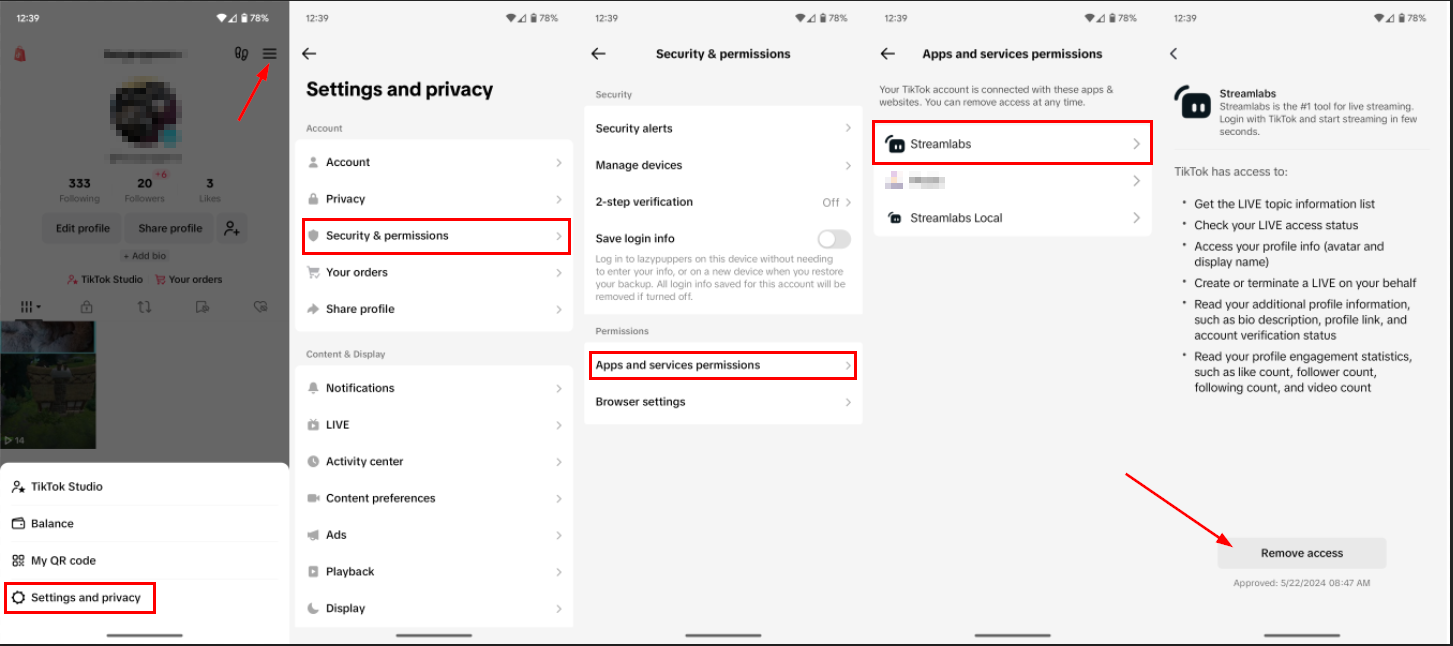 late gulch
@oak cloud
 humble trench
oak cloud
You should open the tiktok live manager and be able to confirm the stream.
Othe...
humble trench
oak cloud
You should open the tiktok live manager and be able to confirm the stream.
Othe...
thank you
oak cloud
late gulch
<@115226547694206983>
I only saw the one with all the text and the confetti/lights. you may need to try on a different browser/clear your browser cache and cookies. If you also look at it in your browser source on Streamlabs Desktop or OBS you should see the correct alert
late gulch
oak cloud
I only saw the one with all the text and the confetti/lights. you may need to tr...
 oak cloud
oh i guess they both have words. i meant the one with only words/the greenish one
 misty cove
Hello how are you, when I hit "claim discord nitro" it redirects me to the same page I am on and does not claim the nitro, did someone have the same inconvenience?
wispy latchBOT
@misty cove
Thank you for your interest in the Discord Nitro promotion! You can find more information about this promotion here: https://support.discord.com/hc/en-us/articles/28491711475735-Discord-Nitro-Trial-for-Streamlabs-Users
Our team cannot provide support for issues with this promotion in this server - sorry about that! If you need further assistance, please reach out to us via our ticketing system: https://support.streamlabs.com/hc/en-us/requests/new
late gulch
oak cloud
oh i guess they both have words. i meant the one with only words/the greenish on...
I don't understand, can you explain it to me in another way?
oak cloud
you keep pressing "test". you need to replay from here to see exact conditions being met
 late gulch
oak cloud
you keep pressing "test". you need to replay from here to see exact conditions b...
late gulch
oak cloud
you keep pressing "test". you need to replay from here to see exact conditions b...
Same thing
 oak cloud
mine is showing up correctly:

and that's in my Streamlabs Desktop
so you need to delete your browser source and re-add it
Or you clear your obs browser cache in the program You may need to clear your browser cache files in OBS Studio. You can do that by:
- Closing OBS Studio
- Hit the Windows key + R
- Paste the following and hit enter:
%appdata%/obs-studio/plugin_config/obs-browser - Delete the Cache folder, then re-open the software

 summer basin
Hey there. I'm having an issue where on desktop, you can't hear the games audio on stream.
I have tried going to each sources and selling monster and output. You can hear everything else, my microphone, my party even. Just not any game audio or screen capture audio.
late gulch
 oak cloud
late gulch
oak cloud
late gulch
yeah i got the second one for $30 but i missed screenshotting it
it was the other one

 oak cloud

i got the correct one again
This is something on your end that isn't triggering it correctly because i have had multiple people test this and it is showing correctly for all of them
late gulch
Send me the URL
 oak cloud
so if you are running any antivirus software, LAN optimization software, etc. then you should disable that
summer basin
Hey there. I'm having an issue where on desktop, you can't hear the games audio on stream.
I have tried going to each sources and selling monster and output. You can hear everything else, my microphone, my party even. Just not any game audio or screen capture audio.
oak cloud
late gulch
Send me the URL
We should not share URLs publicly as that contains sensitive information
late gulch
oak cloud
We should not share URLs publicly as that contains sensitive information
Accept a friend
oak cloud
summer basin
Hey there. I'm having an issue where on desktop, you can't hear the games audio ...
are you on a mac?
late gulch
oak cloud
are you on a mac?
PC
oak cloud
oh that was for the other person!
late gulch
oak cloud
oh that was for the other person!
OK
summer basin
@oak cloud no I'm on an ibuypower pc.
oak cloud
late gulch
OK
If you want me to create a thread for you I can too (i figured that way you weren't getting confused with who I was talking to) but the URL is what i copied from your account that I checked. So it should show exactly the same image for you as it does for me.
late gulch
oak cloud
If you want me to create a thread for you I can too (i figured that way you were...
I don't know what the problem is and I want to solve it urgently
oak cloud
do you have any antivirus software on your computer?
late gulch
Is there Arab Sports? @oak cloud
oak cloud
do you mean does anyone speak arabic?
late gulch
oak cloud
do you mean does anyone speak arabic?
correct
oak cloud
unfortunately I don't believe that we have anyone that would speak arabic
late gulch
oak cloud
unfortunately I don't believe that we have anyone that would speak arabic
The problem was supposed to be solved, but nothing else appears
oak cloud
Did you clear your obs browser cache like I shared earlier? #technical-support message
late gulch
I used BotRex before. Can I take the settings and add them here?
late gulch
oak cloud
Did you clear your obs browser cache like I shared earlier? https://ptb.discord....
I did that
oak cloud
ok. do you have an antivirus software on your computer?
late gulch
oak cloud
ok. do you have an antivirus software on your computer?
correct
oak cloud
you do have an antivirus software on your computer? like norton, avast, macafee, etc?
late gulch
oak cloud
you do have an antivirus software on your computer? like norton, avast, macafee,...
correct norton
oak cloud
Ok turn it off and just use Windows Firewall
humble trench
oak cloud
You should open the tiktok live manager and be able to confirm the stream.
Othe...
still didnt work


 late gulch
@oak cloud I discovered the problem
humble trench
@oak cloud i think this is why, i might have a strike or something
 oak cloud
late gulch
<@115226547694206983> I discovered the problem
oak cloud
late gulch
<@115226547694206983> I discovered the problem
what was the problem?
oak cloud
humble trench
<@115226547694206983> i think this is why, i might have a strike or something
oh  that would do it. i just went live to my tiktok for a second to check
humble trench
😂 yeah i figured it out
 late gulch
oak cloud
what was the problem?
late gulch
oak cloud
what was the problem?
The uploaded video has a problem
oak cloud
humble trench
😂 yeah i figured it out
personally their ai that goes through to check for this stuff is ridiculous. I literally asked someone what their preferred pronouns were on tiktok once and i got hit with one of these too (fell off fast). so you could reach out to them to be like "wtf"
 mellow flume
how can i claim my nitro
wispy latchBOT
@mellow flume
Thank you for your interest in the Discord Nitro promotion! You can find more information about this promotion here: https://support.discord.com/hc/en-us/articles/28491711475735-Discord-Nitro-Trial-for-Streamlabs-Users
Our team cannot provide support for issues with this promotion in this server - sorry about that! If you need further assistance, please reach out to us via our ticketing system: https://support.streamlabs.com/hc/en-us/requests/new
late gulch
@oak cloud
 mellow flume
bro i cant get my nitro can someone help me?
gritty isle
mellow flume
bro i cant get my nitro can someone help me?
The bot tells you how to do that and what to do if you have a problem with the giveaway.
mellow flume
bruh so i need paypal or card to get it?
gritty isle
mellow flume
bruh so i need paypal or card to get it?
Yes, unless you cancel it.
Requirements: Claim through Streamlabs by March 18, 2025 (12PM PT), and redeem in your Discord account by April 18, 2025 (11:59PM PT).
Membership: After the 1 month or 3 month trial period, your Nitro membership will convert to a monthly recurring membership, and Discord will bill your payment method per month until you cancel it. You can cancel at any time in your Discord User Settings.
mellow flume
oh aight ty
gritty isle
mellow flume
oh aight ty
You're welcome.
 dim bay
Regarding MOBILE Streamlabs App: I do not see “Screen Capture” as shown on the following article: https://streamlabs.com/content-hub/post/new-ios-screen-share-makes-live-streaming-on-iphone-easier-than-ever
Is this a limitation when using the app on iPhone?
gritty isle
dim bay
Regarding MOBILE Streamlabs App: I do not see “Screen Capture” as shown on the f...
Click the hamburger menu, then choose Screen Capture.

 dim bay
gritty isle
Click the hamburger menu, then choose Screen Capture.
dim bay
gritty isle
Click the hamburger menu, then choose Screen Capture.
Thank you for your response! Unfortunately see how I do not have that button?
 oak cloud
gritty isle
Click the hamburger menu, then choose Screen Capture.
oak cloud
gritty isle
Click the hamburger menu, then choose Screen Capture.
This is a little old 😓 sorry about that. i'll update that in our resources
@dim bay screenshare shows up when you press "go live"
you can choose between camera or screenshare. but alerts and stuff will not show up on a screenshare
gritty isle
oak cloud
This is a little old 😓 sorry about that. i'll update that in our resources
<@...
Ah, whoops. Sorry about that.
Why do I have a Screen Capture button, then?
oak cloud
 not sure my version shows it on the go live screen
dim bay
Hmm. To confirm, I am supposed to have the option to “Screen Capture” once I go LIVE?
oak cloud
oh, i see it in both places wth i only noticed this the other day when i went live to ipad
gritty isle
I get that too.
 oak cloud
^^ this is what i was sharing mellow
 winged palm
I’m going live on my console through stream labs but it isn’t actually going live on my twitch channel
dim bay
oak cloud
^^ this is what i was sharing mellow
Hmm. I will create a ticket as I do not have this feature before or after clicking Go Live. Thank you @gritty isle as well
gritty isle
dim bay
Hmm. I will create a ticket as I do not have this feature before or after clicki...
Do you have this version?
 dim bay
gritty isle
Do you have this version?
dim bay
gritty isle
Do you have this version?
Yes same version.
gritty isle
dim bay
Yes same version.
And did you connect a platform, Twitch, YouTube, Facebook, Trovo, or X in Account Settings?
dim bay
gritty isle
And did you connect a platform, Twitch, YouTube, Facebook, Trovo, or X in Accoun...
Oh yes I actively stream on Youtube. Only this week have I tested it through Mobile though, but no red flags on Desktop or Mobile. This is the only feature I’ve been unable to test.
gritty isle
dim bay
Oh yes I actively stream on Youtube. Only this week have I tested it through Mob...
Okay, weird. Go ahead and submit the ticket then.
dim bay
gritty isle
Okay, weird. Go ahead and submit the ticket then.
Right? Thanks though for your help!
gritty isle
dim bay
Right? Thanks though for your help!
You're welcome!
abstract plazaBOT
Having trouble? Want to see if anyone else is having the same problem?
Check out our #known-issues channel! We do our best to keep this channel as current as possible with new bugs and progress updates!
 peak hamlet
Hello , discord nitro claim, is not working it keeps sending me back to dashboard please help
stray citrus
peak hamlet
Hello , discord nitro claim, is not working it keeps sending me back to dashboar...
Hey there, we're sorry you're having trouble. We recommend submitting a ticket here: https://support.streamlabs.com/hc/en-us/requests/new for further assistance.
peak hamlet
stray citrus
Hey there, we're sorry you're having trouble. We recommend submitting a ticket h...
Okay
bitter tendon
After renaming the subscriptions now im so lost, and confused, im not sure what does what and cant really find where to check the difference. Can anyone help me with that?
Or there is one plan only ? I mean i dont understand, because i have been charged twice for two subscriptions and on the website i can see Streamlabs Starter which is free and Streamlabs Ultra (27usd) which got renamed to Prime if i understand correctly. But then on my bank statement i see two charges, one for Streamlabs Ultra 27usd and second for Streamlabs Prime 19usd.. what is that really? I submited the ticked, and i got the refund for 27usd, but feels strange because now i dont know whats in my subscription.. 😄
 woeful saffron
Hi is there a fix to my stream not picking up my discord calls?
stray citrus
bitter tendon
Or there is one plan only ? I mean i dont understand, because i have been charge...
Hey there! Our team wouldn't be able to clarify any charges in this server, so I would recommend reaching out to our payments team for clarification on this: https://support.streamlabs.com/hc/en-us/requests/new
"Prime" is just the old name for "Ultra", but they are the same subscription. I would reach out to ensure you aren't being charged twice for the same kind of sub! If you have any other questions, please don't hesitate to ask.
bitter tendon
Yeah, but now it means I got ultra but not ultra? Because ultra costs 27$ and I was charged 19$, and on the website it says 27$. Kinda strange isn't it
 humble gale
bitter tendon
Yeah, but now it means I got ultra but not ultra? Because ultra costs 27$ and I ...
humble gale
bitter tendon
Yeah, but now it means I got ultra but not ultra? Because ultra costs 27$ and I ...
$19 is the grandfathered price
 wind rampart
i cant redeem discord nitro
wispy latchBOT
wind rampart
i cant redeem discord nitro
Thank you for your interest in the Discord Nitro promotion! You can find more information about this promotion here: https://support.discord.com/hc/en-us/articles/28491711475735-Discord-Nitro-Trial-for-Streamlabs-Users
If you need further assistance, please reach out to us via our ticketing system: https://support.streamlabs.com/hc/en-us/requests/new
Please follow the directions here. Our team cannot provide support for issues with this promotion in this server.
 spice light
I can't seem to get my camera to work properly. In OBS my camera captures me in the white and blue.
But in the Logitech software it is completely normal
fervent grail
So I have been struggling with this for a week
I don’t have my webcam as a device option…. when I go and put in a video capture source it just says “USB Video Device” but I remember when I first set it up and it was working my device option had my Razer Kiyo Pro on there but now it doesn’t, and I don’t know what to do iv done everything I have permissions set on my computer, permissions set on my antivirus, I got rid or the source and tried it again, iv uninstalled and reinstalled, I checked all my setting, and I have no idea what to do my web cam is working perfectly fine in Razer synapse please help me
spice light
Nevermind it was in the property tab and then color chane
 vast harbor
hi i have a problem whit game chat overlay it dosent work tryed evrything
fading sapphire
How do I fix this
 winged palm
My console says I’m live and so does my Streamlabs console account but my Twitch channel says I am offline. Can anyone help with this?
fading sapphire
woeful saffron
the box?
Pc it’s my chat it needs to be on top it needs to be seen
 agile owl
fading sapphire
Pc it’s my chat it needs to be on top it needs to be seen
agile owl
fading sapphire
Pc it’s my chat it needs to be on top it needs to be seen
show us your streamlabs desktop sources please
fading sapphire
agile owl
show us your streamlabs desktop sources please
Kk
winged palm
My console says I’m live and so does my Streamlabs console account but my Twitch channel says I am offline. Can anyone help with this?
fading sapphire
okay when i put my stream on it they just go under it
 agile owl
fading sapphire
okay when i put my stream on it they just go under it
agile owl
fading sapphire
okay when i put my stream on it they just go under it
drag chat box to top of the list
fading sapphire
agile owl
drag chat box to top of the list
no way it was that easy
agile owl
😂
fading sapphire
agile owl
😂
😭 ty so much
agile owl
you're welcome
wispy latchBOT
Thank you for your interest in the Discord Nitro promotion! You can find more information about this promotion here: https://support.discord.com/hc/en-us/articles/28491711475735-Discord-Nitro-Trial-for-Streamlabs-Users
If you need further assistance, please reach out to us via our ticketing system: https://support.streamlabs.com/hc/en-us/requests/new
Please follow the directions here. Our team cannot provide support for issues with this promotion in this server.
woeful saffron
fading sapphire
Pc it’s my chat it needs to be on top it needs to be seen
delete it then add it back
abstract plazaBOT
Having trouble? Want to see if anyone else is having the same problem?
Check out our #known-issues channel! We do our best to keep this channel as current as possible with new bugs and progress updates!
gritty isle
winged palm
My console says I’m live and so does my Streamlabs console account but my Twitch...
If you're using Streamlabs Console with a Streamlabs Console subscription, make sure you're logged in the Streamlabs Console site with your Twitch. If you're using Streamlabs Console with a Streamlabs UItra subscription, make sure you're logged in the Streamlabs Console web site with your Streamlabs ID.
In either case, go to the Streamlabs Console web site, click ytour PFP, choose Account Settings, and see what Region you're set to. If its on Auto, try choosing the specific region and see if that helps.
If you still have issues, please submit a ticket: https://support.streamlabs.com/hc/en-us/requests/new
 prisma fractal
Having an issue with the browser. Not allowing me to interact, saying I'm not putting the correct format. When I hit delete it shows BBB
 marble wind
@prisma fractal are you not able to enter the @ character in this field?
prisma fractal
marble wind
<@1076935785837768947> are you not able to enter the @ character in this field?
Correct
Doesn't allow me to complete my information.
marble wind
@prisma fractal that's odd, try typing it in notepad, then copying and pasting it
prisma fractal
marble wind
<@1076935785837768947> that's odd, try typing it in notepad, then copying and pa...
I tried that. Doesn't allow me
marble wind
@prisma fractal i'm about 90% sure that shouldn't be the case, try asking at https://support.streamlabs.com/hc/en-us/requests/new
gritty isle
Could be a Mac only issue. Definitely submit a ticket.
prisma fractal
Thank you
gritty isle
What are you wanting to share?
A game?
A application (not a game)?
A web browser window?
Or just your whole screen (not recommended)?
Then you'd add a Display Capture and then setup a Video Capture source for your web camera.
Where are you planning on streaming to, Twitch, YouTube, Facebook, Trovo, X, or TikTok?
Have you logged into the Streamlabs web site or logged into Streamlabs Desktop with that YouTube channel?
wispy latchBOT
@desert briar
Click the :gear: at the bottom left of Streamlabs Desktop. Then the logout button should be at the bottom left of the popup as shown:
https://i.gyazo.com/d85a0f693148ea5b9e4c6b03d7cbf703.png
gritty isle
Log in is just the same way.
And as for sources, you need these two

And remember, what ever is shown on your screen will be on stream. So avoid showing passwords, logging into your financial institutions, connecting your work's VPN, etc. Keep your data private.
Good luck with your stream! 👋
 tawny talon
Alert box isn't working with twitch events but tests are working
gritty isle
tawny talon
Alert box isn't working with twitch events but tests are working
Do you perhaps have Unlimited Alert Moderation Delay enabled? If so, disable that setting.
Please go here https://streamlabs.com/dashboard#/alertbox and if you have Unlimited Alert Moderation Delay enabled, disabled it then click Save Settings at the bottom of the page.
Also go here https://streamlabs.com/dashboard#/recentevents and make sure your alerts are not paused. If this icon is a play button, your alerts were paused.
https://cdn.discordapp.com/attachments/962371235789025360/1147374507238101072/IMG_1019.png
tawny talon
gritty isle
Do you perhaps have Unlimited Alert Moderation Delay enabled? If so, disable th...
my goal bar and activity feed are also not updating so it looks like twitch and streamlabs have lost their connection to each other
gritty isle
tawny talon
my goal bar and activity feed are also not updating so it looks like twitch and ...
Refreshing the connection between Streamlabs and Twitch will resolve this.
NOTE 👉 This disconnect process will not go back and capture events that were missed. Events are sent over the API only once and if they are missed, they are missed forever. Going forward from once you reconnected by logging back in, Streamlabs should capture events from Twitch.
-
Log out of the Streamlabs web site on every device you access it: Click your PFP and choose Log out.
-
If you use Streamlabs Console, log out of the Streamlabs Console web site on every device you access it: Click your PFP and choose Log out.
-
If you use the standalone Streamlabels application, log out of that.
-
Log out in Streamlabs Desktop (see next post on how to do that).
-
Follow this guide: https://streamlabs.com/content-hub/post/how-to-disconnect-your-streamlabs-account. Just follow the section for Twitch.
-
Navigate back to the Streamlabs web site and log in with your Twitch. This re-establishes the connection. You can verify this by going back to https://www.twitch.tv/settings/connections, scrolling down to Other Connections and examine the Streamlabs connection. It should say "Connected a few minutes ago" other short period of time.
-
IMPORTANT: Once you have completed the guide, go back to the Streamlabs web site https://streamlabs.com/dashboard#/recentevents, click the Live Actions tab, scroll all the way to the bottom and click the Reload Widgets button. PLEASE Don't skip this step!
-
Log back in to all the other Streamlabs products you use.
👉 REMEMBER, this process will not go back and capture events that were missed. 👈
And I gotta take the dog out. Back later.
tawny talon
gritty isle
Refreshing the connection between Streamlabs and Twitch will resolve this.
NOTE...
thank you, fingers crossed!
abstract plazaBOT
Are you knowledgeable about Streamlabs products?
Get rewarded for helping the Streamlabs Community here in Discord!
👉 Apply to be a part of the Streamlabs Support Volunteer Program!
Application Link:
https://forms.gle/eKS29zWfFjGEzaRp7
For details, see our post in
#announcements message
Do you have a Streamlabs Ultra membership? Are you part of the Streamlabs All-Stars program?
Get your Discord roles by going to this page here: https://streamlabs.com/dashboard#/settings/integrations and clicking "Link" next to Discord! Ultra members and higher tier All-Stars members will have access to private channels for support!
Interested in Ultra? Check it out here: https://streamlabs.com/ultra?refl=discord




 desert briar
Trying desperately to stream to Twitch. Was doing fine for about three weeks and now I'm getting an error code constantly. I've tried uninstalling app, restarting device, deactivating app from Twitch and reinstalling....nothing seems to work. Any ideas? Verbatim: "screen broadcasting - live broadcast to streamlabs has stopped due to: attempted to start an invalid broadcast session."
gritty isle
desert briar
Trying desperately to stream to Twitch. Was doing fine for about three weeks an...
Sounds like Streamlabs Mobile for iOS. Please submit a ticket here for that: https://support.streamlabs.com/hc/en-us/requests/new
desert briar
Thats right, Rufus. Thanks so much!
 somber monolith
Streamlabs is just not even picking up my microphone, it's not even accessing it.
...well I tried.
gusty umbra
somber monolith
Streamlabs is just not even picking up my microphone, it's not even accessing it...
Is windows seeing it?
somber monolith
gusty umbra
Is windows seeing it?
Apparently not.
It doesn't show up in the "Let apps access the microphone"
