#technical-support
1 messages · Page 108 of 1
 regal canyon
 gritty isle
Did you try to log in with your Streamlabs ID there?
gritty isle
Did you try to log in with your Streamlabs ID there?
Yup it worked
I tried to merge tik tok account from streamlabs id, but ir redirects back to the dasboard like nothing happened
gritty isle
regal canyon
Yup it worked
Okay. It worked as in you successfully logged in with your Streamlabs ID?
regal canyon
gritty isle
Okay. It worked as in you successfully logged in with your Streamlabs ID?
Well I can login with other platforms but not with tik tok
I logged in with my steamlabs id from there I tried to merge tik tok account but nothing happens
gritty isle
regal canyon
Well I can login with other platforms but not with tik tok
Log out and log in with one of your other platforms you have merged then try and merge your TikTok.
regal canyon
gritty isle
Log out and log in with one of your other platforms you have merged then try and...
I’ll try login with twitch and then merge tik tok
gritty isle
Any luck yet @candid pelican?
 candid pelican
gritty isle
Any luck yet <@153367740495691777>?
candid pelican
gritty isle
Any luck yet <@153367740495691777>?
Trying the network thing now
 teal zealot
gritty isle
Dropped frames indicate a network issue between you and the ingest. What platfo...
teal zealot
gritty isle
Dropped frames indicate a network issue between you and the ingest. What platfo...
yes im using twitch. i've updated everything,uninstalled everything, redownloanded it. still doesnt seem to be working. has been working fine until this weekend.
candid pelican
gritty isle
Any luck yet <@153367740495691777>?
 gritty isle
teal zealot
yes im using twitch. i've updated everything,uninstalled everything, redownloand...
gritty isle
teal zealot
yes im using twitch. i've updated everything,uninstalled everything, redownloand...
Run the Twitch Test, see the tagged post below from the bot.
Use Medium or Long duration. Short Duration sounds wonderful becuase, you know short, but it will give you inconsistent results. Also choose all of the ingests in your region. Screen shot the results once its complete. Make sure nothing else there is using your Internet upload bandwidth.
 wispy latchBOT
@teal zealot
Please run this twitch test tool to find out the best server (https://r1ch.net/projects/twitchtest). Be sure to run the test for either Medium or Long, as short won't give you the most accurate results and be sure to select your region from the listed options (if the regions are not applicable to you, please select 5-6 servers that are near you). You're looking for at least a quality of 84.
Once you've found a good server go to Settings > Stream > Stream to custom ingest and you can manually select your server.
gritty isle
candid pelican
Is this the very first time you're trying to go live to YouTube?
regal canyon
gritty isle
Log out and log in with one of your other platforms you have merged then try and...
still the same issue it just reloads streamlabs page
candid pelican
gritty isle
Is this the very first time you're trying to go live to YouTube?
No
I've went live before but with a stream key
gritty isle
regal canyon
still the same issue it just reloads streamlabs page
Okay, thanks for trying that. I'm not sure what else to try right off hand. May I ping you in a bit once things settle down a bit?
gritty isle
candid pelican
I've went live before but with a stream key
When?
regal canyon
gritty isle
Okay, thanks for trying that. I'm not sure what else to try right off hand. Ma...
Of course!
regal canyon
gritty isle
Okay, thanks for trying that. I'm not sure what else to try right off hand. Ma...
I can send you a video
candid pelican
gritty isle
When?
Like 30 mins ago, I wanted to try through streamlabs and connecting my youtube to it so I can interact and whatnot through streamlabs instead of the website
But I keep getting hit with the first message
 strong carbon
I have a question, Youtube Super chat is not showing in the streamlabs goal?
gritty isle
candid pelican
Like 30 mins ago, I wanted to try through streamlabs and connecting my youtube t...
Interesting. Okay thanks. Hang on, we've got multiple people with this issue and we're trying to figure out what's going on. I'm able to go live to YouTube just fine as are some of the staff. Could be a regional YouTube issue but we're not sure.
gritty isle
strong carbon
I have a question, Youtube Super chat is not showing in the streamlabs goal?
Did it appear in your Mini Feed or Recent Events page https://streamlabs.com/dashboard#/recentevents on the Streamlabs web site?
gritty isle
regal canyon
I can send you a video
Not sure if that will help. I understand your issue.
Are you perhaps using Chrome or Opera as your web browser?
regal canyon
gritty isle
Not sure if that will help. I understand your issue.
Are you perhaps using Chr...
Chrome and Safari
gritty isle
regal canyon
Chrome and Safari
Sounds like you're on a Mac, correct?
Or an iPhone or iPad.
regal canyon
gritty isle
Sounds like you're on a Mac, correct?
I tried to login on an Iphone and on Windows pc
strong carbon
gritty isle
Did it appear in your Mini Feed or Recent Events page <https://streamlabs.com/da...
Yes
 gritty isle
regal canyon
I tried to login on an Iphone and on Windows pc
gritty isle
regal canyon
I tried to login on an Iphone and on Windows pc
On the Windows PC, please try again but use Microsoft Edge or Firefox.
strong carbon
But the goal shows 0
regal canyon
gritty isle
On the Windows PC, please try again but use Microsoft Edge or Firefox.
okay
gritty isle
strong carbon
But the goal shows 0
You configured the widget and clicked Start Goal?

I don't use the widget so I have no settings. 😉
regal canyon
gritty isle
On the Windows PC, please try again but use Microsoft Edge or Firefox.
sadly the same issue on Edge
gritty isle
regal canyon
sadly the same issue on Edge
Weird! 
gritty isle
regal canyon
I don't know what to do..
And this TikTok isn't already merged in a different Streamlabs account?
regal canyon
gritty isle
And this TikTok isn't already merged in a different Streamlabs account?
Nope..
strong carbon
gritty isle
You configured the widget and clicked *Start Goal*?
Yes, if I recive normal donations it’s work but no superchat, also testing super chat goal it’s not updating
gritty isle
I deleted that URL as it leaks your Streamlabs API token. @strong carbon
gritty isle
strong carbon
can you check it I will sim a donation?
Are you using the Donation Goal https://streamlabs.com/dashboard#/donationgoal or the SuperChat Goal https://streamlabs.com/dashboard#/super-chat-goal?
strong carbon
gritty isle
Are you using the Donation Goal <https://streamlabs.com/dashboard#/donationgoal>...
regal canyon
gritty isle
And this TikTok isn't already merged in a different Streamlabs account?
So What Should I do?
gritty isle
strong carbon
https://streamlabs.com/dashboard#/donationgoal this one
That one only tracks Donations (now known as Tips). It won't track SuperChats.
strong carbon
Pff then I need to use 2 goals on the same live?
 regal peak
My twitch alert box is invisible and doesn't pop up need help fixing it! please
gritty isle
regal canyon
So What Should I do?
I don't know, sorry. You're sure there are no special characters like an e with an umlaut or an an emoji in your TikTok name or TikTok display name?
regal peak
i copied the url browser and everything its just bugged.
regal canyon
gritty isle
I don't know, sorry. You're sure there are no special characters like an e with...
Ohh..My display name has custom font.
gritty isle
Does the URL start with https://streamlabs.com or https://twitch?
gritty isle
regal canyon
Ohh..My display name has custom font.
Try setting to the default font if you can.
regal peak
it is a twitch alert box and yes it starts with twitch
gritty isle
regal peak
it is a twitch alert box and yes it starts with twitch
If you take that URL and put in the blank web page and test your alerts from Twitch, do they work in that web page?
regal peak
let me try right now give me 5 seconds
gritty isle
strong carbon
Pff then I need to use 2 goals on the same live?
If you want to track both, yes.
regal peak
it is blank when i pasted that url on another blank web page
gritty isle
regal peak
it is blank when i pasted that url on another blank web page
Can you replay old alerts or make test alerts from Twitch?
And if so, do those appear in that web page?
regal peak
let me do that right now and see if it appears on that webpage
it works on the blank page yes sir
gritty isle
regal peak
it works on the blank page yes sir
Okay great. Are you using Streamlabs Desktop?
regal peak
yes sir
gritty isle
regal peak
yes sir
Okay great! In the properties for that Browser Source, please enable Refresh browser source when scene becomes active and click the button below that to refresh the cache of the current page. Then close the properties and test the alerts again. Let me kow if you see the test alerts in the Preview Window in Streamlabs Desktop or on stream.
regal peak
I am gonna follow this instructions right now
I done everything step by step and it still don't work . Funny enough this before because I had feeling so it ain't the first time and even restarted the whole application I had to end stream as well to close and reopen streamlabs desktop.
teal zealot
gritty isle
Run the Twitch Test, see the tagged post below from the bot.
Use *Medium* or *L...
This is what I got. Also btw, thank you for everything you do man!
 gritty isle
regal peak
I done everything step by step and it still don't work . Funny enough this befor...
gritty isle
regal peak
I done everything step by step and it still don't work . Funny enough this befor...
Okay thanks for trying that.
regal peak
^^^^ is this for me??
gritty isle
regal peak
I done everything step by step and it still don't work . Funny enough this befor...
Are you currently live?
candid pelican
@gritty isle when I'm logging back in after logging out and closing streamlabs, do I have to use my streamlabs ID or youtube?
regal peak
not at the moment but I can be live if u want me to test
gritty isle
regal peak
not at the moment but I can be live if u want me to test
Clear your Desktop browser cache...
- For Streamlabs Desktop:
- Close Streamlabs Desktop
- Hit windows key + R
- Paste this and hit enter %appdata%/slobs-client/plugin_config/obs-browser
- Delete the cache folder
- Startup Streamlabs Desktop again
gritty isle
candid pelican
<@301571565840236564> when I'm logging back in after logging out and closing str...
Log in with your YouTube. Don't log in with your Streamlabs ID.
regal peak
I done everything should I try again
gritty isle
regal peak
I done everything should I try again
Yes please. Launch Streamlabs Desktop. Go to the scene with the Browser Source for alerts, replay old alerts or send test alerts. You should see them in the Preview Window in Streamlabs Desktop.
 regal peak
Still don't work
It pops up on the blank page but not on streamlabs
it works on obs studio but not on stream labs
gritty isle
regal peak
Still don't work
Weird.
In each scene where this browser source exists, delete that source.
Once all instances of that browser source have been deleted, restart Streamlabs Desktop.
Add back the Browser Source using the URL Twitch gives you and test your alerts.
regal peak
I done this too. I got alot of experience with computers internally and externally i tried u said even before but I will do it again just to see it if can work for the third time. that is why i came here i literally tried everythinggg
gritty isle
Okay thanks for letting me know that.
In Streamlabs Desktop, go to Settings > Get Support and click Upload Diagnostic Report and then click here to create a ticket: https://support.streamlabs.com/hc/en-us/requests/new Be sure to paste the diagnostic code you get after uploading the report in the body of the ticket.
 regal peak
Trust me i appreaite help really, but i know this was going to lead me eventually writing a diagnostic report. Becuase I got alot of experience with this. I knew it is nothing to do with my side. Its the servers clearly because I done everything correctly .
gritty isle
regal peak
Trust me i appreaite help really, but i know this was going to lead me eventuall...
You're welcome. Likely something behind the scenes that I can't see. The diagnostic report and ticket will help the staff track this down.
 covert cove
Hello everybody.
I find myself in a dead end regarding the streamlabs storage space. I don't know how to access it. I bought lens skins, and by changing the html etc on the site, not on the application... in terms of the codes it tells me: 1 Impossible to create, modify or import... Insufficient storage space.
I do not know what to do. Thank you for your help
regal peak
@gritty isle it says my username would that be my twitch username or streamlabs username
gritty isle
regal peak
<@301571565840236564> it says my username would that be my twitch username or st...
Twitch
gritty isle
covert cove
Hello everybody.
I find myself in a dead end regarding the streamlabs storage sp...
Can you screen shot that error please?
 gritty isle
teal zealot
This is what I got. Also btw, thank you for everything you do man!
gritty isle
teal zealot
This is what I got. Also btw, thank you for everything you do man!
Sorry for the long delay. Those quality numbers look good. Are you near one of those ingests whose quality score is under 100?
teal zealot
gritty isle
Sorry for the long delay. Those quality numbers look good. Are you near one of...
negative. im close to ATL
gritty isle
covert cove
Ah, your editing the custom code. While we provide the option for that, we don't actually support the custom code itself.
covert cove
and what about storage space?
gritty isle
teal zealot
negative. im close to ATL
Hmmmm, okay. Please go to Settings > Stream > Stream to custom ingest and choose the Ashburn, VA (5) ingest and see if the dropped frames remain or not.
teal zealot
gritty isle
Hmmmm, okay. Please go to Settings > Stream > Stream to custom ingest and choo...
Ok! on streamlabs website or desktop app?
gritty isle
covert cove
and what about storage space?
I'm not exactly sure what storage space its actually referring to, to be honest. Is there a lot of code there?
gritty isle
teal zealot
Ok! on streamlabs website or desktop app?
In Streamlabs Desktop (the application).
gritty isle
covert cove
and what about storage space?
It seems like that is just a line of text? 🤷♂️ Can you delete line #1?
covert cove
no i can't
no it's just for the subscriber objective skin, but on the base code, there is the storage message
and when I paste the new code, the message still appears
 olive condor
hei trenger hjelp
gritty isle
covert cove
and when I paste the new code, the message still appears
While we provide the option for custom code, we don't actually support the custom code itself. I'm not sure what's causing this message; me personally have never seen it reported. I'm checking further on this. May I ping you in a bit?
gritty isle
olive condor
hei trenger hjelp
With?
olive condor
norway
covert cove
yes np
olive condor
not noeway here ?
gritty isle
olive condor
not noeway here ?
We only speak English. Please use Google Translate to translate if needed.
candid pelican
@gritty isle Tried it again using youtube instead of my streamlabs ID, set everything up followed your directions again but sadly it just doesn't work and shows the first message again
gritty isle
candid pelican
<@301571565840236564> Tried it again using youtube instead of my streamlabs ID, ...
Please check with your YouTube Studio (https://studio.youtube.com/) > Click Create > Go live. Screen shot what happens please.
 gritty isle
candid pelican
gritty isle
candid pelican
Okay. Now go to https://studio.youtube.com, click Content, then click Live. Do you have any or mutiple upcoming live streams listed there
candid pelican
gritty isle
Okay. Now go to <https://studio.youtube.com>, click *Content*, then click *Live...
Looks like it
 gritty isle
candid pelican
Looks like it
gritty isle
candid pelican
Looks like it
Please delete that one scheduled for today.
Then try and go live again. Click the Go Live button. *Don't click the calendar button.

 candid pelican
gritty isle
Please delete that one scheduled for today.
Then try and go live again. Click ...
candid pelican
gritty isle
Please delete that one scheduled for today.
Then try and go live again. Click ...
It worked thank you so much
teal zealot
gritty isle
In Streamlabs Desktop (the application).
I just don’t know what’s going on man
 gritty isle
teal zealot
I just don’t know what’s going on man
gritty isle
teal zealot
I just don’t know what’s going on man
Skipped frames are different.
teal zealot
teal zealot
I just don’t know what’s going on man
wispy latchBOT
@teal zealot This short 3 minute video here, may help with that issue: https://www.youtube.com/watch?v=WnRhaZaQ2ns
# Are You Having Issues With Performance or Frame Rate Issues?
- Would make sure you have notifications enabled in: Streamlabs Desktop > Settings > Notifications
- Enable all Notifications and set the threshold to about 5% for all 3 notification types
- Once notifications are enabled, start streaming + gaming for about 15 mins or until you get errors/notifications.

# Types of errors/notifications that could be seen while having issues.
- Lagged Frames > Compositor overloaded, commonly high GPU usage.
- Skipped Frames > Encoder overloaded, commonly high CPU usage on x264.
- Dropped Frames > Network issues, try other servers or restart equipment.```:arrow_right: **More Info: <https://streamlabs.com/content-hub/post/dropped-frames-cpugpu-issues-and-improving-stream-quality>**So @teal zealot Please screen shot Settings > Video and Settings > Output. And let's go from there.
 velvet marsh
Hello. I have a problem too, I made some personalized things for alerts. But it doesn't work when someone subscribes to me.
A little help please, I'm letting you know that the alerts didn't work before either, I did everything exactly as it says on your website.
But it doesn't work, I want to specify that I'm live right now, I have people who have subscribed and I haven't received any alert or anything.
gritty isle
velvet marsh
Hello. I have a problem too, I made some personalized things for alerts. But it ...
YouTube or Twitch?
velvet marsh
Youtube
gritty isle
velvet marsh
Youtube
When someone makes an account on YouTube, the subscribed channels are private by default. When the person subscribing to you is set to private, Streamlabs cannot see the subscription.
The subscriber (the person watching your stream) would need to set their subscriptions to public BEFORE CLICKING THE SUBSCRIBE BUTTON in YouTube's privacy settings https://www.youtube.com/account_privacy. Changing it after they subscribe won't cause and alert.
Found here: https://imgur.com/4fkxuL0
The setting on your (the streamer) channel doesn't apply in this case.
teal zealot
gritty isle
So <@692187935575113748> Please screen shot Settings > Video and Settings > Outp...
Here is video & output settings

 gritty isle
teal zealot
Here is video & output settings
gritty isle
teal zealot
Here is video & output settings
Go to Settings > Output and open the drop down menu for Encoder. Screen shot all te options shown please.
teal zealot
gritty isle
Go to Settings > Output and open the drop down menu for Encoder. Screen shot al...
 gritty isle
teal zealot
gritty isle
teal zealot
Switch your encoder to AMD HW 2.64. What platform are you streaming with, Twitch?
teal zealot
gritty isle
Switch your encoder to AMD HW 2.64. What platform are you streaming with, Twitc...
yes
gritty isle
teal zealot
yes
Screen shot Settings > Output again after switch encoders.
velvet marsh
gritty isle
When someone makes an account on YouTube, the subscribed channels are private by...
So to understand that the problem is not with me right?
Because in the tests, the alerts work perfectly when I test them. But the people who subscribed earlier the 6. I didn't receive any alert or anything
 gritty isle
velvet marsh
So to understand that the problem is not with me right?
Because in the tests, th...
gritty isle
velvet marsh
So to understand that the problem is not with me right?
Because in the tests, th...
The problem is not with Streamlabs, Streamlabd Desktop, your Alert Box settings, or your YouTube channel. The problem is the privacy setting I mentioned. If a viewer doesn't have the subscriptions public, we can't detect when they subscribe to your channel. YouTube did this to comply with privacy laws, like COPPA.
gritty isle
teal zealot
Set your bitrate to 6000. See how things go the next time you're live.
velvet marsh
gritty isle
The problem is not with Streamlabs, Streamlabd Desktop, your Alert Box settings,...
understood , thank you! 😄
gritty isle
velvet marsh
understood , thank you! 😄
You're welcome!
 deft reef
Hello! I been having a issue with my alerts from streamlabs to obs. When I run the test alerts they work fine but when I'm live they don't. The followage alert will work but not my subs, raids, bits. Not sure what to do to fix it as I tried almost everything at this point
teal zealot
gritty isle
Set your bitrate to 6000. See how things go the next time you're live.
YOU ARE THE MAN RUFUS!!!!!!!!!
gritty isle
teal zealot
https://tenor.com/view/it-worked-rupaul-late-night-with-seth-meyers-yes-finally-...
YAY!!! You're welcome!
gritty isle
teal zealot
YOU ARE THE MAN RUFUS!!!!!!!!!
Basically you were using your CPU to run the game, Streamlabs Desktop, and encode your stream and it could not keep up. Switching the encoder to your GPU (video card), took the load off your CPU.
gritty isle
deft reef
Hello! I been having a issue with my alerts from streamlabs to obs. When I run t...
Are you using the Streamlabs Alert box https://streamlabs.com/dashboard#/alertbox or the one from Twitch?
deft reef
gritty isle
Are you using the Streamlabs Alert box <https://streamlabs.com/dashboard#/alertb...
I am using the streamlabs alert box and pasting it in as a broser source into OBS
gritty isle
deft reef
I am using the streamlabs alert box and pasting it in as a broser source into OB...
Great! Thanks for letting me know that!
If you're using the Streamlabs Alert Box, do you perhaps have Unlimited Alert Moderation Delay enabled? If so, disable that setting. Please go here https://streamlabs.com/dashboard#/alertbox and if you have Unlimited Alert Moderation Delay enabled, disabled it then click Save Settings at the bottom of the page. Also go here https://streamlabs.com/dashboard#/recentevents and make sure your alerts are not paused. If this icon is a play button, your alerts were paused.
https://cdn.discordapp.com/attachments/962371235789025360/1147374507238101072/IMG_1019.png
gritty isle
covert cove
Log out of the Streamlabs web site by clicking the PFP in the upper right and choose Log out. Then clear the cache in the web browser for all time, restart the whole web browser, navigate back to the Streamlabs web site, log in, and try again.
deft reef
gritty isle
Great! Thanks for letting me know that!
If you're using the Streamlabs Alert B...
I looked at all of this and it all seems to be fine. I did recconect my twitch off and on from streamlabs and going to test if that fixes it on todays stream! Thank you!
gritty isle
deft reef
I looked at all of this and it all seems to be fine. I did recconect my twitch o...
🤞
covert cove
gritty isle
Log out of the Streamlabs web site by clicking the PFP in the upper right and ch...
it didn't change anything, however I tried the codes by connecting to streamlab via my husband's PC and it worked, I was able to retrieve the link
gritty isle
covert cove
it didn't change anything, however I tried the codes by connecting to streamlab ...
Hmmmm, likely some browser setting on the other PC perhaps. Hard to say for sure.
velvet marsh
gritty isle
You're welcome!
I tested now, and it doesn't work, some guys came and I asked them to subscribe, neither animation nor alert box appeared, are there any other ideas?
I had this problem once before and someone here solved it for me
gritty isle
velvet marsh
I tested now, and it doesn't work, some guys came and I asked them to subscribe,...
Clear your Desktop browser cache might help.
For OBS Studio:
- Close OBS Studio
- Hit windows key + R
- Paste this and hit enter %appdata%\obs-studio\plugin_config\obs-browser
- Delete the cache folder
- Start up OBS Studio again
velvet marsh
gritty isle
Clear your Desktop browser cache might help.
For OBS Studio:
1. Close OBS Stu...
After the stream end all good?
gritty isle
velvet marsh
After the stream end all good?
Don't perform that if you're live. Wait until you end your stream.
velvet marsh
gritty isle
Clear your Desktop browser cache might help.
For OBS Studio:
1. Close OBS Stu...
From obs?
i have streamlabs bro.. xd
gritty isle
velvet marsh
From obs?
i have streamlabs bro.. xd
Oh sorry. YouTube or Twitch subscriber?
velvet marsh
Youtube , im on youtube at the moment
gritty isle
velvet marsh
Youtube , im on youtube at the moment
When someone makes an account on YouTube, the subscribed channels are private by default. When the person subscribing to you is set to private, Streamlabs cannot see the subscription.
The subscriber (the person watching your stream) would need to set their subscriptions to public BEFORE CLICKING THE SUBSCRIBE BUTTON in YouTube's privacy settings https://www.youtube.com/account_privacy. Changing it after they subscribe won't cause and alert.
Found here: https://imgur.com/4fkxuL0
The setting on your (the streamer) channel doesn't apply in this case.
The problem is not with Streamlabs, Streamlabd Desktop, your Alert Box settings, or your YouTube channel. The problem is the privacy setting I mentioned. If a viewer doesn't have the subscriptions public, we can't detect when they subscribe to your channel. YouTube did this to comply with privacy laws, like COPPA.
No need to clear your OBS-browser cache. That won’t fix this.
velvet marsh
gritty isle
When someone makes an account on YouTube, the subscribed channels are private by...
I already told you, I understood this, but some guys who had public or subscribed accounts and nothing, not one of the ALERTBOXes was activated, or the animation ran
gritty isle
velvet marsh
I already told you, I understood this, but some guys who had public or subscribe...
Were they already subscribed?
velvet marsh
No
gritty isle
An unsubscribe/resubscribe won’t trigger an alert.
gritty isle
velvet marsh
No
Do you have any alert variations for your subscriber alert? Do you have Custom HTML/CSS enabled?
velvet marsh
gritty isle
Do you have any alert variations for your subscriber alert? Do you have Custom ...
I think no , let me see first
this?
 gritty isle
velvet marsh
this?
gritty isle
velvet marsh
this?
Turn off Custom Code.
 gritty isle
velvet marsh
this?
gritty isle
velvet marsh
this?
And that’s Donation alert anyway. I thought you asked about Subscriber alert.
velvet marsh
It is closed. I checked it now to see if that's what you mean
All are OFF for custom code
gritty isle
velvet marsh
All are OFF for custom code
And any alert variations?
velvet marsh
gritty isle
And any alert variations?
When you say variation, what do you mean?
Sorry, I'm just at the beginning and I don't know that well
If you mean subscribe and the rest, I have all the alerts and scenes made and bought by me, but they don't appear, I tried to do everything like on your website exactly after the tutorial but they don't activate, I don't go, I had people today who subscribed as I specified, and no alert or anything appeared. I even asked them if they have the account as you said and they have it publicly
gritty isle
velvet marsh
When you say variation, what do you mean?
Sorry, I'm just at the beginning and I...

 gritty isle
velvet marsh
They are all active and made by me, if that's what you mean 😄
gritty isle
velvet marsh
They are all active and made by me, if that's what you mean 😄
Screen shot all the setting you have for the Subscribers alert.
velvet marsh
gritty isle
Screen shot all the setting you have for the Subscribers alert.
a secound
here is chef 😄
 gritty isle
velvet marsh
here is chef 😄
gritty isle
velvet marsh
here is chef 😄
And in Filter Events, everything for YouTube is selected?

And you’re sure your viewers have this setting toggled off?

If it’s toggled on, then their subscriptions are private.
 bronze sky
Hello, i recieved demonetization email from youtube because of the streamlabs music i used, i though it was safe.
velvet marsh
gritty isle
And you’re sure your viewers have this setting toggled off?
Yeap 100%
 gritty isle
bronze sky
Hello, i recieved demonetization email from youtube because of the streamlabs mu...
gritty isle
bronze sky
Hello, i recieved demonetization email from youtube because of the streamlabs mu...
Please contact support@songtradr.com with the following information:
- Email address (the one used on your Streamlabs account)
- YouTube or Twitch channel URL
- Link to the video if you have it
bronze sky
thank you
gritty isle
bronze sky
thank you
You’re welcome.
gritty isle
velvet marsh
Welp, I’m not sure why the alerts didn’t present, sorry. I’ve seen in the past that YouTube will sometime delay subscriber alerts. There’s no way to tell if that happened here. Your configuration looks good.
 desert briar
Hey there! So a streamer friend of mine is trying to upload a new overlay (with alerts and such) to his Stream labs and he can't figure out how to do that.
 wooden mountain
Hey @gritty isle sorry to bother, can you please lemme know if i understood the tracks setup? I've looked on youtube on a few videos and interface looked difference to how it is now.
wispy latchBOT
@wooden mountain
# Twitch VOD Track:
- Twitch VOD Track is a new feature implemented in 1.1.x, which allows users to exclude audio from Twitch VODs (video on demand).
- The purpose of this feature is to exclude DMCA/Copyright music from your VOD. To enable this feature, first verify you have version 1.1.0 or above, (you can verify your version in the top left of Streamlabs Desktop) if you do not have this version, head over to https://streamlabs.com and download a new installer.
# To Configure:
- Settings > Output > Enable "advanced encoder settings” (if in Simple Output Mode) > Enable “Twitch VOD Track (Uses Track 2)”. If you would like to utilize a different track you will need to be in Advanced output mode at the top of your Output settings.
- Open Advanced Audio Options (settings wheel next to the Streamlabs Desktop mixer).
- On the right hand side, see tracks 1 through 6 highlighted, if track 2 (default Twitch VOD Track) is highlighted for any audio sources, the audio will go through to the VOD.
- If another VOD track is used, then that specific track will mute the audio going through to the Twitch VOD.
Make sure to only use the Twitch VOD track for any audio that should go to the Twitch VOD. To exclude a source from the VOD, ensure the configured VOD track is not enabled.``` chrome sapphire
why when i hit live it says an error eccured with output
gritty isle
wooden mountain
Hey <@301571565840236564> sorry to bother, can you please lemme know if i unders...
In this example you provided, anything with track 2 not checked will not go to the VOD.
 gritty isle
chrome sapphire
hey <@301571565840236564> why when i hit live it says an error eccured with outp...
gritty isle
chrome sapphire
hey <@301571565840236564> why when i hit live it says an error eccured with outp...
What platform?
chrome sapphire
youtube
gritty isle
chrome sapphire
youtube
Please check with your YouTube Studio (https://studio.youtube.com/) > Click Create > Go live. Screen shot what happens please.
gritty isle
chrome sapphire
THANKS
That’s just a troubleshooting step. That won’t fix anything.
velvet marsh
gritty isle
Welp, I’m not sure why the alerts didn’t present, sorry. I’ve seen in the past ...
You are the only one who can help with the problem or another man know that?
or where i can find the delay on the stream?
gritty isle
velvet marsh
or where i can find the delay on the stream?
That’s all behind the scenes at YouTube. It’s nothing you as a user of YouTube can see.
gritty isle
velvet marsh
You are the only one who can help with the problem or another man know that?
I don’t know what else to suggest to you. I’d have to see screen shot of the viewer’s privacy setting but that would be hard to get from those viewers. I could tell you to submit a ticket but the queue is back logged and there’s nothing more that the staff could suggest that we haven’t covered here.
Are you having an issue with any other YouTube alerts?
velvet marsh
gritty isle
I don’t know what else to suggest to you. I’d have to see screen shot of the vi...
Yes, last year, but someone from here solved my problem and everything was fine
gritty isle
velvet marsh
Yes, last year, but someone from here solved my problem and everything was fine
I searched back and found your posts from 2022 and the staff mentioned the account privacy issue then#. I didn’t see anything that the fixed or got resolved for you.
velvet marsh
gritty isle
I searched back and found your posts from 2022 and the staff mentioned the accou...
where i can see?
I know for sure that that boy solved something on their website. and everything went as it should after
I also tested with it 😄
but now i don t know..
gritty isle
velvet marsh
where i can see?
I know for sure that that boy solved something on their website...
It’s in the old community support channel which I don’t think is accessible by you. You can try this link: #community-support-old message
velvet marsh
gritty isle
It’s in the old community support channel which I don’t think is accessible by y...
don t have the acces
gritty isle
velvet marsh
but now i don t know..
The only other thing we can do is refresh the connection between Streamlabs and YouTube. That won’t trigger alerts for that didn’t trigger alerts in the first place though. Please log out of the Streamlabs web site and log out of Steamlabs Desktop. The follow the guide below form the bot. After the guide is complete, just launch Streamlabs Desktop and log in with your YouTube to the-establish the connection.
wispy latchBOT
@velvet marsh We would suggest logging out of Streamlabs and all Streamlabs software that you may be using.
Then please follow this guide to disconnect your streaming service from Streamlabs: https://streamlabs.com/content-hub/post/how-to-disconnect-your-streamlabs-account Once you have done this, please log in again.
gritty isle
velvet marsh
don t have the acces
I figured. I can’t do anything about that.
velvet marsh
gritty isle
The only other thing we can do is refresh the connection between Streamlabs and ...
i will in 5min
gritty isle
velvet marsh
i will in 5min
Post a link to your YouTube channel please.
velvet marsh
gritty isle
Post a link to your YouTube channel please.
a moment please i will follow the link for discord
velvet marsh
gritty isle
Post a link to your YouTube channel please.
Ok, I gave streamlabs remove, now I put it back in, that is, I added the accounts again. it should be ok right?
And the link from my channel is: https://www.youtube.com/@musi1813/streams
gritty isle
velvet marsh
Ok, I gave streamlabs remove, now I put it back in, that is, I added the account...
For what we can tell, your subscriber alerts are working. A staff subscribed and they saw the alert.
velvet marsh
gritty isle
For what we can tell, your subscriber alerts are working. A staff subscribed an...
YEAH it s working nowwww , thank you so much man!!!!
gritty isle
velvet marsh
YEAH it s working nowwww , thank you so much man!!!!
You’re welcome!
velvet marsh
gritty isle
You’re welcome!
Thank you from the bottom of my heart, I appreciate everything!!!
I have no words, it's over, I stayed for 3 hours to work on the topic and the alerts.. that's why I was so sad and angry..
gritty isle
velvet marsh
Thank you from the bottom of my heart, I appreciate everything!!!
I have no word...
You’re most welcome.
 stray citrus
Rufus is truly a gem. 💎 
gritty isle
😊
 onyx fern
With Streamlabs console is there a way with the custom element to play a video in it. If not what is that used for.
gritty isle
onyx fern
With Streamlabs console is there a way with the custom element to play a video i...
That’s for custom html or css. It can’t be used as a media source.
onyx fern
Ok. Thank you and have a wonderful night
gritty isle
onyx fern
Ok. Thank you and have a wonderful night
You’re welcome and have a good night as well.
 solemn light
I'm having problems with all forms of login, does anyone know what a possible problem would be?
 echo tinsel
i am having issues launching the program on my mac. ive reinstalled the software it just shows the loading screen
gritty isle
echo tinsel
i am having issues launching the program on my mac. ive reinstalled the software...
Hop over to #vip-support for assistance.
gritty isle
solemn light
I'm having problems with all forms of login, does anyone know what a possible pr...
Having issues logging in/the login button is unresponsive?
Your default browser in Windows is causing issues with logging into Streamlabs Desktop. The login popup relies on the default browser set in Windows, so you won't be able to log in if it's blocked. Follow these steps to fix it:
- Press the Windows key on your keyboard or go bottom left and click the Windows logo.
- Search for "default apps". It may be different in Windows 10 and Windows 11.
- Find the default apps section and close Streamlabs Desktop
- Change your default browser to a new browser. For example, if you're currently on Chrome, you'll want to change it to Edge or Firefox. (Screenshot for reference: https://prnt.sc/48ZdLCQCgi8D)
- Once you've changed this, reopen Streamlabs Desktop and see if the same issue occurs when attempting to log in.
solemn light
my problem was solved, thank you very much @gritty isle
gritty isle
solemn light
my problem was solved, thank you very much <@301571565840236564>
You’re welcome.
 supple patrol
Is there a way to see why streams freeze and lag? When I stream it’s frozen and lags when friends watch it but the game runs perfectly fine.
 supple flame
Hi, super new to this space and not extremely knowledgable when it comes to tech. I am trying to do a stream with four gamecubes, I have each feeding into a Portta 4x1 quad mutliviewer into a single Guermok capture card. My issue is when I am trying to do the stream all four screens of the Gamecubes are together. I was hoping to seperate them into a fun overlap with my webcam in the middle. Is there a way to isolate the streams from each gamecube and have them come in as 4 individual sources? I see other streamers doing it and thought I had the right tech, so hoping it is an issue with the set-up. Any help is appreciated!
 scenic dew
Heya! I just opened up Streamlabs for the first time in a while and switched my cam to an avatar using Veado but the issue I'm having is with the mic audio. It seems to only be recording my mic audio every other recording and it seems weirdly consistent. Any idea what would cause this? It's happening while using an audio input source as well as when I set the default input as the mic.
scenic dew
Okay on further inspection it's not as consistent as I first thought, and it seems to be a problem with playing the mic track when in playback.
 true solstice
Kia Ora Could Someone help me Set up my Streamlabs Please
 feral bane
When I try to stream to Facebook page from my mobile it just buffers and doesn't start the stream and it goes on forever, what should I do?
 zealous dirge
i have a Problem with the Music app someone can help ?
 onyx haven
Hopefully someone could help me with this. I recently installed Streamlabs and set it up to the best of my ability. I am trying to run a 1440p 60fps stream, and as far as I am aware everything should be in good order, but what is strange is that on my end everything looks absolutely perfect, but trying to view the stream its a nightmare, the video and audio cut constantly, and often looks frozen. I checked this on several devices and the results are really consistent. One thing as well, is that during the stream, the Streamlabs application also acts frozen and I cant change scenes or interact with anything except the End Stream button. (Edit - I just checked the post stream video on Twitch everything looks perfect. What could be causing the issue with viewing the stream live?)
 silk viper
So something has to be messed up with the new alert box-settings. Whenever i go in there changes i make to it are never saved, even though i am asked to save and i do or i do it on my own.
Lets say i delete a variation or uncheck it so it shouldn't appear. Save and go in there again and they are re-enabled.
This is frustrating beyond belief because if i wanna go in ane make slight changes i need to remember to always un-check every variation for everything. Mostly related to bits and subs.
Like why can't it just save?!
Compared to the old UI the new alert box is settings/dashboard what ever you want to call it is just horrible.
 merry nexus
I need help please. I got this error message and ever since I cannot record anything. Only a black screen. Help.

All my drivers are up to date too
 gentle quarry
How do I merge my actual youtube account to streamlabs than the other youtube account that is connected?
merry nexus
Anyone?
 ocean roost
gentle quarry
ocean roost
gentle quarry
Actually figured it out, I was being dumb 😂
true solstice
I’m needing help with my streamlabs
 alpine mirage
i have problem with streamlabs. When i try start stream i got error "failed to connect to the broadcast server. Check your internet connection" i check my internet and its good
silk viper
Is it possible to have two different alert boxes with different properties? Like their size?
Because right now if i change one at my start screen, it changes on my other scenes as well
 quaint shoal
Hey Guys, is there a way as a Editor to have a overview from all my Streambuddys im Editor for? And can see directly the Settings from them? Like all Commands?
velvet marsh
Does anyone know, if I have twitch connected + youtube, if I let the stream go, if the ALERTS overlap or if it goes live at the same time on both channels, as I would like to do only on twitch
 humble gale
velvet marsh
Does anyone know, if I have twitch connected + youtube, if I let the stream go, ...
humble gale
velvet marsh
Does anyone know, if I have twitch connected + youtube, if I let the stream go, ...
all of your alerts would come through the same alertbox. so if someone followed on twitch, it would show up on twitch and youtube and if someone subbed on yoututbe it would show up on twitch and youtube (just as two examples)
humble gale
quaint shoal
Hey Guys, is there a way as a Editor to have a overview from all my Streambuddys...
I'm ont sure what you mean. Like their output settings?
humble gale
silk viper
Is it possible to have two different alert boxes with different properties? Like...
afaik you coudln't add them as alertboxes. you would need to add them as browser sources and paste the URLs. then you can just keep adding new browser sources as add as new
velvet marsh
humble gale
all of your alerts would come through the same alertbox. so if someone followed ...
I connected with Twitch, or it changed automatically, I asked because I'm a beginner, I see that it's changed and I have to redo it, if I go back to youtube they remain the same, it's perfect! 😄
quaint shoal
humble gale
I'm ont sure what you mean. Like their output settings?
More like a full Functional Editor Website, where i can have faster Options to Change Commands, see all Commands and maybe change some Settings like Volume of Sounds or something.
humble gale
quaint shoal
More like a full Functional Editor Website, where i can have faster Options to C...
i mean there's shared access https://streamlabs.com/content-hub/post/streamlabs-unveils-new-mod-access-tools-for-live-streamers. Otherwise there's no way to actually adjust anything within Streamlabs Desktop itself or anything that is like built specifically for mods 🤔
quaint shoal
humble gale
i mean there's shared access <https://streamlabs.com/content-hub/post/streamlabs...
But there is now Way i can have access to the Streamlabs List from my Streamers im Editor for?
humble gale
in the shared access it would show everyone that you have shared access for. so you just click on their name
quaint shoal
Yeah i see, they need to add me there too
humble gale
yeah
so you giving shared accesss gives them access to your streamlabs. so they would need to give you access
supple flame
Hi, super new to this space and not extremely knowledgable when it comes to tech. I am trying to do a stream with four gamecubes, I have each feeding into a Portta 4x1 quad mutliviewer into a single Guermok capture card. My issue is when I am trying to do the stream all four screens of the Gamecubes are together. I was hoping to seperate them into a fun overlap with my webcam in the middle. Is there a way to isolate the streams from each gamecube and have them come in as 4 individual sources? I see other streamers doing it and thought I had the right tech, so hoping it is an issue with the set-up. Any help is appreciated!
humble gale
i mean, idk if this is the case, but you probably need either more capture cards individually, OR there's some software that you can split the views. But I have no idea and it may be ome of those things that you need to reach out to the streamers that are doing it to ask how they got it like that
quaint shoal
humble gale
so you giving shared accesss gives them access to your streamlabs. so they would...
i see i have no Options there for Changing Commands or something, sad it Workd but i though i can see the Command List there, but the Chatbot have other Options or? So i need to go to the Chatbot Discord?
humble gale
Oh for Chatbot you wouldn't see that there. only Cloudbot. so your streamers are using only chatbot?
quaint shoal
yeah
humble gale
since the bot is downloaded you can't actually "look" into that
so you could use these within the chat itself. and then to view the commands the streamer has an option to send their commands to their streamlabs tip page, so you would be able to see them at streamlabs.com/THEIRNAME/chatbot

 desert briar
im having a lot of trouble trying to cancel my console subscription, when i go to my account on streamlabs console there is no option to cancel my membership, and when i go to streamlabs its self it says i have no subscription (because its not ultra i guess idk) google is no help and i cant find any answers does anyone know what to do
humble gale
desert briar
im having a lot of trouble trying to cancel my console subscription, when i go t...
#support-info payments issues have to go to tickets
 loud peak
Do we know why Streamlabs seems to completely crush the aspect ratio on Tiktok Lives?
in the preview of my vertical output it looks fine, on tiktok it looks stretched and not great
humble gale
loud peak
in the preview of my vertical output it looks fine, on tiktok it looks stretched...
do you have rescale output enabled?
loud peak
humble gale
do you have rescale output enabled?
Where do i find that?
humble gale
it would be in settings > output
humble gale
turn that off, and then that should fix it
loud peak
humble gale
turn that off, and then that should fix it
oh ok, ill give it a whirl now
loud peak
humble gale
turn that off, and then that should fix it
Not sure it has worked 😦
humble gale
IDK then. that's the only thing i've heard that causes it. I would suggest submitting at ticket using the link in #support-info then
 outer drift
how do i do the !give points command?
gritty isle
outer drift
how do i do the !give points command?
Cloudbot or Chatbot?
loud peak
humble gale
IDK then. that's the only thing i've heard that causes it. I would suggest submi...
Yeah i will have to, through the tiktok live studio it works fine.
 abstract plazaBOT
Are you knowledgeable about Streamlabs products? Do you like being rewarded while helping others? Apply to be a part of the  Streamlabs Support Volunteer Program! BONUS POINTS FOR GERMAN 🇩🇪 or FRENCH 🇫🇷
Application Link:
https://forms.gle/eKS29zWfFjGEzaRp7
For details, see our post in #announcements:
#announcements message

Google Docs
Fill out the form below to be considered for our Volunteer Application. Please see our the Streamlabs Privacy Policy to understand how your data may be collected, accessed, and stored. Data may be deleted upon request.
To be considered for acceptance into the Streamlabs Support Volunteer Application, applicants must submit this form. We will fo...
wispy latchBOT
@long kettle Want to split your audio? Maybe you don't want the stream to hear your discord, music, etc..? This is possible using Streamlabs Application Audio Capture sources! See the link for various setup guides: https://streamlabs.com/content-hub/post/how-to-use-application-audio-capture
outer drift
gritty isle
Cloudbot or Chatbot?
chatbot
gritty isle
outer drift
chatbot
You can see the documentation for Chatbot here:
Twitch https://cdn.streamlabs.com/chatbot/Documentation_Twitch.pdf, start on page 29 in the PDF.
YouTube https://cdn.streamlabs.com/chatbot/Documentation_Youtube.pdf, start on page 20 in the PDF.
 bronze kindle
Hi, using MacBook Pro and USB Sound card, I installed black hole to sing over backing tracks. I can hear the tracks and my voice in the headphone, however, the backing tracks only going through the stream but not my voice. Any idea please? Thank you.
 hidden goblet
Hi, I stream on youtube on PS4 and was wondering how I can setup streamlabs for my chat to use channel points and custome messages and things like that!
 orchid flax
bronze kindle
Hi, using MacBook Pro and USB Sound card, I installed black hole to sing over ba...
orchid flax
bronze kindle
Hi, using MacBook Pro and USB Sound card, I installed black hole to sing over ba...
You can check your sound tracks on the mixer.
orchid flax
hidden goblet
Hi, I stream on youtube on PS4 and was wondering how I can setup streamlabs for ...
I am really sorry but streamlabs console is only available on XBOX . You can only use streamlabs desktop via PC with capture card.. You can link streamlabs chatbot/cloudbot to youtube which will work fine though
loud peak
Hey Daniel, just as you are active you don’t understand why my TikTok live is getting super stretched out at all? Basically my twitch looks fine, the preview of the TikTok live looks fine in streamlabs….when it arrives at TikTok it’s like it’s in horizontal but stretched out?
When I use TikTok studio, displays exactly as it should, I just hate the program
orchid flax
loud peak
Hey Daniel, just as you are active you don’t understand why my TikTok live is ge...
you need to do vertical streams on tiktok via streamlabs desktop
hidden goblet
yep, that's what I heard and am working on setting up chatbot now!
orchid flax
hidden goblet
yep, that's what I heard and am working on setting up chatbot now!
Sounds great!
hidden goblet
thank you!
orchid flax
hidden goblet
thank you!
You welcome 🙂 Enjoy Streamlabs
 gleaming idol
Hello, not sure why cloudbot turns itself off randomly... a bit inconvenient when I have live commands in my stream and they don't work. Shouldn't it just stay on if its checked??
gritty isle
gleaming idol
Hello, not sure why cloudbot turns itself off randomly... a bit inconvenient whe...
It will turn off if it is not used in a while. I know for me; I stream about once a month and always go and toggle it on. It saves server resources on the back end.
gleaming idol
gritty isle
It will turn off if it is not used in a while. I know for me; I stream about on...
oh wow, hope they change that, kinda sucks to have to keep checking all the time. Thanks! @gritty isle
bronze kindle
orchid flax
You can check your sound tracks on the mixer.
Hi Danielle, thank you. Could you please explain more? As I’m still new to this and especially with the use of a screen reader.
gritty isle
gleaming idol
oh wow, hope they change that, kinda sucks to have to keep checking all the time...
If you regularly stream and use Cloudbot, it should remain toggled on. If you stream infrequently, I'd add checking Cloudbot to your work flow.
wispy latchBOT
🚫 Rufus, you need to wait 36 seconds to use that command again.
wispy latchBOT
@desert briar ```md
Having issues with Streamlabs Desktop not capturing and just getting a black screen?
- After you've added your capture source, the "game" may require to be focused before it will be captured in Streamlabs Desktop.
- This means you will want to start interacting with the "game" for about 5-20 seconds before it will be detected.
- Also try running Streamlabs Desktop as admin and if using Game Capture, try using the "Capture Specific Window" option.
Note: Some games will simply not work with Game Capture and will require the use of Window Capture or Display Capture.
Still not working? See the guides below for desktops [Link 1] and laptops [Link 2].```
:one: PC Desktop users get more detailed information about this at :link: https://streamlabs.com/content-hub/post/black-screen-game-capture-problems
:two: Laptop users should see this troubleshooting guide instead :link: https://streamlabs.com/content-hub/post/troubleshooting-capture-source-issues-on-laptops
gritty isle
Are you using a laptop or desktop computer to stream?
Ah, okay. Please open a ticket for assistance with that: https://support.streamlabs.com/hc/en-us/requests/new. I'm not sure if your device is compatiable with Streamlabs Mobile.
loud peak
orchid flax
you need to do vertical streams on tiktok via streamlabs desktop
I am doing that? I’ve enabled the vertical settings, it’s all fine but as soon as it leaves streamlabs it’s being crushed up so that when it arrives at TikTok it behaves like a horizontal but stretched. I’ve googled it and other people have got this too
gritty isle
There's some troubleshooting in this guide: https://streamlabs.com/content-hub/post/mobile-streaming-faq
@desert briar Also check this guide: https://streamlabs.com/content-hub/post/mobile-live-streaming-guide
 acoustic sage
hello,i logged in and out of streamlabs and everything is gone, overlay gone, mic and audio setting gone. I had previously saved my scenes on cloud about 5 mins ago and I cannot access them from the drop down menu either..is there a way to recover things?
 valid sun
Since the new update a few days ago stream labs has been crashing and freezing. When it crashes it has like 50 instances of it open and it nearly crashes my whole system.
wispy latchBOT
@valid sun We have troubleshooting that covers everything crash-related here: https://streamlabs.com/content-hub/post/streamlabs-desktop-crash-troubleshooting-guide
gritty isle
acoustic sage
hello,i logged in and out of streamlabs and everything is gone, overlay gone, mi...
So you logged out and can't see your Scene Collections? Please click the down arrow at the top left of the Scene Selector panel and see if your Scene Collections are there. And make sure you're logging in with the correct account.
@desert briar @desert briar
If you plan on playing and sharing games while live streaming, please be sure to add a screensharing element to your scene.

It isin the guide!
When you create your fist scene, you can choose froma Premade layout or a Custom layout. With the Custom Layout, you have to add all the items manually. Since you're screen sharing, I'd choose Custom then add the Screen Share layer and go from there.

Yup. Now give the scene a name.
Well, if you don't, you won't have a scene to use in your live stream. So yes, press the Create mew Portrait Scene button.
Now you add the layers you need for a successful live stream.
If you're wanting to live stream mobile game play, yes. If not, then add the Camera layer.
Well, you don't need two Screen Share layers.
Congratulations! Happy streaming!
Do you have an Event setup on YouTube? If not, you would need to Create an event.
Choose

It appears you previously denied permission for Streamlabs Mobile to use the Microphone. The application will again ask for permission. Please grant permission to the Microphone. Without that permission, there might not be any audio on the stream.
Did you click OK on the prompt?
 acoustic sage
gritty isle
So you logged out and can't see your Scene Collections? Please click the down a...
acoustic sage
gritty isle
So you logged out and can't see your Scene Collections? Please click the down a...
yeah like i said the scenes in the panel got reset too.. 😦
also did a system restore which didnt fix things
gritty isle
acoustic sage
yeah like i said the scenes in the panel got reset too.. 😦
Can you clarify the sequence of events please? You were logged in and working with Streamlabs Desktop then you logged out and everything vanished?
acoustic sage
gritty isle
Can you clarify the sequence of events please? You were logged in and working w...
i did a cloud backup, i tried to export the scenes, it was stuck on loading for a very long time, i clocked done regardless. i logged out. tried to import a scene, it was the wrong one since the export apparently didnt work. i logged out and logged back into my account with all the scenes and everything was gone
i looked into my scene collections and I can see that i have a few saves there. JSON and BAK file is there a way to get the system to see these files?
gritty isle
acoustic sage
i looked into my scene collections and I can see that i have a few saves there. ...
Can you record a short vide that shows what the problem is please?
acoustic sage
gritty isle
Can you record a short vide that shows what the problem is please?
not sure how a video will help here. it will only show my scenes not being there...
gritty isle
Try using the landscape orientation rather than the portrait orientation.
Portrait on the left, Landscape on the right.

Change how you hold your phone.
Hold it with the short sides up and down and the long sides on top and bottom. Like in the picture.
I can't make a video with my phone showing how I hold my phone.

No.
Hold you phone like the image on the right.
You are live streaming from a mobile device, yes?
Hold the device so that the long sides are o on top and bottom.
That is call the landscape or horizontal orientation.
Holding the device so that the long sides are on the left and right is called Portrait or Vertical orientation.
I can't explain it any better.
Its your device in your hands.

 vale depot
bruh Mini you are trolling
gritty isle
That shows how to hold your device.
vale depot
when you hold the device like normal it's vertical, when you tilt it sideways to watch a youtube video full screen that is horizontal
gritty isle
I literally can't explain it any better.
loud peak
Guys can anyone help this video posted on Reddit is exactly the problem I have. https://www.reddit.com/r/Tiktokhelp/comments/1ax6rt4/tiktokstreamlabs/?utm_source=share&utm_medium=ios_app&utm_name=ioscss&utm_content=1&utm_term=1
 dusk granite
What controls the display size on the stage? I just installed SLOBS on a laptop, and I'm getting a completely different size for the stage:
(hold on - screenshots I was going to post are too big to uplad with reducing)
Desktop

Laptop

 upbeat oak
I am having a weird issues with my StreamLabs OBS, while streaming mid way 4-7 hours or so i go to tab from my game to the application and to try and change something or anything it wont allow me to do anything its locked in and i can still see it working and it still says its responding but i cant goto a different scene, cant goto settings cant end stream can do anything. Do anyone ever have this problem before?
gritty isle
loud peak
Guys can anyone help this video posted on Reddit is exactly the problem I have. ...
Likely you're not setting the Output Resolution properly for the Vertical Output: https://streamlabs.com/content-hub/post/streamlabs-desktop-dual-output-how-to.
 gritty isle
dusk granite
What controls the display size on the stage? I just installed SLOBS on a laptop,...
gritty isle
dusk granite
What controls the display size on the stage? I just installed SLOBS on a laptop,...
They laptop and the desktop PC likely have different base resolutions and therefore you get what you see.
 arctic ingot
how can i fix the delay on stream labs mobile on iphone
loud peak
gritty isle
Likely you're not setting the Output Resolution properly for the Vertical Output...
Rufus I tried setting it at different ones and it still remained the same. Thank you for responding, I’ll grab my settings a sec
dusk granite
gritty isle
They laptop and the desktop PC likely have different base resolutions and theref...
Oh, gotcha. I'll try setting a custom amount in Settings > Video to make them match. Thanks!
gritty isle
dusk granite
Oh, gotcha. I'll try setting a custom amount in Settings > Video to make them ma...
Well, its best ot leave the Base Canvas to match the resolution of the monitor. Either on the laptop or desktop could have issues later depending on which one you change.
loud peak
With this Rufus, should canvas and scaled be the same? I'm assuming the scaled needs to be 720x1280 for phone
 dusk granite
gritty isle
Well, its best ot leave the Base Canvas to match the resolution of the monitor. ...
dusk granite
gritty isle
Well, its best ot leave the Base Canvas to match the resolution of the monitor. ...
Ah, so might be best to make a version of the overlays in that set that I use on the laptop, and another that I use on the desktop? (I stream from both locations)
gritty isle
dusk granite
Ah, so might be best to make a version of the overlays in that set that I use on...
I'd then set the resolution of the monitor on the desktop PC to match that of the laptop. Since you can't make the laptop one bigger than it already is.
loud peak
@gritty isle Thank you, I did 1080x1980 and then 720 x 1280 and its working. I think I had adjusted both of the sizes to 720x1280 and it was being screwed up.
gritty isle
loud peak
<@301571565840236564> Thank you, I did 1080x1980 and then 720 x 1280 and its wor...
Glad you got it resolved!
loud peak
gritty isle
Glad you got it resolved!
also some advice offered earlier by someone was turning off the 'rescale output' in video output. So these two things might have sorted it. Excellent 🤘 ❤️
gritty isle
loud peak
also some advice offered earlier by someone was turning off the 'rescale output'...
Yeah rescale output is a source of a lot of issues.
@spice mesa
Refreshing the connection between Streamlabs and the platform will resolve this.
Please follow the instructions exactly in this guide: https://streamlabs.com/content-hub/post/how-to-disconnect-your-streamlabs-account.
Don't skip the log out steps! To log out of the Streamlabs web site, click your PFP in the upper right corner of the web site and choose Log out. See the image below on how to log out in Streamlabs Desktop.
👉 NOTE: **This will not go back and capture any events that were missed. Events are sent over the API once and if they aren't detected, that event will never be sent again.
You'll need a new event (new follow on Twitch, new subscriber on YouTube, etc) as verification. I can follow on Twitch or subscribe on YouTube for verification if you like. An unfollow/refollow or unsubscribe/resubscribe won't trigger a new alert.**
👉 NOTE: The guide has sections for the 4 platforms we have full integration with, Twitch, YouTube, Facebook, and Trovo. So only follow the section for the platform you're using.
👉 NOTE: You must not be live when you follow this guide. So, if you’re live, end the stream first.
Log out/Log in: https://i.gyazo.com/d85a0f693148ea5b9e4c6b03d7cbf703.png
👉 IMPORTANT: Once you have completed the guide, go back to the Streamlabs web site https://streamlabs.com/dashboard#/recentevents, click the Live Actions tab, scroll all the way to the bottom and click the Reload Widgets button. Then launch Streamlabs Desktop and log back in there.
supple flame
Hi, super new to this space and not extremely knowledgable when it comes to tech. I am trying to do a stream with four gamecubes, I have each feeding into a Portta 4x1 quad mutliviewer into a single Guermok capture card. My issue is when I am trying to do the stream all four screens of the Gamecubes are together. I was hoping to seperate them into a fun overlap with my webcam in the middle. Is there a way to isolate the streams from each gamecube and have them come in as 4 individual sources? I see other streamers doing it and thought I had the right tech, so hoping it is an issue with the set-up. Any help is appreciated!
 deep epoch
Would anyone know why my TikTok access would be suspended?
gritty isle
There's no way to tell what software they are using just from that screen shot.
 slim marlin
hey how can i move streamlabs to another drive? can i just cut and paste or is there a method of doing it without having to uninstall and reinstall?
gritty isle
slim marlin
hey how can i move streamlabs to another drive? can i just cut and paste or is t...
Best to uninstall and restinall to the desired drive.
slim marlin
will i lose all my plugins and settings
also would having it on a nvme ssd instead of a harddrive help with anything?
gritty isle
slim marlin
will i lose all my plugins and settings
Settings will stay since they are not store with the program files. Filters should remain as well since they are attached to sources with is data and not program files. But double check your filters to be safe.
gritty isle
slim marlin
also would having it on a nvme ssd instead of a harddrive help with anything?
SSD will be faster than a spinning drive.
 deft vine
Hello everyone, i have a problem with StreamLabs.. I want start stream and i have this message "Failed to recover Twitch settings
An error occurred while retrieving your channel information. You can try to retrieve the information again or you can simply broadcast live. If the error persists, try logging out and back in."
I try download again streamlabs and same problem
gritty isle
deft vine
Hello everyone, i have a problem with StreamLabs.. I want start stream and i hav...
In Streamlabs Desktop, log out, wait a minute or two, and then log back in.
wispy latchBOT
@deft vine
Click the :gear: at the bottom left of Streamlabs Desktop. Then the logout button should be at the bottom left of the popup as shown:
https://i.gyazo.com/d85a0f693148ea5b9e4c6b03d7cbf703.png
 deft vine
Already done 😦
gritty isle
deft vine
Already done 😦
Screen shot the red box you're getting and also screen shot the Confirm & Go Live window please.
wispy latchBOT
@deft vine
# Windows:
- Press the Print Screen key, which may be entitled "PrtSc" or something similar. If your computer has an Fn key on the lower-left side of the keyboard, you might need to press Fn and ⎙ Print Screen at the same time.
- Press the Windows key + Shift + S on your keyboard and then highlight the required area and use CTRL + V, then hit Enter, where you'd like to send your screenshot.

# Mac:
- “shift+command+4” to capture a selected area of the screen, then paste where you'd like to send your screenshot
- Some users will only be able to use “shift+command+3”```
My computer in french sorry
gritty isle
deft vine
Click here and screen shot again.
Likely you might have soecified a tag that Twitch isn't liking.
 deft vine
 deft vine
Yes i'm already connected
 white mica
Hi folks, any reason why the streamlabels doesn't show duration subs? If someone subs 3 months in advance it still will only they subbed and what tier. I totally miss that someone subs for 3 or 6 months in advance because it doesnt tell me 😦
gritty isle
deft vine
Yes i'm already connected
Have you changed your name on Twitch?
deft vine
No for the moment
gritty isle
deft vine
No for the moment
And you have a verified email address and phone number in your Twitch account?
deft vine
Yes already done *
gritty isle
And you sure you logged out in Streamlabs Desktop and logged back in. Just quitting isn't the same.
wispy latchBOT
{1}
Click the :gear: at the bottom left of Streamlabs Desktop. Then the logout button should be at the bottom left of the popup as shown:
https://i.gyazo.com/d85a0f693148ea5b9e4c6b03d7cbf703.png
deft vine
 deft vine
Same problem ..
gritty isle
deft vine
Same problem ..
Weird.
Let's reset your stream key.
- Log out in Streamlabs Desktop and quit it.
- Go to the Twitch web site and reset your stream key.
- Wait at least 5 minutes.
- Launch Streamlabs Desktop and log in with your Twitch.
Let me know how it goes.
gritty isle
deft vine
No..Doesn't work
Screen shot the Confirm & Go Live window please.
deft vine
 gritty isle
deft vine
gritty isle
deft vine
What are you setting before you get the red box? I need to see a screen shot of those settings please.

 deft vine
No, I'm not the option
gritty isle
deft vine
No, I'm not the option
Weird. Let's refresh the connection between Streamlabs and Twitch:
- Log out in Streamlabs Desktop and quit it.
- On every device you access it with, log out of the Streamlabs web site by clicking your PFP and choose Log out.
The follow this guide: https://streamlabs.com/content-hub/post/how-to-disconnect-your-streamlabs-account
Then launch Streamlabs Desktop and log in with your Twitch to re-establish the connection. Then try and go live again. Let me know how it goes.
true solstice
gritty isle
Weird. Let's refresh the connection between Streamlabs and Twitch:
1) Log out ...
Hi could u help me after if possible
gritty isle
true solstice
Hi could u help me after if possible
Well, I don' tknow what your issue is so performing the disconnect service steps might not work for you.
true solstice
gritty isle
Well, I don' tknow what your issue is so performing the disconnect service steps...
I just need helping setting my streamlabs up so when I go live it shows and plays music and stuff
deft vine
..Nothing
gritty isle
true solstice
I just need helping setting my streamlabs up so when I go live it shows and pla...
Can you break that down a bit? If you want ot play music on stream, is this from locally stored files or from a online service?
deft vine
401 Unauthorized Invalid OAuth token
401 https://api.twitch.tv/helix/channels?broadcaster_id=1087398532
true solstice
gritty isle
Can you break that down a bit? If you want ot play music on stream, is this fro...
On my pc
gritty isle
deft vine
..Nothing
Please screen shot the red box again with the Show details button clicked.
deft vine
 gritty isle
deft vine
gritty isle
deft vine
Please go here https://www.twitch.tv/settings/connections, scroll down to Other Connections, and screen shot the Streamlabs connection please.
gritty isle
true solstice
On my pc
Then you would add it as a Media Source.
 novel slate
I am having some difficulties going live on Youtube. I am signed in with my Youtube account and Its selected when I hit "Go Live" but its not actually putting me live on Youtube, its creating a "Live For Later" section on my Youtube channel
deft vine
 gritty isle
novel slate
I am having some difficulties going live on Youtube. I am signed in with my Yout...
gritty isle
novel slate
I am having some difficulties going live on Youtube. I am signed in with my Yout...
Are you clicking the Calendar button or the Go Live button?
novel slate
gritty isle
Are you clicking the Calendar button or the Go Live button?
I am clicking the Go Live button
 gritty isle
novel slate
I am clicking the Go Live button
gritty isle
novel slate
I am clicking the Go Live button
I'd hop over to your YouTube Studio, click Content, then click Live and see if you have any live streams that show as Upcoming. If you do and you don't schedule your streams, delete those Upcoming streams in YouTube and then try and go live again.
novel slate
gritty isle
I'd hop over to your YouTube Studio, click Content, then click Live and see if y...
I will give that a shot!
 vast nexus
I signed up for a free Sreamlabs/Talk Studio account and linked my YouTube channel that has been verified for over a week. However, when I click Go Live in the studio, I receive an error that my YouTube account is not enabled for streaming. I have tried disconnecting and reconnecting my YouTube account in Talk Studio, but the issue persists. Thanks for any help.
 gritty isle
@deft vine Is https://www.twitch.tv/bapsstv your Twitch channel?
deft vine
This is my old account, I no longer have access to it and I have no response from Twitch for recovery. Hence the fact that I'm making one again
gritty isle
deft vine
This is my old account, I no longer have access to it and I have no response fro...
Ah, okay, thanks. The staff is checking further on this.
deft vine
Ok thank you !
gritty isle
vast nexus
I signed up for a free Sreamlabs/Talk Studio account and linked my YouTube chann...
Do you have Brand account?
gritty isle
deft vine
Ok thank you !
There was an issue in the back end with your account that the staff had corrected. Please follow these steps:
- Open a private/incognito web browser (this ensures there will be no caching issues when logging in/merging accounts). You can do this on most browsers, but here is how you can open a private browser on Chrome: https://support.google.com/chrome/answer/95464?hl=en&co=GENIE.Platform%3DDesktop
- Go to Streamlabs.com and log in with your Streamlabs ID
- Go to this page here: https://streamlabs.com/dashboard#/settings/account-settings/platforms
- Click "Merge" next to Twitch
- Log out > log back into Streamlabs Desktop once more with Twitch
vast nexus
@gritty isle No, I do not believe so.
gritty isle
vast nexus
<@301571565840236564> No, I do not believe so.
The please go to your YouTube Studio and verify that live streaming is enabled on your channel.
And I’m starting my drive home in evening traffic so no more replies from me. I don’t t “support and drive”.
vast nexus
Understod. For later, then, here is what I see in my channel's Features Eligibility section.

*Understood
true solstice
gritty isle
Then you would add it as a Media Source.
But I need help as not sure what I need to type and how to do it
 frozen loom
I have been accepted into the tiktok stream labs streaming but when i try to go live it wants a stream key. I have been accepted but i dont seem to be able to get passed this is there something im missing ?
 sleek inlet
Are we stuck to this new layout?
 sleek inlet
please give us the old layout
desert briar
Looking for a bit of help if possible on unlinking and linking new accounts.
 real plank
I'm trying to call the Streamlabs API to grab my donation history in a Python script in Jupyter Notebook but I'm having trouble setting up the OAuth. The first thing I tried was to use my personal API token that I copied from the Dashboard and place that in the header as a bearer token (as the Documentation suggested) but it's saying Unauthorized (despite giving a 200 response code). I then tried to set up the application process where you get the client ID, secret etc but was having issues with that as well. Further help would be appreciated
 gleaming lynx
how to covert scences from windows to mac on streamlabs? is there a possibe way?
gritty isle
sleek inlet
Are we stuck to this new layout?
Yes.
gritty isle
gleaming lynx
how to covert scences from windows to mac on streamlabs? is there a possibe way?
There isn’t a way to share cloud backups between Windows and Mac or vice versa.
gleaming lynx
🥲
gritty isle
sleek inlet
i'm sure it's better in its own way but im so used to the old one
Try it out. It’s way better than the old version. Especially if you have multiple platforms merged in your Streamlabs account.
 pure night
desert briar
pure night
desert briar
I need to be added to the Streamlabs ultra channel. Please and Thank you.
bronze kindle
Hi, using MacBook Pro and a USB Sound card, my microphone voice is coming out from the left-hand speaker only. Any idea how to fix? Thank you.
real plank
Anyone who can help me with streamlabs api error 200 in python?
wispy latchBOT
@desert briar
If you are a Streamlabs Ultra Subscriber or All-Stars member
 Link your Discord under integrations for access to our Ultra/VIP roles and private chats
:point_right: https://streamlabs.com/dashboard/#/settings/integrations
:star: upgrade to Ultra here: https://streamlabs.com/ultra?refl=discord
frozen loom
Im having issues where my usb webcame is lagging when i go live but not when im not live nothing else is running.
desert briar
Aye so when I go live on both twitch & tiktok I dont get the option to change my topic for tiktok just a title. Was wondering how I can change my topic cuz it defaults it to Gaming other
 gritty isle
desert briar
Aye so when I go live on both twitch & tiktok I dont get the option to change my...
gritty isle
desert briar
Aye so when I go live on both twitch & tiktok I dont get the option to change my...
At this time, it’s not currently possible to change that.
desert briar
cries, thanks for your response
desert briar
gritty isle
At this time, it’s not currently possible to change that.
will it be a thing soon or
gritty isle
desert briar
will it be a thing soon or
Don’t know, sorry.
desert briar
ok
 cunning tulip
Does the Streamlabs Ultra subscription include Streamlabs Console, or are they two different things?
gritty isle
cunning tulip
Does the Streamlabs Ultra subscription include Streamlabs Console, or are they t...
Streamlabs Ultra does include Streamlabs Console and access to the Pro features on our suite of tool: https://streamlabs.com/content-hub/post/is-streamlabs-ultra-worth-it
cunning tulip
gritty isle
Streamlabs Ultra does include Streamlabs Console and access to the Pro features ...
Okay, I thought so, I have Ultra and am trying to setup my console for streaming through Streamlabs and it keeps redirecting me to a "Streamlabs Console" subscription page as though I don't have an Ultra subscrition already.
gritty isle
cunning tulip
Okay, I thought so, I have Ultra and am trying to setup my console for streaming...
Have you created your Streamlabs ID yet? If so, then log in Streamlabs Console with your Streamlabs ID rather than your Twitch.
cunning tulip
gritty isle
<https://streamlabs.com/content-hub/post/how-to-set-up-your-streamlabs-id>
Got it, thank you much!
zealous dirge
I have a problem, when I start the music app the music in the stream jerks. If I don't control the music via Streamlabs, everything runs smoothly
 cerulean cradle
Hi i can't seem to get through to the "Map your domain" section. It seems to not be working on the website for me. Could anyone please help me map my domain. I'm using NameCheap and my domain is DJPeach.co.uk - Thank you 
gritty isle
cunning tulip
Got it, thank you much!
You’re welcome!
gritty isle
cerulean cradle
Hi i can't seem to get through to the "Map your domain" section. It seems to not...
Hop over to #vip-support and the staff can assist you with that. The Volunteers don’t have access with which we could help.
cerulean cradle
gritty isle
Hop over to <#606591508623392788> and the staff can assist you with that. The V...
Thank you so much! 🙂
gritty isle
cerulean cradle
Thank you so much! 🙂
You’re welcome!
 ancient obsidian
Hi guys, I have the bot set up but it's putting a % in front of everything it says, any ideas? TIA!
upbeat oak
upbeat oak
I am having a weird issues with my StreamLabs OBS, while streaming mid way 4-7 h...
bump^
gritty isle
ancient obsidian
Hi guys, I have the bot set up but it's putting a % in front of everything it sa...
Make sure Streamlabs is a moderator on your channel. See your Cloudbot page for details.
ancient obsidian
gritty isle
Make sure Streamlabs is a moderator on your channel. See your Cloudbot page for...
I've done that
That's the first instruction 😉
gritty isle
ancient obsidian
I've done that
Show me the moderators on your channel.
 dull rune
Is there a place for feature requests? OBS has a command(? not sure what its called) that lets you pull a screenshot as an image of the current scene/view/whatever. I can't seem to replicate this in SLabs, end result is i want a snapshot of my stream when a command is called, to be utilized in an IFTTT integration with discord to post the alert, which contains a link to a clip and i want a screenshot of the clip, not the autogen url stuff..
Is this possible? If it's not, can a feature request be added to slabs to utilize that native obs function? (im also just realizing i didn't check if any recent updates did this, so im going to check, but yeah dont wanna lose this lol
vast nexus
@gritty isle Returning to my YouTube streaming issue, I do have all features enabled on my YouTube account, per the screenshot I posted yesterday.
dull rune
i actually meant to put this in vip support, am i gonna get in trobule for double posting/
gritty isle
vast nexus
<@301571565840236564> Returning to my YouTube streaming issue, I do have all fea...
And that’s the same YouTube channel you merged or logged in with in Streamlabs? I’m getting ready for work so my responses will be slow and absent again for a while during driving.
vast nexus
@gritty isle Yes, it is the same account.
gritty isle
vast nexus
<@301571565840236564> Yes, it is the same account.
So when linking a brand account sometimes it will show two channels when using a gmail to sign in, you'll want to select the one that doesn't have an email underneath it like the screenshot shown.
 vast nexus
@gritty isle I do not have a brand account, so the account I used to sign in is my only YouTube account.
gritty isle
vast nexus
<@301571565840236564> I do not have a brand account, so the account I used to si...
And your signing in to Talk Studio, correct?
vast nexus
@gritty isle Yes, correct.
gritty isle
vast nexus
<@301571565840236564> Yes, correct.
Not required, but do you have a Streamlabs Ultra subscription?
vast nexus
@gritty isle No, I am using the free plan to try out the program for now.
gritty isle
vast nexus
<@301571565840236564> No, I am using the free plan to try out the program for no...
Okay great, that’s fine. Please go here https://streamlabs.com/dashboard#/settings/account-settings/slIDSettingsPage, log in with that same YouTube and create your Streamlabs ID. Then log in Talk Studio with the newly created Streamlabs ID and follow the instructions below in the image. Let me know if the issue persists. https://streamlabs.com/content-hub/post/how-to-set-up-your-streamlabs-id

 arctic folio
wie kan ich nun das geld abhebn ich wahr leider gepert und jetz funktzionirt das nicht mehr mfg

 random basin
arctic folio
random basin
arctic folio
For any issues related to payments please contact the support via ticket.
wispy latchBOT
{1} If you were unable to find answers to your question(s) in the #1173605643484139591 or our self help articles on Creator Resource Hub https://streamlabs.com/content-hub/support , then please submit a ticket at https://support.streamlabs.com/hc/en-us/requests/new and our team would be able to help you there!
vast nexus
@gritty isle I followed those instructions, but I received the same error.
 spring wasp
hello!!!! How do I ensure that the sound of my video is heard only through the stream and not through the headphones?
 vapid prawn
we are going to be streaming but we want to be able to record each camera the whole time. when we change between scenes the projector output changes and doesnt keep our settings to show which to keep stream only and which to keep live only and which to do both
gritty isle
vast nexus
<@301571565840236564> I followed those instructions, but I received the same err...
Thanks for the update, please post a link to your YouTube channel.
vast nexus
 round lily
Hey, is there anyway to run a python script on OBS?
I'm trying to hide some gameplay with delay on the image popping up. But there seems to be no way other then use a python script.
gritty isle
vast nexus
<@301571565840236564> https://youtube.com/@learninglibertypodcast?si=gonr4hGyqPd...
Thank you. I'm checking with the staff to see if there is any other possible troubleshooting steps we can try. May I ping you later if I have more steps to try or have further information for you?
vast nexus
@gritty isle Thank you; yes, please do.
@gritty isle Also, if it is easier and possible, we can simply delete my account from Streamlabs and Talk Studio, and I can begin again. I don't have any content on the platform yet.
gritty isle
vast nexus
<@301571565840236564> Also, if it is easier and possible, we can simply delete m...
Please go here https://www.youtube.com/verify and screen shot what you see.
 oak cloud
vapid prawn
we are going to be streaming but we want to be able to record each camera the wh...
oak cloud
vapid prawn
we are going to be streaming but we want to be able to record each camera the wh...
There isn't a way to do this on Streamlabs Desktop. There are plugins I believe for OBS Studio, but not currently for Streamlabs Desktop. (I've personally suggested this to our team too  )
)
gritty isle
round lily
I'm trying to hide some gameplay with delay on the image popping up. But there s...
There’s no support in Streamlabs Desktop to run scripts.
vast nexus
@gritty isle
 gritty isle
vast nexus
<@301571565840236564>
gritty isle
vast nexus
<@301571565840236564>
Thank you.
round lily
gritty isle
There’s no support in Streamlabs Desktop to run scripts.
That's stupid.
oak cloud
spring wasp
hello!!!! How do I ensure that the sound of my video is heard only through the s...
You'll need to make sure that you have the media source set to "monitor and output"
 round lily
Anyone has a idea on how I can hide my rust map while streaming? The simple 'push to show' is not good enough, there has to be a little more delay to really hide it.
 crude ingot
hi guys ı have a problem which is I installed theme from streamlabs ultra and after that ı didnt like it. after all ı want to install new theme but when ı press install button it doesnt work can someone help me ? ı stucked with this theme
gritty isle
vast nexus
<@301571565840236564>
Please go here https://streamlabs.com/dashboard#/settings/account-settings/platforms and screenshot all the platforms you have merged there.
vast nexus
@gritty isle

 elder radish
Hi,
I created an alert within streamlabs for 'raids', when i preview it from the browser it shows up correctly (image 1).
However, when I get raided, it will show the default styling (image 2) or not even showing in the browser source. What am I missing?

 crude ingot
ı already connected.... how can ı solve this problem
 gritty isle
vast nexus
<@301571565840236564>
gritty isle
vast nexus
<@301571565840236564>
Okay thanks. Please go ahead and submit a ticket here so the staff can investigate this further: https://support.streamlabs.com/hc/en-us/requests/new.
elder radish
elder radish
Hi,
I created an alert within streamlabs for 'raids', when i preview it from t...
All the other alerts/widgets work fine tho
gritty isle
elder radish
Hi,
I created an alert within streamlabs for 'raids', when i preview it from t...
You might have a variation for your Raid alert. If you do, and it shows as Unknown, then delete that variation.
elder radish
gritty isle
You might have a variation for your Raid alert. If you do, and it shows as *Unk...
No variantions here:
 gritty isle
crude ingot
ı already connected.... how can ı solve this problem
gritty isle
crude ingot
ı already connected.... how can ı solve this problem
What platform, Twitch, YouTube, Facebook, Trovo, X, or TikTok are you logged in with?
elder radish
The weird hting is, if i test with the browser version, it works perfectly, also in OBS:
 gritty isle
elder radish
No variantions here:
gritty isle
elder radish
No variantions here:
And is the configuration for your Raid alert correct? If you have Custom HTL/CSS enabled, disable that please.
elder radish
But the real raid and testing within OBS plugin it shows the wrong one
elder radish
gritty isle
And is the configuration for your Raid alert correct? If you have Custom HTL/CS...
Disabled that, but still the default showing, also the default sound, not the custom sound i added.
Seems like its just loading the default one
 brittle dove
why is my bitrate all over the place lately?
fluctuates between 6k and 1k, testing trough ookla I have 90 mbs upload and download speeds, but slobs is terrible...
oak cloud
elder radish
Hi,
I created an alert within streamlabs for 'raids', when i preview it from t...
So it's showing with your host alert instead of your raid alert. because the screenshot of the second one is a host alert.
I'm not seeing any raids in your recent events list (actually not seeing anything recent at all). Are you doing this on a dfiferent account other than Nickinatorz /twitch?
 coarse hornet
Is there an issue with multi stream ??
 oak cloud
coarse hornet
Is there an issue with multi stream ??
oak cloud
coarse hornet
Is there an issue with multi stream ??
there's an issue with however you have it set up for YouTube (as it shows with the x next to YouTube). I would suggest disconnect and reconnect your YouTube account to Streamlabs
- Log out of Streamlabs.com (you can use this link to force a logout https://streamlabs.com/logout) and any Streamlabs software such as Streamlabs Desktop (you can do so from the bottom left)
- Log into your YouTube account and go to https://myaccount.google.com/permissions.
- Then, click on the connection that says Streamlabs
- Then go to the bottom and click "Delete all connections you have with Streamlabs" https://i.imgur.com/GsRnJ92.png
- Once you have done this, please log in to streamlabs.com or Streamlabs Desktop with your YouTube account
Then trying again
 gritty isle
brittle dove
fluctuates between 6k and 1k, testing trough ookla I have 90 mbs upload and down...
gritty isle
brittle dove
fluctuates between 6k and 1k, testing trough ookla I have 90 mbs upload and down...
Likely the RTMP connection to the ingest for the platform is not stable. Are you streaming to Twitch, YouTube, Facebook, Trovo, X, or TikTok?
brittle dove
just twitch
on a fresh updated and restarted pc
it stabilized now, but it was wonky for 20 mins..
coarse hornet
oak cloud
there's an issue with however you have it set up for YouTube (as it shows with t...
I don’t see strwamlabs on the permissions page
brittle dove
had to restart slobs multiple times
gritty isle
brittle dove
just twitch
Please run the Twitch Test as detailed in the tagged post below from the bot. Please use Medium or Long duration and not Short Duration. Short Duration gives inconsistent results. Also make sure that while the test is running, nothing else is using your upload bandwidth.
wispy latchBOT
@brittle dove
Please run this twitch test tool to find out the best server (https://r1ch.net/projects/twitchtest). Be sure to run the test for either Medium or Long, as short won't give you the most accurate results and be sure to select your region from the listed options (if the regions are not applicable to you, please select 5-6 servers that are near you). You're looking for at least a quality of 84.
Once you've found a good server go to Settings > Stream > Stream to custom ingest and you can manually select your server.
elder radish
oak cloud
So it's showing with your host alert instead of your raid alert. because the scr...
The incorrect one shows with this one:
 oak cloud
coarse hornet
I don’t see strwamlabs on the permissions page
oak cloud
coarse hornet
I don’t see strwamlabs on the permissions page
Then that's a problem within itself. log out of Streamlabs Desktop and log in with your YouTube. make sure to accept all of the permissions with the account that you're logging in with
elder radish
The correct one will show with this one in browser:
 oak cloud
elder radish
The incorrect one shows with this one:
oak cloud
elder radish
The incorrect one shows with this one:
So is this only with testing? because you were also saying it is happening when you get a raid, and I don't see any current raids on your recent events list
coarse hornet
oak cloud
Then that's a problem within itself. log out of Streamlabs Desktop and log in wi...
Just did now it says this
 brittle dove
gritty isle
Please run the Twitch Test as detailed in the tagged post below from the bot. P...
brittle dove
gritty isle
Please run the Twitch Test as detailed in the tagged post below from the bot. P...
thx, I will after the stream
 elder radish
oak cloud
So is this only with testing? because you were also saying it is happening when ...
elder radish
oak cloud
So is this only with testing? because you were also saying it is happening when ...
Yes, I've been helping a friend with this, we've tested a raid, I can also just reroll a host in my history, maybe im confused with that
But isnt host and raid the same in this case?
since i cant change the host alert
gritty isle
 placid kite
i keep getting check encoders
placid kite
i keep getting check encoders
What platform are you streaming to, Twitch, YouTube, Facebook, Trovo, X, or TikTok?
placid kite
twith
coarse hornet
gritty isle
What platform are you streaming to, Twitch, YouTube, Facebook, Trovo, X, or TikT...
And I’m using YouTube
placid kite
twitch*
oak cloud
@placid kite @coarse hornet can you both submit tickets at https://support.streamlabs.com/hc/en-us/requests/new ? then you can send me your ticket numbers. I have reported this for another person who was having this issue. Please also make sure to add your diagnostic reports to it so that way I can add that into the reports, but from what I understand after troubleshooting this particular error from yesterday, YouTube is not communciating properly with us
oak cloud
elder radish
Yes, I've been helping a friend with this, we've tested a raid, I can also just ...
Ok, because I was looking at your history and account. I was not aware that it was your friend. Your friend would need to reach out to us in a ticket at https://support.streamlabs.com/hc/en-us/requests/new. Then if you want to pass me the ticket number that way I can work with them directly + get this in the hands of whoever needs to fix it (since that would need to be a report)
elder radish
Alright will do that, thanks
oak cloud
elder radish
Alright will do that, thanks
it's most likely something simple but i probably can't solve that here (and the devs would need to fix it, so a ticket also would be best for following up too)
 atomic epoch
Can somebody give me a reason that I shouldn't go back to OBS studios and stop using streamlets with the amount of people jumping into my DMs from this server asking me to pay the money to promote my live stream it has been annoying and nothing but a headache can somebody give me a reason why I shouldn't stop paying for streamlabs and go back to OBS studios for free
placid kite
thats my ticket number
gritty isle
atomic epoch
Can somebody give me a reason that I shouldn't go back to OBS studios and stop u...
Please report them here #user-safety-and-reports
Also turn off these settings for this Discord.

That way no one from this discord will be able to DM you.
oak cloud
placid kite
thats my ticket number
Can you please go to Settings ⚙️ > Get Support > and press Upload Diagnostic. Then, can you copy the code and paste that here for me?
https://gyazo.com/fe600c14d97f3d02827c8a522a4e0964
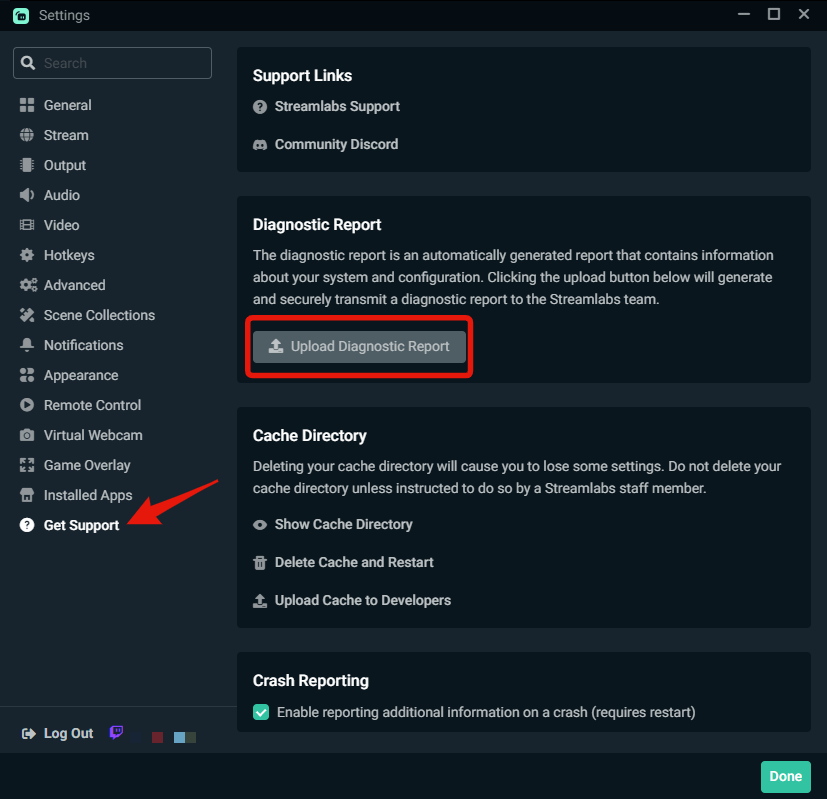 upbeat oak
bump^
upbeat oak
upbeat oak
bump^
Its happening again rn in fact the stream is still going super delayed but streamlabs OBS is frozen i cant interact with anything.
It ended up crashing
gritty isle
upbeat oak
Its happening again rn in fact the stream is still going super delayed but strea...
Hop over to #vip-support for assistance with that.
vapid prawn
oak cloud
There isn't a way to do this on Streamlabs Desktop. There are plugins I believe ...
Guess we just need to capture card everything
stray citrus
@desert briar Hi there! Please do not ping staff in multiple channels for your question.
gritty isle
Add a custom item and choose text.

And I’m not always available.
Click the hamburger menu (the three lines at te top left), choose Scenes, select the scene you want to edit, click Layers at the top right, click the + sign at the top right, choose Add a custom item, choose Add custom text. Then enter your custom test and adjust as needed the other options and finally click the Add button.
You must have already pressed it based on that screen shot.
This is the hamburger menu.

 stone gyro
Was there a recent Streamlabs update that reverted a bunch of things?
I notice I am missing scenes, and my vod track was not enabled so all my recent vods are muted. Any idea what is going on?
gritty isle
Follow my instructions above.
Click the Scenes button then tap on the Scene you want to edit.
Click the Add button.

Yes, if you want to save the changes you made to your scene. Otherwise press Cancel is discard the changes.
I don't know, I didn't configure their scenes and sources.
ancient obsidian
gritty isle
Show me the moderators on your channel.
Sure, hang on.
gritty isle
Then you need to move the custom text layer so that its inside the screen share box.
stone gyro
Rufus you are much more patient than I am lol I am shaking my head over here
gritty isle
stone gyro
Rufus you are much more patient than I am lol I am shaking my head over here
For you issue, I would log out of Streamlabs Desktop and log back in with your Twitch. Make sure that the Twitch VOD option is checked. Your streaming only to Twitch, correct?
And folks, I'm off to lunch with some co-workers. Back in about an hour. 🍽️ 👋
ancient obsidian
@gritty isle
 stone gyro
gritty isle
For you issue, I would log out of Streamlabs Desktop and log back in with your T...
stone gyro
gritty isle
For you issue, I would log out of Streamlabs Desktop and log back in with your T...
I am only streaming to Twitch, correct. I noticed my issues after the most recent update. I had a "BRB" scene that, upon updating Streamlabs, is no longer in my list of scenes so I'll have to remake it, which isn't a big issue but just slightly annoying. I also fixed the VOD track in my settings and it is working fine now. These are the only 2 changes I have noticed since updating, but just wanted to ask about them in case this was a known issue with a bit more going on that I am not aware of. Thank you for helping!
stray citrus
@desert briar Please stop spamming your messages as this may cause you to lose access to this server. Someone will be with you when they can.
 flint timber
hullo  i feel like this might be already outlined somewhere but.. my alerts seem to be inconsistent.. sometimes they work with no sound, sometimes they work fully with sound and visuals and sometimes they dont work at all :(
(i'm using OBS studio) i've tried updating the URL for my alert layers (stuff like subs/tips/treatstream/follows) + stay logged in with the window open while streaming + test the follows subs etc through the streamlabs website (which works) but then when it happens through twitch, that's where the issues arise. does anyone know why this could happen? again im super sorry if this issue has been fixed/answered 1000x before 
💙 really really appreciate any and all support 💙
 hasty charm
Hello everyone, I'm trying to setup a streaming with StreamLab Mobile (Android) on YouTube. My account is enabled for streaming already and I set everything from the getting started guide. However, once I press 'Go Live', the button just start spinning forever and I'm stuck there, I have no clue on which level this issue is caused because no message is returned. Thanks in advance for your help! 

 rich halo
does anyone know how to change the mic settings? i want voice activated but can't find the settings
desert briar
Hello when I use my capture card or Camera it discolors it and makes it look like the 1930s

Please help
 summer kiln
Hey new here, I've been seeing ads for streamlabs, I was wondering if it's really that good, I'm wanting to go live on twitch and tiktok at the sametime. I normally go live from my ps4 for twitch. Can anyone help me with this?
 wide sail
Curious, is there any support or plugin where I can control my Govee Lights with StreamLabs Desktop?
gritty isle
stone gyro
I am only streaming to Twitch, correct. I noticed my issues after the most recen...
Okay, thanks for letting me know. If that seems to happen again, please let us know.
 neon pumice
Wanted to add an alert in OBS - but when I push preview my alert get a blue (or other colors) background? The uploaded GIF is transparent and I want it to be transparent on my stream with no background color. Can’t find any place to choose it?🥹🥹🥹 Anybody that can help?
 raw island
Help! when we try to make a Streamlabs charity stream the charity donation says this when u try to donate "undefied arra key "Userid" "
Is there a fix perhabs
gritty isle
ancient obsidian
<@301571565840236564>
Thanks! Does this happen for every message or just for the first time the bot responds in chat for that stream?
ancient obsidian
It's every time!
Actually sorry, do the different commands count? Cos if I do my discord one and my twitter one in the same stream it happens both times yes
But I haven't tried doing the same command twice in one stream, is that what you meant? Apologies.
gritty isle
ancient obsidian
But I haven't tried doing the same command twice in one stream, is that what you...
Does it happen once for each user or everytime any user uses a command?
 summer oracle
Need help streaming on console stream stops after 5 minutes
ancient obsidian
gritty isle
Does it happen once for each user or everytime any user uses a command?
Every time afaict
It actually seems to have sorted itself out??
Sorry if I've bothered anyone. It was happening consistently earlier and now it.... Seems fine? Ghost in the machine? Gremlins? Idk.
@gritty isle thank you, sorry, idk what that was. My mum had an issue with her car that disappeared when a pro looked at it once too. Weird.
gritty isle
ancient obsidian
<@301571565840236564> thank you, sorry, idk what that was. My mum had an issue w...
Oh, great that it seems to have sorted itself out. Let us know if that happens again.
ancient obsidian
Thanks rufus you've been kind ❤️
gritty isle
ancient obsidian
Thanks rufus you've been kind ❤️
You're welcome.
gritty isle
 formal anvil
Can start my free trial for my account because I accidentally deleted it
formal anvil
Can start my free trial for my account because I accidentally deleted it
Free trial for what service?
formal anvil
Streamlabs
gritty isle
formal anvil
Streamlabs
Streamlabs Console? Streamlabs Ultra?
formal anvil
Console
gritty isle
formal anvil
Console
Streamlabs Console is a paid subscription service.
You would need to log into the Streamlabs Console site, click your PFP in the upper right, choose Account Settings, then scroll down and choose either the Monthly or Annual plan.
Streamlabs Console is also included in our Streamlabs Ultra subscription. If you're using Streamlabs Console this way, please make sure you set up your Streamlabs ID then log into the Streamlabs Console with your Streamlabs ID rather than your Twitch.
Either one of those options will start your 7 day free trail; cancel before the end of that 7 day period to avoid getting charged for the first term you select.
gritty isle
formal anvil
I did have but I accidentally deleted
Deleted what exactly? I'm not sure what you mean.
gritty isle
What do you mean you deleted the subscription?
gritty isle
formal anvil
Yesss I did I don't know when
If you no longer have an active subscription to Streamlabs Console, you can start another one.
formal anvil
Can I start a other free trial
gritty isle
formal anvil
Can I start a other free trial
I can't say for sure, sorry.
 scenic ivy
How does one capture game screen on IPhone using streamlabs mobile I read the FAQ from the website but no option to on iOS tried on iPhone and iPad I wanna stream Pokémon go
gritty isle
scenic ivy
How does one capture game screen on IPhone using streamlabs mobile I read the FA...
On iOS or iPadOS, choose Screenshare when going live.
 scenic ivy
gritty isle
On iOS or iPadOS, choose Screenshare when going live.
scenic ivy
gritty isle
On iOS or iPadOS, choose Screenshare when going live.
Ooooh okay! So I wouldn’t be able to use both webcam and game?
gritty isle
scenic ivy
Ooooh okay! So I wouldn’t be able to use both webcam and game?
No, Screenshare only shows the screen and Camera only uses the camera. Its due to limitations in their OS.
scenic ivy
But prism live is able to do it
I appreciate the help tho I like streamlabs disconnect protection
gritty isle
scenic ivy
But prism live is able to do it
🤷♂️
gritty isle
scenic ivy
I appreciate the help tho I like streamlabs disconnect protection
You're welcome.
 urban rock
tiktok integration button dont workanymire
I click merge and does nothing
I did in the past one time but It requered information from another channel not from tiktok, so I have followers only on tiktok and I cant join becouse of that or what
it requires followers on another platform
who did this
stream labs or TikTok
so basically I'm tiktok creator and cant stream with streamlabs
becouse it requers that I should have another platform with followers
who did this guys its you or TikTok
whats the point of partnership if TikTok creator cant use streamlabs
so know on it dosnt work anymore at all
I click merge and then goes to login link
and after that does nothing
stray citrus
urban rock
and after that does nothing
Hey there - please ask your question at one time rather than sending 12+ messages. Someone will be with you when they are available.
urban rock
stray citrus
Hey there - please ask your question at one time rather than sending 12+ message...
Im angry and prefer like that its against rules or what?
stray citrus
urban rock
Im angry and prefer like that its against rules or what?
This would be number 4 as the mods prefer users do not spam messages.
gritty isle
urban rock
Im angry and prefer like that its against rules or what?
Something went away but it looks like your using Chrome or Opera as your default web browser. Please try with either Microsoft Edge or Firefox, you can get there directly by going to this URL: https://streamlabs.com/dashboard#/settings/account-settings/platforms. Please log in with a platform already merged in your Streamlabs account.
 north swallow
how do i get rid of these black bars?
 wispy latchBOT
@north swallow ```md
How to remove Black Bars from your stream
- In Windows Display Settings, you would need to make sure you have a 16:9 monitor resolution (Typically 1920x1080)
- In the game you're playing, you would want the render resolution to be 16:9 as well. (Basically matching info from above)
- In Streamlabs Desktop > Settings > Video > Base Resolution, that would also need to be 16:9 resolution (Same as above)
If any of those things are not being done, then your stream is not going to be true 16:9 and your game will have black bars.
- You can select the capture source in your sources list > right click it > transform > fit/stretch to screen, should help```
urban rock
gritty isle
Something went away but it looks like your using Chrome or Opera as your default...
not working on edge also
gritty isle
urban rock
not working on edge also
Do you have any special characters or emojis in your TikTok display name?
urban rock
gritty isle
Do you have any special characters or emojis in your TikTok display name?
no when I tried first time it worked but I didn't signup information, because it required another platform channels information
but I have followers only on tiktok
and now trying again mb something changed but id dosnt work
I'm active content creator only on tiktok but cant merge becouse it requers that i should have succesful channel in another platform
beside that i cant merge also
whats the point of partnership if it tiktok content cant stream on streamlabs
wors partnership
gritty isle
urban rock
whats the point of partnership if it tiktok content cant stream on streamlabs
What's your TikTok username?
urban rock
gritty isle
What's your TikTok username?
heizensoza
gritty isle
urban rock
heizensoza
Thanks.
gritty isle
urban rock
heizensoza
Please submit a ticket for this issue: https://support.streamlabs.com/hc/en-us/requests/new.
gritty isle
That's totally up to you if you don't want to. 👋
 tight snow
urban rock
heizensoza
tight snow
urban rock
heizensoza
Our team found an issue on your account and is investigating, so you can use TikTok in the future. If you submit a ticket and provide us the ticket number here once created, we would be able to follow up with you once resolved! However we do understand if you prefer not to merge TikTok at this time.
 simple cape
i'm trying to stream on my xbox through streamlabs console and i have a custom overlay set up and everything but the game capture is just a black screen every time i begin the stream on my xbox
and i'm streaming through streamlabs, not twitch as well, so i'm not sure what i'm doing incorrectly or if something's just not right
 proper dome
hi i want help
 dry drum
Failed to fetch settings from Twitch
There was an error fetching your channel information. You can try fetching the information again or you can just go live. If this error persists, you can try logging out and back in.
Show details
what do i do
 crystal compass
Hi there. Please can you help me. Having trouble streaming. This is my diagnostic report 1716328051-040686fd-b515-4cde-b165-55ff96da1991 and this is the message I am getting ...
 dry drum
crystal compass
Hi there. Please can you help me. Having trouble streaming. This is my diagnos...
dry drum
crystal compass
Hi there. Please can you help me. Having trouble streaming. This is my diagnos...
Good luck trying to get help lol
crystal compass
dry drum
Good luck trying to get help lol
Oh please don't say there is no help here? 😦
 civic scaffold
how do i fix the quality of the game on stream labs the fps is fine but its all blurry
im also having issues being able to open a game on my main monitor to play, because it keeps opening on the monitor i use for chat etc
 serene mason
im trying to add a chat box but none of the widgets are showing up. Tried reinstalling but there's still nothing there, it was working fine a few days ago
 civic scaffold
how do i remove the logo off a template, and how do i add pictures to stream labs?
 small marsh
I am streaming on twitch from streamlabs for ios (iphone 11), and at some point like 3 weeks ago I had chat set up to clear each message after 10 seconds, but now it is not doing that. Any advice on how to fix this?
 plush lake
serene mason
im trying to add a chat box but none of the widgets are showing up. Tried reinst...
plush lake
serene mason
im trying to add a chat box but none of the widgets are showing up. Tried reinst...
Are you logged into Streamlabs? If not likely it won't show widgets
 kind heron
Hello! So, I am interested in purchasing streamlabs ultra but was wondering if I could use the overlays, etc in OBS studios rather than using streamlabs studio
crystal compass
@signal kernel Pls could you respond ... many thanks
plush lake
kind heron
Hello! So, I am interested in purchasing streamlabs ultra but was wondering if I...
You can use the themes with their plugin on OBS: https://streamlabs.com/obs-plugin
kind heron
Thank you
crystal compass
Where can I manually select what London server to use pls
 signal kernel
crystal compass
Where can I manually select what London server to use pls
signal kernel
crystal compass
Where can I manually select what London server to use pls
settings -> stream, scroll to the bottom for "stream to custom ingest". choose streaming services, twitch, then you can choose the london server
crystal compass
signal kernel
settings -> stream, scroll to the bottom for "stream to custom ingest". choose s...
Thx so much. Also, what was it that needs to be over 60 to stream smoothly again pls?
signal kernel
quality needs to be over 80 during the twitch test
 civic oar
Hey everyone, I'm Currently trying to merge my TikTok account with my streamlabs but keep running into connection error issues when being redirected to Tiktok authorization page. I've been trying for the past couple days but don't have any luck merging still. Is there a work around for this issue?
kind heron
plush lake
You can use the themes with their plugin on OBS: https://streamlabs.com/obs-plug...
yourrr the best
 chrome fossil
Im having trouble with streamlabs not opening: To prefice my hardware is a Ryzen 7 5700X3D, Gigabyte RTX 2070 in the ASUS ROG Strix Gaming-I using a 1TB WD blue NVME Gen3 boot and running windows 11. I have tried Uninstalling streamlabs through Revo uninstaller being sure to remove all caching and all local files. Restarting my PC before trying to reinstall the software. I then updated all my driver to the latest this includes my bios, gpu drivers and ive tried going into the properties and enabling run as admin and legacy support. trying to open the software opens it in task manager but no window opens in my task bar and no onscreen ui. Im all out of ideas any help would be great aditional note I have tried downloading both the latestest file for streamlabs and an older version
 cinder bramble
I'm having problems using the streamlabs dual output, whenever I go to start the lives it starts only on tiktok and not on twitch, can you help me?
Did you manage to solve it my friend?
desert briar
help when i click start streaming it says an error occurred with the output. please check and switch encoders in your streaming and recording output settings and i cant fix it
helppp
 manic plinth
Heyy !! Can Someone Help me ?? I Can't Able to use in game mic While streaming 😕
 oak sedge
can anyone help me figure out why my alert box and mini feed isnt working? it wokrs if i test it from the dashboard but it does work if a follower or new follower interacts in any way
desert briar
1 16 5
still got gray borders lags and cpu usage VERY HIGH
i think the only people really high its the developer of this application
i just will state obvious here one time just for you man
slobs need to eat very low power and cpu - its 2024
its not about scenes they doing absolutely nothing - somehow obs developers have hands what grown up from they bodies
you somehow grow them up from your arse
you ok there my man - maybe i need to do this for you?*)) Hm?))0

2 months already dozens of people have same issue - you cant fix your thing, my man
 dusty pivot
I got a stream playlist all set up in VLC. How do I make it so the current song title displays on stream?
 rapid harbor
It automatically shuts down during broadcasting and keeps giving the same error!

 jade flame
Is there a way to add more than the four standard bookmarks? When I add more and bind to a different key it reverts back to original bookmark name, even if I change them.
 humble gale
 rigid shale
is there any support online now
rigid shale
is there any support online now
to reach out to official support you would want to submit a ticket using the link in #support-info if you just want to ask your question and see if anyone knows the answer, then that's what you would do here
humble gale
i mean, if anyone can help, they would answer your question. just ask it, if no one helps send in a ticket. this isn't an official support channel
rigid shale
thanks mate
 crystal coral
so i am trying to download a overlay but when i click the install button it doesn't do anything its the Uplink by Nerd or Die and it seems that all the free ones do the same thing
humble gale
I just tried and it seems like they're installing. so you click it and there is no spinny wheel or anything. i don't seem to be having this issue
deep epoch
Does anyone know why my live access to Tiktok was pulled?
 proven elbow
hi my steamlab not update my subscribe in web and alert box didt work when i test alert box it work normally but when i got new subscribe it didt work.


 elder leaf
Hiya, sorry to bother anyone. - just wanted to knoow how I enter my new Streamkey from YT. - Im already logged into streamlabs desktop, youtube says "linked" but when I go live on streamlabs, YT ignores it, still works OK on channel but this means I cant schedule streams. - I think the current key was for my alt channel.. - so please help anyone. - thankyou so much!
oh also wanted to say. - only way for this to work currently, is if I logout of streamlabs desktop. - this then works as Id like, but natrually casues other issues.
rapid harbor
It's getting really annoying when that app suddenly closes while streaming and messes everything up!
crystal coral
humble gale
I just tried and it seems like they're installing. so you click it and there is ...
Nothing happens at all like I'm just clicking to click
 agile vortex
Can’t save default device?
I have a Logitech c920 webcam and an Elgato HD 60 Pro. Every time I try to set my default webcam, it defaults to the Elgato HD 60 Pro for some reason. Does anyone know a fix for this?
humble gale
crystal coral
Nothing happens at all like I'm just clicking to click
that's weird. maybe try reinstalling Streamlabs Desktop?
humble gale
proven elbow
hi my steamlab not update my subscribe in web and alert box didt work when i tes...
YouTube users who subscribe to you can have their privacy settings set to not notify you that they have subscribed to you. You will see your sub count increase on youtube but it won't show up on streamlabs. that's probably the problem that you're seeing
humble gale
agile vortex
Can’t save default device?
I have a Logitech c920 webcam and an Elgato HD 60 Pr...
so if you use the dropdown for video capture device it doesn't show the c920? cause even if it shows the one device first, you should be able to change whatever device you want it to be to
humble gale
elder leaf
Hiya, sorry to bother anyone. - just wanted to knoow how I enter my new Streamke...
if you relog in Streamlabs Desktop it should show up the correct channel. if not you can use this guide and that should help: https://streamlabs.com/content-hub/post/how-to-disconnect-your-streamlabs-account
crystal coral
humble gale
that's weird. maybe try reinstalling Streamlabs Desktop?
I'm doing thro desktop
humble gale
yeah i was saying like uninstall and reinstall it
abstract plazaBOT
Are you knowledgeable about Streamlabs products? Do you like being rewarded while helping others? Apply to be a part of the Streamlabs Support Volunteer Program! BONUS POINTS FOR GERMAN 🇩🇪 or FRENCH 🇫🇷
Application Link:
https://forms.gle/eKS29zWfFjGEzaRp7
For details, see our post in #announcements:
#announcements message
Google Docs
Fill out the form below to be considered for our Volunteer Application. Please see our the Streamlabs Privacy Policy to understand how your data may be collected, accessed, and stored. Data may be deleted upon request.
To be considered for acceptance into the Streamlabs Support Volunteer Application, applicants must submit this form. We will fo...
agile vortex
humble gale
so if you use the dropdown for video capture device it doesn't show the c920? ca...
Yes it does, and I select the “HD Pro Webcam C920” and then click “Continue” and my webcam still doesn’t display in the scene, and then I go back to the default device settings and it still has the “Game Capture HD60 Pro” as the default webcam 😔
crystal coral
humble gale
yeah i was saying like uninstall and reinstall it
Wym I'm a lil confused I don't remember installing anything streamlabs tho
I mainly use it for my stream goal
 timid plaza
hi there, i am used to using OBS but just downloaded Streamlabs for desktop. I am wondering if there is a way to fix not being able to see my Editor Display in full resolution? It seems almost like a smartphone screen size. When I select the dragging tool for the chat module to the right it suddenly displays as monitor resolution. any help in understanding this is very greatly appreciated 🙏
 proven elbow
humble gale
YouTube users who subscribe to you can have their privacy settings set to not no...
proven elbow
humble gale
YouTube users who subscribe to you can have their privacy settings set to not no...
thankyou so much
deep epoch
???
 worn oasis
Afternoon, trying to test what my bitrate needs to be for streams, following a PC update, have tried to do the twitch inspector and put in the stream key, but can't find anywhere to put my stream key so not sure what plan B is to test my bitrate is these days.
 unreal breach
Hey all, im trying to link my Tiktok to my Streamlabs but it keeps linking some other account. Ive tried following the steps on the Desktop app, which it sends me to the streamlabs webpage and when i try to merge the accounts it ends up merging some other incorrect account. Is there something im doing wronge or is there a way to log into the correct account and merge it that way?
stray citrus
worn oasis
Afternoon, trying to test what my bitrate needs to be for streams, following a P...
Hey there! You can see what Twitch recommends for your resolution/FPS: https://help.twitch.tv/s/article/broadcasting-guidelines?language=en_US and in order to check if your upload speeds can support 6,000 (the recommended bitrate for most users), you can run this speed test here: https://www.speedtest.net/ and if you have around 10mbps or higher, you should be good to set it to 6,000.
Please let me know if you have any other questions! If you'd still like to run the Twitch test, you should be able to paste the stream key here (reference screenshot)
 agile vortex
Yes it does, and I select the “HD Pro Webcam C920” and then click “Continue” and...
agile vortex
agile vortex
Yes it does, and I select the “HD Pro Webcam C920” and then click “Continue” and...
I’m going to try uninstalling/reinstalling
stray citrus
deep epoch
Would anyone know why my TikTok access would be suspended?
Hey there! We are sorry you’ve lost access to live stream on TikTok. Please refer to TikTok's guidelines to help understand why this might’ve happened. To appeal your ban/suspension, use this link (https://www.tiktok.com/community-guidelines/en/enforcement#3) to file a ticket to TikTok’s Trust and Safety department.
stray citrus
unreal breach
Hey all, im trying to link my Tiktok to my Streamlabs but it keeps linking some...
Hey there! If you're seeing your link be directed with an account with your display name (rather than your username), this is just a visual bug at the moment. My apologies for the inconvenience! This bug should not affect your ability to go live to the proper channel as long as your account is approved for live streaming via Streamlabs.
Please let me know if you have any questions!
agile vortex
agile vortex
I’m going to try uninstalling/reinstalling
That didn’t work 😩
crystal coral
is there a way to install a overlay and use it on obs and not streamlabs?
stray citrus
crystal coral
is there a way to install a overlay and use it on obs and not streamlabs?
Hey there! The only way to do this at this time is by using the Streamlabs Plugin for OBS: https://streamlabs.com/obs-plugin
worn oasis
stray citrus
Hey there! You can see what Twitch recommends for your resolution/FPS: https://h...
Hi there, thanks for this, will get that tested out and see what I can sort ou.
crystal coral
stray citrus
Hey there! The only way to do this at this time is by using the Streamlabs Plugi...
not what i wanted how do i uninstall the plugin from obs?
 light raptor
So, I had to reinstall windows 11 and now Stremlabsobs will not open. I have uninstalled, reinstallled, multiple times even older versions, and the program will not open.
stray citrus
crystal coral
not what i wanted how do i uninstall the plugin from obs?
To uninstall, I've gone to Windows Add + Remove Programs, then uninstalled these files:

Streamlabs Desktop - Program Won't Launch
real plank
so does support even work, its been a week and i still dont have a response
stray citrus
real plank
so does support even work, its been a week and i still dont have a response
Hey there. If you left your message here in the channel, this is a community/volunteer-based support channel, so it isn't guaranteed that every question will be answered as it's an "unofficial" support channel. My apologies about that. That being said, I can direct you towards the proper team for your question as API inquiries are outside of our realm of expertise.
Please submit your question to apisupport@streamlabs.com, and someone will get back to you as soon as they can. 
real plank
stray citrus
Hey there. If you left your message here in the channel, this is a community/vol...
I know that's who I sent it to. But it's been more than a week now, I was just wondering if anyone knows how long it takes?
 buoyant epoch

Anyone know how to help with this? I stream music on twitch and it took forver to setup
stray citrus
real plank
I know that's who I sent it to. But it's been more than a week now, I was just w...
I see, okay. At this time, we don't have any ETA on response times for that inbox. My apologies about that as I do wish I had a better answer for you.
real plank
stray citrus
I see, okay. At this time, we don't have any ETA on response times for that inbo...
its ok, thanks for the response anyway.
gritty isle
buoyant epoch
Hey there! This looks similar to a known issue that our team is currently investigating. There currently isn't a workaround/fix, but if you submit a ticket to our team, they can keep you updated on when this may be resolved. https://support.streamlabs.com/hc/en-us/requests/new I'm sorry that I don't have better news for you at the moment.
 glossy burrow
hello i purchased streamlabs ultra yesterday but it seems it is not active on my account
stray citrus
glossy burrow
hello i purchased streamlabs ultra yesterday but it seems it is not active on my...
Hey there! I'm sorry you're having trouble with this. You can delete it after, but if you don't mind sharing your email, I'd be happy to check into this for you!
glossy burrow
stray citrus
Hey there! I'm sorry you're having trouble with this. You can delete it after, b...
yes so actually i was just looking at it and i accidentally bought it on a different account
is there any way to get it moved to the account i use
stray citrus
glossy burrow
is there any way to get it moved to the account i use
My team doesn't have any way to move the subscription from one account to another. I'm very sorry about that! My best recommendation would be to reach out to our customer support team here: https://support.streamlabs.com/hc/en-us/requests/new and ask for a refund from the original account, then re-purchase on the correct one. 
My apologies that I couldn't manually transfer the subscription. Please let me know if you have any questions!
glossy burrow
no problemmm thank you!
stray citrus
glossy burrow
no problemmm thank you!
You're very welcome, of course! Thank you so much for being patience with us. Please don't hesitate to reach back out if anything else comes up!
 hallow skiff
Please someone help me, I've been dealing with this problem for 2 days. Even though I connected Twitch and Streamlabs
donations not showing up in my recent events!
 uneven plank
hey i need some help it wont let me download this virual camera i click the download and i allow everything and it just doesnt do anything
 worn bone
Hey, my Mini-Feed in Streamlabs obs isnt updating. I see the follows on streamelements etc. but it doesnt show in streamlabs mini feed and i dont get notification
 nocturne frost
I am having an issue with the vertical settings when I use dual output. My video looks stretched in vertical, but not in horizontal. Any suggestions?
stray citrus
hallow skiff
Please someone help me, I've been dealing with this problem for 2 days. Even tho...
Hey there! Just to confirm, are people donating through your Streamlabs tip page? And are those tips showing within your tip history? https://streamlabs.com/dashboard#/tipping/history/tips
worn bone
stray citrus
Hey there! Just to confirm, are people donating through your Streamlabs tip page...
help me pls
stray citrus
uneven plank
hey i need some help it wont let me download this virual camera i click the down...
Hey there! This is actually a known issue with Streamlabs Desktop at the moment, and our team is working on a fix. The "fix" is currently live in the preview version of Streamlabs Desktop if you'd like to install that version and try it out! You can find that version pinned in the #preview-releases channel.
 stray citrus
worn bone
Hey, my Mini-Feed in Streamlabs obs isnt updating. I see the follows on streamel...
stray citrus
worn bone
Hey, my Mini-Feed in Streamlabs obs isnt updating. I see the follows on streamel...
Hi!  Are you able to provide me with the link to your channel you're having this issue with? (Your Twitch/YouTube channel)
uneven plank
stray citrus
Hey there! This is actually a known issue with Streamlabs Desktop at the moment,...
thank you so much a really appreciate that :}
stray citrus
worn bone
can u follow me <@751847406928265348> i changed something
Yes, just one moment and I'll give it a try!
worn bone
stray citrus
Yes, just one moment and I'll give it a try!
thanks alot tell me when u did
stray citrus
worn bone
thanks alot tell me when u did
Done! 😄
worn bone
nah
i cant even explain how stupid this is what i just did
like nah it works and its like i have to iq check now i guess
guess what lilbratley
some idiot streamer (me) turned off the queue for alerts lmao
and that for 5 months nah i cba
stray citrus
worn bone
some idiot streamer (me) turned off the queue for alerts lmao
Oh noooooo!! I promise you're not an idiot. This is a common mistake, and I'm really sorry for the inconvenience! But my alert seemed to show up okay for you now?
worn bone
btw @stray citrus when i try to redo it with the circle button it dont work is there a reason for it?
worn bone
stray citrus
Oh noooooo!! I promise you're not an idiot. This is a common mistake, and I'm re...
Yeah it is fine now xd haha
 solar shell
Hello, I have an account on the streamlabs site and I stream on Twitch with OBS. I use Transparent Chat Overlay, and I have installed widgets for showing the viewers counter and my alerts. A couple days ago I uninstalled the chat overlay and I installed the most recent version, and I also changed my twitch password and activated the double confirmation validation. Now, while the viewer counter and the chat work just fine, I can't see my alerts anymore both on chat overlay and in my stream. I think I checked averything and it seems to be fine, I just can't find any fix. Thanks if you can help :-)
stray citrus
worn bone
btw <@751847406928265348> when i try to redo it with the circle button it dont w...
When using the "replay" button next to an event/alert, your alerts aren't replaying? 🤔
worn bone
stray citrus
When using the "replay" button next to an event/alert, your alerts aren't replay...
Nah they arent
have to do it manually via "streamelements"
on their site but in streamlabs itself dont work
stray citrus
worn bone
Nah they arent
Hm... I'm noticing this, too. We did make some recent updates to our alert box (within the last week), so if you give me a few minutes, I can run this by my team and see if they can tell me what's going on!
It may take a few minutes, but I can ping you once I receive a reply.
solar shell
stray citrus
Hm... I'm noticing this, too. We did make some recent updates to our alert box (...
having troubles with alerts myself.
worn bone
stray citrus
Hm... I'm noticing this, too. We did make some recent updates to our alert box (...
Thanks also where can i donate you like lmao i deserve not to breathe haha i cant stop laughing of that mistake with the alert box thing how is that even a thing im 21 not even an old guy
My other issue is that sometimes i have black screen capture when i try to stream league of legends
Happens only with that game i think
nocturne frost
I am having an issue with the vertical settings when I use dual output. My video looks stretched in vertical, but not in horizontal. Any suggestions?
stray citrus
worn bone
Thanks also where can i donate you like lmao i deserve not to breathe haha i can...
It's no worries at all! I really am happy to help. I have my team checking into the alert "replay" issue right now! As far as LoL, it actually has a more specific setup than other games due to the launcher/the game itself. Give me just one moment to find the steps, and I will copy + paste the specific steps we have for capturing League, and that might work a bit more smoothly for you! 🙂
@worn bone For your alerts, it looks like follow alerts are disabled on this page here: https://streamlabs.com/dashboard#/alertbox/twitch/follows Once you enable them > click save, you should be all set! I'm going to gather the steps for capturing League, as well, and send those below! 😄
solar shell
@stray citrus can I ask your help too?
stray citrus
solar shell
<@751847406928265348> can I ask your help too?
Hi there! If I am available once catching up with other users, I would be happy to help. 🙂 Just trying to get to a couple people who have been waiting a bit. I appreciate your patience!
worn bone
stray citrus
<@1026148757848469524> For your alerts, it looks like follow alerts are disabled...
alright thanks, @ me when u have the league of legends error thingy ready thank you 🙂
stray citrus
worn bone
alright thanks, @ me when u have the league of legends error thingy ready thank ...
You're very welcome! It looks like our screenshots are outdated/no longer available for capturing League, so I'm going to have a staff member grab some new screenshots, and I will ping you with those capture steps as soon as I have them. It may be several minutes, but I promise I won't forget about you! 😄
solar shell
stray citrus
Hi there! If I am available once catching up with other users, I would be happy ...
Sure, thank you. Having free software and real time support is just great. Just call me when you are available.
stray citrus
nocturne frost
I am having an issue with the vertical settings when I use dual output. My vide...
Hey there! I'm sorry that you're having trouble with this. In your Streamlabs Desktop Settings > Output, do you have "rescale output" enabled by chance?
stray citrus
solar shell
Hello, I have an account on the streamlabs site and I stream on Twitch with OBS....
Hi there!! Thanks again for your patience! Since you mentioned changing your password, I believe the best course of action would be to refresh the API connection between Twitch and Streamlabs. Once you've completed these steps, I'd be happy to test an alert for you to ensure it's working!
- Log out of Streamlabs Desktop, Streamlabs.com, and any other Streamlabs product/service that you may be signed into
- Follow the steps in this guide to remove the Streamlabs connection from Twitch: https://streamlabs.com/content-hub/post/how-to-disconnect-your-streamlabs-account
- Log back into Streamlabs.com with Twitch
- Refresh the "Connections" page over on Twitch to ensure the Streamlabs connection came back
Once you've followed these steps, would you send me a link to your channel so we can test it out? 😄
nocturne frost
stray citrus
Hey there! I'm sorry that you're having trouble with this. In your Streamlabs De...
Yes I have "rescale output" enabled.
stray citrus
nocturne frost
Yes I have "rescale output" enabled.
If you disable it and re-launch the program, are your vertical sources still distorted?
solar shell
@stray citrus makes sense, I call you when I've done it.
nocturne frost
stray citrus
If you disable it and re-launch the program, are your vertical sources still dis...
Not sure. It only does it when I am LIVE. Right now I am not LIVE.
stray citrus
@worn bone For League of Legends, we advise the following setup.
Client & Pre-game lobby should utilize a Window capture source https://i.imgur.com/poIYSr8.png
Make sure the League Client window is selected in the Properties of the Capture Source.
In-game should utilize a Game Capture source https://i.imgur.com/CFvruTn.jpeg
Finally, I would also suggest running League of Legends in Borderless Windowed Mode.
stray citrus
nocturne frost
Not sure. It only does it when I am LIVE. Right now I am not LIVE.
I see, okay! So the most common culprit for this issue has been the rescale output setting, so that's what we've been recommending users try. Are you able to try this before you go live next and let us know how that goes?
nocturne frost
stray citrus
I see, okay! So the most common culprit for this issue has been the rescale outp...
Yes. I need to turn off rescale output and that will most likely fix the issue? Then restart Streamlabs?
stray citrus
nocturne frost
Yes. I need to turn off rescale output and that will most likely fix the issue?...
Yes, I would recommend restarting the program after disabling it just to ensure everything is good to go. If you're still noticing your vertical output is distorted after that, we may need to have this reported to our development team for further review, so feel free to let us know whenever you've had a chance to test!
My apologies for the inconvenience, as well. Please let me know if you have any questions at all!
worn bone
stray citrus
<@1026148757848469524> For League of Legends, we advise the following setup.
Cl...
hey i have that already it works sometimes and sometimes it dont so yeah idk
nocturne frost
stray citrus
Yes, I would recommend restarting the program after disabling it just to ensure ...
Will do. Thank you so much!
stray citrus
worn bone
hey i have that already it works sometimes and sometimes it dont so yeah idk
I'm sorry about that! Additionally, I'd recommend taking a peek at the steps in this guide here: https://streamlabs.com/content-hub/post/black-screen-game-capture-problems and if those steps don't seem to help, I'd recommend reaching out to us in tickets following this link here: https://support.streamlabs.com/hc/en-us/requests/new
solar shell
@stray citrus I've done the whole process, it seems that my twitch account was disconnected from streamlabs entirely. Now it's connected so I think everything should work, but if you are still available I'll send you my twitch channel address and we can test it.
stray citrus
solar shell
<@751847406928265348> I've done the whole process, it seems that my twitch accou...
I am! Feel free to send it my way. 😄
solar shell
stray citrus
I am! Feel free to send it my way. 😄
nice, you have a pm
stray citrus
solar shell
nice, you have a pm
Thank you! I can't provide support in the private message, but I was able to grab your link. You won't necessarily have to go live as your alerts should work while offline, as well. Do you currently have your streaming platform open? (Streamlabs Desktop, OBS Studio, etc.)?
hallow skiff
stray citrus
Hey there! Just to confirm, are people donating through your Streamlabs tip page...
No, these donations come from another site connected to Streamlabs via API. Even if I run an alert test via streamlabs, it does not appear on Twitch.
solar shell
@stray citrus oh, ok sorry... yes, I have obs and chat overlay open, I'm also on my twitch channel, let's go
stray citrus
solar shell
<@751847406928265348> oh, ok sorry... yes, I have obs and chat overlay open, I'm...
No, it's okay! I'm sending one in about 5 seconds. 
stray citrus
solar shell
can you resend?
Yes, I tried re-sending it. How did that look on your end?
solar shell
it showed in OBS and in the chat overlay, but didn't show on twitch
stray citrus
solar shell
it showed in OBS and in the chat overlay, but didn't show on twitch
What do you mean exactly that it didn't show up on Twitch? Are you able to show me a screenshot of where this didn't show up?
stray citrus
hallow skiff
No, these donations come from another site connected to Streamlabs via API. Even...
Which integration is it? Tiltify, or maybe something else?
hallow skiff
stray citrus
Which integration is it? Tiltify, or maybe something else?
ByNoGame
solar shell
it didn't show in my twitch stream page, I guess it's because I'm not streaming, that's why I asked if I have to stream. When I had the issue, if I tested it myself with the streamlabs test tool, it would work both in OBS and overlay, but won't work when people followed me or raid me on stream
stray citrus
solar shell
it didn't show in my twitch stream page, I guess it's because I'm not streaming,...
You don't have to be live for the alerts to work properly/show up in OBS, but yes, if you aren't live, then they won't show up on Twitch, so it sounds like it's working as intended. If you'd like to go live and test again, I'd be happy to follow with a different account. That's up to you. 🙂
stray citrus
hallow skiff
ByNoGame
I'm checking into this - just one moment!
worn bone
@stray citrus btw another question out of mind uhm when i stream i feel like my game feels kinda unsmooth even if i have 200+ fps it just feels unsmooth somehow no framedrops or anything. Feels like playing with 50-55 fps
solar shell
stray citrus
You don't have to be live for the alerts to work properly/show up in OBS, but ye...
nice, I'll go live immediately
I'm not streaming anything so you'lle see a black scree
stray citrus
worn bone
<@751847406928265348> btw another question out of mind uhm when i stream i feel ...
I won't be able to assist in troubleshooting this at the moment, my apologies! Someone else may be able to assist, but I will be stepping away very shortly. You can always reach out via our ticket system for advice, as well.
stray citrus
solar shell
nice, I'll go live immediately
I think that worked! 😄
hallow skiff
stray citrus
I'm checking into this - just one moment!
I don't think this is about integration
solar shell
stray citrus
I think that worked! 😄
It worked. Thanks a lot for the help. Again, having free software with real time support is HUGE.
hallow skiff
When I run an alert test either, the alert does not appear on Twitch.
stray citrus
solar shell
It worked. Thanks a lot for the help. Again, having free software with real time...
You're very welcome! Our official support staff isn't always available in this channel, but we do our best with the help of our community and volunteers! Please don't hesitate to reach back out if anything else comes up.
I hope you have a lovely day in the meantime and take care!
wispy latchBOT
How was your support experience today? We'd love to hear your thoughts! Please feel free to provide your feedback here: https://forms.gle/y21sHdUmC6JbuoFq6
timid plaza
timid plaza
hi there, i am used to using OBS but just downloaded Streamlabs for desktop. I a...
hi there, just wondering if there is anyone who may be able to help with this issue. big thanks 🙏
solar shell
stray citrus
You don't have to be live for the alerts to work properly/show up in OBS, but ye...
Have a great day, take care you too! (my english's probably garbage!)
 white iron
After updating to the latest version, my audio levels “lag” and seem very delayed/stuttery while live. They look normal when I just have Streamlabs open but the moment I go live the audio levels look wrong
 echo condor
Hello, sorry to bother you wandering if alerts on YouTube (live stream) (specifically new subs) are always slow and sometimes dont work on streamlabs ?
stray citrus
hallow skiff
When I run an alert test either, the alert does not appear on Twitch.
After taking a closer look into this, it looks like this integration/API connection is fully set up on ByNoGame's end, so if something isn't working properly on your end, you will want to reach out to their support directly as our team would not have the tools to troubleshoot their integration. My apologies for the inconvenience.
hallow skiff
stray citrus
After taking a closer look into this, it looks like this integration/API connect...
The tests I run via streamlabs does not appear either in the alert.
stray citrus
hallow skiff
The tests I run via streamlabs does not appear either in the alert.
I understand - any issues pertaining to the ByNoGame + Streamlabs connection will need to be reviewed by ByNoGame support as our team does not build/maintain that API. If you have issues with alerts that are not related to ByNoGame, you can let us know, and someone can do their best to assist you.
hallow skiff
My problem is not with the ByNoGame connection. All I want is to see the alert tests I made on Streamlabs on Twitch.
Donations coming through ByNoGame come to Streamlabs without any problems.
 lofty obsidian
English not spoken well.
I don't know if I can write it here.
I'm asked to set it up every time.
Can't you just skip this?
 gritty isle
lofty obsidian
English not spoken well.
I don't know if I can write it here.
I'm asked to set i...
gritty isle
lofty obsidian
English not spoken well.
I don't know if I can write it here.
I'm asked to set i...
Streamlabs Desktop launching as if it is a fresh/like it's the first time using it?
The "acting like it's a fresh restart" is due to certain background processes not closing properly. First, please close Streamlabs Desktop.
Then open your task manager. Please press "Ctrl + Shift + Esc" on your keyboard to bring up your Task Manager.
Please select "More Details" at the bottom if you don't see the percentages of resources used.
Check for any running programs called "Streamlabs," "Electron," or "Obs64". If you find either of these processes running, please right-click and end the process. https://gyazo.com/d6b9babb076875ee5889983b532948e1
Then, reopen Streamlabs Desktop. This should resolve it but if it doesn't please submit a ticket at https://support.streamlabs.com/hc/en-us/requests/new and our team would be able to assist you further.
timid plaza
timid plaza
hi there, i am used to using OBS but just downloaded Streamlabs for desktop. I a...
hi there, i am still seeking support for understanding this issue i am having with stream labs. thank you again
gritty isle
timid plaza
hi there, i am used to using OBS but just downloaded Streamlabs for desktop. I a...
Sounds like your Output Resolution may be incorrect. In Streamlabs Desktop, go to Settings > Video and see what your Output Resolution is set to. For example, if its 1080x1920, change it to 1920x1080. The right click on the source, choose Transform then choose Fit to Screen.
timid plaza
gritty isle
Sounds like your Output Resolution may be incorrect. In Streamlabs Desktop, go ...
this was the fix. thank you greatly for your time and your help Rufus ^.^ 🙏
gritty isle
timid plaza
this was the fix. thank you greatly for your time and your help Rufus ^.^ 🙏
YAY!!! You're welcome!
 stiff hinge
Hey - i'm a talkstudio user. I recently gave co-host powers to my partner and it looks like he's unable to launch a show - is that on purpose or shouldn't he be able to do this?
It looks like he's unable to do anything unless i'm logged in.
 wicked lance
SO streamlabs doesnt show my subscribers in the minifeed and also doesnt do the sub alerts. They show up in streamelements and in twitch feed tho. anyone know how to solve this?
 rocky kite
Im trying to stream on my ps5 and ive followed a tutorial and got the exact same capture card but when i go to try and set it up it wont work. it only pops up for a webcam not game capture. the only difference is im using a chromebook and he was on desktop. any help
lofty obsidian
gritty isle
**Streamlabs Desktop launching as if it is a fresh/like it's the first time usin...
Thank you, resolved.
 tranquil lynx
Hello, I'm not sure if this question was asked yet- I can't seem to find a answer when I look this up. But I am switching back to streamlabs but I can't get my audio to work. When I do a test stream, my mic works just fine and so do the people on the headset in my discord chat. But the game audio isn't picking up, and I'm not sure what to do
gritty isle
lofty obsidian
Thank you, resolved.
You’re welcome.
 lucid scarab





 oak jay
I’m trying to do an overlay for Xbox streaming and every time I try to make one it keeps popping these up repeatedly, and it says I need authorization for certain components but I already authorized and connected my account anyone know how to fix it?

 obsidian bough
This might not be possible, but a while ago when I started streaming I used a Gif and an audio file that I can no longer find as my new follower announcement. I was using Streamlabs to send the alert to Twitch Studio Beta, and now that that service is shutting down I'm trying to learn Streamlabs Desktop. Is there some way I can download the Gif and the audio file from my Streamlabs Dashboard?
I'm pretty sure I could just use the alertbox to send things to Streamlabs Desktop if I need to, but I'd still really like the option to take those gifs and audio files and save them somewhere for future use
 narrow flicker
Trying to set up streamlabs now that twitch studio is being dropped and ran into a problem.
If I test audio for my Mic the sound is perfectly fine but if i stream all audio from the Mic and all other output become compressed to hell.
As far as I know all the settings are as close as i could get them to studio and a few others have looked and can't see why my audio is being compressed.
civic oar
Hey everyone, I'm Currently trying to merge my TikTok account with my streamlabs but keep running into connection error issues when being redirected to Tiktok authorization page. I've been trying for the past couple days but don't have any luck merging still. Is there a work around for this issue?
obsidian bough
Muddling my way through Streamlabs Desktop, I thought I could have one game capture in a scene for Minecarft, and then game capture in another scene for a different game. But it doesn't seem to work that way
 icy tundra
Looking to get some support on connecting my chat bot. I've tried many different refreshes and it is unresponsive.
 pseudo chasm
anyone know why theres a yellow border on my screen when i use streamlabs
narrow flicker
narrow flicker
Trying to set up streamlabs now that twitch studio is being dropped and ran int...
Got a partial fix, audio is now ok but it's still nowhere what it was with twitch studio
obsidian bough
Can I change my stream title and whatnot within Streamlabs Desktop? I can't figure it out
narrow flicker
obsidian bough
Can I change my stream title and whatnot within Streamlabs Desktop? I can't figu...
right edge of the screen about halfway down (if you dont have the stream chat open) theres an insanely small arrow. click that to open the window. in the top left corner of that block theres a pen icon. that'll be where you do that stuff
obsidian bough
narrow flicker
right edge of the screen about halfway down (if you dont have the stream chat o...
Oh! Why is it there? Odd choice, but now I know!
narrow flicker
obsidian bough
Oh! Why is it there? Odd choice, but now I know!
no idea, first time i saw that arrow i thought there was dirt on the screen
obsidian bough
I knew about the arrow, but I'm talking about the thing to edit the title and whatnot
I guess its there because its all the twitch specific stuff?
narrow flicker
nio idea, i would have put it on the left where theres a ton of empty space🤷
 kind narwhal
can someone tell me why my streamlabs is recording my recording audio but not streaming my audio when i stream?
obsidian bough
I wish there was a way to move the Twitch chat to the other side of the screen. I game with jmy main monitor and my secondary is to its left. If I want to read the chat I'd have to look at the far side of the 2nd screen, but I can live with this
narrow flicker
obsidian bough
I wish there was a way to move the Twitch chat to the other side of the screen. ...
settings, appearance, check show the live dock on left side box
obsidian bough
I think I love you
 normal pawn
Hello, I am trying to start a stream, but I am getting an error message saying that I am getting a failed connection to Twitch. I have done all the troubleshooting methods, and nothing has worked... Is there a way to manually reset a Twitch stream key or something?
The message states: "Connection Failed 401 (web address)"
I think I fixed my issue with the custom ingest option
narrow flicker
normal pawn
The message states: "Connection Failed 401 (web address)"
Thats an unauthorised login attempt code. Logging in and out of streamlabs sometimes fixes it if you put the stream key in right. If not you can just generate a new one
 rare veldt
does anyone know how to link kick? not to stream but to get followers and subs widgets to work with kick
narrow flicker
rare veldt
does anyone know how to link kick? not to stream but to get followers and subs w...
If it's like stream alerts you need to add a browser source into the source block and paste the url the widget gives you into it's set up
 errant peak
Hey all, I have an issue streaming to facebook. Its no longer giving me the box to choose what game I am streaming. Please help!
kind narwhal
no one knows how to fix my problem?
narrow flicker
kind narwhal
no one knows how to fix my problem?
the only thing i can think of is if your using multiple audio channels to make sure they're set to using the right ones
kind narwhal

all of my active channels are set to 1
also why is my microphone duplicated 3 times and how do i delete the dupes
narrow flicker
gear icon to the right of them in either source or audio mixer
it keeps happening to me to
kind narwhal
narrow flicker
try deleting the dupllicates and check the one you keep is still using the right microphone
kind narwhal
everything set properly its just that the audio doesnt work, the levels and everything are picking up on the graph
narrow flicker
im having audio problems to, testing my mic on streamlabs it sounds as it should but on stream its completely compressed garbage
kind narwhal
is it bc im using GoXLR to manage my audio channels?
if so, why dont any big streamers have this issue as well?

up to date and everything
narrow flicker
you might have it set to record only 1 track?
still trying to figure out the mess of this software but either the sound is going through another track or the XLR software is interfering with streamlabs, XLR has had issues with a few softwares before
narrow flicker
would be nice, it was the reason i came here
kind narwhal
I believe all of my audio paths are correctly assigned
i hope i dont have to just make everything go to one path
if so i might just consider switching streaming softwares.
 icy burrow
For what it's worth, I have a GoXLR and have zero audio/mic issues, so I don't think Streamlabs is your issue.
narrow flicker
i was using twitch studio and never had an iissue, only reason i stopped was because they're dropping support
kind narwhal

this is literally all i have running and all of my streamlabs settings are correct
unless its Nvidia Broadcast, Discord, Ubisoft, Steam, Tarkov, Nvidia Shadowplay, or GoXLR related idfk
alls i know is that when i record my audio works when i stream my audio doesnt work (it only records a single path of audio and that's my game path)
 tight copper
Alright I have an issue with Stream Labs which has been angering me for a while now. I often record videos for YouTube no problem. But lately several recordings have been corrupted as I'm recording. Recording stops on its own, file breaks, and footage corrupts. I'm losing crucial footage.
I need a fix now!
kind narwhal
makes absolutely zero sense
tight copper
I've just lost a 15 minute video over this.
narrow flicker
kind narwhal
makes absolutely zero sense
The best guess i can give is that the XLR is using something else for output and the only way to check to run through all output options in the audio source. I've never had one so the best I can do is guess from problems others have had. Sorry
kind narwhal
uninstalling and reinstalling my goxlr software now hopefully that fixes it
 sage plaza
Good evening all, i am using a GC513 AverMedia Live Gamer Portable 2 Plus to stream, but am not getting any game audio in the streams, it gets my Mic/voice fine but not the game sounds, Can anyone point me in the right direction, please?

 kind narwhal
add an audio output capture to the audio channel your game is running on and see if it works then @sage plaza
sage plaza
I don't see where I can do that, the only devices listed are my PC devices

 fathom hatch
Morning all, Can I only stream to Twitch from streamlabs? I'm in my account setting but only see that my twitch is connected...
kind narwhal
icy burrow
For what it's worth, I have a GoXLR and have zero audio/mic issues, so I don't t...
it was goxlr
uninstalled, reinstalled, fixed