#technical-support
1 messages · Page 91 of 1
 gritty isle
 tough panther
<@301571565840236564> I just wanted to say thank you for your help a couple days...
tough panther
<@301571565840236564> I just wanted to say thank you for your help a couple days...
You’re welcome!
 muted ermine

hello im having frame drop issues for stream how do i fix this my specs are Lenovo Legion Tower 7i Intel(R) Core(TM) i7-10700K CPU @ 3.80GHz 3.70 GHz 16 GB RAM 1 TB Hard Drive Nvidia GeForce RTX 2080 Super
can anyone help with this
 orchid flax
muted ermine
orchid flax
muted ermine
Whats your internet speed? Can you please run this tool for testing the bandwidth
 kind moat
How do I manually backup my SLOBS to move to a new computer? The "True Cloud Backup" does not work. Logged into new computer, and non of my assets, sceens, etc are there.
orchid flax
kind moat
How do I manually backup my SLOBS to move to a new computer? The "True Cloud Bac...
It automatically backs up on the cloud on streamlabs desktop
kind moat
well then, new computer and old computer are right here, and SL Desktop on both, and signed into both. Old computer has assets ..... new computer SL desktop EMPTY
How do I get my assets on the new computer SL desktop then?
orchid flax
you can create a back up manually by going under settings
kind moat
No, tell me how this automatic works? been usinmg SL desktop[ and its current on old computer for YEARS
WHY doesnt new one have assets if its automatic ?
orchid flax
kind moat
WHY doesnt new one have assets if its automatic ?
Its usually done automatically unless when you installed Streamlabs desktop in the new computer and started fresh.
Are you logged in on the streamlabs desktop
kind moat
yep
orchid flax
try to log out and log back in on the new computer
kind moat
will do
orchid flax
Actually I am at work and I cannot install streamlabs desktop on my work laptop ... 😦
muted ermine
@orchid flax
 orchid flax
muted ermine
<@644441232382099467>
orchid flax
muted ermine
<@644441232382099467>
Seems pretty good. You can just choose the server manually on streamlabs desktop
muted ermine
orchid flax
Seems pretty good. You can just choose the server manually on streamlabs desktop
how do i do that
choose server manually
orchid flax
You need to go to settings > stream > custom server ingest
 orchid flax
muted ermine
orchid flax
muted ermine
yes change server to the one closest to you and put your stream key
muted ermine
orchid flax
yes change server to the one closest to you and put your stream key
its still crashing at the moment i have a nvdia geforce rtx 2080 , i did send you my specs right?

its weird right now and im getting frustrated right now
unless some game require vram to stream
orchid flax
muted ermine
its still crashing at the moment i have a nvdia geforce rtx 2080 , i did send yo...
Whats crashing? The game or Streamlabs desktop?
 uncut totem
I just deleted a theme by mistake, it was all self made stuff. Any way to get it back?
muted ermine
and i have good internet speed 1200 down 40 up
muted ermine
orchid flax
Whats crashing? The game or Streamlabs desktop?
game
kind moat
@orchid flax - no luck with sign out and back in ...... Even updated to make sure latest version is running on both computers
Old Computer SL Desktop OBS has Sceene's Transitions, Bot messages, Ect - new SL Desktop OBS is EMpty
muted ermine
i tried to run stardew valley and stream kept crashing do i need to change anything in nvdia control panel or streamlabs
muted ermine
orchid flax
Whats crashing? The game or Streamlabs desktop?
game plus its saying 25% dropped frames on my end
orchid flax
muted ermine
game plus its saying 25% dropped frames on my end
What server are you choosing?
 orchid flax
muted ermine
orchid flax
muted ermine
share your video settings

 orchid flax
muted ermine
orchid flax
muted ermine
everything seems good. Try to turn off the pc
muted ermine
orchid flax
everything seems good. Try to turn off the pc
so peform a restart
orchid flax
are you connected with Lan ?
muted ermine
orchid flax
are you connected with Lan ?
no wifi
thats proably why its crashing i have a hardwired cable
orchid flax
muted ermine
no wifi
2.4Ghz or 5Ghz?
muted ermine
5Ghz
orchid flax
can you try to connect through Lan?
 brave wraith
Hey i just recently got back into streaming console games , i previously used the Xbox app to stream my console and be a game capture on streamlabs and had no issues with it but now when i select the Xbox app as a game capture it continues to be a black screen, i have tried running as admin, deleting the capture, full screening and nothing works.
 muted ermine
orchid flax
can you try to connect through Lan?
muted ermine
orchid flax
can you try to connect through Lan?
i did
orchid flax
muted ermine
i did
Did it work?
 orchid flax
muted ermine
since im hardwired do
orchid flax
muted ermine
since im hardwired do
i am not sure what do you mean hardwired?
muted ermine
well connected through a eithernet port
orchid flax
muted ermine
well connected through a eithernet port
You just said that you were on wifi ? 😕
muted ermine
orchid flax
You just said that you were on wifi ? 😕
i was but im connected through eithernet port now
 orchid flax
muted ermine
i was but im connected through eithernet port now
orchid flax
muted ermine
i was but im connected through eithernet port now
OK is it dropping frames now too?
muted ermine
orchid flax
OK is it dropping frames now too?
i yet to test it
but i was asking do i need to change that bind to ip setting?
i just sent
 smoky horizon
The problem is I only have 1 hdmi port on my console so I can’t plug it directly into my console and instead I have to use an adapter which doesn’t seem to want to work
orchid flax
muted ermine
but i was asking do i need to change that bind to ip setting?
No , just leave it
muted ermine
orchid flax
No , just leave it
leave it on default?

Stream just crashed again
What would be the solution here
'
 smoky horizon
Would anyone be willing to hop in a call with me to help me figure this out like I wouldn’t even know how to explain what I’m doing
 cosmic geode
hey guys anyone have any idea why my vods have no audio? they didnt get hit with any copyright warnings and theres no red bars the signify portions that are muted for copyright
muted ermine
cosmic geode
hey guys anyone have any idea why my vods have no audio? they didnt get hit with...
if u have anything playing in the background like copyrighted music it gets muted
cosmic geode
muted ermine
if u have anything playing in the background like copyrighted music it gets mute...
even if it doesnt get a copyright warning?
muted ermine
i think you should be fine
smoky horizon
cosmic geode
even if it doesnt get a copyright warning?
Yes they auto detect copy right stuff
 marble wind
@muted ermine call your isp about this
orchid flax
its definitely the issue with the ISP
@muted ermine Can you run that tool for 60 seconds and see ?
cosmic geode
smoky horizon
Yes they auto detect copy right stuff
does spotify have a way to play non copyrighted music only? are theyre playulists out there for it?
muted ermine
marble wind
<@842935843408838678> call your isp about this
well its because i live in brick home
orchid flax
Bandwidth Test Tool which I sent before and kindly share the full screenshot of the program
smoky horizon
Yeah you can look up a non copyright playlist
muted ermine
its proably because it interfers with my connection
cosmic geode
smoky horizon
Yeah you can look up a non copyright playlist
ok ty ill try that tonight when i stream my wow raid
orchid flax
muted ermine
its proably because it interfers with my connection
you have wireless provider?
smoky horizon
Happens to me all the time
cosmic geode
its quite the inconvenience tbh lol
im not making any money on twitch so why bother copyrightinh my ass
smoky horizon
cosmic geode
its quite the inconvenience tbh lol
I’ve had times where it won’t do it and times where it will it just depends on the artist and the song
Even if your busting singing the song sometimes it’ll mute it
muted ermine
orchid flax
you have wireless provider?
no i have comcast
cosmic geode
smoky horizon
I’ve had times where it won’t do it and times where it will it just depends on t...
its my whole vod so it seems like it just deleted the audio forom my whole thing
muted ermine
 orchid flax
muted ermine
no i have comcast
orchid flax
muted ermine
no i have comcast
Ok.
orchid flax
muted ermine
Run it for a longer duration
smoky horizon
cosmic geode
its my whole vod so it seems like it just deleted the audio forom my whole thing
That is strange it should just be the copyright parts unless you played it the entire stream
muted ermine
orchid flax
Run it for a longer duration
how i do that
cosmic geode
smoky horizon
That is strange it should just be the copyright parts unless you played it the e...
i had music going the whole stream but usually it mutes small portions not the entire thing
orchid flax
muted ermine
how i do that
Change the test duration option
muted ermine
 smoky horizon
cosmic geode
i had music going the whole stream but usually it mutes small portions not the e...
smoky horizon
cosmic geode
i had music going the whole stream but usually it mutes small portions not the e...
Well yeah it does depend on the songs though I’ve had a whole stream muted too
cosmic geode
smoky horizon
Well yeah it does depend on the songs though I’ve had a whole stream muted too
ahh gotcha
muted ermine
orchid flax
Change the test duration option
just sent the long duration test
orchid flax
muted ermine
just sent the long duration test
why are you selecting only two servers? Just select America on the top and select all the servers.. Run the test for all the servers and let it complete and then share the ss
muted ermine
 muted ermine
orchid flax
why are you selecting only two servers? Just select America on the top and selec...
muted ermine
orchid flax
why are you selecting only two servers? Just select America on the top and selec...
ohh my bad just did sorry
muted ermine
orchid flax
why are you selecting only two servers? Just select America on the top and selec...
its pretty much the same thing when i test all servers

 desert briar
Can someone help me
I have no audio for my games, like as an example if I dance in Fortnite there is no audio in streamlabs please help
 orchid flax
muted ermine
orchid flax
muted ermine
Please run the test completely and share the screenshot.. Let the test finish and share the screenshot. I am not sure why you are just sharing the screenshot for the first server
muted ermine
orchid flax
Please run the test completely and share the screenshot.. Let the test finish an...
i got it to set on all na servers
desert briar
desert briar
I have no audio for my games, like as an example if I dance in Fortnite there is...
Anyone?
orchid flax
muted ermine
i got it to set on all na servers
Dropped frames issue is only when ISP is having issues
gritty isle
Streamlabs Console is a paid subscription service. You would need to log into the Streamlabs Console site, click your PFP in the upper right, choose Account Settings, then scroll down and choose either the Monthly or Annual plan.
Streamlabs Console is also included in our Streamlabs Ultra subscription. If you're using Streamlabs Console this way, please make sure you set up your Streamlabs ID then log into the Streamlabs Console with your Streamlabs ID rather than your Twitch.
muted ermine
orchid flax
Dropped frames issue is only when ISP is having issues
idk what to to do
desert briar
desert briar
I have no audio for my games, like as an example if I dance in Fortnite there is...
Please someone help
 wispy latchBOT
{1} Need Help? 
 #known-issues is a great place to check out to see if it's an issue the team is currently working on
Check out our #1173605643484139591 to find guides on how to solve your problem
Creator Resource Hub also has a ton of guides and blogs about getting the most out of streaming at https://streamlabs.com/content-hub
#technical-support for help from the community
Need help specifically for Chatbot? Please reach out in the Chatbot Discord @ https://discord.gg/xFcsxft
 If you are an Ultra subscriber or a
  VIP link your Streamlabs & Discord at https://streamlabs.com/dashboard/#/settings/integrations to get access to private channels to receive help.
If you can't find what you need please submit a ticket at: https://support.streamlabs.com/hc/en-us/requests/new
orchid flax
muted ermine
idk what to to do
contact your ISP.

 desert briar
can someone help with m settings whenever i go live its really laggy idk if its my settings or smt
 rustic delta
hey can anyone help me it keeps saying that i need a subscription in order to stream?
 agile owl
rustic delta
hey can anyone help me it keeps saying that i need a subscription in order to st...
agile owl
rustic delta
hey can anyone help me it keeps saying that i need a subscription in order to st...
For consoles yes
rustic delta
yes
gritty isle
rustic delta
hey can anyone help me it keeps saying that i need a subscription in order to st...
Streamlabs Console is a paid subscription service. You would need to log into the Streamlabs Console site, click your PFP in the upper right, choose Account Settings, then scroll down and choose either the Monthly or Annual plan.
Streamlabs Console is also included in our Streamlabs Ultra subscription. If you're using Streamlabs Console this way, please make sure you set up your Streamlabs ID then log into the Streamlabs Console with your Streamlabs ID rather than your Twitch.
agile owl
rustic delta
wait so i have to pay to stream?
Well Yes and No
rustic delta
explain?
agile owl
With Streamlabs console you get access to overlays and alerts
But you can stream without using streamlabs console
just a straight go live to twitch
Streamlabs console comes with a 7 day trial if you want to try it out :D
 cobalt bramble
what do i do if i change my twitch name but my tipping page is still the old one
gritty isle
cobalt bramble
what do i do if i change my twitch name but my tipping page is still the old one
Log out of the Streamlabs web site, Streamlabs desktop, Streamlabs Mobile, and Streamlabels. Then quit each one and then launch your web browser and go back to the Streamlabs web site with your new Twitch name. That will update your Tip URL.
cobalt bramble
will do, Thank you!
gritty isle
cobalt bramble
will do, Thank you!
You’re welcome.
 bronze trellis
hey guys
so once i record from streamlabs and check the raw recording the quality is very nice, but when i go to edit the clip it becomes much less HD. Any fix to this?
 valid blaze
@gritty isle Mind checking your DMs it's kinda urgent
 sick tapir
Hey guys, I'm in the middle of a 24 hr charity fundraiser and someone's $1k dono hasn't shown but he's been charged. I submitted a ticket but is there anyway to speed it up?
muted ermine

i have stremlabs as a mod in my chat but its not displaying there how do i get it to display in twitch chat and discord
 knotty glade
redeem item still doesn't work, gif doesn't appear, custom text doesn't change @gritty isle plise help me🙏🏻

 pale drum
Hey! Does someone maybe have a idea how to download die alert Videos and audios i uploadet on my streamlabs? i have a old Video on a alert i want to download can i do this?
 urban fable
pale drum
Hey! Does someone maybe have a idea how to download die alert Videos and audios ...
urban fable
pale drum
Hey! Does someone maybe have a idea how to download die alert Videos and audios ...
yeah, if you go in the library of your uploaded files, you can copy a link to that file then open it in your browser then download it
pale drum
ah i see thank you !
 spark moss
helloo guys , i merged my twitch account with a streamlabs account so i lost all my alerts , is there anyway to bring them back ?
bronze trellis
so once i record from streamlabs and check the raw recording the quality is very nice, but when i go to edit the clip it becomes much less HD. Any fix to this?
spark moss
bronze trellis
so once i record from streamlabs and check the raw recording the quality is very...
which software u r using for editing ? check the sequence settings
bronze trellis
spark moss
which software u r using for editing ? check the sequence settings
movies and tv in windows :-:
spark moss
bronze trellis
movies and tv in windows :-:
sorry ive never use it for editing .try other programs
bronze trellis
what software u suggest?
spark moss
bronze trellis
what software u suggest?
adobe premier , sony vegas
bronze trellis
OK
 lethal cape
Hi, im from Belguim sorry if my english is not good write, if i stream whit my séries x in twitch i have no issue, if a stream and use streamlabs console after a couple time it shut down my stream, so i need to re launche the stream( New stream , so my stats are different..., if you play any game People dont hear the entire team but Just me.., problem i have Just a smartphone to résolve problems, need help please. Thanks greetings from Belguim 🇧🇪
 real mirage
is it possible to auto reset session daily?
 frosty copper
How does one ad widgets to stream labs console
 broken onyx
can anyone help? i have linked my twitch account on xbox to streamlabs but when i try to go live using the stramlabs drop down its telling me to link account. any ideas?
frosty copper
broken onyx
can anyone help? i have linked my twitch account on xbox to streamlabs but when ...
You need to buy it,
 abstract plazaBOT
Are you knowledgeable about Streamlabs products? Do you like being rewarded while helping others? Apply to be a part of the  Streamlabs Support Volunteer Program! BONUS POINTS FOR GERMAN 🇩🇪 or FRENCH 🇫🇷
Application Link:
https://forms.gle/eKS29zWfFjGEzaRp7
For details, see our post in #announcements:
#announcements message

Google Docs
Fill out the form below to be considered for our Volunteer Application. Please see our the Streamlabs Privacy Policy to understand how your data may be collected, accessed, and stored. Data may be deleted upon request.
To be considered for acceptance into the Streamlabs Support Volunteer Application, applicants must submit this form. We will fo...
 radiant hull
Can I get support / help from here?
I need help with OBS studio
Hello?
@ocean roost Can I get support? Thanks ❤️
 hot dome
does anyone know how to only have ONE alert for gifted subs not an alert for every single sub that they gave out?
 gritty tartan
my chat box does not work. just suddenly stopped working. when i go into the settings for it, its just black and gives me no preview either. anyone know why? i relogged in, i disabled the hardware acceleration, ive tried everything
radiant hull
how to fix obs studio when pressing shift button is pressed or anything on the keyboard every screne switches and some sources goes on and off..
gritty tartan
i was thinkin the same thing lol
radiant hull
yep..
frosty copper
im using stream labs console trying to add in a custom widget, what about yall?
 obsidian harbor
Hello, I am having trouble with my alertbox not playing. I have tried a variety of troubleshooting, but nothing seems to work. Ironically, when I tried to show my husband the problem, it was working. But I don't know what happened to fix it. Then today, not working again. any suggestions?
 pallid jacinth
Is there a way to get StreamLabs to automatically switch between scenes? I have StreamDeck too if that helps
 bronze hare
hey guys, i have a question.
Cain i record only the game sound? if i can, can i do that while im streaming?
 proud glacier
Hello, i want to change my stream labs logo i don't know how can someone help me
 plain turtle
Hey guys I get an error when trying to log into Streamlabs Mobile app with any account i use. It says "Auth Error Expected a boolean but was STRING at path $.data.first_time_login"
I use the s24 ultra phone
gritty tartan
bronze hare
hey guys, i have a question.
Cain i record only the game sound? if i can, can i...
not that i know of, unless you have some sort of audio mixer/splitter. I recommend the elgato wave 3. its a great mic and comes w a program that lets you seperate all your audios and even balance levels between your stream and headphones
plain turtle
I have tried everything, uninstalling, using different accounts
gritty tartan
obsidian harbor
Hello, I am having trouble with my alertbox not playing. I have tried a variety ...
im having similar problems but with chat suddenly not working. maybe its a streamlabs issue?
 cosmic fractal
so im trying to use game capture for cod MW3 and its not seeing my game for some reason. any ideas? just says looking for game to capture
 ebon helm
I'm having an error for the first time in years of using Streamlabs. "An error occurred with the output. Please check and switch encoders in your streaming and recording Output settings." I've already reinstalled my graphics drivers. Restarted the computer. Yep yep. any ideas? Like I said, this just started today after years of no issues.
If I click "more" then i get this
 ebon helm
Is anybody there? 🙂
 full pecan
Guys I really need some help
 storm girder
can someone help me out im tryna post a video i made on stream labs to twitch but there is no upload button in my twitch video producer
 old mist
Hello i would need some help. My follower alerts arent shwoing up for real followers and just for simulated ones, also my Streamlabs accoutn says that i got 0 followers which is wrong. can someone help ?
desert briar
I need some help how do I put Streamlabs donations on my Xbox series x console
 remote gyro
hi all
i cant unlink my youtube acount from my streamlabs acount i get a error code: 900
 silver wigeon
 remote gyro
is there any fix?
silver wigeon
silver wigeon
how to fix this
gritty isle
silver wigeon
how to fix this
Click Open in a web browser.
gritty isle
ebon helm
I'm having an error for the first time in years of using Streamlabs. "An error o...
You have an Nvidia 1650?
gritty isle
remote gyro
is there any fix?
You’ll have to put in a ticket: https://support.streamlabs.com/hc/en-us/requests/new. Don’t try to fix it on your own as you could lose your cloud backup data.
remote gyro
gritty isle
You’ll have to put in a ticket: <https://support.streamlabs.com/hc/en-us/reques...
thank you
gritty isle
desert briar
I need some help how do I put Streamlabs donations on my Xbox series x console
Add your Tip URL as a panel on your Twitch channel.
gritty isle
storm girder
can someone help me out im tryna post a video i made on stream labs to twitch bu...
You have to be at a Twitch Affiliate or Twitch Partner to upload a VOD. https://help.twitch.tv/s/article/video-on-demand?language=en_US#videoproducer
gritty isle
old mist
Hello i would need some help. My follower alerts arent shwoing up for real follo...
Refreshing the connection between Streamlabs and the platform will resolve this.
Please follow the instructions exactly in this guide: https://streamlabs.com/content-hub/post/how-to-disconnect-your-streamlabs-account.
Don't skip the log out steps! To log out of the Streamlabs web site, click your PFP in the upper right corner of the web site and choose Log out. See the image below on how to log out in Streamlabs Desktop.
👉 NOTE: **This will not go back and capture any events that were missed. Events are sent over the API once and if they aren't detected, that event will never be sent again.
You'll need a new event (new follow on Twitch, new subscriber on YouTube, etc) as verification. I can follow on Twitch or subscribe on YouTube for verification if you like. An unfollow/refollow or unsubscribe/resubscribe won't trigger a new alert.**
👉 NOTE: The guide has sections for the 4 platforms we have full integration with, Twitch, YouTube, Facebook, and Trovo. So only follow the section for the platform you're using.
👉 NOTE: You must not be live when you follow this guide. So if you’re live, end the stream first.
Log out/Log in: https://i.gyazo.com/d85a0f693148ea5b9e4c6b03d7cbf703.png
👉 IMPORTANT: Once you have completed the guide, go back to the Streamlabs web site https://streamlabs.com/dashboard#/recentevents, click the Live Actions tab, scroll all the way to the bottom and click the Reload Widgets button. Then launch Streamlabs Desktop and log back in there.


 tough violet
When trying to start a twitch stream this happens. Dose anyone know how to resolve this.
 tough violet
When trying to start a twitch stream this happens. Dose anyone know how to resol...
tough violet
tough violet
When trying to start a twitch stream this happens. Dose anyone know how to resol...
just for context it just keeps spinning
gritty isle
tough violet
just for context it just keeps spinning
Well, no error message has presented so the only troubleshooting step I can suggest for now is to log out, wait a minute, quit Streamlabs Desktop, wait a minute, launch Streamlabs Desktop, log in, and try and go live.
wispy latchBOT
@tough violet
Click the :gear: at the bottom left of Streamlabs Desktop. Then the logout button should be at the bottom left of the popup as shown:
https://i.gyazo.com/d85a0f693148ea5b9e4c6b03d7cbf703.png
tough violet
still dosent work

 muted ermine
general question so i have my streamlabs as a mod on my channel but its not showing up on the twitch chat is there anyone can help me with this?
gritty isle
tough violet
still dosent work
Okay, thanks for trying that. Please run the Twitch Test with Medium or Long Druation for all the ingests in your region and then screen shot the results.
wispy latchBOT
@tough violet
Please run this twitch test tool to find out the best server (https://r1ch.net/projects/twitchtest). Be sure to run the test for either Medium or Long, as short won't give you the most accurate results and be sure to select your region from the listed options (if the regions are not applicable to you, please select 5-6 servers that are near you). You're looking for at least a quality of 84.
Once you've found a good server go to Settings > Stream > Stream to custom ingest and you can manually select your server.
valid blaze
Other Teddy's turn now, I'm facing some fps drops whenever i start the stream and go live
gritty isle
muted ermine
general question so i have my streamlabs as a mod on my channel but its not show...
I see Streamlabs is a moderator on your channel. If Cloudbot isn’t responding, please make sure it’s toggled on in your Streamlabs Dashboard.
 muted ermine
i have to go on the website to turn that option right?
gritty isle
muted ermine
i have to go on the website to turn that option right?
Yes.
gritty isle
valid blaze
Other Teddy's turn now, I'm facing some fps drops whenever i start the stream an...
Streamlabs Desktop is reporting dropped frames?
muted ermine
 valid blaze
gritty isle
Streamlabs Desktop is reporting dropped frames?
valid blaze
gritty isle
Streamlabs Desktop is reporting dropped frames?
No, I believe Streamlabs Desktop is what's causing my game to drop FPS, i should have said that, sorry
gritty isle
muted ermine
looks like its turned on now i should be good to go
Yes, if you just how toggled it on, wait a few minutes before trying commands to give it time to join your chat.
muted ermine
gritty isle
Yes, if you just how toggled it on, wait a few minutes before trying commands to...
thanks
gritty isle
muted ermine
thanks
You’re welcome.
gritty isle
valid blaze
No, I believe Streamlabs Desktop is what's causing my game to drop FPS, i should...
Is the FPS in your game uncapped?
valid blaze
It's uncapped yeah
gritty isle
valid blaze
It's uncapped yeah
That’s a problem. Please cap it to either 60 or 120.
Yes even if you’re not hitting 120.
valid blaze
What about other games, since my monitor is 144hz can I cap on 144fps?
gritty isle
The bot ate your reply due to that one word.
valid blaze
gritty isle
The bot ate your reply due to that one word.
All good
gritty isle
valid blaze
What about other games, since my monitor is 144hz can I cap on 144fps?
No. There’s FPS math. You want the in game FPS, Monitor Refresh Rate, and FPS in Streamlabs Desktop to be multiples of 60. 60 and 120 divide evenly by 60. 144 does not. Having these all out of sync causes your computer extra work when streaming.
valid blaze
Copy that, 120 it is, Thank you!
gritty isle
valid blaze
Copy that, 120 it is, Thank you!
You’re welcome!
tough violet
gritty isle
Okay, thanks for trying that. Please run the Twitch Test with Medium or Long Dr...
 gritty isle
tough violet
gritty isle
tough violet
Okay, that’s actually really good. Can you now please screen shot the Confirm & Go Live window? Let’s double check things there.
tough violet
i was going to screen record with streamlabs and i got an error might be related
 gritty isle
tough violet
i was going to screen record with streamlabs and i got an error might be related
gritty isle
tough violet
i was going to screen record with streamlabs and i got an error might be related
Screen shot Settings > Streaming and Settings > Recording and Settings > Video please.
tough violet

 gritty isle
tough violet
gritty isle
tough violet
Those look okay.
tough violet
but then it dosent load so i click close then this happens

even after the starting counter finishs it still dosent work
 gritty isle
tough violet
even after the starting counter finishs it still dosent work
gritty isle
tough violet
even after the starting counter finishs it still dosent work
Okay it may be all related to the chat cookies message. Please follow the instructions in this old thread to clear the cookies message: <#community-support-old message>.
tough violet
gritty isle
Okay it may be all related to the chat cookies message. Please follow the instr...
dont have accsess to the thread
gritty isle
tough violet
dont have accsess to the thread
Wonderful.
gritty isle
tough violet
dont have accsess to the thread
Go to the layout editor bottom left in Streamlabs Desktop it'll be 4 squares, then replace a component with a website element and type in Twitch.tv then save settings at the top.
Then go back to the base screen and log into Twitch and go to your chat to accept cookies.
Then replace a component with a website element and type in Twitch.tv then save settings at the top.
 vernal thorn
hello if i am a new streamer should i make a discord for my twitch to help it grow or no? if so is anyone willing to help
tough violet
gritty isle
Go to the layout editor bottom left in Streamlabs Desktop it'll be 4 squares, th...
im in the overlay part but i cant see the other part like what componant should i use
gritty isle
vernal thorn
hello if i am a new streamer should i make a discord for my twitch to help it gr...
I would worry about growing your channel first. Starting a new channel and Discord is a lot of work.
vernal thorn
i have a twitch setup with streamlabs and everyhting with 60 viewers its just not growing like i want it to
so i was wondering if i should
gritty isle
tough violet
im in the overlay part but i cant see the other part like what componant should ...
Layout Editor, not Game Overlay.
tough violet
 gritty isle
tough violet
gritty isle
tough violet

@tough violet You’ll have to temporarily remove one element in order add the web site element. You can then swap,that original element back after accepting the cookies.
gritty isle
What doesn’t work? You can’t add a web site element or you can’t get your Twitch chat in the web site element or you can’t interact with the web site element?
tough violet
ive did all the elemnts part i added a website element, in the link i put Twitch.tv. I think saved changes accepted all cookies then changed it back to minifeed
gritty isle
Sounds like you didn’t save the changes in the layout editor if indeed the element you replaced was the mini feed.
Is the cookie message still visible in the embedded chat dock?
 main carbon
My "dad jokes", "weather" "cat facts" and other commands aren't working. I get "Bad Server Response /Too Slow" anytime I try to use any of them .
tough violet
gritty isle
Is the cookie message still visible in the embedded chat dock?
couldnt mute audio it is from some really bad recorder
gritty isle
tough violet
That looks better. The cookies message is gone. Go ahead and try to go live now.
gritty isle
main carbon
My "dad jokes", "weather" "cat facts" and other commands aren't working. I get "...
That means the API your using is not returning a response with in 2 seconds. Cloudbot won’t wait any longer than that.
main carbon
gritty isle
That means the API your using is not returning a response with in 2 seconds. Cl...
What can I do to fix that?
tough violet
gritty isle
That looks better. The cookies message is gone. Go ahead and try to go live no...
gritty isle
main carbon
What can I do to fix that?
You’d have to contact the owner of the API (the website) and see if they are having issues.
spark moss
hello guys my alerts wont show on OBS or SLOBS thru browser source , but it shows on the launch test inside the website . plz help
gritty isle
tough violet
Weird. Try deleting the two tags you specified.
gritty isle
spark moss
hello guys my alerts wont show on OBS or SLOBS thru browser source , but it show...
Do you perhaps have Unlimited Alert Moderation Delay enabled? If so, disable that setting. Please go here https://streamlabs.com/dashboard#/alertbox and if you have Unlimited Alert Moderation Delay enabled, disabled it then click Save Settings at the bottom of the page. Also go here https://streamlabs.com/dashboard#/recentevents and make sure your alerts are not paused. If this icon is a play button, your alerts were paused. https://cdn.discordapp.com/attachments/962371235789025360/1147374507238101072/IMG_1019.png
 spark moss
gritty isle
Do you perhaps have Unlimited Alert Moderation Delay enabled? If so, disable th...
spark moss
gritty isle
Do you perhaps have Unlimited Alert Moderation Delay enabled? If so, disable th...
i tried this b4 and now but same thing not shown 😦
gritty isle
spark moss
i tried this b4 and now but same thing not shown 😦
Screen shot the General Settings of your Alert Box please.
 gritty isle
spark moss
gritty isle
spark moss
Okay, thanks. That looks good. Now let’s check the Recent Events. Screen shot this page please https://streamlabs.com/dashboard#/recentevents
wispy latchBOT
@sullen cove
Please no advertising or self promotion in any channels or DMs with server members. Please see #rules for more details on our server guidelines.
 sullen cove
k
spark moss
gritty isle
Okay, thanks. That looks good. Now let’s check the Recent Events. Screen shot...
 gritty isle
spark moss
gritty isle
spark moss
So you’ve been live after these events 21 hours ago?
gritty isle
spark moss
it wasnt showen last night
Please go here https://www.twitch.tv/settings/connections, scroll down to Other Connections, and screen shot the Streamlabs connection please.
spark moss
gritty isle
Please go here <https://www.twitch.tv/settings/connections>, scroll down to Othe...
this one
 gritty isle
spark moss
this one
gritty isle
spark moss
this one
No, that’s an extension. Scroll down to Other Connections.
spark moss
 gritty isle
spark moss
gritty isle
spark moss
Thanks. Let’s refresh that connection.
Please follow the instructions exactly in this guide: https://streamlabs.com/content-hub/post/how-to-disconnect-your-streamlabs-account.
Don't skip the log out steps! To log out of the Streamlabs web site, click your PFP in the upper right corner of the web site and choose Log out. See the image below on how to log out in Streamlabs Desktop.
👉 NOTE: **This will not go back and capture any events that were missed. Events are sent over the API once and if they aren't detected, that event will never be sent again.
You'll need a new event (new follow on Twitch, new subscriber on YouTube, etc) as verification. I can follow on Twitch or subscribe on YouTube for verification if you like. An unfollow/refollow or unsubscribe/resubscribe won't trigger a new alert.**
👉 NOTE: The guide has sections for the 4 platforms we have full integration with, Twitch, YouTube, Facebook, and Trovo. So only follow the section for the platform you're using.
👉 NOTE: You must not be live when you follow this guide. So if you’re live, end the stream first.
Log out/Log in: https://i.gyazo.com/d85a0f693148ea5b9e4c6b03d7cbf703.png
👉 IMPORTANT: Once you have completed the guide, go back to the Streamlabs web site https://streamlabs.com/dashboard#/recentevents, click the Live Actions tab, scroll all the way to the bottom and click the Reload Widgets button. Then launch Streamlabs Desktop and log back in there.
 placid sedge
Cannot get this blue bar to go away on my camera? Anybody experience it before?
 tough violet
gritty isle
Weird. Try deleting the two tags you specified.
tough violet
gritty isle
Weird. Try deleting the two tags you specified.
tryed
didnt work + i waited for like half an hour for one of the screens to lad
gritty isle
tough violet
tryed
Very strange. Please log out in Streamlabs Desktop and quit it. Then go to your Twitch channel and reset your stream key. Then wait at least 5 minutes. Then log in back in Streamlabs Desktop and try again.
tough violet
alright
gritty isle
placid sedge
Cannot get this blue bar to go away on my camera? Anybody experience it before?
That looks like you have some option enabled in your camera properties. It seems to be a status bar.
spark moss
gritty isle
Thanks. Let’s refresh that connection.
Please follow the instructions exactly ...
i tried it but same thing , ill wait for tomorrow , maybe this happened coz i merged my twitch account with a streamlab account
gritty isle
spark moss
i tried it but same thing , ill wait for tomorrow , maybe this happened coz i me...
Well, it was connected over a year ago based on your image. And remember this refresh will not go back and capture events that were missed. Does the Streamlabs connection now shows as being connected x minutes ago?
spark moss
gritty isle
Well, it was connected over a year ago based on your image. And remember this r...
yes 15 minutes ago
 sour crow
Hello, has anyone solved the problem with connecting the mobile application? My PC is on fiber optic cable.. trying to connect Streamlabs Controller on phone. Neither manual addition nor via QR code works. It keeps telling me that these two devices are not on the same wifi.. but how like on the same wifi. My PC is connected from the router with a cable, and even from the same router there is wifi where I am connected to the phone.. Is there a way to solve this?
I apologize in advance, I don't know English, so I use a translator. Some sentences probably won't make sense.
gritty isle
spark moss
yes 15 minutes ago
Then you should be good to go for the next event.
spark moss
gritty isle
Then you should be good to go for the next event.
thank you sir
gritty isle
spark moss
thank you sir
You’re welcome.
gritty isle
sour crow
Hello, has anyone solved the problem with connecting the mobile application? My ...
That can be problematic sometimes. There’s some tips in this guide: https://streamlabs.com/content-hub/post/streamlabs-controller-app-remote-control-your-stream
sour crow
This keeps showing me to try it through the QR code or when entering it manually
 sour crow
gritty isle
That can be problematic sometimes. There’s some tips in this guide: <https://s...
sour crow
gritty isle
That can be problematic sometimes. There’s some tips in this guide: <https://s...
Okay I'll have a look there, thank you for your reply.
tough violet
gritty isle
Very strange. Please log out in Streamlabs Desktop and quit it. Then go to you...
still dosent work but now the cookies are back
gritty isle
tough violet
still dosent work but now the cookies are back
Dang. That’s really perplexing. I don’t have anything else to suggest. Please go ahead and put in a ticket on this: https://support.streamlabs.com/hc/en-us/requests/new
sour crow
@gritty isle Great thanks for the help, I had to enable streamlabs in my firewall. Thanks a lot !!!!!
tough violet
gritty isle
Dang. That’s really perplexing. I don’t have anything else to suggest. Please...
Will do! thanks for the help.
gritty isle
sour crow
<@301571565840236564> Great thanks for the help, I had to enable streamlabs in m...
You’re welcome!
gritty isle
tough violet
Will do! thanks for the help.
You’re welcome. Usually just a relog fixes that. Not sure why it didn’t in this case.
wispy latchBOT
@icy warren
Please no advertising or self promotion in any channels or DMs with server members. Please see #rules for more details on our server guidelines.
 harsh tangle
can someone help me? I am trying to stream a retroarch-emulation station turned into an arcade cabinet. It has an option for a stream link and I was wondering how I can add this to stream labs or just directly to twitch whichever works.
 gritty isle
harsh tangle
gritty isle
harsh tangle
If you have the option to input a RTMP URL and Steam key, then you could stream directly to Twitch. Assuming that thing is connected to the internet.
harsh tangle
i am not seeing a spot for a key
 timber ember
Hiya, so I've been having this problem with my streamlabs that only like a couple of my subscribers appear on my Streamlabs mini feed. I am a Youtube streamer and have been streaming for a while. I gain subscribers quite often when I stream, however I don't get the notification of the stream alert, which I think is due to my mini feed not updating. It only updated very rarely with youtube subscribers, or when i link my twitch and try stream on twitch, everything appears to be working fine. Please can someone help me as I have had this problem for ages and just want it to be fixed.
gritty isle
timber ember
Hiya, so I've been having this problem with my streamlabs that only like a coupl...
When someone makes an account on YouTube, the subscribed channels are private by default. When the person subscribing to you is set to private, Streamlabs cannot see the subscription.
The subscriber would need to set their subscriptions to public in YouTube's privacy settings https://www.youtube.com/account_privacy Found here: https://imgur.com/4fkxuL0
 gritty isle
harsh tangle
i am not seeing a spot for a key
gritty isle
harsh tangle
i am not seeing a spot for a key
Maybe under Custom Steaming Configuration?
timber ember
gritty isle
When someone makes an account on YouTube, the subscribed channels are private by...
oh ok, thanks for all the help, so it doesn't look like I am doing anything wrong on my side of the stream then
gritty isle
timber ember
oh ok, thanks for all the help, so it doesn't look like I am doing anything wron...
Nope, it’s because of this privacy option that is enabled by default.
 unique helm
Hey everyone! I am wanting to stream on my friend's Twitch account. How do I save a scene that shows when I'm logged in to Streamlabs, so that I can just paste it onto his account to use it for streaming?
timber ember
gritty isle
Nope, it’s because of this privacy option that is enabled by default.
ok nice, thanks for all the help
gritty isle
timber ember
ok nice, thanks for all the help
You’re welcome.
unique helm
or, how do i save a scene collection to my pc to import it when im logged in as he is, i suppose
harsh tangle
gritty isle
Maybe under Custom Steaming Configuration?
no it just shows the parent directory
gritty isle
harsh tangle
no it just shows the parent directory
oof
gritty isle
unique helm
Hey everyone! I am wanting to stream on my friend's Twitch account. How do I sav...
It would be easier for your friend to create the scene manually for you.
 inland maple
Hey i just ran into a weird issue, I've just finished a stream, and i can see that during it, some new people followed me, which I hadn't noticed before i checked the Twitch stream manager since my alerts didn't go off, then i checked the Mini feed in Streamlabs obs, and they haven't shown up at all. The stream doesn't even show up in the dashboard either, but it shows up like it's supposed to on Twitch. So to Slobs it's like i never ran the stream, but in Twitch it all looks perfectly fine, any idea what could be causing this issue?
gritty isle
inland maple
Hey i just ran into a weird issue, I've just finished a stream, and i can see th...
Refreshing the connection between Streamlabs and the platform will resolve this.
Please follow the instructions exactly in this guide: https://streamlabs.com/content-hub/post/how-to-disconnect-your-streamlabs-account.
Don't skip the log out steps! To log out of the Streamlabs web site, click your PFP in the upper right corner of the web site and choose Log out. See the image below on how to log out in Streamlabs Desktop.
👉 NOTE: **This will not go back and capture any events that were missed. Events are sent over the API once and if they aren't detected, that event will never be sent again.
You'll need a new event (new follow on Twitch, new subscriber on YouTube, etc) as verification. I can follow on Twitch or subscribe on YouTube for verification if you like. An unfollow/refollow or unsubscribe/resubscribe won't trigger a new alert.**
👉 NOTE: The guide has sections for the 4 platforms we have full integration with, Twitch, YouTube, Facebook, and Trovo. So only follow the section for the platform you're using.
👉 NOTE: You must not be live when you follow this guide. So if you’re live, end the stream first.
Log out/Log in: https://i.gyazo.com/d85a0f693148ea5b9e4c6b03d7cbf703.png
👉 IMPORTANT: Once you have completed the guide, go back to the Streamlabs web site https://streamlabs.com/dashboard#/recentevents, click the Live Actions tab, scroll all the way to the bottom and click the Reload Widgets button. Then launch Streamlabs Desktop and log back in there.
inland maple
Cool, I'll try this and see if it works, thank you for the quick response!
gritty isle
inland maple
Cool, I'll try this and see if it works, thank you for the quick response!
Remember!!! This will not go back and capture events that were missed so don’t just reply “didn’t work”.
inland maple
Yep! The good old "on and off again" worked for it, had a friend follow me to test and slobs picked it up, thank you!
gritty isle
inland maple
Yep! The good old "on and off again" worked for it, had a friend follow me to te...
You’re welcome!
unique helm
gritty isle
It would be easier for your friend to create the scene manually for you.
I went to settings -> scene collections -> export overlay and that worked.
trial and error is my best friend
gritty isle
unique helm
I went to settings -> scene collections -> export overlay and that worked.
Sometimes that export gets stuck. Glad it worked for you.
unique helm
me too! thanks anyhoos. I appreciate you helping people out in here!
gritty isle
unique helm
me too! thanks anyhoos. I appreciate you helping people out in here!
You’re welcome!
 sharp zodiac
Hello guys i was streaming last night and i have never had this issue before, My stream was very studdery
proud glacier
Hi, How do i change my profile logo in streamlabs website?
gritty isle
proud glacier
Hi, How do i change my profile logo in streamlabs website?
Change your PFP on your Primary platform. It will update in Steamlabs after 24 to 48 hours.
proud glacier
ok thank you
gritty isle
proud glacier
ok thank you
You’re welcome,
 digital elbow
Hey all! I have a question. How do I get my stream in streamlabs to show the youtube video I'm watching? I plan on reacting to/watching the "pokemon presents" coming up, but when I test a random video it gets blurred out
proud glacier
wait but i changed on twitch 1 month ago my profile picture and it didnt change on streamlabs
 void fossil
Hello, is there a way to use my android as a cam on my pc. I figured it out for OBS with iVcam. but i like streamlabs more
 alpine quail
With the dual-output for both horizontal and vertical formats - can you stream to YouTube in the two different formats at the same time?
 primal steppe
How do I get Streamlabs to just stream to my rtmp. Instead of what I logged into with
alpine quail
digital elbow
Hey all! I have a question. How do I get my stream in streamlabs to show the you...
Open a browser, go to the video you want to watch - and then add a Window Capture as a source - and select that browser window in the source properties
primal steppe
Can Anybody help me pls. I only want to send to the custom destination not twitch how do I disable it . ??


 median pagoda
I'm new to all this so it might seem stupid but when using stream labs console do I edit stream title and description in SL somewhere or do I still do that stuff on twitch??
gritty isle
@primal steppe 👇🏻
wispy latchBOT
At this time, Streamlabs doesn't have an estimation of when we'll have native broadcasting to Kick.com. In the mean time, you can stream to Kick via Custom Ingest, here's a guide to get your started:
https://streamlabs.com/content-hub/post/how-to-stream-new-platform-custom-ingest

Streamlabs
Looking to stream to a platform that's not currently integrated with Streamlabs Desktop? Here's how.
digital elbow
alpine quail
Open a browser, go to the video you want to watch - and then add a Window Captur...
Thats what I did, the screen is all showing normal except the actual video for some reason
 dark scarab
Hey y'all, would anyone know how to repair streamlabs files? Im not sure what else to do, cause streamlabs has been crashing on me while I stream lately and I am not sure why. And didn't know if anyone would know.
It seems to be the software it self, cause it still shows me the dash and such but then the preview is frozen and when i go to switch scenes, it doesn't.
 trim pulsar
I wanted to change my PayPal but it’s saying “You can not update your PayPal at the movement, try again later” is this a known issue?

That’s what I am getting!
wispy latchBOT
@dark scarab We have troubleshooting that covers everything crash-related here: https://streamlabs.com/content-hub/post/streamlabs-desktop-crash-troubleshooting-guide
gritty isle
trim pulsar
Please put in a ticket for assistance with that: https://support.streamlabs.com/hc/en-us/requests/new
 sand storm
can some1 help with my video quality, these are my settings and its still a bit pixelated and i do have a good pc


 median pagoda
What a labels?
 stiff current
was there an update today or something?
 viscid matrix
Im trying to stream on Youtube and when I start it says it cant connect to servers Ive tried logging in and out, reseting, and everything!
 neat root
void fossil
Hello, is there a way to use my android as a cam on my pc. I figured it out for ...
neat root
void fossil
Hello, is there a way to use my android as a cam on my pc. I figured it out for ...
With collab cam techincally yess
neat root
sand storm
can some1 help with my video quality, these are my settings and its still a bit ...
Saying you have a good PC doesnt mean somethings not pushing what you have to hard. 720p might help. Also, while viewing it goes to auto. So if your connection to the twitch servers goto crap itll drop frames
gritty isle
median pagoda
What a labels?
gritty isle
stiff current
was there an update today or something?
Nope.
median pagoda
gritty isle
<https://streamlabs.com/content-hub/post/how-to-set-up-stream-labels-in-streamla...
Thanks, I can't use it though because it says it's a PC program I'm going to use console.
But it seems like it would basically be like the alert or event boxes though right?
gritty isle
median pagoda
Thanks, I can't use it though because it says it's a PC program I'm going to use...
Streamlabs Console has Stream Labels.
 median pagoda
So it's not a separate application? I just thought it was like the intro maker where you have to have a PC to download it. Because it wouldn't work on my tablet
 knotty glade
redeem item still doesn't work, gif doesn't appear, custom text doesn't change, plise help me🙏🏻
 gritty isle
median pagoda
So it's not a separate application? I just thought it was like the intro maker w...
gritty isle
median pagoda
So it's not a separate application? I just thought it was like the intro maker w...
For Streamlabs Console, choose the Stream Labels component. Like I circled.
gritty isle
 solar karma
can somebody help me ?
solar karma
can somebody help me ?
Log out, restart Streamlabs Desktop, log back in, and try again.
gritty isle
knotty glade
redeem item still doesn't work, gif doesn't appear, custom text doesn't change, ...
Please uncheck the option Replace product image with custom image and then click Save Settings at the bottom of the page. Does that resolve your issue?
And I’m off to bed. Good night folks.
knotty glade
gritty isle
Please uncheck the option *Replace product image with custom image* and then cli...
I have done it but it still doesn't work
gritty isle
knotty glade
I have done it but it still doesn't work
What is this loyalty store item, a sound effect, stream perk, pr something else?
knotty glade
Stream perk and soun effect
gritty isle
knotty glade
Stream perk and soun effect
It can’t be both. Screen shot the properties of the loyalty store item and the properties of the Cloudbot loyalty redeem alert.
knotty glade
Ok wait
knotty glade
gritty isle
It can’t be both. Screen shot the properties of the loyalty store item and the ...


 gritty isle
These are more properties of the alert, scroll the page down and screen shot again please.
knotty glade
 gritty isle
knotty glade
gritty isle
knotty glade
Thanks. Now let’s see the properties of baru since that’s the image you posted saying it doesn’t work.
And also open the variations section and screen shot what’s there.
knotty glade
gritty isle
Thanks. Now let’s see the properties of baru since that’s the image you posted...


I've also tried this
 gritty isle
So you have Cloudbot redemption alerts separated out from the alert box, correct?
knotty glade
gritty isle
So you have Cloudbot redemption alerts separated out from the alert box, correct...
Yes sir
 gritty isle
Hmmmm, I’m not sure why that image isn’t being displayed for that item. Do any of your images of any of the items show up?
knotty glade
gritty isle
Hmmmm, I’m not sure why that image isn’t being displayed for that item. Do any...
no, everything doesn't show up, and I've tried the image provided from streamlabs, but it's the same
gritty isle
knotty glade
no, everything doesn't show up, and I've tried the image provided from streamlab...
Weird. Please put in a ticket for assistance with that: https://support.streamlabs.com/hc/en-us/requests/new as I’m not sure what’s causing that.
knotty glade
gritty isle
Weird. Please put in a ticket for assistance with that: <https://support.strea...
okay, sorry to disturb your sleep sir, I've tried getting a help center ticket, but it still doesn't help, thank you
gritty isle
knotty glade
okay, sorry to disturb your sleep sir, I've tried getting a help center ticket, ...
Tickets are answered in the order they are received. Please be patient and they will get to you.
knotty glade
gritty isle
Tickets are answered in the order they are received. Please be patient and they...
that's right, they have already answered me but it's still not enough, but I'll try again, good night sir
gritty isle
knotty glade
that's right, they have already answered me but it's still not enough, but I'll ...
If the ticket isn’t closed, then reply to the latest email and let them know it’s still not resolved and they will work with you further.
knotty glade
gritty isle
If the ticket isn’t closed, then reply to the latest email and let them know it’...
OK, I'm still waiting for a reply
 marble wind
@vivid mountain this was introduced in the most recent nvidia driver, go back 1 version
 nimble sun
Has anyone seen this while signing in I got this error on my pc and my phone

 polar merlin
Hello. I've subscribed to Streamlabs Console. Can I control my stream from xbox in the Streamlabs Desktop?
 marble wind
@clear cedar this was introduced in the most recent nvidia driver, go back 1 version
 clear cedar
marble wind
<@1145754485755478106> this was introduced in the most recent nvidia driver, go...
clear cedar
marble wind
<@1145754485755478106> this was introduced in the most recent nvidia driver, go...
thank you very much
😘
 vivid mountain
marble wind
<@556167074947399712> this was introduced in the most recent nvidia driver, go b...
vivid mountain
marble wind
<@556167074947399712> this was introduced in the most recent nvidia driver, go b...
How?
marble wind
@vivid mountain by installing it, https://www.nvidia.com/en-us/geforce/drivers/results/218115/
vivid mountain
@marble wind is worked thank you so much
wispy latchBOT
@slow wren
Please no advertising or self promotion in any channels or DMs with server members. Please see #rules for more details on our server guidelines.
 quiet anvil
any one help me to setup good filters or property in stream lab mic settings
watch tone of videos nothing works as they said tired doing since 2 days just joined server
 whole spade
Hi can anyone tell me why my source quality is so low on Twitch i have all my encoder setting adjusted yet it shows the source quality is low
quiet anvil
quiet anvil
any one help me to setup good filters or property in stream lab mic settings
wat...
@marble wind if u know help me out !
 fossil totem
Does streamlabs have a gaussian blur
the resolution one doesnt blur the screen enough
wispy latchBOT
@river osprey
Please no advertising or self promotion in any channels or DMs with server members. Please see #rules for more details on our server guidelines.
 sinful stream
hey so im having an issue linking my twitch account. Has anyone had this same issue and could you fix it? If so please let me know.
Never mind, I figured it out. All you have to do is log out and then log back into streamlabs. And then when your on there home screen of the website it should allow you to link all of your accounts. Hope this might help someone.
 static pine
hey my audio is stuttering every so often all of a sudden the last week or so on streamlabs for Mac. I don't know what to do. I've had no problem for the last two years using it. anyone have any suggestions?
 hasty copper
Every single time I launch Streamlabs OBS. Its like it's the first time I am using it which is asking me what experience I have. I have to keep re-logging under my Streamlabs ID/Twitch Login. Is there a way to fix it? Should I reinstall?
gritty isle
hasty copper
Every single time I launch Streamlabs OBS. Its like it's the first time I am usi...
Streamlabs Desktop launching as if it is a fresh/like it's the first time using it?
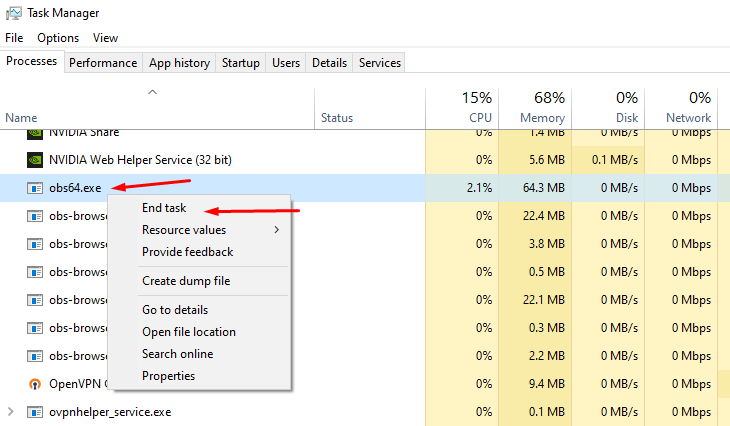
The "acting like it's a fresh restart" is due to certain background processes not closing properly. First, please close Streamlabs Desktop.
Then open your task manager. Please press "Ctrl + Shift + Esc" on your keyboard to bring up your Task Manager.
Please select "More Details" at the bottom if you don't see the percentages of resources used.
Check for any running programs called "Streamlabs," "Electron," or "Obs64". If you find either of these processes running, please right-click and end the process. https://gyazo.com/d6b9babb076875ee5889983b532948e1
Then, reopen Streamlabs Desktop. This should resolve it but if it doesn't please submit a ticket at https://support.streamlabs.com/hc/en-us/requests/new and our team would be able to assist you further.
 dawn canyon
Hi people i just brough Ultra and is still saying i have not purchased?#
 wide cedar
My streamlabs is not saving new settings, if I add a scene, image or even a new audio device when I close my streamlabs it resets. What should I do? I am already opening as Admin
hasty copper
gritty isle
**Streamlabs Desktop launching as if it is a fresh/like it's the first time usin...
Thank you! I was going bananas lol and didn't want to reinstall and re-configure everything.
gritty isle
hasty copper
Thank you! I was going bananas lol and didn't want to reinstall and re-configure...
You’re welcome!
gritty isle
wide cedar
My streamlabs is not saving new settings, if I add a scene, image or even a new ...
Streamlabs Desktop launching as if it is a fresh/like it's the first time using it?
The "acting like it's a fresh restart" is due to certain background processes not closing properly. First, please close Streamlabs Desktop.
Then open your task manager. Please press "Ctrl + Shift + Esc" on your keyboard to bring up your Task Manager.
Please select "More Details" at the bottom if you don't see the percentages of resources used.
Check for any running programs called "Streamlabs," "Electron," or "Obs64". If you find either of these processes running, please right-click and end the process. https://gyazo.com/d6b9babb076875ee5889983b532948e1
Then, reopen Streamlabs Desktop. This should resolve it but if it doesn't please submit a ticket at https://support.streamlabs.com/hc/en-us/requests/new and our team would be able to assist you further.
gritty isle
dawn canyon
Hi people i just brough Ultra and is still saying i have not purchased?#
Please submit a ticket for assistance with that: https://support.streamlabs.com/hc/en-us/requests/new
 stoic canopy
Hello, how do I connect to my chat in Streamlabs desktop please? I keep getting this message and can't chat there.

 cerulean tapir
How can I disscheck Twitter so I can stream on kick? (No money for Premium)

 stray citrus
cerulean tapir
How can I disscheck Twitter so I can stream on kick? (No money for Premium)
stray citrus
cerulean tapir
How can I disscheck Twitter so I can stream on kick? (No money for Premium)
Hi, friend! Try this custom ingest method: https://streamlabs.com/content-hub/post/how-to-live-stream-to-kick-using-streamlabs This allows you to bypass the logged in platform and just go live to your one "custom" destination (Kick). 😄
cerulean tapir
stray citrus
Hi, friend! Try this custom ingest method: https://streamlabs.com/content-hub/po...
The problem is I Crossed Streamlabs and YouTube (also Twitter and Streamlabs) now it’s logging me in with YouTube when I log in with Streamlabs I’d
 stuck fractal
I held a merch giveaway today and the winner was presented with this screen. I checked in streamlabs and it does have the user selected as the winner. any clue how to fix this?
 stray citrus
cerulean tapir
The problem is I Crossed Streamlabs and YouTube (also Twitter and Streamlabs) no...
stray citrus
cerulean tapir
The problem is I Crossed Streamlabs and YouTube (also Twitter and Streamlabs) no...
If you go live using the custom ingest method and enter your Kick info after clicking here (https://prnt.sc/tFWIpf_kmcw0), it should only go live to the platform in which the info you entered (Kick). It shouldn't take your logged-in platform into account at that point.
gritty isle
stoic canopy
Hello, how do I connect to my chat in Streamlabs desktop please? I keep getting ...
You’re seeing this in the embedded chat dock?
gritty isle
stuck fractal
I held a merch giveaway today and the winner was presented with this screen. I c...
Please open a ticket on this issue and include the redemption link: https://support.streamlabs.com/hc/en-us/requests/new
stuck fractal
gritty isle
Please open a ticket on this issue and include the redemption link: <https://su...
i opened a ticket already, i didnt provide the redemption link. ill reply with the link now ty
cerulean tapir
stray citrus
If you go live using the custom ingest method and enter your Kick info after cli...
Nice Troll bro
 stoic canopy
gritty isle
You’re seeing this in the embedded chat dock?
stoic canopy
gritty isle
You’re seeing this in the embedded chat dock?
yes
gritty isle
stuck fractal
i opened a ticket already, i didnt provide the redemption link. ill reply with t...
You’re welcome.
cerulean tapir
stray citrus
If you go live using the custom ingest method and enter your Kick info after cli...
wait a sec
 hazy helm
hey. does anyone know how to change the stream chat overlay to show chat from multiple sources instead of just a single source? ping me pls to respond to this
cerulean tapir
hazy helm
hey. does anyone know how to change the stream chat overlay to show chat from mu...
Do u mean font?
(My English bad Sorry)
hazy helm
cerulean tapir
Do u mean font?
(My English bad Sorry)
no. i want to get the chat overlay to show both twitch and youtube chat but currently it only shows twitch chat
 warm terrace
Hi y'all,
Quick question: if I set multiple alerts for 5 gifted subs, will Streamlabs play a random alert ouf of these alerts each time? Or will it just use the first variation of it? Or will it play all the variations?
Trying to achieve random alerts for x amount of gifted subs, f.e. setting a couple of alerts for 2 gifted subs, another set of alerts for 3 gifted subs, etc.

So basically similar to follower variations, but for x amount of gifted subs
 halcyon swan
I am having a small issue. I hope this is the right spot. I have a fresh install of win 10, all updates, games, and streamlabs. I streamed with saved settings and the stream goes well until I ads teamed with others.
Any advice? Oo the game in question is Fortnite
gritty isle
stoic canopy
yes
Our API connection with YouTube only allows read only access to chat. If you want to type in chat, you'll need to open the chat in a seperate browser window.
gritty isle
hazy helm
no. i want to get the chat overlay to show both twitch and youtube chat but curr...
Do you have your YouTube channel merged in your Streamlabs account? https://streamlabs.com/dashboard#/settings/account-settings/platforms
hazy helm
gritty isle
Do you have your YouTube channel merged in your Streamlabs account? <https://st...
i dont know. i know i am multi streaming to youtube though.
let me check
hazy helm
gritty isle
Do you have your YouTube channel merged in your Streamlabs account? <https://st...
yes. youtube is merged
gritty isle
hazy helm
yes. youtube is merged
And on YouTube is your live stream Public? Chatbox won't work on YouTube if you're stream is Unlisted or Private.
hazy helm
gritty isle
And on YouTube is your live stream Public? Chatbox won't work on YouTube if you...
its public
the overlay only shows twitch chat. i dont know how to set it to multistream
gritty isle
hazy helm
the overlay only shows twitch chat. i dont know how to set it to multistream
If you're multistreaming through Streamlabs and toggled on YouTube and the live stream is Public, then chat should appear in trhe Chatbox from YouTube and Twitch. Its just automatic. There's no other steps you need to do. If you're not seeing YouTube Chat in the Chatbox, please link your discord (see next post) and then ask over in the Ultra Support channel, which is one of your subscriber benefits.
wispy latchBOT
@hazy helm
If you are a Streamlabs Ultra Subscriber or All-Stars member
 Link your Discord under integrations for access to our Ultra/VIP roles and private chats
:point_right: https://streamlabs.com/dashboard/#/settings/integrations
:star: upgrade to Ultra here: https://streamlabs.com/ultra?refl=discord
gritty tartan
chat box does not work. just shows a black screen in the preview and no chats come up. anyone know a fix??? ive tried everything
gritty isle
gritty tartan
chat box does not work. just shows a black screen in the preview and no chats co...
What platform, Twitch, YouTube, Facebook, Trovo, or X?
gritty tartan
gritty isle
What platform, Twitch, YouTube, Facebook, Trovo, or X?
twitch
gritty isle
gritty tartan
twitch
Screen shot the settings you have for your Chatbox Widget please.
gritty tartan
it just suddenly stopped working a few days ago. ive tried relogging, ive tried disabling hardware acceleration, everything
gritty tartan
gritty isle
Screen shot the settings you have for your Chatbox Widget please.
what settings exactly
like browser settings or general, or all
gritty isle
gritty tartan
what settings exactly
https://streamlabs.com/dashboard#/chatbox
Like this:

Are you using this as a browser source in OBS Studio or are you using the Chatbox Widget in Streamlabs Desktop?
 hazy helm
 hazy helm
gritty isle
Are you using this as a browser source in OBS Studio or are you using the Chatbo...
hazy helm
gritty isle
Are you using this as a browser source in OBS Studio or are you using the Chatbo...
desktop
gritty tartan
i didnt change anything and one day it just sopped working
gritty isle
gritty tartan
Okay, quit Streamlabs Desktop then follow these steps:
- Hit windows key + R
- Paste this and hit enter %appdata%/slobs-client/plugin_config/obs-browser
- Delete the cache folder
- Start up Streamlabs Desktop and test
hazy helm
will do
gritty isle
hazy helm
desktop
That reply was for someone else. You should link your Discord and ask about your issue in the #ultra-support channel.
hazy helm
oh. kk'
gritty isle
hazy helm
will do
Again, that reply was not for you.
gritty tartan
nothin 
gritty isle
gritty tartan
nothin <:NotLikeThis:435217089117028362>
Have you changed your name on Twitch?
gritty tartan
no
hazy helm
no
gritty isle
hazy helm
no
Again, these replies aren't for you. 😉
gritty tartan
and even so, i have relogged into streamlabs and it still didnt fix it
hazy helm
ping me when they are
gritty isle
hazy helm
ping me when they are
I did, above. Please link your Discord (see next tagged post) and then ask about your issue in the #ultra-support channel.
Your issue is with YouTube. Merlin's issue is with Twitch.
wispy latchBOT
@hazy helm
If you are a Streamlabs Ultra Subscriber or All-Stars member
Link your Discord under integrations for access to our Ultra/VIP roles and private chats
:point_right: https://streamlabs.com/dashboard/#/settings/integrations
:star: upgrade to Ultra here: https://streamlabs.com/ultra?refl=discord
gritty isle
@gritty tartan
Let's refresh the connection between Streamlabs and Twitch.
Please follow the instructions exactly in this guide: https://streamlabs.com/content-hub/post/how-to-disconnect-your-streamlabs-account.
Don't skip the log out steps! To log out of the Streamlabs web site, click your PFP in the upper right corner of the web site and choose Log out. See the image below on how to log out in Streamlabs Desktop.
👉 NOTE: **This will not go back and capture any events that were missed. Events are sent over the API once and if they aren't detected, that event will never be sent again.
You'll need a new event (new follow on Twitch, new subscriber on YouTube, etc) as verification. I can follow on Twitch or subscribe on YouTube for verification if you like. An unfollow/refollow or unsubscribe/resubscribe won't trigger a new alert.**
👉 NOTE: The guide has sections for the 4 platforms we have full integration with, Twitch, YouTube, Facebook, and Trovo. So only follow the section for the platform you're using.
👉 NOTE: You must not be live when you follow this guide. So if you’re live, end the stream first.
Log out/Log in: https://i.gyazo.com/d85a0f693148ea5b9e4c6b03d7cbf703.png
👉 IMPORTANT: Once you have completed the guide, go back to the Streamlabs web site https://streamlabs.com/dashboard#/recentevents, click the Live Actions tab, scroll all the way to the bottom and click the Reload Widgets button. Then launch Streamlabs Desktop and log back in there.
gritty tartan
nope :/
gritty isle
gritty tartan
nope :/
Huh.
Please go here https://www.twitch.tv/settings/connections, scroll down to Other Connections and screen shot the Streamlabs connection please.
 gritty isle
gritty tartan
gritty isle
gritty tartan
Okay, that looks good. Go ahead and remove the Chatbox Widget from every scene where its used. The wait a minute. Then restart Streamlabs Desktop and wait a minute. Then add the Chatbox Widget in just once scene and test.
gritty isle
gritty tartan
no

Please go here https://streamlabs.com/dashboard#/chatbox and screen shot allthe settings.
gritty tartan
 gritty isle
Set this to Disabled, save settings and test again.
 gritty isle
gritty tartan
that did it. thank you so much
gritty isle
gritty tartan
that did it. thank you so much
You're welcome.
gritty tartan
idk how or when that got turned on or how it messed up so much lol
gritty isle
gritty tartan
idk how or when that got turned on or how it messed up so much lol
Its a common cause of Widgets being blank.
 tepid jungle
how do i auto-optimize my slobs?
gritty isle
tepid jungle
how do i auto-optimize my slobs?
The auto optimize button is still disabled and after all this time, I doubt its coming back.
tepid jungle
Oh 😦 okay, in that case how would i figure out my best streaming settings?
gritty isle
tepid jungle
Oh 😦 okay, in that case how would i figure out my best streaming settings?
You're streaming to Twitch?
tepid jungle
gritty isle
You're streaming to Twitch?
Yeah will be
gritty isle
tepid jungle
Yeah will be
What's your Internet upload speed?
tepid jungle
gritty isle
What's your Internet upload speed?
around 80-90mbps
gritty isle
tepid jungle
around 80-90mbps
Okay great! What's your GPU (video card)?
tepid jungle
gritty isle
Okay great! What's your GPU (video card)?
rtx3070
tepid jungle
1920x1080
gritty isle
tepid jungle
1920x1080
Nice. So I'd set the Base Resolution to 1920x1080, set the Output Resolution to 1280x720. Set the encoder to NVIDIA NVENC H.264 (don't use the new one). Set the bitrate to 6000, Keyframe and Max B Frames to 2.
Uncheck Look-ahead and check Psycho Visual Tuning.
cerulean tapir
stray citrus
If you go live using the custom ingest method and enter your Kick info after cli...
Ty I can shoot now on kids 🙂
tepid jungle
gritty isle
Uncheck Look-ahead and check Psycho Visual Tuning.
Like this? Not sure where 'Look-ahead' check box is
 gritty isle
tepid jungle
Like this? Not sure where 'Look-ahead' check box is
gritty isle
tepid jungle
Like this? Not sure where 'Look-ahead' check box is
Interesting. It should be there. Uncheck this box too.
 tepid jungle
gritty isle
Interesting. It should be there. Uncheck this box too.
tepid jungle
gritty isle
Interesting. It should be there. Uncheck this box too.
done but still no idea where it is 🤣
gritty isle
tepid jungle
Like this? Not sure where 'Look-ahead' check box is
Interesting, the not new encoder doesn't have Look-ahead. That's fine, you don't need it.
tepid jungle
ah alright thank you, and this looks okay also?
 gritty isle
tepid jungle
ah alright thank you, and this looks okay also?
gritty isle
tepid jungle
ah alright thank you, and this looks okay also?
Yeah, that's all good. And also consider capping in the in game FPS to either 60 or 120 and set your monitor's refresh rate to the either 60 or 120. 60 and 120 divide by 60 evenly and for example 144 does not. Having the FPS in Streamlabs Desktop, the FPS in game and the Monitor's refresh rate divide evenly by 60 will decrease the workload on your GPU.
halcyon swan
Ok it seems this isn't the channel for help
gritty isle
tepid jungle
thanks for the help 🙂
You're welcome.
tepid jungle
gritty isle
You're welcome.
can i just ask why output 720 over 1080?
halcyon swan
I am having a small issue. I hope this is the right spot. I have a fresh install of win 10, all updates, games, and streamlabs. I streamed with saved settings and the stream goes well until I ads teamed with others. The game we are playing is Fortnite.
gritty isle
tepid jungle
can i just ask why output 720 over 1080?
It makes better use of your bitrate, which is limited by Twitch to 6000. 1280x720 is watchable by people on mobile devices. 1080p uses a lot of bandwith and sometime people on mobile devices can't see the stream.
tepid jungle
gritty isle
It makes better use of your bitrate, which is limited by Twitch to 6000. 1280x7...
Ahh alright, thanks boss
gritty isle
halcyon swan
I am having a small issue. I hope this is the right spot. I have a fresh insta...
Can you elaborate on that?
gritty isle
tepid jungle
Ahh alright, thanks boss
You're welcome.
halcyon swan
gritty isle
Can you elaborate on that?
All new setup basically, jumped in fortnite on stream. Everything is running well until teamed with someone and aiming down site lags out.
gritty isle
halcyon swan
All new setup basically, jumped in fortnite on stream. Everything is running we...
So is Streamlabs Desktop reporting Skipped, Lagged, or Dropped frames?
 deft cedar
Good day 🙂
halcyon swan
gritty isle
So is Streamlabs Desktop reporting Skipped, Lagged, or Dropped frames?
Is there a way to go back and check that?
gritty isle
halcyon swan
Is there a way to go back and check that?
If you're no longer live, nope. I would make sure that in Streamlabs Desktop, you go to Settings -> Notifications, enable all the options and set the sliders to 15% and see fi you get any notifications on your next stream.
 halcyon swan
We are only on 1 monitor
gritty isle
halcyon swan
We are only on 1 monitor
Ah, that makes it more difficult to troubleshoot.
After you're next stream, check to see if you have any notifications and we can troubleshoot from there.
halcyon swan
gritty isle
After you're next stream, check to see if you have any notifications and we can ...
Sounds great, thank you, 1 last question, the base (canvas) resolution should always be your actual resolution u r running right?
gritty isle
halcyon swan
Sounds great, thank you, 1 last question, the base (canvas) resolution should al...
Yes, the base resolution should be the same as your monitor's resolution.
halcyon swan
gritty isle
Yes, the base resolution should be the same as your monitor's resolution.
Thank you
gritty isle
halcyon swan
Thank you
You're welcome.
 elder elm
i justg got a new pc and its much better then my old one, i havent streamed in a while on streamlabs, i forgot how to make ur streaming setting better for higher performance quality, anyone help me real quick?
 feral lynx
hello guys, is there any RIOT staf? Just got penalizet by the system for literally no reason
agile owl
RIOT? the nerds behind those awful games League of Legends and Valariet?
gritty isle
feral lynx
hello guys, is there any RIOT staf? Just got penalizet by the system for literal...
This is Streamlabs, not Riot.
feral lynx
I know I know, sorry. Just was curious, since we are everyone sometimes stream riot stuf ":D
where did btw my tags go?
since I had to update my discord name thay are no longer there
 glacial zodiac
Hey guys! So I have been trying to start a stream but the issue is that i have a random blur on the stream side and also my wave 3 microphone seems to be making a crackling noise when recording
feral lynx
I can send you mic corection spec for slobs
glacial zodiac
any help will be great


 glacial zodiac
okay thanks!
 neon mesa
hello everyone i have connected my facebook and twitch to my streamlabs but when i try to go live it is telling me to reconnect facebook. Can anyone help me out with this issue?
tepid jungle
can u only multi stream with premium?
muted ermine
so im trying to stream valorant but it keep dropping from 4500 bitrate to 0 and maybe i cant stream it
 gritty isle
tepid jungle
can u only multi stream with premium?
gritty isle
tepid jungle
can u only multi stream with premium?
Multistreaming requires an active Streamlabs Ultra subscription.
muted ermine
sorry to ask this question
gritty isle
muted ermine
so im trying to stream valorant but it keep dropping from 4500 bitrate to 0 and ...
Sounds like an issue with your upload bandwidth. You streaming to Twitch?
muted ermine
gritty isle
Sounds like an issue with your upload bandwidth. You streaming to Twitch?
yes i am
my upload is only 40-41
wispy latchBOT
@muted ermine
Please run this twitch test tool to find out the best server (https://r1ch.net/projects/twitchtest). Be sure to run the test for either Medium or Long, as short won't give you the most accurate results and be sure to select your region from the listed options (if the regions are not applicable to you, please select 5-6 servers that are near you). You're looking for at least a quality of 84.
Once you've found a good server go to Settings > Stream > Stream to custom ingest and you can manually select your server.
muted ermine
@gritty isle im running a medium test atm i will post the results in here


@gritty isle okay those are the results
gritty isle
muted ermine
Those look pretty good. I’d run a few speed tests and see if you upload bandwidth is consistent and not fluctuating.
 gritty isle
muted ermine
gritty isle
muted ermine
Run several speed tests waiting a minute in between each. See if the upload stays around d what you just posted.

 gritty isle
muted ermine
gritty isle
muted ermine
So fairly consistent it seems. What bitrate do you have set?
muted ermine
gritty isle
So fairly consistent it seems. What bitrate do you have set?

currently 4500
but when im trying to stream like valorant , rainbox six etc it drops my frames
gritty isle
muted ermine
but when im trying to stream like valorant , rainbox six etc it drops my frames
Streamlabs Desktop reports dropped frames or it’s just something you see?
gritty isle
muted ermine
currently 4500
Uncheck this and set bitrate to 6000. See how it goes.
 muted ermine
gritty isle
Streamlabs Desktop reports dropped frames or it’s just something you see?
muted ermine
gritty isle
Streamlabs Desktop reports dropped frames or it’s just something you see?
it says 25% reported dropped frames
gritty isle
muted ermine
it says 25% reported dropped frames
Interesting. So there’s an issue between you and the auto selected ingest. I would go back to the two screen shot and find an ingest near you that has a score of 90 or above and then manually select that ingest by going to Settings > Stream > scroll all the way down and click Stream to custom ingest. Then pick Twitch and that ingest. Also go to Settings > Advanced > Network and screen shot those settings please.
muted ermine

 gritty isle
Uncheck these three options and did you mean to add 1 second of stream delay?

And make sure that IP address is still the address your computer has.
gritty isle
muted ermine
shoud it be on 2 second delay?
No delay needed. Uncheck Stream Delay.
muted ermine
un check this too?
 gritty isle
muted ermine
un check this too?
gritty isle
muted ermine
un check this too?
Yes. Uncheck that too.
Then select that in the drop down menu.
Or better yet, set it to Default.
muted ermine
 muted ermine
what about this option?
 gritty isle
muted ermine
what about this option?
gritty isle
muted ermine
what about this option?
That’s fine.
muted ermine
what about this option?

and another question does it have anything to deal with anything in control panel i have a nvdia geforce rtx 2080 super on my machine ? @gritty isle
 gritty isle
muted ermine
what about this option?
gritty isle
muted ermine
what about this option?
Are experiencing stream disconnects or just dropped frames?
gritty isle
muted ermine
and another question does it have anything to deal with anything in control pane...
No. Dropped frames are a network only issue.
muted ermine
well both actually @gritty isle
it just for high intensive games as i mentioned
i usually set in game graphics to low
gritty isle
muted ermine
well both actually <@301571565840236564>
Okay then leave the reconnect enabled.
muted ermine
i have a i7 10700k processor atm
muted ermine
gritty isle
Okay then leave the reconnect enabled.
i turned of stream delay but left reconnect option on
gritty isle
muted ermine
i turned of stream delay but left reconnect option on
Go ahead and go live and see how it goes.
muted ermine
gritty isle
Go ahead and go live and see how it goes.
so i went live and i see this playing stardew valley

 gritty isle
muted ermine
so i went live and i see this playing stardew valley
gritty isle
muted ermine
so i went live and i see this playing stardew valley
Weird. Do you have an MSI motherboard?
muted ermine
gritty isle
Weird. Do you have an MSI motherboard?
hang on one second
Lenovo Legion Tower 7i
Intel(R) Core(TM) i7-10700K CPU @ 3.80GHz 3.70 GHz
16 GB RAM
1 TB Hard Drive
Nvidia GeForce RTX 2080 Super
those are my specs, so i dont have a msi motherboard
gritty isle
Okay thanks.
gritty isle
muted ermine
im sure theres a way to make my stream smoother
Last thing to try… do you have physical access to your cable modem?
muted ermine
i do yes
gritty isle
muted ermine
i do yes
And you’re the only one using it currently?
muted ermine
yes
gritty isle
muted ermine
yes
Okay, shut down your computer. Then pull the power cord from your cable modem and leave it unplugged for at least 5 minutes. Then plug it back in and once the cable mode is fully up, boot your computer and try and go live and see how it goes.
Definitely no. Don’t make any changes to anything there.
muted ermine
gritty isle
Definitely no. Don’t make any changes to anything there.
so i reset my computer
then unplug the cable for 5 minutes
gritty isle
muted ermine
so i reset my computer
No, just shut down your computer. Windows Menu > Power > Shut down
Then unplug your cable modem for 5 minutes.
gritty isle
muted ermine
Now what’s next after this point
Try and go live again.

 bright verge
hi guys. i have a question im dying to find an answer. i've been searching for a fix for 1 hour already and i think im doomed
my recent events on streamlabs isn't updating hence no alert box or update on follower goal and event lists. its not showing my recent followers on twitch while my activity feed on twitch has new 5 follwers.
anyone know any fix?
gritty isle
bright verge
anyone know any fix?
Refreshing the connection between Streamlabs and the platform will resolve this.
Please follow the instructions exactly in this guide: https://streamlabs.com/content-hub/post/how-to-disconnect-your-streamlabs-account.
Don't skip the log out steps! To log out of the Streamlabs web site, click your PFP in the upper right corner of the web site and choose Log out. See the image below on how to log out in Streamlabs Desktop.
👉 NOTE: **This will not go back and capture any events that were missed. Events are sent over the API once and if they aren't detected, that event will never be sent again.
You'll need a new event (new follow on Twitch, new subscriber on YouTube, etc) as verification. I can follow on Twitch or subscribe on YouTube for verification if you like. An unfollow/refollow or unsubscribe/resubscribe won't trigger a new alert.**
👉 NOTE: The guide has sections for the 4 platforms we have full integration with, Twitch, YouTube, Facebook, and Trovo. So only follow the section for the platform you're using.
👉 NOTE: You must not be live when you follow this guide. So if you’re live, end the stream first.
Log out/Log in: https://i.gyazo.com/d85a0f693148ea5b9e4c6b03d7cbf703.png
👉 IMPORTANT: Once you have completed the guide, go back to the Streamlabs web site https://streamlabs.com/dashboard#/recentevents, click the Live Actions tab, scroll all the way to the bottom and click the Reload Widgets button. Then launch Streamlabs Desktop and log back in there.
gritty isle
muted ermine
<@301571565840236564> im back online now after the process u just tole me
Okay so now go live and see how it goes.
muted ermine

do i need ot change anything here
*to
because if im trying to run games smoothly without crashes what do i need to change
gritty isle
muted ermine
do i need ot change anything here
Nope. That’s all fine.
muted ermine

this is when im not playing a game, but when i am like i experienced earlier it crashes down to 0 bitrate @gritty isle
bright verge
gritty isle
Refreshing the connection between Streamlabs and the platform will resolve this....
i'm done with the steps. so the followers that followed me during the time the recent events were bugged wont make it to the events list? can we also test if it works now? i find the "test follows" works but the recent followers that followed me on twitch did not appear
i can wait since u're still assisting someone. thank you!
it's been so tough having no fix on the internet
gritty isle
muted ermine
this is when im not playing a game, but when i am like i experienced earlier it ...
Okay, did you go to Settings > Stream > stream to custom ingest and pick one of the ingests with a score of 90 or better, and don’t pick the one close to you.
gritty isle
bright verge
i'm done with the steps. so the followers that followed me during the time the r...
Yes, this won’t go back and capture events that were missed. Please screen shot the Streamlabs connection from here: https://www.twitch.tv/settings/connections
bright verge
gritty isle
Yes, this won’t go back and capture events that were missed. Please screen shot...
 gritty isle
bright verge
gritty isle
bright verge
Perfect. Go ahead and launch Streamlabs Desktop if you haven’t already. Then go to a scene with the Alert Box.
bright verge
i wanna u to look at this too. the first image is my recent events list on streamlabs desktop and the second is the twitch activity feed.

 gritty isle
bright verge
i wanna u to look at this too. the first image is my recent events list on strea...
gritty isle
bright verge
i wanna u to look at this too. the first image is my recent events list on strea...
Yes, I understand the issue.
bright verge
gritty isle
Perfect. Go ahead and launch Streamlabs Desktop if you haven’t already. Then ...
i'll turn on my stream?
gritty isle
bright verge
i'll turn on my stream?
You don’t need to be live. Are you in a scene with the Alert Box?
bright verge
yes
gritty isle
bright verge
yes
And is the Twitch channel linked on your Discord profile the correct channel?
bright verge
yes
gritty isle
bright verge
yes
Great! Hang on…
muted ermine
well i picked chicago,IL (3)
bright verge
nice! it works. thank you so much @gritty isle
gritty isle
bright verge
yes
I followed.
gritty isle
bright verge
nice! it works. thank you so much <@301571565840236564>
Yay! You’re welcome!
gritty isle
muted ermine
well i picked chicago,IL (3)
Okay great. Go live and see how it goes.
bright verge
last question. i saw a post online earlier, if i use obs studios with streamlabs browser source, do i need to make sure my streamlabs desktop is open for it to update the recent events?
gritty isle
@grim flare
Refreshing the connection between Streamlabs and the platform will resolve this.
Please follow the instructions exactly in this guide: https://streamlabs.com/content-hub/post/how-to-disconnect-your-streamlabs-account.
Don't skip the log out steps! To log out of the Streamlabs web site, click your PFP in the upper right corner of the web site and choose Log out. See the image below on how to log out in Streamlabs Desktop.
👉 NOTE: **This will not go back and capture any events that were missed. Events are sent over the API once and if they aren't detected, that event will never be sent again.
You'll need a new event (new follow on Twitch, new subscriber on YouTube, etc) as verification. I can follow on Twitch or subscribe on YouTube for verification if you like. An unfollow/refollow or unsubscribe/resubscribe won't trigger a new alert.**
👉 NOTE: The guide has sections for the 4 platforms we have full integration with, Twitch, YouTube, Facebook, and Trovo. So only follow the section for the platform you're using.
👉 NOTE: You must not be live when you follow this guide. So if you’re live, end the stream first.
Log out/Log in: https://i.gyazo.com/d85a0f693148ea5b9e4c6b03d7cbf703.png
👉 IMPORTANT: Once you have completed the guide, go back to the Streamlabs web site https://streamlabs.com/dashboard#/recentevents, click the Live Actions tab, scroll all the way to the bottom and click the Reload Widgets button. Then launch Streamlabs Desktop and log back in there.
gritty isle
bright verge
last question. i saw a post online earlier, if i use obs studios with streamlabs...
No. You might keep the Recent Events page open in dock.
muted ermine
i tried everything and it just cant run certant games
gritty isle
muted ermine
i tried everything and it just cant run certant games
Submit a ticket and troubleshoot with the team: https://support.streamlabs.com/hc/en-us/requests/new. Be sure to tell them what all we’ve tried so far. There’s something goofy network wise.
desert briar
im unable to login to my streamlabes account i created earlier and it doesn't give me an error code. is there anything i can do to fix this?
 gritty isle
desert briar
im unable to login to my streamlabes account i created earlier and it doesn't gi...
gritty isle
desert briar
im unable to login to my streamlabes account i created earlier and it doesn't gi...
Are you,logging in with your Streamlabs ID or with a specific platform, like Twitch or YouTube?
muted ermine
gritty isle
Submit a ticket and troubleshoot with the team: <https://support.streamlabs.com...
it may be my isp i might have to get a capture card, or get another router because i called a retalier and they told me to get a new router
desert briar
gritty isle
Are you,logging in with your Streamlabs ID or with a specific platform, like Twi...
my streamlabs id
 balmy dock
Why do my scene collections keep disappearing? I have to set them up manually 3 times just this week. Why is this happening?
gritty isle
And you created your Streamlabs ID today?
desert briar
correct, about 10 minutes ago
gritty isle
balmy dock
Why do my scene collections keep disappearing? I have to set them up manually 3 ...
Streamlabs Desktop launching as if it is a fresh/like it's the first time using it?
The "acting like it's a fresh restart" is due to certain background processes not closing properly. First, please close Streamlabs Desktop.
Then open your task manager. Please press "Ctrl + Shift + Esc" on your keyboard to bring up your Task Manager.
Please select "More Details" at the bottom if you don't see the percentages of resources used.
Check for any running programs called "Streamlabs," "Electron," or "Obs64". If you find either of these processes running, please right-click and end the process. https://gyazo.com/d6b9babb076875ee5889983b532948e1
Then, reopen Streamlabs Desktop. This should resolve it but if it doesn't please submit a ticket at https://support.streamlabs.com/hc/en-us/requests/new and our team would be able to assist you further.
gritty isle
desert briar
correct, about 10 minutes ago
Please log in with one of your platforms like Twitch or YouTube and go here https://streamlabs.com/dashboard#/settings/account-settings/slIDSettingsPage and screen shot the page.
Curious to see the data migration status.
balmy dock
gritty isle
**Streamlabs Desktop launching as if it is a fresh/like it's the first time usin...
None of these processes are running. I'll restart and submit a ticket if the issue persists.
gritty isle
balmy dock
None of these processes are running. I'll restart and submit a ticket if the iss...
Thanks for checking. Submit a ticket if the issue persists.
desert briar
gritty isle
Please log in with one of your platforms like Twitch or YouTube and go here <htt...
im not comfortable with the permissions im required to give when logging in with those platforms. is there no way i can just use my streamlabs account?
gritty isle
desert briar
im not comfortable with the permissions im required to give when logging in with...
So you have no platforms merged in your account? What are you expecting to use Streamlabs for?
desert briar
gritty isle
So you have no platforms merged in your account? What are you expecting to use ...
streamlabels only
gritty isle
desert briar
streamlabels only
You’ll need to then merge a platform like Twitch or YouTube.
desert briar
Unfortunate. I will find another method to put "newest follwoer" on my screen without having all of those extreme permitions to my account
thank you
gritty isle
desert briar
Unfortunate. I will find another method to put "newest follwoer" on my screen wi...
Okay, sorry we didn’t meet your needs.
 eager drift
desert briar
Unfortunate. I will find another method to put "newest follwoer" on my screen wi...
eager drift
desert briar
Unfortunate. I will find another method to put "newest follwoer" on my screen wi...
could js merge the account
gritty isle
eager drift
could js merge the account
They are hesitant due to the required permissions.
gritty isle
eager drift
what are those again
I’d have to go through the on boarding again. There’s nothing extreme about the permissions. They are all required in order for Streamlabs services to work for you.
eager drift
gritty isle
I’d have to go through the on boarding again. There’s nothing extreme about the...
yeah its been js fine for me anyway idk what the problem is but
streamlabs goated forever
18 followers or not we thuggin😭🙏
balmy dock
gritty isle
Thanks for checking. Submit a ticket if the issue persists.
submitted a ticket, 769317. ticket number doesnt show up on my profile when i sign in. also, can sign into my streamlabs account on the device i created it on, but not on my actual streaming computer.
gritty isle
balmy dock
submitted a ticket, 769317. ticket number doesnt show up on my profile when i si...
Okay thanks. Be patient and they will get to you. The first email might have “helpful” links that will resolve your issue. Just don’t click any of them as that closes your ticket.
 weak nimbus
where does my 2fa 6-8 code show up im not geting a code
valid blaze
Heyy, quick question, what is the proper way to decide my Output Bitrate
wispy latchBOT
{1}```md
Recommended bitrate values versus used resolution and FPS.
- For 1280x720 at 30FPS use 2200 up to 2800kbps.
- For 1280x720 at 60FPS use 3800 up to 5600kbps.
- For 1920x1080 at 30FPS use 4400 up to 6200kbps.
- For 1920x1080 at 60FPS use (6000) 8700 up to 12500kbps.
- For 1600x900 or 1536x864 at 60FPS use at least 6000kbps up to 8600kbps.
<Note: These values are based for single-pc streaming setup, using x264 veryfast preset>
Using lower bitrates than listed is possible where allowed by the type of content or when using a better (slower) x264 preset or using RTX NVENC to have 6000kbps for 1080p60.
If you get pixelations on your stream, this would mean there is insufficient bitrate to properly encode the stream for the given content.```
# Streaming Service Limitations
- Twitch recommended and supported maximum bitrate is 6000kbps. [Link 1]
- Facebook allows up to 1280x720 at 30FPS and a max bitrate of 4000kbps. [Link 2]
- Facebook Level program allows 1080p at 60FPS and a max bitrate of 9000kbps [Link 3]
- Youtube recommended settings [Link 4]```
:one: :link: <https://help.twitch.tv/s/article/broadcasting-guidelines>
:two: :link: <https://www.facebook.com/fbgaminghome/creators/best-practices>
:three: :link:<https://www.facebook.com/fbgaminghome/creators/levelup>
:four: :link: <https://support.google.com/youtube/answer/2853702?hl=en> normal wraith
my streamlab can't control and i can't click anything, how to fix??
 gritty isle
weak nimbus
where does my 2fa 6-8 code show up im not geting a code
gritty isle
weak nimbus
where does my 2fa 6-8 code show up im not geting a code
You should have downloaded and configure either Authy or Google Authenticator. If you didn’t do that, you’ll need to submit a ticket to have your 2FA reset: https://support.streamlabs.com/hc/en-us/requests/new. Only the Streamlabs staff can do this via ticket. Us Volunteers aren’t employees and thus we have no access.
gritty isle
normal wraith
my streamlab can't control and i can't click anything, how to fix??
Turn off Selective Recording.
 gritty isle
normal wraith
I can't take it off
gritty isle
normal wraith
I can't take it off
It’s literally a button. Just click it. I didn’t mean to remove the button from the interface.
normal wraith
gritty isle
It’s literally a button. Just click it. I didn’t mean to remove the button fro...
I just sent a video you can watch, I can't turn it off even though I clicked
gritty isle
normal wraith
Restart Streamlabs Desktop and try again.
 sick moon
He got a quick question I'm using streamlabs console and when i try to go live from my console it tell me that "You need to link a subscription to your account to use the selected broadcast destination". I have no idea what that means
gritty isle
sick moon
He got a quick question I'm using streamlabs console and when i try to go live f...
Streamlabs Console is a paid subscription service. You would need to log into the Streamlabs Console site, click your PFP in the upper right, choose Account Settings, then scroll down and choose either the Monthly or Annual plan.
Streamlabs Console is also included in our Streamlabs Ultra subscription. If you're using Streamlabs Console this way, please make sure you set up your Streamlabs ID then log into the Streamlabs Console with your Streamlabs ID rather than your Twitch.
normal wraith
gritty isle
Restart Streamlabs Desktop and try again.
I tried to delete and reinstall but still can't
gritty isle
normal wraith
I tried to delete and reinstall but still can't
Did you restart Streamlabs Desktop? I didn’t ask you to uninstall or reinstall.
sick moon
gritty isle
Streamlabs Console is a paid subscription service. You would need to log into t...
Thank you sir good ole case of broke
gritty isle
sick moon
Thank you sir good ole case of broke
You’re welcome.
normal wraith
gritty isle
Did you restart Streamlabs Desktop? I didn’t ask you to uninstall or reinstall.
I restarted but still can't turn it off, still the same
gritty isle
normal wraith
I restarted but still can't turn it off, still the same
Weird. Go into the Layout Editor. Do you have the Stream Preview or the Editor Display?
 normal wraith
gritty isle
Weird. Go into the Layout Editor. Do you have the Stream Preview or the Editor...
normal wraith
gritty isle
Weird. Go into the Layout Editor. Do you have the Stream Preview or the Editor...
No it doesn't show anything and when I click it doesn't have anything
@gritty isle
 gritty isle
normal wraith
No it doesn't show anything and when I click it doesn't have anything
gritty isle
normal wraith
No it doesn't show anything and when I click it doesn't have anything
Very strange. Please quit Streamlabs Desktop, go to the Streamlabs web site and download a fresh installer. Then run the installer as administrator and let it install over your existing installation. No need to uninstall first. At the end of the installer, don’t let it launch Streamlabs Desktop but rather quit the installer and reboot your PC.
normal wraith
gritty isle
Very strange. Please quit Streamlabs Desktop, go to the Streamlabs web site and...
Can you help me through the control?
The ways I do are useless
gritty isle
normal wraith
Can you help me through the control?
We can provide via DMs, Discord calls or screen share, both for your privacy and ours. Just follow the instructions I posted above to reinstall Streamlabs Desktop.
normal wraith
Please help me fix it 😭
gritty isle
normal wraith
Please help me fix it 😭
I am, follow these steps: Please quit Streamlabs Desktop, go to the Streamlabs web site and download a fresh installer. Then run the installer as administrator and let it install over your existing installation. No need to uninstall first. At the end of the installer, don’t let it launch Streamlabs Desktop but rather quit the installer and reboot your PC.
normal wraith
gritty isle
We can provide via DMs, Discord calls or screen share, both for your privacy and...
I did as you said and it's still the same 😦
gritty isle
normal wraith
I did as you said and it's still the same 😦
If you open where it says Editor, what do you see?
 normal wraith
gritty isle
If you open where it says Editor, what do you see?
normal wraith
gritty isle
If you open where it says Editor, what do you see?
I can't click on it :(((
gritty isle
normal wraith
I can't click on it :(((
Nothing happens when you click the down arrow by the word Editor?
normal wraith
gritty isle
normal wraith
Okay, please reboot your PC.
 gritty isle
normal wraith
<@301571565840236564>
gritty isle
normal wraith
<@301571565840236564>
And you have reinstalled with a fresh installer?
normal wraith
gritty isle
And you have reinstalled with a fresh installer?
I did as you instructed
gritty isle
normal wraith
I did as you instructed
What version of Windows do you have?
normal wraith
gritty isle
What version of Windows do you have?
Windows 10 pro 64bit: 19045
normal wraith
Now I don't know how to do it, I can still use it yesterday but it's like this today
normal wraith
gritty isle
No pending updates?
I updated my windows
I can share the screen for you to see
gritty isle
Okay, I’m not sure what the issue is. A reinstall usually resolves issues like this. It’s very odd that it hasn’t in this case. Please submit a ticket on this issue: https://support.streamlabs.com/hc/en-us/requests/new. Let them know the button in the application don’t respond that that you’ve reinstalled it.
 untold sage
Dont listen dude just reset the pc
And try running again if thats not solved it then do as he said
But take the mains plug out and go onto your motherboard and remove bios chip hold power button for ten seconds and put cmos battery back and power up
gritty isle
untold sage
But take the mains plug out and go onto your motherboard and remove bios chip ho...
If you do that, please make notes of all the CMOS settings as they might be cleared when you take out the battery.
normal wraith
gritty isle
Okay, I’m not sure what the issue is. A reinstall usually resolves issues like ...
i have sent
 gritty isle
normal wraith
i have sent
gritty isle
normal wraith
i have sent
Okay great. Don’t click any of those links.
normal wraith
gritty isle
Okay great. Don’t click any of those links.
Ok.I will wait
:(( I don't know why it's like that, when I turn on the streamlab app it blinks
gritty isle
normal wraith
:(( I don't know why it's like that, when I turn on the streamlab app it blinks
Don’t worry about it for now. Wait for a response on the ticket. Get some good sleep and be fresh and ready for tomorrow.
normal wraith
gritty isle
Don’t worry about it for now. Wait for a response on the ticket. Get some good...
I'm waiting and have to do it again for the live stream tonight, but without streamlab I can't use what I need
normal wraith
Why is my response hanging and not responding?





 cunning apex
So i was streeaming yesterday and got some new followers and streamlabs didnt display anything, i checked my recent events in the dashboard and it isnt even showing them in there. Not sure how to fix it since it's not the application, its the website itself
 ornate ridge
😊
hello there brothers and sisters. So I downloaded streamlabs for my laptop.
But i want to know if someone can guide me, show me, or perhaps there is a video on youtube on how to record the video with the audio. for now i can only record the audio, or any sound from any other application, and its cool. But for instance there is a course that I payed and its a video and i want to record that video. Can someone help me out, please?
anyone? ferris? 😂 🤣
cerulean tapir
Why i cant see my chat
 median pagoda
Anyway to add a intro scene with music? Using console. I have .gifs but I would like to add music and the image upload says the MP4 is not valid
cerulean tapir
Why mp4 this is video not music xD
wym with console? just play The music From Spotify or from files
cerulean tapir
cerulean tapir
Why i cant see my chat
please tell me if someone know
median pagoda
cerulean tapir
Why mp4 this is video not music xD
wym with console? just play The music From S...
I don't have a PC I'm using Streamlabs console. And to have video with sound it's a MP4. Video with no sound is a .gif
cerulean tapir
median pagoda
I don't have a PC I'm using Streamlabs console. And to have video with sound it'...
dunno what this is
sorry i thought i have "Ahnung" but i dont what streamlabs console is xD
issit like Streaming on Server?
median pagoda
It streams my Xbox directly through to twitch
cerulean tapir
median pagoda
It streams my Xbox directly through to twitch
Ohhh
median pagoda
But I don't have the "desktop app" because I don't have a PC.
median pagoda
I use a tablet so I can't even use the free intro maker because not won't download anywhere
cerulean tapir
median pagoda
I use a tablet so I can't even use the free intro maker because not won't downlo...
Free Intro maker
bro i didnt knew Streamlabs has free intro maker how cool is that xD
median pagoda
Yup
 dense pawn
hi, does anyone here use the free streamlabs video editor?
 desert dew
Hello everybody - does anyone know if Streamlabs records video at a constant frame rate? I'm planning on capturing some footage soon, and variable frame rate can really mess with post production edits. I haven't had any issues in the past, but as I won't be capturing on my usual machine, I wanted to make sure. I have also submitted a ticket but a quick answer would be mega helpful
 snow gull
hey, does anyone know if you can still split music / audio so it plays while youre LIVE but not in the VOD? with ULTRA and multi streaming? trying to avoid DMCA from vods, and so i can upload vods to yt.
with another software i use an option doesnt show up for twitch vod track

for example, it shows audio track but not a second one for vod
quiet anvil
how do i fix my window capture audio repeating or you can say echo sound !
 thin star
When I try and go live from my Xbox using Streamlabs console it gives me the ‘link a subscription’ message. How do I do this? 🤣 getting me angry
 wind sandal
Mine is unable to stream, and I have confirmed that it is not a network problem as other devices can stream successfully without changing the settings along the way.

It was still streaming normally a few days ago (2024/02/22 GMT+8)
agile owl
thin star
When I try and go live from my Xbox using Streamlabs console it gives me the ‘li...
Well do you have an active streamlabs console subscription o,o?
gritty isle
snow gull
Well, two things. That's OBS Studio and when multistreaming, the Twitch VOD track is not available as you're not connecting directly to Twitch. You're connecting to Streamlabs. Only direct connections to Twitch allow the Twitch VOD track as only Twitch has that option. No other platform supports that.
snow gull
gritty isle
Well, two things. That's OBS Studio and when multistreaming, the Twitch VOD tra...
Would you be able to still use twitch vod track on Streamlabs OBS ultra while multi streaming? (Only for twitch) Or just not possible atm?
gritty isle
snow gull
Would you be able to still use twitch vod track on Streamlabs OBS ultra while mu...
No, also not possible with multistreaming with Streamlabs Desktop as you're still connecting to Streamlabs and not Twitch soley. This is one of the 'gotcha' things about multistreaming.
snow gull
thank you so much for your time & knowledge sir goes a long way
gritty isle
snow gull
thank you so much for your time & knowledge sir goes a long way
You're welcome.
abstract plazaBOT
Are you knowledgeable about Streamlabs products? Do you like being rewarded while helping others? Apply to be a part of the Streamlabs Support Volunteer Program! BONUS POINTS FOR GERMAN 🇩🇪 or FRENCH 🇫🇷
Application Link:
https://forms.gle/eKS29zWfFjGEzaRp7
For details, see our post in #announcements:
#announcements message
Google Docs
Fill out the form below to be considered for our Volunteer Application. Please see our the Streamlabs Privacy Policy to understand how your data may be collected, accessed, and stored. Data may be deleted upon request.
To be considered for acceptance into the Streamlabs Support Volunteer Application, applicants must submit this form. We will fo...
viscid matrix
Wait so how many subscribers do you need to be a "Streamer Success"
Cause I have 50k
gritty isle
viscid matrix
Wait so how many subscribers do you need to be a "Streamer Success"
The Streamer Success role is only for Streamlabs employees.
It’s not an All Stars obtainable role.
 lean notch
Did anyone ever answer this for you?
 hallow iris
Is there a way I can have it randomly pick the text colour for people things people type in my chat

Everyone will send something and green but it cycle through them all
wide cedar
Why my streamlabs are not saving my settings? Already running as admin and already closed everything at task manager.
thin star
agile owl
Well do you have an active streamlabs console subscription o,o?
Of course
 wise quiver
Can any of you help me out with getting the chat on MY screen when im on any tab it comes on stream but i wanna see when im ingame so i dont have to tabout
normal wraith
Can I put the chat box in tiktok in streamlabs? @gritty isle
muted ermine
@normal wraith how do i get to the customzation logo in the streamlabs merch store?
normal wraith
muted ermine
<@691531278909964340> how do i get to the customzation logo in the streamlabs me...
You have to buy the ultra package
normal wraith
muted ermine
<@691531278909964340> how do i get to the customzation logo in the streamlabs me...
You can customize when upgrading
 marble halo
Hello everyone ! I have a small problem with my alerts: I would like to put a tts on my bit alerts but the tts is triggered at the same time as the alert sound. is it possible to set time for the tts to trigger later? thanks in advance
thanks for pinging me
PS: the video attached is not a virus

 thick gate
Hello, Im raging at my computer right now. In the browser version, I click connect to twitch, it seems to connect, but then it says "this twitch account is already linked to another stramlabs ID account." However, when i go to my twitch it says streamlabs was connected 5 seconds ago etc. I keep disconnecting streamlabs from twitch on twitch, however the process repeats. Please advise
wise quiver
whatever he said please i dont want to go onto streamlabs to check if i got a msg
 median pagoda
How can I add music intro(s) using stream labs console (the only upload I can find is images)
neat root
has anyone done any research on a IRL Mobile setup? like backpack, powersupply etc?? I expect to sacrifice one of my limbs for it, but if im gonna Con hop or stream IRL i want to not have to carry around my phone in hand. It would also have to be able to run SLOBS as well.
Suggestions?
neat root
wise quiver
whatever he said please i dont want to go onto streamlabs to check if i got a ms...
can i be honest? worrying about your view count while you're live is a distraction. its not about how many are watching, its about the ones who are interacting and are there. However...
 neat root
wise quiver
whatever he said please i dont want to go onto streamlabs to check if i got a ms...
neat root
wise quiver
whatever he said please i dont want to go onto streamlabs to check if i got a ms...
also, check what message? chat?
lemme back track, how many monitors are you using??
 clear minnow
Hello, In the application which is called Streamlabs, there is no part for Kick. Also, when i connect with Restream, i am not able to see chat screen. Can you make an update for one of them? I am not able to open my stream. This is a big problem for me. Thank you, regards.
gritty isle
normal wraith
Can I put the chat box in tiktok in streamlabs? <@301571565840236564>
No, we don’t have any chat integration with TikTok.
gritty isle
clear minnow
Hello, In the application which is called Streamlabs, there is no part for Kick...
Kick still hasn’t released their public API. Until that happens we have no integration with Kick.
clear minnow
gritty isle
Kick still hasn’t released their public API. Until that happens we have no inte...
So why can't I see the chat when I connect with restream?
gritty isle
clear minnow
So why can't I see the chat when I connect with restream?
Are you using OBS Studio or Streamlabs Desktop?
clear minnow
I want it for IRL broadcasts. I'm trying to do it through the mobile app, not through the computer, but I can't access the messages through restream.
 muted ermine
normal wraith
You have to buy the ultra package
muted ermine
normal wraith
You have to buy the ultra package
so i cant access it right away ?
clear minnow
It stays like this, I can't connect, I can't see the chat, I can't see the number of viewers.
gritty isle
clear minnow
I want it for IRL broadcasts. I'm trying to do it through the mobile app, not th...
You’d need to access Restream Chat on the web and add their Restream Chat overlay via Custom Item.
muted ermine
@normal wraith
 viscid matrix
gritty isle
The Streamer Success role is only for Streamlabs employees.
viscid matrix
gritty isle
The Streamer Success role is only for Streamlabs employees.
Ohhhh
muted ermine
i mean the logo maker
 empty owl
Hello! I am trying to make streamlabels right now. and I am able to do the followers just fine, but for whatever reason streamlabs is not reconginzing that I have subscribers in the event list. How do I fix this?
clear minnow
gritty isle
You’d need to access Restream Chat on the web and add their Restream Chat overla...
I don't know how to do this through the app. Can you help me?
 naive surge
Can anyone help me with Streamlabs console?
gritty isle
clear minnow
I don't know how to do this through the app. Can you help me?
Click the hamburger menu at the top left, click Scenes, choose your scene, click Layers at the top right, click the + at the top right, click Add a custom item, click Add a URL, then enter the URL.
clear minnow
I did that, but will it show up in this publication? Or will I be the only one to see it?
 gritty isle
clear minnow
I did that, but will it show up in this publication? Or will I be the only one t...
gritty isle
clear minnow
I did that, but will it show up in this publication? Or will I be the only one t...
That will be on stream.
There’s not a Restream Chat app for mobile devices. And anyway on a mobile device, you’d have to bring it to the foreground just to see it, completely interrupting whatever you’re streaming.
naive surge
How do I link my streamlabs and twitch for the destination for my Xbox?
It’s so confusing
Please someone help😭
gritty isle
naive surge
How do I link my streamlabs and twitch for the destination for my Xbox?
Have you ever used Streamlabs before?
empty owl
empty owl
Hello! I am trying to make streamlabels right now. and I am able to do the follo...
Anyone able to help with this?
I have tried logging out, and back in and still it is not updated
naive surge
gritty isle
Have you ever used Streamlabs before?
ive been using it for BOUT A WEEK
im trying to stream to my xbox right now but its not letting me
gritty isle
empty owl
Anyone able to help with this?
The Event List widget updates as events happed. It won’t populate with data from the past.
naive surge
and idk what to do
empty owl
gritty isle
The Event List widget updates as events happed. It won’t populate with data fro...
So would I have to keep it open 24/7? even if I am sleeping and someone follows?
or is there a way to make a event retrigger and streamlabs reconginze it
gritty isle
naive surge
im trying to stream to my xbox right now but its not letting me
Streamlabs Console is a paid subscription service. You would need to log into the Streamlabs Console site, click your PFP in the upper right, choose Account Settings, then scroll down and choose either the Monthly or Annual plan.
Streamlabs Console is also included in our Streamlabs Ultra subscription. If you're using Streamlabs Console this way, please make sure you set up your Streamlabs ID then log into the Streamlabs Console with your Streamlabs ID rather than your Twitch.
https://streamlabs.com/content-hub/post/streamlabs-console-update
naive surge
so i already sub to the ultra and have my streamlabs ID signed in
clear minnow
Thank you
naive surge
but whenever i try and create an overlay it spams "SOMETHIGN WENT WRONG"
gritty isle
empty owl
So would I have to keep it open 24/7? even if I am sleeping and someone follows?
Yes, keep the Recent Events page open when your not live will help out in your case.
gritty isle
naive surge
but whenever i try and create an overlay it spams "SOMETHIGN WENT WRONG"
Are you using Chrome or Opera?
gritty isle
clear minnow
Thank you
You’re welcome.
empty owl
gritty isle
Yes, keep the Recent Events page open when your not live will help out in your c...
I see alright
naive surge
gritty isle
Are you using Chrome or Opera?
opera
gritty isle
naive surge
opera
Please use Microsoft Edge or Firefox.
naive surge
Ok
why wont my browser redirect????
{"code":422,"error":true,"message":"Something went wrong"}
this keeps popping up
IT WORKED
median pagoda
Is there anyway to add my own with music or use the intro maker with console .. without a PC?
gritty isle
naive surge
IT WORKED
Oh, great! I was going to ask if you were using a VPN or an Ad Blocker.
gritty isle
median pagoda
Is there anyway to add my own with music or use the intro maker with console .. ...
Sorry, Streamlabs Console doesn’t have that capability.
median pagoda
Bummer
wide cedar
Why my streamlabs are not saving my settings? Already running as admin and already closed everything at task manager.
hallow iris
hallow iris
Is there a way I can have it randomly pick the text colour for people things peo...
?
median pagoda
Question what are the alerts that pop up randomly float up on the screen with a image?
wise quiver
neat root
lemme back track, how many monitors are you using??
0 laptop
neat root
wise quiver
0 laptop
so your streaming from your laptop?
neat root
thats 1 monitor, there is a way to add the chat box on your screen.
https://streamlabs.com/content-hub/post/streamlabs-game-overlay-for-single-monitors

Streamlabs
Improving the way streamers with one monitor interact with their audience
 charred cobalt
Good evening I have this message that appears when I want to launch a stream and I do not understand what I have to do to adjust it even by looking at my stream settings and reconnecting it.
For those who do not understand French the message says: Failed to update twitch settings.
An unexpected error occurred while updating your broadcast information. You can try again or you can just stream live. If the error persists, try logging out and logging back in
 gritty isle
charred cobalt
Good evening I have this message that appears when I want to launch a stream and...
gritty isle
charred cobalt
Good evening I have this message that appears when I want to launch a stream and...
Click Show details and screen shot again. Either you need to log out and log back in or remove an offending tag. The details will tell you which.
charred cobalt
Ok it’s good I just found thank you very much
gritty isle
charred cobalt
Ok it’s good I just found thank you very much
You’re welcome.
wise quiver
neat root
thats 1 monitor, there is a way to add the chat box on your screen.
https://stre...
thanks but btw if i have that on does that show for me and the stream or just for me because i also have alert box and chatbox set for the stream
 tawny veldt
CSRF token mismatch. what's it? in heist (I think i got it, yeah solved)

 gritty isle
wise quiver
thanks but btw if i have that on does that show for me and the stream or just fo...
gritty isle
wise quiver
thanks but btw if i have that on does that show for me and the stream or just fo...
Game Overlay only shows for you.
neat root
wise quiver
thanks but btw if i have that on does that show for me and the stream or just fo...
Read the information thats on yhe website it should explain it all.
 shut herald
Bonjour, la raison de ma venue sur ce serveur est bien simple. Je ne peux recevoir aucun dons ! J’aimerai comprendre d’où viens le problème pour que je puisse y remédier s’il vous plaît.
 gritty isle
shut herald
Bonjour, la raison de ma venue sur ce serveur est bien simple. Je ne peux recevo...
gritty isle
shut herald
Bonjour, la raison de ma venue sur ce serveur est bien simple. Je ne peux recevo...
Please submit a ticket on that: https://support.streamlabs.com/hc/en-us/requests/new. We cannot work payment issues in Discord due to the privacy and security of your confidential information.
 quick owl
hello, my followers wont update on streamlabs and my alert box dont show up on new followers. what do i do? my minifeed dont work also. all of my other alerts work fine...
 dark rose
Hey everyone so I had my first stream today with streamlabs from my PlayStation 5. My stream had no audio from the game at all. I am using the Elgato HD60x my voice did work. I had my headset on.
 paper herald
Can anyone tell me how to enable selective recoding
paper herald
thank you
gritty isle
paper herald
thank you
You're welcome.
 dawn valley
I cannot get a camera source to show up on streamlabs for the life of me
been streaming for 2 years, idk what changed, camera works in discord, and any other application I try, but not streamlabs
quick owl
quick owl
hello, my followers wont update on streamlabs and my alert box dont show up on n...
Can somebody help me idk what to do
gritty isle
quick owl
Can somebody help me idk what to do
Refreshing the connection between Streamlabs and the platform will resolve this.
Please follow the instructions exactly in this guide: https://streamlabs.com/content-hub/post/how-to-disconnect-your-streamlabs-account.
Don't skip the log out steps! To log out of the Streamlabs web site, click your PFP in the upper right corner of the web site and choose Log out. See the image below on how to log out in Streamlabs Desktop.
👉 NOTE: **This will not go back and capture any events that were missed. Events are sent over the API once and if they aren't detected, that event will never be sent again.
You'll need a new event (new follow on Twitch, new subscriber on YouTube, etc) as verification. I can follow on Twitch or subscribe on YouTube for verification if you like. An unfollow/refollow or unsubscribe/resubscribe won't trigger a new alert.**
👉 NOTE: The guide has sections for the 4 platforms we have full integration with, Twitch, YouTube, Facebook, and Trovo. So only follow the section for the platform you're using.
👉 NOTE: You must not be live when you follow this guide. So if you’re live, end the stream first.
Log out/Log in: https://i.gyazo.com/d85a0f693148ea5b9e4c6b03d7cbf703.png
👉 IMPORTANT: Once you have completed the guide, go back to the Streamlabs web site https://streamlabs.com/dashboard#/recentevents, click the Live Actions tab, scroll all the way to the bottom and click the Reload Widgets button. Then launch Streamlabs Desktop and log back in there.
gritty isle
dawn valley
been streaming for 2 years, idk what changed, camera works in discord, and any o...
Please try this:
Delete that video capture source from each scenes where it’s used and quit Streamlabs Desktop.
Go to Windows Device Manager, locate the Camera device, right click on it, and choose Uninstall device.
Unplug the camera from your system and reboot the PC.
Once the PC is back up, plug in the camera and let Windows detect it and set it up.
Launch Streamlabs Desktop as administrator and then add the Video Capture Device source back.
If you still have issues, try these steps again but move the camera to a different USB port. Don’t use a USB Hub.
dawn valley
okay thank you
quick owl
gritty isle
Refreshing the connection between Streamlabs and the platform will resolve this....
so when i have logged out of dsktop app and disconnected from twitch, i can log in again?
gritty isle
quick owl
so when i have logged out of dsktop app and disconnected from twitch, i can log ...
And you logged out of the Streamlabs web site? And then deleted the Streamlabs connection on Twitch?
quick owl
yes
gritty isle
quick owl
yes
Great, let's confirm. Go ahead and launch Streamlabs Desktop and log in with your Twitch. Then please go to https://www.twitch.tv/settings/connections, scroll down to Other Connections and screen shot the Streamlabs connection please.
dark rose
Hey everyone so I had my first stream today with streamlabs from my PlayStation 5. My stream had no audio from the game at all. I am using the Elgato HD60x my voice did work. I had my headset on.
 quiet cobalt
it s not letting me stream helldivers 2 , just shows a black screen but audio works lmao
gritty isle
dark rose
Hey everyone so I had my first stream today with streamlabs from my PlayStation ...
I don't have this kind of setup. We do have some audio troubleshooting steps in this guide https://streamlabs.com/content-hub/post/elgato-capture-card-setup-with-streamlabs-desktop and this guide https://streamlabs.com/content-hub/post/streamlabs-desktop-capture-card-issues-solutions
wispy latchBOT
@quiet cobalt ```md
Having issues with Streamlabs Desktop not capturing and just getting a black screen?
- After you've added your capture source, the "game" may require to be focused before it will be captured in Streamlabs Desktop.
- This means you will want to start interacting with the "game" for about 5-20 seconds before it will be detected.
- Also try running Streamlabs Desktop as admin and if using Game Capture, try using the "Capture Specific Window" option.
Note: Some games will simply not work with Game Capture and will require the use of Window Capture or Display Capture.
Still not working? See the guides below for desktops [Link 1] and laptops [Link 2].```
:one: PC Desktop users get more detailed information about this at :link: https://streamlabs.com/content-hub/post/black-screen-game-capture-problems
:two: Laptop users should see this troubleshooting guide instead :link: https://streamlabs.com/content-hub/post/troubleshooting-capture-source-issues-on-laptops
dark rose
gritty isle
I don't have this kind of setup. We do have some audio troubleshooting steps in...
I will check it out Thank you
quick owl
like ths @gritty isle ?
 gritty isle
quick owl
like ths <@301571565840236564> ?
gritty isle
quick owl
like ths <@301571565840236564> ?
Perfect. Is that 24 minutes ago?
quick owl
seconds
gritty isle
quick owl
seconds
Perfect.
quiet cobalt
wispy latch
<@849435024038035496> ```md
# Having issues with Streamlabs Desktop not capturin...
Still doesn’t work
I already read that lmao been troubleshooting for 30 minutes
gritty isle
quick owl
seconds
In Streamlabs Desktop, go to a scene with the Alert Box and I'll follow. You don't need to be live. You should see the alert in the preview window and the Mini Feed should update. Let me know when you're ready.
quick owl
im ready
gritty isle
quick owl
im ready
Is the Twitch channel on your Discord profile the correct channel?
quick owl
yes
gritty isle
quiet cobalt
Still doesn’t work
Are you using Game Capture?
gritty isle
quick owl
omg thank you so much <@301571565840236564> i have been struggling so long
You're welcome! 
@quiet cobalt If you're using Game Capture, set the Mode to Capture any full screen application and then set Helldivers to run full screen.

 ionic pulsar
Hi there! I have OBS and when i did add (Stream labels) installed stream labels and made a file for the docx files it showed the latest follower i then had now i have had more people following and it is stuck onto the follower i had before not refreshing.
gritty isle
ionic pulsar
Hi there! I have OBS and when i did add (Stream labels) installed stream labels ...
Skip the step about logging out of Streamlabs Desktop. Do be sure, though to,log out of the Streamlabs web site and the Streamlabels app. And to re-establish the connection at the end, go back to the Streamlbs web site and log in with your Twitch.
Refreshing the connection between Streamlabs and the platform will resolve this.
Please follow the instructions exactly in this guide: https://streamlabs.com/content-hub/post/how-to-disconnect-your-streamlabs-account.
Don't skip the log out steps! To log out of the Streamlabs web site, click your PFP in the upper right corner of the web site and choose Log out. See the image below on how to log out in Streamlabs Desktop.
👉 NOTE: **This will not go back and capture any events that were missed. Events are sent over the API once and if they aren't detected, that event will never be sent again.
You'll need a new event (new follow on Twitch, new subscriber on YouTube, etc) as verification. I can follow on Twitch or subscribe on YouTube for verification if you like. An unfollow/refollow or unsubscribe/resubscribe won't trigger a new alert.**
👉 NOTE: The guide has sections for the 4 platforms we have full integration with, Twitch, YouTube, Facebook, and Trovo. So only follow the section for the platform you're using.
👉 NOTE: You must not be live when you follow this guide. So if you’re live, end the stream first.
Log out/Log in: https://i.gyazo.com/d85a0f693148ea5b9e4c6b03d7cbf703.png
👉 IMPORTANT: Once you have completed the guide, go back to the Streamlabs web site https://streamlabs.com/dashboard#/recentevents, click the Live Actions tab, scroll all the way to the bottom and click the Reload Widgets button. Then launch Streamlabs Desktop and log back in there.
ionic pulsar
Well. The alert works and all with the steam labels, But my Text (GDI+) does just show the first follower.
normal wraith
muted ermine
so i cant access it right away ?
Logo maker you can customize, but you want to customize the other you have to upgrade ultra
gritty isle
ionic pulsar
Well. The alert works and all with the steam labels, But my Text (GDI+) does jus...
The follower stream label should have updated if you have gotten a fresh, new follower since completing the guide.
 plain shale
hey does anybody know this issue where when you get a follow the audio will play, but not the gif or a picture?
 shell hare
does anyone know how to use streamlabs to stream on kick? please @ me or dm me
wispy latchBOT
At this time, Streamlabs doesn't have an estimation of when we'll have native broadcasting to Kick.com. In the mean time, you can stream to Kick via Custom Ingest, here's a guide to get your started:
https://streamlabs.com/content-hub/post/how-to-stream-new-platform-custom-ingest
Streamlabs
Looking to stream to a platform that's not currently integrated with Streamlabs Desktop? Here's how.
gritty isle
@shell hare See above 👆🏻
shell hare
okay thank you
gritty isle
shell hare
okay thank you
You’re welcome.
 frozen spruce
i got an email when i ordered my own merch saying an issue with my order but have not gotten an email or response back. is there a way to get answer quicker?
 molten hedge
Does anyone know how i can hook up my tiktok to my streamlabs and stream to twitch and tiktok
Ive googled everything and cant seem to figure ir out
If anyone knows how to help please
 vagrant crypt
Hi! I have sent a ticket but gonna ask here too, is there a reason why I didn't get the money someone tipped?
unique helm
it feels like there's a lot of noise in my webcam video. I'm using a c920. How do I stop the noise? I can share a video if needed
 river grail
I want to blurt my background
wispy latchBOT
@quick bison
Please no advertising or self promotion in any channels or DMs with server members. Please see #rules for more details on our server guidelines.
 shrewd sentinel
Peeps streaming with GTX 1650, are you able to stream using the latest driver now? I am experiencing BSODs (Kernel Mode Heap Corruption error) using a rolled back driver.
marble wind
@shrewd sentinel don't use windows' built-in driver rollback feature, install an older version by downloading its installer from nvidia
shrewd sentinel
marble wind
<@510546335984779265> don't use windows' built-in driver rollback feature, insta...
Yep. That's what I did. Uninstalled current driver and installed the one I got from the NVidia website. Just wondering now if anyone's got news about a fix to the current issue on the latest driver version.
 narrow ginkgo
Hello, I hope I’m not talking over anyone or anything but I need help! I’ve been streaming for a few days on a new account and my alerts won’t work. When I test the alert it works fine but when someone follows me or something the alert doesn’t show up. I don’t know what to do and I’ve tried everything to fix it!! I hope it’s just me being silly and there is an easy fix ^^
 tawdry lichen
Hi guys, just asking...
If I made a scene, with a filter mask (alfa channel) in my usb camera and with some edit properties like custom zoom...And I wanna make another scene with the same camera but without filter etc, is possibile?
Because I cannot make a duplicate of the camera without changing it in all the scenes that I have.
(sorry for my english, i hope you understand my problem)
 lone gorge
Morning 🙂
Anyone having issues with scheduling an event on YouTube?
I'm saving the event as usual but it is no longer creating an upcoming live on YouTube, I have tried logging out and back in again on YT and Streamlabs but still the same!
Any help appreciated 🙂
In fact, if I just go live in Streamlabs, it isn't showing on my channel at all!!
 pastel dust
Does anyone know a way I can stream ps5 gameplay without a capture card? My current motherboard doesn't have another PCIe slot.
 river sandal
lone gorge
Morning 🙂
Anyone having issues with scheduling an event on YouTube?
I'm savin...
river sandal
lone gorge
Morning 🙂
Anyone having issues with scheduling an event on YouTube?
I'm savin...
im having issues with going live in a private or unlisted video , and the event is not seen on YouTube Studio, anyone else got this ?
lone gorge
river sandal
im having issues with going live in a private or unlisted video , and the event ...
Just saw on reddit that this is a YouTube issue, known fault apparently.
river sandal
lone gorge
Just saw on reddit that this is a YouTube issue, known fault apparently.
can you give me a link pls ? i wanna read it
lone gorge
river sandal
can you give me a link pls ? i wanna read it
https://www.reddit.com/r/youtube/
Multiple YT issues on the go.

Reddit
r/YouTube is for discussion about YouTube.
This is a fan sub, not run or owned by YouTube!
Please read the rules: https://www.reddit.com/r/youtube/wiki/index/rules
NEVER GIVE OUT YOUR PERSONAL INFORMATION: https://support.google.com/youtube/answer/2802848
 worn plover
Hi
I need some help
I have enabled loyalty store for cloudbot redemption and also added some commands. But whenever someone redeems any command I only get the gif not the sound on stream. Please help me with this issue
 oblique widget
guys do u think i5 13450HX along with rtx 4050 can handle 1440p gaming on a laptop, i mean ofc it can handle but will there be a satisfactory experiance
worn plover
worn plover
I have enabled loyalty store for cloudbot redemption and also added some command...
can someone help me with this ?
 jolly frost
Hey, I have a problem with my streams getting very pixelated even tho I have good specs
- RTX 3070TI
- I9-13900K
- 64GB Ram
- 792.49 Download Speed
- 52 Upload Speed
Can someone help me with this problem, here is my settings as well:

 river sandal
jolly frost
Hey, I have a problem with my streams getting very pixelated even tho I have goo...
river sandal
jolly frost
Hey, I have a problem with my streams getting very pixelated even tho I have goo...
Disable that enforce streaming service
And try playing with internet speed. See how upload you have and you can go with 10-13.000 bitrate
worn plover
river sandal
And try playing with internet speed. See how upload you have and you can go with...
can you please help me with my issue too ?
river sandal
jolly frost
Hey, I have a problem with my streams getting very pixelated even tho I have goo...

Disable this
river sandal
worn plover
can you please help me with my issue too ?
Which one
worn plover
worn plover
I have enabled loyalty store for cloudbot redemption and also added some command...
this one
river sandal
worn plover
I have enabled loyalty store for cloudbot redemption and also added some command...
I'm not familiar with cloudbot sorry 😔