#installation-archived
1 messages · Page 29 of 1
 brittle sail
I thought planes had starlink or some decent air fiber stuff nowadays
 ashen charm
news to me
 low notch
LORA it is
ashen charm
pretty sure pigeon net has a faster data transfer rate
 copper steppe
fwiw the issue I created against tplink_ess is at https://github.com/lyricnz/tplink_ess/issues/22
I think it's more than a POC. It's been properly sold, hasn't it?
brittle sail
ashen charm
pretty sure pigeon net has a faster data transfer rate
https://datatracker.ietf.org/doc/html/rfc2549 always a fun reference
ashen charm
the 10.0 callgrind actually looks better than than 9.5 one
so the problem is likely outside of core (which makes sense)
but was still worth a look
copper steppe
Given that HAOS was changed, and not core... how different were the kernel versions? I haven't gone though the release change log, but I wouldn't know what I was looking for
ashen charm
5.15 -> 6.1 if I recall correctly
starlink_grpc is surprisingly expensive as well
almost looks like its doing blocking I/O in the event loop
something calling async_get_data is taking the bulk of the time
query in file called network.py
ahh its your issue https://github.com/lyricnz/tplink_ess/issues/22 above (which finally did load)
copper steppe
I feel like maybe the profiling tools are not dealing with async io too well. I'm 90% sure tplink_ess is all asyncio
I used qcachegrind and snakeviz
ashen charm
the profiler only profiles the event loop
you need py-spy if you want the other threads
112x calls to recvfrom taking 18% of the run time seems suspect
 manic bane
brittle sail
I thought planes had starlink or some decent air fiber stuff nowadays
manic bane
brittle sail
I thought planes had starlink or some decent air fiber stuff nowadays
Some airlines have better sats than others, like domestic australia we can get easily 15mbps per person on a plane, but others will barely manage 500kbps for a plane
copper steppe
Hmm, although the underlying library has async methods, it's still using self.s_socket.sendto() and self.receive_socket()) which is probably synchronous
I'll raise an issue against the lib, so we can look into that. cc @wicked rivet
ashen charm
manic bane
Some airlines have better sats than others, like domestic australia we can get e...
I think it will get better in the next few years. most of my flights are TATL or TPAC so we get all the old stuff
ashen charm
copper steppe
I'll raise an issue against the lib, so we can look into that. cc <@14424387969...
that lib has no async code
its all sync
manic bane
ashen charm
I think it will get better in the next few years. most of my flights are TATL o...
Oh yeah as airlines slowly upgrade it will continue to get better
Even if they can only manage 10mbps per passenger on average, would go a long way to making flights better for communication, etc
ashen charm
no loop.create_datagram_endpoint or setblocking
copper steppe
Yup, I was just rtfm on async io datagrams in python
ashen charm
but thats likely not the cpu problem
copper steppe
Agreed
ashen charm
all the code can be used with hass.async_add_executor_job
but better to convert it to asyncio
copper steppe
copper steppe
ANything sticking out with that issue bdraco? I don't even know where to look.
I don't know how I'd use py-spy with HAOS which is the issue I was originally investigating...
brittle sail
copper steppe
I don't know how I'd use py-spy with HAOS which is the issue I was originally in...
 celest quartz
copper steppe
I don't know how I'd use py-spy with HAOS which is the issue I was originally in...
celest quartz
copper steppe
I don't know how I'd use py-spy with HAOS which is the issue I was originally in...
you may or may not run into this issue when installing py-spy
https://github.com/benfred/py-spy/issues/552
if you do, you may wish to follow or comment on that thread
 jolly orchid
hello! I'm helping out a friend (who is not technical .. and I am "somewhat" technical) .. for him to test out Homeassistant. We already bought the zigbee/zwave dongle for him. I personally use a Windows Server (used as a plex + blue iris) and put my own HA in a vmware workstation instance, which is working fine for me. I have a decent hardware that allowed me to do that. For him, its just an old laptop which is very limited.
I'm thinking of doing a Proxmox and put HA on a VM there. Then probably put a Windows VM for blue iris (just incase he wants to do that) OR put a Frigate on LXC.
My question is -- is HA in Proxmox any good? Can you install Addons like MQTT, HACS, etc? That is how I do it in my own HA vmware.
 humble mirage
It's fine to do that
 grand pivot
Presumably you're installing HAOS in the VM, so yes, it supports addons
HACS not being an addon, it works in any installation type
jolly orchid
alright cool . thank you!
its the qcow2 format probably in proxmox
I mean in HA .. the qcow2 format VM Ill be using in Proxmox
 vestal roost
Hi, q question regarding moving from http to https. Am I in the right place?
 crude inlet
you can just ask, and will be sent to the right place if not
vestal roost
OK. All works fine while I'm running on HTTP.
a port forward from ext to int 8123 to the right IP was created and worked OK (also on my iPhone App).
Using duckdns ofcourse.
Now moving to HTTPS using Let's Encrypt, was done OK ( now internally I'm using the same local URL https://192.168.2.117:8123)
A port forward from ext 8123 ---> to int 8123 updated to to ext 443 ---> to int 8123, just wont work.
Do I miss something ?
low notch
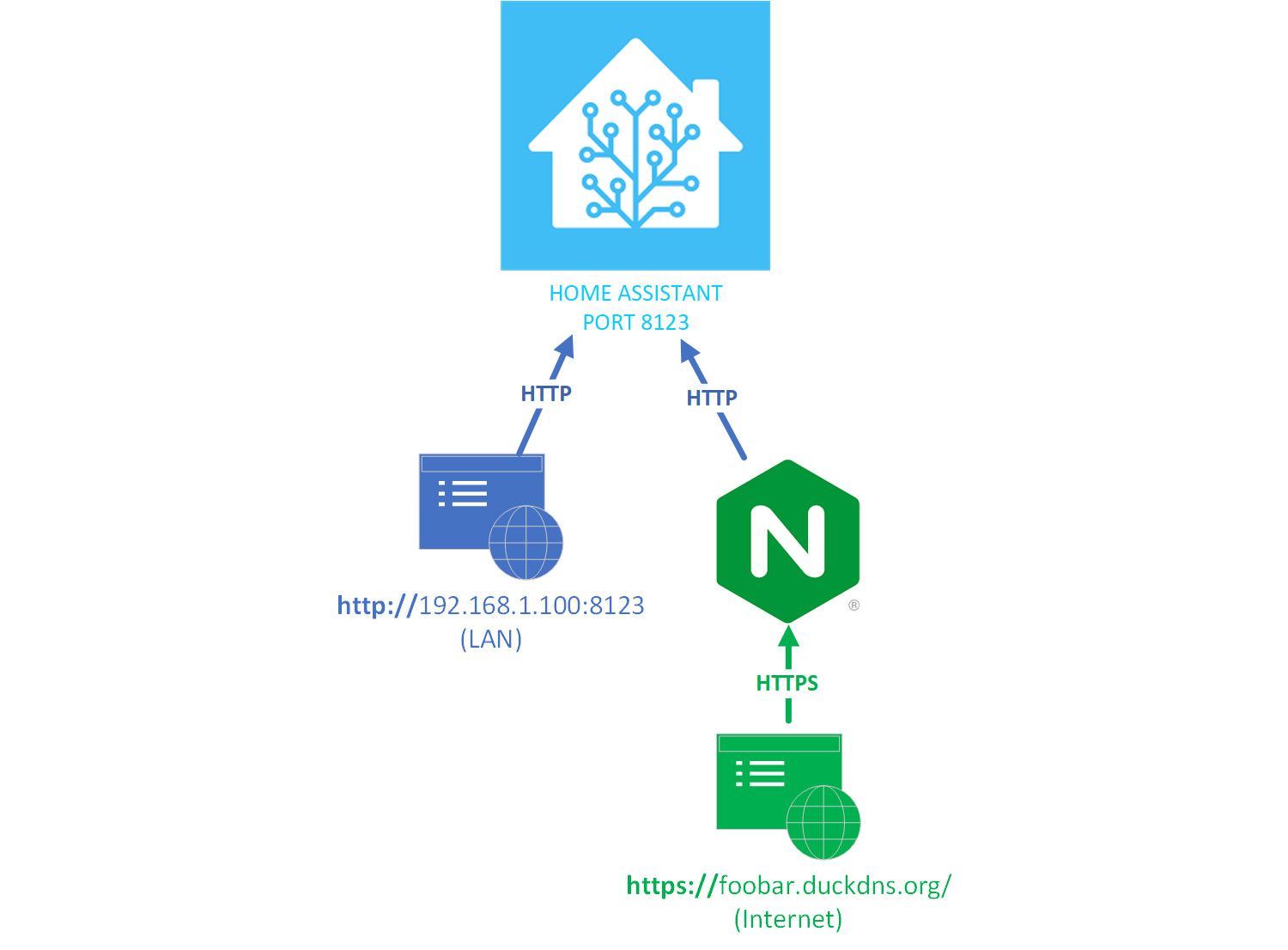
https://internalip is not ideal
use a proxy to do the ssl communication, run HA in plain http
vestal roost
@low notch can you please explain ?
 karmic cairn
When did Home assistant completely block for the supervised version to run on raspbian?
humble mirage
Many many months ago
humble mirage
Because it's not supported
And hasn't been for years
Yet... people ignore that, get themselves stuck, and blame the devs
karmic cairn
I have a version running version 2022.6.6, so it cant be that long ago?
So you cant run home assistant on raspberrys anymore?
humble mirage
Sure you can
karmic cairn
unless you use normal debain
karmic cairn
Well then I dont have access to all of the addons?
crude inlet
HAOS is the original project with add-ons. Not "supervised"
karmic cairn
yea but from what I understand it doesn't have all of the features as raspbian?
I use my rasberry for other containers too
crude inlet
Now you're on a swing. Pick what you want.
If you want control over containers then choose a docker install and forget add-ons
karmic cairn
okay thanks
 heady anvil
does home assistant core have plugins
grand pivot
There are no plugins
 fiery shuttle
I'm on the installation step to Write the Image to your Boot Medium. I'm using a live Ubuntu USB stick. I ran the command to add the HAOS boot section but it doesn't show up in the target list of Etcher. When I select the Windows drive it gives me a warning about the system drive and fails when I try to flash it. I'm on a usff PC. Any ideas what I need to do?
fiery shuttle
I went ahead and installed Ubuntu on the PC and it's still giving me the warning when I select the primary hard drive and it fails when I tell it to go ahead. What am I missing?
 queen ermine
what is problem?
[info] Install AppArmor scripts
[info] Start Home Assistant Supervised
[info] Installing the 'ha' cli
[info] Within a few minutes you will be able to reach Home Assistant at:
[info] http://homeassistant.local:8123 or using the IP address of your
[info] machine: http://192.168.20.239:8123
╭─ ~ 18.02s 09:07:24
╰ ping localhost:8123
ping: localhost:8123: Name or service not known
╭─ ~ 09:27:02
╰ ping 192.168.20.239:8123
ping: 192.168.20.239:8123: Name or service not known
Is this a HAOS or Supervised install?
queen ermine
sudo apt update
# install available updates
sudo apt upgrade -y
# install some prerequisites
sudo apt install jq wget curl udisks2 libglib2.0-bin network-manager dbus -y
# install docker
curl -fsSL https://get.docker.com | sudo sh
# download home assistant os-agent
wget https://github.com/home-assistant/os-agent/releases/download/1.2.2/os-agent_1.2.2_linux_x86_64.deb
# install home assistant os-agent
sudo dpkg -i os-agent_1.2.2_linux_x86_64.deb
# download home assistant package
wget https://github.com/home-assistant/supervised-installer/releases/latest/download/homeassistant-supervised.deb
# install home assistant
sudo dpkg -i homeassistant-supervised.deb```i followed above intsructions.
i am working on linux mint
low notch
bad instructions
there is a big warning regarding the only linux distro for supervised in the official instructions
humble mirage
Mint isn't supported for Supervised... don't do that
queen ermine
how to install correctly
humble mirage
Do you want to run other software on that computer, or are you happy to dedicate it to Home Assistant?
If you want to run other software then either https://www.home-assistant.io/installation/linux#install-home-assistant-container (no add-ons) or https://www.home-assistant.io/installation/linux#install-home-assistant-operating-system (in a VM)
 humble scaffoldBOT
@broken meadow I converted your message into a file since it's above 15 lines :+1:
humble mirage
After you set that, did you restart HA?
vestal roost
low notch
https://kleypot.com/content/images/2020/08/Drawing10-1.jpg
From that diagram, Not to use https at all ? (only routing it as HTTPS from internet side?)
 broken meadow
humble mirage
After you set that, did you restart HA?
broken meadow
humble mirage
After you set that, did you restart HA?
Yes
low notch
vestal roost
From that diagram, Not to use https at all ? (only routing it as HTTPS from inte...
yes, https only to the reverse proxy
 plush crag
so my home assistant suddenly decided not to properly boot anymore so I checked the SD card and bam a ton of failed sectors, I think I made a proper copy of the card using ddrescue but it accidentally aborted while trimming the backup, now I want to know why some big region of the card just got obliterated and if I should just clone it to another card or stop using an SD card altogether
I am using a raspberry pi 3b with a 32gb Kingston SD card
low notch
sd cards are not meant to be used as a pc hard drive
flashing the sd and restoring a backup is probably your fastest choice
plush crag
low notch
sd cards are not meant to be used as a pc hard drive
don't have a dedicated server for Hass at the moment but as soon as I get one I will of course switch over to a proper drive, and with the backup you mean the one I made with ddrescue right?
low notch
Um no i mean your config backup, no need for a full disk backup but if thats what you have then that is also in there
A pi3 is really the minimum, i run on a pi4 with nfs boot from nvme and also hit the limits with my rather big but very optimized setup
copper steppe
It doesn't need to be dedicated. HA runs perfectly fine as a VM (or container maybe) in another host OS
 ionic cave
Hey guys, I'm doing a small project, im a beginner, and i could use some help with floor3d plan, can anyone help me with some issue, real quick...? It would mean alot...
 wind adder
lo, nebbie needing advice, using rpi4 4 /w gigs ram, debian 11, installed docker and HA containered. I plan to uses ESP8266 Wifi Relays to control the lighting in the house I'm building. It appears I might want to start over and install HAOS for supervisor. Any thoughts or advice?
wind adder
chirp chirp.....
copper steppe
if you don't need the box for anything else, HAOS is way easier
And be careful with using sd-card for storage: HA includes a database (sqllite) which is very hard on sd-cards, and they will ultimately fail. Better to use a ssd.
 light talon
Hi. I'm just getting started with HA. I've installed the server and the HA app on an Android and iPhone. The app works well on Android but fails on my iPhone. Here is a screenshot of the HA app config points on my phone: Location: Always; Local Network: ON; Motion & Fitness: ON; Focus: ON; Backgroup App Refresh: ON; Cellular Data: ON; Allow Cross-Website Tracking: OFF. Any pointers here?
copper steppe
You should probably describe what you mean by "fails"
light talon
OK, HA isn't being updated with my location. Also, both the Android and my iPhone are showing up as Devices but only the Android is showing up as a Mobile App in Integrations and my iPhone isn't.
plush crag
low notch
Um no i mean your config backup, no need for a full disk backup but if thats wha...
oh you're right, well I cloned the card from the img I made and the partition table looks fine and there are no bad blocks
humble mirage
Hey guys I m doing a small project im a
lo nebbie needing advice using rpi4 4 w
OK HA isn t being updated with my
 loud sable
It seems like the Home Assistant OS 10.1 (beta) is either not a beta or not released as beta. In the release notes it states that it is on the beta channel but it looks like it isn't.
humble mirage
loud sable
humble mirage
<https://github.com/home-assistant/version/blob/master/stable.json#L27,L44> says...
Release notes say otherwhise: https://github.com/home-assistant/operating-system/releases/tag/10.1
humble mirage

loud sable
loud sable
Release notes say otherwhise: https://github.com/home-assistant/operating-system...
ℹ️ ℹ️ ℹ️ This release is currently on the beta channel ℹ️ ℹ️ ℹ️
humble mirage
We'll find out... I've flagged it up to the powers that be
loud sable
I see there is also a discussion on github about it so it is already known :S, sorry for the double reporting: https://github.com/home-assistant/operating-system/discussions/2512
 livid robin
Update 10.0 to 10.1 failing
 languid isle
Is there a good guide on installing coturn for webrtc?
 earnest crag
I managed somehow to destroy my installation. Wanted to install beta in docker, after installation i got stuck on initializing mjpeg or sun or uptime. Tried to revert to latest image nothing changed. deleted all the config files and restored a backup from duplicati and got to onboarding page asking to add new user. did that and now every second i got a "a login attempt or request" from my laptop
anyone that can help?
humble mirage
- It sounds like you didn't backup or restore
.storage/in your config folder, you want to check on that - What's running on your laptop that's trying to log in?
earnest crag
.storage is also included and restored
humble mirage
Then you wouldn't have seen the onboarding page
earnest crag
my laptop is running windows, i have cleared the cookies on chrome
which files from .storage are critical to restore for no onboarding procedure? i see some of them are not reverted
earnest crag
humble mirage
Anything to do with auth, I'm not 100% certain beyond that
exactly the files that didn't got restored
so if the .storage folder is partially restored what can i save from my installation to have a running system and near to it's last running condition?
humble mirage
Well, everything you do in the UI is written there...
If "all" you've lost is the auth then I suspect everything else will be fine
Mostly
earnest crag
should i just restore everything except .storage?
earnest crag
because now i can't have any good running system
humble mirage
I'm curious how you managed a partial backup like that
humble mirage
Is it running as a user other than root?
earnest crag
i was pretty sure that it was running on root but it seems not
i will just restore my .yaml files and see if everything works
humble mirage
Well, nothing you set up in the UI will work
Including every integration you set up in the UI
earnest crag
i still get: Login attempt or request with invalid authentication from DESKTOP-VKVJSG0.fritz.box (192.168.178.45). See the log for details.
that's my laptop
and of course safe mode
humble mirage
So... something is running there, some agent or other software
Did you install the Android app?
Something else?
earnest crag
where in .storage are the helpers stored?
 coral plank
hey everyone, got a few questions. tried installing HAOS on Proxmox, which is running in Debian 11. Tteck's script to install completed but I still can't access HAOS landing page, any thoughts?
I'm not exactly sure if it was properly installed or it's an issue with my settings with the network bridge
Noticed I cant access UI or observer URL
 raven forge
You might want to share some screenshots and information of your setup. Summary, Hardware, Console, Console after typing network info, etc
Maybe also the System -> Network page of your node and ip a from its Shell if you're concerned the node's setup is wrong
coral plank
ah sure! one step at a time haha I'm quite new to this
heh, guess I can't upload photos
humble scaffoldBOT
Please use imgur or other image sharing web sites, and share the link here.
Image posting is blocked in most channels to discourage people from sharing text as images. Sharing text as images assumes that everybody sees the world as you do, which isn't the case. Some people are colour blind, or have visual impairment that means they can't make sense of an image of text.
raven forge
I'm confused. I wanted to see screenshots of proxmox's web interface. Did you install proxmox on a desktop OS?
coral plank
i installed proxmox within Debian 11
i can't as of right now completely wipe my drive so i went this way
raven forge
Now it makes sense why you asked about the bridge. If you show me screenshots of proxmox's web interface pages I listed above and your /etc/network/interfaces file I can probably tell you more.
You can find the default contents of said file here: https://pve.proxmox.com/wiki/Network_Configuration#_default_configuration_using_a_bridge
I personally use DHCP instead of a static ip though
coral plank
raven forge
Now it makes sense why you asked about the bridge. If you show me screenshots of...
raven forge
That looks okay to me. Did you try http://192.168.100.29:8123?
If that doesn't work, can you show me the output of the ip a command and the /etc/network/interfaces file of the host
coral plank
raven forge
That looks okay to me. Did you try <http://192.168.100.29:8123>?
If that doesn't...
i was just trying to ping 192.168.100.29 to no success, let me show those two files
the ethernet connection has been giving me issues, on reboot it looses configuration and the host at times can't connect to outside internet or anything so I have to reconfigure, not sure if it is due to my static configuration within GUI network settings of Debian
guess I could just go back to DHCP on that
raven forge
My guess is that the desktop environment uses network manager or similar instead of the interfaces file and sets different things which conflict.
The interfaces file has no ip defined for the bridge, for example, and vmbr0 has no ip assigned either in ip a's output.
See the link above for an example how it "should" look like
coral plank
I think I could make both /etc/network/interfaces file and what the network manager is doing in the background and reboot
I'll base it on the link you sent
raven forge
Unfortunately I'm not familiar with the gnome GUI (at least looks like it) so I'm not sure how exactly it configures the network
coral plank
heh it sort of not worked at all
had to delete all the config and try again, lost connection to proxmox server on host
ah I remembered I switch NetworkManager config to allow unmanaged networks to be managed. Switched that back to false, and even though my /etc/network/interfaces file is correct, I think during the installation of proxmox-ve it removed ifupdown and now I can't reinstall it
raven forge
Why not? Proxmox recommends ifupdown2, btw
coral plank
Let me try with ifupdown2
coral plank
So far by remanaging with Network Manager, I could verify that ifupdown2 was already installed and up to date. So I changed back /etc/NetworkManager/NetworkManager.conf to managed=false and by deleting everything and rewriting the /etc/network/interfaces my host has access to internet again and server is up and running
So ifupdown2 seems to be doing its job then
update: when creating the bridge, i lose all communications except access to proxmox server even though all network devices are up in ip a
raven forge
Can you show the ip a output and the interfaces file again. Might make sense to stop the network manager or configure it instead of that file. Not sure what happens if you use both
coral plank
I'm having an issue right now that even though ifupdown2 is installed, i get a bash: ifreload: command not found error
I deleted all info from the network manager and stopped the service from managing my network interfaces. After that with the use of /etc/network/interfaces I recovered connection to the internet from the host, but any attempt to configure the bridge breaks it
raven forge
Try a ip in the 192.168.100.x range. Strange that ifreload fails
coral plank
yup, fofr some reason ifupdown2 just doesn't wanna work properly haha just ifreload from time to time, and definitely doesn't work when all coms are down, I hve to reboot then to apply network changes
raven forge
Try apt install --reinstall ifupdown2
coral plank
raven forge
Try `apt install --reinstall ifupdown2`
Did reinstall, still wonky at times
https://imgur.com/a/tmy3dsi never thought I'd get to see this screen...
raven forge
Yay
coral plank
I swear I feel I went through a couple of these configurations once or twice and didn't work haha
Oh man...thank a lot Impact!
 covert jungle
Greetings! I have an issue after the lastest (aprox. 2 days ago) update. I wonder if anyone can help me out.
I never had any issues with updates, so as it appeared, I hit install. But it never came back online. I said np, I do a quick reinstall and restore the backup from google drive. In Windows, I format the drive and reinstalled the HA OS, and it booted w/o issue. Uploaded the backup file and hit restore and the same issue. It won't come back online. Tried to sever times in several configurations but had no luck.
The hardware is a pi4 with ssd in an Argon case
raven forge
Connect a monitor and keyboard and check what it says
covert jungle
It's showing what is usually shown after a fresh install.
on what IP can i access
but can't connect to it, the observer link works fine
raven forge
Type login in the prompt, then check the logs: https://developers.home-assistant.io/docs/operating-system/debugging/#checking-the-logs
covert jungle
It looks like I'm facing this: https://community.home-assistant.io/t/home-assistant-os-10-update-has-broken-my-pi-4b-4gb/561918/19
Somehow it booted, but I can't remember what I selected at the restore menu, I don't have the addons. I will try to restore those separatly from the backup, but sadly the system is still in startup state for minutes now
I give him couple more minutes, I guess it's not advised to reboot it in this stage
it looks like it's not fully starting because of these
Invalid config
The following integrations and platforms could not be set up:
recorder (Show logs)
logbook (Show logs)
history (Show logs)
energy (Show logs)
default_config (Show logs)
Please check your config and logs.
and
Recorder
The recorder could not start, check the logs
 fallen lichen
What do the logs say?
covert jungle
Since lots of addons are missing it's kinda messy.
still stuck in "Restoring a backup is not possible right now because the system is in startup state."
and can't access addons cause of 401 errors
fallen lichen
Well yeah, recorder doesn't work because maria isn't there
 willow halo
it seems that raspian and arch-arm do not have support for apparmor, which i need for hassio which i need for the addons menu
what do i do?
fallen lichen
willow halo
it seems that raspian and arch-arm do not have support for apparmor, which i nee...
As in you're trying to install supervised?
willow halo
i am trying to get the addons menu, but yes
fallen lichen
You don't need them... if you do a Docker install, there are containers to run to host Z2M or whatever you want
willow halo
where do i find them? so far i have used ghcr.io/home-assistant/home-assistant:stable
fallen lichen
Right, that's for home assistant core itself
What Zigbee software are you going to use
covert jungle
covert jungle
i try to install it, maybe it will start so i can restore
Home Assistant has started!
progress
Restoring addons from backup now
willow halo
fallen lichen
What Zigbee software are you going to use
no idea yet, any recommendations? i have a pre-existing raspi that is used but not heavily so (it does some minor automation scripts and a very small website) and now a sonoff 3.0 usb dongle, plus i bought and installed a smart Zigbee lightswitch. and kinda figured my years of python and linux experience would carry me through ^^ So far i am getting discouraged from how bad it feels to work with home assistant, it seems optimized for an entirely different culture :D i am doing my best to learn though
fallen lichen
Have you excluded HA OS entirely? Presumably you're wanting to use your Pi for other things?
willow halo
yup, i have a heavily customized arch running on there for all my other tasks, it just uses less than 10% ram and pretty much 0% cpu on average, so there should be enough room to run anything that runs on a normal raspi
fallen lichen
Then yeah, you'll want to run Docker if you're going to use that same hardware
I'd suggest Zigbee2MQTT, but I'm partial to that, as that's all I've ever used
willow halo
sounds good enough :D
fallen lichen
For that, you'll need an MQTT Broker and Zigbee2MQTT itself set up alongside Home Assistant
willow halo
https://medium.com/geekculture/home-assistant-docker-zigbee2mqtt-3d8e0ba02d10 does this guide look ok to you?
if so i will follow that
fallen lichen
I think I'd pick this one over that: https://sometechy.website/smart-home/home-assistant-in-docker-4-add-ons-mqtt-and-zigbee2mqtt/
One thing specifically is to make sure you use the static path to your coordinator (by-id) instead of the /dev/ttyUSB0 (or whatever) path
The actual docs for each piece of software would be best though
willow halo
at least this is getting me some more familiarity with docker :D
i assume the /dev/serial/by-id/usb-1a86_USB2.0-Serial-if00-port0:/dev/ttyACM from the guide is the coordinator, i have found my equivalent (/dev/serial/by-id/usb-ITEAD_SONOFF_Zigbee_3.0_USB_Dongle_Plus_V2_20230220180004-if00) but it is missing the tty descriptor which teletypewrite am i using and why? (alternatively where can i read up on that?)
 warped nimbus
hello, i want to add a map of my house with this:Your HA Digital Twin floor3d-card downloaded with hacs . When i add my file and my folder gives me this error:http://paste.debian.net/1278882/ can someone have any idea: Thanks
 fiery forge
Anyone have any ideas why my full backups would fail for core? That is with built in backup. When I try and use Autobackup integration it says another backup is running, but there isn’t one running as far as I can see.
 dark garnet
willow halo
at least this is getting me some more familiarity with docker :D
i assume the `/...
dark garnet
willow halo
at least this is getting me some more familiarity with docker :D
i assume the `/...
Be aware this broke today for Debian 11 users...
Heads up if anyone uses Debian 11 + Docker and uses the /dev/serial/by-id to map their sticks seems a recent update to systemd from today broke this functionality. You have to update your configurations to reference /dev/ttyXXX or do some custom udev foo and make your own devices.
 robust cypress
good evening
I am installing HA at proxmox
do not complete
is it not possible send screens here
brittle sail
no you need to use imgur
but you might not need a picture at all. what is your exact issue?
robust cypress
the instalation does finish
brittle sail
which install type? haos in a vm or docker container or lxc or?

 robust cypress
just write this command
bash -c "$(wget -qLO - https://github.com/tteck/Proxmox/raw/main/vm/haos-vm.sh)"
at promox shell ?
brittle sail
yeah
robust cypress
my BIOS does not have support for virtalization
brittle sail
Sucks
robust cypress
do I have to change some itens after this script finish ?
robust cypress
download finished
extractiing kvm disk image
creating HAOS VM
✓ Created HAOS VM (haos10.1)
- Starting Home Assistant OS VM...KVM virtualisation configured, but not available. Either disable in VM configuration or enable in BIOS.
[ERROR] in line 430: exit code 255: while executing command qm start $VMID
brittle sail
So you need to enable vtx/ vtd in bios or your shit is too old
robust cypress
I disable KVM hardware virtualization at the VM created
start again
waiting....

stop here
 pastel sphinx
@robust cypress I wrote a complete Proxmox HA install guide using the tteck script: https://www.derekseaman.com/2023/04/installing-home-assistant-on-proxmox-quick-start-guide.html
robust cypress
pastel sphinx
<@555523232057393180> I wrote a complete Proxmox HA install guide using the ttec...
my BIOS does not have support for virtalization.
will it work fine?
pastel sphinx
robust cypress
my BIOS does not have support for virtalization.
will it work fine?
Your BIOS and CPU must support virtualization. Proxmox uses virtualization.
robust cypress
😞
pastel sphinx
If you can't run Proxmox, then you can bare metal install HAOS on the computer.
robust cypress
how can I do it ?
pastel sphinx
Just write HAOS to a USB stick (using something like Balena etcher), boot from the USB stick, and install HAOS.
@robust cypress https://www.home-assistant.io/installation/generic-x86-64/
robust cypress
the BIOS at computer I am using does not support UEFI Boot mode i
do you think it will work ?
pastel sphinx
Just try it and see....I'm not sure.
robust cypress
can I use ventoy?
pastel sphinx
I agree..go to ebay or amazon used thin clients and spend $50-$100 on something more recent
robust cypress
robust cypress
can I use ventoy?
including haos_generic-x86-64-10.1.img.xz inside pendrive
 amber iron
you can even find something >50 if you know where to look
robust cypress
I can use this hardware install debian 11 and after install HA with docker?
do you have howto for it ?
pastel sphinx
No I only do HA OS ..sorry
amber iron
fallen lichen
UEFI is required for HA OS
just a curiousity if you know the answer. im running ha through promox, but my proxmox decided to instal as legacy boot. my machine supports uefi, is that why im not having issues?i kinda woulda expected to have issues
fallen lichen
I can't say I know all of the details but the requirement for HA is just for itself, so if the VM is set up to boot UEFI, then you're fine even if Proxmox itself didn't boot that way
fallen lichen
robust cypress
I can use this hardware install debian 11 and after install HA with docker?
Is it a 64 bit processor at least?
amber iron
fallen lichen
I can't say I know all of the details but the requirement for HA is just for its...
ye that explains it, thought maybe so but wasnt sure if it actually worked that way. cool
brittle sail
@robust cypress if you have money to spend it’s better to buy a mini pc or thin client depending on $ available
robust cypress
robust cypress
the BIOS at computer I am using does not support UEFI Boot mode i
then, I can install and it will work ?
brittle sail
Otherwise starting out with docker is fine
robust cypress
brittle sail
Otherwise starting out with docker is fine
using debian 11 ?
robust cypress
brittle sail
That tteck link above has premade docker lxc or container for hass
which address?
robust cypress
pastel sphinx
<@555523232057393180> https://www.home-assistant.io/installation/generic-x86-64/
I have other computer here that support this feature, I you try on it.
Can I use ventoy to start HA installation with img instead of iso file ?
raven forge
No. HAOS has no bootable installer like that
 runic venture
I recently installed HA to a NUC, away from a VirtualBox VM (I had constant thread hangs and desync errors that ruined reliability in VBox) and imported a full backup. Awesome! Everything works!
Except - trying to do updates, all but one of them fail with this line:
WARNING (MainThread) [supervisor.jobs] 'HomeAssistantCore.update' blocked from execution, no host internet connection
- There are no repairs available, including hidden
- I have rebooted both soft and hardware
- I have changed my internet settings from DHCP to static and set DNS servers and back without luck
On this last point - I have two devices in the NUC, en01 and WLP0S20F3, the latter I assume being the wireless card. I can't enable the device, it throws an immediate Unknown error, see supervisor logs, so if I am somehow using the wrong device, I'm not sure how to change that.
Anyone experienced anything like this or have some tips? My router isn't blocking the device as I can access it through LAN just fine, and all it is doing is giving HA a static IP (the same as it was doing on VBox).
(This didn't seem applicable to hardware, that seemed to be more about things to control with HA, but if i'm in the wrong place, i'll move)
HA is going through a simple switch to the router along with another device that has internet access, also.
Hopefully this log helps? Looks to my uneducated self like core.py has an error in calling the update API. (Go figure, idiot, I guess?)
Hopefully this gets line converted because I don't want to overload here too much
humble scaffoldBOT
@runic venture I converted your message into a file since it's above 15 lines :+1:
runic venture
nice
I have updates for Core, Supervisor and two addons due, all throw the no host connection error.
copper steppe
If you ssh in, does internet etc work? What device is it using? What dns settings? What routing?
If the LAN works, but the internet doesn't, it sounds a bit like your default gateway isn't working/set
Or (more likely) DNS
@runic venture ☝️
 sudden junco
I've been trying to setup HASS* on WSL since I recently moved and haven't unpacked my server stuff but I am endlessly in a cycle of
ImportError: cannot import name 'html5lib' from 'pip._vendor'
- I got past couple recent ones but this one is endless. I tried some of the SO posts but then I'm getting
E: Sub-process /usr/bin/dpkg returned an error code (1)
Anyone experience these issues with WSL?
low notch
you will be way faster just using a containerized ha, any reason why you explicitly chose a pyenv install?
sudden junco
low notch
you will be way faster just using a containerized ha, any reason why you explici...
Nah was just following the WSL install guide.
low notch
yeah, that is not a very friendly way to install ha
sudden junco
Alright, I'll go VM then. Wanna set some stuff up before I unpack. Thanks.
runic venture
copper steppe
If the LAN works, but the internet doesn't, it sounds a bit like your default ga...
Well, I manually set a static IP and DNS, but I can't know if it actually updated or not (it takes minutes to save that change, also)
runic venture
copper steppe
If you ssh in, does internet etc work? What device is it using? What dns settin...
Great question, have no idea how to SSH in. I'm assuming putty?
low notch
sudden junco
Alright, I'll go VM then. Wanna set some stuff up before I unpack. Thanks.
no idea why they only show core and vm install, docker container install should also be possible in wsl
sudden junco
I debated going docker but I remember last time I did I had a lot of issues with network access. I never tried Docker for Windows, though.
low notch
do not do docker for windows
its a bit to learn (docker/linux) but incredibly useful for your further linux adventure to set up and get apps/services going very fast
copper steppe
runic venture
Great question, have no idea how to SSH in. I'm assuming putty?
You need to enable a ssh integration first
copper steppe
runic venture
Well, I manually set a static IP and DNS, but I can't know if it actually update...
If you set static ip, did you set gateway/default route also?
runic venture
Yeah, router as the gateway and 1.1.1.1, 8.8.8.8 as the DNS hosts
It appears to set those details fine but makes no difference to internet connectivity
I believe I have SSH enabled to use the addon you can get to show the console in HA - I don't know if that would count here?
I have the Terminal addon
amber iron
low notch
no idea why they only show core and vm install, docker container install should ...
iirc when i looked a year ago they were simply unsupported instals
copper steppe
runic venture
I believe I have SSH enabled to use the addon you can get to show the console in...
Does internet work in there? Ping curl etc?
runic venture
copper steppe
Does internet work in there? Ping curl etc?
I'm not good with linux commands - I'll give it a try and let you know
copper steppe
Try “ping 8.8.8.8” and “curl -v google.com”
runic venture
To curl:
- Could not resolve host: google.com
*Closing connection 0
curl: (6) Could not resolve host: google.com
To ping 8.8.8.8
PING 8.8.8.8 (8.8.8.8): 56 data bytes
[]
No progress beyond that point - looks like it's waiting for a reply, I think?
copper steppe
What does “route” output?
runic venture
Dumb question (probably) but how can I copy+paste out of terminal? It doesn't pick up text if I hold it highlighted
raven forge
It's probably a good idea to run these commands on the host, not in the SSH container
copper steppe
Your computer is not getting to the internet which breaks everything
runic venture
Hmm, can I change location in this terminal session or would I need to do this right on metal?
Hmm - so it does seem DNSy then
copper steppe
Broken dns is caused by broken routing; not the other way around
runic venture
copper steppe
What does “route” output?
Two destinations, default and 172.30.32.0 - default shows core-samba.local(?), genmask 0.0.0.0, and the second dest shows * for gateway and 255.255.254.0 as the genmask
copper steppe
What is core-samba host?
runic venture
Ah - I have a samba addon that lets me get to HA's local files over network via windows share
It was/is necessary to copy and edit things in HACS oftentimes
amber iron
runic venture
Dumb question (probably) but how can I copy+paste out of terminal? It doesn't pi...
this very much depends on what device/terminal youre running ssh through. theyre all annoyingly different. some let you right click, some let you ctrl c, some copy on highlight, you get the gist
copper steppe
I’m on my phone. It’s hard to type.
runic venture
amber iron
this very much depends on what device/terminal youre running ssh through. theyre...
Rrr, I see - this one only highlights text if I hold LMB and doesn't remain highlighted, or copy with any normal control
Pain in the ain
copper steppe
I use file-manager addon to view edit ha files, not samba
runic venture
I'm more than willing to switch, I used what I think was in a guide on the HA forum somewhere
Or under a HACS addon github
copper steppe
Sorry I can’t really help. Typing on phone too hard
raven forge
What does ha network info say?
runic venture
Thank you for helping this much, @copper steppe !
runic venture
raven forge
What does `ha network info` say?
Lots and lots - anything specific in here to look for before I write it all out?
The DNS for docker is definitely wrong though
Unless, wait
is 172. internal?
raven forge
Either use something like putty to connect via SSH and copy paste the text or make a screenshot
runic venture
I always forget
Yeah this server blocks images which is a beach
Let me try putty
humble scaffoldBOT
Please use imgur or other image sharing web sites, and share the link here.
Image posting is blocked in most channels to discourage people from sharing text as images. Sharing text as images assumes that everybody sees the world as you do, which isn't the case. Some people are colour blind, or have visual impairment that means they can't make sense of an image of text.
runic venture
my networking skills are very much reading-off-the-manufacturer's-instructions
runic venture
humble scaffold
Yeah, i'm familiar, that's just a bit of a pain
I'll try putty first, bear with
Man networking's a pain
So ethernet is set up correctly but docker isn't
Looks like some unreachable internal IP
raven forge
That's fine. What's more concerning is host_internet: false and supervisor_internet: false
runic venture
Yeah, they have no net. But why?
I would assume having a valid ethernet connection would do the magickery
I can get to it from the LAN, so it's outbound connection seems like it should work
raven forge
Not sure. Everything else but this looks okay to me
runic venture
Hmm. Do those conditions change on their own once internet is up to HA, or would it need to restart or something? I can try restarting the router to see if it's something there
Actually I'm noticing that my router doesn't list HA in the wired devices section
It's definitely there in the ACL list and clients lists
raven forge
I'm not familiar with HA's code base. I'd try re-plugging the ethernet cable and maybe cycling power. On a "normal" linux OS I'd probably run ifreload and/or dhclient
runic venture
I've tried full restarts of the HA device so maybe I'll restart the switch and router and go from there
Thanks - I'll report back here
Appreciate the help from everyone so far!
 brisk path
Running into an issue with the latest debian packages in my containered HA installation. After drilling down further - the issue exists in the hotplug management daemon package update. This causes the attached Sonoff Zigbee dongle serial port to not show up in the vbox vm
so if you have a usb zigbee stick on your windows machine being shared to your debian vm - that would fail with the latest debian packages update....
 grim onyx
Does it make sense to restore from a partial backup on a freshly installed system? Also, should I be expecting to see more than one item in the checklist?
 gloomy frigate
Help... Getting stuck on starting Homeassistant in a DEV-Container in VS-Code. After Creating Useraccount/Language/Currency i'm stuck... Alreads restarted HA, Cleared all Data, recreated docker, tried different browsers, cleared cookies...
i Only got a screen with a HomeAssistant Badge, no buttons, no actions
i followed these guide for setting up
humble mirage
If you need help with a dev container, for developing, then #developers is a better channel to ask in
gloomy frigate
thx.. thought, it was a general problem since i found multiple documents on google referencing that problem - but non solution worked for me.. Still stuck on onboarding...
the strange thing: it formerly worked for me very well but suddenly it stops workign
 bright zenith
Hey, getting the below error sometimes on my HA installation. Am I right in assuming the machine I'm running it on is having issues?https://imgur.com/a/p2ucPBv
humble mirage
Hard to tell with a shrunken image... but probably
amber iron
grim onyx
Does it make sense to restore from a partial backup on a freshly installed syste...
I mean unless you wanted to start from scratch and you weren't having problems I don't see why you wouldn't
It's only one item because you probably only specified core in the partial backup
 finite thunder
is it possible to install home assistant supervised on a pine a64+?
humble mirage
Supervised is only an option on actual Debian, and it's not a good option
finite thunder
humble mirage
Supervised is only an option on actual Debian, and it's not a good option
Why not
humble mirage
Because it's fragile and easily broken
All you have to do is either ignore the requirements, or not keep on top of changes to them
finite thunder
Do you know which one I need to select when I get prompted which device I have
humble mirage
Are you running actual Debian?
Not a Debian derivative, or something based on it, but actual Debian
finite thunder
Dietpi so a Debian based distribution
humble mirage
So, not Debian and not supported
finite thunder
Okay then I will install Debian
humble mirage
Google suggests the A64+ uses the same CPU as the Pi3, so maybe try that
finite thunder
because the A64+ is the same cpu as Pi3 can you also install HASSIO on a A64+?
 nocturne sable
Hi guys, I've been trying to install Home Assistant in the docker container for a few days now, and the only thing that pops up in the console is
s6-rc: info: service s6rc-oneshot-runner: starting
s6-rc: info: service s6rc-oneshot-runner successfully started
s6-rc: info: service fix-attrs: starting
s6-rc: info: service fix-attrs successfully started
s6-rc: info: service legacy-cont-init: starting
s6-rc: info: service legacy-cont-init successfully started
s6-rc: info: service legacy-services: starting
services-up: info: copying legacy longrun home-assistant (no readiness notification)
s6-rc: info: service legacy-services successfully started
I created a container through Portainer with this text:
version: '3'
services:
  homeassistant:
    container_name: homeassistant
    image: "ghcr.io/home-assistant/home-assistant:stable"
    volumes:
      - /var/lib/docker/volumes/homeassistant-data/_data:/config
      - /etc/localtime:/etc/localtime:ro
    restart: unless-stopped
    privileged: true
    network_mode: host
The site doesn't open, what should I do? What else should I add to the information?
humble mirage
When you say the site doesn't open you are using a web browser to connect?
humble mirage
A web browser
I would say that your choice of volume location is highly unusual
- /var/lib/docker/volumes/homeassistant-data/_data:/config
However... have you looked in there for the log file?
nocturne sable
I created a volume in Portainer and took the path directly from there
I don't know how to check if there's a log file, I'm told that the volume is Unused
humble mirage
Look in /var/lib/docker/volumes/homeassistant-data/_data
Portainer is also known for being ... a bit weird
nocturne sable
What do I need to find there? I think all the homeassistant files are there
humble mirage
There should be a log file there
nocturne sable
There are log files, but they are all empty, should I restart the container?
I restarted container, but size = 0 bytes https://imgur.com/FCs9ctx
humble mirage
Check the container logs, in Portainer
It's entirely possible Portainer is being weird again
nocturne sable
humble mirage
It's entirely possible Portainer is being weird again
I ended up reinstalling 'portainer' and corrected the homeassistant installation script by removing network_mode: host and adding ports: 8123:8123, everything works!
humble mirage
Well, by removing host networking you've broken many integrations
robust cypress
good afternoon
I am trying to install HAOS bare metal at my old laptop
I record the files at my pendrive
according this instruction
nevertheless my laptop does not recognize the pendrive to boot it
when I enable UEFI at BIOS this screen appears
humble mirage
You don't write those files to the pendrive, you write them to the boot drive
robust cypress
humble mirage
You don't write those files to the pendrive, you write them to the boot drive
okay, thanks. Can I write it in HD or just SSD ?
humble mirage
Yes, either
robust cypress
humble mirage
Yes, either
thanks let me try again
robust cypress
humble mirage
You don't write those files to the pendrive, you write them to the boot drive
can I do it directly from windows or must I run linux live CD and run balena etcher fron there?
humble mirage
robust cypress
can I do it directly from windows or must I run linux live CD and run balena etc...
You have to be able to access the drive
So, up to you - do you have a way of accessing it from Windows?
robust cypress
yes, but balena will write files correctly from windows? I mean, windows is running in HD and balena will write at same HD
will it works?
humble mirage
Well... are you trying to write it to the drive you've booted from?
robust cypress
yes
humble mirage
no, it won't write to the drive Windows is running from
robust cypress
I am preparing ubuntu live usb
crude inlet
Flash Ubuntu live to your pen drive, boot into Ubuntu, download the HAOS xz file, open ubuntu's "disks" utility and choose the laptop HD. Then select to restore the HAOS file to that HD.
You can skip downloading balena
robust cypress
crude inlet
Flash Ubuntu live to your pen drive, boot into Ubuntu, download the HAOS xz file...
How can I restore restore the HAOS file to HD ?
 distant jungle
hello. currently am testing a proxmox install on j3455 which has 4 cores and 8GB RAM. did a fresh install and let it sit for over 12 hours. is there a reason why it's running literally nothing yet the CPU is 40%-60% at all times? meanwhile my existing install on a raspberry pi 3 is using under 20% cpu (and thats with all my addons running)
 crude inlet
robust cypress
How can I restore restore the HAOS file to HD ?
crude inlet
robust cypress
How can I restore restore the HAOS file to HD ?
In Ubuntu, open "disks"
copper steppe
distant jungle
hello. currently am testing a proxmox install on j3455 which has 4 cores and 8GB...
Should be <10% unless you have crazy addons
Is it installed or stuck installing?
distant jungle
its completed and running for over 12 hrs
copper steppe
What does it say on console? Check logs too
 copper steppe
My proxmox is 3% with many integrations and addons
distant jungle
are you running latest version of the OS? 10.1
copper steppe
Latest is bad (high cpu) for done people. Wound suggest revert to 9.5 see if problem goes away
distant jungle
done people?
crude inlet
Some people, I assume
distant jungle
gotcha. how do i revert to 9.5? i can clone this instance and downgrade it to test
crude inlet
Hey that's what I'm about to do heh
distant jungle
so thats the issue huh?
copper steppe
For me, and some
distant jungle
my install with high CPU is 100% fresh and brand new, i havent even installed or loaded a backup yet
all i did was create an account
copper steppe
Try downgrading os
distant jungle
yeah im doing that now
copper steppe
It’s easy and safe
Otherwise problem likely in logs
Sorry one finger phone typing
distant jungle
yeah im cloning the vm to see what happens. i wanted to get off my pi..
copper steppe
Cloned vm from rpi? But they’re different arch??
distant jungle
cloning the proxmox VM to downgrade the clone
distant jungle
im aware, just being safe. doesnt bother me that much
copper steppe
Ps suggest tteck script for one line haos install on proxmox
distant jungle
whats that?
copper steppe
Google tteck proxmox
distant jungle
i see. i just created and loaded the image manually.
copper steppe
Sure. Ymmv. I use tteck for all kinds of things on proxmox
copper steppe
How did that go?
robust cypress
good evening
I wrote HAOS using balena etcher at my computer
but when it boot HAOS does not start
I change my BIOS to UEFI


please, what I am doing wrong ?
distant jungle
copper steppe
How did that go?
it's still running around 40% cpu on version 9.5
copper steppe
Need to view logs. Maybe try a parallel tteck install in case you muffed a setting?
distant jungle
which logs are you referring to? system > logs ?
copper steppe
Ha logs
I’ll be on a computer in 15 mins might be able to help more then. Try tteck in parallel - it’s possible you made mistake in vm settings or something
distant jungle
sure ill look at it
copper steppe
OK, on a computer now
distant jungle
you want me to try this - https://github.com/tteck/Proxmox ?
copper steppe
it's just an idea, for a repeatable no-human involved install.
TLDR open the shell on the proxmox node, and paste:
bash -c "$(wget -qLO - https://github.com/tteck/Proxmox/raw/main/vm/haos-vm.sh)"
 distant jungle
its up. just created an account.
copper steppe
Mine seems to be running fine with ~5% cpu
 Status running
 HA State none
 Node pve2
 CPU usage 7.04% of 1 CPU(s)
 Memory usage 93.67% (1.37 GiB of 1.46 GiB)
 Bootdisk size 32.00 GiB
what you type to get that
copper steppe
That's from the summary panel within the VM in proxmox
distant jungle
maybe the hardware im trying to run it on just isnt good?
Status running
HA State none
Node proxmox
CPU usage 75.71% of 2 CPU(s)
Memory usage 89.54% (3.58 GiB of 4.00 GiB)
Bootdisk size 32.00 GiB
copper steppe
It was some j-thingy?
humble scaffoldBOT
@distant jungle I converted your message into a file since it's above 15 lines :+1:
distant jungle
would have thought it would have been better than using an old pi3
copper steppe
Looks like the J3455 is about twice as fast.
distant jungle
well thats a bit messed up then that my cpu is 30%+ for no reason lol
im trying on my NAS now to see how it compares
copper steppe
are you running latest proxmox kernel?
distant jungle
its a new install, so yeah
copper steppe
You disabled all the subscription repos, did the updates, cleaned old kernels, etc?
You could try edge kernels, see if that's any better
again tteck scripts for all this 🙂
distant jungle
disabled subs, i hid the popup box, checked for updates
 wooden smelt
The newer, low-cost Celeron processors seem to require some adjustments, such as using "Host" as the CPU model and the more recent 6.2 kernel.
copper steppe
Here's the man himself 🙂
distant jungle
oh? let me look here hmm
now where the heck do i change the cpu model
oh i see - https://i.imgur.com/ChBORPu.png

my kernel version on the VM creation says 6.x - 2.6 Kernel
copper steppe
I assume he means on the host
check the summary panel on the proxmox node.
eg: mine is "Linux 5.15.102-1-pve #1 SMP PVE 5.15.102-1 (2023-03-14T13:48Z"
distant jungle

CPU(s) 4 x Intel(R) Celeron(R) CPU J3455 @ 1.50GHz (1 Socket)
Kernel Version Linux 5.15.107-1-pve #1 SMP PVE 5.15.107-1 (2023-04-20T10:05Z)
PVE Manager Version pve-manager/7.4-3/9002ab8a
Repository Status Proxmox VE updates Non production-ready repository enabled!
Try the edge kernel
distant jungle
you mean reinstall proxmox completely?
copper steppe
Nah, just the kernel, which is one part of the underlying OS. Use the tteck script: /Proxmox VE tools/Proxmox VE Edge Kernel Tool/
It will require a proxmox reboot though
wooden smelt
By utilizing the mentioned script and choosing the "Advanced" option, a dialog box will appear, presenting various options.
Use the kernel from here, https://forum.proxmox.com/threads/opt-in-linux-6-2-kernel-for-proxmox-ve-7-x-available.124189/
copper steppe
6.x is for future proxmox versions
wooden smelt
Here's a recent guide to look over:
https://www.derekseaman.com/2023/04/installing-home-assistant-on-proxmox-quick-start-guide.html
robust cypress
I just install my HAOS bare metal but the system did not recognize my wifi adapter and did not get IP address
copper steppe
I haven't bothered updating to edge kernels. Any point on old hardware tteck? i5-6500T
robust cypress
robust cypress
I just install my HAOS bare metal but the system did not recognize my wifi adapt...

do you know how can I solve it ?
copper steppe
use ethernet? 🙂
distant jungle
wooden smelt
Use the kernel from here, https://forum.proxmox.com/threads/opt-in-linux-6-2-ker...
im loading on 6.2 kernel now
robust cypress
copper steppe
use ethernet? 🙂
okay at the beggining but after I would to use wifi network
the computer will be far from the router
brittle sail
It’s a terrible idea
distant jungle
whats the best way to reboot proxmox? select the proxmox node and restart? or is there a higher up level to restart?
distant jungle
just did that, here is what i got now:
CPU(s) 4 x Intel(R) Celeron(R) CPU J3455 @ 1.50GHz (1 Socket)
Kernel Version Linux 6.2.11-1-pve #1 SMP PREEMPT_DYNAMIC PVE 6.2.11-1 (2023-04-20T09:59Z)
PVE Manager Version pve-manager/7.4-3/9002ab8a
Repository Status Proxmox VE updates Non production-ready repository enabled!
ok, you're running a newer kernel now. and "host" mode cpu in the vm?
does it look any better?
distant jungle
gotta edit the host mode on cpu still
you dont think i would need to rebuild it from scratch with those new settings would ya?
wooden smelt
Did you look over the guide I linked?
distant jungle
slowly am
copper steppe
probably no need to rebuild it when you change CPU type; it's like moving the disk between different computers.
distant jungle
copper steppe
probably no need to rebuild it when you change CPU type; it's like moving the d...
looks like using host as the cpu mode and the latest kernel. still seeing cpu at 40%. throwing 4 cores at it and 6GB of memory. going to recreate the vm but i doubt itll make a difference
robust cypress
I got access to my HA homepage using ethernet
is it possible fix the wifi connection from HA webpage ?
copper steppe
nope, it's too low-level for that. See link above, or google it
robust cypress
copper steppe
nope, it's too low-level for that. See link above, or google it
the link above the commands were changed
copper steppe
so search the forums, man. HAOS is intended to be appliance, it doesn't have great ootb support for wireless because it's so thoroughly recommended against
 main orbit
I just install Home Assistant onto my Raspberry Pi. I got my Apple TV connected through Home Assistant but can't figure out to add a remote card into Home Assistant dashboard. There isn't any steps on the docs page. Any ideas?
low notch
main orbit
I just install Home Assistant onto my Raspberry Pi. I got my Apple TV connected ...
you want #integrations-archived for the integration itself and #frontend-archived for the card questions but in general you should get a media_playerand a remoteentity, using this lovelace config should get you going https://community.home-assistant.io/t/apple-tv-remote-implementation/194317
 runic warren
Howdy folks, hope this is the right channel. Having some issues with my HA install on a virtual machine on an OptiPlex 5050.
A few weeks ago I noticed my automations weren't running. When I would get onto my machine and check the HA instance to verify it was running, it would have a slew of "watchdog timeout" errors. I also have issues connecting to the UI, and nothing seems to help that except just repeated attempts? Two things I did around this time:
-
Setup a Minecraft server on the same computer
-
Connected an external SSD to be used as a home network drive.
I've already disconnected the drive but no change, so I'm assuming there's an issue with the Minecraft server? Anyways, I'm curious where to start looking for troubleshooting and finding the most useful information, as I'm pretty new to all this so don't want to bother you all with handholding me through it!
raven forge
Can you tell us a bit about your setup? What hypervisor do you use, what host OS, what HA installation type, etc. What are the exact errors?
It's generally a good idea to check the system logs. Usually with something like journalctl or dmesg.
Also see here in case you use HAOS: https://developers.home-assistant.io/docs/operating-system/debugging/#checking-the-logs
runic warren
Like I mentioned, Dell OptiPlex 5050. Host OS is Windows 10, HAOS running on Oracle VirtualBox. I just changed a few things and restarted so now the errors are gone, but I will post with them as they come up.
Thank you for the link, that is exactly the kind of point in the right direction I was looking for!
 stable swallow
Where to read about setting up duckdns and home companion
humble mirage
Home Companion?
 quick ocean
Hi. Looking at this documentation - https://www.home-assistant.io/installation/linux#install-home-assistant-container. I am wondering if the backslash is to indicate a line change or is it part of the command. e.g. --name homeassistant
--restart=unless-stopped \
fallen lichen
That'd be there for the line breaks to facilitate ease of copy/paste
quick ocean
Running HA on docker. I think a messed up with setting up the volumes. Is there a way to check where HA is saving data?
grand pivot
The software in the container itself doesn't know what you've mapped. It would be clear from what you mapped in the docker run or docker-compose.yaml
humble mirage
You ... probably didn't map anything then, not as far as HA was concerned
grand pivot
yeah, what you tried to do there is wrong and didn't work
your config directory is sitting in the container, which is a bad thing
humble mirage
You can get it out, but if you're new to Docker (and Linux) then it's going to be "an experience"
quick ocean
hehe everything is a experience with HA
so docker exec -it containerid /bin/bash
?
grand pivot
It's trickier because you need to map an external directory properly to be able to copy your config directory out of the container by doing that. You're better off making a backup, downloading it, extracting it into a directory of your choice, and properly mapping it
quick ocean
okay, so stopping the currently running HA after backing up and starting a new docker HA with correct mapping?
grand pivot
After downloading and extracting, yes
raven forge
docker cp should work
grand pivot
That would require more explaining
quick ocean
I will start over. Thx
distant jungle
Can I install HA directly on a PC or do I have to install linux first then install inside that?
low notch
Running native on linux will give you a lot more options
distant jungle
does that support the supervised method?
if so, once i get a linux variant on there, what method do i use to install HA?
low notch
supervised is a trap, don't go that route
you can run it in docker, also kvm is possible for haos and pyenv is also possible
distant jungle
im running supervised on my raspberry pi right now, i would like to repeat the same style
as when i reload my backup i want it all to work the same
low notch
if you need addons go haos, not supervised
distant jungle
sorry. maybe i got them mixed up
low notch
well haos is a (almost) complete os, you will need a virtual machine or install it bare metal
distant jungle
https://i.imgur.com/30I6yfs.png

Home Assistant 2023.4.6
Supervisor 2023.04.1
Operating System 9.5
Frontend 20230411.1 - latest
this is what im running right now
low notch
yes, you will need a vm or bare metal install
distant jungle
can i bare metal install that on a regular intel based PC?
distant jungle
i tried a VM on it, but the hardware is so low-end, that a fresh install pegs the CPU at 40% CPU usage 24/7 with no backup loaded yet. so i was wondering about bare metal.
i guess my question around that...can you install it via USB? or do i have to flash the image directly onto the drive that will go into the PC?
low notch
a ssd is clearly preferred, you should be able to install wherever you want though
distant jungle
yeah i have an SSD in that mini PC, but i cant take it out, image it, and put it back in
would i have to boot to a live USB and then write it i guess?
low notch
you can boot a live linux on it, write the image to the ssd
distant jungle
yeah sorry i just thought of that or i wouldnt have wasted your time to read it
ill give that a shot.
copper steppe
distant jungle
i tried a VM on it, but the hardware is so low-end, that a fresh install pegs th...
what's your hardware?
distant jungle
copper steppe
what's your hardware?
that j3455
4 cores 1.5GHz
8GB RAM
distant jungle
amber iron
thats more than enough
how are you running it
amber iron
vm on proxmox, gx-415ga, 1.5ghz 4 cores, but no hyperthreading
distant jungle
amber iron
vm on proxmox, gx-415ga, 1.5ghz 4 cores, but no hyperthreading
how much CPU does yours idle? i tried proxmox but i had 40% CPU on idle with fresh install nothing configured yet
copper steppe
distant jungle
that j3455
4 cores 1.5GHz
8GB RAM
Should be fine. That’s a bit better than a rpi
distant jungle
yeah i just wish it wouldnt run to high in the CPU. is there any way to see what processes are causing that?
@amber iron how much does your CPU idle at?
amber iron
distant jungle
how much CPU does yours idle? i tried proxmox but i had 40% CPU on idle with fre...
i have a lot going on in ha, and it sits at 20% most of the time
distant jungle
are you doing anything special when creating the VM? like i said, mine sits at 40% with nothing installed yet. still cant figure out why.
amber iron
not really.. i set it up with this script here
bash -c "$(wget -qLO - https://github.com/tteck/Proxmox/raw/main/vm/haos-vm.sh)"
but pretty sure it sets it up with mostly defaults
distant jungle
yeah i tried that also. insane how mine just doesnt work better even though its a better cpu
amber iron
you have all your cores assigned to haos?
distant jungle
yeah
amber iron
not sure, 40% sounds a lot, but are you sure it wasnt still setting stuff up in the bg
distant jungle
100%. i had it sitting idle for over 24 hrs
amber iron
actually was this haos 10
amber iron
well, heard a lot about 10 increasing cpu use for some people but, if its 9.5 iunno, sounds odd to me
distant jungle
is there a way to see what process is using the CPU?
amber iron
in haos?
distant jungle
yeah. like how can i see what is pegging it at 40% cpu?
raven forge
glances would probably be the easiest way
raven forge
It's an addon. You install it and press z to show the processes Iirc. You can also configure it to always show them but that uses more CPU usage itself
distant jungle
gotcha. going to look at that quick.
hmmm maybe i see a problem
hassio_dns using 141 cpu
i think i ran into this before
ha. i wonder if my custom DNS setup is the cause
sheesh. i need to fix that
@raven forge lifesaver
glances helped me see that hassio_dns was the issue
i have a firewall rule that blocks dns for port 853
once i added an exclusion for it, its fine
@copper steppe see above ^
it was trying to talk to DNS and getting filtered 10,000+ times a second
now my CPU is at 5%
raven forge
10,000+ times a second
👀
humble mirage
hassio_dns has a well documented history of behaving badly, sadly
There's at least a few forum threads where posters discovered it to be the cause of their system being overloaded
amber iron
distant jungle
it was trying to talk to DNS and getting filtered 10,000+ times a second
bruh
glad u figured it out tho
distant jungle
humble mirage
There's at least a few forum threads where posters discovered it to be the cause...
i totally forgot i excluded it in my firewall rules to allow the fallback DNS to work. it was tanking every fresh install i did and couldnt figure out why
once i installed the glance addon it showed me right away what the problem was
distant jungle
raven forge
> 10,000+ times a second
👀
https://i.imgur.com/CJoCet1.png this was 0.5 seconds of monitoring

 placid island
Hello guys,
I am currently having an issue with my HA setup.
It wont Start after a reboot and only the Command 'banner' fixes it. Does anyone Else have such an issue and any solution for it?
amber iron
Are you sure it doesn't actually start. How long do you wait before you consider it to be not started
placid island
30min
But with Supervisor repair it now seems to work
wooden smelt
This is an excellent article that demonstrates how to use the latest procedures to set up HAOS on Proxmox.
https://www.derekseaman.com/2023/04/installing-home-assistant-on-proxmox-quick-start-guide.html
raven forge
The hostname warning is a bit dramatic though. I don't see a reason why you couldn't change it later on
wooden smelt
Although it is possible, it can be quite challenging. It is much simpler to take some time and consider the hostname beforehand.
https://forum.proxmox.com/threads/proxmox-node-name-change.14327/
pastel sphinx
raven forge
The hostname warning is a bit dramatic though. I don't see a reason why you coul...
Ya I tried to change the proxmox hostname once, and even with a lot of googling, Promox died on me. Faster to wipe and re-install.
 placid sage
Can I host this on Windows???
humble mirage
Yes
humble mirage
There's a link in the channel topic
placid sage
oh
copper steppe
wooden smelt
This is an excellent article that demonstrates how to use the latest procedures ...
That looks like a rehash of the previous article? That you linked some guy to a day or two back?
Ah the microcode update
runic venture
runic venture
Appreciate the help from everyone so far!
Hi guys! Following up on the replied-to post. I've restarted everything involved in the network and no success. Anyone have any new ideas?
I still feel like those public-looking (or at least, not-the-same-as-my-internal-LAN-subnet) IPs need updating in Docker, from a networking perspective that seems to be a problem.
 woeful kernel
I need some docker help please
grand pivot
please just jump to the question
woeful kernel
i'm trying to implement the ibeacons and am having problems understanding how to make ethe dbus available to HA.
The system says if I'm using the run command do one thing and if I'm using compose do something different. I just installed it and can't figure out where to add the necessary arguements to the command line.
 deft bloom
Is this the right channel to post about installing Home assistant OS?
I hope so
I’m trying to install the latest stable version on a hp elitedesk computer, I checked the website and it meets the system requirements. It installs perfectly fine until “Waiting for home assistant CLI to be ready…”. After a minute or two it prints “[WARN] Home Assistant CLI not starting! Jump into emergency console…” and I don’t know what to do. If anyone could help me it would be greatly appreciated.
Any more info that I forgot to give just lmk
It’s installing on a SSD and secure boot is disabled
deft bloom
deft bloom
I’m trying to install the latest stable version on a hp elitedesk computer, I ch...
It then puts me into a console and I don’t really know how to proceed
low notch
loginand check if you can ping google ?
 karmic agate
Hello,
I'd like to install Home Assistant on my NAS-Server which runs Truenas Core, which doesn't officially support it anymore.
What other possibilities do I have? I only have that NAS-Server.
 gilded pewter
I found regression. the tts automation ui does no longer work with google speakers.
there is no option to set. entity_id: media_player.googlehomeSOMETHINGSOMTHING
will file a bug tomorrow im going to bed
gilded pewter
oh a other name.. almost same yaml. that works i guess
 astral kraken
Am i correct in thinking theres no way to use the internal wifi on my x86 box because the standard kernel modules werent included and theres no way to ad them? And thers also no way to partition data between 2 networks?
*on home assitant OS
astral kraken
In 30 years i havent used a worse *nix. Even routers dont store their passwords in plaintext.
one suggestion =- i get you removed LSPCI cos RPi doesnt have it, but generic-x86 do.
low notch
a pi has a pci bus like any other pc
copper steppe
he's talking about the cli tool being missing from haos
low notch
yes I know but that makes no sense
copper steppe
he's trying to figure out which hardware/driver he has, I guess
low notch
use a hypervisor, enjoy whatever hardware that supports
or a container install, which fits 99% of needs
its not due to the pi that haos does not come with pciutils, its because you generally only need it in rare cases like yours
wifi is shite anyways for servers
astral kraken
hence 2 networks, wifi for the IoT devices and eth for the local net 🙂
copper steppe
iirc "some" wifi devices are available, but it's so thoroughly recommended against, I don't think the maintainers go out of their way to add more.
astral kraken
And yeah a hypervisor is whats needed. A hypervisor for a hypervisor thats misconfigured and as sucure as win 98
copper steppe
+ignore
 glossy dove
how to I install influxDB 2.7 on HAOS?
humble mirage
You'd need an #add-ons-archived for that
glossy dove
yes I tried the influxdb addon but the interface is useless
humble mirage
That's your only option if you want to run it on HAOS
glossy dove
I tried the standalone influxdb on window CLI and it looked promising
humble mirage
You can run InfluxDB wherever you want though
glossy dove
how do I get influxDB to run from the same IP address under the HAOS VM?
so I have to not use HAOS and install everything manually?
 shadow hazel
How long does restore from backup take? And what do I do when it doesn't response after 15minutes...
humble mirage
Depends on the size of the backup and the hardware
20 GB to a Pi on an SD card, takes a long time
shadow hazel
500Mb, installed on NUC (beelink) with proxmox vm : 4 x Intel(R) Celeron(R) N5105 @ 2.00GHz (1 Socket)
(starting to sweat 🙂 )
humble mirage
Once the restore is done it'll reboot
shadow hazel
(damn latest update to 2023-4-5 did not so great...)
sorry update 2023.5 messed a lot of integrations up)
 umbral prairie
Hi! I got this error (the first one) during installation on RPi4 (tried both balena and Rpi Imager). Any idea?
 ERROR (SyncWorker_0) [supervisor.docker.interface] Can't install ghcr.io/home-assistant/aarch64-hassio-audio:2023.04.1: 500 Server Error for http+docker://localhost/v1.42/images/create?tag=2023.04.1&fromImage=ghcr.io%2Fhome-assistant%2Faarch64-hassio-audio&platform=linux%2Farm64: Internal Server Error ("Get "https://ghcr.io/v2/": context deadline exceeded")
23-05-04 16:43:56 ERROR (MainThread) [supervisor.plugins.audio] Audio update failed
23-05-04 16:43:56 ERROR (MainThread)
 jovial pivot
astral kraken
Am i correct in thinking theres no way to use the internal wifi on my x86 box be...
jovial pivot
astral kraken
Am i correct in thinking theres no way to use the internal wifi on my x86 box be...
You are using kvm? it cant form a bridge network on wifi if I recall correctly. You can use an ethernet to wifi "black box"
deft bloom
low notch
`login`and check if you can ping google ?
Sorry I took so long to respond, I just installed some packages through the CLI so I assume it’s connected to the network, and ping works outside the CLI ITSELF
CAPS
 long current
hi I started facing an issue that the HA OS (on pi4) won't load from datadisk, it loads an old version of HA (os is 10.1) if I do ha os datadisk list I see my disk there
so it's actually allowing me to move my disk from the SD card over the USB drive again (I guess this will overwrite my current config on the USB drive)
 outer quiver
Hey im facing an issue after registering account on home assistant, when i login in im stuck on a page(onboarding.html). Im using VM, any ideas?
humble mirage
I've seen somebody else report something similar. You're using Chrome with no ad-blockers?
outer quiver
Yes, but already removed it and it keeps the same state. I tried other browsers as well but the error was the same
 robust crescent
Has anyone installed directly to a nvme drive before from a USB? I do not want to take apart the deskpi if i can help it.
fallen lichen
If you boot some type of live environment, you could run Balena or whatever to write HAOS to your drive
robust crescent
ok, that is a thought... thanks
deft bloom
low notch
judging by the time it took you to respond I'd still say its DNS
I don’t really know how to check in the home assistant CLI if it’s connected to internet but ping works outside it.
If there’s a specific way to check pls lmk
And I wasn’t able to respond because I am an idiot.
raven forge
Try ip a, ping google.com, ha network info
deft bloom
raven forge
Try `ip a`, `ping google.com`, `ha network info`
Pinging Google.com works, ha network info says it is connected, enabled, and using the Ethernet interface Im expecting it to
I can’t really copy it all down unless you want a very dirty and ugly screenshot
Lol
raven forge
No that's fine. Looks like you have internet access. I'd recommend giving the logs a visit: https://developers.home-assistant.io/docs/operating-system/debugging/#checking-the-logs
deft bloom
raven forge
No that's fine. Looks like you have internet access. I'd recommend giving the lo...
So there’s no errors or warns under hassio_supervisor but there’s an error under homeassistant that states “[Homeassistant.components components.hassio.handler] Timeout on /supervisor/options request”. There are also multiple warnings that subscriptions/subscription renewals failed and that several setups took longer than 10 seconds
Can’t really format cause I am in mobile sorry
 rugged rapids
I just got my ODROID-M1 delivered with a 128GB emmc chip. I can't seem to get it to update the petitboot with the instructions from here: https://github.com/home-assistant/operating-system/blob/dev/Documentation/boards/hardkernel/odroid-m1.md
I downloaded the spiupdate img file and flashed it with BalenaEtcher
It doesn't present a fat partition to drop the spiboot.img file onto
So I created another partition on the SD card that was small and partitioned fat
Put the image on there
It doesn't update it when booting the board
Anyone have any advice?
The version of Petitboot that's on there now is (dev.20220303)
fallen lichen
I'm not familiar with the process, but it sounds like something went wrong w/ the etching process if you didn't see that partition created
How does the SD card present after flashing
rugged rapids
It creates two paritions
but they arne't windows friendly
I don't have an SD card
It's the eMMC chip
Oh dur.. sorry re-read
Let me share a screen shot
fallen lichen
Youll need to upload to imgur and share the link
rugged rapids
When I flash the HA image onto the SD card it'll boot up completely.
but I don't want to use the SD card to boot
instead would want to boot the eMMC chip
The instructions indicate that you need to updated petitboot
fallen lichen
Right.... so did you flash that initial image on an SD and follow those directions?
rugged rapids
Sorry I wasn't very good about being clear..
Downloaded this image: http://ppa.linuxfactory.or.kr/images/petitboot/odroidm1/spiupdate_odroidm1_20220304.img.xz
Flashed it with balenaetcher with a new SDCard
I also downloaded this image: http://ppa.linuxfactory.or.kr/images/petitboot/odroidm1/spiboot-20230328.img
and renamed it to spiboot.img
but didn't have a place to put it on the SDCard because none of the partitions would mount in windows
fallen lichen
Gotcha.... it should be that first partition you copy it to
Not sure why it wouldn't be mountable by windows
rugged rapids
Tried Rufus as well same result
Tried another sdcard same result
Tried another computer
Same result
Btw the other computer is a mac
rugged rapids
Guess I'll break out the ole Linux machine
 worldly glen
Home Assistant gets stuck on /onboarding.html page during initial setup. Cannot find a way around. If you search the internet, you will find many other instances of this happening throughout the years, with most of the issues being shrugged off.
I have tried 1) using the official Docker container, 2) booting a VM with the KVM image, and 3) booting the official Hyper-V image on Windows, and all three times I am stuck at this step. I have also tried 1) different browsers, 2) clearing browser cache/cookies/using private windows, and 3) using different login names. Anyone else?
worldly glen
Update: Rolled back to 2023.4.6-ls141 and it is working. It seems the latest has broken the onboarding process.
 quasi light
Hi, I am about to download the KVM image of Home Assistant, but cannot find any sha256/512 or even MD5 files to verify integrity with. Can I find those somewhere please?
quasi light
On Github I find a .raucb file for each downloadable file, but how shall that be used? Please tell me the greatest home automation framework supports a way to verify file integrity... 🙂
placid sage
Hi all, i install haos to VM Hyper-v. Connect to webpage, create user, fill country etc. And thats all. After new login i have only logo home assistant And that all
humble mirage
quasi light
humble mirage
There's nothing
quasi light
:/ Thanks I suppose... There should be imho
Do we know why there isn't a way to do this?
humble mirage
I don't think anybody's ever even raised a feature request for it
quasi light
Ah, ok. I've seen a few questions, but that may be it. I'll think about it, shouldn't be too hard compared to all great magic dev's already do 🙂
humble mirage
Open a feature request (forum) or develop the required PR 😉
 fossil veldt
yeah so Im still tryin to do a x86 install, been going through a bunch of my old PCs but I cant seem to have em boot UEFI. They from 2013, thereabouts and just lack the feature. Any chance to make it run without UEFI? Will gladly take the performance hit
had it running through a VM til now but my windows keeps freezing
raven forge
Install proxmox on it/them and virtualize HAOS
 rich minnow
hi there
please guys i am stuck in the "preparing home assistant" tis can take 20 miutes
is there any guide for rockies in installing and run home assistant on a rasberry pi in youtube
humble mirage
What model of Pi, and is it using an SD card?
humble mirage
Have you tried using MQTT Explorer with the same information?
Is it connected?
It looks like it's working
What is it you're entering the details in that's not working?
Where?
In Home Assistant?
In some device?
Ok, check the log
humble scaffoldBOT
If you're having problems with your updates to your configuration:
- Check the troubleshooting steps
- Check your log file - remembering you may need to set logger to
infoordebug - Explain what the problem you're having is - sharing configuration, errors, and logs
humble mirage
Weird... I take it that you don't already have MQTT configured in HA?
Well, you can't configure MQTT in YAML
In the UI, following the docs...
humble scaffoldBOT

MQTT
Instructions on how to setup MQTT within Home Assistant.
Quality scale
IoT Class
Integration type
Documentation
Source
Issues
humble mirage
If you mean "UI" by menu then sure
Click the docs link in the bot message and follow the instructions
humble mirage
Where did you get that error?
Which container is throwing the error?
Check the configuration for it
humble scaffoldBOT
To format your text as code, enter three backticks on the first line, press Shift+Enter for a new line, paste your code, press Enter again for another new line, and lastly three more backticks.
```yaml
example: here
```
Don't forget you can edit your post rather than repeatedly posting the same thing.
humble mirage
Do you have a config file at /opt/mosquitto/config/mosquitto.conf?
I would also have expected you to map /opt/mosquitto/config:/mosquitto/config
That's what their own docs show you should do
Try that, see if it fixes your error
No
      - /opt/mosquitto:/mosquitto
``` ❌Yes
Well... fix that 😉
Make sure the flie is there and it can read it
rugged rapids
rugged rapids
Guess I'll break out the ole Linux machine
Using a linux distro was necessary was able to update petitboot
humble mirage
By default the mosquitto container runs as user 1883 - if that user can't access the folder or files it can't open the confiig file
You're running on Windows?
fossil veldt
raven forge
Install proxmox on it/them and virtualize HAOS
but thats what I said, it's already virtualized, do you think proxmox would make a difference over a VM? honest question.
for instance I did hear QEMU would be better than VirtualBox though (which is what I have it running on ATM) on account of the instructions being sent direct to kernel
crude inlet
Proxmox is simply for managing many VMs. There wouldn't be a difference i think
Personally I would choose qemu/kvm over virtualbox
raven forge
fossil veldt
but thats what I said, it's already virtualized, do you think proxmox would make...
Well I don't know why your windows froze. Proxmox's debian might work better for you
raven forge
Proxmox needs about 1G for itself. How many resources does your host have?
raven forge
Should be enough to run proxmox and a HAOS VM
raven forge
No
fossil veldt
gah
to go back to my initial question, any way for a generic x86 install to run without UEFI?
raven forge
You can go the cursed supervised route but if you want to avoid linux that won't be what you want either
fossil veldt
interesting
imma probably just buy a new pc at this point :))
but will look into what you said first, ofc
cheers
placid sage
Hi guys, is it possible to restore a full backup of raspi 4 on a VM homeassistant which is hostet on qnap?
My Raspi is broken and now I'm looking for the easiest way to integrate all the stuff.
My first attempts fail. After the restore, the thing can be reached, but can no longer be reached via 8123 and firefox.
humble mirage
Yes, you can
 ebon shard
At present i have Zigbee setup on my HA server using ZHA which connects to a Sonoff Wifi to Zigbee bridge which all works (can't use usb Zigbee as HA server is in loft and i have range issues with some devices) . i need to add Zigbee2MQTT for a keypad i want to install how do i go about this ?
raven forge
You need a second coordinator if you want to run both. One with PoE so you can place it where needed might be a good idea.
Here's a list of supported ones: https://www.zigbee2mqtt.io/guide/adapters/
ebon shard
raven forge
You need a second coordinator if you want to run both. One with PoE so you can p...
i still have a sonoff usb ZBdongle-E plugged into my HA server which is the keypad will be with in range of or i also have a second Sonoff WiFi To Zigbee Bridge which i am not using. how do i go about install the Zigbee2MQTT
raven forge
Depends on your setup. Check the docs. The E version is experimental in Z2M. Do not recommend
 runic olive
Any ideas on why this is failing? https://img.sticks.ovh/xMqhLDWiM
raven forge
How and where is docker installed?
runic olive
raven forge
How and where is docker installed?
This is in a proxmox container. Ubuntu lts
raven forge
I saw a few of those errors related to containers. My guess it's LXC related
 weary basalt
Hi, I have a problem with the initial setup of HAss after I have installed a current docker container because I had to reinstall my raspi 3b.
When I do the initial setup and create my account, then confirm my location, then specify what data I want to share and click "next" I only have the "Homme Assistant" banner at the top, but the rest of the page is unfortunately empty.
I have already tried other browsers, other devices or even clearing the page cache. None of this has brought me a solution.
Does anyone have any ideas what I can change? I'm running out of ideas. Of course, I also rebuilt the Docker container a few times and deleted the entire config.
fallen lichen
https://community.home-assistant.io/t/stuck-on-onboarding-html/567695/12 This is the latest workaround for that
The path will be different for your container, you'll need to go into .storage wherever your /config is mounted
weary basalt
i will try, thanks
weary basalt
fallen lichen
https://community.home-assistant.io/t/stuck-on-onboarding-html/567695/12 This is...
big many thanks.... working rn
raven forge
You might have to install bonjour if you're on windows. Mdns can be finicky
humble mirage
Well, that if you're still running it on Windows, host mode networking doesn't work
That's why the docs are quite clear that Docker on Windows isn't supported
Well... Docker on Windows isn't supported
It isn't going to work
Click the link in the channel topic, scroll down to Linux and read
Remember, WSL doesn't count
You need to run a VM, and install HA in the VM
raven forge
i couldn't
That's too vague to help. Try again and ask us if you run into problems
humble mirage
Head... head fell off
placid sage
hello 😅 I just upgraded to 2023.05.1 from 2023.05.0 and now al my tasmota devices are just rapidly cycling between Unknown/Unavailable/<actual state>. (e.g. when I look at the "Overview page) Is there something you can point me to where to look to debug this ?
oooow. the mqtt log is full of "Client <client id> disconnected due to malformed packet."
 spice briar
Hello. I am installing Home Assistant using docker...when going through the onboarding, I configure my location etc and click next, but the page seems to hang on the home assistant logo...I can't progress the installation anymore
fallen lichen
spice briar
Hello. I am installing Home Assistant using docker...when going through the onbo...
Take a look at #installation-archived message
spice briar
I have tried that but I don't then get the iintegration guided setup
is there a way to get that back? So it auto discovers my devices etc?
fallen lichen
Just finish and go to Settings -> Devices & Services
spice briar
Okay...is there a version tag I can use to use a working version until the issue is fixed ? Or is this the only workaround?
fallen lichen
can try 2023.4.6
spice briar
thanks
 long terrace
after initial setup I keep getting Error returned, (: System is not ready with state:Setup)
sad day
have fresh installed it several times and cant seem to get it working at all
 tulip basin
i have installed hass inside home assistant container, but when I go to add the integration it says I can't do that from the GUI, I have to edit configuration.yaml manually, but nowhere I've found what to actually put in there 😦
it has a link to the documentation but that page doesn't actually mention anything about that
grand pivot
What integration?
 torn roost
Hi guys, need some help with my installation. I've been running HAOS for the past year without major problems. But after I applied an update the other day (I think that was for 23.5 version), ha won't start anymore. Seems like the entire web interface/service has gone bonkers. I can still ssh to the rpi where ha is installed, and I'd like to try restoring a backup from there. Can anyone guide me how to do it?