#installation-archived
1 messages · Page 27 of 1
 humble mirage
 olive vessel
Since i move disk im not able to connect to HA 😦
olive vessel
Ok i just look on vcenter and the VM just shut down. I start it but the boot stuck on Failed to start Wait until Kernel Time synchronized
 amber iron
hey, doing a new installation and wondering, my bios has a force all usb ports to 2.0 option. any reason to touch this? figurre enabling it would be better than not
 low notch
much depends on what you have and want. if you have usb3 at hand, why downgrade?
if it's only regarding usb1&usb2 then I think you can safely chose to force because there is virtually no usb1 in the wild
amber iron
i would say downgrade because usb 3 interference with zigbee and the like, but im not sure if forcing 2.0 works that way
low notch
you can try and tell us, I believe it doesn't change anything in interference from the ports because this is just a protocol force
humble mirage
amber iron
i would say downgrade because usb 3 interference with zigbee and the like, but i...
It won't, because the problem is with the hardware
 sturdy ruin
Hi, earlier today my Assistant stopped being accessible. I can't access it remotely, locally, via the cloud or anything else I have tried. I keep getting ssl or NSURLErrorDomain - 1004 or - 1200 errors. I tried looking for fixes on the host machines to no avail, I googled too but have not found any solution that works. From what I can gather it is not opening the 8123 port. Any help would be appreciated. let me know should you require additional info.
Currently running on 2023.4.0
humble mirage
Do you have working SSH access to it?
If not, do you have a keyboard and monitor you can connect (assuming it's not a VM)?
sturdy ruin
I do have access to the VM and the terminal there
sturdy ruin
yes the VM is running, the logs has a few things in there, I can send it to you
 humble scaffoldBOT
Please use a code share site to share code or logs, for example:
- https://dpaste.org/ (select YAML for the language, and consider picking a longer expiry)
- http://pastie.org/ (select YAML for the language)
- https://paste.debian.net/ (you guessed it, select YAML as the language)
Please don't use Pastebin, since it can randomly add spaces to the main view. Please also don't share text as images since it makes it harder for people to help you. Remember that others may have colour blindness, impaired vision, etc.
humble mirage
That looks like a possible networking problem
sturdy ruin
where or what is the issue? So I can try fix it
humble mirage
We need the start of the log really
Timeout occurred while connecting to IPP server
Plus various other networking bits in there
sturdy ruin
that's all I have on the log, there is a log 1 in the folder too
but it doesn't go very far back
https://dpaste.org/dmM0M I've added the 2 together
humble mirage
I'd try restarting it and see if that gets you more relevant logs
ha core restart or just core restart
humble mirage
What we need is the bit before that, so we can see where the first problem is
sturdy ruin
I'm accessing the log file in the config folder, how do I get the log from the console? It might go further back but I can't see
humble mirage
ha core log
sturdy ruin
I can't copy the text from the console
amber iron
alright, having a little trouble here. i installed proxmox on my system, it reboots into the os fine after install, but shutting down my computer and turning it back on it seems to just not find the boot drive. theres a boot drive clearly labled proxmox, and if i select it, it says no boot device found
ive tried reinstalling 2 or 3 times and the os just wont boot once i start from power off
humble mirage
What hardware?
If you get no luck here, https://forum.proxmox.com/forums/proxmox-ve-installation-and-configuration.16/ is worth a shot
amber iron
HP T620
looks like someone on a different os reported that swapping out the ssd worked despite it reporting no errors beforehand. hoping thats not the case tbh
the weird thing is i dont seem to even be able to rescue boot. just says no boot disk found
sturdy ruin
That's all that shows in the logs from my side
would it make any difference migrating HA to my NAS?
 tender dock
amber iron
the weird thing is i dont seem to even be able to rescue boot. just says no boot...
tender dock
amber iron
the weird thing is i dont seem to even be able to rescue boot. just says no boot...
are you able to use a select boot drive hotkey during boot and choose the drive you installed proxmox on?
amber iron
nope, when i select the drive it just says no boot disk found
tender dock
sounds like a bad drive then
tender dock
you could try replacing the cmos battery on it first, those usually are bad
amber iron
meh, looks like its soldered on. probably just replace for a new unit, rather not fuck with it and risk them not accepting a return
 teal rapids
ever since the April release (yesterday) i'm getting major failures. this is the main one: Unable to set up dependencies of default_config. Setup failed for dependencies: dhcp
is this a known issue?
i'm seeing it might be a python version issue? broadlink is also broken
cannot import name 'QueryMessage' from 'dns.message'
 pallid lake
amber iron
oh well, 0 for 2 on machines bought off ebay
pallid lake
amber iron
oh well, 0 for 2 on machines bought off ebay
hash; i got one machine no hdd/sdd and it's been sweet
absolutly no issues
 brittle sail
amber iron
oh well, 0 for 2 on machines bought off ebay
brittle sail
amber iron
oh well, 0 for 2 on machines bought off ebay
Wow that’s some bad odds
Reputable sellers?
sturdy ruin
sturdy ruin
https://dpaste.org/uQ2Zg
Any suggestions? I've set up HA on my NAS too but still sitting with the same issue, can't access it, not the new or the old instance. I do not have ssh access as I can't get in, so my only solution for logs is the logs I can access in the config folder as I can't scroll through on CLI
amber iron
brittle sail
Wow that’s some bad odds
omg maybe not lmao, honestly i didnt check this 2nd one but
Good value, issues with SSD.
Using this for a home automation server, as it's fanless and well-equipped.
Two issues:
The provided m.2 SSD would not retain data any longer; it would erase when powered down.
There are issues booting an internal SSD from modern UEFI partitions.
Once that's resolved, it's a good value.
brittle sail
Weird
amber iron
the other one has 99.7% positive though
that one wouldnt even post
this one at least is functioning other than the ssd
its just a shame, i wouldnt remind replacing it myself if it werent more than what i paid for the whole machine
brittle sail
Still disappointing
amber iron
yhoping i can just get a working one from this seller and be done with it
 pastel sphinx
If I have InfluxDB running as a LXC on my promox host, should I install Grafana inside HAOS or as another LXC? Any downsides to installing as an add-on vs. LXC?
 radiant sundial
I imagine the add-on has ingress but that's up to how you want to use it
pastel sphinx
Yes the notes says it supports ingress and direct access.
radiant sundial
so do you need that?
pastel sphinx
Well I'd like to be able to open Grafana directly in any bowser without touching HA. Or, also access it within the HA console.
radiant sundial
then you probably want the add-on and then a reverse proxy. or I mean you could just add a webpage view of grafana to HA...
pastel sphinx
I don't need access from the internet..just internally on home LAN.
pastel sphinx
Ok..was leaning towards HA add-on just for simplicity...less LXCs to deal with and upgrade.
radiant sundial
That's fair. I mean docker containers would probably not be too bad either if you keep it simple enough
 steel citrus
Hi All! First timer here. I installed HA on my docker container last week and last night I saw that there's a new update. I am trying to update it via my Portainer instance, but I get the following error upon trying to re-create it using the option to pull the newest image:
Failure
pull access denied for ghcr.io/home-assistant/home-assistant, repository does not exist or may require 'docker login': denied: requested access to the resource is denied
Do you have an idea which image link I should use instead?
 native shuttle
so i setup my home asstaint on my pc on a virtual box if i want to power down my pc will the home assitant still work
tender dock
it'll only work virtually at that point
tender dock
...
humble mirage
native shuttle
so i setup my home asstaint on my pc on a virtual box if i want to power down my...
No... because you turned off the power
native shuttle
is there a posiibleitle to make it so it runs when its off because my pc does updates when its powered down
humble mirage
Sure... run it somewhere other than on your PC
low notch
This conversation is pure gold
low notch
A pc doing updates when its turned off, thats a new one
humble mirage
Yes
native shuttle
oh u can
humble mirage
Download the backup, upload it to the Pi
 fiery fox
Hi, I just migrated from HAOS to docker. Everything is working fine but I am struggling with how to add additional Python packages to AppDaemon running on docker. I read in the docs that I could use the file "requirements.txt" to specify those Python packages but I cannot find the required format and the file's location.
humble mirage
You probably want to ask the folks on the AppDaemon Discord
humble scaffoldBOT
AppDaemon is a loosely coupled, multithreaded, sandboxed python execution environment for writing automation apps. It uses the Home Assistant API (or MQTT) to communicate with HA. You can get help at their Discord server.
fiery fox
ok thanks for the hint
 desert condor
I'm currently running HA image: homeassistant/home-assistant:2021.12 and plan to update to the latest version. I'm aware of upcoming breaking changes, such as the deprecation of manually configured MQTT in 2022.12.0.
Considering the implications of these changes, is it best practice to update through each major release sequentially, or is there a more efficient method?
humble mirage
You're over a year behind on updates, there's been a number of things that were deprecated in YAML and then dropped along the way
I'd check each set of release notes and see what's mentioned, then see if you can do a few smaller steps
Basically, upgrade to the release after it moves to the UI but before it is removed from YAML, repeat
You'll also have to upgrade to one of the intermediate versions that supports new and old MQTT styles to allow you to migrate
desert condor
I will do that. Thank you Tinkerer!
humble mirage
I did that for a much smaller leap and it worked out fine, though to be honest it didn't save that much time over going version by version
desert condor
I've planning this for a while so I got all day!
humble mirage
The MQTT changes will be the biggest thing, and to be honest they're pretty trivial
A little search-n-replace magic handles 99% of what you need
 onyx gyro
can anyone help me pls ? i try to install hass on a docker but on the doc i dont find where the code is
humble mirage
What code?
onyx gyro
the code to execute on a shell for create the HASS container who's running on my xubuntu
humble mirage
Are you talking about the docker run command? Or the Docker Compose file? Or something else?
onyx gyro
off yes ty man
i was looking for find it but i was on the menus like " hmm where i will find it "
ty !

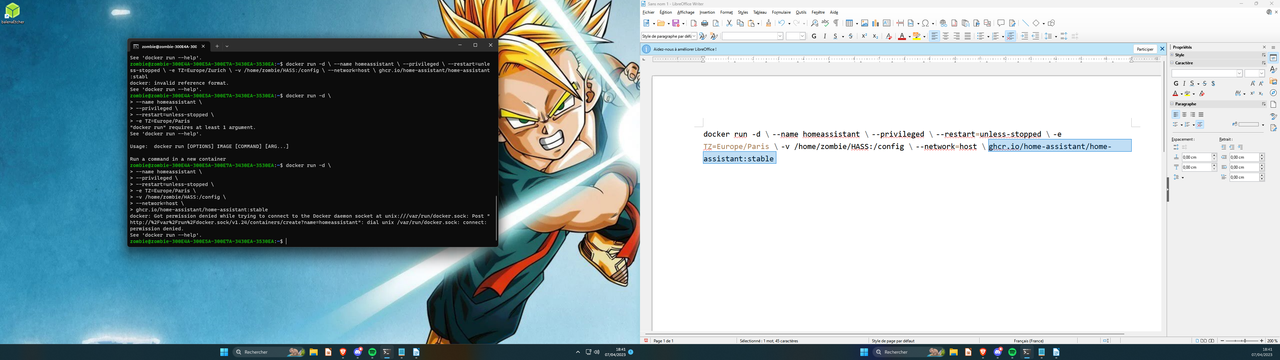 humble mirage
Images of text 
humble scaffoldBOT
@onyx gyro Please use a code share site to share code or logs, for example:
- https://dpaste.org/ (select YAML for the language, and consider picking a longer expiry)
- http://pastie.org/ (select YAML for the language)
- https://paste.debian.net/ (you guessed it, select YAML as the language)
Please don't use Pastebin, since it can randomly add spaces to the main view. Please also don't share text as images since it makes it harder for people to help you. Remember that others may have colour blindness, impaired vision, etc.
humble mirage
- Use a compose file
- Add your user to the
dockergroup, or usesudo - Use a compose file
onyx gyro
uhm
while using " docker pull homeassistant/home-assistant " i have permission denied
howto add user to the docker group pls ?
radiant sundial
Maybe you should just install an image at this rate
onyx gyro
uhm
i have do the same sing with sudo that fonctionning
hmm
i'm new on the Xubuntu / debian / HASS / nextcloud / everything else so i dont understand much think
 raven forge
Or at least google first and/or read the docker docs: https://docs.docker.com/engine/install/linux-postinstall/ 😉
radiant sundial
lol
I went with the hammer approach. but really there's a bunch to learn using images and what not already so it's an easier start
 tough sky
Hi! I just migrated my HomeAssistant installation from a "Supervised OS" on a dedicated box to a HomeAssistantOS running on KVM.
The issue I have now is the grub menu does not autoselect any entry and I have to manually open the console and hit ENTER to make it boot.
I managed to isolate the problem because the VM has two serial ports (port0 is the VM console; port 1 is a passthru to the host, where I connect it to an Insteon PLM).
When troubleshooting, if I remove the second serial port, it boots automatically, but when adding the second serial port, the issue presents itself back.
Does anyone have some idea how to solve it?
 hard skiff
Have you tried disabling the VM console port?
 topaz cave
Um... help? 🙂 Last night my HAOS rebooted for some reason and i had a "no boot device" found on the screen. I powered off and powered back on, and it started again... however, weirdly i have no Supervisor running. The message on screen is "Error returned from system, supervisor is not ready. state setup" However HA is running as well as the add-ons, even tho i cant see the add ons in the settings menu. https://imgur.com/a/kVtUXcy
 brittle trail
I have installed a Raspbee II on my Pi 4 with HAOS, but It Looks like I need to edit a config file on the Pi to enable the pins for readout in HA. Is there any way to do this without having to start all over again and enabling SHH during install?
tough sky
Yeah, that was my setup before migrating from the dedicated hardware to VM. I've been tweaking the file grub.cfg with no success so far. If I can't manage to make it boot automatically, I'll reinstall it on a new VM as "Supervised" (I have a few add-ons I wouln't like to lose), just as you suggest.
Interesting option... and a good excuse to practice with docker. My idea of using the add-ons was precisely not to have to deal with dockers, but perhaps I should take it as good learning opportunity.
In your experience, which distro would you recommend for this purpose Ubuntu Server or Debian?
humble mirage
Debian
tough sky
If I can't fix the grub issue, I'll do that. Honestly I haven't had any other issue with HassOS or Supervised so far. But the grub issue is a real showstopper for me.
I agree, specially in a virtualized environment. On baremetal I tend to use Ubuntu becasue it usually has more recent drivers, but on KVM everything is a VirtIO device so no real difference there.
radiant sundial
debating distros is kinda like choosing between coke and pepsi 😄
but really pick the supported distro since well... fewer problems come up when you're running things in an expected way
tough sky
That's the reason I asked "for this purpose". As I am not too experienced with dockers, was wondering which distro wuld be easier to setup HomeAssistant in.
BTW: In my previous baremetal installation I was running Debian and just followed the instructions at https://github.com/home-assistant/supervised-installer. No problems at all!
@north rock If I go to a containers setup, and let's say I want to add the equivalent to Z-Wave JS UI add on. How would I do that? Do you have some pointers for me to read?
humble mirage
tough sky
Oh, yes. It's all there. Thank you!!
My wife wont be happy with me tinkering with the machines all day again! Hahaha!
radiant sundial
tinkering all day is what gives other people free time 😄
 gusty cedar
Hello. I'm switching from SD to SDD on my Pi 3B. It's running into issues when I try to load my backup. I can no longer access it. I'm thinking it has to do with DuckDNS being installed?
I flashed the SSD with a blank home assistant OS using the RPi imager. It boots fine, and I'm able to access that via the url. But once I upload the backup it doesn't work on http or https or the DNS address I have.
gusty cedar
Looks like I will have to start over. At least I have all my automations and such backed up. Just can't backup from the .tar because that breaks the network stuff.
brittle sail
gusty cedar
I flashed the SSD with a blank home assistant OS using the RPi imager. It boots ...
After a successful restore it needs to be completely rebooted. Did you do that?
gusty cedar
brittle sail
After a successful restore it needs to be completely rebooted. Did you do that?
How do I reboot it? Just unplug it? I don't have any way to access it.
brittle sail
Well there’s always the possibility to plug in a keyboard and monitor to a pi lol
Otherwise yolo I guess
gusty cedar
Ah, I can do that. What's the command to reboot it? Lemme guess, "reboot"?
gusty cedar
Okay, thanks. How do I know if the restore was successful?
gusty cedar
I'll just have to try again...
brittle sail
gusty cedar
Okay, thanks. How do I know if the restore was successful?
I’m not sure mine just came back up after it was done. I’d think it would show with a monitor attached
Maybe you didn’t give it long enough
Is it a big restore with a lot of addons?
How big is your backup file?
Are you backing up and restoring from and to the same versions? This shouldn’t matter I’m just asking
gusty cedar
I have to go, but thanks for the tips.
I had a monitor plugged in while it ran the restore, but it stopped at "searching USB bus" or something like that...
It's about 100MB.
brittle sail
K then I’d expect it to be fast
gusty cedar
Yours just came online no problem? Did you have a DNS set up?
brittle sail
I have nginxproxymanager running on my server redirecting a subdomain to hass on my lan
tough sky
Well, I finally managed to make the VM boot automatically when you have more than 1 serial port:
- Edit the file
/mnt/boot/EFI/BOOT/grub.cfgand insert the following lines at the beginning:
terminal_input console
terminal_output console
set timeout_style=countdown
set timeout=1
This will make GRUB to use the EFI console and ignore the serial ports.
hard skiff
Does anyone know how to force the HA app to connect using a self made SSL certificate? According to prior feature requests this is supposedly implemented as long as the cert is added to the phone but I'm still getting an untrusted cert error
To clarify, I can connect securely from my browser, just not through the app, and I'm after some features that need the app
radiant sundial
remotely or locally? o.O
hard skiff
Locally, it's good security practice to still secure these things in case another device on the network gets compromised
radiant sundial
oh wait duckdns seems to support txt challenges so you could just use that with letsencrypt for valid cert
or if you own your own domain of course
 obtuse cradle
I FIGURED IT OUT after giving up for a few months and taking another crack at it this week. Started noticing that I was having issues connecting to the Home Assistant virtual machine anywhere other than the local computer that the VM was running on.....
Turns out I hadn't allowed the VM's network adapter to connect to anything beyond the local computer on my network. No wonder it didn't detect any devices. 🤦
 open chasm
Is there a stable way to install HA in my house and at the same time HA in for example google cloud? So if HA device in my house will be broken, then it will switch to cloud by automate.
In other words I am thinking what I can do, to not go into trouble when HA device in my house will break.
On the other hand if HA will break, then there will be no connection with Matter and Thread anyway.
So... what is the best possible solution to run HA to be resistant to hardware / software fail?
humble mirage
Don't run it on a Pi, take backups, don't use smart bulbs
open chasm
humble mirage
Don't run it on a Pi, take backups, don't use smart bulbs
thank you, but it doesn't answer my question
I am asking about solution for running 2 HA at the same time to be resistant for failing one.
1 server can fail because of update / hardware / someone crash it with hammer / whatever. But smart home can't die 🙂
so the idea is to have one in home and second in cloud. The one in home is to make network fast. The one in cloud to make it reliable.
Does HA support this?
low notch
ha does not support this, you can make it work however
the first problem to solve is still your machine at home. make it stable and you are fine, no need for a second machine
next problems would be devices that do not support multiple ha installations and you will bang your head against the wall
you are pretty much setting yourself up for failure this way, only because you want to prevent that in the first place
 hexed mirage
open chasm
so the idea is to have one in home and second in cloud. The one in home is to ma...
hexed mirage
open chasm
so the idea is to have one in home and second in cloud. The one in home is to ma...
if you are comfortable with k8s, you can deploy 2 machines. Using k8s you can configure to run 1 replica. If for some reason, 1 machine dies, the other one would promptly take over. Just ensure same setups and periodic sync of any storage between 2 devices. K8s will ensure only 1 instance is running at any time
 gray vapor
open chasm
Is there a stable way to install HA in my house and at the same time HA in for e...
gray vapor
open chasm
Is there a stable way to install HA in my house and at the same time HA in for e...
I doubt it, as the cloud version will have no way to access your bluetooth/zigbee/zwave devices on your network.
 robust cypress
good evening
I am installing at Linux AntiX
I am having a problem with os-agent
radiant sundial
lol I was like wtf is antix ... https://en.wikipedia.org/wiki/AntiX
 grand pivot
Only Debian is supported. It looks like that's just based on Debian. I suggest avoiding the Supervised install method entirely
radiant sundial
you can use the HAOS image?
what kind of hardware are you even using
(and what else are you going to use it for...)
humble scaffoldBOT
@robust cypress I converted your message into a file since it's above 15 lines :+1:
 fair spindle
The method of installation you are using (Supervised) is not compatible with antiX, which does not use systemd. Use the HAOS or Container installation methods instead.
raven forge
Where are you installing this on?
robust cypress
fair spindle
The method of installation you are using (Supervised) is not compatible with ant...
please, how can I do that?
do you have a script file to send , please?
fair spindle
You will need to read and understand https://www.home-assistant.io/installation/linux most likely, since as mentioned you're not responding to questions
robust cypress
sorry, I am dummy
raven forge
Then supervised is not for you
robust cypress
root@antix1:~# apt install docker-compose
Reading package lists... Done
Building dependency tree... Done
Reading state information... Done
E: The package os-agent needs to be reinstalled, but I can't find an archive for it.
trying to instal using docker
again os-agent errot
error
raven forge
Remove it first
robust cypress
I tried
doesn´t works
os-agent --remove
root@antix1:~# os-agent --remove
INFO: 2023/04/09 23:24:42 main.go:31: Start OS-Agent 1.2.2
INFO: 2023/04/09 23:24:42 main.go:120: Exposing object /io/hass/os with interface io.hass.os ...
INFO: 2023/04/09 23:24:42 main.go:64: Listening on service io.hass.os ...
WARNING: 2023/04/09 23:24:42 datadisk.go:97: Can't find a data mount!
INFO: 2023/04/09 23:24:42 datadisk.go:145: Exposing object /io/hass/os/DataDisk with interface io.hass.os.DataDisk ...
INFO: 2023/04/09 23:24:42 system.go:132: Exposing object /io/hass/os/System with interface io.hass.os.System ...
WARNING: 2023/04/09 23:24:42 apparmor.go:30: exec: "apparmor_parser": executable file not found in $PATH
INFO: 2023/04/09 23:24:42 apparmor.go:114: Exposing object /io/hass/os/AppArmor with interface io.hass.os.AppArmor ...
INFO: 2023/04/09 23:24:42 cgroup.go:82: Exposing object /io/hass/os/CGroup with interface io.hass.os.CGroup ...
nothing happens since these messages appears
radiant sundial
docker-compose isn't even necessary anymore
robust cypress
root@antix1:~# dpkg -r os-agent
dpkg: error processing package os-agent (--remove):
package is in a very bad inconsistent state; you should
reinstall it before attempting a removal
Errors were encountered while processing:
os-agent
root@antix1:~#
radiant sundial
I'm gonna exit the conversation
radiant sundial
to a certain extent I think he's just trolling
robust cypress
no I am not
I am dumb
for sure
sorry
please, write the commands and I will reply with the system answer
I think you don´t know how to fix
like myself
@radiant sundial
raven forge
It's probably best if you google for the package is in a very bad inconsistent state; you should reinstall it before attempting a removal message
 manic bane
radiant sundial
docker-compose isn't even necessary anymore
manic bane
radiant sundial
docker-compose isn't even necessary anymore
It is if you use certain distro packages, like debian
They have a version of docker pre compose being built in
manic bane
robust cypress
I am dumb
Then use HAOS. You're not listening for people trying to help
Its akin to being told to drive straight ahead and you turn left into a brick wall, and instead of stopping, keep accelerating to go through all the gardens in your neighbourhood
brittle sail
rip granny's flowers
radiant sundial
manic bane
It is if you use certain distro packages, like debian
They have a version of do...
oh I just mean in the newer docker it's docker compose
unless you're saying it's an extra package. but maybe it auto installed
anyhow neither here nor there lol
grand pivot
It's part of the newer docker install
manic bane
radiant sundial
oh I just mean in the newer docker it's `docker compose`
Only part of the newer docker package
Before it was docker and docker-compose
 dawn sigil
Hey there, trying to get HA installed on a windows pc using Hyper V but it seems like its not pulling my IP making the site inaccessible. Any ideas?

 copper steppe
Sounds like you need some hyperv config to allow the VM to bridge to your LAN in order to get a dhcp address?
Did you use the hyperv image from https://www.home-assistant.io/installation/windows/ ?
dawn sigil
I set it up per some things I found on the forums. Maybe I missed a setting
https://i.imgur.com/tCJjoPj.png
 dawn sigil
copper steppe
Did you use the hyperv image from https://www.home-assistant.io/installation/win...
dawn sigil
copper steppe
Did you use the hyperv image from https://www.home-assistant.io/installation/win...
Yep, fresh install and extraction
copper steppe
See the hypervisor-v specific tab at https://www.home-assistant.io/installation/windows/#hypervisor-specific-configuration
dawn sigil
Yea everything seems to work until the "start up your virtual machine" step.
This is the forum I was following. Looks like others with the same issue... but pretty dated. (Nothing in there worked for me)
https://community.home-assistant.io/t/hass-io-on-hyper-v-step-by-step/140553/42
copper steppe
Is your dhcpd server configured to be super uptight about giving away dhcp leases? I don't know what the "allow management... blah" setting does. Try turning that off?
fwiw wireless is not a good long-term option, way more reliable to be wired.
dawn sigil
Let me switch to ethernet and see if anything changes
copper steppe
Did you make a "generation 2" VM? Sorry I haven't touched windows in many many years
dawn sigil
No worries at all!
Yea it is gen 2
copper steppe
You may need to make IP static, that would remove dhcpd from the equation
dawn sigil
Already static on the server I'm running it on 🙂
copper steppe
Yeah, but the VM is like a whole new machine; need to make that static too
It looks like another PC on the LAN
(that's what bridge mode is)
dawn sigil
Hmm, okay let me dig into network configs and do that
copper steppe
it's mentioned in the thread you linked
dawn sigil
Looks like the networks settings for the bridge inherited the static ip I set for the server. Tried to give it a unique one and it dropped my rdc, gonna have to connect a monitor and stuff to get reconnected
 toxic cedar
I just did an upgrade from 9.4 to 9.5, let it hang for a while, then realized HA was offline. I tried giving it more time, rebooting via manual power disconnect, and I still can't seem to get in. I'm also not seeing it via my router. Is there anything I can do short of connecting it to a display to see what's going on?
raven forge
If it doesn't even get a ip there's little you can do remotely
toxic cedar
Kinda figured. 😕
If HA fails to upgrade, does it fall back on previous working state?
Oh wait, I'm actually getting an IP now. Still can't reach it through a browser though. Any ideas?
raven forge
You could try visiting http://yourhaip:4357 but that's not really all that useful
toxic cedar
Eh, no dice. Guess I'll just hook it up tomorrow. Thanks for the suggestions.
 delicate iris
I majorly screwed up:
Went to upgrade, my main folder was /homeassistant/config on an ubuntu box. I am running HA in a Docker Container. I created a backup at /homeassistantbak. I stopped the Docker Container. THen I updated it by pulling the latest docker version, and updated using the following command:
docker run -d --name homeassistant --restart=unless-stopped --privileged -e TZ=America/New_York -v /homeassistant:/config --network=host ghcr.io/home-assistant/home-assistant:latest
This caused the files in the original directory to no longer work, and everytime I try and substitute in the backed up files, home assistant seems to overwrite them.
I then tried reverting back to the original version:
docker run -d --name homeassistant --restart=unless-stopped --privileged -e TZ=America/New_York -v /homeassistant:/config --network=host ghcr.io/home-assistant/home-assistant:2022.11
That also did not work.
Any ideas?
copper steppe
if your config is in /homeassistant/config shouldn't you be mounting /homeassistant/config:/config ?
delicate iris
copper steppe
if your config is in /homeassistant/config shouldn't you be mounting /homeassist...
This: Didn't realize i had to enter config twice
and now i am on latest
copper steppe
Win
dawn sigil
copper steppe
it's mentioned in the thread you linked
Got it to display an IP and MAC address, still no access to the web... Problem for tomorrow. Thanks for the help!
manic bane
delicate iris
I majorly screwed up:
Went to upgrade, my main folder was /homeassistant/config...
Use docker compose. Makes your life far easier
 small marsh
I currently have a NUK
I have just booted from a home assistant os usb
however i think the nuk already had some os or smth installed, how could i remove the other partition or whatever that is on the nuk
also can i unplug the usb for the next boot ?
 gloomy reef
Anyway to check how much space is left in HassOS? I decided to use frigate a few weeks ago. It is not stop working and i suspect storage space issue. Couldn't figure out how much space is left on the system though
tender dock
Settings -> System -> Storage
humble mirage
however i think the nuk already had some
 harsh marsh
Bonjour, test, je suis nouveau, ceci est mon premier message.
humble mirage
English please @harsh marsh
 tropic onyx
has anyone encountered this ? the home assistant is still not ready since I've been installing for one hour. But the log says System autofix complete. should I keep on waiting or what?
gloomy reef
tender dock
Settings -> System -> Storage
Thanks. Didn't know it was there
open chasm
hexed mirage
if you are comfortable with k8s, you can deploy 2 machines. Using k8s you can co...
it can be kind of an idea... k8s cluster, but nodes in my home so Anthos or other solution. I didn't try them yet. Although this can easy turn into a nightmare if not supported by HA.
open chasm
low notch
the first problem to solve is still your machine at home. make it stable and you...
this is false statement. Even best hardware can break.
also software update can break things
I was thinking about kind of the solution where device looking ha.network and network connect it with HA in my home or in cloud
humble mirage
In the last 3 years I've had no unexpected breaking changes with HA - no upgrade has failed and surprised me. Even before then if it did rolling back was trivial.
open chasm
in theory in that way there should be no issue with device which can be connect to only 1 HA, because this 2 HA should be mirrored
humble mirage
There's forum threads on High Availability - a lot of people trying to build something that works
Turns out to be non-trivial...
open chasm
humble mirage
In the last 3 years I've had no unexpected breaking changes with HA - no upgrade...
yep, this is rolling a dice. Probability.
it is not trivial
humble mirage
Thank goodness there's backups and the ability to roll back...
open chasm
if HA doesn't support mirroring HA it is very not trivial
humble mirage
That also overlooks the challenges of Zigbee and Z-Wave coordinators
The last time I'd any outage of my HA was back when I ran it on a Pi, since moving to decent hardware I've had no outages longer than the time it takes to restart HA (a minute or less)
The longest outage of anything I've had was when I used a CC2531 Zigbee coordinator, and it crashed
That didn't take down HA, just my Zigbee devices, until I reset the stick. Having upgraded to something better than a potato that's no longer a problem.
open chasm
I understand why we can say it is bad idea because it is hard and HA doesn't support this. But convincing me by saying "my device didn't break", so your "device will not break" is kind of a strange way of discussion. I don't agree with your statement. My IT experience show things always break. This is only probability. Even the best quality hardware or software.
humble mirage
I'm not saying it's a bad idea, I'm saying that:
- It's non-trivial
- The probability of software failure you can't trivially revert is zero
- The probability of hardware failure depends on your hardware choices
- A second system you can restore your backup to resolves most of (3)
FWIW last time I migrated my HA install between hosts I had a downtime of about a minute, same time as it takes to restart HA plus about 10 more seconds for the file copy
There's plenty of forum threads to give you guidance on what works, and what doesn't, and where most of the common pain points are
open chasm
I understand. I am just saying backup doesn't apply to my question and needs. This is other story.
humble mirage
Part of the solution is designing the rest of your hardware to work if/when HA is down. That's why I recommend against smart bulbs and instead smart swiches/dimmers and dumb bulbs (or Tasmota switches and Tasmota bulbs).
hexed mirage
open chasm
it can be kind of an idea... k8s cluster, but nodes in my home so Anthos or othe...
HA does not support clustering, so you cannot run multiple replicas. I suggested this since you were concerned about machine gping down and hence in your case can remove you fears as having 2 nodes with exact same settings will quickly restore your HA in case 1 goes down. Not a recommended solution, but is an option
manic bane
humble mirage
The last time I'd any outage of my HA was back when I ran it on a Pi, since movi...
Can agree that outages are short for me as well
Longest one I've had is a few minutes which is reboot the host and wait for everything to start up
 queen bronze
Occasionally HA will run into a problem and the supervisor recognizes this but then fails to restart HA:
ERROR (MainThread) [supervisor.misc.tasks] Watchdog found a problem with Home Assistant API!
[...]
ERROR (MainThread) [supervisor.misc.tasks] Home Assistant watchdog reanimation failed!
Is there some way I can troubleshoot what's going on? I believe it has something to do with the docker container, because killing the container itself fails as well.
This can be observed when I try to manually restart core:
Error: Can't restart ghcr.io/home-assistant/qemux86-64-homeassistant: 500 Server Error for http+docker://localhost/v1.41/containers/8452919e3c29f3cb1c438c8e7a3dd287ddb93d60bb8aa9101f1aa16cfdf17398/restart?t=240: Internal Server Error ("Cannot restart container 8452919e3c29f3cb1c438c8e7a3dd287ddb93d60bb8aa9101f1aa16cfdf17398: tried to kill container, but did not receive an exit event")
I end up having to restart the system, but would like to know what's going on here.
 celest quartz
Hi, why do these errors show up in the logs, sometimes? Isn't supervisor internal to HAOS?
Source: components/hassio/__init__.py:516
Integration: Home Assistant Supervisor (documentation, issues)
First occurred: April 9, 2023 at 2:15:59 AM (3 occurrences)
Last logged: 10:12:57 AM

Can't read Supervisor data:
Source: components/hassio/handler.py:48
Integration: Home Assistant Supervisor (documentation, issues)
First occurred: April 9, 2023 at 2:15:58 AM (15 occurrences)
Last logged: 10:12:57 AM

Timeout on /info request
Timeout on /store request
Timeout on /core/info request
Timeout on /supervisor/info request
Timeout on /os/info request
 gilded pewter
I just reinstalled a backup. core on a PI4 (killed every network connection) and now my addons are running. (according to the logs of the addons) but they are grey in the gui.
brittle sail
gilded pewter
I just reinstalled a backup. core on a PI4 (killed every network connection) an...
Reboot the host
It’s not obvious that it’s required after a restore. I’m not sure why it doesn’t just reboot automatically if it’s a requirement
gilded pewter
oke lets see what happens.
brittle sail
Oh it’s core not haos? Core has addons?
 smoky mauve
Im stuck on the onboarding page of Home Assistant
Thats something
that spot where it shows philips hue, chromecast and asks if you wanna add it already but there was a button that said "more.." I pressed that. The webpage got darker and did nothing.
after waiting minutes I just refreshed the page, it asked me to login again, I did. now I am still on onboarding.html page but see just the logo with text.

ill delete the cookies see if that does something
it does not, ill open it in incognito mode
incognito works, I am where I choose the devices and services again. this time ill just press finish.

Okay I guess I fixed it, still weird. Also fixed it for the none incognito chrome page.
 frank perch
humble mirage
In the last 3 years I've had no unexpected breaking changes with HA - no upgrade...
frank perch
humble mirage
In the last 3 years I've had no unexpected breaking changes with HA - no upgrade...
I wish I could say the same LOL
 half shuttle
I ran HA for 2 years now, but never properly organized backing up to another device from my Raspberry Pi. I see backup files were created all the time to /backup which I can copy to my computer using Samba. But I'm surprised how small my files are. A manual forced backup is only 80 Mb. Google teaches me about users reporting 1,8 Gb files. Am I on the right track?
 crude inlet
@half shuttle those are likely backups when you updated individual add-ons. You should create a full manual backup of your own to be safe
If that is what you did and it is 80Mb, then I guess you keep a clean install 🙂 How big is your db file?
raven forge
half shuttle
crude inlet
<@693780800994541650> those are likely backups when you updated individual add-o...
I just did, and the most recent .rar file that it causes was only 80 Mb
half shuttle
raven forge
Also see here: <https://www.home-assistant.io/common-tasks/os/#copying-your-back...
Thank you, I'll choose one of those methods to automate
 lunar cloak
hello - I'm trying to migrate from a supervised install on debian to proxmox but my full backup is failing to upload properly, i've examined the tar file and I can see stuff in there, is there way to restore core first, then the add-ons ? Thanks.
humble mirage
Are you trying to upload the backup in the UI?
half shuttle
So nice example here, how come my backup is only 80 Mb, instead of 9 Gb mentioned here?
lunar cloak
I have about 12 add ons for a start
brittle sail
it's probably influxdb with a bunch of history
 north aspen
Hope I'm the correct chat. HA is not starting up on my RP3+ today. Plugged in a monitor and it shows Home Assistant CLI not starting! Jump into emergency console.... I googled and found peeps say to type "login" but that results in the same error
raven forge
A picture would probably be helpful
 lost jasper
Hello,
I flashed HAOS on a 64GB SD, Odroid XU4.
HA comes up with ""Waiting for Supervisor to startup..." and then the screen disappeared.
Any idea what can I do?
lost jasper
Oh wow, I feel stupid 🤦♂️ . For some reason I expected to see an operating system a browser over the desktop
Thank you!
robust cypress
good evening
i install HA using docker
after install docker and try to run I received this error message
bash: docker: command not found
please, can you give a tip ?
raven forge
How and on what hardware did you install docker?
robust cypress
using command:
sudo apt install docker-compose
good evening
i install HA using docker
after install docker and try to run I received this error message
using command:
sudo apt install docker-compose
bash: docker: command not found
please, can you give a tip ?
raven forge
Did that sudo apt install docker-compose command run successfully? What happens if you run it again?
raven forge
What does dpkg -l | grep -E "docker|container" say?
robust cypress
I am called docker using this command:
docker run -d
robust cypress
yes I am using Anti X
raven forge
It might not put docker inside a directory that's inside your $PATH. But that would be strange. I'm not familiar with that OS
robust cypress
raven forge
What does `dpkg -l | grep -E "docker|container"` say?
ii docker-compose....
raven forge
Well, docker-compose is not docker. Debian installs docker as a dependency of docker-compose but antix might not. Try to install docker itself and don't shorten outputs of commands please. I want the full thing
radiant sundial
I don't think you want anything to do with his situation if you scroll back in the chat
robust cypress
raven forge
Well, `docker-compose` is not `docker`. Debian installs `docker` as a dependency...
very nice tip
It was installed nevertheless the error message persist
bash: docker: command not found
I installed using sudo apt install docker
robust cypress
raven forge
What does `dpkg -l | grep -E "docker|container"` say?
using this command now docker appears
raven forge
Just show me the command's output 👺
You can do something like this find / -type f -executable -name 'docker'.
Also check dpkg -S bin/docker. You might have to install the cli package specifically.
Why exactly are you using a niche distro to run your services unless you're somewhat of an expert?
raven forge
I doubt it runs that much faster than plain debian
brittle sail
Ya definitely not
robust cypress
the computer I installed antiX has atom processor and 2GB of memory
and anti X are runnig ver smooth
very nice
robust cypress
raven forge
Just show me the command's output 👺
You can do something like this `find / -ty...
sudo dpkg -S bin/dpcker
docker-compose: usr/bin/docker-compose
robust cypress
raven forge
Just show me the command's output 👺
You can do something like this `find / -ty...
using find command nothis was showing
raven forge
apt list | grep ^docker
robust cypress
raven forge
I doubt it runs that much faster than plain debian
I can try, using antix my computer use just 140M of memory
2% of CPU
radiant sundial
in before libseccomp isn't compatible with that distro
raven forge
My pretty much vanilla debian VM uses 151M with docker installed and < 100M with its services stopped 🤷
Distrohopping is fun but running a niche OS means less or no help and potential compatibility issues/bugs
robust cypress
raven forge
My pretty much vanilla debian VM uses `151M` with docker installed and `< 100M` ...
please show me how can I do it
I will
radiant sundial
lol
raven forge
This is neither the place nor do I know what you want to know. Run apt list | grep ^docker to see the docker related packages available
My guess is you have to install the cli related one(s)
robust cypress
raven forge
This is neither the place nor do I know what you want to know. Run `apt list | g...
just a moment
robust cypress
raven forge
`apt list | grep ^docker`
docker-clean/stable,stable 2.0.4-3 all
docker-compose/stable,stable,now 1.25.0-1 all [installed]
docker-doc/stable,stable 20.10.5+dfsg1-1+deb11u2 all
docker-registry/stable 2.7.1+ds2-7+b6 amd64
docker-registry/stable 2.7.1+ds2-7+b6 i386
docker.io/stable 20.10.5+dfsg1-1+deb11u2 amd64
docker.io/stable 20.10.5+dfsg1-1+deb11u2 i386
docker2aci/stable 0.17.2+dfsg-2.1+b5 amd64
docker2aci/stable 0.17.2+dfsg-2.1+b5 i386
docker/stable,stable,now 1.5-2 all [installed]
radiant sundial
lol is that docker from 2018
raven forge
docker.io is from 2021-03-02: https://docs.docker.com/engine/release-notes/20.10/#20105
radiant sundial
oh no I mean the one installed at the last line
robust cypress
raven forge
`docker.io` is from `2021-03-02`: <https://docs.docker.com/engine/release-notes/...
sorry I did not understand
robust cypress
raven forge
`docker.io` is from `2021-03-02`: <https://docs.docker.com/engine/release-notes/...
is it possible to fix?
raven forge
I think I'll install myself a antix VM. This is bugging me. Try to install docker.io in the mean time
radiant sundial
I mean this is like "follow the docker install guide for your system" kind of level
robust cypress
raven forge
I think I'll install myself a antix VM. This is bugging me. Try to install `dock...
installing
robust cypress
radiant sundial
I mean this is like "follow the docker install guide for your system" kind of le...
there is not install guide for anti X
raven forge
Officially docker doesn't support antix. At least it looks like they don't provide packages but I'm sure there's other instructions to be found
robust cypress
raven forge
I think I'll install myself a antix VM. This is bugging me. Try to install `dock...
finished
new error message when I try to run docker
just a moment I am trying to put the message here
docker run -d \
--name homeassistant
--privileged
--restart=unless-stopped
-e TZ=America/Sao_Paulo
-v /root/homeassistant:/config
--network=host
ghcr.io/home-assistant/home-assistant:stable
docker: Got permission denied while trying to connect to the Docker daemon socket at unix:///var/run/docker.sock: Post "http://%2Fvar%2Frun%2Fdocker.sock/v1.24/containers/create?name=homeassistant": dial unix /var/run/docker.sock: connect: permission denied.
See 'docker run --help'.
raven forge
Try to run it as root. Make sure the service is started as well
raven forge
If you would've omitted the -d you'd know for sure. You should also use a compose file. That's why you installed compose, no?
robust cypress
raven forge
If you would've omitted the `-d` you'd know for sure. You should also use a comp...
I am following th HA home page instructions
@raven forge you are a genius
raven forge
And they tell you instructions for a compose file. You can also run docker logs -f homeassistant or docker ps
humble scaffoldBOT
@robust cypress I converted your message into a file since it's above 15 lines :+1:
robust cypress
what does it means?
raven forge
it
What are you referring to specifically?
robust cypress
I mean the HA is downloading to my machine ?
raven forge
It's in the process of downloading the layers of the homeassistant image
raven forge
docker isn't even docker related: https://packages.debian.org/en/bullseye/docker. I wasn't sure if antix re-uses debian packages or packages stuff on their own.
The trick would have been to do apt install docker-compose --install-recommends. It would have installed docker.io for you as well
robust cypress
very nice
I am write the steps
http://192.168.0.18:8123/onboarding.html HA starts here
These are the steps to install HA using docker at linux Anti X 22?
:
These are the steps to install HA using docker at linux Anti X 22:
1- sudo apt-get update
2- sudo apt-get upgrade -y
3- sudo apt install docker-compose (or use this command: sudo apt install docker-compose --install-recommends)
4- sudo apt install docker.io
5- Play as root:
docker run -d
--name homeassistant
--privileged
--restart=unless-stopped
-e TZ=America/Sao_Paulo
-v /root/homeassistant:/config
--network=host
ghcr.io/home-assistant/home-assistant:stable
robust cypress
radiant sundial
lol is that docker from 2018
it would be better update my docker version?
What is the command to do it?
humble mirage
it would be better update my docker
lunar cloak
humble mirage
If it's over 1 GB then you should use Samba inistead
it took a while to process (left it overnight) but seems to have restored, thanks for your help.
small marsh
How can I install WiFi on my HAOS
It's currently installed on a NUC using Ethernet
However I want to be able to move my NUC so that I can pair using my zigbee controller
humble mirage
When you say move your NUC, you mean move and leave there or move and move back again?
Because you really shouldn't be moving your coordinator around, that's just going to fuck up your Zigbee mesh
half shuttle
crude inlet
If that is what you did and it is 80Mb, then I guess you keep a clean install 🙂...
home-assistant_v2.db is 220 Mb. Is this the db that stores all history? I'm impressed with all the sensor data being stored. HA tracks some 50 devices here, including f.e. electricity usage.
manic bane
robust cypress
These are the steps to install HA using docker at linux Anti X 22:
The real question is why use antix instead of debian
small marsh
My network is using CGNAT so therefore I cannot port forward home assistant to expose it to the outside world. I want to make remote access possible (with SSL) primarily to make google assistant work with my installation.
Are there any free alternatives to port forwarding? I know Nabu Casa is an option and I am considering that, but any outside of paid cloud services?
 empty bloom
Cloudflare tunnel
empty bloom
right, that's why I said "scratch Zerotier"
small marsh
ok
empty bloom
regardless if you pay or not
small marsh
so i wouldnt be able to like stream a security camera or doorbell feed
empty bloom
right
empty bloom
just not remotely
small marsh
but just never access it outside of the network?
yes ok
i cant test cf freely rn
bc the website that a tutorial uses
doesnt work anymore
freenom
I will probably just buy a cheap domain from somewhere soon
but it would be nice to test
Are there any recommendations for cheap domains?
brittle sail
First year free for app or dev TLD
otherwise namecheap or just buy from cloudflare directly if it’s a .com
humble scaffoldBOT
@verbal wasp I converted your message into a file since it's above 15 lines :+1:
tender dock
do you have both sdcard and usb ssd plugged in for that boot?
 verbal wasp
yeah, i used the regfular move datadisk funtion in the ui
tender dock
no idea, I never used that. do you have a backup saved?
verbal wasp
yes, but if I restore and try again, I assume nothing will change.
tender dock
if you have a backup, just flash a new installation on the ssd and restore to that.
verbal wasp
ok I can give that a shot. Why would that make a difference out of curiosity?
tender dock
there's no need to keep the sdcard. the ssd is much faster and more reliable.
small marsh
brittle sail
otherwise namecheap or just buy from cloudflare directly if it’s a .com
sorry just was wondering why cloudflare if its .com
doesnt cloudflare do everything
brittle sail
Cuz namecheap has $2 random domains but .com is cheaper on cloudflare or around the same price
verbal wasp
tender dock
there's no need to keep the sdcard. the ssd is much faster and more reliable.
the HA guide reccomends booting from SD and keeping the data on the SSD, not sure why though
humble mirage
Probably because booting directly from the SSD is relatively new
(and not supported on all Pis)
tender dock
oh, yeah, there was a bit of a struggle getting my pi to boot off an ssd years ago.. needed some sort of eeprom flash IIRC
brittle sail
Pi4 have shipped with updated bootloader since before people ignored a global pandemic lol
But ya it used to be painful
humble mirage
Yeah, the Pi4 is fine, but anything older ... not always
grand pivot
I'm booting from SD on my Pi3b that I use for z-stuff and BTLE because compatibility seemed uncertain. And I doubt my SD card will fail as a boot device, and it's trivial to replace if it does
Flash image, change boot partition
brittle sail
If it’s not a 3b+ then no option to boot from ssd iirc
Damn pi foundation and their naming schemes
hexed mirage
brittle sail
Cuz namecheap has $2 random domains but .com is cheaper on cloudflare or around ...
.uk domains seems to be cheapest for some reason on CF
brittle sail
They pity those under king sausage fingers
verbal wasp
is there a good guide to installing and setting up HA directly from USB SSDs without sd cards at all?
afaik if you flash the image to a USB SSD the pi still won't look for a boot device over usb
humble mirage
Depends on the model of Pi
brittle sail
If it’s a pi4 with updated bootloader yes it will
humble mirage
Pi3b+ you just need to boot it with a special SD card (Google has the details)
humble mirage
And yet... I bet there's still people that fail
verbal wasp
ok, how do I know if my pi4 has the updated bootloader?
humble mirage
You could Yahoo it... assuming they're still in the search business
tender dock
you could just try to boot with it.. if it doesn't work do this: https://www.makeuseof.com/how-to-boot-raspberry-pi-ssd-permanent-storage/
verbal wasp
i'm binging so hard right now
 wooden ravine
Hello, trying to install home assistant on raspberry pi 3 with docker compose.
I have followed this guide : https://www.tim-kleyersburg.de/articles/home-assistant-with-docker-2022/
I have used buster instead of bullseye. Everything was fine but when trying to launch yml file I have an error.
/usr/lib/python3/dist-packages/requests/init.py:91: RequestsDependencyWarning: urllib3 (1.26.15) or chardet (3.0.4) doesn't match a supported version!
humble mirage
You need to use Bullseye
wooden ravine
Oh 😦
humble mirage
Install Bullseye, then follow https://docs.docker.com/engine/install/debian/#install-using-the-convenience-script to install Docker, then follow https://www.home-assistant.io/installation/linux#docker-compose
I've no idea why you'd deliberately use an outdated OS
wooden ravine
Bullseye is not booting properly on raspberry pi 3
Sometimes it is freezing on bootload
That is why I decided to use old os
humble mirage
I've got a few Pi3s and all are running Bullseye
You've most likely got either a power problem, or an SD card problem, or both
radiant sundial
huh
I've got bullseye on rpi too
I have it on the original rpi ... as in version 1
radiant sundial
humble mirage
You've most likely got either a power problem, or an SD card problem, or both
agree with tinkerer
humble mirage
On a Pi3 ... who cares
humble mirage
Your problem is 99.99999999999999% likely to be power
radiant sundial
yeah you need 3 amp+
humble mirage
It could also be broken hardware, but I'd bet on power
humble mirage
Well, if it's hanging on boot...
wooden ravine
Dmseg ?
radiant sundial
oh true...
humble mirage
The Pi3 is the minimum spec for HA, you should switch to something less shit
radiant sundial
any reason you're using docker compose vs haos?
humble mirage
That display won't work with HAOS
radiant sundial
oh I see
wooden ravine
Using haos with lcd no utility yeah
radiant sundial
that guide looks outdated too. (since docker compose comes with docker now)
wooden ravine
Oh directly
radiant sundial
it's docker compose (new) vs docker-compose (old)
humble mirage
I'd start by switching to a decent power supply, and then follow <#installation-archived message>
wooden ravine
By freezing I mean the little underscore white is displayed but nothing happen
It is only when I reboot after first install
Ok I see
I use official power supply 😦
 burnt orchid
power suplly issues are horrible with PIs, because they fail without letting us knwo why. When you add the LCD you make it draw even a bit more. Maybe try the isntall without the LCD?
humble mirage
The official power supply can still fail to provide enough power
wooden ravine
It is 2.5A
radiant sundial
yeah like I said 3A+
radiant sundial
is it 3B or 3B+?
wooden ravine
Written 3B v1.2
radiant sundial
ah okay
humble mirage
At least it wasn't an A
wooden ravine
Have one in a box somewhere 😅
humble mirage
Leave it there 😉
radiant sundial
lol just run something like pihole on it. np
wooden ravine
3A or more ?
humble mirage
It needs to be a proper USB power supply, not a generic phone charger
brittle sail
do you have a 3d printer?
radiant sundial
seems like I might be thinking about the pi3 that's 3 amps, the older seems to be 2.5 amps recommended minimum. either way best to try a better power supply since power problems are pretty wacky
brittle sail
if so, you can use that pi3 to control a 3d printer and buy a better device to run home assistant 😛
wooden ravine
3d printer will be later on 😅
frank perch
since my rpi isn't supported anymore my HA has been down lol
I'm trying to get it running on a miniPC but it won't boot
radiant sundial
isn't supported anymore?
humble mirage
Were you running on an original Pi/Pi Zero?
frank perch
yes I was Tink
an original pi
I started with HA when that was basically recommended hardware lol
radiant sundial
oh
frank perch
I have a couple mini PC's I tried to get to boot with it but none of them will
humble mirage
You can run Container on the original Pi... probably
I mean, that 0.5 GB of RAM is going to be an issue, never mind the fact that my toaster has a faster CPU
frank perch
I don't have a bunch of crazy integrations
I have an Acer Eepc I was trying, and a lenovo q190
radiant sundial
the original pi takes like 5 min to apt update
frank perch
neither boot HAOS from the sata SSD for some reason
humble mirage
You can run Debian + Container on them though 😉
radiant sundial
lol
frank perch
I mean container doesn't have addons tho right?
and yes they boot debian flawlessly
lol
humble mirage
No, but .... so what?
frank perch
Ive been spoiled by them and it's what I know
humble mirage
Well... you could get HA up and running again without them in the time we've been talking about it 😛
frank perch
I was just gonna save up for a NUC at this point
but I need one for my mom's house too
it just sucks I got 2 pi's that I can't use for HA anymore
brittle sail
you can resell them for crack
burnt orchid
frank perch
I was just gonna save up for a NUC at this point
q190 should be more than enough
how much ram in that q190?
install base ubuntu/debian and haos as KVM
that's what i do on a Wyse5070 and it's awesome
frank perch
burnt orchid
how much ram in that q190?
4gb
burnt orchid
i'd give it a go. it's easy
radiant sundial
use the pi as a remote access device in case you gotta fix the home assistant at your mom's place remotely 😄
frank perch
oh I'm very comfortable in linux, I've been using it for so many years
frank perch
radiant sundial
use the pi as a remote access device in case you gotta fix the home assistant at...
well I have site to site VPN
lol
frank perch
but physically going there involves a flight
radiant sundial
ooo I see
frank perch
or a really long boat ride
burnt orchid
frank perch
well I have site to site VPN
thank god i don't - my mom would call me daily do fix shit. would probably print her recipes on my printer here too
and wonder why it isn't coming out - print 36 copies before calling me
radiant sundial
lol
frank perch
you have no idea how close you are to the truth
lmfao
I print things to her printer all the time for her
I have some lightbulbs I need to get sorted out for her and a new box of plugs
radiant sundial
that's supported too I think
frank perch
I think I read someplace it is
radiant sundial
I was gonna try virtualization but my poor atom CPU doesn't have it
radiant sundial
I'm just using an old board from the nas I was running. close enough I guess. though it's overkill in ram
I think I have 32gb ECC ram in there
burnt orchid
radiant sundial
I think I have 32gb ECC ram in there
yeah, sucks to not be able to run KVM if you have 32GB in there
radiant sundial
yeah it's currently sitting at 3GB / 32 used
burnt orchid
frank perch
I don't normally do kvm, but virtualbox
either way, i guess. i've never done virtualbox. i always assumed virtualbox was for GUI users and my linux boxes never have a gui installed
frank perch
you don't need GUI for virtual box lol
burnt orchid
The best tool is always the one you know how to use 🙂
frank perch
preferably I'd have it on a esxi host but I'm trying to cut my electricity bill
radiant sundial
Maybe I should just buy more hardware and then take out some ram
 twin oak
I'm probably missing something silly. I've got HASSOS running in a proxmox vm and attempting to use tteck's scripts to install zigbee2mqtt in a privileged container, but I can't figure out how to actually change the container type selection... Highlighting and press enter doesn't work and just keeps the unprivileged selection.
humble mirage
Z2M doesn't need to be privileged, mine isn't
twin oak
I just wanted to be lazy and take advantage of the auto USB passthrough 🤣
 still schooner
Anyone put HA on a Xeon based system?
humble mirage
What's the actual question?
still schooner
Just wondering if it can even run on a Xeon CPU as according to the install you need a UEFI Bios & don't think they got that.
Been offered an old Xeon server for free, so ya know why not eh?
humble mirage
You can run HA itself on just about anything
HAOS may not boot, but you could run HAOS in a VM if you wanted that
Otherwise... Docker all the way
still schooner
Right now I've had HA on a RPi & a few VM's. All of them had their own little issues in one way shape or form. My main thing now is I'm trying to be as cheap as possible. So want to reuse the RPi to drive 2 displays instead of no display from HAOS.
I'm on the verge of getting various stuff for free, including a few touch screens, a xeon rackmount server & an old gaming PC.
So repurpose, reuse. Be nice to get the Xeon running my file server, print server, HA & Shoutcast
still schooner
I'll give it a go in a few weeks once I get the server. Right now I'm toying around with an old AMD Dual Core Lenovo C205, one that actually does contain a touchscreen, most don't.
Only thing any good on the entire all in one system, is the actual screen and touchscreen. Rest is slow as hell, even an SSD didn't help, lol
copper steppe
Run haos on a vm or docker. Run all your other dual screen stuff on host with whatever distribution you want. Haos is not a general purpose os
still schooner
Thanks for the suggestion, already tried going that route. The Pi chokes when driving dual screens at full tilt. Makes HA ignore alot of stuff. Hence, thinking moving HA from RPi to a proper server 😉
copper steppe
Yes, rpi is gutless. If you don't need "too much", then things like thinkcentre m910q have 2-3 displayports, 2.4ghz i5 cpu, SSD+m.2, etc. For about US$100 used.
if you don't need lots of physical disks . See https://www.servethehome.com/introducing-project-tinyminimicro-home-lab-revolution/
What server are you getting?
HA itself (if you're not doing frigate / image processing) doesn't require much
still schooner
Xeon Quad Core, not sure on speed tbh
hexed mirage
Use rpi (rpi4b) is headless mode and use that minimal OS - it performs better
still schooner
The RPi actually handles my other use perfectly when that's all it's doing. Add in HA & things stop working.
 leaden kindle
Not sure if it would be here or in general. But has someone made a H.A. Kiosk? I have a spare touchscreen laptop I was going to use for it
still schooner
RPi4B, Lights fail to respond, Nest Screens go blank or fail to update to changes, list goes on. I know the cause & it's not HA 😉
brittle sail
still schooner
RPi4B, Lights fail to respond, Nest Screens go blank or fail to update to change...
pi gonna pi man
leaden kindle
still schooner
Xeon Quad Core, not sure on speed tbh
Just go big and get one of these 😄
https://www.amazon.com/Dell-PowerEdge-R620-E5-2670v2-2-50Ghz/dp/B08D23VT2G/ref=sr_1_3?keywords=dell+r620&sr=8-3
brittle sail
it's 2023 we do whitebox nas builds now
dell can keep their old power hungry dual xeon bullshit
leaden kindle
brittle sail
dell can keep their old power hungry dual xeon bullshit
I like my old power hungry dual xeon bullshit
granted I got all my servers for free
So I can't complain lol
brittle sail
i have two servers with old power hungry dual xeon bullshit
doesnt mean i should suggest them to others in 2023 tho
still schooner
I'm still running my old Core 2 Duo server with 2GB Ram, bout 1.6Ghz CPU, lol
brittle sail
put that thing out of its misery
still schooner
Plus I'm getting a Xeon Server for free, so why not eh?
leaden kindle
leaden kindle
Not sure if it would be here or in general. But has someone made a H.A. Kiosk? I...
but in case this got skipped would this go here or in general?
still schooner
Old saying, if it ain't broke, don't fix it. Thats the motto for my old server, lol
brittle sail
leaden kindle
Not sure if it would be here or in general. But has someone made a H.A. Kiosk? I...
fully kiosk browser is what most of us use
leaden kindle
still schooner
Old saying, if it ain't broke, don't fix it. Thats the motto for my old server, ...
I mean if you are still getting use out of it I wouldnt stop
leaden kindle
brittle sail
fully kiosk browser is what most of us use
Will that stop people from using other apps?
brittle sail
android tablet or purpose built device with a touchscreen and android os on it
yep
lots of options
requires android OS tho
leaden kindle
its a dell laptop lol
brittle sail
well there's alternative installs i think
still schooner
infobeamer is what I use with a RPi. Stupid fast boot time to a web page you preconfig. No option to change URL either
5 to 10 sec from power on, to page display
brittle sail
well it's called 'fully kiosk browser' but it can launch an app instead of a webui
most run it on an old android tablet and get the benefits of camera that acts as a motion sensor to turn screen on
for a laptop it's gonna be way more diy
still schooner
dunno if you guys spotted, but I mentioned earlier about a Lenovo C205 touchscreen I got for free..... Well... it's useless as it's too old.
leaden kindle
still schooner
dunno if you guys spotted, but I mentioned earlier about a Lenovo C205 touchscre...
My dell its like a xps 13 or something like that from 2014 at the latest
still schooner
Laptop I'm currently on is a 2011 Asus i5 dual core thing, lol
leaden kindle
Honestly that might still be better then the laptop lol
brittle sail
have you thought about robbing a bank and replacing some of your tech?
still schooner
Yeah, but then the tech isn't much use inside a cell
Actually trying to change jobs to get some more cash rolling in
leaden kindle
still schooner
Actually trying to change jobs to get some more cash rolling in
I'm trying to start programming on the side to bring in some side cash
copper steppe
imho there's more money in IT/cloud than programming; programming will be quite impacted by AI etc
leaden kindle
copper steppe
imho there's more money in IT/cloud than programming; programming will be quite...
I've done I.T. for 10 years now. Switched to Dev work and now a Veteran Service Officer.
copper steppe
Dev might be ok for side-gig, but IT (cloud in particular) seems to be slightly more future-proof.
imho of course; I may be biased because I'm an ex-dev now doing cloud/it devops blah
leaden kindle
copper steppe
imho of course; I may be biased because I'm an ex-dev now doing cloud/it devop...
It's like we switched lmao.
I'm not a huge fan of the cloud. usually have to pay for that. I like one and done. I dont like subscriptions
copper steppe
Subscription software totally sucks. I'm talking about IT/hosting/apps/blah.
ie AWS/GCP/Azure
I hate the cloud for 90% of end-user stuff. Hence I'm a HA/local guy 🙂
leaden kindle
copper steppe
Subscription software totally sucks. I'm talking about IT/hosting/apps/blah.
Haven't used GCP
But AWS/Azure still pay for 😛
copper steppe
Of course. But paying for hardware + datacenters costs $ too. TCO for them is fairly comparable.
leaden kindle
But we are digressing from the topic of this channel
copper steppe
True true. Don't put HA in the cloud 🙂
humble scaffoldBOT
@granite hound I converted your message into a file since it's above 15 lines :+1:
low notch
copper steppe
imho there's more money in IT/cloud than programming; programming will be quite...
lel, doubt
 empty frost
So i downloaded it all and got as far as the custom ip the only problem is no matter what i do i cannot get the ip to launch the home assistant application to set up my account
low notch
the custom ip? what tutorial did you follow?
empty frost
Fast How To
im new to the whole computer programming so i might have mistyped the issue
low notch
what are you even trying to install? have a link to "Fast How To" ?
radiant sundial
@granite hound: I mean you already have docker installed so you don't need to reinstall it
any reason you're doing a supervised install?
empty frost
low notch
what are you even trying to install? have a link to "Fast How To" ?
That's the tutorial i followed for windows 11
radiant sundial
low notch
lel, doubt
agree
low notch
I have no idea about a "Fast How To", maybe you can give us a link to what you're talking about
also, don't run HA on windows
empty frost
low notch
I have no idea about a "Fast How To", maybe you can give us a link to what you'r...
low notch
ok, so "Fast How To" still nowhere to be found
I can also see nothing related to "custom IP"
radiant sundial
this video makes me close it in the first 3 seconds
empty frost
thats the name of the youtuber who mad the tutorial and like i said im new to this so i most liekly mispoke on the "custom ip"
low notch
you just need a bridged adapter, no custom ip
you need to start the vm, have a look at what it prints on your screen and tell us about eventually troublesome lines
radiant sundial
if you're using that computer, maybe just send over screenshots?
use imgur (or other) to upload
 granite hound
radiant sundial
any reason you're doing a supervised install?
granite hound
radiant sundial
any reason you're doing a supervised install?
There is a list of various addons.
i want to use it
 normal cedar
Hi! I updated my HAOS to the newest version and now 'buttons' dont show in my dashboard anymore. Anyone else with this issue?
humble mirage
normal cedar
Hi! I updated my HAOS to the newest version and now 'buttons' dont show in my da...
#frontend-archived can help with the dashboard and buttons
manic bane
granite hound
There is a list of various addons.
i want to use it
You can use add ons with HAOS
You can also install most add ons as just docker containers, there's not much special about them
granite hound
Thanks for the information.
How to install Dockerized
If there is a URL listed
teach me something
humble mirage
https://docs.docker.com/engine/install/debian/ for installing Docker itself - assuming Debian
granite hound
humble mirage
<https://www.home-assistant.io/installation/linux#docker-compose>
this way
Can I add and use various add-ons?
humble mirage
No
But as has been said above by others, add-ons aren't magic
Whatever it is you want, it's almost certain that it exists as a Docker image you can use
You lose having it embedded in HA's UI
That's all
still schooner
I wonder if it's possible to pre-build/pre-config a full Docker based HA setup for easier installs....
low notch
There are multiple ways to install ha on docker 🤔
granite hound
What I want is
On Raspberry Pi 4B
By installing it with Home Assistant supervised
I want to use the addon to my heart's content...
If you try to install
I keep getting errors
I'm wandering...
manic bane
granite hound
What I want is
On Raspberry Pi 4B
By installing it with Home Assistant supervise...
Just use HAOS on a Pi
manic bane
still schooner
I wonder if it's possible to pre-build/pre-config a full Docker based HA setup f...
Docker compose for whatever you want
Then add some config files
granite hound
I did it with HAOS.
HA wasn't running
humble mirage
The only reason to use Supervised is if you hate yourself
granite hound
Even if you don't use Supervised
If you can freely use various add-ons
I think you'll be satisfied with that too
humble mirage
Add-ons or not-add-ons is an entirely personal choice
granite hound
HAOS is connected.
I must have misunderstood.
connect the lan
It's about 10 minutes...
The screen to create a login account appears.
 heady creek
anyone knows how to change Proxmox default gateway after it's already installed, after switching to a new router?
tender dock
System > Network > edit vmbr0 > Gateway?
 cursive urchin
Hi, I’ve been tryna install for the past day
Re-written the image many times
And they furthest I’ve ever got is to the home assistant command line
Then it shuts off
I’ve got a raspberry pi 3 b+ and I’ve done it once before so I’m not sure what’s wrong
cursive urchin
Yeah
Reaches command like stays like that for prob 3 secs at the most then shuts down
humble mirage
That sounds like a power or hardware problem
 clear spear
Hi! My HA OS crashed completely - wouldn't respond over http or ssh - and I'd like to check the logs to see why. Running ha supervisor logs times out with "Get "http://supervisor/supervisor/logs": context deadline exceeded (Client.Timeout exceeded while awaiting headers)". This is Home Assistant OS 9.5, core 2023.4.2, running on a Raspberry Pi 4. The logs in the web interface only show events since I rebooted the thing.
There's nothing in home-assistant.log.1 since that's not what crashed
cursive urchin
humble mirage
That sounds like a power or hardware problem
Yup, seems to be the power, just tried again and i got a power warning which wasn’t showing before
clear spear
Ok, even connecting to the host on port 22222 and running journalctl -u hassos-supervisor.service --boot=-1 shows -- No entries --. I'll assume that it was a fluke and let it be for now.
cursive urchin
humble mirage
That sounds like a power or hardware problem
Thanks for your help, plugged it into my pc and it’s working fine now
 desert lake
Hey whatsup everything.
My RPi4 B is dead and ... unfortunately i have no choice i buy one Asus Tinker Board 2s .... i think is not possible install HAOS on this Thinkerboard ... 😦 any idea ?
humble mirage
cursive urchin
Thanks for your help, plugged it into my pc and it’s working fine now
That PC's USB port is unlikely to be a good source of power... and by unlikely I mean it's going to go badly wrong
radiant sundial
desert lake
Hey whatsup everything.
My RPi4 B is dead and ... unfortunately i have no choic...
I mean there's a better choice... See #hardware-archived
cursive urchin
humble mirage
That PC's USB port is unlikely to be a good source of power... and by unlikely I...
Yeah I know, I’m just using it for the mean time until I can get a genuine power supply that works
 solid forge
I am trying to find the adguard home (v4.8.5 - latest) server address so that I can enter it into my router. I have it installed as an add-on in Home Assistant.
Home Assistant 2023.4.4
Supervisor 2023.04.0
Operating System 9.5
Frontend 20230411.1 - latest
I thought it might be something like 192.168.1.34:3000
I get "This site can’t be reached" "ERR_CONNECTION_REFUSED" with port 3000.
On my router I've added port 3000 TCP (in port mapping) for the HA server IP
desert lake
radiant sundial
I mean there's a better choice... See <#672223433907765288>
Unfortunately nothing is currently available in my country except the Asus tinkerboard 2s
humble mirage
No Ebay?
 pliant gust
What is the min system requirements to run HA?
pliant gust
What about from a VM?
humble mirage
Just about any mini-PC with at least 2 cores, 2 GB of RAM, and 32 GB of disk space will do
More of all is good
pliant gust
So this should work Ιntel Celeron N3350 Processor(Up to 2.4GHz), 4GB DDR3 64GB eMMC Mini Computer with a 256 SSD?
raven forge
Just a tiny bit faster than a Pi 4 if I got it right: https://www.cpubenchmark.net/compare/2895vs4297/Intel-Celeron-N3350-vs-BCM2711
pliant gust
But should work as a first run while a learn?
humble mirage
Sure, if it supports UEFI
copper steppe
desert lake
Unfortunately nothing is currently available in my country except the Asus tinke...
That can’t be true, bro. What country? Can you buy local second hand small pc? They kick ass
copper steppe
pliant gust
So this should work Ιntel Celeron N3350 Processor(Up to 2.4GHz), 4GB DDR3 64GB e...
IMHO second hand is totally fine. An old i5-6500t is 4x the performance of that chip
desert lake
copper steppe
That can’t be true, bro. What country? Can you buy local second hand small pc? T...
If possible, Switzerland out of Stock of all RPI and other similar except Asus tinkerboard 2S.
Indeed there are still RPI2 3x the price of a new RPI4. Delivery times are unknown several hundred RPI ordered not delivered since February
copper steppe
desert lake
If possible, Switzerland out of Stock of all RPI and other similar except Asus t...
Rpi not necessary. Have you looked at sff pcs? Especially used
By the time you add a real disk and power supply to rpi you’re at sff money for a much less capable pc. IMHO
Does extra 5-10W of power for sff vs rpi4 matter?
granite hound
on raspberry pi 4
Installed Home Assistant OS
On PC (Windows)
I want to connect via ssh.
what is the id
what about the password?
ultimately
I want to connect remotely from VS Code.
Teach me if you know how.
radiant sundial
in the ssh add-on either set up the username and password or authorized key
 dapper vale
Anyone have any experience with bigtreetech CB1 trying to use it with the home assistant yellow ethernet kit?
radiant sundial
what is it?
dapper vale
Well I'm the doodoo head that went down this path
brittle sail
Cool idea, poor execution
dapper vale
So I should just scrap the project entirely?
brittle sail
Well not home assistant it’s great
dapper vale
I mean the yellow
brittle sail
I’d just invest in decent hardware like a mini pc instead of going the yellow pi cm4 sadcat route
Are you in the us?
brittle sail
Nice what’s your social?
 jk lol
So a lot of people are using thin clients and mini pcs or repurposing old laptops
Here’s a link to some more info. The current most popular model is the Lenovo m910q used on eBay
dapper vale
I was gonna try to buy an old thin client but thought the cm4 yellow system I bought came with the cm4 lol
Stupid on my part
brittle sail
If you’re looking for slower but cheaper then go for a thin client like dell wyze 5070
brittle sail
dapper vale
I was gonna try to buy an old thin client but thought the cm4 yellow system I bo...
I originally preordered a cm4 and yellow separate cuz they were gonna get here a month earlier than the kit. Then I ended up getting bumped like 8 months out and eventually they cancelled the cm4 shipment entirely
Complete shitshow from crowdsupply
I’m glad they did tho.. cuz I’ve since learned I would’ve been disappointed
dapper vale
so that would be better result then me shelling out 100+ on the cm4
radiant sundial
why not just list the CM4 on craigslist
and make someone else suffer inflation / short supply
and then you can move on from it
lol
brittle sail
Someone will buy it in #yellow-archived or Reddit
radiant sundial
it's not like there's no demand for it
brittle sail
Craigslist is for hookers and killers of hookers now I think
radiant sundial
as long as you don't have burn marks on the board or anything
dunno I just sold 2x portable ACs on CL
dapper vale
I don't have the CM4, I have this knockoff that doesnt behave properly lol
radiant sundial
seemed fine. but I'm in Canada
brittle sail
Blue confirmed hooker?
dapper vale
I'm assuming 2x portable ACs is code for specific acts
brittle sail
The spice must flow
dapper vale
when it comes to CL, fear is the mind killer
dapper vale
I am sure I do
brittle sail
I moved from a pi4 ssd boot to used laptop and it screams
Been on it a year or so now
dapper vale
but buying a used machine like the lenovo you suggested is probably the cleaner route
radiant sundial
lol
brittle sail
And addons load faster
radiant sundial
and the laptop fan screams?
brittle sail
No…
radiant sundial
oh that's good
brittle sail
It’s haos not a server
radiant sundial
lol
brittle sail
My server fans are loud cuz I use cheap arctic fans
radiant sundial
speaking of which I should fix up my servers...
I have like a set of noctua fans sitting out
brittle sail
I refuse to pay the brown tax
dapper vale
I have a ton of LEDs for the back yard and was intending to set up something fancy with Wled
brittle sail
dapper vale
I have a ton of LEDs for the back yard and was intending to set up something fan...
Let’s jump to #diy-archived
dapper vale
anyway, I appreciate your advice SHS. I'll probably just go that route instead... so you just get some HAos that you install instead of windows? or on top of
radiant sundial
I'd go the VM route so you can have other stuff more easily
copper steppe
I looooves my lenovo sff machines
brittle sail
Ya I need one gifted to play with
copper steppe
I'll send you one. PM me you address.
but I run all my services (haos, router/firewall, pi-hole, dashboards and stuff) on them apart from my NAS, which is a Big Box.
brittle sail
You’re running a proxmox cluster tho right
copper steppe
Yup
Just two nodes, right next to each other, so anything taking one box out is likely to take out the other too 🙂
But my home isn't mission critical. I reboot the opnsense every month or two, when it updates; mostly nobody notices
 placid sage
i would like to add a virtual numpad on home assistant to use to enter numbers into the input boxes how can i do that
humble mirage
You mean in the web UI?
Or do you mean a physical number pad?
@placid sage ☝️
And, based off the DM... you wanted the #frontend-archived channel
amber iron
Not inherently a home assistant question but any reason an internal drive would erase all data and os on shutdown/boot?
amber iron
More related question, what kind of issues or performance degradation would I run into if I installed home assistant on a 7200 RPM hard drive or a USB stick.
Can I expect it to at least be reliable
still schooner
I've seen it happen when using Live OS's where they temp store data on the USB they are booted from. Some are set to purposely wipe everything for security. Maybe check the shutdown scripts of whatever your using.
amber iron
still schooner
I've seen it happen when using Live OS's where they temp store data on the USB t...
I don't really have much experience with installing an OS but I bought this machine and it just wipes the OS that I install whenever it Powers completely down and then back on. I checked all the settings, updated the BIOS, I don't really know what it would be except a bad Drive, but I exchanged it for another unit and it has the exact same issue. I do know that it boots from an external drive just fine
radiant sundial
I don't think you'd have any performance problems with spinning rust hard drive
amber iron
Lmaoo
radiant sundial
USB stick probably will fail more often than SSD/HDD
I used to run that on my freenas server in mirrored mode... but even then it wasn't great imo. I swapped to SSD for the boot drive on that
USB sticks and SD cards for data storage just gives headaches imo
still schooner
Personally I'd only have a spinning disk for backup, not 24/7 unless you want CCTV/Enterprise drives.
radiant sundial
spinning is okay, it's when they stop spinning that's the issue XD
humble mirage

I've been running "desktop" HDDs in my home server for ... a long time now. They're spinningg 24x365 without issue
amber iron
radiant sundial
spinning is okay, it's when they stop spinning that's the issue XD
Find that actually hilarious lmao
radiant sundial
oh no I mean it literally lol
there's like hard drive head parking and what not
that actually adds wear and tear
amber iron
Oh, legit?
humble mirage
Yup, it's spinning them up and down that kills them
radiant sundial
my disks just keep spinning even on idle
I mean both literally and well.. if it doesn't spin anymore it's dead but not quite my point LOL
but yeah boot up of HDDs draws the most power too. unrelated but in a NAS when you have a dozen drives on boot up is the PSU test
(and some HBA / raid cards will stagger the drive start up sequence to help mitigate that...)
amber iron
I just know that old hard drives have an insane fail rate. If I find an old drive tucked in a cabinet somewhere it's always a gamble whether it'll work or not
radiant sundial
anyways, I haven't seen an OS wipe itself before though
humble mirage
amber iron
I just know that old hard drives have an insane fail rate. If I find an old driv...
That's because it's been turned off
If it had been left spinning it'd be more likely to be fine still
amber iron
So, I'm understanding this right, a drive that's been in use for 10 straight years is likely to be more functioning than a drive that's been in a box for 10 years?
humble mirage
Depends on how it was stored
But yeah, if you've had a disk in use in a stable environment, vs one that's been kicking around in a box, getting hotter and colder, humid and dry, knocked around...
still schooner
My 12 year old CCTV with it's 500GB spinning drive is still going, surprisingly.
amber iron
I appreciate ssds because I feel less worried if I drop them
radiant sundial
like someone did a test where they put hard drives on a rolling cart and pushed it around and some drives ended up dying or something
still schooner
PSU went boom the other month, still not found a replacement, just hooked up an old PC supply I had sitting round, looks like Frankenstein now, lol