#templates-archived
1 messages · Page 51 of 1
 neat bear
I spent a day for finding that. Thank you very very much for help. Greeting from Ukraine
 keen oriole
Is there an easy way to set volume on a media player and all its group members (which is mentioned in the attributes) with a lovelace button? (Not a templating expert)
keen oriole
The volume_set points to one entity and then will not change the group members
 inner mesa
a media_player group is a media_player entity
keen oriole
but where can I then find "group name" ? (Grouped sonos joined with mediaplayer.join...
They are added and removed based on motion and not set in a fixed "group"
inner mesa
that's more complicated than your original question sounded
I have no idea how that works
keen oriole
Yeah, it has been a tricky ride to get to current dashboard.. Only volume left now, play, pause and all other functions do work for the whole group when pointing at the "master" but volume targets only the specific entity
 cerulean cipher
is there a simple way to concatenate these ?
{{ state_attr('weather.forecast_home', 'temperature')}}
{{ state_attr('weather.forecast_home', 'temperature_unit')}}
{{ state_attr('weather.forecast_home', 'wind_speed')}}
{{ state_attr('weather.forecast_home', 'wind_speed_unit')}}
{{ state_attr('weather.forecast_home', 'humidity')}}
{{ states('weather.home') }}
right now it returns
85
°F
12.3
mph
81
rainy
 thorny snow
It says Cannot quick reload all YAML configurations because the configuration is not valid: Integration error: run_vacuum - Integration 'run_vacuum' not found.
Am I forced to make it template: ?
or do I need to put the python script in custom components or something
but it doesn't seem like that
inner mesa
cerulean cipher
is there a simple way to concatenate these ?
```
{{ state_attr('weather.forecas...
Put ~ between them in a single template
keen oriole
Whats wrong with thsi one as action in an automation
data:
sonos_id: {{ states('input_select.sonos_music_master_speaker') }}``` haughty breach
You need quotes around the template
keen oriole
haughty breach
You need quotes around the template
Geeze, thanks, thought I tried that one amongst other things but working
 plain magnetBOT
@thorny snow I converted your message into a file since it's above 15 lines :+1:
thorny snow
btw I know input_boolean.room1 isn't right I changed it
 honest elk
Hi, can anyone help me write a trigger? I've tried automations and they suggest I try templates.
I simply want to control a boiler relay using a simple trigger 'state.attributes.current_temperature' is less than 'state.attributes.temperature_set_point' ? Should be really easy but I'm pulling my hair out with it!
 marsh cairn
plain magnet
<@456226577798135808> I converted your message into a file since it's above 15 l...
marsh cairn
plain magnet
<@456226577798135808> I converted your message into a file since it's above 15 l...
Where have you added that?
inner mesa
Looks like you just put that in configuration.yaml
thorny snow
inner mesa
Looks like you just put that in configuration.yaml
yes
marsh cairn
You made up a not existing integration
inner mesa
But it's a script...
thorny snow
he said I can do something like this
marsh cairn
That code needs to be in scripts.yaml, not in configuration.yaml
inner mesa
because...it's a script
cerulean cipher
because it's a script
inner mesa
no, it's a script
thorny snow
because it isn't meant to be an enity?
inner mesa
a script is an entity
cerulean cipher
do you concur Dr. TheFes ?
thorny snow
because it isn't meant to show up in the ui?
inner mesa
it does 🤷
thorny snow
then what is the difference?
inner mesa
I think you just need to read this: https://www.home-assistant.io/integrations/script/
marsh cairn
Automations do stuff on their own, scripts do stuff when you explicitly tell them to, integrations give information and ways to do stuff
thorny snow
ok thanks for u all
honest elk
Can anyone help with this?
Hi, can anyone help me write a trigger? I've tried automations and they suggest I try templates.
I simply want to control a boiler relay using a simple trigger 'state.attributes.current_temperature' is less than 'state.attributes.temperature_set_point' ? Should be really easy but I'm pulling my hair out with it!
Cheers
 valid heath
Can someone tell me what I did wrong? I am trying to get a value of a nested json response, but it will not work
value_template: "{{ value_json.sensorInfo.values }}"
This is what I got but all I got is an empty state. The state attribute does give me the full object
`sensorInfo:
- type: 5
name: LIGHT
vendor: MTK
version: 1
accuracy: 3
values:- 20
lastValuesTime: 1691881933524
lastAccuracyTime: 1691881330966
friendly_name: Kiosk Device Info `
- 20
I want to get the "values" value
 raven crystal
valid heath
Can someone tell me what I did wrong? I am trying to get a value of a nested jso...
raven crystal
valid heath
Can someone tell me what I did wrong? I am trying to get a value of a nested jso...
"values" may be an array and not a string
 dry narwhal
Anybody know how to filter based on device model?
Tried
device_attr(device_id('Shelly 1PM'), 'model')
and (based on selectattr())
device_attr('model', 'contains', 'Shelly')
What does work as a filter is
select('is_device_attr', 'model', 'Shelly 1PM')
but in that I cannot use e.g. "Shelly*" to get the equivalent of 'contains'
Will go into
{{
  states.sensor
    | selectattr('entity_id', 'contains', 'temperature')
    | map(attribute='entity_id')
    | select('is_device_attr', 'model', 'Shelly*')
    | unique
    | list
}}
 solid fox
I am trying to create a wait_template that waits until the datetime stored in a datetime helper has passed:
  "{{ input_datetime.cooldown_hallway_thermostat < now() }}"
continue_on_timeout: true```It's telling me that input_datetime is undefined. How do I define it?
I have created this datetime helper and it's already being used/set in other automations
 slate fossil
Is it possible for a template to read HA's Unit System setting?
I'm working on a template that calculates the distance a person is from home. I got the formula working and it displays in km, but I want to write it so it can return in miles based on the setting.
But, now that I'm looking into how to do that, I see that there's already a function built-in that can calculate the distance... {{ distance(states.device_tracker.paulus) }}
slate fossil
And now I'm confused. The person entity's lat/long precision is only 7 digits while the zone.home is 15 digits. This causes my calculation to be off by almost 0.93 km. But the distance function shown above calculates within 0.01 km. So, how can HA's calculation "find" those extra digits but I cannot with a state_attr?
xx.998295081364304 -xx.00838500330946 xx.9891585 -xx.0082987
inner mesa
solid fox
It's telling me that input_datetime is undefined. How do I define it?
several things are wrong with that
- It's >-, not -<
- That's not how your reference a state.
states('xxxx')is how - You need to convert the state into a local datetime with
|as_datetime|as_local
- You're using multiline syntax with a single line template in quotes
here:
wait_template: "{{ states('input_datetime.cooldown_hallway_thermostat')|as_datetime|as_local < now() }}"
I suggest reading through this page: https://www.home-assistant.io/docs/configuration/templating/
solid fox
Thanks, I don't know any of the syntax for this
literally learning by looking at existing templates
solid fox
some of the syntax just looks strange - it seems like input_datetime.cooldown_etc should just return a datetime object and work
inner mesa
All states are strings
valid heath
raven crystal
"values" may be an array and not a string
Yeah i tried values[0] and values.0 but neither worked
 bitter atlas
Wasn't something added to be able to template off when an automation fires? and not just detect the state change of the last_triggered attribute?
or maybe i was thinking of some hacs addition
 lyric comet
I am not clear what you mean, but if you look at the trace for an automation the changed variables on the trigger show you all the values available in the automation
bitter atlas
I was thinking there was something that made it more simplified to template off when an automation fires. rather that be a trigger or whatever. I know there is a service and you can even check the event but I was thinking there was something even more simplified
like i said, i might be thinking of some hacs thing
dry narwhal
Hi all, RobC helped me to get all sensors that have a certain string in their entity_id and are above value x.
However, I am currently not getting any entites listed, so something is still off.
Thank you Rob.
I added the has_valueto fix error messages when a device is unavailable but I am not getting any sensors listed even if I lower the value to 30 °C. When I remove the has_value and the map & select afterwards I do get an array of values. So the code would work if I could exclude the unavailable sensors.
{{
  states
    | selectattr('entity_id', 'contains', 'analog_temperature')
    | map(attribute='state')
    | select('has_value')          #incorrect
    | map('float')
    | select('>', 40)
    | list
    | length
}}
Exmple sensor temperature
state_class: measurement
unit_of_measurement: °C
device_class: temperature
Tried floatand double, just in case, but neither fixed it.
Also tried | is_number instead of |select('has_value')
Solved it!
I will leave everything here in case someone else needs it.
Solution:
{{
  states
    | selectattr('entity_id', 'contains', 'analog_temperature')
    | selectattr("state", 'is_number')
    | map(attribute='state')
    | map('float')
    | select('>', 50)
    | list
    | length
}}
So, trying to get this one step further to actually get the entity_ids. I am stuck.
On the one hand I need to get the entities that have a certain value. But then the value is available to me and the entity_id is not anymore.
Anybody know how I can extract the entity_ids here? select or mapas the second to last is too late. At that point I only have an array of values.
          {{
            states
              | selectattr('entity_id', 'contains', 'analog_temperature')
              | selectattr("state", 'is_number')
              | map(attribute='state')
              | map('float')
              | select('>', 60)
              | map(attribute='entity_id')
              | list
          }}
Got it
          {{
            states
              | selectattr('entity_id', 'contains', 'analog_temperature')
              | selectattr("state", 'is_number')
              | selectattr('state','gt', '60')
              | map(attribute='entity_id')
              | list
          }}
 marble jackal
dry narwhal
Got it
marble jackal
dry narwhal
Got it
No, you didn't, you are doing a string comparison
Where eg "7" > "60" is true, but "101" > "60" is false
If you want the everyday entity id you need to use a for loop and a namespace
dry narwhal
marble jackal
No, you didn't, you are doing a string comparison
This is all so non-intuitive 🙄
dry narwhal
So you mean something in this direction? (it does not work yet, but just so I go in the right direction)
{% for state in states
    | selectattr('entity_id', 'contains', 'analog_temperature')
    | selectattr("state", 'is_number')
    | map(attribute='entity_id')
    | list
%}
{{ state.entity_id }}={{ state.state }},

{% endfor %}
My first goal will be to create a for loop that returns the entity_ids of all entities that have analog_temperature in their name and are available.
Once I manage that, I will try to create an if expression that checks if the value of those entities is larger than x.
Ah, I think I understand the issue now. I am getting an array of strings which are not longer known to be entity_ids. So I need a completely different approach in the for already -.-
{% for state in states.sensor
  | selectattr('entity_id', 'contains', 'analog_temperature')
  | selectattr("state", 'is_number')
  %}
  {{ state.entity_id }}={{ state.state }},
{% endfor %}
{% set ns = namespace(list=[]) %}
{% for item in states.sensor
    | selectattr('entity_id', 'contains', 'analog_temperature')
    | selectattr("state", 'is_number')
%}
  {% if item.state | float > 60 %}
    {% set ns.list = ns.list + [ item.entity_id ] %}
  {% endif %}
{% endfor %}
{{ ns.list }}
I was just about to ask why this throws an error
{% for state in states.sensor
  | selectattr('entity_id', 'contains', 'analog_temperature')
  | selectattr("state", 'is_number')
  %}
  {% if state | float > 20 %}
    {{ state.entity_id }}={{ state.state }},
  {% endif %}
{% endfor %}
ValueError: Template error: float got invalid input '<template TemplateState(<state sensor.stove_2_analog_temperature=41.6; state_class=measurement, unit_of_measurement=°C, device_class=temperature, friendly_name=Stove_2 ANALOG Temperature @ 2023-08-13T15:36:52.243742+02:00>)>' when rendering template '{% for state in states.sensor
  | selectattr('entity_id', 'contains', 'analog_temperature')
  | selectattr("state", 'is_number')
  %}
  {% if state | float > 20 %}
    {{ state.entity_id }}={{ state.state }},
  {% endif %}
{% endfor %}
state is the entire state object in your template
Not the state of the entity
state.state will give the state
dry narwhal
So close! Well, for my standards 😄
marble jackal
That's not templates related, guess more for #integrations-archived
 coarse apex
Thanks for your reply, will move my question there.
plain magnetBOT
@solar plinth I converted your message into a file since it's above 15 lines :+1:
 solar plinth
@dry narwhal
I got this sensor from someone on youtube.
It lists all sensors with battery below a threshold defined in an input_number.nivel_de_bateria_baixa. Maybe you can change it for your use.
plain magnetBOT
@solar plinth I converted your message into a file since it's above 15 lines :+1:
valid heath
Anybody know how I could get the 'values' number into the state of this sensor?
`sensorInfo:
- type: 5
name: LIGHT
vendor: MTK
version: 1
accuracy: -1
values:- 6
lastValuesTime: 1691943647917
lastAccuracyTime: -1
friendly_name: Kiosk Device Info`
- 6
when I try this value_template: "{{ value_json.sensorInfo.values[0] }}" all I get is unknown
valid heath
Then how should I do it? I want to get the value of 'values' in this case 6
I can get to version, but then when I change that to values or values[0]. I get a response of unknown
inner mesa
{{ state_attr('sensor.whatever', 'sensorInfo')[0]['values'][0] }}
I don't know how you got to "version" with that
value_json implies that it's incoming data from somewhere, but it doesn't match what you posted
valid heath
well your solution does work in developer tools 🙂
Thanks for that!
Now I got it to work in the sensor with sensor: - name: Kiosk Device Info json_attributes: - sensorInfo value_template: "{{ value_json.sensorInfo[0]['values'][0] }}"
 heavy island
Is it possible for templates to generate entites with templated values? in particular, I have a list of sensor entities, and for each one I'd like to generate an automation, but that automation needs to publish a sensor value.
...
   - service: mqtt.publish
     data:
       payload_template: {{ "{{ states('entity.entity_id') }}" }}```

so that results in the literal string being in the result of the template. How do I format it so the result has entity.entity_id expanded, eg " {{ states('sensor.foo') }}"

And once I get to that point, will this even do what I want, or will the template-generated-templated not get expanded?Templates do not generate entities...
marble jackal
You can't generate YAML code with templates
Well, you can do that in the devtools> template and then copy paste it, but not directly in your configuration
heavy island
oh. Well for now copy and pasting the yaml from the dev tools might be as good as I can get.
My goal here is to to store the maximum value of all of my power sensors. The maximum of all time, not the maximum available in the statistics time frame, and in a way where getting that value doesn't require iterating over a big history of values. So I was trying to generate automations to publish the value of a sensor to mqtt, and let the broker handle the storage of that value. Is there an easy way to accomplish this?
 analog mulch
heavy island
oh. Well for now copy and pasting the yaml from the dev tools might be as good a...
analog mulch
heavy island
oh. Well for now copy and pasting the yaml from the dev tools might be as good a...
Why don’t you use a trigger based sensor to keep the max value. You can have a trigger testing whether the value of the power sensor is higher than the stored max and replace it if so.
heavy island
analog mulch
Why don’t you use a trigger based sensor to keep the max value. You can have a t...
I have never used one of those before. I'll read on up on it. Thank you
 sacred sparrow
This triggers at 5am but not after it:
https://hastebin.com/share/iputocoxuz.java
I want it to show the lowest value from either the 5am trigger, sensor.outside_home_temperature or sensor.outside_home_feels_like_temperature
sacred sparrow
Right now it’s showing not available
thorny snow
how do I make it in a script if that than calls a service if not then calls another service also where should I put that if else thing I didn't understand how the transition to jinja happens
marsh cairn
thorny snow
how do I make it in a script if that than calls a service if not then calls anot...
Doesn't sound like a question about templates, but about #automations-archived and scripts themselves
 stone bane
Hi all-- I could use a nudge in the right direction. I'm trying to store the previous HVAC mode (i.e. cool, heat, heat_cool) state. Right now, when I open a window or door in my house, the HVAC turns off. I'd like to send an actionable notification after the windows/doors are closed asking if the HVAC should be turned onto the previous state. Would creating/storing this new sensor be best done with a template sensor, automation(s), scene, script, or something else?
stone bane
Nvm. I think I figured it out with a little help from the discord search function. Looks like I need to create an input text helper and an automation to set the value of it. Then just read from that value when the windows close.
plain magnetBOT
@bright quarry I converted your message into a file since it's above 15 lines :+1:
 bright quarry
^^ what's wrong with this? when i turn my knob the event fires in my log but my volume doesn't change.
marsh cairn
Try {% set current_volume = state_attr('media_player.ht_a5000','volume_level')|float %}
bright quarry
thanks..chatgpt wrote the jinja foundation for me, but i guess it sucks at templating.
 crimson lichen
marble jackal
```jinja
{% set ns = namespace(list=[]) %}
{% for item in states.sensor ...
crimson lichen
marble jackal
```jinja
{% set ns = namespace(list=[]) %}
{% for item in states.sensor ...
How to can i format list with :
sensor.ewelink_ms01_lqi : 3 : Cau Thang T34 LQI (#break line)
sensor.ewelink_ms02_lqi : 3 : Cau Thang T34 LQI
................................................................................
Below will list: ['sensor.ewelink_ms01_lqi', '3', 'Cau Thang T34 LQI', 'sensor.sonoff_01minizb_lqi', '3', 'SONOFF 01MINIZB T4 LQI', 'sensor.ewelink_ms01_lqi_6', '3', 'Cau Thang T12 LQI']
{% set ns = namespace(list=[]) %}
{% for item in states.sensor
| selectattr('entity_id', 'contains', 'lqi')
| selectattr("state", 'is_number')
%}
{% if item.state | float < 20 %}
{% set ns.list = ns.list + [ item.entity_id ] + [ item.state ] + [ item.name ]%}
{% endif %}
{% endfor %}
{{ ns.list }}
 jovial pilot
I have a template I've been having trouble with:
{{ state_attr('input_datetime.ALARMTIME', 'timestamp') | as_datetime }} when put into the developer template test, always returns null. I feel like I'm missing something simple with this one - anybody able to point me in the right direction?
My goal with that is to make a template card that has the time of the helper as a boolean and then toggle the icon color / icon used depending on the state of a separate toggle helper.
crimson lichen
jovial pilot
I have a template I've been having trouble with:
`{{ state_attr('input_datetime....
i tried and normal
jovial pilot
You know, I just tried it too and I'm getting a datetime stamp. Any idea how I would then filter it to just show hours and minutes?
jovial pilot
I got it!! Wahoooo
{{ state_attr('input_datetime.ALARMTIME', 'hour') }}:{{ state_attr('input_datetime.ALARMTIME', 'minute') }}
Time to finish building this single button arm system for my alarm where tapping on it toggles the switch and long pressing enables time editing! Thanks for checking on that @crimson lichen
 half pendant
how do i check the trigger id in a template? what is the syntax? trigger.id?
marble jackal
crimson lichen
How to can i format list with :
sensor.ewelink_ms01_lqi : 3 : Cau Thang T34 LQI...
Start with not adding the 3 values of each entity as separate list items, but concatenate them straight away:
{% set ns.list = ns.list + [ item.entity_id ~ ' : ' ~ item.state ~ ' : ' ~ item.name ] %}
The use this to output the list
{{ ns.list | join('\n') }}
crimson lichen
marble jackal
The use this to output the list
`{{ ns.list | join('\n') }}`
thanks
sacred sparrow
This triggers at 5am but not after it:
https://hastebin.com/share/iputocoxuz.java
I want it to show the lowest value from either the 5am trigger, sensor.outside_home_temperature or sensor.outside_home_feels_like_temperature
Right now it’s showing 'not available'
lyric comet
What happens if you paste the code into Dev Tools and just remove the 5am section?
So it does not fail on checking the trigger.id
marble jackal
or start the template checker with
{% set trigger = { 'id': 'foo' } %}
plain magnetBOT
@crimson lichen I converted your message into a file since it's above 15 lines :+1:
crimson lichen
192.168.31.10
192.168.31.11
192.168.31.12
192.168.31.13
......................
192.168.31.110
sacred sparrow
lyric comet
What happens if you paste the code into Dev Tools and just remove the 5am sectio...
I used {% set trigger = { 'id': '5am' } %} {% set available = states('sensor.outside_home_temperature') | is_number and states('sensor.outside_home_feels_like_temperature') | is_number and states('sensor.outside_min_temp') | is_number %} {{ this.state if not available else iif (trigger.id == '5am' or states('sensor.outside_home_feels_like_temperature') | float < states('sensor.outside_min_temp') | float, states('sensor.outside_home_feels_like_temperature'), states('sensor.outside_min_temp')) }}
It says:
UndefinedError: 'this' is undefined
lyric comet
so what are you expecting "this.state" is going to do
sacred sparrow
use the state of the template sensor I'm making - no?
since I cant use states('sensor.outside_min_temp')
marble jackal
crimson lichen
192.168.31.10
192.168.31.11
192.168.31.12
192.168.31.13
......................
1...
It is sorted by ip
But it's a string sort
marble jackal
sacred sparrow
since I cant use states('sensor.outside_min_temp')
Add {% set this = { 'state': states('sensor.outside_min_temp') } %} to devtools as well
crimson lichen
marble jackal
But it's a string sort
thanks
marble jackal
If you want to properly sort them, I would build a list with dicts in the for loop, with an additional key for the last digits of the ip (converted to integer), sort based on that and then output it
sacred sparrow
marble jackal
Add `{% set this = { 'state': states('sensor.outside_min_temp') } %}` to devtool...
        {% set available = states('sensor.outside_home_temperature') | is_number and states('sensor.outside_home_feels_like_temperature') | is_number and states('sensor.outside_min_temp') | is_number %}
        {{ this.state if not available else iif (trigger.id == '5am' or
states('sensor.outside_home_feels_like_temperature') | float < states('sensor.outside_min_temp') | float, states('sensor.outside_home_feels_like_temperature'), states('sensor.outside_min_temp')) }}``` is this correct?because its showing as 'unavailable'
marble jackal
Hint, it's in your available variable
 mighty ledge
I'm just waking up from a weekend of debauchery
sacred sparrow
hmm I'm not seeing it but is it states('sensor.outside_min_temp') | is_number ?
marble jackal
sacred sparrow
``` {% set this = { 'state': states('sensor.outside_min_temp') } %}
...
Your template sensor is sensor.outside_min_temp right?
sacred sparrow
nope the whole template is sensor.outside_min_temp
pretty much it should trigger at 5am to start the new min for that day - but if its summer and at 5am its 24 degrees but then it rains and its 20 degrees I want it to show the new low which is 20.
the temp sensor is sensor.outside_home_feels_like_temperature
sensor.outside_min_temp is the template sensor that's keeping track of the lowest temp with the code I pasted above
marble jackal
sacred sparrow
nope the whole template is sensor.outside_min_temp
That's what I was asking
sacred sparrow
oh I read that as temp sensor. sorry long day haha
marble jackal
You are checking if it's having a numeric state (which is not the case as it's unavailable).
So you are then referring to this.state which is unavailable
Remove the sensor itself from your availability check
sacred sparrow
        {% set available = states('sensor.outside_home_temperature') | is_number and states('sensor.outside_home_feels_like_temperature') | is_number %}
        {{ this.state if not available else iif (trigger.id == '5am' or
states('sensor.outside_home_feels_like_temperature') | float < states('sensor.outside_min_temp') | float, states('sensor.outside_home_feels_like_temperature'), states('sensor.outside_min_temp')) }}```works in dev tools but not in the sensor - guessing I have to wait for a state change?
full code:
https://hastebin.com/share/zurufihagi.csharp
marble jackal
You have to wait for it to trigger
You can change one of the source sensors in devtools > states to initiate a trigger
sacred sparrow
the state changed on sensor.outside_home_temperature - but sensor is still unavailable
marble jackal
What does the adjusted template give in devtools
Your template is also overly complicated
{{ this.state if not available else [states('sensor.outside_home_feels_like_temperature') | float, states('sensor.outside_min_temp') | float] | min }}
 proven orbit
Is this trigger template set up right? It seems to work, but the spacing looks odd to me.
template:
  - trigger:
    - platform: state
      entity_id: sensor.watermeter_status
      to: Flow finished
    image:
      url: http://10.0.0.2/img_tmp/alg_roi.jpg
      name: Water Meter Image
odd setup, but looks fine
marble jackal
It's fine, however you are using 2 spaces indentation with the first list and no additional indentation with the list inside the first list
That's maybe why it looks off
mighty ledge
when i say odd setup, I mean you aren't using any templates. Defeats the purpose
proven orbit
Well, maybe there's a better way. The goal was to have the image refresh (using the new Image integration introduced a couple releases ago) when the water meter sensor finishes it's AI flow. It was definitely a bit of a struggle to get it to this "working" point, although maybe it's not working how I thought it was
sacred sparrow
marble jackal
`{{ this.state if not available else [states('sensor.outside_home_feels_like_tem...
I'll give this a go - I'll be back on tomorrow. thanks for your help
 merry marsh
Lets assume that the content of an entity foo_bar is 2023-08-11T12:16:40+00:00would
{{ now().strftime('%d.%m.%Y %H:%M:%S') == (states('sensor.foo_bar')|as_datetime|as_local + timedelta(seconds=10)).strftime('%d.%m.%Y %H:%M:%S') }}
work as a trigger for an automation? In terms of updates of the template at the right time and syntax? Or is there a better way in general?
mighty ledge
merry marsh
Lets assume that the content of an entity foo_bar is `2023-08-11T12:16:40+00:00`...
just use the entity as a trigger
platform time, with the sensor in at:
if you want to offset it, I recommend a template sensor, and then doing above
if you REALLY want a template trigger
{{ states('sensor.foo_bar') | as_datetime + timedelta(seconds=10) >= now() }}
just keep in mind that templates like this won't necessarily trigger exactly when you expect it to.
it's going to most likely trigger on the minute past the 10 second delta, which is why I suggest going the template sensor route.
lyric comet
I did this as Petro recommended the other day and needed to go the sensor route. Mine is a minute before.
template:
  sensor:
    - name: Timer Offset
      state: "{{as_datetime(state_attr('timer.timer','finishes_at')) - timedelta(minutes=1)}}"
      availability: "{{state_attr('timer.timer','finishes_at') is not none}}"
      device_class: timestamp
Another option is to add a 10 second wait in the automation once the datetime sensor has fired.
 undone vault
Average temperature not rounding up to 2 decimals
 astral pebble
is there a states() equivalent for getting last_changed? ping on reply
mighty ledge
astral pebble
is there a `states()` equivalent for getting `last_changed`? ping on reply
not really, best case {{ (expand('sensor.xyz') | first).last_changed }}
or just use the state machine properly
{{ states['sensor.alexa_last_tts'] }}
i.e. avoid
states.sensor.alexa_last_tts
astral pebble
so how might you prevent templating errors when its not available
is ?. an option?
astral pebble
huh ok
marble jackal
why is states['sensor.foo'] preferred above states.sensor.foo?
mighty ledge
well, it's like using a get
both do the same thing
but with [] you can use variables
which I assume KT is doing
also, the [] accept numbers as object_id
{% set var = 'sensor.123' %}
{% if states[var] and states[var].last_updated > ... %}
@marble jackal so ?. is something cool other languages do that python does not
x?.y == 4
is essentially:
{% if x.y is defined and x.y == 4 %}
Okay, I get that. With variables it numbers you need []
mighty ledge
ya
marble jackal
mighty ledge
```
x?.y == 4
```
is essentially:
```
{% if x.y is defined and x.y == 4 %}
```
Ah, that would be nice to have
mighty ledge
ya, but python needs to build it in (or jinja)
astral pebble
mighty ledge
which I assume KT is doing
actually was just wondering because i dont want my templates to raise exceptions - its a fixed entity
but i guess now i know how to do that if i wanted
 versed shoal
Why does StudioCode highlight this as incorrect? It's producing the desired result:
  sensors:
    hot_tub_current:
      friendly_name: "Hot Tub Current"
      unit_of_measurement: 'A'
      value_template: "{{ ((states('sensor.hottub'))|int/240) }}"
      device_class: current
    blank_blank:
      friendly_name: "Blankity Blank"
      value_template: " " ```
Error in SC: *Incorrect type. Expecting "array".*Also, when do I use sensors: vs sensor: ?
versed shoal
Yeah, I'm starting to see that I think.
versed shoal
Looking at the example on that page, I'm now doing this:
    - name: "Hot Tub Current"
      unit_of_measurement: "A"
      state: >
        {% set hotub = states('sensor.hottub') | int %}

        {{ (hottub/240) }} ```
But am getting an error that *hotub* is not defined, does that `set` not instantiate it?Spelling counts
 distant plover
I'm using | random to pick out sentences from a long list in an automation. Is there a way I can force a line break after 15 characters? This is the template: https://pastebin.com/ZdxNHX9d
crimson lichen
you can use : state[x:y]
Link is error
distant plover
I'm guessing I need a way to insert <br> or /n every 15 characters
marble jackal
15 characters? So possible cut a word in half?
 faint crow
Can you actually design awesome template for the dashboard with HTMl and CSS?
marble jackal
A markdown card supports HTML
distant plover
marble jackal
15 characters? So possible cut a word in half?
Oh, ideally waiting for the space...
faint crow
marble jackal
A markdown card supports HTML
Does it support CSS, too? And what's the format?
distant plover
marble jackal
15 characters? So possible cut a word in half?
I want to show the text on a display so it would be better to split to new line on for instance first space after 15 characters instead
mighty ledge
distant plover
I want to show the text on a display so it would be better to split to new line ...
mighty ledge
faint crow
Does it support CSS, too? And what's the format?
it supports styles, no class creation
basic CSS
faint crow
mighty ledge
basic CSS
Yeah, I still can do awesome stuff with it
mighty ledge
@distant plover you'll have to play around with the value you want. slice chunks up strings or elements into equal parts so you may get more or less than 15 characters.
it get's odd at low characters, but more characters will be closer to 15 in each split
distant plover
Nice. Almost there. It looks like I need to use \n instead of <br> though
mighty ledge
just swap out the <br> for \n
mighty ledge
if you want it to be spaced on words, a completely differnt method would be needed
distant plover
I guess I do, hehe
mighty ledge
{% set ns = namespace(items=[], current='') %}
{% for word in phrase.split(' ') %}
  {% set next = [ ns.current, word ] | join(' ') if ns.current else word %}
  {% if next | length > 15 %}
    {% set ns.items = ns.items + [ next ] %}
    {% set ns.current = '' %}
  {% else %}
    {% set ns.current = next %}
  {% endif %}
{% endfor %}
{{ ns.items | join('\n') }}
It looks like it's stripping the last word?
Maybe not the last word but 'May your coffee be strong and your Monday' is missing 'be short' at the end
mighty ledge
{% set ns = namespace(items=[], current='') %}
{% for word in phrase.split(' ') %}
  {% set next = [ ns.current, word ] | join(' ') if ns.current else word %}
  {% if next | length > 15 %}
    {% set ns.items = ns.items + [ next ] %}
    {% set ns.current = '' %}
  {% elif loop.last %}
    {% set ns.items = ns.items + [ next ] %}
  {% else %}
    {% set ns.current = next %}
  {% endif %}
{% endfor %}
{{ ns.items | join('\n') }}
Oh, I went for this
{% set ns = namespace(items=[], current='') %}
{% for word in phrase.split(' ') %}
  {% set next = [ ns.current, word ] | join(' ') if ns.current else word %}
  {% if next | length > 15 %}
    {% set ns.items = ns.items + [ next ] %}
    {% set ns.current = '' %}
  {% else %}
    {% set ns.current = next %}
  {% endif %}
{% endfor %}
{{ (ns.items  + [ns.current])| join('\n') }}
Both seems to work 🙂 Thanks guys!
 floral steeple
hi all, just wanted ton confirm that if I want to use the trigger id in the message for both title and message, is this how to do it? thanks
service: notify.mobile_app_samsung_a54
data:
  message: You left the house but {{trigger.id}} light may have been left on.
  title: "{{trigger.id}}" Light
I had to add the double quotation to the title one otherwise, it would not have allowed me to save it. thanks
actully, its not even accepting that
marble jackal
The double quote should be after Light
I also wonder what your trigger is, my guess is that this automation can be made a lot not e efficiënt
floral steeple
trigger is a numeric stage above a certain value (lux)
it accepted this:
title: Warning for {{trigger.id}} Light
marble jackal
That's also fine
floral steeple
the whole line should be wrapped in double quotes? that is what you are saying...ok
marble jackal
If you start with a template yes
floral steeple
marble jackal
I also wonder what your trigger is, my guess is that this automation can be made...
If you're interested, its this
http://pastie.org/p/2d6MXe0f8ibMDVLGFcjPD1
I have a couple of dumb LED lights (have not converted them yet) but happen to have a few extra illumination sensors so I placed the sensor in the light housing
marble jackal
If you want to send an alert when you leave the home, I would expect that as the trigger
If the bathroom light is on for 3 minutes while you are still home, and then you leave, you won't get a notification
floral steeple
lol you're right....this automation as is wont work...let me rework it as you say with leaving home part
marble jackal
That's why I found your template so confusing
floral steeple
Its clear now how unclear it is!
I redid this here, but how to get the message personalized to the offending numeric state?
http://pastie.org/p/4qnrt6Jrx8GbzvBpyB8fPR
that extra first condition should not be there
 vagrant zephyr
Hi, I'm using HACs integration card-mod and I'm just wondering how I can get the entity state dynamically based on what the entity field currently is, here is my current below code, as you can see powerstrip_01_switch_02_2 is the current entity but I would prefer this be dynamic based on the current entity
Similar to using {{ states[entity].name }} to get the current entity name
card_mod:
  style: |
    ha-card {
      border-color:
      {% if states('switch.powerstrip_01_switch_02_2') == "on" %} #F13B38
      {% else %} #4000FF
      {% endif %};
      background: none;
    }
To note, I tried states[entity].state but didn't work
 lucid thicket
floral steeple
Its clear now how unclear it is!
I redid this here, but how to get the message p...
lucid thicket
floral steeple
Its clear now how unclear it is!
I redid this here, but how to get the message p...
numeric_state condition will only be true if all the listed entities pass the condition. You’d need to make an or condition and use two separate numeric_state conditions in it.
As to how to get the offending one, probably do some templating in the actions. I don’t know how to capture it from the conditions.
marble jackal
floral steeple
Its clear now how unclear it is!
I redid this here, but how to get the message p...
You now need to check which of the two sensors is above 2000 lux and then display a name based on that. Also note what mekaneck mentioned above
 rose garnet
Hi, I'm working on an multitone mqtt siren and I'm using mqtt auto discovery. (https://www.home-assistant.io/integrations/siren.mqtt/) Now my guess was that supplying a list to available_tones would trigger something in the command template but it doesn't so I will problably have to do it myself. I'm a complete noob when it comes to templates so sorry for this. Could someone help me with construction of the command template? I want HA to send something like
{"state": "ON", "tone": "motion"}
{"state": "ON", "tone": "smoke"}
analog mulch
Hi - -is there some way I can calculate the hyperbolic tan of a variable in a template?
numpy.tanh(x) in Python
mighty ledge
not in jinja
you can make a macro do it for you
{% macro tanh(x) %}
 {{ (e**x - e**(-x)) / (e**x + e**(-x)) }}
{% endmacro %}
then use that.
analog mulch
ok -- exponents are there -- goof enough. Thanks!
mighty ledge
yah you can test with
{%- macro tanh(x) %}
 {{- (e**x - e**(-x)) / (e**x + e**(-x)) }}
{%- endmacro %}
degree, rad, tanh
{%- for i in range(-180, 181) %}
{%- set v = i * pi / 180 %}
{{ i }}, {{ v }}, {{ tanh(v) }}
{%- endfor %}
FYI when you use it, you need to convert the value to a float
e.g.
{{ tanh(3.14) | float }}
to do math operations
floral steeple
lucid thicket
`numeric_state` condition will only be true if *all* the listed entities pass th...
thanks and TheFes, im sure there is a more efficient way, but I used an if-then-else loop
http://pastie.org/p/0TMBZNNouR0vPcmC4T3rGx
marble jackal
floral steeple
thanks and TheFes, im sure there is a more efficient way, but I used an if-then-...
You are missing the option where both are left on. And this indeed be done more efficiently using templates.
floral steeple
I was just going to say that oh no 🙂
floral steeple
ok, something like this where I can carry the variable over
      {% set mudroom = states('sensor.lumi_lumi_sen_ill_agl01_illuminance_2') | float(0) %}
      {% set bathroom = states('sensor.lumi_lumi_sen_ill_agl01_illuminance_3') | float(0) %}
      {% if mudroom >= 2000 %}
        mudroom
      {% elif bathroom > 2000 %}
        bathroom
      {% endif %}
actually, not sure this will even work if both are over 2000, either
lyric comet
Do your sensors have sensible friendly_names and are they assigned to good area names?
If so you could simply pull the states and output the area names into your message.
floral steeple
oh that would work well. Definitely the area is good but I have not added a friendly name to it.
mudroom and mainfloor bathroom
vagrant zephyr
vagrant zephyr
Hi, I'm using HACs integration card-mod and I'm just wondering how I can get the...
I'm guessing is such a thing not possible?
marble jackal
floral steeple
`mudroom` and `mainfloor bathroom`
Those are the area names attached to those sensors?
floral steeple
yes, those are the names
marble jackal
Thanks a lot! Happy to help!
inner mesa
I always feel like the coffee will be cold by the time it reaches the recipient
marble jackal
inner mesa
I always feel like the coffee will be cold by the time it reaches the recipient
I kinda like cold brew, especially in the summer.
marble jackal
Have you ever tried it, it tastes totally different than coffee which was brewed hot and cooled down
inner mesa
As TheFes said, it's quite different from normal hot brewing. And "cold brewing", where you brew for a really long time with cold water, is completely different from hot coffee that's cooled down with ice. Either is fine, but they taste quite different
And if you get one at Starbuck's, it's probably frou frou sugar water and it doesn't really matter how it started 🙂
Anyway, enough of this coffee talk. Back to template talk!
 rare linden
how can i get a list of states of all devices of a class? such as every motion sensor
my old solution will not be supported soon so i need to rewrite everything
inner mesa
current states? or all possible states?
devices don't have states, but the entities in them do
rare linden
current
this is how i currently do it
{% set sensors = (states.binary_sensor|default([], true) | selectattr('entity_id', 'defined') | selectattr('entity_id', 'match', '^binary_sensor.motion_') | rejectattr('entity_id', 'match', '^.*?_(battery_low)') | sort(attribute='last_updated', reverse = True) | sort(attribute='state', reverse = True) | map(attribute='entity_id') | list) %}
but i cant rely on entity names anymore due to the change in naming standards
inner mesa
so you just want to filter on device_class: motion as an attribute
selectattr('attributes.device_class', 'defined')|selectattr('attributes.device_class', 'eq', 'motion')
rare linden
thanks
 vocal valley
Good Morning - I have a Energy Meter (Orno 517) that sits in front of my Wallbox. I have a sensor (total_increment) that read the Total_Active_Energy (kWh). Now I want to trigger an event when charging starts based on the delta state. But I would also like to get the previous counter (from_state). But I am struggling with templating. Or should I use automation? The general idea is that when charging starts, the counter will have a large delta, so the previous state will be logged in an InfluxDB as Start Event (Counter), When the Charging stops the delta will also be very high and this should be logged as the stop counter (but from to state).
 formal ember
Hello, {{ user }} !
Is there a way to template the Hello line to be Good Morning or Good Afternoon etc depending on time of day?
 obtuse zephyr
Could do {{ ['Good', 'Morning' if now().hour < 12 else 'Afternoon' if now().hour < 18 else 'Evening', user] | join(' ') }}, can change the hours to whatever
 fast ginkgo
So short question, would it be better to have a rest sensor that outputs array of strings and then parse it via template sensor, or have each sensor defined in rest block itself in value_template: '{{ value.split("\n")[29] }}' fashion.
Just concerned about multiple splits on 15~ sensors ( and that times 2-3 devices )and sadly you can't define initial parse via REST ( ie. line break once rather than per sensor ) 😦
plain magnetBOT
@fast ginkgo I converted your message into a file since it's above 15 lines :+1:
mighty ledge
@fast ginkgo it depends on what you want. Both do the same thing, however if you go the template route, you want to put the data in an attribute, not the state. The state is limited to 254 characters
meaning, it's probably better in your case to go with just the rest integration and avoid rest+template.
fast ginkgo
mighty ledge
<@158000207387295745> it depends on what you want. Both do the same thing, howe...
aight, thanks a bit of shame rest doesn't allow for more templating so you could parse the variable upfront rather than have to do it per sensor 😦
 fossil venture
Can you use has_value() to check if an attribute exists?
Or just the state value?
mighty ledge
fossil venture
Can you use `has_value()` to check if an attribute exists?
no, to check if the attribute exists, you need the state object
i.e. states['xyz.abc'].attributes.what_i_want_to_exist is defined
 golden widget
hi guys trying to make a template binary sensor to go on when garage door is open/on and the time is after 5pm and before 8am.
this isnt working:
{{is_state('binary_sensor.zone_garage_door_open', 'on')
and (now().hour) >= 17 and (now().hour) <= 8}}
{{ is_state('binary_sensor.zone_garage_door_open', 'on') and 8 <= now().hour <= 17 }}
golden widget
@mighty ledge also doesnt work
haughty breach
Needs an or
golden widget
{{is_state('binary_sensor.zone_garage_door_open', 'on')
and (now().hour) >= 15 and (now().hour) <= 8}}
next:
{{ is_state('binary_sensor.zone_garage_door_open', 'open') and 8 <= now().hour <= 17 }}
nexttt
{{is_state('binary_sensor.zone_garage_door_open', 'on')}}
i get the following output:
False
next:
False
nexttt
True
and the time currently here is after 6pm
{{8 <= now().hour >= 17 }}
that shows true
{{is_state('binary_sensor.zone_garage_door_open', 'on')}}
that also shows true
why cant i use them together ?
haughty breach
{{ is_state('binary_sensor.zone_garage_door_open', 'on') and not 8 <= now().hour <= 17 }}
or
{{ is_state('binary_sensor.zone_garage_door_open', 'on') and (8 > now().hour or now().hour >= 17) }}
... your choice
golden widget
thanks so much lemme try that.
surely 2 statements that are true can be put together with "and"
haughty breach
The comparison you posted {{8 <= now().hour >= 17 }} is not what you wanted.... this is "the current hour is greater than both 8 and 17"... which simplifies to "the current hour is greater than 17".
you have to mind the direction of the < and >
golden widget
ok so why did you have to put it into brackets with an or
mighty ledge
to ensure order of operation
pemdas
please excuse my dear aunt sally
or
parenthesis, exponents, (multiplication and division), addition, subtraction
aka 7th grade math order of operations
golden widget
but its not doing math, its evuating if certain items are true. surely order does not make any difference
ohh my actual time part by itself didnt work
got it
sorry
mighty ledge
golden widget
but its not doing math, its evuating if certain items are true. surely order doe...
same rules apply to logic
golden widget
thanks so much.
golden widget
Another thing. So this is looking for the state of the binary sensor to be on. (The first part of the template ignore the rest)
If I changed the binary sensor type to door. Would I need to change this to look for the open state. Or would it still work?
lyric comet
Binary Sensors are always on or off. The translation tool converts them for display based on the device class. So door is open = on
 steel sentinel
Hi all. I was searching for a way to put past states of an entity. Is there any way to get the value from a certain point in time (6 a.m.) for something simple like
{{states('sensor.pv_energy') | float(0.0) }}
golden widget
lyric comet
Binary Sensors are always on or off. The translation tool converts them for di...
Thanks
inner mesa
steel sentinel
Hi all. I was searching for a way to put past states of an entity. Is there any ...
Not from a template. You can write an automation to trigger at 6AM and store the value in an input_number or write a number template with that trigger
steel sentinel
inner mesa
Not from a template. You can write an automation to trigger at 6AM and store the...
Okay, I was hoping there was a sensor'ish kind of history object that you could pass the entity id and time to.
Thanks for the suggestion. Guess that's what I'll do then 🙂
inner mesa
Your other option is an SQL sensor with an appropriate query, and I'm sure there are examples on the forum. But they're more advanced
steel sentinel
inner mesa
Your other option is an SQL sensor with an appropriate query, and I'm sure there...
Yea, I didn't want to query my influxdb for that. I try to keep the feed-in systems as little as possible.
 low thorn
I have an Awair Element setup for indoor monitoring, which reports PM2.5 in µg/m³, and a purpleair outside, which reports in aqi.
Looking for help on how to create a sensor that converts one to the other (I'm assuming it will need to be µg/m³ to aqi because its an average over time function) so that I can chart them on a dashboard in a way where they relate to each other correctly.
I saw some posts on the forums, but I haven't been able to get any of them working right. (I am very new to Home Assistant)
To be clear, I really don't care if the end result is AQI or µg/m³, only that they are the same and on the same scale.
crimson lichen
low thorn
I have an Awair Element setup for indoor monitoring, which reports PM2.5 in µg/m...
AQI Category Index Values
Previous Breakpoints
(1999 AQI)
(µg/m3, 24-hour average)
Revised Breakpoints
(µg/m3, 24-hour average)
Good 0 - 50 0.0 - 15.0 0.0 – 12.0
Moderate 51 - 100 >15.0 - 40 12.1 – 35.4
Unhealthy for
Sensitive Groups
101 – 150 >40 – 65 35.5 – 55.4
Unhealthy 151 – 200 > 65 – 150 55.5 – 150.4
Very Unhealthy 201 – 300 > 150 – 250 150.5 – 250.4
Hazardous
301 – 400 > 250 – 350 250.5 – 350.4
401 – 500 > 350 – 500 350.5 – 500
crimson lichen
low thorn
I have an Awair Element setup for indoor monitoring, which reports PM2.5 in µg/m...
low thorn
That has the math, My problem is, as I am very new to HA, I don't know how to build the sensor. I figured this was probably something someone else had already done.
plain magnetBOT
@low thorn I converted your message into a file since it's above 15 lines :+1:
low thorn
however, in the statistics sensor the "Average Indoor PM2.5 (24h)" state ends up in µg/m³ and the "Average Outdoor PM2.5 (24h)" ends up in aqi
and the template sensors: "Local Outdoor Air Quality" and "Local Indoor Air Quality" both end up "unavailable"
mighty ledge
low thorn
however, in the statistics sensor the "Average Indoor PM2.5 (24h)" state ends up...
your entity_id's are most likely wrong
in your templates
unique_id does not construct your entity_id when you provided a name. The entity_id because the domain + slugified name. I.e. if your sensor name is "A B C", you end up with sensor.a_b_c as the entity_id
fossil venture
Did someone fix the problem of using a json key called value in value templates recently? This {{ value_json.value }} used to not return anything as .value was interpreted as the unserialised raw value, i.e. {{ value }} . I've had two people tell me this week that {{ value_json.value }} now works as expected when they have a json key called "value".
mighty ledge
fossil venture
Did someone fix the problem of using a json key called `value` in value template...
it depends on value_json data
maybe you're thinking of .values?


there's no "Fix" for that btw
and there wont be, as .values is a method on dictionaries
fossil venture
Hmm. I was sure it was "value" as a key that used to cause issues
mighty ledge
I think you're remembering incorrectly
basically, these are keys that will have 'issues' with dict objects:
(give me moment)
'clear', 'copy', 'fromkeys', 'get', 'items', 'keys', 'pop', 'popitem', 'setdefault', 'update', 'values'
fossil venture
🤷♂️ I'll see if I can find an example
mighty ledge
if any of those above items exist in your dictionary as a 'key', then you have to use ['x'] method to get the value out
because methods supersede keys
methods/functions
lastly, half of those methods/functions aren't allowed to be used in jinja but they still supersede keys, which is ass
fossil venture
mighty ledge
Yeah, I think you were just wrong there and his issue was the missing doulbe {
but you gave him a working template
value_json.value has no meaning in HA, it's just a key in the dictionary
fossil venture
mighty ledge
right but that's another one where you fixed the actual issue in the template
which was his initial pointer to the event data from the trigger
basically, you fooled yourself twice
let me see if I have an example in my config that's been unaltered for years that uses .value
I don't think I do
but that's about the only proof I have, other than I know what the root cause is to that typical error
fossil venture
Yeah going back through my post history that matches "square bracket notation" I think you're right. Thanks for the list.
mighty ledge
oh i do have one
lets see the date
only 8 months ago tho
All you have to remember is what your value_json type is
and then you can figure out when to use [] vs .
but tipcally, it's always a dictionary so just remember what I posted above
mighty ledge
mighty ledge
`'clear', 'copy', 'fromkeys', 'get', 'items', 'keys', 'pop', 'popitem', 'setdefa...
These
unless python adds some new feature to a dict
then you gotta remember that new one too
fossil venture
I'm going to post the list to a topic so I can bookmark it
fossil venture
And clear up my recently given bad advice.
mighty ledge
Yah, might be a good idea to do that
it's easy to mess that one up, so don't kick yourself over that
It bites me in the ass on a regular
it's easily forgettable
fossil venture
Thanks for clearing it up.
mighty ledge
np
 hasty meadow
Hi friends
plain magnetBOT
@hasty meadow I converted your message into a file since it's above 15 lines :+1:
hasty meadow
Well that kills the markdown, but thanks anyway HAbot
Let's try it this way
  template: |-
    {% set SENSOR = 'sensor.sonarr_queue' -%}
    {%- for attr in states[SENSOR].attributes -%}
      {{
        {
          'type': 'attribute',
          'entity': SENSOR,
          'name': attr,
          'attribute': attr

        }
      }},
{%- endfor %}```And I want to filter these. I understand it's probably an if condition, but I can't get it to format correctly or something.
icon: mdi:download
friendly_name: Sonarr Queue```{%- for attr, value in states[SENSOR].attributes.items() if value != '0.00%' -%}
 silver flare
Hello, can someone understand why the following date difference is not as expected?
{% set now_ts = (now()) %} {% set switch_ts = (states.climate['sala'].last_changed) %} {{ now_ts }} {{ switch_ts }} {{ now_ts - switch_ts }}
result:
2023-08-18 15:19:00.470420+01:00 2023-08-18 14:07:01.492146+00:00 0:11:58.978274
it's ignoring the hour part
lyric comet
I suspect one is local summer time and one is not look at the offset at the end.
You could try pushing them through as_datetime and see if that helps
silver flare
ah you're right, I didn't notice the time offset
marble jackal
lyric comet
You could try pushing them through as_datetime and see if that helps
That will give an error, both are already datetimes. as_local on the switch_ts would put them both in local time
now() is always local time, last_changed is always UTC
silver flare
actually everything is working fine, because the time difference is indeed the reported value
I didn't realize the offset
so my bad sorry
lyric comet
marble jackal
`now()` is always local time, `last_changed` is always UTC
Noted. 👌
 heavy crown
marble jackal
`now()` is always local time, `last_changed` is always UTC
heavy crown
marble jackal
`now()` is always local time, `last_changed` is always UTC
Side question as I cannot test this easily. Recently the option was introduced to show time-zone either server or browser... what would now() show and when, i..e is now() differently treated in automations then in gui?
mighty ledge
now() is in the backend
it's always what your server time is
@heavy crown ^
the frontend options only change what the user see's in the frontend, it has no bearing on templates
heavy crown
mighty ledge
the frontend options only change what the user see's in the frontend, it has no ...
Thanks !
 floral shuttle
heck, this doesnt work: {{(now() - event).days // 365}} was supposed to give the age in years...
days seems ok, but the operation is not exact
im within 10 days of my bd, and already moved on so to speak 😭
should it be really // 365.24 or is there some clever trick to do that
cerulean cipher
floral shuttle
should it be really `// 365.24` or is there some clever trick to do that
.25*
but you have to take into account leap seconds too
marble jackal
I would go for the more completed but always correct option where you first compare your birthday with the current date, to see if you already had your birthday this year, and then compare the years and subtract one if needed
floral shuttle
you mean smth like this: {% set event = '1964-08-27'|as_datetime|as_local %} {% set year = 0 if event.month < now().month or (event.month == now().month and event.day < now().day) else 1 %} {{now().year - event.year - year}} ?
funny enough I did use that in my days to the event counter: state: > {% from 'feestdata.jinja' import vj_marijn %} {% set event = vj_marijn %} {% set year = 1 if event.month < now().month or (event.month == now().month and event.day < now().day) else 0 %} {% from 'easy_time.jinja' import count_the_days %} {{count_the_days(event.replace(year=now().year + year)) }} 😉
marble jackal
Yes, something like that
floral shuttle
testing, lets see what happens .. another issue I am seeing is this: - > {% set parents = ['person.mom','person.dad'] %} {{trigger.to_state.state in ['home','not_home'] or trigger.entity_id in parents}} which is supposed to prevent my kids to be tracked all over, and only have them logged when actually leaving/arriving home. Mom and dad need to be tracked in all zones. My intercom just announced a duaghter leaving their place, so something is off..
marble jackal
She's going from a zone (her house) to not_home so the template is true
At least, I guess that's what probably happened
floral shuttle
wait, I see it now, I missed the from_state... this should fix that:```
{% set parents = ['person.mom','person.dad'] %}
{% set thuis = ['home','not_home'] %}
{{trigger.to_state.state in thuis or trigger.from_state.state in thuis or
trigger.entity_id in parents}}
no, that would still not work....
marble jackal
My guess is you want 'home' in [trigger.from_state.state, trigger.to_state.state]
floral shuttle
yes! ofc.. aarghh
marble jackal
Sorry, quotes around home
floral shuttle
        {{'home' in [trigger.from_state.state,trigger.to_state.state] or
trigger.entity_id in parents}}``` elegant indeed.btw, I noticed we have to hit ' c' and type SJ again. (for Sjabloon in Dutch).. it was changed to 'templates' with the 2023.8 update, and that was reverted again in 2023.8.3
marble jackal
People apparently keep translating it back in Lokalize
plain magnetBOT
@marble cave I converted your message into a file since it's above 15 lines :+1:
 latent ore
Is it possible to use Jinja templating to automatically create a template for a list of covers without the need to hardcode the IDs? Or is this not possible due to them not existing on startup most likely?
marble jackal
You can't template entire YAML code
floral shuttle
marble jackal
People apparently keep translating it back in Lokalize
seems to me it would be a good thing if that was somehow supervised by the core team...
latent ore
Though if I have a macro, should I not be able to create a list of templates even if I also hardcode the entity IDs?
marble jackal
I have a set of template lights in which I use YAML anchors
Everything is based on the entity_id of the template light
latent ore
That looks like quite a big pain and a mess to be frank. 😦
Though I guess I don't have much of a choice :/
Is there an open issue on Jinja templating as a preprocessor for the entire file? I assume it's not trivial as there are different "runtimes".
floral shuttle
this is what I do, and in fact the only thing you need to code is the id...
not 'a mess' at all, which btw is a bit of a retort when someone helps you out...
plain magnetBOT
@torpid pine I converted your message into a file since it's above 15 lines :+1:
marble jackal
floral shuttle
not 'a mess' at all, which btw is a bit of a retort when someone helps you out.....
Looks like I can learn a thing or two from this as well
 celest mauve
I'm trying to build an automation that runs every time a specific MQTT message is received, and then triggering an action if the received MQTT value is greather than a certain value, but I can't figure it out. Any suggestions? 😉
inner mesa
What did you try?
cerulean cipher
who is your daddy, and what does he do
lyric comet
plain magnet
<@966696787370967070> I converted your message into a file since it's above 15 l...
I am not sure where you got that formatting. bitwise_and used as a filter takes a single bit position.
{% set value = '123' |int %}
    {% if value|bitwise_and(1) != 0 %} Cell Temp Differ Fault
    {% else %} All Good
    {% endif %}
 vale spindle
I'm trying to create a template sensor and it either passes the config test and nothing works, or it just fails the config test, so far I've got this
    name: "octopus_max_price"
    friendly_name: "octopus max price of the day"
    value_template: "{{ state_attr('sensor.octopus_energy_electricity_17p4802537_1900002200277_current_rate', 'current_day_max_rate') }}"```
and currently it's telling me that name is an invaild option, before that I had unique_id as most of the youtube videos do and that was just telling me unique_id is an invalid optionwhere did you place this code? under which key? is it under sensor:?
vale spindle
it's under one of many
marble jackal
if so, you are using the legacy format, and you are missing some parts of the code
vale spindle
there's a whole bunch of stuff in my config file I had to stick in there to get my sofar2mqtt setup working
marble jackal
and in that case name: should be friendly_name:
  - platform: template
    sensors: # this was missing
      octopus_max_price: # this is the object_id (which will determine the entity_id)
        friendly_name: "octopus max price of the day"
        value_template: "{{ state_attr('sensor.octopus_energy_electricity_17p4802537_1900002200277_current_rate', 'current_day_max_rate') }}"
that should work
vale spindle
Error loading /config/configuration.yaml: while parsing a block mapping in "/config/configuration.yaml", line 3, column 1 expected <block end>, but found '-' in "/config/configuration.yaml", line 458, column 1
oh, I hadn't indented it
marble jackal
vale spindle
well it passed the check but the sensor isn't there
which was my experience already
marble jackal
did you reload template entities?
vale spindle
I pressed the reload all yaml configuration button
marble jackal
okay, that works as well
vale spindle
yeah I don't have a template entities button
marble jackal
then you need to restart first
to actually load the template integration
that will be the case if this is your first template entity
 sonic sand
hey, I need to add to configruation.yaml this line
template: !include sidebar.yaml
problem is I already got there this line:
template: !include templates.yaml
Is there a way to include two yamls in the template line? is there another way I can do that?
Ty
 buoyant pine
sonic sand
buoyant pine
Yep, see here: https://www.home-assistant.io/docs/configuration/splitting_config...
buoyant pine
sonic sand
buoyant pine
Yep, see here: https://www.home-assistant.io/docs/configuration/splitting_config...
so use !INCLUDE_DIR_MERGE_LIST ?
inner mesa
Why do you need both?
sonic sand
all my templates are currently located on templates.yaml, i'm installing a new-theme based on tablets and in the guide he saying that I should add this line
inner mesa
And there are no capital letters at that link, and many in your post
Just add them to the existing file
sonic sand
I'm following this guide https://github.com/matt8707/hass-config
inner mesa
Consider what you're doing
sonic sand
yeah but the sidebar addon reads it from that specific yaml
inner mesa
Rather than just copying/pasting
sonic sand
can't I just add that 2nd yaml to the same template: ?
sonic sand
Okay I will try just to inset it to the current templates.yaml file
inner mesa
You might be able to use template new: !include sidebar.yaml, but I dint know if it will work with templates
sonic sand
Thanks
 formal chasm
Trying to create a template sensor, but the sensors they are based on often have daily resets creating short outages, so it causes spikes in the resulting value, since the fallback is currently 0 instead of "last known value". Any tips to getting last known instead of the float(0) I'm currently using ??
  - sensor:
      - name: "Solar Self-Consumed"
        device_class: energy
        state_class: total_increasing
        unit_of_measurement: "kWh"
        state: "{{ ((states('sensor.envoy_121502008945_lifetime_energy_production') | float(0))/1000) - (states('sensor.eagle_200_total_meter_energy_received') | float(0)) }}"
You are now letting your float filters default to 0 and this has unwanted effects on a total_increasing sensor (it will be treated as a reset)
Better add an availability template
availability: "{{ states('sensor.envoy_121502008945_lifetime_energy_production') | is_number and states('sensor.eagle_200_total_meter_energy_received') | is_number }}"
 torpid pine
any recent native support or custom component available for bitwise operations in templates ?
 honest wing
Hi, I keep getting this error in my logs https://logpaste.com/m1842GeI
My template is this: ```
mbs_received:
friendly_name: "MB/s Received"
value_template: >-
{% if is_state('sensor.vmg3625_t50b_download_speed', 'unknown') %}
unknown
{% else %}
{{ (((float(states('sensor.vmg3625_t50b_download_speed')) * 1024) / 1000000) | round(3)) }}
{% endif %}
unit_of_measurement: "MB/s"
What am I doing wrong here?
lyric comet
You are setting the value to a string when it is expecting a number. If you change over to the modern version for Template Sensors you can set availability so the sensor goes unavailable when the parent one does.
marble jackal
There's also availability_template for the legacy format
honest wing
I see, thank you
mbs_received:
    friendly_name: "MB/s Received"
    availability_template: >-
      {% if is_state('sensor.vmg3625_t50b_download_speed', 'unknown') %}
        unknown
      {% endif %}
    value_template: >-
        {{ (((float(states('sensor.vmg3625_t50b_download_speed')) * 1024) / 1000000) | round(3)) }}
Is this alright?
marble jackal
No, it should return true or false
See #templates-archived message for an example (note that the new format uses availability instead of availability_template)
The example checks for two entities, you only need to check for one
honest wing
it worked, thanks
obtuse zephyr
torpid pine
any recent native support or custom component available for bitwise operations i...
Something other than bitwise_and and bitwise_or?
sonic sand
hi there, I'm trying to work on sidebar;
trying to show the current temperature but for some reason I am not getting there..
Result type: string
weather: >
This template listens for the following state changed events:

Entity: weather.accuweather
@sonic sand I converted your message into a file since it's above 15 lines :+1:
marble jackal
@sonic sand What does it return?
Ah wait, you are only setting the temp variable, but you don't output anything
        weather: >
          {% set entity = 'weather.accuweather' %}
          {{ state_attr(entity, 'temperature') | round if entity | has_value else 'Can't load weather...' }}
well it showing me 'null' if I do so..
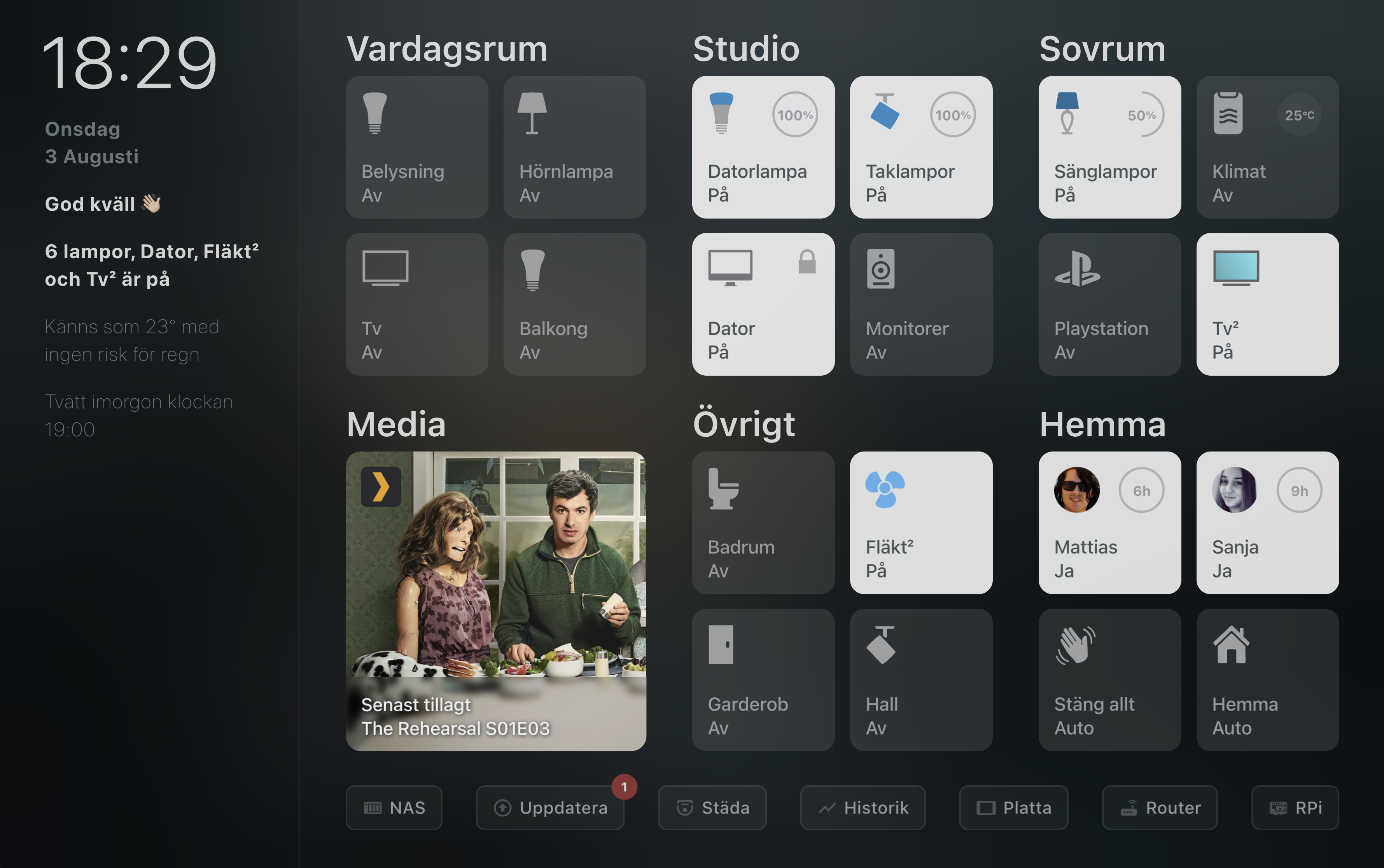
https://raw.githubusercontent.com/matt8707/hass-config/master/www/img/dash.png
it should looks like the 4th paragraph on the sidebar in this picture
 marble jackal
sonic sand
well it showing me 'null' if I do so..
https://raw.githubusercontent.com/matt870...
marble jackal
sonic sand
well it showing me 'null' if I do so..
https://raw.githubusercontent.com/matt870...
It was showing null because you were not outputting anything
sonic sand
marble jackal
It was showing `null` because you were not outputting anything
ok i'm trying to fix it now,
another thing i'm trying to do is to set up in my templates.yaml date sensor
- sensor:
    - platform: time_date
      display_options:
        - time
        - date
however I get an error missing property "state" when trying so, what am I doing wrong?
marble jackal
Where did you place this?
sonic sand
marble jackal
It was showing `null` because you were not outputting anything
        weather: >
          {% set entity = 'weather.accuweather' %}
          {{ state_attr(entity, 'temperature') | round if entity | has_value else 'Cannot load weather...' }}
              'Today Tempature is {{ temp }}°'
          {% else %}
            Cannot read the weather.
          {% endif %}
Is that alright or I should get rid off the %else% and %endif% in the end?
sonic sand
marble jackal
Where did you place this?
In templates.yaml
sonic sand
marble jackal
It should be in `sensor.yaml`
Thanks, rebooting now to check that out!
marble jackal
        weather: >
          {% set entity = 'weather.accuweather' %}
          {% set temp = state_attr(entity, 'temperature') | round(default='na') %}
          {{ ('Today's temperature is ' ~ temp  ~ '°')  if temp | is_number else 'Cannot load weather...' }}
Thanks!!
it works.
One last thing and I stop asking you;
I have set up the phone sensors to the sidebar, however I'm only getting this output Battery Ofir HONOR Magic 5 Pro Battery state discharging%
I wanted it to just show the battery percentage instead of battery state
http://pastie.org/p/0c9geBML1PmYSFFTZAq3v9
marble jackal
sonic sand
Thanks!!
it works.
One last thing and I stop asking you;
I have set up the phon...
Check for the device class battery
sonic sand
marble jackal
Check for the device class `battery`
sensor.ofir_honor_magic_5_pro_battery_level
unit_of_measurement: %
device_class: battery
icon: mdi:battery-80
friendly_name: Ofir HONOR Magic 5 Pro Battery level
Or do this
{% for sensor in entities if states(sensor) | is_number and states(sensor) | int(default=0) <= 5 %}
Or simply set the default for your int filter above 5
Then you don't need to check for anything else
Like this
{% for sensor in entities if states(sensor) | int(default=6) <= 5 %}
plain magnetBOT
@sonic sand I converted your message into a file since it's above 15 lines :+1:
marble jackal
No clue what you want to tell me with that
sonic sand
Running that on the dev tools showing no output
        battery: >
          {% set entities = states.sensor
            | selectattr('entity_id', 'search', 'battery', 'battery_level')
            | map(attribute = 'entity_id') | list %}
          {% for sensor in entities if states(sensor) | int(default=6) <= 5 %}
            {% if loop.first %} {{'\u26A0\uFE0F'}} Battery {% else %}, {% endif %}
            {{ state_attr(sensor, 'friendly_name') }} {{ states(sensor) }}%
          {% endfor %}
Are there any sensors below 5?
sonic sand
marble jackal
Are there any sensors below 5?
Entity: sensor.4ae40829_d802eb83_browser_battery
Entity: sensor.6e64af54_0576e2c7_browser_battery
showing unavailable
all the others are higher than 5.
 pine briar
is this the right channel to ask a question about rest params?
marble jackal
sonic sand
Entity: sensor.4ae40829_d802eb83_browser_battery
Entity: sensor.6e64af54_0576e2c...
So in that case the output is as expected, there were no sensors matching for the for loop
marble jackal
pine briar
is this the right channel to ask a question about rest params?
#integrations-archived unless it's specifically about a template in the rest sensor
sonic sand
marble jackal
So in that case the output is as expected, there were no sensors matching for th...
        battery: >
          {% set entities = states.sensor
            | selectattr('entity_id', 'search', 'battery', 'battery_level')
            | map(attribute = 'entity_id') | list %}
          {% for sensor in entities if states(sensor) | int(default=4) <= 5 %}
            {% if loop.first %} {{'\u26A0\uFE0F'}} Battery {% else %}, {% endif %}
            {{ state_attr(sensor, 'friendly_name') }} {{ states(sensor) }}%
          {% endfor %}
gives me the 2 phones battery states and 2 unavailable states of those browser_battery sensors.
is there a way to filter unavailable states and change that I will see the battery_level and not the battery state of those two phones?
marble jackal
You are not seeing the battery level of those two phones because it's above 5
Those phones have a sensor for the battery level, and for the battery state
The battery state is a string, like discharging or charging
Because of your filter criteria you will get both, that's why I first advised to use the device class
 jovial thicket
hi #automations-archived sent me, im trying to have my automation's action to notify me with the name of the sensor triggering : "{sensor} is wet! UWU"
sonic sand
Do I change it to device class on the first line? how can I do that?
marble jackal
jovial thicket
hi <#672220450977349653> sent me, im trying to have my automation's action to no...
"{{ states[trigger.entity_id].name }} is wet*
marble jackal
sonic sand
Do I change it to device class on the first line? how can I do that?
| selectattr('entity_id', 'is_state_attr', 'device_class', 'battery') use that instead of the selectattr() with the search test
I'm off to bed now
sonic sand
marble jackal
I'm off to bed now
Sweet dreams man!
The output now that i'm getting
Result type: string
battery: >
             ⚠️ Battery
            6e64af54-0576e2c7 Browser battery unavailable%

            ,
            4ae40829-d802eb83 Browser battery unavailable%
That's because you've set the default for the int filter below 5 again
That changes unavailable to 4 which is below 5
 cosmic garden
I would like to publish various different data from the climate platform used by this integration: https://github.com/gazoodle/gecko-home-assistant
service: mqtt.publish
data:
  qos: 0
  topic: home/hottub/stat
  payload_template: "{{ states('climate.hot_tub_heater') }}"
When I create an automation to call the MQTT publish service as above, the message payload I receive over MQTT is "auto".
How can I get the actual temperature, and set temperature?
Do these things depend on the integration itself, or are the common to the climate platform?
inner mesa
That's the state
And you asked it to publish the state
Find what you actually want in  -> States
cosmic garden
Thank you so much
inner mesa
cosmic garden
It's blindingly obvious when you put it that way 😛
jovial thicket
the web site im scrapeing for the energy prices put the prices in weird ways. like 28.0 CentsPerKW and the oil co i had to use the price of 100 gal 358.00 because the 3.58 cent was so scripted i couldn't extract it. how do i math this with a template?
sonic sand
marble jackal
That changes `unavailable` to `4` which is below `5`
if I change the default=6 it giving me no output
marble jackal
sonic sand
if I change the default=6 it giving me no output
Yes, we've already been there, it will give no output if there are no batteries below 5%. What output would you expect then?
sonic sand
marble jackal
Yes, we've already been there, it will give no output if there are no batteries ...
Just to show the battery levels of the two phones, no matter how much they got
marble jackal
That was never clear from your template, you were iterating over all sensors to find battery levels below 5
sonic sand
marble jackal
That was never clear from your template, you were iterating over all sensors to ...
Oh I will just leave that as it is and change the last-changed option next to the person photo to battery_level percentages.
But how can I filter out that battery_state from showing up in that template? (been trying to add it to rejectattr( but it is still showing up.
EDIT:
Got it.
http://pastie.org/p/0ICUgfjbZRYzzqheSoS8JJ
How can I create an MQTT sensor of person persistence last-changed as this guy did?
http://pastie.org/p/1gsVkw0OEDS8LrxtxP9R0N
or it's related to #zigbee-archived or something other than #templates-archived ?
 trail estuary
Hi everyone!
I am trying to calculate the actual cost of electricity, and need to add taxes and tariffs to the price per kWh.
I have great data for the price of electricity but the tariffs and such has to be templated.
I have tried to create a template, but it feels very clunky and I am not 100% sure it will work as times goes by...
I'd love if someone could have a quick look and potentially make it safer to put into use... 🙂
lyric comet
Looks ok to me. The only thing I would do is to set variables for the work day, month and hour so they only get computed once.
 torn talon
hey guys, I have two input datetime helpers that I want to add (start_time and duration_time). how can I add these values to a new variable (end_time)?
marble jackal
Are they time only or date and time
torn talon
time only
lucid thicket
You may have to use a value template and append the time zone to the end to show that it is UTC. I’ve used value ~ '+0000' but I think you can also append a capital Z.
marble jackal
torn talon
time only
service: input_datetime.set_datetime
data:
  time: "{{ (today_at(states('input_datetime.start')) + as_timedelta(states('input_datetime.duration'))).strftime('%H:%M:%S) }}"
target:
  entity_id: input_datetime.end
would this be the correct way to use this as variables on a blueprint: variables: time_fmt: '%H:%M:%S' on_duration: !input on_duration on_time: !input on_time off_time: "{{ (today_at(states('input_datetime.hora_da_rega')) + as_timedelta(states('input_datetime.tempo_de_rega'))).strftime(time_fmt) }}"
marble jackal
looks fine, but you might want to check in #blueprints-archived
I don't see why you would put the time format in a variable if you don't allow the user to input it.
torn talon
marble jackal
looks fine, but you might want to check in <#786973377209696266>
I don't see wh...
it's just because it gets used again in other variables and condition templates
thanks, will check on #blueprints-archived . I'm actually trying to adapt an existing blueprint (https://github.com/EPMatt/awesome-ha-blueprints/blob/main/blueprints/automation/on_off_schedule_state_persistence/on_off_schedule_state_persistence.yaml)
trail estuary
lyric comet
Looks ok to me. The only thing I would do is to set variables for the work day, ...
Thats great input!
That would look like this, right?
trail estuary
Sure...? 🙂
mighty ledge
{% set el_taxes = 0 %}
{% set weekend = states('binary_sensor.workday_sensor', 'off') %}
{% set month = now().month %}
{% set hour = now().hour %}
{% if weekend %}
  {% set el_taxes = iif(month <= 3, 35.58, 43.93) %}
{% elif month <= 3%}
  {% set el_taxes = iif(6 <= hour <= 22, 47.38, 35.58) %}
{% else %}
  {% set el_taxes = iif(6 <= hour <= 22, 55.73, 43.93) %}
{% endif %}
{{ el_taxes / 100 }}
and it could just be reduced to
{% if states('binary_sensor.workday_sensor', 'off') %}
  {% set el_taxes = iif(now().month <= 3, 35.58, 43.93) %}
{% elif now().month <= 3%}
  {% set el_taxes = iif(6 <= now().hour <= 22, 47.38, 35.58) %}
{% else %}
  {% set el_taxes = iif(6 <= now().hour <= 22, 55.73, 43.93) %}
{% endif %}
{{ el_taxes / 100 }}
Are there speed improvments by doing that that way? I always find that layout quite difficult to read compared to the full If statements?
trail estuary
That is beautiful, even if I too have a little harder to make sense of it...
mighty ledge
no, but it's easier to manage
iif is just an if statment like the @IF in excel
and one thing is you should use jinjas simple notation for a value inside a range over using and and or
i.e.
3 <= x <= 10
not
lyric comet
It is my background I expect I am used to full programming languages rather than Excel which I hate.
mighty ledge
x >= 3 and x <= 10
you can also avoid iif by using inline if statements (which I prefer)
35.58 if now().month <= 3 else 43.93
trail estuary
Hehe... Little did I know that were som many ways to write templates! 😄
mighty ledge
which reads better IMO
cerulean cipher
lyric comet
It is my background I expect I am used to full programming languages rather than...
I use excel to generate lines of other programming languages 😄
marble jackal
mighty ledge
`35.58 if now().month <= 3 else 43.93`
you can even nest them, but at that point the other notation makes it more readable
mighty ledge
yep, agreed
plain magnetBOT
@hidden terrace I converted your message into a file since it's above 15 lines :+1:
 hidden terrace
Please, see the Bot message.txt, I wonder if it's possible with template ?
 deep marsh
Hi all,
Is there a way to see if I arrived at the last item in a For loop?
mighty ledge
if loop.last
deep marsh
🫣 That easy.... Thx!
mighty ledge
yep, just like loop.first
mighty ledge
loop.first_last_after_second_to_last
deep marsh
inner mesa
<https://jinja.palletsprojects.com/en/3.1.x/templates/#list-of-control-structure...
Thank you. How could I have missed that
mighty ledge
fyi my last comment was a poor joke
lyric comet
I would like to call the calendar.list service for all the calendars on my server, adding all the results into a single list for output. I know can simply hard code all 15 calendars into different variables then combine them, but wondered if it is possible to use a while loop in an automation to loop through them all directly.
marble jackal
You could send an event to a trigger based template sensor, and combine it all in an attribute.
Then, after the repeat is complete, write the attribute value to a variable and send another event to make the attribute empty again
 boreal fiber
can someone help me modify this template that creates a list of doors with a state of on/open. but i want to now create a list of battery sensors below a certain state. I think its just a slight tweak but not getting there
{{ states | selectattr('entity_id', 'in', state_attr('group.all_doors','entity_id')) | selectattr('state','in',['on','open']) | list | length >= 1 }}
marble jackal
@boreal fiber First of all your template will be mucht more efficient if you start with the group, and not with all state objects. You can expand the group and then you will have all state objects of the members, so your template above can be improved a lot by using:
{{ expand('group.all_doors') | selectattr('state','in',['on','open']) | list | length >= 1 }}
to actually get the entity_id's instead of true/false you can use this
{{ expand('group.all_doors') | selectattr('state','in',['on','open']) | map(attribute='entity_id') | list }}
Do you actually have cover entities in this group, or only door sensors?
 slender mantle
{{ states('sensor.sdm230_sdm230_power') }} + {{ states('sensor.solax_x1_boost_ac_power') }} = {{ states('sensor.sdm230_sdm230_power') + states('sensor.solax_x1_boost_ac_power') }}
Gets me
-879.52 + 3123.0 = -879.523123.0
What am I doing wrong?
marble jackal
you are outputting a formula. If you want the result you need to put it in once template, not 3
or are you only referring to the last part?
slender mantle
marble jackal
you are outputting a formula. If you want the result you need to put it in once ...
I am intending to output a formula, yea I'm referring to the last part, I'm demonstrating that the math isn't mathing 🙂
marble jackal
you are combining 2 strings there, as all states are strings
slender mantle
Ah duh, dunno why I didn't think of that
marble jackal
you need to convert them to numbers (float or int) first
slender mantle
{{ states('sensor.sdm230_sdm230_power') | float + states('sensor.solax_x1_boost_ac_power') | float }}
There we go, it's happy now, thanks 🙂
sonic sand
hey there
I used to use notcis theme, I moved yesterday to another theme and I wanted to move all the colors button card templates I had to a yaml file to make them available no matter what theme I'm choosing.
So I created under button_card_templates folder a yaml file called mobilecolors.yaml
the file contains http://pastie.org/p/1YwGYHr2fu8fRtB5uiAJCK
when I put on raw configuration the following line, I get an error (which not happening in my other dashboard)
button_card_templates: !include_dir_merge_named button_card_templates
The error
Unable to parse YAML: YAMLException: unknown tag !<!include_dir_merge_named> (1:70) 1 | ... rge_named button_card_templates -----------------------------------------^ 2 | ... 3 | ...
just to note that I have tried to put these entire templates inside themes.yaml
but this gave me an error when trying to restart HA
Failed to restart Home Assistant
The system cannot restart because the configuration is not valid: Invalid config for [frontend]: [button_card_templates] is an invalid option for [frontend]. Check: frontend->frontend->button_card_templates. (See /config/configuration.yaml, line 119).
is this a GUI configured dashboard? You can't use includes then, because that doesn't work in json
sonic sand
Yeah it is.
marble jackal
Well, that explains it. A GUI based dashboard is stored in a json file in .storage, and therefore can't use includes and YAML anchors
sonic sand
marble jackal
Well, that explains it. A GUI based dashboard is stored in a json file in .stora...
Thanks!
So if I got those templates in the same location (on the raw configuration on that dashboard) BUT I change the theme, I will not able to see those colors for some reason.
marble jackal
I don't understand what you are saying here
and those templates are BTW completely unrelated to jinja templates, which is the subject of this channel
 fickle sand
sonic sand
Thanks!
So if I got those templates in the same location (on the raw configurati...
fickle sand
sonic sand
Thanks!
So if I got those templates in the same location (on the raw configurati...
Not all themes use the same variables, so it can be possible that the first one did include them and the new one doesn't. But this is all more related to #frontend-archived
sonic sand
Thanks, I will move to #frontend-archived about it
sonic sand
How can I insert template to entities card?
              entities:
                - entity: vacuum.mijia_v2_202f_robot_cleaner
                  attribute: clean_record.clean_time
                  name: Last Clean Time
The following template I already got?
http://pastie.org/p/12hiTBZHbZSBIYhL7rFh4r
I want it to show something like
Last Clean Time: [Template here]
Thanks!!
mighty ledge
You can't template the frontend without custom cards
sonic sand
What card can I use then to show this template?
mighty ledge
just search hacs for a templating card that uses jinja2
sonic sand
Thanks!
sonic sand
thanks, my template will be on state: ? or some other part?
hidden terrace
Hi, i'm trying to understand how to get some sensors from a json reply...
so here's my data in developer tools:
{% set value_json =
{"Battery Capacity":"100 %","Firmware Number":"QA6JZ1000015","Last Power Event":"None","Line Interaction":"None","Load":"26 Watt(5 %)","Model Name":"LE1000DG","Output Voltage":"118 V","Power Supply by":"Utility Power","Rating Power":"530 Watt(1000 VA)","Rating Voltage":"120 V","Remaining Runtime":"98 min","State":"Normal","Test Result":"Unknown","Utility Voltage":"118 V"}
%}
I'm trying to create sensors from that... It seems simple but i seems unable...
{{ value_json }} is working...
But once i try to get an "individual value", it doesn't work... it expects a name or a number...
I tried many things like these: {{ value_json.["Battery Capacity"] }} but there's something simple a probably doesn't understand 😉
I get the data I want when trying on https://jsonpathfinder.com/ ... But i'm unable to "translate" that path to the {{ value_json.stuff }} ...
 jagged obsidian
You're not showing what you've tried to do
hidden terrace
Currently, i'm only trying in the developper tools template...
I put that:
{% set value_json =
{"Battery Capacity":"100 %","Firmware Number":"QA6JZ2000026","Last Power Event":"None","Line Interaction":"None","Load":"26 Watt(5 %)","Model Name":"LE1000DG","Output Voltage":"118 V","Power Supply by":"Utility Power","Rating Power":"530 Watt(1000 VA)","Rating Voltage":"120 V","Remaining Runtime":"98 min","State":"Normal","Test Result":"Unknown","Utility Voltage":"118 V"}
%}
{{ value_json.["Battery Capacity"] }}
But i get a TemplateSyntaxError: expected name or number
if I put {{ value_json }}, it shows correctly on the right side ... but once I try to get "individual" value ... I fail with TemplateSyntaxError: expected name or number.
I'm trying everything here: http://homeassistant:8123/developer-tools/template
jagged obsidian
{{ value_json['Battery Capacity'] }}
hidden terrace
oh... the dot...
Result type: string
100 %
working... 🙂 Thanks a lot! It was so simple... 😦
I'll create my sensors now... 🙂
Not sure why i put a dot at first...
inner mesa
Remove the dot
hidden terrace
yeah. @jagged obsidian point me to that... It,s working now. 🙂
hidden terrace
If i want to remove the V in 118 V... Would it be better to pipe into a trim function ... or doing a split ?
{{ value_json["Output Voltage"]|trim(' V') }}
or
{{ value_json["Output Voltage"].split(' V')[0] }}
One way is piping the results in trim... the other is doing what seems a useless array to keep the first element...
jagged obsidian
You can also do a replace 😉
hidden terrace
replace with nothing ?
{{ value_json["Output Voltage"].replace(" V","") }}
Works too 🙂
jagged obsidian
Ultimately the result is what matters
hidden terrace
yeah... I want a number and not a string so all of them is working.
 hazy aspen
Hello fellow Assistant managers.... I am beyond new at this. I was curios if anyone can help me figure something out.
I made this from the Ui. Basically I want my lights to dim when using apps like Stremio, Hulu etc... It works but EVERYTHING dims or goes bright regardless what app I uses... if I pause video. What did I do wrong? Any help would be awesome.
plain magnetBOT
@hazy aspen I converted your message into a file since it's above 15 lines :+1:
 willow wing
how can i rewrite these in a wildcard template? (see * location)
{{ (now().date() + timedelta(days=1)) | string == as_timestamp(states.calendar.*.attributes.start_time) | timestamp_custom('%Y-%m-%d') }}
marble jackal
You want this to return true if any calendar has a start date which is tomorrow?
willow wing
marble jackal
You want this to return true if any calendar has a start date which is tomorrow?
Yes, please
marble jackal
willow wing
Yes, please
{% set event = namespace(tomorrow=false) %}
{% for cal in states.calendar %}
  {% set start = cal.attributes.get('start_time') %}
  {% if start and as_datetime(start).date() == (now() + timedelta(days=1)).date() %}
    {% set event.tomorrow = true %}
    {% break %}
  {% endif %}
{% endfor %}
{{ event.tomorrow }}
Thank you @marble jackal 🤩 👍🏻 👍🏻
hazy aspen
If I posted inaproprately I apologize.
marble jackal
Your issue mostly seems an #automations-archived issue
And frankly, I don't fully understand your issue description
Oh, I now see your question in that channel,
Check on that, and the state in one template
{{ is_state_attr('media_player.android_tv_192_168_42_236', 'app_name', ['stremio','Netflix', 'Hulu']) and is_state('media_player.android_tv_192_168_42_236', 'playing') }}
hazy aspen
marble jackal
Your issue mostly seems an <#672220450977349653> issue
I placed it but it does not work. Could it be I am placing this in the wrong location?
(trigger UI section) of automations.
wondering if I should remove 'stremio','Netflix', 'Hulu' and just have 'stremio' or app_name: com.stremio.one
marble jackal
hazy aspen
I placed it but it does not work. Could it be I am placing this in the wrong loc...
What's the code now?
And check in developer tools > states what the actual attribute value is
Note that they are case sensitive
hazy aspen
Sorry I should have said good morning.
{{ is_state_attr('media_player.android_tv_192_168_42_236', 'app_name', ['com.stremio.one']) and is_state('media_player.android_tv_192_168_42_236', 'playing') }}
but that is not working.
My state attributes are here:
plain magnetBOT
@hazy aspen I converted your message into a file since it's above 15 lines :+1:
mighty ledge
post the full automation using one of the share sites
hazy aspen
ok sorry
this exact setup works for plex but plex has this for the trigger.
platform: device
device_id: e7a4a1226ee93c639a4bdc0886224927
domain: media_player
entity_id: media_player.plex_plex_for_android_tv_shield_android_tv
type: playing
for:
hours: 0
minutes: 0
seconds: 30
====================================================
for anyone that may have the same issue I found a fix using chatgtp.
Was nothing big... but for a newbie this fixed things with the help
from TheFes. (Thank you)
I changed:
trigger:
- platform: template
value_template: >-
{{ is_state_attr('media_player.android_tv_192_168_42_236', 'app_name',
['com.stremio.one']) and
is_state('media_player.android_tv_192_168_42_236', 'playing') }}
enabled: true
condition: []
to :
description: Dims lights for a Streamo Movie at night.
trigger:
- platform: template
value_template: >-
{{ is_state_attr('media_player.android_tv_192_168_42_236', 'app_name', 'com.stremio.one') and
is_state('media_player.android_tv_192_168_42_236', 'playing') }}
condition: []
fixed the issue and is working to my horrible standards lol.
 wintry gale
Hi guys
plain magnetBOT
@wintry gale I converted your message into a file since it's above 15 lines :+1:
cerulean cipher
hazy aspen
====================================================
for anyone that may have th...
suggesting chatgpt bad.
wintry gale
This is displaying the value as 70 in the developer tools, but the time says it should be 85? I'm very confused. And new to python. Any tips/ideas?
is there a better way to reference points in time? Thanks
mighty ledge
it's jinja not python
wintry gale
oh Im sorry
cerulean cipher
wintry gale
This is displaying the value as 70 in the developer tools, but the time says it ...
I also don't see 85 anywhere there
wintry gale
sorry 80.
mighty ledge
and you're using <= followed by >= in the next if statement
meaning 2 if's have the ability to hit the same number and it's going to bail on the first, not second
wintry gale
ahhhhhhh I see
mighty ledge
lastly, make it easier on yourself by using a normal if comparision
{% if 5 <= now().hour < 7 %}
cerulean cipher
this could be one statement also
{% elif (now().hour >= 7) or (now().hour <= 10) %}
80
{% elif (now().hour >= 10) or (now().hour <= 15) %}
80
{% elif (now().hour >= 15) or (now().hour <= 18) %}
80
from 7 to 18
mighty ledge
          {% if 5 <= now().hour < 7) %}
            70
          {% elif 7 <= now().hour < 10) %}
            80
          {% elif 10 <= now().hour < 15) %}
            80
          {% elif 15 <= now().hour < 18) %}
            80
          {% elif 18 <= now().hour < 20) %}
            75
          {% elif 20 <= now().hour < 22) %}
            65
          {% else %}
            55
          {% endif %}
your last elif didn't make any sense
unles you're trying to get from 22 to midnight and 0 to 5 should be 10
and your or'd statements make even less sens if you're trying to get a range between times, which is why I cahnged it
cerulean cipher
{% if 5 <= now().hour < 7) %}
70
{% elif 7 <= now().hour < 18) %}
80
{% elif 18 <= now().hour < 20) %}
75
{% elif 20 <= now().hour < 22) %}
65
{% else %}
55
{% endif %}
much shorter
mighty ledge
if you're going for shortness, there's better ways to handle that.
cerulean cipher
mighty ledge
if you're going for shortness, there's better ways to handle that.
oh I'm sure
that was just ott
mighty ledge
{{ ([0] * 6 + [70] * 2 + [80] * 10 + [75] * 2 + [65] * 2 + [55] * 2)[now().hour-1] }}
wintry gale
Thankyou very much Petro and KrAzke242. A silly mistake on the greater/less than and some lack of understanding on my part. Im creating a template for other lighting brightness and temperature templates, hence the excess time 'zones'. This had cleared some stuff up for me. I have been trying to sort this since this morning UK time!
cerulean cipher
wintry gale
Thankyou very much Petro and KrAzke242. A silly mistake on the greater/less than...
well it's still morning in The Bahamas so if you hurry you can say it was all done in one morning 😛
wintry gale
mighty ledge
`{{ ([0] * 6 + [70] * 2 + [80] * 10 + [75] * 2 + [65] * 2 + [55] * 2)[now().hour...
Are people who do this stuff professionally very into shortness/efficiency? Here I am just trying to make it easy to read...
cerulean cipher
wintry gale
Are people who do this stuff professionally very into shortness/efficiency? Here...
easy to read is usually terribly inefficient
my code is normally ugly AF till I go over it 100 times
mighty ledge
wintry gale
Are people who do this stuff professionally very into shortness/efficiency? Here...
personally, I make it easy to read & easy to update.
if you understand code, that's a very easy to read statement
creates a 24 item list with
Result type: list
[
  0,
  0,
  0,
  0,
  0,
  0,
  70,
  70,
  80,
  80,
  80,
  80,
  80,
  80,
  80,
  80,
  80,
  80,
  75,
  75,
  65,
  65,
  55,
  55
]
hours of the day
super simple
wintry gale
if I understood it, I wouldn't be posting here!!!
cerulean cipher
yeah lists are a life saver
cerulean cipher
wintry gale
if I understood it, I wouldn't be posting here!!!
it's ok, we all learn something new everyday
wintry gale
I have learned a lot today. Been using HA for 3 years and now understand sooooo much more.
cerulean cipher
this is the way.
marble jackal
hazy aspen
to :
description: Dims lights for a Streamo Movie at night.
trigger:
- platfor...
Hmm, apparently is_state_attr() doesn't accept lists like is_state() does
mighty ledge
I wouldn't expect it would
because it can be a list itself
where as states are always strings
marble jackal
Ah right
mighty ledge
what happens when you want to check the attribute against a list and not the values in the last
you'd be screwed
marble jackal
True true
hazy aspen
cerulean cipher
suggesting chatgpt bad.
Understood but the formatting was fixed using it and I do not want to pretend I fixed it on my own.
cerulean cipher
that's fine but suggesting it to others is what's the problem
I don't make the rules, just drawing them to your attention in a friendly manner
😄
 surreal bay
Hi, I have a problem and I can't get any further. I'm new to HA...
I created a template to use it for notifications like "Close door, it s to hot outside" or " Open door, outside is cooler than inside"
name: "too warm inside"
state: "{{ states('sensor.innentemperatur') > states('sensor.aussentemperatur') }}"
How can I now define that the sensor only changes from "False" to "True" when the inside temperature is 5 degrees below the outside temperature?
Also, is it somehow possible to define this only to temperature ranges within 18-30 degrees? In winter I don't want to get a notification that I should ventilate when it's -5 degrees...
Hope someone can help me 🙂
marsh cairn
Assuming you mean a minimum temperature of 18 degrees inside.
My suggestion:
state: {{ iif(states('sensor.innentemperatur')|float(0) >= 18 and states('sensor.innentemperatur')|float(0) >= (states('sensor.aussentemperatur')|float(0) - 5)), 'true', 'false') }}
One of our Jinja Ninjas might have a more elegant solution. 😆
mighty ledge
just set things to variables
instead of reusing states() method
aslo remove iif
just use the condition for iif because it's already true/false
cerulean cipher
I aslo suggest that
marsh cairn
  {% set innen = states('sensor.innentemperatur')|float(0) %}
  {% set aussen = states('sensor.aussentemperatur')|float(0) %}
{{ innen >= 18 and innen >= aussen - 5 }}```petro approved? 😆
marsh cairn
What parenthesis? 😆
cerulean cipher
Jorg we have to watch out, you're slick
marsh cairn
cerulean cipher
surreal bay
marsh cairn
```state: >
{% set innen = states('sensor.innentemperatur')|float(0) %}
{% s...
Thank you so much. I believe it works. I already got the first message that I should close the window in the bedroom 🙂
inner mesa
automating that is your next task
surreal bay
inner mesa
automating that is your next task
I am working on it 😄
marble jackal
surreal bay
I am working on it 😄
By sending the notification to one if your household members? 😁
 icy thistle
Hey, so I want to have a threshold binary sensor (if the value of an entity is above X, state is set to true) that only changes value to false if value is less than 1 for an N number of seconds, but threshold platform does not support this feature. Is there a way to do this cleanly with a template? Cause I don't want to hack around with GUI automations
i just don't know where I would even begin scripting this
but maybe there's a blueprint out there somewhere, or someone already configured this
I need this to track whether a desktop lamp connected to a smart outlet is on or not. It draws power in pulses, on and off, so just a plain threshold sensor won't do
surreal bay
marble jackal
By sending the notification to one if your household members? 😁
That's the plan. My wife opens the windows at the most impossible times. So now she gehts automatically the push when it's cooler outside.
And another push as soon as a window is open for more than 30 seconds and it is 2 degrees warmer outside than inside 😅😅
inner mesa
or...children
or an intern paid through "exposure"
I supervised a critical piece of a green-home automation project...
Chief window opener/closer
marsh cairn
Isn't Reed automating his children with a candy filled pet feeder?
cerulean cipher
I am part of the OG home automation system my dad would say "change the channel"
much like Alexa today, only she didn't have to get up and do it
then we got a VCR with a wired remote...
 umbral ridge
I have this in a sensors.yaml file
- platform: template sensors: rgbmonster_c_drive: friendly_name: "RGBMonster C: Free Space Converted" unit_of_measurement: "Free Space" value_template: "states('sensor.rgbmonster_c_drive_freespace_2')| filesizeformat()"
Shouldn't this work? All i get is a sensor that says 'unknown'
If i use it in the template section, the value is 1.1 TB (like it should be)
inner mesa
you need to surround your template in {{ }}
umbral ridge
so, value_template: "{{states('sensor.rgbmonster_c_drive_freespace_2')| filesizeformat()}}"
?
inner mesa
yes
inner mesa
"didn't work" isn't enough
umbral ridge
it still says 'unknown'
- platform: template sensors: rgbmonster_c_drive: friendly_name: "RGBMonster C: Free Space Converted" unit_of_measurement: "Free Space" value_template: "{{states('sensor.rgbmonster_c_drive_freespace_2')| filesizeformat()}}"
this is as it's written now
the result i get while posting {{states('sensor.rgbmonster_c_drive_freespace_2')| filesizeformat()}} in the template section is 1.1 TB
If i go to States, set state and enter 2 TB in the sensor value....the sensor then states 2 TB
possibly worth noting that i've been getting a lot of 'wonky' things with integrations and such since HA 2023.08.3 and supervisor 2023.08.1
i.e. unable to remove sensors, sensors being created as sensor.name_2, integrations not loading, etc
possibly a moot point to this specifc issue though
inner mesa
it really doesn't like the unit_of_measurement there
I get a big error in my log with that because it thinks it should be a numeric value, and it's not
umbral ridge
I haven't tried removing that yet. I can only go up from here
ok removing that shows 1.1 TB on the sensor now. I'll add another from another machine to make sure it's not an imposed value from states, but i think that did it.
alright, for sure that was it. Thank you, believe it or not, i killed a whole day on that.
inner mesa
Next time, check the logs. They pretty much told me what was wrong
 neat moon
HA 2023.8.1 it is not possible to create a template sensor
 golden plaza
I have 2 utility meters for reporting energy consumption. 1 sensor is the total (output) and the other is the consumption of 1 device, I want to subtract the 1 device from the total consumption in order to see what the other device is using (there are only 2 devices on this output) How do I create a template sensor for this?
I've tried with the below - but I get unavailable for the sensor.
  geyser_energy_usage:
    friendly_name: "Geyser Energy Usage"
    unit_of_measurement: "kWh"
    value_template: "{{ (states('sensor.aux-total-energy')|float - states('sensor.aux_pool_today')|float)}}"
The 2 utility sensors are sensor.aux-total-energy and sensor.aux_pool_today
faint crow
How can I use the html dashboard I coded in HA plus css and js
marble jackal
faint crow
How can I use the html dashboard I coded in HA plus css and js
that has nothing to do with templates, try #frontend-archived
hazy aspen
marble jackal
Hmm, apparently `is_state_attr()` doesn't accept lists like `is_state()` does
Good or bad thing?
faint crow
marble jackal
that has nothing to do with templates, try <#460846676358332417>
OK. Thanks. Template as a name is so confusing
marble jackal
@faint crow that's why there is a topic in each channel
plain magnetBOT
The topic of this channel is:
Become a real Jinja2 Ninja! Don't worry my Genin, we are here to help! You can find general Jinja docs at https://jinja.palletsprojects.com/en/3.1.x/templates/, Home Assistant extensions at https://www.home-assistant.io/docs/configuration/templating/, and trigger variables at https://www.home-assistant.io/docs/automation/templating/
This channel is for support with Jinja templates. Some custom Lovelace cards support other types of templates, such as those written in JavaScript, and #frontend-archived is the right channel for that.
Please use http://pastie.org/, https://dpaste.org/, or https://paste.debian.net/ to share code or logs
marble jackal
hazy aspen
Good or bad thing?
neither, just that is_state('sensor.foo', ['bar', 'banana']) works, and is_state_attr('sensor.foo', 'some_attr', ['bar', 'banana']) not, you need to use state_attr('sensor.foo', 'some_attr') in ['bar', 'banana']
jovial thicket
is there a way to make shopping list not ask if you want to see the list if the list is empty?
floral shuttle
moving away from my sensor.abc_actueel group, which I expanded at first in this template I made it into a states but fear it can be done more efficiently 😉 would appreciate the extra eye
the idea is to list the not_off switches that dont have the self measured power usage....
 sonic nimbus
how can I check for my template trigger if just one light is turned on from my group light.all_lights then trigger automation? Also I need this for all switches, but expect switch.A, switch.B and switch.C and for some media_players..can I create a list thn do a filter with count ?
marble jackal
floral shuttle
moving away from my sensor.abc_actueel group, which I expanded at first in this ...
besides defining the same namespace twice, it looks fine to me.
plain magnetBOT
@floral steeple I converted your message into a file since it's above 15 lines :+1:
floral shuttle
aw that was a c&p error from my real config, its not there 😉 so no harm in running over all states? (its the only one using it in my config....)
haughty breach
@floral steeple you're missing the "s" on conditions:
floral steeple
Thank you sir
floral steeple
hey all, i have an automation for a ikea 2 button remote to not only turn it on and off, but to dim it. Automation is here:
http://pastie.org/p/24po3LBqCUEoqb7zRPMZs4
the problem is, when I dim down or up, it does dim stepwise, but it does no stop until it completely off or on
I based my automation on this blueprint, but I don't see how the blueprint takes care of the getting out of the loop
https://github.com/niro1987/homeassistant-config/blob/main/blueprints/automation/niro1987/zha_ikea_tradfri_2button_remote_brightness.yaml
 lofty mason
I thought this would break the loop:
    # Any other event will cancel the repeat loops (i.e. releasing the [on|off] button)
    default: []
so did I, but maybe its not indented properly?
marsh cairn
@jolly wigeon Answering to your question in frontend: The following template (can be used in a template sensor) will count the turned on lights. The reject part with "eq" will exclude exactly that entity id, the one with "search" every entity containing that string.
|selectattr('state', 'eq', 'on')
|rejectattr('entity_id', 'search', 'contained_string')
|rejectattr('entity_id', 'eq', 'light.specific_entity')
|list|count }}``` pale bane
ChatGPT just helped me make a template to calculate the distance between 2 sets of lat/long coordinates 😎
inner mesa
There's a distance() function for exactly that
inner mesa
ChatGPT is rarely the best answer for anything
marsh cairn
ChatGPT rescued my cat from a big tree!
inner mesa
Yay!
haughty breach
@wraith dust
I think the following should work... and should be more efficient than the for loop... whatever that's worth.
{% set events = states.sensor
| selectattr('entity_id', 'search', 'birthdays_ical_event')
| selectattr('attributes.start', 'defined')
| rejectattr('attributes.start', 'lt', today_at())
| rejectattr('attributes.start', 'gt', today_at('11:59:59'))
| map('state') | map("regex_replace", "( \-[\w\-\d\s]*)", "") | join(', ') %}

{{ "No Birthdays Today" if events|count == 0 else events }}
 timber fiber
is there a way to pull a list of event names from the current calendar day, for a specific calendar?
like {% set events_list = <something> %} that I can later on reference with a {% if my_string_value is in events_list %} ?
marble jackal
You need to use the service call
timber fiber
getting "Invalid datetime specified at..." for end_date_time: {% today_at('23:59:59') | as_datetime |as_local %}
and also for just end_date_time: today_at('23:59:59')
marble jackal
end_date_time: "{{ today_at('23:59:59') }}"
- use quotes around your templete
- use
{{and}}to output something today_at()already returns a datetime, usingas_datetimeon a datetime will give an errortoday_atwill already be in local time, no need to useas_local
timber fiber
Thanks - it yells about the service UI though, but if I put that in the template section.. .how do i reference my response_variable ?
service.variable.events = "service" is undefined
variable.events = "variable" is undefined
the docs say to use response_variable: something if you want to reference in a template - but don't really mention how
service: calendar.list_events
data:
  start_date_time: "{{ today_at() }}"
  end_date_time: "{{ today_at('23:59:59') }}"
target:
  entity_id: calendar.dpw
response_variable: agenda```And then I have:
binary_sensor:
  - platform: template
    sensors:
      test:
        friendly_name: 'my_test'
        value_template:
          {% set agenda_list = agenda.events %}
          {% if 'string' in agenda_list %}
            True
          {% else %}
            False
{% endif %}```The agenda variable will not be globally available, you can use a script or automation and toggle an input boolean
timber fiber
well, how the heck do I reference a list of events in a binary sensor then? I certainly cannot be the first person to try this
marble jackal
If you really want the binary sensor, you can send the data in an event and use that in a trigger based binary sensor
timber fiber
Yeah, I just want a boolean returned if there's an event today
but the tools to do that simple task are just ...way out of proportion to the result
not that I don't appreciate the assistance - I do, and with the docs being all over the place at times.. it's certainly needed
haughty breach
timber fiber
but the tools to do that simple task are just ...way out of proportion to the re...
Here's an example of the event method TheFes mentioned, you will have to modify it to check for a specific event. https://gist.github.com/Didgeridrew/8c251221b54c36dfb01fff8e04383819
timber fiber
haughty breach
Here's an example of the event method TheFes mentioned, you will have to modify ...
thanks - I'll give that a shot
marble jackal
haughty breach
Here's an example of the event method TheFes mentioned, you will have to modify ...
Yes indeed, that's exactly what I meant 🙂
timber fiber
not sure what gives, but this is not working. I think I am going to just use a paper calendar like a neanderthal
thanks
marble jackal
The first part is a script, you need to run it to update the binary sensor
 wind forum
I need the help of the mighty template wizzards.
{{ now() }}```
gives me two different formats:
```2023-08-24T12:06:06+00:00
2023-08-26 18:37:00.327894+02:00```
```now().day``` gives me a number.
But
```states('sensor.wall_e_last_clean_start').day```
gives me an error message.
How can i compare the day in the sensor to the day today? (or get true any other way if the date in the sensor is today)? deep shoal
Howdy, I have this template that is driving me nuts. I think that it is right, but it always shown as unknown. It is based off another good working template. Both are here: https://pastebin.com/DA08ZbHy
Any idea what I am doing wrong?
wind forum
UndefinedError: 'str object' has no attribute 'day' is the error btw.
inner mesa
All states are strings
lyric comet
wind forum
I need the help of the mighty template wizzards.
```{{ states('sensor.wall_e_las...
You need to get the state which is a string into datetime format
wind forum
lyric comet
You need to get the state which is a string into datetime format
And how do i do that?
lyric comet
try adding a |as_datetime filter.
wind forum
thx
lyric comet
I think there is a simple option to compare two datetime objects to see if they are the same day, but I can not remember the name of it.
wind forum
the filter works thx
deep shoal
I figured it out. The problem was the quotes in the code.
 upper basalt
On phone so not easy to figure out by myself atm:
How would I select all entities in the ‘update’ domain and count them? I want a sensor showing a number with available updates, something like this pseudo-code: {{ expand_domain('update')| list | state_attr('state','eq', 'on') | list | count }}
floral shuttle
{% set index = states('sensor.openweathermap_uv_index')|round(0) %} {% set uv = {1:'Zeer laag',2:'Zeer laag',3:'Laag', 4:'Laag',5:'Matig',6:'Matig', 7:'Hoog',8:'Hoog',9:'Zeer hoog', 10:'Zeer hoog'} %} {{uv.get(index,'unknown')}}' but no default was specified') ?
both have a default?
inner mesa
upper basalt
On phone so not easy to figure out by myself atm:
How would I select all entitie...
sorta close. {{ states.update|selectattr('state', 'eq', 'on')|list|length }}
state_attr is for attributes
expand_domain doesn't exist
floral steeple
hi all, how do I add a second condition to this?
      - conditions: "{{ trigger.id == 'on' }}"
        sequence:
          - service: light.turn_on
            data:
              color_temp: 377
              brightness_pct: 100
            target:
              entity_id:
                - light.essentials_a19_a60
                - light.essentials_a19_a60_2
for example
condition: state
entity_id:
  - light.essentials_a19_a60
  - light.essentials_a19_a60_2
state: "off"
Does the sensor exist? Try adding a int(0) filter before the round, if you want it to default to zero if the sensor is invalid. The standard name for the UV sensor is sensor.owm_uv_index so I assume you have changed it.
floral shuttle
Yes I have had this for years… never had this error. Will add the int and see what gives thx
marble jackal
floral steeple
hi all, how do I add a second condition to this?
```
- conditions: "{{ tri...
- conditions:
    - "{{ trigger.id == 'on' }}"
    - condition: state
      entity_id:
        - light.essentials_a19_a60
        - light.essentials_a19_a60_2
      state: "off"
Damn thanks! ❤️
marble jackal
floral shuttle
both have a default?
you don't have a default for the round filter
you only set it to round to 0 decimals
round(0, default=0) has a default
floral steeple
marble jackal
```yaml
- conditions:
- "{{ trigger.id == 'on' }}"
- condition: state
...
thanks again!
 zealous widget
Hey, struggling a little as templating and coding isn't my natural environment...
I've a few temperature sensors dotted around and im trying to visualise it better for the kids- is it possible to create a template sensor so that when it reads >40 it just says "hot", >30 "warm", >20 "cool" etc?
inner mesa
sure
{% set temp = states('sensor.whatever')|float %}
{{ iif(temp > 40, 'hot', iif(temp > 30, 'warm', 'cool')) }}
you didn't say what should happen if it was less than or equal to 20
that says "cool"
zealous widget
inner mesa
```
{% set temp = states('sensor.whatever')|float %}
{{ iif(temp > 40, 'hot', ii...
not all heroes wear capes - you make it seem so simple! if I wanted to add one more for =< 20 how would that look? is it just one further iif statement within that?
inner mesa
yes
zealous widget
inner mesa
yes
thank you so much kind sir
marble jackal
zealous widget
not all heroes wear capes - you make it seem so simple! if I wanted to add one m...
Maybe Rob wears a cape.. you never know
zealous widget
marble jackal
Maybe Rob wears a cape.. you never know
pics or it's not true 🤷♂️
marsh cairn
He's Batman! I have not been forced to say, that he is not Batman!
 young laurel
The remote_transmitter doesn't response when Button pressed. What am I doing wrong here?
plain magnetBOT
@young laurel I converted your message into a file since it's above 15 lines :+1:
haughty breach
young laurel
The remote_transmitter doesn't response when Button pressed. What am I doing wro...
Try #diy-archived or the ESPHome discord (https://discord.gg/v96qgvG9)
golden plaza
I have 2 utility meters for reporting energy consumption. 1 sensor is the total (output) and the other is the consumption of 1 device, I want to subtract the 1 device from the total consumption in order to see what the other device is using (there are only 2 devices on this output) How do I create a template sensor for this?
I've tried with the below - but I get unavailable for the sensor.
  geyser_energy_usage:
    friendly_name: "Geyser Energy Usage"
    unit_of_measurement: "kWh"
    value_template: "{{ (states('sensor.aux-total-energy')|float - states('sensor.aux_pool_today')|float)}}"
To format your text as code, enter three backticks on the first line, press Shift+Enter for a new line, paste your code, press Enter again for another new line, and lastly three more backticks.
```yaml
example: here
```
Don't forget you can edit your post rather than repeatedly posting the same thing.
lyric comet
If you paste your template into Dev tools what error do you get, the most likely reason is you have one of the sensors wrong, as you do not have defaults for float it is most likely throwing an error.
Also check the logs this might give you a pointer.
 trail ginkgo
Greetings. I have a sensor that updates 4-5 times per hour, and I would like to create a template sensor that shows the 1-hour-delta. I believe there is no way for me to easily retrieve a historical value in a template.
So I am thinking at the :02 of every hour I write the current sensor value into an input_number and at the :01 of every hour I calculate the difference between the current sensor value and the then 59 minute old value stored in the helper.
Are there any better ways to do this?
marble jackal
A trigger based template sensor which triggers every hour and writes the current value to an attribute and compares the value to the old attribute value
trail ginkgo
That makes sense. Combine them into a single thing. Thanks for the suggestion!
lyric comet
If you just want the change over the last 60 minutes, you can do this with statistics sensors.
https://www.home-assistant.io/integrations/statistics/
Just set the max_age to 60 minutes.
trail ginkgo
lyric comet
If you just want the change over the last 60 minutes, you can do this with stati...
Thanks for the suggestion. I will have a play with this in the morning! Looks interesting, but also like config details could throw it off.
 orchid patrol
Hi, i have a generic thermostat (works well by itself) but after a full reboot of home assistant the thermostat will turn "off" and reset to the "target_temp". Is this a normal feature of HA or an issue with my configuration ?