#hardware-archived
1 messages · Page 37 of 1
 patent river
Any time you see "AS/NZS blah blah" listed next to something electrical, that's "Australian Standard / New Zealand Standard" - all our wiring, power outlets, etc are shared

 tawny viper
 patent river
Remember comedy=tragedy+time. So you're basically guaranteed to be laughing about it eventually
 drifting ember
https://www.reddit.com/r/Esphome/comments/q1cwsu/converting_a_sensibo_sky_to_esphome/ this apparently works very well and I'm about to pull the trigger I think
 tacit burrow
Hmm
 analog meteor
Hi I´m looking for a thermostat that works kind of a mechanical thermostat that just communicates HA that the area in which it is needs to be heated (ideally modifying its set point from HA would be nice). Does someone know a sensor that works that way? I´ve been looking for days and all I find are complicated thermostats. Thank you
 muted arch
Do you want them to still actuate the heating automatically and just report whether they are?
Then it might be easiest to use an esp32 or similar and read those contacts
Or if you just need temperature to determine if you should heat a room, you can use e.g. the aqara ZigBee thermometers
analog meteor
@runic drift What I mean with no complicated is that i dont want it to have planning or even need it to turn on the boiler. I just need it to be smart enough to communicate temperature that user wants
muted arch
Ok, so set point dial and temperature reading, but no actuators on the device?
analog meteor
muted arch
Do you want them to still actuate the heating automatically and just report whet...
what i want is to allow non tech people to turn on heating without phone. Heating will be managed from HA with an esp32 connected to boiler.
analog meteor
muted arch
Ok, so set point dial and temperature reading, but no actuators on the device?
exactly
muted arch
Honestly doubt you'll find something that does exactly that
Looking around for a moment I can find a couple rotary nobs that could be integrated, and then split the components
But I'm not sure if any with a screen are cheaper than getting a thermostat that's smart and leaving half the features unconnected
analog meteor
muted arch
Honestly doubt you'll find something that does exactly that
Looking around for a...
at this point i am thinking the same but I think this application should be so common that maybe i was missing something. Thank you for your help anyway
patent river
@tacit burrow If you need more points both for and against the built-in option...
While I'm seeing the Sensibo is $120 on sale at some places in AU right now (but $150 normally), seems like "only" $50 extra for the 1st-party one is potentially worthwhile? (if nothing else for avoiding yet another power adapter plugged in somewhere)
If you have cats, mine loved to poke and prod the Sensibo (had it sitting under our tv, they'd sit on the tv cabinet and poke at it). One of those dumb things you'd not think about.
You also get a cumulative energy usage value in the native one (which you can turn into instantaneous watts with a derivative sensor), and an outdoor temperature measurement.
There is one downside with said temperature measurement, which is the reported temperature values are only in 1°C increments (can do 0.5°C in their app, but apparently not in the Echonet code). I'm using a different sensor as my reading of the indoor temperature, because I wanted something more precise than that (and also having high ceilings, the reported value is often 2°C higher than at floor level).
(Of course the Sensibo is entirely the other end of that spectrum, with (frankly bullshit) 0.01°C precision for reported values)
All of this said, the model of heat pump I bought (https://www.mitsubishi-electric.co.nz/heatpump/i/69311B/black-diamond-ln60-high-wall-heat-pump) comes with the WiFi dongle as standard, so having it or not was never really a decision. It also has a neat little cubby inside the indoor unit for the dongle to live in, so is completely invisible (not sure all models have that).
tacit burrow
I spoke to my plumber and sparky. Will just get the wifi one, and see where we go. I already have iotawatt for power, and shitty Tuya sensors for temperature
patent river
I'm using these for my temperature monitoring https://www.milesight-iot.com/lorawan/sensor/am103/
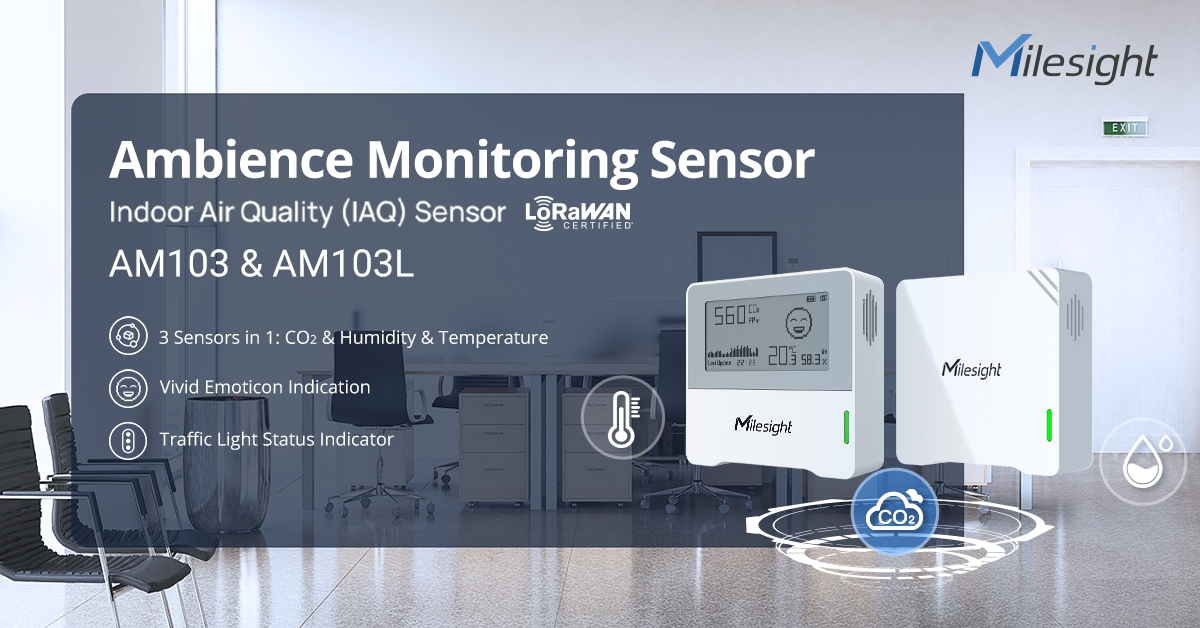
Milesight LoRaWAN IAQ Sensor AM103 measures 3 key factors including carbon dioxide, temperature, and humidity.
tacit burrow
Cloud wan? Will avoid if I can. Prefer zigbee or wifi
patent river
All local. The LoRa gateway (which is just a tiny PoE Linux machine) natively talks MQTT, translates the payload for the sensor and posts it straight into HA
900MHz is... necessary... for what I'm doing though.
I have things in my garage, which is the neighbour's entire house, two concrete retaining walls, and most of my house away from the gateway. No chance that 2.4GHz is getting through all that.
My garage door is now under control via a LoRa I/O module too (https://www.milesight.com/iot/product/iot-controller/uc300)
An MQTT button posts the payload ZGkxcHVsc2U= (base64 representation of the string do1pulse) which causes programming on that controller to pull one of its relay outputs high for 500ms, "pushing the button" to activate the door.
It also has control of the garage lights, and some other digital inputs from the garage door opener that tells it if the door is moving.

Milesight
The Milesight IoT Controller UC300 is designed to connect devices on fields via rich industrial interfaces and backhaul connectivity.
All of this is a combination of a) glutton for punishment, and b) sunk cost.
The LoRa gateway was expensive, but now that I have it (and know how to operate it), adding more sensors and devices is comparatively cheap 🙂
tacit burrow
Thanks for all those details
patent river
I'm more than willing to espouse the virtues of LoRa. It's honestly great, just that there's absolutely no ecosystem built around it, so absolutely everything I've done I had to figure out on my own.
 heady lark
Maybe take a look at this too: https://github.com/gysmo38/mitsubishi2MQTT and this: https://github.com/SwiCago/HeatPump
Full guide available here if needed: https://chrdavis.github.io/hacking-a-mitsubishi-heat-pump-Part-1/
I've been using Mitsubishi2MQTT with my Mitsubishi LN25 for a while and it's been working quite nicely.
tacit burrow
Hmm lots of things to try. My sparky is on holiday for a month anyway
patent river
Heh, another difference between our part of the world and the USA. The number of videos Youtube has tried to suggest me of people doing self-installs of mini-split units. It is wild that's even an option.
 zealous dune
it's wild for you 😄
patent river
Does tend to result in some pretty big queues for installs right as the weather gets cold and everyone's units that are on the blink decide to finally crap out for good
 solemn wolf
technically you could do it yourself in NZ, there's a home owners standard called ECP51 which covers alot of electrical work, assuming you own the house
however you'd have to do a for like replacement on the HP and I bet there'd be no warranty if you did it wrong
patent river
Wiring yes. Refrigerant lines no.
solemn wolf
no licence required for non-hazardous refrigerant
drifting ember
it's wild here cuz you need a license to buy refrigerant but not to use it
 signal barn
If you can't buy it that makes it difficult to use it, doesn't it? Lol
 drifting grove
is it me or no matter what channel you choose for to conbee2, after a while, it seems to change to channel 11?
 rich venture
patent river
Heh, another difference between our part of the world and the USA. The number o...
rich venture
patent river
Heh, another difference between our part of the world and the USA. The number o...
mini split units are surprisingly easy to install and refrigerant is prefilled in the unit
only thing you need is basic tools + vacuum pump and flaring tool
 golden thorn
You aren't necessarily legally allowed to install them
 winged knoll
drifting grove
is it me or no matter what channel you choose for to conbee2, after a while, it ...
drifting ember
rich venture
mini split units are surprisingly easy to install and refrigerant is prefilled i...
winged knoll
drifting grove
is it me or no matter what channel you choose for to conbee2, after a while, it ...
drifting ember
rich venture
mini split units are surprisingly easy to install and refrigerant is prefilled i...
You don't need a vacuum pump or a flaring tool if you buy the right ones
 fresh willow
Looking for recommendations for a smart plug that has full native support in HA and can monitor wattage?
 cold moon
Sonoff s31 flashed with esphome
If you search here I’ve posted pics, detailed explanation, and yaml code for them
fresh willow
amazing! thank you sir
now probably the harder question... does anyone do this for 220v?
and I mean with native support in HA
cold moon
Are you trying to automate washer and dryer?
GitHub
🔌 Detect the state of your appliances based on their power consumption ✨ - GitHub - leofabri/hassio_appliance-status-monitor: 🔌 Detect the state of your appliances based on their power consumption ✨
fresh willow
I'll check that out. My goal is to simply know when the dryer (only dryer, i don't care about the washer) is on
tldr: I have grid-tied solar, so I'm kind of incentivized to use what I produce because the rate I get paid per kWh generated is trash. So I generate about 4kW hours, and if my dryer is on, I may do something like make sure the AC/Heater isn't on at the same time
 high stone
Hey, sorry if it's a common occurrence, I didn't find in the search.
I'm looking for monitoring my current total power usage (and ideally integrate to HA), mostly because I live in a flat with a limited amperage and I'd like an alert when I'm going overboard so i can turn off the kettle/oven before the global breaker in the corridor decides to take matter into its own hands (it's a "D" type so I have some time to react).
Is the Shelly EM still the best way to do that? I'm thinking about it for more than a year but I get scared at the reviews of it burning down (though half of those were poorly installed, it seems).
Ideally looking for things that can be bought/used in Europe
zealous dune
How can it burn down if it's a clamp power meter? It doesn't pass all that electricity through
 terse pebble
The burned ones are mostly relays and user/installation error.
fresh willow
cold moon
Are you trying to automate washer and dryer?
so I read through this and it sounds very similar to what I'm trying to do. I'll definitely draw inspiration from this! However, I still am unsure about what actual smart plug I could use for a 220v dryer that has native HA support, if that even exists
 glacial oracle
if its an american style one youd probably want to install a clamp meter instead from what ive heard
drifting ember
fresh willow
so I read through this and it sounds very similar to what I'm trying to do. I'll...
my dryer uses a large plug, which I don't think they make smart plugs for. as suggested prolly better to use a clamp meter depending
fresh willow
gotcha, that makes sense
so, similar question then 😄 a clamp meter with native HA support?
zealous dune
But native HA support
cold moon
https://www.amazon.com/gp/aw/d/B0BWNFNXQ5/this will work right?

Shelly Plus 1 is a small form factor smart switch with potential-free contacts, which allows remote control of electric appliances through a mobile phone, tablet, PC, or home automation system. It can work standalone in a local Wi-Fi network or it can also be operated through cloud home automatio...
Oh no energy monitoring
zealous dune
Shelly EM
 agile olive
Hi guys, for those who remember from yesterday, it seems that the Lenovo M700 6500T is also not available. I have the option to buy the 6400T. I think the different is not too much. I can have it with 1x M.2 - 256GB + HDD 500GB or 1x SSD DE 480GB. What do you think it's the best option?
agile olive
It's a Lenovo M700 Tiny, Intel® 6ª Generation Core™ I5 6400T @ 2.20 GHz Base up to 2.90Ghz 6 MB cache, 4 Cores, 4 Threads Intel HD Graphics 530 DDR4 memory with 16GB RAM DDR4
cold moon
I wouldn’t care about the hdd I’d replace that with an ssd down the line
2.5 inch right?
agile olive
price is the same: 160€
glacial oracle
like considering storage is at like 35$ a tb for ssds and 15ish for hdds
id probably pick the m2 one
agile olive
I can have a 960GB SSD SATAIII for 40€ or an HDD 1TB SATAIII for 39€
agile olive
cold moon
Is it m.2 ssd or nvme?
I have to ask
glacial oracle
would be interesting to know what kind of ssds that are
cold moon
I think it’s not nvme on the mobo
Look at the spec sheet from lenovo don’t ask the buyer
agile olive
also, 16GB to 32GB for 39€
cold moon
Personally I suggest upgrading ram now since you’re using it as a server not just haos
glacial oracle
for storage the 960 ssd option could be interesting
capacity wise this sounds like enterprise stuff
cold moon
I wouldn’t buy their ssd upgrade
It’s probably mid tier at best
Wait for a Samsung evo sale and buy one of those
agile olive
what it comes with:

OR

the base, without upgrades
I can make the upgrades myself, of course
cold moon
I’m not googling those model numbers lol
agile olive
of course not
glacial oracle
sata 2?
agile olive
I'm not expecting that
glacial oracle
above that seems like a wd black with a micron ssd
the second is just a consumer grade kingston A400
cold moon
They’re gonna be mid tier TLC ssds in all of these most likely
glacial oracle
either pick may be alright
cold moon
I’d go the top one cuz it’s m.2
glacial oracle
in terms of upgrades, the second option has most definetly another free slot
tho the first one probably also does
cold moon
Identical mobo and cpu and ram I thought
glacial oracle
i mean its not meant to be a server
agile olive
it's not? why?
cold moon
agile olive
it comes with WiFi 400MBPS-5G...
You can replace that with a coral or 2.5GbE m.2 E key
Assuming that’s same mobo as m910q
agile olive
I don't need wifi, I will connect it by cable
cold moon
Right, you remove the m.2 Wi-Fi card
glacial oracle
its not because its a thinkcentre
glacial oracle
you saw those m2 to pcie connectors :^) madness
glacial oracle
wtf
cold moon
Comes with a cute lil cable
glacial oracle
do those even work with proper chipsets
glacial oracle
wouldnt have expected that
 cold moon
I think it’s just some realtek chipset
agile olive
 agile olive
as I said, they are similar, the big change is the storage
cold moon
I still think you could find much better with a used laptop dude
glacial oracle
its 8 year old hardware which has ben eol since 22
its a lot of money in that regard
agile olive
I can't find a better deal
laptop is not an option
I mean, I can't find a better option where I am
glacial oracle
from my pov you can get a 5600H as barebone for 230
but then this probably will lead to be a ~300 buck purchase with storage and memory
cold moon
agile olive
laptop is not an option
Sure it is you’re just choosing not to. You said yourself it’s going in a closet
glacial oracle
he isnt entirely wrong tho, a laptop is a rather silly choice
cold moon
It’s not
Laptops with broken screens or keyboard are dirt cheap for much newer gen intel’s
agile olive
cold moon
Sure it is you’re just choosing not to. You said yourself it’s going in a closet
it doesn't fit where I will put it
glacial oracle
like you need to stip out everything, get it a new case and then end up with not even decent performance if you buy not recent hardware
zealous dune
or buy a new N100 for 150eur
cold moon
You don’t need to strip out anything
glacial oracle
you totally should do that
no need to charge a battery or power a screen
indeed, N100 based systems can be picked up for around 150
zealous dune
units with ddr5 for around 170eur
agile olive
zealous dune
or buy a new N100 for 150eur
buy what?
glacial oracle
a minipc with an n100 cpu
zealous dune
an N100, a 12th gen intel processor that didn't come out a decade ago
glacial oracle
beelink, trigkey and others make those
cold moon
zealous dune
an N100, a 12th gen intel processor that didn't come out a decade ago
No igpu sucks for some things tho
zealous dune
it decodes everything
cold moon
It can’t be used for frigate’s hardware offloading at least. Good to know with Plex
zealous dune
with proper kernel
glacial oracle
11th and 10th? gen seem to have some issues from my reading
agile olive
N100 for 150€? where?!?! 😄
glacial oracle
amazon™️ (yuck)
zealous dune
Find the best n100 deals on Geekbuying.com. Easy and secure payments. Local stock and fast shipping.
cold moon
Is that another banggood alie type site?
zealous dune
banggood and aliexpress are not the same type so pick one
 drifting ember
ali ships everything from all over
glacial oracle
unscreeee
agile olive
T-bao???? I want it to be working in 6 months
zealous dune
and you'll trust a refurbished 6 year old unit... ok then
glacial oracle
well lenovo usually works and you can easily get spare parts
zealous dune
thats muricans that can buy one for 70$, in EU they're overpriced old crap. ultimately its your choice
 lusty arrow
hi do you think this kind of setup, with a truenas scale on it could be used with an usd zigbee dongle for HA ?
https://www.youtube.com/watch?v=uCvEGnbEZkk (in french)
(starting home domotic, no other hardware than a linux laptop currently, and hue bridge)

Montage d'un serveur de stockage fait maison, installation et configuration de TrueNas Scale.
Composants :
- Carte Mère : Asrock H470M-ITX/AC (https://www.asrock.com/MB/Intel/H470M-ITXac/index.fr.asp)
- Processeur : Intel Core i3-10105F (https://www.intel.fr/content/www/fr/fr/products/sku/203474/intel-core-i310105f-processor-6m-cache-up-to-4-...
cold moon
zealous dune
thats muricans that can buy one for 70$, in EU they're overpriced old crap. ulti...
Well on eBay I’m not seeing as many for $80 or so right now.. at least not from big resellers. Just one off from people
glacial oracle
i got one of these recently which works rather nicely after tweaking the fan speed
https://www.amazon.de/-/en/Beelink-Intel-Processor-N100-Computer/dp/B0BVB7JRJB
but i suppose any other rebadge would work similarly
https://www.amazon.de/-/en/TRIGKEY-Intel-Alder-Computer-500GB/dp/B0C4GF81M9/
cold moon
lusty arrow
hi do you think this kind of setup, with a truenas scale on it could be used wit...
If a hypervisor or OS supports usb passthru then any zigbee or other dongle will work
glacial oracle
there are surely some listings with more random numbers around 160 bucks
lusty arrow
yes seems possible with truenas scale, it can create a vm, attach an usb port
(after i really don't know which usb dongle to use, i have one hour with my docker test HA first install)
agile olive
I forgot about fans. These lenovo's have fans right?! That's a no-go
if they're noisy
cold moon
lusty arrow
yes seems possible with truenas scale, it can create a vm, attach an usb port
(...
You don’t have to buy a usb coordinator you can buy PoE
glacial oracle
it probably wont be nosiy as its not a server but a desktop system
cold moon
agile olive
I forgot about fans. These lenovo's have fans right?! That's a no-go
I don’t think I can even hear mine on the desk
glacial oracle
unless you hit it a lot
lusty arrow
i'm looking for documentations about this, i stop when i was recommanded yellow box. *But as i'll need a new NAS one day, more expensive to have both hardware
cold moon
In a closet you definitely won’t hear it
cold moon
lusty arrow
i'm looking for documentations about this, i stop when i was recommanded yellow ...
Yellow is overpriced and underpowered
lusty arrow
cold moon
You don’t have to buy a usb coordinator you can buy PoE
PoE ?
cold moon
Buy a mini pc like we’re talking about above or build a multi purpose NAS like you are doing
cold moon
lusty arrow
PoE ?
Bruh
lusty arrow
ok, if i buy an usb, i could use it on my temporary laptop ? (if i found how to bind it to docker instance)
lusty arrow

A curated list of the best Zigbee sticks/dongles/coordinators for Home Assistant with various communication interfaces: USB/LAN/PoE/Hybrids.
zealous dune
that list is a bit wonky
glacial oracle
agile olive
is this a good option?
yea seems good
cold moon
lusty arrow
--> ok ? https://smarthomescene.com/blog/best-zigbee-dongles-for-home-assistant-...
No I’m seeing wrong info there
zealous dune
agile olive
https://www.amazon.es/-/pt/dp/B0B7WCTXMT/ref=nav_youraccount_switchacct?keywords...
yup, thats a really good price for Beelinks
lusty arrow
wow beelink seems powerfull and less expensive, right !
winged knoll
And suggesting Sonoff's P stick ... 
agile olive
zealous dune
yup, thats a really good price for Beelinks
will do the same as those lenovo mini? I mean, put promox and have HA, Plex, TrueNAS, etc
cold moon
My p stick treated me well
lusty arrow
amazon BE has better price if europe
zealous dune
agile olive
will do the same as those lenovo mini? I mean, put promox and have HA, Plex, Tru...
no, it will do better
agile olive
I mean, any restriction that I'm not aware?
lusty arrow
agile olive
will do the same as those lenovo mini? I mean, put promox and have HA, Plex, Tru...
ha it's my final goal too... i awake my suno 213p, but too old 😄
agile olive
like a surprise 😄
glacial oracle
well there are some restrictions
zealous dune
agile olive
I mean, any restriction that I'm not aware?
you can't put a 3.5 inch drive in it...
glacial oracle
it only has 1 memory slot and one additional 2.5" slot which may not fit large capacity hdds
lusty arrow
cold moon
No I’m seeing wrong info there
then what are the common "best" choices ?
zealous dune
N100 is single channel memory anyway
glacial oracle
on ddr5 it does up to 32 gigs
cold moon
Lenovos don’t have room for 3.5 anyways
zealous dune
so don't plan on building a homelab with it
cold moon
But Lenovos can be expanded a bit like with the m.2 to 2.5GbE
glacial oracle
its a very round chouce for the price
cold moon
But old cpu
glacial oracle
just make sure to tweak the fan curves when you get it
cold moon
lusty arrow
then what are the common "best" choices ?
I personally had good luck with sonoff p dongle. I now use a PoE tube coordinator and don’t use usb just over my network: https://tubeszb.com/product/cc2652p2-based-zigbee-to-poe-coordinator-2023/
zealous dune
btw my n100 idles at 8W with 20 addons running
cold moon
Nice
lusty arrow
(ok poe = power over ethernet ! to avoir double wire)
cold moon
Yea but you need a PoE switch or injector
If you’re building out a homelab and network at home then PoE switch will be something you’ll buy already
agile olive
144€    Beelink MINI-S12 Pro Mini PC, Intel Alder Lake-N100 (3,40 GHz), 16 GB de RAM 500 GB SSD, double HDMI/WiFi 6/BT5.2
96€     Beelink MINI N5095 (4C/4T até 2,9 GHz), 8G RAM 128G SSD, 4K@60Hz HDMI dupla, USB3.0 Gigabit Ethernet, Wi-Fi5 BT4.0
104€    Beelink Business Mini PC N5095 (4C/4T up to 2,9 GHz), 8G RAM 256G SSD, 4K@60Hz HDMI duplo, Gigabit Ethernet, USB3.0, Wi-Fi5 BT4.0
112€    Beelink MINI-S12 Mini PC, Intel Alder Lake-N95 (até 3,40 GHz) Wi-11 Pro Mini computador, 8 GB RAM 256 GB SSD
141€    Beelink MINI-S12 Mini PC, Intel Alder Lake-N95 (até 3,40 GHz) Wi-11 Pro Mini computador, 16 GB RAM 500 GB SSD
the N100 is worth the difference
lusty arrow
i'm looking installation example with that kind of hardware.
cold moon
lusty arrow
i'm looking installation example with that kind of hardware.
For proxmox or haos?
https://www.derekseaman.com/2023/06/home-assistant-proxmox-ve-8-0-quick-start-guide.html this is popular

Do you want to run Home Assistant OS (HAOS) in a virtual machine using Proxmox VE 8.0? Check out my guide for the complete how-to with lots of tips!
glacial oracle
but please dont use the script
its not a smart idea to run random scripts off the internet to install stuff
agile olive

If you are in the market for new mini-PC to run servers such as Home Assistant, Plex Media Server, Grafana, InfluxB, Docker containers, or more...keep reading.
glacial oracle
its generally a poor thing to advise doing
luckily its easy to check what its doing
glacial oracle
agile olive
https://www.derekseaman.com/2023/04/hands-on-beelink-mini-pcs-for-proxmox-home-a...
for running plex you dont need the passthrough which may give you a significant performance hit if you run it inside an lxc instead
tacit burrow
glacial oracle
do those even work with proper chipsets
Remind me in a couple hours I’ll tell you which m.2 2.5gbe I got
tacit burrow
cold moon
At this point he’s pretty well vetted
Hundreds of people have used tteck scripts, and a bunch of us review them pretty carefully
tacit burrow
agile olive
I forgot about fans. These lenovo's have fans right?! That's a no-go
I can barely hear it. Mine is actually on a shelf in my toilet. Even middle of the night sssshhhh
zealous dune
that's an... interesting... place
cold moon
zealous dune
that's an... interesting... place
We don’t question the Australians they’ve got enough to deal with 🦘
terse pebble
zealous dune
that's an... interesting... place
A nice secondary use of the PC fans 💩
lusty arrow
cold moon
For proxmox or haos?
it's for my current linux laptop, and later the new homemade NAS with truenas.
i try to see how the poe device can be plugged. On internet box directly (not other switch now) ? need an an adapter ?
cold moon
Probably best to use a usb coordinator if you’re asking these questions
lusty arrow
never had to use this 🙂
cold moon
lusty arrow
it's for my current linux laptop, and later the new homemade NAS with truenas.
...
"internet box" do you mean a router with some ports out of the back that also gives you wifi?
lusty arrow
yes,
cold moon
that will not have PoE ports. a PoE switch will have PoE switchports
lusty arrow
provider internet box at home
cold moon
otherwise you will have to use a PoE injector
lusty arrow
ok that's what i found.
does it worth really the cost ? vs usb coordinator ?
cold moon
it depends on your use case
tacit burrow
zealous dune
that's an... interesting... place
Only place where I could put it. No built-ins and very tall ceilings
lusty arrow
especially when planning to have a NAS 100% up in the future ?
cold moon
is your device you will run home assistant on be centrally located in your house?
if so, then you dont really need an ethernet based coordinator
drifting ember
cold moon
We don’t question the Australians they’ve got enough to deal with 🦘
it's in the restroom so he can flush it quickly if an inspector comes
cold moon
oi mate
drifting ember
agile olive
i hate when there are a lot of options 😄
have you met women?
lusty arrow
no, all computer related things are in the office room (Pc, NAS, box, ...)
i had to put 2 wifi relay for internet in house.
And zigbee i have "only" 50% of lights and one movement detector currently, all philips hue.
Getting plugs from Nous z1a soon (just trying to find if they are compatible to hue bridge before having another real solution)
drifting ember
I run a split zigbee/wifi setup, I have 0% zigbee, 100% wifi
cold moon
lusty arrow
no, all computer related things are in the office room (Pc, NAS, box, ...)
i had...
?
so it is not centrally located?
lusty arrow
cold moon
?
no, it's on a side of house
cold moon
then if you run ethernet to a centrally located spot, maybe in a closet or something, a PoE or ethernet based coordinator would be beneficial
also you probably bought some bullshit wifi mesh stuff for wifi and have a pretty not great network
lusty arrow
but zigbee is like a mesh network ? not enough ?
cold moon
wired devices (like hue bulbs) can be added to zha or zigbee2mqtt and extend the mesh yes
but ideally, the less hops the better
drifting ember
lusty arrow
but zigbee is like a mesh network ? not enough ?
only mains powered devices
cold moon
most of us get rid of the hue bridge and pair hue devices directly to home assistant with zha or z2m
then add all other zigbee stuff to the mesh
lusty arrow
currently my mouvement detector is at the other side of house, and have lights on the 2nd floor too, all ok on hue bridge
drifting ember
cold moon
most of us get rid of the hue bridge and pair hue devices directly to home assis...
those of us that can't afford hue use other stuff
lol
drifting ember
my sonoffs I think were 4 for $70
the switches
and I got the sonoff basics for like ~$4 each
cold moon
lusty arrow
currently my mouvement detector is at the other side of house, and have lights o...
https://cdn.discordapp.com/attachments/743144302334443622/1007083298767507507/unknown.png this is my zigbee mesh

pretty much all the blue names are hue bulbs
drifting ember
I've come to the conclusion you all live in mansions
I don't even have that many lights total
cold moon
well 11 bulbs are in the kitchen..
drifting ember
yeah I have 2 bulbs in the kitchen fixture...
cold moon
7 cans, 3 candellabra (chandelier), 1 bulb
lusty arrow
wow, i have only 2 floors (maybe worng with 2nd floor, scuse 🙂 not english). i have only 10 lights bulb still there, growing slowly, expensive
cold moon
lusty arrow
wow, i have only 2 floors (maybe worng with 2nd floor, scuse 🙂 not english). i ...
hue bridge cannot handle this many bulbs
my lights started taking multi seconds to respond
lusty arrow
hue bridge can handle 50 devices
cold moon
moved to zigbee2mqtt and they are lightning fast
cold moon
lusty arrow
hue bridge can handle 50 devices
that's waht they say. mine failed at 40 or so
drifting ember
lusty arrow
hue bridge can handle 50 devices
I thought it was 64
or am I remembering wrong
lusty arrow
ha ok, 11 devices, i have the time then 🙂
cold moon
 cold moon
lusty arrow
ha ok, 11 devices, i have the time then 🙂
cold moon
lusty arrow
ha ok, 11 devices, i have the time then 🙂
nah
best to move off it early
you have to re-join every device
and when you move the hue bulbs to zha or z2m you then can use the zigbee mesh for any zigbee device
it's very much the best solution
agile olive
This link has a detail - https://www.amazon.es/-/pt/dp/B0B7WCTXMT/ref=nav_youraccount_switchacct?keywords=beelink%2Bn100&refinements=p_72%3A831280031%2Cp_36%3A-18000&rnid=9733333031&sr=8-1&th=1 - it's 8Gb, not 16Gb

SEi8 8279U 8+256G
drifting ember
"The Hue Bridge – with an advertised 50 bulb limit – actually has a hard limit of 63 lights (and 62 accessories), however you may start having performance issues above 40-45 lights and above 12 accessories"
cold moon
otherwise you have to buy overpriced "friends of hue" crap
drifting ember
I knew I wasn't going out of my mind
cold moon
drifting ember
I knew I wasn't going out of my mind
https://www.philips-hue.com/en-us/p/hue-bridge/046677458478#specifications says 50 on their site
drifting ember
Abraham Lincoln also said don't trust everything you read on the internet
lusty arrow
Cerveau du système d'éclairage connecté Philips Hue, le Hue Bridge vous permet de connecter et de contrôler jusqu'à 50 lampes et accessoires
drifting ember
https://www.smarthomepoint.com/hue-bridge-50-bulb-limit/ this is where I got the info from

The Philips Hue Bridge supports up to "50 lights and accessories" according to the marketing, which isn't all that much. So what are your options?
but there are other places that document it like that as well
cold moon
i've never even heard of that youtuber lol
drifting ember
 cold moon
either way doesnt matter, ditch that bitch
tacit burrow
I know I was going to tell someone... something... about 2.5gbe m.2: was that here?
root@pve1:~# lspci | grep 2.5
01:00.0 Ethernet controller: Realtek Semiconductor Co., Ltd. RTL8125 2.5GbE Controller (rev 05)

eBay
Find many great new & used options and get the best deals for M.2 A+E 2.5G Ethernet Adapter 2.5G/1G/100M Multi-Gigabit M.2 Network Ca 8125 at the best online prices at eBay!
But TBH it's plugged into a 1gbe device (my WAN interface) so the speed doesn't matter.
It's just better than usb-eth
cold moon
tacit burrow
I know I was going to tell someone... something... about 2.5gbe m.2: was that he...
it was @glacial oracle
glacial oracle
yes thank ya for the details!
tacit burrow
Works fine with lenovo thinkcentre m910q and proxmox fwiw
 dim idol
I've noticed there's a version of haos named 'green' in the list of downloads, anyone know what hardware it runs on?
dim idol
OK thanks
 cursive lodge
anybody has an everything presence one sensor? I want to disable bluetooth world broadcasting
 trail rampart
Hey guys, I have two cieling fans with lights that I'm hoping I can convert to zigbee (separate control for FAN + Lights). I found some options but I wanted to check here if there is a known "good" or recommended hardware option for my goals. https://www.homedepot.com/p/Hampton-Bay-Universal-Wink-Enabled-White-Ceiling-Fan-Premier-Remote-Control-99432/206591100

The Home Depot
The Hampton Bay Universal 4-speed remote control adds new functionality to your ceiling fan. The remote is compatible with the innovative WINK home automation system to allow you to control your ceiling
 hushed panther
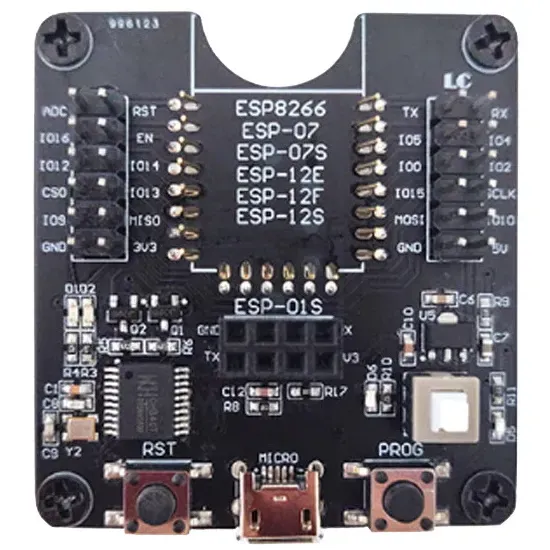
trying to flash an esp32 (esp-c3-12f) bare chip for the first time with one of these adapters https://templates.blakadder.com/assets/device_images/esp_test_board.webp I can't get it into the right boot mode. I've been pressing RST and PROG together and releasing RST first but won't do the trick. Anything that I am missing?
 zealous dune
You can use a jumper wire to ground the required pins
 lucid snow
Hi there, can anyone tell me if I could get a BEGA 71021 Relais with zigbee to work in Homeassistant
I am pretty new to it
zealous dune
i used google...
lucid snow
haha sure that but I wouldn't have known if a ubisys s1 works lol
it's not listed in supported hardware on Homeassistant website
zealous dune
homeassistant website doesn't list supported zigbee devices
mainly because it depends on the chosen integration
zealous dune
i try to keep one https://zigbee.blakadder.com/

Zigbee Device Compatibility Repository
Database of Zigbee devices compatible with ZHA, Tasmota, Zigbee2MQTT, deCONZ, ZiGate and ioBroker
 sleek blade
hey guys. i want to install a water leak sensors in my bathroom. i have no other smart equipments of same sort (so i have no hubs or nothing), i just have a server running home assistant for simple lights control and smart tv/smart speakers.
what are my first steps? which sensors/brands are reliable? and also what hubs (if any) do i need to buy too.
please help me. thanks.
winged knoll
Zigbee is generally a good choice - but you'll also need to buy Zigbee router devices, such as smart plugs (or dedicated router devices)
Aqara and Linkind do some good leak sensors
trail rampart
Any tips for converting a dumb cieling fan to a smart fan?
trail rampart
so is that universal? just need to re-wire the existing fan?
drifting ember
they are fairly universal yes
unless your fan draws more power than it can handle, then I'd say no
trail rampart
does sonoff play nice with HA? I have a ZigBee ecosystem if that helps
or, what if I swapped the actual light switch for a zigbee light switch? Would that work?
I assume it would have to be a special one actually, since you wouldn't want to "Dim" a fan
drifting ember
trail rampart
does sonoff play nice with HA? I have a ZigBee ecosystem if that helps
sonoff works well with HA, I have about 17 sonoffs
but if you have zigbee maybe a zigbee controller would be better for you
trail rampart
I feel like a zigbee on/off switch would be easier to install than a zigbee fan controller, not to mention I'm not really finding a solid one to use other than some hampton bay one that's been discontinued for years
trail rampart
meh, I think i give up lol. Seems like it's going to be more of a headache than it's worth. The primary goal is to have the "light" portion of my fans be smart bulbs, but I don't want to leave the fans on 24/7 to accomplish that
drifting ember
trail rampart
meh, I think i give up lol. Seems like it's going to be more of a headache than ...
most fans have a separate wire for the light, why not just wire the lights to be "on" all the time if they are smart bulbs
trail rampart
wouldn't they still shut off when the wall switch is shut off? I thought the power to the fan was being killed at the switch
drifting ember
it might be wired that way now, but I'm saying usually you can just wire the light to power and the fan to the switch
some people wire the light to a second switch even
trail rampart
I mean, that sounds like exactly what I want, but I'll be honest I don't even know where I would begin to do that. Right now the light is activated by a pull chain. Would I be re-wiring something at the light switch?
 kind wind
Hey all. building a house and met with my electrician who threw me a curve ball with respect smart light switches. He pointed out that we would need a few 4-way switches. My question to you all is this: For a light that is controlled by two or three different switches, do all the switches have to be smart or can I just control the light from a switch that is smart even though the three way (or 4 way ) switch is not smart.
tawny viper
it depends on the smart switch brand @kind wind
Inovelli for example, can do a "dumb" or an "aux" or can do binding directly
Aux switches a https://inovelli.com/products/white-series-add-on-aux-switch

Inovelli
This is a special non-smart switch that connects directly to your Inovelli smart switch for use in a 3-Way (or multi-way) setup.
GE/Others have those.
If you are gooing Zooz, read carefully, some can use "dumb" switches, and some can't.
so yes, 4 ways are possible with one smart, depending on the switch you buy. Zooz and Lutron have very good "remotes" https://www.amazon.com/Lutron-3-Button-Wireless-Lighting-PJ2-3BRL-WH-L01R/dp/B00KLAXFQ0/ref=asc_df_B00KLAXFQ0/?tag=hyprod-20&linkCode=df0&hvadid=193989831776&hvpos=&hvnetw=g&hvrand=17813550855191779759&hvpone=&hvptwo=&hvqmt=&hvdev=c&hvdvcmdl=&hvlocint=&hvlocphy=9003244&hvtargid=pla-315839228861&psc=1

The Pico smart remote control is a convenient way to control Lutron Caseta dimmers. With the Pico you can turn lights on or off and brighten or darken them from anywhere in the room. You can use the Pico as a handheld remote, mount it on a wall, or mount it on a tabletop pedestal. You can also us...
I was living in my house for 7 years before i realized one of my 3 ways just a remote. I had no idea. thought it was wired
tawny viper
any suggestions on my comprehensive indoor air quality ?
 warm helm
I have several two-way light switches in my house. I'd like for the existing toggle switches to continue to work, but to also be able to control the light from HA. I've been looking at Sonoff ZBMINI. However while the existing switches each have 3 wires (not counting ground) coming into them, the ZBMINI has 6 terminals. Seems like this would require fishing more wires, which I am strongly against. Am I missing something?
 short trout
Hello guys, I'm looking for opinions on J4115 with 6gb for HA (as a cheap option) ?
 ember ingot
zealous dune
i try to keep one https://zigbee.blakadder.com/
ember ingot
zealous dune
i try to keep one https://zigbee.blakadder.com/
this is an amazing resource. Thanks for making and sharing
kind wind
tawny viper
it depends on the smart switch brand <@349337844302479361>
Thanks. Very helpful. Would this be a similar switch to the one you reference above? https://www.amazon.com/GE-Enbrighten-SimpleWire-SmartThings-46199/dp/B07RQ8K25S/ref=sr_1_4?crid=3B2SIVMWAF9S3&keywords=enbrighten+smart+dimmer+zigbee&qid=1693516219&sprefix=enbrighten+smart+dimmer+zigbee%2Caps%2C101&sr=8-4

Expand your control with the Enbrighten Add-on Switch with QuickFit and SimpleWire When paired with an Enbrighten smart switch or dimmer including Z-Wave and Zigbee controls the hardwired device completes multi-switch systems Wirelessly operate and schedule indoor or outdoor fixtures from up to f...
cold moon
kind wind
Thanks. Very helpful. Would this be a similar switch to the one you reference ...
most people actively avoid anything ge/jasco/enbrighten due to poor build quality, firmware issues, and past experience
you can also let them run traveler wires to each location and just not use them and instead use smart switches at every location along with smart bulbs and have the smart switches in smart bulb mode. That way you can always go back to dumb ones in the future, but you also have the same switches everywhere
which also gives you multi tap, hold, etc along with an led on the switch (if it has one) to automate with - such as for showing whether alarm is armed etc
kind wind
cold moon
most people actively avoid anything ge/jasco/enbrighten due to poor build qualit...
Thanks for the reply. I only started looking at enbrighten because of someone here (at least I thought) recommended them and also there dont' seem to be a lot of others that are in stock or use zigbee. I'm not against using z-wave. I'll probably favor a mix of both. But this has not been easy. 🙃 Can you recommend other switches? Thanks again.
cold moon
if you want zigbee buy the overpriced inovelli blues, if you want zwave buy zooz
i own almost entirely zooz cuz they're half the price
kind wind
60 bucks per switch is a little out of my budget.
cold moon
however a couple people have said they like the "long" led bar that inovelli blues have over the zooz with the little rectangle led
kind wind
wait, they are out of stock on zigbee.
kind wind
lol. as if that wasn't enough...
cold moon
https://inovelli.com/products/zigbee-matter-blue-series-smart-2-1-on-off-dimmer-switch shows $50 here

Inovelli
Get the ultimate smart switch experience with Inovelli's Blue Series 2-1 Smart Switch. Customizable, community-built, and available as both an on/off or dimmer switch.
drifting ember
kind wind
Thanks for the reply. I only started looking at enbrighten because of someone h...
it was more a suggestion than a recommendation 😄
cold moon
https://inovelli.com/products/zigbee-matter-blue-series-mmwave-presence-sensor-smart-switch these will be neat but i think they're like 4 months out and even then they'll be beta
 kind wind
no worries. everyone here is helping me. I'm the chief designer of a smart home and i've never done it before nor have I ever lived in one. 🙃
cold moon
damn
you've got a lot to learn then
last time we spoke was 8 months ago
you're moving pretty slowly lol
kind wind
i've learned a lot. (well, the house build has moved slowly. Don't blame me!!! 😎 )
cold moon
i blame all the things
drifting ember
kind wind
i've learned a lot. (well, the house build has moved slowly. Don't blame me!!!...
we only know you so ....
by default you get it
😛
cold moon
https://www.thesmartesthouse.com/products/zooz-700-series-z-wave-plus-s2-on-off-wall-switch-zen76 $23.45 and support smart bulb mode

The Smartest House
NEW 800 SERIES! PRODUCT HIGHLIGHTS Control your lights from the switch and via Z-Wave (no dimming, get the dimmer here) NEW 800 chip: more range, faster signal, SmartStart inclusion + S2 security Z-Wave Long Range ready: extend the wireless coverage up to 1 mile if your hub supports Long Range Use with high-quality


you can also do what i said above and pair with smart bulbs (zwave or zigbee or whatever) and have the smart switches in smart bulb mode where the relay doesnt kill power to bulb
and then have home assistant control them
like specifically for 3way/4way/whatever
kind wind
so a smart switch with a smart light with the combo serving to extend the range. is that correct?
cold moon
no
if it's in smart bulb mode you dont need any travelers connected cuz home assistant is gonna be controlling them
it's a way to get around not having travelers there or wanting the same smart switches at every location
kind wind
gotcha. thanks.
cold moon
every zwave powered device is a repeater/router for the mesh so you'll be covered as far as "mesh" goes
the benefit, in my eyes, is mostly that you can use smart switches to do more than just a simple on/off
i.e. in every room of the house my zen76 single tap to 100% lights and double tap to 30% all lights in the room
kind wind
yeah. I may have mentioned I'm concerned about getting a signal out in my workshop which is detached. Any wifi inside the house is gonna have to penetrate brick walls twice to get to the shop.
cold moon
if i was using a three way setup with dumb switches attached to the other side of a smart switch, i wouldnt have that functionality
kind wind
any recommendations for a smart switch for a dumb fan?
drifting ember
kind wind
yeah. I may have mentioned I'm concerned about getting a signal out in my worksh...
zigbee is slightly better at getting thru walls than wifi
kind wind
sorry. when I said wifi I should have said zigbee or z-wave.
drifting ember
also mains powered devices will act as repeaters
cold moon
kind wind
any recommendations for a smart switch for a dumb fan?
depends on the fan
and are you just talking about on/off not fan speed control?
drifting ember
so every switch and bulb will extend your mesh
cold moon
zooz zen71 or zen30 will do 3amps or less with a fan load
it's in the image i linked above^
kind wind
drifting ember
so every switch and bulb will extend your mesh
right. I just don't have any experience with how good that will be when going through brick walls.
kind wind
cold moon
and are you just talking about on/off not fan speed control?
From what I read, it seemed like if you wanted to have a home assistant controllable fan, you needed to buy one that does not have a remote control installed. My take from the reading was that it should just be a simple (dumb) fan with a dimmable, smart, light switch.
drifting ember
or you could buy a haiku and be done with it
cold moon
https://www.leviton.com/en/products/zw4sf-1bz these were linked to me in the past. i have no personal experience with fans with speed control
all mine are ceiling fan / light combos at the house here 😦
drifting ember
 cold moon
so a $1600 fan?
cold moon
kind wind
From what I read, it seemed like if you wanted to have a home assistant controll...
https://sonoff.tech/product/diy-smart-switches/ifan04-l/ there's also this thing which is getting more popular
https://www.reddit.com/r/homeassistant/comments/10upsmz/great_local_fan_control_sonoff_ifan04/ flashed to esphome open source firmware of course
kind wind
that looks interesting.
drifting ember
cold moon
so a $1600 fan?
they were on sale for $400ish last week on amazon
cold moon
what a steal
drifting ember
cold moon
https://sonoff.tech/product/diy-smart-switches/ifan04-l/ there's also this thing...
I did suggest this earlier as well
cold moon
ye
kind wind
lol. I'm trying to not overspend. dumb fans were kinda where I was gonna save.
cold moon
well get wiring to another switch in the gang box
that way if you decide not to cheap out later the romex is there
but frankly i'd just buy the right shit the first time
like separate wiring for fan + light combo if you're buying those for bedrooms
kind wind
definitely gonna have separate switches for fan/light. What I should have said was that I didnt' see a lot of 'smart fans' that gave me a warm and fuzzy that they would work with HA. So, my approach was to use a dumb fan with a smart switch.
cold moon
i think by definition all fans are dumb- speed controllable fan vs not
kind wind
my only example of a 'smart home' was we had some exterior lights in last house that came with an app. it was crap. it was easier to walk downstairs if necessary to flip a switch that to figure out why the app wasn't connected to the lights.
cold moon
Ya dude hass is the way to go
Mine would be a lot smarter if I had an unlimited budget
drifting ember
mine would be a lot smarter if I had your budget
cold moon
All my shit I slowly accumulated and it’s honestly not a lot of $ worth of stuff
Maybe $2000 split between 4 years
drifting ember
I have about $300 worth split over 4 years
drifting ember
well we also don't have Home Depot
cold moon
Probably for the best
drifting ember
no, we just have stores that sell home depot products for way more
cold moon
home depot isnt known for being reasonably priced just a lot of locations
tawny viper
inovelli blue fan switch is coming soon
trail rampart
tawny viper
inovelli blue fan switch is coming soon
is this in response to me?
cold moon
@trail rampart ecobee is the shit
the lite model is fine unless you want alexa on the device or a bigger screen
trail rampart
I saw that switch, it definitely caught my eye. So I would replace the light switch and not have to touch anything on the fan itself?
cold moon
https://www.ecobee.com/en-us/smart-thermostats/#compare-models there's a comparison chart tho
Control your home’s comfort with energy-saving ecobee thermostats. Connect to SmartSensor for comfort in important rooms.
ah they have a sale. i'd prob buy the middle model then
trail rampart
$170 aint bad
cold moon
altho the newest model with built in AQI is nice
and it comes with one of their sensors, but i wouldnt buy extra
i stupidly bought 4 of them before i got way into hass
waste of money for what they are
they do "motion" with a 30minute retrigger interval so basically useless at that. and then they do temp but not humidity
compared to any damn zigbee/wifi/bt/zwave/whatever sensor you want with hass
trail rampart
so I have occupancy detection pretty nailed down right now. I only need the temp part, but I want to be able to automate it
cold moon
if you're automating with hass there is zero reason to buy the ecobee sensors
trail rampart
so, if HA detects occupancy in room 1, set ecobee to cool room to 75
cold moon
the ecobee sensors are for people who dont have any smart shit
trail rampart
can it do that
cold moon
and want ecobee to be able to see temps in rooms
ecobee with their sensors just averages the temps throughout the house and then applies that average to whatever your current settings are
trail rampart
oh gross
trail rampart
that's not what I want either lol
cold moon
well
then automate with hass
not ecobee and their sensors
like hass controls ecobee
pretty straightforward
trail rampart
how would I automate that though, maybe I'm missing something
cold moon
with hass automations
drifting ember
you're a hass automation
trail rampart
right, but how can it cool room 1 to 75 if it doesn't know what temp room 1 is?
tawny viper
lol
cold moon
trail rampart
right, but how can it cool room 1 to 75 if it doesn't know what temp room 1 is?
hass already knows that
why does the ecobee need to know what temp the room is if you're using hass to tell the ecobee what to do?
it doesnt
drifting ember
because need temp sensor
trail rampart
so you are saying HASS just turns the systems to "cool" and leaves it there until a third party sensor detects the temp as "75"
so the thermostat isn't really a thermostat anymore
trail rampart
lol, probably, I tend to do that
cold moon
you have a smart thermostat that you are then controlling with home assistant
if you have temp sensors in home assistant, and you are using home assistant to set ecobee to turn on or off based on room temps, nothing else is required
all ecobee temp sensors are doing for me is giving me temps in rooms that i then automate with hass
 trail rampart
right I think that's what I was saying, so the EcoBee HASS integration can statically turn on "cool" though? Like, my Nest integration right now it sets the temp on the nest, not just a simple on/off
cold moon
yes
of course
but really youd set it to cool at a certain temp not just cool
cuz why wouldnt you
oh i see what you mean
you dont want ecobee to turn off cuz it's reached its default temps?
trail rampart
right, my office is 79 right now, but my thermostat reads 75 lol. huge delta
cold moon
what
trail rampart
yea, I could do that with the nest too, so I wouldn't be gaining anything by switching at that rate
cold moon
well
you'd be not using google (evil) stuff
that's something
and ecobee allows for fully local control if you pair it via homekit protocol over wifi to home assistant
instead of using the cloud integration
trail rampart
what's dumb is that the nest itself is capable of setting a "sensor" for cooling in the app. So right now I manually control it. If I'm in the office I say "make the office 79" but if I'm in the living room i change it accordingly. And stupidly evil google doesn't allow you to automate that outside of a very dumb static schedule (morning, afternoon, evening, night)
cold moon
i dont see why you cant automate with home assistant instead of nest
trail rampart
that part sounds pretty nice, plus the AQI stuff too
tawny viper
trail rampart
what's dumb is that the nest itself is capable of setting a "sensor" for cooling...
yes they do
cold moon
idk if the aqi sensor is exposed to homekit i've never used it
tawny viper
they sell a temp sensor
cold moon
requiring a specific sensor from a specific brand is a hard no
trail rampart
yea I know, I have 3 of them
trail rampart
you can't automate with them, that's how this whole convo started lol
trail rampart
not with HA, not even with google home scripting
tawny viper
you sure?
trail rampart
if there is a way, I have failed the find it yet
tawny viper
I dont use the HA intergration
you try homebridge ?
see what shows up coming from homekit into HA
i can check my temp sensor now for you,
trail rampart
best I can tell, the HA integration allows you to "read" the temps, but there is no API to change which the thermostat uses it because google
drifting ember
sensibo can be flashed with ESPhome, just saying
cold moon
tawny viper
you try homebridge ?
?!
tawny viper
@trail rampart I bet you could do it
tawny viper
cold moon
why would a home assistant user use homebridge?
my google situation remember?
cold moon
not homebridge
tawny viper
I cant use the SDM yet....
cold moon
guess i forgot it's not ringing a bell
tawny viper
I have homebridge, feeding Nest into HA via homekit
I'm "special" with nest and getting things
trail rampart
The premium ecobee can "stream music" really? That's a big huh from me...
tawny viper
@trail rampart so what am I missing?
cold moon
some companies go full retard adding shit
tawny viper
 trail rampart
that looks like it's setting the temp on the thermostat right?
tawny viper
the trigger is my temp sensor, i dont actually use it
then yea, I can do whatever I want
 trail rampart
right by that's setting the temp, on your thermostat
tawny viper
based upon my temp sensor?
trail rampart
so your trigger is from a temp sensor (fine), but you are setting the temp on your thermostat. So lets say downstairs is 70, and upstairs is 79. You set the trigger that if upstairs goes over 78, set downstairs to " ".
you would have to work out what to set it to I guess, which is the part that is a little janky, but possible
trail rampart
right but the target is met by the thermostat not the sensor
cold moon
trail rampart
you would have to work out what to set it to I guess, which is the part that is ...
you do that with home assistant
tawny viper
yea...
cold moon
you can group sensors and average them or whatever
or set a target temp of your room to 73 before it turns off the nest
tawny viper
yea, have it set it to like 20 degrees or 120
cold moon
it kinda sounds like what you really need is an hvac company to fix your shit
tawny viper
lol
trail rampart
lol
cold moon
do a heat load on your house
or get a ductless mini split added by a handyman who knows what they are doing
trail rampart
I mean, the problem is the office has a sliding glass door, 2 computers, and is furthest from the HVAC. So it's a fuckin HOT room lol
cold moon
well
heat load brings all of that into account
and ductless mini split controlled via hass is probably your best and cheapest real solution
instead of nuking the rest of the house in cold air cuz one room is fucked
trail rampart
fair point
cold moon
alternatively you could have an hvac company come
it's possible the duct going to that office could be swapped for another same size duct at the plenum closer to the deadhead which would improve airflow
but mostly with HVAC it is actually an issue with removing hot air
not adding cold
which the mini split would solve
there isnt one magical answer except mini split for that room, which is what i would personally suggest without knowing more
trail rampart
I mean, I sort of answered it myself, I'm just doing what I want manually. Would I love it to be 75 in here? Sure. But that means the rest of my house is 72 and my power bill is awful. 79 means the rest of the house actually runs a little hotter than normal (77ish) until i want to move rooms later in the evening. then I manually switch to the thermostat (or bedroom sensor) and set it to 75
I kind of want to swap out the nest out of principal though lol. Thing is kind of a useless POS these days.
Maybe the "averaging" part will work a little better, worth a shot anyway
anyway, thanks for chatting with me on this nonsense for so long 🙂
 rich venture
trail rampart
I mean, I sort of answered it myself, I'm just doing what I want manually. Would...
rich venture
trail rampart
I mean, I sort of answered it myself, I'm just doing what I want manually. Would...
you could also install a window ac unit
like one of those midea u shaped ones
cold moon
that's what a mini split is
rich venture
cold moon
that's what a mini split is
no, mini split is split
window ac units are all in one
and dont require install by hvac tech
cold moon
window ac units are a rectangle not u shaped
and require a window which we never determined he had
and mini splits can come precharged these days and dont require an hvac guy
rich venture
cold moon
window ac units are a rectangle not u shaped
this is what U means
 trail rampart
oh so the window goes inebtween?
rich venture
trail rampart
oh so the window goes inebtween?
yes
trail rampart
(my window doesn't open that way, but I'm just curious. Never seen a window unit like that before)
cold moon
ya that is strange
drifting ember
I've also never seen a window unit like that
rich venture
first time i saw it was on 8 bit guy
trail rampart
I'm just gonna set this bitch to 75 at the thermostat and see what happens in the office and then adjust accordingly. And I might buy an ecobee shortly too if I get antsy enough
drifting ember
it's almost a mini split LOL
rich venture
drifting ember
it's almost a mini split LOL
thats the point
drifting ember
wouldn't work with my windows tho
rich venture
drifting ember
wouldn't work with my windows tho
window units arent common outside america
drifting ember
rich venture
window units arent common outside america
you're joking right?
they are exceptionally common in the caribbean, latin america, and many other places
rich venture
drifting ember
they are exceptionally common in the caribbean, latin america, and many other pl...
i didnt mean usa, i ment general location of the american continent
rich venture
drifting ember
they are plenty in use in India for example
anywhere where the window slide open upwards
drifting ember
so not mostly america then
tacit burrow
I've finally ordered a split system for my house. It gets too lot, like 10 days a year, and my gas bill is crazy for heating my very old and non-insulated house.
cold moon
tacit burrow
I've finally ordered a split system for my house. It gets too lot, like 10 days...
ductless right?
tacit burrow
Yeah, just a unit that mounts on/in the wall, and another unit on the outside that sits on the ground. WHatever that's called.
cold moon
heat pump
cold moon
you spent thousands and dont even know what it's called?
lol
how many of them did you order?
tacit burrow
Just one. I/we spend barely any time in the house anyway.
There is tech I care about, and tech I don't. AC falls in the latter.
cold moon
it'll improve the WAF with hass too
patent river
Did you go for that Mitsi in the end?
tacit burrow
I got a mitsi heavy industries one. Was strongly recommended by my sparky. It's basically the same as the one I already have (in the bungalow - separate building).
Getting 7.1kW one
getting the wifi adapter too, just to see if I can d*ck with it via HA
 jagged crypt
trail rampart
right, my office is 79 right now, but my thermostat reads 75 lol. huge delta
patent river
jagged crypt
trail rampart
right, my office is 79 right now, but my thermostat reads 75 lol. huge delta
patent river
Ah, the other Mitsubishi. Because why wouldn't they have two different divisions of their company competing with each other?
cold moon
jagged crypt
https://support.ecobee.com/s/articles/How-to-use-Temperature-Correction-on-your-...
that's not the same thing at all that's just an offset
tacit burrow
They're two completely separate companies. Forked way back.
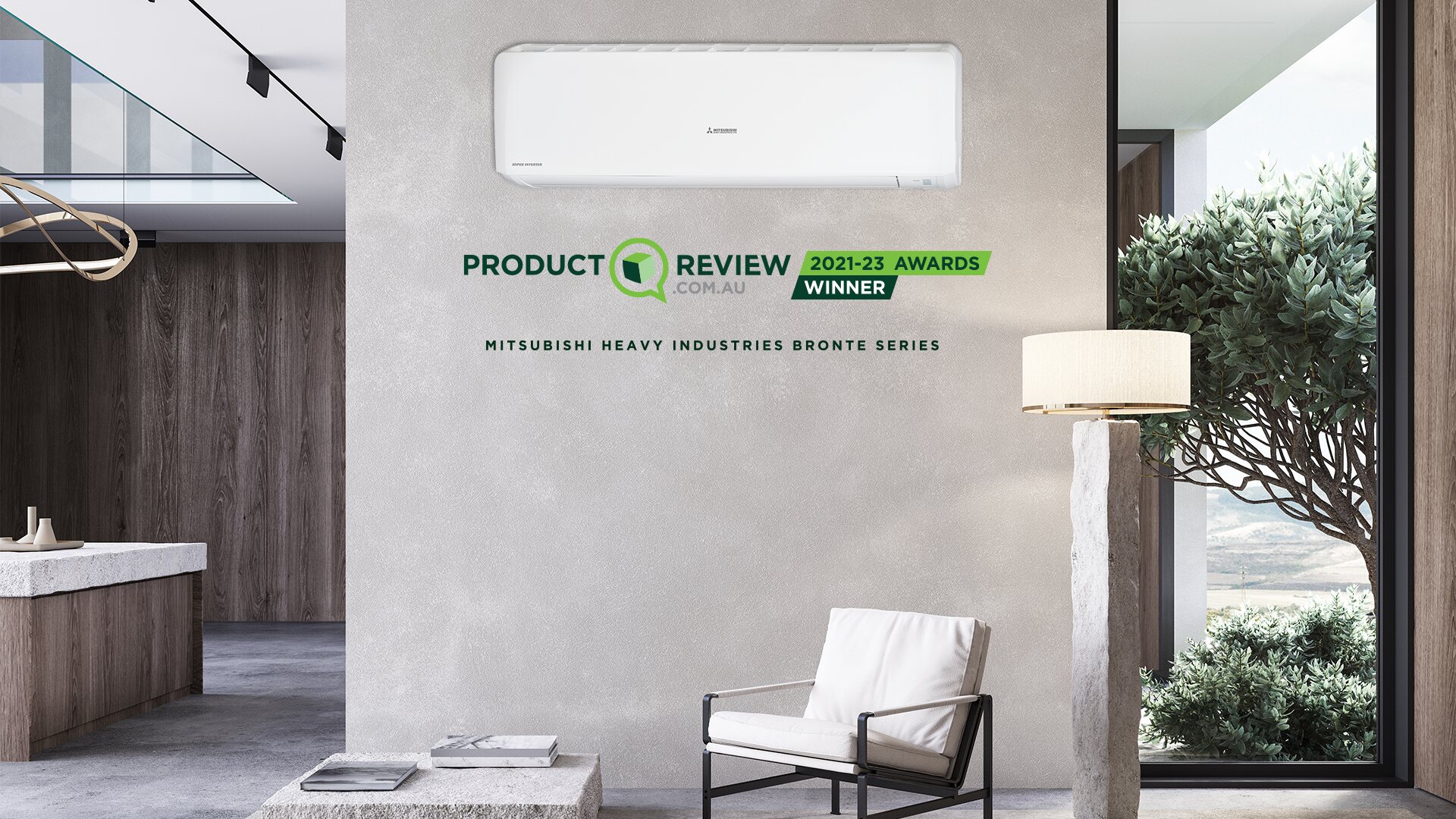
Recommended by CHOICE®, the Bronte split system features a long reach airflow and a range of features making it perfect for larger spaces.
I guess https://mhiaa.com.au/products/model/split-system-air-conditioner-bronte-srk71zra-w-dxk24zra-w/

Recommended by CHOICE, the Bronte split system features a long reach airflow and a range of features making it perfect for larger spaces.
jagged crypt
i didn't read the rest of the discussion, it looked like there was an issue with temp differences
cold moon
nah he was just confused with how to automate things
trail rampart
yea that sounds like I could set the main sensor to always "think" it's 4 degrees higher, but that's not what I want :P. Thanks though
jagged crypt
I just had to adjust my new ecobee (new house) by 1.5f to sync with another sensor.
cold moon
my ecobee humidity reads over 10 degrees high
jagged crypt
I haven't validated humidity on the system, I'm just hitting week 2 in this new house. I happy to see the floor in some rooms vs the forest of boxes.... 🙂
previous owner put the thermostat right above an aircon vent for some reason
tacit burrow
my humidity is way high, like mould territory. need to get a dehumidifier some day
if you belive the tuya pos that is
55-65% today
 jagged crypt
sonoff sensor outside has it 40% here, ecobee has it as 54% indoor, and my office about 50 feet down the hall has 40% humidity also... so maybe the ecobee is wrong....
trail rampart
what is the highest safe humidity for your house? I sit around 40ish
rich venture
tacit burrow
I've finally ordered a split system for my house. It gets too lot, like 10 days...
imo insulation is first investment you should make
tacit burrow
it's winter here, and cold as f*k
tacit burrow
rich venture
imo insulation is first investment you should make
My house has practically ZERO insulation. It's 130 years old, absoltely zero in the walls, and very old/tired stuff in the roof space, at least 40 years old I guess.
 rich venture
tacit burrow
My house has practically ZERO insulation. It's 130 years old, absoltely zero in ...
rich venture
tacit burrow
My house has practically ZERO insulation. It's 130 years old, absoltely zero in ...
is the house made from bricks?
patent river
Mine's in Celsius. Lowest figure on that graph is 1.9°C (35°F).
 tacit burrow
Mostly timber walls. The back extension is bricks.
I knocked out a in internal wall recently, and had an external wall open, there was nothing at all.
Maybe spray-in foam or filling?
jagged crypt
i just discovered i had mislabeled my moved sensors, was trying to figure out why my office sensor was showing close to 90f/32c, when it was very much NOT that warm. It's 77f/25c in my office.
cold moon
jagged crypt
sonoff sensor outside has it 40% here, ecobee has it as 54% indoor, and my offi...
Easy to override. Put the humidity sensor next to it and wait for it to level out then fix offset in ecobee advanced settings
rich venture
tacit burrow
I knocked out a in internal wall recently, and had an external wall open, there ...
i dont know how to insulate timber frame buildings, i only know how to insulate brick houses
 jagged crypt
yeah, I did that with the temp, from the link i put up
cold moon
tacit burrow
I knocked out a in internal wall recently, and had an external wall open, there ...
Rockwool / mineral wool is expensive but is pretty much the best
jagged crypt
tackling lights first here, then will figure out sensors again
had hue bulbs, trying out inwall zigbee switches for a couple rooms here
discovered I had no neutral in at least one room, got a pair of sonoff "no-neutral" mini's to try out
rich venture
cold moon
Rockwool / mineral wool is expensive but is pretty much the best
there is also the mattter where to place it
if you place it in between the studs you have to rip all walls open and even then studs create thermal bridges
cold moon
Brand new house and no neutral?
cold moon
rich venture
there is also the mattter where to place it
if you place it in between the studs...
Studs still give R1 lol
jagged crypt
new to me, built in 1980, some electric redone in 2020-2021, obviously not 100%
cold moon
Bummer
jagged crypt
well it did come with a massive solar setup and a pair of tesla powerwalls 🙂
rich venture
cold moon
Studs still give R1 lol
yes but thats almost nothing
cold moon
I know lol
tacit burrow
hahah. I build massive solar, and 1 powerwall.
cold moon
Foam isn’t gonna change that tho
jagged crypt
48 400watt panels + 2x powerall+ units
tacit burrow
I'm a bit broke right now. Spent like $20k on the reno, plus a bunch of $ on garden. WIll have to slow-roll insulation. Maybe before next winter.
cold moon
jagged crypt
48 400watt panels + 2x powerall+ units
So $150,000?
tacit burrow
My system is about the same size Panzer
tacit burrow
21.1kW
jagged crypt
 rich venture
cold moon
Foam isn’t gonna change that tho
rich venture
cold moon
Foam isn’t gonna change that tho
here insulation is put on the outside of the walls so no thermal bridges
cold moon
I see
tacit burrow
cold moon
Each power wall alone is almost 50k last time I looked
What? They're like $12k here, like US$6000
cold moon
I went to their site and filled out info before and it was over 50k
tacit burrow
For solar + battery + install?
cold moon
Maybe that included the panels I just wrote it off as impossible
tacit burrow
The battery alone is like us$6k. Install maybe 1-2k. Panels+inverter+install = depends how much.
Plus there are some of state or federal incentives and things (here at least)
@jagged crypt must be sunny where you are! Its bloody cold winter here. https://pvoutput.org/aggregate.jsp?id=105339&sid=92331&v=0&t=m
PVOutput.org - share, compare and monitor live solar photovoltaic output data
jagged crypt
cold moon
Each power wall alone is almost 50k last time I looked
i think total w/ install was $70-75k usd
but lucky for me, previous owner bought it all back in march 2023
tacit burrow
I think my solar would have been like $25k, but with incentives and stuff, was like $15k.
The PW2 battery was $15.5k installed.
jagged crypt
lyricnz, yea, sunny here
though currently dealing with some smoke from fires up north
tacit burrow
Ignore the FIT$ on that website, I didn't enter my tariffs
I maxxed at 132.000kWh for one day last summer
jagged crypt
i'm seeing 100kwh/day for the past week roughly
106 was my peak so far
no clue what it'll be in the winter here
patent river
The MKBHD video where he goes through daily/monthly power generation (for a solar roof tile + battery system) over a full year is quite interesting
https://www.youtube.com/watch?v=UJeSWbR6W04

1 year with the Tesla solar roof
Get $200 off the Pod Cover with code MKBHD at https://www.eightsleep.com/mkbhd/
MKBHD Merch: http://shop.MKBHD.com
Get discounts off any Tesla product with my affiliate link: http://ts.la/marques8135
The full snow falling off the roof video: https://youtu.be/UzhJvcNdwM8
Tech I'm using right now: https://www...
jagged crypt
yeah, I get something back for feeding the grid, but haven't had a chance to figure out much that'll be.
tacit burrow
My export tariffs are LAME compared to the import price
Power Import
Peak (3pm-9pm) $0.3652 per kWh
Off-Peak (other) $0.2002 per kWh
Power Export
Peak (4pm – 9pm) $0.106 per kWh
Sholder (9pm – 10am) & (2pm-4pm) $0.055 per kWh
Off-Peak (10am-2pm) $0.039 per kWh
patent river
Of course if you prefer your solar power content with a STRONG Aussie accent, there's a whole series of videos by Dave (EEVBlog) on various aspects (including things like drops due to shading by trees, and string vs micro-inverter, plus switching to heat pump hot water and a lot of related concepts)
tacit burrow
yeah, I've got some shading, and no micro-inverter or optimizer etc
jagged crypt
I'm watching Deadloch, I'm getting a strong Aussie/Tasmanian accent nightly already 🙂
Lyric, I'm expecting the same level of buyback
tacit burrow
I saw that, wife things it will be too stupid.
I still can't figure out why my pw2/system is importing power so often, it should be running on battery more often, but it still imports in the morning, when battery is >30%
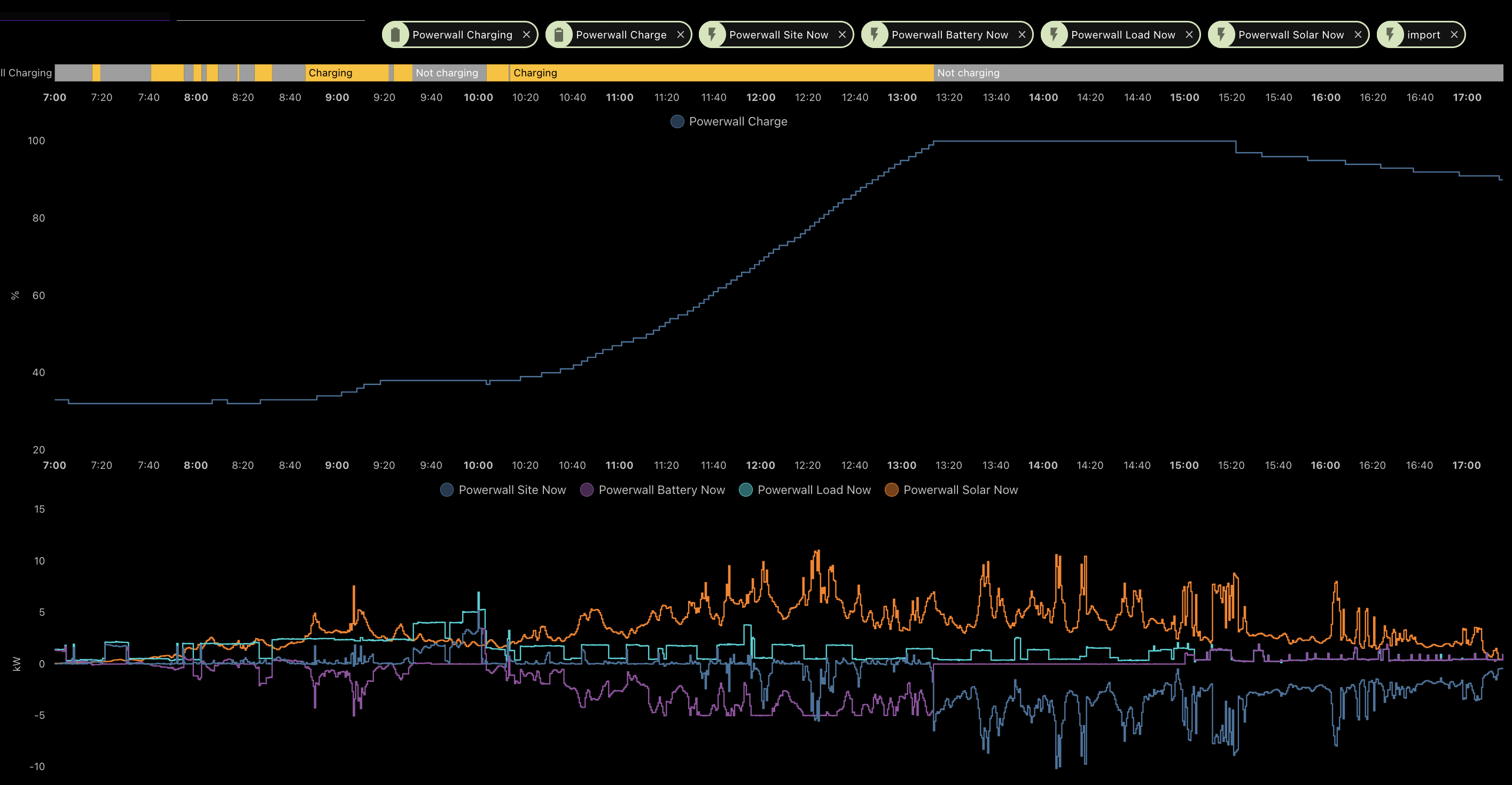
ie: why did it import (site >0) between 0920 and 1000h, when battery was >30%?
jagged crypt
did you adjust the tesla setting?
tacit burrow
Adjust? Setting? It's in TOU, and tariffs are roughly right
jagged crypt
oh, on the app, I can change the backup reserve. Previous owner had it defaulting to 40%, I put it to 10%
which means drain to 10%
at least that's my understanding
tesla app -> settings -> powerwall - > backup reserve

 jagged crypt
I have numbers in there, but I'm not sure where they came from 🙂
the second page
they are 0.35/0.35 and 0.49/0.49 (Same buy/sell, different time of use) I'm pretty confident that buy back is at least 1/2 that
tacit burrow
YOu need to check your power bill/contract
They are manually entered in the app, not from any authoritive source
jagged crypt
yeah, just moved in two weeks ago
tacit burrow
I've raised a support ticket with my installer. Not optimistic.
jagged crypt
good luck, I just managed to turn on battery mode when we were talking earlier, and burn through the battery when it shouldn't have been, so using grid "tonight". On a plus side, no air-con needed.
trying to figure out why it also lost contact with the battery for part of the day today when i swapped from self-powered to time-based (the thing that caused the issue)
tacit burrow
It seems to be working more predictably in self-powered mode; but I wonder if I need some automations or alerts to catch strange cases. Really want to avoid paying peak price for import, even reverting to grid-charging if it's too low coming into that.
Peak (3pm-9pm) $0.3652 per kWh
Off-Peak (other) $0.2002 per kWh
 tacit burrow
I'm only just making 100% now, and it was winter (until today)

But as long as it covers 3pm-9pm, that's good enough.
Right now it's importing during the day, when it should just show it's charging a little. Changed to self-powered just now
jagged crypt
i think i told it to export the battery to grid in my example above
just disabled that setting
I also just told it to hold 0% in reserve to see how long that lasts tonight
tacit burrow
I think there's at least two % numbers reported in various places, via the APIs etc. See gh issues.
They're ~5% apart
The web-based telsla integration reported different to the local one. And it's not polling rate.
jagged crypt
the sensor reports 12% in HA, the tesla app says i have 7% left. So it's holding 5% to keep from flatlining the batteries
tacit burrow
Yup, something like that.
jagged crypt
wrong channel that. trying to refresh the polling
jagged crypt
too many channels, but I'll answer a zigbee channel comment you made Lyric. Previous house we put hue motion sensors in all the rooms, no more light switch use, everything just worked (hue app, was done pre-HA). Light switch in the bathrooms only.
drifting grove
tacit burrow
I'm only just making 100% now, and it was winter (until today)
Looks like mine 🙃, this aussie winter has been a ton more cloudy than the last
 random stream
Can I use Ring contact sensors directly with HA Yellow, or do I still need a Ring base station?
cold moon
If you’re looking for stuff to buy ring ain’t it
random stream
I just need a door sensor, for while I'm away this week, and the ones on Amazon are not arriving in time. So I found someone selling the ring sensor on FB marketplace.
terse pebble
random stream
Can I use Ring contact sensors directly with HA Yellow, or do I still need a Rin...
Ring sensors and keypads can be used with the Yellow, IF you also have a ZWave stick or HAT.
random stream
I have an Aquara coming, but I don't know if it will be here in time
random stream
terse pebble
Ring sensors and keypads can be used with the Yellow, IF you also have a ZWave s...
Thanks, I have neither of those so I guess I will just hope the aquara comes on time lol
terse pebble
The onboard radio is not compatible with those
random stream
The Ring sensors, right? Or the Aquara as well?
terse pebble
Ring was meant. 😆 Aqara is fine
terse pebble
At least their Zigbee stuff. Not sure about the Thread ones.
random stream
Pretty sure I got a zigbee one.
tawny viper
ring is zwave right?
 high stump
Ring works with Yellow, plenty of people using the alarm keypad for instance.
Oh i see now, @terse pebble meant the onboard radio only...yes that's right you need Z-Wave add-on radio
cold moon
It doesn’t work with yellow that doesn’t make any sense
Yellow is an underpowered sbc
Some ring devices can be paired to a zwave controller
What that’s running on has no relevance
high stump
Yes i misread, but corrected in 2nd line, you're confirming what i said
cold moon
I’m writing out factual information
terse pebble
tawny viper
ring is zwave right?
Yes
 spare drum
What’s the easiest way to go about integrating switchbot curtain motors into home assistant? My motors would be on the opposite side of my house from my rPi4, so I’m worried about Bluetooth range a bit
 fringe crater
spare drum
What’s the easiest way to go about integrating switchbot curtain motors into hom...
fringe crater
spare drum
What’s the easiest way to go about integrating switchbot curtain motors into hom...
ESP32 proxy.
spare drum
what is that?
fringe crater
You get an ESP32, which is a $5 microcontroller, and it acts as a HA bluetooth proxy. It communicates to the motor and relays the bluetooth back to HA over wifi.
https://esphome.github.io/bluetooth-proxies/
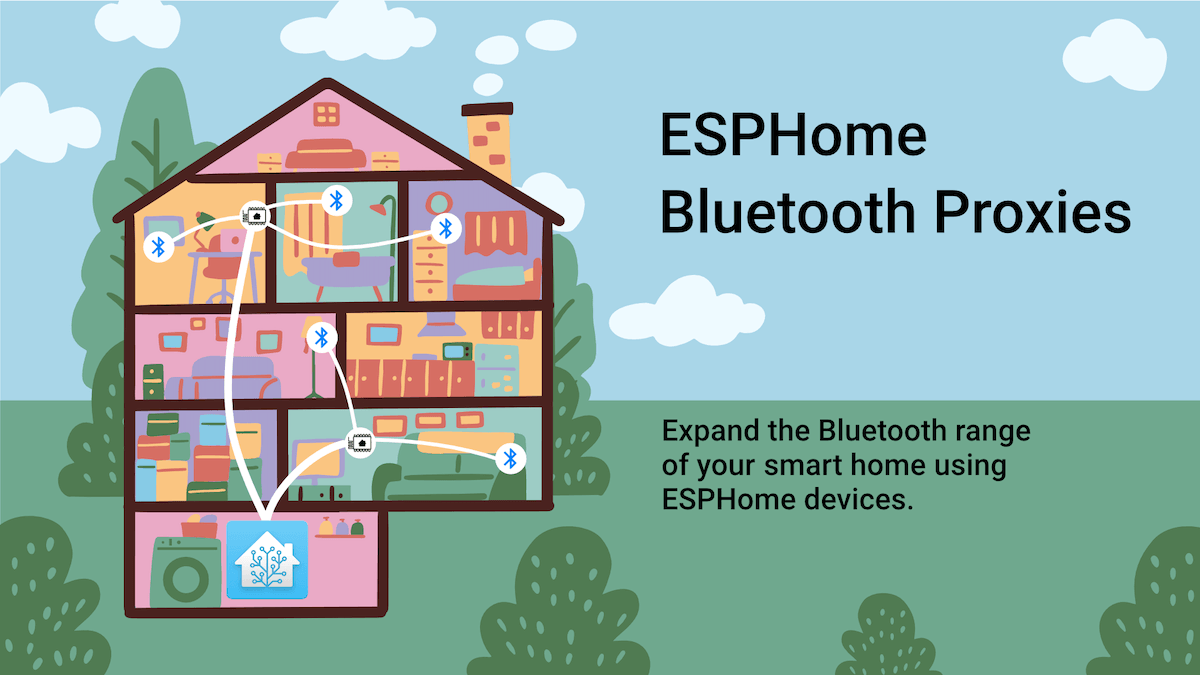
ESPHome Bluetooth Proxies
Expand the Bluetooth range of your smart home using ESPHome devices.
drifting ember
I'd like a $5 ESP
spare drum
I’m assuming that’s something I have to power over micro-usb? And how would I go about flashing it?
 glossy prism
carefully
spare drum
That one is like 26 euro, at that point, would it make more sense to just get the switchbot mini hub?
fringe crater
I just buy these by the dozen. $3.04 for wroom-32d
https://www.aliexpress.us/item/2251832678407407.html?spm=a2g0o.order_detail.order_detail_item.7.7db6f19cKllo8y&gatewayAdapt=glo2usa
cold moon
spare drum
That one is like 26 euro, at that point, would it make more sense to just get th...
it's one option, not required just considered the best
i use two of the $5 wroom32 like karwosts posted (wifi)
in a tiny little 3d printed case
spare drum
Which one is considered the best? The hub or the esp32
cold moon
https://shop.m5stack.com/products/atom-lite-esp32-development-kit?ref=NabuCasa these are kinda cute tho

m5stack-store
Atom Lite is a compact development board of 24*24mm, with an ESP32-PICO chip that is integrated with Wi-Fi and has 4MB SPI flash memory. It provides more GPIOs for user customization which is very suitable for embedded smart home devices and in making smart toys. It can be used as an IoT controller and node.
cold moon
spare drum
Which one is considered the best? The hub or the esp32
no one here suggests buying proprietary hubs man
fringe crater
Does that switchbot hub even work for HA? Or does it just lock you into cloud.
spare drum
Oooo that one comes in a case and has usb c power for like $7. That might be the route I go
cold moon
fringe crater
Does that switchbot hub even work for HA? Or does it just lock you into cloud.
i believe it's cloud but no personal experience
spare drum
Is it something I can set up over usb c? Or do I need something extra to flash it over it’s pins or something?
spare drum
Alright. Sorry if these all sound like really basic questions, I’ve just never dealt with any esp stuff other than a screek presence sensor that more or less was just picked up by HA immediately
fringe crater
no worries.
spare drum
Is there a good guide or tutorial for how to flash it with the Bluetooth proxy firmware and how to get it set up in HA?
fringe crater
I think this website just flashes it for you:
https://esphome.github.io/bluetooth-proxies/
you just plug it in and hit "connect" afaik and it does all the work
cold moon
i think they might come preflashed?
maybe not i'm not seeing it in the store's details
spare drum
fringe crater
you just plug it in and hit "connect" afaik and it does all the work
That’s kinda cool. Alright, thanks guys
After the flash, do I need to do anything in HA?
cold moon
after you use the webflasher tool it literally goes to a page that asks if you want to add it to hass
it's really easy
 gloomy spoke
It's automatically discovered
spare drum
That’s awesome. I really do want to get into more esp stuff cause it seems like a really powerful diy route
gloomy spoke
Those things are awesome
cold moon
honestly as cool as esp are it's usually better to just buy premade sensors like zigbee ones
just depends on your use case
spare drum
Yeah most of my stuff is zigbee, but I haven’t found a zigbee based curtain motor that seems sufficient
I know aqara has one but it’s not nearly as strong as the new switchbot one, and we have heavy curtains
I don’t have much Wi-Fi based stuff anymore, but the things I do have are way more reliable than my zigbee stuff for some reason. I’ve had trouble getting my zigbee mesh stable and reliable while living in a townhouse with people on either side of me
spare drum
Side note, any decent way to test BT connection to HA from various locations in my house?
cold moon
it'll do an energy scan when you click it
which will stop all zigbee stuff while it's doing it
spare drum
Part of me wants to know whether or not the esp stuff is even necessary
cold moon
there's rssi exposed with the bt integration isnt there?
idk how to test it from another location tho
If the rooms are close enough it won’t matter so much about having two per room since the active connection range is much shorter than the advertisement reception range

You just need a second one in advertisement range while the other one is connecting.  Usually that can be anywhere in a 2500sqft house

Deploy one per every 625sqft with a minimum of 2 and you are good```some info about them^
spare drum
cold moon
it'll do an energy scan when you click it
I know I’m on zigbee channel 25 and my two WAPs are on channel 1 and 6, so there shouldn’t be much interference with my own stuff, but my neighbors are definitely interfering
 cold moon
but so does usb 3.x ports
and SSDs
and network racks
are you using a usb extender?
https://youtu.be/tHqZhNcFEvA 30 second clip showing it

USB 3.0 can cause your Zigbee devices to fully stop functioning. In this video we show this by moving a Zigbee device and Zigbee adapter next to USB 3.0 port and cable.
The demo is done with a Home Assistant SkyConnect and IKEA Tradfri remote but this affects all Zigbee sticks and devices.
To avoid interference, use a shielded USB 2.0 extensio...
spare drum
Yes, admittedly not an incredibly long one, but like 6 feet
cold moon
still a zigbee scan will help confirm it
what coordinator and firmware version
https://tubeszb.com/product/cc2652p2-based-zigbee-to-poe-coordinator-2023/ i use one of these now
spare drum
Nortek HUSBZB-1
cold moon
lol
spare drum
Give me a sec to see the firmware
spare drum
Really? Well crap lol
spare drum
Well that might be half of my problem lol
I’ve had it for years and never really considered that it was part of the problem
cold moon
is your hass install where the coordinator is centrally located?
drifting grove
Hey, did someone used the Shelly wall display already? https://www.shelly.com/de/products/shop/shelly-wall-display-w/shelly-wall-display-b
Shelly Cloud
cold moon
if not, or even if so, a PoE coordinator isnt a bad idea
spare drum
I would say not centrally, but the usb extender puts the nortek stick as close to “centrally” as I can realistically put it without having my GF saying “what is that stupid usb thingy doing out there in the open?!”
I do have multiple repeaters, an ikea USB one and two ikea plug sockets, so basically one in every room of the house
cold moon
ya but if the coordinator is experiencing interference or just generally sucks then it doesnt matter how many repeaters you have
spare drum
The PoE one is a bit expensive. Do people generally recommend the sky connect one?
Also all of my PoE stuff is even less centrally located than my hass install, and I don’t really want to do any more Ethernet runs while we’re still in an apartment.
cold moon
you dont have to buy the PoE one
just an option a lot of us like
and it removes the usb interference angle completely
spare drum
Also, side note, now that I’m thinking about it, my hass install isn’t actually on the other side of the house from where the curtain motors will be, it’s actually just directly a floor below them. I’d say no more than 20ft of distance, and a single floor between them. I feel like there’s a chance I wouldn’t need the BT proxy?
cold moon
skyconnect is fine if you are using zha
fringe crater
why don't you just try and find out?
cold moon
spare drum
Also, side note, now that I’m thinking about it, my hass install isn’t actually ...
you're trying really hard not to buy that $7 thing lol
doesnt hurt to try either way
bdraco has made improvements to where the BLE proxies are actually faster than native bluetooth integration
so that is one reason you might want to use them
granted, we're talking milliseconds
spare drum
Still tho, faster is faster. Alright guys, I appreciate all the help. I have a suspicion that the curtain motors are about to be gifted to me, so I was just trying to get ahead of the issue. I think I’ll start by tackling the other issue and swapping out the zigbee dongle with the skyconnect one
spare drum
Ehh I might just re-set everything up, just to have a clean slate
cold moon
i think puddly has made it pretty painless tho
spare drum
Puddly?
cold moon
zha maintainer

GitHub
I 💣 IoT. Email me at puddly3@gmail.com if you want to get in touch.
⠀⠀⠀⠀⠀⠀⠀⠀⠀⠀⠀⠀⠀⠀⠀⠀⠀⠀⠀⠀
⠀⠀⠀⠀⠀⠀
puddly#8728 on the Home Assistant Discord's #zigbee channel - puddly
spare drum
The zigpy thing?
spare drum
Ahh ok. Sorry it’s just a lot to look at, just trying to find specifically what you were talking about on the GitHub
Ahh yeah looks like there’s a painless way to download backup then migrate radio
 stray birch
Reposting this as suggested since it seems more relavant here: I'm trying to control some RF motorized blinds as well as an Autoslide motorized sliding door. Looking at using the Broadlink RM Pro or the Bond Bridge. Anyone have experience with both of these units? I'm trying to figure out which one is better to buy/use.
trail rampart
anyone here successfully add the Aqaara presence sensor FP2 to HA using HomeKit?
tawny viper
Probably
cold moon
trail rampart
anyone here successfully add the Aqaara presence sensor FP2 to HA using HomeKit?
i think the only downside is no way to setup zones over homekit - i've heard you can set them up with the chyna (aqara) app then use them in hass via homekit-controller integration tho
trail rampart
yea, to even get it to show up in HA i had to get the app and set it up there (wifi)
cold moon
gross
trail rampart
indeed.
cold moon
the cost and chyna app are the anti selling points to me
i have a couple FP1 zigbee ones
trail rampart
yea i have an FP1 also, it was so easy to set up
and works pretty well.
that being said, watching myself move around a room in the app is pretty amazing...and the sensor has more features (like luminance)
cold moon
i still dont do any automations off lux
cold moon
trail rampart
yea i have an FP1 also, it was so easy to set up
fp1 was easy to setup?
you never setup zones then...
cold moon
you can create zones on zigbee2mqtt with fp1
and do like.. getting out of bed or sitting at desk automations
fp2 just adds to that
including tracking multiple people in multiple zones at the same time
trail rampart
damn that sounds badass
cold moon
ur badass
i've been thinking about mounting one of my FP1 above my stairs
so i can automate my led strip differently based on coming up or going down
trail rampart
i'm underutilizing mine I suppose, I just wanted motion lights that didn't shut off if I didn't wiggle around occasionally
cold moon
ya
well you can send your fp1 to me since you've got the shiny new stuff
i can pay in dank memes
trail rampart
haha my shiny new stuff doesn't work though 😛
cold moon
yet
trail rampart
been sitting there for a while
 cold moon
https://www.home-assistant.io/integrations/homekit_controller/ you're using this right?


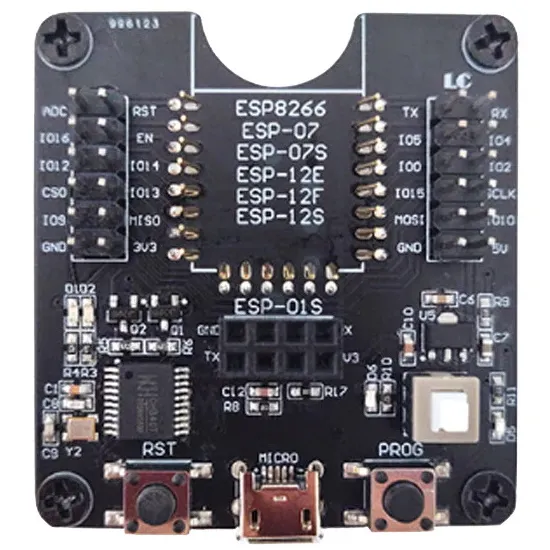
 cold moon
rekt
trail rampart
hey Smart, what do you use to backup your HA?
cold moon

GitHub
backs up to my server
i should have a cloud backup in case house burns down but i tell myself if house burns down hass is pretty low on my priority list
winged knoll
rclone and rsnapshot here, not that backups are really very hardware related 😛
trail rampart
cold moon
i should have a cloud backup in case house burns down but i tell myself if house...
my thoughts exactly
I have a NAS set up