#add-ons-archived
1 messages · Page 69 of 1
 vale tangle
 viscid orchid
What device are you running HA on?
vale tangle
on a proxmox virtual machine
it was fine until last upgrade to home assistant
i'm running supervisor
that one on linux
 timber sparrow
Anyone know if there is any work in progress for a AirSonos addon but for Chromecast instead of Airplay?
 fervent skiff
Do you know how can I show string data from attribute of sensor in InfluxDB?
when I try it this way I see only game_id but no data in game column
SELECT mean("game_id") AS "mean_game_id", mean("game") AS "mean_game" FROM "homeassistant"."autogen"."state" WHERE time > :dashboardTime: AND time < :upperDashboardTime: AND "entity_id"='steam_76561198015567611' GROUP BY time(:interval:) FILL(none)
 median acorn
Hello, does anyone know if I can use almond voice assistant without a usb mic? Use my tv as a mic for example
I guess not, I can only select the built in input
 random stream
Hi guys, i have an issue related to an addon but not really a problem of the addon itself.
So, I was trying to configure ad-guard and set it up on router level.
I went to the dns server configuration and when i paste the ip shown by adguard on the setup guide (127.0.0.1) on the dns server configuration the router says invalid ipv4 address. Any clues?
 rain wind
@fervent skiff try changing your visualization type on influx db
try to change it to table first to check what influxdb results are 1st
 supple hinge
Anyone know why my addon store is just loading infinitly?
fervent skiff
rain wind
try to change it to table first to check what influxdb results are 1st
I have a table view but only numeric values are showing
rain wind
so how many columns are you seeing?
my guess you are seeing
mean_game_id and mean_game?
@fervent skiff i believe the issue you are having is that you are trying to put a function (mean) on a character field
Try:
SELECT "game" FROM "homeassistant"."autogen"."state" WHERE time > :dashboardTime: AND time < :upperDashboardTime:
 gritty urchin
any good way to install SSH or samba via hass CLI?
fervent skiff
rain wind
Try:
SELECT "game" FROM "homeassistant"."autogen"."state" WHERE time > :dashboar...
yes I know what you mean but this returns just numeric results
 livid garnet
Is there a guide anywere, on how to get the samba addon running?
I have an external HDD and I want it to show up in the media tab and I also want to share it on the local network.
As far as I could find out, the Samba addon is the right thing for this. Is this right?
It sais it needs an SSH private key. Were do I get it?
It also requires a password and a Username, but I don't want to pasword protect it. I just want to share it on the local network.
Is there any alternative for this?
 dense burrow
random stream
Hi guys, i have an issue related to an addon but not really a problem of the add...
dense burrow
random stream
Hi guys, i have an issue related to an addon but not really a problem of the add...
I had this same problem last night. I found out that you should use your home assistant instance IP address as your router's DNS, instead of 127.0.0.1 as initially shown in AdGuard.
Just thought I'd bring it up if no one else has already. The Add-on Security Rating is only supposed to be from 1 to 6 based on the description, but I see that the File Editor add-on got a 7. Probably just a typo in either place.
random stream
dense burrow
I had this same problem last night. I found out that you should use your home as...
Thanks, I had setup it like that but it didn't shown any clients, that why i got confused. Thanks. I will try again like that 👍 just the ip or ip+ha port?
random stream
I'm doing something wrong because I'm still seeing ads :(
dense burrow
just the HA ip address
is AdGuard showing any blocked DNS requests? the graphs in the dashboard should show some data if it's set up and working
 dense spadeBOT
@tawny bramble posted a code wall, it is moved here --> https://hastebin.com/iqohureliw
 rough vault
NUT
 fierce laurel
Only if you're trying to open root '/'. I believe it used to be a warning about too much inodes getting fetched. As a workaround you can use \root which is a alias for certain commonly used folders (e.g. /share, /config etc.).
 cloud swift
Hello everyone... I am using an old pc - debian 11-bullseye
installed debian with docker HA
while using HA i installed nginx addon+mariadb
I get a domain and subdomain from godady redirect to my static
IP(home)[subdomain.domain.com]
configure nginx and take an SSL - redirect to [subdomain.domain.com]
HTTP://nginxIP -also-HA IP :8123
port forward from modem 80 >> nginxinternal IP:80
port forward from modem 443 >> nginxinternal IP:443
I get a 400: Bad Request error
can anybody help please ?
r/homeassistant
vale tangle
your internal should be 8123
to get to has
are you exposing 8123 to the world
should look like : world (https) --> NGINX ---> hass internal:8123
if you haven't forced https on the hass side
hass=nginx -- same ip just different port
 coral nebula
does anyone have the aircast addon working? i have all my google home devices set up on home assistant but i can't seem to get aircast to set any of them up as air play devices
vale tangle
I turn this on and absolutely kills my cpu and memory Studio Code Server
turn it off and all back to normal
anyone experiencing this?
 errant cobalt
Installed Mosquitto MQTT Broker, was following the guide from HA website, i do not get an auto discovered MQTT integration in HA, tried restart
First time using MQTT no prior installs
vale tangle
you did the 'configuration' page before restarting?
what are you seeing in logs in teh mqtt broker
 shadow quest
i have installed home assistant for raspberrypi4-64 bit but i cant find a option for add-ons
 raven tinsel
Which installation method/type did you choose?
shadow quest
iam using docker
raven tinsel
Than you won't have add-ons.
shadow quest
raven tinsel
nope
shadow quest
is their any documentation for setup wifi network for os?
raven tinsel
We do not recommend on using Wi-Fi
But you can configure it. "Configuration" -> "Add-ons, Backups & Supervisor" -> "System" tab -> the host section contains the network configuration
dense burrow
raven tinsel
We do not recommend on using Wi-Fi
Is there any specific downside to using wifi?
 sly kindle
reliability and speed
This isn't Exchange Server but it's still a server. I wouldn't want any similar services on wifi either: sonarr, radarr, plex, bitwarden, etc
vale tangle
Failed to to call /addons/a0d7b954_vscode/stats - 404 Client Error for http+docker://localhost/v1.41/containers/addon_a0d7b954_vscode/json: Not Found ("No such container: addon_a0d7b954_vscode")
still having vscode issues - can't run it
😦
 robust bane
all, My esphome doesn't want to start/download after upgrade to 2022.3 : Image ghcr.io/esphome/esphome-hassio-aarch64:2022.3.0 does not exist for addon_15ef4d2f_esphome
fixed it, added the offical HA repository for it and installed from there.
 eternal thunder
I freshly installed supervised ha. I am not getting the add-ons page
Add-on store not coming up
Using raspberry pi 3
 onyx olive
I'm getting this when starting/restarting deCONZ: 'Can't create container from addon_core_deconz: 409 Client Error for http+docker://localhost/v1.41/containers/create?name=addon_core_deconz: Conflict ("Conflict. The container name "/addon_core_deconz" is already in use by container "asgfagsgagsagdfasgasgagsagageef76". You have to remove (or rename) that container to be able to reuse that name.")' I updated something in Supervisor earlier today/yesterday or something. Related? EDIT: Phew.. a restart of the host fixed it.
 stray ferry
Has anyone else had their mosquito mqtt broker stop working, showing all devices as offline?
 mystic nacelle
only when my network has been cut off
 weary stratus
Hi @all where should i place my own font (JetBrains Mono) for the Visual Studio Code Server so that i can use it insde the VSC addon?
gritty urchin
eternal thunder
Add-on store not coming up
From the sidebar or configuration ?
eternal thunder
gritty urchin
From the sidebar or configuration ?
I got this solved. When I setup static IP to the raspberry pi I did a mistake in router setting. Rectified that and got Add-on working.
 supple citrus
HI there. For some time now updating the letsencryt certs for my alias domain via DuckDNS addon fails because of this error:
"ERROR: Challenge is invalid! (returned: invalid) (result: ["type"] "dns-01"
It seems there are quite a lot people with similar issues but from reading the Github and HASSIO forum threads i cant extract a solution.
Anybody has some hints for me?
It seems i just found a workaround: https://community.home-assistant.io/t/lets-encrypt-quit-working/151106/13
 spring carbon
i have a question. I just installed a full backup on another system using the snapshot function. everything seems to work except mosquitto add-on. For some reason nothing can connect to it until i change the ip address of the new system to the ip of the old system. Or removing and reinstalling the addon. by doing so needing the rename of 720 entities which is not preferable. The reason i ask is because zigbee2mqtt wont connect to the mqtt broker after the full snapshot is restored on the new system. Can anyone explain what goes wrong here?
This is the error in the mosquitto log:
1647696168: Socket error on client <unknown>, disconnecting.
1647696169: New connection from 172.30.33.0 on port 1883.
and here the log of the z2mqtt addon
[14:22:58] INFO: Handing over control to Zigbee2mqtt Core ...
> zigbee2mqtt@1.24.0 start
> node index.js
Zigbee2MQTT:error 2022-03-19 14:23:08: MQTT failed to connect: Connection refused: Not authorized
Zigbee2MQTT:error 2022-03-19 14:23:08: Exiting...
I guess somewhere in the background mqtt settings keep refering to the old ip adress. i guess this is an error in how the snapshots work. Or a flaw because its not possible to change it to another ip
It seems i found a fix. by not removing the mqtt integration and reinstalling the mosquitto broker it is fixed. But can someone please fix the snapshot of mosquitto so it just works after reloading a snapshot. Its kinda strange you need to remove mosquitto and reinstall it for it to accept connections again.
 compact bear
Is it possible to secure the Vaultwaren/Bitwaren addon with fail2ban?
 rose summit
So with google killing my free gsuite accounts soon I was wondering if there was a home assistant solution for email hosting or if I should just use my domain hosting for email. After doing a search most people seem to say mail server is not worth it
 fallen remnant
Hello, I cannot find mosquitto addon in the official repositories, what should I check? thanks
viscid orchid
🤷

 vagrant egret
Can I use node red if I don't have the addon screen in my HA
vagrant egret
fallen remnant
Hello, I cannot find mosquitto addon in the official repositories, what should I...
Search for MQTT direct it to your broker and done
 haughty lance
Is there a way to disabled HTTP traffic logging in the deconz addon?
I'm having issues with ikea remotes not linking, but i can't see what logs are what due to the HTTP logs being so much
 strong berry
Hello. I'm wondering if anyone here is familiar with the Grocy add-on
I've installed it and only a few parts are working properly compared to the demo site available. All other add-ons have worked pretty flawlessly except this one. I see an error in the logs, but after viewing the open issues on the Github site, it appears that this particular error should affect the issues I'm having.
I'm curious if there is any way to see the actual installed files so that I may tweak them myself.
I meant ...should NOT affect the issues I'm having
vale tangle
are you running zigbee2mqtt in docker?
 chrome tusk
Folks, I'm running Tailscale on my HA Pi and was wondering what using it as an exit node in what network admins could see: does the local WiFi (cafés, work, other networks) I'm on just see my device and that it's communicating out or do all the URLs I visit get logged?
 hoary crown
Hey Guys,
anyone using this edge addon? https://github.com/hassio-addons/addon-mopidy
I am trying to add the spotify extension but don't know how to add or install it.
raven tinsel
Adding the spotify extension sounds weird... as it is already installed by default: https://github.com/hassio-addons/addon-mopidy/blob/main/mopidy/requirements.txt#L5
hoary crown
Why do I get this message then: "Mopidy-Spotify extension is not running - you will not be able to play any Spotify tracks"
raven tinsel
Dunno, feel free to fix it
its not a production ready add-on
But it warned about that already 🙂
hoary crown
Okay, so there is no one actively working on that problem?
raven tinsel
not that I'm aware of
strong berry
I'm trying to run the Grocy add-on 0.16.0. It's installed and semi-functional. I'm logged in as admin:admin and can add items under the 'Manage Master Data' section like products, quantity units etc.
I can also add items to the Grocery Shopping List, but I have to refresh the page to see them.
However, I'm unable to add items into inventory in any way. Neither through 'Inventory' nor 'Purchase." I've tried entering through my https external domain name, as well as the http://internal_HA_ip:8123 as well as adding a port in the Grocy configuration and going to http://internal_ip:port# with no luck.
I've tried uninstalling and reinstalling add-on
Logs show one error, and I've looked at related issues on the GitHub site mentioning that error, and I think I should still be getting data added, but I'm having no luck.
--Related error in log--
[22:13:29] INFO: Patching Grocy to fix relative URL handling...
patch: **** malformed patch at line 15:
patching file views/layout/default.blade.php
patch unexpectedly ends in middle of line
[cont-init.d] grocy.sh: exited 0.
---end of related error--- No other errors shown
When I try to add purchased items, I fill in all the fields and click 'ok' and it appears to hang. The 'close' button still allows me to exit the window if desired. This is the same behavior as when adding shopping list items, but after adding a shopping list item, refreshing the page shows the item has been recorded.
I'm looking for some guidance. I'm willing to troubleshoot the code on my own, but I haven't done any add-on development with HA, so I'm not sure how to setup a proper dev environment for it.
 toxic compass
Hi all,
a question about the #Mosquitto broker add-on, version 6.0.1
I have some Shelly devices (1PM, 2.5, Plug S) that send their data via mqtt.
I noticed that the energy data is stored in Wh and not in kWh, as is the case with the native Shelly integration via CoAP, for example, or with zigbee devices.
According to Shelly's API documentation, the value is actually in watt-minutes, not watt-hours!
Can I configure it myself or is there a solution?
Is this even a "problem" with the Mosquitto broker add-on?
 fiery prism
No this is not an issue with the addon. It is just reporting what it receives. You can use a value_template in your mqtt sensor config to change Wh to kWh. Unless it was discovered. Personally I just use the core Shelly integration.
toxic compass
fiery prism
No this is not an issue with the addon. It is just reporting what it receives. Y...
Thank you for your answer!
The "Wh" are not reporting bei the shellys. The shellys only reporting a numeric value. Where does the unit come from?
The core shelly integration works on COAP, correct? The new generation of shellys are only reporting via mqtt. So I wanted to use a uniform transmission technique.
Best regards!
fiery prism
"The new generation of shellys are only reporting via mqtt" I don't think that is true. Both generations are supported by the integration https://www.home-assistant.io/integrations/shelly/
 hollow glen
Evening all. Is anyone able to help with DuckDNS, please?
 lament otter
hollow glen
Evening all. Is anyone able to help with DuckDNS, please?
lament otter
hollow glen
Evening all. Is anyone able to help with DuckDNS, please?
Try asking the question you have or describing the issue. Otherwise you could be waiting a long time only for someone to say "ah, that bit I don't know"
hollow glen
lol - sage advice there RO.
tries again, this time without being quite so vague...
OK, so I've registered a domain on DuckDNS. It says it's working. I edited the config for DuckDNS accordingly (domains & token) and the logs report 'OK' throughout.
But.. 1) I can't ping the domain name for the ip and when I set up HA on my mobile, it connects using local IP but not when using xxxxx.DuckDNS.org
And 2).. I can't remember what my other thing was right now.. I'll get back to #2.
So yeah... connectivity to sum it up
In the instructions, it says about picking up the SSL - I've no idea about this. And I'm using it via a VM on a NAS and have no idea where to find the config yaml
lament otter
In the HA app, make sure you set the external IP as well as the internal. Depending on your network settings HA may end up only being available over DuckDNS and not the internal IP, but that's something you'll have to check with your router/network config.
Follow the settings for let's encrypt to do the SSL cert
https://github.com/home-assistant/addons/blob/master/duckdns/DOCS.md#option-group-lets_encrypt
hollow glen
As it stands at this moment, looking at my HA app on my phone - The HA URL can be edited as can the WiFi SSID - but the "internal connection URL" and "prioritize internal URL" are both greyed out.
I already have DDNS working on my router through another provider as well as a DDNS from my NAS manufacturer... Can I not use one of those instead?
TY for the link to LE, RO.
lament otter
Sounds like you need to check the app docs:
https://companion.home-assistant.io/docs/troubleshooting/networking
lament otter
hollow glen
I already have DDNS working on my router through another provider as well as a D...
Yes. And you probably should.
hollow glen
So, would I just put the NAS DDNS (for example, my-connection.co.uk) into the external Internet URL?
And then would I still need Let's Encrypt or would the system work already as I think it's already encrypted through their own means... not sure whether that's Self Signed or not though...
lament otter
You don't need DuckDNS if you already have a domain. You'll need a reverse DNS. I use Caddy2
hollow glen
Thanks RO, apologies for the delayed reply... I had company turn up.
 worldly lava
Anyone know if while using Nmap, I have to initialize it everytime to recognize a new connected ip address/phone? Most devices have been connected to my network before, but not with Nmap setup.
 abstract prawn
NVM. oof
hollow glen
@lament otter I was missing the port... fixed now 😄
robust bane
all, I've raised a Github issue on the Mosquitto add-on, disconnecting all connections every 30 min during/after DB save to disk. https://github.com/home-assistant/addons/issues/2405. Any idea how I can bring this to the attention of people knowing more about this than me (and wanting to look into it)?
lament otter
I would suggest posting the machine you're running it on, and the kind of storage it's using as well. If it's a Pi with a microSD card though, that's your problem.
robust bane
It's a Pi 4 with with a USB3 connected NVME SSD ... faster than this is not possible, at least not on a Pi4
lament otter
You might also be hitting the processor limits of the Pi. If too many things are trying to do everything at once, they'll get stuck in a stack and have to wait for their turn.
robust bane
this was posted in the issue as well btw : '''This is running a a Raspberry Pi4. 4GB and it's booting from and storing all on an USB3 connected SSD.
The add-on is using 65%-70% of the memory (as shown in the Mosquitto add-on info screen)
The SSD is only 10% full.
if this is such a common problem, then there should be loads of people with the same complaint. And I don't see them in github or elsewhere. So I don't think it's just a 'your box is too slow' issue.
lament otter
I didn't have that issue myself when I was using a Pi. But there are a number of other potential things which can effect this. E.g. the number of devices and transactions running through it.
robust bane
as it's repeating like clockwork, exactly every 30 min, it's clearly due to this DB save. Add-on CPU usage is so low it shows (round down) 0% in the add-on view screen, so if it was really killing the CPU due to high number of transactions flowing through it, it would show at least something. The memory usage for the Mosquitto add-on is 2.5 GB. Quite considerate ...
lament otter
And how much free ram is on your Pi during the saves? If there's not a lot then it may be doing a disk swap. You said you have a Pi 4GB, so that could be the issue.
robust bane
it seems only the retained MQTT messages are stored in the mosquitto.db file. I can see recommendations to just delete the file. And start clean, of course when Mosquitto is properly brought down. What would the effect be on the internal HA usage of Mosquitto? Where can I find that file? When using "find / -name mosquitto.db -print" using the web & ssh add-on I can't find anything. How to 'escape' from the limited environment I seem to be in? I have already protection mode-off in the add-on config.
robust bane
lament otter
And how much free ram is on your Pi during the saves? If there's not a lot then ...
You know which HA specific MQTT topics NEED to keep messages with the retained flag on?
lament otter
Nope
 hidden spear
anyone have any experience with motioneye?
dense spadeBOT
@hidden spear Your message has been deleted as it contains a link or a domain name 'pasteboard_dot_co' that is on the blocked list because of: 'Virus detected!'.
Please re-post by removing/changing the domain name/link. Your original message has been DM'ed to you.
hidden spear
I'm trying to figure out the url for the script. because normally it should have the api_password (which should be deprecated)
(wanted to share a ss, but can't)
https:// pasteboard .co/f8sZm4MtKm1i.png
sly kindle
robust bane
it seems only the retained MQTT messages are stored in the mosquitto.db file. I ...
Having protection mode off still won't get you access to the host. You're in a container, so limited by that. Alternatively you could just uninstall the add-on, and then re-install it.
robust bane
sly kindle
Having protection mode off still won't get you access to the host. You're in a c...
indeed, just uninstall/reinstall seemed to have done the trick the quickest way. I went from 2.5GB to 37MB RAM usage 🙂
 royal halo
I've setup a fresh HasOS and Zigbee2MQTT with Sonos-USB (flashed bevore with 20211217). I can see in the Zigbee2MQT-UI the Coordinator-Type/Version but all command end in error-messages like learn new device or touchlink scan:
error Request 'zigbee2mqtt/bridge/request/permit_join' failed with error: 'SREQ '--> ZDO - mgmtPermitJoinReq - {"addrmode":15,"dstaddr":65532,"duration":254,"tcsignificance":0}' failed with status '(0xc2: NWK_INVALID_REQUEST)' (expected '(0x00: SUCCESS)')'
error Request 'zigbee2mqtt/bridge/request/touchlink/scan' failed with error: 'SREQ '--> AF - interPanCtl - {"cmd":2,"data":[12]}' failed with status '(0x01: FAILURE)' (expected '(0x00: SUCCESS)')'
Any Ideas what I can do?
---> nvm. removed the autodetected device and rebooted the whole pi and seems to work
 dense valley
Where can I get help on doing a Grphana query? Eveything seems different to me from what I can read in the docs
fiery prism
dense valley
Where can I get help on doing a Grphana query? Eveything seems different to me f...
dense valley
fiery prism
<#731553405943676948>
ty
 eternal finch
can anyone tell me, how I can make this option appear
https://appcms-src.coolkit.cn/wp-content/uploads/2021/04/2021-04-30_10-24-50.png
ewelink addon
 hexed cloak
My Zwavejs2MQTT addon just recently (as of yesterday) will not load the web ui despite it being fully functional previously. This came around the time it updated but persists even after restoring a backup. my keys exist in the default location (/ssl/) and are managed by let'sencrypt through duckdns. How can I get the addon to recongize the keys so I can actually manage my devices?
2022-03-24 12:11:21.054 INFO APP: HTTPS is enabled. Loading cert and keys
2022-03-24 12:11:21.058 INFO APP: Cert and key not found in store, generating fresh new ones...
Error: Could not find openssl on your system on this path: openssl
at /opt/node_modules/pem/lib/openssl.js:237:23
[12:11:21] INFO: Starting the Z-Wave JS to MQTT...
/bin/sh: git: not found
2022-03-24 12:11:25.294 INFO APP: Version: 6.5.2
2022-03-24 12:11:25.305 INFO APP: Application path:/opt``` that's what the logs keep repeating hallow pier
I can't find how to make a Grafana dashboard with a bargraph that shows my daily solarpanel production. Someone can help?
Wanted to copy/paste a picture (difficult to desscribe) but it's not possible to post pictures...
 violet niche
I have installed the node-red add-on and I am walking through the documentation at nodered.org to learn how to use it. I'm using the debug node. And occasionally I get this message in the debug message window "Home Assistant base URL needs to be set." In the HA documentation for Node -Red it says the server address is already set. Is this message something I need to concern myself with? How can I go check the HA base URL within Node-Red?"
 lime girder
robust bane
You know which HA specific MQTT topics NEED to keep messages with the retained f...
lime girder
robust bane
You know which HA specific MQTT topics NEED to keep messages with the retained f...
Looks like people got you to the right place, was going to suggest reinstalling as well as it seemed like your DB had gotten massive. For retained messages, the only messages you really need to retain for HA are:
- Discovery messages (usually everything under
/homeassistant/#unless you changed the discovery prefix). Otherwise everything will get disabled every time you restart HA until the next time the discovery message is sent (which is probably only when the service that sent them restarted or you changed the config of a discovered device in that service) - Availability messages. Typically availability topics work by messaging once when the device is online and again when the device is offline. If that's the case and the message is not retained then when a client (like HA) restarts it will see the device as offline until the next time it restarts.
- Messages from devices which report infrequently and remain in the same state for a long time in between. This is kind of a judgment call. For example lets say you have a device that reports in only at sunset and sunrise and in between its assumed to be in the same state. If you don't retain these messages then any client (like HA) will not know what state the device is in for potentially long periods of time after they disconnect/restart. If that's a problem you need to retain the message.
Things you should not retain:
- Messages from devices which report frequently (honstly, state messages of most devices). Clients like HA still won't know what state they are in after a disconnect/restart but that period should be acceptably brief.
I would recommend auditing what your services are putting out as it seems like you are retaining a ton (hence the huge memory footprint).
also another thing to consider is retained messages don't expire. So if you installed other services then uninstalled them or changed the topic prefix Z2M or HomeAssistant or some other service used a few times then you might have had a lot of junk retained messages you'd been carrying around for a while consuming memory. MQTT Explorer can be really helpful in this case (http://mqtt-explorer.com/). Shows you everything in the broker and lets you clean up old retained topics. Just in case it happens again at some point.
 jovial marsh
I posted earlier in #zwave-archived but the guys there suggested I might get better support for my question here. Earlier today I updated to ZwaveJS2MQTT 0.37.0 and now my control panel shows "no data available." Zwave devices show up on the devices page and the upgrade is reflected on the Add-ons/Z-Wave JS to MQTT page. I did another restart of the HA server and also have restarted the add-on but still no data. Some of my devices are showing up as unavailable in lovelace cards. I also did the HAOS update that was pending, too. Ideas?
Also, now I'm noticing the error: Driver: Failed to open the serial port: Error Resource temporarily unavailable Cannot lock p.... in the ZwaveJS Control Panel???
The complete error message is....Driver: Failed to open the serial port: Error Resource temporarily unavailable Cannot lock port (ZW0100) Error: Driver: Failed to open the serial port: Error Resource temporarily unavailable Cannot lock port (ZW0100)
 tiny elbow
hexed cloak
My Zwavejs2MQTT addon just recently (as of yesterday) will not load the web ui d...
tiny elbow
hexed cloak
My Zwavejs2MQTT addon just recently (as of yesterday) will not load the web ui d...
Did you enable SSL in the zwavejs2mqtt control panel (not sure how it would get enabled otherwise). That isn't support with the add-on. The only way to fix is to enter the container and hand-modify the settings.json file to disable it. Or, another user downloaded and unpacked a backup, edited the file, repacked it, and restored.
tiny elbow
jovial marsh
Also, now I'm noticing the error: Driver: Failed to open the serial port: Error ...
What is the "ZwaveJS Control Panel"? Do you mean the ZwaveJS2MQTT Control Panel?
jovial marsh
Yes, I think the ZwaveJS2MQTT Control Panel. As I explained in the other forum...I click on Zwave JS in the left navigation above Configuration and it takes me to Control Panel page.
tiny elbow
The error means the USB stick is not connected or the path is not found. Make sure you're using a by-id path
jovial marsh
I don't recall making any changes to SSL?? But, I don't mind editing settings.json. OK....I don't know by-id path?? The path is set as /dev/ttyACM0
tiny elbow
My reply about SSL wasn't directed to you...
jovial marsh
Good. I can't find settings.json anyway
tiny elbow
Use the /dev/serial/by-id path
jovial marsh
Sorry to sound stupid, but nothing like /dev/serial is a choice???? /dev/ttyS0, /dev/ttyS1, /dev/ttyS2,etc.
tiny elbow
You would have to look in the hardware listing
jovial marsh
Under devices? I don't see anything like serial there??
tiny elbow
Supervisor -> System -> Host -> Hardware
jovial marsh
I lost Supervisor from my left navigation a while back. I can find a supervisor by going Config>Add-ons,Backups,Supervisor>System but there's no Hardware there.
sly kindle
It was removed from the left side panel. You found it
Hardware is in the 3 dots of the host card
jovial marsh
Sorry, man. Those things are not obvious to my old eyes. I found Hardware.
tiny elbow
No worries. Does the stick show up?
jovial marsh
Yes, I replaced with /dev/serial/by-id/usb-0658_0200-if00 and I'm restarting HA.
tiny elbow
You'll need to restart the addon, or maybe it restarts itself when you change the settings.
jovial marsh
Restarted HA then also the add-on, but still the same issue.
tiny elbow
do you have the Z-Wave JS addon installed as well?
jovial marsh
I have a ZwaveJS integration?? ZwaveJS2MQTT addon installed.
tiny elbow
That error message usually indicates two processes are trying to use the serial port at the same time. Double check you don't have the Z-Wave JS Add-on installed at the same time.
sly kindle
Or not running at least
jovial marsh
Yes, sorry again. There's also ZwaveJS add on installed as well. Remove ZwaveJS add on or Integration?
sly kindle
Stop it or remove it
jovial marsh
OK. Stopped it, and it the Control Panel seems to be happy. Is there any reason I shouldn't just go ahead and remove the ZwaveJS add-on?
tiny elbow
You'll need to re-configure the integration to disable auto-installation. It will keep coming back. When you installed it you told the integration to use the Supervisor addon (zwave js addon).
Unless you manually installed it at some point. There's a supervisor checkbox in the integration config.
viscid orchid
sly kindle
Hardware is in the 3 dots of the host card
I saw someone call that "the snowman" and thought that was clever
jovial marsh
The integration is now saying ZwaveJS: Retrying setup...none. There doesn't appear to be any way to go further.
I got that message when I clicked configure in the integration.
tiny elbow
Re-add the integration (don't delete the existing one) and re-configure it according to the zwavejs2mqtt addon instructions.
jovial marsh
OK when I add the ZwaveJS Integration should I uncheck Use the Z-Wave JS Supervisor add-on?
That's checked by default
viscid orchid
Uncheck it
jovial marsh
It failed with I tried to submit the default. I'll try it again.
the default is ws://localhost:3000. That failed. I replace it with ws://xxx.xxx.xxx.xxx:3000 (ip of HA) and that failed, too.
tiny elbow
How about following the addon docs?
jovial marsh
I don't see this addressed in the only add-on docs I can find....https://zwave-js.github.io/zwavejs2mqtt/#/usage/setup
tiny elbow
What about the tab that says "Documentation" on the add-on page.
There may be some useful information there about the add-on. You are looking at the upstream documentation that isn't specific to the add-on.
jovial marsh
tiny elbow
Certainly looks like documentation
jovial marsh
This is impossible.
I'll try again tomorrow. This is why people don't do updates. Things were working fine earlier today.
Sorry. I apologize for the snark.
tiny elbow
There's literally a 6 step list of items to setup the integration. I'm trying to help you help yourself.
In the next dialog it will ask for the server. Enter: ws://a0d7b954-zwavejs2mqtt:3000
jovial marsh
I'm all for helping myself, but the instructions don't do anything more than take me back to the integration page when I click on the My...whatever button.
There's no INSTALL button????
OK. I found the 6 steps.
I went through the 6 steps and it said device was already configured???
tiny elbow
It's fine
jovial marsh
But, the error went away.
tiny elbow
That was the idea
jovial marsh
OK, the ZwaveJS add on is still there. What to do with that?
tiny elbow
You can delete it. Is the integration connected?
jovial marsh
Uninstalled ZwaveJS. Is the integration corrected??? Well, the Control Panel seems to be fine. Devices seem to be reporting??? Anything else??
tiny elbow
The integration config page has a big green check mark if it's connect, and it shows the URL.
jovial marsh
Big green checkmark...check! Network Connected 10 devices. But the only url I see is Server URL: ws://a0d7b954-zwavejs2mqtt:3000 under Diagnostics.
jovial marsh
I've never seen that url anywhere before this evening?? The only HA url I've ever used it to my HA server. You act like I wrote this software and just had a big brain fart.
I mean I'm old, but I'm not a complete moron.
So, I guess it's working for now, and I really do appreciate your help, and more, your patience.
 pine kayak
I have a local variant of an add-on (NUT UPS) which uses nut ups master branch so it works with cybepower
I uninstalled it. (oops)
I went to install it again. Now during the install at processing of the Dockerfile (build of image) i get this error.
The command '/bin/bash -o pipefail -c apt-get install -y --no-install-recommends usbutils libtool libneon27-gnutls libfreeipmi17 openssl libipmimonitoring6 libsnmp-dev' returned a non-zero code: 100
Its odd cause if i build that dockerfile on another machine it is ok. Any ideas?
(or should i be asking in devs_addons?)
hexed cloak
tiny elbow
Did you enable SSL in the zwavejs2mqtt control panel (not sure how it would get ...
Yeah I thought (thanks to a tutorial) that was necessary to serve over ssl even if duckdns is handling the actual securing. I'll look into unpacking and modifying a backup
tiny elbow
It's fine for standalone zwavejs2mqtt, but the add-on isn't packaging the openssl library.
You need https to scan QR codes for SmartStart. My understanding is the addons use "ingress" to proxy https connections to the add-ons. That may not be working for the camera scanner.
pine kayak
pine kayak
I have a local variant of an add-on (NUT UPS) which uses nut ups master branch s...
weird docker image prune fixed it
eternal finch
an anyone tell me, how I can make this option appear
https://appcms-src.coolkit.cn/wp-content/uploads/2021/04/2021-04-30_10-24-50.png
ewelink addon
 neat rover
with the esphome addon, is there anyway to flash a new esp connected by usb to home assistant?
after the first install I can pick the com from the browser machine or the esphome machine, but not for the first installation and for some reason my macbook doesn't detect it
 bold sundial
Can anyone help me fix UniFi? I had it setup and working, upgraded it a while back, and ever since, whenever I try to go to the UI, I just get "Database Migration in progress..." - nothing in any logs (that I can find). Reboots/restarts don't fix it. I didn't want to reload it because I want to save the config...
jovial marsh
Have you tried contacting Unifi? I've gotten some support out of them via phone and chat before.
viscid orchid
You probably need to remove and reinstall the addon. There was a lot of discussion around database migration on the Community Addons server
bold sundial
Gah. Any way to extract a backup of the config before I do? Otherwise I have to reset everything
 naive moat
I am trying to install the official Terminal & SSH add on, but I keep getting an error: "'AddonManager.install' blocked from execution, no host internet connection"
What should I do?
viscid orchid
bold sundial
Gah. Any way to extract a backup of the config before I do? Otherwise I have to ...
from the docs:
Automated backups
The UniFi Network Application ships with an automated backup feature. This feature works but has been adjusted to put the created backups in a different location.Backups are created in /backup/unifi. You can access this folder using the normal Home Assistant methods (e.g., using Samba, Terminal, SSH).
bold sundial
Sadly that folder seems to be empty.
bold sundial
checking them, but looks like another strikeout
I think I'm going to have to figure out how to get into the addon's file storage and pull something manually
just some RTFM work. Should hopefully be able to do it
viscid orchid
unless it's a backup, I suspect that you'll be unsuccessful. but feel free to try
I download a backup of my Unifi config every so often so I'm at least not starting from scratch
bold sundial
I probalby did the "create backup before upgrade" but god knows how long its been down
and all the backups from upgrades are just md5 strings or something random.
viscid orchid
the Backups page tells you what's in them:
 bold sundial
oo
viscid orchid
then you can select specific stuff to restore from each backup
naive moat
naive moat
I am trying to install the official Terminal & SSH add on, but I keep getting an...
Anyone?
sly kindle
reboot your host?
naive moat
restart HA?
sly kindle
Configuration > Supervisor > System > Host
naive moat
(Sorry, I'm new here)
 earnest schooner
Any MotionEye wizards? Im trying to get my C615 working with HA running in VirtualBox, but all I get is a grey screen with "Unable to open video device" and this message in the logs: ERROR: mjpg client timed out receiving data for camera 1 on port 8081
I have tried various differnet resolutions and toggling some features on and off, but I cant get to any images
sly kindle
@earnest schooner we've got a #cameras-archived channel for that, but it sounds like it's not connecting at all
earnest schooner
Cool, made a message in there but wasn't sure which channel was more appropriate. Thanks.
 novel forge
I'm hoping I'm in the right channel here. I've just installed home assistant on my desktop in a container with docker to try it out and test out some features before committing to a more permanent setup. I'm looking to add a theme and editor and don't appear to have anything in the configuration tab related to add-ons as the installation isntructions suggest there should be
is there another setting that needs to be enabled or a configuration file change that needs to be made in order to see the add-ons in the configuration tab?
fiery prism
novel forge
I'm hoping I'm in the right channel here. I've just installed home assistant on ...
Please see the table here: https://www.home-assistant.io/installation/#compare-installation-methods the Docker container install method does not support add-ons. You are expected to manage your own containerised applications.
novel forge
fiery prism
Please see the table here: <https://www.home-assistant.io/installation/#compare-...
ah thank you, I've managed to miss that page in a night and a half of searching, appreciate that!
I will just blame Friday's haha
or more accurately I didn't scroll far enough down the page
fiery prism
It happens a lot. 👍
novel forge
This would quite a bit easier if Raspberry Pi's were actually in available for purchase these days
 solemn sedge
Zigbee2mqtt looking for help with air messages in my installation I cannot get past
dense spadeBOT
@solemn sedge posted a code wall, it is moved here --> https://hastebin.com/enukedekag
fiery prism
It can't see your adaptor: cannot open /dev/ttyACM0'
solemn sedge
I have I had plugged it in unplugged it and plugged it in several times
 edgy remnant
Morning- I’ve just noticed that my backups have shrunk- previously over 450MB each, now just about 50MB each… was this a new feature I’ve missed on an update, or do I need to look for the problem? I haven’t actually looked at backups in a month or two, so can’t see when the change happened…
fiery prism
solemn sedge
I have I had plugged it in unplugged it and plugged it in several times
Does it show up in the hardware list?
 slim elm
Hi I'm trying to setup my first esp32 in esphome on a homeassistant blue device. Now I get this:
Tool Manager: Installing platformio/toolchain-esp32s2ulp @ ~1.22851.0
Error: Could not find the package with 'platformio/toolchain-esp32s2ulp @ ~1.22851.0' requirements for your system 'linux_aarch64'
Ideas? Should I use another channel here btw?
viscid orchid
The ESPHome server would be best: https://discord.gg/AQRGpfHs
slim elm
thx!
vale tangle
i know i've asked this before but anyone having issues with vscode causing cpu/memory exhaustion?
still can't figure this out
 dire kernel
hello, i have started using esphome for my nodemcu, the problem currently i have is, in case of binary sensor, when the gpio pin is connected to 3V3 or power it shows open or on , which is perfect, however when i close the switch, i.e. when that gpio pin is not longer connected to power or 3V3, it still shows on or open, till a long time, so far so mostly until that is connected to a gnd for once. as per checking docs, i figured that pulldown might help. the problem being that it is only on gpio pin 16 or D0 , and i have 2 switched, like even if i consider i change one switch pin , what about another. can anyone help here?
viscid orchid
this is more for #diy-archived
 inland scarab
Hello! I am using the addon https://github.com/home-assistant/addons/tree/master/ssh to try to add the ability to SSH to HA running in hassio. I added my public key to the config file and I am trying to connect to it via root@homeassistant.local on port 22 with the ssh key but I am getting connection refused. Does anyone have any ideas what I might be doing wrong?
Figured it out. I needed to enter a port number in the card below the config card. It was disabled by default.
eternal finch
an anyone tell me, how I can make this option appear
https://appcms-src.coolkit.cn/wp-content/uploads/2021/04/2021-04-30_10-24-50.png
ewelink addon
bold sundial
Man, amazing how much better the Spotify integration is after moving to my own developer account. I was using the Nabu Casa authentication (paid user), and the thing never worked. As soon as I moved to a manual connection it got so much more reliable.
 timber osprey
So presume some of you use adguard, i have it turned on, added a ton of lists to it. I see 3000 dns queries yet 0 blocked by filters. I am overlooking something dead simple here, any thoughts?
Nevermind, turns out in HA you can turn them on/off they where turned off there but could not see that in the addon itself.. pebkac
 gleaming pawn
Hi Everyone! My duckdns seems to be not renewing certs for Let's encrypt after Feb 06, 2022
Has anyone encountered the same issue?
It was working beforehand and all of a sudden it stopped working
 fair saffron
Anyone here an idea what's going wrong with installing Browser_Mod? I've copied all the files from the Git Repo into config\custom_components\browser_mod and updated configuration.yaml with:
# Browser Mod
browser_mod:
But no matter what i do, HA keeps logging:
Integration error: browser_mod - Integration 'browser_mod' not found.
viscid orchid
You need to restart first before you the configuration
fair saffron
So, remove the line from configuration.yaml and do a reboot? Or just a HA restart?
viscid orchid
Restart
fair saffron
Cheers, that worked!
bold sundial
so after a little bit of digging, I know why my unifi addon is no longer working. The database format is deprecated, and mongo keeps shutting down before doing anything. Going to see if I can upgrade the database format manually and breathe new life into this (without losing data...)
 rain flicker
Anyone using Plex add on and willing to share impressions and experience so far?
I do 100% direct streaming, no transcoding, so I was thinking of tossing the the RPi that currently runs Plex and use the HASS add on instead.
eternal finch
Can anyone tell me, how I can make this option appear
https://appcms-src.coolkit.cn/wp-content/uploads/2021/04/2021-04-30_10-24-50.png
ewelink addon
 warm sundial
novel forge
This would quite a bit easier if Raspberry Pi's were actually in available for p...
warm sundial
novel forge
This would quite a bit easier if Raspberry Pi's were actually in available for p...
IMO better than a PI - get an emmc chip which is more stable than sd
 round helm
Is it possible to instal an older version of the Samba addon as a local addon? It just doesnt work for me and none of the issues/solutions Ive found seem to work or reflect my exact problem.
 gilded totem
hello, i have made an add-on that run on old H.A. in addons directory. i make another H.A. for a frien, i have put the addonn on addon directory, but when i click on "Configuration/Add module" and "Search update" to display local add-on, nothing appears. Is there an update documentation to add local addon
It's ok... displayed now
sly kindle
@round helm what's the problem?
round helm
Ever since 9.5.1 I can only write a file once before the addon crashes. Then I have to wait a few mins and it works again. I get the typical username doesnt exist but it shows the &COMPUTERNAME in the logs
instead of the actual user.
Ive tried literally everything and Ive simply uninstalled it for now.
Honestly, its probably for the best. I stopped working directly out of the actual config directory, moved all my code to a local location and am editing it that way. Teaching me to use git a lot better as well.
 dark mortar
Hey, today I tried switching Zigbee controller from Deconz to Zigbee2mqtt using a conbee2. However it will not load up and I keep getting an error. I enabled verbose debugging and I get a "error: Failed to connect to the adapter" The USB is passed through on proxmox to haOS
Has anyone experienced similar and have any tips?
 analog axle
Have you deactivated deconz?
dark mortar
Yeah, uninstalled it, but now i just noticed the following in my system log: Error connecting to deCONZ gateway at core-deconz
Also I can't open the webUI getting a 502 bad gateway
I guess this in my system log is due to the addon not starting up? 22-03-27 21:28:39 ERROR (MainThread) [supervisor.api.ingress] Ingress error: Cannot connect to host 172.30.33.8:8099 ssl:default [Connect call failed ('172.30.33.8', 8099)]
So i just installed ZHA. And have no issues connecting to ZHA 😕
dark mortar
So I got it to work, and if anyone else is struggling with this, you need to add a " adapter: deconz" to the serial setting, and also (perhaps) modify sone network keyes. The fix was in a language i didnt understand, however it worked 🙂
 thorn moon
I'm using the duckdns addon.
I would like to have letsencrypt signing my subsubdomain on duckdns.
ie. currently letsencrypt is signing abc.duckdns.org
I want it to also sign def.abc.duckdns.org
I see aliases option in doc.
is that what I should use?
 gray kettle
euhm why do i have an add-on section now in HACS ? i'm not running supervised btw ? bug ?
@thorn moon maybe look at npm nginx proxy manager addon it should do the trick !
sly kindle
gray kettle
euhm why do i have an add-on section now in HACS ? i'm not running supervised bt...
screenshot?
sly kindle
That's specifically telling you that there are no addons in HACs. And then you clicked it.
gray kettle
yup never seen it before , so why add it into hacs , i know i need to install containers 😛
sly kindle
It's for the people who don't understand that there are no add-ons in hacs
gray kettle
Integratieversie:    1.24.0
Frontend versie:    20220305122019
Repositories:    1007
Gedownloade repositories:    44
hacs
Home Assistant 2022.3.7
sly kindle
hmm. I'm familiar with seeing the link but I don't currently have it and don't know when/how it disappeared

 keen zephyr
Hey I just reinstalled HA on my new SSD. I did restore from a full backup. But it doesnt seem to have my previous data from InfluxDB. Doesnt that also get backedup in the full backup?
viscid orchid
sly kindle
Yeah, I guess Ludeeus decided to get rid of it
fair saffron
Hi guys. I see a lot of people who have those buttons on their dashboard to see "who is home". What is that addon called?
 summer snow
Wireguard Add-on. I've been looking for a clear answer but wasn't able to find it.
When configuring the add-on, what do I add below "client_allowed_ips:" if I only want to access my server at 192.168.1.xx from outside my netwerk, all other internet should not go over VPN but directly via the clients network.
 lethal briar
fair saffron
Hi guys. I see a lot of people who have those buttons on their dashboard to see ...
lethal briar
fair saffron
Hi guys. I see a lot of people who have those buttons on their dashboard to see ...
I don't think they use an add-on for that. Probably just a markdown card using a template, or a template sensor
fair saffron
lethal briar
I don't think they use an add-on for that. Probably just a markdown card using a...
Sorry for not reporting back, but i found it already. It was just a badge with a Person entity, which is tracking their Phone
lethal briar
Well, I did not check the time of your post before replying 🙂
 novel jewel
I setup the LetsEncrypt add-on, with CloudFlareDNS, back in January. Everything worked great and got my SSL cert. However I'm now only 11 dys away from the cert expiration. LetsEncrypt default is to renew a cert at 30 days till expiration. Is there something that I have overlooked in the configuration for this add-on to enable auto-renewal?
`certfile: fullchain.pem
challenge: dns
dns:
provider: dns-cloudflare
cloudflare_api_token: <cloudflareKeyHere>
domains:
- homeassistant.<mydomain>.com
email: <myemail>@gmail.com
keyfile: privkey.pem`
novel jewel
novel jewel
I setup the LetsEncrypt add-on, with CloudFlareDNS, back in January. Everything ...
So upon further examination the Let's Encrypt add-on was not running. I started it and it went out and got a new certificate - great! But after this was done the service stopped. So I will need to manually start the service every three months to get a new cert. Seems odd since I have the add-on set to "start on boot".
dense spadeBOT
@novel jewel posted a code wall, it is moved here --> https://hastebin.com/iberixijap
sly kindle
@novel jewel it does not continually run. start on boot will mean it will check whenever you reboot the system
Not when you restart HA.
You can automate it though. Just create an automation to start the add-on at whatever interval you like.
novel jewel
sly kindle
You can automate it though. Just create an automation to start the add-on at wha...
Thanks @sly kindle -- that works perfectly!
sly kindle
novel jewel
Thanks <@!331814478238842882> -- that works perfectly!
There's also an integration you could use for monitoring expiration https://www.home-assistant.io/integrations/cert_expiry/
If you want something like that in your frontend, or as a sensor
novel jewel
sly kindle
If you want something like that in your frontend, or as a sensor
Thanks again! I'll add that to a dashboard to keep an eye on things. I appreciate your help -- have a great day!
 jaunty abyss
Hi, trying to understand the difference to connect remotely with only using duckdns.org and entering info into the configuration.yaml and the other option where MariaDB and Nginx are used.
vale tangle
MariaDB is database - nothing to do with connectivity
nginx is a reverse proxy
and duckdns.org is dynamic dns which will get you name resolution for your public address
you can proxy remote access to your haas over internet via duckdns.org resolution - the add-on has a lets encryption function which will auto generate certificate and allow for encrypted connection to your deployment over internet
not sure what your referring to with configuration.yaml edit?
what i believe your referring to is you can generate your own ssl certificate then you would use configuration.yaml to enable https and point at your certificates
generate as in buy from a site
abstract prawn
How do you match the pin numbers on a D1 mini? This is my first time using one.
https://www.wemos.cc/en/latest/_images/d1_mini_v4.0.0_5_16x9.png
https://github.com/esphome/esphome-docs/blob/current/components/rf_bridge.rst#getting-started-with-home-assistant
There is tx_pin: 1
and rx_pin: 4
But, the D1 mini's layout doesn't seem to look the same to me
I originally tried to use Openmqttgateway so I follow this guide to wire it up: https://docs.openmqttgateway.com/setitup/rf.html#pinout But, I realized that they don't work together and really i wanted esphome
That guide says to use D3 for Received and RX/D2 for Emitter which seams odd to me. rx for tx
But, I can't seem to find a guide on setting up a D1 mini in esphome as a rf bridge. The guides all seam to be for sonos rf bridge
 bitter torrent
~~I'm setting up a new HA instance an am getting stuck with the Lets Encrypt extension - it's failing to validate against DNSimple.
Is this what the config should be? I'm sure it's right (and I've regenerated the API token several times)
certfile: fullchain.pem
challenge: dns
dns:
provider: dns-dnsimple
dnsimple_token: <tolen>
domains:
- <my-domain.com>
email: <my@email.com>
keyfile: privkey.pem
```~~ wind ore
I am trying to get the mosquitto add-on to allow clients without user name and password to send data but even with conf file and allow_anonymous true I get no data. The log says username and password check enabled. Any other way to allow anonymous?
 meager sequoia
The general issue I am wanting to deal with is the moving of data from a local home network (say 192.168.100.0/24) into a filtered supervised Debian docker based HA network running on 172.30.33.0/23 where all addons + HA run within docker containers. I have attempted many methods from direct connection to the local network HA interface with ports opened appropriately through to using reverse proxys to move the data into various docker containers. There seems to be many roadblocks that prevent this. In particular, I am trying to move Water Tank Sensor data which is stored in a local external influxdb database via telegraf into a influxdb addon database withing HA. From here, I am then able to visualise data through the HA Grafana addon. All methods of trying to move the data have failed , typically with errors along the lines of the following ..... Error writing to outputs.influxdb: could not write any address
2022-03-29T01:15:06Z W! [agent] ["outputs.influxdb"] did not complete within its flush interval
2022-03-29T01:15:06Z E! [outputs.influxdb] When writing to [http://192.168.100.7:8086/]: failed doing req: Post "http://192.168.100.7:8086/write?db=HBase_Tank1": context deadline exceeded (Client.Timeout exceeded while awaiting headers). Any suggestions on how to move the data across would be appreciated. I am googled out with no solutions online. I have become very frustrated with this issue. Thanks
 void nebula
getting this error the log when starting glances.
INFO: Starting NGinx...
nginx: [emerg] bind() to 0.0.0.0:80 failed (98: Address in use)
2022/03/30 04:59:08 [emerg] 118796#118796: bind() to 0.0.0.0:80 failed (98: Address in use)
bitter torrent
Anyone experienced the Code Server add-on taking HA offline? I recently moved from a SD card to USB boot and now I'm finding that whenever I try and use Code Server extension to edit files/access terminal/etc. HA becomes unresponsive and I have to power cycle it.
Wondering if it's just thrashing the USB disk to the point of taking it offline, but that seems weird
viscid orchid
What device are you running HA on?
void nebula
grafana and influxdb runs fine
bitter torrent
Pi3B - I know it's not as powerful as I probably want, but it's what I had around the house and I can't find anywhere that has 3B+ or 4 that isn't crazy expensive
void nebula
if you have an old laptop you can install haOS on that
bitter torrent
Not sure if my old laptops are any more powerful than the 3B 🤣
viscid orchid
Your problem is memory
bitter torrent
I had it on an SD card (until that died yesterday) and it was slow but never take the host down slow
void nebula
anyone familiar with the glances issue.....do i have to install nginx ?
viscid orchid
By 'memory' I mean that 1 GB of RAM is not enough for that addon
bitter torrent
Ooo found a 4B for a decent price (4GB model) - that'd just hit the minimum recommended
void nebula
fun fact. i have an rpi4b just collecting dust
bitter torrent
What's your sell rate 😉
void nebula
i'm in sweden so not worth the while
dense spadeBOT
@void nebula posted a code wall, it is moved here --> https://hastebin.com/usixamacah
void nebula
ohh....soz
bitter torrent
I'm sure I used to have an add-on for managing Docker containers, but I can't find it.
Am I imagining that?
fiery prism
bitter torrent
I'm sure I used to have an add-on for managing Docker containers, but I can't fi...
Portainer was removed because people were abusing it.
bitter torrent
Fair enough. Glad I'm not going mad.
weary stratus
Is is just me or is HACS broken in 2022.3.8?
fiery prism
Just you.
fiery prism
Also HACS is not an addon. It is an #integrations-archived
keen zephyr
Cant start Grafana, nothing happen when I press the Start button. Any ideas?
 blissful raven
My motionEye addon seems to loose connection with all my cameras (at once) on a daily basis – sometimes more. And they do not reconnect. The addon log repeats the line “WARNING: Connect error on fd 13: ECONNREFUSED”.
To fix this, I turn on/off any setting on any camera in motionEye, and when I apply the setting all cameras come right back up.
Home Asssistant is running in a VM in Proxmox, and stores files on a samba share on my network.
Any suggestions to what this may be or what I should troubleshoot?
sly kindle
@keen zephyr check the log tab for the grafana add-on
 covert hare
Hello! I'm just seeing that ESP Home is Deprecated? What happened?
raven tinsel
The add-on moved to a different repository
As its now part of the Home Assistant family
covert hare
Wow! Nice 🙂 Thanks for the fast answer ^^
raven tinsel
Uninstall the existing ESPHome add-on, add the ESPHome repository using this link:
https://my.home-assistant.io/redirect/supervisor_add_addon_repository/?repository_url=https%3A%2F%2Fgithub.com%2Fesphome%2Fhome-assistant-addon
After that, install it again using this link:
https://my.home-assistant.io/redirect/supervisor_addon/?addon=5c53de3b_esphome
Don't worry
you won't loose any data in this process
covert hare
Cool, by the way i did remember we had portainer addon back then, is it still avaliable, or that's because i'm on a RPI at them moment and there is no portainer addon for arm?
As i remember it was under the community addons.
raven tinsel
covert hare
Cool, by the way i did remember we had portainer addon back then, is it still av...
The portainer add-on has been deprecated and removed. It did not work as people expected. Additionally, it was originally made for debug purposes.
covert hare
I see, i was just thinking running a mysterium node in HA's docker env as it's running all the time, and the hardware is more than capable. 🙂
raven tinsel
i was just thinking running a mysterium node in HA's docker env
That is exactly was is not supported 🙂 and why it was removed eventually
covert hare
raven tinsel
> i was just thinking running a mysterium node in HA's docker env
That is exactl...
i see, then it's time to spin up an another rpi 😄
viscid orchid
raven tinsel
Uninstall the existing ESPHome add-on, add the ESPHome repository using this lin...
That sends me to an "Add-on not found" page
the second link, that is
 naive stratus
moin, after install "Nginx Proxy Manager" ::8123 don't work and :443 only says "bad request" . how do I finde the nginx logs ? HASS OS on Pi.....
void nebula
if anyone can be so kind to offer some help i would be a very happy guy.
I collect data from few HA sensors in influxDB , how would one transfer that to a grafana dashboard ?
fiery prism
void nebula
if anyone can be so kind to offer some help i would be a very happy guy.
I colle...
Like this: https://youtu.be/m9qIqq104as
 sleek root
Hey wanna autoupdate my duckdns ip, so i am using the duckdns addon.
Added the Http integration to accept the SSL certificates but i cant restart HA, because i get errors there.
http:
  ssl_certificate: /ssl/fullchain.pem
  ssl_key: /ssl/privkey.pem
oh i guess i have to create these folders first ?
not a file for dictionary value @ data['http']['ssl_key']. Got '/ssl/privkey.pem'. (See /config/configuration.yaml, line 34).```

here the addon link: https://github.com/home-assistant/addons/tree/master/duckdnsto clarify , grafana , influxdb , glances are all setup.
i have a grafana dashboard showing glances from haOS.
glances data imported by a json script to a grafana dashboard
i tried to export the influx dashboard to json and import it into a new grafana dashboard but it's not showing anything
can grafana handle mutiple data sources. 1 for glances and a 2nd using homeassistant ?
void nebula
under settings for the dashboard there is an option called JSON model.
that's what i used
for glances
i don't have the grafana cli i think
never mind....i'd just look at the charts thru influxdb instead. my initial idea was to create a playlist in grafana but i ditch the whole idea as nothing seems simple 😄
thx for your effort @fiery prism
 hollow imp
 pale cloak
Im trying to change the zigbee2mqtt network key but get 502 gateway error when opening the webui and zigbee2mqtt failed to start error.
What I did, made the changes to the key then saved them, then deleted the backup zigbee2mqtt file using the file editor, then restart home assistant.
If i change the key back to the previous everything works again.
Did I miss a step in doing this?
HA on rpi4 w/ssd and sonoff zigbee 3.0 pro dongle (on extent ion cable) .
 rich compass
hello , just wondering is it normal that influxdb takes 2h to backup ? (2GB DB )
void nebula
is it the IEEE key you wanna change ?
pale cloak
void nebula
is it the IEEE key you wanna change ?
If your talking to me, it is the network key (network_key_string) in the zigbee2mqtt configuration. I have no idea if it is also called "IEEE key"
I am currently on the stock key which I understand is not good for security
 stone cliff
I have my main instance of HA on a VM on an Ubuntu Server running Tailscale. Then I have a second instance of HA on a Pi on a separate network with the Tailscale Addon and Exit Node setup. Should the Main instance be able to see the second isntance of HA? Using the custom integration Remote Home-Assistant
 tight delta
New to home assistant and probably way in over my head but I got an Aeotec Z stick 7 today and despite following all instructions I can possibly find, word for word, I cannot get it set up. Any help?
viscid orchid
I recommend #zwave-archived and that you follow these instructions: https://www.home-assistant.io/integrations/zwave_js/
you'll also probably need to update the firmware on your Z-Stick because older versions have issues
(see the alert at the top of that page)
tight delta
i think i just realized my issue is im running HA on a virtual machine
 lavish lion
If addon security ratings are 1-6 why does the matrix addon have a rating of 7?
analog axle
It‘s super secure 🐒
 timid grail
I'm new to home assistant and planned to get some devices I could connect to with zigbee. It's running on a pi3 and I have a conbee 2 running the latest HA build. I followed the simple instructions of installation for Deconz, click install, then select port for zigbee radio. Well upon adding Deconz I think it destroyed my home assistant server. I connect to my sever as usual, then see my dashboard, It won't open up when I click deconz on the sidebar or any other addons from the official addon store, just stays at a black screen, then I tried going to addons to disable it, but I'm greeted with the same thing. The logs say, my can't run supervisor. And couldn't start deconz. I tried to restart my server, restart all the yaml configs, check integrity of configuration.Yaml, it but that doesn't even seem to work. Any tips or any more info I can give is greatly appreciated.
Edit: clarity, and spelling mistakes
Not trying to spam I'm new here sorry
jaunty abyss
vale tangle
MariaDB is database - nothing to do with connectivity
Thx for the reply! So the nginx adds extra security then just using the duckdns.org solution. To my understanding a reverse proxy is able to fight off different ways off hacking your system.
vale tangle
jaunty abyss
Thx for the reply! So the nginx adds extra security then just using the duckdns....
yes and it also allows you to host multiple servers on backend to a single instance on internet (by using different ports)
 fallow wyvern
Hello, I have a raspberry pi with HAOS and want to use it as a cloud (connect a extern ssd). Is this possible? I just want to be independent and save my files as a backup on the ssd. I dont want to connect it to my computer everytime and I would like to upload things from my mobile, too.
 midnight geyser
 urban bramble
Hi! I'm having problems with an ESP32 device and MQTT with the Mosquitto add-on. The EPS32 is battery-powered and solar-charged, and I initially found MQTT allowed the battery to last longer than the HA API. Something happened and now I can't get MQTT to publish anymore, although the HA API works/reports sensor values. I see this repeatedly in the ESPHome logs:
[13:10:37][I][mqtt:174]: Connecting to MQTT...
[13:10:37][W][mqtt:259]: MQTT Disconnected: TCP disconnected.
Nothing I've found to do from various threads — restarting the ESP, removing the integrations, removing the Mosquitto add-on, etc. — has helped yet. I'm happy to take other ideas.
 real tangle
Sorry if it sounds basic.. checking the MQTT IP address is defined correctly?
 pulsar nimbus
Hey all, can anyone help with the serial node? It stopped working and now says ""[serialconfig:1fbabafb7713cd] serial port /dev/ttyUSB2/ error: Error: Error: Not a directory, cannot open /dev/ttyUSB2/"
tight delta
Can anyone explain better how to set a transition duration for a z wave light with zwavejs2mqtt
viscid orchid
tight delta
ope
 chrome vault
A warning for anyone using the frigate addon.. Don't upgrade to home assistant os 7.6 if you use the coral tpu. It won't be able to detect it.
 livid depot
Hi. I have TruNAS and HA core as plugin and would like to install ESPHome on it. For the life of me, I can't understand how to install it. Can find no tutorials to copy how to do it. Is there any hope for me?
Can't find*
 frozen crest
CAn anyone tell me the cli name for zerotier im trying to
addons stop zerotier-one
and is there any reason that its blocking the supervisor once its installed
frozen crest
@raven tinsel sorry to bother you but i think zerotier is one of yours any reason for the above and what did you name the slug
frozen crest
raven tinsel
I don't understand your question
I tried, addons stop zerotier and didn't get anything
I'm trying to stop zerotier via the CLI
raven tinsel
addons stop zerotier-one is not a command I know or seen before
please be specific about which CLI
raven tinsel
So HA CLI starts with ha which is not visible in your command
"Hassio" does not exists for a couple of years anymore now
and lastly zerotier-one is not a add-on slug
which the HA CLI uses.
So, hence I didn't understand
You can find the slugs, for each add-on, in the add-on configuration screen
frozen crest
raven tinsel
You can find the slugs, for each add-on, in the add-on configuration screen
Sorry Ive just been trying to fix my ha for about 30hours I'm using proxmox so cannot scroll the CLI to see the slug name
frozen crest
No idea but as soon as I install zerotier my supervisor vanishes along with all the add-on section of the configuration along with logs
Guess I'll just have to reinstall again
frozen crest
raven tinsel
zerotier won't affect or change that
Thanks anyway
fallow wyvern
How can I install owncloud or nextcloud on my raspberry pi running hassos?
 coral dirge
Hi
My vscode add-on seems to be up to date, but whenever I try to type an entity name in a yaml file I get told "unhandled promise rejection warning" and "deprecation warning" pop-ups
Any clues appreciated.
Thanks
 crisp dome
I'm just now trying to install Chrony addon. It won't install and I see 'AddonManager.install' blocked from execution, no host internet connection. I tried to add other addons but get the same error message.
My HA server (Pi 4) does have connection to the Internet (can ping both Internet IPs and domain names from the HA terminal). I'm not sure what to do since there really is an internet connection.
On the Supervisor page, I have it set to static IP and the DNS server is my Pi-Hole on the default VLAN. The Home Assistant is on VLAN 10. I suppose I might have something set wrong on the firewall? But how can that be if I can ping 8.8.8.8 and google.com from the HA terminal?
 quiet apex
Anyone using RTSPtoWeb Addon? I got everything setup and running but the streams are blank using the hass web interface. Works fine on mobile though.
 light skiff
I am having the same problem this man was having with not being able to see the file editor or a extentions viewer. I am not sure where his answer was but im here for it now. https://community.home-assistant.io/t/solved-how-do-i-edit-configuration-yaml-when-i-cant-even-find-the-file-editor/239787
When i click the link to redirect to my assistant, it says that the option is not availible for me.
viscid orchid
you probably used the container installation method
light skiff
yeah im running in a docker container, is that not supported?
I also cannot find a way to edit the file within the container or even access it
viscid orchid
you don't have the supervisor for addons, and no, you cannot add them
you would edit files in your config directory however you like, with whatever editor you like
light skiff
Is the config directory just located in /etc/homeassistant or something similar?
viscid orchid
wherever you configured it to be when you started the container
light skiff
on my assistant it says its /config, is that inside the container or on the host system?
viscid orchid
when you started the container
light skiff
i followed some tutorial on youtube ill see if i can find it again
viscid orchid
boo
 ionic carbon
So my advice, just use HAOS, your life will be easier
light skiff
ionic carbon
So my advice, just use HAOS, your life will be easier
i would rather not run a full operating system for it
ionic carbon
For what though?
So you can randomly run other containers, which can then break things
light skiff
i run a few other things on my linux machine which require linux to run
ionic carbon
So run a hypervisor, and install it as a VM
But still, to come back to your original question, when you defined the container, you told it the file system location
viscid orchid
or get acquainted with https://www.home-assistant.io/installation/generic-x86-64#docker-compose
ionic carbon
So thats where the files are
light skiff
It would probably be better for me to just completely re install the thing
Then i would know where everything is and it would be a offical install
light skiff
light skiff
i followed some tutorial on youtube ill see if i can find it again
Finally found the tutorial i used it was not in my history what so ever https://www.youtube.com/watch?v=72D3MvPk3Xs
ionic carbon
I would guess you can run docker inspect
But again, if you don't know docker, I wouldn't recommend running container
light skiff
light skiff
Finally found the tutorial i used it was not in my history what so ever https://...
it looks like he just followed the guide online
ok i think i found it
viscid orchid
then you may have ended up with a directory called /PATH_TO_YOUR_CONFIG 🙂
light skiff
yep
viscid orchid
excellent
light skiff
/home/andy/HASS/config
viscid orchid
alright, so now you know
light skiff
Just had to take a look back at it
I was also searching for this Discord server forever, I was unable to find it online somehow even though it has almost 95000 members
crisp dome
I'm trying to install Chrony. I'm getting this error. I think this means something is wrong at the Chrony download page, right?
Can't install ghcr.io/hassio-addons/chrony/aarch64:2.3.0: 500 Server Error for http+docker://localhost/v1.41/images/create?tag=2.3.0&fromImage=ghcr.io%2Fhassio-addons%2Fchrony%2Faarch64&platform=linux%2Farm64: Internal Server Error ("Get "https://ghcr.io/v2/": dial tcp: lookup ghcr.io: no such host")
viscid orchid
Some DNS issue
crisp dome
on my part on my LAN? or something out of my control? Asking because I have Pi-Hole running on my LAN and have a new Firewall installed. I'm not having any other Internet trouble that I'm aware of.
viscid orchid
Change your DNS server to 1.1.1.1 or 9.9.9.9 or 8.8.8.8
light skiff
already got it
 alpine parrot
having some troubles getting home-panel to log into homeassistant (might be connected to some auth-provider setup I did in my configuration.yaml) anyone who can help there?
 proper pendant
Can anyone help with an issue i'm having 'ssh'ing into my Pi through terminal. I've tried multiple different passwords but after the third time of trying my terminal displays, "Permission denied (publickey,password)". I'm at a loss & need help. Thanks
viscid orchid
Review the addon logs
 rose smelt
Any reason why the portainer is not updated? I was fiddling about and updated it. Just to see, is there issues with the newer versions? Otherwise i will update my main on to latest goodness portainer version
 night vale
Hello - anyone here who could help me with the schedy-app (AppDaemon)?
I try to include a schedule based on the state of a sensor:
- x: "IncludeSchedule(schedule_snippets['vacation']) if is_state('sensor.person_home', '2') else Next ()"
However that syntax does not seem to be correct - any suggestions please?
viscid orchid
rose smelt
Any reason why the portainer is not updated? I was fiddling about and updated it...
It was removed and is no longer supported.
rose smelt
It's listed in my add ons, is that because i installed before it was removed?
raven tinsel
yes
viscid orchid
Yes
rose smelt
I just pulled it to base a add-on on lol 🙂 Maybe not the best base for my shenanaigans.
I need that funky ingress
i'll just upgrade it, have backups anyway. Portainer can be realy helpfull connecting to add-ons to test commands in the terminal and not having to do rebuilds.
Anyway thanks for info, i am back to mucking.. expect great things! cu 😉
rose smelt
And remote connect?
viscid orchid
From the SSH & Web Terminal addon
rose smelt
But then i come into home assistant instance no?
raven tinsel
?
rose smelt
Or then use docker in that and connect a shell?
oh.. i might have editted portainer so i see all add-ons
I dont think that's default
I will elaborate. I think there is miscommunication
raven tinsel
I'm not really following, the last bits of rambling didn't make much sense to me. Portainer has been removed from the add-on store and has been deprecated and archived a long time ago.
If you are into developing add-ons, portainer is actually not really good help with that. Please look into using Docker and possibly using a dev container in vscode (which gives you much more joy, control and info)
rose smelt
Yes, i take full responsibility for the miscomm. :/
Sorry..
What i think i should do (Reading from your text): I open Terminal add-on (Unprotected) and just use docker command to open a shell in the Container.
Thanks... Coz all i did with it was really terminal so add on can be removed now. cu all.
 thorn pendant
does anyone else have an issue with the studio code server addon where copy a few lines causes the tab to freeze?
 cunning axle
anyone else experiencing issues with their ssl certificate renewal using the duckdns add on? my browsers and app all say the cert is invalid. right now i have access through the browser making an exception for the invalid cert, but i can't get the app to access the instance (virtualbox with haos 7.6 on linux)
coral dirge
viscid orchid
You can go back to 1.26 and it'll work again
was this intended for me? As my vscode add-in is 4.2.0. Going to 1.26 seems a long way back.
viscid orchid
yes, it's about the Home Assistant extension
I don't remember if you can install a different extension version with the addon
coral dirge
viscid orchid
I don't remember if you can install a different extension version with the addon
Thanks - I did some digging and found the extension 1.27, but no visible way to revert. As the issue's been reported I'll just bear with it and wait, i guess. Thanks
 violet idol
OK I'm hitting my head against the wall with this one. Trying to add LIFX Cloud scenes. Editing scenes.yaml which is where HA is recording all scenes created with the GUI.
If I add the following lines to the same file, I can no longer edit the scenes that I created through the GUI (getting a 500 error that defies Google)
# LIFX Cloud integration
- platform: lifx_cloud
  token: !secret lifx_token
If I add that, check configuration (comes up ok), then reload scenes... I get the following when I click the pencil to edit any scene I already created in the GUI:
Error loading scene (500).
violet idol
violet idol
OK I'm hitting my head against the wall with this one. Trying to add **LIFX Clou...
(it does, though, pull my scenes from LIFX Cloud)
violet idol
violet idol
(it does, though, pull my scenes from LIFX Cloud)
while this stanza is in place, I also cannot add new scenes through the GUI. Ugh.
(maybe this should have been in #integrations-archived ... my bad)
 zinc temple
trying to install mqtt, have it added, but need to add a user, and that tab seems to be missing, logged in as "administrator" but I only get People and zones tab.
 foggy sage
Anyone using eWeLink, and using sonoff Wall Switch?
 trim bobcat
Hi all. I can't start the FTP server. In the logs it writes non-stop "INFO: Starting FTP server ...". There is nothing more. Help me please.
core-2022.2.6
Home Assistant Supervised
Docker
rose smelt
omg Frenck&RobC this with terminal and docker linking to bash on it.. so much better! Thanks again. 🙂
 crisp laurel
hi all! dum question I guess. I run a lot of dockers on my own server but having home assistant as a VM to have the Addons (which are also dockers, i know). woh can I reach now the HomePanel addon directly when running as an addon inside Home Assistant OS?
 cinder glacier
Hi I Just Installed Home Assistant on raspberry pi 4 and looking at what I can install but not all Add-ons or Integrations are there and I can't get github Add-ons as well why is this and can I fix it?
sly kindle
@cinder glacier some add-ons do not appear without advanced mode enabled for your user
Integrations are on the Devices & Services page. Not all of them are available to be added from the UI
What integration are you referring to?
sly kindle
There is not an ssh integration. Just the add-on
So enabling advanced mode will let you see that in the add-on page
cinder glacier
@sly kindle dot worry I have enable advanced mode and ssh
sly kindle
whew! I was worried! 😆
 tropic pilot
im trying to get this addon setup: https://github.com/kdw2060/hassio-addons/tree/master/hass-addon-calendar
Does anyone know how to get the correct URL for the calendar from icloud? I have tried many different ways and formats but can't figure it out. You can see the things I have tried, even with assistance from the developer but we got nowhere.
https://github.com/kdw2060/hassio-addons/issues/10
 royal token
What is the best weather add on ?
sly kindle
@royal token there are weather #integrations-archived
And it will depend on which is best for your location
 void imp
Does Home Assistant support git submodules for add-ons?
Would be nice to have a single repo where I can keep a reference to all my used addon repos. I just tried it but can't seem to get it to work and want to make sure it's supported before spending any more time debugging
edit: It does! Submodules were acting up
 tame dagger
hi, somehow (i think i removed it) i lost the list of community add-ones. How can i get them back and how can i add themes
sly kindle
@tame dagger https://addons.community/#installation
sly kindle
@teal acorn that's a custom integration, and not an add-on. So #integrations-archived is the right place
 teal acorn
Ah sorry thanks for info !
sly kindle
well, Adapative Lighting is an integration. You may be running zigbee2mqtt as an add-on
teal acorn
Yes i have zigbee2mqtt addon !
 opal basin
hey, does anyone know, where i can find the log from nginx-addon in HA ? it would have to be stored separately somewhere, right?
 weary mango
Fixed
dense spadeBOT
@wide night posted a code wall, it is moved here --> https://hastebin.com/owuvaqocas
 wide night
nevermind... figured it out
 turbid hamlet
Hello there,
I am having issue where the add-ons are not loading.
So sidebar is visible but vs code, not.
Can I do anything to fix it?
configuration, media, esphome tab is opening if I click on it but terminal, vs, nodered,hacs are not
turbid hamlet
after an hour the vs studio loaded... 😄
turbid hamlet
and it is gone again 😦
fiery prism
Clear your web browser cache.
 royal valve
i use https://community.home-assistant.io/t/argon-one-active-cooling-addon/262598
it works over i2c for the rpi4. will the addon still work after the 2022.4 update?
Does anyone have experience?
 humble prism
Hi all
I'm running Check Home Assistant configuration but it won't run anymore:
[20:48:27] INFO: Installing Home Assistant: stable...
[20:48:27] INFO: Please be patient, this might take a few minutes...
[20:48:47] INFO: Installed Home Assistant 2022.4.0
[20:48:47] INFO: Making a copy of your configuration for checking...
[20:48:47] INFO: Checking your configuration against this version...
[20:49:38] INFO: Configuration check finished - no error found! :)
s6-svscanctl: fatal: unable to control /var/run/s6/services: supervisor not listening
[cont-finish.d] executing container finish scripts...
[cont-finish.d] done.
[s6-finish] waiting for services.
[s6-finish] sending all processes the TERM signal.
[s6-finish] sending all processes the KILL signal and exiting.```
Running **core-2022.4.0** with **supervisor-2022.03.5**
Anyone a clue on what is happening?you are already running 2022.4 this addon is to check before you update your system
humble prism
I updated to 2022.4 because I ran into this problem
It broke in February March already but didn't find the time to troubelshoot
Normally the add-on runs perfecty fine when on latest, it just reports that no update is available then
royal valve
have you tried to reinstall it?
humble prism
Yes
System log basically tells me the docker is not running
22-04-06 20:51:43 ERROR (SyncWorker_1) [supervisor.docker.interface] Container addon_core_check_config is not running```
Which I understand because I've set it to run automatically on boot so nothing usefull in the system logthanks, sorry for the late reply. It seems i still missing the repo for esphome dashboard.
 tame dagger
sly kindle
<@585129414111658018> hard refresh the page?
tame dagger
sly kindle
<@585129414111658018> hard refresh the page?
I see only the DEPRECATED - ESPHome version in my list.
viscid orchid
it moved from its own repo to the community repo
tame dagger
when? i just upgraded to 2022.4.0 and it is not visible on my system 😦
tame dagger
strange, anyway i just found the repo and readded it again and now i have it back
viscid orchid
Maybe I have it backward. I just uninstalled the one from the community repo that says it's deprecated, installed the repo that it pointed to, and it's working fine
tame dagger
see that's the one i saw as well. the deprecated one
something else, I have the Hass.io Access Point running to try divide my devices from my internal network.
As it looks the SSID is up and running but my devices dont got there new ip's as it sames.
Is there anyway to figure out which devices are connected to the Access point?
sly kindle
Well the esphome repo was never added by dafault
so it makes sense it would be missing?
tame dagger
that makes sense, any that works again.
 hollow copper
Anyone using apks: in official ssh addon? I would like to have sqlite3 in there. But don't know how to use that option.
 young sage
Hi, I'm trying to SSH into another machine from Home Assistant over Tailscale, but SSH & Web Terminal Add-On seems to be unaware of Tailscale/Tailscale Device IPs. The Add-On is not in protected mode.
I simply cannot run the following command which I can in any other device that has Tailscale running.
ssh pi@(tailscaleIP)
it returns 'Host is unreachable'
raven tinsel
that is correct
young sage
and how do I make it correct in the way that benefits me :P
young sage
doh.. another roadblock
Allright then, is there possibly an Add-on which could help me make a pi outside my local network send a Magic Packet to a Windows Machine inside that network?
hollow copper
@raven tinsel I tried to use your ssh addon. But I'm stuck with copy paste. No idea how to do that.
Usually in PuTTY I use right click to paste.
But right click does something I don't understand.
young sage
raven tinsel
its not created for that use case
could you tell me why it doesn't see the Tailscale network though? So that I don't keep tyring to solve it in a similar way. Thanks
Is it the same case for every other Add-On?
weary mango
My conbee stick is having an error
Failed to probe the usb device
I'm using a VM on Win 10. I let the USB device passthrough to the VM.
I've tried deconz and the zigbee add-on
 limpid canyon
I'm getting errors in vscode that is breaking entity prediction, anyone else seeing this or just me?
(node:1703) [DEP0018] DeprecationWarning: Unhandled promise rejections are deprecated. In the future, promise rejections that are not handled will terminate the Node.js process with a non-zero exit code.
weary mango
Still can't get this stick to work.
Tried another port / restarting the VM / restarting my instance / googling
weary mango
2022-04-07 15:14:22 WARNING (MainThread) [zigpy_zigate.api] Retry command 0x0002
2022-04-07 15:14:24 WARNING (MainThread) [zigpy_xbee.api] at: No response to AP command
2022-04-07 15:15:50 ERROR (MainThread) [homeassistant] Error doing job: Task was destroyed but it is pending!``` spring flax
Is there any way to get an add-on back (with it's data) after it's uninstalled (in my case, Plex)
I have no snapshots that included Plex
limpid canyon
@viscid orchid Thanks, will track it.
 bold flower
Hi Everybody, I have the influxdb addon running and all works fine, but I need InfluxDB v2. Is there an addon for Influx DB v2? I now there is an integration, but then I would have to install a container (which is not that hard) on a different host or on the Homeassisntant host but bypassing the homeassistant ecosystem which I rather not do.
raven tinsel
There is no add-on as far as I know for influxdb 2
I have made some progress on creating one, but not really my focus right now
 untold cobalt
http:
I'm setting up proxy manager and I know I need to add the ip of the proxy. HA logs tells me this is 172.30.33.5. That looks like a docker address. Should I add all docker addresses here e.g. 172.30.33.0/24 or just add 172.30.33.5 ?
  use_x_forwarded_for: true
  trusted_proxies:
    - 172.30.33.5   # Add the IP address of the proxy server - look in HA logs might help.
ok Thnx, so basically my best option is to just deploy a influxdb on the Homeassistant host as a foreingner object? I do not want to run it on a separate host. Remove the addon and just use the influxdb integration to connect to it
 jolly zealot
royal valve
i use https://community.home-assistant.io/t/argon-one-active-cooling-addon/26259...
jolly zealot
royal valve
i use https://community.home-assistant.io/t/argon-one-active-cooling-addon/26259...
I am using it too and don't have any issues with 2022.4. Regulating fan speed still works.
Hi, for some of the community addons installed, I do not see the correct icon but a placeholder. For the affected addons, no updates are shown. Manually triggering to update the repositories does not help. Any advice?
hollow copper
hollow copper
<@!243794953032040448> I tried to use your ssh addon. But I'm stuck with copy pa...
@raven tinsel Did you notice my question concerning copy & paste? Maybe you missed it. Or maybe anyone else has the answer howto copy paste?
untold cobalt
How can I make mosquitto require a username/password? By default, it appears I can login with no credentials using MQTT Explorer.
e.g. I'd like to set the equivalent to allow_anonymous false within mosquitto.conf
 tired oxide
Hi. How can i update community addons. I dont have any update button on installed addon
fiery prism
Wait for an update for the addons you have installed to be released.
tired oxide
If i check on git, the addon is released
And addons which arent working
Hasn't got an icon. The icon is green puzzle.
jolly zealot
tired oxide
Hasn't got an icon. The icon is green puzzle.
same issue for me
jolly zealot
quite a few: adguard home, chrony, grafana, influxdb, node red, studio code server. tasmoadmin. These addons have the green puzzle icon, clicking on changelog show not found, and updates are not shown. These also don't show up when I click on "addon store".
all of these seems to be on https://github.com/hassio-addons/repository
After a core restart. I was able to add this repository sucessfully, i can see icons and updates again
tried this already before, but was not able to add this repository, only received an error message
untold cobalt
Any idea what's querying mosquitto mqtt broker?
1649434940: New connection from 172.30.32.2 on port 1883.
1649434940: Socket error on client <unknown>, disconnecting.
The log file is full of this
 slender nebula
Hello, where store home assistant the addons?
raven tinsel
They are distributed as Docker containers
slender nebula
raven tinsel
They are distributed as Docker containers
Thanks, when I will use my vaultwarden sqlite3 databank is this possible? Copy it to the folder from vaultwarden ha?
tired oxide
jolly zealot
After a core restart. I was able to add this repository sucessfully, i can see i...
Thx for that, after adding the repo, addons became updatable.
royal valve
jolly zealot
I am using it too and don't have any issues with 2022.4. Regulating fan speed st...
Thanks for the answer
untold cobalt
For AdGaurd Home, I've read the doc and need to change to a static IP and DNS in the Host. Is this correct:
(HA Host network settings)
IP address/Netmask: 192.168.1.222/24
Gateway address: 192.168.1.1
DNS Servers: 8.8.8.8;8.8.4.4
Note the semi-colon between DNS, is that correct?
The DNS server setting is being rejected. How do I add 2 DNS addresses?
sly kindle
Should be a comma if you're using the UI network settings @untold cobalt
untold cobalt
sly kindle
Should be a comma if you're using the UI network settings <@551812176847831040>
That works, thanks.
sly kindle
and you can verify using ha network info in the ssh addon terminal
you should see the two dns servers listed with hyphens
 echo tapir
Maybe this is by design but when trying to setup the samba add-on, in windows i can only connect to the /share folder and not all the other folders listed in the add-ons description
 zinc terrace
Really small nickpick question, but I'm using the dark theme with HA and some plugins seem to need to reload themselves in the browser sometimes and when I go back to the tab the plugin loads up again and flashes a white screen a few times. Anyone know how to fix this?
untold cobalt
What's a decent add-on for auto-backup to google drive or one-drive?
slender nebula
Someone have a idee why i can't ping my wireguardclient from the home network?
 charred zephyr
Hey there! Quick question. I know you can add LG WebOS TV in the UI, but I'm wondering if you can still just add it to Configuration.yaml? I tried to add "webostv:" to my configuration.yaml, but I never get a notification to complete the pairing. Is this way still supported on current release?
viscid orchid
That's an #integrations-archived , not an addon
But this says it was removed 10 days ago: https://github.com/home-assistant/core/pull/69043
 last ravine
anyone aware of a good simple tutorial on adding HACS addons using python?
 vernal shard
Hi. is there a way to force HA to check for updates for an add on? I am stuck on esphome 2021.10.2 but I do not see an update button when looking at the add on.
 compact dune
Hi .. I have an issue with Nginx Proxy Manager (0.11.0) running on (core-2022.4.1 & supervisor-2022.03.5) that even though automatic start has been enabled, every time I reboot HA server it has been switched off again and Nginx Proxy Manager has not been startet .. Anyone who knows how to fix this? 🙏
sly kindle
last ravine
anyone aware of a good simple tutorial on adding HACS addons using python?
HACs is for finding and installing custom integrations for HA. Add-ons are completely separate installations of software and HACs doesn't have any add-ons
sly kindle
@vernal shard go to the add-on store, then the 3 dots in the upper right corner
dense spadeBOT
@ebon lodge posted a code wall, it is moved here --> https://hastebin.com/nahogujude
echo tapir
(Also just a side question, once I have received the local key for the bulb and added it to HA, will it matter if I no longer use the Tuya IoT portal and any trials I have run out?)
 undone basin
Hiya, I see my question has been asked a few times above, and seems to have been solved but i am still having a problem
using Nginx, after updating home assistant i cannot get it to work
I see these IP's when SSH'ing to my box (running Hassio in a docker)
IP address for hassio: 172.30.32.1
IP address for docker0: 172.17.0.1
However, weirdly, in my log file i am seeing this
A request from a reverse proxy was received from 172.30.33.0, but your HTTP integration is not set-up for reverse proxies
i have added this
use_x_forwarded_for: true
trusted_proxies:
- 172.30.33.0/24
but its still not working, and to he honest i am not clear why i would need to add the entire /24 range
for full clarity i do have my public base URL (xx'd out) too
http:
base_url: my.domain.co.uk
use_x_forwarded_for: true
trusted_proxies:
- 172.30.32.0/24
feel like i am missing something silly here!
 jade wing
undone basin
but its still not working, and to he honest i am not clear why i would need to a...
jade wing
undone basin
but its still not working, and to he honest i am not clear why i would need to a...
What's not working? What's the error you're getting?
undone basin
at first it was 400 bad request
its still that actually
im just rebooting after adding three ranges to the trusted proxies
192.168.0.0/24 (my actual home network range)
172.30.33.0/24 (My Hassio Docker Range)
172.30.32.0/24 (Just because it was mentioned in my logs, although this is not a range in use!)
its driving me a little mad as i am sure its something stupid i am missing!
hmmm
have i been completely stupid here!!!
is this supposed to be added to my config.yaml or to teh nginx config!?
Ive just realised ive been adding this to my config yaml, NOT to my Nginx config
Sorry i am sure its supposed to be in config.yaml so ignore that
jade wing
Did you check HA's log for any further errors/warnings?
undone basin
The one in Configuration>Log ?
jade wing
That or the file on disk
dense spadeBOT
If you're having problems with your updates to your configuration:
- Check the troubleshooting steps
- Check your log file - remembering you may need to set logger to
infoordebug - Explain what the problem you're having is - sharing configuration, errors, and logs
Command '~troubleshooting' was invoked by: Tinkerer
undone basin
A request from a reverse proxy was received from 172.30.33.0, but your HTTP integration is not set-up for reverse proxies
Just shows this
jade wing
After you added the lines to your configuration.yaml did you:
- Run
ha core check - Restart HA?
jade wing
Restart != reboot

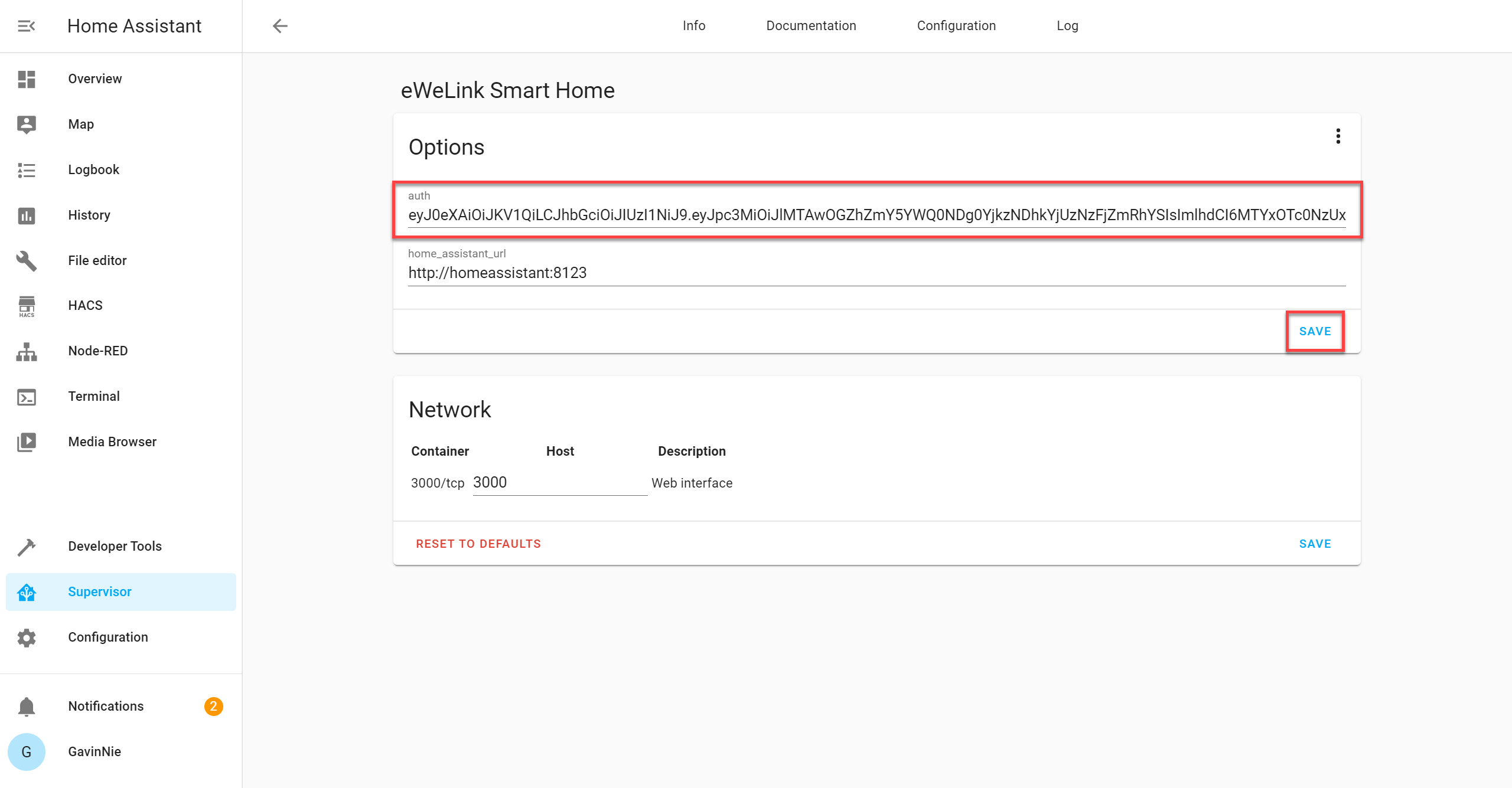
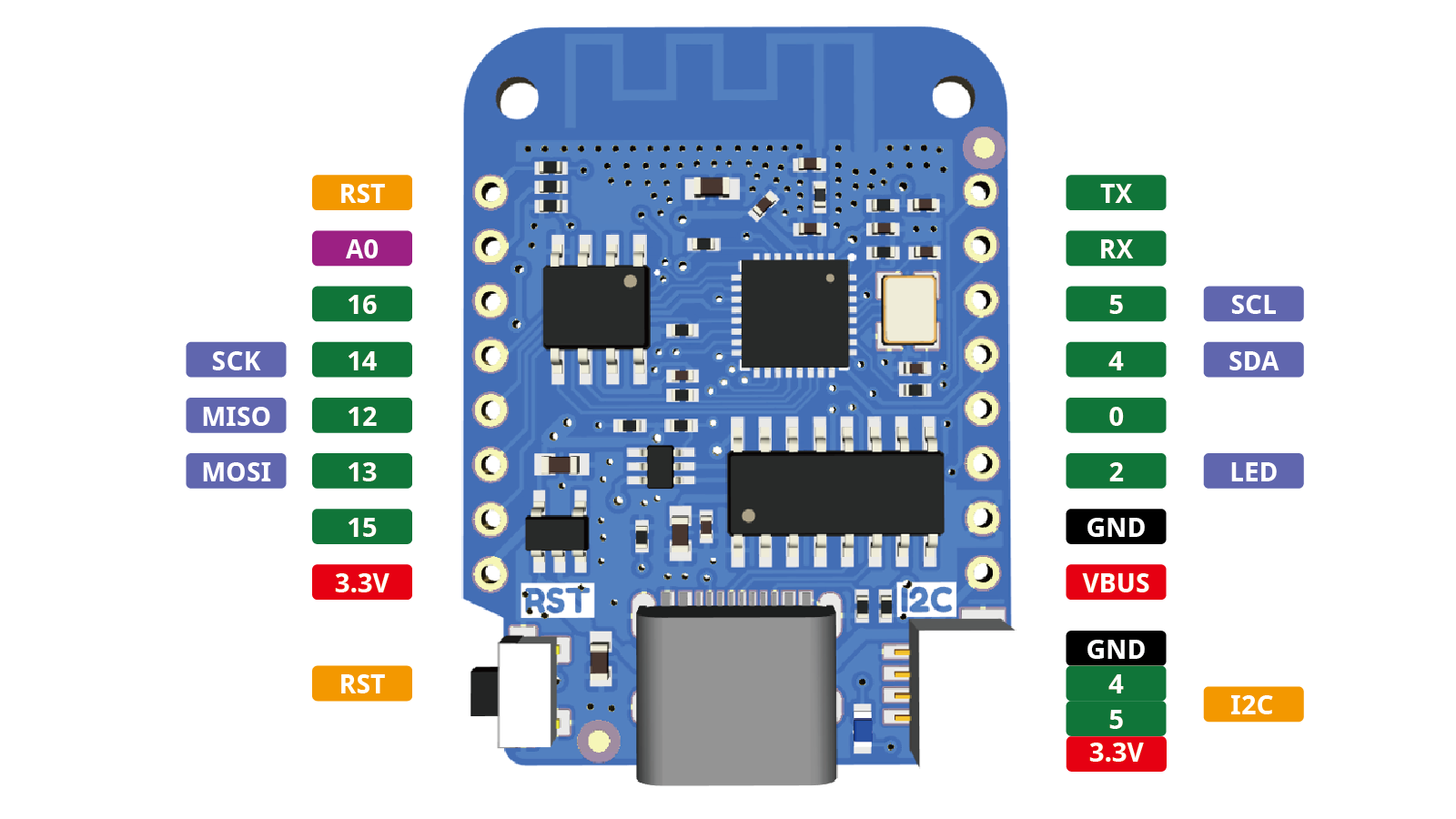 undone basin
where can i find core check?
jade wing
You run it over SSH
dense spadeBOT
Always run the configuration check command when you make changes. Don't trust the UI check - it misses some problems.
- HAOS & Supervised use
ha core check - Container uses
dockercommands - Core requires you to activate the venv first
Command '~check' was invoked by: Tinkerer
undone basin
sudo docker exec homeassistant python -m homeassistant --s
when i run this i just get this back
Testing configuration at /config
jade wing
If you get nothing else then the config is good, and you can restart
undone basin
already have done
same issue
ive always previously had "base_url" in my http: configuration, i assume this can stay?
jade wing
Reboot != restart
That can stay, but if you've made the changes you say you have that error shouldn't be turning up
undone basin
I am fully rebooting between changes just FYI
just to make sure i am not being an idiot
although i still feel i am being an idiot and missing something!
undone basin
i totally appreciate i shouldnt need to fully reboot, but there is no harm in doing so no?
jade wing
Yes, there can be
undone basin
So you are saying just to use the "Restart" button under server controls?
I didnt think that restarted nginx after looking at the times in my log files
jade wing
Changes to NGINX will also require you to reload the NGINX config, or restart it
undone basin
OK i am not actually making any changes to nginx, i just felt this change in config.yaml may be linekd
linked*
either way, i have rebooted, or tried the "Restart" function and still the same behavior
jade wing
Then either you've not made those changes, or you're editing something other than configuration.yaml for HA
undone basin
I am 100% editing the configuration.yaml file
and i have 100% made those changes
may i DM you to show you screen shtos?
shots*
I have also tried changing the my spacing in the file in case it was wrong
jade wing
Images of text are horrible
undone basin
i can show you the actual text to 🙂
dense spadeBOT
Please use a code share site to share code or logs, for example:
- https://www.codepile.net/ (select YAML as the language)
- https://paste.debian.net/ (select YAML as the language)
- https://dpaste.org/ (you guessed it, select YAML)
Please don't use Pastebin, since it can randomly add spaces to the main view. Please also don't share text as images since it makes it harder for people to help you. Remember that others may have colour blindness, impaired vision, etc.
Command '~share' was invoked by: Tinkerer
undone basin
jade wing
You have a stray space at the start of every line in the http: block
https://www.codepile.net/pile/jejnLPeN not the edits you're making
That Base URL is also not a URL
It's just a bare hostname
undone basin
so it should include https:// ?
This configuration has worked for me for the last 3 years, today i do an update and find out my entire config.yaml is wrong!
jade wing
Yes, if you're using SSL
jade wing
Oh, actually, base_url is deprecated, it's external_url and internal_url these days
That only happened... 6 to 9 months ago, or maybe longer
raven tinsel
over 2 years... 😛
undone basin
@jade wing you sir deserve a beer
thank you soo much for your time and patience
issue sorted
(sorry for assuming your gender!)
you sir/madam/they
gotta be careful this days
jade wing
I'm really a 
undone basin
Thank you what ever you are
sorry just to confirm, you are saying i should remove base_url and replace with external_url
as i didnt make that change to first confirm it was working
I get an error when i do a config check
when changing it to external_url
charred zephyr
viscid orchid
But this says it was removed 10 days ago: <https://github.com/home-assistant/cor...
Thanks @viscid orchid
 tawdry dagger
since last update can't download updates keep gettin error:
A timeout of 60! seconds was encountered while downloading https://****, check the network on the host running Home Assistant. This is not a problem with HACS but how your host communicates with GitHub
any fix?
 broken chasm
Hello! I want to use LetsEncrypt to get SSL certs via DNS, without exposing my HA to the internet (so no DuckDNS). Is it possible to do that?
I basically want https://community.home-assistant.io/t/certificate-for-ssl-tls-via-domain-ownership/196968 but I'm on HA OS so running certbot myself via SSH doesn't leave the files in a place that the rest of HA can see them.
Can I do this via the LetsEncrypt addon?
jade wing
broken chasm
Aw, my host isn't one of the supported ones on the list
Thank you for finding me that documentation!
 prime harness
I was looking at installing HACS, but it gives a warning that add-ons are not included in HAC. SO how do you keep your add-ons functionality?
viscid orchid
they have nothing to do with each other
last ravine
sly kindle
HACs is for finding and installing custom integrations for HA. Add-ons are compl...
ok, my missunderstanding or incorrect terminology. Is anyone aware of a good tutorial for custom integrations for HA via HACS (I am planning on making a stab at fixing a broken one, that doesnt appear to be reactively supported)?
viscid orchid
All integrations are built the same regardless of whether they're custom_components or built in. Docs are here: https://developers.home-assistant.io/docs/creating_component_index
prime harness
Thanks all, I found the HACS warning confusing, but see theya re now seperate 🙂
 stiff grail
Not sure if this fits here or integrations. I'm running emulated hue add on and my hue integration keeps adding infinite lights as long as "enable newly added entities" is selected. Problem is that I can't turn that off before enabling the integration.
Is there a way to stop after adding 8 lights and 3 groups instead of 1700 lights?
 plain ginkgo
dumb question
a HACS integration i redownloaded is now red and says "Pending Restart"
does that mean restart home assistant entirely?
viscid orchid
yes, you need to restart HA. HACS is an #integrations-archived
it gives you a link to restart via "navigate"
plain ginkgo
ah i see now if i go back a page out of integrations
also sorry i picked the wrong channel. I appreciate the info
 wise eagle
Been trying to enable Auto-Login along with Nginx (SSL) on RasPi HassOS. Is it even possible ? Ive not been able to get it working. But Auto-Login works well without the Nginx addon.
echo tapir
Is it possible to use your vaultwarden add on with the other apps and browser extensions? or just the web vault
https://bitwarden.com/help/change-client-environment/ found it here incase anyone is wondering
Ok now I just have a new problem relating to my non NAT loopback router lmao, damn
 keen bloom
Hi guys i have just started with home assistant , i wanted to add ssh (which is straight forward) but in the list of add on i am not getting this addon listed .
any help if I am missing anything ?
 humble brook
Running DuckDNS and after my IP changed, routing stopped working. Any ideas where to look? Seems like traceroute never hits my IP and the UI never loads
 timid zenith
keen bloom
Hi guys i have just started with home assistant , i wanted to add ssh (which is ...
timid zenith
keen bloom
Hi guys i have just started with home assistant , i wanted to add ssh (which is ...
Click the add-on store button and search for ssh
keen bloom
@timid zenith - i did it but it was not showing , but now i got this since my installatation was fresh and the advanced option was turned off by defalut tthat why it was not showing in the list , once turning that option on started showing me SSH in the list
Thanks
dense spadeBOT
@worthy whale posted a code wall, it is moved here --> https://hastebin.com/nemeganivi
 worthy whale
EDIT: I ended up passing serial port 1 & the USB device through from virtual box and it immediately worked.
I'm trying to setup zigbee2mqtt, my install is using virtual box on a mac
Version core-2022.3.5
Installation Type Home Assistant OS
, I've passed thru the usb sonoff zigbee3.0 adapter on the mac to the vm.
all videos ive watched show a lot more in the configuration tab on mine only has 9 lines
this is the error i get: (see the bots link above )
my other attempt was using docker but i have no idea how to do that either, the other containers i have runnig i just followed youtube videos ( unifi controller, portainer, nodered)
also when i click the sidear addon button i get error502 bad gateway
 finite garnet
at a guess, uve either got ur path wrong (ie double 001/001) - or u dont have permission to access it
ur error is 'cannot open /dev/bus/usb/001/001'
sorry missed the 'Operation not permitted' bit
worthy whale
suggestions on how to fix that?
i think 001/001 is the right path from looking at the system tab then searching for usb hardware
worthy whale
it wont accept "ls", only "ha"
in the terminal that pops up when the machine is runnign
worthy whale
ok i got the terminal addon installed and setup, ran the command and it says
total 0
drwxr-xr-x 3 root root 60 mar 24 08:42 .
drwxr-xr-x 3 root root 60 mar 24 08:42 ..
drwxr-xr-x 2 root root 80 mar 24 08:42 001
finite garnet
now: ls -al /dev/bus/usb/001
 idle venture
broken chasm
Aw, my host isn't one of the supported ones on the list
idle venture
broken chasm
Aw, my host isn't one of the supported ones on the list
You should use Cloudflare.. So many other nice things and safety 🙂
worthy whale
idle venture
You should use Cloudflare.. So many other nice things and safety 🙂
crw-rw-r-- 1 root root 189, 0 mar 24 08:42 001
crw-rw-r-- 1 root root 189, 0 mar 24 08:42 002
are the two new lines that brought up
finite garnet
well the good news is 001/001 exists
although it looks like those are owned by root with no shared read access unless u are in the group 'root' - so it likely is a permissions error - what user is ur thing running as?
worthy whale
finite garnet
although it looks like those are owned by root with no shared read access unless...
im not sure, how do i check that
dense spadeBOT
@worthy whale posted a code wall, it is moved here --> https://hastebin.com/ficopezoco
worthy whale
getent passwd | cut -d: -f1
i found this on google and got this list?
finite garnet
sorry only half here
u need to see what user is running the thing u care about (im guessing home assistant)
ps -ef | grep homeassistant
untold cobalt
Where does the Add-ons store screen (official add-ons) get the list of add-ons from? I'm looking for the unifi add-on which is official afaik and is here https://github.com/hassio-addons/repository but doesn't show in the HA GUI add-on screen.
worthy whale
finite garnet
u need to see what user is running the thing u care about (im guessing home assi...
~ ps -ef | grep homeassistant
839 root 0:01 {tmux: server} tmux -u new -A -s homeassistant zsh -l
1294 root 0:00 ttyd -d1 -i hassio -p 64521 tmux -u new -A -s homeassistant zsh -l
1307 root 0:00 {tmux: client} tmux -u new -A -s homeassistant zsh -l
1511 root 0:00 grep homeassistant
 karmic crater
Starting from scratch installing HA on a new machine and now at the point of setting up HomeKit infused again, when I install the HACS addons , the resources are not automatically created in dashboard resources. They were on my last instance. Can anyone shed any light on what I need to do to make them add them automatically?
finite garnet
restart
karmic crater
finite garnet
restart
I’ve done that before now.
broken chasm
idle venture
You should use Cloudflare.. So many other nice things and safety 🙂
Ok, so I set up cloudflare DNS for certbot in the LetsEncrypt addon. I briefly saw a TXT entry for acme show up in the cloudflare DNS, but it disappeared and the addon doesn't seem to be recreating it. When I visit https://ha.mydomain.com:8123 I get a SSL error (which I think is HA just outputting the non-SSL page), so something's still wrong. What debug logs should I enable to investigate?
I do see an error 400 from aiohttp.server but it doesn't mention anything about SSL so I don't know if that's related
 exotic apex
hi guys, I'm relatively new to the discord and I have a conundrum.
i installed the Syncthing addon and directed it to download files to a location (assuming on the home assistant server).
made a directory in /data and pointed Syncthing to that location...but i cant seem to find the files it is downloading.
both the node, and Homeassistant GUI tells me files are moving but i just cant seem to find them.
initially, this was just for a test to see how I could automate things. But now im worried ill fill up my HD and not be able to delete the files, forcing me to start from scratch.
So i paused the addon for now, so far iv only moved 3 GB of files so not the end of the world. but now im stuck.
any help would be greatly appreciated...thanks.
 fresh hamlet
trying to use the file editor addon:
i cant remember how to delete multiple lines in yaml. or add spaces to all the below code at the same time. can somebody refresh my memory. like if i need to add 2 spaces to all the lines of code below a certain point. or delete 2 spaces before all the text etc etc.
keen zephyr
When I try to add the ESP to the ESP-addon my Pi crashes. get some kernel errors. "info: task kworker/1:2:12306 blocked for more than 122 seconds" and "echo 0 > /proc/sys/kernel/hung_task_timeout_secs" what is this about?
viscid orchid
fresh hamlet
i cant remember how to delete multiple lines in yaml. or add spaces to all the ...
tab and shift-tab
you have to change the settings to use 2 space indents instead of the default 4
 wicked sage
Hi everyone - I am trying to get InfluxDB and Grafana to work, but I'm not getting any data from home assistant (or possibly I am getting data but don't know how to query it in Influx). Has anyone got this working?
fiery prism
I followed this tutorial by Frenk. Worked perfectly. The only thing I would add is to use includes in the Home Assistant integration to only include data you are interested in storing long term. https://youtu.be/m9qIqq104as
 neat sky
Does anyone know what would cause the add on's page to just not load?
Like, I select it and it just goes to a greyish black screen with nothing but the bar on the left to go back to the other pages
viscid orchid
Clear your browser cache
neat sky
It happens on my phone in the app and on my pc
viscid orchid
Did you?
neat sky
viscid orchid
Did you?
Anything else I should try?
sly kindle
Reload the supervisor?
neat sky
I can't get to that page. I'll probably just reflash
 distant wadi
Hello! I've got a Problem: the docker container hassio_dns is using way to much CPU. I'm using Pihole + FritzBox as a router. but i think hassio is getting my dns settings wrong, cause /etc/resolve.conf is not right
sorry if this is the wrong channel
 solemn kestrel
untold cobalt
Where does the Add-ons store screen (official add-ons) get the list of add-ons f...
solemn kestrel
untold cobalt
Where does the Add-ons store screen (official add-ons) get the list of add-ons f...
Are you on the addons page (which is only the ones you installed) or the addon store page?
 nimble halo
Hello hope you doing well can someone help please?
Trying get my Eufy camera to HA I know have to use WebRTC but that first have to link my cameras through Generic Camera. When I try out stream source from eufy and submit it than say just “TIMEOUT WHILE LOADING URL” please thank you
 undone onyx
Is it possible to determine the internal IP address of an addon somehow? They are just docker containers under the hood right? The docker command doesn't seem to be installed when I ssh in
I want to setup nginx for a reverse proxy but in the http config on the HA side I don't know what to use for a trusted proxy
Nvm I see the ha network info so I at least know it does use docker and the network, but not individual addons
 visual jewel
question about esphome on docker ...
the esphome website indicates:
# On Docker with MacOS, the host networking option doesn't work as expected. An
# alternative is to use the following command if you are a MacOS user.
docker run --rm -p 6052:6052 -e ESPHOME_DASHBOARD_USE_PING=true -v "${PWD}":/config -it esphome/esphome
how to get the ESPHOME_DASHBOARD_USE_PING=true into docker-compose?
visual jewel
oh ok .. thanks
sly kindle
Or you could ask in the ESPHome Discord
visual jewel
right that too
sly kindle
visual jewel
thanks for linking me
 jade moon
hi guys just i just started using the addon plex media server but im notecing that its only conncting remotly that limits to 1mbps , insted of local acess , what can i be doing wrong ? or i miss a step ?
 half wigeon
Can't install any addons. Getting server 500 error. No access to terminal. HDMI output of RP4 gives no signal
cant update either
tame dagger
has anyone setup the google calendar lately and could help me with the right steps, based on: https://www.home-assistant.io/integrations/google/
The steps do not match from what i see on the google side.
 harsh crescent
tame dagger
has anyone setup the google calendar lately and could help me with the right ste...
harsh crescent
tame dagger
has anyone setup the google calendar lately and could help me with the right ste...
I haven't set it up but I'm very well versed in Google Cloud and such, which I see is used in the instructions. What part are you stuck at?
If it was on the "get credentials" screen after enabling the Calendar API, you should be able to get there via https://console.cloud.google.com/apis/credentials but make sure you verify you're in the right project (listed in the header area on that page)
If you weren't able to check to ensure that the Calendar APi was enabled, you can go here https://console.cloud.google.com/apis/library/calendar-json.googleapis.com but also verify you have the right project.
tame dagger
I'm lost at step 6 (btw 3 and 4 i did not see )
harsh crescent
Ah! Yeah, you'll need to do the Add Credentials bit first. Go check that the Calendar API is enabled, then if so, go to that credentials page. I think you can continue from there. I'm going to set mine up too so I'll be able to see if that's true.
tame dagger
i cant find a button or link with ‘CONFIGURE CONSENT SCREEN’
It is enabled i checked that first
harsh crescent
tame dagger
what do i setup there?
harsh crescent
Do you have a free Google account or a paid Google Workspace account? I want to start a new project on my end so I can see what that looks like but want to be sure I'm using the same type of user account.
tame dagger
i normal google account
echo tapir
Halp! The official addon repo has disappeared (I just have green puzzle icons for DuckDNS and thats it, I cant add it back to the repo list either
contains duplicate items: ['https://github.com/hassio-addons/repository'] for dictionary value @ data['addons_repositories']. Got ['https://github.com/hassio-addons/repository', 'https://github.com/hassio-addons/repository']
I haven't done anything, I just connected to my instance today to do some more tinkering and noticed it
echo tapir
Ok its been a while and i just kind of left it waiting for a response, and its fixd itself .-. lol
I checked the repo list but its still only showing community addons so I assume you dont even add the official repo to the list, either way its fixed
Would still appreciate a response if anyone knows why it happened and how to fix it earlier on if it happens again
 patent magnet
Hello everyone
I wand to switch to MariaDB and I was wondering how to use secrets in db_url
db_url: mysql://homeassistant:password@core-mariadb/homeassistant?charset=utf8mb4
can I somehow use !secret mariadb_password here somehow? Or will the space and the ! break the code?
 hard cloak
Hi everyone,
I can't accès the add-ons store right now, probably since I updated thé Core this morning
Anyone has the same issue or a clue to fix this ?
viscid orchid
clear your browser cache
hard cloak
Done
It doesn't solve the problem.
I also rebooted many Times
I can see my add-ons on the add-on page but the icons are all green jigsaw tiles.
When I click in the add-ons store, only my add-ons are listed
 lusty socket
hi, does anyone know why is fregate nvr's debug viewer only at 5 fps?
 sand sparrow
Good afternoon people. A little while back I installed HA Container on my NUC and this is the first time I am trying to add an add-on, more specifically the backup add-on, and I just now realized I don't know how 🙂
I am currently running the image ghcr.io/home-assistant/home-assistant:stable, so do I need to find another image to run? Or can I just download certain files from github?
 regal osprey
hello guys. i miss some normal addon Repositorys. i have added https://addons.community. but i still miss normal addons like Almond or VlC and more. i think i miss the official Repository. can someone give me the link. i cant find it. i evan have installed addons from there like duckDNS. and i think without the repo i will get no updates
spring carbon
I have a bunch of add-ons in which im sure had updates a few days back. now they show a green puzzle piece icon and seem to have no update anymore. Is something wrong with the links to the updates? also the changelog cant be opened
It also loos like a great amount of add-ons i had in the add-on store have vanished
regal osprey
ou i thought i messed up something.... thx John H. im not the only one
spring carbon
Maybe something on github or where ever these add-ons come from is offline then. Im also glad im not the only one. I almost thought i messed something up myself
regal osprey
if you need to install somthing NOW, than you can add the specific repo for this one. but maybe you get a error when the normal ones are up again. i did it with google drive backup
spring carbon
everything seems to work but all addons that had updates now show a green jigsaw puzzle piece and the updates are gone. I deed mention allot of warnings comming from all addons about missing options in the system logs. Im not sure if this has something to do with the addons being offline or this is another error
i get errors like: 22-04-16 14:19:10 WARNING (MainThread) [supervisor.addons.options] Option 'require_ssl' does not exist in the schema for Node-RED (a0d7b954_nodered)
every minute
And these errors seem to come from addons without updates
 pastel python
Has anyone encountered the fact that the default zigbee2mqtt configuration looks like this?
It looks different for everyone.
data_path: /config/zigbee2mqtt
socat:
enabled: false
master: pty,raw,echo=0,link=/tmp/ttyZ2M,mode=777
slave: tcp-listen:8485,keepalive,nodelay,reuseaddr,keepidle=1,keepintvl=1,keepcnt=5
options: '-d -d'
log: false
mqtt: {}
serial: {}
Could this be due to the fact that the stick is not installed correctly?
It is visible in the system.
/dev/serial/by-id/usb-ITead_Sonoff_Zigbee_3.0_USB_Dongle_Plus_d6084e5c3486ec11a90e641719c2d21c-if00-port0
spring carbon
mine looks more like this:
mqtt:
  base_topic: zigbee2mqtt
serial:
  port: tcp://192.168.178.80:6638
external_converters:
  - blitzwolf.js
  - t1switch.js
at serial you need to put something to direct to your usb i guess
lusty socket
hi, why are double take sensors not shown in home assistant?
 next orchid
sand sparrow
Good afternoon people. A little while back I installed HA Container on my NUC an...
next orchid
lusty socket
hi, why are double take sensors not shown in home assistant?
next orchid
sand sparrow
Good afternoon people. A little while back I installed HA Container on my NUC an...
next orchid
lusty socket
hi, why are double take sensors not shown in home assistant?
do you have MQTT configured?
 visual falcon
I'm running the MotionEye addon in a VM and manage to use mosquitto_pub to control a binary_sensor in home assistant (for camera motion detection)... however, the same does't work when using a Raspberry Pi 4 as host. Isn't mosquitto_pub included when running MotionEye on PI? Anyone who has encountered this issue?
 rugged relic
Not sure if this is the correct place, but I have been running duckdns add-on for years without any problems. After a router reset, my external URL doesn't load, even though the add-on runs fine and when i execute the terminal command > dig *****.duckdns.org it returns the correct IP of my home network.
I'm an idiot, i forgot the port forwarding
443 to 8123 for SSL encrypted