#zigbee-archived
1 messages · Page 195 of 1
 austere patio
 lapis tiger
i see. I'm using zigbee2mqtt. well trying to at least. i just installed it all and am trying to join something
my only hardwired zigbee things are old smartthings bulbs and a smartthings outlet. I can't get either to join
do i have to unjoin from my old hub before i can join to the new zigbee stick?
oo got the outlet. had to put it in joining mode
not sure how to put a bulb in joining mode though
 mellow geode
Most bulbs can be reset by toggling off/on power 5—8 times
Which bulbs are you using?
 bronze prism
anyone has any experience with linkind zigbee GU10 bulbs? are they worth buying
lapis tiger
mellow geode
Which bulbs are you using?
that did, thanks
well everything was working until i changed the zigbee channel in the zigbee2mqtt integration. i changed it, hit submit, and then the integration dissapeared. i had it set to show in the left side menu and clicking on it just says "502 bad gateway". i rebooted the whole rpi and its still doing that. i can't access the config anymore becaues the integration is no longer showing. any ideas?
 lyric kayak
So I just intergrated a Schlage zigbee lock to ZHA, everything is showing up in HA, but locking and unlocking via the app isnt working.
 true girder
I'm going to leave it unplugged overnight
austere patio
Anything longer than 10-20s will have the same effect but it won't hurt
true girder
eh whatever, I need sleep so I just took the bulb out and threw it on my desk. Weekend project I guess.
I do have a few bulbs I do need to set up so I guess I'll try that one again like new
 winter rain
hello, home assistant just won't discover my Sonoff "zigbee 3.0 USB Dongle plus" stick. I cannot figure out why, windows seems to say the drivers are installed and the device is running fine. I am hoping someone here can give me some advice? flashing it yesterday seemed to work fine and I got the message "success" in the Texas Instrument flashing tool
winter rain
winter rain
hello, home assistant just won't discover my Sonoff "zigbee 3.0 USB Dongle plus"...
I finally found the solution to my problem of my Sonoff Zigbee Dongle not being discovered by Home Assistant. Leaving the solution here in case this will be useful to someone else: In Oracle VM VirtualBox I had to go to settings and I added the device in the USB category and activated the appropriate serial port
 trim shard
Anybody have a recommendation for BR30 full color Zigbee bulbs between Sylvania Smart+ vs Sengled Smart Light Bulbs? Are they both good?
 molten linden
trim shard
Anybody have a recommendation for BR30 full color Zigbee bulbs between Sylvania ...
molten linden
trim shard
Anybody have a recommendation for BR30 full color Zigbee bulbs between Sylvania ...
if you have the $ go hue. if not the Smart+ (Ledvance) are okay (I have them) and the Sengleds are decent but are not routers. They (sengleds) also don't stay on my network so I have 5x I can sell you at a discount if you want 😂 (think this issue is related to a mix of devices on the network, have only seen it happen with 2-3 folks counting me. loads of others have sengleds with no issues).
trim shard
molten linden
if you have the $ go hue. if not the Smart+ (Ledvance) are okay (I have them) an...
Thanks a bunch. Unfortunately Hue is out of my range (looks like up to $50/bulb?) bc I have about 16 that I need. Thanks for the info on the Sengleds not being routers. Are Ledvance the same as Sylvania or is that a totally different brand?
molten linden
Slyvania is the name Ledvance is sold under in the US. When you join them they will say Ledvance
If they say Osram return them as they are really old stock and will cause havoc on your mesh.
trim shard
Ok thank you, appreciate all the tips. I think I will try out the Sylvania/Ledvances for around $16/piece
trim shard
Oh what the heck...its dimmable but you cant use it on a dimmable switch...I did not know that
my switches are dimmable bah!
makes sense I guess it needs full voltage since the tech is in the bulb, didnt think about that
 uneven ruin
my solution was the Lutron Aurora
locks out the switch and puts a zigbee knob in its place
no zigbee dev wants to be on a dimmer
I haven't tried the hue bulbs yet but I've tried most of the other ones and the Ledvance/Sylvania have the most range
trim shard
uneven ruin
locks out the switch and puts a zigbee knob in its place
oooo interesting, thx mn will check it out
molten linden
uneven ruin
I haven't tried the hue bulbs yet but I've tried most of the other ones and the ...
hue typically get the dimmest in my experienced significantly dimmer than ledvance.
uneven ruin
nice
 ivory fulcrum
I'm about to get some aqara fp1s delivered now that they're more easilly available. I've been reading a lot of user expereinces on the HA forum and for apartment living things don't look super fantastic...I understand they're first gen and the best way to use them is with a PIR sensor.
Seems like lots of false positives and radar detection through walls. Sometimes intermittent detection
For $75AUD/US$50 and 3-4 weeks wait per unit, starting to have reservations
Would love to hear anyone's experiences with these, please
 cobalt dew
ivory fulcrum
I'm about to get some aqara fp1s delivered now that they're more easilly availab...
cobalt dew
ivory fulcrum
I'm about to get some aqara fp1s delivered now that they're more easilly availab...
maybe these are obsolete? I think these are the new ones? https://www.aliexpress.com/item/1005004392234790.html
ivory fulcrum
cobalt dew
maybe these are obsolete? I think these are the new ones? https://www.aliexp...
thanks mate, have you tried one of these?
bronze prism
don't think they are obsolete.. they seem to be the hot thing recently
uneven ruin
for PIR they're the latest for that brand
bronze prism
do you mean the FP1 or RTCGQ13LM ?
 prisma shell
I attempted to upgrade my sonoff's zigbee firmware, but it failed (which is fine) but when I set it back to zha mode, zha can't talk to it anymore
not sure what to do now, never had this happen
i've restarted home assistant, the sonoff, etc
I can ping it
prisma shell
i can telnet to it
austere patio
prisma shell
I attempted to upgrade my sonoff's zigbee firmware, but it failed (which is fine...
ZHA can talk to the stick but if you didn't back up the network settings, those are all gone
prisma shell
which network settings
austere patio
The ones stored on the stick
cobalt dew
ivory fulcrum
thanks mate, have you tried one of these?
not yet its on my list to buy once payday arrives
austere patio
prisma shell
if I reboot the sonoff into z2m mode it shows the devices
What do you mean "Z2M mode"? The logs you've posted are from ZHA.
prisma shell
yes. the sonoff is a zigbee bridge, zha connects through the tcp socket
austere patio
Indeed, but where is Z2M coming from here?
prisma shell
i can telnet to the socket so it's open
if i change tasmota's setting it works as z2m
austere patio
If you're seeing delivery error messages then the stick and firmware are functional. If you attempted to write new firmware, the stick's settings are usually erased as part of this and you'd experience the same problem: ZHA can't contact devices.
I think I may be confusing devices here. Are you referring to the Sonoff bridge with WiFi, or are you talking about the USB stick?
uneven ruin
z2m keeps a backup of network IIRC so if you connect to z2m it probably pushed that in
prisma shell
the firmware update failed
the bridge
i backuped HA and removed the igbee integrationa and re-added it, and all the devices were re-added but most of them weren't available
 glacial robin
Hi All, I am running HA with deconz(windows install) - I installed a VPN and now my deconz will not connect to HA. I am unsure what to do as I can connect to the Phoscon App and see that my deconz instance is online but in ha I get:
Logger: homeassistant.components.deconz
Source: components/deconz/gateway.py:302
Integration: deCONZ (documentation, issues)
First occurred: 11:14:25 AM (35 occurrences)
Last logged: 12:05:27 PM

Error connecting to deCONZ gateway at 192.168.1.111
i guess i could try a full reset
 dry helm
Hi, does anyone know of a way to get Zigbee2MQTT to not expose certain properties to MQTT/Home Assistant? I've tried using the "Filtered publish attributes" but it seems to go completely ignored. I've also tried setting the switch to "null" in the Yaml file. I have some Sengled bulbs that supposedly support 'effect' but it doesn't work on any of them and I'd rather just get jt out of the entity card. Thanks!
 livid scroll
Anyone ever seen where if you check the logs book of a z2m device, their all 5 minutes off. As if I press it now the logbook would say instantly it happened 5 minutes ago?
I believe it’s breaking any attempts to automate any Zigbee devices
At least when their the trigger
ivory fulcrum
cobalt dew
not yet its on my list to buy once payday arrives
I'm about ready to pull the trigger on at least one, let me know how you go mate.
ah sweet I can use regex search and replace on discord to edit s/// just replaced my shit. nice
 nova briar
Updated Zigbee2MQTT to 1.26 today after which i'm getting errors in the log;
"Zigbee2MQTT:error 2022-07-04 15:18:34: Error while starting zigbee-herdsman"
"Zigbee2MQTT:error 2022-07-04 15:18:34: Error: startup failed - configuration-adapter mismatch - see logs above for more information"
the device is still accessible on /dev/ttyUSB0 so not sure what's wrong...
 sour shadow
Check the logs for more details
That error is telling you that the backup and the coordinator disagree, which is usually a Bad Sign™️
nova briar
Realized there is a dedicated Zigbee2MQTT discord, i'll move the discussion there. 🙂
 restive tartan
What channel people prefer to use?
sour shadow
One that's quiet
There's three (four) "good" channels, but it does really depend on:
- What's around you
- Where on the planet you are
Channels 15, 20, and 25 are ZLL channels, and most likely to be clear of WiFi, assuming the people around you aren't idiots
Channel 26 is the least likely to have interference, but only if you're not in North America
Oh, and it's not supported by all devices
So, do a scan and see what's good for you
restive tartan
Yeah, read about the 26 issue. I guess k should move to 25 then, as 15 and 20 are too close to my wifi mesh
Tnx
uneven ruin
I just moved my wifi , found it easier, but I live in a low density area
restive tartan
Too many ap around, probably if I change wifi channel it would clear15 and 20, but still probably not worth
Found only two neighbors ap on 25, so should be fine, compared to 10+ on 11
sour shadow
Zigbee 11 is a terrible channel choice
uneven ruin
I'm on 12, but again the closest house is over 700ft away
One neighbor has 2.4ghz on channel 5 @40mhz, I'm on WiFi 11
Needed to be way to the left so to speak.
Best thing I did for ZigBee was install openwrt so I could control my channels and power
restive tartan
Depending on the router, you do have control over channels, and a bit of control on power
Tho I like to blast mine no matter what
uneven ruin
Blasting 2.4 anywhere near the coordinator is a bad call. I need one 2.4 near the coordinator to support the few legacy devices, but at lower power there's no meaningful interference
restive tartan
I'll start messing with it when and if I have issues. But I do need a wide wifi coverage
 lean echo
I've managed to pair my hive thermostat receiver SLR2b successfully with Zigbee2MQTT, but it doesn't refresh automatically any of its values unless I do it myself from the Z2M dashboard. is there anyway to configure it to auto update?
 raw gale
where in ZHA do I see what channel my network is on currently?
apart from taking a router device offline, how can I convince an end device to take another parent? Some sensor decided to change to a different router device then I paired it with initially, making its connection worse
sour shadow
Default is channel 15 if you haven't changed it
raw gale
sour shadow
Default is channel 15 if you haven't changed it
yeah, I saw docs about that, and didn't change it so it likely is on 15, but I can't seem to see any indicator about the actual channel it's using, which strikes me as odd 🙂
mellow geode
You can take a network backup of the stick and then check the channel
austere patio
raw gale
apart from taking a router device offline, how can I convince an end device to t...
Nothing you can do about that unfortunately. If the sensor thinks that router is a better parent, it'll pick it.
raw gale
austere patio
Nothing you can do about that unfortunately. If the sensor thinks that router is...
Those routes get revised once in a while right? I'll just see whether it tracks back 🙂
sour shadow
Depends on the device
In theory if it changed once it can change again, whether it will is the question
livid scroll
Hi All, anyone ever seen an issue where z2m’s logs are all entered 15 minutes off HA logs? Like if I generate a log now it instantly shows it happened 15 minutes ago?
 midnight forum
Is there a way to update the device path of the USB device in ZHA using the gui?
uneven ruin
restive tartan
I'll start messing with it when and if I have issues. But I do need a wide wifi ...
802.11r with multiple AP works best. Too much power can't degrade performance due to noise
molten linden
midnight forum
Is there a way to update the device path of the USB device in ZHA using the gui?
not in the GUI, you can edit the .storage/core.config_entities and change the path in there. be sure to back up the file incase you make any errors during the edit.
midnight forum
molten linden
not in the GUI, you can edit the .storage/core.config_entities and change the pa...
ah perfect thanks!
 clear ruin
Hi all, do you known about some web with list of all zigbee devices maybe with some rating and additional info like which baterry type they have, cooldown for motion sensors etc?
sour shadow
No, but there's at least half a dozen if not more abandoned attempts to do that
raw gale
https://zigbee.blakadder.com/ for example has info, but not all you're asking
clear ruin
Yes this is one I found and its not bad, I was just wondering if maybe I missed some well known. I see this project have options to add new device so I will investigate how it could be expanded with help of creator.
 blissful lake
I have a zigbee remote (FUT089Z) and a zigbee bulb. After creating a group 101 I can only pass zigbee devices. Is there anyway to pass non zigbee devices or pass the commands from the remote into HA to create automation?
uneven ruin
are their any zigbee relay modules that can use switches as an input but not directly control the relay? I have a shelly that really doesn't like my wifi changes and won't stay connected that I would honestly rather have be zigbee anyways
its setup with 1 of the 2 switches as disconnected so it works as an input in HA but leaves the relay on for the zigbee bulbs
 neat pulsar
Hello. I have a zigbee curtain switch (up/down/stop) that I can control from the Z2M web interfaces->Exposes page. When I select either up/down/stop, I can see the payloads sent to my mqtt broker. I am trying to use the same payloads for an automation, calling mqtt::publish
the payload are well received by the broker (monitoring with mosquitto_sub) and are exactly the same as when I control from the Z2M web interface
sour shadow
Zigbee2MQTT supports HA's MQTT Discovery for auto-creation of working entities, any reason you're not using that?
neat pulsar
the reason being that the device provides me with an icon that effectviely has up/down/stop but often does not work
no idea why
so I was trying this workaround
so, from Z2M web interface mqtt payloads make the device switch
from mqtt::publish not
sour shadow
That sounds like an issue with the device/Z2M, not HA
neat pulsar
however I see exactly the same payloads when monitoring with mosquitto_sub
neat pulsar
sour shadow
That sounds like an issue with the device/Z2M, not HA
meaning that I am again asking a question in the wrong channel ?
sour shadow
Well, more that if it's not working reliably from HA to being with, manually sending the same payloads that HA is already sending isn't going to help
If you publish the right message to the right topic and nothing happens then either the problem is with Z2M (not receiving the message) or with the device - check the logging in Z2M
neat pulsar
can we agree that doing from Z2M web interface->Exposes is whats trigger the payload being sent to the mqtt broker and then zigbee2mqtt is consuming that payload to make the device switch (just asking because if I got that part wrong then ....)
sour shadow
Pretty sure that's how the UI works, yes
neat pulsar
then I dont understand why sending the same payload does not lead to the same result
 sonic wind
Im running Home Assistant in docker on my Synology NAS (DSM 7.1) Will a USB Zigbee radio work for me?
sour shadow
If the NAS supports USB passthrough, yes
If not buy a (wired) network connected one, such as from Tube
sonic wind
sour shadow
If not buy a (wired) network connected one, such as from Tube
https://www.tubeszb.com/shop/2 one of these? I just plug it in my wifi router via Ethernet?
sour shadow
What's the question? That's a whole load of images with zero context
 spiral spire
I think i've setup everything like it should
but for some reason, the zigbee usb 3.0 from sonoff, can't find anything
sour shadow
Ok, so you're using ZHA then
spiral spire
sour shadow
Ok, so you're using ZHA then
Yes, should i switch to MQTT ?
sour shadow
No, but knowing what you're using helps us help you
Saves cracking out the crystal ball
Is the stick on a USB extension cable?
spiral spire
Front panel of the Synology 918+
 spiral spire
and both sensor i tried are 20cm from it
sour shadow
USB 3.0 ports == noise and interference
Directly in a USB port == noise an interference
spiral spire
sour shadow
Directly in a USB port == noise an interference
I knew about that
spiral spire
sour shadow
USB 3.0 ports == noise and interference
first time hearing it
I will try
and will give you an update
sour shadow
There's a load of things you should know in the pinned messages
bronze prism
if you do the above will there be an overall LQI increase? or is it just a stability improvement and improvement in finding devices
sour shadow
Probably an LQI increase in the first hop, likely also a general stability improvement.
bronze prism
thanks.. am testing it out and it does seem to be the case.. now to find a permanent place for it.. cheers 🙂
 hybrid cloud
I have an automation that turns off all my lights at night, and one light, a zigbee light, will always turn back on 30 to 60 seconds after the automation turns it off. And all it says is turned on, not by what. Is there any way for me to figure out what's going on here? (Zha)
 raven jewel
I suspect an integration (for example, Adaptive Lighting) is to blame.
 vagrant dragon
Hi all. Added my first Philips Hue lamp to my Home Assistant ( I use Slae.sh stick and i use Z2M). I allow permit join on Z2M interface and plug Philips lamp on my lamp. Z2M regognize lamp immediately and works like a charm and i can use lamp everyway with Exposes -page on Z2M interface. Problem is that not appear Light -entity on my states list inside Home Assistant. I try to put 2ZM my lamp Settings page and put "Home Assistant name" but that not helped, try restart home assistant couple times not helped too.
Any ideas how i get that light -entity apper on my "developers tools --> status -list"
Of course i can do manually configure on configure.yaml, but then is awesome if i find somewhere examples hue lamps what kind parameters i give there.
My Philips lamp is this if that helps
 violet dagger
did you configure the MQTT integration in HA and enabled HA discovery in Z2M?
vagrant dragon
I have my old 10pcs devices on Z2M and they work perfectly
 mighty lion
hi, i just setup zigbee2mqtt and the lights work perfectly but i cant get any actions ("buttons") for my switches
the switch is supported but i cannot get it in the automations in HA
vagrant dragon
vagrant dragon
I have my old 10pcs devices on Z2M and they work perfectly
Example my Wled integration adds all wled devices automatically on Home Assistant Entities list, but Zigbee2Mqtt not add any devices automatically
only if i add them manually on configuration.yaml under switches, sensors or Lights.
Is there any settings inside zigbee2mqtt what allow discovery working to home assistant
Maybe some problems with this settings inside zigbee2mqtt?
not find same settings on wled what working nicely
vagrant dragon
Anyone have glue, why this not work try to get that working manually but when i try restart home assistant that give error this value_template -row.
 buoyant sorrel
Anyone able to help me here with getting Zigbee2MQTT started? I'm using HA on a Pi and using a Conbee-II stick. I've got Mosquitto running, but when starting Z2M I get this endless error loop:
https://imgur.com/a/YkqeEZf
 lavish coral
Out of interest, are there actually any zigbee2mqtt guides for non directly connected zigbee transceivers (like talking to a sonoff zbbridge pro)?
sour shadow
Tube's network connected coordinators have docs
Other random devices would need flashing with appropriate firmware first
(assuming there is appropriate firmware, which isn't a given)
lavish coral
I've been having issues working out how to configure tasmota on it, and it's been a right pain
main issue right now is the 502 bad gateway I've had on zigbee2mqtt's web ui since the beginning, with no useful error messages
austere patio
What does your adapter config look like?
lavish coral
the one on the zbbridge?
austere patio
The Z2M config
lavish coral
In the serial section:
port: tcp://10.0.4.15:8888
adapter: ezsp
hello, does anybody have experience with Sonoff Zigbee Dongle on Windows 7? I managed to find a driver for it that seems to work fine with Windows 7 but in home assistant it will not work
austere patio
I don't think Home Assistant will run on Windows unless you're using WSL
winter rain
sorry i am using Oracle VM VirtualBox to launch Home Assistant on Windows
austere patio
So you're running Home Assistant within a virtual machine?
winter rain
yes
austere patio
When you say "will not work", what do you mean? Have you passed the USB device over to the VM? Is no other program running on your Windows installation that would interfere?
winter rain
on another computer running windows 10 I had to install the correct driver, then configure the virtual machine, active the USB controller for the right device and it worked. I tried to replicate this on Windows 7 but it does not give me the same result
other program interfering: I don't think so but how do I do confirm that's not the problem?
austere patio
Has Windows 7 not been end of life for over two years now? I wouldn't be surprised if you run into problems with it and recently-updated programs.
winter rain
I had to find an old driver version indeed, to install it on windows
austere patio
Try Virtualbox from 2020 then 😆
winter rain
well everything else in HA does work with that machine... just not the zigbee devices
vagrant dragon
Anytips what i do wrong my configuration -file, i dont get my light status showing on Home assistant. Here is Zigbee2MQTT page instructions: To read the state send a message to zigbee2mqtt/FRIENDLY_NAME/get with payload {"state": ""}.
Giving error that value_template -row
sour shadow
If you've set it up right Z2M has Home Assistant support enabled, and all your entities are auto-created - no MQTT messages required
vagrant dragon
Yep
but that not working some reason
here is only place what i find what can do something related to that
wled working ok that auto-create entities
sour shadow
What version (number) of Z2M?
vagrant dragon
newest i think
1.26.0 commit: unknown
Z2M regognice that HUE lamp easily and works like a charm if i conrol that lamp via Z2M interface, but home assistant not get any entities of that HUE lamp.
sour shadow
Have you tried restarting Z2M?
vagrant dragon
restarted whole home assistant (settings-system-restart) multiple times today to try get that working 🙂
buoyant sorrel
buoyant sorrel
Anyone able to help me here with getting Zigbee2MQTT started? I'm using HA on a ...
Anyone that can shine a light on this?
sour shadow
Images of text are crappy to deal with, please share the text using a code share site
 obsidian sandalBOT
Please use a code share site to share code or logs, for example:
- https://dpaste.org/ (select YAML for the language)
- https://www.codepile.net/ (select YAML as the language)
- https://paste.debian.net/ (you guessed it, select YAML as the language)
Please don't use Pastebin, since it can randomly add spaces to the main view. Please also don't share text as images since it makes it harder for people to help you. Remember that others may have colour blindness, impaired vision, etc.
Command '~share' was invoked by: Tinkerer
vagrant dragon
Ok
buoyant sorrel
I see, here is my log snippet. Hope it helps
https://dpaste.org/QQ6pP
vagrant dragon
MQTT server get this message from Z2M homeassistant/light/0x001788xxx/light is message on mqtt information
not know why home assistant dont do entities with that information 🙂
sour shadow
buoyant sorrel
I see, here is my log snippet. Hope it helps
https://dpaste.org/QQ6pP
You may need to up the log level, or check for more information, since that's lacking anything to explain the problem
buoyant sorrel
I have been checking for as much info as I can get, hence I turned here. How can I up the log level?
sour shadow
If that's a ConBee you really need to have it on a USB extension cable
buoyant sorrel
Aye it is a Conbee II. It is also near the router
sour shadow
Near the WiFi router?
buoyant sorrel
I'll try an extension cable then. Still... the starting of the add-on should not be hindered by that no?
sour shadow
Yes, because the ConBee is really sensitive to RF noise
buoyant sorrel
Yes, near a WiFi router
sour shadow
That's a terrible location
Bad Things for Zigbee:
- USB 3.0
- Being near anything WiFi or Bluetooth
- Being directly in a USB port on a computer
buoyant sorrel
That is good to know. Thank you for the input, I'll try changing the location later
austere patio
It's sensitive enough to actually not work if it's too noisy. Like it will fail to start up.
sour shadow
I've seen more than a few reports of that
buoyant sorrel
That's facinating, I really did not expect it to be influenced it by the signal. A shoddy connection sure, but failing to start.. Ah well I'll try moving it
sour shadow
All sticks are sensitive to interference, but the ConBee range are the most sensitive. I've seen others also refuse to start up when there's enough noise.
buoyant sorrel
And there I was thinking I placed it neatly near the router xD
 tiny swan
Hi there.
Recently this PR was merged and pulled into the current version: https://github.com/home-assistant/core/pull/71527/files#diff-989a77a0dec5b6a3f9123f89dbb8251ef045df88724c1979592e92b3160ce1bd
I am now wondering.. How often does the polling happen?
 summer viper
Ouff! Just seen 2) - My Sonoff Zigbee is directly under a Ubiquiti AP 😄
mellow geode
tiny swan
Hi there.
Recently this PR was merged and pulled into the current version: https...
I'm not completely sure but I think it was 30 seconds. It matches for the "TS011F" plug though
tiny swan
well that appears to not be working then, at least not for the Blitzwolf SHP-15
"Quirk: zhaquirks.tuya.ts011f_plug.Plug"
But my power entity doesn't update
(as in, the one measuring kWh)
The one measuring current power (W) does work
 tropic depot
turn on debug logging
and get some logs and post them to a sharing site
and.... tuya, how I hate them
mellow geode
yeah, completely different compared to mine. so debug logging it is (https://www.home-assistant.io/integrations/zha/#debug-logging)
tiny swan
it's weird, it does update when i restart Home Assistant
tiny swan
Let's see.. It's my dad's home assistant, 200 km away so, here's hoping i don't break stuff xD
mellow geode
actually, I found another SHP-15 which has the same issue
tiny swan
I myself have the 13's, they work flawlessly
mellow geode
mellow geode
actually, I found another SHP-15 which has the same issue
https://dpaste.org/cp85W -- some other stuff in the logs (NwkId of the SHP-15: 0x4c59)
but the smartenergy sensor is actually disabled (probably did that because it didn't work). I'll enable it and get some logs again
tiny swan
What part of the debug log do you want, btw?
tiny swan
tropic depot
so get some logs and i'll take a look
Debug logging: https://dpaste.org/E676s
Diagnostic information: https://dpaste.org/VSD0A
I hope this isn't too much.
The NwkID of the plug is 0xe0eb
tropic depot
I am heading out for an appointment. I'll peek when I get back
tiny swan
Thanks 🙂 I'll be heading to bed anyway, It's almost 23:00 here
I've added the diagnostic information as well
mellow geode
https://github.com/home-assistant/core/blob/5e63a44e710e128f7ff55763676d323f16ee76bf/homeassistant/components/zha/core/channels/smartenergy.py#L174-L191 core/channels/smartenergy.py async_force_update doesn't seem to be called at all for me
(should be called from sensor.py here: https://github.com/home-assistant/core/blob/5e63a44e710e128f7ff55763676d323f16ee76bf/homeassistant/components/zha/sensor.py#L486-L490)
tiny swan
well you caught that quick
mellow geode
Perhaps should_poll() and async_update() should also be in SmartEnergySummation (a Polled version actually)
tiny swan
(in another thing, i cannot change the timeout for the new Aqara P1 motion sensor)
mellow geode
press the button on it before changing the value in Home Assistant. It's a bit finicky
and then press enter or whatever to save the value in HA (to write it to the motion sensor)
tiny swan
Ahhhhhhhh yeah that's not that easy.. (200 km away)
mellow geode
ah, right
mellow geode
mellow geode
Perhaps ``should_poll()`` and ``async_update()`` should also be in ``SmartEnergy...
yeah, I'm not familiar with these parts of ZHA.
Since SmartEnergySummation extends SmartEnergyMetering and PolledSmartEnergyMetering also extends SmartEnergyMetering,
will SmartEnergySummation extend PolledSmartEnergyMetering if the name matches? (Don't think so)
So maybe a PolledSmartEnergySummation sensor is needed?
mhm, it would be a bit annoying to test, since I can't move the plug from my production network atm lol
mellow geode
tiny swan
Thanks for looking into this 🙂
Unfortunately i don't have the SHP-15's near, and i cannot run a dev env for my dads
So i can't test it either
mellow geode
yeah, I can probably do it some time tomorrow
The attributes seem to be read with the changes at least: https://dpaste.org/eHDa8
tiny swan
Please ping me with the results, if you do 🙂
 woeful urchin
If you flash a Sonoff with the router firmware, would Z2M be able to communicate with it over serial, or would it then only have Zigbee connectivity?
I was planning on setting up a second instance of Z2M in my workshop with this Sonoff as a coordinator, I am going to use ser2net to communicate with it. But that got me thinking that if it could act as a router over serial, that would be very convenient, but I'm pretty sure it's not possible.
molten linden
Routers are zigbee only. Serial interface would only be for flashing and possibly debugging if fw has it enabled.
woeful urchin
Hmm, interesting...ZigBee packets over UDP: https://www.fierceelectronics.com/components/zigbee-meets-ip
too bad it's 14 years old
lapis tiger
i have a outlet that seems to be broadcasting/updating ever 5 seconds. is that normal?
MQTT publish: topic 'zigbee2mqtt/Garage Outlet', payload '{"current":0.01,"linkquality":43,"power":0,"state":"OFF","voltage":116.8}' every five seconds
no other device is publishing at this rate
woeful urchin
What's the outlet running? Tasmota?
lapis tiger
its an old Smartthigns outlet
made by Samjin
unrelated question, is it a good idea to enable Availability in Zigbee2MQTT? seems like i'd want to know the status, but surprised its not defaulted to enabled
woeful urchin
Is there something plugged into the outlet actively drawing power? The update could be the whole "Instantaneous measured power." piece.
lapis tiger
that's an idea, but nope, nothing plugged in and its turned off. maybe its always reporting for that reason,though?
woeful urchin
Possibly, I wouldn't sweat it too much.
woeful urchin
lapis tiger
unrelated question, is it a good idea to enable Availability in Zigbee2MQTT? see...
I haven't touched this yet.
I don't know what it does
lapis tiger
yeh i read that. just not sure why its not on by default
woeful urchin
lapis tiger
yeh i read that. just not sure why its not on by default
I'm not sure we're interpreting that correctly. If you read this:
By default the published availability payload is in legacy mode (online/offline). If the legacy mode is disabled the payload will be a JSON object ({"state":"online"}/{"state":"offline"}).
Then look up the MQTT information, first you'll see a redirection:
{"availability":[{"topic":"z2m/bridge/state"}]
Then if you look up that topic, you'll see:
state = online
So I think what is "disabled" is legacy mode.
 shy summit
I have included a Ikea Shortcut button into my zigbee network and would now like to use it inside node red. Can someone share a node to process the zha events in node red?
sour shadow
shy summit
I have included a Ikea Shortcut button into my zigbee network and would now like...
#node-red-archived is the channel you wanted
 vale surge
anyone know of a z2m (or Esphome) PIR sensor with adjustable sensitivity? I have a very long corridor that I want to put only 1 PIR sensor at the end of the hallway.
At the moment its being covered by 3x Xiaomi sensors
must be as discrete as Xiaomi sensor
sour shadow
What distance are you needing coverage over?
vale surge
15 meters
sour shadow
Sensitivity is rarely about range, it's usually about how fast it trips
vale surge
but its very narrow
sorry correction - 11m
the xiaomi's dont trip unless im 3m away
sour shadow
My (much larger) Develco is good for about 5 meters, but not 11
vale surge
cos the hallway is narrow, discretion is really important and any sensor is easily seen. the hallway has 6 doorways on it so its not something that I can use something else.
sour shadow
You're more likely to have luck with two sensors, one at either end
That said, I googled long range zigbee PIR and got some possibly relevant hits
https://www.zigbee2mqtt.io/devices/MP-841.html claims 15 meters
vagrant dragon
vagrant dragon
Z2M regognice that HUE lamp easily and works like a charm if i conrol that lamp ...
Just try to solve my problem not get home assistant entities my zigbee2mqtt devices. Is that normal zigbee2mqtt not show this devices page? I have button my menu bar where i can go z2m interface, but there devices (integrations) page i dont see anything related that z2m is that normal?
sour shadow
Under Mosquitto you should see devices and entities
There's no Zigbee2MQTT integration
vagrant dragon
Zigbee2Mqtt integration working ok, here is picture my menu and z2m interface
Mosquito settings page look like this
sour shadow
If you listen to # and use Z2M to control something, do you see anything?
vagrant dragon
If you mean listen via MQTT explorer or something like this. that shows all controls what i do in z2m.
sour shadow
No, in HA
Basically, that'll confirm that HA is connected to the broker that Z2M is connected to
vagrant dragon
can i listen # somewhere on web interface of home assistant?
 vagrant dragon
This is only setting what i find and that is enabled. Maybe is easiest some day do total format whole raspi ssd and do everything from scratch. This is quite old installation, what is get back working via backups when raspi microsd brokes. Need to reserve quite some time get everything working again 🙂 https://i.imgur.com/9BV0K6c.png
sour shadow
In the screen where you Listen, select Reconfigure
vagrant dragon
not any auto discover enable button there
and if i get right Wled works mqtt too, and with that auto discover works ok
sour shadow
Then I'm totally confused
vagrant dragon
Ok thanks for help anyway. I think i do home assistan installation totally beginning without any backups and maybe get everything working then 🙂
 silver escarp
Hi all! New to home assistant but liking it so far. Just got a sonoff usb 3 zigbee plus dongle in the mail and I'm trying to flash it, but it won't show up in the flashing software. Suggestions?
sour shadow
silver escarp
Nice! Thanks! I see a silicon labs driver under windows update when digging a bit deeper there. I'll give that a go first. Thanks 😄
 dark birch
Anybody know if its possible to het ahold of linkind 5 button buttons anywhere: https://www.zigbee2mqtt.io/devices/ZS230002.html
 mighty river
Hi, does anyone has experience with Thread? What is the benefit over Zigbee for instance?
sour shadow
Mostly thread is a future tech
Once there's enough products on the market for some decent real world experience then somebody will be able to say
austere patio
Thread on its own is like the meshing part of Zigbee, it doesn't really "do" anything. Matter is where all new development is happening and it can run on top of Thread. There are no products that utilize it yet but they'll show up in the near future.
mighty river
Indeed, it's not utilized that much yet. But what I don´t understand is that Matter (and therefore Thread, because Matter is on top of Thread) claims that no hub is needed. But it needs a border router, which is just a hub. So thats quite strange imo
sour shadow
Matter can use more than just Thread
(Since it says 802.15.4 that could well include Zigbee)
mighty river
Yes you're right, Matter is just the application layer. But in most cases for HA it uses Thread for connecting to (battery operated) devices.
mighty river
sour shadow
(Since it says _802.15.4_ that could well include Zigbee)
With 802.15.4 they mean the radio layer, which indeed Zigbee uses as well. But you can´t use zigbee for it because zigbee is all to the application layer
 hollow shale
How can I prevent Home Assistant from showing entities for devices from zigbee2mqtt like linkquality, update_available and so on?
For every light and switch those entites are created and I don't want them in HA at all.
I tried adding this
'0x2c1165fffe9d10c8':
  homeassistant:
    linkquality: null
  filtered_attributes:
    - linkquality
and this
device_options:
  homeassistant:
    linkquality: null
    power_on_behavior: null
to my zigbee2mqtt config, which should work according to the maintainer, but the entities still show up in HA.
sour shadow
mighty river
Yes you're right, Matter is just the application layer. But in most cases for HA...
In most cases for HA
Well, matter support is still in the infancy, so "most cases" is an interesting choice of words 😂
mighty river
haha, yes 😄 But manufacturers (or better to say: the chip vendors who provide the radio chips and stack) will use Matter of Thread for those devices
but I'm wondering how much traction Matter actually will get. If you would have your whole home with Zigbee you can´t use it with Matter
sour shadow
I think the answer will be a lot, but probably not soon
Anyway, with HA you can mix and match, it doesn't matter if Matter is slow to launch, you can add it to HA when you want, and keep rocking those Zigbee (or Z-Wave) devices for another 20 years if you want
mighty river
yeah, true
sour shadow
Some Zigbee manufacturers have said they'll be doing firmware updates to provide Thread support, but I have my doubts about them actually delivering
mighty river
Technically it's possible, but indeed will they do it is another case
But hopefully Matter will make it's claim true to be interopable. Because with Zigbee its clearly not the case 😦
sour shadow
Well, it is... if you squint a bit, and maybe close one eye
It's the one thing Z-Wave got really right
mighty river
I can´t make certain Zigbee devices to work with my conbeez zigbee stick.. because they use different Zigbee versions for instanc
sour shadow
Well, that's more likely an issue with your Zigbee stack (ZHA, deCONZ, Z2M)
That said, I have found that the Terncy devices don't want to talk to my CC2652 coordinator
mighty river
Indeed it's the Zigbee stack difference
austere patio
Zigbee is (well, should be) both forward and backwards compatible. What devices?
mighty river
hence, not all Zigbee is interopable 😉
sour shadow
Well, it is, if the software gets updated
Z2M and ZHA are pretty solid in their support for everything
deCONZ is ... a shit show
mighty river
I have latest software on my deCONZ
sour shadow
See, there's your problem
sour shadow
ZHA or Z2M, but not with the ConBee
mighty river
hmm here it shows that the conbee should support ZHA: https://www.home-assistant.io/integrations/zha/
thats why I got that one
austere patio
It's supported but not as well as CC2652 and EFR32
sour shadow
"Works" and "not a complete pile of 💩" are two overlapping but different things
There's plenty of supported coordinators that are a poor choice
mighty river
good to know, I thought it was something I did wrong. I even contacted Conbee's support but they couldn´t help
so thats why I figured out there must be something in their stack, because I have a ZHA device which for instance works with a smarthings hub
sour shadow
With ZHA and Z2M being open source, adding support for new devices is a thing that happens in reasonable timeframes, and that people can even make happen themselves
austere patio
When you say that a device doesn't work, do you mean that it joins and shows up in deCONZ and doesn't work, or it just doesn't join the network? What device is it?
mighty river
doesn´t show up in deCONZ
austere patio
I'm pretty sure deCONZ will show devices even if it doesn't know what to do with them
So if the device isn't joining your Conbee's network, switching integrations may not help. Are you using a USB 2.0 extension cable?
mighty river
no, directly in the rbp, also I put the deCONZ usb stick into my computer and used their software to scan the device
but didnt show up
austere patio
That's likely your problem
mighty river
I know that device uses a chip from nordic semiconductor with Zboss zigbee stack, which is ZHA certified
austere patio
Certification doesn't mean a whole lot for Zigbee, but in your case it's likely not the problem. Get a USB 2.0 extension cable and plug the Conbee into that, not directly into a Pi and especially not directly into a 3.0 port.
mighty river
it's a USB problem you think? It means the deCONZ is not properly working because of USB?
austere patio
Zigbee is a low power protocol and the Conbee is sensitive. It has problems if it's next to noisy electronics.
mighty river
hmm ok, I'll try. Thanks for the suggestion
I see with another manufacturer that they say:
USB extension cable (20cm) is highly RECOMMENDED
austere patio
You can use a longer one. I had to when I was testing the Conbee.
mighty river
so you had same, it didnt find a device and then with extension cable it found it?
austere patio
More or less, yes
mighty river
I'll order a 50cm one, will be enough I think
hybrid cloud
have a zigbee light that will sometimes turn itself back on when my "lights off when night or away" automation runs. This is the debug for it turning back on, does it say anywhere in this waht the issue is?
(zha)
austere patio
hybrid cloud
https://www.toptal.com/developers/hastebin/acoherabex.yaml
Can you post more of the log? What happened earlier?
tropic depot
tiny swan
Debug logging: https://dpaste.org/E676s
Diagnostic information: https://dpaste....
@mellow geode fixed this after we confirmed the issue w/ the diagnostics data. It should be corrected in the next point release of HA
tropic depot
austere patio
Can you post more of the log? What happened earlier?
I'd say we need the entire interaction from the automation
hybrid cloud
austere patio
Can you post more of the log? What happened earlier?
https://www.toptal.com/developers/hastebin/nodaneweja.php-template
here's the whole log of everything between when the light turned off from the automation, to when the light turned back on. i'll post the automation yaml too, but that's the only thing that shouldve happened in this timeframe
tiny swan
tropic depot
<@773609067264344105> fixed this after we confirmed the issue w/ the diagnostics...
awesome, thank you! so that's 2022.7.x?
tropic depot
yep
tiny swan
sweet! thank you for looking into this 🙂
 gentle locust
I have intense problems Paring my aqara cube to zha
tropic depot
which cube?
and which coordinator are you using
if it is an SI based coordinator AND it is the new Zigbee 3.0 cube you may have to backup the network and restore it using the hashed link key option to get newer Xiaomi devices to work
httpswww toptal
lapis tiger
hi all, i have a zigbee outlet that is publishing every 5seconds. is this too much?
 gleaming jay
Whats the concern? Overloading the network?
lapis tiger
yeah. none of my other devices do that
 lime locust
euhm is the
power_outage_count
a new feature in z2mqtt on battery powered devices ?
 glad tendon
Hey, does anyone know if there is a way to have a smooth fade in (just like hue bulb are doing out of the box) with a micromodule connected to the switch?
building new house and just trying to optimize my next setup...
 shut glen
I am looking for suggestions regarding curtains with tracks and blinds that roll up.
New installation, but no electric outlet closer, so battery is preferred.
HA with Zigbee2MQTT is my setup.
tiny swan
Hmmm.. It appears that even with the .1 it still no work.. Do i have to reconfigure the device?
tiny swan
tropic depot
<@773609067264344105> fixed this after we confirmed the issue w/ the diagnostics...
I'm still getting no updates 😦
tropic depot
collect some logs and share them
tiny swan
It should update every 30s, right?
tiny swan
Hmm, it is updating by the looks of it now. Just very sporadically
like between 5 and 15 minutes
tropic depot
it will only change state in HA if the value changes
tiny swan
That might be it then
tropic depot
that's how all HA entities work
tiny swan
Like it's using 58W
so it'll probably take a while for that to get to a 10th of kW
Thanks again!
tropic depot
TheJulian did the lifting for this one
buoyant sorrel
Possible rookie question, I bought a Conbee II stick labeled 'deCONZ'. And I'm trying to get it to work with Zigbee2MQTT. Should this work or do I need to flash the stick first?
austere patio
You can use the Conbee with any of the three Zigbee integrations. Make sure to use a USB 2.0 extension cable. For Z2M you have to change the adapter type.
buoyant sorrel
Thanks, I did both those things. But still am unable to start Z2M
obsidian sandalBOT
Please use a code share site to share code or logs, for example:
- https://dpaste.org/ (select YAML for the language)
- https://www.codepile.net/ (select YAML as the language)
- https://paste.debian.net/ (you guessed it, select YAML as the language)
Please don't use Pastebin, since it can randomly add spaces to the main view. Please also don't share text as images since it makes it harder for people to help you. Remember that others may have colour blindness, impaired vision, etc.
Command '~share' was invoked by: Tinkerer
sour shadow
Use one of those to share the error you're getting
buoyant sorrel
The error I get is "unknown". I'll try and see if I can get the logs to be more detailed with the link you send me yesterday @sour shadow
sour shadow
The logs absolutely have more than that one word in them
sour shadow
I've never seen so little in the logs before, that's impressive
buoyant sorrel
😅
sour shadow
Are you using the add-on?
buoyant sorrel
FYI, I'm running on a Raspberry PI 3b, with an official powersupply. USB extensioncord. Away from the router this time. And with this coordinator:
buoyant sorrel
sour shadow
Are you using the add-on?
Both Mosquitto and Zigbee2MQTT
sour shadow
Yeah, well, the ConBee is a "not awesome" choice
buoyant sorrel
I read that yesterday from you. I did buy it a while ago as there seemed to be some positive buzz around it on the internet
sour shadow
Sure, but there's positive buzz around Wink too...
buoyant sorrel
In hindsight it may not have been the smart choice, but it's what I got now
Where does this code go?
https://www.zigbee2mqtt.io/guide/configuration/logging.html
sour shadow
In Z2M's configuration.yaml file
buoyant sorrel
Strange, having added that does not give me any extra information. I got the log-level set to 'debug'
With the Herdsman debug active I get this log. Does this tell you anything?
https://dpaste.org/vWQHV
sour shadow
Did you check that /dev/ttyACM0 is the path to the ConBee?
That doesn't look quite right
buoyant sorrel
Yes that's the path I get from ls -l /dev/serial/by-id
sour shadow
Normally those are /dev/ttyUSB0, which is why I'm surprised
Though, ideally you use the /dev/serial/ path
buoyant sorrel
so /dev/serial/ttyUSB0?
buoyant sorrel
I don't follow..
I tried adding /dev/ttyUSB0 to the config tho, but without results. It gives me Error: Error while opening serialport 'Error: Error: No such file or directory, cannot open /dev/ttyUSB0'
Should I just try and reinstall the add-on at this point?
sour shadow
No
You should be using the /dev/serial/by-id/blah-blah-blah path for the stick
That path never changes
/dev/ttyACM0 can change
(this is even mentioned in the official Z2M docs)
buoyant sorrel
sour shadow
You _should_ be using the `/dev/serial/by-id/blah-blah-blah` path for the stick
To be clear, this should be the path for the stick in the configfiles for Z2M?
buoyant sorrel
Changes nothing unfortunately...
https://dpaste.org/hh0Oj
sour shadow
Your configuration has
serial:
  adapter: deconz
```?The only other thing to try is to replace localhost with the IP of the computer that's got the MQTT broker on it, or use core-mosquitto
austere patio
It's a problem with the serial port. Is ZHA active?
buoyant sorrel
I had core-mosquitto:1883 before and that didn't work either
buoyant sorrel
austere patio
It's a problem with the serial port. Is ZHA active?
No, I have next to nothing on the Pi at the moment. It's got Mosquitto, Z2M, Terminal, Studio Code Server and Duck DNS
I also tried different USB ports
buoyant sorrel
I'm unable to copy it, but it shows me ../../ttyACM0
With the whole ID from the conbeeII stick
buoyant sorrel
uneven ruin
this is a hass.os setup?
Home assistant install on an SD card yes
OS*
uneven ruin
just to be safe look under settings ->devices/services
look for zha
"Zigbee Home Automation'
big red circle with a z in it
under Integrations (which is the default screen)
buoyant sorrel
Oh my.. I did not notice that integration. That seems to have gotten me further. thanks!
buoyant sorrel
austere patio
It's a problem with the serial port. Is ZHA active?
Sorry @austere patio, I thought this was about other add-ons
 exotic niche
Trying to move my zigbee.db to a fresh install. Everything shows up correctly (including the lights' states) but I can't control the lights from lovelace
Should I try to power cycle my entire apartment maybe?
Tried power cycling a single light, it did not seem to work
lapis tiger
sonoff zigbee 3.0 plus is a usb2 device and is just fine on a usb2 port right? doens't that avoid the usb3 interference issue?
i have usb3 ports, but can just not use them...
austere patio
exotic niche
Trying to move my zigbee.db to a fresh install. Everything shows up correctly (...
Is your fresh install using the same Zigbee stick?
austere patio
lapis tiger
sonoff zigbee 3.0 plus is a usb2 device and is just fine on a usb2 port right? d...
I would avoid sticking it into any USB port directly if you can
lapis tiger
yeh i do have an extension that i'll use either way
 jade cargo
lapis tiger
sonoff zigbee 3.0 plus is a usb2 device and is just fine on a usb2 port right? d...
jade cargo
lapis tiger
sonoff zigbee 3.0 plus is a usb2 device and is just fine on a usb2 port right? d...
Works fine in a usb 2 port
It's a USB 2 device
 frank marten
Is there a significant difference in the signal range that various repeaters offer? I need something to get my network extended to the front of the house, my controller is downstairs at the back and the front (~16m) is too far or most likely, too many walls between. I'm looking at one of these simple Tuya USB repeaters I can get for ~$18 off AliExpress but I don't really know what would be appropriate for boosting the signal sufficiently.
Upstairs I was able to get a Hue bulb right at the front to connect to a Hue bulb all the way in the back room, but the signal was too low for the device to correctly connect and I wasn't able to control it, so was thinking if I can get something in the middle then it may bridge the gap, however there are still plenty of walls between...
Alternatively, downstairs there is an ethernet port at the front, so I could add something that could act as an outpost up the front, but it seems like that would be a bit more complex and more expensive (controller cost, pi/other host cost) and not too sure how to link this into the same network.
cobalt dew
frank marten
Is there a significant difference in the signal range that various repeaters off...
Looking at having a mesh with 2 or 3 wifi that should do me OK. Zigbee is a problem so hoping mains powered stuff will route
 fallow citrus
Heya, I wanted to change the router, my Aqara Cube was connected to. I removed the Cube, but am not able to add it again. I click "Permit join" in zigbee2mqtt and press the sync button for 5 seconds, but nothing happens. Anyone know what is going wrong?
 unreal void
is the SONOFF zigbee dongle the recommended item for HA connection to zigbee?
 tribal turret
hi friends so my home helper throws this error and everything is set up properly
https://discordapp.com/channels/330944238910963714/562408603345092636/995025930793787502
Zigbee2MQTT - 502: Bad Gateway
 dusk jungle
where can i see it then
 tight hemlock
Anyone use Aqara? Is it solid? I am interested in it however cannot even get the website to load. 🤷♂️ Makes me worry.
 half bone
in Z2M i have 3 devices ZNCZ12LM aqara plugs but only 1 shows as a router. why dont they all show?
tribal turret
problem solved but now it shows my devices are not supported i don't understand why
sour shadow
dusk jungle
where can i see it then
In the configuration file?
sour shadow
tight hemlock
Anyone use Aqara? Is it solid? I am interested in it however cannot even get t...
I have many of them, they're good
 soft fractal
I have a "Namron Thermostat Touch Zigbee" which automatically change to "away mode" at seemingly random times when connected through zigbee. When not connected it stay at the "manual" mode as intended. The only value changed through HA is to set temperature of the climate entity.. and I can't find any way to trigger the change to away. Hoping to 1. find the cause of the thermostat changing to away or 2. find how I can see the away status in HA (which I currently can't). Ideas appreciated. The away mode is listed as an "propriatary attribute" which seemingly doesn't belong to any specific cluster.. Can't see it through ZHA clusters or find a way to read it through ZHA toolkit. Thermostat model documentation: https://www.elektroimportoren.no/docs/lib/4512738-Brukerveiledning-5.pdf
 unborn orbit
is the usb 3.0 issue only if not using an extension cable? Or should usb 2.0 really be used no matter what?
sour shadow
unborn orbit
is the usb 3.0 issue only if not using an extension cable? Or should usb 2.0 re...
If you're on a USB extension cable you're probably ok, at least if it's a USB 2.0 cable
uneven ruin
frank marten
Is there a significant difference in the signal range that various repeaters off...
In my experience the best boost for a easy to purchase product is a Sylvania smart+ zigbee switch
unborn orbit
sour shadow
If you're on a USB extension cable you're probably ok, at least if it's a USB 2....
do you know at what distance do you start dropping signal on an extension cable?
sour shadow
Depends on many factors, but I have a (quality) 2 meter cable and no issues
 shy dove
Hi newby to discord and this format. Running into issue with Zigbee (HubZ Smart Home Controller - /dev/ttyUSB1) after going from 6.2 to 7.2. Retrying setup: [Errno 13] could not open port /dev/ttyUSB1: [Errno 13] Permission denied: '/dev/ttyUSB1'
uneven ruin
you shouldn't be using the /dev/tty use the /dev/serial/by-id/blah-blah-lbah
you probably have a mixup due to a reboot
tight hemlock
sour shadow
I have many of them, they're good
Which hub did you get and do you connect them via HomeKit of direct into HomeAssistant?
restive tartan
Just connect it directly with a zigbee stick
sour shadow
tight hemlock
Which hub did you get and do you connect them via HomeKit of direct into HomeAss...
Hub? No sane person buys a hub
Buy a CC2652 (or other awesome) coordinator and go direct
 vale warren
I've got a Lidl colour bulb (Tuya) connected via ZHA (Cc2652P) to my Homeassistant instance, but I can't change the colour. Changing brightness and switching the light on and off works fine.
restive tartan
Nice interface, support for additional devices, I would say check what you use and/or plan to use, and see if it's supported first
 ripe wigeon
atm, hue and tradfri
 crimson dust
Hey when I did a search for a new device I checked the logs and saw this:
[0x6CAD](TRADFRI bulb E27 WS�opal 980lm): Device seen - marking the device available and resetting counter
[0x6CAD](TRADFRI bulb E27 WS�opal 980lm): Update device availability -  device available: True - new availability: True - changed: False
[0xAE49](TRADFRI bulb E14 WS opal 600lm): Device seen - marking the device available and resetting counter
[0xAE49](TRADFRI bulb E14 WS opal 600lm): Update device availability -  device available: True - new availability: True - changed: False
[0x5617](TRADFRI remote control): Device seen - marking the device available and resetting counter
[0x5617](TRADFRI remote control): Update device availability -  device available: True - new availability: True - changed: False
[0xE09A](TRADFRI remote control): Device seen - marking the device available and resetting counter
[0xE09A](TRADFRI remote control): Update device availability -  device available: True - new availability: True - changed: False
Do this mean I have some devices that haven't updated when there is new update available? Shouldn't ZHA update IKEA units over OTA? I have that enabled in my Config!
uneven ruin
looks to me like it fell off the network for a second
 grim osprey
Hello guys, newbie to HA, I am considering buying a conbee2 and wondering if it will work with aqara sensors without having an aqara hub?
frank marten
grim osprey
Hello guys, newbie to HA, I am considering buying a conbee2 and wondering if it ...
I'm using this setup myself with no issues
 tall pike
grim osprey
Hello guys, newbie to HA, I am considering buying a conbee2 and wondering if it ...
tall pike
grim osprey
Hello guys, newbie to HA, I am considering buying a conbee2 and wondering if it ...
Do you have a strong preference for conbee2 in particular? Why not go for a cc2652-based radio like the sonoff dongle?
restive tartan
I've heard quite a few people complaining about the conbee2
austere patio
crimson dust
Hey when I did a search for a new device I checked the logs and saw this:
```
[...
It's just debug logging. ZHA is saying that the device is not offline.
half bone
in Z2M i have 3 devices ZNCZ12LM aqara plugs but only 1 shows as a router. why dont they all show?
 plain jewel
I have installed to addon zigbee2mqtt on HA and moves from deconz to zigbee2mqtt now... when i switch lights 4 add the same time ass group or entitie sometimes the lights won't go off or on and when i press again it excute correcly kind of the error:
2022-07-10 17:42:00Publish 'set' 'state' to 'Lamp-tv-rechts [Woonkamer]' failed: 'Error: Command 0x001788010b0414bb/11 genOnOff.on({}, {"sendWhen":"immediate","timeout":10000,"disableResponse":false,"disableRecovery":false,"disableDefaultResponse":false,"direction":0,"srcEndpoint":null,"reservedBits":0,"manufacturerCode":null,"transactionSequenceNumber":null,"writeUndiv":false}) failed (no response received)'
2022-07-10 17:47:41Publish 'set' 'state' to 'Spots-pergola [Tuin]' failed: 'Error: Command 0x84ba20fffe80cbd5/1 genOnOff.off({},
022-07-10 17:48:13Publish 'set' 'state' to 'Spots-pergola [Tuin]' failed: 'Error: Command 0x84ba20fffe80cbd5/1 genOnOff.off({}, {"sendWhen":"immediate","timeout":10000,"disableResponse":false,"disableRecovery":false,"disableDefaultResponse":false,"direction":0,"srcEndpoint":null,"reservedBits":0,"manufacturerCode":null,"transactionSequenceNumber":null,"writeUndiv":false}) failed (no response received)'
Can someone help me its seems like a delay... doesn't matter of i use a remote or do it directly on hA dashboard
plain jewel
is there any way to change channel of zigbee in exist installation without losing connection to all devices ?
soft fractal
Can figure out how to read a "propriatary attribute" in ZHA which isn't listed under any cluster.. Ideas appreciated. Attempting to read/write the attribute through ZHA toolkit
tiny swan
My zha is logging a lot in debug, but i don't have debug logging enabled :\
mellow geode
soft fractal
Can figure out how to read a "propriatary attribute" in ZHA which isn't listed u...
You should be able to read it through ZHA toolkit with a service call. It should then show up in the logs (you might need to enable ZHA debug logging. See the HA ZHA integration page for information on how to do that)
mellow geode
tiny swan
My zha is logging a lot in debug, but i don't have debug logging enabled :\
If you don’t have anything in your YAML configs that should do this, you can try to restart HA to see if it goes away. When joining devices, the logging gets set to debug temporarily. It should be reset to info after that, but I’ve also seen it get stuck sometimes (might be worth creating an issue for on GitHub if that’s the case).
You can also use the logger "set level" service call to reset everything to info (copy the part of the HA website in the YAML service call and change debug to info)
tiny swan
mellow geode
If you don’t have anything in your YAML configs that should do this, you can try...
A restart fixed it. Thanks!
austere patio
plain jewel
is there any way to change channel of zigbee in exist installation without losin...
What stick are you using? If it's a TI stick, follow the instructions here: https://discord.com/channels/330944238910963714/985585519880704041. You'll likely need to re-join all battery operated devices.
soft fractal
mellow geode
You should be able to read it through ZHA toolkit with a service call. It should...
Been attempting to do that without any success so far. Seems to not work when not specifying a cluster. According to the devices documentation this "propriatary attribute" does not belong to a cluster.. attempted to guess endpoints as that's not listed either. I can read attributes that belong to a cluster through ZHA toolkit without issues.
austere patio
All attributes belong to clusters. Can you post a link to the documentation?
soft fractal
austere patio
All attributes belong to clusters. Can you post a link to the documentation?
Here: https://www.elektroimportoren.no/docs/lib/4512737-Brukerveiledning-5.pdf (looking specifically for away status". See propriatary attributes.)
Starting at page 12
Attempted to read attribute as a part of the 0x0201 cluster, but that doesn't work
austere patio
Should be a part of the Thermostat cluster
soft fractal
I can correctly read all attributes listed directly below thermostat cluster, but not any of the "proprietary attributes"
wondering if the command should differ for some reason
ty for having a look at the documentation though
austere patio
Are you supplying a manufacturer_id of 0x1224?
You likely will have more luck writing a quirk for the device and properly mapping out these attributes
soft fractal
austere patio
Are you supplying a manufacturer_id of `0x1224`?
yes, I have attempted that as well even though it wasn't necessary for the other attributes
austere patio
Can you enable ZHA debug logging and post your logged request and the device's response?
soft fractal
austere patio
Can you enable ZHA debug logging and post your logged request and the device's r...
will do
austere patio
As for the quirk, you should be able to start with something like this (https://dpaste.org/9CMgE) and drop it into the ZHA custom quirks folder
If the thermostat correctly identifies itself with a manufacturer ID of 0x1224, the , True part of the attribute definition will tell zigpy that the attribute is manufacturer-specific and it will send that code along with the "manufacturer specific" bit when reading the attribute.
soft fractal
austere patio
As for the quirk, you should be able to start with something like this (https://...
2022-07-10 19:51:28 DEBUG (MainThread) [zigpy.zcl] [0xF4DF:1:0x0201] Decoded ZCL frame: Thermostat:Read_Attributes_rsp(status_records=[ReadAttributeRecord(attrid=0x2002, status=<Status.UNSUPPORTED_ATTRIBUTE: 134>)]) 2022-07-10 19:51:28 DEBUG (MainThread) [zigpy_deconz.api] 'aps_data_indication' response from <DeconzAddress address_mode=ADDRESS_MODE.NWK address=0xf4df>, ep: 1, profile: 0x0104, cluster_id: 0x0201, data: b'08c401022086' 2022-07-10 19:51:28 WARNING (MainThread) [custom_components.zha_toolkit.zcl_attr] Result: {8194: <Status.UNSUPPORTED_ATTRIBUTE: 134>} - Attribute 8194 not in read ({}, {8194: <Status.UNSUPPORTED_ATTRIBUTE: 134>})
austere patio
Can you upload more of the log, before this?
grim osprey
tall pike
Do you have a strong preference for conbee2 in particular? Why not go for a cc26...
I have just started looking around HA and know so little about it, is conbee2 a bad choice?
Thanks for pointing me into a better way of getting HA setup!
soft fractal
austere patio
Can you upload more of the log, before this?
ty, seem I found a working combination based on the logs
uneven ruin
grim osprey
I have just started looking around HA and know so little about it, is conbee2 a ...
click on the pin above, there's one that talks about coordinators and a link to a list
the link for tube - i have a couple of his things and he hangs out here
my main network uses one made by a guy referred to as slaesh (he had things in stock when I was setting it up)
no issues there
either
sour shadow
Slaesh's hardware is good, but historically his communication skills have been zero
mighty river
Hi. I have Conbee 2 whit Deconz in RPi Home assistant. After instalation i don't see in developer tools /event ,deconz service. Can resolve this problem..? Sorry for my bad english
uneven ruin
sour shadow
Slaesh's hardware is good, but historically his communication skills have been z...
I ordered, it shipped (with notification), it showed up worked good for me
 kindred stratus
Could I get recommendations for zigbee dimmer module?
sour shadow
Where in the world?
 lusty yew
grim osprey
I have just started looking around HA and know so little about it, is conbee2 a ...
lusty yew
grim osprey
I have just started looking around HA and know so little about it, is conbee2 a ...
I've had good luck with my ConBee II.
I use ZHA with it. Zigbee2mqtt had some issues with my thermostat, but that wasn't due to conbee.
crimson dust
austere patio
It's just debug logging. ZHA is saying that the device is not offline.
Ah ok! thx
hybrid cloud
i uh...restored my ha backup and all my zha stuff is messed up. lots of my devices arent conrfigured correctly and arent responding..
heresjust some of the log
not rly sure how to fix this
tried removing and readding a light and the light blinks like it joined but it shows nowhere in zha, doesnt even show that it discovered it
shut glen
shut glen
I am looking for suggestions regarding curtains with tracks and blinds that roll...
Anyone here have done that?
 lavish vault
Hi! I have a poor connection between my conbee II in my server closet and my (currently) two aqara temperature sensors. I intend to change all my hue and tradfri devices too but before I do that, if does hue lights act as a zigbee repeater extending my coverage OR do I need to get some other kind of repeater?
lavish vault
Amazing. Thanks!
No, none was included but I have one on order
Would an ikea trådfri repeater act as a repeater as well?
sour shadow
Yes
lavish vault
Good. I have one of those laying around somewhere. Thanks
mellow geode
mhm, got a Xiaomi MAEU1 plug today (using it with ZHA). There was an issue with power consumption readings sometime ago that should have been fixed.
As other people reported, the plug is getting a completely different signature than from the one in the quirk. I've had this issue with Xiaomi plugs before (MMEU01 requires multiple re-pairings until it shows up with the correct signature)
However, as soon as I put the MAEU1 on another network (Conbee 2 + ZHA instead of TI + ZHA), the correct signature always seems to show up?
yeah, back on my cc2652 network and it's picking up the wrong signature again, weird
actually, it might be because my Conbee stick is running an older firmware and doesn't return the Xiaomi manufacturer code that E1 sensors require
my main network is probably doing that. That seems to switch the plug into a different mode
Maybe it's enough to add the alternative signature to the quirk and overwrite the "OppleMode" to false for that one too
mellow geode
apparently there's more than one alternative signature ...
also does the [zigpy.appdb] Error handling '_save_device_relays' event with (**IEEE**, [0x209C]) params: FOREIGN KEY constraint failed error matter? (doesn't have to do anything with the Xiaomi device)
mellow geode
ok, still returns 0 on my main network but correct values on my test network -- I'll look at this later I guess
heh, at least it sends proper attribute reports there (unlike Tuya)
 red rose
Does anyone know whether electrolama has a discord support? Bought their CC2652R stick and having trouble integrating it as a ZHA coordinator
sour shadow
They don't
red rose
I've flashed the firmware (hopefully correctly; didn't get any errors, did it through the python script):
Opening port COM3, baud 500000
Connecting to target...
CC1350 PG2.0 (7x7mm): 352KB Flash, 20KB SRAM, CCFG.BL_CONFIG at 0x00057FD8
Primary IEEE Address: 00:12:4B:00:23:8D:A5:D5
    Performing mass erase
Erasing all main bank flash sectors
    Erase done
Plugged it into the raspberri, selected to integrate ZHA (as per https://electrolama.com/radio-docs/zha-home-assistant/), selected:
- "Serial Device Path" as
/dev/ttyUSB0 - USB Serial, s/n: n/a(not sure about this step but it's the only thing that makes sense I guess?) - Selected Radio type as
znp - Leave everything as it is (serial device path, port speed). Data flow control is weird - there are 3 options
hardware,softwareand blank, and blank is pre-selected.
Error: Failed to connect.
sour shadow
The path should be the /dev/serial/by-id/ path, not /dev/ttyUSB0 or /dev/ttyACM0
red rose
Ah wait seems that I've run just the erase and not the actual flash...
Yay, worked now, it automatically finished the setup 😉
red rose
I'm having trouble pairing up my first zigbee device.
I've added ZHA. I open the device (ZHA/coordinator), click "add dedvice" button, now it is searching for zigbee devices.
I put my Ikea lightbult to a pairing mode (turn on/off 6 times). It flashes, so I assume it's in the pairing mode now.
I can see Device Found, Starting Interview and the IEEE of the device.
I can also, however, see next to it the Initialisation complete The device is ready to use but this is refering to the coordinator I believe. It says it's the Texas Instruments CC1352/CC2652, Z-stack3.30+ ... I can change device name / select area.
That's it - the searching turns to "search again", and there are 2 devices that I can see - the one on the left is in the Starting Interview stage and the one on the right is green... but why would the coordinator find itself? I'm a bit confused
mellow geode
The coordinator is also part of the network. It's initialized at some point (should only be when HA is starting), so if you are fast enough to open that page, you'll see the coordinator initializing
Did you get your IKEA bulbs paired now?
red rose
Busy with other things atm, I've tried pairing the bulb for like 30 mins but gave up for now
red rose
Got back to it - I've just restarted HA and it added without a problem.
 mental hedge
I've got a blitzwolf smart plug which, from Z2M, gives this error on switching: (Data request failed with error: 'No network route' (205))
however it's also not responding to the physical button anymore. (Used to work fine)
My thinking is the lack of response to the physical button must mean the device is FUBAR rather than zigbee.
Is that correct? Or can I fix it with e.g. up, up, down, down, left, right, left, right, B, A and Start?
austere patio
hybrid cloud
i uh...restored my ha backup and all my zha stuff is messed up. lots of my devic...
Your log shows a MAC_CHANNEL_ACCESS_FAILURE happening for five request retries in a row. When you restored from a backup, did you change your hardware? Your coordinator is refusing to send any data because it perceives too much RF noise. Use an extension cable and move your coordinator away from noisy electronics.
 strong field
Hello, i use an Aqara Smart Plug https://www.aqara.com/eu/smart_outlet.html connected with conbee 2 and phoscon in home assistant but sadly i miss the energy consumtion. iam only able to turn the device on or off version shows me in phoscon is 12-06-2021 have you an idea whats wrong ?
uneven ruin
mental hedge
I've got a blitzwolf smart plug which, from Z2M, gives this error on switching: ...
fubar would be my guess
mellow geode
strong field
Hello, i use an Aqara Smart Plug https://www.aqara.com/eu/smart_outlet.html conn...
heh, actually have a similar issue (but with ZHA).
Do you know what firmware you're running on the Conbee stick?
 tight dove
Sorry, newbie to asking for help on discord (let me know if I should be posting on a different channel, or creating a thread or whatever), but my Ikea Tradfri 5 button remote has not been working since updating from HA 2022.6.7. It is showing up under devices and it is showing it's battery life, but the buttons are not firing events. I've tried the three latest versions of 2022.7 with the same problem, and it works as normal when I roll back to 6.7. I've also tried re-adding the remote to the ZHA network, but it does not fix the problem . Is this a known issue? I've searched the HAC forum, but haven't seen anyone mention it.
 wide laurel
So I updated to 2022.7.3 today, and for some reason my Zigbee2Mqtt does not want to start. So now none of my Zigbee Devices are available. I'm running on HA Blue box.. and my zigbee stick is on a extension
mellow geode
tight dove
Sorry, newbie to asking for help on discord (let me know if I should be posting ...
Can you open the Developer Tools section and listen for zha_event there?
(Just thinking that maybe only the format changed and that doesn't trigger your automations anymore)
tight dove
uneven ruin
have you filed a report for zha?
Thanks for the recommendation. Doing so now!
uneven ruin
wide laurel
So I updated to 2022.7.3 today, and for some reason my Zigbee2Mqtt does not want...
did you configure it to point to /dev/ttyUSB0 and have something else plugged in (common failure point)
wide laurel
@uneven ruin I have configured it for that but did not physically change the port
uneven ruin
it only matters in what order the drivers are loaded, those change
use /dev/serial/by-id/blah-lbah blah
wide laurel
in the port config?
lavish vault
Does anyone know if https://www.webhallen.com/se/product/321591-Aqara-Wall-Plug will show up in the energy tab?
sour shadow
It will at least in part depend on which Zigbee integration you use
(assuming of course it reports power usage)
sour shadow
Whether it's accessible in the #energy-archived tab will depend too on whether you use ZHA, Zigbee2MQTT, or deCONZ
lavish vault
I’m using zha currently
mighty river
I have a Zigbee device, but when I add it, it shows as "Unk Manufacturer". Afaik the device is zigbee 3.0 compatible. Could it be that on HA some drivers need to be installed/made for this device?
mighty river
it's a zigbee device I'm developing. It uses the ZBOSS zigbee stack
mighty river
Which is 3.0 certified and should support ZHA if I'm right
sonic wind
Hi Guys, dont know if this is the right place to ask, but Im trying to set up my RaspBee 2. I have installed Docker, but when trying to pull the Deconz image it freezes every time
https://gyazo.com/b09de3df02efe6a05ca62650b5c0095e
 cloud bolt
hey, quick (and very noob) question: does a zigbee smart plug need to be turned on to act as a repeater? I think no, just wanted to verify
sour shadow
it needs power, it doesn't need to be providing power to the thing plugged into it
mighty river
No, turning it on is just switching a relay
cloud bolt
ok, that is what I thought, thank you guys
mighty river
sour shadow
Are you using ZHA?
Zigbee 3.0 should support ZHA if I'm right? And could it also be because of the conbeeII stick?
sour shadow
Well, ZHA should support Zigbee 3.0
Assuming the firmware is actually Zigbee 3.0 compliant, properly
mighty river
Hmm.. that's strange then. It does find it however, so something must be correct. I can actually control a smart plug too
But just HA is not showing the data of the device correctly
strong field
mellow geode
heh, actually have a similar issue (but with ZHA).
Do you know what firmware you...
hello, iam using firmware 26720700 and phoscon 2.17.1 from 1.07.2022
tropic depot
mighty river
But just HA is not showing the data of the device correctly
are you sure the device includes a basic cluster and that the attributes for manufacturer and model have values?
enable debug logs and capture the logs from a fresh pairing (you need to remove the device from HA completely then pair it again)
 strange sinew
I'm running Home Assistant OS in a VM on a Synology NAS. I've just bought some zigbee equipment and want to set up a Broker. Should I install the Mosquito broker in Home Assistant, or should I use a separate docker image?
 near charm
Hi. Whats wrong with this code?
mqtt: sensor: - state_topic: "zigbee2mqtt/0x00124b0017354f3e" name: "Humidity shed" unique_id: "humidity_shed" unit_of_measurement: "%" value_template: "{{ value_json.humidity_l1 | round(0) }}" availability_topic: "zigbee2mqtt/bridge/state" payload_available: "online" payload_not_available: "offline" json_attributes_topic: "zigbee2mqtt/0x00124b0017354f3e/attributes" icon: mdi:water-percent
The entity is unavailable
I see the payload in the device under mqtt
sour shadow
The topic zigbee2mqtt/bridge/state doesn't contain online
near charm
So what can i do?
sour shadow
Check that topic?
If it does have online then probably the issue is one (or more) of:
- HomeAssistant support in Z2M isn't enabled
- HA isn't publishing birth/will messages
- Availability messages aren't being retained
near charm
Received 17:56:26
QoS: 0, Retained
Payload:

state: online
state: online as i see in mqtt info
sour shadow
MQTT Explorer is your friend
I'm guessing it's online, because that's what Z2M does... but clarity always helps
near charm
Nice. Another damn software i can‘t handle.
ok, i have it connected
state = {"state":"online"}
info = {"commit":"unknown","config":{"advanced":{"adapter_concurrent":null,"adapter_delay":null,"availability_blacklist":[],"availability_blocklist":[],"availability_passlist":[],"availability_whitelist":[],"cache_state":true,"cache_state_persistent":true,"cache_state_send_on_startup":true,"channel":11,"elapsed":false,"ext_pan_id":[221,221,221,221,221,221,221,221],"homeassistant_legacy_entity_attributes"…
devices = [{"definition":null,"endpoints":{"1":{"bindings":[],"clusters":{"input":[],"output":[]},"configured_reportings":[],"scenes":[]},"10":{"bindings":[],"clusters":{"input":[],"output":[]},"configured_reportings":[],"scenes":[]},"11":{"bindings":[],"clusters":{"input":["ssIasAce","genTime"],"output":["ssIasZone","ssIasWd"]},"configured_reportings":[],"scenes":[]},"110":{"bindings":[],"clusters":{"input…
groups = []
extensions = []
logging = {"level":"info","message":"MQTT publish: topic 'zigbee2mqtt/0x00124b0017354f3e', payload '{"action":null,"device_l1":"76","humidity_l1":36.9,"l1":36.865,"l10":null,"l11":null,"l12":null,"l13":null,"l14":null,"l15":null,"l16":null,"l2":null,"l3":null,"l4":null,"l5":null,"l6":null,"l7":null,"l8":null,"l9":null,"linkquality":211,"pressure_l1":97697,"state_…
 distant schooner
Hey guys, I am looking at setting up home assistant and with the prime day sales I think that now would be a good time. I do have a few questions about the best zigbee hub compatible with HA though. The server I would be running this off of is in the basement and I am not sure if I could get a stable connection 2 floors up with hardwood floors in the entire house. Is there a way to set up a zigbee mesh network style thing for this or is that not needed? What hardware would you recommend for my use in this scenario?
obsidian sandalBOT
There are three Zigbee options with Home Assistant (regardless of how you install it). These are:
zha is actively developed as part of Home Assistant Core, using the zigpy stack, the UI also being part of Home Assistant. The EmberZNet based sticks are recommended (though the HUSBZB-1 uses an older chipset), but there are other options including the CC2652 based sticks. There is no list of supported devices, as any standards compliant device should work. Devices that require extra support are listed, and adding unsupported devices is documented.
Zigbee2MQTT is very actively developed and can run in an add-on, in a Docker container, and natively. As of 1.15 has a native UI, and it also uses MQTT for control and configuration. It supports mostly TI based sticks, with the recommended option being the [CC2652 based sticks](#zigbee-archived message). If you want to use an EmberZNet stick see this issue. The known working devices are well documented (which usually includes how to pair them so you don't have to find the manual), and adding unsupported devices is also documented.
deCONZ is relatively stable and mature with its own UI (and Discord server). It can run in an add-on, in a Docker container, or natively. Only the ConBee range of sticks and RaspBee GPIO boards are supported. Known working devices are documented, and how to request support for a new device is documented too (you can't add unsupported devices yourself).
Command '~zigbee' was invoked by: Tinkerer
sour shadow
Start with a pick of ZHA or Zigbee2MQTT, and then pick a recommended stick
No hub, hubs lock you in to brands
distant schooner
ok i was using the wrong term, I am already looking at that list. Was more looking at what would be the best option on that list for my use.
probably going with zha
obsidian sandalBOT
Buy something CC2652 based. This list is a good one, both Tube and Electrolama have been proven to have excellent customer service. The current generation of EZSP sticks (see here for some) are also a good choice for ZHA.
Anything CC2530 or CC2531 based should be avoided - they're old, slow, and only suitable for a dozen or so devices. The Sonoff ZBbridge isn't advised since it uses WiFi (built in interference causing stability/reliability issues), and the HUSBZB-1 uses an older chipset so should be avoided.
Finally, the ConBee range are fine with deCONZ, but experience with ZHA and Zigbee2MQTT appears to be mixed.
Command '~pickyourstick' was invoked by: Tinkerer
near charm
near charm
state = {"state":"online"}
info = {"commit":"unknown","config":{"advanced":{"ada...
Nothing?
distant schooner
so do you think I would need multiple devices to cover an area this large or would a single device work without any connection issues?
sour shadow
You'll need to build a mesh
The device to device range in the real world is about 6 to 8 meters. Maybe less, maybe more, depending on the environment
distant schooner
so i would be looking at 1-2 per floor?
sour shadow
Really depends on the layout, and materials, of your house
If you're lucky one good router placed centrally on each floor will be "enough", but the whole point of a mesh is that you don't build it as a bunch of point to point links
distant schooner
sour shadow
If you're lucky one good router placed centrally on each floor will be "enough",...
I have run cat6/6a through most of the house so the plan would be to have a mesh network with each point wired in so its more of an AP setup rather than a signal amplifier. House is 100 years old with all hardwood floors, and still has some plaster walls here and there that never got replaced. I think I will try 1 central point per floor and see how it goes.
austere patio
distant schooner
I have run cat6/6a through most of the house so the plan would be to have a mesh...
Zigbee doesn't currently support tunneling over IP. You can have just a single ethernet-connected coordinator (or USB), the other routers on the mesh would have to talk to it over 2.4GHz Zigbee
distant schooner
austere patio
Zigbee doesn't currently support tunneling over IP. You can have just a single e...
Are you sure? I think I have found some devices that look like they do it.
austere patio
Positive
austere patio
This would be the coordinator. You can talk to it however you want (USB, Ethernet, ???), but it can only talk to other devices on your network over Zigbee.
distant schooner
would that be an issue?
austere patio
Well you can only have one of these on your network so your existing CAT6 wiring won't help with Zigbee beyond finding a good place to put the coordinator
distant schooner
ok, so this image makes it look like you can have multiple of these https://smartlight.me/image/catalog/products/devices/smlight/slzb05/rus/slzb05_adv_twohouses.jpg
is this inaccurate or am i just misunderstanding this?
austere patio
You can flash them with router firmware and can use PoE to power them but they won't actually be sending any data over your CAT6 wiring
Effectively turning them into PoE Zigbee light bulbs that don't emit light
distant schooner
ah, so at the end of the day its still relying on wireless to talk to each other
austere patio
If you're happy with dev kits and experimental software, Matter is ready to go 😄
distant schooner
i was assuming that each device would talk to the HA server over ethernet and the server would coordinate everything
molten linden
austere patio
If you're happy with dev kits and experimental software, Matter is ready to go �...
This is a fact.
austere patio
You can set up a coordinator in each room but I would first try setting up a normal mesh network with mains-powered routers like bulbs or things that plug into outlets
molten linden
Back to the ocean 🌊
distant schooner
so either way, i am not going to be finding a HA zigbee adapter on amazon, am i correct?
austere patio
You can in theory set each of these up as a coordinator and run a separate Z2M instance for every single room of your house, but that will be tough to maintain
I believe you can buy the Sonoff stick on Amazon but I don't think there are any PoE adapters (like @molten linden's ☝️)
distant schooner
i mean if its not going to be connecting over ethernet then it would prob be easier to run it off of just wall power correct?
austere patio
The coordinator would need to be plugged into a computer of some sort since it's the Zigbee equivalent of a WiFi adapter. You can talk to it over Ethernet or plug it straight in (with a USB extension cable).
distant schooner
you would want the coordinator to be as centered in the house as possible yes?
austere patio
That would be a good configuration but you can sometimes hide it away somewhere. It really depends on how your house impacts the signals, it's hard to predict.
distant schooner
so my router is rack mounted in the basement and I have an AP in the center of the house on the first floor, does it make sense to put the coordinator there and then add in more access where its needed all centered around the coordinator
austere patio
If the AP emits 2.4GHz signals, it'll likely drown out the Zigbee network. It's best to keep the coordinator somewhere "quiet".
distant schooner
hmm, that would be tough since there will be an AP on each floor
austere patio
I mean you can have them on the same floor, just don't put them right next to one another and make sure the 2.4GHz WiFi network is moved away from your Zigbee network's channel
austere patio
austere patio
You can configure your Zigbee network's channel but it's something you should do before joining devices. Zigbee doesn't change channels as gracefully as WiFi.
 graceful birch
Can anyone help me with xiaomi motion sensor? i can't link it using home assistant (it worked before but it don't wants to link anymore)
distant schooner
ok, good to know
So this thing would only be a coordinator and I couldnt use multiple of them correct?
https://www.amazon.com/Wireless-Universal-Gateway-Adapter-Assistant/dp/B09V51FNNT/ref=sr_1_3?crid=2SW5T1U546HSA&keywords=SONOFF+Zigbee+3.0+USB+Dongle+Plus&psr=PDAY&qid=1657654960&s=prime-day&sprefix=sonoff+zigbee+3.0+usb+dongle+plus%2Cprime-day%2C182&sr=1-3
austere patio
You can have multiple, but they would either have to be flashed with router firmware and be turned into routing device like a Zigbee bulb or outlet, or you would have to configure each one as its own network and run an independent Z2M instance for each one.
distant schooner
ok
would it make more sense to get something like the tube, or get a few of these things
uneven ruin
austere patio
If the AP emits 2.4GHz signals, it'll likely drown out the Zigbee network. It's ...
Just as a point of reference I recently moved my AP to get better 5ghz coverage and its less than 6 feet from my coordinator without causing issues, but my zigbee is low channel and my 2g wifi is all the way to the right (11)
 glass wedge
Can I integrate this in Home Assistant? [https://imgur.com/a/rrBevxO]
austere patio
Yes
glass wedge
without any gateway
austere patio
Well you need to be able to talk to it so you will need Zigbee hardware. See the pinned messages in the channel.
 clever cedar
Guys, how do I know if my bulbs are zigbee routers?.. I'm planning to get the zigbee-GU10 from Zemismart
mental hedge
To my understanding, all bulbs are Zigbee routers.
My rule of thumb is... If it's fully hooked up to the mains and always powered, it's a router.
If it's got batteries, or if it doesn't have a neutral wire, it's an endpoint.
uneven ruin
sengelid is not a router (or however you spell it)
hollow shale
info 2022-07-13 00:58:10MQTT publish: topic 'zigbee2mqtt/Wohnzimmer Spots', payload '{"brightness":254,"color":{"h":35,"hue":35,"s":74,"saturation":74,"x":0.4334,"y":0.4028},"color_mode":"color_temp","color_temp":327,"state":"ON"}'
info 2022-07-13 00:58:12MQTT publish: topic 'zigbee2mqtt/Wohnzimmer Spots', payload '{"brightness":254,"color":{"h":35,"hue":35,"s":74,"saturation":74,"x":0.4334,"y":0.4028},"color_mode":"color_temp","color_temp":327,"state":"ON"}'
info 2022-07-13 00:58:14MQTT publish: topic 'zigbee2mqtt/Wohnzimmer Spots', payload '{"brightness":254,"color":{"h":35,"hue":35,"s":74,"saturation":74,"x":0.4334,"y":0.4028},"color_mode":"color_temp","color_temp":327,"state":"ON"}'
I have some GU10 zigbee spot lights from Müller Licht Tint. For some reason zigbee2mqtt frequently logs MQTT messages like these for those spots without any trigger. Their state also does not change. Does anyone know what's going on here?
uneven ruin
it decided to publish
hollow shale
What does that tell me?
hollow shale
Okay, so this is probably caused by zigbee2mqtt and not home assistant?
These messages get spammed and are filling up my logs, which make other things hard to debug.
hollow shale
But I do want to see state changes of any devices in the logs. These are constantly logged every few seconds without any cause.
hollow shale
uneven ruin
is the device setup to poll?
I'm not sure, where can I see that?
uneven ruin
under zigbee2mqtt under the device check reporting
why do you want to see device state changes logged? HA would log that as well
HA would log acual state changes vs a mqtt publish
hollow shale
Reporting seems to be set up with "Min rep interval" of 60, "max rep interval" of 3600 and "Min rep change" of 0
But there is no Endpoint or Cluster set
nor Attribute
uneven ruin
it it says select endpoint thats if you want to add anything
hollow shale
uneven ruin
why do you want to see device state changes logged? HA would log that as well
I was just debugging a motion sensor, but generally I just don't want the zigbee logs to be interrupted by useless messages that don't change.
uneven ruin
I would set the zigbee logs to something minimal that only reports issues and work with the device directly unless you need something else
hollow shale
The reporting settings are the same as with any other bulb I have, but only those three GU10 bulbs do this
uneven ruin
or get a different bulb
the bulb may have a bad mesh connection and keep spouting off its info
hit the reconfigure button and see if it goes away
in general though info level logging is just a waste
hollow shale
They still do it
clever cedar
mental hedge
To my understanding, all bulbs are Zigbee routers.
My rule of thumb is... If it'...
Thanks for the tip! :)+
hollow shale
I mean those MQTT messages would tell HA that something about the bulbs state has changed, don't they? And this would happen even though nothing is actually changing
hollow shale
Okay
uneven ruin
publishing the same info shouldn't trigger HA but you can look at HA to confirm that
shouldn't
hollow shale
These bulbs also have other weird behaviour. If I trigger an automation in HA that turns on a scene which changes these GU10 bulbs, they sometimes don't react and set their state according to the scene.
uneven ruin
I have a ton of info logs but I have 5 instances of adaptive lighting talking to bulbs
hollow shale
If I activate the scene twice it usually works fine
hollow shale
Do you have any tips on how to debug that or possibly improve it?
uneven ruin
the one downside to zigbee IMO
so if you have 2.4ghz wifi it can talk over top of zigbee and cause message loss if the channels overlap
also is your stick directly in a USB 3 slot or on a USB2 extension?
hollow shale
I don't think I can deactivate 2.4GHz, since some of my devices only support that :/
hollow shale
uneven ruin
also is your stick directly in a USB 3 slot or on a USB2 extension?
USB2 extension cable
It's a ConBee 2
uneven ruin
I have my WIFI all the way to the highest channel and my zigbee on the lowest channel
WIFI is on channel 11 for 2.4 and zigbee is on (let me check)....
zigbee 12 which doesn't overlap with the wifi numbers
if you can follow the directions hit the pin and look at the first message about energy scans
depends on how dense your area is with wifi. I only have 1 neighbor who's wifi reaches me so its not an issue for me
hollow shale
If I change the zigbee channel, would I have to reconnect all the devices or does it not affect that?
uneven ruin
yeah you would need to go around
it was great fun because I learned all this when I pushed past 60 devices
hollow shale
Where can I find out which channel I'm using? ^^
uneven ruin
so the easiest way would be to get a wifi analyzer app for your phone
uneven ruin
sometimes your router lets you manually change that but the lower end models or more "consumer friendly" ones sometimes don't
use the app, your neighbors may be blasting all over the place
hollow shale
I will look into that, thank you!
uneven ruin
is that your wifi or zigbee channel
hollow shale
Zigbee
uneven ruin
ok, now find out your wifi channel if its low you may want to change it to a higher zigbee channel (or change wifi channel which can be easier)
uneven ruin
no the nubmers are diferent
hollow shale
Oh okay
uneven ruin
look at that link, it has a nice pretty picture
hollow shale
I see
uneven ruin
wifi 11 is all the way to the right, zigbee all the way to the left
nice an overlap free
if your in a dense city though doesn't mean your neighbors aren't causing any issues - so try the wifi analyzer zapp
hollow shale
Okay I'll download it
uneven ruin
but its easy to change wifi channels (just click the setting) and it can't hurt your zigbee performance
hollow shale
Yea I just changed it to 11 as you suggested
uneven ruin
and it only for legacy devices so if its no ideal who cares
hollow shale
The diagram looks pretty good actually, most networks are channel 6 and up
only one network is on channel 1 and it's on -90 on the y-axis
hollow shale
They still send those publish messages though. Maybe a little less often but I'm not sure.
uneven ruin
give it a day, the mesh will reconfigure
hollow shale
Alright
uneven ruin
now that the RF environment is different
hollow shale
Thanks for your help!
 empty goblet
Hi All, I just got a Sonoff 3.0 for zigbee - what are the best directions to follow these days to flash the firmware and install in HA? I run HA in a VM on UNraid. Thanks in advance
sour shadow
Hi All I just got a Sonoff 3 0 for
red rose
I've added 2 ikea switches (shortcut button and on/off switch) and both seem to be funky - they were found, they got added, but they do not show battery level and their entities have weird names. I've tried the "RECONFIGURE DEVICE" - it failed:
The device reconfiguration failed. Additional information may be available in the logs.
Where can I see the logs?
(there is nothing relevant that I can see in the Logbook)
eg the entity name is 37616dfe identify
sour shadow
Added them to ZHA? or Zigbee2MQTT? or deCONZ?
red rose
ZHA
Made a simple automation - toggle light when button is pressed; and it won't fire when I press the physical hardware (button), but when I go to the button's page I can "PRESS" the entity under diagnostics and then the light toggles...
obsidian sandalBOT
Please use a code share site to share code or logs, for example:
- https://dpaste.org/ (select YAML for the language)
- https://www.codepile.net/ (select YAML as the language)
- https://paste.debian.net/ (you guessed it, select YAML as the language)
Please don't use Pastebin, since it can randomly add spaces to the main view. Please also don't share text as images since it makes it harder for people to help you. Remember that others may have colour blindness, impaired vision, etc.
Command '~share' was invoked by: Tinkerer
sour shadow
Share the automation using a code share site
red rose
I think the automation was just to showcase that the problem is not in the software/automation itself, but that the button(s) are not paired up correctly (ie. HA is not receiving the signals upon which it can fire the automations). But regardless - one minute, I'll upload the code.
I meant to say that I simply made the automation to test whether the button is functional at all, and it doesn't seem to be
sour shadow
You can also follow the trace to see what happens
red rose
Where do I see the actual code behind the automation?
I did it through the visual editor
sour shadow
automations.yaml
red rose
sour shadow
`automations.yaml`
apologies but I know that it's in yaml format, but I don't know where it resides in the HA UI
sour shadow
That's a file on the disk
If you've not set up access to the files, eg Samba/SSH, then you can use  in the top right of the automation editor
red rose
right; I run it on a dedicated PI where the HA OS itself only is ran
sour shadow
So... install the SSH add-on 😉
red rose
ah, got it
sour shadow
It's really useful to have access over SSH for when things go wrong
red rose
definitely
I plan to deploy it docker-style later on once I stop tinkering around hehe
just getting familiar with HA atm
so I've paired 2 switches - one is toggle (the yaml), and one is an on/off switch. The toggle one has just "identify" and the on/off switch has "37616dfe identify"
when I go over the the button's page, I can "PRESS" the identify manually, and then the automation works fine
(ie. the light toggles)
but obviously the problem is that when I press the physical button hardware, it does nothing
and because it also doesn't show battery level (or rather, it shows just a question mark), as well as that the on/off button only has 1 identify instead of 2 (on, and off?) - I believe it's simply not paired up correctly
I use elctrolama's dongle and I've put the latest firmware like 3 days ago there... so that should definitely not be the issue
 sleek sedge
Is anyone using a Schlage be468 and Zigbee2MQTT
I'm running into an issue getting the action_user and action_name in order to know who unlocked the door or if the lock button was pressed from the outside
unfortunately the exposed values are (action_source_user and action_source_name)
those values just remain NULL but (action_user and action_name) contain the required values
tight dove
red rose
I've added 2 ikea switches (shortcut button and on/off switch) and both seem to ...
I'm pretty sure there's a problem with ikea switches on HA 2022.7. I had a problem when I updated from 2022.6.7. My remote stopped firing events on HA. It looks like there's a fix in the works (https://github.com/home-assistant/core/issues/74783)
red rose
I suppose buying all the ikea stuff wasn't the best idea when starting with HA then 😄
tight dove
red rose
I suppose buying all the ikea stuff wasn't the best idea when starting with HA t...
nah...I've had a few ikea tradfri stuff for a year now, and this is the first time i've an issue. And once someone reported the issue, they were super quick to figure it out. You'll be fine
uneven ruin
probably see a 7.4 in a couple days with everything sorted
 compact hill
I started most of my automation as Z-Wave, but now seem like most zigbee device are half the price so wondering if I should do zigbee now
THat would mean that my home assistant will have wifi, zwave and zigbee
is that not too much ?
Also I was affraid that zigbee would interfer with xbox/mouse 2.4 ghz
sour shadow
It's fine, and if you check the pins there's information on avoiding WiFi interference
compact hill
ohh great
I will take a look 🙂
ty
Humm seem like I`ve found why my XBOX controller receiver is not working on a USB3 port now
interesting...
sleek sedge
am I doing something wrong. or not following some sort of etiquette I'm unaware of on discord. I have posted several questions over the past 6 months, frequently reposting and never get any answers at all, I just get ignored. If there is something I need to do differently, I sure would like to know.
sour shadow
People only respond if they think they can help, a lack of response means that nobody who saw your question thought they could help
If the information you desire is in an entity, you can access it. If it isn't, you can't. It's not clear from your message which of those is true
sleek sedge
the values exist in z2m but are not exposed, it looks like the field/entity format/naming changed but was not reflected in the exposed values.
sour shadow
Then if it's not in the MQTT payload it's entirely a thing that has to be solved in Z2M - and for that you probably want to open an issue on their GitHub (or fix the device definition yourself)
If it is in the payload, but not in the HA entity, then that's also a change required at Z2M, in the MQTT Discovery payload, but you can at least manually extract it
sleek sedge
sour shadow
Then if it's not in the MQTT payload it's entirely a thing that has to be solved...
what can i do to try and change the device defenition
sour shadow
https://www.zigbee2mqtt.io/advanced/support-new-devices/01_support_new_devices.html is likely a good starting point
red rose
tight dove
I'm pretty sure there's a problem with ikea switches on HA 2022.7. I had a prob...
I wonder how bad of an idea is it to try and downgrade HA meanwhile the issue is sorted out in the latest branch?
at least temporarily just to see if it's actually the issue I'm having
austere patio
red rose
at least temporarily just to see if it's actually *the* issue I'm having
Click "reconfigure device" on any affected device (any random one will do). It will fail. If all of them start working after that, you're affected.
red rose
austere patio
Click "reconfigure device" on any affected device (any random one will do). It w...
I did reconfigure device and it failed, but devices didn't start working afterwards. To be frank they are the first devices that I'm trying to pair up with HA, so the issue might lie elsewhere
red rose
there is this though: "You will need to wake battery powered devices before starting the reconfiguration process. Refer to your device's manual for instructions on how to wake the device."
I don't see anything about waking up the device in the manual attached... 🤔
sour shadow
Typically it's a push of the button you use to put it into pairing mode
red rose
ok so if the pairing requires 4x push, I'll push it just once and see if it reconfiguring will work
how can I remove a device completely? I'd like to remove it and try to pair it up again
 latent rose
Hello everyone, I got myself a zigbee temperature sensor, and I am trying to understand how to integrate it with hass. My understanding is that Zigbee2MQTT allows to do this (and skip the need for gateway), but it's just an hassio addon. What are my options? Running Zigbee2MQTT on my home server via docker? Or is any other (better?) solution?


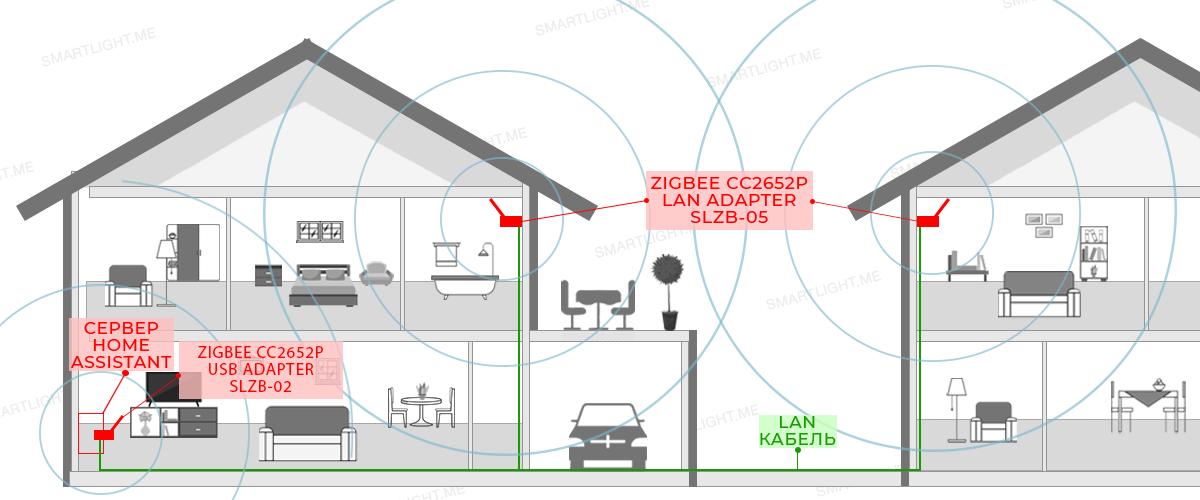
 ivory hound
docker via docker-compose my recommended way
mighty river
i feel like i downgraded my capabilities by migrating from container to haos but i don't miss docker at all and updating addons within home assistant is so great
maybe i'm just not a cool power user
latent rose
forgot my mqtt user and psw, fun times 😂
 bronze apex
Anyone used the aqara presence sensor yet? Found 3 in stock at £42 each so I'm kinda tempted but I know z2m doesn't have regions working yet so kinda on the fence
 simple sentinel
what do the regions do?
tropic depot
1 sensor potentially can cover mini areas (user defined) in a single space
no one has it implemented yet
simple sentinel
Ah oki, can't say I have anything that would need that granular level of detection
Maybe if I had a yard where I wanted to aim a water turret at approaching wild life
bronze apex
Can it also be used to create dead zones or ignore regions?
When it's implemented obviously
cobalt dew
sleek sedge
am I doing something wrong. or not following some sort of etiquette I'm unaware ...
Those here may not know, I am a newbie so I know poop.
cobalt dew
bronze apex
Might invest in one then 👀
i am going to buy one of each come pay day.
bronze apex
cobalt dew
i am going to buy one of each come pay day.
Yeah I've a couple of motion sensors already, a few more would be great but a think I'll give this a try
cobalt dew
Motion sensor + presence as a combo https://www.youtube.com/watch?v=d0zUWrDumHM&t=218s&ab_channel=HomeAutomationGuy
also these as well as the fp1. https://www.aliexpress.com/item/1005004392234790.html
cloud bolt
what is the way of moving from one zigbee coordinator to an other (I am using ZHA)? Simply removing the integration, unplugging the previous stick, plugging in the new one, readding the ZHA integration and re-pairing the devices?
cloud bolt
it is conbee2 -> sonoff 3.0 usb plus
 glossy canopy
cloud bolt
what is the way of moving from one zigbee coordinator to an other (I am using ZH...
glossy canopy
cloud bolt
what is the way of moving from one zigbee coordinator to an other (I am using ZH...
I think « Everything smart home » did a video on that a while ago
cloud bolt
Found it and watched it thanks! In the end I went the easy(ier) route and didn‘t do backup-restore of ZHA as he did it in the video. I simply removed the old devices (I only have 7 anyway), deleted zigbee.db and re-added the devices with the same entity names. Everything seems to be working fine.
 lofty hamlet
Conbee 2 a good stick?
obsidian sandalBOT
Buy something CC2652 based. This list is a good one, both Tube and Electrolama have been proven to have excellent customer service. The current generation of EZSP sticks (see here for some) are also a good choice for ZHA.
Anything CC2530 or CC2531 based should be avoided - they're old, slow, and only suitable for a dozen or so devices. The Sonoff ZBbridge isn't advised since it uses WiFi (built in interference causing stability/reliability issues), and the HUSBZB-1 uses an older chipset so should be avoided.
Finally, the ConBee range are fine with deCONZ, but experience with ZHA and Zigbee2MQTT appears to be mixed.
Command '.pickyourstick' was invoked by: Tinkerer
glossy canopy
cloud bolt
Found it and watched it thanks! In the end I went the easy(ier) route and didn‘t...
Oh yeah for 7 devices I wouldn’t do all that either 👌🏻 glad everything worked out
glossy canopy
lofty hamlet
Conbee 2 a good stick?
Heard mixed reviews, I use one and apart from the last few days it’s been running fine.
sour shadow
They're more sensitive to RF noise than any other stick
If you keep them on a USB extension cable away from noise, they're ok but not great
Unless you run deCONZ, when they're the only option 
glossy canopy
I’m debating upgrading to a sonoff v3
cloud bolt
lofty hamlet
Conbee 2 a good stick?
I just migrated from Conbee to Sonoff. Had no issues with the conbee apart from showing 100% for every battery.
But the sonos does pretty much the same 😄
As the conbee is not really recommended here, I thought I migrate to the sonoff while I only have a handful of zigbee devices…
glossy canopy
Running ZHA my map is mostly yellow and red connections idk if that’s something that would get better with another stick. But given the price of the sonoff it’s not a big gamble
cloud bolt
Actually, I can still send back the conbee (bought it 3 weeks ago on amazon) so I actually spare money by switching to the way cheaper sonoff 😄
glossy canopy
Nice !
I had my lights not responding to turn off signals from my switches, and sometimes they wouldn’t respond at all from the switches ( hue dimmer ), works fine in the app/web ui.
Shut everything off for an hour and switched USB ports for the conbee, was plugged into a usb3 for some reason. Hopefully it helps.