#zigbee-archived
1 messages · Page 105 of 1
 dry fossil
 lime locust
how can i see the ZHA configs ? i think its locked to one device somehow
https://imgur.com/a/csg8xvD
the right lux sensor was an instant add , the other aqara sensors dont add
if i remove the ZHA integration , will the sensors need repairing ?
 gentle flint
Plug in the stick. Reboot. Configure zha integration. From the serial port drop-down select the one ending in -01
I recommend against sonoff bridge. You experience would depend on the quality of the wifi network. Better get a ConBee or elelabs
 violet dagger
it is definitely not beginner friendly
lime locust
can i run the ZHA and zigbe2mqtt integrations next to eachother
lime locust
ah damn
gentle flint
As long as each one gets its own stick to control
 sour shadow
It'd be like having two people driving the same car at the same time 😉
lime locust
zha wont recognise simple aqara sensors , only one got added , seems stick is locked ?
/dev/serial/by-id/usb-Texas_Instruments_TI_CC2531_USB_CDC___0X00124B0018E299EC-if00
would be a valid path
dataflow and baudrate left on default
there are 2 buttons on the stick any1 know what they're for ?
sour shadow
Depends on how you run HA really
lime locust
hostmode
sour shadow
Either with a compose file or an #add-ons-archived
hostmode 🤣
I'm guessing you run #449717345808547842 ?
lime locust
container
 fleet wedge
Turns out sleash is selling his adapter through his own website
Ends up being about 5€ cheaper than anything else
Says he sends in 1-4 days
Is this the right place to ask this:
Does anyone have any experience with using zigbee filament style lights with circadian lighting? I'm looking for bulbs that all work with that
fleet wedge
Yeah that's what I have as the actual implementation
As for cct, I'm having a hard time finding them in filament form
fleet wedge
That one isn't zigbee but it sure looks cheap
sour shadow
Yeah, I just googled zigbee cct filament bulb
fleet wedge
We don't have a local word for cct
sour shadow
And, you never said where you were 😉
 quick hare
I’m looking at sniffing my network today! 🙂 Everything seem’s to work! Except only beacon packets are getting captured. Am I doing something wrong? :/
sour shadow
CCT is the term for them, like RGB
quick hare
What is the default ZHA ZigBee channel ID? 🙂
fleet wedge
Seems like it's paulmann or bust
sour shadow
quick hare
What is the default ZHA ZigBee channel ID? 🙂
It's listed in the ZHA docs 😉
 austere patio
quick hare
I’m looking at sniffing my network today! 🙂 Everything seem’s to work! Except o...
austere patio
quick hare
I’m looking at sniffing my network today! 🙂 Everything seem’s to work! Except o...
Make sure you're listening on channel 15 and have entered your network key into wireshark
Everything about your network should be in that backup you made
quick hare
sour shadow
It's listed in the ZHA docs 😉
It’s not explicit but yes it’s there thanks! 🙂
austere patio
Including the channel and the pan_id
quick hare
austere patio
Everything about your network should be in that backup you made
Yeah thanks god iv’e made one! Saved me so much time! haha
fleet wedge
fleet wedge
Ends up being about 5€ cheaper than anything else
Lmao the price was without tax, with tax it's 40
quick hare
austere patio
Including the channel and the pan_id
pan id is the network key?
austere patio
No, the pan_id is like your network's SSID
quick hare
Ohhh
austere patio
extended_pan_id is BSSID
It's somewhere near the top of the backup. You can enter as many keys as you want into wireshark and it'll find the right one
quick hare
Oh I see it panId. But is it an argument I need to provide to zsmartsystems.zigbee.sniffer ?
austere patio
No, the sniffer just captures whatever is being sent over the air
I believe you just need to tell it the channel
quick hare
Ahh alright. Seem’s to work! 🙂
 pine vine
Do hue bulbs act as zigbee repeaters when using mqtt?
 lilac wharf
If they're on the same Zigbee network, yes
pine vine
Am new to zigbee2mqtt but i assume if theyre connected to the same mqtt via my CC2531 then they will be?
lilac wharf
Yeah, I just mean bulbs on a hue bridge for example won't be routers on your zigbee2mqtt network
pine vine
Ok perfect, looks like that isn't the issue then. Everything was working flawlessly now my danalock is being very intermittent and one bulb will no longer join the network after removal
Lock is failing because of timeouts
 strange ibex
Most people here would suggest something other than a CC2531
Also, make sure you're on a USB extension cable
avoid throwing things near wifi/microwaves
pine vine
Any reason in particular for not liking the CC2531?
Problem is the conbee seems to be unavailable in the UK atm
strange ibex
Most people that are having issues tend to be on the CC2531 from what I have seen in this channel
lilac wharf
It's the cheapest, least powerful stick
pine vine
Any suggested alternatives and i will see if i can find them in the UK
strange ibex
zzh or slaesh
I have 0 experience with slaesh but green named nerds suggest it. I use zzh and never have issues.
pine vine
Whats the zzh like to get up and running once purchased?
 simple sentinel
zzh is dispatched within the UK, afaik, but the dude is marked as being on a break, so unsure when you could put in an order
lilac wharf
13th IIRC
pine vine
Yep have just seen that. Zigbee network is very small atm (Just 3 devices, but quite a few more on order)

 strange ibex
"This seller is taking a break until Jan. 13, 2021. Sign up below to get an email when they're back!"
very big at the top
the cool thing about zigbee is the more devices, the stronger the network
'just need a coordinator that can spit
pine vine
In the mean time, any way to force checking for new devices?
Cant see anything in the logs about the missing hue bulb
strange ibex
Billy, it isn't paired to a bridge right and if it was, you factory reset it
pine vine
Not connect to a bridge. It was conned to my mqtt but i removed it due to some trouble I was having
I now cannot find it again
strange ibex
ahh, is it one of the ones with BT?
I'd maybbe try to connect directly to app and factory reset it through there
Did you do a force removal or something? weird
pine vine
I did not check "force remove" when removing the device. Would that matter? Apologies I'm not to zigbee
strange ibex
I was just wondering to learn 😛 I should look up difference but will another time
 amber gull
You may have to ZLL touchlink reset the hue bulb
lilac wharf
Or if you or someone has a Hue dimmer you can reset it with that
Or apparently a tradfri dimmer
pine vine
amber gull
You may have to ZLL touchlink reset the hue bulb
I'll do some research on this
 mellow geode
Does anyone know if it's possible to add some device to ZHA via TouchLink?
(Would wanna try with old Philips LivingColors lights. These can be bound to the Hue bridge using their remote)
 tropic depot
It’s not
 golden vessel
For some cluster attrs I get "bitmap16.8" in the UI and the logs. How can I see the value?
 wide sigil
Hi! I'm having an, uhm, procedural question: How the hell do I connect lights to my zigbee coordinator, when the light in a few meters away, or even in another room? With my IKEA stuff I could just use the remote, but I cannot move my server - with the zigbee stick - closer to my ceiling lamp.
lilac wharf
You can pair in place
If you have any Zigbee devices that act as routers (most mains-powered devices are) they'll all look for new devices too during the pairing process unless you specify otherwise
wide sigil
Alright, I see. So i might want to pair the closest bulb first and then it might work better.
sour shadow
Yes
wide sigil
Thanks, much appreciated.
pine vine
amber gull
You may have to ZLL touchlink reset the hue bulb
This worked! Thank you
lime locust
have the zigbee2mqtt(container) setup working fine and was wondering about the logs, do they purge at some point , cause all these sensors/motion thingys are outputting quite a lot of txt ?
sour shadow
No, they don't
lime locust
have a small aqara motion detector with lux sensors it seems , but they dont output , can i just do the repair process again and it gets re-added in zigbe2mqtt ?
wide sigil
I seem to have a problem with my conbee II / deConz addon. When using the ConBee2 in my windows 10 pc I can pair bulbs and remotes w/o any problems.
When connected to hassio it won't detect anything. Are there any diagnostics I can run, to pin down the problem?
ConBee2 is on the most recent version, used the manual update way via windows cmd.
sour shadow
lime locust
have a small aqara motion detector with lux sensors it seems , but they dont out...
Those only send the light data when motion is detected
lime locust
ah thnks !
 signal shell
Hi guys, I have two Xiaomi Aqara cubes connected via Zigbee2Mqtt, but they don't appear to have a state. If I check under Templates and type {{states("sensor.my_cube_xyz")}} it doesn't show anything. I have a blueprint that uses the cube, but in the blueprint it is declared as a remote but the entity is still the sensor? I'm really confused on how I can automate the cube as I don't even know on how to get the current Side, ... from it. Also state_attr just gives me "None"...
 vagrant lance
Having hard time with ikea E1743, https://www.zigbee2mqtt.io/devices/E1743.html it says
[32mZigbee2MQTT:info [39m 2021-01-09 13:06:11: MQTT publish: topic 'zigbee2mqtt/bridge/log', payload '{"message":{"friendly_name":"ikea"},"type":"device_connected"}'
[32mZigbee2MQTT:info [39m 2021-01-09 13:06:11: MQTT publish: topic 'zigbee2mqtt/bridge/log', payload '{"message":"interview_started","meta":{"friendly_name":"ikea"},"type":"pairing"}'
[32mZigbee2MQTT:info [39m 2021-01-09 13:06:14: MQTT publish: topic 'zigbee2mqtt/bridge/event', payload '{"data":{"friendly_name":"ikea","ieee_address":"0xbc33acfffebd4a5f"},"type":"device_announce"}'
[32mZigbee2MQTT:info [39m 2021-01-09 13:06:14: MQTT publish: topic 'zigbee2mqtt/bridge/log', payload '{"message":"announce","meta":{"friendly_name":"ikea"},"type":"device_announced"}'
[31mZigbee2MQTT:error[39m 2021-01-09 13:06:26: Failed to interview 'ikea', device has not successfully been paired
[32mZigbee2MQTT:info [39m 2021-01-09 13:06:26: MQTT publish: topic 'zigbee2mqtt/bridge/event', payload '{"data":{"friendly_name":"ikea","ieee_address":"0xbc33acfffebd4a5f","status":"failed"},"type":"device_interview"}'
Its my first zigbee device :( using zigbee2mqtt
signal shell
Ah, I got it, it comes as an event, I got confused as the blueprint used to call the cube-entity a "remote" and the entity itself is stateless. So events is the way to go 👍
dry fossil
Presumably it has two because they're different 🤷♂️
Like with many things, there are several ways it can be measured. Lux is common but it's not the only scale.
sour shadow
I like candles
dry fossil
Foot candles? 😄
sour shadow
Four
dry fossil
I love how luminance and illuminance are different things, despite sounding so similar.
Fork handles?
Next you'll be wanting hose
sour shadow
I see you're also a person of taste and class 😉
dry fossil
I try
lilac wharf
Unlikely
sour shadow
For the unenlightened ... https://www.youtube.com/watch?v=Ozpek_FrOPs
wide sigil
wide sigil
I seem to have a problem with my conbee II / deConz addon. When using the ConBee...
after digging around a bit, it seems there is something up with the comms deConz <-> conbee.
The VNC app hangs in "Not In Network" and hitting "join" doesn't do anything.
Log/debug view shows the reconnect attempts scrolling by.
Any tips on how to debug this further?
E: My hassio installation is in a proxmox kvm, but hassio picks up the USB dongle, at least it shows up.
dry fossil
I don't know the answer but the most common problem I see around deCONZ is about USB passthrough with VM's.
Maybe our resident expert, @frail oracle will know. 🤣
wide sigil
that'd be a bummer. I'm totally willing to try zha/zigbee2mqtt tho, if they work better :)
dry fossil
They're all different. But I rarely see people having issues with passthrough with them.
 dire willow
@sour shadow Just a random reminder from long ago
Zigbee, still a mesh network. 🙂 those 4 bulbs (repeaters) sure are helping!
lime locust
was wondering , my cc2531 has like a 20 device limit, if i solder an wifi antenna to it would number of devices to be paired also increase ?
lime locust
o wow, so every bulb becomes a router
no wonder google integrating this in their next nest hub 🙂
great bit o tech
wide sigil
wide sigil
after digging around a bit, it seems there is something up with the comms deConz...
ZHA says:
Error setting up entry ConBee II, s/n: DExxxxx - dresden elektronik ingenieurtechnik GmbH for zha
Exception: Could not form network.
Yikes.
I feel like this is a passthrough issue.
 mighty river
Hi guys, I've been troubleshooting a delay I'm experiencing in certain automations triggered by a zigbee motion sensor turning on a light. Following your advice, I've been checking the logbook whenever the issue has taken place. Apparently, there's no delay in the logbook between the trigger and the action (just 1 second delay at most, which is nowhere near the 4-5 seconds delay I'm experiencing...). I would appreciate any hint on how to continue with this troubleshooting
as far as I know, this can be due to the zigbee network being too congested, since I have 23 devices ruled by just one coordinator and one router ... but it could be for some other reason as well
how can I distinguish which the case is?
golden vessel
mighty river
how can I distinguish which the case is?
can you share the yaml for the automation?
mighty river
it's a flow in NR
golden vessel
try replacing it with an automation, just to rule out an issue in NR
austere patio
mighty river
how can I distinguish which the case is?
Can you post your debug logs?
They would contain the exact timestamps for when the motion sensor triggered and when the corresponding light was turned on
wide sigil
wide sigil
ZHA says:
```
Error setting up entry ConBee II, s/n: DExxxxx - dresden elektroni...
HEUREKA! Just out of pure desperation I put a long af usb lengthening cable on the stick and now it works. This is really something. Jeez. Thanks for y'alls assistance.
austere patio
Perhaps the Conbee refused to form a network due to interference?
wide sigil
Looks like it, but I would've expected some kind of error instead of "eh, nah".
Anyway, I can use my lights again and don't have to press switches like a caveman 🥳
mighty river
@austere patio Hey again, you mean zha logs or general logs? how am I to enable them? and should I share the logs from the time the issue is taking place only, I suppose?
for that purpose, some people of the chat suggested me that the logbook would be suffice to achive that
to know the timestamps
austere patio
mighty river
<@!652580495892152331> Hey again, you mean zha logs or general logs? how am I to...
The ZHA/radio library logs would contain the exact timestamps for when the radio received the motion sensor attribute update and when it sent out the request to turn on the light
If there's no real difference between the two timestamps, then something with the Zigbee network is causing the delay
pine vine
Anyone got an ultion smart they're using via zigbee? Very recently purchased one but the settings in the app only mention z-wave and not zigbee. Thinking they may have sent me the wrong one
violet dagger
usually its written on the box
mighty river
austere patio
https://www.home-assistant.io/integrations/zha/#debug-logging
one last question. The light is not zigbee, would that be useful anyways? what should I be looking for in the logs? how can I identify it?
austere patio
What is it? WiFi?
pine vine
violet dagger
usually its written on the box
They do multiple versions and the box just states each version they offer rather than the one which has been supplied in the box. However, zigbee is their default unless you specify otherwise
mighty river
I've already checked the logbook and there's 1 second delay at most between trigger and action. Does that tell me something?
yes, it's wifi
mighty river
in the logbook there's a 1 second delay at most while there's somewhere around 3-5 seconds delay from my perspective
austere patio
I would imagine then that this is on the WiFi side of things
Zigbee for the most part is instantaneous, especially for motion sensors
violet dagger
what kind of wifi light? which integration is it using?
mighty river
it's a lifx bulb lifx integration
until recently I had the Tenda Nova mw6 mesh wifi system, with which I also experienced this delays..
violet dagger
is it using local control or cloud?
mighty river
moved to TP link deco m9 and still the same.. I was hoping the router would solve it
I assume local?
wait
violet dagger
dont
violet dagger
such a delay should not happen in local control
but it is normal when using cloud integrations
mighty river
could that extension cable do something? with conbee II i mean
golden vessel
mighty river
could that extension cable do something? with conbee II i mean
does the state on the sensor change immediately on home assistant after you make some motion in front of it?
mighty river
generally it does, problem is I cannot know if it is instantaneous when the issue happens becaus it's pretty random
golden vessel
oh its random! :/ what is the LQI of the sensor?
also, you are not using an extension cable on your zigbee stick?
mighty river
nope, lookabmantis
fortunatelly, I've just entered the room and
there has been a delay
the state in HA hasn't been updated until the light has turned on
so it's kind of HA is received the zigbee info with a delay
golden vessel
if you are not using an extension, I bet that's your problem!
mighty river
that would be great
is there any documentation on which would be the shortest cable length recommended?
golden vessel
anything over 30cm should be fine. don't use one over 3m. also, don't connect it to a USB 3 port
lilac wharf
Anything over 10-12 cm tbh
mighty river
that's cool, I'll go with 10 cm them
lilac wharf
Well, really like 5 😂
golden vessel
lilac wharf
Anything over 10-12 cm tbh
those 2cm are the important ones!! 😆
lilac wharf
Just needs to be away from the machine
mighty river
well thank you guys, I hope this is the last time I come here asking for help on this matter😀
I really appreciate
mighty river
is there any problem if the cable is usb 3.0 but I plug it into the 2.0 socket of the pi?
lilac wharf
Nope
golden vessel
Actually, I couldn't get a conbee to work when I used a USB 3.0 cable a while ago. Switched to an old usb2 cabled and it worked. The USB 3 cable works fine (and fast) with USB 3 stuff.
usb 3 cables are different from usb 2 ones. I wouldn't expect them to carry more interference, but idk
dry fossil
The cable isn't the problem. The port is.
golden vessel
it was some time ago, but I think I was using the USB2 ports on the pi4 for the stick
dry fossil
The broadband noise emitted from a USB 3.0 device can affect the SNR (signal-to-noise ratio) and limit the sensitivity of any wireless receiver whose antenna is physically located close to the USB 3.0 device. This may result in a drop in throughput on the wireless link.
It's the circuitry, not the cable.
golden vessel
a cable can act as an antenna
dry fossil
But it's a known issue that hardware manufacturers are dealing with:
In a nutshell—the noise from USB 3.0 interferes with the 2.4 GHz signal. However, the wireless industry is proactive about the problem. Just about all of the router makers I spoke with that offer routers with USB 3.0 ports have those ports shielded to alleviate that interference.
Yes, induction can happen... but that doesn't change the fact that it's the device, not the cable, that's responsible for it.
golden vessel
yeah ofc
dry fossil
And if something's going to induce a current, it doesn't care how old your cable is.
golden vessel
if your device only has 2.0 ports, there's nothing to induce interference
dry fossil
That's... what I've been saying.
golden vessel
I know, I was agreeing with you 😄 (see the "yeah ofc"?) 😄
in my case, the PI has 3.0 ports. despite not being connected to them, a 3.0 cable may be able to act as a better antenna than a 2.0 one
or maybe not. its just a theory since it wasn't working when I used that cable
 naive ivy
Is anyone using ZHA and Sylvania/Ledvance A19 RGBW with latest firmware (0x00102428)? Do you have a 'colorloop' effect available?
I had it, until I upgraded firmware, and I don't know if something just isn't being recognized or if ledvance removed it from the firmware
mighty river
would this get the jon done? is kind of short but I'd love it
and btw, how am I supposed to paste here in the chat a huge Amazon url for example?
violet dagger
make it short
dry fossil
Huge Amazon URL? None of them are huge once you remove all the tracking shit from the end.
mighty river
aaalright thanks
dry fossil
Hell, you can even remove the name: https://www.amazon.es/dp/B00KGT96WI
They only care about the ID.
mighty river
that's good to know
mono, what would be the shortest length you would use for this purpose?
I'd love to use a 3cm adapter but I'm not sure it'll suffice
violet dagger
seems you missed the part where advised to be far away from the server
dry fossil
General feedback seems to be to stay 1m away from the nearest source of interference (routers/computers/speakers/etc).
violet dagger
are you scared of 1m cables?
mighty river
oh wow.. 1 m is a lot..
dry fossil
Anything with lots of EM or magnets in.
mighty river
tediore suggested 15cm would suffice
lilac wharf
Huh, didn't think it needed to be that far
violet dagger
well mine is 2m but this is not a mine is bigger
lilac wharf
Yeah was just about to say that heh
I've brought great shame upon myself and my family
dry fossil
Mine's attached directly to my NUC, which is directly on top of my personal PC and right next to a bunch of other electronics. Zero issues.
lilac wharf

dry fossil
But... if someone's having issues, adding an extension is the first thing to try.
violet dagger
i cabled mine to get in a better position since the server is kind of low
dry fossil
Did you try saying nice things to it or taking it out to get some fresh air?
violet dagger
server or cable?
dry fossil
the server is kind of low
😂
mighty river
haha
violet dagger
i dont get it
dry fossil
low = depressed
mighty river
you meants slow?
dry fossil
Feeling low.
mighty river
well then..
violet dagger
huge stretch there
mighty river
so the length depends on the setup
violet dagger
and the stick >D
mighty river
I'll give a 15cm cable a shot and move from there I guess
mighty river
violet dagger
are you scared of 1m cables?
not scared, but it's ugly
my pi is attached to a wall
violet dagger
working > ugly
dry fossil
Ugly homelabs are the best homelabs.
mighty river
violet dagger
working > ugly
for sure, I'll just try to make it the least ugly possible ^^
dry fossil
Hang a poster in front of it.
mighty river
or maybe replace the conbee II for a sonoff bridge
violet dagger
do cable art
mighty river
is the sonoff bridge reported to work well with ZHA?
mighty river
what do you mean by "that is as critical"
dry fossil
Anything where you need to receive the message first time. I don't think Zigbee re-sends missed messages like your PC would with WiFi.
mighty river
it's bad it's wifi you mean
mighty river
okok sorry, I'm from Spain and sometimes, you know..
violet dagger
i don't, i'm from croatia
mighty river
@lilac wharf what's the length of the cable you're using? are you using a pi?
golden vessel
mighty river
<@!562095811186524190> what's the length of the cable you're using? are you usin...
You really want to use a small cable 😆
mighty river
I really really do 😄
violet dagger
just plug it in directly then
golden vessel
Just remember: the closer to the pi, the more interference it will get, the worse (slower, less reliably) it will work.
mighty river
I know but there's nothing wrong in moving from the shortest to the longest
golden vessel
Its one of the top recommendations for a reason 😉
mighty river
if 15cm work, they'll stay, otherwise I'll move to 50cm or 1m
golden vessel
mighty river
I know but there's nothing wrong in moving from the shortest to the longest
It may work. Then one day, your light won't turn on 🙂
violet dagger
why not 30 cm first?
mighty river
cause 15 is less ugly
violet dagger
well 0 is even less ugly 🤣
mighty river
it's amazon and I can return as many as I like
golden vessel
wireless networks are voodoo 🙂 they may work fine for months, and start failing by mysterious reason 🙂 a bigger cable would help reduce that probability
mighty river
but 0 has proven to make trouble
golden vessel
by the way, what stick are you using?
mighty river
0 is the most beautiful, but it doesn't work properly.. that's why I'm moving from there
conbee II
I can return a cable months after purchase, no probem with that
golden vessel
https://phoscon.de/en/conbee2/install
even phoscon recommend an extension 😉
violet dagger
but they didnt put the length in there
mighty river
yup, I read it, and the cable there doesn't seem to be longer than 30cm
golden vessel
right? 30cm... not 15! 😄
golden vessel
well, just rember to start by changing the cable the next time your zigbee network isn't reliable 😄
mighty river
believe me, I won't forget this discussion we've had..
but I won't come here to let you know 😛
violet dagger
we don't use conbee anyway, we use working hardware 👿
violet dagger
i do
golden vessel
I've used a Conbee 1 for a long time and it worked fine
violet dagger
but people also think earth is flat
mighty river
I'm open to change my coordinator as well
golden vessel
I know a friend who tried using a conbee 2 with ZHA and it was not reliable... so, who knows
I've changed to a Elelabs stick and moved the conbee 1 to my parents house (which doesn't have much devices)
mighty river
@violet dagger you think conbee II is good or bad?
violet dagger
i think its in between
mighty river
hmm
which one do you guys use?
if it's better than conbee, I'm ok replacing it
abmantis uses Elelabs
is there a consensus on which are the best zigbee coordinators for HA? with ZHA?
 remote patio
is there somewhere in the UI I can find the serial devices available on my home assistant install?
austere patio
mighty river
is there a consensus on which are the best zigbee coordinators for HA? with ZHA?
I'd say any of the newer Silicon Labs or Texas Instruments coordinators are fine, maybe then the Conbees
naive ivy
@remote patio Supervisor->System, the three-dot menu at the bottom right of the "Host System" card, click "Hardware"
austere patio
Though many people use the Conbees without any serious issues so 🤷♂️
It's not like they're actively developed to perform poorly
remote patio
those 3 dots are so difficult to notice
naive ivy
Yep.
mighty river
actually it works really well.. reading in the internet people have really big problemswith their zigbee networks, it's not the case with this one
i've had very few issues tbh
violet dagger
i see really well has different meanings
wide sigil
I'm having quite a few issues with my my ConBee II, but that could also be caused by tradfri stuff.
remote patio
I have really big problems with deconz,, so I don't know that the conbee was the problem.. but the zzh has a much better antenna.. so that will eliminate some issues
violet dagger
zzh with z2m works excellent
violet dagger
its a stick that can be a coordinator
remote patio
it's the usb zigbee stick I linked earlier
mighty river
which needs to be flashed?
violet dagger
yes
remote patio
hmm.. it doesn't seem to be showing the 3rd usb device... just the conbee and the zwave stick..
mighty river
I'll stay away from that then..
austere patio
I mean you just plug it in and copy/paste a command
violet dagger
why? not a fan of command line?
mighty river
no soldering?
violet dagger
its literally the same as upgrading a conbee
austere patio
Not unless you want to solder something to it for fun
violet dagger
yeah, there's a saying about assuming
you could solder to it, there's so many pins
mighty river
and it works well with zha?
violet dagger
it doesnt
austere patio
??
remote patio
what is "it" ?
mighty river
zzh
remote patio
it should work fine.. it's supported
austere patio
Must be some other "it" because the zzh does work
mighty river
😖
golden vessel
https://zigbee.blakadder.com/Electrolama_zzh.html
that random site says it works
😄
austere patio
In that case Zigbee works well
violet dagger
that site is fake news anyway
austere patio
Gave me viruses too
remote patio
shit.. no wonder it wasn't showing up.. I forgot that I need to pass it through to my home assistant vm
violet dagger
good thing you remembered that before losing half a day debugging
like some people... ahem
remote patio
that's the worst..
mighty river
so zzh and zha work well
violet dagger
people say so
remote patio
one person here always tells the truth and the other one always lies.. you can ask one question..
violet dagger
what did i do now?
austere patio
"What is the best integration?"
violet dagger
MINE
remote patio
zwave
golden vessel
I'm honestly curious about what issues you had with zzh + zha
violet dagger
when did i mention issues?
remote patio
where did you not not mention issues?
austere patio
I can point to a couple
golden vessel
what are issues?
remote patio
they're like tissues.. but without a t.
violet dagger
i mean there were issues but i was on the testing team and zha didnt have complete support yet
austere patio
The hardware is quite capable but the firmware is crap
remote patio
the firmware from zigbee2mqtt ?
violet dagger
that would be koenkk's fault 😄
austere patio
The Z2M builds just tweak config and fix some endpoint bugs, it's all TI's fault
wide sigil
Having some issues with zha, conbee II & tradfri bulbs: https://lenni.wtf/sharex/2021-01-10_01-59-22.gif
Those are all tradfri bulbs, paired to the ConBee II.
Lights are getting stuck, reporting the wrong state not turning on or off. Anyone got an Idea?
hass Version 2020.12.7
most recent version on the conbee.
 violet dagger
how serendipitous
remote patio
I have had plenty of issues with the conbee II
austere patio
Is this a light group or just a group of lights? Maybe the conbee doesn't like sending more than a couple concurrent requests
golden vessel
wide sigil
Having some issues with zha, conbee II & tradfri bulbs: https://lenni.wtf/sharex...
that's like what my friend that tried a conbe 2 with zha reported
wide sigil
austere patio
Is this a light group or just a group of lights? Maybe the conbee doesn't like s...
Light groups, defined as platform: group in the config.
 frail oracle
wide sigil
after digging around a bit, it seems there is something up with the comms deConz...
frail oracle
wide sigil
after digging around a bit, it seems there is something up with the comms deConz...
Did you click firmware update?
wide sigil
austere patio
Debug logs may explain what's happening
[homeassistant.components.zha.core.channels.base] [0x28F7:1:0x0006]: command failed: 'off' args: '()' kwargs '{}' exception: '' is what I'm seeing related to that.
frail oracle
Or is that already solved?
austere patio
Enable https://www.home-assistant.io/integrations/zha/#debug-logging and see what the actual error is
wide sigil
frail oracle
Or is that already solved?
Got it connected down the line. Thanks for the follow up, much appreciated. The solution was several reboots, update via terminal and a long af usb cable.
wide sigil
austere patio
Enable https://www.home-assistant.io/integrations/zha/#debug-logging and see wha...
Will do.
golden vessel
wide sigil
Got it connected down the line. Thanks for the follow up, much appreciated. The ...
@mighty river he said "long af usb cable" 🤓
frail oracle
wide sigil
Got it connected down the line. Thanks for the follow up, much appreciated. The ...
You prolly clicked firmware update in the ha addon?
violet dagger
long af = 16 cm ?
wide sigil
frail oracle
You prolly clicked firmware update in the ha addon?
Yes, but that didn't work. It said success and then reverted right back to the old version.
mighty river
I'll go 16,5 then
austere patio
That may be too long
mighty river
heheheee
wide sigil
violet dagger
long af = 16 cm ?
Just measured, 180cm °L°
violet dagger
16,3 is the sweet spot
frail oracle
wide sigil
Yes, but that didn't work. It said success and then reverted right back to the o...
Then the device did the reboot loop?
wide sigil
frail oracle
Then the device did the reboot loop?
No idea, tbf. It just wouldn't form a connect, but I couldn't tell, wether it was bootlooping or not, sorry.
naive ivy
One more ZHA question; does anyone know of a way to force the network visualization map to update? After having to reset and re-pair all my lights, it's not showing connections. All the nodes are there but with no lines between them.
And it's been like that for several hours now
frail oracle
wide sigil
No idea, tbf. It just wouldn't form a connect, but I couldn't tell, wether it wa...
Because of the addon screwing up the firmware. It's a bug in the addon.
wide sigil
austere patio
Enable https://www.home-assistant.io/integrations/zha/#debug-logging and see wha...
Is what I'm seeing rn, not sure if that helps tho: https://pastebin.com/L3yH2tNv
wide sigil
I see. Given the update via another PC worked, I guess no permanent damage was done.
remote patio
sigh.. esxi wants me to turn the machine off just to attach a usb device...
austere patio
wide sigil
Is what I'm seeing rn, not sure if that helps tho: https://pastebin.com/L3yH2tNv
A lot more of the debug log would help
wide sigil
austere patio
A lot more of the debug log would help
Sure, I just didn't want to dump a boatload of logs onto ya.
Does this help? https://pastebin.com/QjqtKBL6
lilac wharf
@mighty river 2m I believe. I'm not using a pi, I'm using an old laptop
amber gull
@naive ivy no documented method currently. It’s probably exposed in the web socket api. There will be a scan on demand button in a future release
 molten linden
violet dagger
nothing wireless that is as critical will work well
molten linden
violet dagger
nothing wireless that is as critical will work well
my wired ethernet to serial bridge has been rock solid. working on some improvements as well. Just got a prototype working with the same module the sonoff uses. also have cc2652P2 variant in the works.
 high ermine
Anyone got any tips and tricks to get my IKEA devices added to zha? Im using the sonoff cc2531 adapter that is pre programmed so it works. I got one light working but after 3h of trying to add another light / switch /sensor i must be doing something wrong.
 junior viper
Hi! Does anyone know if it's possible to change update intervals for the Aqara Water Sensor? Seems to be sending dry/wet only once per hour. Tried drain it with water to trigger notifications, but states dry
Im using Conbee + ZHA
remote patio
well this is disappointing.. i moved one xiaomi button from deconz to z2m and it seems inferior in term of autodiscovery of automation triggers
sour shadow
If you mean Device triggers then support for those is relatively new in Z2M
Such a hardship having to do it the traditional way I know 😉
remote patio
I do. it is.. I have about 1 second a month to work on this stuff.. got to work fast..
anyway.. it's missing triggers
that's the real problem
sour shadow
So.... submit a PR to Z2M 😉
remote patio
I should be able to whip that up within 60 years..
sour shadow
Perfect
remote patio
I assume ZHA supports device triggers better?
sour shadow

remote patio
or is that a poor assumption?
sour shadow
I'm sure you'll find plenty in ZHA to complain about 😉
remote patio
I have a very limited set of devices and I think ZHA supports them all.. just xiaomi, ikea and philips
junior viper
Haha, I don't want to go from ZHA to Phoscon or Zigbee2MQTT
sour shadow
All the options work - it's just about the bits around the edges, whether you're happy with them or not
junior viper
Just want my damn aqara water leak sensors to be update/polled more frequently
sour shadow
Sensors report they can't be polled 😉
remote patio
I previously wanted to run zigbee on a different device/vm so ZHA was out.. but now I plan on changing that so it's back on the cards
sour shadow
Well, try it out and then let us know what you don't like about it
junior viper
Replying to me? 😂
junior viper
Standard 🙂
remote patio
everybody has a broken system.. they just don't realise it
wide sigil
A lot of my tradfri bulbs on a conbee 2 with zha just got stuck and they don't answer anymore.
Log's showing this: https://pastebin.com/uN7nge8K
Basically TXStatus.MAC_NO_ACK.
Any Idea on how to dig further into the issue?
remote patio
for reference this is how the device triggers differ.. only complaint on the deconz side is that the "Turn on" seems redundant.. going to go look through the z2m github to see if I can find what plans they have for device triggers

hmm.. might reflash my original cheapo zigbee stick so I can run all 3 at once for comparative purposes
slaesh’s CC2652RB stick.. I don't think this was a thing when I got the zzh! wonder how it compares
sour shadow
Pretty much the same - see the pinned messages for stick comparisons (not overall performance though)
remote patio
you mean the "An indoor Zigbee adapter range comparison" ?
sour shadow
Yup
remote patio
seems that external antenna beats pcb antenna.. no surprises there
junior viper
Tried remove my Aqara Water sensors, and added them again. Soaked them in water, still states as "dry". Are they so bad?
lime locust
wrapping my cc2531 in isolation tape shouldn't be a problem right ?
can i disable its led btw ?
dry fossil
It might get warm if you do. Better to print a case for it.
If you're going to use tape, just make sure it's proper electrical tape.
remote patio
hm.. seems z2m has issues removing devices
sour shadow
Never had a problem here
Have you considered that maybe the computers all hate you? 😛
remote patio
oh that's a given.
just fails to remove..
ERROR: Request 'zigbee2mqtt/bridge/request/device/remove' failed with error: 'Failed to remove device 'Smart Switch 7' (block: false, force: false) (Error: AREQ - ZDO - mgmtLeaveRsp after 10000ms)'
and that's after pressing the button just before removing
sour shadow
Well, different devices remove differently, battery powered ones may need the same process as for joining, or at least to be woken - pushing the button may not wake them
remote patio
makes it send a click.. deconz allows removal regardless.. so I should try the same process as joining without allowing joining buy deleting instead?
sour shadow
deCONZ probably just dropped the device from it's own mesh and didn't care if the device responded
You can use the force removal option to do the same
remote patio
hmm.. ZHA doesn't seem to detect my stick.. it's on /dev/serial/by-id/usb-1a86_USB2.0-Serial-if00-port0
and yet it sees the conbee ii
can't get it to pair with zha
even though the zha integration said it was succesful.. I'm dubious
2021-01-10 21:52:27 ERROR (MainThread) [zigpy.application] Couldn't start application
2021-01-10 21:52:27 ERROR (MainThread) [homeassistant.components.zha.core.gateway] Couldn't start ZNP = Texas Instruments Z-Stack ZNP protocol: CC253x, CC26x2, CC13x2 coordinator
I used software flow control and the default baudrate.. not sure what the baudrate should be.. wasn't a thing in z2m
yeah.. ui says success when adding the integration but the logfile says it fails to start
googling for "zzh!" zha baud rate flow control gives me It looks like there aren't many great matches for your search
sour shadow
Try the defaults?
remote patio
flow control has no defaults.. but I'm pretty sure it's software
and yes.. it says "success" in the ui but fails according to the logs
violet dagger
le manual says In case the autodetection fails, a manual setup menu will be displayed. Check the device path and set Radio Type as ti_cc. Leave other options as they are.
remote patio
that's not how it's displayed.. but I assume ti_cc is not the legacy ti radio type? if so then I've chosen ti_cc
so don't choose a flow control at all? didn't try to see if that would work
violet dagger
did the integration autodetect the port or not?
remote patio
oh. it IS legacy
well that's a surprise..
well that didn't help
2021-01-10 22:07:56 ERROR (MainThread) [homeassistant.components.zha.core.gateway] Couldn't start Legacy TI_CC = Texas Instruments Z-Stack ZNP protocol: CC253x, CC26x2, CC13x2 coordinator
not selecting a flow control gives a different outcome.. maybe it works now
this time when it said it succeeded it showed me the settings and let me set the area
and it shows the co-ordinator device.. so it must be working
I have no idea why it says success when it's actually failing though...
I wonder if i could just make up any bullshit and it would say success
 wide monolith
I am setting up some a Zigbee network using a sonoff zigbee wifi bridge.
From what I understand there are two ways to go ZHA of Z2T. Is there somewhere that talks about the pro and cos of both?
I have flashed with tasmota using Zigbee2Tasmota firmware and can pair devices to the bridge.
I thought that Z2T would be fine, im ok with managing the zigbee network on the Sonoff bridge, and have other tasmota devices integrated via MQTT so this seemed like a logical setup.
If I stick with Z2T, can I still integrate the zigbee devices in to HA? know of any doco that walks thorough how to do this?
remote patio
still can't successfully add a device.. it finfs it and starts to interview it... but then times out repeatedly
you mean Z2M ?
3rd pinned post
violet dagger
if you need to ask you will probably not be able to handle the configuration needed to make Z2T work with HA
wide monolith
@remote patio yes, I got the naming from this https://notenoughtech.com/home-automation/flashing-tasmota-on-sonoff-zigbee-bridge/
remote patio
ahh.. I've not played with that particular time sink.
so far ZHA is the only one I can't add my device to.. can;t see any. clues as to why
wide monolith
violet dagger
if you need to ask you will probably not be able to handle the configuration nee...
Do you know of some doco/tutorials that I can look at?
remote patio
for Z2T?
wide monolith
yes
remote patio
ooh.. device path can be a socket?
no experience with it personally.. so I don't know if it's any good
wide monolith
Thanks for the link. That walk though uses ZHA. As I understand this will mean the bridge pass through the zigbee to HA for ZHA to manage. All management will occur in HA not in the bridge.
I have the bridge set up to manage the Zigbee network and send the packets via MQTT.
 prime star
violet dagger
if you need to ask you will probably not be able to handle the configuration nee...
prime star
violet dagger
if you need to ask you will probably not be able to handle the configuration nee...
now you tell me 🙂 i am in the exact same situation as @wide monolith !
mighty river
Hello everybody
I have a problem. I have Home assistant running in Virtual Box on my NUC. I use the CC2531 as coordinator for Zigbee2MQTT
I see it being passtrough to Home Assistant. (supervisor -> Hardware)
In the logs Error: Error while opening serialport 'Error: Error: No such device or address, cannot open /dev/ttyACM0'""
And then in supervisor the hardware is gone
So it starts Zigbee2MQTT
And then after the error hardware is gone
Only other error I see is :
21-01-10 13:42:35 ERROR (MainThread) [supervisor.api.ingress] Ingress error: Cannot connect to host 172.30.33.1:8099 ssl:default [Connect call failed ('172.30.33.1', 8099)]
I now also see "failed to set dtr/rts
in console
So help would be greatly apprciated
😦
Looks like this with "hardware"
serial:
- /dev/ttyACM0
-
/dev/serial/by-id/usb-Texas_Instruments_TI_CC2531_USB_CDC___0X00124B000BE95BBD-if00 - /dev/ttyS0
- /dev/ttyS1
- /dev/ttyS2
- /dev/ttyS3
dry fossil
Sad faces and reminders aren't going to encourage anyone to help. Just be patient.
golden vessel
mighty river
In the logs Error: Error while opening serialport 'Error: Error: No such device ...
try using the /dev/serial/by-id path. If that still doesn't work, you have to figure out why the device is not being correctly passed to the VM
mighty river
dry fossil
Sad faces and reminders aren't going to encourage anyone to help. Just be patien...
True, but after a frustrating few hours sometimes patience is more difficult... sorry!
mighty river
golden vessel
try using the /dev/serial/by-id path. If that still doesn't work, you have to fi...
Strangely it now works without doing anything. But in a day I am sure it is not working again.
dry fossil
If I understood your messages correctly, it's appearing and disappearing?
mighty river
It seems to dissapair
golden vessel
mighty river
Strangely it now works without doing anything. But in a day I am sure it is not ...
I think I've heard the same kind of issue with other people using VMs
mighty river
dry fossil
If I understood your messages correctly, it's appearing and disappearing?
Yes correct
dry fossil
Is the device plugged directly into your machine?
mighty river
dry fossil
Is the device plugged directly into your machine?
Yes, USB 3.0 port
golden vessel
Move it to a USB 2.0 port, and also use an usb extension cable, for safety
We should add that to this channel's topic 🤔
mighty river
golden vessel
Move it to a USB 2.0 port, and also use an usb extension cable, for safety
I don't have a USB port I think
dry fossil
golden vessel
We should add that to this channel's topic 🤔
If someone writes a single message that contains a summary of all the relevant info, I'm sure a mod would be happy to pin it,.
mighty river
golden vessel
Move it to a USB 2.0 port, and also use an usb extension cable, for safety
Will a USB 2.0 hub work?
golden vessel
I think it should help reduce interference from usb3.0, yes. I would still recommend an extension connected to the hub
dry fossil
The hub will likely be on an extension already, so that makes adding more length less useful.
Just anything to position the stick a bit further away from potential sources of interference.
mighty river
dry fossil
Just anything to position the stick a bit further away from potential sources of...
It is also near our router, electrics, etc.
golden vessel
dry fossil
The hub will likely be on an extension already, so that makes adding more length...
the extension on the hub could serve as an antenna from the USB3 port. I would hope most of the noise will die on the hub, but not the cable.
golden vessel
mighty river
It is also near our router, electrics, etc.
that's not good, but connecting directly to a USB 3.0 port is worse 😄
mighty river
golden vessel
that's not good, but connecting directly to a USB 3.0 port is worse 😄
😀 Just started with Home Assistant, I expect more laughs coming from you in the near future
golden vessel
mighty river
😀 Just started with Home Assistant, I expect more laughs coming from you in the...
not laughing at all. Most of us have gone trough the same issues. 😄 Its not really obvious that USB 3.0 messes up zigbee and wifi, and that an extension improves things.
Can a mod pin this or put it in the topic? 👇
If you are having an unstable network, or if it fails to form a network at all, make sure that your Zigbee usb stick is not connected to a USB 3.0 port, and that you are also using an extension cable, to keep it far from any possible interference.
Using and extension and USB 2.0 port is also recommended by some vendors, like Dresden: https://phoscon.de/en/conbee2/install#connection
You can read about USB 3.0 interference on 2.4GHz devices here: https://www.intel.com/content/www/us/en/products/docs/io/universal-serial-bus/usb3-frequency-interference-paper.html
mighty river
golden vessel
not laughing at all. Most of us have gone trough the same issues. 😄 Its not rea...
It's just great that you are helping me. Great a forum like this
mighty river
golden vessel
If you are having an unstable network, or if it fails to form a network at all, ...
It is strange though that the hardware disappears in HA. I would expect virtual box passing it through.
golden vessel
mighty river
It is strange though that the hardware disappears in HA. I would expect virtual ...
Since it is a CC2531, who knows 😄 it could be the stick failing (CC2531 are known to fail)
but the extension + usb2.0 is something you should do anyway, regardless of the rest IMO
mighty river
golden vessel
but the extension + usb2.0 is something you should do anyway, regardless of the ...
I will do that
mighty river
golden vessel
Since it is a CC2531, who knows 😄 it could be the stick failing (CC2531 are kno...
Is there a better solution?
golden vessel
mighty river
Is there a better solution?
Any other device on the Z2M coordinators page I think, I'm not using Z2M, though.
Anyone knows how to get the pretty version number (like 2.03.0123) for ikea devices on ZHA? ZHA only displays the hex version number
ah, it is just the hex number with dots 😄
 wise sentinel
Hello guys, I am doing a school project on Home Assistant and have o write a paper about it. I found that I have to use the Mosquitto extension, but I don't know what exactly the extension does. All I know is that it's connected with zigbee in some way and I have to use it to get my zigbee stick to work.
Could anyone please briefly explain what are the differences between Mosquitto broker and Zigbee2mqtt?
golden vessel
wise sentinel
Could anyone please briefly explain what are the differences between Mosquitto b...
Z2M -> talks to zigbee devices and reads/writes mqtt messages to an MQTT broker
Mosquitto -> an MQTT broker
wise sentinel
but, what is a mqtt broker?
does it like translate http requests to mqtt?
and vice versa?
golden vessel
I bet you can find that out on Google pretty easily 😛
 junior meteor
Not to sound plump, but I mean you can look at Wikipedia for example. It explains quite well: https://en.wikipedia.org/wiki/MQTT
junior meteor
No problem 👍🏼
austere patio
remote patio
hmm.. ZHA doesn't seem to detect my stick.. it's on /dev/serial/by-id/usb-1a86_U...
Get some debug logs. Something wacky may be going on with your stick.
austere patio
wise sentinel
Hello guys, I am doing a school project on Home Assistant and have o write a pap...
A MQTT broker is only used by Zigbee2MQTT and I think Zigbee2Tasmota. It's just a way for one computer with the Zigbee stick to talk to another computer displaying a UI, using a standardized protocol. This could all be done on the same computer. You can also directly control the Zigbee hardware (like deCONZ and ZHA), or talk to the hardware remotely using some other network transport (i.e. socat to expose a remote serial port with a TCP server).
wise sentinel
so the broker decides which messages to send to which devices and the Zigbee2mqtt tells the usb stick to do it?
austere patio
When a Zigbee device does something, Zigbee2MQTT takes that event and publishes it to a topic on the MQTT broker.
Zigbee2MQTT also listens to topics on that same broker so that other applications can publish events (send a "turn on" command to light 1234) and Z2M will ask the Zigbee stick to send this to the light
sour shadow
With MQTT you subscribe to a topic and get told when there's a new message for you
You can also publish to a topic so that other devices can receive those messages
austere patio
It's just a way to do RPC. ZHA does the same thing via Home Assistant's service calls.
wise sentinel
I see, so the broker is something like a pipe and z2m is like the antenna adapter
Thanks guys for the explanation
prime star
wide monolith
Thanks for the link. That walk though uses ZHA. As I understand this will mean t...
gave up on zibee2tasmota - if you find any documentation / help pl link me to it @wide monolith - trying zha for now
 azure tinsel
Can some one point me to the right direction? I want to learn more about zigbee2mqtt but I can't seem to find an addon or integration where do I start?
 obsidian sandalBOT
:point_up: Let me Google that for you...
Here , try this:
http://letmegooglethat.com/?q=zigbee2mqtt
Command '~lmgtfy' was invoked by: Tinkerer
sour shadow
There's an add-on for sure, and they have a website all about it
It's even linked in the channel topic
gentle flint
golden vessel
For some cluster attrs I get "bitmap16.8" in the UI and the logs. How can I see ...
8 is the numeric value
golden vessel
gentle flint
8 is the numeric value
thanks!
 frosty silo
Has anyone tried Z-Stack 3.0.x with a cc2531 and ZHA?
austere patio
frosty silo
Has anyone tried Z-Stack 3.0.x with a cc2531 and ZHA?
It runs
frosty silo
Any problems/glitches/orphaned devices?
austere patio
CC2531 is a little underpowered for it and it will perform more poorly than Z-Stack Home 1.2
I've only formed test networks with it so I can't speak from experience
Any specific reason you want to run that specific Z-Stack build?
frosty silo
In what way is it underpowered? Antenna or processor?
frosty silo
austere patio
Any specific reason you want to run that specific Z-Stack build?
Pure curiosity and the urge of a tinkerer
austere patio
I believe the chip doesn't have enough RAM
It already can't reliably handle more than 2 concurrent requests
 thorny phoenix
cc2531 must follow windows procedure. open all windows to be sure u can miss...and throw it
austere patio
And the added memory requirements of Z-Stack 3 don't help
frosty silo
What would you recommend me to upgrade to? I plan to switch to a NUC in the future, as my network grows
austere patio
Plus Z-Stack 3.0.x's lifetime was a little short so it has some existing bugs
Depends on what integration you're planning on using
The beefier CC2652R/CC2652RB/CC1352P dev kits and sticks are pretty decent and are supported by everything that supports the CC2531
naive ivy
So I've still got one minor thing I'm trying to figure out with ZHA; after updating firmware on a bunch of Ledvance A19RGBW bulbs and removing/re-pairing them, Home Asssistant no longer thinks they're capable of effect modes. Not sure if it's just a glitch or if Ledvance removed colorloop mode from the firmware. They still seem to have colorloop-related clusters available to poke at. Anyone else using these bulbs?
violet dagger
Not the best combo for production setup
 astral ridge
About to throw my old 433 door sensors to hell and replace em with zigbee.
Around 8-10 sensors i think.
I have an aqara on the front door that has worked flawlessly the last year but I hear the new sonoff ones are a better standard?
My setup is conbee 2 stick and ZHA with alot of ikea tradfri and a couple of blitzwolf plugs.
austere patio
If it works it works. Even though the Aqara stuff is horribly non compliant I've had zero issues with them
molten linden
@naive ivy I have a bunch of Ledvance bulbs A19 and BR30 on latest firmware. none are showing effects. I never used them so couldn't tell you if prior versions had them. I think I've been on the latest FW for a while.
 wicked venture
Is there an easy way to move a ZHA network to the Sonoff ZBBridge from a HUSBZB-1 or do I have to pair every bulb again?
austere patio
I had a Sonoff temp sensor stop reporting temperatures (but not humidity?) yesterday. Gotta get eWeLink or whatever the OEM is to send over the OTA update files if they have any.
molten linden
wicked venture
@molten linden my hero thank you
naive ivy
molten linden
<@!278016556720717825> I have a bunch of Ledvance bulbs A19 and BR30 on latest f...
Thanks, my bulbs came with firmware 0x00102100 and I had an excellent colorloop.
molten linden
if you can find the FW there are folks here who can guide you through downgrading.
naive ivy
I might give that a shot at some point
Or I might start buying a different brand and relegate these bulbs to the basement..
austere patio
It's not user friendly but it works
molten linden
^ one of the folks 🤣
naive ivy
I've been half tempted to start poking at the colorloop-related clusters on the bulb, but I just suffered a three day saga of getting everything stable and I don't wanna break anything again 🙂
 woven sonnet
Hi guys,
I'm running HA with zigbee2mqtt on a rpi4 and it's working out fine or my lamps (just got it yesterday). But I'm trying to flash my cc2531 with https://github.com/imthemichi/hassio-flashcc2531 but I get ChipID not found. However, I'm not sure how to debug it.
I tried installing flashcc2531 via "git clone https://github.com/jmichault/flash_cc2531.git", but when I try to run ./cc_chipid I get 'bash: ./cc_chipid: No such File or Directory'... So .. Can anyone point me in a direction?
lime locust
could any1 recommend some good zigbee lights ? planning on replacing all my tuya wifi(garbage) lights
strange ibex
https://www.amazon.com/Generation-SmartThings-Requires-appliances-Accessories/dp/B08NYH216R/ I can't find any reference to this. 🔥 seems a lil sketchy
dry fossil
Why sketchy? Plenty of random devices on the market that work.
strange ibex
1 rating, just doesn't show up on googlez at all, lol
well it probably does if you are more patient that me
I just like to see a chunk of people use things when they require mains
lilac wharf
Ehh, WCGW? 
strange ibex
everything is fine
dry fossil
For only $18, it seems worth trying.
dry fossil
Your back boxes are insulated, right? If there's a short in there, it shouldn't cause a fire.
strange ibex
assuming the ac dead shorts
other magic can happen
oh, I didn't even read what you said
he is having a knee surgery soon so I was trying to automate things. I don't need smokey boxes either
Idk if it is a knee surgery when they replace the knee
He has 4/5 different wifi brands right now and I have to go through all of his trash to see what I can flash. He handed me his phone and had a folder for his "smart" devices
strange ibex
most definitely. I have to take apart everything to figure out what he has. I didn't mention the wifi bulbs he has.
:trash:
lilac wharf
Check the MAC address of each device in the router admin page if you can
Then check if it's an Espressif MAC
 formal pasture
Hi all. I have some zigbee outlets that appear in HA as lights (rather than switches). This has some odd consequences for things like "all lights" behavior. Does anyone know if there's a way to make them appear as switches, either through the device's zigbee settings or something in HA?
violet dagger
It usually helps if you say which integration you're using
golden vessel
Deconz, probably
formal pasture
Apologies, I never knew there were other options. zha.
golden vessel
what brand and model?
formal pasture
For my controller? GoControl HUSBZB-1 (ezsp/ember)
dry fossil
For the outlets 🤣
amber gull
zha:
  device_config:
    84:71:27:ff:fe:93:17:24-1:    # format: {ieee}-{endpoint_id}
      type: 'switch'              # corrected device type
Fantastic. I will try that. Looks like exactly what I want.
I assume I can do that even if zha was configured through the GUI?
Or rather, I don't assume. 🙂 Can I?
amber gull
Yes, it will work either way
 wintry horizon
probably dumb but important question. i can run a zigbee hub on the same raspberry pi as HAss right?
wintry horizon
well by hub i mean an adapter i guess
dry fossil
Those are the USB devices we all use here.
dry fossil
ZHA is designed to run on the same box. Z2M and deCONZ can run anywhere (including on the same box).
wintry horizon
i planned on Z2M so perfect
are there any on amazon that you know of? im looking on the Z2M website at the supported ones.
wintry horizon
ill use one of the recommended to make things easier tbh. thanks
 orchid elbow
hey, i just noticed that my "zigpy.device.Device" "LIGHTIFY BR RGBW" bulbs no longer allow setting the color. not sure when it happened, or if at some point they matched a quirk. using latest 2021.1.1 w/zha + husbzb-1. probably happened in the last month.
i have filesystem level snapshots and syslog going back ages, idk if there's something i can check to see if it was previously matching a quirk? i did some quick grepping and didn't see anything useful.
was thinking about adding it here https://github.com/zigpy/zha-device-handlers/blob/dev/zhaquirks/osram/a19rgbw.py#L33
austere patio
Can you look at the debug logs at startup? They should tell you why zigpy didn't think the quirk matches your device
orchid elbow
sure, will enable it
https://paste.ee/p/9flhk#BpcsArJCTeEFtrzoSsTHnTaTBTL4HaKw
it's not matching anything. i'm tempted to roll back an old snapshot and see if at one point it did match something.
maybe i can try to roll back only zha-device-handlers to start
so it used to match zhaquirks.osram.a19twhite.A19TunableWhite at least between 0.0.38 and cc5b7d0fa55e61280e09d6e6c514f1e7102b44f4 which seems to be 0.0.44 but is untagged
simply adding the name string to osram/a19rgbw.py wasn't sufficient:
[zigpy.quirks.registry] Considering <class 'zhaquirks.osram.a19rgbw.LIGHTIFYA19RGBW'>
[zigpy.quirks.registry] Fail because input cluster mismatch on at least one endpoint
maybe i will just copy it and figure out the right clusters
austere patio
Look at your device signature and compare it to what you think the correct quirk has
orchid elbow
well, the A19 RGBW is the correct quirk-ish aside from an electricalmeasurement cluster
austere patio
The quirk matcher says that your device has more/less/different clusters
 granite wraith
is running HA with deCONZ/ConBee II in a Proxmox LXC container possible? I'm so far unable to get it working
orchid elbow
i'm just copying it and fixing the clusters
seems kind of ... redundant, but i don't know if there's a way to make a cluster optional without defining a whole new device
austere patio
Not at the moment
You just have to make a new quirk class or something that matches your device exactly
Did your device perform an OTA update or something? Or did the quirk itself change?
wintry horizon
slaesh the best zigbee hub? i cant decide which to get 😕 i need pretty decent range to cover my entire house id assume
austere patio
It's a decent coordinator but range is for the most part determined by router placement, not your coordinator
orchid elbow
puddly not sure what changed. no OTA or similar.
but maybe home assistant stopped showing color adjustment for the a19 tunable white quirk (which to be clear, does not match anymore anyways)
wintry horizon
austere patio
It's a decent coordinator but range is for the most part determined by router pl...
why is that? it is good to know but im confused by that. i figured it would be the devices proximity to the zigbee connector and then router proximity to the zigbee?
i will have them next to each other more than likely though i'd assume
dry fossil
It's a mesh network. Each router relays the message to the next thing.
You don't care about the range of an individual device, only that the mesh... meshes.
dry fossil
Most mains-powered devices.
wintry horizon
im sorry im just trying to make sure i fully understand. for example then, one light bulb will connect to the next light bulb essentially?
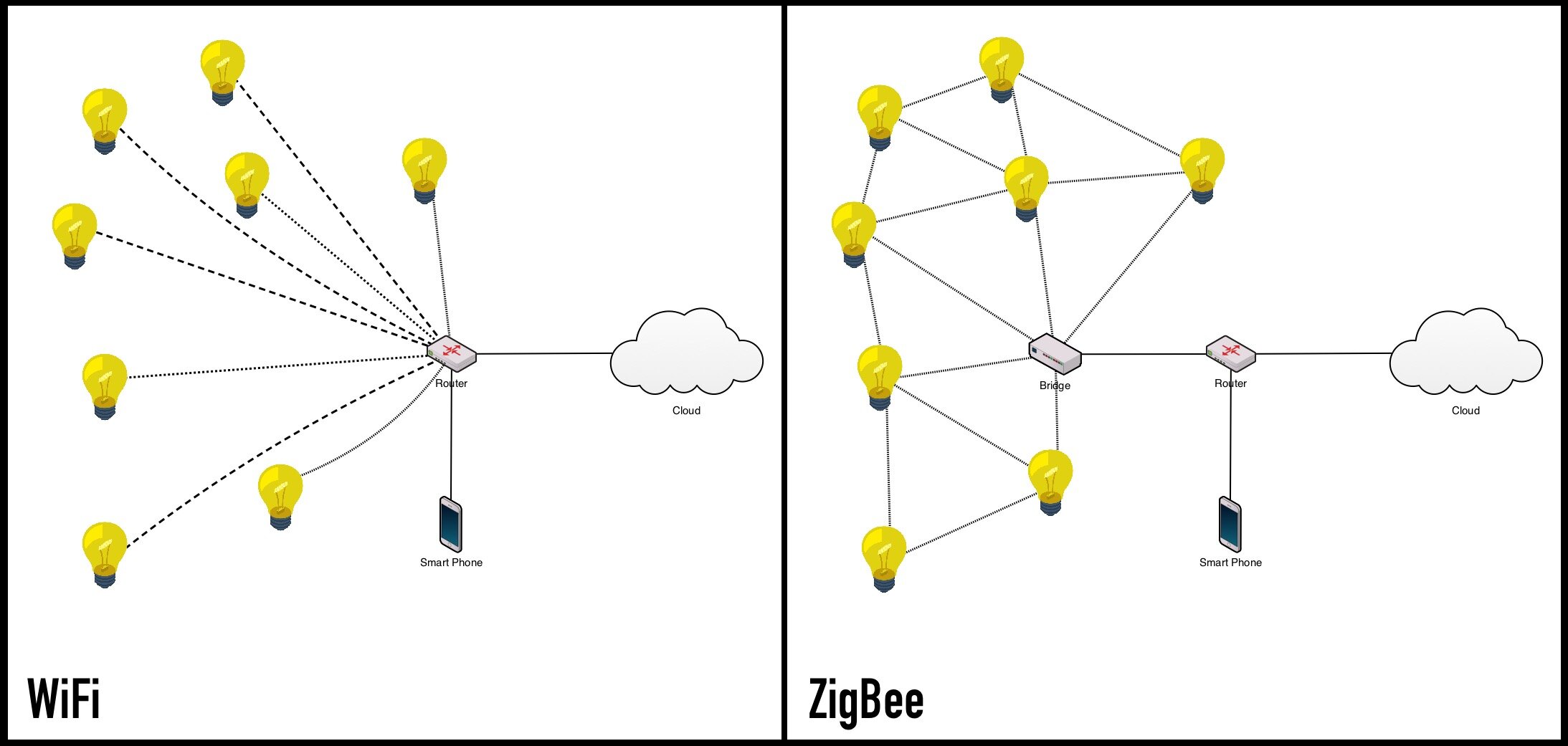 dry fossil
A good write-up of how the Zigbee mesh works: https://linkdhome.com/articles/what-is-zigbee-guide
remote patio
has anyone succesfully added a xiaomi button to ZHA?
gentle flint
wicked venture
Is there an easy way to move a ZHA network to the Sonoff ZBBridge from a HUSBZB-...
You may not wanna do it. Usb connection is more robust than the wifi one
orchid elbow
i got it matching a quirk i added, still no rgbw controls showing on the dashboard: "class": "zhaquirks.osram.brrgbw.LIGHTIFYBRRGBW"
https://github.com/zigpy/zha-device-handlers/compare/dev...tofurky:osram_brrgbw is the quirk i added
should i need to remove and re-pair it?
remote patio
ZHA is nothing but timeouts when trying to add devices :/
austere patio
remote patio
ZHA is nothing but timeouts when trying to add devices :/
Nothing ZHA can do (though if you run the latest version of HA I think the fast xiaomi joining is in there). Xiaomi devices fall asleep super quickly and you have to keep poking the join button to keep it awake
Otherwise it joins the network but ZHA can't figure out what the device is because it never responds to anything
remote patio
that's not actually true.. there are two types of xiaomi devices.. the ones that need the poking and the ones that don't
austere patio
orchid elbow
should i need to remove and re-pair it?
No, the quick is matched on startup
remote patio
this round button doesn't.. it pairs easily with deconz and z2m
austere patio
Either poking or clicking but they don't really respond to any requests after they join a network
remote patio
I don't know but neither z2m or deconz has any issues with adding them.. so it's a software thing
austere patio
What hardware are you using with ZHA and Z2M? A Conbee?
remote patio
this is weird.. like it's paired to both deconz and zha at the same time
the ZHA integration seems to be a bit broken in terms of functionality with my devices
ZHA gives me a button that has no button functionality
granite wraith
okay I have a conbee set up with deconz and I am trying to run a sunrise script to slowly fade a philips hue light on in the morning. Can I not do that using deconz? I can't find a way to directly access the hue bulb from HA
lilac wharf
@remote patio buttons are stateless in ZHA
Listen for zha_event and use an event trigger or use a Device™️ trigger in the automation UI
remote patio
I think something is messed up as my button is integrated via both deconz and zha according to home assistant
though it no longer appears in the deconz integration
orchid elbow
what's weird is that i can turn the osram br rgbw's to color by changing the group they're in, but can't get the color controls to show up even with a custom quirk
https://github.com/zigpy/zha-device-handlers/pull/543 is what caused the tunable white quirk to stop matching the rgbw, and this previous change got the color to stop showing up for the tunable whites: https://github.com/zigpy/zha-device-handlers/pull/488
but i can't figure out why even a custom quirk matching what used to seem to work, no longer does. maybe a change in zigpy or zha itself?
orchid elbow
not sure if it's relevant, but color_capabilities returns None for these
austere patio
What does the device signature look like?
orchid elbow
austere patio
What does the device signature look like?
https://paste.ee/p/ctbzi
i'm going to try to use _CONSTANT_ATTRIBUTES to override the None
i have a very similar LEDVANCE and will set _CONSTANT_ATTRIBUTES for 0x400a, 0x400c to match that
well - not sure how similar it is tbh, it doesn't have the useless electricalmeasurement cluster
austere patio
The quirk only exposes the 0xFC0F cluster, which has the save_defaults command. It doesn't do much else.
orchid elbow
how does this map into hex? bitmap16.16|8|1. i took a guess 0x0801, but it comes back at this now: bitmap16.2048|1
austere patio
It's just 16 | 8 | 1 == 25 == 0x0019
austere patio
The representation isn't very clear with the period in it
orchid elbow
interesting, so now it doesn't have color temperature OR color
austere patio
Yeah, it seems like your bulb should just "work", even without a quirk
Hmm. Does clicking "reconfigure device" do anything? I'm not sure if those are tied to ZHA being able to bind to the appropriate clusters
orchid elbow
nope :/
i'll try it again without the quirk, but it didn't work before
what the heck - i removed the quirk, and magically they have color controls again
austere patio
What did your quirk look like?
orchid elbow
https://paste.ee/p/aJYHg the last thing i did was set it to 0xFFFF as a hail mary
i clicked reconfigure, rm'd the quirk.py, and restarted ha. turned the light back on via toggle, and voila, color controls
i'd tried a bunch of other stuff like manually editing the supported_features in various registry files
"supported_features": 63 now...it definitely wasn't that before. going to check a snapshot, it was like 41 or something.
it was at 43
the second of two identical bulbs still isn't showing color controls
it is still showing "supported_features": 41,
austere patio
Very odd
Since the bulbs are identical, do they have similar entries in your zigbee.db?
You can do something like sqlite3 /path/to/zigbee.db .dump | egrep "1234|5678" (with the bulb NWK addresses in base-10)
orchid elbow
they do now. but i can see where the constant values i set are now in the db for both of them. after a couple restarts, i turned off the bulb, re-added the quirk, restarted, reconfigured, then removed the quirk and restarted again.
austere patio
It's odd that ZHA would not be deterministically populating the supported_features bitmap
orchid elbow
magically the second bulb now has color controls
let me verify the constant values are actually there. i saw one of the color temp settings in there i think.
yeah the rows in attributes changed
almost like they had a bad value cached - the old tunable white quirk DID match, and had the constants added to disable color. then that quirk had the device names added which caused it to no longer match.
i think the constants i added to the quirk overrode those values :/ maybe clicking reconfigure caused them to be written to the db?
austere patio
Hmm. I'll have to see how the _CONSTANT_ATTRIBUTES interact with the attribute cache
orchid elbow
cool, thanks
i'm just guessing without really knowing how any of it works underneath
i'm going to go back and check snapshots going back months to see which values were stored there before...
in particular, 16394 (0x400A), B, and C
austere patio
Just looking at the code I think it looks like _CONSTANT_ATTRIBUTES would be cached in the db
Read attributes that are also in _CONSTANT_ATTRIBUTES I mean
But I'm really not all that familiar with ZHA internals or where this potential bug is coming from
orchid elbow
looking back, homeassistant.20201102 is where they first appeared, and they match up to the constants that were added to the tunable white quirk in https://github.com/zigpy/zha-device-handlers/pull/488
uh, homeassistant.20201102 is the snapshot name btw
not sure why reconfiguring didn't make them go away - possibly because they had a 'None' value on the bulb itself?
austere patio
So you think that quirk mistakenly matched your bulbs, those constant attributes were inserted into the zigpy attribute cache, and then this broke things later on when that quirk un-matched your device?
orchid elbow
yes
austere patio
I don't think reconfiguring clears the zigpy attribute cache
orchid elbow
i'm going to delete those rows and see if it still works
austere patio
Shouldn't break anything. It'll just cause a read to be sent to the device, which is totally fine for mains stuff
Removing and re-adding the device in ZHA should clear them from your DB
orchid elbow
i kinda held off on doing that due to the zigbee group, and entity name probably changing and messing up influxdb configs
austere patio
The attribute cache is also loaded only at startup so you'd have to restart HA for the deleted rows to have any effect
orchid elbow
ok
deleted all 3 attributes from both bulbs and restarted - color controls are still there
thanks
austere patio
That seems like something that could be fixed in zigpy. There's no reason for the quirk constant attributes to permanently end up in the attribute cache database.
orchid elbow
okay, now to remember what i was going to do a few hours ago before i tried (and failed) to change my bulbs to blue 😄
wintry horizon
Anyone know of a good Z2M usb dongle without expensive shipping/expected sooner then the 24th of feb.? 😂
austere patio
CC2531 + Z-Stack 3 and then wait a month?
naive ivy
Does anyone know of a good Zigbee wall switch that can have its buttons decoupled from its relay? I'd like to have physical switches in my rooms without actually killing power to the smart bulbs
orchid elbow
they screw up the mesh if anything is unlucky enough to route through them
i have them installed but not joined to the network because of that
if you don't need a relay, there are battery powered options and just get switch covers. that's what i've been doing with lutron connected remotes (which, unfortunately are discontinued)
these look pretty slick but $$ https://www.lutron.com/en-US/products/pages/standalonecontrols/dimmers-switches/smartbulbdimmer/overview.aspx
gentle flint
austere patio
I don't think reconfiguring clears the zigpy attribute cache
It may, but better just read the attr via zha ui to update the cached value. Zha lights uses cached color capabilities
gentle flint
Reading attribute updates the cached value, as long as it it successfuly read
orchid elbow
even if it comes back as None?
or only if there is a value
it did not seem to update the value in the attributes table. the only thing that seemed to, was adding a custom quirk with the _CONSTANT_ATTRIBUTES set
actually, it wasn't color_capabilities cached, it was color_temp_physical_min and max. but those return None also
naive ivy
orchid elbow
if you don't need a relay, there are battery powered options and just get switch...
Yeah this is my fallback plan; I'll either put switch guards on the lightswitches and stick a remote next to them, or stick a remote to a blank cover and just wirenut the wires together for constant power to the lights
sour shadow
dry fossil
A good write-up of how the Zigbee mesh works: https://linkdhome.com/articles/wha...
sour shadow
golden vessel
If you are having an unstable network, or if it fails to form a network at all, ...
 proper tangle
Hey guys, how do I edit the device specific configuration for this device?
Like from scratch, i dont even know how to locate or edit the "legacy: true" setting that is mentioned.
https://www.zigbee2mqtt.io/devices/014G2461.html
Running Z2M
proper tangle
Running HA on raspberry pi 4
Running z2m as an addon fron the addon store
lilac wharf
Presumably in the add-on config then
 carmine lance
Hi there,
i got some issue with my deconz integration of eurotronics spirit thermostat. These devices are connactable, but after a few hour the connection is getting lost and isnt recoverable, without a reset. Is someone here joe could help me?
proper tangle
lilac wharf
Presumably in the add-on config then
Dont think so. The add-on config file is only for basic settings afaik
sour shadow
It should handle all the config
lilac wharf
Yeah. The standalone version of zigbee2mqtt has a single config file, can't imagine it'd be different for the add-on
proper tangle
Ahhh okay, I'll try and go with that. However, i dont know how to add the "legacy: false" option, as its device specific.
lilac wharf
Is there a devices: section in the add-on config?
Something like
devices:
  '0x286d970001063a09':
    friendly_name: Bedroom button
    legacy: false
There as "devices_options: {}"
lilac wharf
Hmm. No clue then. Check whatever documentation that exists for the add-on I suppose (assuming you haven't already)
proper tangle
lilac wharf
Hmm. No clue then. Check whatever documentation that exists for the add-on I sup...
I have, however, I will continue to look into it. Maybe adding "devices:" myself will do the trick?
The documentation says this, but I am unsure how to interpret it, as I dont know what any of it refers to. Maybe someone can help with that
' The configuration closely mirrors that of zigbee2mqtt itself, with a couple of key differences:
An additional top-level data-path option is required. Set this to the path where you would like the add-on to persist data. Defaults to /share/zigbee2mqtt. Note that both config and share directories are mapped into the container (read-write) and are available to you.
If you are using groups or device-specific settings, you must use seperate files, and provide the paths to these files in their corresponding config options as described by the zigbee2mqtt docs. This is due to a limitation Home Assistant places on nested config levels.
See the zigbee2mqtt configuration docs for a complete description of available options. If you're not sure if a new option is supported, check to see if it is included in this add-on's default configuration. If not, you can open an issue to add support for it.
'
lilac wharf
well, this looks relevant:
If you are using groups or device-specific settings, you must use seperate files, and provide the paths to these files in their corresponding config options as described by the zigbee2mqtt docs.
not exactly sure how to handle that though
wintry horizon
is this all i need for a zigbee coordinator? https://www.amazon.com/HiLetgo-Wireless-Protocol-Analyzer-Interface/dp/B07X52QKK6/ref=sr_1_4?dchild=1&keywords=zigbee+usb+coordinator&qid=1610370068&sr=8-4
violet dagger
and a way to flash it
obsidian sandalBOT
The CC2531 and CC2530 sticks are cheap for a reason. They're fine for testing, but do yourself a favour and buy something better.
Command '~cc253x' was invoked by: Tinkerer
wintry horizon
im looking at the supported devices and dont really want to pay 15 dollars shipping or wait 2 months really.
violet dagger
also don't buy it its bad
sour shadow
See the pinned message
violet dagger
the ones you don't want to pay for
wintry horizon
gotcha 🙂
sour shadow
For Z2M it's ZZH!, Slaesh, and the CC2538+CC2592
wintry horizon
ill suck it up to get better
yeah i saw the Z2M supported page there for the adaptors
but was just curious if there was a solid cheap solution or that is the way
violet dagger
there's a cheap one and there's a solid one
this is the cheap one https://zigbee.blakadder.com/ITEAD_M0802010007.html
sour shadow
Cheap, Good - pick one
 desert cloak
I have four Sonoff Motion sensors paired with slae.sh stick and z2m. One of these is not reponding at all after a random time unless repair is done. Might work for five minutes to couple of days. Nothing is seen in logs, it just stops sending anything for some reason. Any clue what might it be, or just a bad sensor?
Not a signal problem since the router is beside the sensor, about one meter away
And battery 100%
violet dagger
The router could be the problem
desert cloak
Tried both coordinator and two routers (bulbs) other sensor work great this one does not
austere patio
I had one of their/eWeLink's sensors stop reporting temperatures but keep reporting humidity the other day so it could be a firmware bug
Did you get battery reports?
desert cloak
Nothing. It just stops sending anything until resetted
 wispy walrus
@violet dagger been following your threads on zigbee router to extend a zigbee network on issues in github. seems that accepted solution is to just get a powered zigbee device like a plug to act like a router?
austere patio
desert cloak
Nothing. It just stops sending anything until resetted
If you have access to a cc2531 or other hardware capable of acting as a sniffer, it would be interesting to see what actually happens when it stops working
simple sentinel
Got my slaesh stick, commencing setup procedures.... now
 old kernel
zwave has the 'heal mesh' type functionality that tells devices to look for best path and reroute. Does zigbee have an analog to this, or is it all self-healing, and i just need to give it time to settle out now that i've migrated?
amber gull
Well @austere patio, ZZH died again over the weekend. This was after I applied latest BIOS updates (no smoking gun in changelog) and latest linux kernel. Pulling the stick did let zigpy-znp auto reconnect
So now I'm buying this lovely thing to see if that helps -- it exposes the two true internal USB 2.0 ports - https://www.amazon.com/gp/product/B07KY7WJTT
@old kernel Zigbee is pretty aggressive about continuously building out the mesh -- it really depends on which routing protocol you are using -- if using aodv, it triess to determine route for each flow -- if using source routing it is rebuilding routes back to the concentrator every few minutes
old kernel
how do I know which routing protocol I'm using? I'm guessing this is a ZHA default...
amber gull
for battery powered devices, they connect to a single router (mains powered device) and their implementation is device specific -- some are better then others at joining a new router, called their parent
For ZHA, AODV by default (I think)
old kernel
ah okay. I have some battery powered thermostats, two of them connected directly to the concentrator, one connected through a sylvania/osram light, and from what i understand those lights kinda suck at relaying non-light children
i'll see if it rerouted already
amber gull
you may want to switch to source routing if you over 30/40 devices
for your thermostats, do they switch parents often?
if not you can rejoin them and force them to a new parent
you can only influence them on join, once they are on the network they can join any router (if the devices chooses to)
old kernel
I've only had them on this mesh for about 12 hours (on smartthings before that), so I'll keep an eye on it. Looks like none are connecting through the ledvance lights now, though that may be because i killed the mains to them this morning
thanks
amber gull
I think the zha network visualization scan runs every four hours
You can enable ledvance firmware updates in ZHA as well, just to make sure you are on latest
to add a device specifically to one router, go config > integrations > zha > devices > pick device and then choose "Add devices via this device"
austere patio
amber gull
Well <@652580495892152331>, ZZH died again over the weekend. This was after I ap...
😦
ZZH with the CH340 and whatever magic chip the TI dev kits use?
Does restarting HA fix it or is it only pulling the plug?
amber gull
Restarting HA does not fix it --- pretty sure it's a hardware issue on the NUC side
Haven't tried reloading the kernel module yet
Was just looking into unpowering the USB port, but looks like the onboard ports are not uniquely addressable
austere patio
Did you ever have this problem with the HUSBZB-1?
molten linden
you maybe interested in what i am cooking up then 🤣
amber gull
No, never an issue on the Elelabs or HUSBZB-1 -- though I may have missed an occasional watchdog bellows restart
sign me up tube! lol
austere patio
It uses I think the SiLabs CP210x
amber gull
It does
/sys/bus/usb-serial/drivers/cp210x/ttyUSB3
/sys/bus/usb-serial/drivers/cp210x/ttyUSB2
/sys/bus/usb-serial/drivers/ch341-uart/ttyUSB0
I watch the log file for ZNP timeouts, then push an alert -- it has an uncanny knack of dying at very inopportune times, lol
austere patio
@molten linden If you go for a more cylindrical form factor, you can call it tube's tube
amber gull
Tube²
austere patio
Should be easy to find on Google with a name like that
gentle flint
orchid elbow
even if it comes back as None?
If it is None, then either attrt is not supported or was not read successfully, in either case it won't update the cache -- failed read
amber gull
so weird edge case, quirk mismatch populates cache and it won't expire?
gentle flint
If quirk fakes the attribute reads (constant attr) then yes
But really, if the color bulb does not read the color capabilities attr, then you should sell that bulb on ebay. Must be a really old bulb,
wintry horizon
how easy is it to add a new device that isnt on the supported list on Z2M? it looks pretty easy reading the documentation but curious from someone with some experience
lilac wharf
Is there a similar device that's already supported?
wintry horizon
yeah. im looking around for good solutions for my switches now
theres a ton of those i know, but im curious if im limited to that list or if i find something else how hard it would be to add
it sounds easy reading it but yeah
lilac wharf
That's the first thing to check. If a similar device is supported it could be as easy as copying and pasting the data for it from devices.js and just changing the model number
I've added support for a few devices that way
One was even already in devices.js, but the model number was off by 1 character from what was in the file, so simply adding that at the end of the list of model numbers was all that was needed
wintry horizon
gotcha
im not even sure where to find the majority of the devices on the supported list 😅
lilac wharf
Wdym
lilac wharf
What's the brand
wintry horizon
well i guess some brands are just aliexpress etc. stores
old kernel
does it report the band/model in the logs when it says it isn't supported?
 hard river
https://i.imgur.com/YlI4wcv.png Do repeaters report their signal properly? Is mine really 1? 🙂
 austere patio
If Z2M does the same type of scan as ZHA, then this just says that the repeater is within range of your coordinator but the signal quality is very bad. It doesn't mean that this route will be taken by packets.
dry fossil
Even if it's 1... if it works, it works.
lilac wharf
Just...maybe with a few retries 😄
dry fossil
no u
hard river
Yeah I mean, it's working better then then when the devices had a link of like 10
metal garage door + concrete wall 😦
 bleak turtle
anyone know how to pair sengled g33 bulbs with zigbee2mqtt. It's on the supported list.
 hexed pilot
Just added my 1st zigbee device to ZHA, a Xiaomi smoke detector. It gets detected as lumi.sensor_smoke is that normal ? It is seen as a binary sensor for smoke and the battery sensor. Am I able to send commands to it to set sensitivity or do a test ?
I used the Conbee II stick.
 analog ember
@hexed pilot Don't think you can change the sensitivity from ZHA but I might be wrong. The lumi.sensor_smoke is correct. And yes you will get a binary sensor for smoke and a regular sensor for the battery.
analog ember
bleak turtle
anyone know how to pair sengled g33 bulbs with zigbee2mqtt. It's on the supporte...
Enable joining for your zigbee network. Turn off & on the bulb 5 times, it should go into pairing mode and connect to your network.
Correction, Looks like it's at least 10 times (5 is for wifi bulbs). Take a look at this: https://support.sengled.com/hc/en-us/articles/219648347-How-do-I-reset-a-Sengled-Smart-LED-bulb-
golden vessel
analog ember
<@!403836455300104192> Don't think you can change the sensitivity from ZHA but I...
You can probably set some attribute in a cluster
remote patio
seems that only deconz has complete device triggers for xiaomi buttons at this stage.
remote patio
what does it mean when a zigbee device shows up under 2 different integrations?
strange ibex
@analog flicker https://www.amazon.com/Aqara-RTCGQ11LM-Motion-Sensor-White/dp/B07D1CRRVF/ these are used often
 analog flicker
It says there is a hub required, Can I skip that and use my zigbee stick?
They have a ton of sensors. nice.
analog flicker
strange ibex
<@!224053835616878592> https://www.amazon.com/Aqara-RTCGQ11LM-Motion-Sensor-Whit...
lilac wharf
@analog flicker yeah, 99% of the time when a Zigbee device says it requires their hub it's a lie
There are only a handful of Zigbee devices that are vendor locked
remote patio
is there any way to remove a device from an integration without deleting that entire integration? because I can't seem to find it. keeps claiming that it's linked to an integration it was removed from.. could it be that the uuid are the same in both integrations and it's stuck in the old one?
lilac wharf
Find the entity at developer tools > states and see if restored: true is in the attributes column
remote patio
the entity is under one integration.. but the device is under 2