#zigbee-archived
1 messages · Page 102 of 1
 dry fossil
Missing? It won't appear in the list on the right until something uses it.
You have to listen to it yourself.
Events are usually lower case too.
 violet dew
 paper steeple
hey guys.
i just paired my new hue dimmer (zbbridge->ZHA) and i get the battery ...
paper steeple
hey guys.
i just paired my new hue dimmer (zbbridge->ZHA) and i get the battery ...
https://github.com/klauvi/hassio-config/tree/master/docs/hue-remote-on-zha if you want to use node red for the automations
paper steeple
@dry fossil i don't even have the option "zha_events" (in lowercase) on the right list.
if i type "zha_events" and click listen, nothing happens when i press the dimmer buttons
dry fossil
There's no need to use NR for everything. One step at a time... figure out the events.
paper steeple
i'll check that out @violet dew
dry fossil
If you're not getting any events, I doubt NR will help you 😉
NR can only handle what HA can see.
violet dew
just for future reference 🙂
paper steeple
i agree: one step at a time
so here's the thing @dry fossil
i never had zha_events on the right list. this came up in previous questions of mine in the past, and i was told that is because i didn't have any switches yet, which is what basically uses zha_events
today i got my first switch. a phillips hue dimmer remote. i paired it and get the battery sensor. but still no zha_events
then, i tried a blueprint i found on the forums. and yes, the dimmer works and i can control a bulb with it. and zha_events also shows up on the list and i can listen to it.
HOWEVER: i like to learn this myself, not relay on 3rd party blueprints.
so, i removed the blueprint... and zha_events dissapeared from the list again
so... what steps do i have to take to make this work manually?
 sour shadow
Possibly stuff only shows there if something is using it
You can just listen to events though 😉
paper steeple
@sour shadow like i explained further above
- zha_events is not even on the available list on the right and
- even if i type zha_events and press "listen" nothing happens when i click the buttons
sour shadow
- Expected
- Check your log file
I can fire any old event, until there's a listener for it, nothing shows on that list
paper steeple
and when using a 3rd party blueprint, it works
so, that blueprint does -SOMETHING- that makes it work. and i'd like to learn and know what that something is
sour shadow
The answer is likely in that blueprint
violet dew
I have a few hue remotes connected to zha, don't remember that I had to do anything special to get the events to start working. never noticed if zha_events was in my available events list or not though
paper steeple
well, same with the logs or tat blueprint: even if i look at it.. what am i looking for exacly?
sour shadow
Well, in the log you'd be looking for things around zha
In the Blueprint... the code 🤷
paper steeple
maybe this?
trigger:
  - platform: event
    event_type: zha_event
    event_data:
      device_id: !input "remote"
There you go, that creates a listener
At which point, as if by magic, it appears on that list
sour shadow
Well, yes but no, but sure
dry fossil
Creating a listener won't make the events appear...
If you listened to that event type already and saw nothing come through, you have other issues to fix first.
paper steeple
so, what is it from this blurprint:
https://community.home-assistant.io/t/zha-philips-hue-dimmer-switch/255048
that makes it work?
i don't want/need the full blueprint from a 3rd party, i just want to know how to make zha_events work so i can listen to them
dry fossil
Nothing
Events still happen even if there's no listener.
If a tree falls in the woods and no-one's around to hear it, does it still make a sound?
Yes.
 foggy gyro
ok got my Arduino and cc2531 hooked up ran cc_info.py and...... chip is not responding🤦♀️
 jolly narwhal
Cc2531 🤕
foggy gyro
yep I'm thinking I should just buy the better one and wait a month
jolly narwhal
It is.... Almost usable in a small apartment with a few devices
If that is your usecase you'll be fine
If not I would say order zzh
violet dew
i'm using cc2531 with 60 devices. it works, but I don't feel good about it. hoping it won't crash on me before I get zzh
foggy gyro
ok! here is what I think the issue is
jolly narwhal
@foggy gyro I have a cc debugger, easy to flash, but based on pictures I've seen flashing it with a pi should be easy
foggy gyro
I'm using a nodemcu esp8266
jolly narwhal
Yeah, never tried that, but heard about it
foggy gyro
I just dont want to spend the time soldering pins on my pi
dry fossil
I've only ever used the debugger. Took me 20 seconds and then it went into my drawer of junk.
Soldering? Quit yo jibber jabber, foo.
dry fossil
Jumper cables 😄
jolly narwhal
I have a gazillion dupont cables in my workshop, but I just ordered a custom crimp set for dupont
🐔
dry fossil
I've never needed more than 5/6 duponts at once 😄
Shows how simple my stuff's been so far.
jolly narwhal
Ya basic
foggy gyro
dry fossil
Oof, that URL.
foggy gyro
cnt post photos from mobile here
dry fossil
Used so many bytes in the URL that there were none left for the pixels.
foggy gyro
is the middle board creating issues?
jolly narwhal
foggy gyro
I have no clips
dry fossil
You don't have to use clips...
foggy gyro
true
jolly narwhal
Overcome
foggy gyro
lol I have none
dry fossil
I bet after all this, you wish you'd just bought the zzh! from Dale 😉
foggy gyro
I am planning to after the new year
still would have to wait for it though
assumning it ever gets here
dry fossil
Waiting is fine 😉 I've just ordered some more stuff from China 🤣
dry fossil
Last I heard, yes. You'd have to ask him. @waxen jungle, get your ass in here.
I'd prefer to use Amazon Prime for everything... but I wasn't going to spend £80 on something that would cost £20 from China.
A couple of pounds more, sure. 4x the amount? I'm waiting.
foggy gyro
I do too especially with all of the packages that keep going missing
Should I be buying the ZZH or CC2652RB?
dry fossil
Yes
foggy gyro
wow $55
dry fossil
For what?
foggy gyro
CC2652RB
dry fossil
Yeah... just get the zzh! from Dale 😉
foggy gyro
Dale!? Can I buy your stick?!
foggy gyro
oh it is on purpose for sure
 grand lynx
anyone experience with Wireshark Zigbee sniffer ?
 amber gull
Yes
grand lynx
zigbee sniffer wireshark cc2531
Windows 10, Zbos and wireshark installed.
I get this when I start ZBOS sniffer: Can't start pcap logger
 dawn dock
Hi All, Not entirely sure if this is the best place but... I am looking at setting up HA in a VM on my oVirt stack. I want to make use of Zigbee devices but USB passthru isn't an option. Is there a good way to do this without any dependency on a cloud provider? Is it possible to make my own hub that could handle Zigbee and Z-Wave via the USB sticks?
grand lynx
I have flashed the firmware of the cc2531 with the zbos firmware as described with succes..
@dawn dock : use mqtt2zigbee
or a RPI with a MQTT server..
amber gull
@grand lynx Not sure on Windows....
 golden vessel
is ZHA fine with multiple devices joining the network at the same time? I'm not sure if it uses some global state during pairing (I don't recall it from looking at the code in the past, but I may have missed it)
dawn dock
grand lynx
<@!329784035062579202> : use mqtt2zigbee
ahh
grand lynx
Tried it in Ubuntu linux also, no luck. But my knowledge of Linux is not very good 😉
dawn dock
well that answers that i think
amber gull
Can also get a sonoff zbbridge @dawn dock
sour shadow
dawn dock
Hi All, Not entirely sure if this is the best place but... I am looking at setti...
Zigbee2MQTT is the answer IMO
dawn dock
amber gull
Can also get a sonoff zbbridge <@329784035062579202>
via a custom fw?
amber gull
A true software architecture connoisseur
 austere patio
golden vessel
is ZHA fine with multiple devices joining the network at the same time? I'm not ...
austere patio
golden vessel
is ZHA fine with multiple devices joining the network at the same time? I'm not ...
I don't believe it does, everything is per-device
golden vessel
austere patio
I don't believe it does, everything is per-device
there are some calls to Application class IIRC, which is shared. I hope the code there is safe anyway
austere patio
It's all single-threaded async so it should be fine. I didn't have any problems joining multiple bulbs in the same fixture at once, though ZHA performing binding did fill up the transmit buffer really quickly on my stick
 pine goblet
Anyone having issues with the new HA update? Updated last night and this morning all my zigbee devices were unavailable. Tried uninstalling zha integration and reinstalled it and now I can’t discover devices
austere patio
pine goblet
Anyone having issues with the new HA update? Updated last night and this morning...
Enable debug logs and upload a sample somewhere: https://www.home-assistant.io/integrations/zha/#debug-logging
jolly narwhal
Long live running zigbee2mqtt outside ha 🎉
 finite pawn
What do the numbers on the ZHA network graph mean? I have a bunch of terminal nodes that have numbers like '78' on them. I have 1 coordinator and 3 routers (2 smart plugs and a CC2530 with router firmware). The router nodes have either '0/0' or '1/1' on the lines connecting them.
My first guess is these 1/1 and 0/0 numbers are like upstream/downstream?
 lilac wharf
😬
sour shadow
Ah well, it's not really a loss 😉
sour shadow
Though, smoking one is quite impressive 😄
foggy gyro
I spend more on beer
I was trying to 3.3v hookup cause I can not get it to flash. The leds went dark and... blue smoke smell
anyway to know if it was the cc2531 or the ardunio?
austere patio
I don't think a CC2531 without firmware really does anything even when plugged into a USB port so 🤷♂️
You should see a serial port if you plug in the Arduino
foggy gyro
still see the ardunio
austere patio
On the other hand, I thought I fried my CC2531 when flashing it. Re-flashing at least the bootloader section using the slow method revived it.
foggy gyro
I keep getting The chip is not responding. Check your connection and/or wiring! using the slow method
I am also using a GBAN debuger bug that is just a break out unit right?
austere patio
The cable?
foggy gyro
and the little board
austere patio
Yeah they just expose the pins on a board with standard pin spacing
foggy gyro
that is good news
austere patio
Make sure to probe the connections with a multimeter or something to make sure they're not mirrored or flipped
I think the Z2M documentation assumes you'll be bending the debug header pins and using clips
The board and cable combo may flip them around or something
foggy gyro
let be probe it I should have done that from the start
foggy gyro
they are flipped!!!
 radiant pawn
can anyone help point me to instructions on how to completely reset my ConbeeII and remove ALL devices from it?
I've removed them all from the Phoscon UI
but they still appear in the deCONZ UI
foggy gyro
OMG IT IS WORKING!!!!!!!!!!!!!!!!
austere patio
Woo
foggy gyro
I am an idiot!!!!!!!!!!!! I am so happy to be this stupid right now
 waxen jungle
@foggy gyro @dry fossil I have been in talks with the manufacturer to get some in bulk for resell in the US. But yes, I have one stick still available.
 royal star
new usb stcks?
sour shadow
Yeah, I got mine as part of the first, faulty, batch 😂
jolly narwhal
I'll keep my CC1352 for now though ⛹️
royal star
the faulty batch wasn
foggy gyro
IT IS WORKING
royal star
't all that faulty, but i still have better LQI w/ the fixed one
sour shadow
Mine was one of the dodgy ones, apparently, but a wait of a few weeks didn't kill me 😄
foggy gyro
I can see the chip using cc_info.py
jolly narwhal
I should for the lulz just mod my CC1352 to use the external antenna
sour shadow
My Slaesh stick is still in the drawer though, one day I'll get around to setting that one up too
royal star
my faulty unit i had running as a coordinator for a little bit, it worked on par w/ the 2531
but in my usecase the 2531 worked great for me. the zzh seems to have upped LQI and responsiveness
austere patio
Yeah that 8x increase in request concurrency helps
royal star
i have a smart plug buried deep in my entertainment center and it never drops off
the zzh decided to route to it directly through the wall rather than go through my other routers
the cc2531 never did that
jolly narwhal
My cc2531 got to live 12 hours as a coordinator before I killed it
And moved back to the hue hub while waiting for my cc1352
 strange ibex
lol
austere patio
I wonder if the CC1352P-2 actually increases effective range, since the destination device usually has to reply with an acknowledgement anyways, usually at a much lower power
dry fossil
Doesn't it have a better receiver as well?
Doesn't matter that the other devices have weak transmitters.
jolly narwhal
No idea, but it is rock solid, and covers my whole house (three floors 252m2) and 100 devices without skipping a beat
And more devices are coming
foggy gyro
 - Chip erase...
 - Flashing 4 memory blocks...
 -> 0x0000 : 8176 bytes
    Progress 100%... OK
 -> 0x1ff6 : 10 bytes
    Progress 100%... OK
 -> 0x3fff0 : 1 bytes
    Progress 100%... OK
 -> 0x2000 : 239616 bytes
Progress 0%... ``` AHHHHHH... OK
austere patio
Should help with at least broadcasts and multicast requests then
foggy gyro
I have spent nearly 18 hours trying to get tot his moment
austere patio
foggy gyro
```Flashing:
- Chip erase...
- Flashing 4 memory blocks...
-> 0x0000 : 8176 b...
If you're impatient and want to probably reflash it after this, try the serial bootloader flasher ( https://github.com/zigpy/zigpy-znp#hardware-requirements ). I think your CC2531 has the serial bootloader now.
jolly narwhal
Zstack3 on a cc2531, that sounds ambitious
jolly narwhal
How small?
royal star
15 devices total, 3 routers
jolly narwhal
Impressed still
royal star
i attribute it to having my zigbee network on channel 26
the 2.4ghz congestion is so bad in apartment complexes
royal star
luckily most people havent clued in on 5ghz
austere patio
I wonder when multi-frequency Zigbee devices will start showing up. The CC1352P is supposedly low-power and can run at sub 1GHz as well as 2.4
jolly narwhal
Yup
The sub GHz stuff is what made me choose it
Just for lulz, in case
Reminds me, got my lora stuff today
royal star
i was wondering too, subghz zigbee is bascally z-wave but better
if only there were any devices for it
austere patio
Hard to market Zigbee interoperability when your stuff won't work with anything else
royal star
agreed
even the 2.4ghz device market is pretty slow to grow
aqaras z3 devices announced a while back never really came to fruition
royal star
i need to document my per-room lumen levels over time
austere patio
I have confirmed that they go up when the sun is out
royal star
😱
jolly narwhal
😂 😂 😂
austere patio
But the low resolution on the Aqara sensors does make the readings useless when it's getting dark
jolly narwhal
I have no interest in room luminance, circadian lighting just controls my lights based on external factors
royal star
knowing sunrise / sunset is probably enough
sour shadow
The new Xiaomi Mijia light sensors are pretty solid
I use them for do I need additional lighting
austere patio
Do you keep them in closets or something instead of motion sensors?
sour shadow
Nah, in the rooms
Then lighting comes on as the room gets dark, if the room is occupied
austere patio
Do the Aqara motion sensors report light levels if there has been no motion?
sour shadow
Nah, those are rubbish light sensors
austere patio
I guess higher sensitivity would be nicer and would make that sort of stuff more usable. I didn't have good results with those built-in sensors
sour shadow
Yeah, bin those for that purpose 😉
dry fossil
I'm sure I get lux from my Aqara stuff without motion.
austere patio
Yeah, I seem to recall the readings clip to 0/1024 really easily
I think the new ones have a 16-bit data type or something
sour shadow
That one is interesting because it provides both lux and Illuminance
Which seems to allow you to differentiate between "daylight" and "artificial"
sour shadow
Not perfectly aligned
sour shadow
Right and left peaks are artificial, main peak is daylight
I haven't drilled down properly, just noticed it the other day
royal star
you measured this yourself?
sour shadow
👁️
royal star
that's interesting
sour shadow
Yeah, I really need to properly dig in and do comparisons, but ... eh
It looks close enough
royal star
in what way would it be able to differentiate between artificial light vs daylight
temperature?
sour shadow
I assume so, I know the Aqara sensors don't report artificial light well
austere patio
Seeing which lights are currently on?
sour shadow
Maybe they're filtering on wavelengths 🤷
royal star
a warm lightbulb in front of it would make it think daylight?
royal star
i bet if we know the sensor it uses we could figure it out
 quick hare
Hey there guys and girls! I am wondering if any of you have some experience with Philips Hue bulbs and ZHA? I am currently using IKEA Tradfri Bulb and although it is bright, the firmware they have is just plain horrible. For example : when doing a color transition with IKEA (FLUX component), it just stop responding to commands until it ends the transition. Is this an issue with Philips Hue devices?
austere patio
Have you tried upgrading the firmware on the bulb?
quick hare
Yeah they got updated until IKEA broke their firmwares.
austere patio
Hmm, then it probably won't help
quick hare
I read on Reddit that IKEA have aknowledged this issue years ago and yet did nothing about it. 😦
jolly narwhal
I use almost exclusively IKEA tradfri bulbs
I have no noticeable issues
Mine transition through brightness and CT all day though
quick hare
Mine is only CT. Brightness is not automatic.
And you can still send on / off commands to it while it does a transition?
jolly narwhal
Well yeah, since the transition takes 2 seconds or so
Adjusted every 5 minutes through circadian lighting
quick hare
Ahhh that’s why.
jolly narwhal
I never manually transition my lights
quick hare
I don’t use Circadian integration, I use FLUX.
I guess FLUX does it thru long transitions.
jolly narwhal
Flux was shit
Ran it for a month
Before I switched
Don't understand why it is still the default component
sour shadow
Adaptive is coming in soon
lilac wharf
Do those tradfri have hardware or software PWM?
quick hare
Yet, if it stop responding while transitionning, it is still an issue since i’m refraining from using nice scene transitions.
sour shadow
https://github.com/home-assistant/core/pull/40626 for the adaptive merge
quick hare
So I was simply wondering if Philips Hues had the same behaviour.
quick hare
I love those merges with GIFs making you visually excited for it. 😅
Another issue with the IKEA stuff is with devices that sleeps for a very short while like the Yale doorlock. If it does not fall into the time frame the lock is online, it just drops the message without even retrying. 🙄
Where directly connected to the coordinator, it works 100% of the time.
foggy gyro
ok trying to configure my Zigbee2MQTT using the public broker test.mosquitto.org
and it is not working my config on my pi zero
mqtt:
  # MQTT base topic for zigbee2mqtt MQTT messages
  base_topic: zigbee2mqtt
  # MQTT server URL
  server: 'test.mosquitto.org'
  # MQTT server authentication, uncomment if required:
  # user: my_user
# password: my_password```I cannot seem to get mosquitto to work
sour shadow
Then you need to fix that 😉
sour shadow
My entire mosquitto.conf is basically:
pid_file /var/run/mosquitto.pid
user nobody
port 1883
cafile /usr/local/share/certs/ca-root-nss.crt
password_file /usr/local/etc/mosquitto/pwfile
@quick hare yeah no idea about that , I would never use a smart lock, and with zigbee2mqtt currently it seems like most of my devices are connected to the coordinator, plus other devices
quick hare
jolly narwhal
<@379823966388355074> yeah no idea about that , I would never use a smart lock, ...
It’s genuinely the coolest thing in the home. When we used to have guests and everyone is on the rooftop, guests ringing the door would get the doors unlocked automatically so they could join.
Instead of us doing back and forth abandoning the guests.
And let’s be honest, it’s easier to pick a lock than to hack it anyway. 😅
sour shadow
I have no choice about a smart lock unless I replace the door 🤣
Not gonna do that...
quick hare
Would really like to chat with someone owning Philips Hue with ZHA to get their input. 😦
sour shadow
Somebody will turn up, eventually
Or you could start a forum thread to increase the odds of it being noticed 😉
quick hare
Yeah might attempt it, I was sure it was a very popular device among HA & ZHA users.
foggy gyro
How do I find out what my mqtt server address is?
lilac wharf
The IP address of the machine that's running your broker
foggy gyro
yeah says it cnt copnnect
sour shadow
Then check the logs for the broker 😉
foggy gyro
broker says listening on port
sour shadow
So point your MQTT Explorer install at it, with the username and password you set, and see 😉
jolly narwhal
quick hare
Yeah might attempt it, I was sure it was a very popular device among HA & ZHA us...
No all HA users run ZHA, there are other platforms
foggy gyro
I set a username and apssword?
sour shadow
Presumably?
foggy gyro
where do I do that?
lilac wharf
You can (and should), but it's not required
sour shadow
Depends on whether you defined a password file or not
quick hare
jolly narwhal
No all HA users run ZHA, there are other platforms<:smart:723251852761628792>
I am not sure to understand your message. Of course there is other ZigBee stacks.. ZHA, Z2MQTT, Deconz.....
jolly narwhal
Yes, which are equally popular platforms as zha
quick hare
jolly narwhal
Yes, which are equally popular platforms as zha
I was talking about the bulbs being popular among ZHA & HA users (ZHA is not necessarely tied to HA but is meant for it)
Ah wait i’m mistaken with ZigPy but still.
foggy gyro
I have no config files or any files for mosquito broker
is this my server? http://192.168.1.7:1883/ assuming ip is correct
so ```# MQTT settings
mqtt:
MQTT base topic for zigbee2mqtt MQTT messages
base_topic: zigbee2mqtt
MQTT server URL
server: 'http://192.168.1.7:1883/'
MQTT server authentication, uncomment if required:
user: my_user
password: my_password```
lilac wharf
So you don't have a mosquitto broker set up?
foggy gyro
I have mosquito running in docker at that ip
lilac wharf
There should be some configuration file for it then
foggy gyro
I dont see one
lilac wharf
Are you using docker compose?
foggy gyro
yeah i have a yml file
mosquito is running and logs say it is listening on that port
sour shadow
https://www.zigbee2mqtt.io/information/configuration.html
  # Required: MQTT server URL (use mqtts:// for SSL/TLS connection)
  server: 'mqtt://localhost:1883'
🐔
sour shadow
The standard tool we always tell people to use to test their broker with 😉
foggy gyro
getting it now
no go
so using mqtt explorer I can not see it
docker logs
1609449656: Opening ipv4 listen socket on port 1883.
1609449656: Opening ipv6 listen socket on port 1883.
1609449656: mosquitto version 1.6.12 running```no config exists there though
pine goblet
@jolly narwhal stupid question but how would zigbee2mqtt have prevented my issue?
austere patio
I doubt the issue is with ZHA though. It changes very little architecturally.
Also Z2M doesn't support EZSP coordinators so it's not going to be of much use here
foggy gyro
ok it is working now I need to connect zigbe2mqtt to ha!
how do I get attached zigbee devices to populate in HA
 wheat rose
it's just a CC2531 stick. The problem is I can't access anything about the integration because it won't load. Is there a way I can see this that isn't through the UI?
lilac wharf
@foggy gyro enable HA autodiscovery
Connect HA to your MQTT broker if you haven't already
foggy gyro
the discovery is what I am trying to figure out
golden vessel
pine goblet
<@457673488225009676> stupid question but how would zigbee2mqtt have prevented m...
It's the same as saying "if you use zwave, you don't have any Zigbee issues!" 😂
lilac wharf
foggy gyro
lol I was using 8132 instead of 1883
pine goblet
Okay I’m putting the debug code into the configuration.yaml. Any specific spot I’m supposed to put it inside there or just at the end?
austere patio
Doesn't matter
austere patio
How do you put it on one line? The debug config is like 10
pine goblet
It pasted it al into one line lol
austere patio
I don't think the YAML parser will like that but it'll let you know if it doesn't
austere patio
In the same folder as the config file. It'll be fairly large and may contain sensitive data so take a look at it before uploading it or filter out only the entries related to zigpy, zha and bellows
 obsidian sandalBOT
@radiant crescent posted a code wall, it is moved here --> https://paste.ubuntu.com/p/RQPmT6Vrtp/
@radiant crescent posted a code wall, it is moved here --> https://paste.ubuntu.com/p/kY3vxPpVxx/
@radiant crescent posted a code wall, it is moved here --> https://paste.ubuntu.com/p/SQJKSgmtrr/
@radiant crescent Rule #6: Spam will not be tolerated, including but not limited to: self-promotion, flooding, text walls (longer than 15 lines) and unapproved bots.
Please take the time now to review all of the rules and references in #rules.
Command '.rule6' was invoked by: Tediore
 radiant crescent
Sorry for the multiple messages, was trying with the "`" things.
I'm not spaming..
jolly narwhal
Well, yes you are
dry fossil
Yeah... clear spam.
lilac wharf
Looks like you were a bit above the line limit (15), anything like that should be shared on pastebin or similar
dry fossil
Once is a mistake. 3 times... wtf?
lilac wharf
It's better for those on mobile
radiant crescent
Well once a mistake, then tried with "" X3, still didnt work so i tried with "" X 3 at the start and end of the code.
Is that what it is, the code was more than 15 lines?
dry fossil
That the message was.
Bot doesn't care which bits were code and which weren't. Nor do we, tbh... wall of text = wall of text.
What do you see in the logs when you try to pair it?
radiant crescent
It pairs fine, there are no errors in the logs. Its just the State... it does nothing.
dry fossil
.share what you get in the logs when you pair it
obsidian sandalBOT
Please use https://paste.ubuntu.com/ or https://www.hastebin.com/ to share code or logs.
Command '.share' was invoked by: mono
dry fossil
I didn't ask if you see errors. I asked what you see.
radiant crescent
Ill remove and readd again, the logs have been over written from what i can see.
INFO: MQTT publish: topic 'zigbee2mqtt/bridge/log', payload '{"message":"interview_successful","meta":{"description":"Motion sensor","friendly_name":"0x000d6f0011fdde38","model":"MP-841","supported":true,"vendor":"Visonic"},"type":"pairing"}'
I'm only interested in the newest ones. Don't worry about losing old stuff.
Is that all you get?
radiant crescent
No, a ong string of stuff.
dry fossil
Share it all.
radiant crescent
trying to figure out how to show it to you.
radiant crescent
Yeah.. hence the trying to figure it out. I've never done that before.
Never used haste bin before.
dry fossil
Do you have MQTT Explorer?
radiant crescent
In the Exposes tab of the device, all i see is this.
occupancy
Indicates whether the device detected occupancy
N/A
battery_low
Indicates if the battery of this device is almost empty
N/A
tamper
Indicates whether the device is tampered
N/A
linkquality
Link quality (signal strength)
N/A
lqi
No i dont have it.
is that an addon?
dry fossil
It's a Windows application. It's free, go install it and start it up.
radiant crescent
and that will work if im using the HA Mosquitto broker?
dry fossil
Use it to connect to the same MQTT broker you set up for z2m.
radiant crescent
Downloaded and installed, now i just have to figure out how to get it connected as im using a VM with the HA_OS.
radiant crescent
Im connected now,
dry fossil
Great. Take a look at the topic the logs said it would be configured on: zigbee2mqtt/0x000d6f0011fdde38
Wave your hand in front of the motion sensor, see if any new messages come through.
radiant crescent
Nothing is popping up from what i can see.
dry fossil
Then you've narrowed it down. It's not HA, at least.
Anything in the z2m logs when you wave your hand around?
radiant crescent
Not that i can see. Originally i had the Deconz stick and the sensors worked with Z2M, but then i moved to Zig-a-zig stick and started HA from scratch with a new computer and VM.
If i can add it to HA, then its probably not the stick either, i would think.
A bunch of other zigbee things work, its just these 3 identical motion sensors i cant get to work.
dry fossil
The fact that it paired successfully suggests there should be compatibility. If you're seeing no activity, it just sounds like the sensors are duff.
lilac wharf
dry fossil
It's a Windows application. It's free, go install it and start it up.
And Linux 😄
radiant crescent
Funny enough, i was using Ubuntu as the main OS, but then i also got into BLue Iris and cameras and was told to use HA on a VM and use Blue Iris on the main windows 10 OS.
Also, FYI, not sure WTF happened, but i just reset the sensor again for the 100th time today and this time its working fine...
Nowi will have to see what happens with the other 2. The only thing i can think of thats changed is the MQTT Explorer, but not sure how that would make a difference.
dry fossil
They sound about as good as IKEA stuff. Takes me dozens of pairing attempts for those to work .
lilac wharf
@dry fossil tbh I'm tempted to switch to windows on my desktop...video driver issues on ubuntu are driving me nuts
I don't want to switch to Windows' stupid convention for file paths though
dry fossil
Haha. Or the file path length issues...
 gentle flint
paper steeple
so here's the thing <@!363445247323144192>
i never had zha_events on the right ...
gentle flint
paper steeple
so here's the thing <@!363445247323144192>
i never had zha_events on the right ...
Events on the right list are just reference count of automations using zha event trigger.
Nothing prevents you from typing in zha_event it n the box and start listening for zha events
lilac wharf
Seriously though. Drive letters are dumb IMO
radiant crescent
So the other 2 are now working also, thank you for your help.
lilac wharf
Unix file path convention makes way more sense IMO
 glass gate
I recently purchased Wireless Zigbee CC2531 Sniffer Bare Board from Ali express to work with my home assistant installed on Raspberry pi. I have tried connecting this USB module to all the USB ports but some how Home assistant doesn't recognize the hardware . any help will be appreciated.
gentle flint
You probably need to flash that bare board with a coordt firmware. Keywords for google: zigbee2mqtt
 earnest hinge
are there any zigbee bridges that work reliably and that are supported by zha? or some way for multiple hypervisors to be able to access usb devices?
royal star
@earnest hinge that's a non-sequitur
earnest hinge
the part about brifges beeing reliable?
austere patio
Just to figure out what you're trying to get done, why do you want multiple hypervisors to access a single usb device (if I'm understanding your question directly?)?
 meager vortex
Not sure if I am in the right channel here. Looking for guidance regarding adding a Sengled Smart Switch and only seeing the power/battery sensor. Should I be asking here or in devices?
lilac wharf
You're good here. What Zigbee integration are you using?
meager vortex
ZHA
lilac wharf
Listen for zha_event at developer tools > events and use an event trigger
meager vortex
then press buttons and see what i get?
lilac wharf
Or see if a Device trigger is available for it in the automation Ui
meager vortex
ya its not in automation UI the way i expected it to be
cool, i think that puts me in the right direction
rather, gives me a direction to go
i assume ill have to manually create sensors for this?
lilac wharf
Nah, you can just use an event trigger
earnest hinge
@austere patio so i can live migrate my ha instance when i do maintenance on my hypervisor. or it can be restarted on another node in the hyperviusor cluster if the current host fails without human intervention
austere patio
Hmm. That I do not know but the USB-serial chips used by most devices are common so you can test this yourself if you have a specific coordinator in mind
The Silicon Labs and Texas Instruments radio libraries for ZHA can also survive a complete USB disconnect and will perpetually attempt to reconnect to the configured serial port so that may simplify things
Not sure about the Conbee radio library
jolly narwhal
Most hypervisors won't necessarily allow live migration with passthrough PCI or usb devices
Without additional licensing
earnest hinge
yeah right. guess for usb passthrough one could just remove it and then put it back on the new host. but that would get quite complicated
 crimson tide
this is probably a really dumb question, but does monitoring the battery level of a device drain the battery faster?
lilac wharf
No, the device reports its battery status as often as it likes to (if at all)
crimson tide
i noticed my ikea remote's power dropped from 22% to 15% in 24h's, without even having been used, which seems unreasonably fast
maybe it was just misreported at some point, i've been moving over the devices from the ikea gateway to zha the past day or so
earnest hinge
mine went from 89 to 92 😦
meager vortex
or the battery drops faster at that level?
lilac wharf
Batteries don't always have a linear curve, and battery percentage is generally finicky anyway
I strongly prefer when manufacturers simply report battery ok/low
jolly narwhal
Super/ok/bad/ohshiiit/fumes/ded @lilac wharf
Reminds me of the VW Tiguans shitty battery indication
 livid abyss
@crimson tide Are you using the Sonoff bridge with ZHA? There is some sort of problem that drains batteries very fast in Ikea remotes atm.
dry fossil
How does that work? Remotes can't be polled, so the bridge has no influence over it.
dry fossil
To Tediore's point... it's quite dramatic toward the right hand side: https://www.powertechsystems.eu/wp-content/uploads/sites/6/2018/11/LiFePO4-vs-Lead-Acid-Discharge-Curve-EN-300x173.png
livid abyss
@dry fossil Not sure, but I'm not the only one with that problem: https://github.com/home-assistant/core/issues/43969
dry fossil
You don't need to tag me...
And I'm sure there are plenty of people with that 'problem'. Batteries do as batteries do.
jolly narwhal
@dry fossil
dry fossil
just as a followup on my earlier contribution:
Today I especially installed the Conbee II stick and was hoping the Ikea motion sensor (older model) would behave better. Using the Deconz Phoscon integration and add-on.
Unfortunately, only after about 6 hours, the batteries (which were new high quality ones) are down to 21 %....Seems not a very viable solution just yet either. Or, must be an issue with the sensor itself? No way to test I am afraid?
So... the only thing in common is the sensor (and maybe the same batch of batteries) and it still breaks. 🤔
sour shadow
Humans are really bad at linking cause and effect...
dry fossil
Indeed. I blame pareidolia.
We see patterns where there often are none.
It's a natural tendency but one some people can't consciously resist.
sour shadow
Great thing about doing science or engineering, you get learn that evidence wins over observation, and you need to validate your observations with evidence
Also, single data points aren't data points - they're just snippets of information
Same box of batteries exhibiting the same behaviour in that device. Could be the device, could be the batteries - you can't tell
dry fossil
Yup. Isolation is key.
sour shadow
My Fibaro multi-sensor ate batteries like there was no tomorrow, and I initially blamed the sensor, since others report the same problem. Then I changed the battery brand...
livid abyss
Well, in my case I used the remotes for several months on the Ikea hub, and then tested zigbee2mqtt while waiting for the Sonoff to arrive. The batteries did not go down more than expected with either one, but when I switched the same remotes to ZHA fresh batteries drained within 2 weeks. This is with 3 remotes, I doubt it's the batteries or the remotes.
sour shadow
The thing is, battery (end) devices can't be polled, they report when they report. At most the difference is how they connect to the mesh, maybe they're using a different parent?
livid abyss
I'm not sure, I haven't looked into that. This is all within a 10 m radius around the hub in a large room.
 vestal marten
Hello,
Novice question:
Is there any cc2351 device that connects directly to the power socket and not to a Raspberry Pi and acts as coordinator?
livid abyss
What's the best way to look at my zha network? Is there a way without installing a custom component?
sour shadow
There's likely a map option 🤷
livid abyss
Hah, how did I not notice that before, it's right there...
 subtle portal
vestal marten
Hello,
Novice question:
Is there any cc2351 device that connects directly to the...
subtle portal
vestal marten
Hello,
Novice question:
Is there any cc2351 device that connects directly to the...
Sonoff ZBBridge?
 faint garnet
what should i do if after added a new device with zigbee2mqtt i cant see it in the mqtt entities?
jolly narwhal
Well, did you see it successfully interview in zigbee2mqtt? Or can you see it in Zigbee2mqtt web interface?
And do you have auto discovery enabled in your mqtt integration?
faint garnet
i see it in the gui
jolly narwhal
Then it should show up
faint garnet
Interview completed
Yes
thats what i can see in the info of the device
ok, fixed. i just change the name
now i can see it as an entite in mqtt integrations
 crisp crag
not sure where to look but need some help with some zigbee devices. i've got some aqara sensors and i'm trying to set them up but not working. i'm running mqtt and openzwave on core. i've got the nortek zwave/zigbee usb stick. i'm not sure if i have to set up zigbee2mqtt or what?
sour shadow
With that stick you can only use zha
obsidian sandalBOT
Command '~zha' was invoked by: Tinkerer
sour shadow
Just follow the docs for it
crisp crag
ok thank you!
hmm, it doesn't give me a list of detected serial ports for zigbee radio. wonder if i screwed something up
nvm
 prime star
Hello - I am considering getting the sonoff bridge for motion detection. does anybody here use the SNZB-03 ? Is it reliable - I will probably flash tasmota prior to using it.
 violet dagger
it is
prime star
oh great - was concerned by the flase positives reported in some forums
dry fossil
Depending on your use case, false positives can be better than false negatives.
I'd rather be notified about cats triggering a motion sensor than not be notified when there's a burglar.
foggy gyro
How do i find out if a device paired with zigbee2mqtt?
sour shadow
Or, easier, use the Zigbee2MQTT UI 😉
foggy gyro
how do I access the UI?
foggy gyro
Do I just add frontend: with nothing else?
 barren vortex
I'm currently using a zzh with the ZHA integration, but am not really satisfied with the responsiveness and reliability of the network. My HA server is located in the basement so I depend on a few zigbee routers / repeaters throughout the house. I'd like to try migrating over to zigbee2mqtt running on a raspberry pi located somewhere centrally. Is there a somewhat straight forward method of migrating without having to repair all bulbs and re-configure in home assistant?
sour shadow
In theory they're all paired to the stick and it might work to just move the stick
HA will require some rework to remove the old entities and rename the new ones to match the old
foggy gyro
sour shadow
If you haven't enabled it, enable it 😉
How do i restart it so that the config is realoaded?
sour shadow
However you'd normally restart it 🤷
foggy gyro
All I know is to unplug the pi and plug it back in lol
sour shadow
I mean, I use Docker, so I just docker-compose restart zigbee2mqtt
You really hate your HA install don't you
That's an awesome way of getting a broken system
foggy gyro
zigbee2mqtt and the mqtt broker on running on a pi zero
HA is running in docker on my mac right now
sour shadow
Well, on the Pi Zero you can either reboot, which is insane, or restart Z2M
foggy gyro
how does one restart z2m is my q
sour shadow
How the heck are you running it?
foggy gyro
sour shadow
My mind reading skills are broken for this year, after too many idiots last year
I mean... it's in their own docs, on that page
prime star
dry fossil
Depending on your use case, false positives can be better than false negatives.
i do agree. my use case would be to just turn lights on on entry into a room.
foggy gyro
lol it is right here sudo systemctl stop zigbee2mqtt
sour shadow
 foggy gyro
for host do I put the devices own ip?
sour shadow
No need to list that
frontend:
  port: 8080
``` that's all I have, and the second line is optionaldoes the order matter?
or this ok?
permit_join: true
frontend:
  # Optional, default 8080
  port: 8080
mqtt:
  base_topic: zigbee2mqtt
server: 'mqtt://localhost/'```It's YAML, all that matters is that you keep the structure correct 😉
Though, that second line 🤢
dry fossil
After all the help you got with getting Docker Compose going, you're running z2m on the host? 🤔
foggy gyro
Loading devices takes too long time.
sour shadow
It's a zero, they're not exactly fast
foggy gyro
yeah I could not get it to work with docker at all
sour shadow
🤨
foggy gyro
Also My mac couldn't see the serial for some reason
cool it is paired!
do remotes appear as devices in HA?
sour shadow
For Z2M they do, at least all of mine do
foggy gyro
ok Time to figure out why I cannot see them
ok I have Discovery set to true and HA set to true
https://www.zigbee2mqtt.io/integration/home_assistant.html
However I cannot figure out what is next to get the hue dimmer remote to appear in HA
sour shadow
Check the HA logfile to see what's going on
obsidian sandalBOT
If you're having problems with your updates to your configuration:
- Check the troubleshooting steps
- Check your log file - remembering you may need to set logger to
infoordebug - Explain what the problem you're having is - sharing configuration, errors, and logs
Command '~troubleshooting' was invoked by: Tinkerer
foggy gyro
lol a typo in mqtt broker address there was an extra .
the remote is in HA!
scripting time
sour shadow

 mighty river
Hi guys, having some significant problem here.. I just updated the Node Red add-on, restarted HA and none of my zigbee devices are working
I have ZHA and conbee II
log shows nothing
austere patio
The debug log has to show at least something: https://www.home-assistant.io/integrations/zha/#debug-logging
mighty river
gimme a minute
I added the logger to my configuration, restarted HA a couple of times and nothing is showing under configuration/logs
sour shadow
Check the log file in your config folder
Also, did you run a command line config check?
obsidian sandalBOT
Always run the configuration check command when you make changes. Don't trust the UI check - it misses some problems.
Command '~check' was invoked by: Tinkerer
sour shadow
Then you need ha core check because you don't have hassio 😉
obsidian sandalBOT
Hass.io was the old name for the appliance like install option, that uses Docker. It is now simply called Home Assistant OS (see #330990055533576204).
Command '~hassio' was invoked by: Tinkerer
mighty river
I don't have hassio?
sour shadow
Read the bot message 😉
mighty river
I'm still lost, look.. I'm a newbie.. as far as I understand I have to put some code in the Windows command line?
austere patio
As long as you copy/pasted the config into the file it should be fine
Once HA has started up and your Zigbee devices don't work, upload home-assistant.log somewhere and it should have everything needed to figure out why
mighty river
I put this "hass --script check_config -c /localipofPi/config/configuration.yaml" in the windows command line and it says "hass" is not known to be either an internal nor external command
"ha core check" same result
by uploading home-assistant.log you mean from a snapshot?
sour shadow
You'd SSH to your HA OS install and run it there
That requires one of the SSH add-ons
sour shadow
If the check just returns, all is good
crimson tide
@livid abyss no sonoff bridge
mighty river
ok it's returned something
obsidian sandalBOT
Please use https://paste.ubuntu.com/ or https://www.hastebin.com/ to share code or logs.
Command '~share' was invoked by: Tinkerer
sour shadow
If you're using the terminal in the sidebar I believe that's a known "feature"
mighty river
sorry for my stupidity, it's just faster
sour shadow
You didn't know 🤷
mighty river
I cannot drop an image into this chat?
obsidian sandalBOT
Please use imgur or other image sharing web sites, and share the link here.
Command '~images' was invoked by: Tinkerer
sour shadow
No, because too many people will share code as a photograph or screen capture otherwise
mighty river
yup, solved it
not sure what the rest of them mean
I guess I'm just going to delete and readd every device..
foggy gyro
So the lag I am experiencing from the zigbee remote to the light that is because of the pi zero?
austere patio
mighty river
I guess I'm just going to delete and readd every device..
Grab the log file before you resort to that, it may be a simple fix
mighty river
I don't see anything meaningful for me.. I don't see where the problem might be
austere patio
If you upload it somewhere I can take a look
austere patio
The home-assistant.log file in the same folder as your configuration.yaml file
It's big so you'll need to upload the actual file somewhere
austere patio
This doesn't have the startup log or any debug logging for ZHA
mighty river
oops wait
I tried reinstalling a snapshot as a measure and forgot to readd the logger
ok now it's a lot bigger
where should I upload the file?
pastebin?
austere patio
The adapter starts up fine and you're receiving attribute reports from some sensor so your network appears to be functional
mighty river
:S
austere patio
Though the deconz component was also loaded. Dunno if that's going to cause problems
mighty river
how can I disable deconz?
austere patio
It's probably in your HA config file
But that may be just to configure HA connecting to it. You can't be using both deconz and ZHA at the same time
mighty river
I often get deconz errors in the logs
couldn't start deconz or something like that
so there doesn't seem to be a problem is there?
austere patio
The log is for like one minute of HA runtime so there isn't going to be much in there
But I don't see any indication that your Zigbee network is non-functional
austere patio
Collect logs for like an hour
mighty river
I believe I'm gonna readd.. I don't have experience enough to understand the logs and I don't want to bother anyone else
I'll take me less than an hour to do that
austere patio
I mean if it's a problem with the radio library then it may be useful to know why your network is broken
There's no reason for it to just stop working all of the sudden unless some critical Zigbee router is offline or other external factors
mighty river
I just updated Node Red and restarted HA
I need the house working you know.. there's more people living and they need lights 😄
I appreciate your time
I believe I'm gonna go the hard way
austere patio
Whatever works 🤷♂️
In that case I'd disable debug logging until you have the same problem again. Your log file may get pretty big.
amber gull
Yet another step in my coordinator migration journey - HUSBZB-1 first to a Elelabs ELU13 to a Texas Instruments CC1352P2 finally to a Electrolama ZZH
 solar moon
Hey guys, does anyone know of a good zigbee roller shutter module?
sour shadow
Did you look through the hardware lists in the pinned messages?
solar moon
Something similar to shelly 2.5
Sorry first time here actually, will do
Yeah I have checked the hardware lists, but it hard to know if a certain device is reliable from there
 cunning palm
anybody run into this before? moved my zigbee channel to 25. all my sensors are showing backup/functional in deconz, but I can't get the aqara buttons to work. they pair just fine but there are no events on button pushes. WXKG11LM is the button
solar moon
I'm using zigbee2mqtt
cunning palm
nevermind, had to reload the deconz integration
 tawdry raft
Has anyone got the eurotronic spirit zigbee thermostat properly running? With me it loses the connection every 2 or 3 days
 dire willow
Got an interesting one:
I have a Zigbee bulb (its Hue) and a Zigbee remote (also Hue)
I have connected them both through the Hue app and directly through ZHA
I am trying to have the light turn on via an automation, nothing fancy - its a zigbee contact sensor.
Issue: Its a bulb inside of a bathroom exhaust fan (metal shielded) and not super close to the Hue Hub or zigbee HA stick.
The remote controls the bulb consistently, but sending a command via the automation: https://hastebin.com/rotuyeloti.yaml works 10% of the time.
Within HA, the entity/device shows that it is turning on but it is not.
Do you think it is due to range or did I make a weird issue somewhere else?
My other thought would be to automate the remote button press, but that is not something I am able to do via the automations.
Ideas? Weird... right?
golden vessel
dire willow
Got an interesting one:
I have a Zigbee bulb (its Hue) and a Zigbee remote (also...
probably the remote has better range than the stick you are using. Which stick is?
dire willow
gocontrol
golden vessel
are you using an usb extension cord, on a USB 2.0 port?
 restive elbow
Hi! I've got a seemingly dead hue bulb. When it gets power it turns on, then off right away. I tried hue-theif to no avail
 long violet
Raspberry Pi 4, HassOS 5.9, ZHA and ConBee II stopped communicating with Zigbee devices after upgrade to 2020.12.2 today. I've tried downgrading to 2020.12.1 (which was working), but no improvement. With debug logging enabled, I see lots of Zigbee related errors, but not sure where to start troubleshooting. Any suggestions?
austere patio
long violet
Raspberry Pi 4, HassOS 5.9, ZHA and ConBee II stopped communicating with Zigbee ...
Can you upload a big chunk of the log?
gentle flint
lilac wharf
I strongly prefer when manufacturers simply report battery ok/low
Or just replace the battery when the device finally dies
lilac wharf
Well sure 😂
long violet
@austere patio - thanks for lending a hand. Full log is in a gist at https://gist.github.com/tshead/a4deab82ec173bc7a86b986a5dd335a2
austere patio
Everything seems to be failing with a NWK_ROUTE_DISCOVERY_FAILED error
long violet
Yeah, what I notice is
[homeassistant.components.zha.core.device] [0x0000](ConBee II): Attempting to checkin with device - missed checkins: 1
[homeassistant.components.zha.core.device] [0x0000](ConBee II): does not have a mandatory basic cluster
... which makes me think there's some problem connecting to the dongle.
austere patio
If you're getting other errors then communication with the stick appears to works just fine. The stick is what is sending that status code when it's asked to send a request.
long violet
OK, good to know.
long violet
Could you explain the difference between ZHA and deconz? Is one newer? Better?
long violet
How about reliability? I get the impression that deconz is from the same vendor as the Conbee stick.
gentle flint
livid abyss
Well, in my case I used the remotes for several months on the Ikea hub, and then...
Well, that leaves either the integration or bridge. Of all two persons who reported this issue, all used Sonoff bridge. And there are people who use these remotes with zha without any issues and they don't use sonoff bridge. Which gives...
 molten linden
comparing ewelink based bulbs with some tuya based bulbs (which I think are the same as the lidl ones) .the EweLink ones have far better color and dimming performance (dim about as low as a hue) but one interesting thing I just found, is they don't report attributes when controlled by a bound remote. Ie I can turn it on via HA, then turn it off with a hue button that is bound to it, and HA never knows it was turned off
meager vortex
When adding a Sengled Smart Switch to ZHA, it picks up the battery sensor and nothing more. If I press buttons on the switch, I get the following:
https://hastebin.com/pewatubipe.yaml
Any thoughts?
molten linden
https://imgur.com/a/p1Smsro tuya and ewelink in same group with hue button bound to on_off and Level_control.
gentle flint
long violet
Yeah, what I notice is
[homeassistant.components.zha.core.device] [0x0000](Con...
You can ignore those. There's no basic cluster on conbee. The device itself could be marked as offline, that s normal
molten linden
overall the tuya bulb sucks, the colors are totally washed out and dims maybe 10-20% total.
lilac wharf
@molten linden what Zigbee integration? If zigbee2mqtt you could see if enabling reporting works with those bulbs
molten linden
zha
gentle flint
long violet
<@652580495892152331> - thanks for lending a hand. Full log is in a gist at htt...
Update firmware on the stick. Physicaly unplug and plug again the stick, reboot the host.
All outgoing requests are failing with nwk route discovery failure. People report this problem but no cause was found. There were no changes in zha working with ConBee
gentle flint
meager vortex
When adding a Sengled Smart Switch to ZHA, it picks up the battery sensor and no...
By design. Use zha events
meager vortex
If you are referring to listening for zha_event in dev tools, I tried that and I get nothing
long violet
@gentle flint - Will-do. Thanks for the advice.
meager vortex
Appears I am not the only one: https://www.reddit.com/r/homeassistant/comments/kf9alc/does_anyone_have_the_sengled_switch_working_in_ha/
meager vortex
This may be a good time to ensure I am going down the best possible path as I currently only have 1 zigbee light bulb so ditching ZHA and going another route isn't much of a concern. For the best overall experience with zigbee devices, should I stick with ZHA?
long violet
I updated the firmware on the Conbee II, physically removed it, replaced it, and rebooted the host. I had also deleted the ZHA integration, so I added it back. The integration immediately discovered all 10 devices and 15 entities that I expected, including correct manufacturer and model (my old labels were gone, of course). However, all entities are listed as "unavailable" in the frontend and "offline" in the network visualization, and I get the same NWK_ROUTE_DISCOVERY_FAILED errors in the log. What can I do to collect useful debugging information for the devs?
 surreal rune
Hi, I've conbee II as coordinator and using ZHA and after several time of restart home assistant, this conbee II become available and all the paired devices is disconnected, this happen many time. How to get rid of this issue?
sometime i need to reboot everything, and keep restarting to get it back online. Is there any way to fast fix this issue ?
 robust gazelle
has anyone managed to directly bind the IKEA Tradfri on/off switches to a light using ZHA?
they have the perfect size and only cost 6 bucks
livid abyss
@gentle flint Well, I would guess many more people will use the combination of the Sonoff bridge and Ikea remotes, so we'll find out eventually if that combination is a problem. I think there are also two versions of the bridge, and I have the newer one. No idea if that could make a difference.
 raw gale
robust gazelle
has anyone managed to directly bind the IKEA Tradfri on/off switches to a light ...
raw gale
robust gazelle
has anyone managed to directly bind the IKEA Tradfri on/off switches to a light ...
I would like to know too; just got two of them myself, and have added some automations to switch, but having an offline fallback would be nice. Also, maybe dimming works then
robust gazelle
raw gale
I would like to know too; just got two of them myself, and have added some autom...
the thing that I tried is binding it directly to the lightbulb by holding the pairing button for 10s and it does work, but it doesn't work for multiple dimmers.
raw gale
robust gazelle
the thing that I tried is binding it directly to the lightbulb by holding the pa...
I'll try myself, but does binding it like that interfere with automations based on 'on' and 'off' events?
robust gazelle
raw gale
I'll try myself, but does binding it like that interfere with automations based ...
automations will still work if you had paired it to HA first but once you connect a second dimmer like this they will all work on the same group meaning you can't control the lights individually using the dimmers anymore.
 keen sigil
Hello, I've been having a lot of issues with Phoscon / deCONZ since moving my HA instance to KVM. I was wondering if anyone has had success using the ConbeeII with ZHA on KVM ?
jolly narwhal
Usb passthrough should be good in KVM tbh, but I don't know either zha or conbee
keen sigil
It worked well in KVM but every time I would reboot the instance USB device would sometimes magically disappear. Re mapping the device would cause some devices to have to re added.
dry fossil
I've seen a ton of people with issues with deCONZ and USB passthrough. Miimix hated it 🤣
keen sigil
I'm tempted to dedicate a pi to run the gateway. It was rock solid when I had my HA instance on my pi with the deCONZ add-on
 elder python
Using pi with deconz and never had any problems
dry fossil
If you like having a decoupled system, consider Z2M. You can run it on practically anything. The only catch is that support for the Conbee is currently experimental.
jolly narwhal
I dedicate a pi 🤢 to zigbee2mqtt
No issues and flawless, not affected by anything else I do on my other servers
keen sigil
Thanks, I guess that's what I'll try next... @jolly narwhal are you using Conbee II with zigbee2mqtt
keen sigil
ok thanks!
 elder tinsel
@jolly narwhal you got a pi3b with the cc1352p2 ...is it a hat that can be added ....tired of diy was hoping a neat package type thing
not really tired ...just working too many hours to have the time
dry fossil
It's a USB stick, not a hat.
elder tinsel
damn thats what i am using now a huszub1 or whatever ...with zha ....keeps dropping xiaomia devices
but directly plugged into a i7 sff machine
elder tinsel
that helps?
dry fossil
It'll avoid some WiFi/Bluetooth interference from your main, yes.
Other than that, there's the usual Xiaomi crap where they don't migrate to a better router. https://community.hubitat.com/t/xiaomi-aqara-devices-pairing-keeping-them-connected/623
elder tinsel
i will try ....just odd that it picks devices 6x as far with same los and another window sensor out of los 3 meters away from dropped door sensors
surreal rune
me too having an issue conbee II with ZHA and now run under promox. I'll try to move it out to HA Blue, let see the problem can solve or not.., i think the problem is usb passthrought
 unkempt moat
(new to zigbee2mqtt and Mosquitto) Is it "normal" to have a lot of mqtt messages published under the broker topic $SYS ? . According to MQTT explorer, if I select the topic $SYS/broker, in 10 minutes it says "38 topics, 1089 messages". Is it expected? I have about 20 zigbee devices, using home assistant and node red. Is using zigbee2mqtt "groups" costing resources? (I created 5 or 6 groups). The topic that seems to fill the fastest is $SYS/broker/load
In those 10 minutes the topics zigbee2mqtt only had 9 messages and homeassistant 102. So it seems that it is $SYS (mosquitto itself) that generates itself quite a lot of activity.
dry fossil
Yes, it's normal. If something isn't causing issues, ignore it.
lilac wharf
MQTT is very lightweight
 near echo
it may also be the devices geenrating lot of message - those dimmers generate lots of them
sour shadow
elder tinsel
<@!457673488225009676> you got a pi3b with the cc1352p2 ...is it a hat that can ...
elder tinsel
I saw that ...prolly gonna get (not sure its a hat thou TI pages says nothing)...will have to do reading ...serial is thru hat ...but says it come with usb mini cord ...(thats for flashing?)
sour shadow
Raspberry pinout compatible HAT
elder tinsel
on TI site? i have read briefly ..but i believe ...house is in choas at the moment ....I think my mother in law is losing it
sour shadow
That's on the link I posted 😉
jolly narwhal
That's a good price
elder tinsel
oh looking at a diff one
i was looking at the one atx posted the cp2 or whatever from TI
elder tinsel
$30 dollars is not bad ....but out of stock and only source i could find for that hat
jolly narwhal
I had a ZigBee hat early on
But sold it to someone on here at some point
Because i hate being hardware locked
 elder tinsel
so @jolly narwhal it worked well? and where did you buy
 fiery heart
Hello, I would like to ask if I'm able to connect Philips hue dimmer directly with philips hue light, which is connected to home assistant via zigbee2mqtt. (and controll light with dimmer even if home assistant is down). Than you
edit: I tried connect light to home assistant and than pair dimmer to light by holding on button for 3 seconds (as proposed on philips hue website) but it probably did factory reset of light and it's not already connected to home assistant
jolly narwhal
@elder tinsel the one I had was elelabs raspberry pi shield, it was good while I still used it atleast
gentle flint
long violet
I updated the firmware on the Conbee II, physically removed it, replaced it, and...
You did disable and UNINSTALLed deCONZ add-on, didn't you?
Make sure that is uninstalled as two cannot compete for the same stick. And I'm not really sure disabling it is enough.
You do get inbound traffic, but outbound traffic fails almost immediately. Try leaving it to settle for a while. Try power cycling a few bulbs closest to the ConBee
 drifting sleet
Hello
I have a problem with an IKEA Tradfri 5-button remote. It is connected/paired with a PiZiGate but HA is not receiving any events. Pairing with an IKEA Tradfri bulb works as expected.. if the bulb is paired to HA also I can see the messages from the bulb
Googling revealed that it might be possible that the remote only sends events to a group and HA/Zigate is not listening to that but unfortunately I have not really experience with Zigbee, after a few days of searching I got some kind of idea.. but still.
I also tried to add the ZiGate to a group but the cluster commands do not work through HA neither.. 😦
Sorry to bother you here, but I need at least a direction how to get this solved, I am a programmer so I could help fixing that for other users as well.. 😉
long violet
gentle flint
You did disable and **UNINSTALLed** deCONZ add-on, didn't you?
Make sure that is...
Yes, I removed the ZHA integration before trying the deCONZ add-on, and uninstalled it before switching back to ZHA, where all my devices showed-up, but still weren't communicating. After doing some reading, I tried removing the ZHA integration again, then manually deleted the /config/zigbee.db file, then added the ZHA integration. This time, all of my devices were gone, and I was able to start pairing them from scratch. So far, the handful that I've paired are working normally.
mighty river
Hello everyone, im having some issues with my conbee stick and a new HaOS installation. I have an RPI with hassbian thats working just fine. Im migrating to a HaOS-vm on proxmox, with conbee stick on usb passthrough. Proxmox recognizes the usb, i can see the usb in HaOS (hardware tab), and the deconz plugin see's the conbee stick (in the logs). The gateway starts just fine, its recognized by HaOS. The vnc-part also works. The problem is that i cant see any lights, no remotes, no nothing. I have a remote and a lamp just 5cm from the stick. Ive tried simply everything i can think off, and im not really sure where the issue is. I booted up the RPI again, in the exact same spot as the proxmox-server, and it can talk to some lights (the onces i havnt resetted already).
Any ideas?
One thing im wondering is that i have a ubiquity AP right beside the conbee stick, maybe 30-60cm, but that wouldnt be a problem as its working on the raspberry.
i have zero clues on where to continue the troubleshooting
obsidian sandalBOT
Hass.io was the old name for the appliance like install option, that uses Docker. It is now simply called Home Assistant OS (see #330990055533576204).
Command '~hassio' was invoked by: Tinkerer
earnest hinge
try using a extension cable? might be due to other stuff in the computer(bluetooth/its powersupply.etc)
or try putting it in one of the front usb ports
dry fossil
but that wouldnt be a problem
The funny thing about EM radiation is that it doesn't matter which device generated it.
mighty river
earnest hinge
try using a extension cable? might be due to other stuff in the computer(bluetoo...
Dont think i have an extension cable for usb, but ill take that as a last resort thing to try. The proxmox host is on server-grade hardware so no bluetooth or stuff like that. I cant think of anything there that might interfere with the conbee-stick, other than the unifi AP thats close to it. But as the rpi can talk to a light in another room, i cant think that its interference here.
dry fossil
You have two transceivers in close proximity. There will be interference.
golden vessel
mighty river
Dont think i have an extension cable for usb, but ill take that as a last resort...
does it have USB 3.0?
mighty river
golden vessel
does it have USB 3.0?
Yes it does. I have tried several ports;
root@pve:~# lsusb -t
/: Bus 04.Port 1: Dev 1, Class=root_hub, Driver=xhci_hcd/6p, 5000M
/: Bus 03.Port 1: Dev 1, Class=root_hub, Driver=ehci-pci/2p, 480M
|__ Port 1: Dev 2, If 0, Class=Hub, Driver=hub/8p, 480M
/: Bus 02.Port 1: Dev 1, Class=root_hub, Driver=xhci_hcd/14p, 480M
|__ Port 6: Dev 2, If 0, Class=Vendor Specific Class, Driver=ftdi_sio, 12M
/: Bus 01.Port 1: Dev 1, Class=root_hub, Driver=ehci-pci/2p, 480M
|__ Port 1: Dev 2, If 0, Class=Hub, Driver=hub/6p, 480M
and
root@pve:~# lsusb -t
/: Bus 04.Port 1: Dev 1, Class=root_hub, Driver=xhci_hcd/6p, 5000M
/: Bus 03.Port 1: Dev 1, Class=root_hub, Driver=ehci-pci/2p, 480M
|__ Port 1: Dev 2, If 0, Class=Hub, Driver=hub/8p, 480M
/: Bus 02.Port 1: Dev 1, Class=root_hub, Driver=xhci_hcd/14p, 480M
|__ Port 1: Dev 3, If 0, Class=Vendor Specific Class, Driver=ftdi_sio, 12M
/: Bus 01.Port 1: Dev 1, Class=root_hub, Driver=ehci-pci/2p, 480M
|__ Port 1: Dev 2, If 0, Class=Hub, Driver=hub/6p, 480M
sour shadow
USB 3 and Zigbee are known to have interference issues
obsidian sandalBOT
@dim bough To format your text as code, enter three backticks on the first line, press Enter for a new line, paste your code, press Enter again for another new line, and lastly three more backticks. Here's an example
Don't forget you can edit your post rather than repeatedly posting the same thing.
For over 15 lines you must use a code share site such as https://paste.ubuntu.com/ or https://www.hastebin.com/.
Command '~format' was invoked by: Tinkerer
golden vessel
so, it has a source of interference for 2.4Ghz signals
 keen crest
Hello zigbee channel. I have a Lightify bulb (zha, connected via HUSBZB-1 stick) that within the past week has begun turning on all by itself at random hours of the night. There is no username or automation in the logbook associated with it turning on. Is there any way to debug this with zha logs?
golden vessel
get a non-usb 3.0 cable, plug it to a usb 2.0 port
keen sigil
mighty river
Hello everyone, im having some issues with my conbee stick and a new HaOS instal...
Have you tried changing channels in your gateway ? I had issues pairing my ikea motion sensors and noticed the channel was set to 20 instead of 11 when I had it running on my pi
mighty river
keen sigil
Have you tried changing channels in your gateway ? I had issues pairing my ikea ...
I have tried both channel 11 (default) and channel 20. I only get this from the logs when changing;
18:28:27:035 channel is 11 but should be 20, start channel change
18:28:27:035 Skip automatic channel change, TODO warn user```Now i cant change back. Ill try reinstalling deconz again (for the 10th time), and running the stick in a pure usb1/2 port.
golden vessel
On deconz, you need to set channel mask to allow 11
mighty river
Oh my fucking god. Sorry for cursing but im two days in. Its in the usb 1/2 port. And its working. I have tried it before, but it can be that one of the usb2 ports are bad, or a combination of everything that i tried.
Thanks alot you guys. You saved my day.
 final pivot
What do people think about thread?
austere patio
Isn't it just IPv6 for sensors? I don't believe it has the same scope as Zigbee
 verbal shale
this will work with zha?
https://s.click.aliexpress.com/e/_9hASnP
austere patio
Tuya 🤮
mighty river
ok it worked once, for 1 light. I was adding one of the remotes, didnt work. Tried deleting the first added light, and i couldnt add it again. Must be interference right?
final pivot
not confirmed no - https://zigbee.blakadder.com/Moes_MS-104BZ.html
 unborn phoenix
@final pivot , I've been thinking a LOT about Thread implementations. I think Thread will be pretty easy to integrate and it's potentially VERY well supported (in theory, anyway, it's too new to know if it's real or going to fizzle).
https://slae.sh/projects/bme680/ <- I have this bookmarked to see how he does
final pivot
It seems good but will it be too expensive from day 1
unborn phoenix
Volume is all it takes and it will be as ubiquitous as Zigbee - agreed, though, too expensive for a while.
austere patio
Thread doesn't appear to have anything similar to the Zigbee ZCL layers, so there doesn't appear to be any goal to provide interoperability?
lilac wharf
Says Zigbee 3.0 on that Tuya thing, doesn't that potentially bode well?
final pivot
Be too much of a joke if manufactures locked down thread 😄
unborn phoenix
@austere patio , yea I'm still trying to sort out interoperability. I think Zigbee ZCL may be imposed on Thread - they're not mutually exclusive as far as I can tell. I don't know though. Plan on digging into this pretty heavy the next few weeks.
From summary:We need to clarify that Thread is like Wi-Fi in terms of specifying only up to the networking layer. You need to have an application layer on top, just like with HTTP or FTP for the internet.
Thread itself does not specify this application layer; other organisations are doing that. Thread has some liaisons with organizations defining application layers such as Zigbee, OCF, and KNX.
final pivot
lamens terms? 😄
unborn phoenix
@final pivot ,I know - Thread handles secure networking, but doesn't specify the messages used. So things like MQTT or device pairing types and messaging still have to use some OTHER standard (like HTTP or FTP or SSH or other protocols that work over TCP/IP in a network). Thread is, as far as I can tell, advantageous over WIFI because it's an IPV6 supporting networking protocol that supports mesh (i.e. devices handing messages off to one another like buckets in a fire brigade), and has much lower power demands due to the way its built. Perfect for IoT. At any rate, I'm not sold, but Thread curious. I enjoyed the question so I jumped in to comment. 🙂
 mint lantern
is it worth to consider ZHA over zigbee2mqtt?
the second one support much more devices? it is something that ZHA will improve to catch up? how quickly? is there any other difference between the 2 , to consider?
gentle flint
drifting sleet
Sorry to bother you here, but I need at least a direction how to get this solved...
You may want to open an issue with zigpy_zigate repo to confirm if zigate supports receive ing data from group messages.
lilac wharf
ZHA doesn't have an official device supported list, it just assumes any standards-compliant device will work@mint lantern
mint lantern
so this is not reliable? https://zigbee.blakadder.com/index.html
lilac wharf
Something to consider is that zigbee2mqtt isn't dependent on home assistant. Updates to ZHA are dependent on updates to home assistant. Zigbee2mqtt is decoupled from home assistant and is updated separately. Also with zigbee2mqtt Zigbee devices have their correct state after a home assistant restart, but if using ZHA and a Zigbee device changed state between a home assistant restart the state won't be correct in home assistant
lilac wharf
mint lantern
so this is not reliable? https://zigbee.blakadder.com/index.html
I didn't say that, I just said ZHA doesn't have an official supported device list like zigbee2mqtt does
golden vessel
mint lantern
so this is not reliable? https://zigbee.blakadder.com/index.html
Its not a full list
mint lantern
thanks for your answers but still trying to decide 😫
I would like to go with ZHA but it looks like z2m is more "powerfull" somehow
lilac wharf
The decoupling aspect is nice
golden vessel
If it is supported on Z2M, it is probably supported in ZHA
drifting sleet
gentle flint
You may want to open an issue with zigpy_zigate repo to confirm if zigate suppor...
Thank you, that already points me in a good direction.. 🙂
golden vessel
Some people like to have zigbee running as separate service, some (like me) prefer to have it integrated tightly in HA
mint lantern
but that tight integration gives you any feature in HA that with z2m you cant use?
golden vessel
feature wise, nothing. But I can manage everything trough HA. And don't have to maintain 2 services
and the zigbee control UI is just right there in HA
mint lantern
my other dilemma is hassio in VM vs HA in docker.... I see that with the first one I cant use USB bluetooth so I will probably go with HA with docker
golden vessel
No sure how Z2M does it is ATM, but removing retained messages from MQTT is a bit of a PITA sometimes.
lilac wharf
There's not really much maintenance with zigbee2mqtt tbh. Retained messages can be handled with MQTT explorer
golden vessel
yeah, I know. I've used it before jumping to ZHA. Still, two (three, if you consider mosquitto) services to manage and upgrade
If you use HASSIO, that's not really an issue
lilac wharf
Ehh, docker-compose makes that trivial
golden vessel
I also use docker-compose 😄 but still 3 > 1 😄
mint lantern
I have a server with VM and dockers, so I don't mind to have everything in one place or in different dockers
I am running and Unraid server
golden vessel
One thing I noticed when I moved from Z2M to ZHA, was speed. Devices respond quicker. But that was a long time ago...
mint lantern
so Tediore you voted with zigbe2mqtt and abmantis for ZHA 
lilac wharf
Shouldn't be a difference
If decoupling is important to you, I'd say zigbee2mqtt
And the potentially incorrect states issue with ZHA
mint lantern
I wish I could see the roadmap of both products or wich one is developing quicker, I can't see that with ZHA because it's integrated in HA
golden vessel
lilac wharf
And the potentially incorrect states issue with ZHA
those can also happen if you reboot Z2M 😛
mint lantern
but the incorrect states can happen if I restart the z2m docker as well right?
lilac wharf
Well right, but I wouldn't need to do that nearly as much as I would home assistant
mint lantern
or z2m has a way to sync even if I shutdown everything?
lilac wharf
Yeah, but you'd likely restart home assistant more often than zigbee2mqtt
At the end of the day it's all a matter of preference
austere patio
Z2M is also written in JavaScript/TypeScript, while HA/ZHA/zigpy are written in beautiful Python
golden vessel
regarding the response time, MQTT adds some latency. Its probably not much (like 100/200ms), but that can make the different from instant to slightly instant when pressing a button to turn on a light
lilac wharf
Of great concern to most users I'm sure lol (Python/JS comment)
austere patio
Which IMO is the only thing anyone should care about
I don't think MQTT would add 100ms
sour shadow
I use Zigbee2MQTT with a button - can't say it adds any meaningful delay from my pressing the button whatever action happening
lilac wharf
Same. I have buttons from a few different OEMs
sour shadow
I've got Konke, Hue, and Aqara - no noticeable difference in response
austere patio
ZHA also has support for SiLabs coordinators
sour shadow
I've restarted Z2M many times, never had an issue with anything getting out of sync in terms of stats
golden vessel
sour shadow
I use Zigbee2MQTT with a button - can't say it adds any meaningful delay from my...
I haven't noticed any delay also. You just notice how fast it is after changing
sour shadow
 golden vessel
Its just like driving a slow car... you don't notice how slow it is until you drive a faster one 😄
sour shadow
If you're able to see the difference of a millisecond or two, you've got lost on the way to another reality
golden vessel
not a milli, of course 😄 but 200 is noticeable when pushing a button and getting results
mint lantern
So, regarding the supported devices even if it's supported by z2m couldn't not be compatible with ZHA ?
lilac wharf
It's nowhere close to 200ms...
40 ms would be high latency
MQTT is super lightweight
golden vessel
well, it could be the stick I was using with Z2M at the time
sour shadow
mint lantern
So, regarding the supported devices even if it's supported by z2m couldn't not b...
correct - some things are supported by Z2M and not ZHA until somebody submits a quirk for ZHA
golden vessel
or the fact that it is JS.... 😆
lilac wharf
CC2531 by any chance?
lilac wharf
Yeah, that's like the worst stick in existence
Good to start with though
It's like the Pi of Zigbee sticks
sour shadow
It's the slowest of the slow, except somebody glued it down to stop it moving faster
It's like complaining that your pedal bike is slower than a supersonic jet aircraft
 austere patio
The CC2531 shouldn't affect timing that much when it's just receiving attribute updates
mint lantern
I would like to buy these https://zigbee.blakadder.com/Moes_MS-104Z-1.html but only appear as supported by z2m
sour shadow
Buy it. It may work without any work
golden vessel
mint lantern
I would like to buy these https://zigbee.blakadder.com/Moes_MS-104Z-1.html but o...
that just mean that someone who uses Z2M and has one of those, reported that they work. It does not mean it does not work on deconz or zha
sour shadow
If it behaves according to the standards it'll "just work" in ZHA
ZHA assumes everything complies with the standards, where the others assume nothing does
That means that most devices will work with ZHA without any effort
mint lantern
ok, I think I will try "first" with ZHA
lilac wharf
Lawful good vs. chaotic good?
sour shadow
So... where does that put deCONZ? Neutral Evil?
lilac wharf
Oh right, I forget that exists sometimes
mint lantern
I don't trust deconz in the long run
z2m is basically a "standard" already
and ZHA has the potential of being promoted by Home Assistant
so I have my bets in this 2 xD but I have to marry one (for now) xD
golden vessel
mint lantern
so I have my bets in this 2 xD but I have to marry one (for now) xD
divorce isn't that painful, so, just go for it! 😄
lilac wharf
Except when one person gets more than 50%
mint lantern
so with ZHA if I restart the machine how I get everything in sync again?
switching on of everything? xD
lilac wharf
Just know you have to sacrifice at least 50% of your Zigbee devices to switch between ZHA and Z2M or vice versa
sour shadow
Mains devices should re-sync automatically as they check in 🤞
golden vessel
mint lantern
so with ZHA if I restart the machine how I get everything in sync again?
mains-powered devices will be fine. Its just sensors that can get out of sync.
lilac wharf
Wait for next update (most practical), manually press a button on the sensor if it exists, etc.
golden vessel
most sensors only send anything when state changes (or periodically, like once an hour).
so you can just trigger the sensor, press a button, or do nothing at all 😄


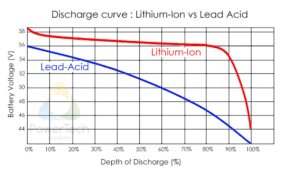



 radiant pawn
how does zha establish its network map?
and do the nodes ever change who/what theyre connected to?
lilac wharf
Yeah, Zigbee will reroute as it sees fit
austere patio
It asks routers on the network to perform a neighbor scan and then just draws what they report
radiant pawn
when im connecting a new device, do i always use the controller to search for devices?
austere patio
Click the "add device" button in the bottom right, it'll ask every router on your network to permit joins
radiant pawn
for example, if i have my controller on the ground floor and I have a router (philips hue plug) on the upper floor, do i connect a button to the router or the controller when adding it
im going to be using the button to control the router
so do i connect to the router or to the controller
sour shadow
Always best to just let the mesh sort it out
radiant pawn
does it matter, will zigbee figure it out
sour shadow
You don't know RF as well as reality does 😉
radiant pawn
so i should just add devices via the controller each time?
austere patio
What do you mean "via the controller"?
sour shadow
Just let it join via any device
golden vessel
except if we are talking about xiaomi sensors...
sour shadow
Well... you say that, but mine have re-routed
radiant pawn
i dont use xiaomi
sour shadow
So... established facts may turn out to be wrong
golden vessel
sour shadow
Well... you say that, but mine have re-routed
Aqara or Mijia? 🤔
sour shadow
Both
golden vessel
I've seen some Aqara ones jump to a different parent indeed
radiant pawn
im asking because im noticing the mesh is being really dumb with the connection
sour shadow
The mesh will work it out according to the logic of the devices, you don't want to force it
Not unless you're an RF engineer
lilac wharf
Enough verbal threats usually get xiaomi stuff to reroute
radiant pawn
is there a way to "reset" it so it establishes a network from scratch?
like maybe unplugging my conbee and replugging it
golden vessel
restart your house
sour shadow
"it"?
golden vessel
I mean, shutdown power. 😄
lilac wharf
Tinkerer has a story about that
sour shadow
golden vessel
restart your house
There's a funny tale there. In the Gitter days we persuaded somebody to do that. It actually solved their problem...
lilac wharf
Ha, there it is
radiant pawn
"it" being my conbee2 device connected to my rpi4
golden vessel
sour shadow
There's a funny tale there. In the _Gitter_ days we persuaded somebody to do tha...
well, I've done it once or twice when my zb network was acting funky
sour shadow
ISTR if you leave it disconnected for half an hour then reconnect things may decide to re-route, but maybe not. They'll do it anyway if they're going to...