#zigbee-archived
1 messages · Page 75 of 1
 tropic depot
Wym?
 lofty stag
e.g. my office door shows closed, but it is open
tropic depot
If you close it and open it does it sync up?
 red cedar
Anyone with the Aqara p1 motion sensor: have you figured out a way to make it not “sleep”? I’m finding that the one I have, now that I don’t use the Aqara hub, seems to “sleep” after an extended period (let’s say hours) of no detection and then my automation for motion detection in that area doesn’t fire because of it.
lofty stag
althought, it was paired, the state of door/window sensor is still wrong
I tried, following the instructions, to wake the device.
but it still reports wrong state
I just got a msg in logs
[0x0cdb:1:0x1000]: Couldn't get list of groups: Failed to deliver message: <EmberStatus.DELIVERY_FAILED: 102>
tropic depot
Devices are most likely rejoining
Give things like 20 mins and see if everything stabilizes
 sour shadow
red cedar
Anyone with the Aqara p1 motion sensor: have you figured out a way to make it no...
sour shadow
red cedar
Anyone with the Aqara p1 motion sensor: have you figured out a way to make it no...
All sensors sleep, but that shouldn't stop them reporting in. Replace the battery and check for interference
tropic depot
Go for it
lofty stag
ok done. The new coordinator, shows Manufacturer and Model as Unknown
 harsh mango
idr who asked for debug logs for my issue, but I have them now. the lights all turned themselves on last night.
 grizzled lichen
hi guys, any thought about SLZB-06(M)? it seems to have a good range, big antenna included.
sour shadow
Range from the coordinator is largely irrelevant, and mostly unhelpful. There's a reason Zigbee is a mesh network.
This explains it well.
grizzled lichen
Yes.. I have some minisonoff switches as routers.. but they are weak
5meters range
If the coordinator is a bit more powerful I can put sonoff mini mor far away and increase range
sour shadow
Or you could just replace the Sonoff with routers that don't suck so badly
grizzled lichen
Yes.. but I already have a lot of shelly wifi devices
What are the best device to extend range?
sour shadow
Innr plugs, or CC2652 sticks flashed with router firmware
(pretty sure I've said that before)
harsh mango
Can someone please take a look at this log and tell me why my Ikea light turned on last night? According to the UI, it happened at 12:49:29 AM. Nothing caused it according to the UI.
sour shadow
Then it happened outside of HA
harsh mango
so randomly all of my lights just "turn on" outside of HA?
Because it's not limited to just one.
sour shadow
Power blip?
harsh mango
Power blip almost every night around the same time?
but also different times for different bulbs?
sour shadow
These are all ZHA connected?
sour shadow
You've not got anything like Node Red connected to HA?
harsh mango
no.
fresh docker install of HA using the default ZHA.
Fresh because it was happening on my last install (the vm image) and I was getting sick of it. I thought maybe I messed something up since I had been new to HA back then.
but ofc, it's still happening.
 charred girder
can anyone make a recommendation to a good zigbee gateway.. I was initially looking for a DIN compatible one that i could place in my installation cabinet, but anything good will do
sour shadow
https://www.zigbee2mqtt.io/guide/adapters/#recommended (but not Sonoff)
harsh mango
maybe the bulbs need firmware updates? idk what else can be done, this is getting old.
sour shadow
No Tradfri stuff on that network?
harsh mango
that's what the bulbs are
sour shadow
Not any sensors?
harsh mango
nope.
red cedar
sour shadow
All sensors sleep, but that shouldn't stop them reporting in. Replace the batter...
So there’s a router that it’s going through nearby (sonoff plug), battery is at about 56%. Before moving off of the Aqara hub this wasn’t a problem. Trying to figure out how to make this be “better” and more like it was while on the Aqara hub.
tropic depot
harsh mango
Can someone please take a look at this log and tell me why my Ikea light turned ...
There isn’t enough here… what I can tell you is that from this excerpt we poll the bulb and it tells us it is on. There are no commands sent from HA here…
sour shadow
red cedar
So there’s a router that it’s going through nearby (sonoff plug), battery is at ...
Sonoffs are known to be bad routers
harsh mango
tropic depot
There isn’t enough here… what I can tell you is that from this excerpt we poll t...
gah, okay. I'm trying to update the firmware now, but, the guide I'm following appears to be out of date. https://www.reddit.com/r/homeassistant/comments/fak430/how_to_update_your_ikea_or_ledevance_firmware/
Or for IKEA devices, you can go Config > Integrations > ZHA > Device > OTA Cluster > image_notify command to ask them to check in. I don't have those options?
 grim igloo
lucky for you they just made it easier lol
tropic depot
1 - IKEA is not enabled by default so you will need to add a yaml config
harsh mango
though I see something that mentions firmware and it says it's up to date :/
tropic depot
Then you can just check for updates in HA settings
harsh mango
yeah I added it as per that guide.
harsh mango
ohh, thanks.
didn't realize it was hidden up there 😄
Does this usually take a while? Only one bulb showed up and I know more than one is on the same version 😄
tropic depot
Yep
harsh mango
ah okay, ty.
tropic depot
They are checked 1 at a time
harsh mango
I'll just maybe do some work or something while I wait, lol.
 patent hemlock
I cannot see a supervisor or addon on home assistant.
can anyone help how to troubleshoot or install
harsh mango
patent hemlock
I cannot see a supervisor or addon on home assistant.
can anyone help how to tro...
docker install?
patent hemlock
yes,
harsh mango
there aren't addons in this version, built in like the other one at least.
harsh mango
def give it a google, something like, "home assistant docker addons"
@tropic depot the log is saying there are some bulbs that do not have updates. That's disappointing, because all of them are giving problems.
I can pastebin the full log if you think that'll help, but, @sour shadow said the Sonoff are bad routers (ofc that's what I have) - idk if it's worth getting a different router? I'm at a loss.
well, the update failed to install anyway.
tropic depot
Upload the log and I’ll peek when I have a moment
Remove the routers as a test and see if you still have issues 🤷♂️
harsh mango
tropic depot
Remove the routers as a test and see if you still have issues 🤷♂️
so all my smart plugs? :/
Possible to just disable the router feature?
tropic depot
No
sour shadow
Sonoff E is fine (for ZHA)
harsh mango
iirc, no custom firmware for the S31 Lite, just the wifi version.
red cedar
sour shadow
Sonoffs are known to be bad routers
What would be considered to be a “good” router?
sour shadow
Innr
 shrewd saddle
I got the dongle-e yesterday. Seemed problem free but now it keeps disconnecting. Z2m in a Docker container. I have the latest fw according to the web flasher. Any recommendations?
 ashen bluff
fiscomnevtingu
🤔
Any recommendations
Use one of the recommended adapters mentioned on the website
shrewd saddle
Jesus that's one weird auto correct. 🙃
I know it's experimental. Was thinking about specific settings or older fw
red cedar
sour shadow
Innr
ordered a 4 pack of the plugs that I can swap the sonoffs for. thank you 🙂
harsh mango
I updated firmware on 4 bulbs, that's all it shows as out of date. I doubt this will fix my issues, but maybe I should give it a chance for a few days before pulling out all the sonoff S31 Lite's.
I have like 8 of them iirc, would suck to just... ewaste.
lofty stag
@tropic depot three hours laters, all devices report unknown 😦
So I have to say that, for me, migration is not smooth
tropic depot
You are sure it finished successfully?
And you removed the old coordinator from HA?
lofty stag
100%
tropic depot
What happens if you restart HA
lofty stag
I followed all the steps
and I got a suceesfull note
no errors at log
the state is frozen at dashboard
here is the logs
after reloading the integration
tropic depot
Let it run w/ debug on for like 20 mins and trigger several devices
And give me that log
lofty stag
tropic depot
Physically turn on and off some plugs
pull out from plug, or just turn on / turn off ?
tropic depot
Just on / off
lofty stag
tropic depot
Open and close doors
take the battery out, or awake ?
 astral seal
Do they work properly? If they work properly, leave them alone.
tropic depot
Will peek in a bit
lofty stag
ok
tropic depot
Did you do anything during the migration with the IEEE checkbox?
I can’t remember off the top of my head if that is shown or not
lofty stag
yes it promted me
tropic depot
Did you have it checked off?
lofty stag
it said it was changed...so what do you want to do
a) restore backup
b) keep current
i choose the 2nd option - keep current
tropic depot
Run the migration again and restore a backup from before
lofty stag
ok - with the new stick on, right ?
tropic depot
Yes don’t touch any hardware
lofty stag
ok here are the steps
a) MIGRATE RADIO
ZHA will be stopped. do you waith to continue?
Submit
Migrate or re-configure
Re-configure the current radio
Migrate to a new radio
??
which one ?
?
tropic depot
Patience dude
Pick reconfigure
Then when you get to the network formation screen pick restore automatic backup
lofty stag
am sorry
i selected the manually option
i picked radio type (EZSP)
AND Now it asks for port settings
it seems there is a bug on the three options
tropic depot
Go back and let it auto detect
lofty stag
ok
just did - it keeps loading
it prompts again for radio type
and
Serial port settings
/dev/ttyACM0
tropic depot
If you know your settings select the values
They should also be written into the config entry from before
tropic depot
tropic depot
Then when you get to the network formation screen pick restore automatic backup
Once you get here you wanna pick your last backup from before migration and restore that
tropic depot
Restore from automatic backup and pick the last one from before your initial migration
lofty stag
ok - just to make sure
checkbox is selected
tropic depot
Yes
tropic depot
What’s in the log
lofty stag
not much
rebooting
logs
when i restarted
it worked again
map shows two coordinators
with the same name
difference IEEE
tropic depot
Are your devices working?
tropic depot
Cool
It’s not strange
When you initially migrated you TOLD it to create a new network
tropic depot
lofty stag
i choose the 2nd option - keep current
This is keep current stick settings… vs restoring the backup of the other stick to your new stick
lofty stag
do you offer paid services ?? 🙂
 mellow geode
You can also upgrade the SkyConnect firmware to overwrite the IEEE for as many times as you want
It won’t even show the prompt (for saving new IEEE to userdata) IIRC
But if everything works now, no need to upgrade
lofty stag
my problem is that this was my experiment
I did this to my office
total 21 nodes
at home, I die to upgrade stick
I have over 100 nodes and I am afraid
so many things I afraid to move on
and I've stick with conbee II
very humbly, there is still lots of things must be done
what is the ise of physics on the map ?
I keep playing balls all the time 🙂
is there any other use ?
this is how the map looks now
 snow trellis
Does placing the coordinator near a router / modem, can cause malfunction on the PI / Zigbee Integration / device?
ashen bluff
snow trellis
Does placing the coordinator near a router / modem, can cause malfunction on the...
Also see USB interference demonstration linked in the pins here: <#zigbee-archived message>
 mighty river
Is there a "Quirks 101" how-to somewhere? I have a device with a superflous position number value and missing some attributes, like speed, that I would like to add. I'm wondering if this is even a Quirks issue, as they do show against the device - they just don't show in HA. See here - https://github.com/zigpy/zigpy/discussions/1312#discussioncomment-8422888
mellow geode
They're in HA (for now). Scroll to the bottom of this file: https://github.com/home-assistant/core/blob/dev/homeassistant/components/zha/number.py
If speed has just like two or three possible values, you could also check out select.py
The attributes also need to be initialized, so they get read when the device is first paired:
https://github.com/home-assistant/core/blob/e81a9947e0fbfb3ec5e030f81eee7edf2d7c928d/homeassistant/components/zha/core/cluster_handlers/manufacturerspecific.py#L163-L170
If the attribute isn't in cache, a diagnostics entity doesn't get created.
 tiny belfry
Wondering if anyone else has ran into this issue. It's not the biggest deal because the device does work, but I have a ThirdReality smart plug and it's super slow at responding. When I toggle it from HA it takes a good second before the icon actually changes, and I don't have this issue on any other of my zigbee devices. It's got an LQI of 176 and an RSSI of -56, and I'm not sure if those are good or bad numbers, but since it's decently far away from my home assistant maybe it just requires too many hops? I'm not sure. Although there's also an Aqara relay in the same room and its response time is basically instant
mellow geode
ZHA or Z2M? And what coordinator are you using? Was this issue always present in previous HA/Z2M releases?
harsh mango
okay i suspect it is actually something to do with a script that is messing up my lights. seems like 1H -ish after running "bedtime" things mess up. i tested by running it as we were leaving the house. sure enough. we got home and the lights are showing "on" but are not on.
 ruby jewel
hi everyone; I have a phillips wall switch module linked to zigbee2MQTT, and when I try to set it to "single push button'", I get the following error:
Publish 'set' 'device_mode' to 'loo switch' failed: 'Error: Write 0x001788010d9fd029/1 genBasic({"52":{"value":1,"type":48}}, {"timeout":10000,"disableResponse":false,"disableRecovery":false,"disableDefaultResponse":true,"direction":0,"srcEndpoint":null,"reservedBits":0,"manufacturerCode":4107,"transactionSequenceNumber":null,"writeUndiv":false}) failed (Timeout - 48139 - 1 - 5 - 0 - 4 after 10000ms)'
Any idea why?
 runic pumice
I have 60 devices on a Texas Instruments (CC26X2R1) adapter that's plugged in to my HA Yellow, everything working perfectly fine. Is there any upside migrating the whole bunch to the onboard Zigbee chip? For better connectivity I have to repair some stuff anyway (paired to a specific router) so it's not that hard to redo everything.
(I'm running Z2M on the Yellow)
ashen bluff
Are you using ZHA or Zigbee2MQTT?
grim igloo
runic pumice
I have 60 devices on a Texas Instruments (CC26X2R1) adapter that's plugged in to...
You won’t want to use the efr32 based chip the yellow uses with z2m
 barren chasm
New venture into Zigbee
I am running HAOS, Zdongle-E 7.4 firmware, have mqtt broker setup and working .
My stumbling block is this:
I am unig Z2M and installed a door sensor. It is listed in my devices and I can see it in the dashboard. It responds in the dashboard when open or closed.
However I cannot find it in Devices or Entities. It seems it does not exist in the Home Assistant world.
By the way, it is an approved Zigbee device for Z2M
Any ideas why I cannot see it in HA? I want to use it in an automation using its state.
runic pumice
ashen bluff
Are you using ZHA or Zigbee2MQTT?
Z2M currently, but I'm not married to it
ashen bluff
Ah, because Z2M uses its ezsp driver for that chip and its only experimentally supported. Should be fine for ZHA.
 mortal oasis
hi i have an issue with connecting my ikea led1836g9 lamp to the zigbee network
 full gale
hello everyone! quick question: now HA supports Zigbee updates for specific vendors, but are there detailed instructions on how to add "custom" ones? (e.g. Ikea, HUE), I can only find quite old resources about that
 austere patio
I would hold off on custom ones for a bit. They'll be in next release. There are currently issues with devices asking for the wrong firmware and we've disabled them for non-development purposes for now.
mellow geode
Although you can already enable the ikea_provider if you want to. It's disabled by default, but most devices are fine to update now.
Be aware that some remotes/dimmers might loose group binding functionality after updated. All mains-powered devices should be safe to update though. The remotes are also slightly more reliable on newer firmware (if you don't need group binding).
(But do stay away from the custom one for now.)
 torn compass
Hi All, Trying to get my first zigbee setup working with at tasmota flashed sonoff zigbee bridge pro, i've flashed and autoconfigured, and the tasmota console shows that the module is loaded and that a listener is started on 8888
00:00:03.704 HTP: Web server active on tasmota-0DD8EC-6380 with IP address 192.168.0.179
21:37:28.094 RSL: INFO1 = {"Info1":{"Module":"TCP ZBBridge Pro","Version":"13.3.0.5(zbbrdgpro)","FallbackTopic":"cmnd/DVES_0DD8EC_fb/","GroupTopic":"cmnd/tasmotas/"}}
21:37:28.109 RSL: INFO2 = {"Info2":{"WebServerMode":"Admin","Hostname":"tasmota-0DD8EC-6380","IPAddress":"192.168.0.179","IP6Global":"redacted","IP6Local":"fe80::e665:b8ff:fe0d:d8ec%st1"}}
21:37:28.123 RSL: INFO3 = {"Info3":{"RestartReason":"Software reset CPU","BootCount":10}}
21:37:28.147 RUL: SYSTEM#BOOT performs "TCPStart 8888"
21:37:28.149 TCP: Starting TCP server on port 8888
21:37:28.152 RSL: RESULT = {"TCPStart":"Done"}
I've tried activating installing zha on homeassistant, but it fails on creating network (i provided connection as socket://ipaddress:8888)
i've tried activating via zigbee2mqtt, but it fails, (i provided serial port as port: tcp://ipaddress:8888)
i'm unsure if using the tcp bridge mode is wrong
 rapid dawnBOT
@torn compass I converted your message into a file since it's above 15 lines :+1:
 gray pumice
Is everyone having issues with zigbee2mqtt and skyconnect ?
ashen bluff
Probably not everyone but SkyConnect is only experimentally supported so some issues are to be expected.
gray pumice
yeah, but since the last update and even if I roll back (restore) my zigbee networks breaks down before having been stable for 1 hour
 tawdry blade
hello, i purchased hue lights as an alternative to wiz - using zigbee integration. to my disappointment despite hue being approx. 7-times more expensive there is only a single light effect available (colorloop) while wiz had 30+. is that expected?
 main ruin
i am not quite sure what you mean by light effect. its a lamp for the most part, not an effect cannon
the hub provides some mood color rotation you might mean?
tawdry blade
it's a dynamic (fw-integrated) change of light.. e. g. a candle effect
@main ruin yeah, something along those lines
but i am not using a hub. just a skyconnect coordinator
main ruin
the fancy desktop / game color sync works over their entertainment api. i suppose this is just some trickery to make the light update in sync
gray pumice
But...just to know if its my system...is other having trouble at the moment with zigbee2mqtt, skyconnect multipan
main ruin
i dont think this is possible <that easily> without their hub
tawdry blade
@main ruin aaah, i see. i somehow thought this would be a feature of the lightbulb itself (like it's with the wiz devices). makes sense. thanks for the explanation
main ruin
yea they do some more magic on the hub side of things which allows you to tap into this functionality from various areas
tawdry blade
apart from this.. would i get anything more from the hub? would that also mean i would need to switch to cloud integration?
main ruin
the hub can be linked through the local hue integration. unless you also use their ip cameras this can work fully local i think
you wouldnt get all the settings available over to homeassistant sadly but you could at least use them from the hue app / their other device integrations
by default they dont have that man effects there either
like its mostly just some color scheme that rotates slowly over multiple bulbs
 west forum
hey, is there any benefit in checking the state of a light in automations to avoid turning it on/off if it's already on/off?
 manic plinth
Hey guys, can you recommend a Zigbee switch module that works without a neutral wire that you can install behind your wall switch?
 halcyon owl
In am replacing all my Insteon devices. Is there a particular brand everybody likes for Zigbee switches?
 tidal ocean
Has anyone else had issues with ZHA/SkyConnect after recent updates? Today I updated the OS to 11.5 and the core to 2024.2.1 on my Green and now the SkyConnect keeps saying "Failed to set up". The logs just show a CancelledError in zigpy so I'm not sure how to troubleshoot.
screenshot: https://will-o.co/4q8RGreuaW.png
halcyon owl
 carmine hamlet
I quite like the Inovelli Blue switches.
carmine hamlet
I quite like the Inovelli Blue switches.
I need some that are for fans and bathroom heaters, and some that are dimmable for lighting. I'm not sure about their instructions on the webpage. its says: SMART 2-1 SWITCH (ON/OFF OR DIMMER). - On/Off portion refers to lighting only (except ballasts). Not to be used for fans, outlets, ballasts (magnetic or electric) or any inductive/motorized loads. Not to be used on ELV or MLV lights. See FAQ's for more details. Do you think this will work for fans and inductive loads? Do they mean the dimmer part which makes sense or the entire switch? I can't figure it out because it says two and one switch off on or dimmer.
carmine hamlet
You need the fan switches for fans
halcyon owl
umm do they make those
carmine hamlet
No problem
mellow geode
tidal ocean
Has anyone else had issues with ZHA/SkyConnect after recent updates? Today I upd...
Try disabling IPv6 temporarily or disable the OTA providers by all setting them to false in the YAML. Error handling for these will be improved soon.
Related issue: https://github.com/home-assistant/core/issues/110208
tidal ocean
So when you say disable IPv6 that would be in the /config/network settings right? Not something zigbee-specific?
halcyon owl
carmine hamlet
No problem
they only support 2.5 amps bathroon heater is lots more. I will keep looking.
 wise scarab
Hello Friends, just started planning for Home Assistant for my whole house and interested in ZigBee setup. Please guide me a solution for Raspberry pi or other mini pc. I looked into Zigbee CC2540 CC2531 available on AliExpress, not sure if they work perfectly. Also for 24x7 online setup RPI or home assistant green or any mini pc cost effective better solution
carmine hamlet
halcyon owl
they only support 2.5 amps bathroon heater is lots more. I will keep looking.
Yeah, they don't have a high amperage one. This works for my whole house fan: https://a.co/d/aLNTnqM
mellow geode
tidal ocean
So when you say disable IPv6 that would be in the `/config/network` settings rig...
Otherwise, copy this YAML section into your configuration.yaml, but change true to false everywhere. https://www.home-assistant.io/integrations/zha/#ota-firmware-updates
You still have some kind of network issue though where HA can't access one of the update servers.
tidal ocean
@mellow geode That seems to have worked! Thanks, I think I actually saw that Github issue earlier but the mention of Docker threw me off. And yeah, I did see something in the logs earlier about it not being able to upload analytics data so maybe there's something weird happening with my internet/router. I'm not that concerned about the zigbee firmware updates specifically though.
halcyon owl
carmine hamlet
Yeah, they don't have a high amperage one. This works for my whole house fan: <h...
Only 1 left in stock - order soon. --- my kind of luck. Oh well, maybe somebody else has them
carmine hamlet
I didn't do much research on it, but it works. I'm sure it's not the only one
halcyon owl
im looking
carmine hamlet
I got it after I killed the Inovelli one because didn't pay attention to the specs
halcyon owl
carmine hamlet
I got it after I killed the Inovelli one because didn't pay attention to the spe...
lol
 regal pumice
Typical zigbee temp and humidity sensors on aliexpress for 6 bucks
What's their range in general?
How big of a room can one cover?
 river hatch
Hey all, I wouldn't touch tuya wifi where possible, but how is "tuya zigbee"?
gray pumice
Please help here - Is it my setup or commen issue with skyconnect and z2m ?
ashen bluff
Context? What I can tell you is that Z2M only has experimental support for SkyConnect,
gray pumice
My zigbee2mqtt crashes random every 5 min to -8 hour
regal pumice
river hatch
Hey all, I wouldn't touch tuya wifi where possible, but how is "tuya zigbee"?
It depends per device
90% of the time it's fine
You'll just have to experiment
Unfortunately they have a monopoly on the market so there's nothing you can do sometimes but invest in tuya products.
Their zigbee ones though are usually solid
regal pumice
carmine hamlet
How big of a room?
Roughly 20ft x 16ft
Open concept
So stair well to upstairs and the room opens out to the laundry room and other bedrooms
ashen bluff
gray pumice
My zigbee2mqtt crashes random every 5 min to -8 hour
Check and share the logs.
regal pumice
carmine hamlet
That's a curious question
I would like to use it for zone based heating/cooling
And humidity
One sensor per room with ducts
gray pumice
error 2024-02-11 09:10:48: Adapter disconnected, stopping
river hatch
Can your usb hub supply the adapter
gray pumice
is connected directly to my nuc
ashen bluff
I'd check ha host logs for anything related.
 peak gazelle
i've been having weird issues with zigbee, i've started to get (Data request failed with error: 'No network route' (205))' errors a few minutes ago and now nothing seems to work anymore, a restart didnt help
interestingly enough i still get data from my motion or temperature sensors via zigbee?
but whenever I try to change something it errors
uu sometimes i also see MAC channel access failure' (225)
peak gazelle
i don't think so? Like I haven't changed anything in the last month or so and it worked fine until yesterday
ashen bluff
Then it might just be interference. See link and pins here.
peak gazelle
If i change the channel in the config do i have to completely delete and repair everything or is there an easier way to do that?
ashen bluff
Yes and no.
peak gazelle
is it possible to run that bellows channel check on haOS somehow?
mighty river
New Aqara device, lumi.remote.b1acn02 - I cannot get it fully recognized as it seems to me (fairly novice HA user), I see Battery, RSSI and LQI and a Firmware-entry - nothing more. I also have lumi.remote.b1acn01 to compare to (an older version of the same?) - both are "simple buttons", where the latter appears (=is) working to my knowledge and understanding. I believe this needs a "quirk" - Where do I go to upload logs and diagnostics.json files?
peak gazelle
Is it possible to keep all the homeassistant data for the device if i have to re-pair it?
peak gazelle
i've changed the channel and restarted z2m but now it won't start anymore
Error: network commissioning timed out - most likely network with the same panId or extendedPanId already exists nearby
i generated a new panid and extpanid in the config already but still the same issue
mellow geode
peak gazelle
is it possible to run that bellows channel check on haOS somehow?
What do you want to check? The channel is shown in the UI, but interference values are shown when you download integration diagnostics for ZHA.
mellow geode
peak gazelle
Is it possible to keep all the homeassistant data for the device if i have to re...
For ZHA, just reset the device (holding a button / power-cycle multiple times) and have the "add device" window open whilst doing that
mellow geode
peak gazelle
i've changed the channel and restarted z2m but now it won't start anymore
`Error...
Hmm, if you’re using Z2M, you’re not using bellows/ZHA
peak gazelle
i'm running z2m yea
peak gazelle
theres this docker thingy to check channels in the pins, thats what i meant
but I think I'll just switch to 15, that looks like were there are the least wifi interferences in the corresponding cchannels
but it still doesnt start :D is this just because i have zigbee devices plugged in?
 languid sky
- Temp&Humid&LCD
Sonoff SNZB-02DFirmware0x00001009(latest, according to ZHA) Sonoff Dongle–PCC2652FirmwareZ-Stack 20230507
=> Does not keep connection with HA.
It pairs, then it becomes unavailable (the network icon on the device flashes), becomes available again (network icon constant), becomes unavailable again, etc. etc. a few times => until it disconnects completely (the network icon disappears on the device, it shows "turned off" in ZHA, does not push sensor updates to HA anymore).
Any ideas? I have 6 other SNZB-02 (without the LCD) and they work (kinda) OK.
 turbid lodge
Hello,
if I have a Sky Connect with HA do I need an extra Hub like a Philips or is that the Sky Connect stick?
runic pumice
That would be your Zigbee router indeed
turbid lodge
Geat thanks
Great*
But if I do have Philips Hue light can I connect them by usin the Sky Connect stick with the app?
peak gazelle
I've somehow managed to finally start z2m again and deleted everything but now nothing wants to pair
Man ._.
Is it possible that my antenna just got fried somehow?
west forum
hey, is there any benefit in checking the state of a light in automations to avoid turning it on/off if it's already on/off?
or switches for that matter
peak gazelle
peak gazelle
Is it possible that my antenna just got fried somehow?
I've tried different channels, USB ports, and different devices, but nothing seems to pair anymore
And I don't see that much interference with WiFi networks nearby
Is there any way to check if the antenna is just dead or something?
languid sky
languid sky
* Temp&Humid&LCD `Sonoff SNZB-02D` Firmware `0x00001009` (latest, according to Z...
I removed SNZB-02D from ZHA and rebooted. Now it isn't even being discovered anymore for pairing… 😦
 wise citrus
is there any way to add 2 zigbee routers to the ZHA integration in home assistant? I have a 3 floor home, repeaters don't really help
languid sky
wise citrus
is there any way to add 2 zigbee routers to the ZHA integration in home assistan...
wdym? afaiu "routers" are de facto "repeaters".
wise citrus
i mean 2 zigbee gateways
or multiple gateways
i have over 300 devices, 1 gateway won't take everything
languid sky
wise citrus
i mean 2 zigbee gateways
nope, in a zigbee network there is always only one "coordinator".
you can have multiple "routers" (which act like "repeaters") and multiple "end-devices", but only one "coordinator".
some gateways can be flashed to act as "routers" instead of "coordinators", btw
 storm orbit
Hi there, I hope maybe here someone can help. I believe it may be a Zigbee specic information that I am trying to understand, please see the post: #developers message
 ashen compass
Is there a recommended sensor to read whether the shower is on/off? It's a single knob so I was thinking something similar to an aqara window sensor but it would need to be able to withstand moisture
astral seal
I might be tempted to build something using esphome for that, with a hall effect flow sensor.
Or you could just use a humidity sensor
 vapid gyro
I am stuck and hope you guys can give me some clearance
zigbee is the protocol over wifi, where the devices communicate with each other.
there is one coordinator in a network, where these devices are connected to.
the devices can relay the info from the coordinator in case the coordinator can reach the device directly. So forming a mesh network.
there are zigbee-USB sticks which can work as extenders
there are zigbee-Routers which can act as a coordinator and push the device infos to an MQTT-Broker.
there are zigbee-USB sticks which can be used by ZHA and Zigbee2MQTT so that they are working as a coordinator and communicating with the devices.
In within HA the ZHA and Zigbee2MQTT device infos somehow do find their way into an MQTT-Broker and HA is working with them. Detecting and setting up devices, getting informations from them.
rapid dawnBOT
@vapid gyro I converted your message into a file since it's above 15 lines :+1:
carmine hamlet
'Zigbee is the protocol over WiFi' is wrong
They share a frequency range, but otherwise have nothing to do with each other
vapid gyro
wireless I don't care bout the frequenzy
 short sandal
Does anyone know of any temp/humidity sensors suitable for being placed outside? Battery powered with decent battery life?
sour shadow
rapid dawn
<@1182394491005571204> I converted your message into a file since it's above 15 ...
Are you using Zigbee2Tasmota? Then you have to create every entity manually in HA
Use Zigbee2MQTT and they're done automatically for you
 ivory trail
Not sure this is the right place — I have a Tuya led controller and I’ve connected it to a cct led strip. Is there some way of telling the Tuya what the range of temperatures the strip supports? By default the Tuya thinks it can drive 1500-7000K while the led actually has a range of 2700-6000K. I am using DeConz but general Zigbee advice will also be helpful.
sour shadow
Depends on the exact model of controller, and what deCONZ supports for them
ivory trail
HA report: TS0505B
by _TZ3210_3lbtuxgp. Where does one typically look for such settings. I see a bunch of clusters in DeConz, but I can’t quite figure out if those are commands to be sent of config settings. I’m much more used to the Zwave world for this sort of configuration stuff.
sour shadow
You're probably best off asking the deCONZ experts over in their Discord
vapid gyro
sour shadow
Are you using Zigbee2Tasmota? Then you have to create every entity manually in H...
I do have Zigbee2MQTT and Zigbee2MQTT Edge but no clue how to get them connected with the topic of the EMQX MQTT-Broker and if possible.
rapid dawnBOT
@vapid gyro I converted your message into a file since it's above 15 lines :+1:
sour shadow
but Zigbee2MQTT won't start cause of no serial adapter.
can I use it without?
No
Also localhost doesn't work with Docker
vapid gyro
sour shadow
> but Zigbee2MQTT won't start cause of no serial adapter.
> can I use it without...
I do have a zigbee-router as coordinator ZB-GW03-V1.2 flashed with Tasmota 12.5.0 pushing MQTT Messages to the EMQX MQTT-Broker.
How do I get this as devices into HA?
rapid dawnBOT
@vapid gyro When using Discord's Reply feature it defaults to pinging the person you reply to, which can get frustrating for the target. Use Shift + click on the Reply option, or click @ ON to @ OFF to stop this - on the right side of the compose bar.
You have to change this every time (thank the Discord devs for that).
sour shadow
Again, manually
That's the downside of Tasmota's (really crap) Zigbee support
You're better off pointing Z2M at that coordinator
vapid gyro
I did not point anything to it yet
the coordinator pusing messages to EMQX and there I can get the messages.
No Tasmota involved from there.
Sorry, I know Linux, Windows can write you kernel drivers with ease but I can't wrap my head around how this is working!
sour shadow
Tasmota is involved
That's what's running on the coordinator
That's what's pushing the messages to the broker
Now you have to write all the required MQTT configuration for each entity in HA
Or stop using Tasmota and use Zigbee2MQTT
Tasmota's Zigbee support is, bluntly, crap
vapid gyro
sour shadow
Tasmota _is_ involved
thank you:
configuration.yaml
mqtt:
sensor:
- name: "sw_test"
state_topic: "tele/tasmota_C2A35C/#"
...
#{"ZbReceived":{"0xB6C5":{"Device":"0xB6C5","0006!FD":"00","LidlPower":0,"Endpoint":1,"LinkQuality":134}}}
is there
sour shadow
@vapid gyro
Again... you really don't need to leave the ping on for every damn reply 😉
vapid gyro
my apologies I am a noob with discord, using it via browser.
Just used reply to your messages
grim igloo
honestly dude you're better off using mosquitto and z2m
sour shadow
Or at least Z2M, EMQX works fine, it's just more effort than Mosquitto
grim igloo
robc said emqx fell on its face for him or something to that effect. i havent tried it myself tho
taking the path less traveled just isnt worth it (here)
sour shadow
I tried it... big and clunky and lots of work
Went back to Mosquitto
Makes sense on big setups where the cluster is useful, not on home networks
vapid gyro
what does Mosquitto do different as an MQTT-Broker?
sour shadow
Simple, lightweight, fast
vapid gyro
posting messages in,
retreiving messages via topics
sour shadow
It's the difference between a stripped back race car (Mosquitto) and Tesla's monster truck (EMQX)
vapid gyro
setting up EMQX was a charm, getting the MQTT from the zigbee-coordinator inside as well.
Now the part for HA to react on this messages: I can listen t a topic, is not uite straight forward.
I do have overpowered HA Hardware, but I cant use an USB-Dongle in the basement to talk to my zigbee devices 2 floors up!
So I have the nice way of having the zigbee posting it to the MQTT-Broker via ethernet.
I can't find a simple example how to set it that up (even manualy)
Reading up on the topic involves me jumping into the rabbit hole!
For manual settings the examples are one line + reference to another page containing another line and so forth.
it is a pain.
sour shadow
So I have the nice way of having the zigbee posting it to the MQTT-Broker via ethernet.
I can't find a simple example how to set it that up (even manualy)
Using Z2M would be that simple way
That can connect to your current coordinator, and away you go
Or you can keep banging your head on the keyboard
vapid gyro
I have Z2M how would I connect that to my coordinator?
the one solution I found was a reflash of the whole thing.
sour shadow
carmine hamlet
sour shadow
It's the difference between a stripped back race car (Mosquitto) and Tesla's mon...
An apt comparison since it was also utterly broken in key ways
Big, flashy, can't handle basic functions
regal pumice
What presence sensor do you all recommend?
Something that's compact
For small rooms such as a bathroom
Or even modules
Willing to make my own
short sandal
I like the little sonoff one. MS01. Got about 6 now.
regal pumice
short sandal
I like the little sonoff one. MS01. Got about 6 now.
Links? All I'm getting is moisture sensors for soil 🤭
I'm looking for a presence sensor
To use as a variable if someone enters the room
tiny belfry
I got a tuya mmWave sensor for my kitchen, it works pretty nice, although it does catch people just outside the kitchen. Probably depends on your house layout how much slop is okay in the sensing
tiny belfry
regal pumice
What presence sensor do you all recommend?
this is the one I got if you're looking to just get it on amazon or something https://www.amazon.com/gp/product/B0BZCVHYR8/
regal pumice
tiny belfry
this is the one I got if you're looking to just get it on amazon or something <h...
Couple questions, does it work with ZHA?
And do they sell battery operated variants? Unfortunately some spots I'm working with doesn't have constant power
tiny belfry
I'm using ZHA yeah, but I don't think it can work off battery. I think sensors like that have a higher power draw
though I guess it'd work off a USB battery pack
dunno how long it'd last though
might be better off just running a long USB 2.0 extension cable to it, since it's power only length isn't too big a deal
battery powered presence sensors don't really seem to be a thing though. a few motion sensors, but not presence
the batteries will just die too fast
if you can put it near eg where you'd plug in your electric toothbrush or something that should work
 orchid tundra
trying to update a Third Reality plug that I got recently using the new ZHA update entities. It prompts me to install, but when I do I immediately get an error that says "Failed to call service update/install. unknown error"
rapid dawnBOT
@orchid tundra I converted your message into a file since it's above 15 lines :+1:
orchid tundra
currently on the latest version of HA OS as of right now:
- Core 2024.2.1
- Supervisor 2024.01.1 (should this be newer?)
- Operating System 11.5
- Frontend 20240207.1
anyone know how I might fix this?
 rigid wagon
Any experience with this mmwave sensor?
https://a.aliexpress.com/_EyFAHG9
No name, so cant google it for reviews
 rigid wagon
sour shadow
<:nauseated:574412894494654494>
rigid wagon
sour shadow
<:nauseated:574412894494654494>
All cheapo sensors are tuya
They work with zigbee...even though most spam.
I have 3 ep-1 sensors but look for some cheap ones
sour shadow
And you're getting what you pay for it
rigid wagon
sour shadow
And you're getting what you pay for it
Well the moes mmwave sensor is praised on reviews, except spamming the network
Its a sensor of like 24 usd
rapid dawnBOT
@rigid wagon When using Discord's Reply feature it defaults to pinging the person you reply to, which can get frustrating for the target. Use Shift + click on the Reply option, or click @ ON to @ OFF to stop this - on the right side of the compose bar.
You have to change this every time (thank the Discord devs for that).
rigid wagon
Overpriced though. But yeah aqara is a good brand.
 hasty lotus
ZHA update from popup gets error
 sleek plinth
Installed Blindsmart roller blinds using z2m. Pleased to see upper and lower limits included in Device page controls. Easy to adopt, configure and automate
manic plinth
What is the difference between binding a device in Zigbee versus binding a group to certain components of the Zigbee device?
I have an EcoDim switch which has 4 groups of buttons that I want to bind to 4 different lamps
carmine hamlet
When you bind to a group, you're telling the device to directly control a group
If you want a device to directly control several other devices, create a group and bind to that
 royal hazel
I‘ve configured zigbee stuff using ZHA so far. Some people recommmend zigbee2mqtt instead.
What would be the best way to migrate my ZHA configuration to zigbee2mqtt ?
sour shadow
There's no migration path, it's start fresh
royal hazel
uhh , that‘s what I expected, thanks
would I have to do some manual housekeeping, e.g delete unused entities and/or other objects ?
sour shadow
I'd expect so - doubly so if you want to re-use the old entity_id values
On the other hand, if you remove them from ZHA first then that should remove them from HA
 trim valley
Hey y'all, I'm running into a problem with my ikea zigbee hardware. Commands from the remotes are sporadically delayed by ~3-15 seconds. Sometimes everything works perfectly, but then they will randomly start having this crazy delay. Ive checked the log in z2mqtt and it seems like commands from the switches aren't received during that time. As soon as the register, the lights react appropiately. I'm running on a RPi 3b+ using the zigbee dongle-e on a 6ft usb extension. Any suggestions?
sour shadow
Sounds like a weak signal and/or interference
trim valley
hmm okay. I checked and it seems like the signal is on the most consistently stable channel in my area. Unfortunately there are a ton of wifi AP's nearby.
short sandal
Anyone know of a temp/humidity that can survive being outside? Battery powered, zigbee. I can’t find one…
 ripe osprey
short sandal
Anyone know of a temp/humidity that can survive being outside? Battery powered, ...
ripe osprey
short sandal
Anyone know of a temp/humidity that can survive being outside? Battery powered, ...
Any reason for battery specific? Outside temperature swings will drain battery like crazy, especially CR2032 batteries
Anyways, if you really need outside battery sensor and ur temperatures don't go below -20, i would go with Aqara T1 temp sensors (look for Zigbee 3.0 model).
I would then print something like this around it, as temperature sensor is on the bottom of the device, so this will allow for sensors to work and also somewhat protect from weather
https://www.thingiverse.com/thing:3029737
 novel mica
Looking to swap out my CC2531 coordinator to something new, is there any reason to avoid EZSP (which seems to be the new standard variant sold)? I’d prefer to not have to re-pair my devices, but it seems close to impossible for me to find a Texas Instruments coordinator such as CC2652 in Europe. Running zigbee2mqtt if that matters regarding the choice
grim igloo
ripe osprey
Anyways, if you really need outside battery sensor and ur temperatures don't go ...
it's such a cute lil house for the sensor
carmine hamlet
novel mica
Looking to swap out my CC2531 coordinator to something new, is there any reason ...
is there any reason to avoid EZSP
Running zigbee2mqtt if that matters regarding the choice
it does matter, EZSP support in Z2M is just experimental
 sonic delta
Has anyone known if Aqara Hub E1 works with anything?
It doesn't seem that it is supported by Zigbee2MQTT.
I found this, but it seems like it is related to CN?
https://github.com/niceboygithub/AqaraGateway
Any ideas? Or else i might aswell just return it, and try to buy a more supported one.
novel mica
carmine hamlet
> is there any reason to avoid EZSP
> Running zigbee2mqtt if that matters regar...
Yeah, I saw that as well and it has been for quite some time now, but I keep seeing people get it to run without any issues, and frankly, anything is probably better than the old hardware I currently have which has issues now that I’ve reached 19 devices.
But I’ll keep looking for a TI coordinator a few more hours and otherwise I’ll take a chance and get an EZSP
grim igloo
novel mica
Yeah, I saw that as well and it has been for quite some time now, but I keep see...
nah man buy a cc2652p7 ideally
 frail willow
Hey! Are there any Zigbee experts out there i could bounce a question off regarding a device templates? In ZHA.
grim igloo
novel mica
Yeah, I saw that as well and it has been for quite some time now, but I keep see...
https://tubeszb.com/product/cc2652p7-zigbee-to-poe-coordinator-2023/ tube will ship one of these anywhere in the world
 trail sparrow
short sandal
Anyone know of a temp/humidity that can survive being outside? Battery powered, ...
trail sparrow
short sandal
Anyone know of a temp/humidity that can survive being outside? Battery powered, ...
Ive had GREAT luck with SwitchBot indoor/outdoor Thermom-Hygrometers. They are bluetooth, but take AAA batteries and Ive had one outside in New England now for 5 months and battery still reports 88%
short sandal
ripe osprey
Anyways, if you really need outside battery sensor and ur temperatures don't go ...
I have an unopened Aqara temp/humidity sensor. I assume it’s a T1. The reason for wanting battery powered is simply because running cables would be a pain. I like the idea of mounting it in a printed box, cheers! Temp here in the UK rarely dips below -5C. Hopefully I’ll get a year out of the battery. Thanks!
hasty lotus
trim valley
hmm okay. I checked and it seems like the signal is on the most consistently sta...
Take into account the zigbee map when programming and placing devices. For switches they really need to be able to connect to a zigbee router (bulb or other wired in device). When you place the switch in it's holder the rear 1/3 of the device is shielded.
I have a switch in our bathroom that was controlling a tuya wifi bulb in the same location. It was problematic. I replaced the lightbulb with an Ikea zigbee bulb and the network connectivity changed (obviously) and issues with the switch are a thing of the past.
As a side note I have also found when programming the Ikea switches that 4 very quick clicks of the pairing button yields near 100% success in activating the pairing mode.
I also had an issue I requested assistance for last night - no help - I went and moved the bulb. Anyway, the housing the bulb was in shields it for a good connection to the mesh. I repointed the housing a little and hey presto - things work.
trim valley
hasty lotus
Take into account the zigbee map when programming and placing devices. For switc...
Thanks for the tips, unfortunately I think that @sour shadow is correct and I have wireless interference problems. My switches are just floating on the bedside table ~10" from the bulb, reception shouldnt be an issue. What I think may be happening is that the battery powered remotes are not powerful enough to overcome the wifi interference.
I switched my zigbee network over to channel 25 and i think the network is a bit more responsive
Also maybe my body is sheilding the network traffic between the bulb and the HA dongle
hasty lotus
I have 3 access points with the wifi turned down to reasonable levels rather than every 2.4GHz screaming back and forth to an individual AP.
hasty lotus
trim valley
Also maybe my body is sheilding the network traffic between the bulb and the HA ...
Check the network diagram
trim valley
Yeah unfortunately I live in a pretty urban environment, so the 2.4GHz bands are pretty congested, and theres not much I can do about it other than setting my personal wifi to a different channel, which I did.
Network diagram looks pretty healthy to me, but idk what im looking for honestly lol
switches are connecting directly to the bulbs they are closest to
apparently all the signals are pretty strong shrug
hasty lotus
The LQI level should be an indicator of an issue and it's not just the LQI of the switch to the next hop.
There could be an issue between the bulb and its next hop.
novel mica
grim igloo
nah man buy a cc2652p7 ideally
Found an SMLIGHT SLZB-07 with the CC2652P7 and ordered it, hopefully it will work out fine for my cause for now at least. Thanks for everyones input
 heady kayak
It's just weird that the VALLHORN needs the rechargable batteries to work right. (as they run at 1.2 volts rather than 1.5 of regular AAAs)
 sudden yarrow
It kind of makes sense, as IKEA drifts away from regular batteries towards rechargable batteries, which they sell themselves. So I'm not surprised they optimize it for their own ecosystem.
ashen bluff
heady kayak
It's just weird that the VALLHORN needs the rechargable batteries to work right....
What happens if you use "normal" batteries?
NVM, a vallhorn 1.5v google search reveals something.
ashen bluff
Yeah I just got the idea to google it myself 😄
Very strange behavior. The docs say this though
Open the battery lid and replace with two new AAA/HR03 batteries.
We recommend using LADDA rechargeable batteries. Please note they are sold separately.
and
Input: 2.4V, 2 x LADDA batteries HR03/AAA 1.2V
 plucky panther
Hi I'm having a problem where sometimes all of my zigbee devices just randomly stop responding. I used to have homebridge with Zigbee2mqtt which worked perfectly, but I now switched to home assistant with the normal ZHA integration and randomly all zigbee devices stop responding. I am not very familiar with ZHA so any help would be appreciated. I don't think this is an interference issue since it worked fine before on the same channel same place etc..
In the logs it seems to find devices and mark them as available but when turning them on or off they fail.
https://imgur.com/X0MtlZy
 copper oracle
One of my IKEA Parasoll sensors can't see opened or closed anymore. I have them linked via Z2MQQT, should I reconfigure the device?
sour shadow
Try a fresh battery
heady kayak
and try one of their rechargables, rather than a regular AAA (1.2v rather than 1.5)
copper oracle
That could be a problem, we bought 1.2v batteries. I'll replace them and if it keeps happening I'll get 1.5v ones.
vapid gyro
around here it is common:
1.5V alkaline batteries A,AA,AAA,C,D
1.2V the rechargables of same sizes
if they say use the LADDA, you can use any rechargables
get them from any convinient store or plain amazon.
and check if they are charged, not every brand charges them beforehand!!! 😆
With a little search you can get rechargables with way more capacity then the LADDAs = more life time before they need a recharge.
heady kayak
I do like the idea of using AAAs rather than cr2032s. they have better capacity. especially over the rechargable 2032s
 fleet knoll
Hello all! New here, just trying to learn how to navigate the HA website. Seems a bit daunting to a new user.
Ppl say that there is a list on the website for all compatible lights, where can I find it?
Trying to find Zigbee compatible lights, but all this stuff is a bit over my head lol
sour shadow
There's no such list for HA
There's lists managed by other people, which may or may not be accurate
And there's lists for other software
But not HA
Buy Hue, Innr, Gledopto, or Tradfri and you'll be fine - particularly if you buy Zigbee 3.0 stuff
vapid gyro
and just throwing it in: I do like the battery add-on for HA, giving me the ability to add battery/rechargable data to each sensor/device so I know which one to grab if the juice is running low. 🙂
fleet knoll
sour shadow
Buy Hue, Innr, Gledopto, or Tradfri and you'll be fine - particularly if you buy...
Oh, I had no idea. Thank you for the info. I stumbled upon the automation guy on YT and I’ve been hooked on wanting to learn home assistant.
fleet knoll
vapid gyro
and just throwing it in: I do like the battery add-on for HA, giving me the abil...
That’s so smart! Thanks for the pro tip!
 timber gust
novel mica
Looking to swap out my CC2531 coordinator to something new, is there any reason ...
timber gust
novel mica
Looking to swap out my CC2531 coordinator to something new, is there any reason ...
I'm in the UK. I bought my Sonoff CC2652P usb dongle coordinator from ebay. I was looking on ali express but all the super cheap deals I saw were either sold out by the time I tried to buy (was checking out their other items to make a bigger order), or weren't available to folk in the UK, so I had an ebay one in my basket from a seller who seemed to be more knowledgable and focussing on Zigbee/home automation (they might even be official Sonoff distributor here, saw some references that suggested that, they were helpful too). After a while of trying to find a better deal, they offered a few quid off deal (cos I had it in my basket) so I went for it. I'm surprised you can't get one easily enough in rest of EU somewhere - cos so many other sellers for it although quite a few were drop-ship slow delivery from China type places.
 calm python
Im thinking of buying the e-version of sonoff (efr32mg21) with my RPI 4 to controll zigbee devices through Home Assistant. Do i need a usb extension cord to get the ZBDongle-E away from the RPI 4 (ive read that some usb sticks get disturbance if they are to close to the RPI)
calm python
Ok, so how long usb extension cord is enough? So i get disturbance if I connect it directly into RPI 4?
What do you mean by "check the pins" ?
sour shadow
The pinned messages
calm python
I feel like an idiot. Where do i find the pinned messages? I dont find a channel called "pinned messages" and i dont seem to find any pinned messages when i scroll in this channel (# zigbee)
 calm python
Gosh, thank you! Sorry!
sour shadow
To the left of that is the clickable channel topic
 ember night
carmine hamlet
see the pin?
ember night
carmine hamlet
see the pin?
On the Android mobile app it's less obvious, you need to go one step back from the thread.
austere patio
plucky panther
Hi I'm having a problem where sometimes all of my zigbee devices just randomly s...
What coordinator are you using? Can you upload diagnostics for the ZHA integration?
fleet knoll
I was watching a video, trying to see which items I should buy to get my learning started. But I’m lost at the most important thing:
What is the best way to ‘connect’ our devices to HA? I wanted to buy this in hopes it would simplify things. But is it compatible? Is it Zigbee friendly?
orchid tundra
That's a WiFi device, not a Zigbee device. It'll work fine with HA regardless, since it runs WLED (HA and WLED pair quite nicely together)
The "best" way to do stuff is a subject of debate, honestly. It really depends on what you want to use. My personal thought on the matter is I prefer Zigbee when possible, but the occasional WiFi device isn't bad
Too many WiFi devices and you might overload your WiFi network. That's not something you'll likely encounter initially, but it can creep up on you if you keep getting more and more stuff
Zigbee is a lot less susceptible to that
ember night
Agreed. I have 51 zigbee devices and counting (been on Ha for just over a year
Arguably the best zigbee coordinators are the ones that independently connect to ethernet. But I have had excellent connectivity with a Sonoff E dongle and ZHA, even when plugged in directly without extension cord (which is not recommended)
fleet knoll
orchid tundra
That's a WiFi device, not a Zigbee device. It'll work fine with HA regardless, s...
Okay that’s unfortunate. Thank you for taking bc the time to explain! I heard about not using WiFi for many reasons. Security, speed, reliability etc. i definitely wanna stay on this route because it’s more aligned with my needs.
How do you feel about HA Yellow vs QUIN LED premade boards?
I dont really understand what they are. Videos cover them but not exactly what makes sense to me.
fleet knoll
ember night
Arguably the best zigbee coordinators are the ones that independently connect to...
Why isn’t it recommended to directly plug in? Isn’t it safe as long as the connections are secure?
ember night
It has to do with interference
orchid tundra
Depending on a number of circumstances, plugging a coordinator directly into a USB port may make it unusable because of all the electrical signal noise
It's a nice premade board, but this channel isn't exactly the best fit for this particular discussion
Let's move to #general-archived
fleet knoll
orchid tundra
It's a nice premade board, but this channel isn't exactly the best fit for this ...
Oh okay sorry!
orchid tundra
💖
heady kayak
USB3 tends to be noisy, in the radio frequency bands which zigbee operates in. It's not enough to cause a problem a short distance away, but close up it can drown out signals. using an extension lead, even a short one _and putting the controller away from the port) solves that problem. (if you use the cable, but double back and put it right next to the port, it doesn't help)
An example someone made
 stiff crow
I have a device which was not setup successfully and now I cannot remove it.
 wicked hemlock
anyone has experience with the silvercrest smart plugs?
stiff crow
wicked hemlock
anyone has experience with the silvercrest smart plugs?
I have three. From my experience they're good if you don't expect them to repeat the signal.
wicked hemlock
hows the power monitoring?
stiff crow
It works, but I think you need at least 3W.
stiff crow
I guess it does somehow, but the range in general is not that good.
But tbh I'm not 100% sure if it's an issue with the plug itself or if the place does not have signal at all.
wicked hemlock
Well i just gonna order a set of 3 plugs then. For 25€ i think i will do nothing wrong with them
stiff crow
wicked hemlock
Well i just gonna order a set of 3 plugs then. For 25€ i think i will do nothing...
Which coordinator you use?
wicked hemlock
Sky connect
or what do we talk about?
i just bought a sky connect and going to start and just installed HA on a VM today
stiff crow
I see.
 wary gulch
Anyone else having "zigbee2mqtt" failing and restarting after the latest round of updates? Mine usually makes my devices 'unavailable' after a Google Home command or two...
languid sky
heady kayak
https://www.youtube.com/watch?v=tHqZhNcFEvA
if this is so, then how are smart plugs supposed to be (effective) zigbee routers*?
|| someone who decided to call repeaters as "routers" should burn in hell ||
heady kayak
Most aren't usb 3
languid sky
heady kayak
Most aren't usb 3
does it really matter, usb2 vs usb3? isn't this just electro–magnetism at work? i'm a total amateur, but i'd assume thats what shielding is for. is usb3 higher voltage or what…
languid sky
heady kayak
Most aren't usb 3
i have a zigbee smart socket -> connect usb3 charger to it -> zigbee demolished?
heady kayak
If its just a charger, probably not.
languid sky
heady kayak
If its just a charger, probably not.
why not? it is usb3, it connects to my phone via usb3 cable, for example
heady kayak
Power is power. Not a lot of noise. Data causes noise.
languid sky
heady kayak
Power is power. Not a lot of noise. Data causes noise.
ok, didn't think about it, cool, thx 🙂
 peak ocean
Hello I just got a zigbee 3.0, do I need to switch all my devices from zha to zigbee 2 mqtt? Also will all my automation disappear because of the switch from zha to zigbee?
I am very new to this so I am just learning about all this
 lunar willow
Hello I am new on Home Assistant and I have no background on programming and coding. All I do is watch YouTube videos and follow it step by step. I am currently having problem to make a wireless switch work on z2m. No triggers are available. The switches are aqara WXKG17LM and WXKG16LM
Maybe someone can help me here
 topaz seal
short sandal
peak ocean
Hello I just got a zigbee 3.0, do I need to switch all my devices from zha to zi...
topaz seal
short sandal
peak ocean
Hello I just got a zigbee 3.0, do I need to switch all my devices from zha to zi...
No. My Zigbee devices are all on ZHA and are a mixture of different Zigbee versions. Carry on with ZHA if it’s working.
sour shadow
Hello I am new on Home Assistant and I
 reef inlet
in zha quirks, what part of it defines the "name" of the quirk visible within the HA device page?
ie mine is called Quirk: zhaquirks.tuya.ts0601_motion.MmwRadarMotionGPP" but i dont see anything within the .py file with that sort of name. I just wanted to make changes and to know 100% that it is using that new edited quirk (ie put a version number in the name)
edit: don't worry about it.
 rocky nexus
anyone have any issue with the silicon labs multiprotocol 2.4.4? suddenly couldn't start from today.
 rugged swift
Hey everyone 🙂 I just got an Aqara E1 radiator valve and I'm trying to connect it to Zigbee2MQTT but it's just saying "unsupported" and all I can see is the link quality. I'm at Z2M version 1.35.3
The valve is about 2-3m away from the mini PC running home assistant with a zigbee (ezsp) stick.
sour shadow
On 1.35.3 that should be supported, it was added long before that
Maybe try re-pairing it
rugged swift
already tried that once, same thing happened... let me try restarting the whole HA machine
sour shadow
Reboot won't help
rugged swift
I rebooted, un-paired and paired again and it's now working somehow 😄
it's saying battery: 0 though
sour shadow
Fresh battery may help - you don't know how old that battery is
Or you may just need to wait for it to report correctly
I usually give them 24 hours in case it's a reporting glitch
rugged swift
it seems to slowly send more data
fields are changing from "Null" to having values
thank you very much @sour shadow 🙂
grim igloo
tinkerer can you remove this pin #zigbee-archived message it looks like the issue is now closed and it's fixed. actually i just read to the bottom of the issue he closed then reopened then closed again... so should be good but only in dev branch atm.
sour shadow
Done
mellow geode
reef inlet
in zha quirks, what part of it defines the "name" of the quirk visible within th...
I guess you already figured it out, but it's the full "file path".
If you use a custom quirk, it'll just show the file name (and maybe a folder/module you put it into).
 dusk python
What's the best zigbee dongle to get with z2m these days? My conbee 2 is finally dying under the network load
I don't see a specific pin about sticks other than what not to buy
mellow geode
For Z2M, basically any CC2652-based coordinator should be fine.
Some people have issues with the Sonoff-P dongles randomly having "data corruption", but they're probably still fine.
dusk python
Ahh good to know
 last rain
Hi There, Noticed this morning that my Zigbee Yale lock becoming unavailable mutiple times (https://imgur.com/a/PAKmpgk), (checking it seems to be all Zigbee devices) which corresponds to the follwing in the HA log:
2024-02-15 06:14:21.838 ERROR (MainThread) [bellows.uart] Lost serial connection: ConnectionResetError('Remote server closed connection') 2024-02-15 06:14:21.839 ERROR (MainThread) [bellows.ezsp] NCP entered failed state. Requesting APP controller restart 2024-02-15 06:14:21.944 WARNING (MainThread) [homeassistant.helpers.dispatcher] Unable to remove unknown dispatcher <bound method GroupProbe._reprobe_group of <homeassistant.components.zha.core.discovery.GroupProbe object at 0x7f1a58621130>>
Any ideas on where to start with this one?
mellow geode
What Zigbee coordinator are you using?
last rain
mellow geode
What Zigbee coordinator are you using?
SkyConnect / multiprotocol
tropic depot
Multiprotocol is not working well (it’s experimental)
And is a known issue and was discussed on the last release stream
If you need stability you need to ditch multiprotocol
last rain
tropic depot
Multiprotocol is not working well (it’s experimental)
Hi All, as above - going to ditch the Multiprotocol setup. I currently run a SkyConnect for both Zigbee and Thread, so still need both. I wonder if I just get another SkyConnect and run thread on one and Zigbee on another?
mellow geode
You can. If you already have Apple/Google devices that function as Thread border routers (with HA showing them in the Thread integration panel), they'll already be used for Thread without you having to do anything.
last rain
mellow geode
You can. If you already have Apple/Google devices that function as Thread border...
Yea I have a ATV4K, but i tried to take the two thread (nanoleaf) lightstrips off the Skyconnect and connect them to the apple thread network, but I could not get this to work. For refrence: #thread-archived message
 half carbon
Hi there. I have a couple of Miboxer/Milight 2.4G RF light systems running. And inwas wondering of there are any people here who know of a possible RF to Zigbee bridge like the Gledopto RF to Zigbee bridge (https://www.gledopto.eu/zigbee-rf-bridge-miboxer-gledopto-eng) that is nowhere to get and discontinued?
languid sky
I've just bought Nous A1Z ZigBee smart socket. Paired it with ZHA. It's worked for a few minutes, then stopped communicating with HA.
I have a few other ZigBee devices that behave the same way (a Tuya thermometer for example). I'm starting to think there is some problem with my setup…
- HAOS: latest
- Sonoff Dongle–P, CC2652, Firmware: Z-Stack 20230507 (on a long USB2 cable, ~1 meter from the PC hosting HA, ~1 meter from a WiFi router)
- Nous A1Z, TS011F by _TZ3000_2putqrmw, Firmware: 0x0000004d (it was reporting 100+ LQI before it stopped communicating)
- Tuya Aubess Temp&Humid Sensor, TS0201 by _TZ3000_xr3htd96
Is this setup not fully supported yet (hence, it "might not work", or needs some quirk, or anything), or is there something wrong with my setup?
Before the Nous, I was blaming Tuya for misbehaviours, but with Nous I was under the impression, that they should just work…
One more thing: all the Zigbee devices become unavailable for a few seconds, every X–time. Usually when I open Lovelace, it shows the data in cards, suddenly they all become unavailable and come back after a few seconds. Is it normal? Maybe I have some kind of mess that needs to be resolved?
 proven frigate
I'm trying to determine if I'm hitting the limit on my sonoff zigbee 3.0 dongle. I'm trying to add the 33rd device and getting that it's starting the interview and just hangs.
I did see that your zigbee devices will mesh and extend the upper limit - how do I determine if my devices will mesh and extend my 32 device limit?
grim igloo
proven frigate
I'm trying to determine if I'm hitting the limit on my sonoff zigbee 3.0 dongle....
mains devices except a couple offshoots like aqara fp1 and sengled bulbs are all repeaters not just end devices
proven frigate
ahh cool. I do have 3 sengled bulbs, here's the info on one of them:
Device info
Z01-A19NAE26
by sengled
Firmware: 0x0000002e
Zigbee info
IEEE: b0:ce:18:14:03:02:f6:a4
Nwk: 0x5b86
Device Type: EndDevice
LQI: 75
RSSI: Unknown
Last seen: 2024-02-14T17:42:43
Power source: Mains
Using these, should I automatically be able to extend my 32 device limit? Do I need to take any action?
love your username btw 🤣
grim igloo
well you dont take any action either way the mesh is out of our control for the most part
thx me too :x
proven frigate
oh, so how do I enable them to mesh/extend my limit?
grim igloo
i gave youtube a shot and figured i needed a name and just attempting youtube made me feel like a sellout, but also tongue in cheek it sounded funny
grim igloo
proven frigate
oh, so how do I enable them to mesh/extend my limit?
you dont, they are just made breaking spec because sengled thought they knew better
Our engineers made this distinction as repeaters require constant power, but people may still switch off their bulbs by a wall switch.

With no power to the repeater, other end devices may disconnect.```ohhhh sorry I misunderstood
grim igloo
what other devices do you have? like hue bulbs or some plugs or?
proven frigate
I do have some hue bulbs as well, yeah
grim igloo
in general we dont suggest sengled here
they also are terrible for transition compared to hue which are perfect
grim igloo
proven frigate
I do have some hue bulbs as well, yeah
all your hue bulbs will be repeaters
proven frigate
gotcha. I will probably replace them then, thank you!
proven frigate
grim igloo
all your hue bulbs will be repeaters
killing them as in turning the physical switch off? yes...
grim igloo
devices have next hop routes that they need to communicate with the zigbee coordinator. if a device loses power, another device that depends on it is now stuck in the mud
grim igloo
proven frigate
killing them as in turning the physical switch off? yes...
bad dog
proven frigate
ahh ok. well I'm glad I asked! ha.
grim igloo
the solution here is to buy zigbee light swiches, such as inovelli blue switches for $50 each if you're in the usa
and then you can either make home assistant control the switch and the bulb, or bind them where they directly communicate + have home assistant control
OR, you buy smart switches/dimmers only and use dumb bulbs
but then you lose out on rgbw and color temp and just generally the awesomeness that hue bulbs are -.-
grim igloo
proven frigate
I'm trying to determine if I'm hitting the limit on my sonoff zigbee 3.0 dongle....
just to circle back, the limit is like 200+ as far as your actual stick is concerned. is it a sonoff P dongle or sonoff E dongle?
https://github.com/Koenkk/Z-Stack-firmware/blob/master/coordinator/README.md p dongle for example
proven frigate
P
grim igloo
proven frigate
I'm trying to determine if I'm hitting the limit on my sonoff zigbee 3.0 dongle....
you are pairing devices in their final location ONLY right?
proven frigate
grim igloo
you are pairing devices in their final location ONLY right?
yup! absolutely. This is coincidentally the last and furthest device from my dongle. not far but definitely some walls/a chimney to go through
grim igloo
i mean the one you want to pair
proven frigate
oh sorry, it's my 3rd one of these: https://www.amazon.com/dp/B0BYNVBXDM?psc=1&ref=ppx_yo2ov_dt_b_product_details
grim igloo
you can actually flash router firmware to that and make it just be a repeater (the usb stick itself)
like if you bought a second lol
proven frigate
I saw that, that's cool, yeah I figured that's what you meant
so if I move the final location of the dongle itself, that's bad for mesh as well, right? what can I do to reset the mesh?
grim igloo
so i would expect all of those in your walls currently to be repeaters
the little zbmini
err wait fuck
okay you ready for some bad news
proven frigate
lol yes
grim igloo
i think these (and most sonoff devices) are bad buys compared to other things
i am not 100% but i believe some sonoff devices blackhole routes
and i want to say the zbmini sure sounds like that device
let me do the googles
proven frigate
:(. well that sucks, but I can return them. what's the recommended like-device?
grim igloo
basically there's just some device manufacturers that release half-baked shit especially in the firmware department
proven frigate
yeah and I doubt these are flashable via regular means. boo
grim igloo
proven frigate
:(. well that sucks, but I can return them. what's the recommended like-device?
tbh i only know and suggest smart switches, someone else will have to chime in for a replacement for these
grim igloo
proven frigate
yeah and I doubt these are flashable via regular means. boo
well there is zigbee OTA updates via zha and z2m
but the manufacturer has to provide them or they have to be sniffed out like hue is
and a chinese company like sonoff just dont care
i think people buy shelly wifi little relays mostly
proven frigate
are the ones you recommened above bulky? I'll check them out
grim igloo
imo if you're wanting smarts, the smart switches are just a better play
grim igloo
proven frigate
are the ones you recommened above bulky? I'll check them out
all smart switches are giant and suck to fit into old 2gang or w/e workboxes
proven frigate
yeah that's what I was trying to avoid, can't fit a 2nd bulky guy in some of my workboxes
and I'm not technically in a forever home so I'm dreading the day I go through and rip them all out, or I guess I just take the L
grim igloo
depending on model, smart switches can do single tap, double tap, 3x/4x/5x, hold, long hold, etc. then some also even have an LED on them like the inovelli blue that people use with automations such as "sync led to alarm status"
grim igloo
proven frigate
yeah that's what I was trying to avoid, can't fit a 2nd bulky guy in some of my ...
figure it out dude
i have every smart switch in the house do 1 tap = 100% brightness 2 taps = 30%
you teach the guest one time and they love it
proven frigate
probably something I can figure out on my own, but are there any that replace two switches? i.e. one bulky switch that can replace my dumb light and fan switch, and control them separately?
grim igloo
yes
but 1. it's zwave not zigbee (you get to start over with no mesh problems lol)
- there's only the one model i know of and you cant go over 3 amps due to inrush current and physics
proven frigate
z-wave is fine, that's actually the existing bulky switch I have in there rn
grim igloo
i have one in my upstairs bathroom and like it
proven frigate
grim igloo
2. there's only the one model i know of and you cant go over 3 amps due to inrus...
so count the bulbs + fan and make sure it's not over 3 amps?
grim igloo
no
read the manufacturer spec of the fan and confirm <3amps and if you're not sure then email zooz and they'll reply fast and confirm
the relay for the light or the "decora" style paddle above the tiny second button cant do a fan
and there's no fan control speed but fine for a bathroom
but imo the even better way now is just buy a damn fancy fan with a built in humidity sensor to turn on/off itself
proven frigate
yeah i don't need the speeds
grim igloo
otherwise you need to automate with a humidity sensor to turn it on for shower
proven frigate
that might be for whenever I move into a forever home, just looking for the quick solution for on/off for now
grim igloo
ok
proven frigate
grim igloo
the relay for the light or the "decora" style paddle above the tiny second butto...
so verify the amps, and put the fan on the bottom switch, right?
proven frigate
awesome, yeah it has some of that on the pics carousel as well. this was amazing help, thank you so much! very appreciated
grim igloo
np
also just as a final suggestion, idk where your sonoff p dongle is placed but you can buy PoE zigbee coordinators such as https://tubeszb.com/product/cc2652p7-zigbee-to-poe-coordinator-2023/ and can centrally locate them wherever
that's the one i have and like
the guy who makes them @ tube is active here and has good customer support
i wont ping him on vday 😛
proven frigate
ooo I might just try this first. I have some available PoE ports. I can just connect it to my network and adopt? I'm thinking try this first, then the z-wave switch if I still have issues
grim igloo
well
this replaces the p dongle completely and you have to migrate
but it's pretty painless iirc for cc2652p5 to 222652p7
proven frigate
that's fine
grim igloo
it's not a re-pair-all-the-things
proven frigate
I can get a couple of these and return my zigbee
grim igloo
wait what
proven frigate
thanks again!
grim igloo
a couple?
proven frigate
sorry return my sonoff zigbee dongle
grim igloo
this completely replaces the sonoff p dongle it's your coordinator you only want one
proven frigate
oh oh damn sorry misunderstood again
grim igloo
proven frigate
sorry return my sonoff zigbee dongle
technically could flash to router fw and put it on a pi or something
but idk i wouldnt
i upgraded from a sonoff p dongle to this myself and just got rid of the p dongle
this product allows you to centrally locate the zigbee coordinator instead of the sonoff dongle hanging off a pi or server or something
and generally is just a better coordinator with a newer chipset which should support bigger meshes in the future
proven frigate
and it doesn't need a pi, just a PoE connection to your network?
grim igloo
yepperz
another added benefit is no usb port so no usb interference anywhere around it
https://youtu.be/tHqZhNcFEvA 30 second video showing why this matters
proven frigate
yeah I think this is the route to go with. thanks again!
I'll also replace my sengled bulbs 😆
proven frigate
I have a few signify & osram bulbs leftover from my smarthings days. any issues with those and zigbee specs like sengled?
grim igloo
signify owns philips so they might be okay but honestly i have no idea i'll let someone else jump in
proven frigate
looks like HA is calling out sengled as end devices and these show as routers
not sure if I should trust that or not tho
grim igloo
 molten linden
Osram 🤮
molten linden
Osram 🤮
in my head i thought they were bad but wasnt sure
grim igloo
proven frigate
ooo I might just try this first. I have some available PoE ports. I can just con...
speaking of tube ^
molten linden
I never had a stable zigbee mesh until I ditched all osram bulbs.
grim igloo
interesting
what about those sonoff zbmini2 he linked above
are those the ones that blackhole routes?
molten linden
osram/slyvania branded ledvance bulbs are better but generally not zigbee 3.0
proven frigate
The zbmini are listed as end devices in HA
molten linden
not as much expirence with the zbmini2
proven frigate
Now that I know what I'm looking at they are. Osram listed as routers, sounds like that's a lie
molten linden
they are, they just black hole traffic



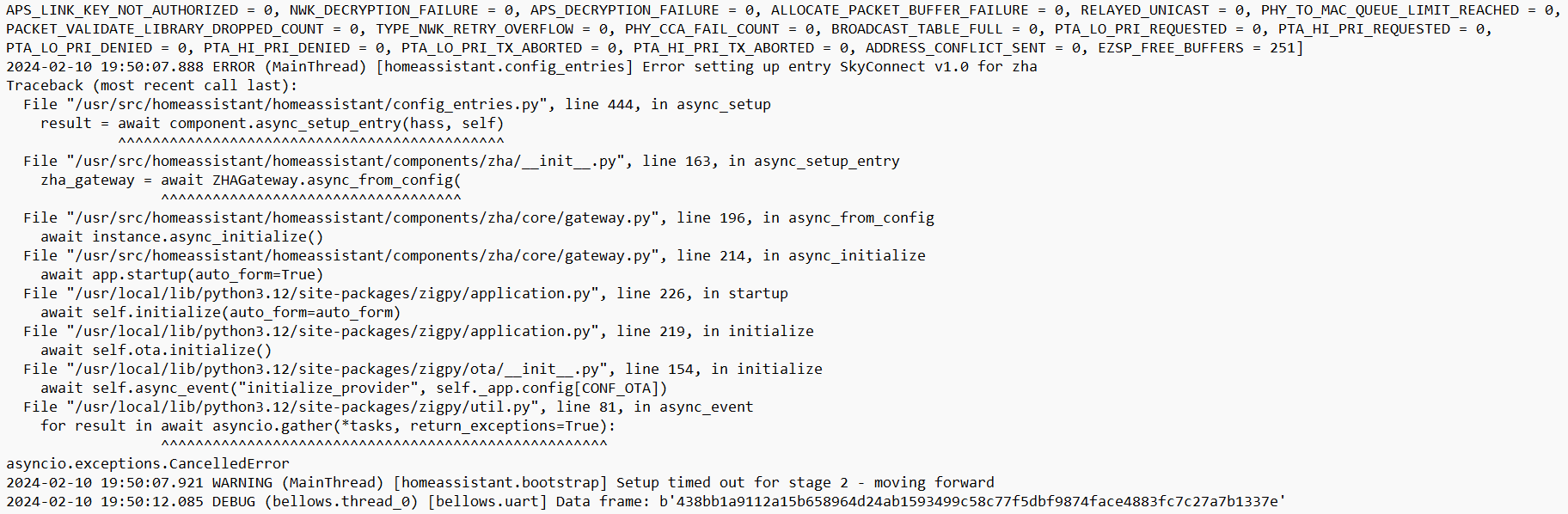
 proven frigate
Is that Ajit Pai? 🤢🤮🤮
grim igloo
proven frigate
Is that Ajit Pai? 🤢🤮🤮
a shit pie*
it's the closest we're gonna get to a kek emoji here
last rain
Hey all, is the SkyConnect the best if I just want to run Zigbee with ZHA?
Alot of my stuff is Hue without the hub FYI.
ashen bluff
See here for recommended adapters for ZHA: https://www.home-assistant.io/integrations/zha/#recommended-zigbee-radio-adapters-and-modules
rapid dawnBOT
There is no universal best anything. There's always trade-offs, you need to explain:
- Your priorities/desired features
- Where in the world you are
- Your budget
- Any protocols that you'd prefer (eg Zigbee) or want to avoid (eg Zigbee)
 smoky anvil
Hello team, not sure if there is any Z2M users here but worth a shot... when the map show devices link to each other but shows other device not link to anything, what does it mean? I have 6 lights that function as normal but when the map loads it does not show them connected. How ever it does show connected as sibling. Ideas?
rapid dawnBOT
Please use imgur or other image sharing web sites, and share the link here.
Image posting is blocked in most channels to discourage people from sharing text as images. Sharing text as images assumes that everybody sees the world as you do, which isn't the case. Some people are colour blind, or have visual impairment that means they can't make sense of an image of text.
ashen bluff
When describing something you see it's often a good idea to share that thing 🙂
smoky anvil
ashen bluff
When describing something you see it's often a good idea to share that thing 🙂
ok, here is not connected - https://ibb.co/Qf2jCrd, here is connected -https://ibb.co/bRSHs6k
to the outer side of the first image you can see lights not link
ashen bluff
I've seen this a few times but never saw a single/universal thing that caused it.
smoky anvil
they work
is not like they don't lol, but wanted to know if it means something that I should be concerned
add more routers, etc...
ashen bluff
Maybe there's some LQI related messages in the log.
smoky anvil
ashen bluff
Maybe there's some `LQI` related messages in the log.
Let me see if I can trigger one of the devices and capture th message
soooo much going on LOL
info 2024-02-14 20:53:53MQTT publish: topic 'zigbee2mqtt/Living Room Light 1', payload '{"brightness":18,"linkquality":123,"power_on_behavior":"on","state":"OFF","update":{"installed_version":-1,"latest_version":-1,"state":null},"update_available":null}'
info 2024-02-14 20:53:59MQTT publish: topic 'zigbee2mqtt/Living Room Light 1', payload '{"brightness":18,"linkquality":123,"power_on_behavior":"on","state":"ON","update":{"installed_version":-1,"latest_version":-1,"state":null},"update_available":null}'
smoky anvil
ashen bluff
Maybe there's some `LQI` related messages in the log.
I filter the logs and thats what I captured
rugged swift
What does temperature_periodic_support do in the settings of a temp/humidity sensor?
it goes from 0 to 100
 small token
is this still up-to-date? https://zigbee.blakadder.com/
or is there a better current list
 austere bridge
this and https://www.zigbee2mqtt.io/supported-devices/ are my go-to lists
 hard swift
how many devices for each node and limited devices for coordinator
sour shadow
What do you mean?
hard swift
i mean how many devices can add to each node zigbee and total how many devices of the coordinator
 ivory shuttle
depends on the routers and the coordinator
hard swift
i use sonoff dongle-p
and for each node I use the switch itself and the circuit breaker as a router
sour shadow
Total devices is > 100, exactly how much depends on your devices and mesh
How many connections each router device supports depends on the device, somewhere from 4 to 50 (or so)
https://github.com/Koenkk/Z-Stack-firmware/tree/master/coordinator#z-stack-coordinator-firmwares has some useful numbers, as long as you take the time to read the notes and understand what the numbers mean
hard swift
sour shadow
<https://github.com/Koenkk/Z-Stack-firmware/tree/master/coordinator#z-stack-coor...
thank
calm python
Hi, I just got my Sonoff Zigbee dongle which I have integrated with ZHA.
I´ve added my Hue Gradient Signe floor lamps as well as my Hue Surimu. However it seems that in Home Assistant I´m only able to set a single light for the Signe floor lamps. They should have 3 individually controlled zones.
Am I missing something here? Do I need a Hue Bridge to be able to get all the functionalities with my Hue devices?
rugged swift
Hey, I have an Aqara E1 thermostat and I'm feeding it with data from an external sensor but now it holds 23,5°C in the room but I have it set to 20,5°C
https://imgur.com/FDmf5at - It's amazing how well it holds thew 23,5°C but I would like it to hold the temp I set it to 😅
 daring ibex
Hi guys, ever since the latest Zigbee2mqtt update, I have been having issues with my devices. I can't seem to be able to control them anymore, at all. All I receive are these error messages:
error 2024-02-15 18:08:30Publish 'set' 'state' to 'Living - Amplifier' failed: 'Error: Command 0x3425b4fffef79e12/1 genOnOff.on({}, {"timeout":10000,"disableResponse":false,"disableRecovery":false,"disableDefaultResponse":false,"direction":0,"srcEndpoint":null,"reservedBits":0,"manufacturerCode":null,"transactionSequenceNumber":null,"writeUndiv":false}) failed (no response received (117))'
error 2024-02-15 18:08:31Publish 'set' 'brightness' to 'Living - table light' failed: 'Error: Command 0x90ab96fffe6d35db/1 genLevelCtrl.moveToLevelWithOnOff({"level":236,"transtime":10}, {"timeout":10000,"disableResponse":false,"disableRecovery":false,"disableDefaultResponse":false,"direction":0,"srcEndpoint":null,"reservedBits":0,"manufacturerCode":null,"transactionSequenceNumber":null,"writeUndiv":false}) failed (no response received (118))'
error 2024-02-15 18:08:32Publish 'set' 'brightness' to 'Living - Window light' failed: 'Error: Command 0x90fd9ffffedfc0d7/1 genLevelCtrl.moveToLevelWithOnOff({"level":236,"transtime":0}, {"timeout":10000,"disableResponse":false,"disableRecovery":false,"disableDefaultResponse":false,"direction":0,"srcEndpoint":null,"reservedBits":0,"manufacturerCode":null,"transactionSequenceNumber":null,"writeUndiv":false}) failed (no response received (120))'
I am using a Conbee stick, and have about 30 devices which all used to work
grim igloo
daring ibex
I am using a Conbee stick, and have about 30 devices which all used to work
https://github.com/Koenkk/zigbee2mqtt/issues/21162 probably related to this - not sure what version you are on
daring ibex
I'm on 1.35.3. I believe they issued a hotfix, which seemed to fix the problem. But coming home today, and I can't seem to turn the light on again
 austere river
Does anyone know of a good thread or page where I can read about the differences between zha and z2m?
 finite pawn
I run zha with a Sonoff 3.0 dongle and lots of devices (120ish), mostly plugged in stuff. I bought a four-pack of Third Reality door (binary) sensors the other day on Amazon. Three of them paired up as expected, but one of them had a complication and I had to delete it and start over. Now it has its main output listed as "IAS zone" instead of "Opening" like the others. Other issues: the firmware version does not show up on the device page and the battery level says "Unknown" instead of 97 percent or whatever like the other three.
I have tried deleting the device, rebooting my home assistant machine, and then re-adding it, but it adds correctly (like the other three identical sensors). At one point it was showing up in the zigbee device list, but the page for the device had no "three dots" menu with the remove option. When this happened I deleted references to the device in the core.device_registry, core.entity_registry, core.restore_state. After this I could add the device again, but it STILL shows up with IAS zone, no firmware info, and a non-working battery level sensor.
What do I do here? Thanks.
 deep plover
I really need to get this working, I have home assistant os on a rpi 4, I plugged the the skyconnect usb into the pi with using the extender yet the pi doesn’t detect the dongle under hardware at all, I’ve tried extending it further from any obstructions, I just don’t know what to do that it won’t work
small token
deep plover
I really need to get this working, I have home assistant os on a rpi 4, I plugge...
Sounds like drivers
deep plover
small token
Sounds like drivers
what should I do 😢
fleet knoll
TheAppleFreak, Tinkerer
I took what y’all said and purchased the Green and SkyConnect the other day! I’m excited for it to get here. Should be here tomorrow or so.
As I wait, figured it would be a good idea to watch some vids and such. This video… confused me. Isn’t QuinLED & WLED not compatible with Zigbee? This guy, with 100% zigbee setup, just used it with his setup. How does he do it??
sudden yarrow
WLED is running via WiFi, so it will be recognized through your network connection
austere patio
As long as your events end up in some central place (i.e. HA), you can react to button presses on a Zigbee scene controller and then trigger both WiFi and Zigbee lights at the same time. The underlying protocol sort of becomes irrelevant once they're all in HA.
fleet knoll
Ohh I see. So is there a way to get the same effect as in the video with strictly Zigbee lights?
(and not using two additional systems for me to learn?)
Side note:
In order to get addressable lights to be ‘seen’ on HA, do you need a controller thing or do some Zigbee devices come with the ability to be seen/controlled already?
(If this question doesn’t make sense I’m sorry. Very new)
carmine hamlet
you need a Zigbee coordinator to communicate with Zigbee devices
fleet knoll
carmine hamlet
you need a Zigbee coordinator to communicate with Zigbee devices
Oh so the SkyConnect then right? Do I need just the one or multiple?
Pretty sure just the one right
carmine hamlet
yes, and just one
ivory shuttle
a zigbee mesh requires precisely 1 coordinator, cannot have 2, cannot have zero. The skyconnect with the zigbee firmware is a coordinator.
fleet knoll
Thank you both! Getting into addressable lights and such is so cool but a little complex to me in the beginning lol
short sandal
Theoretical question as I have no real interest but: is there any way to do high availability of Home Assistant with a USB Zigbee modem? Just curious. Eg: PSU fails on active box etc.
small token
deep plover
what should I do 😢
Does anything you plug in via USB get recognized?
languid sky
I want to start over with ZHA. IDK, maybe I've got some kind of mess that a clean start will fix.
I removed all the devices from ZHA, shut off HA, disconnected the dongle from USB, waited 30 min.
What else should I do? Any files I should delete before connecting the dongle back to USB and maybe yet another restart?
Any "hard reset" procedure for Sonoff Dongle–P?
mellow geode
I doubt you'll need to, but you can delete the zigbee.db file in your /config directory.
To completely reset the Dongle-P, re-flash the firmware.
For now, Z-Stack 20221226 is recommended, as newer versions have issues with randomly crashing.
 dense zenith
So I bought a bunch of Tuya Temp/Humidity sensors (zigbee). I did it a bit rashly on Aliexpress and subsequently have read lots of negative things about Tuya and it sounds like there are/were challenges in integrating with HA without use of Tuya cloud. Could anyone tell me what the best approach is in 2024? thanks
(I have the rectangular one that looks like this btw https://m.media-amazon.com/images/I/41B1DjdFjbL._AC_UF894,1000_QL80_.jpg
 sour shadow
Good news, you said they're Zigbee so you can set up a Zigbee mesh
- Pick ZHA (part of HA) or Zigbee2MQTT (external to HA)
- Buy a recommended coordinator
- Buy some (Zigbee) router devices
- Profit
dense zenith
I I've got Zigbee2MQTT already set-up and conrolling some Hue lights.
Is it just a matter of adding a device and searching for the Tuya brand?
Its just that the tuya search result has a little cloud icon, I assumed I don't want that
sour shadow
Just pair it, like any other Zigbee device
Ideally you'll find it listed at https://www.zigbee2mqtt.io/supported-devices/, that'll make it easier for you
dense zenith
I think this is the one - slightly different logo: https://www.zigbee2mqtt.io/devices/TH02Z.html
So in Home Assistant --> Settings --> Devices and Services --> Devices tab --> Add Device
Then I select the Tuya brand with the cloud logo?
sour shadow
No
dense zenith
I think for my lights I cycled power to get them paired. Can't see any buttons on the Tuya sensor at all... They better not have sent me the wifi version!
sour shadow
You want to add it to your Zigbee mesh, correct?
dense zenith
yes
sour shadow
Then ... your mesh is handled by Zigbee2MQTT, correct?
You want to use Zigbee2MQTT to pair the device
dense zenith
ah yes, of course - sorry, being a bit dim
fleet knoll
sour shadow
1. Pick ZHA (part of HA) or Zigbee2MQTT (external to HA)
2. Buy a recommended co...
I’m gonna save this, great intel.
Does this apply to BTF Lighting lights too?
sour shadow
Are they Zigbee?
Or, have you replaced the controller with a Zigbee one?
If so, yes
If not, no
If none of that makes sense... then who knows
fleet knoll
sour shadow
Are they Zigbee?
That is the part I’m trying to figure out. The naming system for lights is very strange to me. Idk what a WS vs SK is or what the following numbers represent. I’m still working on that.
I have the SkyConnect if that’s what you’re asking.
sour shadow
fleet knoll
That is the part I’m trying to figure out. The naming system for lights is very ...
Well... nobody can help you if you don't provide details
Odds are about 100% that the strips are just strips, and that the controller is what matters
Oh, and WS and SK... those are the types of LED
See https://quinled.info/2019/06/02/what-digital-led-chip-to-choose/
 bold nymph
Can I group multiple Aqara D1 light switches in Z2M?
 hasty prairie
noob here. how do I repair a zigbee device in the zha integration? I changed the channel I'm using to get a little farther away from my 2.5ghz wifi bands but now my one (and only) sensor isn't reporting in :/
I tried "reconfigure" but that didn't do anything
ember night
You have to go through the same procedure as when you first paired the device. Typically some button press or combination on the device. Sometimes the device needs to be reset first, this is device-dependent and should be in the manual
hasty prairie
👍
ember night
Basically, your device is still looking for your coordinator on the old channel...
languid sky
mellow geode
I doubt you'll need to, but you can delete the `zigbee.db` file in your `/config...
done, any other files/phrases to grep for deletion? i grepped "zigbee" and found nothing of interest, so i guess that's it…
fleet knoll
sour shadow
Oh, and WS and SK... those are the types of LED
See <https://quinled.info/2019/0...
You led me down a massive rabbit hole lol I just learned how much I didn’t know about what I don’t know. 🤷♂️
power is life. But also can end my life if done incorrectly.
grim igloo
fleet knoll
You led me down a massive rabbit hole lol I just learned how much I didn’t know ...
Jump to #diy-archived for led talk btw. Added benefit of being able to post pictures of your project there. Wled is definitely the way to go and Quindor’s docs and hardware are great 👍🏻
fleet knoll
grim igloo
Jump to <#444529271806099486> for led talk btw. Added benefit of being able to p...
Can I discuss Zigbee specific LED talk in there? Because man…. I now have sooo many things to look through for Zigbee bulbs & strips that I may need.
grim igloo
fleet knoll
Can I discuss Zigbee specific LED talk in there? Because man…. I now have sooo m...
well there are like philips hue led strips that could be paired to zha/z2m but those wouldnt have wled or any effects or advanced stuff so i dont really understand why you're asking about zigbee still given what you've learned so far about led strips
fleet knoll
grim igloo
well there are like philips hue led strips that could be paired to zha/z2m but t...
I’m not certain I exactly KNOW anything about this world. I know what I want, which is to have a lot of home automation simply because it’s cool. All local & a strong non WiFi network. Accent & general lighting in the Kitchen, bathroom, bedroom etc.
I’m under the impression this can all be achieved by lights compatible with Zigbee. I believe I should download/install zha on my Green.
But honestly, the more I watch or read, it seems like I’m getting further away from really knowing what I NEED. Now that video is saying that I should probably learn about adding fuses and power injections… just rolling with it day by day.
halcyon owl
I just received a lock for the front door Aqara U100. it has a M2 hub with it. I don’t really care if the lock ties into HA or not. When I’m concerned about, however, is this M2 hub has Zigbee running on it I understand there is a way to tie it into HA but the concern I have is the second hub in my house will that interfere with any of the Zigbee stuff that’s already running? maybe the signals see this hub but realized it doesn’t need to go there so they just bypass it I don’t know. It just wondering if it’s going to screw up my existing network.
bold nymph
bold nymph
Can I group multiple Aqara D1 light switches in Z2M?
I can group light bulbs and smart plugs, but I cant seem to be able to group the 3 gang light switches together
There’s 16 endpoint for each light switch, binding the “left” or “center” does nothing
 ocean cloak
Has anyone else had issues with their FP1 since the firmware update 1-2 months ago? I have two and after a day or two it gets stuck in "away" state and won't detect presence
carmine hamlet
I've had that sort of issue on and off since I got them, including after the firmware update. They work fine most of the time, but I'll periodically notice that lights are staying on and it's stuck in "enter" mode. I don't think I ever see my stuck in "leave" or "away" mode, but I suspect it's a similiar issue
sour shadow
ocean cloak
Has anyone else had issues with their FP1 since the firmware update 1-2 months a...
Never had them get stuck in away, had them stuck in "present" before - but not since the firmware update (so, it'll happen today)
 drowsy quarry
I've the HA Green with the Sonoff Plus-E. I'm a huge newbie here. I've installed the mosquitto and z2m , but z2m isn't starting., I've disabled ZHA. None of the guides are helping. Do I need to flash firmware to get the z2m rolling?. adapter: ezsp isn't working either
sour shadow
When the add-on doesn't start it produces a log telling you why
 young cypress
Hi all, how is the Right way to add a new Zigbee OTA provider firmware sever to HA?
drowsy quarry
it sends me tot eh default https://www.zigbee2mqtt.io/guide/installation/20_zigbee2mqtt-fails-to-start.html after error with starting zigbee-herdsman. Very generic error. Do you have a goto guide for a totally fresh install to get z2m up and running? https://www.youtube.com/watch?v=L9lC0Mse0K4 from the pinned messages didn't get the error that I got
sour shadow
You know... if you were to share the log (and your Z2M config) then we could actually help you 😉
Just saying "error" doesn't help anybody
drowsy quarry
Yeah sorry. I'll restart the convo / self complain when I get home later to my lovely HA system. I was just asking blindly if there were some very usual suspects when it didn't work out of the box following the guides
sour shadow
There's too many to count
You've done the equivalent of phoning the car garage and asking them what the strange sound from the car is, while not having the car with you or them
 ember raven
What would be the most stable way to get my radiator TRV to use the input temperature from an external sensor (both Aqara)? I think they way I do it right now seems glitchy, and I got some feedback here that it might not be the best way. Right now I publish the external sensor value to the radiator every time the sensor changes, using an automation.
I intermittently get errors (one example:)
2024-02-16 10:24:54Publish 'set' 'sensor' to 'Small Study Radiator' failed: 'Error: Write 0x54ef4410006fdbae/1 manuSpecificLumi({"65522":{"value":[170,113,52,68,19,90,2,65,49,101,207,41,218,61,5,84,239,68,16,0,111,219,174,0,21,141,0,1,157,27,152,8,0,7,253,22,10,2,10,201,232,177,184,212,218,207,223,192,235,0,0,0,0,0,1,61,4,101],"type":65}}, {"timeout":10000,"disableResponse":false,"disableRecovery":false,"disableDefaultResponse":true,"direction":0,"srcEndpoint":null,"reservedBits":0,"manufacturerCode":4447,"transactionSequenceNumber":null,"writeUndiv":false}) failed (no response received (35))'
Z2M or ZHA?
rapid dawnBOT
@earnest grail I converted your message into a file since it's above 15 lines :+1:
sour shadow
The coordinator is on a USB extension cable?
ember raven
sour shadow
Z2M or ZHA?
Z2M
sour shadow
ember raven
Z2M
The blueprint works for me
ember raven
And I have a ConbeeII on an extension cable.
 earnest grail
sour shadow
The coordinator is on a USB extension cable?
earnest grail
sour shadow
The coordinator is on a USB extension cable?
Yes, connected to the USB 2.0 port. About 1.5m long
sour shadow
You picked a channel clear of WiFi?
ember raven
sour shadow
The blueprint works for me
There's a specific blueprint for this? Does it also include forcing the TRV to stay on external sensor? It seems that's still an issue that it keeps jumping to internal
ember raven
Maybe it's not related, but I'm getting some strange errors that I've never seen, in the UI of Z2M:
zigbee-herdsman-converters:lumi_trv: Unknown key 641 =
4��84�4
and others similar to that with different numbers
earnest grail
sour shadow
You picked a channel clear of WiFi?
The channel is the default 11. I tried with the 15 and 20 as well. They behave exactly the same. The channel is fairly free with 5% utilization
ember raven
sour shadow
<https://community.home-assistant.io/t/z2m-aqara-trv-e1-link-external-temperatur...
Nice! Will use that Blueprint either way, evne if not all my problems are related.
sour shadow
earnest grail
The channel is the default 11. I tried with the 15 and 20 as well. They behave e...
Sounds like a problem with the device - try another?
earnest grail
New devices are coming today and I will surely try. The device works correctly with the manufacturer gateway though
sour shadow
You may also want to downgrade to the 2021 firmware
ember raven
Oh I see the blueprint does check the internal/external sensor, nice!
Do you think the errors I shared could be related, or does that sound different? I noticed because the TRV is going crazy constantly opening and closing the valve, so I went to investigate
earnest grail
sour shadow
You may also want to downgrade to the 2021 firmware
This one I suppose CC1352P2_CC2652P_launchpad_coordinator_20210708.hex
Let's see how it goes, tyvm
ember raven
sour shadow
Maybe try some fresh batteries?
Can do, but I put some proper expensive Li batteries (non-rechargeable) in them in November, they should last longer than this. So either way something is up
Is there any preferred host for sharing a screenshot?
sour shadow
Not really, just not pasteboard
ember raven
Clear that I have a battery issue here:
https://ibb.co/Lz95hzt
sour shadow
Keep in mind that battey level reporting can be ... quite wrong
ember raven
Yes indeed, that I get. but a battery should last longer than 3 months 😄
earnest grail
sour shadow
Not really, just not pasteboard
Tried 2021, 2022 and 2023 firmwares to no avail. Exactly the same behaviour
sour shadow
ember raven
Yes indeed, that I get. but a battery should last longer than 3 months 😄
I've got a couple of sensors that had a rapid level drop and have sat at 0% now for over a month, working happily
rapid dawnBOT
@earnest grail When using Discord's Reply feature it defaults to pinging the person you reply to, which can get frustrating for the target. Use Shift + click on the Reply option, or click @ ON to @ OFF to stop this - on the right side of the compose bar.
You have to change this every time (thank the Discord devs for that).
sour shadow
earnest grail
Tried 2021, 2022 and 2023 firmwares to no avail. Exactly the same behaviour
Then the problem is with the device, or your RF environment, or both (or you've got a broken coordinator)
earnest grail
I will wait for some new devices and try to pinpoint the problem, thank you again
ember raven
sour shadow
I've got a couple of sensors that had a rapid level drop and have sat at 0% now ...
Yes indeed, I expected that too, and have some sensors with the same issue.
I hear my TRV opening and closing the whole time, and it keeps jumping to Calibrated: False. Is there a specific log I can look at to find the problem, or is your suggestion still to try and see if it's a battery issue>?
Ah! I see it keeps going into setup mode (F11 on the screen), and then it calibrates if I press it 3 times, and then a few seconds later it goes back into F11
sour shadow
That sounds like a device problem, not a Z2M/HA problem
ember raven
Yeah, will do some more troubleshooting and then contact Aqara if needede
 limpid girder
HI,
since this morning I have not been able to control and receive updates from zigbee devices. I have an error on zigbee2mqtt on all devices like : xxxx
I tried restarting zigbee2mqtt and everything started working again for a while and then returned to the error after a while.
sour shadow
What's the error?
limpid girder
sorry, the error is
Zigbee2MQTT:error 2024-02-16 14:26:42: Publish 'set' 'state' to 'Interruttore tavolo' failed: 'Error: Command 0x000474000094c735/1 genOnOff.on({}, {"timeout":10000,"disableResponse":false,"disableRecovery":false,"disableDefaultResponse":false,"direction":0,"srcEndpoint":null,"reservedBits":0,"manufacturerCode":null,"transactionSequenceNumber":null,"writeUndiv":false}) failed (no response received (125))'
but looking at the logs I notice that I have a log at 12.50 and the next error log at 2.26pm, as if z2m was no longer receiving any updates. In fact, now it records errors only when trying to turn devices on or off
sour shadow
What coordinator, and what firmware version?
limpid girder
conbee2 but i don't know how verify the firmware version or how can update it
sour shadow
Z2M shows you the version
You have put the ConBee on a USB extension cable?
You have checked that your chosen Zigbee channel is clear of WiFi?
You need any Zigbee coordinator
The pinned messages have lots of useful info
Yes, but the Sonoff P (CC2652) should be avoided
The Sonoff E is fine, at least if you're not using Zigbee2MQTT for your Zigbee stack
limpid girder
sour shadow
You _have_ put the ConBee on a USB extension cable?
no i connect che conbee2 directly to raspi
limpid girder
sour shadow
You _have_ checked that your chosen Zigbee channel is clear of WiFi?
yes the zigbee channel is 11 and wi-fi 13
limpid girder
sour shadow
Z2M shows you the version
i don't know where it show the version of conbee firmware
sour shadow
No
sour shadow
limpid girder
no i connect che conbee2 directly to raspi
Step #1 - use an extension cable
- Phoscon tell you to do that
- Zigbee2MQTT's docs tell you to do that
- The pins here tell you to do that
limpid girder
sour shadow
Step #1 - use an extension cable
* Phoscon tell you to do that
* Zigbee2MQTT's ...
i find my version : 0x26580700
and i'm reading the docs of zigbee2mqtt about conbee2 :
"Warning: Conbee 2 firmware versions newer than 0x26580700 will result in an unstable network with devices dropping randomly, see Issue 9554"
now i'm confused because i have this configuration with conbee2 and z2m since 2 years. How can i downgrade the firmware ? I don't fint solution in docs
sour shadow
You have the last known good version, see the key word newer 😉
ivory shuttle
Sno, sonoff devices are all either WiFi or ZigBee.
But your pc doesn't have ZigBee. The sonoff usb dongle is the usb to ZigBee adapter. Without it home assistant can't communicate with ZigBee devices
ivory shuttle
No. ZigBee is its own thing
Just same as your WiFi isn't your phone's LTE and WiFi isn't bluetooth
sour shadow
Zigbee is a radio protocol (and other bits), a bit like Bluetooth (or Z-Wave, or Thread)
limpid girder
sour shadow
You have the last known good version, see the key word _newer_ 😉
I just have to try the extension cable
ivory shuttle
Zigbee networks need one (and precisely 1, not 0 or 2+) "coordinator" which acts a lot like your central point of contact. The sonoff dongle (among others) is the coordinator. Then the ZHA or ZigBee2mqtt add-ons for home assistant allow home assistant to connect to the dongle, and in turn add ZigBee devices to your home assistant setup.
 vocal tree
I'm looking for advice on radio planning for Zigbee, WiFi & Thread. I have four Wifi APs operating on the non-overlapping 1-6-11 channels. Three Hue bridges on channels 11, 15 and 20. A primary Zigbee network with most of my devices on channel 11 (Sonoff ZBDongle-E), a secondary Zigbee (need to get rid of this) running my electricity meter on channel 25 and Thread on 25 (both on a skyconnect multiprotocol). The Thread network is really busy, nearly 50 end/router devices and 13 thread border routers.
One of my hue bridges had issues with unreachable bulbs, looked and saw it was on channel 25, changed it to 15
but still having issues
sour shadow
Any reason you're not moving all the devices from Hue to ZHA/Zigbee2MQTT?
That'll solve a lot/all of any Hue related problems
vocal tree
Just that I've only recently deployed home assistant... if the hue & ikea bulbs will work reliably on zigbee2mqtt that would probably work OK
sour shadow
Yes, they do
vocal tree
including firmware updates?
vocal tree
OK... that sounds like a plan. I got a fiance complaint this morning "why do the lights never work for me" so I got to get on that ASAP. What would be reasonable limits for numbers of devices on a single zigbee coordinator/channel?
sour shadow
Somewhere between 100 and 300 depending on your setup
Most people find that problems start appearing around 150 to 200 devices, but sooner for very chatty ones, and later for ones that talk less
vocal tree
Would hue bulbs be generally chatty? I have up to 60 hue bulbs in the largest room
vocal tree
I have only 4-5 of those, the remainder are all on thread