#zigbee-archived
1 messages · Page 17 of 1
 hollow rover
 sour shadow
With ZHA, or Zigbee2MQTT?
sour shadow
Well, E1 is the sub-range of Aqara devices, like T1, or P1
hollow rover
Yes im searching for thermostats and aqara ones are on sale right now
 fast sentinel
something i should look into? or just go with that linked one?
 tropic depot
if things work for you just stay put
fast sentinel
tropic depot
if things work for you just stay put
i'd love to but 7.1.1 is not doing great with adding devices to the network, it takes like 4-5 tries - either it stalls out and does not add (during interview stage), or says 'unk by unk" for device name/manufacturer
tropic depot
what are you pairing
fast sentinel
same behavior with 2 different motion sensors (smartthings), hue bulb or inovelli switch
 oak pike
hi all. with the nortek zwave/zigbee combo usb controller, is there a means to back up the zigbee config? Thinking in the context of if I were to experience a usb controller failure and how I'd go about restoring it.
fast sentinel
oak pike
hi all. with the nortek zwave/zigbee combo usb controller, is there a means to b...
with ZHA you can backup the config to a .json file, not sure how on Z2M
oak pike
@fast sentinel would that "backup the config to a .json" be outside of the scope of a regular home assistant backup? I'm trying to get a feel if the HA backup is just users, dashboard layout, stuff like that, or if it does anything more in the way of each end device or if I'd be stuck re-pairing everything individually in case of needing to do a rebuild.
 jade mirage
hmm
fast sentinel
oak pike
<@325723584913735692> would that "backup the config to a .json" be outside of th...
so my case i run HA in a VM, so i backup that VM nightly. i cant say if the manual HA backups include the ZHA/zigbee network config
but for sure if you do the backup from the ZHA page, you wont have to re-pair anything
oak pike
@fast sentinel "...if you do the backup from the ZHA page" -- where are you referencing the ZHA page in question?
fast sentinel
oak pike
<@325723584913735692> "...if you do the backup from the ZHA page" -- where are y...
the configuration page for ZHA. in HA, if you go to settings -> devices & services -> click 'configure' on the ZHA integration. in this page, where you see your network settings, there's a 'DOWNLOAD BACKUP' button
 molten linden
@oak pike ZHA/Zigpy does automatic backups. (I'm not sure the frequency but it's at least once a day) they are stored in the zigbee.db
 austere patio
oak pike
now to see if I can schedule it. 😄
austere patio
oak pike
now to see if I can schedule it. 😄
Yeah, there's no need. It's done automatically on startup, every 24 hours after that, and immediately when you trigger a HA backup.
 lofty hamlet
Are all the hue bulbs zigbee capable?
I'm looking at the 5/6 retrofit recessed downlight
old version lists zigbee
"new version" doesn't list zigbee
https://www.amazon.com/Philips-Hue-Downlight-Bluetooth-Compatible/dp/B084D6THFG?th=1
 mellow geode
lofty hamlet
Are all the hue bulbs zigbee capable?
I'm looking at the 5/6 retrofit recessed d...
mellow geode
lofty hamlet
Are all the hue bulbs zigbee capable?
I'm looking at the 5/6 retrofit recessed d...
They are all Zigbee capable. The newer ones also have Bluetooth and feature newer Silabs chips
lofty hamlet
awesome thanks, wish that was listed on the amazon or even their site page (unless I'm just blind)
 lapis gyro
Any idea why my light(s) wont toggle on or off? They were working after initial setup then they just stopped working. Brightness still works, same with color. Just no toggle functionality
sour shadow
You're using Zigbee2MQTT and still having issues when trying to control them directly from Z2M?
If so, you may want to try joining the Z2M Discord
 brave nacelle
Any Current E-wand users here?
None of the controls/options for the configured device are working, it paired just fine
brave nacelle
Seems after removing/re-adding, it almost kind of works
I had to click the 'close arrow' about 10 times and it finally closed it all of the way
clicked the 'open arrow' on the cover control, hit the stop button mid-way and it opened it
just now, it won't close or open it more
lapis gyro
sour shadow
You're using Zigbee2MQTT and still having issues when trying to control them dir...
mind linking me it
and yes I am
sour shadow
lapis gyro
mind linking me it
https://www.zigbee2mqtt.io/ and select Support
It's carefully hidden there, to make it really hard to find
brave nacelle
Something must be funky between the zigbee connection and the blinds
 undone heath
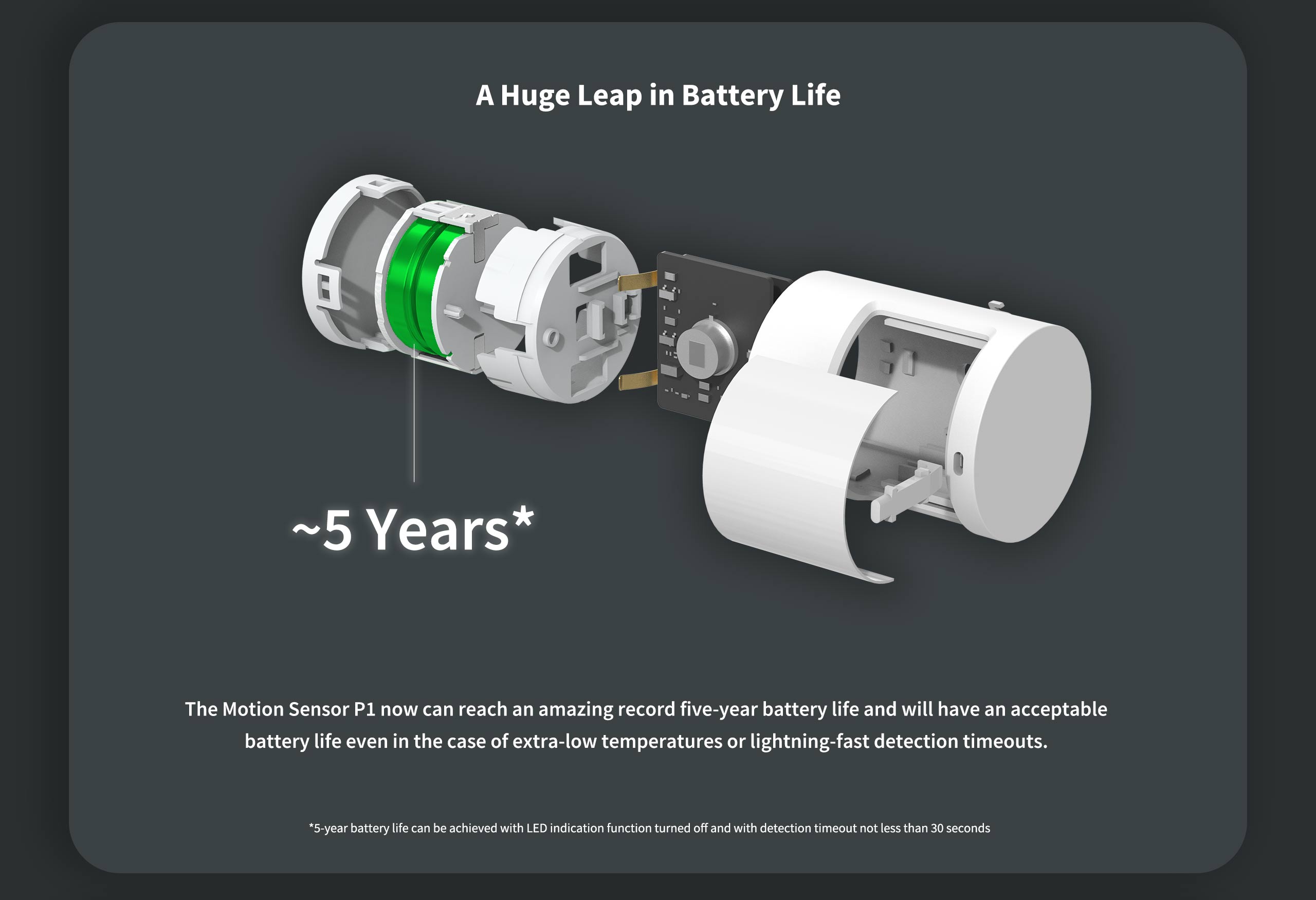
Hi all, has anyone experienced a battery drain on Aqara P1 Motion Sensor? From 100% to ~75% in around one month. That means 4 months of battery life instead of 5 years. Presence led is off and cool off period is 30 seconds as described here: https://cdn.aqara.com/cdn/website/mainland/static/image/Motion-Sensor P1_pc_05.jpg
I am using HA with ZHA and Sonoff ZBDongle-E.
hollow rover
Any updates with the aqara c1 cat feeder with zha?
sour shadow
Have you checked for any PRs?
hollow rover
ive seen the one from dmulcahey
molten linden
quirk was merged to dev, it will likely be in the next zha-device-handlers release, then the next HA release as it requires some new code on ZHA side for all the config entities (https://github.com/home-assistant/core/pull/82340)
hollow rover
okay, thanks! 🙂
 mighty river
I am trying to setup Zigbee2MQTT with Sonoff 3.0 but keep getting the error cannont open device /dev/...
I tried checking what usb it is using the ls -l within the terminal add on but can't locate it, please can someone point me in the right direction
ls /dev/tty* or lsusb with ans without the stick
you should then see the device though i would recommend using /dev/serial/by-id
maybe do a ls /dev/serial/by-id
That gives me this https://imgur.com/a/1VrYdlN
sour shadow
Chech the HAOS hardware menu
mighty river
I am completely new to HA so I may have done something wrong in setup, I created a VM using oracle and have a Sonoff Zigbee 3.0 USB dongle if that helps
sour shadow
There's two different versions of that dongle, but did you pass it through in the VM settings?
mighty river
mighty river
That gives me this https://imgur.com/a/1VrYdlN
oh ye looks like HAOS does not support serial by-id
sour shadow
Sure it does
mighty river
hmm then maybe the USB Stick is not a serial device but a USB Device
sour shadow
Or ... maybe it's not passed through to that add-on 😉
mighty river
In the VM settings I have passed the USB
i think the Phoscon Sticks are USB Devices
mighty river
sour shadow
Or ... maybe it's not passed through to that add-on 😉
if you have HA OS running on hardware and open a terminal you should be able to see it, plugin does not matter there
or is it HA OS in a VM?
then you have to pass through the USB Device to the VM
This is the setting ive added to pass it through, ive just removed and readded to see if that does anything
sour shadow
mighty river
if you have HA OS running on hardware and open a terminal you should be able to ...
Terminal, or add-on
Because those aren't the same
Remember, HAOS is a bunch of Docker containers
mighty river
on the hardware page "http://homeassistant.local:8123/config/hardware" it only shows
Virtual Machine Ova
Processor Use
Memory Use
sour shadow
Check 
mighty river
Check what sorry?
oh nvm
im being an idiot ik you mean 3 dots top right
been a log day lol, one moment
sour shadow
Yes
mighty river
I just searched for silicon (what its labeled as in my device manager on W11) but nothing popped up
mighty river
sour shadow
Remember, HAOS is a bunch of Docker containers
ye I always forget that cause i‘m managing my docker containers myself with compose 😅
sour shadow
mighty river
ye I always forget that cause i‘m managing my docker containers myself with comp...
mighty river
There are some devices labeled USB and tty but I'm not sure how to figure out which one my device is
unplug it
do the same command
you will see it change
I've just done it but no changes, it must not be detecting the device
It is definetly detected on my host machine and passed through to the HA VM though
ahh if you pass it through it may not disappear in the VM cause it's a fixed symlink
 lusty trench
Hi i have upgrade Sonoff dongle-E to P. Any chance i can just transfer all devices?
mighty river
IDK what I just did but it appeared
I just replugged it for the 10th time and its working, tysm
mighty river
lusty trench
Hi i have upgrade Sonoff dongle-E to P. Any chance i can just transfer all devic...
I did that with z2mqtt without a problem
moved the E model to my home and got a new P for the workshop
 jaunty maple
Trying to setup z2m. My device is at dev/ttyUSB0 but i get an error message in the console saying it cant open ttyASM0. Any idea? Bot h docker-compose and configuration.yaml says ttyUSB0
lusty trench
how did u do that?
mighty river
just changed the device I pass through to the container and then edited the configuration.yml
lofty hamlet
Can I mix and match smart bulbs fairly painlessly?
I.E. philips seems to have one of the better downlights
but their br30 bulb is pretty dim at only 650 lumens
mighty river
ah wait it was the other way arround, one had the P model and I have an E now
austere patio
lusty trench
Hi i have upgrade Sonoff dongle-E to P. Any chance i can just transfer all devic...
Depends on the integration. ZHA has a migration option for this. Plug in the second stick and follow the instructions.
 grim igloo
lofty hamlet
Can I mix and match smart bulbs fairly painlessly?
I.E. philips seems to have on...
grim igloo
lofty hamlet
Can I mix and match smart bulbs fairly painlessly?
I.E. philips seems to have on...
It looks like they’re upgrading their line on their website. 1300lumen options on there for some bulbs
They also have buy 2 get 1 on some stuff
mighty river
if you wan to switch to an P model from an E model with Zigbee2mqtt you have to remove the
serial:
adapter: ezsp
jaunty maple
Anyone?
mighty river
and just put in homeassistant: true
permit_join: false
mqtt:
base_topic: ****
server: mqtt://x.x.x.x
serial:
port: >-
/dev/serial/by-id/usb-Silicon_Labs_Sonoff_Zigbee_3.0_USB_Dongle_Plus_0001-if00-port0
lofty hamlet
grim igloo
It looks like they’re upgrading their line on their website. 1300lumen options o...
oh sweet I had no idea
mighty river
of course the serial port has to point to your USB Sticks serial device 😄
 lilac wharf
jaunty maple
Trying to setup z2m. My device is at dev/ttyUSB0 but i get an error message in t...
lilac wharf
jaunty maple
Trying to setup z2m. My device is at dev/ttyUSB0 but i get an error message in t...
share your docker-compose and configuration.yaml
lilac wharf
mighty river
just changed the device I pass through to the container and then edited the conf...
z2m migrated between the E and P without requiring you to re-pair all the devices? i don't see any reference to that in the FAQ (https://www.zigbee2mqtt.io/guide/faq/#requires-repairing) so that would be good to add if so
mighty river
lilac wharf
z2m migrated between the E and P without requiring you to re-pair all the device...
well I unplugged the E stick, edited the conf, plugged in the P i got off amazon and it worked again
austere patio
How old is your Zigbee network?
austere patio
Anything other than sensors?
mighty river
austere patio
Anything other than sensors?
one ikea tradfri light
mighty river
it's just the workshop, but after using z2mqtt there i decided that I wanted to use it for my home too instead of the phoscon/deconz
jaunty maple
Might it be a permission thing?
This is the persmissions for the configuration.yaml -rw-rw-rw-+ 1 zucram zucram 387 nov 21 16:16 configuration.yaml
lilac wharf
your indentation is wrong in your z2m config
jaunty maple
I copied it of the homepage. Where is it wrong?
lilac wharf
also you don't need to pass /run/udev through to the container if you specify your adapter path
jaunty maple
Oh, is the guide outdated?
I still wonder if the container can read the config file since it’s saying ttyASM0 and not ttyUSB0
 rapid dawnBOT
sour shadow
rapid dawnBOT
sour shadow
YAML is YAML, whether in HA or Z2M
serial:
port: /dev/ttyUSB0
``` ❌
```yaml
serial:
port: /dev/ttyUSB0
``` Sorry thats my bad, seem to have pasted it wrongly in pastebin. It is indented correctly
 thin tinsel
Hi! Does anyone have an idea on how to fix device manufacturer unsupported in zigbee2mqtt ?
This is how it looks
thin tinsel
sour shadow
<https://www.zigbee2mqtt.io/advanced/support-new-devices/01_support_new_devices....
Am i suppose to make this for all my devices or just the ones that says not supported?
sour shadow
Well, just the ones that Z2M doesn't have support for
thin tinsel
Thats the thing, it does support Namron witch in this case is the devices
mighty river
thin tinsel
Hi! Does anyone have an idea on how to fix device manufacturer unsupported in zi...
had that while pairing my ikea blinds, delete, paired again, worked
sour shadow
thin tinsel
Thats the thing, it does support Namron witch in this case is the devices
Is it that model though, or just the same brand
Because ... https://www.zigbee2mqtt.io/supported-devices/#v=Namron&s=3802968 finds nothing
thin tinsel
mighty river
had that while pairing my ikea blinds, delete, paired again, worked
Il try that first
mighty river
ye there is not a single Filament light in the list
maybe it's compatible to other lamps like the 3802960 so you can copy the presets for that one and change the model number
sour shadow
I'd probably start with https://www.zigbee2mqtt.io/devices/3802964.html
mighty river
sour shadow
I'd probably start with <https://www.zigbee2mqtt.io/devices/3802964.html>
ah ye it's CCT
true
961 is also CCT
so maybe grab both and diff them
to see if there are other differences in 2 Bulbs from the same manufacturer with the same features
sour shadow
mighty river
ah ye it's CCT
mighty river
sorry
i always forget that shit
I have my mentions off for every bigger DC Server
sour shadow
Yeah, but as a mod, that doesn't work
I solve it by simply blocking people who don't learn 😉
FYI, if you use Shift + Reply it defaults to off
mighty river
would be nice if you could set it to default off as a server setting
sour shadow
Yeah... I know
Sadly the Discord devs think that everybody wants all the notification pings, all the time
Clearly they don't really use their own product
sour shadow
I do everywhere I'm not a mod/admin, to cut down on the crap
mighty river
ye I can relate to that
sour shadow
Of course, if I helped less, I'd get less pings 
thin tinsel
What is going into myZigbeeModel
sour shadow
Take the converter for #zigbee-archived message as your base
mighty river
and then i outputs the error
in the log console
and there is a Device ID, Model Number and a Zigbee Model in that string
likeZigbee2MQTT:warn 2019-11-09T12:19:56: Device '0x00158d0001dc126a' with Zigbee model 'lumi.sens' and manufacturer name 'some_name' is NOT supported,
thin tinsel
I should add this ?
{
"brightness_move": -40, // Starts moving brightness down at 40 units per second
"brightness_move": 0, // Stop moving brightness
"brightness_step": 40 // Increases brightness by 40
"color_temp_move": 60, // Starts moving color temperature up at 60 units per second
"color_temp_move": "stop", // Stop moving color temperature
"color_temp_step": 99, // Increase color temperature by 99
}
Thats the only shit i can see at the link
sour shadow
I'd also wild ass guess https://dpaste.org/b3527
mighty river
basically you just have to clone the git
add your Model Numer at the right place in that js file
 fossil mountain
Hi, is there a consensus what the recommended model of Zigbee TRV is? Most seem to be derived from the same models/built by the same companies ... and I am unsure what looks reliable ... and if having the valve position is necessary ... and how useful external sensor support really is ...
mighty river
and run your custom version
thin tinsel
I try restarting after using what u sad Tinkerer
mighty river
maybe set log level to debug first
then only show warnings
because it a warn message
delte the device, open the network, pair it
while looking at the Logs
thin tinsel
How do i make it debug, i had it like it before but needed to reinstall ?
mighty river
open the WebUI, go to logs
thin tinsel
ahh
Warning 2022-11-21 20:59:43Device '0x086bd7fffefc8de0' left the network
Warning 2022-11-21 21:00:17Device '0x086bd7fffefc8de0' with Zigbee model '3802968' and manufacturer name 'Namron AS' is NOT supported, please follow https://www.zigbee2mqtt.io/advanced/support-new-devices/01_support_new_devices.html
Warning 2022-11-21 21:00:23Received message from unsupported device with Zigbee model '3802968' and manufacturer name 'Namron AS'
Warning 2022-11-21 21:00:23Please see: https://www.zigbee2mqtt.io/advanced/support-new-devices/01_support_new_devices.html
got this
mighty river
hmm maybe put a modelname in there then and test if it works
thin tinsel
Name of the file ?
mighty river
mighty river
https://github.com/Koenkk/zigbee-herdsman-converters/blob/master/devices/namron....
there
thin tinsel
So this line "extend: extend.light_onoff_brightness_colortemp({colorTempRange: [153, 370]}),"
thin tinsel
Cant get it to work like that
mighty river
Hello, does anyone use the tuya gu10 zigbee rgb led bulbs? do they work in ZHA?
 gleaming jay
@molten linden got the coordinator, does it not come with an antenna by default?
molten linden
It should unless I forgot it or the package is some how damaged and it came out
Can you dm me I’ll either send one or give you a partial refund to get one

 raw lynx
anyone on the zigbee side have issues with "manage zigbee device"
I have a motion sensor and i'm trying to adjust sensitivity but the manufactur code ovveride only gives me numbers and not strings which i think is what it needs
also stupid i can't post an image but can link to one lmao
gleaming jay
If I’m switching coordinators is it best to nuke and start zha fresh?
tropic depot
raw lynx
anyone on the zigbee side have issues with "manage zigbee device"
I have a moti...
That’s never a string… what are you trying to put there
It also almost never needs to be filled in
grim igloo
this is part of the rewrite to the ui for zha you're doing right? to simplify changing settings like what he's trying to do?
tropic depot
no, this should just work
molten linden
gleaming jay
If I’m switching coordinators is it best to nuke and start zha fresh?
With zha the migration works well
tropic depot
tropic depot
That’s never a string… what are you trying to put there
Also, if it’s a battery powered device make sure you’re keeping it awake when you issue commands / mod attributes
gleaming jay
K thx I’ll check it out
 fallow warren
Are there any tricks to these ikea trådfri shortcut buttons? I never head them working great for me, usually not responsive, troublesome to pair. Should I configure Z2M to contact them more often perhaps?
 near echo
Can you see the logs in z2m and see what happens. Does it miss and clicks? Also check the LQI it it is too low. Also what type of co-ord ypu have ?
fallow warren
I will check that 🙂 I meant just in general if anything was known with these but I will do some troubleshooting when I get home
near echo
Actually i find ikea shortcut button short of value - compared to their remote, on off button or even fhe symphonisk round button - all can be repurposed to better actions
 nova jasper
Hi, i have multiple xiaomi aqara motion sensors (not the p1). I used deconz for 2 years and i was able to set the duration for the sensor to 5 sec, then it would go to not detected state. Worked perfectly. I recently switched to ZHA and now i use an automation to set the state to not detected. Now my sensors go to 'not detected' after 5 sec only they all show random false positives after this reset. So i trigger the sensor and then put it in a box, and after 20 or 30 sec i see a detected state come up. I tried multiple sensors.
sour shadow
Unless you modify them (in hardware) they've a fixed 60 second cooldown before detecting more motion
nova jasper
I did modify all of them 2 years ago. I still get the false positives even when I take out the battery immediately after triggering it.
 rigid bloom
Is there any possibility to get the battery level for the Aqara Thermostats? Actually there are no levels shown. I'm using the Sonoff Zigbee Stick and HA in a Docker environment
sour shadow
ZHA I'm guessing?
rigid bloom
yes
austere patio
rigid bloom
yes
If you've modified all of them, you can use a custom quirk: https://dpaste.org/DV5zL. Save it as a .py file and point ZHA to the directory: https://www.home-assistant.io/integrations/zha/#custom_quirks_path
Oh whoops, wrong reply. That was meant for @nova jasper.
nova jasper
@austere patio I will check this out later today. Thanks a lot
fast sentinel
hello all - strange issue, hope someone can point me in the right direction. anytime i remove/re-add battery powered motion sensors, they never join back as 'new' in HA/ZHA. The history is always there for the device (ie motion 20 hours ago in the logbook), and the values do not update (ie Iaszone value), although check-in time is always within 10 minutes, and device shows as available. someone mentioned to wait to re-join after removal, this time i waited an entire day, and same. the entity names are definitely different. how is HA/ZHA correlating the device to it's prior dead/removed self? is there some database purge i need to do?
austere patio
How did you remove the device?
fast sentinel
click on the device, three dots, 'remove'
i just rejoined this sensor after 24 hours, and the logbook:
https://imgur.com/3dL3LAz
austere patio
Interesting. I'll check it out.
fast sentinel
if i can provide any data from my instance let me know; whatever you need
raw lynx
tropic depot
That’s never a string… what are you trying to put there
i'm attempting to alter the sensitivity level of the motion sensor
austere patio
raw lynx
i'm attempting to alter the sensitivity level of the motion sensor
Try just HIGH
raw lynx
type that into Value?
austere patio
Yes
raw lynx
gotcha thankyou
thin tinsel
Do anyone know how to connect hue bulbs to zigbee2mqtt ? and how ?
 hearty night
anybody know of any (cheap) zigbee relaying multicolor lights?
I currently have sengled lights but they don't relay and they're not cheap
sour shadow
thin tinsel
Do anyone know how to connect hue bulbs to zigbee2mqtt ? and how ?
Follow the Z2M docs for the bulb?
sour shadow
hearty night
anybody know of any (cheap) zigbee relaying multicolor lights?
Tradfri (Ikea) works well
thin tinsel
Thank you, worked!
 cerulean raven
Hi all! I am new in home assistant. I have it up and running. I also would like to build an array of smart devices that will automate some tasks like turning the light on and off. I decided to go with Zigbee protocol. However, I am not sure what vendor to choose. The only one I know is Sonoff. Do we have some kind of 101 article that I can use to build my basic "smart" devices mesh? I am from Ontario, Canada. Thank you so much for your help!
hearty night
TRÅDFRI look to be the same price as sengled, they will act as zigbee mesh relays though ?
austere patio
They will
hearty night
cool I will pick one up to test out, thanks
thin tinsel
Anyone have an idea why 2 of my hue bulbs is coming straight inn, but the last one is not to be seen?
fast sentinel
@thin tinsel sorry i do not understand, can you elaborate ?
thin tinsel
fast sentinel
<@491952869361319966> sorry i do not understand, can you elaborate ?
When I try to connect my three philips hue bulbs to the zigbee2mqtt I can only see two of the bulbs, I have removed all of them from the bridge.
fast sentinel
are you adding them one by one?
thin tinsel
fast sentinel
are you adding them one by one?
I started with 2, and then tried doing the last one, but it dident come up
fast sentinel
try doing one by one please
thin tinsel
So i should remove them again ?
fast sentinel
i thought you removed them already?
thin tinsel
No, in the instructions on how to connect them, it tells you to unbind them from the hue bridge, and then they should show up
Did that with all 3, but only 2 of them is showing up in zigbee2mqtt when i power them up/turn them on
fast sentinel
right, are the two that show up in HA working as they should?
thin tinsel
Yes
fast sentinel
ok so you just need to do a reset of the last bulb
thin tinsel
How ?
fast sentinel
what bulb is it
fast sentinel
you will have to lookup the reset instruction for that specifically
first try and see if the HUE hub/app sees the one bulb and lets you add it. if so, add it, then go to light options, and 'reset light'
jaunty maple
Is there anyway to tell Z2M not to send specific devices to HA?
thin tinsel
okey
thin tinsel
fast sentinel
first try and see if the HUE hub/app sees the one bulb and lets you add it. if s...
Where can u see reset light in the app ?
fast sentinel
if the light is on the HUE app, tap the light, then should see an icon for options/settings. i dont have any to look at right now
thin tinsel
I can only see delete light
fast sentinel
try to delete it again, then after it flashes wait 5 seconds. unplug the bulb, replug and see if you can pair with Z2M
thin tinsel
fast sentinel
try to delete it again, then after it flashes wait 5 seconds. unplug the bulb, r...
There we go, it worked this time 🙂
Thanks for your time!
mighty river
another trick with HUE is, if you have one of the 4 button dimmer remotes, bring it close to the Light and hold I and O on the remote until the light starts to blink
fast sentinel
i bought another coordinator ( @molten linden thank you). trying to figure out the best way to step things over. is there really no way in ZHA to have two coordinators, on two different channels at the same time, and step devices over?
molten linden
you can migrate in place from one to the other
fast sentinel
that 'MIGRATE RADIO' button?
molten linden
yes
fast sentinel
damn okay, i was hoping to change channels too
austere patio
Have many sensors on your network?
fast sentinel
so no way to have some devices on one coordinator, and other devices on another at the same time
molten linden
what are you moving to and from?
fast sentinel
austere patio
Have many sensors on your network?
motion sensors? 5 but they are all disconnected now because they just wont work
austere patio
fast sentinel
so no way to have some devices on one coordinator, and other devices on another ...
There can only be one instance of the ZHA integration
molten linden
you can change the channel and then migrate
fast sentinel
im on ZHA right now, with the sonoff -E. my plan was to light up your coordinator at the same time, and move stuff over, but i dont see that as an option as i read the docs
fast sentinel
yeah but i would then have to re connect 120 devices? there's no way to change channels and push that to all the paired devices right?
molten linden
the above would at least help with some
fast sentinel
what did you do?
austere patio
Migrated my Yellow from 15 to 25, all the lights are still working
mighty river
fast sentinel
so no way to have some devices on one coordinator, and other devices on another ...
I just used Z2mqtt because of that, it’s easy to setup 2 Docker containers for it and use a Ethernet to Serial Converter to connect a remote Coordinator to a container. Gives me the ability to use one HA instance and 2 Z2mqtt containers on my Nuc in my house, and also connect devices that are in my Workshop which is connected to my home network via a UBNT Wireless bridge
fast sentinel
mighty river
I just used Z2mqtt because of that, it’s easy to setup 2 Docker containers for i...
that's awesome, thank you for that
fast sentinel
austere patio
Migrated my Yellow from 15 to 25, all the lights are still working
nice. i guess that zigpy commands can't be run from HassOS?
austere patio
You have to enter the Docker container (docker exec -it homeassistant /bin/bash) and then run pip install git+https://github.com/zigpy/zigpy-cli
Huh, I guess you can even run the Never mind, it won't build the packagespip install one outside of the Docker container in the main environment
fast sentinel
darn
can i plug the dongle to another linux machine and run the command? or does ZHA need to be involved?
austere patio
ZHA isn't involved at all, you just need any computer that can run the pip install command and has Python 3.8 or newer installed. Works with macOS and Windows too.
Though since it is sending a broadcast, it's best done in a spot that will reach devices
fast sentinel
got it, makes sense. i am going to do the MIGRATE RADIO and switch to tube's coordinator. if i still have weirdness i'll do the channel change on the new radio
austere patio
That's a safer alternative 😆
 quick hare
I might be mistaken but from memory, ZigBee devices should start scanning for other channels slowly and rejoin once they find the new one.
austere patio
I tried it a few times and it was really inconsistent (with the IKEA devices I had). Sometimes a random router hopped over, other times nothing happened at all, even after waiting hours
The only mostly-reliable way is to send a channel change broadcast
lilac wharf
quick hare
I might be mistaken but from memory, ZigBee devices should start scanning for ot...
should is the operative word there 😄
nova jasper
@austere patio I'm trying your script but i'm getting this error on restarting HA:
File "/config/custom_zha_quirks/xiaomi.py", line 4
SyntaxError: invalid non-printable character U+200B
austere patio
nova jasper
<@652580495892152331> I'm trying your script but i'm getting this error on resta...
Hmm, looks like some browsers insert non-printable characters when copy/pasting from that site. Try https://dpaste.org/DV5zL/raw
nova jasper
i will try again saving directly
now the error is gone. The sensor goes to off after 10 sec. but i cannot activate the sensor for 1 minute after it went to not detected
austere patio
Is your old automation still active?
nova jasper
I think it works. I tried another sensor to be sure. I will play with it a little. I'm hopeful. thanks!!
austere patio
No problem. I would double check your soldering. If it doesn't activate for 60 more seconds, that sounds like what it does without the hardware modification.
lusty trench
Hi can I force temperature sensors to update more often ? Let’s say every 5-10mins ? I am using Sonoff dongle 3.0 m2qtt and sonoff temperature sensors
sour shadow
You can try to set up Reporting for them - but many end devices don't support that
austere patio
The defaults are also usually good. Temperature sensors don't report on a fixed interval, they report every time there is a minimum change, at most once every min minutes and at least once every max minutes. Z2M lets you configure this.
sour shadow
Well, it does when the device supports it
austere patio
Sonoff I think do
sour shadow
Makes up for all the other problems people have with them then 😄
austere patio
Not really 😆
 cobalt dew
lusty trench
Hi can I force temperature sensors to update more often ? Let’s say every 5-10mi...
cobalt dew
lusty trench
Hi can I force temperature sensors to update more often ? Let’s say every 5-10mi...
For control temperature changes slowly so faster sampling doesnt achieve a lot. 30 years ago I was using zx80s and they were fast enough for many uses.
mighty river
Do I understand correctly that every Zigbee device acts as a repeater, since its a "mesh network"? So if a temp sensor is out of range, I can just put a second temp sensor in between and that will make the first sensor within range?
quick hare
mighty river
Do I understand correctly that every Zigbee device acts as a repeater, since its...
Mostly main powered but there is exceptions.
Not battery powered ones has they need to sleep.
mighty river
Ah, clear. Thanks. I was already wondering what the added value of so called "zigbee repeaters" was. But now it makes perfect sense.
fast sentinel
@austere patio should i make a ticket on github regarding that device rejoin issue i'm experiencing?
 weak dirge
im trying it anyway, but just curious if anybody else has done similar. I just purchased a zigbee philips hue light for my front porch, partially to act as a range extender. my mailbox is ~450 feet away almost line of sight and i want to put an aqara door/window sensor in there so I know when it is opened. has anybody been successful at that range?
 static spade
anyone know of a power bar that also measures consumption (zibee or wifi)?
weak dirge
 tulip patrol
according to the zigbee wikipedia entry, range is: 10–100 meters
tulip patrol
according to the zigbee wikipedia entry, range is: 10–100 meters
thanks, im still going to give it a shot just wont get my hopes up 😛 i heard somebody once mention they got 500 feet outdoors line of sight but not sure the truthiness of that
worst case ill sneak a zigbee plug into a neighbors outlet outside 🤣
tulip patrol
in that case it could of been referring to from the actual co-ordinator to the device, depending on the output of the radio of course. What you are attempting could be weaker output
weak dirge
tulip patrol
in that case it could of been referring to from the actual co-ordinator to the ...
that could be it especially if it had an external antenna
tulip patrol
yeah
fast sentinel
@molten linden this ethernet coordinator is awesome! is there a way to set a static IP on the device (ssh?)? or, how do you change the IP in ZHA/HA of the coordinator if the device gets a different IP?
molten linden
easiest is to use your router and set up a dhcp reservation for the device so it always get the same IP
otherwise for a static IP you need to import the esphome config add it to the config and reflash.
fast sentinel
got it - and if for some reason i need to change the IP of the coordinator in ZHA, where is that?
fast sentinel
now i am seeing this repeatedly (on the coordinator ui):
https://pastebin.com/6pg2TZYF
 gaunt flume
Right now I am using the light sensors that are built into my motion sensors (https://www.zigbee2mqtt.io/devices/RTCGQ14LM.html#xiaomi-rtcgq14lm) but I have a few problems with that - firstly they dont seem to be very accurate, secondly they only report brightness changes very infrequently (I think they only update the brightness on motion events) and lastly I need to take the light sensor into account when placing the motion sensor which is annoying.
So I was wondering if anybody has used this light sensor (https://www.zigbee2mqtt.io/devices/GZCGQ01LM.html) and can tell me how often it reports a value and how happy you are with it?
sour shadow
I have a bunch of those
Certainly in Z2M you can configure them to report on a fixed interval or at a given change in brightness

I may possibly have been a little excessive on setting the threshold low, but there seems to be no big impact on the battery
gaunt flume
Well thats good to hear thanks! - guess Im gonna get a few and see how I like them :)
sour shadow
I have found them to be as good as, if not better than, the old Z-Wave units I had (Aeotec and Fibaro multi-sensors)
gaunt flume
One last question: How is the variance between the units in the lux reporting? (meaning if they are all side by side do they all report the same value or different once)
sour shadow
Seems to be broadly the same. I haven't done an exact side by side, but I did swap one unit for another (it was acting up, turns out the new battery I put in it was mostly dead) and saw no difference in the reported light level
At least, what it said was 12 lux looked the same to me
gaunt flume
nice
 midnight prairie
A question: I own a couple different Zigbee controllers but am unsure which one to use for reviving my (somewhat neglected) HA installation:
- Conbee stick (original version I think) - It worked well most of the time, but I'm not a fan of deconz tbh. My HA also runs as a VM, and forwarding a USB device to a VM has some caveats. I prefer a networked/bridge solution.
- Tradfri gateway - supposedly able to update tradfri lights, but again, uses deconz I believe?
- Hue gateway (old round version) - Got it from a thrift shop, still a good option?
- Xiaomi aqara gateway - last time I messed with it it needed unstable servers in China to set up, plus it needs a power plug adapter...
The zigbee devices I have are a mix of Tradfri and Xiaomi/Aqara.
Right now I'm a bit torn between the Tradfri and Hue, so I'm curious what your experiences are!
sour shadow
Almost everybody in this channel will tell you that none of those are a good choice
rapid dawnBOT
There are three Zigbee options with Home Assistant (regardless of how you install it). These are:
zha is actively developed as part of Home Assistant Core, using the zigpy stack, the UI also being part of Home Assistant. The EmberZNet based sticks are recommended (though the HUSBZB-1 uses an older chipset), but there are other options including the CC2652 based sticks. There is no list of supported devices, as any standards compliant device should work. Devices that require extra support are listed, and adding unsupported devices is documented.
Zigbee2MQTT is very actively developed and can run in an add-on, in a Docker container, and natively. As of 1.15 has a native UI, and it also uses MQTT for control and configuration. It supports mostly TI based sticks, with the recommended option being the [CC2652 based sticks](#zigbee-archived message). If you want to use an EmberZNet stick see this issue. The known working devices are well documented (which usually includes how to pair them so you don't have to find the manual), and adding unsupported devices is also documented.
deCONZ is relatively stable and mature with its own UI (and Discord server). It can run in an add-on, in a Docker container, or natively. Only the ConBee range of sticks and RaspBee GPIO boards are supported. Known working devices are documented, and how to request support for a new device is documented too (you can't add unsupported devices yourself).
sour shadow
☝️
midnight prairie
So, pretty much USB radios only?
sour shadow
You can buy network connected "radios" (aka coordinators)
That's sort of like a hub, except all the brains runs on the computer running HA
midnight prairie
I kind of assumed the hue and tradfri gateways would work in the same manner, effectively just being a bridge between tcpip and zigbee
midnight prairie
For the average consumer, I was just hoping HA could kind of circumvent all the proprietary stuff and just use the gateway as a radio
sour shadow
Yeah, no chance of that happening
Well, that's not strictly true, some people have rooted those things, but it's not trivial and only for some of them
midnight prairie
But HA does integrate with Tradfri and Hue (via API I'm assuming)
midnight prairie
But in the end I'd still be pairing my devices to hue/tradfri, and have HA integrate with that (by the grace of the manufacturer)?
sour shadow
"still" says you don't understand
gaunt flume
You can use the Sonoff Zigbee Bridge and flash it with tasmota and then use it that way but I had a big argument a while back here about the validity of wifi as a next hop so there is that
sour shadow
With ZHA or Zigbee2MQTT you're not pairing anything to hue/tradfri
sour shadow
gaunt flume
You can use the Sonoff Zigbee Bridge and flash it with tasmota and then use it t...
And yes, for many reasons that's a shitty coordinator
midnight prairie
sour shadow
"still" says you don't understand
That's a bit rude 😉
I meant "still" as in if I were hypothetically using one of the gateways
If I used those, it would be abstracted by the manufacturer, compared to HA controllign everything with one of the zigbee2mqtt radios you linked?
sour shadow
Well, yes, everything is handled by those gateways and HA has to take what it can get
midnight prairie
Got it
sour shadow
If you want to use a wide range of devices they're a terrible choice
If you're happy with vendor lock-in, go for it
midnight prairie
So that makes me curious, how does my conbee stick figure into this story? Because it effectively allows HA to control everything, yet every device needs to pair via DeConz, right?
sour shadow
Well, no
You can use deCONZ, but you can use that stick with ZHA or Zigbee2MQTT
No deCONZ required
midnight prairie
So that's a recent (last couple of years) development, then?
sour shadow
(it's not a great stick, but it's not as bad as a CC253x based one, or the Sonoff ZBBridge)
Five ish years, yes
gaunt flume
If you are interested I use a Pi running Zigbee2MQTT with the SONOFF Zigbee 3.0 USB Dongle Plus ZBDongle-P. That Pi then sends data via MQTT to HA. I found that this is a good solution if you need to place the coordinator in another location than your HA hardware. Otherwise I recommend you just get the SONOFF Zigbee 3.0 USB Dongle Plus ZBDongle-P and plug it into the machine running HA - everything else can be done though the HA gui.
midnight prairie
gaunt flume
If you are interested I use a Pi running Zigbee2MQTT with the SONOFF Zigbee 3.0 ...
that's an interesting thought, using a Pi with a USB radio. hardwired of course, I did read the docs showing issues with WIFI+ zigbee connectivity and packet loss
gaunt flume
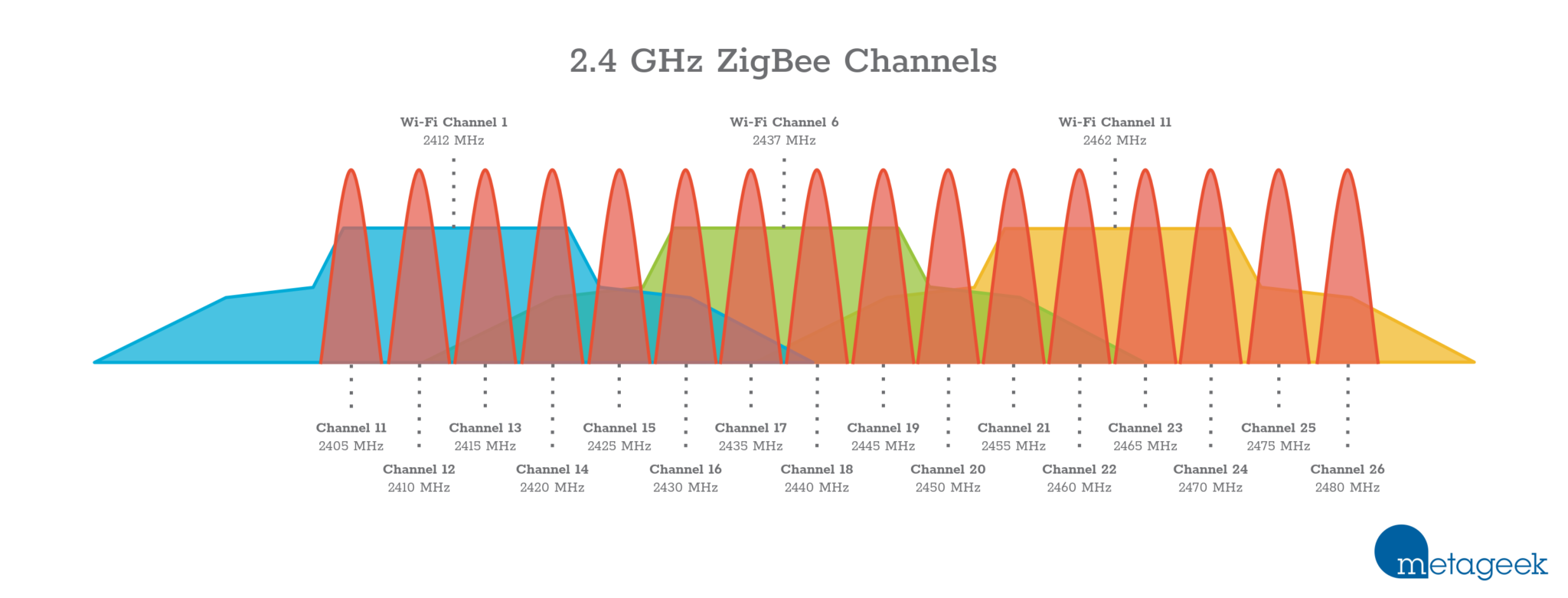
Have a look at this:
https://diyi0t.com/wp-content/uploads/2020/05/ZigBee-and-WiFi-frequency-channels.png
sour shadow
And various other pins
Key things are:
- Use a USB extension cable
- Pick a clear channel, having done a scan
- Try to avoid anything using the CC2531 or WiFi, and don't buy a ConBee if you don't already own one
gaunt flume
midnight prairie
that's an interesting thought, using a Pi with a USB radio. hardwired of course,...
Just make sure the Wifi and Zigbee Channels you use dont overlap and you are good.
I got my setup running in like an hour and it was the first time deploying Z2M - just use docker and search for a guide and youll be done very quickly.
midnight prairie
sour shadow
Key things are:
1) Use a USB extension cable
2) Pick a clear channel, having don...
I did use an extension cable previously, but even with that I noticed zigbee wasn't very reliable. It works perhaps 95% of the time, but that 5% where it just doesn't respond got old pretty fast.
Even with my tradfri lights working as a repeater
sour shadow
The ConBee is very sensitive to RF interference
midnight prairie
Thanks for confirming, I suspected as much
midnight prairie
Right
sour shadow
Or the routers are crap - like Osram
midnight prairie
Thanks for the advice so far!
So to recap, everything I have is shit and I need to buy something else regardless 😆
something cc2652 based
and then I'd use ZHA to integrate HA with my zigbee devices
sour shadow
If you want to run it "centrally" buy a network connected coordinator
That's cleaner IMO than running something on a Pi remote from HA
https://www.zigbee2mqtt.io/guide/adapters/#recommended has a nice list, but if you're in North America consider https://www.tubeszb.com/shop/coordinators/2
midnight prairie
I still have the first page open 🙂
I'm in western-europe, but aliexpress is also an option
gaunt flume
If you are getting in to it there is also the Sonoff ZBDongle-E which is based on a different chip (EFR32MG21) and not that well supported right now. Just be aware that it exists.
sour shadow
It's fine for ZHA, don't buy it if you're thinking of using Z2M
gaunt flume
sour shadow
That's cleaner IMO than running something on a Pi remote from HA
yeah you are probably right but I had the pi laying around :)
midnight prairie
the price difference between the E and P version is one euro (looking at Ali), so I'd rather get the one with better support
Which is the P, as I understand it?
gaunt flume
yeah the E is the newer one thats why its not well supported.
sour shadow
Well, it'd be more accurate to say not well supported by Z2M - but that's more to do with the chipset than it's time in the market
Z2M's support for things other than TI chips (CCxxxx) is limited
midnight prairie
What would be a reason to prefer Z2M over ZHA? Integration outside HA I'm guessing?
sour shadow
Whether you want it all in HA, or external
gaunt flume
I would also argue that (at least as of right now) Z2M has more supported devices and exposes more data to the user.
This is probably gonna change as time goes on though. (ZHA is relatively new as I understand it)
sour shadow
I think they're about the same age, but Z2M has a wider userbase, ZHA is pretty much just Home Assistant
gaunt flume
ahh ok
midnight prairie
As far as I can tell both Aqara and Tradfri are well supported by ZHA, assumign this list is correct: https://zigbee.blakadder.com
So that covers my usecase for now
Speaking of which, is aqara still the bang-for-buck option for sensors and switches, along with Tradfri?
sour shadow
Yes
midnight prairie
Thanks, just making sure a new major player hasn't popped up
So if I were to go networked, that would be the ZB-bridge-P, correct?
lilac wharf
oof, no. get something that uses ethernet
midnight prairie
Crap, I thought it had ethernet, but you're right, it only says wifi
 lilac wharf
if you're in the US, tube has some good options
midnight prairie
EU 🙂
sour shadow
You can still import 😉
lilac wharf
gaunt flume
midnight prairie
sour shadow
You can still import 😉
cries in shipping costs
sour shadow
midnight prairie
*cries in shipping costs*
gaunt flume
sour shadow
There is an open request since like 4 years to make that the default - or at least give us the option to
midnight prairie
I like it as a feature, but I can imagine it being annoying for some people. Should be a setting on the "pinged" end though!
Unfortunately the gateways from that link all seem out of stock
I guess it's USB for now 🙂
Technical question: could one "fail over" to a second Sonoff USB stick, or would that make the network go a little bit nuts?
lilac wharf
not easily
theoretically possible with z2m if you can detect when the stick fails and then automate editing the config to point to the new adapter and restarting z2m
midnight prairie
Ah no, I have something much more interesting (read: probably a bad idea) in mind
Oh well, not a priority. Ordered the Sonoff USB stick. Thanks for the suggestions, all!
 silent lintel
Hey guys looking to update my Z2M and just wanted to make sure this is the right place for the image. its been a while since I pulled
https://hub.docker.com/r/koenkk/zigbee2mqtt/tags?page=1&ordering=last_updated
sour shadow
https://www.zigbee2mqtt.io/guide/installation/02_docker.html has you covered
silent lintel
These docs are amazing. Thank you so much Tinkerer!
 stoic wren
I'm using a thermostat with zigbee2mqtt. The thermostat is exposing two tempsensors, one for the "room", and one in the floor. Can anyone pinpoint me to where i can change the sensor showed in the climate integration?
silent lintel
I'm trying to see if my z2m aqara temp sensor is falling off the network. I do have the recorder integration doing nothing; set to include only a single boolean. I also have container for influxDB running to work with Grafana. If the end goal is to see if the device is falling off, what is a simple way to do this?
silent lintel
Simple may be a bad criteria, I could change the temperature in the room and see if it responds, and that would be simple. I guess I want a good way to see if it's falling off the network.
austere patio
They update at least once every ~50 minutes
silent lintel
Hey Puddly! Awesome. Okay, should I be looking to the Z2M logs for that? I am still working on getting HA updated with a good recorder integration
sour shadow
Optionally enable availability https://www.zigbee2mqtt.io/guide/configuration/device-availability.html
silent lintel
Man that is exactly what I need. And its right there in the same docs you posted earlier 🙂
sour shadow
As I said, the Z2M docs are pretty solid... though knowing what to search for is always the challenge
silent lintel
Thanks as always Tinkerer!
silent lintel
I added this line to the devices.yml file in my docker-compose/zigbee2mqtt/data folder.
'0x00158d0006795b0c':
  friendly_name: bedroom
  availiability: true
But in the Z2M front end it says availability: disabled Is it possible my configuration.yml has a setting overriding the availability? https://paste.debian.net/1261637/
sour shadow
You've only enabled it for that one device, so the main Availability tab will show it as disabled
(you also had to restart Z2M after changing the file)
 deft bane
I can't seem to get into the bootloader of my new ZBDongle-E 3.0. Does anybody know what could work?
I hold the bootloader button, plug it into my laptop, wait like 10 ish seconds and release the button
Then try to flash the firmware
but then i get an error
 faint quest
I recently had to restore my HA and now it looks like HA does not see my Sonoff zigbee dongle plugged in anymore. I'm running HA on VirtualBox and I'm not sure how to troubleshoot any further. Tried unplugging/replugging, rebooting the VM, so far nothing
 tulip summit
Hi everybody!
I have ordered Bosch Thermostats some time ago, but didn't order the base station since I planned to run it using HA.
However, I experienced some problems with the thermostats, even when using without the HA.
They tend to overshoot the set temperature for 2-3 degrees Celsius, which is a lot. Did anyone observe similar issues?
Further more, the coupling with the radiator is made with plastic fins which grips on the radiator when tightening an outside nut.
It seems fiddly and easy to break, as can be seen from some reviews on Amazon.
I talked to the seller and they mentioned some SW updates, but since I don't have the Bosch base station it doesn't apply to me...
What do you use? How do you maintain your system?
Further more, the radiator themselves have a plastic part on the valve, which seems to be regulating the max flow. Changing this might affect the overshoot issue, but also the heating speed...
 jolly narwhal
well this was interesting @molten linden
python3 bsl.py -p socket://tube-zb.eirikzlab.local:6638 -evw CC1352P2_CC2652P_launchpad_coordinator_20221102.hex
Opening port socket://tube-zb.eirikzlab.local:6638, baud 500000
Reading data from CC1352P2_CC2652P_launchpad_coordinator_20221102.hex
Firmware file: Intel Hex
Connecting to target...
CC1350 PG2.0 (7x7mm): 352KB Flash, 20KB SRAM, CCFG.BL_CONFIG at 0x00057FD8
Primary IEEE Address: 00:12:4B:00:25:8F:1B:DC
    Performing mass erase
Erasing all main bank flash sectors
    Erase done
Writing 360448 bytes starting at address 0x00000000
ERROR: Timeout waiting for ACK/NACK after 'Get Status (0x23)'

 iron flare
Hi! I use Phillips Hue sensors, currently when it detects motion it turns a light and after a certain amount if time the light goes off. It seems like if within that time the light is on it doesnt react on motion anymore. I would like it to like reset the timer/delay when it detects motion when the light is already on. Is there anyone with experiance for this?
molten linden
jolly narwhal
well this was interesting <@335253934954512384>
```
python3 bsl.py -p socket://...
there is a beta folder under esphome for all the models https://github.com/tube0013/tube_gateways/tree/main/models/current grab the bin and flash the esp32, then try again.
molten linden
models/retired/
jolly narwhal
ah thanks
molten linden
jolly narwhal
what is the flag now for the zigbee upgrade ? "zigbee module bootloader pin" ?
molten linden
"Trigger Zigbee Module Bootloader" runs a script on esphome to put the module into bootloader
molten linden
toggles bsl pin on then a reset lol
jolly narwhal
retrying flash of hex now
molten linden
🤞
jolly narwhal
I haven't dared upgrade since I bought it from you 
molten linden
you are using z2m right? that dev fw may still not be playing nice with zigpy-znp/zha
jolly narwhal
yeah z2m
 waxen nimbus
iron flare
Hi! I use Phillips Hue sensors, currently when it detects motion it turns a ligh...
waxen nimbus
iron flare
Hi! I use Phillips Hue sensors, currently when it detects motion it turns a ligh...
you can look at the logbook for the sensor to see whether it's reporting the motion. If it reports motion but the light doesn't respond, that sounds like a question for #automations-archived instead. Take into account there's a ~15 second delay after a presence is detected before it clears again. Otherwise, there's no way to reset this refresh rate for a Hue sensor.
molten linden
even if it was compiled on my birthday 😂
jolly narwhal
bad juju!
iron flare
waxen nimbus
you can look at the logbook for the sensor to see whether it's reporting the mot...
Ahh right! Thanks! Ill look into that!
 molten linden
it's slow over network but I did it like a dozen times to test this esp32 firmware last month.
jolly narwhal
ah, a man of self-floggelation
akin to my heart
write done, verified!
do I need to reboot the board after the firmware upgrade ?
molten linden
won't hurt
jolly narwhal
wasn't mentioned in the docs at least
rebooted, lets fire up z2m again
it's taking some time 
molten linden
it has to restore the last backup
jolly narwhal
Zigbee2MQTT:debug 2022-11-23 22:56:35: Loaded state from file /app/data/state.json
Zigbee2MQTT:info  2022-11-23 22:56:35: Logging to console and directory: '/app/data/log/2022-11-23.22-56-35' filename: log.txt
Zigbee2MQTT:debug 2022-11-23 22:56:35: Removing old log directory '/app/data/log/2022-10-31.20-22-16'
Zigbee2MQTT:info  2022-11-23 22:56:35: Starting Zigbee2MQTT version 1.28.0-dev (commit #98ceaa0)
Zigbee2MQTT:info  2022-11-23 22:56:35: Starting zigbee-herdsman (0.14.63)
Zigbee2MQTT:debug 2022-11-23 22:56:35: Using zigbee-herdsman with settings: '{"adapter":{"concurrent":null,"delay":null,"disableLED":false},"backupPath":"/app/data/coordinator_backup.json","databaseBackupPath":"/app/data/database.db.backup","databasePath":"/app/data/database.db","network":{"channelList":[20],"extendedPanID":[221,221,221,221,221,221,221,221],"networkKey":"HIDDEN","panID":6755},"serialPort":{"path":"tcp://tube-zb.eirikzlab.local:6638"}}'
🫰
something happened

it lives!
Coordinator revision 20221102

 kind rapids
some of my zigbee sensors stop sending data sometimes, is that to be expected?
sour shadow
What sensors?
silent lintel
sour shadow
You've only enabled it for that one device, so the main _Availability_ tab will ...
I did this and then restarted and I can now see it's availability status. Thank you again Tinkerer!
kind rapids
Aqara movement sensors
sour shadow
Do they simply stop reporting that they're alive, or do they stop reporting movement?
kind rapids
I'm using the Nortek zigbee dongle
they stop reporting movement
If I try to re-pair them, they'll report movement once and then stop reporting movement again
I'm not sure if the issue is coming from the fact that I'm using an unofficial dongle
I've just bought the aqara hub
jolly narwhal
I'm sorry to hear that
😄
My aqara sensors have never stopped reporting movement, both the vanilla one and the 1s modded one work great
but remember they don't change parents, so if you have moved it around or turned off the parent you have a bad time
also nortek is a very antique coordinator
and aqara hub isn't an upgrade
at least if you want to have a mesh with anything else than aqara
jolly narwhal
then you'll probably be fine
the aqara hub was... fine when I only had aqara stuff
kind rapids
what do you have rn?
jolly narwhal
then I bought tradfri, and hue, and gledopto, and namron and more
I use a CC2652 coordinator with zigbee2mqtt
for the last 3 years
CC1352 -> zzh -> tubes poe coordinator
120ish devices total currently, 40 battery, 80 wired devices
coverage 25m from my house
kind rapids
is this an usb dongle? I'm only finding some scammish alixpress products
kind rapids
I'll have a look tyty
grim igloo
@kind rapids you've kind of jumped from the pot to the frying pan here going from nortek (shit) to aqara hub (proprietary)
https://www.zigbee2mqtt.io/information/supported_adapters.html there's a good list here including a $20 sonoff p usb stick option that myself and a lot of others here use and like
if you have $ and time the tube PoE coordinator is a great option tho
jolly narwhal
freedom of placement is great
grim igloo
you're free to place me bb
jolly narwhal
my z2m is in my concrete garage in the basement
grim igloo
ye
grim igloo
jolly narwhal
my tube is in the attic
humidity would kill any esp i put in the attic
you give it the nailpolish treatment?
jolly narwhal
I have a 24 port poe switch in the attic, plus a few access points and some other stuff
there is an itanium workstation in there too somewhere
grim igloo
fancy
 wicked crow
Heyall, I have zha setup on my system and added a new Aqara EU plug. I had one before and it is working properly and reporting correct values. But the new ones are reporting power as always 0. Does anybody know anything about this?
They both use the same version Firmware: 0x00000029 and they both are using the same zha quirk. The working one has sensor.lumi_lumi_plug_maeu01_electricalmeasurement as its Active power entity id but new not-working one has sensor.lumi_lumi_plug_maeu01_active_power?
 quaint bane
wicked crow
Heyall, I have zha setup on my system and added a new Aqara EU plug. I had one b...
quaint bane
wicked crow
Heyall, I have zha setup on my system and added a new Aqara EU plug. I had one b...
Got the same issue at the moment.
According to this thread you can subscribe to _analog_input instead of _electrical_measurement but I have no idea how to do that.
https://community.home-assistant.io/t/xiaomi-zigbee-power-socket-readings-off-by-a-factor-of-10-since-2022-10-5/
I've also added this as a custom quirk to my config but it didn't help either.
https://github.com/zigpy/zha-device-handlers/blob/dev/zhaquirks/xiaomi/aqara/plug_eu.py
Re-paired, reconfigured many times but power consumption is still 0.
@mellow geode I've stumbled upon your name a few times on this issue including the two links above; can you help us to get this to work?
mellow geode
@quaint bane @wicked crow Do not install any custom quirks or use the analog input workaround, there’s no need for that anymore.
What coordinator are you using? If it’s a Conbee, update its firmware and re-pair the plugs.
Also, make sure HA is updated to the latest version
wicked crow
I have a Conbee II stick
quaint bane
I’ve had it without the custom quirk before and it didn’t work, that’s why I tried it.
HA is on the latest update.
My coordinator is a raspbee II
I’ll have a look into updating the raspbee‘s firmware later today, that’s one thing I haven’t looked into yet. Thanks for the tip, I’ll report if it worked!
iron flare
iron flare
Ahh right! Thanks! Ill look into that!
I turned it around. Instead of putting a timer on the lights after X minutes turn off. I made a new Automation for the lights that just checks if there is movement for X minutes, if not, then turn off the lights.
jaunty maple
I have problems pairing an Ikea motion sensor to z2m. Z2m starts interviewing the device but then it leaves the network. Any ideas?


 sour shadow
Which one is that?
lusty trench
Hi i have problem with sonoff temp. Sensor every time I pair it it stays it offline. Tried to reset and re-pair but shows the same.
sour shadow
From other posters, that seems to be a common problem
 humble zenith
jolly narwhal
humble zenith
jolly narwhal
Link?
jolly narwhal
 violet dagger
jolly narwhal
cheap tuya zigbee mmwave sensor confirmed working
violet dagger
jolly narwhal
cheap tuya zigbee mmwave sensor confirmed working
did you think i was lying?
sour shadow
It's Tuya.... trust but verify 
jolly narwhal

 mossy jacinth
Everything in my smart home is either Lutron or Z-wave. I want to add a "magic cube" from Aqara, but its zigbee. No issue I presume with just buying a zigbee stick for my Nuc? Will it affect performance of my z-wave network at all?
sour shadow
It'll have no impact on Z-Wave
rapid dawnBOT
Buy something CC2652 based. This list is a good one, both Tube and Electrolama have been proven to have excellent customer service. The current generation of EZSP sticks (see here for some) are also a good choice for ZHA.
Anything CC2530 or CC2531 based should be avoided - they're old, slow, and only suitable for a dozen or so devices. The Sonoff ZBbridge isn't advised since it uses WiFi (built in interference causing stability/reliability issues), and the HUSBZB-1 uses an older chipset so should be avoided.
Finally, the ConBee range are fine with deCONZ, but experience with ZHA and Zigbee2MQTT appears to be mixed.
mossy jacinth
sour shadow
It'll have no impact on Z-Wave
Thanks so much for the advice. This looks reasonable then from what I can tell? It doesn't appear to be the one mentioned to avoid? https://www.amazon.ca/SONOFF-CC2652P-CP2102N-Assistant-Zigbee2MQTT/dp/B09KXTCMSC/ref=asc_df_B09KXTCMSC/?tag=googleshopc0c-20&linkCode=df0&hvadid=459592838100&hvpos=&hvnetw=g&hvrand=13807210248540727774&hvpone=&hvptwo=&hvqmt=&hvdev=c&hvdvcmdl=&hvlocint=&hvlocphy=1002392&hvtargid=pla-1571136511371&th=1
 raven jewel
That's the P. I have that one and it's fine
mossy jacinth
Whats the range like on Zigbee?
sour shadow
Similar to Z-Wave
mossy jacinth
gotcha. So i may need some repeaters then
I don't intend to have many Zigbee devices
sour shadow
By may, you mean will...
 surreal crag
lol
mossy jacinth
lol
good to know
internal debate whether or its worth it or not lol
i only really want that Aqara magic cube lol
My lighting and shades are Lutron and my sensors, locks etc are Z-wave
i suppose once I have Zigbee, I'll have an excuse to buy some other shit
sour shadow
I started with Z-Wave and added Zigbee as the low cost of sensors made more sense. I now have no Z-Wave left...
near echo
mossy jacinth
i only really want that Aqara magic cube lol
ah that cube is lot of fun! throw in the air and see which side in up when it lands and have the "Side Number" it displayed in HA dashboard 🙂 plenty of inbuilt actions. Do watch out for battery drain, the battery type is CR2450 i think , relatively expensive than the CR2032 types
sour shadow
I've had no issues with drain on mine, got a little over a year out of one and 18 months on the other
near echo
sour shadow
I've had no issues with drain on mine, got a little over a year out of one and 1...
but were you playing dice with it ? 🙂
mossy jacinth
I have a 2000 sq foot bungalow, so if I had a mains powered Zigbee device every 20 or so feet, I should be good?
sour shadow
Yeah, I ballpark that you can expect to get about 6 to 8 meters between devices - but it varies a lot
mossy jacinth
kk
a logical upgrade could be to replace a couple power bars behind our beds with Zigbee ones. Not that we'd necessarily need them to be smart, but acting as repeaters gives us double duty vs just some random reapeater
 flint sluice
Zigbee works! Yay. Got my network up and running. Interestingly Spengled bulbs have a longer range than Phillips Hue. I guess that makes sense since Hue act as repeaters
I'm struggling with getting a repeater to the second floor of my house. Any tips?
jaunty maple
Superweird that some of my zigbee devices paired with the coordinator directly when there are routers closer by. But i guess Aqara devices have always been a bit weird in that sense
sour shadow
Aqara pairs to the first thing it hears from
Most devices will tend to pick whatever they think is best, which will often mean going direct
near echo
flint sluice
I'm struggling with getting a repeater to the second floor of my house. Any tips...
well, some strategically placed bulbs or plugs. for me I think my Ikea tradfri plugs helps
jaunty maple
sour shadow
Aqara pairs to the first thing it hears from
Yeah i know, it’s just a shame when you try to build a stable and powerfull network full of routers and the devices ignore them haha
sour shadow
Well, you can solve the immediate problem by pairing via a specific router
You can't stop things changing parent when they want to, and you wouldn't want to
mossy jacinth
err wait, I also have some hue bulbs. Are they Zigbee too? If so, will they function as repeaters?
sour shadow
Yes, and yes - if you add them to the same mesh
mossy jacinth
interesting. So right now they are using the Hue hub. If I get a zigbee stick for my HA machine, I'd have to somehow take them off the hue hub and use them directly with the stick/HA?
sour shadow
Yes
mossy jacinth
neat, didn't realize that could be done.
It would make sense to do that I think just to get a more robust zigbee network
 stray jasper
My zigbee devices no longer work. They show up in HA like they are connected but hitting the power switch does nothing, and then ha flips it back to whatever it was set to previously. any ideas how to fix this?
They work briefly after a reboot but shortly after the reboot they break again
lilac wharf
Check the logs for whatever zigbee software you're using
sour shadow
Also, what coordinator are you using? CC2531?
near echo
stray jasper
My zigbee devices no longer work. They show up in HA like they are connected but...
by any chance you have mutliple zb hubs - from other manf as well?
stray jasper
i dont think so. i have a sonoff usb dongle in ha, and right now a small number of zigbee devices including motion sensors and plug in outlets
sour shadow
Which dongle - they've produced at least 4, probably more
stray jasper
https://a.co/3rgzbO7
SONOFF Zigbee 3.0 USB Dongle Plus-E Gateway, Universal Zigbee USB Gateway with Antenna for Home Assistant, Open HAB, Zigbee2MQTT etc, Wireless Zigbee 3.0 USB Adapter
sour shadow
And hopefully you're using it with ZHA?
stray jasper
Probably not. What is it?
sour shadow
Zigbee Home Automation - one of two options for getting Zigbee into HA using that stick
stray jasper
Yeah I do not think so
sour shadow
It's that or Zigbee2MQTT, where that stick has a great bit experimental warning
So you're using https://www.zigbee2mqtt.io/?
stray jasper
idk, i just plugged it in and it pretty much set itself up
sour shadow
Then you're using ZHA
stray jasper
ah okay
sour shadow
Did you put the stick on a USB extension cable?
stray jasper
No
sour shadow
Try that
The reasons are in the pinned messages
There's a lot of other stuff you should read there too
stray jasper
Ah okay, thank you!
 turbid willow
unsure if this is the correct place to ask... I using ZHA and if I try to use the device or group binding after pressing "bind" it just get a spinning icon and nothing changes. Any suggestions?
sour shadow
What devices are you trying to bind?
turbid willow
a remote to a light
the long just shows "2022-11-24 10:30:34.418 DEBUG (MainThread) [homeassistant.components.zha.api] Get bindable devices: source_ieee:" with all the devices
I don't see anything occurring from hitting the "bind" button
sour shadow
You have to wake the remote, did you?
turbid willow
wake it before hitting the bind button?
sour shadow
Probably right after
turbid willow
still just see a spinning blue circle on the "bind" button
deft bane
I have a hue motion sensor and connected it to zigbee using the intergration, but it says its always occupied and my other sensors work. Is there someone who knows how to make it work?
hollow rover
Can you use zha and zigbee2mqtt? Because a device i just go is only zigbee2mqtt supported and i only used zha so far
sour shadow
Yes, but you need two coordinators and to build out two meshes
It's generally a really bad idea
 fallow hemlock
got these christmaslights at Lidl today, hope somebody gets them to work in ZHA soon using zigbee, they seem really awesome! 😄
raven jewel
Lidl UK seem not to be selling Zigbee stuff anymore 😦
lilac wharf
Every time I see Lidl I think of Patrick from SpongeBob saying LEEDLE LEEDLE LEEDLE
 broken sedge
Speaking of Lidl and motion sensors, are those any good or are all Tuya based sensors slow? (on z2mqtt)
sour shadow
Tuya is generally a shit show - some devices are good, but you have to take care
violet dagger
Lidl sensors are generally the bottom barrel kind, at least the last gen is, the new ones could be better
broken sedge
Yeah... I mean the lights aren't that bad, but I got 2 zigbee based motion sensors by them, and a few door/window sensors on wifi, but so slow to use them to trigger automations, for just knowing someone passed by or a window is left open it's fine but I do long for more responsive devices
They are just so darn cheap xD
violet dagger
Oh the lights are quite bad but cheap
I usually don't care much what door sensor I use as loong as it stays on the network and doesn't guzzle batteries
broken sedge
Almost any smart brand is tuya over here, some are better than others, I mostly complain about brightness of colored brightness as opposed to the whites
sour shadow
Buy some Aqara from AliExpress
violet dagger
Buy some Yeelights
broken sedge
violet dagger
Buy some Yeelights
Yeah I got one of those, they are dope
violet dagger
I tried other lighting but it's just crap compared
broken sedge
I do have one of those, older model I think, but when I turn it down it doesnt turn down in white, but rather goes red
violet dagger
I only use their CCT ceiling lights and have the first model
broken sedge
sour shadow
Buy some Aqara from AliExpress
Yea I am looking for the P1 sensors but those arent really available there
fallow hemlock
I might buy some more of the switches tomorrow. Also love the bulbs, connected to zigbee right away. The christmaslights can be used over the lidl app, but preferably they would be usable over Home Assistant.
And i hope, as some other projects got that intergration going, that somebody can copy paste magic the code somehow, so ZHA can do the full set of options for the lights too
(i mean, for the christmaslights
quaint bane
mellow geode
<@461635852125208576> <@233998344001683456> Do not install any custom quirks or ...
To get back to that: My RaspBee II seems to be on the latest version as well. It's on version 2.19.01 (2022/09/19)
mellow geode
quaint bane
To get back to that: My RaspBee II seems to be on the latest version as well. It...
Can you try to re-pair the Aqara plug (now)?
Also, make sure custom quirks removed
quaint bane
mellow geode
Can you try to re-pair the Aqara plug (now)?
Done, but still 0.0W active power
Removed the quirk and restarted before too
mighty river
fallow hemlock
got these christmaslights at Lidl today, hope somebody gets them to work in ZHA ...
in germany ?
fallow hemlock
Netherlands
mellow geode
quaint bane
Done, but still 0.0W active power
Removed the quirk and restarted before too
Is the plug on and something actively pulling power?
mighty river
fallow hemlock
Netherlands
Ok will have a look tomorrow
I live like 5min from the border
 ivory trail
Are there any vibration sensors that would report the amplitude numerically? I’m trying to track the status of a pump which works in one of two modes, eco and max, and the vibration in max is larger. I don’t have access ti the electrical socket, which would be a much easier way to monitor.
broken sedge
fallow hemlock
Netherlands
Not on the website right?
fallow hemlock
no, not on the website
perhaps a pretty noobie question : can 2 zigbee networks interfere? running the HA yellow close to the LIDL gateway and seem to have a bit of an issue, as the christmaslights and gateway go offline a lot lol
if so, i move them further from eachother tomorrow
can also be the PSU, ran it of another usb charger than provided by lidl
mighty river
ivory trail
Are there any vibration sensors that would report the amplitude numerically? I’m...
though about current measurement?
ivory trail
That’s what I wanted to do, but the socket is overbuilt with plasterboard. I do have the cable but I’d need to figure out the voltage phase to do it with something like a Shelly 1em
The vibration sensor seemed like a good idea until I realised they seem to be on/off
quaint bane
mellow geode
Is the plug on and something actively pulling power?
Yeah my PC is plugged in for testing purposes
Is there a way to downgrade the plugs software? It's on 0x00000029 and I've read somewhere that older versions worked better
mellow geode
quaint bane
Yeah my PC is plugged in for testing purposes
Is there a way to downgrade the p...
That’s already the older firmware
Can you try re-configuring the plug through the UI?
Also check that OppleMode is set to 1 on the OppleCluster in the clusters UI
 limber hornet
Any special sauce required to add "Tuya Temperature Humidity Sensor Thermometer Hygrometer WIFI/Zigbee Smart Home" to HA via tubez BT coordinator thingy? I've added the controller to HA, can see connections from the HA inbound, but when I click "add device via this device" it doesn't find the gadget.
Yes, I put batteries in it, and it's a few feet away from the coordinator
quaint bane
mellow geode
Can you try re-configuring the plug through the UI?
Yes, tried multiple times but didn't help. No error either, though - it's always successfully reconfigured
quaint bane
mellow geode
Also check that OppleMode is set to 1 on the OppleCluster in the clusters UI
You mean this right? It said "None" after I pressed "read attribute". Should I override it to 1? https://i.imgur.com/7l5ra5S.png
 violet dagger
limber hornet
Any special sauce required to add "Tuya Temperature Humidity Sensor Thermometer ...
violet dagger
limber hornet
Any special sauce required to add "Tuya Temperature Humidity Sensor Thermometer ...
Is it Zigbee or WiFi?
limber hornet
the controller is wifi, but the devices are all zigbee.
actually the controller is wired ethernet
I can open the web-interface directly on the coordinator, and/or connect to the controller from HA.
From what I understand, the coordinator is acting kindof like a access-point for all the zig devices, which pair, then are accessible via the controller API...
violet dagger
Did you put the thermometer device into pairing mode?
limber hornet
I couldn't see how. Couldn't see a button. Sec will go get it again
ahh, button under the battery cover. sec
violet dagger
There are usually instructions with the device
limber hornet
I am deeply sceptical of 55.6% humidity reported...
violet dagger
Only way you can be sure is if you have a calibrated hygrometer
quaint bane
limber hornet
I am deeply sceptical of 55.6% humidity reported...
Why?
mellow geode
quaint bane
You mean this right? It said "None" after I pressed "read attribute". Should I o...
Thanks. Can you also read the "app version" attribute on the Basic cluster?
quaint bane
mellow geode
Thanks. Can you also read the "app version" attribute on the Basic cluster?
It’s 41
mellow geode
That’s the newer firmware version then (the 0x029 file version reported earlier is likely outdated then).
This version doesn’t have the OppleMode mode attribute. Please check your Conbee/Raspbee firmware again
There are also ways to downgrade the firmware on the plug (there’s a guide from me in some Z2M issue)
But so far, it looks like you don’t have the correct firmware on your coordinator
And/or didn’t re-pair the plug after updating the firmware
quaint bane
mellow geode
And/or didn’t re-pair the plug after updating the firmware
Since the deconz addon says it’s on the latest firmware (see #zigbee-archived message ) I assume it’s on the correct firmware then?
About re-pairing, am I doing it correctly by going into devices -> Lumi plug -> remove and then pair it again? Cause that’s what I’ve been doing.
And about the 0x29 - that’s hexadecimal for 41 so it does match, shouldn’t that be correct?
 stoic relic
Hi.
I've attached a RaspBee shield to my rpi3b+, and I'm trying to configure ZHA. I'm using the HA OS on the pi.
The error I'm getting is "Failed to connect" at the step "Serial Port Settings", after choosing deCONZ radio type. Serial device path was automatically entered as /dev/ttyAMA0, which seems correct after extensive googling. I've also followed some steps to add dtoverlay=pi3-disable-bt to the config.txt in root. I'm at a bit of a loss... The only thing I could imagine be a problem is that I indeed get a warning in the logs for under-voltage. I've ordered a better cable for that, but could that really cause this issue?
Does anyone have ideas or troubleshooting tips?
mellow geode
quaint bane
Since the deconz addon says it’s on the latest firmware (see https://discord.com...
It’s likely not on the latest firmware then. There are issues with that check. There’s a manual updater on the deCONZ site somewhere
mellow geode
quaint bane
To get back to that: My RaspBee II seems to be on the latest version as well. It...
The version here is the deCONZ/Phoscon version and not the firmware version (from what I can tell)
quaint bane
mellow geode
https://github.com/dresden-elektronik/deconz-rest-plugin/wiki/Update-deCONZ-manu...
Hmm Im not sure how to do any of these guides in home assistant. But I found this thread which I’ll follow. https://community.home-assistant.io/t/how-to-update-conbee-ii-on-hassio-with-deconz-phoscon-integration/402826/12
I’ll do that when I’m home later and report back.
quaint bane
mellow geode
The version here is the deCONZ/Phoscon version and not the firmware version (fro...
If that’s true then the site in the phoscon app is very misleading IMO.
 still bison
Hi
have some mqtt cover warning messages who have ideas how to find them and fix , attaching below
2022-11-25 13:31:12.597 WARNING (MainThread) [homeassistant.components.mqtt.cover] Payload is not supported (e.g. open, closed, opening, closing, stopped): None
2022-11-25 13:31:12.598 WARNING (MainThread) [homeassistant.helpers.template] Template variable warning: 'dict object' has no attribute 'position' when rendering '{{ value_json.position }}'
2022-11-25 13:31:12.599 WARNING (MainThread) [homeassistant.components.mqtt.cover] Payload is not supported (e.g. open, closed, opening, closing, stopped): None
2022-11-25 13:33:56.606 WARNING (MainThread) [homeassistant.helpers.template] Template variable warning: 'dict object' has no attribute 'position' when rendering '{{ value_json.position }}'
2022-11-25 13:33:56.608 WARNING (MainThread) [homeassistant.components.mqtt.cover] Payload is not supported (e.g. open, closed, opening, closing, stopped): None
Logger: homeassistant.components.mqtt.cover
Source: components/mqtt/cover.py:402
Integration: MQTT (documentation, issues)
First occurred: 24 November 2022 at 13:44:15 (4191 occurrences)
Last logged: 13:25:44
Payload is not supported (e.g. open, closed, opening, closing, stopped): None
cover configured in zigbee2mqtt and version is 1.28.2-1
 glad plume
Hello Team! I would like to get some hints which type of smart plug should I buy.
- Zigbee Protocol ( Using Zigbee2MQTT )
- Working as Zigbee Router ( I want to extend my zigbee network for sensors ).
- Power monitoring
- EU connector type
- Home Assistant Integration```
Thank you!You forgot your country
glad plume
sour shadow
You forgot your country
Exactly, added it.
My best find is this: https://www.zigbee2mqtt.io/devices/SP-EUC01.html#xiaomi-sp-euc01
glad plume
Ah if I choose Power as an expose I can see power monitor devices perfect. Thank you!
glad plume
sour shadow
<https://www.zigbee2mqtt.io/supported-devices/#e=power>
I last question, there is any way to be sure https://www.zigbee2mqtt.io/devices/SP-EUC01.html this device working as Zigbee Router to extend my network area?
sour shadow
glad plume
I last question, there is any way to be sure https://www.zigbee2mqtt.io/devices/...
it's a plug, it's a router
glad plume
sour shadow
it's a plug, it's a router
okey got it.
 inner bay
😄
sour shadow
What coordinator are you using?
inner bay
z2m
inner bay
you mean the firmware ?
sour shadow
The coordinator is the little radio thingy, often a USB stick
inner bay
yeah itead zigbee sonoff 3.0 dongle
sour shadow
The P or the E?
inner bay
P as in Plus ?
sour shadow
Yup, CC2652 based
inner bay
yes correct
sour shadow
Try removing it from the computer for 30 seconds
sour shadow
Well, put it back in and restart Z2M
If the stick had locked up - which happens but is exceedingly rare - that'll have cleared it
inner bay
2022-11-25T15:43:26.263Z zigbee-herdsman:adapter Failed to validate path: 'Error: spawn udevadm ENOENT'
sour shadow
It's not finding the USB stick, check the hardware menu
inner bay
/dev/serial/by-id/usb-ITead_Sonoff_Zigbee_3.0_USB_Dongle_Plus_2cf90077ddc9eb11b1778b4f1d69213e-if00-port0
it shows in the all hardware list
under ttyUSB0
i remember now i got a config request a few days ago....maybe i picked the wrong option
sorry forgot about that as it was during the supervisor bug as well
i got three config options and i picked the top one
something about network bla bla
should i remove it and re-configure everything ?
still getting this.
2022-11-25T15:55:22.193Z zigbee-herdsman:adapter Failed to validate path: 'Error: spawn udevadm ENOENT'
2022-11-25T15:55:22.194Z zigbee-herdsman:controller:log Starting with options '{"network":
it was autodetected and found lots of entities tho
and this.
Zigbee2MQTT:error 2022-11-25 17:01:37: Exiting...
Zigbee2MQTT:error 2022-11-25 17:01:37: Error: Failed to connect to the adapter (Error: SRSP - SYS - ping after 6000ms)
    at ZStackAdapter.start (/app/node_modules/zigbee-herdsman/src/adapter/z-stack/adapter/zStackAdapter.ts:103:27)
    at Controller.start (/app/node_modules/zigbee-herdsman/src/controller/controller.ts:132:29)
    at Zigbee.start (/app/lib/zigbee.ts:58:27)
    at Controller.start (/app/lib/controller.ts:101:27)
    at start (/app/index.js:109:5)
anyway it died after updating HA
guess it just broke down then
inner bay
definately update related as HA after an update added a new zigbee integration that conflicts with the old one that wanted to use z-wave.
the old one was put on ignore by HA automatically but locked the serial USB port
i simply removed the new integration and z2m fired up again
quaint bane
mellow geode
https://github.com/dresden-elektronik/deconz-rest-plugin/wiki/Update-deCONZ-manu...
Okay so I went and tried to update the RaspBee II, but it won't install the update. Even trying multiple times as recommended in the thread I linked didn't work.
https://i.imgur.com/WJfQoy3.png

 plush latch
Why aqara magic cuve is not working after a few secobds when I oair it with zigbee2mqtt?
quaint bane
quaint bane
Okay so I went and tried to update the RaspBee II, but it won't install the upda...
Now my Raspbee wont work anymore. Like, at all. ZHA doesnt recognize it, deconz add-on doesnt either. Re-plugging it in and rebooting over and over didnt help either. Dunno what to try now. Can I reset it completely in some way?
I give up on this thing I guess. Ill use another coordinator in hope for more luck. At the end of the day I dont care that much about power consumption measurement. If the zbdongle-p that I just bought wont get power consumption either Ill just leave that. Just want my lamps to work again right now. Luckily I still have the old dumb bulbs for until the zbdongle is here lol
austere patio
inner bay
the old one was put on ignore by HA automatically but locked the serial USB port
What version of Home Assistant are you running?
austere patio
quaint bane
Now my Raspbee wont work anymore. Like, at all. ZHA doesnt recognize it, deconz ...
Are you running both ZHA and deCONZ at the same time?
kind rapids
Hey I just bought an aqara hub, is there a way to not send the temperature of my kitchen to chinese servers ?
inner bay
austere patio
What version of Home Assistant are you running?
Home Assistant 2022.11.4 , haOS
beta channel
austere patio
And you're 100% positive you never clicked the "Configure" button when HA discovered your Sonoff stick and allowed you to configure ZHA?
inner bay
i don't think so but not 100% sure
quaint bane
austere patio
Are you running both ZHA and deCONZ at the same time?
No, I just installed it to see if it recognizes the raspbee. ZHA was disabled during that.
inner bay
i am curious tho on how to remove the old zigbee stick integration that used subname z-wave
it was put on ignore . i unignored it but can't find it now
i'm positive the new autodiscovered integration would be better in the long run
you have a pro tip @austere patio ?
 warped nest
Hi, I bought off Amazon UK a frient zigbee energy monitoring plug but for some reason I cannot find it in my HA, I'm using deconz
kind rapids
hey, does anyone know how to turn on homekit only mode on the aqara app ?
sour shadow
kind rapids
Hey I just bought an aqara hub, is there a way to not send the temperature of my...
Yeah... don't use it
You'll get little to no help for the Aqara app in here, since this channel is for ZHA, Zigbee2MQTT, or deCONZ
 fair mountain
Suddenly binding ZHA groups doesn't work. It just spins. Restarted HA. No luck. Thoughts?
austere patio
fair mountain
Suddenly binding ZHA groups doesn't work. It just spins. Restarted HA. No luck. ...
What device are you trying to bind?
 warm atlas
I'm currently on Z2M 1.18.1-1(previous repo), if I update to newer version(different repo) what should I pay attention to?
Do I have to repair everything?
sour shadow
You won't have to re-pair everything, just follow the instructions in the pinned message
inner bay
is the zha setup in configuration obsolete when using the new zigbee 3.0 dongle integration ?
austere patio
New zigbee 3.0 dongle integration?
sour shadow
I think you're confusing yourself
They're the same thing
It's just that the UI names it for the stick, for reasons best known only to the devs
inner bay
i'm gonna try to explain. language barrier is a variable tho
previously i had an integration for my sonoff zigbee stick. it was discovered as z-wave
austere patio
That doesn't seem right, the Sonoff stick is Zigbee-only
inner bay
can from what i read be wrongly discovered depending on some chip used in both devices
none the less...the other day the dongle was discovered with a different integration
the zigbee sonoff 3.0 home automation integration
austere patio
That would be ZHA
austere patio
Do you have Zigbee2MQTT running as well?
inner bay
no because when the "new" integration is configured the conflict cause z2m to stop
austere patio
Nothing should be getting auto-configured unless you click "Configure"
inner bay
i put the "new" on ignore and everything runs as intended
let's assume i configured it.....none the less it gets autodiscovered adn await configuration...meaning it's a match to be used in my world
austere patio
Let's take a step back here. If you want to use Z2M, you cannot use ZHA. They both need exclusive control of the USB port.
inner bay
the conflict was there even when zha was commented out in config
so my conclusion is that the old dongle integration that wrongly was discovered as z-wave
is still running
can't be found tho
saw it once as ignored. when un-ignoring it vanished
austere patio
Enable https://www.home-assistant.io/integrations/zha/#debug-logging and check the log, you shouldn't see any indication of ZHA running. I don't think Z-Wave JS can run without its addon so if you have neither installed, something else is using your serial port.
inner bay
i did ls -l /dev/serial/by-id when i had the conflict and some thing showed as audio for the dongle
so detections isn't 100% accurate
and haOS runs on a dedicated laptop with only the dongle connected
austere patio
Unless, it's some new variant, ZHA should be the only thing matching your Sonoff stick: https://github.com/home-assistant/core/blob/e9a9ab9025c16ed186599d605008e3a7692a805b/homeassistant/components/zha/manifest.json#L24-L35. For reference, here is all of the hardware Z-Wave JS is configured to discover: https://github.com/home-assistant/core/blob/e9a9ab9025c16ed186599d605008e3a7692a805b/homeassistant/components/zwave_js/manifest.json#L10-L22
limber hornet
quaint bane
Why?
Isn’t 55% like tropical? It’s a warm seemingly dry day
Seems none of the numbers have updated since initial connect. Is this a ha, coordinator, or device issue?
austere patio
inner bay
img of the integration that is autodiscovered unless ignoring it
Yeah, that's correct
inner bay
not auto-configured
but i have had another one that was discovered previously . as i said...wanted to use z-wave
i think that one is a ghost
austere patio
A HUSBZB-1 stick would be discovered by both, I don't think any others
But if you can reproduce the problem and grab a debug log, that would be helpful, as this would be a bug
raven jewel
limber hornet
Isn’t 55% like tropical? It’s a warm seemingly dry day
55% is about what humans need. Anything less than 40% and your sinuses will dry out and give you nose bleeds before the less pleasant things start
quaint bane
limber hornet
Isn’t 55% like tropical? It’s a warm seemingly dry day
Idk, I’m mostly between 50-65% and afaik that’s about normal
inner bay
the problem is that the old one can't be seen anymore
when un-ignoring it i got a msg saying that it could take a very long time for it to be un-ignored
limber hornet
Anyway device is not updating. Ha says went unavailable right after first data point..
inner bay
should i comment out ZHA in configuration.yaml and try the discovered one ?
austere patio
If you are using Z2M, you cannot use ZHA
Remove anything related to ZHA from your configuration file and use Z2M if you're already using it. If you want to use ZHA, remove the Z2M addon.
inner bay
so i should keep the discovered integration ignored ?
austere patio
Yes
inner bay
it gets discovered even if zha is commented out tho so that's why i thought it was the one to use
thank you for awesome support
austere patio
That's normal, it's how discovery is supposed to work. Hopefully in the future we can make discovery a little smarter with addons so this doesn't confuse more people.
inner bay
this has given me lots of grey hair the past week.
i am very grateful for this clarification
while i'm here....my ikea stuff isn't updated OTA from z2m. is there a trick for this to fully work ?
raven jewel
If it's battery, make sure to wake it up
inner bay
ofcourse
limber hornet
Any idea why zigbee device is never updated? How to debug? (tubezb eth coordinator)
What is the difference between the two integartions (for xxx)
"socket://192.168.30.51:6638 "Zigbee Home Automation"
"tubezb-cc2652p2-ethusb-2022 ESPHome"
austere patio
You can ignore the second one
limber hornet
The latter seems to contain controls for restarting, and firmware update.
fair mountain
austere patio
What device are you trying to bind?
Leviton DG6HD to a ZHA light bulb group. It eventually worked.
limber hornet
I added device to the former, which paired OK, and showed one reading, but not updates ice.
austere patio
How far away did you move the temperature sensor from the coordinator? Which sensor is it?
limber hornet
It's about 2 feet away
In fact "last seen" on the coordinator is 3 hours ago, and the device is like 12+ hours ago.
austere patio
"Last seen" on the coordinator not updating is just a frontend bug, you can ignore it
limber hornet
Ok great. How do I set up the controller to poll the device, or... the other way around.
Device is "Tuya Temperature Humidity Sensor Thermometer Hygrometer WIFI/Zigbee Smart Home"
https://www.ebay.com.au/itm/384751462419
I see lots of people talking about reflashing tuya? What's that all abot?
mine is not wifi, zigbee only afaik
violet dagger
you get a tuya device then flash custom firmware on it, it's usually a wifi device but you can also replace a zigbee or bluetooth module with a wifi one
limber hornet
I have the devices linked above. Which I got to pair OK, but don't seem to be updating.
They're zigbee only
austere patio
Can you upload the ZHA diagnostic info for the sensor?
limber hornet
From the device info?
Device info
TS0201
by _TZ3000_fllyghyj
Connected via Zigbee Coordinator
Zigbee info
IEEE: a4:c1:38:9d:ef:11:18:ad
Nwk: 0x11a8
Device Type: EndDevice
LQI: Unknown
RSSI: Unknown
Last Seen: 2022-11-25T18:51:36
Power Source: Battery or Unknown
Or is there some more verbose/detailed info?
austere patio
There's a "Download Diagnostics" button on the same page, in a dropdown
 raw shore
Anyone happen to have Xiaomi aqara motion sensors?
I've successfully paired the motion sensor without bridge with just ZigBee dongle. It stops detecting motion after some time
I'm not sure what the issue is
austere patio
What Zigbee stick?
limber hornet
Ah true! https://file.io/kB4rmhOv5TaW
limber hornet
@austere patio Hmmm that's a crappy file-sharing thing. Got deleted after it was viewed. Can you suggest another?
raw shore
Motion sensor remains available so no connection issues. It's just not reporting motion detection
austere patio
Which Aqara sensor is this?
limber hornet
@austere patio the low level details appear to include temp=2435 and humidity=5556; but reporting as unavailable in HA?
austere patio
Those are just the last-seen values, they could be hours or days old
limber hornet
as far as I can tell from History, there's only one datapoint, when it was newly connected.
austere patio
Unfortunately, Tuya devices usually ignore standards and require special code for every single Tuya device. If yours isn't explicitly supported (https://github.com/zigpy/zha-device-handlers/issues/1599), it may not work.
raw shore
Aqara motion sensor @austere patio
austere patio
Right. Which one? The model name and manufacturer on the device page should tell you this.
raw shore
austere patio
The older sensors don't accept any configuration: they just join your network and send updates when they feel like it. If it doesn't work reliably, try replacing the battery.
austere patio
The displayed battery percentage doesn't mean much, there's no way for them to accurately report it
raw shore
Okay will try to replace the battery i guess
It's weird cause it works for a while then randomly stops detecting motion while remaining available in ZigBee network
austere patio
For it to become unavailable, it'd have to not update for four hours. There's no real way to tell a sleeping sensor apart from an offline one
limber hornet
Seems maybe my device is just sh*tty? SLow updates https://github.com/Koenkk/zigbee2mqtt/issues/4202
raw shore
If these are the Aqara Motion , like most of the aqara there is a bug in there firmware which make them incompatible with most of the Zigbee 3.0 routers.
austere patio
Aqara stuff works best with Zigbee 3.0 routers (and if you have nothing other than a coordinator, you don't have any Zigbee routers)
raw shore
Just a coordinator no hub
austere patio
Yeah, so you have no extra routers. If it doesn't get kicked off the network after an hour, it will continue working.
raw shore
Actually my smart bulb does act as a router, right?
raven jewel
Maybe, depends on the bulb
raw shore
Seems to be working now! Fix was reseating battery and turn of light bulbs and get close to coordinator when pairing
rapid dawnBOT
@gusty spire I converted your message into a file since it's above 15 lines :+1:
 paper gale
@gusty spire
I see more likely something to do with umbrel passthrough device ?
I'm using promox and never used umbrel maybe look in this direction?
do you have installed ZHA or ZigBee2Mqqt already?
Also dev/ttyUSB0 for my was
Dev/ttyUSB1
raven jewel
Use the serial port and save yourself a headache or 7
 gusty spire
paper gale
<@933009775015370792>
I see more likely something to do with umbrel passthrough...
gusty spire
paper gale
<@933009775015370792>
I see more likely something to do with umbrel passthrough...
Cant find any documentation about how to use home assistant on umbrel. Read about to pass the USB to the home assistant docker but could not find how to do it... Frustrating 😄
gusty spire
raven jewel
Use the serial port and save yourself a headache or 7
what you mean with serial port?
raven jewel
Most devices need at the very least the serial device path, like
/dev/ttyUSB0, but it is recommended to use device path from/dev/serial/by-id folder, e.g.,/dev/serial/by-id/usb-Silicon_Labs_HubZ_Smart_Home_Controller_C0F003D3-if01-port0
gusty spire
Ya, thats what i tried: /dev/serial/by-id/usbID but that did not work for me, "connection faild"...
Also Settings > System > Hardware gives me a graph of the CPU and the RAM, no 3 dots menu
already flashed the stick to newest firmware as well
i really guess its an umbrel problem...
raven jewel
If you're not using HAOS or a Supervised install you won't have that, but you should make sure to use the by-id to pass it through to your install/container
paper gale
I bet umbrel even if I'm a noob in HA 👍
gusty spire
othervice@umbrel:~$ ls -l /dev/serial/by-id
total 0
lrwxrwxrwx 1 root root 13 Nov 26 10:36 usb-Silicon_Labs_Sonoff_Zigbee_3.0_USB_Dongle_Plus_0001-if00-port0 -> ../../ttyUSB0
so i use: /dev/serial/by-id/usb-Silicon_Labs_Sonoff_Zigbee_3.0_USB_Dongle_Plus_0001-if00-port0
still connection failed...
i really think its an problem with the umbrel integration but there is no documentation on that, at least i could not find any since 3 days 😄
raven jewel
If you're trying to do an unsupported #installation-archived method, then I strongly suggest trying a supported one
gusty spire
raven jewel
If you're trying to do an unsupported <#944337294389805056> method, then I stron...
sure maybe i try to run home assistant on a dedicated hardware, but would be nice to have it running on the umbrel... confusing why there is the app on umbrel when it doesnt work in the end 😄
raven jewel
I have no idea what umbrel is, aside from an umbrella missing a syllable. But if it's not documented on the home assistant website then it's unsupported.
I suspect it's like that random thing on the snap store, someone with good intentions making everyone's lives harder.
gusty spire
raven jewel
Congratulations, you have either an abomination of a supervised install, or a mangled docker container.
paper gale
It's a boy ! 😂
raven jewel
Step 1: #installation-archived
You don't need some kind of special OS to run a server at home. Debian or HAOS will do.
gusty spire
😄
raven jewel
Step 2: Start with #zigbee-archived after step 1
gusty spire
ok, i have an empty NUC that i can use and test. Will install this evening and report results 😄
thanks for the help!!
❤️
raven jewel
Just set umbrel on fire and start over
Trust me, you'll save yourself years of migraines
A quick search on their forums reveals people having problems with HA, and nearly everything else on their "App Store"
gusty spire
I use Umbrel as a Bitcoin and Lightning node, also i have PiHole running on it and a Nextcloud, so would be nice to have all in one place instead of having 20 dedicated hardware to run everything on its own
maybe i get some kind of virtualisation, well see
raven jewel
Just use docker
paper gale
(promox work fine if you want a docker like or virtualization and have other stuff on it)
raven jewel
Seriously. It's not that hard, and you actually know what's going wrong and can troubleshoot it
gusty spire
raven jewel
Just use docker
its all docker, every app its a own docker container, so is home assistant
raven jewel
Umbrel is a custom OS with Docker, as evidenced by the fact you;re having problems. If you use Debian or a nice sensible OS as the base I'd wager 98% of your problems vanish overnight, and the other 2% are resolved with a quick search
gusty spire
ok, i will try that. Thanks 🙂
raven jewel
If you really need a GUI of some kind, which I strongly suggest you avoid leaning on, Portainer is useful to get an overview of containers that are running and quickly check logs. Do not use it to create containers.
 calm cave
I have deconz with a ikea Fyrtur blind. It was working flawlessly for a couple of months but I had an issue with the position not updating. So I removed it and repaired. Now, for some reason I only see the battery status in Home Assistant. I can control the blind fine from deconz, so it suggests the problem is somewhere between deconz and home assistant. I’ve repaired, updated firmware and messed around for too long. Any ideas?
I don’t think it impacts my problem but I’m using dockerised home assistant (on a generic amd64 box) and a dedicated pi 4 for deconz using their headless image.
near echo
gusty spire
I use Umbrel as a Bitcoin and Lightning node, also i have PiHole running on it a...
Umbrel is in beta. While it is perfectly fine for various things, running something financial related - like bitcoin in my opinion risky. Just go with plain simple linux os'es and use dockers directly
calm cave
near echo
Umbrel is in beta. While it is perfectly fine for various things, running someth...
+1 to boring stable server tech 😀
 supple torrent
Hey! So, I have a mixed setup with zigbee and zwave,, things are working mostly, but, I have this problem where I often manually turn of the power to a specific zigbee lightbulb, then other zigbee devices might stop working.
It kind of seems like the other zigbee devices are connected trough the bulb I'm turning of.
Is there any way to control what zigbee device connects to what?
warm atlas
Is anyone using Tuya TS0202(IH012-RT01) https://www.zigbee2mqtt.io/devices/IH012-RT01.html#tuya-ih012-rt01
and confirm working on Z2M(latest)?
I paired, lqi 150, but occupancy stuck on false!!!
using sonoff ZB 3.0 plus dongle.
paper gale
supple torrent
Hey! So, I have a mixed setup with zigbee and zwave,, things are working mostly,...
I'm not aware of any way to control the mesh.
But if you have smartplug they can be like a router.
So i you start over your mesh, and first connect few smartplug they will always have power. Then you connect light bulb then you do battery powered item.
I did it like this and have no issue when I turn off by accident my light bulb.
supple torrent
paper gale
I'm not aware of any way to control the mesh.
But if you have smartplug they ca...
Thanks, yeah, restarting makes things work again. I guess I'll just have to swap out the bathroom lights (which i constantly turn off completely with a switch) with good old "dumb" lights.
paper gale
I wasn't saying like power off and on home assistant. More like. Erase all device in hope assistant and pair them once again one by one 😂 cause I don't think you want to restart home assistant everytime you turn the power off your light bulb
supple torrent
paper gale
I wasn't saying like power off and on home assistant. More like. Erase all devic...
LOL, no, I wouldn't do that. And no way I want to re-do HA setup 🙈 I'll rather live with it, haha
warped nest
Can anyone assist me getting energy usage data from frient smart plug?
 pastel ice
Anyone have suggestions for cheap reliable zigbee outlet plugs? Gonna pick up a couple for around the house. The Sonoff S31 lite is $7 something but a little large
I guess sonoff s40 zb version is a bit sleeker, I’ll go with a couple of those
 tepid radish
please help. I have a zigbee combi 2 on a ras pi 4 (with an extension cable). Using ZHA. My zigbee switches constantly (within a matter of minutes) grey out and im unable to turn on/off switch within home assistant.
I recently had a sparky in to change my upstairs/downstairs 2 way default switch with a zigbee. That has turned into a 1 way nightmare that was told 'can be set up in the app'. No Neutral, no 2 way.
its fine until someone presses the other switch and kills the power.
Im trying to automate it with switchbot but i cant even get the Zigbee switch to stay available in HA. Ive read up about conflicting channels but im a noob when it comes to this and close to getting divorced!😆
Thanks in advance
Anton UK
raven jewel
Get a switch cover for the other switch and put a Zigbee switch on top of it. That solves problem 1.
ZHA should automatically pick a channel for you
tepid radish
raven jewel
Get a switch cover for the other switch and put a Zigbee switch on top of it. Th...
thanks @raven jewel. yeh thought about this too. Do you recommend any?
raven jewel
I have Hue buttons and there are plenty of covers for those available cheaply on Amazon