#zigbee-archived
1 messages · Page 11 of 1
 austere patio
 smoky tapir
yeah, I may just order some more routers, the sengled power monitors since they are back on "sale" on amazon. Had this issue with wifi also, had to add a mesh connected AP to deal with a deadzone in the house.
 grim igloo
smoky tapir
yeah, I may just order some more routers, the sengled power monitors since they ...
grim igloo
smoky tapir
yeah, I may just order some more routers, the sengled power monitors since they ...
your bulbs arent sufficient as routers? mine have been
"mesh" ap extender situations are really never a good idea for wifi btw
certain access points have dedicated backhaul radios but most dont.. you end up just adding more interference and bandwidth is shit
smoky tapir
i'm ok with wifi, I understand what i'm doing. And since it's a rental I can't run cabling to the one location.
it's a ubiquiti setup, wit two wired AP's and one meshed AP to get wifi to room that can't hit the other AP's except through two exterior walls.
 drowsy goblet
I just installed HA VM on proxmox, sonoff usb 3.0 zigbee dongle (I think) routed to the HA VM, installed and started MQTT addon, and installed Zigbee2MQTT addon but it fails to start "Error while starting zigbee-herdsman / Failed to start zigbee". I checked the link to the possible solutions page but despite being somewhat technical I don't really understand any of it.
Is there something obvious I should be checking?
 lilac wharf
Which version of the sonoff 3.0 adapter: E or P?
Also, share the specific error message
smoky tapir
can you see the usb stick in the VM? (dmesg from a terminal, when you remove and plug it back in)
re: my zigbee network, I have a parallel hue system setup that works in the room, so was hoping the button would reach
not interested in migrating the hue setup off of hue-hub to direct HA yet. Happy with the HA->huehub integration so far.
lilac wharf
different zigbee networks don't extend each other
smoky tapir
I know
drowsy goblet
I got the P version, but if needed I could return it and get the E version
lilac wharf
nope, that's the better one for z2m
share the specific error message in its entirety
grim igloo
lilac wharf
nope, that's the better one for z2m
better or just not experimental / new?
lilac wharf
better because it's not experimental
grim igloo
gotcha
lilac wharf
purely specs-wise, i think the CC2652 and current EFR32 platforms are similar
drowsy goblet
that's the full error log
I've gone to https://www.zigbee2mqtt.io/guide/installation/20_zigbee2mqtt-fails-to-start.html as it says but most of it doesn't make sense to me, I just got my mini pc, HA, etc yesterday for the first time
The Mosquito MQTT addon appears to be running, has a green dot and logs look good, so I think that part is ok
smoky tapir
that confirms that the hardware is mapped into the VM?
drowsy goblet
no, getting that screenshot now, I'm not sure how to check for the usb in HA yet
smoky tapir
if you have easy physical access, unplug and plug it in, go to a terminal on your HA, and type "dmesg"
drowsy goblet
https://imgur.com/Ry07rcV is the proxmox vm setup
with the USB device added, detected as sonoff 3.0 zigbee correctly
smoky tapir
you want to verify on the guest side that it mapped correctly
My "e" dongle, on a non VM for example:
[104064.927889] usb 1-1.3: new full-speed USB device number 6 using dwc_otg
[104065.042344] usb 1-1.3: New USB device found, idVendor=1a86, idProduct=55d4,
bcdDevice= 4.42
[104065.042374] usb 1-1.3: New USB device strings: Mfr=1, Product=2, SerialNumbe
r=3
[104065.042386] usb 1-1.3: Product: SONOFF Zigbee 3.0 USB Dongle Plus V2
[104065.042396] usb 1-1.3: Manufacturer: ITEAD
[104065.042406] usb 1-1.3: SerialNumber: 20220811141526
[104065.044975] cdc_acm 1-1.3:1.0: ttyACM0: USB ACM device
does the HA web interface have a terminal or I need to use vm console in proxmox?
smoky tapir
i installed an add-on
"terminal & ssh" - https://github.com/home-assistant/addons/tree/master/ssh
smoky tapir
then you have the usb mapped correctly 🙂
lilac wharf
Share your zigbee2mqtt config
drowsy goblet
how do you do that code quote above?
 rapid dawnBOT
To format your text as code, enter three backticks on the first line, press Enter for a new line, paste your code, press Enter again for another new line, and lastly three more backticks.
```yaml
example: here
```
Don't forget you can edit your post rather than repeatedly posting the same thing.
drowsy goblet
socat:
  enabled: false
  master: pty,raw,echo=0,link=/tmp/ttyZ2M,mode=777
  slave: tcp-listen:8485,keepalive,nodelay,reuseaddr,keepidle=1,keepintvl=1,keepcnt=5
  options: "-d -d"
  log: false
mqtt: {}
serial: {}```Yeah, you haven't specified the adapter in the config
drowsy goblet
ah, I didn't realize it doesn't do it wysiwyg in the chat entry
lilac wharf
Or your MQTT broker for that matter
 sour shadow
The add-on does weird ass stuff with the config
lilac wharf
Oh, fun
drowsy goblet
in the instructions for the addon it just mentions if you're NOT using the mosquito mqtt addon you need to do a certain step, but since I am it didnt apply, but it looks like it's missing autoconfiguration or something then
lilac wharf
Well you can ignore the MQTT part then, but you should specify the path to the adapter
Unless that's also somewhere else 😵💫
sour shadow
It's also handled in the UI AFAIK
lilac wharf

drowsy goblet
I think I see what happens, it looks like for mqtt addon it doesnt populate that, but somewhere else is a check and it prevents saving it without the values there
so then none of the config gets saved
no wait, take that back
 summer thicket
@drowsy goblet FYI... Current Proxmox version is 7.2-11
smoky tapir
If you didn't add the updates (free) to your control panel, you should
(server->updates->repositories->click "add button", selection "no subscription". Unless you are paying for support.)
drowsy goblet
I think it's updating
(I had problems when I first installed yesterday since chrome blocks the popups so it looks like all the commands in the tutorial dont work)
here is probably a stupid question while this is running, for the sonoff 3.0 dongle, do you need to flash a new firmware?
it's not clear if flashing firmware is for older versions or advanced/experimental use or if it's always required period
lilac wharf
no, but it comes with an older firmware, so it's not a bad idea to flash with an updated firmware
drowsy goblet
ok I'm on 7.2-11 now!
summer thicket
I think if I was going to use HAOS in a VM with Proxmox, I would have to decouple MQTT and Zigbee2MQTT from HA so that I could understand what I'm doing! 🤪
or, just use ZHA
drowsy goblet
that was/is my plan
I'm kinda doing a first setup trial just to see how some of this works and I figured the addons would be easier
 tranquil reef
My sengled bulbs don’t seem to respond to zigbee groups through both zigbee2mqtt and zha (I.e. can’t detect change of state or set their state)
tranquil reef
summer thicket
I think if I was going to use HAOS in a VM with Proxmox, I would have to decoupl...
I’m actually doing exactly that and it’s been okay, using Haos in vm with proxmox and zigbee2mqtt
drowsy goblet
I guess the question is what's the best way to set up mqtt + z2m in that scenario. Run them in docker on a linux vm or lxc? or on a full vm?
sour shadow
Best is very personal
For me, I have a host that runs all my Docker containers, and I'd put them there
tranquil reef
I’m running full Debian vm and then just using home assistant like it was installed on that machine with home assistant managing all the containers etc. This lets me use standard Linux command line etc to debug but not lose the nice abstraction home assistant provides
 devout sphinx
Hello, I setup the OTA update in the config but I don’t find a log to have détail of the process (I don’t know if it’s working or not…)
Edit: in ZHA
drowsy goblet
Everyone, thanks so much for the help! I connected a hue outdoor motion sensor with z2m to HA and can make some automations with it!
now I just need the mail to arrive with my 20x Inovelli Blue switches!
tranquil reef
drowsy goblet
now I just need the mail to arrive with my 20x Inovelli Blue switches!
Ooh post how using those go, haven’t been able to get my hands on any yet!
drowsy goblet
I'll let you know for sure. They should arrive in the next couple of hours.
summer thicket
drowsy goblet
I guess the question is what's the best way to set up mqtt + z2m in that scenari...
drowsy goblet
the mqtt lxc and z2m lcx?
I should be able to set those up
or docker lxc and run the mqtt stuff in docker
 lofty junco
hey 🙂 any recommendation for EU zigbee power plugs? Simple ones, that i can link zo my HA and just turn then on/off (no monitoring needed)
sour shadow
Innr or Ikea
smoky tapir
I just forced a remapping on my zigbee buttons by unplugging the plugging in the coordinator, and seems like I've got connectivity. I had read that the mesh doesn't update often, was under the mistaken thought that when it lost connectivity it should have tried to refind something.... Anyways, map rebuild, and button reaches into the far room.. yay. of course I already ordered some more plug monitors/routers....
lofty junco
sour shadow
Innr or Ikea
my fear is that those will, because they look a little bit bulky, consume too much space in my power strip... any feedback on that? can they fit normally next to each other? for example on a 2x2 power strip?
the Innr i mean
smoky tapir
vs something like - https://www.aliexpress.us/item/2255800962545210.html ? (zero experience, just a reddit find)
 restive tartan
 jovial aspen
Does anyone know if the Sonoff Zigbee 3.0 USB Dongle Plus (ZBDongle-P version) is Matter compatible?
grim igloo
like with matter daddy?
sour shadow
jovial aspen
Does anyone know if the Sonoff Zigbee 3.0 USB Dongle Plus (ZBDongle-P version) i...
Odds are good, given that there's firmware for the CC2652 to turn it into a Thread radio
 silent crest
Hi! Anyone here was able to successfully bind devices in ZHA? Been trying to do so with some IKEA lights and a switch but no luck with it.
 fallow warren
Is there somewhere I can read what is the improvement in the OTA update? Is it typically just random stuff or does it sometimes add new features (LIke make the bulb able to dim lower?)
sour shadow
Which OTA update?
fallow warren
Example:
Friendly name    Manufacturer    Model    Firmware build date    Firwmare version
0xbc33acfffed7c84b IKEA LED1736G9 20190312  2.1.022`
Updated to 2.3.087
fallow warren
Oh nice thank you
 mighty river
what's the latest info about which Zigbee USB sticks are recommended to buy?
rapid dawnBOT
Buy something CC2652 based. This list is a good one, both Tube and Electrolama have been proven to have excellent customer service. The current generation of EZSP sticks (see here for some) are also a good choice for ZHA.
Anything CC2530 or CC2531 based should be avoided - they're old, slow, and only suitable for a dozen or so devices. The Sonoff ZBbridge isn't advised since it uses WiFi (built in interference causing stability/reliability issues), and the HUSBZB-1 uses an older chipset so should be avoided.
Finally, the ConBee range are fine with deCONZ, but experience with ZHA and Zigbee2MQTT appears to be mixed.
 azure tinsel
is it possible in z2mqtt or home assistant to set a transition time for adjusting the brightness of a light source manually. when moving the slider its an instant flash to the selected brightness. it would be nice to set it somewhere to always have a 2 second transition
sour shadow
Did you try searching the Z2M docs for transition?
azure tinsel
i assumed this wasnt allready build in (my mistake) it seems it is but its standard set to 0
mighty river
rapid dawn
if I understand correctly, based on that list I could just buy the correct Sonoff USB stick and plug and play it right, no flashing mandatorily necessary?
sour shadow
Yes
However, you're probably going to want to update the firmware on the stick, and it's not a hard process
Newer firmwares fix bugs, improve performance, etc etc
mighty river
I always break out in cold sweat when updating firmware of hardware 😅
sour shadow
It's been a while since I've had any firmware update go wrong, and by while I mean over a decade
I've had more OS upgrades go wrong than firmware upgrades
 ashen coral
I flashed firmware on my first Nintendo DS using a jtag connector connected to my computers parallell port which I built myself. Important parts were paperclips manually aligned to the right spots of the circuit board. That was sweaty.
But I'm kidding. Firmware updates are scarry stuff.
Potentially expensive stuff.
mighty river
yeah no I'm not saying I won't do it, just that whenever hardware is involved I get more nervous compared to just a software which you can erase and re-install
sour shadow
As long as you're not replacing the bootloader it's safe
mighty river
the stakes are higher, potentially a bricked piece of plastic
sour shadow
The only time that things could go wrong is when you're re-writing the bootloader - that's harder to recover from if you get it wrong
(usually not impossible - mostly)
ashen coral
Ever burned the wrong fuse on a PIC and had to find an 18v source to reset it? Those were the days.
 pine swan
Does anyone know a Zigbee temperature sensor that can withstand 70C please? I just got a filament drier for my 3D printer and I would like to be able to graph the temperature and humidity inside it but it runs between 50C and 70C
ashen coral
I'd take my chances with an aqara. Most semiconductors are rated 0-70 °C, but that's probably more tradition than anything else.
 wooden stream
Hello, gentlemen.
I've set up ZB2MQTT, and I have an Ikea Bulb installed in my ceiling.
The docs are telling me to 1) reset it, which I have tried, and 2) hold it close to the coordinator.
How am I able to hold it close to the coordinator (Sonoff Dongle on my RPi) when it is in another room?
Any tips on this?
pine swan
ashen coral
I'd take my chances with an aqara. Most semiconductors are rated 0-70 °C, but th...
I have some. I just checked the manual and it says -20 to 50 so I don't know if the 50 is just the recommended temperature and it will read higher or not
pine swan
wooden stream
The docs are telling me to 1) reset it, which I have tried, and 2) hold it close...
You don't need to. Just put it into reset so it starts pulsing and hit "add device" on HA
wooden stream
pine swan
You don't need to. Just put it into reset so it starts pulsing and hit "add devi...
Yeah I seem to have doubleclicked the "Permit Join" button, just got it to work!
Furthermore, I have a pre-paired set of a tradfri remote and lamp. Should I pair both the remote and lamp, or just the lamp?
pine swan
wooden stream
Furthermore, I have a pre-paired set of a tradfri remote and lamp. Should I pair...
Depends on whether you want to use the remote or not. When you reset the bulb, you broke the link between the bulb and the remote
pine swan
wooden stream
Yeah I seem to have doubleclicked the "Permit Join" button, just got it to work!
Are you using the globe or the candle bulbs?
Which Ikea remote do you have?
pine swan
ashen coral
I'd take my chances with an aqara. Most semiconductors are rated 0-70 °C, but th...
I'm also looking for a temperature/humidity sensor that has an external probe on a wire. I have a safe and I want to keep an eye on the environmental conditions inside but Zigbee won't work through the metal
wooden stream
pine swan
Depends on whether you want to use the remote or not. When you reset the bulb, y...
I'd like to be able to use both the remote and HA
wooden stream
So e.g with the blinds remote, can it be paired both to the blind locally as well as to Z2MQTT?
Can you reconfigure the Zigbee map at a later point?
pine swan
wooden stream
So e.g with the blinds remote, can it be paired both to the blind locally as wel...
I wouldn't do that. I've paired all my devices and remotes with HA and created automations so HA gets the message from the remote and then controls the thing
pine swan
wooden stream
I'd like to be able to use both the remote and HA
Which remotes do you have?
ashen coral
Make sure you wake it before removing.
And it could be that it's not paired, but z2m thinks it is.
wooden stream
Hmm ok.
Reason I wanted to re-pair was to get it to link to other devices in the correct room
Is this something that is configurable in the frontend?
Tried to force remove and add it. It is showing "interview" failed, although the logs say that its getting the payload correctly.
pine swan
wooden stream
Working on debugging the Styrbar remote atm
Did you notice there's a blueprint for the Stryrar in the Exchange?
wooden stream
Dont know what that means.
ashen coral
Doesn't matter much before you get it into the coordinator anyway.
pine swan
wooden stream
Dont know what that means.
There is a thing called the Blueprint Exchange where people post pre-written automations you can import into HA. You then create the automation in settings by selecting the blueprint and filling in the things it wants to know. https://community.home-assistant.io/c/blueprints-exchange/53?page=1
pine swan
wooden stream
Dont know what that means.
wooden stream
Right, will check it out.
Still curious about why the light switch is giving me a fat red exclamation mark though.
Again, the payload is logged properly, but it does claim that the interview failed, whatever that means.
pine swan
wooden stream
Again, the payload is logged properly, but it does claim that the interview fail...
When a new Zigbee device makes itself available to join a network, the coordinator conducts an "interview." The interview is conversation where the coordinator finds out what the capabilities of the device are and gives it the configuration information needed to join the network
ashen coral
And the question was why it is failing
wooden stream
ashen coral
And the question was why it is failing
Yeah, exactly. Again, it seems to log just fine (I think), but I am still getting the red "interview failed" checkmark, which is making me nervous.
Logs:
https://i.gyazo.com/8c96b38165f03206551181c9738d542f.png

Checkmark still present:
https://gyazo.com/bc63e09d4fab5a764e2065568b498fd8
pine swan
wooden stream
Yeah, exactly. Again, it seems to log just fine (I think), but I am still gettin...
Can you see the device in devices? If so, does waking it up and clicking reconfigure do anything?
wooden stream
pine swan
Can you see the device in devices? If so, does waking it up and clicking reconfi...
Reconfigure isnt doing anything, no.
And yes, it is in devices.
smoky tapir
silent crest
Hi! Anyone here was able to successfully bind devices in ZHA? Been trying to do ...
Plugged in my sonoff usb-stick "E", zha installed, told it to discover devices, and sengled zigbee power monitors came right up. Did it again with sonoff buttons, worked without issue. all plug-n-play.
 brave nacelle
strangely enough, i noticed my automation based on hygrometer values turns off the smart switch, but won't turn it on based on values
 warped pebble
so I have a Conbee II and I've been using DeConz for about a year and a half. I tried ZHA at first but found it to be buggy, but I know a year and a half is a long time. I'm interested in switching to either ZHA to Zigbee2MQTT to eliminate bugs and odd behavior with deconz where sometimes certain devices will just drop and need to be re-paired
what are people's thoughts on ZHA or Z2M these days?
 sterile sleet
same thing can happen with z2m at least with bad luck in timing while the coordinator is gone
 mellow geode
warped pebble
so I have a Conbee II and I've been using DeConz for about a year and a half. I ...
mellow geode
warped pebble
so I have a Conbee II and I've been using DeConz for about a year and a half. I ...
The Conbee isn't the most reliable stick out there. If you want to keep using it, ZHA is likely more stable than Z2M for that stick. Although it seems like the Conbee isn't marked "experimental" for Z2M (anymore?).
A CC2652 based stick generally works much better than a Conbee (with ZHA and Z2M).
I'd consider both ZHA and Z2M really stable at this point. If you can, maybe try out both and see what you like more.
 tropic depot
warped pebble
so I have a Conbee II and I've been using DeConz for about a year and a half. I ...
tropic depot
warped pebble
so I have a Conbee II and I've been using DeConz for about a year and a half. I ...
this behavior is most likely due to your environment or the mix of devices on your network and not the integration or the coordinator
mellow geode
With what devices are you having issues? (sensors/bulbs/plugs?)
mellow geode
Any Tuya or OSRAM devices on your mesh?
grim igloo
if he's already moving to z2m or zha then buying a new usb stick for like $20 isnt a bad idea anyways
mellow geode
Yeah, that's why I made the recommendation. Some people have issues with Conbee sticks (and for others it works just fine)
grim igloo
yeah
warped pebble
i technically have paired an OSRAM ac-dc dimmer power supply but it's been a year since that's actually been active on the network
mellow geode
So it's unplugged?
warped pebble
checking if anything i have is tuya under the hood
grim igloo
i've never used one, just seen lots of people here and on forums/reddit have issues
mellow geode
Good. Some OSRAM and Tuya devices seem to randomly drop traffic passing through the mesh. They can't (mis-)route anything if they're not plugged in though.
mellow geode
warped pebble
no i don't think I have any Tuya devices
That's good lol. What devices does your mesh mainly consist out of? IKEA bulbs and the on/off switches?
Also, when you say the IKEA on/off switches drop off the network, do you always need to re-pair them before they work again?
warped pebble
mellow geode
Also, when you say the IKEA on/off switches drop off the network, do you always ...
yeah unfortunately. reboots of DeConz and then Home Assistant don't fix it
also I've examined my Zigbee and Wifi channels and the overlap is low
I run a separate hue system with a zigbee channel opposite the end of the spectrum as my conbee setup
let me pull up my device list
3 aqara FP1s, IKEA: 6 tradfri on/off switches, 1 symfonisk sound controller, 1 open/close switch, 1 e26 bulb, 1 e12 bulb, 2 on/off AC outlets. 4 Innr AC outlets, 1 Aqara/Lumi motion sensor, and a phillips hue PHDL00 bulb
also an ikea range extender
mellow geode
Are those E26/E12 bulbs all IKEA bulbs?
warped pebble
correct
grim igloo
warped pebble
I run a separate hue system with a zigbee channel opposite the end of the spectr...
moving off the hue hub and onto z2m or zha will help improve your mesh too...
each bulb acting as repeaters
grim igloo
i'm very happy with all my hue devices moved off the hue hub
mellow geode
warped pebble
3 aqara FP1s, IKEA: 6 tradfri on/off switches, 1 symfonisk sound controller, 1 ...
Looks like the devices are fine. Did you update the firmware on the IKEA devices (and the switches)?
warped pebble
as far as i can tell the ikea bulbs are all on their latest firmware
i have OTA enabled in DeConz
mellow geode
Can you check the sw_build_id (should be something like 2.3.x) on a few of the devices?
mellow geode
Uhm, I don't use deCONZ myself, so I'm not sure
warped pebble
ahh lol i forgot two more ikea devices, I have two tradfri 5 button circular remotes
the tradfri switches report version 2.3.079 in deconz and ha
the ikea e12 bulb is 2.3.091
mellow geode
Did you ever update firmware on the Conbee? (Although the latest firmware apparently has some issues too)
warped pebble
its on the latest beta firmware
grim igloo
are we in kill-it-with-fire territory yet?
warped pebble
but these behaviors were occurring on the previous stable too
warped pebble
grim igloo
are we in kill-it-with-fire territory yet?
lol i hope not
mellow geode
Well, if you're already switching integrations, I'd recommend switching away from a Conbee lol
warped pebble
but if i'm gonna have to re-pair all 30 devices I wanted to move in a more stable direction
i'm open to that
grim igloo
is your pi or whatever you run hass on centrally located?
warped pebble
i'm open to buying whatever is considered the gold standard controller
grim igloo
you might benefit from a tube PoE coordinator
warped pebble
it is
grim igloo
ah then not necessary
warped pebble
the coordinator is stuck to a wall in the central room of the house
equidistant from pretty much all devices
misusing coordinator/controller
which one refers to the physical antenna device/microcontroller
mellow geode
I think you might be able to switch to ZHA (still using the Conbee). Then, you can power-cycle all mains-powered devices and ZHA should automatically pick them up. Then, ZHA should be able to migrate your network to another radio (like a CC2652) (so this shouldn't require re-pairing any mains-powered devices at least but I've never tried this, so don't count on it being correct)
grim igloo
if i were you i'd decom the deconz, get a sonoff usb P dongle, switch over to z2m, get rid of hue hub, and never look back
grim igloo
mellow geode
I *think* you might be able to switch to ZHA (still using the Conbee). Then, you...
assuming his routes are fucked wouldnt this just pull in said fucked routes though?
i'd rather start fresh and just do it right once
warped pebble
for what it's worth i have tried hard to pair devices where they're located
so that the initial routes they develop are what they'll use day to day
mellow geode
grim igloo
assuming his routes are fucked wouldnt this just pull in said fucked routes thou...
Using ZHA with the Conbee: possibly. But when migrating to another stick, only stuff like the network key (and some other info) will be ported over.
grim igloo
gotcha
warped pebble
do ZHA or Z2M have advantages over one another?
grim igloo
warped pebble
do ZHA or Z2M have advantages over one another?
puddly and a few others have said here that there isnt much of a difference. from what i've seen z2m gives me a nice control panel and zha... doesnt. so that is a big negative in my book
if you search reddit and forum posts going back a couple years you see tons of people saying zha -> z2m -> happy boi but never the inverse
mellow geode
warped pebble
so that the initial routes they develop are what they'll use day to day
End-devices attach to one parent (mains-powered device) and they should pick a new one if they can't connect to their initially paired one. This should work with IKEA devices. Routes between mains-powered devices are also chosen on a number of factors (LQI and more)
drowsy goblet
I just started on HA this week but almost all the research I did people seemed to prefer zigbee2mqtt over zha
mellow geode
warped pebble
do ZHA or Z2M have advantages over one another?
personally using ZHA here (with reasons)
But the core functionality is pretty much the same. Even OTA updates are supported by both ZHA and Z2M (although ZHA doesn't have a GUI for them at the moment)
The ZHA "debug cluster UI" will be much nicer in 2022.11 (and better than Z2M's IMO)
But Z2M is decoupled from HA which has some advantages too. But if my HA instance goes down, my Zigbee network still being up won't help lol
If you get a new stick, just try out both maybe (with only a couple of devices for testing)
warped pebble
mellow geode
But Z2M is decoupled from HA which has some advantages too. But if my HA instanc...
lol yeah same. with deconz I can tie switches to lights and rooms and have that separate from HA, but for a bunch of reasons I don't.
the frustrating thing about all this is it feels random
like, of course when I'm traveling my partner is stuck with a bunch of switches that just stopped working
mellow geode
warped pebble
lol yeah same. with deconz I can tie switches to lights and rooms and have that ...
ZHA and Z2M can also both do that (called "binding") (and ZHA/Z2M can be down and they still work). I rarely use it though
mellow geode
warped pebble
like, of course when I'm traveling my partner is stuck with a bunch of switches ...
maybe they unplugged all bulbs/routers lol
warped pebble
lol
mellow geode
Oh also, put your Conbee stick on a USB extension cable if you haven't done so already
warped pebble
i have done that yeah
 nova crest
I've got a Visonic MP-841 motion sensor and it connects to Z2M fine and during the walk test it detects completely fine, but once it switches to "normal mode" after 15 minutes, it's never detecting any motion. It states it has a 2 minute rearm timer, so I'd assume it'd detect 1x/2minutes, but it doesn't seem to even be doing that. Any ideas as to what might be up w/ it?
drowsy goblet
woo! got my first Inovelli Blue switch connected. Now to figure out how the heck to use it lol
Anyone farther ahead of me and have theirs set up for single/double clicks, etc
drowsy goblet
not sure yet, I just started with HA yesterday pretty much lol, but I'll head to automations channel for that
tropic depot
lol what zigbee integration are you using
drowsy goblet
just set up a new mini pc with HA VM on proxmox, z2m with sonoff dongle, and inovelli blue switch in smart bulb mode, intending to control hue bulbs
tropic depot
see if z2m exposes device triggers for it
in the automation editor pick device for the trigger type
pick the switch for the device and see what your options are
grim igloo
Probably better off using service light.turn_on with the light entity not device
Device options are super limited
tropic depot
these arent normal switches
well that's sad
in zha we expose 7 actions per button
the normal light stuff
and LED bar control for them as device actions
grim igloo
sorry i guess i misunderstood. i was suggesting using that for turning the smart bulb on not the switch
drowsy goblet
this switch has like 60+ things exposed
drowsy goblet
kinda neat
grim igloo
drowsy goblet
this switch has like 60+ things exposed
like what?
tropic depot
you can disable the relay
control ramp and dimming rates
all of the startup behavior is customizable
there are 7 LEDs in the face plate that you can use for visual notifications
tracks current energy pull + summation
you can invert it, set mins and max for the dimming to custom levels etc.
pretty much every aspect of it can be customized
tropic depot
inovelli?
tropic depot
ah
grim igloo
half the price lol
tropic depot
🙂
tropic depot
nice
grim igloo
im working on redoing all my automations better with hopefully a script so i can change one thing and all my automations change
instead of manually changing each one
smoky tapir
grim igloo
Device options are super limited
wrong forum, but going to ask. I just setup a push button to turn on off playing music on mediaplayer device, I did this from automation-blueprint to the button, and then some if/then logic. Is there any recommended docs to highlight decisions like device vs entity, etc?
grim igloo
i'd ask in #automations-archived man i'm not the guy to help with complicated automations (yet)
in general you'll find blueprints are pretty lacking and much harder to make/edit than scripts/automations tho
smoky tapir
oh the automation was actually straight forward (it works). Just wondering about design decisions of scripts vs automations etc
grim igloo
cool when getting started.. ultimately not that useful except for edge cases like making functionality on a hue dimmer remote the same as it was with hue hub
grim igloo
smoky tapir
wrong forum, but going to ask. I just setup a push button to turn on off playi...
when creating an automation choose device as the action and see what your options are then change it to service call light.turn_on and look at the difference
also device ids change if you replace a bulb, strip, etc with another one but if you rename the new device the same as the old then the entities used in automations scripts etc arent broken
smoky tapir
yeah, that's the stuff i need to see if i can figure out before doing anything too fancy
grim igloo
there's no rulebook for all the things
smoky tapir
ok, so experiment and see 🙂
grim igloo
i'm working on my first youtube video where im gonna go over all this kind of stuff that i've learned on here and reddit
cuz imo there's no ultimate guide for that kind of stuff
just a bunch of nuggets here and there
sour shadow
smoky tapir
oh the automation was actually straight forward (it works). Just wondering abo...
scripts vs automations is simple enough - something has to start a script, an automation starts automatically when the trigger becomes true
smoky tapir
the toggle button automation is pretty simple, built in the gui, but the yaml is easy to understand
sour shadow
smoky tapir
thanks, I'll start there, since writing the music thing as a "function" that can be called with different arguments would make more sense
grim igloo
i've also never really stumbled across a good "guide" on things to do when getting started
like you have to figure out to use certain naming conventions and just all kinds of little quirks out on your own as you go
unless you find some one off tutorial or talk to someone online about it
smoky tapir
I haven't found anything, on a plus side, i'm about to wipe everything and start fresh 🙂
well technically not wipe, just start fresh on new box, so have the old box to reference when i forgot what i added
grim igloo
i did that once but no need to again
warped pebble
to follow up on the potential conbee to [some other zigbee device] migration, is the Sonoff usb 3.0 Dongle Plus-E Gateway the best bet for ZHA/Zigbee2MQTT?
grim igloo
That’s what I use and suggest to people
mellow geode
warped pebble
to follow up on the potential conbee to [some other zigbee device] migration, is...
The "Sonoff Dongle Plus-P" is very much preferred for Z2M (and also works well with ZHA). The "E" should work fine with ZHA but support for Z2M is still marked as experimental
warped pebble
ahh ok so NOT Plus-E
warped pebble
oh yeah
wow glad i double checked
only the E model is on amazon and i almost bought it
grim igloo
P model seemed to have disappeared overnight
grim igloo
i bought the p dongle from ali express for $19 and it ended up shipping from california even tho i paid to ship frm china
grim igloo
nice
it's suggested to update the firmware when you get it
i followed a guide to download python and do it that way.. it was pretty painless
warped pebble
k
the next complication i have to tackle is that i'm running all my home automation apps as docker containers on my synology
eventually i will move to a NUC as my server, but right now that's my always-on computer
and with Synology's OS version 7 they got rid of USB support for everything except hard drives and UPS's
so I had to run a script to install the drivers for the conbee
and i'm sure i'll have to do something similar for the sonoff
grim igloo
so haos in in a vm on syno or it's a docker install too?
warped pebble
Home assistant is running as a docker container
not a full HAOS setup
so the host OS (Synology DSM) needs to have drivers to "see" the USB device and then pass that into the docker container
grim igloo
frankly i like the simplicity of haos and full backup and restore functionality built in and ease of use for addons but i understand why some like docker
warped pebble
i'm mostly doing that because to do HAOS would require a full VM for it
grim igloo
anyways they dont like us going too far off topic in channels
warped pebble
when i migrate everything to a dedicated server box i might consdier it
right right
grim igloo
prob best to go to like #installation-archived or something
wooden stream
Hey, I'm having some Z2MQTT problems.
I'm trying to Bind my Fyrtur Remote to my Fyrtur Blinds, but I keep receiving these errors:
https://i.gyazo.com/22a52ff9e6015d765bff22c5bb893201.png
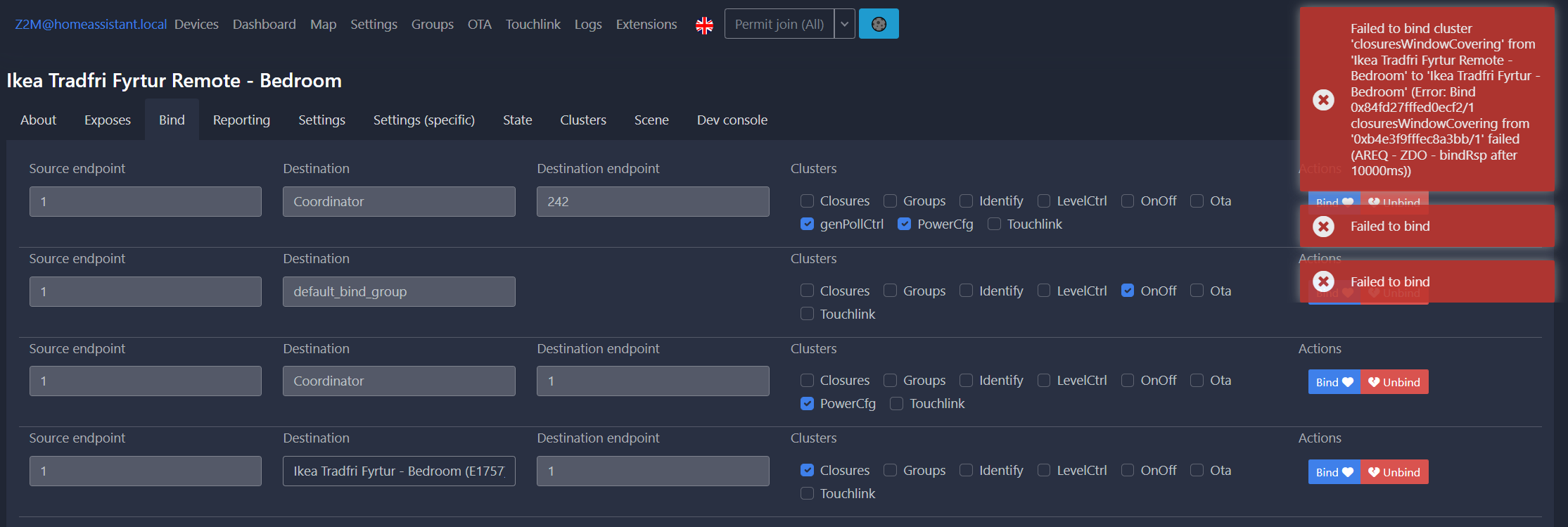
Any ideas?
sterile sleet
Put your usb sticks on a pi, run mqtt.
This way you wont have trouble with Ha container on symology
warped pebble
that's another option
grim igloo
you can also buy a PoE controller
warped pebble
I have a spare pi0-2w
warped pebble
i like that idea too
sterile sleet
You will run into trouble with every syno update
warped pebble
what's the best bet there
grim igloo
warped pebble
(i'm looking at the zigbee2mqtt devices page but not sure which of their network suggestions is best)
grim igloo
tube's coordinator is pretty well loved here
warped pebble
OOS, but of course
grim igloo
expensive and out of stock often
but @molten linden can tell us when they're coming back
you can also build your own- he open sources the BOM and everything
warped pebble
thats cool
wooden stream
Should I re-post my question at a later time?
mellow geode
wooden stream
Hey, I'm having some Z2MQTT problems.
I'm trying to Bind my Fyrtur Remote to my ...
Did you press a button on the remote before/during/after binding?
 molten linden
I have to check my supplies just about out of poe-esp32s as my resupply order was delayed. at most plentiful stock in about 10-14days for sure
wooden stream
mellow geode
Did you press a button on the remote before/during/after binding?
Before, to see if it needed to be "awake". These are the logs:
https://gyazo.com/fe29202cdfeb8c63d622233d78e1ae51
mellow geode
Not using Z2M, but it looks like the request times out. Send the bind command and then immediately press a button on the remote
wooden stream
Will try, 2 sec.
wooden stream
mellow geode
Not using Z2M, but it looks like the request times out. Send the bind command an...
That literally did it.
Thanks ❤️ ❤️
mellow geode
Awesome!
wooden stream
Also, if I can bring up an earlier question:
One of my Tradfri switches is marked with "interview failed", yet logs pass through.
Mark:
https://gyazo.com/0b828f522725b0896a0bfa534a90e671
Logs:
https://gyazo.com/1ed30b3c6971d89a6b413c01d60a85a0
Is this something to worry about? Symbol looks scary
mellow geode
Perhaps the initial interview didn't complete fully. Did you try to pair it again?
wooden stream
I did, still the same icon. Not sure what it entails.
Furthermore, and you did mention that you don't use Z2MQTT, but I can't find the documentation behind these terms whatsoever, so I never know what to hook off on.
mellow geode
Those are the different Zigbee clusters (search "Zigbee clusters LevelControl" or "... OnOff").
You likely just want to bind OnOff + LevelControl (and in some cases Scenes/Groups)
Basically, all OnOff commands get sent to the OnOff cluster. Devices that support brightness have the LevelControl cluster (where brightness requests get sent) and so on
And if you want to bind a remote to another device, you bind the clusters, so that if the remote sets a on command on the OnOff cluster, the other device "receives it on its OnOff cluster" and then turns on (simplified)
warped pebble
going to order the Sonoff P coordinator and I put myself on the wait list for Tube's PoE version
warped pebble
ooo elaborate
grim igloo
so if you have spotty signal or something you can reuse it there
grim igloo
although mains powered devices should already be repeaters
warped pebble
right
grim igloo
i'm not sure where to draw the line or how much improvement a dedicated stick adds
warped pebble
related, is there a spot on this discord for selling stuff? like my ConBeeII
grim igloo
warped pebble
lol
grim igloo
why not encase it in resin so no one is forced to use it
kind of like that guy on reddit with the hotdog
warped pebble
hahaha
I wish I could remember how I ended up on ConBeeII + DeConz when i was getting started
grim igloo
so you can go shoot them?
warped pebble
now i'm amazed I didn't get perma-banned for saying I use one!
grim igloo
when people have issues with zigbee it's usually either con* related or it's crap mesh or it's some china brand device on the mesh that is dropping routes like some sonoff devices
warped pebble
interesting that Sonoff makes a recommended coordinator but crappy devices
grim igloo
i think it's the zbmini
maybe a few devices of theirs are wonky
basically before investing in new devices check here or on forums/reddit to make sure there arent people saying run
mellow geode
warped pebble
I wish I could remember how I ended up on ConBeeII + DeConz when i was getting s...
heh, it's also the first radio listed as compatible with ZHA: https://www.home-assistant.io/integrations/zha/#known-working-zigbee-radio-modules
(which probably isn't ideal)
wooden stream
mellow geode
And if you want to bind a remote to another device, you bind the clusters, so th...
And what about these cases, where "Closures" comes a knockin?
 mellow geode
That's the cluster for covers/blinds (like the commands for open/close get sent there. You wanna bind that if you bind your cover remote)
grim igloo
mellow geode
heh, it's also the first radio listed as compatible with ZHA: https://www.home-a...
insert-harold-meme-here
warped pebble
mellow geode
heh, it's also the first radio listed as compatible with ZHA: https://www.home-a...
not only that but the sonoff model E is their first recommendation in the next paragraph
mellow geode
Well, the E does work nicely with ZHA (but still experimental for Z2M)
warped pebble
ahh i see
grim igloo
it's using a new chip so it isnt necessarily bad
warped pebble
whereas the P works for both?
grim igloo
they both work
the e is just new and basically beta for z2m
the e has the same chip in it that the new nabu casa one has
and iirc p doesnt support matter but e does or will?
smoky tapir
I bought an "E" for ZHA, just for simplicity, but at $30 or $20 with slower shipping, get one of each if you want
warped pebble
when matter begins to "matter" i'll likely upgrade/sidegrade again
grim igloo
im not holding my breath
warped pebble
right now my house is pretty much set with what it needs
grim igloo
with us home assistant guys i dont even see much of a benefit to thread/matter
smoky tapir
a bunch of this stuff is cheap enough compared to the time suck to fight with stuff that isn't working....
grim igloo
other than devices that can be joined via bluetooth if the device has an extra radio on it
warped pebble
another question, is it possible to bind switches to lights in zigbee2mqtt AND have a switch control automations in HA? Like, could I have switches bound to other zigbee lights as a fallback in case ha is down?
mellow geode
grim igloo
and iirc p doesnt support matter but e does or will?
For the upcoming SkyConnect, there's already pre-built alpha/beta firmware and addons available that support both Zigbee and Thread at the same time.
Since the Sonoff E uses the same Silicon Labs chip, the firmware could also be built for that device.
Texas Instruments (Sonoff P) also has OpenThread firmware, but I don't think they support running both concurrently. (but I'm not up-to-date on that)
Either way, it's probably recommended to get a separate stick for Zigbee/Thread network, so they can be on separate channels (and some other stuff). But running both on one stick will be a good way to get started with both Zigbee and Thread in the future
TL;DR both sticks could eventually support Thread too (possibly not concurrently though)
warped pebble
this is helpful thank you
smoky tapir
i assume no issues with running two sonoff-e sticks at same time?
mellow geode
warped pebble
another question, is it possible to bind switches to lights in zigbee2mqtt AND h...
It depends on the switch. You can't say "only use bindings when HA is down" or switch the binding when HA is down though.
Some switches/remotes support being bound to multiple devices or groups (and "HA" at the same time), others don't
warped pebble
mellow geode
It depends on the switch. You can't say "only use bindings when HA is down" or s...
are there things I can do to search for if a device has that capability?
mellow geode
smoky tapir
i assume no issues with running two sonoff-e sticks at same time?
Shouldn't be an issue. (but Thread firmware isn't available for that dongle yet and you'll likely want to have them talking on separate channels)
smoky tapir
I could run two zigbee networks for example (if for some reason i wanted/needed to)
wooden stream
mellow geode
That's the cluster for covers/blinds (like the commands for open/close get sent ...
I assumed that bindings were peer-to-peer and not group based+
mellow geode
warped pebble
are there things I can do to search for if a device has that capability?
uh, not really. IKEA remotes could only be bound to groups in the past, but a firmware update broke that and now only allows it to be bound to single devices (but multiple at the same time)
mellow geode
wooden stream
I assumed that bindings were peer-to-peer and not group based+
A remote can be bound to a single device (utilizes unicast messages, so only speaks to that devices) or it can be bound to a Zigbee group (which "spams" the whole network but also has its advantages in some cases)
 final kestrel
I ordered a skyconnect but I’m using the zigbee part mostly for my current Phillips hue etc and all of my future stuff will be thread. I really like the multiple hub thing… it goes soo well with my love for Kubernetes
warped pebble
another question, if i migrate all my Hue devices over to a single ZHA/Zigbee2MQTT network I'll have something like 50-60 devices, maybe 1/2 to 2/3rds will be routers. Is that still a healthy sized network or is it too big
mellow geode
A Hue Bridge couldn't handle that, a CC2652 will though
mellow geode
Yeah, I'm running at a bit over 100 devices too without issues (ZHA + CC2652)
I did have to put some IKEA bulbs/plugs on a separate mesh though, because they didn't always route traffic for some of my Hue bulbs. Never figured out why exactly and didn't see anyone else with this issue really
warped pebble
Yeah the 50 device number comes from me already having 30 on my conbee and another 20 or so on the hue hub currently
grim igloo
Seems that’s one benefit of zwave standards vs zigbee @mellow geode
warped pebble
mellow geode
I did have to put some IKEA bulbs/plugs on a separate mesh though, because they ...
That’s annoying. Nice job troubleshooting and figuring it out though
grim igloo
More closely adhering to spec for important shit like that
mellow geode
it's likely an issue in the Silicon Labs stack version IKEA uses for some of the devices (6.3.1 or something outdated like that)
warped pebble
I forgot that I have a tradfri hub running like…one bulb, one motion sensor, my blinds, and a symfonisk audio controller
Going to migrate that to z2m as well
Sell both the hue and ikea hubs
final kestrel
But hue is the gold standard
warped pebble
Both the hue and ikea stuff predate me using HA
grim igloo
hue motion sensors are gold standard
final kestrel
I was very disappointed in my non hue zigbee bulbs with their color reproductions
mellow geode
warped pebble
That’s annoying. Nice job troubleshooting and figuring it out though
not gonna lie, it took me over a year to figure this out. Some Hue bulbs connected to IKEA devices with zcl_version=3 randomly dropped out for hours (but still responded to group commands) (and IKEA firmware with zcl_version=2 is fine lol)
grim igloo
everything else is at best equal to other stuff but still more expensive
final kestrel
Eve motion is the golden standard… but that’s a thread and soon matter device
warped pebble
grim igloo
hue motion sensors are gold standard
I’ve found this to be true. They seem the fastest when compared with the ikea and lumi/aqara ones I have
mellow geode
grim igloo
everything else is at best equal to other stuff but still more expensive
the Aqara P1 motion sensors have been a total disappointment for me. The range is awful (even on highest sensitivity). Replaced them with older Xiaomi Aqara sensors or Hue motion sensors now
warped pebble
Oh really? They’ve been awesome in the three rooms I use them in
smoky tapir
I have a bunch of hue ones (on a hue hub), refurbs on ebay 🙂
final kestrel
Hue is very fast
warped pebble
But I also pair them with PIR sensors in a helper group
grim igloo
warped pebble
I’ve found this to be true. They seem the fastest when compared with the ikea an...
well my hue ones are my favorite because of 30 second retrigger time and battery life mostly
final kestrel
Helper group?
grim igloo
group made in helper tab
mellow geode
final kestrel
I was very disappointed in my non hue zigbee bulbs with their color reproduction...
yeah lol. The RGB on first-gen IKEA bulbs was terrible and the CCT also isn't that great. Hue bulbs are much better (and are also on sale quite often here)
warped pebble
grim igloo
well my hue ones are my favorite because of 30 second retrigger time and battery...
Agreed on battery. The hue stuff lasts forever.
grim igloo
mellow geode
yeah lol. The RGB on first-gen IKEA bulbs was terrible and the CCT also isn't th...
my hue candellabra suck honestly
for liek $30 a piece they were a bad investment
warped pebble
final kestrel
Helper group?
You can group several devices together to report state as “one device”
final kestrel
grim igloo
well my hue ones are my favorite because of 30 second retrigger time and battery...
Template are love and life…. I’m just getting started with HA zigbee so helpers are new to me
That’s cool
mellow geode
grim igloo
my hue candellabra suck honestly
the color reproduction?
warped pebble
So if either sensor says there’s presence, the presence sensor is on
Once they both go off, the helper device is “off”
grim igloo
mellow geode
the color reproduction?
i have white+ambiance and when like 40% dim or less they look terrible
mellow geode
Because you can see the inner diffusor?
grim igloo
warped pebble
Once they both go off, the helper device is “off”
technically this depends on what type of device you're grouping
final kestrel
I can probably use all of my ecobee sensors then once they update my thermostat for matter so I can make it local
grim igloo
mellow geode
Because you can see the inner diffusor?
yea and light level is crap. between 1-40% it almost looks identical
very little actual change in brightness
i'll never suggest them to people lol
grim igloo
i cant justify 40ish a bulb
that's ridiculous
i have two rgbw-cct bulbs from athom flashed with wled (singled bulbs i think) and they were like $12 each
for rgb i use led strips i make with esp devices running wled
so i get rgb via strips and light via bulbs
pretty good solution imo
and for light switches i use zwave cuz i didnt love the zigbee options
although the inovelli ones look pretty good
mellow geode
grim igloo
yea and light level is crap. between 1-40% it almost looks identical
Some people removed the diffusor: https://hueblog.de/2019/02/07/zeig-dein-hue-e14-einfach-kuerzer-machen/
The result certainly looks interesting
grim igloo
even if i did like the look of that i'd definitely break them
grim igloo
mellow geode
The result certainly looks *interesting*
it's like if a micropenis and a candellabra had a baby
hahaha
 acoustic berry
Hey does anyone have a suggestion for a zigbee dongle for raspberry pi? I have some sengled bulbs and am tired of their crappy hubs.
warped pebble
if you scroll up theres discussion about this because i was curious about the same thing
the general consensus is a sonoff USB P dongle
with the E version fully supported in ZHA (home assistant's built in Zigbee integration) but beta support in Zigbee2MQTT (an app integration that works with home assistant but is separate from it)
grim igloo
warped pebble
the general consensus is a sonoff USB *P* dongle
With accompanying usb extender
sterile sleet
acoustic berry
Hey does anyone have a suggestion for a zigbee dongle for raspberry pi? I have s...

grim igloo
Not sure if we said that above
warped pebble
@sterile sleet this is the first time i've seen pinned messages be useful in a discord, thanks for posting that
i wouldn't have looked
grim igloo
No one looks it’s easier to just link what’s there
smoky tapir
acoustic berry
Hey does anyone have a suggestion for a zigbee dongle for raspberry pi? I have s...
I have the Sonff USB Stick "E" and using it with ZHA, it was plug and play to setup
I'm now in reset device hell trying to get a zigbee button to connect to the closer router (power monitor plug)
i orgiinally did stuff all from my desk, not the location where the button will end up
mellow geode
does the button work when it connects to a further router? if so, i wouldn't bother resetting it (at some point, it might move back to a farther router)
mellow geode
smoky tapir
i orgiinally did stuff all from my desk, not the location where the button will ...
ah, nvm then
smoky tapir
it wasn't connecting where it was, i dropped another router near it, and another one to bridge that one 🙂
i've got a mesh of red lines in the visualizer now 🙂
and a yellow one from the button on my desk as it connects to the router downstairs, vs the coodinater 15 feet away, or the other router 3 feet away
i was hoping deleting it from zha, then resetting it would "reset" the learned position. That may have been an incorrect assumption
mellow geode
my network also has quite a few grey/red/yellow lines and everything still works really well: https://i.imgur.com/eTt9CbH.png
 smoky tapir
the answer may be leave this crap alone for 24 hours ago
smoky tapir
yeah, discovering the button on the UI labeled "refresh topology" is a null-action
mellow geode
just re-joining it (won't make a difference whether or not you remove it from ZHA) will make it pick a (possibly) new parent/router
mellow geode
smoky tapir
yeah, discovering the button on the UI labeled "refresh topology" is a null-acti...
well, it does start the discovery progress. it can take quite some time (depending on the network size)
and then you'll need to refresh
smoky tapir
my network is a coordinator, 4 routers, and 3 buttons
mellow geode
it also updates every couple of hours/days
smoky tapir
I've got a completely independent hue network with ~40 devices, but that has no impact here (other than potentially overlapped channels)
mellow geode
by default, ZHA is on channel 15. In the Hue app, you can check what your Hue network is on (and move it if needed)
grim igloo
And hopefully APs aren’t on ht40 band width bleeding into zigbee channels
Everyone ignores Wi-Fi lol
mellow geode
15, 20, 25 are the Zigbee channels you want to use (less WiFi interference with 20 MHz and compatible with most/all devices)
grim igloo
I think that link is on a black list for ads or tracking cuz it doesn’t resolve for me
smoky tapir
of course the ubiquiti data shows 171 AP's in the area.... (but pretty sure that includes cars that drive near by)
mellow geode
and for WiFi you only want to use 1, 6, 11 (20 MHz)
grim igloo
mellow geode
and for WiFi you only want to use 1, 6, 11 (20 MHz)
Assuming USA
mellow geode
even here in Europe, I've never seen someone use channel 13/14. I think there are quite a few devices that are incompatible
smoky tapir
HT20 1&11 on my 2.4ghz range, I think i dropped all the 2.4 to narrow on purpose
it defaulted to ht40, but if a device is connecting at 2.4 I want a signal, not speed
mellow geode
2.4 GHz 40 MHz WiFi should be illegal lol. UniFi doesn't have it enabled by default at all
mellow geode
grim igloo
5ghz I’m using vht80 tho
yep, same
grim igloo
No Wi-Fi 6 devices or clients here
I was waiting for 6e and apparently UniFi thinks only businesses and super rich people need it
smoky tapir
I use a technology called twisted pair for most of my gear 🙂
mellow geode
grim igloo
I was waiting for 6e and apparently UniFi thinks only businesses and super rich ...
I have no devices supporting 6E but quite a few WiFi 6 devices (and U6 APs). 80 MHz on 5 GHz with WiFi 6 can saturate the 1 Gigabit link
(but that's off-topic now)
smoky tapir
i have a 6 AP, but you aren't going to saturate a 1gig link unless you are standing next to it, and you are in a farady cage
2x nano-hd's and a u6-lite
grim igloo
I think their in wall units are the best option for in room 5/6ghz with eth and PoE out
smoky tapir
i've got multi gig to the desktop, ran 2.5ghz and have sonic.net "10" gig fiber into the house, which is about 4gig from the UDM
grim igloo
But ya were full on Wi-Fi now.. #zigbee-archived gon git mad
smoky tapir
here's the humble brag from my desktop - https://www.speedtest.net/result/13857148313
grim igloo
I don’t think anyone brags about living in Fremont 
smoky tapir
I'm up in oakland
mellow geode
smoky tapir
i have a 6 AP, but you aren't going to saturate a 1gig link unless you are stand...
at least for the download with an iPhone 12, it gets ~930 Mbps from across the room (with line of sight though) (with other devices connected) (U6-LR, U6-Pro, U6-Mesh but not on my U6-Lite)
smoky tapir
mellow geode
at least for the download with an iPhone 12, it gets ~930 Mbps from across the r...
it really depends on how much interference you have in my experience
grim igloo
Overall throughput matters way more than per device though
Only thing you need bandwidth for on a phone or tablet is FaceTime or streaming
Even 4k unlimited bitrate is like 120mbps
sterile sleet
topic ? anyone? 😄
smoky tapir
wifi speeds
grim igloo
sterile sleet
topic ? anyone? 😄
We all tried and failed
grim igloo
We’re circling back to zigbee
smoky tapir
so it was justified
sterile sleet
2.4ghz
smoky tapir
2.4ghz the wasteland of radio frequencies
grim igloo
Yea the thing that zigbee uses
I’m actually amazed thread and matter decided to join the party
Fuckin shit decision
And Bluetooth lol (with matter)
grim igloo
Lorawan seems cool but I’ve never played with it and am not sure how low of latency you can get compared to other IoT stuff like zigbee
grim igloo
smoky tapir
I'm up in oakland
Btw my brother has a redwood slab business out of Hayward area if you need wood for a project or whatever down the line
smoky tapir
will keep that in mind
well one button seems to have remapped itself
need the topology map to show the "area" the item is in, i guess i made the mistake of labeling my devices with numbers
"Sonoff button 01", "Sengled Power 01"
Need to figure out if those are getting renamed to "Living Room Button" etc
i'm redoing all this over the weekend on new server if anyone has any suggestions on such things 🙂
warped pebble
Do any of you know of any zigbee outlet dimmers?
Right now I’m using two Legrand wifi/HomeKit dimmers but I would prefer to have these two be zigbee as well
grim igloo
the homekit can be added directly to hass via homekit controller
warped pebble
I do that currently yeah
But one device pooped itself in the past and I have a feeling there’s something about powering dimmable LEDs they don’t like (despite the documentation saying any total dimmable LED load below 100w is fine, and I have 60w max load)
The one in the living room always ends up just having a blinking red led on it which isn’t even mentioned in the manual!
grim igloo
warped pebble
Do any of you know of any zigbee outlet dimmers?
To confirm, you aren’t talking about light switches but outlets?
grim igloo
i havent heard of a dimmer outlet before -.-
warped pebble
correct
it's kind of a niche setup because "why not just get zigbee bulbs?"
but they're dimmable plant lights from Soltech
that plug into the wall
so i have them in a track light setup that terminates in a regular 110v ac plug
silent crest
smoky tapir
Plugged in my sonoff usb-stick "E", zha installed, told it to discover devices, ...
Yeah, but were those devices already binded? I am currently trying to bind them through ZHA, so no HA automation is needed to trigger lights. But when doing it, the process just does nothing (keeps loading forever)
smoky tapir
brand new stick and band new zigbee devices (buttons and power monitors)
in ZHA, devices->sonoff zigbee 3.0 usb dongle plus v2 ZHA (configure) -> (add device) button. Then reset your device, and wait for discovery. Took me about 5-10 seconds for discovery.
smoky tapir
silent crest
Yeah, but were those devices already binded? I am currently trying to bind them ...
i could try binding a spare hue light
silent crest
smoky tapir
i could try binding a spare hue light
Would you mind trying and reaching back? Just to see differences. Cause we have the same zigbee stick!
smoky tapir
may be able to try now, brb
or not, don't have a spare hue bulb, i thought i had one
silent crest
No problem! If you ever try reach back if you can!
Meanwhile i will try to continue debugging
smoky tapir
it see's the usb stick, you didn't plug it into a usb3 slot, or if you did you have it on an extension cord?
usb3 + the zigbee usb stick - second sticky has some references
brave nacelle
i'm putting a sensor in the mailbox
this way i know when the mail is picked up/delivered lol
 odd mango
hi. How hard is it to port Z2M device to ZHA? I have posted a device support request, but might just do it myself.
silent crest
smoky tapir
it see's the usb stick, you didn't plug it into a usb3 slot, or if you did you h...
I have my stick on a usb 3.0 slot with an extension cord. Is that all right?
silent crest
silent crest
I have my stick on a usb 3.0 slot with an extension cord. Is that all right?
Hi, I managed to bind them! I binded the switch to each lightbulb and selected no options in the lower part. It now works!
tropic depot
odd mango
hi. How hard is it to port Z2M device to ZHA? I have posted a device support req...
use the tutorial in the quirks repo as a guide. If you have any questions DM me and i'll assist as I have time.
odd mango
um, looked around, could not find it. Maybe looking in wrong places?
odd mango
@tropic depot would you point me to that tutorial please
tropic depot
https://github.com/zigpy/zha-device-handlers the readme
odd mango
oh
I'm thinking perhaps it would be easier to find a similar device and modify it
what ma be closest to this?
odd mango
odd mango
@tropic depot so I have copied this device to custom quirks folder, just changed the device info. It worked, I now have a working switch entity and a a single "unknown" electrical measurement. From this point I will need some guidance...
Z2M device was described here, afaik: https://github.com/Koenkk/zigbee-herdsman-converters/pull/3197/files
wooden stream
Does anybody have the link to the docs on Binding, that explains the binding groups?
 naive ruin
wooden stream
Does anybody have the link to the docs on Binding, that explains the binding gro...
naive ruin
wooden stream
Does anybody have the link to the docs on Binding, that explains the binding gro...
https://www.zigbee2mqtt.io/guide/usage/binding.html - Is that what you looking for?
Firmware version(aka Firmware: 0x01001404) on Zigbee devices are inherited from Zigbee standard or in HA it's somehow processed?
 unique quiver
Hey I do have really odd behaviour - my zigbee smart valve does not update current temperature, it changes only when I completly delete device and pair it - any ideas?
Im using ZHA
 terse geode
mellow geode
uh, not really. IKEA remotes could only be bound to groups in the past, but a fi...
terse geode
mellow geode
uh, not really. IKEA remotes could only be bound to groups in the past, but a fi...
Hey there! Using Home Assistant with ZHA (Sonoff Zigbee 3.0 USB Dongle) to control my lights (from LIDL).
Bought the 2 Button IKEA TRADFRI Switch today, not able to pair - won't show up, instead connected to a Bulb (which was connected to ZHA before), kicking it out of my ZHA. Now i'm not able to re-pair the Bulb (even after removing it completely and resetting it), the IKEA Switches also won't connect.
TL;DR: Do Ikea Tradfri Switches (Square 2-Button Version) work with ZHA?
mellow geode
Yes, they do. If you want to pair them, you have to press the button on them four times quickly IIRC. You can bind them later using the ZHA UI
terse geode
@mellow geode oops sry for mentioning. Searched for IKEA here if the problem was common
mellow geode
For the light, try to lookup the IKEA video on how to reset it. It can be finicky to get the timing right (to reset it)
Also allow joins in ZHA (so click the "Add Devices" button)
terse geode
Yeah already did the reset with pressing 4 times in 5 Seconds, but there is also a pairing Mode after a 10s long press, the manual told
mellow geode
Yeah, you don't want that. (That only binds directly to bulbs using TouchLink without joining your Zigbee network at all)
You want to do the "pressing 4 times quickly" and hope that the switch finally decides to join your ZHA network
It can take multiple tries (otherwise, maybe change the battery)
terse geode
Good to know, thx m8!
unique quiver
unique quiver
Hey I do have really odd behaviour - my zigbee smart valve does not update curre...
Is this some sort of bug on ZHA side or how do I debug this?
austere patio
unique quiver
Is this some sort of bug on ZHA side or how do I debug this?
What valve?
unique quiver
It ident itself as TS0601
austere patio
And by "update current temperature", do you mean the ambient temperature, or the set point?
austere patio
More Tuya...
unique quiver
yeah
austere patio
Have you tried clicking the "Reconfigure" button to try to setup attribute reporting again?
unique quiver
Yup, many times
austere patio
What does it show?
unique quiver
Reconfiguring device: _TZE200_husqqvux TS0601 -> both show checkmark
temp is the same
austere patio
Can you screenshot the "show details" table?
austere patio
Upload the image to any image hosting site


 austere patio
It probably needs to be polled continuously and doesn't actually support attribute reporting
unique quiver
Here are the values, hope you can see something from it
unique quiver
austere patio
It probably needs to be polled continuously and doesn't actually support attribu...
Yeah, is that something I can set up as a task or something?
Okay so I tryed (i hope) manually reading the temp from it and even that shows incorrect temp
mellow geode
Using the clusters UI?
unique quiver
Yup
mellow geode
How is the cluster named?
 mellow geode
Yeah, that's a "fake cluster". The Tuya valves do weird stuff and "zhaquirks"/(GitHub repo: zha-device-handlers) tries to convert the device into one that follows spec, so ZHA can communicate with it
So the data on the "fake cluster" isn't even updated correctly
unique quiver
jesus

yeah as you can see here since I last time paired it the temps have not change
and thats like 3 weeks now
unique quiver
So what to do with it now?
mellow geode
maybe search if there's a similar issue here or create a new one: https://github.com/zigpy/zha-device-handlers/issues
mellow geode
The Home Assistant beta is currently live (2022.11.0b0). You can switch to it if you want but I don't think there were any specific Tuya valve changes for ZHA
terse geode
mellow geode
You want to do the "pressing 4 times quickly" and hope that the switch finally d...
Tried both before multilple times, you told me how and now it works, thank you! But seems not to be that easy to just assign the switch to light groups? just want to assign my switches to the light groups to torn them on/off and dim them. 😦
Want to avoid building automations besides the existing light groups i already got and can control in my dashboard.
mellow geode
You can try the binding. Depending on your firmware version, it'll only work for a ZHA group or (multiple) single devices.
Go to the HA device page of the IKEA switch/remote, click on the three dots and select "Manage Zigbee Device".
Then, click on the "Bindings" tab. You can either select a bulb in the upper menu to bind to as a "single device". Press "Bind" and then instantly press a button on the remote, so it wakes up and can hopefully bind to it.
https://i.imgur.com/VZpfoGJ.png

If that doesn't work and/or you want to bind it to a Zigbee group (make sure that you've created one with the bulbs (Settings -> Integrations -> "configure" ZHA -> click the "Groups" tab at the top and then create a group with the relevant bulbs there):
Again, open the Bindings tab on the switch but this time, ignore the upper menu and in the lower selection menu, select your ZHA light group and then select the "OnOff", "LevelControl", and "Groups" cluster to bind. Press "Bind Group" and instantly press a button on the remote, so it wakes up and can bind to the group (if the firmware allows).
https://i.imgur.com/jMxAhMJ.png
 terse geode
Thanks, that are corners of ZHA i've never been before. Created a group, set those checkboxes, but when i click on "bind group" and press buttons on the switch nothing happens (but in the log i see the button fire events, so they are recognized).
Anyway, you deserve a cool beer. Gonna try it tomorrow, i'm a bit frustrated now 😄
 slender sapphire
Cannot connect with zha through Home assistant integration wizard. Sonoff Zigbee Pro flashed with Tasmota 12.2.0.2 when I get to the screen where I'm supposed to put in the socket and the connection speed it won't connect..... even though I'm able to access the Zigbee bridge via WiFi..... followed the tutorials on: https://zigbee.blakadder.com/Sonoff_ZBBridge-P.html and digiblur but something's missing. I'm even able to see the aqanet sensors on the Tasmota home page. Just can't get home assistant to link up.
terse geode
https://cdn.discordapp.com/attachments/929126422675607653/1035269849980616724/VID_20221027_211150.mp4 here is what i've done. Single bulbs or groups won't link, not sure if i can check or update the firmware?
Does this feature pair the button directly to the bulb(s) instead to the dongle?
mellow geode
It's more that the switch is bound to the bulbs (and not the other way around). Events should still show up in HA too.
What you did looks right to me. Can you try pressing a button before and/or immediately during binding?
Also, try binding the switch to a single bulb only and see if that works
You can check the firmware version of the dimmer too. It's in the first tab (clusters): Basic -> read sw_build_id (press a button to wake up the device)
terse geode
mellow geode
You can check the firmware version of the dimmer too. It's in the first tab (clu...
Won't work, but just found out that switch isn't reporting the battery state, another is doing that. Will try with the other
Yeah, the other one worked! At least i bought 4 pieces 😄 Thank you! Also works without HA running (plugged the Zigbee dongle off), so i got a fallback, that makes me more happy 😄
 vital bluff
So I've got an Aqara smart plug that has been great so far. Was about to purchase a few more but then stumbled on this article
I've had zero issues with the Aqara smart plug using a Sonoff dongle and ZHA but am a little wary getting a bunch more of there may be issues down the line.
Anyone have any perspective on this for a new user, should I just switch to the Sonoff S40 Lite?
And is it known if Aqara devices can connect to Sonoff plugs as routers?
smoky tapir
in the same vein, just got HA installed on a LenovoTiny, and plugged in an additional power monitoring sengled dongle (Zigbee), and getting a bunch of 0 readings - https://owncloud.dhp.com/index.php/s/8FCZIw8b71hXBDy - however, I literally just plugged it in 2 hours ago and paired it to ZHA on my raspberrypi setup. Is the zero a potential zigbee drop while the mesh is forming?
my mesh visualizer doesn't show it actually connected to anything yet
and now it does, will see if the zero's go away
smoky tapir
they didn't
 gleaming jay
just got an ikea symphonisk dial remote and i've paired it a bunch of times (seems successful), but when I listen on the events zha_event i hear nothing from it
any tips on getting this thing to work?
odd mango
symfonisk is feird.
weird
one time it works, other does not.
of fires 4 events at once
too much trouble to use...
sour shadow
Anyone have any perspective on this for
smoky tapir
fyi, removing a sengled power monitor from zha appears to turn it off, while adding it back in, turns the power back on
 junior reef
I'm trying to pair the motion sensor that is reported as supported (https://www.zigbee2mqtt.io/devices/IH012-RT01.html) However upon pairing HA reports them (tried 2 so far) as unsupported. I'm using Sonoff Zigbee 3.0 USB Dongle Plus and Z2M 1.28.0-1. What am I missing?
sour shadow
The light is likely set to the default of optimistic, and there's no Reporting set up. That means that Z2M assumes the light turned on (or off) when it was asked to.
Options include:
- Untick
optimisticin the device settings (in Z2M) - Configure Reporting in Z2M to report the
OnOffcluster'sonOffattribute every (say) 90 seconds - Use a Zigbee group (https://www.zigbee2mqtt.io/guide/configuration/devices-groups.html#groups) to control all the lights as one, increasing the reliability of turning on/off multiple devices at once
When you try to turn on/off a bunch of devices at the same time you get that many messages on the mesh, which can result in some getting lost
I use (2) for all my lights, all set for different intervals to avoid things happening in lockstep
 maiden cliff
If Reporting tells X2M that an entity's state is different to what it expcted it to be, in what direction does it fix the state of the lightbulb? Does it make the actual bulb match what hass/z2m think the state should be, by resending the message, or does it fix the hass/z2m entities to match the actual bulb?
sour shadow
Nothing fixes anything
It simply means that Z2M (and so HA) know what reality is, vs what they thought it was
maiden cliff
That's what I would call teh z2m/hass entities getting fixed in the sense of matching reality.
rapid dawnBOT
@harsh zenith I converted your message into a file since it's above 15 lines :+1:
drowsy goblet
sadly I'm too new to be able to help with that, though I have a question that maybe you can help with
Anyone with Inovelli Blue and is using z2m, and know a good way to either set up the switch or diagnose why it seems really really slow
The first time I turn on or off the switch it may take 3-5 seconds or even longer for my hue lights to change. After the first few clicks it speeds up but it's still slow, 1-3 seconds.
This is using a flashed sonoff 3.0 P dongle, z2m, inovelli blue switch in smart bulb mode, hue lights also paired to z2m
molten linden
drowsy goblet
sadly I'm too new to be able to help with that, though I have a question that ma...
I'm not sure how it's displayed in Z2M but there is a config option for Button Delay. if you set it to 0 you won't be able to do any of the multi-press options, but I set it to 1 and can still get most of the multi-tap events (I'm on ZHA).
I believe it was 3 seconds by default.
drowsy goblet
hmm
grim igloo
molten linden
I'm not sure how it's displayed in Z2M but there is a config option for Button D...
wait so you have to have a delay for single press if you want to use double/triple/etc?
my zooz (zwave) light switches dont seem to have that issue/limitation
molten linden
if you set it to 0 the press how is it to distinguish a multi press?
as 0 does a single press immediately
grim igloo
im not sure how their logic works lol
molten linden
you need a delay as long as it takes to perform all the multi tap
drowsy goblet
I'd think you could do it in automation, if a button is pressed check the last time a button was pressed
ie detect multi-taps in automation not on the switch
grim igloo
it's certainly not a second or more, that would be super noticable on my side
drowsy goblet
I'm not sure I'm getting a good zigbee signal though, I can't seem to set the config in z2m
molten linden
I got nothing there. I know when I installed it, the delay was noticeable. Set it to 0, and it was immediate. but wasn't able to get any multi-tap events
set it to 1 and am able to get double, triple, quad to work, think I got quintuple once too
grim igloo
i noticed with my switch i was able to do single/double etc presses but it was still triggering the single when i did a double etc so i had to start using "value notification" automations to trigger scenes (multi taps) and that fixed it. thats a zwave only thing though
molten linden
inovelli forums might be a a better resource for these too given their new-ness.
drowsy goblet
I think it's a signal issue now, check this out
molten linden
the's def some talk on the forums about that.
drowsy goblet
the network map I get right now https://imgur.com/BLF46CZ
molten linden
seems to be variable though. the single one I have installed now is fine, but dmulcahey has one that works fine on his desk, but signals drop out after it's in the wall.
 ionic abyss
anybody have connectivity issues with the aqara P1? i have a few that worked fine and one now that pairs but sends no events and is stuck in a state
 sudden comet
Anyone get an inovelli blue working with an husbzb-1?
molten linden
what's the issue? @sudden cometthey should work with it.
sudden comet
molten linden
what's the issue? <@128911706624622592>they should work with it.
Well, it’s in pairing mode but it never shows up. It’s like 1.5m away from the usb stick even
I didn’t think I would need zigbee2mqtt however the light switch manual says I do.
And well, that isn’t apparently compatible
molten linden
not using the husbzb-1 any more, but it's known to be pretty good with interference issues
tropic depot
should have 10.... but I cooked 2 :S
lilac wharf
Oof. How?
lilac wharf
Dafuq? You have a 6-way switch setup?
tropic depot
I did not so I inadvertently piped mains in from an adjacent circuit
and had mains on 2 legs
molten linden
it's a really important light
tropic depot
lilac wharf
Dafuq? You have a 6-way switch setup?
tell me about it... it's so dumb
it's for a hallway
smh
lilac wharf
Jeebus lol
sudden comet
Yeah this isn’t working at all
tropic depot
are you sire it is in pairing mode?
sudden comet
The blue is flashing for pairing
sudden comet
I even did the reset for it to go back to pairing
sudden comet
Pull the air gap?
tropic depot
the notch at the bottom
use a small flat head
and pop it out towards you
it doesn't come all the way out
but it will temporarily break the circuit for the switch
sudden comet
Okay. It’s out
sudden comet
It did not restart it.
tropic depot
didn't pull it out far enough
lilac wharf
|| pull out game weak ||
tropic depot
 sudden comet
Alright. Everything died. I pushed it back in. Flashing again
tropic depot
try now
sudden comet
Searching for zigbee devices just spinning all day long.
Does it matter for pairing if it’s being setup without neutral
sudden comet
For sure
molten linden
(but mine paired without ground - I added it later).
vital bluff
This is probably a longshot but does anyone know if the Enbrighten/Jasco outdoor smart switch 43100 works as a Zigbee repeater/router?
sudden comet
HubZ smart home controller
sudden comet
tropic depot
w/o neutral ground is essential
So yeah. Just spins searching forever.
Frustrating for sure
I’ve only ever run zwave devices off this stick. It’s possible it’s broken I suppose
tropic depot
this the first zigbee device?
2 questions for you
is the stick on an extension cable
sudden comet
Yes
tropic depot
do you use the bluetooth integration
tropic depot
DM me
drowsy goblet
^ I had a similar problem pairing my blue switch yesterday
It took me a few tries, but eventually the air gap pull, wait for it to pulse blue, then tell z2m to search it would find it. It was initially unsupported so I had to update firmware on the sonoff zigbee dongle. Since then it's been pairing more easily.
for what it's worth, I'm in Chicago so I have metal switch boxes, and I don't think I'm getting a great zigbee signal, so the pairing may be pretty conditional on a good signal and no wifi interference
related to blue switches, and not to zigbee.... did you guys find the screw terminals to be HORRIBLE for solid wire around-the-screw? there isn't enough clearance it's almost impossible to get the wire wrapped around
drowsy goblet
if you put the wire straight into the terminal it comes out the back of the switch and when you push the switch into a shallow box it bends it and eventually it can break
whereas if you screw it in, instead of a sharp 90 angle, you can get a little curve since the wire is more on the side of the switch, and when you press the switch into a shallow box it doesnt require as much of a kink in the wire
grim igloo
sounds like you should use pigtails off of wire nuts / wagos so you can route cables better
tropic depot
and man
drowsy goblet
that doesnt change it though, you still have a solid 14ga wire coming straight out the back of the switch
drowsy goblet
it's basically a screwed in backstab connction = horrible
grim igloo
wagos are super nice
backstab by definition isnt screwed in, which is bad
the screwed in clamp down and it's a better more reliable connection
tropic depot
I have 8 in using the terminals.... some in crowded 3 gang boxes w/o issues. Thermal imaging to prove it too 😄 because I don't trust myself
grim igloo
just make sure to always buy legit wagos not knock offs
you can 3d print nice little holders for them for other projects (i dont use the holders inside e boxes)

if you happen to have a 3d printer they're nice quick prints for testing out new filament / settings too
drowsy goblet
I'll get a picture of what I mean
tropic depot
I know what you mean
drowsy goblet
grounding via case is also not reliable, but I can kinda forgive that since it's mostly a Chicago thing
we dont use/need ground wires at all here since everything is conduit and the screws attaching the outlet provide the ground
but anyways, doesnt matter
I still like them, it's just harder to wire up than it needs to be
tropic depot
@molten linden @sudden comet is looking at your coords and may have some questions.
grim igloo
He said maybe a couple weeks for PoE in stock again iirc
sudden comet
grim igloo
He said maybe a couple weeks for PoE in stock again iirc
Truth
 hushed elbow
Where's the best place to ask for help with custom ZHA quirks?
 raven jewel
Here probably
hushed elbow
I am writing a quirk to remove some sensors from a smart plug with power meter, which only measures Power and not Voltage or Current. Of course I could just disable them, but thought I'd make a quirk that can be applied upstream instead.
I have got the custom quirk correctly recognised, however even though I've removed the attributes with a custom cluster it still shows the sensor entities in HA. I've removed the device, restarted and re-added and same thing. If I go into Manage zigbee device, the attributes are completely missing in the dropdown for the cluster. Is this down to the way power meters are handled in HA itself or am I doing something wrong.
Oh, ignore the signature descriptor comment - forgot to put my own in there and just did a copy pasta of another quirk haha
tropic depot
Don’t remove the attrs
search constant_attrs in the repo
And use that structure to hard code them to None
Try that
@hushed elbow ^^
hushed elbow
Ah right, I had a feeling I was doing it the wrong way but couldn't find a good example haha
rapid dawnBOT
@hushed elbow I converted your message into a file since it's above 15 lines :+1:
tropic depot
Ok we may have to do something a bit more complicated and override a method… shouldn’t be this hard. Sorry
grim igloo
so quirks are needed for devices that dont work out of the gate with ZHA right? is there an easy to use template for non-coders to be able to contribute?
 glad plinth
Can someone help me troubleshoot my Zigbee2MQTT add-on? I'm very new to this but trying to switch from ZHA because it's not discovering my devices, but I keep getting a 502 bad gateway on the UI and the Log keeps stopping at "Starting zigbee-herdsman (0.14.62)"
hushed elbow
grim igloo
so quirks are needed for devices that dont work out of the gate with ZHA right? ...
The README gives some details on how to create a quirk
https://github.com/zigpy/zha-device-handlers#what-the-heck-is-a-quirk
grim igloo
i doubt you need to switch to z2m to fix your stuff but it kinda sounds like you still have zha addon running so z2m is failing to start
glad plinth
grim igloo
i doubt you need to switch to z2m to fix your stuff but it kinda sounds like you...
I disabled ZHA in services, do I need to fully uninstall it you think?
grim igloo
the addon not the integration
glad plinth
oh there's an addon too?
grim igloo
under services i see integrations. i think you are confusing integrations vs addons
lilac wharf
There's no ZHA add-on
lilac wharf
ZHA is an integration
grim igloo
k nvm then
lilac wharf
You will need to remove ZHA if you want to use z2m with the same adapter
lilac wharf
Nope
glad plinth
Ok I removed ZHA and tried to restart Z2M but still hanging at starting herdsman, i turned on herdsman debug and this is what it says, is this helpful in any way?
2022-10-28T23:32:44.922Z zigbee-herdsman:adapter:ezsp:uart Opening SerialPort with /dev/ttyUSB1 and {"baudRate":115200,"rtscts":false,"autoOpen":false}
2022-10-28T23:32:44.930Z zigbee-herdsman:adapter:ezsp:uart Serialport opened
2022-10-28T23:32:44.931Z zigbee-herdsman:adapter:ezsp:uart Uart reseting
2022-10-28T23:32:44.931Z zigbee-herdsman:adapter:ezsp:uart --> Write reset
2022-10-28T23:32:44.933Z zigbee-herdsman:adapter:ezsp:uart --> [1ac038bc7e]
tropic depot
That’s most likely why zha wasn’t working too
You have something screwing with the stick
lilac wharf
How did you install HA?
glad plinth
I had intermittent luck with ZHA it just wasn't detecting all of my devices, just some of them
I have HA OS
tropic depot
how’s the coordinator connected and what type of coordinator is it… aside from SI based
glad plinth
see the funny thing is, my z2m config has that baud rate set in it because i found that thread with the github solution but its still saying 115200 when i start
can I post my YAML?
lilac wharf
Oof, the HUSBZB-1 isn't a great choice for z2m
tropic depot
I’m not a z2m user so someone else will need to help you with that config
glad plinth
lilac wharf
Oof, the HUSBZB-1 isn't a great choice for z2m
I know 😦 I am planning on getting a ConBee but just wanted to see if i could make this work for now
glad plinth
really?
tropic depot
yes
glad plinth
what the heck lol
tropic depot
Search here for folks having conbee issues
grim igloo
conbee is what you suggest to your enemies
tropic depot
Every day
glad plinth
hahah
grim igloo
you might want to spend a few min and let dmulcahey help you with zha though man. he's very helpful 😛
hushed elbow
grim igloo
conbee is what you suggest to your enemies
As a ConBee user that has had problems in the past.... Best recommendation? 😅 Esp if I want to jump on the Thread bandwagon when that's working with dual mode
glad plinth
I was trying to do Z2M mostly to see if its really a ZHA issue or if its a range issue
tropic depot
when you said it wasn’t working with certain devices I am going to go on a limb and guess tuya? Or are you having pairing issues in general?
grim igloo
you dont really get like.. better mesh perf with one vs the other man
and i say that as a current and happy z2m user lol
tropic depot
If pairing issues
Update the firmware on the stick
if you haven’t already
That stick is hella old
glad plinth
I'm trying to pair Innoveli Zigbee light switches, which will act as repeaters to broaden my network
tropic depot
And the stock firmware is very old
glad plinth
can I update the firmware from HA or do I need to pull the stick and plug it into my PC?
tropic depot
2nd person today!
glad plinth
thats because we all just got our pre-orders lol
tropic depot
I did the ZWP thing and accidentally jumped the line 😬
tropic depot
anyway, update the firmware
glad plinth
ZWP really screwed that one up but I got my switches so i'm not mad
tropic depot
Let me find instructions for you
glad plinth
thanks man, appreciate you
so you're running Inovelli switches in ZHA? It's not a ZHA issue?
grim igloo
hushed elbow
As a ConBee user that has had problems in the past.... Best recommendation? 😅 E...
https://www.zigbee2mqtt.io/guide/adapters/#recommended this list is pretty good man. the p series sonoff dongle is what myself and a lot of folks use but i dont think it will be able to do matter in the future. i think the E model might be able to in the future but that is considered experimental/beta and currently not suggested to buy (at least not for z2m) so...
tropic depot
tropic depot
glad plinth
so you're running Inovelli switches in ZHA? It's not a ZHA issue?
Yea and I wrote a good chunk of the support for them
8 in wall working great
grim igloo
i think a lot of people get burned by a shitty usb stick / hub and a bad mesh and start blaming things that seem like obvious culprits when they arent an issue
grim igloo
ya but if his stick is old anyways is it even worth him spending time on vs just buying like a sonoff p and starting fresh?
tropic depot
the stick is old but it’s solid when updated
tropic depot
I had > 125 devices on it before I updated to a tube
grim igloo
nice
glad plinth
oh cool I can update it on any machine running Python, that's good
Gonna go grab my stick and give it a shot
grim igloo
i might use the DIY tube option as an excuse to buy a reflow station and try my first SMD pcb project lol
@tropic depot are you employed by nabu casa?
tropic depot
Negative
Ha, I manage a good chunk of the IT department for a large insurer in the states. Keeps me fairly busy
grim igloo
but you work on zha / zigpy?
grim igloo
tropic depot
Ha, I manage a good chunk of the IT department for a large insurer in the states...
like sysadmin or mgmt?
tropic depot
grim igloo
but you work on zha / zigpy?
Yes, more ZHA / quirks than anything but I poke at the libs on rare occasion
Engineering / delivery management
I have all development teams with the exception of 1… counting contractors and such it’s > 150 ppl
started as a dev, got into architecture, then flipped into mgmt
Still do a lot of hands on stuff
grim igloo
"Delivery management is the function of applying processes to ensure goods are effectively and efficiently transferred from one location to the next." ~ seems like crowdsupply could use you there lol (with the shitshow the hass yellow has been)
sounds like you wear quite a few hats 😛
grim igloo
you make lots o time for discord tho haha
i guess it's easy to jump in and out though
tropic depot
Yup and this keeps me sane
grim igloo
i dont think any of us in discord on a friday night are all that sane
which isnt necessarily a bad thing haha
tropic depot
Touché