#frontend-archived

1 messages · Page 212 of 1

supple pivot
#

Hello, I'm trying to access the Cleaning Map from my Neato Botvac and use the image as the background for the picture elements card. The vacuum_cleaning_map entity has this attribute:

entity_picture: >-
/api/camera_proxy/camera.downstairs_cleaning_map?token=627396f0ecb9779ec3blahc014f0eblah068ed8cb4blahf71695bd

But if I specify the URL without the token part it fails, and the token seems to change regularly. I've tried replacing the token with a long access bearer but this fails also. Is there a simpler way I can access the image with the Picture elements card through the HA API ?

winter warren
#

Can anyone suggest a card/component/technique for embedding editable notes directly into a dashboard?

inland torrent
#

[discord n00b] G'day all. Has anyone noticed that the trusted_proxies list for http: doesn't respect CIDR ranges (recently)?

#

Is this the correct location to chat about this?

dark dirge
inland torrent
#

Ta

livid oracle
#

Hi, I have just did a big update of my system, all went better than I expected for being 2.5years behind. However, my layout-card seems to be broken now and I can't figure out what has gone wrong. I went through the change log but nothing really jumped out. Does thishave to be changed at the raw code editor or is there a way I can fix this using the frontend editor?

verbal sand
#

hey fellas. im trying to create an auto entities command that only shows entities from a group that were triggered in the last 15 minutes, but im not having much luck. Can someone take a look at this yaml?

#
card:
  type: entities
filter:
  include:
    - group: group.alarm_sensors
      last_triggered: '< 10'```
storm oracle
#

Hi there, i installed the OS on a virtual machine and it tells me it is preparing but instead of the twenty minutes it has been 8h so far... Even a restart didn't help, it's still stuck. Any hints what to look at?

shell torrent
#

I still run 2021.10.7 since I really don't like the more-info change where the headline "History" and "show more" was introduced. I actually prefer the really old version even before the tabs were introduced.
Since you can do basically anything with HA as long as you know how, I guess I can upgrade to a later version and then just change a file or two manually to get the old more-info dialog. Since I don't even know where to begin, I thought I could ask someone who does.
Anyone here knows how?

polar kelp
#

You can replace any integration with a custom component, and frontend is one of them, but that's the frontend as a whole. It's quite complicated to change a detail of it.

shell torrent
#

Ok, thanks. Didn't realise frontend actually is an integration.

fiery ledge
fiery ledge
storm oracle
fiery ledge
#

@shell torrent or ask me 😉 ```
card-mod-more-info-yaml: |

  $: |
    .mdc-dialog {
      backdrop-filter: blur(17px);
      -webkit-backdrop-filter: blur(17px);
    }

  ha-more-info-history:
    $: |
      .header > a, a:visited {
        display: none;
      }```
polar kelp
feral oar
#

Can anyone point me to the right direction: I want to set variables to use in a yaml file where I set up some RESTful API Sensors so I can put e.g. the URL of the server in a variable to make it easier to change it and not have to edit every sensors info.

shell torrent
fiery ledge
potent scroll
#

Hey guys, is there a way to read data from logbook and display it in lovelace?

fiery ledge
sudden ridge
potent scroll
fiery ledge
#

maybe first explain what you're after. help us help you.

potent scroll
fiery ledge
#

on the card-mod-theme mod for Show more: it seems not to be very reliable, and needs a refresh of themes every now and then. See that several other mods too, that are more reliable when used in the cards directly.

sudden ridge
shell torrent
fiery ledge
clear abyss
#

Hey guys, could anyone assist me with a little button problem.
I wanna call a service like this:

tap_action:
action: call-service
service: vacuum.set_fan_speed
data:
fan_speed: low
target:
entity_id: vacuum.roborock_vacuum_s5

I always get following error message though and I really don't know whats the actual problem
required key not provided @blazing atlas['fan_speed']

deep hedge
analog portal
#

So I have a home assistant setup for controlling some lights in my home, and for some reason when using home assistant from web, any events I send to the lights don't work. But from the mobile app, they do. Any reasons someone can think of for this?

#

everything is updated as far as i can tell

clear abyss
vapid field
#

Hi, I am having issues with markdown inside picture-element... getting error message: unknown type encountered: markdown.

fiery ledge
#

For embedding cards, always use hui-element. Find it at Thomas’ repo

flat sphinx
#

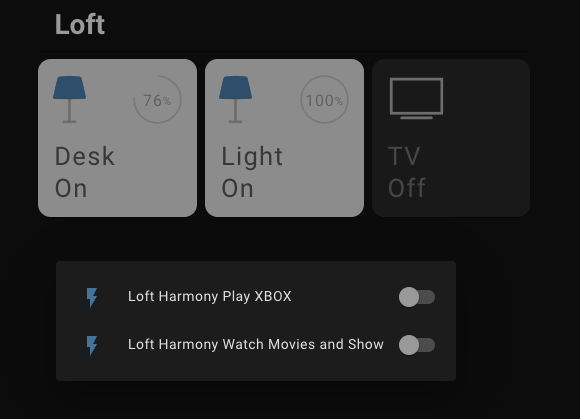
I have a popup card for a TV button that gives me 2 options for the TV (watch tv, play XBOX). Is there a way to change text to the activities in the pop up as well as change the icons?

#

i can paste my code/screenshots if needed... functionality is working and good, just want to customize it a little more

vapid field
kind shellBOT
warped herald
#

I'm new and want to add some add-ons to my HA. I wondering about the performance of GitHub integration to reach the add-on repo versus just downloading the (typically) .js file to /www. Or am I completely confused? Thanks.

fiery ledge
#

not add-on but custom cards/resources 😉 dont mention add-on here or you'll get redirected to #add-ons-archived .... its a matter of choice: automation versus manual control. both are easy. my personal choice is manual, and 1 integration (HACS) less to maintain or have issues with when down. others will tell you differently.

wind coyote
#

I just got a vacuum set up with Valetudo. Does anyone have recommendations for where to look into setting it up in Lovelace?

dark dirge
#

Vacuum card?

#

There are lots of options

#

Including, I think, just adding the vacuum.xxx entity to an existing card

limpid shadow
#

What's a good way to produce a floorplan of a multi story house. I was hoping to find an app or something I could use to simply go around the house and get an approximation... then take a few measurements to adjust it for accuracy

dark dirge
#

"offline" is presumably a state, and Custom Button Card has excellent options for customization based on state

cinder zinc
#

is there an easy way to get a state from another device to display on a switch, eg. button of Garage Relay shows state of separate tilt switch to change MDI icon from open to closed?

sharp flame
#

Hey guys! Looking for a nice way to display temp graphs, any suggestions? (I'm not a huge fan of Mini-Graph-Card)

sharp flame
#

I use Grafana at work, but I don't want to take work home with me by setting it up with InfluxDB on HA 😄

dark dirge
#

Check out the ApexCharts card

#

It at least displays y-axis values in a usable way

sharp flame
#

tyty

vapid field
#

Hi, I need to display text in picture element. Unfortunately markdown doesn't work. Any ideas?

wild stone
#

Is there a easier way to re arrange the frontend overview page other than the arrows? I move one thing to where i want it but half the other stuff isnt where I put it anymore so I just keep going in circles with it. Please @ me to ensure I see any response have to step away from my computer

unkempt hull
#

Hey, not sure how to search for the answer to this so thought human interaction might get faster results... What is the [[[ ]]] notation for in templating?

livid oracle
#

Is there a way to control width of the grid card columns?

heady acorn
unkempt hull
#

so the contents is javascript... thanks... where is that documented? How could I have searched and found that?

kind shellBOT
hexed adder
#

Hi! I have a IR sender setup on ESP8266 via ESPHome. I've made a switch to turn on my Stereo System. I'd like to have displayed state of the button in lovelace. I am aware that I can't get the "real" state, but I'd like to simulate it, so each time I press the button it toggles between "on" and "off". I've written this in configuration, but it still doesn't show the state on button. Can anyone help? Also how can I put my yaml code here?

dark dirge
sacred rampart
#

card-mod-theme: Dark Theme
card-mod-more-info-yaml: |
$: |
.mdc-dialog {
background: none;
}
.mdc-dialog .mdc-dialog__container .mdc-dialog__surface {
background: rgba(42, 40, 45, 0.7);
border-radius: 30px
}

Anyway I could possibly inline this style into a browser_mod popup? I do not want to change my entire theme just to have 1 card have a more rounded border.

whole ice
#

For whatever reason I cannot find the snapshots menu in my UI.

#

I am trying to backup my hass instance.

#

On that note, is there a recommended way to automate that backup?

sacred rampart
#

Go to Add-ons, Backups & Supervisor on the Configurations page

#

Yes you can automate backups too

#

service: hassio.backup_full
data:
name: LOLOLOL

whole ice
#

I can't seem to find the Add-ons section in the UI either.

kind shellBOT
vivid sleet
#

Let's try this again... Folks, Looking for info, on how to change, the size of the Background Image", in the following code?? See my code wall, in previous post...

turbid pasture
#

I assume this is an easy fix and I am just missing something. This morning when I woke up and I went to turn on media devices (TV/AppleTV/Audio Receiver) from the "media player" card on the dashboard, nothing happened. I restarted HA same issue. Then I manually turned on all devices and tried to operate each one from the media card SUCCESS there including powering the devices off. However, all devices will not power back on via the media card. So, I went to the "Dev Tools" and manually called the service to media_player.device - turn_on. That works! So, I have a feeling it's an issue with the card or dashboard of some sort. Also, I tried to download the "mini media player" card from HACS and it suffered the same issues as the default media player card.

oak parcel
#

Got a question regarding my 3d printer. Is it possible to have something to measure the total powerconsumption (and so the costs) of a certain time? So when I print something for a project, I can see what the total powercosts were? Thanks a lot for any answer :)

whole ice
#

Does anyone where I can find the addons section in the UI? I can't seem to find it.

#

I think it may not showing up because it is a docker installation?

dark dirge
#

Correct

whole ice
unkempt hull
#

Anyone ever tried putting three light-popup-cards on a single browser_mod.popup window? I can't get it to work

#

or at least work and look respectable

shell island
#

Hi all!! Is there a way to force the start of a new column? I now use Panel View to have full control but I find it to complicate the design. I would like to manually control when to start a new column.

raw maple
#

I am trying to get a conditional element on a picture-elements card (floorplan). All I get though is a red error box on the frontend saying "invalid configuration"
Has anyone encountered something similar?

fiery ledge
#

attributes is another thing. need to figure that out based on the existence of (custom) attributes....

limpid shadow
#

Perhaps this got missed from earlier... but does anyone know of a good floorplan maker (2d is fine, but preferably something where I can map it out with a cell phone)

gusty wing
polar kelp
#

I use sketchup

shell torrent
fiery ledge
#

currently I am fighting myself to find the correct path to the more-info-content which contains the ha-expansion-panel.... (attributes drop down 😉 )

#

found it: ```
more-info-content {
display: {{'none' if is_state('input_boolean.hide_more_info_attributes','on')}};
}

shell torrent
#

That hides Brightness and Color sliders as well, but I still like it 🙂

fiery ledge
#

Oops I hadn’t spotted that yet. Let me try and isolate the dropdown….

shell torrent
#

It feels like christmas here, so I'll continue wishing:
Being able to hide the sliders is also useful, so if possible to to sliders and/or attribute drop-down would be even better.
Again, great works. Thanks!

limpid shadow
#

@gusty wing A few people recommended that, but I don't see a way to export to a line/CAD type output... So, all the work is now tied to their website.

#

@gusty wing Did I miss something?

#

@polar kelp Same export issue with Sketchup... everything is 'trapped' online without a pro membership

#

I'm leaning towards sweet home 3d or just jump into FreeCAD

polar kelp
#

There’s still one version available for download, I think. It’s very outdated, though.

limpid shadow
#

Do you use the download version?

#

The blog I read said it was too buggy to be useful anymore.

polar kelp
#

I recommend sketchup because it’s very easy to learn. But it’s not a real cad tool.

#

I switched to fusion360 for all my real needs.

limpid shadow
#

I don't need a real cad tool... but I also don't want to be locked into a single ecosystem

gusty wing
#

@limpid shadow ye similar i do happen that ive a free export back then

#

Its been a long time

limpid shadow
#

With all of the 'AI' measuring tools... I was hoping that I could approximate it using something 'easy' and then adjust with real measurements if something seemed off

#

I was honestly hoping I could use the Roomba 'map' logging to help... but it is useless

#

I'm trying to get completely away from hosted solutions... Google is (maybe now, they keep changing their minds this month) eliminating 2 free services that me and my family use daily

#

Google voice forwarding for 'personal' accounts... and the free google for domains (changed names a handful of times... work* something now)

#

Those were 'free forever' services... if Google can't 'afford' to keep a few thousand early adopters happy... I don't have a lot of hope for everyone else.

#

Once I have everything pulled back in... I'm going to research the 'free tier' of the various services... and set up backup services on one of those, with the ability to pull it all back home... or have that account closed and a new 'free' one created, if the free services expire or simply go away

gusty wing
#

Its a 1 time payment i think

limpid shadow
#

It's not really that I'm opposed to paying for anything... but I have friends and family all set up with accounts... I am not going to pay monthly per-account fees

gusty wing
#

For floorplanner

#

Then u get to export as a PNG of a 3d map

limpid shadow
#

$29/mo

gusty wing
#

I like it coz i suck ar cad and using it is like playing sims

limpid shadow
#

That's to get export turned on

gusty wing
#

Yep

limpid shadow
#

So, not a one time fee 🙂

#

I mean, I could pay $30 and cancel... assuming I never need to edit it again...

#

but I want to put the furniture in it... be able to mess around with it... perhaps use it for AR/VR stuff that's starting to pop up

#

definitely use it for home assistant and such

#

Since this is not something that is critical... I can definitely live without having a floorplan for any of those... I want to keep this free

gusty wing
#

Nonono

limpid shadow
#

There are open source tools, but even floorplanner doesn't help

gusty wing
#

U can just use a $5 credit instead

limpid shadow
#

I don't want to export images... I want to save it as an editable file

#

That way if Floorplanner decides to make it $300/mo

#

I am not stuck

gusty wing
#

Thats enough for 1 project

limpid shadow
#

I suspect we'll move furniture or add furniture some time before we move out of here 🙂

#

So, I need something I can maintain over time without issues

#

Also, for AR, I need a model... not an image

#

I hope this doesn't come across as argumentative... Just explaining why it doesn't sound like a good [lol] plan

gusty wing
#

I understand where u are getting. However i personally do not update my floorplan ever since i had it

limpid shadow
#

I have really been enjoying VR... So, the ability to import this as a true 3d model is a big one

#

There are some primitive tools to do AR or even like virtually move furniture around

#

IKEA has the beginnings of one... I suspect that's only going to get bigger

#

So, being able to just be like... Ok, here's the house... what if we put the cabinet THERE

#

would be a very useful and fun thing

#

And it is a 3 story house

#

(I have 4 kids and a big house... so, I have no choice but to be frugal)

#

Anyways... TMI... thanks for the help 🙂

gusty wing
#

np just so you know, you dont need a subscription

limpid shadow
#

I was hoping someone had used one of the various sweet home 3d or similar

gusty wing
#

i looked at it again, you can buy credits

limpid shadow
#

When I looked up export, it said that export was a pro only feature

gusty wing
#

with $5 i think you can get a decent png

limpid shadow
#

Again, a static image is not useful for me except for very limited usecases

#

I need a 3d model

#

If I can access CAD export with just credits... that would be viable

gusty wing
#

Ok, was thinking you were only interested in using as a kiosk floorplan. just letting you know what works for me
Mine is relatively static with almost permanent furniture/position
https://postimg.cc/Z9mnwJQL

limpid shadow
#

They look really good... but I want to use it more functionally, which means either staying in that one app (which won't do AR) or paying to export to a 'real' format.

#

SweetHome3D has some paid unlock... I was leery of it because some 'freemium' programs start to pull features away after a while

#

However, it is FOSS, so that's much safer... if they start to pull that stuff... and it is useful... someone will fork it

#

Ouch, it's a SWING application... that's been deprecated for years

rough coyote
#

Hi, when i add a card it shows ok in the preview but when i save it all cards become invicible.

#

Where can i see where there is an error there? (I know how to raw edit it and remove, that's ok) But i need to know why it b0rks everything sio i can fix.

#

OMG it werkz,, adding the right entity made it work ok. Without it.. it prevents all cards and the add button from rendering.

fiery ledge
#

gist was updated

neat holly
#

hey folks I started tackling an overhaul of my frontend using this thread:

#

I have the templates,sensors, everything filled in, except the pop-ups and browser mod

#

The theme is working, but I am still only seeing my old dashboards, when I click on the 'tablet' view its an empty dashboard, I did define lovelace mode as yaml in config

#

So Im not sure what I missed, am new to using yaml for lovelace

opal wigeon
#

is there any way to make these cards more spaced out so the text isnt cut off

#

in the frontend

#

the entities and their text always gets cut off

neat holly
#

Basically ui-lovelace.yaml is saying i cant use the key !include

neat holly
dark dirge
#

- !include view-climate.yaml

#

but you always have to touch ui-lovelace.yaml for any changes in included files to be reflected in the frontend

cold shoal
#

Is there a way to embed JS in a Markdown card or a custom card? It would be so cool to be able to use https://mermaid-js.github.io/mermaid/#/ as we could then make templated live network diagrams on Lovelace.
Here is a very simple example of how to embed a simple diagram:

  graph LR
      A --- B
  </div>
 <script src="https://cdn.jsdelivr.net/npm/mermaid/dist/mermaid.min.js"></script>
 <script>mermaid.initialize({startOnLoad:true});</script>

BTW the HTML above works great in a plain HTML file in the www directory, but it is static, so it's not useful.
This is my attempt using the markdown card:

     content: |
           {{ "<div class='mermaid'>" }}
           {{    "graph LR"}}
           {{        "A --- B"}}
           {{    "</div>" }}        
           {{  "<script src='/local/mermaid.min.js'></script>" }}
           {{  "<script>mermaid.initialize({startOnLoad:true});</script>" }}
           {{  "<a href='/local/mermaid.min.js'>The file is here</a><br>" }}```
I added the last line to confirm that the link is working (it is) and the HTML is rendered as HTML (it is). I can click on the link and the JS file opens. The two script lines above it, however render as plain text.
This is my attempt using the custom-card-example
```   this.content.innerHTML = `
      The state of ${entityId} is ${stateStr}! <br>
      <script src="/local/mermaid.min.js"></script>
      <script>mermaid.initialize({startOnLoad:true});</script>
      <div class="mermaid">
          graph LR;
              A --- B;
           </div>      
      <a href="/local/mermaid.min.js">The file is here</a><br>
    `;```
Again - the content inside the div render as plain text.
I have tried everything I know. Hopefully someone who knows more can help.
fallen badge
#

Quick question about !include_dir_merge_list. If I have !include_dir_merge_list lovelace/ and in there have folders and in them folders have .yaml files for different views. How does the sorting work? It does not seem to take my folder names in to account here.

lovelace/
  a_home/
    home.yaml
  b_rooms/
    bathroom.yaml
    bedroom.yaml
    etc
  c_appliance/
    media.yaml

For some reason it reads the content from c_appliance first, then b_rooms and last a_home

#

I tried numbering the .yaml files and all but can't get it in right order

#

I put the home.yaml in the lovelace folder instead as it was alone anyways and that works

azure canopy
#

I don't have different folders, but only one, renaming the yaml files worked for me

runic igloo
#

Hi, in an entities card, can I show the time the state last changed instead of the state itself? I know I can show attributes but last_changed is not an attribute of the entity.

polar kelp
runic igloo
#

Thanks, can I combine that with an entity-filter card? secondary_info must be set for the entity but the filter is doing that dynamically.
I want to show binary sensors representing open windows but I want to know how long they have been open and only show them when they are open.

polar kelp
#

Sure. Just specify the entity the same way in the filter as you would in the card.

#
type: entity-filter
entities:
  - entity: binary_sensor.my_sensor
    secondary_info: last_changed
state_filter:
  - "on"```
runic igloo
#

Ah! Thanks!

wind coyote
#

I'm trying to add an icon to a picture elements card that'll call a service. I can get it to do that, but instead of a text title, I just want an icon. How can I do that?

wind imp
#

Hi Folks,
I got a noob question on Homematic/ Climate integration in the HA Frontend.
please view Screenshot --> https://piic.me/img-190
the "Heat" Mode is the false vocabulary --> should be "Manually". Is there any way to rewrite the "Heat" Word with "Manually" and Change the Flame-Symbol?

#

On HA select "Heat" Mode sets the radiator thermostat correctly in "manually" mode, there you can choose "Boost, Eco or Comfort". Works fine, but my wife an childs are confused, that the Walltablet says "heat" when it´s for real in manually mode and not heating

fiery ledge
#

I use this on a map in a fold to make the Map fill the fold perfectly:```
- type: custom:fold-entity-row
head:
type: section
label: Map
card_mod:
style: |
div#items {
margin: 16px -16px -16px -16px;
}
padding: 0
entities:

wild stone
#

I want to use the light option (the one with the brightness adjust) to control two lights from the same card. Is there a easy way to do this?

honest coyote
wild stone
honest coyote
#

Woo!

silk mulch
#

I just installed a fresh copy of haos that runs in a VM in my basement server room. I've installed genie-server and want to group my lights in various configurations so I can make scenes and control them with my voice. I've already added a bunch of my lights to the pre-existing rooms such as kitchen or bedroom. Almond does not want to operate on the default "areas". I was told I can configure the lights in "groups". The only way I see to do this is to hand roll a bunch of yaml in configuration.yaml. Is that right? Is there a better way to do what I'm describing?

wild stone
silk mulch
#

Even when I group the lights in configuration.yaml, genie complains that it cannot find a switch device. At this point, I'm lost how I can control a group of lights with Genie+Almond.

#

@wild stone , A single card?

#

What do you mean?

wild stone
#

I can post a picture but basically instead of having one button per light on the dash board I no have all the kitchen ones on a single button

#

used the term card as cause on the dash board when you try to add one to the dashboard it uses the term card

silk mulch
#

Ah, okay. How did you do that? I just made a group in configuration.yaml, and it just made another "card" with a top switch for all the lights on that card as well as each individual light underneath.

wild stone
#

It creates a entity so you can then just use the one card with that entity

#

type: light entity: light.kitchen_lights

#

for example

#

just have to match the entity to whatever you named it

silk mulch
#

I did this for a light group.
'''group:
Cafeteria:
name: Cafeteria
entities:
- light.sink_left
- light.kitchenette_left
- light.stove
- light.kitchenette_right
- light.kitchen_sink_right
- light.fridge_left
- light.fridge_right
- light.entry_landing
- light.pantry'''
Not sure where I'd put your yaml.

wild stone
#

just anywhere really

#

mine is the bottom entry

#

mainly because i just made it

silk mulch
#

I'm kind of surprised there isn't a better interface for grouping lights.

kind shellBOT
wild stone
#

That exactly what i said in the other discord

honest coyote
#

Oops.

wild stone
#

lol

#

How helpful.

honest coyote
#

@silk mulch Your config is for a standard group, not a light group. Check the format in the doc I linked above.

#

But the card behaviour you described also sounds like an Entities card.

#

A lot of stuff requires YAML config with no GUI option, at least the groups config is relatively simple 😛

silk mulch
#

Boardwarp, thanks.

silk mulch
#

do I want to do this in groups.yaml or configuration.yaml?

#

Or does it matter?

wild stone
dark dirge
#

You need to put it where your groups: key points to. If that's in configuration.yaml, then you put it there. If you have a line like groups: !include groups.yaml in configuration.yaml, then it goes in groups.yaml without the first group: line

timid beacon
#

Did something change recently with the side panel? I'm no longer able to reorder the panel items via the long press and drag and drop

dark dirge
#

Works for me

timid beacon
#

For some reason I just recently got kicked out of HA on my desktop where I needed to reset all my user settings (e.g. theme) and then this seemed to happen

#

Yeah reordering works on another computer fine and on my phone

jovial oxide
#

Shouldn't something like this work?

conditions:

  • entity: media_player.chromecast_bibliotek
    state:
    • playing
    • paused
    • 'on'
fiery ledge
#

this works:```

  • type: entity-filter
    show_empty: false
    entities:
    • type: custom:hui-media-control-card
      entity: media_player.apple_tv_office
    • type: custom:hui-media-control-card
      entity: media_player.googlehome_library
      state_filter:
    • 'on'
    • playing
    • paused
whole ice
#

What do you gals/guys use to keep your automations tidy when you start having more than 20?

rich eagle
#

Link them to areas, so I can filter by that in the automation list.

#

Although I am still below 20 ... so not the target audience of your question 😉

tacit cave
#

I just name them accordingly

#

I also typically try to make them all parallel with multiple inputs and reactions so that I minimize the number of automations I have

#

This makes them more complicated though.

whole ice
#

I have to get better at that. I am an automation newbie.
Thank you both.

fiery ledge
#

apart from backend aspects (this is #frontend-archived after all), I always have a fold-entity-row with the related automations in my cards/views... So in all my views I have the most relevant automations at hand. Next to that a dedicated view with some auto-entities filters does the trick ('triggered today', triggered in the last 5 minutes, 'on' , 'off'). Need another filter? throw it in auto-entities.

hybrid mason
#

Hello, i have dont know how to show the clover slider bar in a lovelace, i see the slider and is working in the states, but i dont know how to show this in a Card

eternal sand
#

Hi everyone. When I connect a new object and have new enitites, Homeassistant automatically finds the appropriate icons (bulb, water or watever). How is the association done ? Basically there are 2 questions : how does it know that a bulb is a bulb ? And how does it make the association bulb => mdi-lightbulb (or even better, several mdi icons depending on state) ?

tacit cave
#

Domain, I.e. light.xyz is in the light domain, switch.xyz is in the switch domain. Device_class varies per domain

strong falcon
#

Is it possible to code the URL path for action:url to open in a new browser tab?

tacit cave
#

You'd have to modify the html. Not sure if there's a custom card that can do that for you

strong falcon
#

It seems to be card based. I have action:url in an Entities card and clicking it, opens the URL in a new tab. I have action:url setup in a custom: mini-graph-card and it opens in the same tab. I was expecting tap_action would be controlled globally

tacit cave
#

different cards produce different html

strong falcon
#

That makes sense, I was just commenting on my discovery because it suprised me

distant briar
#

hi, my HA seems to have gone bang. the https to my external dns name doesnt want to connect anymore.
if i connect via internal lan ip https i just get a while page that says

Welcome to our server
The website is currently being setup under this address.

For help and support, please contact: me@example.com

never had that before

jovial oxide
#

I initially had it with state_not and a lost. But that just never triggered.

deep hedge
#

You might try without the target: line. Also, try it without the fan_speed: low line too and see if it doesn't complain. That may point to wrong usage in the data. So this works as you have it in Dev Tools?

clear abyss
cold shoal
#

Trying to shorten my question to get an answer from the many HTML experts here..
I am playing with the custom card example. Why does content in the div render as plain text?

   this.content.innerHTML = `
      The state of ${entityId} is ${stateStr}! <br>
      <script src="/local/mermaid.min.js"></script>
      <script>mermaid.initialize({startOnLoad:true});</script>
      <div class="mermaid">
          graph LR;
              A --- B;
           </div>      
      <a href="/local/mermaid.min.js">Yup - the path is correct!</a><br>
    `;
red orbit
#

I downloaded a Lovelace card called Light Brightness Preset Row. I need to change the light values as my light isn't dimming enough. Any ideas where I can edit this card? I must be missing something simple

#

It's a WD-100 switch. Zwave dimmer

red orbit
#

It has 3 values I can change. Remote dim level increment. Remote dim step. Dim level increment. When I change these they seem to overwrite when I look at them again

timid beacon
#

I'm having a weird issue where drag and drop isn't working anywhere. For instance, in the side panel or reordering entities when editing a lovelace card. Has anyone seen something like this before?

smoky path
open seal
#

Custom button Card:
I have turned on the Lock Object, and now tapping the button unlocks it, then tapping again actually presses it. BUT with this, the

  action: more-info```
 is gone. any way to get Lock and hold to `more-info` at the same time?
fiery ledge
#

facing the same, but never thought of searching for a solution.... thanks for reminding. Did you check the Repo issues for this, or maybe the community post on Button-card? It seems a very regular scenario, so Romrider must have thought of this...

open seal
#

I have seen the same question once, but no solution

fiery ledge
#

in that case you might best file an issue/FR on the repo, that way you will be sure the author gets notified, idd be glad to +1 on that

open seal
#

good idea, will do in a few days

fiery ledge
#

haha, well goes to say 😉 you can refer to that in the issue 😉 dont think anything changed since then

gray ledge
#

hi there what is the current release of HA

#

its not entirely clear on website

wheat current
#

How is that not clear?

#

Current Version: 2021.12.10

gray ledge
#

thanks, perhaps you you knew where to look in advance. I did not

polar kelp
#

Where did you try if the front page wasn't first?

gray ledge
#

google

polar kelp
#

Really, if we can improve this we will

gray ledge
#

home assistant latest release sent me to a beta page

#

something about occulus rift

wheat current
#

google is one thing we can't controll

gray ledge
#

nice tip

#

Ill try that

polar kelp
#

"home assistant latest release" gives me the release notes for 2021.12 as first hit, so that's pretty good from my side - but as Ludeeus says, the only one who can controll what google shows to whom is Google...

wheat current
#

did the same for me

gray ledge
#

Im in Australia, probably reversed

polar kelp
#

Try "ǝsɐǝlǝɹ ʇsǝʇɐl ʇuɐʇsᴉssɐ ǝɯoɥ"

gray ledge
#

technically its you folk that are upside down

polar kelp
#

Wow. That's the first time in DECADES I see the google page for no hits...

gray ledge
#

but this isnt homeastronomy

gray ledge
#

true

visual verge
#

Isn't 2022.2 supposed to be coming sometime today, though? 😄

gray ledge
#

2nd is in the future for europe I guess

visual verge
#

It's like.. past 10AM for most of europe by now

gray ledge
#

still drinking coffee 🙂

polar kelp
#

Release is usually earliest at late afternoon European time.

#

...or maybe that's just when I start looking for it...

wheat current
#

with the size this time, I'm guessing it's even later than usual

polar kelp
#

yeah

atomic onyx
#

Hello everybody, I am actually struggling to get the lovelace Home Assistand sideheader on sidebar layout back to standard settings (my daughter hit the keyboard and it changed format and color for some reason) , I inspected the element and found the source. Anyone know how or where to change this? Element.style - text-shadow:

visual harness
#

I just tried to install a theme with hacs, but now it seems like im blocked from github.

tacit cave
#

blocked or rate limited?

visual harness
#

i was rate limited

#

but fixed now

visual harness
#

Hey, how can i change the look of a mediaplayer card?

hallow mango
visual harness
#

Now i only need to understand how it works haha

#

can i replace the function of the back and forward button?

spare sage
#

I have sensors showing data for a sensor that doesnt exist. Where could it be getting the sensor data from and how can I get it fully removed from HA?

#

It shows up as a selection for a statistic on the graph card. But when I search under devices or entities it doesnt exist there

fluid cypress
#

is there a way to make a button refresh the browser

shadow oar
#

not sure if this is integration or frontend, but the new "media" browser, is there any documentation about it's functionality somewhere? I've searched the docs but nothing jumps out. My main question was about if or how I would go about being able to select Alexa Media players (from the corresponding integration) to be selectable from the media browsers player chooser? Also I wondered if there is a way for this to work with things like playing music from the spotify media player and then selecting it to play the output to lounge Alexa media player or whatever? I can browse and play spotify by selecting spotify in the media chooser, I can select the media player to play it to, but in order to do that I have to fallback to the home assistant media dialog and then select the speaker from source.

compact karma
#

Hi, i'm trying to use the new "media" (never used before), i have follow the documentation about how to initialize it.
after a restart, the module is loaded ( i saw it on config/info )

but my menu bar not contains the Media.

ps : i use the player kodi ( and i can use it as media_player without any issue )
ps2: i have try to enable more logging but look like it's not working ( maybe i badly set it ? ) :

logger:
  logs:
    homeassistant.components.universal: debug
honest moon
#

Tip: Did you know you can press c (for command) and e (for entity) on you keyboard from anywhere in Home Assistant to bring up that same Quick Bar?

#

this is not true. there are several spots that this doesn't work

compact karma
real lark
shadow oar
#

Yeah it really feels it would make more sense if the new "media" ui called the things you use to view the media from "sources" like spotify, plex, kodi, etc and then there was another option available called "target" or "player" that is where the media is played or cast to

whole maple
#

I’m I use lightwave switches configured in yaml file with the toggle on a Lovelace dashboard, since 2022.2 the entities are showing as unknown and the toggle does not respond. When I go to the entity and use the slider to set dim level they appear and start working. If I then restart I have the same problem again. Please help?

real lark
shadow oar
#

I can select an alexa to play from for spotify in home assistant, but I have to pick the "source" within the spotify media player. I think that is the bit that feels a little backwards to me.

tired widget
#

Okay, so bit of a thought that I think belongs in here... While working on dashboard design, I found that there did not seem to be an option to increment/decrement values such as brightness or temperature on a device without using either the slider or a submenu. In the quest to solve this, I found that I could create a script to do it, alongside a couple of buttons on the dashboard. Is there a better way to do this, or did I find the best method? It works, but since I am passing it off to someone who is less technically inclined, I am very much wanting to see if there is an easier way than creating two scripts and buttons to do it for each device...

#

Also, I did attempt to read the documentation and spend about an hour forcing it...

forest mica
#

Who can help me tell me why i dont have a media panel, energy panel, or other new defaults? its my panel.yaml overriding them?

dark dirge
#

Did you remove default_config: from your configuration.yaml?

forest mica
#

it dont find it in either config.yaml or panel.yaml

#

i do see a config:

dark dirge
#

Then that's why

kind shellBOT
dark dirge
#

Either add that, or add the parts that you want

livid oracle
#

Hi when creating a new view I used to be able to select a type of "grid" but it seems to be gone now, and I am getting errors saying that type does not exist. Will this be from something I did or was this removed?

rare junco
#

hey guys , I'm using the vacuum card , I've got it all set up with my vacuum cleaner everythings fantastic - however when ever the cleaner sets off the card disappears from the lovelace - however once it returns everything goes back to normal (it worked fine for 2 days then all of a sudden started doing this)

visual harness
#

Is there a way to change the three buttons on the right? i want to use this card for my tv not media player

late creek
#

hi, why i dont see the energy option in settings?

wheat current
late creek
#

ohh 😅 thx

buoyant jewel
#

HI Guys i have never touched lovelace areas so sorry if it’s a real noob query

#

i have done the hard work lol got the folder and files into www

#

but strugling to understand where and how to get it to show

#

the bit

resources:
  - type: js
    url: /local/zha-network-card.js```
blazing wren
#

Did you not try installing it through HACs? That would be much easier

visual harness
mild veldt
#

wrap it in a conditional card

buoyant jewel
vapid field
#

Hello! Is there a way to pass timer duration value from UI directly? And of course somehow change the value? What I try to is: https://imgur.com/a/9wMyk89

mild veldt
buoyant jewel
#

the card never showed up

pearl mauve
#

SSL certs and Mobile client - helps!
Have a bear of a time getting it to work when the mobile client is internal
Do NOT want (really bad design) mobile client hitting external IP / URL when internal.
Is there a KB / Wiki / FAQ on this

mild veldt
buoyant jewel
#

so i created a new view from top bar

#

called it ZHA

#

went to add a card not there

mild veldt
#

it doesn't have a UI editor, you add a "manual card" and use the config provided in the readme

buoyant jewel
#

added code to custom card still not showing and it screwed up my sys just had to restore

buoyant jewel
mild veldt
#

you don't have to add that if you used hacs

buoyant jewel
#

lol

#

shows now

visual harness
mild veldt
buoyant jewel
#

yep i got sidebar looks good as well

visual harness
#

is it possible to only wrap the shortcuts?

visual harness
#

i dont get how this works :/

vapid field
#

hi, i want to change opacity of image in custom button card. For now from slider with 0-100 value. I am using - opacity, but can't find the right syntax for template.

mild veldt
#

@visual harness no, I'd suggest use two conditional cards; one for when on and when for when off, or use the custom state-switch card

visual harness
#

thats good too, works thanks!

vivid nymph
#

Hi, I have an button question. I got an Ads communication. With my beckhoff. But my beckhoff controls everything. so if I a wanna turn on a light it just needs a pulse. But HA doesn’t work like that. what I do is use a switch in HA , when I turn it ON in HA the PLC receives that ON signal use it and put the switch back to OFF.
that worked for me fine.

what i want to achieve is the following:
I wanna see of my light is on or not in reality.
Is het posible to make a button thats uses the switch to turn a light on and off and colors the icon when it is realy on with a binary sensor comming from my bechoff.

twilit shale
#

is it possible to show like template data in lovelace ? like you do in a template {{ stuff }} ?

dark dirge
#

a markdown card can

twilit shale
#

ah nice. i'll have a look =) thanks

wanton galleon
#

anyone having issues with HACS front end stuff not working after the update? the mini-media player and the layout card dont seem to be working anymore

vapid field
#

Hi, question .. is it possible to idenify the active lovelace dashboard (tab) via a yaml script?

remote quail
#

i am guessing this is related to here?
After updating to core-2022.2.1 i can no longer connect to homeassist with the usual https://homeassistant.local:8123, it does work through (in this case) duckdns tho. everything worked fine before that

#

i am getting an unhandled exception error from web_protocol.py, might that have to do with it?

remote quail
#

it seems to have been a cache problem...

young hedge
#

anytime you have a front end problem either open incognitio or fully clear cache and saved files

mellow locust
#

hello, I am having trouble enabling the recorder function. I read through the information about the recorder on homeassistant.io, but I do not have anything listed in the configuration.yaml file. I feel that I am missing something really simple. I would really appreciate any help. Thank you

west yarrow
#

Hi there HA community, I have a very specific question. I am trying to make my own theme, but I can't figure out how to enable the UI color picker, that the default themes have. All the themes I found on the internet specify the primary and accent colours (it's hardcoded). I want my color to be easily defined in the UI. Do you know how to do this (enable the color picker for custom theme)?

wheat current
ocean dock
#

Hello. I want to make a change / add a fix to Lovelace. When an entity is on or off, the icon changes. But for a screen reader user, the label never changes. I probably have about enough knowledge to look at this code and after some time, determine how to add an aria-label to it so that when the state is on or off, that state is reported through that aria-label to users of screen readers. My question is, do you know if there are any recommendations / guides / people I should talk to before plunging into this? Or should I just mark it as a bug and walk away? I have contributed to a few projects in the past. I'm by no means a developer. But I know enough to be dangerous. Suggestions very welcome. Thanks.

tawdry mesa
#

Is it possible to define css variables to reuse?

ie. card-background-color: "#44475a" I'd like to assign #44475a to a variable so I can just reference the same color in different areas

buoyant jewel
#

Is there a way when you click the person badge it open in the big map card not the little popup map?

west yarrow
#

I think "tap action" and then action "navigate"? (Not expert)

buoyant jewel
west yarrow
#

Sorry, wrong answer 😅

west yarrow
#

I am still fighting with discord... sorry for that

#

As to your problem... I think it could be done similar to this:

type: button
tap_action:
action: navigate
navigation_path: /lovelace/kamery

This is my button in lovelace UI that changes the lovelace card to "kamery" card on button press

#

If you set the path to the map card, it should work as expected (aka. override the default tap action to change view to map card)

#

@buoyant jewel Are you familiar with .yaml configurations?

torn timber
#

Hello folks!

I am in a bit of a pickle, probably because I am not very familiar with TypeScript or Lit-Html.
I am trying to build two custom cards. I started both of them on top of the boilerplate card.
One of the custom cards takes only one entity in its config, just like the boilerplate.
The other custom card takes multiple entities in a list.

For reasons I do not understand, the custom card with only one entity is perfect, it is able to successfully re-render when the entity state changes, but the custom card with multiple entities does not re-render.

I have been trying to hack around it to get it to work regardless--adding timeouts and intervals to check state in hass and update properties, trying to create more states and properties in the class, adding a call to requestUpdate on the new properties, changing the hasChanged method to detect the property changes correctly, trying to instantiate the new properties in a constructor instead of inside render--all without success.

Does anyone have any thoughts on what I can do to test this/fix this?

crimson sedge
torn timber
#

not sure a screenshot would explain it well

vapid field
#

Hi, I am trying to invent dynamic background and using gifs at the moment. I don't suppose anyone has a way to change the speed, or better way of approaching it? Maybe without embedding gimp into the code (-:

torn timber
#

so I am left staring at old data if I leave the dashboard open, the card never updates

crimson sedge
torn timber
#

@crimson sedge fair enough, me neither 😛 thanks for trying anyway!

buoyant jewel
west yarrow
#

Nah... I actually never got to use the maps yet, but I think atleast the tap actions is a good start... Try to find some action, that will do that for you :)

west yarrow
# buoyant jewel But will it take you to where the person is located on the map?

I tried to do a little research. Unless you are able to find some specific url of the navigation card, which will do what you want in combination with the tap action (I don't think such url exists), you will probably have to do some work arounds.

Judging by the map view info (https://www.home-assistant.io/integrations/map/) it lacks a lot in features compared to the map card in lovelace UI.

My suggestion in case you have a limited amount of tracked devices (ie. 3 or so) I would just create hidden lovelace views for each of those devices with one full-screen map card and use the tap action navigate method described before. This is a very ugly workaround as a new card will be needed for every single device, but it should be very easy to setup and it should work.

buoyant jewel
buoyant jewel
west yarrow
buoyant jewel
mild veldt
#

doing the work around is quick and simple. having something added to core frontend will not be all that soon, I'm sure

shell island
#

@twilit shale : All cards can show template data. You just need the right format.

#

Is there a card that let me specify grid areas that will work with casting to Google Nest? Layout-card doesn't work on casting. Otherwise a fantastic card

quartz canopy
#

Yes, and it's so annoying.

worthy tapir
#

what browser does it happen in with you?

#

For me I use Firefox

quartz canopy
#

same

worthy tapir
#

hmm maybe that's it

tight quiver
#

I'm having a problem with my Home Assistant controller. The only pages that will load are the dashboard, and the shopping list integration. I can't access any developer tools or settings. I've tried private mode, multiple browsers and devices, I've restarted it, and I'm not quite sure why it's still not working. Any time I try to go to one of the settings pages, or my profile page, it just says something like "Error while loading page dashboard.", and it has a "Go Back" button. Any help would be greatly appreciated.

earnest geyser
#

I've been enjoying the Statistics Graph card in Lovelace. One idea? In cases where a number of sensors are, for example, covering temperature in one area... using all readings from all sensors to combine into one min/max/mean view. https://imgur.com/sLKPgpI

rough coyote
#

Not sure i should ask here..but here it is anyway...
I updated yesterday ( i think) and today i had another update. I am not sure if updates get pushed sequentially? So if i have 1.2.1 and there's 1.2.2 and 1.2.3 will it update twice or did i foobar yesterday and didn't update?

#

My money is on foobar atm 🙂

errant plover
#

You will only be offered "updates" i.e. later versions than you are running. Updates are released as necessary and contain all the previous updates. So if you were on 2022.12.10 and updated to 2022.2.0 then missed 2022.2.1 but went straight to 2022.2.2 you would not be missing out on anything. You can check what version you are on on the Configuration / Settings / Info page. Not really a frontend question, more like your installation method channel.

rough coyote
#

I am on latest. I probably just forgot to click OK yesterday. Thanks for your explaination, Tom.

austere scaffold
#
  - platform: command_line
    switches:
      door_lock:
        friendly_name: "Door"
        command_on: !secret command_lock
        command_off: !secret command_unlock
        icon_template: >
          {% if is_state('sensor.door_lock_last_event', 'unlock') %}
            mdi:lock-open-variant
          {% else %}
            mdi:door
          {% endif %}```
icon_template, does it work on switches? because mine doesnt and it looks good under developertools -> template..
digital saffron
#

im trying to get a custom mqtt rgb light to work but whenever I set the light up, I can only ever get a simple dimming light card rather than a full rgb color picking card. ive gone as far as copying the example configuration from the home assistant site and still i only get the basic dimming card for the light.

neat moat
#

Not sure why, when I set state: false and attributes: false, the Lovelace card doesn't update to hide them. Any ideas? https://github.com/benct/lovelace-xiaomi-vacuum-card

type: custom:xiaomi-vacuum-map-card
map_source:
  camera: camera.xiaomi_cloud_map_extractor
calibration_source:
  camera: true
entity: vacuum.roborock_vacuum_a15
vacuum_platform: default
title: ''
map_locked: false
two_finger_pan: true
buttons: false
state: false
attributes: false
hybrid mason
#

Hello, after the last update, i cant change my device location, only happen whit devices, the entities work great. Theres something to make?

timid moss
#

A couple months ago, someone linked me to a seriously helpful CSS style guide for when I needed help with card-mod. I thought I remembered it being something like becoming a CSS ninja, but I can't find it. Does anyone know what I'm talking about?

timid beacon
#

I'm having a weird issue where drag and drop isn't working anywhere. For instance, in the side panel or reordering entities when editing a lovelace card. Has anyone seen something like this before?

primal wolf
#

I have an automation that derives from a blueprint. There's a temperature setting within that blueprint. I'm questioning if there's a way to edit that temp setting from within the automation, but, from a card on lovelace somehow. Would that be a number helper I'd need to look in to? Or would there be a more logical means to consider first?

hybrid jackal
#

hi , can i do something like card in card. For example like this :

north charm
#

anyone got the new input_button to work from a tap_action?

#
  • entity: sensor.overloop_thermostat_status_friendly
    name: Stand
    tap_action:
    action: call_service
    service: input_button.press
    service_data:
    target:
    entity_id: input_button.overloop_switch_power_mode
#

i think it should be this way, but it won't fire. This is part of a multiple_entity_row though

random relic
#

From the lovelace doc; Once you take control of your UI via YAML, the Home Assistant interface for modifying it won’t be available anymore and new entities will not automatically be added to your UI.
Why is it one cannot keep this and still have other ones? I kind of like the "catch all" thing about it but also want some with only select stuff...

north charm
vapid field
#

Hi all. i'm trying to get afvalwijzer to work. (put it in configuration.yaml ) and trying to get the card to work but i got the error no type given. What do i do wrong?

split granite
#

Without knowing what you're doing nobody can answer that

kind shellBOT
#

Please use a code share site to share code or logs, for example:

Please don't use Pastebin, since it can randomly add spaces to the main view. Please also don't share text as images since it makes it harder for people to help you. Remember that others may have colour blindness, impaired vision, etc.

vapid field
#

the code is in there (basic code)

split granite
#

Right, but what have you done?

vapid field
#

put the code: in configuration.yaml with my zipcode etc. restart (reload) and then i go to lovelace insert card manual and put the code in

#

this code

split granite
#

Do you have auto entities installed already?

vapid field
#

yes done that

split granite
vapid field
#

oke i try

#

now i have No filters specified.

split granite
#

Updated it - try again

vapid field
#

k

#

code works now thx. But i dont see anything but that is because the sensors dont work (cant see the sensors) but i think i can manage that 🙂 i hope

#

thx Tinkerer for the help

crisp rapids
#

I am using custom: state-switch https://github.com/thomasloven/lovelace-state-switch for dynamically replacing lovelace cards depending on "states"

I've made this group sensor https://pastebin.com/0htSmHYM
and would like to use the state "heat" for showing a custom button card

          - type: custom:state-switch
            entity: group.hvac_all_sensor_group
            states:
              heat:
                type: custom:button-card
                template: header_hvac_light

But it's not working

#

Nevermind, as I was summing this up its clear why it wasn't working

native star
#

Hey guys, I'm getting the following 2 errors in the logs, i've tried googling but without succes. Anyone knows what's up?

Logger: frontend.js.latest.202202030
Source: components/system_log/init.py:190
First occurred: February 5, 2022, 2:58:09 PM (20 occurrences)
Last logged: 4:23:58 PM

https: //myhomeassistant/lovelace/default_view:0:0 Uncaught
https: //myhomeassistant/lovelace/default_view?external_auth=1:0:0 Uncaught

errant birch
#

Hey guys, Im using a picture entity card to display a snapshot from when the doorbell was last pressed

#

I replace the same file each time the doorbell is rung but the frontend presents the same cached image each time

#

is there a way to get around this ?

remote mango
#

Is is possible to rotate mdi icon on lovelace floorplan for 90 degrees to left or right?

keen scroll
#

I have another question , i use a old tabled like dashboard true the home assistant app. But some time is just stop to refresh and to show actual info of sensors , clock and etc. When i close the app and open it again all data is correct and on time. How i can solve that stuck and stop refreshing problem , i saw it happen even if i use the browser of the tablet.

remote mango
keen scroll
#

is android tablet refresh dosent help need to restart the app , and still refreshing is not good , you must refreshing it everi time when look on it to be sure you see the correct data

fiery ledge
#

just found out that custom:restriction card works nicely on the button And input_button entity in frontend 😉 cool.

real chasm
#

I'm not sure what's happened but my history tab seems to be broken after I added some new devices and groups. When I click history on the left, I Just get the empty screen with a spinner that goes round forever and I can't change the dates. Has anyone else had this please? I tried rebooting, no change. I'm not sure if it's the frontend that's broken of the history. The last thing I did was to rename some Zigbee sensors

visual harness
#

What entity can i use for the alarm control panel?

dark dirge
#

The one your alarm system exposes

visual harness
#

if i dont have any alarm system?

#

I got a siren which just needs power, i want to use the door and window sensors to trigger the siren

dark dirge
#

Sounds like a job for an automation

magic thunder
#

Hello, I think what I'm trying to do is add a "custom card". Where is the www directory for HA?

#

Is this literally "config/www"? I've searched my entire filesystem for any directory called "www". It's nowhere to be found. Is this just bad documentation? Am I expected to make this directory someplace?

dark dirge
#

You make that directory and restart HA

magic thunder
#

Where do you make that directory?

#

And moreover, why? Does not content of this type already live in some wwwroot?

magic thunder
#

So I've read this, and it doesn't answer those questions.

#

"Create a new file in your Home Assistant config dir as <config>/www/content-card-example.js and put in the following contents"...

#

First, there's no /www/ on my filesystem period.

dark dirge
#

Create it

magic thunder
#

Create it where?

dark dirge
#

Sheesh

magic thunder
#

Sheesh is right, those are bad docs.

dark dirge
#

<config> is your config directory

#

Yes

magic thunder
#

What in heaven's name defines that? Where is it relative to the HomeAssistant directory?

dark dirge
#

You're very lost

#

Your config directory

#

Put it there

magic thunder
#

Look, first, your docs don't even mention the need for making the directory.

#

Where is the config directory? What defines it?

dark dirge
#

'My'?

#

Ok

magic thunder
#

Can I, let's say, "cat homeassistant.conf | grep -i configdir" or something?

#

What defines it? Why is it hard to find?

dark dirge
#

Your quarrel is with the author of whatever card you're trying to install

magic thunder
#

No, my quarrel is with the documentation on your website that tells me to put configuration files in non-existant directories.

dark dirge
#

Ok

magic thunder
#

That is the quarrel, primarily. What defines <config directory>?

dark dirge
#

You did when you installed home assistant

magic thunder
#

Right, and I want to see its absolute path.

#

So that I can know where to create a wwwroot directory, for some reason that doesn't already exist.

#

It would have been easy to just find it in the filesystem, had it been there and empty.

#

What you're actually telling me, is there's no one-liner for finding the configuration directory setting?

#

When I need to script the configuration directory, I should echo "Ask the user where it is?"

#

It's honestly strange to see people offer support like "Other installs it may be a different location, including possibly somewhere under your home directory."

dark dirge
#

It's not rocket science

#

It depends on how you installed HA

magic thunder
#

I agree, it's not rocket science at all. But yet you can't tell me where that directory is set.

dark dirge
#

It's your system

#

/config

#

There

magic thunder
#

No. I want to script and know that directory is where HomeAssistant is looking for its configuration files.

#

Where is it defined, as a living object?

dark dirge
#

/usr/share/hassio

#

Maybe there

magic thunder
#

Maybe? I need to script it. What can I run to find the configuration directory, always.

dark dirge
#

Wherever you told it to be if you installed via docker

magic thunder
#

These continue to be very bad answers. I need to know how HomeAssistant finds the configuration directory for itself.

#

I can't work with maybe.

dark dirge
#

I guess you're on your own

magic thunder
#

Don't offer bad answers. If it's a shortcoming in your documentation, or if you changed something, expect plenty more "stupid" questions.

dark dirge
#

<plonk>

magic thunder
#

So if you can help clean that up into an objective answer, that would make things much better! If it's a series of maybes, it's not good documentation really.

hallow mango
#

button card icon coloring doesn't seem to work the way it used to... think this broke in 2021.12.x

kind shellBOT
hallow mango
#

but my icon doesn't get colored

#

ah frick my bad

#

it was 15 lines plus what i said lol

#

either way, i think this is the pertinent bit:

style: |
  :host {
    --paper-item-icon-color: #E50914
  }
#

this doesn't seem to work anymore, any ideas?

keen briar
#

Hey Guys, I am trying to change the background image of my theme. I understand that I can do it by change the image in background-image: . this is what it looks for me. what is all that random characters in there

#

ps: I am trying enter my screenshot here

karmic glade
#

In the Lovelace code editor (UI), Is there a way to Paste into multiple spots. I'm trying to replace a word thats repeated thought out the code, instead of doing it 50 times.

marsh wadi
#

hi everyone. Does anyone use just buttons on the default view to open a dedicated tab? I am mostly using my phone and would rather have like little buttons for AC/Lights/Switches etc that would take me to a dedicated tab when clicked

empty inlet
#

Hi everyone. Since the last upgrade I can't see some views of my Lovelace panel. Someone have the same problem??? Thanks.

#

I can't find a solution on forums

vapid field
#

In configuration.yaml i have now only one sensor and that is the afvalwijzer.

round coral
#

Hello, I am having trouble playing audio files using Media on my iphone 7 after the last update to 2022.2.1. It was working fine on the previous version. Anyone can shed a light on what might cause this. I can play video files and images but not audio mp3 files.

tranquil saddle
#

Is there any possibility to nest a grid card into another card to give a background to the grid?

steep jewel
#

hey question, is there the possibility of creating a page to be adding to the configuration section of HA to warn you of upcoming breaking changes to your setup?

#

I hadn't realised one of my integrations was using a feature deprecated in 2022.2 and spent a while chasing down the issue, but in the logs itself it had a warning, so wondering if there's a way we can have i don't know, a page listing out all of those warnings and warning you the version they might be deprecated in one easy to look at place

summer willow
#

Say if I have a frontend card that requires a value to be passed as such: "energy_consumption_rate: 2", is there a way I could replace the "2" with a sensor using mustache templates or similar?
I tried googling, but couldn't find anything conclusive

keen scroll
#

I use a old tabled like dashboard true the home assistant app. But some time is just stop to refresh and to show actual info of sensors , clock and etc. When i close the app and open it again all data is correct and on time. How i can solve that stuck and stop refreshing problem , i saw it happen even if i use the browser of the tablet.

coarse tartan
#
trigger:
  - platform: sun
    event: sunset
    offset: '-00:15:00'

Is it possible to display this value of an automation in a card without having to maintain a separate template sensor myself? I would like to take over this automatically when changing the automation and not change a second place where I then have to restart right away.

#

For example: sun.sunset is 17:26 and now I want to display 17:11 (15 minutes before)

clever thistle
#

in the new UI where is the place to set the radius of my home location? can't seem to find it.. it used to be under customize entities or something similar

peak sluice
#

Hello, I have a very weird behaviour in the devices/entities list. I am unable to scroll up or down. Scrolling just does nothing. Anybody ever had this problem?

#

I tried disabling HACS, cause I thought it would be the problem. Cleared the cache too. Doesn't help

wheat current
#

guessing safari is your problem

peak sluice
#

Good guess, just tested it. Works normal in Firefox

#

Just noticed that there is already a bug report on github

wheat current
#

Apple likes to break websites

peak sluice
#

There was a time when IE was breaking websites. Now it's Safari

wheat current
#

IE still breaks

polar kelp
#

Yeah, but everyone including Microsoft finally devided to just F IE and stop wasting time.

#

That was a good day.

odd barn
#

In getting a "Failed to call service media_player/play_media" error when I try to play media to another device. any ideas?

patent scaffold
#

Hey I'm trying to add a simple chart, tried this one:
https://github.com/kalkih/mini-graph-card/
And when I press the add card I use this code:

  • type: custom:mini-graph-card
    entities:
    • entity: sensor.energy_consumption
      name: ENERGY CONSUMPTION
      show:
      graph: bar
      But I change the sensor to another sensor I have. But all I get is error "No Type Provided"
split granite
#
type: custom:mini-graph-card
entities:
  - entity: sensor.energy_consumption
name: ENERGY CONSUMPTION
show:
  graph: bar
``` try that
patent scaffold
#

Oh, I just copied from GitHub.. so they had it wrong there?

#

seems to be working, thanks!

#

Another char at Github shows the code starting with "type" but above that they have this code:
show_hourly: true
time_format: '%Y-%m-%dT%H:%M'
date_format: '%Y-%m-%d'
do I use that before "type" or what?

crude shale
#

Dunno if this is a frontend problem, forgive me if wrong place.

From a while ago my xiaomi mi 11i stopped showing the devices from homeassistant companion app on the MIUI and started showing a not "No possible to find devices"

Any ideia what this means? Nothing changed in the between.

neat gust
#

how do we display on a card attributes brightness

shell island
#

I'm trying to edit some CSS code in the custom:media-player card but I'm having problems figuring out how to locate the line. The file I am looking for is src/components/mediaControls.js but I only have the file mini-media-player-bundle.js. What is it that I am not understanding?

polar kelp
#

Since web sites have to travel across the internet between the server and your computer, all the code they use should be as minimal as possible to save on precious bytes. Therefore, having variables named importantDataToSave or trashDataToDelete is wasteful when u and s could do. Unfortunately, this has proved to be a bit prone to bugs in the code, and therefore most developers opt to use the longer form in development, but have everything automatically renamed for distribution. That's what the -bundle.js file is. A whole bunch of files (separated for convenience) bundled into one which is then minimized and (possibly) obfuscated to hide any secret algorithms.

#

To change the css you need to clone the entire repository, make your changes and then recompile everything into a new bundle.

shell island
#

ahh.. thank you very much for explaining!

#

I've tried using your excellent card-mod but I am unable to figure out the syntax of the CSS

#

I am trying to help the Shuffle button scale correctly and I have discovered it will do if I remove this from the mentioned file, or change the number with card-mod. You wouldn't happen to know how I can use the following config with card-mod thomasloven?

    --mdc-icon-size: 20px;
}
shell island
#

Figured it out! hooray!! ```style:
.mmp-player .mmp-player__adds:
mmp-media-controls:
$: |
ha-icon-button {
--mdc-icon-size: 44px !important;
}

gentle quartz
#

Anyone know if it's possible to round a sensor line graph card or somehow cast the number to an int?

#
- type: sensor
  graph: line
  entity: sensor.downstairs_thermostat_current_temperature
  detaiL: 3
#

According to that sensor, the temperature of my kitchen is 64.999999999999999999999999999

#

According to my thermostat, it's 65.

#

This is clearly a floating point bug and the solution would be to cast the value to an int. However, since I'm just directly referencing an entity, that doesn't appear to be possible...

#

as far as I know, I can't do this:

  entity: sensor.downstairs_thermostat_current_temperature | int
mild veldt
#

create a template sensor to round it or use my config-template-card to round it

gentle quartz
#

I was afraid that might be the answer...

#

Thanks

faint geyser
#

I've made a custom card and loaded it like this:

lovelace:
  mode: yaml
  resources:
    - url: /local/torpet/light-slider-card.js
      type: module

However, when I make changes to it, HA gives me a cached version. I tried clearing my cache, running inkognito, nothing works. What am I missing?

polar kelp
#

Check the oldest pinned message here

visual harness
visual harness
crude shale
#

Any one here has a MIUI phone? I'm having problem with the companion app

fiery ledge
#

do we have any custom card allowing us to template the view icon? its about the last feature of legacy CustomHeader I would love to replace . Struggling with card-mod-theme but can not make it happen just yet. I can style the ha-svg-icon in paper-tabs, but not change it.

#
          color: {{'red' if states('sensor.alerts_notifying')|int(default=0) > 0}};
        }``` and trying that for the element ha-svg-icon simply does nothing. not even throw an error 😉
#

would be a nice feature for config-template-card. Or card-mod ofc, if possible at all, but then would need tp be called view-mod.... thinking of which, wouldn't lovelace-gen allow hat?

faint geyser
fiery ledge
#

{% set my_icon = 'mdi:alert' %}

title: Presence
path: presence
icon: {{ my_icon }}
``` works sometimes... I cant figure out the issue when it doesnt, but upon reloading/refreshing I mostly see Unknown Error'
faint geyser
sand jetty
#

Hello all, new to Home Assistant here, I might be missing something, but I recently purchased an LZW (z-wave) RGB bulb and an Aeotec Gen5 hub / controller

#

I got everything connected / set up.. added the bulb using Z-Wave JS

#

but now all it shows is an 'on' 'off' switch

#

I was hoping to be able to dim / set colors / access the 'blue' white and the 'warm' white.

faint geyser
vocal kiln
polar kelp
#

You can use the element inspector in the browser. Find your element, select its top or left property and move it with your arrow keys, then save the value you end up with.

strong basalt
#

I'm trying to pull a thermostat setpoint value for use in a display, what would I use?

#

Looks like that might be the solution

crisp rapids
#

Do javascript related question also go in here?

warped herald
#

Is this the correct spot for a DuckDNS/NGINX conflict with 'trusted network' setup question?

limpid radish
#

Did the header/footer design change a few months ago? Could there be a bug causing it to not look like this anymore: https://www.home-assistant.io/lovelace/header-footer/ ?
It looks like as if I put a section between the entities and the footer, and its also not neatly centered like before but on the left side instead. 😕

polar kelp
modern bear
#

I have a new issue all of a sudden where "History" will not load. It just spins...

carmine shoal
#

frontend question about switches

#

I have entities cards with switches, but the state change is temporary, (the visualization of the switch toggles, the underlying entity state stays the same)

rugged spade
#

hi i desperately need help
I just moved and took my server with a home assistant VM on it with me and got it all set back up. Everything was working fine until suddenly it wasn't. Couldn't access HA from my phone anymore through the app for some reason.
Ended up installing DuckDNS with the help of a tutorial and after restarting and logging in to my duckdns url, it just says it can't connect

#

I have access to the CLI and have been trying to edit the config file to remove the lines that redirect it to the duckdns url, but I can't figure that out either

#

basically I can't access the ui at all, only url that works is the duckdns one, but when I log in it just says it cant connect

#

wait weird, I just tried it on my server itself (the one running the VM) and it worked

#

im so confused

opal jay
#

Can anyone point me in the right direction to remove 2fa for my girlfriend? My girlfriend broke her phone and lost her 2fa..

polar kelp
carmine shoal
#

Thanks Thomas

strong basalt
#

How do I use it in HA as heating only? It has a cooling mode but I only have heat

nimble ferry
#

Has anyone else noticed the jittery scrolling in the logbook on macOS? It goes back as far as I can remember, with the companion app and browser. Try to scroll with the scroll wheel slowly (arrow keys do not exhibit the problem), like you are actually trying to read the entries. It's almost like it's trying to decide how to split the view but cant. Just want to confirm the bug with some other users before I submit. @winter hollow

hollow minnow
fiery ledge
lapis badge
#

What's the best way to aggregate temperature settings across a house to create an average for dashboarding? I plan on using graph-card

deep hedge
#

I just tried to set up a tap_action: on a button card to take me to another Lovelace page using action: url. It works fine on the PC in Firefox, but in the iOS app, it launches my default browser (FF) and opens it there. Is there a trick to forming the URL so that the mobile apps also work correctly?

covert hollow
vapid field
#

Is there an option to display a dashboard in a kiosk mode, so just the widgets and nothing else?

vapid field
#

Thanks!

errant plover
#

Doh. And I used to use that too.

fiery ledge
haughty vine
#

Ugh... is it possible for native entity-filter to ignore and NOT filter out special rows like dividers and sections? 😕

#

sorry, that was a strange thing to ask.
That's what I get for not sticking with auto-entities

errant plover
obtuse phoenix
#

deleted, didnt think it was a integration as it wasnt an external config thingy

stoic radish
#

Dear all, I running ha in docker. I am trying to install mini media player but I am not able to make it works. I do not have config/www folder, so I have created it manually.

stoic radish
#

I have added the /local/.... String in resources and added the card manually

#

Should I find something useful in the link?

wheat current
deep hedge
# mild veldt You should use `navigate`

Wow, I can't believe I missed that when reading the docs. 🤦‍♂️ Just what I needed and works perfectly. I've come to expect that the folks building HA have thought of just about every possibility. 😉

#

And when I can't do something I want to do, it's because I just haven't found it yet!

lean hedge
#

what would the best practice be for using a state attribute as the input for a gauge card? create a seperate sensor entity in the config.yaml?

sudden topaz
stoic radish
wheat current
#

it definitly is

polar kelp
#

Things don't get that popular without ending up in hacs. People'd bug the dev to death about it otherwise.

#

Though nowadays things don't get that popular without being in hacs instead. People'd move on otherwise.

stoic radish
wheat current
#

Are you mixing HACS and supervisor?

dark dirge
stoic radish
#

I am running ha in docker

#

I do not have mini media player in HACS

dark dirge
#

Those two things are unrelated

#

And you're probably looking in the wrong place

polar kelp
#

Are you looking under ”frontend”?

frozen brook
#

Hello i have a Question, on my Dashboard I have a Sidebar, and i want that on the right is a floorplan but the floorplan is to small and when i set Panel true I dont see the Sidebar

wheat bone
#

Anyone know what to write for image path in e.g. Picture Entity Card when the media is the the /media/images/ dir (using HassOS VM)? I've tried pretty much every combination I could think of (including using local), and the docs (https://www.home-assistant.io/integrations/media_source/) does not help me that much (I'm not trying to add a custom folder). I can navigate and view files from the media sidebar.

twin tusk
#

i have in card: entity_picture: /local/pic/nas.png and path is www/pic/nas.png

wheat bone
polar kelp
#

Yes. That optimizes performance too

wheat bone
#

Great, thanks! Been going crazy with trying different paths.

vapid field
#

My wife and I both have the same initials, so the cards for our users are exactly the same. Is there a way to customise what is displayed for users in cards?

inland jacinth
#

I am trying to change the background color of my view based on the reading of rgb_color attribute of one of my lights. This is what I've come up so far but it's not working. What am I doing wrong here?
background: >
[[[
return rgb(${states['light.my_smart_bulb_2'].attributes.rgb_color})
]]]

tacit cave
#

1 in front of rgb, one after )

inland jacinth
tacit cave
#

depends on what rgb_color returns

#

if it's a list, you need to break out each one so the rgb returned format is rgb(r, g, b) not rgb([r,g,b])

inland jacinth
#

It's definitely a list. I will have to play around a little bit because I've never returned a list before.

#

Thanks for your help pointing me to the right direction.

inland jacinth
#

Is this how one return a list?

#

background: >
[[[
if (states['light.my_smart_bulb_2'].state == 'on')
return "rgb(" + states['light.my_smart_bulb_2'].attributes.rgb_color[0]
+ ", " + states['light.my_smart_bulb_2'].attributes.rgb_color[1]
+ ", " + states['light.my_smart_bulb_2'].attributes.rgb_color[2] + ")";
else
return "var(--primary-background-color)";
]]]

rough coyote
#

Trying to get floorplan to work: /local/floorplan/examples/home/home.css
Where is that local located?

#

ok apparently taht is www root

rough coyote
#

will try again tomorrow..

shy olive
#

@rough coyote place the files in the www directory

#

the www directory gets mapped to /local/ on startup

#

you can check if the file is accessible by just adding the /local/... to your url which you use to access ha

#

oh you figured it out oops

silent quartz
#

So I want to add a specific value from a remote URL (I do have the link to it) in lovelace.
Also, any way I can display a specific section of a remote url in lovelace?

opal jay
#

does anyone know how i can make a button ( off state & on state which both trigger something like pc on / pc sleep ) ?

#
entities:
  - entity: switch.pc
    name: PC ON
    icon: mdi:desktop-classic
  - entity: switch.sleep_pc
    name: PC Sleep
    icon: mdi:sleep
title: PC
show_header_toggle: false

This is what i got atm... And this are just 2 switches next to each other which isnt the most beautifull 😄

urban portal
#

Hello
A few weeks ago I would pressed a button on the front end, and the boiler ran for an hour and I had a timer that counted down using a timer helper
for some reason, it doesn't count down anymore
I don't recall making any change
here is the code
https://www.codepile.net/pile/zJB0zjlV

#

I made a simpler version of the timer on lovelace that's in the code

#

can anyone see why it stoped running?

#

thanks

rustic flint
#

Is it common for names of media players to not show up at all?

rustic flint
#

wait, the name only shows when the device is unavailable

#

I'm using an externally installed theme called UI lovelace minimalist

rough coyote
#

https://i.imgur.com/HTyEic4.png
I have this but i want it less space hoggy and also it clips the names too much on my phone now.
I basically on each row i want:
Light Icon - Sensor Icon - Name - toggleswitch.

How would i go about doing it? I have gotten a template mod, that's my 1st guess.

delicate thicket
#

Hi, quick question: Does anyone know if you can rotate the lovelace view cast to chromecast? The problem is that my cast is sent in landscape mode, and the screen is in portrait. Thanks!

inner wagon
#

Hey guys im looking for a way to have a link inside of an entities card to another dashboard. right now i am using a weblink but it opens a new window which i do not want.

#

any ideas?

rough coyote
#

I just use link in markdown card, works fine

#

Make sure your addressbar and link url are same. It might look at that to decide where to open

wheat current
#

Just skip the https://domain.region part and make it a relative URL

inner wagon
#

Relative URL worked thanks. I thought I tried that already 🤔

silent quartz
#

So I want to add a specific value from a remote URL (I do have the link to it) in lovelace as an entity.
Also, any way I can display a specific section of a remote URL web page in lovelace?

polar kelp
silent quartz
#

@polar kelp So I have "class" instead of "Value" from the original webpage, any idea what to do?

polar kelp
silent quartz
#

ok, so alternatively, any way I can display specific part of a URL under "Web page" in lovelace?

polar kelp
#

What do you even mean by that? You realize the URL is the address, right?

silent quartz
#

I do know what it means, what I am trying to say is, is there any way I can show/display a specific section of a URL (a website page display) under the "Webpage" option, under "Add Card" in lovelace.

polar kelp
#

You mean display a section - not a value - from a website - not it's URL?

#

Then no, the webpage card is all or nothing.

silent quartz
rare junco
#

Using banner card , is there a way to use yanl to create a toggle switch to turn something on / off ?

livid oracle
#

I have a question on the IOS companion app, is it ok to ask here?

dark dirge
livid oracle
#

Thanks Rob

cold shoal
# silent quartz Yes that is what I meant, as I am unable to fetch the value from a URL. If you c...

It really depends on what the value it is you want to get out and how that value is rendered in the page. A full-on scrape is no fun, but if that value is returned in response to a GET, then you can use NodeRed's GET node to grab it. Depending on what comes back, you can push it to the MQTT server. If your coding skills are as limited as mine, then NodeRed has other cool nodes to help you process complex data. I have been using this method to get fuel prices in my area and garbage collection info for a few years.

meager jewel
#

Is there a way to make to make some integrations larger in the integrations overview? I've got 20 shelly devices, but have to scroll through 3 of them in a tiny area.

#

Screenshot (13.02.2022 07:56:14)

#

Sorry, I'm too stupid to post a mobile device screenshot. The area for Shelly is the same size as the area for met.no, even though shelly (and mobile devices) has a scroll list, and met.no just one "device"

#

Would love to have a larger list of all the shellies, especially since there is free space on my tablet.

hearty minnow
#

Hello Guys, could anyone please give me a hint how to get these "Bubble"-Overview of the screenshot on the website (https://www.home-assistant.io) back in my installation?

hearty minnow
mortal zenith
#

Hi, i try to add a weather card, tried some different but always getting only hour forcast and no dayly forcasts.
I'm sure that it is to simple and/or to early 🙂

dusk schooner
#

I need some help with tryna replicate a theme

topaz bluff
#

I have installed minimalist ui and got a dashboard installed with the name 'UI Lovelace Minimalist' that I want to remove.
All guide I can find points me to configuration.yaml where there are nothing about dashboard or ui_lovelace.yaml which I dont have.
What am I missing, have the product just been upgraded and all I see online is obsolete?

dusk schooner
urban portal
#

Hello
A few weeks ago I would pressed a button on the front end, and the boiler ran for an hour and I had a timer that counted down using a timer helper
for some reason, it doesn't count down anymore
I don't recall making any change
here is the code
https://www.codepile.net/pile/zJB0zjlV
I made a simpler version of the timer on lovelace that's in the code
can anyone see why it stoped running?
thanks

tame dove
#

Yes, but a couple things that don’t bother me but will really get others to not like you:

  1. don’t DM people asking for help. The channels are here for a reason. You get help from multiple people instead of just one.
  2. there is no need to tag people when the back and forth is obvious. I told you I would help, I will
  3. be patient. Everyone here who helps, does it on their own time and because they enjoy helping others. They aren’t paid support and shouldn’t be treated as such.
  4. don’t ask open ended questions like…..any know about themes. State your problem, as accurately as possible, and wait for help.
dusk schooner
#

Ok.

#

Basically I installed a google dark theme onto my home assistant instance and im basically unable to figure out how to set it up so it looks similar to the images shown in the documentation for the theme

tame dove
#

I mean, once you do the steps for themes, depending how you do it, it should just work. I haven’t done themes in ages but from memory you also need an automation to change the theme. You should also have a themes section under your profile

dusk schooner
#

According to the documentation I just had to install the theme using HACS

#

and enable it in the settings

tame dove
#

Did you enable it under your profile?

dusk schooner
#

Yup

tame dove
#

Did your theme change?

dusk schooner
#

Yeah under theme on my profile

tame dove
#

Read what I wrote 😉

dusk schooner
#

that is what its supposed to say

#

Like ik i gotta add the things myself but im unsure how to get the sections

#

with the text

wheat current
#

themes are color and styles, not content

dusk schooner
#

So how do i get the content shown

#

in that documentation

wheat current
#

Ask the user that created that image on how they did it

tame dove
#

Or use yaml and play with it 😉

wheat current
#

YAML or not does not matter at this point

#

generally just makes it harder to do

dusk schooner
#

nice

#

so i managed to do this

#

but how do you change the title text

#

font

split remnant
#

hello 'm having a strange behaviour on my last_changed and history for a sensor (they don't match and no reboot was preformed).

#

if I see a sensor I get that it was last changed 30 minutes ago... and it should have the same value for long hours... if I go to it's history it says that it was last changed over 10 hours ago... that is correct... so the history is ok, the last_changed is wrong. I know that reboot clears the last_changed, but I didn't do any reboots to HA.

rough coyote
#

can i set some value somewhere that increases the max rows in the view.?
I gather it is 3 now, 4 with menu collapsed.

urban portal
#

hi
anyone knows a simple way to show the count down from a timer helper?

#

on lovelace

quartz arch
urban portal
#

like Lovelace Timer Bar Card?

#

I tried to install through hacs but I can't find it

quartz arch
quartz arch
#

Jesus, it's 3am. Bed time!

urban portal
#

thanks 🙂

#

tried it

#

type: conditional
conditions:

  • entity: timer.timer_one_hour
    state_not: idle
    card:
    type: entity
    entity: timer.timer_one_hour
    name: teste timer
    state_color: true
    attribute: remaining
#

but still doesn't count down

patent scaffold
#

I did the systemmonitor: "last_boot" .. it shows last boot was 7 februari... what does it track? 😄

sacred rampart
#

I have installed some custom components on HACS, but it does not load up. Tried clearing browser cache...

haughty vine
#

I want to add custom CSS to every ha-card (OR every mwc-ripple located inside card to be specific).
What would be the best approach?

neat moat
#

I'd like to modify the availability (tap action) and color of a button icon based on a template's state, is this possible with the default button card? (eg. button icon turns red and becomes disabled when template sensor's state is 0)

dark dirge
#

There is no 'availability' for a button card. You can call a script that uses a condition to decide whether to do something when the button is pressed

neat moat
#

Any ideas of another card I could use to reflect that condition's status in the frontend?

dark dirge
#

Custom button card

neat moat
#

The use case is this: When I run my wax melters, I increment a run counter, when that run counter gets to 8, my template sensor gets to 0 (8 - run_counter). When my template sensor is 0 (or counter is 8, whichever works), then the scent warmer button will turn red and the tap action will no longer work.

kind shellBOT
neat moat
#

I was hoping to be able to track the switch entity as well to see if it's on or not, so I can adjust the icon to blue.

But now I'm thinking I should re-evaluate my template sensor, and have it return one of three states: 'off', 'on', and 'needs_replacing', then modifying state color based on that template.

dusk schooner
#

I have a camera card on my home assistant dash, however it is set so when u click it the live stream starts playing, how do i make it automatically live stream

#
entity: camera.aarlo_front_door
image_click: play
name: Front Door
show:
  - motion
  - sound
  - snapshot
  - battery_level
  - signal_strength
  - captured_today
  - image_date
top_date: false
top_status: false
top_title: false
type: custom:aarlo-glance
velvet beacon
#

consider using the vertical stack custom card

dusk schooner
#

I am.

velvet beacon
#

and then combining a picture entity and glance

#

instead of whatever that is

dusk schooner
#

wdym by that

velvet beacon
#

?

#

stack a picture entity of your camera with the view of live on top of a glance of all of those motion entities or attributes or whatever

dusk schooner
#

i see

#

no but what im tryna do

#

is without clicking it

#

it automatically just streams

velvet beacon
#

yes

dusk schooner
#
image_click: play
#

is there a way to just make it play from it just sitting there

velvet beacon
#

i said before i have no idea how that custom card works

dusk schooner
#

without any input from the user

velvet beacon
#

heres how i do it

kind shellBOT
dusk schooner
#

I have no fucking clue what that is lmao

#

but ill just input my entitity

#

and mess around with it

winter blade
#

Is it possible to change the control icon's of a cover entity?

#

I'm aware of the available device classes that change the icons. Unfortunately those do not fit my needs

neat moat
#

I've got a light group with two WiZ lights (white temp + brightness only), and a WLED strip. When I long click on the button card, I see a dropdown for "Effects". How can I limit the selection of effects?

Example here: With both the WiZ light effects and the WLED light effects, the dropdown list is comically long. https://i.imgur.com/SbYzhPn.png

meager jewel
#

I feel completely stupid, but I did not find out how to change the background image for Area cards (not a live feed, I just want a static picture=.

meager jewel
#

Ah, found it.

quartz arch
rose lintel
#

Can anyone assist, I have switched from BT smart hub to unifi USG, I want to remove old device_tracket entities, but they seem un-editable, is there an easy way of removing before i Integrate unifi as a device tracker?

rose lintel
#

I have removed known_devices.yaml and that has removed the entities

dusk schooner
#

where would i put this

neat moat
dusk schooner
#

is there a way to get this

#

"good evening"

#

to change depending on the time

#

so if its evening it says good evening

#

otherwise it says good afternoon

#

and good morning tc

#

etc

fluid horizon
#

Using #templates-archived , yeah, pretty easily. Create a template sensor, and then render it out in a markdown component with a template.

dusk schooner
#

a way to make this smaller?

#
type: custom:mini-graph-card
name: Download
entities:
  - sensor.speedtest_download
neat moat
topaz bluff
#

Are there any way I can interact with Home assistant via script? (The powershell module from flemminss need more development, so anything else)

neat moat
#

What kind of script?

dark dirge
#

webhook, REST, websocket

topaz bluff
#

javascript, python, powershell

#

i would like to do things to manage my HASS like export all my devices as object and possible bulk change object, like devices or entities

#

And yes, they can use protocols like REST, that ok

dark dirge
#

those are your options

topaz bluff
#

but REST is not a script alanguage

dark dirge
#

none of them are. they interface with HA from your script

topaz bluff
#

so what you are saying is that there are no available script packages for HOME assistant yet`?

#

I would like to have something like Homey Scripts to Homey

dark dirge
#

HA is a platform that handles automation/scripting within it

topaz bluff
#

hmmm Home assistant scripting isnt really scripting, is it?

dark dirge
#

Maybe there are libraries that provide a wrapper around those external interfaces, but 🤷

neat moat
#

You can use Python to interact with a REST endpoint pretty easily

topaz bluff
#

hmmm..

#

okey

#

and handle them like objects?

dark dirge
#

you can write Python for AppDaemon and Pyscript to control HA, so 🤷

topaz bluff
#

Yea.. I was unsure where to put it

#

sorry

urban portal
neat moat
#

Where can I find the color variables that exist with the default theme? Like var(--paper-item-icon-active-color)

rough coyote
#

is it possible to pass brightness with a toggle of alight?

errant plover
rough coyote
#

yes i read those, it doesn't work. Just goes on and off like normal

errant plover
#

Unless you are calling it with a Lovelace button. Then share it here.

rough coyote
#

i am calling it from a button

kind shellBOT
#

Please use a code share site to share code or logs, for example:

Please don't use Pastebin, since it can randomly add spaces to the main view. Please also don't share text as images since it makes it harder for people to help you. Remember that others may have colour blindness, impaired vision, etc.

marsh wadi
#

hi everyone. Not sure if the right section to ask.
Is there still a limit of radius for the Home zone? I want to make it as tight as I can

errant plover
#

My phone is currently reporting this in developer tools / states

#

Watch the history of your tracker accuracy attribute over a few days.

marsh wadi
#

thank you @errant plover I have created another zone HomeZone that I base some automations on. Now I understand the limitations. Will play with home GPS position, otherwise it covers parallel street

errant plover
#

A better method of determining if you are home might be one of the wifi or bluetooth trackers. #integrations-archived can help with them.

marsh wadi
#

and how do you check the history of just this attribute? Create a new one to track it?

errant plover
#

Yeah, either use a graphing card that supports attributes, like apexcharts or the mini-graph card or make a template sensor from the attribute.

marsh wadi
#

I am 🙂 I just disable some automations when I am outside the home zone. Trying to work on disabling BLE transmit on the companion app if I am outside the zones, to save power

rough coyote
#

found it tom.. i had to dynamically set the entity_id (It was in a rules definition for floorplan)

rough coyote
#

haha brightness_step 🙂
There i was making hidious and elaborate if then else structures..

frigid kayak
quartz arch
mossy sage
#

I can't figure out how to change the power cost any more. Shouldn't there be an option in the configuration page? I don't see any energy configuration any more.

#

I Still have the energy usage on the sidebar, and it's still calculating costs, but I can't figure out how to configure it.

twin tusk
#

config- dash - energy

mossy sage
#

Oh wait

#

/config/energy

#

woah

#

Okay I'm an idiot, I can't believe it took me an hour to find this

twin tusk
#

in 2022.2 energy is on dashboards

mossy sage
twin tusk
#

here it is for current version. i always stay current 🙂

mossy sage
#

Is there a way to set a global kwh unit rate rather than set it on a per-device level?

twin tusk
#

i am not sure, but i guess no

dusk schooner
#

is there a way to get this to require a pin

gilded iris
#

Is there a simple way to just add new CSS variables for colours to Lovelace? I don't want to add a custom theme or replace anything existing, I just want to add a few new variables so I can reuse colours for specific entities throughout my dashboards

vapid field
#

I setup local tuya, but this light is a dimmer. Is there a specific button that I should use on lovelace to get the slider / dimmer option working?

twin tusk
vapid field
#

Hmmm, that seems like a good option, but maybe I did something wrong with local tuya because I still am having issues getting it to work.

#

It is using a gradient option, but it only turns it on or off.

nova rivet
#

Hi, I have problem with both my wife's and my phones. When trying to open any dropdown menu it just shows briefly and disappears. I have to press it many times for it to stay open. I know that there were no phone updates since it stopped working. It's not working both on android chrome and android app (phones are redmi note 9 pro)

tribal pivot
#

Hi,
I had a simplified dashboard I set for mine and my wife's default

but - we MOVED - so a bunch of stuff ended up in new rooms, etc.
I took this time to rename and unify how a bunch of items were named, but that just broke my simplified dashboard more
https://i.imgur.com/GGd71GM.png

on one of my other dashboards - I have the Lovelace auto-managed variety and it of course stayed up and working fine - but it has like 15 times as many items to interact with in it

#

is there a way to do like partially auto-managed?

#

like - let me say "Auto manage it, but filter out these types of controls"

#

for example - this is how I would do "Living Room" in the simplified version
https://i.imgur.com/joWwwi8.png

Living Room

  • Wifi Plug - Toggle
  • WLED behind TV LEDs - Toggle
  • ZHA Zigbee group for the main living Room lights - Toggle
  • Roku Ultra off in it's own separate Card

now - I added a Temperature & Humidity sensor too, but the auto-managed version has

Living Room

  • 9 different WLED entities
  • 3x entities per Light Bulb (1 light + 2x Energy (metering + Summation))
  • Temperature
  • Humidity
  • ZHA Group
  • Roku Ultra
    if anyone wants to see all that - https://i.imgur.com/CLAu9Eg.png
kind shellBOT
tribal pivot
#

rolls eyes

#

Is there any way to tell it sort of a filter, maybe?
so it could say

Living Room

  • Include Light groups
  • Include other switches / toggles (yeah, here I still might struggle against WLED for some parts)
  • Include Temperature/Humidity/Environmental sensors
    and have it just churn out a card for each room?
true ginkgo
#

hey :3
Is it somehow possible to disable the "live view" of scenes when editing them in HA? For example, if I want to create a scene named "good night" to be enabled by my Alexa voice command. Whenever i try to edit the scene in HA, it instantly applies that scene while editing it. But then, at the end, I will be sitting in a completely dark/cold house when configuring it :/

#

Or would a script be a better choice for that "good night" scenario, rather than a scene?

proven forge
#

Hey all, I'm having a bit of trouble getting my frontend iOS app to connect to my HA through my reverse proxy. When I open the app and connect to my HA (xx.domain.nl) it return the error "Starcream.HTTPUpgradeError 0". I've searched the net but my understandment of iOS development is too low to wrap my head around this problem. If somebody is willing to help me I'm more then happy as this is the last step blocking me to get everything to HA..
Happy to send some logs in DM if somebody is willing to help me 🙂 Thanks anyway all

red crest
glad pulsar
#

morn all, I am struggling with adding some entities to a custom layout card, the main card is the surveillance card, but i would like to add my gate and garage entities to the same card so when i open either i can see them on the surveillance card, ive tried using layout with surveillancve but its shifting the surveillance card over and showing the entities card on top of the surveillance card, anyone got this right @polar kelp ive used your layout card maybe there is something you can advise?

junior iron
#

Hi People, Doesn't someone know a hacs (pun intended) or way to have a auto-rotating dashboard ? Like automatically going through every lovelace tabs every n seconds ?

tired wedge
#

Hello,
can anyone help me to find why person image is not being displayed?
I have defined it in configuration.yaml as following but nothing show up

  customize:
    person.sergii:
      entity_picture:"lovelace/images/sergii.png"
polar kelp
#

The image has to be in <config>/www/

polar kelp
#

No?

#

It even links to the same section of the same page that I did.

tired wedge
#

Oh, sorry. My bad. Thanks a lot

fiery ledge
#

about those image files, its a bit awkward that (only? not sure, I have only set images in the ui for Area..)) the Area integration pollutes the /config folder with an /image folder, in which all area_ids are listed... impossible to map for a human. Why in /config/image and why not using the area_name ?

blazing sequoia
#

Any suggestions for a great theme for a Kiosk user (to be used on an old iPad)

#

I already got the Kiosk Mode enabled

somber crescent
#

I want to programmatically create/read all users in HA. Is there any API for that?

dark dirge
umbral harness
dark dirge
umbral harness
#

grid got real funky when i nested it a few times

#

am i supposed to change width or ?

#

ooh.. i just played with it. if i change "view type" to "panel" then it expands to full size of screen

dark dirge
#

a large number of columns will cause problems with different device types with different screen sizes

#

yes, that's critical

#

otherwise it tries to cram everything into a single column

umbral harness
#

hmm

#

i think for decent sized screens this is an ok option to pack them all into a grid card right?

#

it will just make looking at it on phone basically useless?

#

(now it looks great on phone cuz each grid card is below the last)

umbral harness
#

thx rob

dusk valley
#

Hi everyone. Is there a way to change the size of the shown value from a "sensor card"? I tried with font-size but that seems just to size the line where the value is, but not changing the size of the displayed value itself.

true ginkgo
#

Hey there, I really really need to figure out a way how I can edit a scene in HA without it beeing applied instantly when I click the "edit" icon. Is there any way?

limpid shadow
#

For a mechanism to auto-populate all devices into lovelace pages or similar

#

I definitely want to mess around with customization, but sometimes it's easier to have something that is 'just there'

#

or a base that includes everything and then I can move things around

upper rock
#

Could someone help with a decluttering-card problem?

polar kelp
#

That's what I do. One for the daily stuff that's heavily curated, one auto generated for just reaching everything, and one that's all auto-entities cards for debugging and stuff.

#

Like ```yaml
card:
title: Okänd status
type: entities
filter:
include:
- state: unavailable
type: custom:auto-entities

#

Or yaml card: {title: "Batterier", type: "entities"} filter: include: - attributes: {device_class: "battery"} options: secondary_info: last-updated style: | :host { --card-mod-icon-color: {% if states(config.entity)|int(-1) < 30 %}red{% elif states(config.entity)|int(-1) < 60 %}orange{%else%}green{%endif%}; } sort: {method: "state", numeric: true} type: custom:auto-entities

polar kelp
true ginkgo
limpid shadow
#

@polar kelp I don't think that this was the wrong place 🙂 I'm trying to automate the front end so I can start to get a feel for what's there and so on... and create something custom as time allows 🙂