#frontend-archived
1 messages · Page 146 of 1
 noble tiger
Is ti possible to add a country to the new corona virus integration? I live in a country that doesn’t shows up in the list (Costa Rica). And I would like to create an automation when the first case arrives
 wheat current
if you use the UI to configure instead of yaml, HACS will tell you (and offer to add it there) if it's missing
 craggy schooner
auto arm your home alarm? 🙂
wheat current
A country will not show up untill there is something to show, and that belongs in #integrations-archived @noble tiger
craggy schooner
@wheat current yeah.. was just so messy editing in browser instead of in VS Code
wheat current
not for you
noble tiger
@wheat current yeah saw that, Sorry there
 polar marsh
Hi, I'm new to HA. Loving it so far. Is there a way to prevent a user (not admin) from seeing the History and Logbook screens? Thanks
wheat current
Not natively, but there are custom things you can do, like this https://community.home-assistant.io/t/different-lovelace-config-per-user-device/175353/9
polar marsh
Thanks, I'll take a look
 odd light
is there any gotchas to getting the frontend to show up on a TV via cast?
I can cast youtube from the browser but my TV shows up greyed out.
when I try to do the front end that is.
 mild veldt
@odd light I've seen grumblings of cast being broken at the moment in the frontend repo
 iron locust
What does the voice button do on the top right of the lovelace UI?
wheat current
voice
iron locust
are there docs on it somewhere? What's the underlying service?
wheat current
iron locust
ooh, thanks!
 sage epoch
I'm hoping that if I update to 0.106.4 today that I'll get my configuration button back.
On the left side, near "developer tools" and "supervisor" there used to be something... configuration? Did that go away?
I don't remember reading about that in the release notes
I think it was 'configuration' - but it's been gone for me for about a week and I forget 😦
 sweet sail
hi, do you know similar card which will show forecast for 8h in future ? something like this ? https://i.imgur.com/CCz4r5o.png

 tepid kestrel
Configurator? If that's what you're looking for, it just got renamed File Editor.
sage epoch
@tepid kestrel Nah, I see that up towards the top. It was... where I could restart HASS, or reload parts of it, it had the new wizards for Scene Editing, Automations,
 tepid kestrel
Oh yeah. Weird.
 split granite
 -> Configuration
sage epoch
Configuration! That's the one.
sage epoch
oh heck.
Thanks.
Noob mistake. Fixed it.
There's been a lot of moving parts for me lately as I build stuff out and I must have messed that up.
split granite
Easy done
 errant birch
trying to set up a new view around the corona sensors but cant get the layout card to work
 manic harbor
when i log into the web ui of HA, i see a big "Deprecated" button in the top right that links to https://github.com/home-assistant/frontend/issues/4459
how do i fix that?
manic harbor
I'm not sure to be honest
manic harbor
hmmm.. thats's interesting. the dev tools page is stuck loading
nm, it loaded
ah, thanks guys, that seems to have fixed it
what are the little buttons at the top of the window called and where do you configure them?
errant birch
you can read up on lovelace here
https://www.home-assistant.io/lovelace/
manic harbor
thanks
errant birch
@polar kelp
is there anything wrong with my yaml for this layout-card ?
https://pastebin.com/U9vn5UpL
it's not working and I have no clue why
errant birch
I've removed the first 'cards' but that didnt make a difference, and naming the view is ok no ?
that's what I have now
 polar kelp
title is not a parameter of layout-card, but more importantly - things are generally "working" in one way, but can be "not working" in infinite ways...
craggy schooner
what card should i be looking for if i want to make a button that can toggle a input_select between Home or Vacation?
craggy schooner
and then a template to control on and off toggle?
polar kelp
But are you sure you want an input_select and not an input_boolean?
craggy schooner
I have a house mode that has Home /Away / Vacation currently
polar kelp
No worries
errant birch
🤦♂️
craggy schooner
btw .. shout outs to some great custom cards.. thanks have been using a few of them
oh wait
i should be able to wrap 2 buttons in a conditional
 gaunt lake
Trying to nest vertical stack -> { entity, conditional -> vertical stack], and it's telling me No card type configured, though I have a type at every level. Can you not nest conditional cards?
https://pastebin.com/iwhhk49i if anybody can spot the issue...
nvm, found it. conditional only allows one card so no leading -
craggy schooner
Can i align a card in a vertical stack to the page bottom in any way?
 crystal moat
Anyone managed to get a dark background when casting a view to a Google hub? Even tho i select the dark theme as my main theme on Home-Asssitant, the background is still white on the cast.
 raw trout
hey... is there a way to specify a local icon file as the icon for a view in lovelace?
 vapid field
This is probably a stupidly dumb question, but are some of the cards built into integrations or are people doing that manually?
The coronavirus one is actually a good example: https://www.home-assistant.io/blog/2020/03/02/release-106-3/
Are they making a custom card to show the faces?
manic harbor
how can I hide entities that are unavailable in the front end?
google says to use lovelace-auto-entities but this seems to be a plugin. is there an out of the box way to do it
mild veldt
@manic harbor things that come and go or that are always unavailable?
manic harbor
things that come and go
mild veldt
if they are things that are known to come and go, you could wrap them in a conditional card
manic harbor
if they are things that are known to come and go, you could wrap them in a conditional card
@mild veldt thanks, I'll try that
 visual meteor
https://imgur.com/sxiN3PP since i updated my homeassistant to version 0.106.4, my cards aren't showing up anymore and im getting the following error (see screenshot)
 noble galleon
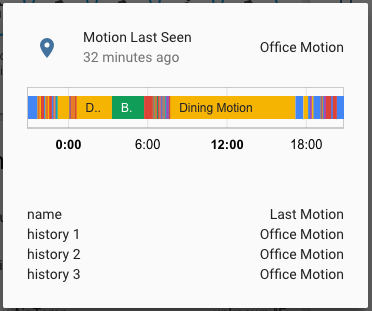
Seeing a graph of activity when you press tap on a binary sensor (motion) in love lace is ok, but I'd prefer to just see the list of times and durations that were used to generate the graph. Is it possible to see a list?
 smoky depot
@noble galleon not sure what you want vs what you have now but you can change the unit of measurement for entities Configuration > Customizations which in turn changes that graph
noble galleon
I just want a list of events rather than a graph.
smoky depot
there's always the logbook
noble galleon
That I mean is, having a graph for binary sensors isn't useful when the events are very short
I have a number of motion sensors. If rather just have the data used for the graph in text form
It's much more inconvenient to go to the logbook and load that up each time I want to have a quick look
smoky depot
 smoky depot
don't believve that is possible
noble galleon
If I could just see the numbers that make up the graph, it would be much easier to digest than a graph
Ideally, I could long press the graph to get a log or list
visual meteor
https://imgur.com/sxiN3PP since i updated my homeassistant to version 0.106.4, my cards aren't showing up anymore and im getting the following error (see screenshot)
@visual meteor any suggestions?
smoky depot
@visual meteor I think someone else posted something about this. try using the discord search feature. I believve it was either today or yesterday I recall glancing over something about it
wheat current
Update your custom cards
 winter leaf
Anyone knows about a complement to Slideshow-card that is being deprecated?
wheat current
install OpenHab
 pliant pulsar
Niiice answer
Not what i needed 🙂
I want to keep homeassistant, i know what i use, i want to remove it or replace it so i can use the space
wheat current
Walk the DOM with a custom script an remove it
pliant pulsar
you know, i dont use any of the cloud functions, but i think that i will try openhab or domotics
 kind shellBOT
@lost escarp posted a code wall, it is moved here --> https://paste.ubuntu.com/p/vQQ5DTSz7c/
 lost escarp
Is it possible to use a template with the entity attributes for the min/max and severity values in a gauge card?
Please see the hassbot link for the yaml code which I've tried
pliant pulsar
@wheat current i dont expect answer from you, but you are in green color, so at least dont make fun of me
last time i check this is SUPPORT server, so either you give support or don't
wheat current
"Walk the DOM with a custom script an remove it" that is how you do it
pliant pulsar
no, this is how i do it AFTER i go to openhab
wheat current
no
pliant pulsar
i tottaly lost interest in messing with hass for today , going to check openhab
wheat current
https://gist.github.com/ludeeus/b7acc6c560c9e59b70de20cb590cdf4f modifies the sidebar, you can probably do the same with the title
default cards do not have templates @lost escarp there is a few custom cards that adds that functionality
lost escarp
@wheat current would you mind to point me to one? I've searched for gauge cards in hacs, but the 3 cards I've found aren't mentioning templates 😦
wheat current
lost escarp
oh nice thanks 😄
 lament sierra
I am quite new to Hass.IO. Can anyone tell me where to find #frontend-archived in a Dutch language Hass.IO?
I want to change the language to English because all information is in English and I cannot find the apropriate spot if the names are not translated in a way that I can understand.
Ok, I now have English!
I updated to the newest version and now my automations are gone from the homescreen. How to get them back? I (and my wife) use that to control my heating (through mqtt).
winter leaf
Can you share your code in pastebin?
wheat current
There is none
You need to click  then edit, then take controll, then add a entities card with them
lament sierra
does not work I don't see the automations
This is not a user friendly system
I regret going to the newest version
mild veldt
You have to add them back in an netities card or g to config-> automations
lament sierra
Sorry, I finally found how to do it. Thanks a lot for helping me.
errant birch
@polar kelp trying out the grid layout and it worked well for my sensor cards, but now i'm trying to replace my nested horizontal-stack/vertical-stack code with a grid layout card and some cards are not respecting the 100% height.. any idea what this could be ? I'm seeing this issue with the bignumbers card
polar kelp
Hm... that’s interesting.
I think it’s because card mod relies on almost everyone setting this._config at the start of the setConfig function, but bitnumbers does that at the end...
You may have to add mod-card to that to make it work.
 worn parrot
yeah some cards do weird things with the config variable on setConfig(config) and it broke a few cards on the new update. mine, for example, set some additional properties directly on config but it looks like it's now immutable/readonly and failed because of that. changed the code and it's fixed. just need the card author to update any cards that aren't working.
craggy schooner
Using the markdown card. [[ sensor.time.state ]] outputs "[[ sensor.time.state ]]" when I'm hoiping to get the actual time..
I don't quite understand why the template isn't working
mild veldt
@craggy schooner because that's not how you define a template. check the docs
craggy schooner
looked in the docs.. that didn't work.. so I looked at thomas component that was merged into the main component and the [[]] metohid is what he describes.. and also what is listed in sample config that I'm referencing
but ok
{{ sensor.time.state }} removes all content from the markdown block so nothing displays
polar kelp
Which docs did you look at? Because the correct one contain a link to the template documentation which has several examples.
It says "templates".
craggy schooner
craggy schooner
ah... would be helpful if there was a link in examples as well or such.. pretty much where one usually ends up to understand how to implement something
thanks
Is there any way to align a stack to the bottom of the container?
worn parrot
@craggy schooner FYI https://www.home-assistant.io/docs/configuration/templating/
Avoid using
states.sensor.temperature.state, instead usestates('sensor.temperature'). It is strongly advised to use thestates(),is_state(),state_attr()andis_state_attr()as much as possible, to avoid errors and error message when the entity isn’t ready yet (e.g., during Home Assistant startup).
e.g.
cards:
  - type: markdown
    content: "{{ states('light.bedroom_lamp') }}"
Is there any way to align a stack to the bottom of the container?
Not natively but you might be able to use a panel and style a card to display it at the bottom using card-mod (https://github.com/thomasloven/lovelace-card-mod).
You can't style stacks "the easy way" but there's a workaround to be able to. Or you could possibly set its absolute position (ha-card { position: absolute; bottom: 0; }) if that's what you want.
worn parrot
@polar kelp You've created a monster. 🙂 https://i.imgur.com/uG1aVh6.gifv
polar kelp
I regretted card-mod before it was even released. https://discordapp.com/channels/330944238910963714/460846676358332417/484080951568367617
worn parrot
For this reason?
polar kelp
First thing I saw was the spinning icon and thought, "But I haven't even released that yet!"
No, because of what I did with it https://discordapp.com/channels/330944238910963714/460846676358332417/492013159763279882
worn parrot
Honestly it's one of the most brilliant things to be added to Lovelace.
polar kelp
Back then you wouldn't be able to do what you have done with it.
worn parrot
Ohh
Do you regret adding that ability altogether? Or just some of the things that it can do?
polar kelp
Next version is going to be 🔥 https://discordapp.com/channels/330944238910963714/460846676358332417/679765203357008000
But the documentation is a beast.
worn parrot
Awesome
wheat current
Try fiverr
worn parrot
I'd give you $5 in a heartbeat 😄
wheat current
No no, hire someone to do documentation for $5 😅
polar kelp
If someone else wrote it, i'd still have to explain it to them.
 bright marsh
can anyone tell me why i'm getting a Cannot assign to read only property '0' of object '[object Array]' error for the following card?https://hastebin.com/tocefirali.bash
it was working before 0.106
bottom section with the 3 horizontal cards still works, just the top part is broken
mild veldt
@polar kelp I regret everything I've ever written 😅
craggy schooner
@worn parrot thanks for the tips
mild veldt
@bright marsh update the card
bright marsh
@mild veldt update to?
worn parrot
The new version. It's been discussed above.
Looks like you're using custom:mini-graph-card - update that one
bright marsh
oic, i guess i wasn't searching for the right thing
worn parrot
When something breaks after an update, the release notes are often a good place to start.
https://www.home-assistant.io/blog/2020/02/26/release-106/#custom-cards
It's a bit buried but there. 🙂
Additionally, have you seen the new graph card? It looks very similar to the custom card.
bright marsh
i searched the note too, but i didn't notice that blog post
i didn't see a way to do the color thresholds in the new sensor card
worn parrot
Ahhhh okay. Yeah it was just a style change.
worn parrot
The custom card is actually quite nice in that it takes entities and not just a single entity and stacks the lines
It's already in HACS btw
bright marsh
yeah, i mean my install. i manually installed it before HACS was a thing
yeah i have the custom card do the stacked lines in other places
worn parrot
Thanks for asking a question 😄 I just found a new card.
bright marsh
what card?
worn parrot
mini-graph-card
bright marsh
oh haha
 flint heron
Question. How do I get 4 columns instead of 3
 tawny lynx
I have a ffmpeg camera image displayed in a Picture Entity Card. I would like the tap action to bring up live video from the another generic camera, but not sure how to do this. Any ideas?
 atomic glacier
layout-card @flint heron
flint heron
Is that a community addon @atomic glacier
tawny lynx
@flint heron https://github.com/thomasloven/lovelace-layout-card I use the single column method with breaks, love it
atomic glacier
🥳
flint heron
My man
atomic glacier
I have used picture-glance for that in the past to add multiple lights, switches, etc... @tawny lynx
But would also need browser-mod for the more info popup
tawny lynx
@atomic glacier ok cool, I have browser mod but can't figure out the service data to show the picture-glance
atomic glacier
The easiest way I know is to use an input_boolean as the entity in the card and call the browser-mod script from that, but...I've been told on occasion, that I don't think normally 🤣
Just works for me, so I do it LOL
Several examples in my repo, and if you need help feel free to tag me.
tawny lynx
@atomic glacier I've never used an input Boolean like that, I might just have to try it! Would need to look over your examples
atomic glacier
Meh, I forgot I changed the call-service popups to sun.sun for the entity, like
                - type: entity-button
                  entity: sun.sun
                  name: Sleep
                  icon: mdi:sleep
                  tap_action:
                    action: call-service
                    service: script.good_night
@tawny lynx would be easier
same principle though
craggy schooner
If i have a list of lights in a entities card, what is the popup view that I can open with the color wheel known as? can this be customized? I'd love a color temperature slider here as well
atomic glacier
I think you are referring to the more-info of an entity. If you use custom cards, there are quite a few cool cards for lights...
craggy schooner
yeah probably.. couldn't really find it in the documentation
So custom card is the way to go i guess
atomic glacier
for me there is no other option...but...I like breaking things too
craggy schooner
Is there a common directory of custom cards? or is the method of finding them shooting off hopeful searches on google and the forums? 🙂
atomic glacier
craggy schooner
ofc thomas made it as well 🙂
atomic glacier
HACS is the only viable option to find and keep up with the updates when needed
craggy schooner
just started out and like 75% of my code base for lovelace is based on his stuff 🙂
hm
thats not exactly what i was hoping for though.. want the more-info functionality, but I'd love to add to it
atomic glacier
ALL of my config started and continues to evolve around TL's work. Just where I began with
Everything works here, but will be updating after 0.107.0 is released. Can get a few ideas...https://github.com/Dino-Tech/Home-Assistant-Main @craggy schooner
craggy schooner
big changes in 107?
Yeah that's pretty customized
Got my left panel close to where I'm ok with it.. now changing the stuff in the other tabs. https://i.imgur.com/u0aBtnM.png

need to change the weather tab a bit to de-clutter it still
crystal moat
Uh guys, I restored a configuration file on a fresh install of Hassio.
And my supervisor disapeared from the sidebar, along with all the addons.
NGINX (One of the addons) seems to work as I can use by url to log in.
But when trying to access: http://192.168.0.15:8123/hassio/dashboard
I get a 404: Not found error.
Anyone has any idea? I am low-key freaking out
 muted inlet
@crystal moat Try clearing your browser's cache
 gusty wing
Hi when i click on configure-ui in lovelace
i have an empty screen (not able to see other cards/edit)
 stoic ember
I'm having trouble setting an icon for entities in Lovelace. I'm guessing I'm picking icons that aren't yet included in HA. Is there a list that shows all the MDI icons available in HA? I'd like to use something like mdi:track-light
@gusty wing can you click the + to add an empty/new card and then see if any of the others show up?
gusty wing
@stoic ember nope, it seems that its only on 1 card
ive deleted by db and restarted now its all good
stoic ember
@gusty wing you deleted the entire db or just that card?
mild veldt
@stoic ember what version of core are you running? track-light works
just tested on the demo site
stoic ember
@mild veldt 0.106.5 this should be in customize.yaml right?
stoic ember
Hmm, not sure what I was doing wrong, but I am now able to change it via the Lovelace customize entities page. Thanks for the sanity check.
gusty wing
@stoic ember my home-assistant_v2.db
stoic ember
@gusty wing what do you lose when deleting home-assistant_v2.db
odd light
all of your state history
but you have to nuke it often after an update or things act funny.
stoic ember
Thanks for the idea @gusty wing and explanation @odd light - I was just having an issue with some sensors after renaming them and changing their icons. They kept saying "unavailable" but after nuking the home-assistant_v2.db file they are working again. I had no idea that was a viable option.
odd light
yep
I usually don't do it unless I notice issues, but it's fixed many an issue.
why? no idea.
maybe if you use a different db it's not a thing I dunno, I'm still on the built in stuff.
stoic ember
This is probably just as good of an explanation as any for why it works --> https://youtu.be/1E6IfdUJn6s?t=10
odd light
it just does
stoic ember
Is there a way to configure a view in panel mode but not hide the other panels? Or if that's not possible can the number of columns in a view be configured?
mild veldt
@stoic ember I don't understand the question. "not hide the other panels?"
stoic ember
I like the look of a view after enabling "panel mode" on it, but as it states in the edit screen, this renders the first card at full width; other cards in this view will not be rendered.
mild veldt
yes?
stoic ember
I'm trying to clean up the truncated names in a view like this https://i.imgur.com/sYed6Ok.png
 mild veldt
So by "not hide the other panels?" you meant other cards?
stoic ember
Yeah, I guess so, I'm just struggling to get horizontal cards working as there is no visual editor and I can't seem to get the entity config right when trying.
mild veldt
@stoic ember google layout-card
stoic ember
Will do, thanks
mild veldt
@stoic ember should hopefully have a stack visual editor in 0.107
cool, we will. it has been merged https://github.com/home-assistant/frontend/pull/4999
gusty wing
guys what can i do if i wanted to show an attribute of a switch on lovelace?
want to get the power as a sensor instead
mild veldt
@gusty wing a template sensor is typically the standard approach for now
gusty wing
i see creating a sensor for that 1 attribute
mild veldt
depends on what you want to do with it
there are other options
like the markdown card
and plenty of custom cards that offer ways of displaying attributes
secondaryinfo-entity-row is a good one as well
gusty wing
thanks
I have another question regarding themes, when im in incognito mode and i log into my ha, it defaults to default theme
anyway around this?
polar kelp
Except the default theme.
worn parrot
Technically the truth. HA
split granite
Technical truth is the best kind of truth
polar kelp
I mean the "backend-selected", which is set with frontend.set_theme
split granite
Details details 😛
worn parrot
I really want to build an hourly forecast card like Accuweather, something compact but hourly. As far as I have seen, there's nothing quite like it. It shouldn't be terribly difficult, I've got the data from Darksky already. Just need to display it in a nice way.
errant birch
trying to configure a new view but struggeling with the margins..
for some reason there's this 'padding-top: 16px' I cant seem to override
    padding-top: 16px;
}```anyone know where this might be coming from ?
errant birch
fixed it by adding this
padding: 0px 0px 0px 0px !important;
}``` steep jewel
any idea if i can change the category of an entity in HA? I've got some switches that control lights and i'd like to classify them under lights
split granite
No, but ...
kind shellBOT
Command '~light.switch' was invoked by: Tinkerer
steep jewel
good bot
huh, only one showing up
  - platform: switch
    name: Downlight Left
    entity_id: switch.powerplug1

light:
  - platform: switch
    name: Downlight Right
    entity_id: switch.powerplug2
Any idea why only right would show up?
kind shellBOT
Always run the configuration check command when you make changes. Don't trust the UI check - it misses some problems.
Command '~check' was invoked by: Tinkerer
split granite
You forgot to run that check
steep jewel
but it works on the right one? lol
split granite
Also, you probably missed https://www.home-assistant.io/docs/configuration/devices/
light:
  - platform: switch
    name: Downlight Left
    entity_id: switch.powerplug1
  - platform: switch
    name: Downlight Right
entity_id: switch.powerplug2```many thanks though that was bang on
split granite
Eh, escaping inside code is hard
steep jewel
I would have honestly thought that it would have only shown the left one if that was my issue, something something assumptions ass u me
split granite
```yaml
So, parsing when you break the rules is probably deterministic, but maybe random 😛
steep jewel
haha, yeah that is logical
i'm stoked tho, those were the last bits of my ha setup for now
full tasmoto / mosquitto setup, steep learning curve but very rewarding
reflashed from a domestic product i got cheap, all in like 150aud for the setup with 10 lights and 4 power plugs, and i've got 6 power plugs to sell 🙂
very appreciative of the community and all the guides
 clear geode
I am attempting to use the conditional card to display a thermostat based on temperature value
I tried using a vlaue template but it is invalid
 frail adder
I installed TasmoAdmin but I can't seem to find out how to add the icon to the side panel. Any pointers on where to look?
mild veldt
@clear geode templates are not allowed in the conditional card
conditional card is only based on the state of the entity, so you need an entity that holds the temperature value as its state. I suggest making a template sensor
clear geode
yes thanks, i came to that conclusion
@mild veldt thanks I guess if there isn't docs saying you can use templates, assume you can't use them
mild veldt
@clear geode markdown card being the exception
there are custom solutions, however, that support templates
my card https://github.com/iantrich/config-template-card pretty much allows templates anywhere. Just be careful, it can impact your performance if not done properly
polar kelp
Markdown card docs say you can. That’s no exception. It’s the opposite.
 warm meteor
so I changed an entity picture but it wont update on the front end. I have deleted cookies. Anything else that would cause this?
wheat current
cache
 mortal cape
cache money
 gritty lily
i need help: https://hastebin.com/ugiyinacug.bash
this is what i want
and this is what i get
 stoic rain
How can we add a group entity as a light slider?
kind shellBOT
Command '~light.group' was invoked by: Tinkerer
stoic rain
None of the cards have supported sliders so far though?
split granite
There are entities that show as sliders, and custom cards that can do many things
A group however wouldn't show as a slider - for that you'd need a light
 ancient harness
Is the author of lovelace-paper-buttons-row in here? jcwillox is the github username, but not seeing it in the user list
stoic rain
A
grouphowever wouldn't show as a slider - for that you'd need alight
@split granite So I'm reading the link you sent - where is the 'light.kitchen_light' created?
kind shellBOT
Tinkerer is away for 41s with a message :point_right: Normal people believe that if it ain't broke, don't fix it. Engineers believe that if it ain't broke, it doesn't have enough features yet.
gritty lily
can anyone help me with my pb? 🙂
 loud thistle
Someone a solution for that? https://snipboard.io/47GVpv.jpg
 split granite
What if you use a different theme?
 unborn cedar
@loud thistle your theme
loud thistle
Please not..... sec ^^
unborn cedar
It is your theme 🙂
loud thistle
It is.... MEEEEH, thx ^^
 copper mural
I have setup a bunch of binary_sensors from the 'ping' platform so I can monitor which servers that is online or not. Which whould be the best card to view their states?
polar kelp
glance?
split granite
Possibly with an entity-filter card to only show those online/offline
polar kelp
even better
copper mural
Ah great. I'll check em out. Thanks!
 clear forge
I accidently deleted a zwave switch entity, how can I restore it? most wanted without restoration of snapshot
 junior iron
Hi Guys, I've been for some times now but I can't find a solution to use the state-switch card or the conditional card in my lovelace
I've a binary_sensor build based on a mqtt platform/integrations. and base on the status of this sensor, i want to hide/show the content of one or multiple card
how can i achieve that properly ?
 wise tapir
anyone that can help me when i delete something on my other view it deletes it on my main view how can i fix that?
 fathom tree
howdy fellas!
Anyone got an idea why a couple of my Lovelace views show a blank screen? I use the UI editor. I can still see all the yaml in my Raw Config Editor, but when I click those couple of tabs it just shows a blank page.
 lavish solar
is there a way to do simple math in a lovelace card? I'd like to subtract from a state/attribute value. I'm using the secondaryinfo-entity-row card which uses card-tools
what does chrome dev tools (or equivalent) show?
any custom cards/messed up resource urls?
wheat current
@fathom tree You have a custom card acting up (most likely), check your browser console for clues as @lavish solar mentioned
fathom tree

mortal cape
@fathom tree mini-graph in particular. If you have an update for that...
clear forge
Anyone having any idea on how to solve https://discordapp.com/channels/330944238910963714/460846676358332417/685488865498103823 ?
lavish solar
Wake up the device maybe?
split granite
#zwave-archived is the place for help if it's missing from States rather than just your UI
 forest mica
Is there a recommendation on updating supervisor before core or vise versa?
split granite
#330944238910963714 would be where to ask about that, since Supervisor is a Home Assistant thing
 shell torrent
hi all.
I want to reload my dashboards via an MQTT-command when lovelace needs a refresh (when the reload? question is showed), but I haven't found anything to trigger on.
suggestiones?
split granite
Scripts are a thing for #automations-archived - please format your code when you post over there though
 long comet
sorry thanks
 deep moat
crossposting from other. Having http access issues with supervisor or docker.
Hey, im having HTTP access issues. can't access logs through SSH, alot of JS errors when trying to go to different pages. not sure where to start
https://pastebin.com/z2fB6CW7
Seems like its a supervisor/docker type of issue
gritty lily
this is what i
i need help: https://hastebin.com/ugiyinacug.bash
@gritty lily any help ? 🙂
 gaunt cairn
Hey everone, I have a stacked card that contains multiple conditional media-player cards.. What would be your best idea to hide the stacked card alltogether if none of it's items are displayed? As far as I can tell there is no OR in conditional cards, right? It looks odd if no item is displayed but the title of the card is shown :D
polar kelp
Stock solution: Make a template sensor counting the number of active media players, put everything in a conditional card to hide it if there's none.
One other solution: state-switch custom card has OR.
 hallow palm
Good evening all. I've been Googling to find how to add two "overview" items ("lovelace UI bars"?) to the left-hand vertical stack. Would anyone here know if this is possible?
mild veldt
@hallow palm you want multiple panels?
gaunt cairn
@polar kelp Thanks for your suggestions :) I'd prefer the first one since I don't want too many custom components installed.. In theory that means that I have to create a template sensor with a giant if (media 1 playing or media 1 paused or media 2 playing, etc.) inside the "value_template", right?
hallow palm
@mild veldt sorry, what's the exact definition of a panel?
one of the horizontal pages you can create in the UI?
mild veldt
polar kelp
@gaunt cairn You can probably do it with a clever looping template.
hallow palm
@mild veldt yes indeed
mild veldt
wait for 0.107
polar kelp
That is going to be awesome.
hallow palm
@mild veldt is that going to be a first class concent? that would be awesome 🙂
concent -> concept
hallow palm
@mild veldt : Looks interesting, thanks for pointing out (y)
gaunt cairn
@polar kelp Could you show me a clever looping template? I know how I'd do it in Javascript but I'm new to yaml
polar kelp
@gaunt cairn Something like this could work: {{states.media_player|selectattr("state", "ne", "off")|list|length}}
gaunt cairn
@polar kelp If I understand correctly this would create a list of all media-players whose state is not off, right? Could I check for equals playing or equals pause instead? With this query devices with state "unavailable" or "unknown" would show the card
polar kelp
The link will tell you. You can test things in developer-tools/template.
gaunt cairn
@polar kelp Thanks a lot, I was writing it in my config and restarting all the time :D I'll try out how to make it work, thanks :)
Edit: Easier than I thought :D Or is there something wrong with this attempt?
value_template: '{{ states.media_player|selectattr("state", "eq", "playing")|list|length + states.media_player|selectattr("state", "eq", "paused")|list|length }}'
how do you get the alexa settings card? https://www.nabucasa.com/config/amazon_alexa/
 wary quest
how do I get the template to just show the time?
{
  "title": "Event Ghost Fired",
   "message": "{{ states.sensor.time }}"
}
{
  "title": "Event Ghost Fired",
   "message": "<template state sensor.time=18:56; friendly_name=System Time, icon=mdi:clock, haaska_hidden=True, homebridge_hidden=True, package=system @ 2020-03-06T18:56:01.012457-05:00>"
}
 latent moss
@wary quest i use this in one of my automations:
message: "Current time is {{ as_timestamp(now()) | timestamp_custom('%I:%M %p') }}."
but this is more for #templates-archived channel.
 stoic solstice
I'm trying to get manual theme selection to work. I've added frontend 7 themes to my configuration (using packages) but still can't select any theme. Any ideas?
frontend:
  themes: !include_dir_merge_named themes
installed a random theme from hacs and i see it in the themes folder
stoic solstice
nvm, figured it out after some more trial and error
 keen agate
I'm getting an "unknown_error" in the UI when trying to create a new user in home assistant, "RuntimeError("Provider not found")" shows up in the logs every time I press create
 flint canopy
Can I set the Theme of a Card via Templating?
 formal tide
why is mdi:microsoft-windows not available??
shell torrent
Is this the place for questions regarding custom Lovelace stuff? Please redirect me otherwise.
I use https://github.com/maykar/compact-custom-header which has been depreciated and replaced by https://github.com/maykar/custom-header. One difference is that Swipe navigation is no longer included as it was with CCH and I should use https://github.com/maykar/lovelace-swipe-navigation instead.
But, when I tried that a while ago, Swipe Navigation didn't honor the hidden tabs per user setting. Althought only some tabs were shown in the header, swiping browsed trough ALL tabs.
Basically the wifey suddenly didn't only swipe through her ordinary tabs, alarm, lights, basic stuff. She also got access to all my test-tabs, something shethought was very confusing and didn't appreciate.
Is that the expected result or was it a result of bad config?
wheat current
It has not been released by materialdesignicons @formal tide
formal tide
not yet? or not ever?
wheat current
yet
formal tide
 thank you @wheat current
 distant stag
How do I access HA locally if it's forwarded to my domain? local-ip:8123 gives an ERR_EMPTY_RESPONSE error
split granite
You're using SSL?
distant stag
Yes
split granite
And locally you're remembering to use https://?
distant stag
Outside my network https://domain.com works, but locally neither https://local.ip nor http://local.ip work
split granite
IP and port with https:// should work fine
 weak scarab
Hi! I'm trying to create a lovelace display where i can see last N messages from a zigbee topic (I'd like to view logs of the zizgbee2mqtt bridge, which gets published in its own mqtt topic), but i can't find any solution. Is this possible to do?
 icy wraith
heya
split granite
Top right corner, there's three dots
Select that, then Configure UI
Zero YAML editing required
icy wraith
well I'd like to edit the yaml in places
I can see the editor there
but where does that files sit?
split granite
If you're using the UI there's no YAML
You can use the raw editor to edit what looks like YAML though
Just click the three dots again
split granite
It does, but JSON
icy wraith
if I did want to read the lovelace config from an actual file, how/where would I !include it in the config.yaml
split granite
You wouldn't do that anyway
See the Lovelace docs for YAML mode if you really want to do it that way
kind shellBOT
The topic of this channel is:
Discussion regarding the Lovelace UI and configuration.
Docs at https://www.home-assistant.io/lovelace. Please use https://www.hastebin.com/ or https://paste.ubuntu.com/ to share code or logs
Command '.topic' was invoked by: Tinkerer
icy wraith
yeah i'm looking and by the looks of it they just say pull it all into config... https://www.home-assistant.io/lovelace/yaml-mode/
 spiral pasture
Restart Home Assistant for the mode to be changed. Create a new file <config>/ui-lovelace.yaml and add your Lovelace configuration
split granite
You do not !include that however
icy wraith
ohhh when you enable
lovelace:
  mode: yaml
does it just look for the ui-lovelace.yaml in your config dir?
split granite
Yup
icy wraith
riiiiiight ok
that makes sense thank you
next question
which is a #frontend-archived one again
wheat current
You have used up your questions for today, try again tomorrow
icy wraith
can I wish for another wish?
split granite
Recursive wishes 🤔
icy wraith
🙄
anyway
the map...
I've created a map card, which I added my zones and trackers to
how can I get that in the actual map integrationg
split granite
You can't, they're different
the map integration and the map card are two different things
icy wraith
I know, I'm wondering how to configure the integration map
as at the moment all it shows is my zones
icy wraith
none...
split granite
Correct 😉
icy wraith
so how have other people achieved it, as I've seen screenshots of it
icy wraith
but what about the trackers?
split granite
To only use the zone for automation and hide it from the frontend and not use the zone for device tracker name
Events would still work, but not states
Only cards are configurable
split granite
Map card...
icy wraith
the images link is what I@m aiming for
so remove the map config and use the view instead I think
ok, I need to create an additional map using that card to replace the default map integration. does that sound right?
split granite
Well, it won't replace it, but yes
icy wraith
I have it manually enabled from map: instead of default_config in the config.yaml now so if I removed that it wouldn't show the default I think?
ummmm, so how do I create a secondary view?
split granite
icy wraith
yeah that's what I'm reading, but I can't see where to have them as a separate page from the sidebar rather than a tab?
wheat current
it will
icy wraith
:/ how did they achieve this then?
https://community.home-assistant.io/t/hide-person-on-map-or-the-map-intergration/135449/11
icy wraith
the screenshot isn't very helpful but it looks like they've got their zones and trackers in the map?
wheat current
That's how the integration works
icy wraith
something is wrong in mine then, as only the zones are showing, but in my map card they are showing
gusty wing
hey are you guys using a tablet to display lovelace custom cards?
i tried fully browser but it had issues loading custom cards
atomic glacier
FKB loads fine for me on 3 tablets and mobile
Have heard there is(was) some issue on Fire tabs, but also a workaround
Would browser-mod function properly with popups, etc..if I use the same deviceID for 2 or 3 devices? Mainly wanting to use the fake browser ID function of FKB to cut out some code if this would work and not inhibit any functions...🤷🏻♂️ @polar kelp
flint canopy
Can I set the Theme of a Card via Templating?
polar kelp
@atomic glacier i think it’d work fine.
atomic glacier
Cool...updating and changing a panel to FKB, so I thought I'd ask. I'll let you know if I find any issues...THANKS!
@flint canopy don't see why not. I just use them in automations and buttons using browser-mod
icy wraith
heya, I'm back again, is there a simple way to get text input?
I've got assistant-relay working, but now I want to get it so I can send text from the ui
kind shellBOT
Command '~input_text' was invoked by: Tinkerer
icy wraith
yeh I don't know how to use that in another entity
atomic glacier
an entities card
split granite
Then link an automation to it
atomic glacier
...or if you want to use presets, you can use an input_select for commands. I use that as well. Pretty slick IMO
icy wraith
hmmm
it's for some cheap chinese lights I've got that I can't be bothered to solder up for ESPHome so I'm just talking to them through google
atomic glacier
I also just added it to the HA Android app using actionable notifications for garage door and some lights
icy wraith
atm I have:
type: entities
entities:
  - action_name: Broadcast
    name: Mirror light on
    service: rest_command.assistant_relay
    service_data:
      command: "set mirror lights to 100%"
    type: call-service
  - action_name: Broadcast
    name: Mirror light off
    service: rest_command.assistant_relay
    service_data:
      command: "turn off the mirror light"
    type: call-service
I'm happy with that, as I have no way of knowing what state it's in at the moment
so this is literally just for broadcasting, so I just want a free-text field
atomic glacier
then I'd use input_select option then. You can add as many commands to one as needed, then display on a lovelace card
flash with Tasmota and then integrate so you can monitor states, but that's another channel 😜
icy wraith
tasmota rather than esphome?
atomic glacier
preference for me ATM, but whichever you are comfortable with
icy wraith
it's on my list
quick fix for now
so, I'll use input_select for the regular commands
atomic glacier
yeah, I just add more as needed
icy wraith
but still not sure how'd use the value of input_text in the service_data: command
atomic glacier
but usually just use it via mobile app as I stated above. When something happens(trigger) my notification gives an option to execute an action. Works perfect...
last question would be #templates-archived and an #automations-archived to fire it off (<--pretty sure)
split granite
Just ask questions - whoever is around that can help will (probably)
icy wraith
hahahah
so I've associated an nmap tracker to a person entity
for myself and my partner I have the persons as badges
i'm wondering if I can have hide_if_away on the person badge, rather than the tracker
split granite
No, and that's going away with 0.107
icy wraith
what? hide_if_away
split granite
Yup
icy wraith
in favour of conditional?
split granite
there's at least two ways of doing what you want with Lovelace itself
In favour of not having it
hide_if_away is a hangover from the old UI, that thankfully is now dead
icy wraith
haha that's the last time I properly played with HAss
thank you for the assistance
I'm going to get that working
then try the input_text
split granite
Good luck
atomic glacier
@flint canopy same theory as this: https://imgur.com/a/ZF8aw43 , but use the templating in the styles Pretty sure that will get what you needed...
 lilac fern
I hope this is not a stupid question but, what do the restart/stop controls @ :8123/config/server_control do?
Do they restart just the HA bits or the entire machine when using hassIO?
split granite
Yup
lilac fern
Another stupid question: If you turn off the "automatic" UI and start configuring your own, how do you go back to automatic?
split granite
Delete .storage/lovelace
mild veldt
@split granite actually you can open the raw editor and delete everything and save. Will revert
split granite
Oooh, that's neat
mild veldt
Wait till you see multiple dashboards in 0.107 😜
split granite
Yeah, I've heard that's coming
 balmy moon
In the latest ver of HA how do I change the radius of the home zone? Mine is currently set at 100 (feet?) it seems to be a huge radius around my house.
Hi @fathom tree Thanks for all of your content on youtube. You are teh reason I got involved with HA
balmy moon
Can i define home in configuation.yaml?
I'm using the home/away for automations to open garage door.
so is i define a second zone how would that work?
split granite
balmy moon
Thanks!
fathom tree
@balmy moon 👍🏻 welcome
balmy moon
Planning on doing whole home holiday lights soon.
I may need to rent a lift for the second floor. not looking forward to that.
 gleaming vigil
Hey, dumb question, but where is the actual lovelace file located? (The same one that exists in the raw editor)
Nvm!
 lavish elbow
Hello! Any theme applied on https://www.home-assistant.io/lovelace/alarm-panel/ in the demonstration?
Mine looks very weird 😦
latent moss
@lavish elbow the gif on that page is from an older version of Home Assistant, the number pad is styled differently now if that's what you mean.
lavish elbow
yeah, sadly the new one does not look so goot as the old one :\
split granite
@gleaming vigil That one is .storage/lovelace
stoic solstice
Would it be possible to use "entity-filter" card to filter entities by area? Or is there a better way to add all entities from an area to a entity card?
Found a custom card for it, auto-entities
 tough path
hi, is it possible to hide the title in yaml mode? if I simple remove the setting, the title is "Home Assistant". I'd rather not display the title bar at all
icy wraith
does anyone know what condition I need for a conditional card to display for only specific users?
gusty wing
just felt like showing off my upcoming floorplan
icy wraith
nice @gusty wing! what did you use to build it?
gusty wing
icy wraith
👌
vapid field
Is there any chance the current lovelace-custom-card documentation might be wrong or is it HACS, or version-missmatch(es)? in short: I got a reminder that HACS shows incorrect 2 lines for the installation of https://github.com/custom-cards/flex-table-card ... minimal difference between the https://github.com/custom-cards/flex-table-card/README.md and the HACS guideline. type: compontent instead of type: js as in the project README... I personally have type: js active and type: component does not work, the lovelace custom-card docs tell the opposite (use type: component) https://developers.home-assistant.io/docs/lovelace_custom_card/#advanced-example .... so anyone can help what's really correct and since which version or has this another reason?
(HA vers.: 0.106.5 for me) ... HACS seems to also be not consistent across various custom-cards and even more confusing is the fact that I get type: js for flex-table-card whilst the person making me aware of this issue here: https://github.com/custom-cards/flex-table-card/issues/22 gets type: component proposed 😉
 unique lodge
Hey, I've been struggling to get home assistant to work again since the 0.106 update about a week ago. My issue is that the frontend does not start (and neither does ssh). I can however get into save mode when I create an invalid config via samba. I can also read the logs, which show: https://community.home-assistant.io/t/typeerror-expected-string-or-bytes-like-object/177160. Any suggestions for how I can debug this further?
wheat current
'component' is not a valid type @vapid field
It has to be module, js, css, html.
As far as I can see, only module and css is selectable from version 107
vapid field
whoops, the online docs say: type: module... just tried it out, for me it also doesn't work, so the custom-card cannot be loaded. (mixed up 'component' and 'module', sry :D) ... so is the not working type: module currently expected? or is there need for a HA-restart maybe?
Apart from this, is it intended that HACS is not consistent here, the bottom section for the module is HACS generated, right? or can I somehow enforce module or js being documented there?
wheat current
HACS is consistent, it will show module for all cards now in preparation for 107, where that is the only viable option.
vapid field
nice, that's what I hoped for, so if there's anything I can do at least for flex-table-card (because for my card it still writes 'js') , let me know... just yesterday updated info.md + hacs.json to improve the catalogue feeling,.
wheat current
If you see 'js' on your installation, upgrade HACS
vapid field
done, but I just see it would like me to restart home-assistant, alright ...
vapid field
Hi all. I'm struggling with a lovelace page and I have no clue how to resolve this. https://community.home-assistant.io/t/layout-card-take-control-of-where-your-cards-end-up/147805/39?u=hentes Please somebody can help me out with some ideas or with a solution?
@wheat current jup, can confirm, js went away in favor for module, but still module leads to a not working card, but here I am keeping patience until the next version, kk
wheat current
The card probably needs a change, upgrading HA/HACS will not solve it.
Every other card I have seen is working with module, so have a look at the difference between those and yours
It it does not change, it will probably not work when your users upgrade to 107
vapid field
oh ok, then I'll have to find out what makes a module a module, mmmh shouldn't be that hard
ok 1st stop docs, but there are 2 listings which show how to include a custom card and guess what: one says 'js', the other module 😄 directly filing a one-word-PR
vapid field
well that was easy, obviously 'module' leads to a more strict js-parsing, so 2 violations are 2 too much.... but nice and @wheat current thx for the hints
 slender wraith
is there a service I can call to force UI update from a Button tap action ? The button I'm pressing should turn button entity off and the button should disappear. Like a warning button - and when pressed it should go away
polar kelp
You could achieve that with a conditional card.
wheat current
What about just using persistent notification?
slender wraith
Well I fixed it: https://imgur.com/0pZq6DL
@wheat current I already use persistent notification - but I can't disable this warning trigger from there - I need a button to toggle the warning value
vapid field
Hi all, i noticed that the color_state: true stopped working in 0.106.5, is there any way to make it work again?
polar kelp
What color_state: true?
state_color?
vapid field
when i turn on the switch it does not change the color of the icon
yes state_color: true
vapid field
@polar kelp If you don't mind could you please look at this. I would really appreciate it. Thanks in advance. https://community.home-assistant.io/t/layout-card-take-control-of-where-your-cards-end-up/147805/39?u=hentes
polar kelp
Yes, I saw that.
I need to restructure the way layout card finds it's own width a bit. I'll have a bit of time to look at that on Thursday.
vapid field
Big big thank you for that.
 strong furnace
Hi everyone, is someone here using Traefik as a reverse proxy? I can only access the pages of Home Assistant Core, but not of Supervisor or any Ingress addons, is there additional config necessary?
polar kelp
 clear echo
Hey guys, I have a vertical stack card that worked perfectly untill a recent update, it uses type: 'custom:card-templater' for each card.
It contains 3 cards, as long as 1 of the 3 cards is not a card-templater the vertical stack works the way I want it to. But as soon as I change the type of the last card to card-templater and save the config, my whole homescreen turns empty and I need te edit the RAW YAML and change 1 of the 3 cards to a different type for all cards to appear again.
polar kelp
Anything in the browser console?
vapid field
anyone about my issue? state_color: true ?
clear echo
CARD-TOOLS 2 IS INSTALLED, the only thing else I see is some problems with my spotify-card, but thats always there.
mild veldt
@vapid field share your config
kind shellBOT
To format your text as code, enter three backticks on the first line, press Enter for a new line, paste your code, press Enter again for another new line, and lastly three more backticks. Here's an example:
```
code here
```
Watch the animated gif here: https://bit.ly/2GbfRJE
DO NOT repeat posts. Please edit previously posted message, here is how -> https://bit.ly/2qOOf1G
Command '.format' was invoked by: iantrich
vapid field
entities:
  - entity: switch.fibaro_system_fgs213_switch_switch_2
  - entity: switch.floor_lamp
  - entity: switch.desk_2
show_header_toggle: false
state_color: true
title: Διακόπτες
type: entities
@vapid field works for me still on https://demo.home-assistant.io/#/lovelace/0
try clearing your browser cache
slender wraith
I think I have seen some youtube clip where Paulus was showing how to show different Lovelace Tabs based on triggers but I cannot find anything about it
vapid field
try clearing your browser cache
@mild veldt the problem started after iOS dark theme updated to last ver and changed the on state of icons to default . Thank you for help
atomic glacier
@slender wraith may be navigate to # like /lovelace/alarm or /lovelace/home 🤷🏻♂️
that can be done from automations or buttons
unique lodge
I've had troubles accessing the frontend since updating. Can someone help me with this https://community.home-assistant.io/t/typeerror-expected-string-or-bytes-like-object/177160 ?
 bleak raptor
Morning! Been playing with the new "paper-buttons-row" card from https://github.com/jcwillox
Working on a simple remote contoller card. Anyone have an example of how to have the remote buttons/icons momentarily change colour on press?
bleak raptor
Cheers @mild veldt Looks like I chose a bad day to skip the coffee this morning LOL
mild veldt
sounds like a death sentence...
 cerulean anchor
@strong furnace I’m using Traefik for the proxy/LE cert. Just using a [frontends] and a [backends] rule for it in a traefik.toml file, and it seems to work fine. Is that what you’re doing?
 full fern
hello, I'm trying to auto backup hassio snapshots to my nas via smb. Is there no easy way for this?
What I found so far is one addon, that auto creates a snapshot (locally) and then copies it via scp to another location
vapid field
@full fern I can always and without any limitations recommend borgbackup (with borgmatic)
full fern
can't I just change the default snapshot location to a network share?
ok, I'll search for that
vapid field
auto encrypt/compress/deduplify time-spreading by your needs, it won't get much easier I guess
full fern
🤔 oh, it's an independent app?
I was hoping to use the already built in snapshot functionallity from hassio
vapid field
ah I see, nope sry don't know of any
 restive zinc
hi, all
please help me
I had install home assistant from python package without hassio
My system on armbian
And try to configure lovelace but i can't find directory with frontend
I don't have any dir /local or www
where is front end located?
mild veldt
@restive zinc you configure the UI via the UI by default
You have to create a www folder in you main config folder if you want to add additional resyfor the frontend, but it not required by default
restive zinc
@mild veldt hi, maybe I something do incorrect
I have main config directory is /home/daniil/.homeassistant
and I created dir /home/daniil/.homeassistant/www/local and put the image
in ui-lovelace.yaml added path:
cards:
- type: picture-elements
image: /local/small_remote_controll_samsung.jpeg
and restart hass-demon service
but I have the same error:
small_remote_controll_samsung.jpeg:1 GET https://server.com/local/small_remote_controll_samsung.jpeg 404 (Not Found)
 mild veldt
@restive zinc local === www
so if you put the image at www/local the image path in the frontend would be image: /local/local/small_remote_controll_samsung.jpeg
restive zinc
@mild veldt thank you very much, it is work)))
 signal apex
Hello, how is it possible to add a still image via lovelace and set an update interval to one second?
i can only add a picture, but i can't find an option for updating it
 manic vortex
Could you explain a little more? What card are you adding the image to? Why do you need to set the update interval? What else is shown on the card?
signal apex
i just need a box, that shows a static image and updates it every second. Its from my esp32cam, but i noticed that the livestream is rather unstable and after a few minutes it stops working, but the still-image-url is very solid and works everytime
i added the url as "Picture" and it shows the image, but it doesn't know when to update the picture
manic vortex
I doubt there's functionality for that as this seems like a really rare use-case
I think your best bet will probably be to look at any custom cards that may be able to do it, or build your own 🙂
signal apex
hmm, do you have documentation for how to do so?
signal apex
thank you. It's a pitty, i thought i've seen this possibility already.. thanks
manic vortex
I could be wrong, maybe do some research if you haven't already, but I'm pretty sure you can't do it with the default picture card.
 tough quiver
Updated my home assistant to 0.106.5 from 0.105.something
and the custom:mini-graph-card seems to be broken now?
https://thisismy.technology/TDF/TUWoSOdE46.png

All the sensors referenced in there have valid values
copy/paste of error:
0 is read-only

type: 'custom:mini-graph-card'
name: Kitchen Temperature
entities:
  - sensor.kitchen_temperature
points_per_hour: 4
@tough quiver yes, update the custom card to the latest release and clear your browser cache
tough quiver
Thanks for the kick into realising that - I thought I had it managed in hacs - i didn't @mild veldt
wait it is sourced from hacs just hacs thinks its not installed
mild veldt
¯_(ツ)_/¯
tough quiver
weird.
Very strange, HACS refuses to think it's installed I'll deal with that later.
manic vortex
I've got an entity card with this configuration. When I press the scene buttons, it shows this error. I created a new card with the scene entities displayed normally, rather than as footer buttons, and it works fine.
Any ideas?
Configuration: entities: - entity: light.living_room_floor_lamp - entity: light.dc4f22ddc537_10_52_0_104 footer: entities: - entity: scene.living_room_normal_day icon: 'mdi:brightness-7' - entity: scene.living_room_tv icon: 'mdi:brightness-5' - entity: switch.ambilight type: buttons show_header_toggle: true title: Living Room type: entities
Error: Failed to call service scene/turn_off. Service not found.
Indentation is all fucked in that code block, but you get the idea.
mild veldt
@manic vortex try this
- entity: scene.living_room_normal_day
  icon: 'mdi:brightness-7'
  tap_action:
    action: call-service
    service: scene.turn_on
- entity: scene.living_room_normal_day
  icon: 'mdi:brightness-7'
  tap_action:
    action: call-service
    service: scene.turn_on
    service_data:
entity_id: scene.living_room_normal_day```That's what did it in the end
Thanks for the helping hand @mild veldt 😄
 round musk
Hi all, i'm currently working on my lovelace with some scripts. I'd like to change the button on an entity row. RIght now some of my scripts have a delay action in their sequence, which changes the "EXECUTE" button in lovelace to a toggle (see screenshot). Is there a way to change these toggles back to a "EXECUTE" button?
Screenshot: https://i.imgur.com/WRVrhc1.png
 round musk
thanks a million!
 icy fjord
Can someone help with trying to get a vertical-stack to work?
kind shellBOT
@icy fjord posted a code wall, it is moved here --> https://paste.ubuntu.com/p/j8KRMBQ9xh/
icy fjord
It still shows up as two different cards.
muted inlet
@icy fjord The separation is normal. Use the custom vertical-stack-in-card card if you don't want to see the gap
unique lodge
I can't start the Home assistant frontend anymore since the last update and get errors in the log. Anyone knows how to resolve these https://community.home-assistant.io/t/typeerror-expected-string-or-bytes-like-object/177160 ?
 split salmon
is there any way to add a device outside of an integration to an area?
unborn cedar
Suddenly, Mini graph card shows this: https://i.imgur.com/P5tuLwQ.png

If you hold your mouse on any of the points theres no issue
unborn cedar
figured it already thanks to @rustic coral 🙂
bleak raptor
@mild veldt returned to the TV curser movement remote using IR commands via Broadlink. I am trying to get the up/down left/right etc. working on your paper-buttons-row. In dev tools I can call a service "TV Button Up" via Broadlink and it works. When I try this code within the card I get nothing.
entities:
- buttons:
- icon: 'mdi:chevron-up'
tap_action: toggle
entity: switch.tv_up
name: false
type: 'custom:paper-buttons-row''
- icon: 'mdi:chevron-up'
mild veldt
@bleak raptor that's not mine
bleak raptor
@mild veldt Sorry mate!
mild veldt
@bleak raptor that being said, just review the docs. That's not how you define an action
tap_action:
  action: toggle
@mild veldt Reading it I thought toggle was the default? Will try explicitly
Actually I was wrong....
''''type: entities
entities:
- type: 'custom:paper-buttons-row'
buttons:- icon: 'mdi:chevron-up'
tap_action:
action: toggle
entity: switch.tv_up
name: false
- icon: 'mdi:chevron-up'
That works ...
icy fjord
Tediore - i know there is suppose to be a seperation but my two items are not stacked. They show up next to each other. I am also trying the vertical-stack-in-card but can't get that one to work either.
kind shellBOT
@bleak raptor To format your text as code, enter three backticks on the first line, press Enter for a new line, paste your code, press Enter again for another new line, and lastly three more backticks. Here's an example:
```
code here
```
Watch the animated gif here: https://bit.ly/2GbfRJE
DO NOT repeat posts. Please edit previously posted message, here is how -> https://bit.ly/2qOOf1G
Command '~format' was invoked by: Tinkerer
signal apex
how can i add a simple rtsp stream to my dashboard?
i found this, but i just don't get it
stream: has to be in the configuration.yaml (i don't get the coexistence of lovelace and config yaml either). But then the "action:" part, idk where to put it. I also don't understand why i need to assign a picture glance or whatever to an entity, i just want a box with the rtsp stream in it...
 charred zealot
entities:
  - head: light.upstairs_hallway_lights
    type: 'custom:fold-entity-row'
    icon: 'mdi:home-assistant'
    entities:
      - light.top_of_stairs_1
      - light.top_of_stairs_2
      - light.guest_room_end
type: entities
doesn't seem to work. here is the error message
Expected a value of type `{entity,name,icon} | entity-id` for `entities.0.head` but received `"light.upstairs_hallway_lights"`.
all i'm trying to do is add an icon to a fold-entity-row
split granite
@signal apex You'd need to add #cameras-archived (https://www.home-assistant.io/integrations/#camera)
signal apex
thanks, i hadn't seen this page
charred zealot
got it
type: entities
entities:
  - head:
      entity: light.upstairs_hallway_lights
      icon: mdi:home-assistant
    type: 'custom:fold-entity-row'
    entities:
      - light.top_of_stairs_1
      - light.top_of_stairs_2
      - light.guest_room_end
 arctic scarab
Post the following to the wrong location:
maybe a stupid question, but I have to ask. I am finally biting the bullet and transitioning to Lovelace. I really dislike the auto-configuration (too many clicks to configure something, but I see the value for a lot of people), so I went the manual configuration route and created my own iu-lovelace.yaml file. The one big "limitation" I see, and maybe is my lack of knowledge of lovelace; I don't see a way for new entities to automatically populate somewhere (like the old, soon to be deprecated States UI). Is there something that can be done in Lovelace, when one is configuring it manually that will take care of this limitation? I have googled and came around custom cards (monster-card for example), but not sure what will be the best way to go about it.
Some people might ask why if I can see the list of entities directly from the configuration screen; this is 100% correct, but unfortunately, you do not have actual control of those entities from that screen (at least not when you are manually configuring your Lovelace front end).
I am open to suggestion, maybe I am looking at this the wrong way and there are better options that I am not aware of.
Some of the replies pointed me to:
L1 - lovelace auto-configuration
L2 - "take control" - certain level of flexibility while still retaining the UI as the main area to do configs
L3 - yaml mode (user has full control)
mortal cape
@arctic scarab the 0.107.0 release will let you have multiple dashboards, so one can be using automatic mode, another manual mode...
the beta being released today
arctic scarab
interesting; that will certainly give me all the options under one umbrella
mortal cape
and new entities automatically show up in the "unused entities" page also
arctic scarab
I am not a programmer by any means, but I went to the yaml mode due to the fact that I can have better control of what I want to do; and I am trully not wired in a way that making such configurations in a graphical interface makes sense to me
I rather write the code (although it might seemed harder)
not realy coding, scripting if anything
So a follow question, as I already went the yaml mode; in order to go back to the stock way of doing things (Lovelace auto-configured, or configured via graphical interface), do I just delete the ui-lovelace.yaml from my config folder, or is there some other trick I also need to know.
mortal cape
I like all the previews in the UI mode...but you can't achieve @atomic glacier levels of customization without yaml mode. I'm just not into the UI that much and more about having things do what they should without much interaction.
@arctic scarab yeah remove mode: yaml from configuration and I don't think you even need to remove the ui-lovelace.yaml file, but I may be wrong
mode: yaml```I mean
arctic scarab
I have seen some of the UIs from people here, and they are un-freaking-believable.... I am not there yet; but I need a little more control to make sure that things make sense for me, my wife and my kids; otherwise, I will have 3 people screaming at me because something doesn't work the way they want it to work .....
 crimson fable
How do you guys manage to switch between lovelace tabs?
They are rather small and hard to exactly tap on
Especially when the connection is lost and the whole page becomes unresponsive and reverts to the previous state after reconnecting
atomic glacier
@arctic scarab some examples here: https://github.com/Dino-Tech/Home-Assistant-Main
If you are cool with the keyboard, building a basic lovelace UI is baby steps...but very addictive
You are only limited by your imagination.
@crimson fable swipe-card or buttons on mobile IMO is the best way
arctic scarab
Thank you @atomic glacier. Seems like I am better at typing than using a graphical interface, so that is the way I will go for now. Thanks for the reference, I am sure I will have some questions along the way.
atomic glacier
NP, if you need anything let me know 👌🏻
crimson fable
@atomic glacier any example for the button solution?
atomic glacier
I would just use tap_action: and navigate to the view
On any card you have, pretty much that can be added
crimson fable
i see
 willow chasm
Hello, I am new here ... I am implementing the floorplan in my Ha, but when I call the .svg files they come out small to me and I do not understand the reason ... I would appreciate some guidance and thank you ...
willow chasm
I want to put the image .. but I don't have permissions
smoky depot
Ludeeus I tried to get this card to work without any luck at all https://github.com/custom-cards/surveillance-card It hasn't been touched in 2 years and I see no reference to HACS so confused why it's even listed on HACS.
wheat current
smoky depot
is there anything in place for suggestion of removal? obviously you'd want more than one source before removal cause that could get dumb but legit cards that fall into the abyss and no longer work nor show sign of ever being updated would be better removed imo
wheat current
flag it with the menu on the repo in HACS, and add a good description in the template it takes you to
smoky depot
ah perfect lol
wheat current
That has been there since the first version of HACS, and so far I have not recieved 1 valid removal request
smoky depot
seeing if i can fix it myself, or at the very least make sure it's not just a "me thing"
 timber locust
hi together
i'm struggling with a timestamp in lovelace.
I've a sensor with a timestamp (device_class: timestamp) and show the time in lovelace GUI (entity card). This is working fine.
If I look at this card in iOS App it shows "invalid date" instead of the time. So I find out, that I've to use timestamp_custom to reformat the timestamp... but how?
I tried %Y-%m-%dT%H:%M:%S. In this case the time is only corredt in Chrome. In iOS App it shows a time but it doesn't respect the offset of UTC that is +01:00.
If I use %Y-%m-%dT%H:%M:%S%z then it doesn't work in iOS 😦
 icy patrol
Anyone else see this issue who ever uses the Custom Header
if you have an image set for the header and viewing on a large screen; the image keeps repeating it self
 frosty elk
try setting it to no-repeat?
background: no-repeat url("example.png");
I mean...use a bigger image? not really sure what you're looking for
icy patrol
i guess I would need to use an image with no text and in which case it can span as much as it wants
even if you find a bigger image and lets say view it on a TV screen with no-repat - it will still cut off and not go all the way
should be noted not to use a background with text - i will create an issue log
 plain cradle
Is there a way to set a default theme for all users (without an automation)?
frosty elk
manually trigger the frontend.set_theme service?
plain cradle
was hoping for a configuration
frosty elk
use an automation 😉
 drifting karma
can anyone help me with sidebar-card? https://community.home-assistant.io/t/lovelace-custom-sidebar-card/174348/48?u=david1
how do i link the link with a view? https://www.home-assistant.io/lovelace/yaml-mode/
is this what i need? https://www.home-assistant.io/lovelace/views/
frosty elk
you just want to link to a specific view? set action to navigate and navigation_path to the appropriate view url
drifting karma
i dont use the ui....
frosty elk
🤷
mild veldt
@drifting karma I would suggest using the new Lovelace dashboards in 0.107
sidebar-card I think is not relevant once that is released
mild veldt
ah, I misunderstood what it did. I thought it was just putting links in the sidebar
drifting karma
release notes
drifting karma
i just need to know how to link a view
keen agate
I'm getting the following error when trying to search on the devices tab:
"Error: (intermediate value).toUpperCase is not a function"....in chrome and firefox....
I tried to try in edge as well, but can't even get to the devices tab because I get the following javascript error: "SCRIPT1005: SCRIPT1005: Expected '('" in chunk.7630cd249b983c27a4ae.js
 meager marsh
I’m using a picture entity card to show whether or not someone is home. I have state_image: set for home: and not_home:. Is there a way to set the state base on whether I’m home or something other than home? Basically want to set home and !home
So I don’t have to set the same state image for each location I have configured.
 drifting horizon
How do I have a badge show a specific attribute to a sensor?
Like I've got climate.thermostat and I want to show its current_temperature attribute as a badge?
I'm looking through the docs but can't find what I'm looking for.
mild veldt
@drifting horizon you can't without making a template sensor right now, but we should add that. We just added attribute support to picture-entity and state-label-element, so should probably add it to badges and glance to align them all
 tired willow
Is there a way to refresh the lovelace UI from script?
 thin linden
Hi all, I get a lot of error messages when casting Lovelace to my Nest Hub. I already followed the FAQ which says to add the cast url to cors_allowed_origins
The errors are for the conditional card, the auto-entities, mini-media-player, simple-wearher-card, mini-graph-card and simple-thermostat
http:
  use_x_forwarded_for: true
  trusted_proxies:
    - 127.0.0.1
  ip_ban_enabled: True
  login_attempts_threshold: 5
  base_url: !secret base_url
  cors_allowed_origins:
    - https://cast.home-assistant.io
@tired willow hass-browser_mod https://github.com/thomasloven/hass-browser_mod
keen agate
I'm getting the following error when trying to search on the devices tab:
"Error: (intermediate value).toUpperCase is not a function"....in chrome and firefox....
I tried to try in edge as well, but can't even get to the devices tab because I get the following javascript error: "SCRIPT1005: SCRIPT1005: Expected '('" in chunk.7630cd249b983c27a4ae.js
odd light
So do we have a card yet that can work like an entity filter, that only shows up when something matches the state you specify, and can use regex or something to dynamically pull in entities?
 frosty pelican
@odd light you try auto-entities? the replacement of monster card
odd light
lemee look, I'm getting so many entities now its getting annoying to manage lol
oh, that looks interesting, lemee try that out
frosty pelican
i used to use monster for a few things and since 0.106 switchd to auto-entities
odd light
so I'm using a manual card now type: entity-filter, what do I use for auto entities:
type: custom:auto-entities
card:
  <card>
entities:
  - <entity>
just put entity filter as the card
?
odd light
okay so it works
but when you say show empty false, it still shows a bar where the card was
little annoying, but whatevs
 unreal urchin
floor plan/sh3d people: my model is looking good and i'm ready to export. what time of day are you using to create your images for lights on/off?
vapid field
hi there I have played with a Raspbian+containers install of HAss but now want to transition to another HAssOS machine. Not finding my Lovelace customizations, my cards and workspaces to copy them over. Not in configuration.yaml. Where are they? Thx
atomic glacier
@vapid field maybe .storage ? only other place I know besides under config
vapid field
@atomic glacier thanks there are a bunch of files there will have to investigate?
atomic glacier
this explains better than I can https://community.home-assistant.io/t/lovelace-where-are-the-configuration-file/144690/2
vapid field
thank you @atomic glacier
 marsh oar
hi all, can someone help me? i think i messed up somthing in my configuration.yaml but because of this i can't log in any more, it got stuck on "loading data". so i can't restore a snap shot or fix the issue because i got stuck. can someone help me to get it functional again?
 glossy olive
hi guys, I'm trying Lovelace in YAML-mode and I can't find out where to put my .css-file, anyone knows?
@marsh oar did you install a samba share or SSH add-on ? maybe you can log in and check if there is anything wrong there 🙂
crimson fable
Apparently, the Map lovelace card only shows the current state.
It would be nice to see the history of a device tracker. like googles location history
is there anything like that yet?
 lethal sand
https://photos.app.goo.gl/HdZMWpZXCfqkUVwN6
Anyone else getting this when trying to add a card to Lovelace on 107? Can't find anything in the logs.
vapid field
hello guys I have almost finished setting up two almost identical machines (different IPs and hostnames but same users, software levels etc) and now would like to clone my Lovelace from the older machine onto the newer. What is a good way to do that?
 limpid apex
Hello good people! I have a question, is there a way add an effect like a fade out/fade in when using a button with the action navigate to a specific page of my Lovelace?
All I have so far is the swipe animation for mobile devices
@vapid field it think you can copy paste your raw Lovelace data
Top right corner, click configure UI, then top Rick corner again, click on the three dots and click RAW
vapid field
@limpid apex Thanks man will try
 tawny cipher
Is there any way to get buttons to appear next to an entity toggle in lovelace? https://i.imgur.com/rl5Odmo.png

I'd like to add some preset colors next to the switch
Currently using a button-entity-row to achieve something similar elsewhere but it'd be nice to get the buttons on the same row as the entity itself

Aha it looks like https://github.com/benct/lovelace-multiple-entity-row might do what I'm looking for
 harsh plaza
anyone around with some experience setting up lovelace cards for POE cams? I am having some weird issues with mine. Not sure if the right channel
mild veldt
@lethal sand that's browser_mod doing that. You'll need to update the to master version of browser_mod. I release hasn't been made for it
lethal sand
@mild veldt Thanks, I'll try that.
warm meteor
where can i renable an entity i disabled on the front end?
kind shellBOT
Please DO NOT cross post. Read the channel description, post it and wait for folks to respond.
Command '.crosspost' was invoked by: dshokouhi
 vagrant ivy
Any one successfully using HACS plug-in custom cards? I can't figure out what path to put in the RAW Configuration Editor.
lavish solar
@crimson fable if using the companion app maybe a log of the geocode sensor could be plotted
Or log the coords
mild veldt
@vagrant ivy it tells you the path to use at the bottom of the respective plugin you installed
vagrant ivy
@mild veldt thanks. I saw that. There is the physical path, and then there is a different path. That is the pet that isn’t clear for me.
mild veldt
what it says there is what you use. that is the mounted path
vagrant ivy
Got it. 🤔
 round sand
These coronavirus numbers are quite large. Is there an automatic function to round into K (thousands) when showing in a glance card. (I get a permission error when trying to share an image)
noble galleon
I want to add a power switch (toggle) for my Android TV box to Lovelace. Do I need to create a switch in the config yaml to do this, or is there another way?
I have the ADB server add-on. And I know I can add a power button. But I want a switch that knows the state (on/off) of the box
 buoyant portal
@noble galleon you probably want a template switch https://www.home-assistant.io/integrations/switch.template/
noble galleon
Thank you, I'll give this a look over :) @buoyant portal
 mint geode
Hey, has anyone had Problems with custom cards no longer being displayed on their google nest hub? Ever since HACS moved from community_plugins to hacs_files I'm having problems viewing those cards on my nest hub via the HA Cast integration. I've made a factory reset of my nest hub, still the same issue. Also I set up a completeley new HA instance yesterday but that also didn't help the issue. Can anyone please help me out?
wheat current
- It's
hacsfilesand nothacs_files. hacsfilesandcommunity_pluginare identical
mint geode
Hi Ludeeus, yes, sorry for butchering the exact directory names, I'm not blaming hacs, must have to do with the Nest hub imo
 late anvil
Hey folks, seems like when casting to a device we can't access anything from the www folder. It always 404 . Trying to fix that issue currently (https://github.com/custom-cards/button-card/issues/271) but it seems that it's more related to how the cast is done but I might be wrong... Any clue?
 short zephyr
Hey guys i'm struggling with something i think is quite simple, i have a group of media players, i just want the button to light up if any are on, my understanding is By default when any member of a group is on then the group will also be on. but i guess Spotify playing a song doesn't count as on? is there a simple solution to this?
crimson fable
@lavish solar sure but visualize using what?
lavish solar
I think Google maps will plot
vapid field
Hello, I am having some trouble to get the add-ons menu to appear as I don't have a Supervisor tab on my installation. I did the manual python install on my existing raspbian lite image with the latest version. How do I proceed to get the full experience?
mild veldt
@vapid field you'll have to install full Home Assistant and not just core. There is no upgrade path.
If you're doing so on an existing machine, this would be the best solution https://www.home-assistant.io/docs/installation/docker/
 winter plank
I'm looking to change this text color, does anyone know the correct yaml variable name for this? (e.g. label-badge-text-color) https://imgur.com/KCQejtn
 thorn mulch
did something change with "domains" last few updates? i used domain automations as part of filter in lovelace, seems not to work nowdays
vapid field
@mild veldt well after using the docker setup I still cannot access the supervisor tab. I have overview, map, log and history
mint geode
@winter plank Thanks for the issue link. I'll follow it and hopefully theres a solution to this problem soon.
winter plank
@mint geode 👍 out of curiosity, which custom cards did you previously have working on the nest hub?
mint geode
I had swipe-card, auto-entities, fold-entity-row, card-tools, mini-media-player, -simple-thermostat all working
What about you?
winter plank
I never had it working in the first place, but i've been trying to get mini-graph-card and slider-entity-row working
mint geode
ah yeah, forgot about slider-entity-row, I also had that and rgb-light card working. The cards all got updated some time ago, after that I had no issues with them. But now it's a different story.
mild veldt
@vapid field sorry, I gave you the wrong link. If you see the Warning at the top of that page
 torpid smelt
Hi, guys.
My frontend is crashing every 10 or 15 minutes.
I did every single step, restores, fresh install, every thing.
No errors shows on hassos logs or HA core logs.
:/
0.106.6.
How can I debug this, please?
 long pawn
How long ist the history available per default? Just wanted to see some old data and get only last 10 days approx...
 next dirge
Combining “Auto-entities” card and “fold-entity-row” Works fine. Using label. Can I set a title?
vapid field
@mild veldt yeah I noticed that and tried the other install but I ended up with a not starting installation. Only have the hassio-supervisor and hassio-apparmor executables. And my ssh server from my nextcloud installation gets killad after it fully booted
vapid field
okay got everything up and running. thanks
split salmon
are there people who do commisions for HA-floorplan compatible plans? I'd love to have a nice one made
 sharp fractal
how do I change icon of my gate/garage door?
it should be gate/gate-open but it is not
 torpid echo
your icon template is wrong. See correction below {% if states('sensor.sensor_gate') == 'true' %} mdi:gate {% else %} mdi:gate-open {% endif %}
However, if a sensor is a binary sensor you can just state {% if states('sensor.sensor_gate')
sharp fractal
oh, right! It susposed to be == 'true', not == true
I've tried with states, but as I mentioned - {% if states('sensor.sensor_gate') == true
It's strange. Now only one button works (arrow down)
 feral rivet
Anyone having issues with the Battery Entity Card? I have it downloaded, but every time I click on the ''add to Lovelace'' nothing happens. I have restarted HA twice , same results.
 wispy portal
@feral rivet why not use auto-entities or just entities?
mild veldt
@feral rivet that just adds it to your resources, it doesn't actually add a card. you have to do that yourself
feral rivet
YZ did not think of them. aintrich got that part, I don't believe it's been added to resources. The add to lovelace indicator does not appear to work. When I click on it the page refreshes, but it goes right back to the install page and the add to lovelace is still there in red
wispy portal
but any custom entity has to be added via manual card
entities will show battery levels like this:
https://i.imgur.com/X9AYj4s.png

i use auto-entities with sort function for easy view of lowest to higest and auto populated list
 azure prairie
Hey everyone, I just upgraded from 0.104.x to 0.106 and Lovelace loads for a second and then goes blank
Any suggestions?
azure prairie
I think it's related to Custom Compact Header being depreciated and replaced by Custom Header
torpid echo
@sharp fractal it is not strange, states are stored as string and needs to be compared as such
azure prairie
ok not sure if Custom Header is the issue
 gaunt zinc
Guys, after update hacs in the gui i have this error.
Component error: hacs - Requirements for hacs not found: ['hacs_frontend==20200309184730'].
How can i fix that?
azure prairie
Any suggestions?
@azure prairie [solved] -- the issue was due to the Monster Custom Lovelace Card. I migrated to auto-entities and all is well.
vapid field
Does anybody know if it's possible to change the line color in the mini-graph-card depending on the time?
 lunar halo
Hello everyone I am trying to install lovelace but it does not work I have an error when trying to modify I have an error
 barren bolt
Hi. Can anyone help me with custom ui?
I want to change the color from an input_datetime if it is activ (the selected time is in the future).
Is this possible?
 modest vine
Is it possible to use variables from "secret" in your lovelace?
 stiff oasis
Hello everyone! i have a problem regarding the home assistant frontend interface, everytime i restart my home assistant server or update the core, the frontend doesn't come back. the only way to revive it is by rebooting trough ssh. Can anybody help me diagnose this please? thank you!
next dirge
@polar kelp Can you help? Combining “Auto-entities” card and “fold-entity-row” Works fine. Using label. Can I set a title?
polar kelp
Yes. In the entities card you put the whole package inside, since fold-entity-row is not a card.
stiff oasis
@vapid field Hey man, i just stumbled upon your lovelace config and found your vacuum card very interesting, i modified it a bit for my needs ( hope you don't mind ) but i can't make it refresh its state once the vacuum starts cleaning, could you help me please?
 tight canopy
Material design icons changing? mdi:work does not work anymore?
mild veldt
@tight canopy they perhaps renamed it? I don't see that one on https://materialdesignicons.com
don't see a rename either http://dev.materialdesignicons.com/history
were you using an alias?
tight canopy
somehow I was searching https://material.io/ 🤦♂️
polar kelp
An unfortunately common mistake.
tight canopy
I will now crawl in a corner in shame -- on all new work at home setup and can't rely on browser auto complete yet to take me to the right place
the mdi icon was for "work at home mode" input boolean :/
 brittle verge
@muted inlet I've integrateed my floor plan as a picture-elements
That's working perfectly 😄 But i want to add a light bulb icon on this map... This is working as well ...
But I want it to toggle directly. Now it opens a small menu where I can choose the brightness ... I want it to toggle on with just a tap ...
But the main thing I want is a different icon depending on the state ... How can I accomplish this ...?
muted inlet
I'm not too knowledgeable about the frontend but I'm sure someone else can help you
brittle verge
No problemo 😄 thanks anyway 😄
next dirge
@polar kelp Have tried but with no success. Can you give an example?
torpid smelt
Hello.
My frontend crashes every 40 minutes or so. I removed every custom component, card, add-ons, and the behaviour persists.
How can I debug this, even with no significant errors on HA or supervisor logs?
I see also the HA docker eating 100% CPU with glances add-on, a few minutes before every crash.
After restart, on glances there is a warning about "CPU_USER".
Even regressing back to 0.105.3 from 0.106.6, the issue remains. :/
Tested also rebuilding the HA through console, but no success either.
Any help would be appreciated. 🙂
atomic glacier
@next dirge In the docs here: https://github.com/thomasloven/lovelace-fold-entity-row#advanced, but i use it like this, but just use auto-entities instead of the glance card. https://github.com/Dino-Tech/Home-Assistant-Main/blob/master/ui-lovelace.yaml#L1472-L1546 👨🏻🔧
@torpid smelt What about checking your themes? Heard one was causing similiar issues with backgrounds in the theme 🤷🏻♂️
torpid smelt
@atomic glacier , my themes don't have backgrounds. 😦
torpid smelt
@wheat current , me?
wheat current
Really?
 flint vault
@flint vault your YAML is not valid
@wheat current could you explain why it is not valid?
split granite
@torpid smelt You're better asking in #330944238910963714
wheat current
It needs a string after the !include, you are giving it a list (something starting with -)
atomic glacier
@flint vault http://www.yamllint.com/ and
http://thomasloven.com/blog/2018/08/YAML-For-Nonprogrammers/ good start
flint vault
It needs a string after the !include, you are giving it a list (something starting with -)
@wheat current https://github.com/thomasloven/hass-lovelace_gen
paragraph about "lovelace_gen lets you add a second argument to that function"
wheat current
Cool
 teal skiff
Hi guys, any idea how to disable the header bar for menu items (map, logbook, history, ...) ? I do not want to see the header bar for those.
lovelace UI seems only to affect the Overview menu item.
And I'm using 'custom header' for that.
split granite
@prime shore 👋 Questions about how things look in the UI go in here
odd light
can tasmoadmin be added to the side panel in such a way that you can use it external without going through another port? I forgot what its called.
wheat current
Ingress, and that's an #add-ons-archived question ;)
odd light
yes.
lethal sand
Anyone else missing supervisor menu on 107.0b5?
 hearty vault
I'm having a heck of a time trying to get my front end to play well after a server restart. I'm running my Home Assistant in docker and recently updated the server that it was running on prior to restarting. Once it was restarted I was unable to connect to the home assistant port via web browser and I was forced to restart the docker.socket and docker.service in order to even access Portainer. Prior to restarting I was unable to stop or even kill a container. I can now see all of the containers running, but now I'm unable to reach the front of either locally using 8123 port or using the Android app. When connecting I receive the following errors:
2020-03-17 04:45:28 ERROR (MainThread) [homeassistant.components.websocket_api.http.connection.XXXXXXXXXXX] Received invalid command: get_panels
2020-03-17 04:45:28 ERROR (MainThread) [homeassistant.components.websocket_api.http.connection.XXXXXXXXXXX] Received invalid command: frontend/get_themes
2020-03-17 04:45:28 ERROR (MainThread) [homeassistant.components.websocket_api.http.connection.XXXXXXXXXXX] Received invalid command: frontend/get_translations
2020-03-17 04:45:31 INFO (MainThread) [homeassistant.components.websocket_api.http.connection.XXXXXXXXXXX] Connection closed by client
I tried accessing the docker to see if there was a way to rebuild the container using the hass command, but that doesn't appear to be possible.
Any help would be greatly appreciated.
I'm running version 1.04 at the moment