#frontend-archived
1 messages · Page 10 of 1
 polar kelp
 polar kelp
Still the wrong service
 blazing wren
You do need it in the is state
blazing wren
polar kelp
And `select.select_option` shoudl be the correct service indeed.
I spy... 👀🕵️♀️
polar kelp
And before you let this scare you away from Home Assistant; Generic Thermostat is as legacy integration and one of few that still require yaml intervention. In many cases you never need to know the entity id at all, and that's why it's been given less focus in the frontend and may be hard to find sometimes. It will likely be ported over to a fully GUI configuration without yaml at all at some point.
polar kelp
blazing wren
I spy... 👀🕵️♀️
s/shoudl/should/ ?
 viscid oyster
and i think it's still really good tbh i just didn't had the time to look at this alot (yet)
blazing wren
Nope. I spy the needed service!
polar kelp
orlyowl.png

 dawn acorn
defuck
polar kelp
Try again and I'll pretend I didn't see that.
<#frontend-archived message>
But that's the last I'll say. It's late over here too and I just got back from a bussines trip to Manchester.
 blazing wren
You may need to put the word "off" in quotes like I have done.
polar kelp
Just put "s around "off" too because YAML and I can sleep well tonight.
viscid oyster
polar kelp
Just put "s around `"off"` too because YAML and I can sleep well tonight.
me too ! at least i will have the heater working
blazing wren
Yeah. You lost the template part
viscid oyster

without the is_state -> switch goes off directly after turned on and reported as always off
with the is_state -> looks like it reports the status correctly but dosen't control anything
blazing wren
So you probably need to actually do something better with the is_state
But it's midnight here. Try the templates channel and share the template using Pastie, not a screenshot 😉
viscid oyster
blazing wren
But it's midnight here. Try the templates channel and share the template using P...
and it's 1 here 💤
i will check that tomorrow for sure
Thanks again for the help !
 cedar breach
Hi like-wise! I'm trying to beautify my 'sidebar.yaml' in HomeAssistant Lovelace UI (from Matt8707's Github). What I'm trying to achieve is something like this;
If, for example, binary_sensor.lumi_kontorsfonstret_contact = on, then the text says "Kontorsfonstret open". If more than 1 contact states "on", say "2 windows open", and split sensors for doors and windows, so doors should say "X door is open" "Y doors are open"
Is this possible to achieve?
 signal bloom
hey gents
I have a pellet stove and I'm searching for the best card to cotrol its fan
control
so, it basically have a sensor that reports the fan mode : sensor.fan_mode
and states goes from 0 to 5
I'd like to allow my family to be able to switch states using a slider or something
what card should I use ?
thing is, it's not reported as a fan, should I create a fan entity out of it ?
signal bloom
thing is, if I select the stove entity, and uses a climate card, everything orks, I can see all the fan modes

so what I want, is simply to dedicate a card to change the fan mode, so my family doesn't have to go in deeper menus
blazing wren
The fan mode is a select, right?
 fickle peak
Hi all, quick question - is there/what's the best resource for different HA themes? Is HACs the main place to go or is there somewhere else that has a collection of themes?
blazing wren
HACS is a very popular place to search, not everything is in it so the forums are another good resource too
fickle peak
Thanks, I'll check them both out 👍
 fiery ledge
any DOM path wizard around that can help me with https://community.home-assistant.io/t/card-mod-super-charge-your-themes/212176/1273?u=mariusthvdb ? I need the unique identifier of a mwc-list-item, and not the ordered number, because that changes depending on the layout...
 plush shadow
How do I uncheck energy sidebar?
 blazing wren
In the sidebar you can choose which dashboards to hide on your machine
Click your name in the bottom left, and then "edit sidebar"
viscid oyster
Finally finished my dashboard ! Mushroom is so good 🙂

I am using double tap to access to secret menus with all the entities per room
I still need to make it responsive and show the temp per room but for now it’s good enough
blazing wren
Nice, you should share it in the forums, there's a section there for showing off and I'm sure lots of folks would like the inspiration
You can share the YAML as well as screenshots too. And then post the thread back here 😄
plush shadow
blazing wren
In the sidebar you can choose which dashboards to hide on your machine
Thank you
 kindred anchor
Does anyone have a good article/resource for how to get started with editing lovelace cards (ie. the size of icons, adding/removing attributes, etc)? This really is my first foray into messing with dashboards now that i've finally gotten enough devices in there to want to display them properly
viscid oyster
i would like to show a random entity as secondary information on a template_card (in this case the temperature)

how can i make it not showing in a dumb way the entity name but the entity data (temperature) instead ?
blazing wren
Well you need to actually call the states() function 😉
You're just printing the name of the entity right now
And please, share YAML as text, not screenshots
type: custom:mushroom-template-card
primary: Bedroom
secondary: "{{ states('sensor.kitchen_something') }}"
entity: sensor.kitchen_something
Thanks a lot ! i thought the image was more explicit with the widget view :/
is there a page where i can find all the home assistant yaml functions ?
blazing wren
Yes, check the pins in #templates-archived for the Jinja templating functions
 devout charm
Can you customize an entities attributes as they appear in the frontend?
{{state_attr('climate.study','hvac_modes')}} returns [<HVACMode.OFF: 'off'>, <HVACMode.FAN_ONLY: 'fan_only'>, <HVACMode.HEAT_COOL: 'heat_cool'>]
I'd like to change the 'friendly' state of those modes to my own wording for use in lovelave.
For my use case heat_cool shows as "Heat/Cool" but I'd like it to show "Climate". Likewise the fan and off modes would be "Open" and "Closed".

 dark dirge
You'd have to do it as part of whatever card that is, and it may not be possible
 vapid rose
@dark dirge here's a screenshot of what I'm trying to do, continuing the subject of #automations-archived

 dark dirge
so you're already using {{ user }} earlier, which is presumably the name of the logged in user
you want the person entity_id that corresponds to that user name?
vapid rose
dark dirge
so you're already using `{{ user }}` earlier, which is presumably the name of th...
yes and no, because I tried to do it with {{user}} but it didn't work, maybe I must have done it grammatically wrong in the code because I don't know how to put it to work, I'm in trial and error
dark dirge
so...
you want the person entity_id that corresponds to that user name?
that part of your template is quite broken, so I assume that's what you're trying to fix
vapid rose
dark dirge
you want the `person` entity_id that corresponds to that user name?
What I want to do with this code is: when I log in with the user Dazzlly the card appears my entity with my information like photo and status and in the future if it works I will put the status of my phone, and when I log in with other users for example Renato, that his data appear instead, and so on
dark dirge
does that card do all of that if you just give it a person entity_id?
that is all well outside of what the template itself can do
vapid rose
dark dirge
does that card do all of that if you just give it a `person` entity_id?
theoretically yes if I can get the first part to work, the rest will be complement by default
vapid rose
dark dirge
that is all well outside of what the template itself can do
if this condition of the entity works, logically the body of the card corresponds to the entity do logically I imagine that it works, the problem is to make it work lol
dark dirge
alright, so back to the actual request. you want the template to output person.renato if {{ user }} says Renato?
{% set user = 'Rob' %}
{{ states.person|selectattr('attributes.friendly_name', 'eq', user)|map(attribute='entity_id')|join }}
``` -> `person.rob`exactly
vapid rose
dark dirge
```
{% set user = 'Rob' %}
{{ states.person|selectattr('attributes.friendly_name...
how do i put this on the line?
dark dirge
entity: "{{ states.person|selectattr('attributes.friendly_name', 'eq', user)|map(attribute='entity_id')|join }}"
vapid rose
dark dirge
`entity: "{{ states.person|selectattr('attributes.friendly_name', 'eq', user)|ma...
would this be an example?
 dark dirge
no, use what I gave you
you stuck it in the middle of other stuff
and your name isn't "Rob"
(I suspect)
I gave you an example that I tested, then exactly what you should type
get rid of the stuff that you tried, put my thing there
vapid rose
dark dirge
I gave you an example that I tested, then exactly what you should type
ok I'll adjust and test, I just put exactly what you wrote to understand if it was in the right place but I'll test it here lol
devout charm
dark dirge
You'd have to do it as part of whatever card that is, and it may not be possible
it's a bunch of mushroom climate cards. I wasn't succesful trying that approach.
dark dirge
well, they don't claim to be the most customizable cards out there
vapid rose
dark dirge
I gave you an example that I tested, then exactly what you should type
got this error testing now, does this indicate anything?
The entity ('{% set user = 'renato' %} {{ states.person|selectattr('attributes.friendly_name', 'eq', user)|map(attribute='entity_id')|join }}') does not has a unique ID, so its settings cannot be managed from the UI. See the documentation for more details.
 dark dirge
you have added {% set user = 'renato' %}
devout charm
dark dirge
well, they don't claim to be the most customizable cards out there
true. I'll put it in the too hard basket.
dark dirge
please, please just use exactly, precisely what I gave you
the rest of it I can't read
vapid rose
dark dirge
you have added {% set user = 'renato' %}
yes
vapid rose
dark dirge
please, please just use exactly, precisely what I gave you
thus?

or that way?
 dark dirge
you keep not typing exactly what I gave you 🤷
I don't know why you keep adding stuff and not just copying and pasting what I gave you
see the link, do that
vapid rose
dark dirge
you keep not typing exactly what I gave you 🤷
I made it

but when I saved it was like this
and it still didn't work
 vapid rose
dark dirge
alright, so back to the actual request. you want the template to output `person...
vapid rose
dark dirge
alright, so back to the actual request. you want the template to output `person...
stopping to think, putting it that way you gave me an idea of code order
@dark dirge maybe it's something close to this code?
 dark dirge
it is most definitely not
if you would just use what I gave you, you would have been done an hour ago
vapid rose
dark dirge
if you would just use what I gave you, you would have been done an hour ago
but i tried, here #frontend-archived message
I also opened a topic on the forum to see if anyone else has any ideas.
https://community.home-assistant.io/t/i-need-help-im-trying-to-make-a-card-on-the-panel-with-an-automation-in-it-i-use-the-entity-field-and-im-trying-to-change-the-person-according-to-the-connected-profile/525561
 late torrent
I'm a big fan of the design of Mushroom slider cards. However, how does one use it to control a fan that has steps instead of just a percentage? Or use it for any other entuty than a fan. (my solution now is reflecting an input number percentage to the fan status)
 outer gulch
how can i limit a user to a specific dashboard?
vapid rose
outer gulch
how can i limit a user to a specific dashboard?
I know this one, go to edit panel
 vapid rose
outer gulch
how can i limit a user to a specific dashboard?
vapid rose
outer gulch
how can i limit a user to a specific dashboard?
select the pencil on the page you want to edit
 vapid rose
outer gulch
how can i limit a user to a specific dashboard?
vapid rose
outer gulch
how can i limit a user to a specific dashboard?
go to visibility option

💡 this gave me an idea but i found a bug 👾
🤔

when selecting the edit with YAML option it does not present the code as it should

Does anyone know who or where I report this bug?
dawn acorn
vapid rose
dawn acorn
<https://github.com/home-assistant/frontend>
I already created an issue on github
https://github.com/home-assistant/frontend/issues/15237
vapid rose
dawn acorn
<https://github.com/home-assistant/frontend>
thanks
 tacit cave
Why am I getting tagged?
 crisp plume
Me too.
 dusky jackal
excuse me if wrong place but i am wondering if there is a blue-print add-on or card that not only shows unavail entities but only ones that are being used in dashboards? tia
or better said, entities that dont exist that are being used in cards on dashboards. i know you can see errors when viewing but id like a list
 lofty remnant
Hi, is there any way to put the side buttons? In the sense that there are arrows but pointing to the right or left. Be that icon.

 zenith ether
I'm going crazy, is there a css and/or card-mod magician here?
I don't understand why aren't all of the buttons are green

I think I've tried everything, all kinds of selectors and stuff, but those three buttons won't budge
ah I see it's the multiple depth of shadow-roots that are the problem

 mortal zealot
I'm trying to setup a monitor like this on my dashboard but I can't seem to get a line graph like in the photo. I followed his instructions and I'm only getting number statistics. Can anyone assist? https://community.home-assistant.io/t/bathroom-humidity-exhaust-fan/509992/12

 frigid axle
custom:mini-graph-card
mortal zealot
Sorry, new guy here, where would I put that?
 vast crane
Can you elaborate a bit what you mean "only getting statistics"? You shouldn't need to go to custom cards to display basic charts.
mortal zealot
 vast crane
Ah that's an entities card. You want a history graph card
When you click "add new card" on the dashboard, you picked the wrong type.
mortal zealot
Yes, I see that now. Thank you for the help.
 wet palm
Hey, is it possible to open that menu in the screenshot for example via a mushroom chip? I cannot find any action or whatever to call that menu for editing the dashboard

 severe cypress
anyone know if its possible to change logbook "hours_to_show" to something like "between_hours"
I only want to see logs during 10pm-8am
 lean imp
Having difficulty trying to use card mod to remove the margin in between these three cards. I'm not able to use stack in card in this instance but need these three cards to appear as one. What do I need to do in card mod to have them "join" with no space between?

 quaint snow
i vaguely remember seeing an official dashboard card released that allowed like click of a button and that card would completely change, like a room view or something, if thats right whats the name of it?
Area Card?
 umbral harness
quaint snow
i vaguely remember seeing an official dashboard card released that allowed like ...
umbral harness
quaint snow
i vaguely remember seeing an official dashboard card released that allowed like ...
I think you mean the dashboard config options
"subview"
quaint snow
yeah i think so?
would that be the best way to do rooms, or am i better off with something like the Custom Pop Up Card?
umbral harness
so you could have area cards used in a dashboard and then have rooms in subviews
but idk if that is best or w/e just play with it i guess
quaint snow
thats what its all about 😄
umbral harness
It’s not about the journey it’s about the friends you make along the way 
quaint snow
and the wives we lose along the way
 pulsar bobcat
I'm trying to create a button card template but says button card template is missing - the button_card_templates: is in the ui-lovelace.yaml - in config file lovelace mode: storage - what am I missing ?
dark dirge
If you're using storage mode, you aren't using ui-lovelace.yaml
outer gulch
vapid rose
I know this one, go to edit panel
That doesn't limit a user to that dashboard, that just excludes the user from that pane in that dashboard. It's not the same question
 cerulean iron
Hello! 🙂 I made a mistake and deleted a whole lovelace tab. But lucky me, I did a backup! Where can I find the file to restore a lovelace tab in my backup?
(of my main dashboard)
Ah I think I found it! It was the lovelace file!
vapid rose
outer gulch
That doesn't limit a user to that dashboard, that just excludes the user from th...
...?
 nova bloom
Is there anyway to get the View to automatically change based on the state of an entity?
 simple grotto
hi, is there a better way to do this in lovelace's entities card:
conditions:
- entity: binary_sensor.front_gate
state: 'off'
row:
entity: binary_sensor.front_gate
icon: mdi:gate
- type: conditional
conditions:
- entity: binary_sensor.front_gate
state: 'on'
row:
entity: binary_sensor.front_gate
icon: mdi:gate-open``` modest frost
I'm looking for a card to adjust an input number, I'd like one that looks like the thermostat card. Is anyone aware of one?
 timid beacon
Is there a way to force a dashboard layout to be 2 columns?
I am using Fully Kiosk on my TV and most of the time it displays fine in two columns. However, sometimes for whatever reason it doesn't think that the width is enough, and it ends up shifting everything over the be a single column with a huge (basically half the screen) gap on the right side where the column normally would be
I guess I could put everything into a horizontal and vertical stack. This dashboard is only ever displayed on my TV
Are there layout specific techniques to do this though? Or is someone familiar with this issue and know how to fix the underlying problem?
 atomic glacier
@timid beacon the best https://github.com/thomasloven/lovelace-layout-card 
 mortal compass
timid beacon
Is there a way to force a dashboard layout to be 2 columns?
I am using Fully Ki...
mortal compass
timid beacon
Is there a way to force a dashboard layout to be 2 columns?
I am using Fully Ki...
I've also experienced that issue happening "randomly" when I first open up my dashboard on desktop, and it fixes itself if I refresh
outer gulch
vapid rose
...?
That doesn't mean that the user is locked to one dashboard, that means that that user is excluded from a view in a dashboard. Whenever I add a new view and a dashboard, I have to constantly keep re-excluding.
 fading otter
Mini-media question. Im trying to add the shortcuts into this grouped card without luck 😦 any ideas?
entity: media_player.sonos_office
hide:
power: true
icon: true
source: true
speaker_group:
platform: sonos
show_group_count: true
entities:``` shadow vessel
Does anyone have any ideas what's causing my videos to not go full screen? It appears that card mod or mushroom or both when used together prevent the videos from going full screen. If I remove either of them then it works. I am using the latest version of both, 2023.1.1-full companion app and 2023.2b3 It out of nowhere became an issue and no updates were done to cards, dashboard code or core updates before it became an issue.
Also important to note it works in Google chrome just not android companion app. It stopped working on a Samsung s21 a few weeks before my s22.
https://github.com/home-assistant/android/issues/3268
 spiral bluff
can some help an idiot understand how all this is working, i can never get thing som HACS to work, trying to Xiaomi Cloud Map Extractor. but all i get is error all the time.
 simple scroll
Why I get only the triangle but no actual temperature from the working sensor?
 mortal compass
Hovering over the warning triangle should give you the error message
simple scroll
mortal compass
Hovering over the warning triangle should give you the error message
I must have missed some important definition in the card yaml . How to get temperature reading from the otherwise working sensor and present it on my floor plan image using picture elements card? The working example would be much appreciated.
 mortal compass
simple scroll
I must have missed some important definition in the card yaml . How to get tempe...
mortal compass
simple scroll
I must have missed some important definition in the card yaml . How to get tempe...
Remove the line that says attribute:, since you just want the state of the sensor
simple scroll
!!! done !! and it works. Thank you so much.
spiral bluff
I have problem. i trying to re do my HA, using lovelace, it was working is alot a card that HA have created, but now after a restart its just a black screen. can see anything on it. And getting this over and over

 mild veldt
spiral bluff
I have problem. i trying to re do my HA, using lovelace, it was working is alot ...
mild veldt
spiral bluff
I have problem. i trying to re do my HA, using lovelace, it was working is alot ...
Try clearing your browser cache

 hollow otter
Anyone have a recommendation for if I want the mushroom chips card to show the attribute for the entity instead of the value itself? I'd like it to show the battery percentage as shown, but when I click on it I want to open up the device_tracker.88_c9_e8_01_e7_4d entity for it.
Right now I'm working around it by using an automation to make a number helper based on the battery state, and just displaying that in the chip instead. but it's getting that decimal place I can't get rid of, and also I can't click it to get the location like I'd like.
The card config I'm using
https://pastebin.com/xML5y6nG
The card's github
https://github.com/piitaya/lovelace-mushroom

 mystic timber
hi there!
I created this button, but if I click on the button it takes me to info page of the script and not running the script.
http://pastie.org/p/4caKf7vG7A3O5fkH6nb0iG
What should I change to make it trigger the script whenever I press the button?
hollow otter
Mushroom Card display attribute instead of state
 vivid trout
getting closer with real looking buttons 🙂

 tough hamlet
Hello everyone, I'm looking for a solution to render something like the cover button, but for a remote script: I have several remote-activated roller shutters. I bought a broadlink rm4 and created commands and right now I use buttons with a script to trigger them
Cover button only works for cover entities, but I don't have any since i only got one broadlink remote entity
Suggestions?
tough hamlet
Nvm I'm just a dumbass as usual... Created template in config.yaml, didn't reload system, hence no entity... Realized half an hour of Google searches leater
 normal pond
Hi all, is there a way to just download/import existing dashboards made by other users, also Is there a link to view dashboard made by other users?
 errant plover
You can copy the YAML if they share it.
But no, there is no built in "blueprints" for dashboards.
normal pond
Gotcha.
mystic timber
hi there!
I created this button, but if I click on the button it takes me to info page of the script and not running the script.
http://pastie.org/p/4caKf7vG7A3O5fkH6nb0iG
What should I change to make it trigger the script whenever I press the button?
 copper isle
Really want to know if there is a way to minimize the distance between icon and entity name in Entities Card. Issue I am facing is when I use 2 cards in Grid Card, Entities card has too much distance between icon and name of entity. When I try to view it on small screen(phone screen) name of the entity does not show up completely. Screenshot of the distance marked in red is attached.
 fiery ledge
mystic timber
hi there!
I created this button, but if I click on the button it takes me to inf...
fiery ledge
mystic timber
hi there!
I created this button, but if I click on the button it takes me to inf...
you should configure the tap_action with the action: call-service and your script in the service: field. See: https://github.com/custom-cards/button-card#Action
mystic timber
fiery ledge
you should configure the tap_action with the `action: call-service` and your scr...
but the entity id on the top has action built in it, should I add the action at the bottom of the button?
fiery ledge
copper isle
Really want to know if there is a way to minimize the distance between icon and ...
you can try: card_mod: style: hui-generic-entity-row: $: | state-badge .info { margin-left: 1px; } but it night interfere with the entities below too. Also, did you check https://community.home-assistant.io/t/card-mod-add-css-styles-to-any-lovelace-card/120744/1188, it might be hidden there too 😉
fiery ledge
mystic timber
but the entity id on the top has action built in it, should I add the action at ...
order doesnt matter in this case.
mystic timber
fiery ledge
order doesnt matter in this case.
Like that?
http://pastie.org/p/4XXkiGQ77jvvkfrMRqMqtN
fiery ledge
no. did you read the documentation I linked you?
mystic timber
fiery ledge
no. did you read the documentation I linked you?
I did.
copper isle
fiery ledge
you can try:```
card_mod:
style:
hui-generic-entit...
Tried on default Entities card but it's not working. This is how I have used the code.
type: entities
entities:
- entity: sensor.disk_use_percent_config
card_mod:
style:
hui-generic-entity-row:
$: |
state-badge .info {
margin-left: 1px;
}
fiery ledge
mystic timber
I did.
you missed the correct syntax: tap_action: action: call-service service: script.xxx
fiery ledge
copper isle
Tried on default Entities card but it's not working. This is how I have used the...
sorry about that, I had it set in Inspector, and forgot to copy the correct path. try```
entities:
- entity: device_tracker.udmpro
secondary_info: last-changed
card_mod:
style:
hui-generic-entity-row:
$: |
.info.pointer {
margin-left: 1px;
}
it should show like:

Didnt test it on various layouts though, so I dont know if this is what you want using responsive browser layout
copper isle
fiery ledge
sorry about that, I had it set in Inspector, and forgot to copy the correct path...
now it's working. Thanks
Is there a way as well to decrease the distance before icon?
 hollow shell
Anyone know how to get a straight horizontal line on y-axis in a apex chart? It supposed to be a upper limit.
 lyric prairie
hollow shell
Anyone know how to get a straight horizontal line on y-axis in a apex chart? It ...
lyric prairie
hollow shell
Anyone know how to get a straight horizontal line on y-axis in a apex chart? It ...
As in a line with a fixed value?
series:
    #any entity as dummy will work
  - entity: sensor.dummy
    # change 50 to desired value
    transform: "return 50"
    type: line
Yes indeed as fixed value
 final forge
Hi guys. Im a beginner wanting a button to wol my LGOS TV. I have made the wol code in my yaml, i also have created an input button. But i cant figure out how to rund wake_on_lan.send_magic_packet when my input button is pressed? any tips for this? so i really want how do i make a button press trigger a WOL call as stated in my configuration.yaml
shadow vessel
Can you modify theme variables at the card level?
fiery ledge
copper isle
now it's working. Thanks
Is there a way as well to decrease the distance before...
yes, try:```
type: entities
card_mod:
style: |
.card-content {
padding-left: 0px;
}
entities:
- entity: device_tracker.udmpro
card_mod:
style:
hui-generic-entity-row:
$: |
.info.pointer {
margin-left: 1px;
}```
that removes the padding in the full entities card
you might be able to remove it for the single entity too, you need to check the inspector for the correct property to style/mod
copper isle
@fiery ledge Thank you. It is working flawless.
fiery ledge
great, thanks for the feedback
fiery ledge
final forge
Hi guys. Im a beginner wanting a button to wol my LGOS TV. I have made the wol c...
you can make the button to run any service you want. First be sure to have that correct, and then simple add it to a call-service
I've made that into a switch btw:```
switch:
https://www.home-assistant.io/components/switch.wake_on_lan/
- platform: wake_on_lan
name: Wake Synology Nas
mac: !secret synology_mac
host: !secret synology_host
turn_off:
service: button.press
target:
entity_id: button.diskstation_shutdown``` so I can effectively toggle it
final forge
fiery ledge
you can make the button to run any service you want. First be sure to have that ...
I did it thx :]
final forge
fiery ledge
I've made that into a switch btw:```
switch:
## https://www.home-assistant.io/co...
Could i pm for private help on such a toggle xD
fiery ledge
no need for PM, just ask here, unless its the #integrations-archived part of it you want info on
 rustic hazel
from an add-on's backend, how can one fetch data from HASS os?
 karmic tendon
vivid trout
getting closer with real looking buttons 🙂
karmic tendon
vivid trout
getting closer with real looking buttons 🙂
Wanna share a bit more ... like it
in fact...this would be also nice on the forum...easier to read
final forge
fiery ledge
no need for PM, just ask here, unless its the <#672220541343760384> part of it y...
that code, do you write it in the yaml file, or, do you create it via the user interface?
fiery ledge
I write it all in Yaml, though, if you have the script/switch available, you could write the Button card in the UI
final forge
fiery ledge
I write it all in Yaml, though, if you have the script/switch available, you cou...
button card in ui was what i did first time. now im trying a switch. ill try something like your code. but after adding in in the yaml, how do i get it showing in the interface? (n00b question) and the turn off commando has an entity_id: button diskstation shutdown" (a separate button) do i need to do two buttons prior to making a switch? (both a turn on button and a turn off button)?
fiery ledge
no, the yaml I showed above is all required. Its the wake on lan command (if your server supports that), and a button created by the Diskstation integration used for the turn_off configuration option. this will create an entity in your system switch.whatever_you_namedit Next, you can use that switch entity in any Dahsboard card you choose. for startes, use it in an entities card, so you are sure all works correctly. If yes, then turn it into a button if you want that.
as an example, this I what I use, as a guarded switch in an entities card
 final forge
fiery ledge
no, the yaml I showed above is all required. Its the wake on lan command (if you...
final forge
fiery ledge
no, the yaml I showed above is all required. Its the wake on lan command (if you...
Ok so i have to do a power off card separatley first then so i can call that entity in your yaml file example. I forgot how i did a buton tho. I can make a button appear in the ui but how do i tell tha button to use the lgos integration power off? How to make that connection to a button?
fiery ledge
maybe I wasn't clear, I didnt create the button, it's provided by the Synology integration directly, it's the Shutdown (button entity) here. You should check if the integration for your server has something like that
 final forge
fiery ledge
maybe I wasn't clear, I didnt create the button, it's provided by the Synology i...
final forge
fiery ledge
maybe I wasn't clear, I didnt create the button, it's provided by the Synology i...
aha how to easily search what entity ids i have? i probably have a LG-turn off enity since its in a button in a mediaplayer card
in "developer tools" + "services" i can set up a media player toggle power state and when i test "call service" it works flawlessly. i just really dont know how to get that service upon pressing a toggle button then i guess? (getting closer)
fiery ledge
uhm, a media_player is a totally different beast compared to a NAS server I figure. If your talking about a media_player toggle, you should probably be looking to different services/entities. That really is an #integrations-archived topic though
final forge
fiery ledge
uhm, a media_player is a totally different beast compared to a NAS server I figu...
ok im just fiddling around trying to learn. its really really damn hard. is there any easy way to learn more about diffrent card types and how to connect these ui cards to real things? (generally speaking) where should i begin reading up on it all? (last question for now) PS in "developer tools" i can create a service, but only one service, cant i create more services there?
fiery ledge
in all honesty, start at the beginning 😉 just open the dashboard documentation and dive in. Although I am a yaml user, I do have a testing UI configured dashboard, and experiment in that. Mostly only to find out tht the core cards are not configurabe enough, and again need modding. or replacing with custom-cards. Yet, there is no way of finding what you need without starting as simple as can be
and, in dev tools, (developer-tools/service) you can not 'create' a service, only select one that is already available? So I am not sure what you're on about there
 icy patrol
Hello, I have an odd issue on hand. I am using an input bol to allow a hold temp to be selected that has a lock option. This works ok but you will also notice the entity above has a lock option. So when I try to select for example 70, it thinks I want to unlock the entity in the middle as well.

 charred nebula
hey all, I am presently using the climate card, is there a way to add an extra option onto this to show the room temp from another temp sensor?
bascially is there a way to take that climate card and create a copy and add stuff to it ?
 balmy wolf
Where is data stored that is shown on the statistics graph card located?
polar kelp
In your database of choice https://www.home-assistant.io/integrations/recorder/
simple grotto
is there a way to keep my sidebar the same on all computers/laptops everywhere ytime? It always goes in alphabetical order when its a new browser.
balmy wolf
When I search the sqlite database file directly it does not show the data from years past.
Right now, it's an arbitrary 730 days.
polar kelp
simple grotto
is there a way to keep my sidebar the same on all computers/laptops everywhere y...
browser_mod
simple grotto
ahh one of your special addons - love it! thank you 🙂
final forge
i want to add a couple of hardware sensors. i think im doing it wrong in my yaml. any idea?
Example memory use sensor
sensor:
- platform: systemmonitor
resources:- type: disk_use_percent
arg: /config - type: memory_free
- type: disk_use_percent
Example configuration.yaml entry
sensor:
- platform: systemmonitor
resources:- type: processor_temperature
arg: - type: processor_temperature
- type: processor_temperature
this is how it looks? is it wrong?
polar kelp
final forge
polar kelp
<#672220541343760384>
Sry. Ill ask there
 formal plinth
anyone know how I can shift browser mod popup upwards? it does not appear in the middle of my Google Nest Hub, even though there is space above it
 sly minnow
has anyone seen this, I am trying to edit the dashboard in yaml but when I choose "Edit in YAML" the window shrinks.
I have tried in incognito mode, another browser and pc, as well as rebooting the home assistant server

 golden mistBOT
@grim raptor I converted your message into a file since it's above 15 lines :+1:
 grim raptor
When trying to restart, HA wont let me because the integration 'themes' is not found. I have checked spelling 10 times but I cant figure out what I am doing wrong.
tough hamlet
Hi everyone, I opened a thread for mushroom cover cards with a possible bug. Can anyone confirm if it is indeed a bug or not? https://community.home-assistant.io/t/mushroom-cover-card-stop-button-locks-other-buttons/527490
I don't want to needlessly open issues on github
rustic hazel
how does data/backend get shown inside frontend? where are the template/ui files? im not following where we bind entities to frontend views
 sudden lotus
is there a way to make iframe cards not look messed up on a phone?
 stuck saddle
Hi! How to get a ha-alert like in the markdown card on top of all other cards but in full width?
 slow sundial
hey guys. is there a specific channel to discuss frontend translations (Lokalise)?
signal bloom
question to dwain's dashboard users over here : Whereis the autogenerated dashboard code located ? editing things makes my HA instance super slow. I guess it would be better to remove the unneeded sensors using the code
 atomic canopy
Is the only way to get your dashboard to use the full width a panel?
vast crane
sly minnow
has anyone seen this, I am trying to edit the dashboard in yaml but when I choos...
This looks like an issue that was reported to github a few days ago. Don't know if it's the same root cause though. https://github.com/home-assistant/frontend/issues/15246
signal bloom
guys
I try to find the best card to do the following
I'd like to have one "switch" to enable all the lights of an area + a detail of all the lights, one by one, in the same card, and the ability to pick one light, and select its brightness, color, etc.
can you please let me know what I should use ?
mushroom seems to have it but I'm missing the "grouping" of all the lights in a single card that has a general switch
final forge
i accidentally added two lovelace integrations. they both appear on myleft side pandel. can i an if so ho uninstall the second lovelace integration? even if i hide one of them,, upon restart they get visible again. Running HAOS really annoied. Would appriciape any help i could on this. and it looks like this.
 sly minnow
vast crane
This looks like an issue that was reported to github a few days ago. Don't know ...
sly minnow
vast crane
This looks like an issue that was reported to github a few days ago. Don't know ...
yeah that looks to be the same issue, cheers
lyric prairie
final forge
i accidentally added two lovelace integrations. they both appear on myleft side ...
Check the configuration settings of the UI Lovelace Minimalist integration. There you can deselect one of the two.
final forge
lyric prairie
Check the configuration settings of the UI Lovelace Minimalist integration. Ther...
Hmm where is that located exactly?

 final forge
Ok
modest frost
I can't seem to find a card to suit my needs, so maybe someone can direct on how to create my own.
I would like to be able to adjust an input_number using a curved slider similar to the thermostat card. Can anyone advise on where to start or better yet, point out an existing solution I was unable to find?
oh, just found the appropriate docs.
Has the Resources tab moved? I can't seem to find it and I have advanced mode enabled.
This documentation: https://developers.home-assistant.io/docs/frontend/custom-ui/registering-resources/ appears to be incorrect.
https://community.home-assistant.io/t/where-are-dashboard-resources-tab-in-the-new-ui/435822
dark dirge
looks like it moved under the 3-dot menu
dark dirge
 final forge
lyric prairie
final forge
lyric prairie
Cant find where to disable one of them. Heres how it looks @lyric prairie
 modest frost
oh, look at that.
modest frost
dark dirge
PR done, thanks for pointing out the glaringly obvious to Mr. Oblivious here.
lyric prairie
final forge
Cant find where to disable one of them. Heres how it looks <@708951807195349022>
Just uncheck the check box with enable adaptive dashboard
 echo robin
Stupid question: What variable do I need to call for the friendly name of the device currently being used is shown in a title card?
 gritty loom
Ok, so i have a honeywell portable AC, to get it to work with home assistant i had to add it to SmartLife app and route it through Tuya. and im guessing Tuya defines it as a generic AC. Which means some of the buttons that are on the dashboard card dont work, or arent supported by the AC itself. How can i remove the unused buttons from the AC card and change the api call of the buttons that arent working
 charred pebble
Is it possible to change the color of the secondary text in a Mushroom Template card ?
vast crane
gritty loom
Ok, so i have a honeywell portable AC, to get it to work with home assistant i h...
You could create generic_thermostat with the features that you want to support, and then automate changes in that into service calls to your honeywell. But you can't really modify what the climate entity from tuya claims to support.
gritty loom
vast crane
You could create generic_thermostat with the features that you want to support, ...
hmm, that sucks. the SmartLife app supports the changes. and the attributes show in a debug output.
vast crane
gritty loom
hmm, that sucks. the SmartLife app supports the changes. and the attributes show...
What specifically is wrong with the thermostat?
gritty loom
So I found a card that lets me remove the none functioning buttons. Like heating. But what do snt work is changing the fan speeds. I can do that through smart life, but the card has the button and won't actually change it. @vast crane
vast crane
I guess you could file a github core issue against the integration, maybe see if someone can fix it.
stuck saddle
Is it somehow possible to have OR in a conditional card?
Like entity: sensor.xx state: 1 OR entity: sensor.xx state: on
vast crane
stuck saddle
Is it somehow possible to have OR in a conditional card?
Like ```entity: sensor...
Doesn't look like it in the docs, but you could create a template that is true whenever your arbitrary conditions are satisfied, and use that as the condition.
stuck saddle
I see, thx.
devout charm
Anyone know of a card that supports tap_action that I can nest another card in?
I've got a nice summary weather card that I want to navigate to a separate weather page when clicked on. The weather card doesn't support tap_action
 dusk crown
hi all. can you help me understand what type of card is it?
can I take temperature or some other data and combine it with on/off data to make a graph like this myself?

I want these 2 data sources to combine like that too - blue color fill on the temperature graph when this is on
 vast crane
That's just the basic history graph card. The blue color fill is a hardcoded special behavior of the climate entity, you can't reproduce it with anything else.
the fill means the climate entity is cooling.
Maybe you can get it if you can munge your data somehow to fit into a climate entity via generic thermostat.
vast crane
dusk crown
hi all. can you help me understand what type of card is it?
can I take temperatu...
forgot to ping - see message above
signal bloom
gents, is there a way for me to use these mushroom light cards, AND display the lights of the group if I make, eg, a long press ?

when I tap the card, it lights the light group I created
but for the sake of adapting each light one by one, it would be super nice to have the possibility to make a long press on the card, and end up on another card that would list all the lights of the group, anyone knows how I could do that ?
 faint rover
Hi. Just setting up HA after a long hiatus and I’m having a bit of trouble with Dwain’s Find My DD Addon. (https://github.com/LRvdLinden/find_my_dd_addon)
Under “Installation Add-On ⚙️”
Open your more_page.yaml file in dwains-dashboard/configs and add the following;```
But if you go to /dwains-dashboard, no such file as addons exist, never mind more_page?! Anyone else having this issue? wooden stream
Hello, two simple questions:
Is there any way to simplify this line
background: rgba(255, 191, 0, 0.075);``` to be like "Amber" instead of the whole RGBA code, and keep the transparency?Also, how would the same if is state but that keeps the state light color INSTEAD of a specific one like in that instance (for smart lightstrips)
I see the use_light_color but idk how to integrate it lol
wooden stream
https://pastebin.com/yDCphhzg
First one works, second is the one I'm trying to make work but can't.
Pretty sure this is what I'm messing up: background: rgb({% states('light.candeeiro_hall') %});
wooden stream
Also tried background: 'rgb[[ entity_HERE ]]' but also didn't work
atomic canopy
Hi, did you find an alternative?
 vapid field
Hi I'm new here and found the channel through reddit. I would like to know if I can combine 2 sensors in apexchart with stacked: true and add a third area graph which is not stacked?
Background: I want to sum up my inverters for total production and show total house power usage in the background.
shadow vessel
@polar kelp I'm having an issue with cardmod or Lovelace card tools (upstream) blocking this element which prevents videos from becoming full screen
:root:-webkit-full-screen-ancestor {
    overflow: hidden !important;
}
Is this something I can use the browser mod JavaScript service commands to fix? Or apply this style through card mod? These are both workarounds but this is the element that's missing when it should become full screen.
polar kelp
I don't really see how that could happen. And anything still using my ancient card-tools should probably be considered obsolete by default.
shadow vessel
polar kelp
I don't really see how that could happen. And anything still using my ancient ca...
I made an issue here with videos https://github.com/home-assistant/android/issues/3268
Once card mod is uninstalled it works. (Evidenced by the missing card mod card) My entire dashboard uses cardmod heavily. Almost 5,000 lines. Each card likely uses it with the exception of frigate card.
Here is it working when I uninstall cardmod
https://github.com/home-assistant/android/issues/3268#issuecomment-1407628011
I confirmed with WebView debugging that the element appears when cardmod is uninstalled and the video becomes full screen. With cardmod installed it doesn't appear and the video doesn't become full screen. Something in cardmod blocks the element. It's not an issue for me on Google chrome with or without cardmod installed probably because this element is WebView related?
It also appears when I do the workarounds that seems to make it full screen. Such as changing panel views, minimizing the app and reopening, using picture in picture when minimized or clicking edit dashboard after staring the stream. It's that initial event that requests full screen that is being blocked somehow when cardmod is installed.
Is it easier to just fire a browser mod JavaScript command on tap action for the frigate card to force full screen? I just don't know the browser mod service call syntax for making the video full screen
vapid field
Hi, I am sure that I have just missed something obvious entirely but how does one get the profile picture like statuses shown on the phone on the frontpage of the home assistant webpage
wooden stream
You mean showing a picture as the icon ? @vapid field
vapid field
No, I have got that part figured out, I am talking about the part that seems to dynamically change around the icon, Away/Home
 wooden stream
I'm pretty sure that's a specific card. Google some cards for "person card". I've seen it somewhere but I don't remember it's name.
 midnight island
Those are badges. Edit the dashboard, then click the ✏️ for the view
vapid field
Sorry busy day. I see it now, its a setting of the view/overview itself, not a new card to add, Thanks!
stuck saddle
Hello guys, i just finished my full width notification banner at the top of my main view, now i would like to add some kind off button to the banner to turn on an input_bolean. I use a markdown card as the notification banner but to add a button to that isnt possible as far as i know.. any ideas which card i can use instead that can display:
<ha-icon> - notification text ({%if, elif%}) <button>
 viscid inlet
Having a weird issue where Firefox never remembers the login next day ( with remember my login checkbox ticked). Chrome on the other hand stays logged in for months.
Any ideas where I can look to try and troubleshoot this?
dawn acorn
make sure your firefox doesn't delete cookies once closed
it's probably something around cookies, look into all of the fancy privacy features firefox has
viscid inlet
it doesn't do it for other sites, but i'll check.
setting not enabled. checking cookie policies and all looks... ok
dawn acorn
Are you using standard tracking protection or strict?
dawn acorn
you don't have any cookie exceptions set to block, do you?
viscid inlet
double checked, nothign
in fact HA domain i have added as "allow"
from last time i tried to troubleshoot this issue
dawn acorn
you're not on a super old version of HA, are you? I found and an old bug on git but it's very old.
viscid inlet
no, it's up to date.
HA 2023.1.7
supervisor: 2023.01.1
OS 9.5
frontend 20230110.0-latest
 sour crag
I am trying to control my receiver and TV via HA, it works fine, but in the front-end it is represented as media-player card
viscid inlet
it's running as part of HaOS on rpi
sour crag
the options are the but i have to press the card to for instance shoose the input
is there a a good way to have a bit more of a "customizable media player card", preferably one where i can control both receiver and TV on the same card.
 elder swallow
my inovelli switch icons on the dashboard (belonging to light domain) are now black while on, whereas the rest of my light icons remained yellow. does anyone know why that may be the case? i presume it is related to the entity state color change in today's release
 errant forge
anyone know how to get full access to add-on logs? I can see recent ones e.g. for appdaemon in the UI but would like to see older ones when a problem hits. Running appdaemon in the HA add-on within HaOS so don't think I can get direct access to files in its container, but might be wrong?
sorry - wrong category - thought i was on #add-ons-archived
 atomic zinc
Is there a simple way to apply formatting, such as |round(1, 'common') to an entity card from the card configuration?
dark dirge
nope. There was a backend feature in the beta to set the precision for an entity, but it was pulled before the 2023.2 release
you would have to create a template sensor to do that now
atomic zinc
Darn, was converting some "grouped" sensor templates to the new groups and that bit me, seems I need a formatting template for the new grouping 😅
icy patrol
Hey Guys; trying to figure something out but can get it and wondering if anyone has come across this..
I have a input selection list at the bottom as per the picture and in the middle I have a restriction locked card. Issue is when i click on the input list, the number selections that come in front of the middle card - I am not able to selection those. It activates the restriction card, as if the selection is transparent

 gentle cypress
Hey there. Since the latest update of the Home-Assistent core some of the mdi icons are missing. Has anyone else the same issue? Any solutions? 🙂
 cinder mango
Hi, guys do you know if there is a bug report on humidity? That it does not work on statistics on latest version? And I was going to write a bug report in git, is this a ticket for core or frontend? 🙂
cinder mango
 mortal compass
Is it resolved after a hard refresh with Ctrl+Shift+F5?
cinder mango
no... I have a few hass instances and tried in many browsers. It's only humidity that has this issue, on multiple different sensors.
history works... but not stats
 tidal dirge
You should check if there's any stuff in the Developer Tools -> Statistics tab, possibly a repair if the unit or similar changed
 thick galleon
A ton of my entities got totally rekt on upgrade. I'm just ignoring the issue while I play with Assist for the time being, but you're not alone -- Everything's broken
signal bloom
is there a hotkey to edit a dashboard ?
I installed Wallpanel, and removed the top bar, but now I cannot change anything anymore
 opal geyser
works: http://hass:8123/lovelace/default_view?wp_enabled=false ?
cinder mango
tidal dirge
You should check if there's any stuff in the Developer Tools -> Statistics tab, ...
nothing to repair 🙂
tidal dirge
cinder mango
nothing to repair 🙂
Darn, worth a shot 🙂 hopefully someone else has an idea/knows something
cinder mango
tidal dirge
Darn, worth a shot 🙂 hopefully someone else has an idea/knows something
yeah or I just write a bug report. But the question was or is. Should it be on core or frontend? I guess frontend? 🤔
 turbid onyx
It's been raised here: https://github.com/home-assistant/core/issues/87142
 dense grotto
can someone help me with this: https://community.home-assistant.io/t/compact-climate-button-using-a-custom-button-card/243768/50?u=alinm24
I had no succes getting hvac_action instead of state (hvac_modes) to set button behavior
 rugged jackal
Is it possible to have cards spanning 1/3 and 2/3. Eg have a horizontal view with 2 cards. First one spans 33% width, the other 66%.
How can I achieve that?
 cyan bobcat
I am trying to fix the color issue where lights are white when active, but can't seem to get that to work, still when light is on, the color is white, (dark mode) but in all other things are yellow. This is ONLY an issue when using the LIGHT card, any ideas :
(moved from #general-archived)
frontend:
themes:
dark:
primary-color: "#03A9F4"
accent-color: "#FF9800"
modes:
dark:
state-ligt-on-color: "#FF9800"
state-ligt-active-color: "#FF9800"
*Created an issue : https://github.com/home-assistant/frontend/issues/15319
 stone venture
Does someone know how to style / animate the **badge **of a custom Mushroom Template Card?
I would expect it to work with something like this:
mushroom-badge-icon$: |
ha-icon {
--icon-animation: wobbling 0.1s ease-in-out infinite alternate;
}
@keyframes wobbling {
0% {
transform: rotate(-5deg);
}
100% {
transform: rotate(5deg);
}
}```
EDIT: nevermind, fixed... shut abyss
Hey I am having an issue with the custom card: card-templater. Anyone has any idea why my code isn't working? The template works...
type: custom:card-templater card: type: picture entities: - entity: sensor.steam_76561197981585794 image_template: | {{ state_attr('sensor.steam_76561197981585794','game_image_header') }}
vast crane
rugged jackal
Is it possible to have cards spanning 1/3 and 2/3. Eg have a horizontal view wit...
That almost sounds like a Sidebar view type, though I don't know if that's strictly 2/3 - 1/3, maybe more like 3/4 - 1/4. have you tried that?
 silent bloom
Anyone have an example of the Minecraft integration?
Looking for design help, not code help.
 warm bolt
Alright.... I have hacs installed. Installed a few frontend modules via hacs. But it doesn't seem like they are added to the resources. Does that have to be done manually?
 opaque fox
Hi All. Looking for some help here. I just did an update to HA and now I can no longer access HA on my iphone in the app or the browser. Im on iPhone ios 13.5. I can access everything on a different iPhone thats on 15.7.3. I can also access it normally from a PC/Mac browser. Has support for ios 13.5 been removed? Is it possible that the update broke it for older versions?
vast crane
I'm sure it wasn't intentionally removed (devs are pretty strict about supporting really old browsers), but something could have broken it by accident.
warm bolt
warm bolt
Alright.... I have hacs installed. Installed a few frontend modules via hacs. ...
Do I need to manually add resources of I'm in storage mode?
cyan bobcat
warm bolt
Do I need to manually add resources of I'm in storage mode?
For me it just added them automaticly after i did a HASS restart and then force refreshed my browser
warm bolt
cyan bobcat
For me it just added them automaticly after i did a HASS restart and then force ...
Are you in storage mode? Or used to add them, but now it doesn't seem to add them any more. I switched to storage mode though from gui
cyan bobcat
warm bolt
Are you in storage mode? Or used to add them, but now it doesn't seem to add th...
Yes always been in storage mode (didnt even know that was the name xD)
warm bolt
cyan bobcat
Yes always been in storage mode (didnt even know that was the name xD)
Yeah storage/yaml etc.... I have like half my stuff in yaml. I just noticed that when I added some new stuff it's not being added to resources any more. Not sure why. I can add it manually. The js files are there. Hacs just isn't adding them automatically if I install something any more. Wasn't sure if that changed
cyan bobcat
warm bolt
Yeah storage/yaml etc.... I have like half my stuff in yaml. I just noticed tha...
Not sure here, maybe someone else can shine a light on it, always worked here, always used yaml for everything and HACS added it automatily
warm bolt
Hmmm... Yeah it's recent that it stopped adding them
 hexed lantern
Is there actually a way to change this orange font color
example: type: styles: ...
via my themes.yaml

 ionic tundra
opaque fox
Hi All. Looking for some help here. I just did an update to HA and now I can no ...
ionic tundra
opaque fox
Hi All. Looking for some help here. I just did an update to HA and now I can no ...
I have the same problem since some months. Can't remember exactly since which version, but I updated my iPhone on Dez 21.
More details here: https://community.home-assistant.io/t/ios-app-turns-black-after-some-reloads/499984
Would be interested if it's the same issue for you.
mystic timber
hi, I have a vacuum card with start option (which is not work) but if I click on the vacuum photo it's opening the vacuum entity options which has a 'Start' option.
How can I get the start option entity id to change the call-service that already exist in my card?

 vast crane
mystic timber
hi, I have a vacuum card with start option (which is not work) but if I click on...
vast crane
mystic timber
hi, I have a vacuum card with start option (which is not work) but if I click on...
Is vacuum card a custom card? You may want to file an issue in whatever repository you downloaded it from. Or are you saying that the more-info popup does not work correctly (that would be a frontend issue)?
mystic timber
vast crane
Is vacuum card a custom card? You may want to file an issue in whatever reposito...
just the script it's using is not correct, I'm trying to extract the start action from the actual robot vacuum button
vast crane
Again I still don't understand. What is "it". The dashboard vacuum card? Or the more info popup?
 autumn storm
One message removed from a suspended account.
dark dirge
A lot of folks like this: https://community.home-assistant.io/t/mushroom-cards-build-a-beautiful-dashboard-easily/388590
depends largely on what nice looking frontend means to you
vast crane
Personally I'm very happy with what I can get from the stock cards. It "looks nice" to me.
autumn storm
One message removed from a suspended account.
blazing wren
I would suggest the first question you find the answer to is "what do I actually need in a dashboard?"
Because no matter how pretty the theme and the cards are, if you have 1000 lights in a dashboard it will not be visually pleasing.
midnight island
Don't you take my 25 Internet Explorer toolbars away from me
dark dirge
who needs an actual window when you can just fill the space with toolbars
 ionic lodge
anyone knows how to solve camera streaming not playing on android tablet? (Not from HA app nor HA on chrome)
 mystic timber
vast crane
Again I still don't understand. What is "it". The dashboard vacuum card? Or the ...
mystic timber
vast crane
Again I still don't understand. What is "it". The dashboard vacuum card? Or the ...
I meant the info popup^
 sinful pollen
hey dudes, short question: does this icon means that the integration is writing its own debug log? where can i change this? it seems to be since the 2023.2 update. now every of my integration is doing his own log, anyone an idea on that?
 dark dirge
Probably that debug logging is enabled for that integration
sinful pollen
i have this icon on every single integration
dark dirge
 mystic timber
if I want to use unit for squared meters what should I write in the unit line? can't find any documentation about it.
sinful pollen
mine says "deactivate debugging", when i click it it downloads the log, but not deactivate the logging
 dark dirge
Then you may have debug logging enabled systemwide
mystic timber
    - attribute: clean_record.clean_area
      unit: minutes
      subtitle: Cleaning area
To what unit should I change the minutes to show the squared meters? can't figure it out.
Thanks
sinful pollen
dark dirge
Then you may have debug logging enabled systemwide
but where, i dont remember do did that 😄
vast crane
mystic timber
```yaml
- attribute: clean_record.clean_area
unit: minutes
subti...
I think maybe "m²" . AFAIK you can use any string you want.
mystic timber
let me check
vast crane
oh wait maybe I'm thinking of unit_of_measurement. I'm not sure what unit: is
mystic timber
vast crane
I think maybe "m²" . AFAIK you can use any string you want.
by the way, you know how can I extract the start option from the info popup of the vacuum?
mystic timber
vast crane
oh wait maybe I'm thinking of unit_of_measurement. I'm not sure what unit: is
I'm trying wait
vast crane
I can't even guess what you mean by "extract".
The more-info will just be rendering stuff based on all the attributes of the vacuum. entity
mystic timber
vast crane
I can't even guess what you mean by "extract".
the popup start button, I want to get the call-service of that start button to put into the vacuum card code because the call service that currently in it is not working
 golden mistBOT
@mystic timber I converted your message into a file since it's above 15 lines :+1:
vast crane
is it just vacuum.start? I don't know how you would find out exactly except from reading the source code.
 willow berry
Hi ! i trying to add a Battery-entity.js and they said to add code into ui-lovelace.yaml. Where i can find that file ?
golden mistBOT

Logger
Instructions on how to enable the logger integration for Home Assistant.
Quality scale
IoT Class
Integration type
Documentation
Source
Issues
mystic timber
vast crane
is it just vacuum.start? I don't know how you would find out exactly except from...
I don't think so man
autumn storm
One message removed from a suspended account.
silent bloom
How can I display the player list here more cleanly?
type: markdown
content: |
  '{{ state_attr("sensor.minecraft_server_players_online", "players_list") }}'
Gives '['player_1', 'player_2']'
I would like it to look more like:
"player_1 player_2"
 keen raven
not sure this is the right area, but if i setup a new sensor in configuration.yaml, where is that sensor data stored in the database? I have a sensor named "sensor.oil_tank_percentage" that I can see in the developer tools states, and i can see its history on the front end, but cant find it in the database to purge some bad data
dark dirge
silent bloom
How can I display the player list here more cleanly?
```yaml
type: markdown
con...
Add |join(' ')
autumn storm
One message removed from a suspended account.
dark dirge
you don't, the built-in button card doesn't support them
autumn storm
One message removed from a suspended account.
One message removed from a suspended account.
dark dirge
so...that's different
autumn storm
One message removed from a suspended account.
kindred anchor
Is there any reason why my light groups would show up yellow when on but individual lights are showing white when on?

 forest coral
Hey guys. What does affect the loading time of a Lovelace page. The components on that page or does what we have on other pages affect as well?
autumn storm
One message removed from a suspended account.
 fallow patrol
kindred anchor
Is there any reason why my light groups would show up yellow when on but individ...
fallow patrol
kindred anchor
Is there any reason why my light groups would show up yellow when on but individ...
Here also groups are white when on
is there any way to get yellow when on?
Individual light I mean
kindred anchor
fallow patrol
Here also groups are white when on
so i guess it is a change. My groups are only yellow because those groups are using the "buttons" card
fallow patrol
I use lights card. Something changed with 2023.2
kindred anchor
i definitely prefer the yellow
yea for sure it's a change
because the shade of white changes depending on the dimming
low dim it's grey
fallow patrol
Yes
kindred anchor
full brightness it's white
fallow patrol
let's see if it will change in 2023.2.1 😀
cinder mango
at least the humidity in statsgraf is fixed. yay 🙂
 wind tulip
Hi, my blank cards show a line now. How to get rid of this?

I mean the two light lines at the top
fiery ledge
well, there is no way we could tell.... might as well ask ChatGPT sorry, that is not allowed
wind tulip
Urgh. I dont like it...
fiery ledge
no seriously, how would you suppose we could help you, if you dont privide the details to begin with
dawn acorn
https://share.busheezy.dev/i/Y7w3mR look, I stubbed my toe
wind tulip
fiery ledge
no seriously, how would you suppose we could help you, if you dont privide the d...
I am looking for a blank card. Blank card was blank, now there are this lines
fiery ledge
what changed? and, what is your definition of a blank card?
custom:button-card? or gap card? or something else.
type: custom:button-card
color_type: blank-card``` works just fineI use exactly this. Today, I did some updates and now I have this lines
kindred anchor
wind tulip
I use exactly this. Today, I did some updates and now I have this lines
even if you remove the card and re-add it?
wind tulip
same
 magic lodge
I want to Change the entity name so it displays my own Word

how can i do that?
(Want to replace every "Buienradar" With a separate thing
dark dirge
#devs_frontend-archived would be better
willow berry
Hi, i download the battery card on HACK but i cant see it into my card. What i need to do ?
silent bloom
dark dirge
Add `|join(' ')`
Thanks! That definitely displays lists of players cleanly. One side effect though is that if the count is 0, it breaks the whole markdown card.
dark dirge
it depends on what that attribute actually says when there are no players, or if it exists at all
fallow patrol
fallow patrol
let's see if it will change in 2023.2.1 😀
under 2023.2.1 is the same
dark dirge
some version of |default([], True) or similar will probably help
fiery ledge
wind tulip
I use exactly this. Today, I did some updates and now I have this lines
Still no idea what you did, or what your config is
 hollow stratus
why do the configuration editors sometimes switch to right-to-left writing mode while I'm the middle of typing? Is that something I'm accidentally pressing? It's really annoying, I don't know how to turn it off and I have to reload the whole page to fix it
vast crane
hollow stratus
why do the configuration editors sometimes switch to right-to-left writing mode ...
been a pretty hot issue for a while. nobody seems to figure it out i think
magic lodge
Is there any way to make a button that you need to press for a couple of seconds?
silent bloom
dark dirge
some version of `|default([], True)` or similar will probably help
This did work, but only if it came before the join, interestingly. Thanks again!
dark dirge
the join is expecting a list, so yeah
 tender mural
is there a way to switch between these by swiping left or right?

it's really tiring having to put my finger all the way up there
My hands are too small for this lmao
 charred shale
Hi everyone , does someone know how to implement a fixed footer that would be maintained on all pages? like a tab-bar in a mobile app


 tardy aspen
On my 3d floorpanel, when i click anywhere on the screen it opens the setting for this lamp, how can i fix this ?

 tawny cloak
vast crane
https://github.com/home-assistant/frontend/issues/10458
tawny cloak
vast crane
https://github.com/home-assistant/frontend/issues/10458
One of the main reasons to use an external editor for YAML maintenance. The other is that the YAML window is ususally too small (and narrow) for a good overview.
tawny cloak
charred shale
Hi everyone , does someone know how to implement a fixed footer that would be ma...
I've done several attempts... It takes just a couple of lines in HTML/CSS but it cannot be done from HA since HA already uses these HTML/CSS settings for its own purposes.
 wicked bone
How do i get the statistics card to show the consumption for each day? (Not the accumulated value) https://quad.pe/e/vkSk9TD32l.png
tidal dirge
- change
I believe
wicked bone
thanks!
 jagged cliff
Any solutions on light state color changed after the 2023.2 update. On state earlier it was yellow now it’s white.
vast crane
sudden lotus
is there a graph card that can display less than an hour?
The default history graph card actually now supports any time amount, I think this went in to 2023.01 or 2023.02, not sure.
The field says "hours_to_show", but you can enter something like 0.1. The box will turn red and angry, but it still works.
 frank ocean
How do you enable pinch zoom for the camera card?
sudden lotus
vast crane
The default history graph card actually now supports any time amount, I think th...
cool thanks
frank ocean
frank ocean
How do you enable pinch zoom for the camera card?
It's in the companion app settings.
 golden mistBOT
@sterile smelt I converted your message into a file since it's above 15 lines :+1:
 swift crystal
hey cool people! i'm working on a lovelace dashboard at the moment in a grid card in panel mode, does anyone know if there's a way to buffer the edges so the cards aren't shoved up against the edge of the screen please? thanks in advance!

 charred pollen
easy question I hope, how can I make a wide card above like on this dashboard (not the presence cards, but just a full width card) https://external-preview.redd.it/7bg3MQcyMycUAHbszZL7c6KGMke4OM0TjwKFkJDeynA.png?auto=webp&v=enabled&s=0dec2acace3cdbd1292560eb3ece416a4144b7e6
swift crystal
charred pollen
easy question I hope, how can I make a wide card above like on this dashboard (n...
like with the status circles at the top?
charred pollen
yes
 lyric wedge
Morning; anyone know or heard of a native Linux HA client to display a dashboard, that is not a web browser?
swift crystal
charred pollen
yes
if i was doing that I would have something like:
Vertical stack (in panel mode)
- Badges (i think that's what the circle things are called)
- Grid
- within that grid you can put other stacks and cards in to your heart's contempt
charred pollen
ok thank you for your help, will try that way!
 limpid carbon
Having an issue using Dwains Dashboard. I have it installed, and I am attempting to add a card with a blueprint. When I click to add a card, it brings up this menu with no option to add the yaml code to it. I've tried clearing my browser cache, tried restarting HA, and tried disabling and enablding Dwains again. Am I missing something?
 fading otter
Using the banner card, the switch on light doesn’t show up. Any ideas why? Just using the basic example
 low vapor
So this is the best dashboard that I have created and want to make something better but am clueless in yaml so any ideas where I can start
 fading otter
low vapor
So this is the best dashboard that I have created and want to make something bet...
fading otter
low vapor
So this is the best dashboard that I have created and want to make something bet...
This helped me a lot https://youtu.be/gouMnPxYHDc
low vapor
Want something more than that
Already tried that and didn't like it
Want something like the adaptive dashboard that's available but have no idea on how to use it
 sleek grove
how can i change where the ui minimalist cards are? i know that its yaml and they are stacked on top of each other or whatever you call it but mines just spacing out weird
 final forge
ok so im doing the HA floor plan. where should the files be? images is in www right but what name of yaml files and where does the yaml files go?
sleek grove
sleek grove
how can i change where the ui minimalist cards are? i know that its yaml and the...
can someone help me? the spacing is so weird everywhere

this is the yaml for that page
golden mistBOT
@sleek grove I converted your message into a file since it's above 15 lines :+1:
final forge
can i do floorplan without css? or can i use a standard css? thinking of having every image exact same size?
 sour widget
Is it possible to use a template which returns a list of entities in dashboards entities-card ( type: entities entities: {{template | list}} ) <- Documentation says: A list of entity IDs or entity objects or special row objects (see below).
maybe there is an third party alternative ?
 azure canopy
the custom card auto-entities can do that
 slim pelican
Anyone know why when I customize the sidebar to remove a couple items then I logout and back it it resets it?
dark dirge
It's stored with your login session
slim pelican
so theres no way to persist a custom sidebar? I'll always lose it when I logout and back in?
sour widget
azure canopy
the custom card auto-entities can do that
works great, thx
dark dirge
slim pelican
so theres no way to persist a custom sidebar? I'll always lose it when I logout...
yes. do you do that a lot?
slim pelican
I want to setup a HA instance for someone else to use under their own login and they dont need to see all the sidebar entries
final forge
I cannot get a toggle to work in picture elements. ive created the picture overlays. now i did the toggle , positioned it right. press done. i cant click on it, nothing happends?
clarify. im trying to get a transparant image to trigger a toggle action. i just cant do it,
final forge
would be endlessly helpful if anyone could help me out. i get it to it changes the image when i light up or light down the lamp. but i cant get it to trigger the toggle action when i press in the image.
 faint vortex
Hey, is it possible to modify the sidebar to add an iframe using the docker version how the OS version adds them for the addons?
final forge
this is the code that isnt letting me tap.
- type: image
entity: light.hue_lightstrip_plus_1
state_image:
'on': /local/0006_transparent_square.png
'off': /local/0006_transparent_square.png
unavailable: /0006_transparent_square.png
style:
top: 22%
left: 68.5%
border: 5px solid red
tap_action: null
action: toggle
fount the fault
low vapor
Any tutorial or something on how to use matt8707 homekit inspired dashboard?
 safe osprey
Is there a way to get the Lovelace dashboard page shown when the iOS app opens to reset to the main dashboard after an amount of time?
Every time I open the app I have to navigate back to my “home” main dashboard from whatever sub menu / entity etc I was last adjusting.
lyric prairie
sleek grove
how can i change where the ui minimalist cards are? i know that its yaml and the...
You can put everything in one vertical-stack to create just 1 column or look for layout-card in HACS for even better spacing control
vapid field
Is it possible to create a shortcut on my iOS desktop to a specific tab in one of my dashboards? When I create a shortcut from Safari, and put it on my desktop, HA always opens the first tab from the first dashboard, and not the one I was trying to shortcut to
low vapor
what does this mean am trying to configure a dashboard
entity.attributes.friendly_name
silent bloom
Is there a way to make the markdown card on the bottom take up a half width just like the button cards above?
 vast crane
silent bloom
Is there a way to make the markdown card on the bottom take up a half width just...
vast crane
silent bloom
Is there a way to make the markdown card on the bottom take up a half width just...
something with stacks could do it
h-stack:
  v-stack:
     button:
     markdown:
  v-stack:
     button:
I'll have to try that out. Thanks
fallow patrol
kindred anchor
Is there any reason why my light groups would show up yellow when on but individ...
Hi all. Could anyone explain how to get yellow icons when the light is on? Changed from yellow to white with 2023.2.. thanks...
sleek grove
sleek grove
can someone help me? the spacing is so weird everywhere
could someone help me?
 solemn field
sleek grove
could someone help me?
solemn field
sleek grove
could someone help me?
Hi, whats the exact problem you're having?
From what I'm seeing you need to use horizontal cards, but I'm not sure if that's what ur taling about
sleek grove
id like the cards to be centered but they are spacing of them is rather odd
it makes no sense
sleek grove
sleek grove
.
 lucid merlin
is there a card that i can have like tabs or something in that has my lights for each room that i can control from that tab. i would like to switch between the rooms and turn liights on and off with that card. \
solemn field
sleek grove
id like the cards to be centered but they are spacing of them is rather odd
hmm thats weird, not sure how to do that
could you send me the top bar code thing tho :D
solemn field
lucid merlin
is there a card that i can have like tabs or something in that has my lights for...
i'd suggest just using the home assistant tabs and adding buttons to navigate
solemn field
lucid merlin
is there a card that i can have like tabs or something in that has my lights for...
this video might help you: https://www.youtube.com/watch?v=gouMnPxYHDc
 idle current
after clicking a navigate button, is it possible to embed a gif or a short video before navigating to a subview
solemn field
idle current
after clicking a navigate button, is it possible to embed a gif or a short video...
you could try to navigate to a different page which shows the gif, not sure how to make it navigate away again
google it ig lol
idle current
lol
belivr me I did but thanks anyway
this was my past hope
last*
maybe can trigger a navigate automation if there is such a thing 🙂
simple grotto
Is there to have Less than for Conditional Card? There's only state_not and state: which doesn't help when I need '< 10'
solemn field
hmm yea maybe
solemn field
simple grotto
Is there to have Less than for Conditional Card? There's only state_not and stat...
not sure if this will help you, but you can try using templates: https://www.home-assistant.io/integrations/template/
this video explains it quite well: https://www.youtube.com/watch?v=lQqfxunEbow
simple grotto
yeah I figureed I could do that - just seems unnecessary. I've had a google and seen people trying to do a PR to get 'above' and 'below' states in 2021 but it fizzled out
solemn field
simple grotto
yeah I figureed I could do that - just seems unnecessary. I've had a google and ...
Hmm yea it might, but i cant think of another option if you dont want to completely customcode it
there might be something im forgetting tho
simple grotto
thanks Paul .. I mean Danny 😉
solemn field
hehe
 graceful ether
does somebody know a graph card like mini-graph-card but that can add entities value instead of averaging them ? I would like to have a power consumption card, showing stacked consumption
stuck saddle
Tried apex charts?
graceful ether
https://github.com/RomRider/apexcharts-card
no but i will
solemn field
something like this
my power stuff is offline so its empty, but you get the idea :P
graceful ether
yea :)
Right now it's showing ~500w instead of ~1000w because it's not adding the 2.
hopefully there is an option for it on this custom card
solemn field
graceful ether
yea :)
Right now it's showing ~500w instead of ~1000w because it's not adding th...
there are infinite options so probably
graceful ether
got it, the stacked option look to do what i wanted
solemn field
welp there ya go
graceful ether
Thank you :)
My ui is an horrible mess, but at least it's usefull
I will need to clean it up at some point, watch some guide on good ui/ux practice :D
solemn field
graceful ether
Thank you :)
My ui is an horrible mess, but at least it's usefull
I will need to...
this video really helped me design a beutiful dashboard fpr mobile: https://www.youtube.com/watch?v=gouMnPxYHDc
this is my personal end-result
graceful ether
i've seen it, but i have a hard time not showing everything XD
solemn field
(dont look at desktop view tho, we dont talk about that)
graceful ether
i have a wall tablet ... i need to make one for it to ><
solemn field
you can use it as a baseplate
this especially is a very good recommendation: https://github.com/piitaya/lovelace-mushroom
they have all sorts of cards and other jazz
graceful ether
i over-use popup to have less button on the screen but still allow me to control each light ... but for the main room that's 10 light, it take so much space
using it already :D
solemn field
graceful ether
i over-use popup to have less button on the screen but still allow me to control...
you could make some scripts to have quick actions ig
but eh if it aint broke dont fix it
graceful ether
can't easily send a screenshot sadly, no account on anything, but i'll upload one later tomorow
solemn field
you can upload stuff on here if you want: https://imgbb.com/
otherwise i can wait :P
graceful ether
solemn field
you could make some scripts to have quick actions ig
that's the issue
I don't want quick action (lie, i already have some XD) but i want to control each one individualy if i "need" to
which i will never
but i "need" to have the option XD
i'm really not a ui personne
stuck saddle
How you do the popups just wondering
graceful ether
graceful ether
solemn field
graceful ether
https://ibb.co/C8xZkrZ
looks good!
solemn field
aha
stuck saddle
graceful ether
https://ibb.co/BN7nWBZ
Look fine, what about you inactivity? With browsermod..
Your*
graceful ether
stuck saddle
Look fine, what about you inactivity? With browsermod..
what do you mean ?
solemn field
oh i wish we had more smart heaters that actually worked
graceful ether
solemn field
oh i wish we had more smart heaters that actually worked
mine don't, i need to try several addon that claim to fix thermostat because those Daikin heatpump are WAAAAAY off
stuck saddle
When your screen has been off for a while and then theres a logo in the corner...
graceful ether
like 10°c some time
solemn field
mine are from some random chinese company with an app noone understands
and cant be linked with anything
graceful ether
stuck saddle
When your screen has been off for a while and then theres a logo in the corner.....
i am sorry, i have no idea what you are talking about :(
solemn field
we have some other ones from eurom in the back tho, and they work great
well.. untill the wifi killed itself
graceful ether
what are you using ? water based ? toaster ? AC unit ?
solemn field
graceful ether
what are you using ? water based ? toaster ? AC unit ?
just like some thing that warms the air
solemn field
stuck saddle
https://ibb.co/KVZbyBd
tape it off
faint vortex
silent bloom
Is there a way to make the markdown card on the bottom take up a half width just...
how do you get the online players?
solemn field
stuck saddle
https://ibb.co/KVZbyBd
nah there must be something in the config to turn it off right?
stuck saddle
Yes only to hide it
Then its just invisible
So when screen goes off and theres no activitie for a while that logo comes when screen goes back on. 🥴
graceful ether
i have NEVER seen that @stuck saddle
silent bloom
faint vortex
how do you get the online players?
Attribute on the players online but it's null if it's empty. {{ state_attr("sensor.minecraft_server_players_online", "players_list") | default([], True) | join(' ') }}
stuck saddle
graceful ether
i have NEVER seen that <@128277349551702016>
Youre using a wall mounted tablet right?
graceful ether
yup
stuck saddle
Screen always on? 🤔
graceful ether
not using the app but a web browser under fully kiosk
the screen goes to an always on lock screen, but not hass by itself
stuck saddle
Kiosk browser or kiosk single app?
graceful ether
browser
stuck saddle
Hmm maybe ill try that, i use single app
graceful ether
i don't see why it would change a thing tho ...
graceful ether
what are you using it for ?
graceful ether
i only use local popup with action: fire-dom-event, so maybe i also get disconected if i used remote triggered popup
i use the fully kiosk api to change url and what not
stuck saddle
Ahh firedom yeah i use it diffrent
graceful ether
i have 0 regitered entity in browsermod, no id or anything, not using that section
so that's probably why
 small lichen
Does anyone know how to bring up this Browse Media dialog. This one specifically is for an Xbox one and it's accessed by the more-info media player dialog
 graceful ether
stuck saddle
Door bell popup
graceful ether
stuck saddle
Door bell popup
should not be the issue
According to the Browser Mod Settings page, the interaction requirement (clicking on the screen from time to time) is needed for privacy reasons from many browsers before allowing audio playback or video capture
https://github.com/thomasloven/hass-browser_mod/issues/462
Make sure you don't use the media player on the tablet maybe
stuck saddle
Yea ive seen it too, just thougt there was no other way, might take a look on how i call those popups
 livid folio
Evening all!
I don't know the exact terminology for it but I'm looking to remove the 'button press shadow' as seen in the screenshot attached (Scenes)? It occurs when you press/click on an element within Home Assistant. In this case I've used a 'custom:button-card' for the three labels (Scenes, Devices, Floorplan) but it happens on any/all elements.
 stuck saddle
Look in your theme.yaml
 dusky oyster
Is it possible to nest a conditional card in a entities card?
So only certain entities appear upon conditions?
errant plover
Yes using this https://community.home-assistant.io/t/hui-element-use-built-in-elements-in-the-wrong-place/192154 but there's a better way if you only want the entities to appear rather than a whole conditional card: https://github.com/thomasloven/lovelace-auto-entities#examples
 silent belfry
I was trying to add this sensor directly in yaml to the picture card without the camera entity so it will just keeps grabbing the URL from that sensor?
sensor.3d_printer_object_thumbnails contains: http://ip:7125/server/files/gcodes/some/directory1/directory2/.thumbs/SpringNutxyz005-400x300.png
Is there any way to set this @dark dirge said that image field doesn't accept template code is there any other way?
  - show_state: false
    show_name: false
    camera_view: auto
    type: picture-entity
    image: '{{ states("sensor.3d_printer_object_thumbnails") }}'
    entity: sensor.3d_printer_object_thumbnails
    name: 3D Printer Thumbnail Test
 broken marsh
If I add style: 'video {transform: rotate(-90deg); aspect-ratio: 1}' to a custom:webrtc-camera card, all webrtc-camera cards are rotated, not just the ones with 'style'. Why is that?
fiery ledge
hey Tom recognize this: [[[ return (['off','armed_away','armed_home','armed_night','not_home'].includes(entity.state));]]] 😉 made me want to shorten that to a regex checking for the substring 'armed_'. I can make that work however, using any of the techniques on https://www.w3schools.com/js/js_regexp.asp, compare binary template sensor: - unique_id: alarm_armed name: Alarm armed state: > {{'armed_' in states('alarm_control_panel.ha_main_alarm')}} device_class: problem
fiery ledge
although this seems to work: [[[ let regex = /armed_/; return ['off','not_home'].includes(entity.state) || regex.test(entity.state); ]]]
 loud glen
What is the best way to have a switch (on/off) shown in a mini graph card? I want to show humidity combined with the switch (ventilator).
vast crane
dusky oyster
Is it possible to nest a conditional card in a entities card?
You can have conditional rows in a stock entities card:
https://www.home-assistant.io/dashboards/entities/#conditional
tacit cave
fiery ledge
hey Tom recognize this:```
[[[ return (['off','armed_away','armed_home','armed_n...
you're all about speed right? If yes, keep it a single collection, don't use regex
regex is slow.
it's always a last resort
fiery ledge
ok, good to know. Was merely looking for a way to have that jinja template easily transcoded to javascript, and I couldn't find any other way than using that regex test.
 velvet minnow
I have a list of entities ['button.samplea', 'button.sampleb'] coming from a sensor template. Is it possible to display those entities dynamincly in the entity card this way?
fiery ledge
display dynamically always sounds like custom:auto-entities
velvet minnow
fiery ledge
display dynamically always sounds like `custom:auto-entities`
https://github.com/thomasloven/lovelace-auto-entities 😄 ?
That does like what i need, thanks!
autumn storm
One message removed from a suspended account.
dark dirge
is that the complete part of the URL after your HA hostname in a browser?
tacit cave
when it goes to the main dashboard, that means it can't find the path
dark dirge
mine looks like /test-auto/0
autumn storm
One message removed from a suspended account.
One message removed from a suspended account.
One message removed from a suspended account.
wicked bone
i made a helper to combine the state of several sensors reporting energy usage, now i want a card to display it. The statistics card just accumulates the value, id like to see daily, weekly and monthly consumption. I tried adding the entity to the Individual devices in the energy dashboard but get this error ```The following entities have state class 'measurement' but 'last_reset' is missing````
what are my options?
example of one of the combined entities ``` - name: "IVT Compr cons heating"
device_class: "energy"
state_class: "total_increasing"
state_topic: "xxx/HP/5C55"
unit_of_measurement: "kWh"
icon: mdi:flash`````
can i just add last_reset to none or something
 cobalt magnet
Is there a way to have the history tab always show the last ~day? I guess I could add a history enttity card to a dashboard?
 rancid vortex
hi, I'm looking to make a button to trigger an input_boolean that would activate the corresponding automation. But every time I get an error.
Here is the code:
           - type: 'custom:button-card'
              template:
                - card_children
              variables:
                ulm_card_children_use_entity_picture: true
                ulm_card_children_entity: person.ulysse
              show_entity_picture: true
              entity_picture: /local/images/persons/ulysse_small.png
              tap_action:
                action: call-service
                service: input_boolean.toggle
                service_data: {}
                target:
                  entity_id:
                    - input_boolean.presence_ulysse
 visual basalt
hi, still need to starting making my own dashboard and been collecting some samples that I like.
I do like the Minimalist UI but if I look at the github repo it doesn't seem very active. commits are a year old. so bit afraid that it will break or will miss out on features/new cards quickly
any thoughts on that?
fiery ledge
rancid vortex
hi, I'm looking to make a button to trigger an input_boolean that would activate...
I'd start doingentity_id: input_boolean.presence_ulysse
though I confess using tap_action: action: call-service service: input_boolean.toggle service_data: entity_id: input_boolean.motion_detection its a bit (terribly) confusing with all of these different syntax options/requirements
fiery ledge
visual basalt
hi, still need to starting making my own dashboard and been collecting some samp...
minimalist is 'just' a pretty collection of button-card templates really. and yes, its a custom resource. so you'll risk something going astray when HA Frontend updates something. but, you're not alone 😉 it's core custom:button-card is even less frequently updated
willow berry
Hi, im using that card but when i try to add a second entity or binary i have a error type: custom:battery-entity entity: '-vacuum.fraz_robot -sensor.front_camera_battery'
this.stateObf is null
fiery ledge
thats probably because you dont follow the cards usage instruction. Seems to be a single row card? this is? https://github.com/cbulock/lovelace-battery-entity
dark dirge
I can't imagine that entity: '-vacuum.fraz_robot -sensor.front_camera_battery' is correct
fiery ledge
you should not make a single string ('. ') out of multiple entities. the card is desinged to use per entity: ```
- type: custom:battery-entity
entity: sensor.front_door_lock_battery```
willow berry
fiery ledge
thats probably because you dont follow the cards usage instruction. Seems to be ...
This one i was not able to add it. I cant figure out where to put the ressource config line
fiery ledge
eh, so what card Are you using then?
fiery ledge
well, I dont use it, but it states why it wont work like you do: its an entity row, so single entity per card
https://github.com/benct/lovelace-battery-entity-row has all info on how to configure that
willow berry
Well i cant find where to put this code ```resources:
- url: /local/battery-entity.js?v=0.1
type: module```
fiery ledge
using yaml mode? or UI
willow berry
in configuration.yaml ?
fiery ledge
yes, what is your way of configuring the Dashboard, it says so under lovelace:
would be something like:
lovelace:
  mode: yaml
  resources: !include /config/dashboard/resources.yaml
dashboards:```are you actually managing your dashboard in YAML mode?
this whole discussion makes me think "no"
willow berry
I create a brand new dashboard so yes !
dark dirge
only if you configured it in YAML mode
fiery ledge
did you add other resources (custom cards) before?
golden mistBOT
@willow berry I converted your message into a file since it's above 15 lines :+1:
willow berry
Is it what you talking me ?
fiery ledge
no, we are trying ti figure out if you need to manually add the resource to the resources file (if you use mode: yaml) or, whether you can add it via the UI, because you use UI mode.
what is showing on /config/lovelace/dashboards
if you go there, you can also click the top right 3-dots, to reveal Resources
willow berry
Ok so there i have 4 entry
fiery ledge
what does it say under configurationmethod for those?
fiery ledge
you're 1 step ahead 😉 but thats ok, because now we can check if you can add a resource there. Click Add resource,
is that allowed, or do you get a notification stating you use yaml mode
willow berry
N so when they asking me for a URL and Ressource Type but i doesnt have the yaml mode option like other place in HA
fiery ledge
that means you are not using mode: yaml. which is fine, we just needed to know.. My guess is that path to the resource is not correct. How did you download that? using HACS? or manually
willow berry
Manually and put the JS file on my www folder like they said
fiery ledge
my advice: create a dedicated /resources folder in you /www folder. Inside that /resources folder, create a dedicated folder per custom card. If anyting goes astray, this will help you keep things tidy. so that would become /config/www/resources/battery-entity/battery-entity.js
ofc, Home Asisistant needs to know of its whereabouts, so you configure that with the line in configuration.yaml, under the lovelace: key. just like I did here #frontend-archived message
make sure the path you use is exactly the same as the path you set in configuration.yaml
dark dirge
you only configure the resource there if you're using YAML mode
willow berry
Ok so i did the change and create the folder like you recommand. i type that in my configuration.yaml file lovelace: mode: yaml resources: !include /config/www/resources/battery-entity/battery-entity.js dashboards: but i get a Incorrect type. Expected Object
fiery ledge
yes, because that is not what I meant, there, you should point to the actual resources.yaml file you use, so, like resources: !include /config/dashboard/resources.yaml
in that resources.yaml file, you list all resources you install, like:```
https://github.com/custom-cards/button-card
#- url: /local/resources/button-card/button-card.js?v=3.5.0-dev.1
- url: /hacsfiles/button-card/button-card.js
type: module
https://github.com/thomasloven/lovelace-card-mod
- url: /local/resources/card-mod/card-mod.js?v=3.1.4
- url: /hacsfiles/lovelace-card-mod/card-mod.js
type: module```
note, the HACS files get downloaded to another folder than your own manual downloads. Ive used both methods in that paste to illustrate that.
So, we can download via HACS, and we can download manually
willow berry
Ok i will try to figure out and read again what you said because im confused ! Sorry for my newbiesss on that thing
fiery ledge
To be perfectly clear, this is not a must. It is way easier if you Dont use yaml mode, and let the UI take card of everything. Ultimately it is a choice between easy and comfortable (which for starters might be best), and full customization options on the other hand, (which more seasoned users like)
fiery ledge
willow berry
Ok i will try to figure out and read again what you said because im confused ! ...
also read https://www.home-assistant.io/dashboards/dashboards/ its a bit hard to find if you dont exactly know what to look for 😉 it explains the yaml mode and resources
willow berry
hanks agato your patience and answer !
fiery ledge
most welcome, dont hesitate to get back
 green raft
How do you reference a defined template entity (the selected entity at the top that says "Entity (Used in templates and actions)") in a Mushroom template chip? Have tried this, self and entity.
Also, is it possible to get the icon of the entity? I know there's state.attributes.icon, but that appears to only populate if it's a custom/overridden icon - not when it's using the default device_class icon.
 ancient dome
Not entirely sure if it's UI or zigbee itself, but when i use the build-in thermostat card with a zigbee controlled fan-coil controller it sometimes glitches when i adjust it and goes all the way to a set temp of 5000 degrees
oh hey, i can post pictures here, this is what i mean

this happens to be better_thermostat, but the issue is the same
 empty owl
Hello, I'm searching a way to have an automatic slide between dashboards views if there is no touch on the screen for a couple a minutes. Someone have may be already a solution ?
In this way, the tablet is not displaying always the latest dashboard but have a routine to display each views for a minute for instance then switch to the second view etc
I don't find anything already available in HACS or in HA natively. It's a bit a surprise for me 🙂
 runic rune
Heyo! When i use Stack in card and Dual gauge card in one card, the states on the right gets a dark bouble around them. Is this possible to get rid of? https://imgur.io/KXid7hb
fiery ledge
probably by setting background: transparent on those cards. Dont know the Dual gauge card, but does it have its own css settings? If not, you can try card-mod for that
or, stack-in-card itself has some background option in the keep object. Did you check those yet?
runic rune
fiery ledge
probably by setting `background: transparent` on those cards. Dont know the Dual...
Tried this but did not work
runic rune
fiery ledge
or, stack-in-card itself has some background option in the keep object. Did you ...
Tried the keep options too but I could not get this to work either
fiery ledge
if you'd share the yaml, we might be able to assist,
rancid vortex
fiery ledge
I'd start doing```entity_id: input_boolean.presence_ulysse```
thanks, it's ok now ! I thought I had done that!
runic rune
fiery ledge
if you'd share the yaml, we might be able to assist,
What page other than pastebin can i use?
fiery ledge
make it as short as possible, like: - type: custom:stack-in-card mode: horizontal cards: - type: gauge entity: sensor.laundry_sensor_temperature - type: entity entity: sensor.laundry_sensor_temperature and it will fit here 😉
btw, I have this in my test now, and dont see any individual border at all...
 wicked bone
How do i break out the daily increase of an entity that accumulates its value ?
i have an entity that measures consumption i want to see the daily usage of
weekly and monthly too for that matter
fiery ledge
go to #integrations-archived and ask about utility 😉 https://www.home-assistant.io/integrations/utility_meter/
wicked bone
thanks!
golden mistBOT
@runic rune I converted your message into a file since it's above 15 lines :+1:
runic rune
Fine?:)
runic rune
fiery ledge
btw, I have this in my test now, and dont see any individual border at all...
Oh. Is it my theme maybe?
This is without the theme
fiery ledge
showing like this here

there is a border in your card, caused by changes in the default theme some time ago. I take those out in my theme, setting ha-card-border-width: 0px
runic rune
That is the same here
fiery ledge
default theme shows those cards like. so yes, your theme is important. However, you started out with a question on the background....

 runic rune
Yea its the dark box that appears that is the problem. Looks like the dual gauge card makes a background for the whole card
fiery ledge
try a simplified setup like
runic rune
Same for my other themes. The two sensors lies on top of the whole card when i use Stack in card
Ill try
fiery ledge
can even leave out the background: transparent from that top right button
dark theme:
 runic rune
fiery ledge
try a simplified setup like
runic rune
fiery ledge
try a simplified setup like
This did not help
runic rune
fiery ledge
can even leave out the `background: transparent` from that top right button
How do i use this? Just type it in the code?
fiery ledge
yes? just like you do with all your cards?
runic rune
Does not do anything for me
cards:
- type: custom:dual-gauge-card
title: Strøm
- type: custom:gap-card
- square: false
columns: 1
type: grid
cards:
- show_name: true
show_icon: false
background: transparent
type: custom:button-card
entity: sensor.monthly_cost_leiligheten
show_state: true
background: transparent
name: Kostnad til nå
Like this?
fiery ledge
no, that is using the dual gauge card again. try the full card I posted, only change the entities to match yours
fiery ledge
yes, thats my conclusion too: it even overflows the grid
 runic rune
But the background: transparent could fix it?
fiery ledge
or the stack (-in-card or not)
 runic rune
Even if the sensors are below the dual gauge card, this happens. As long as the dual-gauge-card and stack-in-card is combined, the sensors have the dark box around them

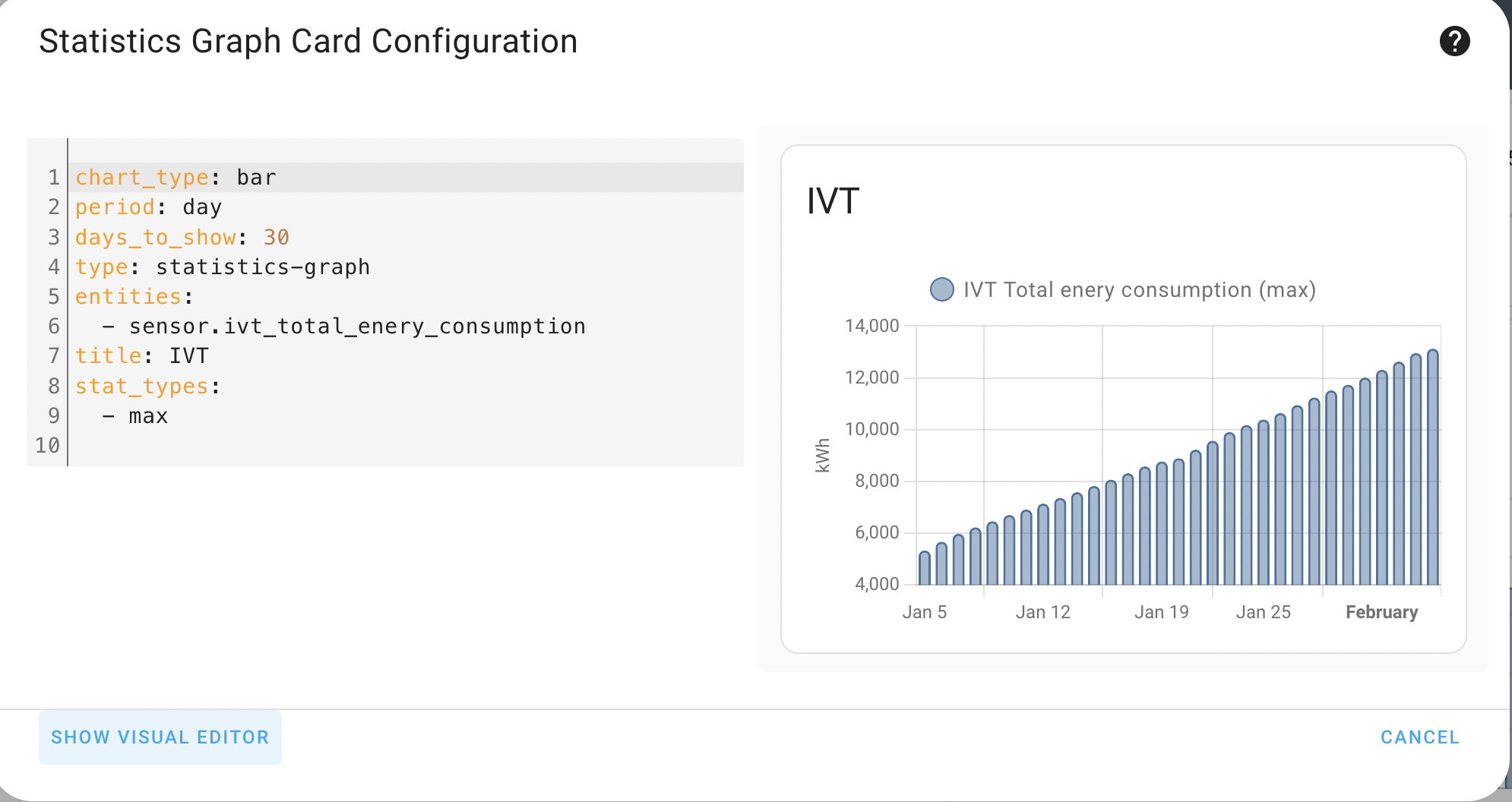


 runic rune
fiery ledge
this works for me
runic rune
fiery ledge
this works for me
That did not do it for me. Maybe because of the theme, but all i needed was to get rid of the background for the two sensors and its good now
Thanks for the help!;)
fiery ledge
hmm, without the background: transparent on those custom:button-card s and sliding the dashoard to a very small width, we get this
 runic rune
fiery ledge
runic rune
fiery ledge
which can be fixed indeed by adding that to the button. making this my final suggestion. note I took out some superfluous mods and grid settings
fiery ledge
background: transparent should be the same
runic rune
Strange. Nothing happened here when i used that
Ill save your code tho, just in case I change the layout so it bugs or something
broken marsh
fiery ledge
btw, I have this in my test now, and dont see any individual border at all...
What is Laundy sensor temperature? 🤔
ancient dome
temperature in the laundry room? idk
 raw stream
Hi. I would like to have a view with something like the energy dashboard's choice of time period that would replace the content of cards. In particular, I have sensors which track 30-day and 90-day use differing only by the suffix of their entity_ids: sensor.*_l30d vs _l90d. So I would like to be able to click a 30 vs 90 day button/selector at the top and have all my cards int he view swap the two families of sensors. Is this possible?
broken marsh
ancient dome
temperature in the laundry room? idk
8 C sounds cold. But could be basement of course.
I was hoping for something more exciting. 🙂
fiery ledge
yeah, it's cold .... but, its a Hue sensor, and they're way off 😉 in fact it is a whopping 13.1 degrees.
mystic timber
hi, I got reolink Integration with 2 cams installed, when I click on the entity of the camera the stream is smooth and working great. but whenever I add the entity as a card (picture glance) It's not running at all and just showing up a snapshot.
Is there any fix or something I should do to make it work and show live feed?
 haughty vine
if mdi:home-assistant icon is marked as deprecated, what should I use instead?
(ok, this is actually a general question about brand icons but HA's own icon in particular)
tawny cloak
haughty vine
if `mdi:home-assistant` icon is marked as deprecated, what should I use instead?...
where did you read that?
haughty vine
tawny cloak
where did you read that?
I noticed it being marked as deprecated, when browsing materialdesignicons.com
fiery ledge
in that same post is mentioned what to do..
 real ermine
Is it possible to use entity values with apexchart color_threshold values?
haughty vine
fiery ledge
in that same post is mentioned what to do..
I'm asking as a user how HA will handle this..
eg will brands icons be bundled wiuth frontend or will they keep some depracated icons for compatibility, ect.
maybe I'm worrying about it too soon
tawny cloak
I assume it will be bundled with a different prefix, e.g. ha:home-assistant.
 sage pasture
Hi, i have an issue with apexcharts. I use two yaxis which works fine only two little problems occur: please take a look at the highlighted value "Netzbezug" with 10kW. The line in the graph don´t show this value, probably only 2kW. If i switch the order of my entities "Netzbezug" will be OK, but another graph-line has this issue. I don´t find any inconvenience in the config.
Second, the yaxis disappears, if i hide the first series of the related yaxis. Where do i loose the relation between series-entity and yaxis?
 sage pasture
real ermine
Is it possible to use entity values with apexchart color_threshold values?
sage pasture
real ermine
Is it possible to use entity values with apexchart color_threshold values?
I don´t understand your question but i could provide you a link: https://smarthomescene.com/guides/apexcharts-card-advanced-graphs-for-your-home-assistant-ui/ This helps me in many cases with apex-charts, unfortunately not in my question in this channel
real ermine
sage pasture
I don´t understand your question but i could provide you a link: https://smartho...
I mean I would like to define these limits with helper entities instead of hardcoded values.
sage pasture
real ermine
I mean I would like to define these limits with helper entities instead of hardc...
Sorry, i missed the start of your thread. But if you take look at my link, there is an example with entity values and color_threshold. Using entities for the values itself doesn´t work in my opinion.
 hot fulcrum
Hi, anyone knows how to use a state_attr as a picture?
I try to make a card with {{state_attr('sensor.ps5_activity', 'title_image')}} as the picture but with no success
 tired patrol
I just freshly installed home assisstant on my synology nas, wanted to give it another try, where is the addon store? I am trying to install a mosquitto broker addon. I cannot find the supervisor panel nor the addon store clicked through everything. Anyone can help?
nvm found out myself
 steady horizon
Hey all I was wondering if there has been any progress setting a default dashboard to prevent users from starting the overview dash. I found lots of issues related but nothing that's says they have added the feature... Or how to do it any ideas?
final forge
ok ive sat multiple days hours and hours now. i cant get my code in floorplan to work. would anyone be up for eyeing my code? Im about to give up. 😂 its only 4 buttons.
autumn storm
One message removed from a suspended account.
 molten cipher
My question(s) are... how do i get outside temperature to show numbers and not "cloudy"
i don't want temp range when my thermostat is on AUTO... it is not like that on the unit itself. Can i change it to just be 1 temp with +/-
and how do i get rid of the outlines everywhere... i copied/paste the code from another but they never had the outlines
 vapid field
Has anyone had any luck getting their home assistant dashboard displaying on a firetv with controls and not an insanely small resolution lol.
I tried sideloading the home assistant android app onto the firestick, which worked for getting the app on the TV but the remote cant control the app so stuck on login screen. And running it from a browser leads to tiny resolutions and all the browsers are crap.
final forge
i pay for someone to look at my floorplan code. cant get it to work , cant get help?
 sweet mulch
vapid field
Has anyone had any luck getting their home assistant dashboard displaying on a f...
sweet mulch
vapid field
Has anyone had any luck getting their home assistant dashboard displaying on a f...
For my android tv in my last place I just made a makeshift remote with scripts that called the effect that I wanted. Super janky but it was how I went about it
silent bloom
Help increasing icon size in Glance card with card mod. This increases the size, but it expands from top left to bottom right rather than expanding radially from the center
style: |
ha-card {
--mdc-icon-size: 60px;
}
green raft
molten cipher
My question(s) are... how do i get outside temperature to show numbers and not "...
Change theme to "Mushroom Shadow" to get rid of the outlines.
 exotic prism
can someone help me why I get this? i have mini-graph-card installed
 molten cipher
green raft
Change theme to "Mushroom Shadow" to get rid of the outlines.
molten cipher
green raft
Change theme to "Mushroom Shadow" to get rid of the outlines.
I'd have to install the theme first... Right?
green raft
Ohh, thought some of those were mushroom cards. Yes you would. It's in the Frontend section in HACS.
As for your other questions - not sure why your climate entity is showing a range. Mine just has a single temperature. And getting the other entity to display the temperature, you probably need a template sensor with the temperature attribute from that entity.
molten cipher
green raft
As for your other questions - not sure why your climate entity is showing a rang...
Yeah it seems to be default on the ecobee when it's on auto. But the actual Thermostat doesn't show the range... Well it does like deep in the menus.
I guess I don't need it on auto. Because it basically already is.
timid beacon
Does anyone else have reliability issues with state switch and auto-entities? I mainly see this on my phone or in fully kiosk, so it's hard to troubleshoot
 tawny dust
Is it possible to make the markdown card render the template only on first loading the dashboard?
I have a sensor that updates every minute from https://icanhazdadjoke.com/ but I want the dashboard to only show a new one every reload. I know I could do a separate triggered template sensor, but that's a bit of a mess
 upbeat geyser
Does anyone have a link to documentation on how to use templates in a dashboard card? I am using apexcharts and for one of the properties want to use an entity but the normal templating syntax doesn't seem to work.
 digital swallow
 magic locust
hi, is this the right place to ask a grafana-related question?
 ripe bison
hi! anyone familiar with custom button-card here? looking for help on how to let it use the default template's stiles for custom button cards...
fiery ledge
magic locust
hi, is this the right place to ask a grafana-related question?
only if its related to the channel topic.... otherwise go #add-ons-archived
fiery ledge
ripe bison
hi! anyone familiar with custom button-card here? looking for help on how to let...
you question is a but cryptic, so please go ahead and describe your issue, and things you tried already
ripe bison
fiery ledge
you question is a but cryptic, so please go ahead and describe your issue, and t...
Let me try: how can I create a custom button card that uses all colors from active the lovelace template (e.g. background, text, on/off icon color etc.)
fiery ledge
what is 'active the lovelace template'? do you mean the active theme? also, what ws the result of your button-card config. Some styling not ok?
upbeat geyser
digital swallow
<https://github.com/RomRider/apexcharts-card/issues/290>
Thanks for the link. I can get the chart to show the entity, but I'd like to use a entity state for the Label part of this:
now:
  show: true
  label: Now
yes, active theme is, what I mean. the colors for a switch are for example different from a normal button card. I am looking for an easy way to let it use the same colors
mystic timber
hi, what aspect radio should I use if I want to show up picture glances card that showing off my camera in a mobile phone?
thanks!
fiery ledge
ok, did you try and set the core state-color vars to the button-card stylings? because that would be the way to go
ripe bison
fiery ledge
ok, did you try and set the core state-color vars to the button-card stylings? b...
no, I just created a "naked" custom button card and expected it to use the the active theme's colors...
fiery ledge
you have to tell custom:button-card what to do. just like it wont use the device_class icon
silent bloom
I'm listing the state_attr of an entity in a Markdown Card. How can I make each item a random different color?
ripe bison
fiery ledge
you have to tell `custom:button-card` what to do. just like it wont use the devi...
so by default it does not use any of the existing values and I have to configure every single thing like icon, background color, on/of color etc. etc. etc.?
fiery ledge
afraid so yes. Ive got a button_card_template that imports my custom-ui settings for icon and icon_color, but that's of no use for generic cards. It might use the singular icon set in the UI, or entity properties. I does not take anything else into account for those entities.
though it does use the generic card settings. background etc. just give it a try
ripe bison
fiery ledge
afraid so yes. Ive got a button_card_template that imports my custom-ui settings...
pretty much effort to just maintain the status quo... is there a better way to get cards that can display a secondary info? my use case: i have a switch for my coffee machine. i have a logic that tells me if the coffee machine has finished heating up and then a helper switch gets switched on. i want to use one single card to switch the machine on/off and let this switch also show if the machine is ready or not...
silent bloom
I've found a combination of conditional cards and markdown can achieve quite a bit.
Open questions I have:
- center icon with card mod in Glance Card when scaling the image to be larger
random font colors for each state attr with markdown card or card modsee belowcustom button card: hide row in grid if no elementsTurns out you have to not write broken YAML (I dropped "card:")
atomic canopy
Is there a way to hide the entities in your energy dashboard, that have a value of 0?
ripe bison
atomic canopy
Is there a way to hide the entities in your energy dashboard, that have a value ...
i think you have to create a new one in lovelace - there are all elements of the energy dashboard available as separate cards
silent bloom
silent bloom
Open questions I have:
- center icon with card mod in Glance Card when scaling ...
#2:
type: markdown
content: >-
{%- macro get_color() -%}
{{ ['aqua', 'purple', 'darkcyan', 'plum', 'red', 'green', 'fuchsia', 'gold', 'limegreen', 'blue'] | random }}
{%- endmacro -%}
{%- for x in state_attr('climate.thermostat', 'hvac_modes') | default([], True) -%}
<font color = {{get_color()}}>{{x}} </font>
{%- endfor -%}
Thanks to Taras on the forums here https://community.home-assistant.io/t/markdown-card-random-font-color-for-each-item/532264
 tired wedge
How do I change colors of the Sources? They are all shades of blue.
 vast crane
tired wedge
How do I change colors of the Sources? They are all shades of blue.
vast crane
tired wedge
How do I change colors of the Sources? They are all shades of blue.
You can't, but there are several complaints/issues about it, you could go +1 if you want to follow: https://github.com/home-assistant/frontend/issues/15384
digital swallow
Or just subscribe to it and do a thumbs up. +1s are just spam
autumn storm
One message removed from a suspended account.
vast crane
autumn storm
One message removed from a suspended account.
I believe you can configure in your theme: state-cover-door-open-color, state-cover-door-closed-color
https://www.home-assistant.io/integrations/frontend/#state-color
 lone cobalt
I try to generalise some stuff with helpers, so I would not need to hard-code some charts values every time I use those (like target humidity, or different boundary values for colouring). Unfortunately, all the charts that I find nice accept min/max and those boundaries as numbers, so there's no way I could use for example a template to get the value from a helper. Do you know any workaround for such situation?
autumn storm
vast crane
I believe you can configure in your theme: state-cover-door-open-color, state-co...
One message removed from a suspended account.
 tender pine
after update all my lovelance views are broken and produce error messages
autumn storm
tender pine
after update all my lovelance views are broken and produce error messages
One message removed from a suspended account.
tender pine
depends on the layout
Custom element does't exist: grid-layout
the other one is custom: button-card doesn't exist
maybe i just need to wait until my hacs update
think the python change broke them reading braking changes
autumn storm
One message removed from a suspended account.
tender pine
so ill wait a bit so the creators have a chanse to update them 😄
fingers crossed they get updated
lyric prairie
I am quite certain these custom cards are not broken by any python requirement as they are all written in JavaScript
Just check the caching after ha is fully restart, then check if all resources are correctly added
timid beacon
Did something happened to the var --rgb-state-binary-sensor-color? I was using it to color something and it doesn't appear to be working anymore
I know something happened this release with state colors
Ah think I found it? https://www.home-assistant.io/integrations/frontend/#state-color
Do the vars no longer start with rgb?
Though I'm not sure why I was using that anyways
Interesting, seems like a lot of device classes don't have a color?
molten cipher
while testing things on cards.. is there a way to hide parts of the code? instead of cutting it out, and then pasting it back?
timid beacon
I think yaml has comments? Can be finicky though
 worn swan
Hi all, I have some custom climate entities created through the smartir integration that seem to work very well and show up in the default entities card with current temp and current humidity displayed, however, when trying a couple of custom cards https://github.com/nervetattoo/simple-thermostat and https://github.com/KartoffelToby/better-thermostat-ui-card the humidity doesn't show up in either and looking at the doco it seems it should just show up? (the default HA thermostat card infamously doesn't support showing humidity....)
Anyone know if there's anything obvious I'm missing?
this is what one of my climate entities looks like in code:
# After BroadLink remotes are configured as new integrations, add them below
smartir:
climate:
  - platform: smartir
    name: Office AC
    unique_id: office_ac
    device_code: 1469
    controller_data: remote.office_rm4_mini
    temperature_sensor: sensor.office_rm4_mini_temperature
    humidity_sensor: sensor.office_rm4_mini_humidity
# power_sensor: N/A```Good morning, I have updated my sensors from min/max to the group sensor helper, as recommended on the update.
What's happening now is that instead of having the temperatures showing like 18.5ºC they're showing like 18.588888888888888889ºC.
Is there any general way to fix all sensors at once and make them show with just 2 numbers after the , or do I need to do this individually on the UI, card by card?
I assume to make this work on the UI some sort of |round(2) needs to be added
 gusty glen
Hey all, my smartmeter sometimes sends glitched values. I have now added some arresting code so the issue wont happen again, however my statistics are ruined by one spiked measurement as you can see in the screenshot. I have changed the botched state in the database, but it still persists in the statistics. Apparently there is a database entry that is not the state but I was unable to find it.
How would I go to fix this? I certainly never used 2+ MW in my house 😅

 rustic fable
Hey there, I apologise in advance for what is probably a very stupid question. I've just started building out a dashboard using minimalist and all is good except I can't find any cards that enable the pressing of a simple button outside of the scenes card. For a single button entity, am I missing something obvious?
vapid field
Hi there, using mushroom and macosthene since a long time. I really would like to get the cards transparent again, but I can not find where to add it. If I remember there was a general parameter for this. Googled more than 2 hours, and tried different settings, but it is not working. Thanks a lot.
 wooden stream
vapid field
Hi there, using mushroom and macosthene since a long time. I really would like t...
wooden stream
vapid field
Hi there, using mushroom and macosthene since a long time. I really would like t...
Hello, I-m using this so just add this bit per card and you'll hide the background.
Not sure if this is what you want, but likely is:
card_mod: style: | ha-card { box-shadow: none; background: rgba(0,0,0,0); text-align: center; }
I add it right at the end of the car I want to make transparent. And it just works 😄
(Use minimalist and mushroom cards, so it works for both). Likely you'll need the card-mod HACS repository, but I'm assuming you already do.
wooden stream
wooden stream
I assume to make this work on the UI some sort of `|round(2)` needs to be added
Still needing help with this pls.
vast crane
gusty glen
Hey all, my smartmeter sometimes sends glitched values. I have now added some ar...
did you look in the statistics tables? There is state table and separate statistics tables.
vast crane
wooden stream
Still needing help with this pls.
I'm not aware that there is a general solution. I would report a github issue if it is a problem.
 ebon radish
I don't see the Spotify option in the media browser anymore. Did it get removed?
upbeat geyser
Is the mushroom custom template card the same as the custom-template-card?
warm bolt
What's the easiest way to throw the date and time on a dashboard? Trying to add it to my tablet dashboard
vast crane
warm bolt
What's the easiest way to throw the date and time on a dashboard? Trying to add...
can put this in a card if you're not picky about the formatting
type: markdown
content: '{{ now().strftime("%m/%d/%Y, %H:%M") }}'
Perfect. Thanks
upbeat geyser
With a config template card, how do I decide the order of the entities if I have multiple entities in a graph?
sorry on a card.
card:
  type: history-graph
  entities:
    - entity: switch.floor_heating_socket
    - entity: climate.incomfort_1
No matter what order I put the two entities in the code, they are in the same order on the card
 tribal galleon
warm bolt
What's the easiest way to throw the date and time on a dashboard? Trying to add...
tribal galleon
warm bolt
What's the easiest way to throw the date and time on a dashboard? Trying to add...
Another option for adding date & time is to enable the Time & Date integration which creates sensor entities for the date and time in different formats. https://www.home-assistant.io/integrations/time_date/
You can create your own customized sensor in configuration.yaml (similar to what @vast crane mentioned). Check out https://docs.python.org/3/library/time.html#time.strftime for the syntax. I use
sensor:
- platform: template
sensors:
dashboard_date:
friendly_name: ddd m-d
value_template: "{{ now().timestamp() | timestamp_custom('%a %-m-%-d') }}"
icon_template: mdi:calendar-clock
``` and then use those sensors in a *custom:button-card*s to match the rest of my dashboard. warm bolt
Oh. That's good idea all
 dreamy roost
What do I need to understand from these readings? Battery level is always like this, I don't understand
 vapid field
Any tips for something I can do to not have to use the insane arrow system for organizing my dashboards
layout-card ftw
 silk igloo
is material 3 ever going to make it in home assistant? doing a discord search found some interesting stuff but i don't understand if there are any plans, or if there's a figma where most stuff is stored
copper isle
I am facing this issue with gauge card in case of power outage I cannot click on the gauge card and view the history as it says Entity is currently unavailable. I have used bar card and this issue does not affect bar card as I can click on bar card and view history even in case of power outage. Such feature with gauge card is needed so I can click and view the history in case of power outage. Screenshot is attached (left screenshot is with power outage).
 vast crane
copper isle
I am facing this issue with gauge card in case of power outage I cannot click on...
vast crane
copper isle
I am facing this issue with gauge card in case of power outage I cannot click on...
You could file a feature request if you want (not sure how it would be received), my other idea is maybe use conditional card to show gauge when it is available, and entity card when it is unavailable?
small lichen
I'm using a mushroom title card. Is there any way to center it?
 copper isle
small lichen
I'm using a mushroom title card. Is there any way to center it?
copper isle
small lichen
I'm using a mushroom title card. Is there any way to center it?
You can either use alignment: center command or edit title card and select Center instead of Default alignment.
upbeat geyser
Can anyone point me to a good guide/tutorial on styling cards with (I'm guessing) card mod?
I'd like to adjust the card below so:
- The order of the charts is changed
- They have exactly the same x-axis values
- The thermostat chart has no x-axis labels and no legend
 gusty glen
vast crane
did you look in the statistics tables? There is state table and separate statist...
gusty glen
vast crane
did you look in the statistics tables? There is state table and separate statist...
well I have, but I have absolutely no clue how the statistics table is connected with state table
hollow shell
I have this strange intermittent line in apex chart which I did not have before ? Any idea’s how to make it smooth again?
 gusty glen
well I have but I have absolutely no
 sullen wyvern
Hi all, is there a way how to achieve following scenario on picture element card? tap_action -> more-info of entity 1, hold_action -> more-info of entity 2
vapid field
Something weird is happening. I've installed some new cards through HACS yesterday, restarted HA, emptied browser cache, but they are still not showing up. Anything else I can do?
vapid field
hollow shell
I have this strange intermittent line in apex chart which I did not have before ...
Can you share the YAML? Maybe try changing the curve in series and/or chart_type
 sterile smelt
Anyone know how to fix climate entity. with just icon? I have an icon with climate object tap action is toggle. It works. Turns the climate control from off to cool (or previously selected mode) .. But the icon doesn't change color if it's running or not.
- show_name: true
        show_icon: true
        type: button
        tap_action:
          action: toggle
        entity: climate.midea_ac_141837000057408
        name: AC
        icon: mdi:air-conditioner
        icon_height: 30px
try something like:
        state:
          - color: rgb(255,0,0)
            operator: '=='
            value: 'off'
            icon: mdi:home-outline
          - color: rgb(0,255,0)
            operator: '=='
            value: 'on'
            icon: mdi:home
 golden mistBOT
@sterile smelt I converted your message into a file since it's above 15 lines :+1:
sterile smelt
It's using the default icon for both.. instances.. maybe the "value" is different?
tribal galleon
might be a true or false? IIRC, HA associates on of the same states ( true = on = yes). sometimes...?
 gusty pivot
tribal galleon
try something like:
```yaml
state:
- color: rgb(255,0,0)
...
gusty pivot
tribal galleon
try something like:
```yaml
state:
- color: rgb(255,0,0)
...
can this kind of thing be used for a cover position as well? I want the custom button card to change if the cover position is > 62 can I replace color with position in your example?