#frontend-archived
1 messages · Page 5 of 1
 dark dirge
you can add aliases as shown in the automation/script docs
to actually add comments, you need to split your automation YAML file as shown in the pinned message in #automations-archived and edit in YAML
 gloomy iris
Then you could install the phpMyAdmin addon and clean the database manually 🙂
 devout trench
Any way to get this slider in a card view natively?
gloomy iris
By natively you mean without third party cards?
 tepid oracle
Hi Guys,
I’ve a picture-elements card where I’m trying to change the icon color based on a motion sensor last trigger time.
Example: If {{ relative_time(states.binary_sensor.front_motion.last_changed) }} is less than 5 minutes I want the icon color to show Red or else Green.
With the following I’m able to change the color based on the state of this sensor, could any one please help me how can I do the same with last changed time.
icon_color: |- {% if is_state("binary_sensor.front_motion", "on") %} red {% else %} green {% endif %}
tepid oracle
tepid oracle
Hi Guys,
I’ve a picture-elements card where I’m trying to change the icon color...
Never mind
Able to do this by following
icon_color: |- {% set ls = (states.binary_sensor.front_motion.last_changed) %} {% if ( now() - ls < timedelta(minutes=5) ) %} red {% else %} green {% endif %}
 light gull
I just made a custom plugin for Hassio that might be the bridge you’re looking for.
 gloomy egret
is there a way to either hide a card if the entity is not connected. when i dont use my TV within a 24 hour window it throws entity missing error on the card or preferable to have it not show that error and just be greyed out or something?
 digital lynx
How do i select a timeframe until 0.00 hour exactly??? https://youtu.be/C7Ta77twIPc
This is buggy as hell
 sweet lintel
Hi, since HACS doesn't handle updates any more how do I do this? "You need to manually clear the frontend cache after updating."
sweet lintel
ok, so CTRL-F5 about 6 times. Would be nice if it could give the option like HACS used to.
 karmic tendon
gloomy egret
is there a way to either hide a card if the entity is not connected. when i dont...
karmic tendon
gloomy egret
is there a way to either hide a card if the entity is not connected. when i dont...
Look at this.... https://www.home-assistant.io/dashboards/conditional/
 spark spear
hello cann someone help me get the colours change on the buttons wenn the vaccum is running through one of those scripts ?
'''yaml
show_name: true
show_icon: true
type: button
tap_action:
action: call-service
service: script.1643022832589
data: {}
target: {}
entity: vacuum.rocky
icon: mdi:stairs
name: Hallway
theme: Mushroom
'''
light gull
gloomy egret
is there a way to either hide a card if the entity is not connected. when i dont...
Conditional card
light gull
sweet lintel
ok, so CTRL-F5 about 6 times. Would be nice if it could give the option like HAC...
If you open the browser dev tools, and then hold on the reload button in the browser bar while the dev tools are open, it should show a secret menu with an option to empty cache and hard reload
 radiant stream
Hi ! i created 2 different tab, but they show the same content. Do you know why ?
gloomy egret
light gull
Conditional card
Oh I never thought of that. Thank you @light gull I will look into this on my travel to work this morning
 zenith hornet
#1037087561245524058 maybe some have ideas ?
 robust hawk
so I know how to accomplish this on a website, but what would be the route with card mod, figured it no worries

 rancid vortex
Hello, Could you tell me how the new "ulm_translation_engine" works under minimalist-lovelace ? I would like to put my lovelace in "agreement" with this new value but I don't understand its function
gloomy iris
robust hawk
so I know how to accomplish this on a website, but what would be the route with ...
If you are good with CSS, then are you already using card-mod?
I am too bad at CSS to know by heart how to do it, but I think there might even be examples of how to change the icon based on entity state in the forum thread.
Check @woven stirrup 's examples https://community.home-assistant.io/t/card-mod-add-css-styles-to-any-lovelace-card/120744/1396
 cedar breach
Hi folks 🙂 How can I specify icon type based on consumption of a specific sensor? According to my example here, I want the icon to change if the sensor reports a value exceeding, say, 2W https://pastebin.com/raw/g9PMtiU0
 silent bloom
Mini graph card question
Can I have the logarithmic setting work only on one of two pieces of data I'm tracking in a single card?
spark spear
hello there:
I am trying to get the color changed in a button card wenn a particular script is running . can someone help ?
 halcyon abyss
I'm trying to make an entity background change color based on the value. I've tried the BigNumber card, but that seems to only work with a bar graph when using min and max, if I don't use min/max, then nothing changes color). I'd like the wet bulb to be blue when the temp below 21, yellow below 27, and red above 32 (trying to track snowmaking conditions). Is there a better card to use for this?

 lyric prairie
rancid vortex
Hello, Could you tell me how the new "ulm_translation_engine" works under minima...
lyric prairie
rancid vortex
Hello, Could you tell me how the new "ulm_translation_engine" works under minima...
How do you mean precisely? It basically makes all entity state strings auto-translatable with help from the HA-Lokalise database and useable in custom-button card as a template
gloomy iris
silent bloom
Can I have the logarithmic setting work only on one of two pieces of data I'm tr...
Did you try setting them two different axis? Set the linear series to primary and the logarithmic to secondary?
I only use apexcharts, but I would think that that is the approach you need to test.
gloomy iris
spark spear
hello there:
I am trying to get the color changed in a button card wenn a parti...
When a script is running or when the state of the entity that the script addresses changes?
spark spear
gloomy iris
When a script is running or when the state of the entity that the script address...
it looks like this. so wenn i press example Kitchen then it changes to green

@gloomy iris is that possible ?
@gloomy iris here the whole script for the whole card
silent bloom
gloomy iris
Did you try setting them two different axis? Set the linear series to primary an...
I don't think so. mini graph card has attributes that can be set for the whole graph, and for individual entities. Log doesn't seem to work on individual entities.
 thick dagger
does anyone have a good link for how to click a button on the dashboard and have it open another panel? I don't know if my google foo is just not good enough for this or if perhaps I'm using the wrong terminology. Thanks
 real pond
ok, this fader just doesn't cut it.. it's huge and clunky on touchscreens too. how can I replace that with smaller, longer faders?

 blazing wren
A custom card would be one way to do it
real pond
i'm currently figuring out how to install hacs
I get this issue when I try to add the hacs integration however
 gloomy iris
spark spear
<@774121456211591169> is that possible ?
gloomy iris
spark spear
<@774121456211591169> is that possible ?
Sorry, as I said, I only use Apexcharts-card because everything else is not flexible enough. I just wanted to point out where to look.
gloomy iris
real pond
ok, this fader just doesn't cut it.. it's huge and clunky on touchscreens too. h...
entities does not give you a fader?
or maybe custom card slider entity row.
Has anybody seen a template to create a multiple choice dropdown from an input_select? So be able to select multiple options and return a list?
real pond
i get very little choice to pick from actually.. a toggle or that fader I screenshotted
gloomy iris
slider entity row might work
real pond
I got a shelly rgbw that I'm using for 2x cct systems.. I'd like to get a more intuitive control too
gloomy iris
I have sliders for climate (temperature control)
 umbral harness
https://imgur.com/R2W5PCo is this a known bug when updating devices via home assistant?
"installing(true%)"
real pond
how do you handle guests?
like create a new account for them with their own dashboard and have a qr code for them?
umbral harness
oh i thought you meant knowing when a guest is in the house
real pond
hahahaha
umbral harness
why does a guest need access to hass? your automations or dashboards or light switches etc should still work regardless of who's there
real pond
to give them more control.. I'm not using motion sensors to turn on/off the lights
 sharp grotto
Hello, I need some help with the Xiaomi Cloud Map Extractor.
I have a xiomi mop pro 2 (Viomi) robot and I integrated it. It seems that it is ok(sensors and commands) but the map is not extracting correctly, it seems to be duplicating the map, inverting ,overlapping and with the robot in the wrong possition :/ does anyone had similar issue or know how to solve it ?
PS: on the xiaomi app the map is correct and working ok.
Thank you in advance
dark dirge
the official docs explain what to do: https://developers.home-assistant.io/docs/api/rest/
but...they give you some great examples of exactly the command to type
 spare meadow
great job on the changes to the front-end everyone... with those new rounded edges and borders it wasn't hard to adjust my setup and give a really clean kiosk control panel grouping:

 prime narwhal
Looking nice @spare meadow
 pine jungle
Is there a way to get the info dialog to take up most of the screen like in this picture from the release notes today?
when I click on an entity, the graph is small
this is in the browser
spark spear
spare meadow
great job on the changes to the front-end everyone... with those new rounded edg...
How did you get the colours change in those floor cards according to state ?
spare meadow
custom:button-card
 fallen badge
Hehe so this happened to my custom theme 😄 Anyone know what lines to change to get rid of the boarders? Using both custom theme and a lot of custom button cards.

ha-card-boarder-width: "0px" does not seem to do anything
robust hawk
gloomy iris
If you are good with CSS, then are you already using `card-mod`?
I am too bad at...
I already do have quite a few customisations from using css code thanks to card mod, this I actually ended up achieving using the border lol, not the way i would of gone about it in css on a web page.
robust hawk
real pond
to give them more control.. I'm not using motion sensors to turn on/off the ligh...
create a custom dashboard just for the guests, use kiosk mode addon from hacs, then with fully kiosk... then create a toggle helper and then automation that when toggle is on have fully kiosk load url on which tablets you require to go to guest dashboard. because of the kiosk mode added to url they wont be able to access anything else.
gloomy iris
robust hawk
I already do have quite a few customisations from using css code thanks to card...
Don't know how you wanted to dot it, but it failed in HA?
I probably would have uploaded two icons and selected the icon according to state.
 verbal flare
Does anyone know of a wind rose card, or can point me in the direction of some documentation on how to make a custom card ?
i do already have some code to make a nice windrose in svg
 polar kelp
Here's a starting point https://gist.github.com/thomasloven/1de8c62d691e754f95b023105fe4b74b
Though if you don't already have the data in Home Assistant somehow, you may want to consider finding a source for a prerendered variant somewhere on the internet and pulling that in as a generic camera entity https://www.home-assistant.io/integrations/generic/
The official documentation is here, by the way https://developers.home-assistant.io/docs/frontend/custom-ui/custom-card
gloomy iris
Anybody know of a way to produce a multiple choice dropdown card (be able to select more than one entry)?
Could not find a solution in stock cards nor a custom card.
robust hawk
gloomy iris
Don't know how you wanted to dot it, but it failed in HA?
I probably would have ...
I applied the style to buttons, that way it has nothing to do with icons, its part of the button it self.
robust hawk
gloomy iris
Anybody know of a way to produce a multiple choice dropdown card (be able to sel...
 gloomy iris
Your original button was different shapes. Did you draw the shape then? Borders with inner and outer radius?
polar kelp
The default dashboard theme has been adjusted to move a little closer to the new Material Design 3 guidelines. Borders around cards are now outlined (instead of having a shadow), and corners are a little more rounded.
polar kelp
You can set ha-card-border-width and ha-card-border-color in a theme
Ah, you're right. That will need to get updated.
 west willow
Can the new 'statistic' card be set to a fixed_period by hours? The example only shows by date. Eg. I want to know the max of a sensor between 4pm and 9pm each day.
 gentle notch
well yeah tbh, this border also bugged me when I did the update. had to remove it by theming border width
robust hawk
gloomy iris
Your original button was different shapes. Did you draw the shape then? Borders ...
i wanted it customisable to fit different themes and test icons i make for cbi repo, so I can change shape when i need to using boder radius ect, just increasing radias will make it round with style code.
so just adding a bigger border radius creates round version

 azure canopy
double click the title (Outdoor Lux)
A new Mushroom theme (Mushroom Shadow) has been introduced today which will bring it back to what it was
spark spear
spare meadow
custom:button-card
care to share code ?
verbal flare
polar kelp
The official documentation is here, by the way <https://developers.home-assistan...
Thanks 😉
 simple hornet
Hey guys, does anyone else have the problem that the more info window for camera feeds is absolutely tiny after the 2022.11 update? Before the update the window was almost the size of the entire screen (depending on resolution) whereas after the update it is so tiny that it doesn't make sense anymore to use this window to look at your camera feeds. Is this intentional or a bug?
silent bloom
@gloomy iris No log support T_T https://github.com/RomRider/apexcharts-card#roadmap
rancid vortex
lyric prairie
How do you mean precisely? It basically makes all entity state strings auto-tran...
Hello @lyric prairie Every time I put a custom-card, I get an error saying that it is impossible to find ulm_translation_engine.
How can I exactly remove and fix this blocking point?
lyric prairie
rancid vortex
Hello <@708951807195349022> Every time I put a custom-card, I get an error sayin...
What version of Minimalist do you have installed?
 nova bloom
anyone else getting outlines on cards after updating?
lyric prairie
nova bloom
anyone else getting outlines on cards after updating?
See just some posts above you 😉 #frontend-archived message
 golden mistBOT
@gloomy iris I converted your message into a file since it's above 15 lines :+1:
gloomy iris
Forgot the () for the conditions. Cannot delete my post due to bot
 coral lagoon
Is there a way to use a "number slider" for a fan entity on a dashboard?
rancid vortex
lyric prairie
What version of Minimalist do you have installed?
It's not really an installer version but I got some elements from the last 1.1.6.
lyric prairie
rancid vortex
It's not really an installer version but I got some elements from the last 1.1.6...
Ah okay, that would explain why it cannot be found.
This is the translation engine template: https://github.com/UI-Lovelace-Minimalist/UI/blob/main/custom_components/ui_lovelace_minimalist/lovelace/translations/default.yaml
Note: by only adding some parts from the Minimalist-repo will eventually result in more of this errors as a lot of template and cards are linked to each other
rancid vortex
lyric prairie
Ah okay, that would explain why it cannot be found.
This is the translation engi...
Okay, thank you, I don't have the error anymore! That's cool! But one more thing, how do I change the language. I'm French, I like my language but even if I'm open-minded I have trouble reading and understanding Swedish or Norwegian or Dutch😜
@lyric prairie it was a bad placement of a yaml. It is corrected!
 tropic yew
Evening all, any one know why
state_image:
"off": /local/off.png
"on": /local/on.png
is not working on picture elements?
 severe isle
hello, can I limit the range of the Color Temperature slider in the more info window?
my lamps can only go between 2202 and 4000 and not like the slider between 2000 and 6535 lumen
blazing wren
It depends on the integration that your lamp uses, but it should report what it is capable of
blazing wren
That's not the integration though. Are you using ZHA? Zigbee2MQTT? Deconz?
severe isle
Zigbee2MQTT
blazing wren
Right, so you'll need to check the #zigbee-archived2MQTT docs for that device, and make sure that it's not "translating" the full range back into what the device can support, and if not then you can either customise the device yourself or open an issue for the device
severe isle
i think i found it thanks
rancid vortex
What is the code piece to count the lights in a room? I wish I had a label, like this example:
    [[[
      if (variables.room_card_label) {
        return  '<ha-icon icon="mdi:thermometer" style="width: 16px; height: 16px;"></ha-icon>' + (entity.attributes.current_temperature || entity.attributes.temperature || entity.state || '-') + '°C' + ' | '
        + '<ha-icon icon="mdi:water-percent" style="width: 18px; height: 18px;"></ha-icon>' + (entity.attributes.current_humidity || entity.attributes.humidity || entity.state || '-') + '%' + ' | '
        + '<ha-icon icon="mdi:lightbulb-on" style="width: 16px; height: 16px;"></ha-icon>' + ' count ' + (entity.attributes.current_humidity || entity.attributes.humidity || entity.state || '-') + '%';

      } else if (entity.state == "on") {
          return variables.ulm_on
      } else if (entity.state == "off") {
          return variables.ulm_off
      } else {
        return entity.state
      }
]]]````@dreamy copper I converted your message into a file since it's above 15 lines :+1:
 dreamy copper
What am I missing??
I'm trying to change the icon based on the value of an input_select helper.
lyric prairie
rancid vortex
Okay, thank you, I don't have the error anymore! That's cool! But one more thing...
It takes the language you have set in the Home assistant user profile
silent bloom
Anyone know why my entities cards are cropped at the top? The spacing at the bottom is fine.
I have a bunch and they're all like this if they don't have at title. I have a second HA install that's fairly old and it looks normal. The broken one is up to date
 oblique tapir
My history card in lovelace has a period of stalled updates, while the same sensor show normal updates in the history screen. Does anyone know what i should change in my card setup? (I only added the sensor of interest, selected one hour of history and kept the remaining fields empty)


 ivory pagoda
I have an input-select dropdown but my choice is deleted and reseted to the first option every time i restart home assistant. is there a chance to keep that persistent?
blazing wren
Yes, it does by default. Do you have an automation resetting it?
 plain mural
I have an Input select How do i show a dropdown or something in the gui?
blazing wren
Something like this: https://community.home-assistant.io/t/lovelace-select-list-card/210085
Or you could create a button for each one, or just use the entity/glances/whichever card, click or tap on the entity and take advantage of the popup
spark spear
spare meadow
great job on the changes to the front-end everyone... with those new rounded edg...
Would you be able to share the code on those floor custom cards ?
gloomy iris
plain mural
I have an Input select How do i show a dropdown or something in the gui?
Entities card
gloomy iris
dreamy copper
I'm trying to change the icon based on the value of an input_select helper.
you misspelled "template "
spare meadow
spark spear
care to share code ?
i assume you're talking about just the summary rows?
this is the one for the "second floor"
https://gist.github.com/pironic/98e1c6cbc8c9f97b46661c8bacc9893e
 rare junco
Is there an issue with the new statistics cards? - ive got 3 of the same sensor set up - daily,weekly and monthly - however the weekly amount seems to be higher than the monthly, not sure if I've got something set up wrong or
golden mistBOT
@dreamy copper I converted your message into a file since it's above 15 lines :+1:
dreamy copper
gloomy iris
you misspelled "template "
Fix the spelling error, see the message above... but it still doesn't update the icon when I change the state.
 timid beacon
I'm sure this has already been talked about, but what in the hell is going on with borders on cards? How was this allowed?
What's your question @dark dirge? There are solid borders on all cards. Seems like many others are having this issue
dark dirge
It's not an issue
timid beacon
dark dirge
You seem to think that it's a bug, or somebody screwed up. They did not
dark dirge
No
timid beacon
This is expected behavior and for it to look like this?
And just because someone meant to mess up doesn't mean they didn't lol
dark dirge
timid beacon
Just because other elements of the UI have borders around them doesn't mean they've "been in HA for months". Frenck really has a tendency for not seeing past technical aspects
In any case, they were surprising, but they have grown on me. I just think such a very obvious UI update was not handled well. It seems the change was made to more align with material UI. It reminds me of Linus's rule to "not break user space". Meaning, don't do the "technically right" thing and ignore its effect on the user
 turbid violet
https://youtu.be/VCYxQAXeVyU can't choose entity in statistics card
west willow
Is anyone able to give advice on if the new 'statistic' card be set to a fixed_period by hours? The example only shows by date. Eg. I want to know the max of a sensor between 4pm and 9pm each day.
 formal tide
Not sure but you could setup a statistics sensor with appropriate sample size and make a automation extract the max value at 9pm into a helper entity
west willow
For this use case, by 9pm that information is less useful. Having the value update between the hours of 4 and 9 allows for household to monitor power usage and avoid surcharges on energy spikes.
gloomy iris
dreamy copper
Fix the spelling error, see the message above... but it still doesn't update the...
where did you find the option icon_template?
robust hawk
has anyone noticed after 2022.11.1 update cameras dont pop up large view no more and just basically pop up the same size view as on dash?
 raw egret
any suggestion on how to do the following:
in each area view, have a list of buttons with a button for each scene that has a matching area_id. as a bonus I'd love to be able to also dynamically create and delete scenes. So have a button to save the current lights status to a scene with the correct area_Id. And to be able to hold a scene button to prompt the user to delete the scene.
gloomy iris
I know there are a few out-of-the-box thinkers here.
Can anybody think of a way to make the source of data statistics in an apexcharts-card when the charted time is more than 2 weeks without breaking the card when it is less than two weeks?
          statistics:
            type: mean
            period: hour
            align: middle
I have not found a way to disable it by setting them to [] or null without breaking the card.
formal tide
west willow
For this use case, by 9pm that information is less useful. Having the value upda...
If its not useful after 9pm and you collect until 9pm you can just extract the max attribute from the statistics entity using #templates-archived (because this has nothing to do with frontend)
 hidden swallow
is there a way to use includes in dashboards so repeated elements like sidebars in views can be managed in one place. At present when I make a change to a side bar I have to do it in all my views.
gloomy iris
I am trying to modify the title color of a card and it works with card-mod of ha-card but not when I do it in themes. It should just be secondary-text-color, but it does not work. Tried a few more also.
golden mistBOT
@gloomy iris I converted your message into a file since it's above 15 lines :+1:
gloomy iris
Does anybody know why that does not work but
            card_mod:
              style:
                .: |
                  ha-card {
                    --primary-text-color: white;
                    --secondary-text-color: white;
                  }
works?
 broken marsh
Not entirely sure if this is the right channel, but I have a script that notifies a tablet via notify service and tts_text. I want to click a button in the dashboard so I get a popup where I insert the tts_text and then send the notify. Suggestions? The only I can think of is displaying a helper with a text field and a 'run script' next to it.
 dire cypress
Hi guys, is this possible? I have a slider to set a limit (0 - 100%) but I want to show the current value in the "name" field.
Something like this:
XX Limit - (currently ??%): slider here.
?? should be the sensor output
 inland dirge
Hi
please, how to remove the magnifying glass in the opening screen? kiosk_mode: user_settings: - users: - luc hide_sidebar: true ignore_entity_settings: true

 coarse vault
are the stupid borders getting removed next update?
https://github.com/home-assistant/frontend/issues/14204 i cant figure out what ildar means here. Or is it that all themes have to be updated to decide whether that border should be there? via this ha-card-border-width: 0px?
 fiery ledge
if you dont want the borders, you have to fix it globally for your frontend. you can do that with that single line in the theme(s) your using.
polar kelp
As a counterweight. I just updated and really really like the look

 formal python
Hello. Can anyone advise please any elegant and compact card for multiple temperature entities? Default glance card with stack looks not so pretty.
 outer panther
Random question:
Is there a way to only apply the variable "ha-card-border-width" to my dashboard, and not other pages?
polar kelp
If you are not using an auto-generated dashboard, then yes.
fiery ledge
polar kelp
As a counterweight. I just updated and really really like the look
what exactly would you not like there? had you expected something different?
polar kelp
No. There's just been quite a bit of complaints about the redesign.
Maybe that was mostly in other channels, though...
fiery ledge
i just tried the default theme dark/light modes. being used to not use those, I feel the darkmode is rather nice indeed. Too dark for my eyes, but very clear nonetheless. Light mode however is shouting to please close that and switch to dark mode asap.... hurting my eyes. literally. nothing to do with the new borders/corners though 😉
although, on second review those borders and corners are not my preference
 polar kelp
mod-card at the top?
fiery ledge
my eyes need a bit of softening
 polar kelp
I'll try to fix that tonight.
fiery ledge
yes, but only to take out the gaps: type: custom:mod-card card_mod: style: | :host { --stack-card-margin: 0px; } card: type: horizontal-stack cards:
uhm, this might sound like a noob.... but. I have - !include /config/dashboard/buttons/buttons_dashboard_direct.yaml on all of my views as a top navigator. How do I get that in a Ui configured view...

with or without leading -
 shell kraken
anyone use Sian-Lee-SA/honeycomb-menu with a hexagon card?
polar kelp
fiery ledge
uhm, this might sound like a noob.... but. I have ``` - !include /config/dashbo...
You don't.
!commands only work in the yaml files.
fiery ledge
ok thanks, feared as much. tbh, that whole dashboard started out as an experiment using my cameras, and adjusting the view according to the viewing device, and the state of the cams. Turns out, that is way too complex for the UI configuration..... so I'll be moving that to yaml anyways.
 haughty vine
Can I somehow sort all the "Dawn"..."Midnight" rows?
(without resorting to building template sensor for each row. Or writing custom card from scratch)
Those are multiple-entity-rows for sun.sun entity
 silent bloom
Is there a way to invert colors for on/off on a cover device class?
I want my roller blinds to show open as the default color, and closed as the highlighted color
gloomy iris
gloomy iris
I know there are a few out-of-the-box thinkers here.
Can anybody think of a way...
Or maybe someone knows if this can be achieved by having a template without a key?
Kind of an "insert this code if the condition is true"?
 fast sedge
After the latest update my camera picture entitles no long fill the window. Can't figure out how to change it.

Previously they filled the entire browser window.
 sage helm
@fast sedge click on the text (Mac) in the header and it will expand. I think previously clicking anywhere in the header had expanded where now clicking on the text specifically now expands
fast sedge
sage helm
<@111939018500890624> click on the text (Mac) in the header and it will expand. ...
Anyway to make that the default? Before it was always full screen
sage helm
I handle that differently with tap actions for my cameras navigating to a separate panel view for the camera (which now the back button addition helps make navigation even easier). But yes I am seeing the same where the camera is no longer expanded by default. Thinking that could've been done to improve performance (maybe)
fast sedge
So right now, no fix for it then? A few updates ago they added that usless status bar / nav stuff at the top. Now it's not even maxed by default. It's evolving, backwards.
sage helm
It's Core functionality so you'd need to handle it differently. Maybe for the time being (if it changes or becomes configurable), or maybe permanently if it doesn't come back and is an intended change. I'm not impacted creating separate views (panel) for each of my cameras. A little more work but resolves your issue
fast sedge
By separate view, do you mean a tab at the top?
sage helm
the views are visible at the top yes, but can be hidden as well so they don't clutter
fast sedge
I have WAYYYY too many cameras to viably do that.
sage helm
I have 4 cameras total now and it wasn't too bad to configure. Having other options available to help solve to issues we encounter or things we don't like is pretty awesome though 😄 might not always be exactly the way you want, but it's a work around
fast sedge
I have ~40 cameras
 ashen basalt
Hi, I recently installed https://www.amazon.com/dp/B08428YB81?psc=1&ref=ppx_yo2ov_dt_b_product_details. Using ZHA.
This works fine, but the Brightness control - how can I add a slider to my Dashboard?
There is a configuration that I can set (https://imgur.com/a/xBIhD3w), but this only controls the brightness when the switch is next powered on.
I can click on the Switch entity in my Dashboard (https://imgur.com/a/LhNyOgc) and control the Brightness, but I can't find any way to get the slider on my Dashboard directly.
I'm sure this is a simple one but I just can't find an Entity for this so add to the card. Any idea?
formal python
How can I control space between lines in vertical stack?
sage helm
fast sedge
I have ~40 cameras
I only saw the 7 in your screenshot
fast sedge
sage helm
I only saw the 7 in your screenshot
My BlueIris camera server is on another view.
The tab I screenshotted was some of my 3d printers

The same for those picture entities.
sage helm
I think #beta had a bug mentioned with more-info where it wasn't expanding at all. Maybe this could still be a hang over from that, or, was an intended change. It might go back the way it was, or, may deploy a setting to configure
fast sedge
Posted on the forums as well, maybe someone there will have any idea.
sage helm
this might be something worth checking out too https://github.com/custom-cards/surveillance-card
fast sedge
Ah nice - might give this a shot.
 elder citrus
Why does picture element not show images on it, as it did few days ago. Havent touched configurations... Otherwise it works (shows temperatures etc) ?
fiery ledge
sage helm
I have 4 cameras total now and it wasn't too bad to configure. Having other opti...
Complaining here won’t bring it to the devs. If you want some hope for change , open a discussion in the Frontend Repo
umbral harness
listen to marius he is the king of being heard 😛
sage helm
@fiery ledge agreed on the request for a change. I wasn't complaining (sorry if it had been interpreted that way). I'm not impacted by said issue and only tried to provide a work around in the meantime
 fair egret
Can anyone explain to me the benefit of displaying recent history in more-info like this now?

I don't know how to interpret min/mean/max. Are these over 5 minute windows or something?
The blog suggests that "the “more info” dialogs of entities now use long-term statistics for the graphs shown. It makes those dialogs a lot faster, especially on mobile devices."
Is this just the best way to display the information if using data from long-term statistics? Because it seems a lot worse to me than just showing the raw data itself.
Even the example in the blog does not seem to make the case for displaying min/mean/max. I would rather just see the raw data.
 foggy viper
A few days ago, I updated my FK Browser app via apk to 1.49.1, and have been noticing every 12 hrs, my tablet is asleep and FK is off. Tablet becomes very unstable and noticed there was only 250 meg memory left (out of 3GB), and its clear FK is just eating away at my memory until it crashes. Not sure if this is 2022.11 related or 1.49.1 related, but wanted know if anyone else is experience this. thanks
 robust hawk
fast sedge
After the latest update my camera picture entitles no long fill the window. Can'...
robust hawk
fast sedge
After the latest update my camera picture entitles no long fill the window. Can'...
yes I am 100% not a fan of this change, it does not make sence in a smart home enviroment were your trying to simplify things, ok lets take one tap full screen and turn it into two tap full screen view on cameras, my NVR is smarter than that it is just one click camera opens 😛 although it does look like a fix has been submitted and apporved.
fast sedge
robust hawk
yes I am 100% not a fan of this change, it does not make sence in a smart home ...
Good to hear.
 crisp harbor
Another major change hated by many, but pushed through by the devs anyway.
Why why why can the users not be given the option to use this, instead of having to use third-party workarounds to solve it? That's just means we have yet another thing to break in a future update...
Don't get me wrong, I've loved HA for years, but the disconnect between the devs and their userbase has always been a recurring and frustrating issue.
formal python
Hello! Is it possible to reduce distance between lines in glance card and some other distances between mushroom cards?
Looks a bit stretched by default
 gloomy iris
@polar kelp
Is the count (amount of created entities) used in auto-entities somehow available to the outside so I can use it in Javascript?
gloomy iris
formal python
Hello! Is it possible to reduce distance between lines in glance card and some o...
Only using card-mod. Or maybe by creating your own theme (but that is then global).
broken marsh
Not entirely sure if this is the right channel, but I have a script that notifies a tablet via notify service and tts_text. I want to click a button in the dashboard so I get a popup where I insert the tts_text and then send the notify. Suggestions? The only I can think of is displaying a helper with a text field and a 'run script' next to it. The run script part within the horizontal stack card takes too much space to be pretty. EDIT: Used a button card instead for the run service and custom:mod-card to make it less wide. Happy enough now.
formal python
gloomy iris
Only using `card-mod`. Or maybe by creating your own theme (but that is then glo...
Tried it but margin-*, and line-height does not affect spacing between cards. Which key do I need to use?
broken marsh
Is it possible to remove the icon in entities card and also remove the space where the icon was? Simply doing icon: ' ' doesn't remove the space, just the icon.
 gloomy iris
formal python
Tried it but margin-*, and line-height does not affect spacing between cards. Wh...
gloomy iris
formal python
Tried it but margin-*, and line-height does not affect spacing between cards. Wh...
I am not usinf glance or mushroom, so I do no know. But try the developer tools in e.g. Chrome. It will show you were the margins are defined and you can alter them there to test.
 shell torrent
Regarding the new stats in more-info, since you can click min/mean/max and show/hide the values,
could you force it to always only show mean (or state if there are no min/mean/max) ? Like changing the default value from "show all three" to "show only mean".
If you could do that, and then hide the <div class="chartLegend"> to get rid of the legend, then it's almost usable again
plain mural
Hi want to play with the swiss-army-knife-card but i cant find the lovelace folder. Im running HAOS.
formal python
gloomy iris
I am not usinf glance or mushroom, so I do no know. But try the developer tools ...
Will give it a try, thanks
 bright sky
Hey guys, I cannot edit on Schedule Card, it seems like it refreshes the view always so if I change something I have not even enough time to save the changes before they get reverted.. Tried Edge and Chrome Browser with no luck.. Same with HA App..
coarse vault
why was the border change not listed as a breaking change and not something thats optional in some way?
its just breaking so many themes and cards across the board that i cannot see why it would be implemented. I understand some like it. in that case placing that optional css change into the a theme you have is better than forcing it across the board and requiring alot of ppl to revert it.
 jaunty frost
Hey I have a second dashboard which is basically "grid card configuration" instead of the standard lovelace entity list. On my compuetr i can hold and click to open the menu to further customize the bulbs (light birghtness , color temp etc) But on mobile if I hold this does not happen. Anyone know a way?
In other words "Hold action" is not happening when I use mobile for grid cards (https://www.home-assistant.io/dashboards/actions/#hold-action)
 coral thicket
anyone using custom-button-card? I wonder if there's a way to create a link to more-info from any element like the entity_picture... I mean a custom-field can hold HTML, but anyone had any luck with getting links to work and has an example?
 regal zephyr
is it known bug that the align of input boxes is drunk? and the ellipsis in entity names make no sense (since the name would easily fit the white space before input box)?

 hollow mantle
fair egret
Can anyone explain to me the benefit of displaying recent history in more-info l...
hollow mantle
fair egret
Can anyone explain to me the benefit of displaying recent history in more-info l...
the benefit is that you can give more information with less stored data than with raw data.
let's say you have a value every second, in a 5 minutes frames you will have to store and display 300 values. for you display to be usable, you will have to dynamically compute less values.
while, if you store the mean, min and max value within this timeframe, you give almost the same information, with 100 less data to store and less CPU to display...
fair egret
Yeah, that makes sense, I guess. It's just quite ugly. And the legend is not fully descriptive (begs the question: mean over what time period?)
 molten shard
I've got a sensor that displays my solar lifetime production in wh, how do I get it to display in Megawatts? ( i know the math, just not sure how to get the sensor to show it_
fair egret
Wish there was a way to use the old kind of display, even if only in cases with relatively sparse data (which is many sensors, for me)
But I understand devs not wanting to make too many different cases
hollow mantle
quite ugly at first, then you get used to it. this kind of data display is used a lot in a lot of domains, the most known is market data. I don't know about the time window, but the standard way is to give the column the width of the time window... the bigger time window, the larger column
I guess you can still get your data in the good old history view?
I still have raw value history in this view
fair egret
Yeah, I do too. I guess i just wish there were some more options, but I understand why options are not that desirable
 pulsar skiff
can I hide an entity in the lovelace frontend based on another entity's state (on/off)?
gloomy iris
molten shard
I've got a sensor that displays my solar lifetime production in wh, how do I get...
Either perform the maths in the card you are using or create a new sensor that does this for you.
gloomy iris
pulsar skiff
can I hide an entity in the lovelace frontend based on another entity's state (o...
That depends on the card you are using. But yes, there are a bunch of ways to do it, e.g. built-in templates or using config-template-card.
pulsar skiff
lovelace entity is a button and it should be shown depending on a binary sensor
lyric prairie
 shell kelp
Just updated HA, dafuq is that ?
shell kelp
Just updated HA, dafuq is that ?
Try also updating minimalist 😉
gloomy iris
pulsar skiff
lovelace entity is a button and it should be shown depending on a binary sensor
Take a look at templating https://www.home-assistant.io/docs/configuration/templating/
You might want to disable "show if empty" if that card only contains that one entity.
 little gust
Is there a nice UI for Air Purifiers? I have the Sensibo...
rancid vortex
Somebody have an ideaDoes anyone have an idea about counting lights on?
I mention it in the post below?
#frontend-archived message
 nova pasture
sorry is it changed something with slider-card?
from yesterday it doesn't work anymore, yesterday it was showing an error, now i doesn't display the card anymore

when i try to put some brand new card it already found error
polar kelp
 lapis linden
@polar kelp hello, i dont know where to add this code in my HA configuration: https://github.com/thomasloven/hass-browser_mod/blob/master/documentation/popups.md#dashboard-card-content I try to do this in configuration.yaml, but of course i have error 😦
lapis linden
ok, but in which configration file i can define service?
polar kelp
The one you want to call the service from. If you want to call it from an automation, make the call in the automation. If you want to call it from a button press then in the configuration of that button. The same way as any other service call in Home Assistant.
lapis linden
ok, so from automation. This is my first service and i dont know how to do this
i want to create automation: when someone call on doorbell, open poput with SIP and video
lapis linden
@polar kelp So i create my automation, and i dont know if is bug in https://github.com/TECH7Fox/sip-hass-card or in my config or in you addon, but when i press button on my doorbell in standard added card in lovelace i see options to answer and camera image, but in poput i havent button to answer or i dont see camera:
 golden mistBOT
@lapis linden I converted your message into a file since it's above 15 lines :+1:
lapis linden
it seems to me that the content of the popup did not detect that someone was calling, and it detected that content under the popup. When I removed sipjs-card in lovelace nothing changed, still poput has no option to answer the call. What you see are the options to start a call from the client to the doorbell.
In the browser console, I see that the sipjs-card is loaded only after the poput is opened, so already after the connection has started. Perhaps this is where the problem lies. However, this does not explain why the second connection, after opening the popup and loading the sipjs-card, cannot be received either.
 upper wedge
I have these 2 graph cards on my dashboard from my 2 smart plugs (with LocalTuya integration)
If I click on the right-hand one, it shows me the more detailed 24 hour graph, but if I click the left one it says 'No statistics found.'
How can this be fixed?
Issue started in 2022.11.0

 shell torrent
The more-info now shows statistics, it was actual states before.
To troubleshoot, I'd start with finding out why your left sensor have no statistics.
Just added? Missing state_class ?
broken marsh
Can I sort the entities within an entities card by state value?
shell torrent
With the original entities card, not as far as I know.
But check out https://github.com/thomasloven/lovelace-auto-entities, that gives you loads of options, including sort by state.
broken marsh
Thanks. I was actually able to make a nice list with the battery-state-card now as well. 🙂
 old lance
How would you recommend to layout the front page? Looking to have an iPad in the Hallway to manage it
nova pasture
i didn't upgrade anything btw.. yesterday worked and now not.,..
polar kelp
Doesn't matter. The error messages are the same whether you changed anything recently or not.
As are the debugging steps - as it says in the link.
 hasty kernel
How can I find out which parameters I can influence using card mod?
For example how can I find the correct values for the background of a mushroom template card, chip card, icons of each aso. In the forum they sometimes specify mushroom-shape-icon$
mushroom-state-info$
Where do I find all these?
nova pasture
polar kelp
Doesn't matter. The error messages are the same whether you changed anything rec...
i found that is the tuya integration that doesn't work anymore i need to find out why uff
golden mistBOT
@willow falcon I converted your message into a file since it's above 15 lines :+1:
polar kelp
hasty kernel
How can I find out which parameters I can influence using card mod?
For example ...
The documentation on github is an excellent starting point.
hasty kernel
polar kelp
The documentation on github is an excellent starting point.
Thanks for the reply. Are you referring to the Card Mod or Mushroom GitHub?
polar kelp
card-mod
 main meteor
Can a sensor state be rounded in frontend w/o using a template? Eg the state-label card
hasty kernel
icon: mdi:paper-roll
icon_color: |
{% if is_state('binary_sensor.motion_toilet', 'on') %}
var(--color-blue)
{% endif %}
layout: horizontal
primary: Toilette
tap_action:
action: navigate
navigation_path: toilet
style: |
ha-card {
--ha-card-background: red;
}```
I am trying something very simple first, but all it I see is that the card flashes briefly in red and then returns to the standard color, when reloading... solemn jay
Trying to figure out how to access my home assistant ui over wifi rather than just over Ethernet
I'm having a hard time wording that issue in a way that gets me answers from the web
polar kelp
Settings -> System -> Network -> Network Adapter?
solemn jay
polar kelp
Settings -> System -> Network -> Network Adapter?
On the homeassistant ui? I don't have that menu past Settings
polar kelp
Then open your profile settings in the bottom left and toggle Advanced Mode
solemn jay
Interesting. I now have a lot more options but still lack System
If it helps, the symptom I'm seeing is an NXDOMAIN error when trying to connect to home assistant via say a laptop
solemn jay
I've been able to get to it via IP, so that will do for now
polar kelp
Sounds like a problem in your router, actually.
solemn jay
Seems likely, not sure where to start though. Obviously whatever DNS entry lets me go to http://homeassistant.local:8123/ is not spreading through the network
 primal wolf
Hi all. I'm using simple thermostat card and just got a Honeywell T6 z-wave thermostat. So far, very happy with the combo. My thermostat has a fan mode known as circulation where it, on its own timer, runs 30% of every hour. Okay, fine, but I'm trying to find a way to add an icon to signify whether or not it happens to be on or off within the card. I looked in dev tools and I do see fan_state: idle/off which changes to running if it kicks on. Any guesses on the yaml code I'd need to use to employ this? Every thing my mind comes up with doesn't yield any positive change.
 open walrus
Hey i want to use water meter in the energy dashboard but i dont get my AI on the edge Watermeter as a dropdown. How do i need to configure my sensor?
primal wolf
Cancel, got it. Didn't realize I needed "attribute:" listed. Had mistakenly been too focused on thinking it was an entity which would only yield on/off, not the actual status if it was running and was idle/active.
sensors:
- entity: sensor.t6_pro_z_wave_programmable_thermostat_humidity
name: Humidity - attribute: fan_state
name: Fan
 glacial vessel
Can a built-in card .py file be accessed to make a change?
I want the built-in calendar card to display the day’s full name instead of only 3 letters, which I imagine could be changed with access to the source.
glacial vessel
glacial vessel
Can a built-in card .py file be accessed to make a change?
I want the built-in ...

 terse compass
In a type:Template card, how can I show two sensors at the same time? I mean I want to show Max.temp and Min.temp (maximum and minimum temperatures of the day) within the same chart in a 18º/30º way with two different sensors, but I don't know how to unite to show these two sensors within the same chip
I mean how can I join two sensors
sensor.aemet_daily_forecast_temperature_low
and sensor.aemet_daily_forecast_temperature to display in the same template
 errant tangle
Anybody have any tips on adding a public webcam to a dashboard? I have a silly use case where my doggie day care has 4 webcams. I got the url to these webcams using chrome dev tools and added each one as a web page card. Works well enough. I was trying to get it working as generic camera integration, but no luck.
type: iframe
url: >-
  https://ljsp.lwcdn.com/api/video/embed.jsp?id=5c6a256a-f40a-465b-a6b7-5c53471ca4a9
aspect_ratio: 50%
@errant tangle I converted your message into a file since it's above 15 lines :+1:
 red phoenix
Hi, I have an underfloor heating, shelly 1pm under the control panel for each room to just give energy or not. I additionally have aquara sensor to measure temperature. Is there a way I can add a thermostat like https://community-assets.home-assistant.io/original/3X/2/8/2830e507a1c8f2e6c22b947fec6b0838aebddd04.png which combines the both devices. So if I tell the software thermostat to have 22 degrees, that it measures the temperature from my aquara sensor to tell the shelly to either turn the underfloor heating on/off to meet the given temperature? I know, that I can do some automation around shelly and aquara, but I am wondering if there is an integration + lovelace which already does it out of the box?
primal wolf
This question is probably the antithesis of why the simple thermostat card exists but I am curious - is there a way to disable the set point temperature and the -/+ buttons to control your preferred target temp? EDIT - Found it. Setpoints:
 median crystal
Is there a way to show a screen when a certain button is pressed "pop-up screen"?!
verbal flare
How can I see how a card on the default dashboard is defined without taking control of it?
Still adding a lot of stuff, so its nice to see whats gets added there, and then building another manually controlled one...
polar kelp
median crystal
Is there a way to show a screen when a certain button is pressed "pop-up screen"...
Look up browser_mod
median crystal
Thanks
 runic igloo
Hi, is there a way to format the state in a template card in a locale-aware way? E.g. I have a humidity sensor and states(entity) gives me 35.6 but in case the frontend is set to, e.g. German, it should be 35,6.
 narrow spoke
Recently installed 2022.11.1 and am loving the new energy UI... What I can't see, and a brief search hasn't pointed me in the right direction, is whether I can set it up to show half hourly bar chart rather than hourly ones? My cheap rate power is from 00:30 - 04:30, so would be good to see those split out, as well as generally taking half the time to update.
Is there a config option somewhere I've just missed? Looking at the sensors I am getting data pretty frequently (maybe not quite as often as I could, but it's definitely OK)
 hallow sonnet
I have a question. Is it possible to somehow disable opening the menu by the gesture on the left and leave only the options for clicking on the icon (configuration file, add-on, etc.)?
timid beacon
How can I have a card show up or not based on a template resolving to true or false?
I feel like I should know how to do this, but I think I've used auto-entities for this in the past. However, in this case, I just want to display a card or not and not populate a card with entities.
timid beacon
polar kelp
<https://www.home-assistant.io/dashboards/conditional/>
I don't think this can do templates, though, can it?
The word "template" doesn't appear on the page anywhere at least
polar kelp
No, but this can https://www.home-assistant.io/integrations/template/
timid beacon
So you're saying I should create a template sensor that resolves to true or false and then check against that? I was thinking that, but I guess I was hoping there was already something for this. I don't really like having to create entities for presentation only things
polar kelp
Well, there's also this https://github.com/thomasloven/lovelace-state-switch
timid beacon
polar kelp
Well, there's also this <https://github.com/thomasloven/lovelace-state-switch>
This seems like exactly what I want. Was there a reason you didn't suggest this first?
Looks like I already have it installed as well lol
polar kelp
You should always go for built-in as far as possible IMO.
timid beacon
Yeah I can appreciate that
 limber mist
When I go to edit something in the HA frontend, it tends to refresh after a few seconds closing the open dialogues
any way to prevent that?
 mild gate
still on a quest to create a rotating background image for a dashboard .... ideally, I'd pull a random image from a flickr album or something... anyone done it or have suggestions?
or I could pull a random image from a portfolio site
 simple grotto
Hi, why doesnt timers count down in the front end:
  type: entity
  entity: timer.cooking_timer
  attribute: remaining
state_color: false```Just add this to the view configuration: yaml background: url(https://picsum.photos/1920/1080) center/cover
 fast cosmos
I have been coding some custom cards to handle some data going in and out of node red. Does anyone have any good advice or resources to really get to grips with how these cards work from the JS/DOM side of things? Im struggling to get my head around some of the patterns/technologies here to have my own functions working and more complex stuff displaying correctly on the frontend
polar kelp
There's a pinned message in #devs_frontend-archived with a link to some very very simple custom cards with explanations and incremental complexity.
 abstract horizon
Does anyone know if there's a simple way to get the non-rounded-corners-theme back?
or make these square again?
 round coyote
Hi, is it possible to show another card as an tap_action? If so, how?
Usecase: i got an card showing the number of open windows, if windows are open i want to tap on the card and show another card containing the names of the open windows
mild gate
polar kelp
Just add this to the view configuration: ```yaml
background: url(https://picsum....
thanks but I'm trying to use my own photos
polar kelp
round coyote
Hi, is it possible to show another card as an tap_action? If so, how?
Browser_mod
round coyote
polar kelp
Browser_mod
yeah, but this has some real annoying limitations - like opening popups on all connected devices - the "old" way with deviceID: this isnt working anymore and the new way with fire-dom-event is not working with all cards
polar kelp
Sure, but besides describing the"new" way to do browser_id: THIS the documentation also details a third way.
round coyote
can you give me a hint? atm i use call service to start a script which returns a card containing all open windows
polar kelp
It's the only method that's described right in the README.md file, not even requiring you to follow a link.
round coyote
you mean the part about custom popup card?
 shut notch
Is it possible to use the hs_color or rgb_color of a light in a template to set the color of an icon? ( using mushroom template card )
**current attempt was this: **
{% if is_state('light.bedroom_cans', 'on') %}
{{ state_attr(states('light.bedroom_cans'), 'rgb_color')}}
{% endif %}
which returns: None
Well, part of my problem was the states() removed that and am getting the hs or rgb values.
dark dirge
this is weird:
{{ state_attr(states('light.bedroom_cans'), 'rgb_color')}}
what's the inside states() doing there?
it's definitely not going to give you an entity_id
you also have no "else" clause, so that's going to cause problems
shut notch
nothing apparently, its copy/pasted, I removed that piece and am getting the correct value.
{{ state_attr('light.bedroom_cans', 'rgb_color')}} = (255, 177, 109)
Not so worried about the else for the moment, will add that once I can get the color of the icon to work.
round coyote
polar kelp
It's the only method that's described right in the README.md file, not even requ...
i got 2 versions working, one with a script which tests if open windows are 0 and then does nothing preventing to open an empty popup card. This popups on all screens. another version is from the readme, everything coded per yaml in a card. But that generates an empty popup if all windows are closed
second version is from the lasz part of the readme
shut notch
there we go: found a post on the forums: https://community.home-assistant.io/t/using-rgb-x-y-z-color-for-icon-color/422775/5
{{ '#%02x%02x%02x' % state_attr('light.bedroom_cans', 'rgb_color') }}
This works great! it converts the rgb value into an html hex value.
formal python
Hello! Does anyone have fancy compact card template for multiple temperature sensors?
umbral harness
formal python
Hello! Does anyone have fancy compact card template for multiple temperature sen...
what about the new tile card inside grid card? that or mushroom is prob a decent option
this is what the new tile card with a bunch of temps looks like
 formal python
umbral harness
this is what the new tile card with a bunch of temps looks like
formal python
umbral harness
this is what the new tile card with a bunch of temps looks like
Thanks. I am still on 10.2022 version. This grid looks good, but not compact enough.
Here is my setup with grid of old entities. Compact enough but it looks too bad.
 shut notch
I'd suggest the mushroom template cards, might fit what you are after.
formal python
Thanks, will give it a try.
umbral harness
formal python
Thanks. I am still on 10.2022 version. This grid looks good, but not compact eno...
you can make it more compact with 3 or 4 columns
formal python
umbral harness
you can make it more compact with 3 or 4 columns
But is it clickable? I tried mushroom template now and its not.
umbral harness
looks fine with 3 columns with short names i think

you can change what click etc does in the card settings
still maybe better with mushroom and some more customization
formal python
Nice. So this is new card from latest HA version?
formal python
Looks exactly like mushroom entity card btw.
umbral harness
they hired mushroom developer
so hopefully more of that type stuff is included in hass without hacs needed for it
formal python
Would be great
umbral harness
ur great
formal python
Well, thank you for ideas. I have a plan now - will try to make those tiles with lighter background color in grid card with default color 🙂
 dark dirge
they're badges
 maiden iris
I have a question about the min/max/avg lines in this graph. Over how long of an interval are the min/max/avg taken?

 midnight saddle
any tips on reducing lag (and loading times!!) for my dashboard on my tablet? I got the Lenovo tab M10 and Fully kiosk browser and when the screen turns on it takes about 5-10 seconds before I am able to use the dashboard at all
shell torrent
maiden iris
I have a question about the min/max/avg lines in this graph. Over how long of an...
5 minutes
fiery ledge
reviewing a n auto-entities with a template filter for map, this returns a comma-separated list? {% set km = states('input_number.quakes_near')|float(0) %} {% set location = states('input_select.quakes_near') %} {% for s in states.geo_location |selectattr('attributes.source','defined') |selectattr('attributes.source','eq','usgs_earthquakes_feed') if distance(s.entity_id,location) < km %} {{- s.entity_id -}}{{',' if not loop.last else ''}} {% endfor %}
however, it probably isnt, because the 'Either entities or geo_location_sources must be specified' is returned. how to turn this into a valid list for auto-entities..?
adding the [] brackets doesnt help

even {% set km = states('input_number.quakes_near')|float(0) %} {% set location = states('input_select.quakes_near') %} {%- set ns = namespace(quakes=[]) %} {% for q in states.geo_location |selectattr('attributes.source','defined') |selectattr('attributes.source','eq','usgs_earthquakes_feed') if distance(q.entity_id,location) < km %} {%- set ns.quakes = ns.quakes + [q.entity_id] %} {% endfor %} {{ns.quakes}}
returns the identical error, while that explicitly Is a list...
 fiery ledge
forget the above, it was an indenting issue in the config-template-card which envelopes the auto-entities map card.... to have it adjust the map color to the dark/light themes I use
 vapid field
how to do like that 16 tabs and even tab have the same many entities on below picture?
 fiery ledge
does the zone.home always show the icon account-multiple? Never noticed that before I must admit. seems a bit odd when the number of home persons is 1...

 thorn ridge
hi guys, can someone help me getting these two chips (entities) together as one -including icons? How do i go about doing this?

 twilit lintel
fiery ledge
does the zone.home always show the icon account-multiple? Never noticed that bef...
twilit lintel
fiery ledge
does the zone.home always show the icon account-multiple? Never noticed that bef...
Mine shows this one
 twilit lintel
vapid field
how to do like that 16 tabs and even tab have the same many entities on below pi...
twilit lintel
vapid field
how to do like that 16 tabs and even tab have the same many entities on below pi...
Didn't get your question, sorry
fiery ledge
twilit lintel
Mine shows this one
thats on an individual Map card? or the bigger Map left side panel
fiery ledge
aarghh, found it... had a yaml Zone home, because the Name of the instance is also the name for the zone... Showing HA Main on my Map, if I dont create a secondary zone.home in yaml... and ofc I had set the icon there...
dark dirge
Now, a challenge to figure out where you both live based only on that crude, unlabeled street map 🙂
 wind heart
Hello, anyone know where to find this dashboard remade of that youtuber? Googling didnt help :/

 empty escarp
the easy way or the better looking way?
empty escarp
ah you mean the wall panel
but he never made the 3d model available because he was not satisfied with his model
wind heart
Correct, i speak about his dashboard for wall panel. As he said in comment someone did remake it, so curious if there is any tutorial or something 🙂

I have printed case already and tablet, looking for clean dashboard, and this one first coming to my mind, but he never did tutorial... 😢
empty escarp
wind heart
Hello, anyone know where to find this dashboard remade of that youtuber? Googlin...
when is the screenshot from?
wind heart
last link you sent me, video about his wall panel
 remote sorrel
Updating to 2022.11 and my ux_goodie theme has boxes around everything. How do I remove them?
wind heart
@empty escarp Thank you very much!
empty escarp
You're welcome
 fresh apex
inland dirge
Hi
please, how to remove the magnifying glass in the opening screen? `kiosk_mod...
fresh apex
inland dirge
Hi
please, how to remove the magnifying glass in the opening screen? `kiosk_mod...
what module is that temperature element from
 viral sequoia
how can I show volume controls in the media control tiles?

 timber bramble
Is there a way to have a per user session state or something that just retains based on reconnecting to the page? I want to be able to have a button that modifies the page but when I refresh or navigate back it should keep the same setting. Is this possible?
 clever pulsar
Hi all! I feel like I cannot do something in HA, that I think can be done. I would like to assign helpers to an area, in fact I'm looking for a solution to store preferences for a room, like desired light level for specific house modes and other more dynamic values like timers. I know I can do all this in the helper section, but I would like a more structured wait of doing it. It would also be interesting if we could do that to a device. Is that what blueprint do? I wonder re reading myself before posting
 winged frost
is there a simple way to create a button on dashboard that will open an app on android from HA?
 cosmic gazelle
Hi everyone, hope this is the correct channel for this
Is there a way to integrate this service into the frontend?
I'd love to have a card like this
Image
What's important here is the slider
 polar kelp
An input_number, a script to run the service with the data from the input, a button to call it. https://www.home-assistant.io/integrations/input_number/
The added benefit of that is that when you decide you want to automate the start of the sprinklers, you can just have the automation call the same script and it will run for the selected duration. DRY - https://en.wikipedia.org/wiki/Don't_repeat_yourself.
 pearl kettle
Hi, can I set a background image in the dashboard so that it stays fixed when scrolling?
background: center / cover no-repeat url("/local/Hintergrund.jpg") fixed
 vital bramble
Hi all, new to Node RED here... I have created a flow for a device tracker, which I have deployed.. Next step is to link the flow to a badge in lovelace yaml... Anyone who can point me in the right direction? Thx!
 warm bolt
Alright ... I'm struggling and I can't figure out the right way to make this work. I am designing an interface for my tablets. Since the tablets are a fixed size I'm a trying to manually force cards to be certain dimensions. But it doesn't seem to work no matter what I do. Currently using a grid-layout with sizes, but some of the cards are forcing the grid areas to get bigger/smaller etc.
What's the correct way to manually force cards into certain sized boxes?
 buoyant pelican
I'm not sure why, but my picture elements card recently started cropping my camera stream to 16:9 despite being a 4:3 stream. The same view on a picture entity card still shows as 4:3.
Any ideas what's caused this? :/
 golden mistBOT
@buoyant pelican I converted your message into a file since it's above 15 lines :+1:
 violet tinsel
Howdy all. I'm on Docker HASS 2022.11.02 and have just recently had my iOS HASS app & iOS Safari start giving me a completely blank screen when hitting me server. On Safari, I can login, but then get a blank screen. Force restarting the iOS app gives me my default dashboard for a split second, then goes blank. Desktop browser & desktop MacOS app both work fine. I'm not sure how to diagnose this. Any ideas?
 steady bay
is there any custom card that allow to add badge with tap_action?
dark dirge
There may be some magic that I'm aware of, but I suggest using the tap_action to set an input_boolean and then using a conditional card to decide whether to show the badge. But I don't think you'll be able to do that with the badges at the top of the view
ashen basalt
I just installed some Aqara Vibration Sensors and while they work fine, they report the state on the Dashboard as Detected and Cleared.
Is there a simple way to make this show as On/Off on a Dashboard Entities row?
I can add helpers and automations to set on/off flags but I feel like that is overkill.
steady bay
sorry you misunderstood me
I would like to have a badge with the ability to change is tap_action opption
dark dirge
indeed I did
I haven't tried it, but this came up when I searched for "home assistant badge card tap": https://community.home-assistant.io/t/badges-toggling-scenes/134663/6?u=rccoleman
I don't see anything in the badge docs that says that's valid, though
 cunning ether
is the HA android app or fully kiosk browser better for a dashboard?
 polar radish
I have a custom:Button-card that I would like to show in column 3 of my view. I have previously done that with a vertical stack card by adding this via the code editor to the card:
view_layout:
column: 3
This does not seem to work with a custom:button-card. How can I move the card to column 3 in the view?
 glad pulsar
hey all, im trying to put a border around a verticle stack card with a title, ive tried with card mod but dont seem to be able to apply the ha card border element to the main card, can this be done as the titles are kinda just floating above the boxes, i would like them to be incorprated in the over all box, there are a few horizontal stack cards inside my verticle stack card, ideally i would like the same border type applied to the main title so its wrapped in the section of the card (if that makes sense)
 polar radish
I have a custom:Button-card that I would like to show in column 3 of my view. I ...
polar radish
polar radish
I have a custom:Button-card that I would like to show in column 3 of my view. I ...
Well looks like I borked things - The view that I had nicely laid out and that allowed me to put cards into appropriate columns no longer pays any attention to the view_layout command for reasons unknown ....
vapid field
When i use this custom card of following (https://github.com/fineemb/lovelace-thermostat-card) that i must installed HACS?
karmic tendon
vapid field
When i use this custom card of following (```https://github.com/fineemb/lovelace...
You should...not just for this card alone...HACS has loads of great cards to offer
vapid field
karmic tendon
You should...not just for this card alone...HACS has loads of great cards to off...
Thank you
 wooden anchor
Want to add a battery state for my vacuum cleaner but card is empty?

Also for other battery states
round coyote
is there another option for using dropdowns based on an input_select helper then the entitites card?
 simple scroll
Please, help with hacs -> flex-table card. I have couple of hacs integration and all are working fine. This one I cannot make it work. Reinstalled couple of times, always restarted, resources:
- type: module
url: /local/flex-table-card.js
and this is killing me:
 blazing wren
Did you clear your cache?
simple scroll
Which componets of chrome shoud I clear. Not all I hope?
That's better: To clear browsing data from this device only, while keeping it in your Google Account,
but anyway I would prefer to clear cache in a more selective way. What's necessary for HA.
simple scroll
blazing wren
Did you clear your cache?
I think I did.
I'll try again..tnx
Which componets of chrome shoud I clear. Not all I hope?
That's better: To clear browsing data from this device only, while keeping it in your Google Account,
but anyway I would prefer to clear cache in a more selective way. What's necessary for HA.
done this:
"No card type found"
 blazing wren
A hard refresh ought to do it. Ctrl shift R in Chrome I think
simple scroll
blazing wren
A hard refresh ought to do it. Ctrl shift R in Chrome I think
Unfortunately not better. Can I expect to see the card as Apex card or should I choose the manual approach?
 simple scroll
blazing wren
A hard refresh ought to do it. Ctrl shift R in Chrome I think
simple scroll
blazing wren
A hard refresh ought to do it. Ctrl shift R in Chrome I think
"Hold down Shift and click the Reload button. Or Hold down Command, Shift and click the 'R' key."
Not better..
simple scroll
blazing wren
Did you clear your cache?
Just tried Safari and the same problem persists. I think the automatic installation procedure, supposedly strait forward, is not very reliable.
karmic tendon
I remember a similar issue with me, not sure anymore what I did....reboot HA?
simple scroll
Done meny times..
Where else should i look:
 karmic tendon
looks the same with me, did you try an incognito session with chrome?
going back on Rosemary's cache suggestion
simple scroll
I think I tried, but thanks for reminding me..
karmic tendon
and another thing, I can only reproduce this when I create a custom card from yaml and start adding the '- type' . In that secion you donot use -
simple scroll
karmic tendon
looks the same with me, did you try an incognito session with chrome?
not better in incognito window.
 simple scroll
I took it from the example #greenely.sensor
https://paste.debian.net/hidden/ec73d157/
An another example using Apex card working fine
karmic tendon
try to remove the - and shift all to the left like my example...
simple scroll
tnx
karmic tendon
I reproduced the same error...it seems to be the formatting
simple scroll
karmic tendon
Could you please sent it to https://paste.debian.net/

 simple scroll
karmic tendon
simple scroll
karmic tendon
How to explain this:
 karmic tendon
look closely to my second screenshot after type
type: custom:flex-table-card
title: Greenely Daily Usage
sort_by: date
entities:
  include: sensor.greenely_daily_usage
columns:
  - name: date
    attr_as_list: data
    modify: x.date
    icon: mdi:calendar
  - name: kWh
    attr_as_list: data
    modify: x.usage
omitting ' ' gives errors. With ' ' I can save but cust.elem doesn't exists
simple scroll
Success!! Thank you so much. After type no space !!
karmic tendon
pfew... formatting can indeed be a nasty thing, esp. when the error is putting you in the wrong direction
simple scroll
Exactly.. So valuable graph.. I just couldn't give up. Thank you for your patience and your time.
Now next little problem shows up. But I can easily see that the graph presents 10 last days.
 polar kelp
type: custom:my-custom-card
stuff: more stuff``` is the configuration for a custom card.

```yaml
- type: custom:my-custom-card
stuff: more stuff``` is a **list** of stuff where the first (and only) list entry is the configuration for a custom card.👍
 winter blade
I've just updated to HA 2022.11. I have made a frontend with mushroom cards but now there is a outline to cards (like stated in the release notes). But how do I remove this border? It looks very weird with nested cards and even on just regular cards in my opinion

You can also see the outlines on the left. those are mushroom title cards so now there is this outline around them. Doesn't seem right to me
winter blade
Fixed it myself. Seems like setting ha-card-border-width: 0 does the trick.
 warped juniper
Does anyone know how I can add a standard card across all my dashboards? I have all my rooms as separate dashboards and want to have same basic information across all dashboards with an easy button to go to the home dashboard.
fiery ledge
Yaml mode or Ui mode… in yaml, it’s a simple !include
warped juniper
Do you have any examples or a website I could reference? Would I be including another dashboard or just a card?
Ideally I’d do it all in UI mode
fiery ledge
Includes can’t be done in the Ui unfortunately
fiery ledge
This is what I do (using yaml mode ) on each view```
cards:
-
!include /config/dashboard/buttons/buttons_dashboard_direct.yaml
-
!include /config/dashboard/buttons/buttons_shortcut_menu.yaml
to have direct entries to my main dashboards, and subsequent available views:
 blazing wren
I thought I remembered seeing a HACS integration or card someone had done relatively recently that let you re-use cards
fiery ledge
there's the Q card .... not sure if that still works though https://github.com/thomasloven/lovelace-q-card
fiery ledge
blazing wren
I thought I remembered seeing a HACS integration or card someone had done relati...
wasnt that in side-by-side operation with Nodered?
fiery ledge
guess we need to wait for Thomas to fly by and comment on it's up-to-date-ness
blazing wren
I think it was Thomas, but I can't guarantee it 😛
fiery ledge
it's always Thomas
blazing wren
I think I remember you talking about it, which is how I learnt about Q
Maybe the decluttering card?
simple scroll
simple scroll
Now next little problem shows up. But I can easily see that the graph presents 1...
Solved.
 cedar breach
How do I turn states.entity_xyz.last_changed from UTC to "3 minutes ago"? Example: {{ states.binary_sensor.sensor_kontoret_occupancy.last_changed }} = 2022-11-11 21:14:52.110739+00:00
dark dirge
{{ state_attr('automation.alarm_armed', 'last_triggered')|relative_time }} ago
-> 14 hours ago
if you also need to change to local time, |as_local
cedar breach
dark dirge
`{{ state_attr('automation.alarm_armed', 'last_triggered')|relative_time }} ago`
Looks relevant, but won't show up 😦 {{ state_attr('binary_sensor.sensor_kontoret_occupancy', 'last_changed')|relative_time }}
dark dirge
what does show up?
cedar breach
"None ago"
dark dirge
then you have a typo
blazing wren
Well it was never triggered then 😂
dark dirge
or that
cedar breach
I'm sitting ~15 centimeters from the sensor, getting the states correctly under dev-tools :p
dark dirge
works for me: {{ state_attr('automation.alarm_armed', 'last_triggered')|relative_time }}
oh, last_changed isn't an attribute
you took my example and decided to throw out your specific use case
dark dirge
{{ states.binary_sensor.aarlo_motion_back_door.last_changed|relative_time }}
dark dirge
you had it right the first time and then changed it
don't ever take anything I write at complete face value - I'm testing with my system and trying to provide guidance
cedar breach
sometimes it goes fast, thanks a lot
{{ states.binary_sensor.sensor_kontoret_occupancy.last_changed|relative_time }}
Dream scenario, getting the "x 'seconds'" into Swedish 'sekunder, minuter, timme' etc. Is that possible?
cedar breach
Oh, okey, can I replace multiple value in one string?
dark dirge
a sequence of them
|replace('seconds', 'sekunder')|replace('minutes', 'minuter')|replace(xxx)
cedar breach
dark dirge
`|replace('seconds', 'sekunder')|replace('minutes', 'minuter')|replace(xxx)`
I feel so dumb, but how do I make sure singularity and plural works? Because 1 hour = "1 timmar sedan". As well as 1 minute states "1 minuter"
dark dirge
your problem is getting more complicated
cedar breach
yep
dark dirge
{% set map = {"minute": "foo", "minutes": "foos", "hour": "bar", "hours": "bars"} %}
{% set time = (states.binary_sensor.aarlo_motion_back_door.last_changed|relative_time).split(' ') %}
{{ time[0] ~ ' ' ~ map[time[1]] }}
further complications are left as an exercise to the reader 🙂
6 bars
 merry heath
hello All can some one tell me how i can remove side panel items
dark dirge
press and hold the "Home Assistant" lab at the top or hit "edit" from your profile
merry heath
@dark dirge Your the best
2nd Question im trying to set up a ping sensor
i added it to the config but nuthing
dark dirge
standard debugging:
- Did you check your config?
- Did you restart HA?
- Did you check the logs?
merry heath
i checked the config and restarted HA doesnt show up
ill look at the logs
i dont see anything
dark dirge
hard to debug nothing
merry heath
yea thats why im lost
dark dirge
Please no pictures of text
golden mistBOT
Please use a code share site to share code or logs, for example:
- http://pastie.org/ (select YAML for the language)
- https://dpaste.org/ (select YAML for the language)
- https://paste.debian.net/ (you guessed it, select YAML as the language)
Please don't use Pastebin, since it can randomly add spaces to the main view. Please also don't share text as images since it makes it harder for people to help you. Remember that others may have colour blindness, impaired vision, etc.
dark dirge
This is #integrations-archived anyway
 safe wind
I have an entity called sensor.dell_printer_black that shows a percent text as its value. Is there some way I can have a text overlaid on a pie chart and still fit in a card? I tried using Gauge, but it is too large. A smaller version of Gauge would be nice too.
 unreal tinsel
I want my button card to have an icon on the left of label [not on top]. So, the modification would be:
.ha-card.my_theme {
  flex-direction: unset;
  justify-content: unset;
}
How do I do that with themes [?] config? I don't see any real–world examples in the docs… https://www.home-assistant.io/integrations/frontend/
 silent light
Is there any way to exclude/remove an entire room from the auto generated dashboard without going completely manual?
Ideally the room would become its own dashboard.
 onyx ledge
I'm having trouble trying to set up an RSS feed using feedreader and iantrich/list-card but I'm having a lot of trouble
What I don't understand is the lovelace portion. I'm trying to add this card and it says to install via HACS yet I can't find it https://github.com/iantrich/list-card
I'm trying to pull off this combo: https://community.home-assistant.io/t/lovelace-rss-feed-parser-plugin-list-card/64637
Can anyone point me in the right direction?
safe wind
Have you installed list-card via HACS? Do you have HACS installed? I found this issue with the list-card: https://github.com/iantrich/list-card/issues/52 And there is a fork with the fix applied.
 vivid umbra
Hi, I'm having issue with groups helper. When the new group is created there is no members shown and after selecting from advanced options still doesn't show any members or options to add members.
 fiery ledge
trying to get some attention in the Frontend development without being allowed to post in #devs_frontend-archived , could anyone using the iOS app check this please https://github.com/home-assistant/frontend/issues/9549. Its been like that for over a year, no response at all, so we still cant use a hold action on a picture in core....
iOS dev even pointed to the solution, but I don't understand that, so hope anyone here can check and see
steady bay
I would like to use auto-entities to create cards base on area
I use the template filter to create list of my areas
how can I manage each area as card
broken marsh
Took me a few seconds to understand what this meant. It translates to 'order again' like you do in a restaurant 😛

Anyone able to report a change to that Norwegian translation or something? A better translation would be "Endre rekkefølge".
karmic tendon
steady bay
I would like to use auto-entities to create cards base on area
I use the templat...
Maybe explain a bit more ? As I guess you already noticed that auto-entities can select on 'In Area'
karmic tendon
something like this?

I am not sure what you mean on the area list...
ah...just noticed your template
steady bay

 karmic tendon
you need to add options part...check my screenshot
steady bay
i'm not able to add options to template
karmic tendon
Hmm.. I see...nI was too quick
steady bay
you add options to include filter.
I'm trying to do so to template filter but not successes
gentle notch
what if you change your type: grid to something else?
steady bay
such as?
gentle notch
entities
karmic tendon
Might this be because area <> entity?
entities card can also not show attribs f.e.
e.g. button card can only show entities, not areas
unless I am wrong of course... markdown card does not mind what you display but not that easy to make it look as nice
steady bay
custom:button-card can be used without entity
karmic tendon
I understand but when using auto-entities, I guess (?) it expects entities to be kicked back ...which is not the case as it kicks back areas
steady bay
here it uses names and not entites
 karmic tendon
ok....
polar kelp
That finds all the entities with the given name
If you use a template filter you're on your own and have to manually return each entity - not a filter.
steady bay
Ok thanks alot
unreal tinsel
I've created a theme with a simple rule for testing:
frontend:
  themes:
    dadatheme:
      primary-text-color: pink
how to do I define styles for the card with dadatheme? I mean, with the current way I can only define some rules for predefined stuff, like this primary-text-color – what about other stuff, that is not predefined to customize? or maybe i just don't know how to customize it?
the strange thing is that i search for dadatheme in the developers tools panel and theres NOTHING – i expected that the cards with my theme would have a class like dadatheme or custom-theme-dadatheme or sth like that, so I could just inject my css with the rules for my class. but there's nothing o.O [?]
the predefined var with pink is injected – but not all i'd like to do can/should be predefined ofc.
search for dadatheme gives me nothing…
and all I actually wanna do is sth like this:
.dadatheme .ha-card {
  flex-direction: unset;
  justify-content: unset
}
 unreal tinsel
OK, i've managed to do it with https://github.com/thomasloven/lovelace-card-mod
    card_mod:
      style: |
        ha-card {
          flex-direction: unset !important;
          justify-content: unset !important;
        }
It is strange I had to install a HACS mod though – I expected Core's themes integration to allow a bit more customisation…

 scenic current
I'd like to have a timer show up in an entity card only when it is running. Is it possible to do this?
 sacred rampart
is there anyway I can use
overflow-y: scroll;
scroll-snap-type: y mandatory;
so that I can scroll and immediately snap to my next vertical stack
or whatever card that comes next
golden mistBOT
@unreal tinsel I converted your message into a file since it's above 15 lines :+1:
unreal tinsel
scenic current
I'd like to have a timer show up in an entity card only when it is running. Is ...
the above /\ destroyed msg
vivid umbra
Hi I m having issue with groups helper
onyx ledge
safe wind
Have you installed list-card via HACS? Do you have HACS installed? I found thi...
I have HACS installed but when i search list-card it doesn't come up


For anyone else that can help, i'm trying to install https://github.com/iantrich/list-card and it says "install via hacs" but I can't find it in hacs
Nevermind I figured it out, I had to add a custom repo via the 3 dots at the top right
safe wind
onyx ledge
Nevermind I figured it out, I had to add a custom repo via the 3 dots at the top...
And use the repo I linked with the fixes on it, or you'll be back to this same spot.
onyx ledge
Can I also install this via hacs, or do I have to do it manually?
safe wind
You can install it via HACS, just add the fixed repo that was forked
onyx ledge
Gotcha, so I would add Pave1D/list-card instead of iantrich/list-card?
safe wind
correct
onyx ledge
It still doesn't show after installing that forked repo :/
safe wind
Did you restart HaOS?
onyx ledge
Did a ui reload, trying a full restart now
safe wind
I had to manually add an RSS feed into config.yaml before I could see it work at all
onyx ledge
safe wind
I had to manually add an RSS feed into config.yaml before I could see it work at...
I already have a working RSS feed entity, card still isn't there after restart
safe wind
Go into HACS and remove the List-card, then make sure the non forked repo is removed from your sources.
And reinstall
onyx ledge
I did that before installing via the forked repo, should I do it again?
Maybe should I restart inbetween?
safe wind
I'm suspicious of some form of corruption.
onyx ledge
I'm running as a docker container, what checks can I run?
safe wind
Don't know. I have mine as bare metal HaOS and it worked fine enough to have something be spit out from the addon.
safe wind
HACS doesn't have addons, it has integrations
onyx ledge
Sorry, my other HACS integrations work
I just updated the doorbell cam integration I use with my crap chinese webcam and it still works
safe wind
Check more of the github issues on the 2 projects involved. Maybe something will come up.
onyx ledge
Thanks
I got it working by removing all repos involing list-card, restarting, reinstalling, then restarting again
Thanks for your help!
safe wind
Yeah, something smelled corrupted in there.
onyx ledge
I have one more question, now the lovelace card is spitting out every single entry, any idea how I can limit it?
 safe wind
This is as far as I got myself. You may end up having to read code on that one. I couldn't find any real good docs on this.
onyx ledge
Thanks anyway, you've been a big help
simple grotto
anyone know much about the custom-button-card?
color_type: label-card
styles:
  card:
    - background-color: transparent
tap_action:
  action: null
can't seem to get rid of the button's borders
 cloud snow
Hey All,
having an issue with the stock map card.
prior to 2022.11.x it centered the tracked entity in the center of the map view. (horizontal & vertical)
since 2022.11.x the tracked entity is centered horizontally but not vertically
type: map
entities:
  - entity: person.ben
  - entity: person.mary
  - entity: zone.home
hours_to_show: 72
auto_fit: true
default_zoom: 13

 true robin
HI guys
can anyone help me?
I need to make this icon smaller, and change icon
maybe there is some youtube guids
HEY
Anybody
@honest estuary @storm lion @fiery ledge @dreamy tendon @formal tide @tame dove
true robin
true robin
I need to make this icon smaller, and change icon
@pale snow
formal tide
Yeah no reason to tag us all
true robin
maybe
golden mistBOT
@true robin Generally, don't tag people to ask for help - it comes across as bad manners, you’re demanding somebody answers you. It’s different if you’re thanking somebody, obviously. If you do tag somebody keep it polite and respectful. Remember that everybody is a volunteer, and nobody has to help you, and people may block you.
Similarly, please don’t DM (direct message) people asking for help. It also comes across as demanding, and means that others can’t learn from what you do.
Finally, please keep tagging people in replies to a minimum. That too can become annoying very quickly and should be used only when it's necessary (such as if it's been a long time, or there's multiple conversations going on). When using Discord's new Reply feature it defaults to pinging the person you reply to, click @ ON to @ OFF to stop this - on the right side of the compose bar.
@true robin People (and other sentient or vaguely intelligent beings) aren't waiting here for your questions, ready to leap upon them the moment they appear. Have a little patience. Keep in mind that repeatedly posting to get attention is against the rules (flooding) and can get you muted or banned.
 split granite
Hey All
split granite
true robin
I need to make this icon smaller, and change icon
What card are you using there?
true robin
split granite
What card are you using there?
sec
true robin
split granite
What card are you using there?
split granite
An image, of text, how ... friendly
Even better, you shrunk the whole thing to make it bloody hard to read
You're doing really well here
Looks like it's probably https://www.home-assistant.io/dashboards/picture-elements/
You want to set the CSS style on the whatever it is
golden mistBOT
@true robin When using Discord's Reply feature it defaults to pinging the person you reply to, which can get frustrating for the target. Use Shift + click on the Reply option, or click @ ON to @ OFF to stop this - on the right side of the compose bar.
You have to change this every time (thank the Discord devs for that).
true robin
golden mist
okay
split granite
Scroll down the page I linked to and you'll find instructions
true robin
split granite
Scroll down the page I linked to and you'll find instructions
thanks
sry
split granite
true robin
thanks
true robin
split granite
sry
split granite
Now you now that the next time you're in a hurry, you can read the fine manual rather than being impatient and rude 😉
true robin
split granite
Now you now that the next time you're in a hurry, you can read the fine manual r...
type: picture-elements
elements:
- type: state-badge
entity: light.esp229
style:
top: 29%
left: 23%
state_image: mdi:home
image: >-
https://immoplanning.com/wp-content/uploads/2020/02/immoplanning-Plan-complet_04_2D.jpg
nothing happens
steady bay
how can i change more-info dialog backgounrd using card-mod
 left sentinel
https://imgur.com/a/kspmIE5 So, this section of dashboard. It's a layout-card: grid laid out as: https://paste-bin.xyz/966533 .
Why are the horizontal spaces between the cards larger than the vertical ones?
 drifting latch
is there any way, to sum up energy consuption to one graph?
 stuck hazel
is there a way to combine 2 cards, like in a vertical stack, but without the card border between them?
this is one example, a room card & a text card, but i would like to get them looking like one card
 elder citrus
Is there something wrong with this:
type: picture-elements
elements:
- type: image
entity: binary_sensor.1compressor
image: https://portal.husdata.se/img/KompOnAnim.gif
state_image:
'on': https://portal.husdata.se/img/KompOnAnim.gif
'off': https://portal.husdata.se/img/KompOff.bmp
style:
top: 57.8%
left: 40%
scale: 0.7
Or why it does not show "compressor" image on that picture element?
stuck hazel
never used one of these cards, but you have image and state_image, possible it can't have both
i never used these cards, so i'm just guessing
elder citrus
worked earlier, so just wondering what is going on
I havent touched that, just updated core etc.
And does not make any difference if i remove that image 😦
stuck hazel
if you remove the state_image with its 2 links, does it work then?
 loud finch
do you know if there is way to remove "(mean)" text in statistics graph if i have min, max and mean shown (which i do like the look of)?
 tepid night
Hello... I'm having a problem with home assistant closing what I might call "modal" dialogs if I tap outside them... this is getting in the way because I have to click on the browser to bring it to the front sometimes and it then closes the dialog if I have one open
elder citrus
stuck hazel
if you remove the state_image with its 2 links, does it work then?
No difference 😦
drifting latch
well guys, tried so sum up my smart plugs, but i dont get how this works
steady bay
using card-mod how can I change mushroom card .secondary class - property overflow: visible, and color

I'm lost for hours
prime narwhal
drifting latch
well guys, tried so sum up my smart plugs, but i dont get how this works
sum how? which sensor?
drifting latch
Tasmota Smart plugs
prime narwhal
I'm noob. I assume you have valid sensors (showing in history), that you want to create a "sum" of them? Using a template?
steady bay
steady bay
using card-mod how can I change mushroom card .secondary class - property over...
found it:
card_mod:
style:
mushroom-state-info$: |
.secondary {
overflow: visible !important;
}
now how i'm putting it as a theme
 errant plover
drifting latch
Tasmota Smart plugs
errant plover
drifting latch
Tasmota Smart plugs
Create a template sensor https://www.home-assistant.io/integrations/template/#state-based-template-binary-sensors-buttons-numbers-selects-and-sensors. The folks at #templates-archived can help.
drifting latch
I will give it a try later. It‘s already Midnight
 spare moth
Is it possible to set the icon color of a light to the lights current color using the custom button card? I'm looking for it to be a bit more dynamic than an on or off rgb value.
 safe folio
What is the best way to create a bitmoji/memoji for persons in HA?
prime narwhal
Anyone experienced a web/ui issue where the mouseover on the sidebar buttons is a couple of buttons off? ie: mouseover button 3, and popup shows button 1, and click does button 1
video https://imgur.com/fuBgst5
 twin tusk
hi, i'm trying to align state with wifi in custom button card http://pastie.org/p/1LH3S9UDTvXGgHxd2nu8uC but i made only with that far https://i.imgur.com/RqVYDzN.png -
 frank hawk
Hey, I updated from 2022.5.5 to current and now all of my cards have rounded borders :(

ok, The theme was deprecated and I replaced it. But the non-numeric stuff is still there. I googled and couldn't find any definitive answers.
 blazing wren
Well, those sensors aren't outputting numbers. So either they may be:
- unavailable
- outputting a number, but it's a string (
"6"instead of6). - or the card is broken.

 blazing wren
Considering the flat line at the end, it may not be available
I don't have your HA in front of me, I can't check 😉
frank hawk
that was it! It didn't have the old data and now it is coming back
slowly

Ok last question:
I was using Light-Soft-UI before and it had different themes with different colors. Now I am using https://github.com/KTibow/lovelace-soft-theme/ and it has no themes and absolutely no documentation. How do I change the theme color per page in Lovelace with this new theme? (or is there a better Neumorphism theme?)
 blazing wren
Did you look at Mushroom?
frank hawk
In what sense "look at"? I have mushroom installed but its a set of cards, not a theme
blazing wren
There's the mushroom theme too 😉
frank hawk
I looked at it and it doesn't really tickle the Neumorphism itch :/
 mortal delta
Hey all, I just did an update for the first time in a few months and the UI options for setting a tap action, or double tap or whatever have all disappeared.
Was this intentional? What happened?! Thanks
(within the card configuration)
 grand elbow
Im a beginner with HASS and most likely is it either something I completely missed or that I haven't quite understood how to interact with the UI but this is my main gripe right now. I want to be able to go from a card to a area-page from config.
To me, the area pages that aggregates all automations, sciprts, entities etc. are the natural "go deeper"-location from a card view in UI
I don't want to use the area card, I want to link the title of the glance card to a area for example, is this not possible?
blazing wren
grand elbow
I don't want to use the area card, I want to link the title of the glance card t...
No, it's not. But you could either use a custom card, or a vertical stack (or a custom vertical stack). With the latter two you can add a Markdown card and input
# [Bathroom](/config/areas/area/bathroom)
Or the appropriate equivalent there 🙂
 tame spire
Hi Guys. I've been playing with the new "Tile Card Configuration" and I love it. Is there a way to have the "Action" be to take the user to a "View" I've created under "Overview"?
 swift bolt
I am using Minimalist UI and the Standard Room Card. I added a climate entity and a cover group.
How can I manipulate the icon color of the cover group entity and the climate entity? I could not figure out how to since the icon templates only respond to the state on / off ... and not open / closed ... Can anybody help pls?
swift bolt
I am using Minimalist UI and the
left sentinel
If I have a mushroom card for a group of lights, and I want to be able to double tap on it to get a pop-up with controls for the individual lights inside, what is the best way to arrange that? I was thinking maybe a Boolean input helper that I toggle and put card-visible things on that, but that won’t auto reset of course.
I suppose an automation that triggers on the toggle happening and turns it back off after a few minutes would work.
blazing wren
tame spire
Hi Guys. I've been playing with the new "Tile Card Configuration" and I love it...
There should be an action for navigate_to, then you just copy the HA url and remove everything before the first / (leave the / in the field). https://www.home-assistant.io/dashboards/actions/#navigation_path
timid beacon
Could anyone recommend ways to remove duplication across dashboards? I use the UI and not YAML mode, though I would be open to changing that. I do have plenty of pretty elaborate custom cards though and instead of copy/pasting them I was hoping to be able to just define them once.
errant plover
timid beacon
Could anyone recommend ways to remove duplication across dashboards? I use the U...
 midnight wagon
Guys. Main HA dashboard lives on a giant LG TV web browser. Everything is fine except the map is blank. I can see the devices but no map detail at all. I've tried opening a web page and going to openstreetmap which works fine. Is there anything I can do to fix this?
broken marsh
I'm trying to style a flex-table-card to show a row in red if an attribute has a certain value. Shouldn't line 42 make the color green if light is on and blue if not? https://pastebin.com/QF0xgP6h
tepid night
Hello I'm trying to find the definition of the camera_view 'auto' mode... I know it is in opposition to 'live' which seems to be the only other pickable mode (uses stream)... but I can't find anything describing what auto means
automatic... something I hope
split granite
Which card are you referring to? https://www.home-assistant.io/dashboards/picture-entity/#camera_view?
tepid night
probably that one... I saw it was referenced exactly the same in a small number
split granite
For what it's worth, it's always easier to answer questions about things where you can tell us which thing you're asking about 😉
tepid night
yeah, picture-entity
well, my apologies... I had started this question in #camera and was told this was a frontend thing instead... but I didn't shift my brain to a more generic point of view
wait, that was you
nvm, so you know... but yeah... my fault for not shifting POV
split granite
Any time you're asking about a thing, telling us the exact thing helps us help you
There's often many different places that a config option will be used, and they're not always identical in meaning or context
broken marsh
Hmm.. I think I found a way. It's not pretty: https://pastebin.com/Tc94ZVbQ
timid beacon
errant plover
<https://github.com/thomasloven/hass-lovelace_gen>
Thanks. Yeah I saw this but unfortunately it seems it's only useful if you're using YAML mode
Maybe I have the wrong idea about YAML mode, but it seems like it would make it really difficult to iterate on changes to a card because to get it to work how you want because no longer have a live view of it as you're editing it. Or am I missing something?
dark dirge
You can always create a UI-controlled dashboard, experiment there, and copy over
But some things you just need to try/refresh/try/refresh
golden mistBOT
@haughty sorrel I converted your message into a file since it's above 15 lines :+1:
 haughty sorrel
Thanks, there’s a question in there about mushroom and why it won’t toggle my lights back on in there if anyone can help it would be very appreciated 🙂
timid beacon
dark dirge
You can always create a UI-controlled dashboard, experiment there, and copy over
Yeah that's the best option I could think of as well. Seems like there are a lot of benefits of using YAML, but kinda hesitant for that reason.
Will have to give it a shot with a dashboard sometime and see how I like it
haughty sorrel
Home would I make the good afternoon admin span the two horizontal Collums

 fierce bluff
When I try to install the Weather Forecast card, the weather entity does not appear and I have selected the location of my home. Does anyone know why?
timid beacon
Does anyone know if decluttering-card only works in YAML mode?
timid beacon
Seems like it does
timid beacon
Looking at the https://github.com/iantrich/config-template-card I don't think I follow this example:
type: 'custom:config-template-card'
variables:
  - states['sensor.light'].state
entities:
  - '${vars[0]}'
card:
  type: light
  entity: '${vars[0]}'
  name: "${states[vars[0]].state === 'on' ? 'Light On' : 'Light Off'}"
vars[0] evaluates to the state, so why is it used in the entities list?
That's like trying to say show me the entity with the entity id of on. Doesn't make sense. Is this just a bad example?
timid beacon
Is there anything like auto-entities except for an arbitrary YAML list of anything?
Such as a list of cards or a list of chips (on the mushroom chips card)
 steady oxide
Hey all, I'm having a heck of a time with custom components. I'm using HACs to install the custom components. Then I hard refresh my web browser and/or restart HA but I can't get them to load. I have checked my resources and they are there. I'm tried both the default /hacsfiles/ directory as well as /local/community but I can't seem to get a bunch of these to load. Any susggestions on this? running most current HA and HACs on HAOS
timid beacon
steady oxide
Hey all, I'm having a heck of a time with custom components. I'm using HACs to ...
Anything in your dev console? Could be errors in there to give you a clue
steady oxide
I can't find anything specifically
 gray steeple
This is pretty basic but I can't find anything for it: How can I get a value out of MariaDB (put there from a Node-Red automation, not that it should matter), format it, and display it on a Lovelace card?
timid beacon
gray steeple
This is pretty basic but I can't find anything for it: How can I get a value ou...
To get the value use this integration:
https://www.home-assistant.io/integrations/sql/
To format it, well it depends on how you want to format it. You can use a template to create another sensor off of the one created from the SQL integration, or you could try formatting it right in the card itself.
One quick note, if this MariaDB is the HA MariaDB then I'd advise against using the SQL integration and get at the data via higher level interfaces rather than querying the DB directly. But if you know what you're doing then go for it.
gray steeple
timid beacon
To get the value use this integration:
https://www.home-assistant.io/integration...
How would I get at the data if not via the SQL integration? (It is the mariadb addon)
timid beacon
Well what data do you want to get?
For instance the home/away state of your phone is stored in the DB, but you wouldn't query the DB for it, you'd just use the corresponding sensor
gray steeple
I have a table that records the rooms in my house and the last time the robo vac cleaned them. The columns I care about are roomName and lastCleaned. I want to display a list of the rooms with the last times they were cleaned, but formatted nicely (eg: 13 hours ago and 22 minutes ago)
Manged to get something working 🙂

sql + json plus flex tables
golden mistBOT
@gray steeple I converted your message into a file since it's above 15 lines :+1:
gray steeple
Then I used flex-table (also HACS) for the lovelace layout:
entities:
  include: sensor.z10pro_rooms_last_cleaned
columns:
  - name: Room
    data: json
    modify: x.roomName
  - name: Last Cleaned
    data: json
    modify: (Math.round((Date.now() - x.lastCleaned) / 1000) / 3600).toFixed(1)
    suffix: ' hours ago'
  - name: Cleaning Type
    data: json
    modify: x.cleaningType || 'unknown'
And it came out pretty darn nice 🙂
 timid beacon
Oh sorry I meant the SQL table not the card table haha. But yeah that looks slick!
gray steeple
How'd I make the SQL table? I run a couple of "Init" nodes in my Node-Red flow.
pump some SQL to the MySQL node. Drop/Create tables, set initial values, etc.
timid beacon
Cool solution. One thing I wish HA was better at was storing tabular data
I needed something like that recently and just ended up creating attributes named like 0[foo]
gray steeple
I've been moving from UI automations to NodeRed. I think I might want to just write pure code though
I'll have to learn how to do that
timid beacon
lol yeah I've been thinking about doing that, but I'd have to get familiar with the integration dev setup
gray steeple
same
timid beacon
I started out on HA and pretty much went right into NR. I'm pretty technical and I realized I'm going to want to do complex automations and it's going to look like a nightmare
I'm also not a fan of control flow via a declarative syntax.
Some of the stuff with the interface they've done recently in automations has been nice though
gray steeple
NR?
timid beacon
Node-Red
timid beacon
Well you're flying then haha. I've been at it just about a year. You might want to try to stay within the bounds of the architecture though instead of rolling your own like it sounds like you did here where all you're really using HA for is to display the dashboard
For instance you could have created a sensor with attributes for each room and the last time they were cleaned
gray steeple
Dunno how to do that. I could probably figure it out though.
timid beacon
Don't know all the specifics of your implementation, but just a suggestion. You'll learn about how HA works a lot faster
And in the future you'll be able to implement things faster since you'll be operating at a higher level
e.g. sensors and templates instead of raw DB queries
gray steeple
What are templates?
gray steeple
The only thing I don't like about this is that I hard coded 'z10pro' into my SQL query. Everything else is drawn from devices, like rooms and such.
I should be able to buy and add another vacuum and it'll just .... work with the current setup.
timid beacon
Yeah I actually find it difficult a lot in HA to define things as concepts rather than hard coded entities
gray steeple
I think I should be able to change the query and then extract just the entities I want in the table card...
Think I'll try that now, save learning about templates until tomorrow
timid beacon
The first thing along those lines I did was write a NR flow to control all of my lights with motion. Normally people would just make automations for each room and match up their motion sensors and lights. But the concept you want to automate is to turn on the light in the same room where motion was detected.
Yeah templates are a big topic. Seriously powerful though and it's something you should know to get serious with HA
And #templates-archived will be a big help
gray steeple
timid beacon
The first thing along those lines I did was write a NR flow to control all of my...
Seems reasonable
timid beacon
Motion detected -> get sensors area -> get that area's lights -> light.turn_on on those lights (roughly)
gray steeple
yeah.
timid beacon
Those middle two are accomplished with templates: https://www.home-assistant.io/docs/configuration/templating/#areas
 manic harbor
how can i make a button that turns on a switch for a fixed period then turns it off again. something like the old fashioned pneumatic delay time switches that were used to keep a light on for a short period of time
but in the front end of course
ideally it would look "pressed" until the timer runs out, and even might show a countdown timer in the button itself
safe wind
manic harbor
how can i make a button that turns on a switch for a fixed period then turns it ...
As was stated above, NodeRed might be able to help out in this situation. I haven't had to delve into NodeRed myself yet as I'm just using HA for data collection at this point. In my Frontend, I do have a few button.* entities. You'd just have to tie it into Node-RED in some way to provide the delay.
Is there a way to specify a color to an mdi: icon?
I would like to use something like <cyan>mdi:water</cyan>, <magenta>mdi:water</magenta>, and <yellow>mdi:water</yellow> for my printer inks.
formal tide
what happened here? the vertical line https://imgur.com/a/yvGqZJP
oh, its the german label for current renewable energy being low - "Wenig Kohlenstoff" which makes the upper row cell bigger in the electricity overview and centers it more to the right because of its width
left sentinel
manic harbor
how can i make a button that turns on a switch for a fixed period then turns it ...
https://youtu.be/usg8cB8sd8E his videos tend to be pretty clear and I remember a similar scenario in it.
fiery ledge
trying to figure out the view and use on the new Tile card, I wonder why we would waste so much screen estate. seems 'nice' at first glance, but then the amount of non used space is rather striking. Can we somehow use that better?

 wicked barn
Hola, has anyone else noticed issues with picture-elements cards showing state_image's? I had it configured for maybe a year and noticed them not working yesterday. I updated to 2022.11.2 a few days ago
The issue is that state_image items just dont display any more. eg.
state_image:
'on': /local/txpx.png
'off': /local/shield.png
type: image``` hazy dragon
How does HA make use of the AUTH file contains in .storage folder?
This is regarding the authentication??
polar kelp
Yes. I think it's a registry of the valid authentication tokens.
sacred rampart
  action: call-service
  service: fan.set_percentage
  service data:
    entity_id: fan.mum_study_fan
percentage: 16.6```im getting a required key not provided error
hazy dragon
polar kelp
Yes. I think it's a registry of the valid authentication tokens.
How does HA use it then??
Cause it contains the permissions of a user, user groups, creds etc??
polar kelp
It compares the entries with the data sent by the browser to verify that the login credentials are correct and that the session is active.
Ah wait. There's more stuff there.
Yes, it stores the permissions. But there's not really any permission management yet besides the admin/user distinction.
hazy dragon
polar kelp
Yes, it stores the permissions. But there's not really any permission management...
But we can define our own permissions also for a particular user.
Like for a particular user, we have these permissions and this user is allowed to view only these entities?
Now, How the HA is using these entities?
wicked barn
elder citrus
worked earlier, so just wondering what is going on
Hi Reijo, I think we have the same issue
#frontend-archived message
I'll make a ticket
polar kelp
hazy dragon
But we can define our own permissions also for a particular user.
Like for a par...
You can?
hazy dragon
Yes in Auth file we can define these permissions after creating a group and defining it's policies...then after restarting the HA...those permissions are applied for the user.
wicked barn
worked earlier so just wondering what is
polar kelp
hazy dragon
Yes in Auth file we can define these permissions after creating a group and defi...
You mean this? https://developers.home-assistant.io/blog/2019/03/11/user-permissions
AFAIK that's not been touched since that blog post, so the current state is probably still pretty much
This feature is however unfinished. We need to audit the Home Assistant code to make sure that all APIs and service calls check the users permissions. So although a user will not be able to use the UI to make changes, there might still be APIs that can be accessed without permissions. And not only do we need to check the Home Assistant code, custom components that register services or APIs will also have to be updated."
rancid vortex
How to transform the vacuum label? I don't understand why this is not good in my code.
'''
i3:
card:
type: "custom:button-card"
template: chip_mdi_icon_state
variables:
ulm_chip_mdi_icon_state_icon: mdi:robot-vacuum
ulm_chip_mdi_icon_state_entity: vacuum.deebot
label: |-
[[[ if (entity.state =='docked')
var etat = "Off";
else
var etat = "On";
return etat ; ]]]
'''
left sentinel
polar kelp
You mean this? <https://developers.home-assistant.io/blog/2019/03/11/user-permis...
I feel like having permissions management is already quite useful when it only keeps out those who are fundamentally honest — having it be robust against outright malicious users or even MIT-hacker prankster levels is a lot to ask beyond that.
In the same sense that 99% of locks out there in real world use are there to keep honest people honest, not really to be robust against a determined attacker.
timid beacon
hazy dragon
Yes in Auth file we can define these permissions after creating a group and defi...
Have you actually gotten this to work? I did some testing on it a while back on a test HA instance, and after following the directions in that doc @polar kelp linked my HA instance wouldn't start.
timid beacon
When editing yaml templates in the UI, the editor doesn't respect indentation and I have to indent manually. Am I missing something or is this just how it is? Any fix?
hazy dragon
timid beacon
When editing yaml templates in the UI, the editor doesn't respect indentation an...
Use another YAML editor.
You can use the online one too.
timid beacon
Yeah, but then you're copy pasting back and forth to see the live changes
timid beacon
Wouldn't mind as much normally cuz I have a browser extension that lets me turn text areas into vim mode, but it screws up for this text editor for some reason and adds extra newlines
golden mistBOT
@stuck saddle I converted your message into a file since it's above 15 lines :+1:
 stuck saddle
golden mist
<@128277349551702016> I converted your message into a file since it's above 15 l...
stuck saddle
golden mist
<@128277349551702016> I converted your message into a file since it's above 15 l...
Oops nvm, the settings in the sensor were wrong. (Exclude today: true).
 deft ginkgo
What's the best way to make those tiles more square? Or adjust them in height?
 jaunty frost
Anyone know of some card or element I can use to show "cleared since" for e.g a motion sensor? I only can view "cleared" but would be nice to view the last motion date directly in a card (i know about the logbook)
 sour condor
is there a way to log and run automation for ha login events?
safe wind
jaunty frost
Anyone know of some card or element I can use to show "cleared since" for e.g a ...
You may have to use InfluxDB for the last motion date aspect.
jaunty frost
Ok crap then I will have to await new HW, already got too many addons on my poor pi
safe wind
I started with a Minisforum U820
jaunty frost
Looks like a NUC?
safe wind
yep
jaunty frost
Yea that would be great, I used to run on my old laptop but my puppy chewed the charger and it shorted so this is kinda temporary
safe wind
I have it mounted on the back of a montor I use for other things.
safe wind
$400 approx
Bought from NewEgg when they were selling it there, now I think you have to go direct.
jaunty frost
Looks highly interesting thanks!
sacred rampart
I have a browser_mod popup which allows me to click buttons to select fan speeds, I have also set it up so that if the speed is selected, it will highlight the borders. The card works but the cards borders do not get updated when a new speed has been selected.

 potent fjord
any1 aware if there is https://github.com/ofekashery/vertical-stack-in-card but horizontal version ?
basically i would like to have 3 mushroom styled cards into one horizontal with one border
This, all in one
 potent fjord
hm ok, gotta check that, ty sir
vapid field
Hello all. Can i use some entity or customize entity such as like below picture without HACS.

I need this climate entity or card with two temperature points.
safe wind
I've been trying to figure out the swiss-army-knife method for this. I'm still having a hard time wrapping my head around this and I want to accomplish something similar.
 shut robin
hey guys, weird one here... i'm trying to make a dashboard and am using template chips, but like 50% of the time when i go to type something it changes the writing direction to right to left? so instead of typing out mdi:battery, it ends up typing out yrettab:idm for some reason??? is there something i can do to fix it?
sacred rampart
I have a browser_mod popup which allows me to click buttons to select fan speeds, I have also set it up so that if the speed is selected, it will highlight the borders. The card works but the cards borders do not get updated when a new speed has been selected.
spark spear
can anyone help display the time remaning from my dishwasher ?
I got it cahgning colour wenn on and off but also want to have the time remaning displayed:
type: custom:mushroom-template-card
primary: ' {{ sensor.siemens_sn658x06te_68a40e1dc926_bsh_common_option_remainingprogramtime | first | as_timestamp | timestamp_custom("%T") }}'
secondary: ''
icon: mdi:dishwasher
layout: vertical
icon_color: |2-
{% if is_state('switch.siemens_sn658x06te_68a40e1dc926_bsh_common_setting_powerstate', 'on') %}red {% elif
is_state('switch.siemens_sn658x06te_68a40e1dc926_bsh_common_setting_powerstate', 'off') %} orange {% else %} green {%
endif %}
entity: switch.siemens_sn658x06te_68a40e1dc926_bsh_common_setting_powerstate astral topaz
Hello 👋 new guy here, and also kind of noobish in regards to HASS, but I was trying out the 'confirmation' option for a tap-action, and it works great, but I was wondering if one could change the title of the prompt? In the browser it says something along the lines of "home assistant on PC somethingsomething is showing the following message:" and below that the text I specified. On mobile it only says "home assistant" as the title. Does anybody know if and how one can change the title? It does not change anything functionally, but I think it looks very ugly 😀 thanks in advance!
The documentation only shows the parameters 'text' and 'exemptions' for the 'confirmation'-option
 opal geyser
someone arround with a tasmotized nspanel with lovelace ui / home assistant? i want to ask if there is a card with only one entinity for the whole screen. i want to scroll through each entity one by one all 4 seconds. its for my dad cause he can't see all through his glasses. auto scroll works already.
fiery ledge
would love some inspiration on Subview use, I still am struggling a bit with those in my config. please see https://community.home-assistant.io/t/subviews-how-do-you-make-safe-link-show-them/490274 and comment away if you would. thx!
 dusky kayak
Henlo friends, question, maybe I can find help here.
I'm searching for a possibility to visualize a timer (automatisation) on the frontend. Like when I trigger the automatisation the rest time before the automatisation switches the device off again
opal geyser
you can maybe do a template entity and calc timer time - time now
dusky kayak
Thanks for the reply, I will test that out 👍😎
opal geyser
ah you don't need
just add a card
`type: entities
entities:
- timer.test`
it shows an countdown by itself

 modest frost
For many releases now, I'd say since August at least, when I click on Developer Tools -> States, there is a significant delay before this tab loads. Is this a wide-spread issue or something specific to my instance? If the latter, does anyone have an idea as to why this is happening?
 clear rock
Does the new "Long-term statistics in the entity dialogs" feature works? I have some temp. sensors in it own statistics graph cards showing data as expected and not getting such data when clicking on the entity card.
modest frost
Just so I'm clear, you mean in Settings -> Devices & Services -> Entities and then click on one those?
dusky kayak
opal geyser
ah you don't need
Okay I understand one part..
dusky kayak
modest frost
For many releases now, I'd say since August at least, when I click on Developer ...
Got the same "problem"
modest frost
dusky kayak
Got the same "problem"
Thanks for confirming, I wonder if our statistics databases have grown too large, I think that's where @clear rock was going with his clarification question.
opal geyser
dusky kayak
Okay I understand one part..
which part you dont understand
buoyant pelican
What is the correct way to specify a target in javascript when using callService?
I've been trying:
this.call_service('light', 'toggle', { target: { entity_id: light.office_leds } }) with no luck.
Ah, figured out what I was doing wrong. Typical rubber duck syndrome, I figure it out after showing it to other people.
fiery ledge
modest frost
For many releases now, I'd say since August at least, when I click on Developer ...
this has been the worst view since forever..... years probably, and getting worse, since the states are also growing in numbers with every release. There have been many requests to the frontend team to fix this. As a poormans fix, the Developer tools now lands on Yaml instead of states.
thats is until you navigate the menu, as the last visited page is stored in local storage per browser
just for reference, it can take up to/over 25 secs in my config for the view to completely load....
timid beacon
Judging by the scroll bar length, it looks like it's loading everything at once instead of some kind of pagination
Mine isn't terrible, but def notice a lag too now that you mention it
fiery ledge
a small trick is to keep an entity, or an attribute in the filters, so it only last that long the first time it loads
modest frost
fiery ledge
just for reference, it can take up to/over 25 secs in my config for the view to ...
Damn, that's much worse than my 10s...150% worse.
timid beacon
I'm trying to set something up with subviews so that once I interact with them, they automatically go back. For instance, I click on a button to go to a subview, then click on another button, and it performs the second button's action like running a script and then immediately goes back to the previous screen. Any ideas on how this would be possible?
fiery ledge
and with that entity/attribute loaded, first enter a new filter, before deleting the current ones. that way it can hop from filter to new filter, instead of from filter to none to new filter
 novel cypress
Hello, is there an easy addon that will let me arrange the dashboard however I want? Right now everything is auto aligned, which can be annoying if I want to have a gap or something
timid beacon
novel cypress
Hello, is there an easy addon that will let me arrange the dashboard however I w...
Check this out: https://github.com/thomasloven/lovelace-layout-card
Using card stacks can help too
novel cypress
@timid beaconthanks, I was looking at that. I assume if I have HACS I can just search for this?
timid beacon
Yup it's in hacs
novel cypress
Whenever I search within integrations or frontend for "layout-card" I get nothing.
scratch that, I rfound it.
timid beacon
I'd browse all of his repo's btw. He has a lot of really great things that you may want to remember in the future
auto-entities is probably my favorite. My main dashboard is probably at least 50% hidden most of the time
novel cypress
Right now I'm just looking for something fairly simple. I've been using hassio for a while to control my smart plugs and such
timid beacon
For sure. A lot of his stuff is a little more advanced
 solemn narwhal
I use yaml mode and have different dashboards which I include my different views in. I reuse the same view yaml files across the different dashboards. How can I make a navigate_path relative? So if I am on dashboard-main it would go to "/dashboard-main/remote" and if I am on dashboard-theater it will go to "dashboard-theater/remote". I am specifically looking at having remote be a subview but do not think that matters to the solutions.
timid beacon
What if you don't start it with a /?
novel cypress
@timid beaconin his guide: https://github.com/thomasloven/lovelace-layout-card he specifies to set the layout options as described. However, he says this is now integrated into settings. Thing is, I still don't see where I could enter these options in, even in serttings.
timid beacon
I think the gif he has there is outdated. On the view edit dialog it's just at the bottom of the first tab. There doesn't seem to be a separate tab anymore

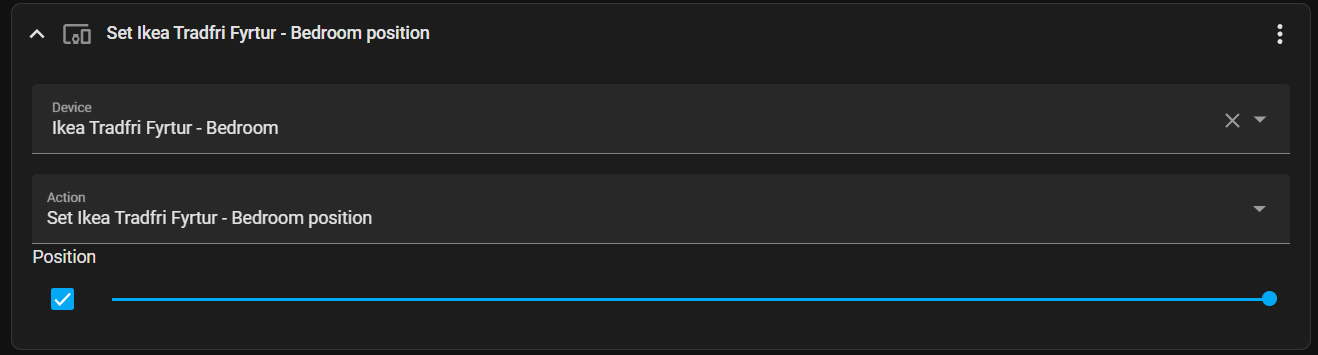
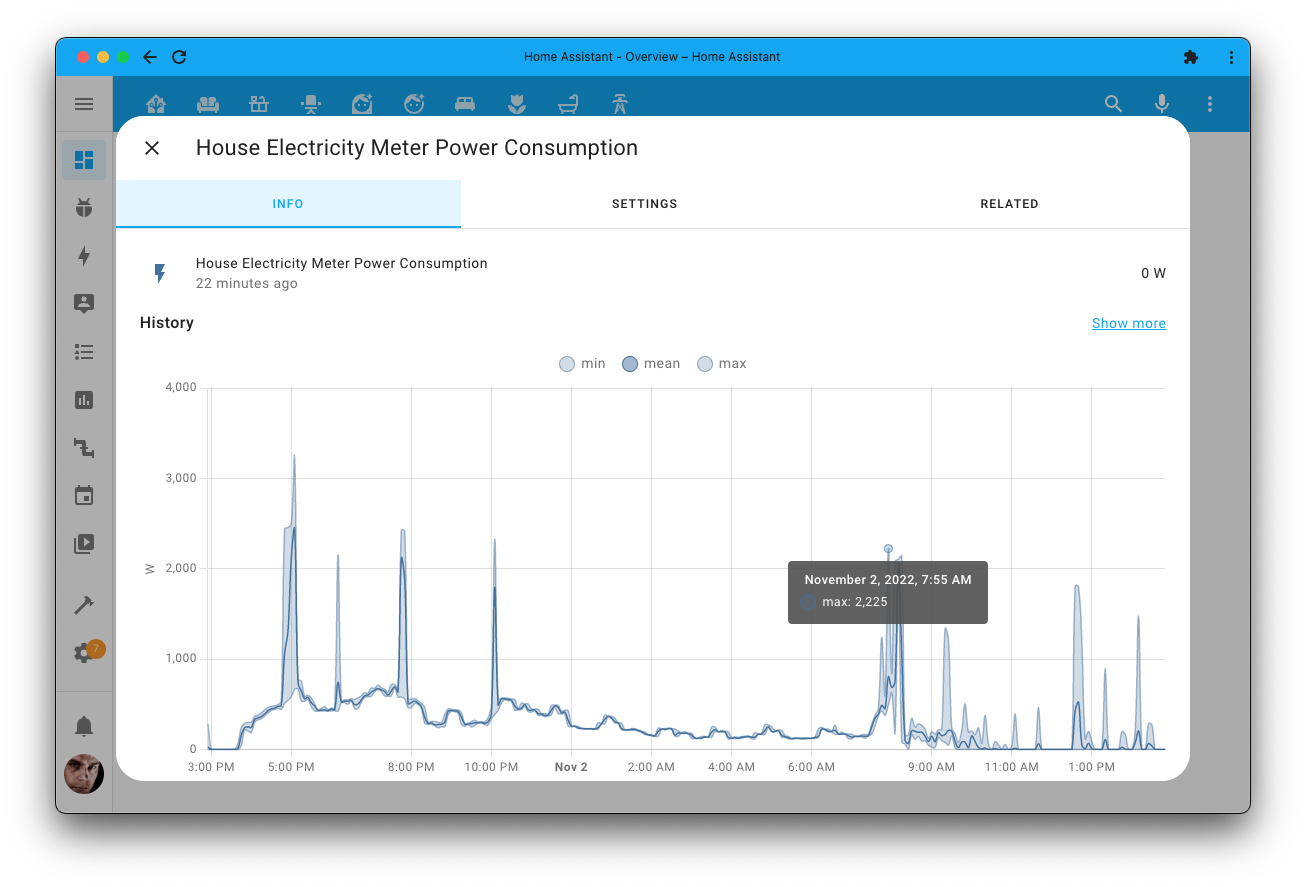


 timid beacon
Try reloading your browser. My view type is now a dropdown
novel cypress
yeah, that did it.
timid beacon
Not sure then
potent fjord
polar kelp
There's stack-in-card
Seems like this HACS is not working anymore :/
novel cypress
It fixed it.
timid beacon
solemn narwhal
I use yaml mode and have different dashboards which I include my different views...
Yeah just tried that myself. You can't use navigate but it seems to work for the URL action
timid beacon
polar kelp
Which generally works better anyway
What are the differences? I remember taking a look at the card and docs and couldn't really see the differences. Even more so, vertical has been updated recently where stack-in-card hasn't in like 2 years
novel cypress
@timid beacon

so here is what I am trying to do
I want "Sensors" to be under "Grow Setup"
timid beacon
You could use the vertical-stack-in-card
novel cypress
But it won't actually do it, I assume because of the height?
novel cypress
so put these cards, within a card?
timid beacon
type: vertical-stack
novel cypress
these cards are type: entities.
timid beacon
I wish I had a whole room just for flowers
novel cypress
I assume I'd define a verticle stack within the entities?
so entities card is inside a verticle stack?
timid beacon
Yeah check out the card. You'd just specify the exact same cards you have except they'd be nested inside vertical-stack. Vertical stack has a UI and everything. Just give it a try
novel cypress
Right but my goal is to have these headers as well, "grow setup" "sensors" etc
if that makes sense
I think I get what you mean though
timid beacon
Headers will still be there
timid beacon
@polar kelp Sorry to ping you directly, but the PR is locked: https://github.com/home-assistant/frontend/pull/8125
Wondering what happened to this. Seems like what you explained in the description is exactly what I'm looking for
[...] activate a script and get back to the start view with a single tap [...]
timid beacon
novel cypress
this is exactly what I wanted, thank you!@
And if you want to get fancy check out https://github.com/ofekashery/vertical-stack-in-card which works the same but makes it look like it's all one card 🙂
potent fjord
timid beacon
What are the differences? I remember taking a look at the card and docs and coul...
stack-in.card makes one frame for cards, vertical/horizontal stack just stacks cards side by side
like i would have these fitted in one background

mushroom cards has lovely outfit 🙂
timid beacon
potent fjord
like i would have these fitted in one background
Wait how is that different than just the normal stack cards then?
potent fjord
that is normal horizontal stack card, since stack-in-card is not working
stack-in-card would add those in one "bubble"
timid beacon
I guess if you also want the other options stack-in-card provides in the keep object
timid beacon
potent fjord
stack-in-card would add those in one "bubble"
I see, so with stack-in-card there's no outer bubble
Er rather the other way around
potent fjord
yes, thats what i presume
timid beacon
Strange, I dunno from a little testing I still don't get it
potent fjord
cant really tell, because its nto working for me at all, just says custom card not found