#circuitpython-dev
1 messages · Page 404 of 1
 solar whale
 slender iron
all the other files are the same
 manic glacierBOT

Discord is better -- the other moderators are there. Please try to resolve your discord registration issues on a desktop when you get a chance. If you fail then open a forum thread. I saw you join as @kj7rrv and have pinged you in the #help-with-community channel. Please don't use GitHub as a chat server. Dozens of people get an email every time there's a post in this issue.
solar whale
just comes up to a frozen REPL
let me try reflashing my SDCard
argg -- linux box also frozen....
solar whale
rebooting -- do you have the full .zip handy -- I wll try a new SDCard
solar whale
so far so good -- boots and file manager is happy .
slender iron
🤞
solar whale
I may have corrupted the previous card
slender iron
ya, I had one where it was unhappy until I did an erase_filesystem
solar whale
I was able to eject it and then disconnect and replug in -- booted OK
should I try taht with the previous build or are you going to keep the changes
slender iron
I think I'll keep these changes. they make the pi4b work better for me
solar whale
OK -- great -- I'll let you know if/when I break it 😉
It is a little weird that Raspberry Pi Imager does not clear the CIRCUITPY drive. I got very confused by that.
slender iron
I was hoping that'd be the case
since that'll keep all your python files there
not good when the filesystem can be corrupted easily
solar whale
That is good, It just really confused me when I reflashed an old card and there were files in CIRCUITPY that I forgot had been there.
slender iron
ugh, it is still unreliable for me
solar whale
😦
manic glacierBOT

Fair enough. I had suspected as much.
slender iron
it might be an interrupt handler clobbering a neon register
it's the same interrupt handler on the 2w though too
solar whale
My 4B was ok when I tested it this morning. Minimal testing, but no problems
slender iron
ya, it's weirdly flaky for me
solar whale
like the 2w for me
slender iron
it worked once this morning
solar whale
all the other builds worked for me -- just the 2w was flaky
slender iron
I think I'll pull these delays out before a PR
solar whale
OK -- I am going to ry this mornings build on my 2w with the ne SDCard
slender iron
you are seeing something different from me.
I'm not seeing corruption. Well... maybe I was before adding the delays
right now I see startup errors with SD card init failed 2
solar whale
I went back to this mornings build and My 2W is working - CIRCUITPY comes up and I can use the file manager. My issues must have been with the old SDCard....
slender iron
kk, so one without the delays
solar whale
yes
manic glacierBOT

Fixes #5768 and fixes #5631
slender iron
☝️ is what I sent you minus a bunch of delays
solar whale
odd thing -- power cycled -- unplugged USB and replugged (after eject) and it booted, but no CIRCUITPY...then I unplugged and repluggedd and CIRCUITPY came up fine!!! this happend last time I tried it as well
solar whale
noting unusual on UART
slender iron
hrm
solar whale
it is working fine after the second power cycle
slender iron
I was wondering if there is an SD card power pin that I'm resetting
solar whale
are you on 4b or 2w?
slender iron
4b
solar whale
ok -- I was on 2w
manic glacierBOT

lol at
`void board_init(void) {
videocore_framebuffer_obj_t *fb = &allocate_display_bus()->videocore;
fb->base.type = &videocore_framebuffer_type;
common_hal_videocore_framebuffer_construct(fb, 640, 480);
framebufferio_framebufferdisplay_obj_t *display = &displays[0].framebuffer_display;
display->base.type = &framebufferio_framebufferdisplay_type;
common_hal_framebufferio_framebufferdisplay_construct(
    display,
    MP_OBJ_FROM_PTR(fb),
    0...
If you have a 4b .zip handy, I can try it -- or I'll try it when the artifacts are ready.
slender iron
4b
solar whale
thanks
Seems happy -- I am booting from USB drive -- File system on SDCard
no debug output
slender iron
but no drive?
solar whale
yes CIRCUITPY OK
slender iron
that's good
solar whale
Note: don't use blue leds on the Pi adaptors... the forward voltage is 3V and they are vey dim.... I used red orange yellow an blue. can barely see the blue....
solar whale
My quick test cycles them
slender iron
nice!
solar whale
so far my 4b is behaving -- anything you want me to try on it?
slender iron
nah, I think we need to let this latest version soak and see what people say
solar whale
Sounds good. Thanks for all you've done on this
slender iron
the never reset thing was obvious
solar whale
only to you 😉
slender iron
this failure I see is so weird
solar whale
I've been doing assembly language coding for the past few weeks. I've very familiar with "weird" bugs....
solar whale
Timing is so hard to debug.
manic glacierBOT

@tannewt Thanks for quick response!
Yes, you are right! I overlooked that ringbuf_alloc allocates one byte more to store capacity number of bytes.
solar whale
Are you using "debug" builds. I used to find that the changes in optimization cause weird problems in critical timing.
slender iron
these have been opt builds
but prints can cause timing changes too and I ❤️ print debugging
manic glacierBOT
So I think the problem caused by resetting the SD card pins is fixed.
I'm still seeing occasional init problems. Here are the debug logs of the init. From my rpi_flash_dmb branch.
First try:
base 250000496 target 400000
new divisor 1252 reg 313
CONTROL1 000ee401
new clock ok
sending cmd slot=0 op=52 arg=80000c08 flags=1c00 data=0x0 blklen=0 datalen=0 timeout=1000
command timeout
cmd=52, sdmmc_req_run returned 0...I have to shovel some snow - got about 6 inches -- almost done -- I hope.
manic glacierBOT

My MagTag just arrived yesterday and I spent today walking through the Calendar tutorial. Glad I found this thread because I was hitting the same errors. I've downloaded the example above, but have a question about calendar_id.
In the original code from the tutorial, the calendar_id for my personal calendar was hardcoded into the code.py. Does the full working example mentioned above now have the calendar_id in the secret.py file? Or, should it go here:
now = self._iso_...
 crimson ferry
I'm trying #5800 images on Zero W with SPI display and getting hangs and disconnects. Are there artifacts yet for the latest changes?
crimson ferry
oh, it does seem to continue to display correctly if I power it on the power connector and not the USB connector (for a while at least; consistently lasts longer on power-only than on USB)
manic glacierBOT

board.NEOPIXEL works. Once you have an LED cycling colours, you're 99% done. :-)
Any comments and pointers on how to proceed are welcome. I copied the pin definitions from a different board. This was the shortest path to Blinkenlichten.
- [v] Blink the neopixel
- [v] Get the vendor to register a Product ID
- [ ] Check learn.adafruit.com on how to add a board for a checklist

CircuitPython version
Adafruit CircuitPython 7.1.0 on 2021-12-28; Adafruit Trinket M0 with samd21e18
Board ID:trinket_m0
Code/REPL
import pulseio
Behavior
Traceback (most recent call last):
  File "", line 1, in
ImportError: no module named 'pulseio'
Description
Between versions 6 and 7, support for pulseio was removed from the Adafruit Trinket M0. You can also see it between the module support matrix pages for [version ...
manic glacierBOT
[adafruit/circuitpython] New comment on issue #5821: pulseio module missing from Adafruit Trinket M0
We removed pulseio from the smallest builds (e.g. Trinket M0) to allow room for other features, most notably dynamic USB descriptors: see #4696. It is still available on certain M0 builds. pwmio.PWMOut is still available, but you are now out of luck for ir_remote on Trinket -- sorry. You could do a custom build or just continue to use 6.3.0.
 viscid pine
i have the esp32-s3-devkitc-1-n8r8 board but i'm hitting this:
E (864) psram: PSRAM ID read error: 0x00ffffff
E (864) cpu_start: Failed to init external RAM!```r8 means ram, right?
espressif_esp32s3_devkitc_1_nopsram board seems to be working fine
manic glacierBOT
lol at
`void board_init(void) {
videocore_framebuffer_obj_t *fb = &allocate_display_bus()->videocore;
fb->base.type = &videocore_framebuffer_type;
common_hal_videocore_framebuffer_construct(fb, 640, 480);
framebufferio_framebufferdisplay_obj_t *display = &displays[0].framebuffer_display;
display->base.type = &framebufferio_framebufferdisplay_type;
common_hal_framebufferio_framebufferdisplay_construct(
    display,
    MP_OBJ_FROM_PTR(fb),
    0...
partially solved: CONFIG_SPIRAM_MODE_OCT=y
still doesnt start cpy though
crimson ferry
@viscid pine CONFIG_SPIRAM_SIZE=2097152 is for the N8R2 it looks like? But jepler may have done some auto-sensing, I don't see RAM size in the Box.
viscid pine
crimson ferry
<@!746659220581122048> `CONFIG_SPIRAM_SIZE=2097152` is for the N8R2 it looks lik...
tried with the right number for 8M, still not working
crimson ferry
no decode()? ```py
Adafruit CircuitPython 7.2.0-alpha.1 on 2021-12-29; Adafruit QT Py ESP32S2 with ESP32S2
dir(b'abcdef')
['class', 'count', 'endswith', 'find', 'format', 'index', 'isalpha', 'isdigit', 'islower', 'isspace', 'isupper', 'join', 'lower', 'lstrip', 'replace', 'rfind', 'rindex', 'rsplit', 'rstrip', 'split', 'startswith', 'strip', 'upper', 'center', 'decode', 'partition', 'rpartition', 'splitlines']butpy
Adafruit CircuitPython 7.2.0-alpha.1-47-g3b083c547 on 2022-01-06; Raspberry Pi Zero W with bcm2835
dir(b'abcdef')
['count', 'endswith', 'find', 'format', 'index', 'isalpha', 'isdigit', 'islower', 'isspace', 'isupper', 'join', 'lower', 'lstrip', 'replace', 'rfind', 'rindex', 'rsplit', 'rstrip', 'split', 'startswith', 'strip', 'upper']```
viscid pine
got it working! had to copy some board.c stuff from the esp32 box
@atomic summit ^
like i mentioned, for octal it needed some pin stuff
 onyx hinge
viscid pine
tried with the right number for 8M, still not working
onyx hinge
viscid pine
tried with the right number for 8M, still not working
yeah we decided that autodetecting SPI ram was not the thing to do. I'm glad you figured out the other pins that have to be "never reset", I had figured that out for 'box' but hadn't remembered it until I scrolled down and saw you'd discovered it too. I think the problem with WHICH pins become unusable with WHICH RAM modules is part of the reason
.. that we went away from autodetection
 atomic summit
viscid pine
got it working! had to copy some board.c stuff from the esp32 box
atomic summit
viscid pine
got it working! had to copy some board.c stuff from the esp32 box
Awesome! So it is def octal you have? So you would have had to tell CPY not to touch/reset those extra IO that the PSRAM is using.
onyx hinge
please feel free to PR a board definition, so it doesn't bite anybody else.
@atomic summit I assume that all the n8r8 would be octal
did anybody start to make headway on the wifi problem with s3 yet?
atomic summit
onyx hinge
please feel free to PR a board definition, so it doesn't bite anybody else.
They have an R8 variant that isn't octal - but not sure they are using that on their devkits.
onyx hinge
huh I stand corrected!
atomic summit
onyx hinge
huh I stand corrected!
It's ok... they have SOOOO many SKUs - and more coming. Turning into ST 😉
manic glacierBOT

[adafruit/circuitpython] New comment on issue #5763: Read the docs link for CircuitPython don't work
Because of the way we generate the documentation, it may be best if we can just turn off those links. it's probably possible in sphinx configuration, if someone wants to go looking for it.
onyx hinge
except you can get espressif parts at the moment 😀
atomic summit
onyx hinge
except you can get espressif parts at the moment 😀
Kind of 🙂 - not in bulk. I know.. I'm waiting still 😦
slender iron
@crimson ferry try with my PR version where I do FULL_BUILD
 silent crane
@slender iron thank you for the suggestion on the waveshare epaper display. It is now initing but not yet drawing correctly (display looks like snow). I'll be doing more tinkering and I'll submit a pull request once I have verified it is working. Thanks again!
manic glacierBOT
 main furnace
CircuitPython + Pi Zero W + ThinkInk epaper bonnet. Think it will work?
manic glacierBOT
crimson ferry
@main furnace have you gotten any SPI stuff to work? I've been having issues, stuff kinda works but not fully
main furnace
Haven't tried anything (yet). The HDMI display is just too alluring.
What would it take to get the mu talking to it over USB serial? Mu 1.0.3 on Windows 10.
crimson ferry
I don't know, I've been using tio and screen on macOS and RPi OS (+ Mini PiTFT)
viscid pine
onyx hinge
please feel free to PR a board definition, so it doesn't bite anybody else.
How does that work with PIDs and naming?
according to https://cdn-shop.adafruit.com/product-files/5312/5312_esp32-s3-wroom-1_wroom-1u_datasheet_en.pdf, all the R8 ones are octal
main furnace
Well, it's working. Black boxes on a white background. I just installed the libraries using circup and entered the code in the 2.13-in-e-in-bonnet guide.
All the pins I needed were present in board. I'm using Scott's 'enable full build' #7800.
I'm running wsl tio /dev/ttyS30, but I don't get any text back from the pi.
It's a little weird typing on one computer and the display is on the second computer.
Hmm, seems to have hung during soft reboot after driving EPD.
It's late, have to try again tomorrow.
crimson ferry
I got SPI ethernet working on Zero W, but SPI displayio is still quirky.
onyx hinge
@viscid pine same vid/pid in CP, add a special exception in tools/ci_check_duplicate_usb_vid_pid.py
 warm stump
most unreliable connectivity, i'm constantly hearing the windows 10 usb connect and disconnect sound right now
but there it is, LUFA Bootloader USB Device under Disk Drives with 0 bytes available. Hopefully soon to be CIRCUITPY with code.py, not sure when.
that's up to people currently making 16U2's which is Microchip. Also interested to see what happens when this is used to decouple the
USB drive part of CircuitPython with the Python part of CircuitPython. CircuitDrive and MicroPython?
 manic glacierBOT

This PR adds the missing LDO control pin (SARA_PWR) to the pin list.
 orchid basinBOT

This PR makes PyKey18 and PyKey87 visible on the download page as well as updates the product link for the CNC Encoder Pad RP2040 as it didn't point to the product itself.
manic glacierBOT

The description of keypad.KeyMatrix.reset(self) states:
Any key that is already pressed at the time of this call will therefore immediately cause a new key-pressed event to occur.
However it seems that's not the case, and instead you have to wait for the time interval to pass.
I ran this code on latest on a raspberry pico with 7.1.0 with a wire connecting the pins.
Adafruit CircuitPython 7.2.0-alpha.1-54-gfb6ab7239 on 2022-01-07; Raspberry Pi Pico with rp2040
import boar... lone axle
What is the best way to test a change to a library to ensure that it won't cause the library to be too big for any core builds that it is frozen into?
In my core repo I've gone into frozen/Adafruit_CircuitPython_APDS9960/ and changed to the PR branch using gh pr checkout then I ran make fetch-submodules. Is that sufficient to then start making builds to see if they succeed?
 lone sandalBOT

Hi,
It looks to me that the Awesome List Github Repo and the website are out of sync, with the Github repo being newer. Is the website supposed to auto-update from git commits or does it need to be manually updated?
Thanks!
orchid basinBOT
lone sandalBOT
@TheKitty I added a PR in circuitpython-org to fix this, but I guess "updating the submodule" either needs to go on your checklist when merging PRs in this repo, or we need to find a way to automate it. Feel free to chat me up about what this means, it may be something that needs git/github commandline work to do each time.
@prcutler thanks, good catch!
Update the Podcast section with podcast name for Talk Python podcasts and call out that they're panel discussions with mulitple guests.
 manic glacierBOT

Dear @rsbohn I know this ticket is closed, but I did keep a link to it as an example of graphics on Pi Zero 2W.
I am testing with adafruit-circuitpython-raspberrypi_zero2w-en_US-20220107-fb6ab72.disk.img (latest).
Your code is working in the REPL, but does nothing visible (it stay in "text mode" when I run that from code.py).
And I have print("something") for debug, and my (your) code is running.
I was wondering if you had any clue on what I am doing wrong.
Thanks in advance.
viscid pine
onyx hinge
<@!746659220581122048> same vid/pid in CP, add a special exception in tools/ci_c...
I'm not sure what to call it.
- _octal_psram
- _8m_psram
- _nxr8
and in that case, should the regular one be renamed to be clearer
crimson ferry
On the ESP32-S2 TFT Feather, are these both active-high?c { MP_ROM_QSTR(MP_QSTR_NEOPIXEL_POWER), MP_ROM_PTR(&pin_GPIO34) }, { MP_ROM_QSTR(MP_QSTR_I2C_TFT_POWER), MP_ROM_PTR(&pin_GPIO21) },
onyx hinge
viscid pine
I'm not sure what to call it.
```
- _octal_psram
- _8m_psram
- _nxr8
```
@slender iron usually settles questions like that, if you open a PR or issue it's a good place to discuss it that he'll see when he's around.
manic glacierBOT
Duplicate of #4536. I'll copy your comment over.
Copied from #5410:
from @domdfcoding:
Hi,
Would it be possible to add the i2cperipheral module to RP2040-based boards like the Pico? It looks like the Pico SDK has an i2c_set_slave_mode function so set one of the i2c ports into slave mode. Presumably that could be used as the basis of an implementation?
@ifurusato suggests looking at https://github.com/adamgreen/i2cperipheral, which is a MicroPython implementation of I2CPeripheral.
manic glacierBOT

The espressif_esp32s3_devkitc_1 board definition does not work with the N8R8 devkit because it uses octal psram. I was able to get it working by coping the sdkconfig and some never_reset pins from espressif_esp32s3_box board.
I opened an issue instead of a PR because there are decisions to be made about how to name and manage these different variants (more discussion at #5678).
You can ignore the above, after a night of sleep I added:
import time

time.sleep(10)
And the graphic is visible 10 seconds.
 rigid kestrel
I have a wESP (which runs a ESP32-WROOM-32 and 16 MiB flash) and it'd be nice to have the option of CircuitPython instead of just MicroPython. I see https://github.com/adafruit/circuitpython/issues/1629 contains
Using the ESP32 as a co-processor is advantageous in several ways: we don't need to port CircuitPython itself to the ESP32, which is a major task
but I'm curious about the scope of that task given that there's MicroPython support for it?
 solar whale
rigid kestrel
I have a wESP (which runs a ESP32-WROOM-32 and 16 MiB flash) and it'd be nice to...
solar whale
rigid kestrel
I have a wESP (which runs a ESP32-WROOM-32 and 16 MiB flash) and it'd be nice to...
The ESP32 has not been supported by CircuitPython because it does not have native USB. If I am not mistaken, now that the BLE workflow has been developed, it may be possible. This has been discussed, but I have no idea if/when it may happen. The current effort is on the S3/S3/C3 versions. Others may be able to provide more insight.
rigid kestrel
Gotcha, okay. Thank you!
 manic glacierBOT

The standard font (terminalio.FONT) does not contain the degree (°) sign (?) And thus it is ignored. Interestingly, there is no error if you "define" it in the code as a symbol to be displayed.
Example line of code:
cpu_label.text = 'CPU Temp. [R]: {: .1f} ° C'.format (microcontroller.cpu.temperature)
Is then output / shown on the display as follows:
CPU Temp. [R]: 38.7C
As far as ok except for the ° is not displayed and the C slips right away.
If I replace the terminalio.Font w...
manic glacierBOT

The terminalio.FONT uses the font that is built in into the CircuitPython firmware itself. For space limits reasons, that font only includes the characters that are used in the internal messages in CircuitPython itself, because its main use is to display those messages.
You can load the same font from a file, and then all the characters will be included. The font used by default is ter-u12n.bdf.
orchid basinBOT
Add esp32c3 based MicroDev microC3 dev-board.
lone sandalBOT
 manic glacierBOT


 tulip sleet
@lone axle not sure if you saw this, but you just fixed this 🙂 do you want to reply? https://forums.adafruit.com/viewtopic.php?f=60&t=187070
lone axle
tulip sleet
<@382939733107408897> not sure if you saw this, but you just fixed this 🙂 do yo...
Yep I will. Thank you
manic glacierBOT
 manic glacierBOT

CircuitPython version
Adafruit CircuitPython 7.2.0-alpha.1-58-g211dc53d4-dirty on 2022-01-10; TG-Watch with nRF52840
Code/REPL
'{:09}'.format('Jan')
Behavior
The behavior circuitpython is:
>>> '{:09}'.format('Jan')
Traceback (most recent call last):
  File "", line 1, in
ValueError: '=' alignment not allowed in string format specifier
Description
the behavior on python 3.10 is:
>>> '{:09}'.format('Jan')...That looks like a new thing in 3.10:
Python 3.9.6 (default, Aug 11 2021, 01:29:00)
[Clang 12.0.0 (clang-1200.0.32.29)] on darwin
Type "help", "copyright", "credits" or "license" for more information.
>>> '{:09}'.format('Jan')
Traceback (most recent call last):
  File "<stdin>", line 1, in <module>
ValueError: '=' alignment not allowed in string format specifier
>>>

Downloaded and executed artifacts for cm4io, pi zero-w, pizero2w, PiZeroW and pi4b.
All booted OK -- mounted CIRCUITPY and was able to access REPL via USB
onyx hinge
@idle owl @tulip sleet is it one of you who 'archives' old stuff on s3? Just noticing there's now a lot in https://adafruit-circuit-python.s3.amazonaws.com/index.html?prefix=adabot/bin/reports/ back to 20210401
 idle owl
lone axle
In my core repo I've gone into `frozen/Adafruit_CircuitPython_APDS9960/` and cha...
idle owl
lone axle
In my core repo I've gone into `frozen/Adafruit_CircuitPython_APDS9960/` and cha...
Did you get an answer to this?
idle owl
onyx hinge
<@!330227457296957440> <@!329766224093249548> is it one of you who 'archives' ol...
I think it's Dan. I don't have S3 access that I'm aware of.
tulip sleet
onyx hinge
<@!330227457296957440> <@!329766224093249548> is it one of you who 'archives' ol...
I delete old stuff. I can clean these out. How far back do you want to keep these?
onyx hinge
I don't know, I've never had one more than a week old be of value to me in adabot reports
lone axle
idle owl
Did you get an answer to this?
I didn't, but I saw a PR this morning for the Thermsistor library that ultimately raises the same question for me about what is the best way to test whether a library change will make certain builds with it frozen in too big.
idle owl
lone axle
I didn't, but I saw a PR this morning for the Thermsistor library that ultimatel...
OK, so as far as I know, the only way to test it is to copy your updated version into the frozen folder in your core clone, and build for the boards that have it in there.
That's how I do it anyway, though I'm usually changing the Circuit Playground library, so.... only one board to test.
tulip sleet
I'll keep the last two months. @idle owl, do you have any use for older ones?
idle owl
tulip sleet
I'll keep the last two months. <@!330227457296957440>, do you have any use for o...
Not really, no. Go for it. I'm sure I'll think of a reason after you're done. 😄
crimson ferry
crimson ferry
On the ESP32-S2 TFT Feather, are these both active-high?```c
{ MP_ROM_QSTR(M...
@idle owl, when you have a moment, this Q may be for you if you are doing the ESP32-S2 TFT Feather guide (i.e., not _INVERTED)
idle owl
crimson ferry
<@!330227457296957440>, when you have a moment, this Q may be for you if you are...
Ooh let me take a look. I am starting the guide today.
lone axle
Thank you. The languages factor in as well don't they? Is there a specific one that I could test that is known to be the largest?
idle owl
crimson ferry
On the ESP32-S2 TFT Feather, are these both active-high?```c
{ MP_ROM_QSTR(M...
Yes, you want the pins high to power the NeoPixel and TFT. I haven't tested that personally yet, but that's what Limor told me.
crimson ferry
cool, thanks ...I get mine tomorrow 🙂
idle owl
lone axle
Thank you. The languages factor in as well don't they? Is there a specific one t...
German, I think, at the moment. @tulip sleet Which language is biggest right now?
And yes, languages matter.
tulip sleet
german or japanese
lone axle
Thank you. I'll test both of those for the Circuit Playground builds, I'm guessing those are likely the tightest ones that would include Thermsistor library.
idle owl
Most likely, yes.
@thorny jay As requested - Floppy Disk Saga Playlist https://youtube.com/playlist?list=PLjF7R1fz_OOWexf2WmY8cgM65ltPaAvyT

YouTube
Low cost and easily available floppy interface hardware from Adafruit using CircuitPython and Arduino - follow along as we build it together!
 lone sandalBOT
manic glacierBOT
lone sandalBOT
manic glacierBOT

tinyuf2 seems to work on S3 as well on S2. Maybe there is some conflict, I will try to test this out tomorrow and see if I could spot anything.
 daring wharf
Hi everyone, looking at the source code of micropython... how would one go about implementing a python core? The purpose of accomplishing something like this for me is to simply educate myself. The question is, how should I start going about it? what sorta concepts do I need to wrap my head around?
tulip sleet
daring wharf
Hi everyone, looking at the source code of micropython... how would one go about...
what do you mean by a "python core"? Do you mean porting to another board?
(This channel is mainly for CircuitPython, which is a friendly fork of MicroPython)
lone axle
Is there a way to make a distinction between different pins for pin alarms? i.e. can I go to sleep with PinAlarms on multiple buttons and then when one is pressed it wakes up and knows which one specifically got pressed so that it can have different behavior for each.
tulip sleet
lone axle
Is there a way to make a distinction between different pins for pin alarms? i.e....
alarm.wake_alarm should be an alarm object that includes a field describing the pin
 thorny jay
idle owl
<@!681528999520108564> As requested - Floppy Disk Saga Playlist https://youtube....
thorny jay
idle owl
<@!681528999520108564> As requested - Floppy Disk Saga Playlist https://youtube....
Still have to dig in the garage and search the attic... I have floppy disk drive, many, but where???
idle owl
thorny jay
Still have to dig in the garage and search the attic... I have floppy disk drive...
That I can't help with. 😄
orchid basinBOT
slender iron
daring wharf
Hi everyone, looking at the source code of micropython... how would one go about...
This book might be of interest too: https://www.amazon.com/CPython-Internals-Guide-Python-Interpreter/dp/1775093344

CPython Internals: Your Guide to the Python 3 Interpreter
onyx hinge
ahoy all <@&356864093652516868> --- we'll be meeting in about 1 hour in this text channel and in the circuitpython voice channel. Please take a few moments to add your hug reports, status updates, and in the weeds topiccs to the document, https://docs.google.com/document/d/1f-olt8jHqYvCX-7hbH1kZF7qILHwaqk1mgiOKxqVhV8/edit?usp=sharing

Google Docs
CircuitPython Weekly for 10 January 2022 Welcome to the CircuitPython Weekly meeting notes! Feel free to add your Hug Reports and Status Updates early. During the meeting, we go through them as a round robin sorted by username. If you can’t make the meeting and would still like to participate,...
onyx hinge
Hello! We just finished up our internal meeting, so I'll be back in 2 or 3 minutes and we'll get the Discord meeting going! <@&356864093652516868>
 serene warren
onyx hinge
serene warren
onyx hinge
notes link https://docs.google.com/document/d/1f-olt8jHqYvCX-7hbH1kZF7qILHwaqk1mgiOKxqVhV8/edit?usp=sharing
Google Docs
CircuitPython Weekly for 10 January 2022 Welcome to the CircuitPython Weekly meeting notes! Feel free to add your Hug Reports and Status Updates early. During the meeting, we go through them as a round robin sorted by username. If you can’t make the meeting and would still like to participate,...
 turbid radish
SOunds great
slender iron
1 in the weeds topic so far
lone axle

Adafruit Industries - Makers, hackers, artists, designers and engineers!
As 2022 starts, let’s take some time to share our goals for CircuitPython in 2022. Just like past years (full summary 2019, 2020, and 2021), we’d like everyone in the CircuitPython community …

Simple DIY electronic music projects - Arduino, MIDI, diy synthesis, where music and STEM overlap. Home of the #LoFiOrchestra. RTs welcome! He/Him.
Tweets
3138
Followers
720
 Twitter
GitHub
Simple DIY Electronic Music Projects. Contribute to diyelectromusic/sdemp development by creating an account on GitHub.

My new favorite project: a text display choker for status updates at the club. Uses an @adafruit alphanumeric display featherwing and a feather M0. Proto grid hosts a button to switch patterns, and CircuitPython lets the owner edit the code to add new text!
Likes
252
 Twitter
·
Twitter
·


If you missed the build video, check that out here: https://www.youtube.com/watch?v=iWWTJKWFNok
In this video, we walk through the Circuitpython + Raspberry Pi Pico USB HID keyboard code (matrix decoding, sending keypresses, etc.)
Code, design files, notes, etc. are available on the hackaday.io project page: https://hackaday.io/project/178204-...
 cobalt grail
🇸🇪 👋
turbid radish
No problem
idle owl
I am trying to bring my CircuitPython clone up to date, and did a git pull followed by make fetch-submodules, and I am left with ports/espressif/esp-idf still reporting modified content in git status. Tried running the make again simply to see if that would work; it did not change anything.
I can't either.
tulip sleet
idle owl
I am trying to bring my CircuitPython clone up to date, and did a `git pull` fol...
You can rm -rf esp-idf, and then do a make fetch-submodules again, and it should be OK then.
 gilded cradle
I think my microphone isn't working
idle owl
tulip sleet
You can `rm -rf` `esp-idf`, and then do a `make fetch-submodules` again, and it ...
OK. Thanks, I'll try that.
turbid radish
sudo melissa
idle owl
PT made it! I simply asked for it 🙂
gilded cradle
I'll try again
turbid radish
sudo alsa -mic:melissa
idle owl
tulip sleet
You can `rm -rf` `esp-idf`, and then do a `make fetch-submodules` again, and it ...
That worked. Thanks!
thorny jay
👶 🍼
turbid radish
Congratulations Scott - being a dad is great
manic glacierBOT

Fixes typo in pin name (R2>RX), and resolves pin order to match board silk.
 errant grail
Congratulations Scott! This also means we'll have development continuity for CircuitPython v2039 and beyond.
manic glacierBOT
cobalt grail
Gotta go. Have a nice week peeps!
gilded cradle
I need to head out
errant grail
From last week, here's the link to a resistive touchscreen calibration utility for built-in displays. The calculator project has 35 very small buttons and needed more precision than the usual calibration defaults. https://github.com/CedarGroveStudios/Touchscreen_Calibrator

GitHub
A simple CircuitPython DisplayIO touchscreen calibrator helper for built-in displays. - GitHub - CedarGroveStudios/Touchscreen_Calibrator: A simple CircuitPython DisplayIO touchscreen calibrator he...
thorny jay
Bye
errant grail
Thanks!
 lapis hemlock
See you!
manic glacierBOT
Does this work?
USB_PRODUCT = "Seeed XIAO nRF52840 Sense"
SOFTDEV_VERSION=7.0.1
I understand why you are suggesting this @CrackXT but as @deshipu points out, we don't have room in most builds for this.
idle owl
Lagrange points are fascinating.
manic glacierBOT
I think our naming should just follow the N16R8V style suffixes.
Is this ready for review? It looks ok to me but I'm not sure if you've updated the pinout. The Learn guide is here: https://learn.adafruit.com/how-to-add-a-new-board-to-circuitpython
onyx hinge
Here is the notes document for Tuesday's CircuitPython Weekly meeting. It is on TUESDAY the 18th, 24 hours later than usual, at 11am Pacific / 2pm Eastern here on Discord. Everyone is encouraged to attend! Please add your hug reports and status updates even if you’ll be attending the meeting - it’s super helpful! If you are unable to attend but would still like to include updates, feel free to include them in the notes and we’ll read them off during the meeting. Hope to see you there! <@&356864093652516868>
https://docs.google.com/document/d/1adH6JMqjSxUkdThbXvb9EbfQHxXELwffE2QLgQ-NLmo/edit?usp=sharing

Google Docs
CircuitPython Weekly for Tuesday January 18, 2022 Welcome to the CircuitPython Weekly meeting notes! Feel free to add your Hug Reports and Status Updates early. During the meeting, we go through them as a round robin sorted by username. If you can’t make the meeting and would still like to par...
onyx hinge
onyx hinge
Here is the notes document for Tuesday's CircuitPython Weekly meeting. It is on ...
manic glacierBOT
Since this is about the core, I've prepared a fix and offered it to micropython. We can make a decision whether to take it ourselves, independently of whether they accept the change.
Python folks considered it a bug fix, as far as I can tell:
onyx hinge
manic glacier
good catch @idle owl
idle owl
onyx hinge
good catch <@!330227457296957440>
Thanks 🙂
manic glacierBOT
@tannewt Thanks, I found the guide and have been looking at the QT PY code and schematics (hurrah for open source hardware) as an example.
tl;dr I have Zero (no pun intended) experience with python on mcu's. So I still have planned to test the UART with an FTDI board I still have laying around from my Huzzah. And setup a pot as a voltage divider to test the ADC A0-3 pins. And try the I2C oled displays I have, following one of the Adafruit tutorials.
That said. It builds, installs and th...
lone axle
tulip sleet
`alarm.wake_alarm` should be an alarm object that includes a field describing th...
Thank you for this! alarm.wake_alarm is perfect. I hadn't done anything except the most basic Time based sleep yet. The PinAlarms are really flexible for being able to launch different functionality when it wakes up.
orchid basinBOT
I hope this is properly done.
This is the Circuit Python version, not the Blinka version.
Don't hesitate to fix the English.
Maybe there is something wrong with main versus master.
This line is suspicious to me, I must have done something wrong: @dglaude Merge branch 'adafruit:main' into master
Watching this on https://circuitpython.org/board/raspberrypi_zero_w/ make me remove that line that make no sense.
manic glacierBOT
From @TheMindVirus on https://github.com/tannewt/circuitpython/issues/14:
Hi Scott, not an issue as such but more of a feature suggestion.
Great work on the weekly streams for Adafruit, it shows people the kind of stuff we have to deal with as embedded developers.I was looking at this file that you have for displayio in CircuitPython for Raspberry Pi SBC's:
https://github.com/tannewt/circuitpython/blob/rpi/ports/broadcom/bindings/videocore/Framebuffer.c
There might be mo...
manic glacierBOT
This does not seem to do anything except change the name. Also you mentioned 7SoftDevice .3.0, but this mentions 7.0.1.
manic glacierBOT

I think @dhalbert mentioned this in the CircuitPython Weekly earlier today.
 strong rock
Anyone know if there are examples for the ESP32-S2 TFT Feather yet? I can't seem to find anything
crimson ferry
(@strong rock answered in #help-with-circuitpython )
daring wharf
tulip sleet
what do you mean by a "python core"? Do you mean porting to another board?
(This...
basically a program that can execute python code... kinda like an environment
daring wharf
slender iron
This book might be of interest too: https://www.amazon.com/CPython-Internals-Gui...
Thank you! wow something like this was what I was looking for
thanks a ton
tulip sleet
The core language part of MicroPython (and CircuitPython) is shared among all the different board ports
daring wharf
tulip sleet
The core language part of MicroPython (and CircuitPython) is shared among all th...
yup, I went to the first commit of the micropython repo, the python core was just plopped into it. Thats what confused me 😅
tulip sleet
The initial work was done by Damien George before it appeared in GitHub.
manic glacierBOT

Changes:
- flashes the LED on reset to indicate the device has been reset
- allocates 1MB for the user program space.
manic glacierBOT
manic glacierBOT
Thanks @deshipu for your feedback. However, I cannot understand why I should include the already integrated font again using additional lines of code, just so that more characters are enabled (?) There. That takes away unnecessary storage space because it actually exists twice ... or I didn't understand it ;(.
With your reference to which font it is in CP, I looked "deeper" into the code and found it here
https://github.com/adafruit/circuitpython/blob/main/tools/fonts/ter-u12n.bdf
If y...
 stuck elbow
This could run CircuitPython, no? https://www.crowdsupply.com/oddly-specific-objects/sensor-watch
 manic glacierBOT

At least as of Adafruit CircuitPython 7.1.0, places like ulab.numpy.fft documentation refer to a nonexistent "spectrum" function:
See also ~ulab.extras.spectrum, which computes the magnitude of the fft, rather than separately returning its real and imaginary parts.
I haven't been able to figure out whether it's supposed to exist, or its removal was intentional. 6.3 had the similarly-named [...
manic glacierBOT

[adafruit/circuitpython] New branch created: rpi\-uart\-claim\-later
If, for some reason, you mix up TX and RX when calling busio.UART (who would do that ;) ), you get Invalid pins. When you go to try again, you'll get All UART peripherals are in use because the interface was claimed as busy before pins are verified. This should fix that issue.
 wanton topaz
(Apologies, I've posted this in #help-with-circuitpython but on reflection it might be better here.. I can delete either if someone wants me to)
Ahoy hoy... I was hoping someone here could help me out, I am trying to compile circuitpython for my feather_m4_can so I can add some modules to the mix. I followed the build instructions word for word, but I just keep getting the following error when I call make BOARD=feather_m4_can
I am doing this on an M1 MacBook Air - macOS Monterey - 16GB RAM
I have the source on a dmg volume set to APFS Case Sensitive
The error I get is
mkdir -p build-feather_m4_can/genhdr
GEN build-feather_m4_can/genhdr/moduledefs.h
[Errno 2] No such file or directory: 'arm-none-eabi-gcc'
[Errno 2] No such file or directory: 'arm-none-eabi-gcc'
[Errno 2] No such file or directory: 'arm-none-eabi-gcc'
<375 more lines of the same thing>
QSTR updated
/bin/sh: arm-none-eabi-gcc: command not found
ERROR: Empty preprocessor output - check for errors above
make: *** [build-feather_m4_can/genhdr/qstrdefs.enum.h] Error 1
make: *** Deleting file `build-feather_m4_can/genhdr/qstrdefs.enum.h'
the mpy-cross build seemed to work fine
 blissful pollen
wanton topaz
(Apologies, I've posted this in <#537365702651150357> but on reflection it migh...
blissful pollen
wanton topaz
(Apologies, I've posted this in <#537365702651150357> but on reflection it migh...
Someone else who has a Mac can probably help you more but looking at the error it cannot seem to find GCC (arm-none-eabi-gcc). Is that installed?
wanton topaz
blissful pollen
Someone else who has a Mac can probably help you more but looking at the error i...
Yeah, I downloaded the specific version in the description and installed it and said it succeeded. I figured the mpy-cross build would use the same thing?
onyx hinge
no, mpy-cross is a program that runs on the host computer
so it uses the host compiler
wanton topaz
onyx hinge
no, mpy-cross is a program that runs on the host computer
Ah its not using the arm compiler... is there a way I can check, or maybe a $PATH variable I need to set?
onyx hinge
seems like PATH would do the trick, at least on Linux
(that's what I use)
also once you do resolve that, so that which arm-none-eabi-gcc prints a full path instead of nothing, you may need to make BOARD=boardname clean to delete incorrect files created while things weren't working right yet
wanton topaz
onyx hinge
also once you do resolve that, so that `which arm-none-eabi-gcc` prints a full p...
Ok, awesome... thanks. Just need to find where the fudge that actually installed to
stuck elbow
you can always do echo $PATH to check your PATH variable
manic glacierBOT
manic glacierBOT
CircuitPython version
7.1.0
Code/REPL
Adafruit CircuitPython 7.1.0 on 2021-12-28; Adafruit QT Py RP2040 with rp2040
>>> import busio,board
>>> spi = busio.SPI(board.SCK, board.MOSI, board.MISO)
>>> spi.frequency
0
>>> spi.configure(baudrate=50000)
Traceback (most recent call last):
  File "", line 1, in
RuntimeError: Function requires lock
>>> spi.try_lock()
True
>>> spi.configure(baudrate=250000)
>>> spi.frequency
250000
Behavior
a...
lone sandalBOT
 wanton topaz
@blissful pollen @onyx hinge @stuck elbow - Many thanks you beautiful creatures. May Odin bless your harvest.
https://tenor.com/view/working-anakin-starwars-gif-4653092
 stuck elbow
personally I would prefer my harvest to be blessed by Freyja, but I'm not going to complain
wanton topaz
stuck elbow
personally I would prefer my harvest to be blessed by Freyja, but I'm not going ...

 wanton topaz
stuck elbow
personally I would prefer my harvest to be blessed by Freyja, but I'm not going ...
wanton topaz
stuck elbow
personally I would prefer my harvest to be blessed by Freyja, but I'm not going ...
Also.. there are some questionable freya gifs out there
stuck elbow
it's a goddess of fertility after all
solar whale
They're back ... https://www.adafruit.com/product/5300

We've got a new machine here at Adafruit, it can uncover your deepest desires. Don't believe me? I'll turn it on right now to prove it to you! What, you want unlimited mozzarella ...
manic glacierBOT
Thanks @tannewt for your feedback. Will the font be reduced in number of characters for each board beforehand?
We do the filtering here: https://github.com/adafruit/circuitpython/blob/main/tools/gen_display_resources.py#L50-L101
It seems that many of the pins can do that, and it's a matter of choice. And that the QT PY board definition is the way it is, because of the silk screen markings and qwiic/Stemma qt connector.
Correct, default buses are those marked by the silkscreen of the board. SDA and SCL typically for I2C, MOSI, MISO and SCK for SPI and TX and RX for UART. If those names aren't marked then there's no default bus.
I went with pin 0 and 1 for the UART because those are mentioned as default UART ...
manic glacierBOT
Crashes a Feather ESP32-S2 TFT with an adalogger featherwing:
import board
i = board.I2C()
i.try_lock()
b = bytearray(1)
i.writeto_then_readfrom(0x68, b, b)
It's fine in 7.1.0, broken in 7.2.0-alpha.1.
idle owl
stuck elbow
personally I would prefer my harvest to be blessed by Freyja, but I'm not going ...
I genuinely laughed out loud at this one. Thank you
@gilded cradle When you're around again (I know you're out today), this has official product images and copy now. This page could use an update. https://circuitpython.org/board/adafruit_feather_esp32s2_tft/
manic glacierBOT
One suggestion because I think we could leave inited pins if the UART is in use already as proposed.
    if (uart_status[uart_id] != STATUS_FREE) {
        mp_raise_RuntimeError(translate("All UART peripherals are in use"));
    }
    // These may raise exceptions if pins are already in use.
    self->tx_pin = pin_init(uart_id, tx, 0);
    self->rx_pin = pin_init(uart_id, rx, 1);
    self->cts_pin = pin_init(uart_id, cts, 2);
    self->rts_pin = pin_init(uart_id, rts, 3);
    uart_status[uart_id] = STATUS_BUSY;

Indeed, this is a very or relic, and the reference should be replaced by scipy.signal.spectrogram. I'll take care of it.
 proven garnet
How would we ask for a Learn guide to be update per changes in a library? Do I submit an issue somewhere or just mention it here?
idle owl
proven garnet
How would we ask for a Learn guide to be update per changes in a library? Do I ...
There's the "Feedback? Corrections?" link in every guide, on the left under the ToC menu. But you can mention it here as well. I would suggest always submitting it through the guide though, as things here can get lost and might not find the right person.
You can mention it here and tag me, and I can help you find the right person to get it updated.
(But submit it in the guide too. 🙂 )
proven garnet
Okay, thanks!
manic glacierBOT

Heads up @v923z - the "ulab" label was applied to this issue.
proven garnet
Well the update is for DRV2605 Learn guide, submitted throught "Feedback? Corrections?"!
@idle owl
idle owl
Thanks!
idle owl
proven garnet
Well the update is for DRV2605 Learn guide, submitted throught "Feedback? Correc...
@lone axle If you could look into updating this guide, that would be great. Thanks!
lone axle
idle owl
<@!382939733107408897> If you could look into updating this guide, that would be...
Yep, will do. You're welcome.
idle owl
@proven garnet I think this process will work out well. Submit through the guide, and tag me here with it. We'll get it sorted one way or another!
manic glacierBOT
Right now the circuitpython stubs are released to pypi on every merge build. This seems excessive, and generates a lot of pre-releases with strange version numbers in pypi: https://pypi.org/project/circuitpython-stubs/#history. I thinik it would make more sense to release the stubs to pypi only when we actually do a release, in create_website_pr.yml, which we might rename to release_tasks.yml or something like that).
Is there a good reason for doing the stub releases so frequently that...
proven garnet
Hooray, thanks for the guidance!
manic glacierBOT
I see that you closed this PR while I was doing research, but I wanted to share what I learned.
It looks like STM32L4R5 encompasses both 1MB (-G) and 2MB (-I) parts.
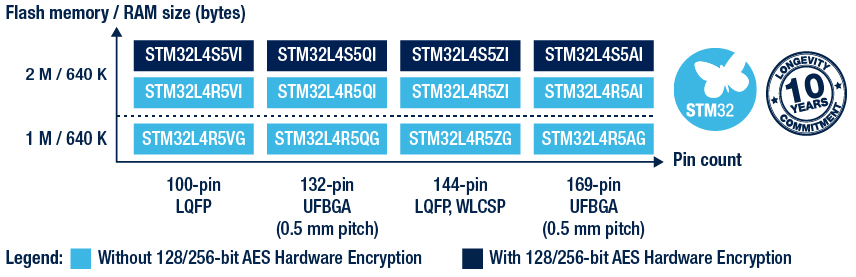
This change would treat all STM32L4R5s as 2MB, which I think would break any that are actually -G. Multiple different linker scripts ma...

CircuitPython version
Adafruit CircuitPython 7.1.0 on 2021-12-28; Adafruit MagTag with ESP32S2
Board ID:adafruit_magtag_2.9_grayscale
Code/REPL
import time
import terminalio
import displayio
import adafruit_imageload
from adafruit_display_text import label
from adafruit_magtag.magtag import MagTag
from secrets import secrets

# --| USER CONFIG |--------------------------
METRIC = False  # set to True for metric units
# ---------------------------...
Hi! I've been having a similar problem, but on an ESP32-S3 (ESP32-S3-DevKitC-1 w/ 2MB PSRAM), running on tinyuf2 (although i had the same problem without tinyuf2).
I first had the problem trying to use a DS1337 (with the DS1307 library), and a PCF8523 (CircuitPython hard crashed when calling the libraries' constructors). I looked at the libraries in the issue history, and the SI7021, DS1307, PCF8523 libraries call write_then_readinto() in their constructors (which calls `writeto_then...
Hi @jepler. These are good points! It had crossed my mind to target 1MB devices also, but since there were no other L4R5 ports as yet, I figured it wasn't urgently needed.
We're just testing the large user space out for now, but when it comes to submitting a PR, I'll be sure to make the linker file more explicitly named (include 2M) and include more defines that identify if the flash size is 1 or 2 MB on the STM32L4R5 in code so that it's easy to set up the board definition for 1MB devices...
manic glacierBOT

updating the stubs for each release instead of every merge sounds sufficient to me. It's always possible to build the in-between versions locally with make so folks can still access them if they do have the need for it.
manic glacierBOT
cc @electricalgorithm
viscid pine
how do i edit the board sdkconfig files? I found the menuconfig makefile task but that doesn't seem to work correctly right now because there's a lot of configs missing from esp-idf-config/sdkconfig.defaults
slender iron
@viscid pine I just saw that too. I think the defaults file needs to be update. I think for now just copy the unique bit into the board file
@atomic summit do you know of a way to enable the APP CPU instruction cache?
the "Application Startup Flow" page says "The duty of enabling cache for APP CPU is passed on to the application." but doesn't say how
manic glacierBOT
Sorry I didn't see this earlier. Glad that you were able to get it working.
atomic summit
slender iron
<@!195765176035835904> do you know of a way to enable the APP CPU instruction ca...
no idea, sorry 😦
slender iron
k, np
atomic summit
Maybe something Jimmo or Damien has dealt with?
slender iron
I'll bug igrr tomorrow about it
manic glacierBOT

This seems to be happening faster on the latest build
Adafruit CircuitPython 7.2.0-alpha.1-74-g9c6e34df0-dirty on 2022-01-11; Raspberry Pi Zero 2W with bcm2837
I've tried 6 or 7 boots now and when connecting via the serial USB connector I haven't gone more than 10 minutes without freezing and most times the serial interface hung in less than 5 minutes.
I tried a short run connected via the UART pins and that seemed to be working fine but I didn't let that test run more than...
 rapid slate
Good evening from California... I'm here to report
"Adafruit CircuitPython 7.2.0-alpha.1-74-g9c6e34df0 on 2022-01-11; Raspberry Pi Zero W with bcm2835" seems to launch fine on the original Raspberry Pi Zero (no wifi, no camera)
crimson ferry
is there an SPI equivalent to i2cperipheral?
viscid pine
what's the difference between that and busio's i2c?
oh it's peripheral side instead of host
stuck elbow
crimson ferry
is there an SPI equivalent to `i2cperipheral`?
you could probably use pulseio
manic glacierBOT
filesystem stub implementation is used when DISABLE_FILESYSTEM is set.
manic glacierBOT
If this builds, it should be ready for a merge. I did this in my lunch break, so I don't have the board nor complete build env. But these last changes I did aren't rocket science, and should break the things I already tested.
Thanks for providing all the help that you all did.
manic glacierBOT
Thanks @tannewt for your feedback. Ok, if I understand that correctly then the code line in its link reduces the font to "ASCII-128" and then decodes to UTF-8.
visible_ascii = bytes (range (0x20, 0x7F)). decode ("utf-8")
It's kind of confused (and for me inconsistent) that the REPL then apparently gets its characters for display from somewhere else ... and is therefore actually not compliant with the code.
Example line of code:
print ('CPU Temperature [R]: {: .1f} ° C'.format (microco...
crimson ferry
@stuck elbow thanks, looking now
stuck elbow
I'm not entirely sure it can read data with a clock
and it will be inefficient not using the SPI peripheral
manic glacierBOT
looks like this'll need the SPI fix we discussed for the feather esp32s2 tft, I think you know it, but just a reminder :)
orchid basinBOT
manic glacierBOT
Updated list.js in the S3 lister to know about Turkish.
crimson ferry
@stuck elbow the other possibility is that SPI may be symmetrical enough with just one peripheral, one clock, fudge the CS
stuck elbow
no, you need the clock line
crimson ferry
but just one of them could generate the clock
stuck elbow
but the other one needs to get it
crimson ferry
I guess it could get out of sync
stuck elbow
especially with circuitpython which tends to send data in bursts
because it's executing python code in between
crimson ferry
you're right, the SPI main isn't set up to receive clock
stuck elbow
this is the only difference -- the source of the clock
the rest is identical
well, and handling of cs
lone axle
@proven garnet if you end up having a moment sometime can you take a quick look at the DRV2605 Learn Guide and let me know if you find any remaining references in there that need to be updated. I looked that over last night when I merged your PR to the repo and changed everything that I found, but would appreciate an extra set of eyes to make sure I didn't miss anything.
idle owl
@tidal kiln You around for a shallow dive into a schematic? Working on the TFT Feather, and I think something I copied from the OG ESP Feather isn't quite right.
 tidal kiln
yah. sure.
idle owl
OK, the thing I copied is that SCL/SDA (the pins) have 5K pullups. I don't think they have any pullups, but the STEMMA QT connector has 10k pullups.
But good chance I'm missing something.
Or if the pullups are anywhere, do they apply to the whole thing?
I feel like there's stuff between the pullups and the rest of the SCL/SDA setup.
tidal kiln
rev c, right?
tidal kiln
one sec
idle owl
Thanks
tidal kiln
looks like 10k pullups on SCL and SDA
tidal kiln
on schematic, yah
tidal kiln
 idle owl
Right yeah
tidal kiln
"whole thing" little confusing. but, yah, anywhere else you see SDA or SCL, those resistors are attached
idle owl
Ok got it
Wonder if the original pinouts page is wrong, or if there were 5k on that one for some reason. Eh.
Fixing this up. Thanks!
tidal kiln
which page?
idle owl
Feather ESP32-S2
Limor said it's the same thing, except + TFT
So I pasted most of it from there.
tidal kiln
non-TFT shows 5k?
idle owl
Now wondering if I got that one wrong to begin with.
The pinouts page does
I don't know whether that's correct
looking now
Nope. 10k.
tidal kiln
 tidal kiln
schematic shows 5k?
idle owl
Oh did I misread it?
looking closer

That's what I have for "Basic ESP32-S2 Feather rev c"
wait did we ship rev B?
tidal kiln
idle owl
Ohhhhhh
Rev B is 5k, which is the one that has the panel file in MBAdafruitBoards
Rev C is 10k. Which I don't think we shipped yet.
I guess Limor changed her mind. She changed a couple of things, I did know that. Didn't know what though.
Ok, fixing it back to 5k, heh.
For now.
tidal kiln
not seeing a rev mark on the non-TFT
idle owl
There's only one panel file in the repo, and it's for rev B.
So there was never a panel generated for rev C. Which is what's shipped to the PCB house, as far as I understand it.
tidal kiln
yah, was just seeing if i could check actual feather - looking for rev mark on the one i have here
idle owl
Ah. Fair enough.
That's odd
The silk in Eagle has B on it for rev B
in the center of the back
Almost dead center.
tidal kiln
there?
 tidal kiln
the two i have here are first run boards. product photos prolly same. there could've been updates since then?
idle owl
Indeed.
 idle owl
Right?
tidal kiln
yah. if C is showing 10k. then could've been a decision change on the values? and that's same decision used for TFT version.
idle owl
I'm assuming she did a rev C, and then spun the TFT off of that.
tidal kiln
seems like
stuck elbow
if there is no mark, it must mean it's the newest revision, right? it will magically appear when a newer revision is released ;-)
manic glacierBOT
SAMD PDMIn has not worked right for a while.
-
The main problem was that the needed IRQ was never actually enabled.
-
Made a flag variable
volatile, as it should have been. -
Called to
pdmin_reset()was commented out, maybe left over from some debugging. -
Fixes #5797 (both on SAMx5x and SAMD21). Tested with a sound level program on CPX and with a simpler program on Metro M4.
I will probably backport this to 7.1.x, but there is maybe one other regression that should be checked ...
tulip sleet
I think those circled letters don't necessarily correspond to the revisions at all.
manic glacierBOT
didnt test but.... is there any linter that will warn if irq code is accessing a non-volatile variable? i feel like its such a killer bug that keeps popping up in microcontroller code :/
solar whale
my espressif build for teh esp32s2-tft is failing ```Loading defaults file /home/jerryneedell/projects/circuitpython/ports/espressif/esp-idf-config/sdkconfig-4MB.defaults...
Loading defaults file /home/jerryneedell/projects/circuitpython/ports/espressif/boards/adafruit_feather_esp32s2_tft/sdkconfig...
CMake Error at esp-idf/tools/cmake/component.cmake:301 (message):
Include directory
'/home/jerryneedell/projects/circuitpython/ports/espressif/esp-idf/components/mbedtls/mbedtls/include'
is not a directory.
Call Stack (most recent call first):
esp-idf/tools/cmake/component.cmake:472 (__component_add_include_dirs)
esp-idf/components/mbedtls/CMakeLists.txt:10 (idf_component_register)
-- Configuring incomplete, errors occurred!
See also "/home/jerryneedell/projects/circuitpython/ports/espressif/build-adafruit_feather_esp32s2_tft/esp-idf/CMakeFiles/CMakeOutput.log".
make: *** [Makefile:302: build-adafruit_feather_esp32s2_tft/esp-idf/config/sdkconfig.h] Error 1
make: *** Deleting file 'build-adafruit_feather_esp32s2_tft/esp-idf/config/sdkconfig.h'
id did do the make fetch-submodules after my git pull tehn i re-installed the esp-idf
proven garnet
lone axle
<@!135415127879974912> if you end up having a moment sometime can you take a qui...
Sure thing!
manic glacierBOT
didnt test but.... is there any linter that will warn if irq code is accessing a non-volatile variable? i feel like its such a killer bug that keeps popping up in microcontroller code :/
Totally agree. I looked at the ones in https://github.com/caramelomartins/awesome-linters and also did some general searching; I could not find any checkers, but it would not be so hard as long as IRQ routines were labeled as such.
idle owl
@proven garnet We're going to run a fairly simple Adabot patch soon, and I wanted to make sure you're still interested in helping with any potential cleanup following the patch. Are you still up for doing that?
proven garnet
idle owl
<@!135415127879974912> We're going to run a fairly simple Adabot patch soon, and...

Yes!
idle owl
Excellent! I'll keep you posted on it. Thank you!
proven garnet
@lone axle here's what I found:
In the CircuitPython Installation of DRV2605 Library on Python & CircuitPython page, the line about what to do when not using express boards tries to give an example of one but that example is missing.
And actually that's it for what I could find!
proven garnet
Also, did you have any thoughts on this @solar whale? https://github.com/adafruit/Adafruit_CircuitPython_ESP32SPI/pull/146

GitHub
Addresses Issue #121 by changing relevant argument names from *_pin to *_dio. I chose this instead of just using * argument names so it would be explicitly clear it should be a DigitalInOut instan...
crimson ferry
@idle owl on the TFT S2, what's board.R2? A pun because it's also board.D2?
idle owl
Ok, trying to build CircuitPython on an M1 Mac for the first time, the user data was copied from the previous machine, so I have my previous setup going. Failing to build now. Also, I'm not sure how many cores I have in terms of the -jXX at the end of the make BOARD. Because I was running -j12 on my previous machine, and system overview says 10 cores on this one. Which seems odd that I was using more on the previous machine?
idle owl
crimson ferry
<@!330227457296957440> on the TFT S2, what's `board.R2`? A pun because it's also...
Hah apparently.
Getting a CMake error.
Was I pretending to have that many cores? Or is that number in the command supposed to be a multiple of the actual number of cores?
onyx hinge
idle owl
Getting a CMake error.
Care to paste the full error if it's not too big ?
idle owl
It's this three different times with three different compiler files or whatever ```CMake Error at esp-idf/tools/cmake/project.cmake:290 (__project):
The CMAKE_C_COMPILER:
xtensa-esp32s2-elf-gcc
is not a full path and was not found in the PATH.
Tell CMake where to find the compiler by setting either the environment
variable "CC" or the CMake cache entry CMAKE_C_COMPILER to the full path to
the compiler, or to the compiler name if it is in the PATH.
Call Stack (most recent call first):
CMakeLists.txt:12 (project)```
Do I need to do what it says? I don't know how to do that.
The other two: ```CMake Error at esp-idf/tools/cmake/project.cmake:290 (__project):
The CMAKE_CXX_COMPILER:
xtensa-esp32s2-elf-g++
is not a full path and was not found in the PATH.
Tell CMake where to find the compiler by setting either the environment
variable "CXX" or the CMake cache entry CMAKE_CXX_COMPILER to the full path
to the compiler, or to the compiler name if it is in the PATH.
Call Stack (most recent call first):
CMakeLists.txt:12 (project)
CMake Error at esp-idf/tools/cmake/project.cmake:290 (__project):
The CMAKE_ASM_COMPILER:
xtensa-esp32s2-elf-gcc
is not a full path and was not found in the PATH.
Tell CMake where to find the compiler by setting either the environment
variable "ASM" or the CMake cache entry CMAKE_ASM_COMPILER to the full path
to the compiler, or to the compiler name if it is in the PATH.
Call Stack (most recent call first):
CMakeLists.txt:12 (project)```
onyx hinge
Two causes for errors like that in my experience, let's find out if they're applicable .. 1. didn't do esp-idf/install.sh in a fresh terminal window (it doesn't work right if you already did step 2) 2. didn't do . esp-idf/export.sh in this terminal window
idle owl
I absolutely did neither of those.
onyx hinge
oh!
idle owl
Never built for ESP.
onyx hinge
okay
so in the circuitpython/ports/espressif directory, start by doing esp-idf/install.sh which SHOULD download & install some stuff. This needs to be done "just once" (or sometimes when there's a big change in the esp-idf version)
idle owl
Running.
onyx hinge
ok, if anything looks suspicious then we can circle back. otherwise, when it's done, the next command (which you'll need to run once in each new terminal window where you want to build for espressif) is . esp-idf/export.sh
idle owl
Oof. I ran it from a venv, and it gave me an error. Installing Python environment and packages fatal: No tags can describe '214d62b9ad859318520e38870c828278c2caee2a'. Try --always, or create some tags. WARNING: Git describe was unsuccessful: b'' ERROR: This script was called from a virtual environment, can not create a virtual environment again
onyx hinge
yeah it is picky about some things
idle owl
Run it outside the venv?
onyx hinge
so close that terminal, get a fresh one without a venv, and do the install.sh again
idle owl
ok
 jaunty juniper
yeah it creates its own a venv basically
idle owl
Running again.
OK, it's happy.
What is a .fish file?
(My tab completion ran by .fish files)
jaunty juniper
it's for the fish shell
onyx hinge
if you use fish as your shell you may need to use export.fish instead of export.sh, I am not familiar with that.
crimson ferry
anyone else get safe mode on Adafruit CircuitPython 7.2.0-alpha.1 on 2021-12-29; Adafruit Feather ESP32-S2 TFT with ESP32S2 with:```py
import time
import board
from adafruit_lc709203f import LC709203F
time.sleep(1)
print("LC709203F Battery Fuel Gauge")
i2c = board.I2C()
print("LC709203F init...")
sensor = LC709203F(i2c)
print(f"IC version: {hex(sensor.ic_version)}")
oh do -j4 for starters and it'll be good enough
idle owl
onyx hinge
oh do -j4 for starters and it'll be good enough
Aww. Ok. Fair enough.
onyx hinge
@crimson ferry yeah I had a similar experience anyway, reported yesterday on your issue https://github.com/adafruit/circuitpython/issues/5680

GitHub
CircuitPython version Adafruit CircuitPython 7.2.0-alpha.0-43-g45caaa8e2 on 2021-12-07; Adafruit Feather ESP32S2 Code/REPL Adafruit CircuitPython 7.2.0-alpha.0-43-g45caaa8e2 on 2021-12-07; Adafruit...
idle owl
I'm pretty sure I was lying to it with 12 before. Not sure how I ended up there.
crimson ferry
oh, thanks, how did I miss that
onyx hinge
it's something to do with the updated esp-idf, I haven't dug into it, was hoping someone else would 🙉
onyx hinge
$ python3 -c 'import multiprocessing; print(multiprocessing.cpu_count())'
4
you can try whatever number this prints next time
idle owl
Sigh. My circuitpython build stuff is in a venv, and the esp stuff is not.
So it's not working because dependencies aren't there in the venv.
But I can't get dependencies there because it won't run in the venv.
Does ESP not need the standard build stuff?
onyx hinge
I ... dunno? it's been OK for me
idle owl
Or do I have to install it globally. blech.
jaunty juniper
you should be able to pip install requirements-dev.txt in the IDF venv maybe ?
onyx hinge
what commands are failing for you? can you pip install them after . esp-idf/install.sh?
idle owl
It works without the venv.
onyx hinge
since you are in a venv (it just doesn't show in your prompt like most venvs do)
idle owl
So I guess it installed what it needed.
Or at least it's further than it was
This is chatty.
Fail.
Sigh.
Exception occurred. During handling of the above exception, another exception occurred... twice.
It's big, I can't paste all of it. Any idea what bits might be most useful?
FAILED: esp-idf/esp_system/ld/sections.ld /Volumes/circuitpython.git/circuitpython/ports/espressif/build-adafruit_feather_esp32s2_tft/esp-idf/esp-idf/esp_system/ld/sections.ld```esp expects to be in it's own venv I think
idle owl
Then a bunch of stuff, then a traceback: Traceback (most recent call last): File "/Users/kattni/.espressif/python_env/idf4.4_py3.9_env/lib/python3.9/site-packages/pyparsing.py", line 1548, in _parseNoCache loc,tokens = self.parseImpl( instring, preloc, doActions ) File "/Users/kattni/.espressif/python_env/idf4.4_py3.9_env/lib/python3.9/site-packages/pyparsing.py", line 2622, in parseImpl if (instring[loc] == self.firstMatchChar and IndexError: string index out of range
idle owl
slender iron
esp expects to be in it's own venv I think
It appears that way, yes.
Then two more tracebacks following that one.
slender iron
do -j1
and clean and then build again
sometimes concurrency can mess up the build
idle owl
running.
Wow, this is the first time I've seen the difference between building with concurrency and without. Oof.
That difference is massive.
slender iron
🙂
idle owl
If I didn't know better, I'd think it was hanging. (It's not.)
onyx hinge
this isn't exactly a circuitpython question but .. anybody know how to build a .uf2'able project directly with esp-idf?
idle owl
slender iron
do -j1
That worked!
onyx hinge
notices there's an idf.py uf2 target now
idle owl
shakes fist at concurrency fail
slender iron
generally you can do concurrency later. I think it's often the first things that it does that don't work well with concurrency
idle owl
My update worked! ESP32-S2 TFT Feather BOOT button is now an input
onyx hinge
wooo!
manic glacierBOT
CircuitPython version
7.2.0-alpha.1
Code/REPL
Adafruit CircuitPython 7.2.0-alpha.1 on 2021-12-29; Adafruit Feather ESP32-S2 TFT with ESP32S2
>>> import board
>>> spi = board.SPI()
Traceback (most recent call last):
  File "", line 1, in
ValueError: D36 in use
>>>
Behavior
see above
Description
No response
Additional information
Thsi works OK on 7.1.0
this is that thing with the stuff @jepler 😓 :D
onyx hinge
the uf2 files generated by idf.py uf2 don't seem to be liked by tinyuf2
slender iron
maybe the wrong board id?
onyx hinge
yes, something like that .. python3 /home/jepler/src/circuitpython/tools/uf2/utils/uf2conv.py -f 0xbfdd4eee -b 0x0000 -c -o app.uf2 build/sntp.bin this made a working uf2 file
not sure how to make idf.py uf2 do anything different than what it does right now 😕
tulip sleet
I wanted to see how much work it was. It's quite tedious. I'm thinking of changing the email address temporarily so y'all won't get spammed.
manic glacierBOT
slender iron
I think you should just leave them
manic glacierBOT
tulip sleet
I will do a PR about moving the building of the stubs
slender iron
ya, I'm ok changing the release cadence. it's not worth changing the history though
tulip sleet
if it were easy I would delete them, but there's no API that I see. Getting rid of the yanked one was good because it was always at the top.
manic glacierBOT
tulip sleet
not to mention that poetry problem
slender iron
yup, agreed
manic glacierBOT
It's kind of confused (and for me inconsistent) that the REPL then apparently gets its characters for display from somewhere else ... and is therefore actually not compliant with the code.
What do you mean? I'm not sure what you are pointing out.
I suspect that "ASCII-256" aka Extended ASCII is not a future option or is not implemented for other reasons (space)?
We could bring in more characters into builds that have a lot of flash space. However, we tend to run out of room on mo...
solar whale
solar whale
my espressif build for teh esp32s2-tft is failing ```Loading defaults file /home...
FYI -- doing a clean clone fixed this, sigh-- I'll take it!
manic glacierBOT
It builds and looks good. Thanks!
idle owl
solar whale
FYI -- doing a clean clone fixed this, sigh-- I'll take it!
Mine was a concurrency issue in the end.
solar whale
Mine was some missing folder -- not sure why my usual process did not work...but it was an easy fix
solar whale
proven garnet
Also, did you have any thoughts on this <@343570430042308609>? https://github.co...
Comment in the PR -- no concerns -- Thanks.
manic glacierBOT
Tested on Feather TFT successfully.
manic glacierBOT
- Fixes #5838.
Previously, circuitpython-stubs was pushed to pypi on every merge. This generates a lot of releases in https://pypi.org/project/circuitpython-stubs/, most with strange version numbers. Instead, push stubs to pypi on when a release is done.
Stubs are still built and pushed to https://adafruit-circuit-python.s3.amazonaws.com/index.html?prefix=bin/stubs/ on every merge. I just cleaned this up to include only releases, but it will repopulate quickly enough. I will add it to...
solar whale
@idle owl Does the magic thing of loading an arduino sketch to the esp32s2-tft get you a free UF2 bootlaoder?
idle owl
solar whale
<@!330227457296957440> Does the magic thing of loading an arduino sketch to the ...
As far as I know, yes. I did it on the QT Py ESP just now and it worked, so no reason it wouldn't work on the Feather. I haven't tried it though for that purpose.
I loaded Arduino on the TFT Feather, but my UF2 bootloader was ok to begin with.
solar whale
do they ship with UF2 -- I probalby blew mine away because I assumed it did not and I erased the Flash
idle owl
Ahhh. Completely recoverable. Give Arduino a shot.
idle owl
Great!
manic glacierBOT
Seems fine don't know how to test

CircuitPython version
Adafruit CircuitPython 7.2.0-alpha.1-74-g9c6e34df0 on 2022-01-11; Raspberry Pi Pico with rp2040
Code/REPL
# uses circuitpython
from time import sleep
import board
import rotaryio

enc = rotaryio.IncrementalEncoder(board.GP10, board.GP11, divisor=1)
last_position = enc.position
while True:
    if(enc.position != last_position):
        print(enc.position)
        last_position = enc.position
        sleep(0.01)
Beha...
Fixed by #5846
using bus.SPI(...) still repost SCK in use
but board.SPI() works
Tested -- fixes #5843 as long as board.SPI() is used
using bus.SPI(...) still results in SCK in use -- I assume that is expected since it is...
bus.SPI(...) is expected not to work, because the pins are in use by the TFT. I think it's a bug in 7.1.x that it seemed to work.
board.SPI() is (with #5846) the exact same SPI object used by the display, so they can both use it without conflicting over the pins.
Looks good to me -- Tested with an rfm9x featherwing using board.SPI()
crimson ferry
Did something change with the TFT/displayio between (Feather ESP32-S2 TFT) 7.1.0 and 7.2.0-alpha.1?
solar whale
@onyx hinge Thanks for the quick fix to the ESP32S2-tft SPI
crimson ferry
does that fix the 7.1.0 issue where doing this sequence:```spi = board.SPI()
display = board.DISPLAY
looks like it would
onyx hinge
@solar whale it was quick because Ladyada ran into it the other day and I had made the fix but not PR'd it yet 😕
but you're welcome 🙂
crimson ferry
will that fix get applied to 7.1.x as well as main (unless 7.2.0 is released first)?
(7.1.0 has spi issue, 7.2.0 has i2c issue)
proven garnet
solar whale
Comment in the PR -- no concerns -- Thanks.
Thanks!
idle owl
Oof. Should CP PRs still be queued for CI 3 hours after submission? I know there's a lot going on, but I want to make sure something isn't wonky.
Of course I ask, and it starts. 🤦🏻♀️
idle owl
idle owl
Oof. Should CP PRs still be queued for CI 3 hours after submission? I know there...
So for everyone playing along at home, yes, PRs may still be queued for CI after three hours. Be patient.
tulip sleet
idle owl
So for everyone playing along at home, yes, PRs may still be queued for CI after...
big backlog: https://github.com/adafruit/circuitpython/actions
idle owl
Ah fair enough. Didn't think to check there.
Will in the future!
Back into the queue. 😄
tulip sleet
idle owl
Ah fair enough. Didn't think to check there.
if you make a PR, and then push some changes before its jobs finish, that's a good place to find the old running jobs and cancel them with a right-click.
saves time
maybe you know that already
idle owl
tulip sleet
if you make a PR, and then push some changes before its jobs finish, that's a go...
I knew that, but would have forgotten to do it if it happened. So, good reminder.
tulip sleet
I constantly realize there's a bug in my PR and push a change (sometimes git commit --amend and force push)
or there's a translation weblate PR which keeps resubmitting itself
idle owl
I think I do that more on libs than I do in the core. I'm always more careful in the core, I think. Feels like far more things could go wrong than with a lib.
Or I'm simply less comfortable with the core, so I tread more lightly.
manic glacierBOT

I tested this using both CP 7.0.0 and 7.1.0; monitoring with a USB power monitor. In both cases, once the script goes into deep sleep I see about 200uA of current draw. I was not able to test using a battery.
jaunty juniper
oh by the way @tulip sleet this still points to ports/esp32s2 instead of ports/espressif
https://learn.adafruit.com/building-circuitpython/esp32-s2-build
(in the cd commands and text)
manic glacierBOT
Loaded new build, works as expected! Thank you.
tulip sleet
jaunty juniper
oh by the way <@!329766224093249548> this still points to `ports/esp32s2` instea...
Fixed - thank you!
manic glacierBOT
thorny jay
Hi, I just want to report that I tested the Pi Zero W firmware with all the hardware version I own: (1) the PiZero v1.2 that does have the camera connector (2) the PiZero v1.3 with that connector (3) the PiZero W. I did not use it, but the drive was visible on my host, the HDMI was working and displaying the REPL. So now I have two SD card, one for that family and one for the PiZero 2W. My plan is to replicate my test on both SD card to confirm the same things are working.
slender iron
great!
manic glacierBOT
Fixes #5824
Renames the existing boards to their part name for consistency and adds N8R8 variant with octal ram.
Tested on N8R8, it passes basic neopixel blinking tests and is able to allocate a 7MB array.
manic glacierBOT

The example in the CircuitPython docs uses ure instead of re
manic glacierBOT

CircuitPython version
Adafruit CircuitPython 7.1.0 on 2021-12-28; Adafruit ItsyBitsy RP2040 with rp2040
Board ID:adafruit_itsybitsy_rp2040
Code/REPL
"""
`dkulinsk_ws2in9v2`
================================================================================
CircuitPython `displayio` driver for Waveshare 2.9in V2 Display
* Author(s): Daniel Kulinski
Implementation Notes
--------------------
**Hardware:**
* `WaveShare 2.9" Black and White eInk Display `_... timber mango
I am curious whether there is a HIL-test framework for circuitpython available?
Here is the quick and dirty python unittest based approach that I've tested recently:
import unittest


def setUpModule():
    # unittest.TestCase.spi = Mock_SPI()
    unittest.TestCase.spi = Serial_SPI('/dev/ttyUSB0')


def tearDownModule():
    del unittest.TestCase.spi


class Test_SPI(unittest.TestCase):
    def setUp(self):
        unittest.TestCase.setUp(self)

    def tearDown(self):
        unittest.TestCase.tearDown(self)

    def test_SPI(self):
        spi = unittest.TestCase.spi
        frequency = spi.frequency()
        default_frequency = 100000
        self.assertEqual(frequency, default_frequency, f'Default frequency mismatch: {frequency} != {default_frequency}')

    def test_frequency(self):
        spi = unittest.TestCase.spi
        frequency = spi.frequency()
        default_frequency = 250000
        self.assertEqual(frequency, default_frequency, f'Default frequency mismatch: {frequency} != {default_frequency}')
Here is the definition of Serial_SPI class:
import serial
import time

class ISPI:
    def __init__(self):
        pass

    def configure(self, baudrate = 100000, polarity = 0, phase = 0, bits = 8):
        raise NotImplementedError('ISPI::configure() method is not implemented')
        pass

    def frequency(self):
        raise NotImplementedError('ISPI::get_frequency() method is not implemented')
        pass

class Serial_SPI(ISPI):
    def __init__(self, port, baudrate=115200, bytesize=8, parity='N', stopbits=1, timeout=None):
        self.__ser = serial.Serial(port, baudrate, bytesize, parity, stopbits, timeout)
        self.__ser.write(str('import busio, board\r\n').encode())
        time.sleep(0.2)
        print(f'[DEBUG]: {self.__ser.read_all()}')

        self.__ser.write(str('spi = busio.SPI(board.P1_20, board.P1_24, board.P1_23)\r\n').encode())
        time.sleep(0.5)
        print(f'[DEBUG]: {self.__ser.read_all()}')

    def __del__(self):
        self.__ser.write(str('spi.deinit()\r\n').encode())
        time.sleep(0.5)
        print(f'[DEBUG]: {self.__ser.read_all()}')

        self.__ser.write(str('del spi\r\n').encode())
        time.sleep(0.2)
        print(f'[DEBUG]: {self.__ser.read_all()}')

        self.__ser.write(str('del busio, board\r\n').encode())
        time.sleep(0.2)
        print(f'[DEBUG]: {self.__ser.read_all()}')
        self.__ser.close()

    def frequency(self):
        self.__ser.reset_input_buffer()

        self.__ser.write(str('spi.frequency\r\n').encode())
        time.sleep(0.2)

        reply = self.__ser.read_all()
        print(f'[DEBUG]: {reply}')
        frequency = int(reply.split(b'\r\n')[1], 10)
        return frequency
And here is the test console output:
`
nosetests --with-xunit --xunit-file=report.xml -s tests/circuitpython-regression/test_busio.py
[DEBUG]: b'import busio, board\r\n>>> '
[DEBUG]: b'spi = busio.SPI(board.P1_20, board.P1_24, board.P1_23)\r\n>>> '
[DEBUG]: b'spi.frequency\r\n250000\r\n>>> '
F[DEBUG]: b'spi.frequency\r\n250000\r\n>>> '
.[DEBUG]: b'spi.deinit()\r\n>>> '
[DEBUG]: b'del spi\r\n>>> '
[DEBUG]: b'del busio, board\r\n>>> '
======================================================================
FAIL: test_SPI (test_busio.Test_SPI)
Traceback (most recent call last):
File "/work/repos/external/circuitpython-bruker/tests/circuitpython-regression/test_busio.py", line 95, in test_SPI
self.assertEqual(frequency, default_frequency, f'Default frequency mismatch: {frequency} != {default_frequency}')
AssertionError: 250000 != 100000 : Default frequency mismatch: 250000 != 100000
Ran 2 tests in 2.015s
`
slender iron
I'm not sure what you mean by HIL-test
but generally we don't test as well as we should
on hardware would be ideal but is hard to do
timber mango
Hardware In the Loop
slender iron
ah
timber mango
slender iron
on hardware would be ideal but is hard to do
It's true. But still it should be possible to achieve the test coverage to some extent.
slender iron
in the first year or so of CP I had a setup here that ran the micropython tests on hardware
it wasn't reliable
sommersoft has done some work on it since but has been busy with other stuff the last six months or so
timber mango
slender iron
sommersoft has done some work on it since but has been busy with other stuff the...
I see. Thanks for quick reply!
slender iron
np, I appreciate you working on CP
timber mango
I am glad to hear it from you!
We gained already a lot in our company by using CPy for hardware testing. This made my life much easier!
You have done a really good job!
slender iron
Great! I'm glad it's useful for you
If you have ideas on how to test CP better I'd love to hear them
timber mango
@slender iron BTW: Are you working night hours? Aren't you located in the US?
timber mango
Fair enough. Have a good night then!
slender iron
good night 🙂
manic glacierBOT
warm stump
Trying out Baremetal CircuitPython on a Raspberry Pi Zero 1 W (retroactive name change)
with a USB Hub HAT which is having some issues connecting to the repl. It got this far
because the USB Hub HAT is also a USB->UART with a CP210x and micro usb on it, a nice way to try it out.
The occasional lock up because as I understand it's new firmware, but great to see that over HDMI nonetheless.
 warm stump
also a little bit of Pepper’s Ghost to go with that since it’s here set up at the same time
 manic glacierBOT
I also tested the program above, using 7.0.0 and 7.1.0, and got about 230uA during sleeping. I then also tested using an extremely simple deep sleep example, from https://learn.adafruit.com/deep-sleep-with-circuitpython/alarms-and-sleep#timealarm-deep-sleep-3078700-7. Again, the sleep current was about 230uA. This value is typical, and is what we first saw when deep sleep was first introduced in CircuitPython, in 6.2.0.
I am testing with a Nordic PPK2 power monitor, which simulates a batte...
slender iron
warm stump
also a little bit of Pepper’s Ghost to go with that since it’s here set up at th...
Nice! Thanks for testing. I know there are some reliability issues still but I wasn't able to find and fix them. I needed a break from it
warm stump
slender iron
Nice! Thanks for testing. I know there are some reliability issues still but I w...
no worries, the best of luck with the esp32 work 😀
slender iron
🙂 if you are ever able to reliably produce it please do file an issue
more info will make it easier to debug
warm stump
-_(\ I may give it a build and tweak at some point but correct information on broadcom stuff has been understandably scarce
slender iron
feel free to ask me if you have questions
crimson ferry
what's the DBLTAP circuit on Adafruit ESP32-S2 boards for? It doesn't seem to get used in hardware. RFU, or some software stores a charge there?
n/m, linux203 found it (discssion in #general-tech) <#general-tech message>
manic glacierBOT
The change looks correct to me. I'm happy to help you debug via Discord. Just ping me when you have time.
manic glacierBOT
Backport of #5842 to 7.1.x.
This build tested on 7.1.x branch on CPX and Metro M4, both running a sound-level-meter program.
My plan is to release 7.1.1 that will include (only) this fix, because the microphone not working on CPX is a significant regression.
 pallid echo
Hi, I saw MicroPython has support for ESP8266. I happen to have a Huzzah. Any reason why there's no CircuitPython support for it?
slender iron
it doesn't have native USB
pallid echo
I see.. Makes sense, given the target audience.
slender iron
(we did until version 3 and many folks expected the CIRCUITPY drive to show)
idle owl
 orchid basinBOT
manic glacierBOT
orchid basinBOT
manic glacierBOT
In this case, "immediately" means it will be noticed in the first cycle of scanning. I was trying to emphasize that you will get an event as soon as possible, instead of it being ignored.
manic glacierBOT
would it be reasonable to complete a scan "in the foreground" before returning from the constructor? It is nice if the keypad can sense keys 'immediately', to avoid having to loop or wait in boot.py.
manic glacierBOT
would it be reasonable to complete a scan "in the foreground" before returning from the constructor? It is nice if the keypad can sense keys 'immediately', to avoid having to loop or wait in boot.py.
The constructor could simply delay for the scan time, maybe plus a little bit, since the scanning will be enabled at the bottom of the constructor. The same could be done forreset().
Initially enabled for samd51, this enables reading raw flux data as well as DOS/MFM formatted media.
This is only the low-level code for reading & decoding flux pulses from a floppy drive. high level details will live in a Python library.
adafruit-circuitpython-floppy will take care of details like stepping from track to track, etc.
The V is flash voltage. We shouldn't need a different build for it.

 misty garnet
how difficult would it be to modify PWMOut or PulseIO to send a specific # of pulses at a specific frequency?
misty garnet
more than 60ms worth
use case is driving a stepper motor
I tried chaining blocks of PulseIO together but it gets kinda bumpy
manic glacierBOT
I finally found my off by one error and fixed it in my code and I'm now sending what appears to be good SPI data. EPaperDisplay looks like the RAM pointers are wrong so and if I send the LUT my data looks backwards and skips a column. If I don't send the LUT the RAM window looks off.
misty garnet
is there a way to gracefully stop the pulses from a big buffer, in case you hit a limit switch for exampole
slender iron
right now CP will block until the transmit is done
stuck elbow
a dedicated stepperio module might make sense at some point
misty garnet
yeah, that's what I remembered, which is why I used shorter pulse windows and checked the limit switch in between
so I use pwm, which is more async
stuck elbow
if it's an rp2040, you might be able to use the pio for this
slender iron
you might be able to do it with audiopwmout
misty garnet
yes, I thought about the pico
slender iron
the audio stuff will be non-blocking
misty garnet
yeah, that has potential as long as I have enough memory to stuff the pulses
stuck elbow
and you can loop it
manic glacierBOT
The V is flash voltage. We shouldn't need a different build for it.
It would still need CIRCUITPY_ESP_FLASH_SIZE though right?
Also if this Amazon page is correct, it has octal flash, I'm not sure if that requires some more config changes.
manic glacierBOT
The USB task will now live on the same CPU as CP as well.
 misty garnet
yeah, as long as looping doesn't stutter too badly might work
manic glacierBOT
Thanks @tannewt for your feedback. I mean, if only the ASCII-128 font is loaded, why are characters displayed in the REPL that the code in the µC has not "read" at all and therefore does not transmit.
This difference is confusing for me, I would expect that the character is also missing in the REPL.
Kind regards
CrackXT
manic glacierBOT

I also want this feature since virtula/emulated UART is not stable when device usb is plugin and out. I can't debug device if error happened at the time.
lone axle
For a new library, Is it possible for me to set up a project on readthedocs (using the steps outlined here: https://learn.adafruit.com/creating-and-sharing-a-circuitpython-library/sharing-our-docs-on-readthedocs) and then transfer it to the main account or wherever it needs to end up? Or does that need to be set up by some specific account?
manic glacierBOT
Let's hold this for a bit, @ladyada wants to re-org files in Adafruit_Floppy, which we submodule here.
onyx hinge
@lone axle I'd recommend verifying with @idle owl but my understanding is you can do the steps inside Read The Docs, but then add the 'adabot' user as a co-maintainer which I don't see in the guide...
 lone axle
Thank you. That looks right to me, I'll wait for confirmation though. I poked around a little last night trying to figure out the right name of the account but didn't think to try adabot.
manic glacierBOT
[adafruit/circuitpython] Pull request review submitted: #5851 PDMIn fix for SAMD: backport of \#5842
Thanks! No testing performed.
Do you mean the REPL on a built-in display, or the REPL when you are connected via a serial terminal (Mu or screen, etc.)?
In theory, this Closes: #5680 -- I didn't test it on HW yet.
manic glacierBOT
Thanks @dhalbert for your feedback. The REPL when i connected via a serial terminal (i use Mu).
@CrackXT When you use Mu, the internal font is not used. You are using a font on the host computer, which does have the degree sign. The missing degree sign is only an issue when you are looking at the REPL on an attached display.
[adafruit/circuitpython] New tag created: 7\.1\.1
solar whale
@tulip sleet not meaning to be nit-picking... in the release status CircuitPython has a number of "ports" that are the core implementations for different microcontroller families. Stability varies on a per-port basis. As of this release, atmel-samd, cxd56 (Spresense), esp32s2, nrf,raspberrypi, stm for the F4 family are stable. stm for other STM chip families is being actively improved but may be missing functionality and have bugs. broadcom (Raspberry Pi), litex and mimxrt10xx are in an alpha state and will have bugs and missing functionality. should there be a mention of esp32s3? Is it also considered alpha at this time?
tulip sleet
solar whale
<@!329766224093249548> not meaning to be nit-picking... in the release status ``...
i will fix that, no problem. the release notes get updated after a release all the time 🙂
solar whale
Thanks -- I happened to think of it because I just tried it out. Still crashes on import wifi
orchid basinBOT

Automated website update for release 7.1.1 by Blinka.
tulip sleet
solar whale
Thanks -- I happened to think of it because I just tried it out. Still crashes o...
we are not backporting ESP32-S3 fixes to 7.1.x
solar whale
Sorry -- I was not really paying attention to the release being 7.1.1 -- I was testing 7.2.0-alpha
Was s3 even in 7.1.1?
proven garnet
Hey @thorny jay, just tested and confirmed that sound level issue, confirmed the PR fixed it if you want to close it: https://github.com/adafruit/Adafruit_CircuitPython_BLE_BroadcastNet/issues/13

GitHub
As identified in the example code for CPB, the library would be better with sound_level support: https://github.com/adafruit/Adafruit_CircuitPython_BLE_BroadcastNet/blob/master/examples/ble_broadca...
I'll upload verification to the issue for reference
 marsh stone
I started posting over in the #help-with-circuitpython page but I was looking for info on how to start with a new ESP32-C3 board I designed.
 patent peak
I think it was actually #live-broadcast-chat, if anyone is trying to read up on the conversation...
solar whale
@tulip sleet -- I just noticed that http://docs.circuitpython.org/en/latest/BUILDING.html#building still refers to using git submodule sync git submodule update --init Should this be updated to: make fetch-submodules or better, should the readthedoss just point to the building CP guide?
tulip sleet
right, maybe we should clean that part out, though fixing that minor thing might be ok
solar whale
Where are the ReadTheDocs files stored? -- Is it something anyone can submit a PR to in order to edit?
tulip sleet
There is a link in the upper right of the docs page that points to the doc source
idle owl
lone axle
For a new library, Is it possible for me to set up a project on readthedocs (usi...
I need to verify the steps in that guide, but I'm fairly certain, yes, follow those steps, then add adabot as a maintainer. That's how you "add" it to the "main account".
Checking the guide now.
@lone axle The guide covers adding adabot. It also covers adding it as a subproject to the CircuitPython project, for which you will need access to the CP project, if you do not already have it. Let me know.
solar whale
tulip sleet
There is a link in the upper right of the docs page that points to the doc sourc...
ah -- just found it -- thanks
solar whale
tulip sleet
There is a link in the upper right of the docs page that points to the doc sourc...
would you like me to edit it -- its it OK to just do it on github? or does it need a formal PR
tulip sleet
solar whale
would you like me to edit it -- its it OK to just do it on github? or does it ne...
you can make the PR on the site. I think sometimes merging a local PR makes the merge jobs run twice, which is a bit painful. But we can verify that.
solar whale
I'll try it
idle owl
@proven garnet Wanted to give you an update. A series of patches are going to be run incrementally to try to catch as many libraries as possible (I can explain what this means if you're interested, but for now, I'll keep it simple), but once that's done, I'll have Eva put together a list of what's left to be done once the patches are completed and we can go over it then.
manic glacierBOT
[adafruit/circuitpython] New branch created: jerryneedell\-patch\-1
update instructions for updating submodules.
solar whale
Ugh -- I guess it triggers a full CI build ... sorry about that -- argh -- and I even made a typo ...sigh
tulip sleet
how about we just close that PR and I'll cancel the actions?
you can do a proper one from your fork
solar whale
yes -- go ahead -- sorry about the churn
idle owl
I can make the change if that would help.
My CP environment is still open from my last change
solar whale
@idle owl are you talking to me?
tulip sleet
@marsh stone we don't have a writeup yet, because it's so early
idle owl
solar whale
<@!330227457296957440> are you talking to me?
Either you or Dan.
solar whale
Yes -- please -- go ahead and make that change if you don't mind.
idle owl
I don't mind at all.
Still have everything up from adding BUTTON pins to ESP32-S2 boards.
marsh stone
@tulip sleet I guess that explains why I couldn't find information on how to start.
manic glacierBOT
idle owl
@solar whale ^^
slender iron
marsh stone
@slender iron Thanks, I saw that page but I don't see what to flash to a blank chip/board
slender iron
I think you can just flash CP
marsh stone
I know there's this, https://circuitpython.org/board/ai_thinker_esp32-c3s/ so do I just use esptool and flash? If so do I need any memory starting address?
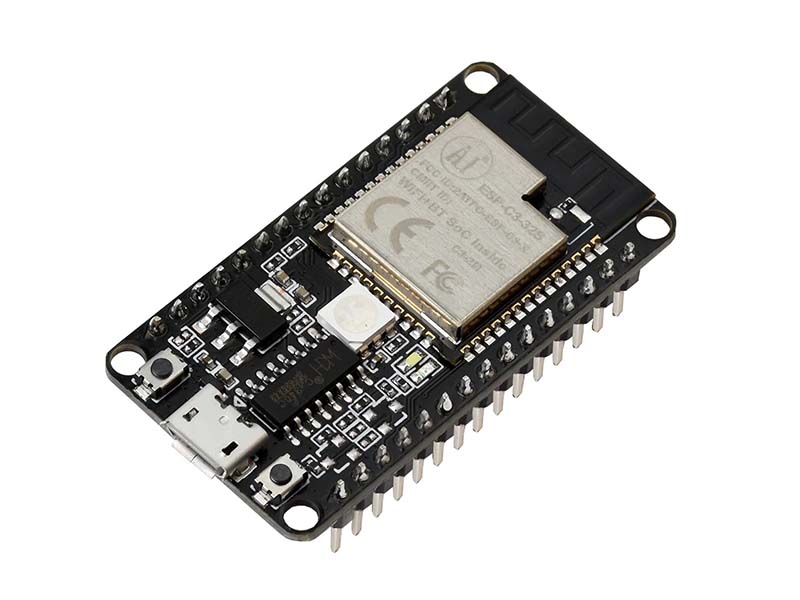
This is an entry-level development board based on Espressif ESP32-C3 SoC, which is equipped with a RISC-V 32-bit single-core processor, operating frequency up to 160 MHz, supports secondary development without using other microcontrollers or processors. The ESP32-C3 is an highly integrated low po...
It also sounds like the native USB port on the C3 isn't used for much in CP other than perhaps peripherals attached to USB, at least according to this statement:
A USB to UART convertor can be used for connecting to ESP32-C3 to get serial console, REPL interface and flashing CircuitPython
jaunty juniper
flash it at address 0 I asssume, no harm in trying
slender iron
and the c3 doesn't have native full usb
so you won't get a CIRCUITPY drive
or HID or MIDI
marsh stone
Hmm, I would have thought there's something that says what the first steps are
slender iron
it's not supported yet
marsh stone
Seems strange that the REPL doesn't come through on the USB though
marsh stone
it's used in Arduino if I remember correctly
I thought I'd mess around with it and try things out but it seems like perhaps it would be on the bleeding edge and I'm not sure I've got enough spare blood to give!
manic glacierBOT
Thank you! I may need to patch for the import wifi bug too.
@fkpwolf Please file a separate issue for what is unstable. It shouldn't be.
Ya, we'd need flash size because it controls partition layout.
The datasheet for the modules says it's only QSPI.
manic glacierBOT
I'm glad you made progress! Usually the increment direction is part of the init sequence. You should be able to update it to get the right direction. This is the fun of getting a new display going. I've attached the display-ruler.bmp I used to verify the settings.
tulip sleet
https://blog.adafruit.com/2022/01/14/circuitpython-7-1-1-released/
Fixes a couple of specific bugs; otherwise unchanged. No need to upgrade in general unless you want those fixes.

Adafruit Industries - Makers, hackers, artists, designers and engineers!
This is CircuitPython 7.1.1, the latest bugfix revision of CircuitPython, and is a new stable release. It has fixes for RGBMatrix on RP2040 and PDMIn (microphone input) on SAMx boards, such as Circ…
manic glacierBOT
Yup, I believe we do pull up automatically and agree it should be documented. The comment here should be updated so ReadTheDocs is updated: https://github.com/adafruit/circuitpython/blob/main/shared-bindings/rotaryio/IncrementalEncoder.c#L40
This means that the reset reason isn't being determined correctly. Reported on the forum: https://forums.adafruit.com/viewtopic.php?f=60&t=187146
Closing for now, but please reopen if you'd like.
 orchid basinBOT
gilded cradle
idle owl
<@!478616919721771019> When you're around again (I know you're out today), this ...
orchid basinBOT
gilded cradle
idle owl
<@!478616919721771019> When you're around again (I know you're out today), this ...
Thanks for the heads up.
idle owl
gilded cradle
Thanks for the heads up.
You're welcome!
manic glacierBOT
idle owl
For those doing CircuitPython development on MacOS, what size is your development disk image? I feel like Broadcom has added a significant amount of data to the repo, and I'm wondering if I need to generate a new disk for it.
slender iron
did you do make fetch-submodules? broadcom will be 10G+ otherwise
idle owl
I did do that.
But it still takes ages to fetch the broadcom port.
It's not filled up, but I'd rather not decide to make a new disk when it fills up, since that's probably going to happen when I need to be doing other things, heh. Wanted to stay ahead of it, if it's needed.
idle owl
My disk image is 10GB.
Hmm, fair enough. Does that not cause issues with updating? I run into problems updating the repo as it is.
slender iron
make fetch-submodules may re-init for you. I'm not sure
idle owl
Yeah, I'd rather avoid that. It's fine.
slender iron
my ports/broadcom folder is 1.4G
idle owl
I have the space. Simply wondered if I should make a new image for it.
slender iron
my whole CP folder is 8.9
idle owl
And you're doing broadcom dev, so 10 is probably ok for now for me.
slender iron
my image ended up getting hosed on my mac
idle owl
Oof
idle owl
That's all I ever had in it
Oi...
The rest of my repos are local.
Never occurred to me to put them all in an image. I thought it was a CircuitPython-specific issue requiring the image.
tulip sleet
i thought it was for case-sensitivity during the build
idle owl
That sounds like what I remember.
gilded cradle
It looks like my circuitpython folder is almost 22GB.
idle owl
And it only has the circuitpython repo in it?
gilded cradle
yes
gilded cradle
I think that has all submodules in it
tulip sleet
you may have a lot of builds in it
slender iron
that could be if you got all of broadcom
gilded cradle
I probably did
idle owl
Ah so if I ever want to build broadcom, it could get that beefy?
Or can you build broadcom without all of it
slender iron
no, we used to fetch all the history you don't need
gilded cradle
I mean I still have around 800GB of free disk space, so I'm not too concerned
idle owl
Yeah I have probably twice that. Which is why I figured make a bigger image for CP if necessary. But it sounds like it might not be necessary for now.
Thanks all!
gilded cradle
👍
tulip sleet
@slender iron @idle owl @gilded cradle FYI, a fresh clone of circuitpython with no submodules is 179MB. With a full clone of submodules(not make fetch-submodules), it is 16GB. broadcom fetches 13.71GiB from the server, and that's before it sets anything up.
and that's not counting fetching the espressif dependencies, etc.
gilded cradle
I could try blowing it away and redownloading
tulip sleet
no reason to, if you're not bumping into something
gilded cradle
ok
solar whale
If I recall correctly, you only need the case-sensitive file system to build the espressif sdk -- not to build CP.
idle owl
tulip sleet
<@252717193496756235> <@!330227457296957440> <@!478616919721771019> FYI, a fresh...
Fair enough. Good to know.
idle owl
solar whale
If I recall correctly, you only need the case-sensitive file system to build the...
The case-sensitive thing has been around since before we had espressif support I thought? I'm likely misremembering though.
solar whale
It began with esp8266 support
idle owl
Ahh.
solar whale
but I stopped using one a long time ago -- I'm recloning and trying it now
I just cloned and updated -- 1.8 G on my M1 Mac -- trying espressif build now -- standard files system - not case-sensitive
 idle wharf
@idle owl I meant to put this into my 2022 thoughts and forgot.
I was wondering if there should be a circuitpython-libraries channel specifically for library maintainers\supporters, design discussions, cookiecutter, etc.
Maybe which also has Repos linked (that might be too noisy).
idle owl
idle wharf
<@!330227457296957440> I meant to put this into my 2022 thoughts and forgot.
I ...
That would be entirely too noisy 😄 As for a new channel, it's not a bad idea, but I worry about diluting thing too much, and/or creating another vector for support/dev folks to have to monitor. But I'm not completely against it. I'll think about it. And keep an eye on this channel to see if there's enough chatter to justify breaking it out. I also worry about folks thinking that's where you ask questions about using the libraries, meaning all of the support folks would have to keep a close eye on it to provide help.
idle wharf
"I also worry about folks thinking that's where you ask questions about using the libraries" that's a good point
idle owl
Since there's already confusion about the dev channel vs the help-with channel.
Though adding -dev helped that a lot.
solar whale
@idle owl just built qtpy esp32s2 on my M1 Mac in standard file-ssytem -- so I "think" it is ok in general.
idle owl
idle wharf
"I also worry about folks thinking that's where you ask questions about using th...
I think library development is a valid subset of CP development as a whole, and has a home in this channel. But I will still give it some consideration!
idle owl
solar whale
<@!330227457296957440> just built qtpy esp32s2 on my M1 Mac in standard file-ssy...
Interesting. Now I'm genuinely curious what the point is.
solar whale
If I recall correctly it was a holdover -- you need it to build some espressif tools locally but we don't do that duing a CP build.
manic glacierBOT
Investigating this further I found https://github.com/espressif/esp-idf/issues/7405
Per the comments there, our sequence of API calls in common_hal_busio_write is not acceptable in esp-idf, because we omit the stop call for write_then_readinto according to the transmit_stop_bit flag:
    if (transmit_stop_bit) {
        i2c_master_stop(cmd);
    }
esp_err_t result = i2c_master_cmd_begin(self->i2c_num,...Huh. Fair enough.
I mean, it's fine, and I'm used to it being in an image at this point. But still good to know I guess.
Would mean not having to guess at an image size or waste space on an image though.
solar whale
It "does no harm" to use a case-sensitive FS, but I don't think itis necessary. and it is a pain to maintain.
also built esp32s3-n8r2 and loaded onto a board to verify it actually works 😉 All OK
idle owl
Hah good plan. Thanks!
solar whale
looking at espressif docs -- I found this for building the espressif toolchain https://docs.espressif.com/projects/esp-idf/en/release-v3.2/get-started/macos-setup-scratch.html but we don't do that. At least not anymore
I don't see any mention of a case-sensitive files system in the recent doces https://docs.espressif.com/projects/esp-idf/en/latest/esp32/get-started/index.html#introduction
onyx hinge
how/when is shared-module/busio/I2C.c used? It looks like it 'adapts' busio to use bitbangio... but I couldn't find what enables/disables it.
slender iron
@onyx hinge it might be a holdover
lone axle
idle owl
<@!382939733107408897> The guide covers adding `adabot`. It also covers adding i...
I don't have accesses to the CP project on readthedocs I do not think. I created https://readthedocs.org/projects/circuitpython-24lc32/ and added adabot as a maintainer. I don't think I have access on the Github side to set up the webhook for Read the docs either.
idle owl
lone axle
I don't have accesses to the CP project on readthedocs I do not think. I created...
OK, let me see what I can do.
@lone axle You should have GitHub access, give it a try. I added you to the CircuitPython project, you should be able to add it there too.
lone axle
idle owl
<@!382939733107408897> You should have GitHub access, give it a try. I added you...
Thank you. I do see the admin button on the CP project in readthedocs now. But currently no settings tab on github still.
idle owl
lone axle
Thank you. I do see the admin button on the CP project in readthedocs now. But c...
You have write access to that repo, that makes no sense...
Can you DM me a screenshot of what you're seeing on GitHub?
lone axle
Possibly the settings tab is admin permission above write access. Yep. will do.
lone axle
and yep. definitely logged in.
Thank you. I'll add it as a subproject in CircuitPython RTD project.
manic glacierBOT

I am "suffering" from the same problem as described initially by ATMakesBill.
We are trying to make a BrailleKeyboard.
While investigating the problem and trying to find a solution I think there are two very different ways to achieve what we want:
- Checking the connections and disconnecting the "undesired" centrals. This would require a API which is able to identify the central at the "other side" of the connection.
- Changing the MAC Address of the peripheral to different values and ...
idle owl
lone axle
Thank you. I'll add it as a subproject in CircuitPython RTD project.
Ok, I think I got it set up.
lone axle
I think it's building now. I left the default branch blank originally and it seemed to try the wrong one first. Just set it to main though and it seems to be going now. Thanks again!
idle owl
lone axle
I think it's building now. I left the default branch blank originally and it see...
Oh right, we have to fix that in the guide. It has to be main now.
Set manually.
RTD isn't quite caught up with main yet.
lone axle
Not directly related. But I noticed the change for some URLs to use docs.circuitpython.org/projects...
Do you have interest in changing the links in the existing repos to point there?
idle owl
lone axle
Not directly related. But I noticed the change for some URLs to use docs.circuit...
It's in a patch that Eva is working on right now. Then she'll try to use a script to automate fixing what the patch misses. 🙂
Whatever's left, Tekktrik wanted to help with, so the final cleanup will be on his plate.
lone axle
Nice. Sounds good.
idle owl
Difficult to patch things that have repo-specific text on the same line, which much of the docs links do. So that's a sticking point for this update.
manic glacierBOT
lone axle
@idle owl It seems that I bungled the names somehow 😬. The build succeeded and is available here: https://circuitpython.readthedocs.io/projects/circuitpython-24lc32/en/latest/ but it should be https://circuitpython.readthedocs.io/projects/24lc32/en/latest/ I think without the circuitpython- in the URL. The subproject does have the alias 24lc32 which I would have thought was the setting that controlled that but must not work how I am thinking
manic glacierBOT
idle owl
lone axle
<@!330227457296957440> It seems that I bungled the names somehow 😬. The build s...
I did fix the alias to be lowercase. But you had the alias correct.
I think you're seeing one of the alternate docs links.
As long as the right one works, the alternates are irrelevant.
lone axle
Oh I do see it now on the right link. It was ASCII art hallway not found thing when I looked before.
idle owl
Takes a few minutes to propagate sometimes.
manic glacierBOT
Does this change any APIs?
idle owl
For future reference, the alias should be lowercase though.
Lib name minus Adafruit_CircuitPython_ and all lowercase.
manic glacierBOT
I don't think this will work for non-zero start values.
Shouldn't this mutate ->buf too to account for start?
lone axle
idle owl
Lib name minus `Adafruit_CircuitPython_` and all lowercase.
I think I may have done the wrong name initially too. Without "Adafruit" in it. I believe I had "CircuitPython 24lc32" originally and it seems that it created the project slug from that and set it to "circuitpython-24lc32" instead of "adafruit-circuitpython-24lc32" which causes the badge image in the readme file to come back with the unknown badge instead of passing. It looks like it may not be easy to change the slug. You think it's okay to PR the readme to use the current slug? or better to re-create or try to send a request to them to change the slug? Apologies for all the trouble, I did not read the guide text closely enough and followed the screenshots a little to blindly.
manic glacierBOT
CircuitPython version
Adafruit CircuitPython 7.1.0 on 2021-12-28; Adafruit Feather Bluefruit Sense with nRF52840
Code/REPL
n/a
Behavior
When I try to "Request Bluetooth Device" from Chrome (code.circuitpython.org)
I pick the 'CIRC' device and click 'Pair', then I get a Bluetooth busy spinner that never goes away.
Description
Chrome 96.0.4664.110 (Official Build) (64-bit)
--enable-experimental-web-platform-features
--enable-features=Web...
idle owl
lone axle
I think I may have done the wrong name initially too. Without "Adafruit" in it. ...
Ok, so here's what you have to do. There is no changing a slug, period. It's not an option. You need to delete the project, and start over. This isn't the first time this has happened, no worries.
manic glacierBOT
How about:
reference_voltage: Optional[float]
//|     """The maximum voltage measurable (also known as the reference voltage) as a
//|     `float` in Volts.  Note the ADC value may not scale to the actual voltage linearly
//|     at ends of the analog range."""
Does this change any APIs?
@v923z can you take a moment to answer?
I know it optionally introduces new APIs, but the big thing (complex numbers) remains disabled in CP.
Happy that (or something else) to add it to the documentation!
idle owl
@lone axle Are you alright with doing that?
Let me know so I can delete and redo the webhook when it's set. Otherwise, I can redo the project.
lone axle
idle owl
<@!382939733107408897> Are you alright with doing that?
Yep, will do. I'll let you know when it is set.
manic glacierBOT
Does this change any APIs?
@v923z can you take a moment to answer?
I know it optionally introduces new APIs, but the big thing (complex numbers) remains disabled in CP.
If complex is disabled, then there isn't any difference. There are two new functions, but you can disable them in the header file.
I don't know if you want to resolve this https://github.com/v923z/micropython-ulab/issues/435 before merging into CP.
lone axle
@idle owl okay. new one is set up with correct name, slug, and alias I believe. Build suceeded and badge looks good. It's added as a subproject to CircuitPython in RTD. Should be ready for hook setup on github side. https://circuitpython.readthedocs.io/projects/24lc32/en/latest/
idle owl
lone axle
<@!330227457296957440> okay. new one is set up with correct name, slug, and alia...
Please add adabot so I can get to the admin bits.
lone axle
idle owl
Please add adabot so I can get to the admin bits.
added.
idle owl
Should be good to go!
lone axle
Thank you for helping me get it straightened out and set up!
idle owl
You're welcome! Thanks for doing it!
proven garnet
idle owl
<@!135415127879974912> Wanted to give you an update. A series of patches are goi...
Somehow I missed this earlier. Sounds good!
manic glacierBOT
This is strange now - I went back and reloaded the code from the Weather App in code.py and reset it.
It seems to run fine now with the original code from the Weather App.
I have my own version where I added and changed a few things which is where I first discovered the problem. So I'm loading my code into code.py and testing it out. I'll give feedback over the next few days.
PS. What do you use to measure the current draw?
PS. What do you use to measure the current draw?
I am using this :https://www.adafruit.com/product/5048. That's what I used for measurements and the screenshots in https://learn.adafruit.com/deep-sleep-with-circuitpython/power-consumption.
Just using the CI to find out
manic glacierBOT
This should remove the "Edit on Github" link, which resolves Issues #3400 and #5763, by implementing the changes listed here:
https://docs.readthedocs.io/en/stable/guides/remove-edit-buttons.html
manic glacierBOT
seems sensible, didn't test
Thank you! I assumed it was simple, but you did the legwork. :taco:
 viscid pine
^ working on my board 👍
orchid basinBOT
silent crane
@slender iron Thank you for the help, this is now working!
 warm stump
broadcom port is downloading overnight, I want to try applying "step-over" behaviour for the interrupts to see if it helps with the lock-ups on Pi Zero W.
It's something I've already done before that helped with instructions that don't work when the MMU is switched off,
documented here: https://github.com/themindvirus/pix-ies/tree/step-over for anyone interested or who has already done the same
There will be a different Interrupt Vector Table between the original Zero and the Pi 4 so there is also that
manic glacierBOT
[just a sighting] Metro M4 board stuck in PDMIn.record() sometime during file access (circup update --all).
slender iron
warm stump
broadcom port is downloading overnight, I want to try applying "step-over" behav...
please file an issue about this. I'm interested but am off for the weekend and may lose it on discord
solar whale
Yay! first successful wifi connection in esp32s3! Thank you all for getting it working!
warm stump
slender iron
please file an issue about this. I'm interested but am off for the weekend and m...
If it's not already a duplicate I was going to after I get somewhere with re-writing it for ARM1176, but i'll file one now
manic glacierBOT

CircuitPython version
Adafruit CircuitPython 7.2.0-alpha.1-95-g936c9b205n 2022-01-13;
Raspberry Pi Zero W with bcm2835;
BoardID:raspberrypi_zero_w
Code/REPL
print("Hello World!")
input(">>>")
Behavior
REPL Lock-up with no errors or traceback, potentially ARM1176 Interrupt being called and returning to the same place in a loop.
The stack trace and other information matches that for the Pi Zero 2W: [Deep Dive w/Scott: Pi Zero 2W + CircuitPython...
lone sandalBOT
 orchid basinBOT
Updated to reflect https://github.com/adafruit/uf2-samdx1/releases/tag/v3.14.0. This new release just supports more boards: no bootloader update is needed or desirable for existing boards.
proven garnet
@idle owl I was looking at things that still use gamepadshift and found some projects/examples that do. Since it's being depreciated, I submitted a PR for one example that uses keypad instead. If that's something that's wanted for other examples let me know but I also understand if the idea is to let that code live on CircuitPython pre-8
manic glacierBOT
Additional required steps for Debian WSL (Windows Subsystem for Linux) include but are not limited to the following:
sudo apt update # Update Debian repositories list
apt-cache search # Find missing packages (information also available at Debian's websites)

sudo apt-get install build-essential git make # Base tools for development
# Additional cross-compilers such as arm-none-eabi-gcc may also be required

sudo apt-get install python3-pip # For installing python huffman module
s...Yes, we assume the encoder grounds its signals on transitions, and we set pull-ups accordingly in all the implementations.
manic glacierBOT
manic glacierBOT
[adafruit/circuitpython] New comment on issue #5763: Read the docs link for CircuitPython don't work
Not entirely sure this fixed the issue, I still see the links in the top right corner...
manic glacierBOT
I'm closing this issue for now because it seems that the most recent main branch is working as expected.
However, there still remains the issue of it being updated on Amazon S3 which the Learn Guide is currently pointing to.

Both this and the CircuitPython build for the Adafruit Macropad RP2040 will help in creating an AVR8 port
for the ATMEGA16U2 on the Arduino Uno and US...
manic glacierBOT
[adafruit/circuitpython] New comment on issue #5763: Read the docs link for CircuitPython don't work

yeah I am seeing the same thing, unfortunately.
[adafruit/circuitpython] New comment on issue #5763: Read the docs link for CircuitPython don't work
I confirmed that github built main after #5863 was merged in
manic glacierBOT
I think the idea is that if a port does not have hardware busio support ,busio can serve as a proxy for bitbangio. So on a board without, say, hardware I2C or SPI, you can still use busio.I2C() and not have to change the code examples.