#circuitpython-dev
1 messages · Page 105 of 1
 slender iron
ya
 formal plover
ch-yeah
lol
Fixes so many of the weird problems. Wish it was still on some of the other boards.
formal plover
bwhahaha. No worries. Figured you are going to be on ShowandTell
slender iron
yup yup
 idle owl
Great job, @slender iron
 pastel panther
@slender iron I don't know if you recall but a couple of weeks (months?) ago we talked about a dev version of the Feather m0 Express. Here it is, complete with a few angle DRC errors https://github.com/bsiepert/feather_m0_express_dev

GitHub
Contribute to feather_m0_express_dev development by creating an account on GitHub.
pastel panther
- a SWD header and SPI header for the flash
pastel panther
Someone had the idea for an 'auto double tap' button for the bootloader but I couldn't find room just yet
Should I? I'd be happy to send you one when I order some off of OSHpark. I guess if others want some I could sell some but then again people can always make their own
I still have to work out the rest of the BOM but I'll add that to the repo as well once I have it sorted
(also by send one, I meant the board. I would probably need some money to cover the cost of a populated board)
slender iron
@pastel panther yeah, a board would be cool. I probably have the parts
I also have a toaster reflow oven in the making too
pastel panther
nice. I would practice reflowing a few QFNs beforehand. I've only done two so far but they seem impossible to avoid shorts though a few swipes of an iron fixes them easily enough
slender iron
yeah, its the thermal pad I need it for
formal plover
This just in. Adafruit IO working on my Feather HUZZAH ESP8266 via IFTTT integration on Adafruit IO
idle owl
@formal plover Nice!
formal plover
Thanks @idle owl!
 floral dagger
Awesome @formal plover
formal plover
Thanks @floral dagger!
and I'm not talking about 100% working, I can't send like temp data and stuff yet, I can do triggers though
floral dagger
I was looking at the micropi MQTT implementation earlier, but I think I am way out of my depth on that, so nicely done
*micropython
formal plover
If I can figure out the API, I'll be able to do everything
@floral dagger same here
MQTT would be a way down the road thing for CircuitPython (probably until at least an express board with wifi comes out)
floral dagger
You can do mqtt on an esp board with micropython, so why not with circuit? It should be possible.
formal plover
@floral dagger it's definitely possible. Would just require some work to get going. I tried a direct port from micropython, didn't work. Over my head and or I'd run into memory issues.
floral dagger
Btw, that wasn't meant as rudely as it may have sounded. I'll have to look up my c++ implementation on BBB. I remember there were some quirks that may apply here.
Nomenclature differences and such that made it really interesting
idle owl
@floral dagger It didn't seem rude. We've discussed this before with the same questions.
pastel panther
so I've been trying to read up on the ASF to get access to some of the awesome features of the m0 and in that context I just listened to/watched the pinned circuit python hangout video. It got me wondering if there was something I could be doing coding wise to kill two birds with one stone
is there any work that needs to be done on circuit python that would introduce me to the ASF and some of the fancy registers of the m0?
idle owl
@pastel panther It will be @slender iron or @tulip sleet who will know that best. It's distinctly possible. There's all kinds of things that are super helpful to work on.
pastel panther
@idle owl ok, thanks I'll touch base with one of the two once I'm rid of this cold and can think straight
idle owl
@pastel panther Oh good luck with that, I hope you feel better soon!
pastel panther
👍
 sick creek
@formal plover I had Suse in dual booth when i had win10 but not have like that recently but now i can get a terminal of suse but i like ubuntu more but red hat is cool too
 manic glacierBOT

 timber lion
wow wacky @dreamy dagger @tulip sleet I got my first corrupt SPI flash on a circuit playground express
it's my arc reactor, when it stopped working on AAE last night i thought it was battery but digging into it now the SPI flash is empty
i have a feeling the battery died and it went into brownout
dunno if there's any info that's handy for me to get, but it looks like the flash is empty
i have a feeling flash was corrupted, it rebooted and then couldn't mount FS and created a new one
formal plover
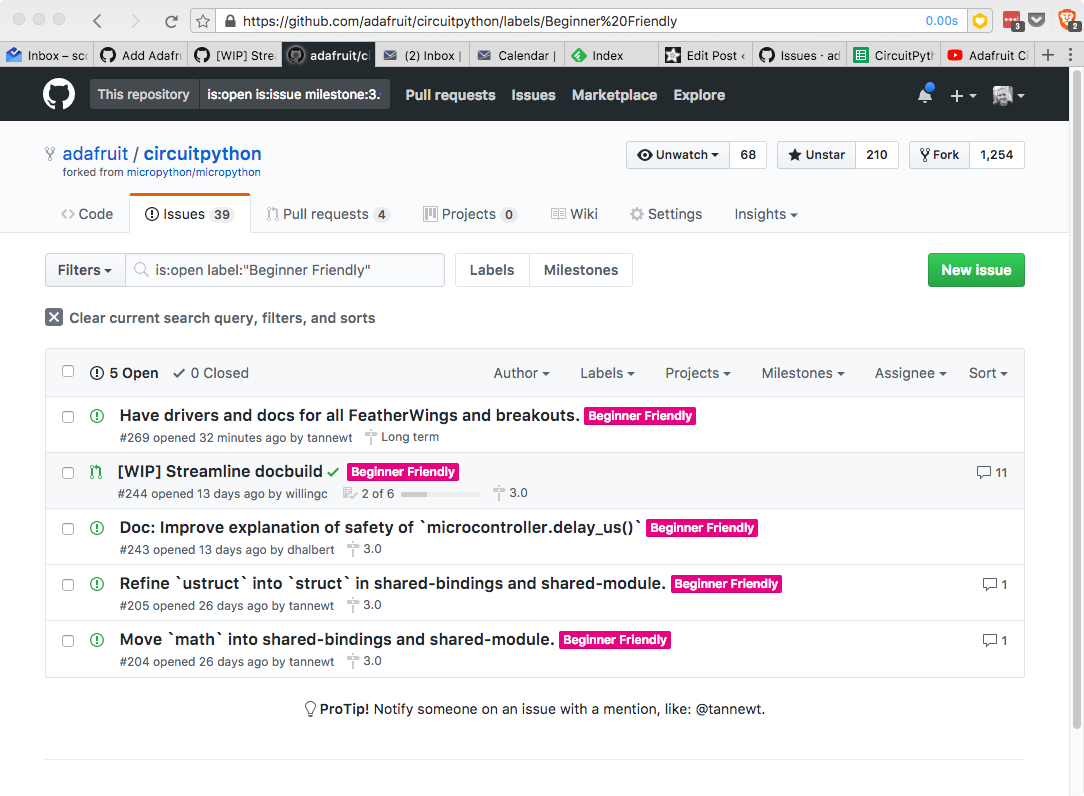
With 2.0.0 out the door, its time to start work on CircuitPython 3.0.0. Each major release I like to have a theme to guide the primary goals of the release. 2.0.0 was all about storage because it e…
 royal ridge
So, um, I turned my Gemma into a password-dot becuz I forgot my REAL password keeper at home and my fingers forget where the keys are. 20 minutes
does happy booty wiggle
 opal elk
haha wait are you saying it was faster to create a password vault than remember your passwords?
that's amazing 😄
royal ridge
No, just more efficient than my normal fatfingers allow with as much as I have to log in
I'm blaming @split ocean for this, btw
formal plover
@royal ridge awesome. How do you cycle through the accounts to get the right password?
royal ridge
The "always need" set is a pair, so it's dedicated pads at this point.
Figure I'll go bigger and better and use a1/a2 as scroll with a0 for fire, and the dotstar with color/blink combos for an indicator
formal plover
@royal ridge oh yeah, that'd be slick
manic glacierBOT

On CircuitPython 2.0 with Circuit Playground Express unfortunately I'm running into a lot of trouble getting mic samples. If I use the record function twice (in separate context managers) I get a pin already in use error. Here's a simple repo:
>>> import audiobusio
>>> import board
>>> with audiobusio.PDMIn(board.MICROPHONE_CLOCK, board.MICROPHONE_DATA) as mic:
...     samples = bytearray(160)
...     mic.record(samples, len(samples))
...
>>> samples[0]
128
>>> with audiobu...Here's another interesting audio in bug, if I create a PDMIn and save it and try to use it twice to record (all within the context of a context manager for init and deinit) it locks up the entire board and it becomes unresponsive to Ctrl-C, Ctrl-D, etc. Even worse if you put code like this in main.py you're in a bad state that isn't recoverable without erasing the SPI flash in Arduino. Here's a simple repo:
Adafruit CircuitPython 2.0.0 on 2017-09-12; Adafruit CircuitPlayground Expre... tulip sleet
@timber lion I've never seen it create a new filesystem without me erasing the flash first. But I've never run the battery down either. If the first 512 bytes looks like a filesystem, it should attempt to mount it. That sector is not rewritten under normal circumstances. We should probably provide better diagnostics when it thinks something is wrong.
There's more than one reason why it might give up.
 half sedge
Looking for help... I fail at "import pulseio" on a 2.0.0 Trinket. Did it change? Do I have to install some library from the bundle?
I just want to try some PWM for a buzzer. Nothing fancy.
Adafruit CircuitPython 2.0.0 on 2017-09-12; Adafruit Trinket M0 with samd21e18
import pulseio
Traceback (most recent call last):
File "<stdin>", line 1, in <module>
ImportError: no module named 'pulseio'
No help? Then I am going to watch this: https://www.youtube.com/watch?v=0pUBP0k5WD4

Live stream to http://twitch.tv/adafruit showing how to read analog values and output analog voltages with CircuitPython. Learn about analog to digital conve...
floral dagger
@tulip sleet and @timber lion that sounds a lot like what was happening to me yesterday when underpowering my ESP. The filesystem looked like it was rewritten with just blank data. Then toda it happened again when I accidentally switched off the power while sending a file via ampy.
tulip sleet
@floral dagger @timber lion These are great leads. Perhaps we could check for undervoltage at crucial times.
half sedge
Found my problem: This module is not available in some SAMD21 builds. See the Support Matrix for more info. ( http://circuitpython.readthedocs.io/en/latest/shared-bindings/pulseio/__init__.html )
Now I am very confused... There seems to be two different SAMD21, SAMD21 maybe used in Trinket M0 and Gemma M0 and in SAMD21 Express maybe used in Circuit Playground Express.
So it is not only the storage difference, but some important feature difference...
formal plover
@half sedge So you have a trinket M0, correct?
half sedge
Yes
formal plover
@half sedge Yeah, as you mentioned from the support matrix, the Trinket M0 has the SAMD21(not the express) therefore it doesn't support pulseio.
half sedge
In fact I have... almost everything. ESP8266 HURRAZ, Tricket M0, Gemma M0, Circuit Playground Express, ...
formal plover
Haha wow, nice collection you got there @half sedge!
half sedge
So I am suffering from fragmentation. 1st between Circuit Python and Micro Python. 2nd between Circuit Python 1.0.0 and 2.0.0 3rd with that compatibility matrix.
Like... I made this https://gist.github.com/dglaude/897874ef6a09196b22e21618021bca98 a few days ago... And no I don't remember on what hardware/software. But it was Blinkt with PWM (silly but working). It might be an HURRAZ 8266 and with Circuit Python 1.0.0 ... or Micro Python. At least it use "from machine import Pin, PWM" so it can not be Circuit Python 2.0.0

Gist
Make a "blinkt" for 10 seconds, then put Pin0 to high to ask for a shutdown to TPL5111
Micro Python documentation let you select both the version and the board. So you only see the relevant information... like if you an ESP 8266, you see those special tricks and not the feature not available to you. Circuit Python documentation do not have that feature. So there are warning in the text saying: "This does only work on Express" and a link to the matrix.
There is room for improvement there, especially since all those are Adafruit supported hardware.
formal plover
@half sedge CircuitPython is a maturing language. It's picking up speed on development mainly from great Adafruit peeps like @slender iron, @timber lion, and @tulip sleet; just to name a few. There has also been a lot of community involvement helping speed up the development.
Yes, the may be some fragmentation (especially with the ESP8266); however, it's making huge leaps and bounds every time there is a release.
If you are looking for the most true CircuitPython experience, use one of the express boards.
The ESP8266 still has a lot of the Micro Python type language on it because it's a niche port that was added, but I am thankful it's available. I've been playing with it a lot learning what works and doesn't work. Getting it to work with awesome services that have API integration like Adafruit io.
Long story short @half sedge... To get the most out of CircuitPython, reach out here (as you already have) and get involved with CircuitPython development 😀 
half sedge
Let's say that I will come back here for help... and use Circuit Python.
I don't plan to compile myself Circuit Python, nor to write proper library, ...
My feeling is that @river quest was interested in a Circuit Python port for 8266 because that let many give a try to Circuit Python. But the real goal might be to create an ecosystem where they are the main distributor. So porting to M0 and being the only provider of M0 make sense to them.
This might sound rude, but I am still not fully convince by the fork.
You can judge it on the reason for the fork or based on the consequence of the fork.
And even if the great leader of the Python foundation seems very happy with Circuit Python... I still keep some reserve.
floral dagger
Isn't the M0 open hardware? Like so many other adafruit products, it won't be long before clones are available all over the place
half sedge
All in all, I am very happy with my acquisition, and happy that I learned a lot about micro Python from @timber lion and now a lot about circuit Python from him.
formal plover
That's good @half sedge. Yeah, @timber lion's videos are super helpful
half sedge
Great if it is open hardware. Still waiting to see some other vendor embrace Circuit Python to avoid it being an Adafruit only language.
formal plover
All in good time @half sedge. Especially with the Arduino drama.
half sedge
I'll be back, but my timezone tell me it is time to sleep now... tomorrow is in a few minutes now.
formal plover
Okay, night @half sedge!
idle owl
I don't remember how to, when using the adafruit_dotstar library, go from lighting one pixel with pixel[0], to lighting an entire strip all at once. pixels.fill and pixels.all aren't working. I had code for this once but it didn't get saved.
That's on Gemma. I can't remember how to make it work at all on the Circuit Playground Express, lol
slender iron
@half sedge I realize you are asleep but I'm happy to chat more about CircuitPython's direction next week when I'm back from New York. This weekend is kinda crazy for me.
idle owl
Figured out what I had wrong with the CPX, but I still can't remember the pixels.fill related syntax.
I figured it out!
formal plover
@idle owl Yay!
formal plover
@idle owl I felt brave enough to continue the SHT31-D i2c... Welp, that's over with. I lost. lol
idle owl
@formal plover lol. I didn't realise that's what you were working with. What happened?
idle owl
@formal plover I don't know if you remember, but that's the one that Tony D told me it would be better to start with pretty much anything else.
formal plover
@idle owl Well I moved onto it earlier today. I finished working on Adafruit io, so I was like; hey, I'll see if I can get things to work with my SHT31-D..... NOPE
idle owl
@autumn umbra Hi! Anything we can help make sense of?
formal plover
@idle owl It is the exact same one @timber lion was like uhhh yeah, don't waste you time.
I didn't listen
idle owl
@formal plover Yeah it was the only one I had and had planned to use with the Metro M0 Express.
lol
Fair enough.
@autumn umbra Are you trying to get started with CircuitPython? Or just confused because you got here in the middle of conversations?
formal plover
@autumn umbra Read the #code-of-conduct
 autumn umbra
i know...
hey can you make them
like
simpler
like how 99.9% of discord servers are
floral dagger
Hey everyone, quick question. Is there an api for accessing the webrepl inside of a program?
I was doing some stuff that will run routines wirelessly, and thought that instead of building that into the ESP, why not just make a library with the functions and leverage the wireless interface that is already there with webrepl to send function calls and such through my program.
formal plover
@floral dagger Webrepl is just like the normal repl except you're accessing it from the web
So you can do the same things. I probably am misunderstanding your question though
floral dagger
Can it be accessed programattically? Like say I build an rc controller interface on my pc. left rght, all that. Can I then have that send goleft(90) through the repl interface to activate the library?
activate that function in the library
idle owl
I adapted the rainbow code! It's the whole thing slowly going through a rainbow, it's not animated, but yay!
 delicate pike
Great lol
 tidal kiln
@floral dagger don't think it works that way. for something like that, you'd just build into the program. via serial reads, etc.
idle owl
I grabbed the code off of another board, so I was trying to figure out how to adapt it from 1 dotstar only to an entire strip.
floral dagger
thanks @tidal kiln it's not a huge deal, but just figured if I could, then why build a new "listener" when one was already there.
formal plover
@floral dagger You could technically make it work. Create a function and execute it from the webrepl
But for something like a RC car, it wouldn't be a good idea haha
delicate pike
@idle owl And it works the way you figure it ?
idle owl
@delicate pike Yep, the entire strip cycling through a rainbow.
 fierce oar
yay @idle owl (reading back to catch up) way to stick it out! you're inspiring me to try harder at code 😃
idle owl
@fierce oar Thank you! That's so great to hear!
formal plover
Glad you got it sorted out @idle owl
floral dagger
@formal plover I was thinking of a situation similar to the mars rover. Where it's not real time. I was talking to one of the guys that drove it one time, and he was saying how it was weird to get a picture or video, analyze it, then send a command like "turn left, and go forward 800mm". Then watch it happen after a while. I always thought that would be a neat project. Obviously the transmit/receive time would be shorter here, but still not completely real time
That's why I was wondering about webrepl. It could execute those commands pretty easily if I have access.
tidal kiln
i guess you could do that by creating a module
then access webrepl, import module, and interact with it through repl
formal plover
@fierce oar, @idle owl Is very persistent.
There ya go @floral dagger, @tidal kiln is on the right track
tidal kiln
import mars_rover
rover = mars_rover.Rover()
rover.go_forward(800)
Bingo
tidal kiln
>>> import mars_rover
>>> rover = mars_rover.Rover()
>>> rover.go_forward(800)
there. more reply.
floral dagger
@tidal kiln , @formal plover yeah, that's what I was talking about. But I would like to have a separate control interface on my computer to send those commands rather than using it directy
formal plover
Now that would require something fancy
floral dagger
But hey, if it's not there, that's cool too. I can implement it another way. I can always to a web interface of sorts and send it through urls.
tidal kiln
in that case. what i first said.
floral dagger
Just trying to avoid running down unnecessary rabbit holes 😃 Thanks
formal plover
Haha right right
delicate pike
@idle owl Still admiring your chef d'oeuvre ? 😋
idle owl
@delicate pike I'm trying to get a smooth rainbow animation now.
idle owl
@delicate pike Definitely!
delicate pike
It would be great @idle owl thanks 😃
floral dagger
Update....looks like using the webrepl IS possible in my application. I found the code for webrepl on github for Mpython. It's just a connecting via a websocket.
BTW...there's also a file on there that allows command line file transfers over wifi
https://github.com/micropython/webrepl
 formal plover
@floral dagger the file transfer is using the webrepl, you don't send the file to the webrepl
floral dagger
@formal plover no, i mean you can type python webrepl_cli.py test.py 192.168.1.128:/ at the command line, and it will send the file test.py
formal plover
Haha yeah, I found the section you were talking about.
floral dagger
that's pretty nifty I think.
formal plover
Yeah. The GUI version of webrepl has a file transfer utility as well.
I use Ampy to move things around.
floral dagger
Yeah. I've not tried the webrepl client file transfer. I assume it works about the same as the command above.
I prefer using the command line, so this helps
formal plover
Gotcha. Well I'm curious if you can navigate directories that way. Because the only way I'm aware of is via Ampy
floral dagger
here's the response I got when I was trying to figure it out
Arguments:
  <host>:<remote_file> <local_file> - Copy remote file to local file
  <local_file> <host>:<remote_file> - Copy local file to remote file
Examples:
  webrepl_cli.py script.py 192.168.4.1:/another_name.py
  webrepl_cli.py script.py 192.168.4.1:/app/
  webrepl_cli.py 192.168.4.1:/app/script.py .```
So probably not fuoll navigation, but good enough to upload into foldersor download from I suppose
floral dagger
true, it would still need to be connected for housekeeping, but just day to day overwriting and testing this will work
formal plover
Cool beans
floral dagger
or could use webrepl itself for the housekeeping
formal plover
I don't know how to remove files and directories via webrepl. I think that's only possible via Ampy
floral dagger
I was thinking I recall seeing a way to remove them, but may be right. I know you can make them
os.remove('data.txt')
formal plover
I don't think that does the trick
Anymore at least
I remember going through the guide and it's like: if you want to do anything with files without Ampy, you're gonna have a bad time
formal plover
Weird. Wonder why I had that impression. Well, cool.
floral dagger
I remember seeing that somewhere to, so I'm a bit surprised as well
maybe it's just inconsistent?
formal plover
Could be. Alrighty, I'm calling it a night. Have fun.
pastel panther
@slender iron I found what seems to be a copies of ASF 4 in the ASF4 branch but documentation seems sparse. Any pointers?
 carmine basin
I have a micropython (simple question(s)....
For the M0 devices (not circuitpython like circuitplayground) but like the trinket M0 and such. Do the .mpy files go into the 'lib' folder? If so, do a folder for that .mpy have to be created?
 drowsy geyser
Yes and yes, @carmine basin
At least, in the latest releases. Anything later than 2.0.0. I'm not completely sure of earlier...
carmine basin
ok. thank you. I'm trying to dive into understanding and implement micropython library(s).
drowsy geyser
Technically, micro python and circuit python are different beastts.
My answer was specifically for circuitpython like you find on the Trinkets and Feather M0 Express, for example.
carmine basin
@drowsy sonnet Ahhhhh. ok thanks.
drowsy geyser
Also Scott (aka @slender iron) has written guidance on library development. I'll get you a link....
carmine basin
@drowsy sonnet Thanks. I have something that's working in Arduino. I'm trying to learn how to make that same thing work in micorpython world.
drowsy geyser
Here is the guide on writing and sharing CircuitPython libraries! https://learn.adafruit.com/creating-and-sharing-a-circuitpython-library/releasing-on-github?view=all

Share your code with the world
carmine basin
@drowsy sonnet Thanks for posting.
drowsy geyser
opal elk
and/or make it the description here
oh yeah, I forgot you're one of the cool people who can do that 😃
drowsy geyser
Pinned... I'll edit to improve the link description.
enjoys magic status
@carmine basin You're welcome! I hope it's helpful. Feel free to check back in if any other questions come up!
carmine basin
@drowsy sonnet Will do.
formal plover
@carmine basin currently one of the libraries I use with my ESP8266 running CircuitPython is a micropython library I dragged over without any modifications
floral dagger
UPDATE 2: Got socket connection to webrepl working in javascript. Now to port that over to my interface application, and I should be good to go
formal plover
Not all libraries will be like that obviously, but I was pretty thrilled it worked right off the bat
@floral dagger Awesome! You should post your project after you're done.
floral dagger
@formal plover thanks. Will do.
You'll probably get a laugh out of this. For hours last night I could connect, but kept getting errors sending data. I could not figure it out to save my life. Today, I realized that I was just forgetting to send the webrepl password first. It actually worked all along. I was the error lol.
formal plover
@floral dagger Bwhaha oh man, I've had so many things like that happen to me.
Like when I wiped my board to put 2.0 on it and didn't put any of my libraries back or even mod boot.py. I was trying to continue a project that needed all of that for hours and hours and couldn't figure out what the deal was.
floral dagger
lol
 solar whale
@floral dagger @formal plover Since "we learn from our mistakes", we will all be experts in no time 😉
formal plover
Haha something like that @solar whale
floral dagger
lol @solar whale problem is, I will only be an expert in how NOT to do things
solar whale
it wouldn't be any fun it it all worked the first time...
no one would ever ask for help - and that would be no fun at all!
formal plover
@solar whale honestly... If @slender iron would have never started this discord. I probably would have loaded CircuitPython on my ESP8266, ran blinky... Then put it in a box.
floral dagger
I guess it's like what they say about playing guitar "If everyone could do it, nobody would want to."
formal plover
Having the opportunity to interact with this community makes everything so much fulfilling (and easier at times) Haha.
solar whale
@formal plover very much so!
delicate pike
@floral dagger In fact every body can play guitar I know what I'm talking about lol
floral dagger
sure, but it takes, time, patience and loads of mistakes...same as coding
delicate pike
True !
formal plover
There's not enough discord in the world to teach me guitar 😂
I'd smash a $300 guitar before smashing a $19 hobby electronics board. Lolololol
delicate pike
Except that it does not take as long time as we think
You can play things in few hours
formal plover
@delicate pike I used to play a mean smoke on the water.
delicate pike
I mean it's not gonna be a Slash solo but easy things like "Knoking on heaven's door" and few things like that
formal plover
@delicate pike right right
delicate pike
A great one @formal plover
I'm trying to play "entre dos aguas" from Paco De Lucia
It will take a moment I think 😂

Paco de Lucia - Entre dos aguas
 lofty topaz
@delicate pike You might also want to check out Al DeMiola and John McLaughlin. 🎸
pastel panther
@lofty topaz , I just wanted to say I dig your screen name. I hope to catch one of your species one day
lofty topaz
@pastel panther Thanks, are you from Northern Canada as your name suggests?
Pikes are fun to catch, but your better of releasing, they aren't that good to eat.
In my opinion any.
pastel panther
@lofty topaz does my name suggest that? How so? Sadly now, I'm from the southern wastes that is "Northern" California
I've heard the same about pikes not being amazing to eat so ya, it would be C&R for me
sadly now=sadly no
lofty topaz
Well, actually, yes, it does. I'm what you would call a Yooper. A person rom the U.P. or Upper Peninsula of Michigan. Hence, the Northern. Now, my favorite Ancient Art of War weapon is the Pike. I figured NorthernPike would be a good monikor. Which I began using online back in 1987. Yeah, I'm old.
Anywhere near the Emerald Triangle??? 😃
delicate pike
Yes @lofty topaz Paco used to play with them, they made an album together
lofty topaz
@delicate pike Yes, I know, I have it. One of my favorites from Al is Electric Rendevous. Fabulous guitar work. Gives me goose bumbs.
pastel panther
Hah, I never figured that 'NorthernPike' would be a name made of two parts but I respect your choice of weapon. Now the inevitable question is how do you feel about the unsullied from GoT?
lofty topaz
@pastel panther Sorry, I'm not a Game of Thrones guy. Know absolutely nothing about it.
pastel panther
Also, with regards to the 'Emerald Triangle' I'm not so far from it, and have been known to on occation enjoy their exports, I prefer their (costal) fishing and camping. I'm from even further south.
drowsy geyser
Having spent my summers in Michigan, I associate @lofty topaz with a fish....
pastel panther
BBIAB, meeting
lofty topaz
@pastel panther Gotcha, still, the west coast is a cool place to be. My midwest days are about through. Need heat.
And the exports for medicinal purposes. 😃
RA
Bad.
@drowsy geyser And you can. I expect it from the start. And that's cool. Some wonder why the P is capitolised and then they get the story. 😃
Which matches the avatar.
 umbral dagger
@lofty topaz UP, huh? I just moved from not far from there (Chicago) to the other side of not far from there (SW Ontario).
lofty topaz
@umbral dagger yUP, I'm a Yooper. But I will not reveal the town. It's paradise and it's all mine. 😃
I'm in Chicago now. Far north burb. Gurnee.
Been since 1975. Two weeks out of high school. On my own at 17. In the big city. Nearly killed me.
umbral dagger
Gotcha. I've been to Gurnee. I was in Chicago for ~6 years. Lincoln Park & Logan Square. Worked in the West Loop the whole time.
lofty topaz
The Loop eh? Badlands for me. Too much steel, glass and cement.
umbral dagger
Just west of the loop. between the trains and the river. Not quite as bad there.
lofty topaz
Do you remember the Zenith headquarters off of 294. Worked there for 20 years.
umbral dagger
The last few years was at SteelSeries dreaming up & prototyping off the wall product ideas. That's what led me back to hardware hacking. (I started out in hardware back when 8 bits was all you had 😃 )
lofty topaz
yup. Z80 for me.
umbral dagger
That, and 6502.
drowsy geyser
Julian Illet is building a breadboard Z80 computer....
lofty topaz
2708 and 2716 and 8212s and 2N2222....
drowsy geyser
I remember when I had to go to a "supercomputer" to get 64 bit words....
umbral dagger
Now you're mixing technology scales.
I used a lot of 2716s and... 6116 (I think... 2116... 2K static ram)
lofty topaz
@drowsy geyser I remember dreaming of going to a supercomputer for 64 bit words.
formal plover
I'm from Michigan as well btw
delicate pike
I think that every body can help me here, I have to find my way to ask you the good question in fact
lofty topaz
2708 , 2716 --EEPROM's with the window for erasing???
8212 --8 bit Latches for custom I/O.
2N2222 -- JBT's for driving relays and solinoids.
delicate pike
Hmmm encrypted sentences 🤔
lofty topaz
I go way way back people. I've got heathkits I built in the 70's that I still use.
umbral dagger
We're of a kind, @lofty topaz
drowsy geyser
Um, I was in middle school. Glad I'm not the only "old guy" in the room.
drowsy geyser
raises hand
delicate pike
Don't be sorry @lofty topaz I'm trying to find a way to inject a program in a 16F84 with a raspberry lol
drowsy geyser
I wrote the device drivers for a VME-to-UniBus adapter that was hand wirewrapped....
delicate pike
But I don't know anything about electronics
Do I have to be sorry for that ?
I'm not
lofty topaz
@drowsy geyser Nice, good ol' device drivers. Was there an ISR, Interupt Service Routine that went with that?
delicate pike
I'm here to learn from you
idle owl
@delicate pike Never be sorry for not knowing.
formal plover
@delicate pike tons of experience, no experience; doesn't matter! :)
lofty topaz
@delicate pike Very well. Ask and Ye shall learn. I like that.
delicate pike
Hi @idle owl
drowsy geyser
@lofty topaz ISR Don't recall. This was in '91.
formal plover
The only rule is: be awesome to everyone.
idle owl
hi @delicate pike 😃
drowsy geyser
I can barely remember what I had for breakfast.
umbral dagger
@lofty topaz Wirewrapping: yes & yes.
idle owl
@drowsy geyser What's breakfast
drowsy geyser
Oh yes, a cheeseburger. 🍔
delicate pike
Lol @drowsy geyser @idle owl
lofty topaz
I used to use that excuse, "But I've slept since then".
drowsy geyser
Hahahahaha @lofty topaz
delicate pike
I pulled a request on #help-with-projects
umbral dagger
@delicate pike Not knowing about somethign just means you still have all the cool fun stuff to learn & experience.
lofty topaz
My boss gave me a job once, I was 20, green, I told him I couldn't do it.
He said, John, just because you can't do it doesn't mean you can't do it.
He was right. Smart man.
delicate pike
Trust me I like that @umbral dagger thank you for understanding me lol
slender iron
@pastel panther @tulip sleet has a link to asf4 docs. I can't find it now
pastel panther
@slender iron ok, thanks
floral dagger
@umbral dagger that's one thing I love about this server. Starting to learn circuit python, and my circle of knowledge is small. With each thing I learn that circle gets a little bigger, and as a result, the things I don't know that are touching the outside of the circle grow more numerous. The more I learn, the more things I can see that I don't know. You all keep me motivated to keep going.
idle owl
@floral dagger You've stuck through some long troubleshooting too!
formal plover
That's great @floral dagger, so happy to hear that.
umbral dagger
@floral dagger Even with 35ish years in computing (hardware & software) I'm a beginner with Python. Learnign it in the context of hardware/making is a great deal of fun.
 tight flax
Same here, got started with FORTRAN in the 1970s, and for much of the time since then have worked in embedded hardware and software design in Aerospace, from circuit design to FPGA work all the way up to a GUI. While I still think of Python as a language for batch processing and not embedded systems, and I know I sound like a dinosaur - I have to say that it sure is nice to get going with a test within a few minutes of set up, and it does draw in many more new engineers to embedded systems design.
The FORTRAN was coded on punched cards for a CDC Cyber 6600. I even remember the day we got our first CRT, it was a vector display, with a huge hood.
Every EE in the building surrounding the CRT, waiting for a turn at the display, LOL
Still, I'm not the oldest one here. Close, though.
umbral dagger
@tight flax I hear ya. I started workign with embedded in Z80 & 6502 ASM. Since then C/C++.
tight flax
The only thing I truly object to, that actually scares me, about Python is the omission of begin/end statements of any kind. Depending on indentation to describe blocks is just asking for bugs
umbral dagger
There was a long stretch where I was just doing software in higher level languages (Java, Ruby, Go, Scheme, Smalltalk). Playing with hardware again is fun!
tight flax
I also did a lot of embedded work with Z80/6502, and the Motorola DSP 56k was a joy to work with when it was introduced. Actually flew a mess of them on a satellite called HETE back in the day
8 DSPs and 4 "Transputers", really high powered HW for the era
umbral dagger
@tight flax I tend to agree, and that always what fanned by dislike of Python. But after playing with Haskel & F# for a while, it's not such a bad thing. Indentation is only one of the many ways to go wrong in a dynamic language like Python. (the others it mostly shares with Ruby)
tight flax
Yeah, I find that scary, even - pasted code runs the risk of being re-indented by "helpful" text software, too
umbral dagger
I really won't be happy until I have some akin to MicroScheme 😃
tight flax
Let's form the Committee to Require or At Least Tolerate Curly Braces in Python
floral dagger
honestly, the indentation doesn't bother me,but I've always been one to carefully indent any code I work on to make it more readable. It's more just a habit now that we have IDEs that will allow you to collapse sections, but old habits die hard
tight flax
Agreed that the indentation reflex has always been automatic, but it feels a bit like coding block statements without a net
umbral dagger
@floral dagger i think that's mostly it (for me anyway): habit.
tight flax
I just needed to whine/vent about it. Whining is in my skill set.
That kind of thing - indentation based blocking - really encourages us to break down functions into calls of smaller, more manageable functions, "in a structured, disciplined style"
That way there's less chance that something is indented like 4 levels deep, or more
Debugging code with a dozen nested IF statements is ... like a fireside ghost story
umbral dagger
@tight flax well said
manic glacierBOT

deinit() was just missing calls to reset_pin().
idle owl
I now have a slowly changing through the rainbow strip of Dotstars in front of me. Yay!
And I wrote up the code so you can change some variables and have it work with any board that supports them and with any size strip.
delicate pike
Bravo !
idle owl
After a few runs, I end up wtih a stray pixel, but I'm thinking it's actually noise fom using jumper wire alligator clips, since they can send stray signals.
delicate pike
@idle owl Do you use simple RGB led strips ?
idle owl
@delicate pike If you're asking what I think you are, yes I'm using a half meter of dotstars. They're really GRB, but it still flows the same., and instead starts with green.
I'm not certain what you mean though
delicate pike
@idle owl Can you take a photo ?
idle owl
@delicate pike Sure, I can try. Do you mean a close up of the strip itself or of them lit? Because I can't do both at once, they're too bright for any detail on the PCB to show up when them on.
delicate pike
@idle owl It would be great if you can show both, but do what's easier for you
idle owl
Actually I could grab the product link. Instead of making this complicated. https://www.adafruit.com/product/2329

Move over NeoPixels, there's a new LED strip in town! These fancy new DotStar LED strips are a great upgrade for people who have loved and used NeoPixel strips for a few years but want ...
That's the link to the actual product. I'll get a pic of them on. 😃
floral dagger
NIce @idle owl Is it for a larger project, or just to get it working?
idle owl
@floral dagger I have one idea for a project which would eventually use this strip, but it was almost entirely just to get it working.
floral dagger
well, congrats!
idle owl
Thank you!
manic glacierBOT
@tdicola @tannewt I did reproduce this, and it's not fixed by my fix to #275. However, think there might be a larger issue here. I have a question here about the intention of the context managers and what can be done with deinit()'d objects.
There is no __enter()__ implemented for these kinds of io objects. The pins are claimed in __init()__. __exit__() calls deinit() and releases the pins. So then you can't reuse the object again, because the pins aren't claimed any more and t...
delicate pike
@idle owl Excuse my english I watch the Adam Savage show and I noticed that he uses a lot of french expressions, it's easier for me as my french is much better than my English 😋
Thanks for the photos @idle owl great job 👌
I hope it make sens lol
idle owl
@delicate pike Completely excused! I took three years of French, and I could probably get by if I needed to but I'm by no means fluent or even really conversational in it. It helps me follow French-constructed English quite well though!
@delicate pike Thank you so much!
formal plover
Nice job @idle owl!
delicate pike
Lol @idle owl I'm glad you can understand me
idle owl
@delicate pike I would't have known you were struggling if you hadn't mentioned it. You don't give yourself enough credit. You're doing great!
delicate pike
Lol thanks
@idle owl Ma foi, si vous désirez pratiquer le français un de ces jours, je suis votre homme 😋
idle owl
@delicate pike Not sure about Ma foi, but the rest is "if you want to practice your french in (something), I am your man". Yes?
idle owl
Something about days or time.
I can understand a lot of it, I just can't produce it from scratch! 😃
delicate pike
@idle owl Ma foi is an old expression to say "well"
idle owl
Ahh nice!
delicate pike
Well done realy lol
idle owl
Thank you 😄
 fading solstice
@tulip sleet I am trying to build a environment on window 10 to builld circuit python. Should i be using the incstruction in repo adafruit/atmel-samd-micropython-vagrant to do it?
delicate pike
Brb
manic glacierBOT
>>> import analogio
>>> import board
>>> ai = analogio.AnalogIn(board.A1)
>>> ai.value
25600
>>> ai.deinit()
>>> ai.value
hangs and then crashes (tested on master branch)
umbral dagger
@idle owl Nice. I haven't done much with dotstars yet, but I've spent quite a bit of time working with neopixels ... much the same at the higher level, though different electrically & low level... dotstars look much nicer to work with (i.e. simpler protocol and timing requirements... though 2 lines rather than 1.) I picked up that new dotstar matric feather wing but haven't even put headers on it. That's tonight's project.
idle owl
@umbral dagger That's great! Which board have you used for the NeoPixels and which one will you be using for the Dotstars?
umbral dagger
With neopixels, mainly Uno and Teensy 3.2
tulip sleet
@fading solstice I had a bunch of problems getting vagrant set up on virtualbox. See https://forums.adafruit.com/viewtopic.php?f=60&t=109632 (LINK FIXED). I'd recommend using WSL (Windows Subsystem for Linux) or just use VMWare Player or similar to install a regular Ubuntu VM. Or make a dual-boot system with another disk drive (shared drive has complications due to shared boot manager)
umbral dagger
oh, and Pro Minis, and a custom ATMEGA328p board.
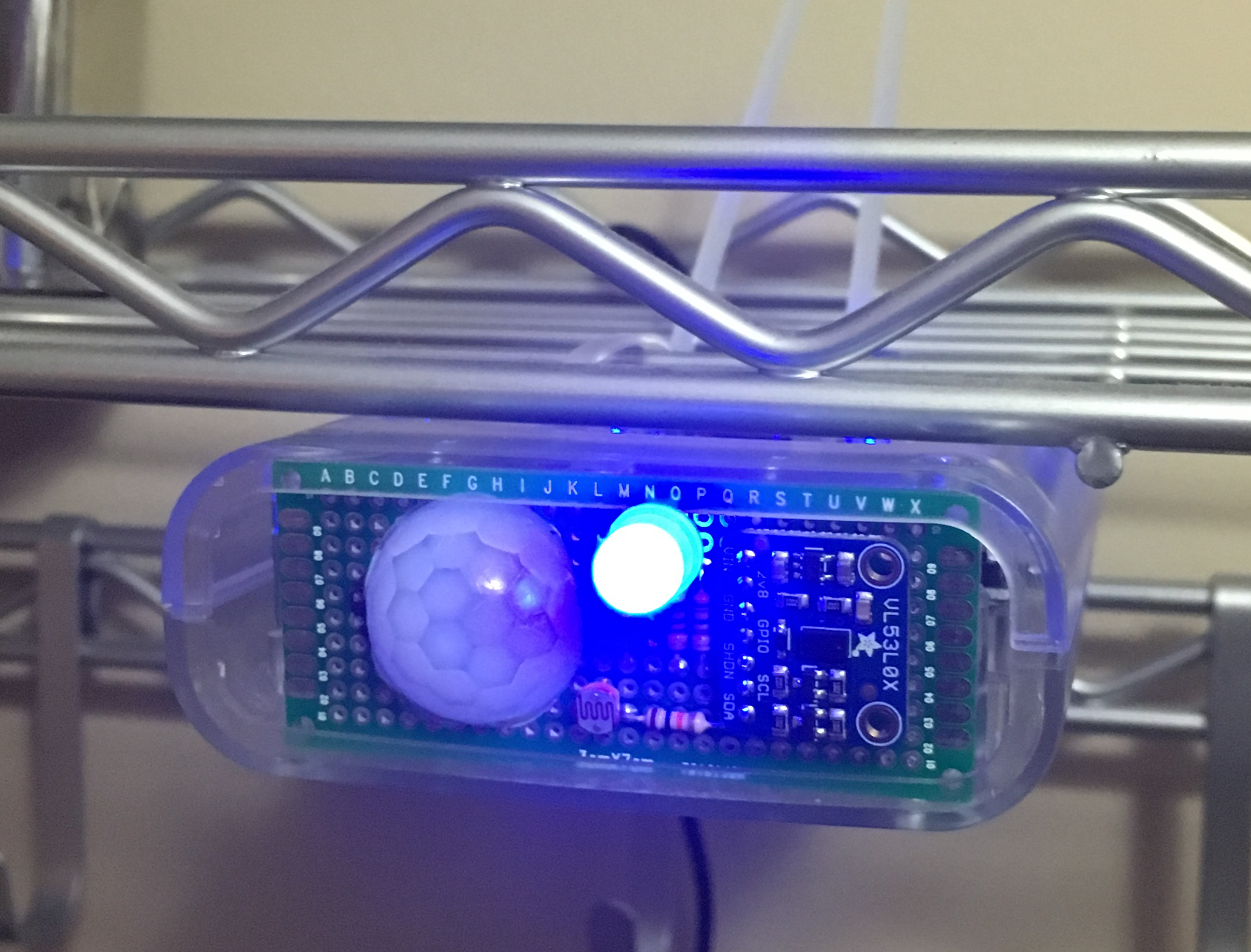
Nodes are the metaphorical eyes, ears, and hands of the smarthome system. There will be many of them in a home. Even in my modest apartment I will probably have about a dozen. So they need to be un…
idle owl
@umbral dagger Nice
umbral dagger
So far with dotstars it's just been the one on-board the Trinket M0.
Oh wait.. I started using neopixels with the original trinket.
idle owl
@umbral dagger That's really neat, the link you sent!
@umbral dagger The parts of it I can follow anyway. Still new to circuit diagrams and such. I've definitely never designed a PCB before.
umbral dagger
Most fun neopixel project was a "curtain" of 8 meter long strips of the 60/m type that was hooked into World of Warcraft to create ambiant light that reflected the colour scheme of the zone you were in.
idle owl
Wow. Nice!
umbral dagger
That was a serious hack.
carmine basin
@umbral dagger I just read the write-up. Very nice job!
umbral dagger
They're pretty basic, but they work well enough. I have 10 of them around the apartment feeding into a central system currently running on my linux workstation, which then controls HUE lightbulbs. I never have to touch a light switch 😃
idle owl
@umbral dagger That's great! We always talk about doing home automation, but we haven't gotten around to anything past our smart thermostat.
umbral dagger
@idle owl I have neopixels on a couple of the units: a dense m long strip under one kitchen counter, and a small 8 led strip over where I make coffee. Those also have a laser distance sensor so they know when someone is close.
idle owl
@umbral dagger Yeah I saw that. I was actually wondering the other day what PIR meant. I learned that from your write up. 😃
umbral dagger
@idle owl I.e. you walk up to uit and the spot/undercounter light comes on. I drive them full on white so it's nice & bright.
idle owl
Nice!
formal plover
@idle owl @umbral dagger I have a fun home automation project I made using a Raspberry Pi and Zwave GPIO daughter card
umbral dagger
@idle owl The problem with the PIRs I'm using (cheap ones off Amazon, but the same as what Adafruit sells) is that they watch a full cone... so they can see movement on the floor in most cases. I.e. the cat.
idle owl
@umbral dagger Yeah our cats trip the smart-home sensor from time to time. I know what you mean.
formal plover
idle owl
@formal plover That's neat!
umbral dagger
@idle owl I'm thinking of using somethign like https://www.adafruit.com/product/3538 to differentiate people from pets.
Add heat-vision to your project and with an Adafruit AMG8833 Grid-EYE Breakout! This sensor from Panasonic is an 8x8 array of IR thermal sensors. When connected to your microcontroller (or ...
idle owl
@umbral dagger That would be a really slick way to do it
Do we have an Intro to CircuitPython guide anywhere yet? I'm finding specific protocol basics and hardware basics, but not a simple intro. I thought there might have been one and I just can't remember where.
umbral dagger
@formal plover Neat
formal plover
@umbral dagger thanks!
delicate pike
Like an abreviation ?
formal plover
@idle owl the readthedocs
idle owl
@delicate pike Nope, it means interesting or nifty.
@delicate pike As long as nifty is also a word you know. If it's not, that only half helps.
umbral dagger
@delicate pike "Neat" is like "cool" or "awesome" in this case.
idle owl
@formal plover We were talking about those though and how they're not really aimed at true beginners. They have examples and some explanations but it's not like a guide.
umbral dagger
@formal plover This just randomly crossed my twitter feed: https://makershare.com/missions/z-wave-challenge
formal plover
@umbral dagger Haha, what are the odds
@idle owl the per board guides might be considered "intro to CircuitPython". There's variations between each board. It's hard to make a singular guide.
idle owl
@formal plover That's what I'm finding. I'm trying to figure out how much to tie into my learn guide. I'll take a look at the guide for the CPX which is what this guide is for. I was running into a wall because I was trying to tie too much into one thing. I need to just provide some resources and move onto the next part of it.
formal plover
@idle owl I'd stick with working the built-in NeoPixels and sensors. Then move onto using the pads.
sick creek
i put Windows 10 iot core supported ones and there was python if you want to look the link is in #general-chat
idle owl
@formal plover I have most of that sorted, I just needed to declde how far into "CircuitPython Basics" I needed to go. It's a learn guide for a project I did, not anything related to the APIs.
umbral dagger
Is there a way on the SAMD21 to do something like a deepsleep on the ESP8266 port?
formal plover
@idle owl hmm well if we're going in with the assumption the end-user doesn't know anything about python syntax to begin with... Then perhaps cover functions, variables, loops, if then statements etc
@umbral dagger yes, I believe so.
umbral dagger
@formal plover I have yet to find it 😦
formal plover
@umbral dagger I have it bookmarked somewhere, I'll have to check later when I am at my PC. I think it's part of the machine module.
idle owl
@formal plover I keep assuming that they will be starting from nothing, because when I started this project, I was a basic beginner and had to learn all of it. I thought it would be silly to duplicate something already written up and maybe as much was hoping it already was so I didn't have to. The code for the project, that it strarts to cover uses that stuff anyway, so you'll have a way to learn it by the end of the guide too.
formal plover
Import machine
Machine.sleep or something like that
sick creek
delay with the time
formal plover
@idle owl gotcha. I'll scan through the learn guides and @timber lion videos and let you know. Tony D has covered some of that stuff in his videos I think.
idle owl
@formal plover I already linked his Getting Started with CPX and CP video, that's how I learned to connect to the REPL and get CP installed on the CPX. I think if I link a couple more resources, I'll be happy with it.
The REPL isn't required for the project but the code is all written to give feedback in the serial connection. Helps so much to have it.
formal plover
That's micropython, but the machine module works on my ESP8266 running CircuitPython
delicate pike
I think that best things for beginners are videos
idle owl
@delicate pike For a lot of people, yes. But there are many different learning styles and for some people, reading is a much better solution. I already have a video included, so it's good to know that it was a good idea!
formal plover
The built-in rtc on the ESP8266 does have weird problems I'll warn you @umbral dagger
delicate pike
A verry good one @idle owl a lot of people have difficulties with abstract concepts once they got the idea they can go to more specific things with reading
I mean that a text have to be methodical when a video goes to the essential
umbral dagger
@formal plover Bad wording on my part. I saw it opn the ESP... I would like it on the SAMD. I want it to wake up every ~ hour to check a sensor. And it will be powered by a small (500mAh) lipo.
formal plover
@umbral dagger oh wow, nah my bad. I misread. Yeah, pretty sure there is still though. If not you will have to sleep it with an external RTC.
floral dagger
@idle owl I looked for a LOOOOONG time for some very basic intro stuff, and there's just not much out there. Most of the very basics that I cobbled together came from micropython tutorials and trial and error.
idle owl
@floral dagger The per-board instructions have some intro stuff in them, but it's per-board so if you're not using something specific, you wouldn't think to find it.
floral dagger
that's true
idle owl
@floral dagger But that's one of the things we're all definitely working on. I was with you when I started. Cobbled and fumbled a lot.
floral dagger
I think what it is, is like a lot of things. Once you get past the very basics, they become so obvious to you that they are just assumed knowledge, and we forget how valuable that one little tidbit could have been to us early on.
You see it a lot in game mechanics where the devs tested for so long with an awkward control scheme that it became second nature. By time of release they forgot it is even an issue
idle owl
@floral dagger That's exactly what I'm doing with this learn guide is trying to have that tidbit available for anyone else who happens to sail the same boat.
True!
umbral dagger
@formal plover Actually, I believe this will do what I want admirably: https://www.adafruit.com/product/3435

With some development boards, low power usage is an afterthought. Especially when price and usability is the main selling point. So what should you do when it's time to turn around and ...
formal plover
Yes, it will. I won the TPL5111 on Ask an Engineer lol @umbral dagger
@umbral dagger I'd rather rely on a breakout than what's built into the board.
manic glacierBOT
Generalization of #276 and #277.
After deinit(), an AnalogIn, ``AnalogOut, PDMIn, etc. object should no longer be usable. Attempts to use it should raise an exception. This can probably be marked in most cases by setting the internal struct pointer to NULL. Then check for that NULL` before any operation.
delicate pike
🤓
 marble talon
@umbral dagger If you happen to find a SAMD sleep feature lemme know, if you remember? I've got a similar project in mind. I have a LoRa Feather and want to send data from my garden. Trying to sip power and avoid wifi.
delicate pike
So a delay can't make it ?
formal plover
@delicate pike nope. Sleep or delay will make something wait, but won't do anything with sleeping the board or putting it in low power mode
delicate pike
I see
@formal plover The project that I have have to operate a small motor for few seconds every on,e or two hours, what kind of solutions I have ?
@formal plover I intend ti do it with a 16F84
floral dagger
@delicate pike looking at the datasheet on that, you do have a sleep mode of some sort.
google 16f84 datasheet, and there's a PDF that will explain a lot
delicate pike
Thansk a lot @floral dagger do you have an idea about how I can wire a raspberry pi to inject a program in this kind of PICs ?
floral dagger
Not a clue
delicate pike
I found it thanks @floral dagger
floral dagger
groovy. Lots of good info in there. Is there a reason ou can't just do it directly with the raspberry pi instead of using the chip?
delicate pike
Thanks a lot @tulip sleet I think it will be helpfull thanks again
What chip ?
Lol
I have to read it to the end
umbral dagger
@marble talon I think I'll use this: https://www.adafruit.com/product/3435
marble talon
@umbral dagger Yeah, I saw that come across the new releases. I'll consider it if my power consumption is too high. Was hoping for an onboard feature. Oh well!
umbral dagger
@marble talon I agree. The Trinket is perfect for what I need, which is simply to wake up occassionally (every hourish likely), check a reading and go away again if it's in range. If the reading is out of range, it'll go into an alert loop (beep and flash every few seconds) until the readingt is back in range, at which time it'll go back to the "wake every hour" cycle.
@marble talon Sounds like a very similar usecase.
umbral dagger
@slender iron Hypothetical question: other than tweaking the board config header and linker files, is there anything preventing swapping the 2M fSPI Flash for a bigger one (e.g. a 4M like the https://www.digikey.ca/product-detail/en/cypress-semiconductor-corp/S25FL064LABMFI010/428-4047-ND/7034902)?
manic glacierBOT
Could you add a TODO to replace this eventually, or have this call a HAL routine that returns the frequency? Could call common_hal_mcu_processor_get_frequency().
Based on my Googling, SysTick units are dependent on clock frequency, right? The SysTick timer is decremented on each clock cycle. So for instance at 48MHz, one tick is 1sec/48e6. So are you mixing microsoeconds (us) with SysTicks units?
tulip sleet
@umbral dagger Nope! If you get above 16M, you
won't have to use FAT12 either, which might fix some write-delay problems we see on Windows and Linux.
formal plover
@umbral dagger someone hacked a trinket and did that.
umbral dagger
@formal plover I hacked a 2M SPI Flash onto a Trinket M0. Someone asked if a bigger flash would work, which got me thinking about supersizing a Feather M0 Express. https://daveastels.com/2017/09/01/trinket-m0-express-hack/
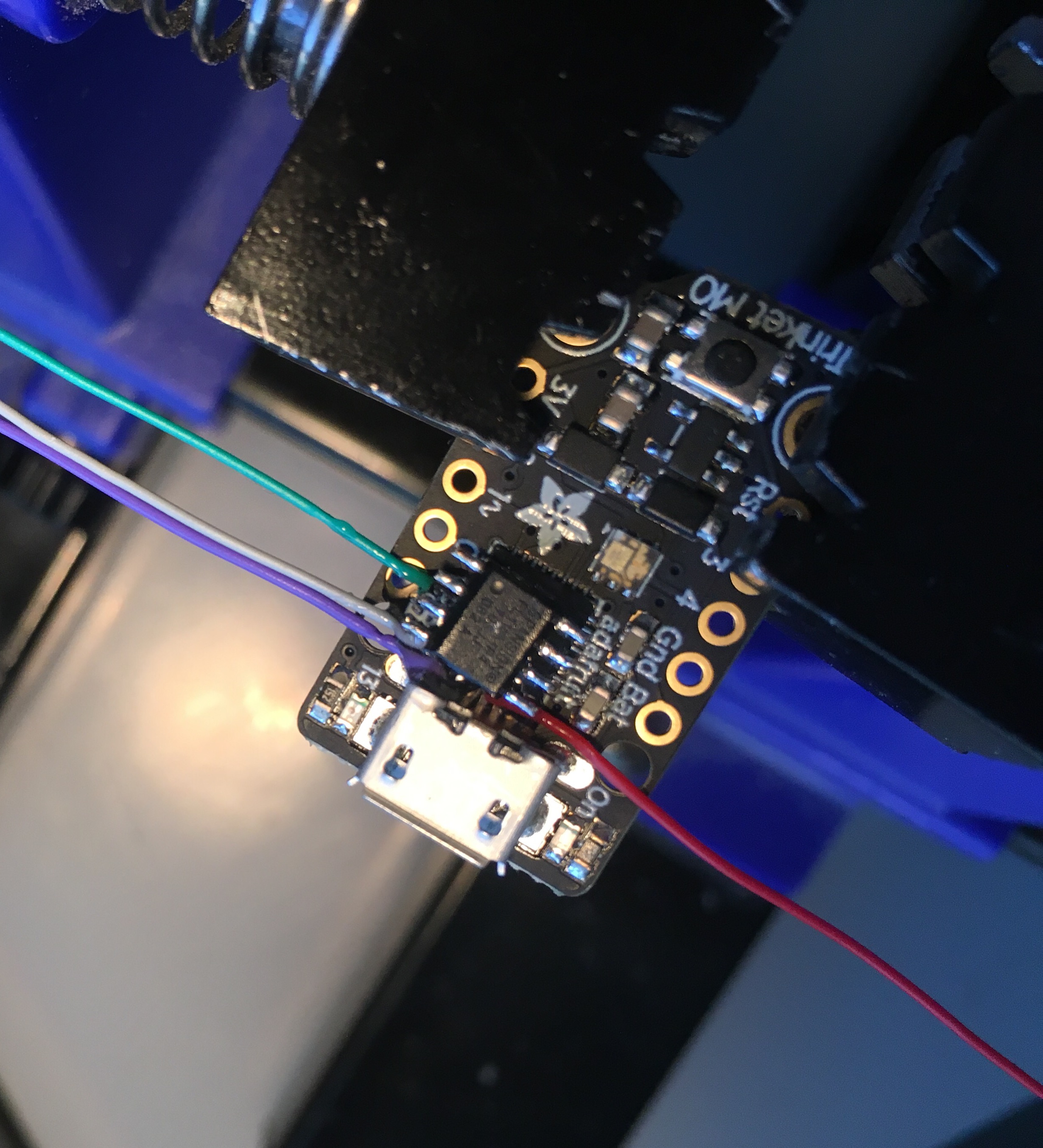
Introduction I am a huge fan of the SAMD21 boards that Adafruit is producing. What a huge step up from the ATMEGA328 or 2560. 48MHz, 32 bit ARM Cortex-M0+, and loads of flash and ram. I have severa…
formal plover
@umbral dagger ah, that was you! Haha
umbral dagger
@formal plover That’s why I know which files need to be tweaked 😃
delicate pike
Good night every body 😉
formal plover
@umbral dagger Derp Derp. I've been popping in and out too much, not paying full attention. Sorry.
formal plover
I can't import a class from a module/lib.... Still messing with this i2c stuff
slender iron
@umbral dagger @marble talon making time.sleep() smarter for power is on my long todo list
I glanced at it when I did time.sleep for the SAMD51 but didn't add anything
@umbral dagger it shouldn't be too hard to support larger flash
manic glacierBOT

Thanks for the review! I'll get to this in a few days after Maker Faire craziness.
umbral dagger
@slender iron Cool.. I have some 8Mb SPI Flashes on order 😃 I may call it "Ostrich Feather M0 Express" 😃
slender iron
😃
umbral dagger
@slender iron Any insight on why the Express boards use a 2Mb chip?
slender iron
we thought two megabytes would be plenty
idle owl
@slender iron Then you find out...
umbral dagger
@slender iron My endgame is to put a version of scheme on it. Likely bytecompiled so it can be executed directly from flash.
@slender iron To avoid having to parse into heap based objects.
Pondering... I wonder if one could use an image-based approach to run directly from flash, and thus circumvent the RAM limitation.
Then just keep dynamically created objects in RAM.. with fairly aggressive GC.
slender iron
thats kinda how circuitpython works
umbral dagger
I think byte-compiled would be the most flexible and performant approach.
With the .mpy files?
umbral dagger
I have most of a Scheme runtime built. My target was ARM Cortex from the start. Leveraging the infrastructure from CP would be ideal: the flash drive approach, and the SAMD/express plarform.
slender iron
sounds awesome @umbral dagger !
manic glacierBOT
I didn't try to review the changes - it's just too massive. I might go through some the diffs later, but I wanted to make master be the real dev branch now. It's cooked enough now that you have the REPL and blinky working! Congrats!!
tulip sleet
#circuitpython-dev Note that the master branch of https://github.com/adafruit/circuitpython is now well and truly the 3.0.0 development branch. The asf4 branch has been merged in now that @slender iron has gotten the REPL and blinky working with ASF4. It is cooked enough. Congratulations @slender iron !!
If you want to make changes to the 2.0.0 release for your own purposes, branch off the 2.x branch. That branch is for 2.x fixes and enhancements.

GitHub
circuitpython - CircuitPython - a Python implementation for teaching coding with microcontrollers
 manic glacierBOT

The problem with turning the pull-ups on is that then it makes it impossible for the I²C bus to talk to devices that use different voltages than 3.3V. Normally the pins are open-drain to make that possible. There can also be some bad interactions with pull-up resistors already included on many modules and shields — they would all add up, at some point making it impossible to pull the pin down. Granted, that particular problem is also present without the internal pull-ups, but it's made worse ...
Handling buttons is a very common task for microcontroller boards, but doing it properly is a surprisingly complex and advanced topic. We need interrupts, we need timers, we need software de-bouncing, etc. Instead of exposing all this complexity to the users, and letting them write the button-handling code themselves, I think it could make sense to have a buttons module built into CircuitPython, which could be configured to handle buttons connected to the GPIO pins (and built into some of t...
manic glacierBOT
I updated this to mark "4-Digit 7-Segment LED Matrix Display FeatherWing" as supported, since the HT16K33 dirver handles it.
Seems like we only have radio, ethernet, GPS and music featherwings missing. I have the radio and music featherwings, but they are a bit complex, so I haven't written drivers for them yet. I also have the GPS module, but since ESP8266 only has one UART that is already used by the REPL, I didn't wite a driver for it.
There is a driver for the motor shield for micropython: https://github.com/mwm/Micropython-Drivers/blob/master/motors/AFMotorShield.py
lofty topaz
Hello People of Adafruit Discords CircuitPython room. I have been reading a book that I think anybody trying to learn Python would benefit from immensly. I probably shouldn't promote things of such nature on Adafruits Discord room but the value of this book is worth it. It's Python Cookbook: Recipes for Mastering Python 3. It's an O'Reilly book by David Beazley and Brian Jones. There is an incredible amount of valuable code examples that clearly describe features of Python that many of us may not be aware of.
In fact, I'm wondering if a room for book discussions might be in order. Books are where it's at. Yes, the internet has it all as well, but books still reign supreme in my world.
MAKE a nice day. ><>
drowsy geyser
@lofty topaz I have a top o' the line Kindle that I use for a lot of reference materials. For fundamental learning, though, I prefer physical books! I just can't transport those books around with me everywhere I go. Thus, I have an electronic copy of the Python Cookbook, but a physical copy of "Deep Learning" so I can stare at the page longer. 😃 I have an electronic version of my Learning Scala book since I need it both at home and at work. My "Elements of Rocket Propulsion" and "Spacecraft Systems Engineering" textbooks, though, I have at home in physical form (actually, I was in the middle of moving when I got into actual spacecraft design, so I have both an electronic and a physical version of Spacecraft Systems Engineering!)
lofty topaz
@drowsy geyser I to have a Kindle HD. Which is where I have ALL if my books. Wether they're physical or electronic doesn't really matter to me. It's just the fact that they are available to me to read or peruse when needed or wanted. I do have a rather large library of physical books accumulated over the years of my career, but ever since the Kindle came out, I buy nothing but ebooks for it.
I must have at least 300 books on my Kindle.
Ranging from software to hardware to writing to crafting, etc...
By the way, isn't it 3:30am where you are.
drowsy geyser
Unfortunately, you have to be a server admin to create a channel (I just tried). @river quest or @slender iron, when you have a moment, may we please have a #bookdiscussions channel for on-topic discussions about learning and reference books? I would start by pinning some posts with lists of "must have" electronics books (Art of Electronics, Electronics for Inventors, Bunnie's books, Make books, etc.).
lofty topaz
Wow, do you think they would actually go for that?
drowsy geyser
@lofty topaz It is indeed 0330!
lofty topaz
You must have some clout with Adafruit. Being a Community Helper and all.
drowsy geyser
@lofty topaz The worst thing that happens is they say "no." It doesn't hurt to ask, and creating the channel only takes about eight seconds.... 😃
drowsy geyser
Exactly. Now, they're both just a tad busy right now, so it might take a few days longer than usual, but it might happen. I think it's a good idea!
The upcoming ABC book. Simon Monk's books. Lutz's "Learning Python" book.
Effective Python.
Learning Pythong The Hard Way.
lofty topaz
You see, in my opinion, Python is a great high level language. It's just that it is so high level, developers can get confused very easily by the criptic syntax of rvalues when programming complex data manipulation algorithms. In other words, Python is easy to learn, but very difficult to master.
Yet, once mastered, you can become a powerfull developer.
drowsy geyser
I think Python also has a shorter path to "productive use" than more traditional languages (cough C++) or functional languages (cough Scala).
Python is an ideal language for learning computer science and quickly becoming productive in "real world" applications - look at the Circuit Playground Express, for example.
lofty topaz
Yes, I have a CPX developer edition given to me by Adafruit. They are so generous. But MakeCode is not Python and Javascript belongs where it's at. The web.
drowsy geyser
Ok, we agree about MakeCode and Javascript.
It's like programming the Sphero! That graphical drag n drop programming environment is not a "real" programming language. There's a clear distinction between toy programming languages and production programming languages! The notable exceptions being NetLogo and Processing, IMHO.
lofty topaz
All I'm trying to say to people about Python is that learning to use it is easy. Just like any other language, except C++, but to be a true Python programmer requires the additional knowledge of iteration, comprehensions, regular expressions, lambda's, sets, tuples, lists, dictionaries, mutability, and so much more that you could spend years using Python and not know all of its capabilities. And that is a good thing, don't missunderstand, which is why I think there needs to be more discussion of the language features itself than just a language for the latest and greatest hardware.
It's one thing to teach Python to people, it's quite another for those same people to continue to use Python.
drowsy geyser
Totally agreed!
I still haven't "mastered" python, IMO. I don't effectively use comprehensions, for example.
And I'm somewhat hobbled by my "old school" imperative programming background (assembly, compiler design, EBNF specification, C/C++, etc.)
lofty topaz
Whether your use of comprehensions is effective or not isn't my point. You do use them, and others should recognize the use when seeing the code. Instead, I've seen people say, "What is THAT?". Only because they haven't had to use that feature of the language.
Your "old school" background is going to do you good when considering how "pointer" heavy Python is. Don't think for one minute that iteration isn't done without the use of pointers. If you've done compiler development, then you're aware of the Linking and Binding processes prior to generating the executable. Those two procedures alone are so pointer heavy that knowledge of them can only help in Python.
I'm rambling, RA's kickin' my butt. Sorry.
drowsy geyser
Ahhhhh enlightenment 💡
Sorry to hear about the RA this morning, buddy. I wish I had a magic wand to fix it.
You're right about the language, of course. A strong programming background means you can teach yourself effectively by picking up a book (like I'm doing with Scala).
You're at a disadvantage if you try that without formal training.
drowsy geyser
Funny story: I got bored 2/3 of the way through my compiler design class and asked the instructor if I could do a project instead of finishing the class. He said, sure, but the grade will be dependent on the compiler design skills I illustrate. I wrote a cross-compiler so you can run Cray-1S assembly language programs on a Dual VAX-11/780 (I'm showing my age). Got an A though. 😃
No, but close enough. 😃
lofty topaz
The VAX, PDP-11, IBM 360/370, all those mini's and maxi's are gone. Devoured by the micro, the PC. And in 1981, when I first bought my first PC, serialnumber 352, I told everybody that their mini's and maxi'a where through. Their future was finished. Nobody beleived me then. Sometimes the Ol' crystal ball makes things so clear you just can't ignore what you foresee.
drowsy geyser
True! But then I've had some major crystal ball failures. I still remember my friend Davey calling me to his office one day to show me "this new markup language from CERN." I looked at HTML and the example web browser and said, "so what, it's another documentation language. Big deal." LOL!
lofty topaz
That's funny. But your right, just another Markup. It was the Browser though that was the kicker. The killer app for the internet. Remember, the internet is not the WWW.
There I go, saying "remember". Gotta catch that better. Sorry.
Maybe an exception handler in my cerebral cortex might work. 😃
drowsy geyser
Oh, totally. Remember, my first e-mail address was prm@arpa.net! I clearly remember participating in the arguements about whether we should allow a ".com" TLD.
lofty topaz
Hey, Dan's here. That dude knows his stuff.
drowsy geyser
Aye!
Now you have me thinking about compilers. And I have a work project that could be solved with a compiler design....
lofty topaz
LOL, quick question, Ever break the build?
tulip sleet
I don’t have admin privs to create a channel, but I’m sure @slender iron would consider it. Maybe something more general though, like #edresources. #bookdiscussions could be about the last novel you read.
I’m out and about and won’t be on much the next couple of days. I’m not at Maker Faire.
drowsy geyser
Fair point, @tulip sleet . I messaged Scott and asked him so he can consider it at his convenience.
drowsy geyser
Yay. 😐 Just cloned "circuitpython" and am starting to drill down into NeoPixel code....
delicate pike
Good morning every body 😃
solar whale
@opal elk I updated the temperture logger example . Added the error checking as in your guide and tweaked a few other things. Mostly played with the blinking as an indicator. Only logs every minute now. Take a look when you have time and let me know if you see any problems or have suggestions for additions. https://github.com/jerryneedell/m0_temperature_logger

GitHub
m0_temperature_logger - sample code for loging cpu temperature to M0 file system
opal elk
Cool!
umbral dagger
I ordered some 8Mb SPI flash chips. Will supersize a Feather M0 Express & write it up when they arrive (backordered).
manic glacierBOT
 formal plover
@drowsy geyser @lofty topaz looks like you guys got your book channel! Lol.
I have a ton of make magazine Arduino and Raspberry Pi cook books I got in a couple humble bundles... They are PDF's, wonder if I'm allowed to share those or if it's considered piracy.
 tacit glade
Quick question for anyone working with CP source: What IDE do you use? I opened it up in CLion, but it's having trouble figuring out how to locate all the libraries 😕
delicate pike
Thanks for the reference @lofty topaz it's a great book
Hi @formal plover Can't you share them with the "fair som'thing" ?
"Fair use ?"
formal plover
@tacit glade that's a good question for @tulip sleet or @slender iron . I do everything in a text editor. I test on the board in the repl.
I don't think there is an official IDE per say.
drowsy geyser
@mmabey#0446 Vi. 😃
sick creek
rocket VI
formal plover
There ya go. I knew someone had an answer. Thanks @drowsy geyser
Wait, Vi, that has to be a joke. Lol
drowsy geyser
Nope. Not as a build environment of course (I haven't gotten that far).
sick creek
VI
drowsy geyser
LOL!!! This is true!
sick creek
VI as virtual intelligence
drowsy geyser
@formal plover I can't tell you how many times I've been in word (or the Arduino IDE) and instinctively hit :wq
tacit glade
@formal plover Oh actually I was talking about the C source code of CP itself, not the Python scripts that run on the board
formal plover
@tacit glade I figured that out after I posted lol. That's why I pinged Scott and Dan. I'm like oh man, this is going to go over my head
drowsy geyser
Atom is very popular with the Ada-crew.
I will probably create my build toolchain in Visual Studio 2017.
tight flax
Also, EMACS us really, really useful when writing Verilog and VHDL - instantiating blocks is automatic. Saves a lot of time.
Integrates directly with compilers of all sorts, too
tidal kiln
butterflies
solar whale
@opal elk Is the guide you wrote up for the Temperature logging going to become a learning guide or something like that? Would you mind if I copied much of it into the README file of my example? Do you have a github usename that yo uwould like me to use to credit your work on it or is there some other address you would prefer?
opal elk
I’m Sigafoos on github. I did write a learn guide which is still awaiting moderation. I don’t mind!
solar whale
@opal elk thanks!
tulip sleet
Neither Scott nor I use an IDE. I use emacs and Scott uses Atom or Sublime, I think. I was going to use ctags but Scott told me about silversearch (command name is “ag “), an enhanced grep.
I have used emacs for 40 years. I used vi when I was a grad student at Berkeley. I use an IDE for Java.
formal plover
@tulip sleet you truly are the real deal. Very impressive background; I have the up most respect for you. Thank you for the work you do and how involved you are with the community on Discord.
sick creek
as Arduino get CLI so next step is Circuit Python CLI
@opal elk and your project could be sigfox
solar whale
@opal elk just found a minor correction for the temperature/files sytem guide. the example should work on all M0 boards using D0 and D13(LED) but on the CPX, the SLIDE_SWITCH can be used instead but it named SLIDE_SWITCH or D7 (not D0). Also D0 is not on the CPX silkscreen - it isl labelled A6/RX (just to keep people on teir toes).
sick creek
@drowsy geyser me doing VIsual Studio 2017 and VS Code
fading solstice
@tulip sleet I have playing with putting up a Ubuntu desktop adding a developement environment. I was able to build circuitplay ground, for board=metro_m0_express. But when i copy it to the actual board, it only partly works. Is the master broken right now, or is it my environment?
tacit glade
@tulip sleet thanks for the info. I was mostly looking for something to help me figure out where variables are defined so I can get a better lay of the land more quickly. Inspection is always a plus too
tulip sleet
@fading solstice we just merged a dev branch into master that is in the early stages of using the asf4 library. Use the 2.x branch instead.
fading solstice
That could explain my issues. I will pull from 2.x
tulip sleet
@tacit glade you might try netbeans, which deals well (in my experience) with arbitrary makefiles.
@fading solstice right. Just git checkout 2.x
fading solstice
ok
Yes, @tulip sleet after checkout i rebuilt metro_m0_express and copied it over and it works.!
tulip sleet
👍
solar whale
@tulip sleet @slender iron I found an error in the "main.py" example that is in the distribution for the trinket_m0 but I can't find it on github to open an issue or a pull request. Do you know where it is or who I should send the fix to . Thsi is an old bug the function wheel uses " [ ]" for the returns and that does not work with setting neopixels. It ahs to be "( ) " . oddly, it seems to work for the dotstars so it may be a funky python thing, but using "( )" works for both. Anyway let me know who to follow up with.
@idle owl that is wierd - the square brackets do work for the dotstar but not for the neopixel - it must be a subtle pythonism - I guess that s a project for tomorrow.
idle owl
@solar whale Especially weird because the Dotstar drivers and such were essentially copied from NeoPixel.
solar whale
@idle owl nice try today. I wonder is there is an issue with thsoe neopixels ...
idle owl
@solar whale Thanks... I'm wondering the same. I couldn't replicate it at all. Even with my own weird code.
@solar whale I did find out the issue that @drowsy geyser and I were having with the neopixels is specific to the ring, not generalised to all NeoPixels.
solar whale
@lament tree you might want to make a post to the forum to see if anyone at adafruit support knows more about the neopixels you are using.
@idle owl I guess thats good news....
idle owl
@solar whale It's news anyway, lol...
solar whale
well -a at least I got my jewel running on my trinket today - that s been on my todo list!
idle owl
Excellent!
floral dagger
stupid move of the day....sat forever wondering why my string parsing wasn't working. I must have gone through the docs a million times. The python was right! turns out that problem was that I was supposed to be using javascript. 😱
javascript interpreters don't handle python well at all in case you were wondering
idle owl
@floral dagger Public Service Announcement!
formal plover
PSA it's too hot in Michigan today.
 silver tapir
I'm having trouble using the feather motor wing with an ESP8266.
Following the tutorial here https://learn.adafruit.com/micropython-hardware-pca9685-dc-motor-and-stepper-driver/circuitpython

How to use the PCA9685 DC Motor & Stepper driver with CircuitPython!
Using bitbang instead of busio
import board
import bitbangio as io
i2c = io.I2C(board.SCL, board.SDA)
from adafruit_pca9685 import motor
motors = motor.DCMotors(i2c)
Traceback (most recent call last):
File "<stdin>", line 1, in <module>
AttributeError: 'module' object has no attribute 'DCMotors'
Any suggestions?
The board is a freshly firmwared feather, running 2.0.0
floral dagger
import motor?
delicate pike
Is there L293 on the board ?
silver tapir
@floral dagger that would be this line "from adafruit_pca9685 import motor"
floral dagger
oh, duh...yeah I see it now.
silver tapir
@delicate pike It's using the motor feather wing from adafruit, the one from the tutorial.
idle owl
@silver tapir I haven't worked with the ESP8266 boards. @solar whale and @formal plover are more experienced with it, but I'm not when they're available.
formal plover
@silver tapir I had the same problem the yesterday
silver tapir
@idle owl I have an m0 here somewhere, let me test it with it.
formal plover
@silver tapir I had to have the library directly in the lib directory, couldn't be within a folder
floral dagger
I'll be interested in seeing the answer. I have a PCA9685, and Huzzah breakout that I was just getting out to run the same thing
floral dagger
yeah...looks like I'll have to roll up my sleeves. I don't have that library
That's an odd place for that. PCA9685 is a pwm driver
delicate pike
Or maybe a variable déclaration problem ?
silver tapir
@formal plover If I do an ampy ls, I have "adafruit_pca9685" on the / folder of the ESP8266.
@formal plover What "lib" directory?
formal plover
@silver tapir you need to create a directory called lib
For your libraries
Maybe that's just for organizations sake, but that's how I do it
formal plover
@silver tapir
Adafruit_Circuit_PCA9658 is the folder then just pca9685 is driver/library.
I had a similar problem with the I2c libraries yesterday.
floral dagger
@formal plover that was something I was just looking at too
silver tapir
@formal plover So If I ampy ls on my board I should have "/lib/" and "/lib/adafruit_pca9685" and inside it the files?
formal plover
It needs to be /lib/actual library not folder
When I had /lib/folder/library
it would never work
floral dagger
@formal plover can you post a link to that/
formal plover
Link to where I found the libraries for the stepper motor driver? @floral dagger
GitHub
Adafruit_CircuitPython_PCA9685 - Adafruit CircuitPython driver for PCA9685 16-channel, 12-bit PWM LED & servo driver chip.
These files are. Also 8 months old, so I'm not sure how well they work.
floral dagger
Yeah....the directory I was finding didn't have the motors fle in it
GitHub
Adafruit_Python_PCA9685 - Python code to use the PCA9685 PWM servo/LED controller with a Raspberry Pi or BeagleBone black.
ahhh...I was in the wrong spot lol
tidal kiln
>>> from adafruit_pca9685 import motor
>>> dir(motor)
@silver tapir what does the above show?
silver tapir
@tidal kiln ['name']
tidal kiln
seems like the module didn't get installed on the board completely
that class is definitely there:
https://github.com/adafruit/Adafruit_CircuitPython_PCA9685/blob/master/adafruit_pca9685/motor.py#L7
GitHub
Adafruit_CircuitPython_PCA9685 - Adafruit CircuitPython driver for PCA9685 16-channel, 12-bit PWM LED & servo driver chip.
silver tapir
While trying it in the /lib/ folder as @formal plover suggested, I get
ValueError: Incompatible .mpy file. Please update all .mpy files. See http://adafru.it/mpy-update for more info.
Let me try with the bundle.
tidal kiln
oops. sorry...gotta run now unfortunately. good luck.
silver tapir
Thanks for the help
formal plover
GitHub
Adafruit_CircuitPython_PCA9685 - Adafruit CircuitPython driver for PCA9685 16-channel, 12-bit PWM LED & servo driver chip.
Yeah from the bundle is probably newer
I just posted it again for no reason.
floral dagger
@silver tapir I'm not even getting as far as you, but I am using the older Huzzah, so I don't know if that has anything to do with it
silver tapir
Yey, now it works.
formal plover
@silver tapir awesome!
silver tapir
Should I post a bug to have someone re-do the mpy files in the individual release for the module?
idle owl
@silver tapir Nice!
formal plover
@silver tapir probably wouldn't hurt
silver tapir
Wil do then.
floral dagger
@silver tapir That's awesome! What did you have to do?
silver tapir
@floral dagger I erased the flash, uploaded 2.0.0 again and now I tried using the bundle. It has a lib/ with all of the modules.
GitHub
Adafruit_CircuitPython_Bundle - A bundle of useful CircuitPython libraries ready to use from the filesystem.
formal plover
@silver tapir good deal. Well I'm glad you're up and running now.
floral dagger
oooooh....ok. good call. I'll have to do that too then. Thanks!
formal plover
I should have noticed that wasn't from the bundle, sorry.
floral dagger
too funny. I would have been beating my head on the same wall in about 10 minutes @silver tapir great timing
formal plover
Teamwork makes dreamwork
idle owl
@formal plover And this place makes teamwork
silver tapir
Thanks to all, that was very helpful.
formal plover
@idle owl it sure does!
silver tapir
Yeah, everybody feeling the love in discord.
formal plover
We're like Oprah, except we're not giving away cars, just discord love.
silver tapir
Oh and just in case someone wants to play, this is an esp8266 circuitpython car, with a web server and a self-hosted webrepl.
https://github.com/fede2cr/CircuitPython_WifiCar

GitHub
CircuitPython_WifiCar - CircuitPython ESP8266 Wifi controlled Car
floral dagger
lmao...get out of my head
silver tapir
😃
floral dagger
doing almost the same thing. I'm using webrepl through websockets on a locally hosted page though
silver tapir
This one has a minimined compress webrepl so it fits nicely.
Is for kits to learn robotics, so it has to be simple and portable.
floral dagger
that's great @silver tapir I'm gonna have a look at that. I'll shoot you a link for what I am doing once I get it further along if you're interested.
amazingly similar projects
silver tapir
Now I'll add an accelerometer/gyro so I can turn by using degrees instead of time.
floral dagger
I have a small compass module I was going to use
silver tapir
And my goal is to have one of the cars act as an AP, the rest as clients, and have the AP broadcast it's orientation.
floral dagger
oh wow. I was building this as a client that a raspberry pi could access and control
ap...sorry
that amazes me. two random people from different parts of the country/world, both working on almost the same project at the same time.
silver tapir
Like with a joy bonnet? 😃 ❤
Pocket-sized fun is the name of this game, with the Joy Bonnet – our most fun Bonnet ever (no we didn't even think that was possible, either!). This Bonnet fits perfectly ...
floral dagger
that's in the works, yes. But will be adding a camera and OpenCV to the Pi, so it can do other stuff as well.
yeah I just got one with Adabox
silver tapir
Ohhh, double cool.
floral dagger
That's too cool,man. Keep us posted on how yours goes
silver tapir
Will do.
floral dagger
@formal plover You're using the feather huzzah aren't you? Are you powering it straight from USB?
formal plover
@floral dagger yup sure am. That's just because I've been testing things. Haven't created permanent a project for it.
I have a several LiPos though, if you need me to check something
floral dagger
Thanks. Was just going to try mine with it, but getting the same issues as before. I guess my usb is underpowered. Meh
Was just curious if that was common or just my usb
formal plover
@floral dagger hmm. Is it from a hub or directly from the PC?
floral dagger
Ooohhhh..i have a powered bun. I'll try that. Good thinking.
Hub...not bun. I hate autocorrect
formal plover
@floral dagger Haha I was just about to Google power bun. Lolololol
delicate pike
I'm back lol
slender iron
@solar whale email me about the trinket distribution stuff if its still outstanding
idle owl
@slender iron The wheel section at the top, with the new distribution, evidently has square brackets in it which causes it to fail to work with an external set of NeoPixels. I say evidently because mine was already all () and no square brackets and worked out of the box. @solar whale said it was the new version of main.py that ships with it that contains the square brackets in the wheel helper.
@slender iron You said email. I thought you said tell. Oops.
I'll show myself out, lol.
slender iron
yeah, my brain can't handle it. just email me so I can look later
idle owl
Totally fair. I thought it was an odd request given what you're up to
slender iron
@idle owl thank you for all of your help here. I just read through everything and love to see you all helping folks while I'm gone.
makes me feel warm and fuzzy about discord
idle owl
@slender iron Of course! You're welcome! I'm really glad you feel that way. Now I have my own warm and fuzzy 😃
slender iron
😃 yup I do. It was awesome to meet a few folks today too. Hope to catch up with more folks tomorrow
I honestly did show massimo discord when I was talking with him
but so much of making it work is time and not the tools
idle owl
Understandably. That's where having a community that wants to be a part of helping it grow has to make it so much less work.
formal plover
@slender iron awe shucks, now I got the warm and fuzzies
slender iron
you should @formal plover 😃 You are a huge help too
formal plover
@slender iron thanks! 😃
idle owl
This is why you test your code.... The API I wrote broke my project code, lol.
slender iron
all in a day's work @idle owl
idle owl
@slender iron lol, yes evidently. I don't even think the project can function the same way anymore. I'll try to get around it for a little while, and then most likely accept that it will just function slightly differently and go with it.
slender iron
is it the tone playback thats different?
idle owl
Yeah. I was doing it so that it would play whatever one you were holding down most recently for the entire duration of the touch. I can't import speaker_enable anymore and still do adafruit_circuitplayground.express because the pin reads as in use.
idle owl
Now it would mean that it will play the tone for a set duration and then sleep.
Yeah. I'm trying to figure out if I can adapt the previous code to use circuit.play_tone. That's what I'll do for a while and eventually accept that it won't work. 😃
slender iron
we could tweak it to be start_tone stop_tone
idle owl
This is what I had if not sample.playing or ( (sample.playing and not sample.frequency == 8000)): sample.frequency = 8000 sample.play(loop=True)
So it checks to see that you're playing literally anything else or nothing, and then plays the tone for the duration of the touch event.
I'll see what I can do with the API.
I'm not used to thinking like that yet.
slender iron
yup yup, you are onto it! keep up the good work
idle owl
@slender iron I'm emailing you about two things. Neopixel rings and I think we broke the Circuit Playground Express API ReadTheDocs page. I'm mentioning here in case you wanted to deal with either of them now. (I am assuming no, hence the email.)
slender iron
@idle owl email is perfect. thank you so much
idle owl
@slender iron Absolutely!
slender iron
😃
idle owl
@slender iron Are we doing the Weekly on Monday?
slender iron
I hope to do it from HQ
idle owl
Fancy!
slender iron
I should see @tulip sleet tomorrow night so we'll sort it out then for sure
idle owl
Excellent. Thank you!
slender iron
np 😃
manic glacierBOT
I've noticed an odd but somewhat nasty issue that appears to be reproducible. With Circuit Playground Express (but perhaps other M0 express and maybe M0 basic boards) if my project uses a lipo battery that runs low enough to brownout and turn off, after I swap in a new battery the entire SPI flash is erased and my old program is gone. It's happened twice in a row with my arc reactor project, and I have a feeling it always happens when power goes low like this. My suspicion is in the low vo...
manic glacierBOT
This is a bit of a self-inflicted wound, as the audioio module is not normally enabled on the Trinket M0, so this is obviously very low priority. But I really wanted to try it, so I compiled the 2.x branch of the firmare with touchio, analogio, storage and neopixel_write disabled, and with audioio enabled. Here's the change I made to mpconfigport.h:
diff --git a/atmel-samd/mpconfigport.h b/atmel-samd/mpconfigport.h
index e99d190be..ff480f39d 100644
--- a/atmel-samd/m...
Did you try explicitly using deinit() at the end of your code or possibly use the context manager as noted in: http://circuitpython.readthedocs.io/en/2.x/docs/design_guide.html#lifetime-and-contextmanagers. This was recommended in: http://circuitpython.readthedocs.io/en/2.x/shared-bindings/audioio/__init__.html
I just tried wrapping the code in a context manager, and that seems to be preventing the crash. I will try with the deinit now.

 hollow tartan
@meager fog @split ocean @slender iron @Kurt H @fierce oar To celebrate WorldMakerFaireNY2017, I have worked REALLY hard thru the night and have cracked the puzzle of using Python 2.7 with pip, esptool, and esp8266-20170612-v1.9.1.bin onto a NodeMCU (4MB) using a Windows 7 desktop. MircoPython! !YEAH! Oh, and BTW, no wire jumpin' or button pressin' either.
Oh, need proof? I thought you might. LOL.
C:\Users\William\Downloads>esptool --chip esp8266 --port COM5 erase_flash
esptool.py v2.1
Connecting....
Chip is ESP8266
Uploading stub...
Running stub...
Stub running...
Erasing flash (this may take a while)...
Chip erase completed successfully in 5.8s
Hard resetting...
.
Tested with Putty. It worked! Yeah!
solar whale
@idle owl I finally understand what was happening with the wheel function and the different response by dotstar and neopixel. If you look at teh drivers set_item, the dotstar has: if type(value) == int: r = value >> 16 g = (value >> 8) & 0xff b = value & 0xff else: r, g, b = value but he neopixel uses ``` if type(value) == tuple and len(value) == self.bpp:
if self.bpp == 3:
r, g, b = value
else:
r, g, b, w = value
elif type(value) == int:
r = value >> 16
g = (value >> 8) & 0xff
b = value & 0xff
w = 0
# If all components are the same and we have a white pixel then use it
# instead of the individual components.
if self.bpp == 4 and r == g and g == b:
w = r
r = 0
g = 0
b = 0
Way to go @solar whale!
solar whale
@formal plover Thanks - this has been puzzling me for a long time - I am still a python neophyte and easily get very confused.
formal plover
@solar whale You're welcome! I've been using python on and off for years, but I never sat down a learned it. So I'm in the same boat.
Nice job @hollow tartan. You got CircuitPython 2.0 installed now?
hollow tartan
@formal plover Currently loading MicroPython 1.9. No doubt I will try CircuitPython 2.0 soon. But why would I want to be on the bleeding edge of this thing? I am a Arm Cortex M4 Keil uVision C programmer. I hear things are a little different in Python land. My project is a specialized door bell notification for the hearing impaired. It is to be dog bark activated.
floral dagger
good morning everyone
So, I'm working through getting my motors running with the esp8266 and PCA9685, but I keep getting this errorValueError: No I2C device at address: 60 when I enter the line motors = motor.DCMotors(i2c)
Now, here's where I get confused. The pca9685.py file accesses the i2c device properly at 0x40 (the default address of the breakout). motor.py, on the other hand, is trying to create the motor at address 0x60. Anyone familiar with this?
I'm assuming this was writen for the featherwing. Is there a difference there that would account for this? Am I looking at it wrong?
solar whale
@brad that deos seem odd, but I think you can jsut specify motors = motor.DCMotors(i2c,address=0x40)
floral dagger
ok....yep, that works great thanks @solar whale . I wonder why it does that.
solar whale
the default is set to 0x60 in the motor _init - not sure why..
class DCMotors:
    def __init__(self, i2c, address=0x60, freq=1600):
        self.pca9685 = pca9685.PCA9685(i2c, address)
        self.pca9685.freq(freq)
yeah, but in PCA9685.py that it imports, you have:
        self.i2c_device = i2c_device.I2CDevice(i2c, address)
self.reset()```I was initially getting an error on that one without the breakout connected. Then got it on the other one once I sorted that
solar whale
right - I agree it is confusing and I don't know whhy the defaults are as they are. Good that they can be overridden!
floral dagger
yeah, it's odd. Thanks again for the help @solar whale .
solar whale
@brad - no problem - glad to be of help.
adding to the confusion but a useful list - https://learn.adafruit.com/i2c-addresses/overview#the-list i

I2C addresses from 0x00 to 0x7F (inclusive)
odd having trouble tagging you "@brad" does not seem to work??
floral dagger
weird
formal plover
@solar whale I've noticed if you edit you can't tag unless you do it by clicking their chat bubble
solar whale
@formal plover - taht works for you , but not brad 😦 - no not on mobile - usign the app on Mac OS
formal plover
There's a CircuitPython I2C guide as well @solar whale @floral dagger
This is a test, I'm going to go back and edit this @jerryn
Yup, doesn't work
solar whale
If I click on brad icon I do nt get a "message" option like It do for @formal plover or @tidal kiln als if I type @brad I don't get the list of possible matches that I do for the otthers. Funny, it used to work fine for brad as well.
brad has been blacklisted 😉
floral dagger
lol seems that way. Let me check if I have mistakenly done something foolish with my settings
solar whale
you do not show up in the sidebar list of online individuals either
floral dagger
odd
solar whale
There is an "invisible" option in the settings - is that set?
formal plover
@floral dagger
floral dagger
No. I just tried toggling it to check
formal plover
It's just @solar whale lol
solar whale
@formal plover I guess I'll just have to relay all meassges to brad through you !
floral dagger
hmmm...I just checked. I haven't accidentally blocked you or anything
formal plover
Hahaha touche
solar whale
@brad#6749
solar whale
@floral dagger ha - works on my linux box!
sick creek
@solar whale is super @floral dagger linker
formal plover
After we figure this fiasco out, I have a challenge for you two ( @floral dagger @solar whale)
floral dagger
oh my
solar whale
@floral dagger - boo - just restarted discord on the Mac and brad is back !!!
go ahead @formal plover
sick creek
discord glitch
formal plover
Do either of you have a SHT31-D?
floral dagger
I don't
formal plover
Well then @floral dagger you can be a spectator and @solar whale might be able to help
@idle owl has one too and wanted to get it to work with CircuitPython. Tony D mentioned it might be too hard for us noobs to figure it out
sick creek
@solar whale matrix glitch in the matrix system
formal plover

Learn how to talk to I2C and SPI devices with CircuitPython!
floral dagger
pshhhhhhh....."too hard?". Do you think he was secretly using reverse psychology to get you to do it just because someone said you can't?
formal plover
That's the guide, I got pretty far with the SHT31-D, just couldn't figure out what hex to write to. I looked at the data sheet and couldn't figure it out. I know 44 is the default
@floral dagger lol yeah. That is true
sick creek
who woudn't love to test matrix with they circuitpython boards
solar whale
@formal plover Not sure what your questions is - Does 0x44 not works?
floral dagger
ADR - This is the I2C address selection pin. This pin has a 10K pull down resistor to make the default I2C address 0x44. You can tie this pin to Vin to make the address 0x45
solar whale
if you do i2c.scan() does it show up at 0x44?
tidal kiln
@floral dagger where did you submit issue?
floral dagger

GitHub
Not sure if this is an issue, or just an oddity. the default address of the pca9685 breakout is 0x40. This is reflected in pca9685.py. The learning system documents also show that is the default fo...
hey.....that's me lol
tidal kiln
cool. yeah. does seem odd. not really anything motor/pwm related at 0x60 default
https://learn.adafruit.com/i2c-addresses/the-list#0x60
I2C addresses from 0x00 to 0x7F (inclusive)
solar whale
@formal plover ```Adafruit CircuitPython 2.0.0-2-g75c3be3 on 2017-09-23; Adafruit Metro M0 Express with samd21g18
import busio
import board
i2c = busio.I2C(board.SCL,board.SDA)
while not i2c.try_lock():
... pass
...
...
...
i2c.scan()
[68, 90]
@solar whale yeah, I just can't figure out how to read the data. The only i2C lesson has you use the default hex and then write to another
solar whale
@formal plover sorry - I'm not following you very well - can you post an example of what you are trying to do.
floral dagger
@formal plover does this help from the i2c_device.py source?
        """
        Read into ``buf`` from the device. The number of bytes read will be the
        length of ``buf``.
        If ``start`` or ``end`` is provided, then the buffer will be sliced
        as if ``buf[start:end]``. This will not cause an allocation like
        ``buf[start:end]`` will so it saves memory.
        :param bytearray buffer: buffer to write into
        :param int start: Index to start writing at
        :param int end: Index to write up to but not include
        """
self.i2c.readfrom_into(self.device_address, buf, **kwargs)```
GitHub
Adafruit_CircuitPython_BusDevice - Two helper classes that handle transaction related state for I2C and SPI including locks.
there's also an example script in that file that shows reading an i2c device
        from board import *
        from adafruit_bus_device.i2c_device import I2CDevice
        with busio.I2C(SCL, SDA) as i2c:
            device = I2CDevice(i2c, 0x70)
            bytes_read = bytearray(4)
            with device:
                device.read_into(bytes_read)
            # A second transaction
            with device:
device.write(bytes_read)```@formal plover as @timber lion warned, the SHT31 does not use the "standard" register model so it may not respond well to the examples.
@formal plover I have only used it on my Raspberry Pi - works great there!
formal plover
This example uses the MCP9808 sensor
Learn how to talk to I2C and SPI devices with CircuitPython!
I'm just trying to mimic it somewhat to figure things out
solar whale
@formal plover the Arduino IDE library https://github.com/adafruit/Adafruit_SHT31/blob/master/Adafruit_SHT31.cpp may help especiall if you compare it to the MCP9808 https://github.com/adafruit/Adafruit_MCP9808_Library/blob/master/Adafruit_MCP9808.cpp
GitHub
Adafruit_MCP9808_Library - Arduino library for the MCP9808 sensors in the Adafruit shop
@formal plover I think that was what he was warning you about, the MCP9808 is much more straitforward to use.
formal plover
@solar whale Haha yeah. I just wanted to figure it out anyways. Lol because I don't listen
I've used the SHT31-D with Arduino and Raspberry Pi.
solar whale
@formal plover its a great project, but the existing examples may not be applicable.
formal plover
@solar whale very true
solar whale
I'm just scannin ghte 2 arduino codes to see ehat it different.
formal plover
Yeah, I've tried looking at examples for other platforms for hints.
solar whale
@formal plover I'll be happy to put some time into it next week. I will be "off the grid" most of this week - doing some hiking. If you have not gotten it working by next weekend, I'll be happy to help.
@formal plover is there anyhting you want me to try now taht I have one plugged in?
formal plover
@solar whale oh that sounds lovely. Nah. I've got my API stuff and Adafruit IO all figured out, so I was just trying to get that to work so I could post temp and humidity to Adafruit IO.
Really appreciate all your help @solar whale!
solar whale
@formal plover Happy to try - which I could be of more help.
formal plover
You're a huge help in general @solar whale. 😃
fierce oar
Nice work @hollow tartan sounds like a great project too!
idle owl
@solar whale That's a great catch! Well done!
@solar whale Did you see Scott wanted you to email him about the issue?
solar whale
@idle owl Yes, thanks - I sent him the details and I also put in a pull request to implement a possible fix so the neopixel driver will work for both cases.
idle owl
@formal plover The SHT31-D issue Tony pointed out is exactly what @solar whale said. And is the reason why he suggested starting with literally anything else. Tony said he had to do some tricks to get it to work in the beginning.
@solar whale Excellent!
formal plover
@idle owl Haha I know I know
idle owl
@solar whale I think the change happened with the latest update to NeoPixel - the description mentions adding tuples for backwards compatibility, if I remember correctly.
solar whale
@idle owl It looks like the recent changes wer not the problem, but the restrictive code wade introduced on July 28 during a big update by @slender iron . As I noted in teh issue report, I 'm not sure what the intent was. It may be that type list is a bad idea and should be exculde. If so, the exampes shpuld be changed and perhaps the dotstar driver updated. If type list is OK then I think my fix works.
idle owl
@solar whale Ah. I see. I was guessing based on simple information. You've already researched far more obviously.
solar whale
@idle owl there is a cool feature in github called "blame" 😉 if you are looking at a source file, you can click on it and it tells you who made the last change to evey line in the code!
solar whale
@tight flax I like "praise" better, but there is no "praise" button on the github page
tight flax
@solar whale roger that, I must be thinking of subversion
I think you can use it on a command line interface though, but it's been a while since i used that
solar whale
😦 ``` [Jerry-desktop-mini:0.7.0/tools/nrfutil-0.5.2] jerryneedell% git praise
git: 'praise' is not a git command. See 'git --help'.
[Jerry-desktop-mini:0.7.0/tools/nrfutil-0.5.2] jerryneedell% git blame
usage: git blame [<options>] [<rev-opts>] [<rev>] [--] <file>
I guess git is more judgemental 😉
tight flax
Well darn, maybe next rev
manic glacierBOT
 floral dagger
Wooohooooo!!!! I officially have motor control over wifi using circuit python.
formal plover
@floral dagger That's fantastic!
floral dagger
Thanks @formal plover I'm just coding in some test code for my gui client, and am about to put together a small two motor prototype. wish me luck!
formal plover
@floral dagger good luck!
idle owl
@floral dagger Great job!
idle owl
For CPX: I have X, Y and Z axis information, and I've used it to change RGB for XYZ respectively to make a whole rainbow of colors depending on the angle!
floral dagger
That's awesome @idle owl sounds like you could do a lot of fun stuff with that.
idle owl
Thanks, @floral dagger ! I think it's essentially like John Park's MakeCode Light Paintbrush in CircuitPython. But the real reason I'm doing it is to write the API for the accelerometer for the Circuit Playground Express.
slender iron
Hey all and <@&356864093652516868> , we're gonna try and do the CircuitPython weekly tomorrow (Monday) at 2pm EST from Adafruit HQ. Audio might be a bit funky but we're gonna try it all the same. I'll also attempt to record it since @solar whale is getting off the grid and going hiking.
idle owl
Thanks @slender iron !
slender iron
np @idle owl. I'm excited to hear about your CircuitPlayground Express progress!
drowsy geyser
@slender iron May I join and listen in ?
slender iron
of course @drowsy geyser !
floral dagger
@formal plover I posted a video of my project over in #show-and-tell
formal plover
@floral dagger sweet, I'll take a look!
floral dagger
Got quite a long ways with it considering I was starting from scratch with circuit python, and I stiiiiiink with css
formal plover
It's looking great @floral dagger, I can't believe you made your own UI.
@slender iron Not sure if I'll be able to hop on either. ☹ I'll listen to the recording for updates though. Someone should invite @floral dagger to talk about his project if he's available. He made a UI to communicate to the webrepl.. Very impressive.
My only update is that I was able to work with Adafruit io using API calls via urequests instead of using MQTT. I had some help from @keen parcel and @opal elk. Now I'm just trying to decide what to do next. I might order a Metro M0 Express, Trinket M0, and a Gemma M0; just so I will have ALL THE THINGS haha
Oh and a CPX so I can be cool with @idle owl
floral dagger
Thanks @formal plover I was going to go the route of hosting a page on the ESP8266 to accept and execute the commands, but got to thinking "Circuit Python has a built in interface for that. Why reinvent the wheel?". Some of it is a little bit of fakery (e.g. sending login password automatically instead of actually recognizing the prompt), and it's a bit hackey at this point, but it works. Hopefully I can get the code cleaned up some in the next few days and get it posted to github.
Thanks for the mention for the talk today. I will be on and off calls most of the day, so don't know that I would be able to participate.
manic glacierBOT

 drowsy geyser
QQ: can someone point me to the code that implements the new lock functionality? I would like to work on getting the CCS811 environmental sensor working with latest. It throws a "RunTimeError: function requires lock". Traceback (most recent call last):
File "code.py", line 33, in <module>
File "/lib/Adafruit_CCS811/Adafruit_CCS811.py", line 116, in init
File "libraries/helpers/bus_device/adafruit_bus_device/i2c_device.py", line 94, in write
RuntimeError: Function requires lock.
I have an issue open that Lady Ada asked Scott to take, but, well, everyone is pretty busy right now so I figured I should take a shot at it. 😃
floral dagger
do you have a line like this?
i2c = io.I2C(board.SCL, board.SDA)
drowsy geyser
myI2C = busio.I2C(SCL, SDA)
ccs = Adafruit_CCS811.Adafruit_CCS811(myI2C)
slender iron
inside the drive it probably puts it in a bus device
drowsy geyser
Taken directly from the Adafruit_CCS811.py header
Ahhh, ok. I'll tinker with the I2C setup and see if I can get it to work.
floral dagger
it's either in the bitbangio or busio
slender iron
I think I fixed it in master
floral dagger
yeah, so it would be busio for you