#circuitpython-dev
1 messages · Page 5 of 1
 jaunty juniper

 small cypress
Ah, it's not on the product/learn page for the C3 QT Py
 tulip sleet
@slender iron #6755 reported boot loops with f9b9f55; #6756 basically says the same thing. #6755 was closed because the latest builds did not boot loop, but I am suspicious that there was a really a "fix".
 slender iron
ya, stealth mode since it doesn't have CIRCUITPY
@tulip sleet I'm trying a f9b9f55 debug build to see if it loops too
hoping to get debug output
carter is working on a guide for ESP32 that will talk about CP without native USB
 slender iron
it'll apply to C3 as well
slender iron
 blissful pollen
I just got a C3 board and hope to be able to try it out soon
small cypress
To be clear, I wasn't expecting you to manage to get CP itself running on the ULP chip (though if you could, wowza), or probably even a way for the ULP and regular CP 'domains' to talk, but some way to chuck C to the ULP so it could basic stuff like talk to I2C sensors, mostly with the aim being to have it able to wake the rest of the chip in code.
slender iron
ya, you'd need to compile the C yourself down to a risc-v binary
we'd need to provide a way to load that code similar to PIO
 stuck elbow
perhaps there could be a decorator that would let you write assembly for it the same you can have assembly functions in micropython
small cypress
That way you could have a sensor doing constant measurements in the ULP world and then when it hits a certain value, it can immediately wake the rest of the chip, which would both improve battery life for a lot of projects, and also make some viable to begin with, especially when you need to know ASAP when a certain thing happens.
blissful pollen
My quick look last night showed the ULP C code linked into the main binary. Something dynamic may be possible but I'm not super familiar with how linking all works

 main furnace
I'm running the 8.0.0-alpha, I can't see the REPL on my TFT FeatherWing. Is there some way to get it to show up?
main furnace
I'm on
Adafruit CircuitPython 8.0.0-alpha.1-143-g2f0e209ec on 2022-08-17; FeatherS2 with ESP32S2
 manic glacierBOT
Forget about doing this now; just wait for the next merge. It turns out it depends on some other previous commits, and is not easy to cherry-pick.
 tidal kiln
it's a wing? you'll have to add some code for REPL to show up. it won't be there by default like built in displays.
manic glacierBOT
Forget about doing this now; just wait for the next merge. It turns out it depends on some other previous commits, and is not easy to cherry-pick.
main furnace
The code I used in 7.3 doesn't work. I can see the status bar (cool!) but the REPL isn't there.
https://github.com/adafruit/circuitpython/issues/6775
slender iron
does the repl show after you press a key?
small cypress
blissful pollen
My quick look last night showed the ULP C code linked into the main binary. Some...
no idea if this helps/is what you looked at https://docs.espressif.com/projects/esp-idf/en/latest/esp32s2/api-reference/system/ulp-risc-v.html
main furnace
The status bar changes from 'Done' to 'REPL' but there is no prompt, nothing I type shows up.
blissful pollen
small cypress
no idea if this helps/is what you looked at https://docs.espressif.com/projects/...
I did and a bit of the example code. I agree it would be very cool to have but an API to link the ULP to the main CP project would be tricky and how to read different I2C sensors.
small cypress
Yeah, though as much as I'd love it to be super integrated, I think it'd be okay if it was a bit more.. involved to get code onto it for this purpose, as long as it's within the realm of learn guide
slender iron
I agree it'd be cool. Its a lot of engineering for something a few people will use
small cypress
slender iron
I agree it'd be cool. Its a lot of engineering for something a few people will u...
yeah, that was my fear
slender iron
I'd rather bug espressif to fix deep sleep on the s3
small cypress
slender iron
I'd rather bug espressif to fix deep sleep on the s3
Had been wondering what the status of that was
slender iron
I tried a trick we thought may work and it didn't
small cypress
It did at least make it much easier for me to decide to go with S2 boards, but obviously it'd be better if it was working
small cypress
Is BLE support coming in the medium term for it btw?
slender iron
we're contracting with some folks who work on nimble to add the dynamic server support we need
so, not soon but its in the pipe
jaunty juniper
oh nice !
jaunty juniper
main furnace
The status bar changes from 'Done' to 'REPL' but there is no prompt, nothing I t...
it will probably do nothing, but can you try something like this ?
supervisor.reset_terminal(dipslay.width, display.height)
I read over the previous PR's and issues around this.
The documentation was incorrect, as you mentioned: get_last_received_report() never returned None, though it said it did. That was an old error on my part. I may have intended to implement that, but never did.
The old property interface did not allow supplying a report id, so it changed from a property to a method.
get_next_received_report() still does return the "last received report", because incoming report values are not...
main furnace
jaunty juniper
it will probably do nothing, but can you try something like this ?
```py
supervi...
Nope, no text on TFT screen (aside from the status bar).
tidal kiln
@main furnace @jaunty juniper fwiw - i'm seeing same, even with abs lastest build
main furnace
Similar code works with the SH1107 OLED 128x64 display.
manic glacierBOT

Same build works as expected on the SH1107 128x64 OLED with this code:
import board
import displayio
import adafruit_displayio_sh1107

displayio.release_displays()
i2c = board.I2C()
bus = displayio.I2CDisplay(i2c, device_address=0x3C)
display = adafruit_displayio_sh1107.SH1107(bus,
    width=128, height=64, rotation=0)
print("Hello OLED!")
Ok, I found an issue with the websocket ringbuf. It does a % which crashes when size is 0 before init. Fix coming soon.
 manic glacierBOT
Fixes #6756 because the ringbuf size is zero and the empty check
does % which leads to division by zero error.

I have the 3.5" TFT featherwing and UM S3 on 8.0. The console shows up fine though I'm not using the featherwing library.
On Adafruit CircuitPython 8.0.0-alpha.1 on 2022-06-09; FeatherS3 with ESP32S3
Board ID:unexpectedmaker_feathers3
import board
import displayio
from adafruit_hx8357 import HX8357

# Display Dimensions
DISPLAY_WIDTH = 480
DISPLAY_HEIGHT = 320

# Initialize TFT Display
displayio.release_displays()
spi = board.SPI()
tft_cs = board.IO1
tft_dc = board....Took a quick look - approving without merging. @RetiredWizard Thanks again for all this testing!! @tannewt merge when you are ready.
slender iron
@gilded cradle mind if I show off /code/ ?
 gilded cradle
slender iron
<@478616919721771019> mind if I show off /code/ ?
gilded cradle
slender iron
<@478616919721771019> mind if I show off /code/ ?
Nope, go ahead. Liz mentioned you might.
jaunty juniper
ah the dependencies in the bundle's json have moved since some update, I don't think it will make circup fail to find dependecies, but it impacts my code, and it's not the intended format unless I missed a change ?
Before:
        "dependencies": [
            "adafruit_ticks"
        ],
        "external_dependencies": []
After:
        "dependencies": [],
        "external_dependencies": [
            "adafruit_circuitpython_ticks"
        ]
oh ok that's because the name is "normalized" with "_" in the wrong place
or, at all
@onyx hinge did you mean to do the opposite in that replace ? (_ > - to use the canonic pypi name)
https://github.com/adafruit/circuitpython-build-tools/blob/687af8c22b41b17f2e25d2389f495f7a9b8f454c/circuitpython_build_tools/scripts/build_bundles.py#L56
as is, it makes the script not find any library and treat them all as external dependencies
(package_list is indexed by the pypi name with dashes https://github.com/adafruit/circuitpython-build-tools/blob/687af8c22b41b17f2e25d2389f495f7a9b8f454c/circuitpython_build_tools/scripts/build_bundles.py#L104)
 onyx hinge
jaunty juniper
as is, it makes the script not find any library and treat them all as external d...
onyx hinge
jaunty juniper
as is, it makes the script not find any library and treat them all as external d...
Oops! Please pr a fix, I won't be around for a few days
jaunty juniper
onyx hinge
Oops! Please pr a fix, I won't be around for a few days
yep, I'm on it
onyx hinge
Thank you!
 ornate breach
Something that I thought was maybe something related to my RP2040 boards only appears to be affecting other RP2040 boards.
The board (CIRCUITPY drive) will disappear after a reset and not come back, or disappear after some time of running, and on my board if I unplug and plug it back in, won’t show up with the CP drive. The only way to get it to come back is to put it in boot mode and drag the cp uf2
I don’t see this documented in the issues on GitHub so I probably will open an issue tomorrow morning
manic glacierBOT

Got it. I will change it and file a new PR.
Thanks.
manic glacierBOT

You're missing the point of my design: this should look like a queue interface. The fact that right now it has room only for one report is an implementation detail. Thus I do not want that implementation detail leak into API design. Thus I insist on NOT renaming current method name: what if you change implementation to use a ring buffer later? You will have to RENAME the method and thus invalidate all the code that would rely on it. Having a queue interface does not guarantee you from running...
 proven garnet
Hello everyone! If you're interested in developing the CircuitPython ecosystem, join me and others on CircuitPython Day (8/19) from 1pm-5pm EST for a mini development sprint! Come hack away at issues in both the CircuitPython core langauge and supporting Python libraries! Whether you're new or experienced at contributing to open source, there's plenty that you can tackle!
Open issues for the core: https://github.com/adafruit/circuitpython/issues
Open issues for the libraries: https://circuitpython.org/contributing/open-issues
Help translate the project:
https://hosted.weblate.org/engage/circuitpython/
About contributing to CircuitPython/open-source:
https://learn.adafruit.com/contribute-to-circuitpython-with-git-and-github
https://learn.adafruit.com/creating-and-sharing-a-circuitpython-library/check-your-code
If you have any questions, please reach out to me. Hope to see you there!
 spiral elk
OK, another BCP question: The board I'm working on has an onboard sd-card, and the gpios used for it are also broken out to pins, but no silkscreen markings for the spi functions. Make a board.SPI for ease of use or omit it in case people want to use different pin assignments for external spi devices for some reason?
manic glacierBOT
# Using the HX8357 driver directly
import os
import board
import displayio
from adafruit_hx8357 import HX8357

# Display Dimensions
DISPLAY_WIDTH = 480
DISPLAY_HEIGHT = 320

# Initialize TFT Display
displayio.release_displays()
spi = board.SPI()
tft_cs = board.IO1
tft_dc = board.IO3
display_bus = displayio.FourWire(spi, command=tft_dc, chip_select=tft_cs, baudrate=50000000, phase=0, polarity=0)
display = HX8357(display_bus, width=DISPLAY_WIDTH, heigh...# feathers2-en_GB-8.0.0-alpha.1.uf2 -- working
# 8.0.0-alpha.1-85-g462eb7157 on 2022-07-30 -- working
# 8.0.0-alpha.1-109-gdf52d995e on 2022-08-09 -- broken
# 8.0.0-alpha.1-96-ge0cb8ef17 on 2022-08-04 -- working
# 8.0.0-alpha.1-101-g8c10e09ba on 2022-08-05 -- working (status bar is just blinka icon)
# 8.0.0-alpha.1-108-gd95cfc3ab on 2022-08-09 -- broken :(
# 8.0.0-alpha.1-104-gf1826b054 on 2022-08-08 -- broken
# 8.0.0-alpha.1-102-g01f252d12 on 2022-08-06 -- br...- Fixes #6461, creating more RAM space in MatrixPortal, by restoring
adafruit_portalbaseas a frozen library.
We've removed and then replaced BLE support in MatrixPortal once already:
- #6152
- #6154
I think it was restored because the MatrixPortal Guide included the standard mirrored AirLift BLE page. However, I see no Learn Guide projects that use it. We can hide or remove that page in the Guide.
@caternuson (author of #6152) Do you know of any specific reason why we need BLE ...
OK then it's definitely not the featherwing library and seems like an issue specific to the UM S2. Great investigative work btw.
manic glacierBOT
The fact that right now it has room only for one report is an implementation detail.
Re-reading all the posts carefully, I see what you are getting at. I'm not sure I would call that an implementation detail; it's a pretty important restriction at the moment. The fact that the current implementation is only a one-entry queue is not in the documentation; let's add that.
The other question is whether receive_report() implies blocking more than get_next_received_report(). I don't hav...
manic glacierBOT

Looking at that issue I wrote - it looks like something I did proxy style for something someone brought up in the forums. But I didn't add a forum link unfortunately. It may have been nothing more than someone working through that one Learn page and hitting the import error.
If there's no current Learn project that uses BLE with MP, then I guess this can be a design choice for the CP devs. I think it'd be neat to leave it in if possible. Could make projects that use the Connect app to inte...
tulip sleet
ornate breach
Something that I thought was maybe something related to my RP2040 boards only ap...
This sounds like the behavior we had when the crystal oscillator took a long time to start up. If you start from the bootloader, the oscillator is already running, but if you plug in, it starts when CPy starts, and the long startup is a problem. I added the possibility of a multiplier to the delay time to the pico-sdk. Try adding #define PICO_XOSC_STARTUP_DELAY_MULTIPLIER 64 to your mpconfigboard.h
ornate breach
Someone was seeing it on an ItsyBitsy RP2040 running 7.0
Which I believe has that already
tulip sleet
it may be an issue with that particular sample. Have you tried it on your own board?
ornate breach
It honestly seems random. Sometimes it happens when running basic blink type code, I’m not sure what the other person was doing but it doesn’t seem constrained to any particular examples. My boards usually have the delay setup
I’m inclined to believe it’s just something that affects random boards and is more a symptom of using external SPI Flash
It very well could be hardware
tulip sleet
i saleae'd the crystal output at one point and saw the startup jitter (it often runs at a much higher frequency briefly). But there is a Heisenbug issue if you add a probe.
ornate breach
I’ve got a scope, but I’m not setup to do fine hands free probing at the moment
tulip sleet
i can't remember whether it was for that or something else, but at some point I stuck two sewing needles in a cork because the pitch was too fine to add bodge wires for probing
and held the cork needles against the pins
ornate breach
I’ve got plans to get the PCBites probe helping hands things
tulip sleet
very touchy, and hard to then start things up with the other hand
proven garnet
@idle owl I think the reason this won't pass CI, upon looking into it, is that it's being run as me and so I can't access the repo secrets. I tested it locally with my own tokens and it works, and it's not like it will break anything further, so it may be worth merging.
GitHub
Using pylint within the adabot script is pretty complicated due to all the disables and knobs that are turned for each library, so this change uses each library's own build Actions CI check to ...
tulip sleet
@tidal kiln re _bleio support on MatrixPortal. I could only find one person in the forums who had some idea of using BLE on MatrixPortal. I see your point about using the app (or something similar) to send stuff. Another idea is to remove ulab. We do need to make space for freezing a large library again, and are a bit stuck. The PyPortals don't have this problem because they have more RAM. In the long run the MatrixPortal could be respun in some way using something more capable. I'd welcome your opinion of ulab vs bleio
tulip sleet
sounds good, I'll modify the PR; I'll leave you as a reviewer because Scott is out today and I am trying to get beta.0 out.
tnx
manic glacierBOT
@ladyada I discussed this with @caternuson on discord. He suggested there were more potential projects the would use BLE (see above for an example) than ulab. So I'm disabling ulab instead of BLE support for now. In the long run some of these libraries might get smaller.
 hidden rain
I would like to acknowledge the individuals which provided sources elements in the new module being introduced in the license header. Is there an example or convention?
tulip sleet
hidden rain
I would like to acknowledge the individuals which provided sources elements in t...
if the sources you derived from included copyright notices, you could add those. Or you could just add a "thanks" comment.
hidden rain
Gottcha, Thanks.
tulip sleet
github actions has "degraded status". PR jobs are failing immediately. https://www.githubstatus.com/\
proven garnet
tulip sleet
github actions has "degraded status". PR jobs are failing immediately. https://w...
 Thanks for the heads up!
Hopefully it's solved quickly, I'd hate for it to be a problem during the sprint 
manic glacierBOT

I prefer the new module name "adcbuffer". Some may avoid initialisms for clarity, yet I maintain the we already use IO for input/output and even beginners will soon use the term ADC. This keeps us from writing sentences like mygreatawsomethingamagig. Also, I really do not prefer the less intuitive word "bulk"; The word "buffer" is very clear to most. Making changes now!
manic glacierBOT

i cant get it to boot loop anymore - so either this or something else fixed it :)
manic glacierBOT
Not sure if this is the right issue for this, but I just flashed the latest main branch, and noticed the title bar is not properly printed in minicom too.
I suspect this will be an issue with many serial communication programs.
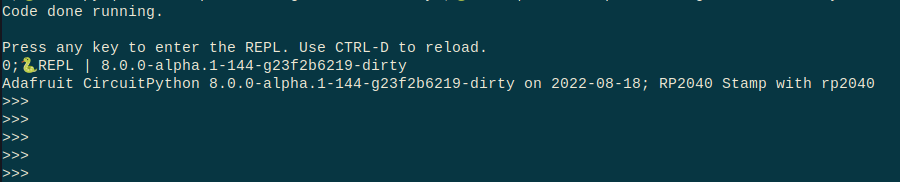
It works with tio and picocom. I am not sure what the issue is with minicom. I replicated your issue above. I would think there would be a setting to pass through the codes, but I could not find one.
jaunty juniper
I don't think it matters, but pyserial's miniterm doesn't understand escape sequences either. I guess the "mini" in the name stand for that too 😉
I do like how it lists ports with their names though.
❯ python -m serial.tools.miniterm

--- Available ports:
---  1: /dev/cu.BLTH         'n/a'
---  2: /dev/cu.Bluetooth-Incoming-Port 'n/a'
---  3: /dev/cu.usbmodem146301 'RP2040-Zero - CircuitPython CDC data'
---  4: /dev/cu.usbmodem1444401 'QT Py RP2040 - CircuitPython CDC data'
---  5: /dev/cu.usbmodem1444403 'QT Py RP2040 - CircuitPython CDC data'
---  6: /dev/cu.usbmodemC7FD1A71736D1 'FunHouse - CircuitPython CDC data'
--- Enter port index or full name: 6
--- Miniterm on /dev/cu.usbmodemC7FD1A71736D1  9600,8,N,1 ---
--- Quit: Ctrl+] | Menu: Ctrl+T | Help: Ctrl+T followed by Ctrl+H ---

>>>
␛]0;🐍192.168.1.47 | Done | 8.0.0-alpha.1-139-g3fbddfde5␛\soft reboot

Auto-reload is on. Simply save files over USB to run them or enter REPL to disable.
code.py output:
␛]0;🐍192.168.1.47 | code.py | 8.0.0-alpha.1-139-g3fbddfde5␛\Hello World!
␛]0;🐍192.168.1.47 | Done | 8.0.0-alpha.1-139-g3fbddfde5␛\
Code done running.

Press any key to enter the REPL. Use CTRL-D to reload.
␛]0;🐍192.168.1.47 | REPL | 8.0.0-alpha.1-139-g3fbddfde5␛\
Adafruit CircuitPython 8.0.0-alpha.1-139-g3fbddfde5 on 2022-08-15; Adafruit FunHouse with ESP32S2
>>>
 tame creek
there is a formal structure to ANSI/ISO terminal control sequences, but hardly anyone implements them correctly, so they don't work on valid but unexpected sequences
jaunty juniper
note that if the serial tool is meant to be a simple one that shows you everything that is received without bells and whistles, I don't resent them for not passing through the codes to the terminal
tame creek
i guess there's a design question of what level of terminal capability is reasonable to expect?
manic glacierBOT

I have an Adafruit SI1145 sensor. I have tested it on an Arduino Uno and it works great. I am shining a red laser on it for testing. The readings for infrared are in the 0-100,000 ballpark.
However, I switched over to CircuitPython on both a Pi Pico and FeatherS2. In both cases, when the reading exceeds 65,535, I get the following error (the first value is the IR reading from the sensor):
(305, 0, 100000)
(304, 0, 100000)
(303, 0, 100000)
(301, 0, 100000)
(304, 0, 100000)
... idle owl
proven garnet
<@330227457296957440> I think the reason this won't pass CI, upon looking into i...
idle owl
proven garnet
<@330227457296957440> I think the reason this won't pass CI, upon looking into i...
Ok sounds good.
@proven garnet It's currently failing, I reran the failed job. I saw Dan mention degraded status, so we'll keep that in mind. It failed the same way. It says tests failed, so maybe it's not a GitHub issue, perhaps it's an actual issue with the PR? You might know better than me.
 proven garnet
idle owl
<@135415127879974912> It's currently failing, I reran the failed job. I saw Dan ...
proven garnet
idle owl
<@135415127879974912> It's currently failing, I reran the failed job. I saw Dan ...
I think because I'm the author (and I don't have the permissions to allow it) it won't let me use secrets, which is why they show up blank in the CI at that step.
idle owl
Ohhhhh.....
proven garnet
I saw that while reading up on the issue - it's to prevent people not authorized from adding malicious code that uses the secrets
Which I always wondered how that was secure - that's how!
idle owl
@proven garnet OK, I'm going to merge it, can you keep an eye on the merge CI, and make sure it passes? And either revert or fix if not?
proven garnet
idle owl
<@135415127879974912> OK, I'm going to merge it, can you keep an eye on the merg...
Will do! Thanks!!
If it's fixed before tomorrow that would be 
idle owl
Oh, undraft it please.
proven garnet
idle owl
Oh, undraft it please.
Good catch haha, just did
idle owl
proven garnet
Good catch haha, just did
Merged!
manic glacierBOT

Is there a way to turn off sending these escape sequences entirely? Something in supervisor or similar?
proven garnet
@idle owl it worked!!! That was driving me crazy.
The infrastructure page should be fixed now.
I'm curious if this will be a problem on future PRs though regarding tests.
I'll find out soon enough - I have other additions to make to it
 thorny jay
I would be interested in filling the meeting notes for 22/08. Current pinned message is the one from jeppler for 15/08.
manic glacierBOT
One more update: the HID library was just updated today.
idle owl
thorny jay
I would be interested in filling the meeting notes for 22/08. Current pinned mes...
Uff, that's on me. I'll take care of it now. Apologies for the delay.
Here is the notes document for next Monday’s CircuitPython Weekly meeting. It is at the normal time of 11am Pacific / 2pm Eastern here on Discord. Everyone is encouraged to attend! Please add your hug reports and status updates even if you’ll be attending the meeting - it’s super helpful! If you are unable to attend but would still like to include updates, feel free to include them in the notes and we’ll read them off during the meeting. Hope to see you there! <@&356864093652516868> https://docs.google.com/document/d/1rtLJpTDTFOKm9i5WA09BszIchnzH_rktfC4BFG5knX4/edit?usp=sharing

Google Docs
CircuitPython Weekly Meeting for August 22, 2022 Welcome to the CircuitPython Weekly meeting notes! Feel free to add your Hug Reports and Status Updates early. During the meeting, we go through them as a round robin sorted by username. If you can’t make the meeting and would still like to part...
idle owl
idle owl
Here is the notes document for next Monday’s CircuitPython Weekly meeting. It is...
@thorny jay There you go.
hidden rain
I am seeing entries in local/circuitpython.pot which I did not create (manually anyway). Are these from compile side effects? I have renamed a class so I no longer will need the reference. I have performed a make clean, it still there. What cleans this up?
tulip sleet
hidden rain
I am seeing entries in local/circuitpython.pot which I did not create (manually ...
You don't need to change circuitpython.pot yourself. Instead, do make translate from the top level of the repo clone. It will scan all the source for new translation strings and update circuitpython.pot itself. then commit those changes along with your own.
hidden rain
Ah.. so that's where those translating things go! Must have done that in my sleep... Thanks
thorny jay
idle owl
<@681528999520108564> There you go.
Thanks, I had Hug report idea and maybe one in the weed. Wanted to write it down before forgetting it. 😉
tulip sleet
@tidal kiln can you review https://github.com/adafruit/circuitpython/pull/6779, or do you not have permish?
idle owl
thorny jay
Thanks, I had Hug report idea and maybe one in the weed. Wanted to write it down...
Excellent. Thanks for your patience!
@tulip sleet I can help out if needed.
tidal kiln
tulip sleet
<@337989520962093057> can you review <https://github.com/adafruit/circuitpython/...
yep, i can. oh..name changed. looking...
tulip sleet
i had room to put back some things that were turned off
tidal kiln
@tulip sleet anyone else chimed in on ulab vs ble? maybe there's a big something out there relying on ulab i'm not aware of?
tulip sleet
tidal kiln
<@329766224093249548> anyone else chimed in on ulab vs ble? maybe there's a big ...
i looked in the learn guides, there was only this: https://learn.adafruit.com/ocean-epoxy-resin-lightbox-with-rgb-led-matrix-image-scroller/code-explanation which is on RGB matrix but not MatrixPortal, and the use of ulab could be replaced with non-ulab code
manic glacierBOT
Is there a way to turn off sending these escape sequences entirely? Something in
supervisoror similar?
There is not. There could be a supervisor or a .env setting. Feel free to open an issue suggest it should be able to be disabled.
tidal kiln
yah. guess i'd like more input from others. i'm purely basing decision on ble=fun vs ulab=specialized.
tulip sleet
i can not include for beta.0, it's not a must-have for the next beta. We'll probably make another beta quite soon
i'll hold off
thanks for your thoughts
tidal kiln
hold off on pr?
tidal kiln
ok. cool. yah. if that works for getting the beta release out.
tidal kiln
can even make it a in the weeds disc for a meeting
tidal kiln
@jaunty juniper maybe?
https://github.com/adafruit/Adafruit_CircuitPython_seesaw/pull/110
jaunty juniper
ah interesting !
jaunty juniper
tidal kiln
<@199811382793863168> maybe?
<https://github.com/adafruit/Adafruit_CircuitPython...
I think if "." not in __name__ would work ?
ornate breach
Yay for beta 8!
tidal kiln
jaunty juniper
I think `if "." not in __name__` would work ?
__name__ = adafruit_seesaw.neopixel
__file__ = /lib/adafruit_seesaw/neopixel.py
yah, looks like. and that's cleaner than using split.
idle owl
@solar whale If you're still around, I can't remember which (NC or NO) reed switch was required for the mailbox project. I know what the code says, and how it actually works, but I can't remember which version it ended up needing. (Trying to create a parts list for it.)
One worked, and the other straight up didn't. So I want to be specific.
 solar whale
idle owl
One worked, and the other straight up didn't. So I want to be specific.
solar whale
idle owl
One worked, and the other straight up didn't. So I want to be specific.
It needed a "Normally Open" switch (when the magnet is present it needs to be open) -- the one in the Adafruit Shop is "normally Closed" when the magnet is present. The terminology is confusing because the switch itself is close with no magnet and open with the magnet and that is the "normal" state for most documentations, but I have seen it both ways. We want the switch to be open (pin floating - set high by the pull-up) with the magnet present and pulled low when the magnet is removed and the switch closes.
idle owl
solar whale
It needed a "Normally Open" switch (when the magnet is present it needs to be op...
Got it! Ok. Thanks so much! I knew we had to do if not pin.value but I couldn't quite remember what that meant for the switch type.
solar whale
It is always confusing and I almost aways get it wrong...
 orchid basinBOT

Automated website update for release 8.0.0-beta.0 by Blinka.
New boards:
- smartbeedesigns_bee_motion_s3
- adafruit_feather_huzzah32
- adafruit_feather_esp32_v2
- lolin_c3_mini
- smartbeedesigns_bee_s3
- seeed_xiao_esp32c3
- espressif_esp32s3_box_lite
- hardkernel_odroid_go
- espressif_esp32_eye
- waveshare_esp32_s2_pico_lcd
- espressif_esp32s3_eye
- waveshare_esp32s2_pico
- beetle-esp32-c3
- adafruit_qtpy_esp32_pico
- electrolama_minik
- silicognition_rp2040_shim
- bwshockley_figpi
- solder...
tulip sleet

Adafruit Industries - Makers, hackers, artists, designers and engineers!
From the GitHub release page: This is CircuitPython 8.0.0-beta.0, a beta release for 8.0.0. It is relatively stable, but there will be further additions and fixes before final release. Notable chan…
onyx hinge
thank you Dan!
hidden rain
No rule to make target! (new module and single class object). Needed by genhdr/qstr.split
(sigh)
Any ideas?
stuck elbow
hidden rain
Any ideas?
make clean
hidden rain
Yes..I tried that.. I looked for misspellings and followed the trends and placements of dewignations for other modules and interfaces
hidden rain
Run make -j2 -C ports/raspberrypi BOARD=adafruit_feather_rp2040 TRANSLATION=de_DE
make: Entering directory '/d/a/circuitpython/circuitpython/ports/raspberrypi'
Use make V=1, make V=2 or set BUILD_VERBOSE similarly in your environment to increase build verbosity.
make: *** No rule to make target 'shared-bindings/adcbuffer/BufferedInput.c', needed by 'build-adafruit_feather_rp2040/genhdr/qstr.split'. Stop.
make: Leaving directory '/d/a/circuitpython/circuitpython/ports/raspberrypi'
Error: Process completed with exit code 2.
stuck elbow
well, do you have shared-bindings/adcbuffer/BufferedInput.c or is it somewhere else?
hidden rain
yes
stuck elbow
are you sure the path is correct?
I would grep for that filename in the makefiles and make sure it's specified the same way as other entries
hidden rain
Dang. Misspelled module name ... Bufferd should be Buffered... like i checked on that ten times now
stuck elbow
computers are jerks
hidden rain
jerks are 3rd time derivatives of displacement.... which is rather how I feel right now (displaced).. Anyway you made me look, so thanks!
stuck elbow
happy to do rubberducking
manic glacierBOT

Note: There are several errata in the ESP32's TWAI (canbus) implementation that have workarounds that are not enabled by default. None sound particularly relevant to the problems I listed above, though.
If it's not feasible to address this issue before 8.0 is released, is it better to disable the module for the sub-families where it's known to not work?
Any discussion in esp-idf issues or the ESP32 forum? I guess the q is whether it just doesn't work very well or it can be made to work.
For the first problem it may be that the so-called "loopback mode" doesn't quite work like the other micros I tested. For the other error, it's likely to be something circuitpython specific, but I don't know just what. Mostly, I'm just questioning whether in the very loose priority list I'll even get to looking into this further before we'd really like 8.0 to be released!
tulip sleet
@onyx hinge I think there are a number of external ducks we need to get lined up before 8.0.0 is released. Most noticeably, Thonny and Mu need to have readily available versions that support the status bar (even if just ignoring the codes). So I'm not sure how fast we're going to get to 8.0.0 final.
onyx hinge
True enough. Just feeling a bit daunted by so many things to do and "taking it out on" that issue. 🙂
tulip sleet
I didn't mean to put it first on the queue by assigning you 🙂 . Feel free to pick other things. I have kind of been picking things I know how to solve or seem amenable to quick debugging.
more or less at random
onyx hinge
OK, I am probably also prone to reading too much into things. The bug triage is always helpful, though, so thanks for that as well.
as far as I know Limor has plenty for me to do that is taking me in a different direction than addressing 8.0 issues, for better or for worse.
tulip sleet
and assign things to me you'd rather not work on or you think I will be better for
we can do another bug triage sooner or later. We've already reduced the 8.0.0 issue list from about 50 to 36, not bad
onyx hinge
if there's an esp32 problem I'd like to solve it's the weirdness I was seeing on the esp32-eye devkit, it's otherwise super cute and small and cheap with a camera
tulip sleet
that seems pretty important to debug, yes, because there might be some underlying issue. There were some fixes while you were away, so it's be interesting to see whether you still see it
main furnace
How would I join a CircuitPython day sprint?
manic glacierBOT

Possible use case: we have a sensor logger application that reads from a 6dof and writes to the onboard flash of the RP2040. We poll the sensor as many times as possible in a span of 1 to 10 seconds and have tried various methods of saving the data:
- One sensor poll, one IO write (or append): Slowest, highest amount of sensor data loss > ~50%
- Poll sensor into array and write at end (anything over 2 seconds and the RP2040 runs out of ram): Fastest, but we cannot run for more than 2-3 ...
@agrabbs you are not CPU bound, you are flash-memory-speed bound - writing to any flash memory requires erasing blocks, which will take a long time AND the same internal flash memory is being read from for the RP2040 to run.
this is very hard to do. ideally you can buffer into an array - you should have ~ 100k available. or, FRAM is the easiest external-memory solution as it has instantaneous writes. ESP32-Sx with PSRAM might be reasonable because you get SRAM speed but 2MB of space
 pseudo gazelle
Hello! I created a way to alter the native USB settings (VID, PID, etc.), but just before submitting the pull request I noticed that there was already a similar pull request open. Please let me know if you would like me to submit it anyway, I'm in favor of whichever is most likely to be merged sooner.
Already open: https://github.com/adafruit/circuitpython/pull/6247
My branch: https://github.com/Molorius/circuitpython/tree/usb-device-settings
 lone sandalBOT
 manic glacierBOT

Awesome work all... I am about a week or two away from finishing 3d printing and wiring up eight RP2040's to a single Pi4 over the i2c bus. Look forward to testing this code. Cheers.
Beware that (I think) this CP API uses I2C clock stretching and that Pi's are notorious for not supporting clock stretching. Clock stretching is used while waiting for python to respond.
Thanks I will check/test it out...
Any idea if the Pico has a limited of a single target address?
I see the ...
 random junco
main furnace
How would I join a CircuitPython day sprint?
random junco
main furnace
How would I join a CircuitPython day sprint?
We will have a short sprint video right after the panel tomorrow, about 12:30pm Eastern. Then at 1pm Eastern, meet here in this channel. Tekktrik and others will be helping out, too
jaunty juniper
the project bundler has stopped bundling dependencies apparently, on the whole Learn guides, so this is urgent ?
https://github.com/adafruit/circuitpython-build-tools/pull/93
like, these are not the dependencies of adafruit_pyportal:
 tulip sleet
jaunty juniper
the project bundler has stopped **bundling dependencies** apparently, on the who...
tulip sleet
jaunty juniper
the project bundler has stopped **bundling dependencies** apparently, on the who...
I can approve this immediately. Do you need me to make the release?
Where do we need to install this to fix the bundling?
I approved, but didn't make the release yet.
released
I see, the bundle json needs to be regenerated
working on that
jaunty juniper
tulip sleet
I see, the bundle json needs to be regenerated
yeah the bundles would need a release, and I don't know how the bundler works, if the zips are cached too ?
tulip sleet
i don't know, but I will try replacing the file in s3 and in the github artifacts
do you already have a fixed version of the json?
from your testing?
are you running on no sleep at the moment?
jaunty juniper
ah I can do that
tulip sleet
pass me the fixed .json and I'll upload it to the right places
it's all three bundles, but let's try the adafruit one first
jaunty juniper
it's 2PM, the kittens kept me up a little but it's fine 😛
lemme check that I get the right name for the file, I use "test" and stuff
 jaunty juniper
this should be good
ah wait no I didn't update some submodules
ugh I'm having git submodule doubts now
ok the community bundle is good
and the adafruit bundle without bad version numbers
tulip sleet
will handle in a minute; have to do a non-work thing
jaunty juniper
actually the community bundle hasn't had a release since the bug I think
neither did the Circuitpython org bundle
tulip sleet
ok, that makes it easier. Will swing back here in a few minutes
jaunty juniper
and the Community bundle doesn't usually reference other community bundle libraries anyway, which are the only dependencies that are affected
tulip sleet
jaunty juniper
and the adafruit bundle without bad version numbers
I uploaded this to S3, but the sample bundle is still wrong. I'll ask the Learn folks what's cached and where it gets the json from
 warm stump
Retrospectively came up with potential names for what I was doing in this discord message,
bitmaskio? works on top of registerio and many virtual constructs to get things done
The Mathematical Principle is called Partitioning of Real Numbers, it also has the square brackets notation but for doing "odd, even, every third" etc...
instead of truncating and masking the bits to get a specific bit or range/pattern of bits which is done often in a lot of C programs to make it fit in memory
#circuitpython-dev message
jaunty juniper
I was wondering if the files were generated after the daily releases
tulip sleet
i think they are generated on demand, but then may be cached. The person to ask is not online yet
I'll try a different bundle, some pyportal project
fresh project bundle was still wrong; I wrote a note for the Learn developer.
ok, I am text-chatting with the dev
I'd updated the bundle .json on S3 and in the release on GitHub, and we've regenerated the circuitpython.org pages
proven garnet
Does anyone know if the CircuitPython website can be "rebuilt" at anytime? I have a fix for the Infrastructure page that uses a JSON file that I can push before the sprint but wanted to make sure manually rerunning the workflow won't break anything.
Specifically this workflow: https://github.com/adafruit/circuitpython-org/blob/main/.github/workflows/adabot_cron.yml
tulip sleet
I compared the uploaded versions of the .json with a previous good .json and it looks fine. It now sorts them alphabetically, but otherwise is the same.
tulip sleet
proven garnet
Does anyone know if the CircuitPython website can be "rebuilt" at anytime? I ha...
whenever a PR is merged on circuitpython-org, it regenerates the site. That's how 8.0.0-beta.0 showed up on the download pages when I finished the release.
but not sure about the cron; checking...
proven garnet
It does have the "workflow_dispatch" event trigger which means I should be able to manually trigger it
tulip sleet
go ahead, it shouldn't hurt
proven garnet
Sweet, I'll update the 1adabot` submodule and submit a PR
tulip sleet
Yes, we do need to regenerate libraries.v2.json: https://github.com/adafruit/circuitpython-org/blob/main/_config.yml#L42 (as noted by learn dev person)
orchid basinBOT

Updates the adabot submodule so it'll fix the issues regarding building the "Infrastructure Issues" page.
proven garnet
So build the page again after the PR?
tulip sleet
i think it will rebuild auto
manic glacierBOT

Any idea if the Pico has a limited of a single target address? I see the constructor is being passed an array, but it the count is greater than one it fails with a warning.
The Pico does limit it to one. The atmel-samd port can support more then one, but ESP and RP2040 only support a single address.
In theory you could set up both I2C chip peripherals as I2C targets and have two addresses that way.
proven garnet
I think I'll need to do it again after manually trigger the JSON rebuild, right?
Or is it dynamic, and reads the JSON at page load time?
tulip sleet
i don't know, but I'm not sure libraries.v2.json is the thing: it just contains statistics, not dependency info. Maybe barking up the wrong tree.
proven garnet
Gotchya, thanks! I'll follow this along then and make sure 🙂
tulip sleet
newly generated project bundles are now ok; we're looking at what's caching what
jaunty juniper
🥳
onyx hinge
warm stump
Retrospectively came up with potential names for what I was doing in this discor...
I looked at the screenshot of your code and I have to confess I'm not sure what it does. I see that a step involves taking str() of a number, so it's important to note that in CircuitPython, the str() and repr() of a number are not "exact", it can fail to produce a number which evaluates by float() to the same value. (In standard python, repr() is guaranteed to be exact while str() is not) And of course Python float numbers of any kind are expressed in binary, so trying to operate on them as digits could sometimes be troublesome.
Even on standard Python, you can't always reverse the decimal digits of a float without loss. 123456789.49609375 prints exactly but reversed and printed as a float is 57390694.98765432, with the leading "1" lost.
I made a port of the standard python Decimal library to CircuitPython https://github.com/jepler/Jepler_CircuitPython_udecimal, which can do exact decimal arithmetic as well as exact string<>decimal conversion (division is, necessarily, sometimes rounded), maybe it could help with what you're doing. With a Decimal, I am pretty sure the str() of it converts back to the same Decimal value.
tulip sleet
@warm stump you may find this interesting: https://www.h-schmidt.net/FloatConverter/IEEE754.html. Note that in CircuitPython the lowest two bits of the mantissa are always zero, because CircuitPython/MicroPython uses those bits to encode whether the other bits are a float, an int, or a pointer
warm stump
onyx hinge
I looked at the screenshot of your code and I have to confess I'm not sure what ...
the main issue that I think I was looking at at the time was using a certain fixed number of bits e.g. 8-bit, 16-bit, 32-bit, 64-bit etc...to represent integers
instead of using a structure which supports using decimals as flexible base address registers and offsets (e.g. with scaling, a 0.5 step would lead you exactly half way in a list of registers, rounding up)
it had many uses but seemed to yield an error (first int subscript, then float subscript) so part of it was also to come up with something useful python can do instead of throwing an error
and of course that could also be made optional because one could end up with a subscript error for a different reason. Puzzle solving in the mean time so some of that is also going into it.
tulip sleet
also note that the printed rep of floats is not great. We just pulled in a fix from MicroPython that prints whole-number floats more accurately, but there are still other idiosyncrasies
warm stump
tulip sleet
<@539881446756843560> you may find this interesting: <https://www.h-schmidt.net...
I like the idea of having either a mantissa which is always 0, or maybe even an integer part which is always 0 so you can do 0-0.9999999 (assumed as 1) for neural network-type scaled applications
I also noticed these "idiosyncrasies" in desktop python where it would round to e.g. 0.399999994 instead of displaying standard 0.4
so I needed to use strings in a crazy complicated way for this where I would maybe expect this more simply on physical hardware
thorny jay
I was wondering about the interest/feasibility of running CP on AirLift board (FeatherWing, Breakout, Shield, ItsyBitsy).
And then on board that embed the AirLift capabilities, to have two copies of CP, one on the main MCU and one on the ESP32... Not sure yet why or to do what, just asking.
tulip sleet
the airlift breakouts or on-board versions have almost no pin connections: just enough to talk to the main microcontroller chip, so not all that interesting to use
jaunty juniper
it's the WROOM module I think, no SPI ram, 4MB flash ?
tulip sleet
one could imagine substituting CircuitPython for NINA-FW and having it support some protocol to do wifi things, but I don't think there is any advantage
main furnace
I dunno, I think having two CP instances working together would be interesting. The AirLift instance would handle the network, the other MCU for I/O.
jaunty juniper
I'm sure someone can find creative ways to use that 🙂
main furnace
We used to run processing jobs on the 1541 CPU.
onyx hinge
So apropos of this conversation I was looking at the wroom's datasheet and saw that it has an on-chip hall sensor. weird, OK. someone should add that to circuitpython 😉
hidden rain
I'd be happy to give that (Hall Sensor) a try. If I could get past my first new module
onyx hinge
the micropython implementation is tiny c STATIC mp_obj_t esp32_hall_sensor(void) { adc1_config_width(ADC_WIDTH_12Bit); return MP_OBJ_NEW_SMALL_INT(hall_sensor_read()); } STATIC MP_DEFINE_CONST_FUN_OBJ_0(esp32_hall_sensor_obj, esp32_hall_sensor); so maybe a fun item for someone to pick up. Could stick it in the espidf module.
there seem to be caveats to its use though
It is also possible to read the internal hall effect sensor via ADC1 by calling dedicated function :cpp:func:
hall_sensor_read. Note that even the hall sensor is internal to ESP32, reading from it uses channels 0 and 3 of ADC1 (GPIO 36 and 39). Do not connect anything else to these pins and do not change their configuration. Otherwise it may affect the measurement of low value signal from the sensor.
random junco
There is a sprint later today.... 🙂
onyx hinge
it appears this particular feature is not in any later esp32 modules like esp32-s3 so that has to be kept in mind
hidden rain
I added a new module to my local repo and everything compiles fine. But the new module does not show up in the build when I load it on to the Pico. Is there a magic formula or incantation required?
stuck elbow
hidden rain
I added a new module to my local repo and everything compiles fine. But the new ...
did you enable it in your mpconfigboard.mk for your board?
hidden rain
I did look there last night. but I did not see any other module listed there as a guide or example. I guess you are referring to one file in ports/raspberrypi/boards/raspberrypi-pico/
or is there another i should be looking at?
blissful pollen
hidden rain
I did look there last night. but I did not see any other module listed there as ...
There is a main file in /py/ that has a lot of definitions in it too. Been a while since I wrote a new module. I can try to take a look later today. Is this code pushed to the PR already?
hidden rain
Yes, but i need to update. doing that now...OK pushed (@10:52AM-EDT)
 lone axle
Matt Trentini who works closely with the Micropython team reached out to me to offer some ideas and more discussion around mpy / memory measurement. Matt also asked me to pass along this message to our community:
Oh, and Happy CircuitPython Day!! Please pass on my regards to everyone over there. :)
note for CP day 2023: we should invite micropython folks to join us too
 ember iris
they were apart of the Ask Me Anything thread on reddit last year which was nice
hidden rain
@blissful pollen (https://github.com/latkinso42/circuitpython -branch=adcdma)

GitHub
CircuitPython - a Python implementation for teaching coding with microcontrollers - GitHub - latkinso42/circuitpython: CircuitPython - a Python implementation for teaching coding with microcontrollers
blissful pollen
hidden rain
<@228322543507865601> (https://github.com/latkinso42/circuitpython -branch=adcdm...
in py/circuitpy_defns.mk you include BufferedInput.c but not __init__.c
main furnace
CPD intro starts in about two minutes.
hidden rain
blissful pollen
in `py/circuitpy_defns.mk` you include `BufferedInput.c` but not `__init__.c`
Ah! good catch!
stuck elbow
main furnace
CPD intro starts in about two minutes.
cpd?
blissful pollen
circuit python day
stuck elbow
blissful pollen
circuit python day
the day started some 8 hours ago...
hidden rain
CPy FUOTA with blinking lights...did that some 4 months back with asyncio...its really cool.
orchid basinBOT
These are the easiest boards to add, but there are still 13 more to do in another PR.
ember iris
Would it be acceptable to make a post about this on the python subreddit?
hidden rain
this?
ember iris
hidden rain
this?
this being Circuit Python Day. Sorry I wasn't clear there 😅
slender iron
ember iris
this being Circuit Python Day. Sorry I wasn't clear there 😅
Yes! Definitely
ember iris
slender iron
Yes! Definitely
Awesome, would you like me to give you a proof here before I make the post, would you like it to be a link to the schedule, or a text post explaining the day containing the links?
(I should have thought of it prior to today, but I've been in maintenance mode with the subreddit for a while and didn't connect the dots)
slender iron
@ember iris up to you. I'd probably link to the schedule
ember iris
Perfect, post will be live shortly
hidden rain
Was that the entire presentation or is there more coming?
slender iron
https://www.youtube.com/watch?v=0y9WZBLiY4k is going now
ember iris
hidden rain
Was that the entire presentation or is there more coming?
Each segment is in it's own video, so you'll want to find the next one when the one you're on wraps up
https://www.reddit.com/r/Python/comments/wshrle/today_is_circuitpython_day_write_and_run_python/
Let me know if anything needs to be changed, I think that should work
hidden rain
did i miss a schedule of events?
tame creek
hidden rain
did i miss a schedule of events?
there's a blog post with schedule
tame creek
hidden rain
did i miss a schedule of events?

Adafruit Industries - Makers, hackers, artists, designers and engineers!
Today! Friday, August 19 (8/19/2022) is CircuitPython Day 2022, being designated the snakiest day this year! The day highlights all things CircuitPython and Python on Hardware. Here is the latest (…
hidden rain
thanks
ember iris
There's also conversation in #live-broadcast-chat during the streams
 wraith crow
Welcome Huzzah32 😁
orchid basinBOT
ember iris
Hello all! I'm Keith and I'll be helping with today's sprint. Feel free to ask me any questions throughout the process!
stuck elbow
I'm deshipu and I'm also going to be helping.
proven garnet
I'm Tekktrik and I'll also be helping out with the sprint!
blissful pollen
I'm Mark (aka Gamblor) and will also be around to help with the sprint
ember iris
https://docs.circuitpython.org/en/latest/CONTRIBUTING.html
https://learn.adafruit.com/contribute-to-circuitpython-with-git-and-github
https://learn.adafruit.com/welcome-to-circuitpython/circuitpython-libraries
Here are a couple of guides and docs that outline the process, feel free to ask questions as you come across them!
proven garnet
Open issues for the core: https://github.com/adafruit/circuitpython/issues
Open issues for the libraries: https://circuitpython.org/contributing/open-issues
Help translate the project:
https://hosted.weblate.org/engage/circuitpython/
About contributing to CircuitPython/open-source:
https://learn.adafruit.com/contribute-to-circuitpython-with-git-and-github
https://learn.adafruit.com/creating-and-sharing-a-circuitpython-library/check-your-code
main furnace
I'm interested in refactoring the BME280 driver to remove duplicate code. https://github.com/adafruit/Adafruit_CircuitPython_BME280/issues/61
proven garnet
main furnace
I'm interested in refactoring the BME280 driver to remove duplicate code. <https...
Perfect! Feel free to comment on the issue to let others know you're tackling it!
main furnace
I have the breakout and a QTpy, will be working in VSCode remote into the Raspberry PI ('cause that's where I do CircuitPython library work).
ember iris
I have a bme280 and can test your code as well
manic glacierBOT
How do I match the 'g01f252d12` build (en_GB-20220805-8c10e09) with a pull request? The timestamp in S3 is 2022-08-06T00:47:01.000Z.
g01f252d12 is g<start of git commit> so... 01f252d12 was made with the merge of https://github.com/adafruit/circuitpython/pull/6698
 minor plume
Hi all! I'm Tammy, and I'm also helping out with the sprint. Feel free to ping me if there's anything I can do to assist you!
main furnace
Cloned Adafruit_CircuitPython_BME280, running pre-commit run --all-files now.
ember iris
main furnace
Cloned Adafruit_CircuitPython_BME280, running `pre-commit run --all-files` now.
Oh goodness I'll need to update my pre-commit stuff, I forgot about that
proven garnet
Don't need pre-commit if you do it flawlessly the first time. Which ALWAYS happens. 😉
main furnace
lol
proven garnet
Just kidding, black gets mad at things I didn't know you could be mad about
ember iris
first_try = len([attempts[-1]])
proven garnet
ember iris
`first_try = len([attempts[-1]])`

onyx hinge
black gets mad at things I didn't know you could be mad about
haha so true
minor plume
black is VERY opinionated.
ember iris
That's it's selling point 😄
stuck elbow
almost as much as its author
minor plume
@ember iris for some definitions of "selling point", I guess that's true. 😉
idle owl
stuck elbow
almost as much as its author
Agreed.
ember iris
Is there a convenient place which says which version of precommit, pylint, and black to use?
proven garnet
There's always blue, which is like diet, slightly less opinionated black: https://blue.readthedocs.io/en/latest/
stuck elbow
we need Pink
jaunty juniper
dabahdeedababi
stuck elbow
or, like, Fuchsia
jaunty juniper
proven garnet
There's always `blue`, which is like diet, slightly less opinionated `black`: h...
so, why didn't they call it orange ?
idle owl
My ESP32-S2 was actually deep sleeping when attached to USB. I reset it, and it's back to pretending to deep sleep. So weird.
jaunty juniper
ember iris
Is there a convenient place which says which version of precommit, pylint, and b...
I don't know if it's written somewhere, but the pre-commit config yaml sets the versions of black and pylint used in pre-commit
ember iris
jaunty juniper
I don't know if it's written somewhere, but the pre-commit config yaml sets the ...
Ok so should I just upgrade that and let it manage those two?
jaunty juniper
in theory pre-commit uses its own versions in its own venv, cached somewhere, though I have had to delete the cache in some cases
it actually complicates things a little, since I prefer to run them manually when iterating on pylint's "suggestions"
so I have to match the version
main furnace
Things just got real: I turned on the soldering iron.
proven garnet
jaunty juniper
so, why didn't they call it orange ?
Because it's still slightly opinionated so it arbitrarily chose blue haha
main furnace
Duplicate code is in the SPI class.

Well, that's a non-starter.
The CCS811+BME280 communicates exclusively via I2C.
proven garnet
Oh no!
ember iris
well if you change the code I can still test it on my end
(I can't get pre-commit to fail on the duplicate code check though, which confuses me)
main furnace
Did you edit .pre-commit-config.yaml to remove the part that disables the check?
main furnace
In the root of the ...BME280 repository.
ember iris
ahh hidden files.
proven garnet
GitHub
CircuitPython driver for the BME280. Contribute to adafruit/Adafruit_CircuitPython_BME280 development by creating an account on GitHub.
Pesky dot files
main furnace
Yeah, that leading dot will get ya.
minor plume
In Linux/Unix/macOS, file names beginning with . are hidden by default.
At the command line, you can use ls -a to see them.
ember iris
gotta love that git-foo rustiness
ember iris
minor plume
At the command line, you can use `ls -a` to see them.
Oh I did not know about that! Thank you!
minor plume
The ls command has a LOT of command-line options. 🙂
lone axle
Does the core use the default branch from this repo? https://github.com/adafruit/esp-idf is circuitpython-v4.4 the correct branch to PR against for proposed changes?
jaunty juniper
on mac you can command-shift-G in a directory to have a dialog that's half like a command line completion, type "." then tab, then select the file you want
(our type more letters and it autofills)
manic glacierBOT
I've replicated this on a Feather M4 Express. Looking into it now.
main furnace
Wow, this BME280 drive is kinda convoluted. You have a basic driver, with _SPI and _I2C variants. Then you have the advanced driver, which adds features like overscan etc. The advanced driver also has _SPI and _I2C variants.
slender iron
lone axle
Does the core use the default branch from this repo? https://github.com/adafruit...
it is using circuitpython8 now I believe
main furnace
I don't know why the duplicate code is only in the _SPI variant.
Oh, I guess it does flag both variants for duplicate code.
So I guess the goal is to have a basic and an advanced driver, with both bus variants.
I need some way to add the advanced features to the basic _I2C driver, rather than duplicate the driver-specific code.
...the bus specific code.
minor plume
It looks like the basic version exists for the benefit of devices like the QTPy which are very limited in Flash.
Could you write the advanced version so it inherits from the basic version class and then adds whatever's needed, maybe? It'd mean having to install two code files instead of one, but that might be a viable way to do it.
main furnace
What if I made a new file, bus_support.py, with SPI and I2C functions. Then for either basic or advanced:
class Adafruit_BME280_I2C(Adafruit_BME280, bus_support.I2C):
ember iris
I think the goal of having a basic library is to keep the space requirement down. Do you think this would risk taking up more space?
minor plume
The bus-specific part of the code looks relatively compact. So that looks like it could work.
lone axle
Is it expected that there is no #endif associated with this #if statement? https://github.com/adafruit/esp-idf/blob/d51f7d882187afa4b39c2613fd0fe2ac2fea1145/components/esp_lcd/src/esp_lcd_rgb_panel.c#L34-L38
minor plume
main furnace
What if I made a new file, `bus_support.py`, with SPI and I2C functions. Then fo...
The bus-specific stuff seems to be isolated to the __init__, _read_register() and _write_register() methods.
minor plume
lone axle
Is it expected that there is no `#endif` associated with this `#if` statement? h...
I think the #endif on line 535 is the one that matches that #if.
lone axle
Ahhhhh
minor plume
That's a whole BUNCH of stuff that doesn't get included if SOC_LCDCAM_SUPPORTED isn't defined... 😮
lone axle
Thank you. I hadn't scrolled far enough
minor plume
minor plume
The bus-specific part of the code looks relatively compact. So that looks like i...
@main furnace I'm thinking about it, though, and I think you don't need to actually inherit from your bus_support things. Give me a moment and I'll mock up what I'm thinking.
manic glacierBOT
minor plume
@main furnace What if you did something like this:
class BusSupport:
    def __init__(self, bus: Union[SPI, I2c], **kwargs):
        self._bus = bus

    def _read_register(self, register: int, length: int) -> bytearray:
        ...

    def _write_register(self, register: int, value: int) -> none:
        ...

class SPIBusSupport(BusSupport):
    def __init__(self, spi: SPI, cs: DigitalInOut, baudrate: int = 100000) -> None:
        ...

    def _read_register(self, register: int, length: int) -> bytearray:
        ...

    def _write_register(self, register: int, value: int) -> none:
        ...

class I2CBusSupport(BusSupport):
    def __init__(self, i2c: I2C, address: int = _BME280_ADDRESS) -> None:
        ...

    def _read_register(self, register: int, length: int) -> bytearray:
        ...

    def _write_register(self, register: int, value: int) -> none:
        ...
Then you could write one class that expects to find an instance variable of type BusSupport (or inherits from that as a Mixin) to actually talk to the bus, and all the other code would be the same. There'd be a little fiddling around to avoid breaking compatibility with the existing interface, but I think it's doable.
manic glacierBOT
Both Thonny (https://github.com/thonny/thonny/issues/2369) and Mu (https://github.com/mu-editor/mu/commit/a56049feb68ba8fcad8fa0fd600cc62eb7da8a58) have OSC handling merged in. Thonny 4.0.0b4 includes the changes.
minor plume
I don't know if I'm fully explaining myself clearly, because I'm exhausted, but that's my thought.
main furnace
Hmm, that looks promising.
minor plume
Then all that Adafruit_BMP280_I2C and Adafruit_BMP280_SPI and the basic versions would have to do would be to instantiate the correct BusSupport subclass and attach it to an instance variable, and the rest of the code could live in an Adafruit_BMP280 class they both inherit from.
I think...
main furnace
I'll put a prototype together and post a gist.
ember iris
Going through the prior pull requests and issues we'll have to make sure we test it's space that way we don't break previous builds that use this
main furnace
Yeah, that's the trick.
minor plume
One way to help that might be to split the module into multiple files, so you only copy (and import) the ones you need. adafruit_bmp280_basic.mpy OR adafruit_bmp280_advanced.mpy and adafruit_bmp280_spi.mpy OR adafruit_bmp280_i2c.mpy, something like that.
There'll have to be some documentation/learn guide updates, maybe, but it seems like that could work.
tulip sleet
@slender iron I tested the scale >1 PR. On the old build, only status line showed, at scale 2 (relatively large). With the new build, teverything is smaller (scale =1?) and I can see the REPL. But I'm confused why the scale changed
minor plume
@main furnace However it gets packaged, breaking it up into pieces like this would seem to be the cleanest way I can think of to solve the problem.
manic glacierBOT
Tested, works for me with a Feather ESP32-S2 and a 3.5" TFT FeatherWing. Note that the scale is set to 1 instead of 2 with this new build.
hidden rain
Fresh build from circuitpython main works fine; my local branch now blocks the Pico as a COM presentable device: WIndows says it doesn't recognize the device.
This was working just a bit ago... I hosed it all somehow
slender iron
@tulip sleet yup, I think it looks better at scale 1
but did test the fix separately
small cypress
Hey, can I check if micropython.native, micropython.viper, and micropython.asm_thumb are enabled by default in official 7x release builds or if I'd need to build things myself to get them?
minor plume
@small cypress I just tried importing those on a Feather RP2040 running CircuitPython 7.3.2 and got ImportError exceptions for all three, so I'm guessing you'd have to build things yourself.
small cypress
Ah, I thought you @ them rather than importing them (sorry Ed)
small cypress
jaunty juniper
I'm afraid enabling them would require some additional work
building my own CP builds?
jaunty juniper
I'm more thinking: rewriting part of the thing, but I might be wrong
you don't know until you try
blissful pollen
I did some experimentation with the micropython native functionality. It can be turned on but when I did it was a custom build
jaunty juniper
ah see, it seems I was wrong 😉
minor plume
And now I'm going down the rabbit hole of reading about the MicroPython native functionality. 😄
small cypress
jaunty juniper
I'm more thinking: rewriting part of the thing, but I might be wrong
My (very limited) understanding is that there are build flags for them, just don't think they're enabled by default
blissful pollen
CIRCUITPY_ENABLE_MPY_NATIVE needs to be enabled. I really should have wrote down more of this when I worked on it 🙂
tulip sleet
and we have not tested them
small cypress
minor plume
And now I'm going down the rabbit hole of reading about the MicroPython native f...
I just came up for air after diving down the asyncio rabbit hole after folks in #help-with-circuitpython helped me realise that async is unlikely to speed anything up for me as the main thing I was hoping to use it for was doing stuff while I wait for WiFi to connect, and so now I'm chasing after this new shiny complex rabbit I barely understand 😉. Obviously won't speed up WiFi, but maybe other stuff?
minor plume
Considering how space-constrained some CPY devices are, I'm not surprised it's not enabled by default.
blissful pollen
I did a one off test with python vs native code for AHRS and the native was faster, but less so then you may expect.
It also only works for some controller architectures (ARM I believe)
small cypress
Is this still correct 4 years later? https://learn.adafruit.com/building-circuitpython/macos
tulip sleet
small cypress
I just came up for air after diving down the asyncio rabbit hole after folks in ...
I started working on an async version of adafruit_requests.
tulip sleet
small cypress
Is this still correct 4 years later? https://learn.adafruit.com/building-circuit...
i try to keep it up to date, but it is not my daily build
small cypress
tulip sleet
i try to keep it up to date, but it is not my daily build
yeah, just mean if the instructions should still be broadly correct
tulip sleet
yes, there might be issues about python versions, getting the toolchain to be in PATH, etc
minor plume
I've run into occasional toolchain weirdness on my Mac, the details of which I don't remember, but they should be broadly correct.
tulip sleet
making sure the dependencies are all installed
hidden rain
Excited about CPy8.0, but need help with local build not being recognized as drive
tulip sleet
hidden rain
Excited about CPy8.0, but need help with local build not being recognized as dri...
can you connect to the REPL?
hidden rain
no
lone axle
Anyone have experience with ESP32-S3-DevKitC-1-N8R8 or other ESP32-S3? I have a BOOT drive but pasting .uf2 files into doesn't seem to work as expected. It pastes without error, but doesn't reset afterward. If I manually reset it comes back up to the BOOT drive instead of CIRCUITPY.
I've also tried flashing a .bin with esptool and have gotten successful flashes but it remains in the same state (only boots up to BOOT drive ever, not CIRCUITPY)
hidden rain
the drive is no longer recognized with that load, but it is with the defualt load
blissful pollen
tulip sleet
I started working on an async version of `adafruit_requests`.
Curious how this is going to look as you get it complete. I know there are libraries I've looked at that would benefit with asyncio
tulip sleet
@hidden rain so it sounds like it's crashing early
hidden rain
yes I merely did a hello world
blissful pollen
lone axle
Anyone have experience with `ESP32-S3-DevKitC-1-N8R8` or other ESP32-S3? I have...
I have one and I was having issues with UF2 but really just flashed it once with the BIN to try and didn't poke at to the problems much
tulip sleet
blissful pollen
Curious how this is going to look as you get it complete. I know there are libra...
https://github.com/dhalbert/Adafruit_CircuitPython_Requests/tree/async is very early work, and also includes some other cleanup. Someone tried it and said it worked!
minor plume
lone axle
Anyone have experience with `ESP32-S3-DevKitC-1-N8R8` or other ESP32-S3? I have...
I have one, but I've never really messed with it. I'll see if I can find the right kind of USB cable and give it a try real quick.
tulip sleet
lone axle
Anyone have experience with `ESP32-S3-DevKitC-1-N8R8` or other ESP32-S3? I have...
you could try erasing it completely and then loading the CPy .bin.
lone axle
I can't recall for certain if I ever had success with updating via UF2 back when I installed that bootloader. I do know I had successfully flashed .bin's in the past but have failed so far today. I'm thinking I have some part of the process wrong perhaps.
I've removed as many variables I can and am attempting to load builds from circuitpython.org atm.
tulip sleet
you do need to erase it, so you don't use an incorrect partition table
so there would be no UF2 bootloader
lone axle
tulip sleet
you could try erasing it completely and then loading the CPy .bin.
Is that process documented anywhere? I've tried a command that I'm pretty sure worked in the past but hasn't yet today (I'm sure I've messed something up in between though 😅 )
I'm running:
python3 -m esptool -b 921600 --chip esp32s3 write_flash 0x0 adafruit-circuitpython-espressif_esp32s3_devkitc_1_n8r8-en_US-8.0.0-beta.0.bin
I assume that is probably not doing the full erase step though?
tulip sleet
esptool.py -p /dev/ttyACM0 -b 460800 erase_flash or whatever the port is
the baudrate is probably irrelevant
that's my erase-esp shell alias
esptool.py should be in your path
lone axle
just to make sure I understand, first run this erase_flash then after erase_flash run the write_flash command like the one I pasted?
jaunty juniper
yup
tulip sleet
yes, I use this esptool.py -p /dev/ttyACM0 -b 460800 --before=default_reset --after=no_reset write_flash 0x0000 . You could probably double the baudrate
jaunty juniper
is CP flashed at 0 ?
lone axle
Should I do the hold boot press reset before running them?
tulip sleet
yes, to get into boot mode
small cypress
Ah, I'm gonna need the ESP-IDF to do a ESP32S2 build, aren't I?
blissful pollen
small cypress
Ah, I'm gonna need the ESP-IDF to do a ESP32S2 build, aren't I?
Yes you are
lone axle
small cypress
Ah, I'm gonna need the ESP-IDF to do a ESP32S2 build, aren't I?
yes, it's included as a submodule in the core repo.
tulip sleet
also see https://learn.adafruit.com/building-circuitpython/esp32-s2-build for additional setup
blissful pollen
There is a learn guide page on setting it up... what Dan said 🙂
lone axle
after you do make fetch-submodules you should be able to run the install.sh and export.sh things.
small cypress
tulip sleet
also see <https://learn.adafruit.com/building-circuitpython/esp32-s2-build> for ...
Yeah I'm looking at that bit, where does it fit into the regular build instructions?
tulip sleet
just do it before you do a build; some stuff is one time only; export.sh is every time you set up a new shell to do a build
lone axle
Made it back to CIRCUITPY drive. 🎉 Thank you neradoc and dan!
tulip sleet
lone axle
Made it back to CIRCUITPY drive. 🎉 Thank you neradoc and dan!
maybe there is problem with the UF2 bootloader. If you haven't tried yet, maybe update it with the latest if it is not thelatest
blissful pollen
lone axle
Made it back to CIRCUITPY drive. 🎉 Thank you neradoc and dan!
What did you do? If it is just what they said i'll read it above.
tulip sleet
also make sure you are using the right USB port, since there are two
lone axle
erase and then flash the .bin ended up working for me. And yep getting the right port (and getting into bootloader mode with boot/reset buttons). I think several of my attempts today were wrong port (both physical and /dev/[path]) or mode on the device.
blissful pollen
Maybe I just have to erase it fully. Which physical connector did you use on the device?
jaunty juniper
for ROM bootloader both should work
lone axle
the USB port labeled UART. in my case the path it came up as was /dev/ttyUSB0
jaunty juniper
for CIRCUITPY/BOOT it's the other one
lone axle
Huzzah 🎉 (but not the device). All the way back in business now. I was able to flash the modified build successfully as well and it's back to working the same as it was before I started messing with it today.
small cypress
Guessing it's a good idea for me to try a vanilla build before turning on any flags?
jaunty juniper
yeah get that working first
minor plume
@small cypress Seems smart. That way if something breaks when you mess with the flags, you'll know it's the flags and not your toolchain.
In fact, I think I'd do a vanilla build and flash it to a board/make sure it actually RUNS before monkeying with the flags.
main furnace
Now I'm just trying to make pylint happy.
jaunty juniper
good luck
minor plume
@main furnace Sometimes I feel like Pylint is only truly happy with an empty file.
main furnace
lol
jaunty juniper
# pylint:disable=complain-about-empty-file
main furnace
E0012: Bad option value 'no-membe' (bad-option-value)
pylint (library code)....................................................Passed
proven garnet
Wait until it checks the examples 😏
small cypress
Hmm, do I need to install the ESP-IDF separately myself? Getting an error when I try to build.
jaunty juniper
have you followed the instructions ? submodules gotten ?
jaunty juniper
esp-idf/install.sh ?
proven garnet
small cypress
Hmm, do I need to install the ESP-IDF separately myself? Getting an error when I...
jaunty juniper
you need to do source esp-idf/export.sh in your current shell
small cypress
proven garnet
https://learn.adafruit.com/building-circuitpython/esp32-s2-build
yeah that's what I've been following
small cypress
jaunty juniper
you need to do `source esp-idf/export.sh` in your current shell
yup, done that
I ran this from the circuitpython/ports/espressif folder:
make BOARD=adafruit_feather_esp32s2_tft TRANSLATION=en_GB
And got this:
Use make V=1, make V=2 or set BUILD_VERBOSE similarly in your environment to increase build verbosity.
mkdir -p build-adafruit_feather_esp32s2_tft/genhdr
GEN build-adafruit_feather_esp32s2_tft/genhdr/moduledefs.h
IDF_PATH=/Users/myusername/Local Builds/circuitpython/ports/espressif/esp-idf cmake -S . -B build-adafruit_feather_esp32s2_tft/esp-idf -DSDKCONFIG=build-adafruit_feather_esp32s2_tft/esp-idf/sdkconfig -DSDKCONFIG_DEFAULTS="esp-idf-config/sdkconfig.defaults;esp-idf-config/sdkconfig-opt.defaults;esp-idf-config/sdkconfig-4MB.defaults;esp-idf-config/sdkconfig-esp32s2.defaults;boards/adafruit_feather_esp32s2_tft/sdkconfig" -DCMAKE_TOOLCHAIN_FILE=/Users/myusername/Local Builds/circuitpython/ports/espressif/esp-idf/tools/cmake/toolchain-esp32s2.cmake -DIDF_TARGET=esp32s2 -GNinja
/bin/sh: Builds/circuitpython/ports/espressif/esp-idf: No such file or directory
make: *** [build-adafruit_feather_esp32s2_tft/esp-idf/config/sdkconfig.h] Error 127
lone axle
did you do . ./esp-idf/export.sh also? that one comes after install.sh
small cypress
it suggested I use idf.py but the guide told me not to so I didn't
It seems like it's saying there's no esp-idf folder, but there's one stuffed with 212MB of stuff
slender iron
make fetch-submodules should bring in the esp-idf folder
jaunty juniper
yeah weird
small cypress
I just assumed I was missing something really basic here
Worth deleting my cp folder and starting over?
minor plume
I wonder if the space in the folder name "/Users/myusername/Local Builds/circuitpython/ports/espressif/esp-idf" is tripping you up.
minor plume
Judging from the error message, I'm pretty confident it cares. Because the path it's complaining about is Builds/circuitpython/ports/espressif/esp-idf, which is the exact part after the space.
Can you rename the Local Builds folder to LocalBuilds or Local_Builds or something?
small cypress
minor plume
Can you rename the `Local Builds` folder to `LocalBuilds` or `Local_Builds` or s...
Just did that and it's now working.
Is it normal for it to get to "QSTR updated" then just sorta stop?
Ah, it's now doing stuff again, that was weird, basically no CPU usage
jaunty juniper
I think there's a big step after that, then you should see a number grow
manic glacierBOT
Two small problems I found when hooking the 13x9 matrix to the glasses controller.
small cypress
I assume I just treat "firmware.uf2" the same as a usual CP install?
blissful pollen
yup
manic glacierBOT

With a debug build I saw this error printed when the hard fault occured:
Assertion 'heap != NULL && "free() target pointer is outside heap areas"' failed, at file heap_caps.c:339
This was in the normal serial console output (same as REPL). If I understand correctly there may be more, or different output sent over the uart port. I will see what I can find on that one next.
small cypress
How do I know it's worked? I got a weird Finder error and then it disconnected and restarted itself. Does the REPL having added "-dirty" to its version name in the REPL mean it's worked, or is it "dirty" because I messed something up?
jaunty juniper
dirty is git talk for: there are changes in the working directory
small cypress
so likely it did work?
small cypress
ngl, feels like Git is judging me 😉
manic glacierBOT
This is the output from the uart USB port when the hard fault occurs:
hack_tablet_debugging_output_hard_fault.txt
I'm not entirely sure how to read what it has output, but it does have this section which indicates it's a backtrace:
Backtrace:0x420210A9:0x3FCF50700x42021C6F:0x3FCF5090 0x42020DE9:0x3FCF50B0 0x42020EFF:0x3FCF50D0 0x40379AD2:0x3FCF50F0 0x403884D1:0x3FCF5110 0x420A553...git status will tell you what git thinks is changed (aka dirty)
jaunty juniper
small cypress
ngl, feels like Git is judging me 😉
have you met pylint ?
minor plume
small cypress
ngl, feels like Git is judging me 😉
Git is a "Swiss army chainsaw" tool - it judges everyone.
small cypress
jaunty juniper
have you met pylint ?
I've got pylance though it's judgings are 50% my terrible code and 50% it seemingly being confused by imports
lone axle
I got this backtrace printout from running a debug build of circuitpython and listening on the uart port (ESP32-s3 dev kit n8r8) during a hard fault crash It looks like it contains a bunch of hex data:
backtrace: 0x420210A9:0x3FCF5070....
Is there some way to convert that or figure out what code it's referencing?
slender iron
yup
there is a python script in tools
python tools/decode_backtrace.py adafruit_feather_esp32s2_tft
put your board name
can then copy the whole Backtrace: line into it
lone axle
Thank you!
minor plume
@small cypress I've found pylance (and pylint) to be super fussy about the order of import statements.
small cypress
minor plume
<@465213173239382026> I've found pylance (and pylint) to be super fussy about th...
Ah that might partly be it, I've got mine in a slightly wacky order on the (probably faulty) logic of wanting to do some things ASAP
minor plume
I don't know how much that actually matters, when it comes to the things which happen when a module is imported, tbh.
small cypress
right, time for adventures in vexillology
small cypress
minor plume
I don't know how much that actually matters, when it comes to the things which h...
to be clear I mean importing a module then doing something with it before then importing others
which also might be just as pointless
minor plume
Yeah. I've found it's usually better to just import everything if you can.
lone axle
I think this is meaning that it failed running the decode_backtrace script, not that this is the output that is encoded in the backtrace right? Looks like I'm missing something that it needs if I understand.
Traceback (most recent call last):
  File "tools/decode_backtrace.py", line 21, in <module>
    subprocess.run(
  File "/usr/lib/python3.8/subprocess.py", line 493, in run
    with Popen(*popenargs, **kwargs) as process:
  File "/usr/lib/python3.8/subprocess.py", line 858, in __init__
    self._execute_child(args, executable, preexec_fn, close_fds,
  File "/usr/lib/python3.8/subprocess.py", line 1704, in _execute_child
    raise child_exception_type(errno_num, err_msg, err_filename)
FileNotFoundError: [Errno 2] No such file or directory: 'xtensa-esp32s2-elf-addr2line'
The only instance I can think of where that didn't work was importing sys and the modifying the Python import path.
lone axle
Ah, thanks again. Yep, I was in a different terminal instance that didn't have that exported.
slender iron
🙂
manic glacierBOT
Here is the decoded version of the backtrace:
❯ python tools/decode_backtrace.py espressif_esp32s3_devkitc_1_n8r8
espressif_esp32s3_devkitc_1_n8r8
? Backtrace:0x420210A9:0x3FCF50700x42021C6F:0x3FCF5090 0x42020DE9:0x3FCF50B0 0x42020EFF:0x3FCF50D0 0x40379AD2:0x3FCF50F0 0x403884D1:0x3FCF5110 0x420A5531:0x3FCF5130 0x420A54C2:0x3FCF5150 0x42049A00:0x3FCF5180 0x42049A0D:0x3FCF51A0 0x42047365:0x3FCF51C0 0x42046325:0x3FCF51E0 0x4203AAEB:0x3FCF5200 0x420132C7:0x3FCF5220 0x4200E63E:0x3FCF5240 0...Looks like I need to add stuff to mkboardconfig.mk, where can I find it, or is it a file I have to create somewhere? https://github.com/adafruit/circuitpython/issues/1248#issuecomment-551956947
GitHub
These decorators are immensely useful - they allow optimizing hot paths in the code and remove performance bottlenecks. I conducted a little research yesterday, and it seems like these decorators w...
main furnace
Guess I don't understand how inheritance works:
class Maths:
    def multiply(self, x, y):
        return x * y

class Basic:
    def __init__(self):
        self._proxy = None
    def multiply(self, x, y):
        return self._proxy.multiply(x,y)

class Basic_I2C(Basic):
    def __init__(self):
        self._proxy = Maths()
        super().__init__()

if __name__=="__main__":
    item = Basic_I2C()
    print(item.multiply(3,2))

# >>> AttributeError: 'NoneType' object has no attribute 'multiply'```Basic is the abstract base class. It sends multiply requests to the proxy, which should be an instance of Maths (for Basic_I2C).
slender iron
Basic's __init__ is running after Basic_I2C sets proxy
minor plume
@main furnace You're calling super.init() after you set the _proxy, so the superclass __init__ is changing the instance variable.
main furnace
Okay, that works.
small cypress
small cypress
Looks like I need to add stuff to mkboardconfig.mk, where can I find it, or is i...
hmm, I found "mpconfigboard.mk" but is that the same?
slender iron
ya, think so
minor plume
Looks like it.
small cypress
Huh, my own build seems to be really terrible at finding my WiFi network and I have no idea why, at least half the time it fails to find the SSID.
 devout jolt
small cypress
Huh, my own build seems to be really terrible at finding my WiFi network and I h...
devout jolt
small cypress
Huh, my own build seems to be really terrible at finding my WiFi network and I h...
most chip WiFi antennas on these dev boards are not as good as whats in your phone / computer. I usually put my board up higher (hanging off a lamp) or get closer to the router when doing CircuitPython WiFi work
small cypress
devout jolt
most chip WiFi antennas on these dev boards are not as good as whats in your pho...
To be clear, nothing has changed physically, the only difference is that I'm using my own build of CP
devout jolt
small cypress
To be clear, nothing has changed physically, the only difference is that I'm usi...
ah, so it worked better before your own build. in that case, nevermind! 🙂
small cypress
This is so odd. I didn't change anything, it should just be vanilla 7.3.2
manic glacierBOT

I have no experience reading this debug trace, but at first glance it looks like the de_init of the display is failing. I assume that heap_caps_free is trying to free the FrameBuffer memory. Due to the way I implemented the FrameBuffer malloc it’s possible that the ESP-IDF can’t properly free the memory. (The ESP-IDF display init code assumes it can malloc the PSRAM for the FrameBuffer. In the case of CircuitPython, CP grabs all the PSRAM as it’s heap and thus leaves nothing for the ESP-IDF...
slender iron
@small cypress what does your git status show?
small cypress
slender iron
<@465213173239382026> what does your `git status` show?
On branch 7.3.x. Your branch is up to date with 'origin/7.3.x'., then a whole lot things I haven't knowingly touched under Changes not staged for commit:
I assumed they'd be via the build process
jaunty juniper
submodules ?
small cypress
jaunty juniper
submodules ?
I think so? Trying to remember how to paste lots of text in here less obnoxiously heh
 upbeat plover
translating CP "Ok" does this mean "conform" or "normal" or "fine" cause it can be translated into lots of stuff
idle owl
upbeat plover
translating CP "Ok" does this mean "conform" or "normal" or "fine" cause it can ...
"fine" is a good translation. What's the string it's included in?
upbeat plover
string is just "Ok" so it really hard to translate =}
jaunty juniper
small cypress
I think so? Trying to remember how to paste lots of text in here less obnoxiousl...
you can put it in a file and upload that or make a gist or pastebin
idle owl
upbeat plover
string is just "Ok" so it really hard to translate =}
Oh, hah. I think "fine" would work. That's usually what we mean when we say something is "ok".
jaunty juniper
did you make fetch-submodules after checking out 7.3.x ?
small cypress
pretty sure I did
jaunty juniper
you can manually delete the untracked
small cypress
jaunty juniper
you can manually delete the untracked
Is this likely to fix WiFi?
jaunty juniper
🤷 you have esp-idf in the list so maybe
small cypress
I can just clone/make it all again?
jaunty juniper
sometimes esp-idf remains dirty for some reason, I have had to delete ports/espressif/esp-idf and re run fetch-submodules
small cypress
maybe it didn't like me renaming the build folder
jaunty juniper
yeah I have a clean working directory after:
git co 7.3.x
rm -rf ports/espressif/esp-idf
git co ports/espressif/esp-idf
make fetch-submodules
yeah.. that sounds like something it might have really disliked
jaunty juniper
what OS are you on ?
small cypress
macOS, just gonna try it from the start hugs his silly fast internet tight as he pulls down 2GB again
jaunty juniper
is it a case sensitive partition ?
small cypress
..possibly?
jaunty juniper
I don't remember where some files only differ by the case, so they always appear dirty if you don't have a case sensitive drive, it's a little annoying
small cypress
jaunty juniper
is it a case sensitive partition ?
According to Disk Utility, it shouldn't be
jaunty juniper
(with APFS you can add a case sensitive partition for free to put your CP stuff in)
small cypress
Ah, is CP case sensitive then?
jaunty juniper
yeah, some parts are, but that's not your issue so far, all the frozen modules will update and be clean with fetch-submodules
small cypress
Hmm, after a fresh make fetch-submodules and switching to 7.3.x, should git status be clear ?
small cypress
doing that right now
slender iron
you may need to move into esp-idf and do git submodule update --init
git status shouldn't list anything
small cypress
After that I've just got:
Changes not staged for commit:
modified: ports/broadcom/firmware (modified content)
Untracked files:
frozen/mixgo_cp_lib/
ports/espressif/esp32-camera/
slender iron
k, the broadcom thing doesn't matter
small cypress
was hoping it wouldn't
slender iron
and you can ignore the untracked stuff too since it is a remnant from main
small cypress
okay, back to the espressif specific stuff
jaunty juniper
the broadcom thing is the case sensitive files I think
jaunty juniper
as Scott said, they don't matter to build ESP
wraith crow
Is there a repo or build instructions for the hack tablet?
slender iron
I think status updates for it are here: https://github.com/adafruit/circuitpython/issues/6049
 vague latch
quick question is circuit python working for rpi pico w yet. I couldn't find it online
slender iron
nope
vague latch
cool
vague latch
yep. Thats what im waiting on
slender iron
vague latch
ill just use my feather s2 for now
vague latch
what time frame are you guys looking at for pico w support or tba
slender iron
months likely
vague latch
ok cool
slender iron
one community member has volunteered but I haven't heard any updates
an adafruit person will probably work on it at some point but hasn't started
small cypress
ooee so many errors now
vague latch
Thanks for the info
slender iron
np
small cypress
Okay, finally have it building, and WiFi is seemingly working again more consistently, thanks everyone.
now to break it all with custom build flags 😉
upbeat plover
another translation "off" does this mean "to shutdown" or "state of non operation"
small cypress
upbeat plover
another translation "off" does this mean "to shutdown" or "state of non operatio...
Normally the latter
At least assuming I'm interpreting the context in code correctly.
upbeat plover
yeah kinda hard to do 1 word strings when you dont know how they are being used
manic glacierBOT

 jaunty juniper
is there a way to give hints with comments that weblate would use ?
slender iron
I haven't looked into it
proven garnet
Does weblate only do actual strings, not comments?
small cypress
the right hand side seems to offer a bit more info from a quick glance
lets you see the location of it
Okay, so adding that build flag, building, flashing, then using the sample code someone put on Github to test @micropython.native, got my Feather into a full USB suddenly unmounting crash loop..
proven garnet
Is there a list of dunder methods supported by CircuitPython?
small cypress
Do I need to do anything else after adding CIRCUITPY_ENABLE_MPY_NATIVE = 1 to the mpconfigboard.mk file in the board folder, then building again? I tried deleting the original build output folder and running install.sh again but no dice. It seems to build, but as above, trying to actually use it = crashy crashy.
jaunty juniper
you can add context to the translations on the weblate site itself with a comment and whatnot apparently
main furnace
Took longer than expected, but I think I figured it out.
https://github.com/adafruit/Adafruit_CircuitPython_BME280/pull/62
 clear halo
onyx hinge
note for CP day 2023: we should invite micropython folks to join us too
clear halo
onyx hinge
note for CP day 2023: we should invite micropython folks to join us too
We'd love to join in but a good chunk of the core developers are in Australia and the timezone difference is brutal! I hope you all had a great CircuitPython day!
(Same too for the weekly meeting; a few of us would like to attend - at least occasionally - but it's 4am local time here! I try to listen semi-regularly, it's nice to hear what you're all working on. 😊 )
blissful pollen
small cypress
Do I need to do anything else after adding `CIRCUITPY_ENABLE_MPY_NATIVE = 1` to...
Whenever you change a flag it is a good idea to run the build with clean and then rebuild it
small cypress
blissful pollen
Whenever you change a flag it is a good idea to run the build with `clean` and t...
Wasn't too sure how to do that, though wouldn't just deleting the whole build folder do it?
blissful pollen
You can run the build and add clean at the end or yeah just delete the build folder (I do that pretty often)
small cypress
Yeah, that's what I tried
blissful pollen
What port are you building it for?
small cypress
ESP32-S2
spiral elk
I'm gonna try to get a PR going for ESP32-CAM board definition tomorrow, since I spent all of CPD rebuilding my linux desktop (flaky mainboard)
tulip sleet
proven garnet
Is there a list of dunder methods supported by CircuitPython?
You can search in the source for MP_QSTR___ (three underscores).
manic glacierBOT
Tested on Unexpected Maker FeatherS2 -- working as expected. Thanks!
proven garnet
tulip sleet
You can search in the source for `MP_QSTR___` (three underscores).
Thanks!
And maybe the answer is simple, but is dunder support the same across ports, or is that a knob that can be/is turned accordingly?
ember iris
main furnace
Took longer than expected, but I think I figured it out.
https://github.com/ada...
I've got a guest at my place so I won't be able to review it until tuesday, so if anyone want they can give it a go but otherwise it'll be the first thing I do tuesday morning
tulip sleet
proven garnet
And maybe the answer is simple, but is dunder support the same across ports, or ...
some of the dunder functions/methods are under control of compile-time flags, yes. If you look at the ones in py/ in context, you'll find #if guarding some of them.
it may be interesting for you to look at py/mpconfig.h, which describes pretty many of the language-relevant switches that are not circuitpython-related
proven garnet
Thanks for the tip, I'll give it a look!
hidden rain
Fantastic Day Yesterday! Very Informative!
manic glacierBOT

This might be a larger issue, but the Clue is the only BLE-capable board that I have at the moment.
The ToneService part of the Bluefruit Playground example doesn't seem to work when connecting with the Bluefruit Playground iOS app. It also doesn't seem to work with the Web Bluetooth Dashboard. The corresponding service in the Arduino version of the Bluefruit Playground firmware does seem to work.
Adding debugging print statements to show the value of tone_svc.tone seems to show t...
I think this also counts as a regression from 6.x to 7.x, and should probably be labeled as such.
Set this to `?= 0' and it will be off by default in other ports. You already set it to 1 for the RP2040 port.
I did a quick build and the ATMEL builds worked for me after that.
thorny jay
I have a question for ESP32 (new) board. For every other board there is a USB VID/PID uniqueness requirement and maybe even a check to avoid someone copying by mistake from another board (see https://learn.adafruit.com/how-to-add-a-new-board-to-circuitpython/customizing-the-board-files). But for ESP32 board or board that don't have a USB workflow, what is the consequence? Are VID/PID still needed? Can multiple board have the same (dummy?) value?
jaunty juniper
thorny jay
I have a question for ESP32 (new) board. For every other board there is a USB VI...
they use a creator ID and creation ID, which is intended to be an extension of the USB VID/PID
eg: https://github.com/adafruit/circuitpython/blob/9500c20f24eab412d7ae089c16d53e0b1222100b/ports/espressif/boards/adafruit_qtpy_esp32c3/mpconfigboard.mk#L1-L2
see:
https://github.com/creationid/
thorny jay
Maybe this guide ( https://learn.adafruit.com/how-to-add-a-new-board-to-circuitpython ) from @idle owl could get an update for ESP32 specific case.
Adafruit Learning System
Add your new CircuitPython compatible board to CircuitPython!
I made a remark on the learn guide feedback form.
PS: I don't plan to make any ESP32 board, actually I need to find the box where I have put all the boards not supported by CP so that I can play with the few I have. 🙂
orchid basinBOT

The Board description and image is from the maker web site.
I added a section explaining how to change the firmware and what to do with a bbq20kbd running CP.
I will contact the author, my proposal is to approuve this and let arturo update or improve it.
orchid basinBOT
orchid basinBOT
orchid basinBOT
Description simplified as requested by @arturo182 and image size exactly 800x600 and 300x225 to keep the bot happy.
thorny jay
I found a web site that document the weekly meeting, maybe doing speech to text. Not sure if that has been requested to them or if they just do that on their own: https://mtngs.io/adafruit-industries/circuitpython-weekly/VUKcgfoCcSw.html (since I did not knew about that, maybe other don't know).

mtngs.io
Open Meeting recording of Adafruit Industries CircuitPython Weekly, 8 Aug 2022
onyx hinge
@thorny jay that's the first I've heard of it. It should be considered unofficial
manic glacierBOT

I've been playing with this trying to get @kmatch98 's and @FoamyGuy 's repos merged with CP 8.0.0 beta.
Maybe someone can help with my current stumbling block. esp-idf/components/esp_lcd/src/esp_lcd_rgb_panel.c references hal/lcd_ll.h but I can't seem to locate that header file. The fact that I can't find that file has me worried I've missed something basic.
I aslo threw these two lines:
 #define SOC_LCD_RGB_SUPPORTED       1
 #define SOC_LCD_RGB_DATA_WIDTH      16
i...
manic glacierBOT
Well progress on one front, when all else fails start reading the documentation:
From esp-idf/components/hal/readme.md:
"often somtimes xxx_hal.h includes a lower-level header from a xxx_ll.h, which resides in the implementation."
orchid basinBOT
hidden rain
When one creates an array in CPy say in the following way:
buf = array.array("H", [0]*1000)
It should allocate space for 1000 uint16_t, right?
One Thousand indexable half words?
stuck elbow
yes, 2000 bytes
however please note, that you are also creating, temporarily, a list of 1000 integers with that command
use an iterator comprehension instead of a list
buf = array.array("H", 0xffff for i in range(1000)) for example
hidden rain
stuck elbow
however please note, that you are also creating, temporarily, a list of 1000 int...
Ah !! thanks
manic glacierBOT

Using the name UID, like in boot_out.txt.
manic glacierBOT

CircuitPython version
Adafruit CircuitPython 8.0.0-beta.0 on 2022-08-18; Seeeduino XIAO RP2040 with rp2040
Adafruit CircuitPython 7.3.2 on 2022-07-20; Seeeduino XIAO RP2040 with rp2040

Issue occurs with both versions
Code/REPL
# program_rotaryio_crash
import board, rotaryio, time

wheel = rotaryio.IncrementalEncoder(board.D4, board.D5)

def run():
    while True:
        print(f'position: {wheel.position}')
        time.sleep(0.1)

# now impor...This looks good! I was hoping there was a way to specify a string length to mp_printf so you could print the raw_id in one go, but I don't see a hex-string printing primitive.
 midnight ember
updated my UM Feather S3 this morning to 8.0.beta and getting some unexpected behavior
# Connect to WiFi
try:
    print("\n===============================")
    print("Connecting to WiFi...")
    pool = socketpool.SocketPool(wifi.radio)
    requests = adafruit_requests.Session(pool, ssl.create_default_context())
    wifi.radio.connect(secrets["ssid"], secrets["password"])
except (ValueError, RuntimeError) as e:
    print("Failed to get data, retrying\n", e)
    wifi.reset()
    time.sleep(60)
print("Connected!\n")```Auto-reload is on. Simply save files over USB to run them or enter REPL to disable.
code.py output:
]0;🐍Wi-Fi: off | code.py | 8.0.0-beta.0\]0;🐍Wi-Fi: No IP | code.py | 8.0.0-beta.0\]0;Wi-Fi: No IP | code.py | 8.0.0-beta.0\
===============================
Connecting to WiFi...
]0;Wi-Fi: No IP | code.py | 8.0.0-beta.0\Traceback (most recent call last):
File "code.py", line 303, in <module>
ConnectionError: No network with that ssid
]0;🐍Wi-Fi: No IP | 303@code.py ConnectionError | 8.0.0-beta.0\
Code done running.
]0;🐍Wi-Fi: off | 303@code.py ConnectionError | 8.0.0-beta.0\
Press any key to enter the REPL. Use CTRL-D to reload.```how is that unexpected?
midnight ember

first, the snake sometimes doesn't render and shows some kind of ascii character instead?
also when it fails to connect to wifi it never gets to the exception error. it's like there's one built into socketpool, wifi, or requests now? just want to make sure that's expected behavior. it's definitely different and this is the first i'm using the new beta.
stuck elbow
it's a part of the wifi workflow
the lines with the snake are setting the terminal window title
midnight ember
i'm not using the web workflow though, this was running fine on 7.3.2 and now it's failing on 8.0. beta, just want to make sure it's something on my end like different syntax expected for 8.0 and not a bug.
 quasi veldt
stuck elbow
`buf = array.array("H", 0xffff for i in range(1000))` for example
quasi veldt
stuck elbow
`buf = array.array("H", 0xffff for i in range(1000))` for example
Why 0xffff? Can't it be any 16 bit #? Like 1
stuck elbow
by "it was working" you mean it connected to the wifi and now it doesn't?
midnight ember
correct
stuck elbow
quasi veldt
Why `0xffff`? Can't it be any 16 bit #? Like 1
it can be any value
stuck elbow
midnight ember
correct
sounds like a bug then
midnight ember
ohh is it expecting a .env in 8.0 because i'm still using secrets like in 7.3?
when i remove the try/except and run it i get this
Auto-reload is on. Simply save files over USB to run them or enter REPL to disable.
code.py output:
]0;🐍Wi-Fi: off | code.py | 8.0.0-beta.0\]0;Wi-Fi: No IP | code.py | 8.0.0-beta.0\]0;🐍Wi-Fi: No IP | code.py | 8.0.0-beta.0\
===============================
Connecting to WiFi...
Traceback (most recent call last):
  File "code.py", line 303, in <module>
]0;🐍Wi-Fi: No IP | code.py | 8.0.0-beta.0\ConnectionError: No network with that ssid
]0;🐍Wi-Fi: No IP | 303@code.py ConnectionError | 8.0.0-beta.0\
Code done running.
]0;Wi-Fi: off | 303@code.py ConnectionError | 8.0.0-beta.0\
Press any key to enter the REPL. Use CTRL-D to reload.```this is the same code that was working yesterday for the weatherstation i showed in show and tell. updated to 8.0.beta this morning and it just broke the wifi. maybe different connection method in 8.0? is anything in my code deprecated from 7.3?
stuck elbow
afaik the old code should still work
the No network with that ssid suggests the ssid is wrong somehow?
midnight ember

yeah, ssid is fine, hasn't changed.
tried different AP same thing
it is for the UM Feather S3 so might be unique issue to that board?
my AP name has a space in it. maybe it doesn't like spaces in SSID names anymore?
Nope, just tried a 3rd AP that has no space in the name and that failed too.
ran the basic test https://learn.adafruit.com/adafruit-esp32-s3-feather/circuitpython-internet-test and it failed
Auto-reload is on. Simply save files over USB to run them or enter REPL to disable.
code.py output:
]0;🐍Wi-Fi: off | code.py | 8.0.0-beta.0\]0;Wi-Fi: No IP | code.py | 8.0.0-beta.0\ESP32-S3 WebClient Test
My MAC addr: [obfuscated]
Available WiFi networks:
]0;Wi-Fi: No IP | code.py | 8.0.0-beta.0\]0;Wi-Fi: No IP | code.py | 8.0.0-beta.0\]0;🐍Wi-Fi: No IP | code.py | 8.0.0-beta.0\]0;Wi-Fi: No IP | code.py | 8.0.0-beta.0\]0;Wi-Fi: No IP | code.py | 8.0.0-beta.0\]0;Wi-Fi: No IP | code.py | 8.0.0-beta.0\]0;Wi-Fi: No IP | code.py | 8.0.0-beta.0\]0;🐍Wi-Fi: No IP | code.py | 8.0.0-beta.0\]0;Wi-Fi: No IP | code.py | 8.0.0-beta.0\]0;Wi-Fi: No IP | code.py | 8.0.0-beta.0\]0;Wi-Fi: No IP | code.py | 8.0.0-beta.0\Connecting to UAC 2.4
Traceback (most recent call last):
  File "code.py", line 34, in <module>
]0;Wi-Fi: No IP | code.py | 8.0.0-beta.0\ConnectionError: No network with that ssid
]0;🐍Wi-Fi: No IP | 34@code.py ConnectionError | 8.0.0-beta.0\
Code done running.
]0;🐍Wi-Fi: off | 34@code.py ConnectionError | 8.0.0-beta.0\
Press any key to enter the REPL. Use CTRL-D to reload.```it was able to at least detect one of the SSID's correctly, like UAC 2.4 is my SSID, but everything else failed to display including RSSI, etc..
jaunty juniper
ugh that title bar text is so distracting
midnight ember
it kind of is yeah 😦
the way repl outputs is completely different now, much harder to read.
jaunty juniper
it will be fixed at some point
midnight ember
8.0.0-beta is getting spammed everywhere
yeah can live with it in the mean time, just a little harder to debug
jaunty juniper
you could use another serial tool that will remove those in the mean time
did you do a wifi scan ?
midnight ember
yeah that's what the simple internet test does
if you mean from the PC yeah did that too, all AP's are operating normally.
i mean i'm on a wireless PC right now
is this even reportable as a bug since it's a UM board? should i report it to them instead?
jaunty juniper
no, you should report it in the CP repo, but I get the same error on a Feather ESP32-S3 TFT
midnight ember
like i don't know if it's a build issue or CP issues.
jaunty juniper
so it's not the baord
midnight ember
ok
can you report then? i'm not great at github stuff.
in the mean time i'm gonna drop back down to 7.3
unless you guys need me to stick around on 8.0 beta for testing this one out
jaunty juniper
it looks like an S3 thing, since my funhouse is fine with latest
trying latest on the S3 too
midnight ember
yeah i haven't tried that, let me know how it goes
jaunty juniper
though there's not much since beta 0
midnight ember
yeah it was just built and released like yesterday i assume 🙂
jaunty juniper
oh well it worked with absolute latest, so there is that
----------------------------------------
This is a test of Adafruit WiFi!
If you can read this, its working :)
----------------------------------------
Adafruit CircuitPython 8.0.0-beta.0 on 2022-08-18; FeatherS3 with ESP32S3 Board ID:unexpectedmaker_feathers3 that's what i'm currently on
jaunty juniper
oh now it gives me ConnectionError: Unknown failure 2
yeah it seems to work on reset, but not subsequent reloads
midnight ember
i was having an issue before of the board constantly putting itself in safe mode after reloading sketches
hit reset and it works at least once
seems to be happening, red led blinks twice to denote safe mode
however it used to tell me that in repl and it doesn't anymore
think that's part of the problem, not finding ssid because it's in safe mode
Board ID:unexpectedmaker_feathers3``` happens even on latest uf2safe mode is yellow, red is error
midnight ember
if i hit reset and quickly pull up repl it connects and works fine. hit save on the code.py and immediately goes into safe mode
well it's a UM board might be different. was saying safe mode in repl on 7.3
i can go back to 7.3 and show that
Board ID:unexpectedmaker_feathers3```yeah can't get it to fail yet
===============================
Connecting to WiFi...
Connected!

Attempting to GET Weather!

===============================
OpenWeather Success
Timestamp: 2022/08/21 11:15
Sunrise: 06:55
Sunset: 19:53
Temp: 88.3
Pressure: 1019
Humidity: 70
Weather Type: Clouds

Next Update in 1 hours
===============================```well I'm stumped, it works on my FeatherS3 with latest, not on the TFT
midnight ember
wifi works on 7.3 fine once, then next soft reboot crash to safe mode.
jaunty juniper
Adafruit CircuitPython 8.0.0-beta.0-4-g0b2528bc1 on 2022-08-21; FeatherS3 with ESP32S3
>>>
soft reboot

Auto-reload is on. Simply save files over USB to run them or enter REPL to disable.
code.py output:
Available WiFi networks:
    [REDACTED]        RSSI: -79    Channel: 6
    [REDACTED]        RSSI: -61    Channel: 1
    [REDACTED]        RSSI: -60    Channel: 8
Connecting to [REDACTED]
Connected !

Code done running.

Press any key to enter the REPL. Use CTRL-D to reload.
(just the scan and connection test)
midnight ember
yeah that failed for me
and i attempted to connect to 3 different AP's i have but it never even really got that far, didnt' scan properly or at least didnt' show the scan results.
usually take a couple minutes. think it might have something to do with usb timeout or wake. Not a memory leak because if I let the first reset code run without touching it, it will run forever. As soon as I try to make an edit it crashes and usb reloads.
Auto-reload is off.
Running in safe mode! Not running saved code.

You are in safe mode because:
CircuitPython core code crashed hard. Whoops!
Crash into the HardFault_Handler.
Please file an issue with the contents of your CIRCUITPY drive at
https://github.com/adafruit/circuitpython/issues

Press any key to enter the REPL. Use CTRL-D to reload.

Adafruit CircuitPython 7.3.2 on 2022-07-20; FeatherS3 with ESP32S3```after a certain period of time when i hit save in Mu the USB drive disconnects, reconnects, i pull up repl immediately, and it shows that message.
usually about 2-3 minutes. i have to physically hit reset on the board, get to save my code once or twice before 2-3 minutes, and the process repeats itself.
here's the current full code i'm using, including /lib and everything. https://github.com/DJDevon3/CircuitPython/tree/main/UM_ESP32-S3 Online-Offline Weatherstation
orchid basinBOT

I'm tired of babysitting this board, let's get this over with.
Disclaimer, I am not affiliated in any way with Waveshare.
The stuff on the markdown are few of the bulletpoints in their wiki and product page.
The photos were snapped by me, as the ones provided by waveshare are smol (<900px).
I do not have the display variant of this board, nor can I aquire it, so it will have to stay unkown for now.
 digital shoreBOT
manic glacierBOT
digital shoreBOT
manic glacierBOT

Fix for issue #6788. Made the rotaryio object long-lived so it persists across imports and is not moved since it can be used in the interrupt routine.
manic glacierBOT
manic glacierBOT
CircuitPython version
Adafruit CircuitPython 8.0.0-beta.0 on 2022-08-18; Adafruit Feather Bluefruit Sense with nRF52840
Code/REPL
###
# Dual BLE mouse jiggling:
#  Advertise a first mouse as "CircuitPython HID1"
#  Once we have a first connection
#  Advertise a second mouse as "CircuitPython HID2"
#
# Once the first mouse is connected the jiggling start.
# Mouse1 should do Left-Right movement
# Mouse2 (once connected) should do Up-Down movement
#
...CircuitPython version
Adafruit CircuitPython 7.3.2 on 2022-07-20; FeatherS3 with ESP32S3
Board ID:unexpectedmaker_feathers3

and

Adafruit CircuitPython 8.0.0-beta.0 on 2022-08-18; FeatherS3 with ESP32S3
Board ID:unexpectedmaker_feathers3
Code/REPL
# Connect to WiFi
try:
    print("\n===============================")
    print("Connecting to WiFi...")
    pool = socketpool.SocketPool(wifi.radio)
requests = adafruit_requests.Session(pool, ssl...Also I’m running almost identical code on another 3.5” tft featherwing except on the bluefruit sense and esp32 airlift. That one works no problem.
 edgy flax
so. I'm working on a pr for an issue and the pr check throws an error (Error: adafruit_tlv493d.py:177:4: R0201: Method could be a function (no-self-use)). so question on this error: black reformats (locally and remotely line 177, which is
def _unpack_and_scale(self, top: int, bottom: int) -> float: # pylint: disable=no-self-use
into
def _unpack_and_scale(
self, top: int, bottom: int
) -> float: # pylint: disable=no-self-use
and this reformat throws the error - so is there a way around this isssue? I assume it's just to move the pylint directive?
manic glacierBOT
CircuitPython version
Adafruit CircuitPython 8.0.0-beta.0 on 2022-08-18; Adafruit Feather RP2040 with rp2040
Code/REPL
import board
#from i2ctarget import I2CTarget
#target = I2Ctarget(board.SDA, board.SCL, [0x41])
# ^^^ FAIL with: File "code.py", line 4, in | NameError: name 'I2Ctarget' is not defined
import i2ctarget
#target = i2ctarget.I2Ctarget(board.SCL, board.SDA, [0x41])
# ^^^ Fail with: File "code.py", line 8, in AttributeError: 'module'... manic glacierBOT
Thanks, I did copy and paste multiple time from #6758 first message.
Or maybe copying the target from i2ctarget just after an I2C and each time I made the case error.
I could not understand as I knew the two were aliases.
This is working (but somehow unstoppable by ^C):
import board
from i2ctarget import I2CTarget

target = I2CTarget(board.SCL, board.SDA, [0x41])

while True:
    request = target.request()
    if request is not None:
        if request.is_read:
     ...
Thanks for reporting this @RetiredWizard -- see https://github.com/micropython/micropython/pull/9083 for a proposed fix in MicroPython.
manic glacierBOT
Usually I get one device making square and the other device doing only one kind of move (left-right or up-down, I don't remember)...
However, this morning as I added a new/different PC, I had two PC doing mouse square.
One possibility is that the PC does connect to both mouse1 and mouse2, and that is why they do square.
PCs could be confused by two so similar BLE devices, or something is remembered.
manic glacierBOT
Ok, I guess shortening method names and introducing report receive queue does not hurt. But here are my considerations. Specifying queue size on construction is probably not a convenient idea, because HID objects (including builtin ones like Keyboard and Mouse) are constructed during boot and sometimes are out of reach. At that time it's hard to tell which queue size firmware developer will want. So it will probably be like a method call (or property assignment) to specify queue size. Also, s...
proven garnet
edgy flax
so. I'm working on a pr for an issue and the pr check throws an error (Error: a...
I think if you add the comment to the line with def in it, it should be resolved. That's a common issue when black splits up a line with pylint comments.
Looking at the code now, it also wouldn't be bad to refactor that method to be a function instead, either
edgy flax
proven garnet
I think if you add the comment to the line with `def` in it, it should be resolv...
well, how do you want to approach it then. Your approach didn't seem to fix it. Neither did my last attempt which was to add to pylintrc "load-plugins=pylint.extensions.no_self_use"
and bracket the function with disable / enable statements. pylint still not happy about that.....throwing "ModuleNotFoundError: No module named 'pylint.extensions.no_self_use'" even though that's what the pylint site pointed to for the error.
proven garnet
edgy flax
well, how do you want to approach it then. Your approach didn't seem to fix it....
Converting the method to a function is the best move in my opinion, since pylint is correct in that the self isn't needed. Making a module-level, private function would fix the issue, so you could refactor it to be that way. Just move it out of the class and refactor things calling it appropriately.
stuck elbow
you can also do a @classmethod or @staticmethod
if you don't want to pollute the global namespace
edgy flax
proven garnet
Converting the method to a function is the best move in my opinion, since pylint...
maybe....it passed the most recent iteration, so i'll keep the fork and maybe tackle this soon
stuck elbow
just add a @staticmethod decorator and remove the self argument
edgy flax
stuck elbow
just add a `@staticmethod` decorator and remove the `self` argument
that was my first thought too
proven garnet
This may be a really dumb question, but @gilded cradle does that stats regarding Pi wheels downloads specifically reference piwheels.org?
Or is it just talking about the number of downloads from PyPI?
gilded cradle
proven garnet
This may be a really dumb question, but <@478616919721771019> does that stats re...
I don't know. Somebody changed it at some point and I have just been reading the numbers off.
proven garnet
Okay, I guess it's specific to the Blinka downloads at the end of the day
gilded cradle
yeah
proven garnet
The reason I ask is because piwheels.org is having trouble with all the libraries now after the pyproject.toml migration, but if I understand correctly you have to opt in to using that package repository
gilded cradle
Hmm, ok. I'm not even sure why it was changed or how accurate it is.
proven garnet
Also, I looked at possibly doing a migration for Blinka, but there are some runtime checks that happen so I'm not even sure if it's possible.
gilded cradle
What kind of migration?
proven garnet
From setup.py to pyproject.toml. It looks like certain packages are added based on a runtime check of what system Blinka is being installed on in a way I'm not sure you could define in the pyproject.toml format.
gilded cradle
Yeah, it would be a tough migration. The main issue is that there are so many different architectures that it runs on (including some microcontrollers) that it makes that kind of migration very challenging.
proven garnet
Always a fan of "if it's not broke, don't fix it" 😁
gilded cradle
🙂
onyx hinge
<@&356864093652516868> Our weekly meeting is coming up in about ~15 minutes after we finish our internal meeting. Please add your notes to the document if you haven't already: https://docs.google.com/document/d/1rtLJpTDTFOKm9i5WA09BszIchnzH_rktfC4BFG5knX4/edit?usp=sharing -- see you in the voice channel!
Google Docs
CircuitPython Weekly Meeting for August 22, 2022 Welcome to the CircuitPython Weekly meeting notes! Feel free to add your Hug Reports and Status Updates early. During the meeting, we go through them as a round robin sorted by username. If you can’t make the meeting and would still like to part...
 modern wing
Happily lurking this week 🙂
onyx hinge
hmmmmmmm with a built in lcd, running thonny makes it scroll like wild. probably slows things down ...
tulip sleet
will be a few minutes; we just finished our other meeting
 silver tapir
@onyx hinge Not that the rush of cpy-week is over, I have several esp32-cam and ttgo-camera if you need me to test code.
(and I do agree that S3 code is more urgent than this old models)
onyx hinge
@silver tapir I wouldn't mind, you can report any findings here or in issues. I'll start this week on a guide with some code examples, so it might make more sense to wait for that. The guide will cover S2 and S3 (kaluga and esp32-s3-eye) probably. If esp32 doesn't work for now we'll disable the importable module there.
silver tapir
I don't have anything new, but maybe I should get some s3 models, as the AI thingy in it seems cool enough.
onyx hinge
You'll need to use arduino/esp-idf to do that stuff, at least for now. we didn't wrap up any of the ai parts
In two weeks we'll have one of those US holidays (labor day) moving that meeting to Tuesday the 6th of September. Next week is as usual.
lone axle

GitHub
This is CircuitPython 8.0.0-beta.0, a beta release for 8.0.0. It is relatively stable, but there will be further additions and fixes before final release.
Notable changes to 8.0.0 since 7.3.0
Adde...
 turbid radish
😊
lone axle

#python #circuitpython #iot
Adafruit’s CircuitPython has helped open up the IoT and place it within reach of developers of all types. Like its “parent” MicroPython (which CircuitPython is based on), being able to use the uber-popular Python language to program “things” and connect them to the world has led to significant advancements in the re...

GitHub
For #4536 adding support for I2C Target for the RP2040 based on work by @kstillson and @im-redactd.
Test code from my KB2040
import board
from i2ctarget import I2CTarget
target = I2Ctarget(board.D...
turbid radish
Please subscribe https://www.adafruitdaily.com
idle owl
😊 Thanks!
gilded cradle
I only added a few boards so far. I’m still adding the rest of the boards today.
16
proven garnet

gilded cradle

idle owl
Cheater!
blissful pollen
@onyx hinge I have a couple Pico-Ws on the way to myself if you need any help testing with the WiFi. I got them just for experimentation
modern wing

onyx hinge
now in its new home

yes it's big enough you just climb on the table to work on the inside/top
proven garnet
I would be up for something like office hours and/or mini sprints. I'd be willing to dedicate time too.
I definitely did not get word out as early as I should have to generate a lot of activity
lone axle
I think it's a great idea as well! I Would be willing to volunteer time for some of them.
proven garnet
It's also hard when it was fully virtual as opposed to the ones at PyCon
onyx hinge
There's (almost) no wrong way to do development sprints
onyx hinge
For background, here's how PyCon US described sprints:
PyCon Development Sprints are two days of intensive learning and development on an open source project of your choice, in a team environment. It's a time to come together with colleagues, old and new, to share what you've learned and apply it to an open source project.
In the crucible of a sprint room, teaming with both focus and humor, it's a time to test, fix bugs, add new features, and improve documentation. And it's a time to network, make friends, and build relationships that go beyond the conference.
proven garnet
I also really liked the format @lone axle did that's like this where he streamed his reviews so people could follow along live
lone axle
 for being aware of the timezones as well. Would be great to try to get them scheduled in good slots for different time zones. Maybe each time it occurs it could change between one of a few slots that are chosen to maximize possible participation based on time zones.
blissful pollen
Another similar vein to timezones is having some time on the weekends as well
onyx hinge
I suggest looking at how much audiomp3 takes up
idle owl
CircuitPython Sprint Discussion
thorny jay
Can we split in two?
gilded cradle
Perhaps removing ulab would make more sense to remove since people may be more likely to use ble to control the matrix portal.
thorny jay
Have two boards for the same hardware
gilded cradle
@thorny jay it might be an option if there are lots of complaints
thorny jay
You could not do ble+ulab but everything is possible
onyx hinge
👋
turbid radish
Thanks Dan!
gilded cradle
Thanks everyone
modern wing
Thanks!
idle owl
Thanks everyone!
solar whale
@onyx hinge I've run into a strange issue with the esp32 camera and wondered if you had any tips. I have an esp32s3-eye coming on Wednesday, but thought I first try playing with my Kaluga. I can get your simple snapshot code working fine and I can use MQTT to publish data to AIO, but I can't get both to work together. IF I initialize the camera, then my attempt to connect to AIO falis with "repeated socket" failure. If I connect MQTT first, then the camera initialization fails with an ESPIDF General Failure. Is there somehtin special I have to do for the Kaluga -- I do set CIRCUITPY_RESERVED_PSRAM=524288 I just wondered if you knew of something off the top of your head. I can file an issue, but I wanted to check first.
onyx hinge
Reserving PSRAM is the main thing. I think I reserve 1MB. It's likely that other memory allocations, such as sockets, also use this reserved area, so maybe that's why the order of initializing AIO matters. fwiw I have found AIO is not super dependable, but usually when I wait a long time between publishing values.
solar whale
hmm -- OK -- I'll experiment until I get the S3-eye and I can try your demo code on it.
onyx hinge
(it's reserved as in taken away from circuitpython .. but it's up for grabs by any memory allocation in esp-idf)
solar whale
I've tried 1MB with no success, I try a bit more.
FYI here is my test code -- in this case the camera init fails.```
import os
import time
import dotenv
import io
import sys
import binascii
import esp32_camera
import board
import socketpool
import wifi
import ssl
import gc
import adafruit_minimqtt.adafruit_minimqtt as MQTT
from adafruit_io.adafruit_io import IO_MQTT
aio_username = dotenv.get_key('/.env', 'AIO_USERNAME')
aio_key = dotenv.get_key('/.env', 'AIO_KEY')
image_feed = "image"
pool = socketpool.SocketPool(wifi.radio)
print("Connecting to Adafruit IO")
mqtt_client = MQTT.MQTT(
broker="io.adafruit.com",
username=aio_username,
password=aio_key,
socket_pool=pool,
ssl_context=ssl.create_default_context(),
)
print("Attempting to connect to %s" % mqtt_client.broker)
io = IO_MQTT(mqtt_client)
mqtt_client.connect()
io.publish("test", "boo")
print("initialize camera")
cam = esp32_camera.Camera(
data_pins=board.CAMERA_DATA,
external_clock_pin=board.CAMERA_XCLK,
pixel_clock_pin=board.CAMERA_PCLK,
vsync_pin=board.CAMERA_VSYNC,
href_pin=board.CAMERA_HREF,
pixel_format=esp32_camera.PixelFormat.JPEG,
frame_size=esp32_camera.FrameSize.SVGA,
i2c=board.I2C(),
external_clock_frequency=20_000_000,
grab_mode=esp32_camera.GrabMode.WHEN_EMPTY)
cam.vflip = True
while True:
frame = cam.take(1)
if isinstance(frame, memoryview):
jpeg = frame
print(f"Captured {len(jpeg)} bytes of jpeg data")
    # b2a_base64() appends a trailing newline, which IO does not like
    encoded_data = binascii.b2a_base64(jpeg).strip()
    print(f"Expanded to {len(encoded_data)} for IO upload")

    io.publish("image", encoded_data)

    time.sleep(10)```
If I swap the order an init the camera first, then the mqtt connect fails.
idle owl
Hmph. Apparently CircuitPython random does not implement shuffle.
jaunty juniper
idle owl
Hmph. Apparently CircuitPython `random` does not implement `shuffle`.
I use l.sort(key=lambda x: random.random())
no idea of how good the randomization is with that
idle owl
Uff. I get so confused with lambda. I want to take three strings and have it reorder them "randomly".
I'm using desktop Python now
And I can't get shuffle to work anyway.
I'm sure it's a syntax issue.
Ok that time it ran, but returned nothing.
jaunty juniper
it shuffles in place
idle owl
That's what it says in the docs. I don't understand what it means then.
jaunty juniper
>>> lis = [1,2,3]
>>> random.shuffle(lis)
>>> lis
[1, 3, 2]
Huh. OK, trying that.
jaunty juniper
"in place" means in the variable, without creating a new one
there's no shuffled version apparently
gilded cradle
@idle owl lambda is kind of like defining a quick anonymous function (a function without a name) in the middle of another function so it's usually something like lambda some_variable: some_func(some_variable) where the first some_variable is the name of the variable going into the function and the second part is performing some_func() using the value of some_variable and then the value of some_func is returned.
of course it isn't necessary to use the input variable
idle owl
gilded cradle
<@330227457296957440> `lambda` is kind of like defining a quick anonymous functi...
Oh man. My brain started melting somewhere in there. I'll have to reread this a few times. 🙂 Thanks!
gilded cradle
idle owl
Oh man. My brain started melting somewhere in there. I'll have to reread this a ...
😄 It's just a shortcut. You could also define a function and pass that in.
stuck elbow
def foo(x): return x*x is the same as foo = lambda x: x*x, the tricky part is the realization that in Python everything is an object, including functions, so they can be passed around as variables
idle owl
Hmmmmm ok that makes Melissa's into make more sense.
stuck elbow
and sort is one of those tricky methods that can take a function as a parameter
blissful pollen
They're good for passing small functions to other functions. This example helped me:
sequences = [10,2,8,7,5,4,11]
squared_result = map (lambda x: x*x, sequences)
print(list(squared_result))
but your next time you could change the lambda to lamda x: x*x*x to get the cubed. the Map function doesn't have to change, just the input to it
stuck elbow
map is another brain squeezer, together with reduce
idle owl
No way I could reproduce this on my own, but at least I have a vague understanding instead of having no idea. Thanks!
stuck elbow
it's all the evil LISP stuff
blissful pollen
Honestly I google about lamdas whenever I see one cause I never really remember properly
stuck elbow
can't wait until they add cdr and car to python
orchid basinBOT
resolves #1025
- adds
?unknown_id=...to the unknown boards URL - the javascript on the board page looks for it
- sets the title (and html title) by replacing underscores with spaces and uppercasing the first letter
- replaces "unknown" with the ID in the URLs href, making them point to the right place
main furnace
def cdr(a):
    return a[1:]
finally an easy to remember mnemonic, instead of some random bunch of weird characters!
idle owl
Does ESP32-S3 call its bootloader the ROM bootloader? I want to differentiate from the UF2 bootloader, but I'm uncertain if that is the proper term.
@tulip sleet ^^? If you're around, anyway.
tulip sleet
idle owl
Does ESP32-S3 call its bootloader the ROM bootloader? I want to differentiate fr...
yeah, it seems to be called the ROM serial bootloader, or just ROM bootloader
idle owl
OK, thanks!
orchid basinBOT
Tested this out and it works great.
This adds the rest of the missing boards under downloads and a couple of new Blinka boards. I also changed the HDMI to HDMI/DisplayPort for the feature name on a bunch of Blinka boards.
hidden rain
My PR failed on build-arm nucleo_f746zg. What ever is that?
blissful pollen
hidden rain
My PR failed on build-arm nucleo_f746zg. What ever is that?
I’ll take a look when I’m home later but normally I don’t worry too much if a single bored fails. Sometimes just a glitch.
hidden rain
I believe I'm close on this...
proven garnet
Pushing the "evergreen copyright" patch to the libraries now, now all our libraries show as copyright "current year" when the documentation is built 
Just a heads up, I don't think it affects anyone though unless anyone was working in the docs/conf.py file
manic glacierBOT

More up-to-date detail, with references to PRs addressing some of the use cases, in #5915.
Closing this old issue.
manic glacierBOT
The issue looks to be the '0' at the end of the pulseout array. I'm not sure if that is a valid value for a pulseout or not; but it should not hang in any event. I'll investigate.
lone sandalBOT
 lone sandalBOT
 spiral elk
Looking pretty good on ESP32-CAM:
 spiral elk
And all the broken-out IO pins that should work do seem to work.
spiral elk
I'd take suggestions for a better name than LED_WHITE - that LED is a high-intensity one intended for camera illumination.
jaunty juniper
the clue uses WHITE_LEDS for the 2 leds that are meant to light up an object for color sensing
stuck elbow
flash? strobe? lighting?
spiral elk
Its really just a high-output white LED, I guess you could pulse it for a flash but I doubt it'd give all that much light.
Haven't yet tried compiling in the camera code. Wanted to make sure the broken-out pins work OK first. Guess that's the next step.
I'm also thinking I should remove IO16 even though its broken out to a pin, its used for the PSRAM CS
orchid basinBOT
Should we consider a 7x17 LED matrix to be a display?
I believe only LCD or OLED display should be tagged as having a display.
However I added the Alligator Clip friendly as it looks like a Micro:bit.