#tech-support
1 messages · Page 32 of 1
 noble hound
 stoic sigil
noble hound
i downloaded it straight from the link in discord
stoic sigil
noble hound
i downloaded it straight from the link in discord
Yes, but there are three version in the mega: full, lite and patch. Which one did you get?
noble hound
oh sorry no i got the full version
 robust mantle
I just went to the 341 folder and it says it is corrupt or unreadable
stoic sigil
noble hound
oh sorry no i got the full version
Okay, then that error's more strange... Can you go to your game's files' location and check Graphics\CustomBattlers\indexed\7\ for me and see if you have a file called 7.4.png in there (.png may be omitted depending on your file explorer settings)?
stoic sigil
robust mantle
I just went to the 341 folder and it says it is corrupt or unreadable
The folder or the specific file?
stoic sigil
robust mantle
The folder
Something has gone wrong when extracting the game then. Don't worry, your save files should be fine, but you're gonna have to delete all the game files (save data is stored elsewhere) and re-extract the game. What program are you using for extraction?
noble hound
stoic sigil
Okay, then that error's more strange... Can you go to your game's files' locatio...
give me one second ill do this in a minute
robust mantle
I have previously had an issue with the game, I had extracted and played it for a few hours, came back the next day and the game wouldn't load so I re-extracted it and it's been fine since until now so I do have a second set of the files in a different folder, can I not take them from the other set and paste them in? Or will that not work?
stoic sigil
robust mantle
I have previously had an issue with the game, I had extracted and played it for ...
I don't recommend it, but you can try. In my experience, the game doesn't like being moved around too much
robust mantle
Ok that's fine I'll just re-extract the files
stoic sigil
But what program are you using for extracting the .zip? Since this issue isn't your first time
If you're using Windows' built-in extractor, it's notorious for corrupting stuff
robust mantle
I'm using winrar free
stoic sigil
Okay that shouldn't be the cause then
robust mantle
Still not sure what caused the first issue either, the launcher would just launch as a background process on the task manager and the alternate launcher would launcher a small black window and then that would be as far as it would get
 turbid terraceBOT
Hey @robust mantle! Are you having trouble starting the game? If you are launching v5, and your screen is stuck on black at startup, don't worry, it's normal. Leave the game running for a few minutes and it will work eventually.
Do not click on the window during this, otherwise you'll get the error below and the game will close.
https://cdn.discordapp.com/attachments/308392115338084360/994274889055875142/Capture.PNG
 stoic sigil
robust mantle
Still not sure what caused the first issue either, the launcher would just launc...
stoic sigil
robust mantle
Still not sure what caused the first issue either, the launcher would just launc...
The initial launch always takes a while as it loads the assets. The alt launcher takes even longer cause it loads everything (for people who get long transitions during gameplay)
robust mantle
Since re extracting and using the new set of files though it would launch up in a few seconds so was very strange
stoic sigil
You could try extracting the game to a relatively stable location, like [username]\Documents\infinitefusion, if you haven't
robust mantle
Ok if I get any issues with this set I'll try that next time
stoic sigil
robust mantle
Since re extracting and using the new set of files though it would launch up in ...
One more thing to try is checking you WinRAR version and updating it if necessary. You can also try redownloading the game .zip altogether (note that the current version is 5.1.2.4)
turbid terraceBOT
Hey @stoic sigil! Are yo having trouble downloading the game? You can find the download of the game in #downloads! To run it, simple unzip all of the files into a folder, then click the .exe file. Be mindful that the game takes a few minutes to load, don't touch the black window before it does!
robust mantle
Ok I'll also bare that in mind, I have 5.1.2.3 at the moment
stoic sigil
robust mantle
Ok I'll also bare that in mind, I have 5.1.2.3 at the moment
My understanding is that 5.1.2.4 fixes some crucial bugs in 5.1.2.3, so I recommend downloading that (or the patch version just on top if you're already extracting)
noble hound
i went into indexed, then found 7.4 everything seems normal?
 stoic sigil
noble hound
i went into indexed, then found 7.4 everything seems normal?
stoic sigil
noble hound
i went into indexed, then found 7.4 everything seems normal?
Can you open it?
robust mantle
I've just ran back over to test the crash I was having and it seems fine now, thanks for the help, I'll get the patch soon
noble hound
yeah i can open all 4 of them
stoic sigil
noble hound
yeah i can open all 4 of them
Looking at your screenshots, are you on Mac?
noble hound
yes i thought maybe that had something to do with it ?
stoic sigil
noble hound
yes i thought maybe that had something to do with it ?
Mac is out of my expertise, but the game isn't built for Mac, but there has been some discussion on it if you search for it on this Discord. Here's the latest:
#tech-support message
noble hound
all good thank you for the help though
strange i just deleted and redownloaded the game and now it seems to be working fine with no crashes
stoic sigil
noble hound
strange i just deleted and redownloaded the game and now it seems to be working ...
Hope that luck continues!

 chilly kayak
You don't need to. The game won't read from it
 pallid vigil
okay thanks
if its my first time putting in these custom sprites
do i need to follow the corrections folder or nah
also where should i put the eggs
stoic sigil
pallid vigil
do i need to follow the corrections folder or nah
If this is your first time putting in custom sprites you should've downloaded the 1-87 sprite pack, not just 87
Unless of course you don't want most of the other customs for some reason
But to answer your question: No, you don't need the corrections if you don't have previous sprite packs, and naturally corrections aren't included in the full pack containing all sprite packs (1-87) because the corrections are already applied
pallid vigil
thanks
stoic sigil
pallid vigil
also where should i put the eggs
Eggs are optional alts (with a few new ones in there) that you can put in Graphics\Battlers\Eggs\
pallid vigil
so ill download the 1-87 one and replace the thing i already pasted right
pallid vigil
stoic sigil
Eggs are optional alts (with a few new ones in there) that you can put in `Graph...
thanks
stoic sigil
pallid vigil
so ill download the 1-87 one and replace the thing i already pasted right
Yes. I recommend clearing CustomBattlers first as well (NOT the indexed folder, the game uses that!)
pallid vigil
stoic sigil
Yes. I recommend clearing `CustomBattlers` first as well (**NOT the `indexed` fo...
gotcha
i wont touch indexed
stoic sigil
pallid vigil
this is a big file lol
87 packs of sprites totalling nearly 50k images (including alts, but not including optional extras) 😄
pallid vigil
 pallid vigil
stoic sigil
87 packs of sprites totalling nearly 50k images (including alts, but not includi...
pallid vigil
stoic sigil
87 packs of sprites totalling nearly 50k images (including alts, but not includi...
yeah thats crazy
super impressive lol
does the fusion calculator have those pics in it or not
cause it really should to show off the sprites
9 minutes of unzipping!!!
haha
stoic sigil
pallid vigil
does the fusion calculator have those pics in it or not
It does. They share the same database
stoic sigil
pallid vigil
9 minutes of unzipping!!!
That's not even bad based on what I've seen on this channel 😄
pallid vigil
i was under the assumption it didnt have it but i guess im mistaken
pallid vigil
stoic sigil
That's not even bad based on what I've seen on this channel 😄
i cant imagine HDDs
how long have u seen
stoic sigil
pallid vigil
i was under the assumption it didnt have it but i guess im mistaken
At least this one does:
https://aegide.github.io/
stoic sigil
pallid vigil
how long have u seen
I may be getting times mixed up with the actual game zips, but even several hours
pallid vigil
ayo wtf
several hours is a bit crazy
also my approx time has been upped to 13min
nice
lemme clear up RAM from random stuff
or idk what else to do to smooth the process
stoic sigil
But considering that the full game zip does contain the latest sprite pack out of the box it has to be around the same time anyway, maybe minus 1 or 2 hours for the slowest
pallid vigil
nvmd RAM doesnt do much
stoic sigil
pallid vigil
or idk what else to do to smooth the process
Getting a new CPU lol
stoic sigil
Just gotta be patient and watch pchal's infinite fusion vids in the meantime
pallid vigil
it should quicken this process much more
pallid vigil
stoic sigil
Just gotta be patient and watch pchal's infinite fusion vids in the meantime
lol
 teal pelican
So, does anybody know what the problem with this is?
 pallid vigil
whats the context
 fresh ferry
what's the minimum system requirement for this game? Because I have leave it running for 20 mins and still black screen after the intro
turbid terraceBOT
Hey @fresh ferry! Are you having trouble starting the game? If you are launching v5, and your screen is stuck on black at startup, don't worry, it's normal. Leave the game running for a few minutes and it will work eventually.
Do not click on the window during this, otherwise you'll get the error below and the game will close.
https://cdn.discordapp.com/attachments/308392115338084360/994274889055875142/Capture.PNG
pallid vigil
whoever made the bot for this discord server is a genius lol
tech support on auto play
 vernal sluice
I was Trying to Get the racing bicycle and I was doing the quest then i was Fighting a Trainer,and after the battle,I couldnt talk to Any of the Bike trainers and the Npc who gave me the quest,also My auto save Had it where if i defeated him,It would Auto save,What do i do?
 teal pelican
pallid vigil
whats the context
teal pelican
pallid vigil
whats the context
I just run around and it keeps crashing after sometime, when ecountering a pokemon, It also happened once outside of the grass
vernal sluice
vernal sluice
I was Trying to Get the racing bicycle and I was doing the quest then i was Figh...
What can i do?
vernal sluice
vernal sluice
I was Trying to Get the racing bicycle and I was doing the quest then i was Figh...
And the timer is in my Other save

 timid bridge
It seems my save file somehow got reset, or something like that. I played for the first time yesterday, started it up again today, and my save file is just at the start of the game. I used the alternate launcher, since the main one didn't let me run modern mode, if that makes any difference.
 hot flicker
fresh ferry
what's the minimum system requirement for this game? Because I have leave it run...
hot flicker
fresh ferry
what's the minimum system requirement for this game? Because I have leave it run...
That's because your files are either messed up after extraction, you didn't extract it, or you only extracted the patch
hot flicker
vernal sluice
What can i do?
Did you ever figure out the bike quest problem?
hot flicker
timid bridge
It seems my save file somehow got reset, or something like that. I played for th...
You don't think you accidentally forgot to save?
timid bridge
Nah, I had the autosave thing going, and made sure to save twice
hot flicker
timid bridge
Nah, I had the autosave thing going, and made sure to save twice
Have you looked into the folder that has your save files?
timid bridge
Yea, last save it shows yesterday 7pm (I was up to like 2am, lmao)
And it's just the creation date of what seems to be when I launched the main launcher
Rather than the alternate one
hot flicker
Yeah that is really odd. I don't think there would be any difference between the two launchers. Are you still having the same problem? Have you tried saving it now and try launching it again?
timid bridge
I have not, it's fully reset, so got kinda demotivated from playing any further
hot flicker
I see :[ Are you on the newest version? I know 5.1 wasn't able to auto save
fresh ferry
hot flicker
That's because your files are either messed up after extraction, you didn't extr...
wait a min where do I extract the patch?
I was extracting the full version and the patch in the same folder
teal pelican
teal pelican
So, does anybody know what the problem with this is?
does anybody know now? please
vernal sluice
hot flicker
Did you ever figure out the bike quest problem?
Not yet it seen,But the timer is In my Other save which is Weird
But i managed to Break out of the route using the Debugger but entering it again puts me in the same Situation again which made me Use the debugger again
vernal sluice
hot flicker
Did you ever figure out the bike quest problem?
Also forgot to mention,my game is Version: 5.1.1
 pallid sable
@sterile pivot
 swift sluice
@sterile pivot
hot flicker
vernal sluice
Also forgot to mention,my game is Version: 5.1.1
I know after failing you need to still finish it. If you leave with out stopping the mini games bugs can occur
hot flicker
fresh ferry
wait a min where do I extract the patch?
Yeah you don't extract the patch. They are the same version. Just extract -full
 honest scroll
does anyone know what the current hex code for magic boots is?
 junior yew
I am experiencing very long load times between battles and entering a new area like a town or house. I am the most current version. I've read and can confirm that the alt launcher fixes this problem. But that also comes with it own problems. For one the alt launcher takes ages to open. Also the keybinds are different on the alt launcher and pressing f1 to rebind doesn't work. I clear an input and try to record a new one and it doesn't register the input on the controller despite recognizing it and using it for the game. I also have the February sprite pack downloaded. I haven't tested if that is causing the issue or not but either way I'd prefer to have custom sprites. Any fix?
hot flicker
junior yew
I am experiencing very long load times between battles and entering a new area l...
Your computer is just struggling. There isn't much you can do. You can always download 3rd party software that emulates keyboard inputs with your controller. The alt launcher taking forever to boot up is normal. That's how the game originally booted up. The custom sprites has no impact on what is causing you problems
turbid terraceBOT
Hey @hot flicker! Are yo having trouble downloading the game? You can find the download of the game in #downloads! To run it, simple unzip all of the files into a folder, then click the .exe file. Be mindful that the game takes a few minutes to load, don't touch the black window before it does!
Hey @hot flicker! Are you trying to add more custom sprites to your game? You can find the most up to date sprite pack containing all custom sprites in #downloads! To add them to your game, simply copy all the files into your game's CustomBattlers folder. The pack also contains alts and things such as joke sprites and regional variants, which you can also add to your game if you wish.
You can swap between alts of a given fusion in-game, using the Pokédex!
junior yew
hot flicker
Your computer is just struggling. There isn't much you can do. You can always ...
I really doubt my computer is struggling on a game like this... it runs other games with much better graphics and require much more processing than this tiny game. So that's definitely not the issue.
 rough idol
This game is much much more intensive than you would think
hot flicker
junior yew
I really doubt my computer is struggling on a game like this... it runs other ga...
Its not that your computer is bad, its just this game demands A LOT. Is your game on an SSD?
junior yew
hot flicker
Its not that your computer is bad, its just this game demands A LOT. Is your ga...
Yep
hot flicker
Great. What are your specs?
junior yew
hot flicker
Great. What are your specs?
My specs shouldn't matter and I don't have that on the top of my head I'm away from my laptop at the moment. I play games that demand a lot more than what this game requests and if that was the case than the alt launcher would have long load times too.
hot flicker
junior yew
My specs shouldn't matter and I don't have that on the top of my head I'm away f...
No no.. the way the alt launcher loads the game is different than the other. It's okay if you don't understand and sort of deny what's happening. I am only trying to help. Its your computer. If you refuse to understand well, we will be here once you upgrade your computer
junior yew
hot flicker
No no.. the way the alt launcher loads the game is different than the other. It...
Nah I'm just not gonna play it cuz there absolutely 0 reason why this game should be causing my laptop any problems... it's a pokemon game... idk why your acting like it's Crisis or something.
stoic sigil
junior yew
Nah I'm just not gonna play it cuz there absolutely 0 reason why this game shoul...
I'm just gonna chime in a bit here... There are a lot more factors than just graphical load. This game doesn't demand much GPU-wise, where it gets difficult is CPU load. The game is made in RPG Maker, which is based on Ruby. Ruby is an interpreted language. That means that instead of programs written with it getting "translated" into a binary format that your computer reads directly, the program is essentially interpreted line-by-line as they are needed. This is inherently a performance challenge when the program grows more complex, but it has its benefits as well, which is why they're still used at all. Combine that with how the assets are mostly just raw files (like .png images and .mp3 audio files) and it gets heavy to process. This is not to critique the game's design, just stating facts; it's a fangame started by a single person and it's very impressive at that.
 terse jacinth
So quick question, my game doesnt have any sound whatsoever, first time this has happened actually, all of the volume sliders are up, my laptops sound is up, but nothing is happening
stoic sigil
terse jacinth
So quick question, my game doesnt have any sound whatsoever, first time this has...
And other programs still play sounds normally?
terse jacinth
Yep, i even tried plugging it into an hdmi to see if it will play sounds through my tv but its just this game
Is there perhaps a keybind for the game that mutes it that i may have pressed on accident?
stoic sigil
terse jacinth
Is there perhaps a keybind for the game that mutes it that i may have pressed on...
This issue is certainly a new one for me... Haven't come across such a keybinding myself. Let's rule out one more thing first: Launch the game, then right click on the sound icon to the bottom right and select the mixer. Check that the game's volume slider hasn't somehow ended up at 0
terse jacinth
Nope its completely silent still volume is up
Think i might try shutting off my laptop fully, not sure how that might help, but who knows, my laptop likes to be a pain in the rear
stoic sigil
terse jacinth
Think i might try shutting off my laptop fully, not sure how that might help, bu...
You can try that, then if it doesn't help send a screenshot of the game's folder (the one with the .exe's) and check if you can play some of the .mp3 files found in the Audio folder
terse jacinth
Oki dokie, it may take a bit because now my laptop is forcing an update
 slow torrent
(dont know if this is the right channel to ask this)
from what i understood , to play with the fan made sprites. do i need to just put the sprite folder in the custombattlers folder( like pic rel)?
or do i need to put the actual sprites individually in the custombattlers folder? if so what do i do with the rest of the stuff in the sprite pack?
 terse jacinth
stoic sigil
You can try that, then if it doesn't help send a screenshot of the game's folder...
terse jacinth
stoic sigil
You can try that, then if it doesn't help send a screenshot of the game's folder...
Ah yep, it was my laptop just bein a pain in the keister
stoic sigil
slow torrent
(dont know if this is the right channel to ask this)
from what i understood , t...
You need to move the image files directly to CustomBattlers, it doesn't look into subfolders. You can Ctrl+A to select all. The rest of the stuff is optional and/or alternative sprites. If the alt sprites have a letter at the end, you can just drop the in with the rest, the others will overwrite existing ones. You could, for example, move all the alts to CustomBattlers first and then move the main sprites on top and let them overwrite any dupe alts. Most of the other stuff is jokes and things that don't actually affect the game
stoic sigil
terse jacinth
Ah yep, it was my laptop just bein a pain in the keister
Glad that was that simple!
vernal sluice
hot flicker
I know after failing you need to still finish it. If you leave with out stopping...
alr
 placid ledge
Why swapping the alternative sprites doesn't work? It often defaults to the original sprite or its other altsprite.
slow torrent
stoic sigil
You need to move the image files directly to `CustomBattlers`, it doesn't look i...
whats the deal with the alts with letters at the end? they dont replace the original so when do they appear in game ?
stoic sigil
slow torrent
whats the deal with the alts with letters at the end? they dont replace the orig...
They go into the pokedex's sprites section, where you can choose which one you want to see in game
 sterile parrot
Am I allowed to self promo
 covert remnant
So I’m having a problem where I can’t download the full sprite pack from the drive because my “connection isn’t secure”
Has anybody else run into this problem, and possibly know how to fix it?
turbid terraceBOT
Hey @covert remnant! Are you trying to add more custom sprites to your game? You can find the most up to date sprite pack containing all custom sprites in #downloads! To add them to your game, simply copy all the files into your game's CustomBattlers folder. The pack also contains alts and things such as joke sprites and regional variants, which you can also add to your game if you wish.
You can swap between alts of a given fusion in-game, using the Pokédex!

 nocturne spire
I need help. I downloaded the game but when i start it, it just says ¨Code execution cannot continue because x64-msvcrt-ruby310.dll cannot be found. Try reinstalling the program¨. Does anybody know how to fix it?
Update: Now it says ¨error opening OpenAL device¨
stoic sigil
nocturne spire
I need help. I downloaded the game but when i start it, it just says ¨Code execu...
Delete all the game files and re-extract them into a folder that's located somewhere sensible, like your Documents folder. Also make sure you have either the full or the light version, not the patch
 tawdry moth
i cant load up the game and this is what pops up. Im not techy so i dont understand any of this.

idk if this is the right place to post this
hot flicker
tawdry moth
i cant load up the game and this is what pops up. Im not techy so i dont underst...
go to that file path. Graphics --> Battlers ---> 139
 split mortar
gonna repeat this, what do I do with this error?
 hot flicker
split mortar
gonna repeat this, what do I do with this error?
hot flicker
split mortar
gonna repeat this, what do I do with this error?
are you on modern mode?
split mortar
yup
hot flicker
split mortar
yup
try extracting the game again and play the save from that extraction but don't delete your original extraction
nocturne spire
stoic sigil
Delete all the game files and re-extract them into a folder that's located somew...
it still says ¨error opening OpenAL device¨
hot flicker
nocturne spire
it still says ¨error opening OpenAL device¨
Thats because your game can't output its sound.
 random stirrup
I need help finding my save file on steam deck
hot flicker
nocturne spire
it still says ¨error opening OpenAL device¨
plug in headphones or mess with your settings
split mortar
hot flicker
try extracting the game again and play the save from that extraction but don't d...
happened again guv 
nocturne spire
hot flicker
plug in headphones or mess with your settings
i feel so dumb
random stirrup
I can wait for this other stuff to be handled, I’ll just keep going through my index
(Not for the save, for other reasons)
hot flicker
random stirrup
(Not for the save, for other reasons)
Not sure what you are talking about but this is where my save is kept. It goes, Home > .local > share > Steam > steamapps > compatdata > 2690327766 > pfx > drive_c > users > steamuser > AppData
hot flicker
split mortar
happened again guv <:MythraDrown:846753858483257365>
there is a fix but I am trying to find it here. You have to remove the modern mode settings basically and force the game to play the giovanni fight a different way
split mortar
ah alright
nocturne spire
hot flicker
plug in headphones or mess with your settings
Thanks for the help ( i followed you tutorial for downloading the game)
random stirrup
Oh, i was just making sure you didn’t think I thought my save would potentially be in the custom battlers index 😅 I’ll see if my save is in that location
hot flicker
nocturne spire
Thanks for the help ( i followed you tutorial for downloading the game)
Hey no worries. Glad to have helped. Hope the tutorial went smooth
nocturne spire
hot flicker
Hey no worries. Glad to have helped. Hope the tutorial went smooth
it did
random stirrup
Darn, seems i have a different number folder. I’ll have to check a few of these
tawdry moth
hot flicker
go to that file path. Graphics --> Battlers ---> 139
I can’t find it :/
 mint lance
Guys, I'm trying to play this game on JoiPlay, but I keep getting "Script 'Main'line 35: ScriptError ocurred". Any help?
 true plover
Every time I use double team this happens

Sorry for pinging u guys 3-4 times I’m just a lil impatient 😕
tawdry moth
hot flicker
go to that file path. Graphics --> Battlers ---> 139
Nvm found it
What next?
stoic sigil
true plover
Every time I use double team this happens
Can you take a screenshot so that the error's actually readable
 stoic sigil
Just about readable (tip: open the start menu and search for Snipping Tool to take proper screenshots)
random stirrup
hot flicker
Not sure what you are talking about but this is where my save is kept. It goes, ...
Ok i cant find it (not even sure which folder in compatdata is infinite fusion, figured out what a few of them were tho, hopefully the games are ok with me leaving a text file in pfx that says what they are because idk coding)
However I realized I’m pretty tired so I’m gonna come back to this after a nap
true plover
Script `009_PokeBattle_Clauses.rb ‘ Line 110 SystemStackErorr Occurred. Stack level too deep
Is that good enough or are you gonna need a readable screenshot? Because I can try that too, no promises though since I’m very new to computers
Using my phone rn
turbid terraceBOT
Hey @true plover! The game isn't made to be played on mobile! You can try to use Joiplay to run it, but the game will likely be very slow, glitchy, or downright unplayable.
You can try following this guide: https://youtu.be/jADyChlJbF0
Nothing can likely be done about issues experienced on mobile, unfortunately. You can ask for help in the video's comments section if you'd like.
No dedicated mobile version of IF will be developed in the future.
true plover
Yes I know, I’m using my phone for discord yanmega
turbid terraceBOT
Hey @true plover! The game isn't made to be played on mobile! You can try to use Joiplay to run it, but the game will likely be very slow, glitchy, or downright unplayable.
You can try following this guide: https://youtu.be/jADyChlJbF0
Nothing can likely be done about issues experienced on mobile, unfortunately. You can ask for help in the video's comments section if you'd like.
No dedicated mobile version of IF will be developed in the future.
stoic sigil
true plover
Is that good enough or are you gonna need a readable screenshot? Because I can t...
That's good, thanks, but I'm afraid this is too obscure for me to trace like this. Stack level too deep might mean a memory issue in this case
true plover
So like a save file missing?
Because I took my original save file and stuck it on my desktop when I deleted everything and redownload the latest version
Because I couldn’t figure out how to patch the game
stoic sigil
true plover
So like a save file missing?
No, just something likely out of your hands
stoic sigil
I recommend just avoiding double team in that scenario for now, see if you can get around it. But if you can describe how to reproduce the error reliably, that could be useful
stoic sigil
So just use double team in any battle?
Seems like something we'd see here more often if it was a code bug...
stoic sigil
Does it happen right on the first use every time?
true plover
Ye
Ohhh now it works 🤦
It suddenly started working
Ima go for two in a row just in case
Ya idk what was wrong but it works now
stoic sigil
Okay so it might be some really specific scenario, like the enemy using a certain move while you use double team or something
Bugs are fun like that
true plover
I was shiny hunting Ray but now I’m not so maybe it was ray
I hate technology sometimes 🙃
Sorry about all this lol
stoic sigil
The error points to a double team -specific function so maybe there's something there
stoic sigil
true plover
Sorry about all this lol
No no, it's always valuable to identify potential bugs
stoic sigil
true plover
I hate technology sometimes 🙃
Imagine this is gonna be my future job
true plover
Ya true but I feel bad for wasting your time
I feel as though I should pray for you lol
If this is gonna be your future job
It seems stressful to help people like me out all the time
stoic sigil
It's like that sometimes, hunting down an obscure error that suddenly goes away and you're not sure if you fixed it but feel like you did nothing and now you're just gonna be paranoid
true plover
Yes exactly
I’m scared that I’m gonna be in the middle of something important and use double team and that’s gonna happen again
But fingers crossed, thank you btw
stoic sigil
Save often (in this game in general)
stoic sigil
No problem!
 keen terrace
anyone able to help when it comes to getting the unzip, its saying itll take about 45 min atm. and where to i copy the new sprites at by chance?
stoic sigil
keen terrace
anyone able to help when it comes to getting the unzip, its saying itll take abo...
Unzipping the file will take a while depending on your machine unfortunately, there's a lot of stuff and especially the sprites are heavy to extract. You can get the light version to speed it up but then you gotta remember to let it enable the sprite downloading option when it asks to do it.
The new sprites go to Graphics\CustomBattlers\ directly, it won't detect any subfolders.
 sterile pivot
how to debug infinite rare candies
 lucid wolf
there's a debug menu available for public use?
 calm ember
Hey i just started and got some sprite problems, some just dont seem right, attacks are way to high up and status effects like burn are cut of and i can only see the top half, just want to make sure my game dosnt break or that i corrupt my savefile
 glad oriole
I'd been playing for awhile, but now this error keeps appearing whenever I try to start the game

 frigid sun
Getting a NoMethodError when I try to start the new version
keen terrace
stoic sigil
Unzipping the file will take a while depending on your machine unfortunately, th...
Apparent after the download I'm "missing Game.ini?"
turbid terraceBOT
Hey @keen terrace! Are you having trouble starting the game? If you're getting the "missing Game.ini" error, your game is not finding its necessary folders for some reason. Here's a list of things that may fix the issue:
- Make sure that you have extracted the files from the ZIP, and aren't running the game straight from the zipped folder.
- Make sure the game.exe file is in the folder with everything else. You might've moved it while trying to make a shortcut or something.
- Rename the folder with the extracted files to a name without numbers or special characters, e.g. "PokemonInfiniteFusion".
- Move the entire folder somewhere else on your computer. Moving it to the desktop seems to work for most people.
- Redownload and re-extract the game in full.
keen terrace
i havent moved anything i just went from the extract to here now
stoic sigil
keen terrace
i havent moved anything i just went from the extract to here now
Where did you extract to?
keen terrace
from the folder itself or do i need to localize it into a new folder?
sorry i dont really do roms often this is kinda new to me
stoic sigil
I meant where to, where are the game files
keen terrace
its just in my files
stoic sigil
keen terrace
its just in my files
But like where as in downloads, documents? Are the game files in a folder of their own?
turbid terraceBOT
Hey @stoic sigil! Are yo having trouble downloading the game? You can find the download of the game in #downloads! To run it, simple unzip all of the files into a folder, then click the .exe file. Be mindful that the game takes a few minutes to load, don't touch the black window before it does!

 sweet crow
Need help

 stoic sigil
keen terrace
stoic sigil
keen terrace
That's odd. Try moving the game folder somewhere other than downloads, like C:\Users\[your username]\Documents\
stoic sigil
sweet crow
Need help
Hey bot, how's mobile
turbid terraceBOT
Hey @stoic sigil! The game isn't made to be played on mobile! You can try to use Joiplay to run it, but the game will likely be very slow, glitchy, or downright unplayable.
You can try following this guide: https://youtu.be/jADyChlJbF0
Nothing can likely be done about issues experienced on mobile, unfortunately. You can ask for help in the video's comments section if you'd like.
No dedicated mobile version of IF will be developed in the future.
 pliant basalt
im trying to downlaod from the first link in downloads it says its to big and i need to pay any help?
 proper dragon
hey um i have a bit of an issue. i went to download the sprites and i kinda skipped over a few steps and now the sprites wont work. can i fix it??
stoic sigil
pliant basalt
im trying to downlaod from the first link in downloads it says its to big and i ...
See the other messages in #downloads
stoic sigil
proper dragon
hey um i have a bit of an issue. i went to download the sprites and i kinda skip...
Custom sprites won't work or the game crashes?
proper dragon
they just wont work
i tired fixing it the best way i knew how but still nothing
tried*
stoic sigil
proper dragon
they just wont work
You need to place the image files directly to Graphics\CustomBattlers\
proper dragon
all of them?
 proper dragon
lol okay thanks. ill see if that fixes it
 chilly mango
my game keeps crashing and I don't know why
 keen terrace
stoic sigil
That's odd. Try moving the game folder somewhere other than downloads, like `C:\...
keen terrace
stoic sigil
That's odd. Try moving the game folder somewhere other than downloads, like `C:\...
Thank you so much, i had to pull from main SSD, and swapped it to a sata ssd for my pc but that worked for some reason, when i downloaded it half of the files with to my sata sd and the other half with to the evo ssd
but both the alt and main laucher are running for now and hopefully stay that way
proper dragon
I tried to fix it and then it did this
 stoic sigil
proper dragon
I tried to fix it and then it did this
stoic sigil
proper dragon
I tried to fix it and then it did this
Okay maybe you did some damage initially after all... I recommend deleting the game files and re-extracting, start from a clean slate and move the sprites correctly into CustomBattlers this time. Your saves will be fine, they're located elsewhere
proper dragon
Okay what all do I need to download again- just so I know what to delete
Omg it's not letting me delete it
stoic sigil
proper dragon
Okay what all do I need to download again- just so I know what to delete
If you still have the original game zip you don't need to re-download, just delete the game files
stoic sigil
proper dragon
Omg it's not letting me delete it
What does it say?
proper dragon
 stoic sigil
I didn't mean the sprite pack, I meant the game
stoic sigil
proper dragon
um how do i do that?
You navigate to where you have the game files (where the .exe files are that you use to run the game) and delete everything there, from Audio folder to zlib1.dll
You can press Ctrl+A to select everything
 torpid yarrow
is it common for the game to crash when mons evolve? my screen keeps going black when im trying to evolve something
then if i click the game i get an rgss error
turbid terraceBOT
Hey @torpid yarrow! Are you having trouble starting the game? If you are launching v5, and your screen is stuck on black at startup, don't worry, it's normal. Leave the game running for a few minutes and it will work eventually.
Do not click on the window during this, otherwise you'll get the error below and the game will close.
https://cdn.discordapp.com/attachments/308392115338084360/994274889055875142/Capture.PNG
torpid yarrow
i tried the light version and the normal version and it worked neither way
the light version i couldn't even send out my mons
stoic sigil
torpid yarrow
the light version i couldn't even send out my mons
Sounds like you're missing sprites. In the light version you need to have the option to download sprites enabled, the full version should have them right off the gate however. Would be helpful to see the crash message
torpid yarrow
ok - next time it comes up ill send
 astral rover
is it normal for my screen to freeze on the black screen that says "version 5.1.2" if i just patched it? im worried i did it wrong.... i took all of the content within the patch folder and moved it to the existing folder and hit replace all. i wasn't supposed to drag the entire folder in right? just the contents of it
turbid terraceBOT
Hey @astral rover! Are you having trouble starting the game? If you are launching v5, and your screen is stuck on black at startup, don't worry, it's normal. Leave the game running for a few minutes and it will work eventually.
Do not click on the window during this, otherwise you'll get the error below and the game will close.
https://cdn.discordapp.com/attachments/308392115338084360/994274889055875142/Capture.PNG
stoic sigil
astral rover
is it normal for my screen to freeze on the black screen that says "version 5.1....
If it prompted you to replace all and the game folder's contents didn't visually change drastically, you probably did it right
 stoic sigil
proper dragon
It's not letting me delete
stoic sigil
proper dragon
It's not letting me delete
Try restarting your PC and then trying again
proper dragon
ok
astral rover
I’m on a Mac it prompted me to replace each individually
Visually didn’t drastically change no
 sonic carbon
How do you fix the slow load times?
proper dragon
Okay okay I restarted and all the files are gone. So I just need to redownload everything?
stoic sigil
astral rover
I’m on a Mac it prompted me to replace each individually
Should be good then. But note that the game isn't built for Mac, you can search the discord for more mac info, some seem to have gotten it to work, some haven't
stoic sigil
sonic carbon
How do you fix the slow load times?
Try the alternate launcher
stoic sigil
proper dragon
Okay okay I restarted and all the files are gone. So I just need to redownload e...
That's a bit strange behaviour, but sure, if you don't have the original game zip anymore
astral rover
Ok so I’ll just take the black screen as a normal thing. I’ve been playing 5.1.1 fine, but this is the first time I’m patching so trying to make sure I’m doing it right
turbid terraceBOT
Hey @astral rover! Are you having trouble starting the game? If you are launching v5, and your screen is stuck on black at startup, don't worry, it's normal. Leave the game running for a few minutes and it will work eventually.
Do not click on the window during this, otherwise you'll get the error below and the game will close.
https://cdn.discordapp.com/attachments/308392115338084360/994274889055875142/Capture.PNG
astral rover
Thanks for your help I’ll check to see if it’s working later tonight
stoic sigil
astral rover
Thanks for your help I’ll check to see if it’s working later tonight
Good luck
There have been talks about similar issues on this channel before that you can search for, FerrousLupus has dealt with them more than me
 hasty lantern
Hello folks, I hate to be a bother, but I've swapped sprites in the pokedex for a fused mon, but it remains stubbornly on the original sprite.
As in, after I confirm the sprite I want, the pokedex flips back to the default sprite. Have I done something wrong?
The only one that seems to be doing this is Hoothoot/NidoranF.
sonic carbon
stoic sigil
Try the alternate launcher
Thanks it worked
lucid wolf
i just noticed that some of my tilesets are in ".PNG" and not ".png", does this matter?
holy i just noticed that the one with capitals are the places that have black tiles when i enter
timid bridge
hot flicker
I see :[ Are you on the newest version? I know 5.1 wasn't able to auto save
Sorry, was busy; should be, yea, but I still manually saved twice (the good ol' "wait, did I save properly")
random stirrup
hot flicker
Not sure what you are talking about but this is where my save is kept. It goes, ...
Ok, nap taken, still cant find the save file. I use lutris to run infinite fusion if that makes any difference.
I looked in this string of stuff but none of the folders in compatdata have that number and none of the 9 folders that have some connection to wine (a folder that mentions it) have any save data at the end of the string. I checked every folder within each of their App data folders. I also checked the save file folder. None of thosw have anything
hot flicker
random stirrup
Ok, nap taken, still cant find the save file. I use lutris to run infinite fusio...
Yeah mine will be a bit different since I am using steam to play the game. But in a way it should be similar. Did you try doing a search for just app data?
stoic sigil
lucid wolf
holy i just noticed that the one with capitals are the places that have black ti...
Considering how the game can't recognize sprites with a capitalized extension, it's probably the same thing
lucid wolf
i just tested and i still get the black tiles
stoic sigil
You should be able to safely rename them to be lowercase
lucid wolf
maybe i should follow a tutorial above?
 turbid yoke
version5.1.2.4(last version also happened) Do you know what may be causing this issue?
turbid yoke
all the time?
hot flicker
yes'm
stoic sigil
lucid wolf
holy i just noticed that the one with capitals are the places that have black ti...
Just had a look at the tilesets and I know for a fact I haven't had any issues with these tiles despite the extension
lucid wolf
this is all very weird
torpid yarrow
does anyone else have to wait a very long time for fusions and such to form?
feels unreasonable like the game is trying to process
idk if thats standard or what
hot flicker
torpid yarrow
does anyone else have to wait a very long time for fusions and such to form?
Sometimes. Do you speed up the game with Q?
hot flicker
No. It just makes it faster. But are there any other times your game appears to be slow?
torpid yarrow
its whenever i fuse, evolve
right now its happening in the box
it took 5 min to fuse pinco and paris
not sure if its better to run the game locally or online
stoic sigil
torpid yarrow
it took 5 min to fuse pinco and paris
Jeez, you on the light version?
hot flicker
O.O
torpid yarrow
wasnt before trying that now
 stable tusk
Game will freeze for a minute or two if I scroll through more than 3 pokemon at any given time. This last time it froze for only 30 seconds before giving me this error.
 torpid yarrow
might just restart my pc and see if that helps
already tried uninstalling and reinstalling
stoic sigil
torpid yarrow
wasnt before trying that now
The light version is definitely not gonna be faster since it has to download each sprite on-demand
torpid yarrow
damn
hot flicker
stable tusk
Game will freeze for a minute or two if I scroll through more than 3 pokemon at ...
are you on the lite version?
stoic sigil
stable tusk
Game will freeze for a minute or two if I scroll through more than 3 pokemon at ...
If you're using the light version, it's probably getting overwhelmed by the sprite download requests, and you can try to amend that by switching to full and turning off sprite downloading. Otherwise it's most likely something that can't be helped without a pc hardware upgrade
stoic sigil
lucid wolf
i wonder if my problem is a hardware problem
Did you try actually opening the tileset image files that contain those missing tiles? Maybe they're just corrupted or something
stable tusk
I'm pretty sure I am on the full version, but is there a way to check? I've manually downloaded the whole spritepack again just in case, and it's still doing this. And I'm running a 5600x with 3060ti, so I would hope it not a hardware problem.
lucid wolf
maybe they are? some of them looked like it has missing spaces

other than that i can open them
stoic sigil
stable tusk
I'm pretty sure I am on the full version, but is there a way to check? I've manu...
You can check the original game zip you downloaded to see if it says light (both light and full have full at the end, but light has light before the version number if I remember correctly. You could also very tediously go through Graphics\Battlers\ to see if you find a missing sprite, the full version has them all.
Is the game on an SSD?
stoic sigil
lucid wolf
maybe they are? some of them looked like it has missing spaces
You could try extracting just the tilesets from the game zip and replace those, maybe even redownload the zip first
But you had already tried reinstalling no?
stable tusk
stoic sigil
You can check the original game zip you downloaded to see if it says light (both...
Original zip is Full, but I've patched the game twice since then so I am going to try reinstalling the newest version fully now. It's on an SSD too.
torpid yarrow
does this run better on an SSD?
stoic sigil
stable tusk
Original zip is Full, but I've patched the game twice since then so I am going t...
Sounds like a good plan
stoic sigil
torpid yarrow
does this run better on an SSD?
SSD is way faster at reading and writing so definitely, when dealing with this many image files etc.
torpid yarrow
alright ill try moving it there after this reboot
stoic sigil
lucid wolf
maybe they are? some of them looked like it has missing spaces
I'd compare this file to my own but I'm already away from my pc
frigid sun
is there anything that can be done about this?
 hot flicker
frigid sun
is there anything that can be done about this?
hot flicker
frigid sun
is there anything that can be done about this?
what does your folder look like?
frigid sun
hot flicker
what does your folder look like?
it's on an external hard drive if it matters
 hot flicker
That might be the problem. I have heard external devices arent the best for the game
frigid sun
It was working for the 4.9. I'll move it over and see what happens.
turbid yoke
turbid yoke
version5.1.2.4(last version also happened) Do you know what may be causing this ...
would playing in the alternate version fix this?, life is miserable playing like this
stable tusk
stoic sigil
Sounds like a good plan
Installed latest 5.1.2.4-Full, manually added the complete sprite pack, still freezing after 3 pokemon in the dex. This wasn't happening before the new sprite pack, so I wonder if there's something in the new pack causing issues :/
torpid yarrow
yea ok i mean its still not working
even after moving to ssd
guess ill have to wait for a patch or something
 oblique monolith
So i accidentally killed moltres, and after the fact saved he wont respawn even after redefeating the e4
hot flicker
turbid yoke
would playing in the alternate version fix this?, life is miserable playing like...
Like I said, that's normal. Everyone gets that stutter
hot flicker
oblique monolith
So i accidentally killed moltres, and after the fact saved he wont respawn even ...
what about Mt. Silver?
turbid yoke
hot flicker
Like I said, that's normal. Everyone gets that stutter
im watching PointCrow's game and it goes fine. And that the game stops every 3seconds of walking doesnt seem very normal, idk
oblique monolith
hot flicker
what about Mt. Silver?
havent tried that yet
was trying to get arceus before that
hot flicker
turbid yoke
im watching PointCrow's game and it goes fine. And that the game stops every 3se...
He might have the game going really quickly and you may not notice it? IDK. I have put over 100 hours into the game and it happens A LOT. Does he have footage of walking around near Koga's gym or the Safari zone entrance? It lags a lot there
stoic sigil
stable tusk
Installed latest 5.1.2.4-Full, manually added the complete sprite pack, still fr...
Did you try turning off sprite downloading in the options?
random stirrup
Oh, I think i found it! Is the save file called File A.rxdata?
hot flicker
Thats it
random stirrup
For reference for future people with the problem. It was in Home > .wine > drive_c > users > deck > AppData > Roaming > infinitefusion
stable tusk
stoic sigil
Did you try turning off sprite downloading in the options?
Thank you! I didn't check that till now, and it's fixed. Weird that downloading sprites was taking 1-2 minutes per 3 sprites it downloaded. Guess the host server is under heavy load or something
turbid yoke
hot flicker
He might have the game going really quickly and you may not notice it? IDK. I h...
hey, after launching the alternate version it doesnt flicker anymore, so problem solved(i hope).
hot flicker
turbid yoke
hey, after launching the alternate version it doesnt flicker anymore, so problem...
Okay good. The alternate launcher does make the game load things better. Hope it lasts
stoic sigil
stable tusk
Thank you! I didn't check that till now, and it's fixed. Weird that downloading ...
Glad that worked. I haven't dug deep enough into the downloading logic yet but my understanding was that it shouldn't be running checks if the sprites exist, have to have a look at some point with this in mind
frigid sun
still happening, tried both launchers
 frigid sun
tried running in admin, it doesn't want to behave for the warden
 fading flicker
Hey I'm on a mac just downloaded the latest full version, the latest sprite pack, wine and winebottler, but whenever I try and open the .exe with wine nothing happens. Anyone have a similar problem?
 gilded pond
hey question, i just replaced and downloaded a new sprite for unown/unown and it isnt showing
 ebon fjord
hello, bot couldn't help me, where am I supposed to extract ".git", "other" and "unfused icons" files?
 drifting swallow
I'm trying to migrate an old save file from a 4.9 to 5.1, I've tested the file in 4.9 and its working perfectly, but when I launch the 5.1 version of the game after both using the migrate.bat and manually copy/pasting the save I get this message:
 frigid sun
hey, also getting that problem and waiting to see what's going on with that
 quiet vortex
How do I install the February Sprite pack
turbid terraceBOT
Hey @quiet vortex! Are you trying to add more custom sprites to your game? You can find the most up to date sprite pack containing all custom sprites in #downloads! To add them to your game, simply copy all the files into your game's CustomBattlers folder. The pack also contains alts and things such as joke sprites and regional variants, which you can also add to your game if you wish.
You can swap between alts of a given fusion in-game, using the Pokédex!
quiet vortex
automated tech support is pretty cool
drifting swallow
frigid sun
hey, also getting that problem and waiting to see what's going on with that
I tried this but it didn't work for me
 quiet vortex
turbid terrace
Hey <@912132078290755666>! Are you trying to add more custom sprites to your gam...
quiet vortex
turbid terrace
Hey <@912132078290755666>! Are you trying to add more custom sprites to your gam...
do I replace the already there custombattlers folder
not asking the bot but like continuing my thing
frigid sun
drifting swallow
I tried this but it didn't work for me
getting into a pokecenter didn't help me either
drifting swallow
gonna try downloading 5.0 -> migrate the save -> patch the game to 5.1 to see if that works, wish me luck
sterile pivot
If someone can help let me know
 polar moon
drifting swallow
I'm trying to migrate an old save file from a 4.9 to 5.1, I've tested the file i...
polar moon
drifting swallow
I'm trying to migrate an old save file from a 4.9 to 5.1, I've tested the file i...
i fixed it by deleting all my saves except for the keybind n try again
i didnt even start the game yet so
drifting swallow
👀
that
that kinda makes sense
didn't work for me :(
@frigid sun oh damn, my save file works when i downloaded version 5.0 and migrated to that instead of 5.1
 slender totem
stoic sigil
Glad that worked. I haven't dug deep enough into the downloading logic yet but m...
slender totem
stoic sigil
Glad that worked. I haven't dug deep enough into the downloading logic yet but m...
Mine is. I wanted to delete everything and have a "pokedex" of pictures when i finished the game, but custom sprites would download and remember they were downloaded, where as base sprites would redownload every few sprites. Finally just turned the option off.
frigid sun
drifting swallow
<@239842295757799425> oh damn, my save file works when i downloaded version 5.0 ...
I'll see if that does anything for me
drifting swallow
a bit annoying having to download the whole other version though
 drifting sinew
I am new here and I also have a script-error message upon trying to start the game

(sorry it's so big)
any way around these?
I don't even have a save file yet
sterile pivot
I just downloaded the latest version and the game does not open and shows this message instead. What do I do?
 drifting swallow
did you migrate an older save?
sterile pivot
I tried that at first but then thought that that was the issue so I moved the save file out.
drifting swallow
try downloading version 5.0 -> migrate to that -> save the game in 5.0 -> reopen 5.1 -> profit
sterile pivot
thing is, my old version was a really old version 4.5.8. What do I do from there?
 hoary moth
An elekid is following me, calling himself an eevee. and I cant enter sewers because I have an pokemon following me
 frigid sun
drifting swallow
try downloading version 5.0 -> migrate to that -> save the game in 5.0 -> reopen...
frigid sun
drifting swallow
try downloading version 5.0 -> migrate to that -> save the game in 5.0 -> reopen...
no dice. I can open it in 5.0, but 5.1 still gives me the same error message
drifting swallow
did you save the game again once in 5.0?
frigid sun
yep
 fallow depot
I'm having problems getting the game started on my laptop I can't figure it out
sterile pivot
And I tried looking everywhere to find version 5.0 and could not find it. Only could find 4.9.2. Does that work as well?
frigid sun
you find 5.0 in the older downloads folder when you download 5.1
frigid sun
polar moon
i fixed it by deleting all my saves except for the keybind n try again
what do you mean by deleting all saves?
 cedar fiber
Hey so I recently updated my game to the latest version, everything went fine except I am unable to use the pokeradar and I’m unable to encounter wild Pokémon in grass, water, or caves. What I do remember is that I use a max repel right before I saved so I’m suspecting that somehow messed up the game. What do I do
 vale timber
Im getting game freezes everywhere randomly and I dont know why
 lime sand
Does this guide still work? https://www.youtube.com/watch?v=uvqXltkYIao I dont have or atleast see custom battlers in the sprite pack

My name is Logan and in this tutorial I am showing how to install Pokémon Infinite Fusion on the PC. I also show how to install more custom sprites into the base game. Please leave a comment if you need any help.
Pokémon Infinite Fusion Website - https://www.pokecommunity.com/showthread.php?t=347883
Invite to official Discord -
https://disc...
Nvm i figured out my issue
 honest tulip
Hey @tall holly how do people get those threads? Or like undo a suggestion?
I can't find it in the pin
My image there is wrong right now
 tall holly
You want a thread under your suggestion?
 deft drift
lime sand
Does this guide still work? https://www.youtube.com/watch?v=uvqXltkYIao I dont h...
deft drift
lime sand
Does this guide still work? https://www.youtube.com/watch?v=uvqXltkYIao I dont h...
it does, just put your sprites in the custombattlers folder
lime sand
deft drift
it does, just put your sprites in the custombattlers folder
Thanks for the reply I figured it out now : )
deft drift
sterile pivot
thing is, my old version was a really old version 4.5.8. What do I do from there...
the story has changed a lot at this point, so a lot of the original 4.x saves aren't really compatible with 5.x saves anymore - you can try it but it's not guaranteed to work (and mostly not supported)
 rugged acorn
deft drift
it does, just put your sprites in the custombattlers folder
rugged acorn
deft drift
it does, just put your sprites in the custombattlers folder
do they just need to be loose in that folder or can they be in a folder in that folder? having issues myself.
deft drift
loose, inside another folder won't work
once you restart the game they'll be imported into Custombattlers/Indexed
rugged acorn
ah, that'll probably be it then. was that always the case? i might not have even been getting the last couple sprite packs lol
it also just might not like me trying to switch to the Light version of the game with a pre-existing save.
is everything else fine to just stay in folders in the CustomBattlers folder?
astral rover
having trouble launching my game after installing the patch. could use a little help figuring out why. perhaps this screenshot of the folder contents will help? i dont know much about tech stuff, but does any of this look weird or wrong?

it was working fine before i installed the patch
 safe quail
astral rover
having trouble launching my game after installing the patch. could use a little ...
safe quail
astral rover
having trouble launching my game after installing the patch. could use a little ...
What are u running on
This doesn't look like windows file explorer
Which is the only system the game is made for
astral rover
it's a mac, but it was working fine before i replaced stuff with the patch stuff. just wondering if there's anything that looks weird here that could be the problem other than it running on a different system
safe quail
Depending on what ur running the game thru, performance issues are known for mac
Earlier versions are more compatible so it makes sense that an update would be running worse
astral rover
ah, i c ic. thank you
rugged acorn
so did the auto update for sprites not work because i'm getting the Light version after the new sprites were out? or because i was using a save from the non-Light version?
i feel like it should have at least generated bad sprites for the pokemon i had though.
 bronze swan
I can't download Joiplay on my phone as it says it was made for an older version of Androids. Is there another App that I can use?
turbid terraceBOT
Hey @bronze swan! The game isn't made to be played on mobile! You can try to use Joiplay to run it, but the game will likely be very slow, glitchy, or downright unplayable.
You can try following this guide: https://youtu.be/jADyChlJbF0
Nothing can likely be done about issues experienced on mobile, unfortunately. You can ask for help in the video's comments section if you'd like.
No dedicated mobile version of IF will be developed in the future.
safe quail
Save should transfer seamlessly between light and non-light but there are many known issues with the download sprites feature
bronze swan
Ok, nevermind then
gilded pond
Hey so I thought I put a new custom sprite for unown/unown and it said that one was imported but when I checked my unown combo it didn't use the new sprite
Is that user error
safe quail
Most likely
Have u checked the sprite section of ur pokedex to see if u can swap them
Or did u overwrite the base sprite
gilded pond
i just downloaded directly from #sprite-gallery and put it in my custom battlers
was i not supposed to do that
safe quail
That's fine but depending on the exact filename used there may be issues
If the game recognized it and didn't ask u to replace, it should've been added fine
So check ur pokedex for that entry
safe quail
If it did then it should've replaced fine, is it using the default custom sprite or an autogenerated sprite
gilded pond
So apparently, in the custom battles, rheres like 4 different sprites for unown, unown
safe quail
U probably ended up replacing one of the other alt sprites
May've even been the same one lol
gilded pond
Probs but I got it
I can now throw a biblically accurate angel at children
My dream come true
 plush mantle
i am unsure what i did wrong? I have the game.ini file in the folder as well </3
 plush mantle
Well i extracted it into the same folder it was in after i extracted it so it'd be Pokemon Infinite Fusions Download links
safe quail
I meant
What folder do u have the game folder in
If it's in downloads
U should move it out of there
safe quail
yup
fallow depot
I'm having problems getting the game started on my laptop I can't figure it out
astral rover
New patch works!! Just downloaded the full instead of patch. Also got the new sprites loaded in tho, it’s turned one of my pokemon’s sprites blank. Anyone know a fix for this ?
safe quail
If u are on the non-light version of the game, and/or u have installed the 1-87 sprite pack, try turning off the download sprites setting in options
A typo in its function has been causing issues with fetching sprites
If it's only 1 of ur pokemon's sprites, u can try to locate that sprite in the files and see if it's been sorted correctly
fallow depot
 astral rover
Once I turn off download sprites, should I restart the game and it’ll work?
fallow depot
I have tried reinstalling like 5 times any other suggestions?
safe quail
astral rover
Once I turn off download sprites, should I restart the game and it’ll work?
It might, I don't know the exact cause of ur issue in this case
safe quail
fallow depot
I have tried reinstalling like 5 times any other suggestions?
If u don't have this .dll I can pass it to u and hope that's the only thing ur missing but it's probs not
If u do have that .dll and the game's not recognizing it, I don't know of a fix
fallow depot
Okay I have it I tried the other versions and it is basically the same thing
The oldest one doesn't even give me a error message just doesn't launch
safe quail
Out of curiosity why are u trying to run 5.0.36 in particular
fallow depot
No reason I have tried them all I swear
safe quail
That's fine I just don't have experience troubleshooting versions earlier than 5.1.1.1
fallow depot
 safe quail
fallow depot
safe quail
fallow depot
It's worth noting that this folder is titled patch.zip so I wouldn't expect it to have complete files
However this doesn't explain why the 5.0.36 version is missing its .dll
 plucky sorrel
can someone help with this
 fallow depot
 plucky sorrel
@safe quail
safe quail
Sec I'm dealing with like 4 people rn lol
fallow depot
You are fine with me
plucky sorrel
oh ok
safe quail
I actually can't send the file in DMs bc of file size @fallow depot so if ur missing this .dll add it to ur main game folder
plucky sorrel
@safe quail pls ping me and help me when you have time
safe quail
plucky sorrel
can someone help with this
So ur safe to break that operation, but both errors confuse me
If u open the archive, are the files there
plucky sorrel
they arent there
safe quail
Did u notice any issues downloading
plucky sorrel
No
safe quail
And u downloaded from the mega?
 proud orchid
Hi there! I've been enjoying the game on its normal unrandomized mode since the day before. Today I've been trying to enter the game in randomized mode but ive been getting this error. May i ask for some help 🙂 Script 003 interpreter.rb line 189
 plucky sorrel
yeah
safe quail
Rando has been having issues lately
I would not recommend using rando on the current version
If u are experiencing these issues
proud orchid
safe quail
I would not recommend using rando on the current version
alright thank you, so i should download a previous version and enter rando?
safe quail
plucky sorrel
yeah
If u check the Mega, does it tell u how much uve downloaded?
plucky sorrel
Well the thing is i dont have a account
proud orchid
safe quail
5.1.1.1 is the latest stable version
thanks man!
safe quail
That's fine
If ur .zip is empty then the only thing I can recommend is downloading it again
If u open the new archive and that's empty as well, try the mediafire link in xillo's bio
plucky sorrel
The thing is the game worked before but thats when i could download the would thing
Now i have to download it step by step because you would have to pay to download all together
safe quail
That may be ur issue
If u were being rate limited by mega
I would suggest skipping straight to downloading from the mediafire link
That being said
the typical mega limit is 5GB
And the biggest version available is 1.41GB
So unless uve been downloading other things off mega u shouldn't be hitting the limit
plucky sorrel
When the thing is i been downloading it multiple times because the game would not work
safe quail
That's fair
 fair oyster
hi guys, quick question, where do all these files go if I want to use all the new sprites?
 safe quail
If u want to use the new battle sprites, only the files in the custombattlers folder are needed
Open that folder and copy all contents into the custombattlers folder in ur game files
fair oyster
the other files are used for?
plucky sorrel
@safe quail Is there a way to remove space or get more space without paying
 solid crypt
Installing that same pack now raxeus, curious how I cycle between the new sprites?
safe quail
plucky sorrel
<@200518408591114240> Is there a way to remove space or get more space without p...
From the Mega download? No, it's not space that's being limited, it's data. U already downloaded that data, there is no un-downloading it to make room
safe quail
solid crypt
Installing that same pack now raxeus, curious how I cycle between the new sprite...
U should be able to cycle sprites using the pokedex
solid crypt
Awesome, thanks
plucky sorrel
safe quail
From the Mega download? No, it's not space that's being limited, it's data. U al...
wait so why cant i download everything at once without mega making me pay?
safe quail
U are not supposed to be downloading the entire mega folder, which is 5.1GB. U are supposed to be downloading only 1 of those .zips within the folder
According to ur needs
In ur current situation u would have to wait until u are no longer rate limited to download
plucky sorrel
I have waited but either the time would reset or it would not let me download it
safe quail
Then I suggest using the mediafire link located in Xillo's bio, as I mentioned before
plucky sorrel
Are these links in download?
safe quail
No they are in Xillo's bio
plucky sorrel
Oh ok sorry
 frozen galleon
proud orchid
Hi there! I've been enjoying the game on its normal unrandomized mode since the ...
frozen galleon
proud orchid
Hi there! I've been enjoying the game on its normal unrandomized mode since the ...
I got that error just from starting up the game, and I'm not doing a randomized mode at all. :/
solid crypt
so updating from 4.9.2 to 5.1.2 seems to have broken my game, going to just do a fresh install and pray my save still works
frozen galleon
One sec, let me try to start it up again
solid crypt
Darn 😦
frozen galleon
 safe quail
Are u on windows and what version .zip did u download from the mega?
frozen galleon
Windows 10 I believe? And I'm using the latest version, 5.1.2.4
safe quail
Can I see the main game folder, as well as its filepath if it does not reveal any personal information?
solid crypt
Oh there is a .bat file to migrate save files over 😄
frozen galleon
I'm not sure what you mean by file path. :x
safe quail
the location the folder is stored in
frozen galleon
Ok
 lime brook
Is there a way to see if my tilesets are corrupted?
vale timber
Im the only one who is getting freezes in the game?
frozen galleon
 solid crypt
looks like you are launching directly from OneDrive
safe quail
Try moving the folder to ur desktop
frozen galleon
It is there
safe quail
Is the folder on ur desktop or is a shortcut linking to the folder in the onedrive on ur desktop? The desktop should be a unique location to store ur file, and I agree with oddkward that it looks like the file is currently stored on onedrive
frozen galleon
That's odd. I'll see what I can do about adjusting it
solid crypt
You most likely linked your OneDrive and your Mega at one point, so it may have downloaded to OneDrive instead of your computer
safe quail
If it is not stored on onedrive can u back out to the previous folder and screenshot that?
safe quail
vale timber
Im the only one who is getting freezes in the game?
U can try launching the game from the alternate launcher, and if u are on the non-light version of the game or have installed the 1-87 sprite pack u can turn off the download sprites setting in ur options
These should help reduce load times
proud orchid
safe quail
Is the folder on ur desktop or is a shortcut linking to the folder in the onedri...
you can try dragging the zip folder from your downloads onto your desktop then extracting the file from there
proud orchid
proud orchid
you can try dragging the zip folder from your downloads onto your desktop then e...
@frozen galleon
frozen galleon
Moving the folder from OneDrive straight to desktop
safe quail
Nice
frozen galleon
I wonder if that's why OBS would occasionally slow down after a while too
solid crypt
Yea, Windows 10 can run some programs from within a .zip, but it is always faster to unpack to a unique folder
safe quail
If u run the game for a few hours, it will begin to slow down
U can fix this by restarting the game
 safe quail
No
This is an issue with the experimental No Levels Mode included in 5.1.2
The program is attempting to check for it and receiving an invalid response
solid crypt
Oh, should I google the mode?
safe quail
If u are receiving this error, I do not know of a fix, but version 5.1.1.1 does not include No Levels Mode, which should resolve this issue
proud orchid
safe quail
5.1.1.1 is the latest stable version
is it possible to download 5.1.1.1 light version
safe quail
Light version was introduced in 5.1.2.0
proud orchid
safe quail
Light version was introduced in 5.1.2.0
i see, thank you!
solid crypt
Can I still install the most recent sprite pack into 5.1.1.1?
safe quail
Yes
solid crypt
safe quail
Yes
Awesome, thanks for your continuous help
safe quail
Anytime
 true tinsel
this might be a dumb question but does the download from mega take hours ?
its only a few gbs so i thoght it would be shorter
safe quail
U may be downloading the entire mega folder, which is unnecessary
The largest single download available is 1.41GB
lime brook
So if my zip is 1.33gb does that mean I'm missing stuff?
solid crypt
You only need any that say full if you are DLing for first time
safe quail
I would recommend the 1.41GB version if u do not have another install
safe quail
lime brook
So if my zip is 1.33gb does that mean I'm missing stuff?
Maybe, depending on ur version
true tinsel
yea im downloading it for first time
solid crypt
the most recent didn't work for me, so I am DLing 5.1.1.1
lime brook
safe quail
Maybe, depending on ur version
It was 5.1.1.1
true tinsel
so just to make sure just this one i should download and ill be fine ?
 safe quail
yes
true tinsel
okay thank you so much
lime brook
Ok, been trying for a week to figure out why some parts wont load in until I get into a battle
safe quail
wdym
lime brook
Like it shows all the characters sprites but nothing else then wen I get into a fight it loads all the grass and stuff after
lime brook
I got no idea what that is to be honest, I even put the latest patch to see if that would help and it did not
safe quail
RPGmaker is the engine used to make the game
Essentially it is out of the devs' control
lime brook
Ah so its hardware issue then?
safe quail
Perhaps
lime brook
Great haha well thanks for the clarification
solid crypt
Whoo! my save works!
safe quail
Congrats
solid crypt
Sorry to keep asking questions, but is this version missing options? Could set custom controls before, no?
safe quail
If u are referring to keybinds
They should be on F1
However, mapping to controller has been known to be non-functional using the main launcher
The alt launcher generally appears to have better compatibility with controller
solid crypt
Hmm, didn't even think about trying out a controller
safe quail
As far as I know, the only options that were added between 5.1.1 and 5.1.2 are download sprites and no levels mode
I do not have experience with versions before 5.1.1.1
solid crypt
I made a mistake when I DL'd the game the other day, only today realized I was using the legacy version
safe quail
The recency of ur save is likely what allowed u to migrate successfully
proud orchid
may i ask how do i install the latest sprite packs into my newly downloaded 5.1.1 folder 🙂
turbid terraceBOT
Hey @proud orchid! Are you trying to add more custom sprites to your game? You can find the most up to date sprite pack containing all custom sprites in #downloads! To add them to your game, simply copy all the files into your game's CustomBattlers folder. The pack also contains alts and things such as joke sprites and regional variants, which you can also add to your game if you wish.
You can swap between alts of a given fusion in-game, using the Pokédex!
astral rover
Hi Ferrous, could you explain to me what exactly turning off auto sprite download feature does?
safe quail
The auto sprite download will check for new sprites each time a sprite is requested, even if there are no new sprites
Disabling this option will skip this check and reduce load times
 trail shell
It feels like my game has like a .5 second lag spike every time the game makes a decision like choosing a move, entering and exiting places, and loading new parts of the map. I tried closing the game and opening it again but it's still happening. Any idea how to fix this?
safe quail
There are also some programming issues with the sprite download feature that have caused the game to crash or miss sprites while looking for new sprites, even though the most current sprites are already downloaded
safe quail
trail shell
It feels like my game has like a .5 second lag spike every time the game makes a...
U can try running the game from the alt launcher, and if ur on the non-light version of the game, or have installed the 1-87 sprite pack, u can turn off the download sprites setting in options
solid crypt
Hopefully my last question for the night. Which "button" dictates boost mode?
safe quail
On keyboard it will be Q by default
solid crypt
What's the game call that though? C, Z, R? I've been pushing them all and it's not turning off
safe quail
I can boot the game and check keybinds rq
safe quail
According to the keybinds, it is L
solid crypt
Oh thank you, not sure when I hit that, but def not gonna keep it as space lol
 willow moth
after i moved the infinitefusion folder unto a hard drive i got this error message when trying to open the game, is there any way to fix it?
 safe quail
Where onto the hard drive was it moved?
willow moth
just on the harddrive, wasnt placed in an extra folder
safe quail
I don't especially think it will matter, reading the rest of this error
This issue is with the download sprites setting
Assuming ur folders are completely intact and u have a complete sprite library, u can try turning off this setting in options
willow moth
how can i get into options?
safe quail
When is this error occurring?
willow moth
when i start the game, the screen is black but the music plays, then this error message appears
safe quail
Are u able to mash past the title screen?
safe quail
So the issue is that the game is requesting a sprite that the downloader can't find the directory for
frozen galleon
DId a fresh unpack of the full 5.1.2.4 into my actual desktop rather than OneDrive and it didn't crash
safe quail
However, the sprite is for a fusion, and it takes a bit for a fusion to show up on the title screen
So in theory u should be able to boot the game and mash past before the error occurs
If that isn't the case then I don't know of a fix and we may have to assume there is a different error given the circumstances
willow moth
okay, thanks
 proper yarrow
quick question about files. What are the "CustomBattlers" and are those the sprites being used in game? Just updated the sprites from the #downloads
safe quail
The custombattlers folder is the repository of custom-made spritework for each fusion in the game
They are used each time a compatible pokemon is sent out
proper yarrow
are they being used automatically or do we drag them into where they need to be to used them?
or is it an option in game?
safe quail
After the game has sorted the sprites into the indexed folder, they will be used automatically
There is a download sprites feature to ensure that the most recent sprites are used for every pokemon
However this feature has been buggy
And I do not recommend turning it on
frozen galleon
Working just fine now, ty ^^
safe quail
Glad to hear
proper yarrow
safe quail
And I do not recommend turning it on
so basically they cant be used for now until "fixed"?
safe quail
Some people have used the feature without issue, but others have reported being unable to open the game (see above) or missing sprites
proper yarrow
ok, thanks for the help!
trail shell
safe quail
U can try running the game from the alt launcher, and if ur on the non-light ver...
I tried the alt launcher, it seems a bit better but the lag's still there. Is turning off downloaded sprites the only option to try and fix the game? They're like half the fun
 young mulch
hey guys i am getting this error that crashes my game every time i try to fight this gym trainer in pewter city, is there a problem with my randomizer settings?
 safe quail
trail shell
I tried the alt launcher, it seems a bit better but the lag's still there. Is tu...
safe quail
trail shell
I tried the alt launcher, it seems a bit better but the lag's still there. Is tu...
Custom Sprites will still be present in the game even if Downloaded Sprites are turned off, as long as you have the full version of the game or have installed the sprite pack manually
young mulch
oh i get the error for any gym trainer it seems
safe quail
young mulch
hey guys i am getting this error that crashes my game every time i try to fight ...
The randomizer in 5.1.2.0+ has been experiencing issues, I do not recommend playing a randomizer on this version of the game
I have heard that turning off the trainer rando helps, but that person was able to use the gym rando just fine
young mulch
ohh ok
im thinking it might be from setting custom sprites only for gym trainers? because other trainers work fine
if not i will just download an earlier version tyty
safe quail
Whatever the case, the main fix appears to be to disable whatever randomizer is causing issues
trail shell
safe quail
Custom Sprites will still be present in the game even if Downloaded Sprites are ...
where in the options menu is the Downloaded Sprites setting?
safe quail
If u cannot find it u may not be on the most recent version of the game
In that instance there is nothing more u can do to smooth the game's load times beyond playing from the alt launcher
trail shell
Will updating help?
safe quail
5.1.2.0 was known to perform worse overall. I believe that 5.1.2.4 performs about as well with downloaded sprites turned off as 5.1.1.1 did
So, probably not
trail shell
okay, thanks
 zinc lion
Hi guys, I'm playing a randomized run rn with only customized sprites and it's mostly working correctly. However, some sprites are showing their default Japeal sprites instead of the custom ones in both the pokedex and battles. Is this a known bug and if so, any fixes?

 safe quail
So the issue is that the custom sprites are selected in the pokedex but aren't showing?
zinc lion
Yeah, it's selected but not showing in the pokedex after ensuring that the custom sprite is selected and in battle
turbid terraceBOT
Hey @zinc lion! Are you trying to add more custom sprites to your game? You can find the most up to date sprite pack containing all custom sprites in #downloads! To add them to your game, simply copy all the files into your game's CustomBattlers folder. The pack also contains alts and things such as joke sprites and regional variants, which you can also add to your game if you wish.
You can swap between alts of a given fusion in-game, using the Pokédex!
safe quail
What version are u on
zinc lion
Its only this one and one other so far, but I'm not far into the game. And I'm on whatever the most recent patch in the MEGA was, so 5.1.2?
safe quail
Try turning off download sprites in ur options
zinc lion
Where do I find that? Is it in randomizer settings?
safe quail
It is in the pause menu options
zinc lion
Alright I'll give that a try and get back to you
Didn't fix the pokedex when i turned it on so i'm restarting the game
safe quail
When u turned it on? Was it turned off?
zinc lion
*off sorry
safe quail
Gotcha
zinc lion
Alright, game has been restarted and that did not work unfortunately
stoic sigil
slender totem
Mine is. I wanted to delete everything and have a "pokedex" of pictures when i f...
Thanks for the info, I guess autogens get checked every time...
safe quail
What folder did u download/extract the game to
Keep download sprites off if u have the full version or have installed the 1-87 sprite pack btw, it's been causing issues for people
zinc lion
Like the newest patch? I was playing on 5.1.1.1 before and extracted the patch to my general game folder. Seemed to work as well since I have battle tower and the new loading screen
zinc lion
This is my game folder. My Pokemon Infinite Fusion file (which has everything) is just in my downloads tab
safe quail
Ok, move the game folder out of ur downloads
Move it to ur desktop
The downloads folder and the onedrive folder have both been known to cause the game to lose track of its graphics files (among other, more important files) on occasion
Also delete this image if u don't want more people to know ur name
zinc lion
Good to know, I've cut and pasted it to the desktop, gonna take a while tho haha, also thank you good point, didnt even see that
lucid wolf
aight so here's a list of what i've tried :
run as admin
alternate launcher
reinstalling
using both 7zip and winrar
redownloading
renaming tilesets from .PNG to .png

im stuck on how to fix this atm, any ideas?
safe quail
That's quite a comprehensive list
lucid wolf
also this is not the only place where it happens
it happens when i enter the fossil room in museum from the inside
when i enter the first gym
and viridian forest
also bike shop
zinc lion
safe quail
Ok, move the game folder out of ur downloads
so I tried again, still didn't work which is too bad. Starting to think it might be an issue with the specific sprites or the randomizer
safe quail
I would be a little surprised. I'm going to be away for a few minutes but I'll be thinking of a few options to try
It's not looking great tho
zinc lion
sounds good! appreciate your help. Not game breaking at least, just a bit annoying
safe quail
For sure
safe quail
zinc lion
sounds good! appreciate your help. Not game breaking at least, just a bit annoyi...
Is this the only sprite uve noticed with this issue?
zinc lion
nope, one other. Other one was a breloom/infernape fusion
safe quail
So I have one or two other things u can try that don't feel like throwing spaghetti at the wall
Do u know how to locate this sprite in ur game files?
zinc lion
i do yeah
safe quail
I want u to pull it out of its index and back into the custombattlers folder
When u boot the game it should resort it back into its index
Hopefully this helps the game find it
zinc lion
oh that might work, ill get back to you in a minute
safe quail
This isn't super feasible to do with every sprite u notice isn't working, but the problem right now is that the game can find the sprite half of the time but can't find it the other half of the time, which I don't really know what to do about on a wide scale that we haven't already tried
Aside from re-extracting the entire graphics folder
zinc lion
alright I have taken them out and pasted them in the custombattlers folder, game is loading now. I will note, both the sprites for whatever reason had the "a" suffix despite being the only of its kind, not sure if that has anything to do with it
safe quail
That almost certainly has smth to do with it
zinc lion
for the record, i removed the a
zinc lion
both sprites also still haven't shown up on aegide calculator, so my guess is maybe they were incorrectly named and are from the newest pack?
Not sure, thats what i presume tho
safe quail
Which sprite pack did u download
zinc lion
I downloaded the 1-86 last month and the 87 pack a few days ago
zinc lion
seem to be, Ive seen some of the new sprites in the game and it said that it added like numerous thousands of new sprites when i started the game
safe quail
My best guess is that pack 87 was collected in tandem with 1-87, which may have been reorganized slightly from 1-86
zinc lion
you might be right, going to check if it worked now
alright, it just said 2 new custom sprites were added
new problem lmao not entirely sure why its doing this, its doing it for both of the dysfunctional sprites
 safe quail
So u removed only the suffix from them, there were no other main sprites in their indices, and download sprites is still turned off?
zinc lion
correct for all of those yeah
safe quail
Are these sprites back in their indices?
zinc lion
they seem to be
safe quail
Well, I am out of good ideas. I could throw some experimental things ur way and see what happens, but I truly do not understand what's happening here
zinc lion
sure we can give a few ideas a try if you dont mind!
safe quail
Well, here's one
I found this sprite from last month's spritework, I want u to add this to ur custombattlers, make sure it's titled properly so that it adds to this mon's index, and give it an "a" to make it an alt sprite
 zinc lion
alright ill do that
stoic sigil
Little side note since you said you had 1-86 + 87 separately (just like me), did you do the corrections in the corrections folder of the 87 pack?
safe quail
O I didn't see that at all
I hadn't checked the others folder, thought it was the usual miscellaneous spritework
stoic sigil
Probably won't solve this issue since the sprite is literally not showing up rn but something to note
zinc lion
alright ive saved it as 213.80a.pngin custombattlers
zinc lion
stoic sigil
Little side note since you said you had 1-86 + 87 separately (just like me), did...
not sure, what is that?
zinc lion
on aegide calc it says that the one that hasnt been working is 80.213 and the one you just sent me is 213.80. is that an issue?
frozen galleon
Well, THIS happened now :S
 safe quail
If u want to send it to the index of the mon we're working with, it should have the same name as that other sprite
This is the spritework for the inverse fusion, but we're trying to put it in this index
Just to make smth happen
zinc lion
ah gotcha, i understand. ill name it 80.213a.png
 simple mortar
my charmeleon isnt evolving...any solution?
safe quail
Is it level 36 and are u sure it's not holding an everstone
stoic sigil
zinc lion
not sure, what is that?
In the sprite pack 87 folder, see others\corrections\. There will be stuff only in the RENAME THESE folder and you'll need to manually fix the sprite names mentioned in the files as "was x" (usually they're sprites where the naming has gone the wrong way around, you'll clearly see e.g. the colour difference when you go the indexed)
 wind cedar
I was told by the game to sort out my indexed custom sprites so i manually merged them all into the Battlers folder.
However now I'm getting an error on trying to load the game where it's looking for those 'missing' custom sprites. Is that directory not optional?
 turbid terraceBOT
Hey @wind cedar! Are you trying to add more custom sprites to your game? You can find the most up to date sprite pack containing all custom sprites in #downloads! To add them to your game, simply copy all the files into your game's CustomBattlers folder. The pack also contains alts and things such as joke sprites and regional variants, which you can also add to your game if you wish.
You can swap between alts of a given fusion in-game, using the Pokédex!
zinc lion
stoic sigil
In the sprite pack 87 folder, see `others\corrections\`. There will be stuff onl...
let me take a look, im not sure i totally understand what youre talking about but ill look
safe quail
wind cedar
I was told by the game to sort out my indexed custom sprites so i manually merge...
Oh no
So there are a lot of things wrong with what u said
When u say u merged ur custom sprites into ur battlers folder
simple mortar
safe quail
Is it level 36 and are u sure it's not holding an everstone
yes its actully lvl 39
 ancient parcel
and not holding everstone
safe quail
Can I see a pic of the summary screen of ur charizard?
stoic sigil
frozen galleon
Well, THIS happened now :S
This is a permission issue. The OS is stopping the game from accessing its files. This means that you probably have the game files located in some special location like C:\Program Files\ etc. Try moving the game folder to [username]\Documents\ or the desktop for example
simple mortar
yes
ancient parcel
Its still a charmeleon TBF
wind cedar
-
I took the community custom sprites pack and unzipped the images to my custom battlers folder.
-
I ran the game and the custom sprites became indexed
-
I moved those indexed sprites from custombattlers and placed them in battlers and overwrote any conflicts.
safe quail
stoic sigil
This is a permission issue. The OS is stopping the game from accessing its files...
We had them move it from onedrive to desktop when they were last in here
stoic sigil
safe quail
We had them move it from onedrive to desktop when they were last in here
Ah, maybe try Documents then (the non-cloud one)
stoic sigil
wind cedar
1. I took the community custom sprites pack and unzipped the images to my custom...
Uh oh
simple mortar
 wind cedar
stoic sigil
Uh oh
wind cedar
stoic sigil
Uh oh
haha, should I start over?
safe quail
U don't need to start over
But I would re-extract ur graphics folder
Bc this is very fucked
zinc lion
stoic sigil
In the sprite pack 87 folder, see `others\corrections\`. There will be stuff onl...
i understand what you were talking about now, didnt see the problem sprites anywhere in there
safe quail
simple mortar
How did u get this charmeleon? Was it just ur starter?
simple mortar
starter
safe quail
And it evolved to charmeleon
simple mortar
yes
zinc lion
ah i see, im going to start the game and see what happens with the sprite you sent me @safe quail
simple mortar
and hasnt further evolved
safe quail
zinc lion
ah i see, im going to start the game and see what happens with the sprite you se...
Ok, sounds good
safe quail
simple mortar
and hasnt further evolved
What are ur game mode settings
stoic sigil
wind cedar
haha, should I start over?
Lemme give a short explanation of how the sprites work: autogen (non-custom) sprites are located in Battlers while custom sprites are located in CustomBattlers\indexed\. The game reads both of these locations separately in order to prioritize a custom sprite and only use autogens when customs are not found
turbid terraceBOT
Hey @stoic sigil! Are you trying to add more custom sprites to your game? You can find the most up to date sprite pack containing all custom sprites in #downloads! To add them to your game, simply copy all the files into your game's CustomBattlers folder. The pack also contains alts and things such as joke sprites and regional variants, which you can also add to your game if you wish.
You can swap between alts of a given fusion in-game, using the Pokédex!
stoic sigil
What you did could technically still function but will cause issues with sprite downloads and new sprite packs
simple mortar


 wind cedar
stoic sigil
What you did _could_ technically still function but will cause issues with sprit...
wind cedar
stoic sigil
What you did _could_ technically still function but will cause issues with sprit...
yeah based on your explanantion that makes sense but then why is the game crashing when it can't find the custom sprites?
safe quail
simple mortar
I was more asking if ur on classic, modern, rando, etc
single species mode
simple mortar
safe quail
I was more asking if ur on classic, modern, rando, etc
oh first time..i never was given the option
safe quail
Okay so ur probs on classic
stoic sigil
wind cedar
yeah based on your explanantion that makes sense but then why is the game crashi...
Because it has already imported them so it expects those imported files to be there. This is why we use the importing system rather than move things to indexed right away ourselves
safe quail
simple mortar
i picked easy
I have no reasonable idea what could be causing this, sorry
wind cedar
stoic sigil
Because it has already imported them so it expects those imported files to be th...
Perfect, thanks. Ok i'll do it right this time.
simple mortar
5.30am n im suffering
safe quail
Feel that
stoic sigil
Oh the bot ignored me
simple mortar
sigh
safe quail
Bot doesn't like this channel ig


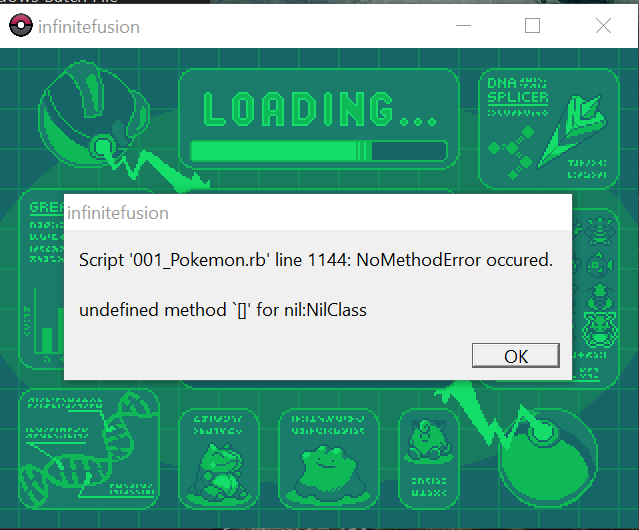 safe quail
As far as my unreasonable ideas what could be causing this
simple mortar
ill try....again,but no fusion this time just incase
ancient parcel
safe quail
As far as my unreasonable ideas what could be causing this
u think its a glitch?
cuz I do
simple mortar
uh...4 different times
safe quail
Have u leveled it up while unfused
stoic sigil
Oooh was it fused with something that also evolves at 36 and then unfused before 37?
simple mortar
uh idk honestly seems to be slow at lvls
safe quail
If the other half of the fusion was always evolving first then charmeleon would never have been given a chance to evolve
stoic sigil
And then unfusing before the next level could be a reasonable scenario for s bug
zinc lion
safe quail
Was it fused before
welp youre not gonna believe this. CORRECT sprite is working now and the alt sprite you asked me to add is gone now lmao. However, the other sprite that was having issues is working now
 simple mortar
i mean one was butterfree ithink,then gyrados and the sword thing,then idk
safe quail
zinc lion
welp youre not gonna believe this. CORRECT sprite is working now and the alt spr...
????
simple mortar
zinc lion
welp youre not gonna believe this. CORRECT sprite is working now and the alt spr...
yo those are cool
safe quail
simple mortar
i mean one was butterfree ithink,then gyrados and the sword thing,then idk
It may have been fused to smth that lowered its level below 36
When it unfuses, it doesn't immediately evolve
It has to level up again
safe quail
Woo, no bugs here!
safe quail
zinc lion
welp youre not gonna believe this. CORRECT sprite is working now and the alt spr...
Except right here...
zinc lion
I think maybe either cause my computer is running slow as a mf rn or because of the randomizer or something slowing my game down (ill admit i dont have the greatest hardware) is making the new imported sprites not show until i restart the fame
safe quail
So u think if u restart the game again the other one might show?
zinc lion
ill restart again and see, fingers crossed
if it shows, that means the only issues here were bad nomenclature on the sprites and my shitty laptop lmao
safe quail
I can only pray life be so simple
zinc lion
looool
safe quail
Ur good
simple mortar
its lvl40
safe quail
It is not intuitive
zinc lion
safe quail
I can only pray life be so simple
IT WORKED, the sprites not showing up was just because my game wasnt loading them when they were just added
stoic sigil
zinc lion
IT WORKED, the sprites not showing up was just because my game wasnt loading the...
What a strange case this was, glad it works
zinc lion
o7 lmao i appreciate all your guys' help. i definitely wouldnt have figured this out on my own so thanks for all your genius ideas
wind cedar
Where do we put the eggs folder from the community pack?
safe quail
Probably just put the contents in the eggs folder in graphics > Pokemon
Altho I'm not sure if the game has any way to recognize them
The eggs folder in Battlers is actually probably the one the game actually uses and can recognize
 lime valley
im trying to download the zip file on mega but it says i have to pay what can i do?
safe quail
U can use the mediafire link in xillo's bio instead
lime valley
ill give that a shot thanks
 coarse orchid
If u download light version, do you need to install the custom sprite in the #downloads ? or no since light version download latest custom sprite as we play
also another question, is there will be no patches for light version?
wind cedar
@safe quail @stoic sigil
All figured out now. Thanks for your help guys, much appreciated.
sterile pivot
hi, i have a question if anyone can help. when extracting the custom sprites, can i just put the custom battlers folder inside of the other custom battlers folder? or do i need to go copy and paste all the sprites from that folder?
stoic sigil
coarse orchid
If u download light version, do you need to install the custom sprite in the <#9...
Both full and light version have the download feature, but no, you don't need to install the sprite pack if you enable it, but you will notice some hitching as it downloads on the go. There is also a pathing bug that may cause some crashes when downloading autogen sprites
stoic sigil
coarse orchid
also another question, is there will be no patches for light version?
There will be, it's simply a version without sprites included to reduce download size
stoic sigil
sterile pivot
hi, i have a question if anyone can help. when extracting the custom sprites, ca...
The sprites' image files need to be directly in CustomBattlers, the game won't search subfolders
sterile pivot
stoic sigil
The sprites' image files need to be directly in CustomBattlers, the game won't s...
thank you
what about this .git folder? where does that go?
stoic sigil
sterile pivot
what about this .git folder? where does that go?
Ignore that, it's for dev stuff, idk how it got included
sterile pivot
thank you 
coarse orchid
stoic sigil
Both full and light version have the download feature, but no, you don't need to...
hold on, let me speak in my understanding. both is the same, normal version needs sprite packs manually meanwhile light version is auto but can crash the game when downloading the sprite on the go. there will be patches for light version such as for bugs but both have the same updates based on #announcements ?
is that correct?
stoic sigil
coarse orchid
hold on, let me speak in my understanding. both is the same, normal version need...
Almost. Neither need sprite packs. Light version needs to have the download feature enabled in the game options. The only difference between the versions is that light does not have any sprites in the game files because it relies on the download feature, while full still has the option to enable the download feature but it doesn't need it. Hence patches will apply to both in the same way
 vast forge
I have a question about adding the custom sprites from the pack. I know you need to copy and paste them into the custombattlers section, but is there a specific way I should do it? I just wanna know so I don't break anything.
stoic sigil
vast forge
I have a question about adding the custom sprites from the pack. I know you need...
As long as the images end up in CustomBattlers directly, you're good
coarse orchid
stoic sigil
Almost. Neither _need_ sprite packs. Light version _needs_ to have the download ...
- I can have both normal and light version at the same time right?
- I just need to download latest patch and copy+replace into both file correct?
vast forge
stoic sigil
As long as the images end up in CustomBattlers directly, you're good
Okay, thank you! And I just need to copy/paste the whole file, right? Not just one thing?
stoic sigil
coarse orchid
1. I can have both normal and light version at the same time right?
2. I just ne...
- There's no reason to have both. Pick the one you prefer based on your download speed, but I recommend the full version.
- Yes, to patch, you just extract the patch zip and copy its contents directly in top of the game files.
coarse orchid
stoic sigil
1. There's no reason to have both. Pick the one you prefer based on your downloa...
both normal and light version is full... so which full
stoic sigil
vast forge
Okay, thank you! And I just need to copy/paste the whole file, right? Not just o...
Yes, if the CustomBattlers folder gets filled with image (png) files, then you pasted correctly
 deft musk
im having issues with my game crashing and i need help
 stoic sigil
coarse orchid
both normal and light version is full... so which full
stoic sigil
coarse orchid
both normal and light version is full... so which full
Yeah the naming convention is a bit confusing. Light is infinitefusion_light_5.1.2.4_full.zip, full is infinitefusion_5.1.2.4-full.zip and the patch is infinitefusion_5.1.2.4-patch.zip
There is a new file called _WHICH VERSION SHOULD YOU GET.txt that you can read right away by just double clicking for more info
stoic sigil
deft musk
im having issues with my game crashing and i need help
You have a corrupted sprite. Delete the file 396.9.png located in Graphics\CustomBattlers\indexed\396\
deft musk
The one without the pic?
 stoic sigil
deft musk
The one without the pic?
stoic sigil
deft musk
The one without the pic?
Exactly, you can tell by that that it's corrupted
vast forge
stoic sigil
Yes, if the CustomBattlers folder gets filled with image (png) files, then you p...
Do I copy/paste all the pngs from the sprite pack's "custombattlers" to the game's, or do I copy/paste the entire pack folder into the game's "custombattlers"?
deft musk
thank you! i much appreaciate it!!
stoic sigil
deft musk
The one without the pic?
I also noticed the sync markings. If your game is stored in a cloud location like OneDrive, this can cause issues. I recommend moving the game to a local location like your local Documents folder